The Language Server Protocol (LSP) is a neat mechanism that
provides a common interface to what used to be language-specific
lookup mechanisms (like, say, running a Python interpreter in the
background to find function definitions).
There is also ctags shipped with UNIX since forever, but that
doesn't support looking backwards ("who uses this function"),
linting, or refactoring. In short, LSP rocks, and how do I use it
right now in my editor of choice (Emacs, in my case) and OS (Debian)
please?
(use-package lsp-mode
  :commands (lsp lsp-deferred)
  :hook ((python-mode go-mode) . lsp-deferred)
  :demand t
  :init
  (setq lsp-keymap-prefix "C-c l")
  ;; TODO: https://emacs-lsp.github.io/lsp-mode/page/performance/
  ;; also note re "native compilation": <+varemara> it's the
  ;; difference between lsp-mode being usable or not, for me
  :config
  (setq lsp-auto-configure t))
(use-package lsp-ui
  :config
  (setq lsp-ui-flycheck-enable t)
  (add-to-list 'lsp-ui-doc-frame-parameters '(no-accept-focus . t))
  (define-key lsp-ui-mode-map [remap xref-find-definitions] #'lsp-ui-peek-find-definitions)
  (define-key lsp-ui-mode-map [remap xref-find-references] #'lsp-ui-peek-find-references))
Note: this configuration might have changed since I wrote this, see
my init.el configuration for the most recent config.
The main reason for choosing lsp-mode over eglot is that it's in
Debian (and eglot is not). (Apparently, eglot has more chance of being
upstreamed, "when it's done", but I guess I'll cross that bridge when
I get there.)
I already had lsp-mode partially setup in Emacs so I only had to do
this small tweak to switch and change the prefix key
(because s-l or mod is used by my window
manager). I also had to pin LSP packages to bookworm here so that
it properly detects pylsp (the older version in Debian bullseye only
supports pyls, not packaged in Debian).
This won't do anything by itself: Emacs will need something to talk
with to provide the magic. Those are called "servers" and are
basically different programs, for each programming language, that
provide the magic.
Servers setup
The Emacs package provides a way (M-x lsp-install-server)
to install some of them, but I prefer to manage those tools through
Debian packages if possible, just like lsp-mode itself. Those are
the servers I currently know of in Debian:
package
languages
ccls
C, C++, ObjectiveC
clangd
C, C++, ObjectiveC
elpa-lsp-haskell
Haskell
fortran-language-server
Fortran
gopls
Golang
python3-pyls
Python
There might be more such packages, but those are surprisingly hard to
find. I found a few with apt search "Language Server Protocol", but
that didn't find ccls, for example, because that just said "Language
Server" in the description (which also found a few more pyls plugins,
e.g. black support).
Note that the Python packages, in particular, need to be upgraded to
their bookworm releases to work properly (here). It seems like
there's some interoperability problems there that I haven't quite
figured out yet. See also my Puppet configuration for LSP.
Finally, note that I have now completely switched away from Elpy
to pyls, and I'm quite happy with the results. lsp-mode feels slower
than elpy but I haven't done any of the performance tuning
and this will improve even more with native compilation. And
lsp-mode is much more powerful. I particularly like the "rename
symbol" functionality, which ... mostly works.
Remaining work
Puppet and Ruby
I still have to figure how to actually use this: I mostly spend my
time in Puppet these days, there is no server listed in the Emacs
lsp-mode language list, but there is one listed over at the
upstream language list, the puppet-editor-services
server.
But it's not packaged in Debian, and seems somewhat... involved. It
could still be a good productivity boost. The Voxpupuli team have
vim install instructions which also suggest installing
solargraph, the Ruby language server, also not packaged in
Debian.
Bash
I guess I do a bit of shell scripting from time to time nowadays, even
though I don't like it. So the bash-language-server may prove
useful as well.
Other languages
Here are more language servers available:
I've been using sbuild for a while to build my Debian packages,
mainly because it's what is used by the Debian autobuilders, but
also because it's pretty powerful and efficient. Configuring it just
right, however, can be a challenge. In my quick Debian development
guide, I had a few pointers on how to
configure sbuild with the normal schroot setup, but today I finished
a qemu based configuration.
Why
I want to use qemu mainly because it provides better isolation than a
chroot. I sponsor packages sometimes and while I typically audit
the source code before building, it still feels like the extra
protection shouldn't hurt.
I also like the idea of unifying my existing virtual machine setup
with my build setup. My current VM is kind of all over the place:
libvirt, vagrant, GNOME Boxes, etc?). I've been slowly
converging over libvirt however, and most solutions I use right now
rely on qemu under the hood, certainly not chroots...
I could also have decided to go with containers like LXC, LXD, Docker
(with conbuilder, whalebuilder, docker-buildpackage),
systemd-nspawn (with debspawn), unshare (with schroot
--chroot-mode=unshare), or whatever: I didn't feel those offer the
level of isolation that is provided by qemu.
The main downside of this approach is that it is (obviously) slower
than native builds. But on modern hardware, that cost should be
minimal.
Then to make this used by default, add this to ~/.sbuildrc:
# run autopkgtest inside the schroot
$run_autopkgtest = 1;
# tell sbuild to use autopkgtest as a chroot
$chroot_mode = 'autopkgtest';
# tell autopkgtest to use qemu
$autopkgtest_virt_server = 'qemu';
# tell autopkgtest-virt-qemu the path to the image
# use --debug there to show what autopkgtest is doing
$autopkgtest_virt_server_options = [ '--', '/srv/sbuild/qemu/%r-%a.img' ];
# tell plain autopkgtest to use qemu, and the right image
$autopkgtest_opts = [ '--', 'qemu', '/srv/sbuild/qemu/%r-%a.img' ];
# no need to cleanup the chroot after build, we run in a completely clean VM
$purge_build_deps = 'never';
# no need for sudo
$autopkgtest_root_args = '';
Note that the above will use the default autopkgtest (1GB, one core)
and qemu (128MB, one core) configuration, which might be a little low
on resources. You probably want to be explicit about this, with
something like this:
# extra parameters to pass to qemu
# --enable-kvm is not necessary, detected on the fly by autopkgtest
my @_qemu_options = ['--ram-size=4096', '--cpus=2'];
# tell autopkgtest-virt-qemu the path to the image
# use --debug there to show what autopkgtest is doing
$autopkgtest_virt_server_options = [ @_qemu_options, '--', '/srv/sbuild/qemu/%r-%a.img' ];
$autopkgtest_opts = [ '--', 'qemu', @qemu_options, '/srv/sbuild/qemu/%r-%a.img'];
This configuration will:
create a virtual machine image in /srv/sbuild/qemu for
unstable
tell sbuild to use that image to create a temporary VM to build
the packages
tell sbuild to run autopkgtest (which should really be
default)
tell autopkgtest to use qemu for builds and for tests
Note that the VM created by sbuild-qemu-create have an unlocked root
account with an empty password.
Other useful tasks
enter the VM to make test, changes will be discarded (thanks Nick
Brown for the sbuild-qemu-boot tip!):
You might also need parameters like --ram-size if you customized
it above.
And yes, this is all quite complicated and could be streamlined a
little, but that's what you get when you have years of legacy and just
want to get stuff done. It seems to me autopkgtest-virt-qemu should
have a magic flag starts a shell for you, but it doesn't look like
that's a thing. When that program starts, it just
says ok and sits there.
Maybe because the authors consider the above to be simple enough (see
also bug #911977 for a discussion of this problem).
Live access to a running test
When autopkgtest starts a VM, it uses this funky qemu commandline:
... which is a typical qemu commandline, I'm sorry to say. That
gives us a VM with those settings (paths are relative to a temporary
directory, /tmp/autopkgtest-qemu.w1mlh54b/ in the above example):
the shared/ directory is, well, shared with the VM
port 10022 is forward to the VM's port 22, presumably for SSH,
but not SSH server is started by default
the ttyS1 and ttyS2 UNIX sockets are mapped to the first two
serial ports (use nc -U to talk with those)
the monitor UNIX socket is a qemu control socket (see the QEMU
monitor documentation, also nc -U)
In other words, it's possible to access the VM with:
nc -U /tmp/autopkgtest-qemu.w1mlh54b/ttyS2
The nc socket interface is ... not great, but it works well
enough. And you can probably fire up an SSHd to get a better shell if
you feel like it.
Nitty-gritty details no one cares about
Fixing hang in sbuild cleanup
I'm having a hard time making heads or tails of this, but please bear
with me.
In sbuild + schroot, there's this notion that we don't really need
to cleanup after ourselves inside the schroot, as the schroot will
just be delted anyways. This behavior seems to be handled by the
internal "Session Purged" parameter.
At least in lib/Sbuild/Build.pm, we can see this:
my $is_cloned_session = (defined ($session->get('Session Purged')) &&
             $session->get('Session Purged') == 1) ? 1 : 0;
[...]
if ($is_cloned_session)
$self->log("Not cleaning session: cloned chroot in use\n");
  else
if ($purge_build_deps)
    # Removing dependencies
    $resolver->uninstall_deps();
  else
    $self->log("Not removing build depends: as requested\n");
... which is ... a little confusing to me. $info is:
my $info = $self->get('Chroots')->get_info($schroot_session);
... so I presume that depends on whether the schroot was correctly
cleaned up? I stopped digging there...
ChrootUnshare.pm is way more explicit:
$self->set('Session Purged', 1);
I wonder if we should do something like this with the autopkgtest
backend. I guess people might technically use it with something else
than qemu, but qemu is the typical use case of the autopkgtest
backend, in my experience. Or at least certainly with things that
cleanup after themselves. Right?
For some reason, before I added this line to my configuration:
$purge_build_deps = 'never';
... the "Cleanup" step would just completely hang. It was quite
bizarre.
Disgression on the diversity of VM-like things
There are a lot of different virtualization solutions one can use
(e.g. Xen, KVM, Docker or Virtualbox). I have also
found libguestfs to be useful to operate on virtual images in
various ways. Libvirt and Vagrant are also useful wrappers on
top of the above systems.
There are particularly a lot of different tools which use Docker,
Virtual machines or some sort of isolation stronger than chroot to
build packages. Here are some of the alternatives I am aware of:
Take, for example, Whalebuilder, which uses Docker to build
packages instead of pbuilder or sbuild. Docker provides more
isolation than a simple chroot: in whalebuilder, packages are
built without network access and inside a virtualized
environment. Keep in mind there are limitations to Docker's security
and that pbuilder and sbuilddo build under a different user
which will limit the security issues with building untrusted
packages.
On the upside, some of things are being fixed: whalebuilder is now
an official Debian package (whalebuilder) and has added
the feature of passing custom arguments to dpkg-buildpackage.
None of those solutions (except the autopkgtest/qemu backend) are
implemented as a sbuild plugin, which would greatly reduce their
complexity.
I was previously using Qemu directly to run virtual machines, and
had to create VMs by hand with various tools. This didn't work so well
so I switched to using Vagrant as a de-facto standard to build
development environment machines, but I'm returning to Qemu because it
uses a similar backend as KVM and can be used to host longer-running
virtual machines through libvirt.
The great thing now is that autopkgtest has good support for qemuandsbuild has bridged the gap and can use it as a build
backend. I originally had found those bugs in that setup, but all of
them are now fixed:
#911977: sbuild: how do we correctly guess the VM name in autopkgtest?
#911979: sbuild: fails on chown in autopkgtest-qemu backend
#911963: autopkgtest qemu build fails with proxy_cmd: parameter not set
#911981: autopkgtest: qemu server warns about missing CPU features
So we have unification! It's possible to run your virtual machines
and Debian builds using a single VM image backend storage, which is
no small feat, in my humble opinion. See the sbuild-qemu blog post
for the annoucement
Now I just need to figure out how to merge Vagrant, GNOME Boxes, and
libvirt together, which should be a matter of placing images in the
right place... right? See also hosting.
pbuilder vs sbuild
I was previously using pbuilder and switched in 2017 to sbuild.
AskUbuntu.com has a good comparative between pbuilder and sbuild
that shows they are pretty similar. The big advantage of sbuild is
that it is the tool in use on the buildds and it's written in Perl
instead of shell.
My concerns about switching were POLA (I'm used to pbuilder), the fact
that pbuilder runs as a separate user (works with sbuild as well now,
if the _apt user is present), and setting up COW semantics in sbuild
(can't just plug cowbuilder there, need to configure overlayfs or
aufs, which was non-trivial in Debian jessie).
Ubuntu folks, again, have moredocumentation there. Debian
also has extensive documentation, especially about how to
configure overlays.
I was ultimately convinced by stapelberg's post on the topic which
shows how much simpler sbuild really is...
Who
Thanks lavamind for the introduction to the sbuild-qemu package.
This is the fourth book of the Malloreon, the sequel series to
the Belgariad. Eddings as usual helpfully
summarizes the plot of previous books (the one thing about his writing
that I wish more authors would copy), this time by having various
important people around the world briefed on current events. That said,
you don't want to start reading here (although you might wish you could).
This is such a weird book.
One could argue that not much happens in the Belgariad other than map
exploration and collecting a party, but the party collection involves
meddling in local problems to extract each new party member. It's a bit
of a random sequence of events, but things clearly happen. The Malloreon
starts off with a similar structure, including an explicit task to create
a new party of adventurers to save the world, but most of the party is
already gathered at the start of the series since they carry over from the
previous series. There is a ton of map exploration, but it's within the
territory of the bad guys from the previous series. Rather than local
meddling and acquiring new characters, the story is therefore chasing
Zandramas (the big bad of the series) and books of prophecy.
This could still be an effective plot trigger but for another decision of
Eddings that becomes obvious in Demon Lord
of Karanda (the third book): the second continent of this world, unlike
the
Kingdoms
of Hats world-building of the Belgariad, is mostly uniform. There are
large cities, tons of commercial activity, and a fairly effective and
well-run empire, with only a little local variation. In some ways it's a
welcome break from Eddings's previous characterization by stereotype, but
there isn't much in the way of local happenings for the characters to get
entangled in.
Even more oddly, this continental empire, which the previous series set up
as the mysterious and evil adversaries of the west akin to Sauron's domain
in Lord of the Rings, is not mysterious to some of the party at
all. Silk, the Drasnian spy who is a major character in both series, has
apparently been running a vast trading empire in Mallorea. Not only has
he been there before, he has houses and factors and local employees in
every major city and keeps being distracted from the plot by his cutthroat
capitalist business shenanigans. It's as if the characters ventured into
the heart of the evil empire and found themselves in the entirely normal
city next door, complete with restaurant recommendations from one of their
traveling companions.
I think this is an intentional subversion of the normal fantasy plot by
Eddings, and I kind of like it. We have met the evil empire, and they're
more normal than most of the good guys, and both unaware and entirely
uninterested in being the evil empire. But in terms of dramatic plot
structure, it is such an odd choice. Combined with the heroes
being so absurdly powerful that they have no reason to take most dangers
seriously (and indeed do not), it makes this book remarkably anticlimactic
and weirdly lacking in drama.
And yet I kind of enjoyed reading it? It's oddly quiet and comfortable
reading. Nothing bad happens, nor seems very likely to happen. The
primary plot tension is Belgarath trying to figure out the plot of the
series by tracking down prophecies in which the plot is written down with
all of the dramatic tension of an irritated rare book collector. In the
middle of the plot, the characters take a detour to investigate an
alchemist who is apparently immortal, featuring a university on Melcena
that could have come straight out of a Discworld novel, because
investigating people who spontaneously discover magic is of arguably equal
importance to saving the world. Given how much the plot is both on rails
and clearly willing to wait for the protagonists to catch up, it's hard to
argue with them. It felt like a side quest in a video game.
I continue to find the way that Eddings uses prophecy in this series to be
highly amusing, although there aren't nearly enough moments of the
prophecy giving Garion stage direction. The basic concept of two
competing prophecies that are active characters in the world attempting to
create their own sequence of events is one that would support a better
series than this one. It's a shame that Zandramas, the main villain, is
rather uninteresting despite being female in a highly sexist society,
highly competent, a different type of shapeshifter (I won't say more to
avoid spoilers for earlier books), and the anchor of the other prophecy.
It's good material, but Eddings uses it very poorly, on top of making the
weird decision to have her talk like an extra in a Shakespeare play.
This book was astonishingly pointless. I think the only significant plot
advancement besides map movement is picking up a new party member (who was
rather predictable), and the plot is so completely on rails that the
characters are commenting about the brand of railroad ties that Eddings
used. Ce'Nedra continues to be spectacularly irritating. It's not, by
any stretch of the imagination, a good book, and yet for some reason I
enjoyed it more than the other books of the series so far. Chalk one up
for brain candy when one is in the right mood, I guess.
Followed by The Seeress of Kell, the epic (?) conclusion.
Rating: 6 out of 10
Windows 10 added a new PIN login method, which is an optional login method instead of an Internet based password through Microsoft or a Domain password through Active Directory. Here is a web page explaining some of the technology (don t watch the YouTube video) [1]. There are three issues here, whether a PIN is any good in concept, whether the specifics of how it works are any good, and whether we can copy any useful ideas for Linux.
Is a PIN Any Good?
A PIN in concept is a shorter password. I think that less secure methods of screen unlocking (fingerprint, face unlock, and a PIN) can be reasonably used in less hostile environments. For example if you go to the bathroom or to get a drink in a relatively secure environment like a typical home or office you don t need to enter a long password afterwards. Having a short password that works for short time periods of screen locking and a long password for longer times could be a viable option.
It could also be an option to allow short passwords when the device is in a certain area (determined by GPS or Wifi connection). Android devices have in the past had options to disable passwords when at home.
Is the Windows 10 PIN Any Good?
The Windows 10 PIN is based on TPM security which can provide real benefits, but this is more of a failure of Windows local passwords in not using the TPM than a benefit for the PIN. When you login to a Windows 10 system you will be given a choice of PIN or the configured password (local password or AD password).
As a general rule providing a user a choice of ways to login is bad for security as an attacker can use whichever option is least secure.
The configuration options for Windows 10 allow either group policy in AD or the registry to determine whether PIN login is allowed but doesn t have any control over when the PIN can be used which seems like a major limitation to me.
The claim that the PIN is more secure than a password would only make sense if it was a viable option to disable the local password or AD domain password and only use the PIN. That s unreasonably difficult for home users and usually impossible for people on machines with corporate management.
Ideas For Linux
I think it would be good to have separate options for short term and long term screen locks. This could be implemented by having a screen locking program use two different PAM configurations for unlocking after short term and long term lock periods.
Having local passwords based on the TPM might be useful. But if you have the root filesystem encrypted via the TPM using systemd-cryptoenroll it probably doesn t gain you a lot. One benefit of the TPM is limiting the number of incorrect attempts at guessing the password in hardware, the default is allowing 32 wrong attempts and then one every 10 minutes. Trying to do that in software would allow 32 guesses and then a hardware reset which could average at something like 32 guesses per minute instead of 32 guesses per 320 minutes. Maybe something like fail2ban could help with this (a similar algorithm but for password authentication guesses instead of network access).
Having a local login method to use when there is no Internet access and network authentication can t work could be useful. But if the local login method is easier then an attacker could disrupt Internet access to force a less secure login method.
Is there a good federated authentication system for Linux? Something to provide comparable functionality to AD but with distributed operation as a possibility?
Back in April 2021 I introduced a simple text-based adventure game, The Lighthouse of Doom, which I'd written in Z80 assembly language for CP/M systems.
As it was recently the 40th Anniversary of the ZX Spectrum 48k, the first computer I had, and the reason I got into programming in the first place, it crossed my mind that it might be possible to port my game from CP/M to the ZX Spectrum.
To recap my game is a simple text-based adventure game, which you can complete in fifteen minutes, or less, with a bunch of Paw Patrol easter-eggs.
You enter simple commands such as "up", "down", "take rug", etc etc.
You receive text-based replies "You can't see a telephone to use here!".
My code is largely table-based, having structures that cover objects, locations, and similar state-things. Most of the code involves working with those objects, with only a few small platform-specific routines being necessary:
Clearing the screen.
Pausing for "a short while".
Reading a line of input from the user.
Sending a $-terminated string to the console.
etc.
My feeling was that I could replace the use of those CP/M functions with something custom, and I'd have done the 99% of the work. Of course the devil is always in the details.
Let's start. To begin with I'm lucky in that I'm using the pasmo assembler which is capable of outputting .TAP files, which can be loaded into ZX Spectrum emulators.
I'm not going to walk through all the code here, because that is available within the project repository, but here's a very brief getting-started guide which demonstrates writing some code on a Linux host, and generating a TAP file which can be loaded into your favourite emulator. As I needed similar routines I started working out how to read keyboard input, clear the screen, and output messages which is what the following sample will demonstrate..
First of all you'll need to install the dependencies, specifically the assembler and an emulator to run the thing:
# apt install pasmo spectemu-x11
Now we'll create a simple assembly-language file, to test things out - save the following as hello.z80:
    ; Code starts here
    org 32768
    ; clear the screen
    call cls
    ; output some text
    ld   de, instructions                  ; DE points to the text string
    ld   bc, instructions_end-instructions ; BC contains the length
    call 8252
    ; wait for a key
    ld hl,0x5c08        ; LASTK
    ld a,255
    ld (hl),a
wkey:
    cp (hl)             ; wait for the value to change
    jr z, wkey
    ; get the key and save it
    ld a,(HL)
    push af
    ; clear the screen
    call cls
    ; show a second message
    ld de, you_pressed
    ld bc, you_pressed_end-you_pressed
    call 8252
    ;; Output the ASCII character in A
    ld a,2
    call 0x1601
    pop af
    call 0x0010
    ; loop forever.  simple demo is simple
endless:
    jr endless
cls:
    ld a,2
    call 0x1601  ; ROM_OPEN_CHANNEL
    call 0x0DAF  ; ROM_CLS
    ret
instructions:
    defb 'Please press a key to continue!'
instructions_end:
you_pressed:
    defb 'You pressed:'
you_pressed_end:
end 32768
Now you can assemble that into a TAP file like so:
$ pasmo --tapbas hello.z80 hello.tap
The final step is to load it in the emulator:
$ xspect -quick-load -load-immed -tap hello.tap
The reason I specifically chose that emulator was because it allows easily loading of a TAP file, without waiting for the tape to play, and without the use of any menus. (If you can tell me how to make FUSE auto-start like that, I'd love to hear!)
I wrote a small number of "CP/M emulation functions" allowing me to clear the screen, pause, prompt for input, and output text, which will work via the primitives available within the standard ZX Spectrum ROM. Then I reworked the game a little to cope with the different screen resolution (though only minimally, some of the text still breaks lines in unfortunate spots):
The end result is reasonably playable, even if it isn't quite as nice as the CP/M version (largely because of the unfortunate word-wrapping, and smaller console-area). So now my repository contains a .TAP file which can be loaded into your emulator of choice, available from the releases list.
Here's a brief teaser of what you can expect:
Outstanding bugs? Well the line-input is a bit horrid, and unfortunately this was written for CP/M accessed over a terminal - so I'd assumed a "standard" 80x25 resolution, which means that line/word-wrapping is broken in places.
That said it didn't take me too long to make the port, and it was kinda fun.
My attempt to travel to the UK by train last year didn t go quite as well as I expected. As I mentioned in that blog post, the NightJet to Brussels was cancelled, forcing me to fly instead. This disappointed me so much that I actually unpublished the blog post minutes after it was originally put online. The timing was nearly perfect: I type make publish and I get an email from BB saying they don t know if my train is going to run. Of course it didn t, as Deutsche Bahn workers went ahead with their strike. The blog post sat in the drafts for more than half a year until yesterday, when I finally updated and published it.
The reason I have finally published it is that I m going to the UK by train once again. Now, unless railways decide to hold a strike again, fully by train both ways. Very expensive, especially compared to the price of Ryanair flights to my destination. Unfortunately, even though Eurostar added more daily services, they re still not cheap, especially on a shorter notice. This seems to apply to the BB s NightJet even more: I tried many routes between Vienna and London, and the cheapest still seemed to be the connection through Brussels.
While researching the prices of the tickets, it seems all booking systems decided to stop co-operating. The Trainline refused to let me look up any trains at all, even with all tracking and advertisement allowed, SNCF kepts showing me overly generic errors (Sorry, an error has occurred.), while the GWR booking system kept crashing with a 500 Internal Server Error for about two hours.
Trainline, GWR and SNCF kept crashing
Eventually, having spent a lot of time and money, I ve booked my trains to, within and back from England. This time, Cambridge is among the destinations.
The complete route
Date
Station
Arrival
Departure
Train
26.4
Bratislava hl.st.
18:37
REX 2529
Wien Hbf
19:44
20:13
NJ 40490
27.4
Bruxelles-Midi
9:54
15:56
EST 9145
London St Pancras
17:01
17:43
ThamesLink
Cambridge
18:43
I m not sure about it yet, but I may end up taking an earlier train from Bratislava just to ensure there s enough time for the change in Vienna; similarly, I m not sure how much time I will be spending at St Pancras, so I may take one of the later trains.
P.S. The maps in this and other posts were created using uMap; the map data come from OpenStreetMap. The train route visualisation was generated with help of signal.eu.org.
My first self-designed functional 3D print is a replacement
battery cover for a LED fake-candle that my daughter uses
as a night-light.
I measured the original cover (we have three of the candles)
using a newly-purchased micrometer and tried to re-create it
in OpenSCAD. I skipped the screw-hole that is for securing
the cover as we don't use that.
I sliced it using Cura and printed it using PETG on our
office 3D printer, a Ender 3. Print time was about an hour.
To my amazement, my first take fits snugly!
I've uploaded the OpenSCAD source here: batterycover.scad. It's covered
under the terms of Creative Commons Attribution-ShareAlike 4.0 International
(CC BY-SA 4.0).
This post was written in August 2021. Just as I was going to publish it, I received an email from BB stating that due to a railway strike in Germany my night train would be cancelled. Since the rest of the trip has already been booked well in advance, I had to take a plane to Charleroi and a bus to Brussels to catch my Eurostar. Ultimately, I ended up publishing it in April 2022, just as I m about to leave for a fully train-powered trip to the UK once again.
Before the pandemic started, I planned to use the last months of my then-expiring UK visa and go to England by train. I ve completed two train long journeys by that time already, to Brussels and to Belarus and Ukraine, but this would be something quite different, as I wanted to have multiple stops on my way, use night trains where it made sense, and to go through the Channel Tunnel.
The Channel Tunnel fascinated me since my childhood; I first read about it in the Soviet Science and Life magazine () when I was seven. I ve never had the chance to use it though, since to board any train going though it I d first need to get to France, Belgium or the Netherlands, making it significantly more expensive than the cheap 30 Ryanair flights to Stansted.
As the coronavirus spread across the world, all of my travel plans along with plans for a sabbatical had to be cancelled. During 2020, I only managed to go on two weekend trips to Prague and Budapest, followed by a two-weeks holiday on Crete (we returned just a couple of weeks before the infection numbers rose and lockdowns started). I do realise that a lot of people couldn t even have this much because the situation in their countries was much worse we were lucky to have had at least some travel.
Fast forward to August 2021, I m fully vaccinated, I once again have a UK visa for five years, and the UK finally recognises the EU vaccination passports yay! I can finally go to Devon to see my mother and sister again. By train, of course.
Compared to my original plan, this journey will be different: about the same or even more expensive than I originally planned, but shorter and with fewer stops on the way. My original plan would be to take multiple trains from Bratislava to France or Belgium and complete this segment of the trip in about three days, enjoying my stay in a couple of cities on the way. Instead, I m taking a direct NightJet from Vienna to Brussels, not stopping anywhere on the way.
Train route from Bratislava to Brussels
Since I was booking my trip just two weeks ahead, the price of the ticket is not that I hoped for, but much higher: 109 for the ticket itself and 60 for the berth (advance bookings could be about twice as cheap).
Next, to London! Eurostar is still on a very much reduced schedule, running one train only from Amsterdam through Brussels and Lille to London each day. This means, of course, higher ticket prices (I paid about 100 for the ticket) and longer waiting time in Brussels my sleeper arrives about 10 am, but the Eurostar train is scheduled to depart at 3 pm.
Train route from Brussels to London
The train makes a stop in Lille, which I initially suspected to be risky as at the time when I booked my tickets, as at the time France was on the amber plus list for the UK, requiring a quarantine upon arrival. However, Eurostar announced that they will assign travellers from Lille to a different carriage to avoid other passengers having to go to quarantine, but recently France was taken off the amber plus list.
The train fare system in the UK is something I don t quite understand, as sometimes split tickets are cheaper, sometimes they re expensive, sometimes prices for the same service at different times can be vastly different, off-peak tickets don t say what exactly off-peak means (very few people in the UK are asked were able to tell me when exactly off-peak hours are). Curiously, transfers between train stations using London Underground services can be included into railway tickets, but some last mile connection like Exeter to Honiton cannot (but this used to be possible). Both GWR.com and TrainLine refused to sell me a single ticket from London to Honiton through Exeter, insisting I split the ticket at Exeter St Davids or take the slower South Western train to Honiton via Salisbury and Yeovil. I ended up buying a 57 ticket from Paddington to Exeter St Davids with the first segment being the London Underground from St Pancras, and a separate 7.70 ticket to Honiton.
Change of trains in LondonChange of trains in Exeter
Date
Station
Arrival
Departure
Train
12.8
Bratislava-Petr alka
18:15
REX 7756
Wien Hbf
19:15
19:53
NJ 50490
13.8
Bruxelles-Midi
9:55
15:06
EST 9145
London St Pancras
16:03
16:34
TfL
London Paddington
16:49
17:04
GWR 59231
Exeter St Davids
19:19
19:25
SWR 52706
Honiton
19:54
Unfortunately, due to the price of the tickets, I m taking a 15 Ryanair flight back
Update after the journey
Since I flew to Charleroi instead of comfortably sleeping in a night train, I had to put up with inconveniences of airports, including cumbersome connections to the nearby cities. The only reasonable way of getting from Charleroi to Brussels is an overcrowded bus which takes almost an hour to arrive. I used to take this bus when I tried to save money on my way to FOSDEM, and I must admit it s not something I missed.
Boarding the Eurostar train went fine, my vaccination passport and Covid test wasn t really checked, just glanced at. The waiting room was a bit of a disappointment, with bars closed and vending machines broken. Since it was underground, I couldn t even see the trains until the very last moment when we were finally allowed on the platform. The train itself, while comfortable, disappointed me with the bistro carriage: standing only, instant coffee, poor selection of food and drinks. I m glad I bought some food at Carrefour at the Midi station!
When I arrived in Exeter, I soon found out why the system refused to sell me a through ticket: 6 minutes is not enough to change trains at Exeter St Davids! Or, it might have been if I took the right footbridge but I took the one which led into a very talkative (and slow!) lift. I ended up running to the train just as it closed the doors and departed, leaving me tin Exeter for an hour until. I used this chance and walked to Exeter Central, and had a pint in a conveniently located pub around the corner.
P.S. The maps in this and other posts were created using uMap; the map data come from OpenStreetMap. The train route visualisation was generated with help of the Raildar.fr OSRM instance.
Finally, TIL, what can all be the reason for systemd services to hang indefinitely. The internet is flooded with numerous reports on this topic but no clear answers. So no more uselessly marked workarounds like: systemctl daemon-reload and systemctl-daemon-reexec for this scenario.
The scene would be something along the lines of:
The snapper-timeline service is important to me and it not running for months is a complete failure. Disappointingly, commands like systemctl --failed do not report of this oddity. The overall system status is reported to be fine, which is completely incorrect.
Thankfully, a kind soul s comment gave the hint. The problem is that you could be having certain services in Activating status, which thus blocks all other services; quietly. So much for the unnecessary fun.
Looking further, in my case, it was:
That was it. I knew the systemd-timesyncd service, in the past, had given me enough headaches. And so was it this time, just quietly doing it all again.
rrs@priyasi:~$ systemctl status systemd-time-wait-sync.service
systemd-time-wait-sync.service - Wait Until Kernel Time Synchronized
Loaded: loaded (/lib/systemd/system/systemd-time-wait-sync.service; enabled; vendor preset>
Active: activating (start) since Fri 2022-04-22 13:14:25 IST; 1min 38s ago
Docs: man:systemd-time-wait-sync.service(8) Main PID: 11090(systemd-time-wa) Tasks: 1(limit: 37051) Memory: 836.0K
CPU: 7ms
CGroup: /system.slice/systemd-time-wait-sync.service
11090 /lib/systemd/systemd-time-wait-sync
Apr 22 13:14:25 priyasi systemd[1]: Starting Wait Until Kernel Time Synchronized...
Apr 22 13:14:25 priyasi systemd-time-wait-sync[11090]: adjtime state 5 status 40 time Fri 2022->
13:16 => 3
Dear LazyWeb, anybody knows of why the systemd-time-wait-sync service would hang indefinitely? I ve had identical setups on many machines, in the same network, where others don t exhibit this problem.
The TimeoutStartSec=infinity is definitely an attribute that shouldn t be shipped in any system services. There are use cases for it but that should be left for local admins to explicitly decide. Hanging for infinity is not a desired behavior for a system service.
In figuring all this out, today I learnt the handy systemctl list-jobs command, which will give the list of active running/blocked/waiting jobs.
There has been a
flurry of activity on the Debian mailing lists ever since Steve
McIntyre raised the issue of including non-free firmware as part of
official Debian installation images.
Firstly I should point out that I am in complete agreement with Steve s proposal to include non-free firmware as part of an installation image. Likewise I think that we should have a separate archive section for firmware. Because without doing so it will soon become almost impossible to install onto any new hardware. However, as always the issue is more nuanced than a first glance would suggest.
Lets start by
defining what is firmware?
Firmware is any
software that runs outside the orchestration of the operating system.
Typically firmware will be executed on a processor(s) separate from
the processor(s) running the OS, but this does not need to be the
case.
As Debian we
are content that our systems can operate using fully free and open
source software and firmware. We can install our OS without needing
any non-free firmware.
This is an illusion!
Each and every PC
platform contains non-free firmware
It may be possible to run free firmware on some Graphics controllers, Wi-Fi chip-sets, or Ethernet cards and we can (and perhaps should) choose to spend our money on systems where this is the case. When installing a new system we might still be forced to hold our nose and install with non-free firmware on the peripheral before we are able to upgrade it to FLOSS firmware later if this is exists or is even possible to do so. However after the installation we are running a full FLOSS system in terms of software and firmware.
We all (almost
without exception) are running propitiatory firmware whether we like
it or not.
Even after carefully selecting graphics and network hardware with FLOSS firmware options we still haven t escaped from non-free-firmware. Other peripherals contain firmware too each keyboard, disk (SSDs and Spinning rust). Even your USB memory stick that you use to contain the Debian installation image contains a microcontroller and hence also contains firmware that runs on it.
Much of this
firmware can not even be updated.
Some can be
updated, but is stored in FLASH ROM and the hardware vendor has
defeated all programming methods (possibly circumnavigated with a
hardware mod).
Some of it can
be updated but requires external device programmers (and often the
programming connections are a series of test points dotted around
the board and not on a header in order to make programming as
difficult as possible).
Sometimes the
firmware can be updated from within the host operating system (i.e.
Debian)
Sometimes, as
Steve pointed out in his post, the hardware vendor has enough
firmware on a peripheral to perform basic functions perhaps
enough to install the OS, but requires additional firmware to enable
specific feature (i.e. higher screen resolutions, hardware
accelerated functions etc.)
Finally some
vendors don t even bother with any non-volatile storage beyond a
basic boot loader and firmware must be loaded before the device can
be used in any mode.
What about the motherboard? If we are lucky we might be able to run a FLOSS implementation of the UEFI subsystem (edk2/tianocore for example), indeed the non AMD64/i386 platforms based around ARM, MIPS architectures are often the most free when it comes to firmware.
What about the microcode on the processor? Personally I wasn t aware that that this was updatable firmware until the Spectre and Meltdown classes of vulnerabilities arose a few years back.
So back to Debian
images including non-free firmware.
This is specifically to address the last two use cases mentioned above, i.e. where firmware needs to be loaded to achieve a minimum functioning of a device. Although it could also include motherboard support, and microcode as well.
As far as I can tell
the proposal exists for several reasons:
#1 Because some freely distributable firmware is required for
more and more devices, in order to install Debian, or because whilst
Debian can be installed a desktop environment can not be started or
fully function
#2 Because frankly it is less work to produce, test and maintain fewer installation images As someone who performs tests on our images, this clearly gets my vote :-)
and perhaps most important of all..
#3 Because our least experienced users, and new users will download an official image and give up if things don t just work TM
Steve s proposal
option 5 would address theses issues and I fully support it.
I would love to see
separate repositories for firmware and firmware-none free.
Additionally to accompany firmware non-free I would like to have
information on what the firmware actually does. Can I run my
hardware without it, what function(s) are limited without the
firmware, better yet is there a FLOSS equivalent that I can load
instead? Is this something that we can present in Debian installer?
I would love not to require non-free firmware, but if I can t,
I would love if DI would enable a user to make an informed choice as
to what, if any, firmware is installed.
Should we be
requesting (requiring?) this information for any non-free firmware
image that we carry in the archive?
Finally lets
consider firmware in the wider general case, not just the case where
we need to load firmware from within Debian each and every boot.
Personally I am
annoyed whenever a hardware manufacturer has gone out of their way to
prevent firmware updates. Lets face it software contains bugs, and
we can assume that the software making up a firmware image will as
well.
Critical (security)
vulnerabilities found in firmware, especially if this runs on the
same processor(s) as the OS can impact on the wider system, not just
the device itself. This will mean that, without updatable firmware,
the hardware itself should be withdrawn from use whilst it would
otherwise still function. By preventing firmware updates vendors are
forcing early obsolescence in the hardware they sell, perhaps good
for their bottom line, but certainly no good for users or the
environment.
Here I can practice
what I preach. As an Electronic Engineer / Systems architect I have
been beating the drum for In System Updatable firmware for ALL
programmable devices in a system, be it a simple peripheral or a
deeply embedded system. I can honestly say that over the last 20
years (yes I have been banging this particular drum for that long) I
have had 100% success in arguing this case commercially. Having
device programmers in R&D departments is one thing, but that is
additional cost for production, and field service. Needing custom
programming headers or even a bed of nails fixture to connect your
target device to a programmer is more trouble than it is worth.
Finally, the ability to update firmware in the field means that you
can launch your product on schedule, make a sale and ship to a
customer even if the first thing that you need to do is download an
update. Offering that to any project manager will make you very
popular indeed.
So what if this
firmware is non-free? As long as the firmware resides in
non-volatile media without needing the OS to interact with it, we as
a project don t need to carry it in our archives. And we as
principled individuals can vote with our feet and wallets by choosing
to purchase devices that have free firmware.
But where that isn t
an option, I ll take updatable but non-free firmware over non-free
firmware that can not be updated any day of the week.
Sure, the
manufacture can choose to no longer support the firmware, and it is
shocking how soon this happens often in the consumer market, the
manufacture has withdrawn support for a product before it even
reaches the end user (In which case we should boycott that
manufacture in future until they either change their ways of go
bust). But again if firmware can be updated in system that
would at least allow the possibility of open firmware to arise.
Indeed the only commercial case I have seen to argue against
updatable firmware has been either for DRM, in which case good
lets get rid of both, or for RF licence compliance, and even then it
is tenuous because in this case the manufacture wants ISP for its own
use right up until a device is shipped out the door, typically
achived by blowing one time programmable fuse links .
There surely is need for better tooling on the BTRFS File System side.
While migrating my setup from one machine to another, this is one issue I came to be aware of, only today, when my backup tool (btrbk) complained about it. Following the pointers, I see the below snippet in btrfs-subvolume manual page.
       A snapshot that was created by send/receive will be read-only, with different last change generation, read-only and with set received_uuid which identifies the subvolume on the
       filesystem that produced the stream. The usecase relies on matching data on both sides. Changing the subvolume to read-write after it has been received requires to reset the
       received_uuid. As this is a notable change and could potentially break the incremental send use case, performing it by btrfs property set requires force if that is really desired by
       user.

           Note
           The safety checks have been implemented in 5.14.2, any subvolumes previously received (with a valid received_uuid) and read-write status may exist and could still lead to
           problems with send/receive. You can use btrfs subvolume show to identify them. Flipping the flags to read-only and back to read-write will reset the received_uuid manually. There
           may exist a convenience tool in the future.
Fixing the Received UUID: flag meant running the below:
rrs@priyasi:.../spool$ sudo btrfs sub show /
WARNING: the subvolume is read-write and has received_uuid set,
         don't use it for incremental send. Please see section
         'SUBVOLUME FLAGS' in manual page btrfs-subvolume for
         further information.
ROOTVOL
        Name:                   ROOTVOL
        UUID:                   122b0de1-e6f2-6845-aba0-6bf766c16526
        Parent UUID:            -
        Received UUID:          34772967-c709-5146-bf20-898f7dbc2c1f
        Creation time:          2021-12-02 19:59:29 +0530
        Subvolume ID:           256
        Generation:             138473
        Gen at creation:        7
        Parent ID:              5
        Top level ID:           5
        Flags:                  -
        Send transid:           35245
        Send time:              2021-12-02 19:59:29 +0530
        Receive transid:        34
        Receive time:           2021-12-02 20:13:11 +0530
        Snapshot(s):
                                ROOTVOL/.snapshots/1/snapshot
                                ROOTVOL/.snapshots/2/snapshot
22:40


rrs@priyasi:.../spool$ sudo btrfs property set / ro true
WARNING: read-write subvolume with received_uuid, this is bad
22:40


rrs@priyasi:.../spool$ sudo btrfs property set -f / ro false
22:40


rrs@priyasi:.../spool$ sudo btrfs sub show /
ROOTVOL
        Name:                   ROOTVOL
        UUID:                   122b0de1-e6f2-6845-aba0-6bf766c16526
        Parent UUID:            -
        Received UUID:          -
        Creation time:          2021-12-02 19:59:29 +0530
        Subvolume ID:           256
        Generation:             138473
        Gen at creation:        7
        Parent ID:              5
        Top level ID:           5
        Flags:                  -
        Send transid:           0
        Send time:              2021-12-02 19:59:29 +0530
        Receive transid:        138480
        Receive time:           2022-04-20 22:40:43 +0530
        Snapshot(s):
                                ROOTVOL/.snapshots/1/snapshot
                                ROOTVOL/.snapshots/2/snapshot
22:40
Hoping there won t be surprises in the coming months.
A while ago I was given a few reasonably high-end Android phones to give away. I gave two very nice phones to someone who looks after refugees so a couple of refugee families could make video calls to relatives. The third phone is a Huawei Nova 7i [1] which doesn t have the Google Play Store. The Nova 7i is a ridiculously powerful computer (8G of RAM in a phone!!!) but without the Google Play Store it s not much use to the average phone user. It has the HuaWei App Gallery which isn t as bad as most of the proprietary app stores of small players in the Android world, it has SnapChat, TikTok, Telegram, Alibaba, WeChat, and Grays auction (an app I didn t even know existed) along with many others. It also links to ApkPure (apparently a 3rd party app installer that obtains APK files for major commercial apps) for Facebook among others. The ApkPure thing might be Huawei outsourcing the violation of Facebook terms of service. For the moment I ve decided to only use free software on this phone and use my old phone for non-free stuff (Facebook, LinkedIn, etc). The eventual aim is that I can only carry a phone with free software for normal use and carry a second phone if I m active on LinkedIn or something. My recollection is that when I first got the phone (almost 2 years ago) it didn t have such a range of apps.
The first thing to install was f-droid [2] as the app repository. F-droid has a repository of thousands of free software Android apps as well as some apps that are slightly less free which are tagged appropriately. You can install the F-Droid app from the web site. As an aside I had to go to settings and enable force old index format to get the list of packages, I don t know why as other phones had worked without it.
Here are the F-Droid apps I installed:
Kdeconnect to transfer files to PC. This has some neat features including using the PC keyboard on Android. One downside is that there s no convenient way to kill it. I don t want it hanging around, I want to transfer a file and close it down to minimise exposure.
K9 is an Android app for email that I ve used for over a decade now. Previously I ve used it from the Play Store but it s available in F-droid. I used Kdeconnect to transfer the exported configuration from my old phone to my PC and then from my PC to my new phone.
I m now using SchildiChat for Matrix as a replacement for Google Hangouts (I previously wrote about how Google is killing Hangouts [3]). One advantage of SchildiChat is that it keeps a notification running 24*7 to reduce the incidence of Android killing it. The process of sending private messages with Matrix seems noticeably slower than Hangouts, while Google will inevitably be faster than a federated system (if only because they buy better hardware than I rent) the difference shouldn t be enough to notice (my Matrix servers might need some work).
I used ffupdater to install Firefox. It can also install other browsers that don t publish APK files. One of the options is Ungoogled Chromium which I m not going to use even though I ve found Google Chrome to be a great browser, I think I should go all the way in avoiding Google. There s no description in the app of the differences between the browsers, the ffupdater web page has information about the browsers [4].
I use Tusky for Mastodon which is a replacement for Twitter. My Mastodon address is @etbe@mastodon.nzoss.nz. Currently Mastodon needs more users, there are plenty of free servers out there and the New Zealand Open Source Society is just one I have contact with.
I have used ConnectBot for ssh connections from Android for over 10 years, previously via the Play Store but it s also in F-droid. To get the hash of a key from a server in the way ConnectBot displays it run ssh-keygen -l -E md5 -f /etc/ssh/ssh_host_ed25519_key.pub .
I initially changed Keyboard from MS Swiftkey to the Celia keyboard that came with the phone. But it s spelling correction was terrible, almost never suggesting words with apostrophes when appropriate and also having no apparent option to disable adult words. I m now using OpenBoard which is a port of the Google Android keyboard which works well.
I ve just installed primitive ftpd for file transfer, it supports ftp and sftp protocols and is well written.
I ve installed the mpv video player which plays FullHD video at high quality using hardware decoding. I don t need to do that sort of thing (the screen is too small to make it worth FullHD video), but it s nice to have.
For barcodes and QR codes I m using Binary Eye which seems better than the Play Store one I had used previously.
For playing music I ve tried using the Simple Music Player (which is nice for mp3s), but it doesn t play m4a or webm files. Auxio and Music Player Go play mp3 and m4a but not webm. So far the only programs I ve found that can play webm are VLC and MPV, so I m trying out VLC as a music player which it basically does but a program with the same audio features and no menu options about video would be better. Webm is important to me because I have some music videos downloaded from YouTube and webm allows me to put a binary copy of the audio data into an audio file.
Future Plans
The current main things I m missing are a calendar, a contact list, and a shared note taking system (like Google Keep). For calendaring and a contact list the CalDAV and CardDAV protocols seem best. The most common implementation on the server side appears to be DAViCal [5]. The Nextcloud system supports CalDAV, CardDAV, web editing of notes and documents (including LibreOffice if you install that plugin) [6]. But it is huge and demands write access to all it s own code (bad for security), and it s not packaged for Debian. Also in my tests it gave me an error 401 when I tried to authenticate to it from the Android Nextcloud client. I ve seen a positive review about Radicale, a simple CalDAV and CardDAV server that doesn t need a database [7]. I prefer the Unix philosophy of keeping things simple with file storage unless there s a real need for anything else. I don t think that anything I ever do with calendaring will require the PostgreSQL database that DAViCal uses.
I ll give Radicale a go for CalDAV and CardDAV, but I still need something for shared notes (shopping lists etc). Suggestions welcome.
Current Status
Lack of a contacts list is a major loss of functionality in a phone. I could store contacts in the phone memory or on the SIM, but I would still have to get all my old contacts in there and also getting something half working reduces motivation for getting it working properly. Lack of a calendar is also a problem, again I could work around that by exporting all my Google calendars as iCal URLs but I d rather get it working correctly.
The lack of shared notes may be a harder problem to solve given the failure of Nextcloud. For that I would consider just having the keep.google.com web site always open in Mozilla at least in the short term.
At the moment I require two phones, my new Android phone without Google and the old one for my contacts list etc. Hopefully in a week or so I ll have my new phone doing contacts, calendaring, and notes. Then my old phone will just be for proprietary apps which I don t need most of the time and I can leave it at home when I don t need that sort of thing.
TL;DR: firmware support in Debian sucks, and we need to change
this. See the "My preference, and rationale" Section below.
In my opinion, the way we deal with (non-free) firmware in Debian is a
mess, and this is hurting many of our users daily. For a long time
we've been pretending that supporting and including (non-free)
firmware on Debian systems is not necessary. We don't want to have
to provide (non-free) firmware to our users, and in an ideal world we
wouldn't need to. However, it's very clearly no longer a sensible path
when trying to support lots of common current hardware.
Background - why has (non-free) firmware become an issue?
Firmware is the low-level software that's designed to make
hardware devices work. Firmware is tightly coupled to the hardware,
exposing its features, providing higher-level functionality and
interfaces for other software to use. For a variety of reasons, it's
typically not Free Software.
For Debian's purposes, we typically separate firmware from
software by considering where the code executes (does it run on a
separate processor? Is it visible to the host OS?) but it can be
difficult to define a single reliable dividing line here. Consider the
Intel/AMD CPU microcode packages, or the U-Boot firmware packages as
examples.
In times past, all necessary firmware would normally be included
directly in devices / expansion cards by their vendors. Over time,
however, it has become more and more attractive (and therefore more
common) for device manufacturers to not include complete firmware
on all devices. Instead, some devices just embed a very simple set
of firmware that allows for upload of a more complete firmware "blob"
into memory. Device drivers are then expected to provide that blob
during device initialisation.
There are a couple of key drivers for this change:
Cost: it's typically cheaper to fit smaller flash memory (or no
flash at all) onto a device. The cost difference may seem small in
many cases, but reducing the bill of materials (BOM) even by a few
cents can make a substantial difference to the economics of a
product. For most vendors, they will have to implement device
drivers anyway and it's not difficult to include firmware in that
driver.
Flexibility: it's much easier to change the behaviour of a device by
simply changing to a different blob. This can potentially cover lots
of different use cases:
separating deadlines for hardware and software in manufacturing
(drivers and firmware can be written and shipped later);
bug fixes and security updates (e.g. CPU microcode changes);
changing configuration of a device for different users or products
(e.g. potentially different firmware to enable different
frequencies on a radio product);
changing fundamental device operation (e.g. switching between RAID
and JBOD functionality on a disk controller).
Due to these reasons, more and more devices in a typical computer now
need firmware to be uploaded at runtime for them to function
correctly. This has grown:
Going back 10 years or so, most computers only needed firmware
uploads to make WiFi hardware work.
A growing number of wired network adapters now demand firmware
uploads. Some will work in a limited way but depend on extra
firmware to allow advanced features like TCP segmentation offload
(TSO). Others will refuse to work at all without a firmware upload.
More and more graphics adapters now also want firmware uploads to
provide any non-basic functions. A simple basic (S)VGA-compatible
framebuffer is not enough for most users these days; modern desktops
expect 3D acceleration, and a lot of current hardware will not
provide that without extra firmware.
Current generations of common Intel-based laptops also need firmware
uploads to make audio work (see the firmware-sof-signed package).
At the beginning of this timeline, a typical Debian user would be able
to use almost all of their computer's hardware without needing any
firmware blobs. It might have been inconvenient to not be able to use
the WiFi, but most laptops had wired ethernet anyway. The WiFi could
always be enabled and configured after installation.
Today, a user with a new laptop from most vendors will struggle to
use it at all with our firmware-free Debian installation media. Modern
laptops normally don't come with wired ethernet now. There won't be
any usable graphics on the laptop's screen. A visually-impaired user
won't get any audio prompts. These experiences are not acceptable, by
any measure. There are new computers still available for purchase
today which don't need firmware to be uploaded, but they are growing
less and less common.
Current state of firmware in Debian
For clarity: obviously not all devices need extra firmware
uploading like this. There are many devices that depend on firmware
for operation, but we never have to think about them in normal
circumstances. The code is not likely to be Free Software, but it's
not something that we in Debian must spend our time on as we're not
distributing that code ourselves. Our problems come when our user
needs extra firmware to make their computer work, and they need/expect
us to provide it.
We have a small set of Free firmware binaries included in Debian main,
and these are included on our installation and live media. This is
great - we all love Free Software and this works.
However, there are many more firmware binaries that are not
Free. If we are legally able to redistribute those binaries, we
package them up and include them in the non-free section of the
archive. As Free Software developers, we don't like providing or
supporting non-free software for our users, but we acknowledge that
it's sometimes a necessary thing for them. This tension is
acknowledged in the Debian Free Software Guidelines.
This tension extends to our installation and live media. As non-free
is officially not considered part of Debian, our official
media cannot include anything from non-free. This has been a
deliberate policy for many years. Instead, we have for some time been
building a limited parallel set of "unofficial non-free" images which
include non-free firmware. These non-free images are produced by the
same software that we use for the official images, and by the same
team.
There are a number of issues here that make developers and users
unhappy:
Building, testing and publishing two sets of images takes more
effort.
We don't really want to be providing non-free images at all, from a
philosophy point of view. So we mainly promote and advertise
the preferred official free images. That can be a cause of
confusion for users. We do link to the non-free images in various
places, but they're not so easy to find.
Using non-free installation media will cause more installations to
use non-free software by default. That's not a great story for us,
and we may end up with more of our users using non-free software
and believing that it's all part of Debian.
A number of users and developers complain that we're wasting their
time by publishing official images that are just not useful for a
lot (a majority?) of users.
We should do better than this.
Options
The status quo is a mess, and I believe we can and should do
things differently.
I see several possible options that the images team can choose from
here. However, several of these options could undermine the principles
of Debian. We don't want to make fundamental changes like that
without the clear backing of the wider project. That's why I'm writing
this...
Keep the existing setup. It's horrible, but maybe it's the best we
can do? (I hope not!)
We could just stop providing the non-free unofficial images
altogether. That's not really a promising route to follow - we'd be
making it even harder for users to install our software. While
ideologically pure, it's not going to advance the cause of Free
Software.
We could stop pretending that the non-free images are unofficial,
and maybe move them alongside the normal free images so they're
published together. This would make them easier to find for people
that need them, but is likely to cause users to question why we
still make any images without firmware if they're otherwise
identical.
The images team technically could simply include non-free into
the official images, and add firmware packages to the input lists
for those images. However, that would still leave us with problem 3
from above (non-free generally enabled on most installations).
We could split out the non-free firmware packages into a new
non-free-firmware component in the archive, and allow a
specific exception only to allow inclusion of those packages on
our official media. We would then generate only one set of official
media, including those non-free firmware packages.
(We've already seen various suggestions in recent years to split
up the non-free component of the archive like this, for example
into non-free-firmware, non-free-doc, non-free-drivers,
etc. Disagreement (bike-shedding?) about the split caused us to not
make any progress on this. I believe this project should be picked
up and completed. We don't have to make a perfect solution here
immediately, just something that works well enough for our needs
today. We can always tweak and improve the setup incrementally if
that's needed.)
These are the most likely possible options, in my opinion. If you have
a better suggestion, please let us know!
I'd like to take this set of options to a GR, and do it soon. I want
to get a clear decision from the wider Debian project as to how to
organise firmware and installation images. If we do end up changing
how we do things, I want a clear mandate from the project to do that.
My preference, and rationale
Mainly, I want to see how the project as a whole feels here - this
is a big issue that we're overdue solving.
What would I choose to do? My personal preference would be to go
with option 5: split the non-free firmware into a special new
component and include that on official media.
Does that make me a sellout? I don't think so. I've been
passionately supporting and developing Free Software for more than
half my life. My philosophy here has not changed. However, this is a
complex and nuanced situation. I firmly believe that sharing software
freedom with our users comes with a responsibility to also make
our software useful. If users can't easily install and use Debian,
that helps nobody.
By splitting things out here, we would enable users to install and use
Debian on their hardware, without promoting/pushing higher-level
non-free software in general. I think that's a reasonable compromise.
This is simply a change to recognise that hardware requirements have
moved on over the years.
Further work
If we do go with the changes in option 5, there are other things we
could do here for better control of and information about non-free
firmware:
Along with adding non-free firmware onto media, when the installer
(or live image) runs, we should make it clear exactly which
firmware packages have been used/installed to support detected
hardware. We could link to docs about each, and maybe also to
projects working on Free re-implementations.
Add an option at boot to explicitly disable the use of the non-free
firmware packages, so that users can choose to avoid them.
Acknowledgements
Thanks to people who reviewed earlier versions of this document and/or
made suggestions for improvement, in particular:
I haven't posted one of these in a while. Here's the (mostly new) stuff
that's come out that caught my interest in the past few months. Some of
these I've already read and reviewed.
Tom Burgis Kleptopia (non-fiction)
Angela Chen Ace (non-fiction)
P. Dj l Clark A Dead Djinn in Cairo (sff)
P. Dj l Clark The Haunting of Tram Car 015 (sff)
P. Dj l Clark A Master of Djinn (sff)
Brittney C. Cooper Eloquent Rage (non-fiction)
Madeleine Dore I Didn't Do the Thing Today (non-fiction)
Saad Z. Hossain The Gurkha and the Lord of Tuesday (sff)
George F. Kennan Memoirs, 1925-1950 (non-fiction)
Kiese Laymon How to Slowly Kill Yourself and Others in America
(non-fiction)
Adam Minter Secondhand (non-fiction)
Amanda Oliver Overdue (non-fiction)
Laurie Penny Sexual Revolution (non-fiction)
Scott A. Snook Friendly Fire (non-fiction)
Adrian Tchaikovsky Elder Race (sff)
Adrian Tchaikovsky Shards of Earth (sff)
Tor.com (ed.) Some of the Best of Tor.com: 2021 (sff anthology)
Charlie Warzel & Anne Helen Petersen Out of Office (non-fiction)
Robert Wears Still Not Safe (non-fiction)
Max Weber The Vocation Lectures (non-fiction)
Lots and lots of non-fiction in this mix. Maybe a tiny bit better than
normal at not buying tons of books that I don't have time to read,
although my reading (and particularly my reviewing) rate has been a bit
slow lately.
Inspired by the recent news of
AV1
hardware encoding support from Intel, I decided to look into
the state of AV1 on Linux today. AV1 is a
free
and open standard as defined by Digistan without any royalty
payment requirement, unlike its much used competitor encoding
H.264. While looking, I came across an 5 year
old
question on askubuntu.com which in turn inspired me to check out
how things are in Debian Stable regarding AV1. The test file listed
in the question (askubuntu_test_aom.mp4) did not exist any more, so I
tracked down a different set of test files on
av1.webmfiles.org to test them
with the various video tools I had installed on my machine. I was
happy to discover that AV1 decoding and playback worked with almost
every tool I tested:
mediainfo
ok
dragonplayer
ok
ffmpeg / ffplay
ok
gnome-mplayer
fail
mplayer
ok
mpv
ok
parole
ok
vlc
ok
firefox
ok
chromium
ok
AV1 encoding is available in Debian Stable from the aom-tools
version 1.0.0.errata1-3 package, using the aomenc tool. The encoding
using the package in Debian Stable is quite slow, with the frame rate
for my 10 second test video at around 0.25 fps. My 10 second video
test took 16 minutes and 11 seconds on my test machine.
I tested by first running ffmpeg and then aomenc using the recipe
provided by the askubuntu recipe above. I had to remove the
'--row-mt=1' option, as it was not supported in my 1.0.0 version. The
encoding only used a single thread, according to top.
As version 1.0.0 currently have several
unsolved
security issues in Debian Stable, and to see if the recent
backport provided in
Debian is any quicker, I ran apt -t bullseye-backports install
aom-tools to fetch the backported version and re-encoded the
video using the latest version. This time the '--row-mt=1' option
worked, and the encoding was done in 46 seconds with a frame rate of
around 5.22 fps. This time it seem to be using all my four cores to
encode. Encoding speed is still too low for streaming and real time,
which would require frame rates above 25 fps, but might be good enough
for offline encoding.
I am very happy to see AV1 playback working so well with the
default tools in Debian Stable. I hope the encoding situation improve
too, allowing even a slow old computer like my 10 year old laptop to
be used for encoding.
As usual, if you use Bitcoin and want to show your support of my
activities, please send Bitcoin donations to my address
15oWEoG9dUPovwmUL9KWAnYRtNJEkP1u1b.
This year I've decided to bite the bullet and properly try out
hledger for personal accounting. It seems I need to
commit to it properly if I'm to figure out whether it will work for me or not.
Up until now I'd been strictly separating my finances into two buckets: family
and personal. I'd been using GNUCash for a couple of years for my personal
finances, initially to evaluate it for use for the family,
but I had not managed to adopt it for that.
I set up a new git repository to track the ledger file, as well as a
notes.txt "diary" that documents my planning around its structure and how to
use it, and a import.txt which documents what account data I have imported
and confirmed that the resulting balances match those reported on monthly
statements.
For this evaluation, I decided to bite the bullet and track both family and
personal finances at the same time. I'm still keeping them conceptually very
separate. To reflect that I've organised my account names around that: all
accounts relating to family are prefixed family:, and likewise personal
jon:.1 Some example accounts:
family:assets:shared    - shared bank account
family:dues:jon         - I owe to family
family:expenses:cat     - budget category for the cat
income                  - where money enters this universe
jon:assets:current      - my personal account
jon:dues:peter          - money Peter owes me
jon:expenses:snacks     - budget category for coffees etc
jon:liabilities:amex    - a personal credit card
I decided to make the calendar year a strict cut-over point: my personal
opening balances in hledger are determined by what GNUCash reports. It's
possible those will change over this year, as adjustments are made to last
year's data: but it's easy enough to go in and update the opening balances
in hledger to reflect that.
Credit cards are a small exception. January's credit card bills are paid in
January but cover transactions from mid-December. I import those transactions
into hledger to balance the credit card payment. As a consequence, the "spend
per month" view of my data is a bit skewed: All the transactions in December
should be thought of as in January since that's when they were paid. I need to
explore options to fix this.
When I had family and personal managed separately, occasionally something
would be paid for on the wrong card and end up in the wrong data. The solution
I used last year was to keep an account dues:family to which I posted those
and periodically I'd settle it with a real-world bank transfer.
I've realised that this doesn't work so well when I manage both together:
I can't track both dues and expense categorisation with just one posting.
The solution I'm using for now is hledger's unbalanced virtual postings:
a third posting for the transaction to the budget category, which is not
balanced, e.g.:
This works, but it completely side-steps double-entry book keeping, which
is the whole point of using a double-entry system. There's also no check
and balance that the figure I put in the virtual posting ( 3) matches the
figure in the rest of the transaction. I'm therefore open to other ideas.
there are a couple of places in hledger where default
account names are used, such as the default place that expenses
are posted to during CSV imports: expenses:unknown, that
obviously don't fit my family/jon: prefix scheme. The solution
is to make sure I specify a default posting-to account in all my
CSV import rules.
A new minor release of drat arrived on CRAN today. drat stands for drat R Archive Template, and helps with easy-to-create and easy-to-use repositories for R packages. Since its inception in early 2015 it has found widespread adoption among R users because repositories with marked releases is the better way to distribute code. See below for a few custom reference examples.
Because for once it really is as your mother told you: Friends don t let friends install random git commit snapshots. Properly rolled-up releases it is. Just how CRAN shows us: a model that has demonstrated for two-plus decades how to do this. And you can too: drat is easy to use, documented by six vignettes and just works. Detailed information about drat is at its documentation site.
This release adds support for the macOS Arm M1 architecture, initially supplied in a PR last fall and now finalized with additional tests. The NEWS file summarises the release as follows:
Changes in drat version 0.2.3 (2022-04-13)
Arm M1 repos are now supported (#126 and #131 fixing #125)
After listening to an episode of the 2.5 admins podcast, I
realized there was some sort of low-hanging fruit I could pick to
better tune my WiFi at home. You see, I'm kind of a fraud in WiFi: I
only started a WiFi mesh in Montreal (now defunct), I don't
really know how any of that stuff works. So I was surprised to hear
one of the podcast host say "it's all about airtime" and "you want to
reduce the power on your access points" (APs). It seemed like sound
advice: better bandwidth means less time on air, means less
collisions, less latency, and less power also means less
collisions. Worth a try, right?
Frequency
So the first thing I looked at was WifiAnalyzer to see if I had
any optimisation I could do there. Normally, I try to avoid having
nearby APs on the same frequency to avoid collisions, but who knows,
maybe I had messed that up. And turns out I did! Both APs were on
"auto" for 5GHz, which typically means "do nothing or worse".
5GHz is really interesting, because, in theory, there are LOTS of
channels to pick from, it goes up to 196!! And both my APs were on
36, what gives?
So the first thing I did was to set it to channel 100, as there was
that long gap in WifiAnalyzer where no other AP was. But that just
broke 5GHz on the AP. The OpenWRT GUI (luci) would just say "wireless
not associated" and the ESSID wouldn't show up in a scan anymore.
At first, I thought this was a problem with OpenWRT or my hardware,
but I could reproduce the problem with both my APs: a TP-Link Archer
A7 v5 and a Turris Omnia (see also my review).
As it turns out, that's because that range of the WiFi band interferes
with trivial things like satellites and radar, which make the actually
very useful radar maps look like useless christmas trees. So those
channels require DFS to operate. DFS works by first listening on
the frequency for a certain amount of time (1-2 minute, but could be
as high as 10) to see if there's something else transmitting at all.
So typically, that means they just don't operate at all in those
bands, especially if you're near any major city which generally means
you are near a weather radar that will transmit on that band.
In the system logs, if you have such a problem, you might see this:
Sat Apr  9 18:05:03 2022 daemon.notice hostapd: Channel 100 (primary) not allowed for AP mode, flags: 0x10095b NO-IR RADAR
Sat Apr  9 18:05:03 2022 daemon.warn hostapd: wlan0: IEEE 802.11 Configured channel (100) not found from the channel list of current mode (2) IEEE 802.11a
Sat Apr  9 18:05:03 2022 daemon.warn hostapd: wlan0: IEEE 802.11 Hardware does not support configured channel
Here, it clearly says RADAR (in all caps too, which means it's
really important). NO-IR is also important, I'm not sure what it
means but it could be that you're not allowed to transmit in that band
because of other local regulations.
There might be a way to workaround those by changing the "region" in
the Luci GUI, but I didn't mess with that, because I figured that
other devices will have that already configured. So using a
forbidden channel might make it more difficult for clients to connect
(although it's possible this is enforced only on the AP side).
In any case, 5GHz is promising, but in reality, you only get from
channel 36 (5.170GHz) to 48 (5.250GHz), inclusively. Fast counters
will notice that is exactly 80MHz, which means that if an AP is
configured for that hungry, all-powerful 80MHz, it will effectively
take up all 5GHz channels at once.
This, in other words, is as bad as 2.4GHz, where you also have only
two 40MHz channels. (Really, what did you expect: this is an
unregulated frequency controlled by commercial interests...)
So the first thing I did was to switch to 40MHz. This gives me two
distinct channels in 5GHz at no noticeable bandwidth cost. (In fact, I
couldn't find hard data on what the bandwidth ends up being on those
frequencies, but I could still get 400Mbps which is fine for my use
case.)
Power
The next thing I did was to fiddle with power. By default, both radios
were configured to transmit as much power as they needed to reach
clients, which means that if a client gets farther away, it would
boost its transmit power which, in turns, would mean the client would
still connect to instead of failing and properly roaming to the
other AP.
The higher power also means more interference with neighbors and other
APs, although that matters less if they are on different channels.
On 5GHz, power was about 20dBm (100 mW) -- and more on the Turris! --
when I first looked, so I tried to lower it drastically to 5dBm (3mW)
just for kicks. That didn't work so well, so I bumped it back up to 14
dBm (25 mW) and that seems to work well: clients hit about -80dBm when
they get far enough from the AP, which gets close to the noise floor
(and where the neighbor APs are), which is exactly what I want.
On 2.4GHz, I lowered it down even further, to 10 dBm (10mW) since it's
better at going through wells, I figured it would need less power. And
anyways, I rather people use the 5GHz APs, so maybe that will act as
an encouragement to switch. I was still able to connect correctly to
the APs at that power as well.
Other tweaks
I disabled the "Allow legacy 802.11b rates" setting in the 5GHz
configuration. According to this discussion:
Checking the "Allow b rates" affects what the AP will transmit. In
particular it will send most overhead packets including beacons,
probe responses, and authentication / authorization as the slow,
noisy, 1 Mb DSSS signal. That is bad for you and your neighbors. Do
not check that box. The default really should be unchecked.
This, in particular, "will make the AP unusable to distant clients,
which again is a good thing for public wifi in general". So I just
unchecked that box and I feel happier now. I didn't make tests to see
the effect separately however, so this is mostly just a guess.
Welcome to the March 2022 report from the Reproducible Builds project! In our monthly reports we outline the most important things that we have been up to over the past month.
The in-toto project was accepted as an incubating project within the Cloud Native Computing Foundation (CNCF). in-toto is a framework that protects the software supply chain by collecting and verifying relevant data. It does so by enabling libraries to collect information about software supply chain actions and then allowing software users and/or project managers to publish policies about software supply chain practices that can be verified before deploying or installing software. CNCF foundations hosts a number of critical components of the global technology infrastructure under the auspices of the Linux Foundation. (View full announcement.)
Herv Boutemy posted to our mailing list with an announcement that the Java Reproducible Central has hit the milestone of 500 fully reproduced builds of upstream projects . Indeed, at the time of writing, according to the nightly rebuild results, 530 releases were found to be fully reproducible, with 100% reproducible artifacts.
GitBOM is relatively new project to enable build tools trace every source file that is incorporated into build artifacts. As an experiment and/or proof-of-concept, the GitBOM developers are rebuilding Debian to generate side-channel build metadata for versions of Debian that have already been released. This only works because Debian is (partial) reproducible, so one can be sure that that, if the case where build artifacts are identical, any metadata generated during these instrumented builds applies to the binaries that were built and released in the past. More information on their approach is available in README file in the bomsh repository.
Ludovic Courtes has published an academic paper discussing how the performance requirements of high-performance computing are not (as usually assumed) at odds with reproducible builds. The received wisdom is that vendor-specific libraries and platform-specific CPU extensions have resulted in a culture of local recompilation to ensure the best performance, rendering the property of reproducibility unobtainable or even meaningless. In his paper, Ludovic explains how Guix has:
[ ] implemented what we call package multi-versioning for C/C++ software that lacks function multi-versioning and run-time dispatch [ ]. It is another way to ensure that users do not have to trade reproducibility for performance. (full PDF)
Kit Martin posted to the FOSSA blog a post titled The Three Pillars of Reproducible Builds. Inspired by the shock of infiltrated or intentionally broken NPM packages, supply chain attacks, long-unnoticed backdoors , the post goes on to outline the high-level steps that lead to a reproducible build:
It is one thing to talk about reproducible builds and how they strengthen software supply chain security, but it s quite another to effectively configure a reproducible build. Concrete steps for specific languages are a far larger topic than can be covered in a single blog post, but today we ll be talking about some guiding principles when designing reproducible builds. []
Events
There will be an in-person Debian Reunion in Hamburg, Germany later this year, taking place from 23 30 May. Although this is a Debian event, there will be some folks from the broader Reproducible Builds community and, of course, everyone is welcome. Please see the event page on the Debian wiki for more information.
Bernhard M. Wiedemann posted to our mailing list about a meetup for Reproducible Builds folks at the openSUSE conference in Nuremberg, Germany.
It was also recently announced that DebConf22 will take place this year as an in-person conference in Prizren, Kosovo. The pre-conference meeting (or Debcamp ) will take place from 10 16 July, and the main talks, workshops, etc. will take place from 17 24 July.
Johannes Schauer Marin Rodrigues posted to the debian-devel list mentioning that he exploited the property of reproducibility within Debian to demonstrate that automatically converting a large number of packages to a new internal source version did not change the resulting packages. The proposed change could therefore be applied without causing breakage:
So now we have 364 source packages for which we have a patch and for which we can show that this patch does not change the build output. Do you agree that with those two properties, the advantages of the 3.0 (quilt) format are sufficient such that the change shall be implemented at least for those 364? []
Tooling
diffoscope is our in-depth and content-aware diff utility. Not only can it locate and diagnose reproducibility issues, it can provide human-readable diffs from many kinds of binary formats. This month, Chris Lamb prepared and uploaded versions 207, 208 and 209 to Debian unstable, as well as made the following changes to the code itself:
Update minimum version of Black to prevent test failure on Ubuntu jammy. []
Brent Spillner also worked on adding graceful handling for UNIX sockets and named pipes to diffoscope. [][][]. Vagrant Cascadian also updated the diffoscope package in GNU Guix. [][]
reprotest is the Reproducible Build s project end-user tool to build the same source code twice in widely different environments and checking whether the binaries produced by the builds have any differences. This month, Santiago Ruano Rinc n added a new --append-build-command option [], which was subsequently uploaded to Debian unstable by Holger Levsen.
Upstream patches
The Reproducible Builds project detects, dissects and attempts to fix as many currently-unreproducible packages as possible. We endeavour to send all of our patches upstream where appropriate. This month, we wrote a large number of such patches, including:
Testing framework
The Reproducible Builds project runs a significant testing framework at tests.reproducible-builds.org, to check packages and other artifacts for reproducibility. This month, the following changes were made:
Holger Levsen:
Replace a local copy of the dsa-check-running-kernel script with a packaged version. []
Don t hide the status of offline hosts in the Jenkins shell monitor. []
Detect undefined service problems in the node health check. []
Update the sources.lst file for our mail server as its still running Debian buster. []
Add our mail server to our node inventory so it is included in the Jenkins maintenance processes. []
Remove the debsecan package everywhere; it got installed accidentally via the Recommends relation. []
Document the usage of the osuosl174 host. []
Regular node maintenance was also performed by Holger Levsen [], Vagrant Cascadian [][][] and Mattia Rizzolo.
If you are interested in contributing to the Reproducible Builds project, please visit our Contribute page on our website. However, you can get in touch with us via:
For many using Unix-derived systems today, we take for granted
that /some/path and /some/path/ are the same.
Most shells will even add a trailing slash for you when you press the Tab key
after the name of a directory or a symbolic link to one.
However, many programs treat these two paths as subtly different in certain cases,
which I outline below, as all three have tripped me up
in various ways1.
POSIX and Coreutils
Perhaps the trickiest use of the trailing slash in a distinguishing way is in
POSIX2
which states:
When the final component of a pathname is a symbolic link, the standard requires that a trailing <slash> causes the link to be followed. This is the behavior of historical implementations3. For example, for /a/b and /a/b/, if /a/b is a symbolic link to a directory, then /a/b refers to the symbolic link, and /a/b/ refers to the directory to which the symbolic link points.
This leads to some unexpected behavior.
For example, if you have the following structure
of a directory dir containing a file dirfile with a symbolic link link pointing to dir.
(which will be used in all shell examples throughout this article):
$ ls -lR
.:
total 4
drwxr-xr-x 2 jacob jacob 4096 Apr  3 00:00 dir
lrwxrwxrwx 1 jacob jacob    3 Apr  3 00:00 link -> dir
./dir:
total 0
-rw-r--r-- 1 jacob jacob 0 Apr  3 00:12 dirfile
On Unixes such as MacOS, FreeBSD or Illumos4,
you can move a directory through a symbolic link by using
a trailing slash:
$ mv link/ otherdir
$ ls
link	otherdir
On Linux5, mv will not rename the indirectly referenced directory and not the symbolic link,
when given a symbolic link with a trailing slash as the source to be renamed.
despite the coreutils documentation s claims to the contrary6, instead failing with Not a directory:
$ mv link/ other
mv: cannot move 'link/' to 'other': Not a directory
$ mkdir otherdir
$ mv link/ otherdir
mv: cannot move 'link/' to 'otherdir/link': Not a directory
$ mv link/ otherdir/
mv: cannot move 'link/' to 'otherdir/link': Not a directory
$ mv link otherdirlink
$ ls -l otherdirlink
lrwxrwxrwx 1 jacob jacob 3 Apr  3 00:13 otherdirlink -> dir
This is probably for the best, as it is very confusing behavior.
There is still one advantage the trailing slash has when using mv,
even on Linux, in that is it does not allow you to move a file to
a non-existent directory, or move a file that you expect to be a directory
that isn t.
$ mv dir/dirfile nonedir/
mv: cannot move 'dir/dirfile' to 'nonedir/': Not a directory
$ touch otherfile
$ mv otherfile/ dir
mv: cannot stat 'otherfile/': Not a directory
$ mv otherfile dir
$ ls dir
dirfile  otherfile
However, Linux still exhibits some confusing behavior of its own, like
when you attempt to remove link recursively with a trailing slash:
rm -rvf link/
Neither link nor dir are removed, but the contents of dir are removed:
removed 'link/dirfile'
Whereas if you remove the trailing slash, you just remove the symbolic link:
$ rm -rvf link
removed 'link'
While on MacOS, FreeBSD or Illumos4, rm will also remove the
source directory:
$ rm -rvf link
link/dirfile
link/
$ ls
link
The find and ls commands, in contrast, behave the same on all
three operating systems.
The find command only searches the contents of the
directory a symbolic link points to if the trailing slash is added:
The ls command acts similarly, showing information on just a symbolic link by
itself unless a trailing slash is added, at which point it shows the contents
of the directory that it links to:
$ ls -l link
lrwxrwxrwx 1 jacob jacob 3 Apr  3 00:13 link -> dir
$ ls -l link/
total 0
-rw-r--r-- 1 jacob jacob 0 Apr  3 00:13 dirfile
rsync
The command rsync handles a trailing slash in an unusual way that
trips up many new users.
The rsync man page notes:
You can think of a trailing / on a source as meaning copy the contents of this directory as opposed to copy the directory
by name , but in both cases the attributes of the containing directory are transferred to the containing directory on the
destination.
That is to say, if we had two folders a and b each of which contained some files:
$ ls -R .
.:
a  b
./a:
a1  a2
./b:
b1  b2
Running rsync -av a b moves the entire directory a to directory b:
$ rsync -av a b
sending incremental file list
a/
a/a1
a/a2
sent 181 bytes  received 58 bytes  478.00 bytes/sec
total size is 0  speedup is 0.00
$ ls -R b
b:
a  b1  b2
b/a:
a1  a2
While running rsync -av a/ b moves the contents of directory a to b:
$ rsync -av a/ b
sending incremental file list
./
a1
a2
sent 170 bytes  received 57 bytes  454.00 bytes/sec
total size is 0  speedup is 0.00
$ ls b
a1  a2	b1  b2
Dockerfile COPY
The Dockerfile COPY command also cares about the presence of the trailing slash,
using it to determine whether the destination should be considered a file or directory.
The Docker documentation
explains the rules of the command thusly:
COPY [--chown=<user>:<group>] <src>... <dest>
If <src> is a directory, the entire contents of the directory are copied, including filesystem metadata.
Note: The directory itself is not copied, just its contents.
If <src> is any other kind of file, it is copied individually along with its metadata. In this case, if <dest> ends with a trailing slash /, it will be considered a directory and the contents of <src> will be written at <dest>/base(<src>).
If multiple <src> resources are specified, either directly or due to the use of a wildcard, then <dest> must be a directory, and it must end with a slash /.
If <dest> does not end with a trailing slash, it will be considered a regular file and the contents of <src> will be written at <dest>.
If <dest> doesn t exist, it is created along with all missing directories in its path.
This means if you had a COPY command that moved file to a nonexistent containerfile
without the slash, it would create containerfile as a file with the contents of file.
Whereas if you add a trailing slash, then file will be added as a file under
the new directory containerdir:
COPY file /containerdir/
container$ stat -c %F containerdir
directory
Interestingly, at no point can you copy a directory completely, only its contents.
Thus if you wanted to make a directory in the new container, you need to
specify its name in both the source and the destination:
COPY dir /dirincontainer
container$ stat -c %F /dirincontainer
directory
Dockerfiles do also make good use of the trailing slash to ensure they re
doing what you mean by requiring a trailing slash on the destination of
multiple files:
COPY file otherfile /othercontainerdir
results in the following error:
When using COPY with more than one source file, the destination must be a directory and end with a /
I m sure there are probably more than just these three cases, but these are the three I m familiar with. If you know of more, please tell me about them!.
The sentence This is the behavior of historical implementations implies that this probably originated in some ancient Unix derivative, possibly BSD or even the original Unix. I don t really have a source on that though, so please reach out if you happen to have any more knowledge on what this refers to.
I tested on MacOS 11.6.5, FreeBSD 12.0 and OmniOS 5.11 2
In fairness to the coreutils maintainers, it seems to be true on all other Unix platforms, but it probably deserves a mention in the documentation when Linux is the most common platform on which coreutils is used. I should submit a patch.
 Back in April 2021 I introduced
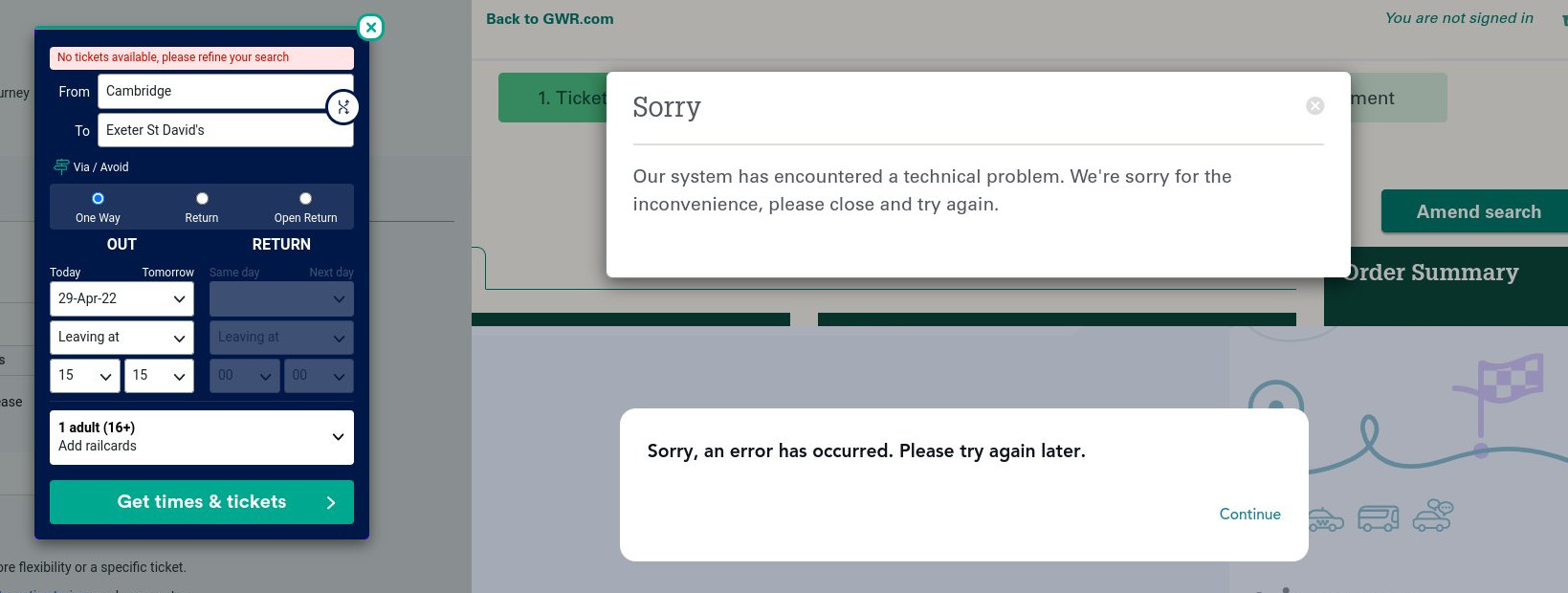 Trainline, GWR and SNCF kept crashing
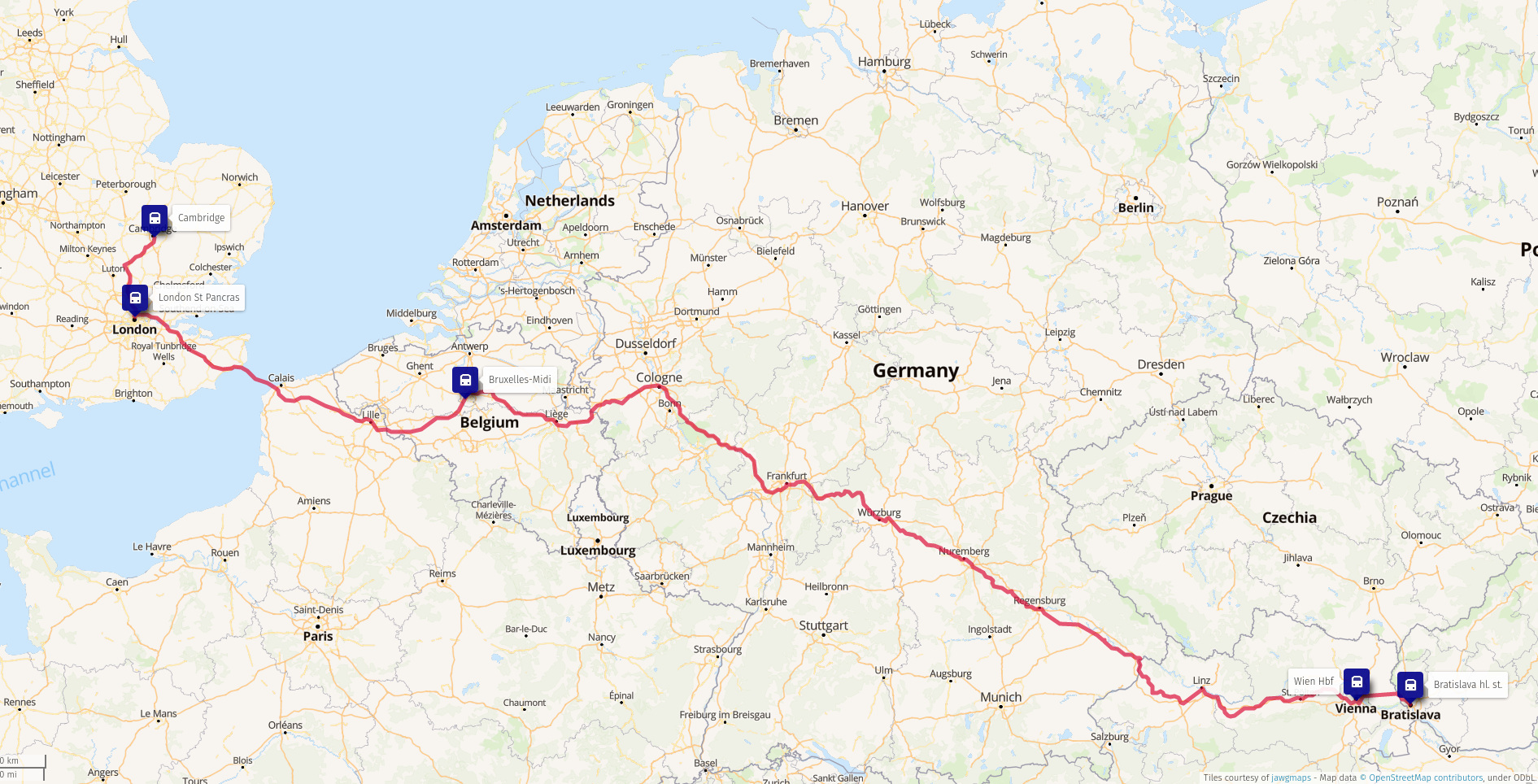 The complete route

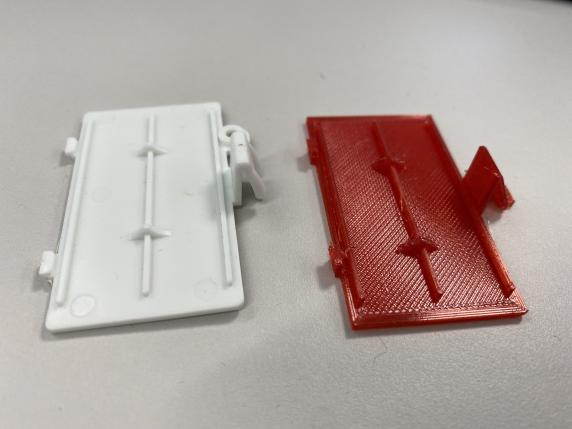
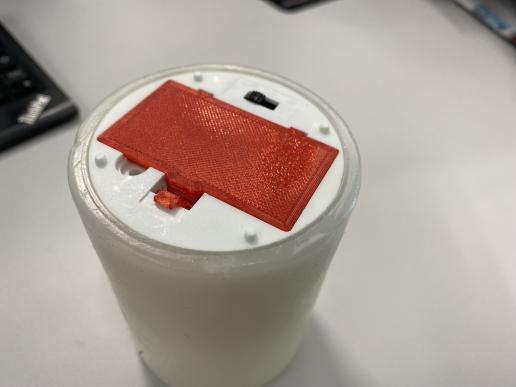
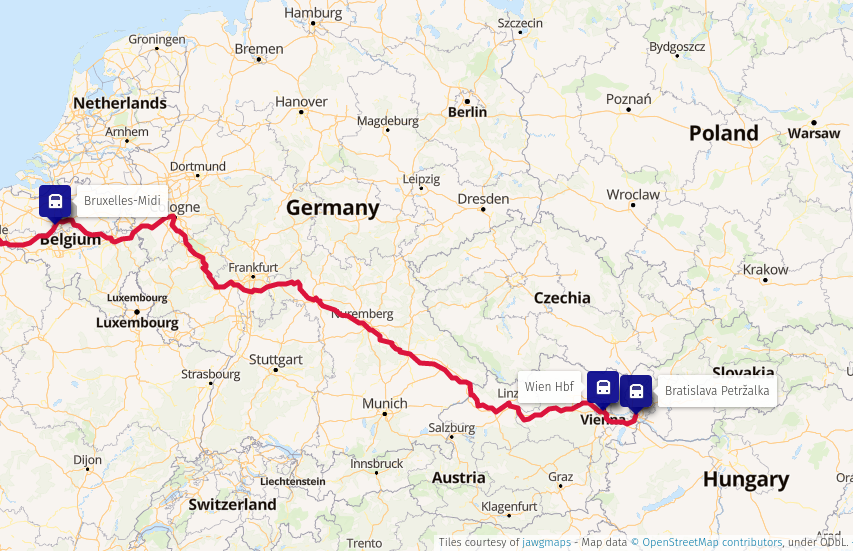 Train route from Bratislava to Brussels
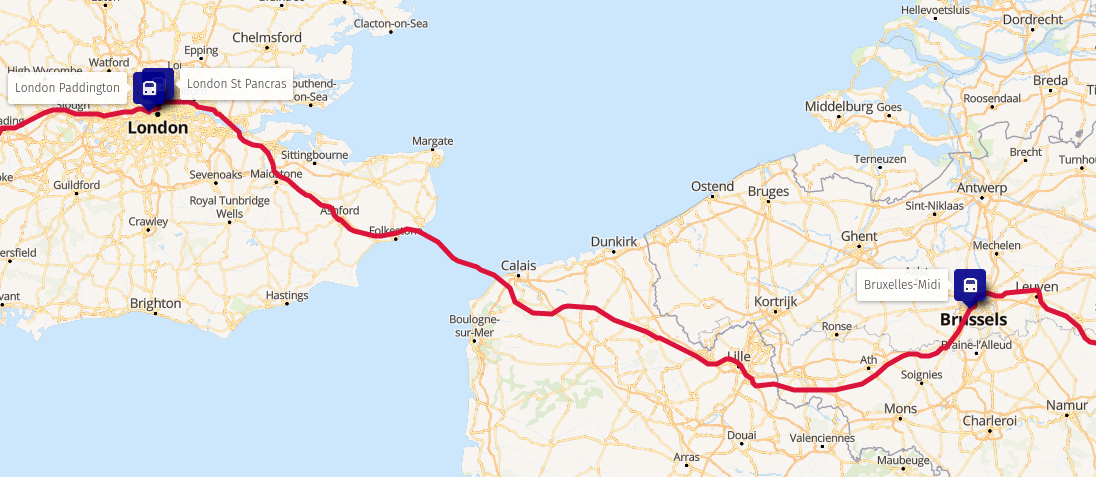 Train route from Brussels to London
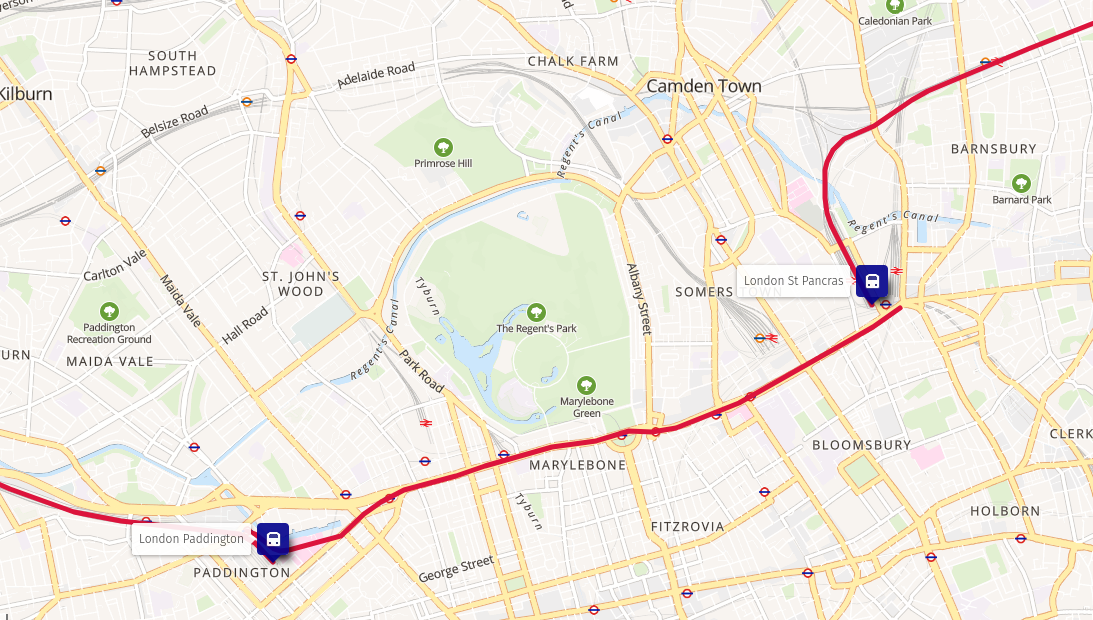 Change of trains in London
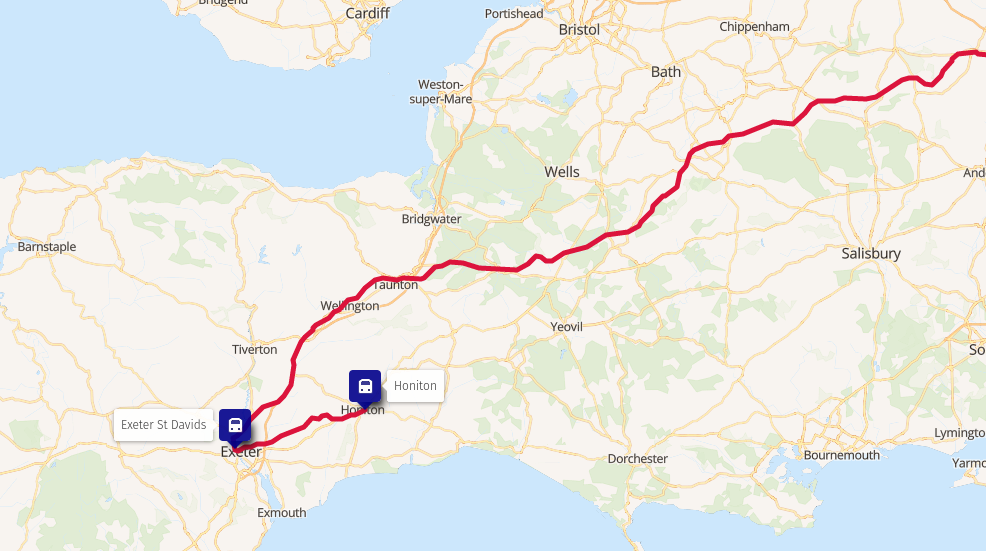 Change of trains in Exeter
 Finally, TIL, what can all be the reason for systemd services to hang indefinitely. The internet is flooded with numerous reports on this topic but no clear answers. So no more uselessly marked workarounds like:
 There has been a
flurry of activity on the Debian mailing lists ever since Steve
McIntyre raised the issue of including non-free firmware as part of
official Debian installation images.
Firstly I should point out that I am in complete agreement with Steve s proposal to include non-free firmware as part of an installation image. Likewise I think that we should have a separate archive section for firmware. Because without doing so it will soon become almost impossible to install onto any new hardware. However, as always the issue is more nuanced than a first glance would suggest.
Lets start by
defining what is firmware?
Firmware is any
software that runs outside the orchestration of the operating system.
Typically firmware will be executed on a processor(s) separate from
the processor(s) running the OS, but this does not need to be the
case.
As Debian we
are content that our systems can operate using fully free and open
source software and firmware. We can install our OS without needing
any non-free firmware.
This is an illusion!
Each and every PC
platform contains non-free firmware
It may be possible to run free firmware on some Graphics controllers, Wi-Fi chip-sets, or Ethernet cards and we can (and perhaps should) choose to spend our money on systems where this is the case. When installing a new system we might still be forced to hold our nose and install with non-free firmware on the peripheral before we are able to upgrade it to FLOSS firmware later if this is exists or is even possible to do so. However after the installation we are running a full FLOSS system in terms of software and firmware.
We all (almost
without exception) are running propitiatory firmware whether we like
it or not.
Even after carefully selecting graphics and network hardware with FLOSS firmware options we still haven t escaped from non-free-firmware. Other peripherals contain firmware too each keyboard, disk (SSDs and Spinning rust). Even your USB memory stick that you use to contain the Debian installation image contains a microcontroller and hence also contains firmware that runs on it.
 TL;DR: firmware support in Debian sucks, and we need to change
this. See the "My preference, and rationale" Section below.
In my opinion, the way we deal with (non-free) firmware in Debian is a
mess, and this is hurting many of our users daily. For a long time
we've been pretending that supporting and including (non-free)
firmware on Debian systems is not necessary. We don't want to have
to provide (non-free) firmware to our users, and in an ideal world we
wouldn't need to. However, it's very clearly no longer a sensible path
when trying to support lots of common current hardware.
Background - why has (non-free) firmware become an issue?
Firmware is the low-level software that's designed to make
hardware devices work. Firmware is tightly coupled to the hardware,
exposing its features, providing higher-level functionality and
interfaces for other software to use. For a variety of reasons, it's
typically not Free Software.
For Debian's purposes, we typically separate firmware from
software by considering where the code executes (does it run on a
separate processor? Is it visible to the host OS?) but it can be
difficult to define a single reliable dividing line here. Consider the
Intel/AMD CPU microcode packages, or the U-Boot firmware packages as
examples.
In times past, all necessary firmware would normally be included
directly in devices / expansion cards by their vendors. Over time,
however, it has become more and more attractive (and therefore more
common) for device manufacturers to not include complete firmware
on all devices. Instead, some devices just embed a very simple set
of firmware that allows for upload of a more complete firmware "blob"
into memory. Device drivers are then expected to provide that blob
during device initialisation.
There are a couple of key drivers for this change:

 A new minor release of