Search Results: "bod"

18 August 2014

Daniel Pocock: Is WebRTC private?

With the exciting developments at rtc.debian.org, many people are starting to look more closely at browser-based real-time communications. Some have dared to ask: does it solve the privacy problems of existing solutions? Privacy is a relative term Perfect privacy and its technical manifestations are hard to define. I had a go at it in a blog on the Gold Standard for free communications technology on 5 June 2013. By pure co-incidence, a few hours later, the first Snowden leaks appeared and this particular human right was suddenly thrust into the spotlight. WebRTC and ICE privacy risk WebRTC does not give you perfect privacy. At least one astute observer at my session at Paris mini-DebConf 2014 questioned the privacy of Interactive Connectivity Establishment (ICE, RFC 5245). In its most basic form, ICE scans all the local IP addresses on your machine and NAT gateway and sends them to the person calling you so that their phone can find the optimal path to contact you. This clearly has privacy implications as a caller can work out which ISP you are connected to and some rough details of your network topology at any given moment in time. What WebRTC does bring to the table Some of this can be mitigated though: an ICE implementation can be tuned so that it only advertises the IP address of a dedicated relay host. If you can afford a little latency, your privacy is safe again. This privacy protecting initiative could be made by a browser vendor such as Mozilla or it can be done in JavaScript by a softphone such as JSCommunicator. Many individuals are now using a proprietary softphone to talk to family and friends around the world. The softphone in question has properties like a virus, siphoning away your private information. This proprietary softphone is also an insidious threat to open source and free operating systems on the desktop. WebRTC is a positive step back from the brink. It gives people a choice. WebRTC is a particularly relevant choice for business. Can you imagine going to a business and asking them to make all their email communication through hotmail? When a business starts using a particular proprietary softphone, how is it any different? WebRTC offers a solution that is actually easier for the user and can be secured back to the business network using TLS. WebRTC is based on open standards, particularly HTML5. Leading implementations, such as the SIP over WebSocket support in reSIProcate, JSCommunicator and the DruCall module for Drupal are fully open source. Not only is it great to be free, it is possible to extend and customize any of these components. What is missing There are some things that are not quite there yet and require a serious effort from the browser vendors. At the top of the list for privacy:
  • ZRTP support - browsers currently support DTLS-SRTP, which is based on X.509. ZRTP is more like PGP, a democratic and distributed peer-to-peer privacy solution without needing to trust some central certificate authority.
  • TLS with PGP - the TLS protocol used to secure the WebSocket signalling channel is also based on X.509 with the risk of a central certificate authority. There is increasing chatter about the need for TLS to use PGP instead of X.509 and WebRTC would be a big winner if this were to eventuate and be combined with ZRTP.
You may think "I'll believe it when I see it". Each of these features, including WebRTC itself, is a piece of the puzzle and even solving one piece at a time brings people further out of danger from the proprietary mess the world lives with today. To find out more about practical integration of WebRTC into free software solutions, consider coming to my talk at xTupleCon in October.

16 August 2014

Ian Donnelly: How-To: Integrate elektra-merge Into a Debian Package

Hi Everybody, So I already explained that we decided to go in a new direction and patch ucf to allow automatic configuration file merging with any custom command. Today I wanted to explain how to use ucf s new three-way-merge-command functionality in
conjunction with Elektra in order to ultilize Elektra s powerful tools in order to allow automatic three-way merges of your package s configuration during upgrades in a way that is more reliable than a diff3 merge. This guide assumes that you are fimilar with ucf already and are just trying to impliment the --three-way-merge-command option using Elektra. The addition of the --three-way-merge-command option was a part of my Google Summer of Code Project. This option takes the form:

--three-way-merge-command command [New File] [Destination]

Where command is the command you would like to use for the merge. New File and Destination are the same as always. We added a new script to Elektra called elektra-merge for use with this new option in ucf. This script acts as a liaison between ucf and Elektra, allowing a regular ucf command to run a kdb merge even though ucf commands only pass New File and Destination whereas kdb merge requires ourpath, theirpath, basepath, and resultpath. Since ucf already performs a three-way merge, it keeps track of all the necessary files to do so, even though it only takes in New File and Destination. In order to use elektra-merge, the current configuration file must be mounted to KDB to serve as ours in the merge. The script automatically mounts theirs, base, and result using the kdb remount command in order to use the same backend as ours (since all versions of the same file should use the same backend anyway) and this way users don t need to worry about specifying the backend for each version of the file. Then the script attempts a merge on the newly mounted KeySets. Once this is finished, either on success or not, the script finishes by unmouting all but our copy of the file to cleanup KDB. Then, if the merge was successful ucf will replace ours with the result providing the package with an automatically merged configuration which will also be updated in KDB itself. Additionally, we added two other scripts, elektra-mount and elektra-umount which act as simple wrappers for kdb mount and kdb umount. That work identically but are more script friendly The full command to use elektra-merge to perform a three-way merge on a file managed by ucf is:

ucf --three-way --threeway-merge-command elektra-merge [New File] [Destination]

Thats it! As described above, elektra-merge is smart enough to run the whole merge off of the information from that command and utilizes the new kdb remount command to do so. Integrating elektra-merge into a package that already uses ucf is very easy! In postinst you should have a line similar to:

ucf [New File] [Destination]

or perhaps:

ucf --three-way [New File] [Destination]
All you must do is in postinst, when run with the configure option you must mount the config file to Elektra:

kdb elektra-mount [New File] [Mounting Destination] [Backend]
Next, you must update the line containing ucf with the options --three-way and --threeway-merge-command like so:

ucf --three-way --threeway-merge-command elektra-merge [New File] [Destination]
Then, in your postrm script, during a purge, you must umount the config file before deleting it:

kdb lektra-umount [Name]
That s it! With those small changes you can use Elektra to perform automatic three-way merges on any files that your package uses ucf to handle! I just wanted to show a quick example, below is a diff representing the changes we made to the samba-common package in order to allow automatic configuration merging for smb.conf using Elektra. We chose this package because it already
uses ucf to handle smb.conf but it frequently requires users to manually merge changes across versions. Here is the patch showing what we changed:

diff samba_orig/samba-3.6.6/debian/samba-common.postinst samba/samba-3.6.6/debian/samba-common.postinst
92c92,93
< ucf --three-way --debconf-ok "$NEWFILE" "$CONFIG"
---
> kdb elektra-mount "$CONFIG" system/samba/smb ini
> ucf --three-way --threeway-merge-command elektra-merge --debconf-ok "$NEWFILE" "$CONFIG"
Only in samba/samba-3.6.6/debian/: samba-common.postinst~
diff samba_orig/samba-3.6.6/debian/samba-common.postrm samba/samba-3.6.6/debian/samba-common.postrm
4a5
> kdb elektra-umount system/samba/smb
As you can see, all we had to do was add the line to mount smb.conf during install, update the ucf command to include the new --threeway-merge-command option, and unmount system/samba/smb during a purge. It really is that easy! Sincerely,
Ian S. Donnelly

Daniel Pocock: WebRTC: what works, what doesn't

With the release of the latest rtc.debian.org portal update, there are numerous improvements but there are still some known problems too. The good news is that if you have a web browser, you can probably make successful WebRTC calls from one developer to another without any need to install or configure anything else. The bad news is that not every permutation of browser and client will work. Here I list some of the limitations so people won't waste time on them. The SIP proxy supports any SIP client Just about any SIP client can connect to the proxy server and register. This does not mean that every client will be able to call each other. Generally speaking, modern WebRTC clients will be able to call each other. Standalone softphones or deskphones will call each other. Calling from a normal softphone or deskphone to a WebRTC browser, or vice-versa, will not work though. Some softphones, like Jitsi, have implemented most of the protocols to communicate with WebRTC but they are yet to put the finishing touches on it. Chat should just work for any combination of clients The new WebRTC frontend supports SIP chat messaging. There is no presence or buddy list support yet. You can even use a tool like sipsak to accept or send SIP chats from a script. Chat works for any client new or old. Although a WebRTC user can't call a softphone user, for example, they can send chats to each other. WebRTC support in Iceweasel 24 on wheezy systems is very limited On a wheezy system, the most recent Iceweasel update is version 24.7. This version supports most of WebRTC but does not support TURN relay servers to help you out of a NAT network. If you call between two wheezy machines on the same NAT network it will work. If the call has to traverse a NAT boundary it will not work. Wheezy users need to either download a newer Firefox version or use Chromium. JsSIP doesn't handle ICE elegantly Internet Connectivity Establishment (ICE, RFC 5245) is meant to prevent calls from being answered with missing audio or video streams. ICE is a mandatory part of WebRTC. When correctly implemented, the JavaScript application will exchange ICE candidates and run the connectivity checks before alerting anybody that a call is ringing. If the checks fail (for example, with Iceweasel 24 and NAT), the caller should be told the call can't be made and the callee shouldn't be disturbed at all. JsSIP is not operating in this manner though. It alerts the callee before telling the browser to start the connectivity checks. Then it even waits for the callee to answer. Only then does it tell the browser to start checking connectivity. This is not a fault with the ICE standard or the browser, it is an implementation problem. Therefore, until this is fully fixed, people may still see some calls that appear to answer but don't have any media stream. After this is fixed, such calls really will be a thing of the past. Debian RTC testing is more than just a pipe dream Although these glitches are not ideal for end users, there is a clear roadmap to resolve them. There are also a growing collection of workarounds to minimize the inconvenience. For example, JSCommunicator has a hack to detect when somebody is using Iceweasel 24 and just refuse to make the call. See the option require_relay_candidate in the config.js settings file. This also ensures that it will refuse to make a call if the TURN server is offline. Better to give the user a clear error than a call without any audio or video stream. require_relay_candidate is enabled on freephonebox.net because it makes life easier for end users. It is not enabled on rtc.debian.org because some DDs may be willing to tolerate this issue when testing on a local LAN. To find out more about practical integration of WebRTC into free software solutions, consider coming to my talk at xTupleCon in October.

14 August 2014

Daniel Pocock: Bug tracker or trouble ticket system?

One of the issues that comes up from time to time in many organizations and projects (both community and commercial ventures) is the question of how to manage bug reports, feature requests and support requests. There are a number of open source solutions and proprietary solutions too. I've never seen a proprietary solution that offers any significant benefit over the free and open solutions, so this blog only looks at those that are free and open. Support request or bug? One common point of contention is the distinction between support requests and bugs. Users do not always know the difference. Some systems, like the Github issue tracker, gather all the requests together in a single list. Calling them "Issues" invites people to submit just about anything, such as "I forgot my password". At the other extreme, some organisations are so keen to keep support requests away from their developers that they operate two systems and a designated support team copies genuine bugs from the customer-facing trouble-ticket/CRM system to the bug tracker. This reduces the amount of spam that hits the development team but there is overhead in running multiple systems and having staff doing cut and paste. Will people use it? Another common problem is that a full bug report template is overkill for some issues. If a user is asking for help with some trivial task and if the tool asks them to answer twenty questions about their system, application version, submit log files and other requirements then they won't use it at all and may just revert to sending emails or making phone calls. Ideally, it should be possible to demand such details only when necessary. For example, if a support engineer routes a request to a queue for developers, then the system may guide the support engineer to make sure the ticket includes attributes that a ticket in the developers' queue should have. Beyond Perl Some of the most well known systems in this space are Bugzilla, Request Tracker and OTRS. All of these solutions are developed in Perl. These days, Python, JavaScript/Node.JS and Java have taken more market share and Perl is chosen less frequently for new projects. Perl skills are declining and younger developers have usually encountered Python as their main scripting language at university. My personal perspective is that this hinders the ability of Perl projects to attract new blood or leverage the benefits of new Python modules that don't exist in Perl at all. Bugzilla has fallen out of the Debian and Ubuntu distributions after squeeze due to its complexity. In contrast, Fedora carries the Bugzilla packages and also uses it as their main bug tracker. Evaluation I recently started having a look at the range of options in the Wikipedia list of bug tracking systems. Some of the trends that appear:
  • Many appear to be bug tracking systems rather than issue tracking / general-purpose support systems. How well do they accept non-development issues and keep them from spamming the developers while still providing a useful features for the subset of users who are doing development?
  • A number of them try to bundle other technologies, like wiki or FAQ systems: but how well do they work with existing wikis? This trend towards monolithic products is slightly dangerous. In my own view, a wiki embedded in some other product may not be as well supported as one of the leading purpose-built wikis.
  • Some of them also appear to offer various levels of project management. For development tasks, it is just about essential for dependencies and a roadmap to be tightly integrated with the bug/feature tracker but does it make the system more cumbersome for people dealing with support requests? Many support requests, like "I've lost my password", don't really have any relationship with project management or a project roadmap.
  • Not all appear to handle incoming requests by email. Bug tracking systems can be purely web/form-based, but email is useful for helpdesk systems.
Questions This leaves me with some of the following questions:
  • Which of these systems can be used as a general purpose help-desk / CRM / trouble-ticket system while also being a full bug and project management tool for developers?
  • For those systems that don't work well for both use cases, which combinations of trouble-ticket system + bug manager are most effective, preferably with some automated integration?
  • Which are more extendable with modern programming practices, such as Python scripting and using Git?
  • Which are more future proof, with choice of database backend, easy upgrades, packages in official distributions like Debian, Ubuntu and Fedora, scalability, IPv6 support?
  • Which of them are suitable for the public internet and which are only considered suitable for private access?

13 August 2014

Ian Donnelly: The New Deal: ucf Integration

Hi Everybody, A few days ago I posted an entry on this blog called dpkg Woes where I explained that due to a lack of response, we were abandoning our plan to patch dpkg for my Google Summer of Code project, and I explained that we had a new solution. Well today I would like to tell you about that solution. Instead of patching dpkg, which would take a long time and seemed like it would never make it upstream, we have added some new features to ucf which will allow my Google Summer of Code project to be realized. If you don t know, ucf, which stands for Update Configuration File, is a popular Debian package whose goal is to preserve user changes to config files. It is meant to act as an alternative to considering a configuration file a conffile on systems that use dpkg. Instead, package maintainers can use ucf to handle these files in a conffile-like way. Where conffiles must work on all systems, because they are shipped with the package, configuration files that use ucf can be handled by maintainer scripts and can vary between systems. ucf exists as a script that allows conffile-like handling of non-conffile configuration files and allows much more flexibility than dpkg s conffile system. In fact, ucf even includes an option to perform a three-way merge on files it manages, it currently only uses diff3 for the task though. As you can see, ucf has a goal that while different than ours, seems naturally compatible to our goal of automatic conffile merging. Obviously, since ucf is a different tool than dpkg we had to re-think how we were going to integrate with ucf. Luckily, integration with ucf proved to be much more simple than integration with dpkg. All we had to do to integrate with ucf was to add a generic hook to attempt a three way merge using any tool created for the task such as Elektra and kdb merge. Felix submitted a pull request with the exact code almost a week ago and we have talked with Manoj Srivastava, the developer for ucf, and he seemed to really like the idea. The only changes we made are to add an option for a three-way merge command, and if one is present, the merge is attempted using the specified command. It s all pretty simple really. Since we decided to include a generic hook for a three-way merge command instead of an Elektra-specific one (which would be less open and would create a dependency on Elektra), we also had to add functionality to Elektra to work with this hook. We ended up writing a new script, called elektra-merge which is now included in our repository. All this script does is act as a liaison between the ucf --three-way-merge-command option and Elektra itself. The script automatically mounts the correct files for theirs and base and dest using the new remount command. Since the only parameters that are passed to the ucf merge command are the paths of ours, theirs, base and result, we were missing vital information on how to mount these files. Our solution was to create the remount command which mirrors the backend configuration of an existing mountpoint to create a new mountpoint using a new file. So if ours is mounted to system/ours using ini, kdb remount /etc/theirs system/theirs system/ours will mount /etc/theirs to system/theirs using the same backend as ours. Since theirs, base, and result should all have the same backend as ours, we can use remount to mount these files even if all we know is their paths. Now, package maintainers can edit their scripts to utilize this new feature. If they want, package maintainers can specify a command to use to merge files using ucf during package upgrades. I will soon be posting a tutorial about how to integrate this feature into a package and how to use Elektra in your scripts in order to allow for automatic three-way merges during package upgrade. I will post a link to the tutorial here once it is published. Sincerely,
Ian S. Donnelly

Richard Hartmann: Slave New World

Ubiquitous surveillance is a given these days, and I am not commenting on the crime or the level of stupidity of the murderer, but the fact that the iPhone even logs when you turn your flashlight on and off is scary. Very, very scary in all its myriad of implications. But at least it's not as if both your phone and your carrier wouldn't log your every move anyway. Because Enhanced 911 and its ability to silently tell the authorities your position was not enough :)

Daniel Pocock: WebRTC in CRM/ERP solutions at xTupleCon 2014

In October this year I'll be visiting the US and Canada for some conferences and a wedding. The first event will be xTupleCon 2014 in Norfolk, Virginia. xTuple make the popular open source accounting and CRM suite PostBooks. The event kicks off with a keynote from Apple co-founder Steve Wozniak on the evening of October 14. On October 16 I'll be making a presentation about how JSCommunicator makes it easy to add click-to-call real-time communications (RTC) to any other web-based product without requiring any browser plugins or third party softphones. Juliana Louback has been busy extending JSCommunicator as part of her Google Summer of Code project. When finished, we hope to quickly roll out the latest version of JSCommunicator to other sites including rtc.debian.org, the WebRTC portal for the Debian Developer community. Juliana has also started working on wrapping JSCommunicator into a module for the new xTuple / PostBooks web-based CRM. Versatility is one of the main goals of the JSCommunicator project and it will be exciting to demonstrate this in action at xTupleCon. xTupleCon discounts for developers xTuple has advised that they will offer a discount to other open source developers and contributers who wish to attend any part of their event. For details, please contact xTuple directly through this form. Please note it is getting close to their deadline for registration and discounted hotel bookings. Potential WebRTC / JavaScript meet-up in Norfolk area For those who don't or can't attend xTupleCon there has been some informal discussion about a small WebRTC-hacking event at some time on 15 or 16 October. Please email me privately if you may be interested.

Riku Voipio: Booting Linaro ARMv8 OE images with Qemu

A quick update - Linaro ARMv8 OpenEmbbeded images work just fine with qemu 2.1 as well:

$ http://releases.linaro.org/14.07/openembedded/aarch64/Image
$ http://releases.linaro.org/14.07/openembedded/aarch64/vexpress64-openembedded_lamp-armv8-gcc-4.9_20140727-682.img.gz
$ qemu-system-aarch64 -m 1024 -cpu cortex-a57 -nographic -machine virt \
-kernel Image -append 'root=/dev/vda2 rw rootwait mem=1024M console=ttyAMA0,38400n8' \
-drive if=none,id=image,file=vexpress64-openembedded_lamp-armv8-gcc-4.9_20140727-682.img \
-netdev user,id=user0 -device virtio-net-device,netdev=user0 -device virtio-blk-device,drive=image
[ 0.000000] Linux version 3.16.0-1-linaro-vexpress64 (buildslave@x86-64-07) (gcc version 4.8.3 20140401 (prerelease) (crosstool-NG linaro-1.13.1-4.8-2014.04 - Linaro GCC 4.8-2014.04) ) #1ubuntu1~ci+140726114341 SMP PREEMPT Sat Jul 26 11:44:27 UTC 20
[ 0.000000] CPU: AArch64 Processor [411fd070] revision 0
...
root@genericarmv8:~#
Quick benchmarking with age-old ByteMark nbench:
Index Qemu Foundation Host
Memory 4.294 0.712 44.534
Integer 6.270 0.686 41.983
Float 1.463 1.065 59.528
Baseline (LINUX) : AMD K6/233*
Qemu is upto 8x faster than Foundation model on Integers, but only 50% faster on Math. Meanwhile, the Host pc spends 7-40x slower emulating ARMv8 than executing native instructions.

12 August 2014

Ian Donnelly: How-To: kdb import

Hi everybody, Today I wanted to go over what I think is a very useful command in the kdb tool, kdb import. As you know, the kdb tool allows users to interact with the Elektra Key Database (KDB) via the command line. Today I would like to explain the import function of kdb. The command to use kdb import is:

kdb import [options] destination [format]
In this command, destination is where the imported Keys should be stored below. For instance, kdb import system/imported would store all the keys below system/imported. This command takes Keys from stdin to store them into KDB. Typically, this command is used with a pipe to read in the Keys from a file. The format argument you see above can be a very powerful option to use with kdb import. The format argument allows a user to specify which plug-in is used to import the Keys into the Key Database. The user can specify any storage plug-in to serve as the format for the Keys to be imported. For instance, if a user wanted to import a /etc/hosts file into KDB without mounting it, they could use the command cat /etc/hosts kdb import system/hosts hosts. This command would essentially copy the current hosts file into KDB, like mounting it. Unlike mounting it, changes to the Keys would not be reflected in the hosts file and vise versa. If no format is specified, the format dump will be used instead. The dump format is the standard way of expressing Keys and all their relevant information. This format is intended to be used only within Elektra. The dump format is a good means of backing up Keys from the Key Database for use with Elektra later such as reimporting them later. As of this writing, dump is the only way to fully preserve all parts of the KeySet. It is very important to note that the dump does not rename keys by design. If a user exports a KeySet using dump using a command such as kdb export system/backup > backup.ecf, they can only import that keyset back into system/backup using a command like cat backup.ecf kdb import system/backup. The kdb import command only takes one special option:

-s --strategy

which is used to specify a strategy to use if Keys already exist in the specified destination.
The current list of strategies are:

preserve any keys already in the destination will not be overwritten
overwrite any keys already in the destination will be overwritten if a new key has the same name
cut all keys already in the destination will be removed, then new keys will be imported

If no strategy is specified, the command defaults to the preserve strategy as to not be destructive to any previous keys. An example of using the kdb import is as follows:

cat backup.ecf kdb import system/restore

This command would import all keys stored in the file backup.ecf into the Key Database under system/restore. In this example, backup.ecf was exported from the KeySet using the dump format by using the command:
kdb export system/backup > backup.ecf backup.ecf contains all the information about the keys below system/backup:

$cat backup.ecf
kdbOpen 1
ksNew 3
keyNew 19 0
system/backup/key1
keyMeta 7 1
binary
keyEnd
keyNew 19 0
system/backup/key2
keyMeta 7 1
binary
keyEnd
keyNew 19 0
system/backup/key3
keyMeta 7 1
binary
keyEnd
ksEnd
Before the import command, system/backup does not exists and no keys are contained there.
After the import command, running the command kdb ls system/backup prints:

system/backup/key1
system/backup/key2
system/backup/key3
As you can see, the kdb import command is a very useful tool included as part of Elektra. I also wrote a tutorial on the kdb export command. Please go read that as well because those two commands go hand in hand and allow some very powerful usage of Elektra. Sincerely,
Ian S. Donnelly

Ian Donnelly: How-To: kdb export

Hi everybody, I recently posted a tutorial on the kdb import command. Well I also wanted to go over it s sibling function, kdb export. These two commands work very similarly, but there are some differences. First of all, the command to use kdb export is:

kdb export [options] source [format]
In this command, source is the root key of which Keys should be exported. For instance, kdb export system/export would export all the keys below system/export. Additionally, this command exports keys under the system/elektra directory by default. It does this so that information about the keys stored under this directory will be included if the Keys are later imported into an Elektra Key Database. This command export Keys to stdout to store them into the Elektra Key Database. Typically, the export command is used with redirection to write the Keys to a file. As we discussed already, the format argument can be a very powerful option to use with kdb export. Just like with kdb import the format argument allows a user to specify which plug-in is used to export the Keys from the Key Database. The user can specify any storage plug-in to serve as the format for the exported Keys. For instance, if a user mounted their hosts file to system/hosts using kdb mount /etc/hosts system/hosts hosts they would be able to export these Keys using the hosts format by using the command kdb export system/hosts hosts > hosts.ecf. This command would essentially create a backup of their current /etc/hosts file in a valid format for /etc/hosts. If no format is specified, the format dump will be used instead. The dump format is the standard way of expressing Keys and all their relevant information. This format is intended to be used only within Elektra. The dump format is a good means of backing up Keys from the Key Database for use with Elektra later such as reimporting them later. As of this writing, dump is the only way to fully preserve all parts of the KeySet. The kdb export command takes one special option, but it s different than the one for kdb import, that option is:

-E --without-elektra which omits the system/elektra directory of keys
An example of using the kdb export is as follows:

kdb export system/backup > backup.ecf
This command would export all keys stored under system/backup, along with relevant Keys in system/elektra, into a file called backup.ecf. As you can see, the kdb export command is a very useful tool just like it s sibling, kdb import. If you haven t yet, please go read the tutorial I wrote for kdb import because these two commands are best used together and can enable some really great features of Elektra. Sincerely,
Ian S. Donnelly

11 August 2014

Juliana Louback: JSCommunicator - Setup and Architecture

Preface During Google Summer of Code 2014, I got to work on the Debian WebRTC portal under the mentorship of Daniel Pocock. Now I had every intention of meticulously documenting my progress at each step of development in this blog, but I was a bit late in getting the blog up and running. I ll now be publishing a series of posts to recap all I ve done during GSoC. Better late than never. Intro JSCommunicator is a SIP communication tool developed in HTML and JavaScript. The code was designed to make integrating JSCommunicator with a website or web app as simple as possible. It s quite easy, really. However, I do think a more detailed explanation on how to set things up and a guide to the JSCommunicator architecture could be of use, particularly for those wanting to modify the code in any way. Setup To begin, please fork the JSCommunicator repo. If you are new to git, feel free to follow the steps in section Setup and Clone in this post. If you read the README file (which you always should), you ll see that JSCommunicator needs a SIP proxy that supports SIP over Websockets transport. Some options are: I didn t find a tutorial for Kamailio setup, I did find one for repro setup. And bonus, here you have a great tutorial on how to setup and configure your SIP proxy AND your TURN server. In your project s root directory, you ll see a file named config-sample.js. Make a copy of that file named config.js. The config-sample.js file has comments that are very instructive. In sum, the only thing you have to modify is the turn_servers property and the websocket property. In my case, debrtc.org was the domain registered for testing my project, so my config file has:
turn_servers: [
	  server:"turn:debrtc.org"       
],
Note that unlike the sample, I didn t set a username and password so SIP credentials will be used. Now fill in the websocket property here we use sip5060.net.
websocket:  
    servers: 'wss://ws.sip5060.net',
    connection_recovery_min_interval: 2,
    connection_recovery_max_interval: 30,
   ,
I m pretty sure you can set the connection_recovery properties to whatever you like. Everything else is optional. If you set the user property, specifically display_name and uri, that will be used to fill in the Login form and takes preference over any Remember me data. If you also set sip_auth_password, JSCommunicator will automatically log in. All the other properties are for other optional functionalities and are well explained. You ll need some third-party javascript that is not included in the JSCommunicator git repo. Namely jQuery version 1.4 or higher and ArbiterJS version 1.0. Download jQuery here and ArbiterJS here and place the .js files in your project s root directory. Do make sure that you are including the correct filename in your html file. For example, in phone-dev.shtml, a file named jquery.js is included. The file you downloaded will likely have version numbers in it s file name. So rename the downloaded file or change the content of src in your includes. This is uber trivial, but I ve made the mistake several times. You ll also need JsSIP.js which can be downloaded here. Same naming care must be taken as is the case for jQuery and ArbiterJS. The recently added Instant Messaging component and some of the new features need jQuery-UI - so far version 1.11.* is known to work. From the downloaded .zip all you need is the jquery-ui-...js file and the jquery-ui-...css file, also to be placed in the project s root directory. If you ll be using the internationalization support you ll also need jquery.i18n.properties.js. To try out JSCommunicator, deploy the website locally by copying your project directory to the apache document root directory (provided you are using apache, which is a good idea.). You ll likely have to restart your server before this works. Now the demo .shtml pages only have a header with all the necessary includes, then a Server Side Include for the body of the page, with all the JSCommunicator html. The html content is in the file jscommunicator.inc. You can enable SSI on apache, OR you can simply copy and paste the content of jscommunicator.inc into phone-dev.shmtl. Start up apache, open a browser and navigate to localhost/jscommunicator/phone-dev.shmtl and you should see: jscommunicatorRaw Actually, pending updates to JSCommunicator, you should see a brand new UI! But all the core stuff will be the same. Architecture Disclaimer: I m explaining my view of the JSCommunicator architecture, which currently may not be 100% correct. But so far it s been enough for me to make my modifications and additions to the code, so it could be of use. One I get a JSCommunicator Founding Father s stamp of approval, I ll be sure to confirm the accuracy. Now to explain how the JSCommunicator code interacts, the use of each code item is described, ignoring all the html and css which will vary according to how you choose to use JSCommunicator. I m also not going to explain jQuery which is a dependency but not specific to WebRTC. The core JSCommunicator code is the following: Each of these files will be presented in what I hope is an intuitive order. The next three files could be considered utils : These two are where the magic happens: Now for some extras: Third party code: Here s a diagram of sorts to help you visualize how the code interacts: jscommArch In sum, 1 - JSCommUI.js handles what is displayed in the UI and feeds data to JSCommManager.js; 2 - JSCommManager.js actually does stuff, feeding data to be displayed to JSCommUI.js; 3 - JSCommManager.js calls functions from the three utils , parseuri.js, webrtc-check.js and jssip-helpher.js which organizes the data from config.js; 4 - JSCommManager.js initializes a SIP User Agent based on the implementation in Arbiter.js. When making any changes to JSCommunicator, you will likely only be working with JSCommUI.js and JSCommManager.js.

Juliana Louback: JSCommunicator - Setup and Architecture

Preface During Google Summer of Code 2014, I got to work on the Debian WebRTC portal under the mentorship of Daniel Pocock. Now I had every intention of meticulously documenting my progress at each step of development in this blog, but I was a bit late in getting the blog up and running. I ll now be publishing a series of posts to recap all I ve done during GSoC. Better late than never. Intro JSCommunicator is a SIP communication tool developed in HTML and JavaScript. The code was designed to make integrating JSCommunicator with a website or web app as simple as possible. It s quite easy, really. However, I do think a more detailed explanation on how to set things up and a guide to the JSCommunicator architecture could be of use, particularly for those wanting to modify the code in any way. Setup To begin, please fork the JSCommunicator repo. If you are new to git, feel free to follow the steps in section Setup and Clone in this post. If you read the README file (which you always should), you ll see that JSCommunicator needs a SIP proxy that supports SIP over Websockets transport. Some options are: I didn t find a tutorial for Kamailio setup, I did find one for repro setup. And bonus, here you have a great tutorial on how to setup and configure your SIP proxy AND your TURN server. In your project s root directory, you ll see a file named config-sample.js. Make a copy of that file named config.js. The config-sample.js file has comments that are very instructive. In sum, the only thing you have to modify is the turn_servers property and the websocket property. In my case, debrtc.org was the domain registered for testing my project, so my config file has:
turn_servers: [
	  server:"turn:debrtc.org"       
],
Note that unlike the sample, I didn t set a username and password so SIP credentials will be used. Now fill in the websocket property here we use sip5060.net.
websocket:  
    servers: 'wss://ws.sip5060.net',
    connection_recovery_min_interval: 2,
    connection_recovery_max_interval: 30,
   ,
I m pretty sure you can set the connection_recovery properties to whatever you like. Everything else is optional. If you set the user property, specifically display_name and uri, that will be used to fill in the Login form and takes preference over any Remember me data. If you also set sip_auth_password, JSCommunicator will automatically log in. All the other properties are for other optional functionalities and are well explained. You ll need some third-party javascript that is not included in the JSCommunicator git repo. Namely jQuery version 1.4 or higher and ArbiterJS version 1.0. Download jQuery here and ArbiterJS here and place the .js files in your project s root directory. Do make sure that you are including the correct filename in your html file. For example, in phone-dev.shtml, a file named jquery.js is included. The file you downloaded will likely have version numbers in it s file name. So rename the downloaded file or change the content of src in your includes. This is uber trivial, but I ve made the mistake several times. You ll also need JsSIP.js which can be downloaded here. Same naming care must be taken as is the case for jQuery and ArbiterJS. The recently added Instant Messaging component and some of the new features need jQuery-UI - so far version 1.11.* is known to work. From the downloaded .zip all you need is the jquery-ui-...js file and the jquery-ui-...css file, also to be placed in the project s root directory. If you ll be using the internationalization support you ll also need jquery.i18n.properties.js. To try out JSCommunicator, deploy the website locally by copying your project directory to the apache document root directory (provided you are using apache, which is a good idea.). You ll likely have to restart your server before this works. Now the demo .shtml pages only have a header with all the necessary includes, then a Server Side Include for the body of the page, with all the JSCommunicator html. The html content is in the file jscommunicator.inc. You can enable SSI on apache, OR you can simply copy and paste the content of jscommunicator.inc into phone-dev.shmtl. Start up apache, open a browser and navigate to localhost/jscommunicator/phone-dev.shmtl and you should see: jscommunicatorRaw Actually, pending updates to JSCommunicator, you should see a brand new UI! But all the core stuff will be the same. Architecture Disclaimer: I m explaining my view of the JSCommunicator architecture, which currently may not be 100% correct. But so far it s been enough for me to make my modifications and additions to the code, so it could be of use. One I get a JSCommunicator Founding Father s stamp of approval, I ll be sure to confirm the accuracy. Now to explain how the JSCommunicator code interacts, the use of each code item is described, ignoring all the html and css which will vary according to how you choose to use JSCommunicator. I m also not going to explain jQuery which is a dependency but not specific to WebRTC. The core JSCommunicator code is the following: Each of these files will be presented in what I hope is an intuitive order. The next three files could be considered utils : These two are where the magic happens: Now for some extras: Third party code: Here s a diagram of sorts to help you visualize how the code interacts: jscommArch In sum, 1 - JSCommUI.js handles what is displayed in the UI and feeds data to JSCommManager.js; 2 - JSCommManager.js actually does stuff, feeding data to be displayed to JSCommUI.js; 3 - JSCommManager.js calls functions from the three utils , parseuri.js, webrtc-check.js and jssip-helpher.js which organizes the data from config.js; 4 - JSCommManager.js initializes a SIP User Agent based on the implementation in Arbiter.js. When making any changes to JSCommunicator, you will likely only be working with JSCommUI.js and JSCommManager.js.

Ian Donnelly: dpkg Woes

Hi Everybody, The original plan for my Google Summer of Code project involved creating a merge tool for Elektra including a kdb merge command, that part is all finished and integrated into the newest release of Elektra, 0.8.7 already. The next step was to patch dpkg to add an option for conffile merging. The basic overview of how this would work is: Obviously, all of these things require patching dpkg, although not in too large away. Luckily, we found a previous attempt to patch dpkg for a three-way merge hook, however it is a few years old and was never included in dpkg. Felix decided to update this patch to work with the new versions of dpkg and cleaned up a bit of redundancy, he then resubmitted it to see if the dpkg maintainers would be interested in such a patch, and to start a dialogue about including all the patches we need. Unfortunately there has been no response from the dpkg team, any many bugs on their tracker have been sitting unanswered for years. Additionally, dpkg s source can be quite complex and it would require a ton of effort for us to make all these patches with no guarantee of integration. As a result, we have decided to go another route (which I will be posting about soon). I just wanted to update anybody interested on the progress of my Google Summer of Code Project by letting them know the experience with dpkg. We have come up with a new solution that is already looking great and you will hear a lot more about it this final week of Google Summer of Code. Stay Tuned!
- Ian S. Donnelly

10 August 2014

Ian Donnelly: How-To: kdb merge

Hi Everybody, As you may know, part of my Google Summer of Code project involved the creation of merge tools for Elektra. The one I am going to focus on today is kdb merge. The kdb tool allows users to access and perform functions on the Elektra Key Database from the command line. We added a new command to this very useful tool, the merge command. This command allows a user to perform a three-way merge of KeySets from the kdb tool.
The command to use this tool is:
kdb merge [options] ourpath theirpath basepath resultpath

The standard naming scheme for a three-way merge consists of ours, theirs, and base: This works very similarly for KeySets, especially ones that consist of mounted conffiles. For mounted conffiles: If the user is just trying to accomplish is a three-way merge using any two arbitrary keysets that share a base,
it doesn t matter which ones are defined as ours or theirs as long as they use the correct base KeySet.
In kdb merge, ourpath, theirpath, and basepath work just like ours, theirs, and base except each one represents the
root of a KeySet. Resultpath is pretty self-explanatory, it is just where you want the result of the merge to be saved under.
It s worth noting, resultpath should be empty before attempting a merge, otherwise there can be unintended consquences. As for the options, there are a few basic options:

-i --interactive which attempts the merge in an interactive way
-t --test which tests the proposed merge and informs you about possible conflicts
-f --force which overwrites any Keys in resultpath
Additionally there is an option to specify a merge strategy, which is very important. The other option, strategy is:
s --strategy which is used to specify a strategy to use in case of a conflict

The current list of strategies are:
preserve the merge will fail if a conflict is detected
ours the merge will use our version during a conflict
theirs the merge will use their version during a conflict
base the merge will use the base version during a conflict
If no strategy is specified, the merge will default to the preserve strategy as to not risk making the wrong decision. If any of the other strategies are specified, when a conflict is detected, merge will use the Key specified by the strategy (ours, theirs, or base) for the resulting Key. An example of using the kdb merge command:
kdb merge -s ours system/hosts/ours system/hosts/theirs system/hosts/base system/hosts/result
For more in depth examples, please see the full tutorial on our GitHub Documentation. -Ian S. Donnelly

8 August 2014

Daniel Pocock: Help needed reviewing Ganglia GSoC changes

The Ganglia project has been delighted to have Google's support for 5 students in Google Summer of Code 2014. The program officially finishes in ten more days, on 18 August. If you are a user of Ganglia, Nagios, RRDtool or R or just an enthusiastic C or Python developer, you may be able to use and provide feedback for the students while benefitting from the cool new features they have been working on.
Student Technology Comments
Chandrika Parimoo Python, Nagios and some Syslog Chandrika generalized some of my ganglia-nagios-bridge code into the PyNag library. I then used it as the basis for syslog-nagios-bridge. Chandrika has also done some work on improving the ganglia-nagios-bridge configuration file format.
Oliver Hamm C Oliver has been working on metrics about Ganglia infrastructure. If you have a large and dynamic Ganglia cloud, this is for you.
Plamen Dimitrov R, RRDtool Plamen has been building an R plugin for inspecting RRD files from Ganglia or any other type of RRD.
Rana NVIDIA, C Rana has been working on improvements to Ganglia monitoring of NVIDIA GPUs, especially in HPC clusters
Zhi An Java, JMX Zhi An has been extending the JMXetric and gmetric4j projects to provide more convenient monitoring of Java server processes.
If you have any feedback or questions, please feel free to discuss on the Ganglia-general mailing list and CC the student and their mentor.

Ian Donnelly: The Line Plug-In

Hi Everybody, As you may have noticed I wrote a new plug-in for Elektra called line . I used it for a lot of examples in my tutorial, How-To: Write a Plug-In. The line plug-in is a very simple storage plug-in for Elektra. This plug-in stores files into the Elektra Key Database creating a new Key for each line and setting the string value of the Key to the string value of the line of that file. So if we have a file called hello.txt :

Hello
World!

And we mount it to kdb like so: kdb mount ~/line.txt system/hello_line line. The output of kdb ls system/hello_line the output would be:

system/hello_line/#1
system/hello_line/#
2

With the getString values of #1 and #2 being Hello and World! respectively. If this seems like a very simple plug-in, that s because it is. Obviously, this plug-in isn t a great showcase for the robustness of Elektra, any data structure could store a file line by line relatively easy, so why did we add a line plug-in at all? The answer is that we included a line plug-in to allow any line-based file to use functions of Elektra, particularly the new Merge function. My Google Summer of Code project is to allow for automatic three-way merge of Debian conffiles during package upgrades as opposed to the current prompt and manual merging a user must do if a conffile is edited. Using Elektra and the new mergecode we can mount a conffile with the best plug-in for it, (the ini plug-in for Samba s smb.conf for instance) and that allows for a very powerful merging ability with a lot more success than a simple diff merge. However, there are a lot of conffiles that don t use any particular standard (such as ini, xml, or JSON) to store data. That is where the line plug-in comes in. We can still mount these files using the line plug-in and attempt a merge. Of course it is much more likely to have conflicts, and this type of merge is still susceptible to many of the same flaws as regular file merges (such as not being able to detect when a line has been moved), but it simple cases, the merge may succeed which would reduce the overall number of times a user would be prompted during an upgrade. Basically, I wrote a line plug-in for Elektra as a fallback for conffile merges when we can t mount the conffile in any more meaningful way. While merges using KeySets that were mounted using line are more likely to fail than other, more specialized plug-ins, there are cases that these merges will succeed and the user will not have to deal with a confusing prompt. The whole point of my Google Summer of Code project is to make upgrading packages and dealing with conffiles much smoother and easier than it is now by including a three-way mere and this line plug-in will help with this goal. Sincerely,
Ian S. Donnelly

Ian Donnelly: How-To: Write a Plug-In (Part 3, Coding)

Hi Everybody! Hope you have been enjoying my tutorial on writing plug-ins so far. In Part 1 we covered the basic overview of a plug-in. Part 2 covered a plug-in s contract and the best way to write one. Now, for Part 3 we are going to cover the meat of a plug-in, the actual coding. As you should know from reading Part 1, there are five main functions used for plug-ins, elektraPluginOpen, elektraPluginGet, elektraPluginSet, ELEKTRA_PLUGIN_EXPORT(Plugin), where Plugin should be replaced with the name of your plug-in. We are going to start this tutorial by focusing on the elektraPluginGet because it usually is the most critical function. As we discussed before, elektraPluginGet is the function responsible for turning information from a file into a usable KeySet. This function usually differs pretty greatly between each plug-in. This function should be of type int, it returns 0 on success or another number on an error. The function will take in a Key, usually called parentKey which contains a string containing the path to the file that is mounted. For instance, if you run the command kdb mount /etc/linetest system/linetest line then keyString(parentKey) should be equal to /etc/linetest . At this point, you generally want to open the file so you can begin saving it into keys. Here is the trickier part to explain. Basically, at this point you will want to iterate through the file and create keys and store string values inside of them according to what your plug-in is supposed to do. I will give a few examples of different plug-ins to better explain. My line plug-in was written to read files into a KeySet line by line using the newline character as a delimiter and naming the keys by their line number such as (#1, #2, .. #_22) for a file with 22 lines. So once I open the file given by parentKey, every time a I read a line I create a new key, let s call it new_key using dupKey(parentKey). Then I set new_keys s name to lineNN (where NN is the line number) using keyAddBaseName and store the string value of the line into the key using keySetString. Once the key is initialized, I append it to the KeySet that was passed into the elektraPluginGet function, let s call it returned for now, using ksAppendKey(return, new_key). Now the KeySet will contain new_key with the name lineNN properly saved where it should be according to the kdb mount command (in this case, system/linetest/lineNN), and a string value equal to the contents of that line in the file. MY plug-in repeats these steps as long as it hasn t reached end of file, thus saving the whole file into a KeySet line by line. The simpleini plug-in works similarly, but it parses for ini files instead of just line-by-line. At their most simple level, ini files are in the format of name=value with each pair taking one line. So for this plug-in, it makes a lot of sense to name each Key in the KeySet by the string to the left of the = sign and store the value into each key as a string. For instance, the name of the key would be name and keyGetString(name) would return value .
As you may have noticed, simpleini and line plug-ins work very similarly. However, they just parse the files differently. The simpleini plug-in parses the file in a way that is more natural to ini file (setting the key s name to the left side of the equals sign and the value to the right side of the equals sign.) The elektraPluginGet function is the heart of a storage plug-in, its what allows Elektra to store configurations in it s database. This function isn t just run when a file is first mounted, but whenever a file gets updated, this function is run to update the Elektra Key Database to match. We also gave a brief overview of elektraPluginSet function. This function is basically the opposite of elektraPluginGet. Where elektraPluginGet reads information from a file into the Elektra Key Database, elektraPluginSet writes information from the database back into the mounted file. First have a look at the signature of elektraLineSet: elektraLineSet(Plugin *handle ELEKTRA_UNUSED, KeySet *toWrite, Key *parentKey) Lets start with the most important parameters, the KeySet and the parentKey. The KeySet supplied is the KeySet that is going to be persisted in the file. In our case it would contain the Keys representing the lines. The parentKey is the topmost Key of the KeySet at serves several purposes. First, it contains the filename of the destination file as its value. Second, errors and warnings can be emitted via the parentKey. We will discuss error handling in more detail later. The Plugin handle can be used to persist state information in a threadsafe way with elektraPluginSetData. As our plugin is not stateful and therefore does not use the handle, it is marked as unused in order to supress compiler warnings. Basically the implementation of elektraLineSet can be described with the following pseudocode:

open the file
if (error)

ELEKTRA_SET_ERROR(74, parentKey, keyString(parentKey));

for each key

write the key value together with a newline

close the file
The fullblown code can be found at https://github.com/ElektraInitiative/libelektra/blob/master/src/plugins/line/line.c As you can see, all elektraLineSet does is open a file, take each Key from the KeySet (remember they are named #1, #2 #_22) in order, and write each key as it s own line in the file. Since we don t care about the name of the Key in this case (other than for order), we just write the value of keyString for each Key as a new line in the file. That s it. Now, each time the mounted KeySet is modified, elektraPluginSet will be called and the mounted file will be updated. We haven t discussed ELEKTRA_SET_ERROR yet. Because Elektra is a library, printing errors to stderr wouldn t be a good idea. Instead, errors and warnings can be appended to a key in the form of metadata. This is what ELEKTRA_SET_ERROR does. Because the parentKey always exists even if a critical error occurres, we append the error to the parentKey. The first parameter is an id specifying the general error that occurred. A listing of existing errors together with a short description and a categorization can be found at https://github.com/ElektraInitiative/libelektra/blob/master/src/liberror/specification. The third parameter can be used to provide additional information about the error. In our case we simply supply the filename of the file that caused the error. The kdb tools will interprete this error and print it in a pretty way. Notice that this can be used in any plugin function where the parentKey is available. The elektraPluginOpen and elektraPluginClose functions are not commonly used for storage plug-ins, but they can be useful and are worth reviewing. elektraPluginOpen function runs before elektraPluginGet and is useful to do initialization if necessary for the plug-in. On the other hand elektraPluginClose is run after other functions of the plug-in and can be useful for freeing up resources. The last function, one that is always needed in a plug-in, is ELEKTRA_PLUGIN_EXPORT. This functions is responsible for letting Elektra know that the plug-in exists and which methods it implements. The code from my line function is a good example and pretty self-explanatory:

Plugin *ELEKTRA_PLUGIN_EXPORT(line)

return elektraPluginExport("line",
ELEKTRA_PLUGIN_GET, &elektraLineGet,
ELEKTRA_PLUGIN_SET, &elektraLineSet,
ELEKTRA_PLUGIN_END);

There you have it! This is the last part of my tutorial on writing a storage plug-in for Elektra. Hopefully you now have a good understanding of how Elektra plug-ins work and you ll be able to add some great functionality into Elektra through development of new plug-ins. I hope you enjoyed this tutorial and if you have any questions just leave a comment! Happy coding!
Ian S. Donnelly

7 August 2014

Lars Wirzenius: On ticketing systems

I don't really like any of the ticketing systems I've ever needed to use, whether they've been used as bug tracking systems, user support issue management systems, or something else. Some are not too bad. I currently rely most on debbugs and ikiwiki. debbugs is the Debian bug tracking system. See https://www.debian.org/Bugs/ for an entry point. It's mostly mail based, with a read-only web interface. You report a bug by sending an email to submission address, and (preferably) include a few magic "pseudo-headers" at the top of your message body ot identify the package and version. There's tools to make this easier, but mostly it's just about sending an e-mail. All replies are via e-mails as well. Effectively, each bug becomes is own little dedicated mailing list. This is important. A ticket, whether it is a bug report or a support request, is all about the discussion. "Hey I have this problem..." followed by "Have you tried..." and so forth. Anything that makes that discussion easier and faster to have is better. It is my very strong opinion, and long experience, that the best way to have such a discussion is over e-mail. A lot of modern ticketing systems are web based. They might have an e-mail mode, perhaps read-only, but that's mostly an afterthought. It's a thing bolted onto the side of the system because people like me whinge otherwise. I like e-mail for this for several reasons. For these reasons, I strongly prefer ticketing systems in which e-mails are the primary form of discussions, and e-mail is a first class citizen. I don't mind if there's other ways to participate in the discussion, but if I have to use something else than e-mail, I tend not to be happy. I use ikiwiki to provide a distributed, shared notebook on bugs. It's a bit cumbersome, and doesn't work well for discussions. I think we can improve on the way debbugs works, however. I've been thinking about ticketing systems for Obnam (my backup program), since it gaining enough users that it's getting hard to keep track of discussions with just an e-mail client. Here's what I want: I will eventually have this. I'm not saying I'm working on this, since I don't have enough free time to do that, but there's a git repository, and some code, and it imports e-mails automatically now. Some day there may even be a web interface. (This has been a teaser.)

Dirk Eddelbuettel: Rcpp now used by 250 CRAN packages

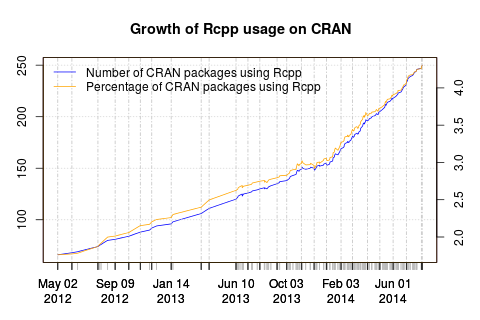
Rcpp growth
Rcpp reached a nice round milestone yesterday: 250 packages on CRAN now depend on it (as measured by Depends, Imports and LinkingTo declarations). The graph is on the left depicts the growth of Rcpp over time. Or at least since I started to write down some usage numbers: first informally, then via a script. Also displayed is the relative proportion of CRAN packages using it. Rcpp cleared the four per-cent hurdle just before useR! 2014 where I showed a similar graph (as two distinct graphs) in my invited talk. 250 is a pretty impressive, and rather humbling, number. From everybody behind Rcpp, I would like to say a heartfelt Thank You! to all the users and of course contributors.

This post by Dirk Eddelbuettel originated on his Thinking inside the box blog. Please report excessive re-aggregation in third-party for-profit settings.

Ian Donnelly: How-To: Write a Plug-In (Part 2, The Contract)

Hi Everybody! This is the second installment of my tutorial, How-To: Write a Plug-In. Previously, in Part 1, I went over the basic interface of an Elektra Storage Plug-In. For this installment, I will be focusing on one of the most important aspects of a plug-in, its contract. The contract describes how a plug-in may behave. The main part of the contract describes to Elektra how it will modify the KeySet returned. This is what allows Elektra to work with various types of plug-ins. This guide will focus on one type of plug-in: the storage plug-in. We already have a published specification for plug-ins on our repository but I will reiterate the details here. The first part of the contract you will need is the system/elektra/modules/plugin (where plugin represents the name of your plug-in). All this key does is let elektra know that your plug-in exists. The next key is system/elektra/modules/plugin/exports. This key lets Elektra know that your plug-in exports symbols to Elektra. Below this key you need to create keys for each function you want to export, in my line plug-in I implemented functions for get and set so I will create two keys as follows:
keyNew ("system/elektra/modules/line/exports/get",
KEY_FUNC, elektraLineGet, KEY_END),
keyNew ("system/elektra/modules/line/exports/set",
KEY_FUNC, elektraLineSet, KEY_END),
So far we have told Elektra that our plugin exists and will be exporting functions for getting and setting keys. The next set of keys are the system/elektra/Plugin/infos keys. These are pretty self-explanatory. The first three children of this key, author, license, and description are pretty self explanatory. The infos/provides key tells Elektra the type of plug-in that is being used, this will be storage for any storage plug-in (which is what this tutorial focuses on). To be precise, it tells Elektra which abstract functionality is provided. This allows other plugins to reference abstract functionality instead of declaring a hard dependency to one specific plugin. For example plugins could state that they want to be placed before any other plugin doing the abstract functionality conversion instead of referencing for example the keytometa plugin directly. The info/placements key tells Elektra which functions of the plug-in it should call. Since I implemented get and set in the line plug-in, I would set this key to getstorage setstorage . Next is infos/needs and infos/recommends, infos/needs should contain a list of plug-ins or providers that your plug-in needs to work (see the info/provides key above). Otherwise this key needs to be set to be blank . infos/recommends works exactly like needs except that a plug-in that needs another plug-in won t form a valid backend if the other plug-in doesn t exist but if it only recommends having the other plug-in, it will still work in the others absence. Since Elektra 0.8.7, the best practice for creating a plug-in involves storing the info keys at the very top of a file named REAMDE.md in the same directory as the plugin source. For instance, in my line plugin, the first few lines of README.md are as follows:
- infos = Information about LINE plugin is in keys below
- infos/author = Ian Donnelly <ian.s.donnelly@gmail.com>
- infos/licence = BSD
- infos/needs =
- infos/provides = storage
- infos/placements = getstorage setstorage
- infos/description = Very simple storage plug-in which stores each line from a file as a key
The rest of the README.md file should contain an English description of the plug-in. You can include an introduction to the plug-in, its purpose, any shortcomings it may have, and examples of how to use it. This README.md file is standard for GitHub which will automatically be displayed when a user is browsing your plug-in s directory in the repo. It is written in Markdown. In order to generate the contract from this file you must edit the CMakeLists.txt file in your plug-in source directory to include the following lines:
generate_readme (plugin)
add_includes (elektra-full $ CMAKE_CURRENT_BINARY_DIR )
include_directories ($ CMAKE_CURRENT_BINARY_DIR )

where you substitute plugin with the name of you plugin. This will generate a file called readme_plugin.c (once again, substitute plugin), in your plugin s build directory when you run the make command. The best way to declare the contract is within it s own function, elektraPluginContract. This makes it easier to manage the contract and is much more readable. This is the contract declaration for my line plug-in:

static inline KeySet *elektraLineContract()

return ksNew (30,
keyNew ("system/elektra/modules/line",
KEY_VALUE, "line plugin waits for your orders", KEY_END),
keyNew ("system/elektra/modules/line/exports", KEY_END),
keyNew ("system/elektra/modules/line/exports/get",
KEY_FUNC, elektraLineGet, KEY_END),
keyNew ("system/elektra/modules/line/exports/set",
KEY_FUNC, elektraLineSet, KEY_END),
#include "readme_line.c"
keyNew ("system/elektra/modules/line/infos/version",
KEY_VALUE, PLUGINVERSION, KEY_END),
KS_END);

Next, you will need to make sure to actually set the contract. This is always done in the elektraPluginGet function since this is technically the only REQUIRED function in a plug-in. We just create a new KeySet, set it to our contract, and append it to the returned KeySet. You can see how this is done for line (note that this code is at the very beginning of elektraLineGet):

if (!strcmp (keyName(parentKey), "system/elektra/modules/line"))

KeySet *moduleConfig = elektraLineContract();
ksAppend(returned, moduleConfig);
ksDel(moduleConfig);
return 1;


Note that the plugin contract is nothing special, but just a KeySet interpreted by the resolver forming an Elektra backend. Elektra will request the keys below system/elektra/modules/plugin (where plugin is the pluginname) as soon as it wants to know something about that plugin. Notice also the line #include "readme_line.c". This line, pulls in the contents of readme_line.c in my plug-in s build directory, which due to the lines we added in CMakeLists.txt will contain the contract as defined at the top of README.md. Any changes to the keys in README.md will be reflected in the plug-in next time it is built. Part 2 of this tutorial focuses on the plug-in contract by explaining what each element does and explaining how to implement a contract. For more information about plug-ins and more detailed examples I highly suggest reading Markus Thesis for Elektra. Chapter 4, which starts on page 61 goes into much more detail on Plug-Ins and explains the various features of the contracts. Look for Part 3 soon!

Next.

Previous.