Search Results: "nate"

28 June 2017

Yakking: What is Time?

Time is a big enough subject that I'd never finish writing about it. Fortunately this is a Linux technical blog, so I only have to talk about it from that perspective. In a departure from our usual article series format, we are going to start with an introductory article and follow up starting from basics, introducing new concepts in order of complexity. What is time? Time is seconds since the unix epoch. The Unix epoch is midnight, Thursday, 1st January 1970 in the UTC time zone. If you know the unix time and how many seconds in each day since then you can use the unix timestamp to work out what time it is now in UTC time. If you want to know the time in another timezone the na ve thing is to apply a timezone offset based on how far or behind the zone is compared to UTC. This is non-trivial since time is a political issue, requiring global coordination with hundreds of countries coming in and out of [daylight saving time][] and various other administrative changes, time often changes. Some times don't exist in some timezones. Samoa skipped a day and changed time zone. A side-effect of your system clock being in Unix time is that to know local time you need to know where you are. The talk linked to in https://fosdem.org/2017/schedule/event/python_datetime/ is primarily about time in python, but covers the relationship between time stamps, clock time and time zones. http://www.creativedeletion.com/2015/01/28/falsehoods-programmers-date-time-zones.html is a good summary of some of the common misconceptions of time zone handling.
Now that we've covered some of the concepts we can discuss in future articles how this is implemented in Linux.

26 June 2017

Alexander Wirt: Stretch Backports available

With the release of stretch we are pleased to open the doors for stretch-backports and jessie-backports-sloppy. \o/ As usual with a new release we will change a few things for the backports service.

What to upload where As a reminder, uploads to a release-backports pocket are to be taken from release + 1, uploads to a release-backports-sloppy pocket are to be taken from release + 2. Which means:
Source Distribution Backports Distribution Sloppy Distribution
buster stretch-backports jessie-backports-sloppy
stretch jessie-backports -

Deprecation of LTS support for backports We started supporting backports as long as there is LTS support as an experiment. Unfortunately it didn t worked, most maintainers didn t wanted to support oldoldstable-backports (squeeze) for the lifetime of LTS. So things started to rot in squeeze and most packages didn t received updates. After long discussions we decided to deprecate LTS support for backports. From now on squeeze-backports(-sloppy) is closed and will not receive any updates. Expect it to get removed from the mirrors and moved to archive in the near future.

BSA handling We - the backports team - didn t scale well in processing BSA requests. To get things better in the future we decided to change the process a little bit. If you upload a package which fixes security problems please fill out the BSA template and create a ticket in the rt tracker (see https://backports.debian.org/Contribute/#index3h2 for details).

Stretching the rules From time to time its necessary to not follow the backports rules, like a package needs to be in testing or a version needs to be in Debian. If you think you have one of those cases, please talk to us on the list before upload the package.

Thanks Thanks have to go out to all people making backports possible, and that includes up front the backporters themself who do upload the packages, track and update them on a regular basis, but also the buildd team making the autobuilding possible and the ftp masters for creating the suites in the first place. We wish you a happy stretch :) Alex, on behalf of the Backports Team

25 June 2017

Steinar H. Gunderson: Frame queue management in Nageru 1.6.1

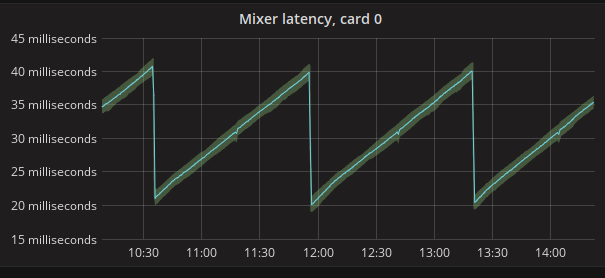
Nageru 1.6.1 is on its way, and what was intended to only be a release centered around monitoring improvements (more specifically a full set of native Prometheus] metrics) actually ended up getting a fairly substantial change to how Nageru manages its frame queues. To understand what's changing and why, it's useful to first understand the history of Nageru's queue management. Nageru 1.0.0 started out with a fairly simple scheme, but with some basics that are still relevant today: One of the input cards was deemed the master card, and whenever it delivers a frame, the master clock ticks and an output frame is produced. (There are some subtleties about dropped frames and/or the master card changing frame rates, but I'm going to ignore them, since they're not important to the discussion.) To this end, every card keeps a preallocated frame queue; when a card delivers a frame, it's put into the queue, and when the master clock ticks, it tries picking out one frame from each of the other card's queues to mix together. Note that mix here could be as simple as picking one input and throwing all the other ones away; the queueing algorithm doesn't care, it just feeds all of them to the theme and lets that run whatever GPU code it needs to match the user's preferences. The only thing that really keeps the queues bounded is that the frames in them are preallocated (in GPU memory), so if one queue gets longer than 16 frames, Nageru starts dropping it. But is 16 the right number? There are two conflicting demands here, ignoring memory usage: The 1.0.0 scheme does about as well as one could possibly hope in never dropping frames, but unfortunately, it can be pretty poor at latency. For instance, if your master card runs at 50 Hz and you have a 60 Hz card, the latter will eventually build up a delay of 16 * 16.7 ms = 266.7 ms clearly unacceptable, and rather unneeded. You could ask the user to specify a queue length, but the user probably doesn't know, and also shouldn't really have to care more knobs to twiddle are a bad thing, and even more so knobs the user is expected to twiddle. Thus, Nageru 1.2.0 introduced queue autotuning; it keeps a running estimate on how big the queue needs to be to avoid underruns, simply based on experience. If we've been dropping frames on a queue and then there's an underrun, the safe queue length is increased by one, and if the queue has been having excess frames for more than a thousand successive master clock ticks, we reduce it by one again. Whenever the queue has more than this safe number, we drop frames. This was simple, effective and largely fixed the problem. However, when adding metrics, I noticed a peculiar effect: Not all of my devices have equally good clocks. In particular, when setting up for 1080p50, my output card's internal clock (which assumes the role of the master clock when using HDMI/SDI output) seems to tick at about 49.9998 Hz, and my simple home camcorder delivers frames at about 49.9995 Hz. Over the course of an hour, this means it produces one more frame than you should have which should of course be dropped. Having an SDI setup with synchronized clocks (blackburst/tri-level) would of course fix this problem, but most people are not so lucky with their cameras, not to mention the price of PC graphics cards with SDI outputs! However, this happens very slowly, which means that for a significant amount of time, the two clocks will very nearly be in sync, and thus racing. Who ticks first is determined largely by luck in the jitter (normal is maybe 1ms, but occasionally, you'll see delayed delivery of as much as 10 ms), and this means that the 1000 frames estimate is likely to be thrown off, and the result is hundreds of dropped frames and underruns in that period. Once the clocks have diverged enough again, you're off the hook, but again, this isn't a good place to be. Thus, Nageru 1.6.1 change the algorithm around yet again, by incorporating more data to build an explicit jitter model. 1.5.0 was already timestamping each frame to be able to measure end-to-end latency precisely (now also exposed in Prometheus metrics), but from 1.6.1, they are actually used in the queueing algorithm. I ran several eight- to twelve-hour tests and simply stored all the event arrivals to a file, and then simulated a few different algorithms (including the old algorithm) to see how they fared in measures such as latency and number of drops/underruns. I won't go into the full details of the new queueing algorithm (see the commit if you're interested), but the gist is: Based on the last 5000 frames, it tries to estimate the maximum possible jitter for each input (ie., how late the frame could possibly be). Based on this as well as clock offsets, it determines whether it's really sure that there will be an input frame available on the next master tick even if it drops the queue, and then trims the queue to fit. The result is pretty satisfying; here's the end-to-end latency of my camera being sent through to the SDI output: As you can see, the latency goes up, up, up until Nageru figures it's now safe to drop a frame, and then does it in one clean drop event; no more hundreds on drops involved. There are very late frame arrivals involved in this run two extra frame drops, to be precise but the algorithm simply determines immediately that they are outliers, and drops them without letting them linger in the queue. (Immediate dropping is usually preferred to sticking around for a bit and then dropping it later, as it means you only get one disturbance event in your stream as opposed to two. Of course, you can only do it if you're reasonably sure it won't lead to more underruns later.) Nageru 1.6.1 will ship before Solskogen, as I intend to run it there :-) And there will probably be lovely premade Grafana dashboards from the Prometheus data. Although it would have been a lot nicer if Grafana were more packaging-friendly, so I could pick it up from stock Debian and run it on armhf. Hrmf. :-)

24 June 2017

Riku Voipio: Cross-compiling with debian stretch

Debian stretch comes with cross-compiler packages for selected architectures:
 $ apt-cache search cross-build-essential
crossbuild-essential-arm64 - Informational list of cross-build-essential packages for
crossbuild-essential-armel - ...
crossbuild-essential-armhf - ...
crossbuild-essential-mipsel - ...
crossbuild-essential-powerpc - ...
crossbuild-essential-ppc64el - ...

Lets have a quick exact steps guide. But first - while you can use do all this in your desktop PC rootfs, it is more wise to contain yourself. Fortunately, Debian comes with a container tool out of box:

sudo debootstrap stretch /var/lib/container/stretch http://deb.debian.org/debian
echo "strech_cross" sudo tee /var/lib/container/stretch/etc/debian_chroot
sudo systemd-nspawn -D /var/lib/container/stretch
Then we set up cross-building enviroment for arm64 inside the container:

# Tell dpkg we can install arm64
dpkg --add-architecture arm64
# Add src line to make "apt-get source" work
echo "deb-src http://deb.debian.org/debian stretch main" >> /etc/apt/sources.list
apt-get update
# Install cross-compiler and other essential build tools
apt install --no-install-recommends build-essential crossbuild-essential-arm64
Now we have a nice build enviroment, lets choose something more complicated than the usual kernel/BusyBox to cross-build, qemu:

# Get qemu sources from debian
apt-get source qemu
cd qemu-*
# New in stretch: build-dep works in unpacked source tree
apt-get build-dep -a arm64 .
# Cross-build Qemu for arm64
dpkg-buildpackage -aarm64 -j6 -b
Now that works perfectly for Qemu. For other packages, challenges may appear. For example you may have to se "nocheck" flag to skip build-time unit tests. Or some of the build-dependencies may not be multiarch-enabled. So work continues :)

23 June 2017

Joachim Breitner: The perils of live demonstrations

Yesterday, I was giving a talk at the The South SF Bay Haskell User Group about how implementing lock-step simulation is trivial in Haskell and how Chris Smith and me are using this to make CodeWorld even more attractive to students. I gave the talk before, at Compose::Conference in New York City earlier this year, so I felt well prepared. On the flight to the West Coast I slightly extended the slides, and as I was too cheap to buy in-flight WiFi, I tested them only locally. So I arrived at the offices of Target1 in Sunnyvale, got on the WiFi, uploaded my slides, which are in fact one large interactive CodeWorld program, and tried to run it. But I got a type error Turns out that the API of CodeWorld was changed just the day before:
commit 054c811b494746ec7304c3d495675046727ab114
Author: Chris Smith <cdsmith@gmail.com>
Date:   Wed Jun 21 23:53:53 2017 +0000
    Change dilated to take one parameter.
    
    Function is nearly unused, so I'm not concerned about breakage.
    This new version better aligns with standard educational usage,
    in which "dilation" means uniform scaling.  Taken as a separate
    operation, it commutes with rotation, and preserves similarity
    of shapes, neither of which is true of scaling in general.
Ok, that was quick to fix, and the CodeWorld server started to compile my code, and compiled, and aborted. It turned out that my program, presumably the larges CodeWorld interaction out there, hit the time limit of the compiler. Luckily, Chris Smith just arrived at the venue, and he emergency-bumped the compiler time limit. The program compiled and I could start my presentation. Unfortunately, the biggest blunder was still awaiting for me. I came to the slide where two instances of pong are played over a simulated network, and my point was that the two instances are perfectly in sync. Unfortunately, they were not. I guess it did support my point that lock-step simulation can easily go wrong, but it really left me out in the rain there, and I could not explain it I did not modify this code since New York, and there it worked flawless2. In the end, I could save my face a bit by running the real pong game against an attendee over the network, and no desynchronisation could be observed there. Today I dug into it and it took me a while, and it turned out that the problem was not in CodeWorld, or the lock-step simulation code discussed in our paper about it, but in the code in my presentation that simulated the delayed network messages; in some instances it would deliver the UI events in different order to the two simulated players, and hence cause them do something different. Phew.

  1. Yes, the retail giant. Turns out that they have a small but enthusiastic Haskell-using group in their IT department.
  2. I hope the video is going to be online soon, then you can check for yourself.

22 June 2017

John Goerzen: First Experiences with Stretch

I ve done my first upgrades to Debian stretch at this point. The results have been overall good. On the laptop my kids use, I helped my 10-year-old do it, and it worked flawlessly. On my workstation, I got a kernel panic on boot. Hmm. Unfortunately, my system has to use the nv drivers, which leaves me with an 80 25 text console. It took some finagling (break=init in grub, then manually insmoding the appropriate stuff based on modules.dep for nouveau), but finally I got a console so I could see what was breaking. It appeared that init was crashing because it couldn t find liblz4. A little digging shows that liblz4 is in /usr, and /usr wasn t mounted. I ve filed the bug on systemd-sysv for this. I run root on ZFS, and further digging revealed that I had datasets named like this: This used to be fine. The mountpoint property of the usr dataset put it at /usr without incident. But it turns out that this won t work now, unless I set ZFS_INITRD_ADDITIONAL_DATASETS in /etc/default/zfs for some reason. So I renamed them so usr was under ROOT, and then the system booted. Then I ran samba not liking something in my bind interfaces line (to be fair, it did still say eth0 instead of br0). rpcbind was failing in postinst, though a reboot seems to have helped that. More annoying was that I had trouble logging into my system because resolv.conf was left empty (despite dns-* entries in /etc/network/interfaces and the presence of resolvconf). I eventually repaired that, and found that it kept removing my search line. Eventually I removed resolvconf. Then mariadb s postinst was silently failing. I eventually discovered it was sending info to syslog (odd), and /etc/init.d/apparmor teardown let it complete properly. It seems like there may have been an outdated /etc/apparmor.d/cache/usr.sbin.mysql out there for some reason. Then there was XFCE. I use it with xmonad, and the session startup was really wonky. I had to zap my sessions, my panel config, etc. and start anew. I am still not entirely sure I have it right, but I at do have a usable system now.

Dirk Eddelbuettel: nanotime 0.2.0

A new version of the nanotime package for working with nanosecond timestamps just arrived on CRAN. nanotime uses the RcppCCTZ package for (efficient) high(er) resolution time parsing and formatting up to nanosecond resolution, and the bit64 package for the actual integer64 arithmetic. Thanks to a metric ton of work by Leonardo Silvestri, the package now uses S4 classes internally allowing for greater consistency of operations on nanotime objects.

Changes in version 0.2.0 (2017-06-22)
  • Rewritten in S4 to provide more robust operations (#17 by Leonardo)
  • Ensure tz="" is treated as unset (Leonardo in #20)
  • Added format and tz arguments to nanotime, format, print (#22 by Leonardo and Dirk)
  • Ensure printing respect options()$max.print, ensure names are kept with vector (#23 by Leonardo)
  • Correct summary() by defining names<- (Leonardo in #25 fixing #24)
  • Report error on operations that are meaningful for type; handled NA, NaN, Inf, -Inf correctly (Leonardo in #27 fixing #26)

We also have a diff to the previous version thanks to CRANberries. More details and examples are at the nanotime page; code, issue tickets etc at the GitHub repository.

This post by Dirk Eddelbuettel originated on his Thinking inside the box blog. Please report excessive re-aggregation in third-party for-profit settings.

Norbert Preining: Signal handling in R

Recently I have been programming quite a lot in R, and today stumbled over the problem to implement a kind of monitoring loop in R. Typically that would be a infinite loop with sleep calls, but I wanted to allow for waking up from the sleep via sending UNIX style signals, in particular SIGINT. After some searching I found Beyond Exception Handling: Conditions and Restarts from the Advanced R book. But it didn t really help me a lot to program an interrupt handler.
My requirements were: Unfortunately it seems not to be possible to ignore interrupts at all from with the R code. The best one can do is install interrupt handlers and try to repeat the code which was executed while the interrupt happened. This is what I tried to implement with the following code below. I still have to digest the documentation about conditions and restarts, and play around a lot, but at least this is an initial working version.
workfun <- function()  
  i <- 1
  do_repeat <- FALSE
  while (TRUE)  
    message("begin of the loop")
    withRestarts(
       
        # do all the work here
        cat("Entering work part i =", i, "\n");
        Sys.sleep(10)
        i <- i + 1
        cat("finished work part\n")
       , 
      gotSIG = function()   
        message("interrupted while working, restarting work part")
        do_repeat <<- TRUE
        NULL
       
    )
    if (do_repeat)  
      cat("restarting work loop\n")
      do_repeat <- FALSE
      next
      else  
      cat("between work and sleep part\n")
     
    withRestarts(
       
        # do the sleep part here
        cat("Entering sleep part i =", i, "\n")
        Sys.sleep(10)
        i <- i + 1
        cat("finished sleep part\n")
       , 
      gotSIG = function()  
        message("got work to do, waking up!")
        NULL
       
    )
    message("end of the loop")
   
 
cat("Current process:", Sys.getpid(), "\n");
withCallingHandlers( 
    workfun()
   ,
  interrupt = function(e)  
    invokeRestart("gotSIG")
   )
While not perfect, I guess I have to live with this method for now.

Dirk Eddelbuettel: RcppCCTZ 0.2.3 (and 0.2.2)

A new minor version 0.2.3 of RcppCCTZ is now on CRAN. RcppCCTZ uses Rcpp to bring CCTZ to R. CCTZ is a C++ library for translating between absolute and civil times using the rules of a time zone. In fact, it is two libraries. One for dealing with civil time: human-readable dates and times, and one for converting between between absolute and civil times via time zones. The RcppCCTZ page has a few usage examples and details. This version ensures that we set the TZDIR environment variable correctly on the old dreaded OS that does not come with proper timezone information---an issue which had come up while preparing the next (and awesome, trust me) release of nanotime. It also appears that I failed to blog about 0.2.2, another maintenance release, so changes for both are summarised next.

Changes in version 0.2.3 (2017-06-19)
  • On Windows, the TZDIR environment variable is now set in .onLoad()
  • Replaced init.c with registration code inside of RcppExports.cpp thanks to Rcpp 0.12.11.

Changes in version 0.2.2 (2017-04-20)
  • Synchronized with upstream CCTZ
  • The time_point object is instantiated explicitly for nanosecond use which appears to be required on macOS

We also have a diff to the previous version thanks to CRANberries. More details are at the RcppCCTZ page; code, issue tickets etc at the GitHub repository.

This post by Dirk Eddelbuettel originated on his Thinking inside the box blog. Please report excessive re-aggregation in third-party for-profit settings.

20 June 2017

Foteini Tsiami: Internationalization, part one

The first part of internationalizing a Greek application, is, of course, translating all the Greek text to English. I already knew how to open a user interface (.ui) file with Glade and how to translate/save it from there, and mail the result to the developers. If only it was that simple! I learned that the code of most open source software is kept on version control systems, which fortunately are a bit similar to Wikis, which I was familiar with, so I didn t have a lot of trouble understanding the concepts. Thanks to a very brief git crash course from my mentors, I was able to quickly start translating, committing, and even pushing back the updated files. The other tricky part was internationalizing the python source code. There Glade couldn t be used, a text editor like Pluma was needed. And the messages were part of the source code, so I had to be extra careful not to break the syntax. The English text then needed to be wrapped around _(), which does the gettext call which dynamically translates the messages into the user language. All this was very educative, but now that the first part of the internationalization, i.e. the Greek-to-English translations, are over, I think I ll take some time to read more about the tools that I used!

16 June 2017

Elena 'valhalla' Grandi: Travel piecepack v0.1

Travel piecepack v0.1

Immagine/fotosocial.gl-como.it/photos/valha

A www.piecepack.org/ set of generic board game pieces is nice to have around in case of a sudden spontaneous need of gaming, but carrying my full set www.trueelena.org/fantastic/fe takes some room, and is not going to fit in my daily bag.

I've been thinking for a while that an half-size set could be useful, and between yesterday and today I've actually managed to do the first version.

It's (2d) printed on both sides of a single sheet of heavy paper, laminated and then cut, comes with both the basic suites and the playing card expansion and fits in a mint tin divided by origami boxes.

It's just version 0.1 because there are a few issues: first of all I'm not happy with the manual way I used to draw the page: ideally it would have been programmatically generated from the same svg files as the 3d piecepack (with the ability to generate other expansions), but apparently reading paths from an svg and writing it in another svg is not supported in an easy way by the libraries I could find, and looking for it was starting to take much more time than just doing it by hand.

I also still have to assemble the dice; in the picture above I'm just using the ones from the 3d-printed set, but they are a bit too big and only four of them fit in the mint tin. I already have the faces printed, so this is going to be fixed in the next few days.

Source files are available in the same git repository as the 3d-printable piecepack git.trueelena.org/cgit.cgi/3d/, with the big limitation mentioned above; updates will also be pushed there, just don't hold your breath for it :)

Michal &#268;iha&#345;: New projects on Hosted Weblate

Hosted Weblate provides also free hosting for free software projects. The hosting requests queue was over one month long, so it's time to process it and include new project. This time, the newly hosted projects include: We now also host few new Minetest mods: If you want to support this effort, please donate to Weblate, especially recurring donations are welcome to make this service alive. You can do them on Liberapay or Bountysource.

Filed under: Debian English SUSE Weblate

15 June 2017

Jeremy Bicha: #newinstretch : Latest WebKitGTK+

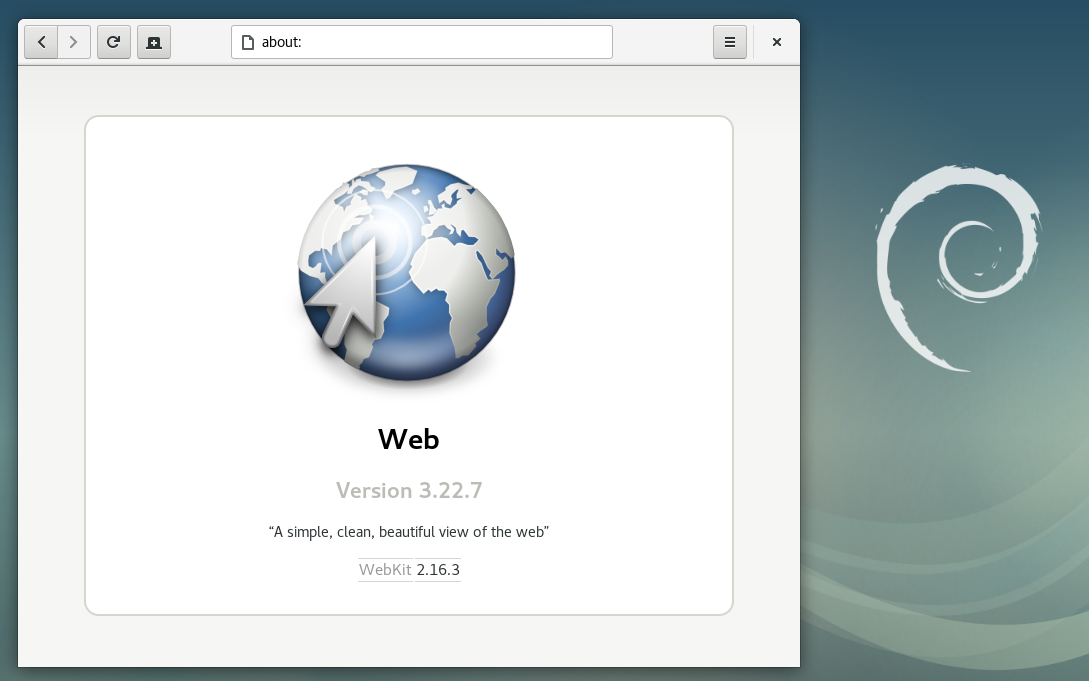
GNOME Web (Epiphany) in Debian 9 "Stretch" Debian 9 Stretch , the latest stable version of the venerable Linux distribution, will be released in a few days. I pushed a last-minute change to get the latest security and feature update of WebKitGTK+ (packaged as webkit2gtk 2.16.3) in before release. Carlos Garcia Campos discusses what s new in 2.16, but there are many, many more improvements since the 2.6 version in Debian 8. Like many things in Debian, this was a team effort from many people. Thank you to the WebKitGTK+ developers, WebKitGTK+ maintainers in Debian, Debian Release Managers, Debian Stable Release Managers, Debian Security Team, Ubuntu Security Team, and testers who all had some part in making this happen. As with Debian 8, there is no guaranteed security support for webkit2gtk for Debian 9. This time though, there is a chance of periodic security updates without needing to get the updates through backports. If you would like to help test the next proposed update, please contact me so that I can help coordinate this.

14 June 2017

Steve Kemp: Porting pfctl to Linux

If you have a bunch of machines running OpenBSD for firewalling purposes, which is pretty standard, you might start to use source-control to maintain the rulesets. You might go further, and use some kind of integration testing to deploy changes from your revision control system into production. Of course before you deploy any pf.conf file you need to test that the file contents are valid/correct. If your integration system doesn't run on OpenBSD though you have a couple of choices: I looked at this last year and got pretty far, but then got distracted. So the other day I picked it up again. It turns out that if you're patient it's not hard to use bison to generate some C code, then glue it together such that you can validate your firewall rules on a Linux system.

  deagol ~/pf.ctl $ ./pfctl ./pf.conf
  ./pf.conf:298: macro 'undefined_variable' not defined
  ./pf.conf:298: syntax error
Unfortunately I had to remove quite a lot of code to get the tool to compile, which means that while some failures like that above are caught others are missed. The example above reads:
vlans=" vlan1,vlan2 "
..
pass out on $vlans proto udp from $undefined_variable
Unfortunately the following line does not raise an error:
pass out on vlan12 inet proto tcp from <unknown> to $http_server port  80,443 
That comes about because looking up the value of the table named unknown just silently fails. In slowly removing more and more code to make it compile I lost the ability to keep track of table definitions - both their names and their values - Thus the fetching of a table by name has become a NOP, and a bogus name will result in no error. Now it is possible, with more care, that you could use a hashtable library, or similar, to simulate these things. But I kinda stalled, again. (Similar things happen with fetching a proto by name, I just hardcoded inet, gre, icmp, icmp6, etc. Things that I'd actually use.) Might be a fun project for somebody with some time anyway! Download the OpenBSD source, e.g. from a github mirror - yeah, yeah, but still. CVS? No thanks! - Then poke around beneath sbin/pfctl/. The main file you'll want to grab is parse.y, although you'll need to setup a bunch of headers too, and write yourself a Makefile. Here's a hint:
  deagol ~/pf.ctl $ tree
  .
    inc
      net
        pfvar.h
      queue.h
      sys
          _null.h
          refcnt.h
          tree.h
    Makefile
    parse.y
    pf.conf
    pfctl.h
    pfctl_parser.h
    y.tab.c
  3 directories, 11 files

Sjoerd Simons: Debian Jessie on Raspberry Pi 2

Apart from being somewhat slow, one of the downsides of the original Raspberry Pi SoC was that it had an old ARM11 core which implements the ARMv6 architecture. This was particularly unfortunate as most common distributions (Debian, Ubuntu, Fedora, etc) standardized on the ARMv7-A architecture as a minimum for their ARM hardfloat ports. Which is one of the reasons for Raspbian and the various other RPI specific distributions. Happily, with the new Raspberry Pi 2 using Cortex-A7 Cores (which implement the ARMv7-A architecture) this issue is out of the way, which means that a a standard Debian hardfloat userland will run just fine. So the obvious first thing to do when an RPI 2 appeared on my desk was to put together a quick Debian Jessie image for it. The result of which can be found at: https://images.collabora.co.uk/rpi2/ Login as root with password debian (Obviously do change the password and create a normal user after booting). The image is 3G, so should fit on any SD card marketed as 4G or bigger. Using bmap-tools for flashing is recommended, otherwise you'll be waiting for 2.5G of zeros to be written to the card, which tends to be rather boring. Note that the image is really basic and will just get you to a login prompt on either serial or hdmi, batteries are very much not included, but can be apt-getted :). Technically, this image is simply a Debian Jessie debootstrap with a extra packages for hardware support. Unlike Raspbian the first partition (which contains the firmware & kernel files to boot the system) is mounted on /boot/firmware rather then on /boot. This is because the VideoCore expects the first partition to be a FAT filesystem, but mounting FAT on /boot really doesn't work right on Debian systems as it contains files managed by dpkg (e.g. the kernel package) which requires a POSIX compatible filesystem. Essentially the same reason why Debian is using /boot/efi for the ESP partition on Intel systems rather the mounting it on /boot directly. For reference, the RPI2 specific packages in this image are from https://repositories.collabora.co.uk/debian/ in the jessie distribution and rpi2 component (this repository is enabled by default on the image). The relevant packages there are: For the future, it would be nice to see the Raspberry Pi 2 support out of the box on Debian. For that to happen, the most important thing would be to have some mainline kernel support for this board (supporting multiplatform!) so it can be build as part of debians armmp kernel flavour. And ideally, having the firmware load a bootloader (such as u-boot) rather than a kernel directly to allow for a much more flexible boot sequence and support for using an initramfs (u-boot has some support for the original Raspberry Pi, so adding Raspberry Pi 2 support should hopefully not be too tricky) Update: An updated image (20150705) is available with the latest packages from Jessie and a GPG key that's not expired :).

Sjoerd Simons: Debian armhf VM on arm64 server

At Collabora one of the many things we do is build Debian derivatives/overlays for customers on a variety of architectures including 32 bit and 64 bit ARM systems. And just as Debian does, our OBS system builds on native systems rather than emulators. Luckily with the advent of ARM server systems some years ago building natively for those systems has been a lot less painful than it used to be. For 32 bit ARM we've been relying on Calxeda blade servers, however Calxeda unfortunately tanked ages ago and the hardware is starting to show its age (though luckily Debian Stretch does support it properly, so at least the software is still fresh). On the 64 bit ARM side, we're running on Gigabyte MP30-AR1 based servers which can run 32 bit arm code (As opposed to e.g. ThunderX based servers which can only run 64 bit code). As such running armhf VMs on them to act as build slaves seems a good choice, but setting that up is a bit more involved than it might appear. The first pitfall is that there is no standard bootloader or boot firmware available in Debian to boot on the "virt" machine emulated by qemu (I didn't want to use an emulation of a real machine). That also means there is nothing to pick the kernel inside the guest at boot nor something which can e.g. have the guest network boot, which means direct kernel booting needs to be used. The second pitfall was that the current Debian Stretch armhf kernel isn't built with support for the generic PCI host controller which the qemu virtual machine exposes, which means no storage and no network shows up in the guest. Hopefully that will get solved soonish (Debian bug 864726) and can be in a Stretch update, until then a custom kernel package is required using the patch attach to the bug report is required but I won't go into that any further in this post. So on the happy assumption that we have a kernel that works, the challenge left is to nicely manage direct kernel loading. Or more specifically, how ensure the hosts boots the kernel the guest has installed via the standard apt tools without having to copy kernels around between guest/host, which essentially comes down to exposing /boot from the guest to the host. The solution we picked is to use qemu's 9pfs support to share a folder from the host and use that as /boot of the guest. For the 9p folder the "mapped" security mode seems needed as the "none" mode seems to get confused by dpkg (Debian bug 864718). As we're using libvirt as our virtual machine manager the remainder of how to glue it all together will be mostly specific to that. First step is to install the system, mostly as normal. One can directly boot into the vmlinuz and initrd.gz provided by normal Stretch armhf netboot installer (downloaded into e.g /tmp). The setup overall is straight-forward with a few small tweaks: Apart from those tweaks the resulting example command is similar to the one that can be found in the virt-install man-page:
virt-install --name armhf-vm --arch armv7l --memory 512 \
  --disk /srv/armhf-vm.img,bus=virtio
  --filesystem /srv/armhf-vm-boot,virtio-boot,mode=mapped \
  --boot=kernel=/tmp/vmlinuz,initrd=/tmp/initrd.gz,kernel_args="console=ttyAMA0,root=/dev/vda1"

Run through the install as you'd normally would. Towards the end the installer will likely complain it can't figure out how to install a bootloader, which is fine. Just before ending the install/reboot, switch to the shell and copy the /boot/vmlinuz and /boot/initrd.img from the target system to the host in some fashion (e.g. chroot into /target and use scp from the installed system). This is required as the installer doesn't support 9p, but to boot the system an initramfs will be needed with the modules needed to mount the root fs, which is provided by the installed initramfs :). Once that's all moved around, the installer can be finished. Next, booting the installed system. For that adjust the libvirt config (e.g. using virsh edit and tuning the xml) to use the kernel and initramfs copied from the installer rather then the installer ones. Spool up the VM again and it should happily boot into a freshly installed Debian system. To finalize on the guest side /boot should be moved onto the shared 9pfs, the fstab entry for the new /boot should look something like:
virtio-boot /boot  9p trans=virtio,version=9p2000.L,x-systemd.automount 0 0

With that setup, it's just a matter of shuffling the files in /boot around to the new filesystem and the guest is done (make sure vmlinuz/initrd.img stay symlinks). Kernel upgrades will work as normal and visible to the host. Now on the host side there is one extra hoop to jump through, as the guest uses the 9p mapped security model symlinks in the guest will be normal files on the host containing the symlink target. To resolve that one, we've used libvirt's qemu hook support to setup a proper symlink before the guest is started. Below is the script we ended up using as an example (/etc/libvirt/hooks/qemu):
vm=$1
action=$2
bootdir=/srv/$ vm -boot
if [ $ action  != "prepare" ] ; then
  exit 0
fi
if [ ! -d $ bootdir  ] ; then
  exit 0
fi
ln -sf $(basename $(cat $ bootdir /vmlinuz))  $ bootdir /virtio-vmlinuz
ln -sf $(basename $(cat $ bootdir /initrd.img))  $ bootdir /virtio-initrd.img

With that in place, we can simply point the libvirt definition to use /srv/$ vm -boot/virtio- vmlinuz,initrd.img as the kernel/initramfs for the machine and it'll automatically get the latest kernel/initramfs as installed by the guest when the VM is started. Just one final rough edge remains, when doing reboot from the VM libvirt leaves qemu to handle that rather than restarting qemu. This unfortunately means a reboot won't pick up a new kernel if any, for now we've solved this by configuring libvirt to stop the VM on reboot instead. As we typically only reboot VMs on kernel (security) upgrades, while a bit tedious, this avoid rebooting with an older kernel/initramfs than intended.

13 June 2017

Rapha&#235;l Hertzog: Freexian s report about Debian Long Term Support, May 2017

A Debian LTS logoLike each month, here comes a report about the work of paid contributors to Debian LTS. Individual reports In May, about 182 work hours have been dispatched among 11 paid contributors. Their reports are available: Evolution of the situation The number of sponsored hours did not change and we are thus still a little behind our objective. The security tracker currently lists 44 packages with a known CVE and the dla-needed.txt file 42. The number of open issues is close to last month. Thanks to our sponsors New sponsors are in bold (none this month unfortunately).

No comment Liked this article? Click here. My blog is Flattr-enabled.

Dirk Eddelbuettel: RcppMsgPack 0.1.1

A new package! Or at least new on CRAN as the very initial version 0.1.0 had been available via the ghrr drat for over a year. But now we have version 0.1.1 to announce as a CRAN package. RcppMspPack provides R with MessagePack header files for use via C++ (or C, if you must) packages such as RcppRedis. MessagePack itself is an efficient binary serialization format. It lets you exchange data among multiple languages like JSON. But it is faster and smaller. Small integers are encoded into a single byte, and typical short strings require only one extra byte in addition to the strings themselves. MessagePack is used by Redis and many other projects, and has bindings to just about any language. To use this package, simply add it to the LinkingTo: field in the DESCRIPTION field of your R package---and the R package infrastructure tools will then know how to set include flags correctly on all architectures supported by R. More information may be on the RcppMsgPack page. Issues and bugreports should go to the GitHub issue tracker.

This post by Dirk Eddelbuettel originated on his Thinking inside the box blog. Please report excessive re-aggregation in third-party for-profit settings.

9 June 2017

John Goerzen: Fixing the Problems with Docker Images

I recently wrote about the challenges in securing Docker container contents, and in particular with keeping up-to-date with security patches from all over the Internet. Today I want to fix that. Besides security, there is a second problem: the common way of running things in Docker pretends to provide a traditional POSIX API and environment, but really doesn t. This is a big deal. Before diving into that, I want to explain something: I have often heard it said the Docker provides single-process containers. This is unambiguously false in almost every case. Any time you have a shell script inside Docker that calls cp or even ls, you are running a second process. Web servers from Apache to whatever else use processes or threads of various types to service multiple connections at once. Many Docker containers are single-application, but a process is a core part of the POSIX API, and very little software would work if it was limited to a single process. So this is my little plea for more precise language. OK, soapbox mode off. Now then, in a traditional Linux environment, besides your application, there are other key components of the system. These are usually missing in Docker containers. So today, I will fix this also. In my docker-debian-base images, I have prepared a system that still has only 11MB RAM overhead, makes minimal changes on top of Debian, and yet provides a very complete environment and API. Here s what you get: The above goes into my minimal image. Additional images add layers on top of it, and here are some of the features they add: All of the above, including the optional features, has an 11MB overhead on start. Not bad for so much, right? From here, you can layer on top all your usual Dockery things. You can still run one application per container. But you can now make sure your disk doesn t fill up from logs, run your database vacuuming commands at will, have your blog download its RSS feeds every few minutes, etc all from within the container, as it should be. Furthermore, you don t have to reinvent the wheel, because Debian already ships with things to take care of a lot of this out of the box and now those tools will just work. There is some popular work done in this area already by phusion s baseimage-docker. However, I made my own for these reasons: Finally a word on the choice to use sysvinit. It would have been simpler to use systemd here, since it is the default in Debian these days. Unfortunately, systemd requires you to poke some holes in the Docker security model, as well as mount a cgroups filesystem from the host. I didn t consider this acceptable, and sysvinit ran without these workarounds, so I went with it. With all this, Docker becomes a viable replacement for KVM for various services on my internal networks. I ll be writing about that later.

7 June 2017

Alexander Wirt: Upcoming Alioth Sprint

As some of you already know we do need a replacement for alioth.debian.org. It is based on wheezy and a heavily modified version of Fusionforge. Unfortunately I am the last admin left for alioth and I am not really familiar with fusionforge. After some chatting with a bunch of people we decided that we should replace alioth with a stripped down version of new services. We want to start with the basic things, git and and identity provider. For git there are two candidates: gitlab and pagure. Gitlab is really nice, but has a big problem: it is Opencore, which that it is not entirely opensource. I don t think we should use software licensed under such a model for one of our core services. That brings us to the last candidate: pagure. Pagure is a nice project based on gitolite, it is developed by the fedora project which use it for all their repos. Pagure isn t packaged for Debian yet, but that is work in progress (#829046). If you can lend a helping hand to the packager, please do so. To get things started we will have a Alioth Sprint from 18th to 20th August 2017 in Hamburg, Germany. If you want to join us, add yourself to the wikipage. For further discussions I created a mailinglist on alioth. Please subscribe if you are interested in that topic.

Next.

Previous.