Mike Hommey: You know SMTP is a dead end when
… you receive more than a thousand “Mail Delivery Error” messages in a few hours. Needless to say I sent none of the original emails which I’m getting these error messages for…

 Please help set a world record of most downloads in 24 hours by downloading a copy of Firefox 3.0 in the next 24 hours starting at 18:00 GMT today. Download yourself and get all your friends to do so as well. Only one download per computer is counted towards the record. More info on the record attempt.
Firefox 3.0 Download record countdown timers.
P.S. The SpreadFirefox web page is down at the moment. Overloaded less than 2 hours before the go time.
mtail @webserverswhere webservers is an alias defined in ~/.mtailrc:
It is available in Debian unstable and from its official homepage.<group webservers>
sudo yes
<file>
filename /var/log/apache2/error.log
prefix "server1: "
host server1.example.com
</file>
<file>
filename /var/log/apache2/error.log
prefix "server2: "
host server2.example.com
</file>
</group>
 Ten years ago, most of us wouldn't have dreamt we'd be managing terabits of storage, tens of megabits of bandwidth, arrays of network-distributed services. The height of a programmer's worry would likely be choice of UI toolkit or finding the right way to indent code, and the height of consumer concern deciding which room to put the new computer in.
Now the problems associated with managing large networks are becoming real for everyone, right down to the consumer level. Stupendously large amounts of computing resource are available at an instant.
Your household probably has more than a terabyte of storage already. Issues such as single sign-on are going to hit home over the next year, as networked computing and entertainment devices profilerate. Features such as Apple's Time Machine will be increasingly vital — software that makes traditionally gnarly sysadmin tasks consumer-friendly. The rebranding of .Mac into "Mobile Me" is also a step in this direction.
The impact on developers
As software developers, we also have to cope with the effects of this resource-richness. For small sums of money we can get access to large computing clusters, geographically redundant hosting services. Our programs have left the desktop and found their new home on the web. System administration issues loom large upon us, security concerns lurk auspiciously in the corners of our minds.
Although the cost of infrastructure has dropped radically, other costs remain high and are going to stay that way. System administrators are not only grumpy, they demand high wages. Commercial software license fees spiral out of control: traditional per-CPU licensing models make little sense when you can quickly bring up tens of machines. The cost in power is already troubling large companies, and there's no reason to suspect the problems won't ripple down.
Help is at hand from a variety of technologies. If they don't yet make massive resource management trivial, they at least make it possible. Some of these also inhabit the weird territory of being both the source of a problem and a solution at the same time: virtualization, for example.
Distributed revision control systems
Distributed revision control is a technology whose time has finally come in popular circles, thanks in part to Linus Torvald's Git system. DRCS has several important impacts on today's developer:
 Things in your computer that you do not have the source code for:
 Dear lazyweb, I encounter MTU problems with an IPsec setup and NAT.
Here is a simplified version of my setup:
remote host --- internet ---> (eth0) gateway (eth1) --- LAN
As you may have guess, the gateway has only one public IP address and thus the hosts on the LAN are connected to the internet through NAT.
The connection between the remote host and the gateway is secured using IPsec (kame tools), and this works as expected as long, as the connection is done between the remote host and the gateway. The problems arise when I try to make a connection between the remote host and one host from the LAN. Due to the use of IPsec, the MTU is reduced by 44 bytes, however “ICMP need to frag” packets are not emitted by the gateway, so the connection just hangs.
I have tried various solution from the web (setting MTU on the various interfaces, clamping MSS with iptables, defining advmss with ip route, etc.), and the only one which actually works is reducing the MTU on the LAN hosts. Not very useable given that they are a lot of hosts on the LAN.
Note that when IPsec is disabled, if I lower the MTU of eth0, the “ICMP need to frag” packets are correctly emitted, and the connection just works.
Suggestions?
 hadess asks:
You are in a mall when zombies attack. You have:Rock and roll :
- One weapon
- One song blasting on the speakers
- One famous person to fight along side you.
 (Playing Kraftwerk - The Telephone Call.)
Warning: This is a long-wound complaint post. The only reason this is going to the Planet is because I have no method yet of disabling individual posts for syndication. Please skip, with my apologees for the noise, if you don’t want to listen to complaining. May contain nuts. May drive you nuts. Drove me nuts. Mmm, pistachio.
 When I was around 11, I got my first cellphone. I was very proud. This was back when being 11 and having a cellphone was a real novelty; pagers were still being sold, and the NMT network was still running. Like many things I appreciate, I found it in a dumpster. It was ancient, even then: a Motorola MicroTAC brick, missing its antenna. I borrowed one of my grandmother’s hairpins, and voila, working phone - as long as you didn’t leave Oslo. It had a certain cyberpunk look to it, even then: I loved it.
I remember that I first bought a NetCom pay-as-you-go card; I don’t quite remember the number, but it had “283″ in it at the end, if you want to wardial. For some reason, Dad needed a SIM card so I gave him mine. So I bought myself a new one, a Telenor card, pay-as-you-go, number 91 85 95 08. I must have been around 12 at the time. And that number served me very well.
Fast-forward 6 years, to late March, 2006. I had just turned 18, and one of the first things I wanted to do was get a massively cheaper, proper subscription. I’d been procrastinating it for a bit - as I am wont to - but when a nice gentleman at the subway station told me about a nice new company called SEA Norway and their wonderful prices, I accepted. Big mistake. Here begins the saga of woe…
 For a good while, I was very happy with their service - even though GPRS data never worked, I never used it anyway. Their name changed to Vitel somewhere along the way. I received a phone call from an enthusiastic salesman who told me how much cheaper Vitel’s power subscription is. It seemed very reasonable, so I went for it.
One of the arguments he gave me was that I could collect all those utilities into one bill. I told him that I couldn’t have this: Since I’m a live-alone student, my power bill is covered entirely by the city council, so I need a proper bill to hand over every month. “Sure, that’s no problem”. I check and double-check that, and I stress it. Sure, no problem. OK, deal.
Big, big mistake. They draw 2700 Kroner from my account, using the automated pay system (AvtaleGiro) that I had set up for the phone bill. 2700 Kroner (530 US Dollars) is a lot of money, especially when your monthly income, 5000 Kroner (1000 US Dollars) barely covers the necessities. So I cancel the autopay system. (I still have not received that money!)
23rd of January, my subscription is cut, since I hadn’t paid the bill. They hadn’t mailed it to me, and I’d told them I’d cut the AvtaleGiro, but I simply did not receive the bill. So I call them up in February some time and try to figure out a solution. “You didn’t pay the bill, so the subscription is closed.” -”So if I pay the bill, will you reopen it?” -”No, sorry. It is closed now.” -”So then I’ll have to transfer the number to another provider?” -”No, you can’t do that; it’s closed now.” -”You can’t refuse to transfer the number, that’s simply not legal.” -”Sure it is, the subscription’s been closed.” Urgh.
So some time in the middle of March, before The Gathering, I call NetCom up: I want to transfer my number to them, please. Sure, no problem. No, this number is registered as active in our system. All is well. We’ll make the switchover on March 28th, and you will get your SIM card in the mail: It should be in your box by then. Fantastic!
The 28th of March came and went with no great ceremony, not even a SIM card. No switchover occurred. I give them the benefit of the doubt for more than a fortnight. Some time in April, then, I get sufficiently annoyed to call them up and ask what had happened. “Oh, no, it seems Vitel is using the old transferral system”. -”OK?” -”Yes, you will have to send us a form with your signature by fax to carry this transfer out.” -”Sigh, alright. Where can I get this form?” -”I’ll email it to you.” Great. So I get the form.
May was very busy, so I didn’t get an opportunity to fill the form out, and by now I was getting fairly tired of the whole thing anyway! The thing that finally got me, however, was a bill from Vitel - on the “closed” subscription - for not only the monthly fee, but also several kroner of SMS “content services” (Read: ring tones) and GPRS data (Which never even worked even when the subscription did!)
So last Tuesday, June 3rd, I send them the damned fax. Wednesday, June 4th, I call NetCom up and ask what the status is of my subscription. “Oh, yes, this is now active with us.” -”Really?!” (I was happy in the way that only someone who’s gone 5 months without a working phone could be.) -”Sure, we’ve sent the SIM card to Bekkeveien (something).” -”…Bekkeveien? But I’ve never lived at any Bekkeveien. My last name is Bekkedal, but..” -”Alright, then that’s probably a mistake. What you can do, though, is go to a NetCom dealer and pick up a new SIM card.” -”Perfect! I’ll do that, then.” (I stress “pick up” for a reason which will later become apparent.)
Goodie. I’ll get a working phone! I was very happy as I took the tram down to Aker Brygge and looked everywhere for the damned NetCom dealer. Having finally found it, I happily stride inside and ask for a SIM card for my subscription. “Sure. That’ll be 200 Kroner.” Argh! I hadn’t brought enough money! She did say pick up. Oh well. Aker Brygge is a center of business, I’m sure there are other shops. So I ask to use one of their phones to call NetCom. Sorry, no phones you can use. Sigh. Fine. Do you know of any phone booths around?
They didn’t, but I found one anyway, finally. I deposit the necessary $1 for a local call (See, this is the problem with having a cellphone company run the phone booths!) and dial NetCom customer service. They take my number and - Sorry, that number isn’t yet active, it’s still registered to Vitel. ARGH! Fine. So what’s standing in the way? Well, Vitel can’t refuse it - (thanks, I know that already) - but the form that I was sent wasn’t the right form. The form I need to send is from Vitel to Vitel, authorizing the transfer.While I’m trying to hold a conversation with the customer support guy, some drunk guy is accusing me of stealing phones, and begins reading out loud the sponsor company names on the back of my DebConf T-shirt.
But Vitel has already told me that I cannot transfer this number, under any circumstance! They consider it closed! “Yes, but you have to talk to Vitel.” -”I have!” -”Well, we can’t really do anything…” Alright. So I hang up and I try to call Vitel. But that doesn’t work: They closed at 3 PM!. So finally tired of Netcom failing to port my number for a while, I call Telenor.
I talk to a very cheerful and helpful lady who admits to not knowing about the particulars of that situation. Fantastic! At least she isn’t going to fib it! She says that she has a vacation Thursday, but she can call me back on Friday after discussing the matter with the number transfers department. Wow! She’s actually going to confer with the relevant expertise! This is too good to be true! So she said she’d call me back Friday at 1PM with a status update. As I am writing, it is Friday at 11:01, I am anxiously awaiting the telephone call.
But now I get a funny SMS message:
My subscription with Vitel was made in 2006, more than the 12 months I and knowledgeable friends believe to be the maximum legal commitment period (I doubt I would have agreed to more anyway!). Besides, the text message keeps saying that it’s from NetCom. So my deduction is: It’s from NetCom, who I have registered an active subscription and are now complaining that I’ve moved the subscription I’ve opened with them (but which they have not successfully moved from Vitel), over to Telenor. I don’t think this is an unfair conclusion. So I call NetCom customer service - which to NetComs infinite credit is a number you always can call, almost like 112 (technically it’s accomplished completely differently, but you get my point. The number is never blocked in a blocked subscription.) And they say it’s not from NetCom, even though it says it’s from NetCom. So I’ll keep both of my readers posted on the developing situation. At least the text message indicates that something is happening with my subscription. I just want the dialtone!From: NetCom Message from NetCom: Your number has been ordered by another operator. We would like to remind you that violation of the commitment period will be billed to the order of 1500 kroner. For questions, call 05050.
 For once, the the
action of an otherwise stupid ISP, namely blocking port 25 outgoing, was
probably the right thing to do. Yes, in comcasts case, it apparently was
communicated badly, and of course you have to be able to get it unblocked
easily, but I think if all big providers would either block 25 outgoing
alltogether for their consumer offerings or would block it for hosts they see
spamming (pattern: smtp connections to more than 20 hosts within one minute
perhaps?) the world would be a better place.
OTOH spammers are already reacting: the percentage of spam I'm receiving
through regular MXen (as per reverse DNS), including Yahoo and Google, (but not
gmx so far, interestingly) is increasing markedly these months.
 Regular readers of this blog (ed: oxymoron alert) may recall tales of woe
with our beloved (ha!) cable internet provider such as
this;
then there are of course minor tales
like
this
or
this
or
this
or the other stories on
on this page
but I am probably forgetting others.
Anyway, yesterday's highlight was initiated with a mail, seemingly sent to
all customers, informing me that
ACTION REQUIRED: Comcast has determined that your computer(s) have been used to send unsolicited email ("spam"), which is generally an indicator of a virus. For your own protection and that of other Comcast customers, we have taken steps to prevent further transmission of spam from your computer(s).and the email went on to recommend some Windows anti-spam measures, including a reference to a page I could only open with IE at work and one URL to a page that doesn't exist. Nice. Not. Needless to say, there are now Windows computers sending mail (via Comcast) here (as the lone windows box, my wife's work laptop goes straight to her university webmail). And obviously, they blocked port 25, so no more mail sending from home. So I grumpily logged a compaint having been on hold and in telephony menu hell for fifteen or twenty minutes. I was promised to hear back in 72 hours. Hasn't happened yet, naturally, but we're only half way through... Anyway, to make a long story short and this post constructive: Here is what you do on a Debian or Ubuntu system running exim as your mail transport:
sudo editor
  /etc/exim4/conf.d/transport/30_exim4-config_remote_smtp_smarthost
and add a line port = submission in the
remote_smtp_smarthost block (assumming you have the split
configuration chosen for the exim4-config package). Setting
port to 'submission' switches from plain old STMP to the authenticated
version running on port 587; submission is mapped to 587 in
/etc/services.
sudo editor /etc/exim4/passwd.client and add your user and
password id as e.g. for comcast web-login
sudo update-exim4.conf to update the configuration
sudo /etc/init.d/exim4 restart to restart exim
/var/log/exim4/mainlog for any
irregularities. Barring those, you should now be sending mail to you
smarthost using authenticated transfer over port 587.
In the meantime, it looks like they unblocked port 25 at some point today...
 Sound Juicer "Harder Now With Higher Speed" 2.23.0 has finally been released.. Tarballs
are available on
burtonini.com, or from
the GNOME
FTP servers. Hot new features!

 Somewhere, probably not in the space between spaces, but somewhere,
at this very moment, someone is experiencing distress. He is
not keeping this distress clutched tightly inside. He is sharing
his distress with others, in the form of a rant, even though no
one there has solicited his opinion.
He goes on, full steam, disregarding the feeble attempts at
participation by those listeners who perhaps feel it polite
to acknowledge him. He is not trying to entice anyone to
act. He is not trying to troll for arguments. Perhaps he
believes himself to be sharing generously his important
thoughts.
Those hypnotized by his ravings are experiencing a variety
of reactions. Some are forced to confront the Truth in his
words, and they themselves become distressed as they think
about the Unfairness and Injustice created by the actions of
others. This distress will cause some of them to wander off
elsewhere and help the process cascade by performing rants
of their own. Some others will bristle at the Lies and
Misrepresentations he tosses out liberally and casually,
and they will become distressed as well, and they may suddenly
feel motivated to lend their efforts to push a political
agenda contrary to the Speaker's. Some are nonplussed.
Some become distressed because some self-important fool
appears to think he has the right to bother them with his
ideas.
All this because some asshole decided to throw his weight
around when it wasn't and isn't his place. I am not
talking about Star Simpson.
 The serial port is still the way to access network components out of band. It is slow, but reliable, and
remarkably well standardized. It does not have technical whiz-bangs that can fail when one needs things to just work.
That makes it the natural way to access critical infrastructure and still being sure that this access vector still works
when most other things are down.
Every communication link has two sides, so there is a market for devices with a network link and a bigger number of
serial ports to connect the actual devices to. Commercial vendors have a broad choice of serial console servers. Most of
them, especially the small products with five to ten ports, are quite expensive, so I have been investigating how do
build a serial console server with el cheapo hardware.
USB comes to mind here, of course.
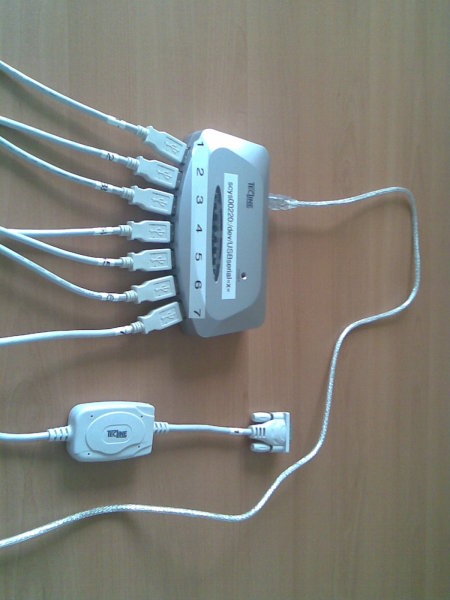
These rules will only work for a similary structured hub that is directly connected to the notebook. If there are more hubs in between the “final” hub and the host, the address matched against in the KERNELS matches are going to have a different structure. In the test setup, the first two parts of the address needed to be wildcarded since these addresses keep changing when the host is booted or the hub plugged out and in. So I guess that these udev rules are probably going to fail miserably when more hubs and/or USB-to-serial adaptors are connected. But if one does not do too many changes, things are just fine, and it is possible to put numbers on the USB hub ports and be sure that the USB-to-serial adaptor connected to port 4 is going to be /dev/USBserial4 in the host system. I tried plugging in and out the adaptors in random order, unplugged and plugged the hub itself, booted the host, and the relationship between the port and the device node was stable. In the test environment, I only tested one adapter at a time, but all these tests were successful as well. I guess that many more of these adaptors will eventually need a powered USB hub, but with seven adaptors on a single hub, the power from the USB host is sufficient to live without extra power on the hub. And, I guess, there is some hard limit for the number of USB adapters being used, and some soft limit when managing the ports and adapters is going to get harder. But, I think that a site in need of more than, say, sixteen serial ports on the console server can afford a “real” console server from one of the major vendors, which can be accessed via ethernet, UMTS, ISDN and whatever you can think of. This concludes the hardware part of my serial console server for the poor. Tomorrow, I’ll blog about the software side needed on the host to allow the serial ports to be accessed from the network while still being reasonably secure. The next article will involve ssh, /etc/passwd shells, /etc/shells, a small perl script, ser2net and telnet. And, shell escape is the cue word for grey hairs sprouting on my head.SUBSYSTEM==“tty”, SUBSYSTEMS==“usb”, DRIVERS==“usb”, \ KERNELS==“*-*.1”, \ SYMLINK=“USBserial1” SUBSYSTEM==“tty”, SUBSYSTEMS==“usb”, DRIVERS==“usb”, \ KERNELS==“*-*.2”, \ SYMLINK=“USBserial2” SUBSYSTEM==“tty”, SUBSYSTEMS==“usb”, DRIVERS==“usb”, \ KERNELS==“*-*.3”, \ SYMLINK=“USBserial3” SUBSYSTEM==“tty”, SUBSYSTEMS==“usb”, DRIVERS==“usb”, \ KERNELS==“*-*.4.1”, \ SYMLINK=“USBserial4” SUBSYSTEM==“tty”, SUBSYSTEMS==“usb”, DRIVERS==“usb”, \ KERNELS==“*-*.4.2”, \ SYMLINK=“USBserial5” SUBSYSTEM==“tty”, SUBSYSTEMS==“usb”, DRIVERS==“usb”, \ KERNELS==“*-*.4.3”, \ SYMLINK=“USBserial6” SUBSYSTEM==“tty”, SUBSYSTEMS==“usb”, DRIVERS==“usb”, \ KERNELS==“*-*.4.4”, \ SYMLINK=“USBserial7”
Today, I had the opportunity to try my UMTS initialization mechanism that I built this weekend with more recent hardware, a
newer Option Globetrotter 3G Express Card with Vodafone branding (reporting itself to be a “Globetrotter HSDPA
Modem” with Vendor ID 0xaf0 and Product ID 0x6701). To get the card connected to my test Notebook, a hp compaq
nc8000, I had a “Expresscard in a PC card slot” adapter and a passive “Expresscard at a normal USB
port” adapter. The USB adapter had cost about ten Euros, and I don’t imagine the PC card adapter to be much
more expensive.
The later Option card is recognized as three USB-connected serial ports by the Option kernel driver
(CONFIG_USB_SERIAL_OPTION) as the older one is, and it works just fine. The only difference is that the udev rule needs
a different value for the ATTRS modalias setting. My umts-pin script complains about an “illegal seek”
after entering the PIN, but the card registers itself with the network nevertheless. Both gammu to send SMS and pppd for
IP connectivity worked out of the box.
Especially the “Expresscard-to-USB” adapter setup is very sexy for setups where neither an Expresscard nor
a PC Card slot is available, and USB cables can be nice and long. So one could even mount the UMTS interface near the
window and pull a longer USB cable to the actual system. I decided on putting the UMTS interface into a notebook,
though, and mount the notebook near the window to be able to monitor the monitoring systems and send out SMS even when
the whole datacenter is without power (by virtue of the notebook having a built-in UPS).
 A while ago I wanted to have internet over GPRS (either EDGE or UMTS)
via my Nokia E51 working before I leave for the weekend. But whatever
I tried, I always got an ERROR if I sent any AT
command. Even ATZ and ATH resulted in errors. So
started googling for all components: I found AT commands
which are said to work with the Nokia E51, I found AT
commands which are said to work with Swisscom GPRS and I found many
sites describing how to setup a bluetooth modem.
But since the even those AT commands which should work with
both, Swisscom GPRS and Nokia E51 didn’t work at all, I noticed that
all the Nokia E51 howtos were using the USB cable. So I tried that,
too, and it worked immediately. It looks very strange to me that the
set of AT commands is dependend on which way you connect to
the phone. :-/
So here’s my working PPP config:
hide-password
noauth
connect "/usr/sbin/chat -e -f /etc/chatscripts/swisscom-gprs"
/dev/ttyACM0
460800
defaultroute
crtscts
user "guest"
usepeerdns
noccp
bsdcomp 0,0
lcp-echo-failure 10000
lcp-echo-interval 1000
asyncmap 0
novj
nomagic
and the chat script (
/etc/chatscripts/swisscom-gprs):
TIMEOUT 5
ABORT BUSY
ABORT 'NO CARRIER'
ABORT VOICE
ABORT 'NO DIALTONE'
ABORT 'NO ANSWER'
ABORT DELAYED
ABORT ERROR
'' \nAT
TIMEOUT 12
OK ATH
OK ATE1
OK 'AT+CGDCONT=1,"IP","gprs.swisscom.ch"'
OK ATD*99#
CONNECT ""
So I have now four levels of mobile computing available:

gpsbabel -t -r -w -i m241 -f /dev/ttyUSB0 -o gpx -F date +'%Y-%m-%d-%H%M%S' .gpx
It might work also via bluetooth, but I have not tried yet.
Now, until M-241 support will be released in a stable version of
gpsbabel, here is how to compile the version from CVS.
Get the sources:
cvs -d:pserver:anonymous@gpsbabel.cvs.sourceforge.net:/cvsroot/gpsbabel login
cvs -z3 -d:pserver:anonymous@gpsbabel.cvs.sourceforge.net:/cvsroot/gpsbabel co -P gpsbabel
Untar this to
debianise the sources.
If it does to compile because of some errors in
lmx.c, apply this
patch.
Then you can install the resulting package and (hopefully) be
happy.
Note, after downloading the logs, gpsbabel currently turns on
logging.
Here is a patch to disable that behaviour.
Finally, if you want to hack around a little on the unit, you
can play with mtkbabel: the source
code is simple, and most of the MTK protocol is implemented, so you
can easily feed your own commands to the MTK. Documentation about
the commands can be found here:
mtkbabel:
packet_send('PMTK300,500,0,0,0.0,0.0');
$ret = packet_wait('PMTK001,300,3');
And if you want to set the MTK to an insane 5Hz fix rate, to
take really fine grained gpx traces with your laptop, you
can use this:
packet_send('PMTK300,200,0,0,0.0,0.0');
$ret = packet_wait('PMTK001,300,3');
For mobile UMTS/GSM, I have been using an Option 3G Data Card for two and a half years now. I blogged about getting the
card to work (in German, sorry) on Linux in July 2005. I never found the time - until now - to automate the card initialization so that I had been
using a horrible chat script for card initialization when the PPP connection was built.
I recently took the time to automate this, so that the PIN is transmitted to the card automatically when the card is
plugged in. This article documents what I did.
On a side note: Unfortunately, the vendors’ attitude towards Linux hasn’t changed since 2005. Their
Hotlines still deny that their products can be used with Linux at all, and they surely do not publish any documentation
that can be of help. Otoh, Vodafone has published a software that supposedly aids usage of their products under Linux. I
haven’t tried it yet since it is not packaged yet for Debian. Additionally, Vodafone support media and sales do
not seem to know about this effort, they still deny that their products work with Linux. Windows users happily install
proprietary software products that do little more than sending a handful of AT commands to the emulated USB modem and
hand over the connection to Windows’ PPP Stack. A very unsatisfying situation.
Just for the record: Dear Vodafone DE, a week ago you missed the sale of a new USB UMTS interface because you
don’t even document it on Linux. This motivated me to look into the drawer that holds the old, non-HSDPA PC cards
that have been decommissioned at the customers’ site and use an old, used device. Your fault.
But now back on topic: For a data center monitoring system, I want to send out alerts as text message (for German
speakers: SMS - we have a rather strange vocabulary for mobile communications), and am reluctant to do so via IP: IP is
one of the things that can fail, so it is preferred to directly inject the text messages into the network of the
operator that provides service to the recipients of the text messages. Fortunately, most of the recipients are in the
same network.
After evaluating current hardware solutions that could be plugged directly into the “real” server doing the
monitoring and running into the wall of non-support provided by the network operators and hardware vendors, I decided on
taking things a little further and to build an Ethernet-Connected text message device. An old hp compaq nc8000 (no, not
mine, mine still works fine and is in daily use) and an old, first generation Option Datacard 3G will be mounted near
the datacenter’s windows and equipped with Debian and Nagios. That way, the text message device can itself monitor
the monitoring system and even send out a warning message when the data center goes out of power: It has a built-in
UPS.
But now back on topic: For the text messages to go out reliably, it is necessary that the UMTS card is initialized
automatically when the system comes up. A great opportunity to finally address this issue for Linux, on customers’
expense **grins**.
UMTS card initialization is done in two steps: First, when the card is plugged in, the virtual OHCI host port appears.
Initialization of the virtual OHCI happens automatically. Most documentation on the web says that you now need to load
an appropriately parametrized usbserial module, and I did it this way for years, but that’s not necessary any
more. CONFIG_USB_SERIAL_OPTION is a dedicated kernel module for the Option 3G data card, which gets automatically loaded
if it is available.
If you don’t have the Option module for some reason, you still need the following udev rule to automatically load
the generic USB serial module. I figured that out yesterday before I learned about the Option module in a comment made
to the original version of this article.
Unfortunately, the usbserial and option modules stay around after the card is pulled. This doesn’t hurt though. Next, we see three virtual serial interfaces, which we can detect via udev, and assign “speaking” device names and transmit the PIN. This goes into /etc/udev/rules.d/50-option3g.rules:SUBSYSTEM==“usb”, \ SYSFS idProduct ==“5000”, SYSFS idVendor ==“0af0”, \ ACTION==“add”, \ RUN+=“/sbin/modprobe usbserial vendor=0x$attr idVendor product=0x$attr idProduct ” SUBSYSTEM==“usb”, \ SYSFS idProduct ==“5000”, SYSFS idVendor ==“0af0”, \ ACTION==“remove”, \ RUN+=“/sbin/modprobe -r usbserial”
I am not sure what the modalias attribute identifies, but it looks like it identifies the hardware model: An identical Option Datacard 3G, plugged into the other PC Card Slot gets properly initialized as well. These two udev stanzas do two different things: First, they make sure that the new devices are symlinked to /dev/UMTS-DATA and /dev/UMTS-CONTROL, suggesting the intended use of the interface. The second virtual interface of the 3G Data Card does not seem to be useable at all, and you cannot build an actual data connection over the third. So, we baptize the first interface /dev/UMTS-DATA and ignore the second. The third gets called /dev/UMTS-CONTROL. Now to the real magic: /usr/local/sbin/umts-pin is a perl script that sends the PIN to the Card. %k gets expanded to the device name of the device that has just been detected, so umts-pin gets called with “--device ttyUSB2”. It makes use of Cosimo Streppone’s Device::Modem module (Device::Gsm is not yet packaged for Debian and might be of better use here) to talk to the UMTS device. Unfortunately, I have not yet fully understood the logging and answer processing features of Device::Modem, so the implementation might look a little clumsy. I hope that it can be clearly understood anyway. The actual PIN is read from a configuration file in an apache-like format, which is by default looked for in /etc/umts/pin.conf:SUBSYSTEM==“tty”, SUBSYSTEMS==“usb”, DRIVERS==“option”, \ ATTRS bInterfaceNumber ==“00”, \ ATTRS modalias ==“usb:v0AF0p5000d0000dc00dsc00dp00icFFiscFFipFF”, \ SYMLINK=“UMTS-DATA” SUBSYSTEM==“tty”, SUBSYSTEMS==“usb”, DRIVERS==“option”, \ ATTRS bInterfaceNumber ==“02”, \ ATTRS modalias ==“usb:v0AF0p5000d0000dc00dsc00dp00icFFiscFFipFF”, \ SYMLINK=“UMTS-CONTROL”, RUN+=“/usr/local/sbin/umts-pin --device %k”
<pin>
        <default>
                pin xyzw
        </default>
</pin>

 * I assume that you are running Debian
 * First, follow, ana’s detailed help to switch to KDE 4.1 beta.
* Panel can be resized and configure now. That sliders are so sweet. But, if you find that your KDE desktop becomes ‘white’ as Gandalf the white, do following:
mv ~/.kde4/share/config/plasmarc ~/.kde4/share/config/plasmarc.OLDANDHATED


Next.
