Search Results: "ag"

29 May 2010

Matt Zimmerman: Extracting files from a nandroid backup using unyaffs

I recently upgraded my G1 phone to the latest Cyanogen build (5.x). Since the upgrade instructions recommend wiping user data, I made a nandroid backup first, using the handy Amon_RA recovery image. I ve gotten pretty familiar with the Android filesystem layout, and was confident I could restore anything I really missed (such as my wpa_supplicant.conf with all of my WiFi credentials). It wasn t until I finished with the upgrade that I realized the backup wasn t trivial to work with. It s a raw yaffs2 flash image, which can t be simply mounted on a loop device. After messing around for a bit with the nandsim module, mtd-utils and the yaffs2 kernel module, I realized there was a much simpler way: the unassuming unyaffs. It says that it can only extract images created by mkyaffs2image, but apparently the images in the nandroid backup are created this way (or otherwise compatible with unyaffs). So I downloaded and built unyaffs:
svn checkout http://unyaffs.googlecode.com/svn/trunk/ unyaffs
cd unyaffs
gcc -o unyaffs unyaffs.c
and then ran it on the backup image:
mkdir g1data && cd g1data # unyaffs extracts into the current directory
~/src/android/unyaffs/unyaffs /media/G1data/nandroid/HT839GZ23983/BCDS-20100529-1311/data.img
At which point I could restore files one by one, e.g.:
adb push /tmp/g1data/misc/wifi/wpa_supplicant.conf /data/misc/wifi/
After toggling WiFi off and then back on, all of my credentials were restored. I was able to restore preferences for various applications in the same way.

Rog rio Brito: Preliminary support for webm in youtube-dl

I just added some very, very preliminary support for web in youtube-dl which I uploaded to unstable some minutes ago. This way, at least people will have some material (in, fact, a chance) to play with this format. I implemented this because, so far, I was only hoping here that a player for this would emerge. I guess that Debian s ffmpeg/mplayer will take some time, but I was pleased to see that Sebastian Dr ge to upload a version of something that could use the new libvpx codec. I hope that, now, as a side effect of webm being widely available, more people become interested in Vorbis. More support (no, not alternative , like Rockbox, but straight from the manufacturers) for it in hardware devices will be sweet. Well, I can dream. :-) Well, it seems to be time to shape up that local build of mine of the aotuv tuned version of Vorbis with Aoyumi s patches for libvorbis. Exciting times in the multimedia world.

Bernd Zeimetz: installing debian on the guruplug server plus

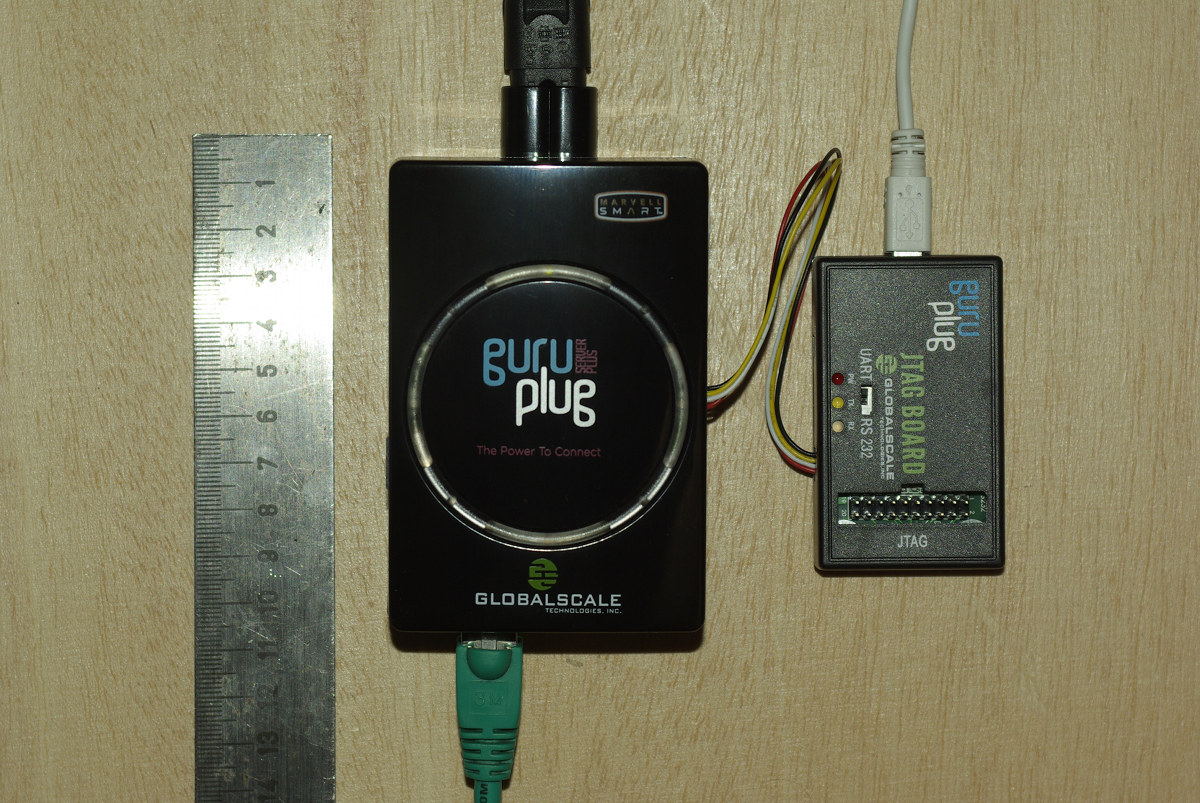
Yesterday finally my GuruPlug Server Plus arrived. Took longer than expected, but as it seems Globalscale had some issues with the power supplies and they were replaced before shipping the GuruPlugs. GuruPlug Server Plus and JTAG Board

The GuruPlug Basically the GuruPlugs are an enhanced version of the well known SheevaPlugs, the biggest difference is probably the need for an external JTAG/UART<>RS232 board to access the serial console. Good thing is that the board comes with a normal JTAG connector and an additional RS232 connector and 2.5V DC power outlet, so it will be useful for other devices, too. Globalscale could have chosen different connectors with less wiggly cables, though. As I was not able to find a useful howto about installing Debian on the Guruplug, I've written down what I did to install Debian unstable on a micro SD card using the Debian installer for the GuruPlug. I did not have a look who modified the Debian installer to work on the plug, but thanks for that! The instructions below are based on Martin Michlmayer's awesome SheevaPlug documentation, the hints from oinkzwurgl.org/guruplug and various forum posts in the plugforum.

Preparations Please note that I'm not resposible for whatever you're doing with your plug. If you follow this tutorial and end up with a brick, it is your fault, not mine. To install the GuruPlug you need the JTAG Board. Connect the UART port to the GuruPlug and the JTAG board to your computer, it should show up as FTDI (thanks for using good chips!) USB<>Serial converter. Serial port settings are 115200, 8-N-1, no hw/sw flow control. The other thing you should prepare is a working tftpd, I'm using aftpd.
apt-get install aftpd
Recent versions share files from /srv/tftp/, in case you're running Lenny /var/lib/tftpboot/ should be the place to drop your files. When everything is connected properly the boot process should show up in minicom, make sure to press some key to enter uBoot. The first thing you should do is to save the original uBoot environment in case you want to restore the factory settings later. Run
printenv
and save the output somewhere.

Upgrading uBoot Unfortunately the uBoot version on the GuruPlug is pretty old and seems to have some issues in booting from USB devices, so the first thing you should do is to upgrade it. You might want to investigate if there is even a better, more recent uBoot version available somewhere, or build one on your own, but I didn't bother and took the uBoot.guruplug.bin from here. The main issue with that is that booting from USB still seems to be buggy (even for FAT partitions) and that ext2load is still not supported. Otherwise it works well :-). I'm mainly following Martin Michlmayer's tutorial again. Download the uBoot.guruplug.bin and drop it into the tftpd directory. Make sure you always set the plug's IP address (ipaddr) and your server's IP address (serverip) properly. I'll use 192.168.121.253 for the plug and 192.168.121.2 for the server in all examples, make sure to change that for your own needs. Stop if something goes wrong, especially when the tftp download failed.
setenv ipaddr 192.168.121.253
setenv serverip 192.168.121.2
tftp 0x6400000 uBoot.guruplug.bin
nand erase 0x00000000 0x0100000
nand write 0x6400000 0x0000000 0x80000
reset
Enter uBoot again after the reset.

Preparing the installer Download uImage and uInitrd to your tftpd directory. Although I've heard that setting mainlineLinux/arcNumber in the uBoot environment is not necessary anymore for very recent kernel, lets set them to make sure the Debian kernel works:
setenv mainlineLinux yes
setenv arcNumber 2097
saveenv
reset
Again, enter uBoot after the reset.

Running the installer Run the following in the uBoot console:
setenv ipaddr 192.168.121.253
setenv serverip 192.168.121.2
tftpboot 0x01100000 uInitrd
tftpboot 0x00800000 uImage
setenv bootargs console=ttyS0,115200n8 base-installer/initramfs-tools/driver-policy=most
bootm 0x00800000 0x01100000
You should see the installer starting now. You might want to follow the following hints:
  • Before configuring the network, go back and set the debconf priority to low, Then continue. While chosing the Debian mirror, chose sid as the Debian version to install. If you don't have sid as choice, use a different mirror. The kernel in testing does not boot on the GuruPlug, you need 2.6.32-13 from sid.
  • You might want to load the 'network console' installer component and continue via ssh. Makes things fater and colourful.
  • Suggested partitioning: I've installed Debian to an 8GB micro SDcard. The SDcard reader is connected via USB and shows up as /dev/sdb (/dev/sda should be the internal NAND and not shown by the installer). I've used 150MB ext2 for /boot and the rest of the space for /, using ext4. You might want to use the noatime option on both filesystems to avoid unnecessary write access to the SDcard. You might choose to add a swap partition, but SDcards are so slow, so I've skipped that.
When you continue the installation, you will hit the following problem:
  • The installer might fail on 'Make the system bootable' (not sure if it does for you, it did so with the kernel from testing).
  • The uBoot is not able to boot from your /boot anyway. USB support is buggy and ext2load missing.
We'll work around these issues by writing the kernel and initrd into the plug's NAND. To do so, enter a shell in the installer and chroot into the install target. We'll then create the necessary uImage.bin and uInitrd and scp them to our tftpd directory:
chroot /target /bin/bash
cd /boot
mkimage -n vmlinuz -A arm -O linux -T kernel -C none -a 0x00008000 -e 0x00008000 -d /boot/vmlinuz uImage.bin
mkimage -n 'vmlinuz initrd' -A arm -O linux -T ramdisk -C gzip -d /boot/initrd.img uInitrd
scp uI* root@192.168.121.2:/srv/tftp
Now leave the shell, finish the installation and reboot, enter uBoot again.

Make the plug bootable To write kernel and initrd to the NAND memory, we have to transfer it via tftp first, then erase the NAND area we want to write to and then write it to the NAND. The values I've chosen here should be fine for the current Debian kernel, but you might need to change the necessary size for the initrd. To do so have a look at the output while transferring the initrd - the transferred bytes are displayed. They have to fit into the amount of bytes you write (the last option to nand write.e).
setenv ipaddr 192.168.121.253
setenv serverip 192.168.121.2
tftp 0x6400000 uImage.bin
nand erase 0x100000 0x400000
nand write.e 0x6400000 0x100000 0x400000
tftp 0x6400000 uInitrd
nand erase 0x500000 0x1fb00000
nand write.e 0x6400000 0x500000 0x600000
Now we need to set the necessary boot options. Make sure to change the root device if you've chosen a different layout from that I've suggested above, or if you're not using a SDcard.
setenv bootargs_debian 'console=ttyS0,115200 root=/dev/sdb2'
setenv bootcmd_nand 'nand start; nand read.e 0x00800000 0x100000 0x400000; nand read.e 0x01100000 0x500000 0x600000'
setenv bootcmd 'setenv bootargs $(bootargs_debian); run bootcmd_nand; bootm 0x00800000 0x01100000'
saveenv
run bootcmd

Finish Your GuruPlug should boot your new Debian installation now. Have fun! I'll try to keep the howto updated for changes in uBoot and the installer, but I might not have the time to so quickly. Patches and comments are welcome!.
root@guruplug:~# uname -a
Linux guruplug 2.6.32-5-kirkwood #1 Fri May 21 05:44:29 UTC 2010 armv5tel GNU/Linux
root@guruplug:~# cat /proc/cpuinfo 
Processor   : Feroceon 88FR131 rev 1 (v5l)
BogoMIPS    : 1192.75
Features    : swp half thumb fastmult edsp 
CPU implementer : 0x56
CPU architecture: 5TE
CPU variant : 0x2
CPU part    : 0x131
CPU revision    : 1
Hardware    : Marvell GuruPlug Reference Board
Revision    : 0000
Serial      : 0000000000000000
root@guruplug:~# 

Thibaut Girka: First week of GSoC

It's almost been a week since the GSoC started! Before describing what I've been doing this week I would like to write a word on the project and thank the ones I'm thankful to. The project Currently, Debian can be installed on the Neo Freerunner (FR) by running a shell script called install.sh on an already running Linux installation on the device (more information here). This works. However, it doesn't make use of the Debian Installer, and it is specific to the FR. The plan is to port Debian Installer to the FR and other similar devices. In order to succeed in this project, I'm mentored by Gaudenz Steinlin and Per Andersson, who I want to thank for their guidance (and the patience they'll probably need to have :p). I have to thank Obey Arhur Liu for all his organizing work, especially for the DebConf 10 sponsoring. While I'm at thanking, I want to thank Google, whithout which this program wouldn't exist at all, and especially Carol Smith, who makes an amazing job at organizing every aspect of the GSoC! What I've been doing Now, what have I been doing this week? As we did not set up git repositories yet, I'll not share the full patches, but only a few files for now: If you want to try the uImage, here is how to boot it. What's coming next First, I hope everything will be in place to share the full sources by then. The first thing I'll do next week is finishing identifying and including the needed drivers. Then, depending on how good goes the installation process, I may:

Lucas Nussbaum: Ubuntu and Debian

I recently noticed the new Ubuntu and Debian link on every page of http://www.ubuntu.com/. That is very nice, and much better than the previous situation. Debian is also mentioned on the pages about Easy administration and Security. Canonical has clearly improved a lot in the way they communicate about how Ubuntu bases its development on Debian s.

Russell Coker: Logging in as Root

Martin Meredith wrote a blog post about logging in as root and the people who so strongly advocate against it [1]. The question is whether you should ssh directly to the root account on a remote server or whether you should ssh to a non-root account and use sudo or su to gain administrative privileges. Does sudo/su make your system more secure? Some years ago the administrator of a SE Linux Play Machine used the same home directory for play users to login as for administrative logins as for his own logins he used newrole to gain administrative access (like su or sudo but for SE Linux). His machine was owned by one of his friends who created a shell function named newrole in one of his login scripts that used netcat to send the administrative password out over the net. He didn t immediately realise that this was a problem until his friend changed the password and locked him out! This is one example of a system being 0wned due to having the double-authentication of course if he had logged in directly with administrative privs while using the same home directory that the attacker could write to then he would still have lost but the attacker would have had to do a little more work. When you login you have lots of shell scripts run on your behalf which have the ability to totally control your environment, if someone has taken over those scripts then they can control everything you see, when you think you run sudo or something they can get the password. When you ssh in to a server your security relies on the security of the client end-point, the encryption of the ssh protocol (including keeping all keys secure to prevent MITM attacks), and the integrity of all the programs that are executed before you have control of the remote system. One benefit for using sshd to spawn a session without full privileges is in the case where you fear an exploit against sshd and are running SE Linux or some other security system that goes way beyond Unix permissions. It is possible to configure SE Linux in the strict configuration to deny administrative rights to any shell that is launched directly by the sshd. Therefore someone who cracks sshd could only wait until an administrator logs in and runs newrole and they wouldn t be able to immediately take over the system. If the sysadmin suspected that a sshd compromise is possible then a sysadmin could login through some other method (maybe visit the server and login at the console) to upgrade the sshd. This is however a very unusual scenario and I suspect that most people who advocate using sudo exclusively don t use a SE Linux strict configuration. Does su/sudo improve auditing? If you have multiple people with root access to one system it can be difficult to determine who did what. If you force everyone to use su or sudo then you will have a record of which Unix account was used to start the root session. Of course if multiple people start root shells via su and leave them running then it can be difficult to determine which of the people who had such shells running made the mistake but at least that reduces the list of suspects. If you put PermitUserEnvironment yes in /etc/ssh/sshd_config then you have the option of setting environment variables by ssh authorized_keys entries, so you could have an entry such as the following: environment= ORIG_USER=john@example.com ssh-rsa AAAAB3Nz[...]/w== john@example.com Then you could have the .bashrc file (or a similar file for your favorite shell) have code such as the following to log the relevant data to syslogd:
if [ "$SSH_TTY" = "" ]; then
logger -p auth.info "user $ORIG_USER ran command \"$BASH_EXECUTION_STRING\" as root"
else
logger -p auth.info "user $ORIG_USER logged in as root on tty $(tty)"
fi I think that forcing the use of su or sudo might improve the ability to track other sysadmins if the system is not well configured. But it seems obvious that the same level of tracking can be implemented in other ways with a small amount of effort. It took me about 30 minutes to devise the above shell code and configuration options, it should take people who read this blog post about 5 minutes to implement it (or maybe 10 minutes if they use a different shell or have some other combination of Bash configuration that results in non-obvious use of initialisation scripts (EG if you have a .bash_profile file then .bashrc may not be executed). Once you have the above infrastructure for logging root login sessions it wouldn t be difficult to run a little script that asks the sysadmin what is the purpose for your root login and logs what they type. If several sysadmins are logged in at the same time and one of them describes the purpose of their login as to reconfigure LDAP then you know who to talk to if your LDAP server stops working! Should you run commands with minimum privilege? It s generally regarded that running each command with the minimum privilege is a good idea. But if the only reason you login to a server is to do root tasks (restarting daemons, writing to files that are owned by root, etc) then there really isn t a lot of potential for achieving anything by doing so. If you need to use a client for a particular service (EG a web browser to test the functionality of a web server or proxy server) then you can login to a different account for that purpose the typical sysadmin desktop has a dozen xterms open at once, using one for root access to do the work and another for non-root access to do the testing is probably a good option. Can root be used for local access? Linux Journal has an article about the distribution that used to be known as Lindows (later Linspire) which used root as the default login for desktop use [2]. It suggests using a non-root account because If someone can trick you into running a program or if a virus somehow runs while you are logged in, that program then has the ability to do anything at all of course someone could trick you into running a program or virus that attempts to run sudo (to see if you enabled it without password checks) and if that doesn t work waits until you run sudo and sniffs the password (using pty interception or X event sniffing). The article does correctly note that you can easily accidentally damage your system as root. Given that the skills of typical Linux desktop users are significantly less than those of typical system administrators it seems reasonable to assume that certain risks of mistake which are significant for desktop users aren t a big deal with skilled sysadmins. I think that it was a bad decision by the Lindows people to use root for everything due to the risk of errors. If you make a mistake on a desktop system as non-root then if your home directory was backed up recently and you use IMAP or caching IMAP for email access then you probably won t lose much of note. But if you make a serious mistake as root then the minimum damage is being forced to do a complete reinstall, which is time consuming and annoying even if you have the installation media handy and your Internet connection has enough quota for the month to complete the process. Finally there are some services that seek out people who use the root account for desktop use. Debian has some support channels on IRC [3] and I decided to use the root account from my SE Linux Play Machine [4] to see how they go. #debian has banned strings matching root. #linpeople didn t like me because Deopped you on channel #linpeople because it is registered with channel services . #linuxhelp and #help let me in, but nothing seemed to be happening in those channels. Last time I tried this experiment I had a minor debate with someone who repeated a mantra about not using root and didn t show any interest in reading my explanation of why root:user_r:user_t is safe for IRC. I can t imagine that good the #debian people expect to gain from denying people the ability to access that channel with an IRC client that reports itself to be running as root. Doing so precludes the possibility of educating them if you think that they are doing something wrong (such as running a distribution like Lindows/Linspire). Conclusion I routinely ssh directly to servers as root. I ve been doing so for as long as ssh has been around and I used to telnet to systems as root before that. Logging in to a server as root without encryption is in most cases a really bad idea, but before ssh was invented it was the only option that was available. For the vast majority of server deployments I think that there is no good reason to avoid sshing directly as root.

28 May 2010

Ana Beatriz Guerrero Lopez: KOffice 2.2.0 packages for Debian

As some of you might have seen, KOffice 2.2.0 was finally released today. Quoting the release announcement: There are still areas in the user interface that we want to work on before stating that KOffice is fit for the general public. We are, however, at a stage where we think that KOffice can be used for real work by some users.
I agree with this statement and it is still to be decided if KOffice 2.2.0 will make it into Squeeze. I am inclined to do so but I would love some well argumented feedback. Take into consideration some applications are more mature than others. The packages will be uploaded to the official archive soon, but they still need some minor work and given they include new deb files (kformula shape and kexi), they need to go thru the NEW queue, it might take some time. Meanwhile, you can find packages for amd64 & i386 from the semi-official repository at: http://qt-kde.debian.net/.
You also have available the localization packages (see the list here) and braindump, an interesting application based in KOffice libraries. These packages are not in the Debian archive so please *don t* report bugs against them in the Debian Bug Tracking System. If you see any packaging problem, please report it in the debian-kde mailing list.
If you find a bug, miss a feature or have a wishlist, please file a report in the KDE bugzilla: https://bugs.kde.org/ Include all the information you can about your system (Debian experimental, KOffice 2.2.0) and all the details you are able to give. In the case of crashes, install the package koffice-dbg to get a backtrace. Read more at this techbase article.

Matthew Garrett: 10:45: Restate my assumptions.

  1. all software contains bugs.
  2. all bugs can be represented and understood through files.
  3. if you graph files against bugs, a pattern emerges. Therefore: We must reduce the number of files.

Kees Cook: too lazy to recompile

I have a camera that takes .MP4 files. MythTV s Gallery plugin has a static list of extensions it recognizes. MP4 is not one of them. I can rename all my files (which is wrong they re MP4s not something else), or I can edit the source and recompile. Or, since I want to watch them RIGHT NOW, I can binary-edit the shared library and replace something I ll not have any of (WMV) with MP4.
# strings -a /usr/lib/mythtv/plugins/libmythgallery.so   grep WMV
*.WMV
# sed -i -e 's/\.WMV/.MP4/' /usr/lib/mythtv/plugins/libmythgallery.so
Ta-da. Just need to make sure I don t change the size of the binary. :) (Oddly, I m not too lazy to open a bug and propose a patch.)

27 May 2010

Petter Reinholdtsen: Parallellized boot seem to hold up well in Debian/testing

A few days ago, parallel booting was enabled in Debian/testing. The feature seem to hold up pretty well, but three fairly serious issues are known and should be solved: All in all not many surprising issues, and all of them seem solvable before Squeeze is released. In addition to these there are some packages with bugs in their dependencies and run level settings, which I expect will be fixed in a reasonable time span. If you report any problems with dependencies in init.d scripts to the BTS, please usertag the report to get it to show up at the list of usertagged bugs related to this. Update: Correct bug number to file-rc issue.

Martin Meredith: Why shouldn t I login as root?

I ve recently gotten a lot of flack from a couple of people for an innocent comment I made about logging into a machine as root.
I d like to think of myself as pretty savvy when it comes to security, and as far as I m concerned, the reasons for not logging in as root are:- Ok, so we have the reasons not to and they re good reasons. This is why, generally, I don t login to my boxes as root. However, the box in concern mitigates the above in the following ways Is there any good reason that I shouldn t be logging in as root in the above circumstances?

Adrian von Bidder: Far from the real world

I guess having only the Japanese version of Tetsuo and not understanding anything might not have helped, but on the other hand there isn't all that much dialogue. Tetsuo is one of those movies I find difficult to judge; while it has some great moments, I also found it to be a bit long in some parts. Very good sound track, though. YMMV, I guess. If you like the Discworld novels by Terry Pratchett, you may want to have a peak at Terry Pratchett's The Colour of Magic, which I found quite well made (... and where I once again found that I don't have a good memory for faces, although in the end I remembered where I saw Twoflower's face just before reading the name in the closing credits ...) A bit disappointing, in contrast, was Terry Pratchett's Hogfather: to me, it proves that a movie should have some distance to the book, since what works when written down doesn't necessarily work on the screen. I quite liked Michelle Dockery as Susan, though.

C.J. Adams-Collier: Building libvirt on CentOS5 (incomplete)

Much thanks to Brett for the pointers on rpm-fu. http://grantmcwilliams.com/index.php?option=com_content&view=article&id=229: $ sudo yum install \
xen-devel \
xhtml1-dtds \
hal-devel \
libpcap-devel \
cyrus-sasl-devel \
parted-devel \
numactl-devel \
avahi-devel \
slang-devel \
libvolume_id-devel \
openldap-devel # device-mapper-devel \
# xmlrpc-c-devel \ for pkg in \
libssh2-devel-1.2.5-1.el5.pp.x86_64.rpm \
libssh2-1.2.5-1.el5.pp.x86_64.rpm \
libssh-0.2.1-0.2.svn193.el5.pp.x86_64.rpm \
libssh-devel-0.2.1-0.2.svn193.el5.pp.x86_64.rpm
do
wget ftp://ftp.pbone.net/mirror/ftp.pramberger.at/systems/linux/contrib/rhel5/x86_64/$pkg
rpm -i $pkg
done wget http://www.fateyev.com/RPMS/RHEL5/x86_64/xmlrpc-c-devel-1.14.8-1.el5.x86_64.rpm
wget http://www.fateyev.com/RPMS/RHEL5/x86_64/xmlrpc-c-1.14.8-1.el5.x86_64.rpm
rpm -i xmlrpc-c-*1.14*el5*.rpm wget ftp://ftp.icm.edu.pl/vol/rzm1/linux-fedora-secondary/development/source/SRPMS/corosync-0.95-2.fc11.src.rpm
alien -t corosync-0.95-2.fc11.src.rpm
mv corosync-0.95.tgz /tmp
cd ~/rpm/SOURCES
tar xfz /tmp/corosync-0.95.tgz
patch -p0
--- corosync.spec.orig  2010-05-26 19:17:15.000000000 +0000
+++ corosync.spec       2010-05-26 19:21:39.000000000 +0000
@@ -39,11 +39,7 @@
 fi
 %endif
-% _configure   CFLAGS="$(echo '% optflags ')" \
-               --prefix=/usr \
-               --sysconfdir=/etc \
-               --localstatedir=/var \
-               --libdir=% _libdir 
+% configure    CFLAGS="$(echo '% optflags ')"
 %build
 make % _smp_mflags 
@@ -52,8 +48,8 @@
 rm -rf % buildroot 
 make install DESTDIR=% buildroot 
-install -d % buildroot % _initddir 
-install -m 755 init/redhat % buildroot % _initddir /corosync
+install -d % buildroot % _sysconfdir /init.d
+install -m 755 init/redhat % buildroot % _sysconfdir /init.d/corosync
 ## tree fixup
 # drop static libs
@@ -95,7 +91,7 @@
 % _sbindir /corosync-fplay
 % _sbindir /corosync-pload
 %config(noreplace) /etc/corosync.conf
-% _initddir /corosync
+% _sysconfdir /init.d/corosync
 %dir % _libexecdir /lcrso
 % _libexecdir /lcrso/coroparse.lcrso
 % _libexecdir /lcrso/objdb.lcrso
rpmbuild -bb corosync.spec
sudo rpm -i ~/rpm/RPMS/x86_64/corosynclib*.rpm wget ftp://ftp.icm.edu.pl/vol/rzm1/linux-fedora-secondary/development/source/SRPMS/openais-0.94-1.fc11.src.rpm
alien -t openais-0.94-1.fc11.src.rpm
mv openais-0.94.tgz /tmp
cd ~/rpm/SOURCES
tar xfz /tmp/openais-0.94.tgz
rpmbuild -bb openais.spec
sudo rpm -i ~/rpm/RPMS/x86_64/openaislib-*.rpm wget ftp://ftp.icm.edu.pl/vol/rzm1/linux-fedora-secondary/development/source/SRPMS/lvm2-2.02.45-4.fc11.src.rpm
alien -t lvm2-2.02.45-4.fc11.src.rpm
mv lvm2-2.02.45.tgz /tmp
cd ~/rpm/SOURCES
tar xfz /tmp/lvm2-2.02.45.tgz
rpmbuild -bb lvm2.spec

Matt Zimmerman: Rethinking the Ubuntu Developer Summit

This is a repost from the ubuntu-devel mailing list, where there is probably some discussion happening by now. After each UDS, the organizers evaluate the event and consider how it could be further improved in the future. As a result of this process, the format of UDS has evolved considerably, as it has grown from a smallish informal gathering to a highly structured matrix of hundreds of 45-to-60-minute sessions with sophisticated audiovisual facilities. If you participated in UDS 10.10 (locally or online), you have hopefully already completed the online survey, which is an important part of this evaluation process. A survey can t tell the whole story, though, so I would also like to start a more free-form discussion here among Ubuntu developers as well. I have some thoughts I d like to share, and I m interested in your perspectives as well. Purpose The core purpose of UDS has always been to help Ubuntu developers to explore, refine and share their plans for the subsequent release. It has expanded over the years to include all kinds of contributors, not only developers, but the principle remains the same. We arrive at UDS with goals, desires and ideas, and leave with a plan of action which guides our work for the rest of the cycle. The status quo UDS looks like this: This screenshot is only 1600 1200, so there are another 5 columns off the right edge of the screen for a total of 18 rooms. With 7 time slots per day over 5 days, there are over 500 blocks in the schedule grid. 9 tracks are scattered over the grid. We produce hundreds of blueprints representing projects we would like to work on. It is an impressive achievement to pull this event together every six months, and the organizers work very hard at it. We accomplish a great deal at every UDS, and should feel good about that. We must also constantly evaluate how well it is working, and make adjustments to accommodate growth and change in the project. How did we get here? (this is all from memory, but it should be sufficiently accurate to have this discussion) In the beginning, before it was even called UDS, we worked from a rough agenda, adding items as they came up, and ticking them off as we finished talking about them. Ad hoc methods worked pretty well at this scale. As the event grew, and we held more and more discussions in parallel, it was hard to keep track of who was where, and we started to run into contention. Ubuntu and Launchpad were planning their upcoming work together at the same time. One group would be discussing topic A, and find that they needed the participation of person X, who was already involved in another discussion on topic B. The A group would either block, or go ahead without the benefit of person X, neither of which was seen to be very effective. By the end of the week, everyone was mentally and physically exhausted, and many were ill. As a result, we decided to adopt a schedule grid, and ensure that nobody was expected to be in two places at once. Our productivity depended on getting precisely the right people face to face to tackle the technical challenges we faced. This meant deciding in advance who should be present in each session, and laying out the schedule to satisfy these constraints. New sessions were being added all the time, so the UDS organizers would stay up late at night during the event, creating the schedule grid for the next day. In the morning, over breakfast, everyone would tell them about errors, and request revisions to the schedule. Revisions to the schedule were painful, because we had to re-check all of the constraints by hand. So, in the geek spirit, we developed a program which would read in the constraints and generate an error-free schedule. The UDS organizers ran this at the end of each day during the event, checked it over, and posted it. In the morning, over breakfast, everyone would tell them about constraints they hadn t been aware of, and request revisions to the schedule. Revisions to the schedule were painful, because a single changed constraint would completely rearrange the schedule. People found themselves running all over the place to different rooms throughout the day, as they were scheduled into many different meetings back-to-back. At around this point, UDS had become too big, and had too many constraints, to plan on the fly (unconference style). We resolved to plan more in advance, and agree on the scheduling constraints ahead of time. We divided the event into tracks, and placed each track in its own room. Most participants could stay in one place throughout the day, taking part in a series of related meetings except where they were specifically needed in an adjacent track. We created the schedule through a combination of manual and automatic methods, so that scheduling constraints could be checked quickly, but a human could decide how to resolve conflicts. There was time to review the schedule before the start of the event, to identify and fix problems. Revisions to the schedule during the event were fewer and less painful. We added keynote presentations, to provide opportunities to communicate important information to everyone, and ease back into meetings after lunch. Everyone was still exhausted and/or ill, and tiredness took its toll on the quality of discussion, particularly toward the end of the week. Concerns were raised that people weren t participating enough, and might stay on in the same room passively when they might be better able to contribute to a different session happening elsewhere. As a result, the schedule was randomly rearranged so that related sessions would not be held in the same room, and everyone would get up and move at the end of each hour. This brings us roughly to where things stand today. Problems with the status quo
  1. UDS is big and complex. Creating and maintaining the schedule is a lot of work in itself, and this large format requires a large venue, which in turn requires more planning and logistical work (not to mention cost). This is only worthwhile if we get proportionally more benefit out of the event itself.
  2. UDS produces many more blueprints than we need for a cycle. While some of these represent an explicit decision not to pursue a project, most of them are set aside simply because we can t fit them in. We have the capacity to implement over 100 blueprints per cycle, but we have *thousands* of blueprints registered today. We finished less than half of the blueprints we registered for 10.04. This means that we re spending a lot of time at UDS talking about things which can t get done that cycle (and may never get done).
  3. UDS is (still) exhausting. While we should work hard, and a level of intensity helps to energize us, I think it s a bit too much. Sessions later in the week are substantially more sluggish than early on, and don t get the full benefit of the minds we ve brought together. I believe that such an intense format does not suit the type of work being done at the event, which should be more creative and energetic.
  4. The format of UDS is optimized for short discussions (as many as we can fit into the grid). This is good for many technical decisions, but does not lend itself as well to generating new ideas, deeply exploring a topic, building broad consensus or tackling big picture issues facing the project. These deeper problems sometimes require more time. They also benefit tremendously from face-to-face interaction, so UDS is our best opportunity to work on them, and we should take advantage of it.
  5. UDS sessions aim for the minimum level of participation necessary, so that we can carry on many sessions in parallel: we ask, who do we need in order to discuss this topic? This is appropriate for many meetings. However, some would benefit greatly from broader participation, especially from multiple teams. We don t always know in advance where a transformative idea will come from, and having more points of view represented would be valuable for many UDS topics.
  6. UDS only happens once per cycle, but design and planning need to continue throughout the cycle. We can t design everything up front, and there is a lot of information we don t have at the beginning. We should aim to use our time at UDS to greatest effect, but also make time to continue this work during the development cycle. design a little, build a little, test a little, fly a little
Proposals
  1. Concentrate on the projects we can complete in the upcoming cycle. If we aren t going to have time to implement something until the next cycle, the blueprint can usually be deferred to the next cycle as well. By producing only moderately more blueprints than we need, we can reduce the complexity of the event, avoid waste, prepare better, and put most of our energy into the blueprints we intend to use in the near future.
  2. Group related sessions into clusters, and work on them together, with a similar group of people. By switching context less often, we can more easily stay engaged, get less fatigued, and make meaningful connections between related topics.
  3. Organize for cross-team participation, rather than dividing teams into tracks. A given session may relate to a Desktop Edition feature, but depends on contributions from more than just the Desktop Team. There is a lot of design going on at UDS outside of the Design track. By working together to achieve common goals, we can more easily anticipate problems, benefit from diverse points of view, and help each other more throughout the cycle.
  4. Build in opportunities to work on deeper problems, during longer blocks of time. As a platform, Ubuntu exists within a complex ecosystem, and we need to spend time together understanding where we are and where we are going. As a project, we have grown rapidly, and need to regularly evaluate how we are working and how we can improve. This means considering more than just blueprints, and sometimes taking more than an hour to cover a topic.

Rog rio Brito: Please let me zoom my documents!

It all started when I tried to typeset my documents with the Utopia typeface, which is Free Software, since Adobe liberated it to the TeX Users Group. There are some nice packages for changing fonts in LaTeX with Utopia, like mathdesign and fourier. But I wanted to play with a new toy, XeTeX. Then, seeing as small caps was missing from the fonts that Adobe donated, I tried to just fake them with a program that I had never heard of before: fontforge. My first attempt wasn t that very successful, but, after reading a little bit of the code, the reason for the problem was soon discovered. At the same time, I wanted to see what I had done with a PDF reader. The options aren t many here: xpdf was already removed from Debian s unstable (which is the distribution that I use), trying to update it proved to be unsuccessful and upstream isn t that active (which, by the way, led to the creation of the poppler project). Unfortunately, some of the Free PDF viewers seem to be limited to a maximum zoom of 400%, while some documents seem to demand more zooming (especially those with little, tiny letters, and for those people, like myself, that don t have good eyesight). Patching the programs to eliminate those hardcoded limits isn t that hard, but the results with evince and epdfview can be frightening: a very simple document, when zoomed with epdfview to, say, 1600% uses so much memory that one needs to watch out for the Out Of Memory killer and so much swapping that it is hard to believe. Don t believe my words. Just try it. But, hey, I just want to see a document without having to suffer too much. And 400% isn t enough for many documents that I have. Especially when I want to see how a given font has been rendered on a document. I have not yet investigated the real cause of the huge memory consumption, but I would trust the words of the developers, that evince does everything in a big piece of memory. On the other hand, if one compiles poppler right from the sources, its demo program for the glib backend can display files in a zippy manner, even with very large zooms. xpdf, though, works very well with higher zoom levels, without making the whole computer grind to a halt. Seeing as Martin Pitt has stripped xpdf to be able to use the poppler backend, I was animated to have the best of both worlds: the frequent updates of poppler and the lightness of xpdf. Martin s port of xpdf doesn t compile with a recent poppler, though: the library has changed a lot since 2006. And, in many respects, for good reason, since the original code is not that clean. But it makes harder for luses like me to use code based on fast-changing libraries. Well, to cut a long story short, after two afternoons hunting down a version of poppler that would allow me to compile Martin s xpdf version, I got bored and tried to attack the problem. Now I can use this alternative version of xpdf with the poppler backend, with very little dependencies and with little memory usage on my computer. I m keeping it for my private use, but if anybody else is interested, please let me know.

Rapha&#235;l Hertzog: Rewriting update-alternatives in C

Among the goals listed in dpkg s roadmap, there s the C rewrite of the remaining perl scripts provided by the dpkg binary package (dpkg-dev is not concerned, it will remain a collection of perl scripts). Of the remaining scripts, update-alternatives was the largest piece of code (~1100 lines of perl) and I started converting it to C a few weeks ago (based on preliminary work of Guillem). It s now 2200 lines of C Thanks to the relatively extensive test-suite that I wrote last year, I m relatively confident that this new update-alternatives won t break your system. That said, it still needs some real-life usage to ensure everything is really ok (and users actively trying to break it are even better). Thus I would be glad if you could try it out ( binary package for i386 or .dsc) and report back to debian-dpkg@lists.debian.org. The rewrite of the 2 other remaining scripts is almost completed in a branch of Guillem. Hopefully this can be our last project completed in time for Squeeze as far as dpkg goes. It would be a great achievement for people that would like to use dpkg in embedded environments and avoid perl due to its size. Note: nobody sponsored that work. But it s not too late :-) Partagez cet article / Share This

Stefano Zacchiroli: Debian-based scientific computing at EDF

why Debian for scientific computing: a case study Yesterday I've been invited to visit EDF R&D center at Clamart, near Paris. They wanted to discuss their Debian usage and present some of the cool stuff they're doing. The most interesting component is an in-house Debian-based distribution called "calibre", which has been presented at RMLL 2008. Even though it is now growing desktop profiles (currently deployed on about 1'200 desktops and counting), calibre was mainly developed for clusters dedicated to scientific computing. Current cluster deployments at EDF are not that big, but still comprise hundreds of machines for about 40 teraFLOPS, with their largest cluster in Top 500. The main goal of calibre was to quickly bring a complete cluster from the bare metal to production state. The goal has been quite successfully achieved: using Debian and FAI they get a cluster of 200 machines ready for production in about 1 hour and a half, installing more than 3'000 packages on each machine (as the cluster will be used for heterogeneous purposes, rather than for a handful of specific applications). What I found most interesting of the visit are the reasons for choosing Debian over other (commercial) distros for their scientific computing purposes: EDF is generally keen of contributing back to Debian (even though the team behind calibre is still small), and I've been happy to walk them through how they can contribute. The last interesting feedback I've to share, is that they feel a bit alone in what they're doing (which is unsurprisingly, given that their communication on the matter has been rather limited thus far ...). Still, there is probably room for synergies that can be better exploited among users with similar needs. So, are you a cluster / scientific computing user of Debian? Then let me know, and I'll be happy to get you in touch with EDF and other users with similar interests.

26 May 2010

Jonathan McDowell: Linux on the mobile is the way forward

I decided last night to upgrade the firmware on my G1. I've been fairly happy with my lightly hacked Android 1.6 (basically the stock T-Mobile image rooted and with a couple of apps added) but I'm interested in whether Froyo will bring performance improvements and the office is now full of Desire users so I figured I'd install 2.1 to see if it was any good, and prepare for 2.2. I went for CyanogenMod as it seems to be fairly sane ROM put together by someone with some clue.

Of course I decided to ignore some of the instructions; particularly the bit about doing a factory reset first. Most of my data is easily backed up, either to Google or locally, but I wanted to keep my SMS+MMS history. There's nothing really that interesting there, and the SMS stuff is backed up automatically via SMS Backup, but still. It was a challenge. What I ended up finding was that if I didn't do the data deletion then Contacts wouldn't work, but I'd keep the SMS/MMS. And if I did the data deletion everything worked fine but I didn't have the SMS/MMS history.

I fired up adb to have a look around the filesystem, to see if there was something obvious. And there was! I found /data/data/com.android.providers.telephony/databases/mmssms.db, which is actually an SQLite database of received messages. So I booted up with the old data present, logged in, tarred up all of /data, copied it across to my desktop, reset the phone and deleted all data, waited for it to boot, extracted mmssms.db from the tarball and put it back on the phone. Result! My message threads reappeared. Turns out that wasn't enough for MMS, but that was solved by copying the contents of /data/data/com.android.providers.telephony/app_parts/ across as well.

Yes, I accept this is kludgey and most end users aren't going to do it, but a couple of points:

While the above is Android specific I'm fairly sure WebOS on the Pre or Maemo on the N900 would offer me the same level of power and control. I think I've just convinced myself that alternative smartphone OSes are no longer viable options.

Nico Golde: fail2ban + dns = fail

fail2ban is used by many people to prevent certain types of DoS attacks. I use it myself to reduce trackback spam a little bit.

While this tool becomes quite handy in such situations it is also not generally recommend because you can shoot yourself in the foot. If one of the used filters has a bug and results in incorrect parsing your fail2ban installation might end up banning arbitrary IP addresses or even your own IP range (not even mentioning IP spoofing).
There existed at least two bugs of this kind to my knowledge and since regex might not always be easy I'm sure there will be more in the future.

Since I didn't want to look for a specific regex bug in one of the filters I thought about IP spoofing again and looked at fail2bans filters. What I needed was a filter processing log entries of a service listening on a UDP socket as TCP/IP spoofing over the internet doesn't really work well these days. Finding such a filter would mean an instant win situation. To my surprise there is such a filter: config/filter.d/named.conf

This filter is used to parse log entries consisting of denied DNS queries produced by bind. Interestingly there is even an article at debian-administration describing how to setup fail2ban to mitigate a DNS DDoS attack. This is of course a bad idea and I have no idea why this filter is shipped in a default fail2ban installation. DoSing abritary IP addresses with this filter in use becomes as easy as firing up scapy and querying the server with a forged source IP:

>>> send(IP(dst="81.169.172.197",src="xx.46.63.71")/UDP()/DNS(rd=1,qd=DNSQR(qname="foao.modprobe.de")))
.
Sent 1 packets.

This ends up as:
May 26 22:32:22 modprobe named[30245]: client xx.46.63.71#53: query 'foao.modprobe.de/A/IN' denied

in the bind logs which in turn results in:
2010-05-26 22:32:05,551 fail2ban.actions: WARNING [named-refused] Ban xx.46.63.71

In this example the spoofed IP was xx.46.63.71 which is not under my control.

Mission statement: don't use fail2ban unless you really want to shoot yourself in the foot or know pretty well what you're doing :-)

Stefano Zacchiroli: EDF and Debian values

Debian-based scientific computing at EDF Yesterday I've been invited to visit EDF R&D center at Clamart, near Paris. They wanted to discuss their Debian usage and present some of the cool stuff they're doing. The most interesting component is an in-house Debian-based distribution called "calibre", whish has been presented at RMLL 2008. Even though it is now growing desktop profiles (currently deployed on about 1'200 desktops and counting), calibre was mainly developed for clusters dedicated to scientific computing. Current cluster deployments at EDF are not that big, but still comprise hundreds of machines for about 40 teraFLOPS, with their largest cluster in Top 500. The main goal of calibre was to quickly bring a complete cluster from the bare metal to production state. The goal has been quite successfully achieved: using Debian and FAI they get a cluster of 200 machines ready for production in about 1 hour and a half, installing more than 3'000 packages on each machine (as the cluster will be used for heterogeneous purposes, rather than for a handful of specific applications). What I found most interesting of the visit are the reasons for choosing Debian over other (commercial) distros for their scientific computing purposes: EDF is generally keen of contributing back to Debian (even though the team behind calibre is still small), and I've been happy to walk them through how they can contribute. The last interesting feedback I've to share, is that they feel a bit alone in what they're doing (which is unsurprisingly, given that their communication on the matter has been rather limited thus far ...). Still, there is probably room for synergies that can be better exploited among users with similar needs. So, are you a cluster / scientific computing user of Debian? Then let me know, and I'll be happy to get you in touch with EDF and other users with similar interests.

Next.

Previous.