Search Results: "zed"

16 September 2013

Gunnar Wolf: My favorite (or rather, one among my favorite) non-original work Leo Masliah #encirc13

It seems I'm catching up with the pace of this course I'm following and that is compelling me to go back to posting on my blog, Arte y cultura en circulaci n: crear y compartir en tiempos digitales . This week's lesson is (again, in Spanish) Las fronteras del remix (the boundaries of remixes). An interesting text, open to everybody (regardless of whether you are signed up for the course or, I hope, whether time has passed since the course took place). And this week's homework is to find "our favorite" non-original work (I picked one among my favorite works And, yes, this is partly because I am part of the "club" of deniers of true originality: We cannot create anything without being part of a surrounding culture, without a common heritage and language with which we speak to our audience) and to find something about it, anything considered important or significative as to its antecedents. What do I like about this work, what grabs my attention. Do I consider it to be a true new creative work? Why? I am taking as an example Leo Masliah, an Uruguayan writer and musician (writer and interpreter). I have followed and enjoyed Masliah's work since 1996, and although by far I'm most familiar with his musical works, I have two books (a novel and a series of short stories). Among his facets, I most enjoy the acid, nihilistic/dadaistic streaks. I chose three of his songs to talk about I am linking to anonline resource where possible, but uploading the three songs to this blog to make his work better known, so that people understand what I talk about, and with my best intentions. Of course, if there is any request to remove the material, I will do it right away. I hope this can be seen as fair/academic use, although this blog is somewhat widely read.
La recuperaci n del unicornio
This song was in the first Masliah cassette I came across, Although musically it is an original work, the lyrics are a clear, almost line-by-line reply to the ever-repeated Unicornio song, by Silvio Rodr guez. This song (which I'm sure that every Spanish speaker reading this lines knows, like it or not It defines for me a good deal of Rodr guez hyper-sweetness and clicheness) has been analyzed over and over looking for a meaning. Silvio recorded this song in 1981, and by 1987 Masliah published this answer, mocking each of the lines.
So, this song can be seen as an original creation, as it contains no literal copy neither of the music nor of the lyrics of the original, but it cannot be understood without being familiar with Silvio's lost unicornio. It would just be an almost-dadaistic rant. But every person that has tasted Silvio Rodr guez cloying song will surely laugh with this one.
No necesitamos otro h roe Balderrama
I find this to be a very unique piece. It bonds together Argentinian folklore and USA pop.
Masliah sings the famous Argentinian song Zamba de Balderrama, (Castilla / Leguizam n), a song lamenting that the very popular bar and artist stage Balderrama, in Salta (North-Western corner of Argentina), seemed to be on the brink of closing. Of course, when Mart n, Constanza, Regina and me went to Balderrama in July 2010, the danger of closing this place had long been averted. And basically every Argentinian knows this song by heart.
The interesting part is that Masliah sings this song (as he presents it as the closing piece for one of his concerts) being short on time, and decides to present two acts together: Zamba de Balderrama and We don't need another hero, by Tina Turner, from the Mad Max soundtrack. So, of course, even if it's obvious that Masliah had to stretch bits to make them fit together, he achieved a very funny, interesting and unique blend of two completely unrelated works. He derives from one as well as from the other, but creates something unique and new.
Donna Lee
I was thinking what to write for this assignment , and had already chosen the two other songs. Yesterday, we were visiting our friends Octavio and Claudia, in Guanajuato, and I heard for the first time the original(?) version of Donna Lee, by Miles Davis (although often credited to Charlie Parker). That led me to remember Masliah's interpretation, in his Cl sicos album. This album is basically made up with similar excercises: Taking an instrumental piece, with Masliah singing over it. Some of the lyrics follow the story (i.e. the children stories), others just talk nonsense to illustrate a point (i.e. "La voz del medio", "the middle voice") follows the non-protagonist score trying not to grab much attention to the lyrics but to highlight the often ignored melody)... Donna Lee is just a fun excercise on following the melody asking what was in the head of the author that led him to invent such a strange, hard music.
Masliah is a great music performer, although often it seems he tries to hide it (i.e. by abusing the dissonances, ex-profeso singing off-key, etc), and a very funny and crazy author. Most of his works have a deep satirical tone, and it's common to find either simple winks or complete "borrowings" in a clear remix fashion, but nobody will doubt on the originality of his works.
AttachmentSize
07-Donna Lee.MP31.79 MB
16 No necesitamos otro h roe - Balderrama.mp33.49 MB
Leo Masl ah-La Recuperaci n Del Unicornio.mp31.87 MB

Petter Reinholdtsen: Third and probably last beta release of Debian Edu Wheezy

The third wheezy based beta release of Debian Edu was wrapped up today. This is the release announcement from Holger Levsen:
Hi, it is my pleasure to announce the third beta release (beta 2 for short) of Debian Edu / Skolelinux based on Debian Wheezy! Please test these images extensivly, if no new problems are found we plan to do this final Debian Edu Wheezy release this coming weekend. We are not aware of any major problems or blockers in beta2, if you find something, please notify us immediately! (More about the remaining steps for the Edu Wheezy release in another mail to the edu list tonight or tomorrow...) Noteworthy changes and software updates for Debian Edu 7.1+edu0~b2 compared to beta1:
  • The KDE proxy setup has been adjusted to use the provided wpad.dat. This also gets Chromium to use this proxy.
  • Install kdepim-groupware with KDE desktops to make sure korganizer understand ical/dav sources.
  • Increased default maximum size of /var/spool/squid and /skole/backup on the main server.
  • A source DVD image containing all source packages is now available as well.
  • Updates for chromium (29.0.1547.57-1~deb7u1), imagemagick (6.7.7.10-5+deb7u2), php5 (5.4.4-14+deb7u4), libmodplug (0.8.8.4-3+deb7u1+git20130828), tiff (4.0.2-6+deb7u2), linux-image (3.2.0-4-486_3.2.46-1+deb7u1).
Where to get it: To download the multiarch netinstall CD release you can use The SHA1SUM of this image is: 3a1c89f4666df80eebcd46c5bf5fedb866f9472f To download the multiarch USB stick ISO release you can use The SHA1SUM of this image is: 702d1718548f401c74bfa6df9f032cc3ee16597e The Source DVD image has the filename debian-edu-7.1+edu0~b2-source-DVD.iso and the SHA1SUM 089eed8b3f962db47aae1f6a9685e9bb2fa30ca5 and is available the same way as the other isos. How to report bugs For information how to report bugs please see
http://wiki.debian.org/DebianEdu/HowTo/ReportBugs About Debian Edu and Skolelinux Debian Edu, also known as Skolelinux, is a Linux distribution based on Debian providing an out-of-the box environment of a completely configured school network. Immediately after installation a school server running all services needed for a school network is set up just waiting for users and machines being added via GOsa , a comfortable Web-UI. A netbooting environment is prepared using PXE, so after initial installation of the main server from CD or USB stick all other machines can be installed via the network. The provided school server provides LDAP database and Kerberos authentication service, centralized home directories, DHCP server, web proxy and many other services. The desktop contains more than 60 educational software packages and more are available from the Debian archive, and schools can choose between KDE, Gnome, LXDE and Xfce desktop environment. This is the seventh test release based on Debian Wheezy. Basically this is an updated and slightly improved version compared to the Squeeze release. Notes for upgrades from Alpha Prereleases Alpha based installations should reinstall or downgrade the versions of gosa and libpam-mklocaluser to the ones used in this beta release. Both alpha and beta0 based installations should reinstall or deal with gosa.conf manually; there are two options: (1) Keep gosa.conf and edit this file as outlined on the mailing list. (2) Accept the new version of gosa.conf and replace both contained admin password placeholders with the password hashes found in the old one (backup copy!). In both cases all users need to change their password to make sure a password is set for CIFS access to their home directory. cheers,
Holger

14 September 2013

Joachim Breitner: Adding safe coercions to Haskell

Yesterday, I pushed my first sizable contribution to GHC, the Haskell compiler. The feature solves the problem that newtypes are not always free: If we have newtype Age = MkAge Int, then we have all learned that the Age function has zero run-time cost. But if the Int that we want to convert is inside another type, the conversion is no longer free: Converting a Maybe Int to a Maybe Age using, for example, fmap Age, will cause time and space overhead at runtime, and there was no way around it. Well, there is unsafeCoerce, but really, that ought to be avoided. So after some discussion with and encouragement of Simon Peyton Jones at RDP in Eindhoven this year I worked on a design (which was developed, as far as I know, by Simon, Roman Cheplyaka, Stephanie Weirich, Richard Eisenberg and me). In GHC 7.8, there will be a function coerce :: Coercible a b => a -> b that works, from the user point of view, like unsafeCoerce (i.e. no run-time cost), but with the big difference that it will only typecheck if the compiler can infer that it indeed is safe to coerce between a and b. So it will derive Coercible Age Int, and Coercible Int Age, and Coercible (Maybe Age) (Maybe Int) and even stuff like Coercible (Int -> Age) (Age -> Int), but not Coercible Int Bool. It will also not coerce between Age and Int if the constructor MkAge is not exported, to respect module boundaries. Under the hood this relies on the also new feature of roles, which were solved to make the previously unsafe GeneralizedNewtypeDeriving feature safe again, and which also guarantee that coerce is indeed as safe as the name suggests. The feature will come with 7.8, but not fully advertised , so things might change again for 7.10, and bugs with the feature may not necessarily qualify to be fixed in further 7.8.x releases, so beware. It also does not automatically convert fmap Age into coerce, but it is a step in that direction.

13 September 2013

Justus Winter: cgroupfs is as cgroupy as it gets...

... at least until the cgroup interface is fixed. So, what can it do? So, what's missing? So, what's wrong with Linux cgroup API? Well for one thing the whole API is underspecified. Yes, there is Documentation/cgroups/cgroups.txt, but that is not a specification, that's a howto at best. Second, the notification API is not particularly nice:
To register a new notification handler you need to:
 - create a file descriptor for event notification using eventfd(2);
 - open a control file to be monitored (e.g. memory.usage_in_bytes);
 - write "<event_fd> <control_fd> <args>" to cgroup.event_control.
   Interpretation of args is defined by control file implementation;
Seriously? There is a POSIXly way to pass file-descriptors around, but smashing the decimal representation of it into a string is not the way to do that. Linux gets away with this hack because the kernel knows the process who wrote(2) that string in the first place, parse the string into an integer and look it up in the table of file descriptors for that process. Now the trouble for cgroupfs is, that it is not the kernel and even if it were, it wouldn't solve the problem because on Hurd there are no file descriptors (well there are, but that's only to appease all the POSIX programs out there). Instead Hurd has ports, and you can send messages to ports, and this is pretty much everything that you can do on a Mach system. Reading a file works roughly like this:
  1. You open a file and get a port X.
  2. You send a message like "I'm like really interested in the first Y bytes of that file" to X.
  3. Whoever has the receiving end of X (probably the one who gave you X in the first place) answers your request.
Ports look pretty much like file descriptors, they are (usually small) integers, you can make them, destroy them, pass them around easily (yes, ports are first class objects in the Mach messaging system). Everything is implemented atop of this mechanism. It is transport-agnostic, the other end could be on another machine and you wouldn't even know. You can create proxies or filters (in fact, that is exactly how the firewall eth-filter is implemented). It's beautiful and extensible at it's heart, like Lego bricks. So if X were a port to e.g. memory.usage_in_bytes and the cgroups interface would be less braindead^W^Wmore carefully designed so that on Hurd it could be transported like ports usually are, then cgroupfs could in fact use port X' to look up which file the caller is interested in (this is possible because cgroupfs was the one handing out the port in the first place) and generate notifications for that file. This is not possible when X is "serialized for transport" using sprintf because port names are specific for each process, so X != X'. The kernel would do the translation while sending the message, but it obviously cannot do that if the number is carried in a character array. I'm not sure what I'm going to do next week. The gsoc timeline suggests a soft-pencils-down, time to scrub code and write documentation, not sure that this is applicable to me as I have pushed most of my work upstream as early as possible. I guess I will nag Samuel so that he merges the outstanding patches and continue working on my gnumach patch.

Daniel Pocock: Calendar and Contact data with free software in the Smartphone era

Since the rise of smartphones, first Blackberry, then iPhone and now Android, the world at large has had a convenient option to fall back on for management of contact and calendar data. The data itself seems somewhat trivial: many of us software developers have worked with a plethora of obscenely more obscure schemas. It is unlikely that most people would ever have to perform an operation on their address book that requires a statistical toolkit like the R project or any of the other advanced tools we now have for data processing. In terms of data, addresses and phone numbers can appear quite boring. So why hasn't the free software community mastered it and cloud providers are currently running rampant hoovering up the data of billions of users? Ruling out LDAP One problem that people have faced is the existence of different standards. LDAP has quite a high profile and appears to be supported by default in many desktop applications. For this reason, it tends to grab people's attention but after a close look, many people find it is not the right solution. LDAP tends to work well for organisations where the data is centrally managed and in situations where fine-grained access control is not required. LDAP servers often need a capable UNIX administer to manage effectively. To top it off, LDAP itself does not provide an effective solution for two-way synchronization of data with remote and mobile users. The emergence of SyncML, CalDAV, GroupDAV and CardDAV Addressing this final problem (two-way mobile/portable device sync) has brought on the development of further standards. Initially, SyncML (now known as Open Mobile Alliance Data Synchronization and Device Management) grabbed significant attention, partly because it had been included in some of the first generation of smartphones from once-prominent vendors like Nokia. Open source server solutions for SyncML did not gain traction though. The most prominent is Funambol, however, it is not packaged in any major Linux distribution and it requires some basic Java knowledge to maintain it effectively. Like LDAP it appears to be most comfortable in enterprise use cases and doesn't appeal to the people who run a private mail and web server. SyncML has further suffered with the lack of support in more recent generations of smartphones. WebDAV was formalised in 1999 and there are now various derivative standards such as CalDAV and CardDAV which use WebDAV as a foundation. However, standards didn't arrive at this place directly: CalDAV only appeared as RFC 4791 in 2007 and CardDAV as RFC 6352 in 2011. In the meantime, some vendors experiemented with an alternative called GroupDAV. GroupDAV is largely obsolete now and GroupDAV v2 is a subset of CalDAV and CardDAV. Finally gaining traction The good news is, CardDAV and CalDAV are gaining traction, in no small part due to support from Apple and the highly proprietary iPhone. Some free software enthusiasts may find that surprising. It appears to be a strategic move from Apple, using open standards to compete with the dominance of Microsoft Exchange in large corporate networks. Both protocols are supported natively in iPhones and Mac OS X. More exciting, Apple releases their Contacts Server and Calendar Server as open source software, making it easier to look under the hood and observe any deviations from the standards. Apple's adoption of CardDAV and CalDAV has been accompanied by a similar effort in free software, however, support is more patchy. The Mozilla Lightning calendar plug-in for Thunderbird (known as the iceowl-extension plugin for icedove on Debian) has supported CalDAV for some time. In contrast, Thunderbird's address book lacks native support for CardDAV and has other limitations (discussed in detail below). Limited CardDAV support in Thunderbird can be achieved using the third-party SOGo Connector, which is not just for ScalableOGo server. The Evolution PIM appears to support both CardDAV and CalDAV relatively smoothly and appears to be more functional and easier to get started with. Free software servers are also emerging. DAViCal, despite the name, supports both CardDAV and CalDAV. It is a good solution for people who have an existing mail server and don't want to transition to an all-in-one groupware suite. Packages available in Debian make it easy to deploy and get started. It is a PHP solution, using a PostgreSQL database underneath. For people who do want a groupware suite, CardDAV and CalDAV are supported in products like ScalableOGo and Zimbra. For people who don't want a server at all and just want to sync between a desktop and a mobile device, there are options like Calypso. Mobile support: the missing link A number of people have blogged about using the Android apps CardDAV-Sync and CalDAV-Sync to complete the picture. I've tested these myself and verified that they work. However, there is one vital thing missing: the source code. Nobody knows what is inside these apps except the developer. That makes it impossible for other developers to troubleshoot them and improve them and it also makes it impossible to be certain that they do not leak information. An alternative is the aCal app for Android. Despite the name, aCal can synchronize the address book as well as the calendar. However, in my tests against DAViCal, I found that the addressbook can only be synced once and that on subsequent syncs, it fails to discover any new server-side contacts. aCal source code is available on gitorious.
aCal appears to be a compelling solution for Android users, hopefully the contact sync will be fixed soon. It only syncs once after installation and then fails to detect any new contacts. Thunderbird's limitations It has already been mentioned that the Thunderbird address book can be synchronized to a CardDAV server by adding the SOGo Connector plugin. However, this is not a perfect solution. The plugin itself is fine: the SOGo web site describes the connector (as opposed to the SOGo Integrator plugin) as a portable solution: in other words, it is vendor neutral, compatible with any standards-compliant server. The first limitation is that it is necessary to duplicate the setup process for both the calendar sync and the address book sync. This is just a question of convenience.
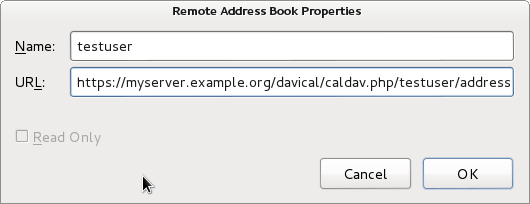
The SOGo Connector plugin configuration window is very trivial. I recommend using read-only mode to avoid the problems with multiple email addresses or telephone numbers. More serious limitations exist in the address book itself: if the CardDAV server has more than 2 email addresses, they will not appear in the Thunderbird address book. Changing an email address on the client side will result in loss of those additional email addresses on the server-side. The Mozilla team initially committed to rewrite the address book from the ground up but it is not clear whether that work is still in progress. DAViCal confusion I had been using DAViCal for quite some time as a CalDAV server before I recently decided to try and use it for CardDAV as well. As a calendar server, it had been working fine. I have a small number of users with some private calendars and also some shared calendars. When I installed the SOGo Connector plugin and went to setup the client-side configuration, it asked me for the server URL. Having used CalDAV already, I simply tried copying the existing CalDAV URL, which is of the form https://myserver.example.org/davical/caldav.php/daniel/home The URL was accepted and I could create address book entries on the client side. No errors appeared. I then tried setting up the same URL as an address book in Evolution. This time, I found I was able to create contacts and sync them to the server and access them from another copy of Evolution. It appeared DAViCal was working fine and I felt that Thunderbird or the SOGo Connector was somehow broken, because the Evolution clients were syncing but Thunderbird was not. The lack of any errors from the Thunderbird GUI further undermined my confidence in the SOGo Connector. Nonetheless, I decided to dig a little deeper, looking through the DAViCal source code. This brought me to the realisation that each URL could be flagged as either a calendar resource or an address book resource. This had not been obvious to me before. Evolution had effectively been storing the contact entries into a calendar URL and DAViCal had been happily accepting them. SOGo Connector, querying the URL, appears to have received both calendar and contact records from DAViCal and given up.
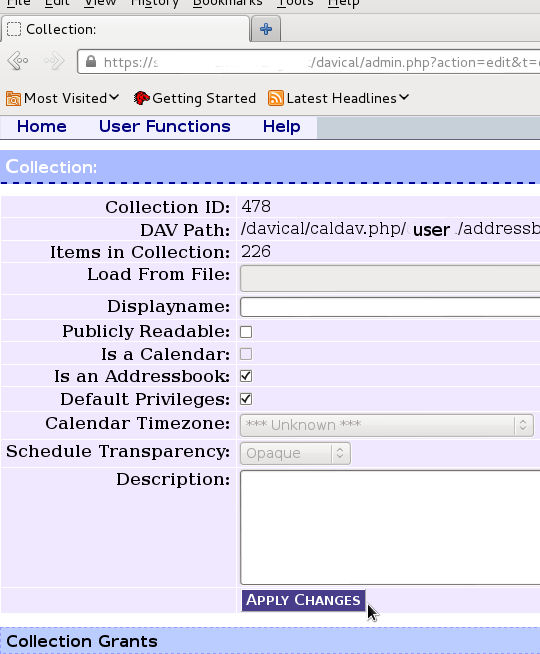
Here is where I configured the extra resource for an address book store under my user account in DAViCal In the DAViCal web management console, I created an extra resource for my user ID and set the appropriate checkbox to mark the resource as an address book. Then I put this resource URL into all the clients and found that they were all able to sync with each other. DAViCal's maintainer has explained that this is a limitation in the CardDAV/CalDAV protocols: technically, it is valid for the client to store the wrong type of objects in each URL. Clients need to be more resilient when they stumble across objects they don't expect in a particular resource. Conclusion A complete free software based contact-management solution can be easily deployed using any of the servers mentioned above, particularly if Evolution is the preferred client software. Using Thunderbird as a client, it can also work, but attention is needed to avoid data loss on sync. Thunderbird could also be used in a read-only mode to access address books maintained with Evolution. Mobile support is still patchy on Android. The closed source solution (CardDAV-Sync and CalDAV-Sync) appears to work and a promising open source close, aCal, appears to be "nearly there". Some people would obviously prefer to use a standalone contact/calendar server, while others may prefer an all-in-one groupware suite. Both approaches appear to be feasible, but the standalone contact/calendar server appears to offer a more compelling way to start quickly and have minimal administrative overhead, particularly due to the fact that DAViCal is available in a supported package.
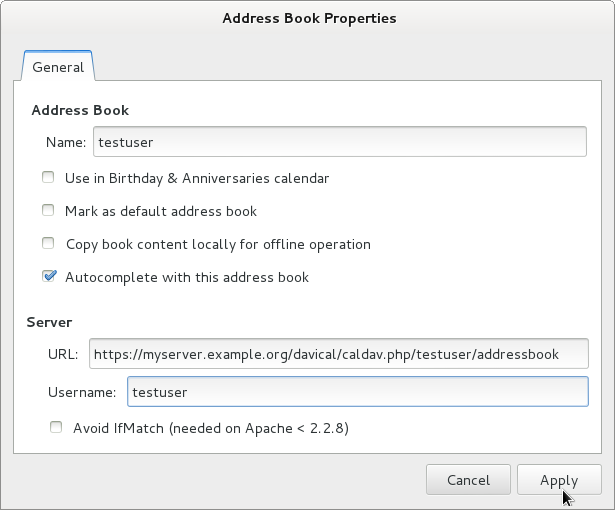
This is the contact server configuration window in Evolution. It offers slightly more options than SOGo Connector in Thunderbird and appears to be a more finished solution overall.

11 September 2013

Bastian Venthur: What are the most popular .vimrc options?

Hi always wondered what the most popular options are, you usually find in .vimrc files. So I downloaded 155 .vimrc files from the net (mostly from dotfiles.org and github.com), and wrote a little script which counts the number of times an option has been set. Since most options come in normal- and shortcut form, I mapped the shortcuts to the long version whenever I recognized them. So without further ado, here are the most popular .vimrc options (without values!). The number specifies the number of times this option has been set. The most popular option is on the bottom:

10 tselect
10 dictionary
10 runtimepath
11 mousehide
11 t_vb
11 foldlevel
11 foldopen
12 suffixes
12 matchtime
12 fileencoding
13 modelines
13 wrap
14 sidescrolloff
14 clipboard
14 lines
14 novisualbell
15 linebreak
15 cursorline
15 fileformats
15 columns
15 cindent
16 undolevels
16 shiftround
16 lazyredraw
16 completeopt
18 modeline
18 whichwrap
18 comments
18 wildignore
19 list
19 autowrite
19 foldcolumn
19 grepprg
19 titlestring
20 autoread
20 title
21 foldenable
21 cmdheight
22 pastetoggle
23 formatoptions
23 fileencodings
24 tags
24 directory
25 ttyfast
26 termencoding
26 complete
27 nohlsearch
27 noerrorbells
27 visualbell
28 shortmess
30 showmode
31 wildmode
32 t_Co
32 listchars
32 backupdir
34 hidden
34 backup
35 smarttab
35 foldmethod
36 viminfo
36 textwidth
37 scrolloff
37 nobackup
41 nowrap
44 encoding
47 guifont
51 guioptions
53 smartcase
54 wildmenu
57 smartindent
60 mouse
63 background
64 softtabstop
66 history
70 showmatch
72 ignorecase
74 showcmd
74 laststatus
79 number
82 hlsearch
91 statusline
94 expandtab
94 ruler
96 autoindent
96 backspace
99 tabstop
109 incsearch
114 shiftwidth
124 nocompatible Out of 155 .vimrcs
Fun fact: nocompatible is the most popular, but also most useless one. The fact that you have an .vimrc automatically implies the nocompatible mode in vim.

7 September 2013

Daniel Pocock: Evacuating Australia

With the news that Australia's 100mbit (and potentially gigabit) fibre to the home is to be abolished and replaced with a cheap 25mbps service using Europe's ADSL hand-me-downs (which will be obsolete in 5 years when the deployment is finished), I've had quite a few emails from people asking just how easy it is to move abroad.
The acoustic modem has a nice retro look Word has got out that I've been spending some time in Switzerland enjoying the world-beating rate of IPv6 deployment. That is not the only reason to leave Australia of course, nor is it the only criteria for people choosing which country will give them a better deal than either of the two non-choices we had in Australia's elections. A free $20,000 for leaving Australia The first good news is that any recent graduate with a big bad ugly HECS bill is only obliged to pay this extra tax when they earn a salary from an Australian employer and file an Australian tax return. Australians who live abroad are not automatically obliged to file tax returns and are not slogged with this extra tax for having attended university. If somebody just graduated and has this hanging over their head, or if they've just started working and seen how much is being deducted on the payslip, moving abroad could make a lot of sense financially. If you have any moral qualms about this, just reflect on the fact that while the Government intimidates students with the feeling that they have to "pay" for fulfilling an education that makes them into a productive member of society, thousands of would-be athletes are given money with no obligation to repay it. The easiest route: a second passport One in four Australians has a parent born abroad. Most of those people qualify for a passport from their parent's country of birth. In some cases this also applies to people with grandparents born abroad. With the European Union now spanning 28 countries and guaranteeing the rights of any citizen from any country to live, work and study in any of the other 27 countries, a passport from any of the EU countries gives a lot of choices, including places where I have lived myself such as the UK, Ireland, France and Switzerland. Europe's citizen-friendly immigration In other words, an Australian with an Italian parent can go up to the Italian embassy in Canberra, collect an Italian passport and immediately fly into London and start working there with no bureaucratic delays, invasive and degrading medical checks or other Government interference in their life.
London's nightlife is popular for Australians. The UK started rolling out their high speed 21CN many years before Australia started the NBN. The rights also transfer automatically to all family members (spouse and children) - an Australian with a second passport is not restricted to living in Australia simply because they are married to somebody who does not have a second passport. As long as they arrive together at a European airport, they can simply show a marriage/birth certificate (in any language) and cross the border immediately, enjoy the same rights as a citizen, including work, study, healthcare and better broadband. No paperwork is necessary, no cottage industry for otherwise unemployable immigration agents, these are basic human rights for those living in Europe.
Eiffel tower: potentially part of the wireless network for France's new 4G internet, potentially two to four times the fixed-line speed planned for Australia's crippled broadband Uncle Sam wants more Australians Although it is not widely known, the US has a fast lane for immigration from Australia. The regular programs for skilled visas in the US are usually exhausted every year, whereas 10,000 "E3" class visas for Australians are never fully taken in any year. Surely it's not that easy to go to the US? It is. To qualify, an Australian only needs a university degree and a suitable job offer. Although the visa is for 2 years, it can be renewed and Australians who meet and marry an American have in various cases have gained full residence or citizenship. Anything is possible, you could even end up becoming a NASA Astronaut.

San Francisco, home to leading technology professionals and innovators from many countries. Some US cities such as Austin and Kansas City have let Google install fibre to the home, San Francisco could follow Working holiday schemes are not just for Britain Most Australians know somebody who went to London on a "working holiday" visa. These visas are not just for the UK and Australia has similar reciprocal programs with many other countries too. These rules for these schemes are rooted in the industrial age concept of workers with punch cards. Participants are typically limited to work 20 hours per week. Of particular interest for those in IT, such rules are hard to quantify for freelancers, web designers or creative people who earn their living charging fees per-project or undertaking management work without specified working hours. Although the visas are limited to 4 years, I've heard of Australians benefiting from the open borders of mainland Europe, spending 4 years in one country and then obtaining another 4 year visa for an adjacent country and travelling freely back and forth, building up a business and lifestyle of their own design. Singapore and Hong Kong Singapore and Hong Kong have become enormously popular destinations for Australians, particularly those with special skills in IT, finance, engineering and international business.
Singapore is respected as one of the cleanest and most orderly cities in Asia while embracing significant diversity in dining, shopping, leisure and lifestyle possibilities. They have recently boosted speeds to help people get a full 100MBit over fibre. A SIM card with high speed broadband charges SGD 7 (about $5) for 1 Gigabyte. These are not necessarily destinations that a graduate can easily move to. People are measured by their salary and the Government simply assumes that anybody earning a high salary is going to make a valuable contribution to society and they are given a visa in 1 or 2 weeks. Usually 3-5 years employment experience is required before making a move to one of these countries. The Not Ordinarily Resident (NOR) scheme gives some hints about the minimum salary level that ex-pats aim for, many earn significantly more with bonuses, stock programs and properly engineered tax-free offshore pension arrangements. These countries offer particularly low taxes (around 10%) and great technology. They have some rough edges too: like Europe, spouses are automatically given a visa too, but in contrast, their visa does not permit them to work unless they also work in a profession that is highly paid. Visas are issued quickly but they are also canceled very quickly if the job is terminated or the company goes bust. There have been various stories of people paying the typical 2-month deposit on an appartment in Singapore and then finding that it is forfeited when their job and visa are canceled and they have 4 weeks to leave. The bottom line is that people moving to these locations usually have a wide professional network and confidence to change their job quickly if necessary. Freestyle immigration and the visa run Not too long ago I was at a house party in Prague, Czech Republic, which is like a Paris of eastern Europe. Somebody introduced me to some Americans who I was told had similar interests in technology. They were operating an offshore web site and living very well. They had spent 10 years in Prague living on tourist visas. Authorities seemed quite happy for them to remain as long as they left every 3 months and spent 1 night abroad, a typical visa run. That could be as simple as a train journey to Vienna, Austria and an overnight stay.
Making a visa run in comfort and style with European railways. The Railjet train pictured includes free wifi, a lot cheaper than the $20 billion Tony Abbott plans to spend rolling out yesterday's technology in Australia When European countries abolished border controls, this system became much more convoluted for those who depend on the visa run. However, it remains common in many Asian and Latin American countries and many ex-pats live this way. Officials in many of these medium sized economies recognise the value of people bringing in money from offshore business (such as web sites) and using it to pay rent, food and local services. To make this effective, the ex-pats typically need to have an international private health insurance policy (high quality offshore policies can be found quickly with a search engine) and not aspire to work in a normal 9-5 job. Conclusion Young Australians might not want to just consider travel, it may even become unavoidable. The reality is, by 2020, one in three Australians will be a retired baby boomer and one way or another, whichever Government is in office will be unable to avoid taxing those of working age to pay for the health care and pension promises made to older generations. Serious expenditure on public infrastructure such as broadband or high speed rail appears to remain a pipe dream. Moving abroad, however, is just so much fun. Look at the way multinational companies make countries compete to attract their new factories and other projects: why should any individual citizen be any less demanding in choosing where they work, play and get the best value for whatever taxes they have to pay? Some people raise questions of patriotism or responsibility to the nation. Think again. The 200,000 Australians who live abroad or travel extensively make a significant contribution to Australia's international profile, engage in new trade initiatives, bring skills back to Australia and generally represent what our country is really about much better than some of those who are paid to do so.

6 September 2013

Marko Lalic: PTS User Accounts

PTS User AccountsDuring the last iteration, the PTS rewrite has grown user accounts! This is a major addition, which moves the GSoC project beyond a simple "rewrite".

As always, this feature is available to be tested at the running PTS demo instance found at http://pts.debian.net.

For the moment the features related to user accounts allow for Web-oriented package subscription management. This means that the user can achieve the same functionality as what is offered by the control commands accessible over the control mail interface (control@pts.debian.net).

This includes subscribing to a package directly from the package page by clicking a single button; no confirmation mail required. Users are able to see a list of all their subscriptions and associated keywords, modify their default keywords and subscription-specific keywords all through a single profile page.

Eventually, a user is going to be able to associate multiple email addresses with his account and manage subscriptions for each of them from the same central panel. Actually, all currently existing functionality has already been implemented with this in mind and is backed by extensive Selenium-driven functional tests. This story is found in the backlog and is to be worked on in the last week of GSoC.

Another interesting, albeit Debian-specific, feature that is in the pipeline is allowing Debian Developers to authenticate via sso.debian.org: no PTS-specific registration/passwords required!

Besides package subscription management, introducing user accounts to the PTS opens up interesting possibilities for future development. Perhaps things like personalized package pages, a private stream of notifications in the user's profile... Hopefully, there are members of the community interested in exploring some of them.

PTS Rename?As the scope of the project begins to encompass more and more previously nonexisting functionality and in doing so even starts engulfing some other existing services (an example is that the PTS can now automatically extract and serve some source package files, e.g. debian/copyright)., an idea has been floating around to rename it. The question becomes: what would a good name be? No decision has been made as of yet, so suggestions and opinions are welcome.

5 September 2013

Gergely Nagy: What's cooking in syslog-ng 3.5?

The first alpha of syslog-ng 3.4 was released more than a year ago, and the first stable release earlier this year, development on syslog-ng 3.5 has been going on steadlily since then, with a lot of interesting features and changes pouring in. While the 3.5 release will not bring as many overwhelming changes as the previous two releases did, the sheer number of improvements is still substantial. Our focus was on smaller developments all over the place this time, instead of big sweeping changes. In this post, we will go over most of these features, with use-cases, examples and a few words about why they are so useful and awesome.Multi-line support, new destinations, new template functions, type hinting, unit suffixes, and other things. Read on, and be amazed!These are only bigger features, there has been a lot of small tweaking going on, and of course, all of the fixes that went into prior versions will also be in 3.5 too, and there's still a chance that something else may find its way in before the feature freeze.Multi-line supportOne of the major new features in the 3.5 release will be support for multi-line messages, a feature that has been available in syslog-ng PE for a good while, and which has been ported to and improved upon to the open source edition. Two variants of multi-line are supported, which will be detailed below. Both of them are available for the file() and pipe() sources only.Indented multi-lineThe easiest variant is indented multi-line, where each line can be followed by others, indented by whitespace, and the message continues until the first non-indented line. This is the format used by the Linux kernel too, from version 3.5, for /dev/log. This type of multi-line can be used as follows:
source s_multiline   file("/path/to/file" multi-line-mode(indented));  ;
Consider that /path/to/file has the following content:
First line
 Continuation 1;
 Continuation 2;
Second line
With the indented multi-line-mode() setting, this would turn into two log messages:
First line\n Continuation 1;\n Continuation 2;
Second line
Regexp-based multilineIf multi-line input is not based on indentation, one can use the regexp multi-line-mode() instead, which makes two new settings available: multi-line-prefix() and multi-line-garbage(). These can be used to define the start and the end of a log message: any string between a the beginning matching prefix and a matching garbage will be considered a single message. That is, the prefix will be included, the garbage will not be: it will be discarded.To illustrate:
source s_multiline  
 file("/path/to/file" multi-line-mode(regexp)
                      multi-line-prefix("^prefix")
                      multi-line-garbage(" garbage$"));
 ;
If the source contains these lines:
prefix message
continuing garbage
This will turn into the following log message:
prefix message\ncontinuing
New destinationsIt would be pretty hard to do a syslog-ng release without new destinations, and with 3.5, we will have three of them!STOMPWhile we had AMQP before, we now have a STOMP destination too, so we can stream logs to any STOMP server, with a few simple lines:
stomp(
 host("localhost")
 port(61613)
 destination("/topic/syslog")
 routing_key("")
 persistent(yes)
 ack(no)
 username("someone")
 password("something")
 body("This is the body! YAY! Here's a message: $MESSAGE!\n")
 value-pairs(scope(nv-pairs, syslog-proto, selected-macros))
)
Of course, none of these settings need to be set, you can just use the defaults, and it will just work!RiemannDid you know that syslog-ng is far more than a log collector and processor? No? You do now. When you have access to a lot of logs, and a tremendous amount of power in parsing them, you can use these tools for monitoring easily! And when we're talking monitoring, riemann is a great asset in our toolbox, and with the new destination, we can easily forward metrics to it:
riemann(
 server("localhost")
 port(5555)
 host("$HOST")
 service("$PROGRAM")
 description("$PROGRAM pids")
 metric(int("$PID"))
 ttl(300)
);
Of course, the above is a very silly example, it would make much more sense to extract data from a log message instead, but this will serve as an example.New template functions
$(upper-case TEXT...), $(lower-case TEXT...)
To turn some text into *upper-* or *lower-case*, these two template functions come in handy. They simply turn all their arguments into the respecitve case.
$(delimit DELIMITERS NEW-DELIMITER TEXT)
Sometimes one has a delimited string, where one wishes to replace the delimiters. This function does just that: give it a list of delimiters (you may need to quote it, if it contains whitespace), a replacement, and a text to replace delimiters in, and it does the rest. For example, to replace tabs and spaces with a vertical bar, one could write a template like this:
template("$(delimit \"\t \" \" \" $MESSAGE)\n")
$(env VARIABLE...)
Have you ever felt the need to check an environment variable from within syslog-ng? I did, and now I can.
Type hintingWhile syslog-ng supported sending log messages into various data stores and message queues for a while (SQL at first, MongoDB, JSON and AMQP later), even when those supported different types of data than strings, we could not do anything else. Until now. It is now possible - at places where it makes sense - to annotate templates with type hints, which the destination driver can optionally use. Type hinting is implemented for the mongodb() destination and the $(format-json) template function for now. When no type hint is specified, syslog-ng defaults to string.To add type hints, simply wrap the respective template with the hinted type, like this:
mongodb(
 value-pairs(pair("date", datetime("$UNIXDATE"))
             pair("pid", int64("$PID")))
);
Currently the following type hints exist: boolean (anything that begins with a t or 1 is true, anything that begins with f or 0 is false, everything else is an error), string, literal (same as string, but not quoted if it would be quoted otherwise), int32 (int is an alias for this), int64, and datetime. Only UNIX timestamps can be type-hinted to datetime, anything else will likely result in a casting error.It is also possible to control what happens when type casting fails: syslog-ng can drop the whole message, drop the property, or fall back to string. It can also do all of these silently:
options  
 typecast(on-error(silently-drop-property));
 ;
Using this feature with $(format-json) is very similary too:
$(format-json date=datetime("$UNIXDATE") pid=int64("$PID"))
With this feature in place, you can now store your non-string values with their proper types!Unit suffixesUnit suffixes make it considerably easier to set limits and describe numbers within the syslog-ng configuration. We no longer need to spell out sizes to the byte precious, it is now enough to write: log-fifo-size(200MiB). Now, syslog-ng will understand suffixes for kilo-, mega-, and giga-bytes, (K, M, G, respectively) either in base-10 or base-2 (with an extra i after the suffix). One can also omit the trailing b from the end.So, to set the log-fifo-size() to 2097152 bytes, one can simply use 2MiB. Or, to set it to 2000000, 2Mb. That's a whole lot easier, isn't it? No more counting zeros, no more silly typos in a ten-digit number, no more pain, but easily readable units!Miscellaneous featuresApart from the features above, there have been a lot of other changes and improvements in the code base:

Tanguy Ortolo: PluXml, a file-based, database-free blog

The blog engine PluXml is now available as a Debian package:
Package: pluxml
Version: 5.2-2
Description-en: Light blog engine using XML files
 PluXml is a light and simple blog and CMS engine that uses simple XML
 files to store its data and requires no database. It has all the usual
 features (static pages, comments, categories, tags, medias, RSS
 feed...) and supports multiple users, customizable themes and plugins.
Homepage: http://www.pluxml.org/
Section: web
Priority: extra
PluXml logo: a leaf with its petiole used as one bar of the word  Xml
PluXml is a French blog engine that uses XML files to store its data, thus avoiding the need for an external database system as most blogs do. The name PluXml is a French portmanteau between plume (feather, evoking something light) and XML. Apart from that, although it was started in French only and its official website is still in French, it was internationalized about a year ago. It is designed to be easy enough to use, targeting regular users, but not too fancy: for instance, it provides a web-based administration interface, but content editing uses HTML code unless you install a graphical content editor plugin. That package may be of interest to people like me, that consider the almost systematic use of relational database systems in many web applications as a disease, and more generally to self-hosted people that would rather avoid running an additional database server on their small home servers. The package includes an interactive configuration, that allows to choose the blog language, title, description, admin login and password. Unless debconf was configured not to ask questions, in which case nothing is asked and the blog is left in an barely unusable state, of course.

31 August 2013

Christian Perrier: DebConf 13: hacking outcome

I *did* some hacking at DebConf, as usual. For once, I had no TODO list: after all, I never complete these, so why make one? Still, I participated to discussions around samba packaging, mostly animated by Ivo De Decker and I think we're making good progress towards samba 4.x packages. The road is long, quite complicated, but we now have a stronger team, with a very active Ivo, Jeroen Dekkers who officially joined, Steve Langasek who still cherishes one of his pet packages (and even branched in our git with the Ubuntu packages). Great work and thanks to Ivo for pushing this forward. I also worked quite actively on the migration of fonts packages to git (I now reached the point where I'm more comfortable with git than SVN, yes, everything can happen). These packages were modernized at the same time and checked for new upstream versions (I have to say that few of these fonts had new upstream versions, indeed). We unfortunately found no time to have a good font BoF in Vaumarcus, indeed...but I'm not sure we would have many things to say. The work is done and done well, in this team. Some progress was made, also, for restoring a working "monolithic" build of D-I. This build gathers together all udebs from unstable, which means it offers a D-I image that uses ALL udebs from nustable.....which is not the default of other images. This would be very helpful for translators who want to check their work as soon as possible. In the future, with a Jenkins task that would build each package at each commit and then build a monolithic image, we could have a way to provide a tes snapshot of D-I git repos.....which could help catching more bugs (or more of my stupid mistakes). So, in general, I consider this a quite successful DebConf when it comes at "real" production.

28 August 2013

Lior Kaplan: Hello free PHP JSON extension

I ve noticed that my post from three months ago ( Bye bye non-free PHP JSON extension ) was quoted quite often (thanks (: ). But I also noticed that most people didn t read the post fully, and didn t see the replacement package. Hopefully the title of this post will correct that impression. I d like to indicate the existence of the php5-json package. It s part of Debian unstable since June 2013 and testing (jessie) since August 2013. Users who wish to build the free extension on their own are welcome to download it from PECL at http://pecl.php.net/package/jsonc . It s a good chance to thank Remi Collet for his work on this replacement. I m happy that the main Linux distributions have already adopted it.
Filed under: Uncategorized

Vincent Sanders: Men admire the man who can organize their wishes and thoughts in stone and wood and steel and brass.


I would probably not yet worthy of the admiration Emerson was alluding to but I do like to make things. As anyone who has read previous posts knows I have pretty much embraced the "do things, tell people" idea.

One small wrinkle is doing things needs somewhere to work. Since moving myself and the family to rented accommodation in Cambridge (swampy 3,500 year old English city, not the one in Massachusetts) I have been lacking space to do practical projects.

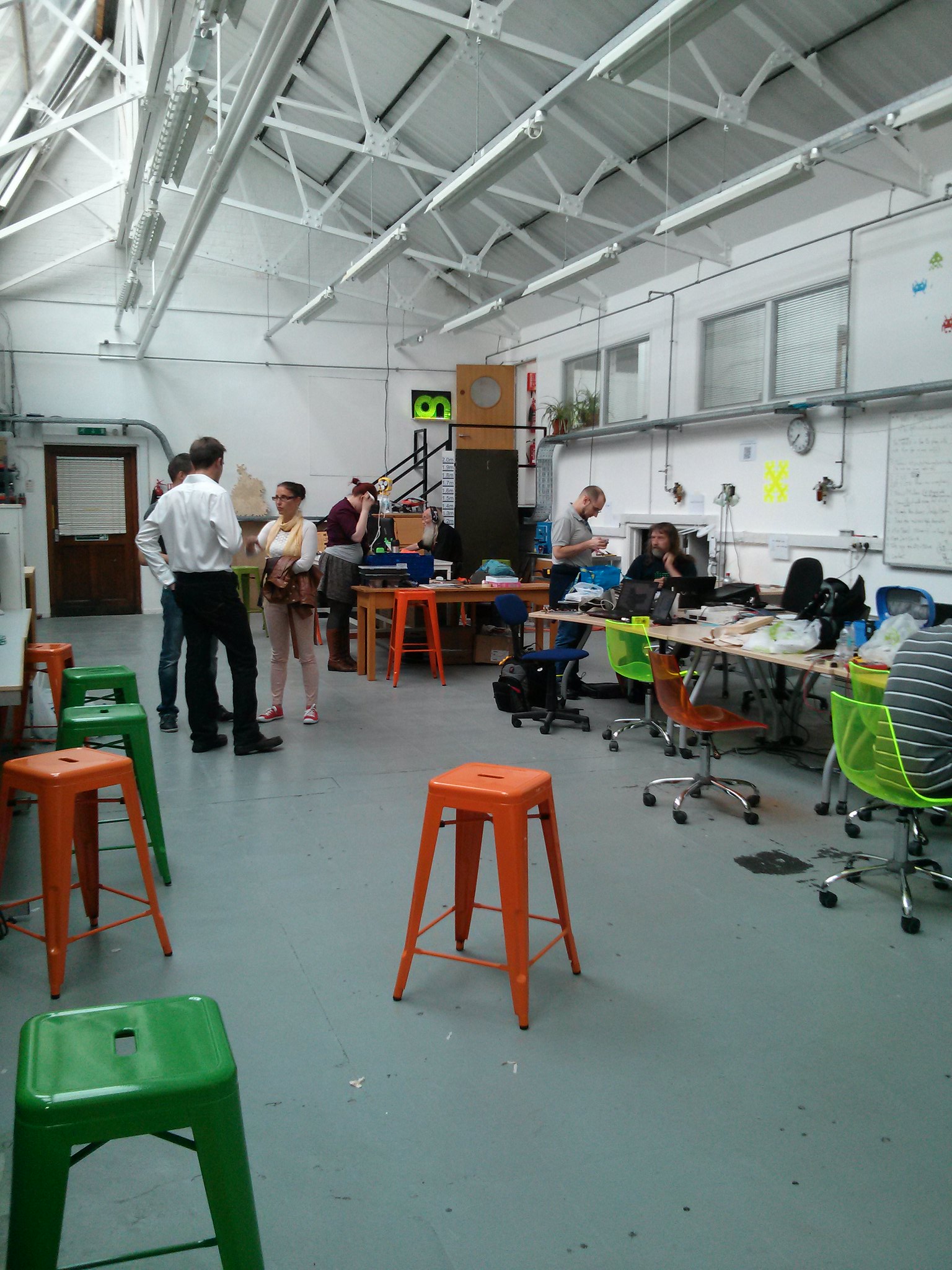
The main space
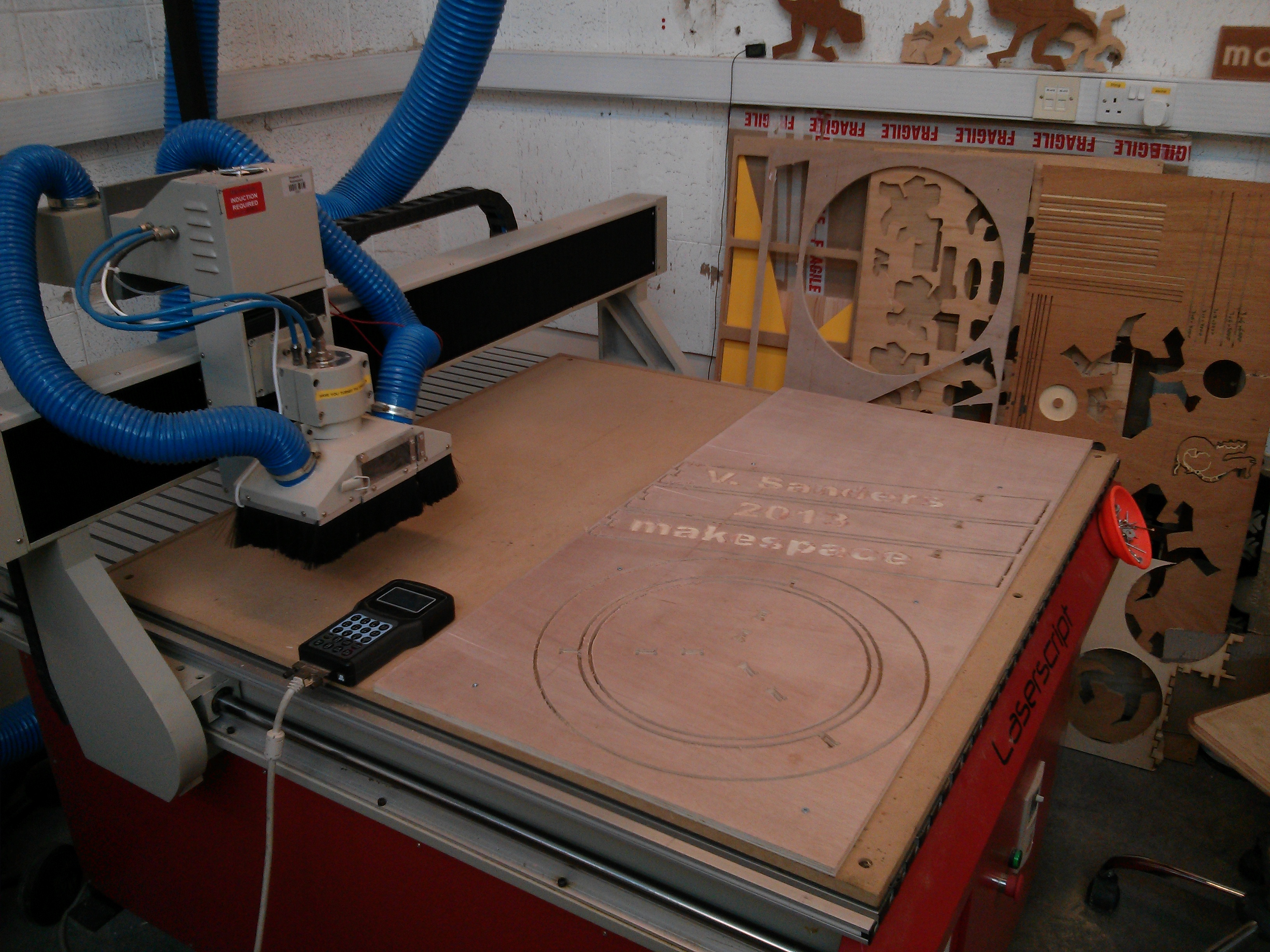
To fix this lack I have joined the cambridge makespace which, in addition to somewhere I can work gives me access to some tools I was previously unable to afford. The space gives practical training on the more complex machines (any tool can be dangerous if you do not use it correctly) which recently allowed my induction on the CNC router.

My instructor , Mark Mellors, who was good enough to give up some of his valuable making time to train me (and accidentally get his car stuck in a car park overnight by staying late) suggested that it was a good idea to have a design to try.

I decided to use this opportunity to actually create something useful (though now I re-read Marks message it did suggest a simple design...oopsy). I had been working at the electronics bench in previous weeks and been uncomfortable using the existing stools and chairs as they were either a bit high or unable to be adjusted high enough for the 80cm tall benches. I decided to design a 60cm tall stool for use at this workbench.

My initial idea was for a simple three leg stool, round top, three legs, how hard could it be? Initial research showed that showed that above 30cm the legs needed to be braced to each other. This is because the leg to seat joints simply cannot handle the stress caused by leverage which longer legs introduce.

I looked at the structure of several stools online and was initially drawn towards creating something like the IKEA Dalfred bar stool. It was discovered that the design would be easier to realise if it were made from sheet material which give a smaller challenge to a naive operator of a CNC router. Because of this simpler designs were researched and I eventually found a simple design I liked.

The design could not however be used directly as it was for imperial sized material which is not available in europe. I selected the QCAD open source CAD package and recaptured the design adjusting for the available 12mm plywood sheet material. This resulted in an imperial measurement design for metric materials.

Mark helped me transfer the DXF into the CAM software (vcarve pro 7, after I discovered the demo version of this software generates files which cannot be imported into the full edition!) and generate toolpaths for our machine. Once the toolpaths are saved to a USB stick (no modern conveniences like direct upload here) the job can be run on the machine.

Here I ran into reality, turns out that tolerances in imperial combined with lack of understanding how plywood reacts resulted in excessive play in the joints. This resulted in an unusable stool, which simply tried to rotate around its central axis and become flatpack. I had successfully turned 10 worth of plywood into some sawdust and a selection of useless shapes. On the other hand I did become competent with the router workflow so it was not a complete failure.

I was determined to make the design work so I decided to start from scratch with a similar design but entirely in metric. I performed some material research both online and practically (why yes i did spend an informative hour in several cambridge DIY shops with digital calipers, why do you ask?) it turns out that generally available 12mm thick plywood actually ranges between 11.9 and 12mm thick.

I did some test slot cuts of varying width and determined that the available stock can be "persuaded" to fit into a 11.8mm wide slot. This Interference fit joint is strong and removes the need for adhesive in most cases.

Second cut still attached to the bed. Leftovers of first attempt in the background
The sheet plywood material is readily available with a width of 1220mm and a height of 606mm (a full sheet is 2440mm long which is cut into four with a 4mm wide saw blade) so making the legs fit within a sheet and be close to the 60cm target should be possible.

I selected a suitable seat radius (175mm) and from that determined the minimal gap to the base ring with a 6mm end mill tool (20mm for two toolpaths and some separation) and hence the minimum suitable width of the base ring (50mm) giving a total radius of 245mm.

For the legs allowance was made for two joints of 30mm with 30mm separation between them the legs come out at 90mm width. If a 6mm space and a 6mm toolpath top and bottom of the sheet is accounted for a 582mm height (606 - 24) is available in which to fit the legs. The top of the leg which fits into the seat is 12mm tall leaving 570mm total leg height.

12mm plywood stool design
At this point I selected some arbitrary values for the leg positioning and angle (30mm from seat centre and 15 ) using a right angle triangle triganometry this produced a stool with a base of around 550mm or 100mm outside the radius of the seat. This seemed a pleasing shape and when the values for the holding ring were calculated it is at 104mm height which also seems to work out well.

This design was cut on the machine, lightly finished with some sandpaper and assembled. The legs slotted into the ring first and then the legs eased into the seat slots, the whole thing flipped and the seat hammered home onto the legs.

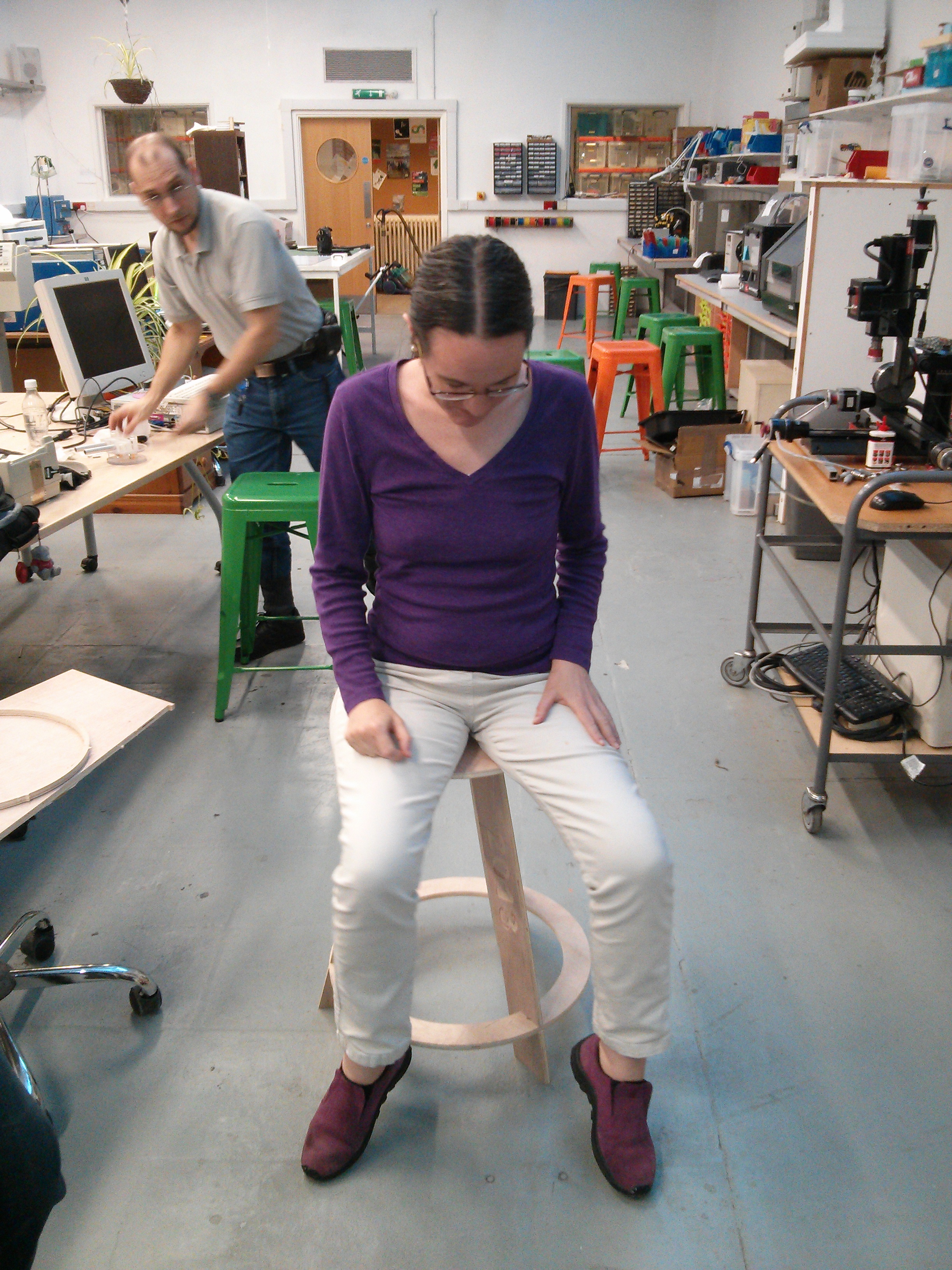
Anne Harrison volunteering to try the wobbly stool of doom
Success! It physically fit together and if you were brave enough you could sit on it. Unfortunately the plywood seemed to flex around the central axis of rotation in a rather alarming way, fine if you are under 70 kilos but not giving the impression of security most people want from their seating.

Ok, lets try with five legs instead of three (at least we can reuse the existing three legs)...nope still not good enough and another 10 gone.

18mm Plywood stool design
The others in the space suggested a few ideas to improve matters and the one I selected was to use 18mm plywood instead of 12mm, this should improve rigidity. There was a brief pause in proceedings to discover 18mm sheet is actually 17.7mm and needs a 17.5mm slot to make the interference fit work.

Completed 18mm stool
A swift redesign later altering the seat radius, gap, ring width and leg height to accommodate the new material and we have version 4 and it works without caveat. Tested up to 150Kg load without trouble, there is a small amount of flex still but nothing that feels worrying.

I finished the stool by rounding the seat top edge with a ball bearing rounding bit in a manual router and applying a couple of coats of gloss acrylic varnish. Finished stool is now doing service at the space.

In conclusion the final design allows someone with a CNC router to create a useful 580mm high fixed stool for 7.50 in timber plus cutter wear and varnish so maybe 8.50 total.

You can actually get five legs and a seat/ring out of a 1220x606 sheet and with intelligent arrangement a single 1220x2440 sheet will probably yield five or possibly six stools in total

I am making the design files of the proven 18mm version available (heck they are all there...but you have been warned, none of the other solutions produce a satisfactory result) under the MIT licence so anyone can reproduce. More pretty pictures are also available.

25 August 2013

Vincent Bernat: Boilerplate for autotools-based C project

When starting a new HTML project, a common base is to use HTML5 Boilerplate which helps by setting up the essential bits. Such a template is quite useful for both beginners and experienced developers as it is kept up-to-date with best practices and it avoids forgetting some of them. Recently, I have started several little projects written in C for a customer. Each project was bootstrapped from the previous one. I thought it would be useful to start a template that I could reuse easily. Hence, bootstrap.c1, a template for simple projects written in C with the autotools, was born.

Usage A new project can be created from this template in three steps:
  1. Run Cookiecutter, a command-line tool to create projects from project templates, and answer the questions.
  2. Setup Git.
  3. Complete the todo list .

Cookiecutter Cookiecutter is a new tool to create projects from project templates. It uses Jinja2 as a template engine for file names and contents. It is language agnostic: you can use it for Python, HTML, Javascript or C! Cookiecutter is quite simple. You can read an introduction from Daniel Greenfeld. The Debian package is currently waiting in the NEW queue and should be available in a few weeks in Debian Sid. You can also install it with pip. Bootstrapping a new project is super easy:
$ cookiecutter https://github.com/vincentbernat/bootstrap.c.git
Cloning into 'bootstrap.c'...
remote: Counting objects: 90, done.
remote: Compressing objects: 100% (68/68), done.
remote: Total 90 (delta 48), reused 64 (delta 22)
Unpacking objects: 100% (90/90), done.
Checking connectivity... done
full_name (default is "Vincent Bernat")? Alfred Thirsty
email (default is "bernat@luffy.cx")? alfred@thirsty.eu
repo_name (default is "bootstrap")? secretproject
project_name (default is "bootstrap")? secretproject
project_description (default is "boilerplate for small C programs with autotools")? Super secret project for humans
Cookiecutter asks a few questions to instantiate the template correctly. The result has been stored in the supersecret directory:
.
  autogen.sh
  configure.ac
  get-version
  m4
      ax_cflags_gcc_option.m4
      ax_ld_check_flag.m4
  Makefile.am
  README.md
  src
      log.c
      log.h
      Makefile.am
  secretproject.8
  secretproject.c
  secretproject.h
2 directories, 13 files

Remaining steps There are still some steps to be executed manually. You first need to initalize Git, as some features of this template rely on it:
$ git init
Initialized empty Git repository in /home/bernat/tmp/secretproject/.git/
$ git add .
$ git commit -m "Initial import"
[...]
Then, you need to extract the todo list built from the comments contained in source files:
$ git ls-tree -r --name-only HEAD   \
>   xargs grep -nH "T[O]DO:"   \
>   sed 's/\([^:]*:[^:]*\):\(.*\)T[O]DO:\(.*\)/\3 (\1)/'   \
>   sort -ns   \
>   awk '(last != $1)  print ""   last=$1 ; print '
2003 Add the dependencies of your project here. (configure.ac:52)
2003 The use of "Jansson" here is an example, you don't have (configure.ac:53)
2003 to keep it. (configure.ac:54)
2004 Each time you have used  PKG_CHECK_MODULES  macro (src/Makefile.am:12)
2004 in  configure.ac , you get two variables that (src/Makefile.am:13)
2004 you can substitute like above. (src/Makefile.am:14)
3000 It's time for you program to do something. Add anything (src/secretproject.c:76)
3000 you want here. */ (src/secretproject.c:77)
[...]
Only a few minutes are needed to complete those steps.

What do you get? Here are the main features:
  • Minimal configure.ac and Makefile.am.
  • Changelog based on Git logs and automatic version from Git tags2.
  • Manual page skeleton.
  • Logging infrastructure with variadic functions like log_warn(), log_info().
logging output of lldpd

About the use of the autotools The autotools are a suite of tools to provide a build system for a project, including:
  • autoconf to generate a configure script, and
  • automake to generate makefiles using a similar but higher-level language.
Understanding the autotools can be a quite difficult task. There are a lot of bad documentations on the web and the manual does not help by describing corner-cases that would be useful if you wanted your project to compile for HP-UX. So, why do I use it?
  1. I have invested a lot of time in the understanding of this build system. Once you grasp how it should be used, it works reasonably well and can cover most of your needs. Maybe CMake would be a better choice but I have yet to learn it. Moreover, the autotools are so widespread that you have to know how they work.
  2. There are a lot of macros available for autoconf. Many of them are included in the GNU Autoconf Archive and ready to use. The quality of such macros are usually quite good. If you need to correctly detect the appropriate way to compile a program with GNU Readline or something compatible, there is a macro for that.
If you want to learn more about the autotools, do not read the manual. Instead, have a look at Autotools Mythbuster. Start with a minimal configure.ac and do not add useless macros: a macro should be used only if it solves a real problem. Happy hacking!

  1. Retrospectively, I think boilerplate.c would have been a better name.
  2. For more information on those features, have a look at their presentation in a previous post about lldpd.

24 August 2013

Marko Lalic: PTS rewrite: Django Memory Usage


Rewriting the PTS in a fairly large Web framework such as Django is sure to cause larger memory consumption by even the more simple tasks, when compared to a couple of (loosely related) perl scripts. If anything, simply due to the fact that the entire Django machinery needs to be loaded.

However, just how large the memory consumption difference between the two can be seen in the example of the command to dispatch received package emails to users. In the new version, the command is implemented as a Django management command, whereas before it was a perl script dispatch.pl relying on the common.pl script for some additional functions.

The reason this command's memory usage is important is an incident with the current test deployment of the new PTS found at http://pts.debian.net. All package mails that the old PTS receives are also forwarded to the new instance in order to expose the new implementation to real-world mail traffic. At a certain point, over a hundred mails were received instantly causing over a hundred dispatch processes to be launched. This led to the system running out of memory and the kernel had to run the OOM Killer which brought down PostgreSQL server thereby causing the site to become unavailable.

For now, such a problem seems to have been prevented from reoccurring by setting up exim to queue messages when a certain system average load is exceeded, however it is interesting to check how large the memory consumption difference between the old and new dispatch really is.

Measurement setupIn order to measure the memory use, two messages of different sizes were used: 1KB and 1MB.

For the new PTS two cases were considered, when the database used is sqlite3 and PostgreSQL. In both cases, it was simply initialized by syncdb, meaning it contained only the default keywords found in the initial fixture and no registered users and subscriptions. The DEBUG setting was set to False.

For testing the old PTS's dispatch.pl, the database was also initialized empty.

This way, the tests should show the actual difference between the two implementations.

Since the main concern here is the maximum memory usage of the dispatch script, a simple bash script was written which takes a PID of a running process and outputs the maximum memory usage as reported by ps once the process is terminated. The script used is shown below.

#!/usr/bin/env bash

pid=$1

while ps $pid >/dev/null
do
ps -o vsz= $ pid
sleep 0.1
done sort -n tail -n1

Old PTS Measurements
The maximum memory usage of the old PTS was:
  1. 37.8 MB for the 1 KB message
  2. 38.2 MB for the 1 MB message

New PTS Measurements

sqlite3
The maximum memory usage of the new PTS using sqlite3 was:
  1. 91.77 MB for the 1 KB message
  2. 92.59 MB for the 1 MB message

PostgreSQL

The maximum memory usage of the new PTS using PostgreSQL was:
  1. 148 MB for the 1 KB message
  2. 160 MB for the 1 MB message

Comparison and DiscussionWhen comparing the memory used by the old dispatch.pl implementation and the new PTS running sqlite3, the difference does not seem to be too large and is to be expected, since, as mentioned, the whole Django framework is loaded when executing a management command.

However, the huge difference between the two versions of the new PTS: the one using sqlite3 and the one using PostgreSQL is very surprising indeed.

Another interesting measurement is the difference between running a bare Django management command: one including only a sleep statement (in order to allow enough time to measure its memory usage) on PostgreSQL and sqlite3. In both cases, the memory usage was only about 1 MB less than what the respective maximum memory usage when processing the 1 KB message.

All this considered, the logical conclusion seems to be that either psycopg2 package and/or the Django postgresql_psycopg2 database engine use a lot more memory than the corresponding sqlite3 alternatives.

Could anyone shed some more light as to what causes this stark difference between using sqlite3 and Postgres in Django? Anything that could be done to mitigate it?

Marko Lalic: PTS Rewrite Project Status

The rewrite has already achieved some of the major goals which have been set in the beginning, as well as made some changes and improvements along the way. Some of the major points of the new system implemented so far will be presented here.

    Tasks framework
    The current PTS implementation regenerates the HTML pages for all packages a few times per day. A goal of the rewrite was to make smaller incremental updates possible so that the information displayed for each package can be much more dynamic.

    In order to allow incremental updates, it is necessary to consider the situation where updating some information should trigger an update of other information.

    This is where the tasks framework comes in. It allows developers to define a task with a list of "events" that it produces. An event can be triggered by any change to shared information or anything else the task would like to signal. Each event is identified by a simple unique string name. Events can also contain arbitrary (JSON-serializable) objects. Other than events that it produces, a task defines a list of dependencies events it depends on.

    When a single task should be executed, the tasks framework uses this information to build a dependency graph (a DAG) and executes the tasks in topological sort order, making sure each task runs only after all tasks which could raise an event it depends on have finished. It automatically makes the raised events available to the task so that it can access the extra data. Tasks for which no event was raised are skipped.

    Such execution of a task along with all its dependencies is called a Job. A Job's state is persisted to the database after each task completes its operation. This allows Jobs to be continued if there is an unexpected error causing it to terminate.

    So far, the tasks framework has already proven useful. For example, there are tasks which extract some package information to a denormalized model suited for directly displaying the data in the package page after a new package version is detected in a repository. Other examples are tasks which update standards-version warnings (after a new package version is detected) and the news generation task based on various detected changes to the packages (new source version, version removed from repository, version migrated to another repository).

    Vendor-specific customizationAnother goal of the rewrite was to make the PTS less Debian-specific. This is so that derivatives could easily deploy their own versions of the PTS. The idea is to have a number of core PTS services which alternative deployments can customize and augment.

    The simplest way vendors can customize PTS is by changing some of the local settings values. An example of this would be changing the PTS_VENDOR_NAME which leads to this name being displayed in any part of the system.

    This is fairly uninteresting since the information is always static. What is more interesting is when the vendor should provide different information based on some context, e.g. package name, received message, etc. This requirement led to the concept of the vendor app with a rules module.

    Various core parts of the PTS specify hook functions which different vendors can implement to provide customized behavior of the core component. Some examples are:
    • providing URLs to a developer information site (e.g. http://qa.debian.org/developer.php in Debian's case) based on a developer's email
    • providing a URL to a bug tracker for a particular package (based on the package type and bug category type)
    • providing additional rules to tag received package mails with keywords
    • providing additional headers to be injected in the forwarded package mails
    • providing a list of bugs which should be displayed in the bugs panel
    A settings value is set giving the full dotted path to the Python module containing the implementation of these hook functions.

    Vendor-specific featuresA step beyond customizing core features is for vendors to include their own specific functionality. The already described tasks framework allows for implementing custom data update/generation processes (optionally depending on core events). Furthermore, since a vendor-specific Django app is expected, it can contain any vendor-specific models which are managed just as the core models are (syncdb, migrations, etc. all work as expected). The last piece of the puzzle is displaying this information on the package page.

    Currently, all package information is provided in various boxes (general, bugs, links, etc.) which were named panels. The rewrite has made it possible to implement additional panels in a really elegant way.

    It is required to implement a class with some properties giving:
    • the panel's title
    • position in the page (left, center, right)
    • panel importance (higher importance panels are placed above lower importance ones in the same column)
    To generate the HTML for a package, two alternatives are allowed. The first is to provide a property which gives (explicitly marked safe) HTML output which is then included in the correct position verbatim. The second alternative, which is what should cover most needs and should be preferred, is to provide a property giving a template name and a property giving the additional context variables necessary to render this template. By using the power of Python properties, the context can be dynamically generated for each package by the panel. The PTS then makes sure to pass the correct panel's context when rendering its template and to include the rendered result in the final package page.

    Various convenience classes are implemented in the panel API, but those are better left to be read about in the panels API documentation.

    Changes from current PTSSome existing features of PTS were not simply rewritten to fit into a Django project, but also improved upon.

    One of the first such changes was reducing the number of confirmation mails sent by the email control bot to only one per received control mail (as per a wishlist PTS bug).

    Work started by Markus Wanner (see this bug) was expanded on and integrated with the new News model so that any inline GPG signatures found in the content of a news item are automatically extracted and the signers name displayed in the package page.

    The existing TODO and Probems panels have been merged into a single Action Needed panel. However, besides merging their representation in the package page, all the package issues are now represented as an ActionItem Django model which provides additional meta-data (item type, date created/updated, severity level) which could be used in the future to provide additional functionality (such as all packages with a certain issue type).

    The descriptions of the action items were also shortened from their current rendition, with the detailed description being moved to a dedicated item page. If Javascript is enabled in the user's browser, it can also be displayed in a popup.

    GUIThe graphical interface has seen some changes, however I hesitate to claim improvements. In my opinion, some of it is definitely better, more polished and more "modern" (for what it's worth).

    Still, this could benefit from more people getting involved in testing and providing feedback so that the design is polished to suit the largest number of users. For example, the padding between the panels is increased, which to me definitely looks better, however, it is possible that this introduces too much whitespace and reduces the information density below what some may expect.

    RecapOverall, I am quite pleased with where the project is currently. Most of the information provided by the current PTS has been reimplemented, with only a few smaller ones remaining. For now, since we are nearly entering the final month of GSoC, the development will switch focus from porting old features to the new PTS to adding in some new ones. Namely, user registration and account management is in the pipeline for the coming week. It entails features such as managing package subscriptions via the online interface (for multiple emails associated with the account) and sso.debian.org integration for Debian Developers.

    This post aimed to provide the most notable changes and improvements made so far to the PTS. In reality, there has been quite a lot of them and not everything is covered here. For more information, check out the PTS documentation which is updated weekly (corresponding to the weekly deployments) or the source code repository.

    The latest iteration of the PTS can always be found at http://pts.debian.net. The mail control interface bot responds to mails sent to control@pts.debian.net.

    Stay tuned for updates and be sure to check out pts.debian.net on at least a weekly basis to see new deployments in action!

    22 August 2013

    Petter Reinholdtsen: Second beta release (beta 1) of Debian Edu/Skolelinux based on Debian Wheezy

    The second wheezy based beta release of Debian Edu was wrapped up today, slightly delayed because of some bugs in the initial Windows integration fixes . This is the release announcement: New features for Debian Edu 7.1+edu0~b1 released 2013-08-22 These are the release notes for Debian Edu / Skolelinux 7.1+edu0~b1, based on Debian with codename "Wheezy". About Debian Edu and Skolelinux Debian Edu, also known as Skolelinux, is a Linux distribution based on Debian providing an out-of-the box environment of a completely configured school network. Immediately after installation a school server running all services needed for a school network is set up just waiting for users and machines being added via GOsa , a comfortable Web-UI. A netbooting environment is prepared using PXE, so after initial installation of the main server from CD or USB stick all other machines can be installed via the network. The provided school server provides LDAP database and Kerberos authentication service, centralized home directories, DHCP server, web proxy and many other services. The desktop contains more than 60 educational software packages and more are available from the Debian archive, and schools can choose between KDE, Gnome, LXDE and Xfce desktop environment. This is the sixth test release based on Debian Wheezy. Basically this is an updated and slightly improved version compared to the Squeeze release. ALERT: Alpha based installations should reinstall or downgrade the versions of gosa and libpam-mklocaluser to the ones used in this beta release. Both alpha and beta0 based installations should reinstall or deal with gosa.conf manually; there are two options: (1) Keep gosa.conf and edit this file as outlined on the mailing list. (2) Accept the new version of gosa.conf and replace both contained admin password placeholders with the password hashes found in the old one (backup copy!). In both cases every user need to change their their password to make sure a password is set for CIFS access to their home directory. Software updates
    • Added ssh askpass packages to default installation, to ensure ssh work also without a attached tty.
    • Add the command-not-found package to the default installation to make it easier to figure out where to find missing command line tools. Please note, that the command 'update-command-not-found' has to be run as root to actually make it useful (internet access required).
    Other changes
    • Adjusted the USB stick ISO image build to include every tool needed for desktop=xfce installations.
    • Adjust thin-client-server task to work when installing from USB stick ISO image.
    • Made new grub artwork (changed png from indexed to RGB format).
    • Minor cleanup in the CUPS setup.
    • Make sure that bootstrapping of the Samba domain really happens during installation of the main server and adjust SID handling to cope with this.
    • Make Samba passwords changeable (again) via GOsa .
    • Fix generation of LM and NT password hashes via GOsa to avoid empty password hashes.
    • Adapted Samba machine domain joining to latest change in the smbldap-tools Perl package, fixing bugs blocking Windows machines from joining the Samba domain.
    Known issues
    • KDE fails to understand the wpad.dat file provided, causing it to not use the http proxy as it should.
    • Chromium also fails to use the proxy when using the KDE desktop (using the KDE configuration).
    Where to get it To download the multiarch netinstall CD release you can use The MD5SUM of this image is: 1e357f80b55e703523f2254adde6d78b
    The SHA1SUM of this image is: 7157f9be5fd27c7694d713c6ecfed61c3edda3b2 To download the multiarch USB stick ISO release you can use The MD5SUM of this image is: 7a8408ead59cf7e3cef25afb6e91590b
    The SHA1SUM of this image is: f1817c031f02790d5edb3bfa0dcf8451088ad119 How to report bugs http://wiki.debian.org/DebianEdu/HowTo/ReportBugs

    Mart&iacute;n Ferrari: Setting up my server: re-installing on an encripted LVM

    Very long post ahead (sorry for the wall of text), part of a series of posts on some sysadmin topics, see post 1 and post 2. I want to show you how I set up my tiny dedicated server to have encrypted partitions, and to reinstall it from scratch. All of this without ever accessing the actual server console.

    Introduction As much as my provider may have gold standards on how to do things (they don't, there are some very bad practises in the default installation, like putting their SSH key into root's authorized_keys file), I wouldn't trust an installation done by a third party. Also, I wanted to have all my data securely encrypted. I know this is not perfect, and there are possible attacks. But I think it is a good barrier to have to deter entities without big budgets from getting my data. I have done this twice on my servers, and today I was reviewing each step as he was doing the same thing (with some slight differences) on his brand new server, so I think this is all mostly correct. Please, tell me if you find a bug in this guide. This was done on my 12 /month Kimsufi dedicated server, sold by OVH (see my previous post on why I chose it), and some things are specific to them. But you can do the same thing with any dedicated server that has a rescue netboot image. The process is to boot into the rescue image (this is of course a weak link, as the image could have a keylogger, but we have to stop the paranoia at some point), manually partition the disk, set-up encryption, and LVM; and then install a Debian system with debootstrap. To be able to unlock the encrypted disks, you will have to ssh into the server after a reboot and enter the passphrase (this is done inside the initrd phase). Once unlocked, the normal boot process continues. If anything fails, you end up with an unreachable system: it might or might have not booted, the disk might or might not be unlocked, etc. You can always go back into the rescue netboot image, but that does not allow you to see the boot process. Some providers will give you real remote console access, OVH charges you silly money for that. They used to offer a "virtual KVM", which was a bit of a kludge, but it worked: another netboot image that started a QEMU connected to a VNC server, so by connecting to the VNC server, you would be able to interact with the emulated boot process, but with a fake BIOS and a virtual network. For some unspecified reason they've stopped offering this, but there is a workaround available. The bottom line is, if you have some kind of rescue netboot image, you can just download and run QEMU on it and do the same trick.

    The gritty details Start by netbooting into your rescue image. For OVH, you'd go to the control panel, in the Services/Netboot section and select "rescue pro". Then reboot your server. OVH will mail you a temporary password when it finishes rebooting. Connect to it, without saving the temporary SSH key:
    $ ssh -oUserKnownHostsFile=/dev/null -oStrictHostKeyChecking=no root@$ IP 
    
    For the rest of the text, I am assuming you have one hard drive called /dev/sda. We start by partitioning it:
    # fdisk /dev/sda
    
    Start a new partition table with o, and then create two primary partitions: a small one for /boot at the beginning (100 to 300 MB would do), and a second one with the remaining space. Set both as type 83 (Linux), and don't forget to activate the first one, as this servers refuse to boot from the hard drive without that. Create the file system for /boot, and the encrypted device:
    # mkfs.ext4 /dev/sda1
    # cryptsetup -s 512 -c aes-xts-plain64 luksFormat /dev/sda2
    
    The encryption parameters are the same as the ones used by the Debian Installer by default, so don't change them unless you really know what you are doing. You will need to type a passphrase for the encrypted device, be sure not to forget it! This passphrase can later be changed (or secondary passphrases added) with the cryptsetup tool. Look up the crypt device's UUID, and save it for later:
    # cryptsetup luksDump /dev/sda2   grep UUID:
    UUID:           xxxxxxxx-xxxx-xxxx-xxxx-xxxxxxxxxxxx
    
    Open the encrypted device (type the passphrase again), and set up the LVM volume group:
    # cryptsetup luksOpen /dev/sda2 sda2_crypt
    # pvcreate /dev/mapper/sda2_crypt
    # vgcreate vg0 /dev/mapper/sda2_crypt
    
    Create the logical volumes, this is of course a matter of personal taste and there are many possible variations. This is my current layout, note that I put most of the "big data" in /srv.
    # lvcreate -L 500m -n root vg0
    # lvcreate -L 1.5g -n usr vg0
    # lvcreate -L 3g -n var vg0
    # lvcreate -L 1g -n home vg0
    # lvcreate -L 10g -n srv vg0
    # lvcreate -L 500m -n swap vg0
    # lvcreate -L 100m -n tmp vg0
    
    Some possible variations:
    • You can decide to use a ramdisk for /tmp, so instead of creating a logical volume, you would add RAMTMP=yes to /etc/default/tmpfs.
    • You can merge / and /usr in one same partition, as neither of them change much.
    • You can avoid having swap if you prefer.
    • You can put /home in /srv, and bind mount it later.
    Now, create the file systems, swap space, and mount them in /target. Note that I like to use human-readable labels.
    # for i in home root srv tmp usr var; do 
      mkfs.ext4 -L $i /dev/mapper/vg-$i; done
    # mkswap -L swap /dev/mapper/vg0-swap
    # mkdir /target
    # mount /dev/mapper/vg0-root /target
    # mkdir /target/ boot,home,srv,tmp,usr,var 
    # mount /dev/sda1 /target/boot
    # for i in home srv tmp usr var; do
      mount /dev/mapper/vg-$i /target/$i; done
    # swapon /dev/mapper/vg-swap
    
    Don't forget to set the right permissions for /tmp.
    # chmod 1777 /target/tmp
    
    If you want to do the /home on /srv, you'll need to do this (and then copy to /etc/fstab):
    # mkdir /target/srv/home
    # mount -o bind /target/srv/home /target/home
    
    The disk is ready now. We will use debootstrap to install the base system. The OVH image carries it, otherwise consult the relevant section in the Install manual for details. It is important that at this point you check that you have a good GPG keyring for debootstrap to verify the installation source, by comparing it to a good one (for example, the one in your machine):
    # gpg /usr/share/keyrings/debian-archive-keyring.gpg
    pub  4096R/B98321F9 2010-08-07 Squeeze Stable Release Key <debian-release@lists.debian.org>
    pub  4096R/473041FA 2010-08-27 Debian Archive Automatic Signing Key (6.0/squeeze) <ftpmaster@debian.org>
    pub  4096R/65FFB764 2012-05-08 Wheezy Stable Release Key <debian-release@lists.debian.org>
    pub  4096R/46925553 2012-04-27 Debian Archive Automatic Signing Key (7.0/wheezy) <ftpmaster@debian.org>
    
    Now, for the actual installation. You can use any Debian mirror, OVH has their own in the local network. In OVH's case it is critical to specify the architecture, as the rescue image is i386. I didn't notice that and had to painfully switch architectures in place (which was absolutely not possible a couple of years ago).
    # debootstrap --arch amd64 wheezy /target http://debian.mirrors.ovh.net/debian
    
    After a few minutes downloading and installing stuff, you almost have a Debian system ready to go. Since this is not D-I, we still need to tighten a few screws manually. Let's mount some needed file systems, and enter the brand new system with chroot:
    # mount -o bind /dev /target/dev
    # mount -t proc proc /target/proc
    # mount -t sysfs sys /target/sys
    # XTERM=xterm-color LANG=C.UTF-8 chroot /target /bin/bash
    
    The most critical parts now are to correctly save the parameters for the encrypted device, and the partitions and logical volumes. You'll need the UUID saved before:
    # echo 'sda2_crypt UUID=xxxxxxxx-xxxx-xxxx-xxxx-xxxxxxxxxxxx none luks' \
      > /etc/crypttab
    
    Create the file systems table in /etc/fstab. Here I use labels to identify the devices:
    # file system   mount point type    options             dump    pass
    LABEL=root      /           ext4    errors=remount-ro   0       1
    LABEL=tmp       /tmp        ext4    rw,nosuid,nodev     0       2
    LABEL=var       /var        ext4    rw                  0       2
    LABEL=usr       /usr        ext4    rw,nodev            0       2
    LABEL=home      /home       ext4    rw,nosuid,nodev     0       2
    # Alternative home in /srv:
    #/srv/home      /home       auto    bind                0       0
    LABEL=srv       /srv        ext4    rw,nosuid,nodev     0       2
    LABEL=boot      /boot       ext4    rw,nosuid,nodev     0       2
    LABEL=swap      none        swap    sw                  0       0
    
    You can also just use the device mapper's names (/dev/mapper/<volume_group>-<logical_volume>), be sure not to use the /dev/<volume_group>/<logical_volume> naming, as there are some initrd-tools that choked on them.
    # file system           mount point type    options             dump    pass
    /dev/mapper/vg0-root    /           ext4    errors=remount-ro   0       1
    /dev/mapper/vg0-tmp     /tmp        ext4    rw,nosuid,nodev     0       2
    /dev/mapper/vg0-var     /var        ext4    rw                  0       2
    /dev/mapper/vg0-usr     /usr        ext4    rw,nodev            0       2
    /dev/mapper/vg0-home    /home       ext4    rw,nosuid,nodev     0       2
    # Alternative home in /srv:
    #/srv/home              /home       auto    bind                0   0
    /dev/mapper/vg0-srv     /srv        ext4    rw,nosuid,nodev     0   2
    /dev/sda1               /boot       ext4    rw,nosuid,nodev     0   2
    /dev/mapper/vg0-swap    none        swap    sw                  0   0
    
    Some tools depend on /etc/mtab, which now is just a symbolic link:
    # ln -sf /proc/mounts /etc/mtab
    
    Now configure the network. You most surely can use DHCP, but you might prefer static configuration, that's personal choice. For DHCP, it is very straightforward:
    # cat >> /etc/network/interfaces
    auto eth0
    iface eth0 inet dhcp
    
    For static configuration, first find the current valid addresses and routes as obtained by DHCP:
    # ip address
    # ip route
    
    And then store them:
    # cat >> /etc/network/interfaces
    auto eth0
    iface eth0 inet static
        address AAA.BBB.CCC.DDD/24
        gateway AAA.BBB.CCC.254
        pre-up /sbin/ip addr flush dev eth0   true
    
    Note that pre-up command I added; that is to remove the configuration that is to be done by the kernel during boot (more on that later), otherwise ifupdown will complain about existing addresses. If your provider does IPv6, add it too. For OVH, the IPv6 set-up is a bit weird, so you need to add the routes in post-up. Your default gateway is going to be your /64 prefix, with the last byte replaced by ff, and then followed by :ff:ff:ff:ff. As you can see, that gateway is not in your network segment, so you need to add an explicit route to it. They have some information, but it is completely unreadable. If your IPv6 address is 2001:41D0:1234:5678::1/64, you will add:
    iface eth0 inet6 static
        address 2001:41D0:1234:5678::1/64
        post-up /sbin/ip -6 route add 2001:41D0:1234:56ff:ff:ff:ff:ff dev eth0
        post-up /sbin/ip -6 route add default via 2001:41D0:1234:56ff:ff:ff:ff:ff
    
    You probably don't want the auto-configured IPv6 addresses, so disable them via sysctl:
    # cat >> /etc/sysctl.conf
    # Disable IPv6 autoconf 
    net.ipv6.conf.all.autoconf = 0
    net.ipv6.conf.default.autoconf = 0
    net.ipv6.conf.eth0.autoconf = 0
    net.ipv6.conf.all.accept_ra = 0
    net.ipv6.conf.default.accept_ra = 0
    net.ipv6.conf.eth0.accept_ra = 0
    
    To have a working DNS resolver, we can use the local server (OVH in this case):
    # cat > /etc/resolv.conf 
    search $DOMAIN
    nameserver 213.186.33.99
    
    The most important part of a new install: choose a host name (and make the system use it).
    # echo $HOSTNAME > /etc/hostname
    # hostname $HOSTNAME
    # echo "127.0.1.1 $HOSTNAME.$DOMAIN $HOSTNAME" >> /etc/hosts
    
    If we want to speficy the BIOS clock to use UTC:
    # echo -e '0.0 0 0.0\n0\nUTC' > /etc/adjtime
    
    Set up your time zone:
    # dpkg-reconfigure tzdata
    
    Configure APT with your preferred mirrors. I also prevent APT from installing recommends by default.
    # echo deb http://ftp2.fr.debian.org/debian wheezy main contrib non-free \
      >> /etc/apt/sources.list
    # echo deb http://ftp2.fr.debian.net/debian wheezy-updates main contrib non-free \
      >> /etc/apt/sources.list
    # echo deb http://security.debian.org/ wheezy/updates main contrib non-free \
      >> /etc/apt/sources.list
    # echo 'APT::Install-Recommends "False";' > /etc/apt/apt.conf.d/02recommends
    # apt-get update
    
    Before installing any package, let's make sure that the initial ram disk (initrd) that is going to be created will allow us to connect. There will be no chance of using the root password during boot. Your public key is usually found in $HOME/.ssh/id_rsa.pub.
    # mkdir -p /etc/initramfs-tools/root/.ssh/
    # echo $(YOUR_PUB_RSA_KEY) > /etc/initramfs-tools/root/.ssh/authorized_keys
    
    If you change this, or the host key stored at /etc/dropbear/dropbear_*_host_key, the /etc/crypttab, or any other critical piece of information for the booting process, you need to run update-initramfs -u. Now we can install the missing pieces:
    # apt-get install makedev cryptsetup lvm2 ssh dropbear busybox ssh \
      initramfs-tools locales linux-image-amd64 grub-pc kbd console-setup
    
    During the installation you will have to choose where to install grub, I recommend directly on /dev/sda. Also, the magic initrd will be created. We want to double check that it has all the important pieces for a successful boot:
    # zcat /boot/initrd.img-3.2.0-4-amd64   cpio -t conf/conf.d/cryptroot \
      etc/lvm/lvm.conf etc/dropbear/\* root/.ssh/authorized_keys sbin/dropbear
    etc/lvm/lvm.conf
    etc/dropbear/dropbear_dss_host_key
    etc/dropbear/dropbear_rsa_host_key
    sbin/dropbear
    root/.ssh/authorized_keys
    conf/conf.d/cryptroot
    
    All these files need to be there. Most critically, we need to check that the cryptroot file has the right information to access the root file system:
    # zcat /boot/initrd.img-*   cpio -i --to-stdout conf/conf.d/cryptroot
    target=sda2_crypt,source=UUID=xxxxxxxx-xxxx-xxxx-xxxx-xxxxxxxxxx,key=none,rootdev,lvm=vg0-root
    
    If all that was correct, now we need to tell the kernel to configure the network as soon as possible so we can connect to the initrd and unlock the disks. This is done by passing a command-line option though grub. This should match what was done in /etc/network/interfaces: either DHCP or static configuration. For DHCP, this line should be changed in /etc/default/grub:
    GRUB_CMDLINE_LINUX="ip=:::::eth0:dhcp"
    
    For static configuration:
    GRUB_CMDLINE_LINUX="ip=MY_IP_ADDR::MY_DEFAULT_GW:MY_NETMASK::eth0:none"
    
    It is also a good idea to disable the quiet boot and graphical boot splash, in case we need to use QEMU to fix some booting issue:
    GRUB_CMDLINE_LINUX_DEFAULT=""
    GRUB_TERMINAL=console
    
    And make the changes effective:
    # update-grub2
    
    Having fsck fix problems automatically can be a life-saver too:
    # echo FSCKFIX=yes >> /etc/default/rcS
    
    Get some very useful packages:
    # apt-get install vim less ntpdate sudo
    
    Create an user for yourself, possibly make it an administrator:
    # adduser tincho
    # adduser tincho sudo
    # adduser tincho adm
    
    This is mostly done, exit the chroot, and unmount everything.
    # exit  # the chroot.
    # umount /target/ dev,proc,sys,boot,home,srv,tmp,usr,var 
    # umount /target
    # swapoff -a
    # lvchange -an /dev/mapper/vg0-*
    # cryptsetup luksClose sda2_crypt
    
    Disable the netboot option from your administration panel, reboot, and hope it all goes well. If you followed every step carefully, a few minutes later you should be able to ping your server. Use this snippet to enter the password remotely:
    $ stty -echo; ssh -o UserKnownHostsFile=$HOME/.ssh/known_hosts.initramfs \
      -o BatchMode=yes root@"$HOST" 'cat > /lib/cryptsetup/passfifo'; \
      stty echo
    
    It is very important that you close the pipe (with control-D twice) without typing enter. For my servers, I have a script that reads the passphrase from a GPG-encrypted file and pipes it directly into the remote server. That way, I only type the GPG passphrase locally:
    $ cat unlock.sh 
    #!/bin/sh
    BASE="$(dirname "$0")"
    HOST="$1"
    gpg --decrypt "$BASE"/key-"$HOST".gpg   \
        ssh -o UserKnownHostsFile="$BASE"/known_hosts.initramfs -o BatchMode=yes \
            root@"$HOST" 'cat > /lib/cryptsetup/passfifo'
    
    It might be a good idea to create a long, impossible to guess passphrase that you can use in the GPG-encrypted file, and that you can also print and store in somewhere safe. See the luksAddKey function in the cryptsetup(8) man page. Once again, if everything went right, a few seconds later the openSSH server will replace the tiny dropbear and you will be able to access your server normally (and with the real SSH host key). Hope you find this article helpful! I would love to hear your feedback.

    18 August 2013

    Petter Reinholdtsen: Intel 180 SSD disk with Lenovo firmware can not use Intel firmware

    Earlier, I reported about my problems using an Intel SSD 520 Series 180 GB disk. Friday I was told by IBM that the original disk should be thrown away. And as there no longer was a problem if I bricked the firmware, I decided today to try to install Intel firmware to replace the Lenovo firmware currently on the disk. I searched the Intel site for firmware, and found issdfut_2.0.4.iso (aka Intel SATA Solid-State Drive Firmware Update Tool) which according to the site should contain the latest firmware for SSD disks. I inserted the broken disk in one of my spare laptops and booted the ISO from a USB stick. The disk was recognized, but the program claimed the newest firmware already were installed and refused to insert any Intel firmware. So no change, and the disk is still unable to handle write load. :( I guess the only way to get them working would be if Lenovo releases new firmware. No idea how likely that is. Anyway, just blogging about this test for completeness. I got a working Samsung disk, and see no point in spending more time on the broken disks.

    17 August 2013

    Russ Allbery: WebAuth 4.5.4

    WebAuth is the site-wide centralized web authentication system that we use at Stanford. This release is a bug-fix release for the central login server, mostly focused on multifactor authentication but also featuring a wide variety of random bug fixes. Going into this release, I filtered the Apache error logs on all of our production servers for a period of a month and then set out to fix every log anomaly or odd behavior pattern that I detected. The most significant bug fix is to support for requiring non-password session factors. The code handled this entirely incorrectly, resulting in the user being stuck at the password authentication prompt and never able to proceed. It also cleans up several corner cases involving REMOTE_USER authentication to sites that require a Kerberos authenticator (such as for delegated credentials). This release downgrades a mismatch of login credentials and a webkdc-proxy token (single sign-on credentials) to a log warning rather than a fatal error and just discards the non-matching single sign-on credentials. This case ideally shouldn't happen, but sometimes users share devices, and if they hit a site with forced login or session factors, it's easy for this case to arise. WebLogin now retries the WebKDC POST once and ignores SIGPIPE errors to work around problems with signals from the FastCGI process manager. It also rewrites non-ASCII characters in XML from the WebKDC to work around XML validation errors created by non-ASCII characters in Kerberos error messages, pending a better fix on the WebKDC side. Password changes no longer go through the replay detection logic, which should not apply to them. Several error messages in WebLogin are now clearer. The WebKDC now requires that the return URL in a WebAuth request be an absolute URL and not contain any non-ASCII characters. A bug in the way that errors during the authentication process were reported has been fixed and should produce better error output for the user. There are also a few other, more minor bug fixes, particularly to logging and error reporting. You can get the latest release from the official WebAuth distribution site or from my WebAuth distribution pages.

    Next.

    Previous.