Search Results: "sf"

24 August 2015

Iustin Pop: Finally, systemd!

Even though Debian has moved to systemd as default a long while ago now, I've stayed with sysv as I have somewhat custom setups (self-built trimmed down kernels, separate /usr not pre-mounted by initrd, etc.). After installing a new system with Jessie and playing a bit with systemd on it a couple of months ago, I said it's finally time to upgrade. Easier said than starting to actually do it . The first system I upgraded was a recent (~1 year old) install. It was a trimmed-down system with Debian's kernel, so everything went smoothly. So smoothly that I soon forgot I made the change, and didn't do any more switches for a while. Systemd was therefore out of my mind until this recent Friday when I got a bug report about mt's rcS init script and shipping a proper systemd unit. The first step should be to actually start using systemd, so I said - let's convert some more things! During the weekend I upgraded one system, still a reasonably small install, but older - probably 6-7 years. First reboot into systemd flagged the fact that I had some forced-load modules which no longer exist, fact that was too easy to ignore with sysv. Nice! The only downside was that there seems to be some race condition between and ntp, as it fails to start on boot (port listen conflict). I'll see if it repeats. Another small issue is that systemd doesn't like duplicate fstab entries (i.e. two devices which both refer to the same mount point), while this works fine for mount itself (when specifying the block device). I said that after that system, I'll wait a while until to upgrade the next. But so it happened that today another system had an issue and I had to reboot it (damn lost uptimes!). The kernel was old so I booted into a newer one (this time compiled with the required systemd options), so I had a though - what if I take the opportunity and also switch to systemd on this system? Caution said to wait, since this was the oldest system - installed sometime during or before 2004. Plus it doesn't use an initrd (long story), and it has a split /usr. Caution excitement caution lost and I proceeded. It turns out that systemd does warn about split /usr but itself has no problems. I learned that I also had very old sysfs entries that no longer exist, and which I didn't know about as sysv doesn't make it obvious. I also had a crypttab entry which was obsolete, and I forgot about it, until I met the nice red moving ASCII bar which fortunately had a timeout. To be honest, I believed I'll have to rescue boot and fix things on this "always-unstable" machine, on which I install and run random things, and which has a hackish /etc/fstab setup. I'm quite surprised it just worked. On unstable. So thanks a lot to the Debian systemd team. It was much simpler than I thought, and now, on to exploring systemd! P.S.: the sad part is that usually I'm a strong proponent of declarative configuration, but for some reason I was reluctant to migrate to systemd also on account on losing the "power" of shell scripts. Humans

23 August 2015

Norbert Preining: Debian/TeX Live complete update

Triggered by all the bugs around font problems I spent my weekend instead of mountaineering with crawling through the TeX Live history for changes and fixes to dvipdfm-x. Thanks to for his hints, I have pulled out the changes necessary to fix Type1 support in dvipdfm-x and have reincluded them into the Debian texlive-bin package. The uploaded binaries (version 2015.20150524.37493-6) are already compiled against the new C++ ABI, see the Debian transition, so most systems will still need to wait for the update to be installable. Debian - TeX Live 2015 At the same time I did an update to the whole set of arch: all packages (texlive-base, texlive-lang, texlive-extra (version 2015.20150823-1). This was triggered by bug that seems to be caused by bad interplay between fontspec and l3 packages. Furthermore, I needed to remove the activation for fontconfig of the URW++ Base35 fonts, to ensure that fontconfig returns always the ones from the gsfonts package, instead of a mixture between TeX Live and gsfonts. Unrelated bug fix: libpaper intergration has been fixed and should work again. So for now all the bugs are now hopefully settled and we are back to normal. What remains is trying to fix jessie which is also broken in some respects. Updated packages acro, animate, babel-bosnian, babel-french, babel-latin, beamer-FUBerlin, beebe, breqn, chemformula, chet, cnltx, crossrefware, dantelogo, datetime2-it-fulltext, disser, drm, dvipdfmx-def, ecclesiastic, eledform, gradstudentresume, idxcmds, l3build, mcf2graph, media9, pageslts, pdfpages, reledmac, siunitx, tcolorbox, tex4ht, texlive-docindex, texlive-scripts, udesoftec, upmethodology, xindy. New packages blochsphere, e-french, fitbox, nar Enjoy.

21 August 2015

Norbert Preining: The sins of the past adding Cyrillic glyphs without renaming fonts

The URW Base35 fonts are a great set of fonts, available for free as in free software. They have been part of various distributions and systems since long time. Big thanks to URW for their work. But these fonts don t have Cyrillic or Greek glyphs. Be it as it is, world would be easy. People would need to use different fonts for these languages. Comes around someone who did the unthinkable namely adding the Cyrillic and Greek glyphs to the fonts (by now nothing bad), but then NOT renaming the fonts. Here we see one point of the stupidity of GPL and absolute freedom. Because what we now have is that documents produced several TeX engines (in particular XeTeX and LuaTeX) which use fontconfig to search the fonts, suddenly pick up these changed fonts that fake their identity, and what comes out is this, a complete rubbish: broken-fonts And now we are suffering huge pain from that. Look at the bug reports of that are coming in: Just to name a few. And there is a simple way to circumvent this: Don t install gsfonts which guarantees that fontconfig finds the real original URW fonts within the TeX Live tree first. I have now spent many hours to track down these problems, find the reason, and at the end of the day there is always gsfonts with its broken fonts with added Cyrillic glyphs. I honestly don t care about the history, there are now many fonts with Cyrillic and Greek glyphs, there is no need to fake fonts, and incorrectly take over font names. This should be a lesson to all the GPL zealots that require absolute freedom of each and everything. Unfortunately things don t work like that. Using AND RENAMING is ok, the Knuth license as I would say, but anything else is just a source of much pain. End for today, I have to go to work now. Real work instead of fighting sins of the past. Nothing to enjoy here. Additional information Just to let you know, before starting a flame war, I have already contacted the upstream developers, that is TeX Live, and explained them the situation. I don t see much chance for fixing, since the problem is with fonts without upstream and support, which are probably only used in Debian (I haven t seen them anywhere else but some mentioning in RH), and which are not officially supported or distributed. It really needs a nice developer to look into why this breakage appeared. Let us hope. And instead of flaming, anyone here is invited to dig into the code him/herself and search for changes. Additional information 2015-08-22 Just to back up my complaints and counteract several of the comments: I am quoting from an email of a colleague on the list where we are discussing the problem:
However, the fonts extended by Valek Filippov are quite problematic. The Type1 spec clearly requires that there may not exist two different fonts with the same /FontName. The modified fonts shipped with Ghostscript have the same /FontName as the original fonts donated by URW and not even the /UniqueID was changed. IMO they are broken because they don t comply with the Type1 specification.
I hope that convinced also the last in doubt.

18 August 2015

Matthew Garrett: Canonical's deliberately obfuscated IP policy

I bumped into Mark Shuttleworth today at Linuxcon and we had a brief conversation about Canonical's IP policy. The short summary:
The even shorter summary: Canonical won't clarify their IP policy because they believe they can make more money if they don't.

Why do I keep talking about this? Because Canonical are deliberately making it difficult to create derivative works, and that's one of the core tenets of the definition of free software. Their IP policy is fundamentally incompatible with our community norms, and that's something we should care about rather than ignoring.

comment count unavailable comments

17 August 2015

Iustin Pop: Nikkor 300mm f/4E tests and happy dogs!

I recently got a new lens, which I'm still trying to learn how to properly use . The new lens is the Nikon 300m f/4E PF ED VR (wow, that's a mouthful of acronyms ) and it's as good as I expected, except that it seems that it's too good for the person using it (me). Physically, the lens is indeed very light and very easy to hand-hold; it's barely heavier and longer than the 70-300mm f/4-5.6 zoom, although a bit more bulky. I was fearing something "bigger" and heavier for a fixed-aperture lens, even after hearing all the good reports about it, but it was better than I expected. I was also slightly concerned, this being a prime lens, about finding the subject fast, especially if smaller or far away. It turned out that if the lens is focused at somewhat the right distance (not at the opposite end), it is not a real problem. So, as the first test/learning exercise, I did a couple of hour long walks outdoor, photographing random subjects. First day I used the lens by itself, on the second day I added the Nikon TC-14E(III) tele-converter, for a 420mm focal length. All pictures below except the Huskies are non-cropped, just down-sampled (they have the original field of view); the Husky pictures were cropped. In all cases, camera was set to semi-manual mode, mostly at 1/1000s or 1/2000s, various apertures between f/4 and f/8; this means wide open or stopped down one (when with the tele-converter) or two stops. Semi-manual as auto-ISO was on. Lens focus limiter on, VR either active or sport (to help with the viewfinder image mostly, at this speed), camera set to AF-C and group mode most of the time. Also, all pictures were shot hand-held, with bad technique - until somebody stopped me, turns out he was a photographer, and showed me how to properly hold a telephoto lens; thanks, whoever you were! The "random subjects" parts worked only somewhat, as (at first) the subjects were not too interesting; air-plane flying high above - check, fast focus (although it is easy to focus on a plane in clear sky), or close, static subjects: Airplane in the sky Test of close focusing Birds flying around - almost check, fast focus (both with just the lens and with the TC), although I learned that shooting flying birds while panning needs 1/2000s - my initial attempt at 1/1000s was not enough to eliminate either panning blur or wing-tip blur (both depend on the speed of the respective action); in any case, initial focus acquisition is speedy enough for me. A couple of examples (first without, second with the TC; in the second one, I was unprepared when the I saw the bird from the corner of my eye, and managed to bring up the camera and take exactly one photo before the bird was gone): Not enough speed Too much blur Another attempt was to focus on dogs jumping in the water. Here the problem was different: focusing on the correct object! The splashing around meant that there were lots of water droplets both in front and behind the dog, the dog being partially obscured by them. I don't know what AF settings would have helped here (maybe 3D tracking pre-focused on the black dog)? I had a low success rate on the first attempt, so I'll have to try again. The lens did correctly track the wrong thing, though . Examples: Almost focused Wrong focus Once the dog caught its target, the lens focused well enough, of course, but not perfect; it might need some AF fine-tuning or photographer upgrade : Not quite perfect focus At one point, I was lucky to have a dog running towards me; focus tracking on a subject approaching the camera is a good test for the lens (and camera) auto-focus performance. I was pleasantly surprised, given my failure to track left-to-right flying birds (which should be easier!): Run! Not yet tired! In any case, I was walking and thinking on how to improve on my technique, when I saw in the distance a pair of dogs (Husky's, I believe) which were very active. This case was relatively easy for the camera and lens, since they were moving only left-to-right, instead of forward-backward, so the focus distance was mostly constant, and I just had to pan. Full gallery here, two examples: Jump! Play over, going home These two dogs had an education value beyond the "how is the lens performing"; they were so fast, active (they kept going at it non-stop for a good number of minutes) and playful that they made my day brighter . So, that concludes my first test of this lens and the 1.4 tele-converter. Conclusion: equipment good, need to upgrade the photographer!

15 August 2015

Lars Wirzenius: Obnam 1.14 released (backup software)

I have just released version 1.14 of Obnam, my backup program. See the website at http://obnam.org for details on what the program does. The new version is available from git (see http://git.liw.fi) and as Debian packages from http://code.liw.fi/debian, and uploaded to Debian, and soon in unstable. The NEWS file extract below gives the highlights of what's new in this version. Version 1.14, released 2015-08-14 Bug fixes:

11 August 2015

Jonathan McDowell: Programming the FST-01 (gnuk) with a Bus Pirate + OpenOCD

Last year at DebConf14 Lucas authorized the purchase of a handful of gnuk devices, one of which I obtained. At the time it only supported 2048 bit RSA keys. I took a look at what might be involved in adding 4096 bit support during DebConf and managed to brick my device several times in doing so. Thankfully gniibe was on hand with his STLinkV2 to help me recover. However subsequently I was loathe to experiment further at home until I had a suitable programmer. As it is this year has been busy and the 1.1.x release train is supposed to have 4K RSA (as well as ECC) support. DebConf15 is coming up and I felt I should finally sort out playing with the device properly. I still didn t have a suitable programmer. Or did I? Could my trusty Bus Pirate help? The FST-01 has an STM32F103TB on it. There is an exposed SWD port. I found a few projects that claimed to do SWD with a Bus Pirate - Will Donnelly has a much cloned Python project, the MC HCK project have a programmer in Ruby and there s LibSWD though that s targeted to smarter programmers. None of them worked for me; I could get the Python bits as far as correctly doing the ID of the device, but not reading the option bytes or successfully flashing (though I did manage an erase). Enter the old favourite, OpenOCD. This already has SWD support and there s an outstanding commit request to add Bus Pirate support. NodoNogard has a post on using the ST-Link/V2 with OpenOCD and the FST-01 which provided some useful pointers. I grabbed the patch from Gerrit, applied it to OpenOCD git and built an openocd.cfg that contained:
source [find interface/buspirate.cfg]
buspirate_port /dev/ttyUSB0
buspirate_vreg 1
buspirate_mode normal
transport select swd
source [find target/stm32f1x.cfg]
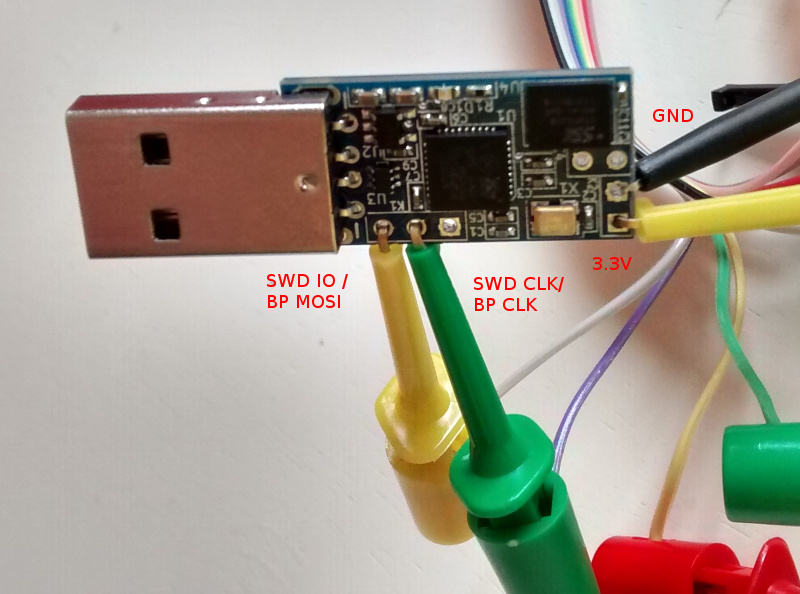
My BP has the Seeed Studio probe cable, so my hookups look like this: Bus Pirate + FST-01 SWD connection That s BP MOSI (grey) to SWD IO, BP CLK (purple) to SWD CLK, BP 3.3V (red) to FST-01 PWR and BP GND (brown) to FST-01 GND. Once that was done I fired up OpenOCD in one terminal and did the following in another:
$ telnet localhost 4444
Trying ::1...
Trying 127.0.0.1...
Connected to localhost.
Escape character is '^]'.
Open On-Chip Debugger
> reset halt
target state: halted
target halted due to debug-request, current mode: Thread
xPSR: 0x01000000 pc: 0xfffffffe msp: 0xfffffffc
Info : device id = 0x20036410
Info : SWD IDCODE 0x1ba01477
Error: Failed to read memory at 0x1ffff7e2
Warn : STM32 flash size failed, probe inaccurate - assuming 128k flash
Info : flash size = 128kbytes
> stm32f1x unlock 0
Device Security Bit Set
stm32x unlocked.
INFO: a reset or power cycle is required for the new settings to take effect.
> reset halt
target state: halted
target halted due to debug-request, current mode: Thread
xPSR: 0x01000000 pc: 0xfffffffe msp: 0xfffffffc
> flash write_image erase /home/noodles/checkouts/gnuk/src/build/gnuk.elf
auto erase enabled
wrote 109568 bytes from file /home/noodles/checkouts/gnuk/src/build/gnuk.elf in 95.055603s (1.126 KiB/s)
> stm32f1x lock 0
stm32x locked
> reset halt
target state: halted
target halted due to debug-request, current mode: Thread 
xPSR: 0x01000000 pc: 0x08000280 msp: 0x20005000
Then it was a matter of disconnecting the gnuk from the BP, plugging it into my USB port and seeing it come up successfully:
usb 1-2: new full-speed USB device number 11 using xhci_hcd
usb 1-2: New USB device found, idVendor=234b, idProduct=0000
usb 1-2: New USB device strings: Mfr=1, Product=2, SerialNumber=3
usb 1-2: Product: Gnuk Token
usb 1-2: Manufacturer: Free Software Initiative of Japan
usb 1-2: SerialNumber: FSIJ-1.1.7-87063020
usb 1-2: ep 0x82 - rounding interval to 1024 microframes, ep desc says 2040 microframes
More once I actually have a 4K key loaded on it.

10 August 2015

Steve Kemp: A brief look at the weed file store

Now that I've got a citizen-ID, a pair of Finnish bank accounts, and have enrolled in a Finnish language-course (due to start next month) I guess I can go back to looking at object stores, and replicated filesystems. To recap my current favourite, despite the lack of documentation, is the Camlistore project which is written in Go. Looking around there are lots of interesting projects being written in Go, and so is my next one the seaweedfs, which despite its name is not a filesystem at all, but a store which is accessed via HTTP. Installation is simple, if you have a working go-lang environment:
go get github.com/chrislusf/seaweedfs/go/weed
Once that completes you'll find you have the executable bin/weed placed beneath your $GOPATH. This single binary is used for everything though it is worth noting that there are distinct roles: In our demo we'll have three hosts one, the master, two and three which are storage nodes. First of all we start the master:
root@one:~# mkdir /node.info
root@one:~# weed master -mdir /node.info -defaultReplication=001
Then on the storage nodes we start them up:
root@two:~# mkdir /data;
root@two:~# weed volume -dir=/data -max=1  -mserver=one.our.domain:9333
Then the second storage-node:
root@three:~# mkdir /data;
root@three:~# weed volume -dir=/data -max=1 -mserver=one.our.domain:9333
At this point we have a master to which we'll talk (on port :9333), and a pair of storage-nodes which will accept commands over :8080. We've configured replication such that all uploads will go to both volumes. (The -max=1 configuration ensures that each volume-store will only create one volume each. This is in the interest of simplicity.) Uploading content works in two phases: We'll do that like so:
laptop ~ $ curl -X POST http://one.our.domain:9333/dir/assign
 "fid":"1,06c3add5c3","url":"192.168.1.100:8080","publicUrl":"192.168.1.101:8080","count":1 
client ~ $ curl -X PUT -F file=@/etc/passwd  http://192.168.1.101:8080/1,06c3add5c3
 "name":"passwd","size":2137 
In the first command we call /dir/assign, and receive a JSON response which contains the IPs/ports of the storage-nodes, along with a "file ID", or fid. In the second command we pick one of the hosts at random (which are the IPs of our storage nodes) and make the upload using the given ID. If the upload succeeds it will be written to both volumes, which we can see directly by running strings on the files beneath /data on the two nodes. The next part is retrieving a file by ID, and we can do that by asking the master server where that ID lives:
client ~ $ curl http://one.our.domain:9333/dir/lookup?volumeId=1,06c3add5c3
 "volumeId":"1","locations":[
  "url":"192.168.1.100:8080","publicUrl":"192.168.1.100:8080" ,
  "url":"192.168.1.101:8080","publicUrl":"192.168.1.101:8080" 
] 
Or, if we prefer we could just fetch via the master - it will issue a redirect to one of the volumes that contains the file:
client ~$ curl http://one.our.domain:9333/1,06c3add5c3
<a href="http://192.168.1.100:8080/1,06c3add5c3">Moved Permanently</a>
If you follow redirections then it'll download, as you'd expect:
client ~ $ curl -L http://one.our.domain:9333/1,06c3add5c3
root:x:0:0:root:/root:/bin/bash
..
That's about all you need to know to decide if this is for you - in short uploads require two requests, one to claim an identifier, and one to use it. Downloads require that your storage-volumes be publicly accessible, and will probably require a proxy of some kind to make them visible on :80, or :443. A single "weed volume .." process, which runs as a volume-server can support multiple volumes, which are created on-demand, but I've explicitly preferred to limit them here. I'm not 100% sure yet whether it's a good idea to allow creation of multiple volumes or not. There are space implications, and you need to read about replication before you go too far down the rabbit-hole. There is the notion of "data centres", and "racks", such that you can pretend different IPs are different locations and ensure that data is replicated across them, or only within-them, but these choices will depend on your needs. Writing a thin middleware/shim to allow uploads to be atomic seems simple enough, and there are options to allow exporting the data from the volumes as .tar files, so I have no undue worries about data-storage. This system seems reliable, and it seems well designed, but people keep saying "I'm not using it in production because .. nobody else is" which is an unfortunate problem to have. Anyway, I like it. The biggest omission is really authentication. All files are public if you know their IDs, but at least they're not sequential ..

Lunar: Reproducible builds: week 15 in Stretch cycle

What happened in the reproducible builds effort this week: Toolchain fixes Guillem Jover uploaded dpkg/1.18.2 which makes dependency comparisons deep by comparing not only the first dependency alternative, to get them sorted in a reproducible way. Original patch by Chris Lamb. Dhole updated the patch adding support for SOURCE_DATE_EPOCH in gettext. A modified package is in the experimental reproducible repository. Valentin Lorentz submitted a patch adding support for SOURCE_DATE_EPOCH to ocamldoc. Valentin Lorentz also opened a bug about the inability to set an arbitrary RNG seed for ocamlopt which would be a way to fix an issue affecting many OCaml packages. Dhole submitted a patch adding support for SOURCE_DATE_EPOCH in qhelpgenerator. A modified package has been sent to the experimental repository as well. Several packages have been updated for the experimental toolchain: doxygen (akira), and dpkg (h01ger). Also, h01ger has built and uploaded all experimental packages having arch:any packages for armhf: dpkg, gettext, doxygen, fontforge, libxslt and texlive-bin. We are now providing our toolchain for armhf and amd64. Packages fixed As you might have noticed, Debian sid is currently largely uninstallable, due to the GCC 5 transition, which also can be see in our reproducibility test setup. Please help! The following packages became reproducible due to changes in their build dependencies: glosstex, indent, ktikz, liblouis, libmicrohttpd, linkchecker, multiboot, qterm, rrep, trueprint, twittering-mode. The following packages became reproducible after getting fixed: Patches submitted which have not made their way to the archive yet: Lunar reported an issue on an unstable ABI from a generated header in icedove reminding of an issue affecting libical-dev. The bug has since been fixed by Carsten Schoenert. akira identified an unreferenced embeded code copy (causing unreproducibility!) in gperf. reproducible.debian.net The scheduler has temporarily been changed to not schedule any already tested packages for sid and experimental, due to the the GCC 5 transitions, which are well visible in our graphs now. On the plus side this has caused our stretch testing to catch up (and improve stats). (h01ger) depwait packages (packages where the Build-Depends cannot be satisfied) are now listed in the last 24h and last 48h pages (Mattia Rizzolo) Two new amd64 build nodes (with 8 cores and 32 GB RAM each) have been added, kindly sponsored by Profitbricks. (h01ger) The 4 armhf (setup last week by Vagrant Cascadian) and 2 amd64 build nodes have been made available to Jenkins. Remote job scheduling has been implemented and 35 new jobs have been added for pbuilder and schroot creation and maintenance of the nodes. (h01ger) The manual scheduler gained a flag (-a/--architecture) to select which arch to schedule in. (Mattia Rizzolo) armhf will only be testing stretch for now, due to limited hardware ressources. (h01ger) The page listing maintainers of unreproducible packages gained internal anchors. As an example, one can now link to unreproducible orphaned packages. (Mattia Rizzolo) Packages with a bug tagged pending are marked using a new symbol: a brown P (Mattia Rizzolo) diffoscope development debbindiff is now called diffoscope! It also has a website at diffoscope.org. The name was changed to better reflect that it became a general purpose tool, capable of comparing many different archive formats, or directories. Version 29 is the renaming release. Amongst a couple of other cosmetic changes a favicon showing the new logo has been added to the generated HTML reports. Version 30 replaces the file matching algorithm for files listed in .changes to a smarter one that removes only the version number. It also fixes a bug where squashfs directories were being extracted even if their content was being compared at a later stage. It also fixes an issue with the test suite that was detected by debci. Documentation update More rationale have been added for supporting SOURCE_DATE_EPOCH The unfinished Reproducible Builds HOWTO is now visible on the web, feedback and patches most welcome. Package reviews 261 obsolete reviews have been removed, 73 added and 145 updated this week.

Norbert Preining: Debian/TeX Live 2015.20150810-1

For those who are starving for some updates while the big gcc5 transitions brings the rest of Debian/sid to a halt, here is some fresh meat, a new TeX Live checkout. Nothing spectacular new here, just the usual big bunch of updates of and several new packages. Maybe worthwhile mentioning is that luasseq has been reincorporated into the TeX Live packages. Thanks to the maintainer for his work till now! Debian - TeX Live 2015 From the long list of changes let me pick one update and one new package: pgf has been updated to 3.0.1, which is just a small change in number, but incorporates 1.5 years of fixes, and the list of fixes is long. And a very interesting newcomer is pdfpagediff by C. V. Rad hakr ish nan. It allows visual comparison of two pdf files by overlaying them in a transparent way, making even slight changes in the layout immediately visible. Of course, these are not the only updates and newcomers, see the list below. Updated packages academicons, addlines, algorithms, archaic, babel, babel-estonian, biber, biblatex-source-division, bidi, bxjscls, chronology, cjk-ko, conteq, csplain, csquotes, curve2e, datatool, doclicense, dvips, eledmac, enotez, esami, eso-pic, etex-pkg, etoolbox, exsheets, fandol, fithesis, fontawesome, fontspec, forest, glossaries, greek-inputenc, jslectureplanner, kotex-oblivoir, kotex-utf, l3build, l3experimental, l3kernel, l3packages, latex, leadsheets, ledmac, lshort-english, luamplib, luasseq, luatexko, maths-symbols, media9, memoir, metrix, mhchem, minitoc, moderncv, modiagram, morefloats, mptopdf, msu-thesis, nameauth, ndsu-thesis, newpx, newtx, newtxsf, newtxtt, notes, ocgx2, pageslts, pdfpages, pdftex, pgf, phonrule, plain, polyglossia, pstricks, ptex, pxchfon, reflectgraphics, rsfso, sectionbox, siunitx, skrapport, standalone, tcolorbox, tetex, tex4ht, texfot, texinfo, texlive-scripts, todonotes, translations, tudscr, ucbthesis, unicode-math, xcharter, xgreek. New packages alertmessage, bewerbung, bidihl, bxpdfver, cloze, comicneue, copyedit, fcavtex, gradstudentresume, make4ht, mcf2graph, multiaudience, nmbib, pdfpagediff, quran, reledmac, roundrect, screenplay-pkg, shapes, tex4ebook. Enjoy.

9 August 2015

Yves-Alexis Perez: WPS and Network Manager

So, everybody knows that WPS (Wi-Fi Protected Setup) is broken. But sometimes, you don't own the access point, and you'd just want the wireless to work. That happens for example when you're a guest in some place using an Orange Livebox and you don't have the WPA passphrase (usually because it's written somewhere you don't have access too, or because someone forgot to tell you). Liveboxes WPS is the press button thing: you press a button on the front for one second, then any device can connect in the next two minutes. That works fine with Android devices, for example, but it didn't work with my laptop and NetworkManager, which doesn't support WPS at all. Fortunately, the underlying piece of software (wpa_supplicant) does support WPS, and even the push button style. And you can nicely ask it to reveal the passphrase to you with the following trick.
  1. Disconnect NetworkManager from the network, disable the wireless link, stop it; just make sure wpa_supplicant is not running;
  2. Put a stub wpa_supplicant.conf file with only the following content:
    update_config=1
    
  3. Start wpa_supplicant in the foreground with your stub config file:
    wpa_supplicant -iwlan0 -c wpa_supplicant.conf
    
  4. Start wpa_cli
Inside wpa_cli:
  1. Scan the network:
    scan
    
  2. Get the results:
    scan_results
    
    and identity the bssid of the Livebox
  3. Press the WPS button on the Livebox
  4. Run
    wps_pbc <bssid>
    ; some text should appear in the wpa_cli window, and it should eventually connect successfully (at that point you can even run a dhclient on wlan0)
  5. Run
    save_config
    
The last command will update your stub configuration file, adding a new network block with the passphrase in the clear. You can then use that passphrase inside Network Manager if it's more convenient for you. There might be something easier, but at least it worked just fine for me during the holidays.

8 August 2015

Wouter Verhelst: Backing up with tar

The tape archiver, better known as tar, is one of the older backup programs in existence. It's not very good at automated incremental backups (for which bacula is a good choice), but it can be useful for "let's take a quick snapshot of the current system" type of situations. As I'm preparing to head off to debconf tomorrow, I'm taking a backup of my n-1 laptop (which still contains some data that I don't want to lose) so it can be reinstalled and used by the Debconf video team. While I could use a "proper" backup system, running tar to a large hard disk is much easier. By default, however, tar won't preserve everything, so it is usually a good idea to add some extra options. This is what I' mrunning currently:
sudo tar cvpaSf player.local:carillon.tgz --rmt-command=/usr/sbin/rmt --one-file-system /
which breaks down to create tar archive, verbose output, preserve permissions, automatically determine compression based on file extension, handle Sparse files efficiently, write to a file on a remote host using /usr/sbin/rmt as the rmt program, don't descend into a separate filesystem (since I don't want /proc and /sys etc to be backed up), and back up my root partition. Since I don't believe there's any value to separate file systems on a laptop, this will back up the entire contents of my n-1 laptop to the carillon.tgz in my home directory on player.local.

7 August 2015

John Goerzen: Detailed Smart Card Cryptographic Token Security Guide

After my first post about smartcards under Linux, I thought I would share some information I ve been gathering. This post is already huge, so I am not going to dive into much specific commands, but I am linking to many sources with detailed instructions. I ve reviewed several types of cards. For this review, I will focus on the OpenPGP card and the Yubikey NEO, since the Cardomatic Smartcard-HSM is not supported by the gpg version in Jessie. Both cards are produced by people with strong support for the Free Software ecosystem and have strong cross-platform support with source code. OpenPGP card: Basics with GnuPG The OpenPGP card is well-known as one of the first smart cards to work well on Linux. It is a single-application card focused on use with GPG. Generally speaking, by the way, you want GPG2 for use with smartcards. Basically, this card contains three slots: decryption, signing, and authentication slots. The concept is that the private key portions of the keys used for these items are stored only on the card, can never be extracted from the card, and the cryptographic operations are performed on the card. There is more information in my original post. In a fairly rare move for smartcards, this card supports 4096-byte RSA keys; most are restricted to 2048-byte keys. The FSF Europe hands these out to people and has a lot of good information about them online, including some HOWTOs. The official GnuPG smart card howto is 10 years old, and although it has some good background, I d suggest using the FSFE instructions instead. As you ll see in a bit, most of this information also pertains to the OpenPGP mode of the Yubikey Neo. OpenPGP card: Other uses Of course, this is already pretty great to enhance your GPG security, but there s a lot more that you can do with this card to add two-factor authentication (2FA) to a lot of other areas. Here are some pointers: OpenPGP card: remote authentication with ssh You can store the private part of your ssh key on the card. Traditionally, this was only done by using the ssh agent emulation mode of gnupg-agent. This is still possible, of course. Now, however, the OpenSC project now supports the OpenPGP card as a PKCS#11 and PKCS#15 card, which means it works natively with ssh-agent as well. Try just ssh-add -s /usr/lib/x86_64-linux-gnu/pkcs11/opensc-pkcs11.so if you ve put a key in the auth slot with GPG. ssh-add -L will list its fingerprint for insertion into authorized_keys. Very simple! As an aside: Comments that you need scute for PKCS#11 support are now outdated. I do not recommend scute. It is quite buggy. OpenPGP card: local authentication with PAM You can authenticate logins to a local machine by using the card with libpam-poldi here are some instructions. Between the use with ssh and the use with PAM, we have now covered 2FA for both local and remote use in Unix environments. OpenPGP card: use on Windows Let s move on to Windows environments. The standard suggestion here seems to be the mysmartlogon OpenPGP mini-driver. It works with some sort of Windows CA system, or the local accounts using EIDAuthenticate. I have not yet tried this. OpenPGP card: Use with X.509 or Windows Active Directory You can use the card in X.509 mode via these gpgsm instructions, which apparently also work with Windows Active Directory in some fashion. You can also use it with web browsers to present a certificate from a client for client authentication. For example, here are OpenSC instructions for Firefox. OpenPGP card: Use with OpenVPN Via the PKCS#11 mode, this card should be usable to authenticate a client to OpenVPN. See the official OpenVPN HOWTO or these other instructions for more. OpenPGP card: a note on PKCS#11 and PKCS#15 support You ll want to install the opensc-pkcs11 package, and then give the path /usr/lib/x86_64-linux-gnu/pkcs11/opensc-pkcs11.so whenever something needs the PKCS#11 library. There seem to be some locking/contention issues between GPG2 and OpenSC, however. Usually killing pcscd and scdaemon will resolve this. I would recommend doing manipulation operations (setting PINs, generating or uploading keys, etc.) via GPG2 only. Use the PKCS#11 tools only to access. OpenPGP card: further reading Kernel Concepts also has some nice readers; you can get this card in a small USB form-factor by getting the mini-card and the Gemalto reader. Yubikey Neo Introduction The Yubikey Neo is a fascinating device. It is a small USB and NFC device, a little smaller than your average USB drive. It is a multi-application device that actually has six distinct modes: There is a ton to digest with this device. Yubikey Neo Basics By default, the Yubikey Neo is locked to only a subset of its features. Using the yubikey-personalization tool (you ll need the version in stretch; jessie is too old), you can use ykpersonalize -m86 to unlock the full possibilities of the card. Run that command, then unplug and replug the device. It will present itself as a USB keyboard as well as a PC/SC-compatible card reader. It has a capacitive button, which is used to have it generate keystrokes to input validation information for HOTP or HMAC validation. It has two slots that can be configured with HMAC and HOTP; a short button press selects the default slot #1 and a long press selects slot #2. But before we get into that, let s step back at some basics. opensc-tool list-algorithms claims this card supports RSA with 1024, 2048, and 3072 sizes, and EC with 256 and 384-bit sizes. I haven t personally verified anything other than RSA-2048 though. Yubikey Neo: OpenPGP support In this mode, the card is mostly compatible with the physical OpenPGP card. I say mostly because there are a few protocol differences I ll get into later. It is also limited to 2048-byte keys. Support for this is built into GnuPG and the GnuPG features described above all work fine. In this mode, it uses firmware from the Yubico fork of the JavaCard OpenPGP Card applet. There are Yubico-specific tutorials available, but again, most of the general GPG stuff applies. You can use gnupg-agent to use the card with SSH as before. However, due to some incompatibilities, the OpenPGP applet on this card cannot be used as a PKCS#11 card with either scute or OpenSC. That is not exactly a huge problem, however, as the card has another applet (PIV) that is compatible with OpenSC and so this still provides an avenue for SSH, OpenVPN, Mozilla, etc. It should be noted that the OpenPGP applet on this card can also be used with NFC on Android with the OpenKeychain app. Together with pass (or its Windows, Mac, or phone ports), this makes a nicely secure system for storing passwords. Yubikey Neo: PKCS#11 with the PIV applet There is also support for the PIV standard on the Yubikey Neo. This is supported by default on Linux (via OpenSC) and Windows and provides a PKCS#11-compabible store. It should, therefore, be compatible with ssh-agent, OpenVPN, Active Directory, and all the other OpenPGP card features described above. The only difference is that it uses storage separate from the OpenPGP applet. You will need one of the Yubico PIV tools to configure the key for it; in Debian, the yubico-piv-tool from stretch does this. Here are some instructions on using the Yubikey Neo in PIV mode: A final note: for security, it s important to change the management key and PINs before deploying the PIV mode. I couldn t get this to work with Firefox, but it worked pretty much everywhere else. Yubikey Neo: HOTP authentication This is the default mode for your Yubikey; all other modes require enabling with ykpersonalize. In this mode, a 128-bit AES key stored on the Yubikey is used to generate one-time passwords (OTP). (This key was shared in advance with the authentication server.) A typical pattern would be for three prompts: username, password, and Yubikey HOTP. The user clicks in the Yubikey HOTP field, touches the Yubikey, and their one-time token is pasted in. In the background, the service being authenticated to contacts an authentication server. This authentication server can be either your own (there are several open source implementations in Debian) or the free Yubicloud. Either way, the server decrypts the encrypted part of the OTP, performs validity checks (making sure that the counter is larger than any counter it s seen before, etc) and returns success or failure back to the service demanding authentication. The first few characters of the posted auth contain the unencrypted key ID, and thus it can also be used to provide username if desired. Yubico has provided quite a few integrations and libraries for this mode. A few highlights: You can also find some details on the OTP mode. Here s another writeup. This mode is simple to implement, but it has a few downsides. One is that it is specific to the Yubico line of products, and thus has a vendor lock-in factor. Another is the dependence on the authentication server; this creates a potential single point of failure and can be undesireable in some circumtances. Yubikey Neo: OATH and HOTP and TOTP First, a quick note: OATH and OAuth are not the same. OATH is an authentication protocol, and OAuth is an authorization protocol. Now then Like Yubikey HOTP, OATH (both HOTP and TOTP) modes rely on a pre-shared key. (See details in the Yubico article.) Let s talk about TOTP first. With TOTP, there is a pre-shared secret with each service. Each time you authenticate to that service, your TOTP generator combines the timestamp with the shared secret using a HMAC algorithm and produces a OTP that changes every 30 seconds. Google Authenticator is a common example of this protocol, and this is a drop-in replacement for it. Gandi has a nice description of it that includes links to software-only solutions on various platforms as well. With the Yubikey, the shared secrets are stored on the card and processed within it. You cannot extract the shared secret from the Yubikey. Of course, if someone obtains physical access to your Yubikey they could use the shared secret stored on it, but there is no way they can steal the shared secret via software, even by compromising your PC or phone. Since the Yubikey does not have a built-in clock, TOTP operations cannot be completed solely on the card. You can use a PC-based app or the Android application (Play store link) with NFC to store secrets on the device and generate your TOTP codes. Command-line users can also use the yubikey-totp tool in the python-yubico package. OATH can also use HOTP. With HOTP, an authentication counter is used instead of a clock. This means that HOTP passwords can be generated entirely within the Yubikey. You can use ykpersonalize to configure either slot 1 or 2 for this mode, but one downside is that it can really only be used with one service per slot. OATH support is all over the place; for instance, there s libpam-oath from the OATH toolkit for Linux platforms. (Some more instructions on this exist.) Note: There is another tool from Yubico (not in Debian) that can apparently store multiple TOTP and HOTP codes in the Yubikey, although ykpersonalize and other documentation cannot. It is therefore unclear to me if multiple HOTP codes are supported, and how.. Yubikey Neo: Challenge-Response Mode This can be useful for doing offline authentication, and is similar to OATH-HOTP in a sense. There is a shared secret to start with, and the service trying to authenticate sends a challenge to the token, which must supply an appropriate response. This makes it only suitable for local authentication, but means it can be done fairly automatically and optionally does not even require a button press. To muddy the waters a bit, it supports both Yubikey OTP and HMAC-SHA1 challenge-response modes. I do not really know the difference. However, it is worth noting that libpam-yubico works with HMAC-SHA1 mode. This makes it suitable, for instance, for logon passwords. Yubikey Neo: U2F U2F is a new protocol for web-based apps. Yubico has some information, but since it is only supported in Chrome, it is not of interest to me right now. Yubikey Neo: Further resources Yubico has a lot of documentation, and in particular a technical manual that is actually fairly detailed. Closing comments Do not think a hardware security token is a panacea. It is best used as part of a multi-factor authentication system; you don t want a lost token itself to lead to a breach, just as you don t want a compromised password due to a keylogger to lead to a breach. These things won t prevent someone that has compromised your PC from abusing your existing ssh session (or even from establishing new ssh sessions from your PC, once you ve unlocked the token with the passphrase). What it will do is prevent them from stealing your ssh private key and using it on a different PC. It won t prevent someone from obtaining a copy of things you decrypt on a PC using the Yubikey, but it will prevent them from decrypting other things that used that private key. Hopefully that makes sense. One also has to consider the security of the hardware. On that point, I am pretty well satisfied with the Yubikey; large parts of it are open source, and they have put a lot of effort into hardening the hardware. It seems pretty much impervious to non-government actors, which is about the best guarantee a person can get about anything these days. I hope this guide has been helpful.

6 August 2015

Christoph Egger

TinyTiny-RSS has some nice failure modes. And upstream support forums aren't really helpfull so when you search for your current problem, chances are that there is one mention of it on the web, in the forum, and the only thing happening there is people making fun of the reporter. Anyway. This installation has seen lots of error messages from the updater in the last several months:
Warning: Fatal error, unknown preferences key: ALLOW_DUPLICATE_POSTS (owner: 3) in /srv/www/tt-rss.faui2k9.de/root/classes/db/prefs.php on line 108
  
And, more recently, the android app stopped working with ERROR:JSON Parse failed.. Turns out both things are related. First thing I noticed was changing preferences in the web panel stopped working until you use the reset to Defaults option and then changed settings. Plugging wireshark in between showed what was going on (Note: API was displayed as enabled in Preferences/Preferences):
HTTP/1.1 200 OK
Server: nginx/1.8.0
Date: Thu, 06 Aug 2015 11:00:31 GMT
Content-Type: text/json
Transfer-Encoding: chunked
Connection: keep-alive
X-Powered-By: PHP/5.4.43
Content-Language: auto
Set-Cookie: [...]
Expires: Thu, 19 Nov 1981 08:52:00 GMT
Cache-Control: no-store, no-cache, must-revalidate, post-check=0, pre-check=0
Pragma: no-cache
Api-Content-Length: 234
ea

Warning: Fatal error, unknown preferences key: ENABLE_API_ACCESS (owner: 2) in /srv/www/tt-rss.faui2k9.de/root/classes/db/prefs.php on line 108
"seq":0,"status":1,"content": "error":"API_DISABLED" 0
Solution for fixing the Android app (and the logspam on the way as well) seems to be to reset the preferences and then configure tt-rss again (In the webapp, not in the android thing!). Also silences tt-rss update_daemon as well, yay! One last thing: someone out there who wants to explain to me how to fix
Fatal error: Query INSERT INTO ttrss_enclosures
                                                        (content_url, content_type, title, duration, post_id, width, height) VALUES
                                                        ('https://2.gravatar.com/avatar/e6d6ceb7764252af8da058e30cd8cb5f?s=96&d=identicon&r=G', '', '', '', '0', 0, 0) failed: ERROR:  insert or update on table "ttrss_enclosures" violates foreign key constraint "ttrss_enclosures_post_id_fkey"
DETAIL:  Key (post_id)=(0) is not present in table "ttrss_entries". in /srv/www/tt-rss.faui2k9.de/root/classes/db/pgsql.php on line 46
  

Christoph Egger: unbreaking tt-rss

TinyTiny-RSS has some nice failure modes. And upstream support forums aren't really helpfull so when you search for your current problem, chances are that there is one mention of it on the web, in the forum, and the only thing happening there is people making fun of the reporter. Anyway. This installation has seen lots of error messages from the updater in the last several months:
Warning: Fatal error, unknown preferences key: ALLOW_DUPLICATE_POSTS (owner: 3) in /srv/www/tt-rss.faui2k9.de/root/classes/db/prefs.php on line 108
  
And, more recently, the android app stopped working with ERROR:JSON Parse failed.. Turns out both things are related. First thing I noticed was changing preferences in the web panel stopped working until you use the reset to Defaults option and then changed settings. Plugging wireshark in between showed what was going on (Note: API was displayed as enabled in Preferences/Preferences):
HTTP/1.1 200 OK
Server: nginx/1.8.0
Date: Thu, 06 Aug 2015 11:00:31 GMT
Content-Type: text/json
Transfer-Encoding: chunked
Connection: keep-alive
X-Powered-By: PHP/5.4.43
Content-Language: auto
Set-Cookie: [...]
Expires: Thu, 19 Nov 1981 08:52:00 GMT
Cache-Control: no-store, no-cache, must-revalidate, post-check=0, pre-check=0
Pragma: no-cache
Api-Content-Length: 234
ea

Warning: Fatal error, unknown preferences key: ENABLE_API_ACCESS (owner: 2) in /srv/www/tt-rss.faui2k9.de/root/classes/db/prefs.php on line 108
"seq":0,"status":1,"content": "error":"API_DISABLED" 0
Solution for fixing the Android app (and the logspam on the way as well) seems to be to reset the preferences and then configure tt-rss again (In the webapp, not in the android thing!). Also silences tt-rss update_daemon as well, yay! One last thing: someone out there who wants to explain to me how to fix
Fatal error: Query INSERT INTO ttrss_enclosures
                                                        (content_url, content_type, title, duration, post_id, width, height) VALUES
                                                        ('https://2.gravatar.com/avatar/e6d6ceb7764252af8da058e30cd8cb5f?s=96&d=identicon&r=G', '', '', '', '0', 0, 0) failed: ERROR:  insert or update on table "ttrss_enclosures" violates foreign key constraint "ttrss_enclosures_post_id_fkey"
DETAIL:  Key (post_id)=(0) is not present in table "ttrss_entries". in /srv/www/tt-rss.faui2k9.de/root/classes/db/pgsql.php on line 46
  

2 August 2015

Carl Chenet: My Free activities in July 2015

Follow me on Identi.ca or Twitter or Diaspora*diaspora-banner Here are the details of my Free activities in July 2015. Carl Chenet s projects: Patchs: Debian bug reports: Other bug reports: Feature requests:

1 August 2015

Russ Allbery: Review: The Pyramid Waltz

Review: The Pyramid Waltz, by Barbara Ann Wright
Series: Katya and Starbride #1
Publisher: Bold Strokes
Copyright: September 2012
ISBN: 1-60282-792-3
Format: Kindle
Pages: 264
Princess Katya Nar Umbriel is publicly a bored, womanizing, and difficult daughter to the rulers of Farraday. It's all an act, though, with the full knowledge of her parents. As the second child, she's the leader of the Order of Vestra: the equivalent of the Secret Service, devoted to protecting the royal family and, by extension, the kingdom, particularly against magical attacks. Starbride is new to court and entirely out of place. From a northern neighboring country, and far more comfortable in practical clothing than the frilled court dresses that her mother wants her to wear, she has been sent to court to make contacts. Her people are getting the bad side of various trade contracts and desperately need some political maneuvering space of their own. Starbride's best hope for this is to study law in the palace library when she can manage to avoid the other courtiers. But then she and Katya stumble across each other, outside of the roles they're playing, and might have an opportunity for a deeper connection. One that neither of them want to entangle in their personal worries. This is the last of a set of books I picked up while looking for lesbian romance with fantasy or science fiction elements. On the romance front, it's one of the better entries in that set. Both Katya and Starbride are likeable, in large part due to their mutual exasperation with the trappings of the court. (Making the protagonists more serious, thoughtful, and intelligent than the surrounding characters is an old trick, but it works.) Wright has a good ear for banter, particularly the kind when two people of good will are carefully feeling each other out. And despite Katya's need to keep a deep secret from Starbride for some of the book, The Pyramid Waltz mostly avoids irritating communication failures as a plot driver. The fantasy portion and the plot drivers, alas, are weaker. The world building is not exactly bad, but it's just not that interesting. There are a couple of moderately good ideas, in the form of pyramid magic and secret (and dangerous) magical powers that run in the royal family, but they're not well-developed. Pyramid magic turns out to look much like any other generic fantasy magic system, with training scenes that could have come from a Valdemar or Wheel of Time novel (and without as much dramatic tension). And the royal family's secret, while better-developed and integral to the plot, still felt rather generic and one-sided. Maybe that's something Wright develops better in future novels in this series, but that was another problem: the ending of The Pyramid Waltz was rather weak. Partly, I think, this is because the cast is too large and not well-developed. I cared about Katya and Starbird, and to a lesser extent their servants and one of the Order members. (Wright has a moderately interesting bit of worldbuilding about how servants work in Starbride's culture, which I wish we'd seen more of.) But there are a bunch of other Order of Vesta members, Katya's family, and various other bits of history and hinted world views, none of which seemed to get much depth. The ending climax involved a lot of revelations and twists that primarily concerned characters I didn't care about. It lost something in the process. This book is clearly set up for a sequel. There is an ending, but it's not entirely satisfying. Unfortunately, despite liking Katya and Starbird a lot, the rest of the story wasn't compelling enough to make me want to buy it, particularly since the series apparently goes through another three books before reaching a real ending. I enjoyed parts of this book, particularly Katya and Starbird feeling each other out and discovering similarities in their outlook. Katya teasing Starbird, and Starbird teasing herself, over her mother's choice of her clothing was probably the best part. It's not bad for what it's trying to do, but I think it's a bit too generic and not satisfying enough to really recommend. Followed by For Want of a Fiend. Rating: 6 out of 10

31 July 2015

Scott Kitterman: Plasma 5 (KDE) In Testing

A few days ago, fellow Qt/KDE team member Lisandro gave an update on the situation with migration to Plasma 5 in Debian Testing (AKA Stretch). It s changed again. All of Plasma 5 is now in Testing. The upgrade probably won t be entirely smooth, which we ll work on that after the gcc5 transition is done, but it will be much better than the half KDE4 SC half Kf5/Plasma 5 situation we ve had for the last several days. The issues with starting kwin should be resolved once users upgrade to Plasma 5. To use the current kwin with KDE SC 4, you will need to add a symlink from /usr/bin/kwin to /usr/bin/kwin_x11. That will be included in the next upload after gcc5. Systemsettings and plasma-nm now work. In my initial testing, I didn t see anything major that was broken. One user reported an issue with sddm starting automatically, but it worked fine for me. During the upgrade you should get a debconf prompt asking if you want to use kdm or sddm. Pick sddm. When I tried to dist-upgrade, apt wanted to remove task-kde-desktop. I let it remove it and some other packages and then in a second step did apt-get install task-kde-desktop. That pulled it back in successfully along with adding and removing a reasonably large stack of packages. Obviously we need to make that work better before Stretch is released, but as long as you don t restart KDE in between those two steps it should be fine. Lastely, I used apt-get autoremove to clear out a lot of no longer needed KDE4 things (when it asks if you want to stop the running kdm, say no). Here are a few notes on terminology and what I understand of the future plans: What used to be called KDE is now three different things (in part because KDE is now the community of people, not the software): KDE Frameworks 5 (Kf5): This is a group of several dozen small libraries that as a group, roughly equate to what used to be kdelibs. Plasma (Workspaces) 5: This is the desktop that we ve just transitioned to. Applications: These are a mix of kdelibs and Kf5 based applications. Currently in Testing there are some of both and this will evolve over time based on upstream development. As an example, the Kf5 based version of konsole is in Unstable and should transition to Testing shortly. Finally, thanks to Maximiliano Curia (maxy on IRC) for doing virtually all of the packaging of Kf5, Plasma 5, and applications. He did the heavy lifting, the rest of us just nibbled around the edges to keep it moving towards testing.

30 July 2015

DebConf team: DebConf15 Schedule Published and Additional Featured Speakers Announced (Posted by DebConf Content Team)

DebConf15 Schedule The DebConf content team is pleased to announce the schedule of DebConf15, the forthcoming Debian Developers Conference. From a total of nearly 100 talk submissions, the team selected 75 talks. Due to the high number of submissions, several talks had to be shortened to 20 minute slots, of which a total of 30 talks have made it to the schedule. In addition, around 50 meetings and discussions (BoFs) have been submitted so far, as well as several other events like lightning talk sessions, live demos, a movie screening, a poetry night or stand-up comedy. The Schedule is available online at the DebConf15 conference site. Further changes to the schedule can and will be made, but today s announcement represents the first stable version. Featured Speakers In addition to the previously announced invited speakers, the content team also announces the following list of additional featured speakers: The full list of invited and featured speakers, including the invited speakers profiles and the titles of their talks is available here.

Next.

Previous.