GoAccess v1.4 was just released a few weeks ago! Let's take this chance to
write a loooong tutorial. We'll go over every steps to install and operate
GoAccess. This is a tutorial aimed at those who don't play sysadmin every day,
and that's why it's so long, I did my best to provide thorough explanations all
along, so that it's more than just a "copy-and-paste" kind of tutorial. And for
those who do play sysadmin everyday: please try not to fall asleep while
reading, and don't hesitate to drop me an e-mail if you spot anything
inaccurate in here. Thanks!
Introduction
So what's
GoAccess already? GoAccess is a web log analyzer, and it allows
you to visualize the traffic for your website, and get to know a bit more about
your visitors: how many visitors and hits, for which pages, coming from where
(geolocation, operating system, web browser...), etc... It does so by
parsing the access logs from your web server, be it Apache, NGINX or whatever.
GoAccess gives you different options to display the statistics, and in this
tutorial we'll focus on producing a HTML report. Meaning that you can see the
statistics for your website straight in your web browser, under the form of a
single HTML page.
For an example, you can have a look at the stats of my blog here:
http://goaccess.arnaudr.io.
GoAccess is written in C, it has very few dependencies, it had been around for
about 10 years, and it's distributed under the MIT license.
Assumptions
This tutorial is about installing and configuring, so I'll assume that all the
commands are run as root. I won't prefix each of them with
sudo.
I use the
Apache web server, running on a
Debian system. I don't think
it matters so much for this tutorial though. If you're using
NGINX it's
fine, you can keep reading.
Also, I will just use the name
SITE for the name of the website that we want
to analyze with GoAccess. Just replace that with the real name of your site.
I also assume the following locations for your stuff:
- the website is at
/var/www/SITE
- the logs are at
/var/log/apache2/SITE (yes, there is a sub-directory)
- we're going to save the GoAccess database in
/var/lib/goaccess-db/SITE.
If you have your stuff in
/srv/SITE/ log,www instead, no worries, just
adjust the paths accordingly, I bet you can do it.
Installation
The latest version of GoAccess is
v1.4, and it's not yet available in the
Debian repositories. So for this part, you can follow the instructions from
the official
GoAccess download page. Install steps
are explained in details, so there's nothing left for me to say :)
When this is done, let's get started with the basics.
We're talking about the latest version
v1.4 here, let's make sure:
$ goaccess --version
GoAccess - 1.4.
...
Now let's try to create a HTML report. I assume that you already have a website
up and running.
GoAccess needs to parse the access logs. These logs are optional, they
might or might not be created by your web server, depending on how it's
configured. Usually, these log files are named
access.log, unsurprisingly.
You can check if those logs exist on your system by running this command:
find /var/log -name access.log
Another important thing to know is that these logs can be in different formats.
In this tutorial we'll assume that we work with the combined log format,
because it seems to be the most common default.
To check what kind of access logs your web server produces, you must look at
the configuration for your site.
For an Apache web server, you should have such a line in the file
/etc/apache2/sites-enabled/SITE.conf:
CustomLog $ APACHE_LOG_DIR /SITE/access.log combined
For NGINX, it's quite similar. The configuration file would be something like
/etc/nginx/sites-enabled/SITE, and the line to enable access logs would be
something like:
access_log /var/log/nginx/SITE/access.log
Note that
NGINX writes the access logs in the combined format
by default, that's why you don't see the word
combined anywhere in the line
above: it's implicit.
Alright, so from now on we assume that yes, you have access log files
available, and yes, they are in the combined log format. If that's the case,
then you can already run GoAccess and generate a report, for example for the
log file
/var/log/apache2/access.log
goaccess \
    --log-format COMBINED \
    --output /tmp/report.html \
    /var/log/apache2/access.log
It's possible to give GoAccess more than one log files to process, so if you
have for example the file
access.log.1 around, you can use it as well:
goaccess \
    --log-format COMBINED \
    --output /tmp/report.html \
    /var/log/apache2/access.log \
    /var/log/apache2/access.log.1
If GoAccess succeeds (and it should), you're on the right track!
All is left to do to complete this test is to have a look at the HTML report
created. It's a single HTML page, so you can easily
scp it to your machine,
or just move it to the document root of your site, and then open it in your web
browser.
Looks good? So let's move on to more interesting things.
Web server configuration
This part is very short, because in terms of configuration of the web server,
there's very little to do. As I said above, the only thing you want from the
web server is to create access log files. Then you want to be sure that
GoAccess and your web server agree on the format for these files.
In the part above we used the combined log format, but GoAccess supports many
other common log formats out of the box, and even allows you to parse custom
log formats. For more details, refer to the option
--log-format in the
GoAccess manual page.
Another common log format is named, well,
common. It even has its own
Wikipedia page. But compared to
combined, the common
log format contains less information, it doesn't include the
referrer and
user-agent values, meaning that you won't have it in the GoAccess report.
So at this point you should understand that, unsurprisingly, GoAccess can only
tell you about what's in the access logs, no more no less.
And that's all in term of web server configuration.
Configuration to run GoAccess unprivileged
Now we're going to create a user and group for GoAccess, so that we don't have
to run it as root. The reason is that, well, for everything running unattended
on your server, the less code runs as root, the better. It's good practice and
common sense.
In this case, GoAccess is simply a log analyzer. So it just needs to read the
logs files from your web server, and there is no need to be root for that, an
unprivileged user can do the job just as well, assuming it has read permissions
on
/var/log/apache2 or
/var/log/nginx.
The log files of the web server are usually part of the
adm group (though it
might depend on your distro, I'm not sure). This is something you can check
easily with the following command:
ls -l /var/log grep -e apache2 -e nginx
As a result you should get something like that:
drwxr-x--- 2 root adm 20480 Jul 22 00:00 /var/log/apache2/
And as you can see, the directory
apache2 belongs to the group
adm. It
means that you don't need to be root to read the logs, instead any unprivileged
user that belongs to the group
adm can do it.
So, let's create the
goaccess user, and add it to the
adm group:
adduser --system --group --no-create-home goaccess
addgroup goaccess adm
And now, let's run GoAccess unprivileged, and verify that it can still read
the log files:
setpriv \
    --reuid=goaccess --regid=goaccess \
    --init-groups --inh-caps=-all \
    -- \
    goaccess \
    --log-format COMBINED \
    --output /tmp/report2.html \
    /var/log/apache2/access.log
setpriv is the command used to drop privileges. The syntax is quite verbose,
it's not super friendly for tutorials, but don't be scared and read the manual
page to learn what it does.
In any case, this command should work, and at this point, it means that you
have a
goaccess user ready, and we'll use it to run GoAccess unprivileged.
Integration, option A - Run GoAccess once a day, from a logrotate hook
In this part we wire things together, so that GoAccess processes the log files
once a day, adds the new logs to its internal database, and generates a report
from all that aggregated data. The result will be a single HTML page.
Introducing logrotate
In order to do that, we'll use a logrotate hook.
logrotate is a little tool
that should already be installed on your server, and that runs once a day, and
that is in charge of rotating the log files. "Rotating the logs" means moving
access.log to
access.log.1 and so on. With logrotate, a new log file is
created every day, and log files that are too old are deleted. That's what
prevents your logs from filling up your disk basically :)
You can check that logrotate is indeed installed and enabled with this command
(assuming that your init system is
systemd):
systemctl status logrotate.timer
What's interesting for us is that
logrotate allows you to run scripts before
and after the rotation is performed, so it's an ideal place from where to run
GoAccess. In short, we want to run GoAccess just before the logs are rotated
away, in the
prerotate hook.
But let's do things in order. At first, we need to write a little wrapper
script that will be in charge of running GoAccess with the right arguments, and
that will process all of your sites.
The wrapper script
This wrapper is made to process more than one site, but if you have only one
site it works just as well, of course.
So let me just drop it on you like that, and I'll explain afterward. Here's my
wrapper script:
 1
 2
 3
 4
 5
 6
 7
 8
 9
10
11
12
13
14
15
16
17
18
19
20
21
22
23
24
25
26
27
28
29
30
31
32
33
34
35
36
37
38
39
40
41
42
43
44
45
46
47
48
49
50 | #!/bin/bash
# Process log files /var/www/apache2/SITE/access.log,
# only if /var/lib/goaccess-db/SITE exists.
# Create HTML reports in $1, a directory that must exist.
set -eu
OUTDIR=
LOGDIR=/var/log/apache2
DBDIR=/var/lib/goaccess-db
fail() echo >&2 "$@"; exit 1;
[ $# -eq 1 ] fail "Usage: $(basename $0) OUTPUT_DIRECTORY"
OUTDIR=$1
[ -d "$OUTDIR" ] fail "'$OUTDIR' is not a directory"
[ -d "$LOGDIR" ] fail "'$LOGDIR' is not a directory"
[ -d "$DBDIR" ] fail "'$DBDIR' is not a directory"
for d in $(find "$LOGDIR" -mindepth 1 -maxdepth 1 -type d); do
site=$(basename "$sitedir")
dbdir=$DBDIR/$site
logfile=$d/access.log
outfile=$OUTDIR/$site.html
if [ ! -d "$dbdir" ] [ ! -e "$logfile" ]; then
echo " Skipping site '$site'"
continue
else
echo " Processing site '$site'"
fi
setpriv \
--reuid=goaccess --regid=goaccess \
--init-groups --inh-caps=-all \
-- \
goaccess \
--agent-list \
--anonymize-ip \
--persist \
--restore \
--config-file /etc/goaccess/goaccess.conf \
--db-path "$dbdir" \
--log-format "COMBINED" \
--output "$outfile" \
"$logfile"
done
|
So you'd install this script at
/usr/local/bin/goaccess-wrapper for example,
and make it executable:
chmod +x /usr/local/bin/goaccess-wrapper
A few things to note:
- We run GoAccess with
--persist, meaning that we save the parsed
logs in the internal database, and --restore, meaning that we include
everything from the database in the report. In other words, we aggregate the
data at every run, and the report grows bigger every time.
- The parameter
--config-file /etc/goaccess/goaccess.conf is a
workaround for #1849.
It should not be needed for future versions of GoAccess > 1.4.
As is, the script makes the assumption that the logs for your site are logged
in a sub-directory
/var/log/apache2/SITE/. If it's not the case, adjust that
in the wrapper accordingly.
The name of this sub-directory is then used to find the GoAccess database
directory
/var/lib/goaccess-db/SITE/. This directory is expected to exist,
meaning that if you don't create it yourself, the wrapper won't process this
particular site. It's a simple way to control which sites are processed by
this GoAccess wrapper, and which sites are not.
So if you want
goaccess-wrapper to process the site
SITE, just create a
directory with the name of this site under
/var/lib/goaccess-db:
mkdir -p /var/lib/goaccess-db/SITE
chown goaccess:goaccess /var/lib/goaccess-db/SITE
Now let's create an output directory:
mkdir /tmp/goaccess-reports
chown goaccess:goaccess /tmp/goaccess-reports
And let's give a try to the wrapper script:
goaccess-wrapper /tmp/goaccess-reports
ls /tmp/goaccess-reports
Which should give you:
At the same time, you can check that GoAccess populated the database with a
bunch of files:
ls /var/lib/goaccess-db/SITE
Setting up the logrotate prerotate hook
At this point, we have the wrapper in place. Let's now add a pre-rotate hook so
that
goaccess-wrapper runs once a day, just before the logs are rotated away.
The logrotate config file for Apache2 is located at
/etc/logrotate.d/apache2,
and for NGINX it's at
/etc/logrotate.d/nginx. Among the many things you'll
see in this file, here's what is of interest for us:
daily means that your logs are rotated every daysharedscripts means that the pre-rotate and post-rotate scripts are
executed once total per rotation, and not once per log file.
In the config file, there is also this snippet:
prerotate
    if [ -d /etc/logrotate.d/httpd-prerotate ]; then \
        run-parts /etc/logrotate.d/httpd-prerotate; \
    fi; \
endscript
It indicates that scripts in the directory
/etc/logrotate.d/httpd-prerotate/
will be executed before the rotation takes place. Refer to the man page
run-parts(8) for more details...
Putting all of that together, it means that logs from the web server are
rotated once a day, and if we want to run scripts just before the rotation, we
can just drop them in the
httpd-prerotate directory. Simple, right?
Let's first create this directory if it doesn't exist:
mkdir -p /etc/logrotate.d/httpd-prerotate/
And let's create a tiny script at
/etc/logrotate.d/httpd-prerotate/goaccess:
| #!/bin/sh
exec goaccess-wrapper /tmp/goaccess-reports
|
Don't forget to make it executable:
chmod +x /etc/logrotate.d/httpd-prerotate/goaccess
As you can see, the only thing that this script does is to invoke the wrapper
with the right argument, ie. the output directory for the HTML reports that are
generated.
And that's all. Now you can just come back tomorrow, check the logs, and make
sure that the hook was executed and succeeded. For example, this kind of
command will tell you quickly if it worked:
journalctl grep logrotate
Integration, option B - Run GoAccess once a day, from a systemd service
OK so we've just seen how to use a logrotate hook. One downside with that is
that we have to drop privileges in the wrapper script, because logrotate runs
as root, and we don't want to run GoAccess as root. Hence the rather convoluted
syntax with
setpriv.
Rather than embedding this kind of thing in a wrapper script, we can instead
run the wrapper script from a [systemd][] service, and define which user runs
the wrapper straight in the systemd service file.
Introducing systemd niceties
So we can create a
systemd service, along with a
systemd timer that
fires daily. We can then set the
user and
group that execute the script
straight in the systemd service, and there's no need for
setpriv anymore.
It's a bit more streamlined.
We can even go a bit further, and use
systemd parameterized units (also
called templates), so that we have one service per site (instead of one service
that process all of our sites). That will simplify the wrapper script a lot,
and it also looks nicer in the logs.
With this approach however, it seems that we can't really run
exactly before
the logs are rotated away, like we did in the section above. But that's OK.
What we'll do is that we'll run once a day, no matter the time, and we'll just
make sure to process both log files
access.log and
access.log.1 (ie. the
current logs and the logs from yesterday). This way, we're sure not to miss any
line from the logs.
Note that GoAccess is smart enough to only consider newer entries from the log
files, and discard entries that are already in the database. In other words,
it's safe to parse the same log file more than once, GoAccess will do the right
thing. For more details see "INCREMENTAL LOG PROCESSING" from
man goaccess.
systemd]:
https://freedesktop.org/wiki/Software/systemd/
Implementation
And here's how it all looks like.
First, a little wrapper script for GoAccess:
1
2
3
4
5
6
7
8
9
10
11
12
13
14
15
16
17
18
19
20
21
22
23
24
25
26
27
28
29
30
31
32 | #!/bin/bash
# Usage: $0 SITE DBDIR LOGDIR OUTDIR
set -eu
SITE=$1
DBDIR=$2
LOGDIR=$3
OUTDIR=$4
LOGFILES=()
for ext in log log.1; do
logfile="$LOGDIR/access.$ext"
[ -e "$logfile" ] && LOGFILES+=("$logfile")
done
if [ $ #LOGFILES[@] -eq 0 ]; then
echo "No log files in '$LOGDIR'"
exit 0
fi
goaccess \
--agent-list \
--anonymize-ip \
--persist \
--restore \
--config-file /etc/goaccess/goaccess.conf \
--db-path "$DBDIR" \
--log-format "COMBINED" \
--output "$OUTDIR/$SITE.html" \
"$ LOGFILES[@] "
|
This wrapper does very little. Actually, the only thing it does is to check for
the existence of the two log files
access.log and
access.log.1, to be sure
that we don't ask GoAccess to process a file that does not exist (GoAccess
would not be happy about that).
Save this file under
/usr/local/bin/goaccess-wrapper, don't forget to make it
executable:
chmod +x /usr/local/bin/goaccess-wrapper
Then, create a systemd parameterized unit file, so that we can run this wrapper
as a systemd service. Save it under
/etc/systemd/system/goaccess@.service:
[Unit]
Description=Update GoAccess report - %i
ConditionPathIsDirectory=/var/lib/goaccess-db/%i
ConditionPathIsDirectory=/var/log/apache2/%i
ConditionPathIsDirectory=/tmp/goaccess-reports
PartOf=goaccess.service
[Service]
Type=oneshot
User=goaccess
Group=goaccess
Nice=19
ExecStart=/usr/local/bin/goaccess-wrapper \
 %i \
 /var/lib/goaccess-db/%i \
 /var/log/apache2/%i \
 /tmp/goaccess-reports
So, what is a systemd parameterized unit? It's a service to which you can pass
an argument when you enable it. The
%i in the unit definition will be
replaced by this argument. In our case, the argument will be the name of the
site that we want to process.
As you can see, we use the directive
ConditionPathIsDirectory= extensively,
so that if ever one of the required directories does not exist, the unit will
just be skipped (and marked as such in the logs). It's a graceful way to fail.
We run the wrapper as the user and group
goaccess, thanks to
User= and
Group=. We also use
Nice= to give a low priority to the process.
At this point, it's already possible to test. Just make sure that you created a
directory for the GoAccess database:
mkdir -p /var/lib/goaccess-db/SITE
chown goaccess:goaccess /var/lib/goaccess-db/SITE
Also make sure that the output directory exists:
mkdir /tmp/goaccess-reports
chown goaccess:goaccess /tmp/goaccess-reports
Then reload systemd and fire the unit to see if it works:
systemctl daemon-reload
systemctl start goaccess@SITE.service
journalctl   tail
And that should work already.
As you can see, the argument,
SITE, is passed in the
systemctl start
command. We just append it after the
@, in the name of the unit.
Now, let's create another GoAccess service file, which sole purpose is to group
all the parameterized units together, so that we can start them all in one go.
Note that we don't use a systemd target for that, because ultimately we want to
run it once a day, and that would not be possible with a target. So instead we
use a dummy oneshot service.
So here it is, saved under
/etc/systemd/system/goaccess.service:
[Unit]
Description=Update GoAccess reports
Requires= \
 goaccess@SITE1.service \
 goaccess@SITE2.service
[Service]
Type=oneshot
ExecStart=true
As you can see, we simply list the sites that we want to process in the
Requires= directive. In this example we have two sites named
SITE1 and
SITE2.
Let's ensure that everything is still good:
systemctl daemon-reload
systemctl start goaccess.service
journalctl   tail
Check the logs, both sites
SITE1 and
SITE2 should have been processed.
And finally, let's create a timer, so that systemd runs
goaccess.service once
a day. Save it under
/etc/systemd/system/goaccess.timer.
[Unit]
Description=Daily update of GoAccess reports
[Timer]
OnCalendar=daily
RandomizedDelaySec=1h
Persistent=true
[Install]
WantedBy=timers.target
Finally, enable the timer:
systemctl daemon-reload
systemctl enable --now goaccess.timer
At this point, everything should be OK. Just come back tomorrow and check the
logs with something like:
Last word: if you have only one site to process, of course you can simplify,
for example you can hardcode all the paths in the file
goaccess.service
instead of using a parameterized unit. Up to you.
Daily operations
So in this part, we assume that you have GoAccess all setup and running, once
a day or so. Let's just go over a few things worth noting.
Serve your report
Up to now in this tutorial, we created the reports in
/tmp/goaccess-reports,
but that was just for the sake of the example. You will probably want to save
your reports in a directory that is served by your web server, so that, well,
you can actually look at it in your web browser, that was the point, right?
So how to do that is a bit out of scope here, and I guess that if you want to
monitor your website, you already
have a website, so you will have no trouble
serving the GoAccess HTML report.
However there's an important detail to be aware of: GoAccess shows all the IP
addresses of your visitors in the report. As long as the report is private it's
OK, but if ever you make your GoAccess report public, then you should
definitely invoke GoAccess with the option
--anonymize-ip.
Keep an eye on the logs
In this tutorial, the reports we create, along with the GoAccess databases,
will grow bigger every day, forever. It also means that the GoAccess processing
time will grow a bit each day.
So maybe the first thing to do is to keep an eye on the logs, to see how long
it takes to GoAccess to do its job every day. Also, maybe you'd like to keep
an eye on the size of the GoAccess database with:
du -sh /var/lib/goaccess-db/SITE
If your site has few visitors, I suspect it won't be a problem though.
You could also be a bit pro-active in preventing this problem in the future,
and for example you could break the reports into, say, monthly reports. Meaning
that every month, you would create a new database in a new directory, and also
start a new HTML report. This way you'd have monthly reports, and you make sure
to limit the GoAccess processing time, by limiting the database size to a
month.
This can be achieved very easily, by including something like
YEAR-MONTH in
the database directory, and in the HTML report. You can handle that
automatically in the wrapper script, for example:
sfx=$(date +'%Y-%m')
mkdir -p $DBDIR/$sfx
goaccess \
    --db-path $DBDIR/$sfx \
    --output "$OUTDIR/$SITE-$sfx.html" \
    ...
You get the idea.
Further notes
Migration from older versions
With the
--persist option, GoAccess keeps all the information from the logs
in a database, so that it can re-use it later. In prior versions, GoAccess used
the
Tokyo Cabinet key-value store for that. However starting
from
v1.4, GoAccess dropped this dependency and now uses its own database format.
As a result, the previous database can't be used anymore, you will have to
remove it and restart from zero. At the moment there is no way to convert the
data from the old database to the new one. If you're interested, this is
discussed upstream at [#1783][bug-1783].
Another thing that changed with this new version is the name for some of the
command-line options. For example,
--load-from-disk was dropped in favor of
--restore, and
--keep-db-files became
--persist. So you'll have to
look at the documentation a bit, and update your script(s) accordingly.
Other ways to use GoAccess
It's also possible to do it completely differently. You could keep GoAccess
running, pretty much like a daemon, with the
--real-time-html option, and
have it process the logs continuously, rather than calling it on a regular
basis.
It's also possible to see the GoAccess report straight in the terminal, thanks
to
libncurses, rather than creating a HTML report.
And much more, GoAccess is
packed with features.
Conclusion
I hope that this tutorial helped some of you folks. Feel free to drop an e-mail
for comments.
 Here is my transparent report for my work on the Debian Long Term Support (LTS) and Debian Extended Long Term Support (ELTS), which extend the security support for past Debian releases, as a paid contributor.
In July, the monthly sponsored hours were split evenly among contributors depending on their max availability - I was assigned 25.25h for LTS (out of 30 max; all done) and 13.25h for ELTS (out of 20 max; all done).
We shifted suites: welcome Stretch LTS and Jessie ELTS. The LTS->ELTS switch happened at the start of the month, but the oldstable->LTS switch happened later (after finalizing and flushing proposed-updates to a last point release), causing some confusion but nothing major.
ELTS - Jessie
Here is my transparent report for my work on the Debian Long Term Support (LTS) and Debian Extended Long Term Support (ELTS), which extend the security support for past Debian releases, as a paid contributor.
In July, the monthly sponsored hours were split evenly among contributors depending on their max availability - I was assigned 25.25h for LTS (out of 30 max; all done) and 13.25h for ELTS (out of 20 max; all done).
We shifted suites: welcome Stretch LTS and Jessie ELTS. The LTS->ELTS switch happened at the start of the month, but the oldstable->LTS switch happened later (after finalizing and flushing proposed-updates to a last point release), causing some confusion but nothing major.
ELTS - Jessie

 In May, I got selected as a


 I was assigned 20 hours of work by Freexian's Debian LTS initiative,
but only worked 5 hours this month and returned the remainder to the
pool.
Now that Debian 9 'stretch' has entered LTS, the stretch-backports
suite will be closed and no longer updated. However, some stretch
users rely on the newer kernel version provided there. I prepared
to add Linux 4.19 to the stretch-security suite, alongside the standard
package of Linux 4.9. I also prepared to update the
firmware-nonfree package so that firmware needed by drivers in Linux
4.19 will also be available in stretch's non-free section. Both
these updates will be based on the packages in stretch-backports,
but needed some changes to avoid conflicts or regressions for users
that continue using Linux 4.9 or older non-Debian kernel versions.
I will upload these after the Debian 10 'buster' point release.
I was assigned 20 hours of work by Freexian's Debian LTS initiative,
but only worked 5 hours this month and returned the remainder to the
pool.
Now that Debian 9 'stretch' has entered LTS, the stretch-backports
suite will be closed and no longer updated. However, some stretch
users rely on the newer kernel version provided there. I prepared
to add Linux 4.19 to the stretch-security suite, alongside the standard
package of Linux 4.9. I also prepared to update the
firmware-nonfree package so that firmware needed by drivers in Linux
4.19 will also be available in stretch's non-free section. Both
these updates will be based on the packages in stretch-backports,
but needed some changes to avoid conflicts or regressions for users
that continue using Linux 4.9 or older non-Debian kernel versions.
I will upload these after the Debian 10 'buster' point release.
 Here is my monthly update covering what I have been doing in the free and open source software world during July 2020 (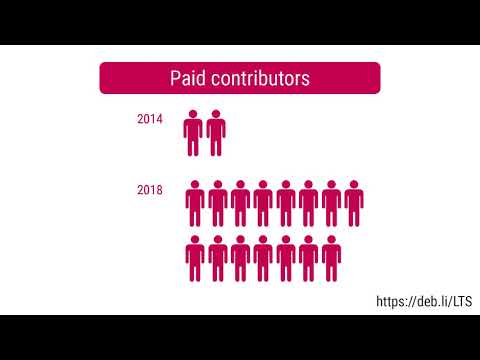
 A bugfix release of our (still small)
 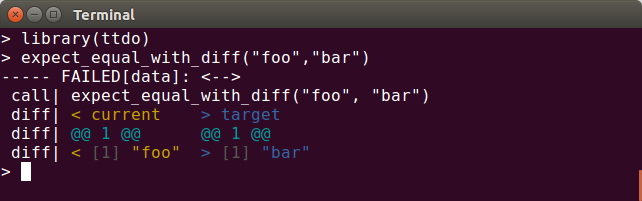 This release corrects a minor editing error spotted by the ever-vigilant
  Sometimes I enjoy reading the source code to projects I like, use, or am about to install for the first time. This was something I used to do on a very regular basis, looking for
  I released version 2.4 of
  At DebConf 17 in Montreal, I gave a talk about Ayatana Indicators [1] and the project's goal to continue the by then already dropped out of maintenance Ubuntu Indicators in a separate upstream project, detached from Ubuntu and its Ubuntu'isms.
Stalling
The whole Ayatana Indicators project received a bit of a show stopper by the fact that the IDO (Indicator Display Object) rendering was not working in vanilla GTK-3 without a certain patch [2] that only Ubuntu has in their GTK-3 package. Addressing GTK developers upstream some years back (after GTK 3.22 had already gone into long term maintenance mode) and asking for a late patch acceptance did not work out (as already assumed). Ayatana Indicators stalled at a level of 90% actually working fine, but those nice and shiny special widgets, like the calendar widget, the audio volume slider widgets, switch widgets, etc. could not be rendered appropriately in GTK based desktop environments (e.g. via MATE Indicator Applet) on other distros than Ubuntu.
I never really had the guts to sit down without a defined ending and find a patch / solution to this nasty problem. Ayatana Indicators stalled as a whole. I kept it alive and defended its code base against various GLib and what-not deprecations and kept it in Debian, but the software was actually partially broken / dysfunctional.
Taking the Dog for a Walk and then It Became all Light+Love
Several days back, I received a mail from Robert Tari [3]. I was outside on a hike with our dog and thought, ah well, let's check emails... I couldn't believe what I read then, 15 seconds later. I could in fact, hardly breathe...
I have known Robert from earlier email exchanges. Robert maintains various "little" upstream projects, like e.g. Caja Rename, Odio, Unity Mail, etc. that I have looked into earlier regarding Debian packaging. Robert is also a Manjaro contributor and he has been working on bringing Ayatana Indicators to Manjaro MATE. In the early days, without knowing Robert, I even forked one of his projects (indicator-notification) and turned it into an Ayatana Indicator.
Robert and I also exchanged some emails about Ayatana Indicators already a couple of weeks ago. I got the sense of him maybe being up to something already then. Oh, yeah!!!
It turned out that Robert and I share the same "love" for the Ubuntu Indicators concept [4]. From his email, it became clear that Robert had spent the last 1-2 weeks drowned in the Ayatana IDO and libayatana-indicator code and worked him self through the bowels of it in order to understand the code concept of Indicators to its very depth.
When emerging back from his journey, he presented me (or rather: the world) a patch [5] against libayatana-indicator that makes it possible to render IDO objects even if a vanilla GTK-3 is installed on the system. This patch is a game changer for Indicator lovers.
When Robert sent me his mail pointing me to this patch, I think, over the past five years, I have never felt more excited (except from the exact moment of getting married to my wife two-to-three years ago) than during that moment when my brain tried to process his email. "Like a kid on Christmas Eve...", Robert wrote in one of his later mails to me. Indeed, like a "kid on Christmas Eve", Robert.
Try It Out
As a proof of all this to the Debian people, I have just done the first release of
At DebConf 17 in Montreal, I gave a talk about Ayatana Indicators [1] and the project's goal to continue the by then already dropped out of maintenance Ubuntu Indicators in a separate upstream project, detached from Ubuntu and its Ubuntu'isms.
Stalling
The whole Ayatana Indicators project received a bit of a show stopper by the fact that the IDO (Indicator Display Object) rendering was not working in vanilla GTK-3 without a certain patch [2] that only Ubuntu has in their GTK-3 package. Addressing GTK developers upstream some years back (after GTK 3.22 had already gone into long term maintenance mode) and asking for a late patch acceptance did not work out (as already assumed). Ayatana Indicators stalled at a level of 90% actually working fine, but those nice and shiny special widgets, like the calendar widget, the audio volume slider widgets, switch widgets, etc. could not be rendered appropriately in GTK based desktop environments (e.g. via MATE Indicator Applet) on other distros than Ubuntu.
I never really had the guts to sit down without a defined ending and find a patch / solution to this nasty problem. Ayatana Indicators stalled as a whole. I kept it alive and defended its code base against various GLib and what-not deprecations and kept it in Debian, but the software was actually partially broken / dysfunctional.
Taking the Dog for a Walk and then It Became all Light+Love
Several days back, I received a mail from Robert Tari [3]. I was outside on a hike with our dog and thought, ah well, let's check emails... I couldn't believe what I read then, 15 seconds later. I could in fact, hardly breathe...
I have known Robert from earlier email exchanges. Robert maintains various "little" upstream projects, like e.g. Caja Rename, Odio, Unity Mail, etc. that I have looked into earlier regarding Debian packaging. Robert is also a Manjaro contributor and he has been working on bringing Ayatana Indicators to Manjaro MATE. In the early days, without knowing Robert, I even forked one of his projects (indicator-notification) and turned it into an Ayatana Indicator.
Robert and I also exchanged some emails about Ayatana Indicators already a couple of weeks ago. I got the sense of him maybe being up to something already then. Oh, yeah!!!
It turned out that Robert and I share the same "love" for the Ubuntu Indicators concept [4]. From his email, it became clear that Robert had spent the last 1-2 weeks drowned in the Ayatana IDO and libayatana-indicator code and worked him self through the bowels of it in order to understand the code concept of Indicators to its very depth.
When emerging back from his journey, he presented me (or rather: the world) a patch [5] against libayatana-indicator that makes it possible to render IDO objects even if a vanilla GTK-3 is installed on the system. This patch is a game changer for Indicator lovers.
When Robert sent me his mail pointing me to this patch, I think, over the past five years, I have never felt more excited (except from the exact moment of getting married to my wife two-to-three years ago) than during that moment when my brain tried to process his email. "Like a kid on Christmas Eve...", Robert wrote in one of his later mails to me. Indeed, like a "kid on Christmas Eve", Robert.
Try It Out
As a proof of all this to the Debian people, I have just done the first release of  Marks and mark rings in GNU Emacs
I
Marks and mark rings in GNU Emacs
I 
 Like
Like  We encourage our community to celebrate around the world the 27th Debian
anniversary with organized
We encourage our community to celebrate around the world the 27th Debian
anniversary with organized  I used AKS to setup a cluster for my first client as a
 Ouch
Ouch  My first reflex was to reduce the amount of logs produced by all our
 Should we be worried about our database credentials which are, legacy
 And we don t need it because our environment variables do not change.
Well, it s now time to fix these issues.
And we don t need it because our environment variables do not change.
Well, it s now time to fix these issues.  We re going to:
 A new version of