Search Results: "mt"

28 July 2008

John Goerzen: Cuil looks useless

So lots of technology sites are all excited about the launch of cuil.com, yet another in a long line of companies that the hype says could dethrone Google.

I went to cuil.com and searched for Amtrak.

It came up with hits for various routes, a historical society, etc. Everything except the actual homepage of Amtrak, amtrak.com, which has the most useful information about Amtrak.

#1 hit on Google.

If Cuil can't get that right, why bother?

24 July 2008

John Goerzen: First 2 Days of OSCon

I'm really enjoying OSCon this year. I've been here two days and just Tuesday afternoon actually went to what I had planned to go to. There's an XMPP summit here (wasn't on the schedule), and I dropped in there a few times. Got one of the XMPP developers to look at my system and figure out why Empathy isn't doing video chat with the N810 right.

Had an OSCon moment yesterday. I was sitting at a table with my laptop, trying to meet up with someone I had only met online before. We were chatting over Jabber. And I realized that person was about 20 feet away. This pattern has repeated itself several times now.

We went to McCormick and Schmick's for dinner. Great seafood and everybody there seemed to really enjoy Jacob too.

The People for Geeks talk was fun. They talked about how geeks tend to apply the tact filter in input, and everybody else on the output, which causes frustration for everyone. Though somebody in the audience asked why that applies to computer geeks but not theater geeks -- an interesting question, and one I wish they had probed a bit more.

I keep running in to interesting people here. One day I was talking to someone about alternatives to cfengine (he suggested parrot). This morning I was talking to someone that works for IBM, who is involved with their project to convert desktop machines to Linux and was interested in how we fared. I've met several people that spot my Haskell ribbon and are interested. One of them told me at breakfast that he heard there is this new Haskell book coming out that's about using Haskell in the real world. Another OSCON momemt when I told him I'm one of the authors of that book. The surprise was fun.

Damian Conway had a great talk Monday night on "how to give a great OSCON talk." I haven't found his slides anywhere.

David Moreno Garza: July 24th, 1958

Today, fifty years ago, my mother was born.

On July 24th, 1958, Vicenta Leyva gave birth to Olga Cristina Garza Leyva in the small town of Zumpango del R o (later renamed to Eduardo Neri), in the southern Mexican state of Guerrero. Her father Guillermo Garza, who is still alive, was a private pilot. Olga Cristina was named Cristina after the saint that is celebrated on the same day.

She was their third kid, a couple of years before V ctor and Guillermo were born and a couple of years after, Carlos was born, all of them being born on total different places on southern and central Mexico. The father, being a pilot, was absent from home for long periods, he even had "another family" somewhere in northern Mexico, supposedly in Sinaloa.

In the early 60s, the family moved to Mexico City where they were going to spend most of their life. They lived on a small apartment on Col. Moctezuma, which was (and still is) a working class neighborhood, just besides the Mexico City International Airport, on the eastern part of the city. Back in the days, it used to take quite some time to travel from there to any point of the city, like the downtown area or beyond.

All the kids spent most of their childhood there attending public schools. They weren't a wealthy family who couldn't even afford to buy and have meat on some days but only in special ocassions.

As the years passed and the kids became adults, Olga met David Moreno Rojas in the same neighborhood. He was enrolled at the National Autonomous University of Mexico, under Enterprises Administration in Ciudad Universitaria. He was also an avid f tbol player. He was named David after his father, David Moreno Gonz lez. They became boyfriend and girlfriend and got married when she was 20 and he was 24 years old on December 19th, 1978. They lived together for a few years in Col. Del Valle in central Mexico City.

Ten months later they were married, Lorena Moreno Garza, their first kid, was born on October 7th, 1979. S The family then moved to the suburb in Aragon, Estado de M xico. They had their second child on August 8th, 1984, named David Moreno Garza, becoming David III.

After the 1985 Mexico City massive earthquake, the family wanted to move outside the city and found relocation in Ciudad del Carmen, on the Mexican state of Campeche, located on the shore of the Gulf of Mexico, on 1988. They spent three or four years there and then moved to Celaya, Guanajuato where most of the father's family was located. They spent about five years there and then, for family reasons, they returned to Mexico City in 1995 to attend the family business.

Olga and her family had a good, loving family by then and had decided to not have any more kids. They had both of their children on private schools and taught them catholicism. On 1998, Vicenta passed away after a quick period of time because of liver cancer. This shocked most of the family.

As the years passed, the family business was sold and Olga stopped working, as she used to in the business. But as she had always been very active, she started working as a seller for a fine jewelry firm where she keeps working currently. Her husband, after pursuing his dream of going back to school and studying Law, works as a private work-related issues lawyer.

Olga is the most loving, nursing, affective, meticulous, scrupulous person I've ever met and even though I have only met her for almost twenty-four of her fifty years now, I admire her and love her as much as I have no words to describe. She is the one that built my sensitive, loving side where my heart resides, and I thank God for giving me such a great life gift and having her at any time.

mama.jpg

Today, her husband is 54, her daughter is 28, her son is 23 and she is 50 now. This is also an special year because she and her husband will celebrate 30 years of their marriage.

mamaypapa.jpg
Felicidades, jefecita.

15 July 2008

David Moreno Garza: LOL

grafo.gif

8 July 2008

Philipp Kern: Debconf 8: ready, set...

I think I'm ready to go to Debconf 8 now. Just got the last missing vaccination of ones recommended for visitors of Argentina (link German, sorry). Also signed up for an insurance in case I get sick. Now I just need to prepare my stuff properly and restock some of the drugs I occassionally use, just in case. I still feel a bit inert, but I guess that it will be a nice trip and experience. Thanks to those who made it possible!

6 July 2008

Uwe Hermann: Underhanded C Contest 2008: Leaky Redaction

This year's Underhanded C Contest has been announced. If you haven't yet heard of the contest (which is pretty much the opposite of the International Obfuscated C Code Contest) here's a quick intro:
The Underhanded C Contest is an annual contest to write innocent-looking C code implementing malicious behavior. In this contest you must write C code that is as readable, clear, innocent and straightforward as possible, and yet it must fail to perform at its apparent function. To be more specific, it should do something subtly evil.
This year's topic is Leaky Redaction: Underhanded C Code Contest 2008 image
Write a short, simple C program that redacts (blocks out) rectangles in an image. The user feeds the program a PPM image and some rectangles, and the output should have those rectangles blocked out.
[...]
Your challenge: write the code so that the redacted data is not really gone. Ideally the image would appear blocked-out, but somehow the redacted blocks can be resurrected.
The deadline for submissions is September 30th, 2008. Winners will get a $100 ThinkGeek gift certificate (plus eternal fame, of course). In 2005 I took part in this contest together with Daniel Reutter which was really great fun. See underhanded2005.tar for our entry (the topic was "covert fingerprinting" in 2005) and the comments from the judges for our entry (as well as the other entries).

Ian Wienand: Netgear WG311 shielding

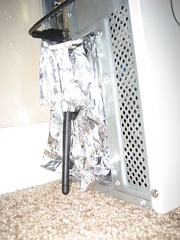
I recently picked up the Netgear WG311 V3 very cheap from Office Depot. The card seems to work fine with ndiswrapper; there are other guides on getting it working. The first problem was the reception was, in a word, rubbish. After putting the box back in it's usual home the house wireless was lucky to get a 7/100 signal rating. I found a work-around while the cheap external antenna I ordered is arriving; shield the antenna with foil. This increased signal to between 30-40/100, a considerable boost making it actually useful. Cheap RF Shielding The second problem was coming to terms with wpa_supplicant, of which the details often become very confusing very quickly. Here's the Debian 2-second guide for a simple, standard WPA network I was looking for:
  1. Add to /etc/network/interfaces
    iface wlan0 inet dhcp
    # Useful with ifup -v 
    #    wpa-debug-level 3
         wpa-conf /etc/wpa_supplicant.conf
    
  2. /etc/wpa_supplicant.conf should look like:
    network= 
            ssid="your_ssid"
            psk="your_password"
            key_mgmt=WPA-PSK
            proto=WPA


5 July 2008

Jeff Bailey: My sister-in-law is in a movie trailer!!!

Holy crap - You know one of those things where life is so surreal? My sister-in-law, Heather, is in a movie trailer with a speaking role!

The Day The Earth Stood Still

About a minute from the end, she passes a message to Kathy Bates.

So yeah, everyone go see the movie. =)

4 July 2008

Russell Coker: New Dell Server

My Dell PowerEdge T105 server (as referenced in my previous post [1]) is now working. It has new memory (why replace just the broken DIMM when you can replace both) and a new BIOS (Dell released an “Urgent” update yesterday that fixes a problem with memory timing and Opteron CPUs). The BIOS update can be installed from a DOS executable (traditionally done from a floppy disk) or an i386 Linux executable. As I didn’t have a floppy drive in my new server I had to use Linux (not that I object to using Linux, but I’d rather have had the technician do it all for me). I used rescue mode from a Fedora 9 CD that was convenient, mounted a USB stick that I had used to store the BIOS update, and then ran it. The Dell service was quite good, on-site service and the problem was fixed approximately 27 hours after I called them. Replacing a couple of DIMMs is hardly a test of skill for the repair-man (unlike the time in Amsterdam when a Dell repair-man swapped a motherboard in a server with only 20 minutes of down-time). So I haven’t seen evidence of them doing anything really great, but getting someone on-site close to 24 hours after the report is quite decent, especially considering that I paid for the cheapest support that they offer. When I got it working I was a little surprised by the memory speed, I had hoped that a new 2GHz Opteron would perform similarly to an Intel E2160 and better than an old Pentium-D (see the results here [2]). Also the memtest86+ run took ages on the step of writing random numbers (I don’t recall ever seeing that step on previous runs, let alone having a system spend half an hour doing it). It seems that the CPU (Opteron 1212) doesn’t perform well for random number generation. In terms of actual operation all I’ve done so far is to install Debian. The process of installing Debian packages was quite fast (even with a RAID-1 reconstruction occurring at the same time) and the boot time is also very quick. The hard drive “rails” seemed a little flimsy. The way they attach to the drive is that they have screws that end in pins, so you screw them into plastic and the pins just sit in the holes in the drive where screws normally attach. I think that it would make more sense to have them not screw onto the plastic and instead screw onto the disk. Then if the plastic part that connects the two sides was to break it would still be usable. In fact they could just make the “rails” be separate rails as most other manufacturers do. One thing that surprised me was the lack of PS/2 keyboard and mouse ports. I had expected that such ports would last longer than serial ports and floppy drives. However my Dell has a power connector for a floppy drive and has a built-in serial port (with some BIOS support for management via a serial port - I have not investigated this because I always plan to use a keyboard and monitor). Of course I expect that most other machines will start shipping without PS/2 ports now and I will have to dispose of my stockpile of PS/2 keyboards and mouses. I generally like to keep a few on hand so that I can give friends and relatives a chance to try a selection and discover which type suits them the best. But I probably don’t need a dozen of them for that purpose. While a comment on my previous post noted that the floppy drive bay can be used for another disk, it seems that a disk is not going to fit in there easily. It looks like I might be able to install a disk there from the front if I unscrew the face-plate - but that’s more effort than I’m prepared to exert for testing the system (for production I will only have two disks). In terms of noise, the Dell seems considerably better than a NEC machine which was designed for desktop use. Of course it’s difficult to be certain as part of the noise is from hard disks and one of the disks I’ve installed in the Dell is a WD “Green” disk and the other may have newer technology to minimise noise. Also the mounting brackets for disks in a server may be better at damping vibrations than screwing a disk to the chassis of a desktop machine. Finally the NEC machine does seem to make more noise now than it used to, so maybe it would be best to compare after a few months use to allow for minor wear on the moving parts. I was initially going to run Debian/Etch on the machine. But as Debian didn’t recognise the built-in Ethernet card and the Xen kernel crashed when doing intensive disk IO I was forced to use CentOS. CentOS 5.1 didn’t start my DomU’s for some reason (which I never diagnosed) but CentOS 5.2 worked perfectly. Finally I was shocked when I realised that the Dell has no sound hardware! When the CentOS post-install program said that it couldn’t find a sound device I thought that meant that it didn’t support the hardware (it’s the sort of thing that sometimes happens when you get a new machine). But it actually has no sound support! It seems really strange that Dell design a desk-side server (which is quiet) and don’t include sound support. If nothing else then using something like randomsound to take input from the microphone line as a source of entropy is going to be useful on servers. While the seven USB ports initially seemed like a lot, being forced to use them for keyboard, mouse, and sound (if I end up using it on a desktop) means that there would only be four left.

3 July 2008

Russell Coker: New Dell Server

My Dell PowerEdge T105 server (as referenced in my previous post [1]) is now working. It has new memory (why replace just the broken DIMM when you can replace both) and a new BIOS (Dell released an “Urgent” update yesterday that fixes a problem with memory timing and Opteron CPUs). The BIOS update can be installed from a DOS executable (traditionally done from a floppy disk) or an i386 Linux executable. As I didn’t have a floppy drive in my new server I had to use Linux (not that I object to using Linux, but I’d rather have had the technician do it all for me). I used rescue mode from a Fedora 9 CD that was convenient, mounted a USB stick that I had used to store the BIOS update, and then ran it. The Dell service was quite good, on-site service and the problem was fixed approximately 27 hours after I called them. Replacing a couple of DIMMs is hardly a test of skill for the repair-man (unlike the time in Amsterdam when a Dell repair-man swapped a motherboard in a server with only 20 minutes of down-time). So I haven’t seen evidence of them doing anything really great, but getting someone on-site close to 24 hours after the report is quite decent, especially considering that I paid for the cheapest support that they offer. When I got it working I was a little surprised by the memory speed, I had hoped that a new 2GHz Opteron would perform similarly to an Intel E2160 and better than an old Pentium-D (see the results here [2]). Also the memtest86+ run took ages on the step of writing random numbers (I don’t recall ever seeing that step on previous runs, let alone having a system spend half an hour doing it). It seems that the CPU (Opteron 1212) doesn’t perform well for random number generation. In terms of actual operation all I’ve done so far is to install Debian. The process of installing Debian packages was quite fast (even with a RAID-1 reconstruction occurring at the same time) and the boot time is also very quick. The hard drive “rails” seemed a little flimsy. The way they attach to the drive is that they have screws that end in pins, so you screw them into plastic and the pins just sit in the holes in the drive where screws normally attach. I think that it would make more sense to have them not screw onto the plastic and instead screw onto the disk. Then if the plastic part that connects the two sides was to break it would still be usable. In fact they could just make the “rails” be separate rails as most other manufacturers do. One thing that surprised me was the lack of PS/2 keyboard and mouse ports. I had expected that such ports would last longer than serial ports and floppy drives. However my Dell has a power connector for a floppy drive and has a built-in serial port (with some BIOS support for management via a serial port - I have not investigated this because I always plan to use a keyboard and monitor). Of course I expect that most other machines will start shipping without PS/2 ports now and I will have to dispose of my stockpile of PS/2 keyboards and mouses. I generally like to keep a few on hand so that I can give friends and relatives a chance to try a selection and discover which type suits them the best. But I probably don’t need a dozen of them for that purpose. While a comment on my previous post noted that the floppy drive bay can be used for another disk, it seems that a disk is not going to fit in there easily. It looks like I might be able to install a disk there from the front if I unscrew the face-plate - but that’s more effort than I’m prepared to exert for testing the system (for production I will only have two disks). In terms of noise, the Dell seems considerably better than a NEC machine which was designed for desktop use. Of course it’s difficult to be certain as part of the noise is from hard disks and one of the disks I’ve installed in the Dell is a WD “Green” disk and the other may have newer technology to minimise noise. Also the mounting brackets for disks in a server may be better at damping vibrations than screwing a disk to the chassis of a desktop machine. Finally the NEC machine does seem to make more noise now than it used to, so maybe it would be best to compare after a few months use to allow for minor wear on the moving parts. One interesting feature is the Broadcom Gig-E port on the motherboard, it supports iSCSI as a boot protocol which is an interesting alternative to PXE, so if you have a server attached to a SAN via iSCSI you can use the same protocol for booting. There is a USB port inside the case (for permanently attached USB devices), however the USB boot option states that it is offering the option to boot from front USB ports - and it claims that no operating system is found on the USB stick that I use to boot my Thinkpad. The down-side is that the bnx2 module in the Debian/Etch kernel doesn’t seem to work with it. I want the machine to have three Ethernet ports, I have a two-port PCI card and if I can get the port on the motherboard to work then I’ll have enough. Otherwise I need to buy a PCIe Ethernet card (the machine only has one PCI slot). I ended up installing CentOS on the machine after the Debian/Etch Xen kernel started falling over on disk IO load (a problem I had seen on another Debian/Etch 64bit Xen machine). CentOS 5.1 supports the built-in Ethernet device, but didn’t work correctly with Xen (my DomU’s would just hang or abort). CentOS 5.2 is now working correctly.

Wouter Verhelst: Review: Samsung YP-T10

About a month ago, I bought me a Samsung YP-T10 media player. I didn't want a device for which the Linux and/or Ogg Vorbis support was against the explicit wishes of the device's manufacturer, such as in the case of the iPod; because the more devices such manufacturers sell, the more they're encouraged to keep their systems closed. Definately not something I'd like to see. In that regard, the YP-T10 is pretty okayish. It supports Ogg Vorbis out of the box, and it has a reasonable set of features for a portable media player. It's not perfect, but it goes a long way. The set of features on the device is simply astonishing; apart from the obvious music playback stuff, it sports an FM radio, a text file reader, a voice recorder, a picture viewer, and a movie player. Given the size and clarity of the screen, this is actually a useful way to view a movie clip, too, although not a very comfortable one. Apart from the obvious USB cable, the device also has bluetooth connectivity which can be used to send and receive files, or to connect a bluetooth headset—especially interesting if you consider the modern stereo headphones that sound just like 'normal' headphones. Once you upgrade the firmware, the device gains the ability to play a few games, and to store vCard files. Very impressive, for such a small device. Unfortunately, not all is well. There's an RSS reader thingy on the device, which could be interesting; but it only works in companion with a Windows program, which obviously doesn't run on my (powerpc) laptop. There's only one way to charge the battery, and that's by connecting the device to a USB port. Unfortunately, that also means you cannot use the device while it's charging, since it switches to the MTP mode in which to receive files. That also goes for bluetooth, BTW -- if you're playing something, and the device receives bluetooth data, the playback is paused until receiving that data is finished. The USB cable is a nonstandard one. Given my track record of losing cables and stuff, I'm sure I'll get in trouble at some point. Hopefully Samsung will still sell those at that point. If not, well, I guess I'll see what happens then. Another point of this cable is that it's impossible to remove it from the device while the headphones are connected; you have to push a button which is physically placed in the direction of the headphone connector, about a millimeter away from it—not very interesting if I just want to connect the device to store one or two media files on there... The headphones that came with the device were not too bad, but the protective sleeves that came with it were too loose; after about a week or so, I'd lost both of them and had to buy me a new set of headphones. Luckily, that involves a simple standard headphone connector, so no problem there. All these are just minor annoyances, however. I don't really need an RSS reader, anyway. What really is a problem is the lack of tag support in Ogg files; while I can at least play them, the display will show 'Unknown' for artist, album, or title for any Ogg file—which is a real PITA. Altogether, however, I don't think the disadvantages of the device outweigh the advantages, and I've had quite some fun with it already. Having said that, given the lack of tag support in Ogg files, I don't feel I can really recommend it, at least not if you want to use it to play your Ogg Vorbis collection.

2 July 2008

Jon Dowland: My site is (slowly) moving

I've decided to give my website a spring-clean. One of the things that is overdue a change is my domain name. You can find out more about the history of the "alcopop" name at /about/ if you are so inclined. I've been using it for a long time and haven't really thought about what people might presume about me from the name. Over the next few months, the site will be moving to the more neutral jmtd.net (my initials). From this point forward, any new content will go there only. This log will probably stay where it is for a while, however. I'm taking this opportunity to migrate to ikiwiki which is a really useful bit of software and has managed to scratch an itch that I thought nothing would quite manage.

Jon Dowland: Introducing debgtd

screenshot ofdebgtd in action
Recently the number of open bugs that I had submitted hit 100. I had completely lost track of which bugs I was interested in, which ones needed my attention, etc. so I started developing a prototype tool to try and help me keep track of it all. I've called it "debgtd", after getting things done, the self-improvement method which has proven very popular in IT culture. The current prototype will import the list of bugs that you have submitted from the BTS and let you display them sorted either by severity or package name. You can "sleep" a bug if it does not require your attention at present (e.g. awaiting maintainer feedback), or "ignore" it if you no longer want to keep track of it (e.g. you've stopped using the package in question). Double-clicking a row invokes your system's default X web browser on the bug page. This is enough at the moment to help me work through my backlog, although once I've done that I have ambitious plans for encoding more workflow into it (such as waking sleeping bugs up on events etc.). Try it out and see what you think: : code and a more rambling explanation of plans for the tool are available here. It's written in python and uses pygtk for the UI.

1 July 2008

Joey Hess: random media

Just some stuff I've been rotting my mind with late at night lately..

28 June 2008

Biella Coleman: Barista rants about stupid customers at Starbucks

Who knew that rants at Starbucks could be the subject of a seemingly interesting lingustic article.

26 June 2008

Russell Coker: Dell PowerEdge T105

Today I received a Dell PowerEDGE T105 for use by a client. My client had some servers for development and testing hosted in a server room at significant expense. They also needed an offsite backup of critical data. So I suggested that they buy a cheap server-class machine, put it on a fast ADSL connection at their home, and use Xen DomU’s on that for development, testing, and backup. My client liked the concept but didn’t like the idea of having a server in his home. So I’m going to run the server from my home. I selected a Dell PowerEDGE tower system because it’s the cheapest server-class machine that can be purchased new. I have a slight preference for HP hardware but HP gear is probably more expensive and they are not a customer focussed company (they couldn’t even give me a price). So exactly a week after placing my order I received my shiny new Dell system, and it didn’t work. I booted a CentOS CD and ran “memtest” and the machine performed a hard reset. When it booted again it informed me that the event log had a message, and the message was “Uncorrectable ECC Error” with extra data of “DIMM 2,2“. While it sucks quite badly to receive a new machine that doesn’t work, that’s about the best result you can hope for when you have a serious error on the motherboard or the RAM. A machine without ECC memory would probably just randomly crash every so often and maybe lose data (see my previous post on the relative merits of ECC RAM and RAID [1]). So I phoned up Dell (it’s a pity that their “Packing Slip” was a low quality photocopy which didn’t allow me to read their phone number and that the shipping box also didn’t include the number so I had to look them up on the web) to get technical support. Once we had established that by removing the DIMMs and reinserting them I had proved that there was a hardware fault they agreed to send out a technician with a replacement motherboard and RAM. I’m now glad that I bought the RAM from Dell. Dell’s business model seems to revolve around low base prices for hardware and then extremely high prices for extras, for example Dell sells 1TB SATA disks for $818.40 while MSY [1] has them for $215 or $233 depending on brand. When I get the machine working I will buy two 1TB disks from MSY (or another company with similar prices). Not only does that save some money but it also means that I can get different brands of disk. I believe that having different brands of hard disk in a RAID-1 array will decrease the probability of having them both fail at the same time. One interesting thing about the PowerEdge T105 is that Dell will only sell two disks for it, but it has four SATA connectors on the motherboard, one is used for a SATA DVD player so it would be easy to support three disks. Four disks could be installed if a PCIe SATA controller was used (one in the space for a FDD and another in the space for a second CD/DVD drive), and if you were prepared to go without a CD/DVD drive then five internal disks could probably work. But without any special hardware the space for a second CD/DVD drive is just begging to be used for a third hard disk, most servers only use the primary CD/DVD drive for installing the OS and I expect that the demand for two CD/DVD drives in a server is extremely low. Personally I would prefer it if servers shipped with external USB DVD drives for installing the OS. Then when I install a server room I could leave one or two drives there in case a system recovery is needed and use the rest for desktop machines. One thing that they seem to have messed up is the lack of a filter for the air intake fan at the front of the case. The Opteron CPU has a fan that’s about 11cm wide which sucks in air from the front of the machine, in front of that fan there is a 4cm gap which would nicely fit a little sponge filter. Either they messed up the design or somehow my air filter got lost in transit. Incidentally if you want to buy from Dell in Australia then you need to configure your OS to not use ECN (Explicit Congestion Notification [2] as the Dell web servers used for sales rejects all connections from hosts with ECN enabled. It’s interesting that the web servers used for providing promotional information work fine with ECN and it’s only if you want to buy that it bites you. But in spite of these issues, I am still happy with Dell overall. Their machine was DOA, that happens sometimes and the next day service is good (NB I didn’t pay extra for better service). I expect that they will fix it tomorrow and I’ll buy more of their gear in future. Update: I forgot to mention that Dell shipped the machine with two power cables. While two power cables is a good thing for the more expensive servers that have redundant PSUs, for a machine with only one PSU it’s a bit of a waste. For some time I’ve been collecting computer power cables faster than I’ve been using them (due to machines dying and due to clients who want machines but already have spare power cables). So I’ve started giving them away at meetings of my local LUG. At the last meeting I gave away a bag of power cables and I plan to keep taking cables to the meetings until people stop accepting them.

25 June 2008

Andrew Pollock: [life] We've just discovered racquetball

We recently joined The Club of Mountain View, because it just happens to be around the corner, and we both want to try and get back into some semblance of shape. The Club has pretty reasonable facilities. It has a large cardio room, a large weights room, a group exercise room where they do a number of classes, and a spinning room. It also has three racquetball/handball courts, as well as an indoor basketball court. Pretty much all of the facilities are included in the monthly membership, so Sarah went and booked a racquetball court this evening, and we had a bit of a whack. We didn't have a clue how to play, so it was just basically half an hour of belting the ball around, and I have to say, I really liked it. I haven't played squash since high school, but didn't enjoy it, because I was more used to tennis, and constantly misjudged where the racquet head was, hence missing the ball. I never really liked the characteristic of a squash ball either. I really like tennis, but I have habit of getting carried away and belting the tripe out of the tennis ball, either sending it completely out of the court (over the fence) and far away, or at the very best well and truly past the back line of the court and into the fence. Racquetball seems perfect for me. I can belt the living daylights out of the ball. It can't get lost. The racquet is short and reasonably large. There's a very satisfying thwack sound to boot. In short: I like it.

David Moreno Garza: YAPC::NA 2008

So I attended the conference last week in Chicago, IL. I was just been procrastinating to write about this.

As a (almost) complete outsider of the Perl community, I have countered thoughts about the whole event:

After all, it was quite a nice and new experience. I'm not totally sure I'll attend YAPC::NA 2009 in Pittsburgh, PA, we'll see.

23 June 2008

Steve Kemp: There is something evil there

So I've had a hectic few days, and I'm getting close to having caught up with the things that I've been sitting on whilst I've been away.
ObRandom: Several people, independantly, have told me within the past few days that "whilst" is not a real word. it is. End of ..
Some interesting things I've been working upon recently include a fun little firewall tool. Once upon a time I wrote a firewall script which worked like this:
firewall/
 -- incoming.d
     -- smtp
     -- ssh
     -- www
 -- outgoing.d
     -- ssh
     -- smtp
     -- dns
     -- icmp
When you executed the magic firewall script it would scan the incoming.d directory, and for each file it found lookup the relevant port in /etc/services. These port numbers would then be opened. And at the end you'd just have a "-j DROP". After a long phone conversation to a colleague on Thursday/Friday of last week I've now reworked this idea anew. There is still the notion of filenames referring to what is allowed for a pair of directories (incoming.d/ + outgoing.d/) but even more flexability and no hardwired use of /etc/servvices. I guess some ideas are just too simple to give up ..? Anyway there are a plethora of different firewall applications of varying sophistication and complexity in the world. I don't really want to go out of my way to promote this one - but at the same time it might be a useful idea for somebody? The next (work) job I have is determining how to make a "kernel" + "kernel-dev" RPM package based on Debian sources. Joy. Actually the more I look around the more fiddly, annoying, and troublesome I suspect this is going to be. Sigh. ObQuote: The Grudgy

19 June 2008

Martin F. Krafft: IPv6 with Debian

Even though I ve dealt with IPv6 for almost a decade, have delivered presentations, and given multi-day courses on IPv6 security aspects, I ve never actually added IPv6 to my own server/home network infrastructure because it seemed that Linux and/or Debian just weren t ready for it. This seems to have changed (although there are still a number of problems) and in less than a day, I put a few of my machines online. In the following, I d like to share with you how I did it.

Kernel versions and stateful connection tracking Unfortunately, I have to start off with some bad news: even though Debian etch, our current stable release, which uses a Linux kernel version 2.6.18, speaks IPv6, I cannot recommend it for deployment, as the 2.6.18 kernel does not support proper stateful connection tracking for IPv6, and thus makes it impossible to firewall hosts in a sensible manner (I always add local packet filters to all my hosts, and if only to guard against the situation when a user installs a malicious programme to listen on a high port). Of course, it is possible to configure a packet filter statelessly in an acceptable manner once you know the use case, so do with this information what you wish; I prefer to stay general for now. For me, a remedy is almost around the corner: the 2.6.24 kernel seems to support stateful connection tracking for IPv6, and it s even available for etch as it will be included in the upcoming etch-and-a-half release. I simply ended up using the kernel packages pre-release, and so far have not had a problem with it. To do so, add the following line to your /etc/apt/sources.list, making sure to use a close archive mirror:
deb http://ftp.xx.debian.org/debian etch-proposed-updates main

I then just upgraded the system and pulled in all proposed updates. As that may have let in software that won t be part of etch-and-a-half, or even lenny, you may want to pin the archive and only upgrade the kernel packages, by adding to /etc/apt/preferences (replacing amd64 with your architecture):
Package: *
Pin: release a=proposed-updates
Pin-Priority: -1
Package: linux-image-2.6.24-etchnhalf.1-amd64
Pin: release a=proposed-updates
Pin-Priority: 600

Alternatively, you could use the 2.6.24 linux kernel packages on backports.org.

Xen and IPv6 One drawback of switching to 2.6.24 is that you cannot run a dom0 on that machine any longer, so by practical extension, you cannot connect it to the IPv6 network with a packet filter in place. Supposedly, running 2.6.24 instances on a 2.6.18 dom0 is reported to work, however.

Configuring the packet filter The first thing I did was to configure the packet filter on each host appropriately. Unfortunately, this is harder than it should be, because to quote one of the netfilter developers when ip6tables was conceived, someone had a big bad brainfart : rather than adding IPv6 rules to your existing iptables ruleset, you have to create a new ruleset, duplicate all chains, networks, hosts, and individual rules, and maintain the two in parallel. Even though there are efforts of unification on the way, I speculate it ll take another couple of years until PF_INET6 will be fused into PF_INET and one will be able to do sensible cross-address-family packet filtering with Linux. Since I ve recently started to look (again) at pyroman, maybe the most logical way forward would be to extend it to write both, IPv4 and IPv6 rulesets from its knowledge about the hosts and networks you configured. Anyway, we want to get stuff working now! Thus, let s configure ourselves a packet filter. (Almost) all IPv6-related filtering must be configured via ip6tables (read on further down about IPv6 in IPv4 tunneling, the reason I said almost ). The following is a simple default ruleset to start with, which I put into /etc/network/ip6tables to load with ip6tables-restore:
*filter
:INPUT REJECT [0:0]
:FORWARD REJECT [0:0]
:OUTPUT ACCEPT [0:0]
:in-new - [0:0]
### INPUT chain
# allow all loopback traffic
-A INPUT -i lo -j ACCEPT
# RT0 processing is disabled since 2.6.20.9
#-A INPUT -m rt --rt-type 0 -j REJECT
# allow all ICMP traffic
-A INPUT -p icmpv6 -j ACCEPT
# packets belonging to an establish connection or related to one can pass
-A INPUT -m state --state RELATED,ESTABLISHED -j ACCEPT
# packets that are out-of-sequence are silently dropped
-A INPUT -m state --state INVALID -j DROP
# new connections unknown to the kernel are handled in a separate chain
-A INPUT -m state --state NEW -j in-new
# pass SYN packets for SSH
-A in-new -p tcp -m tcp --dport 22 --syn -j ACCEPT
# log everything else
-A INPUT -m limit --limit 3/min --limit-burst 10 -j LOG --log-prefix "[INPUT6]: "
### OUTPUT chain
# RT0 processing is disabled since 2.6.20.9
#-A OUTPUT -m rt --rt-type 0 -j REJECT
# allow outgoing traffic, explicitly (despite chain policy)
-A OUTPUT -j ACCEPT
### FORWARD chain
# RT0 processing is disabled since 2.6.20.9
#-A FORWARD -m rt --rt-type 0 -j REJECT
# disallow forwarded traffic, explicitly (despite chain policy)
-A FORWARD -j REJECT
COMMIT

Note that this recipe is pretty much unusable on pre-2.6.20 kernels due to their broken implementation of stateful connection tracking. The ruleset should be fairly obvious, but you might wonder about my use of REJECT and allowing all ICMP after all, you ve heard for the past 30 years that ICMP is a bad hacker protocol , and Internet security is no domain for being nice to people, so to prevent any information disclosure, you should DROP connections, not let people know that they re simply not allowed. Well, to hell with all that! I don t see a single reason or attack vector that is foiled by DROP or disallowing ICMP. In fact, it s just security by obscurity, and might inconvenient at the same time. ICMP is also much more important with IPv6 than with IPv4 (it replaces ARP, for instance), and it s actually useful to be able to ping hosts, or get back informational messages on why something failed. Finally, rejecting traffic rather than dropping it doesn t suggest to a hacker that something s hidden here. Then there is RFC 4890, which almost made me puke. This document is part of the reason why I say: let s fix problems in the kernel, rather than shielding them with unreadable and unmanageable rulesets!

Getting connected If you already have an IPv6 address, you re basically ready to go, but may want to read further down on how to connect your local network to the IPv6 Internet as well. If you are searching for a provider, have a look at the list of providers with native IPv6 connectivity over at sixxs.net. If you are reading up to here, I assume you are connected to the Net with IPv4. There are two ways for you to move towards IPv6: 6to4 or by way of a tunnel provider. A Kiwi website explains how to setting up 6to4 connectivity, and thus I will concentrate only on the tunnel approach. Even though everyone can set up 6to4 in a breeze without any accounts or waiting, there are a number of security considerations, it s pretty ugly to debug (due in part to asymmetric routing), and makes your life unnecessarily difficult when all you have is a dynamic IP that changes from time to time. If you are stuck behind a NAT gateway, you cannot use 6to4 either. Thus, I prefer the tunnel approach. With the tunnel approach, IPv6 packets are wrapped up in IPv4 packets on your host, and sent to the IPv4 address of your tunnel provider, who has native IPv6 connectivity. The tunnel provider unwraps your packet and shoves the contained IPv6 packet onto the backbone. The IPv6 address you used as source address is routed to the tunnel provider, so any replies arrive at their machines, where they re again wrapped into IPv4 packets and sent to your (publicly-accessible) IPv4 address. Those IPv4 packets specify payload type 41 ( ipv6 ), which is why we need those -p ipv6 -j ACCEPT rules in the iptables ruleset. There are a few tunnel providers out there. I chose SixXS and have not regretted my choice. I shall thus assume that you do the same: sign up for an account right now, so that you have it by the time you finished reading this document! SixXS works on a credit system: tunnels and subnets cost credits, which you can accumulate by maintaining your tunnels properly. This ensures that everyone can play around, but to do more advanced stuff, you need to first display competence with the basic concepts. Your first step with SixXS will be to request a tunnel. SixXS offers three types of tunnels:
  • static tunnels, for those with static IPs,
  • heartbeat tunnels, for those with dynamic IPs, and
  • AYIYA tunnels, for those behind NAT gateways.
Each of these tunnels have advantages and disadvantages, as everything does: the first two types of tunnels use IP protocol 41 packets to encapsulate the IPv6 packets. As such, there are security considerations involving the impersonation by spoofing, and all upstream firewalls must let protocol 41 pass. AYIYA addresses these problems by using signed packets, but that solution comes with extra computation overhead and smaller MTUs. I suggest to use the first type of tunnel that fits your situation. Debian s aiccu package can take care of heartbeat and AYIYA tunnels for you, and it can even set up static ones. During registration, you will also need to choose a PoP , which stands for Point of Presence . If your country only has a single PoP, that s the one you will end up using (unless you have a good reason for another one), but if there are more options, I strongly suggest that you go through the list of PoPs and select the one with the best roundtrip time and lowest latency from your location! Note that you must answer ping requests (ICMP echo-request) from the PoP you chose, or else the tunnel will not be created. Once your tunnel request gets approved, you ll get a /64 prefix, in which you only use two addresses: the PoP will configure the :1 address and you need to configure your host to use the :2 address on the tunnel interface. You ll also be told the IPv4 address of your PoP endpoint . Joey Hess taught me that aiccu can set up the interface for you, using the data it queries from the SixXS registration (TIC) server. I tried it, and it works. However, I prefer the pure ifupdown approach, as it makes things explicit and allows me to use the hooks for stuff like loading the packet filter. So in my /etc/network/interfaces, you can find:
auto sixxs
iface sixxs inet6 v4tunnel
  endpoint 194.1.163.40
  address 2001:41e0:ff00:3b::2
  netmask 64
  gateway 2001:41e0:ff00:3b::1
  ttl 64
  pre-up ip6tables-restore < /etc/network/ip6tables
  up ip link set mtu 1480 dev $IFACE
  up invoke-rc.d aiccu start
  down invoke-rc.d aiccu stop

Make sure to read about MTU values of the tunnel and adjust the 1480 value in the above to your tunnel settings and ISP connectivity. Also set ipv6_interface sixxs in /etc/aiccu.conf, if you are using aiccu, or else aiccu will bring up a duplicate/additional interface. If you tell it to use the same interface, it will actually execute all the same commands (which will fail), but won t report any errors. A future version will have a switch to prevent it from configuring the interface. Unfortunately, this will probably not work. The reason is that your regular IP packet filter (iptables, without the 6) doesn t let those encapsulating IPv4 packets pass, unless we tell it to; we probably want to do this early on in the chain, and also limit it to our tunnel peer, so:
iptables -I INPUT -p ipv6 -s 194.1.163.40/32 -j ACCEPT

For AYIYA, you need to open port 5072, either for UDP, TCP, or SCTP, depending on how you configured it. Also have a look at this FAQ entry on what a firewall needs to pass. If it still doesn t work, you have an upstream packet filter that needs some of those holes poked. Good luck. In most situations, the FORWARD chain does not get such a rule, since the tunnel terminates at the gateway, which routes to a native IPv6 network, or another tunnel. Allowing tunnels through a gateway is almost always a bad thing, as it would allow undetected and untraceable traffic from compromised boxes in the local network. The OUTPUT chain also does not need such a rule, if you have configured stateful filtering properly. Now bring up the interface and verify the connection:
# ifup sixxs
# ping6 -nc1 2001:41e0:ff00:3b::1
PING 2001:41e0:ff00:3b::1(2001:41e0:ff00:3b::1) 56 data bytes
64 bytes from 2001:41e0:ff00:3b::1: icmp_seq=1 ttl=64 time=74.0 ms
[...]
# ping6 -nc1 ipv6.aerasec.de
PING ipv6.aerasec.de(2001:a60:9002:1::184:1) 56 data bytes
64 bytes from 2001:a60:9002:1::184:1: icmp_seq=1 ttl=55 time=91.5 ms
[...]

Welcome to the Internet of the future!

Setting up an IPv6-capable gateway Your IPv6 connection works, but it s limited to a single address, and you do not get to specify the reverse DNS PTR record for it. Since the concept of NAT is mostly absent from IPv6 (thanks! thanks! thanks!), you will not be able to connect any other hosts to the IPv6 network. If your local network has a few hosts behind a gateway, you will need to request a subnet from SixXS and configure your gateway (which has the tunnel connection) appropriately. Don t worry, this is not really very difficult. First, request a subnet for your tunnel from your PoP via your SixXS homepage. Once approved, you will get a /48 prefix for your own use: 2^80 1.2 heptillion addresses which are yours to assign to every dust particle in your office or home, if you so desire. The way I set it up is to add the first of these addresses to your internal interface on the gateway, by adding the following two lines to the interface s stanza in /etc/network/interfaces; you will need the iproute package installed (which you should be using for everything network-related anyway):
up ip -6 addr add 2001:41e0:ff12::1/64 dev $IFACE
down ip -6 addr del 2001:41e0:ff12::1/64 dev $IFACE

Instead of bringing the interface down and up, just run ip -6 addr add 2001:41e0:ff12::1/64 dev eth0. Note the use of the /64 prefix instead of the /48 that got assigned, leaving only 20 pentillion addresses. Oh no! The reason for this is buried in the specs: basically, /48 is a site prefix, but individual networks should not be larger than /64, which is the prefix length of links in the IPv6 domain. Now is also a good time to enable IPv6 forwarding, e.g. like so:
# echo net.ipv6.conf.all.forwarding = 1 >> /etc/sysctl.conf
# sysctl -p /etc/sysctl.conf

Obviously, you will also need to change the policy on the ip6tables FORWARD chain. For now, let s just set it to accept. You should later create a proper ruleset, though!
# ip6tables -I FORWARD -j ACCEPT

Bringing IPv6 to your local network The final step is to spread the love to your local network. Refrain from selecting addresses from your subnet and assigning them to the local hosts, or wondering how to configure the DHCP server, because IPv6 does it differently: your gateway will advertise its routes (which includes a default route) to your network, and each host will pick an address based on its MAC address (unless it already has an EUI-64 address assigned. This all happens automagically, at least with current Debian and Windows machines. On the gateway, you need to install radvd and simply tell it which prefix to use on which interface. My /etc/radvd looks like this, and I won t explain it:
interface eth0
 
  AdvSendAdvert on;
  prefix 2001:41e0:ff12::/64
   
   ;
 ;

Note again how we advertise a /64 network rather than the /48 we own . You cannot advertise smaller networks if you want automatic configuration to work, and you should not use networks larger than /64 in any case. If 2^64 addresses are not enough for you, I trust you ll be able to figure out how to advertise another of your 65536 /64 prefixes in the /48 subnet to appropriate hosts. Restart radvd and run over to another host to witness how it automagically gets connected to the IPv6 network by scanning /var/log/kern.log and watching the output of ip -6 addr and ip -6 route. Try ping6ing from there! Find the dancing turtle! It should all work. If you don t like the automagic aspect of this, look into stateful configuration, using DHCPv6, as provided by dibbler-server and ?wide-dhcpv6-server.

Resolving names Take note of the IPv6 address of each host. There s a way to determine it given the host s MAC address, but this is easier (ipv6calc is also useful). You might want to let your local DNS server know by adding AAAA records in parallel to the existing A records, and possibly even adding PTR entries. If you re serious about IPv6, you can tell SixXS to delegate reverse lookups for the IPv6 addresses to your DNS servers, but you ought to refrain from polluting the DNS namespace. Note that bind9-host provides an improved host tool, which fetches all kinds of information about names, not just the one single information configured as default:
% host pulse.madduck.net
pulse.madduck.net has address 130.60.75.74
pulse.madduck.net has IPv6 address 2001:41e0:ff1a::1
pulse.madduck.net mail is handled by 99 b.mx.madduck.net.
pulse.madduck.net mail is handled by 10 a.mx.madduck.net.
% host 2001:41e0:ff1a::1
1.0.0.0.0.0.0.0.0.0.0.0.0.0.0.0.0.0.0.0.a.1.f.f.0.e.1.4.1.0.0.2.ip6.arpa
domain name pointer pulse.madduck.net.

Oh, and if you re really that curious about how IPv6 addresses are computed from MAC addresses, read RFC 2464. Basically, given a prefix 2001:41e0:ff1a:: and a MAC address aa:bb:cc:dd:ee:ff, the resulting IPv6 address is obtained by:
  1. inserting ff:fe into the middle of the MAC address to yield aa:bb:cc:ff:fe:dd:ee:ff;
  2. flipping the second lowest bit of the first octet to yield a8:bb:cc:ff:fe:dd:ee:ff;
  3. removing the odd colons to yield a8bb:ccff:fedd:eeff, the EUI-64;
  4. concatenating the prefix and this result to get 2001:41e0:ff1a::a8bb:ccff:fedd:eeff.
If you find your (Windows) IPv6 addresses changing all the time, you might be faced by privacy features .

Remaining issues Even though my IPv6 connectivity works, I have two remaining issues.

Sending larger amounts of data to the network I am experiencing a curious issue where outgoing ssh IPv6 connections time out and outgoing data transfers hiccup. I have yet to find out what s going on.

Mapping names to laptops Laptops generally have two interfaces, one with a cable, and the other wireless. Both of these interfaces will have separate MAC addresses, and by extension, the laptop will have different IPv6 addresses depending on how it is connected to the local network. I want to be able to connect to laptops without knowing the medium they use to connect to the network. Unfortunately, there seems to be no feasible way. The solutions I see are:
  • override the MAC address of one interface with that of the other, which is going to cause bgi problems in the case when the laptop (accidentally) gets connected to the same network twice;
  • add both IPv6 addresses as AAAA records to the laptop s DNS name, which will cause random delays when connecting as the resolver may return the currently inactive address first;
  • set up mobile IPv6, e.g. by following this Mobile IPv6 how-to, which would allow accessing the laptop uniformly, no matter where in the world it is. Unfortunately, Debian s support for Mobile IPv6 is severly lacking at time of writing. Also, Yves-Alexis Perez notes that this how-to is horribly outdated and promised to tend to it Real Soon Now .
The second solution works for me for now, but I am interested in the third. In response to this document, Andreas Henriksson has suggested the replace the stateless configuration (radvd) with stateful configuration, using DHCPv6. I have yet to investigate this option. Jeroen Massar suggests to unite cable and wireless into a bridged interface, which seems like a very good idea.

Credits Thanks to Bernhard Schmidt, William Boughton, and Jeroen Massar, and everyone on #ipv6/irc.freenode.org for their help over the past few weeks, and all those who fed back comments in response to this document!

Next.

Previous.