Reinhard Tartler: Building Packages with Buildah in Debian
1 Building Debian Packages with buildah
Building packages in Debian seems to be a solved problem. But is it? At the bottom, installing the
The issue is that
The answer (in Debian and many other Linux distributions) is you do not at all. This is actually a somewhat surprising answer for software developers without a Linux distribution development background1. Instead, chroots "simulate" an environment that has all dependencies that we want to build against at the system locations, that is.
Chroots are basically full system installations in a subdirectory that includes system and application libraries. In order to use them, a package build needs to use the
What if there was an easy way to do all of the above without any process running as root? Enter rootless buildah.
Modern Linux container technologies allow unprivileged users to "untie" a process from the system (cf. the
dpkg-dev package provides all the basic tools needed. Assuming that you already succeeded with creating the necessary packaging metadata (i.e., debian/changelog, debian/control, debian/copyright, etc., and there are great helper tools for this such ash dh-make, dh-make-golang, etc.,) it should be as simple as invoking the dpkg-buildpackage tool. So what's the big deal here?The issue is that
dpkg-buildpackage expects to be called with an appropriately setup build context, that is, it needs to be called in an environment that satisfies all build dependencies on the system. Let's say you are building a package for Debian unstable on your Debian stable system (this is the common scenario for the official Debian build machines), you would need your build to link against libraries in unstable, not stable. So how to tell the package build process where to find its dependencies?The answer (in Debian and many other Linux distributions) is you do not at all. This is actually a somewhat surprising answer for software developers without a Linux distribution development background1. Instead, chroots "simulate" an environment that has all dependencies that we want to build against at the system locations, that is.
/usr/lib, etc.Chroots are basically full system installations in a subdirectory that includes system and application libraries. In order to use them, a package build needs to use the
chroot(2) system call, which is a privileged operation. Also creating these system installations is a somewhat finicky process. In Debian, we have tools that make this process easier, the most popular ones are probably pbuilder(1)2 and sbuild(1)3. Still, they are somewhat clumsy to use, add significant levels of abstraction in the sense that they do quite a bit of magic behind the scenes to work hide the fact that privileged operations (need root to run chroot(2), etc.) are required. They are also somewhat brittle, for instance, if a build process is aborted (SIGKILL, or system crash), you may end up with temporary directories and files under userids other than your own that again may require root-privileges to cleanup.What if there was an easy way to do all of the above without any process running as root? Enter rootless buildah.
Modern Linux container technologies allow unprivileged users to "untie" a process from the system (cf. the
unshare(2) system call). This means that a regular user may run a process (and its child processes) in an "environment" where system calls behave differently and provide a configurable amount of isolation levels. This article demonstrates a novel build tool buildah, which is:- easy to setup build environment from the command line
- secure, as no process needs to run as root
- simple in architecture, requires no running daemon like for example docker
- convenient to use: you can debug your debian/rules interactively
buildah is written in golang and compiled as a (mostly) statically linked executable. It builds on top a number of libraries written in golang, including github.com/containers/storage and github.com/containers/image. The overlay functionality is provided by the fuse-overlayfs(1) utility.1.1 Preparation:The Kernel in Debian bullseye (and in buster, and recent Ubuntu kernels to the best of my knowledge) do support usernamespaces, but leave them disabled by default. Here is how to enable them:
echo kernel.unprivileged_userns_clone = 1   sudo tee -a /etc/sysctl.d/containers.conf
systemctl -p /etc/sysctl.d/containers.conf
I have to admit that I'm not entirely sure why the Debian kernels don't enable usernamespaces by default. I've found a reference on stackexchange4 that claims this disables some "hardening" features in the Debian kernel. I also understand this step is not necessary if you chose to compile and run a vanilla upstream kernel. I'd appreciate a better reference and am happy to update this text.
$ c=$(buildah from docker.io/debian:sid)
Getting image source signatures
Copying blob 2bbc6b8c460d done
Copying config 9b90abe801 done
Writing manifest to image destination
Storing signatures
This command downloads the image from docker.io and stores it locally in your home directory. Let's install essential utilities for building Debian packages:
1: buildah run $c apt-get update -qq
2: buildah run $c apt-get install dpkg-dev -y
3: buildah config  --workingdir /src $c
4: buildah commit $c dpkg-dev
The command on line 1 and 2 execute the installation of compilers and dpkg development tools such as dpkg-buildpackage, etc. The buildah config command in line 4 arranges that whenever you start a shell in the container, the current working directory in the container is in /src. Don't worry about this location not existing yet, we will make sources from your host system available there. The last command creates an OCI image with the name dpkg-dev. BTW, the name you use for the image in the commit command can be used in podman (but not the "containers"). See 5 and 6 for a comparison between podman and buildah.
buildah images -a
This output might look like this:
  REPOSITORY                 TAG      IMAGE          ID   CREATED   SIZE
  localhost/dpkg-dev         latest   b85c34f95d3e   16   seconds   ago    406   MB
  docker.io/library/debian   sid      9b90abe801db   11   hours     ago    124   MB
echo kernel.unprivileged_userns_clone = 1 sudo tee -a /etc/sysctl.d/containers.confI have to admit that I'm not entirely sure why the Debian kernels don't enable usernamespaces by default. I've found a reference on stackexchange4 that claims this disables some "hardening" features in the Debian kernel. I also understand this step is not necessary if you chose to compile and run a vanilla upstream kernel. I'd appreciate a better reference and am happy to update this text.
systemctl -p /etc/sysctl.d/containers.conf
$ c=$(buildah from docker.io/debian:sid)This command downloads the image from docker.io and stores it locally in your home directory. Let's install essential utilities for building Debian packages:
Getting image source signatures
Copying blob 2bbc6b8c460d done
Copying config 9b90abe801 done
Writing manifest to image destination
Storing signatures
1: buildah run $c apt-get update -qq
2: buildah run $c apt-get install dpkg-dev -y
3: buildah config --workingdir /src $c
4: buildah commit $c dpkg-dev
dpkg-buildpackage, etc. The buildah config command in line 4 arranges that whenever you start a shell in the container, the current working directory in the container is in /src. Don't worry about this location not existing yet, we will make sources from your host system available there. The last command creates an OCI image with the name dpkg-dev. BTW, the name you use for the image in the commit command can be used in podman (but not the "containers"). See 5 and 6 for a comparison between podman and buildah.buildah images -a
REPOSITORY TAG IMAGE ID CREATED SIZE
localhost/dpkg-dev latest b85c34f95d3e 16 seconds ago 406 MB
docker.io/library/debian sid 9b90abe801db 11 hours ago 124 MB
1.2 Running a package buildNow we have a working container with the reference in the variable $c. To use it conveniently with source packages that I have stored in /srv/scratch/packages/containers, let's introduce a shell alias r like this:
alias r='buildah run --tty -v /srv/scratch/packages/containers:/src $c '
This allows you to easily execute commands in that container:
r pwd
r bash
The last command will give you an interactive shell that we'll be using for building packages!
siretart@x1:~/scratch/packages/containers/libpod$ r bash

root@x1:/src# cd golang-github-openshift-imagebuilder

root@x1:/src/golang-github-openshift-imagebuilder# dpkg-checkbuilddeps
dpkg-checkbuilddeps: error: Unmet build dependencies: debhelper (>= 11) dh-golang golang-any golang-github-containers-storage-dev (>= 1.11) golang-github-docker-docker-dev (>= 18.09.3+dfsg1) golang-github-fsouza-go-dockerclient-dev golang-glog-dev

root@x1:/src/golang-github-openshift-imagebuilder# apt-get build-dep -y .
Note, using directory '.' to get the build dependencies
Reading package lists... Done
Building dependency tree
Reading state information... Done
The following NEW packages will be installed:
[...]

root@x1:/src/golang-github-openshift-imagebuilder# dpkg-checkbuilddeps

root@x1:/src/golang-github-openshift-imagebuilder#
Now we have a environment that has all build-dependencies available and we are ready to build the package:
root@x1:/src/golang-github-openshift-imagebuilder# dpkg-buildpackage -us -uc -b
Assuming the package builds, the package build results are placed in /src inside the container, and are visible at ~/scratch/packages/containers on the host. There you can inspect, extract or even install them. The latter part allows you to interactively rebuild packages against updated dependencies, without the need of setting up an apt archive or similar.
$c. To use it conveniently with source packages that I have stored in /srv/scratch/packages/containers, let's introduce a shell alias r like this:alias r='buildah run --tty -v /srv/scratch/packages/containers:/src $c 'This allows you to easily execute commands in that container:
r pwdThe last command will give you an interactive shell that we'll be using for building packages!
r bash
siretart@x1:~/scratch/packages/containers/libpod$ r bashNow we have a environment that has all build-dependencies available and we are ready to build the package:
root@x1:/src# cd golang-github-openshift-imagebuilder
root@x1:/src/golang-github-openshift-imagebuilder# dpkg-checkbuilddeps
dpkg-checkbuilddeps: error: Unmet build dependencies: debhelper (>= 11) dh-golang golang-any golang-github-containers-storage-dev (>= 1.11) golang-github-docker-docker-dev (>= 18.09.3+dfsg1) golang-github-fsouza-go-dockerclient-dev golang-glog-dev
root@x1:/src/golang-github-openshift-imagebuilder# apt-get build-dep -y .
Note, using directory '.' to get the build dependencies
Reading package lists... Done
Building dependency tree
Reading state information... Done
The following NEW packages will be installed:
[...]
root@x1:/src/golang-github-openshift-imagebuilder# dpkg-checkbuilddeps
root@x1:/src/golang-github-openshift-imagebuilder#
root@x1:/src/golang-github-openshift-imagebuilder# dpkg-buildpackage -us -uc -bAssuming the package builds, the package build results are placed in
/src inside the container, and are visible at ~/scratch/packages/containers on the host. There you can inspect, extract or even install them. The latter part allows you to interactively rebuild packages against updated dependencies, without the need of setting up an apt archive or similar.2 AvailabilityThe buildah(1) tool is available in debian/bullseye since 2019-12-17. Since is a golang binary, it only links dynamically against system libraries such as libselinux and libseccomp, which are all available in buster-backports. I'd expect buildah to just work on a debian/buster system as well provided you install those system libraries and possibly the backported Linux kernel.
Keeping the package at the latest upstream version is challenging because of its fast development pace that picks up new dependencies on golang libraries and new versions of existing libraries with every new upstream release. In general, this requires updating several source packages, and in many cases also uploading new source packages to the Debian archive that need to be processed by the Debian ftp-masters.
As an exercise, I suggest to install the buildah package from bullseye, 'git clone' the packaging repository from https://salsa.debian.org/go-team/packages/golang-github-containers-buildah and build the latest version yourself. Note, I would expect the above to even work on a Fedora laptop.
The Debian packages have not swept into the Ubuntu distributions yet, but I expect them to be included in the Ubuntu 20.10 release. In the mean time, ubuntu users can install the package that are provided by the upstream maintainers in the "Project Atomic" PPA at https://launchpad.net/~projectatomic/+archive/ubuntu/ppa
buildah(1) tool is available in debian/bullseye since 2019-12-17. Since is a golang binary, it only links dynamically against system libraries such as libselinux and libseccomp, which are all available in buster-backports. I'd expect buildah to just work on a debian/buster system as well provided you install those system libraries and possibly the backported Linux kernel.Keeping the package at the latest upstream version is challenging because of its fast development pace that picks up new dependencies on golang libraries and new versions of existing libraries with every new upstream release. In general, this requires updating several source packages, and in many cases also uploading new source packages to the Debian archive that need to be processed by the Debian ftp-masters.
As an exercise, I suggest to install the buildah package from bullseye, 'git clone' the packaging repository from https://salsa.debian.org/go-team/packages/golang-github-containers-buildah and build the latest version yourself. Note, I would expect the above to even work on a Fedora laptop.
The Debian packages have not swept into the Ubuntu distributions yet, but I expect them to be included in the Ubuntu 20.10 release. In the mean time, ubuntu users can install the package that are provided by the upstream maintainers in the "Project Atomic" PPA at https://launchpad.net/~projectatomic/+archive/ubuntu/ppa
3 Related ToolsThe buildah tool is accompanied with two "sister" tools:
The Skopeo package provides tooling to work with remote images registries. This allows you download, upload images to remote registries, convert container images between different formats. It has been available in Debian since 2020-04-20.
The podman tool is a 'docker' replacement. It provides a command-line interface that mimics the original docker command to an extend that a user familiar with docker might want to place this in their ~/.bashrc file:
alias docker='podman'
Unfortunately, at the time of writing podman is still being processed by the ftp-masters since 01-03-2020. At this point, I recommend building the package from our salsa repository at https://salsa.debian.org/debian/libpod
The Skopeo package provides tooling to work with remote images registries. This allows you download, upload images to remote registries, convert container images between different formats. It has been available in Debian since 2020-04-20.
The podman tool is a 'docker' replacement. It provides a command-line interface that mimics the original
docker command to an extend that a user familiar with docker might want to place this in their ~/.bashrc file:alias docker='podman'Unfortunately, at the time of writing podman is still being processed by the ftp-masters since 01-03-2020. At this point, I recommend building the package from our salsa repository at https://salsa.debian.org/debian/libpod
4 ConclusionBuilding packages in the right build context is a fairly technical issue for which many tools have been written for. They come with different trade-off when it comes to usability. Containers promise a secure alternative to the tried and proven chroot-based approaches, and the buildah makes using this technology very easy to use.
I'd love to get into a conversation with you on how these tools work for you, and would like to encourage participation and assistance with keeping the complicated software stack up-to-date in Debian (and by extension, in derived distribution such as Ubuntu, etc.).
I'd love to get into a conversation with you on how these tools work for you, and would like to encourage participation and assistance with keeping the complicated software stack up-to-date in Debian (and by extension, in derived distribution such as Ubuntu, etc.).
Footnotes:1
At my day-job, we build millions of lines of C++ code on Solaris10 and AIX6, where concepts such as "chroots" are restricted to the super user 'root' and is therefore not available to developers, not even through wrappers. Instead, libraries and headers are installed into "refroots", that is, subdirectories that mimic the structure of the "sysroot" directories that are used in the embedded Linux community for cross-compiling packages, and we use Makefiles that set include flags (-I rules and -L flags) to tell the compiler and linker where to look.
1
At my day-job, we build millions of lines of C++ code on Solaris10 and AIX6, where concepts such as "chroots" are restricted to the super user 'root' and is therefore not available to developers, not even through wrappers. Instead, libraries and headers are installed into "refroots", that is, subdirectories that mimic the structure of the "sysroot" directories that are used in the embedded Linux community for cross-compiling packages, and we use Makefiles that set include flags (
-I rules and -L flags) to tell the compiler and linker where to look. Continuing a series of blog posts about casual

 The Linux kernel lockdown patches
  I m working on trying to get a Qualcomm
 If you never heard of the 10x engineer myth, it's a pretty great concept. It boils down to the idea where an engineer could be 10x more efficient than a random engineer. I find this fantastically twisted.Last week, I sat and chat with Alexis Monville in


 I was gonna use this blog post to share about the migrant worker woes as there has been multiple stories doing the rounds. For e.g. a story which caught the idea of few people but most of us, i.e. middle-class people are so much into our own thing that we care a fig leaf about what happens to migrants. This should not be a story coming from a humane society but it seems India is no different than any other country of the world and in not a good way. Allow me to share
Or for those who don t like youtube, here s an alternative link
I was gonna use this blog post to share about the migrant worker woes as there has been multiple stories doing the rounds. For e.g. a story which caught the idea of few people but most of us, i.e. middle-class people are so much into our own thing that we care a fig leaf about what happens to migrants. This should not be a story coming from a humane society but it seems India is no different than any other country of the world and in not a good way. Allow me to share
Or for those who don t like youtube, here s an alternative link


 Dhauladhar range Northern Punjab Copyright CNN.Com
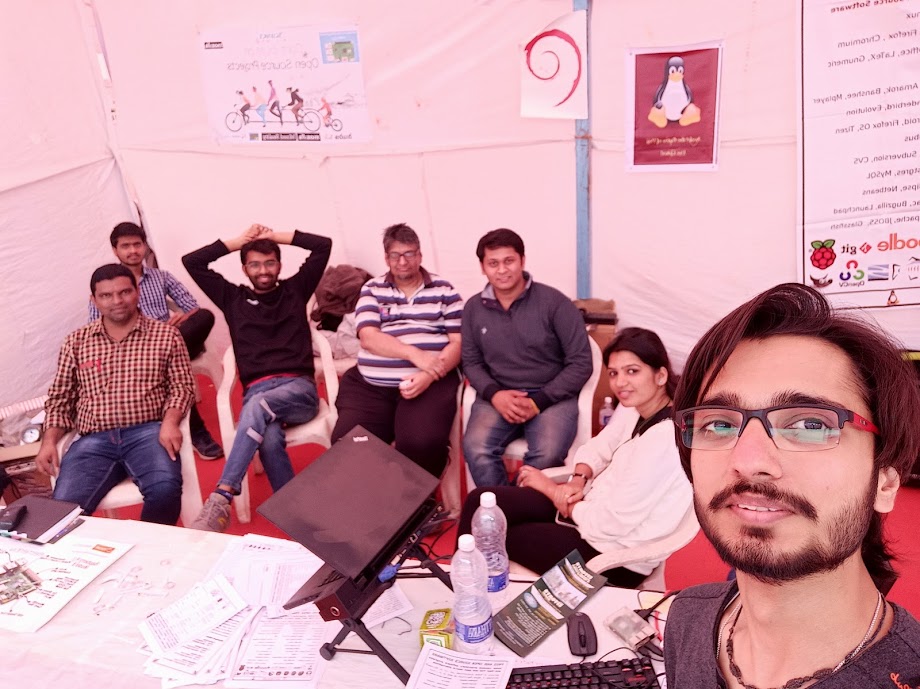
 . Of course in another stall few students had used RPI s as part of their projects so at times we did tell some of the newbies to go to those stalls and see and ask about those projects so they would have a much wider experience of things. The Mozilla people were pushing VR as well as Mozilla lite the browser for the mobile.
We also gossiped quite a bit. I shared about
. Of course in another stall few students had used RPI s as part of their projects so at times we did tell some of the newbies to go to those stalls and see and ask about those projects so they would have a much wider experience of things. The Mozilla people were pushing VR as well as Mozilla lite the browser for the mobile.
We also gossiped quite a bit. I shared about 





 I just had a weekend full of very successful serious geekery. On a whim I thought: Wouldn't it be nice if people could interact with my game



 Sometimes, in our day-to-day-interactions, communication becomes disruptive,
resembling a chain of reactions to reactions to reactions. Sometimes we lose the
capacity to express our ideas and feelings. Sometimes communication just gets stuck,
maybe conflict breaks out. When we see these same patterns over and over again, this
might be due to the ever same roles that we adopt and play. Learnt in
childhood, these roles are deeply ingrained in our adult selves, and acted out
as unconscious scripts. Until we notice and work on them.
This is a post inspired by contents from my mediation training.
In the 1960s, Stephen Karpman has thought of a model of human communication
that maps the destructive interactions which occur between people. This map is known as the
Sometimes, in our day-to-day-interactions, communication becomes disruptive,
resembling a chain of reactions to reactions to reactions. Sometimes we lose the
capacity to express our ideas and feelings. Sometimes communication just gets stuck,
maybe conflict breaks out. When we see these same patterns over and over again, this
might be due to the ever same roles that we adopt and play. Learnt in
childhood, these roles are deeply ingrained in our adult selves, and acted out
as unconscious scripts. Until we notice and work on them.
This is a post inspired by contents from my mediation training.
In the 1960s, Stephen Karpman has thought of a model of human communication
that maps the destructive interactions which occur between people. This map is known as the