Search Results: "cas"

21 September 2020

Russ Allbery: Review: Lower Ed

Review: Lower Ed, by Tressie McMillan Cottom
Publisher: The New Press
Copyright: 2017
Printing: 2018
ISBN: 1-62097-472-X
Format: Kindle
Pages: 217
Lower Ed (subtitled The Troubling Rise of For-Profit Colleges in the New Economy) is the first book by sociologist Tressie McMillan Cottom. (I previously reviewed her second book, the excellent essay collection Thick.) It is a deep look at the sociology of for-profit higher education in the United States based on interviews with students and executives, analysis of Wall Street filings, tests of the admissions process, and her own personal experiences working for two of the schools. One of the questions that McMillan Cottom tries to answer is why students choose to enroll in these institutions, particularly the newer type of institution funded by federal student loans and notorious for being more expensive and less valuable than non-profit colleges and universities. I was hesitant to read this book because I find for-profit schools depressing. I grew up with the ubiquitous commercials, watched the backlash develop, and have a strongly negative impression of the industry, partly influenced by having worked in traditional non-profit higher education for two decades. The prevailing opinion in my social group is that they're a con job. I was half-expecting a reinforcement of that opinion by example, and I don't like reading infuriating stories about people being defrauded. I need not have worried. This is not that sort of book (nor, in retrospect, do I think McMillan Cottom would approach a topic from that angle). Sociology is broader than reporting. Lower Ed positions for-profit colleges within a larger social structure of education, credentialing, and changes in workplace expectations; takes a deep look at why they are attractive to their students; and humanizes and complicates the motives and incentives of everyone involved, including administrators and employees of for-profit colleges as well as the students. McMillan Cottom does of course talk about the profit motive and the deceptions surrounding that, but the context is less that of fraud that people are unable to see through and more a balancing of the drawbacks of a set of poor choices embedded in institutional failures. One of my metrics for a good non-fiction book is whether it introduces me to a new idea that changes how I analyze the world. Lower Ed does that twice. The first idea is the view of higher education through the lens of risk shifting. It used to be common for employers to hire people without prior job-specific training and do the training in-house, possibly through an apprenticeship structure. More notably, once one was employed by a particular company, the company routinely arranged or provided ongoing training. This went hand-in-hand with a workplace culture of long tenure, internal promotion, attempts to avoid layoffs, and some degree of mutual loyalty. Companies expected to invest significantly in an employee over their career and thus also had an incentive to retain that employee rather than train someone for a competitor. However, from a purely financial perspective, this is a risk and an inefficiency, similar to the risk of carrying a large inventory of parts and components. Companies have responded to investor-driven focus on profits and efficiency by reducing overhead and shifting risk. This leads to the lean supply chain, where no one pays for parts to sit around in warehouses and companies aren't caught with large stockpiles of now-useless components, but which is more sensitive to any disruption (such as from a global pandemic). And, for employment, it leads to a desire to hire pre-trained workers, retain only enough workers to do the current amount of work, and replace them with new workers who already have appropriate training rather than retrain them. The effect of the corporate decision to only hire pre-trained employees is to shift the risk and expense of training from the company to the prospective employee. The individual has to seek out training at their own expense in the hope (not guarantee) that at the conclusion of that training they will get or retain a job. People therefore turn to higher education to both provide that training and to help them decide what type of training will eventually be valuable. This has a long history with certain professional fields (doctors and lawyers, for example), but the requirements for completing training in those fields are relatively clear (a professional license to practice) and the compensation reflects the risk. What's new is the shift of training risk to the individual in more mundane jobs, without any corresponding increase in compensation. This, McMillan Cottom explains, is the background for the growth in demand for higher education in general and the the type of education offered by for-profit colleges in particular. Workers who in previous eras would be trained by their employers are now responsible for their own training. That training is no longer judged by the standards of a specific workplace, but is instead evaluated by a hiring process that expects constant job-shifting. This leads to increased demand by both workers and employers for credentials: some simple-to-check certificate of completion of training that says that this person has the skills to immediately start doing some job. It also leads to a demand for more flexible class hours, since the student is now often someone older with a job and a family to balance. Their ongoing training used to be considered a cost of business and happen during their work hours; now it is something they have to fit around the contours of their life because their employer has shifted that risk to them. The risk-shifting frame makes sense of the "investment" language so common in for-profit education. In this job economy, education as investment is not a weird metaphor for the classic benefits of a liberal arts education: broadened perspective, deeper grounding in philosophy and ethics, or heightened aesthetic appreciation. It's an investment in the literal financial sense; it is money that you spend now in order to get a financial benefit (a job) in the future. People have to invest in their own training because employers are no longer doing so, but still require the outcome of that investment. And, worse, it's primarily a station-keeping investment. Rather than an optional expenditure that could reap greater benefits later, it's a mandatory expenditure to prevent, at best, stagnation in a job paying poverty wages, and at worst the disaster of unemployment. This explains renewed demand for higher education, but why for-profit colleges? We know they cost more and have a worse reputation (and therefore their credentials have less value) than traditional non-profit colleges. Flexible hours and class scheduling explains some of this but not all of it. That leads to the second perspective-shifting idea I got from Lower Ed: for-profit colleges are very good at what they focus time and resources on, and they focus on enrolling students. It is hard to enroll in a university! More precisely, enrolling in a university requires bureaucracy navigation skills, and those skills are class-coded. The people who need them the most are the least likely to have them. Universities do not reach out to you, nor do they guide you through the process. You have to go to them and discover how to apply, something that is often made harder by the confusing state of many university web sites. The language and process is opaque unless other people in your family have experience with universities and can explain it. There might be someone you can reach on the phone to ask questions, but they're highly unlikely to proactively guide you through the remaining steps. It's your responsibility to understand deadlines, timing, and sequence of operations, and if you miss any of the steps (due to, for example, the overscheduled life of someone in need of better education for better job prospects), the penalty in time and sometimes money can be substantial. And admission is just the start; navigating financial aid, which most students will need, is an order of magnitude more daunting. Community colleges are somewhat easier (and certainly cheaper) than universities, but still have similar obstacles (and often even worse web sites). It's easy for people like me, who have long professional expertise with bureaucracies, family experience with higher education, and a support network of people to nag me about deadlines, to underestimate this. But the application experience at a for-profit college is entirely different in ways far more profound than I had realized. McMillan Cottom documents this in detail from her own experience working for two different for-profit colleges and from an experiment where she indicated interest in multiple for-profit colleges and then stopped responding before signing admission paperwork. A for-profit college is fully invested in helping a student both apply and get financial aid, devotes someone to helping them through that process, does not expect them to understand how to navigate bureaucracies or decipher forms on their own, does not punish unexpected delays or missed appointments, and goes to considerable lengths to try to keep anyone from falling out of the process before they are enrolled. They do not expect their students to already have the skills that one learns from working in white-collar jobs or from being surrounded by people who do. They provide the kind of support that an educational institution should provide to people who, by definition, don't understand something and need to learn. Reading about this was infuriating. Obviously, this effort to help people enroll is largely for predatory reasons. For-profit schools make their money off federal loans and they don't get that money unless they can get someone to enroll and fill out financial paperwork (and to some extent keep them enrolled), so admissions is their cash cow and they act accordingly. But that's not why I found it infuriating; that's just predictable capitalism. What I think is inexcusable is that nothing they do is that difficult. We could being doing the same thing for prospective community college students but have made the societal choice not to. We believe that education is valuable, we constantly advocate that people get more job training and higher education, and yet we demand prospective students navigate an unnecessarily baroque and confusing application process with very little help, and then stereotype and blame them for failing to do so. This admission support is not a question of resources. For-profit colleges are funded almost entirely by federally-guaranteed student loans. We are paying them to help people apply. It is, in McMillan Cottom's term, a negative social insurance program. Rather than buffering people against the negative effects of risk-shifting of employers by helping them into the least-expensive and most-effective training programs (non-profit community colleges and universities), we are spending tax dollars to enrich the shareholders of for-profit colleges while underfunding the alternatives. We are choosing to create a gap that routes government support to the institution that provides worse training at higher cost but is very good at helping people apply. It's as if the unemployment system required one to use payday lenders to get one's unemployment check. There is more in this book I want to talk about, but this review is already long enough. Suffice it to say that McMillan Cottom's analysis does not stop with market forces and the admission process, and the parts of her analysis that touch on my own personal experience as someone with a somewhat unusual college path ring very true. Speaking as a former community college student, the discussion of class credit transfer policies and the way that institutional prestige gatekeeping and the desire to push back against low-quality instruction becomes a trap that keeps students in the for-profit system deserves another review this length. So do the implications of risk-shifting and credentialism on the morality of "cheating" on schoolwork. As one would expect from the author of the essay "Thick" about bringing context to sociology, Lower Ed is personal and grounded. McMillan Cottom doesn't shy away from including her own experiences and being explicit about her sources and research. This is backed up by one of the best methodological notes sections I've seen in a book. One of the things I love about McMillan Cottom's writing is that it's solidly academic, not in the sense of being opaque or full of jargon (the text can be a bit dense, but I rarely found it hard to follow), but in the sense of being clear about the sources of knowledge and her methods of extrapolation and analysis. She brings her receipts in a refreshingly concrete way. I do have a few caveats. First, I had trouble following a structure and line of reasoning through the whole book. Each individual point is meticulously argued and supported, but they are not always organized into a clear progression or framework. That made Lower Ed feel at times like a collection of high-quality but somewhat unrelated observations about credentials, higher education, for-profit colleges, their student populations, their business models, and their relationships with non-profit schools. Second, there are some related topics that McMillan Cottom touches on but doesn't expand sufficiently for me to be certain I understood them. One of the big ones is credentialism. This is apparently a hot topic in sociology and is obviously important to this book, but it's referenced somewhat glancingly and was not satisfyingly defined (at least for me). There are a few similar places where I almost but didn't quite follow a line of reasoning because the book structure didn't lay enough foundation. Caveats aside, though, this was meaty, thought-provoking, and eye-opening, and I'm very glad that I read it. This is a topic that I care more about than most people, but if you have watched for-profit colleges with distaste but without deep understanding, I highly recommend Lower Ed. Rating: 8 out of 10

20 September 2020

Russell Coker: Links September 2020

MD5 cracker, find plain text that matches MD5 hash [1]. Debian Quick Image Baker Debian VM images for various architectures [2]. Insightful article on Scientific American about how dental and orthodontic problems are caused by our modern lifestyle [3]. Cory Doctorow wrote an insightful article for Locus Magazine about Intellectual Property [4]. He makes the case that we are losing our rights due to changes in the legal system that benefits corporations. Anarcat has an informative blog post about how to stop people using your Mailman installation to attack others [5]. Since version 1:2.1.27-1 the Debian package of Mailman has created a SUBSCRIBE_FORM_SECRET by default on install, but any installation upgraded from an older version of the Debian package won t have it.

Andy Simpkins: Using an IP camera in conference calls

My webcam has broken, something that I have been using a lot during the last few months for some reason. A friend of mine suggested that I use the mic and camera on my mobile phone instead. There is a simple app droidcam that makes the phone behave as a simple webcam, it also has a client application to run on your PC to capture the web-stream and present it as a video device. All well and good but I would like to keep propitiatory software off my PCs (I have a hard enough time accepting it on a phone but I have to draw a line somewhere). I decided that there had to be a simple way to ingest that stream and present it as a local video device on a Linux box. It turns out that it is a lot simpler than I thought it would be. I had it working within 10 minutes! Packages needed: ffmpeg, v4l2loopback-utils
sudo apt-get install ffmpeg v4l2loopback-utils
Start the loop-back device:
sudo modprobe v4l2loopback
Ingest video and present on loop-back device:
ffmpeg -re -i <URL_VideoStream> -vcodec rawvideo -pix_fmt yuv420p -f v4l2 /dev/video0
Where

-re
Read input at native frame rate. Mainly used to simulate a grab
device, or live input stream (e.g. when reading from a file). Should
not be used with actual grab devices or live input streams (where it
can cause packet loss). By default ffmpeg attempts to read the
input(s) as fast as possible. This option will slow down the reading
of the input(s) to the native frame rate of the input(s). It is
useful for real-time output (e.g. live streaming).
-i <source>
In this case my phone running droidcam http://10.14.1.100:4747/video
-vcodec rawvideo
Select the output video codec to raw video (as expected for /dev/video#)
-pix_fmt yuv420p
Set pixel format. in this example tell ffmpeg that the video will
be yuv colour space at 420p resolution
-f v4l2 /dev/video0
Force the output to be in video for Linux 2 (v4l2) format bound to
device /dev/video0

19 September 2020

Vincent Bernat: Keepalived and unicast over multiple interfaces

Keepalived is a Linux implementation of VRRP. The usual role of VRRP is to share a virtual IP across a set of routers. For each VRRP instance, a leader is elected and gets to serve the IP address, ensuring the high availability of the attached service. Keepalived can also be used for a generic leader election, thanks to its ability to use scripts for healthchecking and run commands on state change. A simple configuration looks like this:
vrrp_instance gateway1  
  state BACKUP          #  
  interface eth0        #  
  virtual_router_id 12  #  
  priority 101          #  
  virtual_ipaddress  
    2001:db8:ff/64
   
 
The state keyword in instructs Keepalived to not take the leader role when starting. Otherwise, incoming nodes create a temporary disruption by taking over the IP address until the election settles. The interface keyword in defines the interface for sending and receiving VRRP packets. It is also the default interface to configure the virtual IP address. The virtual_router_id directive in is common to all nodes sharing the virtual IP. The priority keyword in helps choosing which router will be elected as leader. If you need more information around Keepalived, be sure to check the documentation. VRRP design is tied to Ethernet networks and requires a multicast-enabled network for communication between nodes. In some environments, notably public clouds, multicast is unavailable. In this case, Keepalived can send VRRP packets using unicast:
vrrp_instance gateway1  
  state BACKUP
  interface eth0
  virtual_router_id 12
  priority 101
  unicast_peer  
    2001:db8::11
    2001:db8::12
   
  virtual_ipaddress  
    2001:db8:ff/64 dev lo
   
 
Another process, like a BGP daemon, should advertise the virtual IP address to the network . If needed, Keepalived can trigger whatever action is needed for this by using notify_* scripts. Until version 2.21 (not released yet), the interface directive is mandatory and Keepalived will transmit and receive VRRP packets on this interface only. If peers are reachable through several interfaces, like on a BGP on the host setup, you need a workaround. A simple one is to use a VXLAN interface:
$ ip -6 link add keepalived6 type vxlan id 6 dstport 4789 local 2001:db8::10 nolearning
$ bridge fdb append 00:00:00:00:00:00 dev keepalived6 dst 2001:db8::11
$ bridge fdb append 00:00:00:00:00:00 dev keepalived6 dst 2001:db8::12
$ ip link set up dev keepalived6
Learning of MAC addresses is disabled and one generic entry for each peer is added in the forwarding database: transmitted packets are broadcasted to all peers, notably VRRP packets. Have a look at VXLAN & Linux for additional details.
vrrp_instance gateway1  
  state BACKUP
  interface keepalived6
  mcast_src_ip 2001:db8::10
  virtual_router_id 12
  priority 101
  virtual_ipaddress  
    2001:db8:ff/64 dev lo
   
 
Starting from Keepalived 2.21, unicast_peer can be used without the interface directive. I think using VXLAN is still a neat trick applicable to other situations where communication using broadcast or multicast is needed, while the underlying network provide no support for this.

Vincent Bernat: Syncing NetBox with a custom Ansible module

The netbox.netbox collection from Ansible Galaxy provides several modules to update NetBox objects:
- name: create a device in NetBox
  netbox_device:
    netbox_url: http://netbox.local
    netbox_token: s3cret
    data:
      name: to3-p14.sfo1.example.com
      device_type: QFX5110-48S
      device_role: Compute Switch
      site: SFO1
However, if NetBox is not your source of truth, you may want to ensure it stays in sync with your configuration management database1 by removing outdated devices or IP addresses. While it should be possible to glue together a playbook with a query, a loop and some filtering to delete unwanted elements, it feels clunky, inefficient and an abuse of YAML as a programming language. A specific Ansible module solves this issue and is likely more flexible.

Notice I recommend that you read Writing a custom Ansible module as an introduction, as well as Syncing MySQL tables for a first simpler example.

Code The module has the following signature and it syncs NetBox with the content of the provided YAML file:
netbox_sync:
  source: netbox.yaml
  api: https://netbox.example.com
  token: s3cret
The synchronized objects are:
  • sites,
  • manufacturers,
  • device types,
  • device roles,
  • devices, and
  • IP addresses.
In our environment, the YAML file is generated from our configuration management database and contains a set of devices and a list of IP addresses:
devices:
  ad2-p6.sfo1.example.com:
     datacenter: sfo1
     manufacturer: Cisco
     model: Catalyst 2960G-48TC-L
     role: net_tor_oob_switch
  to1-p6.sfo1.example.com:
     datacenter: sfo1
     manufacturer: Juniper
     model: QFX5110-48S
     role: net_tor_gpu_switch
# [ ]
ips:
  - device: ad2-p6.example.com
    ip: 172.31.115.18/21
    interface: oob
  - device: to1-p6.example.com
    ip: 172.31.115.33/21
    interface: oob
  - device: to1-p6.example.com
    ip: 172.31.254.33/32
    interface: lo0.0
# [ ]
The network team is not the sole tenant in NetBox. While adding new objects or modifying existing ones should be relatively safe, deleting unwanted objects can be risky. The module only deletes objects it did create or modify. To identify them, it marks them with a specific tag, cmdb. Most objects in NetBox accept tags.

Module definition Starting from the skeleton described in the previous article, we define the module:
module_args = dict(
    source=dict(type='path', required=True),
    api=dict(type='str', required=True),
    token=dict(type='str', required=True, no_log=True),
    max_workers=dict(type='int', required=False, default=10)
)
result = dict(
    changed=False
)
module = AnsibleModule(
    argument_spec=module_args,
    supports_check_mode=True
)
It contains an additional optional arguments defining the number of workers to talk to NetBox and query the existing objects in parallel to speedup the execution.

Abstracting synchronization We need to synchronize different object types, but once we have a list of objects we want in NetBox, the grunt work is always the same:
  • check if the objects already exist,
  • retrieve them and put them in a form suitable for comparison,
  • retrieve the extra objects we don t want anymore,
  • compare the two sets, and
  • add missing objects, update existing ones, delete extra ones.
We code these behaviours into a Synchronizer abstract class. For each kind of object, a concrete class is built with the appropriate class attributes to tune its behaviour and a wanted() method to provide the objects we want. I am not explaining the abstract class code here. Have a look at the source if you want.

Synchronizing tags and tenants As a starter, here is how we define the class synchronizing the tags:
class SyncTags(Synchronizer):
    app = "extras"
    table = "tags"
    key = "name"
    def wanted(self):
        return  "cmdb": dict(
            slug="cmdb",
            color="8bc34a",
            description="synced by network CMDB") 
The app and table attributes defines the NetBox objects we want to manipulate. The key attribute is used to determine how to lookup for existing objects. In this example, we want to lookup tags using their names. The wanted() method is expected to return a dictionary mapping object keys to the list of wanted attributes. Here, the keys are tag names and we create only one tag, cmdb, with the provided slug, color and description. This is the tag we will use to mark the objects we create or modify. If the tag does not exist, it is created. If it exists, the provided attributes are updated. Other attributes are left untouched. We also want to create a specific tenant for objects accepting such an attribute (devices and IP addresses):
class SyncTenants(Synchronizer):
    app = "tenancy"
    table = "tenants"
    key = "name"
    def wanted(self):
        return  "Network": dict(slug="network",
                                description="Network team") 

Synchronizing sites We also need to synchronize the list of sites. This time, the wanted() method uses the information provided in the YAML file: it walks the devices and builds a set of datacenter names.
class SyncSites(Synchronizer):
    app = "dcim"
    table = "sites"
    key = "name"
    only_on_create = ("status", "slug")
    def wanted(self):
        result = set(details["datacenter"]
                     for details in self.source['devices'].values()
                     if "datacenter" in details)
        return  k: dict(slug=k,
                        status="planned")
                for k in result 
Thanks to the use of the only_on_create attribute, the specified attributes are not updated if they are different. The goal of this synchronizer is mostly to collect the references to the different sites for other objects.
>>> pprint(SyncSites(**sync_args).wanted())
 'sfo1':  'slug': 'sfo1', 'status': 'planned' ,
 'chi1':  'slug': 'chi1', 'status': 'planned' ,
 'nyc1':  'slug': 'nyc1', 'status': 'planned' 

Synchronizing manufacturers, device types and device roles The synchronization of manufacturers is pretty similar, except we do not use the only_on_create attribute:
class SyncManufacturers(Synchronizer):
    app = "dcim"
    table = "manufacturers"
    key = "name"
    def wanted(self):
        result = set(details["manufacturer"]
                     for details in self.source['devices'].values()
                     if "manufacturer" in details)
        return  k:  "slug": slugify(k) 
                for k in result 
Regarding the device types, we use the foreign attribute linking a NetBox attribute to the synchronizer handling it.
class SyncDeviceTypes(Synchronizer):
    app = "dcim"
    table = "device_types"
    key = "model"
    foreign =  "manufacturer": SyncManufacturers 
    def wanted(self):
        result = set((details["manufacturer"], details["model"])
                     for details in self.source['devices'].values()
                     if "model" in details)
        return  k[1]: dict(manufacturer=k[0],
                           slug=slugify(k[1]))
                for k in result 
The wanted() method refers to the manufacturer using its key attribute. In this case, this is the manufacturer name.
>>> pprint(SyncManufacturers(**sync_args).wanted())
 'Cisco':  'slug': 'cisco' ,
 'Dell':  'slug': 'dell' ,
 'Juniper':  'slug': 'juniper' 
>>> pprint(SyncDeviceTypes(**sync_args).wanted())
 'ASR 9001':  'manufacturer': 'Cisco', 'slug': 'asr-9001' ,
 'Catalyst 2960G-48TC-L':  'manufacturer': 'Cisco',
                           'slug': 'catalyst-2960g-48tc-l' ,
 'MX10003':  'manufacturer': 'Juniper', 'slug': 'mx10003' ,
 'QFX10002-36Q':  'manufacturer': 'Juniper', 'slug': 'qfx10002-36q' ,
 'QFX10002-72Q':  'manufacturer': 'Juniper', 'slug': 'qfx10002-72q' ,
 'QFX5110-32Q':  'manufacturer': 'Juniper', 'slug': 'qfx5110-32q' ,
 'QFX5110-48S':  'manufacturer': 'Juniper', 'slug': 'qfx5110-48s' ,
 'QFX5200-32C':  'manufacturer': 'Juniper', 'slug': 'qfx5200-32c' ,
 'S4048-ON':  'manufacturer': 'Dell', 'slug': 's4048-on' ,
 'S6010-ON':  'manufacturer': 'Dell', 'slug': 's6010-on' 
The device roles are defined like this:
class SyncDeviceRoles(Synchronizer):
    app = "dcim"
    table = "device_roles"
    key = "name"
    def wanted(self):
        result = set(details["role"]
                     for details in self.source['devices'].values()
                     if "role" in details)
        return  k: dict(slug=slugify(k),
                        color="8bc34a")
                for k in result 

Synchronizing devices A device is mostly a name with references to a role, a model, a datacenter and a tenant. These references are declared as foreign keys using the synchronizers defined previously.
class SyncDevices(Synchronizer):
    app = "dcim"
    table = "devices"
    key = "name"
    foreign =  "device_role": SyncDeviceRoles,
               "device_type": SyncDeviceTypes,
               "site": SyncSites,
               "tenant": SyncTenants 
    remove_unused = 10
    def wanted(self):
        return  name: dict(device_role=details["role"],
                           device_type=details["model"],
                           site=details["datacenter"],
                           tenant="Network")
                for name, details in self.source['devices'].items()
                if  "datacenter", "model", "role"  <= set(details.keys()) 
The remove_unused attribute is a safety implemented to fail if we have to delete more than 10 devices: this may be the indication there is a bug somewhere, unless one of your datacenter suddenly caught fire.
>>> pprint(SyncDevices(**sync_args).wanted())
 'ad2-p6.sfo1.example.com':  'device_role': 'net_tor_oob_switch',
                             'device_type': 'Catalyst 2960G-48TC-L',
                             'site': 'sfo1',
                             'tenant': 'Network' ,
 'to1-p6.sfo1.example.com':  'device_role': 'net_tor_gpu_switch',
                             'device_type': 'QFX5110-48S',
                             'site': 'sfo1',
                             'tenant': 'Network' ,
[ ]

Synchronizing IP addresses The last step is to synchronize IP addresses. We do not attach them to a device.2 Instead, we specify the device names in the description of the IP address:
class SyncIPs(Synchronizer):
    app = "ipam"
    table = "ip-addresses"
    key = "address"
    foreign =  "tenant": SyncTenants 
    remove_unused = 1000
    def wanted(self):
        wanted =  
        for details in self.source['ips']:
            if details['ip'] in wanted:
                wanted[details['ip']]['description'] = \
                    f" details['device']  (and others)"
            else:
                wanted[details['ip']] = dict(
                    tenant="Network",
                    status="active",
                    dns_name="",        # information is present in DNS
                    description=f" details['device'] :  details['interface'] ",
                    role=None,
                    vrf=None)
        return wanted
There is a slight difficulty: NetBox allows duplicate IP addresses, so a simple lookup is not enough. In case of multiple matches, we choose the best by preferring those tagged with cmdb, then those already attached to an interface:
def get(self, key):
    """Grab IP address from NetBox."""
    # There may be duplicate. We need to grab the "best".
    results = super(Synchronizer, self).get(key)
    if len(results) == 0:
        return None
    if len(results) == 1:
        return results[0]
    scores = [0]*len(results)
    for idx, result in enumerate(results):
        if "cmdb" in result.tags:
            scores[idx] += 10
        if result.interface is not None:
            scores[idx] += 5
    return sorted(zip(scores, results),
                  reverse=True, key=lambda k: k[0])[0][1]

Getting the current and wanted states Each synchronizer is initialized with a reference to the Ansible module, a reference to a pynetbox s API object, the data contained in the provided YAML file and two empty dictionaries for the current and expected states:
source = yaml.safe_load(open(module.params['source']))
netbox = pynetbox.api(module.params['api'],
                      token=module.params['token'])
sync_args = dict(
    module=module,
    netbox=netbox,
    source=source,
    before= ,
    after= 
)
synchronizers = [synchronizer(**sync_args) for synchronizer in [
    SyncTags,
    SyncTenants,
    SyncSites,
    SyncManufacturers,
    SyncDeviceTypes,
    SyncDeviceRoles,
    SyncDevices,
    SyncIPs
]]
Each synchronizer has a prepare() method whose goal is to compute the current and wanted states. It returns True in case of a difference:
# Check what needs to be synchronized
try:
    for synchronizer in synchronizers:
        result['changed']  = synchronizer.prepare()
except AnsibleError as e:
    result['msg'] = e.message
    module.fail_json(**result)

Applying changes Back to the skeleton described in the previous article, the last step is to apply the changes if there is a difference between these states. Each synchronizer registers the current and wanted states in sync_args["before"][table] and sync_args["after"][table] where table is the name of the table for a given NetBox object type. The diff object is a bit elaborate as it is built table by table. This enables Ansible to display the name of each table before the diff representation:
# Compute the diff
if module._diff and result['changed']:
    result['diff'] = [
        dict(
            before_header=table,
            after_header=table,
            before=yaml.safe_dump(sync_args["before"][table]),
            after=yaml.safe_dump(sync_args["after"][table]))
        for table in sync_args["after"]
        if sync_args["before"][table] != sync_args["after"][table]
    ]
# Stop here if check mode is enabled or if no change
if module.check_mode or not result['changed']:
    module.exit_json(**result)
Each synchronizer also exposes a synchronize() method to apply changes and a cleanup() method to delete unwanted objects. Order is important due to the relation between the objects.
# Synchronize
for synchronizer in synchronizers:
    synchronizer.synchronize()
for synchronizer in synchronizers[::-1]:
    synchronizer.cleanup()
module.exit_json(**result)

The complete code is available on GitHub. Compared to using netbox.netbox collection, the logic is written in Python instead of trying to glue Ansible tasks together. I believe this is both more flexible and easier to read, notably when trying to delete outdated objects. While I did not test it, it should also be faster. An alternative would have been to reuse code from the netbox.netbox collection, as it contains similar primitives. Unfortunately, I didn t think of it until now.

  1. In my opinion, a good option for a source of truth is to use YAML files in a Git repository. You get versioning for free and people can get started with a text editor.
  2. This limitation is mostly due to laziness: we do not really care about this information. Our main motivation for putting IP addresses in NetBox is to keep track of the used IP addresses. However, if an IP address is already attached to an interface, we leave this association untouched.

Russell Coker: Burning Lithium Ion Batteries

I had an old Nexus 4 phone that was expanding and decided to test some of the theories about battery combustion. The first claim that often gets made is that if the plastic seal on the outside of the battery is broken then the battery will catch fire. I tested this by cutting the battery with a craft knife. With every cut the battery sparked a bit and then when I levered up layers of the battery (it seems to be multiple flat layers of copper and black stuff inside the battery) there were more sparks. The battery warmed up, it s plausible that in a confined environment that could get hot enough to set something on fire. But when the battery was resting on a brick in my backyard that wasn t going to happen. The next claim is that a Li-Ion battery fire will be increased with water. The first thing to note is that Li-Ion batteries don t contain Lithium metal (the Lithium high power non-rechargeable batteries do). Lithium metal will seriously go off it exposed to water. But lots of other Lithium compounds will also react vigorously with water (like Lithium oxide for example). After cutting through most of the center of the battery I dripped some water in it. The water boiled vigorously and the corners of the battery (which were furthest away from the area I cut) felt warmer than they did before adding water. It seems that significant amounts of energy are released when water reacts with whatever is inside the Li-Ion battery. The reaction was probably giving off hydrogen gas but didn t appear to generate enough heat to ignite hydrogen (which is when things would really get exciting). Presumably if a battery was cut in the presence of water while in an enclosed space that traps hydrogen then the sparks generated by the battery reacting with air could ignite hydrogen generated from the water and give an exciting result. It seems that a CO2 fire extinguisher would be best for a phone/tablet/laptop fire as that removes oxygen and cools it down. If that isn t available then a significant quantity of water will do the job, water won t stop the reaction (it can prolong it), but it can keep the reaction to below 100C which means it won t burn a hole in the floor and the range of toxic chemicals released will be reduced. The rumour that a phone fire on a plane could do a China syndrome type thing and melt through the Aluminium body of the plane seems utterly bogus. I gave it a good try and was unable to get a battery to burn through it s plastic and metal foil case. A spare battery for a laptop in checked luggage could be a major problem for a plane if it ignited. But a battery in the passenger area seems unlikely to be a big problem if plenty of water is dumped on it to prevent the plastic case from burning and polluting the air. I was not able to get a result that was even worthy of a photograph. I may do further tests with laptop batteries.

18 September 2020

Daniel Lange: Fixing the Nextcloud menu to show more than eight application icons

I have been late to adopt an on-premise cloud solution as the security of Owncloud a few years ago wasn't so stellar (cf. my comment from 2013 in Encryption files ... for synchronization across the Internet). But the follow-up product Nextcloud has matured quite nicely and we use it for collaboration both in the company and in FLOSS related work at multiple nonprofit organizations. There is a very annoying "feature" in Nextcloud though that the designers think menu items for apps at the top need to be limited to eight or less to prevent information overload in the header. The whole item discussion is worth reading as it it an archetypical example of design prevalence vs. user choice. And of course designers think they are right. That's a feature of the trade.

And because they know better there is no user configurable option to extend that 8 items to may be 12 or so which would prevent the annoying overflow menu we are seeing with 10 applications in use: Screenshot of stock Nextcloud menu Luckily code can be changed and there are many comments floating around the Internet to change const minAppsDesktop = 8. In this case it is slightly complicated by the fact that the javascript code is distributed in compressed form (aka "minified") as core/js/dist/main.js and you probably don't want to build the whole beast locally to change one constant. Basically
const breakpoint_mobile_width = 1024;

const resizeMenu = () =>
const appList = $('#appmenu li')
const rightHeaderWidth = $('.header-right').outerWidth()
const headerWidth = $('header').outerWidth()
const usePercentualAppMenuLimit = 0.33
const minAppsDesktop = 8
let availableWidth = headerWidth - $('#nextcloud').outerWidth() - (rightHeaderWidth > 210 ? rightHeaderWidth : 210)
const isMobile = $(window).width() < breakpoint_mobile_width
if (!isMobile)
availableWidth = availableWidth * usePercentualAppMenuLimit

let appCount = Math.floor((availableWidth / $(appList).width()))
if (isMobile && appCount > minAppsDesktop)
appCount = minAppsDesktop

if (!isMobile && appCount < minAppsDesktop)
appCount = minAppsDesktop


// show at least 2 apps in the popover
if (appList.length - 1 - appCount >= 1)
appCount--


$('#more-apps a').removeClass('active')
let lastShownApp
for (let k = 0; k < appList.length - 1; k++)
const name = $(appList[k]).data('id')
if (k < appCount)
$(appList[k]).removeClass('hidden')
$('#apps li[data-id=' + name + ']').addClass('in-header')
lastShownApp = appList[k]
else
$(appList[k]).addClass('hidden')
$('#apps li[data-id=' + name + ']').removeClass('in-header')
// move active app to last position if it is active
if (appCount > 0 && $(appList[k]).children('a').hasClass('active'))
$(lastShownApp).addClass('hidden')
$('#apps li[data-id=' + $(lastShownApp).data('id') + ']').removeClass('in-header')
$(appList[k]).removeClass('hidden')
$('#apps li[data-id=' + name + ']').addClass('in-header')


// show/hide more apps icon
if ($('#apps li:not(.in-header)').length === 0)
$('#more-apps').hide()
$('#navigation').hide()
else
$('#more-apps').show()

gets compressed during build time to become part of one 15,000+ character line. The relevant portion reads:
var f=function() var e=s()("#appmenu li"),t=s()(".header-right").outerWidth(),n=s()("header").outerWidth()-s()("#nextcloud").outerWidth()-(t>210?t:210),i=s()(window).width()<1024;i (n*=.33);var r,o=Math.floor(n/s()(e).width());i&&o>8&&(o=8),!i&&o<8&&(o=8),e.length-1-o>=1&&o--,s()("#more-apps a").removeClass("active");for(var a=0;a<e.length-1;a++) var l=s()(e[a]).data("id");a<o?(s()(e[a]).removeClass("hidden"),s()("#apps li[data-id="+l+"]").addClass("in-header"),r=e[a]):(s()(e[a]).addClass("hidden"),s()("#apps li[data-id="+l+"]").removeClass("in-header"),o>0&&s()(e[a]).children("a").hasClass("active")&&(s()(r).addClass("hidden"),s()("#apps li[data-id="+s()(r).data("id")+"]").removeClass("in-header"),s()(e[a]).removeClass("hidden"),s()("#apps li[data-id="+l+"]").addClass("in-header"))) 0===s()("#apps li:not(.in-header)").length?(s()("#more-apps").hide(),s()("#navigation").hide()):s()("#more-apps").show()
Well, we can still patch that, can we? Continue reading "Fixing the Nextcloud menu to show more than eight application icons"

16 September 2020

Bits from Debian: Debian Local Groups at DebConf20 and beyond

There are a number of large and very successful Debian Local Groups (Debian France, Debian Brazil and Debian Taiwan, just to name a few), but what can we do to help support upcoming local groups or help spark interest in more parts of the world? There has been a session about Debian Local Teams at Debconf20 and it generated quite a bit of constructive discussion in the live stream (recording available at https://meetings-archive.debian.net/pub/debian-meetings/2020/DebConf20/), in the session's Etherpad and in the IRC channel (#debian-localgroups). This article is an attempt at summarizing the key points that were raised during that discussion, as well as the plans for the future actions to support new or existent Debian Local Groups and the possibility of setting up a local group support team. Pandemic situation During a pandemic it may seem strange to discuss offline meetings, but this is a good time to be planning things for the future. At the same time, the current situation makes it more important than before to encourage local interaction. Reasoning for local groups Debian can seem scary for those outside. Already having a connection to Debian - especially to people directly involved in it - seems to be the way through which most contributors arrive. But if one doesn't have a connection, it is not that easy; Local Groups facilitate that by improving networking. Local groups are incredibly important to the success of Debian since they often help with translations, making us more diverse, support, setting up local bug squashing sprints, establishing a local DebConf team along with miniDebConfs, getting sponsors for the project and much more. Existence of a Local Groups would also facilitate access to "swag" like stickers and mugs, since people not always have the time to deal with the process of finding a supplier to actually get those made. The activity of local groups might facilitate that by organizing related logistics. How to deal with local groups, how to define a local group Debian gathers the information about Local Groups in its Local Groups wiki page (and subpages). Other organisations also have their own schemes, some of them featuring a map, blogs, or clear rules about what constitutes a local group. In the case of Debian there is not a predefined set of "rules", even about the group name. That is perfectly fine, we assume that certain local groups may be very small, or temporary (created around a certain time when they plan several activities, and then become silent). However, the way the groups are named and how they are listed on the wiki page sets expectations with regards to what kinds of activities they involve. For this reason, we encourage all the Debian Local Groups to review their entries in the Debian wiki, keep it current (e.g. add a line "Status: Active (2020)), and we encourage informal groups of Debian contributors that somehow "meet", to create a new entry in the wiki page, too. What can Debian do to support Local Groups Having a centralized database of groups is good (if up-to-date), but not enough. We'll explore other ways of propagation and increasing visibility, like organising the logistics of printing/sending swag and facilitate access to funding for Debian-related events. Continuation of efforts Efforts shall continue regarding Local Groups. Regular meetings are happening every two or three weeks; interested people are encouraged to explore some other relevant DebConf20 talks (Introducing Debian Brasil, Debian Academy: Another way to share knowledge about Debian, An Experience creating a local community on a small town), websites like Debian flyers (including other printed material as cube, stickers), visit the events section of the Debian website and the Debian Locations wiki page, and participate in the IRC channel #debian-localgroups at OFTC.

13 September 2020

Jonathan Carter: Wootbook / Tongfang laptop

Old laptop I ve been meaning to get a new laptop for a while now. My ThinkPad X250 is now 5 years old and even though it s still adequate in many ways, I tend to run out of memory especially when running a few virtual machines. It only has one memory slot, which I maxed out at 16GB shortly after I got it. Memory has been a problem in considering a new machine. Most new laptops have soldered RAM and local configurations tend to ship with 8GB RAM. Getting a new machine with only a slightly better CPU and even just the same amount of RAM as what I have in the X250 seems a bit wasteful. I was eyeing the Lenovo X13 because it s a super portable that can take up to 32GB of RAM, and it ships with an AMD Ryzen 4000 series chip which has great performance. With Lenovo s discount for Debian Developers it became even more attractive. Unfortunately that s in North America only (at least for now) so that didn t work out this time.

Enter Tongfang I ve been reading a bunch of positive reviews about the Tuxedo Pulse 14 and KDE Slimbook 14. Both look like great AMD laptops, supports up to 64GB of RAM and clearly runs Linux well. I also noticed that they look quite similar, and after some quick searches it turns out that these are made by Tongfang and that its model number is PF4NU1F. I also learned that a local retailer (Wootware) sells them as the Wootbook. I ve seen one of these before although it was an Intel-based one, but it looked like a nice machine and I was already curious about it back then. After struggling for a while to find a local laptop with a Ryzen CPU and that s nice and compact and that breaks the 16GB memory barrier, finding this one that jumped all the way to 64GB sealed the deal for me. This is the specs for the configuration I got:

  • Ryzen 7 4800H 2.9GHz Octa Core CPU (4MB L2 cache, 8MB L3 cache, 7nm process).
  • 64GB RAM (2x DDR4 2666mHz 32GB modules)
  • 1TB nvme disk
  • 14 1920 1280 (16:9 aspect ratio) matt display.
  • Real ethernet port (gigabit)
  • Intel Wifi 6 AX200 wireless ethernet
  • Magnesium alloy chassis
This configuration cost R18 796 ( 947 / $1122). That s significantly cheaper than anything else I can get that even starts to approach these specs. So this is a cheap laptop, but you wouldn t think so by using it.
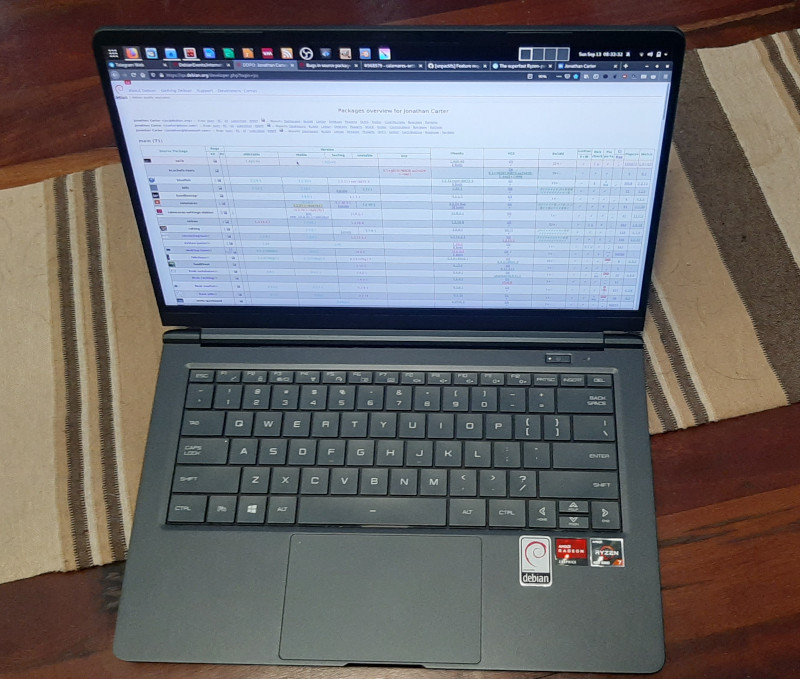
I used the Debian netinstall image to install, and installation was just another uneventful and boring Debian installation (yay!). Unfortunately it needs the firmware-iwlwifi and firmare-amd-graphics packages for the binary blobs that drives the wifi card and GPU. At least it works flawlessly and you don t need an additional non-free display driver (as is the case with NVidia GPUs). I haven t tested the graphics extensively yet, but desktop graphics performance is very snappy. This GPU also does fancy stuff like VP8/VP9 encoding/decoding, so I m curious to see how well it does next time I have to encode some videos. The wifi upgrade was nice for copying files over. My old laptop maxed out at 300Mbps, this one connects to my home network between 800-1000Mbps. At this speed I don t bother connecting via cable at home. I read on Twitter that Tuxedo Computers thinks that it s possible to bring Coreboot to this device. That would be yet another plus for this machine. I ll try to answer some of my own questions about this device that I had before, that other people in the Debian community might also have if they re interested in this device. Since many of us are familiar with the ThinkPad X200 series of laptops, I ll compare it a bit to my X250, and also a little to the X13 that I was considering before. Initially, I was a bit hesitant about the 14 form factor, since I really like the portability of the 12.5 ThinkPad. But because the screen bezel is a lot smaller, the Wootbook (that just rolls off the tongue a lot better than the PF4NU1F ) is just slightly wider than the X250. It weighs in at 1.1KG instead of the 1.38KG of the X250. It s also thinner, so even though it has a larger display, it actually feels a lot more portable. Here s a picture of my X250 on top of the Wootbook, you can see a few mm of Wootbook sticking out to the right.
Card Reader One thing that I overlooked when ordering this laptop was that it doesn t have an SD card reader. I see that some variations have them, like on this Slimbook review. It s not a deal-breaker for me, I have a USB card reader that s very light and that I ll just keep in my backpack. But if you re ordering one of these machines and have some choice, it might be something to look out for if it s something you care about. Keyboard/Touchpad On to the keyboard. This keyboard isn t quite as nice to type on as on the ThinkPad, but, it s not bad at all. I type on many different laptop keyboards and I would rank this keyboard very comfortably in the above average range. I ve been typing on it a lot over the last 3 days (including this blog post) and it started feeling natural very quickly and I m not distracted by it as much as I thought I would be transitioning from the ThinkPad or my mechanical desktop keyboard. In terms of layout, it s nice having an actual Insert button again. This is things normal users don t care about, but since I use mc (where insert selects files) this is a welcome return :). I also like that it doesn t have a Print Screen button at the bottom of my keyboard between alt and ctrl like the ThinkPad has. Unfortunately, it doesn t have dedicated pgup/pgdn buttons. I use those a lot in apps to switch between tabs. At leas the Fn button and the ctrl buttons are next to each other, so pressing those together with up and down to switch tabs isn t that horrible, but if I don t get used to it in another day or two I might do some remapping. The touchpad has en extra sensor-button on the top left corner that s used on Windows to temporarily disable the touchpad. I captured it s keyscan codes and it presses left control + keyscan code 93. The airplane mode, volume and brightness buttons work fine. I do miss the ThinkPad trackpoint. It s great especially in confined spaces, your hands don t have to move far from the keyboard for quick pointer operations and it s nice for doing something quick and accurate. I painted a bit in Krita last night, and agree with other reviewers that the touchpad could do with just a bit more resolution. I was initially disturbed when I noticed that my physical touchpad buttons were gone, but you get right-click by tapping with two fingers, and middle click with tapping 3 fingers. Not quite as efficient as having the real buttons, but it actually works ok. For the most part, this keyboard and touchpad is completely adequate. Only time will tell whether the keyboard still works fine in a few years from now, but I really have no serious complaints about it. Display The X250 had a brightness of 172 nits. That s not very bright, I think the X250 has about the dimmest display in the ThinkPad X200 range. This hasn t been a problem for me until recently, my eyes are very photo-sensitive so most of the time I use it at reduced brightness anyway, but since I ve been working from home a lot recently, it s nice to sometimes sit outside and work, especially now that it s spring time and we have some nice days. At full brightness, I can t see much on my X250 outside. The Wootbook is significantly brighter even (even at less than 50% brightness), although I couldn t find the exact specification for its brightness online. Ports The Wootbook has 3x USB type A ports and 1x USB type C port. That s already quite luxurious for a compact laptop. As I mentioned in the specs above, it also has a full-sized ethernet socket. On the new X13 (the new ThinkPad machine I was considering), you only get 2x USB type A ports and if you want ethernet, you have to buy an additional adapter that s quite expensive especially considering that it s just a cable adapter (I don t think it contains any electronics). It has one hdmi port. Initially I was a bit concerned at lack of displayport (which my X250 has), but with an adapter it s possible to convert the USB-C port to displayport and it seems like it s possible to connect up to 3 external displays without using something weird like display over usual USB3.

Overall remarks When maxing out the CPU, the fan is louder than on a ThinkPad, I definitely noticed it while compiling the zfs-dkms module. On the plus side, that happened incredibly fast. Comparing the Wootbook to my X250, the biggest downfall it has is really it s pointing device. It doesn t have a trackpad and the touchpad is ok and completely usable, but not great. I use my laptop on a desk most of the time so using an external mouse will mostly solve that. If money were no object, I would definitely choose a maxed out ThinkPad for its superior keyboard/mouse, but the X13 configured with 32GB of RAM and 128GB of SSD retails for just about double of what I paid for this machine. It doesn t seem like you can really buy the perfect laptop no matter how much money you want to spend, there s some compromise no matter what you end up choosing, but this machine packs quite a punch, especially for its price, and so far I m very happy with my purchase and the incredible performance it provides. I m also very glad that Wootware went with the gray/black colours, I prefer that by far to the white and silver variants. It s also the first laptop I ve had since 2006 that didn t come with Windows on it. The Wootbook is also comfortable/sturdy enough to carry with one hand while open. The ThinkPads are great like this and with many other brands this just feels unsafe. I don t feel as confident carrying it by it s display because it s very thin (I know, I shouldn t be doing that with the ThinkPads either, but I ve been doing that for years without a problem :) ). There s also a post on Reddit that tracks where you can buy these machines from various vendors all over the world.

Russell Coker: Setting Up a Dell T710 Server with DRAC6

I ve just got a Dell T710 server for LUV and I ve been playing with the configuration options. Here s a list of what I ve done and recommendations on how to do things. I decided not to try to write a step by step guide to doing stuff as the situation doesn t work for that. I think that a list of how things are broken and what to avoid is more useful. BIOS Firstly with a Dell server you can upgrade the BIOS from a Linux root shell. Generally when a server is deployed you won t want to upgrade the BIOS (why risk breaking something when it s working), so before deployment you probably should install the latest version. Dell provides a shell script with encoded binaries in it that you can just download and run, it s ugly but it works. The process of loading the firmware takes a long time (a few minutes) with no progress reports, so best to plug both PSUs in and leave it alone. At the end of loading the firmware a hard reboot will be performed, so upgrading your distribution while doing the install is a bad idea (Debian is designed to not lose data in this situation so it s not too bad). IDRAC IDRAC is the Integrated Dell Remote Access Controller. By default it will listen on all Ethernet ports, get an IP address via DHCP (using a different Ethernet hardware address to the interface the OS sees), and allow connections. Configuring it to be restrictive as to which ports it listens on may be a good idea (the T710 had 4 ports built in so having one reserved for management is usually OK). You need to configure a username and password for IDRAC that has administrative access in the BIOS configuration. Web Interface By default IDRAC will run a web server on the IP address it gets from DHCP, you can connect to that from any web browser that allows ignoring invalid SSL keys. Then you can use the username and password configured in the BIOS to login. IDRAC 6 on the PowerEdge T710 recommends IE 6. To get a ssl cert that matches the name you want to use (and doesn t give browser errors) you have to generate a CSR (Certificate Signing Request) on the DRAC, the only field that matters is the CN (Common Name), the rest have to be something that Letsencrypt will accept. Certbot has the option --config-dir /etc/letsencrypt-drac to specify an alternate config directory, the SSL key for DRAC should be entirely separate from the SSL key for other stuff. Then use the --csr option to specify the path of the CSR file. When you run letsencrypt the file name of the output file you want will be in the format *_chain.pem . You then have to upload that to IDRAC to have it used. This is a major pain for the lifetime of letsencrypt certificates. Hopefully a more recent version of IDRAC has Certbot built in. When you access RAC via ssh (see below) you can run the command racadm sslcsrgen to generate a CSR that can be used by certbot. So it s probably possible to write expect scripts to get that CSR, run certbot, and then put the ssl certificate back. I don t expect to use IDRAC often enough to make it worth the effort (I can tell my browser to ignore an outdated certificate), but if I had dozens of Dells I d script it. SSH The web interface allows configuring ssh access which I strongly recommend doing. You can configure ssh access via password or via ssh public key. For ssh access set TERM=vt100 on the host to enable backspace as ^H. Something like TERM=vt100 ssh root@drac . Note that changing certain other settings in IDRAC such as enabling Smartcard support will disable ssh access. There is a limit to the number of open sessions for managing IDRAC, when you ssh to the IDRAC you can run racadm getssninfo to get a list of sessions and racadm closessn -i NUM to close a session. The closessn command takes a -a option to close all sessions but that just gives an error saying that you can t close your own session because of programmer stupidity. The IDRAC web interface also has an option to close sessions. If you get to the limits of both ssh and web sessions due to network issues then you presumably have a problem. I couldn t find any documentation on how the ssh host key is generated. I Googled for the key fingerprint and didn t get a match so there s a reasonable chance that it s unique to the server (please comment if you know more about this). Don t Use Graphical Console The T710 is an older server and runs IDRAC6 (IDRAC9 is the current version). The Java based graphical console access doesn t work with recent versions of Java. The Debian package icedtea-netx has has the javaws command for running the .jnlp command for the console, by default the web browser won t run this, you download the .jnlp file and pass that as the first parameter to the javaws program which then downloads a bunch of Java classes from the IDRAC to run. One error I got with Java 11 was Exception in thread Timer-0 java.util.ServiceConfigurationError: java.nio.charset.spi.CharsetProvider: Provider sun.nio.cs.ext.ExtendedCharsets could not be instantiated , Google didn t turn up any solutions to this. Java 8 didn t have that problem but had a connection failed error that some people reported as being related to the SSL key, but replacing the SSL key for the web server didn t help. The suggestion of running a VM with an old web browser to access IDRAC didn t appeal. So I gave up on this. Presumably a Windows VM running IE6 would work OK for this. Serial Console Fortunately IDRAC supports a serial console. Here s a page summarising Serial console setup for DRAC [1]. Once you have done that put console=tty0 console=ttyS1,115200n8 on the kernel command line and Linux will send the console output to the virtual serial port. To access the serial console from remote you can ssh in and run the RAC command console com2 (there is no option for using a different com port). The serial port seems to be unavailable through the web interface. If I was supporting many Dell systems I d probably setup a ssh to JavaScript gateway to provide a web based console access. It s disappointing that Dell didn t include this. If you disconnect from an active ssh serial console then the RAC might keep the port locked, then any future attempts to connect to it will give the following error:
/admin1-> console com2
console: Serial Device 2 is currently in use
So far the only way I ve discovered to get console access again after that is the command racadm racreset . If anyone knows of a better way please let me know. As an aside having racreset being so close to racresetcfg (which resets the configuration to default and requires a hard reboot to configure it again) seems like a really bad idea. Host Based Management
deb http://linux.dell.com/repo/community/ubuntu xenial openmanage
The above apt sources.list line allows installing Dell management utilities (Xenial is old but they work on Debian/Buster). Probably the packages srvadmin-storageservices-cli and srvadmin-omacore will drag in enough dependencies to get it going. Here are some useful commands:
# show hardware event log
omreport system esmlog
# show hardware alert log
omreport system alertlog
# give summary of system information
omreport system summary
# show versions of firmware that can be updated
omreport system version
# get chassis temp
omreport chassis temps
# show physical disk details on controller 0
omreport storage pdisk controller=0
RAID Control The RAID controller is known as PERC (PowerEdge Raid Controller), the Dell web site has an rpm package of the perccli tool to manage the RAID from Linux. This is statically linked and appears to have different versions of libraries used to make it. The command perccli show gives an overview of the configuration, but the command perccli /c0 show to give detailed information on controller 0 SEGVs and the kernel logs a vsyscall attempted with vsyscall=none message. Here s an overview of the vsyscall enmulation issue [2]. Basically I could add vsyscall=emulate to the kernel command line and slightly reduce security for the system to allow system calls from perccli that are called from old libc code to work, or I could run code from a dubious source as root. Some versions of IDRAC have a racadm raid command that can be run from a ssh session to perform RAID administration remotely, mine doesn t have that. As an aside the help for the RAC system doesn t list all commands and the Dell documentation is difficult to find so blog posts from other sysadmins is the best source of information. I have configured IDRAC to have all of the BIOS output go to the virtual serial console over ssh so I can see the BIOS prompt me for PERC administration but it didn t accept my key presses when I tried to do so. In any case this requires downtime and I d like to be able to change hard drives without rebooting. I found vsyscall_trace on Github [3], it uses the ptrace interface to emulate vsyscall on a per process basis. You just run vsyscall_trace perccli and it works! Thanks Geoffrey Thomas for writing this! Here are some perccli commands:
# show overview
perccli show
# help on adding a vd (RAID)
perccli /c0 add help
# show controller 0 details
perccli /c0 show
# add a vd (RAID) of level RAID0 (r0) with the drive 32:0 (enclosure:slot from above command)
perccli /c0 add vd r0 drives=32:0
When a disk is added to a PERC controller about 525MB of space is used at the end for RAID metadata. So when you create a RAID-0 with a single device as in the above example all disk data is preserved by default except for the last 525MB. I have tested this by running a BTRFS scrub on a disk from another system after making it into a RAID-0 on the PERC.

12 September 2020

Ryan Kavanagh: Configuring OpenIKED VPNs for Road Warriors

A few weeks ago I configured a road warrior VPN setup. The remote end is on a VPS running OpenBSD and OpenIKED, the VPN is an IKEv2 VPN using x509 authentication, and the local end is StrongSwan. I also configured an IKEv2 VPN between my VPSs. Here are the notes for how to do so. In all cases, to use x509 authentication, you will need to generate a bunch of certificates and keys:
  • a CA certificate
  • a key/certificate pair for each client
Fortunately, OpenIKED provides the ikectl utility to help you do so. Before going any further, you might find it useful to edit /etc/ssl/ikeca.cnf to set some reasonable defaults for your certificates. Begin by creating and installing a CA certificate:
# ikectl ca vpn create
# ikectl ca vpn install
For simplicity, I am going to assume that the you are managing your CA on the same host as one of the hosts that you want to configure for the VPN. If not, see the bit about exporting certificates at the beginning of the section on persistent host-host VPNs. Create and install a key/certificate pair for your server. Suppose for example your first server is called server1.example.org:
# ikectl ca vpn certificate server1.example.org create
# ikectl ca vpn certificate server1.example.org install

Persistent host-host VPNs For each other server that you want to use, you need to also create a key/certificate pair on the same host as the CA certificate, and then copy them over to the other server. Assuming the other server is called server2.example.org:
# ikectl ca vpn certificate server2.example.org create
# ikectl ca vpn certificate server2.example.org export
This last command will produce a tarball server2.example.org.tgz. Copy it over to server2.example.org and install it:
# tar -C /etc/iked -xzpvf server2.example.org.tgz
Next, it is time to configure iked. To do so, you will need to find some information about the certificates you just generated. On the host with the CA, run
$ cat /etc/ssl/vpn/index.txt
V       210825142056Z           01      unknown /C=US/ST=Pennsylvania/L=Pittsburgh/CN=server1.example.org/emailAddress=rak@example.org
V       210825142208Z           02      unknown /C=US/ST=Pennsylvania/L=Pittsburgh/CN=server2.example.org/emailAddress=rak@example.org
Pick one of the two hosts to play the active role (in this case, server1.example.org). Using the information you gleaned from index.txt, add the following to /etc/iked.conf, filling in the srcid and dstid fields appropriately.
ikev2 'server1_server2_active' active esp from server1.example.org to server2.example.org \
	local server1.example.org peer server2.example.org \
	srcid '/C=US/ST=Pennsylvania/L=Pittsburgh/CN=server1.example.org/emailAddress=rak@example.org' \
	dstid '/C=US/ST=Pennsylvania/L=Pittsburgh/CN=server2.example.org/emailAddress=rak@example.org'
On the other host, add the following to /etc/iked.conf
ikev2 'server2_server1_passive' passive esp from server2.example.org to server1.example.org \
	local server2.example.org peer server1.example.org \
	srcid '/C=US/ST=Pennsylvania/L=Pittsburgh/CN=server2.example.org/emailAddress=rak@example.org' \
	dstid '/C=US/ST=Pennsylvania/L=Pittsburgh/CN=server1.example.org/emailAddress=rak@example.org'
Note that the names 'server1_server2_active' and 'server2_server1_passive' in the two stanzas do not matter and can be omitted. Reload iked on both hosts:
# ikectl reload
If everything worked out, you should see the negotiated security associations (SAs) in the output of
# ikectl show sa
On OpenBSD, you should also see some output on success or errors in the file /var/log/daemon.

For a road warrior Add the following to /etc/iked.conf on the remote end:
ikev2 'responder_x509' passive esp \
	from 0.0.0.0/0 to 10.0.1.0/24 \
	local server1.example.org peer any \
	srcid server1.example.org \
	config address 10.0.1.0/24 \
	config name-server 10.0.1.1 \
	tag "ROADW"
Configure or omit the address range and the name-server configurations to suit your needs. See iked.conf(5) for details. Reload iked:
# ikectl reload
If you are on OpenBSD and want the remote end to have an IP address, add the following to /etc/hostname.vether0, again configuring the address to suit your needs:
inet 10.0.1.1 255.255.255.0
Put the interface up:
# ifconfig vether0 up
Now create a client certificate for authentication. In my case, my road-warrior client was client.example.org:
# ikectl ca vpn certificate client.example.org create
# ikectl ca vpn certificate client.example.org export
Copy client.example.org.tgz to client and run
# tar -C /etc/ipsec.d/ -xzf client.example.org.tgz -- \
	./private/client.example.org.key \
	./certs/client.example.org.crt ./ca/ca.crt
Install StrongSwan and add the following to /etc/ipsec.conf, configuring appropriately:
ca example.org
  cacert=ca.crt
  auto=add
conn server1
  keyexchange=ikev2
  right=server1.example.org
  rightid=%server1.example.org
  rightsubnet=0.0.0.0/0
  rightauth=pubkey
  leftsourceip=%config
  leftauth=pubkey
  leftcert=client.example.org.crt
  auto=route
Add the following to /etc/ipsec.secrets:
# space is important
server1.example.org : RSA client.example.org.key
Restart StrongSwan, put the connection up, and check its status:
# ipsec restart
# ipsec up server1
# ipsec status
That should be it. Sources:

Ryan Kavanagh: Configuring OpenIKED VPNs for StrongSwan Clients

A few weeks ago I configured a road warrior VPN setup. The remote end is on a VPS running OpenBSD and OpenIKED, the VPN is an IKEv2 VPN using x509 authentication, and the local end is StrongSwan. I also configured an IKEv2 VPN between my VPSs. Here are the notes for how to do so. In all cases, to use x509 authentication, you will need to generate a bunch of certificates and keys:
  • a CA certificate
  • a key/certificate pair for each client
Fortunately, OpenIKED provides the ikectl utility to help you do so. Before going any further, you might find it useful to edit /etc/ssl/ikeca.cnf to set some reasonable defaults for your certificates. Begin by creating and installing a CA certificate:
# ikectl ca vpn create
# ikectl ca vpn install
For simplicity, I am going to assume that the you are managing your CA on the same host as one of the hosts that you want to configure for the VPN. If not, see the bit about exporting certificates at the beginning of the section on persistent host-host VPNs. Create and install a key/certificate pair for your server. Suppose for example your first server is called server1.example.org:
# ikectl ca vpn certificate server1.example.org create
# ikectl ca vpn certificate server1.example.org install

Persistent host-host VPNs For each other server that you want to use, you need to also create a key/certificate pair on the same host as the CA certificate, and then copy them over to the other server. Assuming the other server is called server2.example.org:
# ikectl ca vpn certificate server2.example.org create
# ikectl ca vpn certificate server2.example.org export
This last command will produce a tarball server2.example.org.tgz. Copy it over to server2.example.org and install it:
# tar -C /etc/iked -xzpvf server2.example.org.tgz
Next, it is time to configure iked. To do so, you will need to find some information about the certificates you just generated. On the host with the CA, run
$ cat /etc/ssl/vpn/index.txt
V       210825142056Z           01      unknown /C=US/ST=Pennsylvania/L=Pittsburgh/CN=server1.example.org/emailAddress=rak@example.org
V       210825142208Z           02      unknown /C=US/ST=Pennsylvania/L=Pittsburgh/CN=server2.example.org/emailAddress=rak@example.org
Pick one of the two hosts to play the active role (in this case, server1.example.org). Using the information you gleaned from index.txt, add the following to /etc/iked.conf, filling in the srcid and dstid fields appropriately.
ikev2 'server1_server2_active' active esp from server1.example.org to server2.example.org \
	local server1.example.org peer server2.example.org \
	srcid '/C=US/ST=Pennsylvania/L=Pittsburgh/CN=server1.example.org/emailAddress=rak@example.org' \
	dstid '/C=US/ST=Pennsylvania/L=Pittsburgh/CN=server2.example.org/emailAddress=rak@example.org'
On the other host, add the following to /etc/iked.conf
ikev2 'server2_server1_passive' passive esp from server2.example.org to server1.example.org \
	local server2.example.org peer server1.example.org \
	srcid '/C=US/ST=Pennsylvania/L=Pittsburgh/CN=server2.example.org/emailAddress=rak@example.org' \
	dstid '/C=US/ST=Pennsylvania/L=Pittsburgh/CN=server1.example.org/emailAddress=rak@example.org'
Note that the names 'server1_server2_active' and 'server2_server1_passive' in the two stanzas do not matter and can be omitted. Reload iked on both hosts:
# ikectl reload
If everything worked out, you should see the negotiated security associations (SAs) in the output of
# ikectl show sa
On OpenBSD, you should also see some output on success or errors in the file /var/log/daemon.

For a road warrior Add the following to /etc/iked.conf on the remote end:
ikev2 'responder_x509' passive esp \
	from 0.0.0.0/0 to 10.0.1.0/24 \
	local server1.example.org peer any \
	srcid server1.example.org \
	config address 10.0.1.0/24 \
	config name-server 10.0.1.1 \
	tag "ROADW"
Configure or omit the address range and the name-server configurations to suit your needs. See iked.conf(5) for details. Reload iked:
# ikectl reload
If you are on OpenBSD and want the remote end to have an IP address, add the following to /etc/hostname.vether0, again configuring the address to suit your needs:
inet 10.0.1.1 255.255.255.0
Put the interface up:
# ifconfig vether0 up
Now create a client certificate for authentication. In my case, my road-warrior client was client.example.org:
# ikectl ca vpn certificate client.example.org create
# ikectl ca vpn certificate client.example.org export
Copy client.example.org.tgz to client and run
# tar -C /etc/ipsec.d/ -xzf client.example.org.tgz -- \
	./private/client.example.org.key \
	./certs/client.example.org.crt ./ca/ca.crt
Install StrongSwan and add the following to /etc/ipsec.conf, configuring appropriately:
ca example.org
  cacert=ca.crt
  auto=add
conn server1
  keyexchange=ikev2
  right=server1.example.org
  rightid=%server1.example.org
  rightsubnet=0.0.0.0/0
  rightauth=pubkey
  leftsourceip=%config
  leftauth=pubkey
  leftcert=client.example.org.crt
  auto=route
Add the following to /etc/ipsec.secrets:
# space is important
server1.example.org : RSA client.example.org.key
Restart StrongSwan, put the connection up, and check its status:
# ipsec restart
# ipsec up server1
# ipsec status
That should be it. Sources:

9 September 2020

Reproducible Builds: Reproducible Builds in August 2020

Welcome to the August 2020 report from the Reproducible Builds project. In our monthly reports, we summarise the things that we have been up to over the past month. The motivation behind the Reproducible Builds effort is to ensure no flaws have been introduced from the original free software source code to the pre-compiled binaries we install on our systems. If you re interested in contributing to the project, please visit our main website.


This month, Jennifer Helsby launched a new reproduciblewheels.com website to address the lack of reproducibility of Python wheels. To quote Jennifer s accompanying explanatory blog post:
One hiccup we ve encountered in SecureDrop development is that not all Python wheels can be built reproducibly. We ship multiple (Python) projects in Debian packages, with Python dependencies included in those packages as wheels. In order for our Debian packages to be reproducible, we need that wheel build process to also be reproducible
Parallel to this, transparencylog.com was also launched, a service that verifies the contents of URLs against a publicly recorded cryptographic log. It keeps an append-only log of the cryptographic digests of all URLs it has seen. (GitHub repo) On 18th September, Bernhard M. Wiedemann will give a presentation in German, titled Wie reproducible builds Software sicherer machen ( How reproducible builds make software more secure ) at the Internet Security Digital Days 2020 conference.

Reproducible builds at DebConf20 There were a number of talks at the recent online-only DebConf20 conference on the topic of reproducible builds. Holger gave a talk titled Reproducing Bullseye in practice , focusing on independently verifying that the binaries distributed from ftp.debian.org are made from their claimed sources. It also served as a general update on the status of reproducible builds within Debian. The video (145 MB) and slides are available. There were also a number of other talks that involved Reproducible Builds too. For example, the Malayalam language mini-conference had a talk titled , ? ( I want to join Debian, what should I do? ) presented by Praveen Arimbrathodiyil, the Clojure Packaging Team BoF session led by Elana Hashman, as well as Where is Salsa CI right now? that was on the topic of Salsa, the collaborative development server that Debian uses to provide the necessary tools for package maintainers, packaging teams and so on. Jonathan Bustillos (Jathan) also gave a talk in Spanish titled Un camino verificable desde el origen hasta el binario ( A verifiable path from source to binary ). (Video, 88MB)

Development work After many years of development work, the compiler for the Rust programming language now generates reproducible binary code. This generated some general discussion on Reddit on the topic of reproducibility in general. Paul Spooren posted a request for comments to OpenWrt s openwrt-devel mailing list asking for clarification on when to raise the PKG_RELEASE identifier of a package. This is needed in order to successfully perform rebuilds in a reproducible builds context. In openSUSE, Bernhard M. Wiedemann published his monthly Reproducible Builds status update. Chris Lamb provided some comments and pointers on an upstream issue regarding the reproducibility of a Snap / SquashFS archive file. [ ]

Debian Holger Levsen identified that a large number of Debian .buildinfo build certificates have been tainted on the official Debian build servers, as these environments have files underneath the /usr/local/sbin directory [ ]. He also filed against bug for debrebuild after spotting that it can fail to download packages from snapshot.debian.org [ ]. This month, several issues were uncovered (or assisted) due to the efforts of reproducible builds. For instance, Debian bug #968710 was filed by Simon McVittie, which describes a problem with detached debug symbol files (required to generate a traceback) that is unlikely to have been discovered without reproducible builds. In addition, Jelmer Vernooij called attention that the new Debian Janitor tool is using the property of reproducibility (as well as diffoscope when applying archive-wide changes to Debian:
New merge proposals also include a link to the diffoscope diff between a vanilla build and the build with changes. Unfortunately these can be a bit noisy for packages that are not reproducible yet, due to the difference in build environment between the two builds. [ ]
56 reviews of Debian packages were added, 38 were updated and 24 were removed this month adding to our knowledge about identified issues. Specifically, Chris Lamb added and categorised the nondeterministic_version_generated_by_python_param and the lessc_nondeterministic_keys toolchain issues. [ ][ ] Holger Levsen sponsored Lukas Puehringer s upload of the python-securesystemslib pacage, which is a dependency of in-toto, a framework to secure the integrity of software supply chains. [ ] Lastly, Chris Lamb further refined his merge request against the debian-installer component to allow all arguments from sources.list files (such as [check-valid-until=no]) in order that we can test the reproducibility of the installer images on the Reproducible Builds own testing infrastructure and sent a ping to the team that maintains that code.

Upstream patches The Reproducible Builds project detects, dissects and attempts to fix as many currently-unreproducible packages as possible. We endeavour to send all of our patches upstream where appropriate. This month, we wrote a large number of these patches, including:

diffoscope diffoscope is our in-depth and content-aware diff utility that can not only locate and diagnose reproducibility issues, it provides human-readable diffs of all kinds. In August, Chris Lamb made the following changes to diffoscope, including preparing and uploading versions 155, 156, 157 and 158 to Debian:
  • New features:
    • Support extracting data of PGP signed data. (#214)
    • Try files named .pgp against pgpdump(1) to determine whether they are Pretty Good Privacy (PGP) files. (#211)
    • Support multiple options for all file extension matching. [ ]
  • Bug fixes:
    • Don t raise an exception when we encounter XML files with <!ENTITY> declarations inside the Document Type Definition (DTD), or when a DTD or entity references an external resource. (#212)
    • pgpdump(1) can successfully parse some binary files, so check that the parsed output contains something sensible before accepting it. [ ]
    • Temporarily drop gnumeric from the Debian build-dependencies as it has been removed from the testing distribution. (#968742)
    • Correctly use fallback_recognises to prevent matching .xsb binary XML files.
    • Correct identify signed PGP files as file(1) returns data . (#211)
  • Logging improvements:
    • Emit a message when ppudump version does not match our file header. [ ]
    • Don t use Python s repr(object) output in Calling external command messages. [ ]
    • Include the filename in the not identified by any comparator message. [ ]
  • Codebase improvements:
    • Bump Python requirement from 3.6 to 3.7. Most distributions are either shipping with Python 3.5 or 3.7, so supporting 3.6 is not only somewhat unnecessary but also cumbersome to test locally. [ ]
    • Drop some unused imports [ ], drop an unnecessary dictionary comprehensions [ ] and some unnecessary control flow [ ].
    • Correct typo of output in a comment. [ ]
  • Release process:
    • Move generation of debian/tests/control to an external script. [ ]
    • Add some URLs for the site that will appear on PyPI.org. [ ]
    • Update author and author email in setup.py for PyPI.org and similar. [ ]
  • Testsuite improvements:
    • Update PPU tests for compatibility with Free Pascal versions 3.2.0 or greater. (#968124)
    • Mark that our identification test for .ppu files requires ppudump version 3.2.0 or higher. [ ]
    • Add an assert_diff helper that loads and compares a fixture output. [ ][ ][ ][ ]
  • Misc:
In addition, Mattia Rizzolo documented in setup.py that diffoscope works with Python version 3.8 [ ] and Frazer Clews applied some Pylint suggestions [ ] and removed some deprecated methods [ ].

Website This month, Chris Lamb updated the main Reproducible Builds website and documentation to:
  • Clarify & fix a few entries on the who page [ ][ ] and ensure that images do not get to large on some viewports [ ].
  • Clarify use of a pronoun re. Conservancy. [ ]
  • Use View all our monthly reports over View all monthly reports . [ ]
  • Move a is a suffix out of the link target on the SOURCE_DATE_EPOCH age. [ ]
In addition, Javier Jard n added the freedesktop-sdk project [ ] and Kushal Das added SecureDrop project [ ] to our projects page. Lastly, Michael P hn added internationalisation and translation support with help from Hans-Christoph Steiner [ ].

Testing framework The Reproducible Builds project operate a Jenkins-based testing framework to power tests.reproducible-builds.org. This month, Holger Levsen made the following changes:
  • System health checks:
    • Improve explanation how the status and scores are calculated. [ ][ ]
    • Update and condense view of detected issues. [ ][ ]
    • Query the canonical configuration file to determine whether a job is disabled instead of duplicating/hardcoding this. [ ]
    • Detect several problems when updating the status of reporting-oriented metapackage sets. [ ]
    • Detect when diffoscope is not installable [ ] and failures in DNS resolution [ ].
  • Debian:
    • Update the URL to the Debian security team bug tracker s Git repository. [ ]
    • Reschedule the unstable and bullseye distributions often for the arm64 architecture. [ ]
    • Schedule buster less often for armhf. [ ][ ][ ]
    • Force the build of certain packages in the work-in-progress package rebuilder. [ ][ ]
    • Only update the stretch and buster base build images when necessary. [ ]
  • Other distributions:
    • For F-Droid, trigger jobs by commits, not by a timer. [ ]
    • Disable the Archlinux HTML page generation job as it has never worked. [ ]
    • Disable the alternative OpenWrt rebuilder jobs. [ ]
  • Misc;
Many other changes were made too, including:
  • Chris Lamb:
    • Use <pre> HTML tags when dumping fixed-width debugging data in the self-serve package scheduler. [ ]
  • Mattia Rizzolo:
  • Vagrant Cascadian:
    • Mark that the u-boot Universal Boot Loader should not build architecture independent packages on the arm64 architecture anymore. [ ]
Finally, build node maintenance was performed by Holger Levsen [ ], Mattia Rizzolo [ ][ ] and Vagrant Cascadian [ ][ ][ ][ ]

Mailing list On our mailing list this month, Leo Wandersleb sent a message to the list after he was wondering how to expand his WalletScrutiny.com project (which aims to improve the security of Bitcoin wallets) from Android wallets to also monitor Linux wallets as well:
If you think you know how to spread the word about reproducibility in the context of Bitcoin wallets through WalletScrutiny, your contributions are highly welcome on this PR [ ]
Julien Lepiller posted to the list linking to a blog post by Tavis Ormandy titled You don t need reproducible builds. Morten Linderud (foxboron) responded with a clear rebuttal that Tavis was only considering the narrow use-case of proprietary vendors and closed-source software. He additionally noted that the criticism that reproducible builds cannot prevent against backdoors being deliberately introduced into the upstream source ( bugdoors ) are decidedly (and deliberately) outside the scope of reproducible builds to begin with. Chris Lamb included the Reproducible Builds mailing list in a wider discussion regarding a tentative proposal to include .buildinfo files in .deb packages, adding his remarks regarding requiring a custom tool in order to determine whether generated build artifacts are identical in a reproducible context. [ ] Jonathan Bustillos (Jathan) posted a quick email to the list requesting whether there was a list of To do tasks in Reproducible Builds. Lastly, Chris Lamb responded at length to a query regarding the status of reproducible builds for Debian ISO or installation images. He noted that most of the technical work has been performed but there are at least four issues until they can be generally advertised as such . He pointed that the privacy-oriented Tails operation system, which is based directly on Debian, has had reproducible builds for a number of years now. [ ]

If you are interested in contributing to the Reproducible Builds project, please visit our Contribute page on our website. However, you can get in touch with us via:

Gunnar Wolf: RPi 4 + 8GB, Finally, USB-functional!

So Finally, kernel 5.8 entered the Debian Unstable repositories. This means that I got my Raspberry image from their usual location and was able to type the following, using only my old trusty USB keyboard: So finally, the greatest and meanest Raspberry is fully supported with a pure Debian image! (only tarnished by the nonfree raspi-firmware package. Oh, in case someone was still wondering The images generated follow the stable release. Only the kernel and firmware are installed from unstable. If / when kernel 5.8 enters Backports, I will reduce the noise of adding a different suit to the sources.list.

8 September 2020

Sven Hoexter: Cloudflare Bot Management, MITM Boxes and TLS 1.3

This is just a "warn your brothers" post for those who use Cloudflare Bot Management, and have customers which use MITM boxes to break up TLS 1.3 connections. Be aware that right now some heuristic rules in the Cloudflare Bot Management score TLS 1.3 requests made by some MITM boxes with 1 - which equals "we're 99.99% sure that this is none human browser traffic". While technically correct - the TLS connection hitting the Cloudflare Edge node is not established by a browser - that does not help your customer if you block those requests. If you do something like blocking requests with a BM score of 1 at the Cloudflare Edge, you might want to reconsider that at the moment and sent a captcha challenge instead. While that is not a lot nicer, and still pisses people off, you might find a balance there between protecting yourself and still having some customers. I've a confirmation for this happening with Cisco WSA, but it's likely to be also the case with other vendors. Breaking up TLS 1.2 seems to be stealthy enough in those appliances that it's not detected, so this issue creeps in with more enterprises rolling out modern browser. You can now enter youself here a rant about how bad the client-server internet of 2020 is, and how bad it is that some of us rely on Cloudflare, and that they have accumulated a way too big market share. But the world is as it is. :(

6 September 2020

Ben Armstrong: Dronefly relicensed under copyleft licenses

To ensure Dronefly always remains free, the Dronefly project has been relicensed under two copyleft licenses. Read the license change and learn more about copyleft at these links. I was prompted to make this change after a recent incident in the Red DiscordBot development community that made me reconsider my prior position that the liberal MIT license was best for our project. While on the face of it, making your license as liberal as possible might seem like the most generous and hassle-free way to license any project, I was shocked into the realization that its liberality was also its fatal flaw: all is well and good so long as everyone is being cooperative, but it does not afford any protection to developers or users should things suddenly go sideways in how a project is run. A copyleft license is the best way to avoid such issues. In this incident a sad story of conflict between developers I respect on both sides of the rift, and owe a debt to for what they ve taught me three cogs we had come to depend on suddenly stopped being viable for us to use due to changes to the license & the code. Effectively, those cogs became unsupported and unsupportable. To avoid any such future disaster with the Dronefly project, I started shopping for a new license that would protect developers and users alike from similarly losing support, or losing control of their contributions. I owe thanks to Dale Floer, a team member who early on advised me the AGPL might be a better fit, and later was helpful in selecting the doc license and encouraging me to follow through. We ran the new licenses by each contributor and arrived at this consensus: the AGPL is best suited for our server-based code, and CC-BY-SA is best suited for our documentation. The relicensing was made official this morning. On Discord platform alternatives You might well question what I, a Debian developer steeped in free software culture and otherwise in agreement with its principles, am doing encouraging a community to grow on the proprietary Discord platform! I have no satisfying answer to that. I explained when I introduced my project here some of the backstory, but that s more of an account of its beginnings than justification for it to continue on this platform. Honestly, all I can offer is a rather dissatisfying it seemed like the right thing to do at the time. Time will tell whether we could successfully move off of it to a freedom-respecting and privacy-respecting alternative chat platform that is both socially and technically viable to migrate to. That platform would ideally:
  • not be under the control of a single, central commercial entity running proprietary code, so their privacy is safeguarded, and they are protected from disaster, should it become unattractive to remain on the platform;
  • have a vibrant and supportive open source third party extension development community;
  • support our image-rich content and effortless sharing of URLs with previews automatically provided from the page s content (e.g. via OpenGraph tags);
  • be effortless to join regardless of what platform/device each user uses;
  • keep a history of messages so that future members joining the community can benefit from past conversations, and existing members can catch up on conversations they missed;
  • but above all else: be acceptable and compelling to the existing community to move over onto it.
I m intrigued by Matrix and wonder if it provides some or all of the above in its current form. Are you a developer writing bots for this platform? If so, I especially want to hear from you in the comments about your experience. Or in any case, if you ve been there before if you ve faced the same issue with your community and have a success story to share, I would love to hear from you.

3 September 2020

Molly de Blanc: All Animals Are Equal, Peter Singer

I recently read Disability Visibility, which opens with a piece by Harriet McBryde Johnson about debating Peter Singer. When I got my first reading for my first class and saw it was Peter Singer, I was dismayed because of his (heinous) stances in disability. I assumed All Animals Are Equal was one of Singer s pieces about animal rights. While I agree with many of the principles Singer discusses around animal rights, I feel as though his work on this front is significantly diminished by his work around disability. To put it simply, I can t take Peter Singer seriously. Because of this I had a lot of trouble reading All Animals Are Equal and taking it in good faith. I judged everything from his arguments to his writing harshly. While I don t disagree with his basic point (all animals have rights) I disagree with how he made the point and the argument supporting it. One of the things I was told to ask when reading any philosophy paper is What is the argument? or What are they trying to convince you of? In this case, you could frame the answer as: Animals have some of) the same rights people do. I think it would be more accurate though to frame it as All animals (including humans) have (some of) the same rights or even Humans are as equally worthy of consideration as animals are. I think when we usually talk about animal rights, we do it from a perspective of wanting to elevate animals to human status. From one perspective, I don t like this approach because I feel as though it turns the framing of rights as something you deserve or earn, privileges you get for being good enough. The point about rights is that they are inherent you get them because they are. The valuable thing I got out of All Animals Are Equal is that rights are not universal. When we talk about things like abortion, for example, we talk about the right to have an abortion. Singer asks whether people who cannot get pregnant have the right to an abortion? What he doesn t dig into is that the right to an abortion is really just an extension of bodily autonomy turning one facet of bodily autonomy into the legal right to have a medical procedure. I think this is worth thinking about more turning high level human rights into the mundane rights, and acknowledging that not everyone can or needs them.

2 September 2020

Norbert Preining: Multiple GPUs for graphics and deep learning

For long time I have been using a good old nvidia GeForce GTX 1050 for my display and deep learning needs. I reported a few times how to get Tensorflow running on Debian/Sid, see here and here. Later on I switched to AMD GPU in the hope that an open source approach to both GPU driver as well as deep learning (ROCm) would improve the general experience. Unfortunately it turned out that AMD GPUs are generally not ready for deep learning usage. The problems with AMD and ROCm are far and wide. First of all, it seems that for anything more complicated then simple stuff, AMD s flagship RX 5700(XT) and all GFX10 (Navi) based cards are not(!!!) supported in ROCm. Yes, you read correct AMD does not support 5700(XT) cards in the ROCm stack. Some simple stuff works, but nothing for real computations. Then, even IF they would support, ROCm as distributed is currently a huge pain in the butt. The source code is a huge mess, and building usable packages from it is probably possible, but quite painful (I am member of the ROCm packaging team in Debian, and have tried many hours). And the packages provided by AMD are not installable on Debian/sid due to library incompatibilities. So that left me with a bit a problem: for work I need to train quite some neural networks, do model selection, etc. Doing this on a CPU is a bit a burden. So at the end I decided to put the nVidia card back into the computer (well, after moving it to a bigger case but that is a different story to tell). Here are the steps I did to get both cards working for their respective target: AMD GPU for driving the console and X (and games!), and the nVidia card doing the deep learning stuff (tensorflow using the GPU). Starting point Starting point was a working AMD GPU installation. The AMD GPU is also the first GPU card (top slot) and thus the one that is used by the BIOS and the Linux console. If you want the video output on the second card you need to trick, and probably don t have console output, etc etc. So not a solution for me. Installing libcuda1 and the nvidia kernel drivers Next step was installing the libcuda1 package:

apt install libcuda1
This installs a lot of stuff, including the nvidia drivers, GLX libraries, alternatives setup, and update-glx tool and package. The kernel module should be built and installed automatically for your kernel. Installing CUDA Follow more or less the instructions here and do
wget -O- https://developer.download.nvidia.com/compute/cuda/repos/ubuntu1804/x86_64/7fa2af80.pub   sudo tee /etc/apt/trusted.gpg.d/nvidia-cuda.asc
echo "deb http://developer.download.nvidia.com/compute/cuda/repos/ubuntu1804/x86_64/ /"   sudo tee /etc/apt/sources.list.d/nvidia-cuda.list
sudo apt-get update
sudo apt-get install cuda-libraries-10-1
Warning! At the moment Tensorflow packages require CUDA 10.1, so don t install the 10.0 version. This might change in the future! This will install lots of libs into /usr/local/cuda-10.1 and add the respective directory to the ld.so path by creating a file /etc/ld.so.conf.d/cuda-10-1.conf. Install CUDA CuDNN One difficult to satisfy dependency are the CuDNN libraries. In our case we need the version 7 library for CUDA 10.1. To download these files one needs to have a NVIDIA developer account, which is quick and painless. After that go to the CuDNN page where one needs to select Archived releases and then Download cuDNN v7.N.N (xxxx NN, YYYY), for CUDA 10.1 and then cuDNN Runtime Library for Ubuntu18.04 (Deb). At the moment (as of today) this will download a file libcudnn7_7.6.5.32-1+cuda10.1_amd64.deb which needs to be installed with dpkg -i libcudnn7_7.6.5.32-1+cuda10.1_amd64.deb. Updating the GLX setting Here now comes the very interesting part one needs to set up the GLX libraries. Reading the output of update-glx --help and then the output of update-glx --list glx:
$ update-glx --help
update-glx is a wrapper around update-alternatives supporting only configuration
of the 'glx' and 'nvidia' alternatives. After updating the alternatives, it
takes care to trigger any follow-up actions that may be required to complete
the switch.
 
It can be used to switch between the main NVIDIA driver version and the legacy
drivers (eg: the 304 series, the 340 series, etc).
 
For users with Optimus-type laptops it can be used to enable running the discrete
GPU via bumblebee.
 
Usage: update-glx <command>
 
Commands:
  --auto <name>            switch the master link <name> to automatic mode.
  --display <name>         display information about the <name> group.
  --query <name>           machine parseable version of --display <name>.
  --list <name>            display all targets of the <name> group.
  --config <name>          show alternatives for the <name> group and ask the
                           user to select which one to use.
  --set <name> <path>      set <path> as alternative for <name>.
 
<name> is the master name for this link group.
  Only 'nvidia' and 'glx' are supported.
<path> is the location of one of the alternative target files.
  (e.g. /usr/lib/nvidia)
 
$ update-glx --list glx
/usr/lib/mesa-diverted
/usr/lib/nvidia
I was tempted into using
update-glx --config glx /usr/lib/mesa-diverted
because at the end the Mesa GLX libraries should be used to drive the display via the AMD GPU. Unfortunately, with this neither the nvidia kernel module was loaded, the nvidia persistenced couldn t run because the library libnvidia-cfg1 wasn t found (not sure it was needed at all ), and with that also no way to run tensorflow on GPU. So what I did I tried
update-glx --auto glx
(which is the same as update-glx --config glx /usr/lib/nvidia), and rebooted, and decided to check afterwards what is broken. To my big surprise, the AMD GPU still worked out of the box, including direct rendering, and the games I tried (Overload, Supraland via Wine) all worked without a hinch. Not that I really understand why the GLX libraries that are seemingly now in use are from nvidia but work the same (if anyone has an explanation, that would be great!), but since I haven t had any problems till now, I am content. Checking GPU usage in tensorflow Make sure that you remove tensorflow-rocm and reinstall tensorflow with GPU support:
pip3 uninstall tensorflow-rocm
pip3 install --upgrade tensorflow-gpu
After that a simple
$ python3 -c "import tensorflow as tf;print(tf.reduce_sum(tf.random.normal([1000, 1000])))"
....(lots of output)
2020-09-02 11:57:04.673096: I tensorflow/core/common_runtime/gpu/gpu_device.cc:1402] Created TensorFlow device (/job:localhost/replica:0/task:0/device:GPU:0 with 3581 MB memory) -> physical GPU (device: 0, name: GeForce GTX 1050 Ti, pci bus id: 0000:05:00.0, compute capability: 6.1)
tf.Tensor(1093.4915, shape=(), dtype=float32)
$
should indicate that the GPU is used by tensorflow! The R Keras package should also work out of the box and pick up the system-wide tensorflow which in turn picks the GPU, see this post for example code to run for tests. Conclusion All in all it was easier than expected, despite the dances one has to do for nvidia to get the correct libraries. What still puzzles me is the selection option in update-glx, and might need a better support for secondary nvidia GPU cards.

1 September 2020

Russ Allbery: Review: Riot Baby

Review: Riot Baby, by Tochi Onyebuchi
Publisher: Tor.com
Copyright: January 2020
ISBN: 1-250-21476-9
Format: Kindle
Pages: 176
From Ella's childhood, she sees visions of the future. They come at first with nose bleeds and other physical symptoms, but their worst aspect is that they're sad and dark. Ella is black, as are those around her, and their futures are full of shootings and gangs, death and trouble. As she grows older, she develops her Thing: powers that let her bend, move, and destroy things with her mind, and later to become invisible, teleport, and reshape the world. Ella has superpowers. Ella is not the viewpoint character of most of Riot Baby, however. That is Kev, her younger brother, the riot baby of the title, born in South Central on the day of the Rodney King riots. Kev grows up in Harlem where they move after the destruction from the riots: keeping Ella's secret, making friends, navigating gang politics, watching people be harassed by the cops. Growing up black in the United States. Then Ella sees something awful in the future and disappears, and some time afterwards Kev ends up in Rikers Island. One of the problems with writing reviews of every book I read is that sometimes I read books that I am utterly unqualified to review. This is one of those books. This novella is about black exhaustion and rage, about the experience of oppression, about how it feels to be inside the prison system. It's also a story in dialogue with an argument that isn't mine, between the patience and suffering of endurance and not making things worse versus the rage of using all the power that one has to force a change. Some parts of it sat uncomfortably and the ending didn't work for me on the first reading, but it's not possible for me to separate my reactions to the novella from being a white man and having a far different experience of the world. I'm writing a review anyway because that's what I do when I read books, but even more than normal, take this as my personal reaction expressed in my quiet corner of the Internet. I'm not the person whose opinion of this story should matter. In many versions of this novella, Ella would be the main character, since she's the one with superpowers. She does get some viewpoint scenes, but most of the focus is on Kev even when the narrative is following Ella. Kev trying to navigate the world, trying to survive prison, seeing his friends murdered by the police, and living as the target of oppression that Ella can escape. This was an excellent choice. Ella wouldn't have been as interesting of a character if the story were more focused on her developing powers instead of on the problems that she cannot solve. The writing is visceral, immediate, and very evocative. Onyebuchi builds the narrative with a series of short and vividly-described moments showing the narrowing of Kev's life and Ella's exploration of her growing anger and search for a way to support and protect him. This is not a story about nonviolent resistance or about the arc of the universe bending towards justice. Ella confronts this directly in a memorable scene in a church towards the end of the novella that for me was the emotional heart of the story. The previous generations, starting with Kev and Ella's mother, preach the gospel of endurance and survival and looking on the good side. The prison system eventually provides Kev a path to quiet and a form of peace. Riot Baby is a story about rejecting that approach to the continuing cycle of violence. Ella is fed up, tired, angry, and increasingly unconvinced that waiting for change is working. I wasn't that positive on this story when I finished it, but it's stuck with me since I read it and my appreciation for it has grown while writing this review. It uses the power fantasy both to make a hard point about the problems power cannot solve and to recast the argument about pacifism and nonviolence in a challenging way. I'm still not certain what I think of it, but I'm still thinking about it, which says a lot. It deserves the positive attention that it's gotten. Rating: 7 out of 10

31 August 2020

Russ Allbery: Review: Men at Arms

Review: Men at Arms, by Terry Pratchett
Series: Discworld #15
Publisher: Harper
Copyright: 1993
Printing: November 2013
ISBN: 0-06-223740-3
Format: Mass market
Pages: 420
Men at Arms is the fifteenth Discworld novel and a direct plot sequel to Guards! Guards!. You could start here without missing too much, but starting with Guards! Guards! would make more sense. And of course there are cameos (and one major appearance) by other characters who are established in previous books. Carrot, the adopted dwarf who joined the watch in Guards! Guards!, has been promoted to corporal. He is now in charge of training new recruits, a role that is more important because of the Night Watch's new Patrician-ordered diversity initiative. The Watch must reflect the ethnic makeup of the city. That means admitting a troll, a dwarf... and a woman? Trolls and dwarfs hate each other because dwarfs mine precious things out of rock and trolls are composed of precious things embedded in rocks, so relations between the new recruits are tense. Captain Vimes is leaving the Watch, and no one is sure who would or could replace him. (The reason for this is a minor spoiler for Guards! Guards!) A magical weapon is stolen from the Assassin's Guild. And a string of murders begins, murders that Vimes is forbidden by Lord Vetinari from investigating and therefore clearly is going to investigate. This is an odd moment at which to read this book. The Night Watch are not precisely a police force, although they are moving in that direction. Their role in Ankh-Morpork is made much stranger by the guild system, in which the Thieves' Guild is responsible for theft and for dealing with people who steal outside of the quota of the guild. But Men at Arms is in part a story about ethics, about what it means to be a police officer, and about what it looks like when someone is very good at that job. Since I live in the United States, that makes it hard to avoid reading Men at Arms in the context of the current upheavals about police racism, use of force, and lack of accountability. Men at Arms can indeed be read that way; community relations, diversity in the police force, the merits of making two groups who hate each other work together, and the allure of violence are all themes Pratchett is working with in this novel. But they're from the perspective of a UK author writing in 1993 about a tiny city guard without any of the machinery of modern police, so I kept seeing a point of clear similarity and then being slightly wrong-footed by the details. It also felt odd to read a book where the cops are the heroes, much in the style of a detective show. This is in no way a problem with the book, and in a way it was helpful perspective, but it was a strange reading experience.
Cuddy had only been a guard for a few days but already he had absorbed one important and basic fact: it is almost impossible for anyone to be in a street without breaking the law.
Vimes and Carrot are both excellent police officers, but in entirely different ways. Vimes treats being a cop as a working-class job and is inclined towards glumness and depression, but is doggedly persistent and unable to leave a problem alone. His ethics are covered by a thick layer of world-weary cynicism. Carrot is his polar opposite in personality: bright, endlessly cheerful, effortlessly charismatic, and determined to get along with everyone. On first appearance, this contrast makes Vimes seem wise and Carrot seem a bit dim. That is exactly what Pratchett is playing with and undermining in Men at Arms. Beneath Vimes's cynicism, he's nearly as idealistic as Carrot, even though he arrives at his ideals through grim contrariness. Carrot, meanwhile, is nowhere near as dim as he appears to be. He's certain about how he wants to interact with others and is willing to stick with that approach no matter how bad of an idea it may appear to be, but he's more self-aware than he appears. He and Vimes are identical in the strength of their internal self-definition. Vimes shows it through the persistent, grumpy stubbornness of a man devoted to doing an often-unpleasant job, whereas Carrot verbally steamrolls people by refusing to believe they won't do the right thing.
Colon thought Carrot was simple. Carrot often struck people as simple. And he was. Where people went wrong was thinking that simple meant the same thing as stupid.
There's a lot going on in this book apart from the profiles of two very different models of cop. Alongside the mystery (which doubles as pointed commentary on the corrupting influence of violence and personal weaponry), there's a lot about dwarf/troll relations, a deeper look at the Ankh-Morpork guilds (including a horribly creepy clown guild), another look at how good Lord Vetinari is at running the city by anticipating how other people will react, a sarcastic dog named Gaspode (originally seen in Moving Pictures), and Pratchett's usual collection of memorable lines. It is also the origin of the now-rightfully-famous Vimes boots theory:
The reason that the rich were so rich, Vimes reasoned, was because they managed to spend less money. Take boots, for example. He earned thirty-eight dollars a month plus allowances. A really good pair of leather boots cost fifty dollars. But an affordable pair of boots, which were sort of OK for a season or two and then leaked like hell when the cardboard gave out, cost about ten dollars. Those were the kind of boots Vimes always bought, and wore until the soles were so thin that he could tell where he was in Ankh-Morpork on a foggy night by the feel of the cobbles. But the thing was that good boots lasted for years and years. A man who could afford fifty dollars had a pair of boots that'd still be keeping his feet dry in ten years' time, while the poor man who could only afford cheap boots would have spent a hundred dollars on boots in the same time and would still have wet feet. This was the Captain Samuel Vimes 'Boots' theory of socioeconomic unfairness.
Men at Arms regularly makes lists of the best Discworld novels, and I can see why. At this point in the series, Pratchett has hit his stride. The plots have gotten deeper and more complex without losing the funny moments, movie and book references, and glorious turns of phrase. There is also a lot of life philosophy and deep characterization when one pays close attention to the characters.
He was one of those people who would recoil from an assault on strength, but attack weakness without mercy.
My one complaint is that I found it a bit overstuffed with both characters and subplots, and as a result had a hard time following the details of the plot. I found myself wanting a timeline of the murders or a better recap from one of the characters. As always with Pratchett, the digressions are wonderful, but they do occasionally come at the cost of plot clarity. I'm not sure I recommend the present moment in the United States as the best time to read this book, although perhaps there is no better time for Carrot and Vimes to remind us what good cops look like. But regardless of when one reads it, it's an excellent book, one of the best in the Discworld series to this point. Followed, in publication order, by Soul Music. The next Watch book is Feet of Clay. Rating: 8 out of 10

Next.

Previous.