Search Results: "bab"

26 December 2015

Russ Allbery: kstart 4.2

kstart is a collection of two utilities for managing Kerberos tickets, particularly focused on the needs of long-running commands or daemons. This release has taken embarassingly long to release, given that the last release was in January of 2012. Sorry about that, particularly those who were stuck on various bugs! This code base, particularly the test suite, is in dire need of significant refactoring, which reduces my desire to work on it, and then I ran very, very short on free software time. This release is important because I think I've finally worked through all the various tricky complexity of startup when running a command under k5start. The core problem: the original k5start exited when authentication failed. However, it's very nice to start daemons that need a Kerberos ticket by running them via k5start. But if this is done during system startup, the network may not be up yet, and one may not be able to contact the KDC. It's very difficult to get the timing right just by adjusting init scripts. The core fix in this release is that k5start run as a daemon or with a command, and krenew run with the -i option, now keeps retrying the authentication or renewal until it succeeds. It's retried immediately and then with exponential backoff, starting with a delay of a second, until intervals of one minute, and then retried at a delay of one minute until it succeeds. Any command isn't run until the authentication works, so (unlike previous versions) k5start won't start the command without a Kerberos ticket. That should fix various problems people are having. There are also some new options to tweak the renewal behavior. -H can now be used in combination with -K to specify how long of a minimum ticket lifetime k5start or krenew should try to maintain. Alternately, there's now a -a flag that tells both to attempt an authentication or renewal every time they wake up (at the interval specified with -K). This probably should have been the default for -K originally, but I didn't change the original behavior for backwards compatibility. There are also a couple of bug fixes: the temporary ticket cache created by k5start is cleaned up properly, and the programs no longer incorrectly reject the combination of -b and -K or a command. You can get the latest version from the kstart distribution page.

24 December 2015

Zlatan Todori : Deepin switches to Debian Sid

Distribution that I feel fond of their work on UX for Linux ecosystem has switched from Ubuntu to Debian. So now pabs will probably invite them to our Derivate Census and they start packaging their stack into Debian directly. More about their latest RC release and the mention of switch is on their blog

Michal Čihař: Going to FOSDEM

It has become almost tradition for me, so yes, I'm attending FOSDEM 2016. It's probably the best conference in Europe to meet other free software guys and that was always motivation for me to come - to see people I meet on mailing lists for rest of the year. This time it will be slightly different for me - I will be giving talk there for first time. Originally I wanted to do lightning talk only, but in the end I got persuaded and it's full length talk now. It will be in the Coding for Language Communities devroom and you might guess from the devroom topic that it will be about Weblate.

Filed under: English phpMyAdmin SUSE Weblate 0 comments

22 December 2015

Ian Wienand: Platform bootstrap for OpenStack Infrastructure

This is a terse guide on bootstrapping virtual-machine images for OpenStack infrastructure, with the goal of adding continuous-integration support for new platforms. It might also be handy if you are trying to replicate the upstream CI environment. It covers deployment to Rackspace for testing; Rackspace is one of the major providers of capacity for the OpenStack Infrastructure project, so it makes a good place to start when building up your support story. Firstly, get an Ubuntu Trusty environment to build the image in (other environments, like CentOS or Fedora, probably work -- but take this step to minimise differences to what the automated machinery of what upstream does). You want a fair bit of memory, and plenty of disk-space. The tool used for building virtual-machine images is diskimage-builder. In short, it takes a series of elements, which are really just scripts run in different phases of the build process. I'll describe building a Fedora image, since that's been my focus lately. We will use a fedora-minimal element -- this means the system is bootstrapped from nothing inside a chroot environment, before eventually being turned into a virtual-machine image (contrast this to the fedora element, which bases itself off the qcow2 images provided by the official Fedora cloud project). Thus you'll need a few things installed on the Ubuntu host to deal with bootstrapping a Fedora chroot
apt-get install yum yum-utils python-lzma
You will hit stuff like that python-lzma dependency on this road-less-travelled -- technically it is a bug that yum packages on Ubuntu don't depend on it; without it you will get strange yum errors about unsupported compression. At this point, you can bootstrap your diskimage-builder environment. You probably want diskimage-builder from git, and then build up a virtualenv for your support bits and pieces.
git clone git://git.openstack.org/openstack/diskimage-builder
virtualenv dib_env
. dib_env/bin/activate
pip install dib-utils
dib-utils is a small part of diskimage-builder that is split-out; don't think too much about it. While diskimage-builder is responsible for the creation of the basic image, there are a number of elements provided by the OpenStack project-config repository that bootstrap the OpenStack environment. This does a lot of stuff, including caching all git trees (so CI jobs aren't cloning everything constantly) and running puppet setup.
git clone git://git.openstack.org/openstack-infra/project-config
There's one more trick required for building the VHD images that Rackspace requires; make sure you install the patched vhd-util as described in the script help. At this point, you can probably build an image. Here's something approximating what you will want to do
break=after-error \
TMP_DIR=~/tmp \
ELEMENTS_PATH=~/project-config/nodepool/elements \
DIB_DEV_USER_PASSWORD="password"  DIB_DEV_USER_PWDLESS_SUDO=1 \
DISTRO=23 \
./bin/disk-image-create -x --no-tmpfs -t vhd \
   fedora-minimal vm devuser simple-init \
   openstack-repos puppet nodepool-base node-devstack
To break some of this down This goes and does its thing; it will take about 20 minutes. Depending on how far your platform diverges from the existing support, it will require a lot of work to get everything working so you can get an image out the other side. To see a rough example of what should be happening, see the logs of the official image builds that happen for a variety of platforms. At some point, you should get a file image.vhd which is now ready to be deployed. The only reasonable way to do this is with shade. You can quickly grab this into the virtualenv we created before
pip install shade
Now you'll need to setup a clouds.yaml file to give yourself the permissions to upload the image. It should look something like
clouds:
  rax:
    profile: rackspace
    auth:
       username: your_rax_username
       password: your_rax_password
       project_id: your_rax_accountnum
    regions:
    - IAD
You should know your user-name and password (whatever you log into the website with), and when you login to Rackspace your project_id value is listed in the drop-down box labeled with your username as Account #. shade has no UI as such, so a simple script will do the upload.
import shade
shade.simple_logging(debug=True)
cloud = shade.openstack_cloud(cloud='rax')
image = cloud.create_image('image-name', filename='image.vhd', wait=True)
Now wait -- this will also take a while. Even after upload it takes a fair while to process (you will see the shade debug output looping around some glance calls seeing if it is ready). If everything works, the script should return and you should be able to see the new image in the output of nova list-images. At this point, you're ready to try booting! One caveat is that the Rackspace web interface does not seem to give you the option to boot with a configuration drive available to the host, essential for simple-init to bring up the network. So boot via the API with something like
nova boot --flavor=2 --image=image-uuid --config-drive 1 test-image
This should build and boot your image! This will allow you to open a whole new door of debugging to get your image booting correctly. You can now iterate by rebuilding/uploading/booting as required. Note these are pretty big images, and uploaded in broken-up swift files, so I find swift delete --all helpful to reset between builds (obviously, I have nothing else in swift that I want to keep). The Rackspace java-based console UI is rather annoying; it cuts itself off every time the host reboots. This makes it quite difficult to catch the early bootup, or modify grub options via the boot-loader, etc. You might need to fiddle timeout options, etc in the image build. If you've managed to get your image booting and listening on the network, you're a good-deal of the way towards having your platform supported in upstream OpenStack CI. At this point, you likely want to peruse the nodepool configuration and get an official build happening here. Once that is up, you can start the process of adding jobs that use your platform to test! Don't worry, there's plenty more that can go wrong from here -- but you're on the way! OpenStack infra is a very dynamic environment, which many changes in progress; so in general, #openstack-infra on freenode is going to be a great place to start looking for help.

21 December 2015

David Bremner: Bootable Debian USB

Umm. Somehow I thought this would be easier than learning about live-build. Probably I was wrong. There are probably many better tutorials on the web. Two useful observations: zeroing the key can eliminate mysterious grub errors, and systemd-nspawn is pretty handy. One thing that should have been obvious, but wasn't to me is that it's easier to install grub onto a device outside of any container. Find device
 $ dmesg
Count sectors
 # fdisk -l /dev/sdx
Assume that every command after here is dangerous. Zero it out. This is overkill for a fresh key, but fixed a problem with reusing a stick that had a previous live distro installed on it.
 # dd if=/dev/zero of=/dev/sdx bs=1048576 count=$sectors
Make file system. There are lots of options. I eventually used parted
 # parted
 (parted) mklabel msdos
 (parted) mkpart primary ext2 1 -1
 (parted) set 1 boot on
 (parted) quit
Make a file system
 # mkfs.ext2 /dev/sdx1
 # mount /dev/sdx1 /mnt
Install the base system
 # debootstrap --variant=minbase jessie /mnt http://httpredir.debian.org/debian/
Install grub (no chroot needed)
 # grub-install --boot-directory /mnt/boot /dev/sdx1
Set a root password
 # chroot /mnt
 # passwd root
 # exit
create up fstab
# blkid -p /dev/sdc1   cut -f2 -d' ' > /mnt/etc/fstab
Now edit to fix syntax, tell ext2, etc... Now switch to system-nspawn, to avoid boring bind mounting, etc..
# systemd-nspawn -b -D /mnt
login to the container, install linux-base, linux-image-amd64, grub-pc EDIT: fixed block size of dd, based on suggestion of tg.

20 December 2015

Iain R. Learmonth: A Week of Debian

For the last week I have been stuck in England. For the vast majority of that time, I've had nothing to do except work on Debian and this blog post documents some of the things I worked on. Obviously spending a whole week on Debian, there's going to be some packaging involved. The following packages got new versions in unstable this last week: Packaging updates were one of the simpler tasks tackled this week though. I spent a lot of time this week on Debian Live along with others in the #debian-live IRC channel. Over the last week we achieved a number of things, possibly the most important being that all the generic live support packages (i.e. live-boot, live-config and live-tools) have now been converted into native packages, have their VCS repositories hosted on Alioth and have seen a good number of patches merged from the BTS and from the old patch system. All future patches will be managed via the BTS for Debian Live, as with other Debian projects. We've also put effort into getting documentation online again now that the live.debian.net server has been turned off and we now have the live-build documentation and the live-wrapper documentation hosted on the project's Alioth webspace. The live-wrapper user documentation was mostly written this week so may not be amazing. On the smaller task list for Debian Live, the KGB bots are now present in the channel and reporting on git commits, a number of the more popular URLs from live.debian.net are now being redirected to their new locations (although we've had to recover these URLs from web.archive.org, the list of redirections is certainly not complete) and we've made updates to the wiki pages about how to contribute to the project. Unfortunately, no one has stepped forwards as a new lead for live-build and so this package has been orphaned. This does not necessarily mean that the package will be removed from Debian any time soon, just that it does not currently have a maintainer. If you're interested in taking over maintainence of live-build, see #808048. For testing the core live support packages, new live images for stretch have been built using live-wrapper and are available here. There are known issues with the syslinux configuration and these are not isohybrid images. My other major project this week has been my efforts to form a Debian Metadata team. The Debian Metadata team would produce the frameworks and run the services that make data about Debian available in a number of formats to make the data as accessible as possible and to encourage its use both within Debian and in external projects. Currently this includes two experimental services: rdf.debian.net and map.debian.net. We're don't plan to duplicate any of the work done by UDD, but make the data aggregated in UDD more accessible to users and developers. This means publishing that data in JSON/JSONP, KML, RDF, iCalendar and any other format that makes sense. There may be instances where it makes sense to augment the published data with live data, for example mirror availability should probably be live and not just a recent snapshot. If you're interested in participating in the Debian Metadata team, you can register your interested on bug #808049. This is not a complete summary of all my activities over the last week, but for those interested, it should give you an idea of what I've been up to. Finally, for those of you that have been waiting for my write-up on the airgapped GnuPG master key, I decided in the end that my blog was not the right place for this. You can find the guide in two parts: key generation and key export to the YubiKey. I've tried to keep these guides as generic as possible while still being as useful as possible. While writing these up on the wiki, I've also created pages for OpenPGP and GnuPG and I've almost entirely rewritten the DebianKeyring wiki page. I discovered this awesome guide to OpenPGP concepts which I would recommend to anyone that is new to OpenPGP.

Lars Wirzenius: FUUG grant for Obnam development: what happened then

In September, The FUUG Foundation gave me a grant to buy some hardware for Obnam development. I used this money to buy a new desktop-ish machine, see below for details. It's sat in a corner, and I use it as a server: it's not normally connected to a monitor or keyboard. It runs Obnam benchmarks. Before this, I ran Obnam benchmarks and experiments on my laptop, or on BigV virtual servers donated by Bytemark. The hardware The parts: Not to brag, but it's a nice machine. Much more power than my 2012 era laptop. The SSD is the system drive, the HDDs are for running Obnam benchmarks on. The HDDs are not RAIDed. Each drive is a PV for LVM2. All the data on those drives is scratch data: it's not valuable, and I do not care if it is lost. In fact, most of the data gets created and deleted during a benchmark run, and usually the disks are empty. The SSD contains the host operating system, and the virtual disks for all the virtual machines. I assembled the machine myself, with the help of a friend, and installed Debian jessie on it. The Debian installation is pretty bare bones, just enough to run and manage a bunch of virtual machines using libvirt and ansible. All the actual work, including benchmarks, are run in virtual machines. The benchmarks The benchmarks are run by a kludge, called obbench, and the results are published at http://benchmark.obnam.org/. Here's a snapshot of the results so far:
date many files one big file
2015-09-28 2165.0 1381.9
2015-12-06 1461.6 384.0
In a bit over two months, I've made some significant progress, I think. The two benchmarks that I currently run are: These are two extreme cases of what a backup needs to deal with: either the file metadata, or its content. They incur different costs for a backup program. Thus, two benchmarks. In both cases, the benchmark consists of an initial backup, a restore, and a second backup, without changes to the live data. The second backup is an extreme case of what backups usually do: most data usually doesn't change, so keeping that in mind for optimisation is important. The above benchmarks are synthetic: they use data that's generated by a program (genbackupdata), so that they can be reproduced. Synthetic benchmarks are useful, especially for looking at particular aspects of a program's operation for optimisation. However, they do not necessarily reflect how a program behaves in actual use. I also run, by hand, experiments with real data. I have a snapshot of our home file server and my laptop on the benchmark machine. The snapshots are static, and do not get updated. I experiment by running Obnam backups manually, the initial full backup and a no-change incremental one. In early October, I couldn't finish the initial full backups. They took too long, more than a week. Now I can finish them in about a day. This remarkable change is not evident from the synthetic benchmarks. In numbers: 572986 files in the live data, containing 4.5 TiB. Initial backup, about 18.5 hours. Incremental backup, 4m13s. This is from a local disk to a local disk. In addition to these, I've run numerous experiments on the new machine. These would have been much less easy to run on my laptop, and so I probably wouldn't have. Running benchmarks was always painful on my laptop, since it does not have the necessary disk space, and I'd really rather like to use it for other things. The results Thanks to the benchmarks and experiments I've been able to take the in-development version of Obnam from being quite impractical for real use to being in experimental use for real data. I now use the new version as my primary backup of my laptop, with two secondary backups (with the old Obnam version, and rsync) in parallel. This would not have happened this year without the extra hardware. In addition to the Obnam work, I've used the new machine to develop a test suite for vmdebootstrap. My actual development still happens on my laptop, except for things that are heavy enough to be slow on the laptop. I've made sure I can do most development purely on my laptop, while offline, including running a CI system, and testing things on two architecture and three releases of Debian. I do not want my development to be dependent on incidental things such as network access, unless I'm doing things that by their nature depend on the network, such as publishing changes or releases.

16 December 2015

Thomas Goirand: Django upgrades area always a pain

It s been a few years that I maintain some python-django-* packages, as part of the maintenance of the OpenStack dashboard, Horizon. Currently, this consist of: python-django-appconf, python-django-babel, python-django-bootstrap-form, python-django-compressor, python-django-discover-runner, python-django-formtools, python-django-openstack-auth, python-django-overextends, python-django-pyscss. By far, Django has been one of the biggest pain point. It moves too fast, deprecating its own API from one minor version to the next, at the rate of one minor release every 6 months. As Django 1.9 was uploaded to Sid, a bunch of problems appeared. The Django 1.9 release notes explains it all: a large chunk of its API gets removed (look for Freatures removed in that page). I had to fix a few issues: the last one I fixed was #807346 (in django-openstack-auth), which needed 2 patches. Amusingly, the patch I wrote looks the same as what is currently under review, by one of the upstream authors. Though still have #807355 to fix, and that one is more complex. To fix it, I have to package the latest commit of django-compressor, and: Even after doing all of this, django-compressor still doesn t build (unit test failures) with lots of errors ending with this: File some-path/build-area/python-django-compressor-1.6+2015.12.15.git.66feba0db5/compressor/management/commands/compress.py , line 162, in compress
followlinks=options.get( followlinks , False)):
File /usr/lib/python2.7/os.py , line 278, in walk
names = listdir(top)
TypeError: coercing to Unicode: need string or buffer, Origin found I tried fixing this last one, but failed so far. (if anyone can help, please do ) This was just the upgrade from 1.8 to 1.9, and it doesn t include some of the issues fixed earlier (when Django 1.9 was only in Experimental and easy fixes were written). All this to say: Django upgrades are always painful. As I always say: the Linux kernel is so much more complex than this kind of Python modules, and yet, they don t allow themselves break the userland API. Why most Python developers believe that it s OK to do so? It isn t possible to separate private and public API clearly in python (like it is with the kernel). So it isn t uncommon that library users start using non-public functions, classes or methods. For that, it is understandable that there are breakages (when someone uses something that isn t made to be used by the library users). But that s the only case where it is, and there s no excuse to break known used public API. Django upstream authors, if you read me, please stop breaking the world every 6 months! And no, your deprecation messages are not an excuse. If you did a design mistake in the past, that s no excuse. Too bad you ll have to live with it until the end of times and find a work-around.

15 December 2015

Antoine Beaupr : Using a Yubikey NEO for SSH and OpenPGP on Debian jessie

I recently ordered two Yubikey devices from Yubico, partly because of a special offer from Github. I ordered both a Yubikey NEO and a Yubikey 4, although I am not sure I remember why I ordered two - you can see their Yubikey product comparison if you want to figure that out, but basically, the main difference is that the NEO has support for NFC while the "4" has support for larger RSA key sizes (4096). This article details my experiment on the matter. It is partly based on first hand experience, but also links to various other tutorials that helped me along the way. Especially thanks to folks on various IRC channels that really helped me out in understanding this. My objective in getting a hardware security token like this was three-fold:
  1. use 2FA on important websites like Github, to improve the security of critical infrastructure (like my Borg backup software)
  2. login to remote SSH servers without exposing my password or my private key material on third party computers
  3. store OpenPGP key material on the key securely, so that the private key material can never be compromised
To make a long story short: this article documents step 2 and implicitly step 3 (because I use OpenPGP to login to SSH servers). However it is not possible to use the key on arbitrary third party computers, given how much setup was necessary to make the thing work at all. 2FA on the Github site completely failed, but could be used on other sites, although this is not covered by this article. I have also not experimented in details the other ways the Yubikey can also be used (sorry for the acronym flood) as: Update: OATH works! It is easy to configure and i added a section below.

Not recommended After experimenting with the device and doing a little more research, I am not sure it was the right decision to buy a Yubikey. I would not recommend buying Yubikey devices because they don't allow changing the firmware, making the device basically proprietary, even in the face of an embarrassing security vulnerability on the Yubikey NEO that came out in 2015. A security device, obviously, should be as open as the protocols it uses, otherwise it's basically impossible to trust that the crypto hasn't been backdoored or compromised, or, in this case, is vulnerable to the simplest drive-by attacks. Furthermore, it turns out that the primary use case that Github was promoting is actually not working as advertised: to use the Yubikey on Github, you actually first need to configure 2FA with another tool, either with your phone's text messages (SMS) or with something like Google Authenticator. After contacting Github support, they explained that the Yubikey is seen as a "backup device", which seems really odd to me, especially considering the promotion and the fact that I don't have a "smart" (aka "Google", it seems these days) phone or the desire to share my personal phone number with Github. Finally, as I mentioned before, the fact that those devices are fairly new and the configuration necessary to make them work at all is completely obtuse, non-standardized or at least not available by default on arbitrary computers makes them basically impossible to use on other computers than your own specially crafted gems.

Plugging it in The Yubikey, when inserted into a USB port, seems to be detected properly. It shows up both as a USB keyboard and a generic device.
d c 14 17:23:26 angela kernel: input: Yubico Yubikey NEO OTP+U2F as /devices/pci0000:00/0000:00:12.0/usb3/3-2/3-2:1.0/0003:1050:0114.0016/input/input127
d c 14 17:23:26 angela kernel: hid-generic 0003:1050:0114.0016: input,hidraw3: USB HID v1.10 Keyboard [Yubico Yubikey NEO OTP+U2F] on usb-0000:00:12.0-2/input0
d c 14 17:23:26 angela kernel: hid-generic 0003:1050:0114.0017: hiddev0,hidraw4: USB HID v1.10 Device [Yubico Yubikey NEO OTP+U2F] on usb-0000:00:12.0-2/input1
We'll be changing this now - we want to to support OTP, U2F and CCID. Don't worry about those acronyms now, but U2F is for the web, CCID is for GPG/SSH, and OTP is for the One Time Passwords stuff mentionned earlier. I am using the Yubikey Personalization tool from stretch because the jessie one is too old, according to Gorzen. Indeed, I found out that the jessie version doesn't ship with the proper udev rules. Also, note that we need to run as sudo otherwise we get a permission denied:
$ sudo apt install yubikey-personalization/stretch
$ sudo ykpersonalize -m86
Firmware version 3.4.3 Touch level 1541 Program sequence 1
The USB mode will be set to: 0x86
Commit? (y/n) [n]: y
To understand better what the above does, see the NEO composite device documentation. The next step is to reconnect the key, for the udev rules to kick in. If you were like me, you enthusiastically plugged in the device before installing the yubikey-personalization package, and the udev rules were not present then.

Configuring a PIN Various operations will require you to enter a PIN when talking to the key. The default PIN is 123456 and the default admin PIN is 12345678. You will want to change that, otherwise someone that gets a hold of your key could do any operation without your consent. For this, you need to use:
$ gpg --card-edit
> passwd
> admin
> passwd
Be sure to remember those passwords! Of course, the key material on the Yubikey can be revoked when you loose the key, but only if you still have control of the master key, or if you have a OpenPGP revocation certification (which you should have).

Configuring GPG To do OpenPGP operations (like decryption, signatures and so on), or SSH operations (like authentication on a remote server), you need to talk with GPG. Yes, OpenPGP keys are RSA keys that can be used to authenticate with SSH servers, that's not new and I have already been doing this with Monkeysphere for a while. Now the challenge is how to make GPG talk with the Yubikey. So the next step is to see if gpg can see the key alright, as described in the Yubikey importing keys howto - you will need first to install scdaemon and pcscd (according to this howto) for gpg-agent to be able to talk with the key:
$ sudo apt install scdaemon gnupg-agent pcscd
$ gpg-connect-agent --hex "scd apdu 00 f1 00 00" /bye
ERR 100663404 Card error <SCD>
Well that failed. At this point, touching the key types a bunch of seemingly random characters wherever my cursor is sitting - fun but totally useless still. That was because I failed to reconnect the key: make sure the udev rules are in place and reconnect the key, the above should work:
$ gpg-connect-agent --hex "scd apdu 00 f1 00 00" /bye
D[0000]  01 00 10 90 00                                     .....
OK
This shows it is running the firmware 1.10, which is not vulnerable to the infamous security issue. (Note: I also happened to install opensc and gpgsm because of this suggestion but I am not sure they are required at all.)

Using SSH To make GPG work with SSH, you need somehow to start gpg-agent with ssh support, for example with:
gpg-agent --daemon --enable-ssh-support bash
Of course, this will work better if it's started with your Xsession. Such an agent should already be started, so you just need to add the ssh emulation to its configuration file and restart your X session.
echo 'enable-ssh-support' >> .gnupg/gpg-agent.conf
In Debian Jessie, the ssh-agent wrapper will not start if it detects that you have already one running (for example from gpg-agent) but if that fails, you can try commenting out use-ssh-agent from /etc/X11/Xsession.options to keep it from starting up in your session. (Thanks to stackexchange for that reference.) Here I assume you have already created an authentication subkey on your PGP key. If you haven't, I suggest trying out simply monkeysphere gen-subkey, which will generate an authentication subkey for you. You can also do it by hand by following one of the OpenPGP/SSH tutorials from Yubikey, especially the more complete one. If you are going to generate a completely new OpenPGP key, you may want to follow this simpler tutorial here. Then you need to move your authentication subkey to the Yubikey. For this, you need to edit the key and use the keytocard command:
$ gpg2 --edit-key anarcat@debian.org
> toggle
> key 2
> keytocard
> save
Here, we use toggle to show the OpenPGP private key material. You should see a key marked with A for Authentication. Mine was the second one so I selected it with key 2 which put a star next to it. The keytocard command moved it to the key and save ensure the key was removed from the local keyring. Obviously, backups are essential before doing this, because it's perfectly possible to loose that key in the process, for example if you destroy or lose the key or forget the password. It's probably better to create a completely different authentication subkey for just this purpose, but that may require reconfiguring all remote SSH hosts, and you may not want to do that. Then SSH should magically talk with the GPG agent and ask you for the PIN! That's pretty much all there is to it - if it doesn't, it means that gpg-agent is not your SSH agent, and obviously things will fail... Also, you should be able to see the key being loaded in the agent when it is:
$ ssh-add -l
2048 23:f3:be:bf:1e:da:e8:ad:4b:c7:f6:60:5e:03:c2:a6 cardno:000603647189 (RSA)
.. that's about it! I have yet to cover 2FA and OpenPGP support, but that got me going for a while and I'll stop geeking around with that thing for now. It was fun, for sure, but not sure it's worth it for now.

Using OATH This is pretty neat: it allows you to add two factor authentication to a lot of things. For example, PAM has such a module, which I will configure here to allow myself to login to my server from untrusted machines. While I will expose my main password to keyloggers, the OTP password will prevent that from being reused. This is a simplified version of this OATH tutorial. We install the PAM module with:
sudo apt install libpam-oath
Then, we can hook it into any PAM consumer, for example with sshd:
--- a/pam.d/sshd
+++ b/pam.d/sshd
@@ -1,5 +1,8 @@
 # PAM configuration for the Secure Shell service
+# for the yubikey
+auth required pam_oath.so usersfile=/etc/users.oath window=5 digits=8
+
 # Standard Un*x authentication.
 @include common-auth
We also needed to allow OTP passwords in sshd explicitely, with:
ChallengeResponseAuthentication yes
This will force the user to enter a valid oath token on the server. Unfortunately, this will affect all users, regardless of whether they are present in the users.oath file. I filed bug #807990 regarding this, with a patch. Also, it means the main password is still exposed on the client machine - you can use the sufficient keyword instead of required to workaround that, but then it means anyone with your key can login to your machine, which is something to keep in mind. The /etc/users.oath file needs to be created with something like:
#type   username        pin     start seed
HOTP    anarcat -   00
00 is obviously a fake, and insecure string. Generate a proper one with:
dd if=/dev/random bs=1k count=1   sha1sum # create a random secret
Then the shared secret needs to be added to the Yubikey:
ykpersonalize -1 -o oath-hotp -o oath-hotp8 -o append-cr -a
You simply paste the random secret you created above, when prompted, and that shared secret will be saved in a Yubikey slot for future use. Next time you login to the SSH server, you will be prompted for a OATH password, you just touch the button on the key and it will be pasted there:
$ ssh -o PubkeyAuthentication=no anarc.at
One-time password (OATH) for  anarcat':
Password:
[... logged in!]
Final note: the centralized file approach makes it hard, if not impossible, for users to update their own secret token.. It would be nice if there would be a user-accessible token file, maybe ~/.oath? Filed feature request #807992 about this as well.

9 December 2015

Vincent Fourmond: Announcing QSoas, a powerful y=f(x) data analysis software

Why a new data analysis software ?I'm a researcher at the interface between physics, chemistry and biology, and in our team, we pride ourselves on making the most of the data we acquire, especially through quantitative analysis and modelling. In fact, we spend a lot of time doing fitting simple formulas or complex differential equations to our data. As we were not really satisfied with the data fitting capacities of the software available, we've had our custom data processing/fitting tool, SOAS, for ages. However, that tool was hard to maintain (Fortran + Fortran libraries interfacing with X11 with ABI changing every once in a while without notice), impossible to port to non-X11 platforms, not very user-friendly, and not easy to extend at all. So, when I got my permanent position, a rewrote a completely new version from scratch, called QSoas using C++, Qt, Ruby and the GNU Scientific Library. The result is incomparably more powerful, more easy to maintain, more user-friendly, and more portable (I build it for Linux, Mac and Windows).
What does it do ?The main features of QSoas are:
What has it done already ?We've relied heavily on QSoas's functionalities for the past 3-4 years, and a great part of the team's publications just wouldn't be there without QSoas. More precisely on selected examples:
I hope it will also help you get more than you previously could from your data (and faster, too !).
I want it, where can I get it ?You can download QSoas version 1.0 on its website. The source code is fully available under the GNU General Public License. For those not too compilation-savvy, we sell pre-built binaries for windows and mac, in collaboration with Satt Sud-Est and eValorix. Compilation under Linux is very simple, but I'm willing to come up with a Debian package, should some of you want that. You should definitely have a look at the tutorial and the command reference.

8 December 2015

Mark Brown: Maximising the efficiency of chained regulators

Linux v4.4 will include a cool new feature contributed by Sascha Hauer of Pengutronix which propagates voltages set on a regulator to the regulators that supply it (taking into account the minimum headroom that the child regulator needs). The original reason for implementing it was to allow us to set voltages through simple unregulated power switches but the cool bit is that we can also use this to save power in some systems. There are two standard types of voltage regulator, DCDCs which are very efficient but produce noisy output and LDOs which are much less efficient but a lot cheaper and simpler and produce much cleaner output. What a lot of systems do to avoid a lot of the inefficiency of LDOs is to use a DCDC to reduce the voltage from the main system power supply (eg, the battery) to something close to the minimum power supply for the LDOs in the system This means that most of the voltage reduction (which is what generates inefficiency) comes from the DCDC rather than the LDO but you still get the clean power supply from the LDO and can have several different output voltages from a single expensive DCDC. By managing the voltage we set on the DCDC at runtime depending on the LDO configurations we can maximise the power savings from this setup, putting as much of the work onto the DCDC as we can at any given moment. This has been at the back of my mind for a long time, I m really pleased to see it implemented. It s a pretty small change code wise and probably not worth implementing for any one system but when we do it in the core like this hopefully many systems will be able to use it and the effects will add up.

6 December 2015

Elena 'valhalla' Grandi: Blocked by indiegogo because of blocked javascript?

Blocked by indiegogo because of blocked javascript?

I usually browse the web with javascript blocked, for obvious security reasons and slightly less obvious free software reasons https://www.gnu.org/philosophy/javascript-trap.html, adding sites to a temporary whitelist when absolutely needed.

I know that this hurts the revenue model of many websites, in some cases I'm sorry, in other cases I pay a subscription so that I don't have to be sorry, and in other cases I just don't care, depending on the service they provide.

One thing that I hate are websites that require javascript even to show their basic contents: I understand why some of them are doing it, but less so when they aren't getting money from ads, but from actually providing a paid service, such as indiegogo.

This morning I was browsing a campaign on that crowdfunding site, grudgingly allowed javascript from their domain to be able to see the campaign description and suddenly found this:

Immagine/fotohttp://social.gl-como.it/photo/dde1ddaa79d831ffbc2bee30110a2497.png

So ok, they want me to confirm I'm a human, ok, I'm fine with that, but asking for personal identification? just to be able to browse your site securely? No thanks. The support page linked in that says that this company also support just asking to fill a captcha, which is probably not as effective, but also much less intrusive.

I was browsing a campaign for an (apparently) open hardware encryption device, which is probably enough these days to get you somewhat under the radar (luckily, I am already, and I have a t-shirt to prove it :) ), so being asked to identify myself before I could even start considering whether the device was interesting enough to support (in a public-ish way) was expecially bad.

So, if you are working on something like that, maybe you could consider using a different crowdfunding website, one that respects more their users?

2 December 2015

Norbert Preining: My unconscious bias

Here is my unconscious bias, probably only one of it, though. all-taste-the-same Thanks to ANTIFA on Facebook.

Andrea Veri: Three years and counting

It s been a while since my last what s been happening behind the scenes e-mail so I m here to report on what has been happening within the GNOME Infrastructure, its future plans and my personal sensations about a challenge that started around three (3) years ago when Sriram Ramkrishna and Jeff Schroeder proposed my name as a possible candidate for coordinating the team that runs the systems behind the GNOME Project. All this followed by the official hiring achieved by Karen Sandler back in February 2013. The GNOME Infrastructure has finally reached stability both in terms of reliability and uptime, we didn t have any service disruption this and the past year and services have been running smoothly as they were expected to in a project like the one we are managing. As many of you know service disruptions and a total lack of maintenance were very common before I joined back in 2013, I m so glad the situation has dramatically changed and developers, users, passionates are now able to reach our websites, code repositories, build machines without experiencing slowness, downtimes or
unreachability. Additionally all these groups of people now have a reference point they can contact in case they need help when coping with the infrastructure they daily use. The ticketing system allows users to get in touch with the members of the Sysadmin Team and receive support right away within a very short period of time (Also thanks to Pagerduty, service the Foundation is kindly sponsoring) Before moving ahead to the future plans I d like to provide you a summary of what has been done during these roughly three years so you can get an idea of why I define the changes that happened to the infrastructure a complete revamp:
  1. Recycled several ancient machines migrating services off of them while consolidating them by placing all their configuration on our central configuration management platform ran by Puppet. This includes a grand total of 7 machines that were replaced by new hardware and extended warranties the Foundation kindly sponsored.
  2. We strenghten our websites security by introducing SSL certificates everywhere and recently replacing them with SHA2 certificates.
  3. We introduced several services such as Owncloud, the Commits Bot, the Pastebin, the Etherpad, Jabber, the GNOME Github mirror.
  4. We restructured the way we backup our machines also thanks to the Fedora Project sponsoring the disk space on their backup facility. The way we were used to handle backups drastically changed from early years where a magnetic tape facility was in charge of all the burden of archiving our data to today where a NetApp is used together with rdiff-backup.
  5. We upgraded Bugzilla to the latest release, a huge thanks goes to Krzesimir Nowak who kindly helped us building the migration tools.
  6. We introduced the GNOME Apprentice program open-sourcing our internal Puppet repository and cleansing it (shallow clones FTW!) from any sensitive information which now lives on a different repository with restricted access.
  7. We retired Mango and our OpenLDAP instance in favor of FreeIPA which allows users to modify their account information on their own without waiting for the Accounts Team to process the change.
  8. We documented how our internal tools are customized to play together making it easy for future Sysadmin Team members to learn how the infrastructure works and supersede existing members in case they aren t able to keep up their position anymore.
  9. We started providing hosting to the GIMP and GTK projects which now completely rely on the GNOME Infrastructure. (DNS, email, websites and other services infrastructure hosting)
  10. We started providing hosting not only to the GIMP and GTK projects but to localized communities as well such as GNOME Hispano and GNOME Greece
  11. We configured proper monitoring for all the hosted services thanks to Nagios and Check-MK
  12. We migrated the IRC network to a newer ircd with proper IRC services (Nickserv, Chanserv) in place.
  13. We made sure each machine had a configured management (mgmt) and KVM interface for direct remote access to the bare metal machine itself, its hardware status and all the operations related to it. (hard reset, reboot, shutdown etc.)
  14. We upgraded MoinMoin to the latest release and made a substantial cleanup of old accounts, pages marked as spam and trashed pages.
  15. We deployed DNSSEC for several domains we manage including gnome.org, guadec.es, gnomehispano.es, guadec.org, gtk.org and gimp.org
  16. We introduced an account de-activation policy which comes into play when a contributor not committing to any of the hosted repositories at git.gnome.org since two years is caught by the script. The account in question is marked as inactive and the gnomecvs (from the old cvs days) and ftpadmin groups are removed.
  17. We planned mass reboots of all the machines roughly every month for properly applying security and kernel updates.
  18. We introduced Mirrorbrain (MB), the mirroring service serving GNOME and related modules tarballs and software all over the world. Before introducing MB GNOME had several mirrors located in all the main continents and at the same time a very low amount of users making good use of them. Many organizations and companies behind these mirrors decided to not host GNOME sources anymore as the statistics of usage were very poor and preferred providing the same service to projects that really had a demand for these resources. MB solved all this allowing a proper redirect to the closest mirror (through mod_geoip) and making sure the sources checksum matched across all the mirrors and against the original tarball uploaded by a GNOME maintainer and hosted at master.gnome.org.
I can keep the list going for dozens of other accomplished tasks but I m sure many of you are now more interested in what the future plans actually are in terms of where the GNOME Infrastructure should be in the next couple of years. One of the main topics we ve been discussing will be migrating our Git infrastructure away from cgit (which is mainly serving as a code browsing tool) to a more complete platform that is surely going to include a code review tool of some sort. (Gerrit, Gitlab, Phabricator) Another topic would be migrating our mailing lists to Mailman 3 / Hyperkitty. This also means we definitely need a staging infrastructure in place for testing these kind of transitions ideally bound to a separate Puppet / Ansible repository or branch. Having a different repository for testing purposes will also mean helping apprentices to test their changes directly on a live system and not on their personal computer which might be running a different OS / set of tools than the ones we run on the GNOME Infrastructure. What I also aim would be seeing GNOME Accounts being the only authentication resource in use within the whole GNOME Infrastructure. That means one should be able to login to a specific service with the same username / password in use on the other hosted services. That s been on my todo list for a while already and it s probably time to push it forward together with Patrick Uiterwijk, responsible of Ipsilon s development at Red Hat and GNOME Sysadmin. While these are the top priority items we are soon receiving new hardware (plus extended warranty renewals for two out of the three machines that had their warranty renewed a while back) and migrating some of the VMs off from the current set of machines to the new boxes is definitely another task I d be willing to look at in the next couple of months (one machine (ns-master.gnome.org) is being decommissioned giving me a chance to migrate away from BIND into NSD). The GNOME Infrastructure is evolving and it s crucial to have someone maintaining it. On this side I m bringing to your attention the fact the assigned Sysadmin funds are running out as reported on the Board minutes from the 27th of October. On this side Jeff Fortin started looking for possible sponsors and came up with the idea of making a brochure with a set of accomplished tasks that couldn t have been possible without the Sysadmin fundraising campaign launched by Stormy Peters back in June 2010 being a success. The Board is well aware of the importance of having someone looking at the infrastructure that runs the GNOME Project and is making sure the brochure will be properly reviewed and published. And now some stats taken from the Puppet Git Repository:
$ cd /git/GNOME/puppet && git shortlog -ns
3520 Andrea Veri
506 Olav Vitters
338 Owen W. Taylor
239 Patrick Uiterwijk
112 Jeff Schroeder
71 Christer Edwards
4 Daniel Mustieles
4 Matanya Moses
3 Tobias Mueller
2 John Carr
2 Ray Wang
1 Daniel Mustieles Garc a
1 Peter Baumgarten
and from the Request Tracker database (52388 being my assigned ID):
mysql> select count(*) from Tickets where LastUpdatedBy = '52388';
+----------+
  count(*)  
+----------+
  3613  
+----------+
1 row in set (0.01 sec)
mysql> select count(*) from Tickets where LastUpdatedBy = '52388' and Status = 'Resolved';
+----------+
  count(*)  
+----------+
  1596  
+----------+
1 row in set (0.03 sec)
It s been a long run which made me proud, for the things I learnt, for the tasks I ve been able to accomplish, for the great support the GNOME community gave me all the time and most of all for the same fact of being part of the team responsible of the systems hosting the GNOME Project. Thank you GNOME community for your continued and never ending backing, we daily work to improve how the services we host are delivered to you and the support we receive back is fundamental for our passion and enthusiasm to remain high!

Daniel Pocock: Is giving money to Conservancy the best course of action?

There has been a lot of discussion lately about Software Freedom Conservancy's fundraiser. Various questions come to my mind: Is this the only way to achieve goals such as defending copyright? (There are other options, like corporate legal insurance policies) When all the options are compared, is Conservancy the best one? Maybe it is, but it would be great to confirm why we reached that conclusion. Could it be necessary to choose two or more options that complement each other? Conservancy may just be one part of the solution and we may get a far better outcome if money is divided between Conservancy and insurance and something else. What about all the other expenses that developers incur while producing free software? Many other professionals, like doctors, do work that is just as valuable for society but they are not made to feel guilty about asking for payment and reimbursement. (In fact, for doctors, there is no shortage of it from the drug companies). There seems to be an awkwardness about dealing with money in the free software world and it means many projects continue to go from one crisis to the next. Just yesterday on another mailing list there was discussion about speakers regularly asking for reimbursement to attend conferences and at least one strongly worded email appeared questioning whether people asking about money are sufficiently enthusiastic about free software or if they are only offering to speak in the hope their trip will be paid. The DebConf team experienced one of the more disappointing examples of a budget communication issue when developers who had already volunteered long hours to prepare for the event then had to give up valuable time during the conference to wash the dishes for 300 people. Had the team simply insisted that the high cost of local labor was known when the country was selected then the task could have been easily outsourced to local staff. This came about because some members of the community felt nervous about asking for budget and other people couldn't commit to spend. Rather than stomping on developers who ask about money or anticipate the need for it in advance, I believe we need to ask people if money was not taboo, what is the effort they could contribute to the free software world and how much would they need to spend in a year for all the expenses that involved. After all, isn't that similar to the appeal from Conservancy's directors? If all developers and contributors were suitably funded, then many people would budget for contributions to Conservancy, other insurances, attending more events and a range of other expenses that would make the free software world operate more smoothly. In contrast, the situation we have now (for event-related expenses) is that developers funding themselves or with tightly constrained budgets or grants often have to spend hours picking through AirBNB and airline web sites trying to get the best deal while those few developers who do have more flexible corporate charge cards just pick a convenient hotel and don't lose any time reading through the fine print to see if there are charges for wifi, breakfast, parking, hidden taxes and all the other gotchas because all of that will be covered for them. With developer budgets/wishlists documented, where will the money come from? Maybe it won't appear, maybe it will. But if we don't ask for it at all, we are much less likely to get anything. Mozilla has recently suggested that developers need more cash and offered to put $1 million on the table to fix the problem, is it possible other companies may see the benefit of this and put up some cash too? The time it takes to promote one large budget and gather donations is probably far more efficient than the energy lost firefighting lots of little crisis situations. Being more confident about money can also do a lot more to help engage people and make their participation sustainable in the long term. For example, if a younger developer is trying to save the equivalent of two years of their salary to pay a deposit on a house purchase, how will they feel about giving money to Conservancy or paying their own travel expenses to a free software event? Are their families and other people they respect telling them to spend or to save and if our message is not compatible with that, is it harder for us to connect with these people? One other thing to keep in mind is that budgeting needs to include the costs of those who may help the fund-raising and administration of money. If existing members of our projects are not excited about doing such work we have to be willing to break from the "wait for a volunteer or do-it-yourself" attitude. There are so many chores that we are far more capable of doing as developers that we still don't have time for, we are only fooling ourselves if we anticipate that effective fund-raising will take place without some incentives going back to those who do the work.

Norbert Preining: SJW attitude in science

Recently, Eric Raymond, famous for is The Cathedral and the Bazaar , stepped forward to speak out against mixing social agenda, like equal treatment for everyone outside the white straight group, with meritocracy, the evaluation of one solely based on his/her contribution. And without fail, the SJW side of the Internet didn t take much time to munch down on Raymond like hungry wolves in a long winter: Coraline Ada Ehmke (should that recall Ada Lovelace?), Tim Chevalier, Matthew Garret, just to name a few. rastafari2 The arguments are quite easy to summarize: The meritocracy party proposes that One s contribution should only be evaluated based on the content and the quality , while the SJW party asserts that in case the submitter as from a minority group, in particular everyone outside the white straight group, the contribution has to be accepted with higher probability (or without discussion) to ensure equality. (Added here for clarification: A SJW is someone who puts the agenda of anti-genderization and anti-biasization (nice word) above all other objectives, often by quoting scientific results on existing and not deniable bias) Well, I am a scientist, and I can tell you just one thing: I simply don t give a shit for whether someone is white, black, red, green, red, straight, gay, a Rastafari or Pastafari (well, to be honest, I really give an extra 3 plus points to Pastafari!), really, I check their proofs. And if they are rubbish, they are rubbish. If they are ok, they are ok. Let us for a moment assume that the world of research would work the same way as the proposed world of Ehmke, Chevalier, Garret, and all the other SJW: A lesbian female black is submitting an article to a scientific journal (first of all, as a referee I wouldn t even know about her sexual interest, nor her color, nor her background in most of the cases), and the honest referee reports would dare to reject the paper due to technical and methodological insufficiencies. A very common case. Now, the average SJW (including the above named, according to their blog posts) would require us to be open and, well, publish a rubbish paper just because it is written by an non-white-non-male author. What should I say well stupidity seemingly does not have a limit. Hopefully software projects around the world do not fall into this stupid trap, and continue evaluating contributions solely on their actual merit. This is all I am asking for, quite in contrast to the SJW groupies. And this is also what Raymond is asking for so I have not the slightest idea why anyone around this planet sees a need to step up and become noisy.

Dirk Eddelbuettel: RcppCCTZ 0.0.1

A new package! A couple of weeks ago folks at Google released CCTZ: a C++ library for translating between absolute and civil times using the rules of a time zone. It requires only a proper C++11 compiler and the standard IANA time zone data base which standard Unix, Linux, OS X, ... computers tend to have in /usr/share/zoneinfo. And as the world needs nothing more than additional date, time, or timezones libraries, I started to quickly create a basic R wrapper package. This stalled as the original version of CCTZ used an __int128 for extended precision. That is not only not portable, but also prohibits compilation on baby computers still running a 32 OS (such as my trusted X1 laptop merrily plugging along with 4 gb of ram under Linux). Hence I filed an issue ticket which, lo and behold, got resolved two days ago. And so now we have a shiny new RcppCCTZ package on CRAN in a very basic version 0.0.1. It happily runs all the original examples from CCTZ as e.g. this one:

// from examples/hello.cc
//
// [[Rcpp::export]]
int helloMoon()  
    cctz::TimeZone syd;
    if (!cctz::LoadTimeZone("Australia/Sydney", &syd)) return -1;
    // Neil Armstrong first walks on the moon
    const auto tp1 = cctz::MakeTime(1969, 7, 21, 12, 56, 0, syd);
    const std::string s = cctz::Format("%F %T %z", tp1, syd);
    Rcpp::Rcout << s << "\n";
    cctz::TimeZone nyc;
    cctz::LoadTimeZone("America/New_York", &nyc);
    const auto tp2 = cctz::MakeTime(1969, 7, 20, 22, 56, 0, nyc);
    return tp2 == tp1 ? 0 : 1;
 
which results in
R> library(RcppCCTZ)
R> helloMoon()
1969-07-21 12:56:00 +1000
[1] 0
R>
indicating that the two civil times in fact correspond to the same absolute times when Armstrong walked on the moon. If you want to learn more about CCTZ, there was a corresponding talk CppCon (Youtube, Slides). I hope this provides a starting point for some new interesting computation on time from R. Collaboration welcome via the RcppCCTZ GitHub repo.

This post by Dirk Eddelbuettel originated on his Thinking inside the box blog. Please report excessive re-aggregation in third-party for-profit settings.

30 November 2015

Lunar: Reproducible builds: week 31 in Stretch cycle

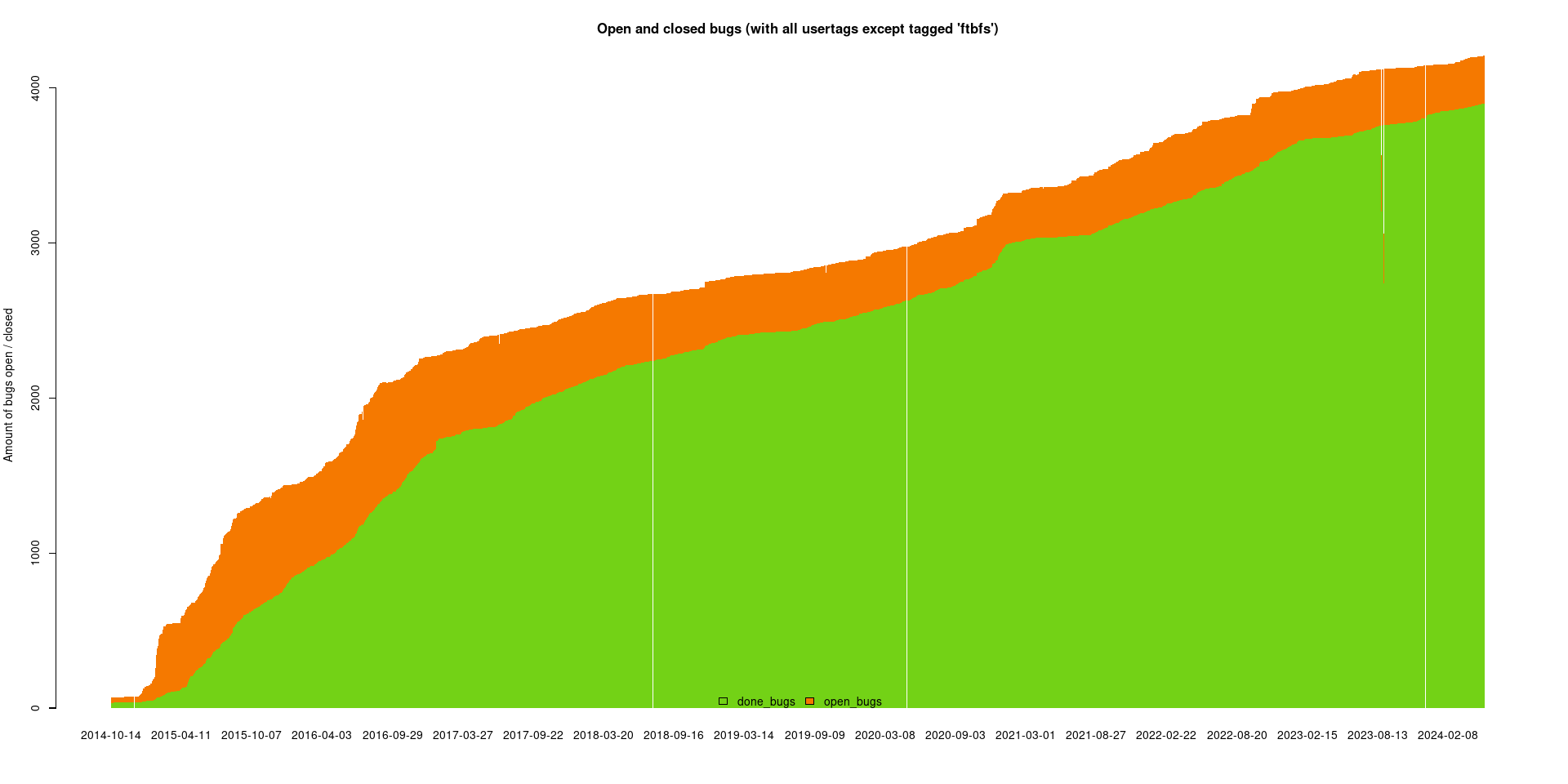
What happened in the reproducible builds effort this week: Toolchain fixes Reiner Herrmann submitted a patch against debhelper to make dh_installinit source files in a stable order. Chris Lamb found how to make cython output deterministic by ordering the keys used to traverse a dict. Reiner Herrmann proposed a patch for pyside-tools to remove the timestamps embedded by rcc in the generated Python code. Mattia Rizzolo rebased our custom version of debhelper on version 9.20151126. As no objections have been made so far, Mattia Rizzolo has filled #805872 asking -Wdate-time to be turned on by default in dpkg-buildflag. Guillem has since sent a final warning before proceeding as such in the next dpkg upload. Russ Allbery added support for SOURCE_DATE_EPOCH in podlators 4.00 which Niko Tyni intend to backport to Perl 5.22. Packages fixed The following packages have become reproducible due to changes in their build dependencies: fontforge, golang-github-tinylib-msgp, libpango-perl, libparanamer-java, libxaw, sqljet, stringtemplate4, uzbl, zope-mysqlda. The following packages became reproducible after getting fixed: Some uploads fixed some reproducibility issues, but not all of them: Patches submitted which have not made their way to the archive yet: Lunar reported two issues making xz-utils unreproducible (#806328, #806331). reproducible.debian.net A seventh armhf build node has been added (resulting of two more armhf build jobs). Thanks to Vagrant Cascadian for putting this Raspberry Pi 2B to help. (h01ger) jenkins.debian.net has been made more robust against network and proxy failures. (h01ger) A new 100 GB partition has been set up on reproducible.debian.net to prevent disk space issues. Thanks to ProfitBricks for its continuous support to our continuous test system. (h01ger) New graphs showing usertagged bugs have been added on the dashboard to measure the progress without FTBFS issues. Please note that comparing the two graphs might be misleading as more than 1300 FTBFS bugs have been inventoried. (h01ger) Package reviews 78 reviews have been removed, 116 added and 49 updated this week. 25 new FTBFS have been filed by Chris West, Chris Lamb and Santiago Vila. New issues identified this week: timestamps_in_documentation_generated_with_libwibble, copyright_year_in_documentation_generated_by_sphinx, timestamps_in_documentation_generated_by_glib_genpod, random_order_of_tmpfiles_in_postinst, random_order_in_cython_output, timestamps_in_python_code_generated_by_pyside. Reiner Herrmann and Lunar improved the prebuilder script: the script can now be called through a symlink, run parallel builds, calls diffoscope by its new name and ensure to install its recommends, and save the text output aside the HTML one. Reiner also added a script to lookup the last update of notes for a given package. Misc. Santiago Villa has been recently working on making sure that Arch:all packages were properly buildable by running dpkg-buildpackage -A. This uncovered a question that is probably not currently addressed by the policy: on which architectures should architecture-independent be buildable?

Chris Lamb: Free software activities in November 2015

Here is my monthly update covering a large part of what I have been doing in the free software world (previously):
Debian
  • Presented at MiniDebConf Cambridge 2015 on the current status of Debian's Reproducible Builds effort.
  • Contributed initial Debian support to Red Hat Product Security's repository of certificates shipped by various vendors and Open Source Projects. (#1)
  • Wrote a proof-of-concept version of Guix's challenge command to determine if an installed binary package is reproducible or not. (code)
  • Started initial work on a b2evolution package.
  • Arranged logistics for the Reproducible Builds summit in Athens.
My work in the Reproducible Builds project was also covered in more depth in Lunar's weekly reports (#27, #28, #29, #30).
LTS

This month I have been paid to work 13 hours on Debian Long Term Support (LTS). In that time I did the following:
  • Issued DLA 349-1 for python-django correcting an potential settings leak.
  • Issued DLA 351-1 for redmine fixing a data disclosure vulnerability.
  • Worked on multiple iterations of a fix for CVE-2011-5325 in busybox, not yet complete in order to additionally cover hardlinks.
  • Frontdesk duties.

Uploads
  • redis Addressing CVE-2015-8080, a buffer-overflow security issue.
  • python-django Uploading the latest RC release to experimental.
  • strip-nondeterminism Disable stripping Mono binaries as it is was too aggressive preventing some package installs.
  • gunicorn Correct Python interpreter path references in gunicorn3-debian.
  • python-redis New upstream release.
  • ispell-lt Making the build reproducible.


29 November 2015

Dirk Eddelbuettel: gtrends 1.3.0 now on CRAN: Google Trends in R

Sometime earlier last year, I started to help Philippe Massicotte with his gtrendsR package---which was then still "hiding" in relatively obscurity on BitBucket. I was able to assist with a few things related to internal data handling as well as package setup and package builds--but the package is really largely Philippe's. But then we both got busy, and it wasn't until this summer at the excellent useR! 2015 conference that we met and concluded that we really should finish the package. And we both remained busy... Lo and behold, following a recent transfer to this GitHub repository, we finalised a number of outstanding issues. And Philippe was even kind enough to label me a co-author. And now the package is on CRAN as of yesterday. So install.packages("gtrendsR") away and enjoy! Here is a quiick demo:
## load the package, and if options() are set appropriately, connect
## alternatively, also run   gconnect("someuser", "somepassword")
library(gtrendsR)
## using the default connection, run a query for three terms
res <- gtrends(c("nhl", "nba", "nfl"))
## plot (in default mode) as time series
plot(res)
## plot via googeVis to browser
## highlighting regions (probably countries) and cities
plot(res, type = "region")
plot(res, type = "cities")
The time series (default) plot for this query came out as follows a couple of days ago:
Example of gtrendsR query and plot
One really nice feature of the package is the rather rich data structure. The result set for the query above is actually stored in the package and can be accessed. It contains a number of components:
R> data(sport_trend)
R> names(sport_trend)
[1] "query"     "meta"      "trend"     "regions"   "topmetros"
[6] "cities"    "searches"  "rising"    "headers"  
R>
So not only can one look at trends, but also at regions, metropolitan areas, and cities --- even plot this easily via package googleVis which is accessed via options in the default plot method. Furthermore, related searches and rising queries may give leads to dynamics within the search. Please use the standard GitHub issue system for bug reports, suggestions and alike.

This post by Dirk Eddelbuettel originated on his Thinking inside the box blog. Please report excessive re-aggregation in third-party for-profit settings.

Next.

Previous.