Search Results: "spa"

25 March 2021

Jelmer Vernooij: The Buildlog Consultant

With Debian packages now widely being maintained in Git repositories, there has been an uptick in the number of bulk changes made to Debian packages. Several maintainers are running commands over many packages (e.g. all packages owned by a specific team) to fix common issues in packages. Examples of changes being made include:
  • Updating the Vcs-Git and Vcs-Browser URLs after migrating from alioth to salsa
  • Stripping trailing whitespace in various control files
  • Updating e.g. homepage URLs to use https rather than http
Most of these can be fixed with simple sed or perl one-liners. Some of these scripts are publically available, for example:
Lintian-Brush Lintian-Brush is both a simple wrapper around a set of these kinds of scripts and a repository for these scripts, with the goal of making it easy for any Debian maintainer to run them. The lintian-brush command-line tool is a simple wrapper that runs a set of "fixer scripts", and for each:
  • Reverts the changes made by the script if it failed with an error
  • Commits the changes to the VCS with an appropriate commit message
  • Adds a changelog entry (if desired)
The tool also provides some basic infrastructure for testing that these scripts do what they should, and e.g. don't have unintended side-effects. The idea is that it should be safe, quick and unobtrusive to run lintian-brush, and get it to opportunistically fix lintian issues and to leave the source tree alone when it can't.
Example For example, running lintian-brush on the package talloc fixes two minor lintian issues:
 % debcheckout talloc
 declared git repository at https://salsa.debian.org/samba-team/talloc.git
 git clone https://salsa.debian.org/samba-team/talloc.git talloc ...
 Cloning into 'talloc'...
 remote: Enumerating objects: 2702, done.
 remote: Counting objects: 100% (2702/2702), done.
 remote: Compressing objects: 100% (996/996), done.
 remote: Total 2702 (delta 1627), reused 2601 (delta 1550)
 Receiving objects: 100% (2702/2702), 1.70 MiB   565.00 KiB/s, done.
 Resolving deltas: 100% (1627/1627), done.
 % cd talloc
 talloc% lintian-brush
 Lintian tags fixed:  'insecure-copyright-format-uri', 'public-upstream-key-not-minimal' 
 % git log
 commit 0ea35f4bb76f6bca3132a9506189ef7531e5c680 (HEAD -> master)
 Author: Jelmer Vernoo  <jelmer@debian.org>
 Date:   Tue Dec 4 16:42:35 2018 +0000
     Re-export upstream signing key without extra signatures.
     Fixes lintian: public-upstream-key-not-minimal
     See https://lintian.debian.org/tags/public-upstream-key-not-minimal.html for more details.
  debian/changelog                    1 +
  debian/upstream/signing-key.asc   102 +++++++++++++++---------------------------------------------------------------------------------------
  2 files changed, 16 insertions(+), 87 deletions(-)
 commit feebce3147df561aa51a385c53d8759b4520c67f
 Author: Jelmer Vernoo  <jelmer@debian.org>
 Date:   Tue Dec 4 16:42:28 2018 +0000
     Use secure copyright file specification URI.
     Fixes lintian: insecure-copyright-format-uri
     See https://lintian.debian.org/tags/insecure-copyright-format-uri.html for more details.
  debian/changelog   3 +++
  debian/copyright   2 +-
  2 files changed, 4 insertions(+), 1 deletion(-)
Script Interface A fixer script is run in the root directory of a package, where it can make changes it deems necessary, and write a summary of what it's done for the changelog (and commit message) to standard out. If a fixer can not provide any improvements, it can simply leave the working tree untouched - lintian-brush will not create any commits for it or update the changelog. If it exits with a non-zero exit code, then it is assumed that it failed to run and it will be listed as such and its changes reset rather than committed. In addition, tests can be added for fixers by providing various before and after source package trees, to verify that a fixer script makes the expected changes. For more details, see the documentation on writing new fixers.
Availability lintian-brush is currently available in unstable and testing. See man lintian-brush(1) for an explanation of the command-line options. Fixer scripts are included that can fix (some of the instances of) 34 lintian tags. Feedback would be great if you try lintian-brush - please file bugs in the BTS, or propose pull requests with new fixers on salsa.

24 March 2021

Bastian Venthur: Perfection is Achieved When There is Nothing Left to Take Away

In 14 years since starting this blog, I changed the software several times, with each iteration simplifying requirements and setup. Wordpress In 2007, I started blogging. Back then I used a self-hosted Wordpress instance, running on my server. I was never really comfortable with the technology stack involved: a programming language I didn't speak, a DB I had little experience with, a relatively heavy setup and of course, the occasional security issues related to that setup. All that just to have a somewhat dynamic website with pingbacks and comments generated by your visitors... totally worth it and exciting times! You wrote something to the "lazyweb" department and people would actually comment with useful advice! Then came the spammers. First, it was just a little, and you could easily fight it off with the askimet plugin. Over the years, however the spam-to-useful-comments-ratio shifted to ridiculous levels and the comment section itself became a burden. Hosting the comments on a separate platform like disqus was not an option for me, so I finally turned the comments off. Without the need for a comment section, the whole idea of storing mostly textual content in a DB just to have it served as a website, suddenly seemed like overkill and an unnecessary security risk. So I started looking for alternatives. I wanted to maintain my content as plain text files. Text files are cool because they are future proof, portable and can be managed in git. Consequently, I was searching for a static site generator. Pelican Around 2016 I finally migrated away from Wordpress to Pelican. Pelican met all my requirements. I could store my content as plain Markdown files in a git repository. Pelican is written in Python, a language with which I'm very comfortable with. Pelican deals with blog posts and "pages" (i.e. non blog articles) and most importantly: Pelican just generates static HTML. So all that's required on the server side is a simple web server. Conveniently, it also comes with an importer that allowed me to export the content of my old Wordpress instance straight into Markdown files. Migrating to Pelican was a huge relieve: I finally had a all my content as plain text in a git repository, my server was a lot more secure without the Wordpress instance running and removing MySQL freed up a lot of resources on that machine. blag Fast forward to 2021. While I was quite happy with Pelican, it still had too many features I don't need. My blogging experience can be stripped down to a bunch of Markdown files that serve either as articles or pages, some static files, some templating for a decent design and an Atom feed. Particularly, I do not need pages/articles in multiple languages, a plugin system, support for multiple authors and tons of settings. So I did what every self-respecting nerd would do: I wrote my own site generator. Not to write something better than Pelican, but rather something lesser. Something that does less while still being functionally adequate. I called the result "blag", named after the blag of the webcomic xkcd. blag is a blog-aware, static site generator written in Python. It supports the basic features you'd expect from a blog, like an archive, tags and an Atom feed. It converts Markdown (with fenced code blocks) and supports Jinja2 templating. With this setup I'm quite happy for now. Maybe sometime there will be a simpler RSS/Atom-successor that does not require site-specific metadata (i.e. only stuff that can be generated from the articles themselves), so I could get rid of blag's only required configuration.

Sam Hartman: Making our Community Safe: the FSF and rms

I felt disgust and horror when I learned yesterday that rms had returned to the FSF board. When rms resigned back in September of 2019, I was Debian Project Leader. At that time, I felt two things. First, I was happy that the community was finally taking a stand in favor of inclusion, respect, and creating a safe, welcoming place to do our work. It was long past time for rms to move on. But I also felt thankful that rms was not my problem to solve. In significant part because of rms, I had never personally been that involved in the FSF. I considered drafting a statement as Debian Project Leader. I could have talked about how through our Diversity Statement and Code of Conduct we had taken a stand in favor of inclusion and respect. I could have talked about how rms's actions displayed a lack of understanding and empathy and how this created a community that was neither welcoming nor respectful. I didn't. I guess I didn't want to deal with confirming I had sufficient support in the project. I wanted to focus on internal goals, and I was healing and learning from some mistakes I made earlier in the year. It looked like other people were saying what needed to be said and my voice was not required. Silence was a mistake.

It's a mistake I've been making all throughout my interactions with rms. Enough is enough. It's long past time I added my voice to those who cry for accountability and who will not sit aside while rms's disrespect and harm is tolerated.

The first time I was silent about rms was around 15 years ago. I was at a science fiction convention in a crowded party. I didn't know anyone, other than the host of the party. I was out of my depth. I heard his voice---I recognized it from the Share the Software Song. He was hitting on some girl, talking about how he invented Emacs. As best I could tell, she didn't even know what Emacs was. Back then, I wondered what she saw in the interaction; why she stuck around even though she didn't know what he was talking about. I sure didn't want to be around; the interaction between the two of them was making me uncomfortable. Besides, the wings on her costume kept hitting me in the face. So I left as fast as I could.

I've learned a lot about creating safe spaces and avoiding sexual harassment since then. Thinking back, she was probably hitting me because she was trying to back away and getting crowded. If this happened today, I think I would do a better job of owning my responsibility for helping keep the space around me safe. I've learned better techniques for checking in to make sure people around me are comfortable.

I didn't come to silence alone: I had been educated into the culture of avoiding rms and not calling him out. There was a running game in the group of computer security professionals I learned from. The goal was to see how much you could contribute to free software and computer security without being recognized by or interacting with rms. And so, indoctrinated into a culture of silence about the harm that rms caused, I took my first step.

Things weren't much better when I attended Libreplanet 2019 just before taking office as Debian Project Leader. I had stayed away from the conference in large part because of rms. But there were Debian people there, and I was missing community interaction. Unfortunately, I saw that even after the problems of 2018, rms was still treating himself as above community standards. He interrupted speakers, objecting to how they phrased the problem they were considering. After a speech on codes of conduct in the free software community, he cornered the talk organizer to "ask her opinion" about the GNU project's lack of code on conduct. He wasn't asking for an opinion. He was justifying himself; there wasn't much listening in the conversation I heard. Aspects of that conversation crossed professional boundaries for what should be said. The talk organizer was okay--we talked about it after--but if we did a better job of policing our community, that wouldn't even be a question. I think the most telling sign was a discussion with an FSF board member. We were having a great conversation, but he had to interrupt it. He was on rms duty (my words) at the next session. The board had decided it was necessary to have members there so that the staff would not be put in awkward positions by their president. If someone needed to call rms out, it could be a board member rather than the staff members of the conduct team.

And yet again, I held my silence. It's so easy to keep silent. It's not that I never speak up. There are communities where I have called people out. But it's hard to paint that target on yourself. It's hard to engage and to stand strong for a community's standards when you aren't the target. It's hard to approach these problems while maintaining empathy for everyone involved. Some people give into the rage; I don't have that option if I want to be the person I've chosen to be. And so, when I do speak up, the emotional cost is high.

Yet, it's long past time I raised my voice on this issue. Rms has demonstrated that he cannot hold to standards of respect for others, respect for their boundaries, or standards of community safety. We need those standards to be a welcoming community.

If the people who came before me--those who taught me the game of avoiding rms--had spoken up, the community could have healed before I even came on the scene. If I and others had stood up fifteen years ago, we'd have another couple generations who were more used to respect, inclusion, welcoming and safety. The FSF board could have done their job back in 2018. And perhaps if more of us had spoken out in 2019, the FSF board would have found the strength to stand strong and not accept rms's return.

And so, finally, I raise my voice. I signed the open letter calling for the resignation of rms and the entire FSF board. Perhaps if we all get used to raising our voice, it will be easier. Perhaps if we stand together, taking the path of community rather than the path of silence, we'll have the support we need to create communities inclusive enough to welcome everyone who can contribute. For me, I'm done being silent.

There's one criticism of the open letter I'd like to respond to. I've heard concerns about asking for the resignation of the entire FSF board under the understanding that some board members voted against rms's return. It should be obvious why those who voted for rms's return need to resign. But resignation does not always mean you did something wrong. If you find yourself in a leadership role in an organization that takes decisions in significant conflict with your standards of ethics, resignation is also the right path. Staying on the board even if you voted against rms's return means that you consider voting for rms to be a reasonable thing to do. It means that even if you disagreed with it, you can still be part of an organization that takes the path of welcoming rms. At this point, I cannot do that, nor can I support leaders in the FSF who do.

23 March 2021

Jonathan Dowland: The Cure: 40 Live

Back in 2019, The Cure released a double-video-album featuring two live shows from 2018, their 40th anniversary concert at Hyde Park (which I attended) and their experimental "Curaetion" show from the Meltdown festival a few weeks earier. Rumours that there would be a release had been circulating since the gig itself, where video director Tim Pope was spotted filming the gig (sporting a tee shirt reading "Yes I'm Filming. No I don't know when you'll see it."). Earlier in 2019 the "Anniversary" half had a limited run in cinemas, but the home video release was not officially revealed until much later, and the inclusion of Curaetion an unexpected bonus. 'deluxe' releases The release is available in several configurations. The "standard" issue is a two-DVD (or Blu Ray) set in a hard-book case, with some liner notes in the middle. A "deluxe" issue is a roughly twice-as-large boxed set containing the two video discs and two CD-audio discs of the shows. When it comes to deluxe editions, I would historically have been the perfect "mark", but I've had some bad experiences with other releases (this is a story for another blog post), so for this release I pre-ordered the standard BR edition. Right up until release, I wondered whether I should have made the other choice. Eventually, pictures of other people's Deluxe Editions started to circulate, and I was re-assured that I made the right call. The larger box is just something harder to store, the larger booklet is an exact reproduction of the smaller, standard edition liner notes, which are not really notable. The shows I think the shows are great. The Hyde Park show is a fairly standard "best of" setlist, and my enjoyment of it might be coloured by having been at the show and having fond memories of it. But it's a great performance and very well captured, so I think there's something for people who like the Cure but weren't there to enjoy too. I wasn't at the Meltdown show. The setlist for that one is much more esoteric, and it's lovely to have renditions of songs that are rarely performed live (And: across the two sets you get If Only Tonight We Could Sleep twice). Getting the audio I knew in advance that I would likely listen to the shows more often than watch them, so the CDs in the Deluxe set would have been useful for that, but I was fairly sure the audio mix would be the same as on the video discs, so I could just extract that. I was half-right: the BR set (at least) has 5.1 surround and separate lossless stereo mixes, but they have been mastered quite differently to the CD audio, which appears to be brick-wall mastered, to such an extent that the audio distorts quite noticeably in a few places. The BR audio does not seem to suffer from the same problems. Getting the audio off the discs was interesting. On Linux, the tool of choice for decoding encrypted Blu Rays is libaacs, which requires a list of Blu Ray keys which you must source separately. With my BR drive I was not able to decode the discs using the keys I could find online. However, the separate tool MakeMKV was able to decode them. I don't know exactly how but I speculate that MakeMKV contains some leaked hardware player keys that are not in more general circulation. Once I had decoded copies of the two videos, the trusty tool ffmpeg is able to easily extract the PCM stereo audio track. Unfortunately it cannot, in one go, split the audio track at the chapter boundary points. This is easy to script around: one ffmpeg invocation to get the chapter offsets, then some scripting to turn that into seek and duration command-line arguments for further ffmpeg invocations. For space reasons, I opted to transcode to FLAC at the same time as extracting each track. I hit an interesting (although not fatal) problem: the time taken to extract each track got progressively slower, almost as if ffmpeg was transcoding the entire audio track up to the point specified as the offset to start extracting from. If I wanted to answer categorically whether the BR audio was preferable, I would need to perform a double-blind listening test, using a tool such as squishyball. I certainly can't be bothered: the BR audio is fine for me.

Thomas Lange: More than 10.000 customized ISO image created by FAIme

The FAIme service was started in November 2017. After 3,5 years it created more than 10.000 customized installation and cloud images. And we still have enough CPU power and disk space for more users. FAIme

Antoine Beaupr : Major email crash with syncmaildir

TL:DR; lost half my mail (150,000 messages, ~6GB) last night. Cause uncertain, but possibly a combination of a dead CMOS battery, systemd OnCalendar=daily, a (locking?) bug in syncmaildir, and generally, a system too exotic and complicated.

The crash So I somehow lost half my mail:
anarcat@angela:~(main)$ du -sh Maildir/
7,9G    Maildir/
anarcat@curie:~(main)$ du -sh Maildir
14G     Maildir
anarcat@marcos:~$ du -sh Maildir
8,0G    Maildir
Those are three different machines:
  • angela: my laptop, not always on
  • curie: my workstation, mostly always on
  • marcos: my mail server, always on
Those mails are synchronized using a rather exotic system based on SSH, syncmaildir and rsendmail. The anomaly started on curie:
-- Reboot --
mar 22 16:13:00 curie systemd[3199]: Starting pull emails with syncmaildir...
mar 22 16:13:00 curie smd-pull[4801]: rm: impossible de supprimer '/home/anarcat/.smd/workarea/Maildir': Le dossier n'est pas vide
mar 22 16:13:00 curie systemd[3199]: smd-pull.service: Main process exited, code=exited, status=1/FAILURE
mar 22 16:13:00 curie systemd[3199]: smd-pull.service: Failed with result 'exit-code'.
mar 22 16:13:00 curie systemd[3199]: Failed to start pull emails with syncmaildir.
mar 22 16:14:00 curie systemd[3199]: Starting pull emails with syncmaildir...
mar 22 16:14:00 curie smd-pull[7025]:  4091 ?        00:00:00 smd-push
mar 22 16:14:00 curie smd-pull[7025]: Already running.
mar 22 16:14:00 curie smd-pull[7025]: If this is not the case, remove /home/anarcat/.smd/lock by hand.
mar 22 16:14:00 curie smd-pull[7025]: any: smd-pushpull@localhost: TAGS: error::context(locking) probable-cause(another-instance-is-running) human-intervention(necessary) suggested-actions(run(kill 4091) run(rm /home/anarcat/.smd/lock))
mar 22 16:14:00 curie systemd[3199]: smd-pull.service: Main process exited, code=exited, status=1/FAILURE
mar 22 16:14:00 curie systemd[3199]: smd-pull.service: Failed with result 'exit-code'.
mar 22 16:14:00 curie systemd[3199]: Failed to start pull emails with syncmaildir.
Then it seems like smd-push (from curie) started destroying the universe for some reason:
mar 22 16:20:00 curie systemd[3199]: Starting pull emails with syncmaildir...
mar 22 16:20:00 curie smd-pull[9319]:  4091 ?        00:00:00 smd-push
mar 22 16:20:00 curie smd-pull[9319]: Already running.
mar 22 16:20:00 curie smd-pull[9319]: If this is not the case, remove /home/anarcat/.smd/lock by hand.
mar 22 16:20:00 curie smd-pull[9319]: any: smd-pushpull@localhost: TAGS: error::context(locking) probable-cause(another-instance-is-running) human-intervention(necessary) suggested-actions(ru
mar 22 16:20:00 curie systemd[3199]: smd-pull.service: Main process exited, code=exited, status=1/FAILURE
mar 22 16:20:00 curie systemd[3199]: smd-pull.service: Failed with result 'exit-code'.
mar 22 16:20:00 curie systemd[3199]: Failed to start pull emails with syncmaildir.
mar 22 16:21:34 curie smd-push[4091]: default: smd-client@smd-server-anarcat: TAGS: stats::new-mails(0), del-mails(293920), bytes-received(0), xdelta-received(26995)
mar 22 16:21:35 curie smd-push[9374]: register: smd-client@smd-server-register: TAGS: stats::new-mails(0), del-mails(0), bytes-received(0), xdelta-received(215)
mar 22 16:21:35 curie systemd[3199]: smd-push.service: Succeeded.
Notice the del-mails(293920) there: it is actively trying to destroy basically every email in my mail spool. Then somehow push and pull started both at once:
mar 22 16:21:35 curie systemd[3199]: Started push emails with syncmaildir.
mar 22 16:21:35 curie systemd[3199]: Starting push emails with syncmaildir...
mar 22 16:22:00 curie systemd[3199]: Starting pull emails with syncmaildir...
mar 22 16:22:00 curie smd-pull[10333]:  9455 ?        00:00:00 smd-push
mar 22 16:22:00 curie smd-pull[10333]: Already running.
mar 22 16:22:00 curie smd-pull[10333]: If this is not the case, remove /home/anarcat/.smd/lock by hand.
mar 22 16:22:00 curie smd-pull[10333]: any: smd-pushpull@localhost: TAGS: error::context(locking) probable-cause(another-instance-is-running) human-intervention(necessary) suggested-actions(r
mar 22 16:22:00 curie systemd[3199]: smd-pull.service: Main process exited, code=exited, status=1/FAILURE
mar 22 16:22:00 curie systemd[3199]: smd-pull.service: Failed with result 'exit-code'.
mar 22 16:22:00 curie systemd[3199]: Failed to start pull emails with syncmaildir.
mar 22 16:22:00 curie smd-push[9455]: smd-client: ERROR: Data transmission failed.
mar 22 16:22:00 curie smd-push[9455]: smd-client: ERROR: This problem is transient, please retry.
mar 22 16:22:00 curie smd-push[9455]: smd-client: ERROR: server sent ABORT or connection died
mar 22 16:22:00 curie smd-push[9455]: smd-server: ERROR: Unable to open Maildir/.kobo/cur/1498563708.M122624P22121.marcos,S=32234,W=32792:2,S: Maildir/.kobo/cur/1498563708.M122624P22121.marco
mar 22 16:22:00 curie smd-push[9455]: smd-server: ERROR: The problem should be transient, please retry.
mar 22 16:22:00 curie smd-push[9455]: smd-server: ERROR: Unable to open requested file.
mar 22 16:22:00 curie smd-push[9455]: default: smd-client@smd-server-anarcat: TAGS: stats::new-mails(0), del-mails(293920), bytes-received(0), xdelta-received(26995)
mar 22 16:22:00 curie smd-push[9455]: default: smd-client@smd-server-anarcat: TAGS: error::context(receive) probable-cause(network) human-intervention(avoidable) suggested-actions(retry)
mar 22 16:22:00 curie smd-push[9455]: default: smd-server@localhost: TAGS: error::context(transmit) probable-cause(simultaneous-mailbox-edit) human-intervention(avoidable) suggested-actions(r
mar 22 16:22:00 curie systemd[3199]: smd-push.service: Main process exited, code=exited, status=1/FAILURE
mar 22 16:22:00 curie systemd[3199]: smd-push.service: Failed with result 'exit-code'.
mar 22 16:22:00 curie systemd[3199]: Failed to start push emails with syncmaildir.
There it seems push tried to destroy the universe again: del-mails(293920). Interestingly, the push started again in parallel with the pull, right that minute:
mar 22 16:22:00 curie systemd[3199]: Starting push emails with syncmaildir...
... but didn't complete for a while, here's pull trying to start again:
mar 22 16:24:00 curie systemd[3199]: Starting pull emails with syncmaildir...
mar 22 16:24:00 curie smd-pull[12051]: 10466 ?        00:00:00 smd-push
mar 22 16:24:00 curie smd-pull[12051]: Already running.
mar 22 16:24:00 curie smd-pull[12051]: If this is not the case, remove /home/anarcat/.smd/lock by hand.
mar 22 16:24:00 curie smd-pull[12051]: any: smd-pushpull@localhost: TAGS: error::context(locking) probable-cause(another-instance-is-running) human-intervention(necessary) suggested-actions(run(kill 10466) run(rm /home/anarcat/.smd/lock))
mar 22 16:24:00 curie systemd[3199]: smd-pull.service: Main process exited, code=exited, status=1/FAILURE
mar 22 16:24:00 curie systemd[3199]: smd-pull.service: Failed with result 'exit-code'.
mar 22 16:24:00 curie systemd[3199]: Failed to start pull emails with syncmaildir.
... and the long push finally resolving:
mar 22 16:24:00 curie smd-push[10466]: smd-client: ERROR: Data transmission failed.
mar 22 16:24:00 curie smd-push[10466]: smd-client: ERROR: This problem is transient, please retry.
mar 22 16:24:00 curie smd-push[10466]: smd-client: ERROR: server sent ABORT or connection died
mar 22 16:24:00 curie smd-push[10466]: smd-client: ERROR: Data transmission failed.
mar 22 16:24:00 curie smd-push[10466]: smd-client: ERROR: This problem is transient, please retry.
mar 22 16:24:00 curie smd-push[10466]: smd-client: ERROR: server sent ABORT or connection died
mar 22 16:24:00 curie smd-push[10466]: smd-server: ERROR: Unable to open Maildir/.kobo/cur/1498563708.M122624P22121.marcos,S=32234,W=32792:2,S: Maildir/.kobo/cur/1498563708.M122624P22121.marcos,S=32234,W=32792:2,S: No such file or directory
mar 22 16:24:00 curie smd-push[10466]: smd-server: ERROR: The problem should be transient, please retry.
mar 22 16:24:00 curie smd-push[10466]: smd-server: ERROR: Unable to open requested file.
mar 22 16:24:00 curie smd-push[10466]: default: smd-client@smd-server-anarcat: TAGS: stats::new-mails(0), del-mails(293920), bytes-received(0), xdelta-received(26995)
mar 22 16:24:00 curie smd-push[10466]: default: smd-client@smd-server-anarcat: TAGS: error::context(receive) probable-cause(network) human-intervention(avoidable) suggested-actions(retry)
mar 22 16:24:00 curie smd-push[10466]: default: smd-server@localhost: TAGS: error::context(transmit) probable-cause(simultaneous-mailbox-edit) human-intervention(avoidable) suggested-actions(retry)
mar 22 16:24:00 curie systemd[3199]: smd-push.service: Main process exited, code=exited, status=1/FAILURE
mar 22 16:24:00 curie systemd[3199]: smd-push.service: Failed with result 'exit-code'.
mar 22 16:24:00 curie systemd[3199]: Failed to start push emails with syncmaildir.
mar 22 16:24:00 curie systemd[3199]: Starting push emails with syncmaildir...
This pattern repeats until 16:35, when that locking issue silently recovered somehow:
mar 22 16:35:03 curie systemd[3199]: Starting pull emails with syncmaildir...
mar 22 16:35:41 curie smd-pull[20788]: default: smd-client@localhost: TAGS: stats::new-mails(5), del-mails(1), bytes-received(21885), xdelta-received(6863398)
mar 22 16:35:42 curie smd-pull[21373]: register: smd-client@localhost: TAGS: stats::new-mails(0), del-mails(0), bytes-received(0), xdelta-received(215)
mar 22 16:35:42 curie systemd[3199]: smd-pull.service: Succeeded.
mar 22 16:35:42 curie systemd[3199]: Started pull emails with syncmaildir.
mar 22 16:36:35 curie systemd[3199]: Starting pull emails with syncmaildir...
mar 22 16:36:36 curie smd-pull[21738]: default: smd-client@localhost: TAGS: stats::new-mails(0), del-mails(0), bytes-received(0), xdelta-received(214)
mar 22 16:36:37 curie smd-pull[21816]: register: smd-client@localhost: TAGS: stats::new-mails(0), del-mails(0), bytes-received(0), xdelta-received(215)
mar 22 16:36:37 curie systemd[3199]: smd-pull.service: Succeeded.
mar 22 16:36:37 curie systemd[3199]: Started pull emails with syncmaildir.
... notice that huge xdelta-received there, that's 7GB right there. Mysteriously, the curie mail spool survived this, possibly because smd-pull started failing again:
mar 22 16:38:00 curie systemd[3199]: Starting pull emails with syncmaildir...
mar 22 16:38:00 curie smd-pull[23556]: 21887 ?        00:00:00 smd-push
mar 22 16:38:00 curie smd-pull[23556]: Already running.
mar 22 16:38:00 curie smd-pull[23556]: If this is not the case, remove /home/anarcat/.smd/lock by hand.
mar 22 16:38:00 curie smd-pull[23556]: any: smd-pushpull@localhost: TAGS: error::context(locking) probable-cause(another-instance-is-running) human-intervention(necessary) suggested-actions(run(kill 21887) run(rm /home/anarcat/.smd/lock))
mar 22 16:38:00 curie systemd[3199]: smd-pull.service: Main process exited, code=exited, status=1/FAILURE
mar 22 16:38:00 curie systemd[3199]: smd-pull.service: Failed with result 'exit-code'.
mar 22 16:38:00 curie systemd[3199]: Failed to start pull emails with syncmaildir.
That could have been when i got on angela to check my mail, and it was busy doing the nasty removal stuff... although the times don't match. Here is when angela came back online:
anarcat@angela:~(main)$ last
anarcat  :0           :0               Mon Mar 22 19:57   still logged in
reboot   system boot  5.10.0-0.bpo.3-a Mon Mar 22 19:57   still running
anarcat  :0           :0               Mon Mar 22 17:43 - 18:47  (01:03)
reboot   system boot  5.10.0-0.bpo.3-a Mon Mar 22 17:39   still running
Then finally the sync on curie started failing with:
mar 22 16:46:35 curie systemd[3199]: Starting pull emails with syncmaildir...
mar 22 16:46:42 curie smd-pull[27455]: smd-server: ERROR: Client aborted, removing /home/anarcat/.smd/curie-anarcat__Maildir.db.txt.new and /home/anarcat/.smd/curie-anarcat__Maildir.db.txt.mtime.new
mar 22 16:46:42 curie smd-pull[27455]: smd-client: ERROR: Failed to copy Maildir/.debian/cur/1613401668.M901837P27073.marcos,S=3740,W=3815:2,S to Maildir/.koumbit/cur/1613401640.M415457P27063.marcos,S=3790,W=3865:2,S
mar 22 16:46:42 curie smd-pull[27455]: smd-client: ERROR: The destination already exists but its content differs.
mar 22 16:46:42 curie smd-pull[27455]: smd-client: ERROR: To fix this problem you have two options:
mar 22 16:46:42 curie smd-pull[27455]: smd-client: ERROR: - rename Maildir/.koumbit/cur/1613401640.M415457P27063.marcos,S=3790,W=3865:2,S by hand so that Maildir/.debian/cur/1613401668.M901837P27073.marcos,S=3740,W=3815:2,S
mar 22 16:46:42 curie smd-pull[27455]: smd-client: ERROR:   can be copied without replacing it.
mar 22 16:46:42 curie smd-pull[27455]: smd-client: ERROR:   Executing  cd; mv -n "Maildir/.koumbit/cur/1613401640.M415457P27063.marcos,S=3790,W=3865:2,S" "Maildir/.koumbit/cur/1616446002.1.localhost"  should work.
mar 22 16:46:42 curie smd-pull[27455]: smd-client: ERROR: - run smd-push so that your changes to Maildir/.koumbit/cur/1613401640.M415457P27063.marcos,S=3790,W=3865:2,S
mar 22 16:46:42 curie smd-pull[27455]: smd-client: ERROR:   are propagated to the other mailbox
mar 22 16:46:42 curie smd-pull[27455]: default: smd-client@localhost: TAGS: error::context(copy-message) probable-cause(concurrent-mailbox-edit) human-intervention(necessary) suggested-actions(run(mv -n "/home/anarcat/.smd/workarea/Maildir/.koumbit/cur/1613401640.M415457P27063.marcos,S=3790,W=3865:2,S" "/home/anarcat/.smd/workarea/Maildir/.koumbit/tmp/1613401640.M415457P27063.marcos,S=3790,W=3865:2,S") run(smd-push default))
mar 22 16:46:42 curie systemd[3199]: smd-pull.service: Main process exited, code=exited, status=1/FAILURE
mar 22 16:46:42 curie systemd[3199]: smd-pull.service: Failed with result 'exit-code'.
mar 22 16:46:42 curie systemd[3199]: Failed to start pull emails with syncmaildir.
It went on like this until I found the problem. This is, presumably, a good thing because those emails were not being destroyed. On angela, things looked like this:
-- Reboot --
mar 22 17:39:29 angela systemd[1677]: Started run notmuch new at least once a day.
mar 22 17:39:29 angela systemd[1677]: Started run smd-pull regularly.
mar 22 17:40:46 angela systemd[1677]: Starting pull emails with syncmaildir...
mar 22 17:43:18 angela smd-pull[3916]: smd-server: ERROR: Unable to open Maildir/.tor/new/1616446842.M285912P26118.marcos,S=8860,W=8996: Maildir/.tor/new/1616446842.M285912P26118.marcos,S=886
0,W=8996: No such file or directory
mar 22 17:43:18 angela smd-pull[3916]: smd-server: ERROR: The problem should be transient, please retry.
mar 22 17:43:18 angela smd-pull[3916]: smd-server: ERROR: Unable to open requested file.
mar 22 17:43:18 angela smd-pull[3916]: smd-client: ERROR: Data transmission failed.
mar 22 17:43:18 angela smd-pull[3916]: smd-client: ERROR: This problem is transient, please retry.
mar 22 17:43:18 angela smd-pull[3916]: smd-client: ERROR: server sent ABORT or connection died
mar 22 17:43:18 angela smd-pull[3916]: default: smd-server@smd-server-anarcat: TAGS: error::context(transmit) probable-cause(simultaneous-mailbox-edit) human-intervention(avoidable) suggested
-actions(retry)
mar 22 17:43:18 angela smd-pull[3916]: default: smd-client@localhost: TAGS: error::context(receive) probable-cause(network) human-intervention(avoidable) suggested-actions(retry)
mar 22 17:43:18 angela systemd[1677]: smd-pull.service: Main process exited, code=exited, status=1/FAILURE
mar 22 17:43:18 angela systemd[1677]: smd-pull.service: Failed with result 'exit-code'.
mar 22 17:43:18 angela systemd[1677]: Failed to start pull emails with syncmaildir.
mar 22 17:43:18 angela systemd[1677]: Starting pull emails with syncmaildir...
mar 22 17:43:29 angela smd-pull[4847]: default: smd-client@localhost: TAGS: stats::new-mails(29), del-mails(0), bytes-received(401519), xdelta-received(38914)
mar 22 17:43:29 angela smd-pull[5600]: register: smd-client@localhost: TAGS: stats::new-mails(2), del-mails(0), bytes-received(92150), xdelta-received(471)
mar 22 17:43:29 angela systemd[1677]: smd-pull.service: Succeeded.
mar 22 17:43:29 angela systemd[1677]: Started pull emails with syncmaildir.
mar 22 17:43:29 angela systemd[1677]: Starting push emails with syncmaildir...
mar 22 17:43:32 angela smd-push[5693]: default: smd-client@smd-server-anarcat: TAGS: stats::new-mails(0), del-mails(0), bytes-received(0), xdelta-received(217)
mar 22 17:43:33 angela smd-push[6575]: register: smd-client@smd-server-register: TAGS: stats::new-mails(0), del-mails(0), bytes-received(0), xdelta-received(219)
mar 22 17:43:33 angela systemd[1677]: smd-push.service: Succeeded.
mar 22 17:43:33 angela systemd[1677]: Started push emails with syncmaildir.
Notice how long it took to get the first error, in that first failure: it failed after 3 minutes! Presumably that's when it started deleting all that mail. And this is during pull, not push, so the error didn't come from angela.

Affected data It seems 2GB of mail from my main INBOX was destroyed. Another 2.4GB of spam (kept for training purposes) was also destroyed, along with 700MB of Sent mail. The rest is hard to figure out, because the folders are actually still there, just smaller. So I relied on ncdu to figure out the size changes. (Note that I don't really archive (or delete much of) my mail since I use notmuch, which is why the INBOX is so large...) Concretely, according to the notmuch-new.service which still runs periodically on marcos, here are the changes that happened on the server:
mar 22 16:17:12 marcos notmuch[10729]: Added 7 new messages to the database. Removed 57985 messages. Detected 1372 file renames.
mar 22 16:22:43 marcos notmuch[12826]: No new mail. Removed 143842 messages. Detected 6072 file renames.
mar 22 16:27:02 marcos notmuch[13969]: No new mail. Removed 82071 messages. Detected 1783 file renames.
mar 22 16:29:45 marcos notmuch[15079]: Added 22743 new messages to the database. Detected 1 file rename.
mar 22 16:31:48 marcos notmuch[16196]: Added 22779 new messages to the database. Removed 5 messages.
mar 22 16:33:11 marcos notmuch[17192]: Added 3711 new messages to the database.
mar 22 16:40:41 marcos notmuch[19122]: Added 74558 new messages to the database. Detected 1 file rename.
mar 22 16:43:21 marcos notmuch[20325]: Added 9061 new messages to the database. Detected 4 file renames.
mar 22 17:43:08 marcos notmuch[7420]: Added 1793 new messages to the database. Detected 6 file renames.
That is basically the entire mail spool destroyed at first (283 898 messages), and then bits and pieces of it progressively re-added (134 645 messages), somehow, so 149 253 mails were lost, presumably.

Recovery I disabled the services all over the place:
systemctl --user --now disable smd-pull.service smd-pull.timer smd-push.service smd-push.timer notmuch-new.service notmuch-new.timer
(Well, technically, I did that only on angela, as I thought the problem was there. Luckily, curie kept going but it seems like it was harmless.) I made a backup of the mail spool on curie:
tar cf - Maildir/   pv -s 14G   gzip -c > Maildir.tgz
Then I crossed my fingers and ran smd-push -v -s, as that was suggested by smd error codes themselves. That thankfully started restoring mail. It failed a few times on weird cases of files being duplicates, but I resolved this by following the instructions. Or mostly: I actually deleted the files instead of moving them, which made smd even unhappier (if there ever was such a thing). I had to recreate some of those files, so, lesson learned: do follow the advice smd gives you, even if it seems useless or strange. But then smd-push was humming along, uploading tens of thousands of messages, saturating the upload in the office, refilling the mail spool on the server... yaay!... ? Except... well, of course that didn't quite work: the mail spool in the office eventually started to grow beyond the size of the mail spool on the workstation. That is what smd-push eventually settled on:
default: smd-client@smd-server-anarcat: TAGS: error::context(receive) probable-cause(network) human-intervention(avoidable) suggested-actions(retry)
default: smd-client@smd-server-anarcat: TAGS: stats::new-mails(151697), del-mails(0), bytes-received(7539147811), xdelta-received(10881198)
It recreated 151 697 emails, adding about 2000 emails to the pool, kind of from nowhere at all. On marcos, before:
ncdu 1.13 ~ Use the arrow keys to navigate, press ? for help
--- /home/anarcat/Maildir ------------------------------------
    4,0 GiB [##########] /.notmuch
  717,3 MiB [#         ] /.Archives.2014
  498,2 MiB [#         ] /.feeds.debian-planet
  453,1 MiB [#         ] /.Archives.2012
  414,5 MiB [#         ] /.debian
  408,2 MiB [#         ] /.quoifaire
  389,8 MiB [          ] /.rapports
  356,6 MiB [          ] /.tor
  182,6 MiB [          ] /.koumbit
  179,8 MiB [          ] /tmp
   56,8 MiB [          ] /.nn
   43,0 MiB [          ] /.act-mtl
   32,6 MiB [          ] /.feeds.sysadvent
   31,7 MiB [          ] /.feeds.releases
   31,4 MiB [          ] /.Sent.2005
   26,3 MiB [          ] /.sage
   25,5 MiB [          ] /.freedombox
   24,0 MiB [          ] /.feeds.git-annex
   21,1 MiB [          ] /.Archives.2011
   19,1 MiB [          ] /.Sent.2003
   16,7 MiB [          ] /.bugtraq
   16,2 MiB [          ] /.mlug
 Total disk usage:   8,0 GiB  Apparent size:   7,6 GiB  Items: 184426
After:
ncdu 1.13 ~ Use the arrow keys to navigate, press ? for help
--- /home/anarcat/Maildir ------------------------------------
    4,7 GiB [##########] /.notmuch
    2,7 GiB [#####     ] /.junk
    1,9 GiB [###       ] /cur
  717,3 MiB [#         ] /.Archives.2014
  659,3 MiB [#         ] /.Sent
  513,9 MiB [#         ] /.Archives.2012
  498,2 MiB [#         ] /.feeds.debian-planet
  449,6 MiB [          ] /.Archives.2015
  414,5 MiB [          ] /.debian
  408,2 MiB [          ] /.quoifaire
  389,8 MiB [          ] /.rapports
  380,8 MiB [          ] /.Archives.2013
  356,6 MiB [          ] /.tor
  261,1 MiB [          ] /.Archives.2011
  240,9 MiB [          ] /.koumbit
  183,6 MiB [          ] /.Archives.2010
  179,8 MiB [          ] /tmp
  128,4 MiB [          ] /.lists
  106,1 MiB [          ] /.inso-interne
  103,0 MiB [          ] /.github
   75,0 MiB [          ] /.nanog
   69,8 MiB [          ] /.full-disclosure
 Total disk usage:  16,2 GiB  Apparent size:  15,5 GiB  Items: 341143
That is 156 717 files more. On curie:
ncdu 1.13 ~ Use the arrow keys to navigate, press ? for help
--- /home/anarcat/Maildir ------------------------------------------------------------------
    2,7 GiB [##########] /.junk
    2,3 GiB [########  ] /.notmuch
    1,9 GiB [######    ] /cur
  661,2 MiB [##        ] /.Archives.2014
  655,3 MiB [##        ] /.Sent
  512,0 MiB [#         ] /.Archives.2012
  447,3 MiB [#         ] /.Archives.2015
  438,5 MiB [#         ] /.feeds.debian-planet
  406,5 MiB [#         ] /.quoifaire
  383,6 MiB [#         ] /.debian
  378,6 MiB [#         ] /.Archives.2013
  303,3 MiB [#         ] /.tor
  296,0 MiB [#         ] /.rapports
  237,6 MiB [          ] /.koumbit
  233,2 MiB [          ] /.Archives.2011
  182,1 MiB [          ] /.Archives.2010
  127,0 MiB [          ] /.lists
  104,8 MiB [          ] /.inso-interne
  102,7 MiB [          ] /.register
   89,6 MiB [          ] /.github
   67,1 MiB [          ] /.full-disclosure
   66,5 MiB [          ] /.nanog
 Total disk usage:  13,3 GiB  Apparent size:  12,6 GiB  Items: 342465
Interestingly, there are more files, but less disk usage. It's possible the notmuch database there is more efficient. So maybe there's nothing to worry about. Last night's marcos backup has:
root@marcos:/home/anarcat# find /mnt/home/anarcat/Maildir   pv -l   wc -l
 341k 0:00:16 [20,4k/s] [                             <=>                                                                                                                                     ]
341040
... 341040 files, which seems about right, considering some mail was delivered during the day. An audit can be performed with hashdeep:
borg mount /media/sdb2/borg/::marcos-auto-2021-03-22 /mnt
hashdeep -c sha256 -r /mnt/home/anarcat/Maildir   pv -l -s 341k > Maildir-backup-manifest.txt
And then compared with:
hashdeep -c sha256 -k Maildir-backup-manifest.txt Maildir/
Some extra files should show up in the Maildir, and very few should actually be missing, because I shouldn't have deleted mail from the previous day the next day, or at least very few. The actual summary hashdeep gave me was:
hashdeep: Audit failed
   Input files examined: 0
  Known files expecting: 0
          Files matched: 339080
Files partially matched: 0
            Files moved: 782
        New files found: 107
  Known files not found: 106
So 106 files added, 107 deleted. Seems good enough for me... Postfix was stopped at Mar 22 21:12:59 to try and stop external events from confusing things even further. I reviewed the delivery log to see if mail that came in during the problem window disappeared:
grep 'dovecot:.*stored mail into mailbox' /var/log/mail.log  
  tail -20  
  sed 's/.*msgid=<//;s/>.*//'   
  while read msgid; do 
    notmuch count --exclude=false id:$msgid  
      grep 0 && echo $msgid missing;
  done
And things looked okay. Now of course if we go further back, we find mail I actually deleted (because I do do that sometimes), so it's hard to use this log as an audit trail. We can only hope that the curie spool is sufficiently coherent to be relied on. Worst case, we'll have to restore from last night's backup, but that's getting far away now: I get hundreds of mails a day in that mail spool, and reseting back to last night does not seem like a good idea. A dry run of smd-pull on angela seems to agree that it's missing some files:
default: smd-client@localhost: TAGS: stats::new-mails(154914), del-mails(0), bytes-received(0), xdelta-received(0)
... a number of mails somewhere in between the other two, go figure. A "wet" run of this was started, without deletion (-n), which gave us:
default: smd-client@localhost: TAGS: stats::new-mails(154911), del-mails(0), bytes-received(7658160107), xdelta-received(10837609)
Strange that it sync'd three less emails, but that's still better than nothing, and we have a mail spool on angela again:
anarcat@angela:~(main)$ notmuch new
purging with prefix '.': spam moved (0), ham moved (0), deleted (0), done
Note: Ignoring non-mail file: /home/anarcat/Maildir//.uidvalidity
Processed 1779 total files in 26s (66 files/sec.).
Added 1190 new messages to the database. Removed 3 messages. Detected 593 file renames.
tagging with prefix '.': spam, sent, feeds, koumbit, tor, lists, rapports, folders, done.
Notice how only 1190 messages were re-added, that is because I killed notmuch before it had time to remove all those mails from its database.

Possible causes I am totally at a loss as to why smd started destroying everything like it did. But a few things come to mind:
  1. I rewired my office on that day.
  2. This meant unplugging curie, the workstation.
  3. It has a bad CMOS battery (known problem), so it jumped around the time continuum a few times, sometimes by years.
  4. The smd services are ran from a systemd unit with OnCalendar=*:0/2. I have heard that it's possible that major time jumps "pile up" execution of jobs, and it seems this happened in this case.
  5. It's possible that locking in smd is not as great as it could be, and that it corrupted its internal data structures on curie, which led it to command a destruction of the remote mail spool.
It's also possible that there was a disk failure on the server, marcos. But since it's running on a (software) RAID-1 array, and no errors have been found (according to dmesg), I don't think that's a plausible hypothesis.

Lessons learned
  1. follow what smd says, even if it seems useless or strange.
  2. trust but verify: just backup everything before you do anything, especially the largest data set.
  3. daily backups are not great for email, unless you're ready to lose a day of email (which I'm not).
  4. hashdeep is great. I keep finding new use cases for it. Last time it was to audit my camera SD card to make sure I didn't forget anything, and now this. it's fast and powerful.
  5. borg is great too. the FUSE mount was especially useful, and it was pretty fast to explore the backup, even through that overhead: checksumming 15GB of mail took about 35 minutes, which gives a respectable 8MB/s, probably bottlenecked by the crap external USB drive I use for backups (!).
  6. I really need to finish my backup system so that I have automated offsite backups, although in this case that would actually have been much slower (certainly not 8MB/s!).

Workarounds and solutions I setup fake-hwclock on curie, so that the next power failure will not upset my clock that badly. I am thinking of switching to ZFS or BTRFS for most of my filesystems, so that I can use filesystem snapshots (including remotely!) as a backup strategy. This seems so much more powerful than crawling the filesystem for changes, and allows for truly offsite backups protected from an attacker (hopefully). But it's a long way there. I'm also thinking of rebuilding my mail setup without smd. It's not the first time something like this happens with smd. It's the first time I am more confident it's the root cause of the problem, however, and it makes me really nervous for the future. I have used offlineimap in the past and it seems it was finally ported to Python 3 so that could be an option again. isync/mbsync is another option, which I tried before but do not remember why I didn't switch. A complete redesign with something like getmail and/or nncp could also be an option. But alas, I lack the time to go crazy with those experiments. Somehow, doing like everyone else and just going with Google still doesn't seem to be an option for me. Screw big tech. But I am afraid they will win, eventually. In any case, I'm just happy I got mail again, strangely.

22 March 2021

Rapha&#235;l Hertzog: Freexian s report about Debian Long Term Support, February 2020

A Debian LTS logo
Like each month, have a look at the work funded by Freexian s Debian LTS offering. Debian project funding In February, we put aside 5475 EUR to fund Debian projects. The first project from this initiative was finished and thus Carles Pina was able to issue the first invoice! We are looking forward to receive more projects from various Debian teams and contributors. Learn more about the rationale behind this initiative in this article. Debian LTS contributors In February, 12 contributors have been paid to work on Debian LTS, their reports are available: Evolution of the situation In February we released 28 DLAs (including one regression update) and we held an internal team meeting using video chat.
Finally, as every month we would like to remark once again that we are constantly looking for new contributors. Please contact Holger if you are interested! The security tracker currently lists 46 packages with a known CVE and the dla-needed.txt file has 34 packages needing an update. Thanks to our sponsors Sponsors that joined recently are in bold.

Wouter Verhelst: Twenty years of Debian

Ten years ago, I reflected on the fact that -- by that time -- I had been in Debian for just over ten years. This year, in early February, I've passed the twenty year milestone. As I'm turning 43 this year, I will have been in Debian for half my life in about three years. Scary thought, that. In the past ten years, not much has changed, and yet at the same time, much has. I became involved in the Debian video team; I stepped down from the m68k port; and my organizing of the Debian devroom at FOSDEM resulted in me eventually joining the FOSDEM orga team, where I eventually ended up also doing video. As part of my video work, I wrote SReview, for which in these COVID-19 times in much of my spare time I have had to write new code and/or fix bugs. I was a candidate for the position of DPL one more time, without being elected. I was also a candidate for the technical committee a few times, also without success. I also added a few packages to the list of packages that I maintain for Debian; most obviously this includes SReview, but there's also things like extrepo and policy-rcd-declarative, both fairly recent packages that I hope will improve Debian as a whole in the longer term. On a more personal level, at one debconf I met a wonderful girl that I now have just celebrated my first wedding anniversary with. Before that could happen, I have had to move to South Africa two years ago. Moving is an involved process at any one time; moving to a different continent altogether is even more so. As it would have been complicated and involved to remain a business owner of a Belgian business while living 9500km away from the country, I sold my shares to my (now ex) business partner; it turned the page of a 15-year chapter of my life, something I could not do without feelings one way or the other. The things I do in Debian has changed over the past twenty years. I've been the maintainer of the second-highest number of packages in the project when I maintained the Linux Gazette packages; I've been an m68k porter; I've been an AM, and briefly even an NM frontdesk member; I've been a DPL candidate three times, and a TC candidate twice. At the turn of my first decade of being a Debian Developer, I noted that people started to recognize my name, and that I started to be one of the Debian Developers who had been with the project longer than most. This has, obviously, not changed. New in the "I'm getting old" department is the fact that during the last Debconf, I noticed for the first time that there was a speaker who had been alive for less long than I had been a Debian Developer. I'm assuming these types of things will continue happening in the next decade, and that the future will bring more of these kinds of changes that will make me feel older as I and the project mature more. I'm looking forward to it. Here's to you, Debian; may you continue to influence my life, in good ways and in bad (but hopefully mostly good), as well as continue to inspire me to improve the world, as you have over the past twenty years!

20 March 2021

Dirk Eddelbuettel: An Ode to Stable Interfaces: R and R Core Deserve So Much Praise

A few days ago, a friend and I were riffing about the wonderful stability of R and (subsets of) R packages. The rigorous ASAN/UBSAN/Valgrind/ checks, while at times frustrating for us package maintainers when we do not have easily replicable setups [1], really help in ensuring code quality. As do of course all other layers of quality control at CRAN, and for R. In passing, I mentioned there was an older blog post demonstrating a little power-law-alike behaviour between the most frequent R Core committer and everybody else. So I was intrigued. Could we just pick up a blog post I had written in August of 2007, or almost fourteen years ago, and run it as is? [2] Yes, we can. Which is truly, truly awesome. Back then I must have taken a minor shortcut and analysed just one calendar year of SVN that was pre-extracted (and a few more still exists here if one scrolls down). Maybe then I might not have had the r-devel SVN repo checkout. But these days (and for probably a decade now) I do, and just a few lines of bash get us a full log:
#!/bin/bash

## adjust as needed
svn=$ HOME /svn/r-devel

rev=$(cd $ svn  && svn info --show-item revision)
today=$(date +%Y-%m-%d)

echo -n "Extracting $ rev  revisions at $ today  ... "
(cd $ svn  && svn log --limit $ rev  )   gzip -9 > svn-log-$ today .txt.gz
echo "done"
So that leads to one code adjustments given the different input source. But otherwise the first paragraph runs as is (and now gives us 49.2% for the amazing Prof Ripley):
logfile <- "svn-log-2021-03-20.txt.gz"

## cf http://dirk.eddelbuettel.com/blog/2007/08/11/
x <- readLines(logfile)
rx <- x[grep("^r",x)]
who <- gsub(" ","",sapply(strsplit(rx,"\\ "),"[",2))
twho <- table(who)
twho["ripley"]/sum(twho)
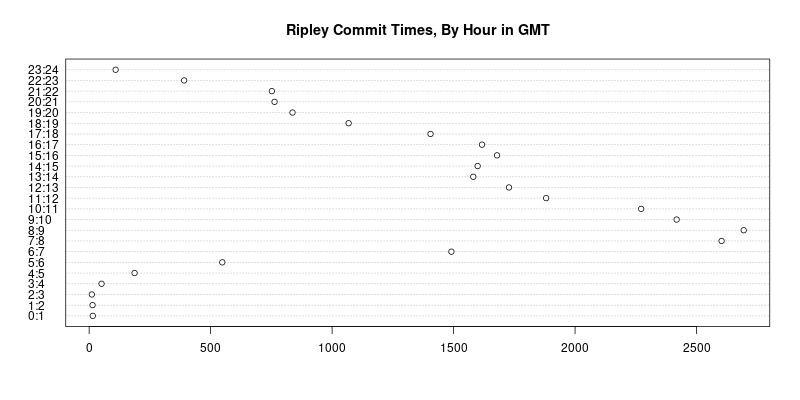
That is what one gets by trusting stable interfaces: code untouched for fourteen years runs unchanged. R itself has had well over sixty releases since then, including two major and eighteen minor releases. Yet the code just runs, including the code for two graphs one can reproduce with the exact same code as we show next.
tod <- unlist(sapply(rx,function(x)strsplit(x,split=" ")[[1]][6]))
tod <- tod[who=="ripley"]

tz <- sub(pattern=".*(-[0-9] 4 ).*",replacement="\\1",x=rx)
tz <- tz[who=="ripley"]
tz <- as.numeric(tz)/100
offset <- 3600*tz

z <- strptime(tod,format="%H:%M:%S")
hist(z,"hours",main="Ripley Commit Times in SVN TZ")

h <- z - offset
h <- format(h,format="%H")
h <- factor(as.numeric(h), levels=0:23)
## added as.vector() here to suppress a warning
dotchart(as.vector(table(h)), main="Ripley Commit Times, By Hour in GMT",
         labels=paste(0:23,1:24,sep=":"))
The code reproduces the chart from 2008, but this time uses the full twenty plus years of SVN history. I added just one as.vector() to suppress one new warning which appears under current R and which was presumably added in the fourteen years since (at the chart is produces without it too). The remainder of the code also runs. I just added one library(zoo) my blog post had omitted. No other changes.
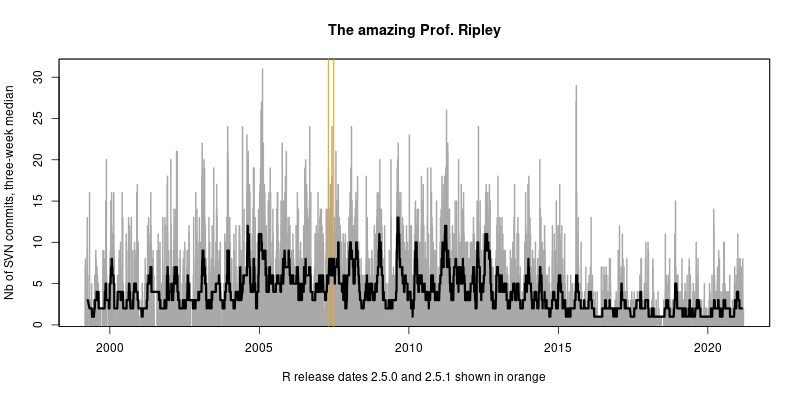
## rather extract both  date and time
dat <- unlist(sapply(rx, function(x)  
  txt <- strsplit(x,split=" ")[[1]]
  paste(txt[5], txt[6])
 ))
## subset on Prof Ripley
dat <- dat[who == "ripley"]
## and convert to POSIXct, correcting by tz as well
datpt <- as.POSIXct(strptime(dat,format="%Y-%m-%d %H:%M:%S")) - offset

## turn into zoo -- we use a constant series of ones as each
## committ is taken as a timestamped event
library(zoo)
datzoo <- zoo(1, order.by=datpt)
## and use zoo to aggregate into commits per date
daily <- aggregate(datzoo, as.Date(index(datzoo)), sum)

## now plot as grey bars
plot(daily, col='darkgrey', type='h', lwd=2,
     ylab="Nb of SVN commits, three-week median",
     xlab="R release dates 2.5.0 and 2.5.1 shown in orange",
     main="The amazing Prof. Ripley")
## mark the two R releases of 2007
abline(v=c(as.Date("2007-04-24"),as.Date("2007-06-28")),col='orange',lwd=1.5)
## and do a quick centered rolling median
lines(rollmedian(daily, 21, align="center"), lwd=3)
It produces this chart spanning two decades of commits. [3] The subtitle highlighting the then-most-recent releases is a little quaint now given that R has had eighten major.minor releases, and over sixty total releases, since then. Stable and rigourously maintained interfaces are a fantastic resource that is dramatically under-appreciated. Efforts such as the ten-year reproduction challenge demonstrate that this really is not a given. Maybe instead of celebrating band aides ( look, I reproduce via code I have frozen in a virtual environment / container / machine / ) we should celebrate languages, ecosystems, packages, that allow us to rely on just the code itself. Because we can. And we should strengthen and reinforce that ability. And discourage rapid changes just for changes sake. Code running for a decade, or even longer, is a huge boon to everybody relying on it. Three cheers to R Core. [1] Docker containers would be really good, and a step above the specs in the README. Winston s nice r-debug sumo container comes closest and helps a lot, and is updated regularly (which my earlier r-devel-san container is not). [2] The post owes some of its code ideas to Ben Bolker and Simon Jackman, but links to now-stale prior affiliations of theirs. [3] And the singularly impressive contributions charted remain unparalled, but were already the focus of the previous post. Yet over three times as a long period, they remain even more stunning. Edit 2021-03-21: Two minor fixes for grammar and typing.
18 March 2021

Arturo Borrero Gonz lez: Debugging ip token set RTNETLINK error

Networking At the Wikimedia Foundation they configure basically all servers with IPv4/IPv6 dual stack, at least in the control plane interface (those used for SSH management, etc). IPv6 is not supported yet on the Cloud Services dataplane (openstack), but it will in the near future. An elegant solution for this IPv4/IPv6 dual stack configuration in the control plane is to embed the IPv4 address into the IPv6 address, something like this:

IPv4: 208.80.154.23
IPv6: 2620:0:861:1:208:80:154:23
                   ^^^^^^^^^^^^^
The gateways send prefix advertisements and by default IPv6 autoconfiguration uses such routers prefixes plus the interface MAC address to build the final address. This behavior can be somewhat changed, you can explicitly set some data instead of the MAC address for the kernel to use when building the final IPv6 address. The trick is to use the ip token command, and further context and reasoning for this can be seen in the puppet manifest that the SRE team uses to configure this:
The token command explicitly configures the lower 64 bits that will be used with any autoconf
address, as opposed to one derived from the macaddr. This aligns the autoconf-assigned address with
the fixed one set above, and can do so as a pre-up command to avoid ever having another address
even temporarily, when this is all set up before boot.
For example:
user@debian:~$ sudo ip token list
token ::208:80:154:23 dev eno1
token :: dev eno2
token :: dev eno3
token :: dev eno4
user@debian:~$ sudo ip token set dev eno2 ::beef
user@debian:~$ ip token get dev eno2
token ::beef dev eno2
user@debian:~$ ip token list
token ::208:80:154:23 dev eno1
token ::beef dev eno2
token :: dev eno3
token :: dev eno4
I was installing a new server the other day and the networking service (ifupdown) was failing to bring the interface up. The issue was the ip token command failing:
root@cloudgw2002-dev:~# ip token set ::10:192:20:18 dev eno1
RTNETLINK answers: Invalid argument
RTNETLINK error reporting is awful. What could be wrong about that command? Well, I had to dig into the kernel source code to try figuring out where was that EINVAL being generated. The routine can be seen in the function inet6_set_iftoken() (source):
static int inet6_set_iftoken(struct inet6_dev *idev, struct in6_addr *token)
 
	struct inet6_ifaddr *ifp;
	struct net_device *dev = idev->dev;
	bool clear_token, update_rs = false;
	struct in6_addr ll_addr;
	ASSERT_RTNL();
	if (!token)
		return -EINVAL;
	if (dev->flags & (IFF_LOOPBACK   IFF_NOARP))
		return -EINVAL;
	if (!ipv6_accept_ra(idev))
		return -EINVAL;
	if (idev->cnf.rtr_solicits == 0)
		return -EINVAL;
[..]
I couldn t identify the reason at first glance, apparently I pass every check in there: Something was wrong here. Upon deeper checks, I finally read the ipv6_accept_ra() function (source):
static inline bool ipv6_accept_ra(struct inet6_dev *idev)
 
	/* If forwarding is enabled, RA are not accepted unless the special
	 * hybrid mode (accept_ra=2) is enabled.
	 */
	return idev->cnf.forwarding ? idev->cnf.accept_ra == 2 :
	    idev->cnf.accept_ra;
 
That was it! Forwarding was enabled on the interface, and it shouldn t. I fixed my configuration with a simple patch for the sysctl configuration. Original issue on the Wikimedia Foundation ticketing system: Phabricator T277287

16 March 2021

Tianon Gravi: My Docker Install Process (re-redux)

See My Docker Install Process and My Docker Install Process (redux) . This one s going to be even more to-the-point.

grab Docker s APT repo GPG key
GNUPGHOME="$(mktemp -d)"; export GNUPGHOME
gpg --keyserver ha.pool.sks-keyservers.net --recv-keys 9DC858229FC7DD38854AE2D88D81803C0EBFCD88
sudo mkdir -p /etc/apt/tianon.gpg.d
gpg --export --armor 9DC858229FC7DD38854AE2D88D81803C0EBFCD88   sudo tee /etc/apt/tianon.gpg.d/docker.gpg.asc
rm -rf "$GNUPGHOME"

add Docker s APT source
source /etc/os-release
echo "deb [ arch=amd64 signed-by=/etc/apt/tianon.gpg.d/docker.gpg.asc ] https://download.docker.com/linux/debian $VERSION_CODENAME stable"   sudo tee /etc/apt/sources.list.d/docker.list
$ sudo apt update
...
Get:6 https://download.docker.com/linux/debian buster/stable amd64 Packages [17.8 kB]
...
Reading package lists... Done

exclude (unwated) CLI plugins
echo 'path-exclude /usr/libexec/docker/cli-plugins/*'   sudo tee /etc/dpkg/dpkg.cfg.d/unwanted-docker-cli-plugins

pin Docker versions
sudo vim /etc/apt/preferences.d/docker.pref
Package: *aufs* *rootless* cgroupfs-mount
Pin: version *
Pin-Priority: -10
Package: docker*
Pin: version 5:20.10*
Pin-Priority: 999
Package: containerd*
Pin: version 1.4*
Pin-Priority: 999

pre-configure Docker
sudo mkdir -p /etc/docker
sudo vim /etc/docker/daemon.json
 
	"storage-driver": "overlay2"
 

configure boot parameters
I usually set a few boot parameters as well (in /etc/default/grub s GRUB_CMDLINE_LINUX_DEFAULT option run sudo update-grub after adding these, space-separated).
  • cgroup_enable=memory enable memory accounting for containers (allows docker run --memory for setting hard memory limits on containers)
  • swapaccount=1 enable swap accounting for containers (allows docker run --memory-swap for setting hard swap memory limits on containers)
  • vsyscall=emulate allow older binaries to run (debian:wheezy, etc.; see docker/docker#28705)
  • systemd.legacy_systemd_cgroup_controller=yes newer versions of systemd may disable the legacy cgroup interfaces Docker currently uses; this instructs systemd to keep those enabled (for more details, see systemd/systemd#4628, opencontainers/runc#1175, docker/docker#28109)
    • NOTE: this one gets more complicated in Debian 11+ ( Bullseye ); possibly worth switching to cgroupv2 and systemd.unified_cgroup_hierarchy=1
All together:
...
GRUB_CMDLINE_LINUX_DEFAULT="cgroup_enable=memory swapaccount=1 vsyscall=emulate systemd.legacy_systemd_cgroup_controller=yes"
...
(Don t forget to sudo update-grub and potentially reboot check /proc/cmdline to verify.)

install Docker!
$ sudo apt-get install -V docker-ce
...
Unpacking containerd.io (1.4.4-1) ...
...
Unpacking docker-ce-cli (5:20.10.5~3-0~debian-buster) ...
...
Unpacking docker-ce (5:20.10.5~3-0~debian-buster) ...
...

$ sudo usermod -aG docker "$(id -un)"

15 March 2021

Matthew Garrett: Exploring my doorbell

I've talked about my doorbell before, but started looking at it again this week because sometimes it simply doesn't send notifications to my Home Assistant setup - the push notifications appear on my phone, but the doorbell simply doesn't trigger the HTTP callback it's meant to[1]. This is obviously suboptimal, but it's also tricky to debug a device when you have no access to it.

Normally I'd just head straight in with a screwdriver, but the doorbell is shared with the other units in this building and it seemed a little anti-social to interfere with a shared resource. So I bought some broken units from ebay and pulled one of them apart. There's several boards inside, but one of them had a conveniently empty connector at the top with "TX", "RX" and "GND" labelled. Sticking a USB-serial converter on this gave me output from U-Boot, and then kernel output. Confirmation that my doorbell runs Linux, but unfortunately it didn't give me a shell prompt. My next approach would often me to just dump the flash and look for vulnerabilities that way, but this device uses TSOP-48 packaged NAND flash rather than the more convenient SPI NOR flash that I already have adapters to access. Dumping this sort of NAND isn't terribly hard, but the easiest way to do it involves desoldering it from the board and plugging it into something like a Flashcat USB adapter, and my soldering's not good enough to put it back on the board afterwards. So I wanted another approach.

U-Boot gave a short countdown to hit a key before continuing with boot, and for once hitting a key actually did something. Unfortunately it then prompted for a password, and giving the wrong one resulted in boot continuing[2]. In the past I've had good luck forcing U-Boot to drop to a prompt by simply connecting one of the data lines on SPI flash to ground while it's trying to read the kernel - the failed read causes U-Boot to error out. It turns out the same works fine on raw NAND, so I just edited the kernel boot arguments to append "init=/bin/sh" and soon I had a shell.

From here on, things were made easier by virtue of the device using the YAFFS filesystem. Unlike many flash filesystems, it's read/write, so I could make changes that would persist through to the running system. There was a convenient copy of telnetd included, but it segfaulted on startup, which reduced its usefulness. Fortunately there was also a copy of Netcat[3]. If you make a fifo somewhere on the filesystem, you can cat the fifo to a shell, pipe the shell to a netcat listener, and then pipe netcat's output back to the fifo. The shell's output all gets passed to whatever connects to netcat, and whatever's sent to netcat gets passed through the fifo back to the shell. This is, obviously, horribly insecure, but it was enough to get a root shell over the network on the running device.

The doorbell runs various bits of software, one of which is Lighttpd to provide a local API and access to the device. Another component ("nxp-client") connects to the vendor's cloud infrastructure and passes cloud commands back to the local webserver. This is where I found something strange. Lighttpd was refusing to start because its modules wanted library symbols that simply weren't present on the device. My best guess is that a firmware update went wrong and left the device in a partially upgraded state - and without a working local webserver, there was no way to perform any further updates. This may explain why this doorbell was sitting on ebay.

Anyway. Now that I had shell, I could simply dump the flash by copying it directly off the /dev/mtdblock devices - since I had netcat, I could just pipe stuff through that back to my actual computer. Now I had access to the filesystem I could extract that locally and start digging into it more deeply. One incredibly useful tool for this is qemu-user. qemu is a general purpose hardware emulation platform, usually used to emulate entire systems. But in qemu-user mode, it instead only emulates the CPU. When a piece of code tries to make a system call to access the kernel, qemu-user translates that to the appropriate calling convention for the host kernel and makes that call instead. Combined with binfmt_misc, you can configure a Linux system to be able to run Linux binaries from other architectures. One of the best things about this is that, because they're still using the host convention for making syscalls, you can run the host strace on them and see what they're doing.

What I found was that nxp-client was calling back to the cloud platform, setting up an encrypted communication channel (using ChaCha20 and a bunch of key setup stuff I couldn't be bothered picking apart) and then waiting for commands from the cloud. It would then proxy those through to the local webserver. Since I couldn't run the local lighttpd, I just wrote a trivial Python app using http.server and waited to see what requests I got. The first was a GET to a CGI script called editcgi.cgi, along with a path name. I mocked up the GET request to respond with what was on the actual filesystem. The cloud then proceeded to POST to editcgi.cgi, with the same pathname and with new file contents. editcgi.cgi is apparently able to read and write to files on the filesystem.

But this is on the interface that's exposed to the cloud client, so this didn't appear immediately useful - and, indeed, trying to hit the same CGI binary over the local network gave me a 401 unauthorized error. There's a local API spec for these doorbells, but they all refer to scripts in the bha-api namespace, and this script was in the plain cgi-bin namespace. But then I noticed that the bha-api namespace didn't actually exist in the filesystem - instead, lighttpd's mod_alias was configured to rewrite requests to bha-api through to files in cgi-bin. And by using the documented API to get a session token, I could call editcgi.cgi to read and write arbitrary files on the doorbell. Which means I can drop an extra script in /etc/rc.d/rc3.d and get a shell on my doorbell.

This all requires the ability to have local authentication credentials, so it's not a big security deal other than it allowing you to retain access to a monitoring device even after you've moved out and had your credentials revoked. I'm sure it's all fine.

[1] I can ping the doorbell from the Home Assistant machine, so it's not that the network is flaky
[2] The password appears to be hy9$gnhw0z6@ if anyone else ends up in this situation
[3] https://twitter.com/mjg59/status/654578208545751040

comment count unavailable comments

13 March 2021

Enrico Zini: nspawn-runner and ansible

This post is part of a series about trying to setup a gitlab runner based on systemd-nspawn. I published the polished result as nspawn-runner on GitHub. New goal: make it easier to configure and maintain chroots. For example, it should be possible to maintain a rolling testing or sid chroot without the need to manually log into it to run apt upgrade. It should be also be easy to have multiple runners reasonably in sync by carrying around a few simple configuration files, representing the set of images available to the CI. Ideally, those configuration files could simply be one ansible playbook per chroot. nspawn-runner could have a 'chroot-maintenance' command that runs all the playbooks on their corresponding chroots, and that would be all I need. ansible and systemd-nspawn ansible being inadequate as usual, it still does not have a nspawn or machinectl connector, even though the need is there, and one can find requests, pull requests, and implementation attempts by all sorts of people, including me. However, I don't want to have nspawn-runner depend on random extra plugins. There's a machinectl become plugin available in ansible from buster-backports, but no matter how I read its scant documentation, looked around the internet, and tried all sorts of things, I couldn't manage to figure out what it is for. This said, simply using systemd-nspawn instead of chroot is quite trivial: use ansible_connection: chroot, set ansible_chroot_exe to this shellscript, and it just works, with things properly mounted, internet access, correct hostnames, and everything:
#!/bin/sh
chroot="$1"
shift
exec systemd-nspawn --console=pipe -qD "$chroot" -- "$@"
I guess that's a, uhm, plan, I guess? Running playbooks As an initial prototype, I made nspawn check the list of chroots in /var/lib/nspawn-runner, and for each directory found there, check if there's an equivalent .yaml or .yml file next to nspawn-runner. For each chroot+playbook combination, it creates an inventory with the right setup, including the custom chroot command, and runs ansible-playbook. As a prototype it works. I assume once it will see usage there's going to be feedback and fine tuning; meanwhile, I have the beginning of some automated maintenance for the CI chroots. Next step It would be nice to also have nspawn-runner create the chroots from configuration files if they are missing, so that a new runner can be deployed with a minimal effort, and it will proceed to generate all the images required in a single command. For this, I'd like to find a clean way to store the chroot creation command inside the playbooks, to keep just one configuration file per chroot. I'd also like to have it flexible enough to run debootstrap, as well as commands for different distributions. Time will tell. This is probably enough for study/design posts on my blog. Further updates will be in the issue tracker.

Dima Kogan: Making the Supernova E3 tail light brighter

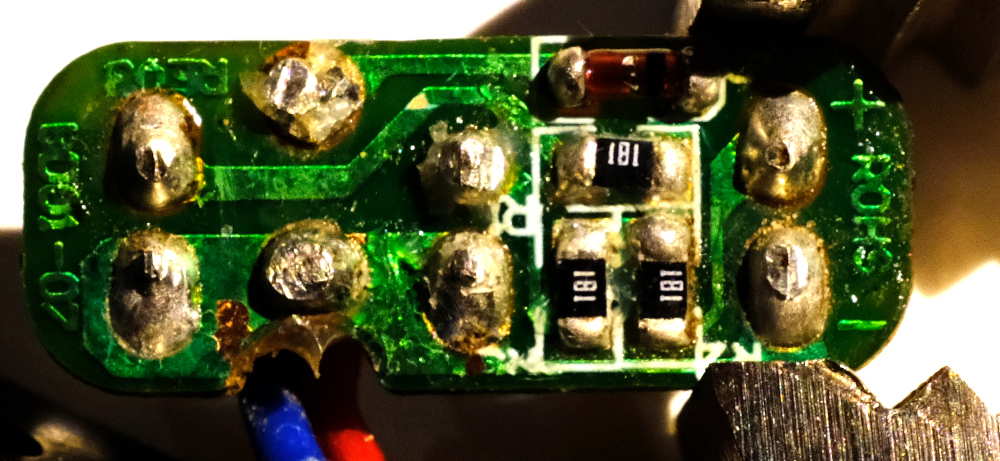
I got a dynamo hub for my bike and a fancy headlight. It's sweet, but I'm discovering that there're no standards for making tail lights work, so I just had to do some light reverse-engineering and soldering. And this is the findings. Different manufacturers do tail lights differently. Most tail lights are not connected directly to the dynamo, but to the headlight instead. Busch+M ller tail lights take an AC signal that looks very similar to what the hub is producing. You're not supposed to hook it up to the hub directly, but it does appear to work, and it's not clear how the headlight's tail-light output is different from the hub input. I haven't scoped it. Supernova tail lights work differently. Some guy on the internet reverse-engineered the headlight circuit showing an LM317 regulator producing 5.9V for the tail light. I have a Supernova E3 tail light (original one; model E161). The case says "6V", which is close to the 5.9V they give it. It wants its 6V, but I don't have a Supernova headlight, so I don't have 6V to give it. I do have a USB charger, so I have 5V instead. Giving it 5V does appear to work, but that results in less brightness than I would like. Presumably the voltage difference is to blame? I took apart the tail light. The circuitry is encased in hot glue. Scraping that off, we can see the action:
before.jpg
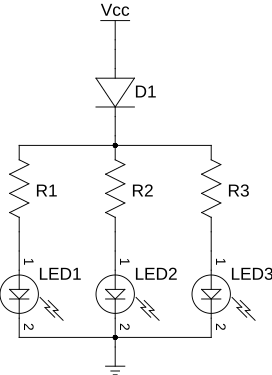
The circuit looks like this:
e3.svg
More or less, this is as expected. The circuit was designed to receive 6V, so the resistances (180 ohms) were selected to produce a certain amount of current. Given 5V, there's less current and less brightness. I can fix this by reducing the amount of resistance to bring the current levels up. I hooked up a power supply to produce 5V and 5.9V, and I measured the voltages in the circuit in those two states. Assume little accuracy in all of this
5V 5.9V
V across input diode 0.8V 0.8V
V across the resistors 2.37V 3.25V
V across the LEDs 1.83V 1.85V
As expected, the voltages across the diodes are stable, and the resistors see the bulk of the voltage difference. The circuit designers wanted 3.25/180 ~ 18mA. With my reduced voltage I was getting 2.37/180 ~ 13mA instead. So I was 28% less bright than I should have been. That doesn't sound like a lot, but it's hard to tell by just looking at the thing. In any case, I can reduce the resistances to get the higher current at 5V: I want a resistance R of 180/3.25*2.37 ~ 131 ohms. In the interest of doing less work, I simply added more resistors in parallel instead of replacing the existing ones. So I need to add in parallel a resistance R such that 180R/(180+R) = 131. So I want a parallel R ~ 485 ohms. Looking through my box of parts, I don't have any nice surface-mount resistors with anywhere near the right resistance. But I do have through-hole ones at 470 ohms. Close-enough. I did some soldering gymnastics:
after.jpg
And I'm done. Haven't done any night rides outside yet with this setup, but in theory this should be bright-enough. And since the resistors are just burning off the excess voltage, and I'm giving it less voltage to burn off, I'm being more efficient than I would have been with 6V and the stock resistors.

Enrico Zini: nspawn-runner and btrfs

This post is part of a series about trying to setup a gitlab runner based on systemd-nspawn. I published the polished result as nspawn-runner on GitHub. systemd-nspawn has an interesting --ephemeral option that sets up temporary copy-on-write filesystem snapshots on filesystems that support it, like btrfs. Using copy on write means that one could perform maintenance on the source chroots, without disrupting existing CI sessions. btrfs and copy on write btrfs snapshots work on subvolumes. As I understand it, if one uses btrfs subvolume create instead of mkdir, what is inside the resulting directory is managed as a subvolume that can be snapshotted and managed in all sorts of interesting ways. I managed to delete a subvolume equally well with btrfs subvolume delete and with rm -r. btrfs subvolume snapshot src dst is similar to cp -a, but it makes a copy-on-write snapshot of a btrfs subvolume. If I change nspawn-runner to manage each chroot in its own subvolume, I should be able to build on all these features, and systemd-nspawn should be able to do that, too. There's a cute shortcut to migrate a subdirectory to a subvolume: create the subvolume, then use cp -r --reflink to populate the subvolume with the directory contents. systemd-nspawn and btrfs Passing -x/--ephemeral to systemd-nspawn makes it do all the transient copy-on-write work automatically:
# systemd-nspawn -xD buster
Spawning container buster-7fd47ac79296c5d3 on /var/lib/nspawn-runner/t/.#machine.buster0939fbc61fcbca28.
Press ^] three times within 1s to kill container.
root@buster-7fd47ac79296c5d3:~# mkdir foo
root@buster-7fd47ac79296c5d3:~# ls -la
total 12
drwx------ 1 root root  62 Mar 13 16:30 .
drwxr-xr-x 1 root root 154 Mar 13 16:26 ..
-rw------- 1 root root 102 Mar 13 16:26 .bash_history
-rw-r--r-- 1 root root 570 Mar 13 16:26 .bashrc
-rw-r--r-- 1 root root 148 Mar 13 16:26 .profile
drwxr-xr-x 1 root root   0 Mar 13 16:30 foo
root@buster-7fd47ac79296c5d3:~# logout
Container buster-7fd47ac79296c5d3 exited successfully.
root@runner2:/var/lib/nspawn-runner/t# ls -la buster/root/
totale 12
drwx------ 1 root root  56 mar 13 16:26 .
drwxr-xr-x 1 root root 154 mar 13 16:26 ..
-rw------- 1 root root 102 mar 13 16:26 .bash_history
-rw-r--r-- 1 root root 570 mar 13 16:26 .bashrc
-rw-r--r-- 1 root root 148 mar 13 16:26 .profile
It also works on a directory that is not a subvolume, making reflinks of its contents instead of a subvolume snapshot, although this has a performance penalty on setup: Snapshotting a subvolume:
# time systemd-nspawn -xD buster ls
Spawning container buster-7ab8f4123420b5d5 on /var/lib/nspawn-runner/t/.#machine.bustercd54ef4971229ff5.
Press ^] three times within 1s to kill container.
bin  boot  dev  etc  home  lib  lib32  lib64  libx32  media  mnt  opt  proc  root  run  sbin  srv  sys  tmp  usr  var
Container buster-7ab8f4123420b5d5 exited successfully.
real    0m0,164s
user    0m0,032s
sys 0m0,014s
Reflink-ing a subdirectory:
# time systemd-nspawn -xD buster ls
Spawning container buster-ebc9dc77db0c972d on /var/lib/nspawn-runner/.#machine.buster2ecbcbd1a1a058b8.
Press ^] three times within 1s to kill container.
bin  boot  dev  etc  home  lib  lib32  lib64  libx32  media  mnt  opt  proc  root  run  sbin  srv  sys  tmp  usr  var
Container buster-ebc9dc77db0c972d exited successfully.
real    0m3,022s
user    0m0,326s
sys 0m2,406s
Detecting filesystem type I can change nspawn-runner to use btrfs-specific features only when /var/lib/nspawn-runner is on btrfs. Here's a command to detect the filesystem type:
# stat -f -c %T /var/lib/nspawn-runner/
btrfs
nspawn-runner updated I've refactored nspawn-runner splitting backend and frontend code, and implementing multiple backends based on what's the filesystem type of /var/lib/nspawn-runner/. It works really nicely, and with no special configuration required: if /var/lib/nspawn-runner is on btrfs, things run faster, with less kludges, and one can do maintenance on the base chroots without interfering with running CI jobs. Next step The next step is making it easier to configure and maintain chroots. For example, it should be possible to maintain a rolling testing or sid chroot without the need to manually log into it to run apt upgrade.

Louis-Philippe V ronneau: Preventing an OpenPGP Smartcard from caching the PIN eternally

While I'm overall very happy about my migration to an OpenPGP hardware token, the process wasn't entirely seamless and I had to hack around some issues, for example the PIN caching behavior in GnuPG. As described in this bug the cache-ttl parameter in GnuPG is not implemented and thus does nothing. This means once you type in your PIN, it is cached for as long as the token is plugged. Security-wise, this is not great. Instead of manually disconnecting the token frequently, I've come up with a script that restarts scdameon if the token hasn't been used during the last X minutes. It seems to work well and I call it using this cron entry: */5 * * * * my_user /usr/local/bin/restart-scdaemon To get a log from scdaemon, you'll need a ~/.gnupg/scdaemon.conf file that looks like this:
debug-level basic
log-file /var/log/scdaemon.log
Hopefully it can be useful to others!
 #!/usr/bin/python3
# Copyright 2021, Louis-Philippe V ronneau <pollo@debian.org>
#
# This script is free software: you can redistribute it and/or modify it under
# the terms of the GNU General Public License as published by the Free Software
# Foundation, either version 3 of the License, or (at your option) any later
# version.
# 
# This script is distributed in the hope that it will be useful, but WITHOUT
# ANY WARRANTY; without even the implied warranty of MERCHANTABILITY or FITNESS
# FOR A PARTICULAR PURPOSE. See the GNU General Public License for more
# details.
# 
# You should have received a copy of the GNU General Public License along with
# this script. If not, see <http://www.gnu.org/licenses/>.
"""
This script restarts scdaemon after X minutes of inactivity to reset the PIN
cache. It is meant to be ran by cron each X/2 minutes.
This is needed because there is currently no way to set a cache time for
smartcards. See https://dev.gnupg.org/T3362#137811 for more details.
"""
import os
import sys
import subprocess
from datetime import datetime, timedelta
from argparse import ArgumentParser
p = ArgumentParser(description=__doc__)
p.add_argument('-l', '--log', default="/var/log/scdaemon.log",
               help='Path to the scdaemon log file.')
p.add_argument('-t', '--timeout', type=int, default="10",
               help=("Desired cache time in minutes."))
args = p.parse_args()
def get_last_line(scdaemon_log):
    """Returns the last line of the scdameon log file."""
    with open(scdaemon_log, 'rb') as f:
        f.seek(-2, os.SEEK_END)
        while f.read(1) != b'\n':
            f.seek(-2, os.SEEK_CUR)
        last_line = f.readline().decode()
    return last_line
def check_time(last_line, timeout):
    """Returns True if scdaemon hasn't been called since the defined timeout."""
    # We don't need to restart scdaemon if no gpg command has been run since
    # the last time it was restarted.
    should_restart = True
    if "OK closing connection" in last_line:
        should_restart = False
    else:
        last_time = datetime.strptime(last_line[:19], '%Y-%m-%d %H:%M:%S')
        now = datetime.now()
        delta = now - last_time
        if delta <= timedelta(minutes = timeout):
            should_restart = False
    return should_restart
def restart_scdaemon(scdaemon_log):
    """Restart scdaemon and verify the restart process was successful."""
    subprocess.run(['gpgconf', '--reload', 'scdaemon'], check=True)
    last_line = get_last_line(scdaemon_log)
    if "OK closing connection" not in last_line:
        sys.exit("Restarting scdameon has failed.")
def main():
    """Main function."""
    last_line = get_last_line(args.log)
    should_restart = check_time(last_line, args.timeout)
    if should_restart:
        restart_scdaemon(args.log)
if __name__ == "__main__":
    main()

12 March 2021

Ryan Kavanagh: Static Comments in Hugo

I switched from Jekyll to Hugo last week for a variety of reasons. One thing that was missing was a port of the jekyll-static-comments plugin that I used to use. I liked it because it saved readers from being tracked by Disqus or other comments solutions, and it required no javascript. To comment, users would email me their comment following a template attached to the bottom of each post. I then piped their email through a script to add it to the right post. As an added benefit, I could delegate comment spam detection to my mail server. I ve managed to reimplement this setup using Hugo. For those who are interested in a similar setup, here is what you need to do.

Pages with comments Instead of being single files, pages need to be leaf bundles. For example, this means that your blog post must be located at /content/blog/2021-03-12-static-comments-in-hugo/index.md instead of /content/blog/2021-03-12-static-comments-in-hugo.md. This lets you store the comments as page resources in the subdirectory /content/blog/2021-03-12-static-comments-in-hugo/comments/.

Partials You should create a comments.html partial and include it in the layout for the pages which should get comments:
<div class="post-comments">
  <p class="comment-notice"><b>Comments</b>: To comment on this post,
	send me an email following the template below. Your email address
	will not be posted, unless you choose to include it in
	the <span style="font-family: monospace;">link:</span> field.</p>
  <pre class="comment-notice">
To: Your Name &lt;your.email<span>@</span>example.org&gt;
Subject: [blog-comment]   .Page.RelPermalink  
post_id:   .Page.RelPermalink  
author: [How should you be identified? Usually your name or "Anonymous"]
link: [optional link to your website]
Your comments here. Markdown syntax accepted.</pre>
    $scratch := newScratch  
    $scratch.Set "comments" (.Resources.Match "comments/*yml")  
    if eq 1 (len ($scratch.Get "comments"))  
  <h2>1 Comment</h2>
    else  
  <h2>  len ($scratch.Get "comments")   Comments</h2>
    end  
    range ($scratch.Get "comments")  
  <div class="post-comment  % cycle 'odd', 'even' % ">
	  $comment := (.Content   transform.Unmarshal)  
	<span class="post-meta">
		 - $comment.date   dateFormat "Jan 2, 2006 at 15:04" - 
	</span>
	<h3 class="comment-header">
	    if $comment.link  
	  <a href="  $comment.link  ">  $comment.author  </a>
	    else  
	    $comment.author  
	    end  
	  <br />
	</h3>
	  $comment.comment   markdownify  
  </div>
    end  
</div>

Comments To associate comments received by email to posts, I pipe them from mutt (using the keybinding) to the following (admittedly janky) shell script. It takes the comment, reformats it appropriately, and puts it in the post s comments subdirectory. Note that it determines which filename to use based on the email s contents, so make sure to check that the email doesn t contain anything nefarious before you pipe it into the script!
#!/bin/sh
# Copyright (C) 2016-2021 Ryan Kavanagh <rak@rak.ac>
# Distributed under the ISC license
BLOG_BASE="/media/t/work/blog"
MESSAGE=$(cat)
EMAIL=$(echo "$ MESSAGE "   grep "From:"   sed -e 's/From[^<]*<\?\([^>]*\)>\?.*/\1/g;s/@/-at-/g')
DATE=$(echo "$ MESSAGE "   grep "Date:"   sed -e 's/Date:\s*//g'   xargs -0 date -Iseconds -u -d)
POST_ID=$(echo "$ MESSAGE "   grep "post_id:"   sed -e 's/post_id: //g')
COMMENTS_DIR="$ BLOG_BASE /content/$ POST_ID /comments/"
COMMENT_FILE="$ COMMENTS_DIR /$ DATE _$ EMAIL .yml"
# Strip out the email headers and whitespace until the start of the comment
COMMENT_WHOLE=$(echo "$ MESSAGE "   sed -e '/^\s*$/,$!d;/^[^\s]/,$!d')
# Indent everything after the comment header
COMMENT_INDENTED=$(echo "$ COMMENT_WHOLE "   sed -e '/^\s*$/,$ s/.*/  &/g ')
# And add the comment header
COMMENT_PREFIXED=$(echo "$ COMMENT_INDENTED "   sed -e '0,/^\s*$/ s/^\s*$/comment:  / ')
[ -d "$ COMMENTS_DIR " ]   mkdir -p "$ COMMENTS_DIR "
echo "Saving the comment to $ COMMENT_FILE "
echo "date: $ DATE "   tee "$ COMMENT_FILE "
echo "$ COMMENT_PREFIXED "   tee -a "$ COMMENT_FILE "
For example, the following comment in an email body:
post_id: /blog/2021-03-12-static-comments-in-hugo/
author: Ryan Kavanagh
link: https://rak.ac/
Dear self,
Here is a test comment for your blog post.
It supports *markdown* **syntax** and  stuff .
Best,
Yourself
results in a file content/blog/2021-03-12-static-comments-in-hugo/comments/2021-03-12T18:47:25+00:00_rak-at-example.org.yml containing:
date: 2021-03-12T18:47:25+00:00
post_id: /blog/2021-03-12-static-comments-in-hugo/
author: Ryan Kavanagh
link: https://rak.ac/
comment:  
  Dear self,

  Here is a test comment for your blog post.
  It supports *markdown* **syntax** and  stuff .

  Best,
  Yourself  
You can see the rendered output at the bottom of this page.

10 March 2021

Sean Whitton: consfigurator 0.3.1

I d like to briefly introduce my new project, Consfigurator:
Consfigurator is a system for declarative configuration management using Common Lisp. You can use it to configure hosts as root, deploy services as unprivileged users, build and deploy containers, and produce disc images. [not all of these are implemented yet, but the design permits them to be] Consfigurator s design gives you a great deal of flexibility about how to control the hosts you want to configure. If there is a command you can run which will obtain input and output streams attached to an interactive POSIX sh running on the target host/container, then with a little glue code, you can use much of Consfigurator s functionality to configure that host/container. But if it is possible to get an implementation of Common Lisp started up on the host, then Configurator can transparently execute your deployment code over on the remote side, rather than exchanging information via POSIX sh. This lets you use the full power of Common Lisp to deploy your configuration. Configurator has convenient abstractions for combining these different ways to execute your configuration on hosts with different ways of connecting to them. Connections can be arbitrarily nested. For example, to combine SSHing to a Debian machine as an unprivileged user, using sudo to become root, and then starting up a Lisp image to execute your deployment code, you would evaluate
    (deploy ((:ssh (:sudo :as "spwhitton@athena.example.com") :debian-sbcl)) athena.example.com)
Declarative configuration management systems like Consfigurator and Propellor share a number of goals with projects like the GNU Guix System and NixOS. However, tools like Consfigurator and Propellor try to layer the power of declarative and reproducible configuration on top of traditional, battle-tested unix system administration infrastructure like apt, dpkg, yum, and distro package archives, rather than seeking to replace any of those. Let s get as much as we can out of all that existing distro policy-compliant work!
Please check out the user s manual, which includes a tutorial/quick start guide, and come join us in #consfigurator on irc.oftc.net. It s early days but you can already do a fair few things with Consfigurator. It s a good time to come help get all the basic properties defined!

Dirk Eddelbuettel: RcppArmadillo 0.10.2.2.0 on CRAN: New Upstream Patch Release

armadillo image Armadillo is a powerful and expressive C++ template library for linear algebra aiming towards a good balance between speed and ease of use with a syntax deliberately close to a Matlab. RcppArmadillo integrates this library with the R environment and language and is widely used by (currently) 841 other packages on CRAN. This release brings us a second update within the Armadillo 10.2 series, one month after the initial release. Upstream work has commenced at a 10.3 series with first pre-releases which we are currently testing. If possible, CRAN release will continue to be at least one month apart (such as this time) but we continue to make interim releases available on the Rcpp drat repo repo. The full set of changes follows.

Changes in RcppArmadillo version 0.10.2.2.0 (2021-03-09)
  • Upgraded to Armadillo release 10.2.2 (Cicada Swarm)
    • faster handling of subcubes
    • added tgamma()
    • added .brief_print() for abridged printing of matrices & cubes
    • expanded forms of trimatu() and trimatl() with diagonal specification to handle sparse matrices
    • expanded eigs_sym() and eigs_gen() with optional shift-invert mode
  • Removed debian/ directory from repository as packaging is on salsa.debian.org.
  • Relaxed tolerance on two cube tests on Windows to accomodate new 'gcc10-UCRT' builder.

Courtesy of my CRANberries, there is a diffstat report relative to previous release. More detailed information is on the RcppArmadillo page. Questions, comments etc should go to the rcpp-devel mailing list off the R-Forge page. If you like this or other open-source work I do, you can sponsor me at GitHub.

This post by Dirk Eddelbuettel originated on his Thinking inside the box blog. Please report excessive re-aggregation in third-party for-profit settings.

9 March 2021

Emmanuel Kasper: Displaying CSV files in a readable way on the terminal

Until this week I did not know about the column command.

$ head -5 zillow.csv
"Index", "Living Space (sq ft)", "Beds", "Baths", "Zip", "Year", "List Price ($)"
1, 2222, 3, 3.5, 32312, 1981, 250000
2, 1628, 3, 2, 32308, 2009, 185000
3, 3824, 5, 4, 32312, 1954, 399000
4, 1137, 3, 2, 32309, 1993, 150000

Turned out this file is much more readable with a good pipe (and a large screen)
$ head -5 zillow.csv column --table --separator ,
"Index" "Living Space (sq ft)" "Beds" "Baths" "Zip" "Year" "List Price ($)"
1 2222 3 3.5 32312 1981 250000
2 1628 3 2 32308 2009 185000
3 3824 5 4 32312 1954 399000
4 1137 3 2 32309 1993 150000

column is part of util-linux and is thus available in all distributions.
Example file taken from this example list.

Next.

Previous.