Search Results: "edd"

20 July 2013

Eddy Petrișor: (Not a) GNU Make quirk, or why logs should be provided

About two months ago I was writing about a quirk I found in GNU Make related to the $(patsubst ) function.

I have just tried this on my Debian Wheezy laptop which has make 3.81, but I wasn't able to reproduce the issue with the version from Debian (3.81-8.2).

The makefile looks like this:
PATH := ../some/prefixCPU12suf/include
CPUINC := $(patsubst ../some/prefix%,%,$(PATH))
CPU := $(patsubst %/include,%,$(CPUINC))

default:
@echo "PATH = $(PATH)"
@echo "CPUINC = $(CPUINC)"
@echo "CPU = $(CPU)"
And the result was correct:
0 eddy@heidi /tmp $ make
PATH = ../some/prefixCPU12/include
CPUINC = CPU12/include
CPU = CPU12
0 eddy@heidi /tmp $ make --version
GNU Make 3.81
Copyright (C) 2006 Free Software Foundation, Inc.
This is free software; see the source for copying conditions.
There is NO warranty; not even for MERCHANTABILITY or FITNESS FOR A
PARTICULAR PURPOSE.

This program built for x86_64-pc-linux-gnu
The worst part is that I know I tested this issue on 3.82 on Cygwin and on Linux with the 3.82 version and it failed, but I wasn't able to remember how I did it. I started searching through the directory where I knew there could be the test makefile, I wasn't able to find it, until I remembered what I was trying to achieve.

From a path like ../some/prefixCPU12suf/include I wanted to use % to remove the parts 'some/prefix' and 'suf/include' because in the directory ../CPU12 there were some files that needed to be processed.

The actual issue is that GNU Make's '%' is not analogous to shell's '*', so that means code like this does not work as I assumed anf the 'pref' part is not an anchor:


PATH := ../some/prefCPU12suf/include
CPUINC := $(patsubst pref%,%,$(PATH))
CPU := $(patsubst %suf/include,%,$(CPUINC))

default:
@echo "PATH = $(PATH)"
@echo "CPUINC = $(CPUINC)"
@echo "CPU = $(CPU)"
Which leads to these results, no matter the version:

0 eddy@heidi ~/usr/src/make/make-profiler/make-3.82 $ ./make -f /tmp/makefile
PATH = ../some/prefCPU12suf/include
CPUINC = ../some/prefCPU12suf/include
CPU = ../some/prefCPU12
0 eddy@heidi ~/usr/src/make/make-profiler/make-3.82 $ ./make --version
GNU Make 3.82
Built for x86_64-unknown-linux-gnu
Copyright (C) 2010 Free Software Foundation, Inc.
License GPLv3+: GNU GPL version 3 or later <http: gnu.org="" gpl.html="" licenses="">
This is free software: you are free to change and redistribute it.
There is NO WARRANTY, to the extent permitted by law.
0 eddy@heidi ~/usr/src/make/make-profiler/make-3.82 $ make -f /tmp/makefile
PATH = ../some/prefCPU12suf/include
CPUINC = ../some/prefCPU12suf/include
CPU = ../some/prefCPU12
0 eddy@heidi ~/usr/src/make/make-profiler/make-3.82 $ make --version
GNU Make 3.81
Copyright (C) 2006 Free Software Foundation, Inc.
This is free software; see the source for copying conditions.
There is NO warranty; not even for MERCHANTABILITY or FITNESS FOR A
PARTICULAR PURPOSE.

This program built for x86_64-pc-linux-gnu</http:>
Not sure if this could be qualified as a true bug, or a if the way I expected is a nice to have feature, but, in any case, the behaviour is consistent, unlike my brain which failed to initially identify the inconsistency in my code:

0 eddy@heidi ~/usr/src/make/make-profiler/make-3.82 $ grep patsubst /tmp/makefile
CPUINC := $(patsubst pref%,%,$(PATH))
CPU := $(patsubst %suf,%,$(CPUINC))
0 eddy@heidi ~/usr/src/make/make-profiler/make-3.82 $ make -f /tmp/makefile
PATH = ../some/prefCPU12suf/include
CPUINC = ../some/prefCPU12suf/include
CPU = ../some/prefCPU12suf/include
Note that this behaviour of patsubst is asymtric to how subst works, as explained in the updated old post.

This took some extra effort to remember what was the actual issue, and shows why logs are important when reporting an issue, and why reporting issues as soon as they were encountered: because human brains are faulty. (Yes, yours, too!)

Eddy Petri&#537;or: GNU Make quirk

(Updated 2013-07-20: Correctly describe the issue and provide examples)

Make has several useful built-in functions, among which $(patsubst pattern,replacer,string). The pattern can contain the character % which is a wildcard meaning any string and that can be referred in the replacer parameter. Only the first occurrence of % is treated with this special meaning, just as the manual says.

What the manual doesn't say is that only the form %bla works, while the form bla% does NOT work GNU Make's '%' is not analogous to shell's '*', so you can't expect to remove substrings in the middle of a string without knowing the exact string until the part you want to remove.

This does not work if you want to obtain '../some/CPU12/include' in OTHERPATH:

PATH := ../some/prefCPU12/include
OTHERPATH := $(patsubst pref%,%,$(PATH))

default:
@echo "OTHERPATH = $(OTHERPATH)
The result will be:
OTHERPATH = ../some/prefCPU12/include
This bahaviour is somewhat asymetric to how subst behaves and how one would expect it to, considering '%' is explained as a glob pattern:

0 eddy@heidi /tmp $ cat makefile
PATH := ../some/prefCPU12/include
OTHERPATH := $(patsubst pref%,%,$(PATH))
SPATH := $(subst pref,,$(PATH))

default:
@echo "PATH = $(PATH)"
@echo "OTHERPATH = $(OTHERPATH)"
@echo "SPATH = $(SPATH)"
0 eddy@heidi /tmp $ make
PATH = ../some/prefCPU12/include
OTHERPATH = ../some/prefCPU12/include
SPATH = ../some/CPU12/include
Not sure what make developers would say about this, and I am not sure if having % work as a glob pattern and using it, instead of invoking sed would be better for performance, but sure I would like to have the option :-) .

19 July 2013

Michal &#268;iha&#345;: Speed improvements in Weblate

Yesterday, I've spent some time trying to improve speed of translation import in Weblate. It got annoyingly slow while adding new features and I felt there has to be some area for improvements even with all the features. I was testing on development server with debug stuff enabled (what slows down things quite a lot already) and first import took about 30 seconds. Quick look revealed that for linked repositories, the link lookup happens too often, so some caching could be used. This has saved about 3 seconds... With offloaded indexing (what is anyway only useful setup for production use), every reindex request was checking whether there is already one before creating new one. In most cases there is none before, so it's simply faster to try to create one and ignore error in case it is already there. We're now 5 seconds faster. Another big resource consumer are quality checks. They provide useful feedback to translators, but it means that quite a lot of code needs to be executed for every single string. First thing I've realized is that unit check state is recalculated everytime regardless the fact whether there was any change, what was easy to fix. The other speed issue is in consistency check - it does too complex SQL query, which usually does not match anything. Converting this to much simpler one (which will in most cases still have no results) improves performance for usual path while having minimal impact for the real checking. Another 4 seconds down on my test import. Last thing which I changed is way how per translation statistics are updated. In past this required quite a lot of queries, but yesterday I've realized this can be much reduced. During test suite run on PostgreSQL, I saw that it's not that easy - PostgreSQL does not allow to sum boolean fields, but fortunately this can be fixed as well. This has saved about 2 seconds. In the end the tested import took 16 seconds instead of original 30 and issued 2500 SQL queries instead of 5000 at the beginning. I hope you will enjoy regained speed of imports :-).

Filed under: English Weblate 0 comments Flattr this!

18 July 2013

Vincent Bernat: Packaging a daemon for OS X

There are three main ways to distribute a command-line daemon for OS X:
  1. Distributing source code and instructions on how to compile it.
  2. Using a third-party package manager, like Homebrew.
  3. Providing an installer package.

Homebrew Homebrew is a popular package management system. It works like the BSDs ports collections by downloading, compiling and installing the requested software, while also installing any required dependencies automatically. Creating a new package is quite easy and there are a lot of examples available. However, there are some limitations:
  • You don t really build a package but execute a recipe to locally install the software.
  • You need to install development tools, either a whole Xcode installation1 or the command line version.
  • If you need to execute some steps as root, you will have to explain them to the user for her to execute by hand. This includes the creation of a system user or the installation of a daemon through launchd.
If you can t live with those limitations, you may need to build an installer package.

Building an installer package OS X comes with a graphical and a command-line installer. The graphical one is run by opening a package from the Finder. Then, the user experiences some familiar wizard allowing her to install the software in a matter of a few seconds. OS X graphical installer The documentation around how to build such a package is somewhat clumsy. You may find outdated information or pieces of information that only apply to projects using Xcode. I will try to provide here accurate bits in the following context:
  1. You are packaging a pure command-line tool.
  2. You are using Autoconf and Automake as a build system.
  3. You want to support several architectures.
  4. You want to support older versions of OS X.

Creating a package Building such a package was previously done with some graphical tool called PackageMaker. This tool is not available any more and developers are asked to switch to pkgbuild and productbuild. There is a very neat Stackoverflow article on how those tools work. A package is built in two steps:
  1. Build component packages.
  2. Combine them into a product archive.
A component package contains a set of files and a set of scripts to execute at various steps of the installation. You can have several component packages, for example a package for the daemon and a package for the client. They are built with pkgbuild. A product archive contains the previously created component packages as well as a file describing various options of the installer (required and optional components, license, welcome text, ). To create a component package, we need to install the needed files in some directory:
$ ./configure --prefix=/usr --sysconfdir=/private/etc
$ make
$ make install DESTDIR=$PWD/osx-pkg
We will now put the content of osx-pkg into a component package with pkgbuild:
$ mkdir pkg1
$ pkgbuild --root osx-pkg \
>    --identifier org.someid.daemon \
>    --version 0.47 \
>    --ownership recommended
>    pkg1/output.pkg
pkgbuild: Inferring bundle components from contents of osx-pkg
pkgbuild: Wrote package to output.pkg
You need to be careful with the identifier. It needs to be unique and identify your software as well as the specific component. Then, you need to create an XML file describing the installer. Let s call it distribution.xml:
<?xml version="1.0" encoding="utf-8" standalone="no"?>
<installer-gui-script minSpecVersion="1">
    <title>Some daemon</title>
    <organization>org.someid</organization>
    <domains enable_localSystem="true"/>
    <options customize="never" require-scripts="true" rootVolumeOnly="true" />
    <!-- Define documents displayed at various steps -->
    <welcome    file="welcome.html"    mime-type="text/html" />
    <license    file="license.html"    mime-type="text/html" />
    <conclusion file="conclusion.html" mime-type="text/html" />
    <!-- List all component packages -->
    <pkg-ref id="org.someid.daemon"
             version="0"
             auth="root">output.pkg</pkg-ref>
    <!-- List them again here. They can now be organized
         as a hierarchy if you want. -->
    <choices-outline>
        <line choice="org.someid.daemon"/>
    </choices-outline>
    <!-- Define each choice above -->
    <choice
        id="org.someid.daemon"
        visible="false"
        title="some daemon"
        description="The daemon"
        start_selected="true">
      <pkg-ref id="org.someid.daemon"/>
    </choice>
</installer-gui-script>
Fortunately, this file is documented on Apple Developer Library. Since we only describe one package, we pass customize="never" as an option to skip the choice part. You can however remove this attribute when you have several component packages. The attribute rootVolumeOnly="true" explains that this daemon can only be installed system-wide. It is marked as deprecated but still works. Its replacement (domains tag) displays an unusual and buggy pane which Apple doesn t use in any of its packages. You need to put the HTML2 documents into a resources directory. It is also possible to choose the background by specifying a <background/> tag. The following command will generate the product archive:
$ productbuild --distribution distribution.xml \
>              --resources resources \
>              --package-path pkg1 \
>              --version 0.47 \
>              ../final.pkg
productbuild: Wrote product to ../final.pkg

Scripts The installer can execute some scripts during installation. For example, suppose we would like to register our daemon with launchd for it to be run at system start. You first need to write some org.someid.plist file and ensure it will get installed in /Library/LaunchDaemons:
<?xml version="1.0" encoding="UTF-8"?>
<!DOCTYPE plist PUBLIC "-//Apple//DTD PLIST 1.0//EN" "http://www.apple.com/DTDs/PropertyList-1.0.dtd">
<plist version="1.0">
<dict>
  <key>Label</key>
  <string>org.someid</string>
  <key>ProgramArguments</key>
  <array>
    <string>/usr/sbin/mydaemon</string>
    <string>-d</string>
  </array>
  <key>RunAtLoad</key><true/>
  <key>KeepAlive</key><true/>
</dict>
</plist>
Then create a scripts/postinstall file with the following content:
#!/bin/sh
set -e
/bin/launchctl load "/Library/LaunchDaemons/org.someid.plist"
You also need a scripts/preinstall file which will allow your program to be smoothly upgraded:
#!/bin/bash
set -e
if /bin/launchctl list "org.someid" &> /dev/null; then
    /bin/launchctl unload "/Library/LaunchDaemons/org.someid.plist"
fi
Ensure that those scripts are executable and add --scripts scripts to pkgbuild invocation. If you need to add a system user, use dscl.

Dependencies There is no dependency management built into OS X installer. Therefore, you should ensure that everything is present in the package or in the base system. For example, lldpd relies on libevent, an event notification library. This library is not provided with OS X. When it is not found, the build system will use an embedded copy. However, if you have installed libevent with Homebrew, you will get binaries linked to this local libevent installation. Your package won t work on another host. The output of otool -L can detect unwanted dependencies:
$ otool -L build/usr/sbin/lldpd
build/usr/sbin/lldpd:
        /usr/lib/libresolv.9.dylib (compatibility version 1.0.0, current version 1.0.0)
        /System/Library/Frameworks/IOKit.framework/Versions/A/IOKit (compatibility version 1.0.0, current version 275.0.0)
        /System/Library/Frameworks/CoreFoundation.framework/Versions/A/CoreFoundation (compatibility version 150.0.0, current version 744.19.0)
        /System/Library/Frameworks/Foundation.framework/Versions/C/Foundation (compatibility version 300.0.0, current version 945.18.0)
        /usr/lib/libSystem.B.dylib (compatibility version 1.0.0, current version 169.3.0)

Compilation for older versions of OS X The package as built above may only work on the same version of OS X that you use to compile. If you want a package that will work on OS X 10.6, you will need to download the appropriate SDK3. Then, you need to tell the compiler the target version of OS X and the SDK location. You can do this by setting CFLAGS and LDFLAGS (and CXXFLAGS if you use C++):
$ SDK=/Developer/SDKs/MacOSX10.6.sdk
$ ./configure --prefix=/usr --sysconfdir=/private/etc \
>         CFLAGS="-mmacosx-version-min=10.6 -isysroot $SDK" \
>         LDFLAGS="-mmacosx-version-min=10.6 -isysroot $SDK"
The -mmacosx-version-min flag will be used by various macros in the headers to mark some functions as available or not, depending on the version of OS X you target. It will also be used by the linker. The -isysroot will tell the location of the SDK. Headers and libraries will be looked up in this location first.

Universal binaries Mac OS X 10.6 was available for both IA-32 and x86-64 architectures. If you want to support both installations with a single package, you need to build universal binaries. The Mach object file format, used by OS X, allows several versions of the executable in the same file. The operating system will select the most appropriate one. An easy way to generate such files is to pass -arch i386 -arch x86_64 to the compiler:
$ ./configure --prefix=/usr --sysconfdir=/private/etc \
>     CC="gcc -arch i386 -arch x86_64" \
>     CPP="gcc -E"
However, this is a dangerous option. Suppose that your ./configure script tries to determine some architecture-dependent parameter, like the size of an integer (with AC_CHECK_SIZEOF); it will compute it for the host architecture. The binary generated for the other architecture will therefore use a wrong value and may crash at some point. The correct way to generate an universal binary is to execute two separate compilations and to build the universal binary with lipo:
$ for arch in i386 x86_64; do
>   mkdir $arch ; cd $arch
>   ../configure --prefix=/usr --sysconfdir=/private/etc \
>       CC="gcc -arch $ARCH" \
>       CPP="gcc -E"
>   make
>   make install DESTDIR=$PWD/../target-$ARCH
>   cd ..
> done
[...]
$ lipo -create -output daemon i386/usr/sbin/daemon x86_64/usr/sbin/daemon
Since lipo only works on file, I have written a Python script applying lipo recursively to several directories.

Putting everything together Now, we need to automate a bit. You could provide some nifty script. I propose an appropriate Makefile.am instead. This way, we can use the output variables, like @VERSION@, from ./configure to generate some of the files, like distribution.xml. You need to add that in your configure.ac:
AC_CONFIG_FILES([osx/Makefile osx/distribution.xml osx/im.bernat.lldpd.plist])
AC_CONFIG_FILES([osx/scripts/preinstall],  [chmod +x osx/scripts/preinstall])
AC_CONFIG_FILES([osx/scripts/postinstall], [chmod +x osx/scripts/postinstall])
AC_SUBST([CONFIGURE_ARGS], [$ac_configure_args])
Let s have a look at osx/Makefile.am. First, we define some variables:
PKG_NAME=@PACKAGE@-@VERSION@.pkg
PKG_TITLE=@PACKAGE@ @VERSION@
PKG_DIR=@PACKAGE@-@VERSION@
ARCHS=@host_cpu@
If we want to build for several architectures, we will type make ARCHS="x86_64 i386". Otherwise it defaults to the current host s architecture. We use install-data-local target to install files specific to OS X:
install-data-local:
    install -m 0755 -d $(DESTDIR)/Library/LaunchDaemons
    install -m 0644 im.bernat.@PACKAGE@.plist $(DESTDIR)/Library/LaunchDaemons
uninstall-local:
    rm -f $(DESTDIR)/Library/LaunchDaemons/im.bernat.@PACKAGE@.plist
The main target is the product archive, built with productbuild:
../$(PKG_NAME): pkg.1/$(PKG_NAME) distribution.xml resources
    $(PRODUCTBUILD) \
        --distribution distribution.xml \
        --resources resources \
        --package-path pkg.1 \
        --version @VERSION@ \
        $@
Its main dependency is the component package:
pkg.1/$(PKG_NAME): $(PKG_DIR) scripts
    [ -d pkg.1 ]   mkdir pkg.1
    $(PKGBUILD) \
        --root $(PKG_DIR) \
        --identifier im.bernat.@PACKAGE@.daemon \
        --version @VERSION@ \
        --ownership recommended \
        --scripts scripts \
        $@
Now, we need to build $(PKG_DIR):
$(PKG_DIR): stamp-$(PKG_DIR)
stamp-$(PKG_DIR): $(ARCHS:%=%/$(PKG_DIR))
    $(srcdir)/lipo $(PKG_DIR) $^
    touch $@
The $(ARCHS:%=%/$(PKG_DIR)) will expand to x86_64/$(PKG_DIR) i386/$(PKG_DIR). This is a substitution reference4. Before applying our lipo script, we need to be able to build the architecture-dependent package directories:
pkg_curarch = $(@:stamp-%=%)
$(ARCHS:%=%/$(PKG_DIR)): %/$(PKG_DIR): stamp-%
$(ARCHS:%=stamp-%): stamp-%: im.bernat.lldpd.plist
    [ -d $(pkg_curarch) ]   mkdir -p $(pkg_curarch)
    (cd $(pkg_curarch) && \
        $(abs_top_srcdir)/configure @CONFIGURE_ARGS@ \
            CC="@CC@ -arch $(pkg_curarch)" \
            CPP="@CPP@")
    (cd $(pkg_curarch) && \
        $(MAKE) install DESTDIR=$(abs_builddir)/$(pkg_curarch)/$(PKG_DIR))
    touch $@
This may seem a bit obscure, but this is really like what we have described previously. Note that we use @CONFIGURE_ARGS@ which is a variable we have defined in configure.ac. Here is how a user would create its own OS X package:
$ SDK=/Developer/SDKs/MacOSX10.6.sdk
$ mkdir build && cd build
$ ../configure --prefix=/usr --sysconfdir=/private/etc --with-embedded-libevent \
   CFLAGS="-mmacosx-version-min=10.6 -isysroot $SDK" \
   LDFLAGS="-mmacosx-version-min=10.6 -isysroot $SDK"
[...]
$ make -C osx pkg ARCHS="i386 x86_64"
[...]
productbuild: Wrote product to ../lldpd-0.7.5-21-g5b90c4f-dirty.pkg
The package has been built in ../lldpd-0.7.5-21-g5b90c4f-dirty.pkg.

  1. Even if Xcode is free, you will need to register to Apple and show a valid credit card number. That s quite an interesting requirement.
  2. It is possible to use other formats (like RTF or just plain text) for documents but HTML seems the best choice if you want some formatting without fiddling with RTF.
  3. Unfortunately, Apple makes it difficult to find them. The easiest way to get the SDK for Mac OS X 10.6 is to download Xcode 4.3.3, mount the image and copy the SDK to /Developer/SDKs.
  4. This is equivalent to the use of patsubst function. However, this function is specific to GNU make. The substitution reference pattern was accepted recently in POSIX and is coined as pattern macro expansion.

17 July 2013

Eddy Petri&#537;or: Interesting talk on the scalability of git

http://vimeo.com/m/64716825

16 July 2013

Dirk Eddelbuettel: RProtoBuf 0.3.0

A new release of RProtoBuf -- now at version 0.3.0 -- arrived earlier on CRAN. RProtoBuf provides GNU R bindings for the Google Protobuf data encoding library used and released by Google. Murray added a lot of new features which merited the increase in the minor number. The NEWS file entry follows below:
Changes in RProtoBuf version 0.3 (2013-07-13)
  • Added support for Protocol Buffer extensions through the new getExtension and setExtension methods for Message objects, and added top-level extensions to the descriptor pool.
  • Added more user-friendly show() methods for Messages, Descriptors, and other RProtoBuf objects. A common source of confusion on the mailing lists is to confuse Messages and Descriptors. The new show() methods succinctly display more information about e.g. the number of set fields in a message to make it a little clearer to users what type of object they are working with.
  • Added has method for EnumDescriptor objects to test existance of a named constant in an enumeration, and fix a bug in the length method for these objects.
  • Added a number method for EnumValueDescriptor objects to return the number of a named enumeration constant directly.
  • Improved documentation and unit tests.
CRANberries also provides a diff to the previous release 0.2.6. More information is at the RProtoBuf page which has a draft package vignette, a 'quick' overview vignette and a unit test summary vignette. Questions, comments etc should go to the rprotobuf mailing list off the RProtoBuf page at R-Forge.

14 July 2013

Dirk Eddelbuettel: Go home, Feedly, you're drunk!

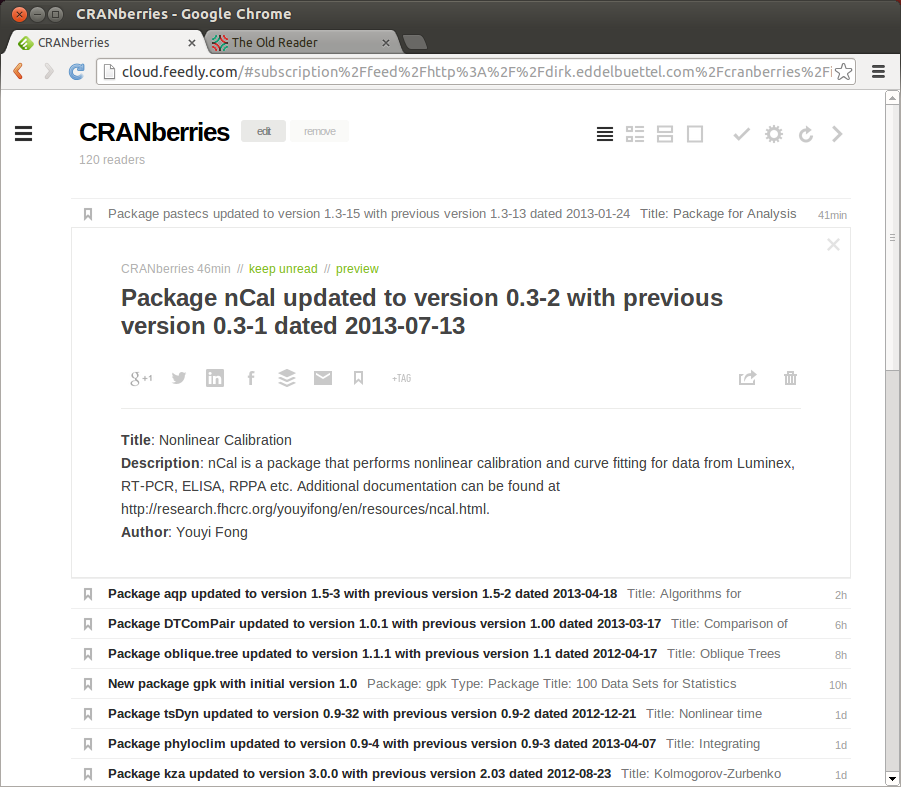
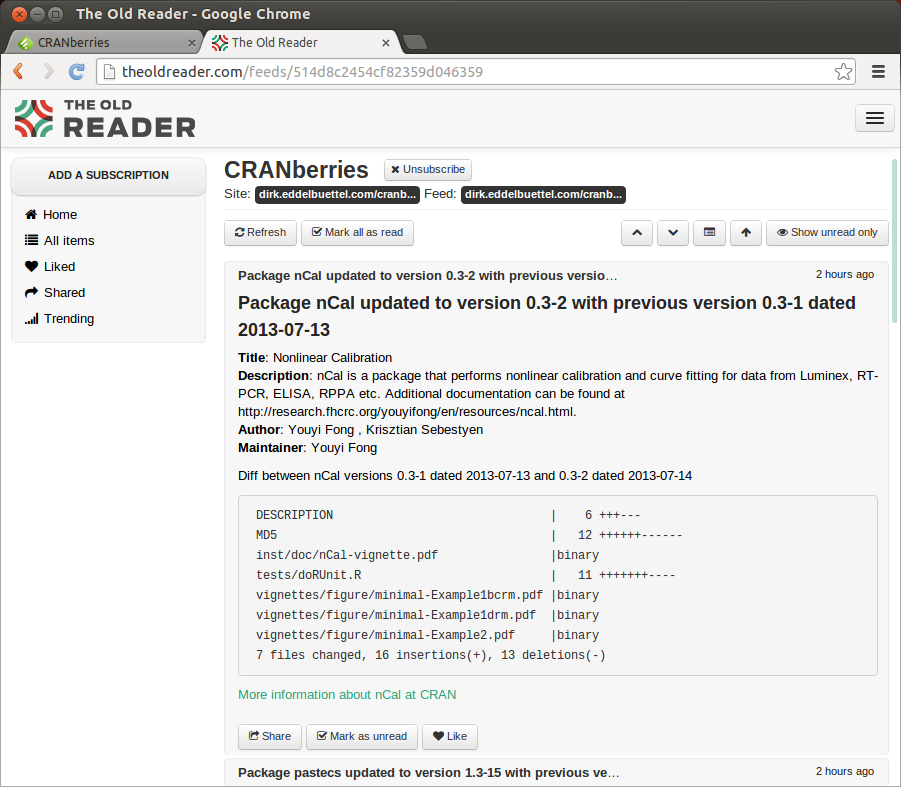
With the demise of Google Reader, many of us have scrambled to find alternatives which cover many/most of the features we were used to. For me, synchronised access from web and mobile counts quite high, and I want the (Android) mobile experience to be pretty pleasant too. So with that, and like many other folks, I had shifted over to Feedly. And before I carry on, let me say that Feedly actually does pretty well. They handled the onslaught of new users; they also listened and changed their UI a little to be more compact and Reader-alike And most importantly, it mostly just works. Until it doesn't. Around the time Feedly shifted folks to their own cloud-based backend, posts from my very own CRANberries aggregator of CRAN package changes for R started to show only truncated posts. See this screenshot from reading Feedly: Feedly truncates the CRANberries post and compare it with this one from TheOldReader: OldReader shows the full CRANberries post which contains the diffstat output, nicely marked up and all. Now, it so happens that I am the creator of the very RSS feed I am consuming here, and I wrote it so that I could read the very diffstat output that is now missing. And I know full well that neither the code, nor the hosting (on my own box), nor any other aspect changed. Before confirming this via TheOldReader, I looked at the RSS output, and I tried other frontend and apps --- and it became clear that the bug seems to be at the Feedly cloud storage level. And trying to be a good sport, I submitted a bug report / suggestion, but to no avail (apart from two other chiming in that they see this elsewhere too). Given that I am the coder behind the feed that is displayed in a truncated manner, I am aware that I am using a code stack that is stale (the original Blosxom static web generator) yet which has not posed another problem anywhere in the decade I used it. Nor does the CRANberries feed pose a problem when aggregated and viewed via the TheOldReader code path, or for that matter via Planet R which also carries (parts of) CRANberries. So for now, I have to either pivot out of the CRANberries RSS reading in Feedly and go directly to the webpage (fine, but cumbersome and in need of a working connection) or use a second subscription mechanism. I appreciate what the TheOldReader folks are doing---presumably with a minor fraction of the resources available to Feedly---and may hang with them for now. But it would be awfully nice if Feedly could sleep off its hangover and fix this. In which case I'd be much happier recommending its service.

Dirk Eddelbuettel: Slides from Rcpp talk in Sydney

The Sydney Users of R Forum (SURF) were kind enough to host me two days (well, three with the traveling ...) ago for an hour-long talk on Rcpp. Apparently, it set a new attendance record for this R user group. My thanks to Louise and Eugene for hosting a terrific meeting, and taking me out for a bite and drink afterwards. I have now put up my slides on my talks / presentations page for anyone else to peruse.

7 July 2013

Daniel Pocock: Melbourne and Detroit emergency call centers simultaneously fail

A co-incidence that caught my eye this week was the failure of emergency call centers in Melbourne, Australia and Detroit, USA. Melbourne's system failed at 19:00 local time on Friday, 5 July. Detroit's communications meltdown started at 05:00 local time on the same day. 19:00 - 05:00 = 14:00 hours, which is, co-incidentally, the difference in timezones between the two cities Detroit's failure was slashdotted, Melbourne's was not. Were there other cities that experienced this same outage on Friday? Just what could be going on then? Are they running their systems on a common cloud infrastructure that is not completely under the control of local technical staff? Was there an expired SSL certificate embedded in the application software, much like the certificate expiry that recently caused failure in Microsoft Azure? Using free and open source software is a life or death issue Are these systems based on free and open source software? Can the local authorities, their technical experts and auditors inspect the software to detect such issues ahead of time? Closed, proprietary outsourced solutions often take significant control away from the users of technology.

27 June 2013

Matthew Garrett: Automating HP server BIOS setup

One of the goals of our work at Nebula is making it as easy as possible for someone to set up a private cloud. In an ideal world that would involve being able to just plug in the controller hardware, wire up a rack of servers and turn everything on, but right now there are cases where the default firmware configuration on the servers doesn't match our desired configuration. Plugging a console into individual servers just to set some BIOS options is (based on personal experience) about as much fun as writing a doctoral thesis on the experience of watching paint dry, so it seemed worth trying to find a way to avoid people having to deal with that. Thankfully, it turns out that the industry has come to a similar set of conclusions. Recent Dell hardware lets you use WS-MAN, which makes it easy to do things like enable security features as long as you have an authenticated connection to the iDRAC management system. This actually works out wonderfully - the first time a Dell node sends a PXE request to the Cloud Controller, it can push back some configuration changes, reboot the system and then boot it in a known good configuration. Thanks, Dell![1].

HP's slightly trickier. As far as I've been able to work out, the remotely-available programmatic interfaces only provide configuration interfaces to the iLO device itself, along with a range of chassis-level monitoring. Instead, HP provide a couple of utilities that allow the OS to change values. The first of these is called conrep. Conrep is able to modify BIOS settings, but needs an XML file which tells it which configuration values are at which addresses. That's a bit of a pain. Thankfully it's being replaced with a new tool called hprcu which is able to directly query the firmware in order to figure out which configuration options are available and which values have to be stored where in order to set them. You run hprcu once and it spits out a file containing your existing settings. You modify that, feed it back into hprcu, reboot and you're set.

Sounds pretty ideal. What's the problem? The first is that hprcu is currently only shipped as a 32-bit binary, and right now we don't deploy any 32-bit support code on our nodes. It'd be irritating to have to do so just to configure the firmware. The second is that it works by doing raw port IO, and that's not going to be possible from userspace once we've moved to a UEFI Secure Boot setup.

So, obviously, I've been working on reimplementing it. The first step was to figure out what it was actually doing. The first step was to strace it to see if it was using the kernel IPMI interface. strace showed no accesses to /dev/ipmi*. My next thought was that it could be using some sort of shared memory segment with the iLO hardware, so I used MMIOTrace to dump the memory accesses it made. Turned out there weren't many, and certainly not enough to do anything interesting. Then I went back to the strace logs and saw that it was calling iopl() a bunch, and then I got sad.

iopl() allows a userspace application to change its io privilege levels. The Linux manpage for the iopl() call is amazingly helpful, informing us with a straight face that "This call is necessary to allow 8514-compatible X servers to run under Linux." What it actually does is grant userspace access to the full range of io ports.

So, what's an io port? The x86 architecture (and some others) provide two ways to communicate with hardware. The one that's mostly used these days is to map the hardware into the same address space as memory (memory-mapped io), but x86 has an entirely separate address range that can be used. This is significantly more limited, as only 65,536 addresses are available for the entire system. Further, you can only read or write a maximum of 4 bytes in a single transaction. However, while slower and less generally useful than memory-mapped io, port io has the advantage that it's much simpler to implement. As a result, a lot of the original PC hardware was intended to be accessed via port io, and a bunch of that's still present. Want to reprogram your real-time clock? Port io. Want to read from the legacy keyboard controller? Port io. For low-bandwidth transactions, it's a completely reasonable way to implement hardware.

Applications[2] perform port io by executing in and out instructions. Since these instructions allow you to do things like, say, hit the keyboard controller directly[3], userspace is generally forbidden from calling them. Sufficiently privileged applications can call iopl() to raise their privileges and gain access to the full set of io ports. But, since in and out are CPU-level instructions, the actual port io accesses won't show up in strace. So I had to take another approach.

The correct way of doing this would be to LD_PRELOAD something that intercepted iopl(), didn't call it, let the application perform an in or out instruction, caught the fault, looked at the stack frame, called iopl(), performed the access, dumped debug details, dropped iopl() again and restored state. Because that seemed like a bunch of work, I took advantage of the fact that hprcu had separate in and out functions and used gdb. I told gdb to break on every call to in or out, dump the register state and then continue. Then I hacked up a script to parse the register dumps and tell me where the reads and writes were going. Astonishingly, it worked. And then I read the results and got really sad.

PCI setup is hard, if you're a BIOS. You've got PCI devices with large memory windows and you've got to arrange them all somehow and look you've only got 640K of RAM you can access while you're doing this and come on, seriously? So PC-type systems define a port IO interface to performing PCI configuration. Each PCI device has an address made up of a bus, a device and a function. You take a 32-bit integer, set the top bit to indicate that you want PCI access, put the bus in bits 16-23, the device in bits 11-15, the function in bits 8-10 and the configuration register on that device you want to access in bits 0-7. Then you write that to io port 0xcf8. Reads or writes to io port 0xcfc then read or write from that configuration register on that device. This lets the BIOS tell each PCI device where it's going to live in mmio address space without having to actually perform any mmio. Good work, BIOS developers.

This works fine in the BIOS, because nothing else is running while the BIOS is. It even works fine in the kernel, which uses this approach on older hardware that doesn't provide a memory-mapped mechanism to access PCI configuration registers. But it works really badly if you're doing it in userspace, because it shares a problem with all other indexed accesses. You write an address to 0xcf8. You write a value to 0xcfc. What happens if the kernel writes to 0xcf8 before you write to 0xcfc? Your access goes to some other register on some other device and suddenly you've just mapped a PCI device over the top of RAM and well I sure hope you saved all your work.

So, I wasn't thrilled to discover that hprcu was communicating with the iLO by using 0xcf8/0xcfc port io accesses. Not only was it going to stop working once we started deploying UEFI Secure Boot, it had the potential to cause really annoyingly hard to debug problems. Working out how to reimplement it became something of a priority.

By looking at the XML files it generated, and by following the port IO accesses it was performing, I could figure out pretty much how it worked. Some configuration values are stored in the real-time clock CMOS. These were just done in the standard way - write the address to port 0x70, read or write the value to port 0x71[4]. Other configuration values were stored in NVRAM, with accesses going via PCI. This was a little trickier to figure out, because sometimes different NVRAM addresses went to the same PCI address. I finally figured it out - there's a 48 byte window into NVRAM via the PCI configuration registers, and another register which chooses which set of NVRAM is visible. So, take the NVRAM address, divide by 48, write that value to register 0xa6, take the modulus, add it to 0x80 and write the desired value to that address.

So now I knew enough to be able to take an existing XML file and deploy it. Definitely progress, and I could even add support to the kernel. But I still wanted to know how hprcu generated that XML file in the first place. Running strings over the binary showed a bunch of debug output that it never actually printed, but immediately after the help text it also printed SsLlFf:HhAaTtOoDd. I've lost enough years of my life to this kind of thing to be able to identity that as a getopt format string, and there was that tantalising D option at the end that went entirely unmentioned in the help text. Re-running hprcu with the -D argument gave me huge piles of debug output, including references to a DMI entry and an $RBS table.

DMI is a standard for exposing system information, and one aspect of it is providing data from the firmware to the operating system. The OS can look for a defined signature in a fixed area of memory and then pull out a bunch of data about the hardware, including things like the vendor name, model, serial number, BIOS version and more. Some of these information tables are standardised and some are vendor-specific. hprcu was looking for a vendor-specific table and then scanning for it looking for a known signature. That table turned out to to contain a set of signatures and addresses. The address corresponding to the signature hprcu was contained a bunch of data starting with "$RBS". It also contained a huge quantity of ASCII that looked awfully like the strings in the XML file that hprcu had written. Success!

So, the rest of today was spent on working out the format of this table. This was only marginally less tedious than setting up BIOS settings on 20 servers by hand, but I've made enough progress to be able to figure out how to write a kernel-level driver for this. That's about half-done now - the parsing code is all implemented, I just need to add the sysfs glue and I am nowhere near drunk enough for that right now[5], so for now you're just getting a format description.

To start with, look for a DMI table with a type of 0xe5. This contains several entries of 4 bytes of signature, 8 bytes of address and 4 bytes of length. Find the entry with a signature of "$CRQ" and map the corresponding address. The first four bytes of the mapped region should be "$RBS". The first record is 21 bytes into the file. Each record starts with a single byte representing the type and two bytes representing the record length. Records of type 1 contain an ascii string that starts 8 bytes into the record, and have a further type number 6 bytes into the record that tells you what type of string it is. 0x05 indicates that it's a "Feature string", which defines the overall classification of the following features. 0x06 is an "Option string", which provides a human readable explanation of what this configuration value corresponds to. 0x60 is an "Optional warning string", which tells the user which further configuration may be required before the configuration change takes effect.

All other types appear to be configuration options. Bytes 3 to 6 provide the little-endian name of the configuration option. Bytes 7 and 8 provide a unique numberical identifier for the configuration option. Byte 13 indicates the type. 0x03 is stored in CMOS. 0x04 is stored in NVRAM. 0x05 appears to be some different kind of CMOS store. I haven't figured out the others. There then follows a set of choices. These vary in length depending on the type - 0x03 are 14 bytes long, 0x04 are 6 bytes long, 0x05 are 5 bytes long. Type 0x03 choices have the choice id at byte 0, the CMOS offset at byte 2, the mask at byte 3 and the value at byte 4. Type 0x04 choices have the choice id at byte 0, the nvram offset at bytes 1 and 2, the mask at byte 3 and the value at byte 4. Type 0x05 choices have the choice id at byte 0, the cmos offset at byte 1, the mask at byte 2 and the value at byte 3. There are optional flags following each choice - if the final byte of the choice isn't 0, there then follow 6 bytes of flags. The first four bytes provide the name of a configuration option (little-endian, again), the fifth byte refers to a choice on that option and the sixth byte indicates what kind of flag. 0x1 appears to indicate that the option is mutually exclusive with that other option. Examples include the embedded serial port and virtual serial port options, where it's impossible to map both to the same address at once. A choice can have multiple flags.

After a configuration option, there'll be a set of option string records. In turn, these correspond to the previous choices - if a configuration option had three choices, there'll be three option string records. I haven't figured out whether there's a stronger way of binding the option string records to the configuration choice yet. The other thing I haven't entirely figured out are the details of configuring the platform to perform a cold reboot on the next power cycle, but the io traces for that don't look too bad.

The aim is to provide a kernel driver that exposes all these configuration options via sysfs, including indicating the current value, the available values and letting the user set a new value. In an ideal world we'd have a wonderfully generic interface to this kind of functionality, but I'm (sadly) not sure that that's possible.

And that's how I spent the past two days.

[1] (Thell)
[2] Or, indeed, kernels
[3] And, hence, read your keystrokes
[4] Which has exactly the same problems as the PCI access, in that if you happen to ask the clock what the time is while hprcu is accessing CMOS, at least one of you is going to get very confused
[5] Obviously, I would never write kernel code while drunk. You're certainly not running any of it in your enterprise kernel.

comment count unavailable comments

25 June 2013

Dirk Eddelbuettel: Rcpp 0.10.4

A new version of Rcpp is now on the CRAN network for GNU R; binaries for Debian have been uploaded as well. This release brings a fairly large number of fixes and improvements across a number of Rcpp features, see below for the detailed list. We are also announcing with this release that we plan to phase out the RCPP_FUNCTION_* macros. Not only have they been superceded by Rcpp Modules and Rcpp Atributes (each of which has its own pdf vignette in the Rcpp package), but they also appear to be at best lightly used. We are for example not aware of any CRAN packages deploying them. To provide a smooth transition, we are aiming to keep them around for another twelve months, but plan to remove them with the first release after that time window has passed. As before, we tested the release rather rigorously by checking against all packages I could (relatively easily) built on my server: this time it covered 91 of the 124 CRAN packages depending on Rcpp. As all of these 91 packages passed their checks, we do not expect any issues with dependent packages. The complete NEWS entry for 0.10.4 is below; more details are in the ChangeLog file in the package and on the Rcpp Changelog page.
Changes in Rcpp version 0.10.4 (2013-06-23)
  • Changes in R code: None beyond those detailed for Rcpp Attributes
  • Changes in Rcpp attributes:
    • Fixed problem whereby the interaction between the gc and the RNGScope destructor could cause a crash.
    • Don't include package header file in generated C++ interface header files.
    • Lookup plugins in inline package if they aren't found within the Rcpp package.
    • Disallow compilation for files that don't have extensions supported by R CMD SHLIB
  • Changes in Rcpp API:
    • The DataFrame::create set of functions has been reworked to just use List::create and feed to the DataFrame constructor
    • The operator-() semantics for Date and Datetime are now more inline with standard C++ behaviour; with thanks to Robin Girard for the report.
    • RNGScope counter now uses unsigned long rather than int.
    • Vector<*>::erase(iterator, iterator) was fixed. Now it does not remove the element pointed by last (similar to what is done on stl types and what was intended initially). Reported on Rcpp-devel by Toni Giorgino.
    • Added equality operator between elements of CharacterVectors.
  • Changes in Rcpp sugar:
  • Changes in Rcpp build tools:
    • Fix by Martyn Plummer for Solaris in handling of SingleLogicalResult.
    • The src/Makevars file can now optionally override the path for /usr/bin/install_name_tool which is used on OS X.
    • Vignettes are trying harder not to be built in parallel.
  • Changes in Rcpp documentation:
    • Updated the bibliography in Rcpp.bib (which is also sourced by packages using Rcpp).
    • Updated the THANKS file.
  • Planned Deprecation of RCPP_FUNCTION_*:
    • The set of macros RCPP_FUNCTION_ etc ... from the preprocessor_generated.h file will be deprecated in the next version of Rcpp, i.e they will still be available but will generate some warning in addition to their expected behavior.
    • In the first release that is at least 12 months after this announcement, the macros will be removed from Rcpp.
    • Users of these macros (if there are any) should start replacing them with more up to date code, such as using Rcpp attributes or Rcpp modules.
Thanks to CRANberries, you can also look at a diff to the previous release 0.10.3. As always, even fuller details are on the Rcpp Changelog page and the Rcpp page which also leads to the downloads, the browseable doxygen docs and zip files of doxygen output for the standard formats. A local directory has source and documentation too. Questions, comments etc should go to the rcpp-devel mailing list off the R-Forge page

24 June 2013

Vincent Sanders: A picture is worth a thousand words

When Sir Tim made a band the first image on the web back in 1992, I do not imagine for a moment he understood the full scope of what was to follow. I also do not imagine Marc Andreessen understood the technical debt he was about to introduce and that fateful day in 1993 when he proposed the img tag allowing inline images.

Many will argue of course that the old adage of my title may not apply to the web, where if it were true, every page view would be like reading a novel! and many of those novels would involve cats or one pixel tall colour gradients.

Leaving aside the philosophical arguments for a moment it takes web browser author a great deal of effort to quickly and efficiently put those cat pictures in front of your eyeballs.
NavigatingImages are navigated by a user in a selection of ways, including:
Whatever the method, the resulting object is subject to the same caching operations as any content object within a browser. These caching and storage operations are not specific to images however images are one of the most resource intensive objects a browser must regularly deal with (though javascript and stylesheet sources are starting to rival it at times) because they are relatively large and numerous.
Pre render processing
When the image object fetch is completed the browser must process the image for rendering which is where this gets even more complicated. I shall use how this works in NetSurf as I know that browsers internals best, but operation is pretty similar in many browsers.

The content fetch will have performed basic content sniffing to determine the received objects mime type. This is necessary because a great number of servers are misconfigured and a disturbingly large number of images served as png are really jpegs etc. Indeed sometimes you even get files served which are not images!

Upon receipt of enough data to decode the image header, for the detected mime type, the images metadata is extracted. This metadata usually includes things like size and colour depth.

If the img tag in the original source document omitted the width or height of the image the entire document render may have to be reflowed at this point to allow the correct spacing. The reflow process is often unsightly and should be avoided. Additionally at this stage if the image is too large to handle or an unhandled format the object will be replaced with the "broken" image icon.

Often that will be everything that is done with the image, when I added "lazy" image conversion to NetSurf we performed extensive profiling and discovered well over 40% of images on visited pages are simply never viewed by the user but that small (100 pixel on a side) images were almost always displayed.

This odd distribution comes down to how images are used in modern web pages, they broadly fall into two categories of "decoration" and "content" for example all the background gradients and sidebar images etc. are generally small images used as decoration whereas the cat picture above is part of the "content". A user may not scroll down a page to see content but almost always gets to "view" the decoration.
Rendering
Created by Andrea R used under CC Attribution-NonCommercial-ShareAlike 2.0 licence
The exact browser heuristics used differ as to when the render operation is performed but they all have a similar job to perform. When i say render here this may be possibly as an "off screen" view if they are actually on another tab etc. Regardless the image data must be converted from the source data (a PNG, JPEG etc.) into a format suitable for the browsers display plotting routines.

The browser will create a render bitmap in whatever format the plotting routines require (for example the GTK plotters use a Cairo image surface) , use an image library to unpack the source image data (PNG) into the render bitmap (possibly performing transforms such as scaling and rotation) and then use that bitmap to update the pixels on screen.

The most common transform at render time is that of scaling, this can be problematic as not all image libraries have output scaling capabilities which results in having to decode the entire source image and then scaling from that bitmap.

This is especially egregious if the source image is large (perhaps a multi megabyte jpeg) but the width and height are set to produce a thumbnail. The effect is amplified if the user has set the image cache size limit to a small value like 8 Megabytes (yes some users do this apparently their machines have 32MB of RAM and they browse the web)

In addition the image may well require tiling (for background gradients) and quite complex transforms (including rotation) thanks to CSS 3. Add in that javascript can alter the css style and hence the transform and you can imagine quite how complex the renderers can become.
CachingThe keen reader might spot that repeated renderings of the source image (e.g. because window is scrolled or clipped) result in this computationally expensive operation also being repeated. We solve this by interposing a render image cache between the source data and the render bitmaps.

By keeping the data in the preferred format, image rendering performance can be greatly increased. It should be noted that this cache is completely distinct from the source object cache and relates only to the rendered images.

Originally NetSurf used to perform the render conversion for every image as it was received without exception, rather than at render time, resulting in a great deal of unnecessary processing and memory usage. This was originally done for simplicity and optimising for "decoration" images.

The rules for determining what gets cached and for how long are somewhat involved and the majority of the code within the current implementation NetSurf uses is metrics and statistic generation to produce better decisions.

There comes a time at which this cache is no longer sufficient and rendering performance becomes unacceptable. The NetSurf renderer errs on the side of reducing resource usage (clearing the cache) at the expense of increased render times. Other browsers make different compromises based on the expected resources of the user base.
FinallyHopefully that gives a reasonable overview to the operations a browser performs just to put that cat picture in front of your eyeballs.

And maybe next time your browser is guzzling RAM to plot thousands of images you might have a bit more appreciation to exactly what it is up to.

21 June 2013

Dirk Eddelbuettel: Upcoming Rcpp talk in Sydney

The Sydney Users of R Forum (SURF) will be hosting me for a talk on July 10. The focus will be Rcpp for R and C++ integration, and the intent is to have this be really applied with lots of motivating examples. Organizers Louise and Eugene were able to move this to a slightly larger room as the initial capacity of 50 was filled almost immediately. As of right now, the talk page shows a few available slots. If you're in the Sydney are in early July, why not register and swing by? If you're not in the area, the Rcpp Events page lists other upcoming talks too.

19 June 2013

Julien Viard de Galbert: Building a custom debian CD

The French version is available on linuxembedded.fr : Cr e un CD d installation d une debian sp cialis e The goal is to build a debian install CD suitable for the distribution of a complete system including the operating system and applications. Debian already has a tool for that purpose: simple-cdd. Simple-cdd is a set of scripts wrapping debian-cd which is the tool used to build official CDs. In our case, we will include some non-free packages (firmwares for instance) and application specific packages in the system. Using simple-cdd Simple-cdd gets some of its configuration from your host computer, so it s recommended to work on a machine similar to your target (in particular the machine should use the same architecture: i386 or amd64). All the following actions should be done in a working directory that will contain the downloads and configurations for our system. We will start by creting a configuration file my-cdd.conf stating the mirror and components to use:
debian_mirror="http://ftp2.fr.debian.org/debian/"
mirror_components="main contrib non-free"
Then we will launch the build-simple-cdd tool once. This will build a local mirror of the needed packages that we will reused later. So be patient this can be a bit long.
build-simple-cdd --conf ./my-cdd.conf
Once done, you should get a CD iso in the images subfolder. Customizing the image To customize our image we will create a profile my-profile that will define which package to install and which extra package to include on the CD (dev packages for instance). Create a profiles folder:
mkdir profiles
Selecting the packages If you ve got an already installed machine (the one you used to test your application) you can ask dpkg to list the installed packages from that machine and use that as a basis.
dpkg --get-selections >package-list
In this file only the names of packages in the install state are needed:
grep -e '\<install$' package-list   awk ' print $1 ;' >profiles/my-profile.downloads
The file my-profile.downloads is a list of packages to include on the CD-ROM. The list of program to install is my-profile.packages . The tool will resolve dependencies, so we don t need to track down all dependencies add add them to these files. Specific packages We want to add some custom packages that we built ourselves to the CD, those packages not present in the debian archive. Let s create a local_pkg folder and fill it with all of our packages. We now can update the configuration to use all those files and make the profile my-profile the default profile.
debian_mirror="http://ftp2.fr.debian.org/debian/"
mirror_components="main contrib non-free"
simple_cdd_dir=$(pwd)
profiles="my-profile"
auto_profiles="my-profile"
local_packages="$simple_cdd_dir/local_pkg/"
If you now run the tool again, you ll get a full custom install CD!
build-simple-cdd --conf ./my-cdd.conf
However you might have missed some specific packages or their dependencies, in that case they will be missing on the CD. To find this out, check the messages for a line like:
WARNING: missing optional packages from profile my-profile: libevent-2.0-5 [...]
In that case libevent from squeeze-backports was missing. Simple-cdd is not able to download packages from backports, so I just added the packages to local_pkg . Customizing the installer Simple-cdd automatically uses a default profile. This profile might not suite your needs. To override it you just have to place modified file in the profiles folder. To do so, first copy the desired file from /usr/share/simple-cdd/profiles/ and update it. For instance the default.pressed file:
cp /usr/share/simple-cdd/profiles/default.pressed profiles
Then update the wanted options in this file. For example the partitioning options. Also as we enabled contrib and non-free you should uncomment the following lines:
d-i apt-setup/non-free  boolean true
d-i apt-setup/contrib boolean true
Adding extra files to the CD Finally we want to add the documentation, sources and other files to the CD. Simple-cdd can add files to the simple-cdd folder but there is no way to add a complete directory structure. However, as we can override the profiles, we can also override some scripts, especially tools/build/debian-cd that builds the CD.
mkdir -p tools/build
cp /usr/share/simple-cdd/tools/build/debian-cd tools/build
Then add the following lines after the $extras_base_dir cleanup:
if [ -d "$cd_extras" ]; then
  mkdir -p "$extras_base_dir"
  cp -a "$cd_extras/." "$extras_base_dir"
fi
Finally let s add the cd_extras variable to our configuration file :
cd_extras="$simple_cdd_dir/local_extras/"
Be careful to not create files conflicting with the CD content, nothing would warn you about that! Conclusion We now have a way of building a debian install CD including any files we might want to deliver with our system: sources and documentation for example.

13 June 2013

Dirk Eddelbuettel: inline 0.3.12

Another maintenance release of inline is now on CRAN and in already included in Debian. This release was triggered by a change in the development version of R which removed an argument to package.skeleton(). The complete NEWS entry is below.
Changes in inline version 0.3.12 (2013-06-12)
  • Align package.skeleton with the R-devel version of the function which no longer has a NAMESPACE argument.
  • Remove copy of LGPL in source archive as R CMD check now complains about it. License status continues to be specified in file DESCRIPTION.
Courtesy of CRANberries, there is also a diffstat report for the most recent release. A few more details are available at the R-Forge page.

8 June 2013

Michael Stapelberg: Survey answers part 1: systemd has too many dependencies, or it is bloated, or it does too many things, or is too complex

This blog post is the first of a series of posts dealing with the results of the Debian systemd survey. I intend to give a presentation at DebConf 2013, too, so you could either read my posts, or watch the talk, or both :-). The top concern shared by most people is:
systemd has too many dependencies, or it is bloated, or it does too many things, or is too complex
Now this concern actually has a lot of different facets, and I am trying to share my opinion on each of them. systemd has too many dependencies First, let s start with too many dependencies , because that is easy to check and reason about. I have created a document which lists all dependencies of the systemd binary itself (pid 1) and all the binaries which are currently shipped by the systemd Debian package. If you don t want to take my word for granted, please read that document. Have you read the document? Very nice! As you can see, the systemd binary itself has 10 dependencies (excluding libc). Now, the question is, what is bad about dependencies? Why do people list dependencies as a top concern?
  1. Cyclic dependencies. When you hear that your init system depends on DBus, you might argue that there is a cyclic dependency here, because DBus needs to be started by the init system. However, systemd does NOT depend on dbus-daemon (!) to boot your machine. Instead of using the system bus, it uses a private UNIX socket. Therefore, systemd uses DBus merely as a serialization format for IPC between its different processes. Only when you want to access systemd via its API as a user (non-root), you actually use the system bus. Since we are talking about DBus: DBus provides a well-tested serialization format and IPC mechanism so that systemd doesn t have to reinvent the wheel and instead benefits from wide support within languages.
  2. Complicated code. I feel like there is the implicit assumption that lots of dependencies correlate with complicated code that is easy to break. I encourage you to have a look at systemd s source code: look for the places where specific libraries are used, e.g. enforce_user which uses libcap. You ll notice that the code is not complex and usage of the libraries is clear.
  3. Software dragging in lots of library packages. The libraries which systemd uses are already in widespread use (e.g. DBus, udev, selinux, libcap, pcre, ). On a typical Debian installation, only very few of them will be dragged in by systemd, if at all. As an example, on a fresh Debian Wheezy installation, less than 10 packages will end up on your machine when running apt-get install systemd .
  4. More memory use. The Linux kernel maps libraries into memory only once, no matter how many processes use them. As stated in the dependency list, on machines where the libraries are not already loaded, systemd brings in about 500 KiB of additional memory-mapped libraries in the worst case. On the machines we have these days, this is a reasonable cost to pay for all the benefits systemd gets us. This holds true on embedded systems with only a few MiB of RAM and especially on typical workstations with 8+ GiB of RAM.
systemd is bloated Now, let s talk about bloat. Again, this is a point which has many facets. I d like to quote the Wikipedia definition of software bloat:
Software bloat is a process whereby successive versions of a computer program become perceptibly slower, use more memory or processing power, or have higher hardware requirements than the previous version whilst making only dubious user-perceptible improvements.
The first part of the definition certainly does not match systemd it is measurably faster than sysvinit. As for memory usage: systemd s RSS is 1.8 MiB, whereas sysvinit uses 0.8 MiB. As I argued on the More memory use point in the dependencies section, I think the additional resource cost is well worth the benefits. Also note that systemd s features are NOT all implemented in the binary which is PID 1. As explained in the dependency list, systemd consists of many cleanly separated binaries. So if a new version of systemd gathers an additional feature, this does not mean that your PID 1 will be bigger. While systemd runs on any hardware, it has an indirect hardware requirement: it requires some Linux kernel features (which are all enabled in Debian kernels). That might rule out usage of systemd on really old embedded hardware where you don t have a chance to update the kernel. While it is sad that those machines cannot profit from systemd, switching to systemd as a default has no downside either: Debian continues to support sysvinit for quite some time, so these machines will continue to work even with upcoming Debian versions. systemd does too many things The Wikipedia definition continues:
[ ] perceived bloat can occur from the software servicing a large, diverse marketplace with many differing requirements. Most end users will feel they only need some limited subset of the available functions and will regard the others as unnecessary bloat, even if people with different requirements do use them.
I think the last part of the Wikipedia definition applies to systemd: it does service a large and diverse marketplace . That marketplace is the entirety of existing software which is started by an init system. Also, systemd can be used on a wide range of hardware (embedded devices, tablets, phones, notebooks, desktops, servers) which requires different features. As an example: on a desktop system you typically don t care strongly about a watchdog feature, but on embedded or servers that feature is very handy. Similarly, on a tablet, forward secure sealing of logfiles is not as important as on a server. Therefore, I can understand if you feel that you don t need many of the features systemd provides. But please think of other users and maintainers who are very happy with systemd s benefits. Also note that while systemd supports many things (in separate binaries!), you don t have to use them all. It still makes sense to ship them all in the same package. Take coreutils as another example in that area. The binaries belong together, even though you most likely haven t used all of them (e.g. od, pr, ptx, :-)). systemd is too complex The remaining concern is that systemd is too complex. In my experience, complexity is often inherent to a specific area and one cannot simply make it go away. Instead, there are different models of how that complexity is represented. Think of the monolithic Linux kernel versus the MINIX microkernel. The latter has a very small amount of lines of source in the kernel, but puts the complexity into userspace. The former uses a different approach with more source in the kernel. The arguments between both camps show that neither is clearly right or clearly wrong. In a way, sysvinit represents the MINIX model: it has a small core (the init binary itself), but a lot of complexity in shell scripts and external programs. The fact that solutions are copied from one init script to another leads to lots of subtle errors and makes code reuse really hard. systemd however has more source code in the binaries, but requires only very simple, descriptive, textual configuration instead of complex init scripts. To me, it seems preferable to have the complexity in a single place instead of distributed across lots of people and projects. Conclusion In a way, you are right. systemd centralizes complexity from tons of init scripts into a single place. However, it therefore makes it very easy for maintainers to write service files (equivalent of an init script) and provides a consistent and reliable interface for service management. Furthermore, it is different than sysvinit, and different solutions often seem complex at first. While systemd consumes more resources than sysvinit, it uses them to make more information available about services; its finer-grained service management requires more state-keeping, but in turn offers you more control over your services.

7 June 2013

Dirk Eddelbuettel: The Rcpp Book is now shipping

My book about Rcpp (and its R and C++ integration) is now available from Springer. Amazon still lists it as not-yet-released; I expect this to change in the next few days.

5 June 2013

Dirk Eddelbuettel: RcppArmadillo 0.3.900.0

A Armadillo release 3.900.0 was provided by Conrad yesterday. It has been rolled into a new RcppArmadillo release 0.3.900.0 which is now on CRAN and in Debian. It has a number of nice changes, mostly on the performance side of things (see below) and a minor cleanup/improvement in our Kalman filter example (which, as I just realized, I forgot to note in the \code NEWS.Rd in the released tarball):
Changes in RcppArmadillo version 0.3.900 (2013-06-04)
  • Upgraded to Armadillo release Version 3.900.0 (Bavarian Sunflower)
    • added automatic SSE2 vectorisation of elementary expressions (eg. matrix addition) when using GCC 4.7+ with -O3 optimisation
    • added support for saving & loading of cubes in HDF5 format, contributed by Szabolcs Horvat
    • faster median(), contributed by Ruslan Shestopalyuk
    • faster handling of compound expressions with transposes of submatrix rows
    • faster handling of compound expressions with transposes of complex vectors
  • Kalman filter example switched from inline to \code sourceCpp , which simplifies / streamlines the C++ side a little
Courtesy of CRANberries, there is also a diffstat report for the most recent release As always, more detailed information is on the RcppArmadillo page. Questions, comments etc should go to the rcpp-devel mailing list off the R-Forge page.

28 May 2013

Russ Allbery: Review: Advanced Perl Programming

Review: Advanced Perl Programming, by Sriram Srinivasan
Publisher: O'Reilly
Copyright: August 1997
ISBN: 1-56592-220-4
Format: Trade paperback
Pages: 392
The problem with buying lots of books is that one frequently doesn't read them soon after purchase. And while nearly all fiction and most non-fiction doesn't have a time limit, technical books are more of a problem. As you might have guessed from the publication date and subject matter of this book, it's one I waited too long to read. I picked up Advanced Perl Programming not too long after it was first published in 1997. I bought it primarily for the chapters on XS programming, since I was just starting to develop and help maintain code that built Perl interfaces for C libraries. And then it sat on my bookshelf in the office, and then at home, until it was 16 years old. That's problematic for a general Perl programming guide; it's particularly troublesome for a book that dives deep into internals. That said, I still got some interesting information from it. Advanced Perl Programming is something of a grab bag of different and largely unrelated topics. It starts with a data structures overview (which is mostly about references), covers typeglobs and the Perl symbol table, briefly discusses closures, and then dives deeper into eval. That's followed by an overview of modules and object-oriented programming in Perl. The general Perl topics close with a solid (if outdated) discussion of tied objects and a somewhat rambling and remarkably general discussion of persistance. Srinivasan then covers some recommended module APIs for networking and graphics (Tk, specifically) while working through some complex examples, takes a deeper dive into eval and code generation, and concludes with three chapters on XS and embedded Perl interpreters. This is all solid material, but a lot of it is at least partly obsolete. The chapters on modules and object-oriented programming fare the worst; you'll find much better guides to those topics elsewhere. Data structures also fare poorly, partly because Srinivasan is still happy to use symbolic references, now considered bad style due to lack of compile-time checking. (That does mean, though, that this is one of the best introductions to symbolic references that you'll find, since few other Perl programmers discuss them.) But the rest of the book is fairly solid, if limited by age. If I'd read it when I first started with XS, it would have indeed helped. Advanced Perl Programming contains a succinct and clear overview of Perl internals and data representation (assuming, of course, it's not changed drastically, but I didn't notice any significant issues from what I know of internals from quite a lot of XS programming), particularly when combined with the earlier chapter on typeglobs and the symbol table. It is interesting, though, to see how much accepted Perl style has changed. Srinivasan is quite fond of eval with a scalar argument to construct code at runtime, something that most current authors recommend against when it can be avoided. The loss of static syntax checking means the technique is often hard to debug and can cause surprising runtime errors. Several of the more advanced tricks in this book are built on that framework, including a moderately interesting templating system that he constructs from scratch in this book. The examples here are also missing the focus on use strict, warnings, and avoiding special variables and unusual constructs that you see in more recent Perl books. This is a very thoughtful book, with several structural techniques that I appreciated and would like to see more technical writers use. One is the comparisons to the approaches of other languages at the end of most chapters. It puts Perl's approach in a broader context and encourages thought about alternative ways to view a particular feature and implementation tradeoffs in Perl's choices. Another is the careful discussion of design approaches and possibilities during the construction of larger examples. I think there's a tendency in technical books to spend a lot of time developing the best possible implementation of something and then show that completed example. Even with a detailed analysis of its construction, this can be less useful than a broader discussion of possible approaches, including dead ends. The problem, of course, is that 16 years is a long time, even for a relatively mature programming language, and Perl has changed. There are significant improvements not only to the standard library but to Perl core functionality that have happened since this book was written. The chapter on tying, which is otherwise excellent, is badly out of date on what functionality and methods are available and is no longer a reliable guide to using that feature except for simple cases. Similar problems plague the chapter on persistence, which develops the concept from basics that most programmers reading an advanced book no longer need, and which has been rendered mostly obsolete by further developments in the Perl module ecosystem. I think the best parts of this book, the ones that cover material that I think is still relatively accurate and that are not well-covered by other resources, are the chapters on typeglobs and on XS. The typeglob discussion is both clear and informative, covering material and techniques that are used in a few core Perl modules and that I've never seen adequately addressed elsewhere. I'd subsequently picked up XS and Perl embedding the hard way: lots of trial and error and reading difficult POD documentation. I wish I'd read this book earlier, since Srinivasan does a great job of basic orientation. He doesn't go far enough for me (the book I probably wanted was Extending and Embedding Perl by Jenness and Cozens, published five years later), but I would have been up and running with basic XS much faster by starting here. If this were 1997, or even 2000, I would probably recommend this book, albeit with a few caveats. Higher Order Perl is the place you should go for discussion of closures, rather than here (although of course it didn't exist then). I wasn't fond of string eval even in 1997, and I still think it produces code that, while efficient and quite powerful, is horribly difficult to understand. And the introduction to modules is adequate but not compelling; most other introductions to object-oriented programming and module construction in Perl are better. But even discarding those chapters (and the mostly unnecessary Tk reference), there's a lot of great material here that would have been quite helpful in 2000. Unfortunately, this is not the sort of technical book that ages well, and while I did pick up some useful background knowledge and a much better understanding of typeglobs, I mostly read this book because I wanted to salvage some knowledge from a book that sat for far too long on my shelves. There's really no reason to buy it today. If you run across it in a library, there are a few chapters that are still worth reading, but by and large if you know enough Perl to know where to be careful of landmines due to changes in Perl since the book was written, you also know enough Perl to not really need this book. Rating: 5 out of 10

27 May 2013

Dirk Eddelbuettel: R / Finance 2013 Recap -- and Presentation Slides

The fifth internation R/Finance conference was held last weekend. As one of the founding co-organizers, I may well be accussed of a little bias, but we think we once again pulled off a very nice and successful weekend-long event. Participants had kind words to say during the conference, and a few first posts have appeared such as Joe Rickert's post over at the REvo blog. Some participants, myself included, had already posted on their personal websites (though had forgotten to mention it here). In any event, I just updated the website with links to the pdf (or ppt) slides of all presenters who shared their material with us. Supplemental material may be made available too at a later date. We hope you find these slides useful. Please do spread the word about the R/Finance conference as we expect to have a sixth edition in May 2014---and we do look forward to receiving even more outstanding submissions. Dates, details, call for papers, etc will be forthcoming over the next few months.

Next.

Previous.