Search Results: "bab"

7 February 2016

Joey Hess: letsencrypt support in propellor

I've integrated letsencrypt into propellor today. I'm using the reference letsencrypt client. While I've seen complaints that it has a lot of dependencies and is too complicated, it seemed to only need to pull in a few packages, and use only a few megabytes of disk space, and it has fewer options than ls does. So seems fine. (Although it would be nice to have some alternatives packaged in Debian.) I ended up implementing this:
letsEncrypt :: AgreeTOS -> Domain -> WebRoot -> Property NoInfo
This property just makes the certificate available, it does not configure the web server to use it. This avoids relying on the letsencrypt client's apache config munging, which is probably useful for many people, but not those of us using configuration management systems. And so avoids most of the complicated magic that the letsencrypt client has a reputation for. Instead, any property that wants to use the certificate can just use leteencrypt to get it and set up the server when it makes a change to the certificate:
letsEncrypt (LetsEncrypt.AgreeTOS (Just "me@my.domain")) "example.com" "/var/www"
     onChange  setupthewebserver
(Took me a while to notice I could use onChange like that, and so divorce the cert generation/renewal from the server setup. onChange is awesome! This blog post has been updated accordingly.) In practice, the http site has to be brought up first, and then letsencrypt run, and then the cert installed and the https site brought up using it. That dance is automated by this property:
Apache.httpsVirtualHost "example.com" "/var/www"
    (LetsEncrypt.AgreeTOS (Just "me@my.domain"))
That's about as simple a configuration as I can imagine for such a website!
The two parts of letsencrypt that are complicated are not the fault of the client really. Those are renewal and rate limiting. I'm currently rate limited for the next week because I asked letsencrypt for several certificates for a domain, as I was learning how to use it and integrating it into propellor. So I've not quite managed to fully test everything. That's annoying. I also worry that rate limiting could hit at an inopportune time once I'm relying on letsencrypt. It's especially problimatic that it only allows 5 certs for subdomains of a given domain per week. What if I use a lot of subdomains? Renewal is complicated mostly because there's no good way to test it. You set up your cron job, or whatever, and wait three months, and hopefully it worked. Just as likely, you got something wrong, and your website breaks. Maybe letsencrypt could offer certificates that will only last an hour, or a day, for use when testing renewal. Also, what if something goes wrong with renewal? Perhaps letsencrypt.org is not available when your certificate needs to be renewed. What I've done in propellor to handle renewal is, it runs letsencrypt every time, with the --keep-until-expiring option. If this fails, propellor will report a failure. As long as propellor is run periodically by a cron job, this should result in multiple failure reports being sent (for 30 days I think) before a cert expires without getting renewed. But, I have not been able to test this.

4 February 2016

Vincent Fourmond: Making oprofile work again with recent kernels

I've been using oprofile for profiling programs for a while now (and especially QSoas, because it doesn't require specific compilation options, and doesn't make your program run much more slowly (like valgrind does, which can also be used to some extent for profiling). It's a pity the Debian package was dropped long ago, but the ubuntu packages work out of the box on Debian. But, today, while trying to see what takes so long in some fits I'm running, here's what I get:
~ operf QSoas
Unexpected error running operf: Permission denied

Looking further using strace, I could see that what was not working was the first call to perf_event_open.
It took me quite a long time to understand why it stopped working and how to get it working again, so here's for those of you who googled the error and couldn't find any answer (including me, who will probably have forgotten the anwser in a couple of months). The reason behing the change is that, for security reason, non-privileged users do not have the necessary privileges since Debian kernel 4.1.3-1; here's the relevant bit from the changelog:

  * security: Apply and enable GRKERNSEC_PERF_HARDEN feature from Grsecurity,
    disabling use of perf_event_open() by unprivileged users by default
    (sysctl: kernel.perf_event_paranoid)

The solution is simple, just run as root:
~ sysctl kernel.perf_event_paranoid=1

(the default value seems to be 3, for now). Hope it helps !

Martin-Éric Racine: xf86-video-geode 2.11.18

Yesterday, I pushed out version 2.11.18 of the Geode X.Org driver. This is the driver used by the OLPC XO-1 and by a plethora of low-power desktops, micro notebooks and thin clients. This release mostly includes maintenance fixes of all sorts. Of noticeable interest is a fix for the long-standing issue that switching between X and a VT would result in a blank screen (this should probably be cherry-picked for distributions running earlier releases of this driver). Many thanks to Connor Behan for the fix!
Unfortunately, this driver still doesn't work with GNOME. On my testing host, launching GDM produces a blank screen. 'ps' and other tools show that GDM is running but there's no screen content; the screen remains pitch black. This issue doesn't happen with other display managers e.g. LightDM. Bug reports have been filed, additional information was provided, but the issue still hasn't been resolved.
Additionally, X server flat out crashes on Geode hosts running Linux kernels 4.2 or newer. 'xkbcomp' repeatedly fails to launch and X exits with a fatal error. Bug reports have been filed, but not reacted to. However, interestingly enough, X launches fine if my testing host is booted with earliers kernels, which might suggest what the actual cause of this particular bug might be:
Since kernel 4.2 entered Debian, the base level i386 kernel on Debian is now compiled for i686 (without PAE). Until now, the base level was i586. This essentially makes it pointless to build the Geode driver with GX2 support. It also means that older GX1 hardware won't be able to run Debian either, starting with the next stable release.

Russell Coker: Unikernels

At LCA I attended a talk about Unikernels. Here are the reasons why I think that they are a bad idea: Single Address Space According to the Unikernel Wikipedia page [1] a significant criteria for a Unikernel system is that it has a single address space. This gives performance benefits as there is no need to change CPU memory mappings when making system calls. But the disadvantage is that any code in the application/kernel can access any other code directly. In a typical modern OS (Linux, BSD, Windows, etc) every application has a separate address space and there are separate memory regions for code and data. While an application can request the ability to modify it s own executable code in some situations (if the OS is configured to allow that) it won t happen by default. In MS-DOS and in a Unikernel system all code has read/write/execute access to all memory. MS-DOS was the least reliable OS that I ever used. It was unreliable because it performed tasks that were more complex than CP/M but had no memory protection so any bug in any code was likely to cause a system crash. The crash could be delayed by some time (EG corrupting data structures that are only rarely accessed) which would make it very difficult to fix. It would be possible to have a Unikernel system with non-modifyable executable areas and non-executable data areas and it is conceivable that a virtual machine system like Xen could enforce that. But that still wouldn t solve the problem of all code being able to write to all data. On a Linux system when an application writes to the wrong address there is a reasonable probability that it will not have write access and you will immediately get a SEGV which is logged and informs the sysadmin of the address of the crash. When Linux applications have bugs that are difficult to diagnose (EG buffer overruns that happen in production and can t be reproduced in a test environment) there are a variety of ways of debugging them. Tools such as Valgrind can analyse memory access and tell the developers which code had a bug and what the bug does. It s theoretically possible to link something like Valgrind into a Unikernel, but the lack of multiple processes would make it difficult to manage. Debugging A full Unix environment has a rich array of debugging tools, strace, ltrace, gdb, valgrind and more. If there are performance problems then tools like sysstat, sar, iostat, top, iotop, and more. I don t know which of those tools I might need to debug problems at some future time. I don t think that any Internet facing service can be expected to be reliable enough that it will never need any sort of debugging. Service Complexity It s very rare for a server to have only a single process performing the essential tasks. It s not uncommon to have a web server running CGI-BIN scripts or calling shell scripts from PHP code as part of the essential service. Also many Unix daemons are not written to run as a single process, at least threading is required and many daemons require multiple processes. It s also very common for the design of a daemon to rely on a cron job to clean up temporary files etc. It is possible to build the functionality of cron into a Unikernel, but that means more potential bugs and more time spent not actually developing the core application. One could argue that there are design benefits to writing simple servers that don t require multiple programs. But most programmers aren t used to doing that and in many cases it would result in a less efficient result. One can also argue that a Finite State Machine design is the best way to deal with many problems that are usually solved by multi-threading or multiple processes. But most programmers are better at writing threaded code so forcing programmers to use a FSM design doesn t seem like a good idea for security. Management The typical server programs rely on cron jobs to rotate log files and monitoring software to inspect the state of the system for the purposes of graphing performance and flagging potential problems. It would be possible to compile the functionality of something like the Nagios NRPE into a Unikernel if you want to have your monitoring code running in the kernel. I ve seen something very similar implemented in the past, the CA Unicenter monitoring system on Solaris used to have a kernel module for monitoring (I don t know why). My experience was that Unicenter caused many kernel panics and more downtime than all other problems combined. It would not be difficult to write better code than the typical CA employee, but writing code that is good enough to have a monitoring system running in the kernel on a single-threaded system is asking a lot. One of the claimed benefits of a Unikernel was that it s supposedly risky to allow ssh access. The recent ssh security issue was an attack against the ssh client if it connected to a hostile server. If you had a ssh server only accepting connections from management workstations (a reasonably common configuration for running servers) and only allowed the ssh clients to connect to servers related to work (an uncommon configuration that s not difficult to implement) then there wouldn t be any problems in this regard. I think that I m a good programmer, but I don t think that I can write server code that s likely to be more secure than sshd. On Designing It Yourself One thing that everyone who has any experience in security has witnessed is that people who design their own encryption inevitably do it badly. The people who are experts in cryptology don t design their own custom algorithm because they know that encryption algorithms need significant review before they can be trusted. The people who know how to do it well know that they can t do it well on their own. The people who know little just go ahead and do it. I think that the same thing applies to operating systems. I ve contributed a few patches to the Linux kernel and spent a lot of time working on SE Linux (including maintaining out of tree kernel patches) and know how hard it is to do it properly. Even though I m a good programmer I know better than to think I could just build my own kernel and expect it to be secure. I think that the Unikernel people haven t learned this.

2 February 2016

Dirk Eddelbuettel: Like peanut butter and jelly: x13binary and seasonal

This post was written by Dirk Eddelbuettel and Christoph Sax and will be posted on both author's respective blogs. The seasonal package by Christoph Sax brings a very featureful and expressive interface for working with seasonal data to the R environment. It uses the standard tool of the trade: X-13ARIMA-SEATS. This powerful program is provided by the statisticians of the US Census Bureau based on their earlier work (named X-11 and X-12-ARIMA) as well as the TRAMO/SEATS program by the Bank of Spain. X-13ARIMA-SEATS is probably the best known tool for de-seasonalization of timeseries, and used by statistical offices around the world. Sadly, it also has a steep learning curve. One interacts with a basic command-line tool which users have to download, install and properly reference (by environment variables or related means). Each model specification has to be prepared in a special 'spec' file that uses its own, cumbersome syntax. As seasonal provides all the required functionality to use X-13ARIMA-SEATS from R --- see the very nice seasonal demo site --- it still required the user to manually deal with the X-13ARIMA-SEATS installation. So we decided to do something about this. A pair of GitHub repositories provide both the underlying binary in a per-operating system form (see x13prebuilt) as well as a ready-to- use R package (see x13binary) which uses the former to provide binaries for R. And the latter is now on CRAN as package x13binary ready to be used on Windows, OS-X or Linux. And the seasonal package (in version 1.2.0 -- now on CRAN -- or later) automatically makes use of it. Installing seasaonal and x13binary in R is now as easy as:

install.packages("seasonal")
which opens the door for effortless deployment of powerful deasonalization. By default, the principal function of the package employs a number of automated techniques that work well in most circumstances. For example, the following code produces a seasonal adjustment of the latest data of US retail sales (by the Census Bureau) downloaded from Quandl:
library(seasonal) 
library(Quandl)   ## not needed for seasonal but has some niceties for Quandl data
rs <- Quandl(code="USCENSUS/BI_MARTS_44000_SM", type="ts")/1e3
m1 <- seas(rs)
plot(m1, main = "Retail Trade: U.S. Total Sales", ylab = "USD (in Billions)")
This tests for log-transformation, performs an automated ARIMA model search, applies outlier detection, tests and adjusts for trading day and easter effects, and invokes the SEATS method to perform seasonal adjustment. And this is how the adjusted series looks like:
Of course, you can access all available options of X-13ARIMA-SEATS as well. Here is an example where we adjust the latest data for Chinese exports (as tallied by the US FED), taking into account the different effects of Chinese New Year before, during and after the holiday:
xp <- Quandl(code="FRED/VALEXPCNM052N", type="ts")/1e9
m2 <- seas(window(xp, start = 2000),
          xreg = cbind(genhol(cny, start = -7, end = -1, center = "calendar"), 
                       genhol(cny, start = 0, end = 7, center = "calendar"), 
                       genhol(cny, start = 8, end = 21, center = "calendar")
          ),
          regression.aictest = c("td", "user"),
          regression.usertype = "holiday")
plot(m2, main = "Goods, Value of Exports for China", ylab = "USD (in Billions)")
which generates the following chart demonstrating a recent flattening in export activity measured in USD.
We hope this simple examples illustrates both how powerful a tool X-13ARIMA-SEATS is, but also just how easy it is to use X-13ARIMA-SEATS from R now that we provide the x13binary package automating its installation.

This post by Dirk Eddelbuettel originated on his Thinking inside the box blog. Please report excessive re-aggregation in third-party for-profit settings.

Russell Coker: Compatibility and a Linux Community Server

Compatibility/interoperability is a good thing. It s generally good for systems on the Internet to be capable of communicating with as many systems as possible. Unfortunately it s not always possible as new features sometimes break compatibility with older systems. Sometimes you have systems that are simply broken, for example all the systems with firewalls that block ICMP so that connections hang when the packet size gets too big. Sometimes to take advantage of new features you have to potentially trigger issues with broken systems. I recently added support for IPv6 to the Linux Users of Victoria server. I think that adding IPv6 support is a good thing due to the lack of IPv4 addresses even though there are hardly any systems that are unable to access IPv4. One of the benefits of this for club members is that it s a platform they can use for testing IPv6 connectivity with a friendly sysadmin to help them diagnose problems. I recently notified a member by email that the callback that their mail server used as an anti-spam measure didn t work with IPv6 and was causing mail to be incorrectly rejected. It s obviously a benefit for that user to have the problem with a small local server than with something like Gmail. In spite of the fact that at least one user had problems and others potentially had problems I think it s clear that adding IPv6 support was the correct thing to do. SSL Issues Ben wrote a good post about SSL security [1] which links to a test suite for SSL servers [2]. I tested the LUV web site and got A-. This blog post describes how to setup PFS (Perfect Forward Secrecy) [3], after following it s advice I got a score of B! From the comments on this blog post about RC4 etc [4] it seems that the only way to have PFS and not be vulnerable to other issues is to require TLS 1.2. So the issue is what systems can t use TLS 1.2. TLS 1.2 Support in Browsers This Wikipedia page has information on SSL support in various web browsers [5]. If we require TLS 1.2 we break support of the following browsers: The default Android browser before Android 5.0. Admittedly that browser always sucked badly and probably has lots of other security issues and there are alternate browsers. One problem is that many people who install better browsers on Android devices (such as Chrome) will still have their OS configured to use the default browser for URLs opened by other programs (EG email and IM). Chrome versions before 30 didn t support it. But version 30 was released in 2013 and Google does a good job of forcing upgrades. A Debian/Wheezy system I run is now displaying warnings from the google-chrome package saying that Wheezy is too old and won t be supported for long! Firefox before version 27 didn t support it (the Wikipedia page is unclear about versions 27-31). 27 was released in 2014. Debian/Wheezy has version 38, Debian/Squeeze has Iceweasel 3.5.16 which doesn t support it. I think it is reasonable to assume that anyone who s still using Squeeze is using it for a server given it s age and the fact that LTS is based on packages related to being a server. IE version 11 supports it and runs on Windows 7+ (all supported versions of Windows). IE 10 doesn t support it and runs on Windows 7 and Windows 8. Are the free upgrades from Windows 7 to Windows 10 going to solve this problem? Do we want to support Windows 7 systems that haven t been upgraded to the latest IE? Do we want to support versions of Windows that MS doesn t support? Windows mobile doesn t have enough users to care about. Opera supports it from version 17. This is noteworthy because Opera used to be good for devices running older versions of Android that aren t supported by Chrome. Safari supported it from iOS version 5, I think that s a solved problem given the way Apple makes it easy for users to upgrade and strongly encourages them to do so. Log Analysis For many servers the correct thing to do before even discussing the issue is to look at the logs and see how many people use the various browsers. One problem with that approach on a Linux community site is that the people who visit the site most often will be more likely to use recent Linux browsers but older Windows systems will be more common among people visiting the site for the first time. Another issue is that there isn t an easy way of determining who is a serious user, unlike for example a shopping site where one could search for log entries about sales. I did a quick search of the Apache logs and found many entries about browsers that purport to be IE6 and other versions of IE before 11. But most of those log entries were from other countries, while some people from other countries visit the club web site it s not very common. Most access from outside Australia would be from bots, and the bots probably fake their user agent. Should We Do It? Is breaking support for Debian/Squeeze, the built in Android browser on Android <5.0, and Windows 7 and 8 systems that haven t upgraded IE as a web browsing platform a reasonable trade-off for implementing the best SSL security features? For the LUV server as a stand-alone issue the answer would be no as the only really secret data there is accessed via ssh. For a general web infrastructure issue it seems that the answer might be yes. I think that it benefits the community to allow members to test against server configurations that will become more popular in the future. After implementing changes in the server I can advise club members (and general community members) about how to configure their servers for similar results. Does this outweigh the problems caused by some potential users of ancient systems? I m blogging about this because I think that the issues of configuration of community servers have a greater scope than my local LUG. I welcome comments about these issues, as well as about the SSL compatibility issues.

1 February 2016

Russ Allbery: Review: Oathblood

Review: Oathblood, by Mercedes Lackey
Series: Vows and Honor #3
Publisher: DAW
Copyright: April 1998
ISBN: 0-88677-773-9
Format: Mass market
Pages: 394
I have this story collection listed as the third book in the Vows and Honor series, but as mentioned in the review of The Oathbound, it's more complicated than that. This book has the first Tarma and Kethry story, which is not found in The Oathbound, and two of the better stories from that volume. This is probably the place to start for the series; you're not missing that much from the rest of that book. However, the last three stories ("Wings of Fire," "Spring Plowing at Forst Reach," and "Oathblood") have significant spoilers for Oathbreakers. Therefore, if you care about both avoiding spoilers and reading this series, my recommended reading order is to ignore The Oathbound entirely, read Oathblood up to but not including "Wings of Fire," read Oathbreakers, and then come back here for the last two stories. "Sword-sworn": This is the very first Tarma and Kethry story and hence where this series actually begins. As Lackey notes in her introduction, it's a pretty stock "rape and revenge" story, which is not something I particularly enjoy. Marion Zimmer Bradley liked it well enough to accept it anyway, and I can sort of see why: the dynamic between the two characters sparkles in a few places, and the Shin'a'in world-building isn't bad. The plot, though, is very predictable and not very notable. There isn't much here that you'd be surprised by if you'd read references to these events in later stories. And there's no explanation of a few things one might be curious about, such as where Need came from. (6) "Turnabout": This is one of the two stories also found in The Oathbound. Merchants are plagued by bandits who manage to see through ruses and always catch their guards by surprise (with a particularly nasty bit of rape and murder in one case Tarma and Kethry stories have quite a lot of that). That's enough to get the duo to take the job of luring out the bandits and dealing with them, using a nice bit of magical disguise. This story is also a song on one of the Vows and Honor albums from Firebird (which I also have). It was one of my favorites of Lackey's songs, so I want to like the story (and used to like it a great deal). Unfortunately, the very nasty bit of revenge that the supposed heroes take at the end of the story completely destroyed my enjoyment of it on re-reading. It's essentially a glorification of prison rape, which is a trope that I no longer have any patience for. (4) "The Making of a Legend": In order to explain the differences between the song based on "Turnabout" and the actual story, Lackey invented a bard, Leslac, who loves writing songs about Tarma and Kethry and regularly gets the details wrong, mostly by advertising them as moral crusaders for women instead of mercenaries who want to get paid, much to their deep annoyance. This is his debut in an actual story, featuring an incident that's delightfully contrary to Leslac's expectations. It's a slight story, but I thought it was fun. (6) "Keys": Another story from The Oathbound, this is a locked-room mystery with a bit of magical sleuthing. Kethry attempts to prove that a woman did not murder her husband while Tarma serves as her champion in a (rather broken) version of trial by combat. I think the version here is better than the edited version in The Oathbound, and it's a fairly enjoyable bit of sleuthing. (7) "A Woman's Weapon": I would call this the typical Tarma and Kethry story (except that, for a change, it's missing the rape): they stumble across some sort of serious injustice and put things to right with some hard thinking and a bit of poetic justice. In this case, it's a tannery that's poisoning the land, and a master tanner who can't put a stop to his rival. Competent although not particularly memorable. (6) "The Talisman": A rather depressing little story about a mage who wants shortcuts and a magic talisman that isn't what it appears to be. Not one of my favorites, in part because it has some common Tarma and Kethry problems: unnecessary death, a feeling that the world is very dangerous and that mistakes are fatal, and narrative presentation of the people who die from their stupidity as deserving it. I couldn't shake the feeling that there was probably some better way of resolving this if people had just communicated a bit better. (5) "A Tale of Heroes": Back to the rape, unfortunately, plus a bit of very convenient match-making that I found extremely dubious. For all that Lackey's introduction paints this as a story of empowering people to follow their own paths, the chambermaid of this story didn't seem to have many more choices in her life after meeting Tarma and Kethry than before, even if her physical situation was better. I did like the touch of Tarma and Kethry not being the heroes and victors in the significant magical problem they stumble across, though, and it's a warm-hearted story if you ignore the effects of trauma as much as the story ignores them. (6) "Friendly Fire": An amusing short story about the power of bad luck and Murphy's Law. It hit one of my pet peeves at one point, where Lackey tries to distort the words of someone with a cold and just makes the dialogue irritating to read, but otherwise a lot of fun. (7) "Wings of Fire": I love the Hawkbrothers, so it's always fun when they show up. The villain of this piece is way over the top and leaves much to be desired, but the guest-starring Hawkbrother mostly makes up for it. Once again, Tarma and Kethry get out of a tight spot by thinking harder instead of by having more power, although the villain makes that rather easy via overconfidence. Once again, though, the poetic justice that Lackey's protagonists enjoy leaves a bad taste in my mouth, although it's not quite as bad here as some other stories. (6) "Spring Planting at Forst Reach": On one level, this is a rather prosaic story about training horses (based on Lackey's experience and reading, so a bit better than typical fantasy horse stories). But it's set at Forst Reach, Vanyel's home, some years after Vanyel. I like those people and their gruff approach to life, and it meshes well with Tarma and Kethry's approach. If you enjoy the two showing off their skills and wowing people with new ideas, you'll have fun with this. (7) "Oathblood": As you might guess from the matching title, this novella is the heart of the book and about a quarter of its length. We get to see Kethry's kids, see more of their life in their second (post-Oathbreakers) career, and then get a rather good adventure story of resourceful and thoughtful youngsters, with a nice touch of immature but deeply-meant loyalty. I didn't enjoy it as much as I would have without one of the tactics the kids use to get out of trouble, but my dislike for reading about other people's bowel troubles is partly a personal quirk. This is a pretty typical Lackey story of resourcefulness and courage; if you like this series in general, you'll probably enjoy this one. (7) Rating: 7 out of 10

Junichi Uekawa: Been playing with user namespaces.

Been playing with user namespaces. But it seems we lack documentation, and moreover, it lacks coherent design as an API, probably because we are playing whack a mole on new holes as they are discovered. As for the naming, seems to be called 'userns' in patch sets. The API is unshare(CLONE_NEWUSER) with bunch of files in proc such as /proc/self/uid_map,gid_map. CAP_SETGID seems also be related but not sure if it's doing anything.

31 January 2016

Martin-&#201;ric Racine: Stupid Design: Facebook's Selling Something feature

Over these past few months, I've been going through my personal belongings to reduce them to the bare essentials more-or-less following the rule "If I cannot remember that I had it, I probably don't need it" with an explicit goal to make it easier for me to relocate in the near future.Part of that iterative process has involved selling surplus items via Facebook groups. While I initially rejoiced at the invention of the new Selling Something feature, the more I use it, the more I end up cursing at the lack of thought that went into designing that feature:For instance, in the feature's most recent implementation, it has become possible to post the same ad in several groups. Great idea, right? Actually, no. What this option does is post individual copies of that exact same ad in each group. Managed to sell a particular item? You'll have to sort through each and every duplicate post in each group to mark the item as sold. Need to edit the ad to lower the price or add requested information about the item? Same thing: go through each individual copy of the ad in each group. Seriously, Facebook? Who the fuck designed that senseless implementation?!Here's a better implementation: centrally manage all items via the user's account preferences, and let the user tick checkboxes besides each item to decide which groups will see that particular item. Ditto whenever editing the ad's content or marking an item as sold; do everything via the user's account preferences. Rather than making the content group-centric, make it user-centric.You're welcome.

Chris Lamb: Free software activities in January 2016

Here is my monthly update covering a large part of what I have been doing in the free software world (previously):
Debian
  • Had a talk proposal accepted (Reproducible Builds - fulfilling the original promise of free software) at FOSSASIA 16.
My work in the Reproducible Builds project was also covered in more depth in Lunar's weekly reports (#35, #36, #37, #38, #39)
LTS

This month I have been paid to work 18 hours on Debian Long Term Support (LTS). In that time I did the following:
  • Sevend days of "frontdesk" duties, triaging CVEs, etc.
  • Issued DLA 386-1 for cacti to patch an SQL injection vulnerability.
  • Issued DLA 388-1 for dwarfutils fixing a NULL deference issue.
  • Issued DLA 391-1 for prosody correcting the use of a weak pseudo-random number generator.
  • Issued DLA 404-1 for nginx to prevent against an invalid pointer deference.

Uploads
  • redis (2:3.0.7-1) New upstream stable release, also ensure that test processes are cleaned up and replacing an existing reproducibility patch with a SOURCE_DATE_EPOCH solution.
  • python-django (1.9.1-1) New upstream release.
  • disque (1.0~rc1-4) Make the build reproducible via SOURCE_DATE_EPOCH, ensure that test processes are cleaned up and that the nocheck flag is correctly honoured.
  • gunicorn (19.4.5-1) New upstream release.
  • redis (2:3.2~rc3-1) New upstream RC release (to experimental).


RC bugs


I also filed 100 FTBFS bugs against apache-log4j2, awscli, binutils, brian, ccbuild, coala, commons-beanutils, commons-vfs, composer, cyrus-sasl2, debiandoc-sgml-doc-pt-br, dfvfs, dillo, django-compat, dulwich, git-annex, grpc, hdf-eos5, hovercraft, ideviceinstaller, ircp-tray, isomd5sum, javamail, jhdf, jsonpickle, kivy, klog, libcloud, libcommons-jexl2-java, libdata-objectdriver-perl, libdbd-sqlite3-perl, libpam-krb5, libproc-waitstat-perl, libslf4j-java, libvmime, linuxdcpp, lsh-utils, mailutils, mdp, menulibre, mercurial, mimeo, molds, mugshot, nose, obex-data-server, obexfs, obexftp, orafce, p4vasp, pa-test, pgespresso, pgpool2, pgsql-asn1oid, php-doctrine-cache-bundle, php-net-ldap2, plv8, pngtools, postgresql-mysql-fdw, pyfftw, pylint-common, pylint-django, pylint-django, python-ase, python-axiom, python-biopython, python-dcos, python-falcon, python-instagram, python-markdown, python-pysam, python-requests-toolbelt, python-ruffus, pytsk, pyviennacl, ros-class-loader, ros-ros-comm, ros-roscpp-core, roxterm, ruby-celluloid-extras, ruby-celluloid-fsm, ruby-celluloid-supervision, ruby-eye, ruby-net-scp, ruby-net-ssh, ruby-sidekiq, ruby-sidekiq-cron, ruby-sinatra-contrib, seaview, smc, spatial4j-0.4, swift-plugin-s3, tilecache, typecatcher, ucommon, undertaker, urdfdom, ussp-push, xserver-xorg-video-intel & yt.

FTP Team

As a Debian FTP assistant I ACCEPTed 201 packages: abi-tracker, android-platform-build, android-platform-frameworks-native, android-platform-libcore, android-platform-system-core, animate.css, apitrace, argon2, autosize.js, bagel, betamax, bittorrent, bls-standalone, btfs, caja-dropbox, cegui-mk2, complexity, corebird, courier-authlib, cpopen, ctop, dh-haskell, django-python3-ldap, e2fsprogs1.41, emacs-async, epl, fast5, fastkml, flask-restful, flask-silk, gcc-6, gitlab, golang-github-kolo-xmlrpc, golang-github-kr-fs, golang-github-pkg-sftp, golang-github-prometheus-common, google-auth-library-php, h5py, haskell-aeson-compat, haskell-userid, heroes, hugo, ioprocess, iptables, ivy-debian-helper, ivyplusplus, jquery-timer.js, klaus, kpatch, lazarus, libatteanx-store-sparql-perl, libbrowserlauncher-java, libcgi-test-perl, libdata-sah-normalize-perl, libfsntfs, libjs-fuzzaldrin-plus, libjung-free-java, libmongoc, libmygpo-qt, libnet-nessus-rest-perl, liborcus, libperinci-sub-util-propertymodule-perl, libpodofo, librep, libsodium, libx11-xcb-perl, linux, linux-grsec-base, list.js, lombok, lua-mediator, luajit, maven-script-interpreter, midicsv, mimeo, miniasm, mlpack, mom, mosquitto-auth-plugin, moxie.js, msgpuck, nanopolish, neovim, netcdf, network-manager-applet, network-manager-ssh, node-esprima-fb, node-mocks-http, node-schlock, nomacs, ns3, openalpr, openimageio, openmpi, openms, orafce, pbsim, pd-iemutils, pd-nusmuk, pd-puremapping, pd-purest-json, pg-partman, pg-rage-terminator, pgfincore, pgmemcache, pgsql-asn1oid, php-defaults, php-jwt, php-mf2, php-redis, pkg-info-el, plr, pnmixer, postgresql-multicorn, postgresql-mysql-fdw, powa-archivist, previsat, pylint-flask, pyotherside, python-caldav, python-cookies, python-dcos, python-flaky, python-flickrapi, python-frozendict, python-genty, python-git, python-greenlet, python-instagram, python-ironic-inspector-client, python-manilaclient, python-neutronclient, python-openstackclient, python-openstackdocstheme, python-prometheus-client, python-pymzml, python-pysolr, python-reno, python-requests-toolbelt, python-scales, python-socketio-client, qdox2, qgis, r-cran-biasedurn, rebar.js, repmgr, rfcdiff, rhythmbox-plugin-alternative-toolbar, ripe-atlas-cousteau, ripe-atlas-sagan, ripe-atlas-tools, ros-image-common, ruby-acts-as-list, ruby-allocations, ruby-appraiser, ruby-appraiser-reek, ruby-appraiser-rubocop, ruby-babosa, ruby-combustion, ruby-did-you-mean, ruby-fixwhich, ruby-fog-xenserver, ruby-hamster, ruby-jeweler, ruby-mime-types-data, ruby-monkey-lib, ruby-net-telnet, ruby-omniauth-azure-oauth2, ruby-omniauth-cas3, ruby-puppet-forge, ruby-racc, ruby-reek, ruby-rubinius-debugger, ruby-rubysl, ruby-rubysl-test-unit, ruby-sidekiq-cron, ruby-threach, ruby-wavefile, ruby-websocket-driver, ruby-xmlhash, rustc, s-nail, scrm, select2.js, senlin, skytools3, slurm-llnl, sphinx-argparse, sptk, sunpy, swauth, swift, tdiary, three.js, tiny-initramfs, tlsh, ublock-origin, vagrant-cachier, xapian-core, xmltooling, & yp-tools. I additionally REJECTed 29 packages.

30 January 2016

Simon McVittie: GNOME Developer Experience hackfest: xdg-app + Debian

Over the last few days I've been at the GNOME Developer Experience hackfest in Brussels, looking into xdg-app and how best to use it in Debian and Debian derivatives. xdg-app is basically a way to run "non-core" software on Linux distributions, analogous to apps on Android and iOS. It doesn't replace distributions like Debian or packaging systems, but it adds a layer above them. It's mostly aimed towards third-party apps obtained from somewhere that isn't your distribution vendor, aiming to address a few long-standing problems in that space: To address the first point, each application uses a specified "runtime", which is available as /usr inside its sandbox. This can be used to run application bundles with multiple, potentially incompatible sets of dependencies within the same desktop environment. A runtime can be updated within its branch - for instance, if an application uses the "GNOME 3.18" runtime (consisting of a basic Linux system, the GNOME 3.18 libraries, other related libraries like Mesa, and their recursive dependencies like libjpeg), it can expect to see minor-version updates from GNOME 3.18.x (including any security updates that might be necessary for the bundled libraries), but not a jump to GNOME 3.20. To address the second issue, the plan is for application bundles to be available as a single file, containing metadata (such as the runtime to use), the app itself, and any dependencies that are not available in the runtime (which the app vendor is responsible for updating if necessary). However, the primary way to distribute and upgrade runtimes and applications is to package them as OSTree repositories, which provide a git-like content-addressed filesystem, with efficient updates using binary deltas. The resulting files are hard-linked into place. To address the last point, application bundles run partially isolated from the wider system, using containerization techniques such as namespaces to prevent direct access to system resources. Resources from outside the sandbox can be accessed via "portal" services, which are responsible for access control; for example, the Documents portal (the only one, so far) displays an "Open" dialog outside the sandbox, then allows the application to access only the selected file. xdg-app for Debian One thing I've been doing at this hackfest is improving the existing Debian/Ubuntu packaging for xdg-app (and its dependencies ostree and libgsystem), aiming to get it into a state where I can upload it to Debian experimental. Because xdg-app aims to be a general freedesktop project, I'm currently intending to make it part of the "Utopia" packaging team alongside projects like D-Bus and polkit, but I'm open to suggestions if people want to co-maintain it elsewhere. In the process of updating xdg-app, I sent various patches to Alex, mostly fixing build and test issues, which are in the new 0.4.8 release. I'd appreciate co-maintainers and further testing for this stuff, particularly ostree: ostree is primarily a whole-OS deployment technology, which isn't a use-case that I've tested, and in particular ostree-grub2 probably doesn't work yet. Source code: Binaries (no trust path, so only use these if you have a test VM): The "Hello, World" of xdg-apps Another thing I set out to do here was to make a runtime and an app out of Debian packages. Most of the test applications in and around GNOME use the "freedesktop" or "GNOME" runtimes, which consist of a Yocto base system and lots of RPMs, are rebuilt from first principles on-demand, and are extensive and capable enough that they make it somewhat non-obvious what's in an app or a runtime. So, here's a step-by-step route through xdg-app, first using typical GNOME instructions, but then using the simplest GUI app I could find - xvt, a small xterm clone. I'm using a Debian testing (stretch) x86_64 virtual machine for all this. xdg-app currently requires systemd-logind to put users and apps in cgroups, either with systemd as pid 1 (systemd-sysv) or systemd-shim and cgmanager; I used the default systemd-sysv. In principle it could work with plain cgmanager, but nobody has contributed that support yet. Demonstrating an existing xdg-app Debian's kernel is currently patched to be able to allow unprivileged users to create user namespaces, but make it runtime-configurable, because there have been various security issues in that feature, making it a security risk for a typical machine (and particularly a server). Hopefully unprivileged user namespaces will soon be secure enough that we can enable them by default, but for now, we have to do one of three things to let xdg-app use them: First, we'll need a runtime. The standard xdg-app tutorial would tell you to download the "GNOME Platform" version 3.18. To do that, you'd add a remote, which is a bit like a git remote, and a bit like an apt repository:
$ wget http://sdk.gnome.org/keys/gnome-sdk.gpg
$ xdg-app remote-add --user --gpg-import=gnome-sdk.gpg gnome \
    http://sdk.gnome.org/repo/
(I'm ignoring considerations like trust paths and security here, for brevity; in real life, you'd want to obtain the signing key via https and/or have a trust path to it, just like you would for a secure-apt signing key.) You can list what's available in a remote:
$ xdg-app remote-ls --user gnome
...
org.freedesktop.Platform
...
org.freedesktop.Platform.Locale.cy
...
org.freedesktop.Sdk
...
org.gnome.Platform
...
The Platform runtimes are what we want here: they are collections of runtime libraries with which you can run an application. The Sdk runtimes add development tools, header files, etc. to be able to compile apps that will be compatible with the Platform. For now, all we want is the GNOME 3.18 platform:
$ xdg-app install --user gnome org.gnome.Platform 3.18
Next, we can install an app that uses it, from Alex Larsson's nightly builds of a subset of GNOME. The server they're on doesn't have a great deal of bandwidth, so be nice :-)
$ wget http://209.132.179.2/keys/nightly.gpg
$ xdg-app remote-add --user --gpg-import=nightly.gpg nightly \
    http://209.132.179.2/repo/
$ xdg-app install --user nightly org.mypaint.MypaintDevel
We now have one app, and the runtime it needs:
$ xdg-app list
org.mypaint.MypaintDevel
$ xdg-app run org.mypaint.MypaintDevel
[you see a GUI window]
Digression: what's in a runtime? Behind the scenes, xdg-app runtimes and apps are both OSTree trees. This means the ostree tool, from the package of the same name, can be used to inspect them.
$ sudo apt install ostree
$ ostree refs --repo ~/.local/share/xdg-app/repo
gnome:runtime/org.gnome.Platform/x86_64/3.18
nightly:app/org.mypaint.MypaintDevel/x86_64/master
A "ref" has roughly the same meaning as in git: something like a branch or a tag. ostree can list the directory tree that it represents:
$ ostree ls --repo ~/.local/share/xdg-app/repo \
    runtime/org.gnome.Platform/x86_64/3.18
d00755 0 0      0 /
-00644 0 0    493 /metadata
d00755 0 0      0 /files
$ ostree ls --repo ~/.local/share/xdg-app/repo \
    runtime/org.gnome.Platform/x86_64/3.18 /files
d00755 0 0      0 /files
l00777 0 0      0 /files/local -> ../var/usrlocal
l00777 0 0      0 /files/sbin -> bin
d00755 0 0      0 /files/bin
d00755 0 0      0 /files/cache
d00755 0 0      0 /files/etc
d00755 0 0      0 /files/games
d00755 0 0      0 /files/include
d00755 0 0      0 /files/lib
d00755 0 0      0 /files/lib64
d00755 0 0      0 /files/libexec
d00755 0 0      0 /files/share
d00755 0 0      0 /files/src
You can see that /files in a runtime is basically a copy of /usr. This is not coincidental: the runtime's /files gets mounted at /usr inside the xdg-app container. There is also some metadata, which is in the ini-like syntax seen in .desktop files:
$ ostree cat --repo ~/.local/share/xdg-app/repo \
    runtime/org.gnome.Platform/x86_64/3.18 /metadata
[Runtime]
name=org.gnome.Platform/x86_64/3.16
runtime=org.gnome.Platform/x86_64/3.16
sdk=org.gnome.Sdk/x86_64/3.16
[Extension org.freedesktop.Platform.GL]
version=1.2
directory=lib/GL
[Extension org.freedesktop.Platform.Timezones]
version=1.2
directory=share/zoneinfo
[Extension org.gnome.Platform.Locale]
directory=share/runtime/locale
subdirectories=true
[Environment]
GI_TYPELIB_PATH=/app/lib/girepository-1.0
GST_PLUGIN_PATH=/app/lib/gstreamer-1.0
LD_LIBRARY_PATH=/app/lib:/usr/lib/GL
Looking at an app, the situation is fairly similar:
$ ostree ls --repo ~/.local/share/xdg-app/repo \
    app/org.mypaint.MypaintDevel/x86_64/master
d00755 0 0      0 /
-00644 0 0    258 /metadata
d00755 0 0      0 /export
d00755 0 0      0 /files
This time, /files maps to what will become /app for the application, which was compiled with --prefix=/app:
$ ostree ls --repo ~/.local/share/xdg-app/repo \
    app/org.mypaint.MypaintDevel/x86_64/master /files
d00755 0 0      0 /files
-00644 0 0   4599 /files/manifest.json
d00755 0 0      0 /files/bin
d00755 0 0      0 /files/lib
d00755 0 0      0 /files/share
There is also a /export directory, which is made visible to the host system so that the contained app can appear as a "first-class citizen" in menus:
$ ostree ls --repo ~/.local/share/xdg-app/repo \
    app/org.mypaint.MypaintDevel/x86_64/master /export
d00755 0 0      0 /export
d00755 0 0      0 /export/share
user@debian:~$ ostree ls --repo ~/.local/share/xdg-app/repo \
    app/org.mypaint.MypaintDevel/x86_64/master /export/share
d00755 0 0      0 /export/share
d00755 0 0      0 /export/share/app-info
d00755 0 0      0 /export/share/applications
d00755 0 0      0 /export/share/icons
user@debian:~$ ostree ls --repo ~/.local/share/xdg-app/repo \
    app/org.mypaint.MypaintDevel/x86_64/master /export/share/applications
d00755 0 0      0 /export/share/applications
-00644 0 0    715 /export/share/applications/org.mypaint.MypaintDevel.desktop
$ ostree cat --repo ~/.local/share/xdg-app/repo \
    app/org.mypaint.MypaintDevel/x86_64/master \
    /export/share/applications/org.mypaint.MypaintDevel.desktop
[Desktop Entry]
Version=1.0
Name=(Nightly) MyPaint
TryExec=mypaint
Exec=mypaint %f
Comment=Painting program for digital artists
...
Comment[zh_HK]= 
GenericName=Raster Graphics Editor
GenericName[fr]= diteur d'Image Matricielle
MimeType=image/openraster;image/png;image/jpeg;
Type=Application
Icon=org.mypaint.MypaintDevel
StartupNotify=true
Categories=Graphics;GTK;2DGraphics;RasterGraphics;
Terminal=false
Again, there's some metadata:
$ ostree cat --repo ~/.local/share/xdg-app/repo \
    app/org.mypaint.MypaintDevel/x86_64/master /metadata
[Application]
name=org.mypaint.MypaintDevel
runtime=org.gnome.Platform/x86_64/3.18
sdk=org.gnome.Sdk/x86_64/3.18
command=mypaint
[Context]
shared=ipc;
sockets=x11;pulseaudio;
filesystems=host;
[Extension org.mypaint.MypaintDevel.Debug]
directory=lib/debug
Building a runtime, probably the wrong way The way in which the reference/demo runtimes and containers are generated is... involved. As far as I can tell, there's a base OS built using Yocto, and the actual GNOME bits come from RPMs. However, we don't need to go that far to get a working runtime. In preparing this runtime I'm probably completely ignoring some best-practices and tools - but it works, so it's good enough. First we'll need a repository:
$ sudo install -d -o$(id -nu) /srv/xdg-apps
$ ostree init --repo /srv/xdg-apps
I'm just keeping this local for this demonstration, but you could rsync it to a web server's exported directory or something - a lot like a git repository, it's just a collection of files. We want everything in /usr because that's what xdg-app expects, hence usrmerge:
$ sudo mount -t tmpfs -o mode=0755 tmpfs /mnt
$ sudo debootstrap --arch=amd64 --include=libx11-6,usrmerge \
    --variant=minbase stretch /mnt http://192.168.122.1:3142/debian
$ sudo mkdir /mnt/runtime
$ sudo mv /mnt/usr /mnt/runtime/files
This obviously has a lot of stuff in it that we don't need - most obviously init, apt and dpkg - but it's Good Enough . We will also need some metadata. This is sufficient:
$ sudo sh -c 'cat > /mnt/runtime/metadata'
[Runtime]
name=org.debian.Debootstrap/x86_64/8.20160130
runtime=org.debian.Debootstrap/x86_64/8.20160130
That's a runtime. We can commit it to ostree, and generate xdg-app metadata:
$ ostree commit --repo /srv/xdg-apps \
    --branch runtime/org.debian.Debootstrap/x86_64/8.20160130 \
    /mnt/runtime
$ fakeroot ostree commit --repo /srv/xdg-apps \
    --branch runtime/org.debian.Debootstrap/x86_64/8.20160130
$ fakeroot xdg-app build-update-repo /srv/xdg-apps
(I'm not sure why ostree and xdg-app report "Operation not permitted" when we aren't root or fakeroot - feedback welcome.) build-update-repo would presumably also be the right place to GPG-sign your repository, if you were doing that. We can add that as another xdg-app remote:
$ xdg-app remote-add --user --no-gpg-verify local file:///srv/xdg-apps
$ xdg-app remote-ls --user local
org.debian.Debootstrap
Building an app, probably the wrong way The right way to build an app is to build a "SDK" runtime - similar to that platform runtime, but with development files and tools - and recompile the app and any missing libraries with ./configure --prefix=/app && make && make install. I'm not going to do that, because simplicity is nice, and I'm reasonably sure xvt doesn't actually hard-code /usr into the binary:
$ install -d xvt-app/files/bin
$ sudo apt-get --download-only install xvt
$ dpkg-deb --fsys-tarfile /var/cache/apt/archives/xvt_2.1-20.1_amd64.deb \
      tar -xvf - ./usr/bin/xvt
./usr/
./usr/bin/
./usr/bin/xvt
...
$ mv usr xvt-app/files
Again, we'll need metadata, and it's much simpler than the more production-quality GNOME nightly builds:
$ cat > xvt-app/metadata
[Application]
name=org.debian.packages.xvt
runtime=org.debian.Debootstrap/x86_64/8.20160130
command=xvt
[Context]
sockets=x11;
$ fakeroot ostree commit --repo /srv/xdg-apps \
    --branch app/org.debian.packages.xvt/x86_64/2.1-20.1 xvt-app
$ fakeroot xdg-app build-update-repo /srv/xdg-apps
Updating appstream branch
No appstream data for runtime/org.debian.Debootstrap/x86_64/8.20160130
No appstream data for app/org.debian.packages.xvt/x86_64/2.1-20.1
Updating summary
$ xdg-app remote-ls --user local
org.debian.Debootstrap
org.debian.packages.xvt
The obligatory screenshot OK, good, now we can install it:
$ xdg-app install --user local org.debian.Debootstrap 8.20160130
$ xdg-app install --user local org.debian.packages.xvt 2.1-20.1
$ xdg-app run --branch=2.1-20.1 org.debian.packages.xvt
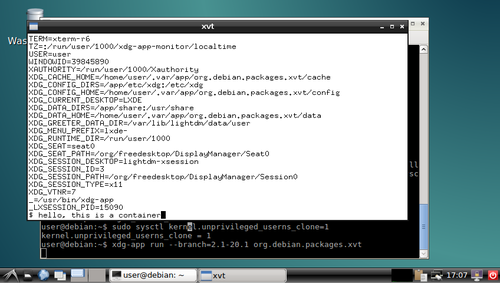
xvt in a container and you can play around with the shell in the xvt and see what you can and can't do in the container. I'm sure there were better ways to do most of this, but I think there's value in having such a simplistic demo to go alongside the various GNOMEish apps.
Acknowledgements: Thanks to all those!

27 January 2016

Alessio Treglia: Quantum reflections of a winter evening

A problem of interpretation?

December 14th, 1900 is known as the date of birth of quantum physics. In fact, that day Max Planck presented his report to the German Physical Society in Berlin, in which he argued that the exchange of energy in the phenomena of emission and absorption of electromagnetic radiation occurs in discrete form, not in continuous form as claimed by electromagnetic classic theory.

It was like opening a door to a new universe, that of subatomic particles. In a few decades it was learned that the basis of the strength of the real world around us (people, objects, plants, animals, etc.) is a joyful swarm of tiny particles distributed in clouds of probability, essentially surrounded by empty space. A shocking and apparently incomprehensible reality for the man of the 900: how could that still solid rock actually contain billions of microscopic objects in motion?

With the passing of the years, the road was covered deeper and deeper, revealing ever smaller particles for which new unknown names were coined: Leptons, Gluons, Quarks, Neutrinos, Fermions, Bosons, and so on until

<Read More >

25 January 2016

Steinar H. Gunderson: Chess endgame tablebases

A very short post: This link contains an interesting exposition of the 50-move rule in chess, and what it means for various endings. You can probably stop halfway, though; most of it is only interest for people deeply into endgame theory. Personally, I think DTZ50, as used by the Syzygy tablebases, is the best tradeoff for computer chess. It always produces the correct result (never throws away a win as a draw, or a draw as a loss), but the actual mates are of suboptimal length and look very strange (e.g., it will happily give away most of its pieces and then play very tricky endgames to mate). Then again, if you ever want to swindle against a non-optimal opponent (ie., try to make the position as hard as possible to play, to possibly convert e.g. a loss to a draw), you've opened up an entirely new can of worms. :-) Update: Eric P Smith has written a different explanation of the DTM50 metric that's probably easier to understand, although it contains less new information than the other one.

Antoine Beaupr : Internet in Cuba

A lot has been written about the Internet in Cuba over the years. I have read a few articles, from New York Times' happy support for Google's invasion of Cuba to RSF's dramatic and fairly outdated report about censorship in Cuba. Having written before about Internet censorship in Tunisia, I was curious to see if I could get a feel of what it is like over there, now that a new Castro is in power and the Obama administration has started restoring diplomatic ties with Cuba. With those political changes coming signifying the end of an embargo that has been called genocidal by the Cuban government, it is surprisingly difficult to get fresh information about the current state of affairs. This article aims to fill that gap in clarifying how the internet works in Cuba, what kind of censorship mechanisms are in place and how to work around them. It also digs more technically into the network architecture and performance. It is published in the hope of providing both Cubans and the rest of the world with a better understanding of their network and, if possible, Cubans ways to access the internet more cheaply or without censorship.

"Censorship" and workarounds Unfortunately, I have been connected to the internet only through the the Varadero airport and the WiFi of a "full included" resort near Jibacoa. I have to come to assume that this network is likely to be on a segregated, uncensored internet while the rest of the country suffers the wrath of the Internet censorship in Cuba I have seen documented elsewhere. Through my research, I couldn't find any sort of direct censorship. The Netalyzr tool couldn't find anything significantly wrong with the connection, other than the obvious performance problems related both to the overloaded uplinks of the Cuban internet. I ran an incomplete OONI probe as well, and it seems there was no obvious censorship detected there as well, at least according to folks in the helpful #ooni IRC channel. Tor also works fine, and could be a great way to avoid the global surveillance system described later in this article. Nevertheless, it still remains to be seen how the internet is censored in the "real" Cuban internet, outside of the tourist designated areas - hopefully future visitors or locals can expand on this using the tools mentioned above, using the regular internet. Usual care should be taken when using any workaround tools, mentioned in this post or not, as different regimes over the world have accused, detained, tortured and killed sometimes for the mere fact of using or distributing circumvention tools. For example, a Russian developer was arrested and detained in 2001 by United States' FBI for exposing vulnerabilities in the Adobe e-books copy protection mechanisms. Similarly, people distributing Tor and other tools have been arrested during the period prior to the revolution in Tunisia.

The Cuban captive portal There is, however, a more pernicious and yet very obvious censorship mechanism at work in Cuba: to get access to the internet, you have to go through what seems to be a state-wide captive portal, which I have seen both at the hotel and the airport. It is presumably deployed at all levels of the internet access points. To get credentials through that portal, you need a username and password which you get by buying a Nauta card. Those cards cost 2$CUC and get you an hour of basically unlimited internet access. That may not seem like a lot for a rich northern hotel party-goer, but for Cubans, it's a lot of money, given that the average monthly salary is around 20$CUC. The system is also pretty annoying to use, because it means you do not get continuous network access: every hour, you need to input a new card, which will obviously make streaming movies and other online activities annoying. It also makes hosting servers basically impossible. So while Cuba does not have, like China or Iran, a "great firewall", there is definitely a big restriction to going online in Cuba. Indeed, it seems to be how the government ensures that Cubans do not foment too much dissent online: keep the internet slow and inaccessible, and you won't get too many Arab spring / blogger revolutions.

Bypassing the Cuban captive portal The good news is that it is perfectly possible for Cubans (or at least for a tourist like me with resources outside of the country) to bypass the captive portal. Like many poorly implemented portals, the portal allows DNS traffic to go through, which makes it possible to access the global network for free by using a tool like iodine which tunnels IP traffic over DNS requests. Of course, the bandwidth and reliability of the connection you get through such a portal is pretty bad. I have regularly seen 80% packet loss and over two minutes of latency:
--- 10.0.0.1 ping statistics ---
163 packets transmitted, 31 received, 80% packet loss, time 162391ms
rtt min/avg/max/mdev = 133.700/2669.535/64188.027/11257.336 ms, pipe 65
Still, it allowed me to login to my home server through SSH using Mosh to workaround the reliability issues. Every once in a while, mosh would get stuck and keep on trying to send packets to probe the server, which would clog the connection even more. So I regularly had to restart the whole stack using these commands:
killall iodine # stop DNS tunnel
nmcli n off # turn off wifi to change MAC address
macchanger -A wlan0 # change MAC address
nmcli n on # turn wifi back on
sleep 3 # wait for wifi to settle
iodine-client-start # restart DNS tunnel
The Koumbit Wiki has good instructions on how to setup a DNS tunnel. I am wondering if such a public service could be of use for Cubans, although I am not sure how it could be deployed only for Cubans, and what kind of traffic it could support... The fact is that iodine does require a server to operate, and that server must be run on the outside of the censored perimeter, something that Cubans may not be able to afford in the first place. Another possible way to save money with the captive portal would be to write something that automates connecting and disconnecting from the portal. You would feed that program a list of credentials and it would connect to the portal only on demand, and disconnect as soon as no traffic goes through. There are details on the implementation of the captive portal below that may help future endeavours in that field.

Private information revealed to the captive portal It should be mentioned, however, that the captive portal has a significant amount of information on clients, which is a direct threat to the online privacy of Cuban internet users. Of course the unique identifiers issued with the Nauta cards can be correlated with your identity, right from the start. For example, I had to give my room number to get a Nauta card issued. Then the central portal also knows which access point you are connected to. For example, the central portal I was connected to Wifi_Memories_Jibacoa which, for anyone that cares to research, will give them a location of about 20 square meters where I was located when connected (there is only one access point in the whole hotel). Finally, the central portal also knows my MAC address, a unique identifier for the computer I am using which also reveals which brand of computer I am using (Mac, Lenovo, etc). While this address can be changed, very few people know that, let alone how. This led me to question whether I would be allowed back in Cuba (or even allowed out!) after publishing this blog post, as it is obvious that I can be easily identified based on the time this article was published, my name and other details. Hopefully the Cuban government will either not notice or not care, but this can be a tricky situation, obviously. I have heard that Cuban prisons are not the best hangout place in Cuba, to say the least...

Network configuration assessment This section is more technical and delves more deeply in the Cuban internet to analyze the quality and topology of the network, along with hints as to which hardware and providers are being used to support the Cuban government.

Line quality The internet is actually not so bad in the hotel. Again, this may be because of the very fact that I am in that hotel, and I get a privileged access to the new fiber line to Venezuela, the ALBA-1 link. The line speed I get is around 1mbps, according to speedtest, which selected a server from LIME in George Town, Cayman Islands:
[1034]anarcat@angela:cuba$ speedtest
Retrieving speedtest.net configuration...
Retrieving speedtest.net server list...
Testing from Empresa de Telecomunicaciones de Cuba (152.206.92.146)...
Selecting best server based on latency...
Hosted by LIME (George Town) [391.78 km]: 317.546 ms
Testing download speed........................................
Download: 1.01 Mbits/s
Testing upload speed..................................................
Upload: 1.00 Mbits/s
Latency to the rest of the world is of couse slow:
--- koumbit.org ping statistics ---
122 packets transmitted, 120 received, 1,64% packet loss, time 18731,6ms
rtt min/avg/max/sdev = 127,457/156,097/725,211/94,688 ms
--- google.com ping statistics ---
122 packets transmitted, 121 received, 0,82% packet loss, time 19371,4ms
rtt min/avg/max/sdev = 132,517/160,095/724,971/93,273 ms
--- redcta.org.ar ping statistics ---
122 packets transmitted, 120 received, 1,64% packet loss, time 40748,6ms
rtt min/avg/max/sdev = 303,035/339,572/965,092/97,503 ms
--- ccc.de ping statistics ---
122 packets transmitted, 72 received, 40,98% packet loss, time 19560,2ms
rtt min/avg/max/sdev = 244,266/271,670/594,104/61,933 ms
Interestingly, Koumbit is actually the closest host in the above test. It could be that Canadian hosts are less affected by bandwidth problems compared to US hosts because of the embargo.

Network topology The various traceroutes show a fairly odd network topology, but that is typical of what I would described as "colonized internet users", which have layers and layers of NAT and obscure routing that keep them from the real internet. Just like large corporations are implementing NAT in a large scale, Cuba seems to have layers and layers of private RFC 1918 IPv4 space. A typical traceroute starts with:
traceroute to koumbit.net (199.58.80.33), 30 hops max, 60 byte packets
 1  10.156.41.1 (10.156.41.1)  9.724 ms  9.472 ms  9.405 ms
 2  192.168.134.137 (192.168.134.137)  16.089 ms  15.612 ms  15.509 ms
 3  172.31.252.113 (172.31.252.113)  15.350 ms  15.805 ms  15.358 ms
 4  pos6-0-0-agu-cr-1.mpls.enet.cu (172.31.253.197)  15.286 ms  14.832 ms  14.405 ms
 5  172.31.252.29 (172.31.252.29)  13.734 ms  13.685 ms  14.485 ms
 6  200.0.16.130 (200.0.16.130)  14.428 ms  11.393 ms  10.977 ms
 7  200.0.16.74 (200.0.16.74)  10.738 ms  10.019 ms  10.326 ms
 8  ix-11-3-1-0.tcore1.TNK-Toronto.as6453.net (64.86.33.45)  108.577 ms  108.449 ms
Let's take this apart line by line:
 1  10.156.41.1 (10.156.41.1)  9.724 ms  9.472 ms  9.405 ms
This is my local gateway, probably the hotel's wifi router.
 2  192.168.134.137 (192.168.134.137)  16.089 ms  15.612 ms  15.509 ms
This is likely not very far from the local gateway, probably still in Cuba. It in one bit away from the captive portal IP address (see below) so it is very likely related to the captive portal implementation.
 3  172.31.252.113 (172.31.252.113)  15.350 ms  15.805 ms  15.358 ms
 4  pos6-0-0-agu-cr-1.mpls.enet.cu (172.31.253.197)  15.286 ms  14.832 ms  14.405 ms
 5  172.31.252.29 (172.31.252.29)  13.734 ms  13.685 ms  14.485 ms
All those are withing RFC 1918 space. Interestingly, the Cuban DNS servers resolve one of those private IPs as within Cuban space, on line #4. That line is interesting because it reveals the potential use of MPLS.
 6  200.0.16.130 (200.0.16.130)  14.428 ms  11.393 ms  10.977 ms
 7  200.0.16.74 (200.0.16.74)  10.738 ms  10.019 ms  10.326 ms
Those two lines are the only ones that actually reveal that the route belongs in Cuba at all. Both IPs are in a tiny (/24, or 256 IP addresses) network allocated to ETECSA, the state telco in Cuba:
inetnum:     200.0.16/24
status:      allocated
aut-num:     N/A
owner:       EMPRESA DE TELECOMUNICACIONES DE CUBA S.A. (IXP CUBA)
ownerid:     CU-CUBA-LACNIC
responsible: Rafael L pez Guerra
address:     Ave. Independencia y 19 Mayo, s/n,
address:     10600 - La Habana - CH
country:     CU
phone:       +53 7 574242 []
owner-c:     JOQ
tech-c:      JOQ
abuse-c:     JEM52
inetrev:     200.0.16/24
nserver:     NS1.NAP.ETECSA.NET
nsstat:      20160123 AA
nslastaa:    20160123
nserver:     NS2.NAP.ETECSA.NET
nsstat:      20160123 AA
nslastaa:    20160123
created:     20030512
changed:     20140610
Then the last hop:
 8  ix-11-3-1-0.tcore1.TNK-Toronto.as6453.net (64.86.33.45)  108.577 ms  108.449 ms  108.257 ms
...interestingly, lands directly in Toronto, in this case going later to Koumbit but that is the first hop that varies according to the destination, hops 1-7 being a common trunk to all external communications. It's also interesting that this shoves a good 90 milliseconds extra in latency, showing that a significant distance and number of equipment crossed. Yet a single hop is crossed, not showing the intermediate step of the Venezuelan link or any other links for that matter. Something obscure is going on there... Also interesting to note is the traceroute to the redirection host, which is only one hop away:
traceroute to 192.168.134.138 (192.168.134.138), 30 hops max, 60 byte packets
 1  192.168.134.138 (192.168.134.138)  6.027 ms  5.698 ms  5.596 ms
Even though it is not the gateway:
$ ip route
default via 10.156.41.1 dev wlan0  proto static  metric 1024
10.156.41.0/24 dev wlan0  proto kernel  scope link  src 10.156.41.4
169.254.0.0/16 dev wlan0  scope link  metric 1000
This means a very close coordination between the different access points and the captive portal system. Finally, note that there seems to be only three peers to the Cuban internet: Teleglobe, formerly Canadian, now owned by the Indian [[!wiki Tata group]], and Telef nica, the Spanish Telco that colonized most of Latin America's internet, all the way down to Argentina. This is confirmed by my traceroutes, which show traffic to Koumbit going through Tata and Google's going through Telef nica.

Captive portal implementation The captive portal is https://www.portal-wifi-temas.nauta.cu/ (not accessible outside of Cuba) and uses a self-signed certificate. The domain name resolves to 190.6.81.230 in the hotel. Accessing http://1.1.1.1/ gives you a status page which allows you to disconnect from the portal. It actually redirects you to https://192.168.134.138/logout.user. That is also a self-signed, but different certificate. That certificate actually reveals the implication of Gemtek which is a "world-leading provider of Wireless Broadband solutions, offering a wide range of solutions from residential to business". It is somewhat unclear if the implication of Gemtek here is deliberate or a misconfiguration on the part of Cuban officials, especially since the certificate is self-signed and was issued in 2002. It could be, however, a trace of the supposed involvement of China in the development of Cuba's networking systems, although Gemtek is based in Taiwan, and not in the China mainland. That IP, in turn, redirects you to the same portal but in a page that shows you the statistics:
https://www.portal-wifi-temas.nauta.cu/?mac=0024D1717D18&script=logout.user&remain_time=00%3A55%3A52&session_time=00%3A04%3A08&username=151003576287&clientip=10.156.41.21&nasid=Wifi_Memories_Jibacoa&r=ac%2Fpopup
Notice how you see the MAC address of the machine in the URL (randomized, this is not my MAC address), along with the remaining time, session time, client IP and the Wifi access point ESSID. There may be some potential in defrauding the session time there, I haven't tested it directly. Hitting Actualizar redirects you back to the IP address, which redirects you to the right URL on the portal. The "real" logout is at:
http://192.168.134.138/logout.user?cmd=logout
The login is performed against https://www.portal-wifi-temas.nauta.cu/index.php?r=ac/login with a referer of:
https://www.portal-wifi-temas.nauta.cu/?&nasid=Wifi_Memories_Jibacoa&nasip=192.168.134.138&clientip=10.156.41.21&mac=EC:55:F9:C5:F2:55&ourl=http%3a%2f%2fgoogle.ca%2f&sslport=443&lang=en-US%2cen%3bq%3d0.8&lanip=10.156.41.1
Again, notice the information revealed to the central portal.

Equipment and providers I ran Nmap probes against both the captive portal and the redirection host, in the hope of finding out how they were built and if they could reveal the source of the equipment used. The complete nmap probes are available in nmap, but it seems that the captive portal is running some embedded device. It is confusing because the probe for the captive portal responds as if it was the gateway, which blurs even more the distinction between the hotel's gateway and the captive portal. This raises the distinct possibility that all access points are actually captive portal that authenticate to another central server. The nmap traces do show three distinct hosts however:
  • the captive portal (www.portal-wifi-temas.nauta.cu, 190.6.81.230)
  • some redirection host (192.168.134.138)
  • the hotel's gateway (10.156.41.1)
They do have distinct signatures so the above may be just me misinterpreting traceroute and nmap results. Your comments may help in clarifying the above. Still, the three devices show up as running Linux, in the two last cases versions between 2.4.21 and 2.4.31. Now, to find out which version of Linux it is running is way more challenging, and it is possible it is just some custom Linux distribution. Indeed, the webserver shows up as G4200.GSI.2.22.0155 and the SSH server is running OpenSSH 3.0.2p1, which is basically prehistoric (2002!) which corroborates the idea that this is some Gemtek embedded device. The fact that those devices are running 14 years old software should be a concern to the people responsible for those networks. There is, for example, a remote root vulnerability that affects that specific version of OpenSSH, among many other vulnerabilities.

A note on Nauta card's security Finally, one can note that it is probably trivial to guess card UIDs. All cards i have here start with the prefix 15100, the following digits being 3576 or 4595, presumably depending on the "batch" that was sent to different hotels, which seems to be batches of 1000 cards. You can also correlate the UID with the date at which the card was issued. For example, 15100357XXX cards are all valid until 19/03/2017, and 151004595XXX cards are all valid until 23/03/2017. Here's the list of UIDs I have seen:
151004595313
151004595974
151003576287
151003576105
151003576097
The passwords, on the other hand, do seem fairly random (although my sample size is small). Interestingly, those passwords are also 12 digits long, which is about as strong as a seven-letter password (mixed uppercase and lowercase). If there are no rate-limiting provisions on that captive portal, it could be possible to guess those passwords, since you have free rein on accessing those routers. Depending on the performance of the routers, you could be lucky and find a working password for free...

Conclusion Clearly, Internet access in Cuba needs to be modernized. We can clearly see that Cuba years behind the rest of the Americas, if only through the percentage of the population with internet access, or download speeds. The existence of a centralized captive portal also enables a huge surveillance potential that should be a concern for any Cuban, or for that matter, anyone wishing to live in a free society. The answer, however, lies not in the liberalization of commerce and opening the doors to the US companies and their own systems of surveillance. It should be possible, and even desirable for Cubans to establish their own neutral network, a proposal I have made in the past even for here in Qu bec. This network could be used and improved by Cubans themselves, prioritizing local communities that would establish their own infrastructure according to their own needs. I have been impressed by this article about the El Paquete system - it shows great innovation and initiative from Cubans which are known for engaging in technology in a creative way. This should be leveraged by letting Cubans do what they want with their networks, not telling them what to do. The best the Googles of this world can do to help Cuba is not to colonize Cuba's technological landscape but to cleanup their own and make their own tools more easily accessible and shareable offline. It is something companies can do right now, something I detailed in a previous article.

24 January 2016

Niels Thykier: Lintian 2.5.40 now with less output

You have probably tried to run lintian (-EIL +pedantic) on your packages only to watch lintian drown your terminal. If you have, you would certainly not be the first. A concrete example with lintian 2.5.40.2:
$ lintian -EIL +pedantic 389-ds-base_1.3.4.5-2_amd64.deb   wc -l
85
Notably, at least 45 of these appeared in 2.5.40 (the hardening-no-bindnow tag):
$ lintian -EIL +pedantic 389-ds-base_1.3.4.5-2_amd64.deb \
  --tags hardening-no-bindnow   wc -l
45
In a single release, we have over doubled the number of tags in the given package. I very much doubt this is the first time such a thing happened. Therefore, we have implemented a per package tag filter in 2.5.40. The filter is applied automatically when stdout is a tty and restricts lintian to emitting no more than 3 concrete instances of a given tag per package. If a fourth tag would have been emitted, the filter replaces it with a how to see all instances message and suppresses further instances in that package. Accordingly, lintian only emits 25 lines (instead of 85) for the example package. It looks something like this:
$ lintian -EIL +pedantic 389-ds-base_1.3.4.5-2_amd64.deb 
I: 389-ds-base: spelling-error-in-binary usr/bin/dbscan-bin conents contents
X: 389-ds-base: hardening-no-bindnow usr/bin/dbscan-bin
X: 389-ds-base: hardening-no-bindnow usr/bin/dsktune-bin
X: 389-ds-base: hardening-no-bindnow usr/bin/infadd-bin
X: 389-ds-base: hardening-no-bindnow ... use --no-tag-display-limit to see all (or pipe to a file/program)
I: 389-ds-base: spelling-error-in-binary usr/lib/x86_64-linux-gnu/dirsrv/libns-dshttpd.so.0.0.0 occured occurred
[...]
With this very simple filter in place, the entire lintian output for that single binary now fits on my screen. I am pretty sure the filter could do with additional smarts, but I believe it is a good start.
Filed under: Debian, Lintian

Wouter Verhelst: Playing with Letsencrypt

While I'm not convinced that encrypting everything by default is necessarily a good idea, it is certainly true that encryption has its uses. Unfortunately, for the longest time getting an SSL certificate from a CA was quite a hassle -- and then I'm not even mentioning the fact that it would cost money, too. In that light, the letsencrypt project is a useful alternative: rather than having to dabble with emails or webforms, letsencrypt does everything by way of a few scripts. Also, the letsencrypt CA is free to use, in contrast to many other certificate authorities. Of course, once you start scripting, it's easy to overdo it. When you go to the letsencrypt website and try to install their stuff, they point you to a "letsencrypt-auto" thing, which starts installing a python virtualenv and loads of other crap, just so we can talk to a server and get a certificate properly signed. I'm sure that makes sense for some people, and I'm also sure it makes some things significantly easier, but honestly, I think it's a bit overkill. Luckily, there is also a regular letsencrypt script that doesn't do all the virtualenv stuff, and which is already packaged for Debian, so installing that gets us rid of the overkill bits. It's not in stable, but it is an arch:all package. Unfortunately, not all dependencies are available in Jessie, but backporting it turned out to be not too complicated. Once the client is installed, you need to get it to obtain a certificate, and you need to have the certificate be activated for your webserver. By default, the letsencrypt client will update your server configuration for you, and run a temporary webserver, and do a whole lot of other things that I would rather not see it do. The good news, though, is that you can switch all that off. If you're willing to let it write a few files to your DocumentRoot, it can do the whole thing without any change to your system:
letsencrypt certonly -m <your mailaddress> --accept-tos --webroot -w \
    /path/to/DocumentRoot -d example.com -d www.example.com
In that command, the -m option (with mail address) and the --accept-tos option are only required the first time you ever run letsencrypt. Doing so creates an account for you at letsencrypt.org, without which you cannot get any certificates. The --accept-tos option specifies that you accept their terms of service, which you might want to read first before blindly accepting. If all goes well, letsencrypt will tell you that it wrote your account information and some certificates somewhere under /etc/letsencrypt. All that's left is to update your webserver configuration so that the certificates are actually used. No, I won't tell you how that's done -- if you need that information, it's probably better if you just use the apache or nginx plugin of letsencrypt, which updates your webserver's configuration automatically. But if you already know how to do so, and prefer to maintain your configuration by yourself, then it's good to know that it is at least possible. Since we specified two -d parameters, the certificate you get from the letsencrypt CA will have subjectAlternativeName fields, allowing you to use them for more than one domain name. I specified example.com and www.example.com as the valid names, but there is nothing in letsencrypt requiring that the domain names you specify share a suffix; so yes, it is certainly possible to have multiple domains on a single certificate, if you want that. Finally, you need to ensure that your certificates are renewed before they expire. The easiest way to do that is to add a cronjob, which runs letsencrypt again; only this time, you'll need slightly different options:
letsencrypt certonly --renew-by-default --webroot -w \
    /path/to/DocumentRoot -d domain.name.tld -d www.domain.name.tld
The --renew-by-default option tells letsencrypt that you want to renew your certificates, not create new ones. If you specify this, the old certificate will be revoked, and a new one will be generated, again with three months validity. The symlinks under /etc/letsencrypt/live will be updated, so if your webserver's configuration uses those as the path to your certificates, you don't need to update any configuration files (although you may need to restart your webserver). You'll also notice that the -m and --accept-tos options are not specified this time around; this is because those are only required when you want to create an account -- once that step has been taken, letsencrypt will read the necessary information from its configuration files (and creating a new account for every renewal is just silly). With that, you now have a working, browser-trusted, certificate. Update: fix mistake about installing on Jessie. It's possible (I've done so), but it's been a while and I forgot that I had to recompile several of letsencrypt's dependencies in order for it to be installable.

19 January 2016

Joey Hess: git-annex v6

Version 6 of git-annex, released last week, adds a major new feature; support for unlocked large files that can be edited as usual and committed using regular git commands. For example:
git init
git annex init --version=6
mv ~/foo.iso .
git add foo.iso
git commit -m "added hundreds of megabytes to git annex (not git)"
git remote add origin ssh://sever/dir
git annex sync origin --content # uploads foo.iso
Compare that with how git-annex has worked from the beginning, where git annex add is used to add a file, and then the file is locked, preventing further modifications of it. That is still a very useful way to use git-annex for many kinds of files, and is still supported of course. Indeed, you can easily switch files back and forth between being locked and unlocked. This new unlocked file mode uses git's smudge/clean filters, and I was busy developing it all through December. It started out playing catch-up with git-lfs somewhat, but has significantly surpassed it now in several ways. So, if you had tried git-annex before, but found it didn't meet your needs, you may want to give it another look now.
Now a few thoughts on git-annex vs git-lfs, and different tradeoffs made by them. After trying it out, my feeling is that git-lfs brings an admirable simplicity to using git with large files. File contents are automatically uploaded to the server when a git branch is pushed, and downloaded when a branch is merged, and after setting it up, the user may not need to change their git workflow at all to use git-lfs. But there are some serious costs to that simplicity. git-lfs is a centralized system. This is especially problimatic when dealing with large files. Being a decentralized system, git-annex has a lot more flexability, like transferring large file contents peer-to-peer over a LAN, and being able to choose where large quantities of data are stored (maybe in S3, maybe on a local archive disk, etc). The price git-annex pays for this flexability is you have to configure it, and run some additional commands. And, it has to keep track of what content is located where, since it can't assume the answer is "in the central server". The simplicity of git-lfs also means that the user doesn't have much control over what files are present in their checkout of a repository. git-lfs downloads all the files in the work tree. It doesn't have facilities for dropping the content of some files to free up space, or for configuring a repository to only want to get a subset of files in the first place. On the other hand, git-annex has excellent support for all those things, and this comes largely for free from its decentralized design. If git has showed us anything, it's perhaps that a little added complexity to support a fully distributed system won't prevent people using it. Even if many of them end up using it in a mostly centralized way. And that being decentralized can have benefits beyond the obvious ones.
Oh yeah, one other advantage of git-annex over git-lfs. It can use half as much disk space! A clone of a git-lfs repository contains one copy of each file in the work tree. Since the user can edit that file at any time, or checking out a different branch can delete the file, it also stashes a copy inside .git/lfs/objects/. One of the main reasons git-annex used locked files, from the very beginning, was to avoid that second copy. A second local copy of a large file can be too expensive to put up with. When I added unlocked files in git-annex v6, I found it needed a second copy of them, same as git-lfs does. That's the default behavior. But, I decided to complicate git-annex with a config setting:
git config annex.thin true
git annex fix
Run those two commands, and now only one copy is needed for unlocked files! How's it work? Well, it comes down to hard links. But there is a tradeoff here, which is why this is not the default: When you edit a file, no local backup is preserved of its old content. So you have to make sure to let git-annex upload files to another repository before editing them or the old version could get lost. So it's a tradeoff, and maybe it could be improved. (Only thin out a file after a copy has been uploaded?) This adds a small amount of complexity to git-annex, but I feel it's well worth it to let unlocked files use half the disk space. If the git-lfs developers are reading this, that would probably be my first suggestion for a feature to consider adding to git-lfs. I hope for more opportunities to catch-up to git-lfs in turn.

18 January 2016

Norbert Preining: Debian/TeX Live 2015.20160117-1 and biber 2.3-1

About one month has passed and here is the usual updated of TeX Live packages for Debian, this time also with an update to biber to accompany the updated version of biblatex. Nothing spectacular here besides fixes for some broken links of fonts. Debian - TeX Live 2015 As a bonus this time, I provide (auto-generated) links to the packages on CTAN, so that one can check the package descriptions and manuals. Updated packages academicons, acro, apnum, babel, babel-french, babel-icelandic, babel-spanish, babel-vietnamese, bclogo, biblatex, bibtexperllibs, calxxxx-yyyy, chemformula, chemgreek, chess-problem-diagrams, chickenize, cjk-gs-integrate, cmcyr, csplain, datatool, dvips, embrac, enotez, etex-pkg, fibeamer, fithesis, invoice, isodoc, l3kernel, latexdiff, luamplib, mathastext, mcf2graph, media9, nameauth, newpx, newtx, newtxsf, nucleardata, paralist, pdftex, pgfplots, pict2e, pmxchords, prftree, ptex, reledmac, schwalbe-chess, siunitx, tempora, tetex, tex4ht, texinfo, texlive-cz, texlive-docindex, texlive-scripts, thalie, thuthesis, tkz-orm, uantwerpendocs, unicode-data, xassoccnt, xespotcolor. New packages continue, ecobiblatex, econometrics, getitems, librebodoni, lshort-estonian, moodle, nimbus15, seuthesix, uantwerpendocs. Enjoy.


17 January 2016

Lars Wirzenius: Obnam survey (January 2016)

Survey URL: http://goo.gl/forms/hdoQZKjs80 I am doing an Obnam survey. The goal of this survey is to collect feedback from those who use Obnam, or have tried it, to guide the project in the future. The survey will run until February 29, 2016. Goals: All questions in this survey are optional. I do not collect personal information at all. The survey is implemented using Google Forms, and so Google probably collects some information; sorry. You don't need to log in to Google to fill in the survey, though, and I encourage you to use all the privacy protection tools you have. I hope as many Obnam users as possible fill in the survey.

14 January 2016

Elena 'valhalla' Grandi: Conservancy supporter, at last!

Conservancy supporter, at last!

Yesterday I've finally donated to become a Conservancy Supporter http://sfconservancy.org/supporter/.

The reasons to donate have already been explained many times both on Planet Debian http://planet.debian.org/ and elsewhere; a few weeks ago I wrote a post (in Italian) on the Ninux community blog https://blog.ninux.org/2015/12/03/causa-vmware-per-violazione-gpl-sponsor-ritirano-fondi-a-software-freedom-conservancy/ to spread the word about it.

So, why I haven't donated earlier?

Trying to donate via PayPal from Italy (and, it seems, from Europe in general) requires a PayPal account, which I don't have and don't want to have, so I contacted them to ask for bank transfer instructions.
The first instructions I received were too complex for my online-only bank account, so I asked my bank for help, there was an exchange of emails, further simpler instructions from their bank, a small donation to test everything and time passed.

Finally, the good news: it is possible to donate to Conservancy from Italy (and probably from elsewhere in EU) using a SEPA transfer with minimal commissions and usually available from the home banking websites, so that it doesn't require significantly more effort than using paypal.
You can contact Conservancy via e-mail mailto:accounting@sfconservancy.org to get the relevant payment data.

(Conservancy has an account in EUR which is then used to pay for expenses in EUR, so no currency conversion commission are involved.)

Next.

Previous.