Search Results: "uwe"

12 September 2007

Uwe Hermann: I'm now getting Green Energy via Lichtblick

Since a few days I'm a happy customer of Lichtblick, the biggest electric utility (Stromanbieter) in Germany which provides 100% green energy (or kostrom as it's called in Germany). Why? I was getting tired of all those hypocrites and liars (a.k.a. politicians) who keep on talking about global warming and renewable energy, but fail to produce any real results since many, many years now. So I decided to do my (small) part to help reduce CO2 emissions, the greenhouse effect, and global warming. After measuring the energy consumption of all my power-sucking devices and replacing or turning off some of them, and after replacing all lightbulbs with highly efficient energy saving lightbulbs, changing the electric utility was the next logical step. First try (failed) As probably almost everyone in Munich, I was a customer of the Stadtwerke M nchen (SWM). According to the last electricity bill I got from them, their sources of energy are: 17% renewable energy, 83% fossil energy sources, 0% nuclear power. Well, at least they don't use nuclear power, that's a big plus IMO, but 83% polluting, fossil crap? Thanks, but no thanks. So I opted to use their kostrom M-Natur tariff, which (they claim) provides 100% renewable energy. They use the so-called Aufpreismodell (sorry, German only), i.e. you pay a few cents extra per kWh, and this extra money is invested in renewable energy sources (mostly small hydropower plants around Munich). As I found out a few hours later (d'oh!) this "Aufpreismodell" is not really ideal (you still pay a conventional electric utility instead of one with 100% renewable energy, for instance). In addition, I stubled over a petition for the city of Munich to stop investing in a new fossil fuel power plant (bituminous coal, to be more precise). Which I promptly signed (and which went to several local parties including the greens, the mayer of Munich, and others).
Now, this is what I call hypocritical behaviour — on the one side they claim/pretend to be environmentally friendly by promoting their "M-Natur" tariff, and at the same time they invest even more money in fossil fuels? WTF? Anyway, it seems the petition did have at least some impact, the aren't allowed to invest more money into that fossil fuel powerplant than they already did. For me that was more than enough reason to immediately revoke my M-Natur tariff, and what's more, I switched to a completely different company now, Lichtblick (see also the respective Wikipedia page). I'm not willing to support such energy policies/politics with my money anymore. Lichblick Lichtblick is an kostromanbieter in Germany, supposedly the biggest one.
Their "energy mix" is 100% renewable energy (which is correct, unlike with SWM, as they do not own any additional fossil fuel plants). 76% of that is hydropower, FWIW. Their prices may be a bit higher than those of conventional electric utilities, but not all that much; you might even pay less, depending on where you live and which tariff you have now. You can use their price calculator to find out. Btw, some other good choices in Germany are Greenpeace energy, Elektrizit tswerke Sch nau, and Naturstrom AG. How the switch went Easy. Grab the respective PDF, print it, fill in the required info, and send it to them. Alternatively, they also offer online registration. It'll take a few weeks until the switch is performed; they have to contact your current electric utility etc. In my case it took ca. 4 weeks. There are no additional costs for switching. There is no "downtime" whatsoever (not even a few seconds), German law requires that you always reliably get your electricity 24/7 (and it indeed worked just fine for me). So, that's that. From now on I'm happily using green energy all day (and night) long. I'm doing my part in Saving The Planet (tm) and I sleep a bit better at night... P.S. No, I'm not getting paid by Lichtblick (or anybody else) to write this.

13 August 2007

Uwe Hermann: Linux on the Fujitsu Siemens Lifebook S-4572 Subnotebook

I recently bought a Fujitsu-Siemens LIFEBOOK S-4572 (sub)notebook on eBay for less than 150 Euros, a really great little machine. It's a Pentium III, 750 MHz, 256 MB RAM (the chipset cannot handle more than that unfortunately), 12.1" screen, ethernet, 2x USB 1.1, CD-ROM/DVD reader + CD-ROM writer, PCMCIA, IrDA, modem, and a 15 GB hard drive. No floppy, no serial ports, no parallel port. There's no wireless builtin, but I use a cheapo PCMCIA adapter. The greatest feature compared to all other laptops I previously owned is that the battery life is really great, it lasts almost 3 hours (compare that to 45 minutes on my current "main" laptop). I'm running Debian unstable on the box (of course). Here's the Linux support status as far as I have tested things: Networking Works out of the box using the e100 driver. Sound Works out of the box using the snd_intel8x0 driver. X11 Works out of the box, using either the vesa or the ati driver (at a max. resolution of 1024x768). Touchpad Works out of the box. Using the Option "SHMConfig" "on" line in /etc/X11/xorg.conf's InputDevice section (using the synaptics driver) also works fine and allows you to scroll using the touchpad, e.g. in a browser. More info in the SynapticsTouchpad page on the Debian wiki. CDROM, DVD Reading CD-ROMs and DVDs as well as burning CD-ROMs works fine. I don't think the drive is capable of writing DVDs. External VGA Displaying the screen contents on an external VGA monitor (or beamer) works just fine, switching is done using Fn+F10. PCMCIA Works fine, tested using the Sitecom WL-112 wireless card. The driver installation for that is straight-forward, too:
$ apt-get install rt2500-source
$ m-a a-i rt2500-source
$ dpkg -i /usr/src/rt2500*deb
Special keys All the Fn-keys work fine (brightness, volume, etc.). There are five other special keys (for starting a browser or something) which I haven't tested, but I don't really care... USB Works fine, but it's only USB 1.1, so some higher-speed devices will not work (DVB-T USB devices for example; PCMCIA DVB-T adapters might work). IrDA, Modem Untested, I don't care. Powersaving, Suspend to RAM It seems this CPU (Pentium III, Coppermine) doesn't support frequency scaling, so cpufreq-set doesn't work. I'm using laptop-mode-tools to improve battery life a bit more, though. Also, Suspend-to-RAM works fine out of the box:
$ apt-get install hibernate
$ hibernate-ram
I haven't tested Suspend-to-Disk yet, but I'm not sure it'll work anyway, as I'm using a dm-crypt'ed disk (+ LVM), as with all my boxes. lspci
00:00.0 Host bridge [0600]: Intel Corporation 82440MX Host Bridge [8086:7194] (rev 01)
00:00.1 Multimedia audio controller [0401]: Intel Corporation 82440MX AC'97 Audio Controller [8086:7195]
00:00.2 Modem [0703]: Intel Corporation 82440MX AC'97 Modem Controller [8086:7196]
00:07.0 Bridge [0680]: Intel Corporation 82440MX ISA Bridge [8086:7198] (rev 01)
00:07.1 IDE interface [0101]: Intel Corporation 82440MX EIDE Controller [8086:7199]
00:07.2 USB Controller [0c03]: Intel Corporation 82440MX USB Universal Host Controller [8086:719a]
00:07.3 Bridge [0680]: Intel Corporation 82440MX Power Management Controller [8086:719b]
00:12.0 Ethernet controller [0200]: Intel Corporation 82557/8/9 [Ethernet Pro 100] [8086:1229] (rev 09)
00:13.0 CardBus bridge [0607]: O2 Micro, Inc. OZ6933/711E1 CardBus/SmartCardBus Controller [1217:6933] (rev 02)
00:13.1 CardBus bridge [0607]: O2 Micro, Inc. OZ6933/711E1 CardBus/SmartCardBus Controller [1217:6933] (rev 02)
00:14.0 VGA compatible controller [0300]: ATI Technologies Inc Rage Mobility P/M [1002:4c52] (rev 64)
01:00.0 Network controller [0280]: RaLink RT2500 802.11g Cardbus/mini-PCI [1814:0201] (rev 01)
Other resources I'm really considering making this my "main" box even though it's a bit older/slower, as my current laptop with 45 minutes battery life is a major pain when travelling...

6 August 2007

Uwe Hermann: Rebuilding the whole Debian archive using the Open64 compiler

I got bored recently, so I rebuilt the whole Debian archive on one of my machines. To make this not a completely useless excercise, I used the Open64 compiler instead of gcc and created build logs for your perusal. So what is Open64? From the Wikipedia page:
Open64 is an open source, state-of-art, optimizing compiler for the Intel IA-64 (Itanium), AMD Opteron and Intel IA-32e architecture. It derives from the SGI compilers for the MIPS R10000 processor. It was released under the GPL in 2000, and now mostly serves as a research platform for compiler and computer architecture research groups. Open64 is licensed under the GPL. Open64 supports Fortran 77/95 and C/C++, as well as the shared memory programming model OpenMP. It can conduct high-quality interprocedural analysis, data flow analysis, data dependence analysis and array region analysis.
Open64 installation The installation is pretty easy fortunately:
$ wget http://ovh.dl.sourceforge.net/sourceforge/open64/open64-4.0-src.tar.bz2
$ tar xfvj open64-4.0-src.tar.bz2
$ cd open64-4.0
$ export TOOLROOT=/opt/open64
$ make
$ make install (as root)
I think you need gcc-3.4 (gcc 4.x is not yet supported), and for some odd reason you also need csh as one of the install scripts seems to use it. It would be nice if someone could package Open64 for Debian, I definately don't have the time to maintain such a huge package (a whole maintainer team would probably be good here). Rebuilding the Debian archive There are several possible ways (and tools) to rebuild the Debian archive; I've used pbuilder/cowbuilder with the rebuild scripts from Bastian Venthur, which are now included in pbuilder. First we need to install the required packages, setup a cowbuilder base chroot, and get the list of packages:
$ apt-get install cowdancer grep-dctrl wget devscripts sudo
$ cowbuilder --create --distribution lenny --basepath /var/cache/pbuilder/testing-base.cow
$ cp -r /usr/share/doc/pbuilder/examples/rebuild .
$ cd rebuild
$ ./getlist lenny
Now we add Open64 into the cowbuilder chroot and fix up the chroot by pointing the gcc/g++ symlinks to Open64:
$ cp -a /opt/open64 /var/cache/pbuilder/testing-base.cow/opt
$ chroot /var/cache/pbuilder/testing-base.cow
$ cd /usr/bin
$ mv gcc gcc.orig
$ ln -s /opt/open64/bin/opencc gcc
$ mv g++ g++.orig
$ ln -s /opt/open64/bin/openCC g++
$ exit
In addition, we set the CC and CXX environment variables to Open64, which will make 90% of all (autoconf-using) packages automatically use Open64. We need a small script for that:
$ cat c.cfg:
export CC="/opt/open64/bin/opencc -m32"
export CXX="/opt/open64/bin/openCC -m32"
Now edit the buildall script. Change the Debian mirror used there (optional) and make it use our c.cfg script by adding the --configfile /path/to/rebuild/c.cfg option in the "pdebuild" line. We can now finally start building the archive:
./buildall list.lenny.i386 lenny
You can also run multiple buildall instances at once to speed up the archive rebuild on SMP/multicore machines, and you can even abort the command and simply restart it later. The script will continue where it left off. Results The whole rebuild (with 2 instances of buildall running at the same time) took ca. 9 days on an AMD64 Athlon64 X2 (dual core, 1.8 GHz each) machine with 1 GB of RAM. I really should have used something like apt-proxy to speed up the rebuild and save some bandwidth, but I read about apt-proxy too late... All log files from my rebuild are available for detailed analysis if anybody is interested (you can browse the logfiles online or download all of them as tarball). I didn't perform any detailed analysis, just some rough numbers here: If anybody does some more elaborate analysis, please let me know.

3 August 2007

Uwe Hermann: RAID5 + dm-crypt + LVM + ext3 Debian install and benchmarks

OK, so I've setup a RAID5 at home because I'm getting tired of failed disk drives and data losses. Some notes: Some stats from bonnie++ if anybody cares:
Version  1.03       ------Sequential Output------ --Sequential Input- --Random-
                    -Per Chr- --Block-- -Rewrite- -Per Chr- --Block-- --Seeks--
Machine        Size K/sec %CP K/sec %CP K/sec %CP K/sec %CP K/sec %CP  /sec %CP
bonsai           2G 26727  72 39426  19 16690   7 28725  65 34164   7 215.3   0
                    ------Sequential Create------ --------Random Create--------
                    -Create-- --Read--- -Delete-- -Create-- --Read--- -Delete--
              files  /sec %CP  /sec %CP  /sec %CP  /sec %CP  /sec %CP  /sec %CP
                 16 +++++ +++ +++++ +++ +++++ +++ +++++ +++ +++++ +++ +++++ +++
bonsai,2G,26727,72,39426,19,16690,7,28725,65,34164,7,215.3,0,16,+++++,+++,+++++,+++,+++++,+++,+++++,+++,+++++,+++,+++++,+++
(Now, if I only knew what all those figures mean ;-) No, neither the software RAID5, nor the dm-crypt layer nor LVM cause any measurable performance degradation whatsoever (from my subjective feeling). I don't care enough to measure anything. The CPU is idling all the time. Power consumption is rather high (partly due to the mainboard and CPU, but also because of the disks + fans) and the system is pretty loud, which both sucks on the long run. I plan an ultra-silent, ultra-low-power RAID5 with 2.5" disks attached via USB to a (silent, low-power) NSLU2 for later.

27 July 2007

Uwe Hermann: Testing stuff with QEMU - Part 3: Debian GNU/kFreeBSD

Debian GNU/kFreeBSD screenshot 1
Note: This article is part of my Testing stuff with QEMU series.
From the Debian GNU/kFreeBSD port page:
Debian GNU/kFreeBSD is a port that consists of GNU userland using the GNU C library on top of FreeBSD's kernel, coupled with the regular Debian package set.
Q: Why would anybody want to do that?
A: Why not? [1] So, after we have talked about that, let's start:
  1. Install QEMU:
    apt-get install qemu
  2. Download the latest Debian GNU/kFreeBSD installer ISO image (either for i386 or amd64):
    wget http://glibc-bsd.alioth.debian.org/install-cd/kfreebsd-i386/20070313/debian-20070313-kfreebsd-i386-install.iso
  3. Create a QEMU image which will hold the Debian GNU/kFreeBSD (i386) installation:
    qemu-img create -f qcow2 qemu_kfreebsd_i386.img 5G
  4. Boot directly from the ISO image and install Debian into the QEMU image:
    qemu -boot d -cdrom debian-20070313-kfreebsd-i386-install.iso -hda qemu_kfreebsd_i386.img
  5. The FreeBSD installer will now start. For more detailed instructions see the Installing Debian GNU/kFreeBSD manual.
    First you can choose between an "Express" or "Custom" install (I used "Express").
  6. Next you end up in the partitioning tool. Type "a" to use the entire (QEMU) disk for the installation (the disk is called "ad0", not "hda" as on Linux). Type "q" to quit the partitioning tool.
  7. You are now asked which boot manager to use. For QEMU you should use "BootMgr", the default FreeBSD boot manager. If you install on real hardware you can also use GRUB; in that case choose "None" here (see the manual for more information), but note that the installer does not install or configure GRUB for you! You should do that beforehand!
  8. Next up: The disklabel editor. Here you'll create a partition ("slice" in FreeBSD-speak) for the root filesystem and a swap partition.
    Press "c" to create a new slice (will be called "ad0s1"), enter "4GB", choose "FS" (filesystem), and enter "/" for the root filesystem. Per default the UFS2 file system will be used. To create the swap partition, press "c" again, enter "1023MB", and select "swap". The new slice is called "ad0s1b". Press "q" to quit.
  9. Choose "minimal" when asked which distribution to install.
  10. Installation media dialog: select "CD/DVD" and "acd0" (for QEMU's ATAPI/IDE CD-ROM drive).
  11. The installation will now begin, and after a while you're asked to switch to console 3 using ALT-F3. Do it.
  12. You'll have to answer a bunch of questions: geographic area + city you're in (for timezone), whether you want to participate in the Debian popularity contest, whether module-init-tools should load additional drivers (no, so press ENTER three times). The installation will soon be finished.
At the end you must select "No" as you're told to do, then reboot via "Exit Install". You can then shutdown QEMU.
  1. Restart QEMU with the newly installed Debian GNU/kFreeBSD:
    qemu -hda qemu_kfreebsd_i386.img
    Debian GNU/kFreeBSD screenshot 2
  2. Press enter at the FreeBSD boot manager prompt, then login as root (there's no password).
  3. First things first: Set up a root password:
    passwd
  4. Now let's fix networking, update the system and install a bunch of packages:
    nano /etc/network/interfaces
    Yes, there's no vi, not even a symlink to nano! Uncomment the two "ed0" lines ("ed0" is the equivalent to "eth0" on Linux, I guess).
    /etc/init.d/networking restart
    apt-get update && apt-get dist-upgrade
    apt-get install vim xorg icewm xterm
  5. You can fix your console keymap using the kbdcontrol package (just select your keymap from the menu):
    apt-get install kbdcontrol
  6. Finally, let's fix X11 and start it. But first we create a new user, as we don't want to run X11 as root:
    adduser uwe
    vi /etc/X11/xorg.conf
    The mouse device is "/dev/psm0", the protocol "PS/2", and the graphics driver should be "vesa":
  Section "InputDevice"
      Option "Device" "/dev/psm0"
      Option "Protocol" "PS/2"
  [...]
  Section "Device"
      Driver "vesa"
    
  • That's about it. Login as "uwe" (or whatever your username is) and start X11:
    startx
  • Wasn't all that hard, eh? Now, if you've got some spare time, head over to the Debian GNU/kFreeBSD wiki page and help improving this port ;-) You should probably start with reading the PORTING guide. Both kfrebsd-i386 and kfreebsd-amd64 seem to be reasonably stable already (and more than 70% of the whole Debian archive builds fine on these architectures, see kfreebsd-i386_stats and kfreebsd-amd64_stats). I'll quite likely install kfreebsd-amd64 on one of my boxes soonish and start using it, maybe I'll even find some time to fix/patch/port some packages... [1] More elaborate answer(s) and reasons are available in the Debian wiki.

    24 July 2007

    Uwe Hermann: Download videos from Youtube, Google Video and others using Linux [Update]

    Many online video sites such as Youtube, Google Video, Dailymotion, Metacafe, and others only provide limited or inconvenient access to the videos; either they require you to install the proprietary Flash player (and I surely won't do that), and/or you can only view them online (but not download them). There are some solutions, each with advantages and disadvantages: After the download, you can either view the videos using (e.g.) mplayer, or recode them into a more sane format. For all of the above programs there are Debian packages available, except for VideoDownloader/UnPlug (but you can easily install those from within Firefox). Update 2007-07-26: Added UnPlug and swfdec (thanks Joe Buck and Josh Triplet for the comments).

    21 July 2007

    Joerg Jaspert: Bios update within Linux

    Following Uwes blog entry about flashrom, I finally decided to upgrade my Desktop PCs BIOS. Was about time, it was still running on the original BIOS version from back when the Board got manufactured (2004), and Tyan managed to release 6 new versions since then, all adding a lot of nice features. The update went nice and without a single problem (yay) and now I have tons of new stuff. Like - working powernowd support, automagic fan speed control and some other gimmicks. The first thing got my CPUs, usually running at 45 - 60 C to now work with about 37 C, as they are now mostly idling at half the speed they did before. Thats up to 23 C less heat. The fan control now gets fan 1 (of 2) in my Desktop to run with a very low speed, around 100RPM, sometimes it even seems to turn itself off. (My system uses a big fat watercooling with a water tank that has something between 20 to 30l of water in, so the fans are only to get air moving a little bit). Also, with my recent upgrade to 2.6.22.1 on this machine its now also able to suspend and resume. Which wasnt possible earlier, for unknown reasons. Ok, I can only suspend-to-disk, not to ram, there it only supports “Standby” mode, but its already better than “either on or off”. Funny side note - my desktop, having a NVidia card, using the non-free nvidia driver can suspend/resume without problems. My laptop, also having a NVidia card, can only suspend/resume without problems if I do not use the binary driver. The binary driver is able to suspend, and even resumes, but then Xorg (latest sid) happily eats all CPU cycles. The free nv driver at least works in suspend-to-disk mode. But fails to turn on the display in suspend-to-ram mode. Of course nv also manages to lock the whole machine if I try to run an application that needs a little bit more video foo, like blobwars or supertux. Oh, and my Xorg still seems to turn on the monitor, not liking DPMS, as blogged some time ago. But it’s now not limited to acpi events, it must be something else. Weird, but I didnt have enough time and motivation to debug this (or googling, maybe others have the problem too). Its only a very small bit annoying. (Sometimes happens after seconds, sometimes takes a minute).

    20 July 2007

    Uwe Hermann: Retiring the sparc32 Debian port... or not?

    According to Jurij Smakov's announcement, the Debian port for 32bit SPARC machines is about to be retired. This is really sad in my opinion, as we should rather support more architectures instead of less architectures. After all, Debian is "The Universal Operating System" [1]. Now, I know that my opinion doesn't matter much in this case, but many other people who own sparc32 boxes seem to feel the same, judging from the thread which was started by the announcement. Also, I do realize that nobody wants to retire the port just for fun. To my understanding there is one major problem which needs to be sorted out in order to "save" the sparc32 support in Debian (and also in Linux!): There is no Linux kernel maintainer for the sparc32 Linux code at the moment! This seems to be the root of the whole problem. It makes maintaining a Debian port for sparc32 really hard, as you can surely imagine. Also, there seem to be too few people who actively work on the surrounding toolchain stuff (gcc, binutils, etc) which is also very important. My suggestion would be to not drop the Debian support for now, but rather set the status to "needs help" or something and actively search for contributors and/or maintainers. Heck, list it on Unmaintained Free Software, or write a "call for help" Slashdot article, post the issue on all Linux-/Debian-/SPARC-related mailing lists etc. etc. (or write funny blog posts, heh). I guess if two or three experienced SPARC developers would step up and take care of the kernel and toolchain maintenance for sparc32, there would be no reason to drop it anytime soon. Anyone?

    16 July 2007

    Uwe Hermann: Flashing a BIOS the Linux Way (tm) using flashrom

    There are a gazillion HOWTOs out there for flashing a BIOS image without having to resort to ugly "boot DOS from floppy" or "run Windows *.exe file from BIOS vendor" and other ugly stuff. Unfortunately, the proposed solutions are equally ugly (e.g. creating custom CD-ROMs which contain the "floppy" with DOS/Windows flash tools). Folks, this is so much simpler than you think: The flashrom tool (GPL'd, written for LinuxBIOS purposes, but works perfectly fine with proprietary BIOSes, too) will easily do what you want, on a running Linux system. No floppy crap, no CD-ROM crap, no DOS/Windows crap, no rebooting crap. Install it:
    $ apt-get install flashrom
    
    Detect whether flashrom knows about your chipset/mainboard/BIOS chip:
    $ flashrom
    
    Read the BIOS image into a file:
    $ flashrom -r backup.bin
    
    Write a BIOS image (proprietary or LinuxBIOS) on the ROM chip:
    $ flashrom -wv newbios.bin
    
    WARNING: This will overwrite your current BIOS! Make sure you know what you're doing! For the Debian-challenged, flashrom is available in source form too, of course:
    $ svn co svn://linuxbios.org/repos/trunk/util/flashrom
    $ cd flashrom
    $ make
    
    The list of supported chipsets, mainboards, and ROM chips is limited of course, but it's constantly expanding. Contact us on the LinuxBIOS mailing list if you want other hardware supported (or even better: if you have patches!). In many cases adding support for new hardware is pretty easy...

    12 July 2007

    Uwe Hermann: Tracking GPLv3 projects

    GPLv3 logo As you probably already heard, the GPL, version 3 has been released, together with the LGPL, version 3. I haven't yet read the licenses in detail, so I cannot say much about them, but more information is available in the (updated) GPL FAQ. The compatibility table from the GPLv3 Discussion Draft FAQ can be pretty helpful, too. There's a Why Upgrade to GPLv3? text and even a video of Richard Stallman (Ogg Theora, transcript available) introducing the GPLv3, the rationale behind it and some of the changes in this new version. (One nice advantage of the GPLv3 I like is that it's compatible with the Apache license now, btw.) Probably the most interesting GPLv3 resource at the moment is Palamida's list of projects which already switched to the GPLv3, which includes a number of GNU tools (sed, tar, ed, bison, texinfo, cpio, coreutils) and some other major projects such as Samba. Currently the page lists ca. 140 projects which switched. It'll be interesting to see how the adoption proceeeds. My guess is that in a few months it'll be hard to build distributions or embedded (GNU/Linux-based) hardware devices without GPLv3 code...

    2 July 2007

    Randall Donald: Requirements Engineering for Web Applications

    This past week I've been looking at various methodologies for the requirements phase of web application development. I've looked at UWE, NDT, WebML, Design-driven requirements elicitation and OOHDM. My interest in these has been sparked by an opportunity to readdress and better the process at work. My post here is to basically elicit some feedback from others who build web applications for clients in a professional environment and tell me what works for them.

    29 May 2007

    Uwe Hermann: LinuxBIOS at LinuxTag 2007

    LinuxBIOS ROM Chip Logo If you're coming to LinuxTag 2007 in Berlin (May 30 - June 2), you might want to also visit the LinuxBIOS booth (Hall 12, Stand 80). We will be showing a couple of different systems all using LinuxBIOS to boot. There is a boot time competition in the booth (nice T-shirts to win!). On Saturday there's a hands-on LinuxBIOS workshop by Peter Stuge titled "Bring your EPIA, EPIA-M or EPIA-MII board and make it run LinuxBIOS!". Please register in advance at LinuxBIOS booth (Hall 12, Stand 80). If you always wanted to know what this LinuxBIOS stuff is all about — here's your chance to find out!

    26 May 2007

    Evan Prodromou: 5 Prairial CCXV

    Incredible day here in Montreal. The temperature got over 31C today -- about 88 F -- which made for a steamy, jungly day. Remember how I said we had predictions of snow flurries two weeks ago? Things change quickly. Of course, hot weather and high humidity are a recipe for smog. Add on top of that the fact that Montreal is in the middle of a public transit strike, and you've got a serious air quality problem. Fortunately we should have some rain this weekend to shake that out. tags:

    EC2 I spent a big part of my day twiddling around getting a nice Ubuntu server running on Amazon Web Services. Amazon's EC2 is an innovative server-provisioning API; beta testers for EC2 can build or tear down servers for any purpose in a few minutes using EC2 and Amazon S3. I wrote a few years ago, in a widely-reproduced email, a reply making fun of Jeff Bezos and Amazon's supposed innovations. But let me be frank: Amazon Web Services are a shithouse crazy idea. I think that Jeff Bezos must have been a complete nutjob to bet the company on these zany technologies; I also think it's brilliant, and it's going to change the way we think about using computers. I included EC2 in Ten Web 2.0 APIs you can really use. I think that decision was really justified. My EC2 instances now run Ubuntu Feisty Fawn; lighty, MySQL and PHP. It seems to be a winning combination; I'm looking forward to using EC2 for a production Web or database server. tags:

    rel-edit I mentioned already the great work that AboutUs.org is doing to organize a Universal Wiki Edit Button. I decided to kick in on the machine-readable side and proposed a rel-edit microformat. So far the microformats-discuss mailing list has been pretty positive on the idea, but I'm going to wait a few days before posting a draft on the microformats wiki. tags:

    Salt I just finished reading Salt: A World History, a nice non-fiction book by researcher extraordinaire Mark Kurlansky. The book covers this important mineral, its importance to human life, and the many ways to extract it to make it available for us. The book covers mummification in ancient Egypt, salt taxes in China, fish sauce in Vietnam, and Mahatma Gandhi's great salt march in India. It's so comprehensive that it can really make your head spin; but it's also exciting to see world history refracted through these whitish crystals. I think it's a great book, and I'm looking forward to reading Cod: A Biography of the Fish That Changed the World, by the same author. But we just got Everything is Miscellaneous from Amazon this week, so I think I'll be digging through that before I get to Cod. tags:

    reCAPTCHA I heard about recaptcha via Hugh's article about same. Brilliant idea; why didn't someone think of this before? (Update: it was about 5 minutes after I posted this that I realized, "Hey! That can't work!" So I went back and re-read the docs on reCAPTCHA again. Now I'm even more impressed.) tags:

    I want to ride my I've been thinking of picking up a bicycle for a few weeks now, as the weather has cleared here in town. So today I went up to Garantie Bicycle on rue Marie-Anne and bought the cheapest damn bike they had that wasn't made specifically for pre-pubescent children. Woohoo! The last time I had I bike, I lived in San Francisco. It was a beautiful cherry-red Cannondale hybrid -- with that great fat Cannondale tube, but light enough that I could lift it with one finger. I rode it around SF a lot, and took it out for trail biking on weekends in Marin County and the Peninsula and even the Sierra Nevada. It was a tough bike to ride, but once you got used to it it was a dream to take up hills. But that bike was stolen at Burning Man 2001, during the actual Burn. It's a classic mistake: professional bike thieves go to Burning Man each year to snag bikes left unlocked by tired and idealistic Burners, especially at times when camps are left empty, like during the Burn. To be honest, it was kind of a relief: I'd already moved out of my apartment and was planning a trip around North America, and I didn't have room in my Citro n DS for a bike. Nor in my storage locker at the weird and wonderful Sunshine Storage in Oakland. But it was too nice a bike to throw away or give to one of my no-good friends, who were mostly too short for it anyways. So bicycle theft was the best solution. Sam Phillips had his bike stolen at the same time. The bike thieves left a lot of cheapo bikes around our camp. They liked mine and Sam's, though. Anyways, my new bike was quite inexpensive, and it weighs a metric ton. It's built like you're supposed to drive trains over it. I could never, ever carry it up a steep and muddy hill, and I wouldn't bother. Fortunately for me Montreal is really, really flat, so I don't really need to worry about riding this thing up hills. It will look pretty good with a baby seat on the back, though. tags:

    23 May 2007

    Evan Prodromou: 3 Prairial CCXV

    I just finished reading Ben Yoskowitz's Top 10 reasons to join a startup, and I feel like I have to say something. As an experienced programmer, I think of a startup as an abusive relationship. Most technology startups I've been in have been run by charismatic sociopaths with no actual management or technology experience. They make wild, ignorant, unfounded promises to employees, investors and potential customers, then get increasingly anxious and unpleasant as their unsupportable predictions of schedule and market share don't come through. Employees end up working 80-hour weeks, typically for low or no pay and worthless stock options that never pay out. Guilty that living the "startup lifestyle" (work from home, come in late, have fun) has caused schedule or feature slips, they push themselves too hard at work, to the detriment of their health and home life. It doesn't help you much get another job later. Most startups don't succeed, which means that you end up with 1, 2 or 3 years of space on your r sum consumed by a made-up company name that no one has ever heard of and whose phone line has been disconnected. If people have heard of the name, they'll associate it with failure ("Oh, yeah, wasn't that the company that spent all that money and went nowhere?"). On top of all that, the tech experience of working in a startup is usually pretty bad. The engineers are typically unexperienced -- just out of school, or close to it -- and they waste a lot of time and effort trying to reinvent the wheel. The idea that you're changing the world encourages this kind of bad engineering. You end up cutting a lot of corners and developing a lot of bad habits that you have to unlearn later on. Schedule pressures make you drop important engineering steps like analysis, design, unit tests, documentation. That is, if you even knew you were supposed to do them in the first place. It takes a lot of experience in this kind of pressure-cooker environment to come out of a startup sane, healthy, and wealthy. The vast majority of people end up with broken relationships, poor mental and physical health, and not much in the way of money to show for their efforts. tags:

    Wikiclock in the news So, Niko, Hugh, Mike and Leoben Richardson all blogged about the Wikiclock. As far as I know, no MSM coverage yet, but it should be coming down the pipe any day. I talked to Niko tonight, and he said that he saw Hugh at La ka, and Hugh was updating the wikiclock. They traded off updating all afternoon. Sigh. It's actually quite addictive. tags:

    Transit strike We've got a transit strike on in Montreal (see the CBC for deetz). It's a pretty heinous problem -- the maintenance workers are asking for X% pay increases over Y years with blah blah blah pension and fie fo fum and... Whatever. The city is refusing to budge, which makes our mayor, G rald Tremblay, officially a hypocritical idiot. Tremblay has been wagging fingers at provincial, federal and international figures for years about sticking to the Kyoto protocol, but when the hard decisions had to be made, he was willing to shut down Montr al's transit system... in summer... after one of the warmest winters in history. You can blame both sides on this issue, but when it comes down to it the union's job is to get the best deal it can for its workers, and Tremblay's job is to keep the Montreal M tro running. Someone's not doing his job. The city spends millions trying to get commuters out of their cars and into the public transit system. And all that work's out the window, now. Despite the public call for more people to rollerblade to work (riiiiiiiight), traffic is way up and auto use is way up. That means air quality is going to go down, and our city can go from being an environmental leader to an environmental mistake. I'm glad to hear that the Quebec government is stepping in to break up the fight, but I hope it doesn't take too long. tags:

    Calling graphic designers: Universal edit button One of the interesting movements to come out of RoCoCoCamp this weekend is the idea of a universal wiki edit button. This would be an icon similar to the RSS radio-wave icon that's become ubiquitous for indicating an RSS feed. The UWEB would symbolize that the current page can be edited. Folks at AboutUs.org have taken the lead on this effort, which could be really interesting. Getting a universally-understood sign for "edit this page" would greatly help with acceptance of the wiki way by the general public. I don't think it'd have to be limited to wikis; any page that could be edited (e.g., on a CMS) could also have the UWEB. I highly encourage skilled graphic designers who want to take a crack at designing the Next Big Icon to look at the UWEB effort and give it a try. tags:

    21 May 2007

    MJ Ray: Leukemia Research Weston-super-Mare Bikeathon: Report

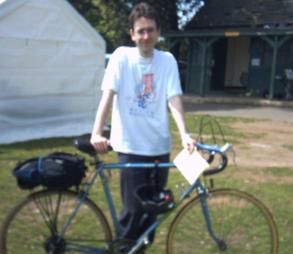
    On Sunday 20 May, I rode in the Leukemia Research Weston-super-Mare Bikeathon which "has so far raised in excess of 120,000 for the charity." I finished the course of about 23 miles in a bit over 2 hours. That was slightly slower than I expected, but I hadn't anticipated the batched mass start (20 riders set off every 30s or so) and the relatively slow speed of the large group ride to the first hill where the short course filtered off. I wasn't the fastest or the slowest by a long way. The first hill, Bleadon Hill, was new to me and it was a bit of a pain. It was rideable, unlike the hill nearest me, but it continued upwards at a challenging gradient for a long time. I'd estimate it's about 4km and mostly over 5% - I'll not be riding it again in a hurry. The view from the top was almost worth it (even if it didn't photograph well, looking almost south at 11am) but then you remember that you've just ridden up there from sea level and everything aches. Getting down from that hill was also fun. The descent was through Canada Coombe, which looks about 10% down for about 1km and it's a narrow uneven road with loose gravel washed onto the road. Then it was a fairly direct link north to Locking and Worle, a flattish loop from the crematorium to Ebdon, Bourton, Icelton and Wick St Lawrence (which felt good, like I could ride it forever - it's amazing how easy a well-tuned bicycle feels) and back to town via Sand Bay and Kewstoke. [photo] The picture is of me outside the pavillion at Clarence Park, just after finishing. The pack contained repair kit, water, food, rain gear and extra top, none of which was needed. I didn't pack sun block or insect-repellent, which would have helped (although thankfully not vital)! Thanks to everyone who sponsored me. If you still want to contribute, please put it in the comments form with an email address, and/or email me directly.

    18 May 2007

    MJ Ray: Leukemia Research Weston-super-Mare Bikeathon

    On Sunday 20 May, I will be riding in the Leukemia Research Weston-super-Mare Bikeathon which "has so far raised in excess of 120,000 for the charity." If you'll sponsor me, please put it in the comments form with an email address, and/or email me directly.

    14 May 2007

    Uwe Hermann: Playing audio on the NSLU2

    3D Sound USB Audio Device I'm a happy NSLU2 user since a few months now, and I'm using it for all kinds of things, e.g. as a 24/7 remote ssh server at home (using DynDNS and the ddclient Debian package), as IRC logger (screen + irssi), etc. etc. I was considering multiple options as to where/how to install the slug (USB thumb drive, Compact Flash, disk drive, ...) but I settled with a full Debian install on an 1 GB USB thumb drive for now. I implemented some measures to maximize the life time of the USB thumb drive, maybe I'll post some info on that later... One new thing I've been trying lately is to use the slug as an audio player. As it doesn't come with an integrated sound card, you have to use an external USB audio device. I've got mine (see photo) from eBay for ca. 5 Euro (+ shipping) and it works out of the box with Linux 2.6.18 using the snd_usb_audio kernel module. You simply attach it via USB (the module is automatically loaded) and then attach external speakers to it. Here's an lsusb of the device:
    Bus 001 Device 011: ID 1130:f211 Tenx Technology, Inc.
    
    One problem with playing audio on the slug is the slow CPU. At 266 MHz (and without FPU!) playing audio with "normal" audio players such as mplayer or mpg321 is not possible. But there are several ways to make the slug play your favorite music. Here's a list of players I tested and a status report of whether they work at all. If yes, I listed a rough percentage of CPU load resulting from playing the music.
  • Ogg vorbis:
    • mplayer, aplay, playsound, and ogg123 don't work.
    • $ apt-get install libvorbisidec-dev
      $ cd /usr/share/doc/libvorbisidec-dev/examples
      $ make
      $ cat foo.ogg   ./ivorbisfile_example   aplay -f cd
      
      Result: 40% CPU load
  • MOD, XM, S3M, IT, etc.:
    • $ mikmod foo.mod: 10% CPU load (even with compressed MOD files)
  • WAV:
  • FLAC:
  • SPEEX:
    • $ speexdec foo.spx: doesn't work, 100% CPU load. Any known alternatives?
  • AU:
    • $ cat foo.au > /dev/dsp: 3% CPU load (but sounds crappy)
    • $ cat foo.au > /dev/audio: 3% CPU load (sounds better)
    • $ mplayer foo.au: 5% CPU load
    • $ aplay foo.au: 5% CPU load
    • $ playsound foo.au: 5% CPU load
  • AIFF:
    • $ sox foo.aiff -t wav - aplay: 50% CPU load (a bit stupid, but it works)
  • Streaming MP3:
    • $ mplayer http://www.example.com/foo.mp3: doesn't work, 100% CPU load.
    • $ wget http://www.example.com/foo.mp3 -O - madplay - : 17% CPU load
  • Streaming Ogg Vorbis:
    • $ cd /usr/share/doc/libvorbisidec-dev/examples
      $ wget http://www.example.com/foo.ogg -O - ./ivorbisfile_example aplay -f cd
      : 40% CPU load
  • The SlugAsAudioPlayer page in the NSLU2-Linux wiki might have further information on this topic. Feel free to add comments if you know of other audio types which can be played on an NSLU2.

    29 April 2007

    Uwe Hermann: Parkinson's law

    Work expands so as to fill the time available for its completion.
    So very, very true.

    8 April 2007

    Uwe Hermann: Testing stuff with QEMU - Part 2: MenuetOS, a tiny OS written in 100% assembly language

    Note: This article is part of my Testing stuff with QEMU series.
    
    MenuetOS screenshot From Wikipedia:
    MenuetOS is an operating system with a monolithic preemptive, real-time kernel, including video drivers, all written in FASM assembly language, for 64-bit and 32-bit x86 architecture computers, by Ville Mikael Turjanmaa. MenuetOS development has focused on fast, simple, efficient implementation. It has a graphical desktop, games, and networking abilities (TCP/IP stack), yet still fits on one 1.44MB floppy disk. It also facilitates easy, full-featured assembly language programming. This stands in marked contrast to the (as of 2007) widespread view that assembly languages are useful mainly for old and embedded systems.
    Testing (the GPL'd) MenuetOS in QEMU is easy:

    wget http://mesh.dl.sourceforge.net/sourceforge/menuet/M32-084.ZIP
    unzip M32-084.ZIP
    qemu -fda M32-084.IMG -m 384
    There's also Menuet 64, written in 64-bit assembly, but that's not open source'd for some strange reason I don't understand. But you can try that one, too (the binary images, that is), using QEMU:

    wget 'http://www.menuetos.be/download.php?CurrentMenuetOS'
    unzip M64-059.ZIP\?3.1
    qemu-system-x86_64 -fda M64-059.IMG

    23 March 2007

    Uwe Hermann: Measuring the energy consumption of everything you own

    Voltcraft Energy Check 3000 Inspired by this post from Lars Wirzenius, I recently bought an electricity meter (or energy meter) and measured the energy consumption of everything I could find in my flat. I did not yet perform any long-term tests, i.e. measuring the average consumption over multiple days or so, only some quick ad-hoc checks. I just recorded the number of watts the respective device used when powered on. Here are the results: Kitchen stuff: Computer stuff: By removing all devices which draw more than 0 watts in stand-by mode, I was able to reduce the overall (useless) energy consumption (and costs!) quite a bit. I also replaced a bunch of 40 W and 60 W lightbulbs with energy saving lightbulbs which are equally bright, but only consume 8 W or 12 W respectively. On the long run you can save quite some amount of energy (and money) with them. They do cost a little bit more than normal lightbulbs, but save lots of electricity costs and they also last a lot longer (8000-15000 hours vs. 1000 hours according to Wikipedia).

    Next.

    Previous.