Search Results: "tats"

9 September 2016

Dirk Eddelbuettel: RProtoBuf 0.4.6: bugfix update

Relatively quickly after version 0.4.5 of RProtoBuf was released, we have a new version 0.4.6 to announce which appeared on CRAN today. RProtoBuf provides R bindings for the Google Protocol Buffers ("Protobuf") data encoding and serialization library used and released by Google, and deployed as a language and operating-system agnostic protocol by numerous projects. This version contains a contributed bug-fix pull request covering conversion of zero-length vectors, and adding native support for S4 objects. At the request / suggestion of the CRAN maintainers, it also uncomments a LaTeX macro in the vignette (corresponding to our recent JSS paper paper) which older R versions do not (yet) have in their jss.cls file.
Changes in RProtoBuf version 0.4.6 (2016-09-08)
  • Support for serializing zero-length objects was added (PR #18 addressing #13)
  • S4 objects are natively encoded (also PR #18)
  • The vignette based on the JSS paper no longer uses a macro available only with the R-devel version of jss.cls, and hence builds on all R versions
CRANberries also provides a diff to the previous release. The RProtoBuf page has an older package vignette, a 'quick' overview vignette, a unit test summary vignette, and the pre-print for the JSS paper. Questions, comments etc should go to the GitHub issue tracker off the GitHub repo.

This post by Dirk Eddelbuettel originated on his Thinking inside the box blog. Please report excessive re-aggregation in third-party for-profit settings.

3 September 2016

Iustin Pop: Nationalpark Bike Marathon 2016

Nationalpark Bike Marathon 2016 report: gravity rules! "Marathon" is a bit of a misnomer, since I did the short route, not the medium nor the long one. But hey, it's the official name! Setup This race has four possible lengths: "Valader" which is full round-trip Scuol-Scuol (137km/4'026m), "Jauer" (Fuldera-Scuol, 103km/2'934m), "Livignasco" (Livigno-Scuol, 66km/1'871m) and "Put r" (S-chanf to Scuol, 47Km/1'051m). After many debates, I settled on the Livignasco route, as that was what I was reasonably confident to be able to do. The only problem was that this route (and all the longer ones, of course) were going over Pass Chaschauna, which is a quite hard climb. My bike shop person, who did the full length a number of times, just said when hearing the route I was planning: "Chaschauna is a bitch " Bad language, proper characterisation. The route choice also impacts the logistics: except for the full route, the question is where to sleep the night before? One can sleep either at the start place, or sleep in Scuol itself and take the official shuttle to the start place, but this means waking up much earlier. I decided to sleep in Livigno, as with a 7:45 start this would allow me to sleep until ~6:30, have a quick breakfast and be in time for the race. Problem #1 So on Friday (26th) I drove to Scuol, picked up my start number, and then drove over to Livigno and checked in to the hotel. Speaking of picking up the start number, I saw this at the start area: While picking up my start number: the race is so fast that an STI is needed as pacer?? An STI needed as pacer? How fast are these people, I wondered? Day of the race My plan to have a relaxing sleep until relatively late failed. I went to sleep with difficulties: late dinner due to my late arrival in Livigno, and then I was stressed enough about not missing the race that at 05:05 I already woke up, and was checking the clock every five minutes. Finally at 05:30 I gave up and got out of bed, with only about 6 hours of sleep. Problem #2. The other problem was that I na vely thought the hotel will have breakfast from 07:00 or even 07:30. Hah, as if this was Switzerland. The hotel had breakfast from 08:00, no reason to hurry, right? So I had a poor man's breakfast in the room, some energy bars and an ice tea. Problem #3. At least I had time to grab this picture from the hotel room: Good morning Livigno! Not bad. On to the race! But before that, remember to fill my hydration pack with 3L of water, and put it in my not-so-light backpack. Of course I had tools and some spare parts with me, what if something happens? Problem #4, over-planning. The race The setup at the start was pretty easy. Wait near the start until 07:45, then go. For me, not too in front, of course: Ready for the start! Pass Chaschauna About 3 kilometres of easy/flat road, and then it starts. Pass Chaschauna, killing your legs softly Already climbing  on foot! But not everybody. But at least the pictures were nice! The climb is hard, but the view is worth it! Still climbing So high already! Good legs :) Looking back: it's been a loong way up I can see the top!  and the remaining steep meters to climb :( The climb is difficult. It was around 22% for most of the time, and very few people were able to bike up. Not only the absolute meters were the problem, but also the fact that the ground was quite loose, and pushing the bike, or rather climbing up while pushing the bike, was difficult to do in bike shoes with cleats. Proper hiking shoes would have been much more adequate. Maybe this is why despite the effort, some people biked as much as possible? I was careful not to over-exert myself and walked almost all the way up. Hence the pictures But at last, reached the top of the pass, and was very happy to be done with it. The GPX file from my Garmin says it took only 4 minutes (1.2km) after the race start to actually start climbing (it was not obvious we were climbing so early), and then 1h:20m/8Km to get from 1'817m altitude to the highest point at 2'658m. 8Km in 1h:20m, faster than walking pace but quite slower than running pace (on flat terrain, of course). At the top of the pass I was quite happy: Finally at the top! Clipping in and Go! Smilling and happy! And then the descent started: I wonder how steep it will be going down This was an easy section :/ All the way leading to the race I kept thinking only about climbing Chaschauna, and not about going down on it. It was quite an experience, which I won't forget soon. The trail was already well travelled, which means that besides the loose ground in form of large clumps of dried earth, there was a layer of fine, somewhat moist earth, about 3-5 centimetres deep, which made the downhill "interesting". Coupled with what was a much steeper trail than going up I saw most of the time ~33% it's no surprise that many, or even most, of the people were walking their bikes down. The GPX track says that the trail goes 319m down in 1Km (so a 31.9% over one entire kilometre), then another 130m over the next 1.4Km (9.28%), and then (not sure if this is the pass per se or after) another longer segment of ~260m over 3Km (8.56%). The first steep segment needs lots of skill and concentration, the others are normal gradients. But at least things go fast. What took uphill took ~40 minutes for the last 450m up, downhill it took only 15 minutes! Falling I was able, thanks to recent training, to bike down the trail, or at least I thought so. So on the steep segment I was struggling to bike down and keep control of my bike, putting one leg down on some sections but in general being "on the bike", being hit by the dirt I was throwing in the air despite the mud-guards, being careful but at the same time enjoying this difficult section. That is, right up to the point where I got, I think, too comfortable. After the second-to-last curve, the rear wheel slides, I lose balance and fall in the (thankfully soft) dirt a bit more forcefully than I should have, the bike also sliding along in the dirt. No damage to myself, just some trivial scratches; the bike seems a bit shaken (fork was turned 180 , full of dirt, etc.). I get again on the bike and I continue down; however, something seems off: the rear brake level doesn't have a return anymore, I have to push it to go back. Still usable, but strange. So I continue the other two segment of this descent, and over these ~4-5Km I feel the brake issue going worse and worse: it's actually hard to push the brake lever back, and even pressing it doesn't seem to have much effect. And then the realisation dawns on my: I have hydraulic brakes, and the worsening thing leads me to think my brake hose has been punctured (by what? I fell in loose dirt) and I'm losing the brake fluid with every press. Now, on flat road, biking with only the front brake is tricky but doable. On an MTB course, having only one brake is not a smart thing . Not easy, not smart, and definitely dangerous. It also felt very strange to not have both brakes, and then I realised how much I work with the brakes in unison. I knew that there are repair posts in the race, but I didn't know if they can fix such things (and doing a brake fluid refill how complicated is it, how much time does it take?). Anyway, I resolved to try and continue if the terrain allows until I reach the first repair post, and stop if it gets too steep. It would be pretty sad to have to abort the race after only 10Km, right? The terrain did cooperate: up and down, so I was able to bleed speed easily, and even though through forest, the visibility was good enough that I could plan ahead. It was strangely lonely at this time: I was going slowly and thus not reaching from behind anyone, but also not being reached by riders from behind. I did enjoy it a bit, the quietness of the forest, just interrupted by the squeaking of my front brake And then I finally see the sign for "Repair: 1Km". Yaaay! maybe I don't have to quit the race. And then, about 100m further on, another sign: "Danger! Steep descent". Uh-oh tantalisingly close Let's go slow. And yes, here I was overtaken by 3-4 other cyclists. This was the single moment in the race where I did have a moment of real fear: at one point, I was going down with the remaining brake as pressed as I could without compromising stability, and I was still gaining speed. Not smart, and as I was debating how to fall to stop my descent, the terrain started to get less steep, and I finally reached the repair station, at kilometre 21. Difficult repairs There was another person being serviced for a flat rear tire, so I wait in line and discuss with him my problem. Upon hearing I only had the front brake, he said: "Wow, how did you manage to descend this last segment?" "Well, slowly ". My turn came up, I explain my problem and my theory, and the repair guy gives me one look, the bike one look, but doesn't look at the brake hose. Instead, he looks once at the brake lever, sees that another cable guide on my handle bar was bent during the fall and actually was mechanically interfering with the brake lever, unbends that thing, and says "here you go". I was stunned. 15 seconds of looking at the problem without stress, and the problem was solved. I could have done this myself if I took the time to look and think, and not hurry. And I could have enjoyed all the downhill on the pass, with two functioning brakes. Some lessons have to be learned the hard way, and this was one. I got off easy though, as I didn't have a real accident while biking with only one brake. And they say you get wiser as you get older Anyway, brake repaired, I stopped at the Sanit r tent to have my scratches disinfected, and onwards. The following few kilometres until S-chanf I enjoyed very much. S-chanf And then, 2 hours 10 minutes into the race, I exit the forest trail, reach S-chanf, and start climbing and descending and climbing and descending. In the sun, which now (after 10 AM) is not that light anymore. The initial climb at S-chanf, while not much, took away my remaining short-term reserves. The route is 50m ascent, then down and then another 50m ascent, and after a bit of flat another 75m ascent I was getting tired, despite eating energy bars and drinking water (and juice at stops). This goes one for an entire hour, during which I cover about 23Km, so not a bad speed everything considered. But getting more and more tired. There were also some very nice segments, along the river, in the shade of the forest. Some fast downhill, some fast flat. I got overtaken by quite a few real racers, that were going so fast I couldn't keep up with them as in I didn't dare ride that fast even when I had the energy. Clearly they were from the longer segments, and boy were they fast! A number of couples (or pairs?) one woman one man, a number of bigger groups, all going as if they had E-bikes or super-powers, not just biking along tired like me Last climb And then, the last big climb: half an hour of going about 300m up (absolute values, so cumulative number would probably be higher), in the sun, over about 6Km, so only 5% average gradient. But I was tired and even resorted to walking on some portions At least I could take some pictures again: Much later, climbing again. Or have pictures taken: A bit of a smile left. Yes, that's a smile, not a grimace! Nice views: Look, nice castle! Stopping for a picture, and not because I was *dead tired* :) At one point, in a bit of a shade, I stop to catch my breath. Somebody else stopped as well and, seeing as I was checking my GPS, asks: I got overtaken by a lot of cyclists here, although many of them were from S-chanf route (based on the number colour). Sad The thing is, besides the climbing and the sun, this and the previous part was a very nice route: through small towns, high above the valley, beautiful landscapes, etc. Just enjoying it was hard, since I wasn't a) trained well enough and b) prepared well enough. Last segment, last downhill In any case, after that hard half hour, it's flat (or rather said, average gradient zero): Flat route, good pavement. Can catch my breath, and take a another picture. Good road, good views, but I'm on the last virtual bar of my battery, so the remaining 15Km I do in 40 minutes, also "eating" the last ascent meters still about 300 left, I think, but up/down/up/down, so you could reuse kinetic energy to gain potential one. The only question I had now was, the route was at this moment about 400m higher (in absolute altitude) than the finish point, so when do we lose that altitude? The answer was a very very nice answer: in the last 5Km, for an average gradient of 8%, just perfect. I was tired however, so I couldn't really enjoy or go fast here, but it was a good feeling. Finish! And then, entering Scuol, not really believing I'm near the finish, that I will be able to actually stop and relax. My finish picture doesn't do justice to how happy I was at that moment: At the finish, happy happy happy! However, after passing the finish line, it was a bit weird. I just stop now? What next? So weird to just walk, not push pedals, and not go up. Or down. The funny thing here was that I thought I didn't use much of my water (hydration pack) during the race. But soon after finishing, I drank the equivalent of about two glasses (let's say 0.5L) and it was over. So I did manage to drink 2.5L during the race, plus the sport drinks at the stops. Time for stats: my Garmin says 67.07Km, 4h:29m, average speed 15.0kph (hah), 1'615m elevation gain. Official numbers say 66Km, 1'871m elevation, and thus 14.22kph. Ranking-wise: Sigh, could have done better. I was aiming for somewhere around last 33%, not last 25% :-P First classed was ~66% faster than me Going to the train station was hard as in difficult to move my legs. Took one nice picture of Scuol though, so was able to think a bit: After the race: Scuol is not so bad And then the long way back to Livigno. Took me 4 h to bike to Scuol, and about 3 hours to go back via public transport. At least I ate a sandwich in the meantime. Then reached Livigno, which was also looking nice: Took me almost as long by public transport as by bike, but finally back in Livigno. Also nice! Then got on my bike, which at this point was magically light and easy to ride (it seems I was at least partially recovered), rode to the hotel, packed my stuff, and drove home. On the highway I had my first real meal for that day, but I was quite tired so didn't feel like the achievement it should have been Lessons The biggest takeaway from this race was the huge learning experience I got. The race was itself awesome, but the learning even more so. First, for this particular race, it's much better to sleep in Scuol and (if not doing the whole route) take the shuttle to the actual start. Yes, one has to wake up earlier, but you have assured breakfast via the organisers (++++!), and after the race you don't have to get even more tired by taking the train and the bus and Second, I need better logistics: I don't need to carry that heavy load (spare tube, pump, tools, jacket in case it's cold) when the race is well organised. The water in the hydration pack was useful, but carrying it up Chaschauna was a pain. Not sure what I'll do next; it's possible to survive only on water/drinks from the food posts (basically 2.5-2.8L is equivalent to only 4 750ml bottles, and there were I think about 6 stops?), but the hydration pack is so easy to use Keeping one's head cool and not stress about things also would help: had I looked at my brake lever in peace, I could have solved it myself, and not ride ~10Km with only one brake. Also, losing some weight (as in losing fat, not having a lighter bike) would definitely help. I could stand to lose 5Kg easily, probably 10Kg, and that would bring me more in line with other people in the race (at least looking at the pictures). And hey, my Watts/Kg would improve magically! And last but most important, I need better training. Training on how to use my energy, training longer rides so that my body gets used to it and doesn't bonk after 3 hours, training training training. Which I like, but the problem is time to do it Also, in case anybody wonders: yes, I do recommend this race! It was definitely fun, and the route itself is very nice, nicer than the pictures here show. Closing words: gravity rules. Up or down, it's hard and punishing. Still: Ride on!

24 August 2016

Don Armstrong: H3ABioNet Hackathon (Workflows)

I'm in Pretoria, South Africa at the H3ABioNet hackathon which is developing workflows for Illumina chip genotyping, imputation, 16S rRNA sequencing, and population structure/association testing. Currently, I'm working with the imputation stream and we're using Nextflow to deploy an IMPUTE-based imputation workflow with Docker and NCSA's openstack-based cloud (Nebula) underneath. The OpenStack command line clients (nova and cinder) seem to be pretty usable to automate bringing up a fleet of VMs and the cloud-init package which is present in the images makes configuring the images pretty simple. Now if I just knew of a better shared object store which was supported by Nextflow in OpenStack besides mounting an NFS share, things would be better. You can follow our progress in our git repo: [https://github.com/h3abionet/chipimputation]

22 August 2016

Vincent Sanders: Down the rabbit hole

My descent began with a user reporting a bug and I fear I am still on my way down.

Like Alice I headed down the hole. https://commons.wikimedia.org/wiki/File:Rabbit_burrow_entrance.jpg
The bug was simple enough, a windows bitmap file caused NetSurf to crash. Pretty quickly this was tracked down to the libnsbmp library attempting to decode the file. As to why we have a heavily used library for bitmaps? I am afraid they are part of every icon file and many websites still have favicons using that format.

Some time with a hex editor and the file format specification soon showed that the image in question was malformed and had a bad offset header entry. So I was faced with two issues, firstly that the decoder crashed when presented with badly encoded data and secondly that it failed to deal with incorrect header data.

This is typical of bug reports from real users, the obvious issues have already been encountered by the developers and unit tests formed to prevent them, what remains is harder to produce. After a debugging session with Valgrind and electric fence I discovered the crash was actually caused by running off the front of an allocated block due to an incorrect bounds check. Fixing the bounds check was simple enough as was working round the bad header value and after adding a unit test for the issue I almost moved on.

Almost...

american fuzzy lop are almost as cute as cats https://commons.wikimedia.org/wiki/File:Rabbit_american_fuzzy_lop_buck_white.jpg
We already used the bitmap test suite of images to check the library decode which was giving us a good 75% or so line coverage (I long ago added coverage testing to our CI system) but I wondered if there was a test set that might increase the coverage and perhaps exercise some more of the bounds checking code. A bit of searching turned up the american fuzzy lop (AFL) projects synthetic corpora of bmp and ico images.

After checking with the AFL authors that the images were usable in our project I added them to our test corpus and discovered a whole heap of trouble. After fixing more bounds checks and signed issues I finally had a library I was pretty sure was solid with over 85% test coverage.

Then I had the idea of actually running AFL on the library. I had been avoiding this because my previous experimentation with other fuzzing utilities had been utter frustration and very poor return on investment of time. Following the quick start guide looked straightforward enough so I thought I would spend a short amount of time and maybe I would learn a useful tool.

I downloaded the AFL source and built it with a simple make which was an encouraging start. The library was compiled in debug mode with AFL instrumentation simply by changing the compiler and linker environment variables.

$ LD=afl-gcc CC=afl-gcc AFL_HARDEN=1 make VARIANT=debug test
afl-cc 2.32b by <lcamtuf@google.com>
COMPILE: src/libnsbmp.c
afl-cc 2.32b by <lcamtuf@google.com>
afl-as 2.32b by <lcamtuf@google.com>
[+] Instrumented 751 locations (64-bit, hardened mode, ratio 100%).
AR: build-x86_64-linux-gnu-x86_64-linux-gnu-debug-lib-static/libnsbmp.a
COMPILE: test/decode_bmp.c
afl-cc 2.32b by <lcamtuf@google.com>
afl-as 2.32b by <lcamtuf@google.com>
[+] Instrumented 52 locations (64-bit, hardened mode, ratio 100%).
LINK: build-x86_64-linux-gnu-x86_64-linux-gnu-debug-lib-static/test_decode_bmp
afl-cc 2.32b by <lcamtuf@google.com>
COMPILE: test/decode_ico.c
afl-cc 2.32b by <lcamtuf@google.com>
afl-as 2.32b by <lcamtuf@google.com>
[+] Instrumented 65 locations (64-bit, hardened mode, ratio 100%).
LINK: build-x86_64-linux-gnu-x86_64-linux-gnu-debug-lib-static/test_decode_ico
afl-cc 2.32b by <lcamtuf@google.com>
Test bitmap decode
Tests:606 Pass:606 Error:0
Test icon decode
Tests:392 Pass:392 Error:0
TEST: Testing complete

I stuffed the AFL build directory on the end of my PATH, created a directory for the output and ran afl-fuzz

afl-fuzz -i test/bmp -o findings_dir -- ./build-x86_64-linux-gnu-x86_64-linux-gnu-debug-lib-static/test_decode_bmp @@ /dev/null

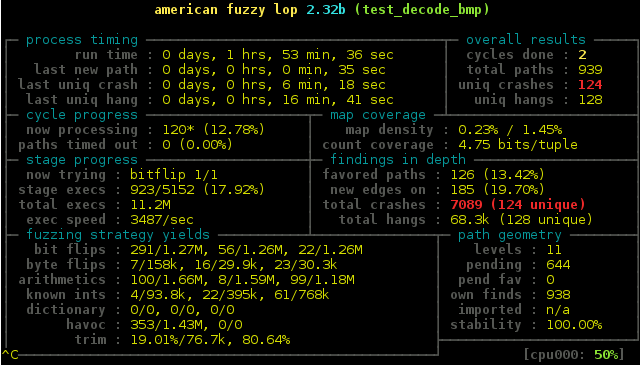
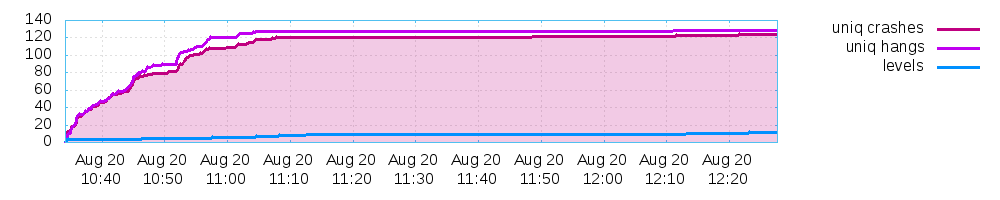
The result was immediate and not a little worrying, within seconds there were crashes and lots of them! Over the next couple of hours I watched as the unique crash total climbed into the triple digits.

I was forced to abort the run at this point as, despite clear warnings in the AFL documentation of the demands of the tool, my laptop was clearly not cut out to do this kind of work and had become distressingly hot.

AFL has a visualisation tool so you can see what kind of progress it is making which produced a graph that showed just how fast it managed to produce crashes and how much the return plateaus after just a few cycles. Although it was finding a new unique crash every ten minutes or so when aborted.

I dove in to analyse the crashes and it immediately became obvious the main issue was caused when the test tool attempted allocations of absurdly large bitmaps. The browser itself uses a heuristic to determine the maximum image size based on used memory and several other values. I simply applied an upper bound of 48 megabytes per decoded image which fits easily within the fuzzers default heap limit of 50 megabytes.

The main source of "hangs" also came from large allocations so once the test was fixed afl-fuzz was re-run with a timeout parameter set to 100ms. This time after several minutes no crashes and only a single hang were found which came as a great relief, at which point my laptop had a hard shutdown due to thermal event!

Once the laptop cooled down I spooled up a more appropriate system to perform this kind of work a 24way 2.1GHz Xeon system. A Debian Jessie guest vm with 20 processors and 20 gigabytes of memory was created and the build replicated and instrumented.

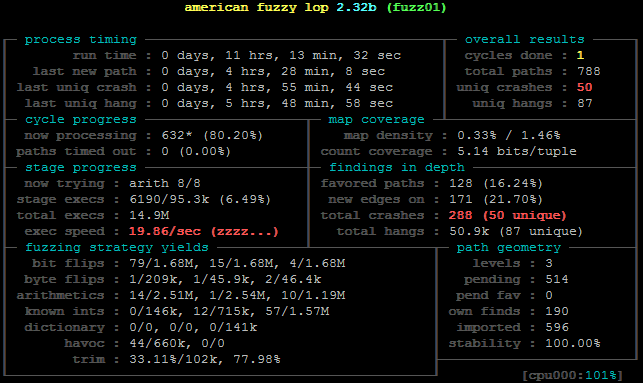
AFL master node display
To fully utilise this system the next test run would utilise AFL in parallel mode. In this mode there is a single "master" running all the deterministic checks and many "secondary" instances performing random tweaks.

If I have one tiny annoyance with AFL, it is that breeding and feeding a herd of rabbits by hand is annoying and something I would like to see a convenience utility for.

The warren was left overnight with 19 instances and by morning had generated crashes again. This time though the crashes actually appeared to be real failures.

$ afl-whatsup sync_dir/
Summary stats
=============

Fuzzers alive : 19
Total run time : 5 days, 12 hours
Total execs : 214 million
Cumulative speed : 8317 execs/sec
Pending paths : 0 faves, 542 total
Pending per fuzzer : 0 faves, 28 total (on average)
Crashes found : 554 locally unique

All the crashing test cases are available and a simple file command immediately showed that all the crashing test files had one thing in common the height of the image was -2147483648 This seemingly odd number is actually meaningful to a programmer, it is the largest negative number which can be stored in a 32bit integer (INT32_MIN) I immediately examined the source code that processes the height in the image header.

if ((width <= 0)   (height == 0))          
return BMP_DATA_ERROR;
if (height < 0)
bmp->reversed = true;
height = -height;

The bug is where the height is made a positive number and results in height being set to 0 after the existing check for zero and results in a crash later in execution. A simple fix was applied and test case added removing the crash and any possible future failure due to this.

Another AFL run has been started and after a few hours has yet to find a crash or non false positive hang so it looks like if there are any more crashes to find they are much harder to uncover.

Main lessons learned are:
I will of course be debugging any new crashes that occur and perhaps turning my sights to all the projects other unit tested libraries. I will also be investigating the generation of our own custom test corpus from AFL to replace the demo set, this will hopefully increase our unit test coverage even further.

Overall this has been my first successful use of a fuzzing tool and a very positive experience. I would wholeheartedly recommend using AFL to find errors and perhaps even integrate as part of a CI system.

18 August 2016

Zlatan Todori : DebConf16 - new age in Debian community gathering

DebConf16 Finally got some time to write this blog post. DebConf for me is always something special, a family gathering of weird combination of geeks (or is weird a default geek state?). To be honest, I finally can compare Debian as hacker conference to other so-called hacker conferences. With that hat on, I can say that Debian is by far the most organized and highest quality conference. Maybe I am biased, but I don't care too much about that. I simply love Debian and that is no secret. So lets dive into my view on DebConf16 which was held in Cape Town, South Africa. Cape Town This was the first time we had conference on African continent (and I now see for the first time DebConf bid for Asia, which leaves only Australia and beautiful Pacific islands to start a bid). Cape Town by itself, is pretty much Europe-like city. That was kinda a bum for me on first day, especially as we were hosted at University of Cape Town (which is quite beautiful uni) and the surrounding neighborhood was very European. Almost right after the first day I was fine because I started exploring the huge city. Cape Town is really huge, it has by stats ~4mil people, and unofficially it has ~6mil. Certainly a lot to explore and I hope one day to be back there (I actually hope as soon as possible). The good, bad and ugly I will start with bad and ugly as I want to finish with good notes. Racism down there is still HUGE. You don't have signs on the road saying that, but there is clearly separation between white and black people. The houses near uni all had fences on walls (most of them even electrical ones with sharp blades on it) with bars on windows. That just bring tensions and certainly doesn't improve anything. To be honest, if someone wants to break in they still can do easily so the fences maybe need to bring intimidation but they actually only bring tension (my personal view). Also many houses have sign of Armed Force Response (something in those lines) where in case someone would start breaking in, armed forces would come to protect the home. Also compared to workforce, white appear to hold most of profit/big business positions and fields, while black are street workers, bar workers etc etc. On the street you can feel from time to time the tension between people. Going out to bars also showed the separation - they were either almost exclusively white or exclusively black. Very sad state to see. Sharing love and mixing is something that pushes us forward and here I saw clear blockades for such things. The bad part of Cape Town is, and this is not only special to Cape Town but to almost all major cities, is that small crime is on wide scale. Pickpocketing here is something you must pay attention to it. To me, personally, nothing happened but I heard a lot of stories from my friends on whom were such activities attempted (although I am not sure did the criminals succeed). Enough of bad as my blog post will not change this and it is a topic for debate and active involvement which I can't unfortunately do at this moment. THE GOOD! There are so many great local people I met! As I mentioned, I want to visit that city again and again and again. If you don't fear of those bad things, this city has great local cuisine, a lot of great people, awesome art soul and they dance with heart (I guess when you live in rough times, you try to use free time at your best). There were difference between white and black bars/clubs - white were almost like standard European, a lot of drinking and not much dancing, and black were a lot of dancing and not much drinking (maybe the economical power has something to do with it but I certainly felt more love in black bars). Cape Town has awesome mountain, the Table Mountain. I went on hiking with my friends, and I must say (again to myself) - do the damn hiking as much as possible. After every hike I feel so inspired, that I will start thinking that I hate myself for not doing it more often! The view from Table mountain is just majestic (you can even see the Cape of Good Hope). The WOW moments are just firing up in you. Now lets transfer to DebConf itself. As always, organization was on quite high level. I loved the badge design, it had a map and nice amount of information on it. The place we stayed was kinda not that good but if you take it into account that those a old student dorms (in we all were in female student dorm :D ) it is pretty fancy by its own account. Talks were near which is always good. The general layout of talks and front desk position was perfect in my opinion. All in one place basically. Wine and Cheese this year was kinda funny story because of the cheese restrictions but Cheese cabal managed to pull out things. It was actually very well organized. Met some new people during the party/ceremony which always makes me grow as a person. Cultural mix on DebConf is just fantastic. Not only you learn a lot about Debian, hacking on it, but sheer cultural diversity makes this small con such a vibrant place and home to a lot. Debian Dinner happened in Aquarium were I had nice dinner and chat with my old friends. Aquarium by itself is a thing where you can visit and see a lot of strange creatures that live on this third rock from Sun. Speaking of old friends - I love that I Apollo again rejoined us (by missing the DebConf15), seeing Joel again (and he finally visited Banja Luka as aftermath!), mbiebl, ah, moray, Milan, santiago and tons of others. Of course we always miss a few such as zack and vorlon this year (but they had pretty okay-ish reasons I would say). Speaking of new friends, I made few local friends which makes me happy and at least one Indian/Hindu friend. Why did I mention this separately - well we had an accident during Group Photo (btw, where is our Lithuanian, German based nowdays, photographer?!) where 3 laptops of our GSoC students were stolen :( . I was luckily enough to, on behalf of Purism, donate Librem11 prototype to one of them, which ended up being the Indian friend. She is working on real time communications which is of interest also to Purism for our future projects. Regarding Debian Day Trip, Joel and me opted out and we went on our own adventure through Cape Town in pursue of meeting and talking to local people, finding out interesting things which proved to be a great decision. We found about their first Thursday of month festival and we found about Mama Africa restaurant. That restaurant is going into special memories (me playing drums with local band must always be a special memory, right?!). Huh, to be honest writing about DebConf would probably need a book by itself and I always try to keep my posts as short as possible so I will try to stop here (maybe I write few bits in future more about it but hardly). Now the notes. Although I saw the racial segregation, I also saw the hope. These things need time. I come from country that is torn apart in nationalism and religious hate so I understand this issues is hard and deep on so many levels. While the tensions are high, I see people try to talk about it, try to find solution and I feel it is slowly transforming into open society, where we will realize that there is only one race on this planet and it is called - HUMAN RACE. We are all earthlings, and as sooner we realize that, sooner we will be on path to really build society up and not fake things that actually are enslaving our minds. I just want in the end to say thank you DebConf, thank you Debian and everyone could learn from this community as a model (which can be improved!) for future societies.

14 August 2016

Reproducible builds folks: Reproducible Builds: week 68 in Stretch cycle

What happened in the Reproducible Builds effort between Sunday August 7 and Saturday August 13 2016: GSoC and Outreachy updates Reproducible work in other projects Thomas Schmitt scdbackup@gmx.net implemented a new -as mkisofs option:
--set_all_file_dates timestring
Set mtime, atime, and ctime of all files and directories to  the
given time.
Valid  timestring  formats  are:  'Nov  8  14:51:13  CET  2007',
110814512007.13, 2007110814511300. See also --modification-date=
and man xorriso, Examples of input timestrings.
This  action  stays  delayed until mkisofs emulation ends. Up to
then it  can  be  revoked  by  --set_all_file_dates  with  empty
timestring.   In  any  case  files  which get into the ISO after
mkisofs emulation ended will not  be  affected,  unless  another
mkisofs emulation applies --set_all_file_date again.
LEDE developer Jonas Gorski submitted a patch to fix build times in their kernel:
kernel: allow reproducable builds
Similar how we fix the file times in the filesystems, fix the build time
of the kernel, and make the build number static. This should allow the
kernel build to be reproducable when combined with setting the
KERNEL\_BUILD\_USER and \_DOMAIN in case of different machines.
The reproducability only applies to non-initramfs kernels, those still
require additional changes.
Signed-off-by: Jonas Gorski <jonas.gorski@gmail.com>
Packages reviewed and fixed, and bugs filed Patches have been submitted by: Package reviews 28 reviews have been added, 4 have been updated and 7 have been removed in this week, adding to our knowledge about identified issues. Issue types have been added/updated: Weekly QA work FTBFS bugs have been reported by: diffoscope development strip-nondeterminism development tests.reproducible-builds.org Misc. Chris started to ping old bugs with patches and no maintainer reaction so far. This week's edition was written by Chris Lamb and Holger Levsen and reviewed by a bunch of Reproducible Builds folks on IRC.

20 July 2016

Daniel Stender: Theano in Debian: maintenance, BLAS and CUDA

I'm glad to announce that we have the current release of Theano (0.8.2) in Debian unstable now, it's on its way into the testing branch and the Debian derivatives, heading for Debian 9. The Debian package is maintained in behalf of the Debian Science Team. We have a binary package with the modules in the Python 2.7 import path (python-theano), if you want or need to stick to that branch a little longer (as a matter of fact, in the current popcon stats it's the most installed package), and a package running on the default Python 3 version (python3-theano). The comprehensive documentation is available for offline usage in another binary package (theano-doc). Although Theano builds its extensions on run time and therefore all binary packages contain the same code, the source package generates arch specific packages1 for the reason that the exhaustive test suite could run over all the architectures to detect if there are problems somewhere (#824116). what's this? In a nutshell, Theano is a computer algebra system (CAS) and expression compiler, which is implemented in Python as a library. It is named after a Classical Greek female mathematician and it's developed at the LISA lab (located at MILA, the Montreal Institute for Learning Algorithms) at the Universit de Montr al. Theano tightly integrates multi-dimensional arrays (N-dimensional, ND-array) from NumPy (numpy.ndarray), which are broadly used in Scientific Python for the representation of numeric data. It features a declarative Python based language with symbolic operations for the functional definition of mathematical expressions, which allows to create functions that compute values for them. Internally the expressions are represented as directed graphs with nodes for variables and operations. The internal compiler then optimizes those graphs for stability and speed and then generates high-performance native machine code to evaluate resp. compute these mathematical expressions2. One of the main features of Theano is that it's capable to compute also on GPU processors (graphical processor unit), like on custom graphic cards (e.g. the developers are using a GeForce GTX Titan X for benchmarks). Today's GPUs became very powerful parallel floating point devices which can be employed also for scientific computations instead of 3D video games3. The acronym "GPGPU" (general purpose graphical processor unit) refers to special cards like NVIDIA's Tesla4, which could be used alike (more on that below). Thus, Theano is a high-performance number cruncher with an own computing engine which could be used for large-scale scientific computations. If you haven't came across Theano as a Pythonistic professional mathematician, it's also one of the most prevalent frameworks for implementing deep learning applications (training multi-layered, "deep" artificial neural networks, DNN) around5, and has been developed with a focus on machine learning from the ground up. There are several higher level user interfaces build in the top of Theano (for DNN, Keras, Lasagne, Blocks, and others, or for Python probalistic programming, PyMC3). I'll seek for some of them also becoming available in Debian, too. helper scripts Both binary packages ship three convenience scripts, theano-cache, theano-test, and theano-nose. Instead of them being copied into /usr/bin, which would result into a binaries-have-conflict violation, the scripts are to be found in /usr/share/python-theano (python3-theano respectively), so that both module packages of Theano can be installed at the same time. The scripts could be run directly from these folders, e.g. do $ python /usr/share/python-theano/theano-nose to achieve that. If you're going to heavy use them, you could add the directory of the flavour you prefer (Python 2 or Python 3) to the $PATH environment variable manually by either typing e.g. $ export PATH=/usr/share/python-theano:$PATH on the prompt, or save that line into ~/.bashrc. Manpages aren't available for these little helper scripts6, but you could always get info on what they do and which arguments they accept by invoking them with the -h (for theano-nose) resp. help flag (for theano-cache). running the tests On some occasions you might want to run the testsuite of the installed library, like to check over if everything runs fine on your GPU hardware. There are two different ways to run the tests (anyway you need to have python ,3 -nose installed). One is, you could launch the test suite by doing $ python -c 'import theano; theano.test() (or the same with python3 to test the other flavour), that's the same what the helper script theano-test does. However, by doing it that way some particular tests might fail by raising errors also for the group of known failures. Known failures are excluded from being errors if you run the tests by theano-nose, which is a wrapper around nosetests, so this might be always the better choice. You can run this convenience script with the option --theano on the installed library, or from the source package root, which you could pull by $ sudo apt-get source theano (there you have also the option to use bin/theano-nose). The script accept options for nosetests, so you might run it with -v to increase verbosity. For the tests the configuration switch config.device must be set to cpu. This will also include the GPU tests when a proper accessible device is detected, so that's a little misleading in the sense of it doesn't mean "run everything on the CPU". You're on the safe side if you run it always like this: $ THEANO_FLAGS=device=cpu theano-nose, if you've set config.device to gpu in your ~/.theanorc. Depending on the available hardware and the used BLAS implementation (see below) it could take quite a long time to run the whole test suite through, on the Core-i5 in my laptop that takes around an hour even excluded the GPU related tests (which perform pretty fast, though). Theano features a couple of switches to manipulate the default configuration for optimization and compilation. There is a rivalry between optimization and compilation costs against performance of the test suite, and it turned out the test suite performs a quicker with lesser graph optimization. There are two different switches available to control config.optimizer, the fast_run toggles maximal optimization, while fast_compile runs only a minimal set of graph optimization features. These settings are used by the general mode switches for config.mode, which is either FAST_RUN by default, or FAST_COMPILE. The default mode FAST_RUN (optimizer=fast_run, linker=cvm) needs around 72 minutes on my lower mid-level machine (on un-optimized BLAS). To set mode=FAST_COMPILE (optimizer=fast_compile, linker=py) brings some boost for the performance of the test suite because it runs the whole suite in 46 minutes. The downside of that is that C code compilation is disabled in this mode by using the linker py, and also the GPU related tests are not included. I've played around with using the optimizer fast_compile with some of the other linkers (c py and cvm, and their versions without garbage collection) as alternative to FAST_COMPILE with minimal optimization but also machine code compilation incl. GPU testing. But to my experience, fast_compile without another than the linker py results in some new errors and failures of some tests on amd64, and this might the case also on other architectures, too. By the way, another useful feature is DebugMode for config.mode, which verifies the correctness of all optimizations and compares the C to Python results. If you want to have detailed info on the configuration settings of Theano, do $ python -c 'import theano; print theano.config' less, and check out the chapter config in the library documentation in the documentation. cache maintenance Theano isn't a JIT (just-in-time) compiler like Numba, which generates native machine code in the memory and executes it immediately, but it saves the generated native machine code into compiledirs. The reason for doing it that way is quite practical like the docs explain, the persistent cache on disk makes it possible to avoid generating code for the same operation, and to avoid compiling again when different operations generate the same code. The compiledirs by default are located within $(HOME)/.theano/. After some time the folder becomes quite large, and might look something like this:
$ ls ~/.theano
compiledir_Linux-4.5--amd64-x86_64-with-debian-stretch-sid--2.7.11+-64
compiledir_Linux-4.5--amd64-x86_64-with-debian-stretch-sid--2.7.12-64
compiledir_Linux-4.5--amd64-x86_64-with-debian-stretch-sid--2.7.12rc1-64
compiledir_Linux-4.5--amd64-x86_64-with-debian-stretch-sid--3.5.1+-64
compiledir_Linux-4.5--amd64-x86_64-with-debian-stretch-sid--3.5.2-64
compiledir_Linux-4.5--amd64-x86_64-with-debian-stretch-sid--3.5.2rc1-64
If the used Python version changed like in this example you might to want to purge obsolete cache. For working with the cache resp. the compiledirs, the helper theano-cache comes in handy. If you invoke it without any arguments the current cache location is put out like ~/.theano/compiledir_Linux-4.5--amd64-x86_64-with-debian-stretch-sid--2.7.12-64 (the script is run from /usr/share/python-theano). So, the compiledirs for the old Python versions in this example (11+ and 12rc1) can be removed to free the space they occupy. All compiledirs resp. cache directories meaning the whole cache could be erased by $ theano-cache basecompiledir purge, the effect is the same as by performing $ rm -rf ~/.theano. You might want to do that e.g. if you're using different hardware, like when you got yourself another graphics card. Or habitual from time to time when the compiledirs fill up so much that it slows down processing with the harddisk being very busy all the time, if you don't have an SSD drive available. For example, the disk space of build chroots carrying (mainly) the tests completely compiled through on default Python 2 and Python 3 consumes around 1.3 GB (see here). BLAS implementations Theano needs a level 3 implementation of BLAS (Basic Linear Algebra Subprograms) for operations between vectors (one-dimensional mathematical objects) and matrices (two-dimensional objects) carried out on the CPU. NumPy is already build on BLAS and pulls the standard implementation (libblas3, soure package: lapack), but Theano links directly to it instead of using NumPy as intermediate layer to reduce the computational overhead. For this, Theano needs development headers and the binary packages pull libblas-dev by default, if any other development package of another BLAS implementation (like OpenBLAS or ATLAS) isn't already installed, or pulled with them (providing the virtual package libblas.so). The linker flags could be manipulated directly through the configuration switch config.blas.ldflags, which is by default set to -L/usr/lib -lblas -lblas. By the way, if you set it to an empty value, Theano falls back to using BLAS through NumPy, if you want to have that for some reason. On Debian, there is a very convenient way to switch between BLAS implementations by the alternatives mechanism. If you have several alternative implementations installed at the same time, you can switch from one to another easily by just doing:
$ sudo update-alternatives --config libblas.so
There are 3 choices for the alternative libblas.so (providing /usr/lib/libblas.so).
  Selection    Path                                  Priority   Status
------------------------------------------------------------
* 0            /usr/lib/openblas-base/libblas.so      40        auto mode
  1            /usr/lib/atlas-base/atlas/libblas.so   35        manual mode
  2            /usr/lib/libblas/libblas.so            10        manual mode
  3            /usr/lib/openblas-base/libblas.so      40        manual mode
Press <enter> to keep the current choice[*], or type selection number:
The implementations are performing differently on different hardware, so you might want to take the time to compare which one does it best on your processor (the other packages are libatlas-base-dev and libopenblas-dev), and choose that to optimize your system. If you want to squeeze out all which is in there for carrying out Theano's computations on the CPU, another option is to compile an optimized version of a BLAS library especially for your processor. I'm going to write another blog posting on this issue. The binary packages of Theano ship the script check_blas.py to check over how well a BLAS implementation performs with it, and if everything works right. That script is located in the misc subfolder of the library, you could locate it by doing $ dpkg -L python-theano grep check_blas (or for the package python3-theano accordingly), and run it with the Python interpreter. By default the scripts puts out a lot of info like a huge perfomance comparison reference table, the current setting of blas.ldflags, the compiledir, the setting of floatX, OS information, the GCC version, the current NumPy config towards BLAS, NumPy location and version, if Theano linked directly or has used the NumPy binding, and finally and most important, the execution time. If just the execution time for quick perfomance comparisons is needed this script could be invoked with -q. Theano on CUDA The function compiler of Theano works with alternative backends to carry out the computations, like the ones for graphics cards. Currently, there are two different backends for GPU processing available, one docks onto NVIDIA's CUDA (Compute Unified Device Architecture) technology7, and another one for libgpuarray, which is also developed by the Theano developers in parallel. The libgpuarray library is an interesting alternative for Theano, it's a GPU tensor (multi-dimensional mathematical object) array written in C with Python bindings based on Cython, which has the advantage of running also on OpenCL8. OpenCL, unlike CUDA9, is full free software, vendor neutral and overcomes the limitation of the CUDA toolkit being only available for amd64 and the ppc64el port (see here). I've opened an ITP on libgpuarray and we'll see if and how this works out. Another reason for it would be great to have it available is that it looks like CUDA currently runs into problems with GCC 610. More on that, soon. Here's a litle checklist for setting up your CUDA device so that you don't have to experience something like this:
$ THEANO_FLAGS=device=gpu,floatX=float32 python ./cat_dog_classifier.py 
WARNING (theano.sandbox.cuda): CUDA is installed, but device gpu is not available (error: Unable to get the number of gpus available: no CUDA-capable device is detected)
hardware check For running Theano on CUDA you need an NVIDIA graphics card which is capable of doing that. You can recheck if your device is supported by CUDA here. When the hardware isn't too old (CUDA support started with GeForce 8 and Quadro X series) or too strange I think it isn't working only in exceptional cases. You can check your model and if the device is present in the system on the bare hardware level by doing this:
$ lspci   grep -i nvidia
04:00.0 3D controller: NVIDIA Corporation GM108M [GeForce 940M] (rev a2)
If a line like this doesn't get returned, your device most probably is broken, or not properly connected (ouch). If rev ff appears at the end of the line that means the device is off meaning powered down. This might be happening if you have a laptop with Optimus graphics hardware, and the related drivers have switched off the unoccupied device to safe energy11. kernel module Running CUDA applications requires the proprietary NVIDIA driver kernel module to be loaded into the kernel and working. If you haven't already installed it for another purpose, the NVIDIA driver and the CUDA toolkit are both in the non-free section of the Debian archive, which is not enabled by default. To get non-free packages you have to add non-free (and it's better to do so, also contrib) to your package source in /etc/apt/sources.list, which might then look like this:
deb http://httpredir.debian.org/debian/ testing main contrib non-free
After doing that, perform $ apt-cache update to update the package lists, and there you go with the non-free packages. The headers of the running kernel are needed to compile modules, you can get them together with the NVIDIA kernel module package by running:
$ sudo apt-get install linux-headers-$(uname -r) nvidia-kernel-dkms build-essential
DKMS will then build the NVIDIA module for the kernel and does some other things on the system. When the installation has finished, it's generally advised to reboot the system completely. troubleshooting If you have problems with the CUDA device, it's advised to verify if the following things concerning the NVIDIA driver resp. kernel module are in order: blacklist nouveau Check if the default Nouveau kernel module driver (which blocks the NVIDIA module) for some reason still gets loaded by doing $ lsmod grep nouveau. If nothing gets returned, that's right. If it's still in the kernel, just add blacklist nouveau to /etc/modprobe.d/blacklist.conf, and update the booting ramdisk with sudo update-initramfs -u afterwards. Then reboot once more, this shouldn't be the case then anymore. rebuild kernel module To fix it when the module haven't been properly compiled for some reason you could trigger a rebuild of the NVIDIA kernel module with $ sudo dpkg-reconfigure nvidia-kernel-dkms. When you're about to send your hardware in to repair because everything looks all right but the device just isn't working, that really could help (own experience). After the rebuild of the module or modules (if you have a few kernel packages installed) has completed, you could recheck if the module really is available by running:
$ sudo modinfo nvidia-current
filename:       /lib/modules/4.4.0-1-amd64/updates/dkms/nvidia-current.ko
alias:          char-major-195-*
version:        352.79
supported:      external
license:        NVIDIA
alias:          pci:v000010DEd00000E00sv*sd*bc04sc80i00*
alias:          pci:v000010DEd*sv*sd*bc03sc02i00*
alias:          pci:v000010DEd*sv*sd*bc03sc00i00*
depends:        drm
vermagic:       4.4.0-1-amd64 SMP mod_unload modversions 
parm:           NVreg_Mobile:int
It should be something similiar to this when everything is all right. reload kernel module When there are problems with the GPU, maybe the kernel module isn't properly loaded. You could recheck if the module has been properly loaded by doing
$ lsmod   grep nvidia
nvidia_uvm             73728  0
nvidia               8540160  1 nvidia_uvm
drm                   356352  7 i915,drm_kms_helper,nvidia
The kernel module could be loaded resp. reloaded with $ sudo nvidia-modprobe (that tool is from the package nvidia-modprobe). unsupported graphics card Be sure that you graphics cards is supported by the current driver kernel module. If you have bought new hardware, that's quite possible to come out being a problem. You can get the version of the current NVIDIA driver with:
$ cat /proc/driver/nvidia/version 
NVRM version: NVIDIA UNIX x86_64 Kernel Module 352.79  Wed Jan 13 16:17:53 PST 2016
GCC version:  gcc version 5.3.1 20160528 (Debian 5.3.1-21)
Then, google the version number like nvidia 352.79, this should get you onto an official driver download page like this. There, check for what's to be found under "Supported Products". I you're stuck with that there are two options, to wait until the driver in Debian got updated, or replace it with the latest driver package from NVIDIA. That's possible to do, but something more for experienced users. occupied graphics card The CUDA driver cannot work while the graphical interface is busy like by processing the graphical display of your X.Org server. Which kernel driver actually is used to process the desktop could be examined by this command:12
$ grep '(II).*([0-9]):' /var/log/Xorg.0.log
[    37.700] (II) intel(0): Using Kernel Mode Setting driver: i915, version 1.6.0 20150522
[    37.700] (II) intel(0): SNA compiled: xserver-xorg-video-intel 2:2.99.917-2 (Vincent Cheng <vcheng@debian.org>)
 ... 
[    39.808] (II) intel(0): switch to mode 1920x1080@60.0 on eDP1 using pipe 0, position (0, 0), rotation normal, reflection none
[    39.810] (II) intel(0): Setting screen physical size to 508 x 285
[    67.576] (II) intel(0): EDID vendor "CMN", prod id 5941
[    67.576] (II) intel(0): Printing DDC gathered Modelines:
[    67.576] (II) intel(0): Modeline "1920x1080"x0.0  152.84  1920 1968 2000 2250  1080 1083 1088 1132 -hsync -vsync (67.9 kHz eP)
This example shows that the rendering of the desktop is performed by the graphical device of the Intel CPU, which is just like it's needed for running CUDA applications on your NVIDIA graphics card, if you don't have another one. nvidia-cuda-toolkit With the Debian package of the CUDA toolkit everything pretty much runs out of the box for Theano. Just install it with apt-get, and you're ready to go, the CUDA backend is the default one. Pycuda is also a suggested dependency of the binary packages, it could be pulled together with the CUDA toolkit. The up-to-date CUDA release 7.5 is of course available, with that you have Maxwell architecture support so that you can run Theano on e.g. a GeForce GTX Titan X with 6,2 TFLOPS on single precision13 at an affordable price. CUDA 814 is around the corner with support for the new Pascal architecture15. Like the GeForce GTX 1080 high-end gaming graphics card already has 8,23 TFLOPS16. When it comes to professional GPGPU hardware like the Tesla P100 there is much more computational power available, scalable by multiplication of cores resp. cards up to genuine little supercomputers which fit on a desk, like the DGX-117. Theano can use multiple GPUs for calculations to work with highly scaled hardware, I'll write another blog post on this issue. Theano on the GPU It's not difficult to run Theano on the GPU. Only single precision floating point numbers (float32) are supported on the GPU, but that is sufficient for deep learning applications. Theano uses double precision floats (float64) by default, so you have to set the configuration variable config.floatX to float32, like written on above, either with the THEANO_FLAGS environment variable or better in your .theanorc file, if you're going to use the GPU a lot. Switching to the GPU actually happens with the config.device configuration variable, which must be set to either gpu or gpu0, gpu1 etc., to choose a particular one if multiple devices are available. Here's is a little test script check1.py, it's taken from the docs and slightly altered. You can run that script either with python or python3 (there was a single test failure on the Python 3 package, so the Python 2 library might be a little more stable currently). For comparison, here's an example on how it perfoms on my hardware, one time on the CPU, one more time on the GPU:
$ THEANO_FLAGS=floatX=float32 python ./check1.py 
[Elemwise exp,no_inplace (<TensorType(float32, vector)>)]
Looping 1000 times took 4.481719 seconds
Result is [ 1.23178029  1.61879337  1.52278066 ...,  2.20771813  2.29967761
  1.62323284]
Used the cpu
$ THEANO_FLAGS=floatX=float32,device=gpu python ./check1.py 
Using gpu device 0: GeForce 940M (CNMeM is disabled, cuDNN not available)
[GpuElemwise exp,no_inplace (<CudaNdarrayType(float32, vector)>), HostFromGpu(GpuElemwise exp,no_inplace .0)]
Looping 1000 times took 1.164906 seconds
Result is [ 1.23178029  1.61879349  1.52278066 ...,  2.20771813  2.29967761
  1.62323296]
Used the gpu
If you got a result like this you're ready to go with Theano on Debian, training computer vision classifiers or whatever you want to do with it. I'll write more on for what Theano could be used, soon.

  1. Some ports are disabled because they are currently not supported by Theano. There are NotImplementedErrors and other errors in the tests on the numpy.ndarray object being not aligned. The developers commented on that, see here. And on some ports the build flags -m32 resp. -m64 of Theano aren't supported by g++, the build flags can't be manipulated easily.
  2. Theano Development Team: "Theano: a Python framework for fast computation of mathematical expressions"
  3. Marc Couture: "Today's high-powered GPUs: strong for graphics and for maths". In: RTC magazine June 2015, pp. 22 25
  4. Ogier Maitre: "Understanding NVIDIA GPGPU hardware". In: Tsutsui/Collet (eds.): Massively parallel evolutionary computation on GPGPUs. Berlin, Heidelberg: Springer 2013, pp. 15-34
  5. Geoffrey French: "Deep learing tutorial: advanved techniques". PyData London 2016 presentation
  6. Like the description of the Lintian tag binary-without-manpage says, that's not needed for them being in /usr/share.
  7. Tom. R. Halfhill: "Parallel processing with CUDA: Nvidia's high-performance computing platform uses massive multithreading". In: Microprocessor Report January 28, 2008
  8. Faber et.al: "Parallelwelten: GPU-Programmierung mit OpenCL". In: C't 26/2014, pp. 160-165
  9. For comparison, see: Valentine Sinitsyn: "Feel the taste of GPU programming". In: Linux Voice February 2015, pp. 106-109
  10. https://lists.debian.org/debian-devel/2016/07/msg00004.html
  11. If Optimus (hybrid) graphics hardware is present (like commonly today on PC laptops), Debian launches the X-server on the graphics processing unit of the CPU, which is ideal for CUDA. The problem with Optimus actually is the graphics processing on the dedicated GPU. If you are using Bumblebee, the Python interpreter which you want to run Theano on has be to be started with the launcher primusrun, because Bumblebee powers the GPU down with the tool bbswitch every time it isn't used, and I think also the kernel module of the driver is dynamically loaded.
  12. Thorsten Leemhuis: "Treiberreviere. Probleme mit Grafiktreibern f r Linux l sen": In: C't Nr.2/2013, pp. 156-161
  13. Martin Fischer: "4K-Rakete: Die schnellste Single-GPU-Grafikkarte der Welt". In C't 13/2015, pp. 60-61
  14. http://www.heise.de/developer/meldung/Nvidia-CUDA-8-bringt-Optimierungen-fuer-die-Pascal-Architektur-3164254.html
  15. Martin Fischer: "All In: Nvidia enth llt die GPU-Architektur 'Pascal'". In: C't 9/2016, pp. 30-31
  16. Martin Fischer: "Turbo-Pascal: High-End-Grafikkarte f r Spieler: GeForce GTX 1080". In: C't 13/2016, pp. 100-103
  17. http://www.golem.de/news/dgx-1-nvidias-supercomputerchen-mit-8x-tesla-p100-1604-120155.html

19 July 2016

Chris Lamb: Python quirk: os.stat's return type

import os
import stat
st = os.stat('/etc/fstab')
# __getitem__
x = st[stat.ST_MTIME]
print((x, type(x)))
# __getattr__
x = st.st_mtime
print((x, type(x)))
(1441565864, <class 'int'>)
(1441565864.3485234, <class 'float'>)

12 July 2016

Dirk Eddelbuettel: RProtoBuf 0.4.4, and new JSS paper

A new release 0.4.4 of RProtoBuf is now on CRAN, and corresponds to the source archive for the Journal of Statistical Software paper about RProtoBuf as JSS vol71 issue 02. The paper is also included as a pre-print in the updated package. RProtoBuf provides R bindings for the Google Protocol Buffers ("Protobuf") data encoding library used and released by Google, and deployed as a language and operating-system agnostic protocol by numerous projects. This release brings small cleanups as well as build-system updates for the updated R 3.3.0 infrastructure based on g++ 4.9.*.
Changes in RProtoBuf version 0.4.4 (2016-07-10)
  • New vignette based on our brand-new JSS publication (v71 i02)
  • Some documentation enhancements were made, as well as other minor cleanups to file modes and operations
  • Unit-test vignette no longer writes to /tmp per CRAN request
  • The new Windows toolchain (based on g++ 4.9.*) is supported
CRANberries also provides a diff to the previous release. The RProtoBuf page has an older package vignette, a 'quick' overview vignette, a unit test summary vignette, and the pre-print for the JSS paper. Questions, comments etc should go to the GitHub issue tracker off the GitHub repo.

This post by Dirk Eddelbuettel originated on his Thinking inside the box blog. Please report excessive re-aggregation in third-party for-profit settings.

26 June 2016

Iustin Pop: Random things of the week - brexit and the pretzel

Random things of the week In no particular order (mostly). Coming back from the US, it was easier dealing with the jet-lag this time; doing sports in the morning or at noon and eating light on the evening helps a lot. The big thing of the week, that has everybody talking, is of course brexit. My thoughts, as written before on a facebook comment: Direct democracy doesn't really work if it's done once in a blue moon. Wikipedia says there have been thirteen referendums in UK since 1975, but most of them (10) on devolution issues in individual countries, and only three were UK-wide referendums (quoting from the above page): the first on membership of the European Economic Community in 1975, the second on adopting the Alternative vote system in parliamentary elections in 2011, and the third one is the current one. Which means that a referendum is done every 13 years or so. At this frequency, people are not a) used to inform themselves on the actual issues, b) believing that your vote actually will change things, and most likely c) not taking the "direct-democracy" aspect seriously (thinking beyond the issue at hand and how will it play together with all the rest of the political decisions). The result is what we've seen, leave politicians already backpedalling on issues, and confusion that yes, leave votes actually counted. My prognosis for what's going to happen: We'll see what happens though. Reading comments on various websites still make me cringe at how small some people think: "independence" from the EU when the real issue is EU versus the other big blocks US, China, in the future India; and "versus" not necessarily in a conflict sense, but simply as negotiating power, economic treaties, etc. Back to more down-to-earth things: this week was quite a good week for me. Including commutes, my calendar turned out quite nice: Week calendar The downside was that most of those were short runs or bike sessions. My runs are now usually 6.5K, and I'll try to keep to that for a few weeks, in order to be sure that bone and ligaments have adjusted, and hopefully keep injuries away. On the bike front, the only significant thing was that I did as well the Zwift Canyon Ultimate Pretzel Mission, on the last day of the contest (today): 73.5Km in total, 3h:27m. I've done 60K rides on Zwift before, so the first 60K were OK, but the last ~5K were really hard. Legs felt like logs of wood, I was only pushing very weak output by the end although I did hydrate and fuel up during the ride. But, I was proud of the fact that on the last sprint (about 2K before the end of the ride), I had ~34s, compared to my all-time best of 29.2s. Was not bad after ~3h20m of riding and 1300 virtual meters of ascent. Strava also tells me I got 31 PRs on various segments, but that's because I rode on some parts of Watopia that I never rode before (mostly the reverse ones). Overall, stats for this week: ~160Km in total (virtual and real, biking and running), ~9 hours spent doing sports. Still much lower than the amount of time I was playing computer games, so it's a net win Have a nice start of the week everyone, and keep doing what moves you forward!

18 June 2016

Manuel A. Fernandez Montecelo: More work on aptitude

The last few months have been a bit of a crazy period of ups and downs, with a tempest of events beneath the apparent and deceivingly calm surface waters of being unemployed (still at it). The daily grind Chief activities are, of course, those related to the daily grind of job-hunting, sending applications, and preparing and attending interviews. It is demoralising when one searches for many days or weeks without seeing anything suitable for one's skills or interests, or other more general life expectations. And it takes a lot of time and effort to put one's best in the applications for positions that one is really, really, interested in. And even for the ones which are meh, for a variety of reasons (e.g. one is not very suitable for what the offer demands). After that, not being invited to interviews (or doing very badly at them) is bad, of course, but quick and not very painful. A swift, merciful end to the process. But it's all the more draining when waiting for many weeks when not a few months with the uncertainty of not knowing if one is going to be lucky enough to be summoned for an interview; harbouring some hope one has to appear enthusiastic in the interviews, after all , while trying to keep it contained lest it grows too much ; then in the interview hearing good words and some praises, and feeling the impression that one will fit in, that one did nicely and that chances are good letting the hope grow again ; start to think about life changes that the job will require to make a quick decision should the offer finally arrives ; perhaps make some choices and compromises based on the uncertain result; then wait for a week or two after the interview to know the result... ... only to end up being unsuccessful. All the effort and hopes finally get squashed with a cold, short email or automatic response, or more often than not, complete radio silence from prospective employers, as an end to a multi-month-long process. An emotional roller coaster [1], which happened to me several times in the last few months. All in a day's work The months of preparing and waiting for a new job often imply an impasse that puts many other things that one cares about on hold, and one makes plans that will never come to pass. All in a day's (half-year's?) work of an unemployed poor soul. But not all is bad. This period was also a busy time doing some plans about life, mid- and long-term; the usual and some really unusual! family events; visits to and from friends, old and new; attending nice little local Debian gatherings or the bigger gathering of Debian SunCamp2016, and other work for side projects or for other events that will happen soon... And amidst all that, I managed to get some work done on aptitude. Two pictures worth (less than) a thousand bugs To be precise, worth 709 bugs 488 bugs in the first graph, plus 221 in the second. In 2015-11-15 (link to the post Work on aptitude): aptitude BTS Graph, 2015-11-15 In 2016-06-18: aptitude BTS Graph, 2016-06-18 Numbers The BTS numbers for aptitude right now are: Highlights Beyond graphs and stats, I am specially happy about two achievements in the last year:
  1. To have aptitude working today, first and foremost Apart from the abandon that suffered in previous years, I mean specifically the critical step of getting it through the troubles of the last summer, with the GCC-5/C++11 transition in parallel with a transition of the Boost library (explained in more detail in Work on aptitude). Without that, possibly aptitude would not have survived until today.
  2. Improvements to the suggestions of the resolver In the version 0.8, there were a lot of changes related with improving the order of the suggestions from the resolver, when it finds conflicts or other problems with the planned actions. Historically, but specially in the last few years, there have been many complaints about the nonsensical or dangerous suggestions from the resolver. The first solution offered by the resolver was very often regarded as highly undesirable (for example, removal of many packages), and preferable solutions like upgrades of one or only a handful of packages being offered only after many removals; and keeps only offered as last resort.
Perhaps these changes don't get a lot of attention, given that in the first case it's just to keep working (with few people realising that it could have collapsed on the spot, if left unattended), and the second can probably go unnoticed because it just works or it started to work more smoothly doesn't get as much immediate attention as it suddenly broke! . Still, I wanted to mention them, because I am quite proud of those. Thanks Even if I put a lot of work on aptitude in the last year, the results of the graph and numbers have not been solely achieved by me. Special thanks go to Axel Beckert (abe / XTaran) and the apt team, David Kalnischkies and Julian Andres Klode who, despite the claim in that page, does not mostly work python-apt anymore... but also in the main tools. They help with fixing some of the issues directly, or changing things in apt that benefit aptitude, testing changes, triaging bugs or commenting on them, patiently explaining to me why something in libapt doesn't do what I think it does, and good company in general. Not the least, for holding impromptu BTS group therapy / support meetings, for those cases when prolonged exposure to BTS activity starts to induce very bad feelings. Thanks also to people who sent their translation updates, notified about corrections, sent or tested patches, submitted bugs, or tried to help in other ways. Change logs for details. Notes [1] ^ It's even an example in the Cambridge Dictionaries Online website, for the entry of roller coaster:
He was on an emotional roller coaster for a while when he lost his job.

23 May 2016

Petter Reinholdtsen: Discharge rate estimate in new battery statistics collector for Debian

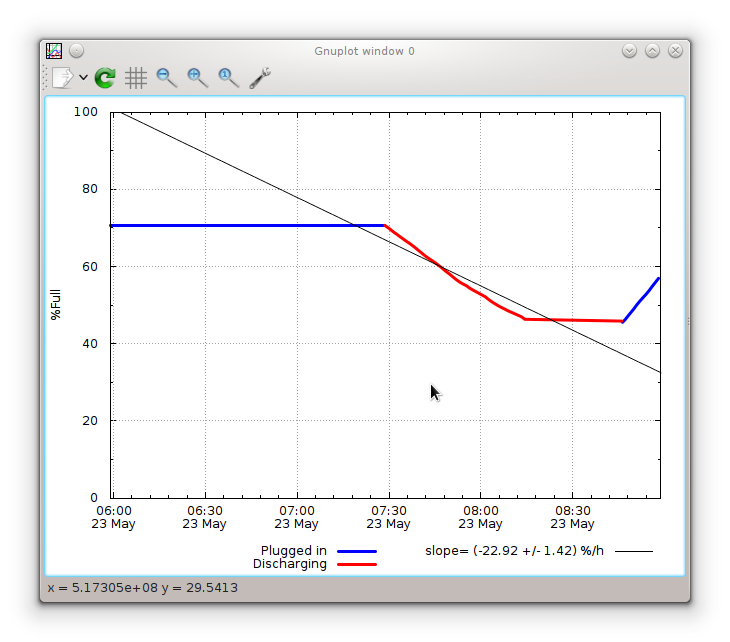
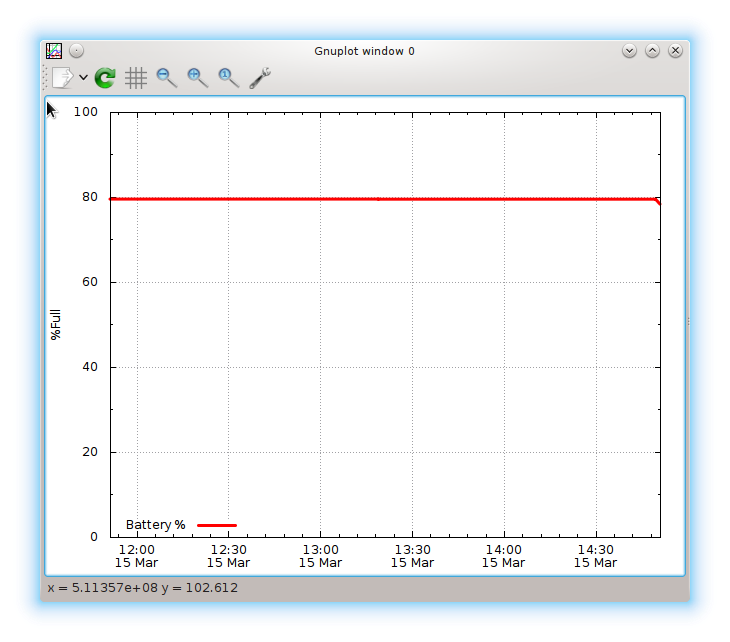
Yesterday I updated the battery-stats package in Debian with a few patches sent to me by skilled and enterprising users. There were some nice user and visible changes. First of all, both desktop menu entries now work. A design flaw in one of the script made the history graph fail to show up (its PNG was dumped in ~/.xsession-errors) if no controlling TTY was available. The script worked when called from the command line, but not when called from the desktop menu. I changed this to look for a DISPLAY variable or a TTY before deciding where to draw the graph, and now the graph window pop up as expected. The next new feature is a discharge rate estimator in one of the graphs (the one showing the last few hours). New is also the user of colours showing charging in blue and discharge in red. The percentages of this graph is relative to last full charge, not battery design capacity.

The other graph show the entire history of the collected battery statistics, comparing it to the design capacity of the battery to visualise how the battery life time get shorter over time. The red line in this graph is what the previous graph considers 100 percent:
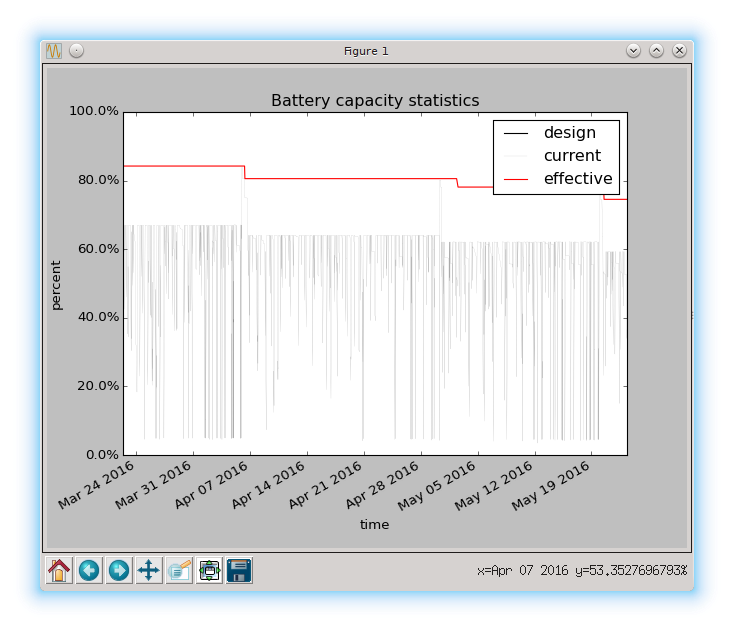
In this graph you can see that I only charge the battery to 80 percent of last full capacity, and how the capacity of the battery is shrinking. :( The last new feature is in the collector, which now will handle more hardware models. On some hardware, Linux power supply information is stored in /sys/class/power_supply/ACAD/, while the collector previously only looked in /sys/class/power_supply/AC/. Now both are checked to figure if there is power connected to the machine. If you are interested in how your laptop battery is doing, please check out the battery-stats in Debian unstable, or rebuild it on Jessie to get it working on Debian stable. :) The upstream source is available from github. Patches are very welcome. As usual, if you use Bitcoin and want to show your support of my activities, please send Bitcoin donations to my address 15oWEoG9dUPovwmUL9KWAnYRtNJEkP1u1b.

12 May 2016

Antoine Beaupr : Notmuch, offlineimap and Sieve setup

I've been using Notmuch since about 2011, switching away from Mutt to deal with the monstrous amount of emails I was, and still am dealing with on the computer. I have contributed a few patches and configs on the Notmuch mailing list, but basically, I have given up on merging patches, and instead have a custom config in Emacs that extend it the way I want. In the last 5 years, Notmuch has progressed significantly, so I haven't found the need to patch it or make sweeping changes.

The huge INBOX of death The one thing that is problematic with my use of Notmuch is that I end up with a ridiculously large INBOX folder. Before the cleanup I did this morning, I had over 10k emails in there, out of about 200k emails overall. Since I mostly work from my laptop these days, the Notmuch tags are only on the laptop, and not propagated to the server. This makes accessing the mail spool directly, from webmail or simply through a local client (say Mutt) on the server, really inconvenient, because it has to load a very large spool of mail, which is very slow in Mutt. Even worse, a bunch of mail that was archived in Notmuch shows up in the spool because it's just removed tags in Notmuch: the mails are still in the inbox, even though they are marked as read. So I was hoping that Notmuch would help me deal with the giant inbox of death problem, but in fact, when I don't use Notmuch, it actually makes the problem worse. Today, I did a bunch of improvements to my setup to fix that. The first thing I did was to kill procmail, which I was surprised to discover has been dead for over a decade. I switched over to Sieve for filtering, having already switched to Dovecot a while back on the server. I tried to use the procmail2sieve.pl conversion tool but it didn't work very well, so I basically rewrote the whole file. Since I was mostly using Notmuch for filtering, there wasn't much left to convert.

Sieve filtering But this is where things got interesting: Sieve is so simpler to use and more intuitive that I started doing more interesting stuff in bridging the filtering system (Sieve) with the tagging system (Notmuch). Basically, I use Sieve to split large chunks of emails off my main inbox, to try to remove as much spam, bulk email, notifications and mailing lists as possible from the larger flow of emails. Then Notmuch comes in and does some fine-tuning, assigning tags to specific mailing lists or topics, and being generally the awesome search engine that I use on a daily basis.

Dovecot and Postfix configs For all of this to work, I had to tweak my mail servers to talk sieve. First, I enabled sieve in Dovecot:
--- a/dovecot/conf.d/15-lda.conf
+++ b/dovecot/conf.d/15-lda.conf
@@ -44,5 +44,5 @@
 protocol lda  
   # Space separated list of plugins to load (default is global mail_plugins).
-  #mail_plugins = $mail_plugins
+  mail_plugins = $mail_plugins sieve
  
Then I had to switch from procmail to dovecot for local delivery, that was easy, in Postfix's perennial main.cf:
#mailbox_command = /usr/bin/procmail -a "$EXTENSION"
mailbox_command = /usr/lib/dovecot/dovecot-lda -a "$RECIPIENT"
Note that dovecot takes the full recipient as an argument, not just the extension. That's normal. It's clever, it knows that kind of stuff. One last tweak I did was to enable automatic mailbox creation and subscription, so that the automatic extension filtering (below) can create mailboxes on the fly:
--- a/dovecot/conf.d/15-lda.conf
+++ b/dovecot/conf.d/15-lda.conf
@@ -37,10 +37,10 @@
 #lda_original_recipient_header =
 # Should saving a mail to a nonexistent mailbox automatically create it?
-#lda_mailbox_autocreate = no
+lda_mailbox_autocreate = yes
 # Should automatically created mailboxes be also automatically subscribed?
-#lda_mailbox_autosubscribe = no
+lda_mailbox_autosubscribe = yes
 protocol lda  
   # Space separated list of plugins to load (default is global mail_plugins).

Sieve rules Then I had to create a Sieve ruleset. That thing lives in ~/.dovecot.sieve, since I'm running Dovecot. Your provider may accept an arbitrary ruleset like this, or you may need to go through a web interface, or who knows. I'm assuming you're running Dovecot and have a shell from now on. The first part of the file is simply to enable a bunch of extensions, as needed:
# Sieve Filters
# http://wiki.dovecot.org/Pigeonhole/Sieve/Examples
# https://tools.ietf.org/html/rfc5228
require "fileinto";
require "envelope";
require "variables";
require "subaddress";
require "regex";
require "vacation";
require "vnd.dovecot.debug";
Some of those are not used yet, for example I haven't tested the vacation module yet, but I have good hopes that I can use it as a way to announce a special "urgent" mailbox while I'm traveling. The rationale is to have a distinct mailbox for urgent messages that is announced in the autoreply, that hopefully won't be parsable by bots.

Spam filtering Then I filter spam using this fairly standard expression:
########################################################################
# spam 
# possible improvement, server-side:
# http://wiki.dovecot.org/Pigeonhole/Sieve/Examples#Filtering_using_the_spamtest_and_virustest_extensions
if header :contains "X-Spam-Flag" "YES"  
  fileinto "junk";
  stop;
  elsif header :contains "X-Spam-Level" "***"  
  fileinto "greyspam";
  stop;
 
This puts stuff into the junk or greyspam folder, based on the severity. I am very aggressive with spam: stuff often ends up in the greyspam folder, which I need to check from time to time, but it beats having too much spam in my inbox.

Mailing lists Mailing lists are generally put into a lists folder, with some mailing lists getting their own folder:
########################################################################
# lists
# converted from procmail
if header :contains "subject" "FreshPorts"  
    fileinto "freshports";
  elsif header :contains "List-Id" "alternc.org"  
    fileinto "alternc";
  elsif header :contains "List-Id" "koumbit.org"  
    fileinto "koumbit";
  elsif header :contains ["to", "cc"] ["lists.debian.org",
                                       "anarcat@debian.org"]  
    fileinto "debian";
# Debian BTS
  elsif exists "X-Debian-PR-Message"  
    fileinto "debian";
# default lists fallback
  elsif exists "List-Id"  
    fileinto "lists";
 
The idea here is that I can safely subscribe to lists without polluting my mailbox by default. Further processing is done in Notmuch.

Extension matching I also use the magic +extension tag on emails. If you send email to, say, foo+extension@example.com then the emails end up in the foo folder. This is done with the help of the following recipe:
########################################################################
# wildcard +extension
# http://wiki.dovecot.org/Pigeonhole/Sieve/Examples#Plus_Addressed_mail_filtering
if envelope :matches :detail "to" "*"  
  # Save name in $ name  in all lowercase except for the first letter.
  # Joe, joe, jOe thus all become 'Joe'.
  set :lower "name" "$ 1 ";
  fileinto "$ name ";
  #debug_log "filed into mailbox $ name  because of extension";
  stop;
 
This is actually very effective: any time I register to a service, I try as much as possible to add a +extension that describe the service. Of course, spammers and marketers (it's the same really) are free to drop the extension and I suspect a lot of them do, but it helps with honest providers and this actually sorts a lot of stuff out of my inbox into topically-defined folders. It is also a security issue: someone could flood my filesystem with tons of mail folders, which would cripple the IMAP server and eat all the inodes, 4 times faster than just sending emails. But I guess I'll cross that bridge when I get there: anyone can flood my address and I have other mechanisms to deal with this. The trick is to then assign tags to all folders so that they appear in the Notmuch-emacs welcome view:
echo tagging folders
for folder in $(ls -ad $HOME/Maildir/$ PREFIX */   egrep -v "Maildir/$ PREFIX (feeds.* Sent.* INBOX/ INBOX/Sent)\$"); do
    tag=$(echo $folder   sed 's#/$##;s#^.*/##')
    notmuch tag +$tag -inbox tag:inbox and not tag:$tag and folder:$ PREFIX $tag
done
This is part of my notmuch-tag script that includes a lot more fine-tuned filtering, detailed below.

Automated reports filtering Another thing I get a lot of is machine-generated "spam". Well, it's not commercial spam, but it's a bunch of Nagios, cron jobs, and god knows what software thinks it's important to send me emails every day. I get a lot less of those these days since I'm off work at Koumbit, but still, those can be useful for others as well:
if anyof (exists "X-Cron-Env",
          header :contains ["subject"] ["security run output",
                                        "monthly run output",
                                        "daily run output",
                                        "weekly run output",
                                        "Debian Package Updates",
                                        "Debian package update",
                                        "daily mail stats",
                                        "Anacron job",
                                        "nagios",
                                        "changes report",
                                        "run output",
                                        "[Systraq]",
                                        "Undelivered mail",
                                        "Postfix SMTP server: errors from",
                                        "backupninja",
                                        "DenyHosts report",
                                        "Debian security status",
                                        "apt-listchanges"
                                        ],
           header :contains "Auto-Submitted" "auto-generated",
           envelope :contains "from" ["nagios@",
                                      "logcheck@"])
     
    fileinto "rapports";
 
# imported from procmail
elsif header :comparator "i;octet" :contains "Subject" "Cron"  
  if header :regex :comparator "i;octet"  "From" ".*root@"  
        fileinto "rapports";
   
 
elsif header :comparator "i;octet" :contains "To" "root@"  
  if header :regex :comparator "i;octet"  "Subject" "\\*\\*\\* SECURITY"  
        fileinto "rapports";
   
 
elsif header :contains "Precedence" "bulk"  
    fileinto "bulk";
 

Refiltering emails Of course, after all this I still had thousands of emails in my inbox, because the sieve filters apply only on new emails. The beauty of Sieve support in Dovecot is that there is a neat sieve-filter command that can reprocess an existing mailbox. That was a lifesaver. To run a specific sieve filter on a mailbox, I simply run:
sieve-filter .dovecot.sieve INBOX 2>&1   less
Well, this doesn't do anything. To really execute the filters, you need the -e flags, and to write to the INBOX for real, you need the -w flag as well, so the real run looks something more like this:
sieve-filter -e -W -v .dovecot.sieve INBOX > refilter.log 2>&1
The funky output redirects are necessary because this outputs a lot of crap. Also note that, unfortunately, the fake run output differs from the real run and is actually more verbose, which makes it really less useful than it could be.

Archival I also usually archive my mails every year, rotating my mailbox into an Archive.YYYY directory. For example, now all mails from 2015 are archived in a Archive.2015 directory. I used to do this with Mutt tagging and it was a little slow and error-prone. Now, i simply have this Sieve script:
require ["variables","date","fileinto","mailbox", "relational"];
# Extract date info
if currentdate :matches "year" "*"   set "year" "$ 1 ";  
if date :value "lt" :originalzone "date" "year" "$ year "  
  if date :matches "received" "year" "*"  
    # Archive Dovecot mailing list items by year and month.
    # Create folder when it does not exist.
    fileinto :create "Archive.$ 1 ";
   
 
I went from 15613 to 1040 emails in my real inbox with this process (including refiltering with the default filters as well).

Notmuch configuration My Notmuch configuration is a in three parts: I have small settings in ~/.notmuch-config. The gist of it is:
[new]
tags=unread;inbox;
ignore=
#[maildir]
# synchronize_flags=true
# tentative patch that was refused upstream
# http://mid.gmane.org/1310874973-28437-1-git-send-email-anarcat@koumbit.org
#reckless_trash=true
[search]
exclude_tags=deleted;spam;
I omitted the fairly trivial [user] section for privacy reasons and [database] for declutter. Then I have a notmuch-tag script symlinked into ~/Maildir/.notmuch/hooks/post-new. It does way too much stuff to describe in details here, but here are a few snippets:
if hostname   grep angela > /dev/null; then
    PREFIX=Anarcat/
else
    PREFIX=.
fi
This sets a variable that makes the script work on my laptop (angela), where mailboxes are in Maildir/Anarcat/foo or the server, where mailboxes are in Maildir/.foo. I also have special rules to tag my RSS feeds, which are generated by feed2imap, which is documented shortly below:
echo tagging feeds
( cd $HOME/Maildir/ && for feed in $ PREFIX feeds.*; do
    name=$(echo $feed   sed "s#$ PREFIX feeds\\.##")
    notmuch tag +feeds +$name -inbox folder:$feed and not tag:feeds
done )
Another example that would be useful is how to tag mailing lists, for example, this removes the inbox tag and adds the notmuch tags to emails from the notmuch mailing list.
notmuch tag +lists +notmuch      -inbox tag:inbox and "to:notmuch@notmuchmail.org"
Finally, I have a bunch of special keybindings in ~/.emacs.d/notmuch-config.el:
;; autocompletion
(eval-after-load "notmuch-address"
  '(progn
     (notmuch-address-message-insinuate)))
; use fortune for signature, config is in custom
(add-hook 'message-setup-hook 'fortune-to-signature)
; don't remember what that is
(add-hook 'notmuch-show-hook 'visual-line-mode)
;;;;;;;;;;;;;;;;;;;;;;;;;;;;;;;;;;;;;;;;;;;;;;;;;;;;;;;;;;;;;;;;;;;;;;;;
;;; keymappings
;;;;;;;;;;;;;;;;;;;;;;;;;;;;;;;;;;;;;;;;;;;;;;;;;;;;;;;;;;;;;;;;;;;;;;;;
(define-key notmuch-show-mode-map "S"
  (lambda ()
    "mark message as spam and advance"
    (interactive)
    (notmuch-show-tag '("+spam" "-unread"))
    (notmuch-show-next-open-message-or-pop)))
(define-key notmuch-search-mode-map "S"
  (lambda (&optional beg end)
    "mark message as spam and advance"
    (interactive (notmuch-search-interactive-region))
    (notmuch-search-tag (list "+spam" "-unread") beg end)
    (anarcat/notmuch-search-next-message)))
(define-key notmuch-show-mode-map "H"
  (lambda ()
    "mark message as spam and advance"
    (interactive)
    (notmuch-show-tag '("-spam"))
    (notmuch-show-next-open-message-or-pop)))
(define-key notmuch-search-mode-map "H"
  (lambda (&optional beg end)
    "mark message as spam and advance"
    (interactive (notmuch-search-interactive-region))
    (notmuch-search-tag (list "-spam") beg end)
    (anarcat/notmuch-search-next-message)))
(define-key notmuch-search-mode-map "l" 
  (lambda (&optional beg end)
    "undelete and advance"
    (interactive (notmuch-search-interactive-region))
    (notmuch-search-tag (list "-unread") beg end)
    (anarcat/notmuch-search-next-message)))
(define-key notmuch-search-mode-map "u"
  (lambda (&optional beg end)
    "undelete and advance"
    (interactive (notmuch-search-interactive-region))
    (notmuch-search-tag (list "-deleted") beg end)
    (anarcat/notmuch-search-next-message)))
(define-key notmuch-search-mode-map "d"
  (lambda (&optional beg end)
    "delete and advance"
    (interactive (notmuch-search-interactive-region))
    (notmuch-search-tag (list "+deleted" "-unread") beg end)
    (anarcat/notmuch-search-next-message)))
(define-key notmuch-show-mode-map "d"
  (lambda ()
    "delete current message and advance"
    (interactive)
    (notmuch-show-tag '("+deleted" "-unread"))
    (notmuch-show-next-open-message-or-pop)))
;; https://notmuchmail.org/emacstips/#index17h2
(define-key notmuch-show-mode-map "b"
  (lambda (&optional address)
    "Bounce the current message."
    (interactive "sBounce To: ")
    (notmuch-show-view-raw-message)
    (message-resend address)
    (kill-buffer)))
;;;;;;;;;;;;;;;;;;;;;;;;;;;;;;;;;;;;;;;;;;;;;;;;;;;;;;;;;;;;;;;;;;;;;;;;
;;; my custom notmuch functions
;;;;;;;;;;;;;;;;;;;;;;;;;;;;;;;;;;;;;;;;;;;;;;;;;;;;;;;;;;;;;;;;;;;;;;;;
(defun anarcat/notmuch-search-next-thread ()
  "Skip to next message from region or point
This is necessary because notmuch-search-next-thread just starts
from point, whereas it seems to me more logical to start from the
end of the region."
  ;; move line before the end of region if there is one
  (unless (= beg end)
    (goto-char (- end 1)))
  (notmuch-search-next-thread))
;; Linking to notmuch messages from org-mode
;; https://notmuchmail.org/emacstips/#index23h2
(require 'org-notmuch nil t)
(message "anarcat's custom notmuch config loaded")
This is way too long: in my opinion, a bunch of that stuff should be factored in upstream, but some features have been hard to get in. For example, Notmuch is really hesitant in marking emails as deleted. The community is also very strict about having unit tests for everything, which makes writing new patches a significant challenge for a newcomer, which will often need to be familiar with both Elisp and C. So for now I just have those configs that I carry around. Emails marked as deleted or spam are processed with the following script named notmuch-purge which I symlink to ~/Maildir/.notmuch/hooks/pre-new:
#!/bin/sh
if hostname   grep angela > /dev/null; then
    PREFIX=Anarcat/
else
    PREFIX=.
fi
echo moving tagged spam to the junk folder
notmuch search --output=files tag:spam \
        and not folder:$ PREFIX junk \
        and not folder:$ PREFIX greyspam \
        and not folder:Koumbit/INBOX \
        and not path:Koumbit/** \
      while read file; do
          mv "$file" "$HOME/Maildir/$ PREFIX junk/cur"
      done
echo unconditionnally deleting deleted mails
notmuch search --output=files tag:deleted   xargs -r rm
Oh, and there's also customization for Notmuch:
;; -*- mode: emacs-lisp; auto-recompile: t; -*-
(custom-set-variables
 ;; from https://anarc.at/sigs.fortune
 '(fortune-file "/home/anarcat/.mutt/sigs.fortune")
 '(message-send-hook (quote (notmuch-message-mark-replied)))
 '(notmuch-address-command "notmuch-address")
 '(notmuch-always-prompt-for-sender t)
 '(notmuch-crypto-process-mime t)
 '(notmuch-fcc-dirs
   (quote
    ((".*@koumbit.org" . "Koumbit/INBOX.Sent")
     (".*" . "Anarcat/Sent"))))
 '(notmuch-hello-tag-list-make-query "tag:unread")
 '(notmuch-message-headers (quote ("Subject" "To" "Cc" "Bcc" "Date" "Reply-To")))
 '(notmuch-saved-searches
   (quote
    ((:name "inbox" :query "tag:inbox and not tag:koumbit and not tag:rt")
     (:name "unread inbox" :query "tag:inbox and tag:unread")
     (:name "unread" :query "tag:unred")
     (:name "freshports" :query "tag:freshports and tag:unread")
     (:name "rapports" :query "tag:rapports and tag:unread")
     (:name "sent" :query "tag:sent")
     (:name "drafts" :query "tag:draft"))))
 '(notmuch-search-line-faces
   (quote
    (("deleted" :foreground "red")
     ("unread" :weight bold)
     ("flagged" :foreground "blue"))))/
 '(notmuch-search-oldest-first nil)
 '(notmuch-show-all-multipart/alternative-parts nil)
 '(notmuch-show-all-tags-list t)
 '(notmuch-show-insert-text/plain-hook
   (quote
    (notmuch-wash-convert-inline-patch-to-part notmuch-wash-tidy-citations notmuch-wash-elide-blank-lines notmuch-wash-excerpt-citations)))
 )
I think that covers it.

Offlineimap So of course the above works well on the server directly, but how do run Notmuch on a remote machine that doesn't have access to the mail spool directly? This is where OfflineIMAP comes in. It allows me to incrementally synchronize a local Maildir folder hierarchy with a a remote IMAP server. I am assuming you already have an IMAP server configured, since you already configured Sieve above. Note that other synchronization tools exist. The other popular one is isync but I had trouble migrating to it (see courriels for details) so for now I am sticking with OfflineIMAP. The configuration is fairly simple:
[general]
accounts = Anarcat
ui = Blinkenlights
maxsyncaccounts = 3
[Account Anarcat]
localrepository = LocalAnarcat
remoterepository = RemoteAnarcat
# refresh all mailboxes every 10 minutes
autorefresh = 10
# run notmuch after refresh
postsynchook = notmuch new
# sync only mailboxes that changed
quick = -1
## possible optimisation: ignore mails older than a year
#maxage = 365
# local mailbox location
[Repository LocalAnarcat]
type = Maildir
localfolders = ~/Maildir/Anarcat/
# remote IMAP server
[Repository RemoteAnarcat]
type = IMAP
remoteuser = anarcat
remotehost = anarc.at
ssl = yes
# without this, the cert is not verified (!)
sslcacertfile = /etc/ssl/certs/DST_Root_CA_X3.pem
# do not sync archives
folderfilter = lambda foldername: not re.search('(Sent\.20[01][0-9]\..*)', foldername) and not re.search('(Archive.*)', foldername)
# and only subscribed folders
subscribedonly = yes
# don't reconnect all the time
holdconnectionopen = yes
# get mails from INBOX immediately, doesn't trigger postsynchook
idlefolders = ['INBOX']
Critical parts are:
  • postsynchook: obviously, we want to run notmuch after fetching mail
  • idlefolders: receives emails immediately without waiting for the longer autorefresh delay, which means that most mailboxes don't see new emails until 10 minutes in the worst case. unfortunately, doesn't run the postsynchook so I need to hit G in Emacs to see new mail
  • quick=-1, subscribedonly, holdconnectionopen: makes most runs much, much faster as it skips unchanged or unsubscribed folders and keeps the connection to the server
The other settings should be self-explanatory.

RSS feeds I gave up on RSS readers, or more precisely, I merged RSS feeds and email. The first time I heard of this, it sounded like a horrible idea, because it means yet more emails! But with proper filtering, it's actually a really nice way to process emails, since it leverages the distributed nature of email. For this I use a fairly standard feed2imap, although I do not deliver to an IMAP server, but straight to a local Maildir. The configuration looks like this:
---
include-images: true
target-refix: &target "maildir:///home/anarcat/Maildir/.feeds."
feeds:
- name: Planet Debian
  url: http://planet.debian.org/rss20.xml
  target: [ *target, 'debian-planet' ]
I have obviously more feeds, the above is just and example. This will deliver the feeds as emails in one mailbox per feed, in ~/Maildir/.feeds.debian-planet, in the above example.

Troubleshooting You will fail at writing the sieve filters correctly, and mail will (hopefully?) fall through to your regular mailbox. Syslog will tell you things fail, as expected, and details are in your .dovecot.sieve.log file in your home directory. I also enabled debugging on the Sieve module
--- a/dovecot/conf.d/90-sieve.conf
+++ b/dovecot/conf.d/90-sieve.conf
@@ -51,6 +51,7 @@ plugin  
        # deprecated imapflags extension in addition to all extensions were already
   # enabled by default.
   #sieve_extensions = +notify +imapflags
+  sieve_extensions = +vnd.dovecot.debug
   # Which Sieve language extensions are ONLY available in global scripts. This
   # can be used to restrict the use of certain Sieve extensions to administrator
This allowed me to use debug_log function in the rulesets to output stuff directly to the logfile.

Further improvements Of course, this is all done on the commandline, but that is somewhat expected if you are already running Notmuch. Of course, it would be much easier to edit those filters through a GUI. Roundcube has a nice Sieve plugin, and Thunderbird also has such a plugin as well. Since Sieve is a standard, there's a bunch of clients available. All those need you to setup some sort of thing on the server, which I didn't bother doing yet. And of course, a key improvement would be to have Notmuch synchronize its state better with the mailboxes directly, instead of having the notmuch-purge hack above. Dovecot and Maildir formats support up to 26 flags, and there were discussions about using those flags to synchronize with notmuch tags so that multiple notmuch clients can see the same tags on different machines transparently. This, however, won't make Notmuch work on my phone or webmail or any other more generic client: for that, Sieve rules are still very useful. I still don't have webmail setup at all: so to read email, I need an actual client, which is currently my phone, which means I need to have Wifi access to read email. "Internet Caf s" or "this guy's computer" won't work as well, although I can always use ssh to login straight to the server and read mails with Mutt. I am also considering using X509 client certificates to authenticate to the mail server without a passphrase. This involves configuring Postfix, which seems simple enough. Dovecot's configuration seems a little more involved and less well documented. It seems that both [OfflimeIMAP][] and K-9 mail support client-side certs. OfflineIMAP prompts me for the password so it doesn't get leaked anywhere. I am a little concerned about building yet another CA, but I guess it would not be so hard... The server side of things needs more documenting, particularly the spam filters. This is currently spread around this wiki, mostly in configuration.

Security considerations The whole purpose of this was to make it easier to read my mail on other devices. This introduces a new vulnerability: someone may steal that device or compromise it to read my mail, impersonate me on different services and even get a shell on the remote server. Thanks to the two-factor authentication I setup on the server, I feel a little more confident that just getting the passphrase to the mail account isn't sufficient anymore in leveraging shell access. It also allows me to login with ssh on the server without trusting the machine too much, although that only goes so far... Of course, sudo is then out of the question and I must assume that everything I see is also seen by the attacker, which can also inject keystrokes and do all sorts of nasty things. Since I also connected my email account on my phone, someone could steal the phone and start impersonating me. The mitigation here is that there is a PIN for the screen lock, and the phone is encrypted. Encryption isn't so great when the passphrase is a PIN, but I'm working on having a better key that is required on reboot, and the phone shuts down after 5 failed attempts. This is documented in my phone setup. Client-side X509 certificates further mitigates those kind of compromises, as the X509 certificate won't give shell access. Basically, if the phone is lost, all hell breaks loose: I need to change the email password (or revoke the certificate), as I assume the account is about to be compromised. I do not trust Android security to give me protection indefinitely. In fact, one could argue that the phone is already compromised and putting the password there already enabled a possible state-sponsored attacker to hijack my email address. This is why I have an OpenPGP key on my laptop to authenticate myself for critical operations like code signatures. The risk of identity theft from the state is, after all, a tautology: the state is the primary owner of identities, some could say by definition. So if a state-sponsored attacker would like to masquerade as me, they could simply issue a passport under my name and join a OpenPGP key signing party, and we'd have other problems to deal with, namely, proper infiltration counter-measures and counter-snitching.

9 May 2016

Russell Coker: BIND Configuration Files

I ve recently been setting up more monitoring etc to increase the reliability of servers I run. One ongoing issue with computer reliability is any case where a person enters the same data in multiple locations, often people make mistakes and enter slightly different data which can give bad results. For DNS you need to have at least 2 authoritative servers for each zone. I ve written the below Makefile to extract the zone names from the primary server and generate a config file suitable for use on a secondary server. The next step is to automate this further by having the Makefile copy the config file to secondary servers and run rndc reload . Note that in a typical Debian configuration any user in group bind can write to BIND config files and reload the server configuration so this can be done without granting the script on the primary server root access on the secondary servers. My blog replaces the TAB character with 8 spaces, you need to fix this up if you want to run the Makefile on your own system and also replace 10.10.10.10 with the IP address of your primary server. all: other/secondary.conf other/secondary.conf: named.conf.local Makefile
for n in $$(grep ^zone named.conf.local cut -f2 -d\" sort) ; do echo "zone \"$$n\" \n type slave;\n file \"$$n\";\n masters 10.10.10.10; ;\n ;\n" ; done > other/secondary.conf

26 April 2016

Reproducible builds folks: Reproducible builds: week 52 in Stretch cycle

What happened in the Reproducible Builds effort between April 17th and April 23rd 2016: Toolchain fixes Thomas Weber uploaded lcms2/2.7-1 which will not write uninitialized memory when writing color names. Original patch by Lunar. The GCC 7 development phase has just begun, so Dhole reworked his patch to make gcc use SOURCE_DATE_EPOCH if set which prompted interesting feedback, but it has not been merged yet. Alexis Bienven e submitted a patch for sphinx to strip Python object memory addresses from the generated documentation. Packages fixed The following packages have become reproducible due to changes in their build dependencies: cobertura, commons-pool, easymock, eclipselink, excalibur-logkit, gap-radiroot, gluegen2, jabref, java3d, jcifs, jline, jmock2, josql, jtharness, libfann, libgroboutils-java, libjemmy2-java, libjgoodies-binding-java, libjgrapht0.8-java, libjtds-java, liboptions-java, libpal-java, libzeus-jscl-java, node-transformers, octave-msh, octave-secs2d, openmama, rkward. The following packages have become reproducible after being fixed: Patches submitted that have not made their way to the archive yet: tests.reproducible-builds.org diffoscope development diffoscope 52 was released with changes from Mattia Rizzolo, h01ger, Satyam Zode and Reiner Herrmann, who also did the release. Notable changes included: As usual, diffoscope 52 is available on Debian, Archlinux and PyPI, other distributions will hopefully soon update. Package reviews 28 reviews have been added, 11 have been updated and 94 have been removed in this week. 14 FTBFS bugs were reported by Chris Lamb (one being was a duplicate of a bug filed by Sebastian Ramacher an hour earlier). Misc. This week's edition was written by Lunar, Holger 'h01ger' Levsen and Chris Lamb and reviewed by a bunch of Reproducible builds folks on IRC.

9 April 2016

Steve Kemp: Recycling old ideas ..

My previous blog post was about fuzzing and finding segfaults in GNU Awk. At the time of this update they still remain unfixed. Reading about a new release of mutt I've seen a lot of complaints about how it handles HTML mail, by shelling out to lynx or w3m. As I have a vested interest in console based mail-clients I wanted to have a quick check to see how dangerous that could be. After all it wasn't so long ago that I discovered that printing a fingerprint of an SSH key could be dangerous, so the idea of parsing untrusted HTML is something I could see. In fact back in 2005 I reported that some specific HTML could crash Mozilla's firefox. Due to some ordering issues my Firefox bug was eventually reported as a duplicate, and although it seemed to qualify for the Mozilla bug-bounty and a CVE assignment I never received any actual cash. Shame. I'd have been more interested in testing the browser if I had a cheque to hang on my wall (and never cash). Anyway full-circle. Fuzzing the w3m console-based browser resulted in a bunch of segfaults when running this:
 w3m -dump $file.html
Anyway each of the two bugs I reported were fixed in a day or two, and both involved gnarly UTF-8/encoding transformations. Many thanks to Tatsuya Kinoshita for such prompt attention and excellent debugging skills. And lynx? Still no segfaults. I'll leave the fuzzer running over the weekend and if there are no faults found by Monday I guess I'll move on to links.

31 March 2016

Antoine Beaupr : My free software activities, march 2016

Debian Long Term Support (LTS) This is my 4th month working on Debian LTS, started by Raphael Hertzog at Freexian. I spent half of the month away on a vacation so little work was done, especially since I tried to tackle rather large uploads like NSS and Xen. I also worked on the frontdesk shift last week.

Frontdesk That work mainly consisted of figuring out how to best help the security team with the last uploads to the Wheezy release. For those who don't know, Debian 7 Wheezy, or "oldstable", is going to be unsupported by the security team starting end of april, and the Debian 6 Squeeze (the previous LTS) is now unsupported. The PGP signatures on the archived release have started yielding expiration errors which can be ignored but that are really a strong reminder that it is really time to upgrade. So the LTS team is now working towards backporting a few security issues from squeeze to wheezy, and this is what I focused on during triage work. I have identified the following high priority packages I will work on after I complete my work on the Xen and NSS packages (detailed below):
  • libidn
  • icu
  • phpmyadmin
  • tomcat6
  • optipng
  • srtp
  • dhcpcd
  • python-tornado

Updates to NSS and Xen I have spent a lot of time testing and building packages for NSS and Xen. To be fair, Brian May did most of the work on the Xen packages, and I merely did some work to test the packages on Koumbit's infrastructure, something which I will continue doing in the next month. For NSS, wheezy and jessie are in this weird state where patches were provided to the security team all the way back in November yet were never tested. Since then, yet more issues came up and I worked hard to review and port patches for those new security issues to wheezy. I'll followup on both packages in the following month.

Other free software work

Android TL;DR: there's an even longer version of this with the step-by-step procedures and that I will update as time goes on in my wiki. I somehow inherited an Android phone recently, on a loan from a friend because the phone broke one too many times and she got a new one from her provider. This phone is a HTC One S "Ville", which is fairly old, but good enough to play with and give me a mobile computing platform to listen to podcasts, play music, access maps and create GPS traces. I was previously doing this with my N900, but that device is really showing its age: very little development is happening on it, the SDK is closed source and the device itself is fairly big, compared to the "Ville". Plus, the SIM card actually works on the Ville so, even though I do not have an actual contract with a cell phone provider (too expensive, too invasive on my privacy), I can still make emergency phone calls (911)! Plus, since there is good wifi on the machine, I can use it to connect to the phone system with the built-in SIP client, send text messages through SMS (thanks to VoIP.ms SMS support) or Jabber. I have also played around with LibreSignal, the free software replacement for Signal, which uses proprietary google services. Yes, the VoIP.ms SMS app also uses GCM, but hopefully that can be fixed. (While I was writing this, another Debian Developer wrote a good review of Signal so I am happy to skip that step. Go read that.)
See also my apps list for a more complete list of the apps I have installed on the phone. I welcome recommendations on cool free software apps I should use!
I have replaced the stock firmware on the phone with Cyanogenmod 12.1, which was a fairly painful experience, partly because of the difficult ambiance on the #cyanogenmod channel on Freenode, where I had extreme experiences: a brave soul helped me through the first flashing process for around 2 hours, nicely holding my hand at every step. Other times, I have seen flames and obtuse comments from people being vulgar, brutal, obnoxious, if not sometimes downright homophobic and sexist from other users. It is clearly a community that needs to fix their attitude. I have documented everything I could in details in this wiki page, in case others want to resuscitate their old phones, but also because I ended up reinstalling the freaking phone about 4 times, and was getting tired of forgetting how to do it every time. I am somewhat fascinated by Android: here is the Linux-based device that should save us all from the proprietary Apple nightmares of fenced in gardens and censorship. Yet, public Android downloads are hidden behind license agreements, even though the code itself is free, which has led fellow Debian developers to work on making libre rebuilds of Androids to workaround this insanity. But worse: all phones are basically proprietary devices down to the core. You need custom firmware to be loaded on the machine for it to boot at all, from the bootloader all the way down to the GSM baseband and Wifi drivers. It is a minefield of closed source software, and trying to run free software on there is a bit of a delusion, especially since the baseband has so much power over the phone. Still, I think it is really interesting to run free software on those machines, and help people that are stuck with cell phones get familiar with software freedom. It seems especially important to me to make Android developers aware of software freedom considering how many apps are available for free yet on which it is not possible to contribute significantly because the source code is not published at all, or published only on the Google Store, instead of the more open and public F-Droid repository which publishes only free software. So I did contribute. This month, I am happy to announce that I contributed to the following free software projects on Android: I have also reviewed the literature surrounding Telegram, a popular messaging app rival to Signal and Whatsapp. Oddly enough, my contributions to Wikipedia on that subject were promptly reverted which made me bring up the subject on the page's Talk page. This lead to an interesting response from the article's main editors which at least added that the "its security features have been contested by security researchers and cryptography experts". Considering the history of Telegram, I would keep people away from it and direct people to use Signal instead, even though Signal has similar metadata issues, mostly because Telegram's lack of response to the security issues that were outlined by fellow security researchers. Both systems suffer from a lack of federation as well, which is a shame in this era of increasing centralization. I am not sure I will put much more work in developing for Android for now. It seems like a fairly hostile platform to work on, and unless I have specific pain points I want to fix, it feels so much better to work on my own stuff in Debian. Which brings me to my usual plethora of free software projects I got stuck in this month.

IRC projects irssi-plugin-otr had a bunch of idiotic bugs lying around, and I had a patch that I hadn't submitted upstream from the Debian package, which needed a rebuild because the irssi version changed, which is a major annoyance. The version in sid is now a snapshot because upstream needs to make a new release but at least it should fix things for my friends running unstable and testing. Hopefully those silly uploads won't be necessary in the future. That's for the client side. On the server side, I have worked on updating the Atheme-services package to the latest version, which actually failed because the upstream libmowgli is missing release tags, which means the Debian package for it is not up-to-date either. Still, it is nice to have a somewhat newer version, even though it is not the latest and some bugs were fixed. I have also looked at making atheme reproducible but was surprised at the hostility of the upstream. In the end, it looks like they are still interested in patches, but they will be a little harder to deploy than for Charybdis, so this could take some time. Hopefully I will find time in the coming weeks to test the new atheme services daemon on the IRC network I operate.

Syncthing I have also re-discovered Syncthing, a file synchronization software. Amazingly, I was having trouble transferring a single file between two phones. I couldn't use Bluetooth (not sure why), the "Wifi sharing" app was available only on one phone (and is proprietary, and has a limit of 4MB files), and everything else requires an account, the cloud, or cabling. So. Just heading to f-droid, install syncthing, flash a few qr-codes around and voil : files are copied over! Pretty amazing: the files were actually copied over the local network, using IPv6 link-local addresses, encryption and the DHT. Which is a real geeky way of saying it's completely fast, secure and fast. Now, I found a few usability issues, so much that I wrote a whole usability story for the developers, which were really appreciative of my review. Some of the issues were already fixed, others were pretty minor. Syncthing has a great community, and it seems like a great project I encourage everyone to get familiar with.

Battery stats The battery-status project I mentionned previously has been merged with the battery-stats project (yes, the names are almost the same, which is confusing) and so I had to do some work to fix my Python graph script, which was accepted upstream and will be part of Debian officially from now on, which is cool. The previous package was unofficial. I have also noticed that my battery has a significantly than when I wrote the script. Whereas it was basically full back then, it seems now it has lost almost 15% of its capacity in about 6 months. According to the calculations of the script:
this battery will reach end of life (5%) in 935 days, 19:07:58.336480, on 2018-10-23 12:06:07.270290
Which is, to be fair, a good life: it will somewhat work for about three more years.

Playlist, git-annex and MPD in Python On top of my previously mentioned photos-import script, I have worked on two more small programs. One is called get-playlist and is an extension to git-annex to easily copy to the local git-annex repository all files present in a given M3U playlist. This is useful for me because my phone cannot possibly fit my whole MP3 collection, and I use playlists in GMPC to tag certain files, particularly the Favorites list which is populated by the "star" button in the UI. I had a lot of fun writing this script. I started using elpy as an IDE in Emacs. (Notice how Emacs got a new webpage, which is a huge improvement was had been basically unchanged since the original version, now almost 20 years old, and probably written by RMS himself.) I wonder how I managed to stay away from Elpy for so long, as it glues together key components of Emacs in an elegant and functional bundle:
  • Company: the "vim-like" completion mode i had been waiting for forever
  • Jedi: context-sensitive autocompletion for Python
  • Flymake: to outline style and syntax errors (unfortunately not the more modern Flycheck)
  • inline documentation...
In short, it's amazing and makes everything so much easier to work with that I wrote another script. The first program wouldn't work very well because some songs in the playlists had been moved, so I made another program, this time to repair playlists which refer to missing files. The script is simply called fix-playlists, and can operate transparently on multiple playlists. It has a bunch of heuristics to find files and uses a MPD server as a directory to search into. It can edit files in place or just act as a filter.

Useful snippets Writing so many scripts, so often, I figured I needed to stop wasting time always writing the same boilerplate stuff on top of every file, so I started publishing Yasnippet-compatible file snippets, in my snippets repository. For example, this report is based on the humble lts snippet. I also have a base license snippet which slaps the AGPLv3 license on top of a Python file. But the most interesting snippet, for me, is this simple script snippet which is a basic scaffolding for a commandline script that includes argument processing, logging and filtering of files, something which I was always copy-pasting around.

Other projects And finally, a list of interesting issues en vrac:
  • there's a new Bootstrap 4 theme for Ikiwiki. It was delivering content over CDNs, which is bad for privacy issues, so I filed an issue which was almost immediately fixed by the author!
  • I found out about BitHub, a tool to make payments with Bitcoins for patches submitted on OWS projects. It wasn't clear to me where to find the demo, but when I did, I quickly filed a PR to fix the documentation. Given the number of open PRs there and the lack of activity, I wonder if the model is working at all...
  • a fellow Debian Developer shared his photos workflow, which was interesting to me because I have my own peculiar script, which I never mentionned here, but which I ended up sharing with the author

23 March 2016

Petter Reinholdtsen: Full battery stats collector is now available in Debian

Since this morning, the battery-stats package in Debian include an extended collector that will collect the complete battery history for later processing and graphing. The original collector store the battery level as percentage of last full level, while the new collector also record battery vendor, model, serial number, design full level, last full level and current battery level. This make it possible to predict the lifetime of the battery as well as visualise the energy flow when the battery is charging or discharging. The new tools are available in /usr/share/battery-stats/ in the version 0.5.1 package in unstable. Get the new battery level graph and lifetime prediction by running:
/usr/share/battery-stats/battery-stats-graph /var/log/battery-stats.csv
Or select the 'Battery Level Graph' from your application menu. The flow in/out of the battery can be seen by running (no menu entry yet):
/usr/share/battery-stats/battery-stats-graph-flow
I'm not quite happy with the way the data is visualised, at least when there are few data points. The graphs look a bit better with a few years of data. A while back one important feature I use in the battery stats collector broke in Debian. The scripts in /usr/lib/pm-utils/power.d/ were no longer executed. I suspect it happened when Jessie started using systemd, but I do not know. The issue is reported as bug #818649 against pm-utils. I managed to work around it by adding an udev rule to call the collector script every time the power connector is connected and disconnected. With this fix in place it was finally time to make a new release of the package, and get it into Debian. If you are interested in how your laptop battery is doing, please check out the battery-stats in Debian unstable, or rebuild it on Jessie to get it working on Debian stable. :) The upstream source is available from github. As always, patches are very welcome.

15 March 2016

Petter Reinholdtsen: Making battery measurements a little easier in Debian

Back in September, I blogged about the system I wrote to collect statistics about my laptop battery, and how it showed the decay and death of this battery (now replaced). I created a simple deb package to handle the collection and graphing, but did not want to upload it to Debian as there were already a battery-stats package in Debian that should do the same thing, and I did not see a point of uploading a competing package when battery-stats could be fixed instead. I reported a few bugs about its non-function, and hoped someone would step in and fix it. But no-one did. I got tired of waiting a few days ago, and took matters in my own hands. The end result is that I am now the new upstream developer of battery stats (available from github) and part of the team maintaining battery-stats in Debian, and the package in Debian unstable is finally able to collect battery status using the /sys/class/power_supply/ information provided by the Linux kernel. If you install the battery-stats package from unstable now, you will be able to get a graph of the current battery fill level, to get some idea about the status of the battery. The source package build and work just fine in Debian testing and stable (and probably oldstable too, but I have not tested). The default graph you get for that system look like this:

My plans for the future is to merge my old scripts into the battery-stats package, as my old scripts collected a lot more details about the battery. The scripts are merged into the upstream battery-stats git repository already, but I am not convinced they work yet, as I changed a lot of paths along the way. Will have to test a bit more before I make a new release. I will also consider changing the file format slightly, as I suspect the way I combine several values into one field might make it impossible to know the type of the value when using it for processing and graphing. If you would like I would like to keep an close eye on your laptop battery, check out the battery-stats package in Debian and on github. I would love some help to improve the system further.

10 March 2016

Michal &#268;iha&#345;: Weblate 2.5

After almost six months of development Weblate 2.5 has been released. It brings lot of improvements and it's quite hard to point few ones. The most important ones include support for Python 3, reports generators, placeables highlighting, extended keyboard shortcuts, configurable dashboard or group based ACLs. Full list of changes for 2.5: If you are upgrading from older version, please follow our upgrading instructions. You can find more information about Weblate on https://weblate.org, the code is hosted on Github. If you are curious how it looks, you can try it out on demo server. You can login there with demo account using demo password or register your own user. Weblate is also being used https://hosted.weblate.org/ as official translating service for phpMyAdmin, OsmAnd, Aptoide, FreedomBox, Weblate itself and many other projects. Should you be looking for hosting of translations for your project, I'm happy to host them for you or help with setting it up on your infrastructure. Further development of Weblate would not be possible without people providing donations, thanks to everybody who have helped so far! The roadmap for next release is just being prepared, you can influence this by expressing support for individual issues either by comments or by providing bounty for them.
Filed under: English Weblate 0 comments

Next.

Previous.