Back in September last year I chose to back the StarFiveVisionFive 2 on Kickstarter. I don t have a particular use in mind for it, but I felt it was one of the first RISC-V systems that were relatively capable (mentally I have it as somewhere between a Raspberry Pi 3 + a Pi 4). In particular it s a quad 1.5GHz 64-bit RISC-V core with 8G RAM, USB3, GigE ethernet and a single M.2 PCIe slot. More than ample as a personal machine for playing around with RISC-V and doing local builds. I ended up paying 67 for the Early Bird variant (dual GigE ethernet rather than 1 x 100Mb and 1 x GigE). A couple of weeks ago I got an email with a tracking number and last week it finally turned up.
Being impatient the first thing I did was plug it into a monitor, connect up a keyboard, and power it on. Nothing except some flashing lights. Looking at the boot selector DIP switches suggested it was configured to boot from UART, so I flipped them to (what I thought was) the flash setting. It wasn t - turns out the ON marking on the switches represents logic 0 and it was correctly setup when I got it. I went to read the documentation which talked about writing an image to a MicroSD card, but also had details of the UART connection. Wanting to make sure the device was at least doing something before I actually tried an OS on it I hooked up a USB/serial dongle and powered the board up again. Success! U-Boot appeared and I could interact with it.
I went to the VisionFive2 Debian page and proceeded to torrent the Image-69 image, writing it to a MicroSD card and inserting it in the slot on the bottom of the board. It booted fine. I can t even tell you what graphical environment it booted up because I don t remember; it worked fine though (at 1080p, I ve seen reports that 4K screens will make it croak).
Poking around the image revealed that it s built off a snapshot.debian.org snapshot from 20220616T194833Z, which is a little dated at this point but I understand the rationale behind picking something that works and sticking with it. The kernel is of course a vendor special, based on 5.15.0. Further investigation revealed that the entire X/graphics stack is living in /usr/local, which isn t overly surprising; it s Imagination based. I was pleasantly surprised to discover there is work to upstream the Imagination support, but I m not planning to run the board with a monitor attached so it s not a high priority for me.
Having discovered all that I decided to see how well a clean Debian unstable install from Debian Ports would go. I had a spare Intel Optane lying around (it s a stupid 22110 M.2 which is too long for any machine I own), so I put it in the slot on the bottom of the board. To my surprise it Just Worked and was detected ok:
I created a single partition with an ext4 filesystem (initially tried btrfs, but the StarFive kernel doesn t support it), and kicked off a debootstrap with:
The u-boot setup has a convoluted set of vendor scripts that eventually ends up reading a /boot/extlinux/extlinux.conf config from /dev/mmcblk1p2, so I added an additional entry there using the StarFive kernel but pointing to the NVMe device for /. Made sure to set a root password (not that I ve been bitten by that before, too many times), and rebooted. Success! Well. Sort of. I hit a bunch of problems with having a getty running on ttyS0 as well as one running on hvc0. The second turns out to be a console device from the RISC-V SBI. I did a systemctl mask serial-getty@hvc0.service which made things a bit happier, but I was still seeing odd behaviour and output. Turned out I needed to reboot the initramfs as well; the StarFive one was using Plymouth and doing some other stuff that seemed to be confusing matters. An update-initramfs -k 5.15.0-starfive -c built me a new one and everything was happy.
Next problem; the StarFive kernel doesn t have IPv6 support. StarFive are good citizens and make their 5.15 kernel tree available, so I grabbed it, fed it the existing config, and tweaked some options (including adding IPV6 and SECCOMP, which chrony wanted). Slight hiccup when it turned out trying to do things like make sound modular caused it to fail to compile, and having to backport the fix that allowed the use of GCC 12 (as present in sid), but it got there. So I got cocky and tried to update it to the latest 5.15.94. A few manual merge fixups (which I may or may not have got right, but it compiles and boots for me), and success. Timings:
$ time make -j 4 bindeb-pkg
  [linux-image-5.15.94-00787-g1fbe8ac32aa8]
real	37m0.134s
user	117m27.392s
sys	6m49.804s
On the subject of kernels I am pleased to note that there are efforts to upstream the VisionFive 2 support, with what appears to be multiple members of StarFive engaging in multiple patch submission rounds. It s really great to see this and I look forward to being able to run an unmodified mainline kernel on my board.
Niggles? I have a few. The provided u-boot doesn t have NVMe support enabled, so at present I need to keep a MicroSD card to boot off, even though root is on an SSD. I m also seeing some errors in dmesg from the SSD:
It doesn t seem to cause any actual issues, and it could be the SSD, the 5.15 kernel or an actual hardware thing - I ll keep an eye on it (I will probably end up with a different SSD that actually fits, so that ll provide another data point).
More annoying is the temperature the CPU seems to run at. There s no heatsink or fan, just the metal heatspreader on top of the CPU, and in normal idle operation it sits at around 60 C. Compiling a kernel it hit 90 C before I stopped the job and sorted out some additional cooling in the form of a desk fan, which kept it as just over 30 C.
I haven t seen any actual stability problems, but I wouldn t want to run for any length of time like that. I ve ordered a heatsink and also realised that the board supports a Raspberry Pi style PoE Hat , so I ve got one of those that includes a fan ordered (I am a complete convert to PoE especially for small systems like this).
With the desk fan setup I ve been able to run the board for extended periods under load (I did a full recompile of the Debian 6.1.12-1 kernel package and it took about 10 hours). The M.2 slot is unfortunately only a single PCIe v2 lane, and my testing topped out at about 180MB/s. IIRC that is about half what the slot should be capable of, and less than a 10th of what the SSD can do. Ethernet testing with iPerf3 sustained about 941Mb/s, so basically maxing out the port. The board as a whole isn t going to set any speed records, but it s perfectly usable, and pretty impressive for the price point.
On the Debian side I ve not hit any surprises. There s work going on to move RISC-V to a proper release architecture, and I m hoping to be able to help out with that, but the version of unstable I installed from the ports infrastructure has looked just like any other Debian install. Which is what you want. And that pretty much sums up my overall experience of the VisionFive 2; it s not noticeably different than any other single board computer. That s a good thing, FWIW, and once the kernel support lands properly upstream (it ll be post 6.3 at least it seems) it ll be a boring mainline supported platform that just happens to be RISC-V.
The Dell T320
Almost 2 years ago I made a Dell PowerEdge T320 my home server [1]. It was a decent upgrade from the PowerEdge T110 II that I had used previously. One benefit of that system was that I needed more RAM and the PowerEdge T1xx series use unbuffered ECC RAM which is unreasonably expensive as well as the DIMMs tending to be smaller (no Load Reduced DIMMS) and only having 4 slots. As I had bought two T320s I put all the RAM in a single server getting a total of 96G and then put some cheap DIMMs in the other one and sold it with 48G.
The T320 has all the server reliability features including hot-swap redundant PSUs and hot-swap hard drives. One thing it doesn t have redundancy on is the motherboard management system known as iDRAC. 3 days ago my suburb had a power outage and when power came back on the T320 gave an error message about a failure to initialise the iDRAC and put all the fans on maximum speed, which is extremely loud. When a T320 is running in a room that s not particularly hot and it doesn t have SAS disks it s a very quiet server, one of the quietest I ve ever owned. When it goes into emergency cooling mode due to iDRAC failure it s loud enough to be heard from the other end of the house with doors closed in between.
Googling this failure gave a few possible answers. One was for some combinations of booting with the iDRAC button held down, turning off for a while and booting with the iDRAC button held down, etc (this didn t work). One was for putting a iDRAC firmware file on the SD card so iDRAC could automatically load it (which I tested even though I didn t have the flashing LED which indicates that it is likely to work, but it didn t do anything). The last was to enable serial console and configure the iDRAC to load new firmware via TFTP, I didn t get a iDRAC message from the serial console just the regular BIOS stuff.
So it looks like I ll have to sell the T320 for parts or find someone who wants to run it in it s current form. Currently to boot it I have to press F1 a few times to bypass BIOS messages (someone on the Internet reported making a device to key-jam F1). Then when it boots it s unreasonably loud, but apparently if you are really keen you can buy fans that have temperature sensors to control their own speed and bypass the motherboard control.
I d appreciate any advice on how to get this going. At this stage I m not going to go back to it but if I can get it working properly I can sell it for a decent price.
The HP Z640
I ve replaced the T320 with a HP Z640 workstation with 32G of RAM which I had recently bought to play with Stable Diffusion. There were hundreds of Z640 workstations with NVidia Quadro M6000 GPUs going on eBay for under $400 each, it looked like a company that did a lot of ML work had either gone bankrupt or upgraded all their employees systems. The price for the systems was surprisingly cheap, at regular eBay prices it seems that the GPU and the RAM go for about the same price as the system. It turned out that Stable Diffusion didn t like the video card in my setup for unknown reasons but also that the E5-1650v3 CPU could render an image in 15 minutes which is fast enough to test it out but not fast enough for serious use. I had been planning to blog about that.
When I bought the T320 server the DDR3 Registered ECC RAM it uses cost about $100 for 8*8G DIMMs, with 16G DIMMs being much more expensive. Now the DDR4 Registered ECC RAM used by my Z640 goes for about $120 for 2*16G DIMMs. In the near future I ll upgrade that system to 64G of RAM. It s disappointing that the Z640 only has 4 DIMM sockets per CPU so if you get a single-CPU version (as I did) and don t get the really expensive Load Reduced RAM then you are limited to 64G. So the supposed capacity benefit of going from DDR3 to DDR4 doesn t seem to apply to this upgrade.
The Z640 I got has 4 bays for hot-swap SAS/SATA 2.5 SSD/HDDs and 2 internal bays for 3.5 hard drives. The T320 has 8*3.5 hot swap bays and I had 3 hard drives in them in a BTRFS RAID-10 configuration. Currently I ve got one hard drive attached via USB but that s obviously not a long-term solution. The 3 hard drives are 4TB, they have worked since 4TB was a good size. I have a spare 8TB disk so I could buy a second ($179 for a shingle HDD) to make a 8TB RAID-1 array. The other option is to pay $369 for a 4TB SSD (or $389 for a 4TB NVMe + $10 for the PCIe card) to keep the 3 device RAID-10. As tempting as 4TB SSDs are I ll probably get a cheap 8TB disk which will take capacity from 6TB to 8TB and I could use some extra 4TB disks for backups.
I haven t played with the AMT/MEBX features on this system, I presume that they will work the same way as AMT/MEBX on the HP Z420 I ve used previously [2].
Update:
HP has free updates for the BIOS etc available here [3]. Unfortunately it seems to require loading a kernel module supplied by HP to do this. This is a bad thing, kernel code that isn t in the mainline kernel is either of poor quality or isn t licensed correctly.
I had to change my monitoring system to alert on temperatures over 100% of the high range while on the T320 I had it set at 95% of high and never got warnings. This is disappointing, enterprise class gear running in a reasonably cool environment (ambient temperature of about 22C) should be able to run all CPU cores at full performance without hitting 95% of the high temperature level.
This is the second in a series of blog posts introducing Carthage,
an Infrastructure as Code framework I ve been working on the last four
years. In this post we ll talk about how we use Carthage to build the
Carthage container images. We absolutely could have just used a
Containerfile to do this; in fact I recently removed a hybrid solution that produced an artifact
and then used a Containerfile to turn it into an OCI image. The biggest
reason we don t use a Containerfile is that we want to be able to reuse
the same infrastructure (installed software and configuration) across
multiple environments. For example CarthageServerRole, a
reusable Carthage component that install Carthage itself is used in
several places:
on raw hardware when we re using Carthage to drive a hypervisor
As part of image building pipelines to build AMIs for Amazon Web
Services
Installed onto AWS instances built from the Debian AMI where we
cannot use custom AMIs
Installed onto KVM VMs
As part of building the Carthage container images
So the biggest thing Carthage gives us is uniformity in how we set up
infrastructure. We ve found a number of disadvantages of Containerfiles
as well:
Containerfiles mix the disadvantages of imperative and
declarative formats. Like a declarative format they have no explicit
control logic. It seems like that would be good for introspecting and
reasoning about Containers. But all you get is the base image and a set
of commands to build a container. For reasoning about common things like
whether a container has a particular vulnerability or can be distributed
under a particular license, that s not very useful. So we don t get much
valuable introspection out of the declarative aspects, and all too often
we see Containerfiles generated by Makefiles or other multi-level
build-systems to get more logic or control flow.
Containerfiles have limited facility for doing things outside the
container. The disadvantage of this is that you end up installing all
the software you need to build the container into the container itself
(or having a multi-level build system). But for example if I want to use
Ansible to configure a container, the easiest way to do that is to
actually install Ansible into the container itself, even though Ansible
has a large dependency chain most of which we won t need in the
container. Yes, Ansible does have a number of connection methods
including one for Buildah, but by the point you re using that, you re
already using a multi-level build system and aren t really just using a
Containerfile.
Okay, so since we re not going to just use a Containerfile, what do
we do instead? We produce a CarthageLayout.
A CarthageLayout is an object in the Carthage modeling
language. The modeling language looks a lot like Python in fact it s
even implemented using Python metaclasses and uses the Python parser.
However, there are some key semantic differences and it may help to
think of the modeling language as its own thing. Carthage layouts are
typically contained in Carthage plugins. For example, the oci_images plugin is our focus today. Most of the
work in that plugin is in layout.py, and the layout begins here:
class layout(CarthageLayout):
    add_provider(ConfigLayout)
    add_provider(carthage.ansible.ansible_log, str(_dir/"ansible.log"))
The add_provider calls are special, and we ll discuss them
in a future post. For now, think of them as assignments in a more
complex namespace than simple identifiers. But the heart of this layout
is the CarthageImage class:
Most of the work of our image is done by inheritance. We inherit from
the CarthageServerRole from the carthage_base plugin collection. A role is a
reusable set of infrastructure that can be attached directly to a MachineModel.
By inheriting from this role, we request the installation of the
Carthage software. The role also supports copying in various
dependencies; for example when Carthage is used to manage a cluster of
machines, the layout corresponding to the cluster can automatically be
copied to all nodes in the cluster. We do not need this feature to build
the container image. The CarthageImage class sets its base
image. Currently we are using our own base Debian image that we build
with debootstrap and then import as a container image. In
the fairly near future, we ll change that to:
base_image = debian:bookworm
That will simply use the Debian image from Dockerhub. We are building
our own base image for historical reasons and need to confirm that
everything works before switching over. By setting
oci_image_tag we specify where in the local images the
resulting image will be stored. We also specify that this image boots
systemd. We actually do want to do a bit of work on top of
CarthageServerRole specific to the container image. To do that
we use a Carthage feature called a Customization. There are
various types of customization. For example
MachineCustomization runs a set of tasks on a Machine that is
booted and on the network. When building images, the most common type of
customization is a FilesystemCustomization. For these, we have
access to the filesystem, and we have some way of running a command in
the context of the filesystem. We don t boot the filesystem as a machine
unless we need to. (We might if the filesystem is a kvm VM or AWS
instance for example). Carthage collects all the customizations in a
role or image model. In the case of container image classes like
PodmanImageModel, each customization is applied as an
individual layer in the resulting container image.
Roles and customizations are both reusable infrastructure. Roles
typically contain customizations. Roles operate at the modeling layer;
you might introspect a machine s model or an image s model to see what
functionality (roles) it provides. In contrast, customizations operate
at the implementation layer. They do specific things like move files
around, apply Ansible roles or similar.
Let s take a look at the customization applied for the Carthage
container image (full code):
class customize_for_oci(FilesystemCustomization):@setup_task("Remove Software")asyncdef remove_software(self):awaitself.run_command("apt", "-y", "purge","exim4-base", )@setup_task("Install service")asyncdef install_service(self):# installs and activates a systemd unit
Then to pull it all together, we simply run the layout:
At CentOS Connect yesterday, Jack Aboutboul and Javier Hernandez
presented a talk about AlmaLinux and SBOMs
[video],
where they are exploring a novel supply-chain security effort in the
RHEL ecosystem.
Now, I have unfortunately ignored the Red Hat ecosystem for a long
time, so if you are in a similar position to me: CentOS used to
produce debranded rebuilds of RHEL; but Red Hat changed the project
round so that CentOS Stream now sits in between Fedora Rawhide and
RHEL releases, allowing the wider community to try out/contribute to
RHEL builds before their release. This is credited with making early
RHEL point releases more stable, but left a gap in the market for
debranded rebuilds of RHEL; AlmaLinux and Rocky Linux are two
distributions that aim to fill that gap.
Alma are generating and publishing Software Bill of Material (SBOM)
files for every package; these are becoming a requirement for all
software sold to the US federal government. What s more, they are
sending these SBOMs to a third party (CodeNotary) who store them in
some sort of Merkle tree system
to make it difficult for people to tamper with later. This should
theoretically allow end users of the distribution to verify the supply
chain of the packages they have installed?
I am currently unclear on the differences between CodeNotary/ImmuDB
vs. Sigstore/Rekor, but there s an SBOM devroom at FOSDEM tomorrow so
maybe I ll soon be learning that. This also makes me wonder if a
Sigstore-based approach would be more likely to be adopted by
Fedora/CentOS/RHEL, and whether someone should start a CentOS Software
Supply Chain Security SIG to figure this out, or whether such an
effort would need to live with the build system team to be properly
integrated. It would be nice to understand the supply-chain story for
CentOS and RHEL.
As I write this, I m also reflecting that perhaps it would be helpful
to explain what happens next in the SBOM consumption process; i.e. can
this effort demonstrate tangible end user value, like enabling
AlmaLinux to integrate with a vendor-neutral approach to vulnerability
management? Aside from the value of being able to sell it to the US
government!
I am old enough to remember when BPF meant the traditional Berkeley Packet Filter, and was confined to filtering network packets. It s grown into much, much, more as eBPF and getting familiar with it so that I can add it to the suite of tips and tricks I can call upon has been on my to-do list for a while. To this end I was lucky enough to attend a live walk through of bpftrace last year. bpftrace is a high level tool that allows the easy creation and execution of eBPF tracers under Linux.
Recently I ve been working on updating the RetroArch packages in Debian and as I was doing so I realised there was a need to update the quite outdated retroarch-assets package, which contains various icons and images used for the user interface. I wanted to try and re-generate as many of the artefacts as I could, to ensure the proper source was available. However it wasn t always clear which files were actually needed and which were either source or legacy. So I wanted to trace file opens by retroarch and see when it was failing to find files. Traditionally this is something I d have used strace for, but it seemed like a great opportunity to try out bpftrace.
It turns out bpftrace ships with an example, opensnoop.bt which provided details of hooking the open syscall entry + exit and providing details of all files opened on the system. I only wanted to track opens by the retroarch binary that failed, so I made a couple of modifications:
retro-failed-open-snoop.bt
#!/usr/bin/env bpftrace
/** retro-failed-open-snoop - snoop failed opens by RetroArch
** Based on:
* opensnoop Trace open() syscalls.
* For Linux, uses bpftrace and eBPF.
** Copyright 2018 Netflix, Inc.
* Licensed under the Apache License, Version 2.0 (the "License")** 08-Sep-2018 Brendan Gregg Created this.
*/
BEGIN
printf("Tracing open syscalls... Hit Ctrl-C to end.\n");printf("%-6s %-16s %3s %s\n", "PID", "COMM", "ERR", "PATH");
tracepoint:syscalls:sys_enter_open,
tracepoint:syscalls:sys_enter_openat
@filename[tid] = args->filename;
tracepoint:syscalls:sys_exit_open,
tracepoint:syscalls:sys_exit_openat
/@filename[tid]/
$ret= args->ret;$errno=$ret> 0 ? 0 : - $ret;if(($ret <= 0)&&(strncmp("retroarch", comm, 9)== 0))printf("%-6d %-16s %3d %s\n", pid, comm, $errno,
str(@filename[tid]));
delete(@filename[tid]);
END
clear(@filename);
I had to install bpftrace (apt install bpftrace) and then I ran bpftrace -o retro.log retro-failed-open-snoop.bt as root and fired up retroarch as a normal user.
bpftrace failed open log for retroarch
This was incredibly useful - the only theme image I was missing is disc.png from XMB Monochrome (which fails to have SVG source). I also discovered the runtime optional loading of GameMode. This is available in Debian so it was a simple matter to add libgamemode0 to the binary package Recommends.
So, a very basic example of using bpftrace, but a remarkably useful intro to it from my point of view!
Hi friends!
I haven t written in a while. I ve been caught up in work. But between working, I ve put together some new equipment in a couple of new racks. I bought an audio dampened 15U rack a couple of years ago or so, and into it I ve placed the RAID array and an HP desktop form-factor ML110 server to drive the disks. The disk array controller is a two-port Broadcom / LSI SAS3008 PCI-Express Fusion-MPT SAS-3. I ve been thinking about getting the four-port variant, since I like this one and I ve got another 7 drive bays in the chassis that don t have disks in them.
In the next rack over, which was gifted to me by one of my colleagues (Thank you Nahuel!), I have six qotom mini computers and a couple of 48-port Dell 6248 switches with two 6200-XGSF 10GE SFP+ modules. The mini computers are a sort of proto-cluster, and all have a whole bunch of network interfaces. The smallest of the group is a celeron with four gigabit ethernet ports, and the two fastest ones have i7 processors with 6x GE ports. Each of the mini computers is configured with all of their ethernet interfaces in a single LACP port-channel, thanks to the bonding Linux kernel module.
On my desk, I have a Mikrotik CRS305. It is populated with three LR SMF transceivers. One attaches to my work desktop via a QLogic Corp. cLOM8214 PCIe card, one attaches via a thunderbolt 3 NIC to my work laptop, and the other is connected to the aforementioned Dell switch.
My internet provider has installed a Optical Network Transceiver (ONT) device in my home which terminates the incoming Gigabit Passive Optical Network (GPON) services from the CO and delivers 940Mbit symmetric PPP over Ethernet via 8-pin copper out of the ONT. I connect the ONT to a Mikrotik CRS309-1G-8S+ router. That router is connected via LR SMF to the dell switch in the rack full of qotom hardware.
This afternoon, I tested the throughput between my work desktop and my storage server and came up with these numbers:
$ iperf -c 100.64.79.102
------------------------------------------------------------
Client connecting to 100.64.79.102, TCP port 5001
TCP window size: 16.0 KByte (default)
------------------------------------------------------------
[  1] local 100.64.79.46 port 55216 connected with 100.64.79.102 port 5001 (icwnd/mss/irtt=14/1448/547)
[ ID] Interval       Transfer     Bandwidth
[  1] 0.0000-10.0129 sec  10.4 GBytes  8.95 Gbits/sec
That seems pretty good to me! The traffic hopped through my desk router and the dell switch to get to the Proliant server, and still nearly reached 9Gbit/s. That s a lot of blinkenlights.
In my four most recent posts, I went over the memoirs and biographies, the non-fiction, the fiction and the 'classic' fiction I enjoyed reading in 2022.
But in the very last of my roundup posts and in relatively less detail I'll be quickly sketching out the favourite movies that were new to me in 2022:
La Ronde (1950)
An all-knowing narrator (Adolf Wohlbr ck) guides us through a series of vignettes in 1900s Vienna a soldier meets an eager young lady of the evening, and later he has an affair with a young lady who becomes a maid and who then does similarly with the young man of the house. On and on it goes, spinning on the carousel of life. A wonderfully beguiling movie, and a reminder that 'innocent' and 'charming' doesn't always imply 'childish'.
A Man Escaped (1956)
A Man Escaped is the story of a WW2 resistance fighter who wishes to escape from a prison. Filmed in Robert Bresson's quasi-minimalistic style (and touching on his usual themes of Christian redemption), this deceptively simple-looking film rewards deeper analysis.
The Music Room (1958)
In The Music Room, Satyajit Ray (best known for his Apu Trilogy) tells the story of a wealthy landlord who lives a decadent life with his wife and son. His passion is for music, however, and he spends a significant portion of his fortune on concerts held for the locals in his magnificent music room (or 'jalsaghar). However, his obsession for music (and its attendant quest for respect from his peers) is his eventual undoing, as he sacrifices both his family and wealth whilst trying to retain it. Indeed, The Music Room is less of an examination of a single rich man (or of the hypnotic sitar music by Vilayat Khan) than of the dying Bengali landowning class, which I read as symbolic of what was about to vanish from Indian culture in the post-Independence drive toward modernity. Still, this is a multi-layered and textured film, as this is also an intensely moving portrait of a highly-detached man as well.
The Hustler (1961)
'Fast Eddie' Felson is a small-time pool hustler with a lot of talent but a self-destructive attitude. His bravado causes him to challenge the legendary Minnesota Fats to a high-stakes match. The stakes are always much bigger than just money though, as Fast Eddie's ego is on the line. Despite not caring so much about the game, I was completely gripped by Paul Newman's superb performance. Almost certainly the best film about pool ever made, and probably the best sports film as well.
Picnic at Hanging Rock (1975)
One Valentine's Day in early-1900s Australia, an upper-class school takes its girls on a field trip to a scenic volcanic formation in the middle of the brush. Despite all the rules against it, however, several of the girls venture off onto the rock, and it's not until the end of the day that the group realises some of the girls and one of the teachers have disappeared without a trace. A mesmerising film about colonialism, sexual repression and Antonioni-esque alienation, Picnic at Hanging Rock's dreamlike aesthetic is haunting.
Jeanne Dielman, 23, quai du Commerce, 1080 Bruxelles (1976)
Jeanne Dielman is a three-and-a-half-hour film that shows a widowed housewife doing her daily chores and taking care of her apartment. Yet in its uncompromising nature, it raises the tedium of her life to the level of profundity. I watched this radically political film a few months before it was recently voted as the 'greatest of all time'), but despite its relentless rigorous nature (and long running time), the conclusion when it comes is shattering.
Raise the Red Lantern (1991)
Set in China during the 1920s, Raise the Red Lantern tells the story of a young woman who has become the new concubine of a wealthy man. However, as he has three wives already (each living in a separate house within his castle) she becomes are engaged in an extremely complicated competition attention and the privileges that come with it. Richly colourful, both in its visuals and symbolism, this is film both specifically about China at the time and human universals.
Moonlight (2016)
A heartbreaking story of a young man's struggle to find himself, told across three defining chapters in his life as he experiences the pain and beauty of falling in love, whilst grappling with his own sexuality within the ambient weather of race and class in the United States. Absolutely spellbinding and visually stunning.
Drive My Car (2021)
Yusuke Kafuku is a stage director who is unable to cope with the loss of his wife, and has therefore accepted an invitation to direct Anton Chekhov's [Uncle Vanya][https://en.wikipedia.org/wiki/Uncle_Vanya] at a festival in Hiroshima, Japan. Yet whilst many reviewers have focused on the compelling relationship between Yusuke and Misaki (the introverted young woman who has been appointed to drive his car), what I found devastating was the embedded meditation on language, communication, understanding and empathy, especially concerning what happens when these break down or are no longer possible. Drive My Car touches on the limits of each of these phenomena connecting to the next: being able to speak the same language as another doesn't mean you can communicate with them; and being able to communicate doesn't mean you can understand someone, let alone empathise with them. All of this through the near-ungraspable emotion of grief as well, and the portion of this film where the actress was silently employing Korean Sign Language was the most moving thing I saw this year.
This post marks the beginning my yearly roundups of the favourite books and movies that I read and watched in 2022 that I plan to publish over the next few days.
Just as I did for 2020 and 2021, I won't reveal precisely how many books I read in the last year. I didn't get through as many books as I did in 2021, though, but that's partly due to reading a significant number of long nineteenth-century novels in particular, a fair number of those books that American writer Henry James once referred to as "large, loose, baggy monsters."
However, in today's post I'll be looking at my favourite books that are typically filed under fiction, with 'classic' fiction following tomorrow.
Works that just missed the cut here include John O'Brien's Leaving Las Vegas, Colson Whitehead's Sag Harbor and possibly The Name of the Rose by Umberto Eco, or Elif Batuman's The Idiot. I also feel obliged to mention (or is that show off?) that I also read the 1,079-page Infinite Jest by David Foster Wallace, but I can't say it was a favourite, let alone recommend others unless they are in the market for a good-quality under-monitor stand.
Mona (2021)
Pola OloixaracMona is the story of a young woman who has just been nominated for the 'most important literary award in Europe'. Mona sees the nomination as a chance to escape her substance abuse on a Californian campus and so speedily decamps to the small village in the depths of Sweden where the nominees must convene for a week before the overall winner is announced. Mona didn't disappear merely to avoid pharmacological misadventures, though, but also to avoid the growing realisation that she is being treated as something of an anthropological curiosity at her university: a female writer of colour treasured for her flourish of exotic diversity that reflects well upon her department. But Mona is now stuck in the company of her literary competitors who all have now gathered from around the world in order to do what writers do: harbour private resentments, exchange empty flattery, embody the selfsame racialised stereotypes that Mona left the United States to avoid, stab rivals in the back, drink too much, and, of course, go to bed together.
But as I read Mona, I slowly started to realise that something else is going on. Why does Mona keep finding traces of violence on her body, the origins of which she cannot or refuses to remember? There is something eerily defensive about her behaviour and sardonic demeanour in general as well. A genre-bending and mind-expanding novel unfolded itself, and, without getting into spoiler territory, Mona concludes with such a surprising ending that, according to Adam Thirlwell:
Perhaps we need to rethink what is meant by a gimmick. If a gimmick is anything that we want to reject as extra or excessive or ill-fitting, then it may be important to ask what inhibitions or arbitrary conventions have made it seem like excess, and to revel in the exorbitant fictional constructions it produces. [...]
Mona is a savage satire of the literary world, but it's also a very disturbing exploration of trauma and violence. The success of the book comes in equal measure from the author's commitment to both ideas, but also from the way the psychological damage component creeps up on you. And, as implied above, the last ten pages are quite literally out of this world.
My Brilliant Friend (2011) The Story of a New Name (2012) Those Who Leave and Those Who Stay (2013) The Story of the Lost Child (2014)
Elena Ferrante
Elena Ferrante's Neopolitan Quartet follows two girls, both brilliant in their own way. Our protagonist-narrator is Elena, a studious girl from the lower rungs of the middle class of Naples who is inspired to be more by her childhood friend, Lila. Lila is, in turn, far more restricted by her poverty and class, but can transcend it at times through her fiery nature, which also brands her as somewhat unique within their inward-looking community. The four books follow the two girls from the perspective of Elena as they grow up together in post-war Italy, where they drift in-and-out of each other's lives due to the vicissitudes of change and the consequences of choice. All the time this is unfolding, however, the narrative is very always slightly charged by the background knowledge revealed on the very first page that Lila will, many years later, disappear from Elena's life.
Whilst the quartet has the formal properties of a bildungsroman, its subject and conception are almost entirely different. In particular, the books are driven far more by character and incident than spectacular adventures in picturesque Italy. In fact, quite the opposite takes place: these are four books where ordinary-seeming occurrences take on an unexpected radiance against a background of poverty, ignorance, violence and other threats, often bringing to mind the films of the Italian neorealism movement. Brilliantly rendered from beginning to end, Ferrante has a seemingly studious eye for interpreting interactions and the psychology of adolescence and friendship. Some utterances indeed, perhaps even some glances are dissected at length over multiple pages, something that Vittorio De Sica's classic Bicycle Thieves (1948) could never do.
Potential readers should not take any notice of the saccharine cover illustrations on most editions of the books. The quartet could even win an award for the most misleading artwork, potentially rivalling even Vladimir Nabokov's Lolita. I wouldn't be at all surprised if it is revealed that the drippy illustrations and syrupy blurbs ("a rich, intense and generous-hearted story ") turn out to be part of a larger metatextual game that Ferrante is playing with her readers. This idiosyncratic view of mine is partially supported by the fact that each of the four books has been given a misleading title, the true ambiguity of which often only becomes clear as each of the four books comes into sharper focus.
Readers of the quartet often fall into debating which is the best of the four. I've heard from more than one reader that one has 'too much Italian politics' and another doesn't have enough 'classic' Lina moments. The first book then possesses the twin advantages of both establishing the environs and finishing with a breathtaking ending that is both satisfying and a cliffhanger as well but does this make it 'the best'? I prefer to liken the quartet more like the different seasons of The Wire (2002-2008) where, personal favourites and preferences aside, although each season is undoubtedly unique, it would take a certain kind of narrow-minded view of art to make the claim that, say, series one of The Wire is 'the best' or that the season that focuses on the Baltimore docks 'is boring'. Not to sound like a neo-Wagnerian, but each of them adds to final result in its own. That is to say, both The Wire and the Neopolitan Quartet achieve the rare feat of making the magisterial simultaneously intimate.
Out There: Stories (2022)
Kate FolkOut There is a riveting collection of disturbing short stories by first-time author Kate Fork. The title story first appeared in the New Yorker in early 2020 imagines a near-future setting where a group of uncannily handsome artificial men called 'blots' have arrived on the San Francisco dating scene with the secret mission of sleeping with women, before stealing their personal data from their laptops and phones and then (quite literally) evaporating into thin air. Folk's satirical style is not at all didactic, so it rarely feels like she is making her points in a pedantic manner. But it's clear that the narrator of Out There is recounting her frustration with online dating. in a way that will resonate with anyone who s spent time with dating apps or indeed the contemporary hyper-centralised platform-based internet in general.
Part social satire, part ghost story and part comic tales, the blurring of the lines between these factors is only one of the things that makes these stories so compelling. But whilst Folk constructs crazy scenarios and intentionally strange worlds, she also manages to also populate them with characters that feel real and genuinely sympathetic. Indeed, I challenge you not to feel some empathy for the 'blot' in the companion story Big Sur which concludes the collection, and it complicates any primary-coloured view of the dating world of consisting entirely of predatory men. And all of this is leavened with a few stories that are just plain surreal. I don't know what the deal is with Dating a Somnambulist (available online on Hobart Pulp), but I know that I like it.
Solaris (1961)
Stanislaw Lem
When Kelvin arrives at the planet Solaris to study the strange ocean that covers its surface, instead of finding an entirely physical scientific phenomenon, he soon discovers a previously unconscious memory embodied in the physical manifestation of a long-dead lover. The other scientists on the space station slowly reveal that they are also plagued with their own repressed corporeal memories. Many theories are put forward as to why all this is occuring, including the idea that Solaris is a massive brain that creates these incarnate memories. Yet if that is the case, the planet's purpose in doing so is entirely unknown, forcing the scientists to shift focus and wonder whether they can truly understand the universe without first understanding what lies within their own minds and in their desires.
This would be an interesting outline for any good science fiction book, but one of the great strengths of Solaris is not only that it withholds from the reader why the planet is doing anything it does, but the book is so forcefully didactic in its dislike of the hubris, destructiveness and colonial thinking that can accompany scientific exploration. In one of its most vitriolic passages, Lem's own anger might be reaching out to the reader:
We are humanitarian and chivalrous; we don t want to enslave other races, we simply want to bequeath them our values and take over their heritage in exchange. We think of ourselves as the Knights of the Holy Contact. This is another lie. We are only seeking Man. We have no need of other worlds. We need mirrors. We don t know what to do with other worlds. A single world, our own, suffices us; but we can t accept it for what it is. We are searching for an ideal image of our own world: we go in quest of a planet, of a civilisation superior to our own, but developed on the basis of a prototype of our primaeval past. At the same time, there is something inside us that we don t like to face up to, from which we try to protect ourselves, but which nevertheless remains since we don t leave Earth in a state of primal innocence. We arrive here as we are in reality, and when the page is turned, and that reality is revealed to us that part of our reality that we would prefer to pass over in silence then we don t like it anymore.
An overwhelming preoccupation with this idea infuses Solaris, and it turns out to be a common theme in a lot of Lem's work of this period, such as in his 1959 'anti-police procedural' The Investigation. Perhaps it not a dislike of exploration in general or the modern scientific method in particular, but rather a savage critique of the arrogance and self-assuredness that accompanies most forms of scientific positivism, or at least pursuits that cloak themselves under the guise of being a laudatory 'scientific' pursuit:
Man has gone out to explore other worlds and other civilizations without having explored his own labyrinth of dark passages and secret chambers and without finding what lies behind doorways that he himself has sealed.
I doubt I need to cite specific instances of contemporary scientific pursuits that might meet Lem's punishing eye today, and the fact that his critique works both in 2022 and 1961 perhaps tells us more about the human condition than we'd care to know.
Another striking thing about Solaris isn't just the specific Star Trek and Stargate SG-1 episodes that I retrospectively realised were purloined from the book, but that almost the entire register of Star Trek: The Next Generation in particular seems to be rehearsed here. That is to say, TNG presents itself as hard and fact-based 'sci-fi' on the surface, but, at its core, there are often human, existential and sometimes quite enormously emotionally devastating human themes being discussed such as memory, loss and grief. To take one example from many, the painful memories that the planet Solaris physically materialises in effect asks us to seriously consider what it actually is taking place when we 'love' another person: is it merely another 'mirror' of ourselves? (And, if that is the case, is that... bad?) It would be ahistorical to claim that all popular science fiction today can be found rehearsed in Solaris, but perhaps it isn't too much of a stretch:
[Solaris] renders unnecessary any more alien stories. Nothing further can be said on this topic ...] Possibly, it can be said that when one feels the urge for such a thing, one should simply reread Solaris and learn its lessons again. Kim Stanley Robinson [...]
I could go on praising this book for quite some time; perhaps by discussing the extreme framing devices used within the book at one point, the book diverges into a lengthy bibliography of fictional books-within-the-book, each encapsulating a different theory about what the mechanics and/or function of Solaris is, thereby demonstrating that 'Solaris studies' as it is called within the world of the book has been going on for years with no tangible results, which actually leads to extreme embarrassment and then a deliberate and willful blindness to the 'Solaris problem' on the part of the book's scientific community. But I'll leave it all here before this review gets too long... Highly recommended, and a likely reread in 2023.
Brokeback Mountain (1997)
Annie Proulx
Brokeback Mountain began as a short story by American author Annie Proulx which appeared in the New Yorker in 1997, although it is now more famous for the 2005 film adaptation directed by Taiwanese filmmaker Ang Lee. Both versions follow two young men who are hired for the summer to look after sheep at a range under the 'Brokeback' mountain in Wyoming. Unexpectedly, however, they form an intense emotional and sexual attachment, yet life intervenes and demands they part ways at the end of the summer. Over the next twenty years, though, as their individual lives play out with marriages, children and jobs, they continue reuniting for brief albeit secret liaisons on camping trips in remote settings.
There's no feigned shyness or self-importance in Brokeback Mountain, just a close, compassionate and brutally honest observation of a doomed relationship and a bone-deep feeling for the hardscrabble life in the post-War West. To my mind, very few books have captured so acutely the desolation of a frustrated and repressed passion, as well as the particular flavour of undirected anger that can accompany this kind of yearning. That the original novella does all this in such a beautiful way (and without the crutch of the Wyoming landscape to look at ) is a tribute to Proulx's skills as a writer. Indeed, even without the devasting emotional undertones, Proulx's descriptions of the mountains and scree of the West is likely worth the read alone.
Luster (2020)
Raven Leilani
Edie is a young Black woman living in New York whose life seems to be spiralling out of control. She isn't good at making friends, her career is going nowhere, and she has no close family to speak of as well. She is, thus, your typical NYC millennial today, albeit seen through a lens of Blackness that complicates any reductive view of her privilege or minority status. A representative paragraph might communicate the simmering tone:
Before I start work, I browse through some photos of friends who are doing better than me, then an article on a black teenager who was killed on 115th for holding a weapon later identified as a showerhead, then an article on a black woman who was killed on the Grand Concourse for holding a weapon later identified as a cell phone, then I drown myself in the comments section and do some online shopping, by which I mean I put four dresses in my cart as a strictly theoretical exercise and then let the page expire.
She starts a sort-of affair with an older white man who has an affluent lifestyle in nearby New Jersey. Eric or so he claims has agreed upon an 'open relationship' with his wife, but Edie is far too inappropriate and disinhibited to respect any boundaries that Eric sets for her, and so Edie soon becomes deeply entangled in Eric's family life. It soon turns out that Eric and his wife have a twelve-year-old adopted daughter, Akila, who is also wait for it Black. Akila has been with Eric's family for two years now and they aren t exactly coping well together. They don t even know how to help her to manage her own hair, let alone deal with structural racism. Yet despite how dark the book's general demeanour is, there are faint glimmers of redemption here and there. Realistic almost to the end, Edie might finally realise what s important in her life, but it would be a stretch to say that she achieves them by the final page.
Although the book is full of acerbic remarks on almost any topic (Dogs: "We made them needy and physically unfit. They used to be wolves, now they are pugs with asthma."), it is the comments on contemporary race relations that are most critically insightful. Indeed, unsentimental, incisive and funny, Luster had much of what I like in Colson Whitehead's books at times, but I can't remember a book so frantically fast-paced as this since the Booker-prize winning The Sellout by Paul Beatty or Sam Tallent's Running the Light.
I use GnuPG to compute cryptographic signatures for my emails, git commits/tags, and software release artifacts (tarballs). Part of GnuPG is gpg-agent which talks to OpenSSH, which I login to remote servers and to clone git repositories. I dislike storing cryptographic keys on general-purpose machines, and have used hardware-backed OpenPGP keys since around 2006 when I got a FSFE Fellowship Card. GnuPG via gpg-agent handles this well, and the private key never leaves the hardware. The ZeitControl cards were (to my knowledge) proprietary hardware running some non-free operating system and OpenPGP implementation. By late 2012 the YubiKey NEO supported OpenPGP, and while the hardware and operating system on it was not free, at least it ran a free software OpenPGP implementation and eventually I setup my primary RSA key on it. This worked well for a couple of years, and when I in 2019 wished to migrate to a new key, the FST-01G device with open hardware running free software that supported Ed25519 had become available. I created a key and have been using the FST-01G on my main laptop since then. This little device has been working, the signature counter on it is around 14501 which means around 10 signatures/day since then!
Currently I am in the process of migrating towards a new laptop, and moving the FST-01G device between them is cumbersome, especially if I want to use both laptops in parallel. That s why I need to setup a new hardware device to hold my OpenPGP key, which can go with my new laptop. This is a good time to re-visit alternatives. I quickly decided that I did not want to create a new key, only to import my current one to keep everything working. My requirements on the device to chose hasn t changed since 2019, see my summary at the end of the earlier blog post. Unfortunately the FST-01G is out of stock and the newer FST-01SZ has also out of stock. While Tillitis looks promising (and I have one to play with), it does not support OpenPGP (yet). What to do? Fortunately, I found some FST-01SZ device in my drawer, and decided to use it pending a more satisfactory answer. Hopefully once I get around to generate a new OpenPGP key in a year or so, I will do a better survey of options that are available on the market then. What are your (freedom-respecting) OpenPGP hardware recommendations?
FST-01SZ circuit board
Similar to setting up the FST-01G, the FST-01SZ needs to be setup before use. I m doing the following from Trisquel 11 but any GNU/Linux system would work. When the device is inserted at first time, some kernel messages are shown (see /var/log/syslog or use the dmesg command):
usb 3-3: new full-speed USB device number 39 using xhci_hcd
usb 3-3: New USB device found, idVendor=234b, idProduct=0004, bcdDevice= 2.00
usb 3-3: New USB device strings: Mfr=1, Product=2, SerialNumber=3
usb 3-3: Product: Fraucheky
usb 3-3: Manufacturer: Free Software Initiative of Japan
usb 3-3: SerialNumber: FSIJ-0.0
usb-storage 3-3:1.0: USB Mass Storage device detected
scsi host1: usb-storage 3-3:1.0
scsi 1:0:0:0: Direct-Access     FSIJ     Fraucheky        1.0  PQ: 0 ANSI: 0
sd 1:0:0:0: Attached scsi generic sg2 type 0
sd 1:0:0:0: [sdc] 128 512-byte logical blocks: (65.5 kB/64.0 KiB)
sd 1:0:0:0: [sdc] Write Protect is off
sd 1:0:0:0: [sdc] Mode Sense: 03 00 00 00
sd 1:0:0:0: [sdc] No Caching mode page found
sd 1:0:0:0: [sdc] Assuming drive cache: write through
 sdc:
sd 1:0:0:0: [sdc] Attached SCSI removable disk
Interestingly, the NeuG software installed on the device I got appears to be version 1.0.9:
jas@kaka:~$ head /media/jas/Fraucheky/README
NeuG - a true random number generator implementation
						  Version 1.0.9
						     2018-11-20
					           Niibe Yutaka
			      Free Software Initiative of Japan
What's NeuG?
============
jas@kaka:~$
I could not find version 1.0.9 published anywhere, but the device came with a SD-card that contain a copy of the source, so I uploaded it until a more canonical place is located. Putting the device in the serial mode can be done using a sudo eject /dev/sdc command which results in the following syslog output.
usb 3-3: reset full-speed USB device number 39 using xhci_hcd
usb 3-3: device firmware changed
usb 3-3: USB disconnect, device number 39
sdc: detected capacity change from 128 to 0
usb 3-3: new full-speed USB device number 40 using xhci_hcd
usb 3-3: New USB device found, idVendor=234b, idProduct=0001, bcdDevice= 2.00
usb 3-3: New USB device strings: Mfr=1, Product=2, SerialNumber=3
usb 3-3: Product: NeuG True RNG
usb 3-3: Manufacturer: Free Software Initiative of Japan
usb 3-3: SerialNumber: FSIJ-1.0.9-42315277
cdc_acm 3-3:1.0: ttyACM0: USB ACM device
Now download Gnuk, verify its integrity and build it. You may need some additional packages installed, try apt-get install gcc-arm-none-eabi openocd python3-usb. As you can see, I m using the stable 1.2 branch of Gnuk, currently on version 1.2.20. The ./configure parameters deserve some explanation. The kdf_do=required sets up the device to require KDF usage. The --enable-factory-reset allows me to use the command factory-reset (with admin PIN) inside gpg --card-edit to completely wipe the card. Some may consider that too dangerous, but my view is that if someone has your admin PIN it is game over anyway. The --vidpid=234b:0000 is specifies the USB VID/PID to use, and --target=FST_01SZ is critical to set the platform (you ll may brick the device if you pick the wrong --target setting).
jas@kaka:~/src$ rm -rf gnuk neug
jas@kaka:~/src$ git clone https://gitlab.com/jas/neug.git
Cloning into 'neug'...
remote: Enumerating objects: 2034, done.
remote: Counting objects: 100% (2034/2034), done.
remote: Compressing objects: 100% (603/603), done.
remote: Total 2034 (delta 1405), reused 2013 (delta 1405), pack-reused 0
Receiving objects: 100% (2034/2034), 910.34 KiB   3.50 MiB/s, done.
Resolving deltas: 100% (1405/1405), done.
jas@kaka:~/src$ git clone https://salsa.debian.org/gnuk-team/gnuk/gnuk.git
Cloning into 'gnuk'...
remote: Enumerating objects: 13765, done.
remote: Counting objects: 100% (959/959), done.
remote: Compressing objects: 100% (337/337), done.
remote: Total 13765 (delta 629), reused 907 (delta 599), pack-reused 12806
Receiving objects: 100% (13765/13765), 12.59 MiB   3.05 MiB/s, done.
Resolving deltas: 100% (10077/10077), done.
jas@kaka:~/src$ cd neug
jas@kaka:~/src/neug$ git describe
release/1.0.9
jas@kaka:~/src/neug$ git tag -v  git describe
object 5d51022a97a5b7358d0ea62bbbc00628c6cec06a
type commit
tag release/1.0.9
tagger NIIBE Yutaka <gniibe@fsij.org> 1542701768 +0900
Version 1.0.9.
gpg: Signature made Tue Nov 20 09:16:08 2018 CET
gpg:                using EDDSA key 249CB3771750745D5CDD323CE267B052364F028D
gpg:                issuer "gniibe@fsij.org"
gpg: Good signature from "NIIBE Yutaka <gniibe@fsij.org>" [unknown]
gpg:                 aka "NIIBE Yutaka <gniibe@debian.org>" [unknown]
gpg: WARNING: This key is not certified with a trusted signature!
gpg:          There is no indication that the signature belongs to the owner.
Primary key fingerprint: 249C B377 1750 745D 5CDD  323C E267 B052 364F 028D
jas@kaka:~/src/neug$ cd ../gnuk/
jas@kaka:~/src/gnuk$ git checkout STABLE-BRANCH-1-2
Branch 'STABLE-BRANCH-1-2' set up to track remote branch 'STABLE-BRANCH-1-2' from 'origin'.
Switched to a new branch 'STABLE-BRANCH-1-2'
jas@kaka:~/src/gnuk$ git describe
release/1.2.20
jas@kaka:~/src/gnuk$ git tag -v  git describe
object 9d3c08bd2beb73ce942b016d4328f0a596096c02
type commit
tag release/1.2.20
tagger NIIBE Yutaka <gniibe@fsij.org> 1650594032 +0900
Gnuk: Version 1.2.20
gpg: Signature made Fri Apr 22 04:20:32 2022 CEST
gpg:                using EDDSA key 249CB3771750745D5CDD323CE267B052364F028D
gpg: Good signature from "NIIBE Yutaka <gniibe@fsij.org>" [unknown]
gpg:                 aka "NIIBE Yutaka <gniibe@debian.org>" [unknown]
gpg: WARNING: This key is not certified with a trusted signature!
gpg:          There is no indication that the signature belongs to the owner.
Primary key fingerprint: 249C B377 1750 745D 5CDD  323C E267 B052 364F 028D
jas@kaka:~/src/gnuk/src$ git submodule update --init
Submodule 'chopstx' (https://salsa.debian.org/gnuk-team/chopstx/chopstx.git) registered for path '../chopstx'
Cloning into '/home/jas/src/gnuk/chopstx'...
Submodule path '../chopstx': checked out 'e12a7e0bb3f004c7bca41cfdb24c8b66daf3db89'
jas@kaka:~/src/gnuk$ cd chopstx
jas@kaka:~/src/gnuk/chopstx$ git describe
release/1.21
jas@kaka:~/src/gnuk/chopstx$ git tag -v  git describe
object e12a7e0bb3f004c7bca41cfdb24c8b66daf3db89
type commit
tag release/1.21
tagger NIIBE Yutaka <gniibe@fsij.org> 1650593697 +0900
Chopstx: Version 1.21
gpg: Signature made Fri Apr 22 04:14:57 2022 CEST
gpg:                using EDDSA key 249CB3771750745D5CDD323CE267B052364F028D
gpg: Good signature from "NIIBE Yutaka <gniibe@fsij.org>" [unknown]
gpg:                 aka "NIIBE Yutaka <gniibe@debian.org>" [unknown]
gpg: WARNING: This key is not certified with a trusted signature!
gpg:          There is no indication that the signature belongs to the owner.
Primary key fingerprint: 249C B377 1750 745D 5CDD  323C E267 B052 364F 028D
jas@kaka:~/src/gnuk/chopstx$ cd ../src
jas@kaka:~/src/gnuk/src$ kdf_do=required ./configure --enable-factory-reset --vidpid=234b:0000 --target=FST_01SZ
Header file is: board-fst-01sz.h
Debug option disabled
Configured for bare system (no-DFU)
PIN pad option disabled
CERT.3 Data Object is NOT supported
Card insert/removal by HID device is NOT supported
Life cycle management is supported
Acknowledge button is supported
KDF DO is required before key import/generation
jas@kaka:~/src/gnuk/src$ make   less
jas@kaka:~/src/gnuk/src$ cd ../regnual/
jas@kaka:~/src/gnuk/regnual$ make   less
jas@kaka:~/src/gnuk/regnual$ cd ../../
jas@kaka:~/src$ sudo python3 neug/tool/neug_upgrade.py -f gnuk/regnual/regnual.bin gnuk/src/build/gnuk.bin
gnuk/regnual/regnual.bin: 4608
gnuk/src/build/gnuk.bin: 109568
CRC32: b93ca829
Device:
Configuration: 1
Interface: 1
20000e00:20005000
Downloading flash upgrade program...
start 20000e00
end   20002000
# 20002000: 32 : 4
Run flash upgrade program...
Wait 1 second...
Wait 1 second...
Device:
08001000:08020000
Downloading the program
start 08001000
end   0801ac00
jas@kaka:~/src$
The kernel log will contain the following, and the card is ready to use as an OpenPGP card. You may unplug it and re-insert it as you wish.
usb 3-3: reset full-speed USB device number 41 using xhci_hcd
usb 3-3: device firmware changed
usb 3-3: USB disconnect, device number 41
usb 3-3: new full-speed USB device number 42 using xhci_hcd
usb 3-3: New USB device found, idVendor=234b, idProduct=0000, bcdDevice= 2.00
usb 3-3: New USB device strings: Mfr=1, Product=2, SerialNumber=3
usb 3-3: Product: Gnuk Token
usb 3-3: Manufacturer: Free Software Initiative of Japan
usb 3-3: SerialNumber: FSIJ-1.2.20-42315277
Setting up the card is the next step, and there are many tutorials around for this, eventually I settled with the following sequence. Let s start with setting the admin PIN. First make sure that pcscd nor scdaemon is running, which is good hygien since those processes cache some information and with a stale connection this easily leads to confusion. Cache invalidation sigh.
jas@kaka:~$ gpg-connect-agent "SCD KILLSCD" "SCD BYE" /bye
jas@kaka:~$ ps auxww grep -e pcsc -e scd
jas        30221  0.0  0.0   3468  1692 pts/3    R+   11:49   0:00 grep --color=auto -e pcsc -e scd
jas@kaka:~$ gpg --card-edit
Reader ...........: 234B:0000:FSIJ-1.2.20-42315277:0
Application ID ...: D276000124010200FFFE423152770000
Application type .: OpenPGP
Version ..........: 2.0
Manufacturer .....: unmanaged S/N range
Serial number ....: 42315277
Name of cardholder: [not set]
Language prefs ...: [not set]
Salutation .......:
URL of public key : [not set]
Login data .......: [not set]
Signature PIN ....: forced
Key attributes ...: rsa2048 rsa2048 rsa2048
Max. PIN lengths .: 127 127 127
PIN retry counter : 3 3 3
Signature counter : 0
KDF setting ......: off
Signature key ....: [none]
Encryption key....: [none]
Authentication key: [none]
General key info..: [none]
gpg/card> admin
Admin commands are allowed
gpg/card> kdf-setup
gpg/card> passwd
gpg: OpenPGP card no. D276000124010200FFFE423152770000 detected
1 - change PIN
2 - unblock PIN
3 - change Admin PIN
4 - set the Reset Code
Q - quit
Your selection? 3
PIN changed.
1 - change PIN
2 - unblock PIN
3 - change Admin PIN
4 - set the Reset Code
Q - quit
Your selection?
Now it would be natural to setup the PIN and reset code. However the Gnuk software is configured to not allow this until the keys are imported. You would get the following somewhat cryptical error messages if you try. This took me a while to understand, since this is device-specific, and some other OpenPGP implementations allows you to configure a PIN and reset code before key import.
Your selection? 4
Error setting the Reset Code: Card error
1 - change PIN
2 - unblock PIN
3 - change Admin PIN
4 - set the Reset Code
Q - quit
Your selection? 1
Error changing the PIN: Conditions of use not satisfied
1 - change PIN
2 - unblock PIN
3 - change Admin PIN
4 - set the Reset Code
Q - quit
Your selection? q
Continue to configure the card and make it ready for key import. Some settings deserve comments. The lang field may be used to setup the language, but I have rarely seen it use, and I set it to sv (Swedish) mostly to be able to experiment if any software adhears to it. The URL is important to point to somewhere where your public key is stored, the fetch command of gpg --card-edit downloads it and sets up GnuPG with it when you are on a clean new laptop. The forcesig command changes the default so that a PIN code is not required for every digital signature operation, remember that I averaged 10 signatures per day for the past 2-3 years? Think of the wasted energy typing those PIN codes every time! Changing the cryptographic key type is required when I import 25519-based keys.
gpg/card> name
Cardholder's surname: Josefsson
Cardholder's given name: Simon
gpg/card> lang
Language preferences: sv
gpg/card> sex
Salutation (M = Mr., F = Ms., or space): m
gpg/card> login
Login data (account name): jas
gpg/card> url
URL to retrieve public key: https://josefsson.org/key-20190320.txt
gpg/card> forcesig
gpg/card> key-attr
Changing card key attribute for: Signature key
Please select what kind of key you want:
   (1) RSA
   (2) ECC
Your selection? 2
Please select which elliptic curve you want:
   (1) Curve 25519
   (4) NIST P-384
Your selection? 1
The card will now be re-configured to generate a key of type: ed25519
Note: There is no guarantee that the card supports the requested size.
      If the key generation does not succeed, please check the
      documentation of your card to see what sizes are allowed.
Changing card key attribute for: Encryption key
Please select what kind of key you want:
   (1) RSA
   (2) ECC
Your selection? 2
Please select which elliptic curve you want:
   (1) Curve 25519
   (4) NIST P-384
Your selection? 1
The card will now be re-configured to generate a key of type: cv25519
Changing card key attribute for: Authentication key
Please select what kind of key you want:
   (1) RSA
   (2) ECC
Your selection? 2
Please select which elliptic curve you want:
   (1) Curve 25519
   (4) NIST P-384
Your selection? 1
The card will now be re-configured to generate a key of type: ed25519
gpg/card>
Reader ...........: 234B:0000:FSIJ-1.2.20-42315277:0
Application ID ...: D276000124010200FFFE423152770000
Application type .: OpenPGP
Version ..........: 2.0
Manufacturer .....: unmanaged S/N range
Serial number ....: 42315277
Name of cardholder: Simon Josefsson
Language prefs ...: sv
Salutation .......: Mr.
URL of public key : https://josefsson.org/key-20190320.txt
Login data .......: jas
Signature PIN ....: not forced
Key attributes ...: ed25519 cv25519 ed25519
Max. PIN lengths .: 127 127 127
PIN retry counter : 3 3 3
Signature counter : 0
KDF setting ......: on
Signature key ....: [none]
Encryption key....: [none]
Authentication key: [none]
General key info..: [none]
gpg/card>
The device is now ready for key import! Bring out your offline laptop and boot it and use the keytocard command on the subkeys to import them. This assumes you saved a copy of the GnuPG home directory after generating the master and subkeys before, which I did in my own previous tutorial when I generated the keys. This may be a bit unusual, and there are simpler ways to do this (e.g., import a copy of the secret keys into a fresh GnuPG home directory).
$ cp -a gnupghome-backup-mastersubkeys gnupghome-import-fst01sz-42315277-2022-12-24
$ ps auxww grep -e pcsc -e scd
$ gpg --homedir $PWD/gnupghome-import-fst01sz-42315277-2022-12-24 --edit-key B1D2BD1375BECB784CF4F8C4D73CF638C53C06BE
...
Secret key is available.
gpg: checking the trustdb
gpg: marginals needed: 3  completes needed: 1  trust model: pgp
gpg: depth: 0  valid:   1  signed:   0  trust: 0-, 0q, 0n, 0m, 0f, 1u
sec  ed25519/D73CF638C53C06BE
     created: 2019-03-20  expired: 2019-10-22  usage: SC
     trust: ultimate      validity: expired
ssb  cv25519/02923D7EE76EBD60
     created: 2019-03-20  expired: 2019-10-22  usage: E
ssb  ed25519/80260EE8A9B92B2B
     created: 2019-03-20  expired: 2019-10-22  usage: A
ssb  ed25519/51722B08FE4745A2
     created: 2019-03-20  expired: 2019-10-22  usage: S
[ expired] (1). Simon Josefsson <simon@josefsson.org>
gpg> key 1
sec  ed25519/D73CF638C53C06BE
     created: 2019-03-20  expired: 2019-10-22  usage: SC
     trust: ultimate      validity: expired
ssb* cv25519/02923D7EE76EBD60
     created: 2019-03-20  expired: 2019-10-22  usage: E
ssb  ed25519/80260EE8A9B92B2B
     created: 2019-03-20  expired: 2019-10-22  usage: A
ssb  ed25519/51722B08FE4745A2
     created: 2019-03-20  expired: 2019-10-22  usage: S
[ expired] (1). Simon Josefsson <simon@josefsson.org>
gpg> keytocard
Please select where to store the key:
   (2) Encryption key
Your selection? 2
sec  ed25519/D73CF638C53C06BE
     created: 2019-03-20  expired: 2019-10-22  usage: SC
     trust: ultimate      validity: expired
ssb* cv25519/02923D7EE76EBD60
     created: 2019-03-20  expired: 2019-10-22  usage: E
ssb  ed25519/80260EE8A9B92B2B
     created: 2019-03-20  expired: 2019-10-22  usage: A
ssb  ed25519/51722B08FE4745A2
     created: 2019-03-20  expired: 2019-10-22  usage: S
[ expired] (1). Simon Josefsson <simon@josefsson.org>
gpg> key 1
sec  ed25519/D73CF638C53C06BE
     created: 2019-03-20  expired: 2019-10-22  usage: SC
     trust: ultimate      validity: expired
ssb  cv25519/02923D7EE76EBD60
     created: 2019-03-20  expired: 2019-10-22  usage: E
ssb  ed25519/80260EE8A9B92B2B
     created: 2019-03-20  expired: 2019-10-22  usage: A
ssb  ed25519/51722B08FE4745A2
     created: 2019-03-20  expired: 2019-10-22  usage: S
[ expired] (1). Simon Josefsson <simon@josefsson.org>
gpg> key 2

sec  ed25519/D73CF638C53C06BE
     created: 2019-03-20  expired: 2019-10-22  usage: SC
     trust: ultimate      validity: expired
ssb  cv25519/02923D7EE76EBD60
     created: 2019-03-20  expired: 2019-10-22  usage: E
ssb* ed25519/80260EE8A9B92B2B
     created: 2019-03-20  expired: 2019-10-22  usage: A
ssb  ed25519/51722B08FE4745A2
     created: 2019-03-20  expired: 2019-10-22  usage: S
[ expired] (1). Simon Josefsson <simon@josefsson.org>
gpg> keytocard
Please select where to store the key:
   (3) Authentication key
Your selection? 3
sec  ed25519/D73CF638C53C06BE
     created: 2019-03-20  expired: 2019-10-22  usage: SC
     trust: ultimate      validity: expired
ssb  cv25519/02923D7EE76EBD60
     created: 2019-03-20  expired: 2019-10-22  usage: E
ssb* ed25519/80260EE8A9B92B2B
     created: 2019-03-20  expired: 2019-10-22  usage: A
ssb  ed25519/51722B08FE4745A2
     created: 2019-03-20  expired: 2019-10-22  usage: S
[ expired] (1). Simon Josefsson <simon@josefsson.org>
gpg> key 2
sec  ed25519/D73CF638C53C06BE
     created: 2019-03-20  expired: 2019-10-22  usage: SC
     trust: ultimate      validity: expired
ssb  cv25519/02923D7EE76EBD60
     created: 2019-03-20  expired: 2019-10-22  usage: E
ssb  ed25519/80260EE8A9B92B2B
     created: 2019-03-20  expired: 2019-10-22  usage: A
ssb  ed25519/51722B08FE4745A2
     created: 2019-03-20  expired: 2019-10-22  usage: S
[ expired] (1). Simon Josefsson <simon@josefsson.org>
gpg> key 3
sec  ed25519/D73CF638C53C06BE
     created: 2019-03-20  expired: 2019-10-22  usage: SC
     trust: ultimate      validity: expired
ssb  cv25519/02923D7EE76EBD60
     created: 2019-03-20  expired: 2019-10-22  usage: E
ssb  ed25519/80260EE8A9B92B2B
     created: 2019-03-20  expired: 2019-10-22  usage: A
ssb* ed25519/51722B08FE4745A2
     created: 2019-03-20  expired: 2019-10-22  usage: S
[ expired] (1). Simon Josefsson <simon@josefsson.org>
gpg> keytocard
Please select where to store the key:
   (1) Signature key
   (3) Authentication key
Your selection? 1
sec  ed25519/D73CF638C53C06BE
     created: 2019-03-20  expired: 2019-10-22  usage: SC
     trust: ultimate      validity: expired
ssb  cv25519/02923D7EE76EBD60
     created: 2019-03-20  expired: 2019-10-22  usage: E
ssb  ed25519/80260EE8A9B92B2B
     created: 2019-03-20  expired: 2019-10-22  usage: A
ssb* ed25519/51722B08FE4745A2
     created: 2019-03-20  expired: 2019-10-22  usage: S
[ expired] (1). Simon Josefsson <simon@josefsson.org>
gpg> quit
Save changes? (y/N) y
$
Now insert it into your daily laptop and have GnuPG and learn about the new private keys and forget about any earlier locally available card bindings this usually manifests itself by GnuPG asking you to insert a OpenPGP card with another serial number. Earlier I did rm -rf ~/.gnupg/private-keys-v1.d/ but the scd serialno followed by learn --force is nicer. I also sets up trust setting for my own key.
jas@kaka:~$ gpg-connect-agent "scd serialno" "learn --force" /bye
...
jas@kaka:~$ echo "B1D2BD1375BECB784CF4F8C4D73CF638C53C06BE:6:"   gpg --import-ownertrust
jas@kaka:~$ gpg --card-status
Reader ...........: 234B:0000:FSIJ-1.2.20-42315277:0
Application ID ...: D276000124010200FFFE423152770000
Application type .: OpenPGP
Version ..........: 2.0
Manufacturer .....: unmanaged S/N range
Serial number ....: 42315277
Name of cardholder: Simon Josefsson
Language prefs ...: sv
Salutation .......: Mr.
URL of public key : https://josefsson.org/key-20190320.txt
Login data .......: jas
Signature PIN ....: not forced
Key attributes ...: ed25519 cv25519 ed25519
Max. PIN lengths .: 127 127 127
PIN retry counter : 5 5 5
Signature counter : 3
KDF setting ......: on
Signature key ....: A3CC 9C87 0B9D 310A BAD4  CF2F 5172 2B08 FE47 45A2
      created ....: 2019-03-20 23:40:49
Encryption key....: A9EC 8F4D 7F1E 50ED 3DEF  49A9 0292 3D7E E76E BD60
      created ....: 2019-03-20 23:40:26
Authentication key: CA7E 3716 4342 DF31 33DF  3497 8026 0EE8 A9B9 2B2B
      created ....: 2019-03-20 23:40:37
General key info..: sub  ed25519/51722B08FE4745A2 2019-03-20 Simon Josefsson <simon@josefsson.org>
sec#  ed25519/D73CF638C53C06BE  created: 2019-03-20  expires: 2023-09-19
ssb>  ed25519/80260EE8A9B92B2B  created: 2019-03-20  expires: 2023-09-19
                                card-no: FFFE 42315277
ssb>  ed25519/51722B08FE4745A2  created: 2019-03-20  expires: 2023-09-19
                                card-no: FFFE 42315277
ssb>  cv25519/02923D7EE76EBD60  created: 2019-03-20  expires: 2023-09-19
                                card-no: FFFE 42315277
jas@kaka:~$
Verify that you can digitally sign and authenticate using the key and you are done!
jas@kaka:~$ echo foo gpg -a --sign gpg --verify
gpg: Signature made Sat Dec 24 13:49:59 2022 CET
gpg:                using EDDSA key A3CC9C870B9D310ABAD4CF2F51722B08FE4745A2
gpg: Good signature from "Simon Josefsson <simon@josefsson.org>" [ultimate]
jas@kaka:~$ ssh-add -L
ssh-ed25519 AAAAC3NzaC1lZDI1NTE5AAAAILzCFcHHrKzVSPDDarZPYqn89H5TPaxwcORgRg+4DagE cardno:FFFE42315277
jas@kaka:~$
So time to relax and celebrate christmas? Hold on not so fast! Astute readers will have noticed that the output said PIN retry counter: 5 5 5 . That s not the default PIN retry counter for Gnuk! How did that happen? Indeed, good catch and great question, my dear reader. I wanted to include how you can modify the Gnuk source code, re-build it and re-flash the Gnuk as well. This method is different than flashing Gnuk onto a device that is running NeuG so the commands I used to flash the firmware in the start of this blog post no longer works in a device running Gnuk. Fortunately modern Gnuk supports updating firmware by specifying the Admin PIN code only, and provides a simple script to achieve this as well. The PIN retry counter setting is hard coded in the openpgp-do.c file, and we run a a perl command to modify the file, rebuild Gnuk and upgrade the FST-01SZ. This of course wipes all your settings, so you will have the opportunity to practice all the commands earlier in this post once again!
jas@kaka:~/src/gnuk/src$ perl -pi -e 's/PASSWORD_ERRORS_MAX 3/PASSWORD_ERRORS_MAX 5/' openpgp-do.c
jas@kaka:~/src/gnuk/src$ make   less
jas@kaka:~/src/gnuk/src$ cd ../tool/
jas@kaka:~/src/gnuk/tool$ ./upgrade_by_passwd.py
Admin password:
Device:
Configuration: 1
Interface: 0
../regnual/regnual.bin: 4608
../src/build/gnuk.bin: 110592
CRC32: b93ca829
Device:
Configuration: 1
Interface: 0
20002a00:20005000
Downloading flash upgrade program...
start 20002a00
end   20003c00
Run flash upgrade program...
Waiting for device to appear:
  Wait 1 second...
  Wait 1 second...
Device:
08001000:08020000
Downloading the program
start 08001000
end   0801b000
Protecting device
Finish flashing
Resetting device
Update procedure finished
jas@kaka:~/src/gnuk/tool$
Now finally, I wish you all a Merry Christmas and Happy Hacking!
I had bought a Thinkpad E470 laptop back in 2018 which was lying unused for
quite some time. Recently when I wanted to use it, I found that the keyboard is
not working, especially some keys and after some time the laptop will hang in
Lenovo boot screen. I came back to Bangalore almost after 2 years from my
hometown (WFH due to Covid) and thought it was the right time to get my laptop
back to normal working state. After getting the keyboard replaced I noticed that
1TB HDD is no longer fast enough for my taste!. I've to admit I never thought I
would start disliking HDD so quickly thanks to modern SSD based work laptops. So
as a second upgrade I got the HDD removed from my laptop and got a 240G SSD.
Yeah I know its reduction from my original size but I intend to continue using
my old HDD via USB SATA enclosure as an external HDD which can house the extra
data which I need to save.
So now that I've a SSD I need to install Debian Unstable again on it and this is
where I tried something new. My colleague (name redacted on request) suggested
to me use GRML live CD and install Debian via debootstrap. And after giving a
thought I decided to try this out. Some reason for going ahead with this are
listed below
Debian Installer does not support a proper BTRFS based root file system. It
just allows btrfs as root but no subvolume support. Also I'm not sure about
the luks support with btrfs as root.
I also wanted to give a try to systemd-boot as my laptop is UEFI capable and
I've slowly started disliking Grub.
I really hate installing task-kde-desktop (Yeah you read it right, I've switched
to be a KDE user for quite some time) which will pull tons of unwanted stuff
and bloat. Well it's not just task-kde-desktop but any other task-desktop
package does similar and I don't want to have too much of unused stuff and
services running.
Disk Preparation
As a first step I went to GRML website and downloaded current pre-release. Frankly, I'm using GRML for first
time and I was not sure what to expect. When I booted it up I was bit taken a
back to see its console based and I did not have a wired lan just a plain
wireless dongle (Jiofi device) and was wondering what it will take to connect.
But surprisingly curses based UI was pretty much straight forward to allow me to
connect to Wifi AP. Another thing was the rescue CD had non-free firmware as the
laptop was using ath10k device and needed non-free blobs to operate.
Once I got shell prompt in rescue CD first thing I did was to reconfigure
console-setup to increase font size which was very very small on default boot.
Once that is done I did the following to create a 1G (FAT32) partition for EFI.
parted -a optimal -s /dev/sda mklabel gpt
parted -a optimal -s /dev/sda mkpart primary vfat 0% 1G
parted -a optimal -s /dev/sda set1 esp on
mkfs.vfat -n boot_disk -F 32 /dev/sda1
So here is what I did: created a 1G vfat type partition and set the esp flag on
it. This will be mounted to /boot/efi for systemd-boot. Next I created a single
partition on the rest of the available free disk which will be used as the root
file system.
Next I encrypted the root parition using LUKS and then created the BTRFS file
system on top of it.
Next is to create subvolumes in BTRFS. I followed suggestion by colleague and
created a top-level @ as subvolume below which created @/home@/var/log@/opt .
Also enabled compression with zstd and level of 1 to avoid battery drain.
Finally marked the @ as default subvolume to avoid adding it to fstab entry.
mount -o compress=zstd:1 /dev/mapper/ENC /mnt
btrfs subvol create /mnt/@
cd /mnt/@
btrfs subvol create ./home
btrfs subvol create ./opt
mkdir -p var
btrfs subvol create ./var/log
btrfs suvol set-default /mnt/@
Bootstrapping Debian
Now that root disk is prepared next step was to bootstrap the root file system.
I used debootstrap for this job. One thing I missed here from installer was
ability to preseed. I tried looking around to figure out if we can preseed
debootstrap but did not find much. If you know the procedure do point it to me.
cd /mnt/
debootstrap --include=dbus,locales,tzdata unstable @/ http://deb.debian.org/debian
Well this just gets a bare minimal installation of Debian I need to install rest
of the things post this step manually by chroot into target folder @/.
I like the grml-chroot command for chroot purpose, it does most of the job of
mounting all required directory like /dev/ /proc /sys etc. But before entering
chroot I need to mount the ESP partition we created to /boot/efi so that I
can finalize the installation of kernel and systemd-boot.
umount /mnt
mount -o compress=zstd:1 /dev/mapper/ENC /mnt
mkdir -p /mnt/boot/efi
mount /dev/sda1 /mnt/boot/efi
grml-chroot /mnt /bin/bash
I remounted the root subvolume @ directly to /mnt now, remember I made @ as
default subvolume before. I also mounted ESP partition with FAT32 file system to
/boot/efi. Finally I used grml-chroot to get into chroot of newly bootstrapped
file system.
Now I will install the kernel and minimal KDE desktop installation and configure
locales and time zone data for the new system. I wanted to use dracut instead of
default initramfs-tools for initrd. I also need to install cryptsetup and
btrfs-progs so I can decrypt and really boot into my new system.
I've not written actual UUID above this is just for the purpose of showing the
content of /etc/crypttab. Once these entries are added we need to recreate
initrd. I just reconfigured the installed kernel package for retriggerring the
recreation of initrd using dracut.
..
Reconfiguration was locales is done by editing /etc/locales.gen to uncomment
en_US.UTF-8 and writing /etc/timezone with Asia/Kolkata. I used
DEBIAN_FRONTEND=noninteractive to avoid another prompt asking for locale and
timezone information.
Added my user using adduser command and also set the root password as well.
Added my user to sudo group so I can use sudo to elevate privileges.
Setting up systemd-boot
So now basic usable system is ready last part is enabling the systemd-boot
configuration as I'm not gonna use grub. I did following to install
systemd-boot. Frankly I'm not expert of this it was colleague's suggestion.
Before installing the systemd-boot I had to setup kernel command line. This can
be done by writing command line to /etc/kernel/cmdline with following contents.
systemd.gpt_auto=no quiet root=LABEL=root_disk
I'm disabling systemd-gpt-generator to avoid race condition between crypttab
entry and auto generated entry by systemd. I faced this mainly because of my
stupidity of not adding entry root=LABEL=root_disk
Finally exit from the chroot and reboot into the freshly installed system.
systemd-boot already ships a hook file zz-systemd-boot under /etc/kernel
so its pretty much usable without any manual intervention. Previously after
kernel installation we had to manually update kernel image in efi partitions
using bootctl
Conclussion
Though installing from live image is not new and debian-installer also does the
same only difference is more control over installation and doing things which is
installer is not letting you do (or should I say is not part of default
installation?). If properly automated using scripts we can leverage this to do
custom installation in large scale environments. I know there is FAI but I've
not explored it and felt there is too much to setup for a simple installations
with specific requirements.
So finally I've a system with Debian which differs from default Debian
installation :-). I should thank my colleague for rekindling nerd inside me who
had stopped experimenting quite a long time back.
Welcome to yet another report from the Reproducible Builds project, this time for November 2022. In all of these reports (which we have been publishing regularly since May 2015) we attempt to outline the most important things that we have been up to over the past month. As always, if you interested in contributing to the project, please visit our Contribute page on our website.
Reproducible Builds Summit 2022
Following-up from last month s report about our recent summit in Venice, Italy, a comprehensive report from the meeting has not been finalised yet watch this space!
As a very small preview, however, we can link to several issues that were filed about the website during the summit (#38, #39, #40, #41, #42, #43, etc.) and collectively learned about Software Bill of Materials (SBOM) s and how .buildinfo files can be seen/used as SBOMs. And, no less importantly, the Reproducible Builds t-shirt design has been updated
Reproducible Builds at European Cyber Week 2022
During the European Cyber Week 2022, a Capture The Flag (CTF) cybersecurity challenge was created by Fr d ric Pierret on the subject of Reproducible Builds. The challenge consisted in a pedagogical sense based on how to make a software release reproducible. To progress through the challenge issues that affect the reproducibility of build (such as build path, timestamps, file ordering, etc.) were to be fixed in steps in order to get the final flag in order to win the challenge.
At the end of the competition, five people succeeded in solving the challenge, all of whom were awarded with a shirt. Fr d ric Pierret intends to create similar challenge in the form of a how to in the Reproducible Builds documentation, but two of the 2022 winners are shown here:
[ ] industry application of R-Bs appears limited, and we seek to understand whether awareness is low or if significant technical and business reasons prevent wider adoption.
This is achieved through interviews with software practitioners and business managers, and touches on both the business and technical reasons supporting the adoption (or not) of Reproducible Builds. The article also begins with an excellent explanation and literature review, and even introduces a new helpful analogy for reproducible builds:
[Users are] able to perform a bitwise comparison of the two binaries to verify that they are identical and that the distributed binary is indeed built from the source code in the way the provider claims. Applied in this manner, R-Bs function as a canary, a mechanism that indicates when something might be wrong, and offer an improvement in security over running unverified binaries on computer systems.
The full paper is available to download on an open access basis.
Elsewhere in academia, Beatriz Michelson Reichert and Rafael R. Obelheiro have published a paper proposing a systematic threat model for a generic software development pipeline identifying possible mitigations for each threat (PDF). Under the Tampering rubric of their paper, various attacks against Continuous Integration (CI) processes:
An attacker may insert a backdoor into a CI or build tool and thus introduce vulnerabilities into the software (resulting in an improper build). To avoid this threat, it is the developer s responsibility to take due care when making use of third-party build tools. Tampered compilers can be mitigated using diversity, as in the diverse double compiling (DDC) technique. Reproducible builds, a recent research topic, can also provide mitigation for this problem. (PDF)
Misc news
A change was proposed for the Go programming language to enable reproducible builds when Link Time Optimisation (LTO) is enabled. As mentioned in the changelog, Morten Linderud s patch fixes two issues when the linker used in conjunction with the -flto option: the first involves solving an issue related to seeded random numbers; and the second involved the binary embedding the current working directory in compressed sections of the LTO object. Both of these issues made the build unreproducible.
Our monthly IRC meeting was held on November 29th 2022. Our next meeting will be on January 31st 2023; we ll skip the meeting in December due to the proximity to Christmas, etc.
Vagrant Cascadian posed an interesting question regarding the difference between test builds vs rebuilds (or verification rebuilds ). As Vagrant poses in their message, they re both useful for slightly different purposes, and it might be good to clarify the distinction [ ].
Debian & other Linux distributions
Over 50 reviews of Debian packages were added this month, another 48 were updated and almost 30 were removed, all of which adds to our knowledge about identified issues. Two new issue types were added as well. [][].
Vagrant Cascadian announced on our mailing list another online sprint to help clear the huge backlog of reproducible builds patches submitted by performing NMUs (Non-Maintainer Uploads). The first such sprint took place on September 22nd, but others were held on October 6th and October 20th. There were two additional sprints that occurred in November, however, which resulted in the following progress:
Upstream patches
The Reproducible Builds project detects, dissects and attempts to fix as many currently-unreproducible packages as possible. We endeavour to send all of our patches upstream where appropriate. This month, we wrote a large number of such patches, including:
diffoscopediffoscope is our in-depth and content-aware diff utility. Not only can it locate and diagnose reproducibility issues, it can provide human-readable diffs from many kinds of binary formats. This month, Chris Lamb prepared and uploaded versions 226 and 227 to Debian:
Support both python3-progressbar and python3-progressbar2, two modules providing the progressbar Python module. []
Don t run Python decompiling tests on Python bytecode that file(1) cannot detect yet and Python 3.11 cannot unmarshal. (#1024335)
Don t attempt to attach text-only differences notice if there are no differences to begin with. (#1024171)
Make sure we recommend apksigcopier. []
Tidy generation of os_list. []
Make the code clearer around generating the Debian substvars . []
Use our assert_diff helper in test_lzip.py. []
Drop other copyright notices from lzip.py and test_lzip.py. []
In addition to this, Christopher Baines added lzip support [], and FC Stegerman added an optimisation whereby we don t run apktool if no differences are detected before the signing block [].
A significant number of changes were made to the Reproducible Builds website and documentation this month, including Chris Lamb ensuring the openEuler logo is correctly visible with a white background [], FC Stegerman de-duplicated by email address to avoid listing some contributors twice [], Herv Boutemy added Apache Maven to the list of affiliated projects [] and boyska updated our Contribute page to remark that the Reproducible Builds presence on salsa.debian.org is not just the Git repository but is also for creating issues [][]. In addition to all this, however, Holger Levsen made the following changes:
Add a number of existing publications [][] and update metadata for some existing publications as well [].
Add the Warpforge build tool as a participating project of the summit. []
Clarify in the footer that we welcome patches to the website repository. []
Testing framework
The Reproducible Builds project operates a comprehensive testing framework at tests.reproducible-builds.org in order to check packages and other artifacts for reproducibility. In October, the following changes were made by Holger Levsen:
Improve the generation of meta package sets (used in grouping packages for reporting/statistical purposes) to treat Debian bookworm as equivalent to Debian unstable in this specific case []
and to parse the list of packages used in the Debian cloud images [][][].
Temporarily allow Frederic to ssh(1) into our snapshot server as the jenkins user. []
Keep some reproducible jobs Jenkins logs much longer [] (later reverted).
Improve the node health checks to detect failures to update the Debian cloud image package set [][] and to improve prioritisation of some kernel warnings [].
Always echo any IRC output to Jenkins output as well. []
Deal gracefully with problems related to processing the cloud image package set. []
Finally, Roland Clobus continued his work on testing Live Debian images, including adding support for specifying the origin of the Debian installer [] and to warn when the image has unmet dependencies in the package list (e.g. due to a transition) [].
If you are interested in contributing to the Reproducible Builds project, please visit our Contribute page on our website. You can get in touch with us via:
As I mentioned a couple of weeks ago, I've been trying to hack an Orbic Speed RC400L mobile hotspot so it'll automatically boot when power is attached. When plugged in it would flash a "Welcome" screen and then switch to a display showing the battery charging - it wouldn't show up on USB, and didn't turn on any networking. So, my initial assumption was that the bootloader was making a policy decision not to boot Linux. After getting root (as described in the previous post), I was able to cat /proc/mtd and see that partition 7 was titled "aboot". Aboot is a commonly used Android bootloader, based on Little Kernel - LK provides the hardware interface, aboot is simply an app that runs on top of it. I was able to find the source code for Quectel's aboot, which is intended to run on the same SoC that's in this hotspot, so it was relatively easy to line up a bunch of the Ghidra decompilation with actual source (top tip: find interesting strings in your decompilation and paste them into github search, and see whether you get a repo back).
Unfortunately looking through this showed various cases where bootloader policy decisions were made, but all of them seemed to result in Linux booting. Patching them and flashing the patched loader back to the hotspot didn't change the behaviour. So now I was confused: it seemed like Linux was loading, but there wasn't an obvious point in the boot scripts where it then decided not to do stuff. No boot logs were retained between boots, which made things even more annoying. But then I realised that, well, I have root - I can just do my own logging. I hacked in an additional init script to dump dmesg to /var, powered it down, and then plugged in a USB cable. It booted to the charging screen. I hit the power button and it booted fully, appearing on USB. I adb shelled in, checked the logs, and saw that it had booted twice. So, we were definitely entering Linux before showing the charging screen. But what was the difference?
Diffing the dmesg showed that there was a major distinction on the kernel command line. The kernel command line is data populated by the bootloader and then passed to the kernel - it's how you provide arguments that alter kernel behaviour without having to recompile it, but it's also exposed to userland by the running kernel so it also serves as a way for the bootloader to pass information to the running userland. The boot that resulted in the charging screen had a androidboot.poweronreason=USB argument, the one that booted fully had androidboot.poweronreason=PWRKEY. Searching the filesystem for androidboot.poweronreason showed that the script that configures USB did not enable USB if poweronreason was USB, and the same string also showed up in a bunch of other applications. The bootloader was always booting Linux, but it was telling Linux why it had booted, and if that reason was "USB" then Linux was choosing not to enable USB and not starting the networking stack.
One approach would be to modify every application that parsed this data and make it work even if the power on reason was "USB". That would have been tedious. It seemed easier to modify the bootloader. Looking for that string in Ghidra showed that it was reading a register from the power management controller and then interpreting that to determine the reason it had booted. In effect, it was doing something like:
boot_reason = read_pmic_boot_reason();
switch(boot_reason)
case 0x10:
  bootparam = strdup("androidboot.poweronreason=PWRKEY");
  break;
case 0x20:
  bootparam = strdup("androidboot.poweronreason=USB");
  break;
default:
  bootparam = strdup("androidboot.poweronreason=Hard_Reset");
Changing the 0x20 to 0xff meant that the USB case would never be detected, and it would fall through to the default. All the userland code was happy to accept "Hard_Reset" as a legitimate reason to boot, and now plugging in USB results in the modem booting to a functional state. Woo.
If you want to do this yourself, dump the aboot partition from your device, and search for the hex sequence "03 02 00 0a 20"". Change the final 0x20 to 0xff, copy it back to the device, and write it to mtdblock7. If it doesn't work, feel free to curse me, but I'm almost certainly going to be no use to you whatsoever. Also, please, do not just attempt to mechanically apply this to other hotspots. It's not going to end well.
The diffoscope maintainers are pleased to announce the release of diffoscope
version 227. This version includes the following changes:
[ Chris Lamb ]
* Don't attempt to attach text-only differences notice if there are no
  differences to begin with. (Closes: #1024171, #1024349)
* Don't run Python decompiling tests on Python bytecode that both file(1)
  cannot yet detect and Python 3.11 cannot demarshall. (Closes: #1024335)
In my tubman setup, I started using ZFS on an old server
I had lying around. The machine is really old though (2011!) and it
"feels" pretty slow. I want to see how much of that is ZFS and how
much is the machine. Synthetic benchmarks show that ZFS may be slower
than mdadm in RAID-10 or RAID-6 configuration, so I want to confirm
that on a live workload: my workstation. Plus, I want easy, regular,
high performance backups (with send/receive snapshots) and there's no
way I'm going to use BTRFS because I find
it too confusing and unreliable.
So off we go.
Installation
Since this is a conversion (and not a new install), our procedure is
slightly different than the official documentation but otherwise
it's pretty much in the same spirit: we're going to use ZFS for
everything, including the root filesystem.
So, install the required packages, on the current system:
    root@curie:/home/anarcat# sgdisk -p /dev/sdc
    Disk /dev/sdc: 1953525168 sectors, 931.5 GiB
    Model: ESD-S1C
    Sector size (logical/physical): 512/512 bytes
    Disk identifier (GUID): [REDACTED]
    Partition table holds up to 128 entries
    Main partition table begins at sector 2 and ends at sector 33
    First usable sector is 34, last usable sector is 1953525134
    Partitions will be aligned on 16-sector boundaries
    Total free space is 14 sectors (7.0 KiB)
    Number  Start (sector)    End (sector)  Size       Code  Name
       1              48            2047   1000.0 KiB  EF02
       2            2048         1050623   512.0 MiB   EF00
       3         1050624         3147775   1024.0 MiB  BF01
       4         3147776      1953525134   930.0 GiB   BF00
Unfortunately, we can't be sure of the sector size here, because the
USB controller is probably lying to us about it. Normally, this
smartctl command should tell us the sector size as well:
root@curie:~# smartctl -i /dev/sdb -qnoserial
smartctl 7.2 2020-12-30 r5155 [x86_64-linux-5.10.0-14-amd64] (local build)
Copyright (C) 2002-20, Bruce Allen, Christian Franke, www.smartmontools.org
=== START OF INFORMATION SECTION ===
Model Family:     Western Digital Black Mobile
Device Model:     WDC WD10JPLX-00MBPT0
Firmware Version: 01.01H01
User Capacity:    1 000 204 886 016 bytes [1,00 TB]
Sector Sizes:     512 bytes logical, 4096 bytes physical
Rotation Rate:    7200 rpm
Form Factor:      2.5 inches
Device is:        In smartctl database [for details use: -P show]
ATA Version is:   ATA8-ACS T13/1699-D revision 6
SATA Version is:  SATA 3.0, 6.0 Gb/s (current: 6.0 Gb/s)
Local Time is:    Tue May 17 13:33:04 2022 EDT
SMART support is: Available - device has SMART capability.
SMART support is: Enabled
Above is the example of the builtin HDD drive. But the SSD device
enclosed in that USB controller doesn't support SMART commands,
so we can't trust that it really has 512 bytes sectors.
This matters because we need to tweak the ashift value
correctly. We're going to go ahead the SSD drive has the common 4KB
settings, which means ashift=12.
Note here that we are not creating a separate partition for
swap. Swap on ZFS volumes (AKA "swap on ZVOL") can trigger lockups and
that issue is still not fixed upstream. Ubuntu recommends using a
separate partition for swap instead. But since this is "just" a
workstation, we're betting that we will not suffer from this problem,
after hearing a report from another Debian developer running this
setup on their workstation successfully.
We do not recommend this setup though. In fact, if I were to redo this
partition scheme, I would probably use LUKS encryption and setup a
dedicated swap partition, as I had problems with ZFS encryption as
well.
Creating pools
ZFS pools are somewhat like "volume groups" if you are familiar with
LVM, except they obviously also do things like RAID-10. (Even though
LVM can technically also do RAID, people typically use mdadm
instead.)
In any case, the guide suggests creating two different pools here:
one, in cleartext, for boot, and a separate, encrypted one, for the
rest. Technically, the boot partition is required because the Grub
bootloader only supports readonly ZFS pools, from what I
understand. But I'm a little out of my depth here and just following
the guide.
Boot pool creation
This creates the boot pool in readonly mode with features that grub
supports:
-O encryption=on -O keylocation=prompt -O keyformat=passphrase:
encryption, prompt for a password, default algorithm is
aes-256-gcm, explicit in the guide, made implicit here
-O acltype=posixacl -O xattr=sa: enable ACLs, with better
performance (not enabled by default)
-O dnodesize=auto: related to extended attributes, less
compatibility with other implementations
-O compression=zstd: enable zstd compression, can be
disabled/enabled by dataset to with zfs set compression=off
rpool/example
-O relatime=on: classic atime optimisation, another that could
be used on a busy server is atime=off
-O canmount=off: do not make the pool mount automatically with
mount -a?
-O mountpoint=/ -R /mnt: mount pool on / in the future, but
/mnt for now
Those settings are all available in zfsprops(8). Other flags are
defined in zpool-create(8). The reasoning behind them is also
explained in the upstream guide and some also in [the Debian
wiki][]. Those flags were actually not used:
-O normalization=formD: normalize file names on comparisons (not
storage), implies utf8only=on, which is a bad idea (and
effectively meant my first sync failed to copy some files,
including this folder from a supysonic checkout). and this
cannot be changed after the filesystem is created. bad, bad, bad.
Side note about single-disk pools
Also note that we're living dangerously here: single-disk ZFS pools
are rumoured to be more dangerous than not running ZFS at all. The
choice quote from this article is:
[...] any error can be detected, but cannot be corrected. This
sounds like an acceptable compromise, but its actually not. The
reason its not is that ZFS' metadata cannot be allowed to be
corrupted. If it is it is likely the zpool will be impossible to
mount (and will probably crash the system once the corruption is
found). So a couple of bad sectors in the right place will mean that
all data on the zpool will be lost. Not some, all. Also there's no
ZFS recovery tools, so you cannot recover any data on the drives.
Compared with (say) ext4, where a single disk error can recovered,
this is pretty bad. But we are ready to live with this with the idea
that we'll have hourly offline snapshots that we can easily recover
from. It's trade-off. Also, we're running this on a NVMe/M.2 drive
which typically just blinks out of existence completely, and doesn't
"bit rot" the way a HDD would.
Also, the FreeBSD handbook quick start doesn't have any warnings
about their first example, which is with a single disk. So I am
reassured at least.
Creating mount points
Next we create the actual filesystems, known as "datasets" which are
the things that get mounted on mountpoint and hold the actual files.
Note that it's unclear to me why those datasets are necessary, but
they seem common practice, also used in this FreeBSD
example. The OpenZFS guide mentions the Solaris upgrades and
Ubuntu's zsys that use that container for upgrades and rollbacks.
This blog post seems to explain a bit the layout behind the
installer.
this creates the actual boot and root filesystems:
Notice here a peculiarity: we must create rpool/var/lib to
create rpool/var/lib/docker otherwise we get this error:
cannot create 'rpool/var/lib/docker': parent does not exist
... and no, just creating /mnt/var/lib doesn't fix that
problem. In fact, it makes things even more confusing because an
existing directory shadows a mountpoint, which is the opposite of
how things normally work.
Also note that you will probably need to change storage driver in
Docker, see the zfs-driver documentation for details but,
basically, I did:
Now that we have everything setup and mounted, let's copy all files
over.
Copying files
This is a list of all the mounted filesystems
for fs in /boot/ /boot/efi/ / /home/; do
    echo "syncing $fs to /mnt$fs..." &&
    rsync -aSHAXx --info=progress2 --delete $fs /mnt$fs
done
You can check that the list is correct with:
mount -l -t ext4,btrfs,vfat awk ' print $3 '
Note that we skip /srv as it's on a different disk.
On the first run, we had:
root@curie:~# for fs in /boot/ /boot/efi/ / /home/; do
        echo "syncing $fs to /mnt$fs..." &&
        rsync -aSHAXx --info=progress2 $fs /mnt$fs
    done
syncing /boot/ to /mnt/boot/...
              0   0%    0.00kB/s    0:00:00 (xfr#0, to-chk=0/299)
syncing /boot/efi/ to /mnt/boot/efi/...
     16,831,437 100%  184.14MB/s    0:00:00 (xfr#101, to-chk=0/110)
syncing / to /mnt/...
 28,019,293,280  94%   47.63MB/s    0:09:21 (xfr#703710, ir-chk=6748/839220)rsync: [generator] delete_file: rmdir(var/lib/docker) failed: Device or resource busy (16)
could not make way for new symlink: var/lib/docker
 34,081,267,990  98%   50.71MB/s    0:10:40 (xfr#736577, to-chk=0/867732)
rsync error: some files/attrs were not transferred (see previous errors) (code 23) at main.c(1333) [sender=3.2.3]
syncing /home/ to /mnt/home/...
rsync: [sender] readlink_stat("/home/anarcat/.fuse") failed: Permission denied (13)
 24,456,268,098  98%   68.03MB/s    0:05:42 (xfr#159867, ir-chk=6875/172377)
file has vanished: "/home/anarcat/.cache/mozilla/firefox/s2hwvqbu.quantum/cache2/entries/B3AB0CDA9C4454B3C1197E5A22669DF8EE849D90"
199,762,528,125  93%   74.82MB/s    0:42:26 (xfr#1437846, ir-chk=1018/1983979)rsync: [generator] recv_generator: mkdir "/mnt/home/anarcat/dist/supysonic/tests/assets/\#346" failed: Invalid or incomplete multibyte or wide character (84)
*** Skipping any contents from this failed directory ***
315,384,723,978  96%   76.82MB/s    1:05:15 (xfr#2256473, to-chk=0/2993950)
rsync error: some files/attrs were not transferred (see previous errors) (code 23) at main.c(1333) [sender=3.2.3]
Note the failure to transfer that supysonic file? It turns out they
had a weird filename in their source tree, since then removed,
but still it showed how the utf8only feature might not be such a bad
idea. At this point, the procedure was restarted all the way back to
"Creating pools", after unmounting all ZFS filesystems (umount
/mnt/run /mnt/boot/efi && umount -t zfs -a) and destroying the pool,
which, surprisingly, doesn't require any confirmation (zpool destroy
rpool).
The second run was cleaner:
root@curie:~# for fs in /boot/ /boot/efi/ / /home/; do
        echo "syncing $fs to /mnt$fs..." &&
        rsync -aSHAXx --info=progress2 --delete $fs /mnt$fs
    done
syncing /boot/ to /mnt/boot/...
              0   0%    0.00kB/s    0:00:00 (xfr#0, to-chk=0/299)
syncing /boot/efi/ to /mnt/boot/efi/...
              0   0%    0.00kB/s    0:00:00 (xfr#0, to-chk=0/110)
syncing / to /mnt/...
 28,019,033,070  97%   42.03MB/s    0:10:35 (xfr#703671, ir-chk=1093/833515)rsync: [generator] delete_file: rmdir(var/lib/docker) failed: Device or resource busy (16)
could not make way for new symlink: var/lib/docker
 34,081,807,102  98%   44.84MB/s    0:12:04 (xfr#736580, to-chk=0/867723)
rsync error: some files/attrs were not transferred (see previous errors) (code 23) at main.c(1333) [sender=3.2.3]
syncing /home/ to /mnt/home/...
rsync: [sender] readlink_stat("/home/anarcat/.fuse") failed: Permission denied (13)
IO error encountered -- skipping file deletion
 24,043,086,450  96%   62.03MB/s    0:06:09 (xfr#151819, ir-chk=15117/172571)
file has vanished: "/home/anarcat/.cache/mozilla/firefox/s2hwvqbu.quantum/cache2/entries/4C1FDBFEA976FF924D062FB990B24B897A77B84B"
315,423,626,507  96%   67.09MB/s    1:14:43 (xfr#2256845, to-chk=0/2994364)
rsync error: some files/attrs were not transferred (see previous errors) (code 23) at main.c(1333) [sender=3.2.3]
Also note the transfer speed: we seem capped at 76MB/s, or
608Mbit/s. This is not as fast as I was expecting: the USB connection
seems to be at around 5Gbps:
anarcat@curie:~$ lsusb -tv   head -4
/:  Bus 02.Port 1: Dev 1, Class=root_hub, Driver=xhci_hcd/6p, 5000M
    ID 1d6b:0003 Linux Foundation 3.0 root hub
     __ Port 1: Dev 4, If 0, Class=Mass Storage, Driver=uas, 5000M
        ID 0b05:1932 ASUSTek Computer, Inc.
So it shouldn't cap at that speed. It's possible the USB adapter is
failing to give me the full speed though. It's not the M.2 SSD drive
either, as that has a ~500MB/s bandwidth, acccording to its spec.
At this point, we're about ready to do the final configuration. We
drop to single user mode and do the rest of the procedure. That used
to be shutdown now, but it seems like the systemd switch broke that,
so now you can reboot into grub and pick the "recovery"
option. Alternatively, you might try systemctl rescue, as I found
out.
I also wanted to copy the drive over to another new NVMe drive, but
that failed: it looks like the USB controller I have doesn't work with
older, non-NVME drives.
Boot configuration
Now we need to enter the new system to rebuild the boot loader and
initrd and so on.
First, we bind mounts and chroot into the ZFS disk:
mount --rbind /dev  /mnt/dev &&
mount --rbind /proc /mnt/proc &&
mount --rbind /sys  /mnt/sys &&
chroot /mnt /bin/bash
Next we add an extra service that imports the bpool on boot, to make
sure it survives a zpool.cache destruction:
I had to trim down /etc/fstab and /etc/crypttab to only contain
references to the legacy filesystems (/srv is still BTRFS!).
If we don't already have a tmpfs defined in /etc/fstab:
Strangely, that's not exactly what the author, Jim Salter, did in
his actual test bench used in the ZFS benchmarking
article. The first thing is there's no read test at all, which is
already pretty strange. But also it doesn't include stuff like
dropping caches or repeating results.
So here's my variation, which i called fio-ars-bench.sh for
now. It just batches a bunch of fio tests, one by one, 60 seconds
each. It should take about 12 minutes to run, as there are 3 pair of
tests, read/write, with and without async.
My bias, before building, running and analysing those results is that
ZFS should outperform the traditional stack on writes, but possibly
not on reads. It's also possible it outperforms it on both, because
it's a newer drive. A new test might be possible with a new external
USB drive as well, although I doubt I will find the time to do this.
Results
All tests were done on WD blue SN550 drives, which claims to be
able to push 2400MB/s read and 1750MB/s write. An extra drive was
bought to move the LVM setup from a WDC WDS500G1B0B-00AS40 SSD, a WD
blue M.2 2280 SSD that was at least 5 years old, spec'd at 560MB/s
read, 530MB/s write. Benchmarks were done on the M.2 SSD drive but
discarded so that the drive difference is not a factor in the test.
In practice, I'm going to assume we'll never reach those numbers
because we're not actually NVMe (this is an old workstation!) so the
bottleneck isn't the disk itself. For our purposes, it might still
give us useful results.
Rescue test, LUKS/LVM/ext4
Those tests were performed with everything shutdown, after either
entering the system in rescue mode, or by reaching that target with:
systemctl rescue
The network might have been started before or after the test as well:
systemctl start systemd-networkd
So it should be fairly reliable as basically nothing else is running.
Raw numbers, from the ?job-curie-lvm.log, converted to MiB/s and
manually merged:
test
read I/O
read IOPS
write I/O
write IOPS
rand4k4g1x
39.27
10052
212.15
54310
rand4k4g1x--fsync=1
39.29
10057
2.73
699
rand64k256m16x
1297.00
20751
1068.57
17097
rand64k256m16x--fsync=1
1290.90
20654
353.82
5661
rand1m16g1x
315.15
315
563.77
563
rand1m16g1x--fsync=1
345.88
345
157.01
157
Peaks are at about 20k IOPS and ~1.3GiB/s read, 1GiB/s write in the
64KB blocks with 16 jobs.
Slowest is the random 4k block sync write at an abysmal 3MB/s and 700
IOPS The 1MB read/write tests have lower IOPS, but that is expected.
Rescue test, ZFS
This test was also performed in rescue mode.
Raw numbers, from the ?job-curie-zfs.log, converted to MiB/s and
manually merged:
test
read I/O
read IOPS
write I/O
write IOPS
rand4k4g1x
77.20
19763
27.13
6944
rand4k4g1x--fsync=1
76.16
19495
6.53
1673
rand64k256m16x
1882.40
30118
70.58
1129
rand64k256m16x--fsync=1
1865.13
29842
71.98
1151
rand1m16g1x
921.62
921
102.21
102
rand1m16g1x--fsync=1
908.37
908
64.30
64
Peaks are at 1.8GiB/s read, also in the 64k job like above, but much
faster. The write is, as expected, much slower at 70MiB/s (compared
to 1GiB/s!), but it should be noted the sync write doesn't degrade
performance compared to async writes (although it's still below the
LVM 300MB/s).
Conclusions
Really, ZFS has trouble performing in all write conditions. The
random 4k sync write test is the only place where ZFS outperforms
LVM in writes, and barely (7MiB/s vs 3MiB/s). Everywhere else, writes
are much slower, sometimes by an order of magnitude.
And before some ZFS zealot jumps in talking about the SLOG or some
other cache that could be added to improved performance, I'll remind
you that those numbers are on a bare bones NVMe drive, pretty much as
fast storage as you can find on this machine. Adding another NVMe
drive as a cache probably will not improve write performance here.
Still, those are very different results than the tests performed by
Salter which shows ZFS beating traditional configurations in all
categories but uncached 4k reads (not writes!). That said, those tests
are very different from the tests I performed here, where I test
writes on a single disk, not a RAID array, which might explain the
discrepancy.
Also, note that neither LVM or ZFS manage to reach the 2400MB/s read
and 1750MB/s write performance specification. ZFS does manage to reach
82% of the read performance (1973MB/s) and LVM 64% of the write
performance (1120MB/s). LVM hits 57% of the read performance and ZFS
hits barely 6% of the write performance.
Overall, I'm a bit disappointed in the ZFS write performance here, I
must say. Maybe I need to tweak the record size or some other ZFS
voodoo, but I'll note that I didn't have to do any such configuration
on the other side to kick ZFS in the pants...
Real world experience
This section document not synthetic backups, but actual real world
workloads, comparing before and after I switched my workstation to
ZFS.
Docker performance
I had the feeling that running some git hook (which was firing a
Docker container) was "slower" somehow. It seems that, at runtime, ZFS
backends are significant slower than their overlayfs/ext4 equivalent:
May 16 14:42:52 curie systemd[1]: home-docker-overlay2-17e4d24228decc2d2d493efc401dbfb7ac29739da0e46775e122078d9daf3e87\x2dinit-merged.mount: Succeeded.
May 16 14:42:52 curie systemd[5161]: home-docker-overlay2-17e4d24228decc2d2d493efc401dbfb7ac29739da0e46775e122078d9daf3e87\x2dinit-merged.mount: Succeeded.
May 16 14:42:52 curie systemd[1]: home-docker-overlay2-17e4d24228decc2d2d493efc401dbfb7ac29739da0e46775e122078d9daf3e87-merged.mount: Succeeded.
May 16 14:42:53 curie dockerd[1723]: time="2022-05-16T14:42:53.087219426-04:00" level=info msg="starting signal loop" namespace=moby path=/run/docker/containerd/daemon/io.containerd.runtime.v2.task/moby/af22586fba07014a4d10ab19da10cf280db7a43cad804d6c1e9f2682f12b5f10 pid=151170
May 16 14:42:53 curie systemd[1]: Started libcontainer container af22586fba07014a4d10ab19da10cf280db7a43cad804d6c1e9f2682f12b5f10.
May 16 14:42:54 curie systemd[1]: docker-af22586fba07014a4d10ab19da10cf280db7a43cad804d6c1e9f2682f12b5f10.scope: Succeeded.
May 16 14:42:54 curie dockerd[1723]: time="2022-05-16T14:42:54.047297800-04:00" level=info msg="shim disconnected" id=af22586fba07014a4d10ab19da10cf280db7a43cad804d6c1e9f2682f12b5f10
May 16 14:42:54 curie dockerd[998]: time="2022-05-16T14:42:54.051365015-04:00" level=info msg="ignoring event" container=af22586fba07014a4d10ab19da10cf280db7a43cad804d6c1e9f2682f12b5f10 module=libcontainerd namespace=moby topic=/tasks/delete type="*events.TaskDelete"
May 16 14:42:54 curie systemd[2444]: run-docker-netns-f5453c87c879.mount: Succeeded.
May 16 14:42:54 curie systemd[5161]: run-docker-netns-f5453c87c879.mount: Succeeded.
May 16 14:42:54 curie systemd[2444]: home-docker-overlay2-17e4d24228decc2d2d493efc401dbfb7ac29739da0e46775e122078d9daf3e87-merged.mount: Succeeded.
May 16 14:42:54 curie systemd[5161]: home-docker-overlay2-17e4d24228decc2d2d493efc401dbfb7ac29739da0e46775e122078d9daf3e87-merged.mount: Succeeded.
May 16 14:42:54 curie systemd[1]: run-docker-netns-f5453c87c879.mount: Succeeded.
May 16 14:42:54 curie systemd[1]: home-docker-overlay2-17e4d24228decc2d2d493efc401dbfb7ac29739da0e46775e122078d9daf3e87-merged.mount: Succeeded.
Translating this:
container setup: ~1 second
container runtime: ~1 second
container teardown: ~1 second
total runtime: 2-3 seconds
Obviously, those timestamps are not quite accurate enough to make
precise measurements...
After I switched to ZFS:
mai 30 15:31:39 curie systemd[1]: var-lib-docker-zfs-graph-41ce08fb7a1d3a9c101694b82722f5621c0b4819bd1d9f070933fd1e00543cdf\x2dinit.mount: Succeeded.
mai 30 15:31:39 curie systemd[5287]: var-lib-docker-zfs-graph-41ce08fb7a1d3a9c101694b82722f5621c0b4819bd1d9f070933fd1e00543cdf\x2dinit.mount: Succeeded.
mai 30 15:31:40 curie systemd[1]: var-lib-docker-zfs-graph-41ce08fb7a1d3a9c101694b82722f5621c0b4819bd1d9f070933fd1e00543cdf.mount: Succeeded.
mai 30 15:31:40 curie systemd[5287]: var-lib-docker-zfs-graph-41ce08fb7a1d3a9c101694b82722f5621c0b4819bd1d9f070933fd1e00543cdf.mount: Succeeded.
mai 30 15:31:41 curie dockerd[3199]: time="2022-05-30T15:31:41.551403693-04:00" level=info msg="starting signal loop" namespace=moby path=/run/docker/containerd/daemon/io.containerd.runtime.v2.task/moby/42a1a1ed5912a7227148e997f442e7ab2e5cc3558aa3471548223c5888c9b142 pid=141080
mai 30 15:31:41 curie systemd[1]: run-docker-runtime\x2drunc-moby-42a1a1ed5912a7227148e997f442e7ab2e5cc3558aa3471548223c5888c9b142-runc.ZVcjvl.mount: Succeeded.
mai 30 15:31:41 curie systemd[5287]: run-docker-runtime\x2drunc-moby-42a1a1ed5912a7227148e997f442e7ab2e5cc3558aa3471548223c5888c9b142-runc.ZVcjvl.mount: Succeeded.
mai 30 15:31:41 curie systemd[1]: Started libcontainer container 42a1a1ed5912a7227148e997f442e7ab2e5cc3558aa3471548223c5888c9b142.
mai 30 15:31:45 curie systemd[1]: docker-42a1a1ed5912a7227148e997f442e7ab2e5cc3558aa3471548223c5888c9b142.scope: Succeeded.
mai 30 15:31:45 curie dockerd[3199]: time="2022-05-30T15:31:45.883019128-04:00" level=info msg="shim disconnected" id=42a1a1ed5912a7227148e997f442e7ab2e5cc3558aa3471548223c5888c9b142
mai 30 15:31:45 curie dockerd[1726]: time="2022-05-30T15:31:45.883064491-04:00" level=info msg="ignoring event" container=42a1a1ed5912a7227148e997f442e7ab2e5cc3558aa3471548223c5888c9b142 module=libcontainerd namespace=moby topic=/tasks/delete type="*events.TaskDelete"
mai 30 15:31:45 curie systemd[1]: run-docker-netns-e45f5cf5f465.mount: Succeeded.
mai 30 15:31:45 curie systemd[5287]: run-docker-netns-e45f5cf5f465.mount: Succeeded.
mai 30 15:31:45 curie systemd[1]: var-lib-docker-zfs-graph-41ce08fb7a1d3a9c101694b82722f5621c0b4819bd1d9f070933fd1e00543cdf.mount: Succeeded.
mai 30 15:31:45 curie systemd[5287]: var-lib-docker-zfs-graph-41ce08fb7a1d3a9c101694b82722f5621c0b4819bd1d9f070933fd1e00543cdf.mount: Succeeded.
That's double or triple the run time, from 2 seconds to 6
seconds. Most of the time is spent in run time, inside the
container. Here's the breakdown:
container setup: ~2 seconds
container run: ~4 seconds
container teardown: ~1 second
total run time: about ~6-7 seconds
That's a two- to three-fold increase! Clearly something is going on
here that I should tweak. It's possible that code path is less
optimized in Docker. I also worry about podman, but apparently it
also supports ZFS backends. Possibly it would perform better, but
at this stage I wouldn't have a good comparison: maybe it would have
performed better on non-ZFS as well...
Interactivity
While doing the offsite backups (below), the system became somewhat
"sluggish". I felt everything was slow, and I estimate it introduced
~50ms latency in any input device.
Arguably, those are all USB and the external drive was connected
through USB, but I suspect the ZFS drivers are not as well tuned with
the scheduler as the regular filesystem drivers...
Recovery procedures
For test purposes, I unmounted all systems during the procedure:
umount /mnt/boot/efi /mnt/boot/run
umount -a -t zfs
zpool export -a
And disconnected the drive, to see how I would recover this system
from another Linux system in case of a total motherboard failure.
To import an existing pool, plug the device, then import the pool with
an alternate root, so it doesn't mount over your existing filesystems,
then you mount the root filesystem and all the others:
zpool import -l -a -R /mnt &&
zfs mount rpool/ROOT/debian &&
zfs mount -a &&
mount /dev/sdc2 /mnt/boot/efi &&
mount -t tmpfs tmpfs /mnt/run &&
mkdir /mnt/run/lock
Offsite backup
Part of the goal of using ZFS is to simplify and harden backups. I
wanted to experiment with shorter recovery times specifically both
point in time recovery objective and recovery time objective
and faster incremental backups.
This is, therefore, part of my backup services.
This section documents how an external NVMe enclosure was setup in a
pool to mirror the datasets from my workstation.
The final setup should include syncoid copying datasets to the backup
server regularly, but I haven't finished that configuration yet.
Partitioning
The above partitioning procedure used sgdisk, but I couldn't figure
out how to do this with sgdisk, so this uses sfdisk to dump the
partition from the first disk to an external, identical drive:
First sync
I used syncoid to copy all pools over to the external device. syncoid
is a thing that's part of the sanoid project which is
specifically designed to sync snapshots between pool, typically over
SSH links but it can also operate locally.
The sanoid command had a --readonly argument to simulate changes,
but syncoid didn't so I tried to fix that with an upstream PR.
It seems it would be better to do this by hand, but this was much
easier. The full first sync was:
root@curie:/home/anarcat# ./bin/syncoid -r  bpool bpool-tubman
CRITICAL ERROR: Target bpool-tubman exists but has no snapshots matching with bpool!
                Replication to target would require destroying existing
                target. Cowardly refusing to destroy your existing target.
          NOTE: Target bpool-tubman dataset is < 64MB used - did you mistakenly run
                 zfs create bpool-tubman  on the target? ZFS initial
                replication must be to a NON EXISTENT DATASET, which will
                then be CREATED BY the initial replication process.
INFO: Sending oldest full snapshot bpool/BOOT@test (~ 42 KB) to new target filesystem:
44.2KiB 0:00:00 [4.19MiB/s] [========================================================================================================================] 103%
INFO: Updating new target filesystem with incremental bpool/BOOT@test ... syncoid_curie_2022-05-30:12:50:39 (~ 4 KB):
2.13KiB 0:00:00 [ 114KiB/s] [===============================================================>                                                         ] 53%
INFO: Sending oldest full snapshot bpool/BOOT/debian@install (~ 126.0 MB) to new target filesystem:
 126MiB 0:00:00 [ 308MiB/s] [=======================================================================================================================>] 100%
INFO: Updating new target filesystem with incremental bpool/BOOT/debian@install ... syncoid_curie_2022-05-30:12:50:39 (~ 113.4 MB):
 113MiB 0:00:00 [ 315MiB/s] [=======================================================================================================================>] 100%
root@curie:/home/anarcat# ./bin/syncoid -r  rpool rpool-tubman
CRITICAL ERROR: Target rpool-tubman exists but has no snapshots matching with rpool!
                Replication to target would require destroying existing
                target. Cowardly refusing to destroy your existing target.
          NOTE: Target rpool-tubman dataset is < 64MB used - did you mistakenly run
                 zfs create rpool-tubman  on the target? ZFS initial
                replication must be to a NON EXISTENT DATASET, which will
                then be CREATED BY the initial replication process.
INFO: Sending oldest full snapshot rpool/ROOT@syncoid_curie_2022-05-30:12:50:51 (~ 69 KB) to new target filesystem:
44.2KiB 0:00:00 [2.44MiB/s] [===========================================================================>                                             ] 63%
INFO: Sending oldest full snapshot rpool/ROOT/debian@install (~ 25.9 GB) to new target filesystem:
25.9GiB 0:03:33 [ 124MiB/s] [=======================================================================================================================>] 100%
INFO: Updating new target filesystem with incremental rpool/ROOT/debian@install ... syncoid_curie_2022-05-30:12:50:52 (~ 3.9 GB):
3.92GiB 0:00:33 [ 119MiB/s] [======================================================================================================================>  ] 99%
INFO: Sending oldest full snapshot rpool/home@syncoid_curie_2022-05-30:12:55:04 (~ 276.8 GB) to new target filesystem:
 277GiB 0:27:13 [ 174MiB/s] [=======================================================================================================================>] 100%
INFO: Sending oldest full snapshot rpool/home/root@syncoid_curie_2022-05-30:13:22:19 (~ 2.2 GB) to new target filesystem:
2.22GiB 0:00:25 [90.2MiB/s] [=======================================================================================================================>] 100%
INFO: Sending oldest full snapshot rpool/var@syncoid_curie_2022-05-30:13:22:47 (~ 5.6 GB) to new target filesystem:
5.56GiB 0:00:32 [ 176MiB/s] [=======================================================================================================================>] 100%
INFO: Sending oldest full snapshot rpool/var/cache@syncoid_curie_2022-05-30:13:23:22 (~ 627.3 MB) to new target filesystem:
 627MiB 0:00:03 [ 169MiB/s] [=======================================================================================================================>] 100%
INFO: Sending oldest full snapshot rpool/var/lib@syncoid_curie_2022-05-30:13:23:28 (~ 69 KB) to new target filesystem:
44.2KiB 0:00:00 [1.40MiB/s] [===========================================================================>                                             ] 63%
INFO: Sending oldest full snapshot rpool/var/lib/docker@syncoid_curie_2022-05-30:13:23:28 (~ 442.6 MB) to new target filesystem:
 443MiB 0:00:04 [ 103MiB/s] [=======================================================================================================================>] 100%
INFO: Sending oldest full snapshot rpool/var/lib/docker/05c0de7fabbea60500eaa495d0d82038249f6faa63b12914737c4d71520e62c5@266253254 (~ 6.3 MB) to new target filesystem:
6.49MiB 0:00:00 [12.9MiB/s] [========================================================================================================================] 102%
INFO: Updating new target filesystem with incremental rpool/var/lib/docker/05c0de7fabbea60500eaa495d0d82038249f6faa63b12914737c4d71520e62c5@266253254 ... syncoid_curie_2022-05-30:13:23:34 (~ 4 KB):
1.52KiB 0:00:00 [27.6KiB/s] [============================================>                                                                            ] 38%
INFO: Sending oldest full snapshot rpool/var/lib/flatpak@syncoid_curie_2022-05-30:13:23:36 (~ 2.0 GB) to new target filesystem:
2.00GiB 0:00:17 [ 115MiB/s] [=======================================================================================================================>] 100%
INFO: Sending oldest full snapshot rpool/var/tmp@syncoid_curie_2022-05-30:13:23:55 (~ 57.0 MB) to new target filesystem:
61.8MiB 0:00:01 [45.0MiB/s] [========================================================================================================================] 108%
INFO: Clone is recreated on target rpool-tubman/var/lib/docker/ed71ddd563a779ba6fb37b3b1d0cc2c11eca9b594e77b4b234867ebcb162b205 based on rpool/var/lib/docker/05c0de7fabbea60500eaa495d0d82038249f6faa63b12914737c4d71520e62c5@266253254
INFO: Sending oldest full snapshot rpool/var/lib/docker/ed71ddd563a779ba6fb37b3b1d0cc2c11eca9b594e77b4b234867ebcb162b205@syncoid_curie_2022-05-30:13:23:58 (~ 218.6 MB) to new target filesystem:
 219MiB 0:00:01 [ 151MiB/s] [=======================================================================================================================>] 100%
Funny how the CRITICAL ERROR doesn't actually stop syncoid and it
just carries on merrily doing when it's telling you it's "cowardly
refusing to destroy your existing target"... Maybe that's because my pull
request broke something though...
During the transfer, the computer was very sluggish: everything feels
like it has ~30-50ms latency extra:
anarcat@curie:sanoid$ LANG=C top -b  -n 1   head -20
top - 13:07:05 up 6 days,  4:01,  1 user,  load average: 16.13, 16.55, 11.83
Tasks: 606 total,   6 running, 598 sleeping,   0 stopped,   2 zombie
%Cpu(s): 18.8 us, 72.5 sy,  1.2 ni,  5.0 id,  1.2 wa,  0.0 hi,  1.2 si,  0.0 st
MiB Mem :  15898.4 total,   1387.6 free,  13170.0 used,   1340.8 buff/cache
MiB Swap:      0.0 total,      0.0 free,      0.0 used.   1319.8 avail Mem
    PID USER      PR  NI    VIRT    RES    SHR S  %CPU  %MEM     TIME+ COMMAND
     70 root      20   0       0      0      0 S  83.3   0.0   6:12.67 kswapd0
4024878 root      20   0  282644  96432  10288 S  44.4   0.6   0:11.43 puppet
3896136 root      20   0   35328  16528     48 S  22.2   0.1   2:08.04 mbuffer
3896135 root      20   0   10328    776    168 R  16.7   0.0   1:22.93 zfs
3896138 root      20   0   10588    788    156 R  16.7   0.0   1:49.30 zfs
    350 root       0 -20       0      0      0 R  11.1   0.0   1:03.53 z_rd_int
    351 root       0 -20       0      0      0 S  11.1   0.0   1:04.15 z_rd_int
3896137 root      20   0    4384    352    244 R  11.1   0.0   0:44.73 pv
4034094 anarcat   30  10   20028  13960   2428 S  11.1   0.1   0:00.70 mbsync
4036539 anarcat   20   0    9604   3464   2408 R  11.1   0.0   0:00.04 top
    352 root       0 -20       0      0      0 S   5.6   0.0   1:03.64 z_rd_int
    353 root       0 -20       0      0      0 S   5.6   0.0   1:03.64 z_rd_int
    354 root       0 -20       0      0      0 S   5.6   0.0   1:04.01 z_rd_int
I wonder how much of that is due to syncoid, particularly because I
often saw mbuffer and pv in there which are not strictly necessary
to do those kind of operations, as far as I understand.
Once that's done, export the pools to disconnect the drive:
Monitoring
ZFS should be monitoring your pools regularly. Normally, the [[!debman
zed]] daemon monitors all ZFS events. It is the thing that will report
when a scrub failed, for example. See this configuration guide.
Scrubs should be regularly scheduled to ensure consistency of the
pool. This can be done in newer zfsutils-linux versions
(bullseye-backports or bookworm) with one of those, depending on the
desired frequency:
When the scrub runs, if it finds anything it will send an event which
will get picked up by the zed daemon which will then send a
notification, see below for an example.
TODO: deploy on curie, if possible (probably not because no RAID)
TODO: this should be in Puppet
Scrub warning example
So what happens when problems are found? Here's an example of how I
dealt with an error I received.
After setting up another server (tubman) with ZFS, I
eventually ended up getting a warning from the ZFS toolchain.
Date: Sun, 09 Oct 2022 00:58:08 -0400
From: root <root@anarc.at>
To: root@anarc.at
Subject: ZFS scrub_finish event for rpool on tubman
ZFS has finished a scrub:
   eid: 39536
 class: scrub_finish
  host: tubman
  time: 2022-10-09 00:58:07-0400
  pool: rpool
 state: ONLINE
status: One or more devices has experienced an unrecoverable error.  An
        attempt was made to correct the error.  Applications are unaffected.
action: Determine if the device needs to be replaced, and clear the errors
        using 'zpool clear' or replace the device with 'zpool replace'.
   see: https://openzfs.github.io/openzfs-docs/msg/ZFS-8000-9P
  scan: scrub repaired 0B in 00:33:57 with 0 errors on Sun Oct  9 00:58:07 2022
config:
        NAME        STATE     READ WRITE CKSUM
        rpool       ONLINE       0     0     0
          mirror-0  ONLINE       0     0     0
            sdb4    ONLINE       0     1     0
            sdc4    ONLINE       0     0     0
        cache
          sda3      ONLINE       0     0     0
errors: No known data errors
This, in itself, is a little worrisome. But it helpfully links to this
more detailed documentation (and props up there: the link still
works) which explains this is a "minor" problem (something that could
be included in the report).
In this case, this happened on a server setup on 2021-04-28, but the
disks and server hardware are much older. The server itself
(marcosv1) was built
around 2011, over 10 years ago now. The hard drive in question is:
root@tubman:~# smartctl -i -qnoserial /dev/sdb
smartctl 7.2 2020-12-30 r5155 [x86_64-linux-5.10.0-15-amd64] (local build)
Copyright (C) 2002-20, Bruce Allen, Christian Franke, www.smartmontools.org
=== START OF INFORMATION SECTION ===
Model Family:     Seagate BarraCuda 3.5
Device Model:     ST4000DM004-2CV104
Firmware Version: 0001
User Capacity:    4,000,787,030,016 bytes [4.00 TB]
Sector Sizes:     512 bytes logical, 4096 bytes physical
Rotation Rate:    5425 rpm
Form Factor:      3.5 inches
Device is:        In smartctl database [for details use: -P show]
ATA Version is:   ACS-3 T13/2161-D revision 5
SATA Version is:  SATA 3.1, 6.0 Gb/s (current: 3.0 Gb/s)
Local Time is:    Tue Oct 11 11:02:32 2022 EDT
SMART support is: Available - device has SMART capability.
SMART support is: Enabled
That's over a year of power on, which shouldn't be so bad. It has
written about 10TB of data (21107792664 LBAs * 512 byte/LBA), which
is about two full writes. According to its specification, this
device is supposed to support 55 TB/year of writes, so we're far below
spec. Note that are still far from the "non-recoverable read error per
bits" spec (1 per 10E15), as we've basically read 13E12 bits
(3201579750 LBAs * 512 byte/LBA = 13E12 bits).
It's likely this disk was made in 2018, so it is in its fourth
year.
Interestingly, /dev/sdc is also a Seagate drive, but of a different
series:
root@tubman:~# smartctl -qnoserial  -i /dev/sdb
smartctl 7.2 2020-12-30 r5155 [x86_64-linux-5.10.0-15-amd64] (local build)
Copyright (C) 2002-20, Bruce Allen, Christian Franke, www.smartmontools.org
=== START OF INFORMATION SECTION ===
Model Family:     Seagate BarraCuda 3.5
Device Model:     ST4000DM004-2CV104
Firmware Version: 0001
User Capacity:    4,000,787,030,016 bytes [4.00 TB]
Sector Sizes:     512 bytes logical, 4096 bytes physical
Rotation Rate:    5425 rpm
Form Factor:      3.5 inches
Device is:        In smartctl database [for details use: -P show]
ATA Version is:   ACS-3 T13/2161-D revision 5
SATA Version is:  SATA 3.1, 6.0 Gb/s (current: 3.0 Gb/s)
Local Time is:    Tue Oct 11 11:21:35 2022 EDT
SMART support is: Available - device has SMART capability.
SMART support is: Enabled
It has seen much more reads than the other disk which is also interesting:
That's 4 years of Head_Flying_Hours, and over 4 years (4 years and
48 days) of Power_On_Hours. The copyright date on that drive's
specs goes back to 2016, so it's a much older drive.
SMART self-test succeeded.
Remaining issues
TODO: move send/receive backups to offsite host, see also
zfs for alternatives to syncoid/sanoid there
TODO: document this somewhere: bpool and rpool are both pools and
datasets. that's pretty confusing, but also very useful because it
allows for pool-wide recursive snapshots, which are used for the
backup system
fio improvements
I really want to improve my experience with fio. Right now, I'm just
cargo-culting stuff from other folks and I don't really like
it. stressant is a good example of my struggles, in the sense
that it doesn't really work that well for disk tests.
I would love to have just a single .fio job file that lists multiple
jobs to run serially. For example, this file describes the above
workload pretty well:
[global]
# cargo-culting Salter
fallocate=none
ioengine=posixaio
runtime=60
time_based=1
end_fsync=1
stonewall=1
group_reporting=1
# no need to drop caches, done by default
# invalidate=1
# Single 4KiB random read/write process
[randread-4k-4g-1x]
rw=randread
bs=4k
size=4g
numjobs=1
iodepth=1
[randwrite-4k-4g-1x]
rw=randwrite
bs=4k
size=4g
numjobs=1
iodepth=1
# 16 parallel 64KiB random read/write processes:
[randread-64k-256m-16x]
rw=randread
bs=64k
size=256m
numjobs=16
iodepth=16
[randwrite-64k-256m-16x]
rw=randwrite
bs=64k
size=256m
numjobs=16
iodepth=16
# Single 1MiB random read/write process
[randread-1m-16g-1x]
rw=randread
bs=1m
size=16g
numjobs=1
iodepth=1
[randwrite-1m-16g-1x]
rw=randwrite
bs=1m
size=16g
numjobs=1
iodepth=1
... except the jobs are actually started in parallel, even though they
are stonewall'd, as far as I can tell by the reports. I sent a
mail to the fio mailing list for clarification.
It looks like the jobs are started in parallel, but actual
(correctly) run serially. It seems like this might just be a matter of
reporting the right timestamps in the end, although it does feel like
starting all the processes (even if not doing any work yet) could
skew the results.
Hangs during procedure
During the procedure, it happened a few times where any ZFS command
would completely hang. It seems that using an external USB drive to
sync stuff didn't work so well: sometimes it would reconnect under a
different device (from sdc to sdd, for example), and this would
greatly confuse ZFS.
Here, for example, is sdd reappearing out of the blue:
May 19 11:22:53 curie kernel: [  699.820301] scsi host4: uas
May 19 11:22:53 curie kernel: [  699.820544] usb 2-1: authorized to connect
May 19 11:22:53 curie kernel: [  699.922433] scsi 4:0:0:0: Direct-Access     ROG      ESD-S1C          0    PQ: 0 ANSI: 6
May 19 11:22:53 curie kernel: [  699.923235] sd 4:0:0:0: Attached scsi generic sg2 type 0
May 19 11:22:53 curie kernel: [  699.923676] sd 4:0:0:0: [sdd] 1953525168 512-byte logical blocks: (1.00 TB/932 GiB)
May 19 11:22:53 curie kernel: [  699.923788] sd 4:0:0:0: [sdd] Write Protect is off
May 19 11:22:53 curie kernel: [  699.923949] sd 4:0:0:0: [sdd] Write cache: enabled, read cache: enabled, doesn't support DPO or FUA
May 19 11:22:53 curie kernel: [  699.924149] sd 4:0:0:0: [sdd] Optimal transfer size 33553920 bytes
May 19 11:22:53 curie kernel: [  699.961602]  sdd: sdd1 sdd2 sdd3 sdd4
May 19 11:22:53 curie kernel: [  699.996083] sd 4:0:0:0: [sdd] Attached SCSI disk
Next time I run a ZFS command (say zpool list), the command
completely hangs (D state) and this comes up in the logs:
May 19 11:34:21 curie kernel: [ 1387.914843] zio pool=bpool vdev=/dev/sdc3 error=5 type=2 offset=71344128 size=4096 flags=184880
May 19 11:34:21 curie kernel: [ 1387.914859] zio pool=bpool vdev=/dev/sdc3 error=5 type=2 offset=205565952 size=4096 flags=184880
May 19 11:34:21 curie kernel: [ 1387.914874] zio pool=bpool vdev=/dev/sdc3 error=5 type=2 offset=272789504 size=4096 flags=184880
May 19 11:34:21 curie kernel: [ 1387.914906] zio pool=bpool vdev=/dev/sdc3 error=5 type=1 offset=270336 size=8192 flags=b08c1
May 19 11:34:21 curie kernel: [ 1387.914932] zio pool=bpool vdev=/dev/sdc3 error=5 type=1 offset=1073225728 size=8192 flags=b08c1
May 19 11:34:21 curie kernel: [ 1387.914948] zio pool=bpool vdev=/dev/sdc3 error=5 type=1 offset=1073487872 size=8192 flags=b08c1
May 19 11:34:21 curie kernel: [ 1387.915165] zio pool=bpool vdev=/dev/sdc3 error=5 type=2 offset=272793600 size=4096 flags=184880
May 19 11:34:21 curie kernel: [ 1387.915183] zio pool=bpool vdev=/dev/sdc3 error=5 type=2 offset=339853312 size=4096 flags=184880
May 19 11:34:21 curie kernel: [ 1387.915648] WARNING: Pool 'bpool' has encountered an uncorrectable I/O failure and has been suspended.
May 19 11:34:21 curie kernel: [ 1387.915648]
May 19 11:37:25 curie kernel: [ 1571.558614] task:txg_sync        state:D stack:    0 pid:  997 ppid:     2 flags:0x00004000
May 19 11:37:25 curie kernel: [ 1571.558623] Call Trace:
May 19 11:37:25 curie kernel: [ 1571.558640]  __schedule+0x282/0x870
May 19 11:37:25 curie kernel: [ 1571.558650]  schedule+0x46/0xb0
May 19 11:37:25 curie kernel: [ 1571.558670]  schedule_timeout+0x8b/0x140
May 19 11:37:25 curie kernel: [ 1571.558675]  ? __next_timer_interrupt+0x110/0x110
May 19 11:37:25 curie kernel: [ 1571.558678]  io_schedule_timeout+0x4c/0x80
May 19 11:37:25 curie kernel: [ 1571.558689]  __cv_timedwait_common+0x12b/0x160 [spl]
May 19 11:37:25 curie kernel: [ 1571.558694]  ? add_wait_queue_exclusive+0x70/0x70
May 19 11:37:25 curie kernel: [ 1571.558702]  __cv_timedwait_io+0x15/0x20 [spl]
May 19 11:37:25 curie kernel: [ 1571.558816]  zio_wait+0x129/0x2b0 [zfs]
May 19 11:37:25 curie kernel: [ 1571.558929]  dsl_pool_sync+0x461/0x4f0 [zfs]
May 19 11:37:25 curie kernel: [ 1571.559032]  spa_sync+0x575/0xfa0 [zfs]
May 19 11:37:25 curie kernel: [ 1571.559138]  ? spa_txg_history_init_io+0x101/0x110 [zfs]
May 19 11:37:25 curie kernel: [ 1571.559245]  txg_sync_thread+0x2e0/0x4a0 [zfs]
May 19 11:37:25 curie kernel: [ 1571.559354]  ? txg_fini+0x240/0x240 [zfs]
May 19 11:37:25 curie kernel: [ 1571.559366]  thread_generic_wrapper+0x6f/0x80 [spl]
May 19 11:37:25 curie kernel: [ 1571.559376]  ? __thread_exit+0x20/0x20 [spl]
May 19 11:37:25 curie kernel: [ 1571.559379]  kthread+0x11b/0x140
May 19 11:37:25 curie kernel: [ 1571.559382]  ? __kthread_bind_mask+0x60/0x60
May 19 11:37:25 curie kernel: [ 1571.559386]  ret_from_fork+0x22/0x30
May 19 11:37:25 curie kernel: [ 1571.559401] task:zed             state:D stack:    0 pid: 1564 ppid:     1 flags:0x00000000
May 19 11:37:25 curie kernel: [ 1571.559404] Call Trace:
May 19 11:37:25 curie kernel: [ 1571.559409]  __schedule+0x282/0x870
May 19 11:37:25 curie kernel: [ 1571.559412]  ? __kmalloc_node+0x141/0x2b0
May 19 11:37:25 curie kernel: [ 1571.559417]  schedule+0x46/0xb0
May 19 11:37:25 curie kernel: [ 1571.559420]  schedule_preempt_disabled+0xa/0x10
May 19 11:37:25 curie kernel: [ 1571.559424]  __mutex_lock.constprop.0+0x133/0x460
May 19 11:37:25 curie kernel: [ 1571.559435]  ? nvlist_xalloc.part.0+0x68/0xc0 [znvpair]
May 19 11:37:25 curie kernel: [ 1571.559537]  spa_all_configs+0x41/0x120 [zfs]
May 19 11:37:25 curie kernel: [ 1571.559644]  zfs_ioc_pool_configs+0x17/0x70 [zfs]
May 19 11:37:25 curie kernel: [ 1571.559752]  zfsdev_ioctl_common+0x697/0x870 [zfs]
May 19 11:37:25 curie kernel: [ 1571.559758]  ? _copy_from_user+0x28/0x60
May 19 11:37:25 curie kernel: [ 1571.559860]  zfsdev_ioctl+0x53/0xe0 [zfs]
May 19 11:37:25 curie kernel: [ 1571.559866]  __x64_sys_ioctl+0x83/0xb0
May 19 11:37:25 curie kernel: [ 1571.559869]  do_syscall_64+0x33/0x80
May 19 11:37:25 curie kernel: [ 1571.559873]  entry_SYSCALL_64_after_hwframe+0x44/0xa9
May 19 11:37:25 curie kernel: [ 1571.559876] RIP: 0033:0x7fcf0ef32cc7
May 19 11:37:25 curie kernel: [ 1571.559878] RSP: 002b:00007fcf0e181618 EFLAGS: 00000246 ORIG_RAX: 0000000000000010
May 19 11:37:25 curie kernel: [ 1571.559881] RAX: ffffffffffffffda RBX: 000055b212f972a0 RCX: 00007fcf0ef32cc7
May 19 11:37:25 curie kernel: [ 1571.559883] RDX: 00007fcf0e181640 RSI: 0000000000005a04 RDI: 000000000000000b
May 19 11:37:25 curie kernel: [ 1571.559885] RBP: 00007fcf0e184c30 R08: 00007fcf08016810 R09: 00007fcf08000080
May 19 11:37:25 curie kernel: [ 1571.559886] R10: 0000000000080000 R11: 0000000000000246 R12: 000055b212f972a0
May 19 11:37:25 curie kernel: [ 1571.559888] R13: 0000000000000000 R14: 00007fcf0e181640 R15: 0000000000000000
May 19 11:37:25 curie kernel: [ 1571.559980] task:zpool           state:D stack:    0 pid:11815 ppid:  3816 flags:0x00004000
May 19 11:37:25 curie kernel: [ 1571.559983] Call Trace:
May 19 11:37:25 curie kernel: [ 1571.559988]  __schedule+0x282/0x870
May 19 11:37:25 curie kernel: [ 1571.559992]  schedule+0x46/0xb0
May 19 11:37:25 curie kernel: [ 1571.559995]  io_schedule+0x42/0x70
May 19 11:37:25 curie kernel: [ 1571.560004]  cv_wait_common+0xac/0x130 [spl]
May 19 11:37:25 curie kernel: [ 1571.560008]  ? add_wait_queue_exclusive+0x70/0x70
May 19 11:37:25 curie kernel: [ 1571.560118]  txg_wait_synced_impl+0xc9/0x110 [zfs]
May 19 11:37:25 curie kernel: [ 1571.560223]  txg_wait_synced+0xc/0x40 [zfs]
May 19 11:37:25 curie kernel: [ 1571.560325]  spa_export_common+0x4cd/0x590 [zfs]
May 19 11:37:25 curie kernel: [ 1571.560430]  ? zfs_log_history+0x9c/0xf0 [zfs]
May 19 11:37:25 curie kernel: [ 1571.560537]  zfsdev_ioctl_common+0x697/0x870 [zfs]
May 19 11:37:25 curie kernel: [ 1571.560543]  ? _copy_from_user+0x28/0x60
May 19 11:37:25 curie kernel: [ 1571.560644]  zfsdev_ioctl+0x53/0xe0 [zfs]
May 19 11:37:25 curie kernel: [ 1571.560649]  __x64_sys_ioctl+0x83/0xb0
May 19 11:37:25 curie kernel: [ 1571.560653]  do_syscall_64+0x33/0x80
May 19 11:37:25 curie kernel: [ 1571.560656]  entry_SYSCALL_64_after_hwframe+0x44/0xa9
May 19 11:37:25 curie kernel: [ 1571.560659] RIP: 0033:0x7fdc23be2cc7
May 19 11:37:25 curie kernel: [ 1571.560661] RSP: 002b:00007ffc8c792478 EFLAGS: 00000246 ORIG_RAX: 0000000000000010
May 19 11:37:25 curie kernel: [ 1571.560664] RAX: ffffffffffffffda RBX: 000055942ca49e20 RCX: 00007fdc23be2cc7
May 19 11:37:25 curie kernel: [ 1571.560666] RDX: 00007ffc8c792490 RSI: 0000000000005a03 RDI: 0000000000000003
May 19 11:37:25 curie kernel: [ 1571.560667] RBP: 00007ffc8c795e80 R08: 00000000ffffffff R09: 00007ffc8c792310
May 19 11:37:25 curie kernel: [ 1571.560669] R10: 000055942ca49e30 R11: 0000000000000246 R12: 00007ffc8c792490
May 19 11:37:25 curie kernel: [ 1571.560671] R13: 000055942ca49e30 R14: 000055942aed2c20 R15: 00007ffc8c795a40
Here's another example, where you see the USB controller bleeping out
and back into existence:
mai 19 11:38:39 curie kernel: usb 2-1: USB disconnect, device number 2
mai 19 11:38:39 curie kernel: sd 4:0:0:0: [sdd] Synchronizing SCSI cache
mai 19 11:38:39 curie kernel: sd 4:0:0:0: [sdd] Synchronize Cache(10) failed: Result: hostbyte=DID_ERROR driverbyte=DRIVER_OK
mai 19 11:39:25 curie kernel: INFO: task zed:1564 blocked for more than 241 seconds.
mai 19 11:39:25 curie kernel:       Tainted: P          IOE     5.10.0-14-amd64 #1 Debian 5.10.113-1
mai 19 11:39:25 curie kernel: "echo 0 > /proc/sys/kernel/hung_task_timeout_secs" disables this message.
mai 19 11:39:25 curie kernel: task:zed             state:D stack:    0 pid: 1564 ppid:     1 flags:0x00000000
mai 19 11:39:25 curie kernel: Call Trace:
mai 19 11:39:25 curie kernel:  __schedule+0x282/0x870
mai 19 11:39:25 curie kernel:  ? __kmalloc_node+0x141/0x2b0
mai 19 11:39:25 curie kernel:  schedule+0x46/0xb0
mai 19 11:39:25 curie kernel:  schedule_preempt_disabled+0xa/0x10
mai 19 11:39:25 curie kernel:  __mutex_lock.constprop.0+0x133/0x460
mai 19 11:39:25 curie kernel:  ? nvlist_xalloc.part.0+0x68/0xc0 [znvpair]
mai 19 11:39:25 curie kernel:  spa_all_configs+0x41/0x120 [zfs]
mai 19 11:39:25 curie kernel:  zfs_ioc_pool_configs+0x17/0x70 [zfs]
mai 19 11:39:25 curie kernel:  zfsdev_ioctl_common+0x697/0x870 [zfs]
mai 19 11:39:25 curie kernel:  ? _copy_from_user+0x28/0x60
mai 19 11:39:25 curie kernel:  zfsdev_ioctl+0x53/0xe0 [zfs]
mai 19 11:39:25 curie kernel:  __x64_sys_ioctl+0x83/0xb0
mai 19 11:39:25 curie kernel:  do_syscall_64+0x33/0x80
mai 19 11:39:25 curie kernel:  entry_SYSCALL_64_after_hwframe+0x44/0xa9
mai 19 11:39:25 curie kernel: RIP: 0033:0x7fcf0ef32cc7
mai 19 11:39:25 curie kernel: RSP: 002b:00007fcf0e181618 EFLAGS: 00000246 ORIG_RAX: 0000000000000010
mai 19 11:39:25 curie kernel: RAX: ffffffffffffffda RBX: 000055b212f972a0 RCX: 00007fcf0ef32cc7
mai 19 11:39:25 curie kernel: RDX: 00007fcf0e181640 RSI: 0000000000005a04 RDI: 000000000000000b
mai 19 11:39:25 curie kernel: RBP: 00007fcf0e184c30 R08: 00007fcf08016810 R09: 00007fcf08000080
mai 19 11:39:25 curie kernel: R10: 0000000000080000 R11: 0000000000000246 R12: 000055b212f972a0
mai 19 11:39:25 curie kernel: R13: 0000000000000000 R14: 00007fcf0e181640 R15: 0000000000000000
mai 19 11:39:25 curie kernel: INFO: task zpool:11815 blocked for more than 241 seconds.
mai 19 11:39:25 curie kernel:       Tainted: P          IOE     5.10.0-14-amd64 #1 Debian 5.10.113-1
mai 19 11:39:25 curie kernel: "echo 0 > /proc/sys/kernel/hung_task_timeout_secs" disables this message.
mai 19 11:39:25 curie kernel: task:zpool           state:D stack:    0 pid:11815 ppid:  2621 flags:0x00004004
mai 19 11:39:25 curie kernel: Call Trace:
mai 19 11:39:25 curie kernel:  __schedule+0x282/0x870
mai 19 11:39:25 curie kernel:  schedule+0x46/0xb0
mai 19 11:39:25 curie kernel:  io_schedule+0x42/0x70
mai 19 11:39:25 curie kernel:  cv_wait_common+0xac/0x130 [spl]
mai 19 11:39:25 curie kernel:  ? add_wait_queue_exclusive+0x70/0x70
mai 19 11:39:25 curie kernel:  txg_wait_synced_impl+0xc9/0x110 [zfs]
mai 19 11:39:25 curie kernel:  txg_wait_synced+0xc/0x40 [zfs]
mai 19 11:39:25 curie kernel:  spa_export_common+0x4cd/0x590 [zfs]
mai 19 11:39:25 curie kernel:  ? zfs_log_history+0x9c/0xf0 [zfs]
mai 19 11:39:25 curie kernel:  zfsdev_ioctl_common+0x697/0x870 [zfs]
mai 19 11:39:25 curie kernel:  ? _copy_from_user+0x28/0x60
mai 19 11:39:25 curie kernel:  zfsdev_ioctl+0x53/0xe0 [zfs]
mai 19 11:39:25 curie kernel:  __x64_sys_ioctl+0x83/0xb0
mai 19 11:39:25 curie kernel:  do_syscall_64+0x33/0x80
mai 19 11:39:25 curie kernel:  entry_SYSCALL_64_after_hwframe+0x44/0xa9
mai 19 11:39:25 curie kernel: RIP: 0033:0x7fdc23be2cc7
mai 19 11:39:25 curie kernel: RSP: 002b:00007ffc8c792478 EFLAGS: 00000246 ORIG_RAX: 0000000000000010
mai 19 11:39:25 curie kernel: RAX: ffffffffffffffda RBX: 000055942ca49e20 RCX: 00007fdc23be2cc7
mai 19 11:39:25 curie kernel: RDX: 00007ffc8c792490 RSI: 0000000000005a03 RDI: 0000000000000003
mai 19 11:39:25 curie kernel: RBP: 00007ffc8c795e80 R08: 00000000ffffffff R09: 00007ffc8c792310
mai 19 11:39:25 curie kernel: R10: 000055942ca49e30 R11: 0000000000000246 R12: 00007ffc8c792490
mai 19 11:39:25 curie kernel: R13: 000055942ca49e30 R14: 000055942aed2c20 R15: 00007ffc8c795a40
I understand those are rather extreme conditions: I would fully expect
the pool to stop working if the underlying drives disappear. What
doesn't seem acceptable is that a command would completely hang like
this.
References
See the zfs documentation for more information about ZFS,
and tubman for another installation and migration procedure.
As usual with these every-two-year posts, probably of direct interest only
to California residents. Maybe the more obscure things we're voting on
will be a minor curiosity to people elsewhere.
Apologies to Planet Debian readers for the explicitly political post
because I'm too lazy to change my blog software to do more fine-grained
post classification. For what it's worth, most of the discussion here
will be about the more fiddly and nuanced things we vote on, not on the
major hot-button proposition.
As in 2020, I'm only going to cover the ballot propositions, as all of the
state-wide and most of the district races are both obvious to me and
boring to talk about. The hyperlocal races are more interesting this
year, but the number of people who would care and who are also reading
this blog is essentially nonexistent, so I won't bother writing them up.
This year, everything except Proposition 1 is an initiative (not put on
the ballot by the legislature), which means I default to voting against
them because they're usually poorly-written.
Proposition 1: YES. Adds reproductive rights to the California
state constitution. I'm fairly sure everyone reading this has already
made up their mind on this topic and certainly nothing will ever change my
mind, so I'll leave it at that.
Proposition 26: YES. This mushes two different things together
in an unhelpful way: allowing sports betting at some racetracks, and
allowing a wider variety of gambling on tribal lands.
I have no strong opinion about the former (I'll get into that more with
the next proposition). For the latter, my starting point is that Native
American tribes are and should be treated like independent governments
with their own laws (which is what we promised them by treaty and then
have systematically and maliciously betrayed ever since). I am not a
citizen of any of the tribes and therefore fundamentally I should not get
a say on this. I'm not a big fan of gambling or of the companies they're
likely to hire to run casinos, but it should be their land and their
decision.
Proposition 27: NO. This, on the other hand, is about on-line
sports betting outside of tribal lands, and looks to be a lot more about
corruption and corporate greed.
I am fairly dubious that outlawing gambling in general is that good of an
idea. I think the harms are overstated given the existence of even wilder
forms of gambling (crypto and financial derivatives) that are perfectly
legal, and I'm always suspicious of attempting to solve social problems
with police and prohibition systems. If there were a ballot proposition
to simply legalize gambling in California, I'd have to think hard about
that.
But this is not that. This requires companies that want to offer on-line
gambling to pay substantial up-front costs (which will restrict this to
only huge gambling companies). In return, they are allowed entry into
what is essentially a state-constructed partial monopoly. As usual,
there's a typical vice tax deal attached where those companies are taxed
to fund some program (in this case, homeless services and mental health
treatment), but these sorts of taxes tend to be regressive in effect. We
could just tax richer people like me to pay for those services instead.
I'm also dubious that the money for homelessness will be used to build
housing, which is what we need to do to address the problem.
Proposition 28: YES. Sets aside money for art and music funding
in public and charter schools. This is a reluctant yes because this sort
of law should not be done via proposition; it should be done through a
normal legislative process that balances all of the priorities for school
funding. But despite the broken process by which this was put forward, it
seems like a reasonable law and no one is opposing it, so okay, fine.
Proposition 29: NO. The attempt to force all dialysis clinics to
have licensed doctors on site is back again.
Everything about the way dialysis health care is provided in California
makes me angry. We should have a state health care system similar to the
NHS. We should open dialysis clinics based on the number of people
requiring dialysis in that area. Every one of them should be unionized.
We absolutely should not allow for-profit companies to have primary
responsibility for basic life-saving medical care like dialysis.
But this proposition does not solve any of those problems, and what it
claims to do is false. It claims that by setting credential requirements
on who has to be on-site at a dialysis clinic, the clinics will become
safer. This is simply not true, for all of the reasons discussed in
Still Not Safe.
This is not how safety works.
The safest person to do dialysis is someone with extensive experience in
performing dialysis, who has seen all the problems and has an intuition
for what to watch out for. That has less to do with credentials than with
good training specifically in dialysis, apprenticeship, and
practice, not to mention reasonable hours and good pay so that the workers
are not stressed. Do I think the private dialysis clinics are likely
doing a good job with this? Hah. (Do I think dialysis clinics run by
large medical non-profits would do a good job with this? Also hah.) But
this would enshrine into law a fundamentally incorrect solution to the
problem that makes dialysis more expensive without addressing any of the
other problems with the system.
It's the same tactic that was used on abortion clinics, with the same
bogus argument that having people with specific credentials on-site would
make them safer. It was false then and it's still false now. I would
agree with better regulation of dialysis clinics, but this specific
regulation is entirely wrong-headed.
Also, while this isn't an overriding factor, I get annoyed when the same
proposition shows up again without substantial changes. For matters of
fundamental rights, okay, sure. But for technical regulation fixes like
this one, the proponents should consider taking no for an answer and
trying a different approach. Like going to the legislature, which is
where this kind of regulation should be designed anyway.
Proposition 30: YES. Raises taxes on the personal income of
extremely rich Californians (over $2 million in income in one year) to
fund various climate change mitigation programs. This is another
reluctant yes vote, because once again this shouldn't be done by
initiative and should be written properly by the legislature. I also
don't like restricting tax revenue to particular programs, which reduce
budget flexibilty to no real purpose. It's not important to me that these
revenues go to these specific programs, although the programs seem like
good ones to fund.
But the reality remains that wealthy Silicon Valley executives are
undertaxed and the only way we can ever manage to raise taxes is through
voting for things like this, so fine.
Proposition 31: NO. The Calfornia legislature banned the sale of
flavored vape products. If NO beats YES on this proposition, that ban
will be overturned.
Drug prohibition has never, ever worked, and yet we keep trying it over
and over again in the hope that this time we'll get a different outcome.
As usual, the pitch in favor of this is all about the children,
specifically the claim that flavored tobacco products are only about
increasing their appeal to kids because... kids like candy? Or something?
I am extremely dubious of this argument; it's obvious to me from walking
around city streets that adults prefer the flavored products as well and
sale to kids is already prohibited and unchanged by this proposition.
I don't like vaping. I wish people would stop, at least around me,
because the scent is obnoxious and the flavored stuff is even more
obnoxious, even apart from whatever health problems it causes. But I'm
never going to vote for drug prohibition because drug prohibition doesn't
work. It just creates a black market and organized crime and makes
society overall worse. Yes, the tobacco companies are some of the worst
corporations on the planet, and I hope they get sued into oblivion (and
ideally prosecuted) for all the lying they do, but I'm still not going to
vote for prohibition. Even the best kind of prohibition that only outlaws
sale and not possession.
Also, secondarily but still significant, bans like this just frustrate a
bunch of people and burn good will and political capital, which we should
be trying to preserve to tackle far more important problems. The politics
of outlawing people's pleasures for their own good are not great. We have
a lot of serious problems to deal with; maybe let's not pick fights we
don't have to.
This is my report from the Netfilter Workshop 2022. The event was held on 2022-10-20/2022-10-21 in Seville, and the venue
was the offices of Zevenet. We started on Thursday with Pablo Neira (head of the project) giving a short
welcome / opening speech. The previous iteration of this event was in virtual fashion in 2020, two years ago.
In the year 2021 we were unable to meet either in person or online.
This year, the number of participants was just eight people, and this allowed the setup to be a bit more informal.
We had kind of an un-conference style meeting, in which whoever had something prepared just went ahead and opened
a topic for debate.
In the opening speech, Pablo did a quick recap on the legal problems the Netfilter project had a few years ago, a
topic that was settled for good some months ago, in January 2022. There were no news in this front,
which was definitely a good thing.
Moving into the technical topics, the workshop proper, Pablo started to comment on the recent developments to
instrument a way to perform inner matching for tunnel protocols. The current implementation supports VXLAN, IPIP,
GRE and GENEVE. Using nftables you can match packet headers that are encapsulated inside these protocols.
He mentioned the design and the goals, that was to have a kernel space setup that allows adding more protocols by just
patching userspace. In that sense, more tunnel protocols will be supported soon, such as IP6IP, UDP, and ESP.
Pablo requested our opinion on whether if nftables should generate the matching dependencies. For example,
if a given tunnel is UDP-based, a dependency match should be there otherwise the rule won t work as expected. The
agreement was to assist the user in the setup when possible and if not, print clear error messages.
By the way, this inner thing is pure stateless packet filtering. Doing inner-conntracking is an open topic
that will be worked on in the future.
Pablo continued with the next topic: nftables automatic ruleset optimizations. The times of linear ruleset evaluation
are over, but some people have a hard time understanding / creating rulesets that leverage maps, sets, and
concatenations. This is where the ruleset optimizations kick in: it can transform a given ruleset to be more optimal
by using such advanced data structures. This is purely about optimizing the ruleset, not about validating
the usefulness of it, which could be another interesting project.
There were a couple of problems mentioned, however. The ruleset optimizer can be slow, O(n!) in worst case. And the
user needs to use nested syntax. More improvements to come in the future.
Next was Stefano Brivio s turn (Red Hat engineer). He had been involved lately in a couple of migrations to
nftables, in particular libvirt and KubeVirt. We were pointed to https://libvirt.org/firewall.html, and Stefano walked us
through the 3 or 4 different virtual networks that libvirt can create. He evaluated some options to generate efficient
rulesets in nftables to instrument such networks, and commented on a couple of ideas: having a null
matcher in nftables set expression. Or perhaps having kind of subsets, something similar to a view in a SQL
database. The room spent quite a bit of time debating how the nft_lookup API could be extended to support such new
search operations.
We also discussed if having intermediate facilities such as firewalld could provide the abstraction levels that
could make developers more comfortable. Using firewalld also may have the advantage that coordination between different
system components writing ruleset to nftables is handled by firewalld itself and developers are freed of the
responsibility of doing it right.
Next was Fernando F. Mancera (Red Hat engineer). He wanted to improve error reporting when deleting table/chain/rules
with nftables. In general, there are some inconsistencies on how tables can be deleted (or flushed). And there seems
to be no correct way to make a single table go away with all its content in a single command.
The room agreed in that the commands destroy table and delete table should be defined consistently, with
the following meanings:
destroy: nuke the table, don t fail if it doesn t exist
delete: delete the table, but the command will fail if it doesn t exist
This topic diverted into another: how to reload/replace a ruleset but keep stateful information (such as counters).
Next was Phil Sutter (Netfilter coreteam member and Red Hat engineer). He was interested in discussing options to
make iptables-nft backward compatible. The use case he brought was simple: What happens if a container running
iptables 1.8.7 creates a ruleset with features not supported by 1.8.6. A later container running 1.8.6 may fail to
operate.
Phil s first approach was to attach additional metadata into rules to assist older iptables-nft in decoding and
printing the ruleset. But in general, there are no obvious or easy solutions to this problem. Some people are
mixing different tooling version, and there is no way all cases can be predicted/covered. iptables-nft already
refuses to work in some of the most basic failure scenarios.
An other way to approach the issue could be to introduce some kind of support to print raw expressions in
iptables-nft, like -m nft xyz. Which feels ugly, but may work. We also explored playing with the semantics of
release version numbers. And another idea: store strings in the nft rule userdata area with the equivalent
matching information for older iptables-nft.
In fact, what Phil may have been looking for is not backwards but forward compatibility. Phil was undecided which path
to follow, but perhaps the most common-sense approach is to fall back to a major release version bump (2.x.y)
and declaring compatibility breakage with older iptables 1.x.y.
That was pretty much it for the first day. We had dinner together and went to sleep for the next day.
The second day was opened by Florian Westphal (Netfilter coreteam member and Red Hat engineer). Florian has been
trying to improve nftables performance in kernels with RETPOLINE mitigations enabled. He commented that several
workarounds have been collected over the years to avoid the performance penalty of such mitigations.
The basic strategy is to avoid function indirect calls in the kernel.
Florian also described how BPF programs work around this more effectively. And actually, Florian tried translating
nf_hook_slow() to BPF. Some preliminary benchmarks results were showed, with about 2% performance improvement in
MB/s and PPS. The flowtable infrastructure is specially benefited from this approach. The software
flowtable infrastructure already offers a 5x performance improvement with regards the classic forwarding path, and the
change being researched by Florian would be an addition on top of that.
We then moved into discussing the meeting Florian had with Alexei in Zurich. My personal opinion was that
Netfilter offers interesting user-facing interfaces and semantics that BPF does not. Whereas BPF may be more performant
in certain scenarios. The idea of both things going hand in hand may feel natural for some people. Others also
shared my view, but no particular agreement was reached in this topic. Florian will probably continue exploring options
on that front.
The next topic was opened by Fernando. He wanted to discuss Netfilter involvement in Google Summer of Code and Outreachy.
Pablo had some personal stuff going on last year that prevented him from engaging in such projects. After all, GSoC is
not fundamental or a priority for Netfilter. Also, Pablo mentioned the lack of support from others in the project for
mentoring activities. There was no particular decision made here. Netfilter may be present again in such initiatives
in the future, perhaps under the umbrella of other organizations.
Again, Fernando proposed the next topic: nftables JSON support. Fernando shared his plan of going over all features
and introduce programmatic tests from them. He also mentioned that the nftables wiki was incomplete and couldn t be
used as a reference for missing tests. Phil suggested running the nftables python test-suite in JSON mode, which
should complain about missing features. The py test suite should cover pretty much all statements and variations on
how the nftables expression are invoked.
Next, Phil commented on nftables xtables support. This is, supporting legacy xtables extensions in nftables.
The most prominent problem was that some translations had some corner cases that resulted in a listed ruleset that
couldn t be fed back into the kernel. Also, iptables-to-nftables translations can be sloppy, and the resulting
rule won t work in some cases. In general, nft list ruleset nft -f may fail in rulesets created by iptables-nft
and there is no trivial way to solve it.
Phil also commented on potential iptables-tests.py speed-ups. Running the test suite may take very long time
depending on the hardware. Phil will try to re-architect it, so it runs faster. Some alternatives had been
explored, including collecting all rules into a single iptables-restore run, instead of hundreds of individual
iptables calls.
Next topic was about documentation on the nftables wiki. Phil is interested in having all nftables
code-flows documented, and presented some improvements in that front. We are trying to organize all
developer-oriented docs on a mediawiki portal, but the extension was not active yet. Since I worked at the
Wikimedia Foundation, all the room stared at me, so at the end I kind of committed to exploring and enabling the
mediawiki portal extension. Note to self: is this perhaps https://www.mediawiki.org/wiki/Portals ?
Next presentation was by Pablo. He had a list of assorted topics for quick review and comment.
We discussed nftables accept/drop semantics. People that gets two or more rulesets from different software are
requesting additional semantics here. A typical case is fail2ban integration. One option is quick accept (no further
evaluation if accepted) and the other is lazy drop (don t actually drop the packet, but delay decision until the
whole ruleset has been evaluated). There was no clear way to move forward with this.
A debate on nft userspace memory usage followed. Some people are running nftables on low end devices with very
little memory (such as 128 MB). Pablo was exploring a potential solution: introducing struct constant_expr, which
can reduce 12.5% mem usage.
Next we talked about repository licensing (or better, relicensing to GPLv2+). Pablo went over a list of files in the
nftables tree which had diverging licenses. All people in the room agreed on this relicensing effort. A mention to
the libreadline situation was made.
Another quick topic: a bogus EEXIST in nft_rbtree. Pablo & Stefano to work in a patch.
Next one was conntrack early drop in flowtable. Pablo is studying use cases for some legitimate UDP unidirectional
flows (like RTP traffic).
Pablo and Stefano discussed pipapo not being atomic on updates. Stefano already looked into it, and one of the ideas
was to introduce a new commit API for sets.
The last of the quick topics was an idea to have a global table in nftables. Or some global items, like sets. Folk
in the community keep asking for this. Some ideas were discussed, like perhaps adding a family agnostic family. But
then there would be a challenge: nftables would need to generate byte code that works in any of the hooks.
There was no immediate way of addressing this. The idea of having templated tables/sets circulated again as a way
of reusing data across namespaces/families.
Following this, a new topic was introduced by Stefano. He wanted to talk about nft_set_pipapo, documentation, what
to do next, etc. He did a nice explanation of how the pipapo algorithm works for element inserts, lookups, and
deletion. The source code is pretty well documented, by the way. He showed performance measurements of
different data types being stored in the structure. After some lengthly debate on how to introduce changes without
breaking usage for users, he declared some action items: writing more docs, addressing problems with non-atomic
set reloads and a potential rework of nft_rbtree.
After that, the next topic was kubernetes & netfilter , also by Stefano. Actually, this topic was very similar
to what we already discussed regarding libvirt. Developers want to reduce packet matching effort, but also often
don t leverage nftables most performant features, like sets, maps or concatenations.
Some Red Hat developers are already working on replacing everything with native nftables & firewalld integrations.
But some rules generators are very bad. Kubernetes (kube-proxy) is a known case. Developers simply won t learn how
to code better ruleset generators. There was a good question floating around: What are people missing on first
encounter with nftables?
The Netfilter project doesn t have a training or marketing department or something like that. We cannot
force-educate developers on how to use nftables in the right way. Perhaps we need to create a set of dedicated
guidelines, or best practices, in the wiki for app developers that rely on nftables. Jozsef Kadlecsik
(Netfilter coreteam) supported this idea, and suggested going beyond: such documents should be written exclusively
from the nftables point of view: stop approaching the docs as a comparison to the old iptables semantics.
Related to that last topic, next was Laura Garc a (Zevenet engineer, and venue host). She shared the same information
as she presented in the Kubernetes network SIG in August 2020. She walked us through nftlb and
kube-nftlb, a proof-of-concept replacement for kube-proxy based on nftlb that can outperform it.
For whatever reason, kube-nftlb wasn t adopted by the upstream kubernetes community.
She also covered latest changes to nftlb and some missing features, such as integration with nftables egress.
nftlb is being extended to be a full proxy service and a more robust overall solution for service abstractions.
In a nutshell, nftlb uses a templated ruleset and only adds elements to sets, which is exactly the right usage
of the nftables framework. Some other projects should follow its example. The performance numbers are impressive,
and from the early days it was clear that it was outperforming classical LVS-DSR by 10x.
I used this opportunity to bring a topic that I wanted to discuss. I ve seen some SRE coworkers talking about
katran as a replacement for traditional LVS setups. This software is a XDP/BPF based solution for load
balancing. I was puzzled about what this software had to offer versus, for example, nftlb or any other
nftables-based solutions. I commented on the highlighs of katran, and we discussed the nftables equivalents.
nftlb is a simple daemon which does everything using a JSON-enabled REST API. It is already
packaged into Debian, ready to use, whereas katran feels more like a collection of steps that you
need to run in a certain order to get it working. All the hashing, caching, HA without state sharing, and backend
weight selection features of katran are already present in nftlb.
To work on a pure L3/ToR datacenter network setting, katran uses IPIP encapsulation. They can t just mangle the
MAC address as in traditional DSR because the backend server is on a different L3 domain. It turns out nftables
has a nft_tunnel expression that can do this encapsulation for complete feature parity. It is only available in
the kernel, but it can be made available easily on the userspace utility too.
Also, we discussed some limitations of katran, for example, inability to handle IP fragmentation, IP options, and
potentially others not documented anywhere. This seems to be common with XDP/BPF programs, because handling all
possible network scenarios would over-complicate the BPF programs, and at that point you are probably better off by
using the normal Linux network stack and nftables.
In summary, we agreed that nftlb can pretty much offer the same as katran, in a more flexible way.
Finally, after many interesting debates over two days, the workshop ended. We all agreed on the need for extending
it to 3 days next time, since 2 days feel too intense and too short for all the topics worth discussing.
That s all on my side! I really enjoyed this Netfilter workshop round.
Review: A Spaceship Repair Girl Supposedly Named Rachel, by Richard Roberts
Publisher:
Mystique Press
Copyright:
2022
ISBN:
1-63789-763-4
Format:
Kindle
Pages:
353
Rachel had snuck out of the house to sit on the hill, to write and draw in
rare peace and quiet, when a bus fell out of the sky like a meteor and
plowed into the ground in front of her. This is quickly followed by a
baffling encounter with a seven-foot-tall man with a blunderbuss, two
misunderstandings and a storytelling lie, and a hurried invitation to get
into the bus and escape before they're both infected by math. That's how
Rachel discovers that she's able to make on-the-fly repairs to
bicycle-powered spaceships, and how she ends up at the Lighthouse of
Ceres.
The title comes from Rachel's initial hesitation to give her name, which
propagates through the book to everyone she meets as certainty that Rachel
isn't really her name. I enjoyed this running gag way more than I
expected to.
I don't read enough young adult and middle-grade books to be entirely
clear on the boundaries, but this felt very middle-grade. It has a
headlong plot, larger-than-life characters, excitingly imaginative scenery
(such as a giant space lighthouse dwarfing the asteroid that it's attached
to), a focus on friendship, and no romance. This is, to be clear, not a
complaint. But it's a different feel than my normal fare, and there were
a few places where I was going one direction and the book went another.
The conceit of this book is that Earth is unique in the solar system in
being stifled by the horrific weight of math, which infects anyone who
visits and makes the routine wonders of other planets impossible. Other
planets have their own styles and mythos (Saturn is full of pirates, the
inhabitants of Venus are space bunnies with names like Passionfruit Nectar
Ecstasy), but throughout the rest of the solar system, belief, style, and
story logic reign supreme. That means Rachel's wild imagination and
reflexive reliance on tall tales makes her surprisingly powerful.
The first wild story she tells, to the man who crashed on earth, shapes
most of the story. She had written in her sketchbook that it was the
property of the Witch Queen of Eloquent Verbosity and Grandiose
Ornamentation, and when challenged on it, says that she stole it to cure
her partner. Much to her surprise, everyone outside of Earth takes this
completely seriously. Also much to her surprise, her habit of sketching
spaceships and imaginative devices makes her a natural spaceship mechanic,
a skill in high demand.
Some of the story is set on Ceres, a refuge for misfits with hearts of
gold. That's where Rachel meets Wrench, a kobold who is by far my
favorite character of the book and the one relationship that I thought had
profound emotional depth. Rachel's other adventures are set off by the
pirate girl Violet (she's literally purple), who is the sort of
plot-provoking character that I think only works in middle-grade fiction.
By normal standards, Violet's total lack of respect for other people's
boundaries or consent would make her more of a villain. Here, while it
often annoys Rachel, it's clear that both Rachel and the book take
Violet's steamroller personality in good fun, more like the gentle
coercion between neighborhood friends trying to pull each other into
games. I still got rather tired of Violet, though, which caused me a few
problems around the middle of the book.
There's a bit of found family here (some of it quite touching), a lot of
adventures, a lot of delightful spaceship repair, and even some more
serious plot involving the actual Witch Queen of Charon. There is a bit
of a plot arc to give some structure to the adventures, but this is not
the book to read if you're looking for complex plotting or depth. I
thought the story fell apart a bit at the tail end, with a conflict that
felt like it was supposed to be metaphorical and then never resolved for
me into something concrete. I was expecting Rachel to eventually have to
do more introspection and more direct wrestling with her identity, but the
resolution felt a bit superficial and unsatisfying.
Reading this as an adult, I found it odd but fun. I wanted more from the
ending, and I was surprised that Roberts does not do more to explain to
the reader why Rachel does not regret leaving Earth and her family behind.
It feels like something Rachel will have to confront eventually, but this
is not the book for it. Instead we get some great friendships (some of
which I agreed with wholeheartedly, and some of which I found annoying)
and an imaginative, chaotic universe that Rachel takes to like a fish to
water. The parts of the story focused on her surprising competence (and
her delight in her own competence) were my favorites.
The book this most reminds me of is Norton Juster's
The Phantom Tollbooth. It is, to be
clear, nowhere near as good as The Phantom Tollbooth, which is a
very high bar, and it's not as focused on puns. But it has the same sense
of internal logic and the same tendency to put far more weight on belief
and stories than our world does, and to embrace the resulting chaos.
I'm not sure this will be anyone's favorite book (although I'm also not
the target age), but I enjoyed reading it. It was a great change of pace
after Nona the Ninth. Recommended if
you're in the mood for some space fantasy that doesn't take itself
seriously.
Rating: 7 out of 10
The purpose of this post is to demonstrate a first approach to the analysis of multiwavelength kinetic data, like those obtained using stopped-flow data. To practice, we will use data that were acquired during the stopped flow practicals of the MetBio summer school from the FrenchBIC. During the practicals, the student monitored the reaction of myoglobin (in its Fe(III) state) with azide, which yields a fast and strong change in the absorbance spectrum of the protein, which was monitored using a diode array. The data is publicly available on zenodo.
Aims of this tutorial
The purpose of this tutorial is to teach you to use the free softwareQSoas to run a simple, multiwavelength exponential fit on the data, and to look at the results. This is not a kinetics lecture, so that it will not go in depth about the use of the exponential fit and its meaning.
Getting started: loading the file
First, make sure you have a working version of QSoas, you can download them (for free) there. Then download the data files from zenodo. We will work only on the data file Azide-1.25mm_001.dat, but of course, the purpose of this tutorial is to enable you to work on all of them. The data files contain the time evolution of the absorbance for all wavelengths, in a matrix format, in which each row correpond to a time point and each column to a wavelength.
Start QSoas, and launch the command:
QSoas> load /comments='"'
Then, choose the Azide-1.25mm_001.dat data file. This should bring up a horizontal red line at the bottom of the data display, with X values between about 0 and 2.5. If you zoom on the red line with the mouse wheel, you'll realize it is data. The /comments='"' part is very important since it allows the extraction of the wavelength from the data. We will look at what it means another day. At this stage, you can look at the loaded data using the command:
QSoas> edit
You should have a window looking like this:
The rows each correspond to a data point displayed on the window below. The first column correspond to the X values, the second the Y values, and all the other ones to extra Y columns (they are not displayed by default). What is especially interesting is the first row, which contains a nan as the X value and what is obviously the wavelength for all the Y values. To tell that QSoas should take this line as the wavelength (which will be the perpendicular coordinate, the coordinate of the other direction of the matrix), first close the edit window and run:
QSoas> set-perp /from-row=0
Splitting and fitting
Now, we have a single dataset containing a lot of Y columns. We want to fit all of them simultaneously with a (mono) exponential fit. For that, we first need to split the big matrix into a series of X,Y datasets (because fitting only works on the first Y). This is possible by running:
QSoas> expand /style=red-to-blue /flags=kinetics
Your screen should now look like this:
You're looking at the kinetics at all wavelengths at the same time (this may take some time to display on your computer, it is after all a rather large number of data points). The /style=red-to-blue is not strictly necessary, but it gives the red to blue color gradient which makes things easier to look at (and cooler !). The /flags=kinetics is there to attach a label (a flag) to the newly created datasets so we can easily manipulate all of them at the same time. Then it's time to fit, with the following command:
QSoas> mfit-exponential-decay flagged:kinetics
This should bring up a new window. After resizing it, you should have something that looks like this:
The bottom of the fit window is taken by the parameters, each with two checkboxes on the right to set them fixed (i.e. not determined by the fitting mechanism) and/or global (i.e. with a single value for all the datasets, here all the wavelengths). The top shows the current dataset along with the corresponding fit (in green), and, below, the residuals. You can change the dataset by clicking on the horizontal arrows or using Ctrl+PgUp or Ctrl+PgDown (keep holding it to scan fast). See the Z = 728.15 showing that QSoas has recognized that the currently displayed dataset corresponds to the wavelength 728.15. The equation fitted to the data is: $$y(x) = A_\infty + A_1 \times \exp -(x - x_0)/\tau_1$$
In this case, while the \(A_1\) and \(A_\infty\) parameters clearly depend on the wavelength, the time constant of evolution should be independent of wavelength (the process happens at a certain rate regardless of the wavelength we're analyzing), so that the \(\tau_1\) parameter should be common for all the datasets/wavelengths. Just click on the global checkbox at the right of the tau_1 parameter, make sure it is checked, and hit the Fit button...
The fit should not take long (less than a minute), and then you end up with the results of the fits: all the parameters. The best way to look at the non global parameters like \(A_1\) and \(A_\infty\) is to use the Show Parameters item from the Parameters menu. Using it and clicking on A_inf too should give you a display like this one:
The A_inf parameter corresponds to the spectum at infinite time (of azide-bound heme), while the A_1 parameter corresponds to the difference spectrum between the initial (azide-free) and final (azide-bound) states.
Now, the fit is finished, you can save the parameters if you want to reload them in a later fit by using the Parameters/Save menu item or export them in a form more suitable for plotting using Parameters/Export (although QSoas can also display and the parameters saved using Save). This concludes this first approach to fitting the data. What you can do is
look at the depence of the tau_1 parameter as a function of the azide concentration;
try fitting more than one exponential, using for instance:
How to read the code above
All the lines starting by QSoas> in the code areas above are meant to be typed into the QSoas command line (at the bottom of the window), and started by pressing enter at the end. You must remove the QSoas> bit. The other lines (when applicable) show you the response of QSoas, in the terminal just above the command-line. You may want to play with the QSoas tutorial to learn more about how to interact with QSoas.
About QSoas
QSoas is a powerful open source data analysis program that focuses on flexibility and powerful fitting capacities. It is released under the GNU General Public License. It is described in Fourmond, Anal. Chem., 2016, 88 (10), pp 5050 5052. Current version is 3.1. You can freely (and at no cost) download its source code or precompiled versions for MacOS and Windows there. Alternatively, you can clone from the GitHub repository.
Contact: find my email address there, or contact me on LinkedIn.
This entry explains how I have configured a linux bridge, dnsmasq and
iptables to be able to run and communicate different virtualization systems
and containers on laptops running Debian GNU/Linux.
I ve used different variations of this setup for a long time with
VirtualBox and KVM for
the Virtual Machines and Linux-VServer,
OpenVZ, LXC and lately
Docker or Podman for the
Containers.
Required packagesI m running Debian Sid with systemd and network-manager to configure the
WiFi and Ethernet interfaces, but for the bridge I use bridge-utils with
ifupdown (as I said this setup is old, I guess ifupdow2 and ifupdown-ng
will work too).
To start and stop the DNS and DHCP services and add NAT rules when the
bridge is brought up or down I execute a script that uses:
ip from iproute2 to get the network information,
dnsmasq to provide the DNS and DHCP services (currently only the
dnsmasq-base package is needed and it is recommended by network-manager,
so it is probably installed),
iptables to configure NAT (for now docker kind of forces me to keep using
iptables, but at some point I d like to move to nftables).
To make sure you have everything installed you can run the following command:
Warning: To use a separate file with ifupdown make sure that /etc/network/interfaces
contains the line:
source /etc/network/interfaces.d/*
or add its contents to /etc/network/interfaces directly, if you prefer.
This configuration creates a bridge with the address 10.0.4.1 and
assumes that the machines connected to it will use the 10.0.4.0/24 network;
you can change the network address if you want, as long as you use a private
range and it does not collide with networks used in your Virtual Machines all
should be OK.
The vmbridge script is used to start the dnsmasq server and setup the NAT
rules when the interface is brought up and remove the firewall rules and stop
the dnsmasq server when it is brought down.
The vmbridge scriptThe vmbridge script launches an instance of dnsmasq that binds to the
bridge interface (vmbr0 in our case) that is used as DNS and DHCP server.
The DNS server reads the /etc/hosts file to publish local DNS names and
forwards all the other requests to the the dnsmasq server launched by
NetworkManager that is listening on the loopback interface.
As this server already does catching we disable it for our server, with the
added advantage that, if we change networks, new requests go to the new
resolvers because the DNS server handled by NetworkManager gets restarted and
flushes its cache (this is useful if we connect to a new network that has
internal DNS servers that are configured to do split DNS for internal services;
if we use this model all requests get the internal address as soon as the DNS
server is queried again).
The DHCP server is configured to provide IPs to unknown hosts for a sub range
of the addresses on the bridge network and use fixed IPs if the /etc/ethers
file has a MAC with a matching hostname on the /etc/hosts file.
To make things work with old DHCP clients the script also adds checksums to
the DHCP packets using iptables (when the interface is not linked to a
physical device the kernel does not add checksums, but we can fix it adding a
rule on the mangle table).
If we want external connectivity we can pass the nat argument and then the
script creates a MASQUERADE rule for the bridge network and enables IP
forwarding.
The script source code is the following:
/usr/local/sbin/vmbridge
Which means that it will leave interfaces managed by ifupdown alone and, by
default, will send the connection DNS configuration to systemd-resolved if it
is installed.
As we want to use dnsmasq for DNS resolution, but we don t want
NetworkManager to modify our /etc/resolv.conf we are going to add the
following file (/etc/NetworkManager/conf.d/dnsmasq.conf) to our system:
/etc/NetworkManager/conf.d/dnsmasq.conf
[main]dns=dnsmasqrc-manager=unmanaged
and restart the NetworkManager service:
$sudo systemctl restart NetworkManager.service
From now on the NetworkManager will start a dnsmasq service that queries
the servers provided by the DHCP servers we connect to on 127.0.0.1:53 but
will not touch our /etc/resolv.conf file.
Configuring systemd-resolvedIf we start using our own name server but our system has systemd-resolved
installed we will no longer need or use the DNS stub; programs using it will
use our dnsmasq server directly now, but we keep running systemd-resolved
for the host programs that use its native api or access it through
/etc/nsswitch.conf (when libnss-resolve is installed).
To disable the stub we add a /etc/systemd/resolved.conf.d/disable-stub.conf
file to our machine with the following content:
# Disable the DNS Stub Listener, we use our own dnsmasq
[Resolve]DNSStubListener=no
and restart the systemd-resolved to make sure that the stub is stopped:
$sudo systemctl restart systemd-resolved.service
Adjusting /etc/resolv.confFirst we remove the existing /etc/resolv.conf file (it does not matter if it
is a link or a regular file) and then create a new one that contains at least
the following line (we can add a search line if is useful for us):
nameserver 10.0.4.1
From now on we will be using the dnsmasq server launched when we bring up the
vmbr0 for multiple systems:
as our main DNS server from the host (if we use the standard
/etc/nsswitch.conf and libnss-resolve is installed it is queried first,
but the systemd-resolved uses it as forwarder by default if needed),
as the DNS server of the Virtual Machines or containers that use DHCP for
network configuration and attach their virtual interfaces to our bridge,
as the DNS server of docker containers that get the DNS information from
/etc/resolv.conf (if we have entries that use loopback addresses the
containers that don t use the host network tend to fail, as those addresses
inside the running containers are not linked to the loopback device of the
host).
TestingAfter all the configuration files and scripts are in place we just need to
bring up the bridge interface and check that everything works:
$# Bring interface up$sudo ifup vmbr0
$# Check that it is available$ip a ls dev vmbr0
4: vmbr0: <NO-CARRIER,BROADCAST,MULTICAST,UP>mtu 1500 qdisc noqueue state DOWN
group default qlen 1000
link/ether 0a:b8:ef:b8:07:6c brd ff:ff:ff:ff:ff:ff
inet 10.0.4.1/24 brd 10.0.4.255 scope global vmbr0
valid_lft forever preferred_lft forever
$# View the listening ports used by our dnsmasq servers$sudo ss -tulpangrep dnsmasq
udp UNCONN 0 0 127.0.0.1:53 0.0.0.0:* users:(("dnsmasq",pid=1733930,fd=4))
udp UNCONN 0 0 10.0.4.1:53 0.0.0.0:* users:(("dnsmasq",pid=1705267,fd=6))
udp UNCONN 0 0 0.0.0.0%vmbr0:67 0.0.0.0:* users:(("dnsmasq",pid=1705267,fd=4))
tcp LISTEN 0 32 10.0.4.1:53 0.0.0.0:* users:(("dnsmasq",pid=1705267,fd=7))
tcp LISTEN 0 32 127.0.0.1:53 0.0.0.0:* users:(("dnsmasq",pid=1733930,fd=5))
$# Verify that the DNS server works on the vmbr0 address$host www.debian.org 10.0.4.1
Name: 10.0.4.1
Address: 10.0.4.1#53
Aliases:
www.debian.org has address 130.89.148.77
www.debian.org has IPv6 address 2001:67c:2564:a119::77
Managing running systemsIf we want to update DNS entries and/or MAC addresses we can edit the
/etc/hosts and /etc/ethers files and reload the dnsmasq configuration
using the vmbridge script:
$sudo /usr/local/sbin/vmbridge vmbr0 reload
That call sends a signal to the running dnsmasq server and it reloads the
files; after that we can refresh the DHCP addresses from the client machines or
start using the new DNS names immediately.
This is the 21st Discworld novel and relies on the previous Watch novels
for characterization and cast development. I would not start here.
In the middle of the Circle Sea, the body of water between Ankh-Morpork
and the desert empire of Klatch, a territorial squabble between one
fishing family from Ankh-Morpork and one from Klatch is interrupted by a
weathercock rising dramatically from the sea. When the weathercock is
shortly followed by the city to which it is attached and the island on
which that city is resting, it's justification for more than a fishing
squabble. It's a good reason for a war over new territory.
The start of hostilities is an assassination attempt on a prince of
Klatch. Vimes and the Watch start investigating, but politics outraces
police work. Wars are a matter for the nobility and their armies, not for
normal civilian leadership. Lord Vetinari resigns, leaving the city under
the command of Lord Rust, who is eager for a glorious military victory
against their long-term rivals. The Klatchians seem equally eager to
oblige.
One of the useful properties of a long series is that you build up a cast
of characters you can throw at a plot, and if you can assume the reader
has read enough of the previous books, you don't have to spend a lot of
time on establishing characterization and can get straight to the story.
Pratchett uses that here. You could read this cold, I suppose, because
most of the Watch are obvious enough types that the bits of
characterization they get are enough, but it works best with the nuance
and layers of the previous books. Of course Colon is the most susceptible
to the jingoism that prompts the book's title, and of course Angua's
abilities make her the best detective. The familiar characters let
Pratchett dive right in to the political machinations.
Everyone plays to type here: Vetinari is deftly maneuvering everyone into
place to make the situation work out the way he wants, Vimes is stubborn
and ethical and needs Vetinari to push him in the right direction, and
Carrot is sensible and effortlessly charismatic. Colon and Nobby are, as
usual, comic relief of a sort, spending much of the book with Vetinari
while not understanding what he's up to. But Nobby gets an interesting
bit of characterization in the form of an extended turn as a spy that
starts as cross-dressing and becomes an understated sort of gender
exploration hidden behind humor that's less mocking than one might expect.
Pratchett has been slowly playing more with gender in this series, and
while it's simple and a bit deemphasized, I like it.
I think the best part of this book, thematically, is the contrast between
Carrot's and Vimes's reactions to the war. Carrot is a paragon of a
certain type of ethics in Watch novels, but a war is one of the things
that plays to his weaknesses. Carrot follows rules, and wars have rules
of a type. You can potentially draw Carrot into them. But Vimes, despite
being someone who enforces rules professionally, is deeply suspicious of
them, which makes him harder to fool. Pratchett uses one of the Klatchian
characters to hold a mirror up to Vimes in ways that are minor spoilers,
but that I quite liked.
The argument of jingoism, made by both Lord Rust and by the Klatchian
prince, is that wars are something special, outside the normal rules of
justice. Vimes absolutely refuses this position. As someone from the US,
his reaction to Lord Rust's attempted militarization of the Watch was one
of the best moments of the book.
Not a muscle moved on Rust's face. There was a clink as
Vimes's badge was set neatly on the table.
"I don't have to take this," Vimes said calmly.
"Oh, so you'd rather be a civilian, would you?"
"A watchman is a civilian, you inbred streak of pus!"
Vimes is also willing to think of a war as a possible crime, which may not
be as effective as Vetinari's tricky scheming but which is very
emotionally satisfying.
As with most Pratchett books, the moral underpinnings of the story aren't
that elaborate: people are people despite cultural differences, wars are
bad, and people are too ready to believe the worst of their neighbors.
The story arc is not going to provide great insights into human character
that the reader did not already have. But watching Vimes stubbornly
attempt to do the right thing regardless of the rule book is wholly
satisfying, and watching Vetinari at work is equally, if differently,
enjoyable.
Not the best Discworld novel, but one of the better ones.
Followed by The Last Continent in publication order, and by
The Fifth Elephant thematically.
Rating: 8 out of 10

 Back in September last year I chose to back the StarFive VisionFive 2 on Kickstarter. I don t have a particular use in mind for it, but I felt it was one of the first RISC-V systems that were relatively capable (mentally I have it as somewhere between a Raspberry Pi 3 + a Pi 4). In particular it s a quad 1.5GHz 64-bit RISC-V core with 8G RAM, USB3, GigE ethernet and a single M.2 PCIe slot. More than ample as a personal machine for playing around with RISC-V and doing local builds. I ended up paying 67 for the Early Bird variant (dual GigE ethernet rather than 1 x 100Mb and 1 x GigE). A couple of weeks ago I got an email with a tracking number and last week it finally turned up.
Being impatient the first thing I did was plug it into a monitor, connect up a keyboard, and power it on. Nothing except some flashing lights. Looking at the boot selector DIP switches suggested it was configured to boot from UART, so I flipped them to (what I thought was) the flash setting. It wasn t - turns out the ON marking on the switches represents logic 0 and it was correctly setup when I got it. I went to read the documentation which talked about writing an image to a MicroSD card, but also had details of the UART connection. Wanting to make sure the device was at least doing something before I actually tried an OS on it I hooked up a USB/serial dongle and powered the board up again. Success! U-Boot appeared and I could interact with it.
I went to the VisionFive2 Debian page and proceeded to torrent the Image-69 image, writing it to a MicroSD card and inserting it in the slot on the bottom of the board. It booted fine. I can t even tell you what graphical environment it booted up because I don t remember; it worked fine though (at 1080p, I ve seen reports that 4K screens will make it croak).
Poking around the image revealed that it s built off a
Back in September last year I chose to back the StarFive VisionFive 2 on Kickstarter. I don t have a particular use in mind for it, but I felt it was one of the first RISC-V systems that were relatively capable (mentally I have it as somewhere between a Raspberry Pi 3 + a Pi 4). In particular it s a quad 1.5GHz 64-bit RISC-V core with 8G RAM, USB3, GigE ethernet and a single M.2 PCIe slot. More than ample as a personal machine for playing around with RISC-V and doing local builds. I ended up paying 67 for the Early Bird variant (dual GigE ethernet rather than 1 x 100Mb and 1 x GigE). A couple of weeks ago I got an email with a tracking number and last week it finally turned up.
Being impatient the first thing I did was plug it into a monitor, connect up a keyboard, and power it on. Nothing except some flashing lights. Looking at the boot selector DIP switches suggested it was configured to boot from UART, so I flipped them to (what I thought was) the flash setting. It wasn t - turns out the ON marking on the switches represents logic 0 and it was correctly setup when I got it. I went to read the documentation which talked about writing an image to a MicroSD card, but also had details of the UART connection. Wanting to make sure the device was at least doing something before I actually tried an OS on it I hooked up a USB/serial dongle and powered the board up again. Success! U-Boot appeared and I could interact with it.
I went to the VisionFive2 Debian page and proceeded to torrent the Image-69 image, writing it to a MicroSD card and inserting it in the slot on the bottom of the board. It booted fine. I can t even tell you what graphical environment it booted up because I don t remember; it worked fine though (at 1080p, I ve seen reports that 4K screens will make it croak).
Poking around the image revealed that it s built off a 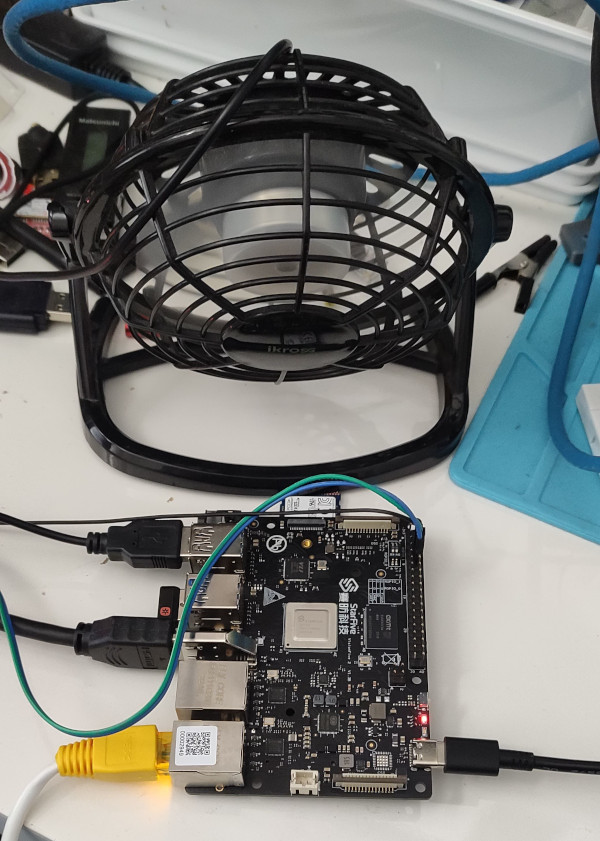 I haven t seen any actual stability problems, but I wouldn t want to run for any length of time like that. I ve ordered a heatsink and also realised that the board supports a Raspberry Pi style PoE Hat , so I ve got one of those that includes a fan ordered (I am a complete convert to PoE especially for small systems like this).
With the desk fan setup I ve been able to run the board for extended periods under load (I did a full recompile of the Debian 6.1.12-1 kernel package and it took about 10 hours). The M.2 slot is unfortunately only a single PCIe v2 lane, and my testing topped out at about 180MB/s. IIRC that is about half what the slot should be capable of, and less than a 10th of what the SSD can do. Ethernet testing with iPerf3 sustained about 941Mb/s, so basically maxing out the port. The board as a whole isn t going to set any speed records, but it s perfectly usable, and pretty impressive for the price point.
On the Debian side I ve not hit any surprises. There s work going on to move RISC-V to a proper release architecture, and I m hoping to be able to help out with that, but the version of unstable I installed from the ports infrastructure has looked just like any other Debian install. Which is what you want. And that pretty much sums up my overall experience of the VisionFive 2; it s not noticeably different than any other single board computer. That s a good thing, FWIW, and once the kernel support lands properly upstream (it ll be post 6.3 at least it seems) it ll be a boring mainline supported platform that just happens to be RISC-V.
I haven t seen any actual stability problems, but I wouldn t want to run for any length of time like that. I ve ordered a heatsink and also realised that the board supports a Raspberry Pi style PoE Hat , so I ve got one of those that includes a fan ordered (I am a complete convert to PoE especially for small systems like this).
With the desk fan setup I ve been able to run the board for extended periods under load (I did a full recompile of the Debian 6.1.12-1 kernel package and it took about 10 hours). The M.2 slot is unfortunately only a single PCIe v2 lane, and my testing topped out at about 180MB/s. IIRC that is about half what the slot should be capable of, and less than a 10th of what the SSD can do. Ethernet testing with iPerf3 sustained about 941Mb/s, so basically maxing out the port. The board as a whole isn t going to set any speed records, but it s perfectly usable, and pretty impressive for the price point.
On the Debian side I ve not hit any surprises. There s work going on to move RISC-V to a proper release architecture, and I m hoping to be able to help out with that, but the version of unstable I installed from the ports infrastructure has looked just like any other Debian install. Which is what you want. And that pretty much sums up my overall experience of the VisionFive 2; it s not noticeably different than any other single board computer. That s a good thing, FWIW, and once the kernel support lands properly upstream (it ll be post 6.3 at least it seems) it ll be a boring mainline supported platform that just happens to be RISC-V.
 Hi friends!
I haven t written in a while. I ve been caught up in work. But between working, I ve put together some new equipment in a couple of new racks. I bought an
Hi friends!
I haven t written in a while. I ve been caught up in work. But between working, I ve put together some new equipment in a couple of new racks. I bought an  In my four most recent posts, I went over the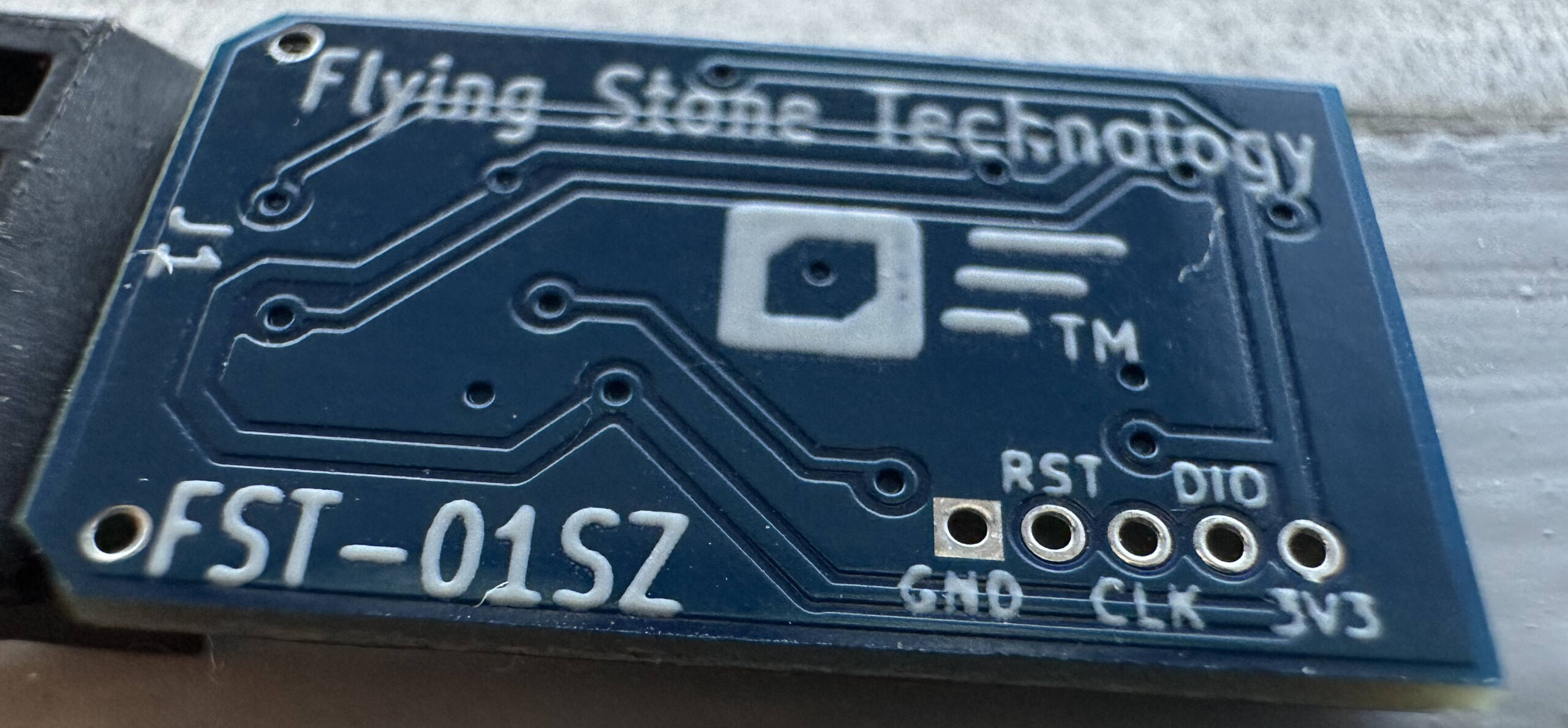
 I had bought a Thinkpad E470 laptop back in 2018 which was lying unused for
quite some time. Recently when I wanted to use it, I found that the keyboard is
not working, especially some keys and after some time the laptop will hang in
Lenovo boot screen. I came back to Bangalore almost after 2 years from my
hometown (WFH due to Covid) and thought it was the right time to get my laptop
back to normal working state. After getting the keyboard replaced I noticed that
1TB HDD is no longer fast enough for my taste!. I've to admit I never thought I
would start disliking HDD so quickly thanks to modern SSD based work laptops. So
as a second upgrade I got the HDD removed from my laptop and got a 240G SSD.
Yeah I know its reduction from my original size but I intend to continue using
my old HDD via USB SATA enclosure as an external HDD which can house the extra
data which I need to save.
So now that I've a SSD I need to install Debian Unstable again on it and this is
where I tried something new. My colleague (name redacted on request) suggested
to me use GRML live CD and install Debian via debootstrap. And after giving a
thought I decided to try this out. Some reason for going ahead with this are
listed below
I had bought a Thinkpad E470 laptop back in 2018 which was lying unused for
quite some time. Recently when I wanted to use it, I found that the keyboard is
not working, especially some keys and after some time the laptop will hang in
Lenovo boot screen. I came back to Bangalore almost after 2 years from my
hometown (WFH due to Covid) and thought it was the right time to get my laptop
back to normal working state. After getting the keyboard replaced I noticed that
1TB HDD is no longer fast enough for my taste!. I've to admit I never thought I
would start disliking HDD so quickly thanks to modern SSD based work laptops. So
as a second upgrade I got the HDD removed from my laptop and got a 240G SSD.
Yeah I know its reduction from my original size but I intend to continue using
my old HDD via USB SATA enclosure as an external HDD which can house the extra
data which I need to save.
So now that I've a SSD I need to install Debian Unstable again on it and this is
where I tried something new. My colleague (name redacted on request) suggested
to me use GRML live CD and install Debian via debootstrap. And after giving a
thought I decided to try this out. Some reason for going ahead with this are
listed below







 As I mentioned
  This is my report from the Netfilter Workshop 2022. The event was held on 2022-10-20/2022-10-21 in Seville, and the venue
was the offices of
This is my report from the Netfilter Workshop 2022. The event was held on 2022-10-20/2022-10-21 in Seville, and the venue
was the offices of  The second day was opened by Florian Westphal (Netfilter coreteam member and Red Hat engineer). Florian has been
trying to improve nftables performance in kernels with RETPOLINE mitigations enabled. He commented that several
workarounds have been collected over the years to avoid the performance penalty of such mitigations.
The basic strategy is to avoid function indirect calls in the kernel.
Florian also described how BPF programs work around this more effectively. And actually, Florian tried translating
The second day was opened by Florian Westphal (Netfilter coreteam member and Red Hat engineer). Florian has been
trying to improve nftables performance in kernels with RETPOLINE mitigations enabled. He commented that several
workarounds have been collected over the years to avoid the performance penalty of such mitigations.
The basic strategy is to avoid function indirect calls in the kernel.
Florian also described how BPF programs work around this more effectively. And actually, Florian tried translating
 Finally, after many interesting debates over two days, the workshop ended. We all agreed on the need for extending
it to 3 days next time, since 2 days feel too intense and too short for all the topics worth discussing.
That s all on my side! I really enjoyed this Netfilter workshop round.
Finally, after many interesting debates over two days, the workshop ended. We all agreed on the need for extending
it to 3 days next time, since 2 days feel too intense and too short for all the topics worth discussing.
That s all on my side! I really enjoyed this Netfilter workshop round.


 This entry explains how I have configured a linux bridge,