Search Results: "noop"

29 August 2017

Jeremy Bicha: GNOME Tweaks 3.25.91

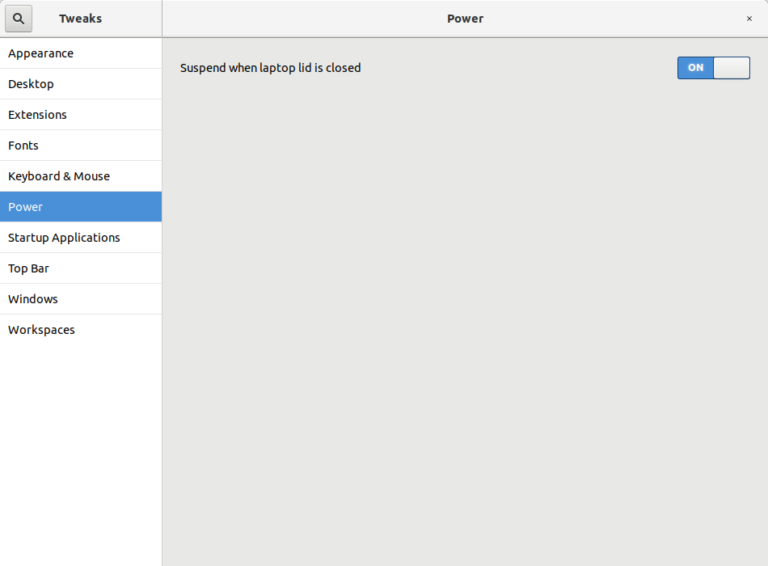
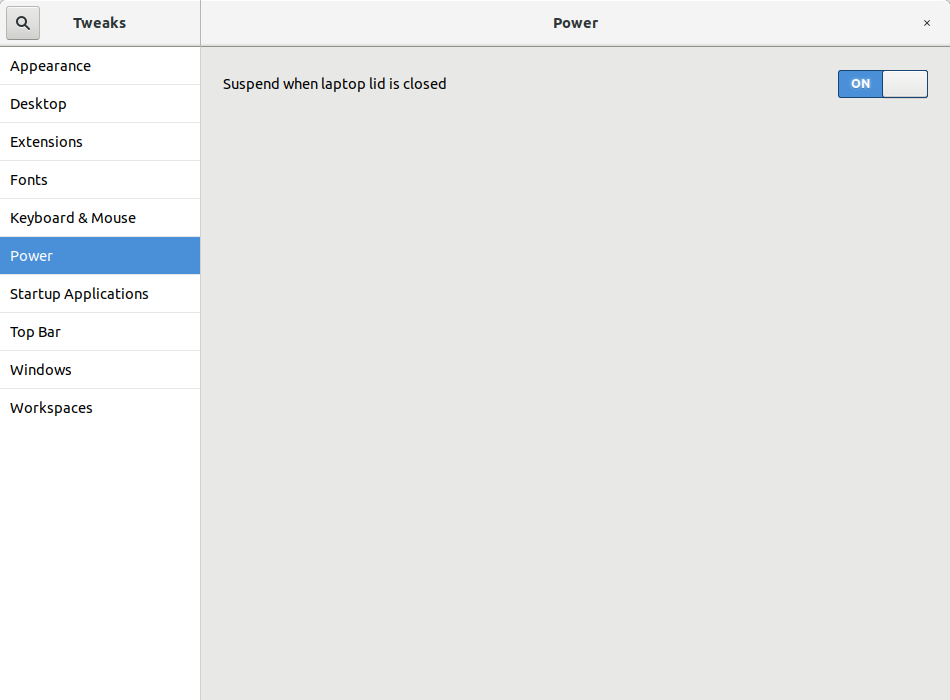
The GNOME 3.26 release cycle is in its final bugfix stage before release. Here s a look at what s new in GNOME Tweaks since my last post. I ve heard people say that GNOME likes to remove stuff. If that were true, how would there be anything left in GNOME? But maybe it s partially true. And maybe it s possible for removals to be a good thing? Removal #1: Power Button Settings The Power page in Tweaks 3.25.91 looks a bit empty. In previous releases, the Tweaks app had a When the Power button is pressed setting that nearly duplicated the similar setting in the Settings app (gnome-control-center). I worked to restore support for Power Off as one of its options. Since this is now in Settings 3.25.91, there s no need for it to be in Tweaks any more. Removal #2: Hi-DPI Settings GNOME Tweaks offered a basic control to scale windows 2x for Hi-DPI displays. More advanced support is now in the Settings app. I suspect that fractional scaling won t be supported in GNOME 3.26 but it s something to look forward to in GNOME 3.28! Removal #3 Global Dark Theme I am announcing today that one of the oldest and popular tweaks will be removed from Tweaks 3.28 (to be released next March). Global Dark Theme is being removed because: Adwaita now has a separate Adwaita Dark theme. Arc has 2 different dark variations. Therefore, if you are a theme developer, you have about 6-7 months to offer a dark version of your theme. The dark version can be distributed the same way as your regular version. Removal #4 Some letters from our name In case you haven t noticed, GNOME Tweak Tool is now GNOME Tweaks. This better matches the GNOME app naming style. Thanks Alberto Fanjul for this improvement! For other details of what s changed including a helpful scrollbar fix from Ant nio Fernandes, see the NEWS file.
16 August 2017

Ross Gammon: My Debian & Ubuntu work from April to mid-August 2017

Okay, so I have been slack with my blogging again. I have been travelling around Europe with work quite a bit, had a short holiday over Easter in Denmark, and also had 3 weeks of Summer Holiday in Germany. Debian
  • Tidied up the packaging and tried building the latest version of libdrumstick, but tests had been added to the package by upstream which were failing. I still need to get back and investigate that.
  • Updated node-seq (targeted at experimental due to the Debian Stretch release freeze) and asked for sponsorship (as I did not have DM rights for it yet).
  • Uploaded the latest version of abcmidi (also to experimental), and again.
  • Updated node-tmp to the latest version and uploaded to experimental.
  • Worked some more on bluebird RFP, but getting errors when running tests. I still haven t gone back to investigate that.
  • Updated node-coffeeify to the latest version and uploaded to experimental.
  • Uploaded the latest version of node-os-tmpdir (also to experimental).
  • Uploaded the latest version of node-concat-stream (also to experimental).
  • After encouragement from several Debian Developers, I applied to become a full Debian Developer. Over the summer months I worked with Santiago as my Application Manager and answered questions about working in the Debian Project.
  • A web vulnerability was identified in node-concat-stream, so I prepared a fix to the version in unstable, uploaded it to unstable, and submitted a unblock request bug so that it would be fixed in the coming Debian Stretch release.
  • Debian 10 (Stretch) was released! Yay!
  • Moved abcmidi from experimental to unstable, adding an autopkgtest at the same time.
  • Moved node-concat-stream from experimental to unstable. During the process I had to take care of the intermediate upload to stretch (on a separate branch) because of the freeze.
  • Moved node-tmp to unstable from experimental.
  • Moved node-os-tmpdir from experimental to unstable.
  • Filed a removal bug for creepy, which seems to be unmaintained upstream these days. Sent my unfinished Qt4 to Qt5 porting patches upstream just in case!
  • Uploaded node-object-inspect to experimental to check the reverse dependencies, then moved it to unstable. Then a new upstream version came out which is now in experimental waiting for a retest of reverse dependencies.
  • Uploaded the latest version of gramps (4.2.6).
  • Uploaded a new version of node-cross-spawn to experimental.
  • Discovered that I had successfully completed the DD application process and I was now a Debian Developer. I celebrated by uploading the Debian Multimedia Blends package to the NEW queue, which I was not able to do before!
  • Tweaked and uploaded the node-seq package (with an RC fix) which had been sitting there because I did not have DM rights to the package. It is not an important package anyhow, as it is just one of the many dependencies that need to be packaged for Browserify.
  • Packaged and uploaded the latest node-isarray directly to unstable, as the changes seemed harmless.
  • Prepared and uploaded the latest node-js-yaml to experimental.
  • Did an update to the Node packaging Manual now that we are allowed to use node as the executable in Debian instead of nodejs which caused us to do a lot of patching in the past to get node packages working in Debian.
Ubuntu
  • Did a freeze exception bug for ubuntustudio-controls, but we did not manage to get it sponsored before the Ubuntu Studio Zesty 17.04 release.
  • Investigated why Ardour was not migrating from zesty-proposed, but I couldn t be sure of what was holding it up. After getting some help from the Developer s mailing list, I prepared no change rebuild of pd-aubio which was sponsored by Steve Langasek after a little tweak. This did the trick.
  • Wrote to the Ubuntu Studio list asking for support for testing the Ubuntu Studio Zesty release, as I would be on holiday in the lead up to the release. When I got back, I found the release had gone smoothly. Thanks team!
  • Worked on some blueprints for the next Ubuntu Studio Artful release.
  • As Set no longer has enough spare time to work on Ubuntu Studio, we had a meeting on IRC to decide what to do. We decided that we should set up a Council like Xubuntu have. I drafted an announcement, but we still have not gone live with it yet. Maybe someone will have read this far and give us a push (or help).
  • Did a quick test of Len s ubuntustudio-controls re-write (at least the GUI bits). We better get a move on if we want this to be part of Artful!
  • Tested ISO for Ubuntu Studio Xenial 16.04.3 point release, and updated the release notes.
  • Started working on a merge of Qjackctl using git-ubuntu for the first time. Had some issues getting going, so I asked the authors for some advice.

3 August 2017

Elena 'valhalla' Grandi: Debian Day in Varese

Debian Day in Varese

I'm stuck home instead of being able to go to DebConf, but that doesn't mean that Debian Day will be left uncelebrated!

Since many of the locals are away for the holidays, we of @Gruppo Linux Como and @LIFO aren't going to organize a full day of celebrations, but at the very least we are meeting for a dinner in Varese, at some restaurant that will be open on that date.

Everybody is welcome: to join us please add your name (nickname or identifier of any kind, as long as it fits in the box) on dudle.inf.tu-dresden.de/debday before thursday, August 10th, so that we can
get a reservation at the restaurant.

4 July 2017

Raphaël Hertzog: My Free Software Activities in June 2017

My monthly report covers a large part of what I have been doing in the free software world. I write it for my donors (thanks to them!) but also for the wider Debian community because it can give ideas to newcomers and it s one of the best ways to find volunteers to work with me on projects that matter to me. Debian LTS I was allocated 12 hours to work on security updates for Debian 7 Wheezy. During this time I did the following: Debian packaging Django. A last-minute update to Django in stretch before the release, I uploaded python-django 1:1.10.7-2 fixing two bugs (among which one was release critical) and filed the corresponding unblock request. schroot. I tried to prepare another last-minute update, this time for schroot. The goal was to fix the bash completion (#855283) and a problem encountered by the Debian sysadmins (#835104). Those issues are fixed in unstable/testing but my unblock request got turned into a post-release stretch update because the release managers wanted to give the package some more testing time in unstable. Even now, they are wondering whether they should accept the new systemd service file. live-build, live-config and live-boot. On live-build, I merged a patch to add a keyboard shortcut for the advanced option menu entry (#864386). For live-config, I uploaded version 5.20170623 to fix a broken boot sequence when you have multiple partitions (#827665). For live-boot, I uploaded version 1:20170623 to fix the path to udevadm (#852570) and avoiding a file duplication in the initrd (864385). zim. I packaged a release candidate (0.67~rc2) in Debian Experimental and started to use it. I quickly discovered two annoying regressions that I reported upstream (here and here). logidee-tools. This is a package I authored a long time ago and that I m no longer actively using. It does still work but I sometimes wonder if it still has real users. Anyway I wanted to quickly replace the broken dependency on pgf but I ended up converting the Subversion repository to Git and I also added autopkgtests. At least those tests will inform me when the package no longer works otherwise I would not notice since I m no longer using it. Bugs filed. I filed #865531 on lintian because the new check testsuite-autopkgtest-missing is giving some bad advice and probably does its check in a bad way. I also filed #865541 on sbuild because sbuild --apt-distupgrade can under some circumstances remove build-essential and break the build chroot. I filed an upstream ticket on publican to forward the request I received in #864648. Sponsorship. I sponsored a jessie update for php-tcpdf (#814030) and dolibarr 5.0.4+dfsg3-1 for unstable. I sponsored many other packages, but all in the context of the pkg-security team. pkg-security work Now that the Stretch freeze is over, the team became more active again and I have been overwhelmed with the number of packages to review and sponsor: I also updated hashcat to a new upstream release (3.6.0) and had to discuss with upstream about its weird versioning change. Looks like we will have to introduce an epoch to be able to get back in sync with upstream.  To be able to get in sync with Kali, I introduced an hashcat-meta source package (in contrib) providing hashcat-nvidia to make it easy to install hashcat for owners of NVidia hardware. Misc stuff Distro Tracker. I merged a small CSS fix from Aur lien Couderc (#858101) and added a missing constraint on the data model (found through an unexpected traceback that I received by email). I also updated the list of repositories shortly after the stretch release (#865070). Salt formulas. As part of my Kali work, I did setup a build daemon on Debian stretch host and I encountered a couple of issues with my Salt rules. I reported one against salt-formula (here) and I pushed updates for debootstrap-formula, apache-formula and schroot-formula. Thanks See you next month for a new summary of my activities.
No comment Liked this article? Click here. My blog is Flattr-enabled.

23 June 2017

Elena 'valhalla' Grandi: On brokeness, the live installer and being nice to people

On brokeness, the live installer and being nice to people

This morning I've read this blog.einval.com/2017/06/22#tro.

I understand that somebody on the internet will always be trolling, but I just wanted to point out:

* that the installer in the old live images has been broken (for international users) for years
* that nobody cared enough to fix it, not even the people affected by it (the issue was reported as known in various forums, but for a long time nobody even opened an issue to let the *developers* know).

Compare this with the current situation, with people doing multiple tests as the (quite big number of) images were being built, and a fix released soon after for the issues found.

I'd say that this situation is great, and that instead of trolling around we should thank the people involved in this release for their great job.

19 June 2017

Jeremy Bicha: GNOME Tweak Tool 3.25.3

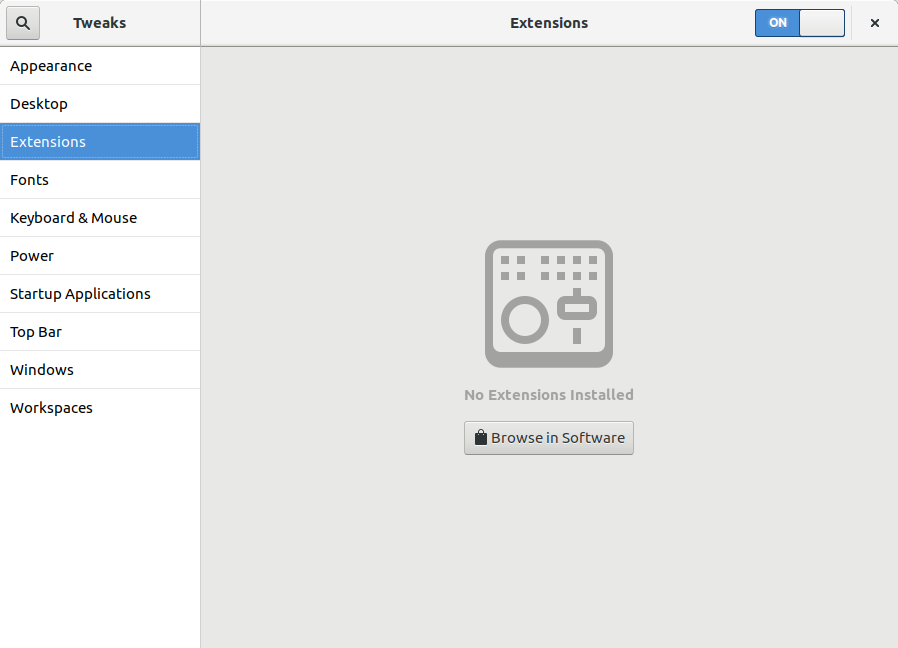
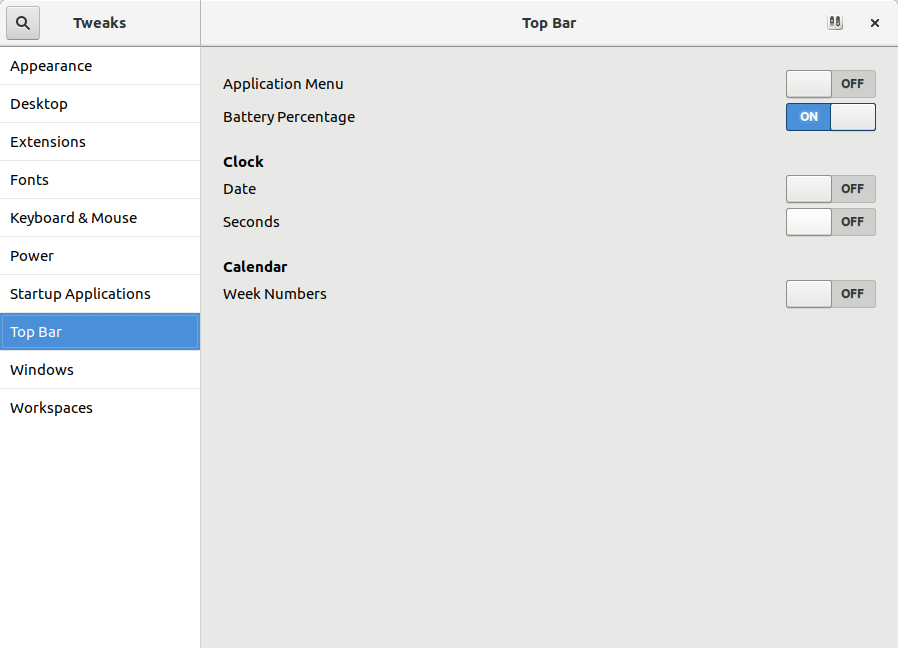
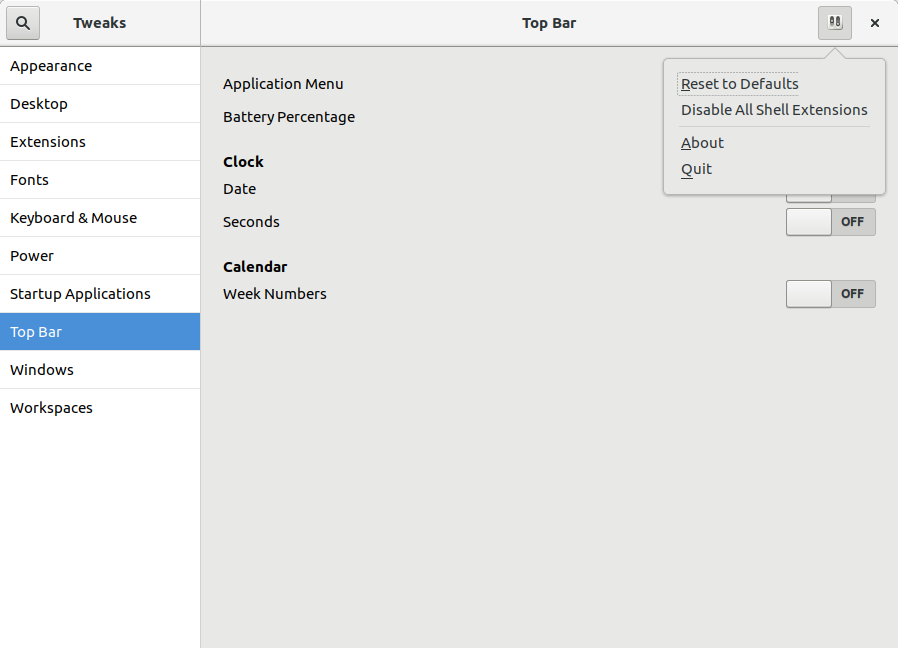
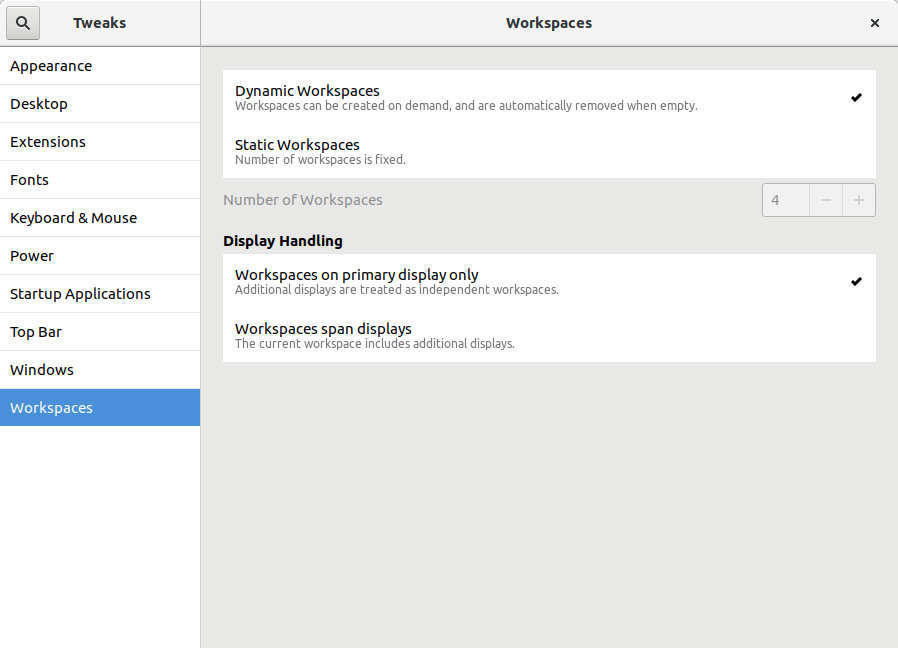
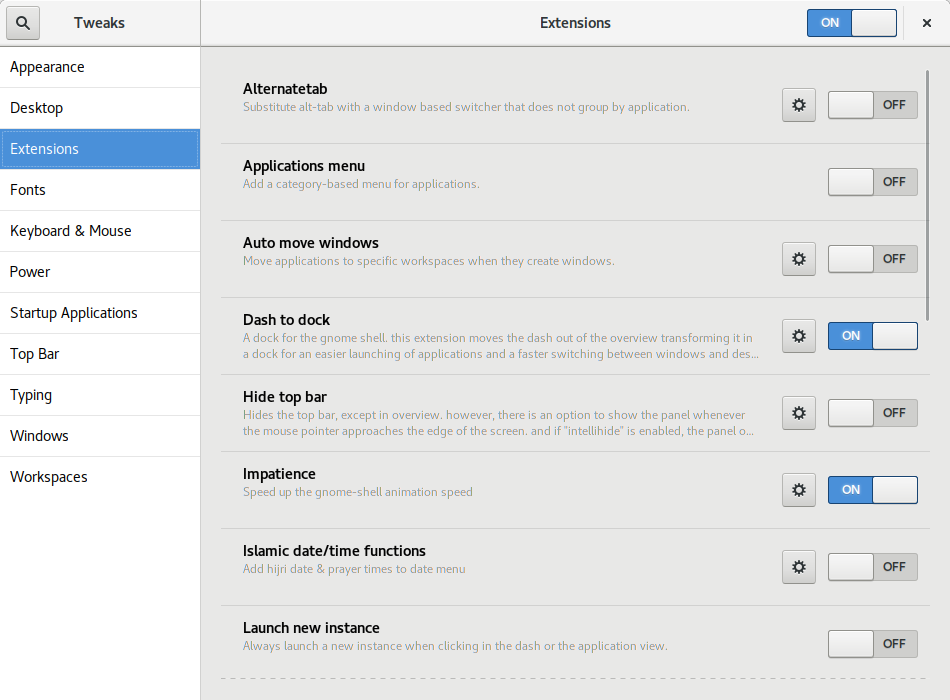
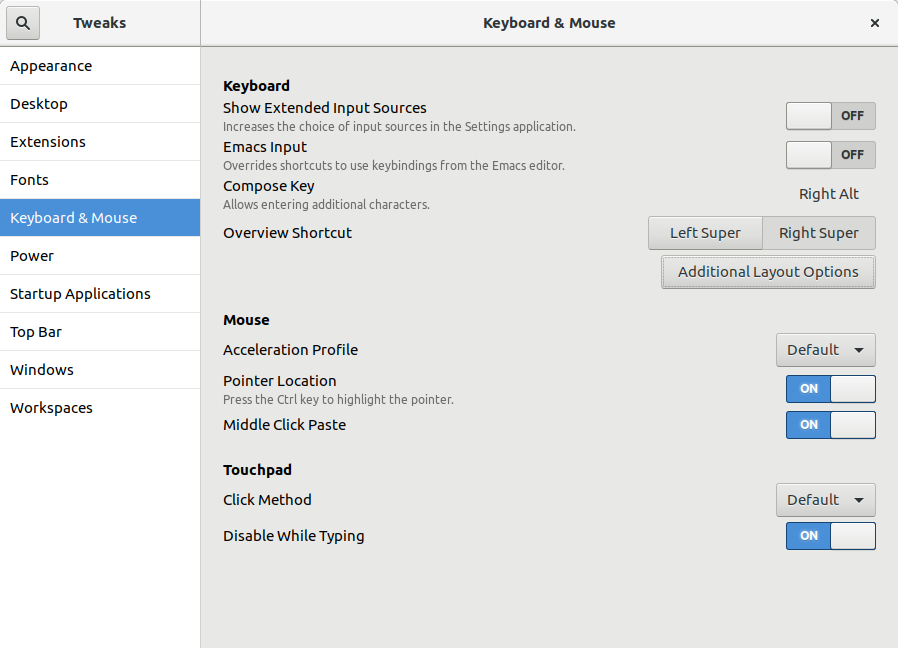
Today I released the second development snapshot (3.25.3) of what will be GNOME Tweak Tool 3.26. I consider the initial User Interface (UI) rework proposed by the GNOME Design Team to be complete now. Every page in Tweak Tool has been updated, either in this snapshot or the previous development snapshot. The hard part still remains: making the UI look as good as the mockups. Tweak Tool s backend makes this a bit more complicated than usual for an app like this. Here are a few visual highlights of this release. The Typing page has been moved into an Additional Layout Options dialog in the Keyboard & Mouse page. Also, the Compose Key option has been given its own dialog box. Florian M llner added content to the Extensions page that is shown if you don t have any GNOME Shell extensions installed yet. A hidden feature that GNOME has had for a long time is the ability to move the Application Menu from the GNOME top bar to a button in the app s title bar. This is easy to enable in Tweak Tool by turning off the Application Menu switch in the Top Bar page. This release improves how well that works, especially for Ubuntu users where the required hidden appmenu window button was probably not pre-configured. Some of the ComboBoxes have been replaced by ListBoxes. One example is on the Workspaces page where the new design allows for more information about the different options. The ListBoxes are also a lot easier to select than the smaller ComboBoxes were. For details of these and other changes, see the commit log or the NEWS file. GNOME Tweak Tool 3.26 will be released alongside GNOME 3.26 in mid-September.

Shirish Agarwal: Seizures, Vigo and bi-pedal motion

Dear all, an update is in order. While talking to physiotherapist couple of days before, came to know the correct term to what was I experiencing. I had experienced convulsive seizure , spasms being a part of it. Reading the wikipedia entry and the associated links/entries it seems I am and was very very lucky. The hospital or any hospital is a very bad bad place. I have seen all horror movies which people say are disturbing but have never been disturbed as much as I was in hospital. I couldn t help but hear people s screams and saw so many cases which turned critical. At times it was not easy to remain positive but dunno from where there was a will to live which pushed me and is still pushing me. One of the things that was painful for a long time were the almost constant stream of injections that were injected in me. It was almost an afterthought that the nurse put a Vigo in me. Similar to the Vigo injected in me. While the above medical device is similar, mine had a cross, the needle was much shorter and is injected into the vein. After that all injections are injected into that including common liquid which is salt,water and something commonly given to patients to stabilize first. I am not remembering the name atm. I also had a urine bag which was attached to my penis in a non-invasive manner. Both my grandfather and grandma used to cry when things went wrong while I didn t feel any pain but when the urine bag was disattached and attached again, so seems things have improved there. I was also very conscious of getting bed sores as both my grandpa and grandma had them when in hospital. As I had no strength I had to beg. plead do everything to make sure that every few hours I was turned from one side to other. I also had an air bag which is supposed to alleviate or relief this condition. Constant physiotherapy every day for a while slowly increased my strength and slowly both the vigo and feeding tube put inside my throat was removed. I have no remembrance as to when they had put the feeding tube as it was all rubber and felt bad when it came out. Further physiotherapy helped me crawl till the top of the bed, the bed was around 6 feet in length and and more than enough so I could turn both sides without falling over. Few days later I found I could also sit up using my legs as a lever and that gave confidence to the doctors to remove the air bed so I could crawl more easily. Couple of more days later I stood on my feet for the first time and it was like I had lead legs. Each step was painful but the sense and feeling of independence won over whatever pain was there. I had to endure wet wipes from nurses and ward boys in place of a shower everyday and while they were respectful always it felt humiliating. The first time I had a bath after 2 weeks or something, every part of my body cried and I felt like a weakling. I had thought I wouldn t be able to do justice to the physiotherapy session which was soon after but after the session was back to feeling normal. For a while I was doing the penguin waddle which while painful was also had humor in it. I did think of shooting the penguin waddle but decided against it as I was half-naked most of the time ( the hospital clothes never fit me properly) Cut to today and I was able to climb up and down the stairs on my own and circled my own block, slowly but was able to do it on my own by myself. While I always had a sense of wonderment for bi-pedal motion as well as all other means of transport, found much more respect of walking. I live near a fast food eating joint so I see lot of youngsters posing in different ways with their legs to show interest to their mates. And this I know happens both on the conscious and sub-conscious levels. To be able to see and discern that also put a sense of wonder in nature s creations. All in all, I m probabl6y around 40% independent and still 60% interdependent. I know I have to be patient with myself and those around me and explain to others what I m going through. For e.g. I still tend to spill things and still can t touch-type much. So, the road is long, I can only pray and hope best wishes for anybody who is my condition and do pray that nobody goes through what I went through, especiallly not children. I am also hoping that things like DxtER and range of non-invasive treatments make their way into India and the developing world at large. Anybody who is overweight and is either disgusted or doesn t like the gym route, would recommend doing sessions with a physiotherapist that you can trust. You have to trust that her judgement will push you a bit more and not more that the gains you make are toppled over. I still get dizziness spells while doing therapy but will to break it as I know dizziness doesn t help me. I hope my writings give strength and understanding to either somebody who is going through it, or relatives or/and caregivers so they know the mental status of the person who s going through it. Till later and sorry it became so long. Update I forgot to share this inspirational story from my city which I shared with a friend days ago. Add to that, she is from my city. What it doesn t share is that Triund is a magical place. I had visited once with a friend who had elf ears (he had put on elf ears) and it is kind of place which alchemist talks about, a place where imagination does turn wild and there is magic in the air.
Filed under: Miscellenous Tagged: #air bag, #bed sores, #convulsive epileptic seizure, #crawling, #horror, #humiliation, #nakedness, #penguin waddle, #physiotherapy, #planet-debian, #spilling things, #urine bag, #Vigo medical device

16 June 2017

Elena 'valhalla' Grandi: Travel piecepack v0.1

Travel piecepack v0.1

Immagine/fotosocial.gl-como.it/photos/valha

A www.piecepack.org/ set of generic board game pieces is nice to have around in case of a sudden spontaneous need of gaming, but carrying my full set www.trueelena.org/fantastic/fe takes some room, and is not going to fit in my daily bag.

I've been thinking for a while that an half-size set could be useful, and between yesterday and today I've actually managed to do the first version.

It's (2d) printed on both sides of a single sheet of heavy paper, laminated and then cut, comes with both the basic suites and the playing card expansion and fits in a mint tin divided by origami boxes.

It's just version 0.1 because there are a few issues: first of all I'm not happy with the manual way I used to draw the page: ideally it would have been programmatically generated from the same svg files as the 3d piecepack (with the ability to generate other expansions), but apparently reading paths from an svg and writing it in another svg is not supported in an easy way by the libraries I could find, and looking for it was starting to take much more time than just doing it by hand.

I also still have to assemble the dice; in the picture above I'm just using the ones from the 3d-printed set, but they are a bit too big and only four of them fit in the mint tin. I already have the faces printed, so this is going to be fixed in the next few days.

Source files are available in the same git repository as the 3d-printable piecepack git.trueelena.org/cgit.cgi/3d/, with the big limitation mentioned above; updates will also be pushed there, just don't hold your breath for it :)

15 June 2017

Jeremy Bicha: #newinstretch : Latest WebKitGTK+

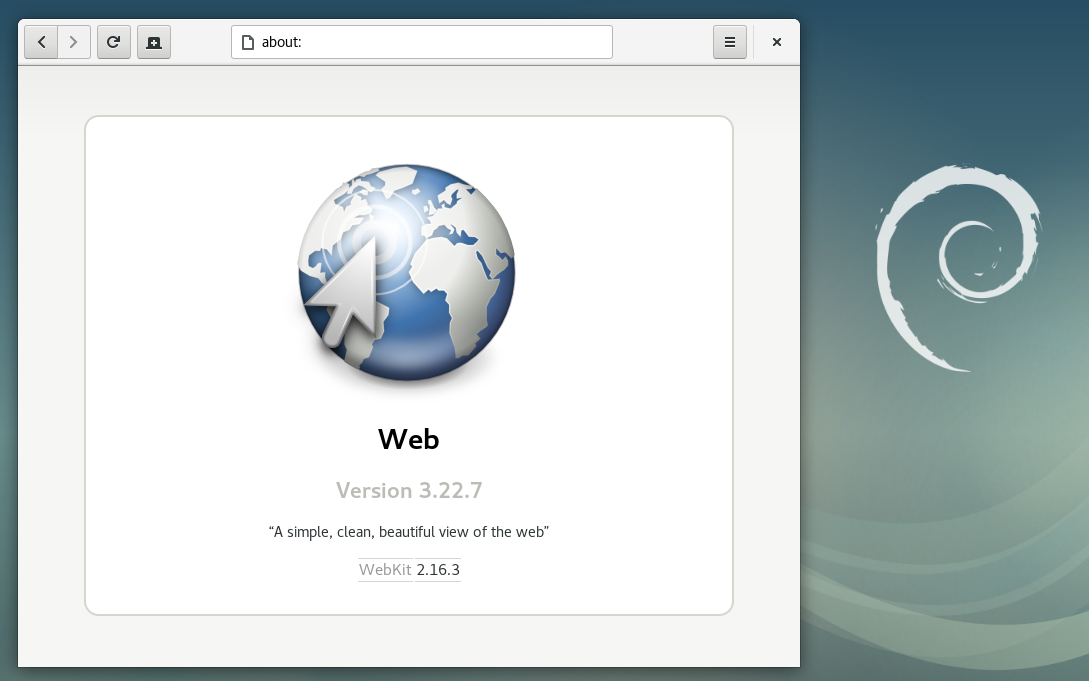
GNOME Web (Epiphany) in Debian 9 "Stretch" Debian 9 Stretch , the latest stable version of the venerable Linux distribution, will be released in a few days. I pushed a last-minute change to get the latest security and feature update of WebKitGTK+ (packaged as webkit2gtk 2.16.3) in before release. Carlos Garcia Campos discusses what s new in 2.16, but there are many, many more improvements since the 2.6 version in Debian 8. Like many things in Debian, this was a team effort from many people. Thank you to the WebKitGTK+ developers, WebKitGTK+ maintainers in Debian, Debian Release Managers, Debian Stable Release Managers, Debian Security Team, Ubuntu Security Team, and testers who all had some part in making this happen. As with Debian 8, there is no guaranteed security support for webkit2gtk for Debian 9. This time though, there is a chance of periodic security updates without needing to get the updates through backports. If you would like to help test the next proposed update, please contact me so that I can help coordinate this.

14 June 2017

Nicolas Dandrimont: DebConf 17 bursaries: update your status now!

TL;DR: if you applied for a DebConf 17 travel bursary, and you haven t accepted it yet, login to the DebConf website and update your status before June 20th or your bursary grant will be gone. *blows dust off the blog* As you might be aware, DebConf 17 is coming soon and it s gonna be the biggest DebConf in Montr al ever. Of course, what makes DebConf great is the people who come together to work on Debian, share their achievements, and help draft our cunning plans to take over the world. Also cheese. Lots and lots of cheese. To that end, the DebConf team had initially budgeted US$40,000 for travel grants ($30,000 for contributors, $10,000 for diversity and inclusion grants), allowing the bursaries team to bring people from all around the world who couldn t have made it to the conference. Our team of volunteers rated the 188 applications, we ve made a ranking (technically, two rankings : one on contribution grounds and one on D&I grounds), and we finally sent out a first round of grants last week. After the first round, the team made a new budget assessment, and thanks to the support of our outstanding sponsors, an extra $15,000 has been allocated for travel stipends during this week s team meeting, with the blessing of the DPL. We ve therefore been able to send a second round of grants today. Now, if you got a grant, you have two things to do : you need to accept your grant, and you need to update your requested amount. Both of those steps allow us to use our budget more wisely: having grants expire frees money up to get more people to the conference earlier. Having updated amounts gives us a better view of our overall budget. (You can only lower your requested amount, as we can t inflate our budget) Our system has sent mails to everyone, but it s easy enough to let that email slip (or to not receive it for some reason). It takes 30 seconds to look at the status of your request on the DebConf 17 website, and even less to do the few clicks needed for you to accept the grant. Please do so now! OK, it might take a few minutes if your SSO certificate has expired and you have to look up the docs to renew it. The deadline for the first round of travel grants (which went out last week) is June 20th. The deadline for the second round (which went out today) is June 24th. If somehow you can t login to the website before the deadline, the bursaries team has an email address you can use. We want to send out a third round of grants on June 25th, using the money people freed up: our current acceptance ratio is around 40%, and a lot of very strong applications have been deferred. We don t want them to wait up until July to get a definitive answer, so thanks for helping us! bient t Montr al !
7 June 2017

Jeremy Bicha: GNOME Tweak Tool 3.25.2

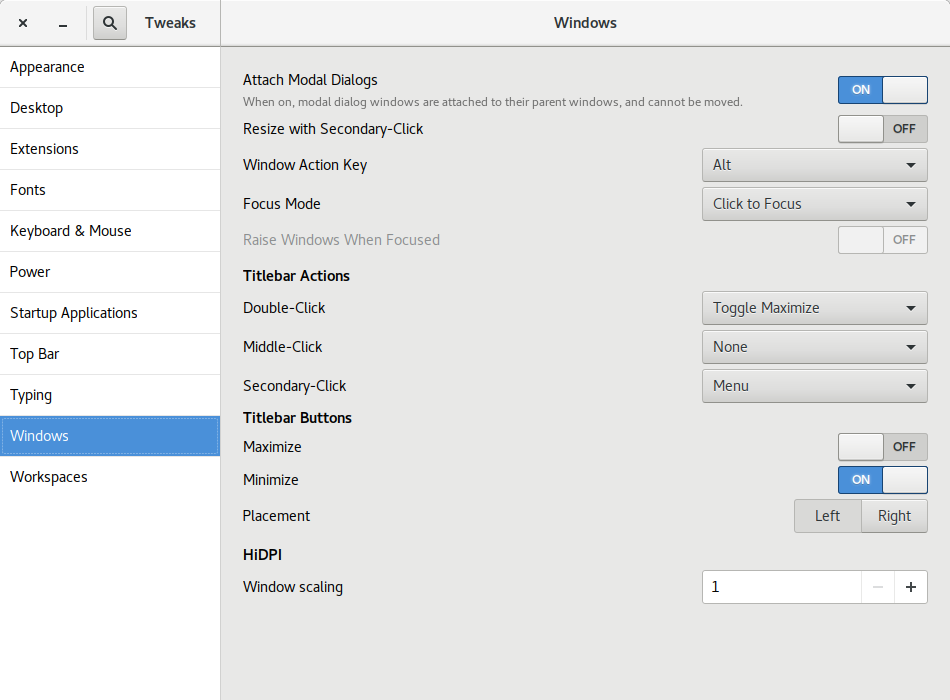
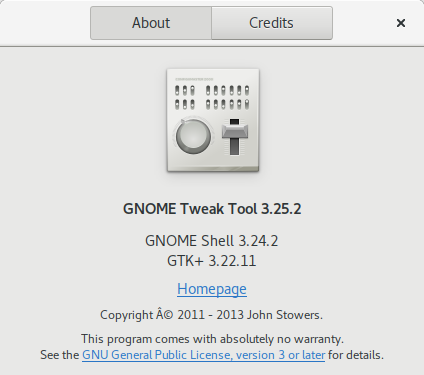
Today, I released the first development snapshot (3.25.2) of what will be GNOME Tweak Tool 3.26. Many of the panels have received UI updates. Here are a few highlights. Before this version, Tweak Tool didn t report its own version number on its About dialog! Also, as far as I know, there was no visible place in the default GNOME install for you to see what version of GTK+ is on your system. Especially now that GNOME and GTK+ releases don t share the same version numbers any more, I thought it was useful information to be in a tweak app. Florian M llner updated the layout of the GNOME Shell Extensions page: Rui Matos added a new Disable While Typing tweak to the Touchpad section. Alberto Fanjul added a Battery Percentage tweak for GNOME Shell s top bar. I added a Left/Right Placement tweak for the window buttons (minimize, maximize, close) . This screenshot shows a minimize and close button on the left. I think it s well known that Ubuntu s window buttons have been on the left for years but GNOME has kept the window buttons on the right. In fact, the GNOME 3 default is a single close button (see the other screenshots). For Unity (Ubuntu s default UI from 2011 until this year), it made sense for the buttons to be on the left because of how Unity s menu bar worked (the right side was used by the indicator system status menus). I don t believe the Ubuntu Desktop team has decided yet which side the window buttons will be on or which buttons there will be. I m ok with either side but I think I have a slight preference towards putting them on the right like Windows does. One reason I m not too worried about the Ubuntu default is that it s now very easy to switch them to the other side! If Ubuntu includes a dock like the excellent Dash to Dock in the default install, I think it makes sense for Ubuntu to add a minimize button by default. My admittedly unusual opinion is that there s no need for a maximize button.
  1. For one thing, GNOME is thoroughly tested with one window button; adding a second one shouldn t be too big of a deal, but maybe adding a 3rd button might not work as well with the design of some apps.
  2. When I maximize an app, I either double-click the titlebar or drag the app to the top of the screen so a maximize button just isn t needed.
  3. A dedicated maximize just doesn t make as much sense when there is more than one possible maximization state. Besides traditional maximize, there is now left and right semi-maximize. There s even a goal for GNOME 3.26 to support quarter-tiling .
Other Changes and Info

31 May 2017

Craig Small: The sudo tty bug and procps

There have been recent reports of a security bug in sudo (CVE-2017-1000367) where you can fool sudo into thinking what controlling terminal it is running on to bypass its security checks. One of the first things I thought of was, is procps vulnerable to the same bug? Sure, it wouldn t be a security bypass, but it would be a normal sort of bug. A lot of programs in procps have a concept of a controlling terminal, or the TTY field for either viewing or filtering, could they be fooled into thinking the process had a different controlling terminal? Was I going to be in the same pickle as the sudo maintainers? The meat between the stat parsing sandwich? Can I find any more puns related somehow to the XKCD comic? TLDR: No. How to find the tty Most ways of finding what the controlling terminal for a process is on are very similar. The file /proc//stat is a one-liner pseudo file that the kernel creates on access that has information about the particular process. A typical file would look like:
20209 (bash) S 14762 20209 20209 34822 20209 4194304 32181 4846307 625 1602 66 3
0 16265 4547 20 0 1 0 139245105 25202688 1349 18446744073709551615 4194304 52421
32 140737059557984 0 0 0 0 3670020 1266777851 1 0 0 17 1 0 0 280 0 0 7341384 738
8228 39092224 140737059564618 140737059564628 140737059564628 140737059569646 0
The first field is the PID, the second the process name (which may be different than the command line, but that s another story), then skip along to field #7 which in this case is 34822. Also notice the process name is in brackets; that is important. So 34822, how do we figure out what device this is? The number is the major and minor device numbers of the controlling terminal. 38422 in hex is 8806, the device has a major number of 88h or 136 and a minor number of 06. Most programs just scan the usual device directories until they find a match (which is basically how procps does it). Device 136,6 is /dev/pts/6
crw--w---- 1 user tty 136, 6 May 29 16:20 /dev/pts/6
$ ps -o tty,cmd 20209
TT CMD
pts/6 /bin/bash
The Bug The process of taking the raw stat file and having a bunch of useful fields is called parsing. The bug in sudo was due to how they parsed the file. The stat file is a space-delimited file. The program scanned the file, character by character, until it came across the 6th space. The problem is, you can put spaces in your command and fool sudo. Once you know that, you can make sudo think the program is running on any (or at least a different) controlling terminal. The bug reporters then used some clever symlinking and race techniques to then get root. What about procps? The parsing of the current (as of writing) procps on the stat file is found in proc/readproc.c within the function stat2proc(). However, it is not just a simple sscanf or something that runs along the line looking for spaces. To find the command, the program does the following:
 S = strchr(S, '(') + 1;
 tmp = strrchr(S, ')');
 num = tmp - S;
 if(unlikely(num >= sizeof P->cmd)) num = sizeof P->cmd - 1;
 memcpy(P->cmd, S, num);
 P->cmd[num] = '\0';
 S = tmp + 2; // skip ") "
The sscanf then comes after we have found the command, using the variable S, to fill in the other fields including the controlling terminal device numbers. procps library looks for the command within brackets. So if your program has spaces in it, it is still found. By using a strrchr (effectively, find the last) you cannot fool it with a bracket in the command either. So procps is not vulnerable to this sort of trickery. Incidently, the fix for the sudo bug now uses strrchr for a close bracket, so it solves the problem the same way. The check for the close bracket appeared in procps 3.1.4 back in 2002, though the stat2proc function was warning about odd named processes before then. As it says in the 2002 change:
Reads /proc/*/stat files, being careful not to trip over processes with names like :-) 1 2 3 4 5 6 .
That s something we can all agree on!

21 May 2017

Elena 'valhalla' Grandi: Modern XMPP Server

Modern XMPP Server

I've published a new HOWTO on my website www.trueelena.org/computers/ho:

www.enricozini.org/blog/2017/d already wrote about the Why (and the What, Who and When), so I'll just quote his conclusion and move on to the How.

I now have an XMPP setup which has all the features of the recent fancy chat systems, and on top of that it runs, client and server, on Free Software, which can be audited, it is federated and I can self-host my own server in my own VPS if I want to, with packages supported in Debian.


How

I've decided to install prosody.im/, mostly because it was recommended by the RTC QuickStart Guide rtcquickstart.org/; I've heard that similar results can be reached with www.ejabberd.im/ and other servers.

I'm also targeting www.debian.org/ stable (+ backports); as I write this is jessie; if there are significant differences I will update this article when I will upgrade my server to stretch. Right now, this means that I'm using prosody 0.9 (and that's probably also the version that will be available in stretch).

Installation and prerequisites

You will need to enable the backports.debian.org/ repository and then install the packages prosody and prosody-modules.

You also need to setup some TLS certificates (I used Let's Encrypt letsencrypt.org/); and make them readable by the prosody user; you can see Chapter 12 of the RTC QuickStart Guide rtcquickstart.org/guide/multi/ for more details.

On your firewall, you'll need to open the following TCP ports:


The latter two are needed to enable some services provided via http(s), including rich media transfers.

With just a handful of users, I didn't bother to configure LDAP or anything else, but just created users manually via:

prosodyctl adduser alice@example.org

In-band registration is disabled by default (and I've left it that way, to prevent my server from being used to send spim en.wikipedia.org/wiki/Messagin).

prosody configuration

You can then start configuring prosody by editing /etc/prosody/prosody.cfg.lua and changing a few values from the distribution defaults.

First of all, enforce the use of encryption and certificate checking both for client2server and server2server communications with:


c2s_require_encryption = true
s2s_secure_auth = true


and then, sadly, add to the whitelist any server that you want to talk to and doesn't support the above:


s2s_insecure_domains = "gmail.com"


virtualhosts

For each virtualhost you want to configure, create a file /etc/prosody/conf.avail/chat.example.org.cfg.lua with contents like the following:


VirtualHost "chat.example.org"
enabled = true
ssl =
key = "/etc/ssl/private/example.org-key.pem";
certificate = "/etc/ssl/public/example.org.pem";


For the domains where you also want to enable MUCs, add the follwing lines:


Component "conference.chat.example.org" "muc"
restrict_room_creation = "local"


the "local" configures prosody so that only local users are allowed to create new rooms (but then everybody can join them, if the room administrator allows it): this may help reduce unwanted usages of your server by random people.

You can also add the following line to enable rich media transfers via http uploads (XEP-0363):


Component "upload.chat.example.org" "http_upload"

The defaults are pretty sane, but see modules.prosody.im/mod_http_up for details on what knobs you can configure for this module

Don't forget to enable the virtualhost by linking the file inside /etc/prosody/conf.d/.

additional modules

Most of the other interesting XEPs are enabled by loading additional modules inside /etc/prosody/prosody.cfg.lua (under modules_enabled); to enable mod_something just add a line like:


"something";

Most of these come from the prosody-modules package (and thus from modules.prosody.im/ ) and some may require changing when prosody 0.10 will be available; when this is the case it is mentioned below.


@Gruppo Linux Como @LIFO

3 May 2017

Vincent Bernat: VXLAN & Linux

VXLAN is an overlay network to carry Ethernet traffic over an existing (highly available and scalable) IP network while accommodating a very large number of tenants. It is defined in RFC 7348. Starting from Linux 3.12, the VXLAN implementation is quite complete as both multicast and unicast are supported as well as IPv6 and IPv4. Let s explore the various methods to configure it. VXLAN setup To illustrate our examples, we use the following setup: A VXLAN tunnel extends the individual Ethernet segments accross the three bridges, providing a unique (virtual) Ethernet segment. From one host (e.g. H1), we can reach directly all the other hosts in the virtual segment:
$ ping -c10 -w1 -t1 ff02::1%eth0
PING ff02::1%eth0(ff02::1%eth0) 56 data bytes
64 bytes from fe80::5254:33ff:fe00:8%eth0: icmp_seq=1 ttl=64 time=0.016 ms
64 bytes from fe80::5254:33ff:fe00:b%eth0: icmp_seq=1 ttl=64 time=4.98 ms (DUP!)
64 bytes from fe80::5254:33ff:fe00:9%eth0: icmp_seq=1 ttl=64 time=4.99 ms (DUP!)
64 bytes from fe80::5254:33ff:fe00:a%eth0: icmp_seq=1 ttl=64 time=4.99 ms (DUP!)
--- ff02::1%eth0 ping statistics ---
1 packets transmitted, 1 received, +3 duplicates, 0% packet loss, time 0ms
rtt min/avg/max/mdev = 0.016/3.745/4.991/2.152 ms

Basic usage The reference deployment for VXLAN is to use an IP multicast group to join the other VTEPs:
# ip -6 link add vxlan100 type vxlan \
>   id 100 \
>   dstport 4789 \
>   local 2001:db8:1::1 \
>   group ff05::100 \
>   dev eth0 \
>   ttl 5
# brctl addbr br100
# brctl addif br100 vxlan100
# brctl addif br100 vnet22
# brctl addif br100 vnet25
# brctl stp br100 off
# ip link set up dev br100
# ip link set up dev vxlan100
The above commands create a new interface acting as a VXLAN tunnel endpoint, named vxlan100 and put it in a bridge with some regular interfaces1. Each VXLAN segment is associated to a 24-bit segment ID, the VXLAN Network Identifier (VNI). In our example, the default VNI is specified with id 100. When VXLAN was first implemented in Linux 3.7, the UDP port to use was not defined. Several vendors were using 8472 and Linux took the same value. To avoid breaking existing deployments, this is still the default value. Therefore, if you want to use the IANA-assigned port, you need to explicitely set it with dstport 4789. As we want to use multicast, we have to specify a multicast group to join (group ff05::100), as well as a physical device (dev eth0). With multicast, the default TTL is 1. If your multicast network leverages some routing, you ll have to increase the value a bit, like here with ttl 5. The vxlan100 device acts as a bridge device with remote VTEPs as virtual ports:
  • it sends broadcast, unknown unicast and multicast (BUM) frames to all VTEPs using the multicast group, and
  • it discovers the association from Ethernet MAC addresses to VTEP IP addresses using source-address learning.
The following figure summarizes the configuration, with the FDB of the Linux bridge (learning local MAC addresses) and the FDB of the VXLAN device (learning distant MAC addresses): Bridged VXLAN device The FDB of the VXLAN device can be observed with the bridge command. If the destination MAC is present, the frame is sent to the associated VTEP (unicast). The all-zero address is only used when a lookup for the destination MAC fails.
# bridge fdb show dev vxlan100   grep dst
00:00:00:00:00:00 dst ff05::100 via eth0 self permanent
50:54:33:00:00:0b dst 2001:db8:3::1 self
50:54:33:00:00:08 dst 2001:db8:1::1 self
If you are interested to get more details on how to setup a multicast network and build VXLAN segments on top of it, see my Network virtualization with VXLAN article.

Without multicast Using VXLAN over a multicast IP network has several benefits:
  • automatic discovery of other VTEPs sharing the same multicast group,
  • good bandwidth usage (packets are replicated as late as possible),
  • decentralized and controller-less design2.
However, multicast is not available everywhere and managing it at scale can be difficult. In Linux 3.8, the DOVE extensions have been added to the VXLAN implementation, removing the dependency on multicast.

Unicast with static flooding We can replace multicast by head-end replication of BUM frames to a statically configured lists of remote VTEPs3:
# ip -6 link add vxlan100 type vxlan \
>   id 100 \
>   dstport 4789 \
>   local 2001:db8:1::1
# bridge fdb append 00:00:00:00:00:00 dev vxlan100 dst 2001:db8:2::1
# bridge fdb append 00:00:00:00:00:00 dev vxlan100 dst 2001:db8:3::1
The VXLAN is defined without a remote multicast group. Instead, all the remote VTEPs are associated with the all-zero address: a BUM frame will be duplicated to all those destinations. The VXLAN device will still learn remote addresses automatically using source-address learning. It is a very simple solution. With a bit of automation, you can keep the default FDB entries up-to-date easily. However, the host will have to duplicate each BUM frame (head-end replication) as many times as there are remote VTEPs. This is quite reasonable if you have a dozen of them. This may become out-of-hand if you have thousands of them. Cumulus vxfld daemon is an example of use of this strategy (in the head-end replication mode).

Unicast with static L2 entries When the associations of MAC addresses and VTEPs are known, it is possible to pre-populate the FDB and disable learning:
# ip -6 link add vxlan100 type vxlan \
>   id 100 \
>   dstport 4789 \
>   local 2001:db8:1::1 \
>   nolearning
# bridge fdb append 00:00:00:00:00:00 dev vxlan100 dst 2001:db8:2::1
# bridge fdb append 00:00:00:00:00:00 dev vxlan100 dst 2001:db8:3::1
# bridge fdb append 50:54:33:00:00:09 dev vxlan100 dst 2001:db8:2::1
# bridge fdb append 50:54:33:00:00:0a dev vxlan100 dst 2001:db8:2::1
# bridge fdb append 50:54:33:00:00:0b dev vxlan100 dst 2001:db8:3::1
Thanks to the nolearning flag, source-address learning is disabled. Therefore, if a MAC is missing, the frame will always be sent using the all-zero entries. The all-zero entries are still needed for broadcast and multicast traffic (e.g. ARP and IPv6 neighbor discovery). This kind of setup works well to provide virtual L2 networks to virtual machines (no L3 information available). You need some glue to update the FDB entries. BGP EVPN with Cumulus Quagga is an example of use of this strategy (see VXLAN: BGP EVPN with Cumulus Quagga for additional information).

Unicast with static L3 entries In the previous example, we had to keep the all-zero entries for ARP and IPv6 neighbor discovery to work correctly. However, Linux can answer to neighbor requests on behalf of the remote nodes4. When this feature is enabled, the default entries are not needed anymore (but you could keep them):
# ip -6 link add vxlan100 type vxlan \
>   id 100 \
>   dstport 4789 \
>   local 2001:db8:1::1 \
>   nolearning \
>   proxy
# ip -6 neigh add 2001:db8:ff::11 lladdr 50:54:33:00:00:09 dev vxlan100
# ip -6 neigh add 2001:db8:ff::12 lladdr 50:54:33:00:00:0a dev vxlan100
# ip -6 neigh add 2001:db8:ff::13 lladdr 50:54:33:00:00:0b dev vxlan100
# bridge fdb append 50:54:33:00:00:09 dev vxlan100 dst 2001:db8:2::1
# bridge fdb append 50:54:33:00:00:0a dev vxlan100 dst 2001:db8:2::1
# bridge fdb append 50:54:33:00:00:0b dev vxlan100 dst 2001:db8:3::1
This setup totally eliminates head-end replication. However, protocols relying on multicast won t work either. With some automation, this is a setup that should work well with containers: if there is a registry keeping a list of all IP and MAC addresses in use, a program could listen to it and adjust the FDB and the neighbor tables. The VXLAN backend of Docker s libnetwork is an example of use of this strategy (but it also uses the next method).

Unicast with dynamic L3 entries Linux can also notify a program an (L2 or L3) entry is missing. The program queries some central registry and dynamically adds the requested entry. However, for L2 entries, notifications are issued only if:
  • the destination MAC address is not known,
  • there is no all-zero entry in the FDB, and
  • the destination MAC address is not a multicast or broadcast one.
Those limitations prevent us to do a unicast with dynamic L2 entries scenario. First, let s create the VXLAN device with the l2miss and l3miss options5:
ip -6 link add vxlan100 type vxlan \
   id 100 \
   dstport 4789 \
   local 2001:db8:1::1 \
   nolearning \
   l2miss \
   l3miss \
   proxy
Notifications are sent to programs listening to an AF_NETLINK socket using the NETLINK_ROUTE protocol. This socket needs to be bound to the RTNLGRP_NEIGH group. The following is doing exactly that and decodes the received notifications:
# ip monitor neigh dev vxlan100
miss 2001:db8:ff::12 STALE
miss lladdr 50:54:33:00:00:0a STALE
The first notification is about a missing neighbor entry for the requested IP address. We can add it with the following command:
ip -6 neigh replace 2001:db8:ff::12 \
    lladdr 50:54:33:00:00:0a \
    dev vxlan100 \
    nud reachable
The entry is not permanent so that we don t need to delete it when it expires. If the address becomes stale, we will get another notification to refresh it. Once the host receives our proxy answer for the neighbor discovery request, it can send a frame with the MAC we gave as destination. The second notification is about the missing FDB entry for this MAC address. We add the appropriate entry with the following command6:
bridge fdb replace 50:54:33:00:00:0a \
    dst 2001:db8:2::1 \
    dev vxlan100 dynamic
The entry is not permanent either as it would prevent the MAC to migrate to the local VTEP (a dynamic entry cannot override a permanent entry). This setup works well with containers and a global registry. However, there is small latency penalty for the first connections. Moreover, multicast and broadcast won t be available in the underlay network. The VXLAN backend for flannel, a network fabric for Kubernetes, is an example of this strategy.

Decision There is no one-size-fits-all solution. You should consider the multicast solution if:
  • you are in an environment where multicast is available,
  • you are ready to operate (and scale) a multicast network,
  • you need multicast and broadcast inside the virtual segments,
  • you don t have L2/L3 addresses available beforehand.
The scalability of such a solution is pretty good if you take care of not putting all VXLAN interfaces into the same multicast group (e.g. use the last byte of the VNI as the last byte of the multicast group). When multicast is not available, another generic solution is BGP EVPN: BGP is used as a controller to ensure distribution of the list of VTEPs and their respective FDBs. As mentioned earlier, an implementation of this solution is Cumulus Quagga. I explore this option in a separate post: VXLAN: BGP EVPN with Cumulus Quagga. If you operate in a container-like environment where L2/L3 addresses are known beforehand, a solution using static and/or dynamic L2 and L3 entries based on a central registry and no source-address learning would also fit the bill. This provides a more security-tight solution (bound resources, MiTM attacks dampened down, inability to amplify bandwidth usage through excessive broadcast). Various environment-specific solutions are available7 or you can build your own.

Other considerations Independently of the chosen strategy, here are a few important points to keep in mind when implementing a VXLAN overlay.

Isolation While you may expect VXLAN interfaces to only carry L2 traffic, Linux doesn t disable IP processing. If the destination MAC is a local one, Linux will route or deliver the encapsulated IP packet. Check my post about the proper isolation of a Linux bridge.

Encryption VXLAN enforces isolation between tenants, but the traffic is totally unencrypted. The most direct solution to provide encryption is to use IPsec. Some container-based solutions may come with IPsec support out-of-the box (notably Docker s libnetwork, but flannel has plan for it too). This is quite important for a deployment over a public cloud.

Overhead The format of a VXLAN-encapsulated frame is the following: VXLAN encapsulation VXLAN adds a fixed overhead of 50 bytes. If you also use IPsec, the overhead depends on many factors. In transport mode, with AES and SHA256, the overhead is 56 bytes. With NAT traversal, this is 64 bytes (additional UDP header). In tunnel mode, this is 72 bytes. See Cisco IPsec Overhead Calculator Tool. Some users will expect to be able to use an Ethernet MTU of 1500 for the overlay network. Therefore, the underlay MTU should be increased. If it is not possible, ensure the inner MTU (inside the containers or the virtual machines) is correctly decreased8.

IPv6 While all the examples above are using IPv6, the ecosystem is not quite ready yet. The multicast L2-only strategy works fine with IPv6 but every other scenario currently needs some patches (1, 2, 3). On top of that, IPv6 may not have been implemented in VXLAN-related tools:

Multicast Linux VXLAN implementation doesn t support IGMP snooping. Multicast traffic will be broadcasted to all VTEPs unless multicast MAC addresses are inserted into the FDB.

  1. This is one possible implementation. The bridge is only needed if you require some form of source-address learning for local interfaces. Another strategy is to use MACVLAN interfaces.
  2. The underlay multicast network may still need some central components, like rendez-vous points for PIM-SM protocol. Fortunately, it s possible to make them highly available and scalable (e.g. with Anycast-RP, RFC 4610).
  3. For this example and the following ones, a patch is needed for the ip command (to be included in 4.11) to use IPv6 for transport. In the meantime, here is a quick workaround:
    # ip -6 link add vxlan100 type vxlan \
    >   id 100 \
    >   dstport 4789 \
    >   local 2001:db8:1::1 \
    >   remote 2001:db8:2::1
    # bridge fdb append 00:00:00:00:00:00 \
    >   dev vxlan100 dst 2001:db8:3::1
    
  4. You may have to apply an IPv6-related patch to the kernel (to be included in 4.12).
  5. You have to apply an IPv6-related patch to the kernel (to be included in 4.12) to get appropriate notifications for missing IPv6 addresses.
  6. Directly adding the entry after the first notification would have been smarter to avoid unnecessary retransmissions.
  7. flannel and Docker s libnetwork were already mentioned as they both feature a VXLAN backend. There are also some interesting experiments like BaGPipe BGP for Kubernetes which leverages BGP EVPN and is therefore interoperable with other vendors.
  8. There is no such thing as MTU discovery on an Ethernet segment.

2 May 2017

Shirish Agarwal: Advice for people registering for debconf

Let me start by sharing the nice offer I got from Qatar airways today Qatar airways discount offer Unfortunately it doesn t work for me as the offer ends way before the conference will happen. I am guessing this is slack time for Qatar airways hence they are introduced this offer. I would have gladly taken this up if it was there in July end, August mid-week but guess that s when international tourist season might start :(. Now onto other business, while I m glad of the response generated by my blog post about Debconf which was published about a week back I am in much the same boat as everybody else so connecting with me wouldn t be beneficial at all. While I know the rough criteria that is used to evaluate applications, everybody has a fair chance. While I have shared some advice/insight for new people making proposals and a somewhat longer version in a mail the best way IMO is to take lots of care during the registration process. Think of the registration process as making a GSOC application, rework and reiterate the application as many times as possible till you yourself are not satisfied with the application although May 10th is the cut-off date for bursary applications. Having shared that, Debconf and Debian likes to have varied crowd, hence both fresh people who may be curious and have shown a slant of contributing towards free software has as much as a chance as seasoned Debian Developers. From the numbers shared, it seems something like 109 odd bursary requests till about 2 days back and while around 28-30 odd bursary requests would be fulfilled. So it s a pretty unenvious position for the people who are going to be making the choices. That does not mean one should lose hope as some people cancel their bursaries, the easiest being if the visa is denied then obviously the person whose visa is denied can t travel, other reasons might be work/business plans changing, death in the family etc. everything and anything that life can throw on you. Usually then the bursary moves on the next person on the list. Even if you are not selected this year, don t lose heart and try again next year. The beautiful thing about Debconf is each time the circumstances differ, for e.g. next year in Taiwan the accommodation is free from the University so it s possible that more people would be there in Debconf18. One contribution that people can easily do/make and doesn t need a lot of Unix skills is the Debian SSO documentation , you could do in the Debian wiki or if mediawiki is your tea then the Debconf wiki is also welcoming which uses mediawiki. The current documentation is text-based, it would be an improvement if we have the same thing with help of pictures showing how you get the certificate and add it to your favourite browser. Let somebody who is new try it, if nobody steps up say in a week, then will do that documentation myself. So best of luck on your applications and hopefully we will all meet either in Debconf17 or Debconf18. Till later.
Filed under: Miscellenous Tagged: #Advice, #applicaiton, #Bursary requests, #contribution, #debconf17, #Debconf18, #planet-debian, #QatarAirways, #variety, Documentation

29 April 2017

Shirish Agarwal: India and the Agricultural Economy

Indian farmer ploughing a field in traditional style - Wikimedia commons I was in two minds when I read Ritesh s blog post about the Indian Economy. I was angry with Ritesh as he seemed to selectively take facts and present it rather than taking it whole. Even if he had searched even a little bit, he would have got much more better material and everybody would have been the gainer. I have to also admit, I feel very much like a hypocrite as I have never slaved in a farm so my understanding and conclusions are a mix of media and limited interaction with farmers some years ago. There is also lots of local customs and politics that come into the picture and it s not as straight-forward as Ritesh thinks. What he has failed to share/account for is the far worse bad and stressed debts for the industry so just saying farm loan waivers are bad without sharing any of the context makes it seem much more worse. This is when our Current Chief Economic Adviser states about loan waivers to corporates You need to be able to forgive those debts because this is how capitalism works. People make mistakes, those have to be forgiven to some extent Let me start though with words from a book I read sometime back On a peasant uprising erupted in . The farmers were angry with high interest rates, high taxes, high inflation and low-government prices for their crops. The system had let them into debt, and debt had meant foreclosure and loss of their fields to the land barons. I intentionally have made a fill in the blanks as both the dates and places was true in India 100 years back and even today, the only difference between the two is the absence of taxes. Many people would think I m talking about Champaran whose tale while well-known in India is sadly a stub-class article in wikipedia  with quite a few citation needed tags as well  but is also true today as will be seen below. Interestingly, there is/was a remark by some unknown person who said gora sahab gays, bhura sahab aaya meaning the white officer has gone, in his place the brown officer has come. The evidence of this is very much in the Telegraph Act and the story about its usage and its place in Indian politics Surprisingly, sadly and coincidentally, the quote minus the dates and place didn t happen in India but also in Cambodia. The above quote has been taken from for the sake of all living things by John M. Del Vecchio. The quote itself appears in the first 10 odd pages (historical summation) of the somewhat 1200 odd pages book. I actually got an old edition which tops out at 900 pages so probably some more updated input/news isn t available but it still packs a powerful wallop. I want to dedicate a separate blog post for the book itself so will not say more on that book and what it shares. Sadly and coincidentally, there were news reports yesterday itself of farmers agitating for better prices just yesterday. Some of the interesting work if you want to understand the farmer s indebtedness is to study the Income, Expenditure, Productive Assets and Indebtedness of Agricultural Households in India done by NSSO. Again, one does not need to read the whole report, there were some of the analysis shared by the Hindu here and here. This was also echoed by Logical Indian It really boggles the mind to know than an average farming household earns around INR 200 per day. Even if you take a family of four people that comes to INR 50/- per person. Most rural joint families at the very least have 3-4 kids at the very least. Sadly Agricultural incomes do not keep sync even with the inflation index as there is no fair minimum age and wage for the Indian farmer, the concept does not exist for her(im)  . Just me and mum going onto a restaurant and having one dish each easily can run anywhere between INR 200~250 easily . Cooking in the house is the same if you add/input the labor (which is usually not calculated) used to make lunch/dinner. There was the idea that contract farming might be a solution but even that was corrupted by Multi-national companies such as Pepsi and others that the Government is showing movement to have a model contracting law . There are loads of stories on downtoearth magazine which deals with the above and all sorts of issues the farmer faces. I should talk about Maharashtra and even here there was/has been an irrigation scam with figures given from 35k to 70k crores or 350 to 700 billion INR . The latest finding by the PAC has been shared here. I will cut the blog post short as I find the whole thing personally very depressing. As far as local customs go this was from one of the farmers interaction some years ago where me and some other friends had gone across a village and came to know that all of them grew the same crop with some minor variances. When asked why is it so, while many said its fate, one of the elderly gentleman shared an experience where a farmer had planted some other thing. The gentleman prospered while the other villagers were suffering from glut of whatever they produced. Knowing he prospered, the other villagers damaged his crops and all sorts of unlucky things started happening for the farmer. In the end he realized his best bet is to follow the ways of the other villagers, at least they would be in peace. What I have shared isn t either unique or even unknown, even Toronto Star of Canada reported on the issue some years ago. At the end of it all, the story is one of no education and limited skill-set and I don t see it changing any time soon. There are some who are earning big figures, but majority of the farmers will always be in the red
Filed under: Miscellenous Tagged: #Agricultal Economy, #Champaran, #Contract farming, #Corruption, #farmer suicide, #irrigation scam, #Loan waivers, #planet-debian, poverty

19 April 2017

Antoine Beaupr : The rise of Linux-based networking hardware

Linux usage in networking hardware has been on the rise for some time. During the latest Netdev conference held in Montreal this April, people talked seriously about Linux running on high end, "top of rack" (TOR) networking equipment. Those devices have long been the realm of proprietary hardware and software companies like Cisco or Juniper, but Linux seems to be making some significant headway into the domain. According to Shrijeet Mukherjee, VP of Engineering at Cumulus Networks: "we are seeing a 28% adoption rate in the Fortune 50" companies. As someone who has worked in system administration and networking for over a decade, I was surprised by this: switches have always been black boxes of proprietary hardware that we barely get a shell into. But as more and more TOR hardware gets Linux support, some of that work trickles down outside of that niche. Are we really seeing the rise of Linux in high-end networking hardware?

Linux as the standard interface During his keynote at Netdev, Jesse Brandeburg explained that traffic is exploding on the Internet: "From 2006 to 2016 the compound annual growth rate was 78% of network traffic. So the network traffic is growing like crazy. In 2010 to 2023, it's going to grow by a thousand times." He also mentioned Intel was working on devices that could do up to 400 Gbps. In his talk, he argued that Linux has a critical place in the modern world by repeating the mantra that "everything is on the network, and the network runs Linux", but does it really? Through Android, Linux has become the most popular end-user device operating system and is also dominant on the server but what about the actual fabric of the network: the routers and switches that interconnect all those machines? Mukherjee, in his own keynote, argued that even though Linux has achieved dominance in the server and virtualization markets, there is a "discontinuity [...] at the boundary where the host and the network meet" and argued "that the host without the network will not survive". In other words, proprietary hardware and software in the network threaten free software in the server. Even though some manufacturers are already providing a "Linux interface" in their hardware, it is often only some sort of compatibility shell which might be compared with the Ubuntu compatibility layer in Windows: it's not a real Linux. Mukherjee pushed this idea further by saying that those companies are limiting themselves by not using the full Linux stack. He presented Linux as the "top vehicle for innovation" that provides a featureful network stack, citing VXLAN, eBPF, and Quagga as prime features used on switches. Mukherjee also praised the diversity of the user-space Linux ecosystem as something that commercial alternatives can't rival; he compared the faster Linux development to the commercial sector where similar top features stay in the beta stage for up to 3 years. Because of its dominance in the server market, consumers are expecting a Linux-like interface on their networking gear now, which means Linux could be the standard interface all providers strive toward. As a Debian developer, I can't help but smile at the thought; if there's one thing we have not been able to do among Linux distributions, it's pretty much standardize user space in a consistent interface. POSIX is old and incomplete, the FHS is showing its age, and most distributions have abandoned LSB. Yet, the idea is certainly enticing: there is a base set of tools and applications, especially for the Linux kernel, that are standardized: iproute2, ethtool, and iptables are generally consistent across distributions, even though each distribution has its own way of using them. Yet Linux is not dominant, why? Mukherjee identified the problem as "packaging issues" and listed a set of features he would like Linux to improve:
  • Standardization of the ethtool interface. The idea is to make ethtool a de-facto standard to manage switches and ports. Mukherjee gave the example that data centers spend more money on cables than any other hardware and explained that making it easier to identify cables is therefore a key functionality. Getting consistent interface naming was also a key problem identified by numerous participants at the conference. While systemd tried to fix this with the predictable network interface names specification, the interface names are not necessarily predictable across virtual machines or on special hardware; in fact, this was the topic of the first talk of the conference. ethtool also needs to support interfaces that run faster than 1 Gbps, something that still has limited support in Linux at the moment.
  • Scaling of the Linux bridge. Through the rise of "software defined networking", we are likely to see multi-switch virtual environments that need to scale to hundreds of interfaces and devices easily. This is something the Linux bridge was never designed to do and it's showing scalability issues. During the conference, there was hope that the new XDP and eBPF developments could help, but also concerns this would create yet another bridge layer inside the kernel.
Cumulus's goal seems to be to establish Linux as the industry standard for this new era of networking and it is not alone. Through its Open Compute project, Facebook is sharing open designs of data center products and, while we have yet to see commercial off-the-shelf (COTS) 24 and 48-port gigabit switches trickle down to the consumer market, the company is definitely deploying new hardware based on those specifications in its own data centers, and those devices are often based on Linux.

The Linux switch implementation So how exactly do switches work in Linux? The Linux kernel manipulates switches with three different operation structures: switchdev_ops, which we previously covered, ethtool_ops, and netdev_ops. Certain switches, however, also need distributed switch architecture (DSA) features to be properly handled. DSA is a more obscure part of the network stack that allows Linux to represent hardware switches or chains of switches using regular Linux tools like bridge, ifconfig, and so on. While switchdev is a new layer, DSA has been in the kernel since 2.6.28 in 2008. Originally developed to support Marvell switches, DSA is now a generic layer deployed in WiFi access points, set-top boxes, on-board flight entertainment systems, trains, and other industrial equipment. Switches that have an Ethernet controller need DSA, whereas the kernel can support switches without Ethernet controllers directly with switchdev drivers. The first years of DSA's development consisted only of basic maintenance but, in the last three years, DSA has seen a resurgence of contributions, as part of Linux networking push to support hardware offloading and network switches. Between 2014 and 2015, DSA added support for Broadcom hardware, wake on LAN, and hardware port bridging, among other features. DSA's development was parallel to swconfig, written by the OpenWrt project to support the small office and home office (SOHO) routers that the project is targeting. The main difference between swconfig and DSA is that DSA-supported switches show one network interface per port, whereas swconfig-configured switches show up as a single port, which limits the amount of information that can be extracted from the switch. For example, you cannot have per-port traffic statistics with swconfig. That limitation is what led to the creation of the switchdev framework, when swconfig was proposed (then refused) for inclusion in mainline. Another goal of switchdev was to support bridge hardware offloading and network interface card (NIC) virtualization. Also, whereas swconfig uses virtual LAN (VLAN) tagging to address ports, DSA enables the use of device-specific tagging headers to address different ports, which enables DSA to have better control over the switches. This allows, for example, DSA to do internet group management protocol (IGMP) snooping or implement the spanning tree protocol, whereas swconfig doesn't have those features. Some switches are actually connected to the host CPU through an Ethernet interface instead of regular PCI-Express interface, and DSA supports this as well. One advantage that remains in the swconfig approach is that it treats the internal switch as a simple external switch, and addresses ports with standard VLAN tags. This is something DSA could do, as well, but no one has bothered implementing this just yet. For now, DSA drivers use device-specific tagging mechanisms that limit the number of supported devices. Other areas of future improvement for DSA are better multi-chip support, IGMP snooping, and bonding, as well as firewall, NAT, and TC offloading.

Where is the freedom? Given all those technical improvements, you might rightfully wonder if your own wireless router or data center switch runs Linux. In recent years, we have seen more and more networking devices shipped with Linux and sometimes even OpenWrt (e.g. in the case of the Turris Omnia, which we previously covered), and especially on SOHO routers, but it sometimes means a crippled operating system that only offers you a proprietary web interface. But at least those efforts make it easier to deploy free operating systems on those devices. Based on my experience running OpenWrt on wireless routers to build the Montreal mesh network, deploying Linux on routers and switches has always been a manual process. The Ubiquiti hardware being used in the mesh network comes with an OpenWrt derivative, but it includes proprietary drivers and a proprietary web interface. To use the mesh networking protocol that was chosen, it was necessary to deploy custom OpenWrt images by hand. For years, it was a continuous struggle for OpenWrt developers to liberate generation after generation of proprietary hardware with companies like Cisco locking down the venerable WRT platform in 2006 and the US Federal Communications Commission (FCC) rules that forced TP-Link to block free software on its routers, a change that was later reverted. Most hardware providers are obviously not dedicated to software freedom: deploying Linux on their hardware is for them an economic, not political choice. As you might expect, a "Linux router" these days often means a closed device and operating system, using Linux as the only free component. I had the privilege of doing some reverse engineering on the SmartRG SR603n VDSL modem, which also doubles as a WiFi router and VoIP phone adapter. I was able to get a shell on that machine, and what I found was a custom operating system built on top of the Linux kernel. I wrote a detailed report about this two years ago and the situation then was pretty grim. Another experience I had was working over a decade in data centers, which tells an even worse story: most switches and routers there are not running free software at all. We have deployed HP ProCurve switches that provide free (as in beer) software updates and have struggled for years to find free (as in speech) software alternatives for those. We built our own routers using COTS server hardware, at a significant performance cost over the dedicated application-specific integrated circuits (ASICs) built into commercial routers, which do not offer us the trust and flexibility we were looking for. But Linux is definitely making some headway, and has been for a while. When we covered switchdev in February 2016, it was just getting started, but now vendors like Mellanox, Broadcom, Cumulus, and Intel are writing and shipping code using the framework. Cumulus, in particular, is developing a Debian-based distribution (Cumulus Linux) that it deploys for clients on targeted hardware. Most of the hardware in that list, however, is not actually open in the more radical sense: they are devices that can run free software but are not generally open-source hardware. There are some exceptions, but they sit at the higher end of the spectrum: most organizations probably don't need a 100 Gbps ports, let alone the 128 ports in the Backpack switch that Cumulus is shipping. How much this translates to actual freedom for the end-user is therefore questionable. While I have seen encouraging progress on the high end of the hardware spectrum at Netdev, I'm not sure this will translate into immediate wins in the data center or even for home users in the short term. In the long term, however, we will hopefully see some progress in Linux's rise in general-purpose networking hardware following its dominance in general-purpose computing.
The author would like to thank the Netdev organizers for travel assistance. Also, thanks to Andrew Lunn for a technical review of this article. Note: this article first appeared in the Linux Weekly News.

8 March 2017

Matthew Garrett: The Internet of Microphones

So the CIA has tools to snoop on you via your TV and your Echo is testifying in a murder case and yet people are still buying connected devices with microphones in and why are they doing that the world is on fire surely this is terrible?

You're right that the world is terrible, but this isn't really a contributing factor to it. There's a few reasons why. The first is that there's really not any indication that the CIA and MI5 ever turned this into an actual deployable exploit. The development reports[1] describe a project that still didn't know what would happen to their exploit over firmware updates and a "fake off" mode that left a lit LED which wouldn't be there if the TV were actually off, so there's a potential for failed updates and people noticing that there's something wrong. It's certainly possible that development continued and it was turned into a polished and usable exploit, but it really just comes across as a bunch of nerds wanting to show off a neat demo.

But let's say it did get to the stage of being deployable - there's still not a great deal to worry about. No remote infection mechanism is described, so they'd need to do it locally. If someone is in a position to reflash your TV without you noticing, they're also in a position to, uh, just leave an internet connected microphone of their own. So how would they infect you remotely? TVs don't actually consume a huge amount of untrusted content from arbitrary sources[2], so that's much harder than it sounds and probably not worth it because:

YOU ARE CARRYING AN INTERNET CONNECTED MICROPHONE THAT CONSUMES VAST QUANTITIES OF UNTRUSTED CONTENT FROM ARBITRARY SOURCES

Seriously your phone is like eleven billion times easier to infect than your TV is and you carry it everywhere. If the CIA want to spy on you, they'll do it via your phone. If you're paranoid enough to take the battery out of your phone before certain conversations, don't have those conversations in front of a TV with a microphone in it. But, uh, it's actually worse than that.

These days audio hardware usually consists of a very generic codec containing a bunch of digital analogue converters, some analogue digital converters and a bunch of io pins that can basically be wired up in arbitrary ways. Hardcoding the roles of these pins makes board layout more annoying and some people want more inputs than outputs and some people vice versa, so it's not uncommon for it to be possible to reconfigure an input as an output or vice versa. From software.

Anyone who's ever plugged a microphone into a speaker jack probably knows where I'm going with this. An attacker can "turn off" your TV, reconfigure the internal speaker output as an input and listen to you on your "microphoneless" TV. Have a nice day, and stop telling people that putting glue in their laptop microphone is any use unless you're telling them to disconnect the internal speakers as well.

If you're in a situation where you have to worry about an intelligence agency monitoring you, your TV is the least of your concerns - any device with speakers is just as bad. So what about Alexa? The summary here is, again, it's probably easier and more practical to just break your phone - it's probably near you whenever you're using an Echo anyway, and they also get to record you the rest of the time. The Echo platform is very restricted in terms of where it gets data[3], so it'd be incredibly hard to compromise without Amazon's cooperation. Amazon's not going to give their cooperation unless someone turns up with a warrant, and then we're back to you already being screwed enough that you should have got rid of all your electronics way earlier in this process. There are reasons to be worried about always listening devices, but intelligence agencies monitoring you shouldn't generally be one of them.

tl;dr: The CIA probably isn't listening to you through your TV, and if they are then you're almost certainly going to have a bad time anyway.

[1] Which I have obviously not read
[2] I look forward to the first person demonstrating code execution through malformed MPEG over terrestrial broadcast TV
[3] You'd need a vulnerability in its compressed audio codecs, and you'd need to convince the target to install a skill that played content from your servers

comment count unavailable comments

15 February 2017

Antoine Beaupr : A look at password managers

As we noted in an earlier article, passwords are a liability and we'd prefer to get rid of them, but the current reality is that we do use a plethora of passwords in our daily lives. This problem is especially acute for technology professionals, particularly system administrators, who have to manage a lot of different machines. But it also affects regular users who still use a large number of passwords, from their online bank to their favorite social-networking site. Despite the remarkable memory capacity of the human brain, humans are actually terrible at recalling even short sets of arbitrary characters with the precision needed for passwords. Therefore humans reuse passwords, make them trivial or guessable, write them down on little paper notes and stick them on their screens, or just reset them by email every time. Our memory is undeniably failing us and we need help, which is where password managers come in. Password managers allow users to store an arbitrary number of passwords and just remember a single password to unlock them all. But there is a large variety of password managers out there, so which one should we be using? At my previous job, an inventory was done of about 40 different free-software password managers in different stages of development and of varying quality. So, obviously, this article will not be exhaustive, but instead focus on a smaller set of some well-known options that may be interesting to readers.

KeePass: the popular alternative The most commonly used password-manager design pattern is to store passwords in a file that is encrypted and password-protected. The most popular free-software password manager of this kind is probably KeePass. An important feature of KeePass is the ability to auto-type passwords in forms, most notably in web browsers. This feature makes KeePass really easy to use, especially considering it also supports global key bindings to access passwords. KeePass databases are designed for simultaneous access by multiple users, for example, using a shared network drive. KeePass has a graphical interface written in C#, so it uses the Mono framework on Linux. A separate project, called KeePassX is a clean-room implementation written in C++ using the Qt framework. Both support the AES and Twofish encryption algorithms, although KeePass recently added support for the ChaCha20 cipher. AES key derivation is used to generate the actual encryption key for the database, but the latest release of KeePass also added using Argon2, which was the winner of the July 2015 password-hashing competition. Both programs are more or less equivalent, although the original KeePass seem to have more features in general. The KeePassX project has recently been forked into another project now called KeePassXC that implements a set of new features that are present in KeePass but missing from KeePassX like:
  • auto-type on Linux, Mac OS, and Windows
  • database merging which allows multi-user support
  • using the web site's favicon in the interface
So far, the maintainers of KeePassXC seem to be open to re-merging the project "if the original maintainer of KeePassX in the future will be more active and will accept our merge and changes". I can confirm that, at the time of writing, the original KeePassX project now has 79 pending pull requests and only one pull request was merged since the last release, which was 2.0.3 in September 2016. While KeePass and derivatives allow multiple users to access the same database through the merging process, they do not support multi-party access to a single database. This may be a limiting factor for larger organizations, where you may need, for example, a different password set for different technical support team levels. The solution in this case is to use separate databases for each team, with each team using a different shared secret.

Pass: the standard password manager? I am currently using password-store, or pass, as a password manager. It aims to be "the standard Unix password manager". Pass is a GnuPG-based password manager that features a surprising number of features given its small size:
  • copy-paste support
  • Git integration
  • multi-user/group support
  • pluggable extensions (in the upcoming 1.7 release)
The command-line interface is simple to use and intuitive. The following, will, for example, create a pass repository, a 20 character password for your LWN account and copy it to the clipboard:
    $ pass init
    $ pass generate -c lwn 20
The main issue with pass is that it doesn't encrypt the name of those entries: if someone were to compromise my machine, they could easily see which sites I have access to simply by listing the passwords stored in ~/.password-store. This is a deliberate design decision by the upstream project, as stated by a mailing list participant, Allan Odgaard:
Using a single file per item has the advantage of shell completion, using version control, browse, move and rename the items in a file browser, edit them in a regular editor (that does GPG, or manually run GPG first), etc.
Odgaard goes on to point out that there are alternatives that do encrypt the entire database (including the site names) if users really need that feature. Furthermore, there is a tomb plugin for pass that encrypts the password store in a LUKS container (called a "tomb"), although it requires explicitly opening and closing the container, which makes it only marginally better than using full disk encryption system-wide. One could also argue that password file names do not hold secret information, only the site name and username, perhaps, and that doesn't require secrecy. I do believe those should be kept secret, however, as they could be used to discover (or prove) which sites you have access to and then used to perform other attacks. One could draw a parallel with the SSH known_hosts file, which used to be plain text but is now hashed so that hosts are more difficult to discover. Also, sharing a database for multi-user support will require some sort of file-sharing mechanism. Given the integrated Git support, this will likely involve setting up a private Git repository for your team, something which may not be accessible to the average Linux user. Nothing keeps you, however, from sharing the ~/.password-store directory through another file sharing mechanism like (say) Syncthing or Dropbox. You can use multiple distinct databases easily using the PASSWORD_STORE_DIR environment variable. For example, you could have a shell alias to use a different repository for your work passwords with:
    alias work-pass="PASSWORD_STORE_DIR=~/work-passwords pass"
Group support comes from a clever use of the GnuPG multiple-recipient encryption support. You simply have to specify multiple OpenPGP identities when initializing the repository, which also works in subdirectories:
    $ pass init -p Ateam me@example.com joelle@example.com
    mkdir: created directory '/home/me/.password-store/Ateam'
    Password store initialized for me@example.com, joelle@example.com
    [master 0e3dbe7] Set GPG id to me@example.com, joelle@example.com.
     1 file changed, 2 insertions(+)
     create mode 100644 Ateam/.gpg-id
The above will configure pass to encrypt the passwords in the Ateam directory for me@example.com and joelle@example.com. Pass depends on GnuPG to do the right thing when encrypting files and how those identities are treated is entirely delegated to GnuPG's default configuration. This could lead to problems if arbitrary keys can be injected into your key ring, which could confuse GnuPG. I would therefore recommend using full key fingerprints instead of user identifiers. Regarding the actual encryption algorithms used, in my tests, GnuPG 1.4.18 and 2.1.18 seemed to default to 256-bit AES for encryption, but that has not always been the case. The chosen encryption algorithm actually depends on the recipient's key preferences, which may vary wildly: older keys and versions may use anything from 128-bit AES to CAST5 or Triple DES. To figure out which algorithm GnuPG chose, you may want to try this pipeline:
    $ echo test   gpg -e -r you@example.com   gpg -d -v
    [...]
    gpg: encrypted with 2048-bit RSA key, ID XXXXXXX, created XXXXX
      "You Person You <you@example.com>"
    gpg: AES256 encrypted data
    gpg: original file name=''
    test
As you can see, pass is primarily a command-line application, which may make it less accessible to regular users. The community has produced different graphical interfaces that are either using pass directly or operate on the storage with their own GnuPG integration. I personally use pass in combination with Rofi to get quick access to my passwords, but less savvy users may want to try the QtPass interface, which should be more user-friendly. QtPass doesn't actually depend on pass and can use GnuPG directly to interact with the pass database; it is available for Linux, BSD, OS X, and Windows.

Browser password managers Most users are probably already using a password manager through their web browser's "remember password" functionality. For example, Chromium will ask if you want it to remember passwords and encrypt them with your operating system's facilities. For Windows, this encrypts the passwords with your login password and, for GNOME, it will store the passwords in the gnome-keyring storage. If you synchronize your Chromium settings with your Google account, Chromium will store those passwords on Google's servers, encrypted with a key that is stored in the Google Account itself. So your passwords are then only as safe as your Google account. Note that this was covered here in 2010, although back then Chromium didn't synchronize with the Google cloud or encrypt with the system-level key rings. That facility was only added in 2013. In Firefox, there's an optional, profile-specific master password that unlocks all passwords. In this case, the issue is that browsers are generally always open, so the vault is always unlocked. And this is for users that actually do pick a master password; users are often completely unaware that they should set one. The unlocking mechanism is a typical convenience-security trade-off: either users need to constantly input their master passwords to login or they don't, and the passwords are available in the clear. In this case, Chromium's approach of actually asking users to unlock their vault seems preferable, even though the developers actually refused to implement the feature for years. Overall, I would recommend against using a browser-based password manager. Even if it is not used for critical sites, you will end up with hundreds of such passwords that are vulnerable while the browser is running (in the case of Firefox) or at the whim of Google (in the case of Chromium). Furthermore, the "auto-fill" feature that is often coupled with browser-based password managers is often vulnerable to serious attacks, which is mentioned below. Finally, because browser-based managers generally lack a proper password generator, users may fail to use properly generated passwords, so they can then be easily broken. A password generator has been requested for Firefox, according to this feature request opened in 2007, and there is a password generator in Chrome, but it is disabled by default and hidden in the mysterious chrome://flags URL.

Other notable password managers Another alternative password manager, briefly mentioned in the previous article, is the minimalistic Assword password manager that, despite its questionable name, is also interesting. Its main advantage over pass is that it uses a single encrypted JSON file for storage, and therefore doesn't leak the name of the entries by default. In addition to copy/paste, Assword also supports automatically entering passphrases in fields using the xdo library. Like pass, it uses GnuPG to encrypt passphrases. According to Assword maintainer Daniel Kahn Gillmor in email, the main issue with Assword is "interaction between generated passwords and insane password policies". He gave the example of the Time-Warner Cable registration form that requires, among other things, "letters and numbers, between 8 and 16 characters and not repeat the same characters 3 times in a row". Another well-known password manager is the commercial LastPass service which released a free-software command-line client called lastpass-cli about three years ago. Unfortunately, the server software of the lastpass.com service is still proprietary. And given that LastPass has had at least two serious security breaches since that release, one could legitimately question whether this is a viable solution for storing important secrets. In general, web-based password managers expose a whole new attack surface that is not present in regular password managers. A 2014 study by University of California researchers showed that, out of five password managers studied, every one of them was vulnerable to at least one of the vulnerabilities studied. LastPass was, in particular, vulnerable to a cross-site request forgery (CSRF) attack that allowed an attacker to bypass account authentication and access the encrypted database.

Problems with password managers When you share a password database within a team, how do you remove access to a member of the team? While you can, for example, re-encrypt a pass database with new keys (thereby removing or adding certain accesses) or change the password on a KeePass database, a hostile party could have made a backup of the database before the revocation. Indeed, in the case of pass, older entries are still in the Git history. So access revocation is a problematic issue found with all shared password managers, as it may actually mean going through every password and changing them online. This fundamental problem with shared secrets can be better addressed with a tool like Vault or SFLvault. Those tools aim to provide teams with easy ways to store dynamic tokens like API keys or service passwords and share them not only with other humans, but also make them accessible to machines. The general idea of those projects is to store secrets in a central server and send them directly to relevant services without human intervention. This way, passwords are not actually shared anymore, which is similar in spirit to the approach taken by centralized authentication systems like Kerberos. If you are looking at password management for teams, those projects may be worth a look. Furthermore, some password managers that support auto-typing were found to be vulnerable to HTML injection attacks: if some third-party ad or content is able to successfully hijack the parent DOM content, it masquerades as a form that could fool auto-typing software as demonstrated by this paper that was submitted at USENIX 2014. Fortunately, KeePass was not vulnerable according to the security researchers, but LastPass was, again, vulnerable.

Future of password managers? All of the solutions discussed here assume you have a trusted computer you regularly have access to, which is a usage pattern that seems to be disappearing with a majority of the population. You could consider your phone to be that trusted device, yet a phone can be lost or stolen more easily than a traditional workstation or even a laptop. And while KeePass has Android and iOS ports, those do not resolve the question of how to share the password storage among those devices or how to back them up. Password managers are fundamentally file-based, and the "file" concept seems to be quickly disappearing, faster than we technologists sometimes like to admit. Looking at some relatives' use of computers, I notice it is less about "files" than images, videos, recipes, and various abstract objects that are stored in the "cloud". They do not use local storage so much anymore. In that environment, password managers lose their primary advantage, which is a local, somewhat offline file storage that is not directly accessible to attackers. Therefore certain password managers are specifically designed for the cloud, like LastPass or web browser profile synchronization features, without necessarily addressing the inherent issues with cloud storage and opening up huge privacy and security issues that we absolutely need to address. This is where the "password hasher" design comes in. Also known as "stateless" or "deterministic" password managers, password hashers are emerging as a convenient solution that could possibly replace traditional password managers as users switch from generic computing platforms to cloud-based infrastructure. We will cover password hashers and the major security challenges they pose in a future article.
Note: this article first appeared in the Linux Weekly News.

Antoine Beaupr : A look at password managers

As we noted in an earlier article, passwords are a liability and we'd prefer to get rid of them, but the current reality is that we do use a plethora of passwords in our daily lives. This problem is especially acute for technology professionals, particularly system administrators, who have to manage a lot of different machines. But it also affects regular users who still use a large number of passwords, from their online bank to their favorite social-networking site. Despite the remarkable memory capacity of the human brain, humans are actually terrible at recalling even short sets of arbitrary characters with the precision needed for passwords. Therefore humans reuse passwords, make them trivial or guessable, write them down on little paper notes and stick them on their screens, or just reset them by email every time. Our memory is undeniably failing us and we need help, which is where password managers come in. Password managers allow users to store an arbitrary number of passwords and just remember a single password to unlock them all. But there is a large variety of password managers out there, so which one should we be using? At my previous job, an inventory was done of about 40 different free-software password managers in different stages of development and of varying quality. So, obviously, this article will not be exhaustive, but instead focus on a smaller set of some well-known options that may be interesting to readers.

KeePass: the popular alternative The most commonly used password-manager design pattern is to store passwords in a file that is encrypted and password-protected. The most popular free-software password manager of this kind is probably KeePass. An important feature of KeePass is the ability to auto-type passwords in forms, most notably in web browsers. This feature makes KeePass really easy to use, especially considering it also supports global key bindings to access passwords. KeePass databases are designed for simultaneous access by multiple users, for example, using a shared network drive. KeePass has a graphical interface written in C#, so it uses the Mono framework on Linux. A separate project, called KeePassX is a clean-room implementation written in C++ using the Qt framework. Both support the AES and Twofish encryption algorithms, although KeePass recently added support for the ChaCha20 cipher. AES key derivation is used to generate the actual encryption key for the database, but the latest release of KeePass also added using Argon2, which was the winner of the July 2015 password-hashing competition. Both programs are more or less equivalent, although the original KeePass seem to have more features in general. The KeePassX project has recently been forked into another project now called KeePassXC that implements a set of new features that are present in KeePass but missing from KeePassX like:
  • auto-type on Linux, Mac OS, and Windows
  • database merging which allows multi-user support
  • using the web site's favicon in the interface
So far, the maintainers of KeePassXC seem to be open to re-merging the project "if the original maintainer of KeePassX in the future will be more active and will accept our merge and changes". I can confirm that, at the time of writing, the original KeePassX project now has 79 pending pull requests and only one pull request was merged since the last release, which was 2.0.3 in September 2016. While KeePass and derivatives allow multiple users to access the same database through the merging process, they do not support multi-party access to a single database. This may be a limiting factor for larger organizations, where you may need, for example, a different password set for different technical support team levels. The solution in this case is to use separate databases for each team, with each team using a different shared secret.

Pass: the standard password manager? I am currently using password-store, or pass, as a password manager. It aims to be "the standard Unix password manager". Pass is a GnuPG-based password manager that features a surprising number of features given its small size:
  • copy-paste support
  • Git integration
  • multi-user/group support
  • pluggable extensions (in the upcoming 1.7 release)
The command-line interface is simple to use and intuitive. The following, will, for example, create a pass repository, a 20 character password for your LWN account and copy it to the clipboard:
    $ pass init
    $ pass generate -c lwn 20
The main issue with pass is that it doesn't encrypt the name of those entries: if someone were to compromise my machine, they could easily see which sites I have access to simply by listing the passwords stored in ~/.password-store. This is a deliberate design decision by the upstream project, as stated by a mailing list participant, Allan Odgaard:
Using a single file per item has the advantage of shell completion, using version control, browse, move and rename the items in a file browser, edit them in a regular editor (that does GPG, or manually run GPG first), etc.
Odgaard goes on to point out that there are alternatives that do encrypt the entire database (including the site names) if users really need that feature. Furthermore, there is a tomb plugin for pass that encrypts the password store in a LUKS container (called a "tomb"), although it requires explicitly opening and closing the container, which makes it only marginally better than using full disk encryption system-wide. One could also argue that password file names do not hold secret information, only the site name and username, perhaps, and that doesn't require secrecy. I do believe those should be kept secret, however, as they could be used to discover (or prove) which sites you have access to and then used to perform other attacks. One could draw a parallel with the SSH known_hosts file, which used to be plain text but is now hashed so that hosts are more difficult to discover. Also, sharing a database for multi-user support will require some sort of file-sharing mechanism. Given the integrated Git support, this will likely involve setting up a private Git repository for your team, something which may not be accessible to the average Linux user. Nothing keeps you, however, from sharing the ~/.password-store directory through another file sharing mechanism like (say) Syncthing or Dropbox). You can use multiple distinct databases easily using the PASSWORD_STORE_DIR environment variable. For example, you could have a shell alias to use a different repository for your work passwords with:
    alias work-pass="PASSWORD_STORE_DIR=~/work-passwords pass"
Group support comes from a clever use of the GnuPG multiple-recipient encryption support. You simply have to specify multiple OpenPGP identities when initializing the repository, which also works in subdirectories:
    $ pass init -p Ateam me@example.com joelle@example.com
    mkdir: created directory '/home/me/.password-store/Ateam'
    Password store initialized for me@example.com, joelle@example.com
    [master 0e3dbe7] Set GPG id to me@example.com, joelle@example.com.
     1 file changed, 2 insertions(+)
     create mode 100644 Ateam/.gpg-id
The above will configure pass to encrypt the passwords in the Ateam directory for me@example.com and joelle@example.com. Pass depends on GnuPG to do the right thing when encrypting files and how those identities are treated is entirely delegated to GnuPG's default configuration. This could lead to problems if arbitrary keys can be injected into your key ring, which could confuse GnuPG. I would therefore recommend using full key fingerprints instead of user identifiers. Regarding the actual encryption algorithms used, in my tests, GnuPG 1.4.18 and 2.1.18 seemed to default to 256-bit AES for encryption, but that has not always been the case. The chosen encryption algorithm actually depends on the recipient's key preferences, which may vary wildly: older keys and versions may use anything from 128-bit AES to CAST5 or Triple DES. To figure out which algorithm GnuPG chose, you may want to try this pipeline:
    $ echo test   gpg -e -r you@example.com   gpg -d -v
    [...]
    gpg: encrypted with 2048-bit RSA key, ID XXXXXXX, created XXXXX
      "You Person You <you@example.com>"
    gpg: AES256 encrypted data
    gpg: original file name=''
    test
As you can see, pass is primarily a command-line application, which may make it less accessible to regular users. The community has produced different graphical interfaces that are either using pass directly or operate on the storage with their own GnuPG integration. I personally use pass in combination with Rofi to get quick access to my passwords, but less savvy users may want to try the QtPass interface, which should be more user-friendly. QtPass doesn't actually depend on pass and can use GnuPG directly to interact with the pass database; it is available for Linux, BSD, OS X, and Windows.

Browser password managers Most users are probably already using a password manager through their web browser's "remember password" functionality. For example, Chromium will ask if you want it to remember passwords and encrypt them with your operating system's facilities. For Windows, this encrypts the passwords with your login password and, for GNOME, it will store the passwords in the gnome-keyring storage. If you synchronize your Chromium settings with your Google account, Chromium will store those passwords on Google's servers, encrypted with a key that is stored in the Google Account itself. So your passwords are then only as safe as your Google account. Note that this was covered here in 2010, although back then Chromium didn't synchronize with the Google cloud or encrypt with the system-level key rings. That facility was only added in 2013. In Firefox, there's an optional, profile-specific master password that unlocks all passwords. In this case, the issue is that browsers are generally always open, so the vault is always unlocked. And this is for users that actually do pick a master password; users are often completely unaware that they should set one. The unlocking mechanism is a typical convenience-security trade-off: either users need to constantly input their master passwords to login or they don't, and the passwords are available in the clear. In this case, Chromium's approach of actually asking users to unlock their vault seems preferable, even though the developers actually refused to implement the feature for years. Overall, I would recommend against using a browser-based password manager. Even if it is not used for critical sites, you will end up with hundreds of such passwords that are vulnerable while the browser is running (in the case of Firefox) or at the whim of Google (in the case of Chromium). Furthermore, the "auto-fill" feature that is often coupled with browser-based password managers is often vulnerable to serious attacks, which is mentioned below. Finally, because browser-based managers generally lack a proper password generator, users may fail to use properly generated passwords, so they can then be easily broken. A password generator has been requested for Firefox, according to this feature request opened in 2007, and there is a password generator in Chrome, but it is disabled by default and hidden in the mysterious chrome://flags URL.

Other notable password managers Another alternative password manager, briefly mentioned in the previous article, is the minimalistic Assword password manager that, despite its questionable name, is also interesting. Its main advantage over pass is that it uses a single encrypted JSON file for storage, and therefore doesn't leak the name of the entries by default. In addition to copy/paste, Assword also supports automatically entering passphrases in fields using the xdo library. Like pass, it uses GnuPG to encrypt passphrases. According to Assword maintainer Daniel Kahn Gillmor in email, the main issue with Assword is "interaction between generated passwords and insane password policies". He gave the example of the Time-Warner Cable registration form that requires, among other things, "letters and numbers, between 8 and 16 characters and not repeat the same characters 3 times in a row". Another well-known password manager is the commercial LastPass service which released a free-software command-line client called lastpass-cli about three years ago. Unfortunately, the server software of the lastpass.com service is still proprietary. And given that LastPass has had at least two serious security breaches since that release, one could legitimately question whether this is a viable solution for storing important secrets. In general, web-based password managers expose a whole new attack surface that is not present in regular password managers. A 2014 study by University of California researchers showed that, out of five password managers studied, every one of them was vulnerable to at least one of the vulnerabilities studied. LastPass was, in particular, vulnerable to a cross-site request forgery (CSRF) attack that allowed an attacker to bypass account authentication and access the encrypted database.

Problems with password managers When you share a password database within a team, how do you remove access to a member of the team? While you can, for example, re-encrypt a pass database with new keys (thereby removing or adding certain accesses) or change the password on a KeePass database, a hostile party could have made a backup of the database before the revocation. Indeed, in the case of pass, older entries are still in the Git history. So access revocation is a problematic issue found with all shared password managers, as it may actually mean going through every password and changing them online. This fundamental problem with shared secrets can be better addressed with a tool like Vault or SFLvault. Those tools aim to provide teams with easy ways to store dynamic tokens like API keys or service passwords and share them not only with other humans, but also make them accessible to machines. The general idea of those projects is to store secrets in a central server and send them directly to relevant services without human intervention. This way, passwords are not actually shared anymore, which is similar in spirit to the approach taken by centralized authentication systems like Kerberos). If you are looking at password management for teams, those projects may be worth a look. Furthermore, some password managers that support auto-typing were found to be vulnerable to HTML injection attacks: if some third-party ad or content is able to successfully hijack the parent DOM content, it masquerades as a form that could fool auto-typing software as demonstrated by this paper that was submitted at USENIX 2014. Fortunately, KeePass was not vulnerable according to the security researchers, but LastPass was, again, vulnerable.

Future of password managers? All of the solutions discussed here assume you have a trusted computer you regularly have access to, which is a usage pattern that seems to be disappearing with a majority of the population. You could consider your phone to be that trusted device, yet a phone can be lost or stolen more easily than a traditional workstation or even a laptop. And while KeePass has Android and iOS ports, those do not resolve the question of how to share the password storage among those devices or how to back them up. Password managers are fundamentally file-based, and the "file" concept seems to be quickly disappearing, faster than we technologists sometimes like to admit. Looking at some relatives' use of computers, I notice it is less about "files" than images, videos, recipes, and various abstract objects that are stored in the "cloud". They do not use local storage so much anymore. In that environment, password managers lose their primary advantage, which is a local, somewhat offline file storage that is not directly accessible to attackers. Therefore certain password managers are specifically designed for the cloud, like LastPass or web browser profile synchronization features, without necessarily addressing the inherent issues with cloud storage and opening up huge privacy and security issues that we absolutely need to address. This is where the "password hasher" design comes in. Also known as "stateless" or "deterministic" password managers, password hashers are emerging as a convenient solution that could possibly replace traditional password managers as users switch from generic computing platforms to cloud-based infrastructure. We will cover password hashers and the major security challenges they pose in a future article.
Note: this article first appeared in the Linux Weekly News.

Next.

Previous.