Search Results: "mez"

21 October 2013

Aigars Mahinovs: Moved to Mezzanine

After my server that has hosted my blog for some years had given out its last breath (second motherboard failure), I decited it was time for a change. And not just server change, but also change in the blog engine itself. As I now focus on Python and Django almost exclusively at work, it felt logical to use some kind of Django-based blog or CMS. I tried django-cms and mezzanine and ... Mezzanine is so fast and simple, that I simply stopped looking. After simply following the tutorial and creating a skeleton project, I had a ready-to go site with all the CMS features, incuding a blog. I just had to change a few settings to have the blog module be the home page of the site, change site settings for the title and Google Analytics settings and such and tweak the theme a bit to my liking. This was my first real exposure to a Bootstrap design. I must say - it is very simple to understand and modify if your needs fit within its limits. For example, I wanted to remove the left sidebar and expand the main content block to fill that. All I had to do was to remove the div element with class "left-sidebar span-2" and change the class of the main content part from "span-7" to "span-9". To do that I simply copied the templates/base.html file from mezzanine default templates and modified it. The information from django-debug-toolbar showed me what files were used in rendering the page. But the feature that really got me hooked was the Wordpress import. Using a simple management command I was able to feed into Mezzanine instance the XML export file from Wordpress. It created blog posts, categories, comments, static pages and even redirects from Wordpress permalinks to Mezzanine permalinks. It was not flawless - there were a few issues: After that was done it was a relatively straightforward process of picking up the code and data and deploying it to a Django-friendly hosting service. There is a plenty of good competition out there, most now offer a simple one-click Django installation, so I just created a simple Django skeleton via their web interface and then replace what they generated with my app while keeping their settings as local_settings.py . I should probably write a bit more details about the process. After I create a custom fabric file for this. It is quite a strange feeling to have a Mezzanine blog that responds faster from a shared server half a continent away, compared to a Wordpress on dedicated server in the same room There are a few features that I am still missing - most notably draft post autosave. That has bitten me hard while writing this post :P Also a Twitter digest post feature. But on the bright side - that is a great motivation to write such features, preferably in a portable way that other people can use too :)

14 October 2013

Bits from Debian: Ada Lovelace Day: meet some of the "women behind Debian"!

Today is Ada Lovelace Day:
"Ada Lovelace Day is about sharing stories of women - whether engineers, scientist, technologists or mathematicians - who have inspired you to become who you are today. The aim is to create new role models for girls and women in these male-dominated fields by raising the profile of other women in STEM". source
To celebrate, we asked to some of the "women behind Debian" to share their stories with us. Enjoy! Alt Ada Lovelace portrait Ana Guerrero Lopez (ana) Who are you? I'm a 30-something years old geek. I'm from Andalusia, Spain but live in France. What do you do in Debian? I work mostly on my packages, in sponsoring new people's packages and in this very blog you're reading now. I also maintain an unofficial Google+ page about Debian. At $PAID job, I work in an internal Debian distribution so from time to time, I get the opportunity to contribute back some of the stuff we do there. How and why did you start contributing to Debian? I started using Debian around 2003 switching from Mandrake. I was a happy Debian user when the Debian Women project started in the summer 2004. When I saw the project announced, I asked myself why I wasn't contributing to Debian and the rest is history... in a couple of weeks it'll be my 7 years DD-versary! If for some reason you want a longer reply to this question, read here. Beatrice Who are you? I am a PhD student with a degree in Biology. I am a computer fan since my first C64 and I am a self-taught computer geek wanna-be. And I am a bug fan - not software bugs, real bugs :) What do you do in Debian? I work on translations - doing the translation work itself, but also reviewing other translators' work and helping in coordinating the translation effort. How and why did you start contributing to Debian? I started using Linux because I liked the idea of an open source operative system based on collaboration and I began reviewing open source software translations. Since my first Linux system was Debian Potato and I sticked to Debian ever since, it only seemed natural to focus my translation work on Debian. Christine Caulfield Who are you? My name is Christine Caulfield. My day job is principal software engineer at Red Hat working on the cluster infrastructure components corosync & pacemaker. Outside computing I'm a musician and sound engineer. I play violin with lots of technology attached, and love avant garde music. What do you do in Debian? I'm not that active on Debian any more due to pressure of time, and maturity of the packages I work on. I currently maintain the, little-used, DECnet userspace packages and the, even less used I suspect, mopd bootloader. I used to maintain lvm2 for a while but dropped that a few years ago. How and why did you start contributing to Debian? My initial reasons for joining Debian were slightly selfish, to find a home for the DECnet project that I was heavily involved in at the time. I was a keep Debian user and people wanted a distribution where the software was easy to set up. DECnet is quite complicated for users to configure, being a totally independant networking stack to IP and so OS support is needed. Debian seemed like the logical place to make this happen. As mentioned above I got quite involved for a time and maintained other packages too. I picked up lvm2 because I was on the lvm2 dev team at work in Red Hat and as it was a new package at that time I seemed a logical choice. Elena Grandi (valhalla) Who are you? I'm a 30-something years old geek and Free Software enthusiast from Italy. What do you do in Debian? I'm currently maintaining a few packages (2 python modules and a python program) as a sponsored uploader; I'm also slowly looking around for other things to do (by preference technical, but not limited to packaging), with the aim to spend more time contributing to Debian. How and why did you start contributing to Debian? For a while I had being distro-hopping between "fun" distributions (the ones that break now and then) on the desktop while using Debian stable on the home server and in chroots. I was already doing marginal contributions to those distributions, where finding stuff that was missing was easy, but my perception as a stable user was that Debian was already working fine and probably didn't really need any help. Then I started to socialize on IRC with some DDs and DMs, and realized that my perception was superficial and that in reality there were dark holes in the depths of the archive where Evil festered and prospered and... ok, sorry, I got carried away :) Anyway, since I was actually using Debian more and more I decided to start contributing: I read documentation, I attended the useful IRC sessions on #debian-women and decided that it was probably best not to add new stuff, but look for things that I used and that needed help. Then nothing happened for a while, because finding stuff that doesn't work is hard (at least on my mostly textual systems). Then one day I was trying to write a python script that needed to verify gpg signed messages; it had to run on my Debian server, so I was trying to use python-pyme and its documentation was painful to use, while I remembered an earlier attempt using python-gnupg that was much more pythonic, but not available in Debian. In a fit of anger I decided to forgo all of my good intentions and actually add a new package: I checked the sources for problems, packaged, sent it to mentors@d-o, got reviews, fixed problems, resent and finally got sponsored and well, everything started. Francesca Ciceri (madamezou) Who are you? I'm Francesca, a 30-something Italian graduated in Social Sciences. What do you do in Debian? I'm a (non uploading) Debian Developer since 2011 and have been DPN editor, press officer, webmaster for www.debian.org and translator for the Italian l10n team. Recently, due to time constraints, I had to reduce my involvement and now only work on two things: writing/editing articles for bits.debian.org together with Ana Guerrero, and creating subtitles for the DebConf talks, in the DebConf Subs team. How and why did you start contributing to Debian? Basically thanks to the sudden abundance of free time - due to an health problem - and the desire to give something back to this wonderful operating system. After that, I found out that Debian is not only a great OS but also a very special community. Today, some of my dearest friends are people I met through Debian. :) Laura Arjona Who are you? I live in Madrid (Spain), and work as IT Assistant in the Technical University of Madrid (UPM). I'm married and I have a 4-years-old son. What do you do in Debian? In 2012 I started to clean spam and to translate Debian web pages into Spanish. I also follow the work of the web and publicity team, I hope I'll get more involved there too. And of course, I'm in Debian Women :) How and why did you start contributing to Debian? I'm using Debian at work since 2007 (servers), and in my desktops since 2010. I like very much that it is a community distro and I wanted to participate. I was already doing translations in other (small) free software projects, so I began here too. The Debian-Women list, the planet, and people in identi.ca helped me to learn a lot and feel part of the community even when I was not contributing yet. M nica Ram rez Arceda (monica) Who are you? My name is M nica Ram rez Arceda and I am an enthusiast of free software and sharing knowledge cultures: for me it's a kind of philosophy of life. I studied Maths a long time ago but ended up working as a developer for some years. Now I'm working as an IT teacher. What do you do in Debian? Debian is a huge project, so you can help in various scopes. Mainly, I work on packaging, fixing wnpp bug inconsistencies in BTS and helping in spam cleaning of the mailing lists. But I also enjoy doing some non-technical work from time to time: the project I am just now involved is organizing, with the rest of Debian Catalan community, a local team to propose Barcelona as the venue for a minidebconf where all the speakers will be women. How and why did you start contributing to Debian? In 2000 I discovered Free Software world and I fell deeply in love with its philosophy. Since then, I've been trying to do my best in different activities, like spreading the word, giving free courses, helping collectives and friends in technical stuff (from installing Debian to developing some helping apps for them)... but two years ago I was looking forward to join a free software project and I decided to try Debian, since it has been my first and only distro in my day-to-day life for about ten years. So, I wanted to give back Debian all what it had offered to me, but.... I thought I couldn't (hey, Debian is for real hackers, not for you little ant!), but I started to adopt some orphaned packages, do some QA uploads, fix some RC bugs, talk with some Debian Developers that helped me and encouraged me more than I expected, I traveled to my first Debconf... And one thing takes you to the other, and on March 2012 I became a DD. Now, I'm glad to see that everything that frightened me is not so scary :-)

29 September 2013

MJ Ray: Send updates to live cycling news reports to the speech synth

The BBC coverage of the UCI Women Road Race World Championship wasn t starting until 3pm, BBC Radio 5 Live had football and Sports Extra was playing an advert loop (really BBC?), Eurosport wasn t covering the race at all, RAI Sport 2 had coverage which was fine while I was watching the TV, but my Italian isn t good enough to follow the commentary and I wanted to get some other stuff done. So the obvious thing is to have the computer watch for changes to the great http://live.cyclingnews.com/ ticker and read them out, right? Well, it was to me. Here s the script I used:
#!/usr/bin/rc
# Send updates to live cycling news reports to the speech synth
# initialise
url=http://live.cyclingnews.com/
if (~ $1 *:*)  
  url=$1
 
last=""
while (true)  
    # download the update and strip html - if you don't have html2text try
    # sed -e '1,/<ol/d;s/<br[^>]*>/n/g;s/<[^>]*>//g;s/ / /g;s/[[:space:]]*$//'
    next= () curl -s $url   html2text -width 9999   sed -e 's/^ *[0-9]*. //'  
    # look for some added lines in the update section - timezone will need changing for non-European races
    say= () diff -u < echo $last  < echo $next  
        sed -ne '/^+/!d;s///;s/**//g;/ CES*T/,/^ *$/p'   head -9  
    # feed them to the speech synth in reverse order
    echo $say '
      Race Update'   tac   spd-say -e
    # update variables, pause and loop
    last=$next
    # set this to a prime number over 60, like 61, 67, 71, 73, 79, 83, 89
    sleep 67
 
Any questions, comments or improvements? I could have done more, like not saying Race Update even when there was no update, but I wanted to start listening as soon as possible!

18 September 2013

Francois Marier: Presenting from a separate user account

While I suspect that professional speakers have separate presentation laptops that they use only to give talks, I don't do this often enough to justify the hassle and cost of a separate machine. However, I do use a separate user account to present from. It allows me to focus on my presentation and not stress out about running into configuration problems or exposing private information. But mostly, I think it's about removing anything that could be distracting for the audience. The great thing of having a separate user for this is that you can do whatever you want in your normal account and still know that the other account is ready to go and configured for presenting on a big screen.
Basics The user account I use when giving talks is called presenter and it has the same password as my main user account, just to keep things simple. However, it doesn't need to belong to any of the UNIX groups that my main user account belongs to. In terms of configuration, it looks like this:
  • power management and screen saver are turned off
  • all sound effects are turned off
  • window manager set to the default one (as opposed to a weird tiling one)
  • desktop notifications are turned off
Of course, this user account only has the software I need while presenting. You won't find an instant messaging, IRC or Twitter client running on there. The desktop only has the icons I need for the presentation: slides and backup videos (in case the network is down and/or prevents me from doing a live demo).

Web browsers While I usually have my presentations in PDF format (for maximum compatibility, you never know when you'll have to borrow someone else's laptop), I use web browsers (different ones to show that my demos work with all of them) all the time for demos. Each browser:
  • clears everything (cookies, history, cache, etc.) at the end of the session
  • has the site I want to demo as the homepage
  • only contains add-ons or extensions I need for the demos
  • has the minimal number of toolbars and doesn't have any bookmarks
  • has search suggestions turned off
  • never asks to remember passwords

Terminal and editors Some of my demos may feature coding demos and running scripts, which is why I have my terminal and editor set to:
  • a large font size
  • a color scheme with lots of contrast
It's all about making sure that the audience can see everything and follow along easily. Also, if you have the sl package installed system-wide, you'll probably want to put the following in your ~/.bashrc:
alias sl="ls"
alias LS="ls"

Rehearsal It's very important to rehearse the whole presentation using this account to make sure that you have everything you need and that you are comfortable with the configuration (for example, the large font size). If you have access to a projector or a digital TV, try connecting your laptop to it. This will ensure that you know how to change the resolution of the external monitor and to turn mirroring ON and OFF ahead of time (especially important if you never use the default window manager or desktop environment). I keep a shortcut to the display settings in the sidebar.

Localization Another thing I like to do is to set my operating system and browser locales to the one where I am giving a talk, assuming that it is a western language I can understand to some extent. It probably doesn't make a big difference, but I think it's a nice touch and a few people have commented on this in the past. My theory is that it might be less distracting to the audience if they are shown the browser UI and menus they see every day. I'd love to have other people's thoughts on this point though. Also, pay attention to the timezone since it could be another source of distraction as audience members try to guess what timezone your computer is set to.

Anything else? If you also use a separate account for your presentations, I'd be curious to know whether there are other things you've customised. If there's anything I missed, please leave a comment!

1 September 2013

Ritesh Raj Sarraf: Laptop Mode Tools 1.64

I just released Laptop Mode Tools @ version 1.64. And am pleased to introduce the new graphical utility to toggle individual power saving modules in the package. The GUI is written using the PyQT Toolkit and the options in the GUI are generated at runtime, based on the list of available power saving modules. Apart from the GUI configuration tool, this release also includes some bug fixes:
  • Don't touch USB Controller power settings. The individual devices, when plugged in, while on battery, inherit the power settings from the USB controller
  • start-stop-programs: add support for systemd. Thanks to Alexander Mezin
  • Replace hardcoded path to udevadm with "which udevadm". Thanks to Alexander Mezin
  • Honor .conf files only. Thanks to Sven K hler
  • Make '/usr/lib' path configurable. This is especially useful for systems that use /usr/lib64, or /lib64 directly. Thanks to Nicolas Braud-Santoni
  • Don't call killall with the -g argument. Thanks to Murray Campbell
  • Fix RPM Spec file build errors
The Debian package will follow soon. I don't intend to introduce a new package for the GUI tool because the source is hardly 200 lines. So the dependencies (pyqt packages) will go as Recommeds or Suggests

AddThis:

Categories:

Keywords:

19 August 2013

Gunnar Wolf: After Debian's 20th birthday, everybody's life gets back to normality...

As I slowly read my good friends wishing each other a good trip, telling they got home safely, and the IRC channels form thick drops of a bitter-sweet etheral substance, I cannot help feeling DebConf13 is over For me as well, from the distance. Many friends gave me warm greetings, and without being there, gave me that beautiful feeling of real community that Debian has given me for ten years already, since I met in real-life many of its developers at DebConf3 in Oslo. And yes, I have stated this far too many times I have attended every DebConf since (and worked organizing most of them). This year, over 300 people were gathered in Switzerland to enjoy the always most intense weeks of the year. This year, I was unable to attend due to calendar clashes. Even so, without the stress that organizers have, and thanks to the great work of the always-loved Video Team, I think I was able to be present at more sessions than at in any of the last few years. Oh, and for the readers of this blog who were not there Do you want to follow what was presented? You can download already the videos for all of the recorded presentations (that were, due to the planned coverage and the manageable size of the Video Team, about of the total scheduled sessions). And, as always, I was able to follow many very interesting talks and take part of a couple interesting meetings/BoF sessions. I still have a bit of catchup, partly due to the timezone difference (I was only at one of the sessions during the Swiss morning, at 02:30 local time, the pkg-ruby-extras team BoF). Anyway... Not being there, I surely was an avid consumer of the photos posted in the DebConf13 gallery, and will surely follow it for some more time as some of you upload your pending material. It was clear from the beginning that, no matter what your definition of consensus is, the chosen venue was beautiful. A beautiful place between the lake and the mountains where our sportiest guys had a very good share of morning runs, cycling sessions, competition sports of different types, outright plain fun for attendees of all sizes and all species... But, hey, wait! During a chat in the course of DebConf, a friend told me a bit worried that all this beauty and fun might make our dear and very important sponsors they are paying for a geek vacation, is it so? No, not at all. Not by a long stretch. And just looking at those same galleries makes it clear and obvious. After all, it's widely known that Debian is the operating system for the gurus. Simple: It's impossible to have all those geeks without getting amazing work done, in ways that even seem clich s (this last photo had Joey Hess explaining dpkg format version 3.0 (git) ideas, sketched after waking up at 3AM on the first sketching surface available to him). After all, Debian people are famous for their inclination to use any excuse to open their computers and hack away. We can find Debianers hacking in small spaces and also hacking out in the fields. But this time, people were able to hack indoors while enjoying the nature and hack outdoors under a tree. And, yes, one of the things that makes organizing DebConf worth it is, after eleven months having low-bandwidth meetings over IRC, having the opportunity to plan for the next days face to face, in a relaxed but work-full environment. Anyway, here at home I didn't sit idly just longing over them. How could I? We are just celebrating the Debian Project's 20th anniversary! http://gwolf.org/content/jonathan-host-and-organizer-rancho-electr-nico">Jonathan, a Debian enthusiast, student at my university, and collaborator for several free software-related collectives in Mexico City, invited me to the celebration at Rancho Electr nico (which I recently mentioned in this same blog). While I was unable to stay for the whole celebration, we had a very good time; I talked about some ways on how to contribute to Debian. Although I didn't have much of a presentation prepared for it, I feel it was successful and interesting for the attendees I just hope to start seeing some of them get into any of the ways for helping Debian soon. I also stayed as a listener and ocassional commenter for a talk on the Debian Project's history and goals, and to a presentation on a nifty electronic music programming tool called Supercollider (of course, available in Debian). Now, "regular" life should continue. For some value of "regular".

11 August 2013

Gregor Herrmann: DebCamp 2013

[no pictures here, just a short report]. Today DebConf, this year's edition of the annual Debian developer conference, started with two inspiring talks about Debian proper, one by Lucas Nussbaum, the other by Joey Hess. This also means that yesterday DebCamp ended, the period preceeding DebConf and dedicated to working on Debian together with others. Here's a short report from my point of view: I arrived here on Tuesday, the first day of DebCamp. I immediately fell in love with the venue, & despite the early stage of setup, everything I needed was working fine for me from the very start. Like in previous years, I used the time to do work in the Debian Perl Group, especially taking advantage of the presence of other team members. That's the great thing about DebCamp & DebConf: collaborating in real-life & real-time, from quickly asking a question over sitting together to think about solutions for a problem to "just" chatting & thereby developping ideas for the future. In the previous days I I really enjoy my time here, & I'm especially happy to meet some people for the first time in meat space. This is only possible due to the generous support of the DebConf sponsors & the immense efforts of the DebConf team. Thank you!

7 July 2013

Daniel Pocock: Melbourne and Detroit emergency call centers simultaneously fail

A co-incidence that caught my eye this week was the failure of emergency call centers in Melbourne, Australia and Detroit, USA. Melbourne's system failed at 19:00 local time on Friday, 5 July. Detroit's communications meltdown started at 05:00 local time on the same day. 19:00 - 05:00 = 14:00 hours, which is, co-incidentally, the difference in timezones between the two cities Detroit's failure was slashdotted, Melbourne's was not. Were there other cities that experienced this same outage on Friday? Just what could be going on then? Are they running their systems on a common cloud infrastructure that is not completely under the control of local technical staff? Was there an expired SSL certificate embedded in the application software, much like the certificate expiry that recently caused failure in Microsoft Azure? Using free and open source software is a life or death issue Are these systems based on free and open source software? Can the local authorities, their technical experts and auditors inspect the software to detect such issues ahead of time? Closed, proprietary outsourced solutions often take significant control away from the users of technology.

19 June 2013

Francesca Ciceri: Sleeping like a panda

panda sleep mask In the survival kit of the person suffering from migraine (like yours truly), a sleep mask is essential. This is my new one: I made it a couple of days ago, following this awesome pattern by Bunnytan.

30 May 2013

Mike Hommey:

Today, May the 30th, was my last day as a Mozilla employee. In a couple weeks, my wife, my cat and I will be on board of a flight heading about ten thousand kilometers east, and most of our stuff will be in some container on a boat. We re moving to Japan. As adventurous as this may sound, I m not venturing into unknown territory. My wife is Japanese, and I ve lived there for close to 15 months. A long time ago, arguably. I m not actually leaving Mozilla. I ll be back as a contractor, hopefully around the 25th of June. So as far as my fellow coworkers are concerned, I ll be going on a long-ish vacation and changing timezone (but I ll probably be around in the meanwhile on irc or bugmail, with high latency). Jump-starting in a different country is not something really easy to pull off, and working for Mozilla as a remotee has been a key element in being able to do so. Although I ve made it clear when I joined Mozilla that this would eventually happen, I m thankful I can now actually do it.

2 May 2013

Francesca Ciceri: May 1st

Anarchists in Carrara, May 1st Sun.
Anarchy flags.
Red roses for Gaetano Bresci, Sacco and Vanzetti, Giordano Bruno (among others).
Fava beans and Pecorino.
Old anarchists songs, at top of your lungs.
The beautiful streets of Carrara. May 1st is my Christmas.

26 April 2013

Francesca Ciceri: And the winner is...

I totally forgot it, but as the DPL elections are now done, we have a winner for the #DPL game. Of the (more or less) fifteen persons who participated to the game (thank you!), only four received points for having at least one of their Fantastic Four running for DPL: As Lucas is now the new DPL, our one and only winner of the DPL game is... ... Mehdi Dogguy! Congrats!

23 February 2013

Tiago Bortoletto Vaz: #DPLgame

in a random disorder:
MadameZou - photo by Andrew McMillan, CC-BY-SA 2.0 dkg moray h01ger

11 December 2012

Francesca Ciceri: Welcome Malatesta, Goodbye Kasbah!

Kasbah, my old laptop, is almost dead. It was my first laptop, an Asus X50C, which worked like a charm and was robust like a tank. But then the screen hinges broke. Time for a new one. So, ladies and gentlemen, I'm glad to present you malatesta. Malatesta is a Lenovo Thinkpad E335. Sadly, while kasbah worked with free drivers, malatesta requires proprietary drivers both for the video card and the wifi. Which sounds a bit ironic for a laptop named after a famous anarchist. The only two problems I encountered with it were related to the video card (00:01.0 VGA compatible controller: Advanced Micro Devices [AMD] nee ATI Device 9808) and the special keys. Malatesta worked well with the kernel of Squeeze, but freezed during the boot with Wheezy. Thankfully, I stumbled upon this blogpost by Blars Blarson suggesting to use the fglrx-driver with Sid. And that solved the problem. Another little odissey was the brightness of the monitor. With kernels < 3.2.0-4-amd64 the thinkpad_acpi didn't recognize my model and I was stuck with a brightness level probably visible from the outer space. Neither xrandr nor xbacklight could help, and I was seriously considering to use sunglasses to work (a slight unusual approach to the brightness problem, I know, but I suffer of migraines and couldn't bear an hyper-bright monitor), when the upgrade to Sid solved the problem. On the bright side (pun intended) this laptop was born without Windows. (Both malatesta and kasbah were shipped with FreeDOS). Now, if you're wondering about the names: my first namescheme was "references to songs by the Clash" (and kasbah is obviously for "Rock the Casbah", with a typo). But it wasn't really scalable. Since last year, I've decided to name my systems after famous anarchists. The server is named after one of my all time favourite anarchists, Buenaventura Durruti.
madamezou@durruti:~$ cat /etc/motd
%%%%%%%%%%%%%%%%%%%%%%%%%%%%%%%%%%%%%%%%%%%%%%%%%%%%%%%%%%%%%%%%%%%%%
Llevamos un mundo nuevo en nuestros corazones;
y ese mundo est  creciendo en este instante
                        Buenaventura Durruti
%%%%%%%%%%%%%%%%%%%%%%%%%%%%%%%%%%%%%%%%%%%%%%%%%%%%%%%%%%%%%%%%%%%%%
While the new laptop's name comes from Errico Malatesta.
madamezou@malatesta:~$ cat /etc/motd 
%%%%%%%%%%%%%%%%%%%%%%%%%%%%%%%%%%%%%%%%%%%%%%%%%%%%%%%%%%%%%%%%%%%%%
We anarchists do not want to emancipate the people;
We want the people to emancipate themselves.
            Errico Malatesta, L'Agitazione (18 June 1897)
%%%%%%%%%%%%%%%%%%%%%%%%%%%%%%%%%%%%%%%%%%%%%%%%%%%%%%%%%%%%%%%%%%%%%

28 November 2012

Alberto Garc a: QEMU and open hardware: SPEC and FMC TDC

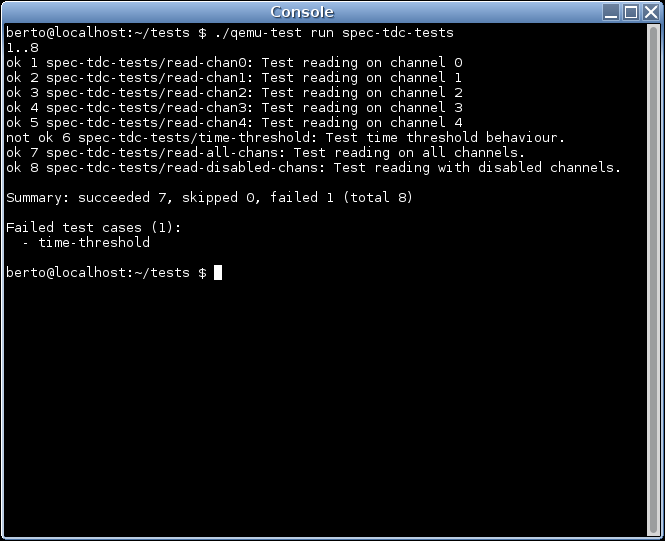
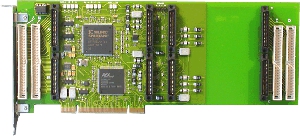
Working with open hardware Some weeks ago at LinuxCon EU in Barcelona I talked about how to use QEMU to improve the reliability of device drivers. At Igalia we have been using this for some projects. One of them is the Linux IndustryPack driver. For this project I virtualized two boards: the TEWS TPCI200 PCI carrier and the GE IP-Octal 232 module. This work helped us find some bugs in the device driver and improve its quality. Now, those two boards are examples of products available in the market. But fortunately we can use the same approach to develop for hardware that doesn t exist yet, or is still in a prototype phase. Such is the case of a project we are working on: adding Linux support for this FMC Time-to-digital converter.
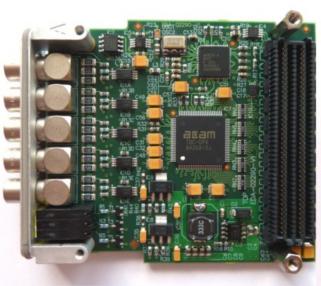
FMC TDC
This piece of hardware is designed by CERN and is published under the CERN Open Hardware Licence, which, in their own words is to hardware what the General Public Licence (GPL) is to software . The Open Hardware repository hosts a number of projects that have been published under this license. Why we use QEMU So we are developing the device driver for this hardware, as my colleague Samuel explains in his blog. I m the responsible of virtualizing it using QEMU. There are two main reasons why we want to do this:
  1. Limited availability of the hardware: although the specification is pretty much ready, this is still a prototype. The board is not (yet) commercially available. With virtual hardware, the whole development team can have as many boards as it needs.
  2. Testing: we can test the software against the virtual driver, force all kinds of conditions and scenarios, including the ones that would probably require us to physically damage the board.
While the first point might be the most obvious one, testing the software is actually the one we re more interested in. My colleague Miguel wrote a detailed blog post on how we have been using QEMU to do testing. Writing the virtual hardware Writing a virtual version of a particular piece of hardware for this purpose is not as hard as it might look. First, the point is not to reproduce accurately how the hardware works, but rather how it behaves from the operating system point of view: the hardware is a black box that the OS talks to. Second, it s not necessary to have a complete emulation of the hardware, there s no need to support every single feature, particularly if your software is not going to use it. The emulation can start with the basic functionality and then grow as needed. The FMC TDC, for example, is an FMC card which is in our case connected to a PCIe bridge called SPEC (also available in the Open Hardware repository). We need to emulate both cards in order to have a working system, but the emulation is, at the moment, treating both as if they were just one, which makes it a bit easier to have a prototype and from the device driver point of view doesn t really make a difference. Later the emulation can be split in two as I did with with TPCI200 and IP-Octal 232. This would allow us to support more FMC hardware without having to rewrite the bridging code. There s also code in the emulation to force different kind of scenarios that we are using to test if the driver behaves as expected and handles errors correctly. Those tests include the simulation of input in the any of the lines, simulation of noise, DMA errors, etc.
Tests
And we have written a set of test cases and a continuous integration system, so the driver is automatically tested every time the code is updated. If you want details on this I recommend you again to read Miguel s post.

3 October 2012

Alberto Garc a: IndustryPack, QEMU and LinuxCon

IndustryPack drivers for Linux In the past months we have been working at Igalia to give Linux support to IndustryPack devices. IndustryPack modules are small boards ( mezzanine ) that are attached to a carrier board, which serves as a bridge between them and the host bus (PCI, VME, ). We wrote the drivers for the TEWS TPCI200 PCI carrier and the GE IP-OCTAL-232 module.
TEWS TPCI200
GE IP-OCTAL-232
My mate Samuel was the lead developer of the kernel drivers. He published some details about this work in his blog some time ago. The drivers are available in latest Linux release (3.6 as of this writing) but if you want the bleeding-edge version you can get it from here (make sure to use the staging-next branch). IndustryPack emulation for QEMU Along with Samuel s work on the kernel driver, I have been working to add emulation of the aformentioned IndustryPack devices to QEMU. The work consists on three parts: I decided to split the emulation like this to be as close as possible to how the hardware works and to make it easier to reuse the code to implement other IndustryPack devices. The emulation is functional and can be used with the existing Linux driver. Just make sure to enable CONFIG_IPACK_BUS, CONFIG_BOARD_TPCI200 and CONFIG_SERIAL_IPOCTAL in the kernel configuration. I submitted the code to QEMU, but it hasn t been integrated yet, so if you want to test it you ll need to patch it yourself: get the QEMU source code and apply the TPCI200 patch and the IP-Octal 232 patch. Those patches have been tested with QEMU 1.2.0. And here s how you run QEMU with support for these devices:
$ qemu -device tpci200 -device ipoctal
The IP-Octal board implements eight RS-232 serial ports. Each one of those can be redirected to a character device in the host using the functionality provided by QEMU. The serial0 to serial7 parameters can be used to specify each one of the redirections. Example:
$ qemu -device tpci200 -device ipoctal,serial0=pty
With this, the first serial port of the IP-Octal board ( /dev/ipoctal.0.0.0 on the guest) will be redirected to a newly-allocated pty on the host. LinuxCon Europe Having virtual hardware allows us to test and debug the Linux driver more easily. In November I ll be in Barcelona with the rest of the Igalia OS team for LinuxCon Europe and the KVM Forum. I will be talking about how to use QEMU to improve the robustness of device drivers and speed up their development.. Some other Igalians will also be there, including Juan Su rez who will be talking about the Grilo multimedia framework. See you in Barcelona!

21 August 2012

Mirco Bauer: Smuxi 0.8.10 "Tracy" Release

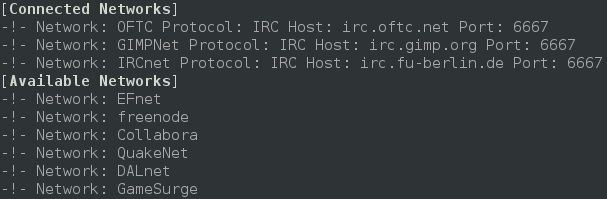
As longingly awaited I am very happy to announce Smuxi 0.8.10 codenamed "Tracy". During the development 8 bug reports and 15 feature requests in 136 commits were worked on making this release a major feature and minor bugfix release. Screenshot of Smuxi 0.8.10 in action Notable highlights in this release are: Integrated Spell Checking Everyone knows the "how do you spell that word again?" situation and either you don't care and send a possible typo or you go checking a dictionary which is kind of annoying. The good news is: with this release you no longer need to do that, as Smuxi includes automatic spell checking while you type messages. The bad news is that this feature is currently limited to Linux builds, and thus OSX and Windows build do not ship with it. The installers need to be extended and I haven't found pre-compiled OSX nor Windows binaries for the GTK+ spell checking library. Screenshot of Smuxi 0.8.10 showing spell checking in action Favicons for Server Tabs Distinguishing server tabs can be difficult, especially if you have plenty of them. All server tabs have the same icon so you need to search for the right name. I wondered why this issue doesn't happen so easily with a web browser which usually also has lots of tabs open. Besides the page name there is the favicon right in front. So why can't Smuxi make use of that simple but effective technology? Well, now it does! You connect to a known network, and Smuxi will download and show the favicon of the website. It just works and does everything in the background for you. Screenshot of Smuxi 0.8.10 showing favicons in action Quick Join Bar One thing that makes IRC really difficult for new comers is the important IRC concept that channels are network specific. So what happens is people try to find / join the channel they are looking for but on the wrong network. They have to connect to the right server/network and then switch to the right tab, before they can join the channel (using the /join command or join dialog). The developers of Smuxi had a brainstorming session and came up with something that should be easy enough for anyone to use and finally solves the issue: the quick join bar. You know which channel you want to join and which network, you enter the channel name, select the network from the list and hit the "Join Chat" button and you are done. Now Smuxi will do just the right thing for you and connects to that network if needed, joins the channel if needed, or switches to the channel if you are already there! Click here for a screencast of the Quick Join Bar in action Indention of multi-line messages Messages on IRC and also Twitter are often longer than a single line in Smuxi can show, thus it has to be split into a second line or more. The issue here is that the continuation line looks cluttered because it doesn't align with the first line. Here you can see an example for this issue: Screenshot of Smuxi 0.8.9 showing line breaks Ewww, that looks ugly, doesn't it? I will make this one short, here is the cure with indented multi-line messages: Screenshot of Smuxi 0.8.10 showing line breaks Enhanced Text Frontend The text frontend which is still in alpha state has received the following enhancements: new /exit command, new /help command, regular and xterm window title, and, several fixed crashes. Screenshot of Smuxi 0.8.10's text frontend Enhanced Commands The /network command by default shows now all connected and also available networks: Screenshot of Smuxi 0.8.10 showing network command The /connect command now allows you to connect by network name like this:



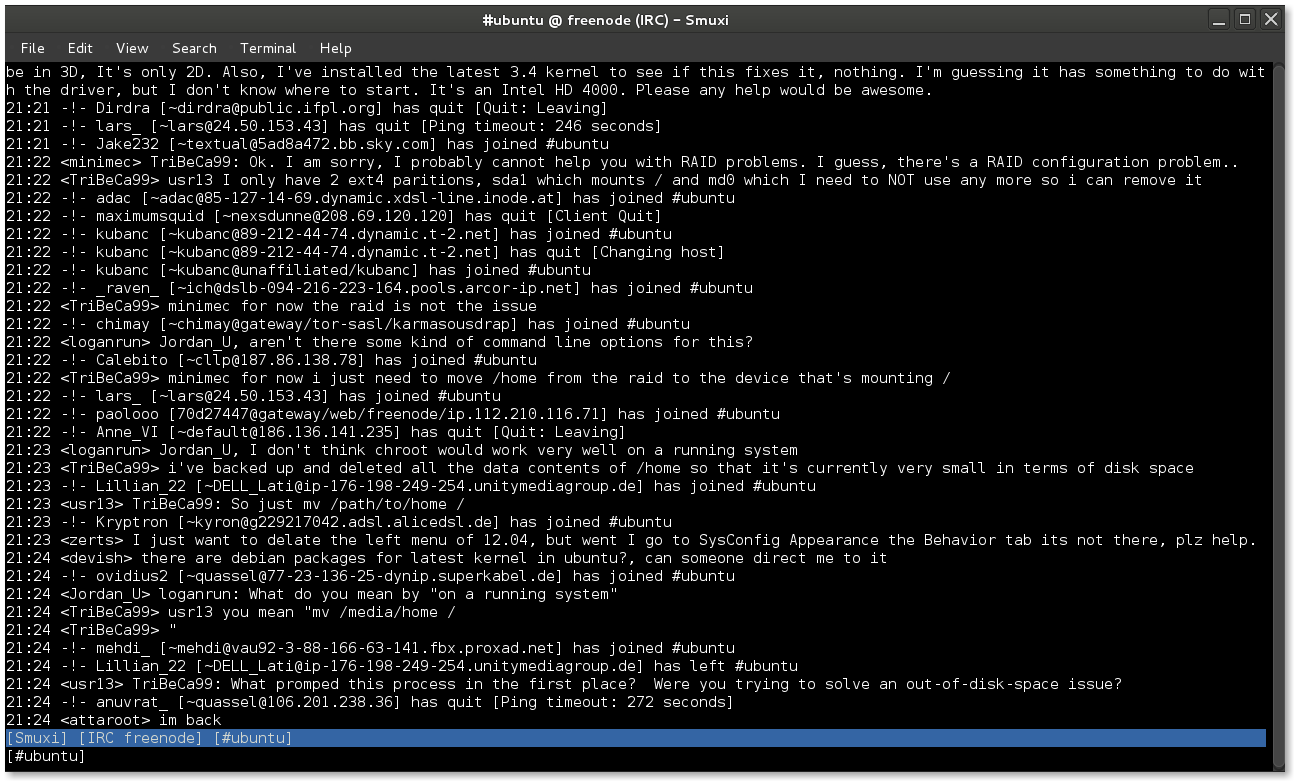

/connect freenode
Updated Translations
  • Portuguese (Pedro Ribeiro)
  • Chinese Simp (Dean Lee)
  • Danish (Joe Hansen)
  • Swedish (Martin Bagge)
  • Russian (Yuri Myasoedov)
New Translations
  • Croatian (Matias M)
  • partially Polish (lukasznaw)
Contributors Contributors to this release are the following people:
  • Mirco Bauer (126 commits)
  • Bianca Mix (translations)
  • Dean Lee (translations)
  • Joe Hansen (translations)
  • Yuri Myasoedov (translations)
  • Pedro Ribeiro (translations)
  • Matias M (translations)
  • Martin Bagge (translations)
  • lukasznaw (translations)
Thank you very much for your contributions to Smuxi! Already horny? Go here and get some! Update: Smuxi 0.8.10.1 About 2 months after the 0.8.10 release, Smuxi 0.8.10.1 with only important bugfixes and translation updates was released. This release includes the following 6 bugfixes: smuxi-server now honors the timezone of tweets, fixed a connection crash with InspIRCd-2.0 servers, quick join no longer opens another network tab, closing chats no longer crashes Smuxi sometimes, /connect irc.some-server.com works again and focusing the message area moves the focus back to the entry again.
Posted Tue Aug 21 23:16:05 2012

16 August 2012

Leandro G&oacute;mez: Happy birthday Debian!

19 years of freedom and counting!

10 July 2012

Gunnar Wolf: From DebCamp to DebConf through cheese, wine and an intro track

One week. One long week. One beautiful week. One of the two major weeks of the year has passed since my previous post. Surely, we are in the middle of the two Major Weeks of the year, in the yearly schedule I have upheld for almost(!) ten years: DebConf+DebCamp. Yesterday, DebConf officially started. For the first time ever, we had a DebConf track targetted at the local (for a wide definition of local: All of the Central American countries) communities, which I chaired. We had the following talk lineup during this track: I believe it was a great success, and I hope the talks are useful in the future. They will be put online soon thanks to the tireless work of our work team. Today we sadly lost the presence of our DPL due to very happy circumstances he will surely announce himself. But DebConf will continue nevertheless - And proof of that is our anual, great, fun and inviting Cheese and Wine Party! After a series of organizational hiccups I hope nobody notices (oops, was I supposed not to say this?), today we had a beautiful, fun and most successful cheese and wine party, as we have had year after year since 2005. As many other people, we did our humble contribution for this party to be the success it deserves. There is lots of great cheeses, great wines, and much other great stuff we have to thank to each of the individuals who made this C&W party the success it was. Yes, it might be among the least-academic parts of our conference, but at the same time, it's one of its most cherished -and successful- traditions. And above all else, we have to thank our Great Leader^W^WCheeseMaster (who we still need to convince to play by our Great Leader's mandates - And no, I don't mean Zack here!) Hugs and thanks to my good and dear friend Christian Perrier for giving form to one of DebConf's social traditions that makes it so unique, so different from every other academic or communitary conference I have ever been part of. We still have most of the week to go. And if you are not in Managua (and are not coming soon), you can follow our activities following our video streams. Remember, debian/rules, now more than ever! And even given the (perpetual) heat in Managua: Wheezy is frozen, whee! [ all photos here taken by regina ]
AttachmentSize
100_2110.JPG1.53 MB
100_2119.JPG1.49 MB
100_2121.JPG1.52 MB
100_2135.JPG1.49 MB
100_2144.JPG1.11 MB
100_2146.JPG1.53 MB
100_2145.JPG1.08 MB
100_2122.JPG1.51 MB

9 July 2012

Christian Perrier: DebConf running: take 6 (South-West suburbs of Managua)

I've been lazy today: I just went to the same place than yesterday..:-) I actually waslate and missed the meeting with No l who indeed went running in about the same neighbourhood, as well as Martin Bagge who went running on the road to the "Intermezzo" restaurant I described earlier..:-) So, no real fancy description today. And, as usual, the full GPS trace is here. The interesting challenge is to see if I can manage to achieve a run every day..:-). We'll see!

Next.

Previous.