Search Results: "jab"

5 May 2011

Andrew Pollock: [life] Zoe at 12 months

I got in early this time and started working on this post a day early. Well, we've made it. We've all managed to survive parenting to the 1 year mark. Zoe continues to do fabulously. Today she had her 12 month paediatrician appointment, and weighed in at 19 pounds and 8 ounces (8.8 kg), which has brought her up from the 25th percentile for weight to around the 50th percentile. She's also up from the 25th to the 50th percentile for height. She got four shots today, which she was singularly unimpressed about even before she was jabbed. Somewhat surprisingly (to us) Zoe still isn't walking. She'll stand on her own if you distract her with something, but otherwise she'll fall down and prefers to crawl everywhere. She'll cruise around with the help of furniture, and she'll happily walk while pushing something. Go figure. I really thought she'd be walking into her 12 month appointment at the paediatrician. Developmentally, she's waving and pointing now. I'll usually get a wave goodbye out of her when I head out the door to work in the mornings. She seems to be picking up things pretty quickly now. One of her traits has been she'd always toss her sippy cup on the floor when she was done taking a drink from it. She's been doing this for months. In one sitting, I taught her to hold it out to me and say "ta!" instead, which is great, because now at mealtimes, I'm not picking up the sippy cup off the floor a dozen times. We had another trip back to Australia last month, and this one was purely vacation, so we had a nice couple of weeks of pottering around with family. Zoe again handled the flights very well, although the jet lag upon returning to the US seemed a lot worse than I remembered after our first trip. The pilot was pretty punchy with the seat belt sign on the way to Australia, so we had to keep taking Zoe out of the bassinet while she was asleep. Incredibly we were able to do this about four times before she woke up. She had a bit of a cold before we left for Australia, and that turned into a nasty cough, which was diagnosed as bronchitis the first week we were there. We got some antibiotics for her, and that cleared the cough up. She also had a couple of spontaneous vomiting incidents, which were out of character for her (but Sarah contracted some kind of tummy bug herself, so it wasn't entirely surprising). Despite these health issues, she was still in excellent spirits the whole time, and I think she thoroughly enjoyed herself. We went to Surfers Paradise for a couple of nights in the first week, and rented an apartment on the 23rd floor of the Chevron Renaissance, and pottered around the Gold Coast a little bit. We went down to Palm Beach, where we used to holiday every year when I was a kid, and caught up with my cousin who lives there, and Zoe had fun on the beach. That weekend, we held an early first birthday party for family and friends in a park and had a barbecue lunch. The following week we spent a few days on the Sunshine Coast, with some of Sarah's extended family, and pottered around on the beaches up there. Our flight back ended up being delayed 9 hours, but fortunately we found out before we got to the airport, so we had a nice, unexpected extra day in Brisbane. It also meant that we flew back for Zoe's night time sleeping time, which made for a pretty good flight (but made the jet lag worse for her once we got back). I wonder what the next year will bring us? At a guess, more teeth, talking and walking. Zoe at (almost) 12 months

17 April 2011

Russell Coker: More about the Xperia X10

I ve now had a Sony Ericsson Xperia X10 for almost two months (here is a link for my first review) [1]. This is a phone that people seem to really dislike because the battery life is poor and Sony doesn t allow replacing the kernel. I m happy with mine, happy enough that after buying one for my wife and trying it out I bought one for myself. I knew about it s problems in advance and wanted a relatively cheap phone with a large high resolution screen, and the Xperia X10 was the best match for my criteria.ChargingThere has been a recent trend towards using USB for charging devices. Sony provides a tiny wall-wart PSU which has a USB socket and a short (1m) USB cable that can be used to charge the phone from it s PSU or from a PC. The size is really convenient, as the phone has a short battery life I ll probably want to take the PSU to more places than I would for other phones I ve owned.The short USB cable saves weight and tangle when travelling, but can be inconvenient. I m currently working on the phone while it s plugged into my laptop, that works well and I can make calls while it s connected. If the phone was connected to a USB port on a tower computer that was on the ground then the cable could be too short to make a call, if it was charging on a power point near the floor then I wouldn t even be able to use the computer functionality let alone make calls without kneeling. My Viewty has a 175cm charging cable which alleviates these problems. I ve got a 50cm USB extension cable that I use for charging my phone while I m in bed that is just long enough to allow me to check my email without getting out of bed!The socket for connecting the USB cable is protected by a plastic lid that is connected by a strip of rubber. For a socket that will be used at least twice a day this isn t a good mechanical design. The plastic slide on the LG U990 Viewty seems like a much better design.As an aside it s a pity that they aren t designing cars with USB charging sockets built in. Some new cars have a socket for one USB flash drive to be attached to the radio, but really they need at least one USB charging port per seat. It would also be nice if they made power points with USB charging sockets built in, I d buy a few of those if they made them.Preserving the BatteryI ve been running Juice Defender to reduce the battery use, at the moment it is claiming to have extended battery life by 69%. That combined with turning off things that aren t needed (such as WiFi) has made the phone reasonably usable. I can survive more than 12 hours during which I use the phone a lot without charging it.XperiaX10.net has an interesting review of replacement batteries [5]. I m not going to buy them because the largest battery requires a replacement back case which prevents using an external case to prevent damage and the smaller one doesn t provide enough of a benefit and the design of the phone makes it difficult to change batteries so carrying a spare battery isn t a good option.Cursor Control KeysThe HP/Compaq iPaQs that I own from ~10 years ago have a single button that can be moved up/down/left/right to act as a cursor, it can also be pressed inwards to act as an ENTER key (or whatever the application might want for a fifth function). Having some sort of hardware cursor control is really handy, I often end up deleting several characters when I want to replace one because getting the cursor onto the desired character is too difficult.Adding more hardware keys would require making the phone bigger, but that would be fine by me. As described in my previous post about phone cameras I d like to have a phone that s thicker to have a better camera with a greater focal distance for a larger lens [2].Core Phone FunctionalityI really miss having separate green and red buttons for making/answering calls and for rejecting/ending calls.A really common operation is to call back the last person who called. To do this on my LG U990 Viewty I press the green button twice on my home screen which took less than a second. On the Xperia this involves selecting the phone icon from the home screen, then the call log icon, then the call that is desired, then the Call user line. That is four presses in different parts of the screen compared to pressing the same hardware button twice. I m investigating dialer applets right now, the Dialler One applet has a good interface for calling people who have called or been called recently but it still requires two presses on different parts of the screen. With my old Viewty I could call back the last person by feel without even looking at the phone!In the last 6 years the standard functionality of phones has been to include multiple profiles for noises. My Viewty has profiles named Normal , Silent , Vibrate only , Outdoor , Headset (automatically selected when a headset is connected), and three customised ones. The Xperia has only one setting, and that is three icon presses away from the home screen. It does allow changing the volume by hardware switches on the side which includes going to vibrate-only and silent mode. While this is useful, it s not the best way that two precious hardware keys could be used. It also doesn t allow control over all the different notifications, I d like to be able to activate a noise profile and have every application respond to it in an appropriate manner. This is a deficiency in Android 2.1 not in the phone itself.In many ways this phone has the worst phone functionality of any mobile phone I ve ever owned, I think that this is more the fault of the Android designers than Sony Ericsson.Android UpdatesSony had previously claimed that they wouldn t support Android later than 2.1. Now Sony has announced that they will support Gingerbread Android 2.3 [3]. So one of the major complaints about the Xperia will soon be addressed.TetheringThe build of Android that the Xperia runs at the moment doesn t support Wifi tethering. I m currently using with Easy Tether for USB tethering [4]. It s not free software and requires it s own code to run as root on your Linux system that is being tethered (which is easily locked down with SE Linux), but it basically works. The down-side with Easy Tether is that it proxies all the connections so you can t run traceroute etc and in the free version you can t use UDP.K9 MailK9 Mail fixes some of the problems in the default Android email program that I described in my previous post. It allows selection of SSL with a default port of 993 for IMAPs. It uses mail.example.com as the mail server address for an email address of user@example.com (so I ll add a mail CNAME to the domains I run). When I connected initially it told me that the SSL key was not signed by a CA and asked if I wanted to save it or reject it this is the correct and desired functionality. It also correctly parses URLs from the email (or at least has fixed the bug that I discovered in the default email app).One problem I ve found with K9 is that it seems to timeout on large folders. This is probably partly the fault of Virgin Mobile being slow for IP access, but I wonder whether K9 doesn t pipeline IMAP commands as Virgin can do bulk transfer at reasonable speeds (80KB/s) and it mainly fails on latency (900ms being typical). The result is that a folder with more than 500 messages that need to be copied to the phone will never get synchronised. When I started reading mail on my phone I had to move mail from some of the bigger folders into other folders to avoid timeouts. As an aside the amount of time I ve saved by reading email on the go has already paid for the phone.MediascapeThe Sony Mediascape software is used for categorising photos. One function of this is to assign names to photos, the names come from the contact list so if you photograph someone who you can t phone then you need to add a contact list entry for them. This also means that you couldn t conveniently add names to non-humans, I guess I could have added a contact list entry Mr Crash Dump for photos of system crash logs. But a bigger problem is that it decides what is a picture of a person, a picture of someone who is not centered in the photo or a profile picture can be regarded as not a photo of a person and therefore not subject to being associated with a contact list. Finally when selecting a name for a picture it displays the entire contacts list in a small font instead of displaying favorites, I have the phone numbers of many clients in my contacts list who I will never photograph Mediascape just isn t much good. If I feel the need to do something serious in this regard I ll search the app store for something free that s better.ProtectionFor $15 each I bought one grey and one clear Gel Case from J2K. This case covers the sides and back of the phone with a firm rubber layer that will hopefully allow it to bounce rather than break. It also extends slightly higher than the screen which should stop the screen being scratched if the phone is left face-down on a hard surface on the vibrate setting.One problem with the Gel Case is that by it s design it has to cover the buttons on the sides, due to a design or manufacturing problem the clear case that my wife uses can press slightly on the shutter button which disables the three main buttons on the front. So when the menu or back button stops working she has to slightly move the Gel Case out from the side. I m thinking of just cutting out a section of the Gel Case there, that will make it difficult to press the shutter button, but you can use the touch screen to take photos and there doesn t seem to be any other use for the shutter button so this shouldn t be a problem. The clear and grey cases have different designs, the grey one has a hole over the raised Sony logo which makes it fit a little better as well as not having the shutter problem, so it seems to be a later design I don t know whether all clear cases have the same problem but I recommend that someone who only has one Xperia X10 get the grey case just in case.Web BrowsingI m experimenting with using my own web proxy to compress the data sent to the phone. Unfortunately the Android settings for a web proxy only apply to the main web browser, not to all the other applications that use web services. Also the built-in web browser requires pressing the settings hardware button followed by at least two touch-screen presses to change between windows or close a window and it doesn t seem to support making the short-press action be to open a link in a new window. So I will have to find another web browser to use.Bandwidth UseThe 3G Watchdog applet is really good for tracking the data transfer and optionally cutting off 3G access before the quota is exceeded. Unfortunately Virgin has already sent me a bill with $234 in extra charges for bandwidth use because I used 1.6G instead of my 1.5G quota. A Virgin representative had told me over the phone that the billing period would be based on the end of the month, so while every calendar month has had less than 1.5G used because I used more than average in the end of March and the start of April that counts as excess data in the 14th March to 13th April period.I m going to appeal this to the Telecommunications Industry Ombudsman, I don t think that it s reasonable that I should be billed almost 7* the normal bill for exceeding the quota by 7.4% based on following the instructions of a Virgin employee. While I could have read the previous bill that they sent me to discover the end of billing period dates, I don t think that I should be expected to distrust everything that a Virgin employee says. If they billed me an extra $20 then I d just pay it, but $234 is unreasonable.ConclusionSince using the phone I ve found significant benefits in web browsing and reading email with the major limitation being the small screen (relative to a Netbook or Laptop). So if I was to buy another phone I would probably consider a Dell Streak which seems to be the largest Android phone on the market at the moment.Given the amount of use that I ve got I would be happy to spend more money and therefore consider a more expensive phone. But I don t regret the decision to save money by getting an Xperia X10.Finally when a telco tries to stick me with a $234 excess charge it really detracts from the value of having a phone contract. If I end up having to pay that then it s half the value of a smart-phone lost in one telco scam. This is enough to make a contract with Virgin a bad option, after this contract expires I may use VOIP and a pre-paid SIM from Telstra NextG if their network is still the best. Another possibility is to just use a small tablet and skip having a mobile phone, email and Jabber plus SMS from the people who lack net access will probably do.

15 March 2011

Sam Hartman: Moonshooting Jabber

Last fall, Moonshot was steaming forward. We ran into some non-technical obstacles and progress on the implementation was disturbingly quite from the end of October through February. That changed: the code was released February 25. Since then, the project has picked up the momentum of last fall. There s a new developers corner with helpful links for participating in the project, obtaining the code, and preparing for our upcoming Second Moonshot Meeting. Standards work in the ABFAB working group has been making steady progress the entire time. The jabber chat room has been quite active. Developers have been working in three time zones. Whenever In get up there s likely to be interesting progress awaiting me and new things to work on in the chat logs. Today was no exception. Luke moonshooted jabber. This is exciting: it s the first tim our code has been used to authenticate some real application instead of a test service. Other discussion from the chat room not reflected in e-mail is equally exciting. He has Moonshot working with OpenSSH in controlled environments. It appears to require some updates to the OpenSSH GSS-API support. Now is a really great time to get involved in Moonshot. We hope to see you on our lists and in our chat. With last night s news, we need to think towards eating our own dogfood and using Moonshot to authenticate to our own Jabber server and to authenticate to our repository for commits. Right now, there are some security issues with the code (lack of EAP channel binding) that might make that undesirable. However in a very small number of weeks or months I expect we will be there!

8 March 2011

Evgeni Golov: Desktop in a shell: irssi

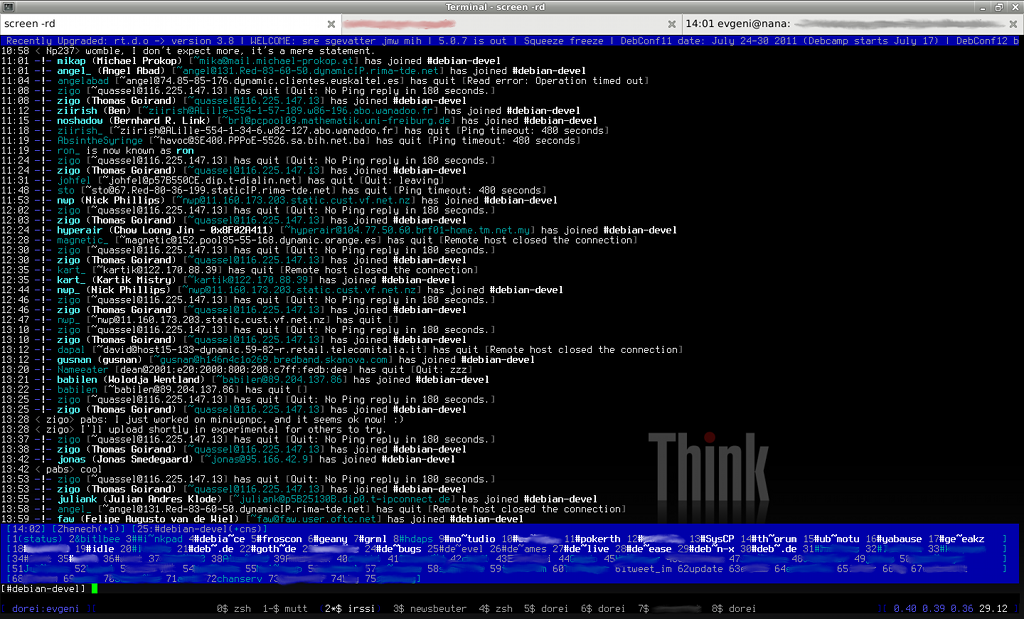
Continuing my series about my desktop in a shell, in this chapter I will present you my irssi setup.Irssi is the most customized part of my setup, using many scripts from the irssi-scripts Debian package and some from the internet , handling 6 irc networks with a total of 34 channels plus JabberXMPP, ICQ, Twitter and identi.ca. My custom irssi settingsI like my conversations to look like Buddy, you rock instead of Buddy: you rock , so:
/set completion_char ,I also like *long highlighted text*, so:
/set emphasis_multiword onHide mIRC and ANSI colors when turned on. This can be used to eliminate angry fruit salad syndrome in some channels. (Quote from irssi.org/documentation/settings, do I have to say more?):
/set hide_colors onWhen talking in more than one channel, it sometimes comes handy to repeat something from the past said in THAT channel, not searching though all:
/set window_history onTell irssi to shutup when away, noone will hear/see the beep anyways:
/set beep_when_away offI want my screen to inform me about new messages, so I need this:
/set bell_beeps onBeep for query text, notices, dcc, dcc text and hilight:
/set beep_msg_level MSGS NOTICES DCC DCCMSGS HILIGHMy used irssi scriptsactive_notice.pl (from irssi-scripts)Show notices in the active window or the corresponding query instead of the status-window.
No further configuration needed.adv_windowlist.pl (from anti.teamidiot.de)Some really smart windowlist, see my previous post about adv_windowlist.pl, I won t explain its features and settings here again.autorealname.pl (from irssi-scripts)Show peoples real-name when they join (my $nick $name memory is poor :()
No further configuration needed.chansort.pl (from irssi-scripts)Automatically sort my channels alphabetically, grouped by network.
Enable via /set chansort_autosort on<Update>kaimi asked me yesterday, whether chansort could ignore the network and just sort ALL channels in alphabetical order. Well, it could not, until yesterday ;) Fetch either the patch against chansort.pl or my chansort-ng.pl and set chansort_ignore_network to ON. You can also set chansort_ignore_windowtype to mix channels and queries if you like to.</Update>hack-whois-in-current-window.pl (from dgl.cx)Display /whois in the current window or the corresponding query instead of the status-window.
No further configuration needed.keepnick.pl (from irssi-scripts)Restore my nick after it is free again (like after a ping timepout).
Set the nick via /keepnick [-net chatnet] [nick]nickserv.pl (from irssi-scripts)Automatically authorize me on networks with NickServ.
Enable by settings services address, nick and password via:
/nickserv addnet freenode NickServ@services.
/nickserv addnick freenode Zhenech mypass
screen_away.pl (from irssi-scripts)Set away when screen is detached.
Will be enabled automatically, but you maybe want to tweak screen_away_message :)seen.pl (from irssi-scripts)Add a /seen nick command to lookup when and where nick was online the last time.
No further configuration needed.trackbar.pl (from irssi-scripts)Draw a line when you switch irssi windows so you can see which part of the conversation you have already seen.
No further configuration needed.BitlBeeI m using BitlBee as my irssi-to-every-im gateway of choice ;) But while it sounds easy, my setup isn t. I am using BitlBee only to connect to jabber.die-welt.net, my Jabber/XMPP server. There I have a pyICQt instance running, to connect to ICQ via Jabber (yes, BitlBee would support that directly, but that would fail on me when I would like to connect from a different Jabber-client). Twitter and identi.ca are handled via Jabber too: identi.ca does support this by themself, for Twitter I use the tweet.im service.
But besides of my strange setup, BitlBee is easy: apt-get install bitlbee, connect irssi to localhost:6667, you will be force-joined to &bitlbee, where you do:
register somepassword
account add Jabber you@jabberserber.example.com jabberpassword
account on 0
and done, you@jabberserver.example.com is online :)The all awaited screenshot (from my last irssi-post):

And the whole ~/.irssi/config: http://files.die-welt.net/irssi-config.txt, read it carefully while waiting for the next post about newsbeuter :)

1 March 2011

Rapha&#235;l Hertzog: 5 Free Software To Support With Flattr

Flattr FOSS LogoAnother month and thus another issue of Flattr FOSS. Time flies but Flattr s usage seems to remain relatively strong. I was fearing that people get bored after some time but that does not seem be to the case, my Flattr income does not really drop (it doesn t take off either ;-) ). I get a bit less for dpkg than at the start but a bit more for my blog. Enough babbling, let s go straight to the 5 projects to flattr this month:
  1. Linux Mint (Flattr link) is a Linux distribution based on Debian and Ubuntu that targets home desktop users. I have never tried it (I m too much of an hardcore Debianer) but I ve read several good reviews saying that it works well out of the box with good multimedia support. If you try it out, be sure to pick Linux Mint Debian Edition (LMDE). :-)
  2. Network Block Device (NBD) user-space support tools (Flattr link) is the set of tools to setup a block device whose content is really on a remote server. It requires support of NBD in the kernel of course. The user space tools are maintained by Debian developer Wouter Verhelst.
  3. Tahoe LAFS (Flattr link) is a filesystem that implements a cloud storage. The data are distributed across multiple servers in such a way that it can continue to work even if one of the servers fails.
  4. Gajim (Flattr link) is a full featured and easy to use Jabber client. If you don t need support of multiple instant messaging protocols, this Jabber client might be a good fit for you.
  5. Aur lien Gateau (Flattr link) is a KDE developer who takes one day per week off his work to work on KDE. He seeks support from the community to compensate for the loss of revenue. Much like me, he has a support page with a complete history of the amount of donations received. I can only sympathize with people who try to live true to their passion good luck Aur lien!
This article is part of the Flattr FOSS project.

5 comments Liked this article? Click here. My blog is Flattr-enabled.

20 February 2011

Evgeni Golov: Desktop in a shell

People are using computers, everywhere, really! ;)
As you might guess correctly, so do I.Basically, I am using three computers: my laptop (ThinkPad X201s, awesome machine, but pabs told me not to post any more adverts for ThinkPads on Planet Debian *g*), my smartphone (Motorola Milestone, yes, that counts as a computer) and random_pc (for random as in my girlfriends or some other trusted (!!!) friends computer).
My laptop is running Debian GNU/Linux unstable with Xfce4.6, my smartphone is running Android 2.2.1 Froyo, my girlfriend has Ubuntu with GNOME, a friend runs Debian unstable with GNOME, another one Arch Linux with KDE4 and so on. And on all these machines I want be able to work, which means I have to read mail and rss, chat via IRC, JabberXMPP and ICQ, have a look at my to-do list, ssh into different machines, write some code, tweet and dent etc.In the following series of posts I will describe how I can handle about 90% of my work on every (trusted) computer out there, using ssh, screen, mutt, irssi, BitlBee, newsbeuter etc.As I am describing the setup as a Desktop in a shell , let s start with a login- and desktop/window-manager: ssh+screen.sshObviously, you need a machine to ssh into it, where the Desktop will live on. For me, that s my home router/fileserver/vm-server dorei, running Debian GNU/Linux LennySqueeze with OpenSSH as a kind of login manager ;)Yes, my user is allowed to login with a password instead of a public key. And well, that s all for the login-manager, no extra configuration needed.screenAfter logging in, I start my window-manager with screen -rd, -r for reattach a running screen session, -d for detach it if it is already attached somewhere else. Or I can start a new session by just typing screen. Inside the screen I have multiple windows (one can create new ones with ^A c) with all the needed software running. I can switch windows by pressing ^A N, N being the number of the window, ^A n for the next window, ^A p for the previous one or ^A ^a for the last one. Or I can get a window-list with ^A w. If needed, I can rename windows with ^A A, followed by the new name. That should be enough for almost everyone. Let s just add a window-list to the bottom (as you might have seen on GNOME, Xfce, KDE and even Windows ;) by adding the following to the ~/.screenrc:
caption always " "                    # clear line before hardstatus
hardstatus alwayslastline "% = kb [ % B %H:$USER % b ][ %=% w %?%-Lw%?% b (% W %n*%f %t%?(%u)%?% b )% w %?%+Lw%?%?%= % b ][% B  %l % B % W %d.%0m % b ]"
You get the current host- and username, the machine load and the date for free ;)Even if it is possible, I do not have any autostart like stuff in my .screenrc as the machine is running stable and I start the screen and the apps inside maybe once a year after a reboot.screenrcMy .screenrc looks like this:
# detach on hangup
  autodetach on
# don't display the copyright page
  startup_message off
# set scrollback to 2000 lines, default 100
  defscrollback 2000
# set silencewait to 15 seconds, default 30
  silencewait 15
# new shells should be started as login-shells
  shell -$SHELL
# make a fancy statusline
  caption always " "                    # clear line before hardstatus
  hardstatus alwayslastline "% = kb [ % B %H:$USER % b ][ %=% w %?%-Lw%?% b (% W %n*%f %t%?(%u)%?% b )% w %?%+Lw%?%?%= % b ][% B  %l % B % W %d.%0m % b ]"
# make higlighting bold, black on blue background
  sorendition +b bk
# some fixes, no I do not know where they come from :)
  termcap  xterm hs@:cs=\E[%i%d;%dr:im=\E[4h:ei=\E[4l
  terminfo xterm hs@:cs=\E[%i%p1%d;%p2%dr:im=\E[4h:ei=\E[4l
  termcapinfo  xterm Z0=\E[?3h:Z1=\E[?3l:is=\E[r\E[m\E[2J\E[H\E[?7h\E[?1;4;6l
  termcapinfo xterm* OL=100
  termcapinfo xterm 'VR=\E[?5h:VN=\E[?5l'
  termcapinfo xterm 'k1=\E[11~:k2=\E[12~:k3=\E[13~:k4=\E[14~'
  termcapinfo xterm 'kh=\EOH:kI=\E[2~:kD=\E[3~:kH=\EOF:kP=\E[5~:kN=\E[6~'
  termcapinfo xterm 'hs:ts=\E]2;:fs=\007:ds=\E]2;screen\007'
  termcapinfo xterm 'vi=\E[?25l:ve=\E[34h\E[?25h:vs=\E[34l'
  termcapinfo xterm 'XC=K%,%\E(B,[\304,\\\\\326,]\334, \344, \366, \374,~\337'
  termcapinfo xterm* be
  termcapinfo xterm xterms xs ti@:te=\E[2J
  termcapinfo wy75-42 xo:hs@
  termcapinfo wy* CS=\E[?1h:CE=\E[?1l:vi=\E[?25l:ve=\E[?25h:VR=\E[?5h:VN=\E[?5l:cb=\E[1K:CD=\E[1J
  termcapinfo  hp700 'Z0=\E[?3h:Z1=\E[?3l:hs:ts=\E[62"p\E[0$~\E[2$~\E[1$ :fs=\E[0 \E[61"p:ds=\E[62"p\E[1$~\E[61"p:ic@'
  termcap  vt100* ms:AL=\E[%dL:DL=\E[%dM:UP=\E[%dA:DO=\E[%dB:LE=\E[%dD:RI=\E[%dC
  terminfo vt100* ms:AL=\E[%p1%dL:DL=\E[%p1%dM:UP=\E[%p1%dA:DO=\E[%p1%dB:LE=\E[%p1%dD:RI=\E[%p1%dC
  termcapinfo linux C8
# some bindings
  bind k
  bind ^k
  bind .
  bind ^\
  bind \\
  bind ^h
  bind h
  bind 'w' windowlist -b
  bind 'W' windows
  bind 'K' kill
  bind 'I' login on
  bind 'O' login off
  bind ' ' history
  bind = resize =
  bind + resize +3
  bind - resize -3
# Mutt demands this
# http://wiki.mutt.org/?MuttFaq/Appearance
 defbce on
 term screen-bce
That s all for my screen setup. The obvious, boring screenshot follows:See you next time, when I will present my mutt setup here.

15 January 2011

John Goerzen: Jacob & Dad & Trains

Back in July, our family took a train trip from Kansas to New York for Debconf10. And then in September, we went to Indiana. The only train service from here leaves at about 3AM in both directions. So starting about November, Jacob started asking me, Dad, will you wake me up in the middle of the night to go to the train station TODAY? He didn t seem to get it through his head that we didn t have another trip planned, although we surely would at some point. It just couldn t possibly be, right? So around Christmas, I booked a round trip from here to Galesburg, IL for just Jacob and me. We ll get on the train at 3AM Saturday morning, get to Galesburg about noon, and then head back home at 5PM, getting home again at, well, 3:30AM. Jacob is super excited about this. When the tickets arrived, he didn t yet know about the trip. I thought he d be excited then, but the ticket sleeve had a picture of a toy train that he didn t own, so he was somewhat sad. But starting the next day he was very excited. We wrote Amtrak on the Jan. 15 spot on his pharmacy calendar (a local pharmacy gives them away free each year). He carefully checked off each day as it went past. And he s been getting increasingly excited all week. Tonight he couldn t really think, couldn t really play, couldn t really calm down. He jabbered about how he would sit by the window, how precisely I would wake him up, and his eyes would open up right away and we ll go straight there. He talked about how he will look out the window at the dark night, and was extra excited when I told him he d see snow out the window like one of the Amtrak videos he likes to watch on Youtube. He already placed his order for breakfast in the dining car: French toast with syrup on top. He ran past the computer while I was looking at things to do in Galesburg, and saw I had a map up, and immediately noticed the train tracks. Then he pointed to the station, and said, Dad, that says Galesburg Amtrak . A rather stunned dad replied, Yes indeed it does, Jacob. I guess it was some combination of pre-reading and detective skills, but that surprised me. Anyhow, this is the first trip with just Jacob and me. We re going to have a blast, I m sure. I may, however, wind up going 24 hours without sleep if his adrenaline level is any guide

8 January 2011

Nikita Youshchenko: Psi / Psi+: want to avoid auto-online after auto-offline

Older versions of Psi jabber client required manual changing status to online to leave auto-offline state. It was very handy for me: I connect to my jabber account from two locations (from home and from office), so after I left one of these locations, auto-offline soon happened, and Psi at that location did not return online until I returned and manually instructed it to re-login. Unfortunately newer versions of Psi (I guess, starting from commit 4a54500c on git://git.psi-im.org/psi.git, which was between 0.11 and 0.12 releases), and also Psi+, behave differently: if user activity is detected on the desktop, auto-offline state is left, and status becomes online again similar to leaving auto-away and auto-xa states. This change is not good for me, at least in two situations: In both these situations, Psi client not at my current location becomes online, which can cause routing incoming messages to wrong location. I don t state that new behaviour is somehow worse than old behaviour. But for my use cases, I want to get old behaviour back. I ve done some code reading. I think that point to fix is near the bottom of PsiAccount::secondsIdle() method, where any auto status is disabled if no timeout condition currently exists. This should be changed so that auto-offline state won t be left if some config key is set. I will try to implement this change soon (or at least I hope I will try ) P.S.
To make things even better, a check of some external condition could be performed to decide if client should return online from auto-offline or not. Then fancy things could be set up, e.g. return to online at office only if my mobile phone is currently registered in the office wifi network not really required but cool.

Nikita Youshchenko: Psi+

Just discovered Psi+ project. It is a fork of well-known Psi jabber client, with many improvements and new features. Among others things, Psi+ implements plugins feature, and comes with several interesting and useful plugins. One of those provides anti-spam protection, and other is designed specifically for ICQ users. Psi+ is a drop-in replacement for Psi, it uses same per-user configuration. Package is available for Debian Squeze, so if you are already running that version, just run
aptitude install psi-plus psi-plus-plugins
Then restart Psi and enjoy :) .

10 November 2010

John Goerzen: We re All Home

I wrote yesterday about our scare with Jacob. It s been quite the day. Before I go into it, I want to say thank you to all the many of you that have sent comments and support our way. Terah and I haven t had the chance to reply to many of them, but we have read every one, and very much appreciate it! Terah spent the night with Jacob, and I spent the day with him today (others were present for parts of it too). Jacob was mostly in good spirits. He was up and around, pushed his IV around himself in the room and to the bathroom. He called it my VI machine (not a typo take that, Emacs, eh?) He continued to enjoy measuring his trips to the bathroom. We went exploring a few times. He would walk or run down one of the long corridors in the hospital, holding my hand, while I pulled the IV along. We often went by the cafeteria, which he called the kitchen. One time he insisted that I get a cup of coffee from the free coffee dispenser. I insisted that I didn t want to, but eventually asked, Shall I get a pretend cup of coffee? Yeah! So he watched me get a pretend cup, pretend to fill it, and pretend to drink it and smiled and clapped for me after. He spent hours watching videos of trains on YouTube. This is a favorite activity at home too, but we obviously limit the amount of time he can spend doing it. I had to limit the amount of time he spent with it today too, of course, but he got rather more time with it than usual. Jacob had his usual books, but I thought we might try something new today. This morning, I loaded The Tale of Peter Rabbit (with illustrations) onto my Kindle. Jacob loved it, and enjoyed pressing the Next Page button in the Kindle. We read it twice, and he is interested by the promise of other stories about rabbits. It also probably didn t hurt that his grandma had given him a rabbit in the hospital yesterday. As we got on towards evening, I told him that tomorrow could be a normal day. His response: enthusiastic applause and a big grin, plus YAY! Jacob loved eating today. He wolfed down breakfast and lunch. He enjoyed the lemonade I brought for him again, and played with some toys, and yes, watched some more train videos in the afternoon. He also pretended to ignore the visitors he got as much as possible (pretty typical for him actually). The doctor came by at about 6:00PM and again was just stunned at how well he s doing. Jacob neither complained of any pain nor acted like he had any even when the nurses would rub neosporin on his wounds. The doctor was still just stunned at how well he was doing. He told us his last tractor accident resulted in a death before LifeWatch could arrive, and the one before that turned a good student and a promising athlete into a wheelchair-bound person with a vocabulary of 20 words. I can t believe I m discharging him today, but try as I might, as I go over all the details, there s no reason for him to stay. I thanked him for all his help, and he said, I didn t do anything for him. All I did was figure out what had happened to him . I guess we have the CT to prove that something really did happen, but the fact that he showed up at my office in the first place was stunning enough. Jacob started to get more excited after the IV was unhooked from him. He didn t particularly like having the needle removed, due to the pain of taking off the tape, but was happy to have it gone. He was making plans: will we stop by the train station on the way home? It s the middle of the night maybe a train will be there! (If it s dark outside, it s middle of the night to him) We agreed to stop by the cafeteria to pick him up one last lemonade, than stop at the train station. The nurses offered a wheelchair to take him out to the car with. I said I didn t think he d want it. One of them said, Wouldn t you like a FUN ride in a WHEELCHAIR? Jacob: No. Me: I suspect he will want to run out of here. Nurse: OK then. We walked, or half ran, to the cafeteria to get his lemonade. Then we went out to the car. He was excitedly jabbering about everything: the car, my radio, and especially the train station. We did drive by, and at least got to see a freight engine go past. He noticed the Christmas lights starting to be set out along Main Street, and said, Dad, it s CHRISTMAS! Well, almost Then he got quiet, and eventually fell asleep in the car. He had almost fallen asleep while eating his lunch, but stayed awake, and then got interested in other things so he had no nap today. When we got home, I unbuckled him and pulled him out of his seat. He opened his eyes for just a second, wrapped his arms tightly around my neck, put his head on my shoulder, and fell back asleep while I carried him up to his room. I put him down on his own bed. He had a contented sigh, pulled his favorite blanket up to his neck like he loves to do, and was back asleep in no time. Our little boy is home, safe and sound. It s a happy day.

29 October 2010

Evgeni Golov: What to flattr? 2010/10

Another month ending and you still have some clicks left on flattr.com? How about these then?Again, all non-italics text is stolen directly from flattr, and please forgive me if I recommend some thing that hasn t been officialy announced yet :)

4 October 2010

Jonny Lamb: Automatic Connections

My network blocks SIP on 3G, so when I start using its 3G service after leaving a wireless network my N900 goes absolutely crazy about not being to connect. Although this is a specific annoyance I have, it's a general problem with loads of similar cases, such as "I only want my work jabber/skype/MSN/etc. account enabled when I'm at work". So, I wrote a small daemon and a fun UI to make this easy. It's actually really simple: once you configure which connections accounts should listen for, it uses libconic to listen for connect/disconnect events and enables and disables accounts as appropriate. You should also be able to override its actions temporarily without it clobbering your setting. Click for full-sized image
A sneaky peek at the UI. See if you can guess where I've been visiting recently. I think the UI is pretty easy to use, and should cover most use cases. I just uploaded it to extras-devel. It's called Automatic Connections.

30 September 2010

Evgeni Golov: What to flattr?

The month is coming to an end, and I d like to recommend you some things on flattr.com :)OpenRheinRuhr Ein Pott voll Software Die OpenRheinRuhr ist eine Messe mit Kongress rund um das Thema Freie Software . Die OpenRheinRuhr 2010 findet am 13. und 14. November im Rheinischen Industriemuseum in Oberhausen statt. Freie Software ist aus Firmen, Verwaltungen, Bildungseinrichtungen und Privathaushalten nicht mehr wegzudenken. In der bev lkerungsreichsten Region Europas bietet der OpenRheinRuhr e.V. durch Ausstellungen, Vortr ge und Workshops Informationen ber Freie Software. Auch Themen jenseits der Technik, wie B rgerrechte im Netz oder die Handhabung von Lizenzen werden behandelt. Vortr ge in mehreren Tracks sprechen Menschen mit unterschiedlichem Kenntnisstand an vom Anf nger bis zum Profi. Entwickler & Projekte bekommen die Gelegenheit zum Erfahrungsaustausch. Weitere Informationen und Anmeldem glichkeiten unter: http://openrheinruhr.deBitlBee The IRC geek s solution to instant messaging. Tunnels instant messaging traffic (supporting all popular IM protocols and Twitter) to a virtual IRC channel and virtual IRC queries. Can be installed locally, but also available as a public service for people who can t/don t want to install it.
KiBi s blog This blog mainly features Debian-related posts on various topics: X.Org package maintenance (including calls for help, and status updates towards users), Debian GNU/kFreeBSD (GNU userland running on a FreeBSD kernel), and Debian s Graphical Installer (now based on X.Org). Also some upstream stuff, like the bugzilla replica type for SD (Simple Defects).
phpMyAdmin phpMyAdmin is a tool intended to handle the administration of MySQL over the Web. It can create, rename, and drop databases, create/drop/alter tables, delete/edit/add fields, execute any SQL statement, manage keys on fields, create dumps of tables and databases, export/import CSV data, and administrate one single database and multiple MySQL servers.
Debian Backports Over the last years I did numerous backports for Debian and also run backports.org. Since September 2010 we moved backports.org to backports.debian.org so its an officialDescriptions shamelessly stolen from flattr.Some words on these things:

12 September 2010

Alastair McKinstry: Exoclimes: the diversity of planetary scientists

I'm just back from ExoClimes 2010: Exploring the Diversity of Planetary Atmospheres. An excellent conference: the PDFs of the talks and posters are now online, and they are putting the videos of the talks up soon. But in particular the organizers deserves thanks for bringing exoplanetary scientists and observers together with climate modelers doing Earth (and Mars, Titan, Venus, ...) models.
Model complexity graph Peter Cox on model complexity
The last talk on Friday was by Peter Cox on Climate change and exoplanet sciences that was far better than expected for the "graveyard shift". One theme of the conference was the need for a 'heirarchy' of models, from simple energy-balance models to full circulation (GCM) models: using progressively more complex models to understand more bits of whats going on. Exoplanet workers mostly use simpler models, progressing now to GCMs, while Earth modellers are moving beyond GCMs to "Earth system" models including biology, etc. Peter pointed out the two styles of work: the exoplanet modelers are short of data, and risk being too speculative. We know little of what the planets are like, and concentrate on implementing physics in the models to see what they might be like. Earth modelers on the other hand are if anything swamped with data: the tendency here is to make the model fit the data, by adjusting parameters until it does so. The danger of this approach is that the model will then not work away from current present-Earth conditions. Tim Lenton pointed out some work that was done with the Met Office model, where they took the radiative transfer part of the model and tested it for other planets, and paleo-Earth conditions. The model blew up : it wasn't capable of x2 or x4 current CO2 levels. (This has since been corrected). Over dinner there were interesting discussions on the different styles within the communities. While the underlying GCMs used come from the Earth sciences, its quite common within the exoplanetary community for a researcher to work on all parts of the model: dynamics one day, radiative transfer the next. In Earth climate work people have become more specialized and someone is a 'radiative transfer' person, and won't touch other parts of the code (even if they can follow them in the huge codes we have today!). On the other hand, there is a greater tradition of model inter-comparison in Earth sciences, where we compare the model outputs to each other for some known test cases ( Held & Suarez, the CMIP5 project, etc.) Apart from some initial work by Emily Rauscher, little has been done on this in exoplanetary models; it was agreed more of this would be a good idea. Radiative transfer (the interaction of 'sunlight' with the atmosphere, where it gets absorbed, scattered and re-radiated) in particular seems to be an area that could benefit from this. In this middle ground Francois Forget showed the work on the LMDZ model and applying GCMs to terrestrial planets. They've successfully applied this model to Mars, Titan, and partially to Venus (a much tougher problem, due to its heavy clouds giving a long radiative timescale). There are problems with correctly explaining super-rotation though. This is where the atmosphere rotates faster than the planet: on Venus for example the planet rotates every 243 days, while the clouds rotate around the planet every 4 days. Sebastian Lebonnois described the possible mechanisms for Venus and Titan; Johnathan Mitchell so did some interesting work on this recently. Different regimes are involved for different rotation rates of the planet. Ralph Lorenz pointed out the lack of "real paleo-Earth" climate work at the moment. While geology has inspired a lot of work on the atmospheric composition, what with the different gas mixtures (meaning earth-model radiative transfer codes don't work) and the faster dynamics meaning super-rotation could apply (Earth's day was about 8 hours long in the Archean era), we don't have a model of the climate yet. It looks like we should treat Earth as an exoplanet. Tags , , ,

31 August 2010

John Goerzen: Life snippets

#1: Dreams of a (almost) 4-year-old Yesterday, Terah had something going on in the evening, so it was just Jacob, Oliver, and me. Due to how the logistics worked out, she brought them to the office after work and I took them from there. We went to the post office, pharmacy, and a restaurant. Jacob and I had this conversation at the pharmacy. Jacob: Ooo! We are at the Goessel pharmacy! *claps happily* Me: Hmmm Actually Goessel doesn t have a pharmacy. This is the Hesston pharmacy. Jacob: *gets a serious look on his face* Dad, actually Goessel has a pharmacy . Look! A fire station! Me: That s right. And what can you see inside it? Jacob: FIRE TRUCKS! They are all still. Me: I guess there isn t a fire. Jacob: I think the Goessel pharmacy is on fire! Shall they go there now? Me: I hope it s not on fire. (what are you going to say to that?) Were you wanting to see a fire? Jacob: YEAH! I think it IS on fire. Shall we go see? So now he has an imaginary pharmacy with an imaginary fire and he wants to go see. Fortunately he was OK with just going inside Hesston Pharmacy instead. #2: The Songs on a Ceiling I read a book and sing a song to Jacob for bedtime every night. Over the weekends, sometimes I do that for him at nap time too. This weekend, he wanted us both to get on his bed, lie on our backs, and look at the imaginary songs on his ceiling. He gave me a whole tour, pointing to various (to me, nondescript) parts of the ceiling as he did so. Over there is a song about railroad tracks. There is one about trains. That train is upside down. That other one is stuck. There is a song about Word World. There is a song about preschool. There are the train tracks. There is a train on them. It might bump into the other train. Shall you sing a song about two trains on the tracks and they bump into the other train and go BLAM? He appeared to have a whole map in his head of his songs. The train songs were all at a specific place on the ceiling. #3: Younger Brother Oliver has really been changing lately. He occasionally will take a few steps by himself, and he has started to say a few parts of words. He communicates really well, though, especially with things he wants. He has a deep, vigorous nod to say yes, and sometimes it s accompanied by yesh for extra emphasis. His face is incredibly expressive too, and he has a distinctive Yoda-like expression at times. I almost expect to hear him say one day, Like that green bean I do not. Watermelon better is. Jacob, of course, is a lot bigger and sometimes is rough with Oliver. But they also have started to play together. Sometimes Jacob will put his head by Oliver s face. Oliver will grab fistfuls of Jacob s hair in both hands and pull. Both of them apparently find this hilarious and laugh on and on about it. #4: Viruses and Stomachs Sunday Jacob was complaining of a stomach ache. We were driving home, and shortly after we got home, he vomited on the driveway. Jacob really doesn t like throwing up. It s unpleasant and maybe a bit scary for him. He was about to start crying after vomiting, except One of our cats was hanging around. Claire came over, sniffed Jacob s vomit, and started eating it. Jacob was so fascinated by what was happening that he stopped sniffling and stood there staring at the cat, then gave an excited report of events to Terah and me. That evening, he was afraid he would throw up in bed. So we had a large bowl he held *directly* under his chin during story time. But then he didn t want to lie down, since he was afraid he d throw up in bed. Terah pointed out that he could have the bowl close while he slept. I went up and checked up on him an hour or two later, and he was sound asleep, face in the large bowl. #5: The Jukebox After the pharmacy, Jacob saw Skoops, a local 50s greasy spoon diner place across the street. He really wanted to eat there and get the birthday cake ice cream flavor. So we did. He was jabbering about getting a corn dog as we walked over, so that s what he had to eat. I don t know how he knew Skoops had them, as I don t think he s ever had a corn dog. Oh well. There s a jukebox inside Skoops, and every fifteen minutes or so, it ll spring to life and play a random song even if nobody put coins in it. This was very exciting for Oliver. He d twist all around in his highchair to watch it. And, most amusingly, he d start bopping his head. Not really in time with the music or anything, but it was cute to watch. Sometimes he d get really excited and pretty much his whole body was dancing. Well, as much dancing as you can do when you re 1 and strapped into a high chair, at any rate. One time, he heard the music, started dancing , and looked at me expectantly. So I started nodding in time with the music, and then Jacob saw us both and started sort of flailing about, somewhat in time with the music. All three of us wound up laughing after that.

22 August 2010

Gregor Herrmann: RC bugs 2010/27 - 2010/33

long time no RC bug posting. in july I was at the Munich BSP, & during DebCamp/DebConf I had the excuse of being one of the judges of the RCBC (which was the only reason for the freeze, I'm sure :)).

to keep up with the tradition of posting about my other RC bug activities, here comes a short list. as you can see most of the work was done in or around the pkg-perl group; luckily I often only have to upload packages prepared by ansgar, carnil, & others. I hope we as a project can keep up the momentum to fix the remaining RC bugs, & see a release in a not so far future.

10 August 2010

Asheesh Laroia: "Debian for Shy People": What's next

What do you do when you have a technical question that you're embarrassed to ask? The first Sunday of Debconf, I led a birds of a feather (BoF) session called Debian for Shy People. The conference team scheduled it on "Debian Day," a pre-conference day that was open to the public and still had plenty of Debian Developers in attendance. I just uploaded the slides to the "Penta" page for the talk. I led it because of my own experience. In 2004 or so, I saw Debian as the cool kids' club, that awesome project that I wished I could be a part of. By 2006, I managed to get over myself, read the New Maintainer's Guide, and find a way to get involved. As of mid 2009, I am a full-blown Debian Developer. I have real ultimate power. But I sometimes do still feel hesitation akin to "Imposter Syndrome". (A bunch of people at Debconf didn't really believe I'm "shy," since I asked a lot of questions at the conference. At core, I don't naturally believe that the things I say are worth hearing, but I patch over this hesitation. Sometimes I speak too much, and then I feel ashamed of burdening everyone. But anyway, this is about Debconf not, me -- so moving on....) In the past year of being a Developer, one thing I've seen is that other contributors ask me privately for help. Rather than blast the public lists like debian-mentors, they email or IRC private-message me, or SMS me, or find me at a Linux Users Group event. I'm lucky to know these people, and they're lucky to have me as a safe person to ask questions of. Moreover, Debian is better because these people could move past their confusion to make a technical contribution. I began the BoF session by talking about when someone asked me for help. Then I asked, "How many of you have someone you can ask embarrassing questions of?" Of the forty people crammed into Schapiro 414, two people' raised their hands. One person put it plainly, "I don't know anyone else who does Debian." It reminded me of a fact that Karen discovered when she was doing market research for us at OpenHatch: the vast majority of free software programmers know zero other people who do free software. I had seen the figure; we even used it in a talk to try and convince venture capitalists to fund OpenHatch last year. But I didn't really feel it until I heard it from a room full of Debian contributors. I structured the BoF in two parts: First, I talked in front of some slides to set the tone properly, and then we enjoyed open discussion. As I was preparing thoes slides, Daniel Morais asked me, "What's the point of having the session? Why not just come up with some ideas, implement them, and not bother also talking about it at the conference?" I had considered this; I decided I wasn't self-confident enough to start implementing ideas without talking to people to make sure I wasn't the only one who saw a problem. But I discovered another benefit of giving the talk: people who want to make Debian more welcoming knew to reach out to me. So here are some thoughts that came from our discussion (and later discussions during the conference): I set up an Etherpad document on cjb's OpenEtherpad.org. This is what we learned together: One idea I had before the BoF was to create a discussion area that was safe for all questions, even if they seem silly. We talked for a while about what name that would take, if it were to become a new IRC channel. We reached something of a conclusion, but in the conference that followed Emmet Hickory offered to help make the debian-mentors IRC channel friendlyer. I think that's the best direction to take things, so the next step is for him and me to write up what we want and send a note to the debian-mentors email list explaining our vision. In the Etherpad document, people discussed the idea of doing Debian discussion over XMPP (also known as Google Talk, also known as Jabber). We weren't sure how such a place would get critical mass; someone briefly mentioned the idea of an IRC/XMPP gateway. I actually think this discussion is along a very reeasonable path, namely discovering what discussion method(s) Debian contributors want to use. (That might explain why I'm now an admin on forums.debian.net.) We also briefly discussed the idea of an anonymous question-answering service. I realize now that I'm not going to be able to have time to run that, but I still think it'd be a really cool idea. Biella would remind me that Debian is already successful at bringing in new contributors. I agree! As a free software project, we have an enormous number of participants. This is a really good thing, and we're clearly doing something right. The purpose of this talk was to figure out how to make contributing to Debian less stressful for those who participate. Truly, a "Debian for Shy People" effort isn't about shy people. It's about the moments of self-doubt we all have in which we don't know what to do and are too embarrassed to ask. I think that if the project more friendly, we can find more participants, make better use of our current ones, and see improvements to our diversity. Whew, that was long. What do you think of all this?

2 June 2010

Christoph Egger: [FAIL] Security

I'm all for security and really like encryption (my Notebook's harddrive is encrypted, I've recently got a GPG Smartcard, ...) but sometimes you see big failes where security is atemted but doesn't actually secure anything but only hinders the legitimate user. Today one of these candidates ate way to much of my time again. I'm currently getting more and more used to GNU Emacs and currently experimenting with emacs-jabber. Therefore copying my jabber accounts over from psi. As with these passwords you never type in I couldn't remember some of my jabber passwords -- no problem psi has to store them so it should be easy to get them, right? Well actually not. The configuration file (XML) had a password entry but all that was in it was just obviously hex-encoded numbers. These numbers turned out to be be 16bit packages of characters that are XOR-ed against the JID So now you have to read them in in junks of 16bit, XOR them against the JID and get the password. Time to recapitulate what this security helped. I've written a hacky 10 lines C Program that can reliably retrieve passwords from any config file I might come across. Seems you can do the same in 2 lines of perl. Ergo no security at all was added. Next question: What did it cost? Needed an hour or so of researching the encryption and trial&error out the right program fragment. For nothing gained at all. Fail.

11 April 2010

Russell Coker: Debian/Testing and KDE4

I ve just upgraded my Thinkpad (which I use for most of my work) to Debian/testing with KDE4. Improvements Kde 3.5 (from Debian/Lenny) didn t properly display the applets in a vertical task bar. I want a vertical task bar because my screen resolution is 1680*1050 and I find that a less rectangular screen workspace is best for my usage patterns. In my previous post about my Thinkpad T61 I described how the sound controls weren t working [1]. These problems were fixed as part of the upgrade, KDE just does the right thing. Now when I press the buttons to increase or decrease the volume the ALSA settings are changed and a small window is briefly displayed in the center of the screen to show the new volume. Sounds are now made when I plug or unplug the power cable, this was configured in KDE 3.5 but just didn t work. Problems If I have a maximised Konqueror window and I use the middle mouse button to open a link in a new window then the new window will also be maximised. Previously when I did that the new window was not maximised. What sometimes happens is that I want to open several links from a web page in different windows, so if I can open them in non-maximised windows then I can click the title-bar or the bottom status-bar of the parent window to get it in the foreground again. Probably an ideal solution to this use-case would be to configure the middle mouse button to open a new window in the background or minimised. I can t figure out how to implement accelerator keys for window controls. In particular I like to use ALT-F9 to minimise a window (CUA89 standard). The upgrade from KDE 3.5 to KDE 4 lost this and I can t get it back. I want to have an icon on my panel to launch a Konqueror session. I don t want a large amount of space taken up for a launcher for several different Konqueror options, I just want a regular Konqueror for web browsing available at a single click. There didn t seem to be an option for this. KDE 3.5 has an option in the add widgets to toolbar dialogue to add icons for applications. I have just discovered that in KDE 4 the only way to do this is to go through the menu structure and then click the secondary mouse button. Having two ways to do something is often a good thing, particularly when the other way is the way that was most obvious in the previous version! It was annoying that the font choices for my Konsole session were lost on the KDE 4 upgrade, it s not a complex setting. Also the option to resize a Konsole session to a common size (such as 80*25) seems to have been lost. I had to spend at least 30 minutes configuring kmail to get it to display mail in much the same manner as it used to. You have to use the Select View Appearance (Theme) icon off at the right of the Search box and select Classic and then go to Select Aggregation Mode (immediately to the left) to select Flat Date View . I m happy for KDE 4 to default to new exciting things when run the first time, but when upgrading from KDE 3.5 it should try to act like KDE 3.5. I decided to use Kopete for Jabber just to preempt the GNOME people adding Mono support to Pidgin. I had to install the libqca2-plugin-ossl and qca-tls packages to enable SSL connection, missing either of those gives you an incomprehensible error condition that even strace doesn t clarify much. Given that it s generally agreed that sending passwords unencrypted over the Internet is a bad idea and that it s a configuration option in Jabber servers to reject non-SSL connections it seems to me that the Kopoete package should depend on the packages that are needed for SSL support. Failing that it would be good to have Kopete offer big visible warnings when you don t have them. I use the KDE 2 theme and the right side of the title bar of each window is a strange dappled pattern. Not sure why and I have more important problems to fix. Parts of KDE crash too often. I ll start filing bug reports soon. The management of the Desktop folder has changed. In previous versions of KDE the directory ~/Desktop had it s contents displayed in iconic form on the root window. Now by default it doesn t do that. It is possible to change it, but this is one of those things where the default in the case of an upgrade should be to act like previous versions. The way to enable the previous functionality is to go to the desktop settings (click the secondary mouse button on the background, select Desktop Settings and then under Desktop Activity change the Type: to the value Folder View and then specify the directory below. The facility to have different background colors or pictures for each of the virtual desktops seems to have been removed either that or the KDE configuration system doesn t have enough functionality to let me discover how to configure it. When the panel that I have on the left of the screen crashes everything that was next to the panel gets dragged to the left, this includes extending the width of maximised windows. Then when the panel starts again (which if lucky happens automatically) it pushes things back and if icons had been moved left it just obscures them. When using Konqueror to browse a directory full of pictures it doesn t generate thumbnail icons. When I middle-click on an icon for a picture it is opened with Konqueror not the image viewer that was used in KDE 3.5. The image viewer from KDE 3.5 had less options and therefore more screen space was used for the picture. Also the Konqueror window that is opened for this has a navigator panel at the left which I can t permanently remove. When I use Konqueror my common action is to perform a Google search and then use the middle button to open a search result in a new window. Most of my Google searches return pages that have more than one screen-full of data so shortly after opening a window with a search result I press PgDn to see the next page. That press of PgDn for some reason takes me back to the Google search. It seems that when a web page is opened in a new window the keyboard focus will be in the URL entry field, and pressing PgDn in that field takes you to the previous web page. This combination is really annoying for me. Conclusion Getting the sound working correctly is a great feature! Lots of little things are fancier and generally the upgrade is a benefit. The lack of thumbnails when displaying a folder of JPG files is really annoying though. The time taken to configure things is also annoying, I support four relatives who are just users so that probably means at least an hour of configuration work and training for each one so KDE 4 is going to cost me at least half a day because of this.

25 March 2010

Sam Hartman: Federated Authentication discussion tonight at 9 PM Pacific

The federated authentication bar BOF will be held tonight at 9 PM US Pacific time in the Manhattan room at the IETF 77 meeting.. Here is information for participation. Reading List Remote Participation
  • Join our mailing list
  • Next.

    Previous.