Enrico Zini: Accident on the motorway
There was an accident on the motorway,
luckily noone got seriously wounded, but a truckful of sugar and a truckful of
cereals completely spilled on the motorway, and took some time to clean.










.jpg
versions, so I took inkscape, used the low-quality as
a template grayed out in a background immutable layer, and redid them properly.
Here are the results:
Preview:

 I release them under the WTFPL license: you can print
them, redistribute them, and modify them at will.
The fonts I used are:
#git-annex. Suppose the old big repo is at ~/oldrepo:
# Create a new repo for photos only
mkdir ~/photos
cd photos
git init
git annex init laptop
# Hardlink all the annexed data from the old repo
cp -rl ~/oldrepo/.git/annex/objects .git/annex/
# Regenerate the git annex metadata
git annex fsck --fast
# Also split the repo on the usb key
cd /media/usbkey
git clone ~/photos
cd photos
git annex init usbkey
cp -rl ../oldrepo/.git/annex/objects .git/annex/
git annex fsck --fast
# Connect the annexes as remotes of each other
git remote add laptop ~/photos
cd ~/photos
git remote add usbkey /media/usbkey
# Remove unneeded hard links
git annex unused
git annex dropunused --force 1-12345
# Sync
git annex sync
git annex find --not --in=here
to see if, for example, the usbkey that should have everything could be missing
some thing.
Update: Antoine Beaupr pointed me to
this tip about Repositories with large number of files
which I will try next time one of my repositories grows enough to hit a performance issue.
First you do it, then you document it, then you automate it.I had done the first two, and now I've redone the whole setup with ansible, here: stereo.tar.xz.

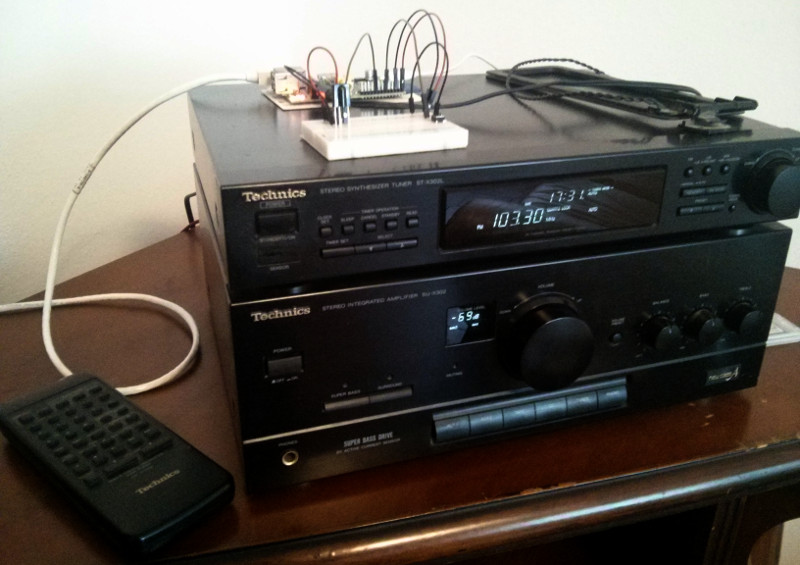 Enable
lirc_rpi support
I had to add these lines to /boot/config.txt to enable lirc_rpi support:
dtoverlay=lirc-rpi,gpio_in_pin=24,gpio_out_pin=22
dtparam=gpio_in_pull=up
lirc
apt install lirc
/etc/lirc/hardware.conf:
DRIVER="default"
DEVICE="/dev/lirc0"
MODULES="lirc_rpi"
lircd:
systemctl stop lirc
mode2 -d /dev/lirc0
/etc/lirc/lircd.conf.
Started lircd
systemctl start lirc
$ irw
0000400405506035 00 CD_PAUSE RAK-SC304W
0000400405506035 01 CD_PAUSE RAK-SC304W
0000400405506035 02 CD_PAUSE RAK-SC304W
0000400405505005 00 CD_PLAY RAK-SC304W
0000400405505005 01 CD_PLAY RAK-SC304W
lirc with mpd
I made this simple lirc program and saved it in ~pi/.lircrc:
begin
     prog = irexec
     button = CD_NEXT
     config = mpc next
end
begin
     prog = irexec
     button = TAPE_FWD
     config = mpc next
end
begin
     prog = irexec
     button = TAPE_REW
     config = mpc prev
end
begin
     prog = irexec
     button = CD_PREV
     config = mpc prev
end
begin
     prog = irexec
     button = TAPE_PAUSE
     config = mpc pause
end
begin
     prog = irexec
     button = CD_PAUSE
     config = mpc pause
end
begin
     prog = irexec
     button = CD_PLAY
     config = mpc toggle
end
begin
     prog = debug
     button = TAPE_PLAY_RIGHT
     config = mpc toggle
end
/etc/systemd/system/mpd-irexec.service:
[Unit]
Description=Control mpd via lirc remote control
After=lirc mpd
[Service]
Type=simple
ExecStart=/usr/bin/irexec
Restart=always
User=pi
WorkingDirectory=~
[Install]
WantedBy=multi-user.target
systemctl start mpd-irexec to start irexec, and
systemctl enable mpd-irexec to start irexec at boot.
Profit!
All of this was done by me, with almost no electronics training, following
online tutorials for the hardware parts.
To connect components I used a breadboard and female-male jumper leads, so I
didn't have to solder, for which I have very little practice.
Now the Raspberry Pi is so much
a part of my hifi component
that I can even control it with the hifi remote control.
Given that I disconnected the CD and tape players, there are now at least 16
free buttons on the remote control that I can script however I like.
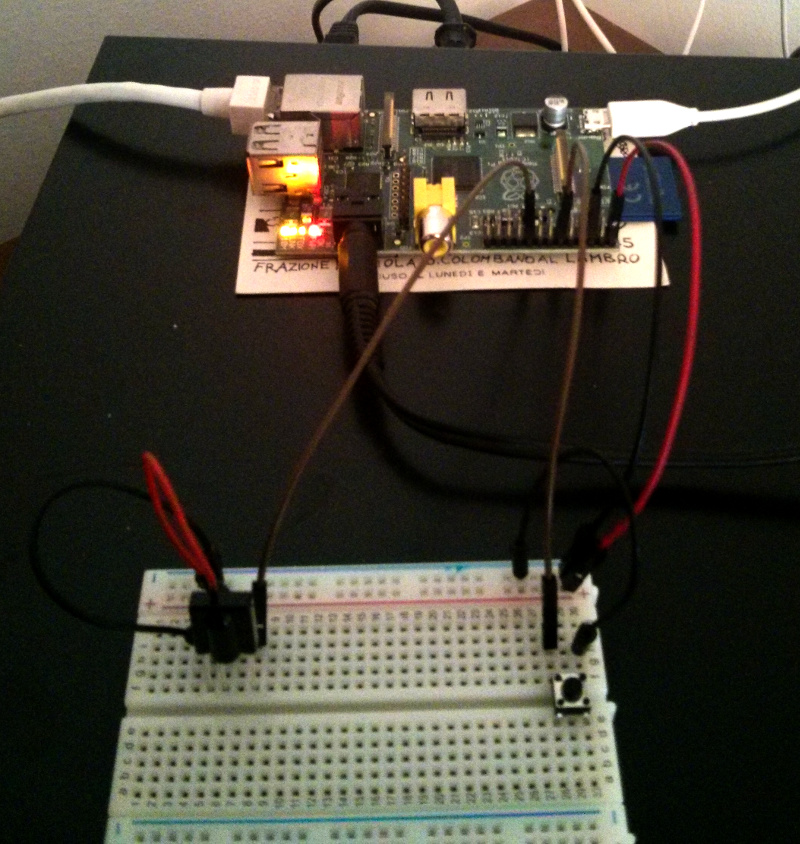
/usr/local/bin/stereo-gpio script that reacts to the button press
and triggers a shutdown:
1 2 3 4 5 6 7 8 9 10 11 12 13 14 15 16 17 18 | #!/usr/bin/python3 # http://razzpisampler.oreilly.com/ch07.html # http://web.archive.org/web/20160305001215/http://razzpisampler.oreilly.com/ch07.html from RPi import GPIO import time import subprocess def on_button(pin): print("Button pressed", pin) GPIO.setmode(GPIO.BCM) GPIO.setup(18, GPIO.IN, pull_up_down=GPIO.PUD_UP) while True: pin = GPIO.wait_for_edge(18, GPIO.FALLING) if pin == 18: subprocess.check_call(["/bin/systemctl", "halt"]) |
/etc/systemd/system/stereo-gpio.service systemd unit file that
runs the script as a daemon:
[Unit]
Description=Stereo GPIO manager
[Service]
Type=simple
ExecStart=/usr/local/bin/stereo-gpio
Restart=always
[Install]
WantedBy=multi-user.target
systemctl start stereo-gpio to start the script, and
systemctl enable stereo-gpio to start the script at boot.
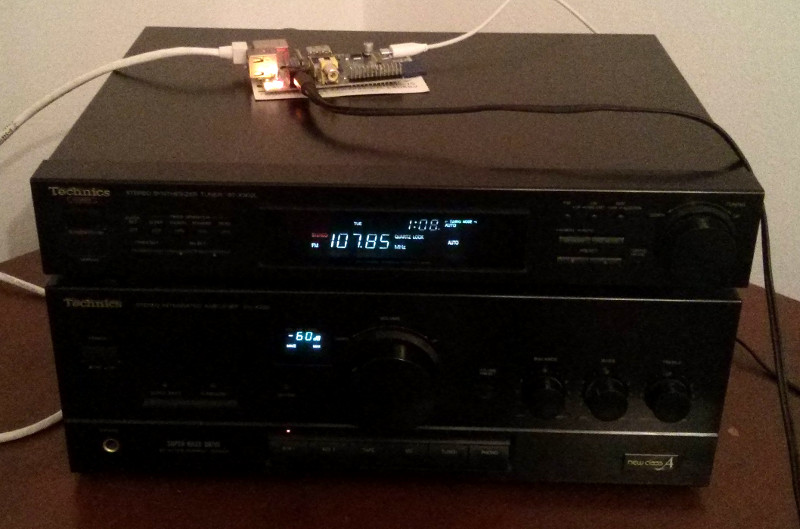 Connection
Each component of the hifi has a mains input and a mains plug that is used to
power the next component. The element where the main power lead goes in is the
radio component,
which has a remote control receiver, a watch and a timer, and will power on the
rest of the system when turned on by its power button, the remote control, or
the alarm function.
I disconnected the cassette and cd player modules, and plugged the Raspberry Pi
phone charger/power supply in the free plug behind the amplifier
module,
at the end of the (now very short) power lead chain.
I also connected the audio output of the Raspberry Pi to the CD input of my
stereo. The advantage of CD over AUX is that the remote control buttons for
switching audio sources don't cover the AUX inputs.
With
alsamixer I adjusted the output volume to match that of the radio
component, so that I can switch between the two without surprising jumps in
volume. I used alsactl store to save the mixer levels.
Now when I turn the hifi on I also turn the Raspberry Pi on, and when I turn
the hifi off, I also cut power from the Raspberry Pi.
Operating system
Operating system install instructions:
ssh file on the boot partitionssh pi@raspberrypi password raspberrysudo raspi-config to change the hostname, the password, and to enlarge the
root partition to include all the rest of the space available in the SD
card.apt install mpd
/etc/mpd.conf. The changes I made are:
Make mpd accessible from my local network:
bind_to_address "any"
zeroconf_enabled                "yes"
zeroconf_name                   "stereo"
password                        "SECRET@read,add,control,admin"
default_permissions             "read,add,control"
device option in the audio_output configuration.
use_mmap is cargo-culted from
the archlinux wiki.
audio_output
        type            "alsa"
        name            "My ALSA Device"
        device          "hw:0,0"        # optional
        use_mmap        "yes"
/var/lib/mpd/music:
#!/bin/sh
rsync -avz --filter=". sync-stereo.filter" --copy-links --prune-empty-dirs --delete ./ pi@stereo:/var/lib/mpd/music
ssh pi@stereo "chmod u=rwX,go=rX -R /var/lib/mpd/music"
sync-stereo.filter rules file for rsync:
hide /_archive
include */
include **.mp3
hide *
$ mpc -h stereo status
UltraCat - Unexpected Little Happenings
[playing] #15/22   0:03/4:06 (1%)
volume: 80%   repeat: off   random: on    single: off   consume: off
 Maintaining Debian packages of Perl modules usually can be done with
the common git-buildpackage (aka
gbp) workflow with its three
git branches master (or debian),
upstream and pristine-tar:
upstream contains the upstream code as imported from
upstream s release tar-balls.pristine-tar contains the binary diffs between the
contents of the upstream branch and the original
tar-ball. This mostly contains meta-data (timestamps, permissions,
file owners, etc.) as git doesn t store them.master (or debian) which contains
upstream plus packaging.upstream branch is used (and then maybe called
master while the Debian packaging branch is then called
debian).
But the files needed for a proper so called CPAN distribution of a
Perl module often contain redundant information (version numbers,
required modules, etc.) which needs to be maintained. And for that,
many people prefer Don t Repeat Yourself (DRY) as a
principle.
Dist::Zilla
One nice and common tool for that is Dist::Zilla or short dzil. It generates most
redundant but required data out of a central source, e.g.
Dist::Zilla s dist.ini or the contained .pm
files, etc. dzil build creates tar ball which contains
all files necessary by CPAN.
But now we have a dilemma: Debian expects those generated files inside
the upstream branch while the files are only generated
from other files in that branch. There are multiple solutions, but all
of them involve committing generated files to the git repository:
upstream branch. Disadvantage:
You ll likely later forget which files were generated and which
weren t.master (original code), upstream (original
code + stuff generated by dzil build, maybe imported with
git-import-orig), pristine-tar and a
debian (based on upstream) branches.run-parts tool) was initially maintained in the latter
way.
But especially in cases where we just need a Perl module packaged as
.deb without uploading it to CPAN (e.g. project-internal
modules), this is a tedious workflow and overkill. It would be much
nicer if debhelper would just call dzil to generate all
the stuff it needs to build the package.
dh-dist-zilla
Well, you can
do that now, at least with Debian Jessie. This is what dh-dist-zilla does: It is a debhelper sequence plugin which calls
dzil build and dzil clean in the right
moment and takes care that all dh_auto_* commands look in
the directory with the generated files instead of the rather clean
project root directory.
To use dh-dist-zilla, you just need to add a build-dependency on it
and the Dist::Zilla plugins you use, and add --with
dist-zilla to your minimal dh-style
debian/rules file:
#!/usr/bin/make -f
%:
	dh $@ --with dist-zilla
That s it. With regards to workflow and git branches, you may still want to use separate branches for upstream work and debian work, and you may want to continue to use pristine-tar, but you don t have to commit generated files to git anymore and you can maintain a clean master branch with nearly no redundancy. And if you need to generate to final upstream tar ball for you debian package, just call
dh get-orig-source or maybe easier to
use with tab completion dh_dist_zilla_origtar.
This is how the librun-parts-perl package is maintained
nowadays. There s otherwise not much difference to the old,
classically maintained versions.
More DRY
Next step in the DRY evolution is to reduce redundancies between
upstream (Dist::Zilla based) packaging and the Debian packaging. There
are a few tools available, partially brand new, partially not yet
packaged:
dh-dzil-refresh which combines
dh-make-perl s refresh subcommand with Dist::Zilla.signing.dumps creates obscure-looking tokens, they are
not encrypted, and here's a proof:
>>> from django.core import signing
>>> a = signing.dumps( "action":"set-password", "username": "enrico", "password": "SECRET" )
>>> from django.utils.encoding import force_bytes
>>> print(signing.b64_decode(force_bytes(a.split(":",1)[0])))
b' "action":"set-password","password":"SECRET","username":"enrico" '
ssite serve on a GitHub
project you will get a live preview of README.md and the project
documentation.
Post series
I have added support for post series,
that allow you to easily interlink posts with previous/next links.
You can see it in action on links and on
An Italian song a day, an ongoing series that is
currently each day posting a link to an Italian song.
I now have an XMPP setup which has all the features of the recent fancy chat systems, and on top of that it runs, client and server, on Free Software, which can be audited, it is federated and I can self-host my own server in my own VPS if I want to, with packages supported in Debian.
prosodyctl adduser alice@example.orgc2s_require_encryption = true
s2s_secure_auth = trues2s_insecure_domains = "gmail.com" VirtualHost "chat.example.org"
enabled = true
ssl =
key = "/etc/ssl/private/example.org-key.pem";
certificate = "/etc/ssl/public/example.org.pem";
Component "conference.chat.example.org" "muc"
restrict_room_creation = "local"Component "upload.chat.trueelena.org" "http_upload""something";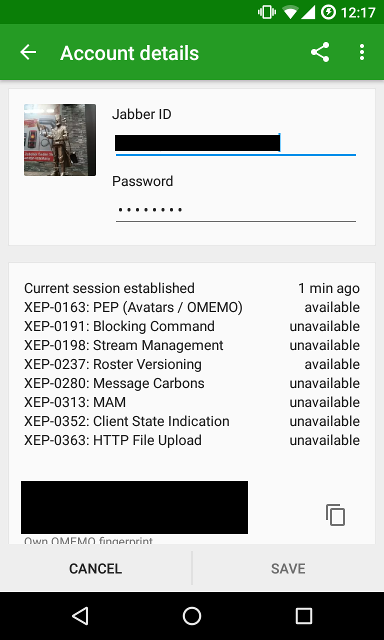 Some days ago, me and Valhalla
played the game of trying to see what happens when one turns them all on: I
would send her screenshots from my Conversations, and she would poke at her
Prosody to try and turn things on:
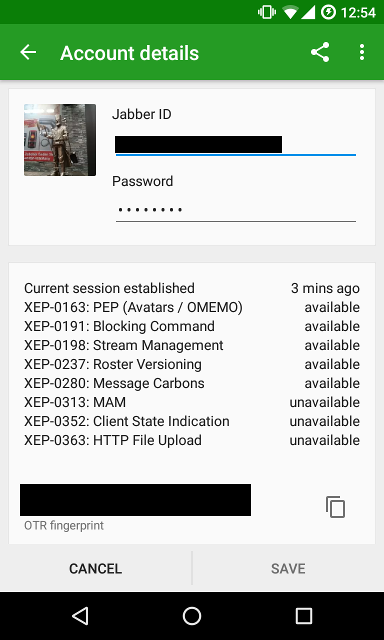 Valhalla eventually managed to get all features activated, purely using
packages from Jessie+Backports:
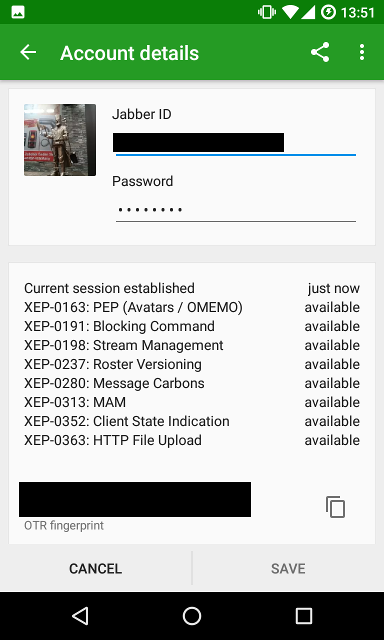 The result was a chat system in which I could see the same conversation history
on my phone and on my laptop (with gajim)(https://gajim.org/), and have it
synced even after a device has been offline,
We could send each other rich media like photos,
and could do OMEMO encryption (same as
Signal) in
group chats.
I now have an XMPP setup which has all the features of the recent fancy chat
systems, and on top of that it runs, client and server, on Free Software, which
can be audited, it is federated and I can self-host my own server in my own VPS
if I want to, with packages supported in Debian.
Valhalla has documented the whole procedure.
If you make a client for a protocol with lots of extension, do like
Conversations and implement a status page with the features you'd like to have
on the server, and little green indicators showing which are available: it
is quite a good motivator for getting them all supported.
$ intervallo --help
usage: intervallo [-h] [--font file.ttf] [--audio file.mp3] [--duration sec]
                  imgfile [imgfile ...]
Create an Intervallo RAI out of a collection of images.
positional arguments:
  imgfile           input image files
optional arguments:
  -h, --help        show this help message and exit
  --font file.ttf   Font to use for subtitles
  --audio file.mp3  Audio track
  --duration sec    Time for each image in seconds
./intervallo --font DejaVuSerif.ttf --audio Paradisi-Toccata.mp3 *.jpg
Next.


