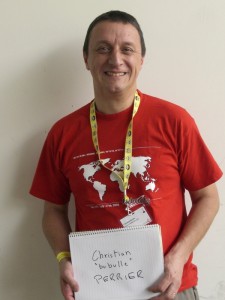
Search Results: "benjamin"

3 July 2011

Benjamin Drung: libkibi ready for testing

Yes, the library is finally called libkibi. The second poll ended with a tie between libbyteprefix (48 votes) and libkibi (45 votes). Then I decided to call the library libkibi. libkibi is hosted on Launchpad. A working version can be pulled from lp:libkibi with bzr. Please test the library, reports bugs, and ask questions. Why you should use libkibi instead of g_format_size_for_display (from GLib):

Benjamin Drung: Nautilus with libkibi

In this Ubuntu cycle, I work on getting the units policy implemented. For this I wrote a library called libkibi. Here are some screen shots how nautilus looks like with libkibi. Some changes are highlighted in red. The file properties will show the file size in base10 and base2: PS: I failed to launch nautilus in English. Therefore the screen shots are in German. PS : You can grab the modified nautilus package for Ubuntu 10.10 (maverick) from my experimental PPA (at your own risk!).

Benjamin Drung: libkibi 0.1 released

The first version of libkibi is released. This library is designed for formatting sizes in bytes for display. The user can configure a preferred prefix style. Packages for Debian unstable and Ubuntu 11.04 (maverick) are uploaded. It contains a README for developers and a byteprefix man page for users, which can be read with man 5 byteprefix once installed. Thanks to Stefano Rivera for writing the man page! For a demonstration how this library used by an application can look like, read my previous post.

Benjamin Drung: How to purge Wine completely

I had Wine installed and wanted to get rid of it completely. I removed the Wine Debian package and what belong to it, but the Windows applications still appeared in the GNOME main menu. I removed the .wine directory and all local wine-related desktop files: rm -rf ~/.wine ~/.local/share/applications/wine
rm -f ~/.local/share/applications/wine-* ~/.local/share/applications/mimeinfo.cache
Now there is no sign left that Wine was installed.

Benjamin Drung: Symptoms of a dying graphic card

All started in December last year. I saw a red and a green pixel on my monitor. Moving the window containing the wrong-colors pixels corrected them. The wrong-colored pixels reappear from time to time in increased quantity. Then a second symptom appeared: The screen went black and came back one second later. This was triggered by moving a window and scrolling. I wasn t sure what the reason was. Either it was a bug somewhere in the X stack or some hardware was dying. dmesg showed multiple problems with the radeon driver:
[283808.667454] radeon 0000:01:00.0: ffff88021f815c00 unpin not necessary
[283808.667820] radeon 0000:01:00.0: GPU softreset
[283808.667823] radeon 0000:01:00.0: R_008010_GRBM_STATUS=0xE57024A4
[283808.667825] radeon 0000:01:00.0: R_008014_GRBM_STATUS2=0 00330302
[283808.667826] radeon 0000:01:00.0: R_000E50_SRBM_STATUS=0x200000C0
[283808.667832] radeon 0000:01:00.0: R_008020_GRBM_SOFT_RESET=0x00007FEE
[283808.682844] radeon 0000:01:00.0: R_008020_GRBM_SOFT_RESET=0 00000001
[283808.698840] radeon 0000:01:00.0: R_008010_GRBM_STATUS=0 00003028
[283808.698843] radeon 0000:01:00.0: R_008014_GRBM_STATUS2=0 00000002
[283808.698845] radeon 0000:01:00.0: R_000E50_SRBM_STATUS=0x200000C0
[283808.699845] radeon 0000:01:00.0: GPU reset succeed
[283808.717570] [drm] Clocks initialized !
[283808.765829] [drm] ring test succeeded in 0 usecs
[283808.765838] [drm] ib test succeeded in 1 usecs
[283808.765840] [drm] Enabling audio support
[283812.521265] radeon 0000:01:00.0: GPU lockup CP stall for more than 1000msec
[283812.521269] [ cut here ]
[283812.521294] WARNING: at /build/buildd/linux-2.6.35/drivers/gpu/drm/radeon/radeon_fence.c:235 radeon_fence_wait+0 365/0x3d0 [radeon]()
[283812.521297] Hardware name:
[283812.521299] GPU lockup (waiting for 0x00AE670A last fence id 0x00AE6705)
[283812.521301] Modules linked in: btrfs zlib_deflate crc32c libcrc32c ufs qnx4 hfsplus hfs minix ntfs vfat msdos fat jfs xfs exportfs reiserfs nls_utf8 udf ip6table_filter ip6_tables binfmt_misc ipt_MASQUERADE iptable_nat nf_nat nf_conntrack_ipv4 nf_defrag_ipv4 xt_state nf_conntrack ipt_REJECT xt_tcpudp iptable_filter ip_tables x_tables bridge stp kvm_intel kvm parport_pc ppdev snd_emu10k1_synth snd_emux_synth snd_seq_virmidi snd_seq_midi_emul snd_emu10k1 snd_ac97_codec ac97_bus snd_pcm snd_page_alloc snd_util_mem snd_hwdep snd_seq_midi radeon snd_rawmidi snd_seq_midi_event snd_seq snd_timer snd_seq_device ttm snd pl2303 drm_kms_helper coretemp usbserial joydev psmouse soundcore drm serio_raw intel_agp i2c_algo_bit lp parport hid_cherry usbhid hid firewire_ohci firewire_core usb_storage crc_itu_t e1000e ahci libahci pata_marvell
[283812.521360] Pid: 2194, comm: compiz Tainted: G W 2.6.35-24-generic #42-Ubuntu
[283812.521362] Call Trace:
[283812.521370] [<ffffffff8106089f>] warn_slowpath_common+0x7f/0xc0
[283812.521374] [<ffffffff81060996>] warn_slowpath_fmt+0 46/0 50
[283812.521390] [<ffffffffa01bd775>] radeon_fence_wait+0 365/0x3d0 [radeon]
[283812.521394] [<ffffffff8107f730>] ? autoremove_wake_function+0 0/0 40
[283812.521410] [<ffffffffa01bdf71>] radeon_sync_obj_wait+0 11/0 20 [radeon]
[283812.521418] [<ffffffffa01751a3>] ttm_bo_wait+0 103/0x1c0 [ttm]
[283812.521435] [<ffffffffa01d4e1a>] radeon_gem_wait_idle_ioctl+0x9a/0 150 [radeon]
[283812.521447] [<ffffffffa010f433>] drm_ioctl+0 463/0 520 [drm]
[283812.521465] [<ffffffffa01d4d80>] ? radeon_gem_wait_idle_ioctl+0 0/0 150 [radeon]
[283812.521470] [<ffffffff81162f0d>] vfs_ioctl+0x3d/0xd0
[283812.521473] [<ffffffff811637e1>] do_vfs_ioctl+0 81/0 340
[283812.521477] [<ffffffff811535f1>] ? vfs_read+0 181/0x1a0
[283812.521480] [<ffffffff81163b21>] sys_ioctl+0 81/0xa0
[283812.521484] [<ffffffff8100a0f2>] system_call_fastpath+0 16/0x1b
[283812.521487] [ end trace 6d5e03bab743abfa ]
[283812.521493] [drm] Disabling audio support
[283812.525575] [drm:radeon_ib_schedule] *ERROR* radeon: couldn t schedule IB(10).
[283812.525579] [drm:radeon_cs_ioctl] *ERROR* Faild to schedule IB !
[283812.527021] [drm:radeon_ib_schedule] *ERROR* radeon: couldn t schedule IB(11).
[283812.527024] [drm:radeon_cs_ioctl] *ERROR* Faild to schedule IB !
[283812.527921] [drm:radeon_ib_schedule] *ERROR* radeon: couldn t schedule IB(12).
[283812.527923] [drm:radeon_cs_ioctl] *ERROR* Faild to schedule IB !
The time between going black reduces every time. The system wasn t usable any more in the end. After testing that the screen was going blank on other systems like a live CD of Ubuntu and a not noteworthy proprietary system, it was clear that some hardware component was dying. My first assumption was verified after replacing it: My graphic card, a Radeon HD 4670, died. This was three weeks ago and around 25 month after I bought the graphics card. So I didn t have to worry if replacing the fan voided the guarantee, because the guarantee lasts only 24 month. Conclusion:
  1. Not every error is a software bug.
  2. The hardware component with the highest failure rate is the graphics card, followed by the motherboard. Four graphics cards died last year (in four different systems owned by four different people, in three different households).
  3. Not every error is a software bug.

30 June 2011

Benjamin Mako Hill: Berkman Fellowship

Last week, the Berkman Center for Internet and Society announced it's 2011-2012 list of fellows. I'm honored and excited that they elected to include me in a pretty incredible list of fellows, faculty associates, and other affiliates. It seems I'll be at Harvard next year. In my first year as an undergraduate -- when fights over Napster were raging -- I took a class taught by a Berkman Fellow on the political and social implications of Internet technology. The next year, I worked part-time as a teaching assistant for Harvard Law professor (and Berkman director) Jonathan Zittrain. These experiences had a enormous influence on my life and work. Before, my goal was to study and teach English literature. I've hung around on the fringes of the center for much of the last decade and I've grown immeasurably from the experience. Most recently, I've been working closely with Berkman director Yochai Benkler and current fellow Aaron Shaw on research in online cooperation. The new crop of fellows includes a pretty great group of people working on similar stuff and I'm looking forward to expanding the online cooperation research at the center and to a year of fascinating talks and discussions. I also hope that, after all these, years, I'll be able to give a bit back to an organization that has give me so much.

29 June 2011

Vincent Bernat: Alternate Android firmware on Samsung Galaxy S

I have bought a Samsung Galaxy S Android phone some time ago. One of the first thing that you try to do with such a phone is to switch to some alternate firmware (the coined term is ROM ), like CyanogenMod. Flashing a firmware is a whole new universe. You are told about a lot of proprietary tools, you need to download a lot of things from MegaUpload and friends and nobody really explains what s going on under the hood. I was a bit lost at first. I will not provide a step-by-step guide since I cannot afford to stay up-to-date. Such a guide is usually posted on some forum. It assumes you are running Windows and provides appropriate download links. You must follow it (and check that it is recent enough). I will just provide you some background to understand those guides.

Android firmwares There are several Android firmwares. Most of them are specific to a given phone (or its close variations). They can be sorted in three categories:
  1. Official firmwares from the phone manufacturer include a kernel with appropriate drivers and, usually, a customized interface (HTC Sense for HTC, TouchWiz for Samsung). Some manufacturers will lag a lot behind Android schedule and you may not get all the new shiny features.
  2. Modified firmwares are built from the official firmwares. They usually add a lot of hacks on top of the original firmware, remove some cruft but are still closely related to the official firmware.
  3. Firmwares built from Android Open Source Project (the open source version of Android) do not share nothing with the official firmware except some bits related to the kernel (drivers, hacks).

Darky ROM Darky ROM is a modified firmware. It takes the original firmware from Samsung, adds a custom kernel (based on the source of the official kernel), adds a lot of hacks, some additional applications and removes some unwanted cruft. This is a very nice firmware which is quite snappy. This is a drop-in replacement for the default firmware: you will only get improvements. The latest version is 10.1 and there is a neat guide on how to install it.

CyanogenMod CyanogenMod is a firmware built from AOSP. It supports several devices and provide an unified firmware on all of them. Support for the Samsung Galaxy S is recent and is not present in the stable build. However, some RC build is now available. Be sure to read the FAQ (most notably the part saying that you need to install from Froyo 2.2 because the bootloader provided by Samsung with Gingerbread 2.3 is not compatible). You can also grab some information from the wiki. The major drawback of using this firmware instead of going for a modified firmware like Darky ROM is that the battery life may suck. I now need to charge my phone every day instead of once every two days. On the plus side, you get a very clean firmware with a lot of features and almost no cruft. For example, the notification bar can be customized and OpenVPN is available out of the box. Moreover, almost everything is open source (if you don t install Google apps). You can see this firmware as an open source distribution for your phone. There is no need to download random files linked from a random forum to make it work. There is no package manager, though. Despite the bad battery life, I prefer this firmware.

Prerequisites Before trying to flash a new firmware, there are some tools that you need to have. Note that you don t need root access to flash a new firmware.

Download & recovery mode Before trying to install any firmware, you must check that your phone can access download and recovery modes. The download mode allows to flash any new firmware, even if the current firmware does not boot at all. As long as this mode is available, there is very little chance that you brick your phone. To access those modes, you need to use the three-button combo . Here are the steps (your phone should not be plugged):
  1. Power off the phone (wait for the phone to vibrate).
  2. Hold the Volume down button for download mode. Hold the Volume up button for recovery mode.
  3. Hold the Home button.
  4. Hold the Power button. The phone will start.
  5. Once you have the Samsung logo displayed on the screen, release the Power button.
  6. Only release the two other buttons when you enter the recovery mode or download mode. The recovery mode displays a menu. The download mode displays a big yellow Android logo.
If after ten tries, you are unable to access those modes, maybe they have been disabled. Keep reading, there is a solution.

Heimdall Heimdall is a tool to flash a new firmware to your phone. This is not a mandatory tool but you will have to use it if something goes wrong. Most guides will tell you to use Odin. It is a leaked Samsung tool running on Windows only. You can use Heimdall instead.
$ git clone https://github.com/Benjamin-Dobell/Heimdall.git
Cloning into Heimdall...
remote: Counting objects: 423, done.
remote: Compressing objects: 100% (271/271), done.
remote: Total 423 (delta 220), reused 332 (delta 138)
Receiving objects: 100% (423/423), 5.91 MiB   962 KiB/s, done.
Resolving deltas: 100% (220/220), done.
$ cd Heimdall/heimdall
$ sudo apt-get install libusb-1.0-0-dev
$ ./configure && make
[...]
$ sudo cp 60-heimdall-galaxy-s.rules /etc/udev/rules.d
$ sudo /etc/init.d/udev reload
You need to use this tool while in download mode. You can test it, while in download mode, with:
$ ./heimdall print-pit
This will display the partition table of your phone. This is enlightening to know what it contains:
  • IBL+PBL is the boot loader, be extra careful with it;
  • PIT is the partition table;
  • EFS contains some important data like IEMEI, be extra careful with it;
  • SBL is the second boot loader;
  • SBL2 is the backup of the second boot loader;
  • PARAM contains some images used as various stage of the boot process;
  • KERNEL is the kernel;
  • RECOVERY is the backup of the kernel;
  • FACTORYFS contains /system file system which is some kind of root file system;
  • DBDATA contains /data file system which is the database to store application parameters;
  • CACHE contains /cache file system which contains the Dalvik cache;
  • MODEM contains the firmware for the modem.
As we will see, Heimdall is able to flash any of those partitions with flash subcommand.

adb adb stands for Android Debug Bridge. Among other things, this tool allow you to drive your phone through the USB connection. You can get a shell, reboot into download or recovery mode, push files to your Android device, etc. To get this tool, you need to download the full Android SDK.
$ tar zxvf ~/download/android-sdk_r11-linux_x86.tgz
$ cd android-sdk-linux_x86
$ tools/android update sdk
[select Android SDK Platform-tools]
$ platform-tools/adb shell
# uname -a
Linux localhost 2.6.35.7-I9000XWJVH-CL184813 #Dark_Core_2.4 PREEMPT Mon May 16 15:02:38 EEST 2011 armv7l GNU/Linux
The important commands are:
  • shell to get a shell on the device;
  • reboot recovery to reboot in recovery mode;
  • reboot download to reboot in download mode;
  • push to put a file on the phone;
  • pull to retrieve a file;
  • install to install an application from its APK;
  • logcat to see the logs and what happens, very useful!

Restore download mode If your phone is missing download mode, you can recover it with the help of adb and heimdall. You need to grab some official firmware and extract boot.bin and Sbl.bin from it.
$ adb reboot download
$ heimdall flash --primary-boot ~/download/boot.bin --secondary-boot ~/download/Sbl.bin
Be extra careful here. You may brick your phone. Double check that you grab the correct files and that they are really for your phone (there exists some variants). It worked for me.

Installing a new firmware While you can switch from one firmware to another without losing your data, it is better to wipe your system and your data before switching firmware. This means that you will lose all your applications and the data inside them (list of contacts, SMS, preferences). However, nothing will ever modify your data in the internal SD card or in the external SD card (which are both inside the phone). They usually contains your music and your photos. There are two ways to install a firmware:
  1. via Heimdall, or
  2. using the recovery.

Heimdall When a guide tells you to use Odin, you can use Heimdall instead. Odin takes a TAR file. You should untar it and uses its content with Heimdall. For example:
$ ./heimdall flash --repartition --pit s1_odin_20100512.pit \
>                  --factoryfs factoryfs.rfs \
>                  --cache cache.rfs --dbdata dbdata.rfs \
>                  --param param.lfs --modem modem.bin \
>                  --kernel zImage --secondary-boot Sbl.bin 
Claiming interface again...   Success
Setting up interface...   Success
Beginning session...
Handshaking with Loke...   Success
Uploading PIT
PIT upload successful
Uploading SBL
100%
SBL upload successful
Uploading KERNEL
100%
KERNEL upload successful
Uploading MODEM
100%
MODEM upload successful
Uploading PARAM
100%
PARAM upload successful
Uploading FACTORYFS
100%
FACTORYFS upload successful
Uploading DBDATAFS
100%
DBDATAFS upload successful
Uploading CACHE
100%
CACHE upload successful
Ending session...
Rebooting device...
You may be interested to update your modem using Heimdall. This is usually independent of the firmware you want to use. Also, no need to provide a PIT file if you don t want to repartition. Heimdall can read the current one and flash only one of the partitions.

Recovery mode The base recovery shipped with the Samsung Galaxy S does not have a lot of options. Moreover, it may be locked and will accept to install only signed firmwares. Most firmwares come with ClockWorkMod, a more advanced recovery. Once you get it, you will be able to use any ZIP file to install a new firmware. My advice is to try to get ClockWorkMod as soon as possible. If you are root, you can install ROM Manager that will install it for you. If you are not root, most custom firmwares will provide ClockWorkMod. Therefore, you can just install a custom firmware with Heimdall. There exists special firmwares just for this, like EZbase. If you want to install CyanogenMod, be sure to download a Froyo firmware, not a Gingerbread one. Keep in mind that the recovery is located inside the kernel. It is not self-contained in the bootloader (unlike download mode). If you don t want to flash a whole firmware (and lose everything on your phone) just to get the recovery, you can just flash the kernel. The ClockWorkMod recovery comes with an utility to backup your whole phone. This way, you can easily restore your previous firmware if you don t like the current one. This is what is called a Nandroid backup.

Lagfix A lot of guides will tell you to enable or disable lagfix. Samsung shipped the Galaxy S with some crappy filesystem called RFS (which is some kind of enhanced FAT). It is slow and seems responsible for some lags that may happen on the interface. A lagfix is a way to replace this filesystem by something better, like EXT4 or YAFFS2. The process is pretty straighforward and consist to backup all the partition to the SD card, reformat it with another filesystem and restore the backup. The lagfix may be applied automatically with some firmware (like CyanogenMod) or you may request it in the recovery mode (most modified firmwares work this way). In this case, it will be applied automatically on the next boot. You should disable it before installing another firmware with the recovery mode (no need if you install it with Heimdall).

Applications You can find many free (as in free speech) applications for Android. Unfortunately, Android Market does not allow to use this criteria as a filter. F-Droid is an alternate market featuring only FOSS applications. Here is a short selection of free applications:
  • ADW.Launcher is a home replacement app. It is very configurable and themable.
  • K-9 Mail is a very nice email client.
  • Xabber is a XMPP/Jabber client.
  • ConnectBot is an SSH client (as well as a terminal).
  • DroidWall is an application firewall (using Netfilter). It lets you select which application can access to Internet depending on your connection (wifi or 3G).
  • Barcode Scanner decodes 1D/2D barcode including QR codes.
  • OsmAnd is a replacement for Google Maps using OpenStreetMap. The free version on Android Market is out-dated. Buy the plus version or download it throught F-Droid.
Another must-have application is Titanium Backup which allows to backup any application with data. Unfortunately, this is not a free (as in free speech) application.

Vincent Bernat: Alternate Android firmware on Samsung Galaxy S

I have bought a Samsung Galaxy S Android phone some time ago. One of the first thing that you try to do with such a phone is to switch to some alternate firmware (the coined term is ROM ), like CyanogenMod. Flashing a firmware is a whole new universe. You are told about a lot of proprietary tools, you need to download a lot of things from MegaUpload and friends and nobody really explains what s going on under the hood. I was a bit lost at first. I will not provide a step-by-step guide since I cannot afford to stay up-to-date. Such a guide is usually posted on some forum. It assumes you are running Windows and provides appropriate download links. You must follow it (and check that it is recent enough). I will just provide you some background to understand those guides.

Android firmwares There are several Android firmwares. Most of them are specific to a given phone (or its close variations). They can be sorted in three categories:
  1. Official firmwares from the phone manufacturer include a kernel with appropriate drivers and, usually, a customized interface (HTC Sense for HTC, TouchWiz for Samsung). Some manufacturers will lag a lot behind Android schedule and you may not get all the new shiny features.
  2. Modified firmwares are built from the official firmwares. They usually add a lot of hacks on top of the original firmware, remove some cruft but are still closely related to the official firmware.
  3. Firmwares built from Android Open Source Project (the open source version of Android) do not share nothing with the official firmware except some bits related to the kernel (drivers, hacks).

Darky ROM Darky ROM is a modified firmware. It takes the original firmware from Samsung, adds a custom kernel (based on the source of the official kernel), adds a lot of hacks, some additional applications and removes some unwanted cruft. This is a very nice firmware which is quite snappy. This is a drop-in replacement for the default firmware: you will only get improvements. The latest version is 10.1 and there is a neat guide on how to install it.

CyanogenMod CyanogenMod is a firmware built from AOSP. It supports several devices and provide an unified firmware on all of them. Support for the Samsung Galaxy S is recent and is not present in the stable build. However, some RC build is now available. Be sure to read the FAQ (most notably the part saying that you need to install from Froyo 2.2 because the bootloader provided by Samsung with Gingerbread 2.3 is not compatible). You can also grab some information from the wiki. The major drawback of using this firmware instead of going for a modified firmware like Darky ROM is that the battery life may suck. I now need to charge my phone every day instead of once every two days. On the plus side, you get a very clean firmware with a lot of features and almost no cruft. For example, the notification bar can be customized and OpenVPN is available out of the box. Moreover, almost everything is open source (if you don t install Google apps). You can see this firmware as an open source distribution for your phone. There is no need to download random files linked from a random forum to make it work. There is no package manager, though. Despite the bad battery life, I prefer this firmware.

Prerequisites Before trying to flash a new firmware, there are some tools that you need to have. Note that you don t need root access to flash a new firmware.

Download & recovery mode Before trying to install any firmware, you must check that your phone can access download and recovery modes. The download mode allows to flash any new firmware, even if the current firmware does not boot at all. As long as this mode is available, there is very little chance that you brick your phone. To access those modes, you need to use the three-button combo . Here are the steps (your phone should not be plugged):
  1. Power off the phone (wait for the phone to vibrate).
  2. Hold the Volume down button for download mode. Hold the Volume up button for recovery mode.
  3. Hold the Home button.
  4. Hold the Power button. The phone will start.
  5. Once you have the Samsung logo displayed on the screen, release the Power button.
  6. Only release the two other buttons when you enter the recovery mode or download mode. The recovery mode displays a menu. The download mode displays a big yellow Android logo.
If after ten tries, you are unable to access those modes, maybe they have been disabled. Keep reading, there is a solution.

Heimdall Heimdall is a tool to flash a new firmware to your phone. This is not a mandatory tool but you will have to use it if something goes wrong. Most guides will tell you to use Odin. It is a leaked Samsung tool running on Windows only. You can use Heimdall instead.
$ git clone https://github.com/Benjamin-Dobell/Heimdall.git
Cloning into Heimdall...
remote: Counting objects: 423, done.
remote: Compressing objects: 100% (271/271), done.
remote: Total 423 (delta 220), reused 332 (delta 138)
Receiving objects: 100% (423/423), 5.91 MiB   962 KiB/s, done.
Resolving deltas: 100% (220/220), done.
$ cd Heimdall/heimdall
$ sudo apt-get install libusb-1.0-0-dev
$ ./configure && make
[...]
$ sudo cp 60-heimdall-galaxy-s.rules /etc/udev/rules.d
$ sudo /etc/init.d/udev reload
You need to use this tool while in download mode. You can test it, while in download mode, with:
$ ./heimdall print-pit
This will display the partition table of your phone. This is enlightening to know what it contains:
  • IBL+PBL is the boot loader, be extra careful with it;
  • PIT is the partition table;
  • EFS contains some important data like IEMEI, be extra careful with it;
  • SBL is the second boot loader;
  • SBL2 is the backup of the second boot loader;
  • PARAM contains some images used as various stage of the boot process;
  • KERNEL is the kernel;
  • RECOVERY is the backup of the kernel;
  • FACTORYFS contains /system file system which is some kind of root file system;
  • DBDATA contains /data file system which is the database to store application parameters;
  • CACHE contains /cache file system which contains the Dalvik cache;
  • MODEM contains the firmware for the modem.
As we will see, Heimdall is able to flash any of those partitions with flash subcommand.

adb adb stands for Android Debug Bridge. Among other things, this tool allow you to drive your phone through the USB connection. You can get a shell, reboot into download or recovery mode, push files to your Android device, etc. To get this tool, you need to download the full Android SDK.
$ tar zxvf ~/download/android-sdk_r11-linux_x86.tgz
$ cd android-sdk-linux_x86
$ tools/android update sdk
[select Android SDK Platform-tools]
$ platform-tools/adb shell
# uname -a
Linux localhost 2.6.35.7-I9000XWJVH-CL184813 #Dark_Core_2.4 PREEMPT Mon May 16 15:02:38 EEST 2011 armv7l GNU/Linux
The important commands are:
  • shell to get a shell on the device;
  • reboot recovery to reboot in recovery mode;
  • reboot download to reboot in download mode;
  • push to put a file on the phone;
  • pull to retrieve a file;
  • install to install an application from its APK;
  • logcat to see the logs and what happens, very useful!

Restore download mode If your phone is missing download mode, you can recover it with the help of adb and heimdall. You need to grab some official firmware and extract boot.bin and Sbl.bin from it.
$ adb reboot download
$ heimdall flash --primary-boot ~/download/boot.bin --secondary-boot ~/download/Sbl.bin
Be extra careful here. You may brick your phone. Double check that you grab the correct files and that they are really for your phone (there exists some variants). It worked for me.

Installing a new firmware While you can switch from one firmware to another without losing your data, it is better to wipe your system and your data before switching firmware. This means that you will lose all your applications and the data inside them (list of contacts, SMS, preferences). However, nothing will ever modify your data in the internal SD card or in the external SD card (which are both inside the phone). They usually contains your music and your photos. There are two ways to install a firmware:
  1. via Heimdall, or
  2. using the recovery.

Heimdall When a guide tells you to use Odin, you can use Heimdall instead. Odin takes a TAR file. You should untar it and uses its content with Heimdall. For example:
$ ./heimdall flash --repartition --pit s1_odin_20100512.pit \
>                  --factoryfs factoryfs.rfs \
>                  --cache cache.rfs --dbdata dbdata.rfs \
>                  --param param.lfs --modem modem.bin \
>                  --kernel zImage --secondary-boot Sbl.bin 
Claiming interface again...   Success
Setting up interface...   Success
Beginning session...
Handshaking with Loke...   Success
Uploading PIT
PIT upload successful
Uploading SBL
100%
SBL upload successful
Uploading KERNEL
100%
KERNEL upload successful
Uploading MODEM
100%
MODEM upload successful
Uploading PARAM
100%
PARAM upload successful
Uploading FACTORYFS
100%
FACTORYFS upload successful
Uploading DBDATAFS
100%
DBDATAFS upload successful
Uploading CACHE
100%
CACHE upload successful
Ending session...
Rebooting device...
You may be interested to update your modem using Heimdall. This is usually independent of the firmware you want to use. Also, no need to provide a PIT file if you don t want to repartition. Heimdall can read the current one and flash only one of the partitions.

Recovery mode The base recovery shipped with the Samsung Galaxy S does not have a lot of options. Moreover, it may be locked and will accept to install only signed firmwares. Most firmwares come with ClockWorkMod, a more advanced recovery. Once you get it, you will be able to use any ZIP file to install a new firmware. My advice is to try to get ClockWorkMod as soon as possible. If you are root, you can install ROM Manager that will install it for you. If you are not root, most custom firmwares will provide ClockWorkMod. Therefore, you can just install a custom firmware with Heimdall. There exists special firmwares just for this, like EZbase. If you want to install CyanogenMod, be sure to download a Froyo firmware, not a Gingerbread one. Keep in mind that the recovery is located inside the kernel. It is not self-contained in the bootloader (unlike download mode). If you don t want to flash a whole firmware (and lose everything on your phone) just to get the recovery, you can just flash the kernel. The ClockWorkMod recovery comes with an utility to backup your whole phone. This way, you can easily restore your previous firmware if you don t like the current one. This is what is called a Nandroid backup.

Lagfix A lot of guides will tell you to enable or disable lagfix. Samsung shipped the Galaxy S with some crappy filesystem called RFS (which is some kind of enhanced FAT). It is slow and seems responsible for some lags that may happen on the interface. A lagfix is a way to replace this filesystem by something better, like EXT4 or YAFFS2. The process is pretty straighforward and consist to backup all the partition to the SD card, reformat it with another filesystem and restore the backup. The lagfix may be applied automatically with some firmware (like CyanogenMod) or you may request it in the recovery mode (most modified firmwares work this way). In this case, it will be applied automatically on the next boot. You should disable it before installing another firmware with the recovery mode (no need if you install it with Heimdall).

Applications You can find many free (as in free speech) applications for Android. Unfortunately, Android Market does not allow to use this criteria as a filter. F-Droid is an alternate market featuring only FOSS applications. Here is a short selection of free applications:
  • ADW.Launcher is a home replacement app. It is very configurable and themable.
  • K-9 Mail is a very nice email client.
  • Xabber is a XMPP/Jabber client.
  • ConnectBot is an SSH client (as well as a terminal).
  • DroidWall is an application firewall (using Netfilter). It lets you select which application can access to Internet depending on your connection (wifi or 3G).
  • Barcode Scanner decodes 1D/2D barcode including QR codes.
  • OsmAnd is a replacement for Google Maps using OpenStreetMap. The free version on Android Market is out-dated. Buy the plus version or download it throught F-Droid.
Another must-have application is Titanium Backup which allows to backup any application with data. Unfortunately, this is not a free (as in free speech) application.

Benjamin Mako Hill: Another Summer European Tour

I've been in Europe for the last couple weeks but pretty occupied with things like attending my brother wedding and a series of outdoor excursions in Spain. Today Mika and I arrived in Berlin where I am going to attending and giving a talk at the Open Knowledge Conference on When Free Software Isn't Better. I'll also participate in a session on Wikipedia research facilitated by Mayo Fuster Morrell. On July 2nd, I'll be taking an overnight train to Vienna where I'll be attending the Open and User Innovation Workshop -- an academic conference where I'll presenting some of my research. From there I'll be hitching a ride to Munich with Marcell Mars on July 6th and, after that, a flight back to Boston with a weekend long layover in Reykjavik. Details on the trip are on page on my wiki and I encourage anyone to contact me if you're in Berlin, Vienna, Munich, or Reykjavik and want to meet up for a drink or a chat.

25 May 2011

Russell Coker: Links May 2011

John W. Dean wrote in insightful series of three articles for Findlaw about Authoritarian Conservatives [1]. In summary there are Authoritarian Followers who follow their leader blindly and Authoritarian Leaders who do whatever it takes to gain and maintain power. The Authoritarian mindset lends itself towards right-wing politics. Mick Ebeling gave an inspiring TED talk about his work developing a system to produce art that is controlled by eye movements [2]. The development work was started to support the quadriplegic graffiti artist TEMPT1. Mick s most noteworthy point is that all the hardware design and software are free so anyone can implement it without asking an insurance company or hospital (this is one of the few occasions when a TED speaker has received a standing ovation during a talk). The Eyewriter.org site has the designs and source which is licensed under the GPL [3]. Morgan Spurlock (who is famous for Supersize Me ) gave an amusing TED talk titled The Greatest TED Talk Ever Sold [4]. He provides some interesting information about the brand sponsorship process and his new movie The Greatest Movie Ever Sold . Ralph Langner gave an interesting TED talk about reverse-engineering the Stuxnet worm and discovering that it was targetted at the Iranian nuclear program [5]. The fact that the Stuxnet environment could be turned to other uses such as disrupting power plants is a great concern, particularly as it has special code to prevent automatic safety systems from activating. Angela Belcher gave an interesting TED talk about using nature to grow batteries [6]. She is evolving and engineering viruses to manufacture parts of batteries and assemble them, the aim is to scale up the process to manufacture batteries for the Prius and other large devices at room temperature with no toxic materials. She is also working on biological methods of splitting water into hydrogen and oxygen which has the obvious potential for fuel-cell power and also solar PV cells. As an aside she mentions giving a copy of the Periodic Table to Barack Obama and he told her that he will look at it periodically . Bruce Schnier gave a good overview of the issues related to human perceptions of security in his TED talk about The Security Mirage [7]. There isn t much new in that for people who have been doing computer work but it s good to have an overview of lots of issues. TED has an interesting interview with Gerry Douglas about his work developing touch-screen computer systems for processing medical data in Malawi [8]. This is worth reading by everyone who is involved in software design, many of the things that he has done go against traditional design methods. Mike Matas gave an interesting demo at TED of the first proper digital book [9]. The book is by Al Gore and is run on the iPad/iPhone platform (hopefully they will have an Android version soon). His company is in the business of licensing software for creating digital books. The demonstration featured a mixture of pictures, video, audio, and maps with the pinch interface to move them around. Dr Sommers of Tufts University wrote an interesting post for Psychology Today titled Why it s Never About Race [10]. It seems that there are lots of patterns of people being treated differently on the basis of race but for every specific case no-one wants to believe that racial bias was involved. The Register has an amusing article about what might have happened if Kate had left Prince William at the altar [11]. Fiorenzo Omenetto gave an interesting TED talk about synthetic silk [12]. He is working on developing artificial fibers and solids based on the same proteins as silk which can be used for storing information (DVDs and holograms), medical implants (which can be re-absorbed into the body and which don t trigger an immune response), and cups among other things. Maybe my next tie will have a no pupae were harmed in the production notice. ;) The CDC has released a guide to preparing for a Zombie apocalypse [13], while it s unlikely that Zombies will attack, the same suggestions will help people prepare for the other medical emergencies that involve the CDC. Salon has an interesting article by Glenn Greenwald who interviewed Benjamin Ferencz about aggressive warfare [14]. Benjamin was a prosecutor for war crimes at Nuremberg after WW2 and compares the US actions since 9-11 with what was deemed to be illegal by the standards of WW2. Eli Pariser gave an interesting TED talk about Online Filter Bubbles [15]. He claims that services such as Facebook and Google should give more of a mixture of results rather than targetting for what people want. The problem with this idea is that presenting links that someone doesn t want to click doesn t do any good. It s not as if the filter bubble effect relies on modern media or can be easily solved. Terry Moore gave a TED talk about how to tie shoelaces [16]. Basically he advocates using a doubly-slipped Reef Knot instead of a doubly-slipped Granny Knot. Now I just need to figure out how to tie a doubly-slipped Reef Knot quickly and reliably. Terry uses this as a mathaphor for other ways in which one might habitually do something in a non-optimal way.

3 April 2011

Rapha&#235;l Hertzog: March 2011 wrap up

Since I m soliciting donations to support my Debian work, the least I can do is explain what I do. You can thus expect to see an article like this one every month. Multi-Arch work I updated the code to use another layout for the control files stored in /var/lib/dpkg/info/. Instead of using a sub-directory per architecture (arch/package.type), we decided to use package:arch.type but only for packages which are Multi-Arch: same. dpkg is taking care to rename the files the first time it is executed with write rights and then updates /var/lib/dpkg/info/format to remember that the upgrade has been done and that we can rely on the new structure. I filed a few bugs on packages that are improperly accessing those internal files instead of using the appropriate dpkg-query interface. I sent a heads-up mail on -devel to make other people aware of those problems in the hope to discover most of them as early as possible. After that, the work stalled because Guillem went away for 2 weeks and thus stopped his review of my work. I hope he will quickly resume the review and that we will get something final this month. With the arrival of dpkg 1.16.0, it s now possible to start converting libraries to multi-arch even if full multi-arch support has not yet landed in dpkg proper. See http://wiki.debian.org/Multiarch/Bootstrapping for the detailed plan. If you re curious about Multi-Arch, you might want to read this article of Steve Langasek as well. Bug triage for dpkg in launchpad At the start of the month, there was close to 500 bugs reported against the dpkg package in Launchpad. Unfortunately most of it is noise many of the reported bugs are misfiled, they show an upgrade problem of a random package and that upgrade problem confuses update-manager which tries to configure an already configured package. This generates a second error that apport attributes to dpkg and the resulting bug report is thus filed on dpkg. There are literally hundreds of those that have to be reclassified. Michael Vogt and Brian Murray did some triaging, and I also spend quite some hours on this task. It s a bit frustrating as I tend to mark many reports Incomplete because there s no way they can be acted upon and many of them are so old that the reporter is unlikely to be able to provide supplementary information. But in the middle of this noise, there are some useful bug reports, like LP#739179 which enabled me to fix a regression even before it reached Debian Unstable (because Ubuntu runs a snapshot of dpkg with multiarch support). I subscribed to the Launchpad bugs for dpkg via the Debian Package Tracking System (thanks to the derivatives-bugs keyword) and will try to keep up with the incoming reports. Misc dpkg work The ftpmasters came up with a request for a new field (see 619131) in source packages. After a quick discussion and a round of review on debian-policy@l.d.o, I implemented the new Package-List field. This should allow the ftpmasters to save some time in NEW processing, but we deferred the change for the next dpkg version (1.16.1) to ponder a bit more on the design of the field. I also fixed a bunch of bugs (#619541, #605719, #598922, #616096) and merged a patch of Mark Hymers to recognize the new Built-Using field. Developers-reference work The review process for changes to the developers-reference is not working as it should. And I suffered from it while trying to integrate the patch I wrote for the Developer duties chapter (see #548867). We purposely changed the maintainer field from debian-doc to debian-policy in the hope to have more reviews of suggested changes and to seek some sort of consensus before committing anything. But we don t get more reviews and deciding to commit a patch is now even harder than it was (except for trivial stuff where personal opinions can t interfere). In my case, I only got the feedback of Charles Plessy which was very mixed to say the least. I tried to improve my patch based on what he expressed but I also clearly disagreed with some of his assertions and was convinced that my wording was in line with the dominant point of view within Debian. We tried to involve the release team in the discussion because most of what I documented was about helping making stable release happen, but nobody of the team answered. Instead of letting the situation (and my patch) rot, I solicited feedback from the DPL and from another developers-reference editor to see whether my patch was an improvement or not. After some more time, I went ahead and committed it. It was not pleasant for anyone. I don t know how we can improve this. Contrary to the policy, the developers-reference is a document that is not normative, I believe the result is better when we put some soul into it. But it s a real challenge when you seek a consensus and that the interest in reviewing changes is so low. DVD shop listed on debian.org In February, I launched a DVD shop whose benefits are used to fund my Debian work. Shortly after the launch I used the official form to be added to the official listing of Debian CD vendors and offered a few suggestions to deal with vendors who are selling unofficial images (with firmware in my case). A few weeks later, I got no answers: neither for my request nor for my suggestions, I mailed the cdvendors@debian.org team directly asking for a status update and quickly got an answer suggesting that Simon Paillard usually does the work and can t process the backlog due to some injury. At this point no concerns had been raised about adding me to the list. To save some time and some work for the team, I added myself to the list since I had commit rights and I informed them that I did it, so that they can review it. Shortly after I did that, Martin Zobel Helas objected to my addition. I cleared some misunderstandings but the discussion also lead to some changes to please everybody: the listing now indicates that some images are unofficial and I have prepared a special landing page for people coming from the Debian website through this listing. Debian column on OMG! Ubuntu I have always been a firm believer that it s important for Debian to reach out to the widest public with its message of freedom. Thus when Benjamin Humphrey contacted the debian-publicity team to find volunteers to write a Debian column on OMG! Ubuntu, I immediately jumped in. I wrote 4 articles over there. The tone is very different from my articles on my blog and I like that duality. Check out Debian is dying! Oh my word!, Debian or Ubuntu, which is the best place to contribute?, Are you contributing your share? and Ubuntu s CTO reveals DEX: an effort to close the gap with Debian. It s a great win-win situation, OMG! Ubuntu benefits from my articles, Debian s values are relayed further, and OMG! Ubuntu s large audience also helps me develop my own blog. Work on my book I had lots of paperwork to do this month (annual accounting stuff for my company) and I did not have as much time as I hoped for my book. Still I have a updated a few more chapters of my French book and I certainly hope to complete the update during April. This means that the work on the English translation could start in may. Work on my blog Just like for my book, it has been relatively difficult for me to cope with my policy of two articles every week. But I still managed to get quite some good stuff out. I interviewed Christian Perrier (Debian s translation coordinator) and also Bdale Garbee (chair of Debian s technical committee). I finished my series of Debian Cleanup Tips with 2 supplementary articles: The removal of firmware is causing troubles to quite some users so I wrote an article explaining how to deal with the problem. A regular reader also asked me to write an article about Jigdo, I executed myself because it was a good idea and that he has been very nice with me: Download ISO images of Debian CD/DVD at light speed with Jigdo. Last but not least, I shared my package maintainer pledge which inspired my developers-reference patch (see discussion above). Thanks Many thanks to all the people who showed their appreciation of my work. The 324.37 EUR that you gave me in February represented 2 days and a half of my time that I have spent working on the above projects. See you next month for a new summary of my activities.

2 comments Liked this article? Click here. My blog is Flattr-enabled.

31 March 2011

Benjamin Drung: System cleanup

Tonight was system cleanup day. Baobob showed me where are the gigabytes hide. The home directory got rid of huge, old VCS checkouts of various projects. Then it was time to look at the system directories. I cleaned my apt cache sudo apt-get clean and the cache from pbuilder. Then I found something that lead to this blog post: /var/log consumed 3.8 GB. The biggest files were 1.8 GB /var/log/kern.log
1.8 GB /var/log/syslog
4.3 MB /var/log/dpkg.log
1.4 MB /var/log/kern.log.1
Flattr this

30 March 2011

Benjamin Drung: Hardware review I

This month I built two systems with identical hardware component (except for the case). Here s the list of components: Cases often don t meet my high requirements. Many cases are sharp-edged, bad designed (inside and outside), use cheep plastic, and/or vibrate, because the hard drives confer their vibration to the case. The Sugo SG02-F case is not perfect, but I will recommend it. The Silentium T11 case has no shard edges, but I won t recommend it. Too much plastic and optical not appealing. You probably have to replace the boxed CPU heat sink and use a better power supply if you want a silent system. How well do these components work with Ubuntu 10.10 (and probably other recent GNU/Linux distributions)? Perfectly. Everything that I tested worked: Flattr this

Benjamin Drung: First interview

Kristian Ki ling from the Ubuntu User magazine interviewed me at the last Ubucon. You can read the (German) interview in Ubuntu User 02/2011 or on-line. Flattr this

3 March 2011

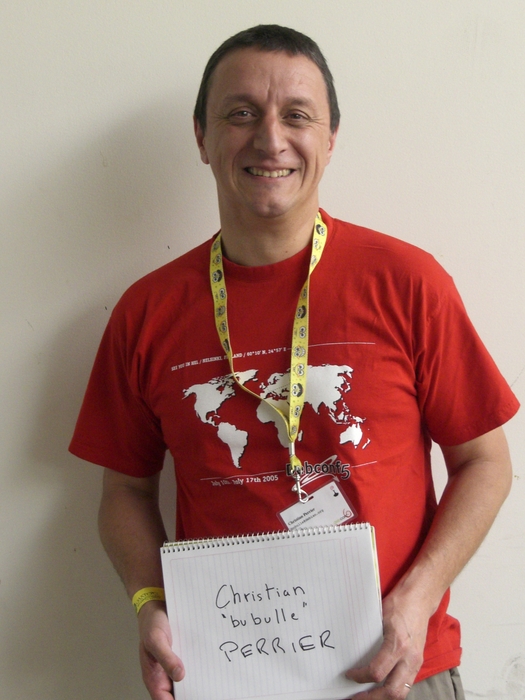
Rapha&#235;l Hertzog: People behind Debian: Christian Perrier, translation coordinator

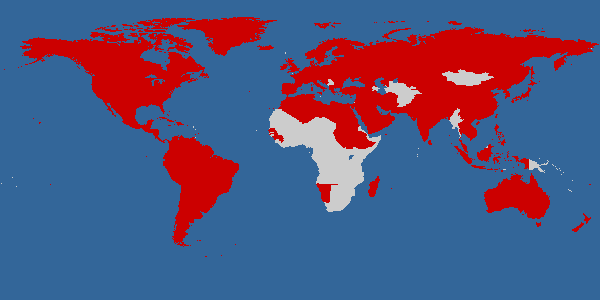
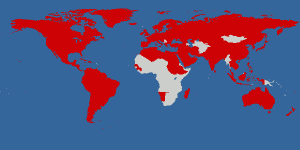
Christian is a figure of Debian, not only because of the tremendous coordination work that he does within the translation project, but also because he s very involved at the social level. He s probably in the top 5 of the persons who attended most often the Debian conference. Christian is a friend (thanks for hosting me so many times when I come to Paris for Debian related events) and I m glad that he accepted to be interviewed. He likes to speak and that shows in the length of his answers :-) but you ll be traveling the world while reading him. My questions are in bold, the rest is by Christian. Who are you? I am a French citizen (which is easy to guess unless you correct my usual mistakes in what follows). I m immensely proud of being married for nearly 26 years with Elizabeth (who deserves a statue from Debian for being so patient with my passion and my dedication to the project). I m also the proud father of 3 wonderful kids , aged 19 to 23. I work as team manager in the Networks and Computers Division of Onera the French Aerospace lab , a public research institute about Aeronautics, Space and Defense. My team provides computer management services for research divisions of Onera, with a specific focus put on individual computing. I entered the world of free software as one of the very first users of Linux in France. Back in the early 1990 s, I happened (though the BBS users communities) to be a friend of several early adopters of Linux and/or BSD386/FreeBSD/NetBSD in France. More specifically, I discovered Linux thanks with my friend Ren Cougnenc (all my free software talks are dedicated to Ren , who passed away in 1996). You re not a programmer, not even a packager. How did you come to Debian? I m definitely not a programmer and I never studied computing (I graduated in Materials Science and worked in that area for a few years after my PhD). However, my daily work always involved computing (I redesigned the creep testing laboratory and its acquisition system all by myself during my thesis research work). An my hobbies often involved playing with home computers, always trying to learn about something new. So, first learning about a new operating system then trying to figure out how to become involved in its development was quite a logical choice. Debian is my distro of choice since it exists. I used Slackware on work machines for a while, but my home server, kheops, first ran Debian 1.1 when I stopped running a BBS on an MS-DOS machine to host a news server. That was back in October 1996. I then happened to be a user, and more specifically a user of genealogy software, also participating very actively in Usenet from this home computer and server, that was running this Debian thing. So, progressively, I joined mailing lists and, being a passionate person, I tried to figure out how I could bring my own little contribution to all this. This is why I became a packager (yes, I am one!) by taking over the geneweb package, which I was using to publish my genealogy research. I applied as DD in January 2001, then got my account in July 2001. My first upload to the Debian archive occurred on August 22nd 2001: that was of course geneweb, which I still maintain. Quite quickly, I became involved in the work on French localization. I have always been a strong supporter of localized software (I even translated a few BBS software back in the early 90 s) as one of the way to bring the power and richness of free software to more users. Localization work lead me to work on the early version of Debian Installer, during those 2003-2005 years where the development of D-I was an incredibly motivating and challenging task, lead by Joey Hess and his inspiring ideas. From user to contributor to leader, I suddenly discovered, around 2004, that I became the coordinator of D-I i18n (internationalization) without even noticing :-) You re the main translation coordinator in Debian. What plans and goals have you set for Debian Wheezy? As always: paint the world in red. Indeed, this is my goal for years. I would like our favorite distro to be able to be used by anyone in the world, whether she speaks English, Northern Sami, Wolof, Uyghur or Secwepemcts n. As a matter of symbol, I use the installer for this. My stance is that one should be able to even install Debian in one s own language. So, for about 7 years, I use D-I as a way to attract new localization contributors. This progress is represented on this page where the world is gradually painted in red as long as the installer supports more languages release after release. The map above tries to illustrate this by painting in red countries when the most spoken language in the country is supported in Debian Installer. However, that map does not give enough reward to many great efforts made to support very different kind of languages. Not only various national languages, but also very different ones: all regional languages of Spain, many of the most spoken languages in India, minority languages such as Uyghur for which an effort is starting, Northern Sami because it is taught in a few schools in Norway, etc., etc. Still, the map gives a good idea of what I would like to see better supported: languages from Africa, several languages in Central Asia. And, as a very very personal goal, I m eagerly waiting for support of Tibetan in Debian Installer, the same way we support its sister language, Dzongkha from Bhutan. For this to happen, we have to make contribution to localization as easy as possible. The very distributed nature of Debian development makes this a challenge, as material to translate (D-I components, debconf screens, native packages, packages descriptions, website, documentation) is very widely spread. A goal, for years, is to set a centralized place where translators could work easily without even knowing about SVN/GIT/BZR or having to report bugs to send their work. The point, however, would be to have this without making compromises on translation quality. So, with peer review, use of thesaurus and translation memory and all such techniques. Tools for this exist: we, for instance, worked with the developers of Pootle to help making it able to cope with the huge amount of material in Debian (think about packages descriptions translations). However, as of now, the glue between such tools and the raw material (that often lies in packages) didn t come. So, currently, translation work in Debian requires a great knowledge of how things are organized, where is the material, how it can be possible to make contribution reach packages, etc. And, as I m technically unable to fulfill the goal of building the infrastructure, I m fulfilling that role of spreading out the knowledge. This is how I can define my coordinator role. Ubuntu uses a web-based tool to make it easy to contribute translations directly in Launchpad. At some point you asked Canonical to make it free software. Launchpad has been freed in the mean time. Have you (re)considered using it? Why not? After all, it more or less fills in the needs I just described. I still don t really figure out how we could have all Debian material gathered in Rosetta/Launchpad .and also how Debian packagers could easily get localized material back from the framework without changing their development processes. I have always tried to stay neutral wrt Ubuntu. As many people now in Debian, I feel like we have reached a good way to achieve our mutual development. When it comes at localization work, the early days where the everything in Rosetta and translates who wants stanza did a lot of harm to several upstream localization projects is, I think, way over. Many people who currently contribute to D-I localization were indeed sent to me by Ubuntu contributors .and by localizing D-I, apt, debconf, package descriptions, etc., they re doing translation work for Ubuntu as well as for Debian. Let s say I m a Debian user and I want to help translate Debian in my language. I can spend 1 hour per week on this activity. What should I do to start? Several language teams use Debian mailing lists to coordinate their work. If you re lucky enough to be a speaker of one of these languages, try joining debian-l10n-<yourlanguage> and follow what s happening there. Don t try to immediately jump in some translation work. First, participate to peer reviews: comment on others translations. Learn about the team s processes, jargon and habits. Then, progressively, start working on a few translations: you may want to start with translations of debconf templates: they are short, often easy to do. That s perfect if you have few time. If no language team exists for your language, try joining debian-i18n and ask about existing effort for your language. I may be able to point you to individuals working on Debian translations (very often along with other free software translation efforts). If I am not, then you have just been named coordinator for your language :-) I may even ask you if you want to work on translating the Debian Installer. What s the biggest problem of Debian? We have no problems, we only have solutions :-) We are maybe facing a growth problem for a few years. Despite the increased welcoming aspects of our processes (Debian Maintainers), Debian is having hard times in growing. The overall number of active contributors is probably stagnating for quite a while. I m still amazed, however, to see how we can cope with that and still be able to release over the years. So, after all, this is maybe not a problem :-) Many people would point communication problems here. I don t. I think that communication inside the Debian project is working fairly well now. Our famous flame wars do of course still happen from time to time, but what large free software project doesn t have flame wars? In many areas, we indeed improved communication very significantly. I want to take as an example the way the release of squeeze has been managed. I think that the release team did, even more this time, a very significant and visible effort to communicate with the entire project. And the release of squeeze has been a great success in that matter. So, there s nearly nothing that frustrates me in Debian. Even when a random developer breaks my beloved 100% completeness of French translations, I m not frustrated for more than 2 minutes. You re known in the Debian community as the organizer of the Cheese & Wine Party during DebConf. Can you tell us what this is about? This is an interesting story about how things build themselves in Debian. It all started in July 2005, before DebConf 5 in Helsinki. Denis Barbier, Nicolas Fran ois and myself agreed to bring at Debconf a few pieces of French cheese as well as 1 or 2 bottles of French wine and share them with some friends. Thus, we settled an informal meeting in the French room where we invited some fellows: from memory, Benjamin Mako Hill, Hannah Wallach, Matt Zimmermann and Moray Allan. All of us fond of smelly cheese, great wine plus some extra p t home-made by Denis in Toulouse. It finally happened that, by word of mouth, a few dozens of other people slowly joined in that French room and turned the whole thing into an improvized party that more or less lasted for the entire night. The tradition was later firmly settled in 2006, first in Debconf 6 in Mexico where I challenged the French DDs to bring as many great cheese as possible, then during the Debian i18n meeting in Extremadura (Sept 2006) where we reached the highest amount of cheese per participant ever. I think that the Creofonte building in Casar de C ceres hasn t fully recovered from it and is still smelling cheese 5 years after. This party later became a real tradition for DebConf, growing over and over each year. I see it as a wonderful way to illustrate the diversity we have in Debian, as well as the mutual enrichment we always felt during DebConfs. My only regret about it is that it became so big over the years that organizing it is always a challenge and I more and more feel pressure to make it successful. However, over the years, I always found incredible help by DebConf participants (including my own son, last year a moment of sharing which we will both remember for years, i think). And, really, in 2010, standing up on a chair, shouting (because the microphone wasn t working) to thank everybody, was the most emotional moment I had at Debconf 10. Is there someone in Debian that you admire for their contributions? So many people. So, just like it happens in many awards ceremonies, I will be very verbose to thank people, sorry in advance for this. The name that comes first is Joey Hess. Joey is someone who has a unique way to perceive what improvements are good for Debian and a very precise and meticulous way to design these improvements. Think about debconf. It is designed for so long now and still reaching its very specific goal. So well designed that it is the entire basis for Joey s other achievement: designing D-I. Moreover, I not only admire Joey for his technical work, but also for his interaction with others. He is not he loudest person around, he doesn t have to .just giving his point in discussion and, guess what? Most of the time, he s right. Someone I would like to name here, also, is Colin Watson. Colin is also someone I worked with for years (the D-I effect, again ) and, here again, the very clever way he works on technical improvements as well as his very friendly way to interact with others just make it. And, how about you, Rapha l? :-) I m really admirative of the way you work on promoting technical work on Debian. Your natural ability to explain things (as good in English as it is in French) and your motivation to share your knowledge are a great benefit for the project. Not to mention the technical achievements you made with Guillem on dpkg of course! Another person I d like to name here is Steve Langasek. We both maintain samba packages for years and collaboration with him has always been a pleasure. Just like Colin, Steve is IMHO a model to follow when it comes at people who work for Canonical while continuing their involvment in Debian. And, indeed, Steve is so patient with my mistakes and stupid questions in samba packaging that he deserves a statue. We re now reaching the end of the year where Stefano Zacchiroli was the Debian Project Leader. And, no offense intended to people who were DPL before him (all of them being people I consider to be friends of mine), I think he did the best term ever. Zack is wonderful in sharing his enthusiasm about Debian and has a unique way to do it. Up to the very end of his term, he has always been working on various aspects of the project and my only hope is that he ll run again (however, I would very well understand that he wants to go back to his hacking activities!). Hat off, Zack!I again have several other people to name in this Bubulle hall of Fame : Don Armstrong, for his constant work on improving Debian BTS, Margarita Manterola as one of the best successes of Debian Women (and the most geeky honeymoon ever), Denis Barbier and Nicolas Fran ois because i18n need really skilled people, Cyril Brulebois and Julien Cristau who kept X.org packaging alive in lenny and squeeze, Otavio Salvador who never gave up on D-I even when we were so few to care about it. I would like to make a special mention for Frans Pop. His loss in 2010 has been a shock for many of us, and particularly me. Frans and I had a similar history in Debian, both mostly working on so-called non technical duties. Frans has been the best release manager for D-I (no offense intended, at all, to Joey or Otavio .I know that both of them share this feeling with me). His very high involvment in his work and the very meticulous way he was doing it lead to great achievements in the installer. The Installation Guide work was also a model and indeed a great example of non technical work that requires as many skills as more classical technical work. So, and even though he was sometimes so picky and, I have to admit, annoying, that explains why I m still feeling sad and, in some way, guilty about Frans loss. One of my goals for wheezy is indeed to complete some things Frans left unachieved. I just found one in bug #564441: I will make this work reach the archive, benefit our users and I know that Frans would have liked that.
Thank you to Christian for the time spent answering my questions. I hope you enjoyed reading his answers as I did. Subscribe to my newsletter to get my monthly summary of the Debian/Ubuntu news and to not miss further interviews. You can also follow along on Identi.ca, Twitter and Facebook.

7 comments Liked this article? Click here. My blog is Flattr-enabled.

28 February 2011

Russell Coker: Links February 2011

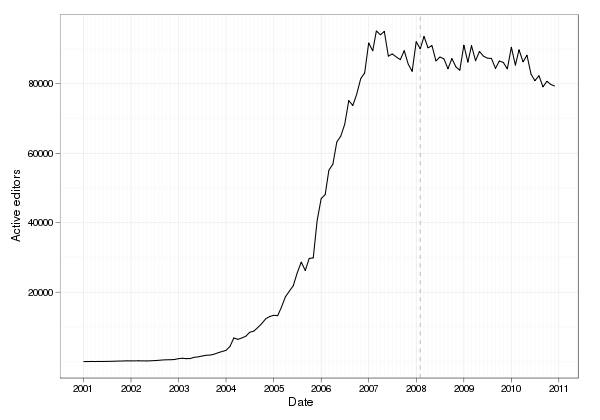
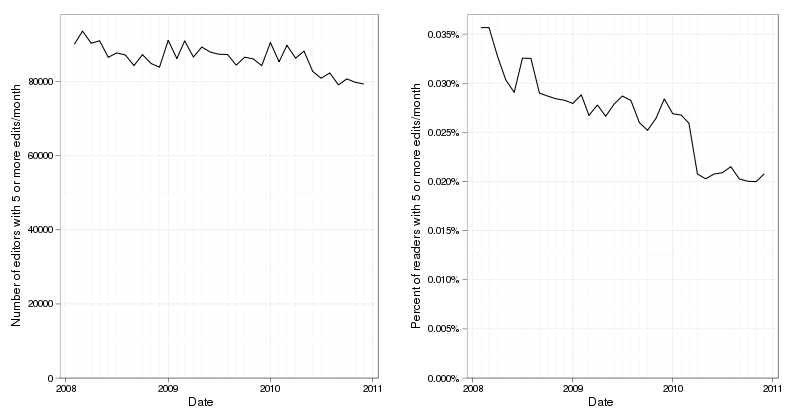
Australia s Department of Finance has mandated that the MS-Office document format should be the standard document format for all agencies [1]. Paul Wayper notes the fact that MS doesn t plan to support it s own standards and suggests ODF, also known as ISO/IEC standard 26300:2006. [2].Psychology Today has an interesting blog post by Marnia Robinson about scientific reasons for avoiding porn addiction [3]. Her post links to a number of other posts on the topic on Psychology Today.Psychology Today has an interesting post by Noam Shpancer titled What Doesn t Kill You Makes You Weaker [4]. It seems to me that the belief to the contrary is due to people rationalising bad things that happened to them, it s not all bad as it made me stronger .Psychology Today has an interesting article by Noam Shpancer about the soldier as hero myth [5]. He argues that soldiers are really just employees, the risk to American soldiers in war zones really isn t that great and that they are just pawns to the military-industrial complex.Anders Ynnerman gave an interesting TED talk about visualising medical data which includes many startling 3D pictures of humans and animals that are being scanned [6]. He describes how this is useful in forensic analysis by the police and in better understanding biological processes.Margarita Manterola gave an interesting Debconf talk titled Making Debian Rule, again , she has some interesting ideas for improving Debian [7]. She is most focussed on social problems and the questions and comments had some interesting ideas. The Center for Non-Violent Communication [8] was mentioned in the questions, apparently their success includes teaching better communication skills to violent criminals, so it seems that they can help with some big problems.Benjamin Mako Hill wrote an interesting article about the ratio of writers to readers on Wikipedia [9]. While he makes some good points I m wondering about the measure of an editor , there have been few months where I have made 5 edits, so I guess I m just a reader. I probably should take more care in logging in when I make changes though, I ve made more than a few small changes from random systems (client sites, Internet cafes, etc) without bothering to login. This would mess up the stats a bit.The Reid Report has an interesting article about Bush being limited in his international travel due to the fact that he has admitted being a war criminal [10].Understanding Prejudice is an interesting article that summarises a lot of psychological research [11]. It gives many ideas for anyone who wants to reduce prejudice.Robin Harris wrote an interesting ZD Net article about vibrations and the impact on disk performance [12]. Apparently it s very common to be able to get more performance from drive arrays if you dampen vibration, previously I believed that unless you had extreme vibration to cause catastrophic problems then nothing would go wrong. But it seems that even smaller amounts of vibration can cause a 30% performance loss or worse! There is work in progress on vibration-damping racks.In a story published in The Australian about the NSW ambulance service being shut down due to a virus, Professor Caelli cites SE Linux as an example of a technology to make computers more virus resistant [13]. Professor Caelli also states that there should be a legal requirement to have backup systems for computers that have such grave consequences if they crash.Sinclair Community College is offering a new class Fundamentals of Linux Security , it includes SE Linux [14].Slate has an interesting article about Pickpockets [15]. Apparently they are becoming extinct in the US as law enforcement has prevented the Fagins from training younger people, and it s only in Eastern Europe that the skills base remains.

19 February 2011

Benjamin Mako Hill: Ask Me Anything in an Igloo

/copyrighteous/images/igloo_danny.jpg When Reddit sold to Cond Nast and the founders all moved to California, their old place in Davis Square was empty for a few months and they let Mika I move in and take it over. It's an awesome place and we're still there along with some Web 2.0 graffiti they left on the roof. And so it is with pleasure that I've agreed to be interviewed by redditor Danny Piccirillo in a giant igloo he helped build -- if the unseasonably warm weather streak of weather doesn't manage to melt it before next week. Questions are being gathered at Reddit so feel free to go there and ask me any question you'd like to see me answer in an igloo.

7 February 2011

Matt Zimmerman: A diversity statement for Ubuntu

The Ubuntu website states that we aim to make Ubuntu a wonderful place to participate . We developed the Ubuntu Code of Conduct to set a standard for participants to accept each other in the spirit of cooperation, and have improved it over time to state these principles more clearly. It is implicit in our philosophy that these and other Ubuntu values should hold equally true for everyone. I would like to propose that we upgrade this to an explicit statement on behalf of the project. I have spoken with many people who were interested in joining a free software project, but were put off because they felt unwelcome. I know various people who participate in Ubuntu today, but sometimes face difficult social obstacles in order to do so. Going forward, I would like for us, as members of the Ubuntu community, to make the extra effort to accept all kinds of people. This may sound simple, but it can be very difficult to put into practice. People often don t even notice they ve gotten it wrong, until the offended party points it out to them. We need tools and guidance to make this a reality. To that end, I would like to propose a diversity statement for Ubuntu. This draft has already received support from a majority of the Community Council, but I d like to take it a step further. Because I want this to be a commitment that we can all stand behind, I m also calling for support from the community as a whole. Please give this issue your consideration, and let me know in the comments if you can get on board with an official statement like this. The more support we have, the more real this commitment can be. Here s the text. Many thanks to Mary Gardiner, Valerie Aurora and Benjamin Mako Hill for their review and input.
The Ubuntu project welcomes and encourages participation by everyone. We are committed to being a community that everyone feels good about joining. Although we may not be able to satisfy everyone, we will always work to treat everyone well. Standards for behavior in the Ubuntu community are detailed in the Code of Conduct and Leadership Code of Conduct. We expect participants in our community to meet these standards in all their interactions and to help others to do so as well. Whenever any participant has made a mistake, we expect them to take responsibility for it. If someone has been harmed or offended, it is our responsibility to listen carefully and respectfully, and do our best to right the wrong. Although this list cannot be exhaustive, we explicitly honor diversity in age, culture, ethnicity, genotype, gender identity or expression, language, national origin, neurotype, phenotype, political beliefs, profession, race, religion, sexual orientation, socio-economic status, subculture, and technical ability. Some of the ideas and wording for this statement were based on diversity statements from the Python community and Dreamwidth Studios (CC-BY-SA 3.0).

6 February 2011

Benjamin Mako Hill: Editor-to-Reader Ratios on Wikipedia

It's been reported for some time now that the number of active editors on Wikipedia (usually defined as people who have edited at least 5 times in a given month) peaked in 2007 and has been mostly stable since then. A graph of the total number of active editors in every month since Wikipedia's founding is shown below. The graph shows the aggregate numbers for all language Wikipedias. English Wikipedia is the largest component of this and is generally more variable. That said, very similar patterns exist for most larger languages. /copyrighteous/images/active_editors_all_wikpiedia.png Felipe Ortega, who has provided many of these statistics, has warned against fatalist claims. Although there seems to be a decrease in the total number of active editors over the last two years, the situation seems to have somewhat stabilized in most languages. New editors in Wikipedia are replacing folks at almost the rate that they are leaving. It is also widely known that the number of readers of Wikipedia has been increasing during this period. According to the report cards released by the foundation using comScore data, the number of unique visitors to Wikipedia each month has increased by 61 million people in the last year -- over 17%. This discrepancy between rising readership and stable or sinking editorship should raise major concern. After all, the Wikimedia Foundation's mission is two part: (1) to empower and engage people around the world to collect and develop educational content and (2) to disseminate it effectively and globally. Although the Foundation report cards include measures of raw levels of editorship, a better metric of engagement and empowerment might be the proportion of readers who engage in editing. I could not find reliable data on the number of unique readers reached each month for more than a few months in the last year. What is available, however, is wonderful data on page views each month going back to 2008. Analysis of the data from available report cards show that, at least during the last year, there is a very stable ratio of 35 page views per unique visitor, as estimated by comScore. Using that measure, we can do a back of the envelope estimation on the proportion of users that are editors for the period where page view data is available, dating back from February 2008 ( marked with the grey dashed lined above). The graphs below show the very different results you get when you consider the change in the number of Wikipedia editors and the change in the editor-to-reader ratio. Once again, these data are combined data for all language Wikipedias although graphs look very similar for most larger languages. The results are striking. Although there has been a 12% decrease between February 2008 and December 2010 in the number of active editors, there is a 42% decrease in the proportion of readers who edit at least five times a month. We can see that fulfilling the first half of the Wikimedia mission remains a struggle. /copyrighteous/images/wikipedia_editors_combined_graph.png Although the graphs above do not say anything directly about the most active core contributors to Wikipedia, the fact that Wikipedia is being maintained by a tiny -- and shrinking -- proportion of its readership does mean that the idea behind Wikipedia is under threat. Although none are as big as Wikipedia, there are lots of good encyclopedias out there. The reason Wikipedia is different, interesting, and important is because -- unlike all those others -- Wikipedia is the encyclopedia that anyone can edit. Wikipedia is powerful because it allow its users to transcend their role as consumers of the information they use to understand the world. Wikipedia allows users to define the reference works that define their understanding of the their environment and each other. But 99.98% of the time, readers do not transcend that role. I think that's a problem. Worse, that the number is growing. The Wikimedia Foundation recently ran a major successful effort to attract donations in its annual fundraiser. Jimmy Wales' smiling mug is apparently enough in the way of motivation to get something like 1% of its readers to donate money to support the project. I think that's very good news. If the Wikimedia community can entice even half of those people to contribute through an increased involvement in the projects themselves, they might do more than ensure Wikipedia's continued growth. They would help take a step toward the empowerment and engagement of those users in sharing their own knowledge, and the continued fulfillment of a critically important mission.

5 February 2011

Benjamin Mako Hill: Antifeatures at the Free Technology Academy

In addition to lecturing for two courses at MIT this term, I recently had the pleasure of giving a lecture on antifeatures at the Free Technology Academy -- a program which offers Masters courses over the Internet. Quite a few of the FTA courses are about free software, free knowledge, and related topics! It was my first time giving a lecture to microphone and an empty room. Although I found it a little tricky to adapt to the lack of any audience, the FTA folks put together a great video. I'm psyched that the course material will be available as open education resources for anyone who might want to incorporate it into another course. If you've seen my LCA keynote about antifeatures (which is also available online), there's not going to be a whole new in the lecture. If didn't see it, you might want to check out the lecture. I'll be in the online discussion group around the Lecture for the next couple weeks but you need to sign up to participate.

Next.

Previous.