Jonathan McDowell: Working better with an online whiteboard

 One of the challenges I find about being fully remote is that one of the ways I think while I explain things is I draw diagrams. I m not artistic in any manner (my brothers got that skillset), but a set of boxes and lines and some text scribbled as I talk really helps. I do think even for myself, which is obviously as easy to replicate at home as in the office; I have plenty of paper and a whiteboard in my study. It s not so easy when having a design discussion with someone remotely.
Doodling with a mouse doesn t quite work; my art skills are bad enough without then factoring in the fact it s not a pen-like device I m using to do it. I ve previously tried a proper graphics tablet, but there s a disconnect between where you are writing and where the output appears. That makes doing things like labelling within a diagram, or going back to draw an update, quite difficult. Or it does if you re me anyway.
The modern solution is probably a laptop with a stylus capable touchscreen, but I ve shied away from such things because I don t want fingerprints all over my screen and don t want to pay extra for something I haven t previously thought I d use. An alternative is a tablet with a stylus capable screen, but those turn out to be premium models these days (remember when resistive was the cheap option because no one wanted to use the stylus?) and mine doesn t support it. You can get capacitive styli (styluses?) but then when you lean on the tablet it all gets confused.
When I m due a technology refresh of my laptop or tablet I ll perhaps factor such things in, but what to do now, when I m not entirely sure how much usage I ll get out of such a device and thus can t justify a major expense on it? Buy a random thing from the internet, of course!
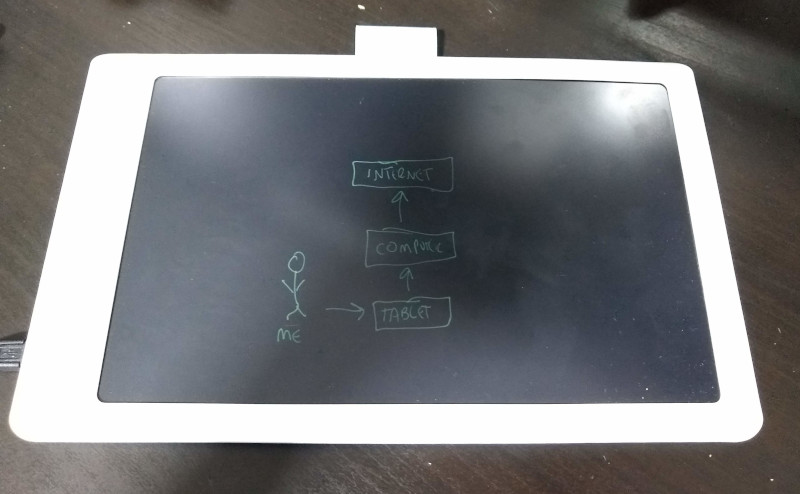
It turns out there are a range of LCD writing tablets out there, which let you scribble on a screen and then erase it at the press of a button. An electronic etch-a-sketch, as it were. Most of them don t count as smart , with power only needed for the erase, but there appears to have been a device called the Boogie Board Sync in the past which offered some ability to save things. Searching around I found the NEWYES 10 Bluetooth Archive Writing Tablet from BangGood. Which looked like it had enough smarts to be able to send the images over bluetooth and therefore might be hackable in some manner. At 45 it seemed a reasonable punt, so I ordered one.
It arrived within 2 weeks and I was surprised to find that when plugged in as a USB device it actually presented as a tablet. So much for a hackery requirement! It was detected by the kernel fine:
One of the challenges I find about being fully remote is that one of the ways I think while I explain things is I draw diagrams. I m not artistic in any manner (my brothers got that skillset), but a set of boxes and lines and some text scribbled as I talk really helps. I do think even for myself, which is obviously as easy to replicate at home as in the office; I have plenty of paper and a whiteboard in my study. It s not so easy when having a design discussion with someone remotely.
Doodling with a mouse doesn t quite work; my art skills are bad enough without then factoring in the fact it s not a pen-like device I m using to do it. I ve previously tried a proper graphics tablet, but there s a disconnect between where you are writing and where the output appears. That makes doing things like labelling within a diagram, or going back to draw an update, quite difficult. Or it does if you re me anyway.
The modern solution is probably a laptop with a stylus capable touchscreen, but I ve shied away from such things because I don t want fingerprints all over my screen and don t want to pay extra for something I haven t previously thought I d use. An alternative is a tablet with a stylus capable screen, but those turn out to be premium models these days (remember when resistive was the cheap option because no one wanted to use the stylus?) and mine doesn t support it. You can get capacitive styli (styluses?) but then when you lean on the tablet it all gets confused.
When I m due a technology refresh of my laptop or tablet I ll perhaps factor such things in, but what to do now, when I m not entirely sure how much usage I ll get out of such a device and thus can t justify a major expense on it? Buy a random thing from the internet, of course!
It turns out there are a range of LCD writing tablets out there, which let you scribble on a screen and then erase it at the press of a button. An electronic etch-a-sketch, as it were. Most of them don t count as smart , with power only needed for the erase, but there appears to have been a device called the Boogie Board Sync in the past which offered some ability to save things. Searching around I found the NEWYES 10 Bluetooth Archive Writing Tablet from BangGood. Which looked like it had enough smarts to be able to send the images over bluetooth and therefore might be hackable in some manner. At 45 it seemed a reasonable punt, so I ordered one.
It arrived within 2 weeks and I was surprised to find that when plugged in as a USB device it actually presented as a tablet. So much for a hackery requirement! It was detected by the kernel fine:
kernel dmesg output
usb 1-1.2: new full-speed USB device number 19 using xhci_hcd
usb 1-1.2: New USB device found, idVendor=6161, idProduct=4d15, bcdDevice=30.00
usb 1-1.2: New USB device strings: Mfr=5, Product=6, SerialNumber=0
usb 1-1.2: Product: LetSketch
usb 1-1.2: Manufacturer: LetSketch
hid-generic 0003:6161:4D15.0010: hiddev0,hidraw4: USB HID v1.11 Device [LetSketch LetSketch] on usb-0000:00:14.0-1.2/input0
input: LetSketch LetSketch as /devices/pci0000:00/0000:00:14.0/usb1/1-1/1-1.2/1-1.2:1.1/0003:6161:4D15.0011/input/input35
hid-generic 0003:6161:4D15.0011: input,hidraw5: USB HID v1.11 Device [LetSketch LetSketch] on usb-0000:00:14.0-1.2/input1
lsusb output
Nice. X wasn t happy though:
Bus 001 Device 016: ID 6161:4d15
Device Descriptor:
  bLength                18
  bDescriptorType         1
  bcdUSB               1.00
  bDeviceClass            0
  bDeviceSubClass         0
  bDeviceProtocol         0
  bMaxPacketSize0        64
  idVendor           0x6161
  idProduct          0x4d15
  bcdDevice           30.00
  iManufacturer           5 LetSketch
  iProduct                6 LetSketch
  iSerial                 0
  bNumConfigurations      1
  Configuration Descriptor:
    bLength                 9
    bDescriptorType         2
    wTotalLength       0x003b
    bNumInterfaces          2
    bConfigurationValue     1
    iConfiguration          0
    bmAttributes         0xa0
      (Bus Powered)
      Remote Wakeup
    MaxPower              480mA
    Interface Descriptor:
      bLength                 9
      bDescriptorType         4
      bInterfaceNumber        0
      bAlternateSetting       0
      bNumEndpoints           1
      bInterfaceClass         3 Human Interface Device
      bInterfaceSubClass      1 Boot Interface Subclass
      bInterfaceProtocol      2 Mouse
      iInterface              0
        HID Device Descriptor:
          bLength                 9
          bDescriptorType        33
          bcdHID               1.11
          bCountryCode            0 Not supported
          bNumDescriptors         1
          bDescriptorType        34 Report
          wDescriptorLength      18
         Report Descriptors:
           ** UNAVAILABLE **
      Endpoint Descriptor:
        bLength                 7
        bDescriptorType         5
        bEndpointAddress     0x81  EP 1 IN
        bmAttributes            3
          Transfer Type            Interrupt
          Synch Type               None
          Usage Type               Data
        wMaxPacketSize     0x0010  1x 16 bytes
        bInterval               2
    Interface Descriptor:
      bLength                 9
      bDescriptorType         4
      bInterfaceNumber        1
      bAlternateSetting       0
      bNumEndpoints           1
      bInterfaceClass         3 Human Interface Device
      bInterfaceSubClass      1 Boot Interface Subclass
      bInterfaceProtocol      2 Mouse
      iInterface              0
        HID Device Descriptor:
          bLength                 9
          bDescriptorType        33
          bcdHID               1.11
          bCountryCode            0 Not supported
          bNumDescriptors         1
          bDescriptorType        34 Report
          wDescriptorLength      83
         Report Descriptors:
           ** UNAVAILABLE **
      Endpoint Descriptor:
        bLength                 7
        bDescriptorType         5
        bEndpointAddress     0x82  EP 2 IN
        bmAttributes            3
          Transfer Type            Interrupt
          Synch Type               None
          Usage Type               Data
        wMaxPacketSize     0x0010  1x 16 bytes
        bInterval               2
Device Status:     0x0003
  Self Powered
  Remote Wakeup Enabled
non-working Xorg log
I ended up digging into the (II) config/udev: Adding input device LetSketch LetSketch (/dev/input/event8)
(**) LetSketch LetSketch: Applying InputClass "libinput tablet catchall"
(II) Using input driver 'libinput' for 'LetSketch LetSketch'
(II) systemd-logind: got fd for /dev/input/event8 13:72 fd 34 paused 0
(**) LetSketch LetSketch: always reports core events
(**) Option "Device" "/dev/input/event8"
(**) Option "_source" "server/udev"
(II) event8 - LetSketch LetSketch: is tagged by udev as: Tablet
(EE) event8 - LetSketch LetSketch: libinput bug: missing tablet capabilities: resolution. Ignoring this device.
(II) event8 - LetSketch LetSketch: device is a tablet
(II) event8 - failed to create input device '/dev/input/event8'.
(EE) libinput: LetSketch LetSketch: Failed to create a device for /dev/input/event8
(EE) PreInit returned 2 for "LetSketch LetSketch"
(II) UnloadModule: "libinput"
libinput source to figure out what was going on here, and it turned out to be the fact there was no report of the physical size of the tablet, so no indication of what the resolution was. That s solvable with an entry in the udev hwdb for evdev devices, so I sent a patch upstream and with that applied (or just dropped into /etc/udev/hwdb.d/61-evdev-local.hwdb and then running systemd-hwdb update and replugging the device) everything looks much happier:
working Xorg log
The only additional piece I ve done is tie the tablet to a single screen, so I can then full screen whichever whiteboard system I m using on that screen and have it map to the tablet - haven t worked out how to tie it to just the application window yet, but the fullscreen approach works fine, using my smaller laptop screen. To do that I use (II) config/udev: Adding input device LetSketch LetSketch (/dev/input/event8)
(**) LetSketch LetSketch: Applying InputClass "libinput tablet catchall"
(II) Using input driver 'libinput' for 'LetSketch LetSketch'
(II) systemd-logind: got fd for /dev/input/event8 13:72 fd 86 paused 0
(**) LetSketch LetSketch: always reports core events
(**) Option "Device" "/dev/input/event8"
(**) Option "_source" "server/udev"
(II) event8 - LetSketch LetSketch: is tagged by udev as: Tablet
(II) event8 - LetSketch LetSketch: tablet 'LetSketch LetSketch' unknown to libwacom
(II) event8 - LetSketch LetSketch: device is a tablet
(II) event8 - LetSketch LetSketch: device removed
(**) Option "config_info" "udev:/sys/devices/pci0000:00/0000:00:08.1/0000:04:00.3/usb1/1-1/1-1.2/1-1.2:1.1/0003:6161:4D15.000A/input/input24/event8"
(II) XINPUT: Adding extended input device "LetSketch LetSketch" (type: TABLET, id 20)
(II) event8 - LetSketch LetSketch: is tagged by udev as: Tablet
(II) event8 - LetSketch LetSketch: tablet 'LetSketch LetSketch' unknown to libwacom
(II) event8 - LetSketch LetSketch: device is a tablet
(II) libinput: LetSketch LetSketch: needs a virtual subdevice
(**) LetSketch LetSketch Pen (0): Applying InputClass "libinput tablet catchall"
(II) Using input driver 'libinput' for 'LetSketch LetSketch Pen (0)'
(II) systemd-logind: returning pre-existing fd for /dev/input/event8 13:72
(**) LetSketch LetSketch Pen (0): always reports core events
(**) Option "Device" "/dev/input/event8"
(**) Option "_source" "_driver/libinput"
(II) libinput: LetSketch LetSketch Pen (0): is a virtual subdevice
(**) Option "config_info" "udev:/sys/devices/pci0000:00/0000:00:08.1/0000:04:00.3/usb1/1-1/1-1.2/1-1.2:1.1/0003:6161:4D15.000A/input/input24/event8"
(II) XINPUT: Adding extended input device "LetSketch LetSketch Pen (0)" (type: STYLUS, id 21)
(**) Option "AccelerationScheme" "none"
(**) LetSketch LetSketch Pen (0): (accel) selected scheme none/0
(**) LetSketch LetSketch Pen (0): (accel) acceleration factor: 2.000
(**) LetSketch LetSketch Pen (0): (accel) acceleration threshold: 4
xinput list to figure out the ID of the tablet and then xinput map-to-output 23 eDP-1 to map it to the eDP-1 output (the internal laptop screen), assuming the ID that comes out of the list is 23.
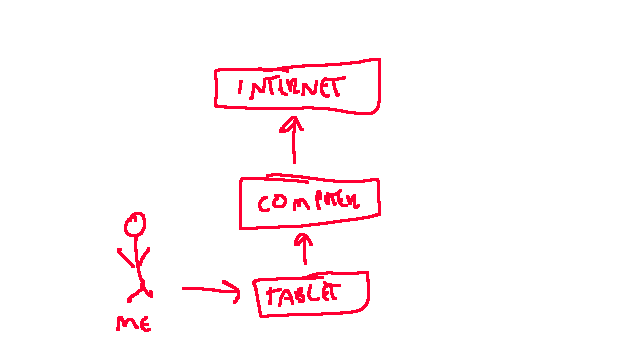
But is it any good? Well, the quality of the screen isn t fantastic - no fine art or anything here - but the tablet part seems fine (complete with some pressure sensitivity) and the fact I can see what I ve drawn where I m trying to draw something new makes it a lot more useful for me. I ve had a play with just screen sharing the GIMP and doodling in that, but equally work has an O365 subscription and the Microsoft Whiteboard turns out to be pretty good without anyone I m sharing with needing to install anything.
Of course my artistic skills are still dreadful, but I have actually managed to use it for drawing out a couple of things while discussing them, so I m considering that a win.



 This is the subject of an interesting thread on the debian-devel mailing list.
It started with ".. The current policy of hiding other versions of Debian is limiting
the adoption of your OS by people like me.."
It seems that this user managed to contact us developers and give us some important
information how we can improve the user experience.
The following discussion shows that all our users need non-free firmware to get their
wireless network cards run.
Do we provide such installation images for our users?
Sure. We build them regularly, host them on our servers, we also sign
the hash sum with our official signing key. But we hide them very well
and still call them unofficial. Why?
I would like to have a more positive name for those images.
Ubuntu has the HWE (Hardware Enablement) kernel. Maybe Debian firmware
enablement images?
We should better promote the images that fits best for our users.
BTW, the URL for all these useful images is
This is the subject of an interesting thread on the debian-devel mailing list.
It started with ".. The current policy of hiding other versions of Debian is limiting
the adoption of your OS by people like me.."
It seems that this user managed to contact us developers and give us some important
information how we can improve the user experience.
The following discussion shows that all our users need non-free firmware to get their
wireless network cards run.
Do we provide such installation images for our users?
Sure. We build them regularly, host them on our servers, we also sign
the hash sum with our official signing key. But we hide them very well
and still call them unofficial. Why?
I would like to have a more positive name for those images.
Ubuntu has the HWE (Hardware Enablement) kernel. Maybe Debian firmware
enablement images?
We should better promote the images that fits best for our users.
BTW, the URL for all these useful images is
 Although it was a much larger step when I made a similar announcement

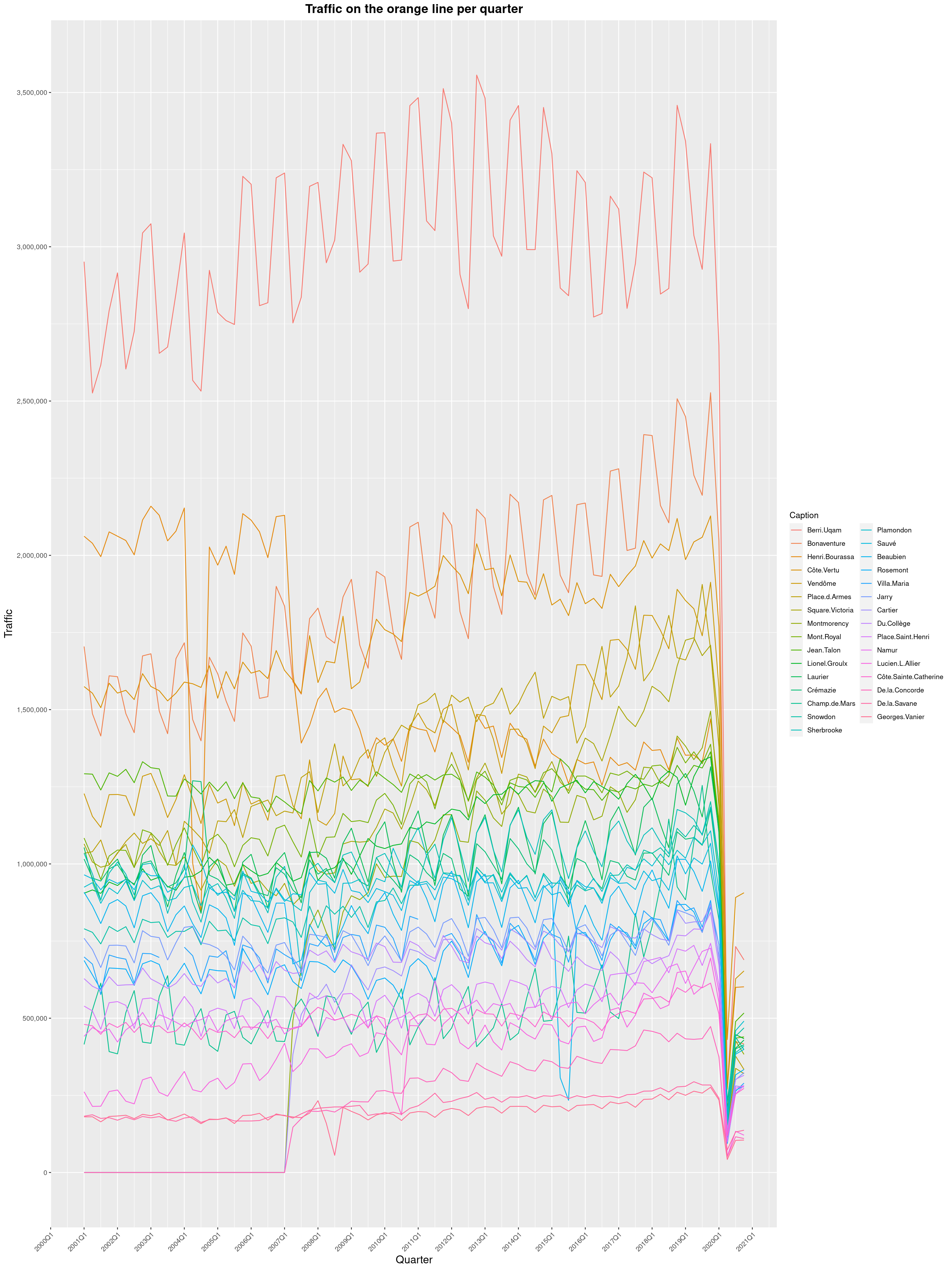
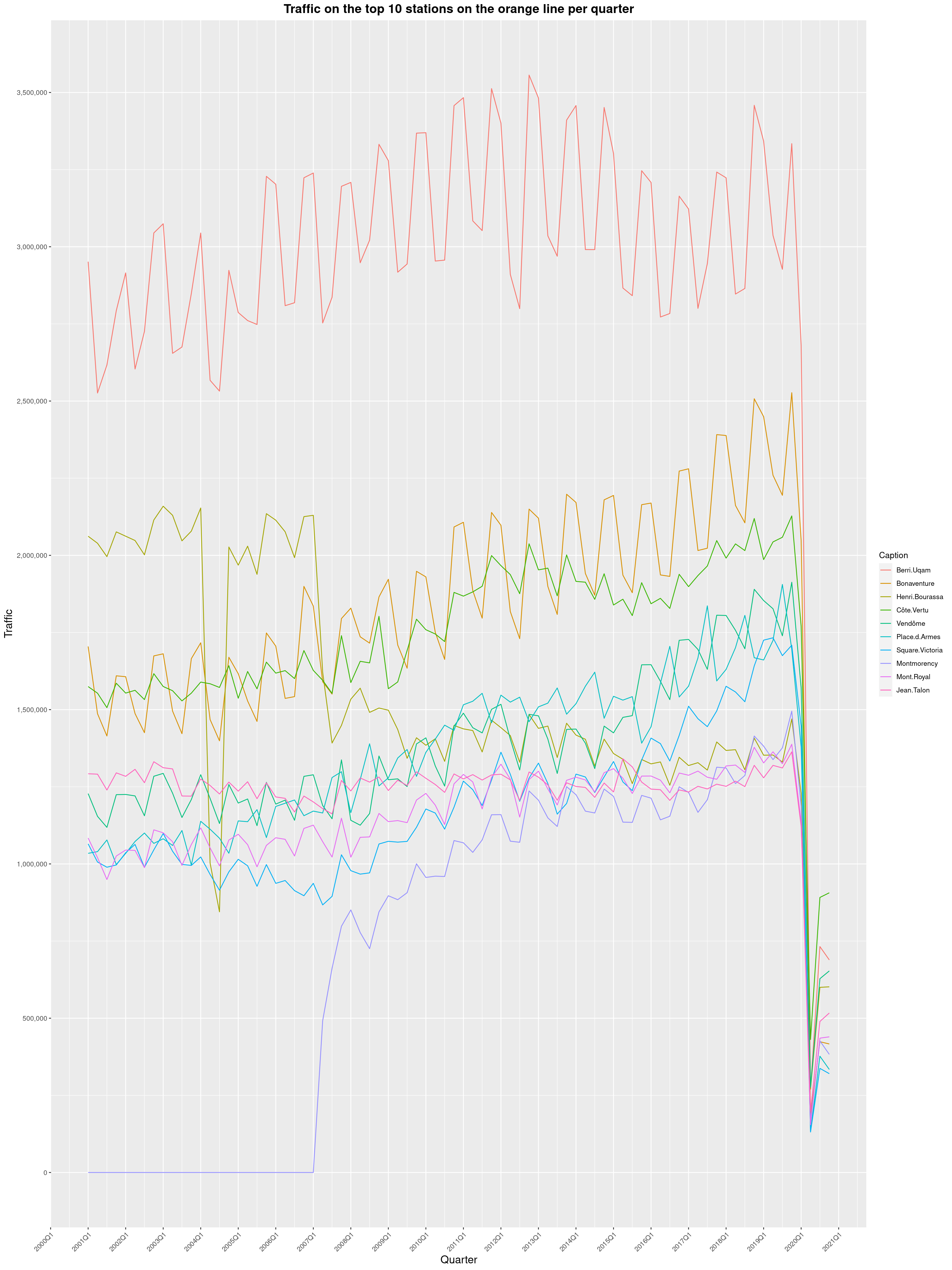
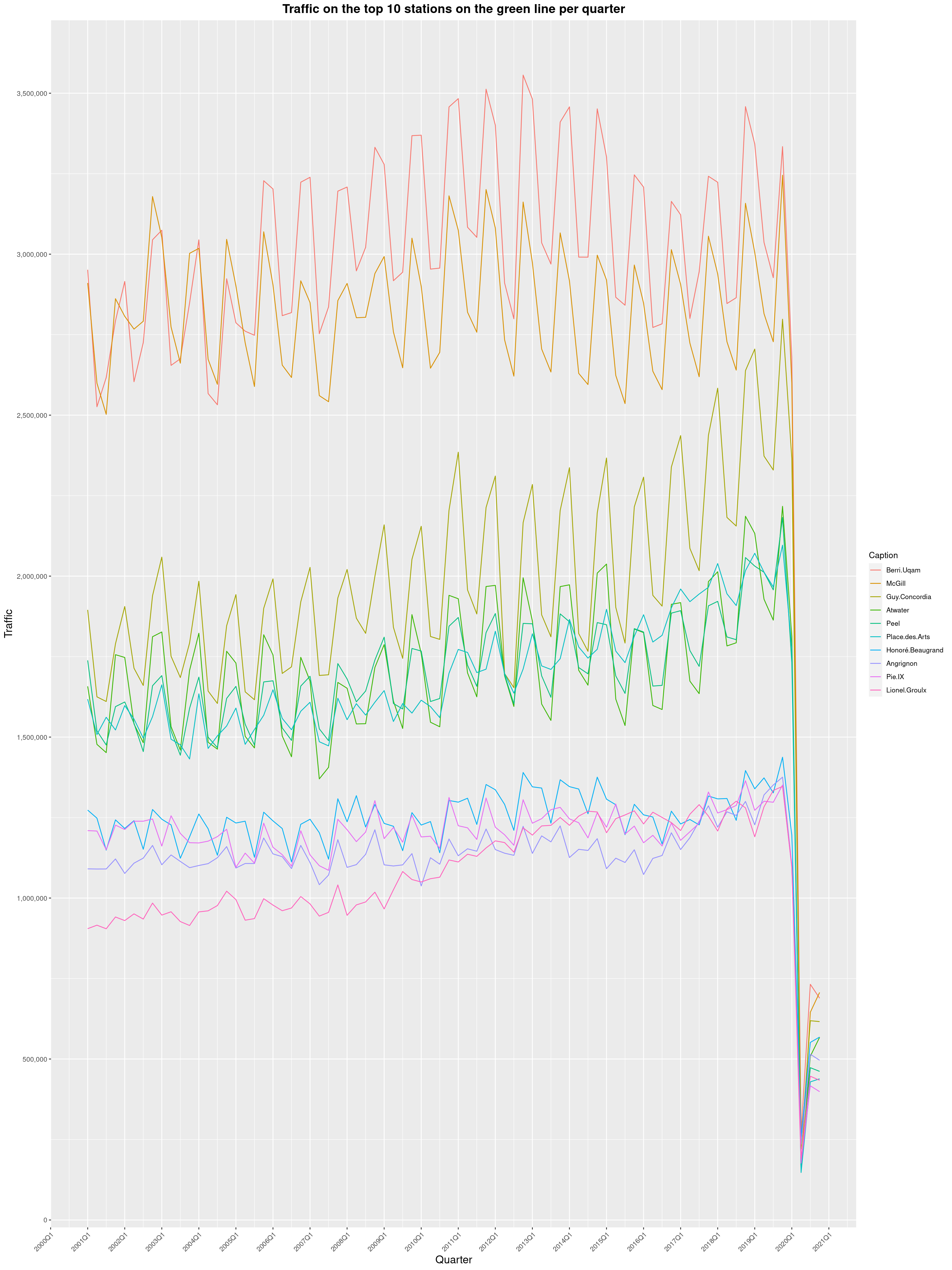
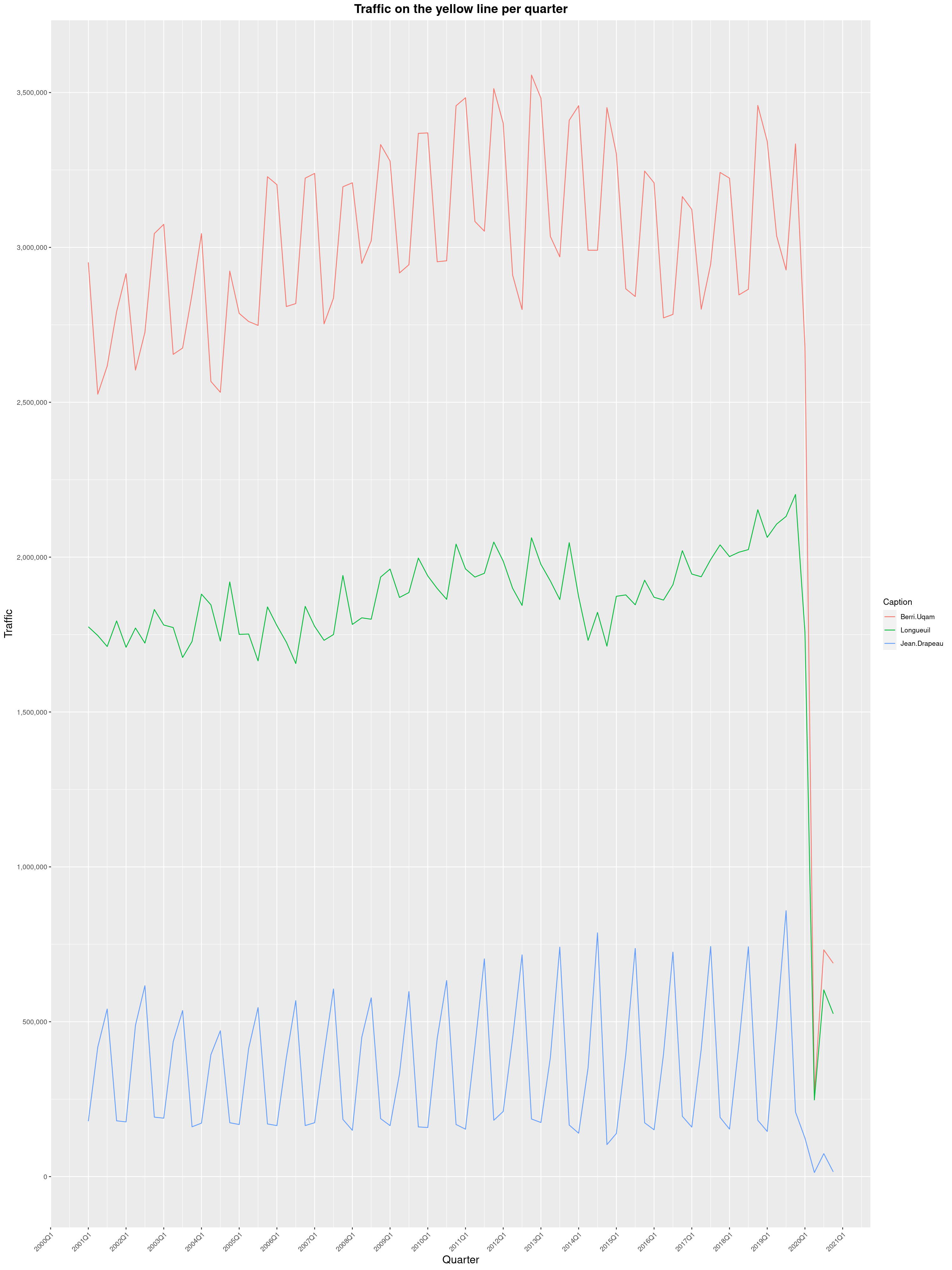
 In 2019, I got curious and asked Soci t de Transport de Montr al, Montreal's
transit agency, for the foot traffic data of Montreal's subway.
Since then, two years has passed and with COVID-19 still going strong, I wanted
to see what impact the pandemic had had. And oh boy, what an impact it is.
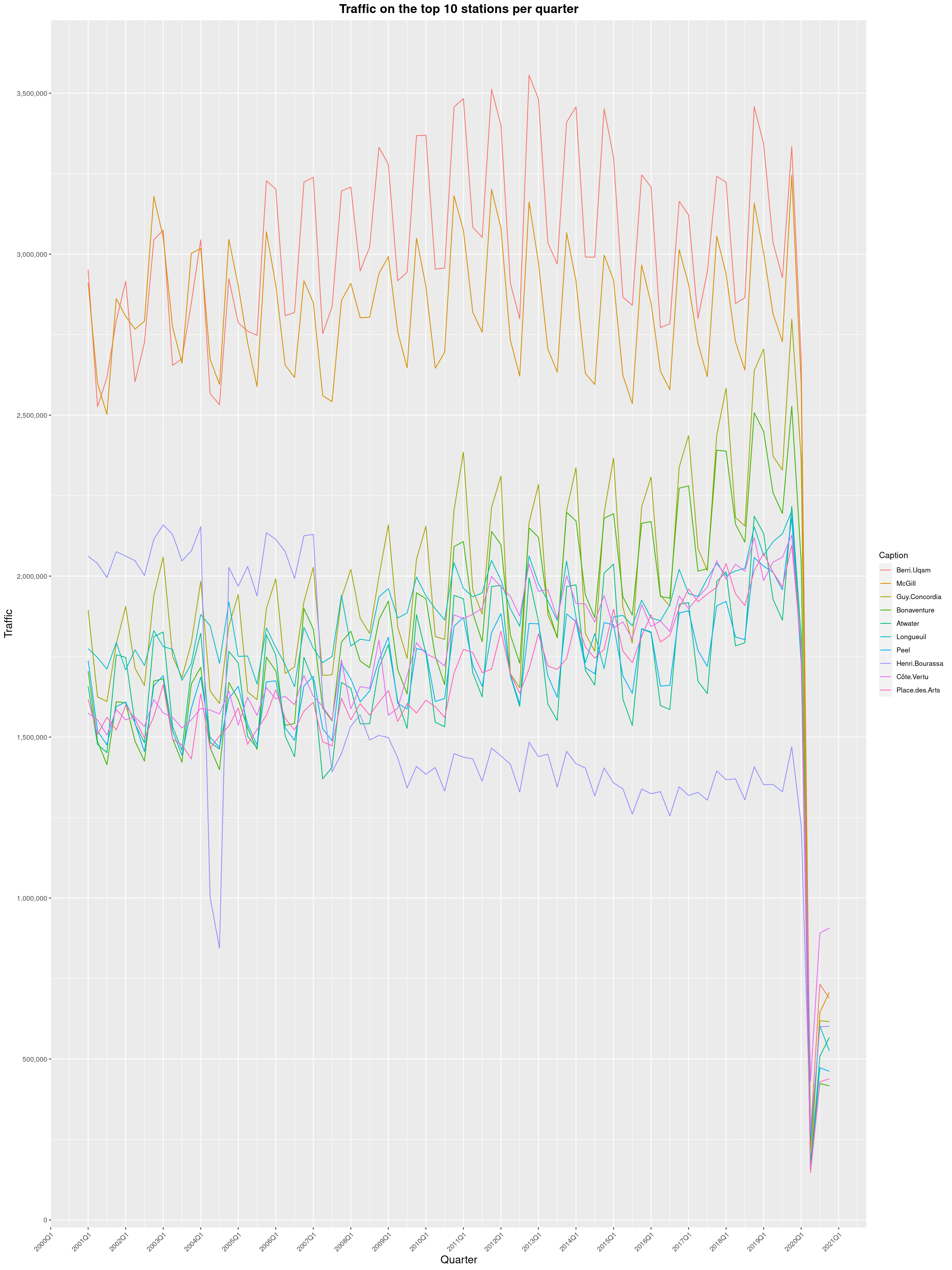
So here it is, data from 2001 to 2020, graphed the same way as in the
In 2019, I got curious and asked Soci t de Transport de Montr al, Montreal's
transit agency, for the foot traffic data of Montreal's subway.
Since then, two years has passed and with COVID-19 still going strong, I wanted
to see what impact the pandemic had had. And oh boy, what an impact it is.
So here it is, data from 2001 to 2020, graphed the same way as in the 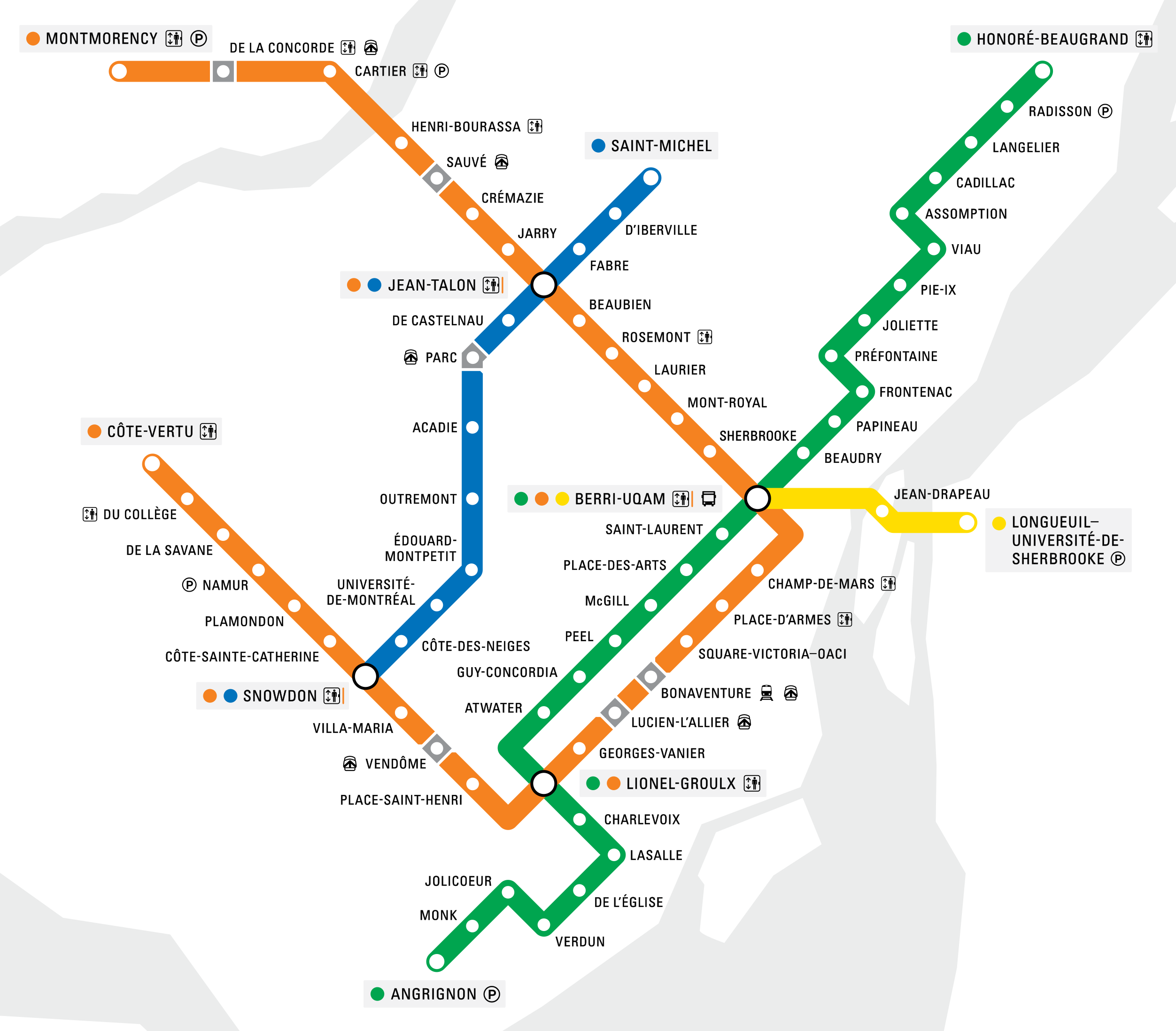





 Like
Like  ... isn't ready yet, but it's getting there.
I had planned to release a new version of SReview, my online video review and
transcoding system that I wrote originally for FOSDEM but is being used for
DebConf, too, after it was set up and running properly for FOSDEM 2020.
However, things got a bit busy (both in my personal life and in the world at
large), so it fell a bit by the wayside.
I've now also been working on things a bit more, in preparation for an
improved administrator's interface, and have started implementing a REST
API to deal with talks etc through HTTP calls. This seems to be coming
along nicely, thanks to
... isn't ready yet, but it's getting there.
I had planned to release a new version of SReview, my online video review and
transcoding system that I wrote originally for FOSDEM but is being used for
DebConf, too, after it was set up and running properly for FOSDEM 2020.
However, things got a bit busy (both in my personal life and in the world at
large), so it fell a bit by the wayside.
I've now also been working on things a bit more, in preparation for an
improved administrator's interface, and have started implementing a REST
API to deal with talks etc through HTTP calls. This seems to be coming
along nicely, thanks to