Search Results: "ed"

19 September 2011

Dirk Eddelbuettel: Fox Valley Marathon 2011

This morning, I was one of a mere 900 or so marathoners in the second (?) annual Fox Valley Marathon, along with a 20 mile training race (as Chicago's big marathon is coming up) and a half marathon. This all took place along the Fox river, which is about an hour west of Chicago. The race went well enough. I had been racing twice a year at this distance, but took a break after running with some minor injury and generally not too well (see e.g. my writeup from last year's Boston and Chicago marathons). So I wasn't even sure I'd run one this year at all, but the bug got me again when two friends signed up for this, and off we went to train over the summer. So with a few more miles from training, I was pretty antsy and went out too fast as usual, and paid with an as-usual slower half and few short walking breaks past mile 20. But I beat the hope-for target time of 3:25 quite handily with a 3:19:03 -- or a 7:36 min/mile pace. Which (as I noted in a quick post to Google+ started right after the race, and since edited/expanded -- prods to Google+) should hopefully get me back to Boston next spring.

18 September 2011

Gregor Herrmann: RC bugs 2011/37

& another week has gone by, & here's my #RCBW report.

summary: details:

Biella Coleman: Birds of a Feather for Academics (aka how to study digital media)

lol-bird-watch There is nothing more dispiriting for a scholar of digital media to see the astounding plurality of forms, formats, and politics reduced to one of a handful of tepid categories such as 1) network society 2) peer to peer production 3) digital activism and 4) the absolute most vacuous terms ever, Web 2.0. The problem is summed up rather nicely by a bunch of folks who published an article by the name of Birds of the Internet that every scholar interested in digital media should read: Observing participation without any guide to its diversity is like watching birds with no sense of what distinguishes them other than that they fly and squawk (when of course, many do neither). Rather than
lumping every instance of Internet-mediated participation into boxes labeled digital
culture , virtual reality , online community or network society , a field guide could aid in observing differences and testing, rather than proliferating classifications.

Philipp Kern: python-gnucash, historic build stats

Two tiny bits:

Keith Packard: MacBook-Air

Installing Linux on Sandybridge MacBook Air Matthew Garrett got a report from someone who bought a brand new Sandybridge MacBook Air and was trying to install Fedora on it. The screen went black as soon as the i915 driver tried to set the initial mode. I bought one to try and help out. Just getting Linux installed turned out to be a minor adventure and I thought I d write a few notes for the next person who comes along and tries to do this. The obvious method I downloaded a collection of Debian ISO images, live images, netboot images from testing and CD-1 of squeeze. I downloaded a Fedora 16 alpha XFCE live image. I burned all of these to actual CDs, and then stuck them in a CD drive and held the c key while booting the machine. Nothing worked. The CD would spin up, the screen would switch from white to a black text mode with a blinking cursor at the upper left and then then CD would stop. rEFIt attempts rEFIt provides a boot selection menu and various configuration bits to provide for a multi-boot environment. This is necessary to leave the OS-X install on the disk and also install Linux. It also lets you boot from removable media, or at least that was the story. rEFIt would list removable USB flash storage devices, but it would not list CD drives, even after the CD drive spun up and did stuff for a while. This makes me wonder if the c key technique wasn t actually trying to boot from the CD. However, rEFIt wouldn t boot from a grub2-enabled USB key. ISO on USB flash key What rEFIt will boot is a Fedora or Debian ISO image copied directly to the USB flash device. The Ubuntu 11.04 live image and it did not work. Fedora F16 Alpha The live image came up and started X in frame buffer mode. However, when I went to install the image to the hard disk, it got stuck trying to discover devices. I waited about 20 minutes and it never finished, although it did chew up a lot of CPU time. Debian Squeeze I copied CD-1 of the 32-bit Squeeze distribution to my flash key. That booted up to text mode and went through the install. Nothing really unusual until it came to installing grub. I let it install grub to /dev/sda4, the new partition I had created for Linux. I figured installing grub to /dev/sda would be a bad idea (I think it would have actually worked just fine in retrospect). A slight out-of-sync diversion here I couldn t get the 32-bit kernel to talk to any keyboard or USB networking device, so I eventually installed a 64-bit kernel and that works just fine. You can run a 32-bit user space with a 64-bit kernel without any trouble. Making EFI boot Naturally, I couldn t get the machine to boot to Linux after this. rEFIt, the multi-boot tool for Mac OS X appears only interested in booting EFI images, or at least was not interested in booting my BIOS-based Grub2 installation on /dev/sda4. I used the rescue mode on the USB flash drive to get back to my installed Linux image and installed grub-efi-amd64. The OS X EFI version does not support 32-bit EFI code, which seems entirely reasonable to me. What took a while was figuring out that all of the grub files need to be readable through EFI, and that the Mac EFI code can only read FAT (and HFS?) partitions. So, the trick appears to be to stick the grub files on the Mac OS X efi partition (/dev/sda1). I created a directory over there, /EFI/grub and then mounted that as /efi and made a symlink from /boot/grub to /efi/EFI/grub. Now, grub-install sticks the files in the right place, and update-grub will even place grub.cfg in the directory where it needs to go. At this point, rEFIt will happily find the core.efi and grub.efi files and show them in the list of possible operating systems to boot. I don t know why there are both core.efi and grub.efi files; I ve only ever picked grub.efi and that has worked nicely. Broadcom WiFi I haven t gotten that working yet; the b43 supported chip list says it works in kernel 3.1. I m busy building a 3.1-rc4 kernel as I type this, so perhaps that will just work when I boot that. i915 KMS The whole reason for doing the install is to fix problems with the eDP EDID discovery which is currently preventing the machine from running X. I ll be working on that next; a quick kludge to just read the current mode from the device should get something on the screen (we already do that for LVDS panels). Beyond that, I ll be trying to figure out whether I can make EDID actually work, or whether it s just not available in this machine. Somehow the kernel frame buffer ended up as 1280x800, which was quite annoying. As a temporary kludge, I ran fbset -yres 768 to at least avoid having text disappear off the bottom of the screen. Once the panel size is discovered correctly, that should be fixed. Status This is sure not like installing Linux on a regular PC. However, I m reasonably hopeful that the devices in the machine will be working pretty well under Debian within the next few days.

Craig Small: Getting music into the iPod Shuffle

IPod shuffle

Image via Wikipedia

Sounds easy doesn t it? You got a nice debian computer filled with mp3s and you got an iPod Shuffle. You want to get the mp3s onto the Shuffle, simple really! Well, no. I ve got a 2nd Generation iPod Shuffle; its a little blue thing the size of a postage stamp with no screen. Specifically a model A1204. It uses the headphone socket with a special connector to get it connected via USB. It also steadfastly refused to play anything I transferred onto it. gtkpod was first. I knew I was in trouble when my model doesn t appear in their list of supported devices. 2nd Generation Shuffles do, just not an A1204. After a lot of fiddling around and playing with special files and firewire IDs I got a file onto it. Great, but then turning the iPod on I got the green and orange sequence of lights which means no file found. Next, was Rhythmbox. It is supposed to understand iPods too. The funny thing was that it saw the music file I put on the iPod by gtkpod, but adding any file gave me the same colour sequence. What was worse is if you tried to look at the information about the iPod, Rhythmbox crashed. It seemed I was doomed to use iTunes on the windows computer in the living room. A program that seems designed not to work the way I want. (It tries to load all the mp3 files from my son s games into the iPod but ignores my music on the samba share, for starters). I just wanted the files on the player and the player to recognise and play them. It didn t seem like a too hard a task, but I was stuck. That was until I found a small (643 lines) python script called rebuild-db that builds the special iPod files with my music. I found the file at the rebuild-db sourceforge page and it was very simple process. Now I plug the iPod in, wait for the window to appear, push my songs onto the iPod and run the script. It s quick and simple and more importantly it works. Not bad for a program that hasn t been developed since April 2006.

Paul Wise: Revisiting personal software freedom

Since it was Software Freedom Day again, I figured I should revisit my personal software freedom and see what has changed since my post two years ago. There hasn't been a vrms meme again this year so I don't have anyone else to compare with. A small survey on IRC indicates folks still need non-free nVidia drivers, embedded software, GNU documentation, Java and more. Since then I have switched my laptop from the Dell Inspiron 6400 to the Thinkpad X201 Tablet. Nothing really changed with my laptop, GNU documentation is still non-free and the new Intel WiFi chip on my new laptop still uses non-free embedded software. To remind myself of the non-free bits embedded in the hardware (CPU microcode, BIOS, EC etc), I have installed intel-microcode and microcode.ctl. Since then I didn't get any new phone, still the same OpenMoko FreeRunner. I'm now using QtMoko on a 4GB microSD card and Debian and SHR on other cards for testing. QtMoko is based on Debian and is the latest incarnation of Qtopia. It is probably free but I haven't done any audit of it. One interesting thing that changed with the FreeRunner in the past two years is that Harald Welte and friends started OsmocomBB, a project to create free software for the GSM modem built into the FreeRunner and many old feature-phones. I haven't tried it yet due to lack of time. While at the Chaos Communication Camp 2011 I learnt about the blackbox that SIM cards are (video), which hopefully OsmocomBB has a chance to protect against. AFAIK nothing else has changed to improve software freedom on the FreeRunner, the WiFi, GPS and other parts still contain non-free software with no chance of a replacement in sight. Since then I am still using the same wireless router and ADSL modem and I wasn't brave enough to try replacing their software. I still use gmail out of intertia, but I at least have started using offlineimap to prepare for the day when I will move away from it. I still use Google Maps, mainly for searching for public transport routes. With my recent travels in Europe I encountered many places where OpenStreetMap has much better coverage than Google. One nice thing about Google Maps adding public transport information is that public transport organisations have been publishing public data feeds for Google to consume. Apparently there is also a realtime variant. I also found one website using a JSON API for Google street view. The combination of these gives me hope for better support for spatial data in free software. The data (aerial and streets) will obviously remain a much longer term freeness issue though. For flash video on the web get-flash-videos appeared and made it even easier to ignore flash, especially since I got a few patches added to it. In addition Swfdec died but Gnash improved enough to replace it. Lightspark was also created but has so far been pretty buggy and unstable. Free RAR v3 format support appeared in the form of TheUnarchiver. The Voxware audio codec and DigiTrakker MDL files are still not supported by Rhythmbox. Unicode has been updated and so now Debian doesn't support every script fully. I still manage to avoid Skype. The nouveau drivers have matured enough to provide 3D support, multi-monitor support and general stability for the one nVidia card I used in the past two years. Overall, I'm reasonably happy with my level of software freedom. My main strategy for preventing regressions in my software freedom remains to just avoid doing things that require non-free software. The most problematic FLOSS issues for me are embedded software, spatial data support and Flash support. Please feel free to contact me with any comments or questions. Happy Software Freedom Day everyone!

17 September 2011

Joey Hess: destructive impulse

I used to know guys who would take old computer hardware out in the desert and shoot it up. I never went, and I've never gratuitously destroyed a computer in 2 decades of working with the things. Until yesterday when I picked one up by the monitor and introduced it to the floor. My regret isn't that I violently destroyed a computer, but that it was my Mom's computer, and I did it right in front of her, and without even a story-worthy reason, just out of garden variety frustration. And perhaps there's some regret that I was actually unsucessful in destroying anything other than the monitor and some speakers. The computer was salvaged, and my mom has a new monitor and a working system again. Sorry Mom & Maggie. To make up for it, I'll humiliate myself with this recording of "broke mom's computer blues", which will only be available for a very limited time: click to listen (warning: contains harmonica). Anyway, don't worry; any remaining frustration will be taken out the usual way: Splitting firewood.

Andrew Pollock: [life/americania] Whirlwind visit to the Windy City

Our friend Susan was going to be in Chicago for a conference, and as we hadn't seen Chicago yet, and it was on the list of cities we wanted to visit, we made the semi-spur of the moment decision to have a three day weekend there last weekend. We got the Virgin America red-eye flight from SFO, which left on Friday at around 5pm, and got into Chicago at around 11:30pm, local time. Zoe didn't do as well as she has previously, and didn't sleep very well on the flight over, despite us getting lucky and scoring an empty seat between us on an otherwise fairly full flight. I think she's getting too big to comfortably sleep in the Ergo baby carrier (or isn't keen on sleeping vertically any more). We stayed at the Swissotel, because that was where Susan was staying (and was where her conference was) and nearby hotels seemed to be around the same price range. When we checked in, we let them talk us into an upgrade to a larger room, which had fantastic views of Lake Michigan and the Chicago River. Lake Michigan is just mind-bogglingly big. It's an inland sea. What can I say? I was totally in love with Chicago. The weather while we were there was unbelievable. Clear skies. High 20's (Celsius). It was more humid than the Bay Area, but less humid than Brisbane. The first thing we did on Saturday was go visit a friend of Sarah's who lived in Bryn Mawr. We took the "L" there. The elevated train was an interesting affair, and turned out to be less accessible than we'd been led to believe from some light research in advance. In fact, I found Chicago in general to be fairly wheelchair (and by extension, stroller) unfriendly. We had to lug Zoe's stroller up and down stairs quite a bit to get from the river level to where the hotel was. Zoe seemed to find it amusing, at least. Aside from that problem, the city seemed pretty flat. I'm really glad that we got out of the city and into Bryn Mawr, because it was really great to see that aspect of Chicago life as well. Lovely, quiet, tree-lined streets with wide sidewalks. Beautiful buildings. Sarah's friend was fostering 8 kittens, so Zoe got to have a play with all of them, which she thought was pretty cool. After we returned to the city, Sarah and I kicked back in Millennium Park while Zoe napped in the stroller. Saturday, being 9/10/11 in US date format, seemed to be particularly popular for weddings, and there were a lot of couples getting wedding photos taken in the park. That night, we tried to have some deep dish pizza at Uno, the home of deep dish pizza, but the line was ridiculous. We subsequently learned about Due, and went there the following night. The pizza was good, and I found the crust to be slightly different from what we'd get at Patxi's. We checked out the Navy Pier on both Sunday and Monday, taking Zoe to the Chicago Children's Museum both days (we got free entry thanks to our membership at the Children's Discovery Museum of San Jose). We had grand plans of checking out the Shedd Aquarium, but it turned out that Monday was a "free for all Illinois residents" day, and the line at 11am was ridiculous, so we gave it a miss and took at water taxi back to Navy Pier. It was Zoe's first boat ride, and she enjoyed it. I got some unbelievably good photos of the city skyline from the boat. Our flight out was at 7pm, so we took the train to Midway. I was very impressed that we could get all the way to the airport by train for the standard price. I love flat-rate fares. I really love a city with good mass public transit. The only thing that detracted from this in Chicago was the accessibility issues. We explicitly went to the Orange Line Clarke/Lake station to go to Midway because it was listed as being wheelchair accessible, and we had a stroller and a suitcase. We ended up going up to the wrong platform, and getting across to the other side was a bit of a mission. We'd entered the station from the street level, took the elevator up, and then realised we were on the wrong side. We had to go back down the elevator to the level below the street, cross the street from underneath it, and then go back up the elevator on the other side. Aside from these sorts of shenanigans, the whole elevated train thing was pretty cool (but I wouldn't have wanted to have an apartment with the train line right outside my window). If only the cars had glass roofs, the Loop would have been a lot more scenic. Overall, it'd be hard to say whether I liked Chicago or New York City better. I liked the clean, flat nature of Chicago, the architecture and the lower density of buildings, but I also really love New York just because it's New York, and has an awesome (probably equally stroller-unfriendly) subway system. Photos from the trip are here.

Petter Reinholdtsen: Ripping problematic DVDs using dvdbackup and genisoimage

For convenience, I want to store copies of all my DVDs on my file server. It allow me to save shelf space flat while still having my movie collection easily available. It also make it possible to let the kids see their favourite DVDs without wearing the physical copies down. I prefer to store the DVDs as ISOs to keep the DVD menu and subtitle options intact. It also ensure that the entire film is one file on the disk. As this is for personal use, the ripping is perfectly legal here in Norway. Normally I rip the DVDs using dd like this:
#!/bin/sh
# apt-get install lsdvd
title=$(lsdvd 2>/dev/null awk '/Disc Title: /  print $3 ')
dd if=/dev/dvd of=/storage/dvds/$title.iso bs=1M
But some DVDs give a input/output error when I read it, and I have been looking for a better alternative. I have no idea why this I/O error occur, but suspect my DVD drive, the Linux kernel driver or something fishy with the DVDs in question. Or perhaps all three. Anyway, I believe I found a solution today using dvdbackup and genisoimage. This script gave me a working ISO for a problematic movie by first extracting the DVD file system and then re-packing it back as an ISO.
#!/bin/sh
# apt-get install lsdvd dvdbackup genisoimage
set -e
tmpdir=/storage/dvds/
title=$(lsdvd 2>/dev/null awk '/Disc Title: /  print $3 ')
dvdbackup -i /dev/dvd -M -o $tmpdir -n$title
genisoimage -dvd-video -o $tmpdir/$title.iso $tmpdir/$title
rm -rf $tmpdir/$title
Anyone know of a better way available in Debian/Squeeze? Update 2011-09-18: I got a tip from Konstantin Khomoutov about the readom program from the wodim package. It is specially written to read optical media, and is called like this: readom dev=/dev/dvd f=image.iso. It got 6 GB along with the problematic Cars DVD before it failed, and failed right away with a Timmy Time DVD. Next, I got a tip from Bastian Blank about his program python-dvdvideo, which seem to be just what I am looking for. Tested it with my problematic Timmy Time DVD, and it succeeded creating a ISO image. The git source built and installed just fine in Squeeze, so I guess this will be my tool of choice in the future.

Gunnar Wolf: LVM? DM-RAID? Both? None?

Patrick tells about his experience moving from LVM to RAID.Now, why do this? I have two machines set up with LVM-based mirroring, and they work like a charm - I even think they work with better flexibility than setting it up in a RAID-controlled way, as each of the partitions in a volume group can be easily set to use (or stop using) the mirroring independently, and the requisite of having similar devices (regarding size) also disappears. Of course, this flexibility allows you to do very stupid things (such as setting up a mirror on two areas of the same rotational device - Good for toying around, but of course, never to be considered for production). And the ability to online grow and shrink partitions is just great. So, Patrick, fellow readers, dear lazyweb, why would you prefer LVM-based mirroring to a RAID alternative? Or the other way around?

Dirk Eddelbuettel: littler 0.1.5

Brown-bag release time for littler. One of the <emph>minor cleanups</emph> in the 0.1.4 release from Thursday actually introduced a nasty little bug as you can't call Rf_KillAllDevices() when you do not have any graphics device. Doh. So with apologies for the lower quality release, and the two hour malfuntioning window for CRANberries that it cause, a repaired version is now out there. The very brief (upstream) ChangeLog is as follows:
2011-09-17  Dirk Eddelbuettel  <edd>
        * configure.in: Mark as release 0.1.5
        * littler.c (littler_CleanUp): Remove call to Rf_KillAllDevices() 
littler provides r (pronounced littler), a shebang / scripting / quick eval / pipelining front-end to the the R language and data analysis environment. As usual, our code is available via our svn archive or from tarballs off my littler page and the local directory here. A fresh package is in Debian's incoming queue and will hit mirrors shortly.

Patrick Schoenfeld: Struggling with Advanced Format during a LVM to RAID migration

Recently I decided to invest in another harddisk for my atom system. That system, I built up almost two years ago, has become the central system in my home network, serving as a fileserver to host my personal data, some git repositories etc., streaming server and since I switched to a cable internet connection it also serves as a router/firewall.
Originally, I bought that disk to backup some data, of the systems in the network, but I realized that all data on this system were hosted on a single 320GB 2,5" disk and it became clear to me, that, in absense of a proper backup strategy, I at least should provide some redundancy.


So I decided, once the disk was in place, that the whole system should move to a RAID1 over the two disks. Basically this is not that hard as it may seem at a first glance, but I had some problems due to a new sector size in some recent harddisks, which is called Advanced Format.


But lets begin from the start. The basic idea of such a migration is:
  1. Install mdadm with apt-get. Make sure to answer 'all' to the question which devices need to be activated in order to boot the system.
  2. Partition the new disk (almost) identical.
    Because the new drive is somewhat bigger that wouldn't make sense, but at least the two partitions which should be mirrored on the second disk, need to be identical.
    Usually this is achieved easily by using
    sfdisk -d /dev/sda sfdisk /dev/second/sdb

    In this case, it wasn't that easy. But I will come to that in a minute.
  3. Change the type of the partitions to 'FD' (Linux RAID autodetect) with fdisk
  4. Erase evidence of an eventual old RAID from the partitions, which is probably pointless on a brand-new disk, but we want to be sure:
    mdadm --zero-superblock /dev/sdb1
    mdadm --zero-superblock /dev/sdb2
  5. Create two DEGRADED raid1 arrays from the partitions:
    mdadm --create /dev/md0 --level=1 --raid-devices=2 /dev/sdb1 missing
    mdadm --create /dev/md1 --level=1 --raid-devices=2 /dev/sdb2 missing
  6. Create filesystem on the first raid device, which will become /boot.
  7. Mount that filesystem somewhere temporary and move the contents of /boot to it:
    mount /dev/md0 /mnt/somewhere
  8. Unmount /boot, edit fstab to mount /boot from /dev/md0 and re-mount /boot (from md0)
  9. Create mdadm configuration with mdadm and append it to /etc/mdadm/mdadm.conf:
    mdadm --examine --scan >> /etc/mdadm/mdadm.conf
  10. Update the initramfs and grub (no manual modification needed with grub2 on my system)
    and install grub into the MBR of the second disk.

    update-initramfs -u
    update-grub
    grub-install /dev/sdb
  11. The first point to pray: Reboot the system to verify it can boot from the new /boot.
  12. Create a physical volume on /dev/md1:
    pvcreate /dev/md1
  13. Extend the volume group to contain that device:
    vgextend <volgroup_name> /dev/md1
  14. Move the whole volume group physically from the first disk to the degraded RAID:
    vgmove <volgroup_name> /dev/md1

    (Wait for it to complete... takes some time ;)
  15. Reduce first disk from the VG:
    vgreduce <volgroup_name> /dev/sda2
  16. Prepare it for addition to the RAID (see step 3 and 4) and add it:
    mdadm --add /dev/md0 /dev/sda1
    mdadm --add /dev/md1 /dev/sda2
  17. Hooray! Watch into /proc/mdstat. You should see that the RAID is recovering.
  18. When recovery is finished pray another time and hope that system is still booting with it running from the RAID entirely. If it does: Finished :-)

Now to the problem with the advanced format:
There is some action taking place with the hardware vendors to move to a new sector size. Physically my new device has a size of 4096 bytes per sector. Somewhat different to the 512 bytes disks used to have the last decade.


Logically it still has 512 bytes per sector. As far as I understand this is achieved by placing 8 logical sectors into one physical sector, so when partitioning a new disk the alignment of the disk has to be so that partitions start in a sector which is a multiple of 8.

That, obviously, wasn't the case with the old partitioning on my first disk. So I had to manually create partitions by specifying start points manually and making sure they are dividable by 8.

Otherwise fdisk would complain about the layout on the disk.
This does not work with cfdisk, because it does not accept manual alignment parameters and unfortunately the partitions it creates do have a wrong alignment. So good old fdisk and some calculations how many sectors are needed and where to start, to the rescue.

So the layout is now:
Device Boot Start End Blocks Id System
/dev/sdb1 2048 291154 144553+ fd Linux raid autodetect
/dev/sdb2 291160 625139334 312424087+ fd Linux raid autodetect


Christian Perrier: RWC: Giant Ireland

Just completed watching Ireland-Australia. What could I say except "I knew they could make it"? This so Irish team won the fight against Australia and, of course, I'm happy. Let's dream for IRL-FRA in final...:) Oh, that Rugby World Cup in case you hadn't noticed and such a game is exactly why I like rugby.

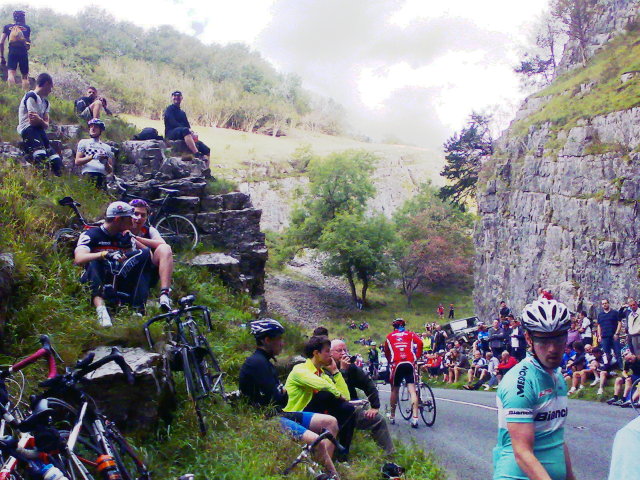
MJ Ray: Tour of Britain: Cheddar Gorge-ous

Photo of Fans in the Gorge

Fans in the Gorge

So tired, but so happy. Well worth it as a day out. Yesterday I went to the Tour of Britain as it passed through Cheddar Gorge. It was a fairly social trip, riding along with two from Bristol on the way in (hope they got back OK one bike broke crossing the orchard at Sandford, but I showed them Cheddar Cycle Store) and one from Milton on the way back. When I got there, I rode up the Gorge until I had to stop (or else fall off) and it was still packed with fans. It was a good half-hour before the race would pass by, but already almost every flattish piece of land by the road had either a spectator or a bicycle on it. I watched twitter for race news, posted an update @mjray, then put the phone away as the green-fronted police bikes came through just ahead of the racers. I tried videoing the race, but it s only the second outing for the handlebarcam and I seem to have deleted the recording before hooking it up to the laptop. Thankfully, the itv4 coverage (repeated 13:00) is pretty good. (My back is on TV! Ahem.) Now, today (Saturday) I will be mostly doing the work scheduled for Friday, but it was still worth it. Go along if you get the chance: Suffolk and Norfolk today, Westminster tomorrow. I suggested it to @enterprisehub s #coopsweekend because the Rabobank team are doing well.

Benjamin Mako Hill: Software Freedom Day Boston 2011

This year, Software Freedom Day in Boston is being organized by Asheesh and Deb and OpenHatch which means a focus on increasing involvement in free software communities. If you are all interested in getting involved in the free software community in any way and at any level -- or interested in hearing about how that might happen someday -- this is a great event to attend. For my part, I'll be giving a short talk on getting involved in Debian. The event will be held on Saturday, September 17 at Cambridge College -- between Harvard and Central squares -- with an after party at Tommy Doyle's in Harvard.

16 September 2011

Sha Liu: Test blogging from w.bloggar v4.03 portable build

I just download this tool here. After finishing a really simple setup wizard, which includes choosing your blog service provider, filling in your username&passwd info, I m now writing my first blog with this tool. Before I download and begin to use it, I knew from reviews that this is NOT a WYSIWYG tool. I really doubt it that it could be useful for a person like me who have nearly no HTML knowledge. But so many reviews mention this tool and all give it high options that I decide to give it a try.

screenshot of Editor Tab

The tool looks pretty neat, isn t it? It s simple for me to use any buttons without guessing what they will do. And you can see that there s Preview tab, in which you can check the real layout when published.

screenshot of Preview Tab

The preview tab(it seems the first picture is not uploaded successfully?) In all, I begin to love this editor even this is my first time using it! It s simple yet completely enough for users like me. And with this editing HTML directly, I can even learn a little bit about its syntax. Don t mention all the merits an offline desktop editor can provide. Now, I ll try the last and most important function Publish! See you on my blog!

Wouter Verhelst: Dear lazyweb,

Is there a syscall to ask the system whether a file is sparse in a particular region? I.e., if I say dd if=/dev/zero of=./foo seek=10 count=10, then I should get a "yes" for the first half of the file, but a "no" for the second half. Case in point: I need to write a test for the newly-implemented NBD_CMD_TRIM which uses fallocate with the FALLOC_FL_PUNCH_HOLE option to sparsify a file. kthxbye,

Rapha&#235;l Hertzog: How to triage bugs in the Debian bug tracking system

Triaging bugs is one of the easiest way to start contributing to Debian. I ll teach you the basics in this article. 1. Prerequisites All interactions with the Debian Bug Tracking System (BTS) happen through email so you need to have an email account with an address that you re willing to make public. All the mail that you send to the BTS will be archived and publicly available through its web-interface. This also means that you should have some spam filters in place because it will inevitably be harvested by spammers. :-( To ensure that this email address is consistently used by the various tools that we re going to use, it s a good idea to put this email address in the DEBEMAIL environment variable. You can also specify your full name in DEBFULLNAME (in case you don t want to use the name associated with your Unix account). You usually do this by modifying ~/.bashrc (if you use bash as login shell):
export DEBEMAIL="hertzog@debian.org"
export DEBFULLNAME="Rapha l Hertzog"
You should also install the devscripts package, it provides the bts command that we re going to use. 2. Find a package or a team with too many bugs You can literally pick any popular software that s in Debian, they almost always get more bug reports than the maintainers can handle. Instead of picking a package, you can also select a packaging team and concentrate your efforts on the set of packages managed by the team. In any case, it s important to receive the bug traffic for the packages that you re going to work on. If you went for a specific package, you should subscribe to the package via the Package Tracking System (there s a subscribe box on the bottom left corner once you selected the source package of interest). If you decided to help a team, there s usually a dedicated mailing list receiving all bug traffic. You can browse a list of packages with the most bugs if you have troubles finding a package to work on. A stack of bug reports to triage 3. Triage bugs! Bug triaging is all about making sure that bugs are correctly classified so that when a developer looks at the bug list, he can quickly find bugs with all the information required to be able to fix them! 3.1 Adding information to bug Adding supplementary information is easily done just by sending a mail to XXXX@bugs.debian.org (replace XXXX with the bug number). But often you want to reply to a message in the bug history, in that case bts --mbox show XXXX is for you. It will grab the corresponding mailbox and open a mailer (mutt by default) on it. Now you can directly reply in your favorite mailer. 3.2 Classifying bugs The Debian BTS uses tags (click the link and read the doc!) to classify bugs. bts tag XXXX + foo will add the foo tag (replace the + with a to remove a tag). If you want to explain why you re adding a tag, you should instead reply in the bug log as explained above, put control@bugs.debian.org in Bcc (Blind Carbon Copy) and start the body of your message with your tag command:

tag XXXX + foo
thanks
But what tag should you add? When a bug is submitted, you should try to reproduce the bug. If you can reproduce it, then tag the bug confirmed (example in #641710). If you can t, you should request more information (ex: a sample document triggering the bug, a configuration file, the output of some relevant command, etc.) until you can reproduce it or conclude that it was a user mistake. When you request supplementary information due to this, you should tag the bug unreproducible moreinfo (example in #526774). moreinfo should be later dropped when the requested information are provided, and unreproducible should be dropped if those information were enough to actually help reproduce the bug (example in #526774). During that initial evaluation, it s also worth differentiating packaging bugs (which are specific to Debian) from upstream bugs (which are relevant also for non-Debian users). The latter should be tagged upstream (and forwarded upstream if the bug is reproducible or contains enough information for the upstream developers, example in #635112). If you saw a (viable) patch in the bug log, the bug should be tagged patch . This is usually done by the patch submitter but sometimes it s forgotten (example in #632460). Take care though to not reinstate the patch tag if it was initially set but then dropped by the package maintainer after a review of the patch. If the title of the bug report is not descriptive enough, you can change it with a retitle XXXX new-title command (example in #170850). You can also change the severity of the bug report depending on the impact of the problem (with a command severity XXXX new-severity , what a surprise!). Request for new features are wishlist , most documentation problems are minor . On the other side of the scale, you can use important for bugs that are very annoying but that should not block a release. serious , grave and critical are used for release critical bugs, check the official definitions of the severities (examples in 502738 or #506498). 3.3 Closing non-bugs and bugs that are already fixed If your analysis of the bug report is that it s not really a bug but a user mistake, then you should close it by sending a mail to XXXX-done@bugs.debian.org with some explanations of the user s mistake so that he can get past his problem (example in #592853). If the problem was a real bug, but one that is apparently already fixed, you should try to quickly find the version that fixed the bug. If you can t find it in the changelog (there s a link to it in the PTS, or you can use /usr/share/doc/package/changelog.Debian.gz), you ll make the safe assumption that the upstream version you re currently using is the first one where this is fixed. Then you send a mail to XXXX-done@bugs.debian.org but you start your mail with Version: version-that-fixed-the-bug and continue with a small explanation of why you believe the bug to be fixed by this version (example in #122948). 3.4 Reassigning misfiled bug reports Bug reports are not always filed against the proper package. Users file bugs against applications where they experience the bugs, but the real bug might be in an underlying library or application. When that happens, you should use the reassign XXXX correct-package version command to get it filed against the correct package. The version parameter is optional but should be provided if possible, it should be the oldest version that we know to have the problem (example in #626232). 3.5 Forwarding bugs Forwarding bugs means opening bug reports in the upstream bug tracker for issues that have been reported in Debian but that applies to the upstream (unmodified) source code. Be sure to include all the relevant information and a link to the corresponding Debian bug. Depending on the upstream bug tracker, you might have to open an account to be able to file new bug reports. On the Debian side, you must record that a bug has been forwarded with bts forwarded XXXX upstream-bug-url . upstream-bug-url is the URL corresponding to the upstream bug report you created (ex: http://projects.ciarang.com/p/feed2omb/issues/21/ recorded in #609345 ). If the upstream authors fix the bug you reported, you can tag the Debian bug with fixed-upstream so that it s easier to find bugs to close when the next upstream release comes out (example in #637275). 3.6 Updating version information The Debian BTS uses version tracking to know which package versions are affected by a given bug. It s particularly important to have correct version information for release critical bugs since it might affect the migration of packages to testing. You can learn more on this topic here: http://wiki.debian.org/HowtoUseBTS. 4. More advice Colin Watson wrote a constructive rant explaining some mistakes that bug triagers are often doing. While it refers mainly to Ubuntu s launchpad, the advice apply equally as well to Debian. Check it out to become a better bug triager! Note that you can refer to this article with this shorter URL: http://raphaelhertzog.com/go/bugtriaging/

Do you want to read more tutorials like this one? Click here to subscribe to my free newsletter, you can opt to receive future articles by email.

One comment Liked this article? Click here. My blog is Flattr-enabled.

Lior Kaplan: Happy 10th b-day bug #98160

Happy 10th birthday Mozilla bug #98160, I hope you won t make it to your 11th, but who knows I hope the same for your younger brothers bug #166240 which is only 9 years old. Many thanks for all the people who tried to help RTL users switch their textarea directionality and alignment easier. Another bug in the it sometime sucks to be an RTL user department is bug #119857, soon to be age 10. I m lucky to have BiDi Mail UI as a good workaround, otherwise I couldn t read emails in Hebrew with the proper alignment/directionality. In another department, I must say I love daylight saving time, as I have more hours of sun, but this comes on the expense of my schedule as due to bug #504299 all my events aren t on the right local time, but an hour earlier. Although the post is written cynically, I would like to call the Mozilla community to help with fixing these issues. I also want to thank the people who are already helping with these issues or helped in the past.
Filed under: Free software applications, i18n & l10n, Mozilla

Next.

Previous.