Search Results: "dom"

16 October 2015

Norbert Preining: Debian/TeX Live multiarch update

A big update of all related packages (tex-common 6.04, texlive-bin 2015.20150524.37493-7, texlive-base/lang/extra package 2015.20151016-1) due to the move to support multi-arch. Of course, the regular updates of the TeX Live are included, too. With this change it should be possible to run a multi-arch system with only one TeX Live installed. Debian - TeX Live 2015 Thanks to the excellent support and testing of the Multi-arch guys, in particular Thorsten Glaser, Helmut Grohne, Johannes Schauer, and Wookey, I learned a lot about multi-arch, and I hope that the current setup is safe. All the packages but the various lib* packages are tagged as Multi-Arch: foreign, while the lib packages are tagged Multi-Arch: same. Anyway, if you find a bug concerning multi-arch, that is that some of the programs exhibit architecture information, please let us know via a bug report. Updated packages acro, alegreya, amiri, assoccnt, attachfile, babel-french, babel-hungarian, barr, beebe, biblatex-philosophy, bidi, bnumexpr, caption, chemfig, chemformula, chemmacros, cjk-gs-integrate, csplain, dantelogo, dataref, dtxgen, dvipdfmx-def, dvips, eledmac, elements, fcolumn, fithesis, fontspec, genealogytree, gradstudentresume, gtl, jfontmaps, knuth-local, koma-script, kotex-oblivoir, kotex-plain, kotex-utf, kpathsea, l3build, l3experimental, l3kernel, l3packages, latex, latexconfig, ledmac, ltxfileinfo, lualatex-math, luamplib, luatex, luatexbase, luatexja, luatexko, make4ht, mcf2graph, mflogo, modiagram, multiexpand, newtx, odsfile, old-arrows, paracol, pdfpages, pdftex, plain, pst-stru, pxchfon, randomwalk, reledmac, resumecls, rubik, selnolig, showhyphens, siunitx, suftesi, tetex, teubner, tex4ebook, tex4ht, texlive-scripts, tikzsymbols, tipfr, tools, tudscr, uassign, unicode-math, unravel, visualfaq, xepersian, xetex-def, xint. New packages archaeologie, ctablestack, dynamicnumber, exercises, fibeamer, h2020proposal, imfellenglish, lstbayes, tempora, xellipsis. Enjoy.

15 October 2015

Laura Arjona: Long summer story, Welcome team, and I am a Debian Developer now

Note: 2015/10/16: I need to add some links but I won t delay this more, posting now, will edit later. Summer ended long time ago, but believe me, I m still catching up with all the things that I began in June/July, all the things I left in August when I went holidays, and more things that appeared in August and September. This is a long overdue post, I hope you bear with me for waiting so long, and writing (now) so long too! June In June, I was 100% sure that I would not attend DebConf15 (well, I was 98% sure until then), and when the new Outreach Sponsorship grants were announced, I decided to write some mails to several Debian contributors, so they consider applying for the grant and attend DebConf (and maybe trigger some i18n/l10n meeting ). They kindly declined, and I understood their reasons, but also wondered what would have happened if the proposal would have come from somebody more official instead of a random contributor that they don t know. I also hoped that lots of other Debianites also write to newbies or not-yet-DD-contributors or non-packaging contributors to invite them to DebConf, and I hoped that they had better luck than me in convincing them :) July In July I usually work hard preparing the computer labs for next academic year at my workplace in the University, but I also have more free time in the long afternoons and evenings, since I don t sleep much, and there is not much to do outside with the summer hot. So I used that month to go on contributing to DebConf publicity and think a bit more about Debian and the other free software communities. I didn t put much time in advancing my selfhosting (no SSL yet in *.larjona.net! booooo!) but I decided to deep my toe in Sandstorm.io, and try to selfhost an instance ( http://lacaja.larjona.net ) and try Etherpad inside Sandstorm (since I failed in deploying Etherpad by myself in my jessie+nginx+postgres box). Sandstorm worked, and Etherpad was packaged in Sandstorm so it worked too; and I have my free-software-base pads now for writing and share. So I joined #sandstorm IRC channel since then, and there I learnt that Asheesh Laroia (who works in Sandstorm.io and is also a Debian Developer and was going to give a talk about Sandstorm.io in DebConf15) was offering mentorship for people wanting to learn Sandstorm packaging, and his proposal was to begin packaging Framadate. I also failed in selfhosting Dudle (prepared for Apache + FastCGI, couldn t make it work in my Nginx), so Asheesh s proposal looked suitable for me. We talked and decided to invest the rest of July and first days of August in learning to package Framadate. I learned a lot, but couldn t finish the task. I encountered many issues (setting my dev environment, and later trying to package), and we solved some of them but my time ran out. I posted my work in the list, and I hope that my feedback on the documentation and the issues I encountered helped Asheesh and the Sandstorm community. Framadate is packaged in Sandstorm.io now, Drew Fisher packaged it, not sure if my stuff was useful or not (it s been useful for me, for learning, at least). I ll talk more about Sandstorm.io in a future blog post updating on my selfhosting adventures. What I liked most was the kind of proposal of mentoring that Asheesh made. It was very detailed in every aspect: the task, the things you need to accomplish it, details about his availability for mentorship I try to be welcoming in the teams in which I participate, but the fact is that I fail in actually mentor, maybe because of not making specific proposals to people (until now, I was like Hi, newcomer! Go read this, this and this, and try for yourself any task you feel you like it, and come back if you have issues , la Debian ). This, plus the thoughts about my mails in June for diversity outreach in DebConf, made me feel the need of having a team where people willing to welcome newcomers share tricks and procedures, write together more specific proposals, and follow up the newcomers experiences in a regular way. I talked with Enrico Zini and we wrote down some notes for a Welcome Team in Debian; he said he would spread the word during DebCamp/DebConf and we would see what people thinks about it. August August came, and the day before going on holidays I was really tired: too much luggage to prepare, too many hours in front of the computer, and the usual stress of traveling; and I took the bad decision of signing some GPG keys of several Debianites that I met in July. I say bad decision because the lack of sleep showed its black magic and I accidentally deleted my secring.gpg file. I knew I had a backup but I didn t have too much time to invest and I didn t want to mess it with the backup too, and my laptop was going to stay at home, powered off, during the whole month, so I just went on holidays and left the GPG issue for later. The day after, meanwhile I was waiting in the airport for my boarding time, I received a mail accepting me as Debian Developer. Wow!! Really, I was not expecting that the process was already finished, I had interchanged several mails with my Application Manager (who happens to be the current DPL!) and I thought that his summer could be quite packed of Debian/DebConf work and my process could wait a bit. So it was a very happy news and very motivating after one month (July) full of free software work. On the other side, I was a bit scared: what type of Debian Developer are you, larjona, not capable to sign some GPG keys without breaking your setup?! but I answered myself well, I m the type of Debian Developer that has backups :) and then, with that mixed feelings of excitement and impostor syndrome, I took my plane and went on holidays, not expecting to touch any computer until the end of the month. August is probably the month in the year when I have more free time (holidays), but less time to dedicate to free software. I devote most of the month to visit family and stay with them, with no internet connection available or no free time to look at the mailbox or social networks or IRC But DebCamp and DebConf15 were happening during my holidays. And this DebConf15 was the first one in which I participated in the organization, and the first one in which I felt more than being a consumer of Debian videos . I could not follow the streamings, my only internet-capable device was my Android 2.x phone, but when I had wifi I fetched the mail, and during the nights, while everybody else was sleeping and I was laying on the terrace, below the sky full of stars, I could read batches of hundred of mails from debconf-discuss mailing list. And I could get some feeling from DebConf life, because I learned about the ad-hoc BoFs and discussions, the morning bike rides and swimming proposals, and the dancing classes, the i18m/l10n meeting, and many other things. I could answer some mail from time to time, and I also knew that a fellow Debianite from Madrid was going to bring me some stickers, maybe a t-shirt, and shake hands in my name to some persons. September and October September was about finishing reading all the mails and try to answer the pending ones, and preparing my computer to use my new Debian identity (and stop using larjona-guest). I still have some things to do, pending technical work, and some mails that I should have answered and I ve forgotten, for sure (if you sent me a mail that needs answer or would be fine that I answer (even if it was months ago!), please resend or ping me). I recovered my secring.gpg but and just now I added larjona@debian.org to the ID in my GPG key, but didn t signed the pending keys again (sorry dkg and holger! will catch up there soon). My subkeys expired and I m trying to find out how to proceed (they are in my FSFE SmartCard) :/ About the Debian teams, I ve resumed my work in publicity team (this year I ll try to be more involved, in Debian Project News in particular), partially in the website team, and recently I ve finished catching up with the Spanish translation of the website. I ve also joined the DebConf team again (for DebConf16, no matter I probably won t attend) and documented the Publicity task for DebConf, and I try to engage the mailing list and the IRC meetings. I finally could have time to watch some DebConf15 videos and Andreas Tille s talk ( Creating a more inviting environment for newcomers New experiences from MoM, SoB, Teammetrics ) helped me to step ahead in welcoming people with more useful stuff than Hi, newcomer! Go read this (general URLs), try for yourself whatever you like . I have made specific proposals for two people. In mid September I accepted an interview about Debian for a podcast with quite a lot audience (in Spanish), in which I explained the idea of the Welcome Team and offered myself as first-contact. Since then, two more people have contacted me and I have offered specific tasks I think are suitable for them. I also try to be more available in the IRC and offer some time spans for new contributors to DebConf to explain the git setup, the wiki, and all this stuff that looks more complicated than what it is. And I think that s all. My Debianite friend kindly brought me some stickers and a DebConf t-shirt, plus the organization t-shirt that the team gave me as present for my contributions in DebConf15. Neil McGovern kindly sent me a certificate of my new Debian Developer status (thanks!!), and it s posted in my wall at work. Here you are a photo! larjona_dd.JPG (Note: my wall is full of stickers and pieces of papers with things I need, things I like and things I use to explain my work (sometimes sarcastically/ironically ). Maybe some day I ll make a blog post about that!) I feel very proud and happy. Still, a lot of things to learn and work to do, but my intentions are: to keep on progressing (sometimes fast, sometimes slowly), never give up, and enjoy the multiple flowers I find in my way :) Thanks everybody! October and future Some other ideas/plans for the future (the ones I didn t say yet): Comments? If you want to comment you can use this pump.io thread.
Filed under: My experiences and opinion, News Tagged: Communities, Contributing to libre software, Debian, Developer motivations, encryption, English, Free Software, gpg, libre software

14 October 2015

Rhonda D'Vine: Post DebConf15

There are some things that I didn't mention in my sort-of quickly written entry about DebConf15. So first things first. When I received the mail about the room allocation I was at first confused. I was put into a room with other ladies, which I didn't expect. Granted, two of the other three names were people that knew me since a while, but it still felt like a mistake might have happened. But after a while I realized what has happened: It wasn't a mistake, it was intentional, I was finally recognized as woman for the room allocation too, which made me extremely happy. I was just just concerned about the third person who would be in our room who doesn't know me yet and whether it would make them feel uncomfortable. In the end, that was no trouble at all. I felt so empowered and more accepted than ever in this community. And when finally being on-site there another thing happened with me. I started to use the women's restroom. Up to now I usually had the feeling of "it's fine for me to use the male one, and I don't want other women to feel uncomfortable", but somehow, with a skirt on, it in the end made me feeling uncomfortable. Additionally, there were only three times in total when I used the male toilet (and one was on the boat for the daytrip), and every single time of it I felt extremely uncomfortable with it, like others might think I'm just faking it. It at least in my mind doesn't help with accepting me as female when I go to the male restroom. And it's not a Good choice! as a woman did put it during the conference dinner when there was a longer queue infront of the male restroom. It's not so much of a choice over here. But I give her the doubt of not knowing how important these little steps became to me over time. Totally unrelated to the restroom question but interestingly featuring it a fair bit I was made aware of the Assigned Male cartoon. I instantly fell in love with it, and in case you want to enlighten yourself a bit more about how some things you might say or do get received by trans people, be very much invited to read it. Sophie is currently on European tour with her book, unfortunately Vienna/Austria doesn't seem to be part of europe in that respect so I hope someone will be able to visit one of her stations to pick up a book for me ... And then there was also a small inofficial Nail Polish BoF going on at DebConf. I left it on my fingers for the next two weeks, totally in love with it. Unfortunately the nail polish I got for myself after DebConf had a rather big brush so I wasn't able to work on it, I failed miserably. ... which brings me to the empowerment that DebConf meant for me this year, and the time since. Given that I left the nail polish on I even took the comfort in being myself to go to work in my skirt on a more regular basis. Also, a very nice friend did visit me and we went lipstick shopping. I loved the color she chose, even though in the meantime it isn't visible enough for me and I guess I'll get another one rather sooner than later. Also, about what I mentioned in my last blog post was that my name change within the Debian project was granted. A quick update on that is that also now my GPG key got replaced. I guess it's finally time for me to write a gpg transition statement, even though I don't follow those myself. I still prefer meeting up with people face-to-face for signing their new keys. But given that it's called a transition statement makes it more appealing to me on that grounds. :) And I got invited to a local podcast show. Actually I know the person who does the podcast since several years already, he's also part of the local free software community who attends various events, and he does a podcast since several years now called Biertaucher (named after cooling the beer in a fountain). It is held in German language, so if you don't understand German you might want to skip these links.
In the first episode that I joined in I talked about DebConf. Afterwards we were sitting together and talking about that they would like to have more social topics too, not just technical things. So we took that chance and talked in Biertaucher #221 about Polyamory, which was a quite interesting experience. The host intentionally asked questions coming from a quite ignorant point of view, but it went nice. We were three poly people sharing our views and insight how it works for us.
Then there was Biertaucher #223 where it was just me and one of the hosts. We didn't had much to talk about from the past week, so we agreed to talk about Transgender in the end. Granted, it's mostly my personal story, but I guess I got some important topics addressed in a useful way. And, after getting my name changed in Debian, I thought about what it might take to get my name changed officially, too (as if it could get more official than using it throughout my work environment, both payed and voluntary, but ...). I covered that in the podcast, but mostly it is either quite expensive or requires me to change my gender in the register of births, which require a lot of other hassles that include psychiatry. Or, settle for a so-called "gender neutral" name as first name, which both doesn't sound very convincing somehow ... Only time can tell I guess. Guess that's enough for now, if I forgot something I might come back to it. :) One last note: I consider the Debian project a very welcoming one, and that can only work for a fair amount of people if the tone is right. So yes, I wholeheartly agree with the Code of Conduct. And I'm very disappointed to see that there are still people in the project that are advocating for a freedom of expression, so to say. Respectful communication with each other is a must in a bigger community to make it work, not something that might be a nice to have, and calling someone names and ridiculing them for stating that is absolutely not acceptable. I encourage those people to watch How to Throughly Offend and Insult People in Open Source presentation (or at least read the slides) that Gina Likins gave earlier this year. It might give them an idea why it's important to communicate respectful with each other, and that includes banning degrading terms like "SJW" from your vocabulary because it actually speaks a lot more about your own attitude than about the one of the person you use it for.

/personal permanent link Comments: 8 Flattr this

Russ Allbery: Review: Magic's Price

Review: Magic's Price, by Mercedes Lackey
Series: Last Herald Mage #3
Publisher: DAW
Copyright: July 1990
ISBN: 0-88677-426-8
Format: Mass market
Pages: 351
Magic's Price is the conclusion of the Last Herald Mage trilogy (Lackey is from an era of fantasy in which trilogies stopped at three books), but those books are widely spaced and mostly stand alone. You might miss some context around Vanyel's personal life and the politics of the kingdom, but there's a lot of somewhat-awkward in-line summary, so you could read these books out of order if you wanted to. As with the previous two, this is a re-read of a book I've read several times before, but not for more than fifteen years. This is the book that finally introduces Stefan. On this re-read, that surprised me I thought of him as a large part of Vanyel's overall arc but he's only in the third book. He is, of course, key to the grand conclusion of Vanyel's story, beginning as the Bard who has the ability to blunt the pain of the badly-suffering king of Valdemar and then becoming more than that to Van. It's also a book about Vanyel trying desperately to hold things together as the country falls on hard times and far too much weight is put on his shoulders. And a book about a climactic fight against an arch-villain (awkwardly and retroactively inserted). And Vanyel coming to terms with his own foresight. It's a book about rather a lot of things, and therein lies a problem. I thought Magic's Promise had a better story than Magic's Pawn, but both had reasonably coherent stories and some internal flow. Magic's Price has three or four interwoven stories and some odd stops and starts. This is still early in Lackey's writing career (three years after her first novel), and I don't think she was entirely successful in what she was trying to do. The climaxes of the different stories don't quite line up and don't get enough separate attention, leaving a book that lacks clear dramatic shape, an engrossing build-up, or a satisfying climax. The biggest problem I had is that the main threat is not adequately supported. The story is building towards a rather drastic conclusion, one that has been foreshadowed from early in the series, but the threat that creates that conclusion comes out of nowhere. Lackey tries to tie it back to events from earlier in the series, and maybe it was planned all along, but there's little concrete support and no build-up. It feels like a retcon. And the key character in that threat receives almost no characterization whatsoever. I'm a bit grateful for that, since Lackey tends towards total evil in her villains, but to have the cause of all the drama in this story be a complete cipher takes a lot out of the story. (Also, I truly could have done without the rape.) The other irritation is that Vanyel spends quite a lot of the book being a jackass. This is another occasional problem with Lackey's books: her love stories, at least in her early books, involve a bit too much of people being stupid at each other. But I hadn't remembered just how much Van jerked Stef around and treated him miserably, straight to the end of the book. Love is a bit too ordained and imbued with magical powers in Valdemar, which is lucky for Vanyel: extensive plot support is required to explain why Stef didn't find someone else who was less of an ass. In the real world, when someone insists they have no emotional space for you, the correct reaction is "gotcha, have a nice life" and finding someone else to spend time with. This gets partly sorted out in the end, but I didn't find the reconciliation entirely believable, and certainly not fair to Stef. (And the age difference is just a little creepy, although thankfully Lackey doesn't put much focus on that.) On my first read of the Valdemar corpus, this was the book during which I started getting interested in the lore and politics of this universe. There's much more of that to come, thankfully, as I think it's my favorite part of the series. At this point in her writing career, Lackey is getting better at avoiding infodumps and making her magic system interesting. The politics is still a bit black and white, but the Tayledras are a lot of fun (and increasingly less like elves, even if that's the obvious initial inspiration), and the areas beyond Valdemar are developing some more coherence. The conclusion loses a lot from the lack of build-up and emotional support, but it still adds an interesting bit of magical history that will be important later. I wish I'd enjoyed Magic's Price more on re-read, but it was much spottier and more exasperating than I had remembered. That said, it certainly has its moments, particularly around the lore. This is the first book where one starts to realize just how powerful the Companions are, and just how much they're capable of that they're not showing. When I first read it, I loved it. Now, the flaws are too obvious, and Vanyel's behavior is too irritating, for me to unreservedly recommend it, but Magic's Price, and the whole trilogy, is important for building the lore of later books. When I get to Elspeth's part of the series, the politics and magical system will be developed at much greater length. Next, though, my favorite stories in this universe: Tarma and Kethry. Rating: 6 out of 10

12 October 2015

Daniel Pocock: RTC Quick Start becoming a book, now in beta

The Real-Time Communications (RTC) Quick Start Guide started off as a web site but has recently undergone bookification. As of today, I'm calling this a beta release, although RTC is a moving target and even when a 1.0 release is confirmed, the book will continue to evolve. An important aspect of this work is that the book needs to be freely and conveniently available to maximize participation in Free RTC. (This leads to the question of which free license should I choose?) The intended audience for this book are people familiar with setting up servers and installing packages, IT managers, system administrators and support staff and product managers. There are other books that already explain things like how to setup Asterisk. The RTC Quick Start Guide takes a more strategic view. While other books discuss low-level details, like how to write individual entries in the Asterisk extensions.conf file, the RTC Quick Start Guide looks at the high level questions about how to create a network of SIP proxies, XMPP servers and Asterisk boxes and how to modularize configuration and distribute it across these different components so it is easier to manage and support. Some chapters give very clear solutions, such as DNS setup while other chapters present a discussion of issues that are managed differently in each site, such as user and credential storage. One of the key themes of the book is the balance between Internet architecture and traditional telephony, with specific recommendations about mixing named user accounts with extension numbers. Many people have tried SIP or XMPP on Linux in the past and either found themselves overwhelmed by all the options in Asterisk (start with a SIP proxy, it is easier) or struggling with NAT issues (this has improved with the introduction of ICE and TURN, explained in a chapter on optimizing connectivity). The guide also looks at the next generation of RTC solutions based on WebRTC and gives specific suggestions to people deploying it with JSCommunicator. Help needed There are many ways people can help with this effort. The most important thing is for people to try it out. If you follow the steps in the guide, does it help you reach a working solution? Give feedback on the Free RTC mailing list or raise bug reports against any specific packages if they don't work for you. The DocBook5 source code of the book is is available on Github and people can submit changes as pull requests. There are various areas where help is needed: improvements to the diagrams, extra diagrams and helping add details to the chapter about phones, apps and softphones. How could the book be made more useful for specific sectors such as ISPs, hosting providers, the higher education sector or other domains that typically lead in the deployment of new technology? There is a PDF version of the book for download, it has been created using the default templates and stylesheets. How could the appearance be improved? Should I look at options for having it made available in print? The book is only available in English at the moment, what is the best strategy for supporting translations and engaging with translators? Are there specific communities or projects that the book should be aligned with, such as The Linux Documentation Project? (Note: RTC is not just for Linux and people use many of these components on BSD-like platforms, Windows, Mac and Android). Which is the best license to choose to engage contributors and translators and ensure the long term success of the project? Another great way to help is to create links to the book from other web sites and documents. Any questions or feedback on these topics would be very welcome through theFree RTC mailing list.

10 October 2015

Dominique Dumont: Perl6 is now up to date on Debian sid

Hello Thanks to the help of Daniel Dehennin and Paul Cochrane, The rakudo implementation of Perl 6 is now up to date on Debian/sid. Unlike previous version, Perl 6 on Debian uses moarvm backend. No other backend is provided. Please use the following command to install Perl6 on Debian:
sudo apt-get install rakudo
All the best
Tagged: debian, package, Perl6

9 October 2015

Enrico Zini: extract-xml-from-fattura-elettronica

Extracting XML payload from Italian Fattura Elettronica zipfiles This system does not even export to PDF. In order to provide my accountant with something better than a DER-encoded file with a random-looking name stored inside a zipfile, here is a script that at least extracts the unsigned XML payload out of a saved Fattura Elettronica. If you're giving a python course in Italy, this sounds like a nice early programming assignment.

8 October 2015

Mart n Ferrari: Pining for the good ol' days

Today, Norbert Preining wrote a blog post syndicated in planet talking about Sarah Sharp quitting Linux development, and making a parallel with the Debian community. Once again, he's complaining about how the fun from Debian has been lost because making sexist jokes, or treating other people like shit is not allowed any more. He seems to think the LKML is the ideal environment and that Debian should be more like it. He also celebrates that Ms Sharp12 left Linux, because evidently the freedom to be a jerk to each other is more important than the contributions that she -or any other person that finds that atmosphere toxic, like mjg- has produced or could have produced in the future.
I would like to tell readers of Planet Debian that this view is not the norm in Debian any more. We are working hard to make the project more inclusive, fun, and welcoming to everybody. Sadly, some people are still pining for the good ol' days, and won't give up so easily on their privilege.

  1. Whom he calls "one more SJW", I guess then that after all, this is just about ethics in FOSS development.
  2. At this point, using the term SJW in a discussion should equate to a Godwin, and mean that you lost the argument.
6 comments

Elena 'valhalla' Grandi: Swirlone

Swirlone

While I was sewing the small swirl plushie http://blog.zouish.org/posts/swirl_how_to/ for the Racoon http://social.gl-como.it/display/3e3ce0df1855db8250aae3a718529027 I thought that it would have been nice to have a bigger one, and I already had enough felt for it, so here it comes.

Immagine/fotohttp://social.gl-como.it/photo/99335297f698a6692c32e47fbdaded5e.jpg

Completely random sheet of A4 paper included for size comparison.

And now comes the hard part: to draw the pattern I enlarged the official swirl fit onto A3 and pdfposter-ed it to print it, then roughly followed the outline in pencil to get something cuttable. The problem is that this doesn't fit into the scanner, so publishing the sources is going to involve some manual work that I've been postponing because of lazyness O:)

They will be available. promise! Before the Release! (not necessarily Jessie, but...)

P.S. -one is the italian suffix for "big".

@Debian

7 October 2015

Emanuele Rocca: systemd is your friend

Today I want to talk a bit about some cool features of systemd, the default Debian init system since the release of Jessie. Ubuntu has also adopted systemd in 15.04, meaning that you are going to find it literally everywhere.
Logging The component responsible for logging in systemd is called journal. It collects and stores logs in a structured, indexed journal (hence the name). The journal can replace traditional syslog daemons such as rsyslog and syslog-ng, or work together with them. By default Debian keeps on using rsyslog, but if you don't need to ship logs to a centralized server (or do other fancy things) it is possible to stop using rsyslog right now and rely on systemd-journal instead. The obvious question is: why would anybody use a binary format for logs instead of a bunch of tried and true plain-text files? As it turns out, there are quite a lot of good reasons to do so. The killer features of systemd-journald for me are:
  • Index tons of logs while being able to search with good performance: O(log(n)) instead of O(n) which is what you get with text files
  • No need to worry about log rotation anymore, in any shape or form
The last point in particular is really critical in my opinion. Traditional log rotation implementations rely on cron jobs to check how much disk space is used by logs, compressing/removing old files. Log rotation is usually: 1) annoying to configure; 2) hard to get right; 3) prone to DoS attacks. With journald, there is pretty much nothing to configure. Log rotation is built into the daemon disk space allocation logic itself. This also allows to avoid vulnerability windows due to time-based rotation, which is what you get with logrotate and friends. Enough high-level discussions though, here is how to use the journal! Check if you already have the directory /var/log/journal, otherwise create it (as root). Then restart systemd-journald as follows: sudo systemctl restart systemd-journald You can get all messages produced since the last boot with journalctl -b. All messages produced today can get extracted using journalctl --since=today. Want to get all logs related to ssh? Try with journalctl _SYSTEMD_UNIT=ssh.service. There are many more filtering options available, you can read all about them with man journalctl. journald's configuration file is /etc/systemd/journald.conf. Two of the most interesting options are SystemMaxUse and SystemKeepFree, which can be used to change the amount of disk space dedicated to logging. They default to 10% and 15% of the /var filesystem respectively. Here is a little cheatsheet:
journalctl -b                # Show all messages since last boot
journalctl -f                # Tail your logs
journalctl --since=yesterday # Show all messages produced since yesterday
journalctl -pcrit            # Filter messages by priority
journalctl /bin/su           # Filter messages by program
journalctl --disk-usage      # The amount of space in use for journaling
Further reading:
Containers A relatively little known component of systemd is systemd-nspawn. It is a small, straightforward container manager. If you don't already have a chroot somewhere, here is how to create a basic Debian Jessie chroot under /srv/chroots/jessie:
$ debootstrap jessie /srv/chroots/jessie http://http.debian.net/debian/
With systemd-nspawn you can easily run a shell inside the chroot:
$ sudo systemd-nspawn -D /srv/chroots/jessie
Spawning container jessie on /srv/chroots/jessie.
Press ^] three times within 1s to kill container.
/etc/localtime is not a symlink, not updating container timezone.
root@jessie:~#
Done. Everything works out of the box: no need for you to mount /dev, /run and friends, systemd-nspawn took care of that. Networking also works. If you want to actually boot the system, just add the -b switch to the previous command:
$ sudo systemd-nspawn -b -D /srv/chroots/jessie
Spawning container jessie on /srv/chroots/jessie.
Press ^] three times within 1s to kill container.
/etc/localtime is not a symlink, not updating container timezone.
systemd 215 running in system mode. (+PAM +AUDIT +SELINUX +IMA +SYSVINIT +LIBCRYPTSETUP +GCRYPT +ACL +XZ -SECCOMP -APPARMOR)
Detected virtualization 'systemd-nspawn'.
Detected architecture 'x86-64'.
Welcome to Debian GNU/Linux jessie/sid!
Set hostname to <orion>.
[  OK  ] Reached target Remote File Systems (Pre).
[  OK  ] Reached target Encrypted Volumes.
[  OK  ] Reached target Paths.
[  OK  ] Reached target Swap.
[  OK  ] Created slice Root Slice.
[  OK  ] Created slice User and Session Slice.
[  OK  ] Listening on /dev/initctl Compatibility Named Pipe.
[  OK  ] Listening on Delayed Shutdown Socket.
[  OK  ] Listening on Journal Socket (/dev/log).
[  OK  ] Listening on Journal Socket.
[  OK  ] Created slice System Slice.
[  OK  ] Created slice system-getty.slice.
[  OK  ] Listening on Syslog Socket.
         Mounting POSIX Message Queue File System...
         Mounting Huge Pages File System...
         Mounting FUSE Control File System...
         Starting Copy rules generated while the root was ro...
         Starting Journal Service...
[  OK  ] Started Journal Service.
[  OK  ] Reached target Slices.
         Starting Remount Root and Kernel File Systems...
[  OK  ] Mounted Huge Pages File System.
[  OK  ] Mounted POSIX Message Queue File System.
[  OK  ] Mounted FUSE Control File System.
[  OK  ] Started Copy rules generated while the root was ro.
[  OK  ] Started Remount Root and Kernel File Systems.
         Starting Load/Save Random Seed...
[  OK  ] Reached target Local File Systems (Pre).
[  OK  ] Reached target Local File Systems.
         Starting Create Volatile Files and Directories...
[  OK  ] Reached target Remote File Systems.
         Starting Trigger Flushing of Journal to Persistent Storage...
[  OK  ] Started Load/Save Random Seed.
         Starting LSB: Raise network interfaces....
[  OK  ] Started Create Volatile Files and Directories.
         Starting Update UTMP about System Boot/Shutdown...
[  OK  ] Started Trigger Flushing of Journal to Persistent Storage.
[  OK  ] Started Update UTMP about System Boot/Shutdown.
[  OK  ] Started LSB: Raise network interfaces..
[  OK  ] Reached target Network.
[  OK  ] Reached target Network is Online.
[  OK  ] Reached target System Initialization.
[  OK  ] Listening on D-Bus System Message Bus Socket.
[  OK  ] Reached target Sockets.
[  OK  ] Reached target Timers.
[  OK  ] Reached target Basic System.
         Starting /etc/rc.local Compatibility...
         Starting Login Service...
         Starting LSB: Regular background program processing daemon...
         Starting D-Bus System Message Bus...
[  OK  ] Started D-Bus System Message Bus.
         Starting System Logging Service...
[  OK  ] Started System Logging Service.
         Starting Permit User Sessions...
[  OK  ] Started /etc/rc.local Compatibility.
[  OK  ] Started LSB: Regular background program processing daemon.
         Starting Cleanup of Temporary Directories...
[  OK  ] Started Permit User Sessions.
         Starting Console Getty...
[  OK  ] Started Console Getty.
[  OK  ] Reached target Login Prompts.
[  OK  ] Started Login Service.
[  OK  ] Reached target Multi-User System.
[  OK  ] Reached target Graphical Interface.
         Starting Update UTMP about System Runlevel Changes...
[  OK  ] Started Cleanup of Temporary Directories.
[  OK  ] Started Update UTMP about System Runlevel Changes.
Debian GNU/Linux jessie/sid orion console
orion login:
That's it! Just one command to start a shell in your chroot or boot the container, again zero configuration needed. Finally, systemd provides a command called machinectl that allows you to introspect and control your container:
$ sudo machinectl status jessie
jessie
           Since: Wed 2015-10-07 11:22:56 CEST; 55min ago
          Leader: 32468 (systemd)
         Service: nspawn; class container
            Root: /srv/chroots/jessie
         Address: fe80::8e70:5aff:fe81:2290
                  192.168.122.1
                  192.168.1.13
              OS: Debian GNU/Linux jessie/sid
            Unit: machine-jessie.scope
                   32468 /lib/systemd/systemd
                   system.slice
                     dbus.service
                       32534 /usr/bin/dbus-daemon --system --address=systemd: --nofork --nopidfile -...
                     cron.service
                       32539 /usr/sbin/cron
                     systemd-journald.service
                       32487 /lib/systemd/systemd-journald
                     systemd-logind.service
                       32532 /lib/systemd/systemd-logind
                     console-getty.service
                       32544 /sbin/agetty --noclear --keep-baud console 115200 38400 9600 vt102
                     rsyslog.service
                       32540 /usr/sbin/rsyslogd -n
With machinectl you can also reboot, poweroff, terminate your containers and more. There are so many things to learn about systemd and containers! Here are some references. This stuff is pretty exciting. Now that all major distributions use systemd by default, we can expect to have access to tools like journalctl and systemd-nspawn everywhere!

6 October 2015

John Goerzen: Objects On Earth Are Closer Than They Appear

We all live beneath the great Big Dipper. So goes a line in a song I once heard the great Tony Brown sing. As I near the completion of my private pilot s training, I ve had more and more opportunities to literally see the wisdom in those words. Here s a story of one of them. Night
A shining beacon in space all alone in the night. Babylon 5
A night cross-country flight, my first, taking off from a country airport. The plane lifts into the dark sky. The bright white lights of the runway get smaller, and disappear as I pass the edge of the airport. Directly below me, it looks like a dark sky; pitch black except for little pinpoints of light at farmhouses and the occasional car. But seconds later, an expanse of light unfolds, from a city it takes nearly an hour to reach by car. Already it is in sight, and as I look off to other directions, other cities even farther away are visible, too. The ground shows a square grid, the streets of the city visible for miles. There are no highway signs in the sky. There are no wheels to keep my plane pointed straight. Even if I point the plane due south, if there is an east wind, I will actually be flying southwest. I use my eyes, enhanced by technology like a compass, GPS, and VHF radio beacons, to find my way. Before ever getting into the airplane, I have carefully planned my route, selecting both visual and technological waypoints along the way to provide many ways to ensure I am on course and make sure I don t get lost. Soon I see a flash repeating every few seconds in the distance an airport beacon. Then another, and another. Little pinpoints of light nestled in the square orange grid. Wichita has many airports, each with its beacon, and one of them will be my first visual checkpoint of the night. I make a few clicks in the cockpit, and soon the radio-controlled lights at one of the airports spring to life, illuminating my first checkpoint. More than a mile of white lights there to welcome any plane that lands, and to show a point on the path of any plane that passes. I continue my flight, sometimes turning on lights at airports, other times pointing my plane at lights from antenna towers (that are thousands of feet below me), sometimes keeping a tiny needle on my panel centered on a radio beacon. I land at a tiny, deserted airport, and then a few minutes later at a large commercial airport. On my way back home, I fly solely by reference to the ground directly over a freeway. I have other tools at my disposal, but don t need them; the steady stream of red and white lights beneath me are all I need. From my plane, there is just red and white. One after another, passing beneath me as I fly over them at 115 MPH. There is no citizen or undocumented immigrant, no rich or poor, no atheist or Christian or Muslim, no Democrat or Replubican, no American or Mexican, no adult or child, no rich or poor, no Porsche or Kia. Just red and white points of light, each one the same as the one before and the one after, stretching as far as I can see into the distance. All alike in the night. You only need to get a hundred feet off the ground before you realize how little state lines, national borders, and the machinery of politics and exclusion really mean. From the sky, the difference between a field of corn and a field of wheat is far more significant than the difference between Kansas and Missouri. This should be a comforting reminder to us. We are all unique, and beautiful in our uniqueness, but we are all human, each as valuable as the next. Up in the sky, even though my instructor was with me, during quiet times it is easy to feel all alone in the night. But I know it is not the case. Only a few thousand feet separate my plane from those cars. My plane, too, has red and white lights.
How often at night, when the heavens were bright,
With the light of the twinkling stars
Have I stood here amazed, and asked as I gazed,
If their glory exceed that of ours. John A. Lomax

Ben Armstrong: Cranberry Lake and nearby bog Fall, 2015

On one of my regular walks with a friend, we decided today to walk part of the BLT Trail to Cranberry Lake and the bog just past it, an easy 5 km round trip.
On the trail to the lake, golds dominateOn the trail to the lake, golds dominate
A calm day, the lake like glassA calm day, the lake like glass
In the bog, copper and golden huesIn the bog, copper and golden hues
On the margins of the bog, brilliant orange and redOn the margins of the bog, brilliant orange and red
The reds, dark greens and dead trees in counterpointThe reds, dark greens and dead trees in counterpoint
At our turning point, my cranberry patch provided a puckery snackAt our turning point, my cranberry patch provided a puckery snack
facebooktwittergoogle_plusredditpinterestlinkedinmail

Thorsten Alteholz: My Debian Activities in September 2015

FTP assistant Another month passed and another statistic arrives: This month I marked 341 packages for accept and rejected only 48 of them. Almost like last month I had to send 14 emails to maintainers. Squeeze LTS This was my fifteenth month that I did some work for the Squeeze LTS initiative, started by Raphael Hertzog at Freexian. This month I only got a workload of 14.5h. I finally uploaded a new version of php5. Unfortunately in one library a parameter to a function call introduced new values. As a result all running processes that used the old version of that library produced an error message until they got restarted. As complaints showed up on all channels, I rechecked my patches again and again but could not find an error. I wonder whether this happened once before. At least the php package does not have a mechanism to restart something
Altogether I uploaded those DLAs: I also started to work on an upload of freeimage and the next upload of php5. This month I also had another term of doing frontdesk work. So I answered questions on the IRC channel and looked for CVEs that are important for Squeeze LTS or could be ignored. Other stuff Some time ago someone mentioned pump.io and that it would be nice to have it in Debian. I found a Wiki page listing dependencies, with lots of stuff already done and just a few holes. It didn t look like much work todo until I realized that this page showed only the surface and the shoals are hidden below. Anyway, I started to work on it and up to now are uploaded and are still in NEW. Luckily most of them could be handled by npm2deb, so it was mainly routine piece of work. So, expect more to come I also polished some smaller packages and could even close some bugs:

2 October 2015

Daniel Pocock: Want to be selected for Google Summer of Code 2016?

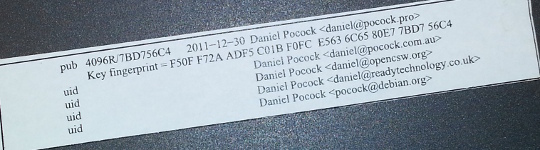
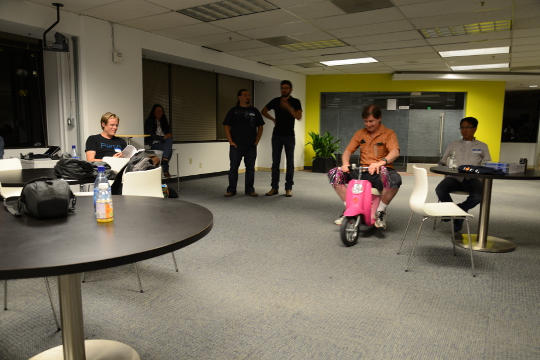
I've mentored a number of students in 2013, 2014 and 2015 for Debian and Ganglia and most of the companies I've worked with have run internships and graduate programs from time to time. GSoC 2015 has just finished and with all the excitement, many students are already asking what they can do to prepare and be selected for Outreachy or GSoC in 2016. My own observation is that the more time the organization has to get to know the student, the more confident they can be selecting that student. Furthermore, the more time that the student has spent getting to know the free software community, the more easily they can complete GSoC. Here I present a list of things that students can do to maximize their chance of selection and career opportunities at the same time. These tips are useful for people applying for GSoC itself and related programs such as GNOME's Outreachy or graduate placements in companies. Disclaimers There is no guarantee that Google will run the program again in 2016 or any future year until the Google announcement. There is no guarantee that any organization or mentor (including myself) will be involved until the official list of organizations is published by Google. Do not follow the advice of web sites that invite you to send pizza or anything else of value to prospective mentors. Following the steps in this page doesn't guarantee selection. That said, people who do follow these steps are much more likely to be considered and interviewed than somebody who hasn't done any of the things in this list. Understand what free software really is You may hear terms like free software and open source software used interchangeably. They don't mean exactly the same thing and many people use the term free software for the wrong things. Not all projects declaring themselves to be "free" or "open source" meet the definition of free software. Those that don't, usually as a result of deficiencies in their licenses, are fundamentally incompatible with the majority of software that does use genuinely free licenses. Google Summer of Code is about both writing and publishing your code and it is also about community. It is fundamental that you know the basics of licensing and how to choose a free license that empowers the community to collaborate on your code well after GSoC has finished. Please review the definition of free software early on and come back and review it from time to time. The The GNU Project / Free Software Foundation have excellent resources to help you understand what a free software license is and how it works to maximize community collaboration. Don't look for shortcuts There is no shortcut to GSoC selection and there is no shortcut to GSoC completion. The student stipend (USD $5,500 in 2014) is not paid to students unless they complete a minimum amount of valid code. This means that even if a student did find some shortcut to selection, it is unlikely they would be paid without completing meaningful work. If you are the right candidate for GSoC, you will not need a shortcut anyway. Are you the sort of person who can't leave a coding problem until you really feel it is fixed, even if you keep going all night? Have you ever woken up in the night with a dream about writing code still in your head? Do you become irritated by tedious or repetitive tasks and often think of ways to write code to eliminate such tasks? Does your family get cross with you because you take your laptop to Christmas dinner or some other significant occasion and start coding? If some of these statements summarize the way you think or feel you are probably a natural fit for GSoC. An opportunity money can't buy The GSoC stipend will not make you rich. It is intended to make sure you have enough money to survive through the summer and focus on your project. Professional developers make this much money in a week in leading business centers like New York, London and Singapore. When you get to that stage in 3-5 years, you will not even be thinking about exactly how much you made during internships. GSoC gives you an edge over other internships because it involves publicly promoting your work. Many companies still try to hide the potential of their best recruits for fear they will be poached or that they will be able to demand higher salaries. Everything you complete in GSoC is intended to be published and you get full credit for it. Imagine a young musician getting the opportunity to perform on the main stage at a rock festival. This is how the free software community works. It is a meritocracy and there is nobody to hold you back. Having a portfolio of free software that you have created or collaborated on and a wide network of professional contacts that you develop before, during and after GSoC will continue to pay you back for years to come. While other graduates are being screened through group interviews and testing days run by employers, people with a track record in a free software project often find they go straight to the final interview round. Register your domain name and make a permanent email address Free software is all about community and collaboration. Register your own domain name as this will become a focal point for your work and for people to get to know you as you become part of the community. This is sound advice for anybody working in IT, not just programmers. It gives the impression that you are confident and have a long term interest in a technology career. Choosing the provider: as a minimum, you want a provider that offers DNS management, static web site hosting, email forwarding and XMPP services all linked to your domain. You do not need to choose the provider that is linked to your internet connection at home and that is often not the best choice anyway. The XMPP foundation maintains a list of providers known to support XMPP. Create an email address within your domain name. The most basic domain hosting providers will let you forward the email address to a webmail or university email account of your choice. Configure your webmail to send replies using your personalized email address in the From header. Update your ~/.gitconfig file to use your personalized email address in your Git commits. Create a web site and blog Start writing a blog. Host it using your domain name. Some people blog every day, other people just blog once every two or three months. Create links from your web site to your other profiles, such as a Github profile page. This helps reinforce the pages/profiles that are genuinely related to you and avoid confusion with the pages of other developers. Many mentors are keen to see their students writing a weekly report on a blog during GSoC so starting a blog now gives you a head start. Mentors look at blogs during the selection process to try and gain insight into which topics a student is most suitable for. Create a profile on Github Github is one of the most widely used software development web sites. Github makes it quick and easy for you to publish your work and collaborate on the work of other people. Create an account today and get in the habbit of forking other projects, improving them, committing your changes and pushing the work back into your Github account. Github will quickly build a profile of your commits and this allows mentors to see and understand your interests and your strengths. In your Github profile, add a link to your web site/blog and make sure the email address you are using for Git commits (in the ~/.gitconfig file) is based on your personal domain. Start using PGP Pretty Good Privacy (PGP) is the industry standard in protecting your identity online. All serious free software projects use PGP to sign tags in Git, to sign official emails and to sign official release files. The most common way to start using PGP is with the GnuPG (GNU Privacy Guard) utility. It is installed by the package manager on most Linux systems. When you create your own PGP key, use the email address involving your domain name. This is the most permanent and stable solution. Print your key fingerprint using the gpg-key2ps command, it is in the signing-party package on most Linux systems. Keep copies of the fingerprint slips with you. This is what my own PGP fingerprint slip looks like. You can also print the key fingerprint on a business card for a more professional look. Using PGP, it is recommend that you sign any important messages you send but you do not have to encrypt the messages you send, especially if some of the people you send messages to (like family and friends) do not yet have the PGP software to decrypt them. If using the Thunderbird (Icedove) email client from Mozilla, you can easily send signed messages and validate the messages you receive using the Enigmail plugin. Get your PGP key signed Once you have a PGP key, you will need to find other developers to sign it. For people I mentor personally in GSoC, I'm keen to see that you try and find another Debian Developer in your area to sign your key as early as possible. Free software events Try and find all the free software events in your area in the months between now and the end of the next Google Summer of Code season. Aim to attend at least two of them before GSoC. Look closely at the schedules and find out about the individual speakers, the companies and the free software projects that are participating. For events that span more than one day, find out about the dinners, pub nights and other social parts of the event. Try and identify people who will attend the event who have been GSoC mentors or who intend to be. Contact them before the event, if you are keen to work on something in their domain they may be able to make time to discuss it with you in person. Take your PGP fingerprint slips. Even if you don't participate in a formal key-signing party at the event, you will still find some developers to sign your PGP key individually. You must take a photo ID document (such as your passport) for the other developer to check the name on your fingerprint but you do not give them a copy of the ID document. Events come in all shapes and sizes. FOSDEM is an example of one of the bigger events in Europe, linux.conf.au is a similarly large event in Australia. There are many, many more local events such as the Debian UK mini-DebConf in Cambridge, November 2015. Many events are either free or free for students but please check carefully if there is a requirement to register before attending. On your blog, discuss which events you are attending and which sessions interest you. Write a blog during or after the event too, including photos. Quantcast generously hosted the Ganglia community meeting in San Francisco, October 2013. We had a wild time in their offices with mini-scooters, burgers, beers and the Ganglia book. That's me on the pink mini-scooter and Bernard Li, one of the other Ganglia GSoC 2014 admins is on the right. Install Linux GSoC is fundamentally about free software. Linux is to free software what a tree is to the forest. Using Linux every day on your personal computer dramatically increases your ability to interact with the free software community and increases the number of potential GSoC projects that you can participate in. This is not to say that people using Mac OS or Windows are unwelcome. I have worked with some great developers who were not Linux users. Linux gives you an edge though and the best time to gain that edge is now, while you are a student and well before you apply for GSoC. If you must run Windows for some applications used in your course, it will run just fine in a virtual machine using Virtual Box, a free software solution for desktop virtualization. Use Linux as the primary operating system. Here are links to download ISO DVD (and CD) images for some of the main Linux distributions: If you are nervous about getting started with Linux, install it on a spare PC or in a virtual machine before you install it on your main PC or laptop. Linux is much less demanding on the hardware than Windows so you can easily run it on a machine that is 5-10 years old. Having just 4GB of RAM and 20GB of hard disk is usually more than enough for a basic graphical desktop environment although having better hardware makes it faster. Your experiences installing and running Linux, especially if it requires some special effort to make it work with some of your hardware, make interesting topics for your blog. Decide which technologies you know best Personally, I have mentored students working with C, C++, Java, Python and JavaScript/HTML5. In a GSoC program, you will typically do most of your work in just one of these languages. From the outset, decide which language you will focus on and do everything you can to improve your competence with that language. For example, if you have already used Java in most of your course, plan on using Java in GSoC and make sure you read Effective Java (2nd Edition) by Joshua Bloch. Decide which themes appeal to you Find a topic that has long-term appeal for you. Maybe the topic relates to your course or maybe you already know what type of company you would like to work in. Here is a list of some topics and some of the relevant software projects:


  • System administration, servers and networking: consider projects involving monitoring, automation, packaging. Ganglia is a great community to get involved with and you will encounter the Ganglia software in many large companies and academic/research networks. Contributing to a Linux distribution like Debian or Fedora packaging is another great way to get into system administration.
  • Desktop and user interface: consider projects involving window managers and desktop tools or adding to the user interface of just about any other software.
  • Big data and data science: this can apply to just about any other theme. For example, data science techniques are frequently used now to improve system administration.
  • Business and accounting: consider accounting, CRM and ERP software.
  • Finance and trading: consider projects like R, market data software like OpenMAMA and connectivity software (Apache Camel)
  • Real-time communication (RTC), VoIP, webcam and chat: look at the JSCommunicator or the Jitsi project
  • Web (JavaScript, HTML5): look at the JSCommunicator
Before the GSoC application process begins, you should aim to learn as much as possible about the theme you prefer and also gain practical experience using the software relating to that theme. For example, if you are attracted to the business and accounting theme, install the PostBooks suite and get to know it. Maybe you know somebody who runs a small business: help them to upgrade to PostBooks and use it to prepare some reports. Make something Make some small project, less than two week's work, to demonstrate your skills. It is important to make something that somebody will use for a practical purpose, this will help you gain experience communicating with other users through Github. For an example, see the servlet Juliana Louback created for fixing phone numbers in December 2013. It has since been used as part of the Lumicall web site and Juliana was selected for a GSoC 2014 project with Debian. There is no better way to demonstrate to a prospective mentor that you are ready for GSoC than by completing and publishing some small project like this yourself. If you don't have any immediate project ideas, many developers will also be able to give you tips on small projects like this that you can attempt, just come and ask us on one of the mailing lists. Ideally, the project will be something that you would use anyway even if you do not end up participating in GSoC. Such projects are the most motivating and rewarding and usually end up becoming an example of your best work. To continue the example of somebody with a preference for business and accounting software, a small project you might create is a plugin or extension for PostBooks. Getting to know prospective mentors Many web sites provide useful information about the developers who contribute to free software projects. Some of these developers may be willing to be a GSoC mentor. For example, look through some of the following: Getting on the mentor's shortlist Once you have identified projects that are interesting to you and developers who work on those projects, it is important to get yourself on the developer's shortlist. Basically, the shortlist is a list of all students who the developer believes can complete the project. If I feel that a student is unlikely to complete a project or if I don't have enough information to judge a student's probability of success, that student will not be on my shortlist. If I don't have any student on my shortlist, then a project will not go ahead at all. If there are multiple students on the shortlist, then I will be looking more closely at each of them to try and work out who is the best match. One way to get a developer's attention is to look at bug reports they have created. Github makes it easy to see complaints or bug reports they have made about their own projects or other projects they depend on. Another way to do this is to search through their code for strings like FIXME and TODO. Projects with standalone bug trackers like the Debian bug tracker also provide an easy way to search for bug reports that a specific person has created or commented on. Once you find some relevant bug reports, email the developer. Ask if anybody else is working on those issues. Try and start with an issue that is particularly easy and where the solution is interesting for you. This will help you learn to compile and test the program before you try to fix any more complicated bugs. It may even be something you can work on as part of your academic program. Find successful projects from the previous year Contact organizations and ask them which GSoC projects were most successful. In many organizations, you can find the past students' project plans and their final reports published on the web. Read through the plans submitted by the students who were chosen. Then read through the final reports by the same students and see how they compare to the original plans. Start building your project proposal now Don't wait for the application period to begin. Start writing a project proposal now. When writing a proposal, it is important to include several things:
  • Think big: what is the goal at the end of the project? Does your work help the greater good in some way, such as increasing the market share of Linux on the desktop?
  • Details: what are specific challenges? What tools will you use?
  • Time management: what will you do each week? Are there weeks where you will not work on GSoC due to vacation or other events? These things are permitted but they must be in your plan if you know them in advance. If an accident or death in the family cut a week out of your GSoC project, which work would you skip and would your project still be useful without that? Having two weeks of flexible time in your plan makes it more resilient against interruptions.
  • Communication: are you on mailing lists, IRC and XMPP chat? Will you make a weekly report on your blog?
  • Users: who will benefit from your work?
  • Testing: who will test and validate your work throughout the project? Ideally, this should involve more than just the mentor.
If your project plan is good enough, could you put it on Kickstarter or another crowdfunding site? This is a good test of whether or not a project is going to be supported by a GSoC mentor. Learn about packaging and distributing software Packaging is a vital part of the free software lifecycle. It is very easy to upload a project to Github but it takes more effort to have it become an official package in systems like Debian, Fedora and Ubuntu. Packaging and the communities around Linux distributions help you reach out to users of your software and get valuable feedback and new contributors. This boosts the impact of your work. To start with, you may want to help the maintainer of an existing package. Debian packaging teams are existing communities that work in a team and welcome new contributors. The Debian Mentors initiative is another great starting place. In the Fedora world, the place to start may be in one of the Special Interest Groups (SIGs). Think from the mentor's perspective After the application deadline, mentors have just 2 or 3 weeks to choose the students. This is actually not a lot of time to be certain if a particular student is capable of completing a project. If the student has a published history of free software activity, the mentor feels a lot more confident about choosing the student. Some mentors have more than one good student while other mentors receive no applications from capable students. In this situation, it is very common for mentors to send each other details of students who may be suitable. Once again, if a student has a good Github profile and a blog, it is much easier for mentors to try and match that student with another project. GSoC logo generic Conclusion Getting into the world of software engineering is much like joining any other profession or even joining a new hobby or sporting activity. If you run, you probably have various types of shoe and a running watch and you may even spend a couple of nights at the track each week. If you enjoy playing a musical instrument, you probably have a collection of sheet music, accessories for your instrument and you may even aspire to build a recording studio in your garage (or you probably know somebody else who already did that). The things listed on this page will not just help you walk the walk and talk the talk of a software developer, they will put you on a track to being one of the leaders. If you look over the profiles of other software developers on the Internet, you will find they are doing most of the things on this page already. Even if you are not selected for GSoC at all or decide not to apply, working through the steps on this page will help you clarify your own ideas about your career and help you make new friends in the software engineering community.

30 September 2015

Dominique Dumont: Using custom cache object with AngularJS $http

Hello At work, I ve been bitten by the way AngularJS handles cache by default when using $https service. This post will show a simple way to improve cache handling with $http service. The service I m working on must perform the followings tasks: At first, I ve naively used $http.get cache parameter to enable or disable caching using a sequence like:
  1. $http.get(url, cache: true )
  2. $http.post(url)
  3. $http.get(url, cache: false )
  4. $http.get(url, cache: true )
Let s say the calls above use the following data:
  1. $http.get(url, cache: true ) returns foo
  2. $http.post(url) stores bar
  3. $http.get(url, cache: false ) returns bar
I expected the next call $http.get(url, cache: false ) to return bar . But no, I got foo , i.e. the obsolete data. Turns out that cache object is completely left alone when cache: false is passed to $http.get. ok. Fair enough. But this means that the value of the cache parameter should not change for a given URL. The default cache provided by $https cannot be cleared. (Well, actually, you can clear the cache under AngularJS s hood, but that will probably not improve the readability of your code). The naive approach does not work. Let s try another solution by using a custom cache object as suggested by AngularJS doc. This cache object should be created by $cacheFactory service. This cache object can then be passed to $http.get to be used as cache. When needed, the cache can be cleared. In the example above, the cache must be cleared after saving some data to the remote service. There s 2 possibilities to clear a cache: So, we have to use the first solution and create a cache object for each API entry point:
angular.module('app').factory('myService', function ($http, $cacheFactory)  
  var myFooUrl = '/foo-rest-service';
  
  // create cache object. The cache id must be unique
  var fooCache = $cacheFactory('myService.foo'); 
  function getFooData ()  
    return $http.get( myFooUrl,   cache: fooCache  );
   ;
 
  function saveFooData(data)  
    return $http.post( myFooUrl,   cache: fooCache  ).then(function()  
      myCache.removeAll() ;
     );
   
 );
The code above ensures that: This simple approach has the following limitations: If you need more a more advance cache mechanism, you may want to check jmdobry s angular cache project All the best

28 September 2015

Antoine Beaupr : Fun experiments with laptop battery

After reading up on a eye-opening blog from Petter Reinholdtsen about laptop batteries, or more specifically Lithium-Ion laptop batteries, I figured I needed to try out the "TLP Linux Advanced Power Management" that I had been keeping an eye on for a while. tlp is yet another tool to control power usage on laptops (mostly Thinkpad, mine is a X120e). The novelty of tlp is the "hands off" approach: everything should be automatically configured for you... Obviously, that means I then went on working for a few hours on breaking and fixing my laptop in random operations. I opened a bunch of pull requests on the interesting battery status package that Petter produced to make it work with my setup and make it display graphs directly (instead of into a file). I also rewrote the graphing tool in Python with SciPy in order to have cleaner labels and be able to deduce the date at which a battery would be completely unusuable because it can't recharge high enough. (At the time of writing, the battery estimated death time is december 7th, but that data is skewed because of a quick change in the battery charge after the BIOS upgrade, below.) I then went on to try to limit my laptop charging to 80%, since this seems to make the battery last longer (sources from Petter: 1, 2, 3). Unfortunately, even after building a local (and trivial) backport of the tlp package to Debian stable (8.2/Jessie), I still couldn't access those controls, as TLP is really just a set of shell scripts that glue a bunch of stuff together.
The backport was simply:
apt-get source tlp
cd tlp*/
debuild
sudo dpkg -i ../tlp*.deb
I read here and there (and in Petter's post) that I needed the tp-smapi-dkms package, so I went ahead an installed it:
sudo apt install tp-smapi-dkms
(Yes, Jessie has a neat apt command now, it's great, upgrade now.) Unfortunately, this still didn't work. I think the error back then was something like:
thinkpad_ec: thinkpad_ec_request_row: arg0 rejected: (0x01:0x00)->0x00
thinkpad_ec: thinkpad_ec_read_row: failed requesting row: (0x01:0x00)->0xfffffffb
thinkpad_ec: initial ec test failed
I have seen suggestions here and there to try the acpi-call-dkms package, but that was useless as it doesn't support my model (but may work with others!). The error there was:
acpi_call: Cannot get handle: Error: AE_NOT_FOUND
Note: I still have it installed - it's unclear what impact it has, and I do not want to break my current setup.
So I then started to look at upgrading my BIOS, for some reason. I was running version 1.13 (8FET29WW) from 05/06/2011. I was able to update to 1.17 (8FET33WW) from 11/07/2012, using the memdisk binary from the syslinux-common package, with some help from the quite useful grub-imageboot package:
sudo apt install syslinux-common grub-imageboot
wget https://download.lenovo.com/ibmdl/pub/pc/pccbbs/mobiles/8fuj10uc.iso
sudo mkdir /boot/images
sudo mv 8fuj10uc.iso /boot/images
sudo reboot
I found the image on the Thinkpad x120e support page from Lenovo (which happily bounces around, so don't rely on the above URLs too much). When I rebooted, I was offered to boot from the image by grub, which went on fine, considering it was running some version of DOS, which is always a bit scary considering it is software that is somewhat almost as old as me.
I wish I could have installed some free software in the BIOS instead of the outdated crap that Lenovo provides, but unfortunately, it seems this will never be possible with Libreboot or Coreboot, mostly because Intel is evil and installs backdoors in all their computers. Fun times.
Fortunately and surprisingly, the update worked and went on pretty smoothly. After that, I was able to set the charge limit with:
echo 80   sudo tee /sys/devices/platform/smapi/BAT0/stop_charge_thresh
Amazing! I had almost forgotten why I almost bricked my system on a thursday, good thing that worked! Now the fun part was that, after some reboots or something I did, I am not sure what, the above stopped working: I couldn't load the drivers at all anymore, dmesg treating me with a nasty:
thinkpad_ec: thinkpad_ec_read_row: failed requesting row: (0x01:0x00)->0xfffffff0
thinkpad_ec: initial ec test failed
Now that is some obscure error message material! Fun stuff. I tried uninstalling tlp, the smapi modules, the acpi-call modules, rebooting, turning the machine off, removing the battery, nothing worked. Even more hilarious, the charge controler was now stuck at 80%: I had artificially destroyed 20% of the battery capacity in software. Ouch. I think this may have been related to uninstalling the tp-smapi-dkms package without unloading it at first. I found some weird entries in my kern.log like this:
tp_smapi unloaded.
thinkpad_ec: thinkpad_ec_read_row: failed requesting row: (0x14:0x00)->0xfffffff0
hdaps: cannot power off
hdaps: driver unloaded.
thinkpad_ec: unloaded.
I think that after that point, I couldn't load either module, not even thinkpad_ec... After tearing out a few more hairs and hammering my head on the keyboard randomly, I thought I could just try another BIOS upgrade, just for the fun of it. Turns out you actually can't rerun the upgrade, but you can change the model number through the same software, and this seems to reset some stuff. So I went back in the ISO image I had loaded earlier, and went on to change the model number (actually setting it to the same value, but whatever, it still ran the update). It turns out this seems to have reset a bunch of stuff and now everything works. I can use tlp setcharge and all the neat tools go well. The two key commands are:
# limit charging to 80% of the battery, but not lower than 40%
sudo tlp setcharge 40 80
# clear the above setting and just charge the battery to 100%
sudo tlp fullcharge
It seems that the 40% bit isn't supported by my laptop, but whatever: the battery stays charged when on AC power anyways, so I don't really understand what the setting is for in the first place. The error there is:
smapi smapi: smapi_request: SMAPI error: Function is not supported by SMAPI BIOS (func=2116)
smapi smapi: __get_real_thresh: cannot get start_thresh of bat=0: Function is not supported by SMAPI BIOS
The second command is what I will need to remember to run before I unplug the laptop for a trip. I suspect this will be really annoying and I may end up disabling all this stuff and just yank the power cable out when the battery reaches 80%, by hand, when I need to. But it was a fun geeking out, and hopefully this will be useful for others. And of course, the graphs from Petter will be interesting in a few months... Before the BIOS upgrade, the battery capacity was reported as 100% (actually, at 100.03%, which was strange). Now, the capacity is at 98.09%, which is probably just a more accurate reading that was fixed in the BIOS upgrade. Finally, also see the useful thinkwiki troubleshooting page and especially their interesting BIOS upgrade documentation which inspired me to write my own version. I would have gladly contributed to theirs, but I seem to have lost my password on this site, with no recovery possible... The arch linux wiki has obviously excellent documentation as well, as usual.

27 September 2015

Dominique Dumont: How to automount optical media on Debian Linux for Kodi

Hello This problem has been bugging me for a while: how to setup my Kodi based home cinema to automatically mount an optical media ? Turns out the solution is quite simple, now that Debian has switched for systemd. Just add the following line to /etc/fstab:
/dev/sr0 /media/bluray auto defaults,nofail,x-systemd.automount 0 2
Where: Do not specify noauto: this would prevent systemd to automatically mount a disc, which defeats the purpose. To test you setup: Then, journalctl should show something like:
Sept. 27 16:07:01 frodo systemd[1]: Mounted /media/bluray.
And that s it. No need to have obsolete packages like udisk-glue or autofs. Last but not least: this blog is moderated, please do not waste your time (and mine) posting rants. All the best.
Tagged: automount, debian, kodi, optical, systemd

24 September 2015

Jonathan McDowell: New GPG key

Just before I went to DebConf15 I got around to setting up my gnuk with the latest build (1.1.7), which supports 4K RSA keys. As a result I decided to generate a new certification only primary key, using a live CD on a non-networked host and ensuring the raw key was only ever used in this configuration. The intention is that in general I will use the key via the gnuk, ensuring no danger of leaking the key material. I took part in various key signings at DebConf and the subsequent UK Debian BBQ, and finally today got round to dealing with the key slips I had accumulated. I m sure I ve missed some people off my signing list, but at least now the key should be embedded into the strong set of keys. Feel free to poke me next time you see me if you didn t get mail from me with fresh signatures and you think you should have. Key details are:
pub   4096R/0x21E278A66C28DBC0 2015-08-04 [expires: 2018-08-03]
      Key fingerprint = 3E0C FCDB 05A7 F665 AA18  CEFA 21E2 78A6 6C28 DBC0
uid                 [  full  ] Jonathan McDowell <noodles@earth.li>
I have no reason to assume my old key (0x94FA372B2DA8B985) has been compromised and for now continue to use that key. Also for the new key I have not generated any subkeys as yet, which caff handles ok but emits a warning about unencrypted mail. Thanks to those of you who sent me signatures despite this. [Update: I was asked about my setup for the key generation, in particular how I ensured enough entropy, given that it was a fresh boot and without networking there were limited entropy sources available to the machine. I made the decision that the machine s TPM and the use of tpm-rng and rng-tools was sufficient (i.e. I didn t worry overly about the TPM being compromised for the purposes of feeding additional information into the random pool). Alternative options would have been flashing the gnuk with the NeuG firmware or using my Entropy Key.]

Joachim Breitner: The Incredible Proof Machine

In a few weeks, I will have the opportunity to offer a weekend workshop to selected and motivated high school students1 to a topic of my choice. My idea is to tell them something about logic, proofs, and the joy of searching and finding proofs, and the gratification of irrevocable truths. While proving things on paper is already quite nice, it is much more fun to use an interactive theorem prover, such as Isabelle, Coq or Agda: You get immediate feedback, you can experiment and play around if you are stuck, and you get lots of small successes. Someone2 once called interactive theorem proving the worlds most geekiest videogame . Unfortunately, I don t think one can get high school students without any prior knowledge in logic, or programming, or fancy mathematical symbols, to do something meaningful with a system like Isabelle, so I need something that is (much) easier to use. I always had this idea in the back of my head that proving is not so much about writing text (as in normally written proofs) or programs (as in Agda) or labeled statements (as in Hilbert-style proofs), but rather something involving facts that I have proven so far floating around freely, and way to combine these facts to new facts, without the need to name them, or put them in a particular order or sequence. In a way, I m looking for labVIEW wrestled through the Curry-Horward-isomorphism. Something like this:
A proof of implication currying

A proof of implication currying

So I set out, rounded up a few contributors (Thanks!), implemented this, and now I proudly present: The Incredible Proof Machine3 This interactive theorem prover allows you to do perform proofs purely by dragging blocks (representing proof steps) onto the paper and connecting them properly. There is no need to learn syntax, and hence no frustration about getting that wrong. Furthermore, it comes with a number of example tasks to experiment with, so you can simply see it as a challenging computer came and work through them one by one, learning something about the logical connectives and how they work as you go. For the actual workshop, my plan is to let the students first try to solve the tasks of one session on their own, let them draw their own conclusions and come up with an idea of what they just did, and then deliver an explanation of the logical meaning of what they did. The implementation is heavily influenced by Isabelle: The software does not know anything about, say, conjunction ( ) and implication ( ). To the core, everything is but an untyped lambda expression, and when two blocks are connected, it does unification4 of the proposition present on either side. This general framework is then instantiated by specifying the basic rules (or axioms) in a descriptive manner. It is quite feasible to implement other logics or formal systems on top of this as well. Another influence of Isabelle is the non-linear editing: You neither have to create the proof in a particular order nor have to manually manage a proof focus . Instead, you can edit any bit of the proof at any time, and the system checks all of it continuously. As always, I am keen on feedback. Also, if you want to use this for your own teaching or experimenting needs, let me know. We have a mailing list for the project, the code is on GitHub, where you can also file bug reports and feature requests. Contributions are welcome! All aspects of the logic are implemented in Haskell and compiled to JavaScript using GHCJS, the UI is plain hand-written and messy JavaScript code, using JointJS to handle the graph interaction. Obviously, there is still plenty that can be done to improve the machine. In particular, the ability to create your own proof blocks, such as proof by contradiction, prove them to be valid and then use them in further proofs, is currently being worked on. And while the page will store your current progress, including all proofs you create, in your browser, it needs better ways to save, load and share tasks, blocks and proofs. Also, we d like to add some gamification, i.e. achievements ( First proof by contradiction , 50 theorems proven ), statistics, maybe a share theorem on twitter button. As the UI becomes more complicated, I d like to investigating moving more of it into Haskell world and use Functional Reactive Programming, i.e. Ryan Trickle s reflex, to stay sane. Customers who liked The Incredible Proof Machine might also like these artifacts, that I found while looking whether something like this exists:

  1. Students with migration background supported by the START scholarship
  2. Does anyone know the reference?
  3. We almost named it Proofcraft , which would be a name our current Minecraft-wild youth would appreciate, but it is alreay taken by Gerwin Kleins blog. Also, the irony of a theorem prover being in-credible is worth something.
  4. Luckily, two decades ago, Tobias Nipkow published a nice implementation of higher order pattern unification as ML code, which I transliterated to Haskell for this project.

23 September 2015

Daniel Pocock: The only way to ensure the VW scandal never happens again

The automotive industry has been in the spotlight after a massive scandal at Volkswagen, using code hidden in the engine management software to cheat emissions tests. What else is hidden in your new car's computer? Every technology we use in our lives is becoming more computerized, even light bulbs and toilet seats. In a large piece of equipment like a car, there are many opportunities for computerization. In most cases, consumers aren't even given a choice whether or not they want software in their car. It has long been known that such software is spying on the habits of the driver and this data is extracted from the car when it is serviced and uploaded to the car company. Car companies are building vast databases about the lifestyles, habits and employment activities of their customers. Computers aren't going away, so what can be done? Most people realize that computers aren't going to go away any time soon. That doesn't mean that people have to put up with these deceptions and intrusions on our lives. For years, many leading experts in the software engineering world have been promoting the benefits and principles of free software. What we mean by free is that users, regulators and other independent experts should have the freedom to see and modify the source code in the equipment that we depend on as part of modern life. In fact, experts generally agree that there is no means other than software freedom to counter the might of corporations like Volkswagen and their potential to misuse that power, as demonstrated in the emissions testing scandal. If Governments and regulators want to be taken seriously and protect society, isn't it time that they insisted that the car industry replaces all hidden code with free and open source software?

Next.

Previous.