Search Results: "zed"

29 May 2014

Russell Coker: Links May 2014

Charmian Gooch gave an interesting TED talk about her efforts to fight organised crime and corruption by prohibiting anonymous companies [1]. The idea of a company is to protect the owner from unlimited liability not to protect them from law enforcement. Dr Nerdlove has an insightful article about sexual harassment in geek culture [2]. Rebecca Rose wrote an insightful article for Jezebel about the worse bullying advice ever, her summary is that it should be called Ways We Can Get You Goddamn Kids to Act So We Never Have to Deal With Your Problems Ever [3]. In the wake of the Heardbleed bug Imperial Violet wrote an informative article explaining why revocation checks isn t the solution [4]. Martin Lukacs and Shiri Pasternak wrote an insightful article about the Canadian government s attempts to stop Canadian aboriginies from exercising their legal rights [5]. I bet that the Australian government is doing the same things. Nelson Groom wrote an interesting interview with Norrie May Welby, the first recognised agender person in Australia [6]. Marriage equality is bound to happen soon in Australia, now that the government officially recognises non-binary gender people it can t refuse them the right to get married and therefore the straight/gay marriage distinction isn t relevant. BDA Technology has an interesting article on choosing fonts to make text more readable for dyslexic people [7]. Eamon Waterford wrote an informative article for the ABC about how early-intervention social policies save significant amounts of tax money [8]. Conservatives claim to want to save money and try to cut such programs which costs everyone in the long term. Greta Christina wrote an insightful article for Salon about why religious people want atheists to lie and pretend to believe [9]. Chris Mooney wrote an informative URL about a machine to test whether someone is liberal or conservative [10]. Paul Rosenberg wrote an informative article on the link between conservatism, evil, and psychopathy [11]. The next logical step is to treat conservatism as a mental health problem. Sociological Images has an interesting article by Jay Livingston about the hypocrisy of conservative tax policies [12]. Scientific American reprinted an article from The Conversation by Elaine McKewon about the climate deniers who intimidated a journal into retracting an article about their belief in conspiracy theories [13]. It seems obvious that the climate deniers are the ones who conspire. Ben Caldecott wrote an interesting article for the ABC about the fossil fuel divestment campaign [14]. It seems that this is getting some success already, as renewable energy will soon be cheaper than coal power this could kill off coal. Mark Taylor wrote an interesting blog post titled Observations of an Internet Middleman about the operations of Level3 and Internet peering [15]. He explains how monopoly Telcos throttle their customers Internet access. Matt Savoy wrote an informative and disturbing article about the fact that US cops are twice as likely to beat their wives as the general population [16]. Apparently the police hierarchy aren t interested in prosecuting such crimes. Paul Rosenberg wrote an insightful article about mythos vs logos and the conservative approach to relity [17]. One interesting point he makes is that white men (and members of privileged groups generally) fear a loss of status more than more realistic concerns (such as global warming). Nick wrote an interesting blog post about using GPG encrypted email on an Android phone [18]. I should get this going on my phone.

28 May 2014

Tanguy Ortolo: GNU/Linux graphic sessions: allowing computer suspend and disabling a monitor

Allowing computer suspend Major desktop environments such as Xfce or KDE have a built-in computer suspend feature, but when you use a lighter alternative, things are a bit more complicated, because basically: only root can suspend the computer. Possible solutions include: With recent updates of the related Debian packages no idea of which one exactly the latter solution may not work any more, in which case it will only return the following error:
Error org.freedesktop.UPower.GeneralError: not authorized
It appears that this error is linked to ConsoleKit, a part of all this modern *Kit gizmo pile. If you are in this case, try prefixing your session launcher with the undocumented dark magic call ck-launch-session. For instance, this is what I have in my .xsession to launch my window manager i3:
exec ck-launch-session i3
Note: I do not know what ck-launch-session does exactly, why it is needed, and I do not want to know. To me, all that WhatsitKit pile is just some opaque, under-documented as in: no man page crap, that no one but their author really understand, designed to solve theoretical problems no one really cares about like: how to allow locally connected users to use the sound card while forbidding it to remote users while creating new issues such as this one. This stuff is too complex and under-documented for me to dive into it, so if it does not work out of the box, it is just some crap that gets in my way to using my computer as I wish. Disabling a monitor In some configurations, you have two monitors and want to disable one. For instance, in addition to my LCD monitor, I have a projector which I only use for movies. According to xorg.conf's man page, it can be disabled this way:
Section "Device"
    Identifier  "Internal graphic card"
    Option      "Monitor-DVI"   "LCD Monitor"
    Option      "Monitor-VGA"   "Projector"
EndSection
Section "Monitor"
    Identifier  "LCD Monitor"
EndSection
Section "Monitor"
    Identifier  "Projector"
    Option      "Enable"    "false"
EndSection
Except that does not work, because contrary to what the man page says the real option to use is not Enable but Disable! So here is the correct configuration to disable that monitor at start-up:
Section "Device"
    Identifier  "Internal graphic card"
    Option      "Monitor-DVI"   "LCD Monitor"
    Option      "Monitor-VGA"   "Projector"
EndSection
Section "Monitor"
    Identifier  "LCD Monitor"
EndSection
Section "Monitor"
    Identifier  "Projector"
    Option      "Disable"   "true"
EndSection
Note: yes, I will send a bug report with a patch against xorg.conf's man page.

27 May 2014

Jon Dowland: 2012 In Review

2013 is nearly all finished up and so I thought I'd spend a little time writing up what was noteable in the last twelve months. When I did so I found an unfinished draft from the year before. It would be a shame for it to go to waste, so here it is. 2012 was an interesting year in many respects with personal highs and lows. Every year I see a lots of "round-up"-style blog posts on the web, titled things like "2012 in music", which attempt to summarize the highlights of the year in that particular context. Here's JWZ's effort, for example. Often they are prefixed with statements like "2012 was a strong year for music" or whatever. For me, 2012 was not a particularly great year. I discovered quite a lot of stuff that I love that was new to me, but not new in any other sense. In Music, there were a bunch of come-back albums that made the headlines. I picked up both of Orbital's Wonky and Brian Eno's Lux (debatably a comeback: his first ambient record since 1983, his first solo effort since 2005, but his fourth collaborative effort on Warp in the naughties). I've enjoyed them both, but I've already forgotten Wonky and I still haven't fully embraced Lux (and On Land has not been knocked from the top spot when I want to listen to ambience.) There was also Throbbing Gristle's (or X-TG) final effort, a semi/post-TG, partly posthumous double-album swan song effort which, even more than Lux, I still haven't fully digested. In all honesty I think it was eclipsed by the surprise one-off release of a live recording of a TG side project featuring Nik Void of Factory Floor: Carter Tutti Void's Transverse, which is excellent. Ostensibly a four-track release, there's a studio excerpt V4 studio (Slap 1) which is available from (at least) Amazon. There's also a much more obscure fifth "unreleased" track cruX which I managed to "buy" from one of the web shops for zero cost. The other big musical surprise for me last year was Beth Jeans Houghton and the Hooves of Destiny: Yours Truly, Cellophane Nose. I knew nothing of BJH, although it turns out I've heard some of her singles repeatedly on Radio 6, but her band's guitarist Ed Blazey and his partner lived in the flat below me briefly. In that time I managed to get to the pub with him just once, but he kindly gave me a copy of their album on 12" afterwards. It reminds me a bit of Goldfrapp circa "Seventh Tree": I really like it and I'm looking forward to whatever they do next. Reznor's How To Destroy Angels squeezed out An Omen EP which failed to set my world on fire as a coherent collection, despite a few strong songs individually. In movies, sadly once again I'd say most of the things I recall seeing would be "also rans". Prometheus was a disappointment, although I will probably rewatch it in 2D at least once. The final Batman was fun although not groundbreaking to me and it didn't surpass Ledger's efforts in The Dark Knight. Inception remains my favourite Nolan by a long shot. Looper is perhaps the stand-out, not least because it came from nowhere and I managed to avoid any hype. In games, I moaned about having moaning about too many games, most of which are much older than 2012. I started Borderlands 2 after enjoying Borderlands (disqualified on age grounds) but to this day haven't persued it much further. I mostly played the two similar meta-games: The Playstation Plus download free games in a fixed time period and the more sporadic but bountiful humble bundle whack-a-mole. More on these another time. In reading, as is typical I mostly read stuff that was not written in 2012. Of that which was, Charles Stross's The Apocalypse Codex was an improvement over The Fuller Memorandum which I did not enjoy much, but in general I'm finding I much prefer Stross's older work to his newer; David Byrne's How Music Works was my first (and currently last) Google Books ebook purchase, and I read it entirely on a Nexus 7. I thoroughly enjoyed the book but the experience has not made a convert of me away from paper. He leans heavily on his own experiences which is inevitable but fortunately they are wide and numerous. Iain Banks' Stonemouth was an enjoyable romp around a fictional Scottish town (one which, I am reliably informed, is incredibly realistical rendered). One of his "mainstream" novels, It avoided a particular plot pattern that I've grown to dread with Banks, much to my suprise (and pleasure). Finally, the stand-out pleasant surprise novel of the year was Pratchett and Baxter's The Long Earth. With a plot device not unlike Banks' Transition or Stross's Family Trade series, the pair managed to write a journey-book capturing the sense-of-wonder that these multiverse plots are good for. (Or perhaps I have a weakness for them). It's hard to find the lines between Baxter and Pratchett's writing, but the debatably-reincarnated Tibetan Monk-cum-Artificial Intelligence 'Lobsang' must surely be Pratchett's. Pratchett managed to squeeze out another non-Discworld novel (Dodger) as well as a long-overdue short story collection, although I haven't read either of them yet. On to 2013's write-up...

26 May 2014

Clint Adams: Before the tweet in Grand Cayman

Jebediah boarded the airplane. It was a Bombardier CRJ900 with two turbofan jet engines. Run by SPARK, a subset of Ada. He sat down in his assigned seat and listened to the purser inform him that he was free to use his phone door-to-door on all Delta Connection flights. As long as the Airplane Mode was switched on. Jebediah knew that this was why Delta owned 49% of Virgin Atlantic. On the plane ride, a woman in too much makeup asked Jebediah to get the man next to him so she could borrow his copy of the Economist. The man said she could keep it and that it was old. He had stubby little fingers. She was foreign. At Terminal 2, they passed by Kids on the Fly, an exhibit of the Chicago Children's Museum at Chicago O'Hare International Airport. A play area. Jebediah thought of Dennis. The Blue Line of the Chicago Transit Authority was disrupted by weekend construction, so they had to take a small detour through Wicker Park. Wicker Park is a neighborhood. In Chicago. Jebediah looked at Glazed & Infused Doughnuts. He wondered if they made doughnuts there. Because of the meeting, he knocked someone off a Divvy bike and pedaled it to the Loop. The Berghoff was opened in 1898 by Herman Joseph Berghoff. Once he got to the Berghoff, he got a table for seven on the west wall. He eyed the electrical outlet and groaned. He had brought 3 cigarette lighter adapters with him, but nothing to plug into an AC outlet. How would he charge his device? An older gentleman came in. And greeted him. Hello, I'm Detective Chief Inspector Detweiler. Did you bring the evidence? Said the man. Jebediah coughed and said that he had to go downstairs. He went downstairs and looked at the doors. He breathed a sigh of relief. Seeing the word washroom in print reminded him of his home state of Canada. Back at the table he opened a bag, glared angrily at a cigarette lighter adapter, and pulled out a Palm m125. Running Palm OS 4.0. He noticed a third person at the table. It was the ghost of Bob Ross. , said the ghost of Bob Ross. It was good for him to communicate telepathically with Sarah Palin. This has eight megabytes of RAM, Jebediah informed the newcomer. Bob Ross's ghost right-clicked on his face and rated him one star. Jebediah looked angrily at the AC outlet and fidgeted with two of his cigarette lighter adapters. DCI Detweiler said, I had a Handspring Visor Deluxe, and pulled out a Samsung Galaxy Tab 3 8.0 eight-inch Android-based tablet computer running the Android 4.2.2 Jelly Bean operating system by Google. This also has eight megabytes of RAM, he continued. As you requested, I brought the video of your nemesis at the Robie House. Jebediah stared at the tablet. He could see a compressed video file, compressed with NetBSD compression and GNU encryption. It was on the tablet. Some bridges you just don't cross, he hissed. Meanwhile, in Gloucestershire, someone who looked suspiciously like Bobby Rainsbury opened up a MacBook Air and typed in a three-digit passcode. Across the street a wall safe slid out of the wall. And dropped onto someone's head. She closed the laptop. And went to Dumfries. Not far from the fallen safe, a group of men held a discussion. FBI: Why are we here on this junket? CIA: Where are we? DIA: We're here. JIA: This is confusing. NSA: I have to get back to that place in Germany where I don't work. ATF: We're talking about giant robots here, people. EPA: Huh? Part 2 AUD:USD 1.0645 donuts:dozen 12 Gold $1318.60 Giant robot spiders fought each other in a supermarket parking lot. Detective Seabiscuit sucked on a throat lozenge. Who are you again? he asked the toll-booth operator. I said my name is Rogery Sterling, replied the toll-booth operator. Rajry what? I said my name is Rogery Sterling, replied the toll-booth operator. Again. Where am I? Look, I'm telling you that that murder you're investigating was caused by software bugs in the software. Are we on a boat? Look at the diagram. This agency paid money to introduce, quite deliberately, weaknesses in the security of this library, through this company here, and this company here. Library, oh no. I have overdue fees. And they're running a PR campaign to increase use of this library. Saying that the competing options are inferior. But don't worry, they're trying to undermine those too. Detective Seabiscuit wasn't listening. He had just remembered that he needed to stop by the Robie House.

20 May 2014

Laura Arjona: Some experiences, and TODO, about fonts

TL;DR I don t know much about fonts, I just use the stock ones that come with my system. From time to time I have issues with docs that others create, and use other fonts. This post is about my plans on learning a bit more and, at least, know how to solve those issues, if it s possible, while staying in the bright side (the free-software / free font side). Long version The context I use Debian, LibreOffice, sometimes Inkscape, and LaTeX. One of my favorite hashtags is #iloveplaintext, I don t know much about design in general, and fonts and typography in particular. I didn t change the fonts in my desktops (only reduced the size in the laptop, to be able to read a bit more in my low resolution screen), I rarely change the font in Writer (maybe from Liberation Serif to Liberation Sans), I never changed the font in a LaTeX document or LaTeX beamer presentation (I write boring documents, I know) and when I paste from the web, it s usually because I want to read a long article so I paste as plain text in gedit and print it or save it. So I ve never felt to learn more about fonts, it just works, and covers my needs, (or not, but I mostly could live with the issues). Then a friend in the Pump.io network, Adri n Perales, published a blog post about Typography (in Spanish) that I liked very much, and I began to think (and remember) some of the issues that I have from time to time with fonts. Issue #1: League Gothic: a free font that was not installed in my system Today, again in the Pump.io network, I discover that the FSF published a poster Privacy is impossible without free software , in SVG format, but it didn t look well when I opened it with GIMP, clearly due to some missing font. Nice that SVG format is a plain text format (XML)! So I opened the file with gedit and searched for the text string whose font was missing. It was League Gothic font, of course a free software font, but not packaged in Debian, it seems. No problem. I downloaded the font, copied the files in /usr/share/fonts and problem solved. Issue #2: Book Antiqua: a non-free font (must find equivalent) A document made with Microsoft Word that one friend sends to me so I review and resend (in PDF format) to other people. It s a leaflet, and it has text in Arial, in Tahoma, and in Book Antiqua. When I open it with LibreOffice the aspect is wrong (the substitutes are not the same size so some breaking lines and so). Book Antiqua is not free. I learned that it s an imitation of the Palatino font, and that a similar font in the free software systems is URW Palladio . In Writer (LibreOffice), I went to Tools > Options > Fonts and declared the equivalence of the two fonts, so the program would use URW Palladio as a substitute of Book Antiqua. I opened again the document and it was quite better, very similar to the original aspect. I didn t bother in changing the text in Arial or Tahoma, since the substitutes that LibreOffice used were quite good. But I bookmarked this page: A Web Designer Guide to Linux Fonts for remembering the different fonts that I can try to emulate the Windows ones. I also know that I can install the Microsoft Core Fonts for the web since they are packaged for Debian in the contrib archive. But I ll try to survive without them for now (until now, I didn t bother, why should I now that I have the substituting guide?). In other news, I got impressed that MS Core Fonts is #4 in Most downloads all over the time in SourceForge, with more than 450 million downloads \o/ Issue #3: Installing a new free font in Debian So I decided to install one of the fonts that Adri n Perales recommended in his blog post, Linux Libertine . Since it is packaged for Debian, it s super easy:
# apt-get install ttf-linux-libertine
(my LibreOffice was opened, so I closed it and opened again, and the font was there ready for use). Issue #4: Use a different font in LaTeX Well, as always, there is not one but many ways to do that in LaTeX. My intuition tells me that if there is a LaTeX package for the font that I want to use, it s probably a nice idea to just use it. So I searched about Linux Libertine in LaTeX and yes, there is a package (and you can find a very interesting font guide in The LaTeX font catalogue ). I installed the package texlive-fonts-extra, and then, I added two lines in my LaTeX document:
\usepackage libertine 
\usepackage[T1] fontenc 
Compiled, and the resultant PDF was using Libertine font instead of Computer Modern. TODO (and/or wishlist) When opening a document that uses a font not present in my system, I maybe wouldn t notice that a font is missing and I see a substitute (and maybe not the best one)!. It would be nice that the program tells the user This file uses the font X, and it seems it s not in your system. I ll use font Y as a substitute . I m not sure if there is a standard way to know which package contains a certain font. I use a web search engine to try to find out, and the websites that I linked in the article. I have to investigate and learn a bit more about free fonts equivalents to the ones that other people use, and fonts in general, so my documents are more beautiful and people gets interested to know about the tools that I use to produce them. Well, I ve written a long blog post (thanks if you read until here!), solved some issues, and try some things, but not even capturing a snapshot to show here! It seems that I m still lazy, forgive me I hope at least this #plaintext is useful for you :)
Filed under: My experiences and opinion, Uncategorized Tagged: Debian, English, Fonts, Free Software, LaTeX, libre software, LibreOffice, Moving into free software, pump.io

18 May 2014

Benjamin Mako Hill: Installing GNU/Linux on a 2014 Lenovo Thinkpad X1 Carbon

I recently bought a new Lenovo X1 Carbon. It is the new second-generation, type 20A7 laptop, based on Intel s Haswell microarchiteture with the adaptive keyboard. It is the version released in 2014. I also ordered the Thinkpad OneLink Dock which I have returned for the OneLink Pro Dock which I have not yet received. The system is still very new, challenging, and different, but seems to support GNU/Linux reasonably well if you are willing to run a bleeding edge version and/or patch your kernel and if you are not afraid to spend an afternoon or two tweaking things. What follows are my installation notes for Debian testing (jessie) when I installed it in early May 2014. My general impressions about the laptop as a GNU/Linux system and overall are at the end of this write-up.
System Description The X1 Carbon I ordered included the 512GB SSD, the 14.0 inch WQHD (2560 1440) 260 nit touchscreen, and the maximum 8GB of memory. I believe the rest is not particularly negotiable but includes a 720p HD Camera, a 45.2Wh battery, and an Intel Dual Band Wireless 7260AC with Bluetooth 4.0. For those that are curious Here is the output of lspci on the system:
00:00.0 Host bridge: Intel Corporation Haswell-ULT DRAM Controller (rev 0b)
00:02.0 VGA compatible controller: Intel Corporation Haswell-ULT Integrated Graphics Controller (rev 0b)
00:03.0 Audio device: Intel Corporation Haswell-ULT HD Audio Controller (rev 0b)
00:14.0 USB controller: Intel Corporation Lynx Point-LP USB xHCI HC (rev 04)
00:16.0 Communication controller: Intel Corporation Lynx Point-LP HECI #0 (rev 04)
00:16.3 Serial controller: Intel Corporation Lynx Point-LP HECI KT (rev 04)
00:19.0 Ethernet controller: Intel Corporation Ethernet Connection I218-LM (rev 04)
00:1b.0 Audio device: Intel Corporation Lynx Point-LP HD Audio Controller (rev 04)
00:1c.0 PCI bridge: Intel Corporation Lynx Point-LP PCI Express Root Port 6 (rev e4)
00:1c.1 PCI bridge: Intel Corporation Lynx Point-LP PCI Express Root Port 3 (rev e4)
00:1d.0 USB controller: Intel Corporation Lynx Point-LP USB EHCI #1 (rev 04)
00:1f.0 ISA bridge: Intel Corporation Lynx Point-LP LPC Controller (rev 04)
00:1f.2 SATA controller: Intel Corporation Lynx Point-LP SATA Controller 1 [AHCI mode] (rev 04)
00:1f.3 SMBus: Intel Corporation Lynx Point-LP SMBus Controller (rev 04)
BIOS/Firmware The BIOS firmware is non-free and proprietary as it the case with all ThinkPads and nearly all laptops. According to this thread there is a bug in the default BIOS that means that suspend to RAM is broken in GNU/Linux. You can get updated BIOS at the Lenovo s ThinkPad X1 Carbon (Type 20A7, 20A8) Drivers and software page by looking in the the BIOS section. Honestly, the easiest approach is probably to download the Windows BIOS Update utility (documentation is here) which you can use to run the BIOS update from within Windows before you install GNU/Linux. If that s not an option (e.g., if you ve already installed GNU/Linux) the best method is to download the bootable CD ISO from the same page. Of course, since the X1 Carbon has no optical media, you have to find another way to boot the CD image. I struggled to get the ISO to boot from USB using the usually reliable dd method. This message suggest that the issue had to do with the El Torito wrapper:
I had to dump the eltorito image from the ISO they provide, after that I was able to dd the resulting image to a flash drive and the bios update went well, no cdrom needed.
I updated to version 1.13 of the BIOS which fixes the suspend/resume bug. By the time you read this, there may be newer versions that fix other things so check the Lenovo website.
Installing Debian I installed Debian testing using the March 19, 2014 Alpha 1 release of the Debian Installer for Jessie (currently testing). I installed in graphical mode. With the WQHD screen, everything was extremely tiny but it worked flawlessly. I downloaded the amd64 net install image from the normal place and installed the rest of the system using the built-in Ethernet port which required no firmware or extra drivers. I did the normal dd if=FILENAME.iso of=/dev/sdX method of getting the installer onto the a USB stick to boot. I turned off restricted boot in BIOS first. In general, the latest version of the Debian installation guide is always a good source of guidance on installing Debian. I used the Debian installer wizard to partition and selected Use entire disk and partition it for LVM and encrypted data which kept the UEFI partitions around. The system installed with no errors or issues and booted up normally afterward. The grub menu is hilariously narrow on the WQHD screen. If you want to use the built-in wireless and/or Bluetooth, you will need to install the non-free iwlwifi firmware package. It is very lame that we still have to do this to use hardware we have purchased.
What Works and Doesn t The following stuff works the first time I booted into the GNOME 3 desktop and logged in:
  • The WQHD 2560 1440 screen
  • The touchscreen
  • Both the TrackPoint and the touchpad
  • Built-in e1000e Ethernet using the dongle
  • The keyboard plus the adaptive row of F1-F12 keys.
  • External monitor using the full HDMI or mini-DisplayPort connectors
  • Audio (both speakers and microphone)
  • The camera/webcam
The following stuff works if you install non-free firmware:
  • Internal Wireless
  • Bluetooth 4.0
The following stuff works with qualifications:
  • Suspend to RAM Works once you have updated the firmware.
  • The adaptive keyboard The F1-F12 keys work but the button that theoretically lets you switch to different sets of function buttons (e.g., volume, brightness) does nothing.
  • Disabling the touchpad There is a BIOS option to disable the touchpad. It works in Windows and does nothing at all in GNU/Linux.
I have not tried:
  • The fingerprint reader
Disabling the touchpad As a long-term ThinkPad user, I love the TrackPoint pointing stick. If you plan on using this, the built-in touchpad is incredibly aggravating because it is very easy to brush against it while using the TrackPoint. In BIOS, there is an option to disable the touchpad. Although this works in Windows, it does absolutely nothing in GNU/Linux. Part of the issue is that, unlike the older X1 Carbon and other ThinkPads, there are no TrackPoint buttons. Instead of buttons, there are regions at the top of the touchpad which are configured, in software, to act like buttons. If you want to be able to click, the touchpad can never be truly turned off. This is not problem unique to the Haswell X1 Carbon and a number of people have been struggling with this issue on other Lenovo laptops. Essentially, what you need to do is configure your touchpad so that the buttons are where you want them and so that it ignores any input for the purposes of cursor movement. There are a few ways of doing this but this answer from an askubuntu.com question has the solution I ended up using:

Open file /usr/share/X11/xorg.conf.d/50-synaptics.conf for edit.

Find Section InputClass which the following line is Identifier Default clickpad buttons .

Edit option for SoftButtonAreas to values 64% 0 1 42% 36% 64% 1 42%, this is size of the right and middle button.

Enable option AreaBottomEdge and change value to 1, this will disable touchpad movement.

If everything done right, your class should looks like:

Section "InputClass"
     Identifier "Default clickpad buttons"
     MatchDriver "synaptics"
     Option "SoftButtonAreas" "64% 0 1 42% 36% 64% 1 42%"
     Option "AreaBottomEdge" "1"
EndSection
Essentially, the first Option line will create a middle button that is 32% of the width and 42% of the height, and a right button that is 32% of the width and 42% of the height. The synaptics manpage (man synpatics) will give you more detail on the general way this works. Of course, something does feel very wrong about editing a file in /usr/share.
Fixing the Adaptive Keyboard The most wild feature of the laptop is the adaptive keyboard strip. The strip is a back-lit LCD that looks almost like E Ink screen and acts as a touchscreen keyboard. The default mode gives you the F1-F12 keys. If you press the keys (since they aren t buttons, you just put your finger on top of them) they act like normal F-keys. You can Ctrl-Alt-F1, etc., to switch to virtual terminals out of the box. There are four modes: Function (i.e., normal F-keys), Home, Web, and Chat. The last three overlap quite a bit (e.g., they all have brightness and volume). You can play with an example on the Lenovo homepage. In Windows, switching programs will apparently change these keys so that an appropriate set of buttons is shown for the application you are using. You can also change these keys manually with a big Fn button at the far left of the adaptive keyboard strip. As I write this this, released kernels do not support the adaptive keyboard Fn button which means you cannot use anything other than the F-keys out of the box. I believe it also means that resuming from suspend to RAM breaks these keys. That said, Shuduo Sang from Canonical has released several versions of a patch to to the thinkpad_acpi kernel module which adds support for the Home mode. The other modes (web and chat) do not seem to be supported. The latest version of the patch is on on the Linux Kernel Mailing List and the relevant commits are:
330947b save and restore adaptive keyboard mode for suspend and,resume
3a9d20b support Thinkpad X1 Carbon 2nd generation's adaptive keyboard
Although this is not supported in Debian testing at the time of writing, a bug was filed in Debian and quickly fixed by Ben Hutchings in Debian kernel version 3.14.2-1 which is currently in sid/unstable. As a result, if you install the latest version kernel from Debian unstable (3.14.2-1 or later), the adaptive keyboard just works. If you aren t using Debian and if kernel you are using does not have support, you might be patching your kernel.
General Impressions As I have described in my interview with The Setup, I have been a user of ThinkPad X-series laptops for many years. This is my sixth X-series ThinkPad. Overall, I quite like the hardware! Once things mature a little bit, I think that this will be a great laptop for running GNU/Linux. That said, I ordered the laptop without realizing that the X1 Carbon had gone through a major revision! The keyboard was quite a suprise. I think that changing a system so radically without changing the model name/number is a very bad move on Lenovo s part. There are two remaining issues with the system I m still struggling with: (1) the keyboard layout is freaky and weird, and (2) the super high resolution screen breaks many things. The quality of the keyboard itself is great and worthy of the ThinkPad name. That said, there are two ways in which it is strange. The first is the adaptive keyboard strip. Overall, it works surprisingly well and I think it is a clever idea. My sense is that the strip is more annoying in Windows because it changes out from under you all the time. In GNU/Linux, only manual changing of modes is supported. This, in my opinion, is a feature. I do miss the real feedback you get from pressing keys but for F-keys and volume-keys that I don t use often this isn t too important. On the downside, I have realized several times that I had been holding down a button for several seconds and not noticed. The more annoying issue with the keyboard is the way that the other keys have moved around. Getting rid of the CapsLock is wonderful! How has this taken so long? Replacing it with a split Home and End keys is nuts. I ve remapped the Home and End to put Control back where it should be. My right Control to now Home but I still don t have an End key. The split Backspace and Delete is not a problem for me. The tilde/apostrophe is in a very bad place. There is no Insert, Print Screen/SysRq, Scroll Lock, Pause/Break or NumLock. They are all just gone. Surprisingly, I haven t missed any of them. The second issue is the 2560 1440 resolution on the 14 inch screen. I use a 27 inch external monitor with the same native resolution laptop but, by my arithmetic, the pixel density on the laptop is 210 DPI instead 109 DPI on the external monitor. The result is the scaling problem and it s a huge pain that seems mostly unsolved on any operating system. Fonts and widgets that look good on the laptop look huge on my external monitor. Stuff that looks good on my external monitor looks minuscule on the laptop. I routinely move windows between my laptop screen and my large monitor. Until I find a display system that can handle this kind of scaling effectively, this requires changing font size and zooming all the time. At the moment, I m shrinking and expanding my font size using the built in hot keys in Emacs, Gnome Terminal, and Firefox/Iceweasel. I love the high resolution screen but the current situation is crazy-making. Finally, this setup will not get you into the Church of Emacs and it s not about to find its way onto the FSF s list of endorsed hardware. For one, I paid the Windows tax. Beyond that, there is the non-free BIOS and the need for non-free firmware to use the wireless and Bluetooth. This is standard for ThinkPads but it isn t getting any easier to swallow. There are alternatives in the form of Gluglug s X60 laptops running CoreBoot, Lemote Yeelong laptops, Bunnie Huang s Novena and others that are better in these regards. I am very excited for these projects but, for a number of reasons, these just weren t an option for the laptop I use for my research computing.

14 May 2014

Francesca Ciceri: A month with Mozilla

Random thoughts of a new contributor I've started to contribute to Mozilla - and particularly to the Firefox Desktop QA team - at the end of March, in order to apply for the OPW with Mozilla as Bug Wrangler.
While being already part of the Free Software world as contributor clearly helps, it's always difficult to find your way at first in such a big project, no matter how helpful the people you're working with are. It's about trying to understand how the project is organized and who works on what, what is expected from you as contributor and the specific style of interaction and contribution accepted in the project. So, here's a couple of thought about it: the necessary disclaimer is that I'm a long-time Debian contributor meaning that, inevitably, Debian is my reference model. Also, everything I'm writing here regards only the specific part of the project I've been working in: Desktop QA and Bugmastering. Documentation The first thing that I noticed is the huge amount of documentation. Everything is very well documented and while this is definitely a plus in my book, it's sometimes difficult to keep track of all this resources. AFAICT, there are basically three main sources of documentation:
  1. the wiki
  2. the Mozilla Developer Network
  3. the site of the QA team
Some of the documents on these three different places are sometimes similar, making them redundant and it's difficult to remember where you read what. At least for me. My workaround has been to bookmark pages as a mad woman, and also to make a list on my wikipage of the pages I found more useful.
My top five of useful pages? Here we go!
  1. a bug's life: lifecycle of bugs in BMO
  2. Tyler's BMO survival guide (parts 1, 2 and 3)
  3. Tyler's Triage Guidelines
  4. on reducing testcases
  5. bug verification walkthrough
And speaking of triage, special shout-out for the most useful addon ever for Mozilla triagers/testers: Nightly Tester Tools. Community interaction For someone coming from Debian, where everything is done via public mailing lists and/or IRC chans, Mozilla was a bit of a cultural shock. The mailing lists are not very much used, at least in the QA community (or I'm not subscribed to the right ones ;)). As for IRC, while there are many channels, they are not very active: meetings and important discussions are held using a proprietary videoconference software (Vidyo), and are mostly restricted to employees (but other people can join if they have a guest URL). On the other hand, every time I asked for help - even the most stupid question - on IRC, I got a useful reply. And thanks to the folks on #testdays and #qa (especially petruta and Aleksej) I was able to speed up the learning process and understand how things work in the project. So, while I'd like to see more public meetings, it's also true that the community is working well on interaction among contributors. Community outreach This is where I think Debian could borrow a couple of ideas. Mozilla basically got me hooked thanks to their Bugdays: every Monday and Wednesday are - respectively - dedicated to Triage and Verification of bugs. The events are open to everyone, the wikipages for the events provide a good tutorial explaining the workflow in detail, and if you have any doubts there are always people willing to help you on the dedicated IRC chan. Every bug worked on during these events is also tagged: so that later it's possible to check how successful the day was in terms of participation. Bugzilla and the triaging/verification workflow About Bugzilla I can only say that I like it. I like how flexible is for search queries, I like the possibility to have custom tags on the whiteboard (as the [bugday-xxxxxx] one) and the smart way to interact among people in the bug without making the bug go stale (ie, mostly the needinfo feature). But beside the software used as BTS, I must admit that I really like the workflow and the whole concept of triaging in Mozilla. The granularity of rights (everyone, canconfirm, editbugs) and the clear procedure for a permission upgrade; the presence of a team constantly working on cleaning the incoming bugs, regardless of the product/component, to make easier for the developers the filtering and the resolution as well; the attention to details of the verification process: each bug marked as Resolved Fixed need to be Verified, to be sure that it's been actually fixed... All these things are really impressive. This, obviously, is something that can be done inside an upstream project where there are people doing paid work, and where the products are not too many. I cannot see how this kind of QA process can be applied to bugs against an entire OS.
But there are some things we (as in Debian) could take inspiration from. Organizing regular Bugdays, for instance. Creating a team of triagers to help both with incoming and with very old bugs. And this, again, is a kind of work that can be done by everyone, not only coding contributors: meaning that an additional effect would be to increase the diversity in the contributors pool. As a side note: I'll start my OPW internship next Monday, and will spend three months playing with bugs and learning how to be a Bug Wrangler! \o/\o/

13 May 2014

Dirk Eddelbuettel: Updated list of upcoming Rcpp talks and workshops

This is an updated version of an earlier post in March. A number of talks about Rcpp are scheduled over the next couple of months: So the month of June remains pretty open. If someone wants me to talk somewhere else, preferably on a Saturday, feel free to get in touch.

This post by Dirk Eddelbuettel originated on his Thinking inside the box blog. Please report excessive re-aggregation in third-party for-profit settings.

8 May 2014

Steve Kemp: Some brief updates

Some brief notes, between tourist-moments.
Temporary file races
I reported some issues against the lisp that is bundled with GNU Emacs, the only one of any significance related to the fall-back uudecode option supported by tramp.el. (tramp allows you to edit files remotely, it is awesome.) Inadvertantly I seem to have received a CVE identifier refering to the Mosaic web-browser. Damn. That's an old name now.
Image tagging
A while back I wrote about options for tagging/finding images in large collections. Taking a step back I realized that I mostly file images in useful hierarchies:
Images/People/2014/
Images/People/2014/01/
Images/People/2014/01/03-Heidi/  RAW JPG thumbs  
Images/People/2014/01/13-Hanna/  RAW JPG thumbs  
..
On that basis I just dropped a .meta file in each directory with brief notes. e.g:
name     = Jasmine XXX
location = Leith, Edinburgh
source   = modelmayhem
theme    = umbrella, rain, water
contact  = 0774xxxxxxx
Then I wrote a trivial perl script to find *.meta - allowing me to create IMAGE_123.CR2.meta too - and the job was done.
Graphical Applications
I'm currently gluing parts of Gtk + Lua together, which is an experiment to see how hard it is to create a flexible GUI mail client. (yeah.) So far its easy if I restrict the view to three-panes, but I'm wondering if I can defer that, and allow the user to handle the layout 100%. I suspect "not easily". We'll see, since I'm not 100% sold on the idea of a GUI mail client in the first place. Still it is a diversion.
Finland
I actually find myself looking forward to my next visit which is .. interesting?

7 May 2014

Laura Arjona: I need a new GPG Key

TL;DR This key is no longer usable:
pub  2048R/9C6C32C7 2014-02-16 Laura ARJONA REINA <larjona99@gmail.com>
                               Laura ARJONA REINA <larjona@fsfe.org>
                               Laura ARJONA REINA <laura.arjona@upm.es>
                               Old key 0xE20474C3 no longer valid: lost secret key. (Clave antigua 0xE20474C4 ya no es v lida: clave secreta perdida.)
Fingerprint=F29B A6D8 D1DC A30F 3E34  53DF 5CD1 FDE5 9C6C 32C7
Please act as if it does not exist. The reason is that I cannot remember the passphrase of my master GPG key. This is why I didn t signed any of the keys of people that I met in Barcelona MiniDebconf. My geek self steem is a bit undermined, but feeling sorry for myself accomplishes nothing, so I think I will not hide problems and move on. I ll post about my new key soon. Long version The bad news The bad news are many. I generated my key in February 2014 (I generated my very first GPG Key in 2010, as an exercise, but never used it again, and in 2014 I couldn t remember the passphrase, and the paper where it was written, had got lost before). Anyway, February 2014, new GPG key. I followed the Howto in FSFE wiki in order to use my brand new FSFE SmartCard. I have to admit that I didn t understand very well how all this works, and it seems that my main mistake was to miss-understand that since I was using a smartcard, with a PIN and an Admin PIN, remembering passphrases was no longer required (only remembering the PINs). I was WRONG! PINs are for daily use with the subkeys of your card (for encryption, decryption, and signing stuff different than GPG keys), you still have the master key that is not in the card (but in a separate medium in a safe place), and for the master key we still use passphrase, and the master key is the one that allows signing keys from other people, and changing, revoking, adding subkeys, etc. So, it seems I used a random passphrase that I didn t write down and I could not remember, due to this terrible missunderstanding. Another bad news is that I didn t generate a revocation certificate (well in fact, I was going to generate just before signing the first key of another person, and then I realize that it was asking the passphrase, hence the problem). First I thought that it should ask the PIN and my smartcard setup was wrong or anything, but after reading and interchanging emails with other people more experienced than me, I realized that I should remember that passphrase. And I couldn t. So there are no revocation certificates :( Another bad news is that some (awesome) people already signed my key, and it will be difficult to meet again so they sign my new key. I was thinking about applying to the Debian new member process this summer, and I have not many opportunities to meet Debian people in person, so I gathered quite a lot signs last March in MiniDebConf Barcelona. Now I m again at the starting point (well, this is perfect excuse to try to join a Debian event soon :) I don t know how I would manage to do it, but I ll try!). The good news (Always look at the bright side of life ) The main good news is that I didn t used the GPG key for signing/encrypting important stuff: I just interchanged some encrypted mail as test with friends, and signed some mails sent to public mailing lists (for signing mails I was using the smartcard PIN so I didn t notiece the problem). The other main good news is that my key is not compromised (well, you can never be sure, but I think so). I cannot revoke it but I m quite sure nothing important depends on that key. Other good news is that I have read a lot about how GPG works and how the smartcard works, keys and subkeys and all this stuff, and I think now I understand everything quite better. I have learned (and also tried) tools as nasty, John The Ripper and rephrase to try to recover the passphrase. I didn t recover it, but at least I know that all those (free software) tools exist and how to use them :) And I have learned the lesson: to be extremely careful, test that everything works (not just try one or two things, test everything) and to not leave work for later (and for example, generate the revocation certificates just right after the keys). Next steps I ll send a message to all the friends that signed or downloaded my old GPG key apologysing and pointing to this blog post so they learn the details about why I create a new key. I ll take this opportunity to download and use the Tails (The Agnostic Incognito System, a Debian derivative which is a live system and is focused in protecting privacy and anonymity of the user). Tails will be my safe, network disconnected environment to generate the new keys and do the sensible tasks with them. I think this time I will create my main key 4096-bit long (since now I understand that the main key is not stored in the card) and the subkeys can be 2048-bit or 3072 to fit in the smarcard. Well, hands on! I ll write another blog post when my new GPG keys are ready. I hope third time s the charm! Note: Thank you to all the people that gave me advice and support (knowledge, links, moral support) about this issue. You know who you are!
Filed under: My experiences and opinion, Tools Tagged: Debian, encryption, English, Free Software, gpg, libre software, Moving into free software, mswl-cases

C.J. Adams-Collier: I just realized how old these name servers are

I guess I ve had them around for a while Maybe I should clean these up

cjac@ns1:~$ ls /lib/modules/
2.6.18-4-xen-amd64colliertech.fw+0  2.6.32-5-amd64
2.6.24-19-xen                       3.2.0-4-amd64
cjac@ns2:~$ ls /lib/modules/
2.6.18-4-xen-amd64colliertech.fw+0  2.6.24-19-xen  2.6.32-5-amd64
cjac@ns2:~$ sudo rsync -aue ssh ns1:/lib/modules/ uname -r  /lib/modules
I remember editing the .config file for that kernel and building it on my first ever 64-bit system back in 2004 or so.

3 May 2014

Matthias Klumpp: Translated AppStream metadata for KDE!

kde-appstreamIt took some time, but now it s finally done: KDE has translations for AppStream upstream metadata! AppStream is a Freedesktop project to extend metadata about the software projects which is available in distributions, especially regarding applications. Distributions compile a metadata file from data collected from packages, .desktop files and possibly other information sources, and create an AppStream XML file from it, which is then directly or via a Xapian cache read by software-center-like applications such as GNOME-Software or KDEs Apper. Since the metadata available from current sources is not standardized and rather poor, upstream projects can ship small XML files, AppStream upstream metadata or AppData in short. These files contain additional information about a project, such as a long description and links to screenshots. They also provide hints about public interfaces a software provides, for example binaries and libraries, making it possible for distributors to give users exactly the right package name in case they are missing a software component. So, in order to represent graphical KDE applications like they deserve it in the new software centers making use of AppStream, we need to ship AppData files, with long descriptions, screenshots and a few URLs. But how can you create these metadata files? In case you want your graphical KDE app to ship an AppData file, there is now a help page on the Techbase Wiki which provides all information needed to get started! For non-visual stuff or software which just wants to publish it s provided interfaces with AppStream metadata, there is a dedicated page for that as well. Shipping metadata for non-GUI apps will help programmers to satisfy depedencies in order to compile new software, enhance bash-completion for missing binaries and provides some other neat stuff (take a look at this blogpost to get a taste of it). And if you want to read a FAQ about the metadata stuff and get the bigger picture, just go to the Techbase Wiki page about AppStream metadata as well. The pages are not 100% final, so if you have questions, please write me a mail and I ll update the pages, or simply correct/refine it by yourself (it s a wiki afterall). And now to the best thing: As soon as you ship an AppStream upstream metadata file (*.appdata.xml* for apps or *.metainfo.xml* for other stuff), the KDE l10n-script (Scripty!) will automatically start translating it, just like we already do with .desktop files. No further actions are necessary. I already have a large amount of metadata files here, partially auto-generated, which show that we have about 160+ applications in KDE which could get an AppData file, not counting any frameworks or other non-GUI stuff yet. Since that is a bit much to submit via Reviewboard (which I originally planned to do), I hope I can commit the changes directly to the respective repositories, where the maintainers can take a look at it and adjust it to their liking. If that idea does not receive approval, I will just publish a set of data at some place for the KDE app maintainers to take as a reference (the auto-generated stuff needs some fixup to be commit-ready (which I d do in case I can just commit changes)). Either way, it is safe now to write and ship AppData files in KDE projects! In order to get your stuff translated, it is necessary that you follow the AppStream 0.6 metadata specification, and not one of ther older revisions. You can easily detect 0.6 metadata by the <component> root node, instead of <application>, or by it having a metadata_license tag. We don t support the older versions simply because it s not necessary, as there were only two KDE projects shipping AppData before, which are now using 0.6 data as well. Since 0.6, the metadata XML format is guaranteed to be stable, and the only reason which could make me change it in an incompatible way is to prevent something as bad as the end of the world from happening (== won t happen ;-) ). You can find the full specification (upstream and distro data) here. All parsers are able to handle 0.6 data now, and the existing tools are almost all migrated already (might take a few months to hit the distributions though). So, happy metadata-writing! :-) Thanks to all people who helped with making this happen, and especially Burkhard L ck and Albert Astals Cid for their patch-review and help with integrating the necessary changes into the KDE l10n-script.

1 May 2014

Lisandro Dami&aacute;n Nicanor P&eacute;rez Meyer: Call for help from Debian's KDE Team

Hi all!


For quite a while now the KDE team has been severely understaffed. We maintain a lot of packages, with many different kinds of bugs, but we don't have enough people to do all the work that needs to be done. We have tools that help us automate the update to new upstream releases, but that's just the tip of the iceberg of our work and so we are writing to invite more people to get involved in the team and help us get KDE software in Debian into better shape.


Some of the tasks that we need help with are:
  • Bug triaging: there are many many bugs in the BTS. We need people that go through them, understand the problem and how to reproduce it, confirm that they are still present in the latest versions. In particular, there are bugs affecting the version in wheezy, and we need people to go through those as well.
  • Bug forwarding: we are so understaffed that we have been asking users to forward the bugs upstream themselves. Some users do this, but some don't. It would help us a lot to have people in the team in charge of this.
  • Patch forwarding: we have quite a bunch of patches applied in the Debian packages that should be applied upstream. Some need to be generalized instead of being Debian-specific. This work would save us time in the future, so it's very important to get it done.
  • Upgrade-testing: in the past, the upgrade from one Debian stable to the other has been quite traumatic for KDE software users. We need people to try upgrading from wheezy to jessie and report any bugs that they might encounter so that we can fix them ahead of the release.
  • Creating patches: many of the bugs that we have require writing patches, some are easy and some are harder, but any help here would be really appreciated.
  • Packaging other KDE apps: we have packages for the core components of KDE software, but there are many other useful components that still need to get packaged.
  • Updating our welcoming wiki page [1], adding these tasks and any future tasks, and unifying the todo lists [2].
If you are interested in helping with any of these, please join our irc channel #debian-qt-kde in irc.oftc.net, or our mailing list [3]. We are happy to help you get started.


[1]: https://wiki.debian.org/PkgKde
[2]: https://wiki.debian.org/KDETodo
https://wiki.debian.org/KdeDebTasks
http://pkg-kde.alioth.debian.org/todo.html
gobby://gobby.debian.org/Teams/KDE/TODO

[3]: https://lists.debian.org/debian-qt-kde/


--
Regards,
Maximiliano Curia
On behalf of the KDE team

30 April 2014

Chris Lamb: Marlon Brando in the Lake District

Alan How:
There's an Italian restaurant somewhere in the Lake District in the north of England. And if you can imagine, there are hills, lots of rain, lakes, and so on and so forth. And inside this Italian restaurant is a huge picture a wall-sized mural of Marlon Brando. Now, I asked my students once: Why Marlon Brando? Well he's The Godfather! I don't think he was a Godfather, you know... But he was in that film, wasn't he? It was called The Godfather. Ah, that film from 40 years ago, virtually.. 1970-something? Yes, yes, but he was The Godfather then, wasn't he? You mean if was a mafiosi? He was a leading figure in gangsterland in New York? Well, yes, he was The Godfather, they keep saying, ... and he was Italian. Well, no, actually he was American... So you get this regular kind of placing and misplacing of the real, ie. a very large American actor who played in a film called The Godfather about American gangsters, or Italian-American gangsters, nothing to do with godfathers in Christianity, in the north of England, stuck on a huge wall in a restaurant. All of which tells us that it's an Italian restaurant. And we don't demure, we don't say "no, that's all untrue", we just take it for granted: "Yeah, that's what it means - it's an Italian restaurant". And it's that kind of slippage between the real and the imagined or the true and the fictional which Baudrillard thinks is becoming inceasingly characteristic of how our society goes on.

28 April 2014

Evgeni Golov: Debian Bug Squashing Party Salzburg 2014

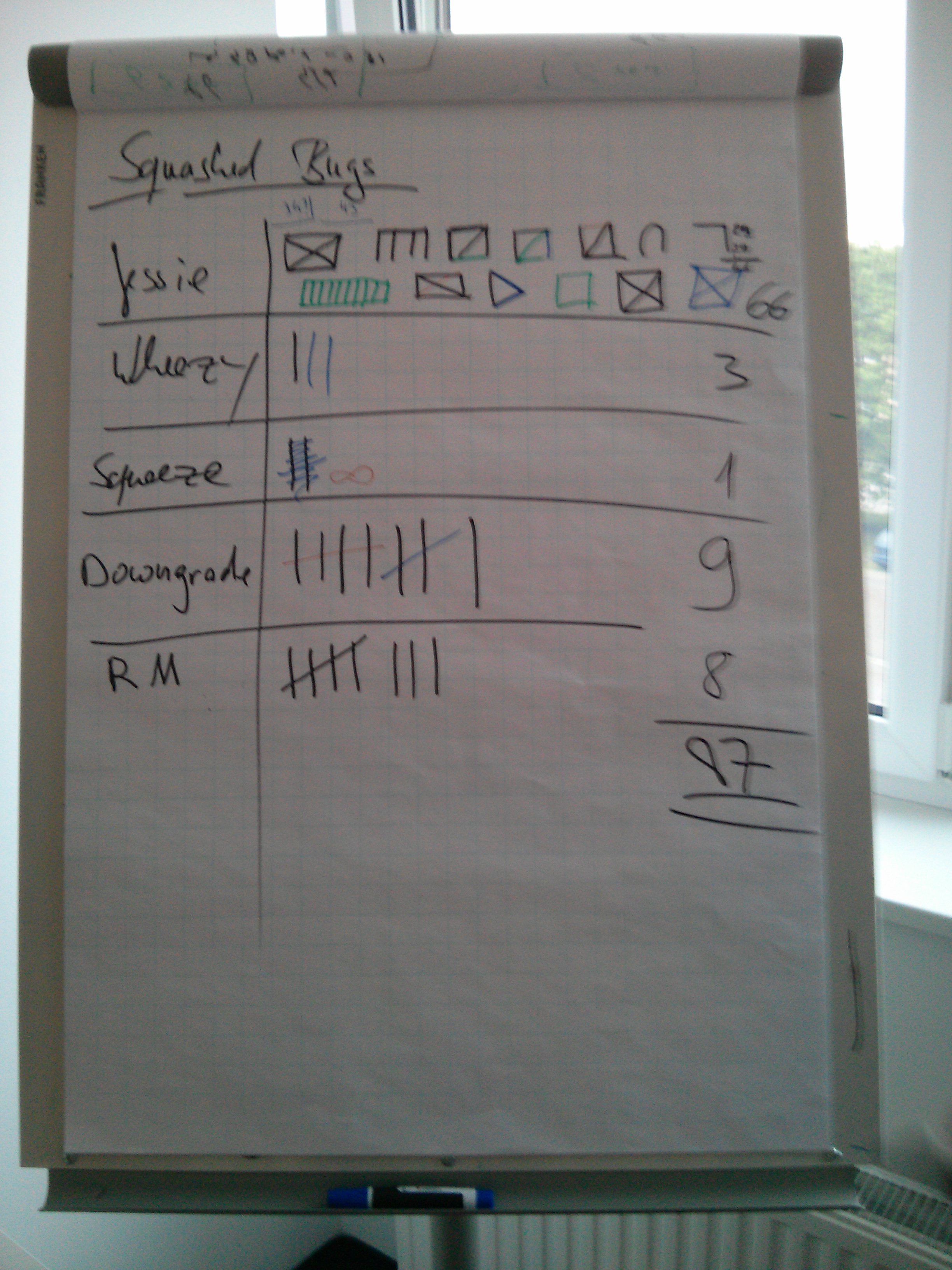
bsp2014_small This weekend, Bernd Zeimetz organized a BSP at the offices of conova in Salzburg, Austria. Three days of discussions, bugfixes, sparc removals and a lot of fun and laughter. We squashed a total of 87 bugs: 66 bugs affecting Jessie/Sid were closed, 9 downgraded and 8 closed via removals. As people tend to care about (old)stable, 3 bugs were fixed in Wheezy and one in Squeeze. These numbers might be not totaly correct, as were kinda creative at counting Marga promised a talk about an introduction to properly counting bugs using the Haus vom Nikolaus algorithm to the base of 7 . IMG_20140427_182902 Speaking of numbers, I touched the following bugs (not all RC): A couple of (non-free) pictures are available at Uwe s salzburg-cityguide.at. Thanks again to Bernd for organizing and conova and credativ for sponsoring!

27 April 2014

Daniel Pocock: AirBNB hosts scanning identity documents and passports?

We recently had a vacation in Italy and used AirBNB to book our accommodation in three different cities we visited. We've used AirBNB quite a few times now but we had a new experience this time: one of the hosts told me she makes a scan of the passport of each guest. Sitting on the dinner table was a shiny new looking handheld scanner similar to this: I was tempted to ask if she also wanted my fingerprints and a DNA sample too. Not wanting to be too offensive though, I simply told her that there was no way she would be making a copy of our documents. I tried to explain it to her in terms that she would understand: that AirBNB had already verified my identity and that AirBNB automatically gives her insurance (Italy is included) and she doesn't need a copy of my passport to be eligible for the insurance. At best, I suggested, she would be welcome to look at the passport to see that the name matches the AirBNB account - but no copies under any circumstances. A common problem A quick search in Google reveals we weren't the first people to have such an experience with a host. However, the AirBNB FAQ has no definite comment on the topic. I wrote to AirBNB's safety team and explained the risks with copying documents onto home computers and they are now considering adding something about this issue to their policies and FAQ. I would suggest that anybody else who is asked for a copy of an identity document should also fill in the safety report form and ask AirBNB to publish a firm policy prohibiting hosts from demanding copies of identity documents. Just what is at risk? Just how bad could it be? Some of the following risks come to mind:
  • The host's computer is sold, sent for repair or stolen and the passport images all end up in the hands of strangers.
  • Viruses and trojans designed to search hard disks for sensitive documents can quickly recognise a passport image. Such viruses are far more likely to hit a home computer than one of those computers used by passport scanners at an airport or bank.
  • Maybe the host even has children or housemates who access the same computer.
  • The host may actually be making themself a target by keeping a cache of these documents - it would be a fairly low-tech hack for a criminal to look through AirBNB listings for hosts who explicitly mention they want to copy an identity document at check-in.
Did the world really get safer since September 2011? Ever since the horrors of 09/11/2011, many people have felt an urge to try and make the world safer. Simultaneously, the rise of cheap technology has made it easy for people to take these things way too far. Everywhere from bed and breakfasts to luggage storage companies are now trying to scan these documents at every opportunity. Having electronic copies of identity documents floating around in so many different places, many of them on poorly maintained computers that are used by staff to surf the web when they are not busy, is actually a huge increase in the risk of identity fraud. A good proportion of these companies are not even required to scan/copy identity documents - for some of them it is sufficient for them to simply look at the document, just as a train conductor looks at a ticket. Many are simply scanning the documents because management have realized this is the most efficient way to accurately build up a marketing database including customer date of birth (which is harder to ask for directly). There was significant outrage a few years ago when Mossad was accused of using passport images presumably acquired at Israeli airports to give fake identities to a hit-squad. The quality of passport images now available in the hard disk of a typical AirBNB host or bed'n'breakfast are now likely to be of a higher quality and yet available for misappropriation by a far wider proportion of (cyber-)criminals.

Daniel Pocock: AirBNB hosts scanning identity documents and passports?

We recently had a vacation in Italy and used AirBNB to book our accommodation in three different cities we visited. We've used AirBNB quite a few times now but we had a new experience this time: one of the hosts told me she makes a scan of the passport of each guest. Sitting on the dinner table was a shiny new looking handheld scanner similar to this: I was tempted to ask if she also wanted my fingerprints and a DNA sample too. Not wanting to be too offensive though, I simply told her that there was no way she would be making a copy of our documents. I tried to explain it to her from her own perspective: that AirBNB had already verified my identity and that AirBNB automatically gives her insurance (Italy is included) and she doesn't need a copy of my passport to be eligible for the insurance. At best, I suggested, she would be welcome to look at the passport to see that the name matches the AirBNB account - but no copies under any circumstances. A common problem A quick search in Google reveals we weren't the first people to have such an experience with a host. However, the AirBNB FAQ has no definite comment on the topic. I wrote to AirBNB's safety team and explained the risks with copying documents onto home computers and they are now considering adding something about this issue to their policies and FAQ. I would suggest that anybody else who is asked for a copy of an identity document should also fill in the safety report form and ask AirBNB to publish a firm policy prohibiting hosts from demanding copies of identity documents. Just what is at risk? Just how bad could it be? Some of the following risks come to mind:

  • The host's computer is sold, sent for repair or stolen and the passport images all end up in the hands of strangers.
  • Viruses and trojans designed to search hard disks for sensitive documents can quickly recognise a passport image. Such viruses are far more likely to hit a home computer than one of those computers used by passport scanners at an airport or bank.
  • Maybe the host even has children or housemates who access the same computer.
  • The host may actually be making themself a target by keeping a cache of these documents - it would be a fairly low-tech hack for a criminal to look through AirBNB listings for hosts who explicitly mention they want to copy an identity document at check-in.
Did the world really get safer since September 2001? Ever since the horrors of 09/11/2001, many people have felt an urge to try and make the world safer. Simultaneously, the rise of cheap technology has made it easy for people to take security precautions too far. Everywhere from bed and breakfasts to luggage storage companies are now trying to scan and make a rather permanent electronic copy of identity documents at each opportunity. Having electronic copies of identity documents floating around in so many different places, many of them on poorly maintained computers that are used by staff to surf the web when they are not busy, is actually a huge increase in the risk of identity fraud. A good proportion of these companies are not even required to scan/copy identity documents - for some of them it is sufficient for them to simply look at the document, just as a train conductor looks at a ticket. Many are simply scanning the documents because management have realized this is the most efficient way to accurately build up a marketing database including customer date of birth (which is harder to ask for directly). There was significant outrage a few years ago when Mossad agents were accused of using passport images presumably acquired at airports to give identities to a their operatives. The quality of passport images now available in the hard disk of a typical AirBNB host or bed'n'breakfast are now likely to be of a higher quality more easily accessible for any number of unintended uses.

26 April 2014

DebConf team: Registration is now open for DebConf14 (Posted by Steve Langasek)

Going to DebConf14!
The Debian Project is pleased to announce that registration is now open for DebConf14, taking place in Portland, Oregon, USA from Saturday, August 23 to Sunday, August 31, 2014. To request food, accommodation, or travel sponsorship, you must be registered by Thursday, May 15, 2014. After this date, registrations will still be accepted in any of the basic, professional, and corporate categories, but requests for sponsorship will no longer be accepted. Note that, as for previous years, you will be asked to confirm your registration later once sponsorship has been finalized. If you are not certain you will attend but are considering it, we encourage you to register now. Registration If you want to attend DebConf14, please fill out the registration form. This year, conference registration is integrated with the new Debian SSO system. If you are a Debian developer and have not previously used the Debian SSO system, you will need to configure an SSO password on db.debian.org. If you are not a Debian developer, you will have an opportunity to create an alioth account as part of the registration process. For more information about Debian single sign-on, see the Debian wiki. DebCamp In past years, DebConf has been preceded by a separate DebCamp event, for developers to gather before the conference and collaborate in person on Debian. This year the team is trying a different approach, with a longer conference period allowing for blocks of talks to be mixed with blocks of coding time throughout the week. More information about the schedule will be made available when the Call for Papers is posted in the near future. As mentioned in the last bits from the DPL mail, there is also an opportunity for Debian teams to organize sprints around DebConf. Teams who are interested should follow the documented process. Thank you The DebConf14 team would like to thank all of our sponsors who have made this event possible - a full list of whom can be found here. We are still seeking sponsors to help us make DebConf14 a success. If you or your company would like to give back to Debian, please consider becoming a sponsor. We look forward to seeing you in Portland in August! The DebConf team

23 April 2014

Russ Allbery: On learning, growth, and trust

Here are two separate ideas about programming, Internet security, Internet architecture, and free software. Both of them are fundamental to everything those of us who work on free software are doing.
  1. Writing secure and reliable code is a highly complex and demanding task. It's something that one has to learn, like any other skilled profession. It's not something we're very good at teaching via any mechanism other than apprenticeship and experimentation. The field is changing quickly; if you took ten years off from writing security-critical code, you would expect to have to learn multiple new tools (static analysis, testing techniques, security features), possibly new programming languages, and not infrequently new ways of thinking about threat models and vulnerabilities.
  2. Nearly every computer user trusts tens of thousands of other programmers and millions of lines of code with their day-to-day computer security and reliability, without auditing that code themselves. Even if you have the skill required to audit the code (and very, very few people have the skill to audit all of the code that they use), you do not have the time. Therefore, our computer security is built on trust. We're trusting other programmers not to be malicious, which is obvious, but we're also trusting other programmers to be highly skilled, careful, cautious (but still fast and productive, since we quickly abandon software that isn't "actively developed"), and constantly adopting new techniques and treat models.
I think both of those principles are very widely understood and widely acknowledged. And, as we all know, both of those principles have failure modes, and those failures mean that our computers are nowhere near as secure as we would like them to be. There has been quite a lot of technical discussion about both of these principles in recent days and months, ranging from better code analysis and testing through the flaws in particular programming languages to serious questions about the trust model we use for verifying the code that we're running. I'm going to switch gears away from that discussion for a moment to talk about a social aspect. When a piece of code that one is using has a security vulnerability, it is not unusual to treat that as a trust failure. In other words, technical flaws are very quickly escalated to social flaws. This is less likely among practitioners, since we're all painfully aware of how many bugs we have in our own code, but it's still not unheard of, particularly if the authors of the code do not immediately and publicly show a socially-acceptable level of humility and contrition (in the middle of what is often a horrifically stressful experience). I think this reaction comes largely from fear. Anyone who has given it a moment's thought is painfully aware of just how much code they are running on trust, and just how many ways it could be compromised, accidentally or maliciously. And how frequently that code is compromised. The less control one has over a situation, the more terrifying it is, and the cold reality is that we have very little control over our computer security. There is a natural tendency, when afraid, to look for targets for that fear. Now, go back and think about the first principle. Anyone who has ever worked on or near free software is painfully aware that we have far more good ideas about how to improve computing and security than we have skilled resources to execute on those ideas. My own backlog of things that I've already thought about, know would be good ideas, and simply have to implement is probably longer than my remaining lifespan. I suspect that's the case for nearly all of us. In other words, we have a severe shortage of programmers who care and who have skill. We desperately need more skilled programmers who can write secure and reliable code. We may (and I think do) also need better tools, techniques, languages, protocols, and all the other machinery that we, as technical people, spend most of our time thinking about. But none of that changes the fact that we need more skilled people. In fact, it makes that need more acute: in addition to skilled people to write the code we use, we need skilled people to write the tools. Skilled people are not born. They're made. And in professions where training techniques are still in their infancy and where we don't have a good formal grasp on which techniques work, those skilled people are made primarily through apprenticeship, experimentation, and learning from failure. Worse, people who were skilled do not remain skilled without continually participating in that learning process. See the above point about a fast-changing field with evolving best practices. It's not enough to know how to write secure code to the best known practices today, or even enough to retrofit all of your existing code to current knowledge (which is often so large of an effort as to be practically impossible). You have to constantly, continually learn more, for which there is no reliable formal training. We have to try, fail, try again, and fail better. But failure that leads to a security vulnerability is treated as a loss of trust. We trusted that person to write secure code that we could use. They failed. Now we can't trust them. Based on the trust model of security, we should revoke their ability to try again and instead rely on people who have not failed, since that will make us more secure. Except now we just broke the learning process. And there's no such thing as a programmer who can stop learning. So what does that do to our resource pool? It's sadly ironic, but I believe the free software community writ large has a very serious collaboration problem: we do not tolerate each other's learning processes. This leads to a wide variety of social failures around hostile communities and the failures of meritocracy that other people have talked about at much greater length. But even if you set that all aside, it threatens our security. We need secure code, a lot of it, a lot more than we have right now. To get that code, we need people who can write it. We need to grow, encourage, and support those people and enable their learning processes. Code is written by people. If we rip people apart when they write bad, insecure code, we don't get better, secure code. We get fewer people writing security code. We get far fewer people writing security code in public, since some of the people who haven't been ripped apart will look at that experience and say, "No way am I going near that problem area. It's too scary. I don't want to end up like those programmers." Fewer people writing security code means fewer people learning how to write better security code. Fewer people capable of writing good, secure code is not a solution to any of our problems. If we do not tolerate, support, and encourage the learning process required to become a skilled programmer, or maintain one's skill in programming, we are destroying our future as a community. When you find code that is broken and badly written, you have found a problem that should be reported, analyzed, and corrected. You have also found a programmer who is about to have one of two very different types of experiences. Either they are about to learn how to become a better programmer, or they are about to be publicly shamed, humiliated, and treated as untrustworthy. Which branch they take is partly up to them, but it's also heavily influenced by how all of us react socially to the discovery of bad code. One of those branches leads to more good, secure code being written in the future. The other does not.

22 April 2014

Daniel Pocock: Automatically creating repackaged upstream tarballs for Debian

One of the less exciting points in the day of a Debian Developer is the moment they realize they have to create a repackaged upstream source tarball. This is often a process that they have to repeat on each new upstream release too. Wouldn't it be useful to:
  • Scan all the existing repackaged upstream source tarballs and diff them against the real tarballs to catalog the things that have to be removed and spot patterns?
  • Operate a system that automatically produces repackaged upstream source tarballs for all tags in the upstream source repository or all new tarballs in the upstream download directory? Then the DD can take any of them and package them when he wants to with less manual effort.
  • Apply any insights from this process to detect non-free content in the rest of the Debian archive and when somebody is early in the process of evaluating a new upstream project?
Google Summer of Code is back One of the Google Summer of Code projects this year involves recursively building Java projects from their source. Some parts of the project, such as repackaged upstream tarballs, can be generalized for things other than Java. Web projects including minified JavaScript are a common example. Andrew Schurman, based near Vancouver, is the student selected for this project. Over the next couple of weeks, I'll be starting to discuss the ideas in more depth with him. I keep on stumbling on situations where repackaged upstream tarballs are necessary and so I'm hoping that this is one area the community will be keen to collaborate on.

Next.

Previous.