
Introduction
I gave a
joint presentation with Manoj at
Debconf7 about using distributed version control for
Debian packaging, and I
volunteered to do an on-line workshop
about using
Git for the task, so it's about time that
I should know how to use Git for Debian packaging, but it turns out that
I don't. Or well, didn't.
After I made a pretty good mess out of the
mdadm packaging repository (which is not a big
problem as it's just ugly history up to the point when I start to get it
right), I decided to get down with the topic and figure it out once and for
all. I am writing this post as I put the pieces together. It's been cooking
for a week, simply so I could gather enough feedback. I am aware that
Git is
not exactly a showcase of usability, so
I took some extra care to not add to the confusion.
It may be the first post in a series, because this time, I am just covering
the case of
mdadm, for which upstream also uses Git and where I am the
only maintainer, and I shall pretend that I am importing
mdadm to version
control for the first time, so there won't be any history juggling. Future
posts could well include tracking
Subversion repositories with
git-svn, and importing packages
previously tracked therewith, but this ain't no promise! (well, that last post
is
already being drafted,
but far from finished; you have been warned!)
I realise that
git-buildpackage exists, but imposes a rather
strict branch layout and tagging scheme, which I don't want to adhere to. And
gitpkg (
Romain blogged about it
recently),
deserves another look since, according to its author, it does not impose
anything on its user. But in any case, before using such tools (and
possibly extending them to allow for other layouts), I'd really rather have
done it by hand a couple of times to get the hang of it and find out where the
culprits lie.
Now, enough of the talking, just one last thing: I expect this blog post to
change quite a bit as I get feedback. Changes shall be highlighted in bold
typeface.
Setting up the infrastructure
First, we prepare a shared repository on
git.debian.org for later use (using
collab-maint for
illustration purposes), download the Debian source package we want to import
(version
2.6.3+200709292116+4450e59-3 at time of writing, but I pretend
it's
-2 because we shall create
-3 further down ), set up a local
repository, and link it to the remote repository. Note that there are
other
ways to set up the infrastructure, but
this happens to be the one I prefer, even though it's slightly more
complicated:
$ ssh alioth
$ cd /git/collab-maint
$ ./setup-repository pkg-mdadm mdadm Debian packaging
$ exit
$ apt-get source --download-only mdadm
$ mkdir mdadm && cd mdadm
$ git init
$ git remote add origin ssh://git.debian.org/git/collab-maint/pkg-mdadm
$ git config branch.master.merge refs/heads/master
Now we can use
git-pull and
git-push, except the remote repository is
empty and we can't pull from there yet. We'll save that for later.
Instead, we tell the repository about upstream's Git repository. I am giving
you the
git.debian.org URL though, simply because I don't want upstream
repository (which lives on an ADSL line) hammered in response to this blog
post:
$ git remote add upstream-repo git://git.debian.org/git/pkg-mdadm/mdadm
Since we're using the
upstream branch of the
pkg-mdadm repository as
source (and don't want all the other mess I created in that repository), we'll
first limit the set of branches to be fetched (I could have used the
-t
option in the above
git-remote command, but I prefer to make it explicit
that we're doing things slightly differently to protect upstream's ADSL line).
$ git config remote.upstream-repo.fetch \
    +refs/heads/upstream:refs/remotes/upstream-repo/upstream
And now we can pull down upstream's history and create a local branch off it.
The "no common commits" warning can be safely ignored since we don't have any
commits at all at that point (so there can't be any in common between the
local and remote repository), but we know what we're doing, even to the point
that we can forcefully give birth to a branch, which is because we do not have
a
HEAD commit yet (our repository is still empty):
$ git fetch upstream-repo
warning: no common commits
[ ]
  # in the real world, we'd be branching off upstream-repo/master
$ git checkout -b upstream upstream-repo/upstream
warning: You appear to be on a branch yet to be born.
warning: Forcing checkout of upstream-repo/upstream.
Branch upstream set up to track remote branch
  refs/remotes/upstream-repo/upstream.
$ git branch
* upstream
$ ls   wc -l
77
Importing the Debian package
Now it's time to import Debian's
diff.gz remember how I pretend to use
version control for package maintenance for the first time. Oh, and sorry
about the messy file names, but I decided it's best to stick with real data in
case you are playing along:
Since we're applying the diff against version
2.6.3+200709292116+4450e59,
we ought to make sure to have the repository at the same state. Upstream never
"released" that version, but I encoded the commit ID of the tip when
I snapshotted it:
4450e59, so we branch off there. Since we are actually
tracking the
git.debian.org pkg-mdadm repository instead of upstream,
you can use the tag I made. Otherwise you could consider tagging yourself:
$ #git tag -s mdadm-2.6.3+200709292116+4450e59 4450e59
$ git checkout -b master mdadm-2.6.3+200709292116+4450e59
$ zcat ../mdadm_2.6.3+200709292116+4450e59-2.diff.gz   git apply
The local tree is now "debianised", but Git does not know about the new and
changed files, which you can verify with
git-status. We will split the
changes made by Debian's
diff.gz across several branches.
The idea of feature branches
We could just create a
debian branch, commit all changes made by the
diff.gz there, and be done with it. However, we might want to keep certain
aspects of Debianisation separate, and the way to do that is with feature
branches (also known as "topic" branches). For the sake of this demonstration,
let's create the following four branches in addition to the
master branch,
which holds the standard Debian files, such as
debian/changelog,
debian/control, and
debian/rules:
- upstream-patches will includes patches against the upstream code, which
I submit for upstream inclusion.
- deb/conffile-location makes /etc/mdadm/mdadm.conf the default over
/etc/mdadm.conf and is Debian-specific (thus the deb/ prefix).
- deb/initramfs includes the initramfs hook and script, which I want
to treat separately but not submit upstream.
- deb/docs similarly includes Debian-only documentation I add to the
package as a service to Debian users.
If you're importing a Debian package using
dpatch, you might want to
convert every dpatch into a single branch, or at least collect logical units
into separate branches. Up to you. For now, our simple example suffices. Keep
in mind that it's easy to merge two branch and less trivial to split one into
two.
Why? Well, good question. As you will see further down, the separation between
master and
deb/initramfs actually makes things more complicated when
you are working on an issue spanning across both. However, feature branches
also bring a whole lot of flexibility. For instance, with the above
separation, I could easily create
mdadm packages without
initramfs
integration (see
#434934),
a disk-space-conscious distribution like
grml might
prefer to leave out the extra documentation, and maybe another derivative
doesn't like the fact that the configuration file is in a different place from
upstream. With feature branches, all these issues could be easily addressed by
leaving out unwanted branches from the merge into the integration/build branch
(see further down).
Whether you use feature branches, and how many, or whether you'd like to only
separate upstream and Debian stuff is entirely up to you. For the purpose of
demonstration, I'll go the more complicated way.
Setting up feature branches
So let's commit the individual files to the branches. The output of the
git-checkout command shows modified files that have not been committed yet
(which I trim after the first example); Git keeps these across
checkouts/branch changes. Note that the
./debian/ directory does not show
up as Git does not know about it yet (
git-status will tell you that it's
untracked, or rather: contains untracked files since Git does not track
directories at all):
$ git checkout -b upstream-patches mdadm-2.6.3+200709292116+4450e59
M Makefile
M ReadMe.c
M mdadm.8
M mdadm.conf.5
M mdassemble.8
M super1.c
$ git add super1.c     #444682
$ git commit -s
  # i now branch off master, but that's the same as 4450e59 actually
  # i just do it so i can make this point
$ git checkout -b deb/conffile-location master
$ git add Makefile ReadMe.c mdadm.8 mdadm.conf.5 mdassemble.8
$ git commit -s
$ git checkout -b deb/initramfs master
$ git add debian/initramfs/*
$ git commit -s
$ git checkout -b deb/docs master
$ git add RAID5_versus_RAID10.txt md.txt rootraiddoc.97.html
$ git commit -s
  # and finally, the ./debian/ directory:
$ git checkout master
$ chmod +x debian/rules
$ git add debian
$ git commit -s
$ git branch
  deb/conffile-location
  deb/docs
* master
  upstream
  upstream-patches
At this time, we push our work so it won't get lost if, at this moment, aliens
land on the house, or any other completely plausible event of apocalypse
descends upon you. We'll push our work to
git.debian.org (the
origin,
which is the default destination and thus needs not be specified) by using
git-push --all, which conveniently pushes all local branches, thus
including the upstream code; you may not want to push the upstream code, but
I prefer it since it makes it easier to work with the repository, and since
most of the objects are needed for the other branches anyway after all, we
branched off the
upstream branch.
Specifying
--tags instead of
--all pushes tags instead of heads
(branches); you couldn't have guessed that! See
this thread if you (rightfully) think
that one should be able to do this in a single command (which is not
git
push refs/heads/* refs/tags/*)
$ git push --all
$ git push --tags
Done. Well, almost
Building the package (theory)
Let's build the package. There seem to be two (sensible) ways we could do
this, considering that we have to integrate (merge) the branches we just
created, before we fire off the building scripts:
- by using a temporary (or "throw-away") branch off upstream, where we
integrate all the branches we have just created, build the package, tag our
master branch (it contains debian/changelog), and remove the
temporary branch. When a new package needs to be built, we repeat the
process.
- by using a long-living integration branch off upstream, into which we
merge all our branches, tag the branch, and build the package off the tag.
When a new package comes around, we re-merge our branches, tag, and build.
Both approaches have a certain appeal to me, but I settled for the second, for
two reasons, the first of which leads to the second:
- When I upload a package to the Debian archive, I want to create a tag which
captures the exact state of the tree from which the package was built, for
posterity (I will return to this point later). Since the throw-away
branches are not designed to persist and are not uploaded to the archive,
tagging the merging commit makes no sense. Thus, the only way to properly
identify a source tree across all involved branches would be to run
git-tag $branch/$tagname $branch for each branch, which is purely
semantic and will get messy sooner or later.
- As a result of the above: when Debian makes a new stable release, I would
like to create a branch corresponding to the package in the stable archive
at the time, for security and other proposed updates. I could rename my
throw-away branch, if it still existed, or I could create a new branch and
merge all other branches, using the (semantic) tags, but that seems rather
unfavourable.
So instead, I use a long-living integration branch, notoriously tag the merge
commits which produced the tree from which I built the package I uploaded, and
when a certain version ends up in a stable Debian release, I create
a maintenance branch off the one, single tag which corresponds to the very
version of the package distributed as part of the Debian release.
So much for the theory. Let's build, already!
Building the package (practise)
So we need a long-living integration branch, and that's easier done than
said:
$ git checkout -b build mdadm-2.6.3+200709292116+4450e59
Now we're ready to build, and the following procedure should really be
automated. I thus write it like a script, called
poor-mans-gitbuild, which
takes as optional argument the name of the (upstream) tag to use, defaulting
to
upstream (the tip):
#!/bin/sh
set -eu
git checkout master
debver=$(dpkg-parsechangelog   sed -ne 's,Version: ,,p')
git checkout build
git merge $ 1:-upstream
git merge upstream-patches
git merge master
for b in $(git for-each-ref --format='%(refname)' refs/heads/deb/*); do
  git merge -- $b
done
git tag -s debian/$debver
debuild   # will ignore .git automatically
git checkout master
Note how we are merging each branch in turn, instead of using the octopus
merge strategy (which would create a commit with more than two parents) for
reasons outlined
in this post.
An octopus-merge
would actually work in our situation, but it will not
always work, so better safe than sorry (although you
could still
achieve
the same result).
If you discover during the build that you forgot something, or the build
script failed to run, just remove the tag, undo the merges, checkout the
branch to which you need to commit to fix the issue, and then repeat the above
build process:
$ git tag -d debian/$debver
$ git checkout build
$ git reset --hard upstream
$ git checkout master
$ editor debian/rules    # or whatever
$ git add debian/rules
$ git commit -s
$ poor-mans-gitbuild
Before you upload, it's a good idea to invoke
gitk --all and verify that
all goes according to plan:
When you're done and the package has been uploaded, push your work to
git.debian.org, as before. Instead of using
--all and
--tags,
I now specify exactly which refs to push. This is probably a good habit to get
into to prevent publishing unwanted refs:
$ git push origin build tag debian/2.6.3+200709292116+4450e59-3
Now take your dog for a walk, or play outside, or do something else not
involving a computer or entertainment device.
Uploading a new Debian version
If you are as lucky as I am, the package you uploaded still has a bug in the
upstream code
and someone else fixes it before upstream releases a new
version, then you might be in the position to release a new Debian version. Or
maybe you just need to make some Debian-specific changes against the same
upstream version. I'll let the commands speak for themselves:
$ git checkout upstream-patches
$ git-apply < patch-from-lunar.diff   #444682 again
$ git commit --author 'J r my Bobbio <lunar@debian.org>' -s
  # this should also be automated, see below
$ git checkout master
$ dch -i
$ dpkg-parsechangelog   sed -ne 's,Version: ,,p'
2.6.3+200709292116+4450e59-3
$ git commit -s debian/changelog
$ poor-mans-gitbuild
$ git push
$ git push origin tag debian/2.6.3+200709292116+4450e59-3
That first
git-push may require a short explanation: without any
arguments,
git-push updates only the intersection of local and remote
branches, so it would never push a new local branch (such as
build above),
but it updates all existing ones; thus, you cannot inadvertedly publish
a local branch. Tags still need to be published explicitly.
Hacking on the software
Imagine: on a rainy Saturday afternoon you get bored and decide to implement
a better way to tell
mdadm when to start which array. Since you're a genius, it'll take you only
a day, but you do make mistakes here and there, so what could be better than
to use version control? However, rather than having a branch that will live
forever, you are just creating a local branch, which you will not publish.
When you are done, you'll feed your work back into the existing branches.
Git makes branching really easy and as you may have spotted, the
poor-mans-gitbuild script reserves an entire branch namespace for people
like you:
$ git checkout -b tmp/start-arrays-rework master
Unfortunately (or fortunately), fixing this issue will require work on two
branches, since the
initramfs script and hook are maintained in a separate
branch. There are (again) two ways in which we can (sensibly) approach this:
- create two separate, temporary branches, and switch between them as you
work.
- merge both into the temporary branch and later cherry-pick the commits into
the appropriate branches.
I am undecided on this, but maybe the best would be a combination: merge both
into a temporary branch and later cherry-pick the commits into two additional,
temporary branches until you got it right, and then fast-forward the official
branches to their tips:
$ git merge master deb/initramfs
$ editor debian/mdadm-raid                     #
$ git commit -s debian/mdadm-raid
$ editor debian/initramfs/script.local-top     #
$ git commit -s debian/initramfs/script.local-top
[many hours of iteration pass ]
[  until you are done]
$ git checkout -b tmp/start-arrays-rework-init master
  # for each commit $c in tmp/start-arrays-rework
  # applicable to the master branch:
$ git cherry-pick $c
$ git checkout -b tmp/start-arrays-rework-initramfs deb/initramfs
  # for each commit $c in tmp/start-arrays-rework
  # applicable to the deb/initramfs branch:
$ git cherry-pick $c
This is assuming that all your commits are logical units. If you find several
commits which would better be bundled together into a single commit, this is
the time to do it:
$ git cherry-pick --no-commit <commit7>
$ git cherry-pick --no-commit <commit4>
$ git cherry-pick --no-commit <commit5>
$ git commit -s
Before we now merge this into the official branches, let me briefly intervene
and introduce the concept of a fast-forward. Git will "fast-forward" a branch
to a new tip if it decides that no merge is needed. In the above example, we
branched a temporary branch (T) off the tip of an official branch (O) and then
worked on the temporary one. If we now merge the temporary one into the
official one, Git determines that it can actually squash the ancestry into
a single line and push the official branch tip to the same ref as the
temporary branch tip. In cheap (poor man's), ASCII notation:
- - - O             >> merge T >>     - - - = - - OT
         - - T      >>  into O >>
This works because no new commits have been made on top of O (if there would
be any, we might be able to rebase, but let's not go there quite yet; rebasing
is how you shoot yourself in the foot with Git). Thus we can simply do the
following:
$ git checkout deb/initramfs
$ git merge tmp/start-arrays-rework-initramfs
$ git checkout master
$ git merge tmp/start-arrays-rework-init
and test/build/push the result. Or well, since you are not an
mdadm
maintainer (We^W I have open job positions! Applications welcome!), you'll
want to submit your work as patches via email:
$ git format-patch -s -M origin/master
This will create a number of files in the current directory, one corresponding
for each commit you made since
origin/master. Assuming each commit is
a logical unit, you can now submit these to an email address. The
--compose option lets you write an introductory message, which is
optional:
$ git send-email --compose --to your@email.address <file1> <file2> < >
Once you've verified that everything is alright, swap your email address for
the bug number (or the
pkg-mdadm-devel list address).
Thanks (in advance) for your contribution!
Of course, you may also be working on a feature that you want to go upstream,
in which case you'd probably branch off
upstream-patches (if it depends on
a patch not yet in upstream's repository), or
upstream (if it does not):
$ git checkout -b tmp/cool-feature upstream
[ ]
when a new upstream version comes around
After a while, upstream may have integrated your patches, in addition to
various other changes, to give birth to
mdadm-2.6.4. We thus first fetch
all the new refs and merge them into our upstream branch:
$ git fetch upstream-repo
$ git checkout upstream
$ git merge upstream-repo/master
we
could just as well have executed
git-pull, which with the default
configuration would have done the same; however, I prefer to separate the
process into fetching and merging.
Now comes the point when many Git people think about rebasing. And in fact,
rebasing is exactly what you should be doing, iff you're still working on an
unpublished branch, such as the previous
tmp/cool-feature off
upstream. By rebasing your branch onto the updated
upstream branch,
you are making sure that your patch will apply cleanly when upstream tries it,
because potential merge conflicts would be handled by you as part of the
rebase, rather than by upstream:
$ git checkout tmp/cool-feature
$ git rebase upstream
What rebasing does is quite simple actually: it takes every commit you made
since you branched off the parent branch and records the diff and commit
message. Then, for each diff/commit_message pair, it
creates a new commit on
top of the new parent branch tip, thus rewrites history, and orphans all your
original commits. Thus, you should only do this if your branch has never been
published or else you would leave people who cloned from your published branch
with orphans.
If this still does not make sense, try it out: create a (source) repository,
make a commit (with a meaningful commit message), branch B off the tip, make
a commit on top of B (with a meaningful message), clone that repository and
return to the source repository. There, checkout the master, make a commit
(with a ), checkout B, rebase it onto the tip of master, make a commit
(with a ), and now git-pull from the clone; use gitk to figure out
what's going on.
So you should almost never rebase a published branch, and since all your
branches outside of the
tmp/* namespace are published on
git.debian.org, you should not rebase those.
But then again, Pierre actually
rebases a published branch in his workflow, and
he does so with reason: his
patches branch is just a collection of
branches to go upstream, from which upstream cherry-picks or which upstream
merges, but which no one tracks (or should be tracking).
But we can't (or at least will not at this point) do this for our feature
branches (though we could treat
upstream-patches that way), so we have to
merge. At first, it suffices to merge the new
upstream into the
long-living
build branch, and to call
poor-mans-gitbuild, but if you
run into merge conflicts or find that upstream's changes affect the
functionality contained in your feature branches, you need to actually fix
those.
For instance, let's say that upstream started providing
md.txt (which
I previously provided in the
deb/docs branch), then I need to fix that
branch:
$ git checkout deb/docs
$ git rm md.txt
$ git commit -s
That was easy, since I could evade the conflict. But what if upstream made
a change to
Makefile, which got in the way with my configuration file
location change? Then I'd have to merge
upstream into
deb/conffile-location, resolve the conflicts, and commit the change:
$ git checkout deb/conffile-location
$ git merge upstream
CONFLICT!
$ git-mergetool
$ git commit -s
When all conflicts have been resolved, I can prepare a new release, as
before:
$ git checkout master
$ dch -i
$ dpkg-parsechangelog   sed -ne 's,Version: ,,p'
2.6.3+200709292116+4450e59-3
# git commit -s debian/changelog
$ poor-mans-gitbuild
# git push
$ git push origin tag debian/2.6.3+200709292116+4450e59-3
Note that Git often appears smart about commits that percolated upstream:
since upstream included the two commits in
upstream-patches in his
2.6.4 release, my
upstream-patches branch got effectively annihilated,
and Git was smart enough to figure that out
without a conflict. But before
you rejoice, let it be told that
this does not always work.
Creating and using a maintenance branch
Let's say Debian "lenny" is released with
mdadm 2.7.6-1, then:
$ git checkout -b maint/lenny debian/2.7.6-1
You might do this to celebrate the release, or you may wait until the need
arises. We've already left the domain of reality ("lenny" is not yet
released), so the following is just theory.
Now, assume that a security bug is found in
mdadm 2.7.6 after "lenny"
was released. Upstream is already on
mdadm 2.7.8 and commits
deadbeef and
c0ffee fix the security issue, then you'd cherry-pick
them into the
maint/lenny branch:
$ git checkout upstream
$ git pull
$ git checkout maint/lenny
$ git cherry-pick deadbeef
$ git cherry-pick c0ffee
If there are no merge conflicts (which you'd resolve with
git-mergetool),
we can just go ahead to prepare the new package:
$ dch -i
$ dpkg-parsechangelog   sed -ne 's,Version: ,,p'
2.7.6-1lenny1
$ git commit -s debian/changelog
$ poor-mans-gitbuild
$ git push origin maint/lenny
$ git push origin tag debian/2.7.6-1lenny1
Future directions
It should be trivial to create the Debian source package directly from the
repository, and in fact, in response to a recent blog post of mine on
the
dispensability of pristine upstream tarballs, two
people showed me their scripts to do it.
My post also caused
Joey Hess to clarify his position on pristine tarballs, before he went
out to implement
dpkg-source v3.
This looks very promising.
Yet, as
Romain argues, there
are benefits with simple patch management systems. Exciting times ahead!
In addition to creating source packages from version control, a couple of
other ideas have been around for a while:
- create debian/changelog from commit log summaries when you merge into
the build branch.
- integrate version control with the BTS, bidirectionally:
- given a bug report, create a temporary branch and apply any patches found
in the bug report.
- upon merging the temporary branch back into the feature branch it
modifies, generate a patch, send it to the BTS and tag the bug report
+ pending patch.
And I am sure there are more. If you have any, I'd be interested to hear about
them!
Wrapping up
I hope this post was useful. Thank you for reading to the end, this was
probably my longest blog post ever.
I want to thank Pierre Habouzit, Johannes Schindelin, and all the others on
the
#git/freenode IRC channel for their tutelage. Thanks also to Manoj
Srivastava, whose
pioneering work on packaging with GNU arch got me started on most of
the concepts I use in the above. And of course, the members of the
the
vcs-pkg mailing list for the
various discussions on this subject, especially those who participated in
the
thread leading up to this post.
Finally, thanks to Linus and Junio for
Git and the
continuously outstanding high level of support they give.
If you are interested in the topic of using version control for distro
packaging, I invite you to join
the vcs-pkg mailing list and/or the
#vcs-pkg/irc.oftc.net IRC channel.
NP:
Aphex Twin:
Selected Ambient Works, Volume 2 (at least when I started writing )
 I recently attended the Play! concert in Oslo, with a friend who was visiting Oslo from Bergen.
The concert took place in an expo hall just outside Oslo, which was being used for the Electroworld electronics exposition. Wow, has that ever changed! I was there the first time, three-odd years ago, when it was arranged in Oslo Spektrum, and I was bitterly disappointed! It was nothing but a slightly larger Expert Electronics store. I was angry that I had actually been conned into paying for this.
This year, it was completely different. They had a gigantic venue, with lots of interesting booths. Yamaha showed off some truly gorgeous digital pianos, and electronic drum sets, NRK was there, to show off their beautiful HD-1 HDTV production bus, and all kinds of interesting things. Even so, it was very clear that Expert was trying to get you to buy stuff. Something just doesn’t sit right with me about paying money to enter a store which is marketed as an expo.
My previous experience with Electroworld meant I was not at all interested in repeating it. I wanted to catch the concert which was being held there. But they wouldn’t let me in unless I bought a ticket for the expo. Having already paid 70 EUR for a concert ticket, I was not enthusiastic about paying 15 more EUR to be allowed to enter the venue. But I relented, and was duly fleeced.
I only got around 30 minutes of time before the concert started, so I didn’t get all that much time to look around.
The first part of the concert started. The orchestra was the wonderful KORK (AKA Kringkastingsorkesteret, AKA “The Norwegian Radio Orchestra”). They started off with a beautiful fanfare by Nobuo Uematsu. However, their choice of music frustrates me deeply. They played some of the obvious classics, like Mario, Sonic The Hedgehog, some Zelda, but most of the time was wasted on some really lame music.
It seems that their repertoire was not chosen based on the musical merit of the games, but on the current popularity. Why else would they be devoting time to some dull, insipid incidental music from WoW, Halo, and Silent Hill, without even an identifiable motif, as opposed to more of Koji Kondo’s wonderful Mario or Zelda tunes, or - damnit - Nobuo Uematsu’s Final Fantasy music?
This is the thing that has left me the most disappointed. They practically ignored the elephant in the room of game music, Nobuo Uematsu. His compositions are absolutely beautiful, and they really shine when performed by a classical orchestra. You can practically tell that they’re meant to be performed by them, rather than some dinky Super Nintendo synthesizer chip. The Final Fantasy VI Opera, most of the Final Fantasy VII soundtrack…
They then proceed to play One by Metallica. …WTF, you ask? WTF, indeed. Their justification was that it’s in the soundtrack from Guitar Hero. That’s absurd. And it wasn’t even a very good performance. It was still pretty funny that this very serious-looking classically trained vocalist slowly walked up on stage and gave a really good performance - he really did sound like the Metallica vocalist.
Almost as an afterthought, at the very last, they play One-Winged Angel, one of the most dramatic and beautiful pieces from Final Fantasy VII. The audience breaks into absolutely wild applause. But - what - they bring in a METAL BAND on stage. A GODDAMNED METAL BAND! And they proceed to absolutely slaughter the whole piece! The choir and orchestra are drowned out by loud electric guitars with riffs that don’t make sense, and a drummer that can’t even keep the damned beat - the bass drum was all over the place!
Seemingly not content with simply omitting his music, they have to absolutely demolish the performance of it.
I actually have to say that this is by far the most disappointing concert I have ever gone to. Granted, my expectations were high, but just to witness a live performance by this wonderful orchestra of the Prelude, Anxious Heart, Tifa’s Theme, Eyes On Me, Fighting!, Still More Fighting! or Aerith’s Theme would’ve made the 85 EUR worth it. Judging from the audience’s applause when he first mentioned the Final Fantasy series, I think they agreed with me.
 Coverage of the last ProTour cycle race of the year is live on

 Note: red underlined links are clickable

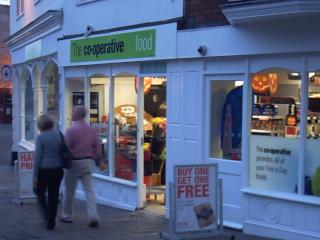 I found it easily,
which gave me a few minutes spare to visit
the co-operative food store on the Centre
(pictured),
which is the first rebranded one I've seen.
It looks light and airy and
the staff were friendly. I didn't find
everything I was looking for, but after
exiting, I noticed I'd not seen around the
corner of the L-shaped store!
Anyway, the meeting itself was chaired by
Peter Begley and was attended by six elected
reps, three regional officers, four trading
managers (all food?) and about 50 members
by my reckoning. There was a comment later
in the meeting about the low turnout from
Bath - it seems that a meeting for each city
had been requested and refused.
There was also a comment about lack of
transport from Weston-super-Mare, about
which I'm not sure: trains between WsM
and Bristol are at least hourly. Maybe
there should be a shuttle between station
and meeting for people who can't walk,
but it seems nuts to run a bus from here
when trains are faster and have space.
Officer
Chris Griffiths gave a presentation (with
loud music!) about our community support,
including windfarms on the co-operative farms,
Farm to Fork, the Woodcraft Folk,
the Queens Award for Sustainable Development,
community chef visits to Ilfracombe and Bath,
community challenge,
Mukti Mitchell's Low Carbon Lifestyle Tour,
Fairtrade fashion shows,
Holyland Handicrafts Co-operative at Bath
Christmas Market,
BAND (D is for Daycare, but I missed the rest),
Toy Box Library Bath,
Avonmouth Community Centre Association
and Oldfield Park Juniors.
Frank Jones presented
 Thanks to Damyan Ivanov for the upload,


 I’ve get in touch with Guido and explained him some missing things I had found on git-dch (part of git-buildpackage). The most amazing thing is that he implemented them all and his code is much nicer then mine since it has been wrote using the Python extensions for the GIT.
Please, migrate your scripts that use git-update-debian-change (if there’s someone else then me using it) to use git-dch since I’ll drop it next week.
 It's funny. I was reading Planet Debian, whilst I sat on hold with Dell
myself, and I read

