Antoine Beaupr : Major outage with Oricom uplink
The server that normally serves this page, all my email, and many more
services was unavailable for about 24 hours. This post explains how and
why.
What happened?
Starting February 2nd, I started seeing intermittent packet loss on
the network. Every hour or so, the link would go down for one or two
minutes, then come back up.
At first, I didn't think much of it because I was away and could blame
the crappy wifi or the uplink I using. But when I came in the office
on Monday, the service was indeed seriously degraded. I could barely
do videoconferencing calls as they would cut out after about half an
hour.
I opened a ticket with my uplink, Oricom. They replied that it
was an issue they couldn't fix on their end and would need someone on
site to fix.
So, the next day (Tuesday, at around 10EST) I called Oricom again, and
they made me do a full modem reset, which involves plugging a pin in a
hole for 15 seconds on the Technicolor TC4400 cable modem. Then
the link went down, and it didn't come back up at all.
Boom.
Oricom then escalated this to their upstream (Oricom is a reseller of
Videotron, who has basically the monopoly on cable in Qu bec) which
dispatched a tech. This tech, in turn, arrived some time after lunch
and said the link worked fine and it was a hardware issue.
At this point, Oricom put a new modem in the mail and I started
mitigation.
What happened?
Starting February 2nd, I started seeing intermittent packet loss on
the network. Every hour or so, the link would go down for one or two
minutes, then come back up.
At first, I didn't think much of it because I was away and could blame
the crappy wifi or the uplink I using. But when I came in the office
on Monday, the service was indeed seriously degraded. I could barely
do videoconferencing calls as they would cut out after about half an
hour.
I opened a ticket with my uplink, Oricom. They replied that it
was an issue they couldn't fix on their end and would need someone on
site to fix.
So, the next day (Tuesday, at around 10EST) I called Oricom again, and
they made me do a full modem reset, which involves plugging a pin in a
hole for 15 seconds on the Technicolor TC4400 cable modem. Then
the link went down, and it didn't come back up at all.
Boom.
Oricom then escalated this to their upstream (Oricom is a reseller of
Videotron, who has basically the monopoly on cable in Qu bec) which
dispatched a tech. This tech, in turn, arrived some time after lunch
and said the link worked fine and it was a hardware issue.
At this point, Oricom put a new modem in the mail and I started
mitigation.
Mitigation
Website
The first thing I did, weirdly, was trying to rebuild this blog. I
figured it should be pretty simple: install ikiwiki and hit rebuild. I
knew I had some patches on ikiwiki to deploy, but
surely those are not a deal breaker, right?
Nope. Turns out I wrote many plugins and those still don't ship with
ikiwiki, despite having been sent upstream a while back, some years
ago.
So I deployed the plugins inside the .ikiwiki directory of the site
in the hope of making things a little more
"standalone". Unfortunately, that didn't work either because the
theme must be shipped in the system-wide location: I couldn't figure
out how to put it to have it bundled with the main repository. At that
point I mostly gave up because I had spent too much time on this and I
had to do something about email otherwise it would start to bounce.
Email
So I made a new VM at Linode (thanks 2.5admins for the credits)
to build a new mail server.
This wasn't the best idea, in retrospect, because it was really
overkill: I started rebuilding the whole mail server from scratch.
Ideally, this would be in Puppet and I would just deploy the right
profile and the server would be rebuilt. Unfortunately, that part of
my infrastructure is not Puppetized and even if it would, well the
Puppet server was also down so I would have had to bring that up
first.
At first, I figured I would just make a secondary mail exchanger (MX),
to spool mail for longer so that I wouldn't lose it. But I decided
against that: I thought it was too hard to make a "proper" MX as it
needs to also filter mail while avoiding backscatter. Might as well
just build a whole new server! I had a copy of my full mail spool on
my laptop, so I figured that was possible.
I mostly got this right: added a DKIM key, installed Postfix, Dovecot,
OpenDKIM, OpenDMARC, glue it all together, and voil , I had a mail
server. Oh, and spampd. Oh, and I need the training data, oh, and this
and... I wasn't done and it was time to sleep.
The mail server went online this morning, and started accepting
mail. I tried syncing my laptop mail spool against it, but that failed
because Dovecot generated new UIDs for the emails, and isync correctly
failed to sync. I tried to copy the UIDs from the server in the office
(which I had still access to locally), but that somehow didn't work
either.
But at least the mail was getting delivered and stored properly. I
even had the Sieve rules setup so it would get sorted properly
too. Unfortunately, I didn't hook that up properly, so those didn't
actually get sorted. Thankfully, Dovecot can re-filter emails with the
sieve-filter command, so that was fixed later.
At this point, I started looking for other things to fix.
Web, again
I figured I was almost done with the website, might as well publish
it. So I installed the Nginx Debian package, got a cert with
certbot, and added the certs to the default configuration. I
rsync'd my build in /var/www/html and boom, I had a website. The
Goatcounter analytics were timing out, but that was easy to turn
off.
Resolution
Almost at that exact moment, a bang on the door told me mail was here
and I had the modem. I plugged it in and a few minutes later, marcos
was back online.
So this was a lot (a lot!) of work for basically nothing. I could
have just taken the day off and wait for the package to be
delivered. It would definitely have been better to make a simpler mail
exchanger to spool the mail to avoid losing it. And in fact, that's
what I eventually ended up doing: I converted the linode server in a
mail relay to continue accepting mail with DNS propagates, but without
having to sort the mail out of there...
Right now I have about 200 mails in a mailbox that I need to move back
into marcos. Normally, this would just be a simple rsync, but because
both servers have accepted mail simultaneously, it's going to be
simpler to just move those exact mails on there. Because dovecot
helpfully names delivered files with the hostname it's running on,
it's easy to find those files and transfer them, basically:
rsync -v -n --files-from=<(ssh colette.anarc.at find Maildir -name '*colette*' ) colette.anarc.at: colette/
rsync -v -n --files-from=<(ssh colette.anarc.at find Maildir -name '*colette*' ) colette/ marcos.anarc.at:
Overall, the outage lasted about 24 hours, from 11:00EST (16:00UTC) on
2023-02-07 to the same time today.
Future work
I'll probably keep a mail relay to make those situations more
manageable in the future. At first I thought that mail filtering would
be a problem, but that happens post queue anyways and I don't bounce
mail based on Spamassassin, so back-scatter shouldn't be an issue.
I basically need Postfix, OpenDMARC, and Postgrey. I'm not even sure I
need OpenDKIM as the server won't process outgoing mail, so it doesn't
need to sign anything, just check incoming signatures, which
OpenDMARC can (probably?) do.
Thanks to everyone who supported me through this ordeal, you know who
you are (and I'm happy to give credit here if you want to be
deanonymized)!
Website
The first thing I did, weirdly, was trying to rebuild this blog. I
figured it should be pretty simple: install ikiwiki and hit rebuild. I
knew I had some patches on ikiwiki to deploy, but
surely those are not a deal breaker, right?
Nope. Turns out I wrote many plugins and those still don't ship with
ikiwiki, despite having been sent upstream a while back, some years
ago.
So I deployed the plugins inside the .ikiwiki directory of the site
in the hope of making things a little more
"standalone". Unfortunately, that didn't work either because the
theme must be shipped in the system-wide location: I couldn't figure
out how to put it to have it bundled with the main repository. At that
point I mostly gave up because I had spent too much time on this and I
had to do something about email otherwise it would start to bounce.
Email
So I made a new VM at Linode (thanks 2.5admins for the credits)
to build a new mail server.
This wasn't the best idea, in retrospect, because it was really
overkill: I started rebuilding the whole mail server from scratch.
Ideally, this would be in Puppet and I would just deploy the right
profile and the server would be rebuilt. Unfortunately, that part of
my infrastructure is not Puppetized and even if it would, well the
Puppet server was also down so I would have had to bring that up
first.
At first, I figured I would just make a secondary mail exchanger (MX),
to spool mail for longer so that I wouldn't lose it. But I decided
against that: I thought it was too hard to make a "proper" MX as it
needs to also filter mail while avoiding backscatter. Might as well
just build a whole new server! I had a copy of my full mail spool on
my laptop, so I figured that was possible.
I mostly got this right: added a DKIM key, installed Postfix, Dovecot,
OpenDKIM, OpenDMARC, glue it all together, and voil , I had a mail
server. Oh, and spampd. Oh, and I need the training data, oh, and this
and... I wasn't done and it was time to sleep.
The mail server went online this morning, and started accepting
mail. I tried syncing my laptop mail spool against it, but that failed
because Dovecot generated new UIDs for the emails, and isync correctly
failed to sync. I tried to copy the UIDs from the server in the office
(which I had still access to locally), but that somehow didn't work
either.
But at least the mail was getting delivered and stored properly. I
even had the Sieve rules setup so it would get sorted properly
too. Unfortunately, I didn't hook that up properly, so those didn't
actually get sorted. Thankfully, Dovecot can re-filter emails with the
sieve-filter command, so that was fixed later.
At this point, I started looking for other things to fix.
Web, again
I figured I was almost done with the website, might as well publish
it. So I installed the Nginx Debian package, got a cert with
certbot, and added the certs to the default configuration. I
rsync'd my build in /var/www/html and boom, I had a website. The
Goatcounter analytics were timing out, but that was easy to turn
off.
Resolution
Almost at that exact moment, a bang on the door told me mail was here
and I had the modem. I plugged it in and a few minutes later, marcos
was back online.
So this was a lot (a lot!) of work for basically nothing. I could
have just taken the day off and wait for the package to be
delivered. It would definitely have been better to make a simpler mail
exchanger to spool the mail to avoid losing it. And in fact, that's
what I eventually ended up doing: I converted the linode server in a
mail relay to continue accepting mail with DNS propagates, but without
having to sort the mail out of there...
Right now I have about 200 mails in a mailbox that I need to move back
into marcos. Normally, this would just be a simple rsync, but because
both servers have accepted mail simultaneously, it's going to be
simpler to just move those exact mails on there. Because dovecot
helpfully names delivered files with the hostname it's running on,
it's easy to find those files and transfer them, basically:
rsync -v -n --files-from=<(ssh colette.anarc.at find Maildir -name '*colette*' ) colette.anarc.at: colette/
rsync -v -n --files-from=<(ssh colette.anarc.at find Maildir -name '*colette*' ) colette/ marcos.anarc.at:
Overall, the outage lasted about 24 hours, from 11:00EST (16:00UTC) on
2023-02-07 to the same time today.
Future work
I'll probably keep a mail relay to make those situations more
manageable in the future. At first I thought that mail filtering would
be a problem, but that happens post queue anyways and I don't bounce
mail based on Spamassassin, so back-scatter shouldn't be an issue.
I basically need Postfix, OpenDMARC, and Postgrey. I'm not even sure I
need OpenDKIM as the server won't process outgoing mail, so it doesn't
need to sign anything, just check incoming signatures, which
OpenDMARC can (probably?) do.
Thanks to everyone who supported me through this ordeal, you know who
you are (and I'm happy to give credit here if you want to be
deanonymized)!
Web, again
I figured I was almost done with the website, might as well publish
it. So I installed the Nginx Debian package, got a cert with
certbot, and added the certs to the default configuration. I
rsync'd my build in /var/www/html and boom, I had a website. The
Goatcounter analytics were timing out, but that was easy to turn
off.
Resolution
Almost at that exact moment, a bang on the door told me mail was here
and I had the modem. I plugged it in and a few minutes later, marcos
was back online.
So this was a lot (a lot!) of work for basically nothing. I could
have just taken the day off and wait for the package to be
delivered. It would definitely have been better to make a simpler mail
exchanger to spool the mail to avoid losing it. And in fact, that's
what I eventually ended up doing: I converted the linode server in a
mail relay to continue accepting mail with DNS propagates, but without
having to sort the mail out of there...
Right now I have about 200 mails in a mailbox that I need to move back
into marcos. Normally, this would just be a simple rsync, but because
both servers have accepted mail simultaneously, it's going to be
simpler to just move those exact mails on there. Because dovecot
helpfully names delivered files with the hostname it's running on,
it's easy to find those files and transfer them, basically:
rsync -v -n --files-from=<(ssh colette.anarc.at find Maildir -name '*colette*' ) colette.anarc.at: colette/
rsync -v -n --files-from=<(ssh colette.anarc.at find Maildir -name '*colette*' ) colette/ marcos.anarc.at:
Overall, the outage lasted about 24 hours, from 11:00EST (16:00UTC) on
2023-02-07 to the same time today.
Future work
I'll probably keep a mail relay to make those situations more
manageable in the future. At first I thought that mail filtering would
be a problem, but that happens post queue anyways and I don't bounce
mail based on Spamassassin, so back-scatter shouldn't be an issue.
I basically need Postfix, OpenDMARC, and Postgrey. I'm not even sure I
need OpenDKIM as the server won't process outgoing mail, so it doesn't
need to sign anything, just check incoming signatures, which
OpenDMARC can (probably?) do.
Thanks to everyone who supported me through this ordeal, you know who
you are (and I'm happy to give credit here if you want to be
deanonymized)!
rsync -v -n --files-from=<(ssh colette.anarc.at find Maildir -name '*colette*' ) colette.anarc.at: colette/
rsync -v -n --files-from=<(ssh colette.anarc.at find Maildir -name '*colette*' ) colette/ marcos.anarc.at:









 Prologue
For over a year now, Fre(i)e Software GmbH (my company) is involved in Ubuntu Touch development. The development effort currently is handled by a mix of paid and voluntary developers/contributors under the umbrella of the UBports Foundation. We are approaching the official first release of Ubuntu Touch 20.04 with rapid pace.
And, if you are a non-Englisch native speaker, we'd like to ask you for help... Read below.
light+love
Prologue
For over a year now, Fre(i)e Software GmbH (my company) is involved in Ubuntu Touch development. The development effort currently is handled by a mix of paid and voluntary developers/contributors under the umbrella of the UBports Foundation. We are approaching the official first release of Ubuntu Touch 20.04 with rapid pace.
And, if you are a non-Englisch native speaker, we'd like to ask you for help... Read below.
light+love In 2022 I read 34 books (-19% on last year).
In 2021 roughly a quarter of the books I read were written by women. I was
determined to push that ratio in 2022, so I made an effort to try and only
read books by women. I knew that I wouldn't manage that, but by trying to, I
did get the ratio up to 58% (by page count).
I'm not sure what will happen in 2023. My to-read pile has some back-pressure
from books by male authors I postponed reading in 2022 (in particular new works
by Christopher Priest and Adam Roberts). It's possible the ratio will swing
back the other way, which would mean it would not be worth repeating the
experiment. At least if the ratio is the point of the exercise. But perhaps it
isn't: perhaps the useful outcome is more qualitative than quantitative.
I tried to read some new (to me) authors. I really enjoyed Shirley Jackson (The
Haunting of Hill House, We Have Always Lived In The Castle). I Struggled with
Angela Carter's Heroes and Villains although
I plan to return to her other work, in particular, The Bloody Chamber. I
also got through Donna Tartt's The Secret History on the recommendation of a
friend. I had to push through the first 15% or so but it turned out to be worth
it.
In 2022 I read 34 books (-19% on last year).
In 2021 roughly a quarter of the books I read were written by women. I was
determined to push that ratio in 2022, so I made an effort to try and only
read books by women. I knew that I wouldn't manage that, but by trying to, I
did get the ratio up to 58% (by page count).
I'm not sure what will happen in 2023. My to-read pile has some back-pressure
from books by male authors I postponed reading in 2022 (in particular new works
by Christopher Priest and Adam Roberts). It's possible the ratio will swing
back the other way, which would mean it would not be worth repeating the
experiment. At least if the ratio is the point of the exercise. But perhaps it
isn't: perhaps the useful outcome is more qualitative than quantitative.
I tried to read some new (to me) authors. I really enjoyed Shirley Jackson (The
Haunting of Hill House, We Have Always Lived In The Castle). I Struggled with
Angela Carter's Heroes and Villains although
I plan to return to her other work, in particular, The Bloody Chamber. I
also got through Donna Tartt's The Secret History on the recommendation of a
friend. I had to push through the first 15% or so but it turned out to be worth
it.




 In case you want to know how to configure IPv6 using CenturyLink s 6rd tunneling service.
There are four files to update with my script:
In case you want to know how to configure IPv6 using CenturyLink s 6rd tunneling service.
There are four files to update with my script:



 Sunset, Witch Wells Arizona
 To achieve my
  For some reason my son has started to be really into watching playthroughs of Mario and similar games on Youtube. I don t understand the appeal, but it s less distracting as background than Paw Patrol, so I m not complaining. He s not quite at the stage he s ready to play the games himself, but it s coming. So I figured it would be neat to sort out some retrogaming bits ready for when that happens.
I already have a
For some reason my son has started to be really into watching playthroughs of Mario and similar games on Youtube. I don t understand the appeal, but it s less distracting as background than Paw Patrol, so I m not complaining. He s not quite at the stage he s ready to play the games himself, but it s coming. So I figured it would be neat to sort out some retrogaming bits ready for when that happens.
I already have a  Welcome to the 39th post in the relatively randomly recurring rants,
or
Welcome to the 39th post in the relatively randomly recurring rants,
or 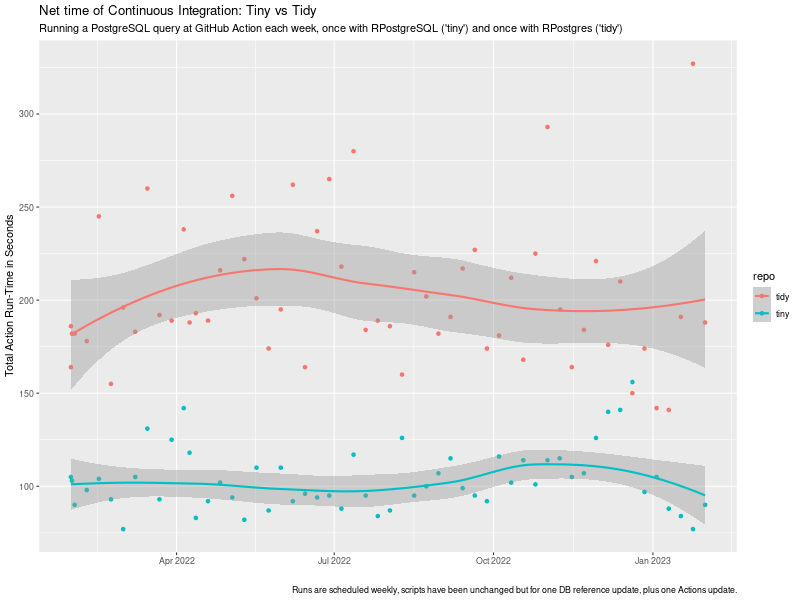 tiny vs tidy ci timing impact
chart
tiny vs tidy ci timing impact
chart
 I read somewhere a nice meme about Linux: Do you want an operating system or do you want an adventure? I love
it, because it is so true. What you are about to read is my adventure to set a usable screen resolution in a fresh
Debian testing installation.
The context is that I have two different Lenovo Thinkpad laptops with 16 screen and nvidia graphic cards. They are both
installed with the latest Debian testing. I use the closed-source nvidia drivers (they seem to work better than the nouveau
module). The desktop manager and environment that I use is lightdm + XFCE4. The monitor native resolution in both machines
is very high:
I read somewhere a nice meme about Linux: Do you want an operating system or do you want an adventure? I love
it, because it is so true. What you are about to read is my adventure to set a usable screen resolution in a fresh
Debian testing installation.
The context is that I have two different Lenovo Thinkpad laptops with 16 screen and nvidia graphic cards. They are both
installed with the latest Debian testing. I use the closed-source nvidia drivers (they seem to work better than the nouveau
module). The desktop manager and environment that I use is lightdm + XFCE4. The monitor native resolution in both machines
is very high: 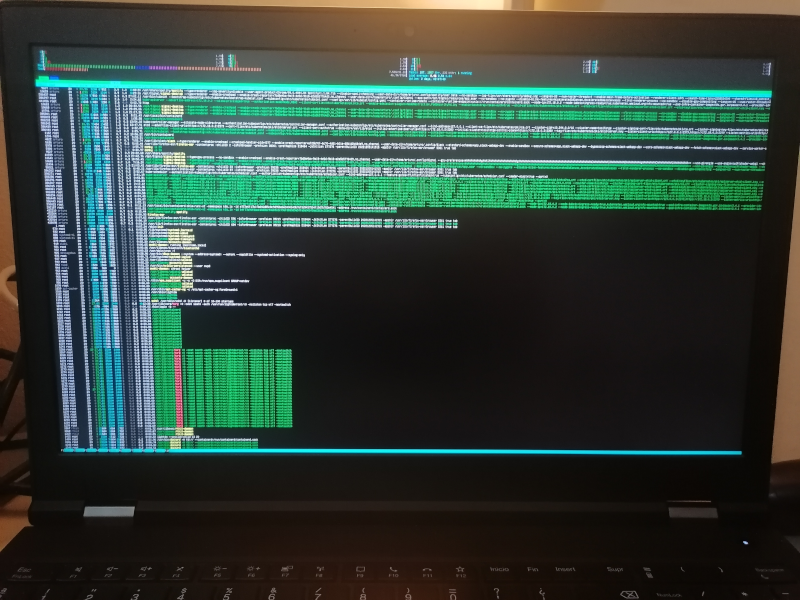 Everything in the system is affected by this:
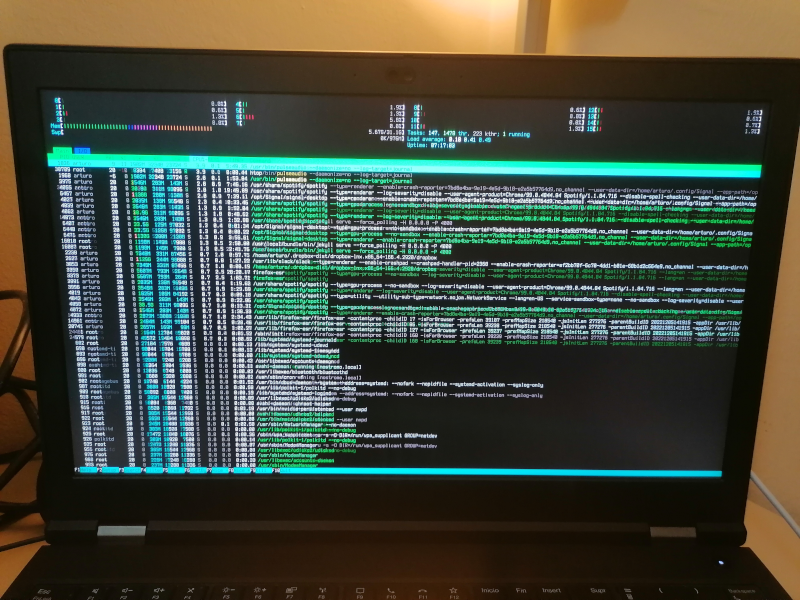 The truth is the solution is satisfying only to a degree. I m a person with good eyesight and can work with
these bit larger fonts. I m not sure if I can get larger fonts using this method, honestly.
After some search, I discovered that some folks already managed to describe the problem in detail and
filed a proper bug report in Debian, see
The truth is the solution is satisfying only to a degree. I m a person with good eyesight and can work with
these bit larger fonts. I m not sure if I can get larger fonts using this method, honestly.
After some search, I discovered that some folks already managed to describe the problem in detail and
filed a proper bug report in Debian, see