Search Results: "ean"

25 April 2021

Antoine Beaupr : Lost article ideas

I wrote for LWN for about two years. During that time, I wrote (what seems to me an impressive) 34 articles, but I always had a pile of ideas in the back of my mind. Those are ideas, notes, and scribbles lying around. Some were just completely abandoned because they didn't seem a good fit for LWN. Concretely, I stored those in branches in a git repository, and used the branch name (and, naively, the last commit log) as indicators of the topic. This was the state of affairs when I left:
remotes/private/attic/novena                    822ca2bb add letter i sent to novena, never published
remotes/private/attic/secureboot                de09d82b quick review, add note and graph
remotes/private/attic/wireguard                 5c5340d1 wireguard review, tutorial and comparison with alternatives
remotes/private/backlog/dat                     914c5edf Merge branch 'master' into backlog/dat
remotes/private/backlog/packet                  9b2c6d1a ham radio packet innovations and primer
remotes/private/backlog/performance-tweaks      dcf02676 config notes for http2
remotes/private/backlog/serverless              9fce6484 postponed until kubecon europe
remotes/private/fin/cost-of-hosting             00d8e499 cost-of-hosting article online
remotes/private/fin/kubecon                     f4fd7df2 remove published or spun off articles
remotes/private/fin/kubecon-overview            21fae984 publish kubecon overview article
remotes/private/fin/kubecon2018                 1edc5ec8 add series
remotes/private/fin/netconf                     3f4b7ece publish the netconf articles
remotes/private/fin/netdev                      6ee66559 publish articles from netdev 2.2
remotes/private/fin/pgp-offline                 f841deed pgp offline branch ready for publication
remotes/private/fin/primes                      c7e5b912 publish the ROCA paper
remotes/private/fin/runtimes                    4bee1d70 prepare publication of runtimes articles
remotes/private/fin/token-benchmarks            5a363992 regenerate timestamp automatically
remotes/private/ideas/astropy                   95d53152 astropy or python in astronomy
remotes/private/ideas/avaneya                   20a6d149 crowdfunded blade-runner-themed GPLv3 simcity-like simulator
remotes/private/ideas/backups-benchmarks        fe2f1f13 review of backup software through performance and features
remotes/private/ideas/cumin                     7bed3945 review of the cumin automation tool from WM foundation
remotes/private/ideas/future-of-distros         d086ca0d modern packaging problems and complex apps
remotes/private/ideas/on-dying                  a92ad23f another dying thing
remotes/private/ideas/openpgp-discovery         8f2782f0 openpgp discovery mechanisms (WKD, etc), thanks to jonas meurer
remotes/private/ideas/password-bench            451602c0 bruteforce estimates for various password patterns compared with RSA key sizes
remotes/private/ideas/prometheus-openmetrics    2568dbd6 openmetrics standardizing prom metrics enpoints
remotes/private/ideas/telling-time              f3c24a53 another way of telling time
remotes/private/ideas/wallabako                 4f44c5da talk about wallabako, read-it-later + kobo hacking
remotes/private/stalled/bench-bench-bench       8cef0504 benchmarking http benchmarking tools
remotes/private/stalled/debian-survey-democracy 909bdc98 free software surveys and debian democracy, volunteer vs paid work
Wow, what a mess! Let's see if I can make sense of this:

Attic Those are articles that I thought about, then finally rejected, either because it didn't seem worth it, or my editors rejected it, or I just moved on:
  • novena: the project is ooold now, didn't seem to fit a LWN article. it was basically "how can i build my novena now" and "you guys rock!" it seems like the MNT Reform is the brain child of the Novena now, and I dare say it's even cooler!
  • secureboot: my LWN editors were critical of my approach, and probably rightly so - it's a really complex subject and I was probably out of my depth... it's also out of date now, we did manage secureboot in Debian
  • wireguard: LWN ended up writing extensive coverage, and I was biased against Donenfeld because of conflicts in a previous project

Backlog Those were articles I was planning to write about next.
  • dat: I already had written Sharing and archiving data sets with Dat, but it seems I had more to say... mostly performance issues, beaker, no streaming, limited adoption... to be investigated, I guess?
  • packet: a primer on data communications over ham radio, and the cool new tech that has emerged in the free software world. those are mainly notes about Pat, Direwolf, APRS and so on... just never got around to making sense of it or really using the tech...
  • performance-tweaks: "optimizing websites at the age of http2", the unwritten story of the optimization of this website with HTTP/2 and friends
  • serverless: god. one of the leftover topics at Kubecon, my notes on this were thin, and the actual subject, possibly even thinner... the only lie worse than the cloud is that there's no server at all! concretely, that's a pile of notes about Kubecon which I wanted to sort through. Probably belongs in the attic now.

Fin Those are finished articles, they were published on my website and LWN, but the branches were kept because previous drafts had private notes that should not be published.

Ideas A lot of those branches were actually just an empty commit, with the commitlog being the "pitch", more or less. I'd send that list to my editors, sometimes with a few more links (basically the above), and they would nudge me one way or the other. Sometimes they would actively discourage me to write about something, and I would do it anyways, send them a draft, and they would patiently make me rewrite it until it was a decent article. This was especially hard with the terminal emulator series, which took forever to write and even got my editors upset when they realized I had never installed Fedora (I ended up installing it, and I was proven wrong!)

Stalled Oh, and then there's those: those are either "ideas" or "backlog" that got so far behind that I just moved them out of the way because I was tired of seeing them in my list.
  • stalled/bench-bench-bench benchmarking http benchmarking tools, a horrible mess of links, copy-paste from terminals, and ideas about benchmarking... some of this trickled out into this benchmarking guide at Tor, but not much more than the list of tools
  • stalled/debian-survey-democracy: "free software surveys and Debian democracy, volunteer vs paid work"... A long standing concern of mine is that all Debian work is supposed to be volunteer, and paying explicitly for work inside Debian has traditionally been frowned upon, even leading to serious drama and dissent (remember Dunc-Tank)? back when I was writing for LWN, I was also doing paid work for Debian LTS. I also learned that a lot (most?) Debian Developers were actually being paid by their job to work on Debian. So I was confused by this apparent contradiction, especially given how the LTS project has been mostly accepted, while Dunc-Tank was not... See also this talk at Debconf 16. I had hopes that this study would show the "hunch" people have offered (that most DDs are paid to work on Debian) but it seems to show the reverse (only 36% of DDs, and 18% of all respondents paid). So I am still confused and worried about the sustainability of Debian.

What do you think? So that's all I got. As people might have noticed here, I have much less time to write these days, but if there's any subject in there I should pick, what is the one that you would find most interesting? Oh! and I should mention that you can write to LWN! If you think people should know more about some Linux thing, you can get paid to write for it! Pitch it to the editors, they won't bite. The worst that can happen is that they say "yes" and there goes two years of your life learning to write. Because no, you don't know how to write, no one does. You need an editor to write. That's why this article looks like crap and has a smiley. :)

24 April 2021

Antoine Beaupr : A dead game clock

Time flies. Back in 2008, I wrote a game clock. Since then, what was first called "chess clock" was renamed to pychessclock and then Gameclock (2008). It shipped with Debian 6 squeeze (2011), 7 wheezy (4.0, 2013, with a new UI), 8 jessie (5.0, 2015, with a code cleanup, translation, go timers), 9 stretch (2017), and 10 buster (2019), phew! Eight years in Debian over 4 releases, not bad! But alas, Debian 11 bullseye (2021) won't ship with Gameclock because both Python 2 and GTK 2 were removed from Debian. I lack the time, interest, and energy to port this program. Even if I could find the time, everyone is on their phone nowadays. So finding the right toolkit would require some serious thinking about how to make a portable program that can run on Linux and Android. I care less about Mac, iOS, and Windows, but, interestingly, it feels it wouldn't be much harder to cover those as well if I hit both Linux and Android (which is already hard enough, paradoxically). (And before you ask, no, Java is not an option for me thanks. If I switch to anything else than Python, it would be Golang or Rust. And I did look at some toolkit options a few years ago, was excited by none.) So there you have it: that is how software dies, I guess. Alternatives include: PS: Monkeysign also suffered the same fate, for what that's worth. Alternatives include caff, GNOME Keysign, and pius. Note that this does not affect the larger Monkeysphere project, which will ship with Debian bullseye.

23 April 2021

Matthew Garrett: An accidental bootsplash

Back in 2005 we had Debconf in Helsinki. Earlier in the year I'd ended up invited to Canonical's Ubuntu Down Under event in Sydney, and one of the things we'd tried to design was a reasonable graphical boot environment that could also display status messages. The design constraints were awkward - we wanted it to be entirely in userland (so we didn't need to carry kernel patches), and we didn't want to rely on vesafb[1] (because at the time we needed to reinitialise graphics hardware from userland on suspend/resume[2], and vesa was not super compatible with that). Nothing currently met our requirements, but by the time we'd got to Helsinki there was a general understanding that Paul Sladen was going to implement this.

The Helsinki Debconf ended being an extremely strange event, involving me having to explain to Mark Shuttleworth what the physics of a bomb exploding on a bus were, many people being traumatised by the whole sauna situation, and the whole unfortunate water balloon incident, but it also involved Sladen spending a bunch of time trying to produce an SVG of a London bus as a D-Bus logo and not really writing our hypothetical userland bootsplash program, so on the last night, fueled by Koff that we'd bought by just collecting all the discarded empty bottles and returning them for the deposits, I started writing one.

I knew that Debian was already using graphics mode for installation despite having a textual installer, because they needed to deal with more complex fonts than VGA could manage. Digging into the code, I found that it used BOGL - a graphics library that made use of the VGA framebuffer to draw things. VGA had a pre-allocated memory range for the framebuffer[3], which meant the firmware probably wouldn't map anything else there any hitting those addresses probably wouldn't break anything. This seemed safe.

A few hours later, I had some code that could use BOGL to print status messages to the screen of a machine booted with vga16fb. I woke up some time later, somehow found myself in an airport, and while sitting at the departure gate[4] I spent a while staring at VGA documentation and worked out which magical calls I needed to make to have it behave roughly like a linear framebuffer. Shortly before I got on my flight back to the UK, I had something that could also draw a graphical picture.

Usplash shipped shortly afterwards. We hit various issues - vga16fb produced a 640x480 mode, and some laptops were not inclined to do that without a BIOS call first. 640x400 worked basically everywhere, but meant we had to redraw the art because circles don't work the same way if you change the resolution. My brief "UBUNTU BETA" artwork that was me literally writing "UBUNTU BETA" on an HP TC1100 shortly after I'd got the Wacom screen working did not go down well, and thankfully we had better artwork before release.

But 16 colours is somewhat limiting. SVGALib offered a way to get more colours and better resolution in userland, retaining our prerequisites. Unfortunately it relied on VM86, which doesn't exist in 64-bit mode on Intel systems. I ended up hacking the X.org x86emu into a thunk library that exposed the same API as LRMI, so we could run it without needing VM86. Shockingly, it worked - we had support for 256 colour bootsplashes in any supported resolution on 64 bit systems as well as 32 bit ones.

But by now it was obvious that the future was having the kernel manage graphics support, both in terms of native programming and in supporting suspend/resume. Plymouth is much more fully featured than Usplash ever was, but relies on functionality that simply didn't exist when we started this adventure. There's certainly an argument that we'd have been better off making reasonable kernel modesetting support happen faster, but at this point I had literally no idea how to write decent kernel code and everyone should be happy I kept this to userland.

Anyway. The moral of all of this is that sometimes history works out such that you write some software that a huge number of people run without any idea of who you are, and also that this can happen without you having any fucking idea what you're doing.

Write code. Do crimes.

[1] vesafb relied on either the bootloader or the early stage kernel performing a VBE call to set a mode, and then just drawing directly into that framebuffer. When we were doing GPU reinitialisation in userland we couldn't guarantee that we'd run before the kernel tried to draw stuff into that framebuffer, and there was a risk that that was mapped to something dangerous if the GPU hadn't been reprogrammed into the same state. It turns out that having GPU modesetting in the kernel is a Good Thing.

[2] ACPI didn't guarantee that the firmware would reinitialise the graphics hardware, and as a result most machines didn't. At this point Linux didn't have native support for initialising most graphics hardware, so we fell back to doing it from userland. VBEtool was a terrible hack I wrote to try to re-execute the system's graphics hardware through a range of mechanisms, and it worked in a surprising number of cases.

[3] As long as you were willing to deal with 640x480 in 16 colours

[4] Helsinki-Vantaan had astonishingly comfortable seating for time

comment count unavailable comments

22 April 2021

Russell Coker: HP ML350P Gen8

I m playing with a HP Proliant ML350P Gen8 server (part num 646676-011). For HP servers ML means tower (see the ProLiant Wikipedia page for more details [1]). For HP servers the generation indicates how old the server is, Gen8 was announced in 2012 and Gen10 seems to be the current generation. Debian Packages from HP
wget -O /usr/local/hpePublicKey2048_key1.pub https://downloads.linux.hpe.com/SDR/hpePublicKey2048_key1.pub
echo "# HP RAID" >> /etc/apt/sources.list
echo "deb [signed-by=/usr/local/hpePublicKey2048_key1.pub] http://downloads.linux.hpe.com/SDR/downloads/MCP/Debian/ buster/current non-free" >> /etc/apt/sources.list
The above commands will setup the APT repository for Debian/Buster. See the HP Downloads FAQ [2] for more information about their repositories. hponcfg This package contains the hponcfg program that configures ILO (the HP remote management system) from Linux. One noteworthy command is hponcfg -r to reset the ILO, something you should do before selling an old system. ssacli This package contains the ssacli program to configure storage arrays, here are some examples of how to use it:
# list controllers and show slot numbers
ssacli controller all show
# list arrays on controller identified by slot and give array IDs
ssacli controller slot=0 array all show
# show details of one array
ssacli controller slot=0 array A show
# show all disks on one controller
ssacli controller slot=0 physicaldrive all show
# show config of a controller, this gives RAID level etc
ssacli controller slot=0 show config
# delete array B (you can immediately pull the disks from it)
ssacli controller slot=0 array B delete
# create an array type RAID0 with specified drives, do this with one drive per array for BTRFS/ZFS
ssacli controller slot=0 create type=arrayr0 drives=1I:1:1
When a disk is used in JBOD mode just under 33MB will be used at the end of the disk for the RAID metadata. If you have existing disks with a DOS partition table you can put it in a HP array as a JBOD and it will work with all data intact (GPT partition table is more complicated). When all disks are removed from the server the cooling fans run at high speed, this would be annoying if you wanted to have a diskless workstation or server using only external storage. ssaducli This package contains the ssaducli diagnostic utility for storage arrays. The SSD wear gauge report doesn t work for the 2 SSDs I tested it on, maybe it only supports SAS SSDs not SATA SSDs. It doesn t seem to do anything that I need. storcli This package contains both 32bit and 64bit versions of the MegaRAID utility and deletes whichever one doesn t match the installation in the package postinst, so it fails debsums checks etc. The MegaRAID utility is for a different type of RAID controller to the Smart Storage Array (AKA SSA) that the other utilities work with. As an aside it seems that there are multiple types of MegaRAID controller, the management program from the storcli package doesn t work on a Dell server with MegaRAID. They should have made separate 32bit and 64bit versions of this package. Recommendations Here is HP page for downloading firmware updates (including security updates) [3], you have to login first and have a warranty. This is legal but poor service. Dell servers have comparable prices (on the second hand marker) and comparable features but give free firmware updates to everyone. Dell have overall lower quality of Debian packages for supporting utilities, but a wider range of support so generally Dell support seems better in every way. Dell and HP hardware seems of equal quality so overall I think it s best to buy Dell. Suggestions for HP Finding which of the signing keys to use is unreasonably difficult. You should get some HP employees to sign the HP keys used for repositories with their personal keys and then go to LUG meetings and get their personal keys well connected to the web of trust. Then upload the HP keys to the public key repositories. You should also use the same keys for signing all versions of the repositories. Having different keys for the different versions of Debian wastes people s time. Please provide firmware for all users, even if they buy systems second hand. It is in your best interests to have systems used long-term and have them run securely. It is not in your best interests to have older HP servers perform badly. Having all the fans run at maximum speed when power is turned on is a standard server feature. Some servers can throttle the fan when the BIOS is running, it would be nice if HP servers did that. Having ridiculously loud fans until just before GRUB starts is annoying.

19 April 2021

Ritesh Raj Sarraf: Catching Up Your Sources

I ve mostly had the preference of controlling my data rather than depend on someone else. That s one reason why I still believe email to be my most reliable medium for data storage, one that is not plagued/locked by a single entity. If I had the resources, I d prefer all digital data to be broken down to its simplest form for storage, like email format, and empower the user with it i.e. their data. Yes, there are free services that are indirectly forced upon common users, and many of us get attracted to it. Many of us do not think that the information, which is shared for the free service in return, is of much importance. Which may be fair, depending on the individual, given that they get certain services without paying any direct dime.
New age communication So first, we had email and usenet. As I mentioned above, email was designed with fine intentions. Intentions that make it stand even today, independently. But not everything, back then, was that great either. For example, instant messaging was very closed and centralised then too. Things like: ICQ, MSN, Yahoo Messenger; all were centralized. I wonder if people still have access to their ICQ logs. Not much has chagned in the current day either. We now have domination by: Facebook Messenger, Google Whatever the new marketing term they introdcue, WhatsApp, Telegram, Signal etc. To my knowledge, they are all centralized. Over all this time, I m yet to see a product come up with good (business) intentions, to really empower the end user. In this information age, the most invaluable data is user activity. That s one data everyone is after. If you decline to share that bit of free data in exchange for the free services, mind you, that that free service like Facebook, Google, Instagram, WhatsApp, Truecaller, Twitter; none of it would come to you at all. Try it out. So the reality is that while you may not be valuating the data you offer in exchange correctly, there s a lot that is reaped from it. But still, I think each user has (and should have) the freedom to opt in for these tech giants and give them their personal bit, for free services in return. That is a decent barter deal. And it is a choice that one if free to choose

Retaining my data I m fond of keeping an archive folder in my mailbox. A folder that holds significant events in the form of an email usually, if documented. Over the years, I chose to resort to the email format because I felt it was more reliable in the longer term than any other formats. The next best would be plain text. In my lifetime, I have learnt a lot from the internet; so it is natural that my preference has been with it. Mailing Lists, IRCs, HOWTOs, Guides, Blog posts; all have helped. And over the years, I ve come across hundreds of such content that I d always like to preserve. Now there are multiple ways to preserving data. Like, for example, big tech giants. In most usual cases, your data for your lifetime, should be fine with a tech giant. In some odd scenarios, you may be unlucky if you relied on a service provider that went bankrupt. But seriously, I think users should be fine if they host their data with Microsoft, Google etc; as long as they abide by their policies. There s also the catch of alignment. As the user, you should ensure to align (and transition) with the product offerings of your service provider. Otherwise, what may look constant and always reliable, will vanish in the blink of an eye. I guess Google Plus would be a good example. There was some Google Feed service too. Maybe Google Photos in the near decade future, just like Google Picasa in the previous (or current) decade.

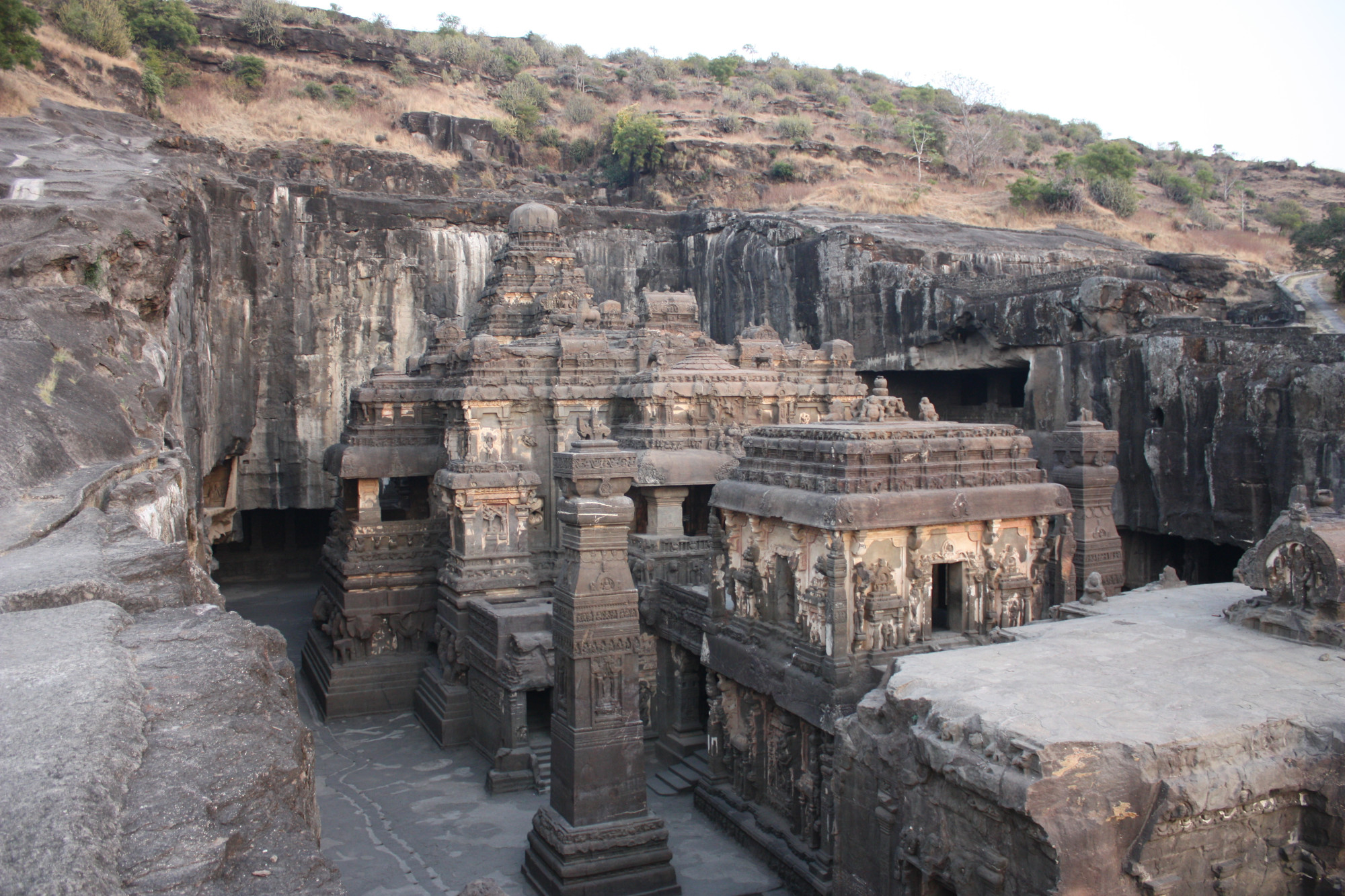
History what is On the topic of retaining information, lets take a small drift. I still admire our ancestors. I don t know what went in their mind when they were documenting events in the form of scriptures, carvings, temples, churches, mosques etc; but one things for sure, they were able to leave a fine means of communication. They are all gone but a large number of those events are evident through the creations that they left. Some of those events have been strong enough that further rulers/invaders have had tough times trying to wipe it out from history. Remember, history is usually not the truth, but the statement to be believed by the teller. And the teller is usually the survivor, or the winner you may call. But still, the information retention techniques were better. I haven t visited, but admire whosoever built the Kailasa Temple, Ellora, without which, we d be made to believe what not by all invaders and rulers of the region. But the majestic standing of the temple, is a fine example of the history and the events that have occured in the past.
Ellora Temple -  The majectic carving believed to be carved out of a single stone
Ellora Temple - The majectic carving believed to be carved out of a single stone
Dominance has the power to rewrite history and unfortunately that s true and it has done its part. It is just that in a mere human s defined lifetime, it is not possible to witness the transtion from current to history, and say that I was there then and I m here now, and this is not the reality. And if not dominance, there s always the other bit, hearsay. With it, you can always put anything up for dispute. Because there s no way one can go back in time and produce a fine evidence. There s also a part about religion. Religion can be highly sentimental. And religion can be a solid way to get an agenda going. For example, in India - a country which today consitutionally is a secular country, there have been multiple attempts to discard the belief, that never ever did the thing called Ramayana exist. That the Rama Setu, nicely reworded as Adam s Bridge by who so ever, is a mere result of science. Now Rama, or Hanumana, or Ravana, or Valmiki, aren t going to come over and prove that that is true or false. So such subjects serve as a solid base to get an agenda going. And probably we ve even succeeded in proving and believing that there was never an event like Ramayana or the Mahabharata. Nor was there ever any empire other than the Moghul or the British Empire. But yes, whosoever made the Ellora Temple or the many many more of such creations, did a fine job of making a dent for the future, to know of what the history possibly could also be.

Enough of the drift So, in my opinion, having events documented is important. It d be nice to have skills documented too so that it can be passed over generations but that s a debatable topic. But events, I believe should be documented. And documented in the best possible ways so that its existence is not diminished. A documentation in the form of certain carvings on a rock is far more better than links and posts shared on Facebook, Twitter, Reddit etc. For one, these are all corporate entities with vested interests and can pretext excuse in the name of compliance and conformance. So, for the helpless state and generation I am in, I felt email was the best possible independent form of data retention in today s age. If I really had the resources, I d not rely on digital age. This age has no guarantee of retaining and recording information in any reliable manner. Instead, it is just mostly junk, which is manipulative and changeable, conditionally.

Email and RSS So for my communication, I like to prefer emails over any other means. That doesn t mean I don t use the current trends. I do. But this blog is mostly about penning my desires. And desire be to have communication over email format. Such is the case that for information useful over the internet, I crave to have it formatted in email for archival. RSS feeds is my most common mode of keeping track of information I care about. Not all that I care for is available in RSS feeds but hey such is life. And adaptability is okay. But my preference is still RSS. So I use RSS feeds through a fine software called feed2imap. A software that fits my bill fairly well. feed2imap is:
  • An rss feed news aggregator
  • Pulls and extracts news feeds in the form of an email
  • Can push the converted email over pop/imap
  • Can convert all image content to email mime attachment
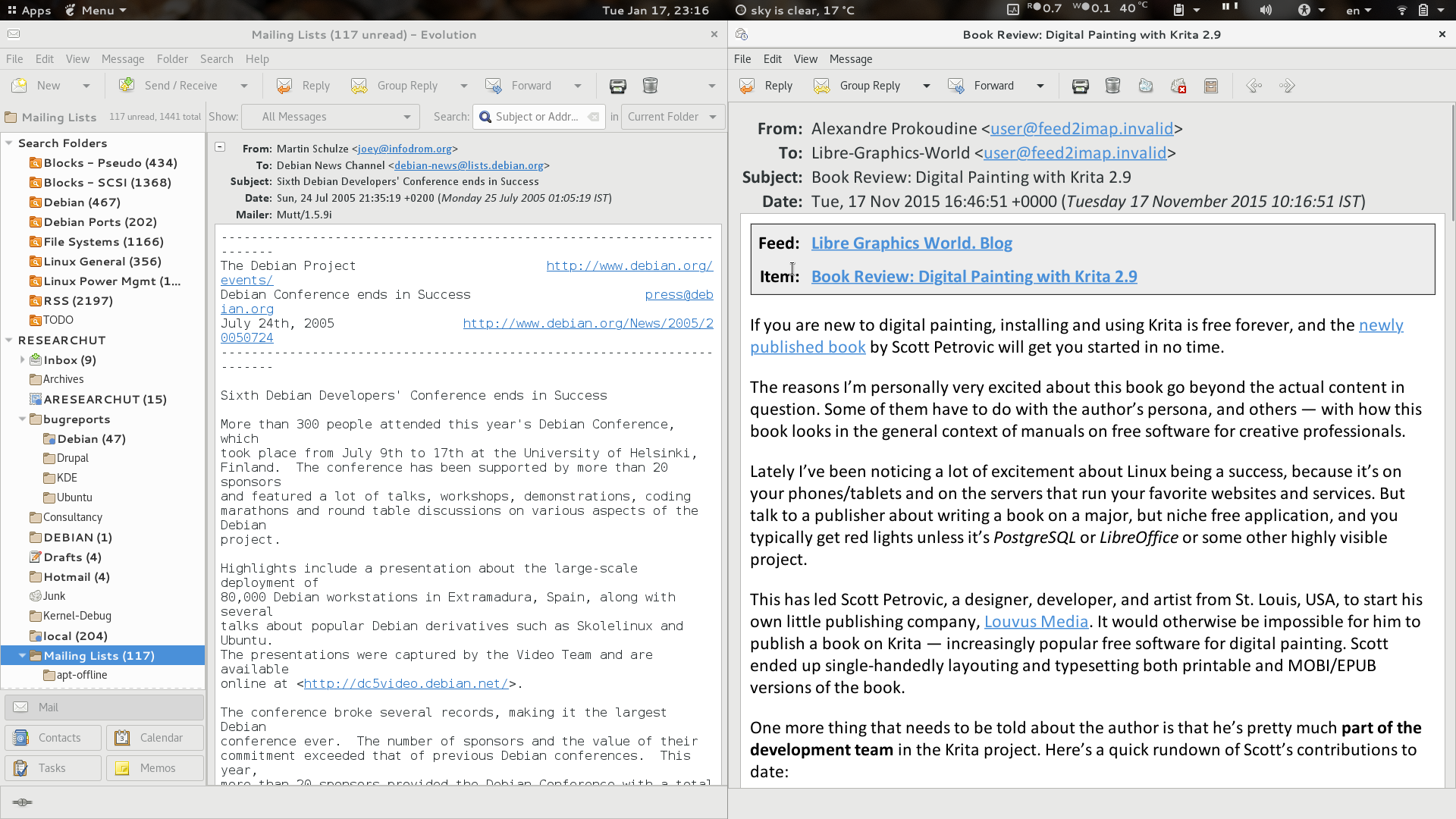
In a gist, it makes the online content available to me offline in the most admired email format In my mail box, in today s day, my preferred email client is Evolution. It does a good job of dealing with such emails (rss feed items). An image example of accessing the rrs feed item through it is below
RSS News Item through Evolution
The good part is that my actual data is always independent of such MUAs. Tomorrow, as technology - trends - economics evolve, something new would come as a replacement but my data would still be mine.

Ian Jackson: Otter - a game server for arbitrary board games

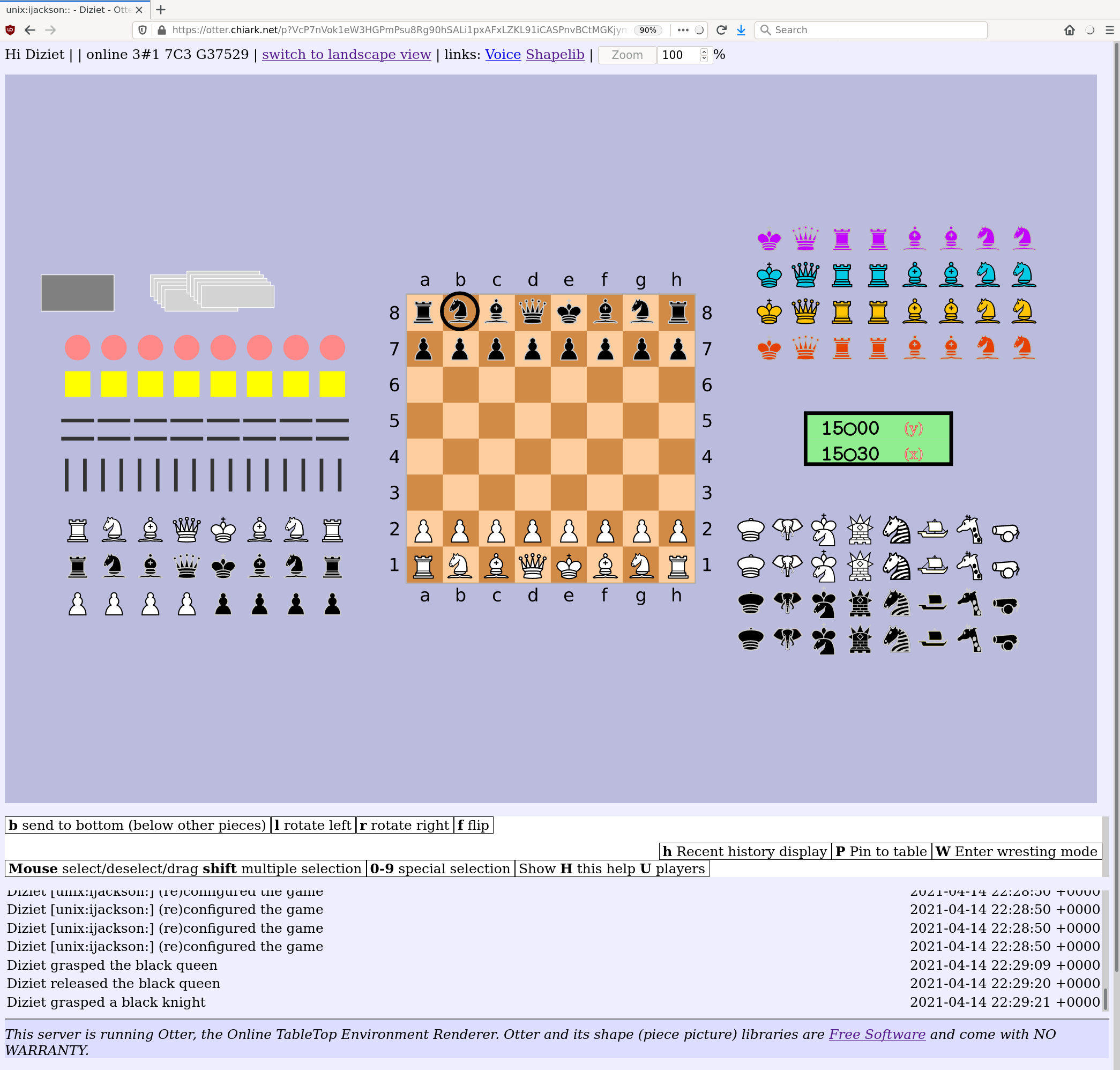
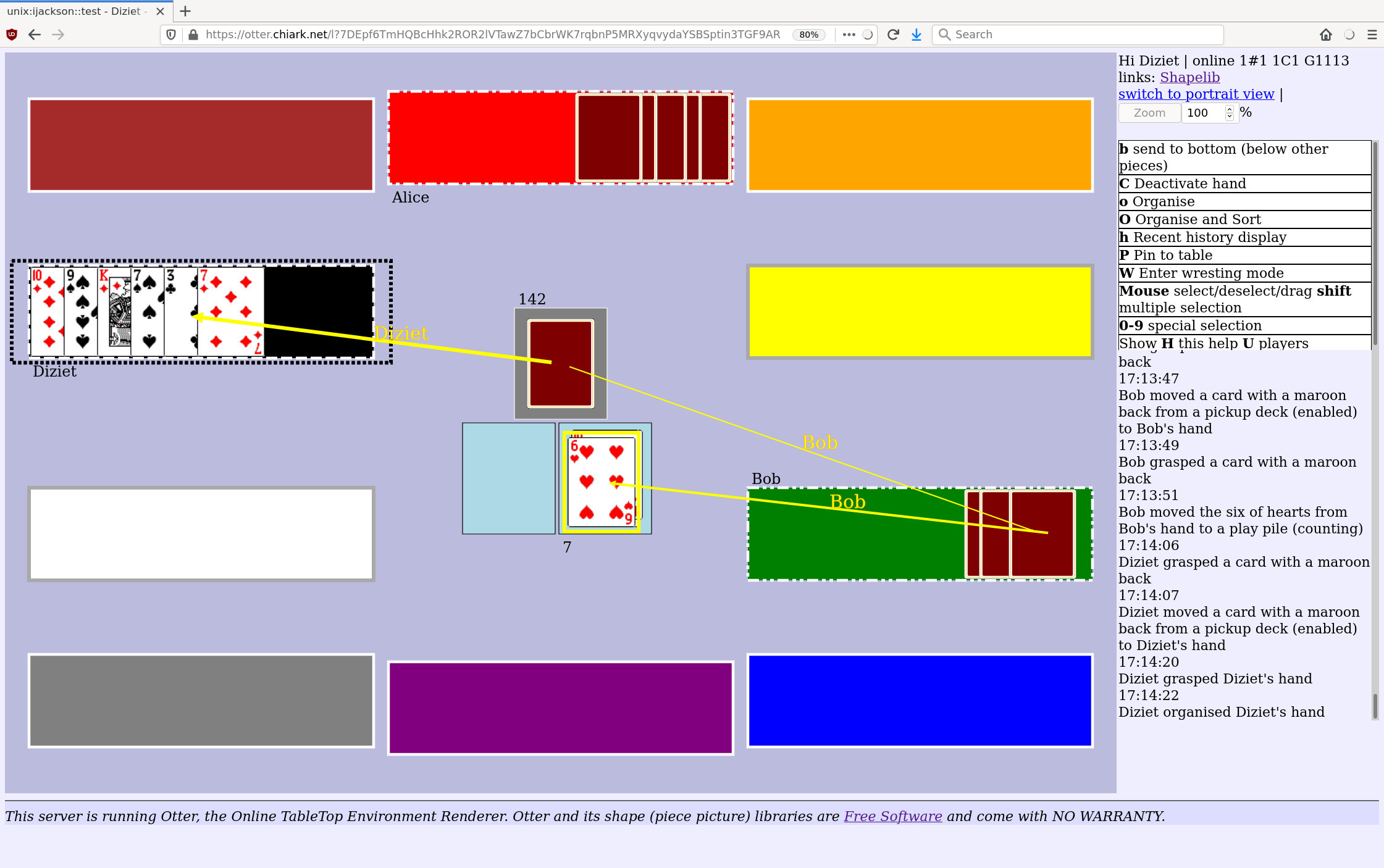
One of the things that I found most vexing about lockdown was that I was unable to play some of my favourite board games. There are online systems for many games, but not all. And online systems cannot support games like Mao where the players make up the rules as we go along. I had an idea for how to solve this problem, and set about implementing it. The result is Otter (the Online Table Top Environment Renderer). We have played a number of fun games of Penultima with it, and have recently branched out into Mao. The Otter is now ready to be released! More about Otter (cribbed shamelessly from the README) Otter, the Online Table Top Environment Renderer, is an online game system. But it is not like most online game systems. It does not know (nor does it need to know) the rules of the game you are playing. Instead, it lets you and your friends play with common tabletop/boardgame elements such as hands of cards, boards, and so on. So it s something like a tabletop simulator (but it does not have any 3D, or a physics engine, or anything like that). This means that with Otter: Installation and usage Otter is fully functional, but the installation and account management arrangements are rather unsophisticated and un-webby. And there is not currently any publicly available instance you can use to try it out. Users on chiark will find an instance there. Other people who who are interested in hosting games (of Penultima or Mao, or other games we might support) will have to find a Unix host or VM to install Otter on, and will probably want help from a Unix sysadmin. Otter is distributed via git, and is available on Salsa, Debian's gitlab instance. There is documentation online. Future plans I have a number of ideas for improvement, which go off in many different directions. Quite high up on my priority list is making it possible for players to upload and share game materials (cards, boards, pieces, and so on), rather than just using the ones which are bundled with Otter itself (or dumping files ad-hoc on the server). This will make it much easier to play new games. One big reason I wrote Otter is that I wanted to liberate boardgame players from the need to implemet their game rules as computer code. The game management and account management is currently done with a command line tool. It would be lovely to improve that, but making a fully-featured management web ui would be a lot of work. Screenshots! (Click for the full size images.)

comment count unavailable comments

18 April 2021

Russell Coker: IMA/EVM Certificates

I ve been experimenting with IMA/EVM. Here is the Sourceforge page for the upstream project [1]. The aim of that project is to check hashes and maybe public key signatures on files before performing read/exec type operations on them. It can be used as the next logical step from booting a signed kernel with TPM. I am a long way from getting that sort of thing going, just getting the kernel to boot and load keys is my current challenge and isn t helped due to the lack of documentation on error messages. This blog post started as a way of documenting the error messages so future people who google errors can get a useful result. I am not trying to document everything, just help people get through some of the first problems. I am using Debian for my work, but some of this will apply to other distributions (particularly the kernel error messages). The Debian distribution has the ima-evm-utils but no other support for IMA/EVM. To get this going in Debian you need to compile your own kernel with IMA support and then boot it with kernel command-line options to enable IMA, in recent kernels that includes lsm=integrity as a mandatory requirement to prevent a kernel Oops after mounting the initrd (there is already a patch to fix this). If you want to just use IMA (not get involved in development) then a good option would be to use RHEL (here is their documentation) [2] or SUSE (here is their documentation) [3]. Note that both RHEL and SUSE use older kernels so their documentation WILL lead you astray if you try and use the latest kernel.org kernel. The Debian initrd I created a script named /etc/initramfs-tools/hooks/keys with the following contents to copy the key(s) from /etc/keys to the initrd where the kernel will load it/them. The kernel configuration determines whether x509_evm.der or x509_ima.der (or maybe both) is loaded. I haven t yet worked out which key is needed when.
#!/bin/bash
mkdir -p $ DESTDIR /etc/keys
cp /etc/keys/* $ DESTDIR /etc/keys
Making the Keys
#!/bin/sh
GENKEY=ima.genkey
cat << __EOF__ >$GENKEY
[ req ]
default_bits = 1024
distinguished_name = req_distinguished_name
prompt = no
string_mask = utf8only
x509_extensions = v3_usr
[ req_distinguished_name ]
O =  hostname 
CN =  whoami  signing key
emailAddress =  whoami @ hostname 
[ v3_usr ]
basicConstraints=critical,CA:FALSE
#basicConstraints=CA:FALSE
keyUsage=digitalSignature
#keyUsage = nonRepudiation, digitalSignature, keyEncipherment
subjectKeyIdentifier=hash
authorityKeyIdentifier=keyid
#authorityKeyIdentifier=keyid,issuer
__EOF__
openssl req -new -nodes -utf8 -sha1 -days 365 -batch -config $GENKEY \
                -out csr_ima.pem -keyout privkey_ima.pem
openssl x509 -req -in csr_ima.pem -days 365 -extfile $GENKEY -extensions v3_usr \
                -CA ~/kern/linux-5.11.14/certs/signing_key.pem -CAkey ~/kern/linux-5.11.14/certs/signing_key.pem -CAcreateserial \
                -outform DER -out x509_evm.der
To get the below result I used the above script to generate a key, it is the /usr/share/doc/ima-evm-utils/examples/ima-genkey.sh script from the ima-evm-utils package but changed to use the key generated from kernel compilation to sign it. You can copy the files in the certs directory from one kernel build tree to another to have the same certificate and use the same initrd configuration. After generating the key I copied x509_evm.der to /etc/keys on the target host and built the initrd before rebooting.
[    1.050321] integrity: Loading X.509 certificate: /etc/keys/x509_evm.der
[    1.092560] integrity: Loaded X.509 cert 'xev: etbe signing key: 99d4fa9051e2c178017180df5fcc6e5dbd8bb606'
Errors Here are some of the kernel error messages I received along with my best interpretation of what they mean. [ 1.062031] integrity: Loading X.509 certificate: /etc/keys/x509_ima.der
[ 1.063689] integrity: Problem loading X.509 certificate -74 Error -74 means -EBADMSG, which means there s something wrong with the certificate file. I have got that from /etc/keys/x509_ima.der not being in der format and I have got it from a der file that contained a key pair that wasn t signed.
[    1.049170] integrity: Loading X.509 certificate: /etc/keys/x509_ima.der
[    1.093092] integrity: Problem loading X.509 certificate -126
Error -126 means -ENOKEY, so the key wasn t in the file or the key wasn t signed by the kernel signing key.
[    1.074759] integrity: Unable to open file: /etc/keys/x509_evm.der (-2)
Error -2 means -ENOENT, so the file wasn t found on the initrd. Note that it does NOT look at the root filesystem. References

17 April 2021

Chris Lamb: Tour d'Orwell: Wallington

Previously in George Orwell travel posts: Sutton Courtenay, Marrakesh, Hampstead, Paris, Southwold & The River Orwell. Wallington is a small village in Hertfordshire, approximately fifty miles north of London and twenty-five miles from the outskirts of Cambridge. George Orwell lived at No. 2 Kits Lane, better known as 'The Stores', on a mostly-permanent basis from 1936 to 1940, but he would continue to journey up from London on occasional weekends until 1947. His first reference to The Stores can be found in early 1936, where Orwell wrote from Lancashire during research for The Road to Wigan Pier to lament that he would very much like "to do some work again impossible, of course, in the [current] surroundings":
I am arranging to take a cottage at Wallington near Baldock in Herts, rather a pig in a poke because I have never seen it, but I am trusting the friends who have chosen it for me, and it is very cheap, only 7s. 6d. a week [ 20 in 2021].
For those not steeped in English colloquialisms, "a pig in a poke" is an item bought without seeing it in advance. In fact, one general insight that may be drawn from reading Orwell's extant correspondence is just how much he relied on a close network of friends, belying the lazy and hagiographical picture of an independent and solitary figure. (Still, even Orwell cultivated this image at times, such as in a patently autobiographical essay he wrote in 1946. But note the off-hand reference to varicose veins here, for they would shortly re-appear as a symbol of Winston's repressed humanity in Nineteen Eighty-Four.) Nevertheless, the porcine reference in Orwell's idiom is particularly apt, given that he wrote the bulk of Animal Farm at The Stores his 1945 novella, of course, portraying a revolution betrayed by allegorical pigs. Orwell even drew inspiration for his 'fairy story' from Wallington itself, principally by naming the novel's farm 'Manor Farm', just as it is in the village. But the allusion to the purchase of goods is just as appropriate, as Orwell returned The Stores to its former status as the village shop, even going so far as to drill peepholes in a door to keep an Orwellian eye on the jars of sweets. (Unfortunately, we cannot complete a tidy circle of references, as whilst it is certainly Napoleon Animal Farm's substitute for Stalin who is quoted as describing Britain as "a nation of shopkeepers", it was actually the maraisard Bertrand Bar re who first used the phrase). "It isn't what you might call luxurious", he wrote in typical British understatement, but Orwell did warmly emote on his animals. He kept hens in Wallington (perhaps even inspiring the opening line of Animal Farm: "Mr Jones, of the Manor Farm, had locked the hen-houses for the night, but was too drunk to remember to shut the pop-holes.") and a photograph even survives of Orwell feeding his pet goat, Muriel. Orwell's goat was the eponymous inspiration for the white goat in Animal Farm, a decidedly under-analysed character who, to me, serves to represent an intelligentsia that is highly perceptive of the declining political climate but, seemingly content with merely observing it, does not offer any meaningful opposition. Muriel's aesthetic of resistance, particularly in her reporting on the changes made to the Seven Commandments of the farm, thus rehearses the well-meaning (yet functionally ineffective) affinity for 'fact checking' which proliferates today. But I digress. There is a tendency to "read Orwell backwards", so I must point out that Orwell wrote several other works whilst at The Stores as well. This includes his Homage to Catalonia, his aforementioned The Road to Wigan Pier, not to mention countless indispensable reviews and essays as well. Indeed, another result of focusing exclusively on Orwell's last works is that we only encounter his ideas in their highly-refined forms, whilst in reality, it often took many years for concepts to fully mature we first see, for instance, the now-infamous idea of "2 + 2 = 5" in an essay written in 1939. This is important to understand for two reasons. Although the ostentatiously austere Barnhill might have housed the physical labour of its writing, it is refreshing to reflect that the philosophical heavy-lifting of Nineteen Eighty-Four may have been performed in a relatively undistinguished North Hertfordshire village. But perhaps more importantly, it emphasises that Orwell was just a man, and that any of us is fully capable of equally significant insight, with to quote Christopher Hitchens "little except a battered typewriter and a certain resilience."
The red commemorative plaque not only limits Orwell's tenure to the time he was permanently in the village, it omits all reference to his first wife, Eileen O'Shaughnessy, whom he married in the village church in 1936.
Wallington's Manor Farm, the inspiration for the farm in Animal Farm. The lower sign enjoins the public to inform the police "if you see anyone on the [church] roof acting suspiciously". Non-UK-residents may be surprised to learn about the systematic theft of lead.

Steve Kemp: Having fun with CP/M on a Z80 single-board computer.

In the past, I've talked about building a Z80-based computer. I made some progress towards that goal, in the sense that I took the initial (trivial steps) towards making something: But then I stalled, repeatedly, at designing an interface to RAM and ROM, so that it could actually do something useful. Over the lockdown I've been in two minds about getting sucked back down the rabbit-hole, so I compromised. I did a bit of searching on tindie, and similar places, and figured I'd buy a Z80-based single board computer. My requirements were minimal: With those goals there were a bunch of boards to choose from, rc2014 is the standard choice - a well engineered system which uses a common backplane and lets you build mini-boards to add functionality. So first you build the CPU-card, then the RAM card, then the flash-disk card, etc. Over-engineered in one sense, extensible in another. (There are some single-board variants to cut down on soldering overhead, at a cost of less flexibility.) After a while I came across https://8bitstack.co.uk/, which describes a simple board called the the Z80 playground. The advantage of this design is that it loads code from a USB stick, making it easy to transfer files to/from it, without the need for a compact flash card, or similar. The downside is that the system has only 64K RAM, meaning it cannot run CP/M 3, only 2.2. (CP/M 3.x requires more RAM, and a banking/paging system setup to swap between pages.) When the system boots it loads code from an EEPROM, which then fetches the CP/M files from the USB-stick, copies them into RAM and executes them. The memory map can be split so you either have ROM & RAM, or you have just RAM (after the boot the ROM will be switched off). To change the initial stuff you need to reprogram the EEPROM, after that it's just a matter of adding binaries to the stick or transferring them over the serial port. In only a couple of hours I got the basic stuff working as well as I needed: I had some fun with a CP/M emulator to get my hand back in things before the board arrived, and using that I tested my first "real" assembly language program (cls to clear the screen), as well as got the hang of using the wordstar keyboard shortcuts as used within the turbo pascal environment. I have some plans for development: Nothing major, but fun changes that won't be too difficult to implement. Since CP/M 2.x has no concept of sub-directories you end up using drives for everything, I implemented a "search-path" so that when you type "FOO" it will attempt to run "A:FOO.COM" if there is no file matching on the current-drive. That's a nicer user-experience at all. I also wrote some Z80-assembly code to search all drives for an executable, if not found in current drive and not already qualified. Remember CP/M doesn't have a concept of sub-directories) that's actually pretty useful:
  B>LOCATE H*.COM
  P:HELLO   COM
  P:HELLO2  COM
  G:HITCH   COM
  E:HYPHEN  COM
I've also written some other trivial assembly language tools, which was surprisingly relaxing. Especially once I got back into the zen mode of optimizing for size. I forked the upstream repository, mostly to tidy up the contents, rather than because I want to go into my own direction. I'll keep the contents in sync, because there's no point splitting a community even further - I guess there are fewer than 100 of these boards in the wild, probably far far fewer!

15 April 2021

Martin Michlmayr: ledger2beancount 2.6 released

I released version 2.6 of ledger2beancount, a ledger to beancount converter. Here are the changes in 2.6: Thanks to Alexander Baier, Daniele Nicolodi, and GitHub users bratekarate, faaafo and mefromthepast for various bug reports and other input. Thanks to Dennis Lee for adding a Dockerfile and to Vinod Kurup for fixing a bug. Thanks to Stefano Zacchiroli for testing. You can get ledger2beancount from GitHub.

13 April 2021

Shirish Agarwal: what to write

First up, I am alive and well. I have been receiving calls from friends for quite sometime but now that I have become deaf, it is a pain and the hearing aids aren t all that useful. But moreover, where we have been finding ourselves each and every day sinking lower and lower feels absurd as to what to write and not write about India. Thankfully, I ran across this piece which does tell in far more detail than I ever could. The only interesting and somewhat positive news I had is from south of India otherwise sad days, especially for the poor. The saddest story is that this time Covid has reached alarming proportions in India and surprise, surprise this time the villain for many is my state of Maharashtra even though it hasn t received its share of GST proceeds for last two years and this was Kerala s perspective, different state, different party, different political ideology altogether.
Kerala Finance Minister Thomas Issac views on GST, October 22, 2020 Indian Express.
I briefly also share the death of somewhat liberal Film censorship in India unlike Italy which abolished film censorship altogether. I don t really want spend too much on how we have become No. 2 in Covid cases in the world and perhaps death also. Many people still believe in herd immunity but don t really know what it means. So without taking too much time and effort, bid adieu. May post when I m hopefully emotionally feeling better, stronger

12 April 2021

Russell Coker: Yama

I ve just setup the Yama LSM module on some of my Linux systems. Yama controls ptrace which is the debugging and tracing API for Unix systems. The aim is to prevent a compromised process from using ptrace to compromise other processes and cause more damage. In most cases a process which can ptrace another process which usually means having capability SYS_PTRACE (IE being root) or having the same UID as the target process can interfere with that process in other ways such as modifying it s configuration and data files. But even so I think it has the potential for making things more difficult for attackers without making the system more difficult to use. If you put kernel.yama.ptrace_scope = 1 in sysctl.conf (or write 1 to /proc/sys/kernel/yama/ptrace_scope) then a user process can only trace it s child processes. This means that strace -p and gdb -p will fail when run as non-root but apart from that everything else will work. Generally strace -p (tracing the system calls of another process) is of most use to the sysadmin who can do it as root. The command gdb -p and variants of it are commonly used by developers so yama wouldn t be a good thing on a system that is primarily used for software development. Another option is kernel.yama.ptrace_scope = 3 which means no-one can trace and it can t be disabled without a reboot. This could be a good option for production servers that have no need for software development. It wouldn t work well for a small server where the sysadmin needs to debug everything, but when dozens or hundreds of servers have their configuration rolled out via a provisioning tool this would be a good setting to include. See Documentation/admin-guide/LSM/Yama.rst in the kernel source for the details. When running with capability SYS_PTRACE (IE root shell) you can ptrace anything else and if necessary disable Yama by writing 0 to /proc/sys/kernel/yama/ptrace_scope . I am enabling mode 1 on all my systems because I think it will make things harder for attackers while not making things more difficult for me. Also note that SE Linux restricts SYS_PTRACE and also restricts cross-domain ptrace access, so the combination with Yama makes things extra difficult for an attacker. Yama is enabled in the Debian kernels by default so it s very easy to setup for Debian users, just edit /etc/sysctl.d/whatever.conf and it will be enabled on boot.

11 April 2021

Vishal Gupta: Sikkim 101 for Backpackers

Host to Kanchenjunga, the world s third-highest mountain peak and the endangered Red Panda, Sikkim is a state in northeastern India. Nestled between Nepal, Tibet (China), Bhutan and West Bengal (India), the state offers a smorgasbord of cultures and cuisines. That said, it s hardly surprising that the old spice route meanders through western Sikkim, connecting Lhasa with the ports of Bengal. Although the latter could also be attributed to cardamom (kali elaichi), a perennial herb native to Sikkim, which the state is the second-largest producer of, globally. Lastly, having been to and lived in India, all my life, I can confidently say Sikkim is one of the cleanest & safest regions in India, making it ideal for first-time backpackers.

Brief History
  • 17th century: The Kingdom of Sikkim is founded by the Namgyal dynasty and ruled by Buddhist priest-kings known as the Chogyal.
  • 1890: Sikkim becomes a princely state of British India.
  • 1947: Sikkim continues its protectorate status with the Union of India, post-Indian-independence.
  • 1973: Anti-royalist riots take place in front of the Chogyal's palace, by Nepalis seeking greater representation.
  • 1975: Referendum leads to the deposition of the monarchy and Sikkim joins India as its 22nd state.
Languages
  • Official: English, Nepali, Sikkimese/Bhotia and Lepcha
  • Though Hindi and Nepali share the same script (Devanagari), they are not mutually intelligible. Yet, most people in Sikkim can understand and speak Hindi.
Ethnicity
  • Nepalis: Migrated in large numbers (from Nepal) and soon became the dominant community
  • Bhutias: People of Tibetan origin. Major inhabitants in Northern Sikkim.
  • Lepchas: Original inhabitants of Sikkim

Food
  • Tibetan/Nepali dishes (mostly consumed during winter)
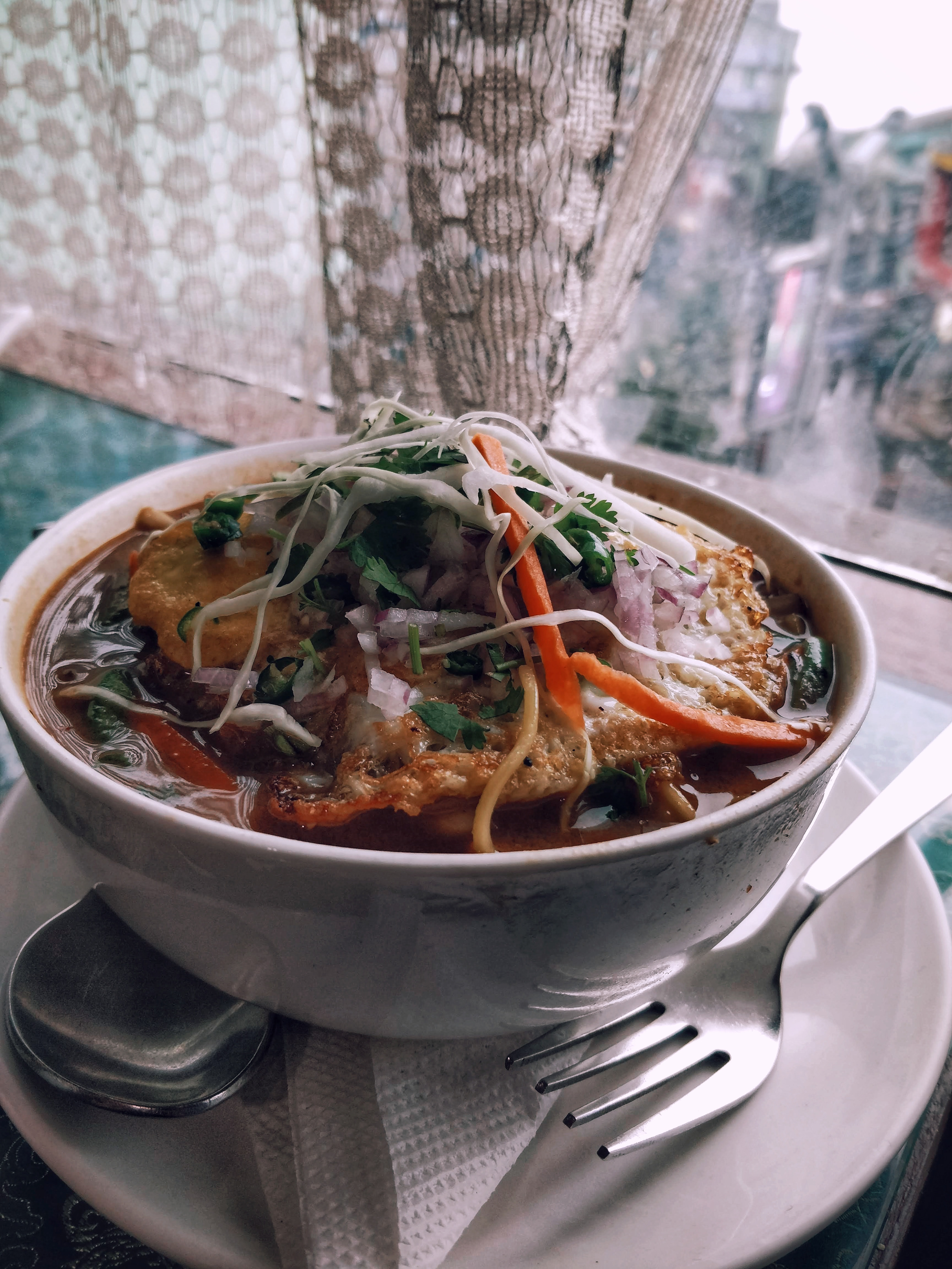
    • Thukpa: Noodle soup, rich in spices and vegetables. Usually contains some form of meat. Common variations: Thenthuk and Gyathuk
    • Momos: Steamed or fried dumplings, usually with a meat filling.
    • Saadheko: Spicy marinated chicken salad.
    • Gundruk Soup: A soup made from Gundruk, a fermented leafy green vegetable.
    • Sinki : A fermented radish tap-root product, traditionally consumed as a base for soup and as a pickle. Eerily similar to Kimchi.
  • While pork and beef are pretty common, finding vegetarian dishes is equally easy.
  • Staple: Dal-Bhat with Subzi. Rice is a lot more common than wheat (rice) possibly due to greater carb content and proximity to West Bengal, India s largest producer of Rice.
  • Good places to eat in Gangtok
    • Hamro Bhansa Ghar, Nimtho (Nepali)
    • Taste of Tibet
    • Dragon Wok (Chinese & Japanese)

Buddhism in Sikkim
  • Bayul Demojong (Sikkim), is the most sacred Land in the Himalayas as per the belief of the Northern Buddhists and various religious texts.
  • Sikkim was blessed by Guru Padmasambhava, the great Buddhist saint who visited Sikkim in the 8th century and consecrated the land.
  • However, Buddhism is said to have reached Sikkim only in the 17th century with the arrival of three Tibetan monks viz. Rigdzin Goedki Demthruchen, Mon Kathok Sonam Gyaltshen & Rigdzin Legden Je at Yuksom. Together, they established a Buddhist monastery.
  • In 1642 they crowned Phuntsog Namgyal as the first monarch of Sikkim and gave him the title of Chogyal, or Dharma Raja.
  • The faith became popular through its royal patronage and soon many villages had their own monastery.
  • Today Sikkim has over 200 monasteries.

Major monasteries
  • Rumtek Monastery, 20Km from Gangtok
  • Lingdum/Ranka Monastery, 17Km from Gangtok
  • Phodong Monastery, 28Km from Gangtok
  • Ralang Monastery, 10Km from Ravangla
  • Tsuklakhang Monastery, Royal Palace, Gangtok
  • Enchey Monastery, Gangtok
  • Tashiding Monastery, 35Km from Ravangla


Reaching Sikkim
  • Gangtok, being the capital, is easiest to reach amongst other regions, by public transport and shared cabs.
  • By Air:
    • Pakyong (PYG) :
      • Nearest airport from Gangtok (about 1 hour away)
      • Tabletop airport
      • Reserved cabs cost around INR 1200.
      • As of Apr 2021, the only flights to PYG are from IGI (Delhi) and CCU (Kolkata).
    • Bagdogra (IXB) :
      • About 20 minutes from Siliguri and 4 hours from Gangtok.
      • Larger airport with flights to most major Indian cities.
      • Reserved cabs cost about INR 3000. Shared cabs cost about INR 350.
  • By Train:
    • New Jalpaiguri (NJP) :
      • About 20 minutes from Siliguri and 4 hours from Gangtok.
      • Reserved cabs cost about INR 3000. Shared cabs from INR 350.
  • By Road:
    • NH10 connects Siliguri to Gangtok
    • If you can t find buses plying to Gangtok directly, reach Siliguri and then take a cab to Gangtok.
  • Sikkim Nationalised Transport Div. also runs hourly buses between Siliguri and Gangtok and daily buses on other common routes. They re cheaper than shared cabs.
  • Wizzride also operates shared cabs between Siliguri/Bagdogra/NJP, Gangtok and Darjeeling. They cost about the same as shared cabs but pack in half as many people in luxury cars (Innova, Xylo, etc.) and are hence more comfortable.

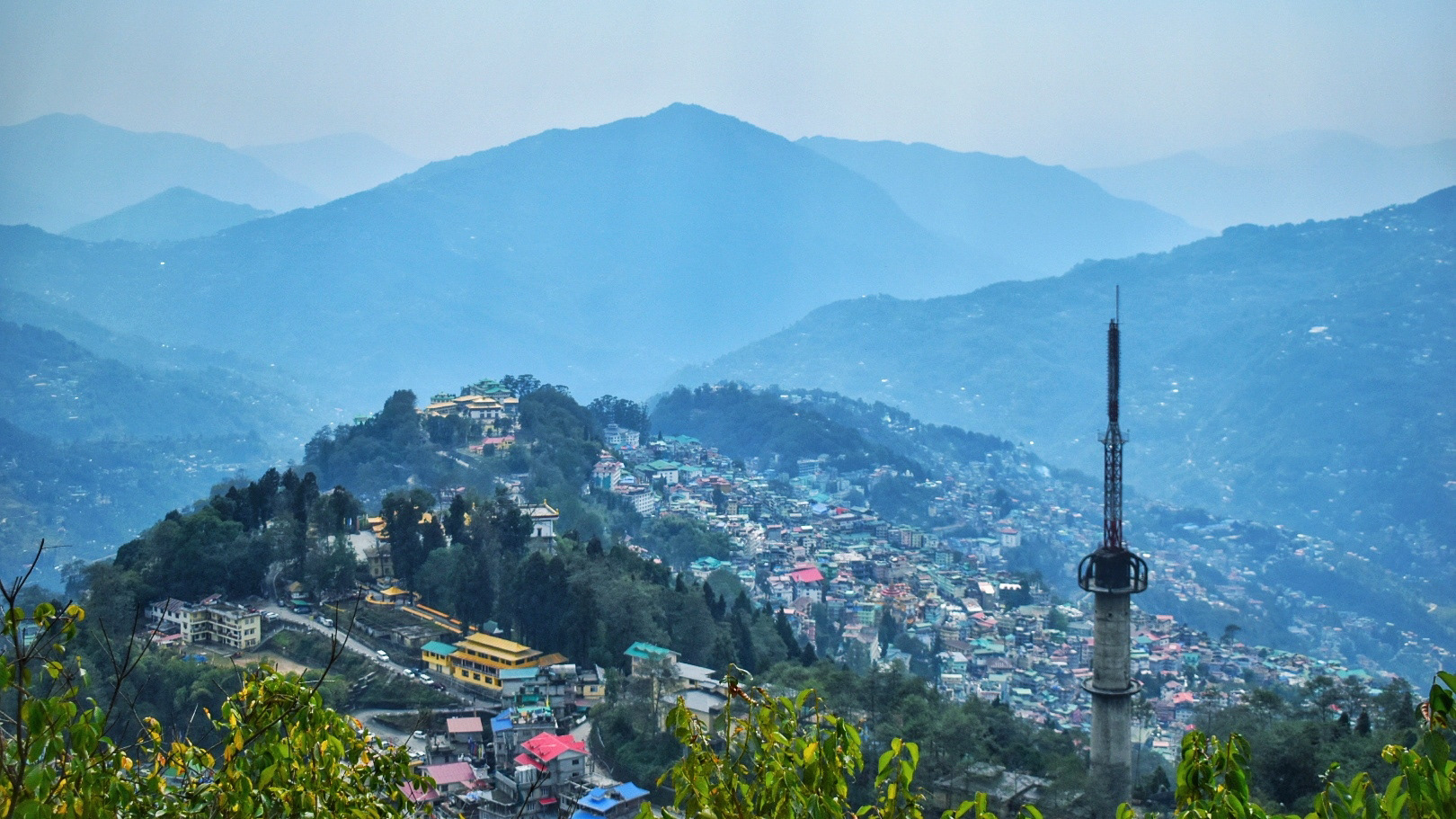
Gangtok
  • Time needed: 1D/1N
  • Places to visit:
    • Hanuman Tok
    • Ganesh Tok
    • Tashi View Point [6,800ft]
    • MG Marg
    • Sikkim Zoo
    • Gangtok Ropeway
    • Enchey Monastery
    • Tsuklakhang Palace & Monastery
  • Hostels: Tagalong Backpackers (would strongly recommend), Zostel Gangtok
  • Places to chill: Travel Cafe, Caf Live & Loud and Gangtok Groove
  • Places to shop: Lal Market and MG Marg

Getting Around
  • Taxis operate on a reserved or shared basis. In case of the latter, you can pool with other commuters your taxis will pick up and drop en-route.
  • Naturally shared taxis only operate on popular routes. The easiest way to get around Gangtok is to catch a shared cab from MG Marg.
  • Reserved taxis for Gangtok sightseeing cost around INR 1000-1500, depending upon the spots you d like to see
  • Key taxi/bus stands :
    • Deorali stand: For Darjeeling, Siliguri, Kalimpong
    • Vajra stand: For North & East Sikkim (Tsomgo Lake & Nathula)
    • Rumtek taxi: For Ravangla, Pelling, Namchi, Geyzing, Jorethang and Singtam.
Exploring Gangtok on an MTB

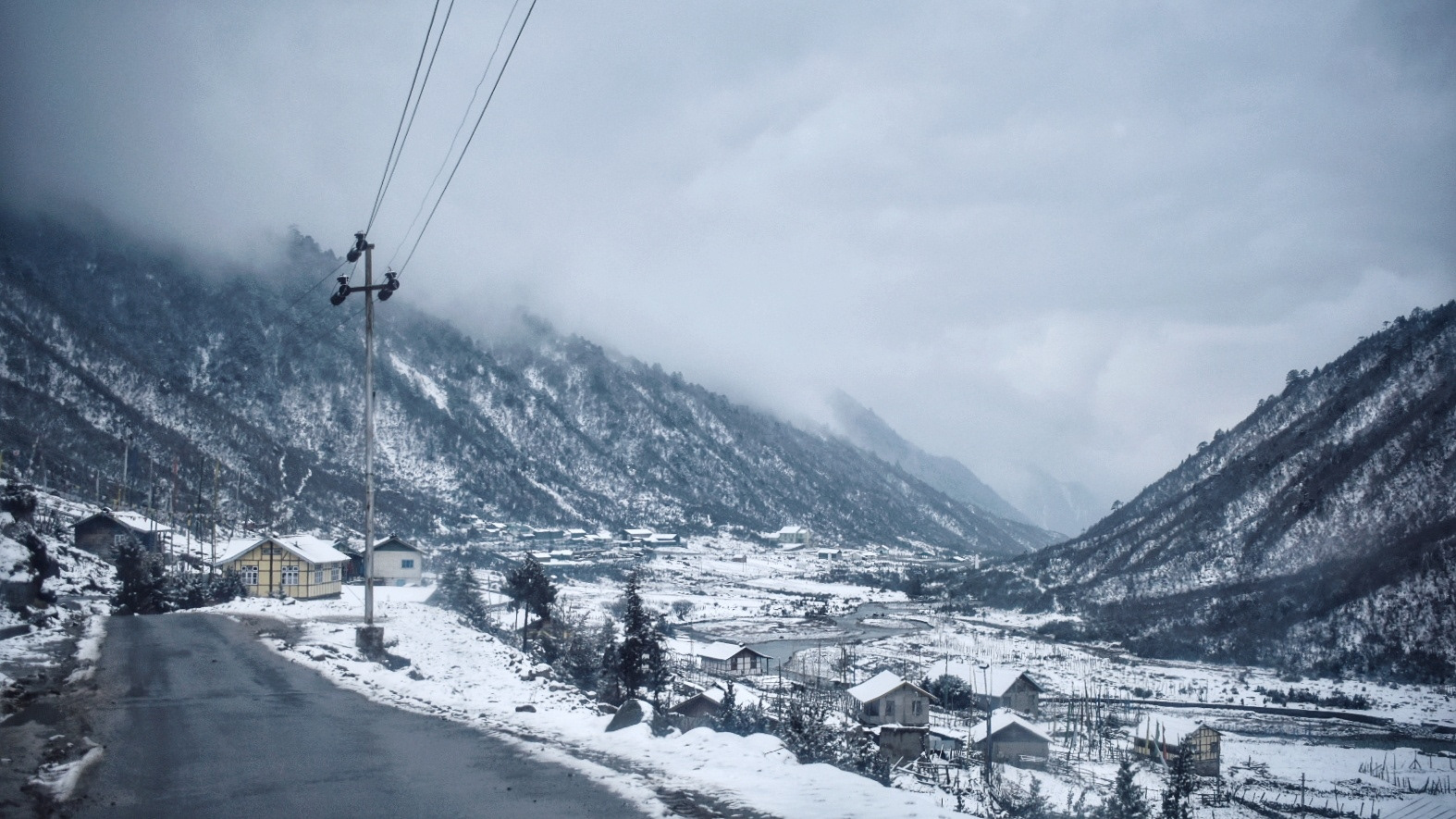
North Sikkim
  • The easiest & most economical way to explore North Sikkim is the 3D/2N package offered by shared-cab drivers.
  • This includes food, permits, cab rides and accommodation (1N in Lachen and 1N in Lachung)
  • The accommodation on both nights are at homestays with bare necessities, so keep your hopes low.
  • In the spirit of sustainable tourism, you ll be asked to discard single-use plastic bottles, so please carry a bottle that you can refill along the way.
  • Zero Point and Gurdongmer Lake are snow-capped throughout the year
3D/2N Shared-cab Package Itinerary
  • Day 1
    • Gangtok (10am) - Chungthang - Lachung (stay)
  • Day 2
    • Pre-lunch : Lachung (6am) - Yumthang Valley [12,139ft] - Zero Point - Lachung [15,300ft]
    • Post-lunch : Lachung - Chungthang - Lachen (stay)
  • Day 3
    • Pre-lunch : Lachen (5am) - Kala Patthar - Gurdongmer Lake [16,910ft] - Lachen
    • Post-lunch : Lachen - Chungthang - Gangtok (7pm)
  • This itinerary is idealistic and depends on the level of snowfall.
  • Some drivers might switch up Day 2 and 3 itineraries by visiting Lachen and then Lachung, depending upon the weather.
  • Areas beyond Lachen & Lachung are heavily militarized since the Indo-China border is only a few miles away.

East Sikkim

Zuluk and Silk Route
  • Time needed: 2D/1N
  • Zuluk [9,400ft] is a small hamlet with an excellent view of the eastern Himalayan range including the Kanchenjunga.
  • Was once a transit point to the historic Silk Route from Tibet (Lhasa) to India (West Bengal).
  • The drive from Gangtok to Zuluk takes at least four hours. Hence, it makes sense to spend the night at a homestay and space out your trip to Zuluk

Tsomgo Lake and Nathula
  • Time Needed : 1D
  • A Protected Area Permit is required to visit these places, due to their proximity to the Chinese border
  • Tsomgo/Chhangu Lake [12,313ft]
    • Glacial lake, 40 km from Gangtok.
    • Remains frozen during the winter season.
    • You can also ride on the back of a Yak for INR 300
  • Baba Mandir
    • An old temple dedicated to Baba Harbhajan Singh, a Sepoy in the 23rd Regiment, who died in 1962 near the Nathu La during Indo China war.
  • Nathula Pass [14,450ft]
    • Located on the Indo-Tibetan border crossing of the Old Silk Route, it is one of the three open trading posts between India and China.
    • Plays a key role in the Sino-Indian Trade and also serves as an official Border Personnel Meeting(BPM) Point.
    • May get cordoned off by the Indian Army in event of heavy snowfall or for other security reasons.


West Sikkim
  • Time needed: 3N/1N
  • Hostels at Pelling : Mochilerro Ostillo

Itinerary

Day 1: Gangtok - Ravangla - Pelling
  • Leave Gangtok early, for Ravangla through the Temi Tea Estate route.
  • Spend some time at the tea garden and then visit Buddha Park at Ravangla
  • Head to Pelling from Ravangla

Day 2: Pelling sightseeing
  • Hire a cab and visit Skywalk, Pemayangtse Monastery, Rabdentse Ruins, Kecheopalri Lake, Kanchenjunga Falls.

Day 3: Pelling - Gangtok/Siliguri
  • Wake up early to catch a glimpse of Kanchenjunga at the Pelling Helipad around sunrise
  • Head back to Gangtok on a shared-cab
  • You could take a bus/taxi back to Siliguri if Pelling is your last stop.

Darjeeling
  • In my opinion, Darjeeling is lovely for a two-day detour on your way back to Bagdogra/Siliguri and not any longer (unless you re a Bengali couple on a honeymoon)
  • Once a part of Sikkim, Darjeeling was ceded to the East India Company after a series of wars, with Sikkim briefly receiving a grant from EIC for gifting Darjeeling to the latter
  • Post-independence, Darjeeling was merged with the state of West Bengal.

Itinerary

Day 1 :
  • Take a cab from Gangtok to Darjeeling (shared-cabs cost INR 300 per seat)
  • Reach Darjeeling by noon and check in to your Hostel. I stayed at Hideout.
  • Spend the evening visiting either a monastery (or the Batasia Loop), Nehru Road and Mall Road.
  • Grab dinner at Glenary whilst listening to live music.

Day 2:
  • Wake up early to catch the sunrise and a glimpse of Kanchenjunga at Tiger Hill. Since Tiger Hill is 10km from Darjeeling and requires a permit, book your taxi in advance.
  • Alternatively, if you don t want to get up at 4am or shell out INR1500 on the cab to Tiger Hill, walk to the Kanchenjunga View Point down Mall Road
  • Next, queue up outside Keventers for breakfast with a view in a century-old cafe
  • Get a cab at Gandhi Road and visit a tea garden (Happy Valley is the closest) and the Ropeway. I was lucky to meet 6 other backpackers at my hostel and we ended up pooling the cab at INR 200 per person, with INR 1400 being on the expensive side, but you could bargain.
  • Get lunch, buy some tea at Golden Tips, pack your bags and hop on a shared-cab back to Siliguri. It took us about 4hrs to reach Siliguri, with an hour to spare before my train.
  • If you ve still got time on your hands, then check out the Peace Pagoda and the Darjeeling Himalayan Railway (Toy Train). At INR 1500, I found the latter to be too expensive and skipped it.


Tips and hacks
  • Download offline maps, especially when you re exploring Northern Sikkim.
  • Food and booze are the cheapest in Gangtok. Stash up before heading to other regions.
  • Keep your Aadhar/Passport handy since you need permits to travel to North & East Sikkim.
  • In rural areas and some cafes, you may get to try Rhododendron Wine, made from Rhododendron arboreum a.k.a Gurans. Its production is a little hush-hush since the flower is considered holy and is also the National Flower of Nepal.
  • If you don t want to invest in a new jacket, boots or a pair of gloves, you can always rent them at nominal rates from your hotel or little stores around tourist sites.
  • Check the weather of a region before heading there. Low visibility and precipitation can quite literally dampen your experience.
  • Keep your itinerary flexible to accommodate for rest and impromptu plans.
  • Shops and restaurants close by 8pm in Sikkim and Darjeeling. Plan for the same.

Carry
  • a couple of extra pairs of socks (woollen, if possible)
  • a pair of slippers to wear indoors
  • a reusable water bottle
  • an umbrella
  • a power bank
  • a couple of tablets of Diamox. Helps deal with altitude sickness
  • extra clothes and wet bags since you may not get a chance to wash/dry your clothes
  • a few passport size photographs

Shared-cab hacks
  • Intercity rides can be exhausting. If you can afford it, pay for an additional seat.
  • Call shotgun on the drives beyond Lachen and Lachung. The views are breathtaking.
  • Return cabs tend to be cheaper (WB cabs travelling from SK and vice-versa)

Cost
  • My median daily expenditure (back when I went to Sikkim in early March 2021) was INR 1350.
  • This includes stay (bunk bed), food, wine and transit (shared cabs)
  • In my defence, I splurged on food, wine and extra seats in shared cabs, but if you re on a budget, you could easily get by on INR 1 - 1.2k per day.
  • For a 9-day trip, I ended up shelling out nearly INR 15k, including 2AC trains to & from Kolkata
  • Note : Summer (March to May) and Autumn (October to December) are peak seasons, and thereby more expensive to travel around.

Souvenirs and things you should buy

Buddhist souvenirs :
  • Colourful Prayer Flags (great for tying on bikes or behind car windshields)
  • Miniature Prayer/Mani Wheels
  • Lucky Charms, Pendants and Key Chains
  • Cham Dance masks and robes
  • Singing Bowls
  • Common symbols: Om mani padme hum, Ashtamangala, Zodiac signs

Handicrafts & Handlooms
  • Tibetan Yak Wool shawls, scarfs and carpets
  • Sikkimese Ceramic cups
  • Thangka Paintings

Edibles
  • Darjeeling Tea (usually brewed and not boiled)
  • Wine (Arucha Peach & Rhododendron)
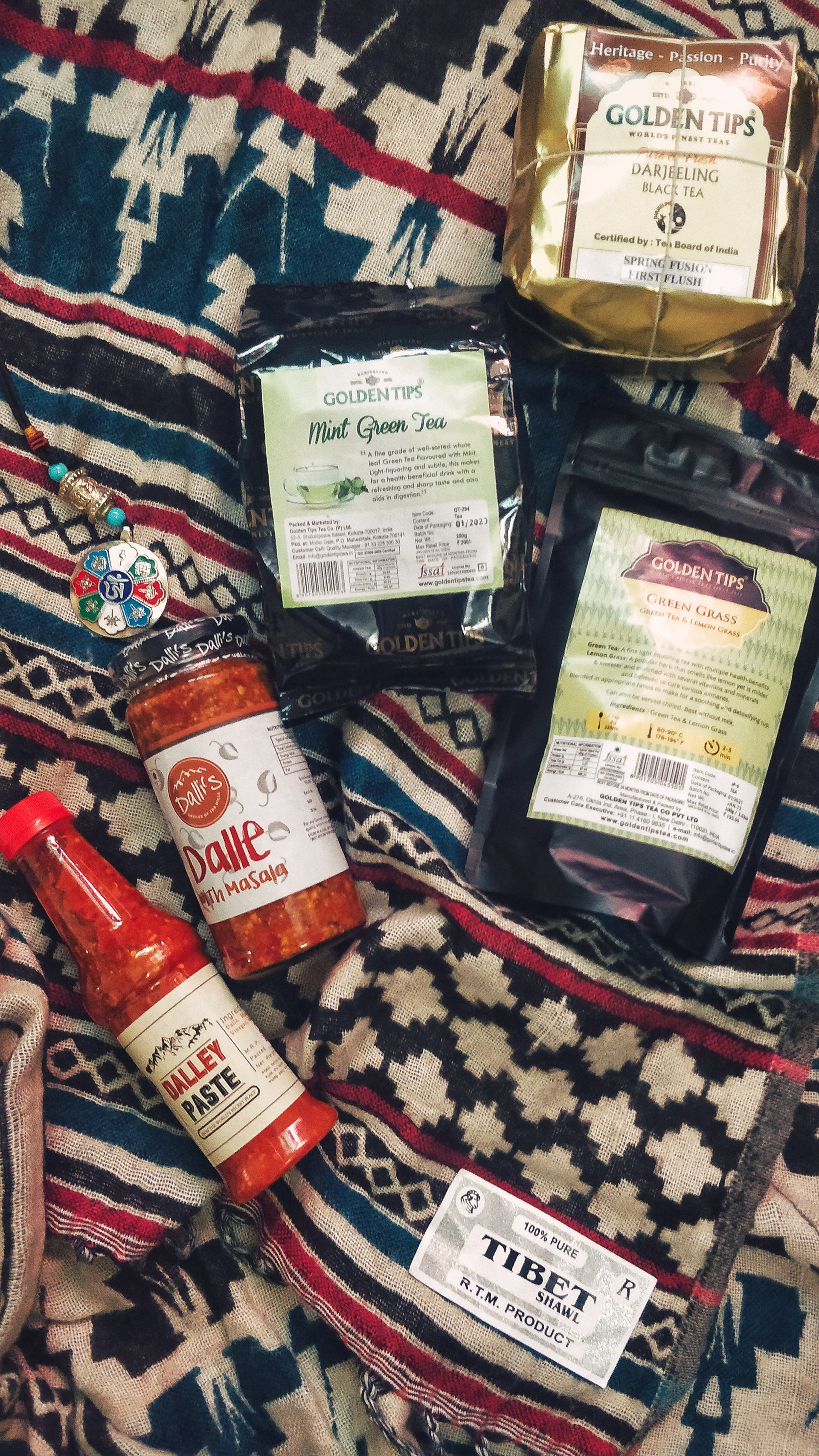
  • Dalle Khursani (Chilli) Paste and Pickle

Header Icon made by Freepik from www.flaticon.com is licensed by CC 3.0 BY

Jonathan Dowland: 2020 in short fiction

Cover for *Episodes*
Following on from 2020 in Fiction: In 2020 I read a couple of collections of short fiction from some of my favourite authors. I started the year with Christopher Priest's Episodes. The stories within are collected from throughout his long career, and vary in style and tone. Priest wrote new little prologues and epilogues for each of the stories, explaining the context in which they were written. I really enjoyed this additional view into their construction.
Cover for *Adam Robots*
By contrast, Adam Robert's Adam Robots presents the stories on their own terms. Each of the stories is written in a different mode: one as golden-age SF, another as a kind of Cyberpunk, for example, although they all blend or confound sub-genres to some degree. I'm not clever enough to have decoded all their secrets on a first read, and I would have appreciated some "Cliff's Notes on any deeper meaning or intent.
Cover for *Exhalation*
Ted Chiang's Exhalation was up to the fantastic standard of his earlier collection and had some extremely thoughtful explorations of philosophical ideas. All the stories are strong but one stuck in my mind the longest: Omphalos) With my daughter I finished three of Terry Pratchett's short story collections aimed at children: Dragon at Crumbling Castle; The Witch's Vacuum Cleaner and The Time-Travelling Caveman. If you are a Pratchett fan and you've overlooked these because they're aimed at children, take another look. The quality varies, but there are some true gems in these. Several stories take place in common settings, either the town of Blackbury, in Gritshire (and the adjacent Even Moor), or the Welsh border-town of Llandanffwnfafegettupagogo. The sad thing was knowing that once I'd finished them (and the fourth, Father Christmas's Fake Beard) that was it: there will be no more.
Cover for Interzone, issue 277
8/31 of the "books" I read in 2020 were issues of Interzone. Counting them as "books" for my annual reading goal has encouraged me to read full issues, whereas before I would likely have only read a couple of stories from each issue. Reading full issues has rekindled the enjoyment I got out of it when I first discovered the magazine at the turn of the Century. I am starting to recognise stories by authors that have written stories in other issues, as well as common themes from the current era weaving their way into the work (Trump, Brexit, etc.) No doubt the Pandemic will leave its mark on 2021's stories.

9 April 2021

Michael Prokop: A Ceph war story

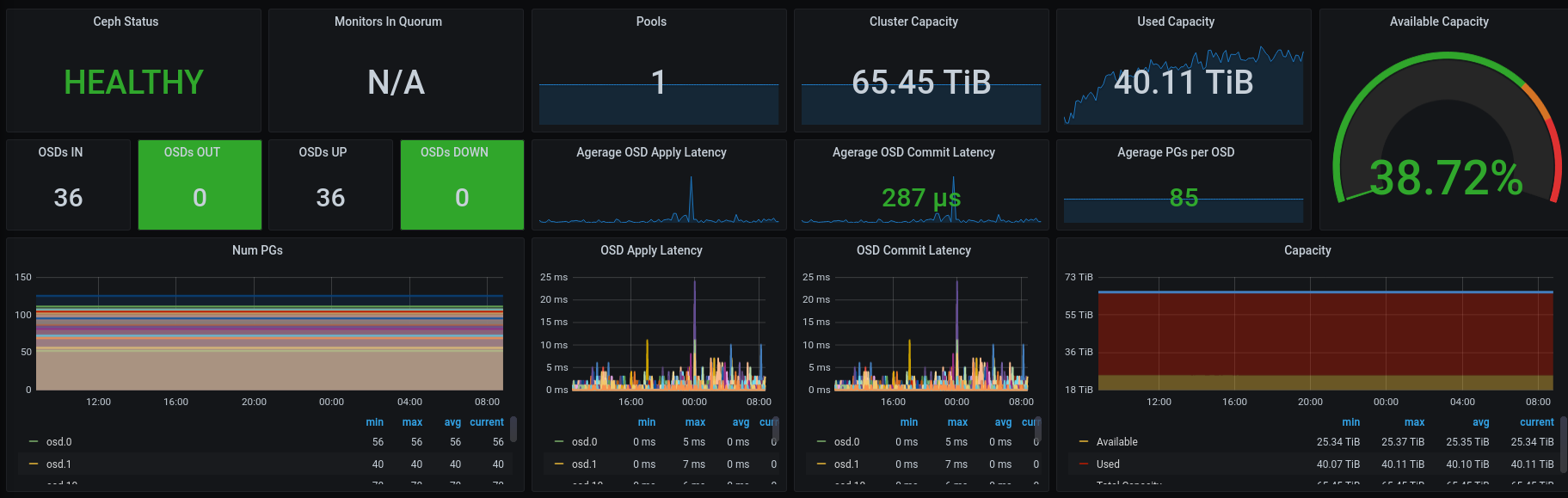
It all started with the big bang! We nearly lost 33 of 36 disks on a Proxmox/Ceph Cluster; this is the story of how we recovered them. At the end of 2020, we eventually had a long outstanding maintenance window for taking care of system upgrades at a customer. During this maintenance window, which involved reboots of server systems, the involved Ceph cluster unexpectedly went into a critical state. What was planned to be a few hours of checklist work in the early evening turned out to be an emergency case; let s call it a nightmare (not only because it included a big part of the night). Since we have learned a few things from our post mortem and RCA, it s worth sharing those with others. But first things first, let s step back and clarify what we had to deal with. The system and its upgrade One part of the upgrade included 3 Debian servers (we re calling them server1, server2 and server3 here), running on Proxmox v5 + Debian/stretch with 12 Ceph OSDs each (65.45TB in total), a so-called Proxmox Hyper-Converged Ceph Cluster. First, we went for upgrading the Proxmox v5/stretch system to Proxmox v6/buster, before updating Ceph Luminous v12.2.13 to the latest v14.2 release, supported by Proxmox v6/buster. The Proxmox upgrade included updating corosync from v2 to v3. As part of this upgrade, we had to apply some configuration changes, like adjust ring0 + ring1 address settings and add a mon_host configuration to the Ceph configuration. During the first two servers reboots, we noticed configuration glitches. After fixing those, we went for a reboot of the third server as well. Then we noticed that several Ceph OSDs were unexpectedly down. The NTP service wasn t working as expected after the upgrade. The underlying issue is a race condition of ntp with systemd-timesyncd (see #889290). As a result, we had clock skew problems with Ceph, indicating that the Ceph monitors clocks aren t running in sync (which is essential for proper Ceph operation). We initially assumed that our Ceph OSD failure derived from this clock skew problem, so we took care of it. After yet another round of reboots, to ensure the systems are running all with identical and sane configurations and services, we noticed lots of failing OSDs. This time all but three OSDs (19, 21 and 22) were down:
% sudo ceph osd tree
ID CLASS WEIGHT   TYPE NAME      STATUS REWEIGHT PRI-AFF
-1       65.44138 root default
-2       21.81310     host server1
 0   hdd  1.08989         osd.0    down  1.00000 1.00000
 1   hdd  1.08989         osd.1    down  1.00000 1.00000
 2   hdd  1.63539         osd.2    down  1.00000 1.00000
 3   hdd  1.63539         osd.3    down  1.00000 1.00000
 4   hdd  1.63539         osd.4    down  1.00000 1.00000
 5   hdd  1.63539         osd.5    down  1.00000 1.00000
18   hdd  2.18279         osd.18   down  1.00000 1.00000
20   hdd  2.18179         osd.20   down  1.00000 1.00000
28   hdd  2.18179         osd.28   down  1.00000 1.00000
29   hdd  2.18179         osd.29   down  1.00000 1.00000
30   hdd  2.18179         osd.30   down  1.00000 1.00000
31   hdd  2.18179         osd.31   down  1.00000 1.00000
-4       21.81409     host server2
 6   hdd  1.08989         osd.6    down  1.00000 1.00000
 7   hdd  1.08989         osd.7    down  1.00000 1.00000
 8   hdd  1.63539         osd.8    down  1.00000 1.00000
 9   hdd  1.63539         osd.9    down  1.00000 1.00000
10   hdd  1.63539         osd.10   down  1.00000 1.00000
11   hdd  1.63539         osd.11   down  1.00000 1.00000
19   hdd  2.18179         osd.19     up  1.00000 1.00000
21   hdd  2.18279         osd.21     up  1.00000 1.00000
22   hdd  2.18279         osd.22     up  1.00000 1.00000
32   hdd  2.18179         osd.32   down  1.00000 1.00000
33   hdd  2.18179         osd.33   down  1.00000 1.00000
34   hdd  2.18179         osd.34   down  1.00000 1.00000
-3       21.81419     host server3
12   hdd  1.08989         osd.12   down  1.00000 1.00000
13   hdd  1.08989         osd.13   down  1.00000 1.00000
14   hdd  1.63539         osd.14   down  1.00000 1.00000
15   hdd  1.63539         osd.15   down  1.00000 1.00000
16   hdd  1.63539         osd.16   down  1.00000 1.00000
17   hdd  1.63539         osd.17   down  1.00000 1.00000
23   hdd  2.18190         osd.23   down  1.00000 1.00000
24   hdd  2.18279         osd.24   down  1.00000 1.00000
25   hdd  2.18279         osd.25   down  1.00000 1.00000
35   hdd  2.18179         osd.35   down  1.00000 1.00000
36   hdd  2.18179         osd.36   down  1.00000 1.00000
37   hdd  2.18179         osd.37   down  1.00000 1.00000
Our blood pressure increased slightly! Did we just lose all of our cluster? What happened, and how can we get all the other OSDs back? We stumbled upon this beauty in our logs:
kernel: [   73.697957] XFS (sdl1): SB stripe unit sanity check failed
kernel: [   73.698002] XFS (sdl1): Metadata corruption detected at xfs_sb_read_verify+0x10e/0x180 [xfs], xfs_sb block 0xffffffffffffffff
kernel: [   73.698799] XFS (sdl1): Unmount and run xfs_repair
kernel: [   73.699199] XFS (sdl1): First 128 bytes of corrupted metadata buffer:
kernel: [   73.699677] 00000000: 58 46 53 42 00 00 10 00 00 00 00 00 00 00 62 00  XFSB..........b.
kernel: [   73.700205] 00000010: 00 00 00 00 00 00 00 00 00 00 00 00 00 00 00 00  ................
kernel: [   73.700836] 00000020: 62 44 2b c0 e6 22 40 d7 84 3d e1 cc 65 88 e9 d8  bD+.."@..=..e...
kernel: [   73.701347] 00000030: 00 00 00 00 00 00 40 08 00 00 00 00 00 00 01 00  ......@.........
kernel: [   73.701770] 00000040: 00 00 00 00 00 00 01 01 00 00 00 00 00 00 01 02  ................
ceph-disk[4240]: mount: /var/lib/ceph/tmp/mnt.jw367Y: mount(2) system call failed: Structure needs cleaning.
ceph-disk[4240]: ceph-disk: Mounting filesystem failed: Command '['/bin/mount', '-t', u'xfs', '-o', 'noatime,inode64', '--', '/dev/disk/by-parttypeuuid/4fbd7e29-9d25-41b8-afd0-062c0ceff05d.cdda39ed-5
ceph/tmp/mnt.jw367Y']' returned non-zero exit status 32
kernel: [   73.702162] 00000050: 00 00 00 01 00 00 18 80 00 00 00 04 00 00 00 00  ................
kernel: [   73.702550] 00000060: 00 00 06 48 bd a5 10 00 08 00 00 02 00 00 00 00  ...H............
kernel: [   73.702975] 00000070: 00 00 00 00 00 00 00 00 0c 0c 0b 01 0d 00 00 19  ................
kernel: [   73.703373] XFS (sdl1): SB validate failed with error -117.
The same issue was present for the other failing OSDs. We hoped, that the data itself was still there, and only the mounting of the XFS partitions failed. The Ceph cluster was initially installed in 2017 with Ceph jewel/10.2 with the OSDs on filestore (nowadays being a legacy approach to storing objects in Ceph). However, we migrated the disks to bluestore since then (with ceph-disk and not yet via ceph-volume what s being used nowadays). Using ceph-disk introduces these 100MB XFS partitions containing basic metadata for the OSD. Given that we had three working OSDs left, we decided to investigate how to rebuild the failing ones. Some folks on #ceph (thanks T1, ormandj + peetaur!) were kind enough to share how working XFS partitions looked like for them. After creating a backup (via dd), we tried to re-create such an XFS partition on server1. We noticed that even mounting a freshly created XFS partition failed:
synpromika@server1 ~ % sudo mkfs.xfs -f -i size=2048 -m uuid="4568c300-ad83-4288-963e-badcd99bf54f" /dev/sdc1
meta-data=/dev/sdc1              isize=2048   agcount=4, agsize=6272 blks
         =                       sectsz=4096  attr=2, projid32bit=1
         =                       crc=1        finobt=1, sparse=1, rmapbt=0
         =                       reflink=0
data     =                       bsize=4096   blocks=25088, imaxpct=25
         =                       sunit=128    swidth=64 blks
naming   =version 2              bsize=4096   ascii-ci=0, ftype=1
log      =internal log           bsize=4096   blocks=1608, version=2
         =                       sectsz=4096  sunit=1 blks, lazy-count=1
realtime =none                   extsz=4096   blocks=0, rtextents=0
synpromika@server1 ~ % sudo mount /dev/sdc1 /mnt/ceph-recovery
SB stripe unit sanity check failed
Metadata corruption detected at 0x433840, xfs_sb block 0x0/0x1000
libxfs_writebufr: write verifer failed on xfs_sb bno 0x0/0x1000
cache_node_purge: refcount was 1, not zero (node=0x1d3c400)
SB stripe unit sanity check failed
Metadata corruption detected at 0x433840, xfs_sb block 0x18800/0x1000
libxfs_writebufr: write verifer failed on xfs_sb bno 0x18800/0x1000
SB stripe unit sanity check failed
Metadata corruption detected at 0x433840, xfs_sb block 0x0/0x1000
libxfs_writebufr: write verifer failed on xfs_sb bno 0x0/0x1000
SB stripe unit sanity check failed
Metadata corruption detected at 0x433840, xfs_sb block 0x24c00/0x1000
libxfs_writebufr: write verifer failed on xfs_sb bno 0x24c00/0x1000
SB stripe unit sanity check failed
Metadata corruption detected at 0x433840, xfs_sb block 0xc400/0x1000
libxfs_writebufr: write verifer failed on xfs_sb bno 0xc400/0x1000
releasing dirty buffer (bulk) to free list!releasing dirty buffer (bulk) to free list!releasing dirty buffer (bulk) to free list!releasing dirty buffer (bulk) to free list!found dirty buffer (bulk) on free list!bad magic number
bad magic number
Metadata corruption detected at 0x433840, xfs_sb block 0x0/0x1000
libxfs_writebufr: write verifer failed on xfs_sb bno 0x0/0x1000
releasing dirty buffer (bulk) to free list!mount: /mnt/ceph-recovery: wrong fs type, bad option, bad superblock on /dev/sdc1, missing codepage or helper program, or other error.
Ouch. This very much looked related to the actual issue we re seeing. So we tried to execute mkfs.xfs with a bunch of different sunit/swidth settings. Using -d sunit=512 -d swidth=512 at least worked then, so we decided to force its usage in the creation of our OSD XFS partition. This brought us a working XFS partition. Please note, sunit must not be larger than swidth (more on that later!). Then we reconstructed how to restore all the metadata for the OSD (activate.monmap, active, block_uuid, bluefs, ceph_fsid, fsid, keyring, kv_backend, magic, mkfs_done, ready, require_osd_release, systemd, type, whoami). To identify the UUID, we can read the data from ceph --format json osd dump , like this for all our OSDs (Zsh syntax ftw!):
synpromika@server1 ~ % for f in  0..37  ; printf "osd-$f: %s\n" "$(sudo ceph --format json osd dump   jq -r ".osds[]   select(.osd==$f)   .uuid")"
osd-0: 4568c300-ad83-4288-963e-badcd99bf54f
osd-1: e573a17a-ccde-4719-bdf8-eef66903ca4f
osd-2: 0e1b2626-f248-4e7d-9950-f1a46644754e
osd-3: 1ac6a0a2-20ee-4ed8-9f76-d24e900c800c
[...]
Identifying the corresponding raw device for each OSD UUID is possible via:
synpromika@server1 ~ % UUID="4568c300-ad83-4288-963e-badcd99bf54f"
synpromika@server1 ~ % readlink -f /dev/disk/by-partuuid/"$ UUID "
/dev/sdc1
The OSD s key ID can be retrieved via:
synpromika@server1 ~ % OSD_ID=0
synpromika@server1 ~ % sudo ceph auth get osd."$ OSD_ID " -f json 2>/dev/null   jq -r '.[]   .key'
AQCKFpZdm0We[...]
Now we also need to identify the underlying block device:
synpromika@server1 ~ % OSD_ID=0
synpromika@server1 ~ % sudo ceph osd metadata osd."$ OSD_ID " -f json   jq -r '.bluestore_bdev_partition_path'    
/dev/sdc2
With all of this, we reconstructed the keyring, fsid, whoami, block + block_uuid files. All the other files inside the XFS metadata partition are identical on each OSD. So after placing and adjusting the corresponding metadata on the XFS partition for Ceph usage, we got a working OSD hurray! Since we had to fix yet another 32 OSDs, we decided to automate this XFS partitioning and metadata recovery procedure. We had a network share available on /srv/backup for storing backups of existing partition data. On each server, we tested the procedure with one single OSD before iterating over the list of remaining failing OSDs. We started with a shell script on server1, then adjusted the script for server2 and server3. This is the script, as we executed it on the 3rd server. Thanks to this, we managed to get the Ceph cluster up and running again. We didn t want to continue with the Ceph upgrade itself during the night though, as we wanted to know exactly what was going on and why the system behaved like that. Time for RCA! Root Cause Analysis So all but three OSDs on server2 failed, and the problem seems to be related to XFS. Therefore, our starting point for the RCA was, to identify what was different on server2, as compared to server1 + server3. My initial assumption was that this was related to some firmware issues with the involved controller (and as it turned out later, I was right!). The disks were attached as JBOD devices to a ServeRAID M5210 controller (with a stripe size of 512). Firmware state:
synpromika@server1 ~ % sudo storcli64 /c0 show all   grep '^Firmware'
Firmware Package Build = 24.16.0-0092
Firmware Version = 4.660.00-8156
synpromika@server2 ~ % sudo storcli64 /c0 show all   grep '^Firmware'
Firmware Package Build = 24.21.0-0112
Firmware Version = 4.680.00-8489
synpromika@server3 ~ % sudo storcli64 /c0 show all   grep '^Firmware'
Firmware Package Build = 24.16.0-0092
Firmware Version = 4.660.00-8156
This looked very promising, as server2 indeed runs with a different firmware version on the controller. But how so? Well, the motherboard of server2 got replaced by a Lenovo/IBM technician in January 2020, as we had a failing memory slot during a memory upgrade. As part of this procedure, the Lenovo/IBM technician installed the latest firmware versions. According to our documentation, some OSDs were rebuilt (due to the filestore->bluestore migration) in March and April 2020. It turned out that precisely those OSDs were the ones that survived the upgrade. So the surviving drives were created with a different firmware version running on the involved controller. All the other OSDs were created with an older controller firmware. But what difference does this make? Now let s check firmware changelogs. For the 24.21.0-0097 release we found this:
- Cannot create or mount xfs filesystem using xfsprogs 4.19.x kernel 4.20(SCGCQ02027889)
- xfs_info command run on an XFS file system created on a VD of strip size 1M shows sunit and swidth as 0(SCGCQ02056038)
Our XFS problem certainly was related to the controller s firmware. We also recalled that our monitoring system reported different sunit settings for the OSDs that were rebuilt in March and April. For example, OSD 21 was recreated and got different sunit settings:
WARN  server2.example.org  Mount options of /var/lib/ceph/osd/ceph-21      WARN - Missing: sunit=1024, Exceeding: sunit=512
We compared the new OSD 21 with an existing one (OSD 25 on server3):
synpromika@server2 ~ % systemctl show var-lib-ceph-osd-ceph\\x2d21.mount   grep sunit
Options=rw,noatime,attr2,inode64,sunit=512,swidth=512,noquota
synpromika@server3 ~ % systemctl show var-lib-ceph-osd-ceph\\x2d25.mount   grep sunit
Options=rw,noatime,attr2,inode64,sunit=1024,swidth=512,noquota
Thanks to our documentation, we could compare execution logs of their creation:
% diff -u ceph-disk-osd-25.log ceph-disk-osd-21.log
-synpromika@server2 ~ % sudo ceph-disk -v prepare --bluestore /dev/sdj --osd-id 25
+synpromika@server3 ~ % sudo ceph-disk -v prepare --bluestore /dev/sdi --osd-id 21
[...]
-command_check_call: Running command: /sbin/mkfs -t xfs -f -i size=2048 -- /dev/sdj1
-meta-data=/dev/sdj1              isize=2048   agcount=4, agsize=6272 blks
[...]
+command_check_call: Running command: /sbin/mkfs -t xfs -f -i size=2048 -- /dev/sdi1
+meta-data=/dev/sdi1              isize=2048   agcount=4, agsize=6336 blks
          =                       sectsz=4096  attr=2, projid32bit=1
          =                       crc=1        finobt=1, sparse=0, rmapbt=0, reflink=0
-data     =                       bsize=4096   blocks=25088, imaxpct=25
-         =                       sunit=128    swidth=64 blks
+data     =                       bsize=4096   blocks=25344, imaxpct=25
+         =                       sunit=64     swidth=64 blks
 naming   =version 2              bsize=4096   ascii-ci=0 ftype=1
 log      =internal log           bsize=4096   blocks=1608, version=2
          =                       sectsz=4096  sunit=1 blks, lazy-count=1
 realtime =none                   extsz=4096   blocks=0, rtextents=0
[...]
So back then, we even tried to track this down but couldn t make sense of it yet. But now this sounds very much like it is related to the problem we saw with this Ceph/XFS failure. We follow Occam s razor, assuming the simplest explanation is usually the right one, so let s check the disk properties and see what differs:
synpromika@server1 ~ % sudo blockdev --getsz --getsize64 --getss --getpbsz --getiomin --getioopt /dev/sdk
4685545472
2398999281664
512
4096
524288
262144
synpromika@server2 ~ % sudo blockdev --getsz --getsize64 --getss --getpbsz --getiomin --getioopt /dev/sdk
4685545472
2398999281664
512
4096
262144
262144
See the difference between server1 and server2 for identical disks? The getiomin option now reports something different for them:
synpromika@server1 ~ % sudo blockdev --getiomin /dev/sdk            
524288
synpromika@server1 ~ % cat /sys/block/sdk/queue/minimum_io_size
524288
synpromika@server2 ~ % sudo blockdev --getiomin /dev/sdk 
262144
synpromika@server2 ~ % cat /sys/block/sdk/queue/minimum_io_size
262144
It doesn t make sense that the minimum I/O size (iomin, AKA BLKIOMIN) is bigger than the optimal I/O size (ioopt, AKA BLKIOOPT). This leads us to Bug 202127 cannot mount or create xfs on a 597T device, which matches our findings here. But why did this XFS partition work in the past and fails now with the newer kernel version? The XFS behaviour change Now given that we have backups of all the XFS partition, we wanted to track down, a) when this XFS behaviour was introduced, and b) whether, and if so how it would be possible to reuse the XFS partition without having to rebuild it from scratch (e.g. if you would have no working Ceph OSD or backups left). Let s look at such a failing XFS partition with the Grml live system:
root@grml ~ # grml-version
grml64-full 2020.06 Release Codename Ausgehfuahangl [2020-06-24]
root@grml ~ # uname -a
Linux grml 5.6.0-2-amd64 #1 SMP Debian 5.6.14-2 (2020-06-09) x86_64 GNU/Linux
root@grml ~ # grml-hostname grml-2020-06
Setting hostname to grml-2020-06: done
root@grml ~ # exec zsh
root@grml-2020-06 ~ # dpkg -l xfsprogs util-linux
Desired=Unknown/Install/Remove/Purge/Hold
  Status=Not/Inst/Conf-files/Unpacked/halF-conf/Half-inst/trig-aWait/Trig-pend
 / Err?=(none)/Reinst-required (Status,Err: uppercase=bad)
 / Name           Version      Architecture Description
+++-==============-============-============-=========================================
ii  util-linux     2.35.2-4     amd64        miscellaneous system utilities
ii  xfsprogs       5.6.0-1+b2   amd64        Utilities for managing the XFS filesystem
There it s failing, no matter which mount option we try:
root@grml-2020-06 ~ # mount ./sdd1.dd /mnt
mount: /mnt: mount(2) system call failed: Structure needs cleaning.
root@grml-2020-06 ~ # dmesg   tail -30
[...]
[   64.788640] XFS (loop1): SB stripe unit sanity check failed
[   64.788671] XFS (loop1): Metadata corruption detected at xfs_sb_read_verify+0x102/0x170 [xfs], xfs_sb block 0xffffffffffffffff
[   64.788671] XFS (loop1): Unmount and run xfs_repair
[   64.788672] XFS (loop1): First 128 bytes of corrupted metadata buffer:
[   64.788673] 00000000: 58 46 53 42 00 00 10 00 00 00 00 00 00 00 62 00  XFSB..........b.
[   64.788674] 00000010: 00 00 00 00 00 00 00 00 00 00 00 00 00 00 00 00  ................
[   64.788675] 00000020: 32 b6 dc 35 53 b7 44 96 9d 63 30 ab b3 2b 68 36  2..5S.D..c0..+h6
[   64.788675] 00000030: 00 00 00 00 00 00 40 08 00 00 00 00 00 00 01 00  ......@.........
[   64.788675] 00000040: 00 00 00 00 00 00 01 01 00 00 00 00 00 00 01 02  ................
[   64.788676] 00000050: 00 00 00 01 00 00 18 80 00 00 00 04 00 00 00 00  ................
[   64.788677] 00000060: 00 00 06 48 bd a5 10 00 08 00 00 02 00 00 00 00  ...H............
[   64.788677] 00000070: 00 00 00 00 00 00 00 00 0c 0c 0b 01 0d 00 00 19  ................
[   64.788679] XFS (loop1): SB validate failed with error -117.
root@grml-2020-06 ~ # mount -t xfs -o rw,relatime,attr2,inode64,sunit=1024,swidth=512,noquota ./sdd1.dd /mnt/
mount: /mnt: wrong fs type, bad option, bad superblock on /dev/loop1, missing codepage or helper program, or other error.
32 root@grml-2020-06 ~ # dmesg   tail -1
[   66.342976] XFS (loop1): stripe width (512) must be a multiple of the stripe unit (1024)
root@grml-2020-06 ~ # mount -t xfs -o rw,relatime,attr2,inode64,sunit=512,swidth=512,noquota ./sdd1.dd /mnt/
mount: /mnt: mount(2) system call failed: Structure needs cleaning.
32 root@grml-2020-06 ~ # dmesg   tail -14
[   66.342976] XFS (loop1): stripe width (512) must be a multiple of the stripe unit (1024)
[   80.751277] XFS (loop1): SB stripe unit sanity check failed
[   80.751323] XFS (loop1): Metadata corruption detected at xfs_sb_read_verify+0x102/0x170 [xfs], xfs_sb block 0xffffffffffffffff 
[   80.751324] XFS (loop1): Unmount and run xfs_repair
[   80.751325] XFS (loop1): First 128 bytes of corrupted metadata buffer:
[   80.751327] 00000000: 58 46 53 42 00 00 10 00 00 00 00 00 00 00 62 00  XFSB..........b.
[   80.751328] 00000010: 00 00 00 00 00 00 00 00 00 00 00 00 00 00 00 00  ................
[   80.751330] 00000020: 32 b6 dc 35 53 b7 44 96 9d 63 30 ab b3 2b 68 36  2..5S.D..c0..+h6
[   80.751331] 00000030: 00 00 00 00 00 00 40 08 00 00 00 00 00 00 01 00  ......@.........
[   80.751331] 00000040: 00 00 00 00 00 00 01 01 00 00 00 00 00 00 01 02  ................
[   80.751332] 00000050: 00 00 00 01 00 00 18 80 00 00 00 04 00 00 00 00  ................
[   80.751333] 00000060: 00 00 06 48 bd a5 10 00 08 00 00 02 00 00 00 00  ...H............
[   80.751334] 00000070: 00 00 00 00 00 00 00 00 0c 0c 0b 01 0d 00 00 19  ................
[   80.751338] XFS (loop1): SB validate failed with error -117.
Also xfs_repair doesn t help either:
root@grml-2020-06 ~ # xfs_info ./sdd1.dd
meta-data=./sdd1.dd              isize=2048   agcount=4, agsize=6272 blks
         =                       sectsz=4096  attr=2, projid32bit=1
         =                       crc=1        finobt=1, sparse=0, rmapbt=0
         =                       reflink=0
data     =                       bsize=4096   blocks=25088, imaxpct=25
         =                       sunit=128    swidth=64 blks
naming   =version 2              bsize=4096   ascii-ci=0, ftype=1
log      =internal log           bsize=4096   blocks=1608, version=2
         =                       sectsz=4096  sunit=1 blks, lazy-count=1
realtime =none                   extsz=4096   blocks=0, rtextents=0
root@grml-2020-06 ~ # xfs_repair ./sdd1.dd
Phase 1 - find and verify superblock...
bad primary superblock - bad stripe width in superblock !!!
attempting to find secondary superblock...
..............................................................................................Sorry, could not find valid secondary superblock
Exiting now.
With the SB stripe unit sanity check failed message, we could easily track this down to the following commit fa4ca9c:
% git show fa4ca9c5574605d1e48b7e617705230a0640b6da   cat
commit fa4ca9c5574605d1e48b7e617705230a0640b6da
Author: Dave Chinner <dchinner@redhat.com>
Date:   Tue Jun 5 10:06:16 2018 -0700
    
    xfs: catch bad stripe alignment configurations
    
    When stripe alignments are invalid, data alignment algorithms in the
    allocator may not work correctly. Ensure we catch superblocks with
    invalid stripe alignment setups at mount time. These data alignment
    mismatches are now detected at mount time like this:
    
    XFS (loop0): SB stripe unit sanity check failed
    XFS (loop0): Metadata corruption detected at xfs_sb_read_verify+0xab/0x110, xfs_sb block 0xffffffffffffffff
    XFS (loop0): Unmount and run xfs_repair
    XFS (loop0): First 128 bytes of corrupted metadata buffer:
    0000000091c2de02: 58 46 53 42 00 00 10 00 00 00 00 00 00 00 10 00  XFSB............
    0000000023bff869: 00 00 00 00 00 00 00 00 00 00 00 00 00 00 00 00  ................
    00000000cdd8c893: 17 32 37 15 ff ca 46 3d 9a 17 d3 33 04 b5 f1 a2  .27...F=...3....
    000000009fd2844f: 00 00 00 00 00 00 00 04 00 00 00 00 00 00 06 d0  ................
    0000000088e9b0bb: 00 00 00 00 00 00 06 d1 00 00 00 00 00 00 06 d2  ................
    00000000ff233a20: 00 00 00 01 00 00 10 00 00 00 00 01 00 00 00 00  ................
    000000009db0ac8b: 00 00 03 60 e1 34 02 00 08 00 00 02 00 00 00 00  ... .4..........
    00000000f7022460: 00 00 00 00 00 00 00 00 0c 09 0b 01 0c 00 00 19  ................
    XFS (loop0): SB validate failed with error -117.
    
    And the mount fails.
    
    Signed-off-by: Dave Chinner <dchinner@redhat.com>
    Reviewed-by: Carlos Maiolino <cmaiolino@redhat.com>
    Reviewed-by: Darrick J. Wong <darrick.wong@oracle.com>
    Signed-off-by: Darrick J. Wong <darrick.wong@oracle.com>
diff --git fs/xfs/libxfs/xfs_sb.c fs/xfs/libxfs/xfs_sb.c
index b5dca3c8c84d..c06b6fc92966 100644
--- fs/xfs/libxfs/xfs_sb.c
+++ fs/xfs/libxfs/xfs_sb.c
@@ -278,6 +278,22 @@ xfs_mount_validate_sb(
                return -EFSCORRUPTED;
         
        
+       if (sbp->sb_unit)  
+               if (!xfs_sb_version_hasdalign(sbp)  
+                   sbp->sb_unit > sbp->sb_width  
+                   (sbp->sb_width % sbp->sb_unit) != 0)  
+                       xfs_notice(mp, "SB stripe unit sanity check failed");
+                       return -EFSCORRUPTED;
+                 
+         else if (xfs_sb_version_hasdalign(sbp))   
+               xfs_notice(mp, "SB stripe alignment sanity check failed");
+               return -EFSCORRUPTED;
+         else if (sbp->sb_width)  
+               xfs_notice(mp, "SB stripe width sanity check failed");
+               return -EFSCORRUPTED;
+        
+
+       
        if (xfs_sb_version_hascrc(&mp->m_sb) &&
            sbp->sb_blocksize < XFS_MIN_CRC_BLOCKSIZE)  
                xfs_notice(mp, "v5 SB sanity check failed");
This change is included in kernel versions 4.18-rc1 and newer:
% git describe --contains fa4ca9c5574605d1e48
v4.18-rc1~37^2~14
Now let s try with an older kernel version (4.9.0), using old Grml 2017.05 release:
root@grml ~ # grml-version
grml64-small 2017.05 Release Codename Freedatensuppe [2017-05-31]
root@grml ~ # uname -a
Linux grml 4.9.0-1-grml-amd64 #1 SMP Debian 4.9.29-1+grml.1 (2017-05-24) x86_64 GNU/Linux
root@grml ~ # lsb_release -a
No LSB modules are available.
Distributor ID: Debian
Description:    Debian GNU/Linux 9.0 (stretch)
Release:        9.0
Codename:       stretch
root@grml ~ # grml-hostname grml-2017-05
Setting hostname to grml-2017-05: done
root@grml ~ # exec zsh
root@grml-2017-05 ~ #
root@grml-2017-05 ~ # xfs_info ./sdd1.dd
xfs_info: ./sdd1.dd is not a mounted XFS filesystem
1 root@grml-2017-05 ~ # xfs_repair ./sdd1.dd
Phase 1 - find and verify superblock...
bad primary superblock - bad stripe width in superblock !!!
attempting to find secondary superblock...
..............................................................................................Sorry, could not find valid secondary superblock
Exiting now.
1 root@grml-2017-05 ~ # mount ./sdd1.dd /mnt
root@grml-2017-05 ~ # mount -t xfs
/root/sdd1.dd on /mnt type xfs (rw,relatime,attr2,inode64,sunit=1024,swidth=512,noquota)
root@grml-2017-05 ~ # ls /mnt
activate.monmap  active  block  block_uuid  bluefs  ceph_fsid  fsid  keyring  kv_backend  magic  mkfs_done  ready  require_osd_release  systemd  type  whoami
root@grml-2017-05 ~ # xfs_info /mnt
meta-data=/dev/loop1             isize=2048   agcount=4, agsize=6272 blks
         =                       sectsz=4096  attr=2, projid32bit=1
         =                       crc=1        finobt=1 spinodes=0 rmapbt=0
         =                       reflink=0
data     =                       bsize=4096   blocks=25088, imaxpct=25
         =                       sunit=128    swidth=64 blks
naming   =version 2              bsize=4096   ascii-ci=0 ftype=1
log      =internal               bsize=4096   blocks=1608, version=2
         =                       sectsz=4096  sunit=1 blks, lazy-count=1
realtime =none                   extsz=4096   blocks=0, rtextents=0
Mounting there indeed works! Now, if we mount the filesystem with new and proper sunit/swidth settings using the older kernel, it should rewrite them on disk:
root@grml-2017-05 ~ # mount -t xfs -o sunit=512,swidth=512 ./sdd1.dd /mnt/
root@grml-2017-05 ~ # umount /mnt/
And indeed, mounting this rewritten filesystem then also works with newer kernels:
root@grml-2020-06 ~ # mount ./sdd1.rewritten /mnt/
root@grml-2020-06 ~ # xfs_info /root/sdd1.rewritten
meta-data=/dev/loop1             isize=2048   agcount=4, agsize=6272 blks
         =                       sectsz=4096  attr=2, projid32bit=1
         =                       crc=1        finobt=1, sparse=0, rmapbt=0
         =                       reflink=0
data     =                       bsize=4096   blocks=25088, imaxpct=25
         =                       sunit=64    swidth=64 blks
naming   =version 2              bsize=4096   ascii-ci=0, ftype=1
log      =internal log           bsize=4096   blocks=1608, version=2
         =                       sectsz=4096  sunit=1 blks, lazy-count=1
realtime =none                   extsz=4096   blocks=0, rtextents=0
root@grml-2020-06 ~ # mount -t xfs                
/root/sdd1.rewritten on /mnt type xfs (rw,relatime,attr2,inode64,logbufs=8,logbsize=32k,sunit=512,swidth=512,noquota)
FTR: The sunit=512,swidth=512 from the xfs mount option is identical to xfs_info s output sunit=64,swidth=64 (because mount.xfs s sunit value is given in 512-byte block units, see man 5 xfs, and the xfs_info output reported here is in blocks with a block size (bsize) of 4096, so sunit = 512*512 := 64*4096 ). mkfs uses minimum and optimal sizes for stripe unit and stripe width; you can check this e.g. via (note that server2 with fixed firmware version reports proper values, whereas server3 with broken controller firmware reports non-sense):
synpromika@server2 ~ % for i in /sys/block/sd*/queue/ ; do printf "%s: %s %s\n" "$i" "$(cat "$i"/minimum_io_size)" "$(cat "$i"/optimal_io_size)" ; done
[...]
/sys/block/sdc/queue/: 262144 262144
/sys/block/sdd/queue/: 262144 262144
/sys/block/sde/queue/: 262144 262144
/sys/block/sdf/queue/: 262144 262144
/sys/block/sdg/queue/: 262144 262144
/sys/block/sdh/queue/: 262144 262144
/sys/block/sdi/queue/: 262144 262144
/sys/block/sdj/queue/: 262144 262144
/sys/block/sdk/queue/: 262144 262144
/sys/block/sdl/queue/: 262144 262144
/sys/block/sdm/queue/: 262144 262144
/sys/block/sdn/queue/: 262144 262144
[...]
synpromika@server3 ~ % for i in /sys/block/sd*/queue/ ; do printf "%s: %s %s\n" "$i" "$(cat "$i"/minimum_io_size)" "$(cat "$i"/optimal_io_size)" ; done
[...]
/sys/block/sdc/queue/: 524288 262144
/sys/block/sdd/queue/: 524288 262144
/sys/block/sde/queue/: 524288 262144
/sys/block/sdf/queue/: 524288 262144
/sys/block/sdg/queue/: 524288 262144
/sys/block/sdh/queue/: 524288 262144
/sys/block/sdi/queue/: 524288 262144
/sys/block/sdj/queue/: 524288 262144
/sys/block/sdk/queue/: 524288 262144
/sys/block/sdl/queue/: 524288 262144
/sys/block/sdm/queue/: 524288 262144
/sys/block/sdn/queue/: 524288 262144
[...]
This is the underlying reason why the initially created XFS partitions were created with incorrect sunit/swidth settings. The broken firmware of server1 and server3 was the cause of the incorrect settings they were ignored by old(er) xfs/kernel versions, but treated as an error by new ones. Make sure to also read the XFS FAQ regarding How to calculate the correct sunit,swidth values for optimal performance . We also stumbled upon two interesting reads in RedHat s knowledge base: 5075561 + 2150101 (requires an active subscription, though) and #1835947. Am I affected? How to work around it? To check whether your XFS mount points are affected by this issue, the following command line should be useful:
awk '$3 == "xfs" print $2 ' /proc/self/mounts   while read mount ; do echo -n "$mount " ; xfs_info $mount   awk '$0 ~ "swidth" gsub(/.*=/,"",$2); gsub(/.*=/,"",$3); print $2,$3 '   awk '  if ($1 > $2) print "impacted"; else print "OK" ' ; done
If you run into the above situation, the only known solution to get your original XFS partition working again, is to boot into an older kernel version again (4.17 or older), mount the XFS partition with correct sunit/swidth settings and then boot back into your new system (kernel version wise). Lessons learned Thanks: Darshaka Pathirana, Chris Hofstaedtler and Michael Hanscho. Looking for help with your IT infrastructure? Let us know!

8 April 2021

Sean Whitton: consfigurator-live-build

One of my goals for Consfigurator is to make it capable of installing Debian to my laptop, so that I can stop booting to GRML and manually partitioning and debootstrapping a basic system, only to then turn to configuration management to set everything else up. My configuration management should be able to handle the partitioning and debootstrapping, too. The first stage was to make Consfigurator capable of debootstrapping a basic system, chrooting into it, and applying other arbitrary configuration, such as installing packages. That s been in place for some weeks now. It s sophisticated enough to avoid starting up newly installed services, but I still need to add some bind mounting. Another significant piece is teaching Consfigurator how to partition block devices. That s quite tricky to do in a sufficiently general way I want to cleanly support various combinations of LUKS, LVM and regular partitions, including populating /etc/crypttab and /etc/fstab. I have some ideas about how to do it, but it ll probably take a few tries to get the abstractions right. Let s imagine that code is all in place, such that Consfigurator can be pointed at a block device and it will install a bootable Debian system to it. Then to install Debian to my laptop I d just need to take my laptop s disk drive out and plug it into another system, and run Consfigurator on that system, as root, pointed at the block device representing my laptop s disk drive. For virtual machines, it would be easy to write code which loop-mounts an empty disk image, and then Consfigurator could be pointed at the loop-mounted block device, thereby making the disk image file bootable. This is adequate for virtual machines, or small single-board computers with tiny storage devices (not that I actually use any of those, but I want Consfigurator to be able to make disk images for them!). But it s not much good for my laptop. I casually referred to taking out my laptop s disk drive and connecting it to another computer, but this would void my laptop s warranty. And Consfigurator would not be able to update my laptop s NVRAM, as is needed on UEFI systems. What s wanted here is a live system which can run Consfigurator directly on the laptop, pointed at the block device representing its physical disk drive. Ideally this live system comes with a chroot with the root filesystem for the new Debian install already built, so that network access is not required, and all Consfigurator has to do is partition the drive and copy in the contents of the chroot. The live system could be set up to automatically start doing that upon boot, but another option is to just make Consfigurator itself available to be used interactively. The user boots the live system, starts up Emacs, starts up Lisp, and executes a Consfigurator deployment, supplying the block device representing the laptop s disk drive as an argument to the deployment. Consfigurator goes off and partitions that drive, copies in the contents of the chroot, and executes grub-install to make the laptop bootable. This is also much easier to debug than a live system which tries to start partitioning upon boot. It would look something like this:
    ;; melete.silentflame.com is a Consfigurator host object representing the
    ;; laptop, including information about the partitions it should have
    (deploy-these :local ...
      (chroot:partitioned-and-installed
        melete.silentflame.com "/srv/chroot/melete" "/dev/nvme0n1"))
Now, building live systems is a fair bit more involved than installing Debian to a disk drive and making it bootable, it turns out. While I want Consfigurator to be able to completely replace the Debian Installer, I decided that it is not worth trying to reimplement the relevant parts of the Debian Live tool suite, because I do not need to make arbitrary customisations to any live systems. I just need to have some packages installed and some files in place. Nevertheless, it is worth teaching Consfigurator how to invoke Debian Live, so that the customisation of the chroot which isn t just a matter of passing options to lb_config(1) can be done with Consfigurator. This is what I ve ended up with in Consfigurator s source code:
(defpropspec image-built :lisp (config dir properties)
  "Build an image under DIR using live-build(7), where the resulting live
system has PROPERTIES, which should contain, at a minimum, a property from
CONSFIGURATOR.PROPERTY.OS setting the Debian suite and architecture.  CONFIG
is a list of arguments to pass to lb_config(1), not including the '-a' and
'-d' options, which Consfigurator will supply based on PROPERTIES.
This property runs the lb_config(1), lb_bootstrap(1), lb_chroot(1) and
lb_binary(1) commands to build or rebuild the image.  Rebuilding occurs only
when changes to CONFIG or PROPERTIES mean that the image is potentially
out-of-date; e.g. if you just add some new items to PROPERTIES then in most
cases only lb_chroot(1) and lb_binary(1) will be re-run.
Note that lb_chroot(1) and lb_binary(1) both run after applying PROPERTIES,
and might undo some of their effects.  For example, to configure
/etc/apt/sources.list, you will need to use CONFIG not PROPERTIES."
  (:desc (declare (ignore config properties))
         #?"Debian Live image built in $ dir ")
  (let* (...)
    ;; ...
     (eseqprops
      ;; ...
      (on-change
          (eseqprops
           (on-change
               (file:has-content ,auto/config ,(auto/config config) :mode #o755)
             (file:does-not-exist ,@clean)
             (%lbconfig ,dir)
             (%lbbootstrap t ,dir))
           (%lbbootstrap nil ,dir)
           (deploys ((:chroot :into ,chroot)) ,host))
        (%lbchroot ,dir)
        (%lbbinary ,dir)))))
Here, %lbconfig is a property running lb_config(1), %lbbootstrap one which runs lb_bootstrap(1), etc. Those properties all just change directory to the right place and run the command, essentially, with a little extra code to handle failed debootstraps and the like. The ON-CHANGE and ESEQPROPS combinators work together to sequence the interaction of the Debian Live suite and Consfigurator. This way, we only rebuild the chroot if the configuration changed, and we only rebuild the image if the chroot changed. Now over in my personal consfig:
(try-register-data-source
 :git-snapshot :name "consfig" :repo #P"src/cl/consfig/" ...)
(defproplist hybrid-live-iso-built :lisp ()
  "Build a Debian Live system in /srv/live/spw.
Typically this property is not applied in a DEFHOST form, but rather run as
needed at the REPL.  The reason for this is that otherwise the whole image will
get rebuilt each time a commit is made to my dotfiles repo or to my consfig."
  (:desc "Sean's Debian Live system image built")
  (live-build:image-built.
      '("--archive-areas" "main contrib non-free" ...)
      "/srv/live/spw"
    (os:debian-stable "buster" :amd64)
    (basic-props)
    (apt:installed "whatever" "you" "want")
    (git:snapshot-extracted "/etc/skel/src" "dotfiles")
    (file:is-copy-of "/etc/skel/.bashrc" "/etc/skel/src/dotfiles/.bashrc")
    (git:snapshot-extracted "/root/src/cl" "consfig")))
The first argument to LIVE-BUILD:IMAGE-BUILT. is additional arguments to lb_config(1). The third argument onwards are the properties for the live system. The cool thing is GIT:SNAPSHOT-EXTRACTED the calls to this ensure that a copy of my Emacs configuration and my consfig end up in the live image, ready to be used interactively to install Debian, as described above. I ll need to add something like (chroot:host-chroot-bootstrapped melete.silentflame.com "/srv/chroot/melete") too. As with everything Consfigurator-related, Joey Hess s Propellor is the giant upon whose shoulders I m standing.

Thorsten Alteholz: My Debian Activities in March 2021

FTP master Things never turn out the way you expect, so this month I was only able to accept 38 packages and rejected none. Due to the freeze, the overall number of packages that got accepted was 88. Debian LTS This was my eighty-first month that I did some work for the Debian LTS initiative, started by Raphael Hertzog at Freexian. This month my all in all workload has been 30h. During that time I did LTS and normal security uploads of: I also prepared debdiffs for unstable and/or buster for leptonlib and libebml, which for one reason or another did not result in an upload yet. Last but not least I did some days of frontdesk duties. Debian ELTS This month was the thirty-third ELTS month. During my allocated time I uploaded: Last but not least I did some days of frontdesk duties. Other stuff On my neverending golang challenge I uploaded (or sponsored for thola dependencies):
golang-github-tombuildsstuff-giovanni, golang-github-apparentlymart-go-userdirs, golang-github-apparentlymart-go-shquot, golang-github-likexian-gokit, olang-gopkg-mail.v2, golang-gopkg-redis.v5, golang-github-facette-natsort, golang-github-opentracing-contrib-go-grpc, golang-github-felixge-fgprof, golang-ithub-gogo-status, golang-github-leanovate-gopter, golang-github-opentracing-basictracer-go, golang-github-lightstep-lightstep-tracer-common, golang-github-o-sourcemap-sourcemap, golang-github-igm-pubsub, golang-github-igm-sockjs-go, golang-github-centrifugal-protocol, golang-github-mna-redisc, golang-github-fzambia-eagle, golang-github-centrifugal-centrifuge, golang-github-chromedp-sysutil, golang-github-client9-misspell, golang-github-knq-snaker, cdproto-gen, golang-github-mattermost-xml-roundtrip-validator, golang-github-crewjam-saml, ssllabs-scan, golang-uber-automaxprocs, golang-uber-goleak, golang-github-k0kubun-go-ansi, golang-github-schollz-progressbar, golang-github-komkom-toml, golang-github-labstack-echo, golang-github-inexio-go-monitoringplugin

7 April 2021

Emmanuel Kasper: Manually install a single node Kubernetes cluster on Debian

Debian has work-in-progress packages for Kubernetes, which work well enough enough for a testing and learning environement. Bootstraping a cluster with the kubeadm deployer with these packages is not that hard, and is similar to the upstream kubeadm documentation

Install necessary packages in a VMInstall a throwaway VM with Vagrant.
apt install vagrant vagrant-libvirt
vagrant init debian/testing64
Bump the RAM and CPU of the VM, Kubernetes needs at least 2 gigs and 2 cores.
awk  -i inplace '1;/^Vagrant.configure\("2"\) do \ config/  print "  config.vm.provider :libvirt do  vm   vm.memory=2048 end" ' Vagrantfile
awk -i inplace '1;/^Vagrant.configure\("2"\) do \ config/ print " config.vm.provider :libvirt do vm vm.cpus=2 end" ' Vagrantfile
Start the VM, login, update the package index.
vagrant up
vagrant ssh
sudo apt update
Install a container engine, here we use docker.io, we could also use containerd (both are packaged in Debian) or cri-o.
sudo apt install --yes --no-install-recommends docker.io curl
Install kubernetes binaries. This will install kubelet, the system service which will manage the containers, and kubectl the user/admin tool to manage the cluster.
sudo apt install --yes kubernetes- node,client  containernetworking-plugins
Although it is not technically mandatory, we will use kubeadm, the most popular installer to create a Kubernetes cluster. Kubeadm is not packaged in Debian, we have to download an upstream binary.
wget https://dl.k8s.io/v1.20.5/kubernetes-server-linux-amd64.tar.gz

sha512sum kubernetes-server-linux-amd64.tar.gz
28529733bf34f5d5b72eabe30a81df98cc7f8e529590f807745cd67986a2c5c3eb86cebc7ecbcfc3df3c50416306e5d150948f2483933ea46c2aebaeb871ea8f kubernetes-server-linux-arm64.tar.gz

sudo tar --directory=/usr/local/sbin --strip-components 3 -xaf kubernetes-server-linux-amd64.tar.gz kubernetes/server/bin/kubeadm
sudo chmod +x /usr/local/sbin/kubeadm
sudo kubeadm version
kubeadm version: &version.Info Major:"1", Minor:"20", GitVersion:"v1.20.5", GitCommit:"6b1d87acf3c8253c123756b9e61dac642678305f", GitTreeState:"clean", BuildDate:"2021-03-18T01:08:27Z", GoVersion:"go1.15.8", Compiler:"gc", Platform:"linux/amd64"
Add a kubelet systemd unit:
RELEASE_VERSION="v0.4.0"
curl -sSL "https://raw.githubusercontent.com/kubernetes/release/$ RELEASE_VERSION /cmd/kubepkg/templates/latest/deb/kubelet/lib/systemd/system/kubelet.service" sudo tee /etc/systemd/system/kubelet.service
sudo systemctl enable kubelet
and a default config file for kubeadm
RELEASE_VERSION="v0.4.0"
sudo mkdir -p /etc/systemd/system/kubelet.service.d
curl -sSL "https://raw.githubusercontent.com/kubernetes/release/$ RELEASE_VERSION /cmd/kubepkg/templates/latest/deb/kubeadm/10-kubeadm.conf" sudo tee /etc/systemd/system/kubelet.service.d/10-kubeadm.conf
finally we need to help kubelet find the components needed for container networking
echo 'KUBELET_EXTRA_ARGS="--cni-bin-dir=/usr/lib/cni"'   sudo tee /etc/default/kubelet

Create a clusterInitialize a cluster with kubeadm: this will download container images for the Kubernetes control plane (= the brain of the cluster), and start the containers via the kubelet service. Yes a good part of Kubernetes itself run in containers.
sudo kubeadm init --pod-network-cidr=10.244.0.0/16
...
...
Your Kubernetes control-plane has initialized successfully!

To start using your cluster, you need to run the following as a regular user:

mkdir -p $HOME/.kube
sudo cp -i /etc/kubernetes/admin.conf $HOME/.kube/config
sudo chown $(id -u):$(id -g) $HOME/.kube/config
Follow the instructions from the kubeadm output, and verify you have a single node cluster, with the status NotReady.
kubectl get nodes 
NAME STATUS ROLES AGE VERSION
testing NotReady control-plane,master 9m9s v1.20.5
At that point you should also have a bunch of containers running on the node:
sudo docker ps --format ' .Names '
k8s_kube-apiserver_kube-apiserver-testing_kube-system_2711c230d39ccda1e74d1d6386a05cee_0
k8s_POD_kube-apiserver-testing_kube-system_2711c230d39ccda1e74d1d6386a05cee_0
k8s_etcd_etcd-testing_kube-system_4749b1bca3b1a73fd09c8e299d7030fe_0
k8s_POD_etcd-testing_kube-system_4749b1bca3b1a73fd09c8e299d7030fe_0
...
The kubelet service also needs an external network plugin to get the cluster in Ready state.
sudo systemctl status kubelet
...
Mar 28 09:28:43 testing kubelet[9405]: E0328 09:28:43.958059 9405 kubelet.go:2188] Container runtime network not ready: NetworkReady=false reason:NetworkPluginNotReady message:docker: network plugin is not ready: cni config uninitialized
Let s add that network plugin. Download the flannel network plugin definition, and schedule flannel to run on all nodes of your cluster:
wget https://raw.githubusercontent.com/coreos/flannel/master/Documentation/kube-flannel.yml
kubectl apply --filename=kube-flannel.yml
After a dozen of seconds your node should be in ready status.
kubectl get nodes 
NAME STATUS ROLES AGE VERSION
testing Ready control-plane,master 16m v1.20.5

Deploy a test applicationOur node is now in Ready status, but we cannot run application on it, since we only have a master node, an administrative node which by default cannot run user applications.
kubectl describe node testing   grep ^Taints
Taints: node-role.kubernetes.io/master:NoSchedule
Let s allow node testing to run user applications:
kubectl taint node testing node-role.kubernetes.io/master-
Deploy a nginx container:
kubectl run my-nginx-pod --image=docker.io/library/nginx --port=80 --labels="app=http-content" 
Create a Kubernetes service to access this pod externally:
cat service.yaml

apiVersion: v1
kind: Service
metadata:
name: my-k8s-service
spec:
type: NodePort
ports:
- port: 80
nodePort: 30000
selector:
app: http-content

kubectl create --filename service.yaml
Access the service via IP adress:
curl 192.168.121.63:30000
...
Thank you for using nginx.

NotesI will try to get this blog post in a Debian Wiki article, or maybe in the kubernetes-node documentation. Blog posts deprecate and disappear, wiki and project docs live longer.

6 April 2021

Jelmer Vernooij: Automatic Fixing of Debian Build Dependencies

The Debian Janitor is an automated system that commits fixes for (minor) issues in Debian packages that can be fixed by software. It gradually started proposing merges in early December. The first set of changes sent out ran lintian-brush on sid packages maintained in Git. This post is part of a series about the progress of the Janitor. In my last blogpost, I introduced the buildlog consultant - a tool that can identify many reasons why a Debian build failed. For example, here s a fragment of a build log where the Build-Depends lack python3-setuptools:
849
850
851
852
853
854
855
856
857
858
 dpkg-buildpackage: info: host architecture amd64
  fakeroot debian/rules clean
 dh clean --with python3,sphinxdoc --buildsystem=pybuild
    dh_auto_clean -O--buildsystem=pybuild
 I: pybuild base:232: python3.9 setup.py clean
 Traceback (most recent call last):
   File "/<<PKGBUILDDIR>>/setup.py", line 2, in <module>
     from setuptools import setup
 ModuleNotFoundError: No module named 'setuptools'
 E: pybuild pybuild:353: clean: plugin distutils failed with: exit code=1: python3.9 setup.py clean
The buildlog consultant can identify the line in bold as being key, and interprets it:

 % analyse-sbuild-log --json ~/build.log
  
    "stage": "build",
    "section": "Build",
    "lineno": 857,
    "kind": "missing-python-module",
    "details":  "module": "setuptools", "python_version": 3, "minimum_version": null 
  
Automatically acting on buildlog problems A common reason why Debian builds fail is missing dependencies or incorrect versions of dependencies declared in the package build depends. Based on the output of the buildlog consultant, it is possible in many cases to determine what dependency needs to be added to Build-Depends. In the example given above, we can use apt-file to look for the package that contains the path /usr/lib/python3/dist-packages/setuptools/__init__.py - and voila, we find python3-setuptools:
 % apt-file search /usr/lib/python3/dist-packages/setuptools/__init__.py
 python3-setuptools: /usr/lib/python3/dist-packages/setuptools/__init__.py
The deb-fix-build command automates these steps:
  1. It builds the package using sbuild; if the package successfully builds then it just exits successfully
  2. It tries to identify the problem by looking through the build log; if it can t or if it s a problem it has seen before (but apparently failed to resolve), then it exits with a non-zero exit code
  3. It tries to find a dependency that can address the problem
  4. It updates Build-Depends in debian/control or Depends in debian/tests/control
  5. Go to step 1
This takes away the tedious manual process of building a package, discovering that a dependency is missing, updating Build-Depends and trying again. For example, when I ran deb-fix-build while packaging saneyaml, the output looks something like this:
 % deb-fix-build
 Using output directory /tmp/tmpyz0nkgqq
 Using sbuild chroot unstable-amd64-sbuild
 Using fixers:  
 Building debian packages, running 'sbuild --no-clean-source -A -s -v'.
 Attempting to use fixer upstream requirement fixer(apt) to address MissingPythonDistribution('setuptools_scm', python_version=3, minimum_version='4')
 Using apt-file to search apt contents
 Adding build dependency: python3-setuptools-scm (>= 4)
 Building debian packages, running 'sbuild --no-clean-source -A -s -v'.
 Attempting to use fixer upstream requirement fixer(apt) to address MissingPythonDistribution('toml', python_version=3, minimum_version=None)
 Adding build dependency: python3-toml
 Building debian packages, running 'sbuild --no-clean-source -A -s -v'.
 Built 0.5.2-1- changes files at [ saneyaml_0.5.2-1_amd64.changes ].
And in our Git repository, we see these changes as well:
% git log -p
 commit 5a1715f4c7273b042818fc75702f2284034c7277 (HEAD -> master)
 Author: Jelmer Vernoo  <jelmer@jelmer.uk>
 Date:   Sun Apr 4 02:35:56 2021 +0100
     Add missing build dependency on python3-toml.
 diff --git a/debian/control b/debian/control
 index 5b854dc..3b27b73 100644
 --- a/debian/control
 +++ b/debian/control
 @@ -1,6 +1,6 @@
  Rules-Requires-Root: no
  Standards-Version: 4.5.1
 -Build-Depends: debhelper-compat (= 12), dh-sequence-python3, python3-all, python3-setuptools (>= 50), python3-wheel, python3-setuptools-scm (>= 4)
 +Build-Depends: debhelper-compat (= 12), dh-sequence-python3, python3-all, python3-setuptools (>= 50), python3-wheel, python3-setuptools-scm (>= 4), python3-toml
  Testsuite: autopkgtest-pkg-python
  Source: python-saneyaml
  Priority: optional
 commit f03047da80fcd8468ee231fbc4cf8488d7a0acd1
 Author: Jelmer Vernoo  <jelmer@jelmer.uk>
 Date:   Sun Apr 4 02:35:34 2021 +0100
     Add missing build dependency on python3-setuptools-scm (>= 4).
 diff --git a/debian/control b/debian/control
 index a476cc2..5b854dc 100644
 --- a/debian/control
 +++ b/debian/control
 @@ -1,6 +1,6 @@
  Rules-Requires-Root: no
  Standards-Version: 4.5.1
 -Build-Depends: debhelper-compat (= 12), dh-sequence-python3, python3-all, python3-setuptools (>= 50), python3-wheel
 +Build-Depends: debhelper-compat (= 12), dh-sequence-python3, python3-all, python3-setuptools (>= 50), python3-wheel, python3-setuptools-scm (>= 4)
  Testsuite: autopkgtest-pkg-python
  Source: python-saneyaml
  Priority: optional
Using deb-fix-build You can run deb-fix-build by installing the ognibuild package from unstable. The only requirements for using it are that:
  • The package is maintained in Git
  • A sbuild schroot is available for use
Caveats deb-fix-build is fairly easy to understand, and if it doesn t work then you re no worse off than you were without it - you ll have to add your own Build-Depends. That said, there are a couple of things to keep in mind:
  • At the moment, it doesn t distinguish between general, Arch or Indep Build-Depends.
  • It can only add dependencies for things that are actually in the archive
  • Sometimes there are multiple packages that can provide a file, command or python package - it tries to find the right one with heuristics but doesn t always get it right

5 April 2021

Kees Cook: security things in Linux v5.9

Previously: v5.8 Linux v5.9 was released in October, 2020. Here s my summary of various security things that I found interesting: seccomp user_notif file descriptor injection
Sargun Dhillon added the ability for SECCOMP_RET_USER_NOTIF filters to inject file descriptors into the target process using SECCOMP_IOCTL_NOTIF_ADDFD. This lets container managers fully emulate syscalls like open() and connect(), where an actual file descriptor is expected to be available after a successful syscall. In the process I fixed a couple bugs and refactored the file descriptor receiving code. zero-initialize stack variables with Clang
When Alexander Potapenko landed support for Clang s automatic variable initialization, it did so with a byte pattern designed to really stand out in kernel crashes. Now he s added support for doing zero initialization via CONFIG_INIT_STACK_ALL_ZERO, which besides actually being faster, has a few behavior benefits as well. Unlike pattern initialization, which has a higher chance of triggering existing bugs, zero initialization provides safe defaults for strings, pointers, indexes, and sizes. Like the pattern initialization, this feature stops entire classes of uninitialized stack variable flaws. common syscall entry/exit routines
Thomas Gleixner created architecture-independent code to do syscall entry/exit, since much of the kernel s work during a syscall entry and exit is the same. There was no need to repeat this in each architecture, and having it implemented separately meant bugs (or features) might only get fixed (or implemented) in a handful of architectures. It means that features like seccomp become much easier to build since it wouldn t need per-architecture implementations any more. Presently only x86 has switched over to the common routines. SLAB kfree() hardening
To reach CONFIG_SLAB_FREELIST_HARDENED feature-parity with the SLUB heap allocator, I added naive double-free detection and the ability to detect cross-cache freeing in the SLAB allocator. This should keep a class of type-confusion bugs from biting kernels using SLAB. (Most distro kernels use SLUB, but some smaller devices prefer the slightly more compact SLAB, so this hardening is mostly aimed at those systems.) new CAP_CHECKPOINT_RESTORE capability
Adrian Reber added the new CAP_CHECKPOINT_RESTORE capability, splitting this functionality off of CAP_SYS_ADMIN. The needs for the kernel to correctly checkpoint and restore a process (e.g. used to move processes between containers) continues to grow, and it became clear that the security implications were lower than those of CAP_SYS_ADMIN yet distinct from other capabilities. Using this capability is now the preferred method for doing things like changing /proc/self/exe. debugfs boot-time visibility restriction
Peter Enderborg added the debugfs boot parameter to control the visibility of the kernel s debug filesystem. The contents of debugfs continue to be a common area of sensitive information being exposed to attackers. While this was effectively possible by unsetting CONFIG_DEBUG_FS, that wasn t a great approach for system builders needing a single set of kernel configs (e.g. a distro kernel), so now it can be disabled at boot time. more seccomp architecture support
Michael Karcher implemented the SuperH seccomp hooks, Guo Ren implemented the C-SKY seccomp hooks, and Max Filippov implemented the xtensa seccomp hooks. Each of these included the ever-important updates to the seccomp regression testing suite in the kernel selftests. stack protector support for RISC-V
Guo Ren implemented -fstack-protector (and -fstack-protector-strong) support for RISC-V. This is the initial global-canary support while the patches to GCC to support per-task canaries is getting finished (similar to the per-task canaries done for arm64). This will mean nearly all stack frame write overflows are no longer useful to attackers on this architecture. It s nice to see this finally land for RISC-V, which is quickly approaching architecture feature parity with the other major architectures in the kernel. new tasklet API
Romain Perier and Allen Pais introduced a new tasklet API to make their use safer. Much like the timer_list refactoring work done earlier, the tasklet API is also a potential source of simple function-pointer-and-first-argument controlled exploits via linear heap overwrites. It s a smaller attack surface since it s used much less in the kernel, but it is the same weak design, making it a sensible thing to replace. While the use of the tasklet API is considered deprecated (replaced by threaded IRQs), it s not always a simple mechanical refactoring, so the old API still needs refactoring (since that CAN be done mechanically is most cases). x86 FSGSBASE implementation
Sasha Levin, Andy Lutomirski, Chang S. Bae, Andi Kleen, Tony Luck, Thomas Gleixner, and others landed the long-awaited FSGSBASE series. This provides task switching performance improvements while keeping the kernel safe from modules accidentally (or maliciously) trying to use the features directly (which exposed an unprivileged direct kernel access hole). filter x86 MSR writes
While it s been long understood that writing to CPU Model-Specific Registers (MSRs) from userspace was a bad idea, it has been left enabled for things like MSR_IA32_ENERGY_PERF_BIAS. Boris Petkov has decided enough is enough and has now enabled logging and kernel tainting (TAINT_CPU_OUT_OF_SPEC) by default and a way to disable MSR writes at runtime. (However, since this is controlled by a normal module parameter and the root user can just turn writes back on, I continue to recommend that people build with CONFIG_X86_MSR=n.) The expectation is that userspace MSR writes will be entirely removed in future kernels. uninitialized_var() macro removed
I made treewide changes to remove the uninitialized_var() macro, which had been used to silence compiler warnings. The rationale for this macro was weak to begin with ( the compiler is reporting an uninitialized variable that is clearly initialized ) since it was mainly papering over compiler bugs. However, it creates a much more fragile situation in the kernel since now such uses can actually disable automatic stack variable initialization, as well as mask legitimate unused variable warnings. The proper solution is to just initialize variables the compiler warns about. function pointer cast removals
Oscar Carter has started removing function pointer casts from the kernel, in an effort to allow the kernel to build with -Wcast-function-type. The future use of Control Flow Integrity checking (which does validation of function prototypes matching between the caller and the target) tends not to work well with function casts, so it d be nice to get rid of these before CFI lands. flexible array conversions
As part of Gustavo A. R. Silva s on-going work to replace zero-length and one-element arrays with flexible arrays, he has documented the details of the flexible array conversions, and the various helpers to be used in kernel code. Every commit gets the kernel closer to building with -Warray-bounds, which catches a lot of potential buffer overflows at compile time. That s it for now! Please let me know if you think anything else needs some attention. Next up is Linux v5.10.

2021, Kees Cook. This work is licensed under a Creative Commons Attribution-ShareAlike 4.0 License.
CC BY-SA 4.0

Next.

Previous.