Search Results: "dom"

19 December 2015

James McCoy: EINVAL woes with SG_IO

Dear lazyweb, TL;DR version Why does ioctl(fd, SG_IO, &sg_io_hdr) return EINVAL, but an immediate retry after reopening the /dev/sdX fd succeeds? I'm not sure if reopening the fd is relevant, but the code only holds the fd open long enough to do perform the ioctl. The frequency of EINVAL seems to increase in correlation with the number of IO threads, where none are seen with a single IO thread. Background At work, I've been adding Linux support to an internal Windows tool we use to perform data integrity testing of block storage devices. It's a heavily multi-threaded program: The user has the ability to use either SCSI pass-thru or read/write file to perform reads/writes to the LUN, as well as various other purely SCSI pass-thru commands. The IO portion of the code can be boiled down to basically the following pseudo code:
start IO thread  
    If SCSI pass-thru or command which requires SCSI pass-thru
        build sg_io_hdr_t struct
        open /dev/disk/by-path/  (O_RDWR   O_NONBLOCK)
        issue ioctl(fd, SG_IO, &sg_io_hdr)
        close fd
        return massaged ioctl status and scsi_status
     else
        open /dev/disk/by-path/  (O_RDWR   O_NONBLOCK)
        seek to LBA
        issue write/read
        close fd
        return massaged write/read status 
wait for IO thread completion  
check status and potentially retry operation
Problem As the number of target LUNs or IO threads scale, we're seeing increasing amounts of EINVAL errors when we issue the SG_IO ioctl. According to the sg documentation, there are only a couple situations where EINVAL should be seen: I wouldn't have been surprised to get EDOM (exceeding SG_MAX_QUEUE), but I'm at a loss as to where/why EINVAL is coming from. Granted, I'm opening an sd device instead of an sg device, so the error may be coming from a different layer in the stack. If you have any ideas, please let me know.

18 December 2015

Joachim Breitner: A multitude of early Christmas presents

Today was a nice day with a surprising number of early Christmas presents:

17 December 2015

Alberto Garc a: Improving disk I/O performance in QEMU 2.5 with the qcow2 L2 cache

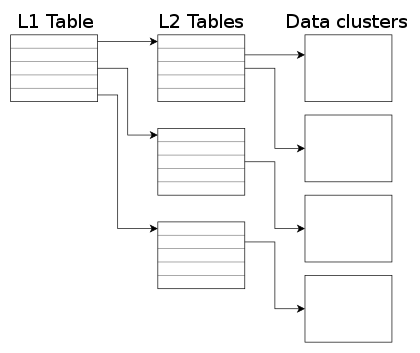
QEMU 2.5 has just been released, with a lot of new features. As with the previous release, we have also created a video changelog. I plan to write a few blog posts explaining some of the things I have been working on. In this one I m going to talk about how to control the size of the qcow2 L2 cache. But first, let s see why that cache is useful. The qcow2 file format qcow2 is the main format for disk images used by QEMU. One of the features of this format is that its size grows on demand, and the disk space is only allocated when it is actually needed by the virtual machine. A qcow2 file is organized in units of constant size called clusters. The virtual disk seen by the guest is also divided into guest clusters of the same size. QEMU defaults to 64KB clusters, but a different value can be specified when creating a new image: qemu-img create -f qcow2 -o cluster_size=128K hd.qcow2 4G In order to map the virtual disk as seen by the guest to the qcow2 image in the host, the qcow2 image contains a set of tables organized in a two-level structure. These are called the L1 and L2 tables. There is one single L1 table per disk image. This table is small and is always kept in memory. There can be many L2 tables, depending on how much space has been allocated in the image. Each table is one cluster in size. In order to read or write data to the virtual disk, QEMU needs to read its corresponding L2 table to find out where that data is located. Since reading the table for each I/O operation can be expensive, QEMU keeps a cache of L2 tables in memory to speed up disk access.
The L2 cache can have a dramatic impact on performance. As an example, here s the number of I/O operations per second that I get with random read requests in a fully populated 20GB disk image:
L2 cache size Average IOPS
1 MB 5100
1,5 MB 7300
2 MB 12700
2,5 MB 63600
If you re using an older version of QEMU you might have trouble getting the most out of the qcow2 cache because of this bug, so either upgrade to at least QEMU 2.3 or apply this patch. (in addition to the L2 cache, QEMU also keeps a refcount cache. This is used for cluster allocation and internal snapshots, but I m not covering it in this post. Please refer to the qcow2 documentation if you want to know more about refcount tables) Understanding how to choose the right cache size In order to choose the cache size we need to know how it relates to the amount of allocated space. The amount of virtual disk that can be mapped by the L2 cache (in bytes) is: disk_size = l2_cache_size * cluster_size / 8 With the default values for cluster_size (64KB) that is disk_size = l2_cache_size * 8192 So in order to have a cache that can cover n GB of disk space with the default cluster size we need l2_cache_size = disk_size_GB * 131072 QEMU has a default L2 cache of 1MB (1048576 bytes) so using the formulas we ve just seen we have 1048576 / 131072 = 8 GB of virtual disk covered by that cache. This means that if the size of your virtual disk is larger than 8 GB you can speed up disk access by increasing the size of the L2 cache. Otherwise you ll be fine with the defaults. How to configure the cache size Cache sizes can be configured using the -drive option in the command-line, or the blockdev-add QMP command. There are three options available, and all of them take bytes: There are two things that need to be taken into account:
  1. Both the L2 and refcount block caches must have a size that is a multiple of the cluster size.
  2. If you only set one of the options above, QEMU will automatically adjust the others so that the L2 cache is 4 times bigger than the refcount cache.
This means that these three options are equivalent: -drive file=hd.qcow2,l2-cache-size=2097152
-drive file=hd.qcow2,refcount-cache-size=524288
-drive file=hd.qcow2,cache-size=2621440
Although I m not covering the refcount cache here, it s worth noting that it s used much less often than the L2 cache, so it s perfectly reasonable to keep it small: -drive file=hd.qcow2,l2-cache-size=4194304,refcount-cache-size=262144 Reducing the memory usage The problem with a large cache size is that it obviously needs more memory. QEMU has a separate L2 cache for each qcow2 file, so if you re using many big images you might need a considerable amount of memory if you want to have a reasonably sized cache for each one. The problem gets worse if you add backing files and snapshots to the mix. Consider this scenario:
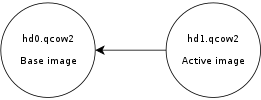
Here, hd0 is a fully populated disk image, and hd1 a freshly created image as a result of a snapshot operation. Reading data from this virtual disk will fill up the L2 cache of hd0, because that s where the actual data is read from. However hd0 itself is read-only, and if you write data to the virtual disk it will go to the active image, hd1, filling up its L2 cache as a result. At some point you ll have in memory cache entries from hd0 that you won t need anymore because all the data from those clusters is now retrieved from hd1. Let s now create a new live snapshot:
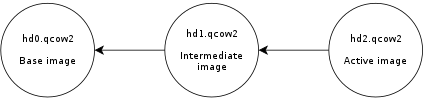
Now we have the same problem again. If we write data to the virtual disk it will go to hd2 and its L2 cache will start to fill up. At some point a significant amount of the data from the virtual disk will be in hd2, however the L2 caches of hd0 and hd1 will be full as a result of the previous operations, even if they re no longer needed. Imagine now a scenario with several virtual disks and a long chain of qcow2 images for each one of them. See the problem? I wanted to improve this a bit so I was working on a new setting that allows the user to reduce the memory usage by cleaning unused cache entries when they are not being used. This new setting is available in QEMU 2.5, and is called cache-clean-interval . It defines an interval (in seconds) after which all cache entries that haven t been accessed are removed from memory. This example removes all unused cache entries every 15 minutes: -drive file=hd.qcow2,cache-clean-interval=900 If unset, the default value for this parameter is 0 and it disables this feature. Further information In this post I only intended to give a brief summary of the qcow2 L2 cache and how to tune it in order to increase the I/O performance, but it is by no means an exhaustive description of the disk format. If you want to know more about the qcow2 format here s a few links: Acknowledgments My work in QEMU is sponsored by Outscale and has been made possible by Igalia and the invaluable help of the QEMU development team.
Enjoy QEMU 2.5!

Simon Josefsson: Let s Encrypt Clients

As many others, I have been following the launch of Let s Encrypt. Let s Encrypt is a new zero-cost X.509 Certificate Authority that supports the Automated Certificate Management Environment (ACME) protocol. ACME allow you to automate creation and retrieval of HTTPS server certificates. As anyone who has maintained a number of HTTPS servers can attest, this process has unfortunately been manual, error-prone and differ between CAs. On some of my personal domains, such as this blog.josefsson.org, I have been using the CACert authority to sign the HTTPS server certificate. The problem with CACert is that the CACert trust anchors aren t shipped with sufficient many operating systems and web browsers. The user experience is similar to reaching a self-signed server certificate. For organization-internal servers that you don t want to trust external parties for, I continue to believe that running your own CA and distributing it to your users is better than using a public CA (compare my XMPP server certificate setup). But for public servers, availability without prior configuration is more important. Therefor I decided that my public HTTPS servers should use a CA/Browser Forum-approved CA with support for ACME, and as long as Let s Encrypt is trustworthy and zero-cost, they are a good choice. I was in need of a free software ACME client, and set out to research what s out there. Unfortunately, I did not find any web pages that listed the available options and compared them. The Let s Encrypt CA points to the official Let s Encrypt client, written by Jakub Warmuz, James Kasten, Peter Eckersley and several others. The manual contain pointers to two other clients in a seamingly unrelated section. Those clients are letsencrypt-nosudo by Daniel Roesler et al, and simp_le by (again!) Jakub Warmuz. From the letsencrypt.org s client-dev mailing list I also found letsencrypt.sh by Gerhard Heift and LetsEncryptShell by Jan Moj . Is anyone aware of other ACME clients? By comparing these clients, I learned what I did not like in them. I wanted something small so that I can audit it. I want something that doesn t require root access. Preferably, it should be able to run on my laptop, since I wasn t ready to run something on the servers. Generally, it has to be Secure, which implies something about how it approaches private key handling. The letsencrypt official client can do everything, and has plugin for various server software to automate the ACME negotiation. All the cryptographic operations appear to be hidden inside the client, which usually means it is not flexible. I really did not like how it was designed, it looks like your typical monolithic proof-of-concept design. The simp_le client looked much cleaner, and gave me a good feeling. The letsencrypt.sh client is simple and written in /bin/sh shell script, but it appeared a bit too simplistic. The LetsEncryptShell looked decent, but I wanted something more automated. What all of these clients did not have, and that letsencrypt-nosudo client had, was the ability to let me do the private-key operations. All the operations are done interactively on the command-line using OpenSSL. This would allow me to put the ACME user private key, and the HTTPS private key, on a YubiKey, using its PIV applet and techniques similar to what I used to create my SSH host CA. While the HTTPS private key has to be available on the HTTPS server (used to setup TLS connections), I wouldn t want the ACME user private key to be available there. Similarily, I wouldn t want to have the ACME or the HTTPS private key on my laptop. The letsencrypt-nosudo tool is otherwise more rough around the edges than the more cleaner simp_le client. However the private key handling aspect was the deciding matter for me. After fixing some hard-coded limitations on RSA key sizes, getting the cert was as simple as following the letsencrypt-nosudo instructions. I ll follow up with a later post describing how to put the ACME user private key and the HTTPS server certificate private key on a YubiKey and how to use that with letsencrypt-nosudo. So you can now enjoy browsing my blog over HTTPS! Thank you Let s Encrypt!

15 December 2015

Chris Lamb: Peake Nationalism

Timothy Peake boarded the International Space Station a few hours ago becoming the United Kingdom's first official astronaut. It has become headline news, dominating the day's news cycle. But whilst Peake left our pale blue dot with only the humble honorific "Mister", he has subsequently been awarded the dubious appellation of "British Astronaut". Now, I'm no open-borders pan-nationalist and nor do I in any wish to detract or denigrate Peake's accomplishments indeed, it is only out of a genuine respect of "our Tim's" achievements that I pen this in the first place but are we still clinging to the idea that an extraordinary effort by a co-member of our species requires a nationalistic qualifier? How much do we really have in common with our "fellow countrymen"? This is, after all, the International Space Station, to which Peake was elevated from Kazakhstan on the back of a Russian rocket, in order that he may peacefully collaborate with an American, a Ukrainian, etc. I encountered the rebuttal that support of this nature is inspirational and incentive to others, but is it really motivating to know that if you toil to achieve greatness in this life then your accomplishments will be cheaply co-opted by mediocrities who only share the same colour passport as you? In this sense, isn't national pride really a form of national insecurity? A "Briton" in space: if space travel can teach us anything, it's that broadcasting the specific patch of ground you were born in is an outdated, tribalistic contrivance and should be assigned to the dustbin of history.

Antoine Beaupr : Using a Yubikey NEO for SSH and OpenPGP on Debian jessie

I recently ordered two Yubikey devices from Yubico, partly because of a special offer from Github. I ordered both a Yubikey NEO and a Yubikey 4, although I am not sure I remember why I ordered two - you can see their Yubikey product comparison if you want to figure that out, but basically, the main difference is that the NEO has support for NFC while the "4" has support for larger RSA key sizes (4096). This article details my experiment on the matter. It is partly based on first hand experience, but also links to various other tutorials that helped me along the way. Especially thanks to folks on various IRC channels that really helped me out in understanding this. My objective in getting a hardware security token like this was three-fold:
  1. use 2FA on important websites like Github, to improve the security of critical infrastructure (like my Borg backup software)
  2. login to remote SSH servers without exposing my password or my private key material on third party computers
  3. store OpenPGP key material on the key securely, so that the private key material can never be compromised
To make a long story short: this article documents step 2 and implicitly step 3 (because I use OpenPGP to login to SSH servers). However it is not possible to use the key on arbitrary third party computers, given how much setup was necessary to make the thing work at all. 2FA on the Github site completely failed, but could be used on other sites, although this is not covered by this article. I have also not experimented in details the other ways the Yubikey can also be used (sorry for the acronym flood) as: Update: OATH works! It is easy to configure and i added a section below.

Not recommended After experimenting with the device and doing a little more research, I am not sure it was the right decision to buy a Yubikey. I would not recommend buying Yubikey devices because they don't allow changing the firmware, making the device basically proprietary, even in the face of an embarrassing security vulnerability on the Yubikey NEO that came out in 2015. A security device, obviously, should be as open as the protocols it uses, otherwise it's basically impossible to trust that the crypto hasn't been backdoored or compromised, or, in this case, is vulnerable to the simplest drive-by attacks. Furthermore, it turns out that the primary use case that Github was promoting is actually not working as advertised: to use the Yubikey on Github, you actually first need to configure 2FA with another tool, either with your phone's text messages (SMS) or with something like Google Authenticator. After contacting Github support, they explained that the Yubikey is seen as a "backup device", which seems really odd to me, especially considering the promotion and the fact that I don't have a "smart" (aka "Google", it seems these days) phone or the desire to share my personal phone number with Github. Finally, as I mentioned before, the fact that those devices are fairly new and the configuration necessary to make them work at all is completely obtuse, non-standardized or at least not available by default on arbitrary computers makes them basically impossible to use on other computers than your own specially crafted gems.

Plugging it in The Yubikey, when inserted into a USB port, seems to be detected properly. It shows up both as a USB keyboard and a generic device.
d c 14 17:23:26 angela kernel: input: Yubico Yubikey NEO OTP+U2F as /devices/pci0000:00/0000:00:12.0/usb3/3-2/3-2:1.0/0003:1050:0114.0016/input/input127
d c 14 17:23:26 angela kernel: hid-generic 0003:1050:0114.0016: input,hidraw3: USB HID v1.10 Keyboard [Yubico Yubikey NEO OTP+U2F] on usb-0000:00:12.0-2/input0
d c 14 17:23:26 angela kernel: hid-generic 0003:1050:0114.0017: hiddev0,hidraw4: USB HID v1.10 Device [Yubico Yubikey NEO OTP+U2F] on usb-0000:00:12.0-2/input1
We'll be changing this now - we want to to support OTP, U2F and CCID. Don't worry about those acronyms now, but U2F is for the web, CCID is for GPG/SSH, and OTP is for the One Time Passwords stuff mentionned earlier. I am using the Yubikey Personalization tool from stretch because the jessie one is too old, according to Gorzen. Indeed, I found out that the jessie version doesn't ship with the proper udev rules. Also, note that we need to run as sudo otherwise we get a permission denied:
$ sudo apt install yubikey-personalization/stretch
$ sudo ykpersonalize -m86
Firmware version 3.4.3 Touch level 1541 Program sequence 1
The USB mode will be set to: 0x86
Commit? (y/n) [n]: y
To understand better what the above does, see the NEO composite device documentation. The next step is to reconnect the key, for the udev rules to kick in. If you were like me, you enthusiastically plugged in the device before installing the yubikey-personalization package, and the udev rules were not present then.

Configuring a PIN Various operations will require you to enter a PIN when talking to the key. The default PIN is 123456 and the default admin PIN is 12345678. You will want to change that, otherwise someone that gets a hold of your key could do any operation without your consent. For this, you need to use:
$ gpg --card-edit
> passwd
> admin
> passwd
Be sure to remember those passwords! Of course, the key material on the Yubikey can be revoked when you loose the key, but only if you still have control of the master key, or if you have a OpenPGP revocation certification (which you should have).

Configuring GPG To do OpenPGP operations (like decryption, signatures and so on), or SSH operations (like authentication on a remote server), you need to talk with GPG. Yes, OpenPGP keys are RSA keys that can be used to authenticate with SSH servers, that's not new and I have already been doing this with Monkeysphere for a while. Now the challenge is how to make GPG talk with the Yubikey. So the next step is to see if gpg can see the key alright, as described in the Yubikey importing keys howto - you will need first to install scdaemon and pcscd (according to this howto) for gpg-agent to be able to talk with the key:
$ sudo apt install scdaemon gnupg-agent pcscd
$ gpg-connect-agent --hex "scd apdu 00 f1 00 00" /bye
ERR 100663404 Card error <SCD>
Well that failed. At this point, touching the key types a bunch of seemingly random characters wherever my cursor is sitting - fun but totally useless still. That was because I failed to reconnect the key: make sure the udev rules are in place and reconnect the key, the above should work:
$ gpg-connect-agent --hex "scd apdu 00 f1 00 00" /bye
D[0000]  01 00 10 90 00                                     .....
OK
This shows it is running the firmware 1.10, which is not vulnerable to the infamous security issue. (Note: I also happened to install opensc and gpgsm because of this suggestion but I am not sure they are required at all.)

Using SSH To make GPG work with SSH, you need somehow to start gpg-agent with ssh support, for example with:
gpg-agent --daemon --enable-ssh-support bash
Of course, this will work better if it's started with your Xsession. Such an agent should already be started, so you just need to add the ssh emulation to its configuration file and restart your X session.
echo 'enable-ssh-support' >> .gnupg/gpg-agent.conf
In Debian Jessie, the ssh-agent wrapper will not start if it detects that you have already one running (for example from gpg-agent) but if that fails, you can try commenting out use-ssh-agent from /etc/X11/Xsession.options to keep it from starting up in your session. (Thanks to stackexchange for that reference.) Here I assume you have already created an authentication subkey on your PGP key. If you haven't, I suggest trying out simply monkeysphere gen-subkey, which will generate an authentication subkey for you. You can also do it by hand by following one of the OpenPGP/SSH tutorials from Yubikey, especially the more complete one. If you are going to generate a completely new OpenPGP key, you may want to follow this simpler tutorial here. Then you need to move your authentication subkey to the Yubikey. For this, you need to edit the key and use the keytocard command:
$ gpg2 --edit-key anarcat@debian.org
> toggle
> key 2
> keytocard
> save
Here, we use toggle to show the OpenPGP private key material. You should see a key marked with A for Authentication. Mine was the second one so I selected it with key 2 which put a star next to it. The keytocard command moved it to the key and save ensure the key was removed from the local keyring. Obviously, backups are essential before doing this, because it's perfectly possible to loose that key in the process, for example if you destroy or lose the key or forget the password. It's probably better to create a completely different authentication subkey for just this purpose, but that may require reconfiguring all remote SSH hosts, and you may not want to do that. Then SSH should magically talk with the GPG agent and ask you for the PIN! That's pretty much all there is to it - if it doesn't, it means that gpg-agent is not your SSH agent, and obviously things will fail... Also, you should be able to see the key being loaded in the agent when it is:
$ ssh-add -l
2048 23:f3:be:bf:1e:da:e8:ad:4b:c7:f6:60:5e:03:c2:a6 cardno:000603647189 (RSA)
.. that's about it! I have yet to cover 2FA and OpenPGP support, but that got me going for a while and I'll stop geeking around with that thing for now. It was fun, for sure, but not sure it's worth it for now.

Using OATH This is pretty neat: it allows you to add two factor authentication to a lot of things. For example, PAM has such a module, which I will configure here to allow myself to login to my server from untrusted machines. While I will expose my main password to keyloggers, the OTP password will prevent that from being reused. This is a simplified version of this OATH tutorial. We install the PAM module with:
sudo apt install libpam-oath
Then, we can hook it into any PAM consumer, for example with sshd:
--- a/pam.d/sshd
+++ b/pam.d/sshd
@@ -1,5 +1,8 @@
 # PAM configuration for the Secure Shell service
+# for the yubikey
+auth required pam_oath.so usersfile=/etc/users.oath window=5 digits=8
+
 # Standard Un*x authentication.
 @include common-auth
We also needed to allow OTP passwords in sshd explicitely, with:
ChallengeResponseAuthentication yes
This will force the user to enter a valid oath token on the server. Unfortunately, this will affect all users, regardless of whether they are present in the users.oath file. I filed bug #807990 regarding this, with a patch. Also, it means the main password is still exposed on the client machine - you can use the sufficient keyword instead of required to workaround that, but then it means anyone with your key can login to your machine, which is something to keep in mind. The /etc/users.oath file needs to be created with something like:
#type   username        pin     start seed
HOTP    anarcat -   00
00 is obviously a fake, and insecure string. Generate a proper one with:
dd if=/dev/random bs=1k count=1   sha1sum # create a random secret
Then the shared secret needs to be added to the Yubikey:
ykpersonalize -1 -o oath-hotp -o oath-hotp8 -o append-cr -a
You simply paste the random secret you created above, when prompted, and that shared secret will be saved in a Yubikey slot for future use. Next time you login to the SSH server, you will be prompted for a OATH password, you just touch the button on the key and it will be pasted there:
$ ssh -o PubkeyAuthentication=no anarc.at
One-time password (OATH) for  anarcat':
Password:
[... logged in!]
Final note: the centralized file approach makes it hard, if not impossible, for users to update their own secret token.. It would be nice if there would be a user-accessible token file, maybe ~/.oath? Filed feature request #807992 about this as well.

14 December 2015

Rapha&#235;l Hertzog: Freexian s report about Debian Long Term Support, November 2015

A Debian LTS logoLike each month, here comes a report about the work of paid contributors to Debian LTS. Individual reports In November, 114.50 work hours have been dispatched among 8 paid contributors. Their reports are available: Evolution of the situation We lost one hour of funding for December due to a sponsor not renewing, and we don t have any new sponsor lined up right now. There s another sponsor who will reduce his sponsorship starting with 2016. While the situation is relatively healthy right now, we should continue the efforts to find new sponsors, both to ensure we can cover more software in wheezy and to better share the costs: having many small sponsors is more resilient than relying on a few big ones. And we still haven t reached our second goal of funding the equivalent of a full-time position. In terms of security updates waiting to be handled, the situation is close to last month: the dla-needed.txt file lists 19 packages awaiting an update (2 less than last month), the list of open vulnerabilities in Squeeze shows about 22 affected packages in total (1 less than last month). Thanks to our sponsors The new sponsors are in bold.

No comment Liked this article? Click here. My blog is Flattr-enabled.

13 December 2015

Robert Edmonds: Works with Debian: Intel SSD 750, AMD FirePro W4100, Dell P2715Q

I recently installed new hardware in my primary computer running Debian unstable. The disk used for the / and /home filesystem was replaced with an Intel SSD 750 series NVM Express card. The graphics card was replaced by an AMD FirePro W4100 card, and two Dell P2715Q monitors were installed. Intel SSD 750 series NVM Express card This is an 800 GB SSD on a PCI-Express x4 card (model number SSDPEDMW800G4X1) using the relatively new NVM Express interface, which appears as a /dev/nvme* device. The stretch alpha 4 Debian installer was able to detect and install onto this device, but grub-installer 1.127 on the installer media was unable to install the boot loader. This was due to a bug recently fixed in 1.128:
grub-installer (1.128) unstable; urgency=high
  * Fix buggy /dev/nvme matching in the case statement to determine
    disc_offered_devfs (Closes: #799119). Thanks, Mario Limonciello!
 -- Cyril Brulebois <kibi@debian.org>  Thu, 03 Dec 2015 00:26:42 +0100
I was able to download and install the updated .udeb by hand in the installer environment and complete the installation. This card was installed on a Supermicro X10SAE motherboard, and the UEFI BIOS was able to boot Debian directly from the NVMe card, although I updated to the latest available BIOS firmware prior to the installation. It appears in lspci like this:
02:00.0 Non-Volatile memory controller: Intel Corporation PCIe Data Center SSD (rev 01)
(prog-if 02 [NVM Express])
    Subsystem: Intel Corporation SSD 750 Series [Add-in Card]
    Flags: bus master, fast devsel, latency 0
    Memory at f7d10000 (64-bit, non-prefetchable) [size=16K]
    Expansion ROM at f7d00000 [disabled] [size=64K]
    Capabilities: [40] Power Management version 3
    Capabilities: [50] MSI-X: Enable+ Count=32 Masked-
    Capabilities: [60] Express Endpoint, MSI 00
    Capabilities: [100] Advanced Error Reporting
    Capabilities: [150] Virtual Channel
    Capabilities: [180] Power Budgeting <?>
    Capabilities: [190] Alternative Routing-ID Interpretation (ARI)
    Capabilities: [270] Device Serial Number 55-cd-2e-41-4c-90-a8-97
    Capabilities: [2a0] #19
    Kernel driver in use: nvme
The card itself appears very large in marketing photos, but this is a visual trick: the photographs are taken with the low-profile PCI bracket installed, rather than the standard height PCI bracket which it ships installed with. smartmontools fails to read SMART data from the drive, although it is still able to retrieve basic device information, including the temperature:
root@chase 0 :~# smartctl -d scsi -a /dev/nvme0n1
smartctl 6.4 2015-06-04 r4109 [x86_64-linux-4.3.0-trunk-amd64] (local build)
Copyright (C) 2002-15, Bruce Allen, Christian Franke, www.smartmontools.org
=== START OF INFORMATION SECTION ===
Vendor:               NVMe
Product:              INTEL SSDPEDMW80
Revision:             0135
Compliance:           SPC-4
User Capacity:        800,166,076,416 bytes [800 GB]
Logical block size:   512 bytes
Rotation Rate:        Solid State Device
Logical Unit id:      8086INTEL SSDPEDMW800G4                     1000CVCQ531500K2800EGN  
Serial number:        CVCQ531500K2800EGN
Device type:          disk
Local Time is:        Sun Dec 13 01:48:37 2015 EST
SMART support is:     Unavailable - device lacks SMART capability.
=== START OF READ SMART DATA SECTION ===
Current Drive Temperature:     31 C
Drive Trip Temperature:        85 C
Error Counter logging not supported
[GLTSD (Global Logging Target Save Disable) set. Enable Save with '-S on']
Device does not support Self Test logging
root@chase 4 :~# 
Simple tests with cat /dev/nvme0n1 >/dev/null and iotop show that the card can read data at about 1 GB/sec, about twice as fast as the SATA-based SSD that it replaced. apt/dpkg now run about as fast on the NVMe SSD as they do on a tmpfs. Hopefully this device doesn't at some point require updated firmware, like some infamous SSDs have. AMD FirePro W4100 graphics card This is a graphics card capable of driving multiple DisplayPort displays at "4K" resolution and at a 60 Hz refresh rate. It has four Mini DisplayPort connectors, although I only use two of them. It was difficult to find a sensible graphics card. Most discrete graphics cards appear to be marketed towards video gamers who apparently must seek out bulky cards that occupy multiple PCI slots and have excessive cooling devices. (To take a random example, the ASUS STRIX R9 390X has three fans and brags about its "Mega Heatpipes".) AMD markets a separate line of "FirePro" graphics cards intended for professionals rather than gamers, although they appear to be based on the same GPUs as their "Radeon" video cards. The AMD FirePro W4100 is a normal half-height PCI-E card that fits into a single PCI slot and has a relatively small cooler with a single fan. It doesn't even require an auxilliary power connection and is about the same dimensions as older video cards that I've successfully used with Debian. It was difficult to determine whether the W4100 card was actually supported by an open source driver before buying it. The word "FirePro" appears nowhere on the webpage for the X.org Radeon driver, but I was able to find a "CAPE VERDE" listed as an engineering name which appears to match the "Cape Verde" code name for the FirePro W4100 given on Wikipedia's List of AMD graphics processing units. This explains the "verde" string that appears in the firmware filenames requested by the kernel (available only in the non-free/firmware-amd-graphics package):
[drm] initializing kernel modesetting (VERDE 0x1002:0x682C 0x1002:0x2B1E).
[drm] Loading verde Microcode
radeon 0000:01:00.0: firmware: direct-loading firmware radeon/verde_pfp.bin
radeon 0000:01:00.0: firmware: direct-loading firmware radeon/verde_me.bin
radeon 0000:01:00.0: firmware: direct-loading firmware radeon/verde_ce.bin
radeon 0000:01:00.0: firmware: direct-loading firmware radeon/verde_rlc.bin
radeon 0000:01:00.0: firmware: direct-loading firmware radeon/verde_mc.bin
radeon 0000:01:00.0: firmware: direct-loading firmware radeon/verde_smc.bin
The card appears in lspci like this:
01:00.0 VGA compatible controller: Advanced Micro Devices, Inc. [AMD/ATI] Cape Verde GL [FirePro W4100]
(prog-if 00 [VGA controller])
    Subsystem: Advanced Micro Devices, Inc. [AMD/ATI] Device 2b1e
    Flags: bus master, fast devsel, latency 0, IRQ 55
    Memory at e0000000 (64-bit, prefetchable) [size=256M]
    Memory at f7e00000 (64-bit, non-prefetchable) [size=256K]
    I/O ports at e000 [size=256]
    Expansion ROM at f7e40000 [disabled] [size=128K]
    Capabilities: [48] Vendor Specific Information: Len=08 <?>
    Capabilities: [50] Power Management version 3
    Capabilities: [58] Express Legacy Endpoint, MSI 00
    Capabilities: [a0] MSI: Enable+ Count=1/1 Maskable- 64bit+
    Capabilities: [100] Vendor Specific Information: ID=0001 Rev=1 Len=010 <?>
    Capabilities: [150] Advanced Error Reporting
    Capabilities: [200] #15
    Capabilities: [270] #19
    Kernel driver in use: radeon
The W4100 appears to work just fine, except for a few bizarre error messages that are printed to the kernel log when the displays are woken from power saving mode:
[Sun Dec 13 00:24:41 2015] [drm:si_dpm_set_power_state [radeon]] *ERROR* si_enable_smc_cac failed
[Sun Dec 13 00:24:41 2015] [drm:si_dpm_set_power_state [radeon]] *ERROR* si_enable_smc_cac failed
[Sun Dec 13 00:24:41 2015] [drm:radeon_dp_link_train [radeon]] *ERROR* displayport link status failed
[Sun Dec 13 00:24:41 2015] [drm:radeon_dp_link_train [radeon]] *ERROR* clock recovery failed
[Sun Dec 13 00:24:41 2015] [drm:radeon_dp_link_train [radeon]] *ERROR* displayport link status failed
[Sun Dec 13 00:24:41 2015] [drm:radeon_dp_link_train [radeon]] *ERROR* clock recovery failed
There don't appear to be any ill effects from these error messages, though. I have the following package versions installed:
 / Name                          Version             Description
+++-=============================-===================-================================================
ii  firmware-amd-graphics         20151207-1          Binary firmware for AMD/ATI graphics chips
ii  linux-image-4.3.0-trunk-amd64 4.3-1~exp2          Linux 4.3 for 64-bit PCs
ii  xserver-xorg-video-radeon     1:7.6.1-1           X.Org X server -- AMD/ATI Radeon display driver
The Supermicro X10SAE motherboard has two PCI-E 3.0 slots, but they're listed as functioning in either "16/NA" or "8/8" mode, which apparently means that putting anything in the second slot (like the Intel 750 SSD, which uses an x4 link) causes the video card to run at a smaller x8 link width. This can be verified by looking at the widths reported in the "LnkCap" and "LnkSta" lines in the lspci -vv output:
root@chase 0 :~# lspci -vv -s 01:00.0   egrep '(LnkCap LnkSta):'
        LnkCap: Port #0, Speed 8GT/s, Width x16, ASPM L0s L1, Exit Latency L0s <64ns, L1 <1us
        LnkSta: Speed 8GT/s, Width x8, TrErr- Train- SlotClk+ DLActive- BWMgmt- ABWMgmt-
root@chase 0 :~# 
I did not notice any visible artifacts or performance degradation because of the smaller link width. The sensors utility from the lm-sensors package is capable of reporting the temperature of the GPU:
root@chase 0 :~# sensors radeon-pci-0100
radeon-pci-0100
Adapter: PCI adapter
temp1:        +55.0 C  (crit = +120.0 C, hyst = +90.0 C)
root@chase 0 :~# 
Dell P2715Q monitors Two new 27" Dell monitors with a native resolution of 3840x2160 were attached to the new graphics card. They replaced two ten year old Dell 2001FP monitors with a native resolution of 1600x1200 that had experienced burn-in, providing 4.32 times as many pixels. (TV and monitor manufacturers now shamelessly refer to the 3840x2160 resolution as "4K" resolution even though neither dimension reaches 4000 pixels.) There was very little to setup beyond plugging the DisplayPort inputs on these monitors into the DisplayPort outputs on the graphics card. Most of the setup involved reconfiguring software to work with the very high resolution. X.org, for tl;dr CLOSED NOTABUG reasons doesn't set the DPI correctly. These monitors have ~163 DPI resolution, so I added -dpi 168 to /etc/X11/xdm/Xservers. (168 is an even 1.75x multiple of 96.) Software like Google Chrome and xfce4-terminal rendered fonts and graphical elements at the right size, but other software like notion, pidgin, and virt-manager did not fully understand the high DPI. E.g., pidgin renders fonts at the correct size, but icons are too small. The default X cursor was also too small. To fix this, I installed the dmz-cursor-theme package, ran update-alternatives --config x-cursor-theme and selected /usr/share/icons/DMZ-Black/cursor.theme as the cursor theme. Overall, these displays are much brighter and more readable than the ones they replaced.

11 December 2015

Matthias Klumpp: What s up in Tanglu?

tanglu logo pureIt is time again for another Tanglu blogpost (to be honest, this article is pretty much overdue  ). I want to shine a spotlight on the work that s done in Tanglu, be it ongoing or past work done for the new release. Why is the new release taking longer than usual? As you might have noticed, usually a new Tanglu release (Tanglu 4 Dasyatis ) should be released this month. We decided a while ago, however, to defer the release and are now aiming for an release in February / March 2016. Reason for this change in schedule is the GCC 5 transition (and more importantly the huge amount of follow-up transitions) as well as some other major infrastructure tasks, which we would like to complete and give them a good amount of testing before releasing. Also, some issues with our build system, and generally less build power than in previous releases is a problem (At least the Debile build-system issues could be worked around or solved). The hard disk crash in the forum and bugtracking server also delayed the start of the Tanglu 4 development process a lot. In all of these tasks, manpower is of course the main problem  Software Tasks General infrastructure tasks Improvements on Synchrotron Synchrotron, the software which is synchronizing the Tanglu archive with the Debian archive, received a few tweaks to make it more robust and detect installability of packages more reliably. We also run it more often now. Rapidumo improvements Rapidumo is a software written to complement dak (the Debian Archive Kit) in managing the Tanglu archive. It performs automatic QA tasks on the archive and provides a collection of tools to perform various tasks (like triggering package rebuilds). For Tanglu 4, we sometimes drop broken packages from the archive now, to speed up transitions and to remove packages which got uninstallable more quickly. Packages removed from the release suite still have a chance to enter it again, but they need to go through Tanglu s staging area again first. The removal process is currently semiautomatic, to avoid unneccessary removals and breakage. Rapidumo could benefit from some improvements and an interactive web interface (as opposed to static HTML pages) would be nice. Some early work on this is done, but not completed (and has a very low priority at the moment). DEP-11 integration There will be a bigger announcement on AppStream and DEP-11 in the next days, so I keep this terse: Tanglu will go for full AppStream integration with the next release, which means no more packaged metadata, but data placed directly in the archive. Work on this has started in Tanglu, but I needed to get back to the drawing board with it, to incorporate some new ideas for using synergies with Debian on generating the DEP-11 metadata. Phabricator Phabricator has been integrated well into our infrastructure, but there are still some pending tasks. E.g. we need subprojects in Phabricator, and a more powerful Conduit interface. Those are upstream bugs on Phabricator, and are actively being worked on. As soon as the missing features are available in Phabricator, we will also pursue the integration of Tanglu bug information with the Debian DistroTracker, which was discussed at DebConf this summer. UEFI support UEFI support is a tricky beast. Full UEFI support is a release-goal for Tanglu 4 (so we won t release without it). At time, our Live-CDs start on pure EFI systems, but there are several reported issues with the Calamares live-installer as well as Debian-Installer, which fails to install GRUB correctly. Work on resolving these problems is ongoing. Major LiveCD rework Tanglu 4 will ship with improved live-cds, which e.g. allow selecting the preferred locale early in the bootloader. We switched from live-boot to manage our live sessions to casper, the same tool which is also used in Ubuntu. Casper fixed a few issues we had, and brought some new, but overall using it was a good choice and work on making top-notch live-cds is progressing well. KDE Plasma Integration of the latest Plasma release is progressing, but its speed has slowed down since fewer people are working on it. If you want to help Tanglu s KDE Workspace integration, please help! For the upcoming release, the Plasma 5 packages which we created based on a collaboration with Kubuntu for the previous Tanglu 3 release have been merged with their Debian counterparts. This action fortunately was possible without major problems. Now Tanglu is (mostly) using the same Plasma 5 packages as Debian again (lots of Kudos go the the Kubuntu and Debian Qt/KDE packagers!). GNOME The same re-merge with Debian has been done on Tanglu s GNOME flavor (Tanglu also shipped with a more recent GNOME release than Debian in Tanglu 3). So Tanglu 4 GNOME and Debian Testing GNOME are at (almost) the same level. Unfortunately, the GNOME team is heavily understaffed a GNOME team member left at the beginning of the year for personal reasons, and the team now only has one semi-active member and me. Other An fvwm-nightshade spin is being worked on :-) . Apart from that, there are no teams maintaining other flavors in Tanglu. Security & Stable maintenance Thanks to several awesome people, the current Tanglu Stable release (Tanglu 3 Chromodoris ) receives regular updates, even for many packages which are not in the fully supported set. Tangluverse Tasks Tasks (not) done in the global Tanglu universe. HTTPS for community sites Thanks to our participation in the Let s Encrypt closed beta program, Tanglu websites like the user forums and bugtracker have been fully encrypted for a while, which should make submitting data to these sites much more secure. So far, we didn t encounter issues, which means that we will likely aim for getting HTTPS encryption enabled on every Tanglu website. Tanglu.org website The Tanglu main website didn t receive much love at all. It could use a facelift and more importantly updated content about Tanglu. So far, nobody volunteered to update the website, so this task is still open. It is, however, a high-priority task to increase our public visibility as a project, so updating the website is definitely something which will be done soon. Promotion It doesn t hurt to think about how to sell Tanglu as brand : What is Tanglu? Our motivation, our goals? What is our slogan? How can we communicate all of this to new users, without having them to read long explanations? (e.g. the Fedora Project has this nicely covered on their main website, and their slogan Freedom, Friends, Features, First immediately communicates the project s key values) Those are issues engineers don t think about often, still it is important to present Tanglu in a way that is easy to grasp for people hearing about it for the first time. So far, no people are working on this task specifically, although it regularly comes up on IRC. Sponsoring & Government Tanglu is by design not backed by any corporation. However, we still need to get our servers paid. Currently, Tanglu is supported by three sponsors, which basically provide the majority of our infrastructure. Also, developers provide additional machines to get Tanglu running and/or packages built. Still, this dependency on very few sponsors paying the majority of the costs is very bad, since it makes Tanglu vulnerable in case one sponsor decides to end sponsorship. We have no financial backing to be able to e.g. continue to pay an important server in case it s sponsor decides to drop sponsorship. Also, since Tanglu is no legal entity, accepting donations is hard for us at time, since a private person would need to accept the money on behalf of Tanglu. So we can t easily make donating to Tanglu possible (at least not in the way we want donations to be). These issues are currently being worked on, there are a couple of possible solutions on the table. I will write about details as soon as it makes sense to go public with them. In general, I am very happy with the Tanglu community: The developer community is a pleasure to work with, and interactions with our users on the forums or via the bugtracker are highly productive and friendly. Although the development speed has slowed down a bit, Tanglu is still an active and awesome project, and I am looking forward to the cool stuff we will do in future!

7 December 2015

Russ Allbery: git-pbuilder 1.39

This update isn't anything particularly exciting, just some more documentation improvements (gbp buildpackage is now the standard invocation instead of git-buildpackage), so instead you get some explanation of this flurry of little software releases. Since the huge transition a year and a half ago, I've been doing lots of adjustment to a different employer, a different commute, a different schedule, different types of work (which has changed several times), different management chains (which have changed even more), and the political and social environment at a new place. Oh, and then moving for the first time in about fifteen years. All of that has meant a lot of distraction and disruption, and that, in turn, really torpedoed my free software work for a while. The silver lining is that it also gave me some distance from all the things I was working on, and an opportunity to think harder about what I want to do and how I want to allocate time. So, I did a bit of a prioritization exercise (although I should do a few more), thought about what I really wanted to focus on, and have been putting some more effort into making time for free software work, community things, and similar work that I'd been letting slip. I'm also doing less of a few things, particularly trying to stay up on random email (so expect me to not be as good of a correspondant), just because there aren't enough hours in the day. Anyway, hence the flurry. Not making any committments, as committment stress is something else I'm getting away from, but it was a fun and productive weekend. You can get the latest version of git-pbuilder from my script distribution page. (Still want to rewrite this in Python at some point.)

6 December 2015

Elena 'valhalla' Grandi: Blocked by indiegogo because of blocked javascript?

Blocked by indiegogo because of blocked javascript?

I usually browse the web with javascript blocked, for obvious security reasons and slightly less obvious free software reasons https://www.gnu.org/philosophy/javascript-trap.html, adding sites to a temporary whitelist when absolutely needed.

I know that this hurts the revenue model of many websites, in some cases I'm sorry, in other cases I pay a subscription so that I don't have to be sorry, and in other cases I just don't care, depending on the service they provide.

One thing that I hate are websites that require javascript even to show their basic contents: I understand why some of them are doing it, but less so when they aren't getting money from ads, but from actually providing a paid service, such as indiegogo.

This morning I was browsing a campaign on that crowdfunding site, grudgingly allowed javascript from their domain to be able to see the campaign description and suddenly found this:

Immagine/fotohttp://social.gl-como.it/photo/dde1ddaa79d831ffbc2bee30110a2497.png

So ok, they want me to confirm I'm a human, ok, I'm fine with that, but asking for personal identification? just to be able to browse your site securely? No thanks. The support page linked in that says that this company also support just asking to fill a captcha, which is probably not as effective, but also much less intrusive.

I was browsing a campaign for an (apparently) open hardware encryption device, which is probably enough these days to get you somewhat under the radar (luckily, I am already, and I have a t-shirt to prove it :) ), so being asked to identify myself before I could even start considering whether the device was interesting enough to support (in a public-ish way) was expecially bad.

So, if you are working on something like that, maybe you could consider using a different crowdfunding website, one that respects more their users?

5 December 2015

Lunar: Everyone can be a target

My flight from Athens where I had the pleasure to attend the first reproducible world summit landed at the scheduled time in Paris (CDG). While people were getting their bags and putting their coats on, one member of the cabin crew announced that a police control will take place outside the plane and that we should have ready identity documents. My seat was in the back of the plane, so I had time to wait in the cold of the jetway while all passengers were controlled one after the other. Three cops were set up right at the entrance of the terminal. One was taking cards or passports and looking at people's face. He then passed it to another cop in front of a suitcase that seemed to contain a scanner and a computer. The third one was just standing against the wall watching. When it was my turn, after scanning my passport, the cop had this nice gesture where she started to move her hand holding the passport toward me just like she had just did a hundred times before pulling it backward when the result appeared on the screen. I had the confirmation that I was registered as a dangerous political activist in 2012 when David Dufresne published Magasin G n ral. One report from the interior intelligence service from 2008 was leaked to promote the book. My name had not been properly redacted from the very first version that went online and was associated with a political self-organized space in Dijon. Some Debian Developers had the pleasure to visit that space in 2005, 2006, or 2007. The report was full of mistakes, like almost all police files, so I don't want to comment on it. The good news is that since then, I have stopped being paranoid. I knew, and thus could take appropriate precautions. Just like every time I have to approach an airport, all my (encrypted) electronic devices were turned off. I had shaved a couple hours before. I know a lawyer ready to represent me. I am fully aware that it's best to say as little as possible. Although it has been a while since I had such a blatant confirmation that I was still a registered anarchist. It should not be a surprise though. Once you are in, there's no way out. I was then asked to step aside while they proceeded with the rest of the queue. I put my backpack down and leaned against the wall. Once they were over, one of the cops asked me to follow him. We walked through the corridors to reach the office of the border police. While we were walking, they asked me a series of questions. I'm not mentioning the pauses in between, but here's what I can remember:

Do you have a connection?
No.
Are you going to Paris?
To my parents' in the suburbs.
How long have you been staying in Greece?
5 days.
flipping the pages of my passport And you come back from the U.S. in Feb. 2015?
No, that was the maximum stay. I was there in August 2014.
Why were you in Greece? Vacations?
Work. I was at a meeting.
What do you do?
Free software.
What is that?
I am a developper.
Oh, computers.
Yes.
Is that why you also were in the US?
Yes, it was another conference.
And so you travel because of that. That's nice.

Are you a freelancer?
I work with a coop, but yes.
The cop also commented that they had to do some simple checks and that they would then let me go as I was coming back. I did not trust this but said nothing. When then passed through a door where the cop had to use their badge to unlock it. I was asked to sit on a chair in the corridor between two offices (as far as I could see). I could hear one cop explaining the situation to the next: Il a une fiche. Ah, une fiche. They seemed quite puzzled that I was not controlled when I flew out on Monday. After some minutes, another cop came back asking me for my boarding pass. Some more minutes later, he came back asking me if the address on my passport was still valid. I replied no . They gave me a piece of paper asking me for my current address, a phone number and an email address. As these information are all easy to find, I thought it was easier to comply. I gave my @irq7.fr address that I use for all public administrations. When the cop saw it, he asked:
What is it?
I don't understand.
Is it your company?
It is a non-profit.
He gave me my passport back and showed me the way out. (I will spare you details on the discussion I had to listen while waiting between two cops about how one loved to build models of military weapons used in wars against communism because of his origins. And that he was pissed off because fucking Europe disallowed some (toxic) paints he was used to.) To the best of my understanding, what happened is that they made a phone call and were just asked to update my personal details by the intelligence service. I don't know, but I'm left to wonder if all these people might just have been controlled because I was on the flight. All-in-all this didn't take too long: one hour after leaving the plane I was on the platform for the regional trains. The cops stayed polite the whole time. I am privileged: French citizen, white, able to speak French with a teacher accent. I am pretty sure it would have not been that good if I had been displaying a long beard or a djellaba. I took the time to document this because I know too many people who think that what the French government is doing doesn't concern them. It does. It's been a couple of years now that antiterrorism is how governments keep people in check. But we are reaching a whole new level now. We are talking about cops keeping their guns while off duties, house searches at any hours without judge oversight, and the government wants to change the constitution to make the state of emergency permanent. We've seen so many abuses in just two weeks. It will not go well. Meanwhile, instead of asking themselves why young people are killing others and themselves, state officials prefer dropping bombs. Which will surely prevent people ready to die from using suicidal tactics, right? We are at the dawn of an environmental crisis that will end humanity. Every human on this planet is concerned. People get beaten up when they march to pressure governments to do something about it. We need to unite and resist. And yes, we are going to get hurt but freedom is not free.

4 December 2015

Ritesh Raj Sarraf: Freedom, Privacy and Our Choices

When I bought my Lenovo Yoga 2 13, I had great plans. I wanted a device, that I could use both, as a laptop, and also as a tablet. The path hasn't been easy. But then, no path in Free Software against Freedom and Privacy has been easy. The choice is left to us, the users. I had been a long time KDE User. With KDE's decision to have different UIs for different form factors (plasma active, plasma netbook, plasma desktop), it was now time to try something different. I had 2 choices to explore: Unity and GNOME. But given that Unity is not feasible in Debian, the obvious first option to explore was GNOME. And I guess my timing was perfect. I started with 3.14 which showed great promises about touch support, followed by 3.16 and now 3.18. There's still a long way to go, but GNOME definitely is in the right direction and improves impressively with each release. I would like to thank the Debian GNOME Team. You guys just are amazing. The pace at which the packages are prepared and pushed, it is a tough job. So, thank you. Now that I use GNOME, I also follow some GNOME development, file bugs and read User Feedback. While (many of) the design decisions that GNOME makes today is in line with what I desire, there are other users who aren't happy. Many don't like the new UI design GNOME is heading to, i.e. the fusion of the UI such that it is usable on both form factors: Desktop and Tablet. People find the Toolbars bloated. GNOME developer Allan Day has a good blog post showing the facts. But I think there's the other aspect which needs to be emphasized. By improving the same tools, the GNOME devs are making them capable to be used both, on Laptops and Tablets. This is important to me as a user. I still have the freedom of the tools I use.. And those tools don't sniff. By using the same tools in both modes, I also can reliably build a workflow. I remember when I was moving from IceDove to Evolution. It was painful, but once done, I now have an email client I can still use with basic touch workflow. If you take current GNOME out of the picture, what would a user do. Live with a Laptop and a Tablet, 2 separate device. The laptop running Debian and the Tablet ??? In the direction GNOME is in, it allows me to be liberated for both the use cases. My most valuable assets: data and time, both are efficient in use. And not to forget the reason for this blog entry: Freedom and Privacy. Sure you can choose not to buy/use a tablet at all, and live in a world 10yrs behind. By improving the same tools for both use cases, GNOME is also ensuring that they don't throw away learnings from the past. Today Gtk is touch ready and the same libs also are running when on Laptop. A feature addition/enhancement gets leveraged by both. The Search Bar addition into File Dialog is available both, in Laptop and Tablet mode. And the list could go on.... On the other hand, I'm not sure what the KDE User Experience is today. But if I have to log out of my plasma desktop session, to use in Tablet Mode (plasma active), that workflow is already a broken one. I do miss the flexibility KDE used to provide, where in a substantial part of the user flow could be heavily customized. This is one gripe I have with the GNOME Project in general. They just don't balance things at all. Elegance is not about cutting out features. There are simple things you'll miss in GNOME if you come from KDE. Like Ctrl+R in Kwrite. You can't do that in GEdit. Today, with companies like Google, who are developing tools that are cross-platform, stand as good examples as to what GNOME/KDE should do. Don't bloat the UI, but then again don't strip it off either. The Chromium Browser's UI is a great example. The Chromium UI Devs are pretty strict on what new visible field can be added. But under one Wrench button, they provide a world for everyone to be happy. Power Users can run through the option available, and Super Power Users can use things like chrome://settings and chrome://flags I the new world today, where without a proprietary stack running on your mobil device, it is literally useless; Efforts like that of from the GNOME Project, gives some hope.

Categories:

Keywords:

Like:

Steve Kemp: I jumped on the SSL-bandwagon

Like everybody else on the internet today was the day I started rolling out SSL certificates, via let's encrypt. The process wasn't too difficult, but I did have to make some changes. Pretty much every website I have runs under its own UID, and I use a proxy to pass content through to the right back-end. Running 15+ webservers feels like overkill, but it means that the code running start.steve.org.uk cannot read/modify/break the code that is running this blog - because they run as different UIDs. To start with I made sure that all requests to the top-level /.well-known directory were shunted to a local directory - via this in /etc/apache2/conf-enabled/well-known.conf:
Alias /.well-known/ /srv/well-known/
<Directory "/srv/well-known/">
    ForceType text/plain
    Options Indexes FollowSymLinks MultiViews
    AllowOverride all
    AuthType None
    Require all granted
</Directory>
Then configured each proxy to avoid forwarding that path to the back-ends, by adding this to each of the individual virtual-hosts that run proxying:
<Proxy *>
  Order allow,deny
  Allow from all
</Proxy>
ProxyPass /.well-known !
ProxyPass        / http://localhost:$port/
..
Then it came to be time to actually generate the certificates. Rather than using the official client I used a simpler one that allowed me to generate requests easily:
CSR=/etc/apache2/ssl/csr/
KEYS=/etc/apache2/ssl/keys/
CERTS=/etc/apache2/ssl/certs/
# generate a key
openssl genrsa 4096 > $KEYS/lumail.key
# make a CSR
openssl req -new -sha256 -key $KEYS/lumail.key -subj "/" -reqexts SAN \
   -config <(cat /etc/ssl/openssl.cnf \
   <(printf "[SAN]\nsubjectAltName=DNS:www.lumail.org,DNS:lumail.org")) \
   > $CSR/lumail.csr
# Do the validation
acme_tiny.py --account-key ./account.key --csr $CSR/lumail.csr \
  --acme-dir /srv/well-known/acme-challenge/ > $CERTS/lumail.crt.new
And then I was done. Along the way I found some niggles: The first issue is an annoyance. The second issue is a real pain. For example *.steve.org.uk listens on one machine except for webmail.steve.org.uk. Since there are no wildcards created a single certificate with Alt-names for a bunch of names such as: Then seperately create a certificate for the webmail host - which I've honestly not done yet. Still I wrote a nice little script to generate SSL for a number of domains, with different Alt-Names, wrapping around the acme_tiny.py script, and regenerating all my deployed certificates is now a two minute job. (People talk about renewing certificates. I don't see the gain. Just replace them utterly every two months and you'll be fine.)

3 December 2015

Bits from Debian: Software Freedom Conservancy needs your support!

Software Freedom Conservancy Logo "Software Freedom Conservancy helps promote, improve, develop, and defend Free, Libre, and Open Source Software (FLOSS) projects. Conservancy provides a non-profit home and infrastructure for FLOSS projects.", that is how Software Freedom Conservancy defines itself. Organizations like Conservancy allow free software developers to focus on what they do the best by doing copyleft enforcement, taking care of legal aspects and provide many services to its project members. Last August, Debian and Conservancy announced a partnership and formed the Copyright Aggregation Project where, among other things, Conservancy will be able to hold copyrights for some Debian works and ensure compliance with copyleft so that those works remain in free software. Recently, Conservancy launched a major fundraising campaign and needs more individual supporters to gain more sustainable and independent funding. This will allow the Conservancy to continue its efforts towards convincing more companies to comply with free software licenses such as the GPL and take legal actions when dialogue turns out to be unsuccessful. Conservancy needs your support now, more than ever! Many Debian Developers and Contributors have already become Conservancy supporters. Please consider signing up as a supporter on https://sfconservancy.org/supporter/!

2 December 2015

Andrea Veri: Three years and counting

It s been a while since my last what s been happening behind the scenes e-mail so I m here to report on what has been happening within the GNOME Infrastructure, its future plans and my personal sensations about a challenge that started around three (3) years ago when Sriram Ramkrishna and Jeff Schroeder proposed my name as a possible candidate for coordinating the team that runs the systems behind the GNOME Project. All this followed by the official hiring achieved by Karen Sandler back in February 2013. The GNOME Infrastructure has finally reached stability both in terms of reliability and uptime, we didn t have any service disruption this and the past year and services have been running smoothly as they were expected to in a project like the one we are managing. As many of you know service disruptions and a total lack of maintenance were very common before I joined back in 2013, I m so glad the situation has dramatically changed and developers, users, passionates are now able to reach our websites, code repositories, build machines without experiencing slowness, downtimes or
unreachability. Additionally all these groups of people now have a reference point they can contact in case they need help when coping with the infrastructure they daily use. The ticketing system allows users to get in touch with the members of the Sysadmin Team and receive support right away within a very short period of time (Also thanks to Pagerduty, service the Foundation is kindly sponsoring) Before moving ahead to the future plans I d like to provide you a summary of what has been done during these roughly three years so you can get an idea of why I define the changes that happened to the infrastructure a complete revamp:
  1. Recycled several ancient machines migrating services off of them while consolidating them by placing all their configuration on our central configuration management platform ran by Puppet. This includes a grand total of 7 machines that were replaced by new hardware and extended warranties the Foundation kindly sponsored.
  2. We strenghten our websites security by introducing SSL certificates everywhere and recently replacing them with SHA2 certificates.
  3. We introduced several services such as Owncloud, the Commits Bot, the Pastebin, the Etherpad, Jabber, the GNOME Github mirror.
  4. We restructured the way we backup our machines also thanks to the Fedora Project sponsoring the disk space on their backup facility. The way we were used to handle backups drastically changed from early years where a magnetic tape facility was in charge of all the burden of archiving our data to today where a NetApp is used together with rdiff-backup.
  5. We upgraded Bugzilla to the latest release, a huge thanks goes to Krzesimir Nowak who kindly helped us building the migration tools.
  6. We introduced the GNOME Apprentice program open-sourcing our internal Puppet repository and cleansing it (shallow clones FTW!) from any sensitive information which now lives on a different repository with restricted access.
  7. We retired Mango and our OpenLDAP instance in favor of FreeIPA which allows users to modify their account information on their own without waiting for the Accounts Team to process the change.
  8. We documented how our internal tools are customized to play together making it easy for future Sysadmin Team members to learn how the infrastructure works and supersede existing members in case they aren t able to keep up their position anymore.
  9. We started providing hosting to the GIMP and GTK projects which now completely rely on the GNOME Infrastructure. (DNS, email, websites and other services infrastructure hosting)
  10. We started providing hosting not only to the GIMP and GTK projects but to localized communities as well such as GNOME Hispano and GNOME Greece
  11. We configured proper monitoring for all the hosted services thanks to Nagios and Check-MK
  12. We migrated the IRC network to a newer ircd with proper IRC services (Nickserv, Chanserv) in place.
  13. We made sure each machine had a configured management (mgmt) and KVM interface for direct remote access to the bare metal machine itself, its hardware status and all the operations related to it. (hard reset, reboot, shutdown etc.)
  14. We upgraded MoinMoin to the latest release and made a substantial cleanup of old accounts, pages marked as spam and trashed pages.
  15. We deployed DNSSEC for several domains we manage including gnome.org, guadec.es, gnomehispano.es, guadec.org, gtk.org and gimp.org
  16. We introduced an account de-activation policy which comes into play when a contributor not committing to any of the hosted repositories at git.gnome.org since two years is caught by the script. The account in question is marked as inactive and the gnomecvs (from the old cvs days) and ftpadmin groups are removed.
  17. We planned mass reboots of all the machines roughly every month for properly applying security and kernel updates.
  18. We introduced Mirrorbrain (MB), the mirroring service serving GNOME and related modules tarballs and software all over the world. Before introducing MB GNOME had several mirrors located in all the main continents and at the same time a very low amount of users making good use of them. Many organizations and companies behind these mirrors decided to not host GNOME sources anymore as the statistics of usage were very poor and preferred providing the same service to projects that really had a demand for these resources. MB solved all this allowing a proper redirect to the closest mirror (through mod_geoip) and making sure the sources checksum matched across all the mirrors and against the original tarball uploaded by a GNOME maintainer and hosted at master.gnome.org.
I can keep the list going for dozens of other accomplished tasks but I m sure many of you are now more interested in what the future plans actually are in terms of where the GNOME Infrastructure should be in the next couple of years. One of the main topics we ve been discussing will be migrating our Git infrastructure away from cgit (which is mainly serving as a code browsing tool) to a more complete platform that is surely going to include a code review tool of some sort. (Gerrit, Gitlab, Phabricator) Another topic would be migrating our mailing lists to Mailman 3 / Hyperkitty. This also means we definitely need a staging infrastructure in place for testing these kind of transitions ideally bound to a separate Puppet / Ansible repository or branch. Having a different repository for testing purposes will also mean helping apprentices to test their changes directly on a live system and not on their personal computer which might be running a different OS / set of tools than the ones we run on the GNOME Infrastructure. What I also aim would be seeing GNOME Accounts being the only authentication resource in use within the whole GNOME Infrastructure. That means one should be able to login to a specific service with the same username / password in use on the other hosted services. That s been on my todo list for a while already and it s probably time to push it forward together with Patrick Uiterwijk, responsible of Ipsilon s development at Red Hat and GNOME Sysadmin. While these are the top priority items we are soon receiving new hardware (plus extended warranty renewals for two out of the three machines that had their warranty renewed a while back) and migrating some of the VMs off from the current set of machines to the new boxes is definitely another task I d be willing to look at in the next couple of months (one machine (ns-master.gnome.org) is being decommissioned giving me a chance to migrate away from BIND into NSD). The GNOME Infrastructure is evolving and it s crucial to have someone maintaining it. On this side I m bringing to your attention the fact the assigned Sysadmin funds are running out as reported on the Board minutes from the 27th of October. On this side Jeff Fortin started looking for possible sponsors and came up with the idea of making a brochure with a set of accomplished tasks that couldn t have been possible without the Sysadmin fundraising campaign launched by Stormy Peters back in June 2010 being a success. The Board is well aware of the importance of having someone looking at the infrastructure that runs the GNOME Project and is making sure the brochure will be properly reviewed and published. And now some stats taken from the Puppet Git Repository:
$ cd /git/GNOME/puppet && git shortlog -ns
3520 Andrea Veri
506 Olav Vitters
338 Owen W. Taylor
239 Patrick Uiterwijk
112 Jeff Schroeder
71 Christer Edwards
4 Daniel Mustieles
4 Matanya Moses
3 Tobias Mueller
2 John Carr
2 Ray Wang
1 Daniel Mustieles Garc a
1 Peter Baumgarten
and from the Request Tracker database (52388 being my assigned ID):
mysql> select count(*) from Tickets where LastUpdatedBy = '52388';
+----------+
  count(*)  
+----------+
  3613  
+----------+
1 row in set (0.01 sec)
mysql> select count(*) from Tickets where LastUpdatedBy = '52388' and Status = 'Resolved';
+----------+
  count(*)  
+----------+
  1596  
+----------+
1 row in set (0.03 sec)
It s been a long run which made me proud, for the things I learnt, for the tasks I ve been able to accomplish, for the great support the GNOME community gave me all the time and most of all for the same fact of being part of the team responsible of the systems hosting the GNOME Project. Thank you GNOME community for your continued and never ending backing, we daily work to improve how the services we host are delivered to you and the support we receive back is fundamental for our passion and enthusiasm to remain high!

Daniel Pocock: Is giving money to Conservancy the best course of action?

There has been a lot of discussion lately about Software Freedom Conservancy's fundraiser. Various questions come to my mind: Is this the only way to achieve goals such as defending copyright? (There are other options, like corporate legal insurance policies) When all the options are compared, is Conservancy the best one? Maybe it is, but it would be great to confirm why we reached that conclusion. Could it be necessary to choose two or more options that complement each other? Conservancy may just be one part of the solution and we may get a far better outcome if money is divided between Conservancy and insurance and something else. What about all the other expenses that developers incur while producing free software? Many other professionals, like doctors, do work that is just as valuable for society but they are not made to feel guilty about asking for payment and reimbursement. (In fact, for doctors, there is no shortage of it from the drug companies). There seems to be an awkwardness about dealing with money in the free software world and it means many projects continue to go from one crisis to the next. Just yesterday on another mailing list there was discussion about speakers regularly asking for reimbursement to attend conferences and at least one strongly worded email appeared questioning whether people asking about money are sufficiently enthusiastic about free software or if they are only offering to speak in the hope their trip will be paid. The DebConf team experienced one of the more disappointing examples of a budget communication issue when developers who had already volunteered long hours to prepare for the event then had to give up valuable time during the conference to wash the dishes for 300 people. Had the team simply insisted that the high cost of local labor was known when the country was selected then the task could have been easily outsourced to local staff. This came about because some members of the community felt nervous about asking for budget and other people couldn't commit to spend. Rather than stomping on developers who ask about money or anticipate the need for it in advance, I believe we need to ask people if money was not taboo, what is the effort they could contribute to the free software world and how much would they need to spend in a year for all the expenses that involved. After all, isn't that similar to the appeal from Conservancy's directors? If all developers and contributors were suitably funded, then many people would budget for contributions to Conservancy, other insurances, attending more events and a range of other expenses that would make the free software world operate more smoothly. In contrast, the situation we have now (for event-related expenses) is that developers funding themselves or with tightly constrained budgets or grants often have to spend hours picking through AirBNB and airline web sites trying to get the best deal while those few developers who do have more flexible corporate charge cards just pick a convenient hotel and don't lose any time reading through the fine print to see if there are charges for wifi, breakfast, parking, hidden taxes and all the other gotchas because all of that will be covered for them. With developer budgets/wishlists documented, where will the money come from? Maybe it won't appear, maybe it will. But if we don't ask for it at all, we are much less likely to get anything. Mozilla has recently suggested that developers need more cash and offered to put $1 million on the table to fix the problem, is it possible other companies may see the benefit of this and put up some cash too? The time it takes to promote one large budget and gather donations is probably far more efficient than the energy lost firefighting lots of little crisis situations. Being more confident about money can also do a lot more to help engage people and make their participation sustainable in the long term. For example, if a younger developer is trying to save the equivalent of two years of their salary to pay a deposit on a house purchase, how will they feel about giving money to Conservancy or paying their own travel expenses to a free software event? Are their families and other people they respect telling them to spend or to save and if our message is not compatible with that, is it harder for us to connect with these people? One other thing to keep in mind is that budgeting needs to include the costs of those who may help the fund-raising and administration of money. If existing members of our projects are not excited about doing such work we have to be willing to break from the "wait for a volunteer or do-it-yourself" attitude. There are so many chores that we are far more capable of doing as developers that we still don't have time for, we are only fooling ourselves if we anticipate that effective fund-raising will take place without some incentives going back to those who do the work.

Michal &#268;iha&#345;: Supporting Software Freedom Conservancy

Last week the Software Freedom Conservancy has launched fundraiser to be able to continue operation under new circumstances, where some sponsors left them after GPL enforcement activities. I think Conservancy does quite a lot for free software ecosystem and GPL enforcement is something what has to be done, if we want to protect free software world. That's reason, why I've decided to become their supporter: Become a Conservancy Supporter!

Filed under: Debian English phpMyAdmin SUSE 0 comments

1 December 2015

Laura Arjona: Software Freedom Conservancy supporter

I think it s important that organizations as Software Freedom Conservancy exist.
They provide a non-profit home, infrastructure, and advice for FLOSS projects. They take care that the will of the project members, choosing free software licenses, is respected by third parties. They care about all the rest so free software contributors can focus in improving the software itself. They have an agreement with the Debian community to protect the freedoms that Debian Developers provide to the Debian end users (and derivative distributions). So I decided to join as supporter. I m happy that this week there is a matching fund so my donation will count double. I hope that many others join too, so the organization s voice and action continues loyal to their goals and representative of all the projects (wether big or small) under their umbrella. This way (small donations from many individuals as funding model), no single or few actors can use their big money as pressure to deviate or block Conservancy s action. We free software/free knowledge contributors know very well the power that many micro actions can provide, when coordinated towards the common good, isn t it?
Filed under: My experiences and opinion Tagged: Communities, Contributing to libre software, Debian, Economic Aspects, English, Free Software, licenses, Project Management

Michal &#268;iha&#345;: Time for change

It has been seven years since I've joined SUSE (for second time, but that's different story). As everything has to come to the end, I've decided to make a change in my life and leave safety net of being employed and go for new experience with freelancer life. This will give me more time to spend on free software projects where I'm involved. Of course I need to earn some money to live, so many decisions about where to spend my time will be backed by money... First of all I will work on phpMyAdmin, where I was chosen as a contractor (of two for this year). This will be half time job for me and you will see weekly reports in my blog, similar to what Madhura is doing. Second priority will be Weblate, especially the hosting solution. I believe that this is something what can work quite well in the long term, but the tool needs some development to make it as great as I would like to have it. If you want me to extend hosting for free software projects, you can do it by money :-). And nobody knows what projects come next. There is some work to be done on Gammu and Wammu, but given that I don't have any recent device to use it, it's sometimes hard to fix the bugs there. Of course this can change if I get some money to work on that. PS: It's not that SUSE would be bad place to work. It's actually pretty great if you're looking for work with free software. You work there on free software, with great people and you get quite some freedom. As bonus once or twice in a year, there is Hackweek which you can spend on anything. And of course they have lot of open positions :-).

Filed under: English Gammu phpMyAdmin SUSE Weblate 2 comments

Next.

Previous.