Search Results: "bab"

8 June 2016

Russell Coker: Sysadmin Skills and University Degrees

I think that a major deficiency in Computer Science degrees is the lack of sysadmin training. Version Control The first thing that needs to be added is the basics of version control. CVS (which is now regarded as obsolete) was initially released when I was in the first year of university. But SCCS and RCS had been in use for some time. I think that the people who designed my course were remiss in not adding any mention of version control (not even strategies for saving old versions of your work), one could say that they taught us about version control by letting us accidentally delete our assignments. :-# If a course is aimed at just teaching programmers (as most CS degrees are) then version control for group assignments should be a standard part of the course. Having some marks allocated for the quality of comments in the commit log would also be good. A modern CS degree should cover distributed version control, that means covering Git as it s the most popular distributed version control system nowadays. For people who want to work as sysadmins (as opposed to developers who run their own PCs) a course should have an optional subject for version control of an entire system. That includes tools like etckeeper for version control of system configuration and tools like Puppet for automated configuration and system maintenance. Dependencies It s quite reasonable for a CS degree to provide simplified problems for the students to solve so they can concentrate on one task. But in the real world the problems are more complex. One of the more difficult parts of managing real systems is dependencies. You have issues of header files etc at compile time and library versions at deployment. Often you need a program to run on systems with different versions of the OS which means making it compile for both and deal with differences in behaviour. There are lots of hacky things that people do to deal with dependencies in systems. People link compiled programs statically, install custom versions of interpreters in user home directories or /usr/local for daemons, and do many other things. These things can have bad consequences including data loss, system downtime, and security problems. It s not always wrong to do such things, but it s something that should only be done with knowledge of the potential consequences and a plan for mitigating them. A CS degree should teach the potential advantages and disadvantages of these options to allow graduates to make informed decisions. Backups I ve met many people who call themselves computer professionals and think that backups aren t needed. I ve seen production systems that were designed in a way that backups were impossible. The lack of backups is a serious problem for the entire industry. Some lectures about backups could be part of a version control subject in a general CS degree. For a degree that majors in Sysadmin at least one subject about backups is appropriate. For any backup (even backing up your home PC) you should have offsite backups to deal with fire damage, multiple backups of different ages (especially important now that encryption malware is a serious threat), and a plan for how fast you can restore things. The most common use of backups is to deal with the case of deleting the wrong file. Unfortunately this case seems to be the most rarely mentioned. Another common situation that should be covered is a configuration error that results in a system that won t boot correctly. It s a very common problem and one that can be solved quickly if you are prepared but which can take a long time if you aren t. For a Sysadmin course it is important to cover backups of systems in remote datacenters. Hardware A good CS degree should cover the process of selecting suitable hardware. Programmers often get to advise on the hardware used to run their code, especially at smaller companies. Reliability features such as RAID, ECC RAM, and clustering should be covered. Planning for upgrades is a very important part of this which is usually not taught. Not only do you need to plan for an upgrade without much downtime or cost but you also need to plan for what upgrades are possible. Next year will your system require hardware that is more powerful than you can buy next year? If so you need to plan for a cluster now. For a Sysadmin course some training about selecting cloud providers and remote datacenter hosting should be provided. There are many complex issues that determine whether it s most appropriate to use a cloud service, hosted virtual machines, hosted physical servers managed by the ISP, hosted physical servers purchased by the client, or on-site servers. Often a large system will involve 2 or more of those options, even some small companies use 3 or more of those options to try and provide the performance and reliability they need at a price they can afford. We Need Sysadmin Degrees Covering the basic coding skills takes a lot of time. I don t think we can reasonably expect a CS degree to cover all that and also give good coverage to sysadmin work. While some basic sysadmin skills are needed by every programmer I think we need to have separate majors for people who want a career in system administration. Sysadmins need some programming skills, but that s mostly scripting and basic debugging. Someone who s main job is as a sysadmin can probably expect to never make any significant change to a program that s more than 10,000 lines long. A large amount of the programming in a CS degree can be replaced by file a bug report for a sysadmin degree. This doesn t mean that sysadmins shouldn t be doing software development or that they aren t good at it. One noteworthy fact is that it appears that the most common job among developers of the Debian distribution of Linux is System Administration. Developing an OS involves some of the most intensive and demanding programming. But I think that more than a few people who do such work would have skipped a couple of programming subjects in favour of sysadmin subjects if they were given a choice. Suggestions Did I miss anything? What other sysadmin skills should be taught in a CS degree? Do any universities teach these things now? If so please name them in the comments, it is good to help people find universities that teach them what they want to learn and help them in their career.

6 June 2016

Reproducible builds folks: Reprotest has a preliminary CLI and configuration file handling

Author: ceridwen This is the first draft of reprotest's interface, and I welcome comments on how to improve it. At the moment, reprotest's CLI takes two mandatory arguments, the build command to run and the build artifact file to test after running the build. If the build command or build artifact have spaces, they have to be passed as strings, e.g. "debuild -b -uc -us". For optional arguments, it has --variations, which accepts a list of possible build variations to test, one or more of 'captures_environment', 'domain_host', 'filesystem', 'home', 'kernel', 'locales', 'path', 'shell', 'time', 'timezone', 'umask', and 'user_group' (see variations for more information); --dont_vary, which makes reprotest not test any variations in the given list (the default is to run all variations); --source_root, which accepts a directory to run the build command in and defaults to the current working directory; and --verbose, which will eventually enable more detailed logging. To get help for the CLI, run reprotest -h or reprotest --help. The config file has one section, basics, and the same options as the CLI, except there's no dont_vary option, and there are build_command and artifact options. If build_command and/or artifact are set in the config file, reprotest can be run without passing those as command-line arguments. Command-line arguments always override config file options. Reprotest currently searches the working directory for the config file, but it will also eventually search the user's home directory. A sample config file is below.
[basics]
build_command = setup.py sdist
artifact = dist/reprotest-0.1.tar.gz
source_root = reprotest/
variations =
  captures_environment
  domain_host
  filesystem
  home
  host
  kernel
  locales
  path
  shell
  time
  timezone
  umask
  user_group
At the moment, the only build variations that reprotest actually tests are the environment variable variations: captures_environment, home, locales, and timezone. Over the next week, I plan to add the rest of the basic variations and accompanying tests. I also need to write tests for the CLI and the configuration file. After that, I intend to work on getting (s)chroot communication working, which will involve integrating autopkgtest code. Some of the variations require specific other packages to be installed: for instance, the locales variation currently requires the fr_CH.UTF-8 locale. Locales are a particular problem because I don't know of a way in Debian to specify that a given locale must be installed. For other packages, it's unclear to me whether I should specify them as depends or recommends: they aren't dependencies in a strict sense, but marking them as dependencies will make it easier to install a fully-functional reprotest. When reprotest runs with variations enabled that it can't test because it doesn't have the correct packages installed, I intend to have it print a warning but continue to run. tests.reproducible-builds.org also has different settings, such as different locales, for different architectures. I'm not clear on why this is. I'd prefer to avoid having to generate a giant list of variations based on architecture, but if necessary, I can do that. The prebuilder script contains variations specific to Linux, to Debian, and to pbuilder/cowbuilder. I'm not including Debian-specific variations until I get much more of the basic functionality implemented, and I'm not sure I'm going to include pbuilder-specific variations ever, because it's probably better for extensibility to other OSes, e.g. BSD, to add support for plugins or more complicated configurations. I implemented the variations by creating a function for each variation. Each function takes as input two build commands, two source trees, and two sets of environment variables and returns the same. At the moment, I'm using dictionaries for the environment variables, mutating them in-place and passing the references forward. I'm probably going to replace those at some point with an immutable mapping. While at the moment, reprotest only builds on the existing system, when I start extending it to other build environments, this will require double-dispatch, because the code that needs to be executed will depend on both the variation to be tested and the environment being built on. At the moment, I'm probably going to implement this with a dictionary with tuple keys of (build_environment, variation) or nested dictionaries. If it's necessary for code to depend on OS or architecture, too, this could end up becoming a triple or quadruple dispatch.

Petter Reinholdtsen: The new "best" multimedia player in Debian?

When I set out a few weeks ago to figure out which multimedia player in Debian claimed to support most file formats / MIME types, I was a bit surprised how varied the sets of MIME types the various players claimed support for. The range was from 55 to 130 MIME types. I suspect most media formats are supported by all players, but this is not really reflected in the MimeTypes values in their desktop files. There are probably also some bogus MIME types listed, but it is hard to identify which one this is. Anyway, in the mean time I got in touch with upstream for some of the players suggesting to add more MIME types to their desktop files, and decided to spend some time myself improving the situation for my favorite media player VLC. The fixes for VLC entered Debian unstable yesterday. The complete list of MIME types can be seen on the Multimedia player MIME type support status Debian wiki page. The new "best" multimedia player in Debian? It is VLC, followed by totem, parole, kplayer, gnome-mpv, mpv, smplayer, mplayer-gui and kmplayer. I am sure some of the other players desktop files support several of the formats currently listed as working only with vlc, toten and parole. A sad observation is that only 14 MIME types are listed as supported by all the tested multimedia players in Debian in their desktop files: audio/mpeg, audio/vnd.rn-realaudio, audio/x-mpegurl, audio/x-ms-wma, audio/x-scpls, audio/x-wav, video/mp4, video/mpeg, video/quicktime, video/vnd.rn-realvideo, video/x-matroska, video/x-ms-asf, video/x-ms-wmv and video/x-msvideo. Personally I find it sad that video/ogg and video/webm is not supported by all the media players in Debian. As far as I can tell, all of them can handle both formats.

5 June 2016

Iustin Pop: Short trip to Opio en Provence

Short trip to Opio en Provence I had a short work-related trip this week to Opio en Provence. It was not a working trip, but rather a team event, which means almost a vacation! Getting there and back I dislike taking the plane for very short flights (and Z rich-Nice is indeed only around one hour), as that means you're spending 3 as much going to the airport, at the airport, waiting to take off, waiting to get off the plane, and then going from the airport to the actual destination. So I took the opportunity to drive there, since I've never driven that way, and on the map the route seemed reasonably interesting. Not that it's a shorter trip by any measure, but seemed more interesting. Leaving Z rich I went over San Bernardino pass, as I never did that before. On the north side, the pass is actually much less suited to traffic than the Gotthard pass (also on the north side), as you basically climb around 300m in a very short distance, with very sharp hairpins. There was still snow on the top, and the small lake had lots of slush/ice floating on it. As to the south side, it looked much more driveable, but I'm not sure as I made the mistake of re-joining the highway, so instead of driving reasonably nice on the empty pass road, I spent half an hour in a slow moving line. Lesson learned Entering Italy was the usual Como-Milan route, but as opposed to my other trips, this time it was around Milan on the west (A50) and then south on the A7 until it meets the A26 and then down to the coast. From here, along the E80 (Italian A10, French A8) until somewhere near Nice, and then exiting the highway system to get on the small local roads towards Opio. What I read in advance on the internet was that the coastal highway is very nice, and has better views of the sea than the actual seaside drive (which goes through towns and is much slower). I should know better than trust the internet , and I should read maps instead, which would have shown me the fact that the Alps are reaching to the sea in this region, so The road was OK, but it definitely didn't feel like a highway: maximum allowed speed was usually either 90km/h or 110km/h, and half the time you're in a short tunnel, so it's sun, tunnel/dark, sun, dark, and you're eyes get quite tired from this continuous switching. The few glimpses of the sea were nice, but the road required enough concentration (both due to traffic and the amount of curves) that one couldn't look left or right. So that was that a semi-failure; I expected a nice drive, but instead it was a challenge drive If I had even more time to spend, going back via the Rhone valley (Grenoble, Geneva, Z rich) would have been a more interesting alternative. France Going to France always feels strange for me. I learned (some) French way before German, so the French language feels much more familiar to me, even without never actually having used it on a day-to-day basis; so going to France feels like getting back to somewhere where I never lived. Somewhat similar with Italian due to the language closeness between Romanian and Italian, but not the same feeling as I didn't actually hear or learn Italian in the childhood. So I go to France, and I start partially understand what I hear, and I can somewhat talk/communicate. Very weird, while I still struggle with German in my daily life in Z rich. For example, I would hesitate before asking for directions in German, but not so in French, unrelated to my actual understanding of either language. The brain is funny The hotel We stayed at Club Med Opio-en-Provence, which was interesting. Much bigger than I thought from quick looks on the internet (this internet seems quite unreliable), but also better than I expected from a family-oriented, all-inclusive hotel. The biggest problem was the food - French P tisserie is one of my weaknesses, and I failed to resist. I mean, it was much better than I expected, and I indulged a bit too much. I'll have to pay that back on the bike or running :-P The other interesting part of the hotel was the wide range of activities. Again, this being a family hotel, I thought the organised activities would be pretty mild; but at least for our group, they weren't. The mountain bike ride included an easy single-trail section, but while easy it was single-trail and rocky, so complete beginners might have had a small surprise. Overall it was about 50 minutes, 13.5km, with 230m altitude gain, which again for sedentary people might be unusual. I probably spent during the ride one of the deserts I ate later that day ;-) The "hike" they organised for another sub-group was also interesting, involving going through old tunnels and something with broken water pipes that caused people to either get their feet wet or monkey-spidering along the walls. Fun! After the bike ride, on the same afternoon, while walking around the hotel, we found the Ecole de Trap ze volant open, which looked way to exciting not to try it. Try and fail to do things right, but nevertheless it was excellent and unexpected fun. I'll have to do that again some day when I'll be more fit! Plus that the hotel itself had a very nice location and olive garden, so short runs in the morning were very pleasant. Only one cookie though each Back home and then it was over; short, but quite good. The Provence area is nice, and I'd like to be back again someday, for a proper vacation longer and more relaxed. And do the trap ze thing again, properly this time.

3 June 2016

Gunnar Wolf: Stop it with those short PGP key IDs!

Debian is quite probably the project that most uses a OpenPGP implementation (that is, GnuPG, or gpg) for many of its internal operations, and that places most trust in it. PGP is also very widely used, of course, in many other projects and between individuals. It is regarded as a secure way to do all sorts of crypto (mainly, encrypting/decrypting private stuff, signing public stuff, certifying other people's identities). PGP's lineage traces back to Phil Zimmerman's program, first published in 1991 By far, not a newcomer PGP is secure, as it was 25 years ago. However, some uses of it might not be so. We went through several migrations related to algorithmic weaknesses (i.e. v3 keys using MD5; SHA1 is strongly discouraged, although not yet completely broken, and it should be avoided as well) or to computational complexity (as the migration away from keys smaller than 2048 bits, strongly prefering 4096 bits). But some vulnerabilities are human usage (that is, configuration-) related. Today, Enrico Zini gave us a heads-up in the #debian-keyring IRC channel, and started a thread in the debian-private mailing list; I understand the mail to a private list was partly meant to get our collective attention, and to allow for potentially security-relevant information to be shared. I won't go into details about what is, is not, should be or should not be private, but I'll post here only what's public information already. What are short and long key IDs? I'll start by quoting Enrico's mail:
there are currently at least 3 ways to refer to a gpg key: short key ID (last 8 hex digits of fingerprint), long key ID (last 16 hex digits) and full fingerprint. The short key ID used to be popular, and since 5 years it is known that it is computationally easy to generate a gnupg key with an arbitrary short key id. A mitigation to this is using "keyid-format long" in gpg.conf, and a better thing to do, especially in scripts, is to use the full fingerprint to refer to a key, or just ship the public key for verification and skip the key servers. Note that in case of keyid collision, gpg will download and import all the matching keys, and will use all the matching keys for verifying signatures.
So... What is this about? We humans are quite bad at recognizing and remembering randomly-generated strings with no inherent patterns in them. Every GPG key can be uniquely identified by its fingerprint, a 128-bit string, usually encoded as ten blocks of four hexadecimal characters (this allows for 160 bits; I guess there's space for a checksum in it). That is, my (full) key's signature is:
AB41 C1C6 8AFD 668C A045  EBF8 673A 03E4 C1DB 921F
However, it's quite hard to recognize such a long string, let alone memorize it! So, we often do what humans do: Given that strong cryptography implies a homogenous probability distribution, people compromised on using just a portion of the key the last portion. The short key ID. Mine is then the last two blocks (shown in boldface): C1DB921F. We can also use what's known as the long key ID, that's twice as long: 64 bits. However, while I can speak my short key ID on a single breath (and maybe even expect you to remember and note it down), try doing so with the long one (shown in italics above): 673A03E4C1DB921F. Nah. Too much for our little, analog brains. This short and almost-rememberable number has then 32 bits of entropy I have less than one in 4,000,000,000 chance of generating a new key with this same short key ID. Besides, key generation is a CPU-intensive operation, so it's quite unlikely we will have a collision, right? Well, wrong. Previous successful attacks on short key IDs Already five years ago, Asheesh Laroia migrated his 1024D key to a 4096R. And, as he describes in his always-entertaining fashion, he made his computer sweat until he was able to create a new key for which the short key ID collided with the old one. It might not seem like a big deal, as he did this non-maliciously, but this easily should have spelt game over for the usage of short key IDs. After all, being able to generate a collision is usually the end for cryptographic systems. Asheesh specifically mentioned in his posting how this could be abused. But we didn't listen. Short key IDs are just too convenient! Besides, they allow us to have fun, can be a means of expression! I know of at least two keys that would qualify as vanity: Obey Arthur Liu's 0x29C0FFEE (created in 2009) and Keith Packard's 0x00000011 (created in 2012). Then we got the Evil 32 project. They developed Scallion, started (AFAICT) in 2012. Scallion automates the search for a 32-bit collision using GPUs; they claim that it takes only four seconds to find a collision. So, they went through the strong set of the public PGP Web of Trust, and created a (32-bit-)colliding key for each of the existing keys. And what happened now? What happened today? We still don't really know, but it seems we found a first potentially malicious collision that is, the first "nonacademic" case. Enrico found two keys sharing the 9F6C6333 short ID, apparently belonging to the same person (as would be the case of Asheesh, mentioned above). After contacting Gustavo, though, he does not know about the second That is, it can be clearly regarded as an impersonation attempt. Besides, what gave away this attempt are the signatures it has: Both keys are signed by what appears to be the same three keys: B29B232A, F2C850CA and 789038F2. Those three keys are not (yet?) uploaded to the keyservers, though... But we can expect them to appear at any point in the future. We don't know who is behind this, or what his purpose is. We just know this looks very evil. Now, don't panic: Gustavo's key is safe. Same for his certifiers, Marga, Agust n and Maxy. It's just a 32-bit collision. So, in principle, the only parties that could be cheated to trust the attacker are humans, right? Nope. Enrico tested on the PGP pathfinder & key statistics service, a keyserver that finds trust paths between any two arbitrary keys in the strong set. Surprise: The pathfinder works on the short key IDs, even when supplied full fingerprints. So, it turns out I have three faked trust paths into our impostor. What next? There are several things this should urge us to do. And there are surely many other important recommendations. But this is a good set of points to start with. [update] I was pointed at Daniel Kahn Gillmor's 2013 blog post, OpenPGP Key IDs are not useful. Daniel argues, in short, that cutting a fingerprint in order to get a (32- or 64-bit) short key ID is the worst of all worlds, and we should rather target either always showing full fingerprints, or not showing it at all (and leaving all the crypto-checking bits to be done by the software, as comparing 160-bit strings is not natural for us humans). [update] This post was picked up by LWN.net. A very interesting discussion continues in their comments.

1 June 2016

Keerthana Krishnan: Dealing with the Light Blue Screen Of Doom

Hi! With my third consecutive post of the day, I d like to speak about the login error usually seen on Gnome desktops, aka : Light Blue Screen of Doom . As far as I know, this bug is associated with Gnome and is usually because of faulty installation of gnome files and it was something that tormented me endlessly last week when I tried to install Debian 8 (Jessie) Unfortunately, I never really fixed it myself. What started off as a problem with gnome quickly snowballed into something else that wiped my routing table, making sure I couldn t even update the corrupted files properly. Although I came across a lot of bug reports in my quest to solve it, I never really found a solution.
Reinstallation seems to be only option left here, but there are a few checks you can make
  1. Call the terminal. Use Ctrl+Alt+F2, you should be able to get your command line.
  2. Login as root. This is extreme troubleshooting. You need root
  3. Check and see if startx works. (Yay! problem solved if it does!)
  4. Try to see if the basic gnome packages are installed type apt-get install with basic gnome packages like gnome-desktop-environment, gdm, gnome, etc.. to see if they are installed. If not, try to install them and then run the startx command.
  5. If you can t install them, or if they are already installed, try running the updating the system

    apt-get update
    apt-get upgrade
    apt-get dist-upgrade //If OS is at newest version
  6. If updating doesn t work and gives Failed to Fetch errors for all the source links, try pinging the network to make sure you have a connection.

    ping google.com
    ping 8.8.8.8
  7. If you do have a connection, verify the sources :

    nano /etc/apt/sources.list
    deb http://ftp.us.debian.org/debian jessie main contrib non-free
    #deb-src http://ftp.us.debian.org/debian jessie main contrib non-free
    deb http://security.debian.org/ jessie/updates main contrib non-free
    #deb-src http://security.debian.org/ jessie/updates main contrib non-free
    deb http://ftp.us.debian.org/debian testing main contrib non-free
    #deb-src http://ftp.us.debian.org/debian testing main contrib non-free
    deb http://security.debian.org/ testing/updates main contrib non-free
    #deb-src http://security.debian.org/ testing/updates main contrib non-free
  8. If you have no connection, check your routing table with the command netstat -nr . If this routing table is completely empty, then I ve got some bad news for you. Reinstallation is your new friend. Try and see if you can copy your files using command line. cp and ls are basically your new best friends.
Here s a guide to help change your OS. Hopefully, everything works out and you re back to working in no time!

Keerthana Krishnan: Things I wish someone told me about Debian 8 (Jessie) installation

After using Ubuntu for the past 5+ years, I m pretty used to linux. The huge mistake I made was assuming that Debian installation would be as easy as Ubuntu. Truth : It isn t. Ubuntu is much more user friendly and tame. Debian is much more larger with more cuztomisation options, something that might be overwhelming to those used to the slick UX of Unity. Disclaimer : This guide is for people who are used to linux, preferably some other distro like Fedora or Ubuntu and wants to change to Debian. Note : If you want to dual boot Debian with Fedora, install debian first. Fedora is pretty good at the partition adjustment thing. Now go ahead and install all the software you want! A good list is given here. Have fun with your new OS! (Edit: I m still getting used to Debian so any and all comments about the above are welcome!  )

Keerthana Krishnan: Changing your OS between two linux distros

Hi guys! Last week, I had installed Debian 8 with Fedora 22 over my then current system of a dual boot between Ubuntu 14.04 and Fedora 22. I had been using these two for a long time and the change was pretty difficult because of all the data I had lying around. This is all the wisdom I understood from it, and hopefully, this helps.
  1. Backup all your important data : Your home folder or any external partition will have tons of data if you have been using your OS for some time. Don t forget to double check all the folders such as your Desktop, localhost (/var/www/html/) and anything else you can think of.
  2. Keep a list of your favorite applications that you ve installed. I wouldn t recommed copying the lib files from the computer. There is a high chance of getting your files corrupted that way (from personal experience). Instead, go to your package manager to find your installed packages and make a note of all the applications that you would want in your new OS.
  3. Backup files from your browser. If you use Google Chrome (Or Chromium) be sure to sign in and save your settings. For firefox users, here s a guide to backup your profile. If your browser is something else, make sure to ask google for help with this,
  4. Download the .iso file of your new OS according to your requirement. I prefer to make a live usb for installation. Make sure you double check and download the right image file.
You re all done! Say your goodbyes to your old system, put in your USB and reboot your system to start installation of your new OS.

31 May 2016

Chris Lamb: Free software activities in May 2016

Here is my monthly update covering a large part of what I have been doing in the free software world (previously):
Debian My work in the Reproducible Builds project was covered in our weekly reports. (#53, #54, #55, #56 & #57)
Debian LTS

This month I have been paid to work 18 hours on Debian Long Term Support (LTS). In that time I did the following:
  • A week of "frontdesk" duties, triaging CVEs, assigning tasks, etc.
  • Issued DLA 464-1 for libav, a multimedia player, server, encoder and transcoder library that fixed a use-after free vulnerability.
  • Issued DLA 469-1 for libgwenhywfar (an OS abstraction layer that allows porting of software to different operating systems like Linux, *BSD, Windows, etc.) correcting the use of an outdated CA certificate bundle.
  • Issued DLA 470-1 for libksba, a X.509 and CMS certificate support library. patching a buffer vulnerability.
  • Issued DLA 474-1 for dosfstools, a collection of utilities for making and checking MS-DOS FAT filesystems, fixing an invalid memory and heap overflow vulnerability.
  • Issued DLA 482-1 for libgd2 graphics library, rectifying a stack consumption vulnerability.

Uploads
  • python-django (1.9.6-1) New upstream bugfix release.
  • redis (3.2.0-1, etc.) New upstream release, correct build on more exotic architectures and minor packaging fixups.
  • gunicorn (19.5.0-1 & 19.6.0-1) New upstream releases and minor packaging fixups.


30 May 2016

Russ Allbery: Review: By the Sword

Review: By the Sword, by Mercedes Lackey
Series: Vows and Honor #4
Publisher: DAW
Copyright: February 1991
ISBN: 0-88677-463-2
Format: Mass market
Pages: 492
By the Sword is the next book in my (slow) Valdemar re-read. This one is a bit hard to classify in the series; it's technically a stand-alone novel, and it doesn't require a lot of prior series knowledge. But the heroine, Kerowyn, is a relative of Tarma and Kethry, and Tarma and Kethry appear in this novel. Most of the book also deals with similar themes as the rest of the Tarma and Kethry books, even though it's also a bridge into Valdemar proper. I'm going to follow Fantastic Fiction and call it book four of the Vows and Honor series, even though the publisher doesn't refer to it that way and it's not strictly correct. I think that creates the right impression, and it's mildly better to read the other Tarma and Kethry novels first. This book is also a bit confusing for reading order. It was published just before the Mage Winds trilogy, and happens before them in series chronological order (between that trilogy and the Talia series). But some of the chronologies in some of the Valdemar books show it after the Mage Winds trilogy. I think I originally read it afterwards, but both natural reading order and publication order puts it first, and that's the ordering I followed this time. Series ordering trivia aside (sometimes the comic book shared universe continuity geek in me raises its head), By the Sword is a hefty, self-contained novel about a very typical Lackey protagonist. Kerowyn is the daughter of a noble house, largely ignored by her father in favor of her brother and tasked with keeping the keep running since her mother died. She wants to learn to fight and ride, but that's not part of her father's plans for her. But those plans become suddenly irrelevant when the keep is attacked during her brother's wedding and the bride kidnapped. Unless someone at least attempts to recover her, this will be taken as an excuse for conquest of the keep by the bride's family. (Spoilers for the start of the book in the following paragraph. I think the outcomes are reasonably obvious given the type of book this is, but skip it if you don't want to know anything about the plot.) If you're familiar with Lackey's musical work (most probably won't be, but you might if you follow filk), "Kerowyn's Ride" is the start of this book. Kerowyn goes to her grandmother Kethry, who is semi-legendary to Kerowyn but well-known to readers of the rest of the series. From Kethry, she acquires Need; with Need's help, she improbably manages to rescue her brother's bride. It seems like a happy ending, but it completely disrupts and destroys her life. Her role as hero does not fit any of the expectations the remaining members of the household have for her. But it also gives her an escape: she ends up as Tarma and Kethry's student, learning all the things about fighting she'd craved to learn and preparing for a life as a mercenary. Quite a few adventures follow, all of which are familiar to Lackey readers and particularly to readers of the Tarma and Kethry books. But I think this is one of Lackey's better-written books. The pacing is reasonably good despite the length of the book, Kerowyn is a likable and interesting character, and I like the pragmatism and practicalities that Lackey brings to sword and sorcery mercenary groups. In style and subject matter, it's the closest to Oathbreakers, which was also my favorite of the Tarma and Kethry novels. By the Sword is both the natural conclusion of the Tarma and Kethry era and arc, and vital foundational material for what I think of as the "core" Valdemar story: Elspeth's adventures during Selany's reign, which start in the Mage Winds trilogy immediately following this. Kerowyn becomes a vital supporting character in the rest of the story, and Need is hugely important in events to come. But even if you're not as invested in the overall Valdemar story arc as I am, this is solid, if a bit predictable and unspectacular, sword and sorcery writing presented in a meaty and satisfying novel with a good coming-of-age story. This is one of my favorites of the Valdemar series as measured by pure story-telling. There are other books that provide more interesting lore and world background, but there are few characters I like as well as Kerowyn, and I find the compromise she reaches with Need delightful. If you liked Oathbreakers, I'm pretty sure you'd like this as well. And, of course, recommended if you're reading the whole Valdemar series as a fairly key link in the plot and a significant bridge between the Heralds and Tarma and Kethry's world, a bridge that Elspeth is about to cross in the other direction. Rating: 8 out of 10

26 May 2016

Iustin Pop: First run in 2016

Today I finally ran a bit outside, for the first time in 2016. Actually, for even longer the first run since May 2015. I have been only biking in the last year, so this was a very pleasant change of pace (hah), even if just a short run (below 4K). The funny thing is that since I've been biking consistently (and hard) in the last two months, my fitness level is reasonable, so I managed to beat my all-time personal records for 1 Km and 1 mile (I never sprint, so these are just 'best of' segments out of longer runs). It's probably because I only did ~3.8Km, but still, I was very surprised, since I planned and did an easy run. How could I beat my all-time PR, even better than the times back in 2012 when I was doing regular running? Even the average pace over the entire run was better than my last training runs (~5Km) back in April/May 2015, by 15-45s. I guess cross-training does work after all, at least when competing against myself

Norbert Preining: Shotwell vs. digiKam

How to manage your photos? That is probably the biggest question for anyone doing anything with a photo camera. As resolutions of cameras grow, the data we have to manage is growing ever. In my case I am talking about more than 50000 photos and videos measuring up to about 200Gb of disk space, constantly growing. There are several photo management softwares out there, I guess the most commonly used ones are Shotwell for the Gnome desktop, digiKam for the KDE world, and FotoXX. I have not used Shotwell and digiKam for quite some time, and collect here my experiences of strength and weaknesses of the two programs. FotoXX seems to be very powerful, too, but I haven t tested it till now.
shotwell-digikam There is no clear winner here, unfortunately. Both have their strength and their weaknesses. And as a consequence I am using both in parallel. Before I start a clear declaration: I have been using Shotwell for many years, and have myself contributed considerable code to Shotwell, in particular the whole comment system (comments for photos and events), as well as improved the Piwigo upload features. I started using digiKam some month ago when I started to look for offloading parts of my photo library to external devices. Since then I have used both in parallel. Let us start with what these programs say about themselves: Shotwell is declared as a Photo Manager for Gnome 3, with the following features: digiKam says about itself that it is an advanced digital photo management application for Linux, Windows, and Mac-OSX. It has a very long feature page with a short list at the beginning: Now that sounds like they are very similar, but upon using them it turns out that there are huge differences, that can easily be summed up in a short statement:
Shotwell is Gnome 3 that means get rid of functionality. digiKam is KDE that means provide as much functionality as possible.
Now before you run after me with a knife because you do not agree with me on the above, either read on, or stop reading. I am not interested in flame wars over Gnome versus KDE philosophy. I have been using Gnome since many years, and tried to convince myself to G3 for more than a year until I threw out all of it but selected programs but their number is going down. Let us look at those aspects I am using: organization, offline, sharing, editing. Organization In Shotwell, your photos are organized into events, independent from their location on disk. These events can have title and comment and collect a set of related photos. In my case I often have photos from two or more cameras (my camera and mobile, photos of friends), which I keep in separate directories within a main directory for the event. For example I have a folder 2016/05.21-22.Climbing.Tanigakadake with two sub-folders Norbert (for my photos) and Friend (for my friends photos). In Shotwell all the photos are in the same event, which is shown with title 05.21-22 Tanigakawadake Climbing within the 2016 year and May month.
shotwell-events So in short Shotwell distinguishes between disk layout and album/event names. In digiKam there is a strict connection between disk layout and album names 1:1. Albums are directories. One can adjust the viewer to show all photos of sub-albums in the main album, and by this one can achieve the same effect of merging all photos of my friend and myself. The good thing in this approach is that one can easily have sub-albums: Imagine a trip to three different islands of Hawaii during one trip. This is something easy to achieve in digiKam, but hard in Shotwell.
digikam-albums Other organization methods Both Shotwell and digiKam support tags, including hierarchical tags and rating (0-5 stars). Shotwell has in addition a quick flag action that I used quite often for initial selecting photos, as well as accepted and rejected. digiKam also has so called picks (no pick, reject, pending, accepted), and colors (not used by now). Both programs have some face detection support, but also this I haven t used. So in the organization respect there is no clear winner. I like the Event idea of Shotwell, or better, the separation of events from the disk structure. But on the other hand, Shotwell does not allow for sub-albums, which is also a pain. No clear winner draw Offline storage That is simple: Shotwell: forget it, not reasonably possible. One can move parts to an external HD, then unplug it, and Shotwell will tell you that all the photos are missings. And when you plug the external HD in, it will redetect them. But this is not proper support, just a consequence of hash sum storage. Also separation into several libraries (online and offline) is not supported. On the other hand, digiKam supports multiple libraries, partly offline, without a hinch. I would love to have this feature in Shotwell, because I need to free disk space, urgently!!! Clear winner: digiKam Sharing Again here my testing is very restricted I am using my own Piwigo installation exclusively. Here Shotwell is excellent in providing support for various features: upload to existing category, create new category, resize, optionally remove tags, add comments to albums and photos, etc. (partly implemented by me
shotwell-piwigo On the other hand digiKam has a very barebone interface to Piwigo you can upload photos to an existing album and resize them, but that is already everything. One also needs to say that the list of supported services in digiKam is by far longer than the one in Shotwell, but the main services (usual suspects) are supported in both.
digikam-piwigo Clear winner: Shotwell (but I haven t tested other upload services). Editing The editing capabilities of Shotwell are again very restricted: red eyes, resize, levels, .
shotwell-editing digiKam here is more like a photo editor software with loads of tools and features. I haven t even explored all the options maybe I can get rid of GIMP, too?
digikam-editing Clear winner: digiKam Conclusions While I am still working with both, I actually would love to move completely to digiKam. I simply cannot stand the Gnome 3 philosophy of reducing functionality to a minimal for dummy users. There is a market for that, sure, but I am not one of it. Unfortunately, the missing Event support, and much more the completely minimal support for Piwigo sharing in digiKam is a big show stopper at the moment. Even after testing the upcoming digiKam 5.0 version for some time, I didn t see any improvement wrt to sharing. That leaves me with the only option to continue working with both programs, and hope to get a new bigger SSD before the current one runs out of space. Of course I could start hacking into the digiKam source maybe I do this when I have a bit more time to add proper Piwigo support.

19 May 2016

Matthew Garrett: Your project's RCS history affects ease of contribution (or: don't squash PRs)

Github recently introduced the option to squash commits on merge, and even before then several projects requested that contributors squash their commits after review but before merge. This is a terrible idea that makes it more difficult for people to contribute to projects.

I'm spending today working on reworking some code to integrate with a new feature that was just integrated into Kubernetes. The PR in question was absolutely fine, but just before it was merged the entire commit history was squashed down to a single commit at the request of the reviewer. This single commit contains type declarations, the functionality itself, the integration of that functionality into the scheduler, the client code and a large pile of autogenerated code.

I've got some familiarity with Kubernetes, but even then this commit is difficult for me to read. It doesn't tell a story. I can't see its growth. Looking at a single hunk of this diff doesn't tell me whether it's infrastructural or part of the integration. Given time I can (and have) figured it out, but it's an unnecessary waste of effort that could have gone towards something else. For someone who's less used to working on large projects, it'd be even worse. I'm paid to deal with this. For someone who isn't, the probability that they'll give up and do something else entirely is even greater.

I don't want to pick on Kubernetes here - the fact that this Github feature exists makes it clear that a lot of people feel that this kind of merge is a good idea. And there are certainly cases where squashing commits makes sense. Commits that add broken code and which are immediately followed by a series of "Make this work" commits also impair readability and distract from the narrative that your RCS history should present, and Github present this feature as a way to get rid of them. But that ends up being a false dichotomy. A history that looks like "Commit", "Revert Commit", "Revert Revert Commit", "Fix broken revert", "Revert fix broken revert" is a bad history, as is a history that looks like "Add 20,000 line feature A", "Add 20,000 line feature B".

When you're crafting commits for merge, think about your commit history as a textbook. Start with the building blocks of your feature and make them one commit. Build your functionality on top of them in another. Tie that functionality into the core project and make another commit. Add client support. Add docs. Include your tests. Allow someone to follow the growth of your feature over time, with each commit being a chapter of that story. And never, ever, put autogenerated code in the same commit as an actual functional change.

People can't contribute to your project unless they can understand your code. Writing clear, well commented code is a big part of that. But so is showing the evolution of your features in an understandable way. Make sure your RCS history shows that, otherwise people will go and find another project that doesn't make them feel frustrated.

(Edit to add: Sarah Sharp wrote on the same topic a couple of years ago)

comment count unavailable comments

Antoine Beaupr : My free software activities, May 2016

Debian Long Term Support (LTS) This is my 6th month working on Debian LTS, started by Raphael Hertzog at Freexian. This is my largest month so far, for which I had requested 20 hours of work.

Xen work I spent the largest amount of time working on the Xen packages. We had to re-roll the patches because it turned out we originally just imported the package from Ubuntu as-is. This was a mistake because that package forked off the Debian packaging a while ago and included regressions in the packaging itself, not just security fixes. So I went ahead and rerolled the whole patchset and tested it on Koumbit's test server. Brian May then completed the uploaded, which included about 40 new patches, mostly from Ubuntu.

Frontdesk duties Next up was the frontdesk duties I had taken this week. This was mostly uneventful, although I had forgotten how to do some of the work and thus ended up doing extensive work on the contributor's documentation. This is especially important since new contributors joined the team! I also did a lot of Debian documentation work in my non-sponsored work below. The triage work involved chasing around missing DLAs, triaging away OpenJDK-6 (for which, let me remind you, security support has ended in LTS), raised the question of Mediawiki maintenance.

Other LTS work I also did a bunch of smaller stuff. Of importance, I can note that I uploaded two advisories that were pending from April: NSS and phpMyAdmin. I also reviewed the patches for the ICU update, since I built the one for squeeze (but didn't have time to upload before squeeze hit end-of-life). I have tried to contribute to the NTP security support but that was way too confusing to me, and I have left it to the package maintainer which seemed to be on top of things, even if things mean complete chaos and confusion in the world of NTP. I somehow thought that situation had improved with the recent investments in ntpsec and ntimed, but unfortunately Debian has not switched to the ntpsec codebase, so it seems that the NTP efforts have diverged in three different projects instead of closing into a single, better codebase.

Future LTS work This is likely to be my last month of work on LTS until September. I will try to contribute a few hours in June, but July and August will be very busy for me outside of Debian, so it's unlikely that I contribute much to the project during the summer. My backlog included those packages which might be of interest to other LTS contributors:
  • libxml2: no upstream fix, but needs fixing!
  • tiff ,3 : same mess
  • libgd2: maintainer contacted
  • samba regression: mailed bug #821811 to try to revive the effort
  • policykit-1: to be investigated
  • p7zip: same

Other free software work

Debian documentation I wrote an detailed short guide to Debian package development, something I felt was missing from the existing corpus, which seems to be too focus in covering all alternatives. My guide is opinionated: I believe there is a right and wrong way of doing things, or at least, there are best practices, especially when just patching packages. I ended up retroactively publishing that as a blog post - now I can simply tag an item with blog and it shows up in the blog. (Of course, because of a mis-configuration on my side, I have suffered from long delays publishing to Debian planet, so all the posts dates are off in the Planet RSS feed. This will hopefully be resolved around the time this post is published, but this allowed me to get more familiar with the Planet Venus software, as detailed in that other article.) Apart from the guide, I have also done extensive research to collate information that allowed me to create workflow graphs of the various Debian repositories, which I have published in the Debian Release section of the Debian wiki. Here is the graph: It helps me understand how packages flow between different suites and who uploads what where. This emerged after I realized I didn't really understand how "proposed updates" worked. Since we are looking at implementing a similar process for the security queue, I figured it was useful to show what changes would happen, graphically. I have also published a graph that describes the relations between different software that make up the Debian archive. The idea behind this is also to provide an overview of what happens when you upload a package in the Debian archive, but it is more aimed at Debian developers trying to figure out why things are not working as expected. The graphs were done with Graphviz, which allowed me to link to various components in the graph easily, which is neat. I also prefered Graphviz over Dia or other tools because it is easier to version and I don't have to bother (too much) about the layout and tweaking the looks. The downside is, of course, that when Graphviz makes the wrong decision, it's actually pretty hard to make it do the right thing, but there are various workarounds that I have found that made the graphs look pretty good. The source is of course available in git but I feel all this documentation (including the guide) should go in a more official document somewhere. I couldn't quite figure out where. Advice on this would be of course welcome.

Ikiwiki I have made yet another plugin for Ikiwiki, called irker, which enables wikis to send notifications to IRC channels, thanks to the simple irker bot. I had trouble with Irker in the past, since it was not quite reliable: it would disappear from channels and not return when we'd send it a notification. Unfortunately, the alternative, the KGB bot is much heavier: each repository needs a server-side, centralized configuration to operate properly. Irker's design is simpler and more adapted to a simple plugin like this. Let's hope it will work reliably enough for my needs. I have also suggested improvements to the footnotes styles, since they looked like hell in my Debian guide. It turns out this was an issue with the multimarkdown plugin that doesn't use proper semantic markup to identify footnotes. The proper fix is to enable footnotes in the default Discount plugin, which will require another, separate patch. Finally, I have done some improvements (I hope!) on the layout of this theme. I made the top header much lighter and transparent to work around an issue where followed anchors would be hidden under the top header. I have also removed the top menu made out of the sidebar plugin because it was cluttering the display too much. Those links are all on the frontpage anyways and I suspect people were not using them so much. The code is, as before, available in this git repository although you may want to start from the new ikistrap theme that is based on Bootstrap 4 and that may eventually be merged in ikiwiki directly.

DNS diagnostics Through this interesting overview of various *ping tools, I got found out about the dnsdiag tool which currently allows users to do DNS traces, tampering detection and ping over DNS. In the hope of packaging it into Debian, I have requested clarifications regarding a modification to the DNSpython library the tool uses. But I went even further and boldly opened a discussion about replacing DNSstuff, the venerable DNS diagnostic tools that is now commercial. It is somewhat surprising that there is no software that has even been publicly released that does those sanity checks for DNS, given how old DNS is. Incidentally, I have also requested smtpping to be packaged in Debian as well but httping is already packaged.

Link checking In the process of writing this article, I suddenly remembered that I constantly make mistakes in the various links I post on my site. So I started looking at a link checker, another tool that should be well established but that, surprisingly, is not quite there yet. I have found this neat software written in Python called LinkChecker. Unfortunately, it is basically broken in Debian, so I had to do a non-maintainer upload to fix that old bug. I managed to force myself to not take over maintainership of this orphaned package but I may end up doing just that if no one steps up the next time I find issues in the package. One of the problems I had checking links in my blog is that I constantly refer to sites that are hostile to bots, like the Debian bugtracker and MoinMoin wikis. So I published a patch that adds a --no-robots flag to be able to crawl those sites effectively. I know there is the W3C tool but it's written in Perl, and there's probably zero chance for me to convince those guys to bypass robots exclusion rules, so I am sticking to Linkchecker.

Other Debian packaging work At my request, Drush has finally been removed from Debian. Hopefully someone else will pick up that work, but since it basically needs to be redone from scratch, there was no sense in keeping it in the next release of Debian. Similarly, Semanticscuttle was removed from Debian as well. I have uploaded new versions of tuptime, sopel and smokeping. I have also file a Request For Help for Smokeping. I am happy to report there was a quick response and people will be stepping up to help with the maintenance of that venerable monitoring software.

Background radiation Finally, here's the generic background noise of me running around like a chicken with his head cut off: Finally, I should mention that I will be less active in the coming months, as I will be heading outside as the summer finally came! I somewhat feel uncomfortable documenting publicly my summer here, as I am more protective of my privacy than I was before on this blog. But we'll see how it goes, maybe you'll hear non-technical articles here again soon!

Michal Čihař: wlc 0.3

wlc 0.3, a command line utility for Weblate, has been just released. This is probably first release which is worth using so it's probably also worth of bigger announcement. It is built on API introduced in Weblate 2.6 and still being in development. Several commands from wlc will not work properly if executed against Weblate 2.6, first fully supported version will be 2.7 (current git is okay as well, it is now running on both demo and hosting servers). How to use it? First you will probably want to store the credentials, so that your requests are authenticated (you can do unauthenticated requests as well, but obviously only read only and on public objects), so lets create ~/.config/weblate:
[weblate]
url = https://hosted.weblate.org/api/
[keys]
https://hosted.weblate.org/api/ = APIKEY
Now you can do basic commands:
$ wlc show weblate/master/cs
...
last_author: Michal  iha 
last_change: 2016-05-13T15:59:25
revision: 62f038bb0bfe360494fb8dee30fd9d34133a8663
share_url: https://hosted.weblate.org/engage/weblate/cs/
total: 1361
total_words: 6144
translate_url: https://hosted.weblate.org/translate/weblate/master/cs/
translated: 1361
translated_percent: 100.0
translated_words: 6144
url: https://hosted.weblate.org/api/translations/weblate/master/cs/
web_url: https://hosted.weblate.org/projects/weblate/master/cs/
You can find more examples in wlc documentation.

Filed under: Debian English phpMyAdmin SUSE Weblate 0 comments

18 May 2016

Stig Sandbeck Mathisen: Puppet 4 uploaded to Debian experimental

I ve uploaded puppet 4.4.2-1 to Debian experimental. Please test with caution, and expect sharp corners. This is a new major version of Puppet in Debian, with many new features and potentially breaking changes, as well as a big rewrite of the .deb packaging. Bug reports for src:puppet are very welcome. As previously described in #798636, the new package names are: Lots of hugs to the authors, keepers and maintainers of autopkgtest, debci, piuparts and ruby-serverspec for their software. They helped me figure out when I had reached good enough for experimental . Some notes: I sincerely hope someone finds this useful. :)

Jonathan McDowell: First steps with the ATtiny45

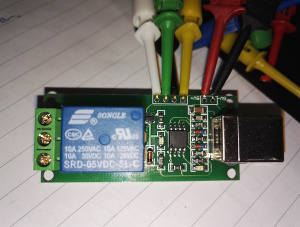
1 port USB Relay
These days the phrase embedded usually means no console (except, if you re lucky, console on a UART for debugging) and probably busybox for as much of userspace as you can get away with. You possibly have package management from OpenEmbedded or similar, though it might just be a horrible kludged together rootfs if someone hates you. Either way it s rare for it not to involve some sort of hardware and OS much more advanced than the 8 bit machines I started out programming on. That is, unless you re playing with Arduinos or other similar hardware. I m currently waiting on some ESP8266 dev boards to arrive, but even they re quite advanced, with wifi and a basic OS framework provided. A long time ago I meant to get around to playing with PICs but never managed to do so. What I realised recently was that I have a ready made USB relay board that is powered by an ATtiny45. First step was to figure out if there were suitable programming pins available, which turned out to be all brought out conveniently to the edge of the board. Next I got out my trusty Bus Pirate, installed avrdude and lo and behold:
$ avrdude -p attiny45 -c buspirate -P /dev/ttyUSB0
Attempting to initiate BusPirate binary mode...
avrdude: Paged flash write enabled.
avrdude: AVR device initialized and ready to accept instructions
Reading   ##################################################   100% 0.01s
avrdude: Device signature = 0x1e9206 (probably t45)
avrdude: safemode: Fuses OK (E:FF, H:DD, L:E1)
avrdude done.  Thank you.
Perfect. I then read the existing flash image off the device, disassembled it, worked out it was based on V-USB and then proceeded to work out that the only interesting extra bit was that the relay was hanging off pin 3 on IO port B. Which led to me knocking up what I thought should be a functionally equivalent version of the firmware, available locally or on GitHub. It s worked with my basic testing so far and has confirmed to me I understand how the board is set up, meaning I can start to think about what else I could do with it

17 May 2016

Reproducible builds folks: Reproducible builds: week 55 in Stretch cycle

What happened in the Reproducible Builds effort between May 8th and May 14th 2016: Documentation updates Toolchain fixes Packages fixed The following 28 packages have become newly reproducible due to changes in their build dependencies: actor-framework ask asterisk-prompt-fr-armelle asterisk-prompt-fr-proformatique coccinelle cwebx d-itg device-tree-compiler flann fortunes-es idlastro jabref konclude latexdiff libint minlog modplugtools mummer mwrap mxallowd mysql-mmm ocaml-atd ocamlviz postbooks pycorrfit pyscanfcs python-pcs weka The following 9 packages had older versions which were reproducible, and their latest versions are now reproducible again due to changes in their build dependencies: csync2 dune-common dune-localfunctions libcommons-jxpath-java libcommons-logging-java libstax-java libyanfs-java python-daemon yacas The following packages have become newly reproducible after being fixed: The following packages had older versions which were reproducible, and their latest versions are now reproducible again after being fixed: Some uploads have fixed some reproducibility issues, but not all of them: Patches submitted that have not made their way to the archive yet: Package reviews 344 reviews have been added, 125 have been updated and 20 have been removed in this week. 14 FTBFS bugs have been reported by Chris Lamb. tests.reproducible-builds.org Misc. Dan Kegel sent a mail to report about his experiments with a reproducible dpkg PPA for Ubuntu. According to him sudo add-apt-repository ppa:dank/dpkg && sudo apt-get update && sudo apt-get install dpkg should be enough to get reproducible builds on Ubuntu 16.04. This week's edition was written by Ximin Luo and Holger Levsen and reviewed by a bunch of Reproducible builds folks on IRC.

Raphaël Hertzog: Freexian s report about Debian Long Term Support, April 2016

A Debian LTS logoLike each month, here comes a report about the work of paid contributors to Debian LTS. Individual reports In April, 116.75 work hours have been dispatched among 9 paid contributors. Their reports are available: Many contributors did not use all their allocated hours. This is partly explained by the fact that in April Wheezy was still under the responsibility of the security team and they were not able to drive updates from start to finish. In any case, this means that they have more hours available over May and since the LTS period started, they should hopefully be able to make a good dent in the backlog of security updates. Evolution of the situation The number of sponsored hours reached a new record with 132 hours per month, thanks to two new gold sponsors (Babiel GmbH and Plat Home). Plat Home s sponsorship was aimed to help us maintain Debian 7 Wheezy on armel and armhf (on top of already supported amd64 and i386). Hopefully the trend will continue so that we can reach our objective of funding the equivalent of a full-time position. The security tracker currently lists 45 packages with a known CVE and the dla-needed.txt file lists 44 packages awaiting an update. This is a bit more than the 15-20 open entries that we used to have at the end of the Debian 6 LTS period. Thanks to our sponsors New sponsors are in bold.

No comment Liked this article? Click here. My blog is Flattr-enabled.

15 May 2016

Norbert Preining: Foreigners in Japan are evil

at least what Tokyo Shinjuku ward belives. They have put out a very nice brochure about how to behave as a foreigner in Japan: English (local copy) and Japanese (local copy). Nothing in there is really bad, but the tendency is so clear that it makes me think what on earth do you believe we are doing in this country?
foreigners Now what is so strange on that? And if you have never lived in Japan you will probably not understand. But reading through this pamphlet I felt like a criminal from the first page on. If you don t want to read through it, here a short summary: So if you count up, we have 23 pages of warnings, and 1 (as in *one*) page of practical information. Do I need to add more about how we foreigners are considered in Japan? Just a few points about details: I accept the good intention of the Shinjuku ward to bring forth a bit of warnings and guidance. But the way it was done it speaks volumes about how we foreigners are treated second class.

Next.

Previous.