Here s my (forty-first) monthly but brief update about the activities I ve done in the F/L/OSS world.
Debian
This was my 50th month of actively contributing to Debian.
I became a DM in late March 2019 and a DD on Christmas 19! \o/
There s a bunch of things I do, both, technical and non-technical. Here are the things I did this month:
libyang2 (2.1.30-2) - Adding DEP8 test for yangre.
redmine (5.0.4-3) - Add patch to stop unnecessary recursive chown ing (Fixes: #1022816, #1022817).
redmine (5.0.4-4) - Set DH_RUBY_IGNORE_TESTS to all (Fixes: #1031308).
python-jira (3.4.1-1) - New upstream version, v3.4.1.
Others
Looked up some Release team documentation.
Sponsored php-font-lib and php-dompdf-svg-lib for William.
Granted DM rights for php-dompdf.
Mentoring for newcomers.
Reviewed micro bits for Nilesh, new uploads and changes.
Ruby sprints.
Bug work (on BTS and #debian-ruby) for rails and redmine.
Moderation of -project mailing list.
A huge thanks to Freexian for sponsoring my Debian work and Entrouvert for sponsoring the Redmine backports. :D
Ubuntu
This was my 25th month of actively contributing to Ubuntu.
Now that I joined Canonical to work on Ubuntu full-time, there s a bunch of things I do! \o/
I mostly worked on different things, I guess.
I was too lazy to maintain a list of things I worked on so there s
no concrete list atm. Maybe I ll get back to this section later or
will start to list stuff from the fall, as I was doing before. :D
Debian (E)LTS
Debian Long Term Support (LTS) is a project to extend the lifetime of all Debian stable releases to (at least) 5 years. Debian LTS is not handled by the Debian security team, but by a separate group of volunteers and companies interested in making it a success.
And Debian Extended LTS (ELTS) is its sister project, extending support to the stretch and jessie release (+2 years after LTS support).
This was my forty-first month as a Debian LTS and thirty-second month as a Debian ELTS paid contributor.
I worked for 24.25 hours for LTS and 28.50 hours for ELTS.
LTS CVE Fixes and Announcements:
Fixed CVE-2022-47016 for tmux and uploaded to buster via 2.8-3+deb10u1.
But decided to not roll the DLA for the package as the CVE got rejected upstream.
Worked on ruby-rails-html-sanitize and added notes to the security-tracker.
TL;DR: we need newer methods in ruby-loofah to make the patches for ruby-rails-html-sanitize backportable.
Started to look at other set of packages meanwhile.
ELTS CVE Fixes and Announcements:
Issued ELA 813-1, fixing CVE-2017-12618 and CVE-2022-25147, for apr-util.
For Debian 8 jessie, these problems have been fixed in version 1.5.4-1+deb8u1.
For Debian 9 stretch, these problems have been fixed in version 1.5.4-3+deb9u1.
Issued ELA 815-1, fixing CVE-2022-44792 and CVE-2022-44793, for net-snmp.
For Debian 8 jessie, these problems have been fixed in version 5.7.2.1+dfsg-1+deb8u6.
For Debian 9 stretch, these problems have been fixed in version 5.7.3+dfsg-1.7+deb9u5.
Helped facilitate RabbitMQ s update queries by one of our customers.
Started to look at other set of packages meanwhile.
I want to interest those that haven t used IRCs for a while through this article. This article generally leans toward the Debian Community but I hope it gives you some perspectives into IRCs and also interests you in joining the Debian Community as well.
Most Generation Z developers I know have at least used slack, discord, discourse and so many other communication tools but so few have used IRCs so heavily and this could be because they find it boring and limited to what kind of content they can share and what community they are participating in. I got interested in using IRCs when I joined Debian and was able to navigate my way through using some online resources. While IRC may not be as popular as other communication tools like Slack or Discord, it remains a valuable tool for communication and collaboration within the open-source community. Its open-source nature and lightweight protocol make it a flexible and customizable tool that can be used in various settings.
Internet Relay Chat (IRC) is a communication protocol that has been around since the late 1980s. Despite its age, it is still a popular tool for communication and collaboration, especially within the open-source community. It is mostly known to be used by people that work on boring projects or maintain legacy code (I can t state how true this is though). Interesting facts about IRC include that it was created by a Finnish developer named Jarkko Oikarinen, who wanted to create a communication tool that would allow him to chat with his friends in real-time (the FaceBook of those days). The first IRC network was called EFnet, and it quickly grew in popularity as more and more people began to use the protocol for communication and collaboration.
IRC allows users to connect to servers and join channels (chat rooms) where they can communicate in real time with other users who have also joined the same channel. Many open-source projects use IRC channels for communication and collaboration among developers. The Debian project has a number of IRC channels that are used for communication and collaboration among developers and users. I have at least interacted with three of them which include;-
#salsa - This channel is for those that use the Salsa platform
#salsaci - this channel is for discussions around the Salsa CI Pipeline
#debian-devel - this channel is for all things Debian Development. Questions and updates related to general developments in Debian.
To start using IRC, you will need to choose an IRC client, which is software that allows you to connect to IRC networks. Some popular IRC clients for Debian users include HexChat, irssi, and WeeChat. These clients are free and open source, and can be downloaded from the Debian repositories.Once you have chosen an IRC client, you can connect to an IRC network and start joining channels. Many open-source projects have their own IRC channels, where developers can discuss the project and collaborate in real time.
One of the benefits of using IRC that I found out was that it is a lightweight protocol, which means that it can be used on a wide variety of devices, including desktop computers and smartphones. This makes it an ideal communication tool for developers who may be working on different devices and need to communicate with each other quickly and easily.
IRC is still a valuable tool for communication and collaboration within the open-source community even if it is not given the same popularity as other communication tools. Like some of the good old legacy designs whose function never goes old, IRC is one of them.
Review: An Informal History of the Hugos, by Jo Walton
Publisher:
Tor
Copyright:
August 2018
ISBN:
1-4668-6573-3
Format:
Kindle
Pages:
564
An Informal History of the Hugos is another collection of Jo
Walton's Tor.com posts. As with What
Makes This Book So Great, these are blog posts that are still available
for free on-line. Unlike that collection, this series happened after
Tor.com got better at tags, so it's
much easier to
find. Whether to buy it therefore depends on whether having it in
convenient book form is worth it to you.
Walton's previous collection was a somewhat random assortment of reviews
of whatever book she felt like reviewing. As you may guess from the
title, this one is more structured. She starts at the first year that the
Hugo Awards were given out (1953) and discusses the
winners for each year up through 2000. Nearly all of that discussion is
about the best novel Hugo, a survey of other good books for that year,
and, when other awards (Nebula,
Locus, etc.) start up, comparing them to the
winners and nominees of other awards. One of the goals of each discussion
is to decide whether the Hugo nominees did a good job of capturing the
best books of the year and the general feel of the genre at that time.
There are a lot of pages in this book, but that's partly because there's a
lot of filler. Each post includes all of the winners and (once a
nomination system starts) nominees in every Hugo category. Walton offers
an in-depth discussion of the novel in every year, and an in-depth
discussion of the John W. Campbell Award for Best New Writer (technically
not a Hugo but awarded with them and voted on in the same way) once those
start. Everything else gets a few sentences at most, so it's mostly just
lists, all of which you can readily find elsewhere if you cared.
Personally, I would have omitted categories without commentary when this
was edited into book form.
Two other things are included in this book. Most helpfully, Walton's
Tor.com reviews of novels in the shortlist are included after the
discussion of that year. If you like Walton's reviews, this is great for
all the reasons that What Makes This Book
So Great was so much fun. Walton has a way of talking about books with
infectious enthusiasm, brief but insightful technical analysis, and a
great deal of genre context without belaboring any one point. They're
concise and readable and never outlast my attention span, and I wish I
could write reviews half as well.
The other inclusion is a selection of the comments from the original blog
posts. When these posts originally ran, they turned into a community
discussion of the corresponding year of SF, and Tor included a selection
of those comments in the book. Full disclosure: one of those comments is
mine, about the way that cyberpunk latched on to some incorrect ideas of
how computers work and made them genre conventions to such a degree that
most cyberpunk takes place in a parallel universe with very different
computer technology. (I suppose that technically makes me a published
author to the tune of a couple of pages.) While I still largely agree
with the comment, I blamed Neuromancer
for this at the time, and embarrassingly discovered when re-reading it that
I had been unfair. This is why one should never express opinions in
public where someone might record them.
Anyway, there is a general selection of comments from random people, but
the vast majority of the comments are discussions of the year's short
fiction by Rich Horton and Gardner Dozois. I understand why this was
included; Walton doesn't talk about the short fiction, Dozois was a
legendary SF short fiction editor and multiple Hugo winner, and both
Horton and Dozois reviewed short fiction for Locus. But they don't
attempt reviews. For nearly all stories under discussion, unless you
recognized the title, you would have no idea even what sub-genre it was
in. It's just a sequence of assertions about which title or author was
better.
Given that there are (in most years) three short fiction categories to the
one novel category and both Horton and Dozois write about each category, I
suspect there are more words in this book from Horton and Dozois than
Walton. That's a problem when those comments turn into tedious catalogs.
Reviewing short fiction, particularly short stories, is inherently
difficult. I've tried to do a lot of that myself, and it's tricky to find
something useful to say that doesn't spoil the story. And to be fair to
Horton and Dozois, they weren't being paid to write reviews; they were
just commenting on blog posts as part of a community conversation, and I
doubt anyone thought this would turn into a book. But when read as a
book, their inclusion in this form wasn't my favorite editorial decision.
This is therefore a collection of Walton's commentary on the selections
for best novel and best new writer alongside a whole lot of boring lists.
In theory, the padding shouldn't matter; one can skip over it and just
read Walton's parts, and that's still lots of material. But Walton's
discussion of the best novels of the year also tends to turn into long
lists of books with no commentary (particularly once the very-long
Locus recommended list starts appearing), adding to the tedium.
This collection requires a lot of skimming.
I enjoyed this series of blog posts when they were first published, but
even at the time I skimmed the short fiction comments. Gathered in book
form with this light of editing, I think it was less successful. If you
are curious about the history of science fiction awards and never read the
original posts, you may enjoy this, but I would rather have read another
collection of straight reviews.
Rating: 6 out of 10
Long ago I applied for my dream job at a company I have wanted to wok for since its beginning and I wasn t ready technically. Fast forward to now, I am ready! A big thank you goes out to Blue Systems for that. So I go out and find the perfect role and start the application process. The process was months long, but was going very well, the interviews and I passed the technical with flying colors. I got to the end where the hiring lead told me he was submitting my offer I was so excited, so much so, I told my husband and parents I got the job! I know, I jinxed myself there. Soon I receive the There was a problem .. One obscure assessment called GIA came back not so good. I remember that day, we were in the middle of a long series of winter storms and I when I took the test, my kitten decided right then it was me time. I couldn t very well throw her out into the snowstorm, so I continued on the best I could. It is my fault, it clearly states to be distraction free. So I speak again to the hiring lead and we both feel with my experience and technical knowledge and abilities we can still move forward. I still had hope. After some time passes, I asked for an update and got the dreaded rejection. I am told it wasn t just the GIA, but that I am not a good overall fit for the company. In one fell swoop my dreams are dashed and final, for this and all roles within that company. I wasn t given a reason either. I am devastated, heart broken, and shocked. I get along with everyone, I exceed the technical requirements, and I work well in the community. Dream door closed.
I will not let this get me down. I am moving on. I will find my place where I fit in .
With that said, I no longer have the will, passion, or drive to work on snaps anymore. I will leave instructions with Jonathon as to what needs to be done to move forward. The good news is my core22 kde-neon extension was merged into upstream snapcraft, so whomever takes over will have a much easier time knocking them out. @kubuntu-council I will do whatever it takes to pay back the money for the hardware you provided me to do snaps, I am truly sorry about this.
What does my future hold? I will still continue with my Debian efforts. In fact, I have ventured out from the KDE umbrella and joined the go-team. I am finalizing my packaging for
https://github.com/charmbracelet/gum
and it s dependencies: roff, mango, mango-kong. I had my first golang patch for a failing test and have submitted it upstream. I will upload these to experimental while the freeze is on.
I will be moving all the libraries in the mycroft team to the python umbrella as they are useful for other things and mycroft is no more.
During the holidays I was tinkering around with selenium UI testing and stumbled on some accessibility issues within KDE, so I think this is a good place for me to dive into for my KDE contributions.
I have been approached to collaborate with OpenOS on a few things, time permitting I will see what I can do there.
I have a possible gig to do some websites, while I move forward in my job hunt.
I will not give up! I will find my place where I fit in .
Meanwhile, I must ask for donations to get us by. Anything helps, thank you for your consideration.
https://gofund.me/a9c36b87
Interested in future updates? Follow me on mastodon at
@paul@soylent.green. Posts about
hz.tools will be tagged
#hztools.
If you're on the Fediverse, I'd very much appreciate boosts on
my announcement toot!
Ever since 2019, I ve been learning about how radios work, and trying to learn
about using them the hard way by writing as much of the stack as is
practical (for some value of practical) myself. I wrote my first Hello World
in 2018, which was a simple FM radio player, which used librtlsdr to read in
an IQ stream, did some filtering, and played the real valued audio stream via
pulseaudio. Over 4 years this has slowly grown through persistence, lots of
questions to too many friends to thank (although I will try), and the eternal
patience of my wife hearing about radios nonstop for years into a number
of Go repos that can do quite a bit, and support a handful of radios.
I ve resisted making the repos public not out of embarrassment or a desire to
keep secrets, but rather, an attempt to keep myself free of any maintenance
obligations to users so that I could freely break my own API, add and remove
API surface as I saw fit. The worst case was to have this project feel like
work, and I can t imagine that will happen if I feel frustrated by PRs
that are getting ahead of me solving problems I didn t yet know about, or
bugs I didn t understand the fix for.
As my rate of changes to the most central dependencies has slowed, i ve begun
to entertain the idea of publishing them. After a bit of back and forth, I ve
decided
it s time to make a number of them public,
and to start working on them in the open, as I ve built up a bit of knowledge
in the space, and I and feel confident that the repo doesn t contain overt
lies. That s not to say it doesn t contain lies, but those lies are likely
hidden and lurking in the dark. Beware.
That being said, it shouldn t be a surprise to say I ve not published
everything yet for the same reasons as above. I plan to open repos as the
rate of changes slows and I understand the problems the library solves well
enough or if the project dead ends and I ve stopped learning.
Intention behind hz.tools
It s my sincere hope that my repos help to make Software Defined Radio (SDR)
code a bit easier to understand, and serves as an understandable framework to
learn with. It s a large codebase, but one that is possible to sit down and
understand because, well, it was written by a single person. Frankly, I m also
not productive enough in my free time in the middle of the night and on
weekends and holidays to create a codebase that s too large to understand, I
hope!
I remain wary of this project turning into work, so my goal is to be very
upfront about my boundaries, and the limits of what classes of contributions
i m interested in seeing.
Here s some goals of open sourcing these repos:
I do want this library to be used to learn with. Please go through it
all and use it to learn about radios and how software can control them!
I am interested in bugs if there s a problem you discover. Such bugs
are likely a great chance for me to fix something I ve misunderstood or
typoed.
I am interested in PRs fixing bugs you find. I may need a bit of a
back and forth to fully understand the problem if I do not understand
the bug and fix yet. I hope you may have some grace if it s taking a long
time.
Here s a list of some anti-goals of open sourcing these repos.
I do not want this library to become a critical dependency of an
important project, since I do not have the time to deal with the maintenance
burden. Putting me in that position is going to make me very uncomfortable.
I am not interested in feature requests, the features have grown as
I ve hit problems, I m not interested in building or maintaining features
for features sake. The API surface should be exposed enough to allow others
to experiment with such things out-of-tree.
I m not interested in clever code replacing clear code without a very
compelling reason.
I use GNU/Linux (specifically Debian
),
and from time-to-time I ve made sure that my code runs on OpenBSD
too.
Platforms beyond that will likely not be supported at the expense of either
of those two. I ll take fixes for bugs that fix a problem on another
platform, but not damage the code to work around issues / lack of features
on other platforms (like Windows).
I m not saying all this to be a jerk, I do it to
make sure I can continue on my journey to learn about how radios work without
my full time job becoming maintaining a radio framework single-handedly for
other people to use even if it means I need to close PRs or bugs without
merging it or fixing the issue.
With all that out of the way, I m very happy to announce that the repos are now
public under github.com/hztools.
Should you use this?
Probably not. The intent here is not to provide a general purpose Go SDR
framework for everyone to build on, although I am keenly aware it looks and
feels like it, since that what it is to me. This is a learning project, so for
any use beyond joining me in learning should use something like
GNU Radio
or a similar framework that has a community behind it.
In fact, I suspect most contributors ought to be contributing to GNU Radio, and
not this project. If I can encourage people to do so,
contribute to GNU Radio!
Nothing makes me happier than seeing GNU Radio continue to be the go-to, and
well supported. Consider
donating to GNU Radio!
hz.tools/rf - Frequency types
The hz.tools/rf library contains the abstract concept of frequency, and
some very basic helpers to interact with frequency ranges (such as helpers
to deal with frequency ranges, or frequency range math) as well as frequencies
and some very basic conversions (to meters, etc) and parsers (to parse values
like 10MHz). This ensures that all the hz.tools libraries have a shared
understanding of Frequencies, a standard way of representing ranges of
Frequencies, and the ability to handle the IO boundary with things like CLI
arguments, JSON or YAML.
The git repo can be found at
github.com/hztools/go-rf, and is
importable as hz.tools/rf.
// Parse a frequency using hz.tools/rf.ParseHz, and print it to stdout.
freq:=rf.MustParseHz("-10kHz")
fmt.Printf("Frequency: %s\n", freq+rf.MHz)
// Prints: 'Frequency: 990kHz'
// Return the Intersection between two RF ranges, and print
// it to stdout.
r1:=rf.Rangerf.KHz, rf.MHzr2:=rf.Rangerf.Hz(10), rf.KHz*100fmt.Printf("Range: %s\n", r1.Intersection(r2))
// Prints: Range: 1000Hz->100kHz
These can be used to represent tons of things - ranges can be used for things
like the tunable range of an SDR, the bandpass of a filter or the frequencies
that correspond to a bin of an FFT, while frequencies can be used for things
such as frequency offsets or the tuned center frequency.
hz.tools/sdr - SDR I/O and IQ Types
This is the big one. This library represents the majority of the shared
types and bindings, and is likely the most useful place to look at when
learning about the IO boundary between a program and an SDR.
The git repo can be found at
github.com/hztools/go-sdr, and is
importable as hz.tools/sdr.
This library is designed to look (and in some cases, mirror) the Go io idioms
so that this library feels as idiomatic as it can, so that Go builtins interact
with IQ in a way that s possible to reason about, and to avoid reinventing the
wheel by designing new API surface. While some of the API looks (and is even
called) the same thing as a similar function in io, the implementation is
usually a lot more naive, and may have unexpected sharp edges such as
concurrency issues or performance problems.
The following IQ types are implemented using the sdr.Samples interface. The
hz.tools/sdr package contains helpers for conversion between types, and some
basic manipulation of IQ streams.
IQ Format
hz.tools Name
Underlying Go Type
Interleaved uint8 (rtl-sdr)
sdr.SamplesU8
[][2]uint8
Interleaved int8 (hackrf, uhd)
sdr.SamplesI8
[][2]int8
Interleaved int16 (pluto, uhd)
sdr.SamplesI16
[][2]int16
Interleaved float32 (airspy, uhd)
sdr.SamplesC64
[]complex64
The following SDRs have implemented drivers in-tree.
SDR
Format
RX/TX
State
rtl
u8
RX
Good
HackRF
i8
RX/TX
Good
PlutoSDR
i16
RX/TX
Good
rtl kerberos
u8
RX
Old
uhd
i16/c64/i8
RX/TX
Good
airspyhf
c64
RX
Exp
The following major packages and subpackages exist at the time of writing:
Import
What is it?
hz.tools/sdr
Core IQ types, supporting types and implementations that interact with the byte boundary
hz.tools/sdr/rtl
sdr.Receiver implementation using librtlsdr.
hz.tools/sdr/rtl/kerberos
Helpers to enable coherent RX using the Kerberos SDR.
hz.tools/sdr/rtl/e4k
Helpers to interact with the E4000 RTL-SDR dongle.
hz.tools/sdr/fft
Interfaces for performing an FFT, which are implemented by other packages.
sdr.Transceiver implementation for the PlutoSDR using libiio.
hz.tools/sdr/uhd
sdr.Transceiver implementation for UHD radios, specifically the B210 and B200mini
hz.tools/sdr/hackrf
sdr.Transceiver implementation for the HackRF using libhackrf.
hz.tools/sdr/mock
Mock SDR for testing purposes.
hz.tools/sdr/airspyhf
sdr.Receiver implementation for the AirspyHF+ Discovery with libairspyhf.
hz.tools/sdr/internal/simd
SIMD helpers for IQ operations, written in Go ASM. This isn t the best to learn from, and it contains pure go implemtnations alongside.
hz.tools/sdr/stream
Common Reader/Writer helpers that operate on IQ streams.
hz.tools/fftw - hz.tools/sdr/fft implementation
The hz.tools/fftw package contains bindings to libfftw3 to implement
the hz.tools/sdr/fft.Planner type to transform between the time and
frequency domain.
The git repo can be found at
github.com/hztools/go-fftw, and is
importable as hz.tools/fftw.
This is the default throughout most of my codebase, although that default is
only expressed at the leaf package libraries should not be hardcoding the
use of this library in favor of taking an fft.Planner, unless it s used as
part of testing. There are a bunch of ways to do an FFT out there, things like
clFFT or a pure-go FFT implementation could be plugged in depending on what s
being solved for.
hz.tools/ fm,am - analog audio demodulation and modulation
The hz.tools/fm and hz.tools/am packages contain demodulators for
AM analog radio, and FM analog radio. This code is a bit old, so it has
a lot of room for cleanup, but it ll do a very basic demodulation of IQ
to audio.
The git repos can be found at
github.com/hztools/go-fm and
github.com/hztools/go-am,
and are importable as
hz.tools/fm and
hz.tools/am.
As a bonus, the hz.tools/fm package also contains a modulator, which has been
tested on the air and with some of my handheld radios. This code is a bit
old, since the hz.tools/fm code is effectively the first IQ processing code
I d ever written, but it still runs and I run it from time to time.
// Basic sketch for playing FM radio using a reader stream from
// an SDR or other IQ stream.
bandwidth:=150*rf.KHzreader, err = stream.ConvertReader(reader, sdr.SampleFormatC64)
iferr!=nil...demod, err:=fm.Demodulate(reader, fm.DemodulatorConfigDeviation: bandwidth/2,
Downsample: 8, // some value here depending on sample rate
Planner: fftw.Plan,
)
iferr!=nil...speaker, err:=pulseaudio.NewWriter(pulseaudio.ConfigFormat: pulseaudio.SampleFormatFloat32NE,
Rate: demod.SampleRate(),
AppName: "rf",
StreamName: "fm",
Channels: 1,
SinkName: "",
)
iferr!=nil...buf:= make([]float32, 1024*64)
fori, err:=demod.Read(buf)
iferr!=nil...ifi==0
panic("...")
iferr:=speaker.Write(buf[:i]); err!=nil...
hz.tools/rfcap - byte serialization for IQ data
The hz.tools/rfcap package is the reference implementation of the
rfcap spec , and is how I store IQ captures
locally, and how I send them across a byte boundary.
The git repo can be found at
github.com/hztools/go-rfcap, and is
importable as hz.tools/rfcap.
If you re interested in storing IQ in a way others can use, the better approach
is to use SigMFrfcap exists for cases
like using UNIX pipes to move IQ around, through APIs, or when I send
IQ data through an OS socket, to ensure the sample format (and other metadata)
is communicated with it.
rfcap has a number of limitations, for instance, it can not express a change
in frequency or sample rate during the capture, since the header is fixed at
the beginning of the file.
I won t waste your time with introductions. The title says it all so let s jump right in. I ll give you as many links as possible so that this article stays as short as possible.
So first, what is Salsa? Salsa is a name of a GitLab instance that is used by Debian teams to manage Debian packages and also collaborate on Development. If you have used GitLab before, the Salsa platform is not any different. To have a feel of it, it is available at https://salsa.debian.org. Still, want to know more? Find more information in the wiki. Intrigued to a point of getting started? Setup up your account by following this information
Secondly, what is Salsa CI? Like many large projects with different contributors and strict maintenance, Debian is no different. This Linux distribution is made up of many packages which need to follow a certain standard and structure or purpose of compatibility, scalability and maintainability. The Salsa CI is a continuous integration tool that does just that. I hope that is precise and satisfying .
I would have ended here but since our focus is Salsa CI tool, let me get a little deeper and wider. You could also make great use of your time when I provide more information. The Salsa CI was developed to continuously check for the health of Debian packages before they can be uploaded to the archive by running a series of CI/CD jobs. The jobs are run against setup images that are already uploaded and updated regularly to reduce build time.
The use of Salsa CI is becoming prominent ever since its inception. The Salsa CI pipeline has become popular (used by ~8k projects, from MariaDB to the Linux kernel packaging), and it is even the base for more complex CI pipelines used by other Linux flavours. The issue is the more popular it becomes, the more efficient it has to get and the more need to make the build time as shorter as possible. This happens by iterating and testing out different tools during different stages of the pipeline to find the best industrial tool. This is one of the priorities for anyone who develops for or maintains Salsa CI.
So that is how deep I can go for now.
But wait, what if you what to contribute?
If you have working knowledge in bash, git, CI, python and knowledge in building Debian packages it could be easy for you to figure out where components are and how they interact with each other. What if you don t have the knowledge? Then that is where the fun comes in.
Getting started on making a meaningful contribution to Salsa CI will need more passion and discipline, the expertise comes later and slowly. I have contributed to Salsa CI even without high-level expertise and knowledge in some of the tools. When I started contributing to Salsa CI what a Debian package is, I even didn t know that the tool that I am trying to navigate is being used by prominent software teams. But it is the challenge that I set for myself that as of now, enabled me to be able to work on a crucial part of the whole Continous integration. Wanna know what it is?
I am, as at the time of writing this article, integrating sbuild into Salsa CI to replace it with dpkg-buildpackage. This in turn will help to reduce the build time by getting rid of some jobs hence making the CI work faster. Cool, right?
Contributing to such a significant project can be a little challenging at the start but when you realize how important the piece you are working on is, you suddenly fall in love with it and want to follow through so that you can also be part of the large community that helps to make this world a better place in obscure ways.
So why don t you check out some of the Salsa CI open issues and see if you d be interested in improving it?
I bought myself a cheap wearable Bluetooth LE heart rate monitor in order to
play with it, and this is a simple Python script to monitor it and plot
data.
Bluetooth LE
I was surprised that these things seem decently interoperable.
You can use hcitool to scan for devices:
hcitoollescan
You can then use gatttool to connect to device and poke at them interactively
from a command line.
Bluetooth LE from Python
There is a nice library called Bleak which
is also packaged in Debian. It's modern Python with asyncio and works
beautifully!
Heart rate monitors
Things I learnt:
The UUID for the heart rate interface starts with 00002a37.
The UUID for checking battery status starts with 00002a19.
How about a proper fitness tracker?
I found OpenTracks,
also on F-Droid, which seems nice
Why script it from a desktop computer?
The question is: why not?
A fitness tracker on a phone is useful, but there are lots of silly things
one can do from one's computer that one can't do from a phone. A heart rate
monitor is, after all, one more input device, and there are never enough input
devices!
There are so many extremely important use cases that seem entirely unexplored:
Log your heart rate with your git commits!
Add your heart rate as a header in your emails!
Correlate heart rate information with your work activity tracker to find out
what tasks stress you the most!
Sync ping intervals with your own heartbeat, so you get faster replies when
you're more anxious!
Configure workrave to block your keyboard if you get too excited, to improve
the quality of your mailing list contributions!
You can monitor the monitor script of the heart rate monitor that monitors
you! Forget buffalo,
be your monitor monitor monitor monitor monitor monitor monitor monitor...
Back in September last year I chose to back the StarFiveVisionFive 2 on Kickstarter. I don t have a particular use in mind for it, but I felt it was one of the first RISC-V systems that were relatively capable (mentally I have it as somewhere between a Raspberry Pi 3 + a Pi 4). In particular it s a quad 1.5GHz 64-bit RISC-V core with 8G RAM, USB3, GigE ethernet and a single M.2 PCIe slot. More than ample as a personal machine for playing around with RISC-V and doing local builds. I ended up paying 67 for the Early Bird variant (dual GigE ethernet rather than 1 x 100Mb and 1 x GigE). A couple of weeks ago I got an email with a tracking number and last week it finally turned up.
Being impatient the first thing I did was plug it into a monitor, connect up a keyboard, and power it on. Nothing except some flashing lights. Looking at the boot selector DIP switches suggested it was configured to boot from UART, so I flipped them to (what I thought was) the flash setting. It wasn t - turns out the ON marking on the switches represents logic 0 and it was correctly setup when I got it. I went to read the documentation which talked about writing an image to a MicroSD card, but also had details of the UART connection. Wanting to make sure the device was at least doing something before I actually tried an OS on it I hooked up a USB/serial dongle and powered the board up again. Success! U-Boot appeared and I could interact with it.
I went to the VisionFive2 Debian page and proceeded to torrent the Image-69 image, writing it to a MicroSD card and inserting it in the slot on the bottom of the board. It booted fine. I can t even tell you what graphical environment it booted up because I don t remember; it worked fine though (at 1080p, I ve seen reports that 4K screens will make it croak).
Poking around the image revealed that it s built off a snapshot.debian.org snapshot from 20220616T194833Z, which is a little dated at this point but I understand the rationale behind picking something that works and sticking with it. The kernel is of course a vendor special, based on 5.15.0. Further investigation revealed that the entire X/graphics stack is living in /usr/local, which isn t overly surprising; it s Imagination based. I was pleasantly surprised to discover there is work to upstream the Imagination support, but I m not planning to run the board with a monitor attached so it s not a high priority for me.
Having discovered all that I decided to see how well a clean Debian unstable install from Debian Ports would go. I had a spare Intel Optane lying around (it s a stupid 22110 M.2 which is too long for any machine I own), so I put it in the slot on the bottom of the board. To my surprise it Just Worked and was detected ok:
I created a single partition with an ext4 filesystem (initially tried btrfs, but the StarFive kernel doesn t support it), and kicked off a debootstrap with:
The u-boot setup has a convoluted set of vendor scripts that eventually ends up reading a /boot/extlinux/extlinux.conf config from /dev/mmcblk1p2, so I added an additional entry there using the StarFive kernel but pointing to the NVMe device for /. Made sure to set a root password (not that I ve been bitten by that before, too many times), and rebooted. Success! Well. Sort of. I hit a bunch of problems with having a getty running on ttyS0 as well as one running on hvc0. The second turns out to be a console device from the RISC-V SBI. I did a systemctl mask serial-getty@hvc0.service which made things a bit happier, but I was still seeing odd behaviour and output. Turned out I needed to reboot the initramfs as well; the StarFive one was using Plymouth and doing some other stuff that seemed to be confusing matters. An update-initramfs -k 5.15.0-starfive -c built me a new one and everything was happy.
Next problem; the StarFive kernel doesn t have IPv6 support. StarFive are good citizens and make their 5.15 kernel tree available, so I grabbed it, fed it the existing config, and tweaked some options (including adding IPV6 and SECCOMP, which chrony wanted). Slight hiccup when it turned out trying to do things like make sound modular caused it to fail to compile, and having to backport the fix that allowed the use of GCC 12 (as present in sid), but it got there. So I got cocky and tried to update it to the latest 5.15.94. A few manual merge fixups (which I may or may not have got right, but it compiles and boots for me), and success. Timings:
$ time make -j 4 bindeb-pkg
  [linux-image-5.15.94-00787-g1fbe8ac32aa8]
real	37m0.134s
user	117m27.392s
sys	6m49.804s
On the subject of kernels I am pleased to note that there are efforts to upstream the VisionFive 2 support, with what appears to be multiple members of StarFive engaging in multiple patch submission rounds. It s really great to see this and I look forward to being able to run an unmodified mainline kernel on my board.
Niggles? I have a few. The provided u-boot doesn t have NVMe support enabled, so at present I need to keep a MicroSD card to boot off, even though root is on an SSD. I m also seeing some errors in dmesg from the SSD:
It doesn t seem to cause any actual issues, and it could be the SSD, the 5.15 kernel or an actual hardware thing - I ll keep an eye on it (I will probably end up with a different SSD that actually fits, so that ll provide another data point).
More annoying is the temperature the CPU seems to run at. There s no heatsink or fan, just the metal heatspreader on top of the CPU, and in normal idle operation it sits at around 60 C. Compiling a kernel it hit 90 C before I stopped the job and sorted out some additional cooling in the form of a desk fan, which kept it as just over 30 C.
I haven t seen any actual stability problems, but I wouldn t want to run for any length of time like that. I ve ordered a heatsink and also realised that the board supports a Raspberry Pi style PoE Hat , so I ve got one of those that includes a fan ordered (I am a complete convert to PoE especially for small systems like this).
With the desk fan setup I ve been able to run the board for extended periods under load (I did a full recompile of the Debian 6.1.12-1 kernel package and it took about 10 hours). The M.2 slot is unfortunately only a single PCIe v2 lane, and my testing topped out at about 180MB/s. IIRC that is about half what the slot should be capable of, and less than a 10th of what the SSD can do. Ethernet testing with iPerf3 sustained about 941Mb/s, so basically maxing out the port. The board as a whole isn t going to set any speed records, but it s perfectly usable, and pretty impressive for the price point.
On the Debian side I ve not hit any surprises. There s work going on to move RISC-V to a proper release architecture, and I m hoping to be able to help out with that, but the version of unstable I installed from the ports infrastructure has looked just like any other Debian install. Which is what you want. And that pretty much sums up my overall experience of the VisionFive 2; it s not noticeably different than any other single board computer. That s a good thing, FWIW, and once the kernel support lands properly upstream (it ll be post 6.3 at least it seems) it ll be a boring mainline supported platform that just happens to be RISC-V.
I have mentioned several times in this blog, as well as by other
communication means, that I am very happy with the laptop I bought
(used) about a year and a half ago: an ARM-based Lenovo Yoga
C630.
Yes, I knew from the very beginning that using this laptop would pose
a challenge to me in many ways, as full hardware support for ARM
laptops are nowhere as easy as for plain boring x86 systems. But the
advantages far outweigh the inconvenience (i.e. the hoops I had to
jump through to handle video-out when I started teaching
presentially,
which are fortunately a thing of the past now).
Anyway This post is not about my laptop.
Back in 2018, I was honored to be appointed as a member of the Debian
Technical
Committee. Of
course, that meant (due to the very clear and clever point 6.2.7.1 of
the Debian
Constitution that
my tenure in the Committee (as well as Niko Tyni s) finished in
January 1, 2023. We were invited to take part of a Jitsi call as a
last meeting, as well as to welcome Matthew Garrett to the Committee.
Of course, I arranged so I would be calling from my desktop system at
work (for which I have an old, terrible webcam but as long as I
don t need to control screen sharing too finely, mostly works). Out of
eight people in the call, two had complete or quite crippling failures
with their multimedia setup, and one had a frozen image (at least as
far as I could tell).
So Yes, Debian is indeed good and easy and simple and reliable for
most nontechnical users using standard tools.
But I guess that we power users enjoy tweaking our setup to our
precise particular liking. Or that we just don t care about
frivolities such as having a working multimedia setup.
Or I don t know what happens.
But the fact that close to half of the Technical Committee, which
should consist of Debian Developers who know their way around
technical obstacles, cannot get a working multimedia setup for a
simple, easy WebRTC call (even after a pandemic that made us all work
via teleconferencing solutions on a daily basis!) is just Beautiful
Posted on February 15, 2023
I ve had and used1 a PinePhone for quite some time now, and a shiny new blog sounds like a good time to do a review of my experience.
TL;DL: I love it, but my use cases may not be very typical.
While I ve had a mobile phone since an early time (my parents made me carry one for emergencies before it was usual for my peers) I ve never used a typical smartphone (android / iPhone / those other proprietary things) because I can t trust them not to be designed to work against me (data collection, ads, tricking users into micro payments, and other antipatterns of proprietary software design), and bringing them to sanity as most of the people I know do is too much effort for my tastes.
Instead, as a phone I keep using an old nokia featurephone2 which is reliable, only requires charging once a week, and can easily survive falling from hand height to the ground, even if thrown 3.
And then I ve been carrying a variety of other devices to do other computer-like tasks; earlier it was just a laptop, or a netbook, a Pandora (all of which used a dongle to connect to mobile network internet) then I tried a phone with FirefoxOS (it could have been better) and now the PinePhone has taken their place, at least when I m not carrying a laptop anyway.
So, the tasks I use the PinePhone for are mostly:
sending and receiving xmpp messages, with no need for notifications (when somebody needs to tell me something where urgency is required, they know to use the other phone, either with a call or an sms);
tethering an internet connection to the laptop;
reading djvu scans of old books while standing in a queue or something;
checking something on the internet when I m not close to a real computer (i.e. one with a keyboard and a big screen);
running a timer while heat-setting fabric paint with an iron (and reading a djvu book at the same time yes, this is a very specific task, but it has happened multiple times already :D );
running a calculator with unit conversions;
running the odd command line program;
taking pictures, especially those that I want to send soon (I often also carry a DSLR camera, but I tend to wait a few days before I download them from the card);
map related things.
3 and 5 work perfectly well, no issues there. 1, 2 and 4 usually work just fine, except for the fact that sometimes while the phone is suspended it forgets about being a phone, and needs to be restarted to turn the modem back on. It s not a big deal while using the phone, I just need to check before I try to use it after a few hours.
For 1, I also had to take care to install dino-im from experimental, as up to now the features required to fit the interface in a mobile screen aren t available in the official release, but I believe that this has just been fixed.
Somewhat related to 4, I ve also installed kiwix and the dumps of wiktionary and wikivoyage, but I haven t had a chance to travel much, so I m not really using it.
For 6 I m quite happy with qalculate, the GUI version of qalc (which is what I use on my laptop), even if it has a few minor interface issues, and 7 of course works as well as it can, given the limitations of a small screen and virtual keyboard.
8 is, let us say, problematic. The camera on the PinePhone is peculiar, only works with a specific software, and even there the quality of the pictures is, well, low-fi, vintagey pictures are a look and that s a specific artistic choice, right? Thanks to the hard work of the megapixels maintainer the quality has improved a lot, and these days it is usable, but there are still limits (no webcam in the browser, no recording of videos).
9 is really bad. A few times I can remember getting a GPS fix. A few times in many months, and now and then I keep trying, to see if a miracle has happened, but usually I only get a vague position from wifi data (which isn t great, when walking through less densely populated areas).
I ve seen another PinePhone running gpsd and getting data from an external GPS receiver via bluetooth, and if I really needed it I may seriously consider that solution.
Also, the apps available in mobian aren t great either, even when compared to running tangogps on an OpenMoko with pre-downloaded maps (I mean! I don t think my expectations are too high!).
I ve heard that PureMaps is quite good as a software, but a bit of a PITA to package for Debian, and I really hope that one day there will be a linux-first mobile device with good GPS hardware, so that people will be encouraged to fix the software side.
Thankfully, I don t usually need GPS and navigation software; when I m driving into places I don t know I usually have a human navigator, and when walking into places I can do with just a static map (either printed on paper or on the PinePhone), maybe some pre-calculated route from the OSM website and looking at street names to find out where I am.
Overall, for my use cases the PinePhone works just fine and is an useful addition to the things I always carry with me, and I don t feel the pressing need to get an android phone. I don t think it s ready as a daily driver for everybody, but I think that depending on one s needs it s worth asking around (I d recommend doing so on the fediverse with a #PinePhone and #mobian hashtag), as there is a non-zero chance that it may be a good fit for you.
which, if I m not mistaken, is often not implied by the fact of owning it :D
for very low values of feature: it doesn t have any kind of internet access, and there are only 3 games, one of which is snake.
In September I was in Czechia for a Red Hat event. I ended up travelling via
Prague, and had an unexpected extra day due to an airline strike causing my
flight home to be cancelled. I took the opportunity to visit Prusa's
offices/factory/Lab, and it was amazing!
The Prusa team were all busy getting ready for the Prague Maker Faire that
was happening the day afterwards.1
On arriving at the street which houses Prusa's Lab and Office buildings, the
first thing that hit me was the smell. I find the melted-plastic smell of FDM
printing (with PLA, at least) quite pleasant, and this was a super-condensed
version of that, pumping out of their ground-floor windows. I started at the
reception area on the ground floor. Outside reception
there's a lovely sculpture representing the history of the development of the
MK3S+.
The Reception
SLS Farm in the former Hack lab
History of the MK3S+
At the reception you have a small waiting area with shelves of demonstration
prints and some spools of Prusament. From here, our kind guide first took us to
a region on the ground floor that used to be (prior to COVID times) the public
maker/hack lab. The lab contained two modest farms of printers: one of their
flagship FDM printer, the MK3S+, and another of their SLS resin printers. A
close up of some example resin models is pictured above. The bicycle was tiny:
about the size of a thumbnail.
A Historic display
Bespoke QE equipment
The MK3S+ Farm
Moi in the Farm
2KG orange PLA spools for the Farm
The rest of the ground floor area was full of heavy machinery and prototyping
equipment. Onwards we went to the upstairs floors.
Upstairs, past a nice graphic of Prusa's historic products, we visited the
assembly and QE testing areas. They have a very organised system of parts
buckets and some thorough QE processes, including some bespoke equipment
that produces the "receipt" of tests and calibration that they provide for
you in the box when you buy a 3D printer.
After that, we visited the production Farm: a large room full of MK3S+
printers churning out parts for other printers. The noise was remarkable.
The printers were running custom firmware to continually print the part
they had been set for. Some of the printers were designated for printing
with ASA: they were colour-coded (yellow controller surround) and within
boxed regions to prevent the fumes causing problems. (picture at the top)
Outside the room sat palettes of orange PETG plastic for the printer farm
on 2KG spools (not a size they sell to the public just yet)
The final part of the trip was outside, to the real farm: Prusa have a
smallholding with Alpacas at the rear of their estate. Whilst we visited it,
Josef Prusa himself turned up (in a snazzy looking custom colour Tesla) to feed
the animals, say hello and pose for a picture.
Overall, it was a fantastic visit. I'm very grateful to Air France for
cancelling my flight home, and to Prusa Labs (in particular Luk ) for allowing
me to come and say hello!
I managed to squeeze that in too on my way to my rescheduled
flight, although it was a rush visit and I don't have much to say or show from
it. Suffice to say that it was lovely and bittersweet since the UK Maker Faire
used to be hosted in my fair home city of Newcastle before they stopped.
Akvorado collects network flows using IPFIX or sFlow. It stores them
in a ClickHouse database. A web console allows a user to query the data and
plot some graphs. A nice aspect of this console is how we can filter flows with
a SQL-like language:
Filter editor in Akvorado console
Often, web interfaces expose a querybuilder to build such filters. I think combining a
SQL-like language with an editor supporting completion, syntax
highlighting, and linting is a better approach.1
The language parser is built with pigeon (Go) from a parsing expression
grammar or PEG. The editor component is CodeMirror (TypeScript).
Language parser
PEG grammars are relatively recent2 and are an alternative to
context-free grammars. They are easier to write and they can generate better
error messages. Python switched from an LL(1)-based parser to a PEG-based
parser in Python 3.9.
pigeon generates a parser for Go. A grammar is a set of rules. Each rule is
an identifier, with an optional user-friendly label for error messages, an
expression, and an action in Go to be executed on match. You can find the
complete grammar in parser.peg. Here is a simplified rule:
The rule identifier is ConditionIPExpr. It case-insensitively matches
ExporterAddress, SrcAddr, or DstAddr. The action for each case returns the
proper case for the column name. That s what is stored in the column variable.
Then, it matches one of the possible operators. As there is no code block, it
stores the matched string directly in the operator variable. Then, it tries to
match the IP rule, which is defined elsewhere in the grammar. If it succeeds,
it stores the result of the match in the ip variable and executes the final
action. The action turns the column, operator, and IP into a proper expression
for ClickHouse. For example, if we have ExporterAddress = 203.0.113.15, we
get ExporterAddress = IPv6StringToNum('203.0.113.15').
The IP rule uses a rudimentary regular expression but checks if the matched
address is correct in the action block, thanks to netip.ParseAddr():
IP "IP address"[0-9A-Fa-f:.]+ ip,err:=netip.ParseAddr(string(c.text))iferr!=nilreturn"",errors.New("expecting an IP address")returnip.String(),nil
Our parser safely turns the filter into a WHERE clause accepted by
ClickHouse:3
Integration in CodeMirrorCodeMirror is a versatile code editor that can be easily integrated into
JavaScript projects. In Akvorado, the Vue.js component,
InputFilter, uses CodeMirror as its foundation and
leverages features such as syntax highlighting, linting, and completion. The
source code for these capabilities can be found in the
codemirror/lang-filter/ directory.
Syntax highlighting
The PEG grammar for Go cannot be utilized directly4 and the requirements
for parsers for editors are distinct: they should be error-tolerant and operate
incrementally, as code is typically updated character by character. CodeMirror
offers a solution through its own parser generator, Lezer.
We don t need this additional parser to fully understand the filter language.
Only the basic structure is needed: column names, comparison and logic
operators, quoted and unquoted values. The grammar is therefore quite short
and does not need to be updated often:
@topFilter
expression
expression
Not expression
"(" expression ")""(" expression ")" And expression
"(" expression ")" Or expression
comparisonExpression And expression
comparisonExpression Or expression
comparisonExpression
comparisonExpression
Column Operator Value
Value
String Literal ValueLParen ListOfValues ValueRParen
ListOfValues
ListOfValues ValueComma (String Literal)
String Literal
// [ ]@tokens// [ ]Column std.asciiLetter (std.asciiLetter std.digit)* Operator $[a-zA-Z!=><]+ String'"'(![\\\n"]"\\" _)* '"'?
"'"(![\\\n']"\\" _)* "'"?
Literal(std.digit std.asciiLetter $[.:/])+ // [ ]
The expression SrcAS = 12322 AND (DstAS = 1299 OR SrcAS = 29447) is parsed to:
Linting
We offload linting to the original parser in Go. The
/api/v0/console/filter/validate endpoint accepts a filter and returns a JSON
structure with the errors that were found:
"message":"at line 1, position 12: string literal not terminated","errors":[ "line":1,"column":12,"offset":11,"message":"string literal not terminated", ]
Completion
The completion system takes a hybrid approach. It splits the work between the
frontend and the backend to offer useful suggestions for completing filters.
The frontend uses the parser built with Lezer to determine the context of
the completion: do we complete a column name, an operator, or a value? It also
extracts the column name if we are completing something else. It forwards the
result to the backend through the /api/v0/console/filter/complete endpoint.
Walking the syntax tree was not as easy as I thought, but unit tests helped
a lot.
The backend uses the parser generated by pigeon to complete a column name
or a comparison operator. For values, the completions are either static or
extracted from the ClickHouse database. A user can complete an AS number from
an organization name thanks to the following snippet:
results:=[]structLabelstring ch:"label" Detailstring ch:"detail" columnName:="DstAS"sqlQuery:=fmt.Sprintf( SELECT concat('AS', toString(%s)) AS label, dictGet('asns', 'name', %s) AS detail FROM flows WHERE TimeReceived > date_sub(minute, 1, now()) AND detail != '' AND positionCaseInsensitive(detail, $1) >= 1 GROUP BY label, detail ORDER BY COUNT(*) DESC LIMIT 20,columnName,columnName)iferr:=conn.Select(ctx,&results,sqlQuery,input.Prefix);err!=nilc.r.Err(err).Msg("unable to query database")breakfor_,result:=rangeresultscompletions=append(completions,filterCompletionLabel:result.Label,Detail:result.Detail,Quoted:false, )
In my opinion, the completion system is a major factor in making the field
editor an efficient way to select flows. While a query builder may have been
more beginner-friendly, the completion system s ease of use and functionality
make it more enjoyable to use once you become familiar.
Moreover, building a query builder did not seem like a fun task for me.
Posted on February 13, 2023
Some months ago I stumbled on the video where Irving Finkel teaches Tom Scott how to play the Royal Game of Ur and my takeout was:
Irving Finkel is Gandalf or something;
the game sounded quite fun!;
so I did the almost sensible thing, quickly drew a board with inkscape, printed it on 160 g/m paper and used my piecepackpieces to try a few games.
I say almost sensible, because rather than drawing the rosettes with inkscape I decided to carve a rubber stamp and use that to print them on the board (which is why the svgs on this page are missing them: if you print them you ll have to add the rosettes in some way).
And if I had been a sensible person, that s where I would have stopped, since that s perfectly enough to play games and find out that it actually is quite a fun game, and one of our staples.
As some of you probably know, I m not a sensible person.
I also have quite a few blocks and half-blocks of cernit, and one day after I ve had used some, my hands were still moving and accidentally made some pyramidal dice, and a handful of tokens.
And after baking and trying them I liked them, but they had not been planned in any way, and they were a bit too small for the board, so the next time I was using cernit I tried to make a new set.
And while I was doing that I tried a new shape for the dice, as coins marked with a dot in the middle of one of the sides, because I don t really like tetrahedral dice.
And now, I realized this wasn t going to be my last set, and urgently felt the need for some container to keep them in and avoid missing pieces.
(Yes, in the picture above one piece was already missing. While taking it I didn t realize it, and neither I did when picking up everything to put it away, getting the missing piece and storing it safely together with the rest of the set. It must have been hiding in plain sight nearby, but I will never know where.)
Anyway, back to Inkscape, and to a board printed on scrap paper that I tried to fold up until I came up with a layout that folded up in a small drawer, and then I added a case to wrap around it to keep it closed.
I played around with the case until it was big enough to actually slide around the folded board, and this is the result, ready to be printed out on A4 paper, cut, folded and glued. (This takes most of the sheet, and I m not sure that the case would still fit around the board/drawer if printed with scaling, so if you want to print it on Letter paper I d recommend to move the pieces around.)
Now, the only problem left was that green isn t really my colour, and while I did like the stone effect of this set, I wasn t exactly pleased by the colour scheme. (why did I do it this way in the first place? probably because I was trying to use up old cernit blocks before opening new ones.)
So, the only possible way out was to make yet another set, right?
I still used stone effect cernit, but this time in a red/grey scheme that knew I would have liked more, and while I was doing it I tried a few improvements on the randomization devices.
The tetrahedral dice are still the same: they work, it s what they use in the replica sets, so I keep making them even if they re not my first choice.
I ve changed the coins to make them almost square for two reasons, however: one is that the round one tended to roll away into inconvenient places when throwing them with emphasis, and the other one is to make it easier to recognise them from the tokens with no need to flip each one around before starting the game.
The lozenges were a bit of a failure, instead. They work fine when thrown, but I don t think that there is a self-evident way to decide which side should be counted, and the only intuitive way I can think of (count the ones in the player s colour) would be unbalanced.
Speaking of balance issues: of course the hand-modelled dice and coins aren t perfectly balanced but:
they don t feel obviously unbalanced;
both players use the same set, so any subtle unbalance isn t going to affect the chance of winning in an uneven way.
Maybe one day I will find a way to easily roll them a statistically significant number of times, collect data and analyze it to find out how imbalanced they are, but that s not going to happen with manual data collecting, and I m not really ready to go down the yak shaving filled road to automatize it.
To wrap up: is it going to be the last set I make for the Royal Game of Ur? lol. Is it going to be the last cernit set I make this month? definitely yes, I now have one I m happy with, I m routinely playing with it and I m currently doing other crafts rather than cernit.
In response to a post about my latest laptop I had someone ask why I chose an Intel CPU. I ve been a fan of the Thinkpad series of laptops since the 90s. They have always seemed well constructed (given the constraints of being light etc) and had a good feature set. Also I really like the TrackPoint. I ve been a fan of the smaller Thinkpads since I got an X-301 from e-waste [1] and the X1-Carbon series is the latest and greatest line of small Thinkpads.
AMD makes some nice laptop CPUs which appear to have low power use and good performance particularly for smaller numbers of threads, it seems that generally AMD CPUs are designed for fewer cores with higher performance per core which is good for laptops. But Lenovo only makes the Thinkpad Carbon X1 series with Intel CPUs so choosing that model of laptop means choosing Intel. It could be that for some combination of size, TDP, speed, etc Intel just happens to beat AMD for all the times when Lenovo was designing a new motherboard for the Carbon X1. But it seems more likely that Intel has been lobbying Lenovo for this. It would be nice if there was an anti-trust investigation into Intel, everyone who s involved in the computer industry knows of some of the anti-competitive things that they have done.
Also it would be nice if Lenovo started shipping laptops with ARM CPUs across their entire range. But for the moment I guess I have to keep buying laptops with Intel CPUs.
It's been a year since I started exploring HLedger, and I'm still
going. The rollover to 2023 was an opportunity to revisit my approach.
Some time ago I stumbled across Dmitry Astapov's HLedger notes (fully-fledged
hledger, which I briefly
mentioned in eventual consistency) and decided to adopt some of its ideas.
new year, new journal
First up, Astapov encourages starting a new journal file for a new calendar
year. I do this for other, accounting-adjacent files as a matter of course,
and I did it for my GNUCash files prior to adopting HLedger. But the reason
for those is a general suspicion that a simple mistake with those softwares
could irrevocably corrupt my data. I'm much more confident with HLedger, so
rolling over at years end isn't necessary for that. But there are other
advantages. A quick obvious one is you can get rid of old accounts (such as
expense accounts tied to a particular project, now completed).
one journal per import
In the first year, I periodically imported account data via CSV exports
of transactions and HLedger's (excellent) CSV import system. I imported
all the transactions, once each, into a single, large journal file.
Astapov instead advocates for creating a separate journal
for each CSV that you wish to import, and keep around the CSV, leaving you
with a 1:1 mapping of CSV:journal. Then use HLedger's "include" mechanism to
pull them all into the main journal.
With the former approach, where the CSV data was imported precisely, once, it
was only exposed to your import rules once. The workflow ended up being:
import transactions; notice some that you could have matched with import rules
and auto-coded; write the rule for the next time. With Astapov's approach, you
can re-generate the journal from the CSV at any point in the future with an
updated set of import rules.
tracking dependencies
Now we get onto the job of driving the generation of all these derivative
journal files. Astapov has built a sophisticated system using Haskell's "Shake",
which I'm not yet familiar, but for my sins I'm quite adept at (GNU-flavoured)
UNIX Make, so I started building with that. An example rule
This captures the dependency between the journal and the underlying CSV
but also to the relevant rules file; if I modify that, and this target
is run in the future, all dependent journals should be re-generated.1
opening balances
It's all fine and well starting over in a new year, and I might be generous
to forgive debts, but I can't count on others to do the same. We need
to carry over some balance information from one year to the next. Astapov has
a more complex (or perhaps featureful) scheme for this involving a custom
Haskell program, but I bodged something with a pair of make targets:
I think this could be golfed into a year-generic rule with a little more work.
The nice thing about this approach is the opening balances for a given year
might change, if adjustments are made in prior years. They shouldn't, for
real accounts, but very well could for more "virtual" liabilities. (including:
deciding to write off debts.)
run lots of reports
Astapov advocates for running lots of reports, and automatically. There's a
really obvious advantage of that to me: there's no chance anyone except me
will actually interact with HLedger itself. For family finances, I need
reports to be able to discuss anything with my wife.
Extending my make rules to run reports is trivial. I've gone for HTML
reports for the most part, as they're the easiest on the eye. Unfortunately
the most useful report to discuss (at least at the moment) would be a list
of transactions in a given expense category, and the register/aregister
commands did not support HTML as an output format. I submitted my first
HLedger patch to add HTML output support to aregister:
https://github.com/simonmichael/hledger/pull/2000
addressing the virtual posting problem
I wrote in my original hledger blog post that I had to resort to
unbalanced virtual postings in order to record both a liability between
my personal cash and family, as well as categorise the spend. I still
haven't found a nice way around that.
But I suspect having broken out the journal into lots of other journals
paves the way to a better solution to the above.
The form of a solution I am thinking of is: some scheme whereby the two
destination accounts are combined together; perhaps, choose one as a primary
and encode the other information in sub-accounts under that. For example,
repeating the example from my hledger blog post:
(I note this is very similar to a solution proposed to me by someone
responding on twitter).
The next step is to recognise that sometimes when looking at the data I
care about one aspect, and at other times the other, but rarely both. So
for the case where I'm thinking about family finances, I could use
account aliases
to effectively flatten out the expense category portion and ignore it.
On the other hand, when I'm concerned about how I've spent my personal
cash and not about how much I owe the family account, I could use
aliases to do the opposite: rewrite-away the family:liabilities:jon
prefix and combine the transactions with the regular jon:expenses
account heirarchy.
(this is all speculative: I need to actually try this.)
catching errors after an import
When I import the transactions for a given real bank account, I check the
final balance against another source: usually a bank statement, to make
sure they agree. I wasn't using any of the myriad methods to make sure
that this remains true later on, and so there was the risk that I make an
edit to something and accidentally remove a transaction that contributed
to that number, and not notice (until the next import).
The CSV data my bank gives me for accounts (not for credit cards) also includes
a 'resulting balance' field. It was therefore trivial to extend the CSV import
rules to add balance
assertions to
the transactions that are generated. This catches the problem.
There are a couple of warts with balance assertions on every such
transaction: for example, dealing with the duplicate transaction for paying
a credit card: one from the bank statement, one from the credit card.
Removing one of the two is sufficient to correct the account balances but
sometimes they don't agree on the transaction date, or the transactions
within a given day are sorted slightly differently by HLedger than by the
bank. The simple solution is to just manually delete one or two assertions:
there remain plenty more for assurance.
going forward
I've only scratched the surface of the suggestions in Astapov's "full fledged
HLedger" notes. I'm up to step 2 of 14. I'm expecting to return to it once
the changes I've made have bedded in a little bit.
I suppose I could anonymize and share the framework (Makefile etc) that I am
using if anyone was interested. It would take some work, though, so I don't know
when I'd get around to it.
the rm latest bit is to clear up some state-tracking files that HLedger writes to avoid importing duplicate transactions. In this case, I know better than HLedger.
This is the second part of how I build a read-only root setup for my router. You might want to read part 1 first, which covers the initial boot and general overview of how I tie the pieces together. This post will describe how I build the squashfs image that forms the main filesystem.
Most of the build is driven from a script, make-router, which I ll dissect below. It s highly tailored to my needs, and this is a fairly lengthy post, but hopefully the steps I describe prove useful to anyone trying to do something similar.
Breakdown of make-router
#!/bin/bash# Either rb3011 (arm) or rb5009 (arm64)#HOSTNAME="rb3011"HOSTNAME="rb5009"if["x$ HOSTNAME"=="xrb3011"];then
ARCH=armhf
elif["x$ HOSTNAME"=="xrb5009"];then
ARCH=arm64
else
echo"Unknown host: $ HOSTNAME"exit 1
fi
It s a bash script, and I allow building for either my RB3011 or RB5009, which means a different architecture (32 vs 64 bit). I run this script on my Pi 4 which means I don t have to mess about with QemuUserEmulation.
BASE_DIR=$(dirname$0)IMAGE_FILE=$(mktemp--tmpdir router.$ ARCH.XXXXXXXXXX.img)MOUNT_POINT=$(mktemp-p /mnt -d router.$ ARCH.XXXXXXXXXX)# Build and mount an ext4 image file to put the root file system indd if=/dev/zero bs=1 count=0 seek=1G of=$ IMAGE_FILE
mkfs -t ext4 $ IMAGE_FILE
mount -o loop $ IMAGE_FILE$ MOUNT_POINT
I build the image in a loopback ext4 file on tmpfs (my Pi4 is the 8G model), which makes things a bit faster.
# Add dpkg excludesmkdir-p$ MOUNT_POINT/etc/dpkg/dpkg.cfg.d/
cat<<EOF > $ MOUNT_POINT/etc/dpkg/dpkg.cfg.d/path-excludes
# Exclude docs
path-exclude=/usr/share/doc/*
# Only locale we want is English
path-exclude=/usr/share/locale/*
path-include=/usr/share/locale/en*/*
path-include=/usr/share/locale/locale.alias
# No man pages
path-exclude=/usr/share/man/*
EOF
Create a dpkg excludes config to drop docs, man pages and most locales before we even start the bootstrap.
Actually do the debootstrap step, including a bunch of extra packages that we want.
# Install mqtt-arpcp$ BASE_DIR/debs/mqtt-arp_1_$ ARCH.deb $ MOUNT_POINT/tmp
chroot$ MOUNT_POINT dpkg -i /tmp/mqtt-arp_1_$ ARCH.deb
rm$ MOUNT_POINT/tmp/mqtt-arp_1_$ ARCH.deb
# Frob the mqtt-arp config so it starts after mosquittosed-i-e's/After=.*/After=mosquitto.service/'$ MOUNT_POINT/lib/systemd/system/mqtt-arp.service
I haven t uploaded mqtt-arp to Debian, so I install a locally built package, and ensure it starts after mosquitto (the MQTT broker), given they re running on the same host.
# Frob watchdog so it starts earlier than multi-usersed-i-e's/After=.*/After=basic.target/'$ MOUNT_POINT/lib/systemd/system/watchdog.service
# Make sure the watchdog is poking the device filesed-i-e's/^#watchdog-device/watchdog-device/'$ MOUNT_POINT/etc/watchdog.conf
watchdog timeouts were particularly an issue on the RB3011, where the default timeout didn t give enough time to reach multiuser mode before it would reset the router. Not helpful, so alter the config to start it earlier (and make sure it s configured to actually kick the device file).
# Clean up docs + localesrm-r$ MOUNT_POINT/usr/share/doc/*rm-r$ MOUNT_POINT/usr/share/man/*for dir in$ MOUNT_POINT/usr/share/locale/*/;do
if["$ dir"!="$ MOUNT_POINT/usr/share/locale/en/"];then
rm-r$ dirfi
done
Clean up any docs etc that ended up installed.
# Set root password to rootecho"root:root"chroot$ MOUNT_POINT chpasswd
The only login method is ssh key to the root account though I suppose this allows for someone to execute a privilege escalation from a daemon user so I should probably randomise this. Does need to be known though so it s possible to login via the serial console for debugging.
There are config files that are easier to replace wholesale, some of which are specific to the hardware (e.g. related to network interfaces). See below for some more details.
# Build symlinks into flash for boot / modulesln-s /mnt/flash/lib/modules $ MOUNT_POINT/lib/modules
rmdir$ MOUNT_POINT/boot
ln-s /mnt/flash/boot $ MOUNT_POINT/boot
The kernel + its modules live outside the squashfs image, on the USB flash drive that the image lives on. That makes for easier kernel upgrades.
# Put our git revision into os-releaseecho-n"GIT_VERSION=">>$ MOUNT_POINT/etc/os-release
(cd$ BASE_DIR; git describe --tags)>>$ MOUNT_POINT/etc/os-release
Always helpful to be able to check the image itself for what it was built from.
# Add some stuff to root's .bashrccat<<EOF >> $ MOUNT_POINT/root/.bashrc
alias ls='ls -F --color=auto'
eval "\$(dircolors)"
case "\$TERM" in
xterm* rxvt*)
PS1="\\[\\e]0;\\u@\\h: \\w\a\\]\$PS1"
;;
*)
;;
esac
EOF
Just some niceties for when I do end up logging in.
# Save the installed package list offchroot$ MOUNT_POINT dpkg --get-selections> /tmp/wip-installed-packages
Save off the installed package list. This was particularly useful when trying to replicate the existing router setup and making sure I had all the important packages installed. It doesn t really serve a purpose now.
In terms of the config files I copy into /etc, shared across both routers are the following:
Breakdown of shared config
This is the second in a series of blog posts introducing Carthage,
an Infrastructure as Code framework I ve been working on the last four
years. In this post we ll talk about how we use Carthage to build the
Carthage container images. We absolutely could have just used a
Containerfile to do this; in fact I recently removed a hybrid solution that produced an artifact
and then used a Containerfile to turn it into an OCI image. The biggest
reason we don t use a Containerfile is that we want to be able to reuse
the same infrastructure (installed software and configuration) across
multiple environments. For example CarthageServerRole, a
reusable Carthage component that install Carthage itself is used in
several places:
on raw hardware when we re using Carthage to drive a hypervisor
As part of image building pipelines to build AMIs for Amazon Web
Services
Installed onto AWS instances built from the Debian AMI where we
cannot use custom AMIs
Installed onto KVM VMs
As part of building the Carthage container images
So the biggest thing Carthage gives us is uniformity in how we set up
infrastructure. We ve found a number of disadvantages of Containerfiles
as well:
Containerfiles mix the disadvantages of imperative and
declarative formats. Like a declarative format they have no explicit
control logic. It seems like that would be good for introspecting and
reasoning about Containers. But all you get is the base image and a set
of commands to build a container. For reasoning about common things like
whether a container has a particular vulnerability or can be distributed
under a particular license, that s not very useful. So we don t get much
valuable introspection out of the declarative aspects, and all too often
we see Containerfiles generated by Makefiles or other multi-level
build-systems to get more logic or control flow.
Containerfiles have limited facility for doing things outside the
container. The disadvantage of this is that you end up installing all
the software you need to build the container into the container itself
(or having a multi-level build system). But for example if I want to use
Ansible to configure a container, the easiest way to do that is to
actually install Ansible into the container itself, even though Ansible
has a large dependency chain most of which we won t need in the
container. Yes, Ansible does have a number of connection methods
including one for Buildah, but by the point you re using that, you re
already using a multi-level build system and aren t really just using a
Containerfile.
Okay, so since we re not going to just use a Containerfile, what do
we do instead? We produce a CarthageLayout.
A CarthageLayout is an object in the Carthage modeling
language. The modeling language looks a lot like Python in fact it s
even implemented using Python metaclasses and uses the Python parser.
However, there are some key semantic differences and it may help to
think of the modeling language as its own thing. Carthage layouts are
typically contained in Carthage plugins. For example, the oci_images plugin is our focus today. Most of the
work in that plugin is in layout.py, and the layout begins here:
class layout(CarthageLayout):
    add_provider(ConfigLayout)
    add_provider(carthage.ansible.ansible_log, str(_dir/"ansible.log"))
The add_provider calls are special, and we ll discuss them
in a future post. For now, think of them as assignments in a more
complex namespace than simple identifiers. But the heart of this layout
is the CarthageImage class:
Most of the work of our image is done by inheritance. We inherit from
the CarthageServerRole from the carthage_base plugin collection. A role is a
reusable set of infrastructure that can be attached directly to a MachineModel.
By inheriting from this role, we request the installation of the
Carthage software. The role also supports copying in various
dependencies; for example when Carthage is used to manage a cluster of
machines, the layout corresponding to the cluster can automatically be
copied to all nodes in the cluster. We do not need this feature to build
the container image. The CarthageImage class sets its base
image. Currently we are using our own base Debian image that we build
with debootstrap and then import as a container image. In
the fairly near future, we ll change that to:
base_image = debian:bookworm
That will simply use the Debian image from Dockerhub. We are building
our own base image for historical reasons and need to confirm that
everything works before switching over. By setting
oci_image_tag we specify where in the local images the
resulting image will be stored. We also specify that this image boots
systemd. We actually do want to do a bit of work on top of
CarthageServerRole specific to the container image. To do that
we use a Carthage feature called a Customization. There are
various types of customization. For example
MachineCustomization runs a set of tasks on a Machine that is
booted and on the network. When building images, the most common type of
customization is a FilesystemCustomization. For these, we have
access to the filesystem, and we have some way of running a command in
the context of the filesystem. We don t boot the filesystem as a machine
unless we need to. (We might if the filesystem is a kvm VM or AWS
instance for example). Carthage collects all the customizations in a
role or image model. In the case of container image classes like
PodmanImageModel, each customization is applied as an
individual layer in the resulting container image.
Roles and customizations are both reusable infrastructure. Roles
typically contain customizations. Roles operate at the modeling layer;
you might introspect a machine s model or an image s model to see what
functionality (roles) it provides. In contrast, customizations operate
at the implementation layer. They do specific things like move files
around, apply Ansible roles or similar.
Let s take a look at the customization applied for the Carthage
container image (full code):
class customize_for_oci(FilesystemCustomization):@setup_task("Remove Software")asyncdef remove_software(self):awaitself.run_command("apt", "-y", "purge","exim4-base", )@setup_task("Install service")asyncdef install_service(self):# installs and activates a systemd unit
Then to pull it all together, we simply run the layout:
Very few highly-anticipated movies appear in January and February, as the bigger releases are timed so they can be considered for the Golden Globes in January and the Oscars in late February or early March, so film fans have the advantage of a few weeks after the New Year to collect their thoughts on the year ahead. In other words, I'm not actually late in outlining below the films I'm most looking forward to in 2023...
Barbie
No, seriously! If anyone can make a good film about a doll franchise, it's probably Greta Gerwig. Not only was Little Women (2019) more than admirable, the same could be definitely said for Lady Bird (2017). More importantly, I can't help feel she was the real 'Driver' behind Frances Ha (2012), one of the better modern takes on Claudia Weill's revelatory Girlfriends (1978). Still, whenever I remember that Barbie will be a film about a billion-dollar toy and media franchise with a nettlesome history, I recall I rubbished the "Facebook film" that turned into The Social Network (2010). Anyway, the trailer for Barbie is worth watching, if only because it seems like a parody of itself.
Blitz
It's difficult to overstate just how important the aerial bombing of London during World War II is crucial to understanding the British psyche, despite it being a constructed phenomenon from the outset. Without wishing to underplay the deaths of over 40,000 civilian deaths, Angus Calder pointed out in the 1990s that the modern mythology surrounding the event "did not evolve spontaneously; it was a propaganda construct directed as much at [then neutral] American opinion as at British." It will therefore be interesting to see how British Grenadian Trinidadian director Steve McQueen addresses a topic so essential to the British self-conception. (Remember the controversy in right-wing circles about the sole Indian soldier in Christopher Nolan's Dunkirk (2017)?) McQueen is perhaps best known for his 12 Years a Slave (2013), but he recently directed a six-part film anthology for the BBC which addressed the realities of post-Empire immigration to Britain, and this leads me to suspect he sees the Blitz and its surrounding mythology with a more critical perspective. But any attempt to complicate the story of World War II will be vigorously opposed in a way that will make the recent hullabaloo surrounding The Crown seem tame. All this is to say that the discourse surrounding this release may be as interesting as the film itself.
Dune, Part II
Coming out of the cinema after the first part of Denis Vileneve's adaptation of Dune (2021), I was struck by the conception that it was less of a fresh adaptation of the 1965 novel by Frank Herbert than an attempt to rehabilitate David Lynch's 1984 version and in a broader sense, it was also an attempt to reestablish the primacy of cinema over streaming TV and the myriad of other distractions in our lives. I must admit I'm not a huge fan of the original novel, finding within it a certain prurience regarding hereditary military regimes and writing about them with a certain sense of glee that belies a secret admiration for them... not to mention an eyebrow-raising allegory for the Middle East. Still, Dune, Part II is going to be a fantastic spectacle.
Ferrari
It'll be curious to see how this differs substantially from the recent Ford v Ferrari (2019), but given that Michael Mann's Heat (1995) so effectively re-energised the gangster/heist genre, I'm more than willing to kick the tires of this about the founder of the eponymous car manufacturer. I'm in the minority for preferring Mann's Thief (1981) over Heat, in part because the former deals in more abstract themes, so I'd have perhaps prefered to look forward to a more conceptual film from Mann over a story about one specific guy.
Indiana Jones and the Dial of Destiny
Given I had a strong dislike of Indiana Jones and the Kingdom of the Crystal Skull (2008), I seriously doubt I will enjoy anything this film has to show me, but with 1981's Raiders of the Lost Ark remaining one of my most treasured films (read my brief homage), I still feel a strong sense of obligation towards the Indiana Jones name, despite it feeling like the copper is being pulled out of the walls of this franchise today.
Kafka
I only know Polish filmmaker Agnieszka Holland through her Spoor (2017), an adaptation of Olga Tokarczuk's 2009 eco-crime novel Drive Your Plow Over the Bones of the Dead. I wasn't an unqualified fan of Spoor (nor the book on which it is based), but I am interested in Holland's take on the life of Czech author Franz Kafka, an author enmeshed with twentieth-century art and philosophy, especially that of central Europe. Holland has mentioned she intends to tell the story "as a kind of collage," and I can hope that it is an adventurous take on the over-furrowed biopic genre. Or perhaps Gregor Samsa will awake from uneasy dreams to find himself transformed in his bed into a huge verminous biopic.
The Killer
It'll be interesting to see what path David Fincher is taking today, especially after his puzzling and strangely cold Mank (2020) portraying the writing process behind Orson Welles' Citizen Kane (1941). The Killer is said to be a straight-to-Netflix thriller based on the graphic novel about a hired assassin, which makes me think of Fincher's Zodiac (2007), and, of course, Se7en (1995). I'm not as entranced by Fincher as I used to be, but any film with Michael Fassbender and Tilda Swinton (with a score by Trent Reznor) is always going to get my attention.
Killers of the Flower Moon
In Killers of the Flower Moon, Martin Scorsese directs an adaptation of a book about the FBI's investigation into a conspiracy to murder Osage tribe members in the early years of the twentieth century in order to deprive them of their oil-rich land. (The only thing more quintessentially American than apple pie is a conspiracy combined with a genocide.) Separate from learning more about this disquieting chapter of American history, I'd love to discover what attracted Scorsese to this particular story: he's one of the few top-level directors who have the ability to lucidly articulate their intentions and motivations.
Napoleon
It often strikes me that, despite all of his achievements and fame, it's somehow still possible to claim that Ridley Scott is relatively underrated compared to other directors working at the top level today. Besides that, though, I'm especially interested in this film, not least of all because I just read Tolstoy's War and Peace (read my recent review) and am working my way through the mind-boggling 431-minute Soviet TV adaptation, but also because several auteur filmmakers (including Stanley Kubrick) have tried to make a Napoleon epic and failed.
Oppenheimer
In a way, a biopic about the scientist responsible for the atomic bomb and the Manhattan Project seems almost perfect material for Christopher Nolan. He can certainly rely on stars to queue up to be in his movies (Robert Downey Jr., Matt Damon, Kenneth Branagh, etc.), but whilst I'm certain it will be entertaining on many fronts, I fear it will fall into the well-established Nolan mould of yet another single man struggling with obsession, deception and guilt who is trying in vain to balance order and chaos in the world.
The Way of the Wind
Marked by philosophical and spiritual overtones, all of Terrence Malick's films are perfumed with themes of transcendence, nature and the inevitable conflict between instinct and reason. My particular favourite is his stunning Days of Heaven (1978), but The Thin Red Line (1998) and A Hidden Life (2019) also touched me ways difficult to relate, and are one of the few films about the Second World War that don't touch off my sensitivity about them (see my remarks about Blitz above). It is therefore somewhat Malickian that his next film will be a biblical drama about the life of Jesus. Given Malick's filmography, I suspect this will be far more subdued than William Wyler's 1959 Ben-Hur and significantly more equivocal in its conviction compared to Paolo Pasolini's ardently progressive The Gospel According to St. Matthew (1964). However, little beyond that can be guessed, and the film may not even appear until 2024 or even 2025.
Zone of Interest
I was mesmerised by Jonathan Glazer's Under the Skin (2013), and there is much to admire in his borderline 'revisionist gangster' film Sexy Beast (2000), so I will definitely be on the lookout for this one. The only thing making me hesitate is that Zone of Interest is based on a book by Martin Amis about a romance set inside the Auschwitz concentration camp. I haven't read the book, but Amis has something of a history in his grappling with the history of the twentieth century, and he seems to do it in a way that never sits right with me. But if Paul Verhoeven's Starship Troopers (1997) proves anything at all, it's all in the adaption.
In this post I will give a quick tutorial on how to set up fast Debian package builds using sbuild with mmdebstrap and apt-cacher-ng.
The usual tool for building Debian packages is dpkg-buildpackage, or a user-friendly wrapper like debuild, and while these are geat tools, if you want to upload something to the Debian archive they lack the required separation from the system they are run on to ensure that your packaging also works on a different system. The usual candidate here is sbuild. But setting up a schroot is tedious and performance tuning can be annoying. There is an alternative backend for sbuild that promises to make everything simpler: unshare. In this tutorial I will show you how to set up sbuild with this backend.
Additionally to the normal performance tweaking, caching downloaded packages can be a huge performance increase when rebuilding packages. I do rebuilds quite often, mostly when a new dependency got introduced I didn t specify in debian/control yet or lintian notices a something I can easily fix. So let s begin with setting up this caching.
Setting up apt-cacher-ng
Install apt-cacher-ng:
sudo apt install apt-cacher-ng
A pop-up will appear, if you are unsure how to answer it select no, we don t need it for this use-case.
To enable apt-cacher-ng on your system, create /etc/apt/apt.conf.d/02proxy and insert:
In /etc/apt-cacher-ng/acng.conf you can increase the value of ExThreshold to hold packages for a shorter or longer duration.
The length depends on your specific use case and resources. A longer threshold takes more disk space, a short threshold like one day effecitvely only reduces the build time for rebuilds.
If you encounter weird issues on apt update at some point the future, you can try to clean the cache from apt-cacher-ng.
You can use this script:
Setting up mmdebstrap
Install mmdebstrap:
sudo apt install mmdebstrap
We will create a small helper script to ease creating a chroot. Open ~/.local/bin/mmupdate and insert:
If you execute mmupdate again you can see that the downloading stage is much faster thanks to apt-cacher-ng. For me the difference is from about 115s to about 95s. Your results may vary, this depends on the speed of your internet, Debian mirror and disk.
If you have used the schroot backend and sbuild-update before, you probably notice that creating a new chroot with mmdebstrap is slower. It would be a bit annoying to do this manually before we start a new Debian packaging session, so let s create a systemd service that does this for us.
First create a folder for user services:
mkdir -p ~/.config/systemd/user
Create ~/.config/systemd/user/mmupdate.service and add:
Now every day mmupdte will be run automatically. You can adjust the period if you think daily rebuilds are a bit excessive.
A neat advantage of period rebuilds is that they the base files in your apt-cacher-ng cache warm every time they run.
Setting up sbuild:
Install sbuild and (optionally) autopkgtest:
# backend for using mmdebstrap chroots
$chroot_mode = 'unshare';
# build in tmpfs
$unshare_tmpdir_template = '/dev/shm/tmp.sbuild.XXXXXXXX';
# upgrade before starting build
$apt_update = 1;
$apt_upgrade = 1;
# build everything including source for source-only uploads
$build_arch_all = 1;
$build_arch_any = 1;
$build_source = 1;
$source_only_changes = 1;
# go to shell on failure instead of exiting
$external_commands =   "build-failed-commands" => [ [ '%SBUILD_SHELL' ] ]  ;
# always clean build dir, even on failure
$purge_build_directory = "always";
# run lintian
$run_lintian = 1;
$lintian_opts = [ '-i', '-I', '-E', '--pedantic' ];
# do not run piuparts
$run_piuparts = 0;
# run autopkgtest
$run_autopkgtest = 1;
$autopkgtest_root_args = '';
$autopkgtest_opts = [ '--apt-upgrade', '--', 'unshare', '--release', '%r', '--arch', '%a', '--prefix=/dev/shm/tmp.autopkgtest.' ];
# set uploader for correct signing
$uploader_name = 'Stephan Lachnit <stephanlachnit@debian.org>';
You should adjust uploader_name. If you don t want to run autopkgtest or lintian by default you can also disable it here. Note that for packages that need a lot of space for building, you might want to comment the unshare_tmpdir_template line to prevent a OOM build failure.
You can now build your Debian packages with the sbuild command :)
Finishing touches
You can add these variables to your ~/.bashrc as bonus (with adjusted name / email):
In particular adjust the value of parallel to ensure parallel builds.
If you are new to signing / uploading your package, first install the required tools:
If you don t introduce a new binary package, you always want to go with source-only changes.
You can now upload the package to Debian with
dput ../<filename>.changes
Update Feburary 22nd
Jochen Sprickerhof, who originally advised me to use the unshare backend, commented that one can also use --include=auto-apt-proxy instead of the --aptopt option in mmdebstrap to detect apt proxies automatically.
He also let me know that it is possible to use autopkgtest on tmpfs (config in the blog post is updated) and added an entry on the sbuild wiki page on how to setup sbuild+unshare with ccache if you often need to build a large package.
Further, using --variant=apt and --include=build-essential will produce smaller build chroots if wished. On the contrary, one can of course also use the --include option to include debhelper and lintian (or any other packages you like) to further decrease the setup time. However, staying with buildd variant is a good choice for official uploads.
FTP master
This month I accepted 419 and rejected 46 packages. The overall number of packages that got accepted was 429. Looking at these numbers and comparing them to the previous month, one can see: the freeze is near. Everybody wants to get some packages into the archive and I hope nobody is disappointed.
Debian LTS
This was my hundred-third month that I did some work for the Debian LTS initiative, started by Raphael Hertzog at Freexian.
This month my all in all workload has been 14h.
During that time I uploaded:
[DLA 3272-1] sudo (embargoed) security update for one CVE
[DLA 3286-1] tor security update for one CVE
[DLA 3290-1] libzen security update for one CVE
[libzen Bullseye] debdiff sent to maintainer
[DLA 3294-1] libarchive security update for one CVE
I also attended the monthly LTS meeting and did some days of frontdesk duties.
Debian ELTS
This month was the fifty fourth ELTS month.
[ELA-772-1] sudo security update of Jessie and Stretch for one CVE
[ELA-781-1] libzen security update of Stretch for one CVE
[ELA-782-1] xorg-server security update of Jessie and Stretch for six CVEs
[ELA-790-1] libarchive security update of Jessie and Stretch for one CVEs
Last but not least I did some days of frontdesk duties.
Debian Astro
This month I uploaded improved packages or new versions of:
These new packages are already preparations for the new CUPS architecture. This architecture will be introduced after the release of Bookworm and shall be ready at least in Trixie. Parts of this work is generously funded by Freexian!
Other stuff
This month I uploaded improved packages of:


 Icy morning Witch Wells Az
 ),
and from time-to-time I ve made sure that my code runs on OpenBSD
),
and from time-to-time I ve made sure that my code runs on OpenBSD
 too.
Platforms beyond that will likely not be supported at the expense of either
of those two. I ll take fixes for bugs that fix a problem on another
platform, but not damage the code to work around issues / lack of features
on other platforms (like Windows).
too.
Platforms beyond that will likely not be supported at the expense of either
of those two. I ll take fixes for bugs that fix a problem on another
platform, but not damage the code to work around issues / lack of features
on other platforms (like Windows).

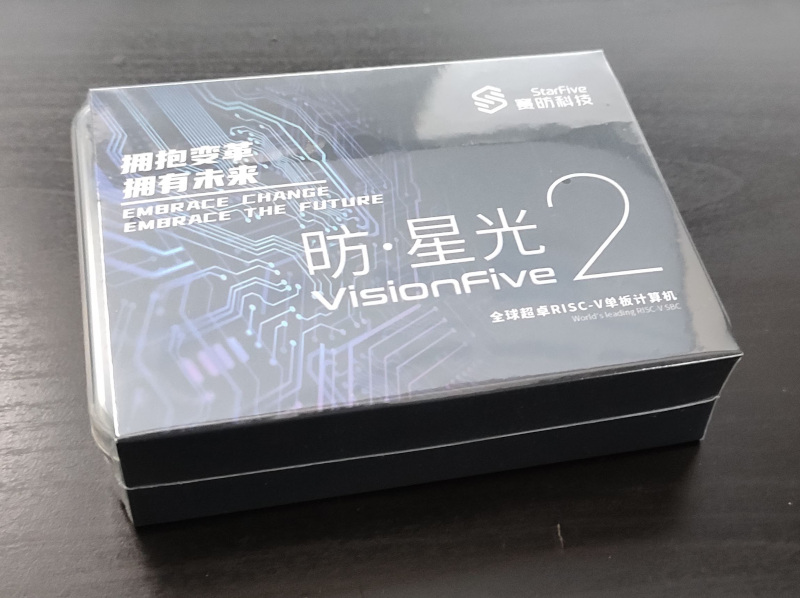 Back in September last year I chose to back the
 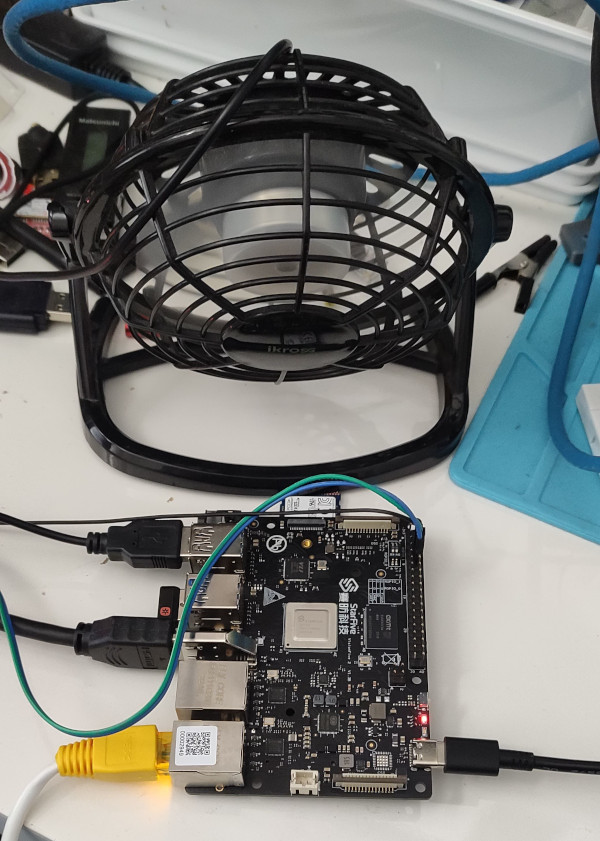 I haven t seen any actual stability problems, but I wouldn t want to run for any length of time like that. I ve ordered a heatsink and also realised that the board supports a Raspberry Pi style PoE Hat , so I ve got one of those that includes a fan ordered (I am a complete convert to PoE especially for small systems like this).
With the desk fan setup I ve been able to run the board for extended periods under load (I did a full recompile of the Debian 6.1.12-1 kernel package and it took about 10 hours). The M.2 slot is unfortunately only a single PCIe v2 lane, and my testing topped out at about 180MB/s. IIRC that is about half what the slot should be capable of, and less than a 10th of what the SSD can do. Ethernet testing with
I haven t seen any actual stability problems, but I wouldn t want to run for any length of time like that. I ve ordered a heatsink and also realised that the board supports a Raspberry Pi style PoE Hat , so I ve got one of those that includes a fan ordered (I am a complete convert to PoE especially for small systems like this).
With the desk fan setup I ve been able to run the board for extended periods under load (I did a full recompile of the Debian 6.1.12-1 kernel package and it took about 10 hours). The M.2 slot is unfortunately only a single PCIe v2 lane, and my testing topped out at about 180MB/s. IIRC that is about half what the slot should be capable of, and less than a 10th of what the SSD can do. Ethernet testing with  I have mentioned several times in this blog, as well as by other
communication means, that I am very happy with the laptop I bought
(used) about a year and a half ago:
I have mentioned several times in this blog, as well as by other
communication means, that I am very happy with the laptop I bought
(used) about a year and a half ago:  Yes, I knew from the very beginning that using this laptop would pose
a challenge to me in many ways, as full hardware support for ARM
laptops are nowhere as easy as for plain boring x86 systems. But the
advantages far outweigh the inconvenience (i.e.
Yes, I knew from the very beginning that using this laptop would pose
a challenge to me in many ways, as full hardware support for ARM
laptops are nowhere as easy as for plain boring x86 systems. But the
advantages far outweigh the inconvenience (i.e. 
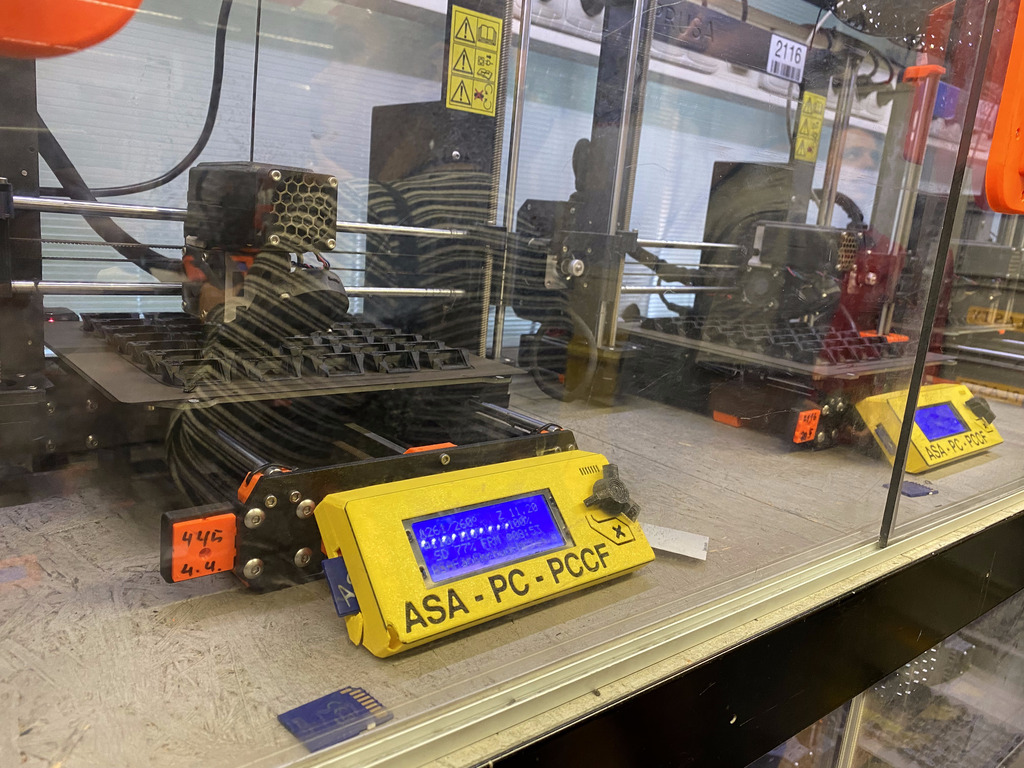
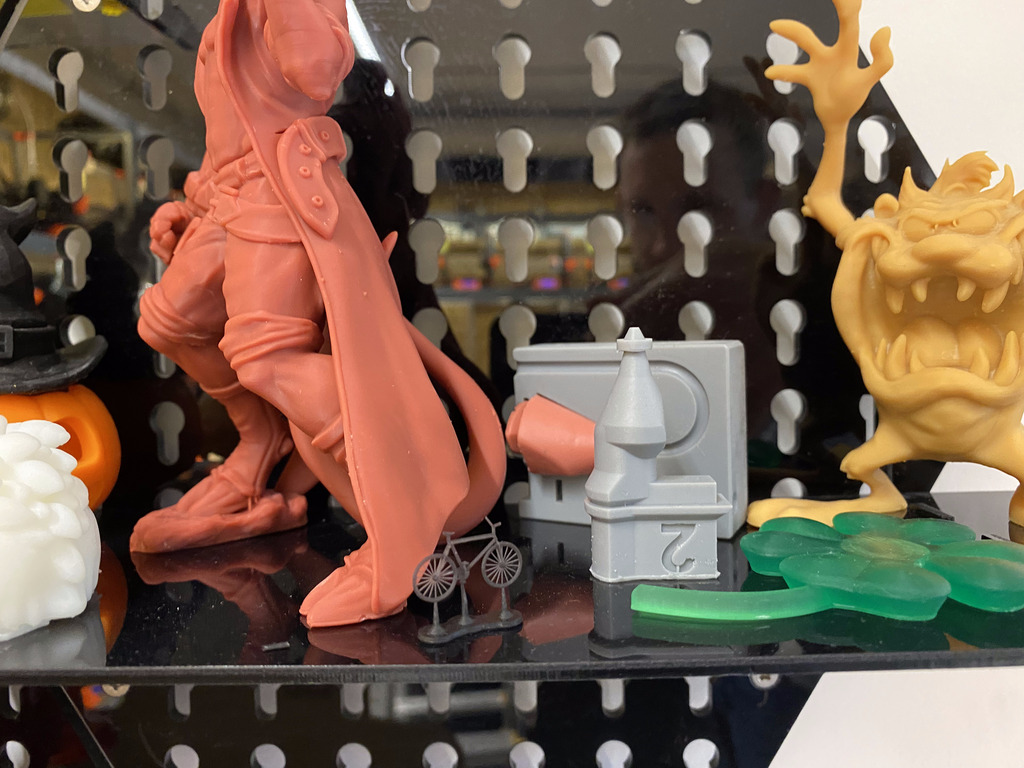


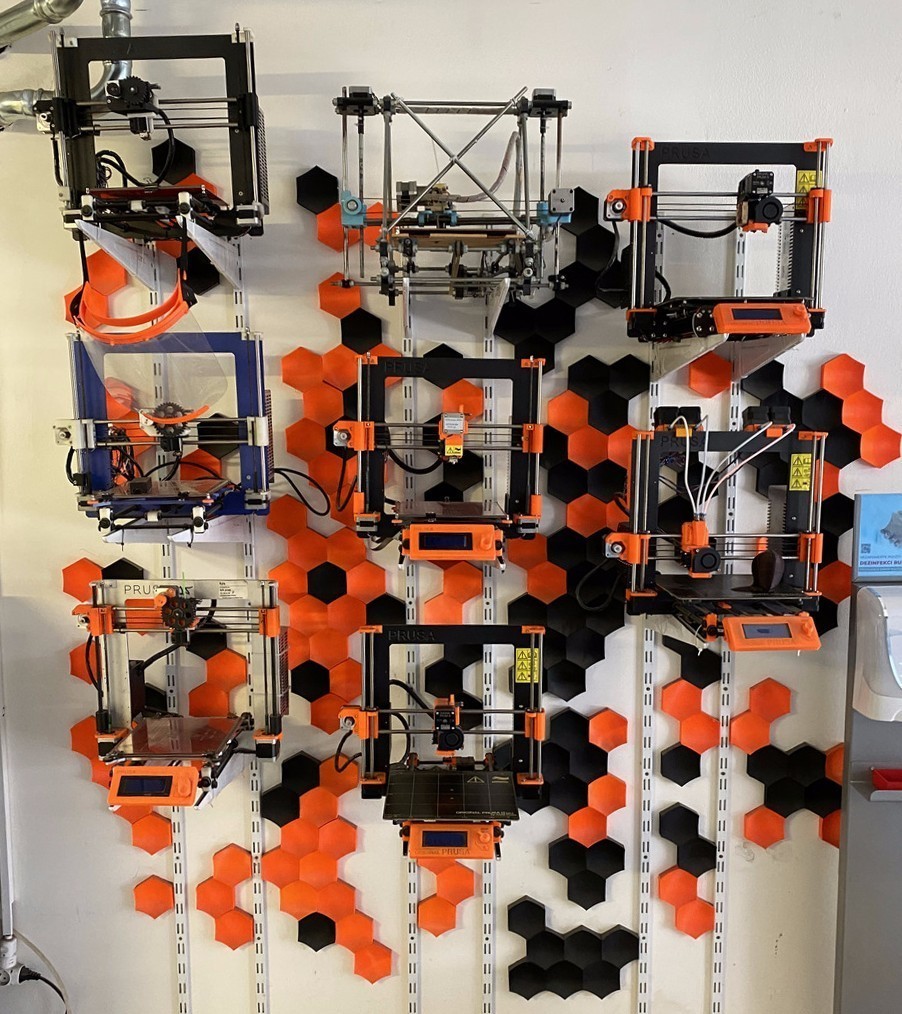
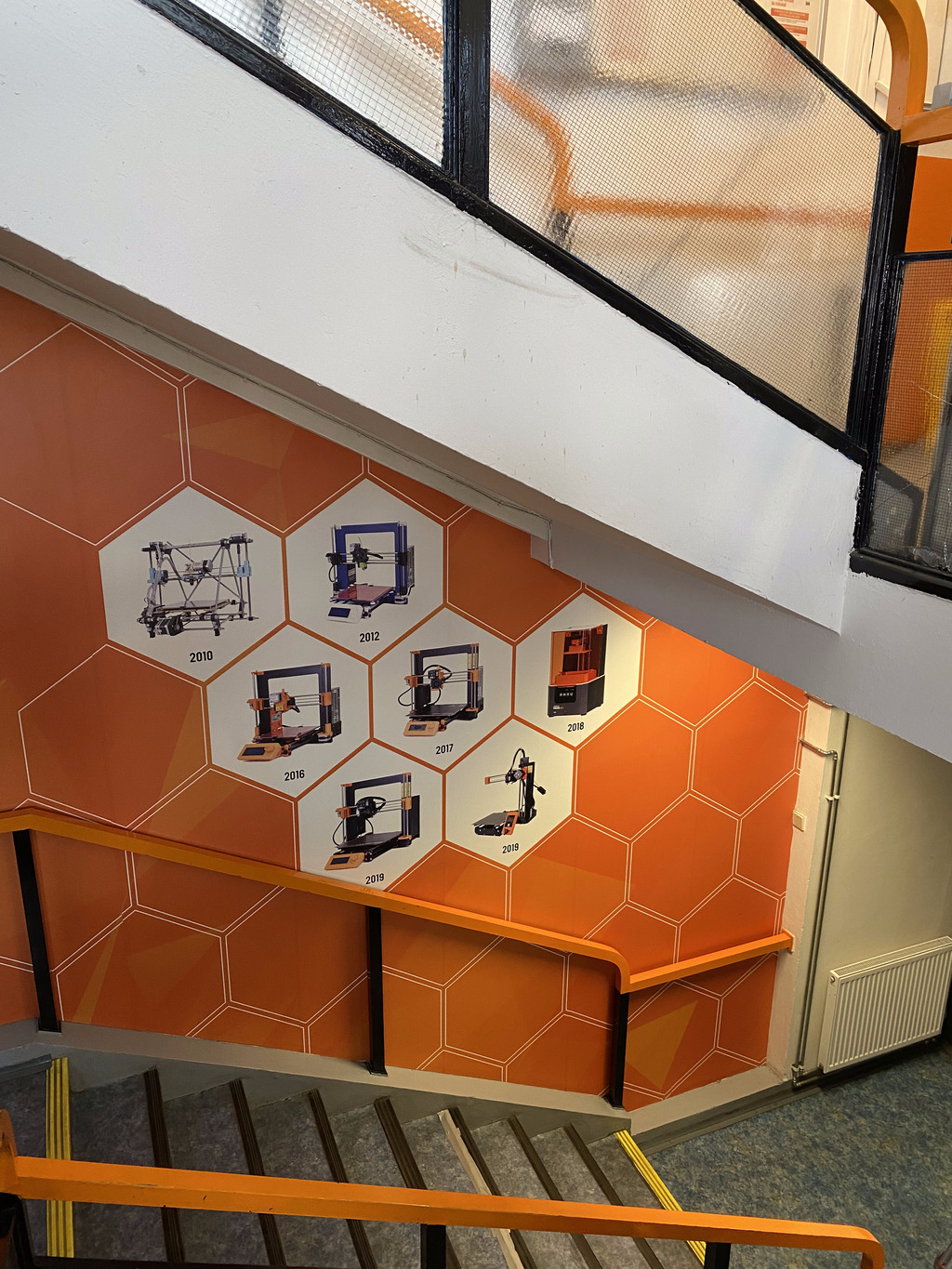
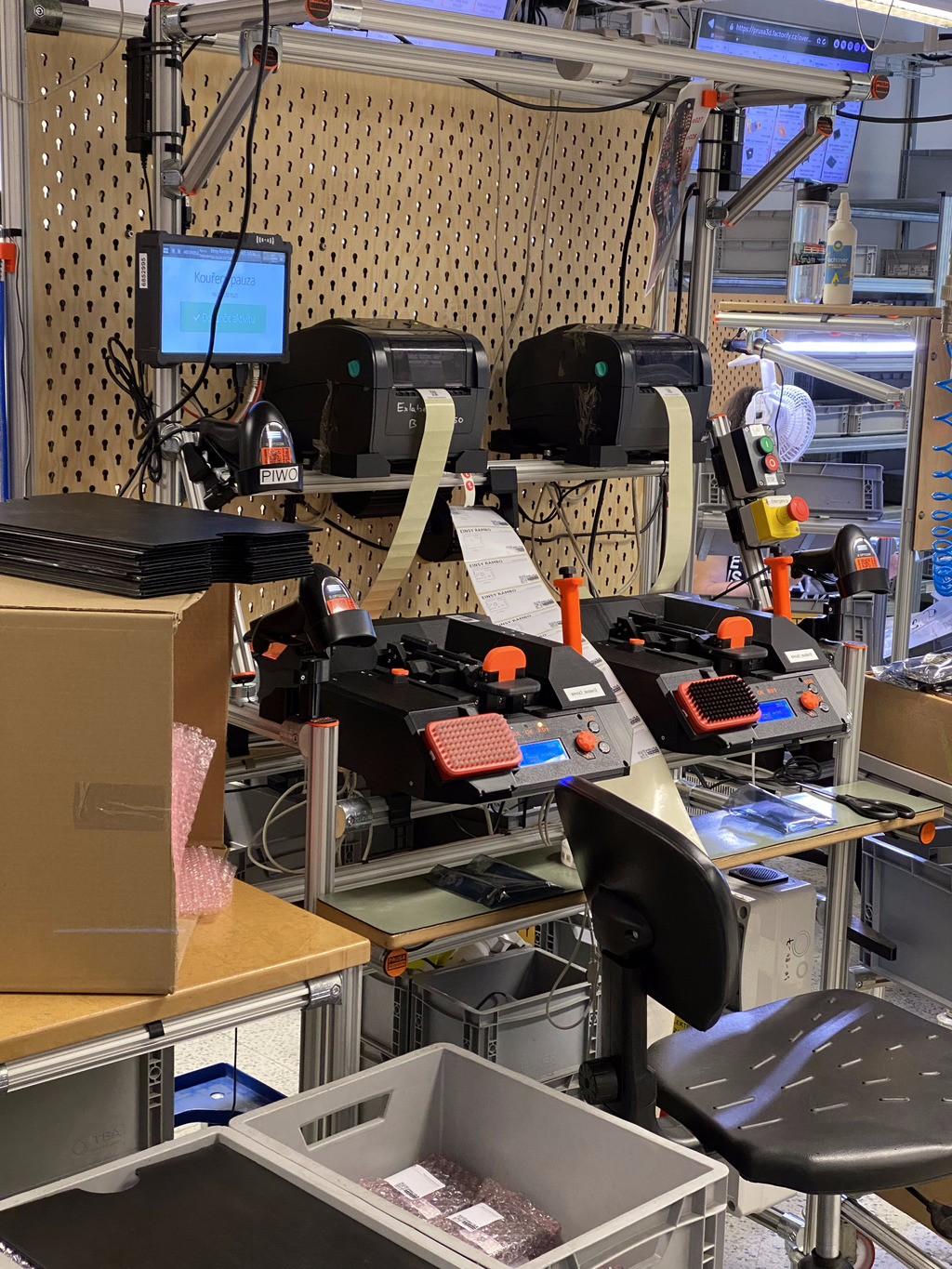
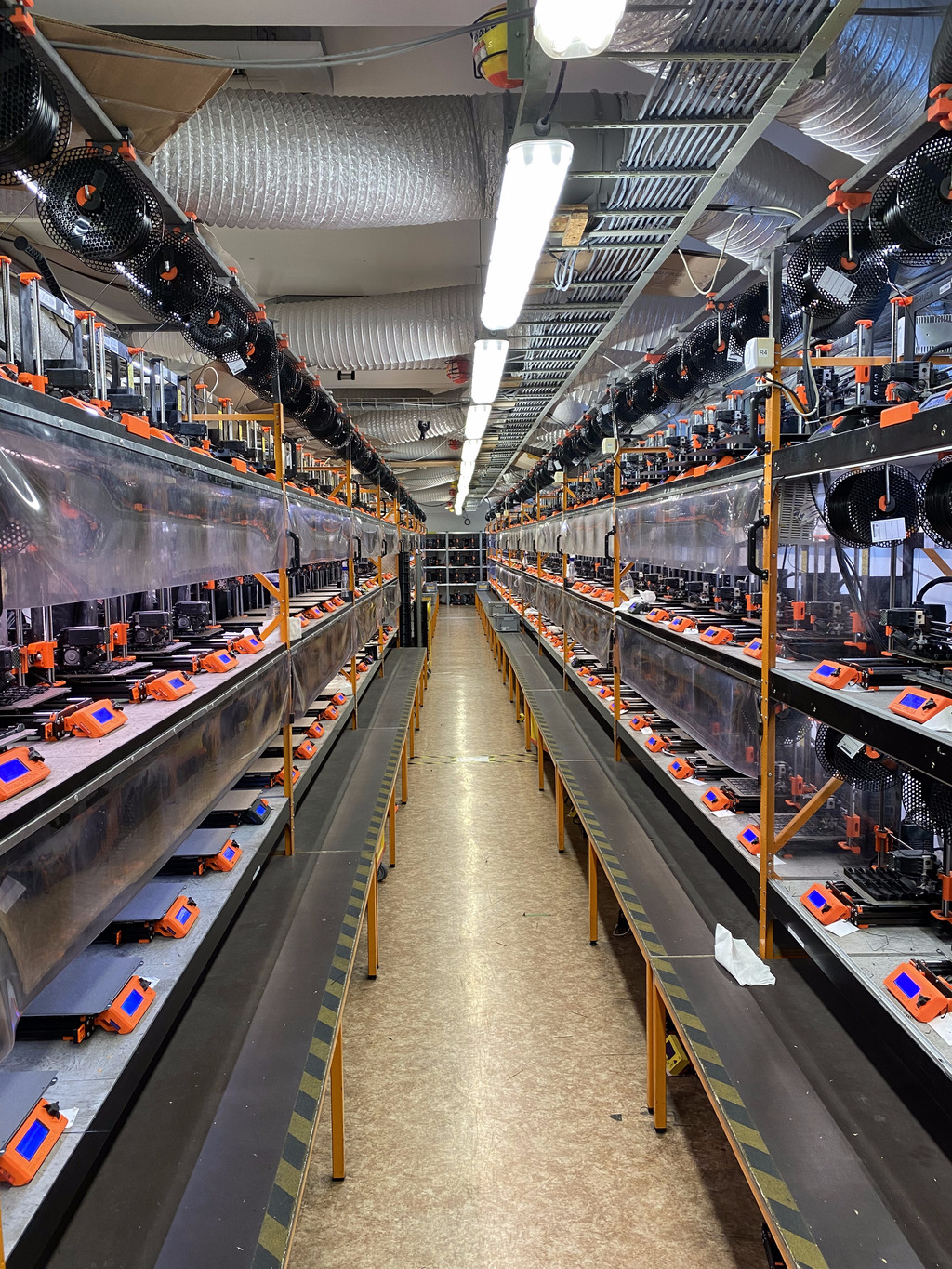
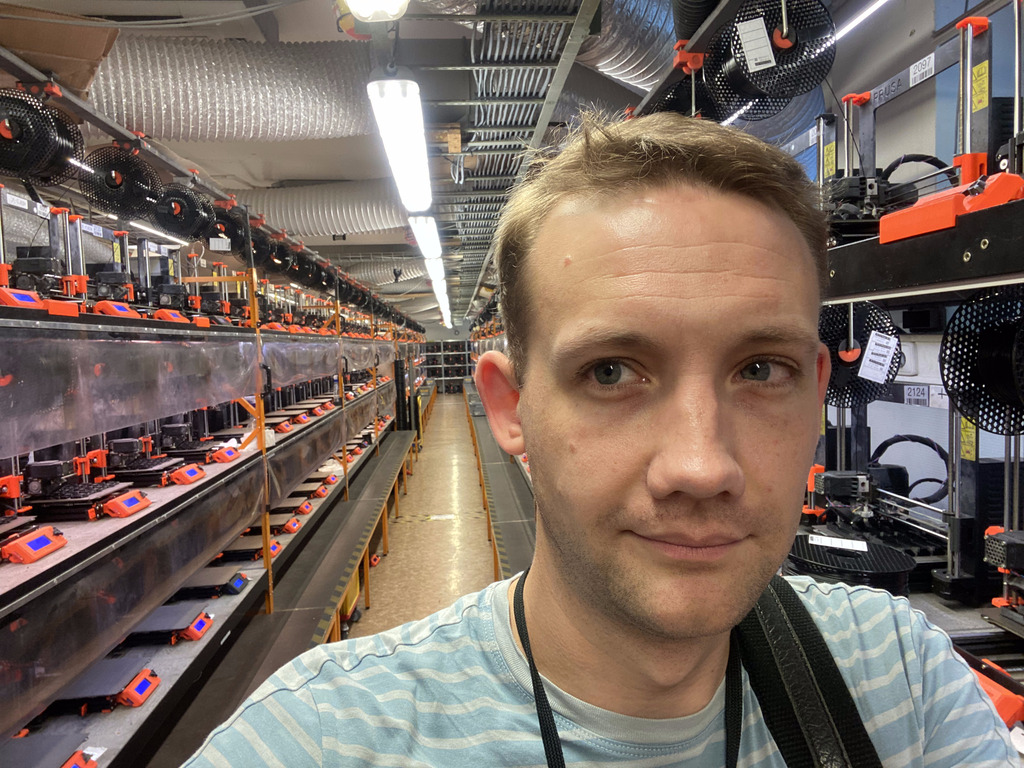


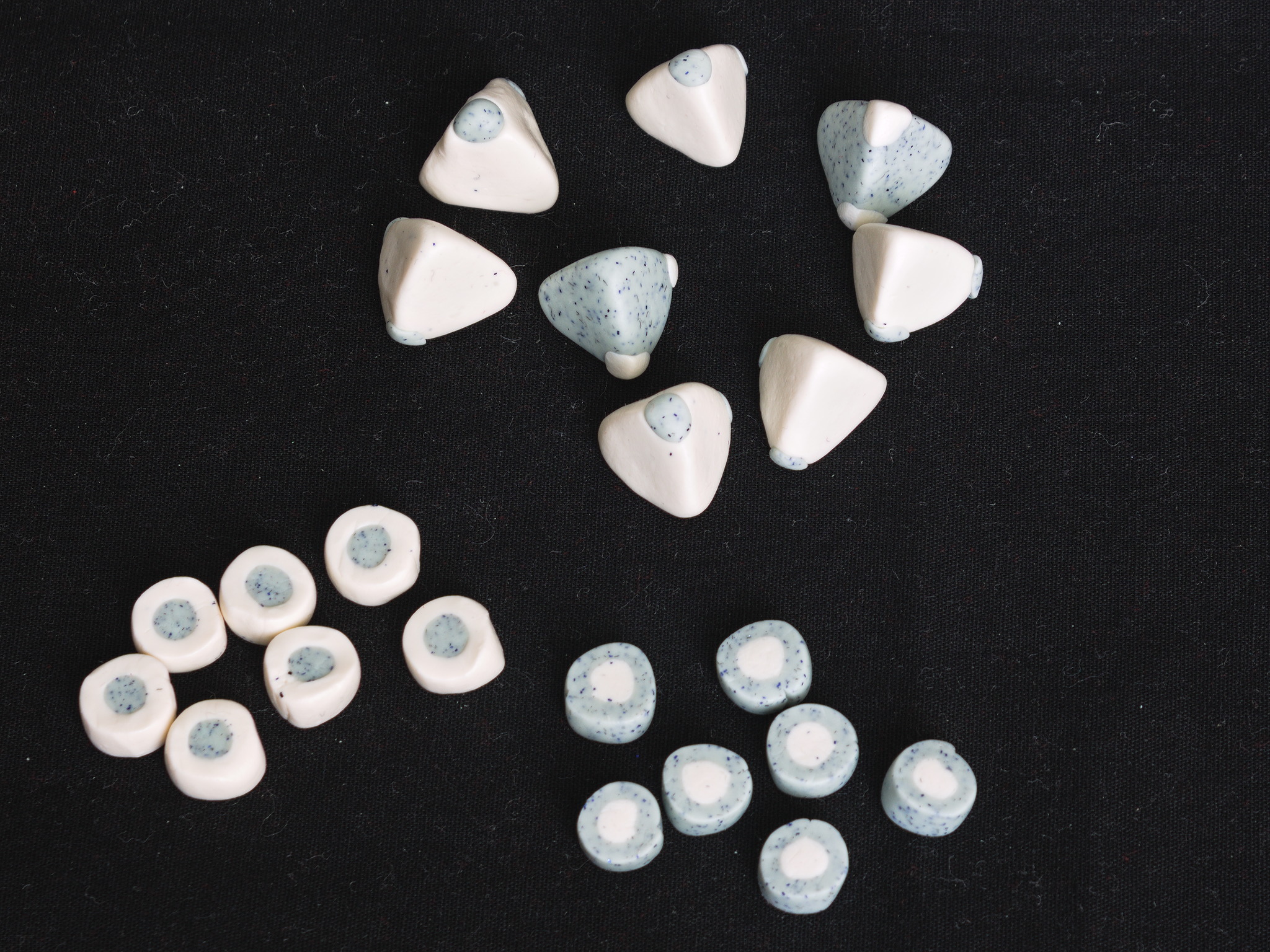 And after baking and trying them I liked them, but they had not been planned in any way, and they were a bit too small for the board, so the next time I was using cernit I tried to make a new set.
And while I was doing that I tried a new shape for the dice, as coins marked with a dot in the middle of one of the sides, because I don t really like tetrahedral dice.
And after baking and trying them I liked them, but they had not been planned in any way, and they were a bit too small for the board, so the next time I was using cernit I tried to make a new set.
And while I was doing that I tried a new shape for the dice, as coins marked with a dot in the middle of one of the sides, because I don t really like tetrahedral dice.
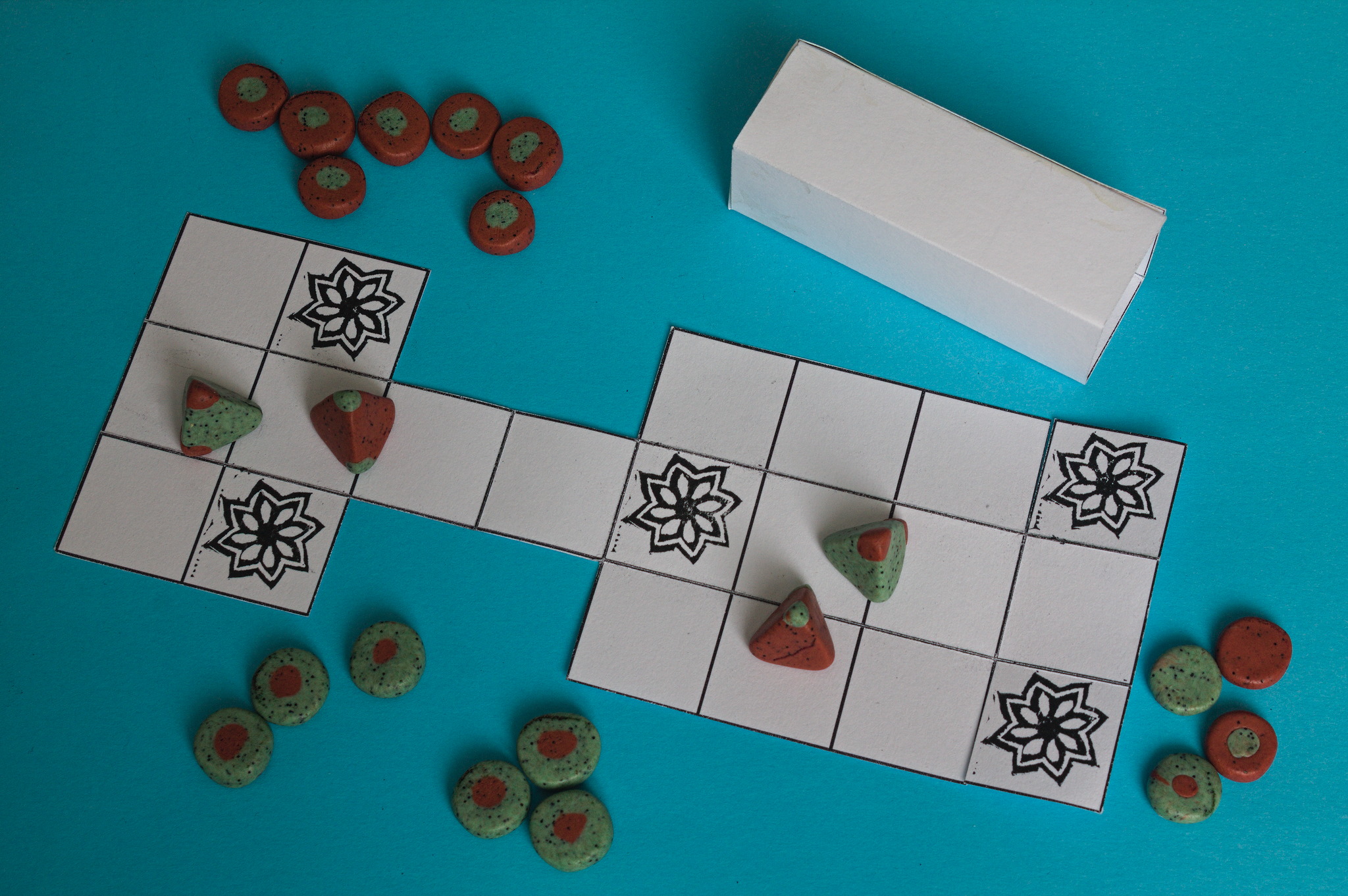 And now, I realized this wasn t going to be my last set, and urgently felt the need for some container to keep them in and avoid missing pieces.
(Yes, in the picture above one piece was already missing. While taking it I didn t realize it, and neither I did when picking up everything to put it away, getting the missing piece and storing it safely together with the rest of the set. It must have been hiding in plain sight nearby, but I will never know where.)
Anyway, back to Inkscape, and to a board printed on scrap paper that I tried to fold up until I came up with a layout that folded up in a small drawer, and then I added a case to wrap around it to keep it closed.
And now, I realized this wasn t going to be my last set, and urgently felt the need for some container to keep them in and avoid missing pieces.
(Yes, in the picture above one piece was already missing. While taking it I didn t realize it, and neither I did when picking up everything to put it away, getting the missing piece and storing it safely together with the rest of the set. It must have been hiding in plain sight nearby, but I will never know where.)
Anyway, back to Inkscape, and to a board printed on scrap paper that I tried to fold up until I came up with a layout that folded up in a small drawer, and then I added a case to wrap around it to keep it closed.

 I played around with the case until it was big enough to actually slide around the folded board, and this is the result, ready to be printed out on A4 paper, cut, folded and glued. (This takes most of the sheet, and I m not sure that the case would still fit around the board/drawer if printed with scaling, so if you want to print it on Letter paper I d recommend to move the pieces around.)

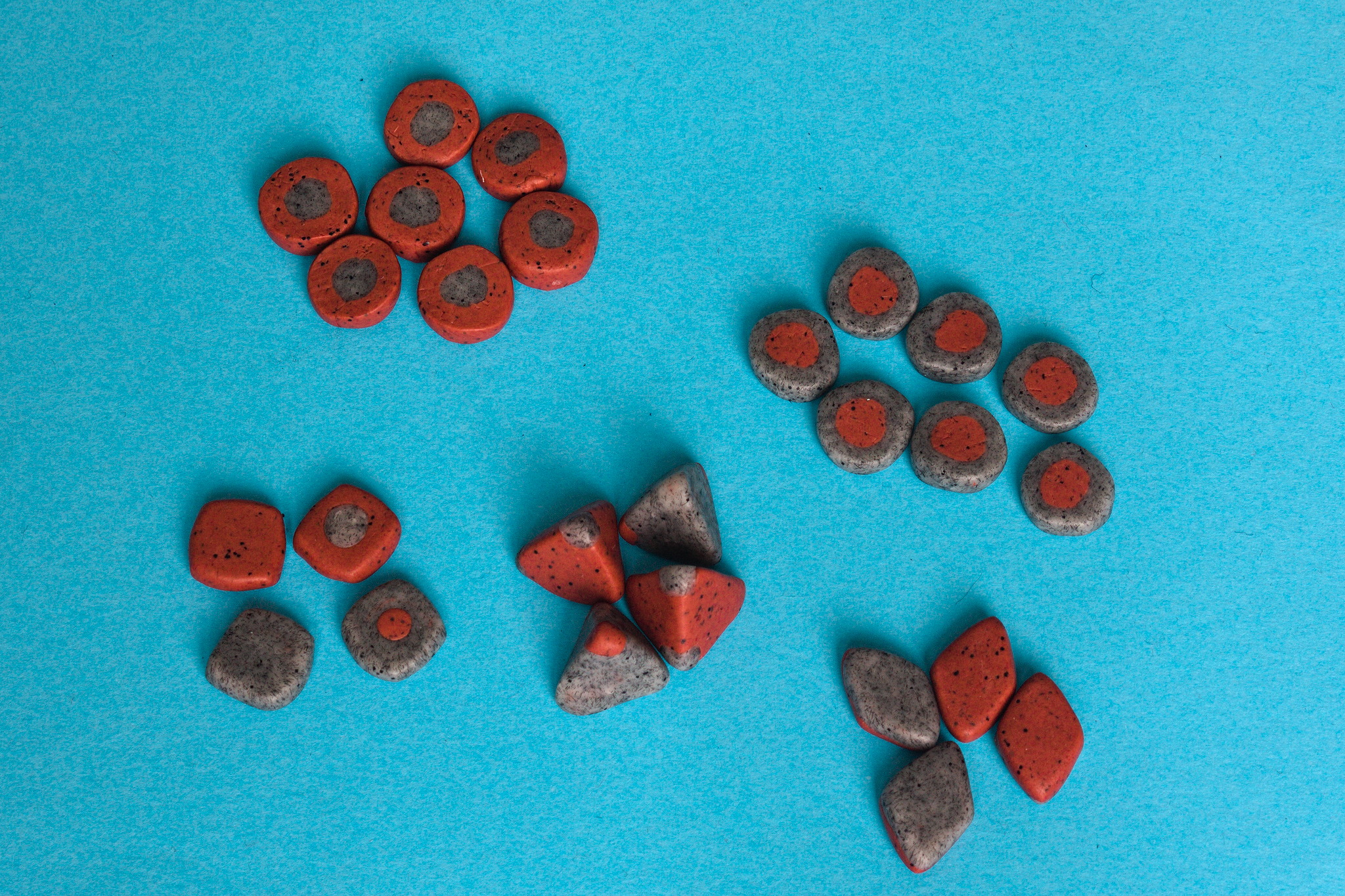 I still used stone effect cernit, but this time in a red/grey scheme that knew I would have liked more, and while I was doing it I tried a few improvements on the randomization devices.
The tetrahedral dice are still the same: they work, it s what they use in the replica sets, so I keep making them even if they re not my first choice.
I ve changed the coins to make them almost square for two reasons, however: one is that the round one tended to roll away into inconvenient places when throwing them with emphasis, and the other one is to make it easier to recognise them from the tokens with no need to flip each one around before starting the game.
The lozenges were a bit of a failure, instead. They work fine when thrown, but I don t think that there is a self-evident way to decide which side should be counted, and the only intuitive way I can think of (count the ones in the player s colour) would be unbalanced.
Speaking of balance issues: of course the hand-modelled dice and coins aren t perfectly balanced but:
I still used stone effect cernit, but this time in a red/grey scheme that knew I would have liked more, and while I was doing it I tried a few improvements on the randomization devices.
The tetrahedral dice are still the same: they work, it s what they use in the replica sets, so I keep making them even if they re not my first choice.
I ve changed the coins to make them almost square for two reasons, however: one is that the round one tended to roll away into inconvenient places when throwing them with emphasis, and the other one is to make it easier to recognise them from the tokens with no need to flip each one around before starting the game.
The lozenges were a bit of a failure, instead. They work fine when thrown, but I don t think that there is a self-evident way to decide which side should be counted, and the only intuitive way I can think of (count the ones in the player s colour) would be unbalanced.
Speaking of balance issues: of course the hand-modelled dice and coins aren t perfectly balanced but:
 Very few highly-anticipated movies appear in January and February, as the bigger releases are timed so they can be considered for the