Search Results: "ag"

23 May 2011

Ben Hutchings: Testing new hardware support for Debian 6.0.2

The Debian kernel team regularly backports driver updates to the Linux kernel in stable releases to add support for new hardware, and I've prepared several updates intended for point release 6.0.2. Since the kernel team does not have a large collection of hardware on which to test driver changes, we would appreciate test reports from users. It is important to test not just that new devices are supported properly, but that there are no regressions in support for older devices. Changes I have updated these drivers to the versions found in Linux 2.6.38, modulo driver API changes: I have also cherry-picked some small changes: There are more drivers that I think should be added or updated (see #624794) but they will probably have to wait for release 6.0.3. Packages The source package and binary packages for i386 and amd64 are available on people.debian.org. They can be verified by the checksums in the signed changes file. The current packages are version 2.6.32-35~test1, but there may be further test versions before an official stable update. How to test For network drivers, I suggest the following regression tests:
  1. If the driver tries to load firmware (only required for some chips), does this work once the firmware file(s) are installed?
  2. Can you receive and transmit VLAN-tagged frames after creating a VLAN interface?
  3. Does the interface work after suspend and resume?
  4. Does the interface work after removing the cable for 10 seconds and reinserting it?
  5. Does multicast configuration work? (IPv6 autoconfiguration or mDNS will cover this.)
  6. Can the interface send and receive TCP/IP across a LAN at the same speed, before and after these changes? (Use e.g. netperf to test this, but don't forget to remove the netperf package after use.)
  7. Are any warnings or errors logged by the kernel during the preceding tests?
For storage drivers, unfortunately I don't have a good idea of what tests would be suitable. In any case, please don't test on disks storing valuable data! Please send test reports to the bug reports linked above, stating the driver name, the PCI ID for the device you tested (from lspci -n) and any other device identification that the kernel log (for example, r8169 logs the 'XID' of the device).

David Welton: Summary: Built To Sell - Creating A Business That Can Thrive Without You

<iframe frameborder="0" marginheight="0" marginwidth="0" scrolling="no" src="http://rcm.amazon.com/e/cm?lt1=_blank&amp;bc1=000000&amp;IS2=1&amp;bg1=FFFFFF&amp;fc1=000000&amp;lc1=0000FF&amp;t=dedasys-20&amp;o=1&amp;p=8&amp;l=as4&amp;m=amazon&amp;f=ifr&amp;ref=ss_til&amp;asins=B004IYISQW" style="width: 120px; height: 240px; float: left; margin-right: 20px; margin-bottom: 8px;"></iframe> Many small business owners start a business with the idea of greater freedom in mind, yet end up chaining themselves to something that takes even more dedication than a regular job. This book discusses the dos and don'ts that business owners need to be conscious of in order to create a business that is independent of its owner(s) in order to be able to sell it. It does so in an easy to read format that's a bit of a gimmick - a fictional story illustrating the authors points. Like most business books, the core idea isn't that hard to explain. the book even includes a handy summary of the main points, which I'll paraphrase here:
  1. Focus on one thing you can do really well; even a service business can be 'productized' by creating a standard service that is the focus of the business.
  2. If your business revolves around one or two key clients, the risk inherent in that approach will lower the value or scare of potential buyers completely.
  3. Put a process in place, from sales through production.
  4. Don't "be" your company. If the company is all about you, what's a potential buyer really getting if you sell it and leave?
  5. By focusing on products, you can charge up front rather than having poor cash flow. If you pay people to work on a project for 3 months, and don't get paid for another month, you are, by the end, out 4 months salary while waiting for the payment.
  6. Say no to projects outside the scope of your business. Only by focusing narrowly can you really excel at what you do.
  7. Spend time doing some research and calculations to estimate your potential market size; buyers will want to know this.
  8. If you have a business that has sales people, hire at least two so that they'll compete with one another.
  9. You want people who are good at selling products, not services; the latter will want to tweak your offering for each and every client, rather than selling it as-is and trying to find how it can meet the customer's needs that way, which is the best strategy for a product.
  10. If you were previously running a more 'generic' services company, and you switch to a more productized approach, be prepared to take a hit the year when you switch.
  11. Potential acquirers will want to see at least a couple of years of steady growth with the new model after making the switch.
  12. If you grow, you'll need a management team that can work without you. Put an incentive system into place to reward their loyalty and results.
  13. When looking for an adviser to sell your company, aim for one where you will not be the largest or smallest client.
  14. If your adviser really only has one company in mind to sell yours to, they may be trying to sell you off cheap as a favor.
  15. Consider how much you could grow with the resources of a buyer. Think big, and show them what kind of growth could happen with the right backing.
  16. Think and speak like a product business with 'customers' rather than 'clients'.
  17. Stock options are more complex than simpler options like bonuses that are paid out over a period of time, in terms of ways to give people an incentive to stay.
All in all, it was an enjoyable read, with solid points. Even if you have no intention of selling your business, thinking of the business itself as a sort of "product" that is not dependent on you to work correctly is a sensible way to go about creating and growing a business. He's certainly not, nor claims to be the first one to discuss this idea, and indeed references the well known E-Myth Revisited which focuses less on selling a business, and more on how to go about extricating you and your skills from the business.

Gregor Herrmann: RC bugs 2011/11 - 2011/20

long time no post about my RC bug fixing activities. & indeed, I haven't been very active during the last weeks. here's a quick update; it includes two NMUs done for the perl 5.12 transition, the rest is just "normal" maintainance work (interesting to see how much stuff can break behind our backs ...). I still hope to find some more time in the future to look at other RC bugs; after all we want to have a not-too-long freeze for wheezy, don't we?

Christian Perrier: 2011 week 20 Debian work

This week, I continued triaging bugs in the samba source package. The result is interesting Many bugs are tagged "moreinfo", most of them being old bugs, many likely to be user error....or something fixed for quite a while. So, I expect the bug count to decrease again. Moreover, I did a call for translations 10 days ago, so about 10 bugs are indeed transaltion updates which will be closed in next upload. Samba upstream also released their 3.6.0rc1 version this week, and 53 hours after the annoucement, it landed in Debian experimental. I pushed tasksel 3.02 in git. Indeed, I upload it quite a while ago and forgot to push the release and tags. I'm not entirely used to git, as it seems..:-) On l10n front, I launched a Smith review for ntfs-3g and launched a call for translations matlab-support (and got thanks from maintainer). Finally, after last week push, the French team completed to translation of package descriptions for the top500 packages in popcon. As a consequence, I moved the target further and we nos have "Popcon600" on the stats page. French now reached rank 3 in the DDTP.

John Goerzen: Baptism

Today I was baptized and joined the Mennonite Church. I imagine this might surprise some of you for various reasons, so let me provide a bit of background. I ve had a lot of people, both in person and in comments responding to my blog post, express surprise with statements I have made. The view of Christianity that many people have is of a group that devalues scientific inquiry and places a lot of emphasis on things like opposition to gay marriage, evolution, and abortion, and enjoys political leaders that say bring it on. While I know some Christians that fall into that mold, there are quite a few that don t as well. Some churches, such as the one we attend, have a surprisingly diverse set of people and yet still function and get along well. Today they accepted me with joy. Nobody was concerned that I started my statement with a reference to ancient Greek philosophy, wound up suggesting that the church ought to make sure to make illegal immigrants, gays and lesbians, and prostitutes feel welcome, and embraced both religion and scientific inquiry, feeling them complimentary. Mennonites practice adult baptism rather than infant baptism. A traditional age for people to be baptized is during high school, though emphasis is placed more on the individual than their age, so it s not unheard-of for someone to do so a bit later in life as I have. Part of the baptism involves the candidate sharing their faith story. These are typically intensely personal, widely varied, heartfelt, and honest. Some people s stories involve struggles with depression, physical disabilities, or the place of religion in their lives, while others reflect little struggle at all. Mine involves letting go of a lot of things, and also seeing some things, such as serious intellectual inquiry or existential questions about God (such as is there a god? ), as a positive rather than a negative feature of a Christian life. But it also involves a recognition and deep respect for those that don t approach things in this way. Though given publicly in a church, baptism testimonies are rarely published or shared more broadly. But I m going to share mine here. I have edited it only very lightly to remove a few local references that wouldn t make sense out of the context of this community. This was delivered in front of a rather different audience than is likely to be reading this post, so if you have questions, do feel free to ask in the comments. But before I begin, I just have to pass along a joke a friend told me: John, you picked quite a day for your baptism the day after the rapture. Baptism Testimony John Goerzen May 22, 2011 Those of you that know me well will probably not be surprised that I will begin my Christian baptism testimony with a story about an ancient Greek philosopher, and also touch on the philosophical nature of truth. These are key parts of my story. As legend goes, Socrates famously said, I know that I know nothing in other words, he believed that nothing could be known with absolute certainty. The Greek Oracle thought to be infallibly wise said that Socrates, the man that thought he knew nothing, was the wisest man in all Athens. An interesting paradox, and one that sheds light on my own religious story. My story involves coming to grips with the understanding that I know very little, that no person can ultimately know much about God, and finding a way to make peace with that situation. Growing up in this community, I thought I knew some things about faith and Christianity. At a certain age, it all seemed so simple. We took the Bible to be literally true. We marveled in Sunday School at how the apostles could sometimes appear so blind. And, modeled both implicitly and explicitly, was this notion: the stronger our faith, the fewer inner questions or doubt we have about the nature of God, the literal accuracy of the entire Bible, or our relationship to God. Those I perceived held up as examples never seemed to question any of these things, and showed outwardly, at least complete certainty about them. Moreover, holding certain intellectual beliefs was key to Christian identity, and even more importantly, to eternal life. This model has quite obviously worked well for many people for many years. The good that has happened, and continues to happen, from people that have that kind of certainty is manifest all around us. And yet, it didn t seem to work out for me. I m not the kind of person that accepts a lot of things at face value. It is helpful to be able to examine and challenge ideas and even more helpful to have other people challenge my ideas. From well before I was in high school, I was questioning some things about the Bible, God, and religion in general. My thoughts ranged from the impact of evolution on religion to the apparently vengeful God of the Old Testament to the very existence of God. In the Christian context, I perceived having these questions as a personal failing, something that I ought to repress. The more I tried to repress them, the more troublesome they became. Why, for instance, should a loving merciful God decide whether to let us into heaven based on whether we hold certain intellectual beliefs? In high school, I participated in the catechism class here at this church, and was frustrated because it didn t tackle deeper meanings or the kinds of questions I had. I wasn t yet able to articulate all my thoughts and questions very well, and I probably had an overactive case of teenage cynicism. As a result, I didn t get baptized like most others my age did. As I learned more about the early history of Judaism and Christianity, I only found more reasons to question the model of faith I thought I had received the one in which Biblical literalism and a divine guarantee of sorts was key. More recently, I gradually became aware that the model of Christianity I had in mind was one of many views. Christians, Mennonites, and even this church are incredibly diverse groups, and in retrospect, I am surprised that it took me so long to realize this. Three major steps led me to baptism. The first step was the realization that, whatever our understanding of the literal accuracy of the Bible, literal truth is often inferior to metaphorical truth. As an example, many of us have read the works of Shakespeare. They are fictional, but the reason they have been revered for so many centuries is that they are true. They teach us things about ourselves and our world in a way that no history book can. By placing such an emphasis on literal truth in the Bible, I was missing out on the message right there for me. By concerning myself with creationism or evolution, I missed out on thinking about what the story in Genesis meant for the Jews, and what it could mean for me. Evolution ceased to be a threat to religion; it became simply a tool for learning about a different sort of truth than we get from religion. N. T. Wright mentions an incident that illustrates this point. A woman attending a religious conference asked the speaker, a prominent theologian, Is it true that the serpent in Genesis actually spoke like you and I speak? The theologian answered, It doesn t matter whether the serpent could speak. What matters is what the serpent said. The second step I took towards being baptized was realizing where the real core of Christianity lies. It s not some debate about Genesis, but rather the death to one s old self, and the rebirth and continual remaking of oneself in the example of Jesus. Given that, a lot of questions seem unimportant or even irrelevant. Good can be expressed in many ways, and if one person achieves a remarkably Christian life via a literal understanding of the Bible, and another via a more metaphorical reading, then it is my place only to affirm both and say that they both got it right. If we say that the task of remaking ourselves is like climbing a mountain, then what matters is not how we are climbing the mountain, but simply that we are climbing it. I used to equate faith with an intellectual belief. I have come to see that was a narrow view. Faith, to me now, is more about vision: do we see the world like Christ did? Where do our loyalties and our trust lie in God or in human institutions? What are our goals in life? We humans have failed to understand God, and probably always will. I too share in that incomplete understanding, but I have come to accept that it is OK. I know enough to know that I want my loyalty to lie in Jesus, to know what kind of vision of the world I want to have, and I have learned to accept that intellectual questions can even be a form of meditation, enlightenment, and prayer. The third step toward baptism was moving past my own shortcomings. For a long time, I thought I didn t believe the right things, didn t believe them strong enough, wasn t certain enough about God, didn t pray enough, didn t read enough, didn t understand enough, didn t love enough and ultimately, that I wasn t good enough. I request baptism today understanding that, despite the various imperfections I still have, and we all have, everyone is good enough and deserving of love and peace. God s love is for everyone. No exceptions! Following Jesus boils down to this: I too must be an agent of love and peace to everyone, without exception. My vision must be centered around the fact that we are to emulate the God that loves the entire world, sinners all, and therefore I should as well. I hope I can show others the kind of love that has been shown me. I hope, too, to share with this congregation and the global church in the vision of love. I hope that we can continually strive to re-focus on Christ s vision. As an example, we all know that many different viewpoints about whether homosexuality is sinful exist in Mennonite Church USA. These opinions are deeply held and personal for many, and have been discussed over and over and over. But ultimately, they aren t terribly relevant to the church s mission. The example of Jesus unites us all: he embraced everyone. He accepted criminals and prostitutes and showed them love and kindness. Our difficult task, which is also my difficult task, is to show this same love to absolutely everyone, regardless of our varying opinions about them and their conduct. The forgotten and repressed of our day perhaps criminals, homeless, Muslims, addicts, gays and lesbians, illegal immigrants, ethnic minorities, and still prostitutes deserve the love of Christ s church and all its members. My hope is that any one of the earth s 7 billion people could step through the doors of our church, or any church, and immediately feel Christ s love, and the unconditional, non-judgmental, welcome and love of Christ s followers, no matter what. This prayer from Ephesians 3 sums up my hope and my vision, for myself and everyone:
I pray that out of his glorious riches he may strengthen you with power through his Spirit in your inner being. I pray that Christ may dwell in your hearts through faith. And I pray that you, being rooted and established in love, may have power, together with all the Lord s people, to grasp how wide and long and high and deep is the love of Christ. And I pray that you will know this love that surpasses knowledge that you may be filled to the measure of all the fullness of God. (3.16-19)

22 May 2011

Andrew Cater: Engaged to be married

A heads up to my Debian family - before I get to tell some of my other family :) I'm engaged to a wonderful girl. We've known each other off and on for almost 30 years, having met on the first day at university.

Lots of life has happened in the middle - including Debian - but we're now very happily together again.

(amacater@debian.org)

Joey Hess: more solar data

Entered in 6 months of the house's solar power data.
Power system voltages.
When I last did in mid-December I was seeing the expected slow decrease, but did not anticipate the dip in mid-January, which I think was due to snow and bad weather. At the end of February, I doubled the size of the active battery bank, and this damped out many of the spikes and lows. The mid-April low is bad weather paired with much higher than usual (24x7) inverter use, and possibly with some batteries that were still being conditioned after spending all winter off power. I'd expect the last couple of months to be higher, but perhaps I'm just not needing to conserve power here at all (come to think, I have a radio, an inverter, a flourescent light, an electric shaver charger, a sheevaplug, a laptop, and 4 USB pepherials going right now).

Christian Perrier: 2011 week 20 Debian work

This week, I continued triaging bugs in the samba source package. The result is interesting Many bugs are tagged "moreinfo", most of them being old bugs, many likely to be user error....or something fixed for quite a while. So, I expect the bug count to decrease again. Moreover, I did a call for translations 10 days ago, so about 10 bugs are indeed transaltion updates which will be closed in next upload. Samba upstream also released their 3.6.0rc1 version this week, and 53 hours after the annoucement, it landed in Debian experimental. I pushed tasksel 3.02 in git. Indeed, I upload it quite a while ago and forgot to push the release and tags. I'm not entirely used to git, as it seems..:-) On l10n front, I launched a Smith review for ntfs-3g and launched a call for translations matlab-support (and got thanks from maintainer). Finally, after last week push, the French team completed to translation of package descriptions for the top500 packages in popcon. As a consequence, I moved the target further and we nos have "Popcon600" on the stats page. French now reached rank 3 in the DDTP.

Thomas Girard: Introducing CORBA

What is CORBA? The wikipedia page says it all:
The Common Object Request Broker Architecture (CORBA) is a standard
defined by the Object Management Group (OMG) that enables software
components written in mutiple computer languages and running on
multiple computers to work together (i.e., it supports mutiple
platforms).
The standard was created twenty years ago, in 1991. The technology can be used in many programming languages: Python, Java, C++, C, etc. Hence you can write a software in your favorite programming language, exposing services that others will be able to call using a different language. (Nowadays you can do the same with WebServices. This article is about CORBA.) All CORBA specifications are available on [OMGSPEC]; latest version is [CORBA3.1]. [MCHALE] book is a very good way to learn CORBA.
How does it work? CORBA is language agnostic because it relies on its own language: the Interface Definition Language (IDL for short). The IDL defines the contract between the client (software calling the service) and the server (software implementing the service). The service is exposed through a remote object. IDL is used to define:
  • modules, which are called namespaces in C++ (or packages in Java)
  • structs, which are like C structs: they can contain data only (the data part of the contract)
  • interfaces, which contain methods specification (the service part of the contract)
  • exceptions that can be raised by a method
  • typedefs which are type aliases
  • unions, la C
  • enums, enumerations
  • constants
IDL comes with existing types:
  • char, octet
  • string, wstring
  • short, long, long long (signed if unspecified, unsigned if prefixed with unsigned)
  • float, double, long double
  • arrays
  • sequences
  • any which can be any existing or user-defined type
From this contract, the following code will be generated using a dedicated tool:
  • client-side code, called stubs
  • server-side code, called skeletons
So to call a CORBA remote service in a given programming language, we will generate stubs from the IDL, then write code relying on these stubs. To provide a CORBA service in a given progamming language, we will generate skeletons from the IDL, then extend them with our implementation. The dispatching and networking machinery is handled by the Object Request Broker (ORB for short). That's the most important part of the CORBA system: it's the component that hides away remoting aspects to make distant objects appear as if they were embedded within the local, client-side code.
Telecom Log Service example The Telecom Log Service [TLOG] is an OMG specified service that defines two interfaces:
  • Log, to add, search and delete records
  • LogMgr, a Log container to lookup a given log, or list all contained logs
The specification details five sub-interfaces of the log service, grouped into three different approaches:
  • basic implementation. This is the service depicted below.
  • event-based implementation. The Event Service [EVENT] is another CORBA service specification. Combining both services means that software emitting events can be plugged to an Event Log without modification.
  • notify-based implementation. The Notification Service [NOTIF] is another CORBA service specification, built on top of the Event Service, with added filtering facility. Again, combining these two services provide easier integration with existing software.
Here is the UML representation of key base interfaces (in yellow), basic implementation (in blue) and important date structures (in green): http://thomas.g.girard.free.fr/CORBA/tls.png Here is the simplified IDL for these parts:
#include <TimeBase.idl>  // IDL can include each other
#pragma prefix "omg.org" // extra prefix to use in front of type names

// DsLogAdmin definition
// Because of the #pragma prefix above, the complete name of this module
// is omg.org/DsLogAdmin
module DsLogAdmin
 
        // E X C E P T I O N --------------------------------------------------
        exception InvalidGrammar  ;                    // empty exception
        exception InvalidConstraint  ;                 // empty exception
        exception LogFull   short n_records_written;  ; // one attribute
        exception LogOffDuty  ;                        // empty exception
        exception LogLocked  ;                         // empty exception
        exception LogDisabled  ;                       // empty exception

        // T Y P E   A L I A S ------------------------------------------------
        typedef unsigned long LogId;
        typedef sequence<LogId> LogIdList; // LogIdList is a sequence of LogId
        typedef unsigned long long RecordId;
        typedef string Constraint;
        typedef TimeBase::TimeT TimeT; // TimeT type defined in TimeBase module
        typedef sequence<any> Anys;    // Anys is the name of a sequence of any

        // S T R U C T U R E S ------------------------------------------------
        struct NVPair  
                string name;
                any    value;
         ; // <-- Mandatory semi-colon
        typedef sequence<NVPair> NVList; // Give a name to a sequence of NVPair

        struct LogRecord  
                RecordId id;
                TimeT    time;
                NVList   attr_list;
                any      info;
         ;
        typedef sequence<LogRecord> RecordList;
        // I N T E R F A C E S ------------------------------------------------
        // Iterator interface specification
        interface Iterator  
                // get() method:
                // - two input parameters
                // - returning a list of LogRecord
                // - possibly raising InvalidParam exception
                RecordList get(in  unsigned long position,
                               in  unsigned long how_many)
                        raises (InvalidParam);
                void destroy();
         ;  // <-- Mandatory semi-colon

        // Forward declaration
        interface LogMgr;
        interface Log
         
                LogMgr my_factory();
                LogId id();
                // retrieve() method:
                // - two input parameters
                // - one output parameter
                // - returning a list of LogRecord
                // This method will actually return two objects: the
                // RecordList and the Iterator
                RecordList retrieve(in  TimeT from_time,
                                    in  long how_many,
                                    out Iterator i);
                RecordList query(in  string grammar,
                                 in  Constraint c,
                                 out Iterator i)
                        raises (InvalidGrammar, InvalidConstraint);
                unsigned long delete_records(in  string grammar,
                                             in  Constraint c)
                        raises (InvalidGrammar, InvalidConstraint);
                void write_records(in  Anys records) 
                        raises (LogFull, LogOffDuty, LogLocked, LogDisabled);
         ;
        typedef sequence<Log> LogList; // Give name LogList to sequence of Log

        // inteface BasicLog derives from interface Log
        interface BasicLog : Log  
                void destroy();
         ;
        interface LogMgr
         
                LogList list_logs();
                Log find_log(in LogId id);
                LogIdList list_logs_by_id();
         ;
        // inteface BasicLogFactory derives from interface LogMgr
        interface BasicLogFactory : LogMgr
         
                BasicLog create(
                        in  LogFullActionType full_action,
                        in  unsigned long long max_size,
                        out LogId id)
                        raises (InvalidLogFullAction);
                BasicLog create_with_id(
                        in  LogId id,
                        in  LogFullActionType full_action,
                        in  unsigned long long max_size)
                        raises (LogIdAlreadyExists, InvalidLogFullAction);
         ;
 ; // <-- Mandatory semi-colon
The complete IDL file for the Basic Telecom Log Service is available here.
[CORBA3.1] http://www.omg.org/spec/CORBA/3.1/
[MCHALE] http://www.ciaranmchale.com/corba-explained-simply/
[OMGSPEC] http://www.omg.org/technology/documents/spec_catalog.htm#Middleware
[TLOG] http://www.omg.org/spec/TLOG/
[EVENT] http://www.omg.org/spec/EVNT/
[NOTIF] http://www.omg.org/spec/NOT/

Christian Perrier: Debconf pictures - socializing

New pictures again (I leave tomorrow for holidays, so I hurry up). Again among my favourite ones, pictures of people just socializing. Amaya once wrote that Debconf is more about socializing than hacking and I couldn't agree more.

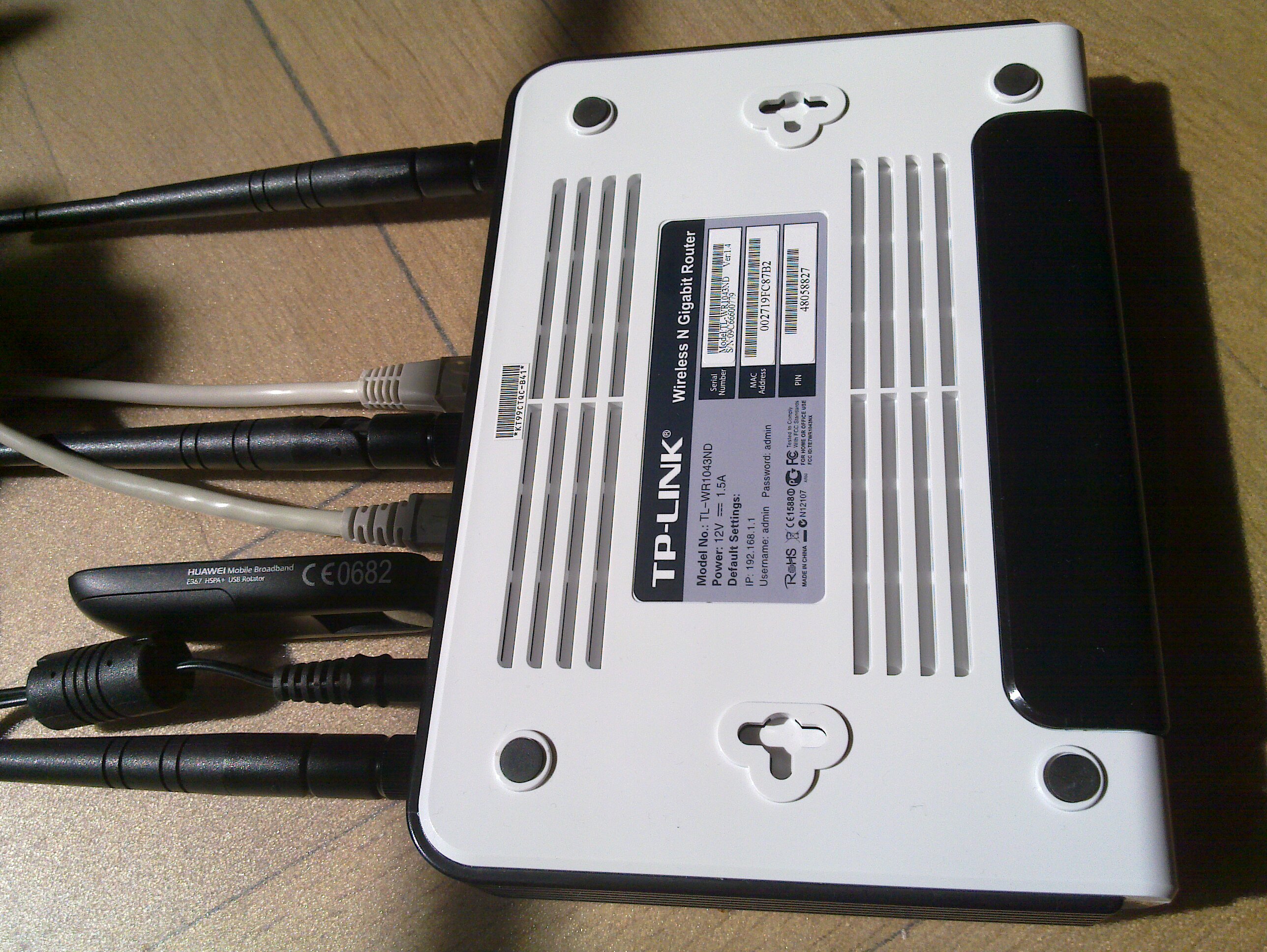
Simon Josefsson: OpenWRT with Huawei E367 and TP-Link TL-WR1043ND

The ability to connect a 3G modem to a wireless router to form a Internet connected ad-hoc network of machines is very powerful. I ve done this many times and have written about it before (e.g., see my OpenWRT writeup page) but I recently did it with modern hardware again. Here I will use the TP-Link TL-WR1043ND wireless router (available here for around $50) together with the Huawei E367 3G UMTS/HSDPA modem. Other wireless routers and modem should work fine. The software is OpenWRT 10.03 although I hope to redo this with LibreWRT eventually. My writeup is mostly focused around what is happening around the prompt, so it is mostly a cut n'paste terminal session with a comment interlined.
TL-WR1043ND and Huawei 367

Router and modem


The first step is to flash the firmware with OpenWRT. The OpenWRT wiki page for the TL-WR1043ND covers this in detail, and for any other hardware you should find what you need in the OpenWRT wiki. If you have already installed OpenWRT on the TL-WR1043ND, and want to wipe it out and start from scratch (like I did for this writeup) here is how to do it:
root@choco:~# cd /tmp
root@choco:/tmp# wget http://downloads.openwrt.org/backfire/10.03/ar71xx/openwrt-ar71xx-tl-wr1043nd-v1-squashfs-sysupgrade.bin
Connecting to downloads.openwrt.org (78.24.191.177:80)
openwrt-ar71xx-tl-wr 100%  *******************************   2688k 00:00:00 ETA
root@choco:/tmp# md5sum openwrt-ar71xx-tl-wr1043nd-v1-squashfs-sysupgrade.bin
9927973ba5da65d0d52e255397452b87  openwrt-ar71xx-tl-wr1043nd-v1-squashfs-sysupgrade.bin
root@choco:/tmp# mtd -r write /tmp/openwrt-ar71xx-tl-wr1043nd-v1-squashfs-sysupgrade.bin firmware
Unlocking firmware ...
Writing from /tmp/openwrt-ar71xx-tl-wr1043nd-v1-squashfs-sysupgrade.bin to firmware ...
Rebooting ...
The device will reboot automatically when it is done. After say 30 seconds, try to connect to it using the default IPv4 address 192.168.1.1. I have connected the WAN port to the Internet and connect to the router over local network connected to the router s LAN1 input. Let s configure OpenWRT, I m calling the host choco and giving it the IPv4 address 192.168.1.46. I ll also set a good root password to disable telnet, and add some SSH keys to simplify remote login.
jas@latte:~$ telnet 192.168.1.1
Trying 192.168.1.1...
Connected to 192.168.1.1.
Escape character is '^]'.
 === IMPORTANT ============================
  Use 'passwd' to set your login password
  this will disable telnet and enable SSH
 ------------------------------------------
BusyBox v1.15.3 (2010-04-06 03:14:11 CEST) built-in shell (ash)
Enter 'help' for a list of built-in commands.
  _______                     ________        __
          .-----.-----.-----.          .----.    _
     -      _     -__                   _    _ 
  _______    __ _____ __ __ ________ __    ____ 
           __  W I R E L E S S   F R E E D O M
 Backfire (10.03, r20728) --------------------------
  * 1/3 shot Kahlua    In a shot glass, layer Kahlua
  * 1/3 shot Bailey's  on the bottom, then Bailey's,
  * 1/3 shot Vodka     then Vodka.
 ---------------------------------------------------
root@OpenWrt:/# passwd
Changing password for root
New password:
Retype password:
Password for root changed by root
root@OpenWrt:/# sed -i -e 's/OpenWrt/choco/' /etc/config/system
root@OpenWrt:/# sed -i -e 's/192.168.1.1/192.168.1.46/' /etc/config/network
root@OpenWrt:/# cat>/etc/dropbear/authorized_keys
ssh-rsa AAAAB3NzaC1yc2...
^D
root@OpenWrt:/# dropbearkey -y -f /etc/dropbear/dropbear_rsa_host_key
Public key portion is:
ssh-rsa AAAA... root@OpenWrt
Fingerprint: md5 45:fd:62...
root@OpenWrt:/#
You could reboot the machine here to switch from telnet to SSH, but I ll install a bunch of packages while I m at it. Run opkg update to update the package list, and then install the wireless modules for the TL-WR1043ND.
root@OpenWrt:/# opkg update
Downloading http://downloads.openwrt.org/backfire/10.03/ar71xx/packages/Packages.gz.
Inflating http://downloads.openwrt.org/backfire/10.03/ar71xx/packages/Packages.gz.
Updated list of available packages in /var/opkg-lists/packages.
root@OpenWrt:/# opkg install kmod-ath9k wpad-mini
...
Configuring iw.
Configuring kmod-crypto-core.
Configuring kmod-crypto-arc4.
Configuring kmod-crypto-aes.
Configuring wireless-tools.
Configuring kmod-cfg80211.
Configuring kmod-mac80211.
Configuring kmod-ath.
Configuring kmod-ath9k.
Configuring crda.
Configuring wpad-mini.
root@OpenWrt:/#
Next I ll install some packages that will are needed for the modem.
root@OpenWrt:/# opkg install comgt kmod-usb-serial kmod-usb2 kmod-usb-uhci kmod-usb-ohci usb-modeswitch
...
Configuring kmod-nls-base.
Configuring kmod-usb-core.
Configuring chat.
Configuring kmod-usb-ohci.
Configuring kmod-usb2.
Configuring comgt.
Configuring usb-modeswitch.
Configuring kmod-usb-serial.
Configuring kmod-usb-uhci.
root@OpenWrt:/#
Now let s reboot the machine and try to get things to really work.
root@OpenWrt:/# sync
root@OpenWrt:/# reboot
Use SSH to connect to the router, and don t forget the use its new IPv4 address! 3G modems are notoriously known for not acting as a modem directly. Instead they often simulate a CD-ROM that will install device driver software, for inferior operating systems. Fortunately the usb_modeswitch tool fixes the hardware for us. My Huawei E367 start up with the USB vendor/product IDs 0x12d1:0 1446, you normally find this out by looking in /proc/bus/usb/devices. Here is the output on my device:
root@choco:~# cat /proc/bus/usb/devices
...
T:  Bus=01 Lev=01 Prnt=01 Port=00 Cnt=01 Dev#=  2 Spd=480 MxCh= 0
D:  Ver= 2.00 Cls=00(>ifc ) Sub=00 Prot=00 MxPS=64 #Cfgs=  1
P:  Vendor=12d1 ProdID=1446 Rev= 0.00
S:  Manufacturer=Huawei Technologies
S:  Product=HUAWEI Mobile
C:* #Ifs= 2 Cfg#= 1 Atr=c0 MxPwr=500mA
I:* If#= 0 Alt= 0 #EPs= 2 Cls=08(stor.) Sub=06 Prot=50 Driver=(none)
E:  Ad=81(I) Atr=02(Bulk) MxPS= 512 Ivl=0ms
E:  Ad=01(O) Atr=02(Bulk) MxPS= 512 Ivl=0ms
I:* If#= 1 Alt= 0 #EPs= 2 Cls=08(stor.) Sub=06 Prot=50 Driver=(none)
E:  Ad=02(O) Atr=02(Bulk) MxPS= 512 Ivl=0ms
E:  Ad=82(I) Atr=02(Bulk) MxPS= 512 Ivl=0ms
root@choco:~#
This means I have to go find a usb-modeswitch configuration for this device. Fortunately, I found it on my Debian Squeeze box in /etc/usb_modeswitch.d/12d1:1446 (from the usb-modeswitch-data package). There was a slight problem with the file, it didn t specify the correct USB vendor/product ID of the device after it has been switched . My Huawei E367 switches to 12d1:1506, so I add 1506 to the TargetProductList list. Here is the final configuration:
root@choco:~# cat>/etc/usb-modeswitch.conf
EnableLogging=1
DefaultVendor= 0x12d1
DefaultProduct=0x1446
TargetVendor=  0x12d1
TargetProductList="1001,1406,140b,140c,1412,141b,14ac,1506"
CheckSuccess=20
MessageContent="55534243123456780000000000000011062000000100000000000000000000"
root@choco:~#
Now you should be able to run usb_modeswitch to perform the switch :
root@choco:~# usb_modeswitch 
Looking for target devices ...
 No devices in target mode or class found
Looking for default devices ...
 Found default devices (1)
Accessing device 002 on bus 001 ...
Using endpoints 0x01 (out) and 0x81 (in)
Inquiring device details; driver will be detached ...
Looking for active driver ...
 No driver found. Either detached before or never attached
SCSI inquiry data (for identification)
-------------------------
  Vendor String: HUAWEI
   Model String: Mass Storage
Revision String: 2.31
-------------------------
USB description data (for identification)
-------------------------
Manufacturer: Huawei Technologies
     Product: HUAWEI Mobile
  Serial No.: not provided
-------------------------
Setting up communication with interface 0 ...
Trying to send the message to endpoint 0x01 ...
 OK, message successfully sent
Checking for mode switch (max. 20 times, once per second) ...
 Waiting for original device to vanish ...
 Original device can't be accessed anymore. Good.
 Searching for target devices ...
 Searching for target devices ...
 Searching for target devices ...
 Searching for target devices ...
 Searching for target devices ...
 Found correct target device
Mode switch succeeded. Bye.
root@choco:~#
The /proc/bus/usb/devices file will now contain information about the real device:
root@choco:~# cat /proc/bus/usb/devices
...
T:  Bus=01 Lev=01 Prnt=01 Port=00 Cnt=01 Dev#=  3 Spd=480 MxCh= 0
D:  Ver= 2.00 Cls=ef(misc ) Sub=02 Prot=01 MxPS=64 #Cfgs=  1
P:  Vendor=12d1 ProdID=1506 Rev= 0.00
S:  Manufacturer=Huawei Technologies
S:  Product=HUAWEI Mobile
C:* #Ifs= 7 Cfg#= 1 Atr=c0 MxPwr=500mA
A:  FirstIf#= 1 IfCount= 2 Cls=02(comm.) Sub=00 Prot=00
I:* If#= 0 Alt= 0 #EPs= 3 Cls=ff(vend.) Sub=01 Prot=01 Driver=(none)
E:  Ad=81(I) Atr=03(Int.) MxPS=  64 Ivl=2ms
E:  Ad=82(I) Atr=02(Bulk) MxPS= 512 Ivl=0ms
E:  Ad=01(O) Atr=02(Bulk) MxPS= 512 Ivl=4ms
I:* If#= 1 Alt= 0 #EPs= 1 Cls=ff(vend.) Sub=01 Prot=09 Driver=(none)
E:  Ad=83(I) Atr=03(Int.) MxPS=  64 Ivl=2ms
I:* If#= 2 Alt= 0 #EPs= 2 Cls=ff(vend.) Sub=01 Prot=08 Driver=(none)
E:  Ad=84(I) Atr=02(Bulk) MxPS= 512 Ivl=0ms
E:  Ad=02(O) Atr=02(Bulk) MxPS= 512 Ivl=4ms
I:* If#= 3 Alt= 0 #EPs= 2 Cls=ff(vend.) Sub=01 Prot=03 Driver=(none)
E:  Ad=85(I) Atr=02(Bulk) MxPS= 512 Ivl=0ms
E:  Ad=03(O) Atr=02(Bulk) MxPS= 512 Ivl=4ms
I:* If#= 4 Alt= 0 #EPs= 2 Cls=ff(vend.) Sub=01 Prot=02 Driver=(none)
E:  Ad=86(I) Atr=02(Bulk) MxPS= 512 Ivl=0ms
E:  Ad=04(O) Atr=02(Bulk) MxPS= 512 Ivl=4ms
I:* If#= 5 Alt= 0 #EPs= 2 Cls=08(stor.) Sub=06 Prot=50 Driver=(none)
E:  Ad=87(I) Atr=02(Bulk) MxPS= 512 Ivl=0ms
E:  Ad=05(O) Atr=02(Bulk) MxPS= 512 Ivl=0ms
I:* If#= 6 Alt= 0 #EPs= 2 Cls=08(stor.) Sub=06 Prot=50 Driver=(none)
E:  Ad=06(O) Atr=02(Bulk) MxPS= 512 Ivl=0ms
E:  Ad=88(I) Atr=02(Bulk) MxPS= 512 Ivl=0ms
root@choco:~#
Let s put that command in /etc/rc.local so that it will be run on every boot.
root@choco:~# cat /etc/rc.local
# Put your custom commands here that should be executed once
# the system init finished. By default this file does nothing.
/usr/bin/usb_modeswitch
exit 0
root@choco:~#
We are not quite ready, the usbserial module needs to be told which USB vendor/product to use. The /etc/modules.d/60-usb-serial file is used during boot to set the right parameters. You can also run rmmod followed by insmod with the proper parameters to avoid a reboot. You can use the gcom info tool to find some information about the modem. Normally you use /dev/ttyUSB0 but for some reason it does not work for me and instead I had to use /dev/ttyUSB3.
root@choco:~# cat>/etc/modules.d/60-usb-serial
usbserial vendor=0x12d1 product=0x1506 maxSize=4096
root@choco:~# rmmod usbserial
root@choco:~# insmod usbserial vendor=0x12d1 product=0x1506 maxSize=4096
root@choco:~# gcom -d /dev/ttyUSB3 info
##### Wireless WAN Modem Configuration #####
Product text:
====
Manufacturer: huawei
Model: E367
Revision: 11.807.05.00.00
IMEI: 353613040739180
+GCAP: +CGSM,+DS,+ES
OK
====
Manufacturer:           huawei
IMEI and Serial Number: 353613040739180
Manufacturer's Revision:
11.807.05.00.
Hardware Revision:      NOT
Network Locked:         ERROR:
Customisation:          NOT SUPPORT
Band settings:          (NOT)
APN:                    ERROR:
##### END #####
root@choco:~#
Let s configure network and wireless. The configurations files are /etc/config/network and /etc/config/wireless. Edit them using your favorite editor, or vi. I m setting up a PSK2 encrypted WLAN and I have a WDS to connect two wireless routers. Note that you need to use the correct PIN for your SIM card (here I m using 8328) and set the APN correctly (I m using bredband.tre.se ). Reboot after making these changes.
root@choco:~# cat /etc/config/network
config 'interface' 'loopback'
       option 'ifname'   'lo'
       option 'proto'    'static'
       option 'ipaddr'   '127.0.0.1'
       option 'netmask'  '255.0.0.0'
config 'interface' 'lan'
        option 'ifname'   'eth0.1'
        option 'type'     'bridge'
        option 'proto'    'static'
        option 'ipaddr'   '192.168.1.46'
        option 'netmask'  '255.255.255.0'
#config 'interface' 'wan'
#        option 'ifname' 'eth0.2'
#        option 'proto' 'dhcp'
config 'switch'
	option 'name' 'rtl8366rb'
        option 'reset' '1'
        option 'enable_vlan' '1'
config 'switch_vlan'
        option 'device' 'rtl8366rb'
        option 'vlan' '1'
        option 'ports' '1 2 3 4 5t'
config 'switch_vlan'
        option 'device' 'rtl8366rb'
        option 'vlan' '2'
        option 'ports' '0 5t'
config interface wan
        option ifname   ppp0
        option proto    3g
        option device   /dev/ttyUSB0
        option apn      bredband.tre.se
        option pincode  8328
root@choco:~# cat /etc/config/wireless
config wifi-device  radio0
	option type     mac80211
	option channel  5
	option macaddr	00:27:19:fc:87:b2
	option hwmode	11ng
	option htmode	HT20
	list ht_capab	SHORT-GI-40
	list ht_capab	DSSS_CCK-40
config wifi-iface
	option device   radio0
	option network  lan
	option mode     ap
	option ssid     Grisslan
	option encryption psk2
	option key	  notforyoutosee
config wifi-iface
        option device     radio0
        option network    lan
        option mode       wds
        option bssid      00:1F:C6:60:D3:11
        option ssid       GrisslanWDS
        option encryption psk2
        option key        thisisalsosecret
root@choco:~# reboot
root@choco:~#
Once the machine have rebooted, you can bring up the 3G connection by using ifup wan . Look at the log by using logread and tail the log in the background by doing logread -f & .
root@choco:~# ifup wan
Trying to set PIN
PIN set successfully
root@choco:~# logread  tail -20
May 21 13:41:20 choco local2.info chat[2419]: send (ATD*99***1#^M)
May 21 13:41:20 choco local2.info chat[2419]: expect (CONNECT)
May 21 13:41:20 choco local2.info chat[2419]: ^M
May 21 13:41:20 choco local2.info chat[2419]: ATD*99***1#^M^M
May 21 13:41:20 choco local2.info chat[2419]: CONNECT
May 21 13:41:20 choco local2.info chat[2419]:  -- got it
May 21 13:41:20 choco local2.info chat[2419]: send ( ^M)
May 21 13:41:20 choco daemon.info pppd[2412]: Serial connection established.
May 21 13:41:20 choco daemon.info pppd[2412]: Using interface ppp0
May 21 13:41:20 choco daemon.notice pppd[2412]: Connect: ppp0 <--> /dev/ttyUSB0
May 21 13:41:24 choco daemon.warn pppd[2412]: Could not determine remote IP address: defaulting to 10.64.64.64
May 21 13:41:24 choco daemon.notice pppd[2412]: local  IP address 95.209.96.115
May 21 13:41:24 choco daemon.notice pppd[2412]: remote IP address 10.64.64.64
May 21 13:41:24 choco daemon.notice pppd[2412]: primary   DNS address 80.251.201.177
May 21 13:41:24 choco daemon.notice pppd[2412]: secondary DNS address 80.251.201.178
May 21 13:41:24 choco daemon.info dnsmasq[1028]: reading /tmp/resolv.conf.auto
May 21 13:41:24 choco daemon.info dnsmasq[1028]: using nameserver 80.251.201.178#53
May 21 13:41:24 choco daemon.info dnsmasq[1028]: using nameserver 80.251.201.177#53
May 21 13:41:24 choco daemon.info dnsmasq[1028]: using local addresses only for domain lan
May 21 13:41:25 choco user.notice rdate: Synced with ptbtime1.ptb.de
root@choco:~#
Hooray! Or almost so usually the first time you connect, I often get incorrect DNS servers from the server. It shows up like this in the log:
May 21 12:25:04 choco daemon.notice pppd[1157]: primary   DNS address 10.11.12.13
May 21 12:25:04 choco daemon.notice pppd[1157]: secondary DNS address 10.11.12.14
The exact reason why this happens is beyond me. There are patches floating around for pppd, but I haven t tried them. A common workaround is to hardcode static DNS servers (like Google DNS or OpenDNS). I have come up with my own workaround, based on the observation that when the problem has occurred it will not happen again if I disconnect and reconnect. Thus I have written a small script which is invoked whenever an interface is brought up (typically the WAN interface).
# Written by Simon Josefsson May 2011.
root@choco:~# cat> /etc/hotplug.d/iface/01-reconnect-if-dns-is-broken
case "$ ACTION:-ifup " in
    ifup)
	    if grep -q 10.11.12.13 /tmp/resolv.conf.auto; then
		(sleep 30 && ifdown wan && ifup wan) &
	    fi
	    ;;
esac
root@choco:~# chmod +x /etc/hotplug.d/iface/01-reconnect-if-dns-is-broken
root@choco:~#
That s it! If you found this writeup useful, please flattr it.

21 May 2011

Vincent Bernat: Network lab with User Mode Linux

To setup a virtual network lab, you get a lot of alternatives. You can for example use GNS3, Netkit, Marionnet or VNUML. Some of those tools, like GNS3, allow to add some closed source equipments like a Cisco 7200 or a Juniper router. All those tools are a great way to setup your network lab. Look at them! If you want to setup a virtual network lab for educational purpose, one of those should fit your purpose. However, none of those solution were a perfect match for me. I did not want to maintain some root filesystem. I wanted my lab to start in a few seconds. I wanted to keep all configuration files (including the ones for the virtual hosts) into one subdirectory of my home and be able to modify them while the lab was running. I also wanted to be able to plug some Cisco router using Dynamips/Dynagen. None of the listed solution above matched all those criteria. Therefore, I setup my own lab script with User Mode Linux. This is not a complete solution, but is more like a home-made solution to match one particular need. You cannot use the final result without tweaking it. Again, look at the other solutions first. We will go step by step to understand how the lab was built. If you are in a hurry, you can look at the result which is published on GitHub.

User Mode Linux User Mode Linux (or UML) is a Linux kernel running as a process instead of running on top of some processor. With Debian, you can install it using apt-get install user-mode-linux. You get a linux command that will run your Linux kernel as a simple process. No need to be root.
 1
 2
 3
 4
 5
 6
 7
 8
 9
10
11
12
13
14
15
16
17
18
19
20
21
22
23
24
25
$ linux
Core dump limits :
    soft - 0
    hard - NONE
Checking that ptrace can change system call numbers...OK
Checking syscall emulation patch for ptrace...OK
Checking advanced syscall emulation patch for ptrace...OK
Checking for tmpfs mount on /dev/shm...nothing mounted on /dev/shm
Checking PROT_EXEC mmap in /tmp/user/500/...OK
Checking for the skas3 patch in the host:
  - /proc/mm...not found: No such file or directory
  - PTRACE_FAULTINFO...not found
  - PTRACE_LDT...not found
UML running in SKAS0 mode
Adding 5632000 bytes to physical memory to account for exec-shield gap
Initializing cgroup subsys cpuset
Linux version 2.6.32 (2.6.32) (root@tito) (gcc version 4.4.5 (Debian 4.4.5-10) ) #2 Thu Jan 27 12:49:46 UTC 2011
[...]
console [mc-1] enabled
Couldn't stat "root_fs" : err = 2
Failed to initialize ubd device 0 :Couldn't determine size of device's file
registered taskstats version 1
VFS: Cannot open root device "98:0" or unknown-block(98,0)
Please append a correct "root=" boot option; here are the available partitions:
Kernel panic - not syncing: VFS: Unable to mount root fs on unknown-block(98,0)
You get a Linux kernel that will just panic because it does not find a disk to mount to run init from it. Usually, you build some root file system and give it as an argument to your UML kernel.

Basic setup However, you can also use your host filesystem as a root filesystem. We also specify /bin/sh as init instead of /sbin/init. This will be the first process to be started by our UML kernel.
 1
 2
 3
 4
 5
 6
 7
 8
 9
10
11
12
13
$ linux init=/bin/sh rootfstype=hostfs
[...]
Linux version 2.6.32 (2.6.32) (root@tito) (gcc version 4.4.5 (Debian 4.4.5-10) ) #2 Thu Jan 27 12:49:46 UTC 2011
[...]
VFS: Mounted root (hostfs filesystem) readonly on device 0:12.
IRQ 3/console-write: IRQF_DISABLED is not guaranteed on shared IRQs
IRQ 2/console: IRQF_DISABLED is not guaranteed on shared IRQs
IRQ 10/winch: IRQF_DISABLED is not guaranteed on shared IRQs
/bin/sh: can't access tty; job control turned off
# uname -a
Linux (none) 2.6.32 #2 Thu Jan 27 12:49:46 UTC 2011 x86_64 GNU/Linux
# echo $$
1
You may want to setup a bit your environment:
1
2
3
4
5
6
7
8
9
# hostname -b R1
# export TERM=xterm
# export PATH=/usr/local/bin:/usr/bin:/bin:/sbin:/usr/local/sbin:/usr/sbin
# mount -t proc proc /proc
# mount -t sysfs sysfs /sys
# mount -t tmpfs tmpfs /var/run -o rw,nosuid,nodev
# mount -t tmpfs tmpfs /var/log -o rw,nosuid,nodev
# mount -o bind /usr/lib/uml/modules /lib/modules
# mount -t hostfs hostfs /home/bernat/mylab -o /home/bernat/mylab
We setup /proc and /sys correctly. We also turn /var/run and /var/log as tmpfs filesystems. This will allow most daemons to run correctly: they will be able to write runtime data in /var/run and to write logs in /var/log. You can even launch your favorite syslog daemon. The line about /lib/modules is to ensure that our UML kernel is able to access its kernel modules. For example, we can now use modprobe tun. The line about /home allows to mount the home directory of your host inside UML. This was already the case, but it was mounted as read-only. One important thing to notice is that while you seem to be root inside UML, you did not run linux as root. Therefore, when the UML kernel tries to write a file it will still be bound by the permissions granted by your host kernel. See this example:
1
2
3
4
# mount -o remount,rw /
# touch /tmp/test1
# touch /etc/test1
touch: cannot touch  /etc/test1': Permission denied
This is a great way to ensure that your lab will not destroy your host. Do not run linux as root. What is interesting with such a setup is that you share the filesystem with your host. You can modify some configuration file on your host and your UML will see the modification right away. You can also modify a file inside UML and see the modification on your host too.

Console & job control There is a slight problem with this environment. You may be used to it if you already started your own GNU/Linux system with init=/bin/sh. The problem is that you don t have job control. Job control allows you to put tasks in background and interrupt them while they are running. It is job control that allows you to stop a program with ^C. Here, you don t have job control. See:
1
2
# cat
^C^C^C^C
You are stuck. The only way to go out is to kill the linux process on your host. Job control is a great mystery for me. I don t know how to enable it by hand. However, getty is able to enable job control for you. Just type this command:
1
# exec getty -n -l /bin/sh 38400 /dev/tty0
You get job control. We keep /bin/sh, but you may prefer /bin/bash since on most systems, /bin/sh is rather basic.

Writable root filesystem Let s get back to our root filesystem. Most daemons can run just fine with our setup. For example, we can start Nginx, a popular web server:
1
2
3
# mkdir /var/log/nginx
# /etc/init.d/nginx start
Starting nginx: nginx.
However, it will use the configuration file in /etc/nginx. You don t want to modify this directory for all your labs. The best way to handle this is to start Nginx with a custom configuration file:
1
2
# /etc/init.d/nginx stop
# nginx -c /home/bernat/mylab/nginx.conf
While keeping the configuration files related to your lab in your home is an important objective (all your lab related files are in the same place and you can modify them at will), it may be more convenient to still use /etc/init.d/nginx script to control Nginx. Moreover, some daemons do not allow to specify a configuration file. You will then need to modify your root filesystem. This is a pretty common problem with Live CD and it is solved by using an union mount. This is a special kind of mount that will merge two filesystems into one. One of the two filesystems can be read-only and all the changes will be reported to the second one. We will use AUFS. Ensure that you have aufs-tools package installed. Let s start from scratch for this example.
 1
 2
 3
 4
 5
 6
 7
 8
 9
10
$ linux init=/bin/sh rootfstype=hostfs
[...]
# mount -n -t proc proc /proc
# mount -n -t sysfs sysfs /sys
# mount -o bind /usr/lib/uml/modules /lib/modules
# mount -n -t tmpfs tmpfs /tmp -o rw,nosuid,nodev
# mkdir /tmp/ro /tmp/rw /tmp/aufs
# mount -n -t hostfs hostfs /tmp/ro -o /,ro
# mount -n -t aufs aufs /tmp/aufs -o noatime,dirs=/tmp/rw:/tmp/ro=ro
# exec chroot /tmp/aufs /bin/bash
It seems that AUFS with hostfs is rather fragile. We could have merged our root filesystem with some directory in our lab using hostfs like this:
1
2
3
4
# mount -n -t hostfs hostfs /tmp/rw -o /home/bernat/mylab/root,rw
# mount -n -t hostfs hostfs /tmp/ro -o /,ro
# mount -n -t aufs aufs /tmp/aufs -o noatime,dirs=/tmp/rw:/tmp/ro=ro
# exec chroot /tmp/aufs /bin/bash
However, the kernel panics on most operations. Therefore, /tmp/rw stays in a tmpfs filesystem. This means that any change to the root filesystem will be lost. I also was unable to issue a correct pivot_root before chroot. This is not really important here. UPDATED: It seems that there are other drawbacks to this setup. For some reason, if you have a separate /usr partition on your host system, you won t be able to write to it until you specify the noxino option to AUFS. Another issue is that AUFS does not notice most changes on the hostfs filesystem. You can fix this with option udba=inotify. However, this is incompatible with the noxino option. Therefore, you need to choose what is best for your lab. You can also mount some parts of your home with hostfs (for example, the source directory of the piece of software that you would like to test). Let s consider that Nginx configuration is in /home/bernat/lab/nginx. We simply uses a symbolic link:
1
2
# rm -rf /etc/nginx
# ln -s /home/bernat/mylab/nginx /etc/nginx
Since we lose the modifications to the root filesystem, the symbolic link should be done each time we start the lab. However, we can modify directly the configuration files in the host or in the UML.

Networking We know how to start our UML. Let s see how we can add some wires to it. UML supports several network adapters. The two most useful are TAP and VDE backend.

TAP A TAP interface is a virtual network kernel device which can be used by userland applications to inject layer 2 frames in it. If the kernel sends frames in a TAP device, they will be received by the application listening to it. This also works the other way around. A TAP interface is a regular ethernet device for the kernel. This means that you can bridge it or use tcpdump on it. The drawback of such interfaces is that you need to be root to create them. The application using them does not need to be run as root. I usually use this nifty shell function to setup TAP interfaces:
 1
 2
 3
 4
 5
 6
 7
 8
 9
10
11
12
13
14
15
16
17
18
19
20
21
22
23
__add_to_bridge()  
    # Optionally, add it to given bridge
    [ -z "$2" ]    
        [ -f /sys/class/net/$2/brforward ]    
            sudo brctl addbr $2
            sudo brctl stp $2 off
            sudo ip link set $2 up
         
        [ -f /sys/class/net/$2/brif/$1 ]    
            # We need to check if it is in another bridge
            bridge=$(echo /sys/class/net/*/brif/$1 2> /dev/null   \
                sed 's+/sys/class/net/\([^/]*\)/.*+\1+') 2> /dev/null
            [ -n "$bridge" ] && \
                sudo brctl delif $bridge $1
            sudo brctl addif $2 $1


tap()  
    sudo tunctl -b -u $(whoami) -t $1 > /dev/null
    sudo ip link set up dev $1
    __add_to_bridge $1 $2
 
It will create the interface and put it into a bridge. For example, you can create two interfaces linked together through a bridge to allow two UML to talk each other:
1
2
$ tap tap-R1 br-R1R2
$ tap tap-R2 br-R1R2
We can setup two UML which will use those interfaces. The first one is setup like this:
1
2
3
4
$ linux init=/bin/sh rootfstype=hostfs eth0=tuntap,tap-R1
[...]
# ip link set up dev eth0
# ip addr add 192.168.0.1/24 dev eth0
The second one:
1
2
3
4
5
6
7
8
9
$ linux init=/bin/sh rootfstype=hostfs eth0=tuntap,tap-R2
[...]
# ip link set up dev eth0
# ip addr add 192.168.0.2/24 dev eth0
# ping 192.168.0.1
PING 192.168.0.1 (192.168.0.1) 56(84) bytes of data.
Warning: time of day goes back (-13832us), taking countermeasures.
64 bytes from 192.168.0.1: icmp_req=20 ttl=64 time=0.633 ms
64 bytes from 192.168.0.1: icmp_req=21 ttl=64 time=0.157 ms
If you are running a firewall on your host, ensure that you let your host forward those packets. By default, bridging code forwards the frames through Netfilter.

VDE A VDE switch is a software emulation of a regular network switch. It is a userland component and does not need to be run as root. You need to install vde2 package to make use of it. You can run a switch using vde_switch command. You will get a console by pressing Enter. From this console, you can configure the switch: add ports, configure VLAN, etc. Like for TAP interfaces, let s setup two UML connected to this switch. The first one is like this:
1
2
3
4
$ linux init=/bin/sh rootfstype=hostfs eth0=vde
[...]
# ip link set up dev eth0
# ip addr add 192.168.0.1/24 dev eth0
And the second one:
1
2
3
4
5
6
7
8
9
$ linux init=/bin/sh rootfstype=hostfs eth0=vde
[...]
# ip link set up dev eth0
# ip addr add 192.168.0.2/24 dev eth0
# ping 192.168.0.1
PING 192.168.0.1 (192.168.0.1) 56(84) bytes of data.
64 bytes from 192.168.0.1: icmp_req=1 ttl=64 time=2.93 ms
Warning: time of day goes back (-8101us), taking countermeasures.
64 bytes from 192.168.0.1: icmp_req=2 ttl=64 time=0.503 ms

The lab So far, we had a look at what can be used to setup a lab. We need to put everything together into some script to setup the lab in a quick way. For each lab that I want to setup, I copy my latest script to a new location and adapt to the topology I want. I have put everything described below in GitHub. Feel free to browse and fork. Our lab will be about setting up a redundant VPN between two remote sites of the same company. This company is using OSPF as an IGP on each site and we will use BGP to let each site know the routes advertised in the other site. We will only use VDE switches for the layer 2 part. Redundant VPN lab Let s implement this lab. You should grab the sources first:
1
2
$ git clone https://github.com/vincentbernat/network-lab.git
$ cd network-lab/lab-redundant-vpn
You have a setup script which will setup the whole lab for you. You also have one directory for each UML. Those directories only contain configuration for the various daemons used inside UML. To make this lab work, ensure that you have quagga (Quagga, an Internet routing daemon supporting both OSPF and BGP) and racoon packages.

UML configuration First look at the end of script. There is something like this:
 1
 2
 3
 4
 5
 6
 7
 8
 9
10
11
12
13
14
15
16
17
18
19
20
21
22
23
24
25
26
27
case $$ in
    1)
        # Inside UML. Three states:
        [...]
        ;;
    *)
        TMP=$(mktemp -d)
        trap "rm -rf $TMP" EXIT
        check_dependencies
        setup_screen
        # Setup switches
        setup_switch site1
        setup_switch site101
        setup_switch internet
        # Start VM
        start_vm R1 eth0=vde,$TMP/switch-site1.sock
        start_vm R2 eth0=vde,$TMP/switch-site101.sock
        start_vm V1 eth0=vde,$TMP/switch-site1.sock eth1=vde,$TMP/switch-internet.sock
        start_vm V2 eth0=vde,$TMP/switch-site1.sock eth1=vde,$TMP/switch-internet.sock
        start_vm V3 eth0=vde,$TMP/switch-site101.sock eth1=vde,$TMP/switch-internet.sock
        start_vm V4 eth0=vde,$TMP/switch-site101.sock eth1=vde,$TMP/switch-internet.sock
        start_vm I1 eth0=vde,$TMP/switch-internet.sock
        display_help
        cleanup
        screen -X quit
        ;;
esac
The script will check its PID ($$). If it is 1, this means it has been invoked as init. Otherwise, it means it has been launched by the user. We will see the init part later. When called, we first check some dependencies, then we setup screen. Everything is run inside a screen session. No multiple windows. The next step is to setup the various switches needed for our lab. We take one switch for each site and one switch for Internet . The function that setups the switch just invokes vde_switch with the help of start-stop-daemon to record the PID (to shutdown the lab properly). Then, we start our various UML. For each of them, we need to specify which network adapters we need. For R1 and R2, we don t use a network adapter to connect to the internal network. We will use a dummy0 interface. To emulate Internet, we use another UML, I1. For each UML, our script will be used as init. In this case, its PID will be 1. As we have seen earlier, the script checks if it is called as init. If it is the case, it will setup the UML. During this setup, host specific configuration will be applied:
 1
 2
 3
 4
 5
 6
 7
 8
 9
10
11
12
13
14
15
16
17
18
19
20
21
22
23
24
25
26
27
28
29
30
31
32
33
34
35
36
37
38
39
40
41
42
43
44
45
46
47
48
49
50
echo "[+] Setup UML"
sysctl -w net.ipv4.ip_forward=1
case $ uts  in
    R1)
        modprobe dummy
        ip link set up dev dummy0
        ip addr add 192.168.15.1/24 dev dummy0
        ip addr add 192.168.1.10/24 dev eth0
        setup_quagga
        ;;
    R2)
        modprobe dummy
        ip link set up dev dummy0
        ip addr add 192.168.115.1/24 dev dummy0
        ip addr add 192.168.101.10/24 dev eth0
        setup_quagga
        ;;
    V1)
        ip addr add 192.168.1.11/24 dev eth0
        ip addr add 1.1.2.1/24 dev eth1
        ip route add default via 1.1.2.10
        setup_quagga
        setup_racoon 1.1.2.1 1.1.1.1 192.168.0.0/19-192.168.100.0/19
        ;;
    V2)
        ip addr add 192.168.1.12/24 dev eth0
        ip addr add 1.1.2.2/24 dev eth1
        ip route add default via 1.1.2.10
        setup_quagga
        setup_racoon 1.1.2.2 1.1.1.2 192.168.0.0/19-192.168.100.0/19
        ;;
    V3)
        ip addr add 192.168.101.13/24 dev eth0
        ip addr add 1.1.1.1/24 dev eth1
        ip route add default via 1.1.1.10
        setup_quagga
        setup_racoon 1.1.1.1 1.1.2.1 192.168.100.0/19-192.168.0.0/19
        ;;
    V4)
        ip addr add 192.168.101.14/24 dev eth0
        ip addr add 1.1.1.2/24 dev eth1
        ip route add default via 1.1.1.10
        setup_quagga
        setup_racoon 1.1.1.2 1.1.2.2 192.168.100.0/19-192.168.0.0/19
        ;;
    I1)
        ip addr add 1.1.1.10/24 dev eth0
        ip addr add 1.1.2.10/24 dev eth0
        ;;
esac
After all this, we drop to a shell to allow you to issue additional commands interactively.

Testing We need to wait one minute after the lab has been started. We can then check the routing table of various equipments. For example, here is R1 routing table (you need to type vtysh to get Quagga console):
 1
 2
 3
 4
 5
 6
 7
 8
 9
10
11
R1# show ip route
Codes: K - kernel route, C - connected, S - static, R - RIP, O - OSPF,
       I - ISIS, B - BGP, > - selected route, * - FIB route
C>* 127.0.0.0/8 is directly connected, lo
O   192.168.1.0/24 [110/10] is directly connected, eth0, 00:25:42
C>* 192.168.1.0/24 is directly connected, eth0
O   192.168.15.0/24 [110/10] is directly connected, dummy0, 00:25:42
C>* 192.168.15.0/24 is directly connected, dummy0
O>* 192.168.115.0/24 [110/20] via 192.168.1.11, eth0, 00:02:24
  *                           via 192.168.1.12, eth0, 00:02:24
We can see that if this router wants to contact R2, it has learned a multipath route with OSPF and can then sends its packets through V1 or V2, as expected. Here is the routing table of V3:
 1
 2
 3
 4
 5
 6
 7
 8
 9
10
11
12
V3# show ip route
Codes: K - kernel route, C - connected, S - static, R - RIP, O - OSPF,
       I - ISIS, B - BGP, > - selected route, * - FIB route
K>* 0.0.0.0/0 via 1.1.1.10, eth1
C>* 1.1.1.0/24 is directly connected, eth1
C>* 127.0.0.0/8 is directly connected, lo
O   192.168.15.0/24 [110/20] via 192.168.101.14, eth0, 00:04:26
B>* 192.168.15.0/24 [20/20] via 192.168.1.11 (recursive via 1.1.1.10), 00:07:16
O   192.168.101.0/24 [110/10] is directly connected, eth0, 00:07:30
C>* 192.168.101.0/24 is directly connected, eth0
O>* 192.168.115.0/24 [110/20] via 192.168.101.10, eth0, 00:07:18
We see that to contact R1, V3 knows two routes. One with BGP through the VPN. This is the one that will be used. The other one is through V4 but will not be used unless the BGP route is lost. We can ping R2 from R1:
1
2
3
4
R1# ping -I 192.168.15.1 192.168.115.1
PING 192.168.115.1 (192.168.115.1) from 192.168.15.1 : 56(84) bytes of data.
Warning: time of day goes back (-459129us), taking countermeasures.
64 bytes from 192.168.115.1: icmp_req=1 ttl=62 time=1.10 ms
Let s suppose we break the link between V1 and the Internet (using ip link set down eth1 on V1). The previous multipath route on R1 is now a single route through V2. Moreover, V3 has lost its BGP route to V1 and is now using its OSPF route through V4:
 1
 2
 3
 4
 5
 6
 7
 8
 9
10
11
V3# show ip route
Codes: K - kernel route, C - connected, S - static, R - RIP, O - OSPF,
       I - ISIS, B - BGP, > - selected route, * - FIB route
K>* 0.0.0.0/0 via 1.1.1.10, eth1
C>* 1.1.1.0/24 is directly connected, eth1
C>* 127.0.0.0/8 is directly connected, lo
O>* 192.168.15.0/24 [110/20] via 192.168.101.14, eth0, 00:10:13
O   192.168.101.0/24 [110/10] is directly connected, eth0, 00:13:17
C>* 192.168.101.0/24 is directly connected, eth0
O>* 192.168.115.0/24 [110/20] via 192.168.101.10, eth0, 00:13:05
We could enhance the resiliance of such a setup by adding a dedicated link between V1 and V2 and between V3 and V4 and running OSPF on this link (or iBGP). This would allow us to support several outages on our network.

Conclusion The script used to setup this lab can be adapted to setup other labs with little effort. Please, note that it depends on the configuration of your environment. However, the whole lab is contained in a single directory and is very small. You can email it to your friends or publish it on GitHub. It can also be extended to support Dynagen to include some Cisco equipments in your lab (for example, to experiment with VRF or MPLS).

Ritesh Raj Sarraf: Fibre Channel over Ethernet - FCoE

With the final package, fcoe-utils, clearing the NEW packages queue, the Open-FCoE project's Fibre Channel over Ethernet stack is now in the Debian archive. I had anticipated to have access to FCoE hardware by the time the packaging would complete but that didn't work out. It has been delayed, hence the packages are in experimental. If you have access to FCoE hardware, please test and provide your feedback.

Craig Small: JFFNMS 0.9.0 Released

After 3 release candidates jffnms is now at version 0.9.0. Both the web frontend and backend (engines) have had extensive re-work done to them to cleanup and tighten up the code. There should be a lot less warnings and errors from PHP when you set to a higher error level.

Tollef Fog Heen: Upgrading Alioth

A while ago, we got another machine for hosting Alioth and so we started thinking about how to use that machine. It's a used machine and not massively faster than the current hardware, so just moving everything over wouldn't actually get us that much of a performance upgrade. However, Alioth is using FusionForge, which is supposed to be able to run on a cluster of machines. After all, this was originally built for SourceForge.net, which certainly does not run on a single host. So, a split of services is what we'll do. This weekend, we're having a sprint in Collabora's office in Cambridge, actually implementing the split and doing a bit of general planning for the future. Last afternoon (Friday), European time, we started the migration. The first step is to move all the data off the Xen guest on wagner, where Alioth is currently hosted. This finished a few minutes ago; it turns out syncing about 8.5 million files across almost 400G of data takes a little while. The new host is called vasks and will host the database, run the main apache and be the canonical location for the various SCM repositories. We are not decomissioning wagner, but it'll be reinstalled without Xen or other virtualisation which should help performance a bit. It'll host everything that has lower performance requirements such as cron jobs, mailing lists and so on. I'll try to keep you all updated and feel free to drop by #alioth on irc.debian.org if you have any questions.

Lars Wirzenius: Obnam 0.17: second BETA release

I have just pushed out version 0.17 of Obnam, my backup application. My personal Debian repository has binaries for squeeze in i386, amd64, and armel architectures. A summary of the changes:

20 May 2011

Tanguy Ortolo: cpio > tar

Large package icon tar and cpio tar(5) and cpio(5) are two competing archive formats, that provide almost identical features. Both are streamed formats, originally designed to be used on tapes. Their major practical difference is the style of their standard command line utilities: Peace! There is a traditional opposition between these two formats and utilities and their respective supporters. To fix this, the POSIX specification deprecated both commands in 2001, replacing them by a single one called pax(1), that can be used either in cpio-like or tar-like style. This specification also defined a pax interchange format, which these vile trolls derived from tar! Now, considering the actual practice, you can notice that tar has won, and that almost nobody uses pax. Almost every free software project I know release tarballs, not cpio archives. This is probably the reason why the GNU tar utility has evolved much more than GNU cpio: tar now integrates seamlessly with compressors such as gzip, bzip2 or xz, autodetecting the compression format when needed whereas cpio has no such features as far as I know. However, cpio is notably used by the Linux kernel for its initial memory file system, aka initrd. tar and cpio drawbacks Now I come to the title of this article: I personally prefer the cpio format over tar, although I usually use tar because of the advanced features of GNU tar. In fact, tar suffers from a drawback that usually has to be worked around: it cannot store any type of file. There exist seven file types: regular files, directories, symbolic links, character devices, block devices, FIFOs and Unix sockets. Well, tar can only represent six of them, and misses the ability to store sockets. Thus, if you try to archive your entire filesystem with tar, you may get the following output:
tar: /var/spool/postfix/private/rewrite: socket ignored
tar: /var/spool/postfix/private/bsmtp: socket ignored
If you try the same with cpio, you will see that sockets get archived without any problem. Given that the tar format has a type byte, with one reserved value, I am surprised that its 2001 revision did not use it for sockets, but for some reason it did not. In practice, programs that use sockets work around this problem by creating them at startup. To be honest, I must mention that cpio also has one significant drawback: when a file has several links, it gets copied several times in the archive. Edit: It appears that archiving sockets is completely pointless, given that they must be unlinked if they exist, and then created before they are used by a program. Thus, the question becomes: why does cpio support sockets?

Russ Allbery: git-pbuilder 1.20

I've been sadly neglecting this script, but tonight I finally found some time to catch up on all the suggestions and bug reports that Guido G nther has been letting me know about (and I greatly appreciate that!). This version merges in all the good ideas people have had. This version removes the -i and -I flags passed to dpkg-source when the package format is 3.0, since with 3.0 packages, dpkg-source both already ignores Git files by default and ignores various other things that were not included in the pattern. It also offers much better configuration methods for the ignore patterns, which git-pbuilder was overriding. So that's all skipped now for 3.0 packages. git-pbuilder still passes in the ignore flags for 1.0 packages, since they don't ignore Git files by default. The environment variable BUILDER can now be set to choose the builder, which is still cowbuilder by default. The other supported option is qemubuilder, and for it git-pbuilder selects an appropriate configuration file. Additional flags for the builder can be set in the GIT_PBUILDER_OPTIONS environment variable and will be passed along. There are also a few more minor fixes: better documentation, always printing out what we're doing at the start of a run, and preserving the exit status of pdebuild and exiting with the same status. These changes are based on work by Guido G nther, Yaroslav Halchenko, and Beno t Knecht. You can get the latest version from my scripts page.

19 May 2011

Mark Brown: ASoC updates in 2.6.39

Linux 2.6.39 was released earlier today. This release includes a few updates, the main user visible one being that machine drivers can now be registered as regular devices rather than using the soc-audio device.

Tanguy Ortolo: About system host names

The host name Large address book icon On Unix systems, the host name is kept in memory by the kernel: it is set and get by the sethostname() and gethostname() functions and their command-line wrapper hostname(1). It can be used by several programs, for instance by the mail server to determine what it should use as its HELO name. In fact, the host name has two forms: the short one and the fully qualified one. For instance, a host can have muscadet as its short name muscadet and muscadet.example.com as its fully qualified one. From these two forms, a third information can be deduced: the domain name, which is the full name without its first component. The system host name can be set as either the short name or the fully qualified name. When the full name is used, the short one can be easily deduced, by keeping only its first component. When the short name is used, the full name must be determined by using a more complex heuristic that takes more time and can fail for several reasons.Determining the short and the fully qualified host name The command hostname(1) is able to give both the short and the full host name, and also the domain name that can be deduced from them:
-s, --short
Display the short host name. This is the host name cut at the first dot.
-f, --fqdn, --long
Display the FQDN (Fully Qualified Domain Name). A FQDN consists of a short host name and the DNS domain name.
-d, --domain
Display the name of the DNS domain.
Now, given that the kernel only maintains a single host name, this command and the corresponding functions are using heuristics to determine these two forms. I did not look to the code, but here is what I have deduced: The second option, when the kernel only knows the short host name, seems rather inferior, as it uses a more complex algorithm which takes more time (if it uses the DNS, it can use much more time than a fully local query) and can fail for several reasons. Setting the host name With Debian, the host name is stored in the file /etc/hostname and set at boot time by the hostname.sh init script. The local hosts table /etc/hosts also contains it, in both forms, for a loopback IPv4 address 127.0.1.1. It is asked at installation time: the most common practice is to give the short host name; you are then asked for the domain name. But you have the option to give the fully qualified domain name, which has the effect to skip the domain name question. Using a fully qualified system host name I used to define short system host names, and I switched to fully qualified ones about a year ago. I saw no drawback, but I did see benefits. Postfix, by default, uses the system host name to determine its variables myhostname and mydomain that are used for stuff like the HELO name and the mail domain name. Well, with a short system host name, it fails, and you get default myhostname = muscadet.localdomain and mydomain = localdomain, so you have to set them explicitly in its configuration file, thus duplicating information. Whereas with a fully qualified system host name, it just works, and you can rely on the default values, that will stay in sync if you have to change you host name. To sum up, it is perfectly possible to use a fully qualified name as the system host name, even though it does not seem to be a common practice. In fact, according to my experience, it is even advisable, as it eases the configuration of programs that rely on the host name, such as mail servers. Edit: As noticed by Javi, the hostname(1) manpage ends by saying without explaination that /etc/hostname should contain the short host name and not the full one. There may by some drawbacks by doing so but I was not able not identify them.

Next.

Previous.