Search Results: "zed"

10 November 2014

Neil Williams: On getting NEW packages into stable

There s a lot of discussion / moaning /arguing at this time, so I thought I d post something about how LAVA got into Debian Jessie, the work involved and the lessons I ve learnt. Hopefully, it will help someone avoid the disappointment of having their package missing the migration into a future stable release. This was going to be a talk at the Minidebconf-uk in Cambridge but I decided to put this out as a permanent blog entry in the hope that it will be a useful reference for the future, not just Jessie. Context LAVA relies on a number of dependencies which were at the time all this started NEW to Debian as well as many others already in Debian. I d been running LAVA using packages on my own system for a few months before the packages were ready for use on the main servers (I never actually installed LAVA using the old virtualenv method on my own systems, except in a VM). I did do quite a lot of this on my own but I also had a team supporting the effort and valuing the benefits of moving to a packaged system. At the time, LAVA was based on Ubuntu (12.04 LTS Precise Pangolin) and a new Ubuntu LTS was close (Trusty Tahr 14.04) but I started work on this in 2013. By the time my packages were ready for general usage, it was winter 2013 and much too close to get anything into Ubuntu in time for Trusty. So I started a local repo using space provided by Linaro. At the same time, I started uploading the dependencies to Debian. json-schema-validator, django-testscenarios and others arrived in April and May 2014. (Trusty was released in April). LAVA arrived in NEW in May, being accepted into unstable at the end of June. LAVA arrived in testing for the first time in July 2014. Upstream development continued apace and a regular monthly upload, with some hotfixes in between, continued until close to the freeze. At this point, note that although upstream is a medium sized team, the Debian packaging also has a team but all the uploads were made by me. I planned ahead. I knew that I would be going to Macau for Linaro Connect in February a critical stage in the finalisation of the packages and the migration of existing instances from the old methods. I knew that I would be on vacation from August through to the end of September 2014 including at least two weeks with absolutely no connectivity of any kind. Right at this time, Django1.7 arrived in experimental with the intent to go into unstable and hence into Jessie. This was a headache for me, I initially sought to delay the migration until after Jessie. However, we discussed it upstream, allocated time within the busy schedule and also sought help from within Debian with the RFH tag. Rapha l Hertzog contributed patches for django1.7 support and we worked on those patches upstream, once I was back from vacation. (The final week of my vacation was a work conference, so we had everyone together at one hacking table.) Still there was more to do, the django1.7 patches allowed the unit tests to complete but broke other parts of the lava-server package and needed subsequent tweaks and fixes. Even with all this, the auto-removal from testing for packages affected by RC bugs in their dependencies became very important to monitor (it still is). It would be useful if some packages had less complex dependency chains (I m looking at you, uwsgi) as the auto-removal also covers build-depends. This led to some more headaches with libmatheval. I m not good with functional programming languages, I did have some exposure to Scheme when working on Gnucash upstream but it wasn t pleasant. The thought of fixing a scheme problem in the test suite of libmatheval was daunting. Again though, asking for help, I found people in the upstream team who wanted to refresh their use of scheme and were able to help out. The fix migrated into testing in October. Just for added complications, lava-server gained a few RC bugs of it s own during that time too fixed upstream but awkward nonetheless. Achievement unlocked So that s how a complex package like lava-server gets into stable. With a lot of help. The main problem with top-level packages like this is the sheer weight of the dependency chain. Something seemingly unrelated (like libmatheval) can seriously derail the migrations. The package doesn t use the matheval support provided by uwsgi. The bug in matheval wasn t in the parts of matheval used by uwsgi. It wasn t in a language I am at all comfortable in fixing but it s my name on the changelog of the NMU. That happened because I asked for help. OK, when django1.7 was scheduled to arrive in Debian unstable and I knew that lava was not ready, I reacted out of fear and anxiety. However, I sought help, help was provided and that help was enough to get upstream to a point where the side-effects of the required changes could be fixed. Maintaining a top-level package in Debian is becoming more like maintaining a core package in Debian and that is a good thing. When your package has a lot of dependencies, those dependencies become part of the maintenance workload of your package. It doesn t matter if those are install time dependencies, build dependencies or reverse dependencies. It doesn t actually matter if the issues in those packages are in languages you would personally wish to be expunged from the archive. It becomes your problem but not yours alone. Debian has a lot of flames right now and Enrico encouraged us to look at what else is actually happening in Debian besides those arguments. Well, on top of all this with lava, I also did what I could to help the arm64 port along and I m very happy that this has been accepted into Jessie as an official release architecture. That s a much bigger story than LAVA yet LAVA was and remains instrumental in how arm64 gained the support in the kernel and various upstreams which allowed patches to be accepted and fixes to be incorporated into Debian packages. So a roll call of helpers who may otherwise not have been recognised via changelogs, in no particular order: Also general thanks to the Debian FTP and Release teams. Lessons learnt
  1. Allow time! None of the deadlines or timings involved in this entire process were hidden or unexpected. NEW always takes a finite but fairly lengthy amount of time but that was the only timeframe with any amount of uncertainty. That is actually a benefit it reminds you that this entire process is going to take a significant amount of time and the only loser if you try to rush it is going to be you and your package. Plan for the time and be sceptical about how much time is actually required.
  2. Ask for help! Everyone in Debian is a volunteer. Yes, the upstream for this project is a team of developers paid to work on this code (and largely only this code) but the upstream also has priorities, requirements, objectives and deadlines. It s no good expecting upstream to do everything. It s no good leaving upstream insufficient time to fit the required work into the existing upstream schedules. So ask for help within upstream and within Debian ask for help wherever you can. You don t know who may be able to help you until you ask. Be clear when asking for help how would someone test their proposed fix? Exactly what are you asking for help doing? (Hint: everything is not a good answer.)
  3. Keep on top of announcements and changes. The release team in Debian have made the timetable strict and have published regular updates, guidelines and status notes. As maintainer, it is your responsibility to keep up with those changes and make others in the upstream team aware of the changes and the implications. Upstream will rely on you to provide accurate information about these requirements. This is almost more important than actually providing the uploads or fixes. Without keeping people informed, even asking for help can turn out to be counter-productive. Communicate within Debian too talk to the teams, send status updates to bugs (even if the status is tag 123456 + help).
  4. Be realistic! Life happens around us, things change, personal timetables get torn up. Time for voluntary activity can appear and disappear (it tends to disappear far more often than extends, so take that into account too).
  5. Do not expect others to do the work for you asking for help is one thing, leaving the work to others is quite another. No complaining to the release team that they are blocking your work and avoid pleading or arguing when a decision is made. The policies and procedures within Debian are generally clear and there are quite enough arguments without adding more. Read the policies, read the guidelines, watch how other packages and other maintainers are handled and avoid those mistakes. Make it easy for others to help deliver what you want.
  6. Get to know your dependency chain follow the links on the packages.debian.org pages and get a handle on which packages are relevant to your package. Subscribe to the bug pages for some of the more high-risk packages. There are tools to help. rc-alert can help you spot problems with runtime dependencies (you do have your own package installed on a system running unstable if not, get that running NOW). Watching build-dependencies is more difficult, especially build-dependencies of a runtime dependency, so watch the RC bug lists for packages in your dependency chain.
Above all else, remember why you and upstream want the packages in Debian in the first place. Debian is a respected distribution and has an acknowledged reputation for stability and portability. The very qualities that you and your upstream desire from having your package in Debian have direct implications for the amount of work and the amount of time that will be required to get your packages into Debian and keep them there. Having your package in Debian will bring considerable benefits but you will be required to invest a considerable amount of time. It is this contribution which is valuable to Debian and it is this work which will deliver the benefits you seek. Being an expert in the one package is wildly inadequate. Debian is about the system, the whole distribution and sooner or later, you as the maintainer will be absolutely required to handle something which is so far out of your comfort zone it s untrue. The reality is that you are not expected to fix that problem you are expected to handle that problem and that includes seeking and acknowledging the help of others. The story isn t over until release day. Having your package in testing the day before the freeze is one step. It may be a large step, but it is only one. The status of that package still needs monitoring. That long dependency chain can still come back and bite. Don t wait for problems to surprise you. Finally One thing I do ask is that other upstream teams and maintainers think about the dependency chain they are creating. It may sound nice to have bindings for every interpreted language possible when releasing your compiled library but it does not help people using that library. Yes, it is more work releasing the bindings separately because a stable API is going to be needed to allow version 1.2.3 to work alongside 1.2.2 and 1.3.0 or the entire effort is pointless. Consider how your upstream package migrates. Consider how adding yet another build-dependency for an optional component makes things exponentially harder for those who need to rely on that upstream. If it is truly optional, release it separately and keep backwards compatibility on each side. It is more work but in reality, all that is happening is that the work is being transferred from the distribution (where it helps only that one distribution and causes duplication into other distributions) into the upstream (where it helps all distributions). Think carefully about what constitutes core functionality and release the rest separately. Combining bindings for php, ruby, python, java, lua and xslt into a single upstream release tarball is a complete nonsense. It simply means that the package gets blocked from new uploads by the constant churn of being involved in every transition that occurs in the distribution. There is a very real risk that the package will miss a stable release simply by having fingers in too many pies. That hurts not only this upstream but every upstream trying to use any part of your code. Every developer likes to think that people are using and benefiting from their effort. It s not nice to directly harm the interests of other developers trying to use your code. It is not enough for the binary packages to be discrete migrations happen by source package and the released tarball needs to not include the optional bindings. It must be this way because it is the source package which determines whether version 1.2.3 of plugin foo can work with version 1.2.0 of the library as well as with version 1.3.0. Maintainers regularly deal with these issues so talk to your upstream teams and explain why this is important to that particular team. Help other maintainers use your code and help make it easier to make a stable release of Debian. The quicker the freeze & release process becomes, the quicker new upstream versions can be uploaded and backported.

9 November 2014

Erich Schubert: GR vote on init coupling

Overregulation is bad, and the project is suffering from the recent Anti-Systemd hate campaigning.
There is nothing balanced about the original GR proposal. It is bullshit from a policy point of view (it means we must remove software from Debian that would not work with other inits, such as gnome-journal, by policy).At the same time, it uses manipulative language like "freedom to select a different init system" (as if this would otherwise be impossible) and "accidentally locked in". It is exactly this type of language and behavior which has made Debian quite poisonous the last months.
In fact, the GR pretty much says "I don't trust my fellow maintainers to do the right thing, therefore I want a new hammer to force my opinion on them". This is unacceptable in my opinion, and the GR will only demotivate contributors. Every Debian developer (I'm not talking about systemd upstream, but about Debian developers!) I've met would accept a patch that adds support for sysvinit to a package that currently doesn't. The proposed GR will not improve sysvinit support. It is a hammer to kick out software where upstream doesn't want to support sysvinit, but it won't magically add sysvinit support anywhere.
What some supporters of the GR may not have realized - it may as well backfire on them. Some packages that don't yet work with systemd would violate policy then, too... - in my opinion, it is much better to make the support on a "as good as possible, given available upstream support and patches" basis, instead of a "must" basis. The lock-in may come even faster if we make init system support mandatory: it may be more viable to drop software to satisfy the GR than to add support for other inits - and since systemd is the current default, software that doesn't support systemd are good candidates to be dropped, aren't they? (Note that I do prefer to keep them, and have a policy that allows keeping them ...)
For these reasons I voted:
  1. Choice 4: GR not required
  2. Choice 3: Let maintainers do their work
  3. Choice 2: Recommended, but not mandatory
  4. Choice 5: No decision
  5. Choice 1: Ban packages that don't work with every init system
Fact is that Debian maintainers have always been trying hard to allow people to choose their favorite software. Until you give me an example where the Debian maintainer (not upstream) has refused to include sysvinit support, I will continue to trust my fellow DDs. I've been considering to place Choice 2 below "further discussion", but essentially this is a no-op GR anyway - in my opinion "should support other init systems" is present in default Debian policy already anyway...
Say no to the haters.
And no, I'm not being unfair. One of the most verbose haters going by various pseudonyms such as Gregory Smith (on Linux Kernel Mailing list), Brad Townshend (LKML) and John Garret (LKML) has come forward with his original alias - it is indeed MikeeUSA, a notorious anti-feminist troll (see his various youtube "songs", some of them include this pseudonym). It's easy to verify yourself.
He has not contributed anything to the open source community. His songs and "games" are not worth looking at, and I'm not aware of any project that has accepted any of his "contributions". Yet, he uses several sock puppets to spread his hate.
The anti-systemd "crowd" (if it acually is more than a few notorious trolls) has lost all its credibility in my opinion. They spread false information, use false names, and focus on hate instead of improving source code. And worse, they tolerate such trolling in their ranks.

7 November 2014

Riku Voipio: Adventures in setting up local lava service

Linaro uses LAVA as a tool to test variety of devices. So far I had not installed it myself, mostly due to assuming it to be enermously complex to set up. But thanks to Neil Williams work on packaging, installation has got a lot easier. Follow the Official Install Doc and Official install to debian Doc, roughly looking like: 1. Install Jessie into kvm

kvm -m 2048 -drive file=lava2.img,if=virtio -cdrom debian-testing-amd64-netinst.iso
2. Install lava-server

apt-get update; apt-get install -y postgresql nfs-kernel-server apache2
apt-get install lava-server
# answer debconf questions
a2dissite 000-default && a2ensite lava-server.conf
service apache2 reload
lava-server manage createsuperuser --username default --email=foo.bar@example.com
$EDITOR /etc/lava-dispatcher/lava-dispatcher.conf # make sure LAVA_SERVER_IP is right
That's the generic setup. Now you can point your browser to the IP address of the kvm machine, and log in with the default user and the password you made. 3 ... 1000 Each LAVA instance is site customized for the boards, network, serial ports, etc. In this example, I now add a single arndale board.

cp /usr/lib/python2.7/dist-packages/lava_dispatcher/default-config/lava-dispatcher/device-types/arndale.conf /etc/lava-dispatcher/device-types/
sudo /usr/share/lava-server/add_device.py -s arndale arndale-01 -t 7001
This generates us a almost usable config for the arndale. For site specifics I have usb-to-serial. Outside kvm, I provide access to serial ports using the following ser2net config:

7001:telnet:0:/dev/ttyUSB0:115200 8DATABITS NONE 1STOPBIT
7002:telnet:0:/dev/ttyUSB1:115200 8DATABITS NONE 1STOPBIT
TODO: make ser2net not run as root and ensure usb2serial devices always get same name.. For automatic power reset, I wanted something cheap, yet something that wouldn't require much soldering (I'm not a real embedded engineer.. I prefer software side ;) . Discussed with Hector, who hinted about prebuilt relay boxes. Chose one from Ebay, a kmtronic 8-port USB Relay. So now I have this cute boxed nonsense hack. The USB relay is driven with a short script, hard-reset-1

stty -F /dev/ttyACM0 9600
echo -e '\xFF\x01\x00' > /dev/ttyACM0
sleep 1
echo -e '\xFF\x01\x01' > /dev/ttyACM0
Sidenote: If you don't have or want automated power relay for lava, you can always replace this this script with something along "mpg123 puny_human_press_the_power_button_now.mp3" Both the serial port and reset script are on server with dns name aimless. So we take the /etc/lava-dispatcher/devices/arndale-01.conf that add_device.py created and make it look like:

device_type = arndale
hostname = arndale-01
connection_command = telnet aimless 7001
hard_reset_command = slogin lava@aimless -i /etc/lava-dispatcher/id_rsa /home/lava/hard-reset-1
Since in my case I'm only going to test with tftp/nfs boot, the arndale board needs only to be setup to have a u-boot bootloader ready on power-on. Now everything is ready for a test job. I have a locally built kernel and device tree, and I export the directory using the httpd available by default in debian.. Python!

cd out/
python -m SimpleHTTPServer
Go to the lava web server, select api->tokens and create a new token. Next we add the token and use it to submit a job

$ sudo apt-get install lava-tool
$ lava-tool auth-add http://default@lava-server/RPC2/
$ lava-tool submit-job http://default@lava-server/RPC2/ lava_test.json
submitted as job id: 1
$
The first job should now be visible in the lava web frontend, in the scheduler -> jobs part. If everything goes fine, the relay will click in a moment and the job will finish in a few minutes.

6 November 2014

Daniel Kahn Gillmor: GnuPG 2.1.0 in debian experimental

Today, i uploaded GnuPG 2.1.0 into debian's experimental suite. It's built for amd64 and i386 and powerpc already. You can monitor its progress on the buildds to see when it's available for your architecture. ChangesGnuPG 2.1 offers many new and interesting features, but one of the most important changes is the introduction of elliptic curve crypto (ECC). While GnuPG 2.1 discourages the creation of ECC keys by default, it's important that we have the ability to verify ECC signatures and to encrypt to ECC keys if other people are using this tech. It seems likely, for example, that Google's End-To-End Chrome OpenPGP extension will use ECC. GnuPG users who don't have this capability available won't be able to communicate with End-To-End users. There are many other architectural changes, including a move to more daemonized interactions with the outside world, including using dirmngr to talk to the keyservers, and relying more heavily on gpg-agent for secret key access. The gpg-agent change is a welcome one -- the agent now holds the secret key material entirely and never releases it -- as of 2.1 gpg2 never has any asymmetric secret key material in its process space at all. One other nice change for those of us with large keyrings is the new keybox format for public key material. This provides much faster indexed access to the public keyring. I've been using GnuPG 2.1.0 betas regularly for the last month, and i think that for the most part, they're ready for regular use. Timing for debian The timing between the debian freeze and the GnuPG upstream is unfortunate, but i don't think i'm prepared to push for this as a jessie transition yet, without more backup. I'm talking to other members of the GnuPG packaging team to see if they think this is worth even bringing to the attention of the release team, but i'm not pursuing it at the moment. If you really want to see this in debian jessie, please install the experimental package and let me know how it works for you. Long term migration concerns GnuPG upstream is now maintaining three branches concurrently: modern (2.1.x), stable (2.0.x), and classic (1.4.x). I think this is stretches the GnuPG upstream development team too thin, and we should do what we can to help them transition to supporting fewer releases concurrently. In the long-term, I'd ultimately like to see gnupg 2.1.x to replace all use of gpg 1.4.x and gpg 2.0.x in debian, but unlikely to to happen right now. In particular, the following two bugs make it impossible to use my current, common monkeysphere workflow: And GnuPG 2.1.0 drops support for the older, known-weak OpenPGPv3 key formats. This is an important step for simplification, but there are a few people who probably still need to use v3 keys for obscure/janky reasons, or have data encrypted to a v3 key that they need to be able to decrypt. Those people will want to have GnuPG 1.4 around. Call for testing Anyway, if you use debian testing or unstable, and you are interested in these features, i invite you to install gnupg2 and its friends from experimental. If you want to be sensibly conservative, i recommend backing up ~/.gnupg before trying to use it:
cp -aT .gnupg .gnupg.bak
sudo apt install -t experimental gnupg2 gnupg-agent dirmngr gpgsm gpgv2 scdaemon
If you find issues, please file them via the debian BTS as usual. I (or other members of the pkg-gnupg team) will help you triage them to upstream as needed. Tags: ecc, experimental, gnupg

5 November 2014

Carl Chenet: Send the same short message on Twitter, Pump.io, Diaspora* and a lot more

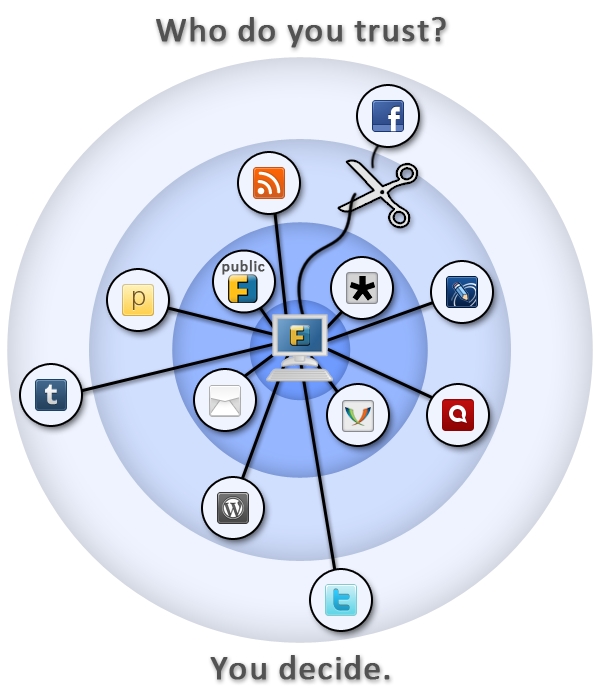
Follow me on Identi.ca or Twitter or Diaspora*diaspora-banner This is a feedback about installing a self hosted instance of Friendica on a Debian server (Jessie). If you re not interested in why I use Friendica, just go to Prerequisite for Friendica section below. Frustration about social networks Being a huge user of short messages, I was quite frustated to spend so much time on my Twitter account. To be quite honest, there is no much I like about this social network, except the huge population of people being potentially interested in what I write. twitter-logo I also have been using Identi.ca (now powered by Pump.io) for a while. But I tried for a while to manage both networks Pump.io and Twitter by hand and it was quite painful. And something was telling me another social network was going to appear from nowhere one of these days and I ll be just horrible to try to keep it up this way. identica-logo So I was looking for a scalable solution not asking too much personal investment. Subscribing to Diaspora* some days ago on the Framasphere pod, tintouli told me to try Friendica. Hmmm, what s Friendica ? f-intro Friendica is a content manager you can plug on almost anything: social networks (Facebook, Twitter, Pump.io, Diaspora*, ), but also WordPress, XMPP, emails I m in fact just discovering the power of this tool but to plug it on my different social network accounts was quite a good use case for me. And I guess if you re still reading, for you too. I tried to use some shared public servers but I was not quite happy with the result, one connector was still missing or public servers were really unstable. So I m at last self hosting my Friendica. Here is how. Prerequisite for Friendica You need to install the following packages: # apt-get install apache2 libapache2-mod-php5 php5 php5-curl php5-gd php5-mysql mysql-server git Having a already self-modified /etc/php5/apache2/php.ini, I encountered a small issue with libCurl and had to manually add the following line in the php.ini: extension=curl.so Setting up MySQL Connect to MySQL and create an empty database with a dedicated user: # mysql -u root -pV3rYS3cr3t -e create database friendica; GRANT ALL PRIVILEGES ON friendica.* TO friendica@localhost IDENTIFIED BY R3AlLyH4rdT0Gu3ss mysql Setting up Apache My server hosts several services, so I use a subdomain friendica.mydomain.com. If you use a subdomain, of course check you do have declared this subdomain in your DNS zone. apache-logo I use SSL encryption with a wildcard certificate for all my subdomains. My Friendica data are stored in /var/www/friendica. Here is my virtual host configuration for Friendica stored in the file /etc/apache2/sites-available/friendicassl.conf : <VirtualHost *:443>
ServerName friendica.mydomain.com
DocumentRoot /var/www/friendica/
DirectoryIndex index.php index.html
ErrorLog /var/log/apache2/friendica-error-ssl.log
TransferLog /var/log/apache2/friendica-access-ssl.log SSLEngine on
SSLCertificateFile /etc/ssl/certs/mydomain/mydomain.com.crt
SSLCertificateKeyFile /etc/ssl/private/mydomain.com.key
SSLVerifyClient None <Directory /var/www/friendica/>
AllowOverride All
Options FollowSymLinks
Order allow,deny
Allow from all
</Directory>
</VirtualHost> After writing the configuration file, just launch the following commands and it should be good for the Apache configuration: # a2ensite friendicassl && /etc/init.d/apache2 reload friendica-trust Setting up Friendica Get the master zip file of Friendica, copy it on your server and decompress it. Something like : # cd /var/www/ && wget https://github.com/friendica/friendica/archive/master.zip && unzip master.zip && mv friendica-master friendica You need to give www-data (Apache user) the rights to write in /var/www/friendica/view/smarty3/ : # chown -R www-data:www-data /var/www/friendica/view/smarty3 && chmod -R ug+w var/www/friendica/view/smarty3 Ok, I guess we re all set, lets launch the installation process! Using your web browser, connect to friendica.mydomain.com. First step you ll see the installation window which checks the prerequisite before installing. Complete if something is missing.
friendica-installation

First window of the Friendica installation process

Second step asks the host/user/password of the database, complete and the installation process starts. Hopefully all goes just fine. Next you ll have to create a /var/www/friendica/.htconfig.php with the content that the last page of the installation process provides. Just copy/paste, check the rights of this file and now you can connect again to see the register page of friendica at the url https://friendlica.mydomain.com/register . Pretty cool! Register a user That s a fairly easy step. You just need to check before that your server is able to send emails, because the password is going to be sent to you by email. If it is ok, you should now identify on the welcome page of friendica and access your account. That s a huge step to broadcast your short messages everywhere, but we have some last steps before being able to send your short messages on all the social networks we need. A small break, create an app for twitter on apps.twitter.com To send your short messages to Twitter, you need to create an app on apps.twitter.com. Just check you re logged in Twitter and connect to apps.twitter.com. Create an app called with a unique name (apparently), then go to the Keys and Access tokens page, note the consumer key and the consumer secret. You ll later need the name of the app, the consumer key and the consumer secret. friendica-decentralized-network Install and configure the addons Friendica uses an addon system in order to plug on the different third-parties it needs. We are going to configure Twitter, Pump.io and the Diaspora* plug. Let s go back to our server and launches some commands: # cd /tmp && git clone https://github.com/friendica/friendica-addons.git && cd friendica-addons # tar xvf twitter.tgz -C /var/www/friendica/addon # tar xvf pumpio.tgz -C /var/www/friendica/addon # cp -a diaspora /var/www/friendica/addon You need to modify your /var/www/friendica/.htconfig.php file and add the following content at the end: // names of your addons, separated by a comma $a->config['system']['addon'] = pumpio, twitter, diaspora ; // your Twitter consumer key
$a->config['twitter']['consumerkey'] = P4Jl2Pe4j7Lj91eIn0AR8vIl2 ; // your Twitter consumer secret
$a->config['twitter']['consumersecret'] = 1DnVkllPik9Ua8jW4fncxwtXZJbs9iFfI5epFzmeI8VxM9pqP1 ; // you Twitter app name $a->config['twitter']['application_name'] = whatever-twitter ; banner_friendica Connect again to Friendica. Go to settings => social networks, you will see the options for Twitter, Pump.io and Diaspora*. Complete the requested information for each of them. Important options you should not forget to check are: Pump.io Twitter Diaspora* Done? Now it s time to send your first broadcasted short message. Yay! Send a short message to your different social networks Connect to Friendica, click on the network page, write your short message in the Share box. Click on the lock lock, you ll see the following setup: friendica-post-default It means your short messages will be broadcasted to the three networks. Or more, it s up to you! That s my setup, feel free to modify. Now close the lock window and send your message. For me it takes some time to appear on Twitter and Diaspora* and it immediatly appears on Identi.ca. Last words friendica-stand Friendica offers to take back the control of your data, by broadcasting content on different media from a single source. While self hosting, you keep your data whatever happends and are not subject to companies losing your data like recently Twitpic. Moreover the philosophy behind Friendica pushed me to dig and test the solution What about you? How do you proceed to broadcast your short messages? Does Friendica offer a good solution in your opinion? Are you interested in the philosophy behind this project? Feel free to share your thoughs in the comments. LAST MINUTE: hey, this article is on Hacker News, don t hesitate to vote for it if you liked it!

4 November 2014

Tiago Bortoletto Vaz: A few words on the recent Brazilian elections

The Brazilian presidential election was exceedingly intense this year. Among many inferences that we can make by following the news and investigating data from the voting results I'd like to share this one, which in my opinion reflects quite well the vote preferences in the country. First, let me introduce you "Bel gua", a small town located in the Northeast region of Brazil. It has 6,524 habitants, 3 buses and 2 hospitals. According to the Brazilian Institute of Geography and Statistics (IBGE), the income per person in Bel gua is $146 BRL (or U$59) per month. Believe it or not, it used to be much less. Actually, the city reported in 2013 the highest economic jump in the country, rising more than a thousand positions in the ranking of GDP per capita (from position 4,991 to 3,849). This recent growth was consequence of the social welfare program of the Brazilian government, which also boosted artisanal and manioc flour production. This federal assistance is called "Bolsa fam lia", which benefits 1.814 families in Bel gua.
"Bolsa Fam lia currently gives families with per-capita monthly income below $140 BRL (poverty line, ~$56 USD) a monthly stipend of $32 BRL (~$13 USD) per vaccinated child (< 16 years old) attending school (up to 5), and $38 BRL (~$15 USD) per youth (16 or 17 years old) attending school (up to 2). Furthermore, to families whose per-capita monthly income below $70 BRL (extreme poverty line, ~$28 USD), the program gives the Basic Benefit $70 BRL per month." (from Wikipedia)
Contrary to what many of my middle-class friends believe, and as you can calculate yourself, this little amount of money does not offer anybody a luxury life. It does not make anybody stopping working, nor stopping looking for paid job (but yes, it makes people to start saying NO to forced labor, which is amazing, right?).
/images/belagua.jpg

Bel gua, where Dilma got 93.93% of votes (photo by Clarissa Carramilo / from G1)

Also, Bel gua has no much physicians around because doctors in Brazil usually wouldn't live in a such city. But now Bel gua population can be treated by foreign doctors imported by the recently launched program "Mais M dicos" (More Physicians for Brazil), which hosts two Cuban doctors 15km away. Finally, Bel gua people have light, due to the "Luz para Todos" ("Light for All") program. It's not surprising that Bel gua has re-elected the party which has motivated these changes. For 2014 presidential election, Bel gua people gave 3.558 votes (93.93%) to Dilma Rousseff (candidate of the current government, from a left-ish party), against 230 (6,07%) to A cio Neves (from the right coalition), being the city with the largest amount of votes for Dilma, proportionally, followed by "Serrano do Maranh o" (93,75%), which is located in the same region. On the other hand, the city which gave, proportionally, the largest amount of votes for A cio Neves has a population of 5,564,635 habitants, where most of citizens are not Brazilians, not yet. Miami, located in US, was the city where Brazilian residents would elect A cio by 7,225 votes (91,79%), against 646 (8,21%) for Dilma, followed by Atlanta/US (89,47%) and Houston/US (89,22%).
/images/miami.jpg

Miami, where 91,79% of Brazilians voted A cio (photo by Marc Averette / from Wikipedia)

It's so clear that we do what people call "selfish vote". In general, we don't care about which party has better proposals for the society as whole. Rich people will go against any serious social equality proposal, which will necessarily be followed by higher taxes on their fortunes. As middle class citizens, we care about dollar rates, because we want to get cheaper iStuff from Miami. We're also very upset by the fact that new apartments are being built without that small room in the back, which has been used to accommodate a subservient housemaid who, until last year was not even legally considered a worker. Those people from Bel gua, who used to live in extreme poverty for decades, serving as slaves, they mostly care about having something to eat. Now they eat, so they can think better, they can work, they can sell what they produce in their little yard. And like middle-class and rich citizens, they will give their vote in exchange of what they think is better for them. The big difference here is, if we ask Bel gua people why they voted for Dilma, with no embarrassment they will make it very clear, that's because her government has provided them lots of benefits. Asking the same question for most Brazilians in Miami, Atlant, Houston or S o Paulo, you'll get not only a bunch of allegedly moral/altruistic reasons, but they will also try to delegitimize in many ways the votes from those marginalized citizens. You'll never get the real reasons from them. They will even try to convince you that whoever receives federal assistance should automatically lose right to vote. Such a statement may seem ridiculous, however it has been very present recently. Actually, such hate speech is happening right now. While I'm writing this post about 2500 people are protesting in S o Paulo streets, asking for an immediate military coup because they don't agree with the elections result. These people keep pushing the limits of ridiculousness. Dilma won with 51.64% of valid votes, a very tight result. The country is clearly divided, mostly by hate, unfortunately.

3 November 2014

Hideki Yamane: gbp buildpackage fail: cannot find orig.tar.gz file

Dear Lazyweb,

I had already asked before in Jan but I got same issue. "gbp buildpackage" command fails...
rm -f ng
make[2]: Leaving directory '/home/henrich/src/pkg-java/nailgun'
rm /home/henrich/src/pkg-java/nailgun/ng-nailgun
rm: cannot remove '/home/henrich/src/pkg-java/nailgun/ng-nailgun': No such file or directory
debian/rules:16: recipe for target 'override_dh_auto_clean' failed
make[1]: [override_dh_auto_clean] Error 1 (ignored)
make[1]: Leaving directory '/home/henrich/src/pkg-java/nailgun'
dh_clean
gbp:info: Orig tarball 'nailgun_0.9.1.orig.tar.gz' not found at '../tarballs/'
Use of uninitialized value $_[0] in substitution (s///) at /usr/share/perl/5.20/File/Basename.pm line 341.
fileparse(): need a valid pathname at /usr/bin/pristine-tar line 417.
pristine-tar: failed to generate tarball
gbp:error: Couldn't checkout "nailgun_0.9.1.orig.tar.gz": it exited with 255
There IS orig tarball in ../tarballs directory and it works with copying all files to another directory as before...
Yes, and just "cp -arp libspiro /tmp/; cd /tmp/libspiro" and
gbp buildpackage works... (why?)
What causes this and is the best way to solve it?

2 November 2014

Dirk Eddelbuettel: RcppArmadillo 0.4.500.0

A few days ago, Conrad provided another minor release of Armadillo. Once again, I had created a GitHub-only pre-release of his pre-release which was tested against (then) all ninety (!!) CRAN dependents of our RcppArmadillo package, providing a further test for Conrad's code and uploaded RcppArmadillo 0.4.500.0 to CRAN and Debian once his release was finalized. The few changes from his end are summarized below; our end also includes an update / extension to the sample() method provided by Christian Gunning --- and used to great effect in the excellent Rcpp Gallery post by Jonathan Olmsted.
Changes in RcppArmadillo version 0.4.500.0 (2014-10-30)
  • Upgraded to Armadillo release Version 4.500 ("Singapore Sling")
    • faster handling of complex vectors by norm()
    • expanded chol() to optionally specify output matrix as upper or lower triangular
    • better handling of non-finite values when saving matrices as text files
  • The sample functionality has been extended to provide the Walker Alias method (including new unit tests) via a pull request by Christian Gunning
Courtesy of CRANberries, there is also a diffstat report for the most recent release. As always, more detailed information is on the RcppArmadillo page. Questions, comments etc should go to the rcpp-devel mailing list off the R-Forge page.

This post by Dirk Eddelbuettel originated on his Thinking inside the box blog. Please report excessive re-aggregation in third-party for-profit settings.

Thomas Goirand: OpenStack packaging activity: October 2014

Wednesday 1:
Uploaded python-xstatic-jquery removing the .pth file from package.
Uploaded python-taskflow 0.4 to experimental, needed by Cinder Juno RC1
Uploaded Cinder Juno RC1 to experimental Thuesday 2:
Finally understood that the issue with murano-dashboard was that it doesn t build without django-nose >= 1.2. Opened new patch at: https://review.openstack.org/125565
Uploaded murano-dashboard to Experimental, now using django-nose from wheezy-backports in my jenkins setup, so murano-dashboard can be built for Wheezy.
Uploaded python-oslotest 1.1.0.0 (really is upstream 1.1.0)
Uploaded python-oslo.serialization 1.0.0-1 (needed by Ceilometer Juno RC1)
Uploaded Ceilometer Juno RC1
Uploaded Heat Juno RC1
Uploaded oslo.rootwrap 1.3.0.0
Uploaded oslo.db 1.0.2 (bugfix release)
Wrote a new system in openstack-pkg-tools to generate init scripts and. service files from a template, so we don t have to write N times the same thing. Friday 3:
Reworked openstack-pkg-tools to generate automatically sysv-rc init scripts, upstart jobs and systemd unit files, making the system more unified and consistent.
Applied the new system to all packages in Juno.
Uploaded Keystone 2014.1.3-1 to Sid
Uploaded Nova 2014.1.3-1 to Sid
Uploaded Glance 2014.1.3-1 to Sid
Uploaded Neutron 2014.1.3-1 to Sid
Uploaded Horizon 2014.1.3-1 to Sid
Uploaded Cinder 2014.1.3-1 to Sid
Uploaded Trove 2014.1.3-1 to Sid
Uploaded Ceilometer 2014.1.3-1 to Sid Saturday 4:
Uploaded Horizon Juno RC1 to Experimental
Uploaded oslotest 1.1.0.0 to Experimental
Uploaded Ironic Juno RC1 to Experimental
Uploaded Designate Juno RC1 to Experimental
Uploaded Nova Juno RC1 to Experimental
Uploaded Neutron Juno RC1 to Experimental
Uploaded openstack-meta-packages 0.10 to Sid
Uploaded openstack-pkg-tools 13 to Experimental
Uploaded murano-agent Juno RC1 to Experimental Sunday 5:
Uploaded Sahara Juno RC1 to Experimental (it s been approved by FTP masters)
Uploaded Murano Juno RC1 to Experimental (it s been approved by FTP masters)
Fixed all debian/watch file to understand ~b and ~rc releases (fixed applied on both Icehouse and Juno branches, though no upload yet, I ll wait until uploads are needed to have this in the archive ).
Uploaded Trove Juno RC1 to Experimental
Uploaded Sahara Juno RC1 to Experimental With this last upload, everything of Juno RC1 is in Debian Experimental! \o/ Monday 6:
Uploaded some fixes for Nova 2014.1.3-2 in Sid:
* Removed contrib/boto_v6/* in debian/copyright, replaced bin/nova-manage by nova/cmd/ baremetal_, manage.py.
* Mangling upstream rc and beta versions in watch file.
* Added 9990_update_german_programm_messages.patch, thanks to Helge Kreutzmann <debian@helgefjell.de>.
* Fixed correct de.po (Closes: #763682).
* Added nl.po initial Debconf translation, thanks to Frans Spiesschaert <Frans.Spiesschaert@yucom.be> (Closes: #764125).
* Standards-Version is now 3.9.6 (no change).
Upstreamed german translation of po file: https://review.openstack.org/126212
Uploaded Designate 2014.1-12 to Sid, added new de.po also to the Juno branch on alioth (but didn t upload the fix yet).
Uploaded sphinxcontrib-httpdomain new upstream 1.3.0 release, added Python 3.x support to the package, and transitionning to the correct namespaced python-sphinxcontrib.httpdomain package name.
Spent most of the day fixing python-xstatic issues:
o uploaded libjs-twitter-bootstrap-datepicker 1.3.1
o uploaded python-xstatic-bootstrap-datepicker requiring this libjs package
o fixed python-xstatic-jquery-ui package
Now Horizon Juno RC1 builds well, and can be installed again. \o/ Tuesday 7:
Backported python-libvirt 1.2.8 in Wheezy (for Nova Juno support )
Uploaded Ceilometer Juno RC1 with ceilometer-agent-ipmi added (the package will therefore go through the NEW queue).
Uploaded python-requestbuilder 0.2.2-1, needed by the maintainers of euca2ools.
Ported the unified generated init system scripts to Icehouse packages.
Uploaded to Sid updates for: openstack-pkg-tools, ceilometer, cinder, glance, keystone, cinder, nova. Wednesday 8:
Uploaded openstack-pkg-tools 16 to Sid
Uploaded murano-dashboard (with upstream fix to remove font-awesome, which was the reason for FTP master s rejection)
Uploaded ceilometer Juno RC1 with new IPMI agent package (needed for Ironic support).
Uploaded heat 2014.1.3 which I forgot.
Tested https://review.openstack.org/#/c/126777/ which solves the bug I sent to launchpad and approved the patch.
Uploaded python-requestbuilder 0.2.3 Thesday 9:
Worked on fixing Neutron Alembic migration with SQLite3.
Uploade Neutron 2014.2~rc1-3 with a fix for a patch that was destroying dhcp.py. This still doesn t include the Alembic migration fixes, which are still a WIP. Firday 10:
Finished fixing Neutron SQLite 3 Alembic migrations.
Uploaded neutron 2014.2~rc1-3 with the fixes.
Fixed Ceilometer wrong generation of sample config file, using upstream patch (after discussing with Julien Danjou so he wrote it).
Uploaded Ceilometer 2014.2~rc1-4 with the fix
Checked that all packages can be installed in non-interactive mode. This works well now! \o/ Saturday 11:
Uploaded new version of python-xstatic-angular-cookies (ie: 1.2.24.1-2) which allows a higher version of libjs-angularjs (otherwise the package is not installable in Sid/Jessie since last version of angularjs is uploaded). Sunday 12:
Uploaded factory-boy fix for FTBFS
Uploaded python-django-appconf FTBFS
Uploaded Horizon Juno RC2
Uploaded Heat Juno RC3
Uploaded Trove Juno RC2
Uploaded Glance Juno RC2
Uploaded Sahara Juno RC2
Uploaded Nova Juno RC2
Uploaded Neutron Juno RC2
Uploaded Cinder Juno RC2
Uploaded murano-dashboard Juno RC2 Monday 13:
Uploaded python-heatclient 0.2.12-1 to Experimental
Uploaded python-yaql with RC bugfix to Sid (missing dep on python3-ply). Thuesday 14:
Fixed arping newly added dependency in Neutron
Started testing install of all of openstack Juno at once Wednesday 15:
Fixed missing configuration files in Ceilometer (ceilometer-api couldn t start)
Upgraded to Ceilometer Juno RC3.
Backported python-setuptools, as keystone and others are broken due to the namespace of modules not working correctly with the old version of python-pkg-resources. With the new one, everything is back in order. Thesday 16:
Uploaded to Debian Experimental the final release of Juno (ie: 2014.2) for:
Sahara
Nova
Ceilometer
Cinder
Heat
Neutron
Glance
Keystone
Horizon (with fix for Django 1.7 in the wsgi file)
Uploaded to Sid:
Swift 2.2.0
Horizon 2014.1.3-3 with fix for Django 1.7 in the wsgi file that was crashing apache. OpenStack Juno packages are out!!! (ready the day of the upstream release ) Friday 17:
Investigated Trove RC bug #765348, couldn t reproduce, and therefore closed it.
Uploaded Ironic Juno final to Experimental
Uploaded Designate Juno final to Experimental
Uploaded a fix for python-jingo which failed to build with Django 1.7. Sent pull request upstream: https://github.com/jbalogh/jingo/pull/63
Uploaded CVE-2014-7230 & CVE-2014-7231 fixes for both Cinder and Nova in Debian Sid, as per OSSA 2014-036 patches. No need to upload a fix for Trove, as 2014.1.3 already has the fixes. Saturday 18:
Started building Trusty packages
Fixed oslo-config so that it never depends on python3-argparse, which doesn t exist (uploaded to Experimental)
Uploaded python-django-pyscss 1.0.3-2 with python-simplejson now as build-depends (it failed to build in my Trusty jenkins without it).
Uploaded a fix for stevedore and oslo-config to not depends on python3-argparse in Ubuntu (added debian/py3dist-overrides) Sunday 19:
Uploaded python-taskflow with ordereddict in debian/pydist-overrides.
Backported JS packages for Horizon and libvirt for Trusty (from Sid). My new Jenkin server is now producing a full set of Juno packages for Ubuntu trusty. And of course, it s updated on each git push, just like for the Wheezy backports. Monday 20:
Added FORCE_COULEUR=1 when running tests in python-couleur, so that it doesn t fail when running with git-buildpackage. Uploaded result in Sid.
Fixed python-mockito so that it never downloads distribute or nose on its clean target, which was annoying when running git-buildpackage. Uploaded to Sid.
Started to work again on automatic package deployment using openstack-deploy, from the openstack-meta-packages source package. Thuesday 21, Wednesday 22:
Worked on testing packages, did couples of minor fixes, reworked some of the default configuration files to match the install-guide, move configuration directive to the correct new section in nova.conf, etc. Thursday 23:
Patch the Neutron chapter in the install-guide to take into account the changes done on Thuesday 21, Wednesday 22, and simplify the install procedure in Debian. https://review.openstack.org/#/c/130501/ Friday 24:
Busy packing my stuff for moving to France Not much packaging work, except more auto-deploy stuff and some tests. Saturday 25:
Uploaded Nova, Neutron, Cinder and Horizon Icehouse in Sid, including some debconf translation updates, beating the Jessie freeze deadline in 10 days.
Fixed and uploaded openstack-debian-images in Sid: the login option wasn t modifying the default sudoers file, which always contained debian , instead of the custom login. Sunday 26:
Traveled to Moscow Monday 27 & Tuesday 28:
Fixed some murano & murano-dashboard stuff, thanks to the help of some murano team members in Moscow office. Uploaded fixes for murano & murano-dashboard. Tested that murano-dashboard works well, and now it does! :)
Uploaded version dependency fixes for python-xstatic-angular-cookies and python-xstatic-d3 which couldn t be installed in Sid/Jessie because of libjs-* updates. Wednesday 29:
Meeting with Saratov team
Updated sahara endpoints, but didn t upload the package yet to Debian. Thursday 30:
Uploaded ruby-raemon needed for Astute (part of Fuel web).
Packaged ruby-symboltable (not uploaded yet). Friday 31:
Wrote unit test runner for python-webpy (the current package doesn t have unit test runs).
Uploaded python-dbutils (needed by python-web.py unit tests) to Sid: now in NEW queue
Uploaded python-nose-parametrized & python-nose-timer to Sid: now in NEW queue
Uploaded sahara -2 fixing the API endpoint registration URL and service name.
Uploaded python-sphinxcontrib.plantuml to Sid: : now in NEW queue

31 October 2014

Konstantinos Margaritis: SIMD on javascript, MHO

Just read the Mozilla announcement on SIMD.js and I can say I got mixed feelings about this. I don't really comment other news/blogs/announcements, but this is an exception. On one hand, I definitely welcome more SIMD use everywhere, being a SIMD advocate and enthusiast for many years (since 2004 actually). So seeing more of it and by someone such as Mozilla, that's even better! On the other hand, wait, that's SIMD in Javascript?!? Really? Why? As if we already covered native coverage of SIMD in every other part, including the browser itself (No browser uses SIMD extensively in its core, though that would prove to be of actual benefit, the only SIMD code I know of is in the media playback code, which is usually some external library like ffmpeg/x264/etc that already has SIMD optimized parts anyway. So, instead of using resources to optimize the core browser with SIMD -I'm sure there will be plenty of opportunities in the codebase for such optimizations- so that every web application, including Javascript ones will be optimized, or even the JS JITs themselves, yet Mozilla wants to push the effort to the web app developer to use their SIMD.js to do the equivalent of what SIMD coders have been doing to native apps for a long time now, only for JS apps. Ok, so what's the gain? I read the PDF presentation that shows mandebrot.js to go from 9 FPS to 37FPS using SIMD.js. Admittedly that's impressive. But it also proves that the whole buzz about lower energy footprint computers, power efficiency is just useless. Why is that? For comparison running Xaos (fractal/mandelbrot program) on my very low end PC (2-core Athlon X2, AM2 socket, so DDR2) gives me ~250FPS, and I'm not even sure it's using SSE at all (from a simple check it doesn't). Zooming is realtime and at full detail. In the same talk, there was a benchmark of LLVM Javascript being as fast as C++ or 1.5x the native running time. I admit haven't tried the tests listed, but the mandelbrot test was using asm.js and 9 is definetely not 250/1.5. But I guess I'm just picky. So, the latest trend of moving everything to the browser and JS,means that instead of optimizing my apps to run great on native, instead of making stuff running faster on my 5Wt big.Little 8-core ARM SoC, I have to get a much more power-hungry CPU to see the same performance. I'm totally against that. I want my newer CPUs, who are more energy-efficient and faster to actually feel like THAT. I don't want to upgrade just to experience the performance of a 486 20 years ago! The talk mentioned HTML5 (and hence javascript) overtaking all other platforms for application development everywhere, including the smartphones. I certainly hope that's not the case, and I know of many people who also don't feel that way. We're not buying the "Everything on the web/cloud" paradigm, but I guess we're just a minority. I could go on for a long time, but I have an actual SIMD-related bug to fix, cheers. Note: I used to have comments enabled on my blog, but moderating spam was too time consuming, even with CAPTCHAs, so I disabled them entirely, if anyone could suggest of a better method, I'd gladly take advice -have been thinking about disqus, not sure if it's actually a good solution).

30 October 2014

Alessio Treglia: Handling identities in distributed Linux cloud instances

I ve many distributed Linux instances across several clouds, be them global, such as Amazon or Digital Ocean, or regional clouds such as TeutoStack or Enter. Probably many of you are facing the same issue: having a consistent UNIX identity across all multiple instances. While in an ideal world LDAP would be a perfect choice, letting LDAP open to the wild Internet is not a great idea. So, how to solve this issue, while being secure? The trick is to use the new NSS module for SecurePass. While SecurePass has been traditionally used into the operating system just as a two factor authentication, the new beta release is capable of holding extended attributes , i.e. arbitrary information for each user profile. We will use SecurePass to authenticate users and store Unix information with this new capability. In detail, we will: SecurePass and extended attributes The next generation of SecurePass (currently in beta) is capable of storing arbitrary data for each profile. This is called Extended Attributes (or xattrs) and -as you can imagine- is organized as key/value pair. You will need the SecurePass tools to be able to modify users extended attributes. The new releases of Debian Jessie and Ubuntu Vivid Vervet have a package for it, just:
# apt-get install securepass-tools
ERRATA CORRIGE: securepass-tools hasn t been uploaded to Debian yet, Alessio is working hard to make the package available in time for Jessie though.
For other distributions or previous releases, there s a python package (PIP) available. Make sure that you have pycurl installed and then:
# pip install securepass-tools
While SecurePass tools allow local configuration file, we highly recommend for this tutorial to create a global /etc/securepass.conf, so that it will be useful for the NSS module. The configuration file looks like:
[default]
app_id = xxxxx
app_secret = xxxx
endpoint = https://beta.secure-pass.net/
Where app_id and app_secrets are valid API keys to access SecurePass beta. Through the command line, we will be able to set UID, GID and all the required Unix attributes for each user:
# sp-user-xattrs user@domain.net set posixuid 1000
While posixuid is the bare minimum attribute to have a Unix login, the following attributes are valid: Install and Configure NSS SecurePass In a similar way to the tools, Debian Jessie and Ubuntu Vivid Vervet have native package for SecurePass:
# apt-get install libnss-securepass
For previous releases of Debian and Ubuntu can still run the NSS module, as well as CentOS and RHEL. Download the sources from: https://github.com/garlsecurity/nss_securepass Then:
./configure
make
make install (Debian/Ubuntu Only)
For CentOS/RHEL/Fedora you will need to copy files in the right place:
/usr/bin/install -c -o root -g root libnss_sp.so.2 /usr/lib64/libnss_sp.so.2
ln -sf libnss_sp.so.2 /usr/lib64/libnss_sp.so
The /etc/securepass.conf configuration file should be extended to hold defaults for NSS by creating an [nss] section as follows:
[nss]
realm = company.net
default_gid = 100
default_home = "/home"
default_shell = "/bin/bash"
This will create defaults in case values other than posixuid are not being used. We need to configure the Name Service Switch (NSS) to use SecurePass. We will change the /etc/nsswitch.conf by adding sp to the passwd entry as follows:
$ grep sp /etc/nsswitch.conf
 passwd:  files sp
Double check that NSS is picking up our new SecurePass configuration by querying the passwd entries as follows:
$ getent passwd user
 user:x:1000:100:My User:/home/user:/bin/bash
$ id user
 uid=1000(user)  gid=100(users) groups=100(users)
Using this setup by itself wouldn t allow users to login to a system because the password is missing. We will use SecurePass authentication to access the remote machine. Configure PAM for SecurePass On Debian/Ubuntu, install the RADIUS PAM module with:
# apt-get install libpam-radius-auth
If you are using CentOS or RHEL, you need to have the EPEL repository configured. In order to activate EPEL, follow the instructions on http://fedoraproject.org/wiki/EPEL Be aware that this has not being tested with SE-Linux enabled (check off or permissive). On CentOS/RHEL, install the RADIUS PAM module with:
# yum -y install pam_radius
Note: as per the time of writing, EPEL 7 is still in beta and does not contain the Radius PAM module. A request has been filed through RedHat s Bugzilla to include this package also in EPEL 7 Configure SecurePass with your RADIUS device. We only need to set the public IP Address of the server, a fully qualified domain name (FQDN), and the secret password for the radius authentication. In case of the server being under NAT, specify the public IP address that will be translated into it. After completion we get a small recap of the already created device. For the sake of example, we use secret as our secret password. Configure the RADIUS PAM module accordingly, i.e. open /etc/pam_radius.conf and add the following lines:
radius1.secure-pass.net secret 3
radius2.secure-pass.net secret 3
Of course the secret is the same we have set up on the SecurePass administration interface. Beyond this point we need to configure the PAM to correct manage the authentication. In CentOS, open the configuration file /etc/pam.d/password-auth-ac; in Debian/Ubuntu open the /etc/pam.d/common-auth configuration and make sure that pam_radius_auth.so is in the list.
auth required   pam_env.so
auth sufficient pam_radius_auth.so try_first_pass
auth sufficient pam_unix.so nullok try_first_pass
auth requisite  pam_succeed_if.so uid >= 500 quiet
auth required   pam_deny.so
Conclusions Handling many distributed Linux poses several challenges, from software updates to identity management and central logging. In a cloud scenario, it is not always applicable to use traditional enterprise solutions, but new tools might become very handy. To freely subscribe to securepass beta, join SecurePass on: http://www.secure-pass.net/open
And then send an e-mail to info@garl.ch requesting beta access.

29 October 2014

Rhonda D'Vine: Feminist Year

If someone would have told me that I would visit three feminist events this year I would have slowly nodded at them and responded with "yeah, sure..." not believing it. But sometimes things take their own turns. It all started with the Debian Women Mini-Debconf in Barcelona. The organizers did ask me how they have to word the call for papers so that I would feel invited to give a speech, which felt very welcoming and nice. So we settled for "people who identify themselves as female". Due to private circumstances I didn't prepare well for my talk, but I hope it was still worth it. The next interesting part though happened later when there were lightning talks. Someone on IRC asked why there are male people in the lightning talks, which was explicitly allowed for them only. This also felt very very nice, to be honest, that my talk wasn't questioned. Those are amongst the reasons why I wrote My place is here, my home is Debconf. Second event I went to was the FemCamp Wien. It was my first event that was a barcamp, I didn't know what to expect organization wise. Topic-wise it was set about Queer Feminism. And it was the first event that I went to which had a policy. Granted, there was an extremely silly written part in it, which naturally ended up in a shit storm on twitter (which people from both sides did manage very badly, which disappointed me). Denying that there is sexism against cis-males is just a bad idea, but the background of it was that this wasn't the topic of this event. The background of the policy was that usually barcamps but events in general aren't considered that save of a place for certain people, and that this barcamp wanted to make it clear that people usually shying away from such events in the fear of harassment can feel at home there.
And what can I say, this absolutely was the right thing to do. I never felt any more welcomed and included in any event, including Debian events sorry to say that so frankly. Making it clear through the policy that everyone is on the same boat with addressing each other respectfully totally managed to do exactly that. The first session of the event about dominant talk patterns and how to work around or against them also made sure that the rest of the event was giving shy people a chance to speak up and feel comfortable, too. And the range of the sessions that were held was simply great. This was the event that I came up with the pattern that I have to define the quality of an event on the sessions that I'm unable to attend. The thing that hurt me most in the afterthought was that I couldn't attend the session about minorities within minorities. :/ Last but not least I attended AdaCamp Berlin. This was a small unconference/barcamp dedicated to increase women's participation in open technology and culture named after Ada Lovelace who is considered the first programmer. It was a small event with only 50 slots for people who identify as women. So I was totally hyper when I received the mail that was accepted. It was another event with a policy, and at first reading it looked strange. But given that there are people who are allergic to ingredients of scents, it made sense to raise awareness of that topic. And given that women are facing a fair amount of harassment in the IT and at events, it also makes sense to remind people to behave. After all it was a general policy for all AdaCamps, not for this specific one with only women.
I enjoyed the event. Totally. And that's not only because I was able to meet up with a dear friend who I haven't talked to in years, literally. I enjoyed the environment, and the sessions that were going on. And quite similar to the FemCamp, it started off with a session that helped a lot for the rest of the event. This time it was about the Impostor Syndrome which is extremely common for women in IT. And what can I say, I found myself in one of the slides, given that I just tweeted the day before that I doubted to belong there. Frankly spoken, it even crossed my mind that I was only accepted so that at least one trans person is there. Which is pretty much what the impostor syndrome is all about, isn't it. But when I was there, it did feel right. And we had great sessions that I truly enjoyed. And I have to thank one lady once again for her great definition on feminism that she brought up during one session, which is roughly that feminism for her isn't about gender but equality of all people regardless their sexes or gender definition. It's about dropping this whole binary thinking. I couldn't agree more. All in all, I totally enjoyed these events, and hope that I'll be able to attend more next year. From what I grasped all three of them think of doing it again, the FemCamp Vienna already has the date announced at the end of this year's event, so I am looking forward to meet most of these fine ladies again, if faith permits. And keep in mind, there will always be critics and haters out there, but given that thy wouldn't think of attending such an event anyway in the first place, don't get wound up about it. They just try to talk you down. P.S.: Ah, almost forgot about one thing to mention, which also helps a lot to reduce some barrier for people to attend: The catering during the day and for lunch both at FemCamp and AdaCamp (there was no organized catering at the Debian Women Mini-Debconf) did take off the need for people to ask about whether there could be food without meat and dairy products by offering mostly Vegan food in the first place, even without having to query the participants. Often enough people otherwise choose to go out of the event or bring their own food instead of asking for it, so this is an extremely welcoming move, too. Way to go!

/personal permanent link Comments: 2 Flattr this

27 October 2014

Petter Reinholdtsen: First Jessie based Debian Edu released (alpha0)

I am happy to report that I on behalf of the Debian Edu team just sent out this announcement:
The Debian Edu Team is pleased to announce the release of Debian Edu
Jessie 8.0+edu0~alpha0
Debian Edu is a complete operating system for schools. Through its
various installation profiles you can install servers, workstations
and laptops which will work together on the school network. With
Debian Edu, the teachers themselves or their technical support can
roll out a complete multi-user multi-machine study environment within
hours or a few days. Debian Edu comes with hundreds of applications
pre-installed, but you can always add more packages from Debian.
For those who want to give Debian Edu Jessie a try, download and
installation instructions are available, including detailed
instructions in the manual[1] explaining the first steps, such as
setting up a network or adding users. Please note that the password
for the user your prompted for during installation must have a length
of at least 5 characters!
 [1] <URL: https://wiki.debian.org/DebianEdu/Documentation/Jessie >
Would you like to give your school's computer a longer life? Are you
tired of sneaker administration, running from computer to computer
reinstalling the operating system? Would you like to administrate all
the computers in your school using only a couple of hours every week?
Check out Debian Edu Jessie!
Skolelinux is used by at least two hundred schools all over the world,
mostly in Germany and Norway.
About Debian Edu and Skolelinux
===============================
Debian Edu, also known as Skolelinux[2], is a Linux distribution based
on Debian providing an out-of-the box environment of a completely
configured school network. Immediately after installation a school
server running all services needed for a school network is set up just
waiting for users and machines being added via GOsa , a comfortable
Web-UI. A netbooting environment is prepared using PXE, so after
initial installation of the main server from CD or USB stick all other
machines can be installed via the network.  The provided school server
provides LDAP database and Kerberos authentication service,
centralized home directories, DHCP server, web proxy and many other
services.  The desktop contains more than 60 educational software
packages[3] and more are available from the Debian archive, and
schools can choose between KDE, Gnome, LXDE, Xfce and MATE desktop
environment.
 [2] <URL: http://www.skolelinux.org/ >
 [3] <URL: http://people.skolelinux.org/pere/blog/Educational_applications_included_in_Debian_Edu___Skolelinux__the_screenshot_collection____.html >
Full release notes and manual
=============================
Below the download URLs there is a list of some of the new features
and bugfixes of Debian Edu 8.0+edu0~alpha0 Codename Jessie. The full
list is part of the manual. (See the feature list in the manual[4] for
the English version.) For some languages manual translations are
available, see the manual translation overview[5].
 [4] <URL: https://wiki.debian.org/DebianEdu/Documentation/Jessie/Features >
 [5] <URL: http://maintainer.skolelinux.org/debian-edu-doc/ >
Where to get it
---------------
To download the multiarch netinstall CD release (624 MiB) you can use
 * ftp://ftp.skolelinux.org/skolelinux-cd/debian-edu-8.0+edu0~alpha0-CD.iso
 * http://ftp.skolelinux.org/skolelinux-cd/debian-edu-8.0+edu0~alpha0-CD.iso
 * rsync -avzP ftp.skolelinux.org::skolelinux-cd/debian-edu-8.0+edu0~alpha0-CD.iso .
The SHA1SUM of this image is: 361188818e036ce67280a572f757de82ebfeb095
New features for Debian Edu 8.0+edu0~alpha0 Codename Jessie released 2014-10-27
===============================================================================
Installation changes
--------------------
 * PXE installation now installs firmware automatically for the hardware present.
Software updates
----------------
Everything which is new in Debian Jessie 8.0, eg:
 * Linux kernel 3.16.x
 * Desktop environments KDE "Plasma" 4.11.12, GNOME 3.14, Xfce 4.10,
   LXDE 0.5.6 and MATE 1.8 (KDE "Plasma" is installed by default; to
   choose one of the others see manual.)
 * the browsers Iceweasel 31 ESR and Chromium 38 
 * !LibreOffice 4.3.3
 * GOsa 2.7.4
 * LTSP 5.5.4
 * CUPS print system 1.7.5
 * new boot framework: systemd
 * Educational toolbox GCompris 14.07 
 * Music creator Rosegarden 14.02
 * Image editor Gimp 2.8.14
 * Virtual stargazer Stellarium 0.13.0
 * golearn 0.9
 * tuxpaint 0.9.22
 * New version of debian-installer from Debian Jessie.
 * Debian Jessie includes about 42000 packages available for
   installation.
 * More information about Debian Jessie 8.0 is provided in the release
   notes[6] and the installation manual[7].
 [6] <URL: http://www.debian.org/releases/jessie/releasenotes >
 [7] <URL: http://www.debian.org/releases/jessie/installmanual >
Fixed bugs
----------
 * Inserting incorrect DNS information in Gosa will no longer break
   DNS completely, but instead stop DNS updates until the incorrect
   information is corrected (Debian bug #710362)
 * and many others.
Documentation and translation updates
------------------------------------- 
 * The Debian Edu Jessie Manual is fully translated to German, French,
   Italian, Danish and Dutch. Partly translated versions exist for
   Norwegian Bokmal and Spanish.
Other changes
-------------
 * Due to new Squid settings, powering off or rebooting the main
   server takes more time.
 * To manage printers localhost:631 has to be used, currently www:631
   doesn't work.
Regressions / known problems
----------------------------
 * Installing LTSP chroot fails with a bug related to eatmydata about
   exim4-config failing to run its postinst (see Debian bug #765694
   and Debian bug #762103).
 * Munin collection is not properly configured on clients (Debian bug
   #764594).  The fix is available in a newer version of munin-node.
 * PXE setup for Main Server and Thin Client Server setup does not
   work when installing on a machine without direct Internet access.
   Will be fixed when Debian bug #766960 is fixed in Jessie.
See the status page[8] for the complete list.
 [8] <URL: https://wiki.debian.org/DebianEdu/Status/Jessie >
How to report bugs
------------------
<URL: http://wiki.debian.org/DebianEdu/HowTo/ReportBugs >
About Debian
============
The Debian Project was founded in 1993 by Ian Murdock to be a truly
free community project. Since then the project has grown to be one of
the largest and most influential open source projects. Thousands of
volunteers from all over the world work together to create and
maintain Debian software. Available in 70 languages, and supporting a
huge range of computer types, Debian calls itself the universal
operating system.
Contact Information
For further information, please visit the Debian web pages[9] or send
mail to press@debian.org.
 [9] <URL: http://www.debian.org/ >

26 October 2014

Joey Hess: a programmable alarm clock using systemd

I've taught my laptop to wake up at 7:30 in the morning. When it does, it will run whatever's in my ~/bin/goodmorning script. Then, if the lid is still closed, it will go back to sleep again. So, it's a programmable alarm clock that doesn't need the laptop to be left turned on to work. But it doesn't have to make noise and wake me up (I rarely want to be woken up by an alarm; the sun coming in the window is a much nicer method). It can handle other tasks like downloading my email, before I wake up. When I'm at home and on dialup, this tends to take an hour in the morning, so it's nice to let it happen before I get up. This took some time to figure out, but it's surprisingly simple. Besides ~/bin/goodmorning, which can be any program/script, I needed just two files to configure systemd to do this. /etc/systemd/system/goodmorning.timer
[Unit]
Description=good morning
[Timer]
Unit=goodmorning.service
OnCalendar=*-*-* 7:30
WakeSystem=true
Persistent=false
[Install]
WantedBy=multi-user.target
/etc/systemd/system/goodmorning.service
[Unit]
Description=good morning
RefuseManualStart=true
RefuseManualStop=true
ConditionACPower=true
[Service]
Type=oneshot
ExecStart=/bin/systemd-inhibit --what=handle-lid-switch --why=goodmorning /bin/su joey -c "/usr/bin/timeout 45m /home/joey/bin/goodmorning"
installation After installing those files, run (as root): systemctl enable goodmorning.timer; systemctl start goodmorning.timer Then, you'll also need to edit /etc/systemd/logind.conf, and set LidSwitchIgnoreInhibited=no -- this overrides the default, which is not to let systemd-inhibit block sleep on lid close. almost too easy I don't think this would be anywhere near as easy to do without systemd, logind, etc. Especially the handling of waking the system at the right time, and the behavior around lid sleep inhibiting. The WakeSystem=true relies on some hardware support for waking from sleep; my laptop supported it with no trouble but I don't know how broadly available that is. Also, notice the ConditionACPower=true, which I added once I realized I don't want the job to run if I forgot to leave the laptop plugged in overnight. Technically, it will still wake up when on battery power, but then it should go right back to sleep. Quite a lot of nice peices of systemd all working together here! xfce workaround If using xfce, xfce4-power-manager takes over handling of lid close from systemd, and currently prevents the system from going back to sleep if the lid is still closed when goodmorning finishes. Happily, there is an easy workaround; this configures xfce to not override the lid switch behavior: xfconf-query -c xfce4-power-manager -n -p /xfce4-power-manager/logind-handle-lid-switch -t bool -s true Other desktop environments may have similar issues. why not a per-user unit? It would perhaps be better to use the per-user systemd, not the system wide one. Then I could change the time the alarm runs without using root. What's prevented me from doing this is that systemd-inhibit uses policykit, and policykit prevents it from being used in this situation. It's a lot easier to run it as root and use su, than it is to reconfigure policykit.

25 October 2014

Miriam Ruiz: Video game players and Gamers are different things

Even though the Wikipedia defines gamer as someone who partakes in interactive gaming, such as (predominantly) video games or board games , this doesn t really gets close to that term means socially at the moment. Going back to Wikipedia, we find that the video game subculture is a form of new media subculture that has been influenced by video games , so it might be quite accurate to define gamers as members of that subculture. You will find that most of the uses of the term gamer in the social networks and in the blogosphere refer to that. Please notice that, even though it is quite likely that most of the gamers play video games, the other way round does not need to be true and, in fact, it isn t. Not everyone who plays video games belongs to the video game subculture, shares their point of view, their values and aesthetics, or even know about it. Kind of like what happens with the word hacker . Not everyone who hacks around with a computer belongs to the hacker subculture. Mostly everyone who has access to the technology plays video games now. From babies and kids to grandparents. And people play them in every possible technological system around, not only on video game consoles or personal computers, but alse on mobile phones, tablets, web browsers. And many of those people who use different kind of technologies to play video games are not gamers. Not in the sense of belonging to the video game subculture. It is important to acknowledge that: that the video game subculture does not have the monopoly over video games or the video game developing industry anymore. As you can imagine, all this rand doesn t come from nowhere. During the last months, we have been witnessing a fight between some conservative core members of the video game subculture and people who want to bring some fresh air into the sociocultural elements of that subculture. Namely, that women shouldn t be discriminated inside it. As every time that a women raises her voice to complain about anything in the Internet, they have been subjected to insults, attacks, rape and death threats, etc. I m talking about something called #GamerGate, and even though I m not going to get into it, I will provide some URLs in case someone might be interested. Please acknowledge that not all the points of view might be represented in this list (in fact, they are not, as I won t be promoting in my blog things that I severely disagree with), so search the web for more information if you want to get that. I ve never been a gamer myself, meaning part of the subculture I mentioned. At some point I was probably closer tho the core values they had then than I am now. In any case, video games have already consolidated themselves as an important part of current culture, entertainment, education and socialization, and are definitely here to stay. That will probably mean that the percentage of gamers (members of the video game subculture) will become smaller. as the number of non-gamer video game players keeps raising.

23 October 2014

Alessio Treglia: Bits from the Debian Multimedia Maintainers

This brief announcement was released yesterday to the debian-devel-announce mailing list. Ciao! The Debian Multimedia Maintainers have been quite active since the Wheezy release, and have some interesting news to share for the Jessie release. Here we give you a brief update on what work has been done and work that is still ongoing. Let s see what s cooking for Jessie then. Frameworks and libraries Support for many new media formats and codecs. The codec library libavcodec, which is used by popular media playback applications including vlc, mpv, totem (using gstreamer1.0-libav), xine, and many more, has been updated to the latest upstream release version 11 provided by Libav. This provides Debian users with HEVC playback, a native Opus decoder, Matroska 3D support, Apple ProRes, and much more. Please see libav s changelog for a full list of functionality additions and updates. libebur128 libebur128 is a free implementation of the European Broadcasting Union Loudness Recommendation (EBU R128), which is essentially an alternative to ReplayGain. The library can be used to analyze audio perceived loudness and subsequentially normalize the volume during playback. libltc libltc provides functionalities to encode and decode Linear (or Longitudinal) Timecode (LTC) from/to SMPTE data timecode. libva libva and the driver for Intel GPUs has been updated to the 1.4.0 release. Support for new GPUs has been added. libva now also supports Wayland. Pure Data A number of new additional libraries (externals) will appear in Jessie, including (among others) Eric Lyon s fftease and lyonpotpourrie, Thomas Musil s iemlib, the pdstring library for string manipulation and pd-lua that allows to write Pd-objects in the popular lua scripting language. JACK and LADI LASH Audio Session Handler was abandoned upstream a long time ago in favor of the new session management system, called ladish (LADI Session Handler). ladish allows users to run many JACK applications at once and save/restore their configuration with few mouse clicks. The current status of the integration between the session handler and JACK may be summarized as follows: Note that ladish uses the D-Bus interface to the jack daemon, therefore only Jessie s jackd2 provides support for and also cooperates fine with it. Plugins: LV2 and LADSPA Debian Jessie will bring the newest 1.10.0 version of the LV2 technology. Most changes affect the packaging of new plugins and extensions, a brief list of packaging guidelines is now available.
A number of new plugins and development tools too have been made available during the Jessie development cycle: LV2 Toolkit LVTK provides libraries that wrap the LV2 C API and extensions into easy to use C++ classes. The original work for this was mostly done by Lars Luthman in lv2-c++-tools. Vee One Suite The whole suite by Rui Nuno Capela is now available in Jessie, and consists of three components: All three are provided in both forms of LV2 plugins and stand-alone JACK client. JACK session, JACK MIDI, and ALSA MIDI are supported too. x42-plugins and zam-plugins LV2 bundles containing many audio plugins for high quality processing. Fomp Fomp is an LV2 port of the MCP, VCO, FIL, and WAH plugins by Fons Adriaensen. Some other components have been upgraded to more recent upstream versions: We ve packaged ste-plugins, Fons Adriaensen s new stereo LADSPA plugins bundle. A major upgrade of frei0r, namely the standard collection for the minimalistic plugin API for video effects, will be available in Jessie. New multimedia applications Advene Advene (Annotate Digital Video, Exchange on the NEt) is a flexible video
annotation application. Ardour3 The new generation of the popular digital audio workstation will make its very first appearance in Debian Jessie. Cantata Qt4 front-end for the MPD daemon. Csound Csound for jessie will feature the new major series 6, with the improved IDE CsoundQT. This new csound supports improved array data type handling, multi-core rendering and debugging features. din DIN Is Noise is a musical instrument and audio synthesizer that supports JACK audio output, MIDI, OSC, and IRC bot as input sources. It could be extended and customized with Tcl scripts too. dvd-slideshow dvd-slideshow consists of a suite of command line tools which come in handy to make slideshows from collections of pictures. Documentation is provided and available in /usr/share/doc/dvd-slideshow/ . dvdwizard DVDwizard can fully automate the creation of DVD-Video filesystem. It supports graphical menus, chapters, multiple titlesets and multi-language streams. It supports both PAL and NTSC video modes too. flowblade Flowblade is a video editor like the popular KDenlive based on the MLT engine, but more lightweight and with some difference in editing concepts. forked-daapd Forked-daapd switched to a new, active upstream again dropping Grand Central Dispatch in favor of libevent. The switch fixed several bugs and made forked-daapd available on all release architectures instead of shipping only on amd64 and i386. Now nothing prevents you from setting up a music streaming (DAAP/DACP) server on your favorite home server no matter if it is based on mips, arm or x86! harvid HTTP Ardour Video Daemon decodes still images from movie files and serves them via HTTP. It provides frame-accurate decoding and is main use-case is to act as backend and second level cache for rendering the
videotimeline in Ardour. Groove Basin Groove Basin is a music player server with a web-based user interface inspired by Amarok 1.4. It runs on a server optionally connected to speakers. Guests can control the music player by connecting with a laptop, tablet, or smart phone. Further, users can stream their music libraries remotely.
It comes with a fast, responsive web interface that supports keyboard shortcuts and drag drop. It also provides the ability to upload songs, download songs, and import songs by URL, including YouTube URLs. Groove Basin supports Dynamic Mode which automatically queues random songs, favoring songs that have not been queued recently.
It automatically performs ReplayGain scanning on every song using the EBU R128 loudness standard, and automatically switches between track and album mode. Groove Basin supports the MPD protocol, which means it is compatible with MPD clients. There is also a more powerful Groove Basin protocol which you can use if the MPD protocol does not meet your needs. HandBrake HandBrake, a versatile video transcoder, is now available for Jessie. It could convert video from nearly any format to a wide range of commonly supported codecs. jack-midi-clock New jackd midiclock utility made by Robin Gareus. laborejo Laborejo, Esperanto for Workshop , is used to craft music through notation. It is a LilyPond GUI frontend, a MIDI creator and a tool collection to inspire and help music composers. mpv mpv is a movie player based on MPlayer and mplayer2. It supports a wide variety of video file formats, audio and video codecs, and subtitle types. The project focuses mainly on modern systems and encourages developer activity. As such, large portions of outdated code originating from MPlayer have been removed, and many new features and improvements have been added. Note that, although there are still some similarities to its predecessors, mpv should be considered a completely different program (e.g. lacking compatibility with both mplayer and mplayer2 in terms of command-line arguments and configuration). smtube SMTube is a stand-alone graphical video browser and player, which makes YouTube s videos browsing, playing, and download such a piece of cake.
It has so many features that, we are sure, will make YouTube lovers very, very happy. sonic-visualiser Sonic Visualiser Application for viewing and analysing the contents of music audio files. SoundScapeRenderer SoundScapeRenderer (aka SSR) is a (rather) easy to use render engine for spatial audio, that provides a number of different rendering algorithms, ranging from binaural (headphone) playback via wave field synthesis to higher-order ambisonics. Videotrans videotrans is a set of scripts that allow its user to reformat existing movies into the VOB format that is used on DVDs. XBMC XBMC has been partially rebranded as XBMC from Debian to make it clear that it is changed to conform to Debian s Policy. The latest stable release, 13.2 Gotham will be part of Jessie making Debian a good choice for HTPC-s. zita-bls1 Binaural stereo signals converter made by Fons Adriaensen zita-mu1 Stereo monitoring organiser for jackd made by Fons Adriaensen zita-njbridge Jack clients to transmit multichannel audio over a local IP network made by Fons Adriaensen radium-compressor Radium Compressor is the system compressor of the Radium suite. It is provided in the form of stand-alone JACK application. Multimedia Tasks With Jessie we are shipping a set of multimedia related tasks.
They include package lists for doing several multimedia related tasks. If you are interested in defining new tasks, or tweaking the current, existing ones, we are very much interested in hearing from you. Upgraded applications and libraries What s not going to be in Jessie With the aim to improve the overall quality of the multimedia software available in Debian, we have dropped a number of packages which were abandoned upstream: We ve also dropped mplayer, presently nobody seems interested in maintaining it.
The suggested replacements for users are mplayer2 or mpv. Whilst the former is mostly compatible with mplayer in terms of command-line arguments and configuration (and adds a few new features too), the latter adds a lot of new features and improvements, and it is actively maintained upstream. Please note that although the mencoder package is no longer available anymore, avconv and mpv do provide encoding functionality. For more information see avconv s manual page and documentation, and mpv s encoding documentation. Broken functionalities rtkit under systemd is broken at the moment. Activity statistics More information about team s activity are available. Where to reach us The Debian Multimedia Maintainers can be reached at pkg-multimedia-maintainers AT lists.alioth.debian.org for packaging related topics, or at debian-multimedia AT lists.debian.org for user and more general discussion.
We would like to invite everyone interested in multimedia to join us there. Some of the team members are also in the #debian-multimedia channel on OFTC. Cheers! Alessio Treglia
on behalf of the Debian Multimedia Maintainers

Erich Schubert: Clustering 23 mio Tweet locations

To test scalability of ELKI, I've clustered 23 million Tweet locations from the Twitter Statuses Sample API obtained over 8.5 months (due to licensing restrictions by Twitter, I cannot make this data available to you, sorry.
23 million points is a challenge for advanced algorithms. It's quite feasible by k-means; in particular if you choose a small k and limit the number of iterations. But k-means does not make a whole lot of sense on this data set - it is a forced quantization algorithm, but does not discover actual hotspots.
Density-based clustering such as DBSCAN and OPTICS are much more appropriate. DBSCAN is a bit tricky to parameterize - you need to find the right combination of radius and density for the whole world. Given that Twitter adoption and usage is quite different it is very likely that you won't find a single parameter that is appropriate everywhere.
OPTICS is much nicer here. We only need to specify a minimum object count - I chose 1000, as this is a fairly large data set. For performance reasons (and this is where ELKI really shines) I chose a bulk-loaded R*-tree index for acceleration. To benefit from the index, the epsilon radius of OPTICS was set to 5000m. Also, ELKI allows using geodetic distance, so I can specify this value in meters and do not get much artifacts from coordinate projection.
To extract clusters from OPTICS, I used the Xi method, with xi set to 0.01 - a rather low value, also due to the fact of having a large data set.
The results are pretty neat - here is a screenshot (using KDE Marble and OpenStreetMap data, since Google Earth segfaults for me right now):
Screenshot of Clusters in central Europe
Some observations: unsurprisingly, many cities turn up as clusters. Also regional differences are apparent as seen in the screenshot: plenty of Twitter clusters in England, and low acceptance rate in Germany (Germans do seem to have objections about using Twitter; maybe they still prefer texting, which was quite big in Germany - France and Spain uses Twitter a lot more than Germany).
Spam - some of the high usage in Turkey and Indonesia may be due to spammers using a lot of bots there. There also is a spam cluster in the ocean south of Lagos - some spammer uses random coordinates [0;1]; there are 36000 tweets there, so this is a valid cluster...
A benefit of OPTICS and DBSCAN is that they do not cluster every object - low density areas are considered as noise. Also, they support clusters of different shape (which may be lost in this visualiation, which uses convex hulls!) and different size. OPTICS can also produce a hierarchical result.
Note that for these experiments, the actual Tweet text was not used. This has a rough correspondence to Twitter popularity "heatmaps", except that the clustering algorithms will actually provide a formalized data representation of activity hotspots, not only a visualization.
You can also explore the clustering result in your browser - the Google Drive visualization functionality seems to work much better than Google Earth.
If you go to Istanbul or Los Angeles, you will see some artifacts - odd shaped clusters with a clearly visible spike. This is caused by the Xi extraction of clusters, which is far from perfect. At the end of a valley in the OPTICS plot, it is hard to decide whether a point should be included or not. These errors are usually the last element in such a valley, and should be removed via postprocessing. But our OpticsXi implementation is meant to be as close as possible to the published method, so we do not intend to "fix" this.
Certain areas - such as Washington, DC, New York City, and the silicon valley - do not show up as clusters. The reason is probably again the Xi extraction - these region do not exhibit the steep density increase expected by Xi, but are too blurred in their surroundings to be a cluster.
Hierarchical results can be found e.g. in Brasilia and Los Angeles.
Compare the OPTICS results above to k-means results (below) - see why I consider k-means results to be a meaningless quantization?
k-means clusters
Sure, k-means is fast (30 iterations; not converged yet. Took 138 minutes on a single core, with k=1000. The parallel k-means implementation in ELKI took 38 minutes on a single node, Hadoop/Mahout on 8 nodes took 131 minutes, as slow as a single CPU core!). But you can see how sensitive it is to misplaced coordinates (outliers, but mostly spam), how many "clusters" are somewhere in the ocean, and that there is no resolution on the cities? The UK is covered by 4 clusters, with little meaning; and three of these clusters stretch all the way into Bretagne - k-means clusters clearly aren't of high quality here.
If you want to reproduce these results, you need to get the upcoming ELKI version (0.6.5~201410xx - the output of cluster convex hulls was just recently added to the default codebase), and of course data. The settings I used are:
-dbc.in coords.tsv.gz
-db.index tree.spatial.rstarvariants.rstar.RStarTreeFactory
-pagefile.pagesize 500
-spatial.bulkstrategy SortTileRecursiveBulkSplit
-time
-algorithm clustering.optics.OPTICSXi
-opticsxi.xi 0.01
-algorithm.distancefunction geo.LngLatDistanceFunction
-optics.epsilon 5000.0 -optics.minpts 1000
-resulthandler KMLOutputHandler -out /tmp/out.kmz
and the total runtime for 23 million points on a single core was about 29 hours. The indexes helped a lot: less than 10000 distances were computed per point, instead of 23 million - the expected speedup over a non-indexed approach is 2400.
Don't try this with R or Matlab. Your average R clustering algorithm will try to build a full distance matrix, and you probably don't have an exabyte of memory to store this matrix. Maybe start with a smaller data set first, then see how long you can afford to increase the data size.

20 October 2014

Francois Marier: LXC setup on Debian jessie

Here's how to setup LXC-based "chroots" on Debian jessie. While this is documented on the Debian wiki, I had to tweak a few things to get the networking to work on my machine. Start by installing (as root) the necessary packages:
apt-get install lxc libvirt-bin debootstrap

Network setup I decided to use the default /etc/lxc/default.conf configuration (no change needed here):
lxc.network.type = veth
lxc.network.flags = up
lxc.network.link = virbr0
lxc.network.hwaddr = 00:FF:AA:xx:xx:xx
lxc.network.ipv4 = 0.0.0.0/24
but I had to make sure that the "guests" could connect to the outside world through the "host":
  1. Enable IPv4 forwarding by putting this in /etc/sysctl.conf:
    net.ipv4.ip_forward=1
    
  2. and then applying it using:
    sysctl -p
    
  3. Ensure that the network bridge is automatically started on boot:
    virsh -c lxc:/// net-start default
    virsh -c lxc:/// net-autostart default
    
  4. and that it's not blocked by the host firewall, by putting this in /etc/network/iptables.up.rules:
    -A INPUT -d 224.0.0.251 -s 192.168.122.1 -j ACCEPT
    -A INPUT -d 192.168.122.255 -s 192.168.122.1 -j ACCEPT
    -A INPUT -d 192.168.122.1 -s 192.168.122.0/24 -j ACCEPT
    
  5. and applying the rules using:
    iptables-apply
    

Creating a container Creating a new container (in /var/lib/lxc/) is simple:
sudo MIRROR=http://http.debian.net/debian lxc-create -n sid64 -t debian -- -r sid -a amd64
You can start or stop it like this:
sudo lxc-start -n sid64 -d
sudo lxc-stop -n sid64

Connecting to a guest using ssh The ssh server is configured to require pubkey-based authentication for root logins, so you'll need to log into the console:
sudo lxc-stop -n sid64
sudo lxc-start -n sid64
then install a text editor inside the container because the root image doesn't have one by default:
apt-get install vim
then paste your public key in /root/.ssh/authorized_keys. Then you can exit the console (using Ctrl+a q) and ssh into the container. You can find out what IP address the container received from DHCP by typing this command:
sudo lxc-ls --fancy

Fixing Perl locale errors If you see a bunch of errors like these when you start your container:
perl: warning: Setting locale failed.
perl: warning: Please check that your locale settings:
LANGUAGE = (unset),
LC_ALL = (unset),
LANG = "fr_CA.utf8"
    are supported and installed on your system.
perl: warning: Falling back to the standard locale ("C").
then log into the container as root and use:
dpkg-reconfigure locales
to enable the same locales as the ones you have configured in the host.

17 October 2014

Martin Pitt: Ramblings from LinuxCon/Plumbers 2014

I m on my way home from D sseldorf where I attended the LinuxCon Europe and Linux Plumber conferences. I was quite surprised how huge LinuxCon was, there were about 1.500 people there! Certainly much more than last year in New Orleans. Containers (in both LXC and docker flavors) are the Big Thing everybody talks about and works with these days; there was hardly a presentation where these weren t mentioned at all, and (what felt like) half of the presentations were either how to improve these, or how to use these technologies to solve problems. For example, some people/companies really take LXC to the max and try to do everything in them including tasks which in the past you had only considered full VMs for, like untrusted third-party tenants. For example there was an interesting talk how to secure networking for containers, and pretty much everyone uses docker or LXC now to deploy workloads, run CI tests. There are projects like fleet which manage systemd jobs across an entire cluster of containers (distributed task scheduler) or like project-builder.org which auto-build packages from each commit of projects. Another common topic is the trend towards building/shipping complete (r/o) system images, atomic updates and all that goodness. The central thing here was certainly Stateless systems, factory reset, and golden images which analyzed the common requirements and proposed how to implement this with various package systems and scenarios. In my opinion this is certainly the way to go, as our current solution on Ubuntu Touch (i. e. Ubuntu s system-image) is far too limited and static yet, it doesn t extend to desktops/servers/cloud workloads at all. It s also a lot of work to implement this properly, so it s certainly understandable that we took that shortcut for prototyping and the relatively limited Touch phone environment. On Plumbers my main occupations were mostly the highly interesting LXC track to see what s coming in the container world, and the systemd hackfest. On the latter I was again mostly listening (after all, I m still learning most of the internals there..) and was able to work on some cleanups and improvements like getting rid of some of Debian s patches and properly run the test suite. It was also great to sync up again with David Zeuthen about the future of udisks and some particular proposed new features. Looks like I m the de-facto maintainer now, so I ll need to spend some time soon to review/include/clean up some much requested little features and some fixes. All in all a great week to meet some fellows of the FOSS world a gain, getting to know a lot of new interesting people and projects, and re-learning to drink beer in the evening (I hardly drink any at home :-P). If you are interested you can also see my raw notes, but beware that there are mostly just scribbling. Now, off to next week s Canonical meeting in Washington, DC!

14 October 2014

Julian Andres Klode: Key transition

I started transitioning from 1024D to 4096R. The new key is available at: https://people.debian.org/~jak/pubkey.gpg and the keys.gnupg.net key server. A very short transition statement is available at: https://people.debian.org/~jak/transition-statement.txt and included below (the http version might get extended over time if needed). The key consists of one master key and 3 sub keys (signing, encryption, authentication). The sub keys are stored on an OpenPGP v2 Smartcard. That s really cool, isn t it? Somehow it seems that GnuPG 1.4.18 also works with 4096R keys on this smartcard (I accidentally used it instead of gpg2 and it worked fine), although only GPG 2.0.13 and newer is supposed to work.
-----BEGIN PGP SIGNED MESSAGE-----
Hash: SHA1,SHA512
Because 1024D keys are not deemed secure enough anymore, I switched to
a 4096R one.
The old key will continue to be valid for some time, but i prefer all
future correspondence to come to the new one.  I would also like this
new key to be re-integrated into the web of trust.  This message is
signed by both keys to certify the transition.
the old key was:
pub   1024D/00823EC2 2007-04-12
      Key fingerprint = D9D9 754A 4BBA 2E7D 0A0A  C024 AC2A 5FFE 0082 3EC2
And the new key is:
pub   4096R/6B031B00 2014-10-14 [expires: 2017-10-13]
      Key fingerprint = AEE1 C8AA AAF0 B768 4019  C546 021B 361B 6B03 1B00
-----BEGIN PGP SIGNATURE-----
Version: GnuPG v2
iEYEARECAAYFAlQ9j+oACgkQrCpf/gCCPsKskgCgiRn7DoP5RASkaZZjpop9P8aG
zhgAnjHeE8BXvTSkr7hccNb2tZsnqlTaiQIcBAEBCgAGBQJUPY/qAAoJENc8OeVl
gLOGZiMP/1MHubKmA8aGDj8Ow5Uo4lkzp+A89vJqgbm9bjVrfjDHZQIdebYfWrjr
RQzXdbIHnILYnUfYaOHUzMxpBHya3rFu6xbfKesR+jzQf8gxFXoBY7OQVL4Ycyss
4Y++g9m4Lqm+IDyIhhDNY6mtFU9e3CkljI52p/CIqM7eUyBfyRJDRfeh6c40Pfx2
AlNyFe+9JzYG1i3YG96Z8bKiVK5GpvyKWiggo08r3oqGvWyROYY9E4nLM9OJu8EL
GuSNDCRJOhfnegWqKq+BRZUXA2wbTG0f8AxAuetdo6MKmVmHGcHxpIGFHqxO1QhV
VM7VpMj+bxcevJ50BO5kylRrptlUugTaJ6il/o5sfgy1FdXGlgWCsIwmja2Z/fQr
ycnqrtMVVYfln9IwDODItHx3hSwRoHnUxLWq8yY8gyx+//geZ0BROonXVy1YEo9a
PDplOF1HKlaFAHv+Zq8wDWT8Lt1H2EecRFN+hov3+lU74ylnogZLS+bA7tqrjig0
bZfCo7i9Z7ag4GvLWY5PvN4fbws/5Yz9L8I4CnrqCUtzJg4vyA44Kpo8iuQsIrhz
CKDnsoehxS95YjiJcbL0Y63Ed4mkSaibUKfoYObv/k61XmBCNkmNAAuRwzV7d5q2
/w3bSTB0O7FHcCxFDnn+tiLwgiTEQDYAP9nN97uibSUCbf98wl3/
=VRZJ
-----END PGP SIGNATURE-----

Filed under: Uncategorized

Next.

Previous.