Search Results: "xam"

21 August 2017

Carl Chenet: Remind people about your great content using social networks with Remindr

Each time I remind people about one of my best blog posts, I do have positive reviews and a peak of traffic on my blog. But as an IT guy, I hate (so much) manually (gosh!) posting reminders of my articles on both my Twitter account and my Mastodon account. So I wrote Remindr. Each time you launch it, it posts a content through both Mastodon and Twitter. You can attach an image for each message and using different languages is managed for your different content is managed. Under the hood, it s a self hosted (my instance just runs on my workstation) Python 3 application released under the GPLv3 license. Going further with Remindr How does exactly Remindr work? Remindr iterates through a list of messages in a file you write and extract one line for each execution of Remindr, adding a user-defined prefix and send them to both the Mastodon and Twitter social networks. Here is the format of the file:
o en Automatically Send Toots To The Mastodon Social Network https://carlchenet.com/automatically-send-toots-to-the-mastodon-social-network/ #Mastodon
x fr Sur Mastodon, cr er son compte de secours  ou tout perdre https://carlchenet.com/sur-mastodon-creer-son-compte-de-secours-ou-tout-perdre/ #Mastodon
x en Automatically boost cool toots on Mastodon with the Boost bot https://carlchenet.com/automatically-boost-cool-toots-on-mastodon-with-the-boost-bot/ #Mastodon
x en Cryptocurrencies On the New Social Network Mastodon #Mastodon #bitcoin #ethereum #monero
The first field only indicates if the line is the next one to be considered by Remindr, the o indicates the next line to be sent. The second field is the 2-letters code language your content is using, in my example en or fr. Next content on the line will compose the body of your messages to Mastodon and Twitter. So each time you launch Remindr, one of the lines of your file will be sent to Mastodon and Twitter. How easy to use is that? and finally You can help me developing tools for Mastodon and other social networks by donating anything through Liberaypay (also possible with cryptocurrencies). Any contribution will be appreciated. That s a big factor motivation
Donate You also may follow my account @carlchenet on Mastodon  Carl Chenet On Mastodon

20 August 2017

Vincent Bernat: IPv6 route lookup on Linux

TL;DR: With its implementation of IPv6 routing tables using radix trees, Linux offers subpar performance (450 ns for a full view 40,000 routes) compared to IPv4 (50 ns for a full view 500,000 routes) but fair memory usage (20 MiB for a full view).
In a previous article, we had a look at IPv4 route lookup on Linux. Let s see how different IPv6 is.

Lookup trie implementation Looking up a prefix in a routing table comes down to find the most specific entry matching the requested destination. A common structure for this task is the trie, a tree structure where each node has its parent as prefix. With IPv4, Linux uses a level-compressed trie (or LPC-trie), providing good performances with low memory usage. For IPv6, Linux uses a more classic radix tree (or Patricia trie). There are three reasons for not sharing:
  • The IPv6 implementation (introduced in Linux 2.1.8, 1996) predates the IPv4 implementation based on LPC-tries (in Linux 2.6.13, commit 19baf839ff4a).
  • The feature set is different. Notably, IPv6 supports source-specific routing1 (since Linux 2.1.120, 1998).
  • The IPv4 address space is denser than the IPv6 address space. Level-compression is therefore quite efficient with IPv4. This may not be the case with IPv6.
The trie in the below illustration encodes 6 prefixes: Radix tree For more in-depth explanation on the different ways to encode a routing table into a trie and a better understanding of radix trees, see the explanations for IPv4. The following figure shows the in-memory representation of the previous radix tree. Each node corresponds to a struct fib6_node. When a node has the RTN_RTINFO flag set, it embeds a pointer to a struct rt6_info containing information about the next-hop. Memory representation of a routing table The fib6_lookup_1() function walks the radix tree in two steps:
  1. walking down the tree to locate the potential candidate, and
  2. checking the candidate and, if needed, backtracking until a match.
Here is a slightly simplified version without source-specific routing:
static struct fib6_node *fib6_lookup_1(struct fib6_node *root,
                                       struct in6_addr  *addr)
 
    struct fib6_node *fn;
    __be32 dir;
    /* Step 1: locate potential candidate */
    fn = root;
    for (;;)  
        struct fib6_node *next;
        dir = addr_bit_set(addr, fn->fn_bit);
        next = dir ? fn->right : fn->left;
        if (next)  
            fn = next;
            continue;
         
        break;
     
    /* Step 2: check prefix and backtrack if needed */
    while (fn)  
        if (fn->fn_flags & RTN_RTINFO)  
            struct rt6key *key;
            key = fn->leaf->rt6i_dst;
            if (ipv6_prefix_equal(&key->addr, addr, key->plen))  
                if (fn->fn_flags & RTN_RTINFO)
                    return fn;
             
         
        if (fn->fn_flags & RTN_ROOT)
            break;
        fn = fn->parent;
     
    return NULL;
 

Caching While IPv4 lost its route cache in Linux 3.6 (commit 5e9965c15ba8), IPv6 still has a caching mechanism. However cache entries are directly put in the radix tree instead of a distinct structure. Since Linux 2.1.30 (1997) and until Linux 4.2 (commit 45e4fd26683c), almost any successful route lookup inserts a cache entry in the radix tree. For example, a router forwarding a ping between 2001:db8:1::1 and 2001:db8:3::1 would get those two cache entries:
$ ip -6 route show cache
2001:db8:1::1 dev r2-r1  metric 0
    cache
2001:db8:3::1 via 2001:db8:2::2 dev r2-r3  metric 0
    cache
These entries are cleaned up by the ip6_dst_gc() function controlled by the following parameters:
$ sysctl -a   grep -F net.ipv6.route
net.ipv6.route.gc_elasticity = 9
net.ipv6.route.gc_interval = 30
net.ipv6.route.gc_min_interval = 0
net.ipv6.route.gc_min_interval_ms = 500
net.ipv6.route.gc_thresh = 1024
net.ipv6.route.gc_timeout = 60
net.ipv6.route.max_size = 4096
net.ipv6.route.mtu_expires = 600
The garbage collector is triggered at most every 500 ms when there are more than 1024 entries or at least every 30 seconds. The garbage collection won t run for more than 60 seconds, except if there are more than 4096 routes. When running, it will first delete entries older than 30 seconds. If the number of cache entries is still greater than 4096, it will continue to delete more recent entries (but no more recent than 512 jiffies, which is the value of gc_elasticity) after a 500 ms pause. Starting from Linux 4.2 (commit 45e4fd26683c), only a PMTU exception would create a cache entry. A router doesn t have to handle those exceptions, so only hosts would get cache entries. And they should be pretty rare. Martin KaFai Lau explains:
Out of all IPv6 RTF_CACHE routes that are created, the percentage that has a different MTU is very small. In one of our end-user facing proxy server, only 1k out of 80k RTF_CACHE routes have a smaller MTU. For our DC traffic, there is no MTU exception.
Here is how a cache entry with a PMTU exception looks like:
$ ip -6 route show cache
2001:db8:1::50 via 2001:db8:1::13 dev out6  metric 0
    cache  expires 573sec mtu 1400 pref medium

Performance We consider three distinct scenarios:
Excerpt of an Internet full view
In this scenario, Linux acts as an edge router attached to the default-free zone. Currently, the size of such a routing table is a little bit above 40,000 routes.
/48 prefixes spread linearly with different densities
Linux acts as a core router inside a datacenter. Each customer or rack gets one or several /48 networks, which need to be routed around. With a density of 1, /48 subnets are contiguous.
/128 prefixes spread randomly in a fixed /108 subnet
Linux acts as a leaf router for a /64 subnet with hosts getting their IP using autoconfiguration. It is assumed all hosts share the same OUI and therefore, the first 40 bits are fixed. In this scenario, neighbor reachability information for the /64 subnet are converted into routes by some external process and redistributed among other routers sharing the same subnet2.

Route lookup performance With the help of a small kernel module, we can accurately benchmark3 the ip6_route_output_flags() function and correlate the results with the radix tree size: Maximum depth and lookup time Getting meaningful results is challenging due to the size of the address space. None of the scenarios have a fallback route and we only measure time for successful hits4. For the full view scenario, only the range from 2400::/16 to 2a06::/16 is scanned (it contains more than half of the routes). For the /128 scenario, the whole /108 subnet is scanned. For the /48 scenario, the range from the first /48 to the last one is scanned. For each range, 5000 addresses are picked semi-randomly. This operation is repeated until we get 5000 hits or until 1 million tests have been executed. The relation between the maximum depth and the lookup time is incomplete and I can t explain the difference of performance between the different densities of the /48 scenario. We can extract two important performance points:
  • With a full view, the lookup time is 450 ns. This is almost ten times the budget for forwarding at 10 Gbps which is about 50 ns.
  • With an almost empty routing table, the lookup time is 150 ns. This is still over the time budget for forwarding at 10 Gbps.
With IPv4, the lookup time for an almost empty table was 20 ns while the lookup time for a full view (500,000 routes) was a bit above 50 ns. How to explain such a difference? First, the maximum depth of the IPv4 LPC-trie with 500,000 routes was 6, while the maximum depth of the IPv6 radix tree for 40,000 routes is 40. Second, while both IPv4 s fib_lookup() and IPv6 s ip6_route_output_flags() functions have a fixed cost implied by the evaluation of routing rules, IPv4 has several optimizations when the rules are left unmodified5. Those optimizations are removed on the first modification. If we cancel those optimizations, the lookup time for IPv4 is impacted by about 30 ns. This still leaves a 100 ns difference with IPv6 to be explained. Let s compare how time is spent in each lookup function. Here is a CPU flamegraph for IPv4 s fib_lookup(): IPv4 route lookup flamegraph Only 50% of the time is spent in the actual route lookup. The remaining time is spent evaluating the routing rules (about 30 ns). This ratio is dependent on the number of routes we inserted (only 1000 in this example). It should be noted the fib_table_lookup() function is executed twice: once with the local routing table and once with the main routing table. The equivalent flamegraph for IPv6 s ip6_route_output_flags() is depicted below: IPv6 route lookup flamegraph Here is an approximate breakdown on the time spent:
  • 50% is spent in the route lookup in the main table,
  • 15% is spent in handling locking (IPv4 is using the more efficient RCU mechanism),
  • 5% is spent in the route lookup of the local table,
  • most of the remaining is spent in routing rule evaluation (about 100 ns)6.
Why does the evaluation of routing rules is less efficient with IPv6? Again, I don t have a definitive answer.

History The following graph shows the performance progression of route lookups through Linux history: IPv6 route lookup performance progression All kernels are compiled with GCC 4.9 (from Debian Jessie). This version is able to compile older kernels as well as current ones. The kernel configuration is the default one with CONFIG_SMP, CONFIG_IPV6, CONFIG_IPV6_MULTIPLE_TABLES and CONFIG_IPV6_SUBTREES options enabled. Some other unrelated options are enabled to be able to boot them in a virtual machine and run the benchmark. There are three notable performance changes:
  • In Linux 3.1, Eric Dumazet delays a bit the copy of route metrics to fix the undesirable sharing of route-specific metrics by all cache entries (commit 21efcfa0ff27). Each cache entry now gets its own metrics, which explains the performance hit for the non-/128 scenarios.
  • In Linux 3.9, Yoshifuji Hideaki removes the reference to the neighbor entry in struct rt6_info (commit 887c95cc1da5). This should have lead to a performance increase. The small regression may be due to cache-related issues.
  • In Linux 4.2, Martin KaFai Lau prevents the creation of cache entries for most route lookups. The most sensible performance improvement comes with commit 4b32b5ad31a6. The second one is from commit 45e4fd26683c, which effectively removes creation of cache entries, except for PMTU exceptions.

Insertion performance Another interesting performance-related metric is the insertion time. Linux is able to insert a full view in less than two seconds. For some reason, the insertion time is not linear above 50,000 routes and climbs very fast to 60 seconds for 500,000 routes. Insertion time Despite its more complex insertion logic, the IPv4 subsystem is able to insert 2 million routes in less than 10 seconds.

Memory usage Radix tree nodes (struct fib6_node) and routing information (struct rt6_info) are allocated with the slab allocator7. It is therefore possible to extract the information from /proc/slabinfo when the kernel is booted with the slab_nomerge flag:
# sed -ne 2p -e '/^ip6_dst/p' -e '/^fib6_nodes/p' /proc/slabinfo   cut -f1 -d:
   name            <active_objs> <num_objs> <objsize> <objperslab> <pagesperslab>
fib6_nodes         76101  76104     64   63    1
ip6_dst_cache      40090  40090    384   10    1
In the above example, the used memory is 76104 64+40090 384 bytes (about 20 MiB). The number of struct rt6_info matches the number of routes while the number of nodes is roughly twice the number of routes: Nodes The memory usage is therefore quite predictable and reasonable, as even a small single-board computer can support several full views (20 MiB for each): Memory usage The LPC-trie used for IPv4 is more efficient: when 512 MiB of memory is needed for IPv6 to store 1 million routes, only 128 MiB are needed for IPv4. The difference is mainly due to the size of struct rt6_info (336 bytes) compared to the size of IPv4 s struct fib_alias (48 bytes): IPv4 puts most information about next-hops in struct fib_info structures that are shared with many entries.

Conclusion The takeaways from this article are:
  • upgrade to Linux 4.2 or more recent to avoid excessive caching,
  • route lookups are noticeably slower compared to IPv4 (by an order of magnitude),
  • CONFIG_IPV6_MULTIPLE_TABLES option incurs a fixed penalty of 100 ns by lookup,
  • memory usage is fair (20 MiB for 40,000 routes).
Compared to IPv4, IPv6 in Linux doesn t foster the same interest, notably in term of optimizations. Hopefully, things are changing as its adoption and use at scale are increasing.

  1. For a given destination prefix, it s possible to attach source-specific prefixes:
    ip -6 route add 2001:db8:1::/64 \
      from 2001:db8:3::/64 \
      via fe80::1 \
      dev eth0
    
    Lookup is first done on the destination address, then on the source address.
  2. This is quite different of the classic scenario where Linux acts as a gateway for a /64 subnet. In this case, the neighbor subsystem stores the reachability information for each host and the routing table only contains a single /64 prefix.
  3. The measurements are done in a virtual machine with one vCPU and no neighbors. The host is an Intel Core i5-4670K running at 3.7 GHz during the experiment (CPU governor set to performance). The benchmark is single-threaded. Many lookups are performed and the result reported is the median value. Timings of individual runs are computed from the TSC.
  4. Most of the packets in the network are expected to be routed to a destination. However, this also means the backtracking code path is not used in the /128 and /48 scenarios. Having a fallback route gives far different results and make it difficult to ensure we explore the address space correctly.
  5. The exact same optimizations could be applied for IPv6. Nobody did it yet.
  6. Compiling out table support effectively removes those last 100 ns.
  7. There is also per-CPU pointers allocated directly (4 bytes per entry per CPU on a 64-bit architecture). We ignore this detail.

19 August 2017

Sean Whitton: Debian Policy call for participation -- August 2017

At the Debian Policy BoF at DebConf17, Solveig suggested that we could post summaries of recent activity in policy bugs to Planet Debian, as a kind of call for participation. Russ Allbery had written a script to generate such a summary some time ago, but it couldn t handle the usertags the policy team uses to progress bugs through the policy changes process. Today I enhanced the script to handle usertags and I m pleased to be able to post a summary of our bugs. Consensus has been reached and help is needed to write a patch #172436 BROWSER and sensible-browser standardization #273093 document interactions of multiple clashing package diversions #299007 Transitioning perms of /usr/local #314808 Web applications should use /usr/share/package, not /usr/share/doc/ #425523 Describe error unwind when unpacking a package fails #452393 Clarify difference between required and important priorities #476810 Please clarify 12.5, Copyright information #484673 file permissions for files potentially including credential informa #491318 init scripts should support start/stop/restart/force-reload - why #556015 Clarify requirements for linked doc directories #568313 Suggestion: forbid the use of dpkg-statoverride when uid and gid ar #578597 Recommend usage of dpkg-buildflags to initialize CFLAGS and al. #582109 document triggers where appropriate #587279 Clarify restrictions on main to non-free dependencies #587991 perl-policy: /etc/perl missing from Module Path #592610 Clarify when Conflicts + Replaces et al are appropriate #613046 please update example in 4.9.1 (debian/rules and DEB_BUILD_OPTIONS) #614807 Please document autobuilder-imposed build-dependency alternative re #616462 clarify wording of parenthetical in section 2.2.1 #628515 recommending verbose build logs #661928 recipe for determining shlib package name #664257 document Architecture name definitions #682347 mark editor virtual package name as obsolete #683222 say explicitly that debian/changelog is required in source packages #685506 copyright-format: new Files-Excluded field #685746 debian-policy Consider clarifying the use of recommends #688251 Built-Using description too aggressive #757760 please document build profiles #759316 Document the use of /etc/default for cron jobs #761219 document versioned Provides #767839 Linking documentation of arch:any package to arch:all #770440 policy should mention systemd timers #773557 Avoid unsafe RPATH/RUNPATH #780725 PATH used for building is not specified #793499 The Installed-Size algorithm is out-of-date #810381 Update wording of 5.6.26 VCS-* fields to recommend encryption #823256 Update maintscript arguments with dpkg >= 1.18.5 #833401 virtual packages: dbus-session-bus, dbus-default-session-bus #835451 Building as root should be discouraged #838777 Policy 11.8.4 for x-window-manager needs update for freedesktop menus #845715 Please document that packages are not allowed to write outside thei #853779 Clarify requirements about update-rc.d and invoke-rc.d usage in mai Wording proposed, awaiting review from anyone and/or seconds by DDs #542288 Versions for native packages, NMU s, and binary only uploads #582109 document triggers where appropriate #630174 forbid installation into /lib64 #645696 [copyright-format] clearer definitions and more consistent License: #648271 11.8.3 Packages providing a terminal emulator says xterm passes - #649530 [copyright-format] clearer definitions and more consistent License: #662998 stripping static libraries #732445 debian-policy should encourage verification of upstream cryptograph #737796 copyright-format: support Files: paragraph with both abbreviated na #756835 Extension of the syntax of the Packages-List field. #786470 [copyright-format] Add an optional License-Grant field #835451 Building as root should be discouraged #844431 Packages should be reproducible #845255 Include best practices for packaging database applications #850729 Documenting special version number suffixes Merged for the next release #587279 Clarify restrictions on main to non-free dependencies #616462 clarify wording of parenthetical in section 2.2.1 #732445 debian-policy should encourage verification of upstream cryptograph #844431 Packages should be reproducible

Vasudev Kamath: Writing a UDP Broadcast Receiver as Python Iterator

I had to write a small Python application to listen for some broadcast message and process the message. This broadcast messages are actually sort of discovery messages to find some peers in a network. Writing a simple UDP Server to listen on a particular port was easy; but while designing an application I was wondering how can I plugin this server into my main code. There are 2 possibility
  1. Use threading module of python to send the server code in back ground and give it a callback to communicate the data to main thread.
  2. Periodically read some messages from server code and then dispose of server.
I didn't like first approach because I need to pass a callback function and I some how will end up complicating code. Second approach sounded sane but I did want to make server more like iterator. I searched around to see if some one has attempted to write something similar, but did not find anything useful (may be my Googling skills aren't good enough). Anyway so I thought what is wrong in trying?. If it works then I'll be happy that I did something different :-). The first thing for making iterator in Python is having function __iter__ and __next__ defined in your class. For Python 2 iterator protocol wanted next to be defined instead of __next__. So for portable code you can define a next function which in return calls __next__. So here is my first shot at writing BroadCastReceiver class.
from socket import socket, AF_INET, SOCK_DGRAM
class BroadCastReceiver:
    def __init__(self, port, msg_len=8192):
        self.sock = socket(AF_INET, SOCK_DGRAM)
        self.sock.setsockopt(SOL_SOCKET, SO_REUSEADDR, 1)
        self.sock.bind(('', port))
        self.msg_len = msg_len
    def __iter__(self):
             return self
    def __next__(self):
             try:
                 addr, data = self.sock.recvfrom(self.msg_len)
                 return addr, data
             except Exception as e:
                 print("Got exception trying to recv %s" % e)
                 raise StopIteration
This version of code can be used in a for loop to read from socket UDP broadcasts. One problem will be that if no packet is received which might be due to disconnected network the loop will just block forever. So I had to modify the code slightly to add timeout parameter. So changed portion of code is below.
...
    def __init__(self, port, msg_len=8192, timeout=15):
        self.sock = socket(AF_INET, SOCK_DGRAM)
        self.sock.setsockopt(SOL_SOCKET, SO_REUSEADDR, 1)
        self.sock.settimeout(timeout)
        self.sock.msg_len = msg_len
        self.sock.bind(('', port))
 ...
So now if network is disconnected or no packet was received for timeout period we get a socket.timeout exception due to which StopIteration will be raised causing the for loop using server as iterator to exit. This avoids us just blocking our periodic code run forever when network is disconnected or no messages are received for long time. (may be due to connected to wrong network). Now every thing looks fine but only part is if we create the server object each time our periodic code is called we will have binding issue as we did not properly close the socket once iterator has stopped. So I added socket closing code in __del__ function for the class. __del__ will be called when garbage collector try to recollect object when it goes out of scope.
...
    def __del__(self):
        self.sock.close()
So the server can be used in for loop or by passing the object of server to next built-in function. Here are 2 examples.
r = BroadCastReceiver(5000, timeout=10)
count = 0
for (address, data) in r:
    print('Got packet from %s: %s' % address, data)
    count += 1
    # do whatever you want with data
    if count > 10:
        break
Here we use an counter variable to track iteration and after some iteration we exit for loop. Another way is use for loop with range of iteration like below.
r = BroadCastReceiver(5000,  timeout=10)
for i in range(20):
    try:
        address, data = next(r)
        # do whatever you want with data
    except:
        break
Here an additional try block was needed inside the for loop to card call to next, this is to handle the timeout or other exception and exit the loop. In first case this is not needed as StopIteration is understood by for. Both use cases I described above are mostly useful when it is not critical to handle each and every packet (mostly peer discovery) and packets will always be sent. So if we miss some peers in one iteration we will still catch them in next iteration. We just need to make sure we provide big enough counter to catch most peers in each iteration. If its critical to receive each packet we can safely send this iterating logic to a separate thread which keeps receiving packets and process data as needed. For now I tried this pattern mostly with UDP protocol but I'm sure with some modification this can be used with TCP as well. I'll be happy to get feed back from Pythonistas out there on what you think of this approach. :-)
Update I got a suggestion from Ryan Nowakowski to make the server object as context manager and close the socket in __exit__ as it can't be guaranteed that __del__ will be called for objects which exists during interpreter exits. So I slightly modified the class to add __enter__ and __exit__ method like below and removed __del__
...
    def __enter__(self):
        return self
    def __exit__(self, exc_type, exc_value, traceback):
        self.sock.close()
Usage pattern is slightly modified because of this and we need to use with statement while creating object.
with BroadCastReceiver(2000) as r:
    # use server object as you wish
    ...
It is also possible to cleanly close socket without adding context manager that is adding finally statement to our try and except block in __next__. The modified code without adding context manager looks like below.
def __next__(self):
    try:
        addr, data = self.sock.recvfrom(self.msg_len)
        return addr, data
    except Exception as e:
        print("Got exception trying to recv %s" % e)
        raise StopIteration
    finally:
        self.sock.close()
When we raise StopIteration again from except block, it will be temporarily saved and finally block is executed which will now close the socket.

16 August 2017

Bits from Debian: Debian turns 24!

Today is Debian's 24th anniversary. If you are close to any of the cities celebrating Debian Day 2017, you're very welcome to join the party! If not, there's still time for you to organize a little celebration or contribution to Debian. For example, spread the word about Debian Day with this nice piece of artwork created by Debian Developer Daniel Lenharo de Souza and Valessio Brito, taking inspiration from the desktop themes Lines and softWaves by Juliette Belin: Debian 24 If you also like graphics design, or design in general, have a look at https://wiki.debian.org/Design and join the team! Or you can visit the general list of Debian Teams for many other opportunities to participate in Debian development. Thanks to everybody who has contributed to develop our beloved operating system in these 24 years, and happy birthday Debian!

15 August 2017

Lisandro Dami n Nicanor P rez Meyer: Qt 4 removal in Debian testing (Buster)/unstable

We have been announcing it: we are going to remove Qt 4 during the Buster cycle.

Or at least that's the best outcome we can expect. Removing a very highly used library is hard, as Qt4's Webkit has proved. Qt 4 is long dead upstream and we have already started to need to patch it with untested patches as in the OpenSSL 1.1 case (will be in experimental in a few hours after this post).

We will try to put as less effort as possible in keeping it alive meaning that from now on if we need to patch it to make it support a newer lib or alike we will simply remove its support if possible. Using the OpenSSL case as an example, if we need to support any version > 1.1 we will simply remove the SSL support. That means things will break.

So, if you depend on FLOSS which is still based on Qt 4 be sure to try to port it. If you depend on a proprietary vendor software which uses Qt 4 then you better start telling them it's really time to update it. Really.

We will soon start filing bugs against packages using Qt 4. I'll update this blog post later to add that info.

For the Qt/KDE team, Lisandro.

Dirk Eddelbuettel: #9: Compacting your Shared Libraries

Welcome to the nineth post in the recognisably rancid R randomness series, or R4 for short. Following on the heels of last week's post, we aim to look into the shared libraries created by R. We love the R build process. It is robust, cross-platform, reliable and rather predicatable. It. Just. Works. One minor issue, though, which has come up once or twice in the past is the (in)ability to fully control all compilation options. R will always recall CFLAGS, CXXFLAGS, ... etc as used when it was compiled. Which often entails the -g flag for debugging which can seriously inflate the size of the generated object code. And once stored in $ RHOME /etc/Makeconf we cannot on the fly override these values. But there is always a way. Sometimes even two. The first is local and can be used via the (personal) ~/.R/Makevars file (about which I will have to say more in another post). But something I have been using quite a bite lately uses the flags for the shared library linker. Given that we can have different code flavours and compilation choices---between C, Fortran and the different C++ standards---one can end up with a few lines. I currently use this which uses -Wl, to pass an the -S (or --strip-debug) option to the linker (and also reiterates the desire for a shared library, presumably superfluous):
SHLIB_CXXLDFLAGS = -Wl,-S -shared
SHLIB_CXX11LDFLAGS = -Wl,-S -shared
SHLIB_CXX14LDFLAGS = -Wl,-S -shared
SHLIB_FCLDFLAGS = -Wl,-S -shared
SHLIB_LDFLAGS = -Wl,-S -shared
Let's consider an example: my most recently uploaded package RProtoBuf. Built under a standard 64-bit Linux setup (Ubuntu 17.04, g++ 6.3) and not using the above, we end up with library containing 12 megabytes (!!) of object code:
edd@brad:~/git/rprotobuf(feature/fewer_warnings)$ ls -lh src/RProtoBuf.so
-rwxr-xr-x 1 edd edd 12M Aug 14 20:22 src/RProtoBuf.so
edd@brad:~/git/rprotobuf(feature/fewer_warnings)$ 
However, if we use the flags shown above in .R/Makevars, we end up with much less:
edd@brad:~/git/rprotobuf(feature/fewer_warnings)$ ls -lh src/RProtoBuf.so 
-rwxr-xr-x 1 edd edd 626K Aug 14 20:29 src/RProtoBuf.so
edd@brad:~/git/rprotobuf(feature/fewer_warnings)$ 
So we reduced the size from 12mb to 0.6mb, an 18-fold decrease. And the file tool still shows the file as 'not stripped' as it still contains the symbols. Only debugging information was removed. What reduction in size can one expect, generally speaking? I have seen substantial reductions for C++ code, particularly when using tenmplated code. More old-fashioned C code will be less affected. It seems a little difficult to tell---but this method is my new build default as I continually find rather substantial reductions in size (as I tend to work mostly with C++-based packages). The second option only occured to me this evening, and complements the first which is after all only applicable locally via the ~/.R/Makevars file. What if we wanted it affect each installation of a package? The following addition to its src/Makevars should do:
strippedLib: $(SHLIB)
        if test -e "/usr/bin/strip"; then /usr/bin/strip --strip-debug $(SHLIB); fi
.phony: strippedLib
We declare a new Makefile target strippedLib. But making it dependent on $(SHLIB), we ensure the standard target of this Makefile is built. And by making the target .phony we ensure it will always be executed. And it simply tests for the strip tool, and invokes it on the library after it has been built. Needless to say we get the same reduction is size. And this scheme may even pass muster with CRAN, but I have not yet tried. Lastly, and acknowledgement. Everything in this post has benefited from discussion with my former colleague Dan Dillon who went as far as setting up tooling in his r-stripper repository. What we have here may be simpler, but it would not have happened with what Dan had put together earlier.

This post by Dirk Eddelbuettel originated on his Thinking inside the box blog. Please report excessive re-aggregation in third-party for-profit settings.

14 August 2017

Reproducible builds folks: Reproducible Builds: Weekly report #119

Here's what happened in the Reproducible Builds effort between Sunday July 30 and Saturday August 5 2017: Media coverage We were mentioned on Late Night Linux Episode 17, around 29:30. Packages reviewed and fixed, and bugs filed Upstream packages: Debian packages: Reviews of unreproducible packages 29 package reviews have been added, 72 have been updated and 151 have been removed in this week, adding to our knowledge about identified issues. 4 issue types have been updated: Weekly QA work During our reproducibility testing, FTBFS bugs have been detected and reported by: diffoscope development Version 85 was uploaded to unstable by Mattia Rizzolo. It included contributions from: as well as previous weeks' contributions, summarised in the changelog. There were also further commits in git, which will be released in a later version: Misc. This week's edition was written by Ximin Luo, Bernhard M. Wiedemann and Chris Lamb & reviewed by a bunch of Reproducible Builds folks on IRC & the mailing lists.

13 August 2017

Enrico Zini: Consensually doing things together?

On 2017-08-06 I have a talk at DebConf17 in Montreal titled "Consensually doing things together?" (video). Here are the talk notes. Abstract At DebConf Heidelberg I talked about how Free Software has a lot to do about consensually doing things together. Is that always true, at least in Debian? I d like to explore what motivates one to start a project and what motivates one to keep maintaining it. What are the energy levels required to manage bits of Debian as the project keeps growing. How easy it is to say no. Whether we have roles in Debian that require irreplaceable heroes to keep them going. What could be done to make life easier for heroes, easy enough that mere mortals can help, or take their place. Unhappy is the community that needs heroes, and unhappy is the community that needs martyrs. I d like to try and make sure that now, or in the very near future, Debian is not such an unhappy community. Consensually doing things together I gave a talk in Heidelberg. Valhalla made stickers Debian France distributed many of them. There's one on my laptop. Which reminds me of what we ought to be doing. Of what we have a chance to do, if we play our cards right. I'm going to talk about relationships. Consensual relationships. Relationships in short. Nonconsensual relationships are usually called abuse. I like to see Debian as a relationship between multiple people. And I'd like it to be a consensual one. I'd like it not to be abuse. Consent From wikpedia:
In Canada "consent means the voluntary agreement of the complainant to engage in sexual activity" without abuse or exploitation of "trust, power or authority", coercion or threats.[7] Consent can also be revoked at any moment.[8] There are 3 pillars often included in the description of sexual consent, or "the way we let others know what we're up for, be it a good-night kiss or the moments leading up to sex." They are:
  • Knowing exactly what and how much I'm agreeing to
  • Expressing my intent to participate
  • Deciding freely and voluntarily to participate[20]
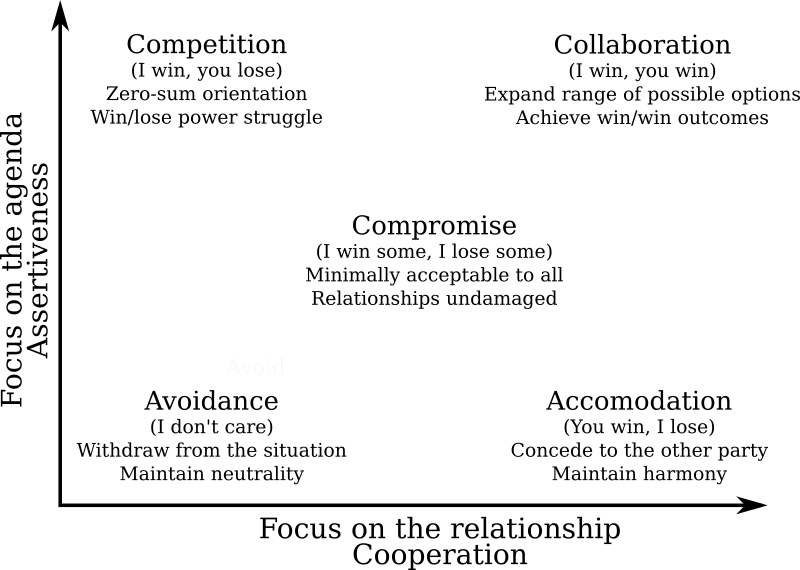
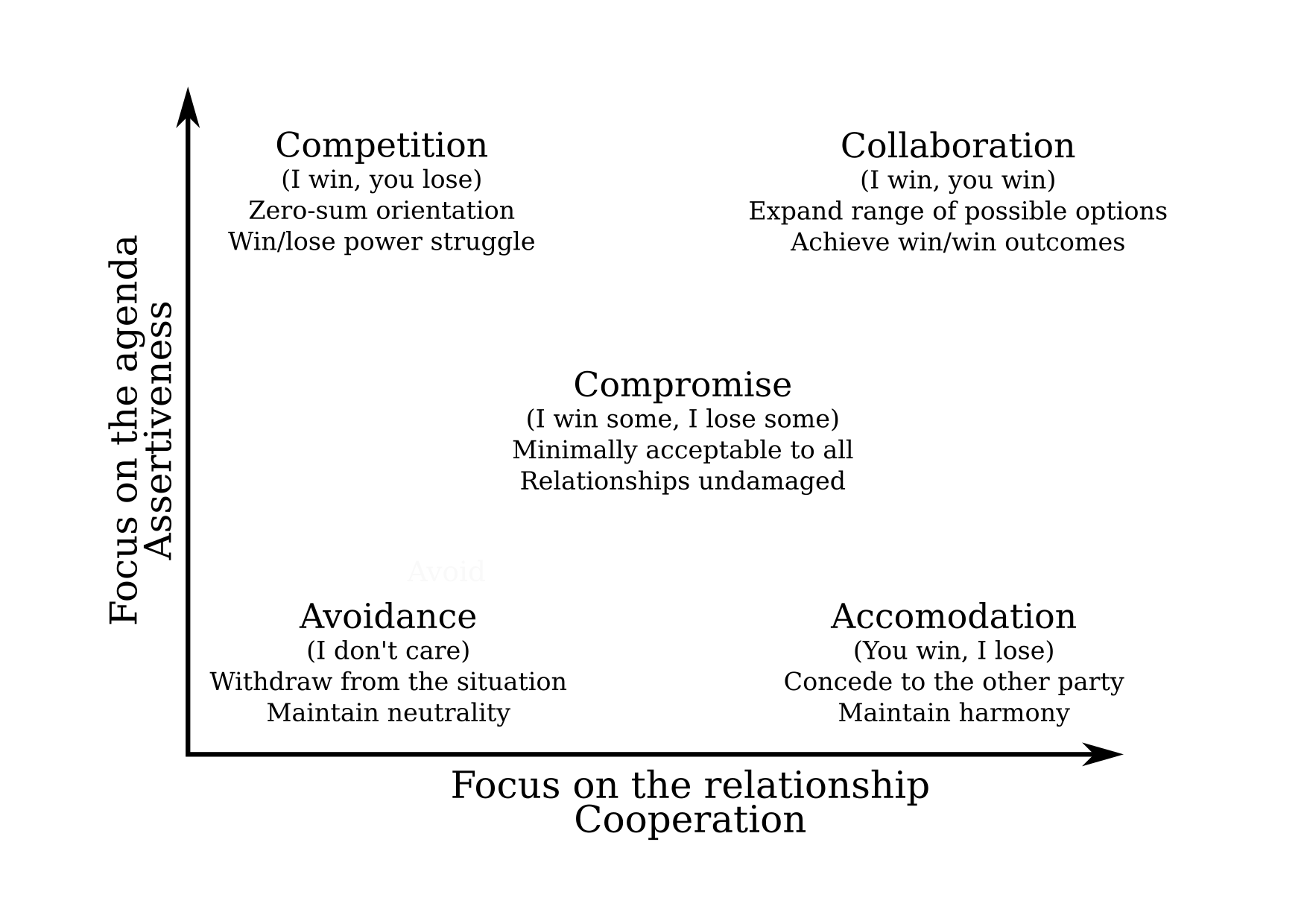
Saying "I've decided I won't do laundry anymore" when the other partner is tired, or busy doing things. Is different than saying "I've decided I won't do laundry anymore" when the other partner has a chance to say "why? tell me more" and take part in negotiation. Resources: Relationships Debian is the Universal Operating System. Debian is made and maintained by people. The long term health of debian is a consequence of the long term health of the relationship between Debian contributors. Debian doesn't need to be technically perfect, it needs to be socially healthy. Technical problems can be fixed by a healty community. graph showing relationship between avoidance, accomodation, compromise, competition, collaboration The Thomas-Kilmann Conflict Mode Instrument: source png. Motivations Quick poll: What are your motivations to be in a relationship? Which of those motivations are healthy/unhealthy? "Galadriel" (noun, by Francesca Ciceri): a task you have to do otherwise Sauron takes over Middle Earth See: http://blog.zouish.org/nonupdd/#/22/1 What motivates me to start a project or pick one up? What motivates me to keep maintaning a project? What motivates you? What's an example of a sustainable motivation? Is it really all consensual in Debian? Energy Energy that thing which is measured in spoons. The metaphore comes from people suffering with chronic health issues:
"Spoons" are a visual representation used as a unit of measure used to quantify how much energy a person has throughout a given day. Each activity requires a given number of spoons, which will only be replaced as the person "recharges" through rest. A person who runs out of spoons has no choice but to rest until their spoons are replenished.
For example, in Debian, I could spend: What is one person capable of doing? Have reasonable expectations, on others: Have reasonable expectations, on yourself: Debian is a shared responsibility When spoons are limited, what takes more energy tends not to get done As the project grows, project-wide tasks become harder Are they still humanly achievable? I don't want Debian to have positions that require hero-types to fill them Dictatorship of who has more spoons: Perfectionism You are in a relationship that is just perfect. All your friends look up to you. You give people relationship advice. You are safe in knowing that You Are Doing It Right. Then one day you have an argument in public. You don't just have to deal with the argument, but also with your reputation and self-perception shattering. One things I hate about Debian: consistent technical excellence. I don't want to be required to always be right. One of my favourite moments in the history of Debian is the openssl bug Debian doesn't need to be technically perfect, it needs to be socially healthy, technical problems can be fixed. I want to remove perfectionism from Debian: if we discover we've been wrong all the time in something important, it's not the end of Debian, it's the beginning of an improved Debian. Too good to be true There comes a point in most people's dating experience where one learns that when some things feel too good to be true, they might indeed be. There are people who cannot say no: There are people who cannot take a no: Note the diversity statement: it's not a problem to have one of those (and many other) tendencies, as long as one manages to keep interacting constructively with the rest of the community Also, it is important to be aware of these patterns, to be able to compensate for one's own tendencies. What happens when an avoidant person meets a narcissistic person, and they are both unaware of the risks? Resources: Note: there are problems with the way these resources are framed: Red flag / green flag http://pervocracy.blogspot.ca/2012/07/green-flags.html Ask for examples of red/green flags in Debian. Green flags: Red flags: Apologies / Dealing with issues I don't see the usefulness of apologies that are about accepting blame, or making a person stop complaining. I see apologies as opportunities to understand the problem I caused, help fix it, and possibly find ways of avoiding causing that problem again in the future. A Better Way to Say Sorry lists a 4 step process, which is basically what we do when in bug reports already: 1, Try to understand and reproduce the exact problem the person had. 2. Try to find the cause of the issue. 3. Try to find a solution for the issue. 4. Verify with the reporter that the solution does indeed fix the issue. This is just to say
My software ate
the files
that where in
your home directory and which
you were probably
needing
for work Forgive me
it was so quick to write
without tests
and it worked so well for me
(inspired by a 1934 poem by William Carlos Williams) Don't be afraid to fail Don't be afraid to fail or drop the ball. I think that anything that has a label attached of "if you don't do it, nobody will", shouldn't fall on anybody's shoulders and should be shared no matter what. Shared or dropped. Share the responsibility for a healthy relationship Don't expect that the more experienced mates will take care of everything. In a project with active people counted by the thousand, it's unlikely that harassment isn't happening. Is anyone writing anti-harassment? Do we have stats? Is having an email address and a CoC giving us a false sense of security?
When you get involved in a new community, such as Debian, find out early where, if that happens, you can find support, understanding, and help to make it stop. If you cannot find any, or if the only thing you can find is people who say "it never happens here", consider whether you really want to be in that community.
(from http://www.enricozini.org/blog/2016/debian/you-ll-thank-me-later/)
There are some nice people in the world. I mean nice people, the sort I couldn t describe myself as. People who are friends with everyone, who are somehow never involved in any argument, who seem content to spend their time drawing pictures of bumblebees on flowers that make everyone happy. Those people are great to have around. You want to hold onto them as much as you can. But people only have so much tolerance for jerkiness, and really nice people often have less tolerance than the rest of us. The trouble with not ejecting a jerk whether their shenanigans are deliberate or incidental is that you allow the average jerkiness of the community to rise slightly. The higher it goes, the more likely it is that those really nice people will come around less often, or stop coming around at all. That, in turn, makes the average jerkiness rise even more, which teaches the original jerk that their behavior is acceptable and makes your community more appealing to other jerks. Meanwhile, more people at the nice end of the scale are drifting away.
(from https://eev.ee/blog/2016/07/22/on-a-technicality/) Give people freedom If someone tries something in Debian, try to acknowledge and accept their work. You can give feedback on what they are doing, and try not to stand in their way, unless what they are doing is actually hurting you. In that case, try to collaborate, so that you all can get what you need. It's ok if you don't like everything that they are doing. I personally don't care if people tell me I'm good when I do something, I perceive it a bit like "good boy" or "good dog". I rather prefer if people show an interest, say "that looks useful" or "how does it work?" or "what do you need to deploy this?" Acknowledge that I've done something. I don't care if it's especially liked, give me the freedom to keep doing it. Don't give me rewards, give me space and dignity. Rather than feeding my ego, feed by freedom, and feed my possibility to create.

12 August 2017

Steve Kemp: A day in the life of Steve

I used to think I was a programmer who did "sysadmin-stuff". Nowadays I interact with too many real programmers to believe that. Or rather I can code/program/develop, but I'm not often as good as I could be. These days I'm getting more consistent with writing tests, and I like it when things are thoroughly planned and developed. But too often if I'm busy, or distracted, I think to myself "Hrm .. compiles? Probably done. Oops. Bug, you say?" I was going to write about working with golang today. The go language is minimal and quite neat. I like the toolset: Instead I think today I'm going to write about something else. Since having a child a lot of my life is different. Routine becomes something that is essential, as is planning and scheduling. So an average week-day goes something like this: In short I'm responsible for Oiva from 6ish-8ish in the morning, then from 6PM-10PM (with a little break while he's put to bed.) There are some exceptions to this routine - for example I work from home on Monday/Friday afternoons, and Monday evenings he goes to his swimming classes. But most working-days are the same. Weekends are a bit different. There I tend to take him 6AM-8AM, then 1PM-10PM with a few breaks for tea, and bed. At the moment we're starting to reach the peak-party time of year, which means weekends often involve negotiation(s) about which parent is having a party, and which parent is either leaving early, or not going out at all. Today I have him all day, and it's awesome. He's just learned to say "Daddy" which makes any stress, angst or unpleasantness utterly worthwhile.

6 August 2017

Fran ois Marier: Time Synchronization with NTP and systemd

I recently ran into problems with generating TOTP 2-factor codes on my laptop. The fact that some of the codes would work and some wouldn't suggested a problem with time keeping on my laptop. This was surprising since I've been running NTP for a many years and have therefore never had to think about time synchronization. After realizing that ntpd had stopped working on my machine for some reason, I found that systemd provides an easier way to keep time synchronized.

The new systemd time synchronization daemon On a machine running systemd, there is no need to run the full-fledged ntpd daemon anymore. The built-in systemd-timesyncd can do the basic time synchronization job just fine. However, I noticed that the daemon wasn't actually running:
$ systemctl status systemd-timesyncd.service 
  systemd-timesyncd.service - Network Time Synchronization
   Loaded: loaded (/lib/systemd/system/systemd-timesyncd.service; enabled; vendor preset: enabled)
  Drop-In: /lib/systemd/system/systemd-timesyncd.service.d
            disable-with-time-daemon.conf
   Active: inactive (dead)
Condition: start condition failed at Thu 2017-08-03 21:48:13 PDT; 1 day 20h ago
     Docs: man:systemd-timesyncd.service(8)
referring instead to a mysterious "failed condition". Attempting to restart the service did provide more details though:
$ systemctl restart systemd-timesyncd.service 
$ systemctl status systemd-timesyncd.service 
  systemd-timesyncd.service - Network Time Synchronization
   Loaded: loaded (/lib/systemd/system/systemd-timesyncd.service; enabled; vendor preset: enabled)
  Drop-In: /lib/systemd/system/systemd-timesyncd.service.d
            disable-with-time-daemon.conf
   Active: inactive (dead)
Condition: start condition failed at Sat 2017-08-05 18:19:12 PDT; 1s ago
             ConditionFileIsExecutable=!/usr/sbin/ntpd was not met
     Docs: man:systemd-timesyncd.service(8)
The above check for the presence of /usr/sbin/ntpd points to a conflict between ntpd and systemd-timesyncd. The solution of course is to remove the former before enabling the latter:
apt purge ntp

Enabling time synchronization with NTP Once the ntp package has been removed, it is time to enable NTP support in timesyncd. Start by choosing the NTP server pool nearest you and put it in /etc/systemd/timesyncd.conf. For example, mine reads like this:
[Time]
NTP=ca.pool.ntp.org
before restarting the daemon:
systemctl restart systemd-timesyncd.service 
That may not be enough on your machine though. To check whether or not the time has been synchronized with NTP servers, run the following:
$ timedatectl status
...
 Network time on: yes
NTP synchronized: no
 RTC in local TZ: no
If NTP is not enabled, then you can enable it by running this command:
timedatectl set-ntp true
Once that's done, everything should be in place and time should be kept correctly:
$ timedatectl status
...
 Network time on: yes
NTP synchronized: yes
 RTC in local TZ: no

Daniel Silverstone: STM32 and RTFM

I have been working with STM32 chips on-and-off for at least eight, possibly closer to nine years. About as long as ST have been touting them around. I love the STM32, and have done much with them in C. But, as my previous two posts may have hinted, I would like to start working with Rust instead of C. To that end, I have been looking with great joy at the work which Jorge Aparicio has been doing around Cortex-M3 and Rust. I've had many comments in person at Debconf, and also several people mention on Twitter, that they're glad more people are looking at this. But before I can get too much deeper into trying to write my USB stack, I need to sort a few things from what Jorge has done as demonstration work.

Okay, this is fast, but we need Ludicrous speed All of Jorge's examples seem to leave the system clocks in a fairly default state, excepting turning on the clocks to the peripherals needed during the initialisation phase. Sadly, if we're going to be running the USB at all, we need the clocks to run a tad faster. Since my goal is to run something moderately CPU intensive on the end of the USB too, it makes sense to try and get our STM32 running at maximum clock speed. For the one I have, that's 72MHz rather than the 8MHz it starts out with. Nine times more cycles to do computing in makes a lot of sense. As I said above, I've been doing STM32 in C a lot for many years; and fortunately I have built systems with the exact chip that's on the blue-pill before. As such, if I rummage, I can find some old C code which does what we need...
    /* Enable HSE */
    RCC_HSEConfig(RCC_HSE_ON);
    /* Wait till HSE is ready */
    HSEStartUpStatus = RCC_WaitForHSEStartUp();
    if (HSEStartUpStatus == SUCCESS)
     
      /* Enable Prefetch Buffer */
      FLASH_PrefetchBufferCmd(FLASH_PrefetchBuffer_Enable);
      /* Flash 2 wait state */
      FLASH_SetLatency(FLASH_Latency_2);
      /* HCLK = SYSCLK */
      RCC_HCLKConfig(RCC_SYSCLK_Div1);
      /* PCLK2 = HCLK */
      RCC_PCLK2Config(RCC_HCLK_Div1);
      /* PCLK1 = HCLK/2 */
      RCC_PCLK1Config(RCC_HCLK_Div2);
      /* ADCCLK = PCLK2/6 */
      RCC_ADCCLKConfig(RCC_PCLK2_Div6);
      /* PLLCLK = 8MHz * 9 = 72 MHz */
      RCC_PLLConfig(RCC_PLLSource_HSE_Div1, RCC_PLLMul_9);
      /* Enable PLL */
      RCC_PLLCmd(ENABLE);
      /* Wait till PLL is ready */
      while (RCC_GetFlagStatus(RCC_FLAG_PLLRDY) == RESET)
       
      /* Select PLL as system clock source */
      RCC_SYSCLKConfig(RCC_SYSCLKSource_PLLCLK);
      /* Wait till PLL is used as system clock source */
      while (RCC_GetSYSCLKSource() != 0x08)
       
     
This code, rather conveniently, uses an 8MHz external crystal so we can almost direct-port it to the blue-pill Rust code and see how we go. If you're used to the CMSIS libraries for STM32, then you won't completely recognise the above since it uses the pre-CMSIS core libraries to do its thing. Library code from 2008 and it's still good on today's STM32s providing they're in the right family :-) A direct conversion to Rust, using Jorge's beautifully easy to work with crates made from svd2rust results in:
    fn make_go_faster(rcc: &RCC, flash: &FLASH)  
        rcc.cr.modify( _, w  w.hseon().enabled());
        while !rcc.cr.read().hserdy().is_ready()  
        flash.acr.modify( _, w  w.prftbe().enabled());
        flash.acr.modify( _, w  w.latency().two());
        rcc.cfgr.modify( _, w  w
                        .hpre().div1()
                        .ppre2().div1()
                        .ppre1().div2()
                        // .adcpre().bits(8)
                        .pllsrc().external()
                        .pllxtpre().div1()
                        .pllmul().mul9()
        );
        rcc.cr.modify( _, w  w.pllon().enabled());
        while rcc.cr.read().pllrdy().is_unlocked()  
        rcc.cfgr.modify( _,w  w.sw().pll());
        while !rcc.cfgr.read().sws().is_pll()  
     
Now, I've not put the comments in which were in the C code, because I'm being very lazy right now, but if you follow the two together you should be able to work it through. I don't have timeouts for the waits, and you'll notice a single comment there (I cannot set up the ADC prescaler because for some reason the SVD is missing any useful information and so the generated crate only carries an unsafe function (bits()) and I'm trying to steer clear of unsafe for now. Still, I don't need the ADC immediately, so I'm okay with this. By using this function in the beginning of the init() function of the blinky example, I can easily demonstrate the clock is going faster since the LED blinks more quickly. This function demonstrates just how simple it is to take bit-manipulation from the C code and turn it into (admittedly bad looking) Rust with relative ease and without any of the actual bit-twiddling. I love it.

Mess with time, and you get unexpected consequences Sadly, when you mess with the clock tree on a microcontroller, you throw a lot of things out of whack. Not least, by adjusting the clock frequency up we end up adjusting the AHB, APB1, and APB2 clock frequencies. This has direct consequences for peripherals floating around on those busses. Fortunately Jorge thought of this and while the blue-pill crate hard-wires those frequencies to 8MHz, they are, at least, configurable in code in some sense. If we apply the make_go_faster() function to the serial loopback example, it simply fails to work because now the bus which the USART1 peripheral is connected to (APB2) is going at a different speed from the expected power-on default of 8MHz. If you remember from the function, we did .hpre().div1() which set HCLK to 72MHz, then .ppre1().div2() which sets the APB1 bus clock to be HCLK divided by 2, and .ppre2().div1() which sets APB2 bus clock to be HCLK. This means that we'd need to alter src/lib.rs to reflect these changes in the clock frequences and in theory loopback would start working once more. It'd be awkward to try and demonstrate all that to you since I only have a phone camera to hand, but if you own a blue-pill then you can clone Jorge's repo and have a go yourself and see that I'm not bluffing you. With all this done, it'll be time to see if we can bring the USB peripheral in the STM32 online, and that will be the topic of my next post in this discovery series.

5 August 2017

Lars Wirzenius: Enabling TRIM/DISCARD on Debian, ext4, luks, and lvm

I realised recently that my laptop isn't set up to send TRIM or DISCARD commands to its SSD. That means the SSD firmware has a harder time doing garbage collection (see whe linked Wikipedia page for more details.) After some searching, I found two articles by Christopher Smart: one, update. Those, plus some addition reading of documentation, and a little experimentation, allowed me to do this. Since the information is a bit scattered, here's the details, for Debian stretch, as much for my own memory as to make sure this is collected into one place. Note that it seems to be a possible information leak to TRIM encryped devices. I don't know the details, but if that bothers you, don't do it. I don't know of any harmful effects for enabling TRIM for everything, except the crypto bit above, so I wonder if it wouldn't make sense for the Debian installer to do this by default.

Daniel Silverstone: USB Device Stacks, on RTFM, part 2

Previously we talked about all the different kinds of descriptors which USB devices use to communicate their capability. This is important stuff because to write any useful USB device firmware we need to be able to determine how to populate our descriptors. However, having that data on the device is entirely worthless without an understanding of how it gets from the device to the host so that it can be acted upon. To understand that, let's look at the USB wire protocol.
Note, I'll again be talking mostly about USB2.0 low- and full-speed. I believe that high speed is approximately the same but with faster wires, except not quite that simple.

Down to the wire I don't intend to talk about the actual electrical signalling, though it's not un-reasonable for you to know that USB is a pair of wires forming a differentially signalled bidirectional serial communications link. The host is responsible for managing all the framing and timing on the link, and for formatting the communications into packets. There are a number of packet types which can appear on the USB link:
Packet type Purpose
Token Packet When the host wishes to send a message to the Control endpoint to configure the device, read data IN, or write data OUT, it uses this to start the transaction.
Data(0/1) Packet Following a Setup, In, or Out token, a Data packet is a transfer of data (in either direction). The 0 and 1 alternate to provide a measure of confidence against lost packets.
Handshake Packet Following a data packet of some kind, the other end may ACK the packet (all was well), NAK the packet (report that the device cannot, temporarily, send/receive data, or that an interrupt endpoint isn't triggered), or STALL the bus in which case the host needs to intervene.
Start of Frame Every 1ms (full-speed) the host will send a SOF packet which carries a frame number. This can be used to help keep time on very simple devices. It also divides the bus into frames within which bandwidth is allocated.
As an example, when the host wishes to perform a control transfer, the following packets are transacted in turn:
  1. Setup Token - The host addresses the device and endpoint (OUT0)
  2. Data0 Packet - The host transmits a GET_DESCRIPTOR for the device descriptor
  3. Ack Packet - The device acknowledges receipt of the request
This marks the end of the first transaction. The device decodes the GET_DESCRIPTOR request and prepares the device descriptor for transmission. The transmission occurs as the next transaction on the bus. In this example, we're assuming 8 byte maximum transmission sizes, for illustrative purposes.
  1. In Token - The host addresses the device and endpoint (IN0)
  2. Data1 Packet - The device transmits the first 8 bytes of the descriptor
  3. Ack Packet - The host acknowledges the data packet
  4. In Token - The host addresses the device and endpoint (IN0)
  5. Data0 Packet - The device transmits the remaining 4 bytes of the descriptor (padded)
  6. Ack Packet - The host acknowledges the data packet
The second transaction is now complete, and the host has all the data it needs to proceed. Finally a status transaction occurs in which:
  1. Out Token - The host addresses the device and endpoint (OUT0)
  2. Data1 Packet - The host transmits a 0 byte data packet to indicate successful completion
  3. Ack Packet - The device acknowledges the completion, indicating its own satisfaction
And thus ends the full control transaction in which the host retrieves the device descriptor. From a high level, we need only consider the activity which occurs at the point of the acknowledgement packets. In the above example:
  1. On the first ACK the device prepares IN0 to transmit the descriptor, readying whatever low level device stack there is with a pointer to the descriptor and its length in bytes.
  2. On the second ACK the low levels are still thinking.
  3. On the third ACK the transmission from IN0 is complete and the endpoint no longer expects to transfer data.
  4. On the fourth ACK the control transaction is entirely complete.

Thinking at the low levels of the control interface Before we can build a high level USB stack, we need to consider the activity which might occur at the lower levels. At the low levels, particularly of the device control interface, work has to be done at each and every packet. The hardware likely deals with the token packet for us, leaving the data packets for us to process, and the resultant handshake packets will be likely handled by the hardware in response to our processing the data packets. Since every control transaction is initiated by a setup token, let's look at the setup requests which can come our way...
Setup Packet (Data) Format
Field Name Byte start Byte length Encoding Meaning
bmRequestType 0 1 Bitmap Describes the kind of request, and the target of it. See below.
bRequest 1 1 Code The request code itself, meanings of the rest of the fields vary by bRequest
wValue 2 2 Number A 16 bit value whose meaning varies by request type
wIndex 4 2 Number A 16 bit value whose meaning varies by request type but typically encodes an interface number or endpoint.
wLength 6 2 Number A 16 bit value indicating the length of the transfer to come.
Since bRequest is essentially a switch against which multiple kinds of setup packet are selected between, here's the meanings of a few...
GET_DESCRIPTOR (Device) setup packet
Field Name Value Meaning
bmRequestType 0x08 Data direction is IN (from device to host), recipient is the device
bRequest 0x06 GET_DESCRIPTOR (in this instance, the device descriptor is requested)
wValue 0x0001 This means the device descriptor
wIndex 0x0000 Irrelevant, there's only 1 device descriptor anyway
wLength 12 This is the length of a device descriptor (12 bytes)
SET_ADDRESS to set a device's USB address
Field Name Value Meaning
bmRequestType 0x00 Data direction is OUT (from host to device), recipient is the device
bRequest 0x05 SET_ADDRESS (Set the device's USB address)
wValue 0x00nn The address for the device to adopt (max 127)
wIndex 0x0000 Irrelevant for address setting
wLength 0 There's no data transfer expected for this setup operation
Most hardware blocks will implement an interrupt at the point that the Data packet following the Setup packet has been receive. This is typically called receiving a 'Setup' packet and then it's up to the device stack low levels to determine what to do and dispatch a handler. Otherwise an interrupt will fire for the IN or OUT tokens and if the endpoint is zero, the low level stack will handle it once more. One final thing worth noting about SET_ADDRESS is that it doesn't take effect until the completion of the zero-length "status" transaction following the setup transaction. As such, the status request from the host will still be sent to address zero (the default for new devices).

A very basic early "packet trace" This is an example, and is not guaranteed to be the packet sequence in all cases. It's a good indication of the relative complexity involved in getting a fresh USB device onto the bus though... When a device first attaches to the bus, the bus is in RESET state and so the first event a device sees is a RESET which causes it to set its address to zero, clear any endpoints, clear the configuration, and become ready for control transfers. Shortly after this, the device will become suspended. Next, the host kicks in and sends a port reset of around 30ms. After this, the host is ready to interrogate the device. The host sends a GET_DESCRIPTOR to the device, whose address at this point is zero. Using the information it receives from this, it can set up the host-side memory buffers since the device descriptor contains the maximum transfer size which the device supports. The host is now ready to actually 'address' the device, and so it sends another reset to the device, again around 30ms in length. The host sends a SET_ADDRESS control request to the device, telling it that its new address is nn. Once the acknowledgement has been sent from the host for the zero-data status update from the device, the device sets its internal address to the value supplied in the request. From now on, the device shall respond only to requests to nn rather than to zero. At this point, the host will begin interrogating further descriptors, looking at the configuration descriptors and the strings, to build its host-side representation of the device. These will be GET_DESCRIPTOR and GET_STRING_DESCRIPTOR requests and may continue for some time. Once the host has satisfied itself that it knows everything it needs to about the device, it will issue a SET_CONFIGURATION request which basically starts everything up in the device. Once the configuration is set, interrupt endpoints will be polled, bulk traffic will be transferred, Isochronous streams begin to run, etc.

Okay, but how do we make this concrete? So far, everything we've spoken about has been fairly abstract, or at least "soft". But to transfer data over USB does require some hardware. (Okay, okay, we could do it all virtualised, but there's no fun in that). The hardware I'm going to be using for the duration of this series is the STM32 on the blue-pill development board. This is a very simple development board which does (in theory at least) support USB device mode. If we view the schematic for the blue-pill, we can see a very "lightweight" USB interface which has a pullup resistor for D+. This is the way that a device signals to the host that it is present, and that it wants to speak at full-speed. If the pullup were on D- then it would be a low-speed device. High speed devices need a little more complexity which I'm not going to go into for today. The USB lines connect to pins PA11 and PA12 which are the USB pins on the STM32 on the board. Since USB is quite finicky, the STM32 doesn't let you remap that function elsewhere, so this is all looking quite good for us so far. The specific STM32 on the blue-pill is the STM32F103C8T6. By viewing its product page on ST's website we can find the reference manual for the part. Jumping to section 23 we learn that this STM32 supports full-speed USB2.0 which is convenient given the past article and a half. We also learn it supports up to eight endpoints active at any one time, and offers double-buffering for our bulk and isochronous transfers. It has some internal memory for packet buffering, so it won't use our RAM bandwidth while performing transfers, which is lovely. I'm not going to distill the rest of that section here, because there's a large amount of data which explains how the USB macrocell operates. However useful things to note are:
  • How IN OUT and SETUP transfers work.
  • How the endpoint buffer memory is configured.
  • That all bus-powered devices MUST respond to suspend/resume properly
  • That the hardware will prioritise endpoint interrupts for us so that we only need deal with the most pressing item at any given time.
  • There is an 'Enable Function' bit in the address register which must be set or we won't see any transactions at all.
  • How the endpoint registers signal events to the device firmware.
Next time, we're going to begin the process of writing a very hacky setup routine to try and initialise the USB device macrocell so that we can see incoming transactions through the ITM. It should be quite exciting, but given how complex this will be for me to learn, it might be a little while before it comes through.

Gunnar Wolf: DebConf17 Key Signing Party: You are here

I ran my little analysis program written last year to provide a nice map on the DebConf17 key signing party, based on the . What will you find if you go there? As an example, here is my location on the map (click on the graph to enlarge): Its main use? It will help you find what clusters are you better linked with - And who you have not cross-signed with. Some people have signed you but you didn't sign them? Or the other way around? Whom should you approach to make the keyring better connected? Can you spot some attendees who are islands and can get some help getting better connected to our keyring? Please go ahead and do it! PS There are four keys that are mentioned in the DebConf17 Keysigning Party Names file I used to build this from: 0xE8446B4AC8C77261, 0x485E1BD3AE76CB72, 0x4618E4C700000173, E267B052364F028D. The public keyserver network does not know about them. If you control one of those keys and you want me to run my script again to include it, please send it to the keyservers and mail me. If your key is not in the keyservers, nobody will be able to sign it!

4 August 2017

Daniel Silverstone: USB Device Stacks, on RTFM

I have been spending time with Jorge Aparicio's RTFM for Cortex M3 framework for writing Rust to target Cortex-M3 devices from Arm (and particularly the STM32F103 from ST Microelectronics). Jorge's work in this area has been of interest to me ever since I discovered him working on this stuff a while ago. I am very tempted by the idea of being able to implement code for the STM32 with the guarantees of Rust and the language features which I have come to love such as the trait system. I have been thinking to myself that, while I admire and appreciate the work done on the GNUK, I would like to, personally, have a go at implementing some kind of security token on an STM32 as a USB device. And with the advent of the RTFM for M3 work, and Jorge's magical tooling to make it easier to access and control the registers on an M3 microcontroller, I figured it'd be super-nice to do this in Rust, with all the advantages that entails in terms of isolating unsafe behaviour and generally having the potential to be more easily verified as not misbehaving. To do this though, means that I need a USB device stack which will work in the RTFM framework. Sadly it seems that, thus-far, only Jorge has been working on drivers for any of the M3 devices his framework supports. And one person can only do so much. So, in my infinite madness, I decided I should investigate the complexity of writing a USB device stack in Rust for the RTFM/M3 framework. (Why I thought this was a good idea is lost to the mists of late night Googling, but hey, it might make a good talk at the next conference I go to). As such, this blog post, and further ones along these lines, will serve as a partial tour of what I'm up to, and a partial aide-memoir for me about learning USB. If I get something horribly wrong, please DO contact me to correct me, otherwise I'll just continue to be wrong. If I've simplified something but it's still strictly correct, just let me know if it's an oversimplification since in a lot of cases there's no point in me putting the full details into a blog posting. I will mostly be considering USB2.0 protocol details but only really for low and full speed devices. (The hardware I'm targetting does low-speed and full-speed, but not high-speed. Though some similar HW does high-speed too, I don't have any to hand right now)

A brief introduction to USB In order to go much further, I needed a grounding in USB. It's a multi-layer protocol as you might expect, though we can probably ignore the actual electrical layer since any device we might hope to support will have to have a hardware block to deal with that. We will however need to consider the packet layer (since that will inform how the hardware block is implemented and thus its interface) and then the higher level protocols on top. USB is a deliberately asymmetric protocol. Devices are meant to be significantly easier to implement, both in terms of hardware and software, as compared with hosts. As such, despite some STM32s having OTG ports, I have no intention of supporting host mode at this time. USB is arranged into a set of busses which are, at least in the USB1.1 case, broadcast domains. As such, each device has an address assigned to it by the host during an early phase called 'configuration'. Once the address is assigned, the device is expected to only ever respond to messages addressed to it. Note that since everything is asymmetric in USB, the device can't send messages on its own, but has to be asked for them by the host, and as such the addressing is always from host toward device. USB devices then expose a number of endpoints through which communication can flow IN to the host or OUT to the device. Endpoints are not bidirectional, but the in and out endpoints do overlap in numbering. There is a special pair of endpoints, IN0 and OUT0 which, between them, form what I will call the device control endpoints. The device control endpoints are important since every USB device MUST implement them, and there are a number of well defined messages which pass over them to control the USB device. In theory a bare minimum USB device would implement only the device control endpoints.

Configurations, and Classes, and Interfaces, Oh My! In order for the host to understand what the USB device is, and what it is capable of, part of the device control endpoints' responsibility is to provide a set of descriptors which describe the device. These descriptors form a heirarchy and are then glommed together into a big lump of data which the host can download from the device in order to decide what it is and how to use it. Because of various historical reasons, where a multi-byte value is used, they are defined to be little-endian, though there are some BCD fields. Descriptors always start with a length byte and a type byte because that way the host can parse/skip as necessary, with ease. The first descriptor is the device descriptor, is a big one, and looks like this:
Device Descriptor
Field Name Byte start Byte length Encoding Meaning
bLength 0 1 Number Size of the descriptor in bytes (18)
bDescriptorType 1 1 Constant Device Descriptor (0x01)
bcdUSB 2 2 BCD USB spec version compiled with
bDeviceClass 4 1 Class Code, assigned by USB org (0 means "Look at interface descriptors", common value is 2 for CDC)
bDeviceSubClass 5 1 SubClass Code, assigned by USB org (usually 0)
bDeviceProtocol 6 1 Protocol Code, assigned by USB org (usually 0)
bMaxPacketSize 7 1 Number Max packet size for IN0/OUT0 (Valid are 8, 16, 32, 64)
idVendor 8 2 ID 16bit Vendor ID (Assigned by USB org)
idProduct 10 2 ID 16bit Product ID (Assigned by manufacturer)
bcdDevice 12 2 BCD Device version number (same encoding as bcdUSB)
iManufacturer 14 1 Index String index of manufacturer name (0 if unavailable)
iProduct 15 1 Index String index of product name (0 if unavailable)
iSerialNumber 16 1 Index String index of device serial number (0 if unavailable)
bNumConfigurations 17 1 Number Count of configurations the device has.
This looks quite complex, but breaks down into a relatively simple two halves. The first eight bytes carries everything necessary for the host to be able to configure itself and the device control endpoints properly in order to communicate effectively. Since eight bytes is the bare minimum a device must be able to transmit in one go, the host can guarantee to get those, and they tell it what kind of device it is, what USB protocol it supports, and what the maximum transfer size is for its device control endpoints. The encoding of the bcdUSB and bcdDevice fields is interesting too. It is of the form 0xMMmm where MM is the major number, mm the minor. So USB2.0 is encoded as 0x0200, USB1.1 as 0x0110 etc. If the device version is 17.36 then that'd be 0x1736. Other fields of note are bDeviceClass which can be 0 meaning that interfaces will specify their classes, and idVendor/idProduct which between them form the primary way for the specific USB device to be identified. The Index fields are indices into a string table which we'll look at later. For now it's enough to know that wherever a string index is needed, 0 can be provided to mean "no string here". The last field is bNumConfigurations and this indicates the number of ways in which this device might function. A USB device can provide any number of these configurations, though typically only one is provided. If the host wishes to switch between configurations then it will have to effectively entirely quiesce and reset the device. The next kind of descriptor is the configuration descriptor. This one is much shorter, but starts with the same two fields:
Configuration Descriptor
Field Name Byte start Byte length Encoding Meaning
bLength 0 1 Number Size of the descriptor in bytes (9)
bDescriptorType 1 1 Constant Configuration Descriptor (0x02)
wTotalLength 2 2 Number Size of the configuration in bytes, in total
bNumInterfaces 4 1 Number The number of interfaces in this configuration
bConfigurationValue 5 1 Number The value to use to select this configuration
iConfiguration 6 1 Index The name of this configuration (0 for unavailable)
bmAttributes 7 1 Bitmap Attributes field (see below)
bMaxPower 8 1 Number Maximum bus power this configuration will draw (in 2mA increments)
An important field to consider here is the bmAttributes field which tells the host some useful information. Bit 7 must be set, bit 6 is set if the device would be self-powered in this configuration, bit 5 indicates that the device would like to be able to wake the host from sleep mode, and bits 4 to 0 must be unset. The bMaxPower field is interesting because it encodes the power draw of the device (when set to this configuration). USB allows for up to 100mA of draw per device when it isn't yet configured, and up to 500mA when configured. The value may be used to decide if it's sensible to configure a device if the host is in a low power situation. Typically this field will be set to 50 to indicate the nominal 100mA is fine, or 250 to request the full 500mA. Finally, the wTotalLength field is interesting because it tells the host the total length of this configuration, including all the interface and endpoint descriptors which make it up. With this field, the host can allocate enough RAM to fetch the entire configuration descriptor block at once, simplifying matters dramatically for it. Each configuration has one or more interfaces. The interfaces group some endpoints together into a logical function. For example a configuration for a multifunction scanner/fax/printer might have an interface for the scanner function, one for the fax, and one for the printer. Endpoints are not shared among interfaces, so when building this table, be careful. Next, logically, come the interface descriptors:
Interface Descriptor
Field Name Byte start Byte length Encoding Meaning
bLength 0 1 Number Size of the descriptor in bytes (9)
bDescriptorType 1 1 Constant Interface Descriptor (0x04)
bInterfaceNumber 2 1 Number The number of the interface
bAlternateSetting 3 1 Number The interface alternate index
bNumEndpoints 4 1 Number The number of endpoints in this interface
bInterfaceClass 5 1 Class The interface class (USB Org defined)
bInterfaceSubClass 6 1 SubClass The interface subclass (USB Org defined)
bInterfaceProtocol 7 1 Protocol The interface protocol (USB Org defined)
iInterface 8 1 Index The name of the interface (or 0 if not provided)
The important values here are the class/subclass/protocol fields which provide a lot of information to the host about what the interface is. If the class is a USB Org defined one (e.g. 0x02 for Communications Device Class) then the host may already have drivers designed to work with the interface meaning that the device manufacturer doesn't have to provide host drivers. The bInterfaceNumber is used by the host to indicate this interface when sending messages, and the bAlternateSetting is a way to vary interfaces. Two interfaces with the came bInterfaceNumber but different bAlternateSettings can be switched between (like configurations, but) without resetting the device. Hopefully the rest of this descriptor is self-evident by now. The next descriptor kind is endpoint descriptors:
Endpoint Descriptor
Field Name Byte start Byte length Encoding Meaning
bLength 0 1 Number Size of the descriptor in bytes (7)
bDescriptorType 1 1 Constant Endpoint Descriptor (0x05)
bEndpointAddress 2 1 Endpoint Endpoint address (see below)
bmAttributes 3 1 Bitmap Endpoint attributes (see below)
wMaxPacketSize 4 2 Number Maximum packet size this endpoint can send/receive
bInterval 6 1 Number Interval for polling endpoint (in frames)
The bEndpointAddress is a 4 bit endpoint number (so there're 16 endpoint indices) and a bit to indicate IN vs. OUT. Bit 7 is the direction marker and bits 3 to 0 are the endpoint number. This means there are 32 endpoints in total, 16 in each direction, 2 of which are reserved (IN0 and OUT0) giving 30 endpoints available for interfaces to use in any given configuration. The bmAttributes bitmap covers the transfer type of the endpoint (more below), and the bInterval is an interval measured in frames (1ms for low or full speed, 125 s in high speed). bInterval is only valid for some endpoint types. The final descriptor kind is for the strings which we've seen indices for throughout the above. String descriptors have two forms:
String Descriptor (index zero)
Field Name Byte start Byte length Encoding Meaning
bLength 0 1 Number Size of the descriptor in bytes (variable)
bDescriptorType 1 1 Constant String Descriptor (0x03)
wLangID[0] 2 2 Number Language code zero (e.g. 0x0409 for en_US)
wLangID[n] 4.. 2 Number Language code n ...
This form (for descriptor 0) is that of a series of language IDs supported by the device. The device may support any number of languages. When the host requests a string descriptor, it will supply both the index of the string and also the language id it desires (from the list available in string descriptor zero). The host can tell how many language IDs are available simply by dividing bLength by 2 and subtracting 1 for the two header bytes. And for string descriptors of an index greater than zero:
String Descriptor (index greater than zero)
Field Name Byte start Byte length Encoding Meaning
bLength 0 1 Number Size of the descriptor in bytes (variable)
bDescriptorType 1 1 Constant String Descriptor (0x03)
bString 2.. .. Unicode The string, in "unicode" format
This second form of the string descriptor is simply the the string is in what the USB spec calls 'Unicode' format which is, as of 2005, defined to be UTF16-LE without a BOM or terminator. Since string descriptors are of a variable length, the host must request strings in two transactions. First a request for 2 bytes is sent, retrieving the bLength and bDescriptorType fields which can be checked and memory allocated. Then a request for bLength bytes can be sent to retrieve the entire string descriptor.

Putting that all together Phew, this is getting to be quite a long posting, so I'm going to leave this here and in my next post I'll talk about how the host and device pass packets to get all that information to the host, and how it gets used.

2 August 2017

Markus Koschany: PDFsam: How to upgrade a Maven application for Debian

In the coming weeks and months I intend to write a mini series about packaging Java software for Debian. The following article basically starts in the middle of this journey because the PDFsam upgrade is still fresh in my mind. It requires some preexisting knowledge about build tools like Maven and some Java terminology. But do not fear. Hopefully it will make sense in the end when all pieces fall into place. A month ago I decided to upgrade PDFsam, a Java application to split, merge, extract, mix and rotate PDF documents. The current version 1.1.4 is already seven years old and uses Ant as its build system. Unfortunately up to now nobody was interested enough to invest the time to upgrade it to the latest version. A quick internet search unveils that the current sources can be found on github.com. Another brief look reveals we are dealing with a Maven project here because we can find a pom.xml file in the root directory and there is no sign of Ant s typical build.xml file anymore. Here are some general tips how to proceed from this point by using the PDFsam upgrade as an example. Find out how many new dependencies you really need The pom.xml file declares its dependencies in the <dependencies> section. It is good practice to inspect the pom.xml file and determine how much work will be required to upgrade the package. A seasoned Java packager will quickly find common dependencies like Hibernate or the Apache Commons libraries. Fortunately for you they are already packaged in Debian because a lot of projects depend on them. If you are unsure what is and what is not packaged for Debian, tracker.debian.org and codesearch.debian.net are useful tools to search for those packages. If in doubt just ask on debian-java@lists.debian.org. There is no automagical tool (yet) to find out what dependencies are really new (we talk about mh_make soon) but if you use the aforementioned tools and websites you will notice that in June 2017 one could not find the following artifacts: fontawesomefx, eventstudio, sejda-* and jackson-jr-objects. There are also jdepend and testFx but notice they are marked as <scope>test</scope> meaning they are only required if you would like to run upstream s test suite as well. For the sake of simplicity, it is best to ignore them for now and to focus on packaging only dependencies which are really needed to compile the application. Test dependencies can always be added later. This pom.xml investigation leads us to the following conclusion: PDFsam depends on Sejda, a PDF library. Basically Sejda is the product of a major refactoring that happened years ago and allows upstream to develop PDFsam faster and in multiple directions. For Debian packagers it is quite clear now that the upgrade of PDFsam is in reality more like packaging a completely new application. The inspection of Sejda s pom.xml file (another Maven project) reveals we also have to package imgscalr, Twelvemonkeys and SAMBox. We continue with these pom.xml analyses and end up with these new source packages: jackson-jr, libimgscalr-java, libsambox-java, libsejda-java, libsejda-injector-java, libsejda-io-java, libsejda-eventstudio-java, libtwelvemonkeys-java, fontawesomefx and libpdfbox2-java. Later I discovered that gettext-maven-plugin was also required. This was not obvious at first glance if you only check the pom.xml in the root directory but PDFsam and Sejda are multi-module projects! In this case every subdirectory (module) contains another pom.xml with additional information, so ideally you should check those too before you decide to start with your packaging. But don t worry it is often possible to ignore modules with a simple ignore rule inside your debian/*.poms file. The package will have less functionality but it can be still useful if you only need a subset of the modules. Of course in this case ignoring the gettext-maven-plugin artifact would result in a runtime error. C est la vie. A brief remark about Java package names: Java library packages must be named like libXXX-java. This is important for binary packages to avoid naming collisions. We are more tolerant when it comes to source package names but in general we recommend to use the exact same name as for the binary package. There are exceptions like prefixing source packages with their well known project name like jackson-XXX or jboss-XXX but this should only be used when there are already existing packages that use such a naming scheme. If in doubt, talk to us. mh_make or how to quickly generate an initial debian directory Packaging a Maven library is usually not very difficult even if it consists of multiple modules. The tricky part is to get the maven.rules, maven.IgnoreRules and your *.poms file right but debian/rules often only consists of a single dh line and the rest is finding the build-dependencies and adding them to debian/control. A small tool called mh_make, which is included in maven-debian-helper, can lend you a helping hand. The tool is not perfect yet. It requires that most build-dependencies are already installed on your local system, otherwise it won t create the initial debian directory and will only produce some unfinished (but in some cases still useful) files. A rule of thumb is to start with a package that does not depend on any other new dependency and requires the fewest build-dependencies. I have chosen libtwelvemonkeys-java because it was the simplest package and met the aforementioned criteria. Here is how mh_make looks like in action. (The animated GIF was created with Byzanz) First of all download the release tarball, unpack it and run mh_make inside the root directory. Ok, what is happening here? First you can choose a source and binary package name. Then disable the tests and don t run javadoc to create the documentation. This will simplify things a little. Tests and javadoc settings can be added later. Choose the version you want to package and then you can basically follow the default recommendations and confirm them by hitting the Enter key. Throughout the project we choose to transform the upstream version with the symbolic debian version. Remember that Java/Maven is version-centric. This will ensure that our Maven dependencies are always satisfied later and we can simply upgrade our Maven libraries and don t have to change the versions by hand in various pom.xml files; maven-debian-helper will automatically transform them for us to debian . Enable all modules. If you choose not to, you can select each module individually. Note that later on some of the required build-dependencies cannot be found because they are either not installed (libjmagick6-java) or they cannot be found in Debian s Maven repository under /usr/share/maven-repo. You can fix this by entering a substitution rule or, as I did in this case, you can just ignore these artifacts for now. They will be added to maven.IgnoreRules. In order to successfully compile your program you have to remove them from this file later again, create the correct substitution rule in maven.rules and add the missing build-dependencies to debian/control. For now we just want to quickly create our initial debian directory. If everything went as planned a complete debian directory should be visible in your root directory. The only thing left is to fix the substitution rule for the Servlet API 3.1. Add libservlet3.1-java to Build-Depends and the following rule to maven.rules: javax.servlet s/servlet-api/javax.servlet-api/ * s/.*/3.1/ * *
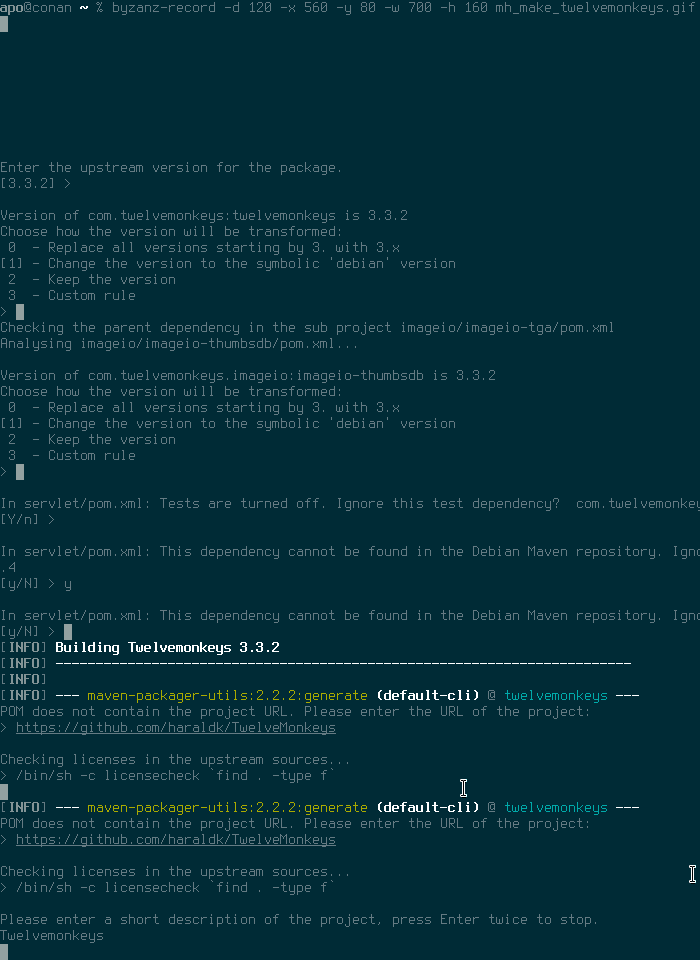
s/javax.servlet/javax.servlet.jsp/ s/jsp-api/javax.servlet.jsp-api/ * s/.*/2.3/ * * The maven.rules file consists of multiple rows separated by six columns. The values represent groupId, artifactId, type, version number and two fields which I never use.  You can just use an asterisk to match any value. Every value can be substituted. This is necessary when the value of upstream s pom.xml file differs from Debian s system packages. This happens frequently for API packages which are uploaded to Maven Central multiple times under a different groupId/artifactId but provide the same features. In this case the Twelvemonkeys pom requires an older API version but Debian is already at version 3.1. Note that we require a strict version number in this case because libservlet3.1-java does not use a symbolic debian version since we provide more than one Servlet API in the archive and this measure prevents conflicts. Thanks for reading this far. More articles about Java packaging will follow in the near future and hopefully they will clarify some terms and topics which could only be briefly mentioned in this post.
before

and after

31 July 2017

Jonathan McDowell: How to make a keyring

Every month or two keyring-maint gets a comment about how a key update we say we ve performed hasn t actually made it to the active keyring, or a query about why the keyring is so out of date, or told that although a key has been sent to the HKP interface and that is showing the update as received it isn t working when trying to upload to the Debian archive. It s frustrating to have to deal with these queries, but the confusion is understandable. There are multiple public interfaces to the Debian keyrings and they re not all equal. This post attempts to explain the interactions between them, and how I go about working with them as part of the keyring-maint team. First, a diagram to show the different interfaces to the keyring and how they connect to each other: keyring-maint workflow
Public interfaces

rsync: keyring.debian.org::keyrings This is the most important public interface; it s the one that the Debian infrastructure uses. It s the canonical location of the active set of Debian keyrings and is what you should be using if you want the most up to date copy. The validity of the keyrings can be checked using the included sha512sums.txt file, which will be signed by whoever in keyring-maint did the last keyring update.

HKP interface: hkp://keyring.debian.org/ What you talk to with gpg --keyserver keyring.debian.org. Serves out the current keyrings, and accepts updates to any key it already knows about (allowing, for example, expiry updates, new subkeys + uids or new signatures without the need to file a ticket in RT or otherwise explicitly request it). Updates sent to this interface will be available via it within a few hours, but must be manually folded into the active keyring. This in general happens about once a month when preparing for a general update of the keyring; for example b490c1d5f075951e80b22641b2a133c725adaab8. Why not do this automatically? Even though the site uses GnuPG to verify incoming updates there are still occasions we ve seen bugs (such as #787046, where GnuPG would always import subkeys it didn t understand, even when that subkey was already present). Also we don t want to allow just any UID to be part of the keyring. It is thus useful to retain a final set of human based sanity checking for any update before it becomes part of the keyring proper.

Alioth/anonscm: https://anonscm.debian.org/git/keyring/keyring/ A public mirror of the git repository the keyring-maint team use to maintain the keyring. Every action is recorded here, and in general each commit should be a single action (such as adding a new key, doing a key replacement or moving a key between keyrings). Note that pulling in the updates sent via HKP count as a single action, rather than having a commit per key updated. This mirror is updated whenever a new keyring is made active (i.e. made available via the rsync interface). Until that point pending changes are kept private; we sometimes deal with information such as the fact someone has potentially had a key compromised that we don t want to be public until we ve actually disabled it. Every keyring push (as we refer to the process of making a new keyring active) is tagged with the date it was performed. Releases are also tagged with their codenames, to make it easy to do comparisons over time.

Debian archive This is actually the least important public interface to the keyring, at least from the perspective of the keyring-maint team. No infrastructure makes use of it and while it s mostly updated when a new keyring is made active we only make a concerted effort to do so when it is coming up to release. It s provided as a convenience package rather than something which should be utilised for active verification of which keys are and aren t currently part of the keyring.

Team interface

Master repository: kaufmann.debian.org:/srv/keyring.debian.org/master-keyring.git The master git repository for keyring maintenance is stored on kaufmann.debian.org AKA keyring.debian.org. This system is centrally managed by DSA, with only DSA and keyring-maint having login rights to it. None of the actual maintenance work takes place here; it is a bare repo providing a central point for the members of keyring-maint to collaborate around.

Private interface

Private working clone This is where all of the actual keyring work happens. I have a local clone of the repository from kaufmann on a personal machine. The key additions / changes I perform all happen here, and are then pushed to the master repository so that they re visible to the rest of the team. When preparing to make a new keyring active the changes that have been sent to the HKP interface are copied from kaufmann via scp and folded in using the pull-updates script. The tree is assembled into keyrings with a simple make and some sanity tests performed using make test. If these are successful the sha512sums.txt file is signed using gpg --clearsign and the output copied over to kaufmann. update-keyrings is then called to update the active keyrings (both rsync + HKP). A git push public pushes the changes to the public repository on anonscm. Finally gbp buildpackage --git-builder='sbuild -d sid' tells git-buildpackage to use sbuild to build a package ready to be uploaded to the archive. Hopefully that helps explain the different stages and outputs of keyring maintenance; I m aware that it would be a good idea for this to exist somewhere on keyring.debian.org as well and will look at doing so.

Russell Coker: Running a Tor Relay

I previously wrote about running my SE Linux Play Machine over Tor [1] which involved configuring ssh to use Tor. Since then I have installed a Tor hidden service for ssh on many systems I run for clients. The reason is that it is fairly common for them to allow a server to get a new IP address by DHCP or accidentally set their firewall to deny inbound connections. Without some sort of VPN this results in difficult phone calls talking non-technical people through the process of setting up a tunnel or discovering an IP address. While I can run my own VPN for them I don t want their infrastructure tied to mine and they don t want to pay for a 3rd party VPN service. Tor provides a free VPN service and works really well for this purpose. As I believe in giving back to the community I decided to run my own Tor relay. I have no plans to ever run a Tor Exit Node because that involves more legal problems than I am willing or able to deal with. A good overview of how Tor works is the EFF page about it [2]. The main point of a Middle Relay (or just Relay ) is that it only sends and receives encrypted data from other systems. As the Relay software (and the sysadmin if they choose to examine traffic) only sees encrypted data without any knowledge of the source or final destination the legal risk is negligible. Running a Tor relay is quite easy to do. The Tor project has a document on running relays [3], which basically involves changing 4 lines in the torrc file and restarting Tor. If you are running on Debian you should install the package tor-geoipdb to allow Tor to determine where connections come from (and to not whinge in the log files). ORPort [IPV6ADDR]:9001 If you want to use IPv6 then you need a line like the above with IPV6ADDR replaced by the address you want to use. Currently Tor only supports IPv6 for connections between Tor servers and only for the data transfer not the directory services. Data Transfer I currently have 2 systems running as Tor relays, both of them are well connected in a European DC and they are each transferring about 10GB of data per day which isn t a lot by server standards. I don t know if there is a sufficient number of relays around the world that the share of the load is small or if there is some geographic dispersion algorithm which determined that there are too many relays in operation in that region.

30 July 2017

Niels Thykier: Introducing the debhelper buildlabel prototype for multi-building packages

For most packages, the dh short-hand rules (possibly with a few overrides) work great. It can often auto-detect the buildsystem and handle all the trivial parts. With one notably exception: What if you need to compile the upstream code twice (or more) with different flags? This is the case for all source packages building both regular debs and udebs. In that case, you would previously need to override about 5-6 helpers for this to work at all. The five dh_auto_* helpers and usually also dh_install (to call it with different sourcedir for different packages). This gets even more complex if you want to support Build-Profiles such as noudeb and nodoc . The best way to support nodoc in debhelper is to move documentation out of dh_install s config files and use dh_installman, dh_installdocs, and dh_installexamples instead (NB: wait for compat 11 before doing this). This in turn will mean more overrides with sourcedir and -p/-N. And then there is noudeb , which currently requires manual handling in debian/rules. Basically, you need to use make or shell if-statements to conditionally skip the udeb part of the builds. All of this is needlessly complex. Improving the situation In an attempt to make things better, I have made a new prototype feature in debhelper called buildlabels in experimental. The current prototype is designed to deal with part (but not all) of the above problems: However, it currently not solve the need for overriding the dh_auto_* tools and I am not sure when/if it will. The feature relies on being able to relate packages to a given series of calls to dh_auto_*. In the following example, I will use udebs for the secondary build. However, this feature is not tied to udebs in any way and can be used any source package that needs to do two or more upstream builds for different packages. Assume our example source builds the following binary packages: And in the rules file, we would have something like:
[...]
override_dh_auto_configure:
    dh_auto_configure -B build-deb -- --with-feature1 --with-feature2
    dh_auto_configure -B build-udeb -- --without-feature1 --without-feature2
[...]
What is somewhat obvious to a human is that the first configure line is related to the regular debs and the second configure line is for the udebs. However, debhelper does not know how to infer this and this is where buildlabels come in. With buildlabels, you can let debhelper know which packages and builds that belong together. How to use buildlabels To use buildlabels, you have to do three things:
  1. Pick a reasonable label name for the secondary build. In the example, I will use udeb .
  2. Add buildlabel=$LABEL to all dh_auto_* calls related to your secondary build.
  3. Tag all packages related to my-label with X-DH-Buildlabel: $LABEL in debian/control. (For udeb packages, you may want to add Build-Profiles: <!noudeb> while you are at it).
For the example package, we would change the debian/rules snippet to:
[...]
override_dh_auto_configure:
    dh_auto_configure -B build-deb -- --with-feature1 --with-feature2
    dh_auto_configure --buildlabel=udeb -B build-udeb -- --without-feature1 --without-feature2
[...]
(Remember to update *all* calls to dh_auto_* helpers; the above only lists dh_auto_configure to keep the example short.) And then add X-DH-Buildlabel: udeb in the stanzas for foo-udeb + libfoo1-udeb. With those two minor changes: Real example Thanks to Michael Biebl, I was able to make an branch in the systemd git repository to play with this feature. Therefore I have an real example to use as a show case. The gist of it is in the following three commits: Full branch can be seen at: https://anonscm.debian.org/git/pkg-systemd/systemd.git/log/?h=wip-dh-prototype-smarter-multi-builds Request for comments / call for testing This prototype is now in experimental (debhelper/10.7+exp.buildlabels) and you are very welcome to take it for a spin. Please let me know if you find the idea useful and feel free to file bugs or feature requests. If deemed useful, I will merge into master and include in a future release. If you have any questions or comments about the feature or need help with trying it out, you are also very welcome to mail the debhelper-devel mailing list. Known issues / the fine print:
Filed under: Debhelper, Debian

Next.

Previous.