Fran ois Marier: Setting up a JMP SIP account on Asterisk
JMP offers VoIP calling via XMPP, but it's also
possibly to use the VoIP using SIP.
The underlying VoIP calling functionality in JMP is provided by
Bandwidth, but their old Asterisk
instructions
didn't quite work for me. Here's how I set it up in my Asterisk server.
Get your SIP credentials
After signing up for JMP and setting it up in your favourite XMPP client,
send the following message to the
Get your SIP credentials
After signing up for JMP and setting it up in your favourite XMPP client,
send the following message to the cheogram.com gateway contact:
reset sip account
In response, you will receive a message containing:
- a numerical username
- a password (e.g. three lowercase words separated by spaces)
Add SIP account to your Asterisk config
First of all, I added the following near the top of my
/etc/asterisk/sip.conf:
[general]
register => username:three secret words@jmp.cbcbc7.auth.bandwidth.com:5008
The other non-default options I have set in [general] are:
context=public
allowoverlap=no
udpbindaddr=0.0.0.0
tcpenable=yes
tcpbindaddr=0.0.0.0
tlsenable=yes
transport=udp
srvlookup=no
vmexten=voicemail
relaxdtmf=yes
useragent=Asterisk PBX
tlscertfile=/etc/asterisk/asterisk.cert
tlsprivatekey=/etc/asterisk/asterisk.key
tlscapath=/etc/ssl/certs/
externhost=machinename.dyndns.org
localnet=192.168.0.0/255.255.0.0
Note that you can have more than one register line in your config if you
use more than one SIP provider, but you must register with the server
whether you want to receive incoming calls or not.
Then I added a new blurb to the bottom of the same file:
[jmp]
type=peer
host=mp.cbcbc7.auth.bandwidth.com
port=5008
secret=three secret words
defaultuser=username
context=from-jmp
disallow=all
allow=ulaw
allow=g729
insecure=port,invite
canreinvite=no
dtmfmode=rfc2833
and for reference, here's the blurb for my Snom 300 SIP phone:
[1001]
; Snom 300
type=friend
qualify=yes
secret=password
encryption=no
context=full
host=dynamic
nat=no
directmedia=no
mailbox=1000@internal
vmexten=707
dtmfmode=rfc2833
call-limit=2
disallow=all
allow=g722
allow=ulaw
I checked that the registration was successful by running asterisk -r and
then typing:
sip set debug on
before reloading the configuration using:
reload
Create Asterisk extensions to send and receive calls
Once I got registration to work, I hooked this up with my other extensions
so that I could send and receive calls using my JMP number.
In /etc/asterisk/extensions.conf, I added the following:
[from-jmp]
include => home
exten => s,1,Goto(1000,1)
where home is the context which includes my local SIP devices and 1000
is the extension I want to ring.
Then I added the following to enable calls to any destination within the
North American Numbering Plan:
[pstn-jmp]
exten => _1NXXNXXXXXX,1,Set(CALLERID(all)=Francois Marier <5551231434>)
exten => _1NXXNXXXXXX,n,Dial(SIP/jmp/$ EXTEN )
exten => _1NXXNXXXXXX,n,Hangup()
exten => _NXXNXXXXXX,1,Set(CALLERID(all)=Francois Marier <5551231234>)
exten => _NXXNXXXXXX,n,Dial(SIP/jmp/1$ EXTEN )
exten => _NXXNXXXXXX,n,Hangup()
Here 5551231234 is my JMP phone number, not my bwsip numerical username.
For reference, here's the rest of my dialplan in /etc/asterisk/extensions.conf:
[general]
static=yes
writeprotect=no
clearglobalvars=no
[public]
exten => _X.,1,Hangup(3)
[sipdefault]
exten => _X.,1,Hangup(3)
[default]
exten => _X.,1,Hangup(3)
[internal]
include => home
[full]
include => internal
include => pstn-jmp
exten => 707,1,VoiceMailMain(1000@internal)
[home]
; Internal extensions
exten => 1000,1,Dial(SIP/1001,20)
exten => 1000,n,Goto(in1000-$ DIALSTATUS ,1)
exten => 1000,n,Hangup
exten => in1000-BUSY,1,Hangup(17)
exten => in1000-CONGESTION,1,Hangup(3)
exten => in1000-CHANUNAVAIL,1,VoiceMail(1000@internal,su)
exten => in1000-CHANUNAVAIL,n,Hangup(3)
exten => in1000-NOANSWER,1,VoiceMail(1000@internal,su)
exten => in1000-NOANSWER,n,Hangup(16)
exten => _in1000-.,1,Hangup(16)
Firewall
Finally, I opened a few ports in my firewall by putting the following in
/etc/network/iptables.up.rules:
# SIP and RTP on UDP (jmp.cbcbc7.auth.bandwidth.com)
-A INPUT -s 67.231.2.13/32 -p udp --dport 5008 -j ACCEPT
-A INPUT -s 216.82.238.135/32 -p udp --dport 5008 -j ACCEPT
-A INPUT -s 67.231.2.13/32 -p udp --sport 5004:5005 --dport 10001:20000 -j ACCEPT
-A INPUT -s 216.82.238.135/32 -p udp --sport 5004:5005 --dport 10001:20000 -j ACCEPT
Outbound calls not working
While the above setup works for me for inbound calls, it doesn't currently
work for outbound calls.
The hostname currently resolves to one of two IP addresses:
$ dig +short jmp.cbcbc7.auth.bandwidth.com
67.231.2.13
216.82.238.135
If I pin it to the first one by putting the following in my /etc/hosts file:
67.231.2.13 jmp.cbcbc7.auth.bandwidth.com
then I get a 486 error back from the server when I dial 1-555-456-4567:
<--- SIP read from UDP:67.231.2.13:5008 --->
SIP/2.0 486 Busy Here
Via: SIP/2.0/UDP 127.0.0.1:5060;branch=z9hG4bK03210a30
From: "Francois Marier" <sip:5551231234@127.0.0.1>
To: <sip:15554564567@jmp.cbcbc7.auth.bandwidth.com:5008>
Call-ID: 575f21f36f57951638c1a8062f3a5201@127.0.0.1:5060
CSeq: 103 INVITE
Content-Length: 0
On the other hand, if I pin it to 216.82.238.135, then I get a 600 error:
<--- SIP read from UDP:216.82.238.135:5008 --->
SIP/2.0 600 Busy Everywhere
Via: SIP/2.0/UDP 127.0.0.1:5060;branch=z9hG4bK7b7f7ed9
From: "Francois Marier" <sip:5551231234@127.0.0.1>
To: <sip:15554564567@jmp.cbcbc7.auth.bandwidth.com:5008>
Call-ID: 5bebb8d05902c1732c6b9f4776844c66@127.0.0.1:5060
CSeq: 103 INVITE
Content-Length: 0
If you have any idea what might be wrong here, or if you got outbound calls to
work on Bandwidth.com, please leave a comment!
reset sip account
/etc/asterisk/sip.conf:
[general]
register => username:three secret words@jmp.cbcbc7.auth.bandwidth.com:5008
[general] are:
context=public
allowoverlap=no
udpbindaddr=0.0.0.0
tcpenable=yes
tcpbindaddr=0.0.0.0
tlsenable=yes
transport=udp
srvlookup=no
vmexten=voicemail
relaxdtmf=yes
useragent=Asterisk PBX
tlscertfile=/etc/asterisk/asterisk.cert
tlsprivatekey=/etc/asterisk/asterisk.key
tlscapath=/etc/ssl/certs/
externhost=machinename.dyndns.org
localnet=192.168.0.0/255.255.0.0
register line in your config if you
use more than one SIP provider, but you must register with the server
whether you want to receive incoming calls or not.
Then I added a new blurb to the bottom of the same file:
[jmp]
type=peer
host=mp.cbcbc7.auth.bandwidth.com
port=5008
secret=three secret words
defaultuser=username
context=from-jmp
disallow=all
allow=ulaw
allow=g729
insecure=port,invite
canreinvite=no
dtmfmode=rfc2833
[1001]
; Snom 300
type=friend
qualify=yes
secret=password
encryption=no
context=full
host=dynamic
nat=no
directmedia=no
mailbox=1000@internal
vmexten=707
dtmfmode=rfc2833
call-limit=2
disallow=all
allow=g722
allow=ulaw
asterisk -r and
then typing:
sip set debug on
reload
Create Asterisk extensions to send and receive calls
Once I got registration to work, I hooked this up with my other extensions
so that I could send and receive calls using my JMP number.
In /etc/asterisk/extensions.conf, I added the following:
[from-jmp]
include => home
exten => s,1,Goto(1000,1)
where home is the context which includes my local SIP devices and 1000
is the extension I want to ring.
Then I added the following to enable calls to any destination within the
North American Numbering Plan:
[pstn-jmp]
exten => _1NXXNXXXXXX,1,Set(CALLERID(all)=Francois Marier <5551231434>)
exten => _1NXXNXXXXXX,n,Dial(SIP/jmp/$ EXTEN )
exten => _1NXXNXXXXXX,n,Hangup()
exten => _NXXNXXXXXX,1,Set(CALLERID(all)=Francois Marier <5551231234>)
exten => _NXXNXXXXXX,n,Dial(SIP/jmp/1$ EXTEN )
exten => _NXXNXXXXXX,n,Hangup()
Here 5551231234 is my JMP phone number, not my bwsip numerical username.
For reference, here's the rest of my dialplan in /etc/asterisk/extensions.conf:
[general]
static=yes
writeprotect=no
clearglobalvars=no
[public]
exten => _X.,1,Hangup(3)
[sipdefault]
exten => _X.,1,Hangup(3)
[default]
exten => _X.,1,Hangup(3)
[internal]
include => home
[full]
include => internal
include => pstn-jmp
exten => 707,1,VoiceMailMain(1000@internal)
[home]
; Internal extensions
exten => 1000,1,Dial(SIP/1001,20)
exten => 1000,n,Goto(in1000-$ DIALSTATUS ,1)
exten => 1000,n,Hangup
exten => in1000-BUSY,1,Hangup(17)
exten => in1000-CONGESTION,1,Hangup(3)
exten => in1000-CHANUNAVAIL,1,VoiceMail(1000@internal,su)
exten => in1000-CHANUNAVAIL,n,Hangup(3)
exten => in1000-NOANSWER,1,VoiceMail(1000@internal,su)
exten => in1000-NOANSWER,n,Hangup(16)
exten => _in1000-.,1,Hangup(16)
Firewall
Finally, I opened a few ports in my firewall by putting the following in
/etc/network/iptables.up.rules:
# SIP and RTP on UDP (jmp.cbcbc7.auth.bandwidth.com)
-A INPUT -s 67.231.2.13/32 -p udp --dport 5008 -j ACCEPT
-A INPUT -s 216.82.238.135/32 -p udp --dport 5008 -j ACCEPT
-A INPUT -s 67.231.2.13/32 -p udp --sport 5004:5005 --dport 10001:20000 -j ACCEPT
-A INPUT -s 216.82.238.135/32 -p udp --sport 5004:5005 --dport 10001:20000 -j ACCEPT
Outbound calls not working
While the above setup works for me for inbound calls, it doesn't currently
work for outbound calls.
The hostname currently resolves to one of two IP addresses:
$ dig +short jmp.cbcbc7.auth.bandwidth.com
67.231.2.13
216.82.238.135
If I pin it to the first one by putting the following in my /etc/hosts file:
67.231.2.13 jmp.cbcbc7.auth.bandwidth.com
then I get a 486 error back from the server when I dial 1-555-456-4567:
<--- SIP read from UDP:67.231.2.13:5008 --->
SIP/2.0 486 Busy Here
Via: SIP/2.0/UDP 127.0.0.1:5060;branch=z9hG4bK03210a30
From: "Francois Marier" <sip:5551231234@127.0.0.1>
To: <sip:15554564567@jmp.cbcbc7.auth.bandwidth.com:5008>
Call-ID: 575f21f36f57951638c1a8062f3a5201@127.0.0.1:5060
CSeq: 103 INVITE
Content-Length: 0
On the other hand, if I pin it to 216.82.238.135, then I get a 600 error:
<--- SIP read from UDP:216.82.238.135:5008 --->
SIP/2.0 600 Busy Everywhere
Via: SIP/2.0/UDP 127.0.0.1:5060;branch=z9hG4bK7b7f7ed9
From: "Francois Marier" <sip:5551231234@127.0.0.1>
To: <sip:15554564567@jmp.cbcbc7.auth.bandwidth.com:5008>
Call-ID: 5bebb8d05902c1732c6b9f4776844c66@127.0.0.1:5060
CSeq: 103 INVITE
Content-Length: 0
If you have any idea what might be wrong here, or if you got outbound calls to
work on Bandwidth.com, please leave a comment!
[from-jmp]
include => home
exten => s,1,Goto(1000,1)
[pstn-jmp]
exten => _1NXXNXXXXXX,1,Set(CALLERID(all)=Francois Marier <5551231434>)
exten => _1NXXNXXXXXX,n,Dial(SIP/jmp/$ EXTEN )
exten => _1NXXNXXXXXX,n,Hangup()
exten => _NXXNXXXXXX,1,Set(CALLERID(all)=Francois Marier <5551231234>)
exten => _NXXNXXXXXX,n,Dial(SIP/jmp/1$ EXTEN )
exten => _NXXNXXXXXX,n,Hangup()
[general]
static=yes
writeprotect=no
clearglobalvars=no
[public]
exten => _X.,1,Hangup(3)
[sipdefault]
exten => _X.,1,Hangup(3)
[default]
exten => _X.,1,Hangup(3)
[internal]
include => home
[full]
include => internal
include => pstn-jmp
exten => 707,1,VoiceMailMain(1000@internal)
[home]
; Internal extensions
exten => 1000,1,Dial(SIP/1001,20)
exten => 1000,n,Goto(in1000-$ DIALSTATUS ,1)
exten => 1000,n,Hangup
exten => in1000-BUSY,1,Hangup(17)
exten => in1000-CONGESTION,1,Hangup(3)
exten => in1000-CHANUNAVAIL,1,VoiceMail(1000@internal,su)
exten => in1000-CHANUNAVAIL,n,Hangup(3)
exten => in1000-NOANSWER,1,VoiceMail(1000@internal,su)
exten => in1000-NOANSWER,n,Hangup(16)
exten => _in1000-.,1,Hangup(16)
/etc/network/iptables.up.rules:
# SIP and RTP on UDP (jmp.cbcbc7.auth.bandwidth.com)
-A INPUT -s 67.231.2.13/32 -p udp --dport 5008 -j ACCEPT
-A INPUT -s 216.82.238.135/32 -p udp --dport 5008 -j ACCEPT
-A INPUT -s 67.231.2.13/32 -p udp --sport 5004:5005 --dport 10001:20000 -j ACCEPT
-A INPUT -s 216.82.238.135/32 -p udp --sport 5004:5005 --dport 10001:20000 -j ACCEPT
Outbound calls not working
While the above setup works for me for inbound calls, it doesn't currently
work for outbound calls.
The hostname currently resolves to one of two IP addresses:
$ dig +short jmp.cbcbc7.auth.bandwidth.com
67.231.2.13
216.82.238.135
If I pin it to the first one by putting the following in my /etc/hosts file:
67.231.2.13 jmp.cbcbc7.auth.bandwidth.com
then I get a 486 error back from the server when I dial 1-555-456-4567:
<--- SIP read from UDP:67.231.2.13:5008 --->
SIP/2.0 486 Busy Here
Via: SIP/2.0/UDP 127.0.0.1:5060;branch=z9hG4bK03210a30
From: "Francois Marier" <sip:5551231234@127.0.0.1>
To: <sip:15554564567@jmp.cbcbc7.auth.bandwidth.com:5008>
Call-ID: 575f21f36f57951638c1a8062f3a5201@127.0.0.1:5060
CSeq: 103 INVITE
Content-Length: 0
On the other hand, if I pin it to 216.82.238.135, then I get a 600 error:
<--- SIP read from UDP:216.82.238.135:5008 --->
SIP/2.0 600 Busy Everywhere
Via: SIP/2.0/UDP 127.0.0.1:5060;branch=z9hG4bK7b7f7ed9
From: "Francois Marier" <sip:5551231234@127.0.0.1>
To: <sip:15554564567@jmp.cbcbc7.auth.bandwidth.com:5008>
Call-ID: 5bebb8d05902c1732c6b9f4776844c66@127.0.0.1:5060
CSeq: 103 INVITE
Content-Length: 0
If you have any idea what might be wrong here, or if you got outbound calls to
work on Bandwidth.com, please leave a comment!
$ dig +short jmp.cbcbc7.auth.bandwidth.com
67.231.2.13
216.82.238.135
67.231.2.13 jmp.cbcbc7.auth.bandwidth.com
<--- SIP read from UDP:67.231.2.13:5008 --->
SIP/2.0 486 Busy Here
Via: SIP/2.0/UDP 127.0.0.1:5060;branch=z9hG4bK03210a30
From: "Francois Marier" <sip:5551231234@127.0.0.1>
To: <sip:15554564567@jmp.cbcbc7.auth.bandwidth.com:5008>
Call-ID: 575f21f36f57951638c1a8062f3a5201@127.0.0.1:5060
CSeq: 103 INVITE
Content-Length: 0
<--- SIP read from UDP:216.82.238.135:5008 --->
SIP/2.0 600 Busy Everywhere
Via: SIP/2.0/UDP 127.0.0.1:5060;branch=z9hG4bK7b7f7ed9
From: "Francois Marier" <sip:5551231234@127.0.0.1>
To: <sip:15554564567@jmp.cbcbc7.auth.bandwidth.com:5008>
Call-ID: 5bebb8d05902c1732c6b9f4776844c66@127.0.0.1:5060
CSeq: 103 INVITE
Content-Length: 0

 My
My  Three years ago, I organized a fun and most interesting colloquium at
 I would have loved to share this earlier with the world, but The
university s processes are quite slow (and, to be fair, I also took
quite a bit of time to push things through). But today, I m finally
happy to share the result of that work with all of you. We managed to
get 11 of the talks in the colloquium as articles. The back-cover text
reads (in Spanish):
I would have loved to share this earlier with the world, but The
university s processes are quite slow (and, to be fair, I also took
quite a bit of time to push things through). But today, I m finally
happy to share the result of that work with all of you. We managed to
get 11 of the talks in the colloquium as articles. The back-cover text
reads (in Spanish):
 podman build (user namespace) and Rename.
It seems like Debian bullseye, if I run podman, it runs in user namespace mode if you run it inside a regular user.
That's fine, but it uses fuse overlayfs driver.
Now I am yet to pinpoint what is happening, but rename() is
handled in a weird way, I think it's broken. os.Rename() in
golang is copying the file and not deleting the original
file.
podman build (user namespace) and Rename.
It seems like Debian bullseye, if I run podman, it runs in user namespace mode if you run it inside a regular user.
That's fine, but it uses fuse overlayfs driver.
Now I am yet to pinpoint what is happening, but rename() is
handled in a weird way, I think it's broken. os.Rename() in
golang is copying the file and not deleting the original
file.
 In this blog post, I will cover a few related but also different topics around X2Go - the GNU/Linux based remote computing framework.
Introduction and Catch Up
For those, who haven't come across X2Go, so far... With X2Go [0] you can log into remote GNU/Linux machines graphically and launch headless desktop environments, seamless/published applications or access an already running desktop session (on a local Xserver or running as a headless X2Go desktop session) via X2Go's session shadowing / mirroring feature.
Graphical backend: NXv3
For several years, there was only one graphical backend available in X2Go, the NXv3 software. In NXv3, you have a headless or nested (it can do both) Xserver that has some remote magic built-in and is able to transfer the Xserver's graphical data to a remote client (NX proxy). Over the wire, the NX protocol allows for data compression (JPEG, PNG, etc.) and combines it with bitmap caching, so that the overall result is a fast and responsive desktop experience even on low latency and low bandwidth connections. This especially applies to X desktop environments that use many native X protocol operations for drawing windows and widget onto the screen. The more bitmaps involved (e.g. in applications with client-side rendering of window controls and such), the worse the quality of a session experience.
The current main maintainer of NVv3 (aka nx-libs [1]) is Ulrich Sibiller. Uli has my and the X2Go community's full appreciation, admiration and gratitude for all the work he does on nx-libs, constantly improving NXv3 without breaking compatibility with legacy use cases (yes, FreeNX is still alive, by the way).
NEW: Alternative Graphical Backend: X2Go Kdrive
Over the past 1.5 years, Oleksandr Shneyder (Alex), co-founder of X2Go, has been working on a re-implementation of an alternative, less X11-dependent graphical backend. The underlying Xserver technology is the kdrive part of the X.org server project. People on GNU/Linux might have used kdrive technology already: The Xephyr nested Xserver uses the kdrive implementation.
The idea of the X2Go Kdrive [2] implementation in X2Go is providing a headless Xserver on the X2Go Server side for running X11 based desktop sessions inside while using an X11-agnostic data protocol for sending the graphical desktop data to the client-side for rendering. Whereas, with NXv3 technology, you need a local Xserver on the client side, with X2Go Kdrive you only need a client app(lication) that can draw bitmaps into some sort of framebuffer, such as a client-side X11 Xserver, a client-side Wayland compositor or (hold your breath) an HTMLv5 canvas in a web browser.
X2Go Kdrive Client Implementations
During first half of this year, I tested and DEB-packaged Alex's X2Go HTMLv5 client code [3] and it has been available for testing in the X2Go nightly builds archive for a while now.
Of course, the native X2Go Client application has X2Go Kdrive support for a while, too, but it requires a Qt5 application in the background, the
In this blog post, I will cover a few related but also different topics around X2Go - the GNU/Linux based remote computing framework.
Introduction and Catch Up
For those, who haven't come across X2Go, so far... With X2Go [0] you can log into remote GNU/Linux machines graphically and launch headless desktop environments, seamless/published applications or access an already running desktop session (on a local Xserver or running as a headless X2Go desktop session) via X2Go's session shadowing / mirroring feature.
Graphical backend: NXv3
For several years, there was only one graphical backend available in X2Go, the NXv3 software. In NXv3, you have a headless or nested (it can do both) Xserver that has some remote magic built-in and is able to transfer the Xserver's graphical data to a remote client (NX proxy). Over the wire, the NX protocol allows for data compression (JPEG, PNG, etc.) and combines it with bitmap caching, so that the overall result is a fast and responsive desktop experience even on low latency and low bandwidth connections. This especially applies to X desktop environments that use many native X protocol operations for drawing windows and widget onto the screen. The more bitmaps involved (e.g. in applications with client-side rendering of window controls and such), the worse the quality of a session experience.
The current main maintainer of NVv3 (aka nx-libs [1]) is Ulrich Sibiller. Uli has my and the X2Go community's full appreciation, admiration and gratitude for all the work he does on nx-libs, constantly improving NXv3 without breaking compatibility with legacy use cases (yes, FreeNX is still alive, by the way).
NEW: Alternative Graphical Backend: X2Go Kdrive
Over the past 1.5 years, Oleksandr Shneyder (Alex), co-founder of X2Go, has been working on a re-implementation of an alternative, less X11-dependent graphical backend. The underlying Xserver technology is the kdrive part of the X.org server project. People on GNU/Linux might have used kdrive technology already: The Xephyr nested Xserver uses the kdrive implementation.
The idea of the X2Go Kdrive [2] implementation in X2Go is providing a headless Xserver on the X2Go Server side for running X11 based desktop sessions inside while using an X11-agnostic data protocol for sending the graphical desktop data to the client-side for rendering. Whereas, with NXv3 technology, you need a local Xserver on the client side, with X2Go Kdrive you only need a client app(lication) that can draw bitmaps into some sort of framebuffer, such as a client-side X11 Xserver, a client-side Wayland compositor or (hold your breath) an HTMLv5 canvas in a web browser.
X2Go Kdrive Client Implementations
During first half of this year, I tested and DEB-packaged Alex's X2Go HTMLv5 client code [3] and it has been available for testing in the X2Go nightly builds archive for a while now.
Of course, the native X2Go Client application has X2Go Kdrive support for a while, too, but it requires a Qt5 application in the background, the  This is the third post in a








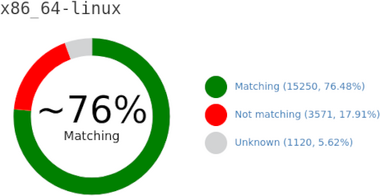



 A new release 0.4.13 of
  I have been Debian Stretch running on my
  Since joining Fujitsu I am permanently running a VM (kvm/qemu) with Windows 10 (unfortunately necessary). While the usaged disk space is about 50G, the actual qcow2 file had grown to over 180G, not good.
Searching the web the very promising
Since joining Fujitsu I am permanently running a VM (kvm/qemu) with Windows 10 (unfortunately necessary). While the usaged disk space is about 50G, the actual qcow2 file had grown to over 180G, not good.
Searching the web the very promising