Search Results: "rra"

16 December 2011

Patrick Schoenfeld: Why Gnome3 sucks (for me)

When I started using Linux, I started with a desktop environment (KDE) and then tried a lot of (standalone) window managers, including but not limited to Enlightenment, Blackbox, Fluxbox and Sawfish. But I was never really satisfied as it felt as if something was missing.
It then came, that I became a user of a desktop environment again. Now I have been a GNOME user for at least five years.

Among the users of desktop environments, I'm probably not a typical user. In 2009 my setup drifted from a more or less standard GNOME 2.3 to a combination of GNOME and a tiling window manager, which I called Gnomad, as a logical continuation of something I've done for a long time since using computers: Simplifying tasks, which are not my main business.
I just didn't want to care about the hundred techniques to auto mount an USB stick or similar tasks, which are handed just fine by a common Desktop Environment. And I didn't want to care about arranging windows, because after all the arrangement of my windows was always more or less the same.

But there were rumors that GNOME3 significantly changed the user experience and I wanted to give it a try at some point in the future. This try was forced by latest updates in Debian unstable, so I tested it for some days.

Day 1: Getting to know each other
My first day was GNOME3 was a non-working-day. When I'm at home I'm mostly using my computer for some chatting and surfing in the web, so I don't have great demands on the
Window manager/Desktop Environment.
Accordingly the very first experience with GNOME3 was mostly a good one, except some minor issues.
The first thing to notice in a positive way, is the activities screen. I guess this one is inspired by Mac Expos , but its nevertheless a nice thing, as it provides an overview over opened applications.
Apart from that, its possible to launch applications from there. The classical application menu is gone, but this one is better. One can either choose with the mouse or start typing the applications name and it will incrementally search for it and show it immediately. Hitting Enter is enough to launch the application.
Additionally, on the left, there is a launcher for your favorite applications.

This one lead to the first question mark above my head.

I had opened a terminal via this launcher and now wanted to open another terminal, after I switched to a different workspace.
So I just clicked it again and had to notice that GNOME developers and I have a different perception, of whats intuitive, because that click
led me back to the terminal on the first workspace. It took me some minutes to realize how I'm able to start a second terminal, by just right clicking on the icon and click on Open new window or similar.

Day 2: Doing productive work
The next day was a work day and I was on a customer appointment to do support/maintenance tasks. On this appointments my notebook is not my primary work machine and so I could softly go over to using GNOME3 when doing productive work.
I can say that it worked, although I soon started to miss some keystrokes which I'm used to. Like switching workspaces with Meta4+Number or at least switch workspaces by cycling through them with STRG+Alt+Left and Right Arrow Keys. While the first is a shortcut specific to my GNOmad setup, the latter is something I knew back from the good old Gnome2 days.
It just vanished from the default keybindings and did nothing. Appearently, as I learned afterwards, it has been decided to use the Up/Down arrow keys instead.

While for new users this will not be a problem at all, this is really hard for someone using GNOME for about 5 years as these are keystrokes one is really used to.

Day 3: Going mulithead

The appointment ended on the third day at afternoon, so when I came back into the office, I had the chance to test the whole thing in my usual work environment. At office I have my notebook attached to a docking station which has a monitor attached to it. So usually I work in dual head mode, with my primary work screen being the bigger external screen.

That was the point, where GNOME3 became painful.

At first everything was fine. GNOME3 detected the second monitor and made it available for use with the correct resolution. But things started to become ugly, when I actually wanted to work with it. GNOME3 decided that the internal screen is the primary screen, so the panel (or what has stood around from it) was on that screen. I can live with that, as thats basically the same with GNOME2, but the question was: How to start an application in a way that its started on the big screen?
I knew that I couldn't just use the keystrokes I'm used to, like Meta4+p, which were bound to launching dmenu in my GNOmad setup, as I knew that I was not running GNOmad at present. So I thought hard and remembered that GNOME had a run dialog itself, bound to Alt+F2. Relieved I noticed, that this shortcut had not gone away. I typed 'chromium' and waited. A message appeared telling me that the file was not found. Okay. No, wait. What? I did not uninstall it, so I guess it should be there.
I tried several other applications and all were told not to be available. Most likely this is a bug and bugs happen but this was really serious for me.

Another approach was to use the activity screen. At first I used it manually, by moving the mouse to there, launch chromium (surprise, surprise, it was still there) and moved it to the right screen, because I haven't found a shorter way to do that. There must be a better way to that, I thought and so I googled. Actually there are more then one better way to do it.

  1. There is a hidden hot spot in the corner of the second screen, too. If one finds and moves the mouse over it, the activity screen will open on the primary monitor and on the secondary monitor, but the application list is only one the first. One can now type what he wants to start, hit Enter and Tada its on the screen where my mouse is. Not very intuitive, in my opinion, and I really would prefer if I had the same level of choice on the second screen.
  2. I can hit Meta4 and its opening the activitiy screen. From there everything is the same as described above.

There were many other small quirks that disturbed me, like that the desktop has vanished away (I used it seldom, but it was irritating that it wasn't there anymore), shortcuts I were missing and so on. lot of this is really specific to me being used to my previous setup, but I can't help myself but I really need those little helpers.

So, at some point I decided to go back to GNOmad again, knowing that I will run into the next problem again, because I would have to permanently disable the new gnome3 mode and instead launch GNOME in the fallback mode. Luckily that is as easy as typing the following in a terminal

gsettings set org.gnome.desktop.session session-name 'gnome-fallback'

I quickly got this working again, but had to notice another cruel thing in GNOME3, that even disturbed my GNOmad experience. GNOME3 now binds to Meta4+p to a function, which switches internal/extern monitor setting, and now that is a real PITA.

From this point on another journey began, that eventually ended in switch to a Gnome/Awesome setup but this is a different story for a different time.

14 December 2011

Patrick Schoenfeld: Struggling with Advanced Format during a LVM to RAID migration

Recently I decided to invest in another harddisk for my atom system. That system, I built up almost two years ago, has become the central system in my home network, serving as a fileserver to host my personal data, some git repositories etc., streaming server and since I switched to a cable internet connection it also serves as a router/firewall.Originally, I bought that disk to backup some data, of the systems in the network, but I realized that all data on this system were hosted on a single 320GB 2,5" disk and it became clear to me, that, in absense of a proper backup strategy, I at least should provide some redundancy. So I decided, once the disk was in place, that the whole system should move to a RAID1 over the two disks. Basically this is not that hard as it may seem at a first glance, but I had some problems due to a new sector size in some recent harddisks, which is called Advanced Format. But lets begin from the start. The basic idea of such a migration is:
  1. Install mdadm with apt-get. Make sure to answer 'all' to the question which devices need to be activated in order to boot the system.

  2. Partition the new disk (almost) identical.Because the new drive is somewhat bigger that wouldn't make sense, but at least the two partitions which should be mirrored on the second disk, need to be identical.Usually this is achieved easily by using
    sfdisk -d /dev/sda sfdisk /dev/second/sdb
    In this case, it wasn't that easy. But I will come to that in a minute.

  3. Change the type of the partitions to 'FD' (Linux RAID autodetect) with fdisk

  4. Erase evidence of an eventual old RAID from the partitions, which is probably pointless on a brand-new disk, but we want to be sure:
    mdadm --zero-superblock /dev/sdb1mdadm --zero-superblock /dev/sdb2
  5. Create two DEGRADED raid1 arrays from the partitions:
    mdadm --create /dev/md0 --level=1 --raid-devices=2 /dev/sdb1 missingmdadm --create /dev/md1 --level=1 --raid-devices=2 /dev/sdb2 missing
  6. Create filesystem on the first raid device, which will become /boot.

  7. Mount that filesystem somewhere temporary and move the contents of /boot to it:
    mount /dev/md0 /mnt/somewhere
  8. Unmount /boot, edit fstab to mount /boot from /dev/md0 and re-mount /boot (from md0)

  9. Create mdadm configuration with mdadm and append it to /etc/mdadm/mdadm.conf:
    mdadm --examine --scan >> /etc/mdadm/mdadm.conf
  10. Update the initramfs and grub (no manual modification needed with grub2 on my system)and install grub into the MBR of the second disk.
    update-initramfs -uupdate-grubgrub-install /dev/sdb
  11. The first point to pray: Reboot the system to verify it can boot from the new /boot.

  12. Create a physical volume on /dev/md1:
    pvcreate /dev/md1
  13. Extend the volume group to contain that device:
    vgextend <volgroup_name> /dev/md1</volgroup_name>
  14. Move the whole volume group physically from the first disk to the degraded RAID:
    vgmove <volgroup_name> /dev/md1</volgroup_name>
    (Wait for it to complete... takes some time ;)

  15. Reduce first disk from the VG:
    vgreduce <volgroup_name> /dev/sda2</volgroup_name>
  16. Prepare it for addition to the RAID (see step 3 and 4) and add it:
    mdadm --add /dev/md0 /dev/sda1mdadm --add /dev/md1 /dev/sda2
  17. Hooray! Watch into /proc/mdstat. You should see that the RAID is recovering.

  18. When recovery is finished pray another time and hope that system is still booting with it running from the RAID entirely. If it does: Finished :-)
Now to the problem with the advanced format:There is some action taking place with the hardware vendors to move to a new sector size. Physically my new device has a size of 4096 bytes per sector. Somewhat different to the 512 bytes disks used to have the last decade. Logically it still has 512 bytes per sector. As far as I understand this is achieved by placing 8 logical sectors into one physical sector, so when partitioning a new disk the alignment of the disk has to be so that partitions start in a sector which is a multiple of 8. That, obviously, wasn't the case with the old partitioning on my first disk. So I had to manually create partitions by specifying start points manually and making sure they are dividable by 8.Otherwise fdisk would complain about the layout on the disk.This does not work with cfdisk, because it does not accept manual alignment parameters and unfortunately the partitions it creates do have a wrong alignment. So good old fdisk and some calculations how many sectors are needed and where to start, to the rescue. So the layout is now:

Device Boot Start End Blocks Id System
/dev/sdb1 2048 291154 144553+ fd Linux raid autodetect
/dev/sdb2 291160 625139334 312424087+ fd Linux raid autodetect

11 December 2011

Stefano Zacchiroli: bits from the DPL for November 2011

Mako's IronBlogger is a great idea. I often find myself postponing blog posts for a very long time, simply out of laziness. IronBlogger provides a nice community incentive to counter (my) laziness and blogging more often. As a related challenge, we have to face the fact that different subsets of our communities use different media to stay informed: mailing lists, blog (aggregators), social media, IRC, etc. Disparities in how they stay informed are a pity and can be countered using multiple medias at a time. Although I haven't blogged very often as of lately, I managed to keep the Debian (Developer) community informed of what happens in "DPL land" on a monthly basis, by the means of bits from the DPL mails sent to d-d-a. While the target of bits mails perfectly fits d-d-a, there is no reason to exclude a broader public from them. After all, who knows, maybe we'll find the next DPL victim^W candidate among Planet readers! Bonus point: blogging this also helped me realize that my mails are not as markdown-clean as I thought they were. I still have no IronBlogger squad, though. (And sharing beers with folks in the Boston area is not terribly handy for me ). Anyone interested in setting up a BloggeurDeFer in the Paris area? (SCNR)
Dear Project Members,
another month has passed, it's time to bother you again about what has happened in DPL land in November (this time, with even less delay than the last one, ah!). Call for Help: press/publicity team I'd like to highlight the call for help by the press / publicity teams. They are "hiring" and have sent out a call for new members a couple of weeks ago. The work they do is amazing and is very important for Debian, as important as maintaining packages or fixing RC bugs during a freeze. It is only by letting the world know what Debian is and what we do, that we can keep the Project thriving. And letting the world know is exactly what the publicity and press teams do. If you're into writing, blogging, or simply have a crush for social media, please read the call and "apply"! Interviews November has apparently been the "let's interview the DPL" month. I've spent quite some time giving interviews to interested journalists about various topics. For both my embarrassment and transparency on what I've said on behalf of Debian, here are the relevant links: Assets Legal advice (work in progress) Relationships with others Miscellanea Thanks for reading thus far,
and happy hacking.
PS as usual, the boring day-to-day activity log is available at master:/srv/leader/news/bits-from-the-DPL.*

8 December 2011

Craig Sanders: How to set the application icon for chromium

This has been a minor annoyance for the last few months, and I've finally figured out how to fix it: Sometime within the last few months, an upgrade prevented Chromium from finding its application icon with the result that when minimised (or displayed in the panel window list or Alt-Tab) it used the default application icon. It looks to me as if the problem is that Chromium is now looking for chromium-browser.svg but chromium.svg is what's on my debian system. To restore, all you need to do is:
$ mkdir -p ~/.local/share/icons/hicolor/scalable/apps
$ cd ~/.local/share/icons/hicolor/scalable/apps
$ ln -s /usr/share/icons/hicolor/scalable/apps/chromium.svg chromium-browser.svg
great, done. Now my chromium windows don't look the same as my mrxvt windows in Alt-Tab, they're quite clearly Chromium windows. The icon now looks like this: rather than an icon i'd insert here if i knew what its filename is it looks like a white window with a blue title bar and a thinner blue bar at the bottom (about half the height/thickness of the "title bar") I've spent half an hour searching for it and have given up anyone know what it is? alternatively, use cp rather than ln just in case some future upgrade removes or renames the chromium.svg file How to set the application icon for chromium is a post from: Errata

6 December 2011

Joachim Breitner: Guest lecture on Haskell performance

Today, I had some business in Bonn, so Janis Voigtl nder invited me to hold a guest lecture in his advanced functional programming course, maybe telling the students more about real world use of Haskell, given that he teaches mostly the theoretical foundations. I chose to discuss an experience I made while implementing SAT-Britney, namely that for the sake of good runtime and memory performance, it may be neither ideal to evaluate a list fully lazily, nor fully strict, but to have something in between. For the talk, I demonstrated this by a small example, showed how to use the GHCi debugger to get some insight in the evaluation order of things, how to benchmark the program and read the ghc statistics and a profiling chart, and finally how to get the most out of GHC s List Fusion. I wanted to also touch on QuickCheck, but skipped it to finish in time. The full text of my talk (including graphs) is available, but in German; if you want an English version convince your prof to invite me for a guest lecture as well. Afterwards I sat down with one of the students of the course, Helmut Grohne, who happened to take part in the Debian bug squashing party last weekend and had filed a release critical bug against the Haskell grammar generator frown (no better link available, homepage seems to be down) to debug the problem. It quickly became clear that the bug was introduced by me (can you spot it?) when trying to make it compile with a modern GHC slightly embarrassing for me.
Flattr this post

John Goerzen: Snapshots of Life

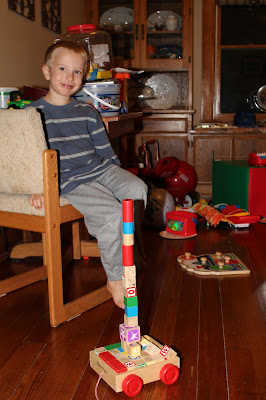
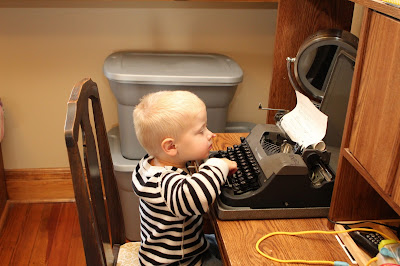
It s been busy lately, and I haven t had the time to blog. With the change in job, various travel, and settling into a new routine, I ve not done as much writing of late. But life marches on, and before memories grow too fleeting, I think I should share a few. We recently changed the arrangements for the boys. Instead of them each having their own room in which they sleep and sometimes play, we purchased a bunk bed. Oliver graduated from his crib to the lower bunk, and Jacob has the higher bunk. This has, predictably, created a few opportunities for behavior issues. Overall, it s going well, and they appreciate their new, more open, play room. Both boys sleep with their stuffed animals. Jacob calls his my friends . He still likes his butterfly, which he has had since he was an infant. He sometimes talks about how much he loves his friends, and how they like to get hugs, and how they are happy. Jacob continues to enjoy reading. He has a toy low-res camera and he even recorded a video of himself reading Brown Bear, Brown Bear. Oliver s vocabulary is coming alive and is fun to watch. Jacob has taken to trying to teach Oliver how to say things. One day, Jacob saw a number like 451 on the side of a train, producing a conversation like this: Oliver, can you say four hundred and fifty-one? Four dred iffy on! You got it!!! YAY! Today as I was walking past Oliver s train track on the floor, he grabbed me by the hand, had me sit down, and kept holding on to make sure I d stay right where he wanted me as he pointed and talked all about his trains. Aww. One cold and windy Saturday morning, the boys were getting restless. What to do, we thought? I decided to bring out one of the manual typewriters from my collection. Oliver loved watching it do things as he pressed buttons. Jacob enjoyed spelling mom . New problem: boys fighting over how long each one s turn at the typewriter is. This has gone on for a month now. Ahh, winter. A few weeks ago, Jacob informed us that he built an antenna out of blocks. He was REALLY proud of it, and even, incredibly, insisted I take his picture with it! I m pleased to have a 5-year-old that calls this structure an antenna instead of a skyscraper or tower or some such thing ;-) We took a train trip to Portland, OR, recently. That s about 2.5 days on the train each way. It went pretty well we had quite a bit of excitement though it got a little long for the boys at times. One evening, Jacob excitedly noted that the sky was almost really dark blue, just like my song! Wow. That was a song he made up in New York in summer 2010. Jacob enjoyed collecting leaves as we walked around in Portland. He would then stash his pile of leaves outside the door of whatever building we d enter, then hope to find them still there when we got back out. It usually worked out OK for him.

3 December 2011

Patrick Schoenfeld: Let me introduce DPKG::Log and dpkg-report

We have customers, which require a report about what we've done during maintenance windows. Usually this includes a report about upgrades, newly installed packages etc. and obviously everything we've done apart from that.
Till now we've prepared them manually. For a greater bunch of systems this is a big PITA, because to be somehow useful you have to collect the data for all systems and after that, prepare a report where you have:

Its also error-prone because humans make mistakes.

Perl to the rescue!
At least the part about generating a report about installed/upgraded/removed packages could be automated, because dpkg writes a well-formed logfile in /var/log/dpkg.log. But I noticed that there appearently is no library specialised at parsing that file. Its not a big deal, because the format of that file is really simple, but a proper library would be nice anyway.
And so I wrote such a library.
It basically takes a logfile, reads it line by line and stores each line parameterized into a generic object.

Its features include:

Based on that, I wrote another library DPKG::Log::Analyse, which takes a log, parses it with DPKG::Log and then extracts the more relevant information such as installed packages, upgraded packages, removed packages etc.

This, in turn, features:
- Info about newly installed packages
- Info about removed packages
- Info about upgraded packages
- Info about packages which got installed and removed again
- Info about packages which stayed halfinstalled or halfconfigured at the end of the logfile (or defined reporting period)


These libraries are already uploaded to CPAN and packaged for Debian.
They passed the NEW queue very quickly and are therefore available for Sid:

http://packages.debian.org/sid/libdpkg-log-perl

As an example use (and for my own use case, as stated above), I wrote dpkg-report, which uses the module and a Template::Toolkit based template to generate a report about what happened in the given logfile.
It currently misses some documentation, but it works somehow like this:

Report for a single host over the full log:
dpkg-report

Report for a single host for the last two days:
dpkg-report --last-two-days

Report for multiple hosts (and logfiles):
The script expects that each log file has the name <systemname>.dpkg.log so that it can guess the hostname from the system and can grab all such log files from a directory if a directory is specified as log-file arguments:</systemname>

dpkg-report --log-file /path/to/logs

This will generate a report about all systems without any merging.

Report for multiple hosts with merging:
dpkg-report --log-file /path/to/logs --merge

This will do the following:
A (fictive) report could look some what like this:

dpkg-Report for all:
------------------------
Newly Installed:
abc
Removed:
foo
Upgraded:
bar (0.99-12 - 1.00-1)
dpkg-Report for test*:
------------------------
Newly Installed:
blub
dpkg-Report for test1:
------------------------
Upgraded:
baz (1.0.0-1 -> 1.0.0-2)
dpkg-Report for test2:
------------------------
Upgraded:
zab (0.9.7 -> 0.9.8)

Currently this report generator is only included in the source package or in the git(hub) repository of the library. I wonder if it makes sense to let the source package build another binary package for it.
But its only a 238 lines perl script with a dependency on the perl library so I'm unsure if it warrants a new binary package. What do others think?

28 November 2011

Craig Sanders: one of the reasons i like zfs

I got home from work tonight and zfs had reported that one of the disks in my main pool was dying. no great problem. insert a disk i had spare, and run zpool replace like so:
ganesh:~# zpool replace -f export  scsi-SATA_WDC_WD10EARS-00_WD-WMAV50933036 scsi-SATA_ST31000528AS_9VP16X03
and now it s just a matter of waiting until the data has resilvered and i can remove the old dying drive.
ganesh:~# zpool status export -v
  pool: export
 state: ONLINE
status: One or more devices is currently being resilvered.  The pool will
        continue to function, possibly in a degraded state.
action: Wait for the resilver to complete.
 scan: resilver in progress since Mon Nov 28 19:25:49 2011
    75.1G scanned out of 2.29T at 88.3M/s, 7h17m to go
    18.0G resilvered, 3.21% done
config:
        NAME                                                   STATE     READ WRITE CKSUM
        export                                                 ONLINE       0     0     0
          raidz1-0                                             ONLINE       0     0     0
            scsi-SATA_WDC_WD10EACS-00_WD-WCASJ2114122          ONLINE       0     0     0
            scsi-SATA_WDC_WD10EACS-00_WD-WCASJ2195141          ONLINE       0     0     0
            scsi-SATA_WDC_WD10EARS-00_WD-WMAV50817803          ONLINE       0     0     0
            replacing-3                                        ONLINE       0     0     0
              scsi-SATA_WDC_WD10EARS-00_WD-WMAV50933036        ONLINE       0     0     0
              scsi-SATA_ST31000528AS_9VP16X03                  ONLINE       0     0     0  (resilvering)
        logs
          scsi-SATA_Patriot_Torqx_278BF0715010800025492-part6  ONLINE       0     0     0
        cache
          scsi-SATA_Patriot_Torqx_278BF0715010800025492-part7  ONLINE       0     0     0
errors: No known data errors
(I use /dev/disk/by-id device names so I don t have to care about the kernel detecting the disks and disk controllers in a different order on each reboot also makes it easier to identify which disk is having a problem as I can squint at the front of the drives in my Lian Li 4-in-3 hotswap bays and read the serial number sticker) OK, yeah, sure it s not that much different from replacing a dying drive in an mdadm or hardware raid array but one nice advantage of zfs over raid is that it only resyncs the data in use, not the empty or unused blocks. given that these are 1TB drives in a raidz vdev, and the pool is 63% used that means syncing only about 630GB rather than 1TB. ps: in the time it s taken to write this, it s up to 10.11% done. 88MB/s reading data from the existing raidz drives and writing to a single drive isn t too bad at all. one of the reasons i like zfs is a post from: Errata

27 November 2011

Craig Sanders: problems with Linux and Aten CS1784A KVM switch

Dear lazyweb, I bought an Aten CS1784A DVI+USB KVM switch a couple of months ago. I m pretty happy with it except for one annoying problem. It has a Dell multimedia USB keyboard plugged into it (picked it up from a swap meet for $15 nice. it's a pretty good keyboard in its own right but i mostly bought it to match what I use at work), and a Logitech MX518 mouse connected. Also two computers one runs Linux only. The other is switched off most of the time, but is occasionally powered up to boot into either Linux to experiment with stuff i don't want to do on my main system (like gnome 3) or sometimes Win7 to play games. OK, that s the background data. Here s the problem Whenever I reboot either of the Linux installations, the KVM stops recognising the keyboard. I have to unplug the keyboard and plug it back in before any input is recognised. Keyboard input doesn't get through to the currently active system, and I can't even use the KVM's magic key <ScrlLock><ScrlLock>n<Enter> to switch between systems it doesn't even beep after the 2nd ScrlLock as it should, so it seems as if all keyboard input is ignored by the KVM, or the keyboard is totally confused and not sending anything. The mouse continues to work during this. Rebooting Win7 doesn't do this. The keyboard just works as it should. The problem occurs sometime between the time Linux is selected from the Grub2 menu and the gdm login screen is displayed (same result with both gdm on my main system and gdm3 on my secondary system). The keyboard works when plugged directly into either system, without the KVM. I d been using it for several months before I got the KVM, and I ve tested that it still works correctly across a reboot if i plug it in directly. Googling for "+linux +CS1784A" just gives me hundreds of pages from web sites selling the KVM, but no useful info. Anyone seen anything like this before? Can anyone think of anything that linux might be doing in it's console or X initialisation that would confuse the KVM? it's not a huge problem because I really don't reboot all that often more of an annoyance that I'd like to go away. problems with Linux and Aten CS1784A KVM switch is a post from: Errata

Craig Sanders: some more reasons to hate gnome shell

  1. Non-resizable configuration windows. I have a 1920 1200 screen but the window manager provides no way to resize windows like the System Settings window. Result is that the window is quite small and, worse, has a scroll bar for no good reason when another hundred or so vertical pixels would easily display everything. Even another 30 or so horizontal pixels would allow more icons per line under Hardware, reducing the number of lines, and again allowing the entire list of available settings to be displayed without a scroll bar. Instead, to see all of the options I have to scroll down. And these people call themselves user-interface and usability experts. It's not up to the gnome developers to decide that I never need to resize certain windows or certain kinds of windows. It's up to me to decide that. They're not at my desktop, using my screen. I am.
  2. No way to disable a shell extenstion from the command line. I installed the gnome-shell-extensions package and was trying out various extensions to see if they made gnome shell tolerable. Enabling one of them (i forget exactly which one), immediately displayed some "Oh no! Something has gone wrong. A problem has occured and the system can't recover. Please log out and try again." leaving me no option but to log out. An absolutely fucking useless error message. "Something" has gone wrong. A little fucking detail might help me to diagnose the problem and fix it. Like a trace of whatever the fuck it was doing when "Something went wrong". When i logged back in, it crashed again, with the same useless error screen. So, now I can't even log in to Gnome Shell. I've tried logging in to Fallback mode, but the Extensions tab is empty in gnome-tweak-tool (because, of course, nobody would want to configure Shell Extensions from fallback mode, would they?). I can't even find any way of listing which shell extensions are enabled, let alone disable one of them. Hell, I'd settle for disabling all of them, and then carefully re-enabling them one-by-one until I rediscovered the culprit.
  3. Oh, wait. I finally found /org/gnome/shell/enabled-extensions in dconf-editor. it's a text field with an array of items. so far, so good. The "editor" (and i use that term very loosely) for text fields is garbage. It can't even wrap lines so that it displays the whole field without a horizontal scroll bar probably my all-time least favourite user-interface element. Have gnome devs never heard of multi-line text-edit fields? Rather than fuck around with a crappy GUI editor, it's far easier to:
    $ dconf read /org/gnome/shell/enabled-extensions > /tmp/extensions
    $ vi /tmp/extensions
    $ dconf write /org/gnome/shell/enabled-extensions "$(cat /tmp/extensions)"
    
    I guess now it's time to log out from fallback mode to find out if I can log back in to Gnome Shell again. [ nope. didn't work ]
  4. Add non-resizable user-interface elements to item 1. above. So far, Gnome devs are doing a great job of regressing to the crap usability of the Windows GUI here s a useful rule of thumb for things like that: Every single window, every single user-interface element should be resizable and tweakable by the user. And the system should remember all user changes so that they don t have to waste a few minutes every time they run an app resizing things to suit their requirements. Gnome 2 mostly had that. Gnome 3 seems to have lost a large part of it along the way Second rule of thumb: If the user happens to replace their monitor or run it in a mode too small for the current settings, then they should revert to some sane default. Even better, it should remember the settings for each resolution choosing either sane defaults or the user s settings for the nearest similar resolution if the user hasn t created custom settings for that resolution yet.
  5. Lack of documentation. here's a good example:
    $ gnome-shell-extension-tool help
    Usage: gnome-shell-extension-tool [options]
    $ man gnome-shell-extension-tool
    No manual entry for gnome-shell-extension-tool
    See 'man 7 undocumented' for help when manual pages are not available.
    What more needs to be said? At least /usr/bin/dconf has built-in help. Which is great, since it doesn't have a man page either.
Update: About three hours of stuffing around later, and I ve finally got Gnome Shell running again. I have NFI what actually fixed it, it could have any one of the dozens of settings I fucked around with. Nor do i have any idea what the actual problem was. And after all that, the extensions I tried still don t make Gnome Shell tolerable. They make it less *intolerable* (bottom-panel extension in particular), but that s still a long way from being tolerable i m really trying hard to find some way to come to terms with Gnome 3. I ve been trying for months now. But every time I give it another trial, I just end up hating it even more I m glad I have more than one desktop machine to use, so i can experiment with odious shit like Gnome Shell without fucking up my main working environment. So it s back to my main desktop machine and gnome2. Eventually I ll have to upgrade that, but xfce4 is looking to be my best option. I already switched to xfce4 on my desktop machine at work last week, and it s pretty good certainly far better than the Gnome 3 fallback mode i ve been using there for the last 5 or 6 months. Thanks, Gnome devs you re making a fantastic advertisement for XFCE. I wouldn t have bothered trying it again if I hadn t been forced to. ps: before anyone says wait for Gnome 3.2, it s much better . Todays waste of time *was* using Gnome 3.2 some more reasons to hate gnome shell is a post from: Errata

25 November 2011

Bernhard R. Link: checking buildd logs for common issues

Being tired of feeling embarrassed when noticing some warning in a buildd log only after having it uploaded and looking at the buildd logs of the other architectures, I've decided to write some little infrastructure to scan buildd logs for things that can be found in buildd logs. The result can be visited at https://buildd.debian.org/~brlink/. Note that it currently only has one real check (looking for E: Package builds NAME_all.deb when binary-indep target is not called.) yet and additionally two little warnings (dh_clean -k and dh_installmanpages deprecation output) which lintian could at catch just as well. The large size of the many logs to scan is a surprisingly small problem. (As some tests indicated it would only take a couple of minutes for a full scan, I couldn't help to run one full scan, only to learn afterwards that wb-team was doing the import of the new architectures at that time. Oops!) More surprising for me using small files to keep track of logs already scanned does not scale at all with the large number of source packages. File system overhead is gigantic and it makes the whole process needlessly IO bound. That problem was be easily solved using sqlite to track things done, though as buildd.debian.org doesn't have that installed yet, so no automatic updates yet. [Update: already installed, will be some semi-automatic days first, though anyway] The next thing to do is writing more checks, where I hope for some help from you: What kind of diagnostics do you know from buildd logs that you would like to be more prominently visible (hopefully soon on packages.qa.debian.org, wishlist item already filed)? Trivial target is everything that can be identified from regular expression applied to every line of the buildd log. For such cases the most complicated part is writing a short description of what this message means. (So if you sent me some suggestions, I'd be very happy to also get a short text suitable for that, together with the message to looks for and ideally some example package having that message in its buildd log). I'm also considering some more complicated tests. I'd really like to have something to test for packages being built multiple times to due Makefile errors and stuff like that.

21 November 2011

Craig Small: New procps 3.3.0 for Debian

Coming soon after the upstream procps 3.3.0 being released, the debian packages have been uploaded tonight. The Debian packages have had the added benefit of being a day late by having a tiny 2 line patch to stop pgrep from crashing. One regression that is on purpose, watch is currently not 8-bit clean again until I can sort out how to get the linking right with the new build process. Testing Systems The embarrassing problem with pgrep did start a discussion about testing, especially regression testing. I ve recently started using unit testing in my python programs and love the level of assurance those tests give me that I haven t broken anything (to a degree anyhow). I d really like to be able to type make test and have each of the programs run through a series of tests. The problem with packages like procps (psmisc too) is that you really need to test the entire program, not just a stub, and that the program needs access to a know level of /proc. The only thing I have seen that is even remotely what is needed is the bunch of scripts that coreutils uses which creates dummy files and directories to operate the commands on. I expect we could do something similar with some scripts that create a known process but if anyone has a better idea about how to test a command line program let me know.

Petter Reinholdtsen: Automatically upgrading server firmware on Dell PowerEdge

At work we have heaps of servers. I believe the total count is around 1000 at the moment. To be able to get help from the vendors when something go wrong, we want to keep the firmware on the servers up to date. If the firmware isn't the latest and greatest, the vendors typically refuse to start debugging any problems until the firmware is upgraded. So before every reboot, we want to upgrade the firmware, and we would really like everyone handling servers at the university to do this themselves when they plan to reboot a machine. For that to happen we at the unix server admin group need to provide the tools to do so. To make firmware upgrading easier, I am working on a script to fetch and install the latest firmware for the servers we got. Most of our hardware are from Dell and HP, so I have focused on these servers so far. This blog post is about the Dell part. On the Dell FTP site I was lucky enough to find an XML file with firmware information for all 11th generation servers, listing which firmware should be used on a given model and where on the FTP site I can find it. Using a simple perl XML parser I can then download the shell scripts Dell provides to do firmware upgrades from within Linux and reboot when all the firmware is primed and ready to be activated on the first reboot. This is the Dell related fragment of the perl code I am working on. Are there anyone working on similar tools for firmware upgrading all servers at a site? Please get in touch and lets share resources.
#!/usr/bin/perl
use strict;
use warnings;
use File::Temp qw(tempdir);
BEGIN  
    # Install needed RHEL packages if missing
    my %rhelmodules = (
        'XML::Simple' => 'perl-XML-Simple',
        );
    for my $module (keys %rhelmodules)  
        eval "use $module;";
        if ($@)  
            my $pkg = $rhelmodules $module ;
            system("yum install -y $pkg");
            eval "use $module;";


my $errorsto = 'pere@hungry.com';
upgrade_dell();
exit 0;
sub run_firmware_script  
    my ($opts, $script) = @_;
    unless ($script)  
        print STDERR "fail: missing script name\n";
        exit 1
     
    print STDERR "Running $script\n\n";
    if (0 == system("sh $script $opts"))   # FIXME correct exit code handling
        print STDERR "success: firmware script ran succcessfully\n";
      else  
        print STDERR "fail: firmware script returned error\n";
     
 
sub run_firmware_scripts  
    my ($opts, @dirs) = @_;
    # Run firmware packages
    for my $dir (@dirs)  
        print STDERR "info: Running scripts in $dir\n";
        opendir(my $dh, $dir) or die "Unable to open directory $dir: $!";
        while (my $s = readdir $dh)  
            next if $s =~ m/^\.\.?/;
            run_firmware_script($opts, "$dir/$s");
         
        closedir $dh;
     
 
sub download  
    my $url = shift;
    print STDERR "info: Downloading $url\n";
    system("wget --quiet \"$url\"");
 
sub upgrade_dell  
    my @dirs;
    my $product =  dmidecode -s system-product-name ;
    chomp $product;
    if ($product =~ m/PowerEdge/)  
        # on RHEL, these pacakges are needed by the firwmare upgrade scripts
        system('yum install -y compat-libstdc++-33.i686 libstdc++.i686 libxml2.i686 procmail');
        my $tmpdir = tempdir(
            CLEANUP => 1
            );
        chdir($tmpdir);
        fetch_dell_fw('catalog/Catalog.xml.gz');
        system('gunzip Catalog.xml.gz');
        my @paths = fetch_dell_fw_list('Catalog.xml');
        # -q is quiet, disabling interactivity and reducing console output
        my $fwopts = "-q";
        if (@paths)  
            for my $url (@paths)  
                fetch_dell_fw($url);
             
            run_firmware_scripts($fwopts, $tmpdir);
          else  
            print STDERR "error: Unsupported Dell model '$product'.\n";
            print STDERR "error: Please report to $errorsto.\n";
         
        chdir('/');
      else  
        print STDERR "error: Unsupported Dell model '$product'.\n";
        print STDERR "error: Please report to $errorsto.\n";
     
 
sub fetch_dell_fw  
    my $path = shift;
    my $url = "ftp://ftp.us.dell.com/$path";
    download($url);
 
# Using ftp://ftp.us.dell.com/catalog/Catalog.xml.gz, figure out which
# firmware packages to download from Dell.  Only work for Linux
# machines and 11th generation Dell servers.
sub fetch_dell_fw_list  
    my $filename = shift;
    my $product =  dmidecode -s system-product-name ;
    chomp $product;
    my ($mybrand, $mymodel) = split(/\s+/, $product);
    print STDERR "Finding firmware bundles for $mybrand $mymodel\n";
    my $xml = XMLin($filename);
    my @paths;
    for my $bundle (@ $xml-> SoftwareBundle )  
        my $brand = $bundle-> TargetSystems -> Brand -> Display -> content ;
        my $model = $bundle-> TargetSystems -> Brand -> Model -> Display -> content ;
        my $oscode;
        if ("ARRAY" eq ref $bundle-> TargetOSes -> OperatingSystem )  
            $oscode = $bundle-> TargetOSes -> OperatingSystem [0]-> osCode ;
          else  
            $oscode = $bundle-> TargetOSes -> OperatingSystem -> osCode ;
         
        if ($mybrand eq $brand && $mymodel eq $model && "LIN" eq $oscode)
         
            @paths = map   $_-> path    @ $bundle-> Contents -> Package ;
         
     
    for my $component (@ $xml-> SoftwareComponent )  
        my $componenttype = $component-> ComponentType -> value ;
        # Drop application packages, only firmware and BIOS
        next if 'APAC' eq $componenttype;
        my $cpath = $component-> path ;
        for my $path (@paths)  
            if ($cpath =~ m%/$path$%)  
                push(@paths, $cpath);


    return @paths;
 
The code is only tested on RedHat Enterprise Linux, but I suspect it could work on other platforms with some tweaking. Anyone know a index like Catalog.xml is available from HP for HP servers? At the moment I maintain a similar list manually and it is quickly getting outdated.

20 November 2011

Gregor Herrmann: RC bugs 2011/46

as expected this week was characterised by fixing bugs around the perl 5.14 transition. besides that I've also uploaded a couple of NMUs with patches kindly provided in the BTS by some tireless bug fixers.

17 November 2011

Russell Coker: Cruises

It seems that in theory cruises can make for quite economical vacations. The cheapest prices tend to be around $100 per person per night for an inside cabin (IE no window) with two people (there is a significant extra fee for having a cabin with only one person). If you book a room in a half-decent hotel with a pool in some moderately desirable place then you will probably pay about $200 per night which might get you free breakfast but won t include lunch or dinner. Cruises include all the free food you can eat for at least 16 hours of the day with maybe an extra fee for getting food in the middle of the night. When a cruise ship stops at the port you can pay for an expensive shore trip arranged by the cruise company or have a cheap trip that involves walking on the beach or taking a taxi to somewhere local. Of course there are lots of extras that can make a cruise really expensive, but if you don t plan to eat at speciality restaurants or drink much alcohol then that shouldn t be a problem. I ve just booked a short luxury cruise, mostly as a trial of the cruise concept. The process of doing so was difficult enough that even if I hadn t previously needed a holiday then I d probably need one now. It would be interesting to compare the amount of time that a reasonable person would be likely to spend choosing a holiday and purchasing it for the different types of holiday, I expect that cruising would be a long way behind everything that involves flying to a foreign city and staying in a hotel. The Issues of Booking When booking a regular holiday you choose where to visit, then choose the time of year, the accommodation, and travel. While the order can vary it s generally a sequential process without too many variables at any stage. With a cruise one of the first decisions is to choose the cruise line, different lines cater to various market segments it s clear what Disney cruises aim for but often not so clear for others. Apart from Disney the other cruise lines don t seem to make clear statements about who they are and aren t targeting. Then there are a variety of ships run by each cruise line which in many cases offer different features, do you want 1 pool or 4? Do you want ice skating? The cruise lines that I have investigated don t offer clear comparisons of their ships. As a cruise ship is essentially a hotel, a collection of restaurants, and some other entertainment you can t just arbitrarily choose one the way you might choose a random hotel with a suitable price and rating. Now while you can choose a hotel and generally get a room when you want a cruise booking has to be made when the ship is in a convenient port. So your holiday needs to be scheduled around the availability of the ship. CruiseCritic.com is an excellent source of information on cruises and has a very active and useful advice forum [1]. The forum appears to be dominated by retirees, presumably because retirees have time to just wait for a ship they like to visit their local port while people who have to schedule holidays around work projects etc. When booking a hotel I have found that Wotif.com is really good for comparing hotels and finding a reasonably cheap one and they also have periodic mail-outs about special deals. I have made a couple of short vacations based on Wotif offering me unusually good prices on a hotel in a place that I was mildly interested in visiting. There are also special deals on cruises, but it s a lot more difficult to take them. Firstly as cruises aren t as interchangeable as hotels it s not as appealing to take an offer of a cruise you didn t previously consider because it s going cheap. The second factor is that according to cruise reviews there is more variation among cabins than there is among hotel rooms. The design of the ship that is needed to cram everything in the available space means that some cabins apparently have noise pollution from various activities on the ship while others are considered to have problems for people prone to sea-sickness. Discounts probably only apply after people who pay non-discount rates have had a chance to book what might be considered the better cabins. Of course it could be a good thing to have most of the ship booked out, CruiseCritic.com has some reviews of individual cabins and presumably there are people who compare hundreds of cabins to discover what is ideal for them. The Problem with Princess I have booked a Princess cruise. I chose it because it was going cheap, but the first two travel agents that advertised it were unable to take my order because Princess only allows US based agencies (which means the discount agents on the net) to sell to US customers I don t think that the people who run the Princess cruise company know what the Internet is about. So I booked the cruise through the Princess web site, they took my money, told me that a good chunk of that money would never be returned if I cancelled, and then sent me to the web page for providing all the information that they need which is a lot. The big problem was when their web site absolutely demanded a passport number and said that I would not be allowed to board without one even though their FAQ (and common sense) indicated that a cruise which doesn t involve any international travel has no need of a passport. Taking someone s money and then telling them that they can t attend due to not having a valid passport is one way of making a future passenger very unhappy. I called the support people (which was Carnival) and had to listen to some really strange hold music it was difficult to determine if the music was produced by someone with unusual tastes in electronic music vastly different from my own preference or whether the computer which manages the phone calls was producing noise instead of music. Eventually I got through to an operator who was very helpful and stored my drivers license number which was adequate. While on the topic of their web site, when booking a cruise with Princess they list which types of cabin (interior, balcony, etc) are available and list the price for the cheapest category of cabin in each price. However if the cheapest category is all sold out then it will still list that cheapest price and thus be advertising a price that can t be booked. This is misleading and annoying. Further Hassle But the difficulty doesn t end here. On a cruise you have to book in advance for which dinner seating you desire which is usually only early or late but some ships offer anytime . Then if you happen to be travelling with people who are in a separate cabin and paying separately (which one would expect to be fairly common) there is no obvious way of synchronising dinner preferences the ship people might assign people to different tables. I admit that I haven t fully explored the post-booking part of the Princess web site, maybe I can arrange a shared table but for the moment my pain threshold for the cruise booking process has been exceeded. Other Cruising Stuff Insight Cruises (formerly Geek Cruises) offers a variety of educational cruises including science, astronomy, chess, art, history, and some other things [2]. From a casual inspection of their web site it seems that the cruise prices are around $300 per night for a 2 person cabin and the registration fees for the conferences are between $1200 and $1500. Most readers of my blog will consider this to be unreasonably expensive as registration for a Linux conference tends to be a lot less than $1000. But when compared to typical for-profit conferences $1500 isn t anywhere near the high end of the range. Also while someone who is choosing a cruise holiday can easily get a cruise that costs less than $200 per day for a 2 person cabin, for commercial conferences it s not uncommon to spend more than $300 per night for two people on accommodation and food. So the only noteworthy part about the cost is that accommodation will be quite expensive if you aren t sharing a room. If you want to run a conference on a cruise there are companies which specialise in such things, Landry and Kling is one company that specialises in planning corporate events [3]. They do seem to aim for the high end of the market, including chartering a small cruise ship or half a large cruise ship that means ~1000 passengers. While there are some conferences with more than 1000 delegates it seems that most conferences top out at about 500 delegates. However I know that some conferences have limited the number of delegates to the maximum capacity of the biggest lecture hall available as some cruise ships have a theater with more than 1000 seats it seems that similar conferences could potentially arrange a half ship charter. A half ship charter apparently allows exclusive access to one of the theaters (at least when it s not needed for evening entertainment) and exclusive seating at the main dining room. It s a standard feature that cruise ships have all the equipment you might need to run a conference. Autism on the Seas is a brand used by the Alumni Cruise company for their holiday packages for special needs children [4]. They sell cruise tickets at the regular list price and the commission that they receive when acting as a travel agency is enough to hire staff to look after the kids while presumably still running at a profit. It seems to me that a similar model could be used for a computer conference, make a profit on cruise ticket sales and then have no extra costs for the conference for people sharing a room that would be cheaper than most Linux conferences I ve attended. For smaller conferences and un-conferences there is no minimum reservation size. One down-side for a computer conference is the cost of Internet access, according to Wikipedia a personal installation of satellite net access costs $5 per megabyte and ship pricing for their Internet access is up around $30-$100 per hour per person! But in the old days when attending a conference meant a week of no net access we survived somehow. It also seems to me that if a company had a small development team it could be productive to put everyone on a cruise ship with a server for testing and version control. They could do 9 hour days on board and still have lots of time for relaxation as it s only a few minutes walk to the pool. Of course this wouldn t work if some members of the team wanted to stay home due to slow and expensive net access.

15 November 2011

Michael Casadevall: Secure Boot - its here and been here for quite awhile ...

There's been a lot of noise with Microsoft requiring Secure Boot for Windows 8 OEMs. For those of you unfamiliar with it, Secure Boot requires that the boot chain is signed, and this 'feature' must be enabled by default. Although I have been unable to find specific details, it appears that the chain of trust needs to extend from BIOS/UEFI all the way down to the kernel. Obviously, requiring a signed boot chain makes using FOSS platforms like Ubuntu or Debian an impossibility short of having the UEFI Platform Key and resigning the entire chain.

Steven Sinofsky's MSDN blog has a fairly good overview how it works. Canonical and Red Hat also have a good white paper on why secure boot is a serious problem for Linux distributions. Even if secure boot itself can be disabled, it *greatly* rises the bar for general end-users to successfully install Ubuntu on their machine. In addition, it is the responsibility of OEM and BIOS manufacturers to provide the option to disable it.

There already has been a long history of OEMs removing BIOS options or introducing DRM; for instance, locking out VTx on Sony laptops, or restricting laptops to only accept 'branded' wifi and 3G cards. Given this track record, can OEMs realistically be trusted to have this option available?

What most people don't realize is that secure boot itself is not a new concept; its simply part of the Trusted Computing initiative, and has been implemented on embedded platforms for many years. If you own any iPhone, or one of the vast majority of Android devices, you are using a device that either has the secure boot feature, or something very close. This especially painful in Android as Google's security system restricts users to a *very* limited shell and subset of utilities which can be used on non-rooted devices. WebOS, Maemo, and to my knowledge Meego give the end-user full unrestricted access to the boot chain and you can swap kernels and even the entire OS out if one was so motivated.

Although it is still an ongoing problem, several vendors such as HTC, Samsung, Motorola (kinda), and even Sony. In the Android community, having unlockable bootloaders has been a welcome middle ground in the traditionally restrictive and locked-down world of cellular devices.

While some may argue that such locks are necessary to protect consumers, it is perfectly feasible to create devices with unlocked bootloaders that are still secure. The Nook Color's is an Android powered eReader. It's stock firmware doesn't allow sideloaded applications or even access to a user shell via adb, but the BootROM on the device attempts to boot from the microSD card before eMMC, making it possible for enterprising users to easily modify the underlying OS (as well as making it physically impossible to brick the device due to a bad flash). Barnes and Nobles even sells a book on rooting the Nook Color; it was right next to the devices on display at the time. In addition, they've continued the tradition of easily modifiable devices with both the Nook Simple Touch, and the Nook Tablet.

One of the most impressive attributes is the possibility of running Ubuntu on it. The absolute poster child for this is the Toshiba AC100. For those of you unfamiliar, it ultralight netbook that shipped with Android 2.1/2.2 with easy access to the built in flash via the mini-USB port on the side of the device. Due to the valiant efforts of the AC100 community, Ubuntu was ported to this device, and became a supported platform with images available on cdimages.ubuntu.com. If you were an attendee at UDS, you likely saw several AC100s all running Ubuntu.

This brings me to the point that motivated me to write this post in the first place. One of the most impressive tablets I've seen to date is the ASUS eeePad Transformer, an Android tablet with fully dockable keyboard. I have one of these devices, and its one of the most impressive and usable Android tablets I own. Sadly, such a powerful device was hobbled from its true potential due to ASUS's decision to ship the device with a locked and encrypted bootloader. Surprisingly, the Secure Boot Key (SBK) was acquired and released to the wild, making it possible to reflash the device. Sadly, even with the SBK, the device's bootloader is still extremely hobbled compared to the AC100 making flashing a slow and difficult process.

In response, ASUS refreshed the eeePad's hardware to the new B70 SKU, which has a new Secure Boot. Despite this, a root exploit was recently found to allow people to circumvent these restrictions and install customs ROMs. It is however only a manor of time before ASUS responds and releases a new update that fixes this bug.

Steven Barker (lilstevie) on xda-developers successfully created a port of Ubuntu to the Transformer. Currently, installing Ubuntu on the Transformer requires nvflash access, so its not possible to use his image on the newly liberated B70 devices. I am certain that a new method of installing via an update.zip will be developed for those of us with hobbled devices.

It is a showcase of what is possible when you have open hardware, and also proves one indisputable point: any 'trusted boot' or DRM scheme can and will be defeated; at best you piss off your userbase, and at worst, you force users to exploit bugs to gain control of their device. As it is impossible to reflash these devices from the bootloader, a failed kernel flash WILL brick these devices, increasing warranty and support costs as users try to return their now broken devices.

In closing, while there have been some victories in ongoing war of open hardware vs. trusted comptuing, the road ahead still remains very murky. Victories in the mobile market have shown that there is a market for open devices. Google's own Nexus One was sold as a developers phone and as a way to encourage manufacturers to raise the bar. It sold well enough to recoup its development costs.. While there is no official statements, the Nokia N900 is suspected to have broken all sales expectations, backed up by the fact that Angry Birds sold extremely well on the Ovi Store for the N900.

From the article in question:
What reaction have you had in terms of sales and customer feedback?

Angry Birds had already been launched on App Store before it came out on Ovi Store, and it had a great review average from iPhone reviewers and users alike, so we expected a good reception from N900 users as well.

Even so, we were quite surprised by just how the N900 community immediately took the game to heart. The game obviously made many people very happy, and that is really the greatest achievement that anyone who creates entertainment for a living can hope for. Well, maybe the greatest achievement is huge bundles of cash, but making people happy comes a close second.

In the first week that Angry Birds has been on the Ovi Store, it has been downloaded almost as many times as the iPhone version in six weeks. Given that most N900 users have not even used Ovi Store yet, we are confident that there will be many more downloads in the months to come, and are sure that the N900 version will be very profitable.

That being said, with Microsoft pushing secure boot and trusted computing down everyone's throats with Windows 8, it is hard to say what the future might hold for those of us who want to own our devices.

10 November 2011

Craig Sanders: Xen VMs won t start: Cannot plug VIF

I've been unable to solve this problem for a few weeks now, so i'll try posting it to my blog maybe someone out there knows the answer. Would very much appreciate a clue on this one. I've got a VM on a citrix xenserver 5.0.0 machine that won't start. it was running fine until it was rebooted on a Fri afternoon, a few weeks ago. Starting it from the (windows-only) xencenter GUI results in:
   "This VM cannot be started, as its network interfaces could not be
   connected. One of the NICs is in use elsewhere."
Starting it from the command line results in:
# xe vm-start uuid=88915b63-d794-e021-4f78-b03f46e352b0
Cannot plug VIF
VIF: 5dfd3886-8b48-20e5-4231-30284d7b185d
anyone seen this before? know how to fix? I've tried deleting and re-creating the network interface for the VM. I've also tried booting the VM without any network interface at all. I've tried "xe vif-unplug force uuid=5dfd3886-8b48-20e5-4231-30284d7b185d" (doesn't work, expects the VM to be running, not halted). In fact, I've lost track of all the things i've tried doing that haven't worked. I haven't rebooted the xen server and *really* don't want to have to do that. I'd rather create a new VM and copy the OS (debian, fortunately so relatively easy to do) than reboot the server (NOTE: Tried that, didn't work). Since the initial problem, I now have a total of three VMs that won't restart (with the same error message), and I can't even create a new VM. So it looks like a problem with the host rather than the guest. I think i'm going to have to migrate all the VMs off this machine to another box, then rebuild this server. maybe with a newer Xen (on debian, rather than proprietary citrix junk), or maybe as a KVM box. The (absence of) this kind of crap is one of the main reasons why i prefer KVM to Xen .and if i have to rebuild the server anyway, I may as well rebuild it as a KVM server Xen VMs won t start: Cannot plug VIF is a post from: Errata

9 November 2011

Jon Dowland: Minecraft

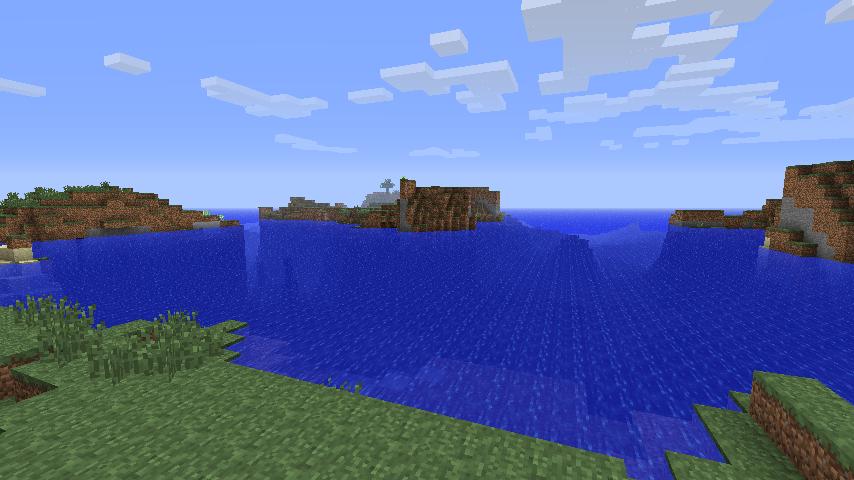
The Archipelago The Archipelago
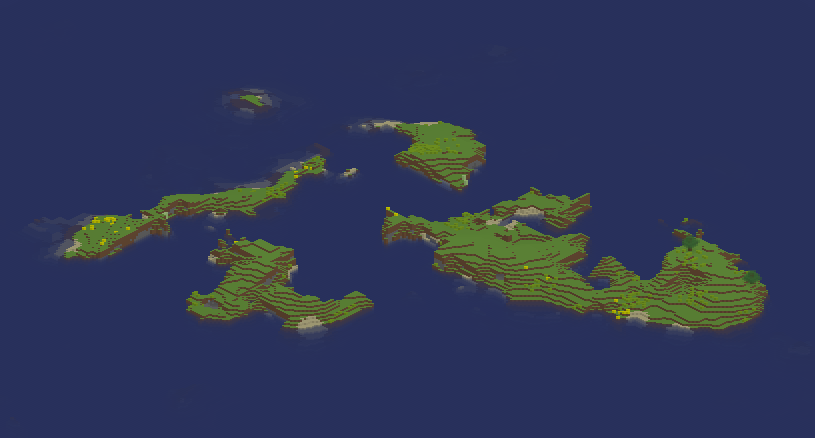
Bird's eye view Bird's eye view
You're on a small island in the middle of a vast ocean. There's nothing but dirt, stone and grass on the your island, which is part of a tiny archipelago. One of the nearby islands features a dark cave, with what looks like a coal seam near the entrance. You can glimps two small trees on another island nearby. All around your little clutch of islands is what appears to be vast, unending ocean in all directions. It's midday and you need to make yourself safe for the night. You can use the wood from the trees to craft a pickaxe. With this, you can fetch some coal from the seam. With the coal, you can create some torches, to see in the dark. You might have enough wood left over to make a door, if you're lucky. Or perhaps you should save it to craft a boat, or a sword. Groans from something unknown emanate worryingly closely from the darkness of the cave. You're lucky: one of your two trees has dropped a sapling. You eagerly plant it. In a few days time, you might be able to harvest some more wood. You've been granted a temporary reprieve, but the law of diminishing returns means at some point, and soon, you'll run out of wood. Swimming is time-consuming. By the time you have assembled a meagre supply of wood and coal, it's almost sunset. You nervously dig a burrow in the mud of your original island, light it with a torch and block the entrance back up. Night passes slowly as you listen to things crawling around in the darkness outside. I first learned about Minecraft from this blog post by Mike Watson last year. Mike did a great job of demonstrating the narrative power of the game and his post left a lasting impression on me. Every now and then I dip in to Minecraft to see what's new since the last time I played it. In the last few months version 1.8 was released and so I started a new map to check it out. I ended up with a corker of a randomly-generated map. Inspired by Mike's post, I thought I'd write a bit about it. In a follow-up post I will provide the map itself.

7 November 2011

Ritesh Raj Sarraf: Seagate FreeAgent GoFlex

I recently purchased a Seagate FreeAgent GoFlex 1 TB hard drive. It is a 2.5" compact disk that you connect over USB. It draws its power from the USB controller. My previous Extern HDDs were all 2.5" laptop drives, for which I bought a USB enclosure. Those devices always worked perfect, as in:The typical kernel messages I got for these devices were:
[56063.268107] usb 1-1: new high speed USB device number 13 using ehci_hcd
[56063.401635] usb 1-1: New USB device found, idVendor=14cd, idProduct=6116
[56063.401645] usb 1-1: New USB device strings: Mfr=1, Product=3, SerialNumber=2
[56063.401652] usb 1-1: Product: USB 2.0 SATA BRIDGE
[56063.401658] usb 1-1: Manufacturer: Super Top
[56063.401663] usb 1-1: SerialNumber: M6116018VF16
[56063.402857] scsi8 : usb-storage 1-1:1.0
[56064.400896] scsi 8:0:0:0: Direct-Access WDC WD50 00BEVT-24A0RT0 PQ: 0 ANSI: 0
[56064.401576] sd 8:0:0:0: Attached scsi generic sg2 type 0
[56064.402102] sd 8:0:0:0: [sdb] 976773168 512-byte logical blocks: (500 GB/465 GiB)
[56064.402615] sd 8:0:0:0: [sdb] Write Protect is off
[56064.402618] sd 8:0:0:0: [sdb] Mode Sense: 03 00 00 00
[56064.403101] sd 8:0:0:0: [sdb] No Caching mode page present
[56064.403105] sd 8:0:0:0: [sdb] Assuming drive cache: write through
[56064.404861] sd 8:0:0:0: [sdb] No Caching mode page present
[56064.404864] sd 8:0:0:0: [sdb] Assuming drive cache: write through
[56064.419657] sdb: sdb1
[56064.421850] sd 8:0:0:0: [sdb] No Caching mode page present
[56064.421854] sd 8:0:0:0: [sdb] Assuming drive cache: write through
[56064.421857] sd 8:0:0:0: [sdb] Attached SCSI disk
But for my Seagate FreeAgent GoFlex HDD, things were different. The kernel would detect but then it would not mount. The error reported is that the device is busy. My FreeAgent's kernel messages look similar to what the regular one has:

[ 168.520140] usb 1-1: new high speed USB device number 5 using ehci_hcd
[ 168.657424] usb 1-1: New USB device found, idVendor=0bc2, idProduct=5021
[ 168.657433] usb 1-1: New USB device strings: Mfr=1, Product=2, SerialNumber=3
[ 168.657439] usb 1-1: Product: FreeAgent GoFlex
[ 168.657444] usb 1-1: Manufacturer: Seagate
[ 168.657449] usb 1-1: SerialNumber: NA0C1BML
[ 168.659079] scsi5 : usb-storage 1-1:1.0
[ 169.657136] scsi 5:0:0:0: Direct-Access Seagate FreeAgent GoFlex 0148 PQ: 0 ANSI: 4
[ 169.708786] sd 5:0:0:0: Attached scsi generic sg3 type 0
[ 169.709079] sd 5:0:0:0: [sdc] 1953525167 512-byte logical blocks: (1.00 TB/931 GiB)
[ 169.709954] sd 5:0:0:0: [sdc] Write Protect is off
[ 169.709963] sd 5:0:0:0: [sdc] Mode Sense: 1c 00 00 00
[ 169.710567] sd 5:0:0:0: [sdc] Write cache: enabled, read cache: enabled, doesn't support DPO or FUA
[ 169.759942] sdc: sdc1
[ 169.762050] sd 5:0:0:0: [sdc] Attached SCSI disk
As the Device Mapper Multipath Debian Maintainer, I have multipath-tools installed on my laptop. Turns out, for some reason, the device is consumer by the device mapper multipath stack.
20:12:58 rrs@champaran:~$ ls /dev/mapper/
1Seagate@ 1Seagate FreeAgent GoFlex N 1Seagate FreeAgent GoFlex Np1 control LocalDisk-ROOT@ LocalDisk-SWAP@

Also the block device ID listing is enumerated as type SCSI.

19:56:44 rrs@champaran:~$ ls /dev/disk/by-id/
ata-HITACHI_HTS723216L9SA60_091220FC1220NCJASEVG@ scsi-SATA_HITACHI_HTS7232091220FC1220NCJASEVG@
ata-HITACHI_HTS723216L9SA60_091220FC1220NCJASEVG-part1@ scsi-SATA_HITACHI_HTS7232091220FC1220NCJASEVG-part1@
ata-HITACHI_HTS723216L9SA60_091220FC1220NCJASEVG-part2@ scsi-SATA_HITACHI_HTS7232091220FC1220NCJASEVG-part2@
ata-HITACHI_HTS723216L9SA60_091220FC1220NCJASEVG-part3@ scsi-SATA_HITACHI_HTS7232091220FC1220NCJASEVG-part3@
ata-HL-DT-ST_DVDRAM_GU10N_M189CNI1127@ scsi-SSeagate_FreeAgent_GoFle_NA0C1BML@
ata-ST1000LM010-9YH146_W1000ZD8@ usb-WDC_WD12_00BEVE-11UYT0_ST_Killer-0:0@
dm-name-1Seagate@ usb-WDC_WD12_00BEVE-11UYT0_ST_Killer-0:0-part1@
dm-name-LocalDisk-ROOT@ wwn-0x5000c5003d19c8c2@
dm-name-LocalDisk-SWAP@ wwn-0x5000cca586e112bc@
dm-uuid-LVM-buywwzKkpfKG2RegankA2nPkmFBBPFe3D5DepV8w8nLrHfoAjIIQVnakOQJZEqJX@ wwn-0x5000cca586e112bc-part1@
dm-uuid-LVM-buywwzKkpfKG2RegankA2nPkmFBBPFe3k9aJfc9B7wRmVIwfoagffHUZjuN6c4cM@ wwn-0x5000cca586e112bc-part2@
dm-uuid-mpath-1Seagate@ wwn-0x5000cca586e112bc-part3@
raid-1Seagate@
But I'm not sure why the same doesn't happend for my external laptop drive. It gets properly tagged as device type USB. So Laptop or Server, if you have a FreeAgent that you want to connect to your machine, and see the device busy error when accessing the device['s] directly, do the following:First, the ID of the device.

20:17:43 rrs@champaran:~$ /lib/udev/scsi_id --whitelisted --page=0x83 --device=/dev/sdc
1Seagate FreeAgent GoFlex N
Add the ID to /etc/multipath.conf under blacklist section

blacklist
wwid "1Seagate FreeAgent GoFlex*"
wwid "1Seagate FA GoFlex Desk*"
# devnode "^(ram raw loop fd md dm- sr scd st)[0-9]*"
# devnode "^hd[a-z][[0-9]*]"
# device
# vendor DEC.*
# product MSA[15]00
#
Run mulitpath -F to flush the unused maps. Run multipath -v3 to ensure that now the device is blacklisted.
Nov 03 20:19:02 sdc: (Seagate:FreeAgent GoFlex) wwid blacklisted

The front cause for the mis-behavior is:

# Coalesce multipath devices before multipathd is running (initramfs, early
# boot)
ACTION=="add change", SUBSYSTEM=="block", RUN+="/sbin/multipath -v0 /dev/$name"

But something else, maybe the default blacklist table, needs the actual fix.

Mart&iacute;n Ferrari: Oh, hai!

Ugh, in the last year and a half I've only posted once. With the move to Ireland, starting a new job, and then using too much Google+, I forgot about this blog thing. So, to start with something easy, I'll tell you about some films I watched recently. This weekend I had a marathon of films, after sometime without watching any, I watched two at home and two at my favourite cinema in Dublin: the IFI, which I recommend to anyone living here. First, on Friday, I watched Brazil, the 1985 classic from Terry Gilliam. It was a long overdue obligation to watch it, and some discussions with a friend about cinema made me finally do it. It was an amazing film. Among the many memorable scenes, and cinephile winks, I liked the one copying the famous Odessa steps sequence. The problems related to its US release reminded me a bit of the problems with the edition of Touch of evil, although in the case of Brazil, what the big studio did to the film was to butcher it. On Saturday I continued on the Gilliam streak and re-watched 12 Monkeys, which I had forgotten completely. Another great film, with a clearly bigger budget, it does not rely on the money but in the plot, art, and acting to be memorable. Also, I love the main theme, a tune from Astor Piazzolla called "Suite Punta del Este". Just after finishing the film, I read that some people from the local Couch Surfing group were meeting at the IFI to see one of the many features of the Polish film festival that took place this weekend. So I went and saw A short film about killing, a powerful and shocking movie about the death penalty. Considered by many to be one of the most horrifying depictions of a killing (two, in fact), it didn't shock me as much as some other films had done, maybe it was because of the cinema overdose... Anyway, it was another must-see. IMDB asserts that the Polish government suspended the death penalty in Poland for five years after the release of this film, but I could not find sources to confirm this. This morning I woke up pretty early, which is completely uncommon for me on a Sunday. So I decided to use the tickets offered by the IFI for a pre-screening that I had assumed I would not use, since I had to be in the cinema at 11! This time it was an Irish documentary about Bernadette Devlin, called Bernadette: Notes on a political journey. It was really interesting, even if I had never heard about this important figure of Ulster politics in the sixties. Sadly, because of my ignorance on the topic (and some northern accents that I have trouble understanding), I missed many parts of the film. In any case, it has increased my appetite to know more about the Troubles, which had started when I visited the Republican neighbourhood of Belfast, specially Falls road. Tags: Life, Planet Debian

Next.

Previous.