Search Results: "ah"

14 March 2014

Jan Wagner: Chemnitzer Linuxtage 2014 ahead

As Jan has previously announced, the Debian project is maintaining a booth at Chemnitzer Linux-Tage 2014, which is also organized by him. This year we will have merchandising at the booth, which is provided by Alexander Wirt and of course a demo system with Debian wheezy BabelBox as the past years. I'll drop it tomorrow, as I have a conflicting appointment on Saterday, maybe I can attend later on Sunday. In case you have spare time at the weekend ahead, it may be worth to spend it with great lectures and meet nice people over there.

Neil Williams: LAVA server on an arndale

(ARMv7 A15 dual core) I ve covered how I set up my home LAVA lab and how I got two iMX.53 boards running, the next step was to sort out the LAVA server. My initial setup relied on using my Thinkpad as the server. This was somewhat convenient as that s how I develop the code, but didn t help me run jobs like health checks because the laptop was usually somewhere other than on the home LAN. There had been a long-standing problem with using LAVA on ARM the uwsgi support didn t compile but the code being used was old. As the same code has been in Debian for a long time, I suspected that this was fixed with a newer version. So as part of migrating LAVA to django1.6, apache2.4, postgres9.3, django-tables2 0.13 and a few other updated dependencies, I have been using the version of uwsgi from Debian unstable for quite a while without problems on x86. A simple tweak to the LAVA setup scripts and a newer version of uwsgi became available and it builds just fine on armhf. (I haven t tried armel because Linaro is ARMv7 or newer and we don t test with ARMv5/ARMv6 boards, so there s no point in trying armel it s not likely to be an issue for this fix though.) (Only the current lava-deployment-tool methods need to actually compile uwsgi directly from upstream without any patches the packaging which will replace l-d-t uses precompiled binaries, just as any admin would expect.) That initial install was on one of the iMX.53 boards, which ran as slowly as anyone who has used an iMX.53 would expect. I haven t run test jobs on that install, it had a hard enough time serving the frontend. Clearly some more cores would be a good step and when an arndale became available for the home lab, the next step was to get a SATA drive onto the arndale, put Debian unstable on that and then deploy LAVA to the arndale using the Debian packages. As a bonus, these packages are built for django1.6 (using an unreleased branch). Sounds simple enough. It works on iMX.53, it should work on an arndale. Well, it does but only after some unexpected faff. arndale, u-boot and SATA I hate u-boot every single time I ever touch it, the little I know about any other u-boot device is completely useless. Uniformity is a good thing infinite permutations are just rope to hang ourselves with cute embedded nonsense hacks and I m bored of that whole scene. So, boot the arndale, interrupt the bootloader to get to the prompt. What s the first thing most people would want? help. Denied this particular u-boot has been compiled without the ability to display any help messages. u-boot has just sunk further into the depths of please can we have something else which is uniform across devices . OK, well maybe I can get by without help. sata init unknown command sata . (Go away, do something else for a bit.) The arndale isn t one of the newest boards in the ARMv7 world, LAVA has been using them for a while, so someone has probably done some work to fix this . nope. There s a workaround a nice detailed guide by Phil Endecott which details that the kernel needs to continue to be loaded from SD and then the SATA can be used for just the rootfs. Mildly annoyed (I was hoping to be able to update the arndale kernel without the hassle of mounting the SD card at all), the rest was straight-forward. Preparing the SATA and installing Debian Due to the complexity of some of the transitions currently ongoing in Debian ahead of the Jessie release freeze, uwsgi is not in Debian testing right now so this install has to be Debian unstable. That s OK, I ve been running Debian unstable on all my machines for several years now usually updating ~5 times a week.

# parted /dev/sda -s unit mb mktable msdos
# parted /dev/sda -s unit mb mkpart primary 1 -- "-0"
# mkfs.ext4 /dev/sda1
# mount /dev/sda1 /mnt/root/
(note the in the mkpart command, that catches me out most times I try this. Without it, the special -0 gets interpreted as an option to parted but parted doesn t then tell you how to fix it, it just complains about an unknown option.) The SD image I am using is a LAVA master image, based on Ubuntu, so it was easy to put debootstrap onto it.

# apt-get install debootstrap
# debootstrap --arch=armhf sid /mnt/root/ http://ftp.uk.debian.org/debian
# chroot /mnt/root/
Inside the chroot, it s Debian as usual:

apt-get update
apt-get install emdebian-archive-keyring
passwd
emdebian-archive-keyring is a package I (ab)use to sign my LAVA packaging as it has the advantage of being in Debian and Ubuntu going back to the time of Lenny, so it is always available from a repository which has already been authenticated to apt and doesn t involve downloading some random key from a website. I use passwd manually because this rootfs won t be using auto-login, it will have regular users. root passwords can be automated, if necessary. Thinking about login, remember to give the rootfs a usable tty. (The LAVA master image has a nasty habit of mangling editors like nano and vi when used over serial, so I m using echo.) For the arndale you need:

# echo T0:23:respawn:/sbin/getty -L ttySAC2 115200 vt102 >> ./etc/inittab
# echo >> ./etc/securetty
# echo ttySAC2 >> ./etc/securetty
Then to make the hostname useful, adapt this to your needs:

echo 127.0.0.1 arndale.codehelp arndale >> ./etc/hosts
Finally, get the network running at boot and add the LAVA repository:

# echo auto lo eth0 > ./etc/network/interfaces.d/arndale
# echo iface lo inet loopback >> ./etc/network/interfaces.d/arndale
# echo iface eth0 inet dhcp >> ./etc/network/interfaces.d/arndale
# echo deb http://people.linaro.org/~neil.williams/lava sid main >> ./etc/apt/sources.list.d/lava.list
# apt-get update
# exit
Once the LAVA packaging is finalised, the packages will be uploaded to a normal Linaro PPA, I ll update the packages to use an official download location and we ll move to using sane version string handling. For now, the packages are still in development. Code for the packaging is in Alioth but there are issues with anonymous access to the pkg-linaro-lava repositories currently, so I ve also pushed to http://github.com/Linaro if you are interested in building the packages yourself. See also my packaging guide which is also linked from the Links page on my own site. With that done, time to reboot, set the SATA drive as the rootfs using the horrid u-boot and install LAVA.

# reboot
> setenv bootargs console=tty0 console=ttySAC2,115200n8 drm_kms_helper.edid_firmware=edid-1920x1080.fw root=/dev/sda1
> boot
login
# apt-get install postgresql
After this operation, 63.0 MB of additional disk space will be used.

# apt-get install lava-server
After this operation, 231 MB of additional disk space will be used.

# a2dissite 000-default
# a2ensite lava-server
# apache2ctl restart
# service lava-server restart
Take note of the IP address of your new ARM LAVA server and sign in with your regular details, e.g. using OpenID before creating a temporary superuser:

# lava-server manage createsuperuser --username default --email=user@example.com
Choose a temporary password, log out, log in as the temporary superuser, promote your regular user to superuser and default owner of unrestricted devices in the django admin interface. Finally, log out and login as regular user to delete the temporary user. (Yes, that probably could do with some improvement remind me later and I ll see if a known user can be promoted from the command line.) See also Senthil s recent post on LAVA unit tests. Getting those to run without so many steps is also on the TODO list. Results
IP Address: 127.0.0.1
Is Master? : True
Uptime: 6:02:23.700000
Architecture: armv7l
Platform: Linux-3.10.1.0-1-linaro-arndale-armv7l-with-debian-jessie-sid
Insignal Arndale evaluation board based on EXYNOS5250
System memory: 1998MiB
Next! I m working on some code upstream to make it easier to add devices from the command line. The aim is that a set of simple commands will set up an initial device, run a job on that device and submit a result bundle to the LAVA server as job #1. This gives some assurance that everything has gone well. Now I can finally add health checks for the iMX.53 boards and start regular tests on those boards. The cubie boards will wait for a later blog post, there are interesting problems with the bootloader and serial connections. That s a whole different rant.

Andrew Pollock: [life] Day 44, Playgroup, laksa and baking

Zoe had Playgroup this morning. We had a little bit of time to kill between when Sarah dropped her off and it was time to bike over to Playgroup, so we went for a little walk to the post box to mail a letter. It was a beautiful morning, so the walk was nice. We biked over to Playgroup. Today I learned from the mother of the boy who was causing issues last week, that he was extremely allergic to everything. They couldn't use egg cartons for their craft activities, for example, because he was allergic to eggs, and even the empty cartons would cause a problem, apparently. That's quite the allergic sensitivity. I'm glad Zoe outgrew her egg allergy. Zoe wanted to do the craft activity first up, so she made another crown, this time for Mummy. I helped roll scraps of crepe paper into balls, and she very carefully glued them onto the points of the crown. She seems to really enjoy mucking around with Clag glue pots. I'll have to get a bottle for home. It reminds of my early primary school days. After that, we just generally mucked around for the rest of Playgroup. She loved the dress up pink lacy skirt again, and wanted to fool around on stage for a bit. One of my ex-co-workers has an occasional yum cha or laksa lunch with a bunch of his ex-co-workers, and I was invited along to laksa at Super Bowl. I figured that since Zoe loves any opportunity to use her chopsticks, and generally loves a good noodle soup, that this could be something I could bring her along to. So straight after Playgroup, we biked over to the Bulimba ferry terminal, locked up the bike, took the ferry across to Teneriffe and jumped on a City Glider bus to Fortitude Valley. We ended up getting there about 30 minutes earlier than everyone else, so I just ordered Zoe some wonton noodle soup and let her have at it while we waited for everyone else to arrive. We all had a BBQ pork laksa, which I personally found a little bit too spicy for my liking, but it was doable. Lunch went well. Zoe was really well behaved, so I'll definitely bring her along again. The next one is supposed to be yum cha, so I think she'll enjoy the selection. Zoe was looking pretty tired by the end of lunch, and we reversed our way back, and biked home from Bulimba. Once we got home, she practically put herself to bed for a nap. Since she was napping pretty late, I didn't let her nap for too long, and she woke up happy. After her nap, I thought we'd do some baking. I wanted to try and make some oatmeal cookies like our friend Bri used to make, so I found a recipe and adapted it to the Thermomix, and we got stuck into it. The joys of having a small child help is that not always do the ingredients wind up where they're supposed to. We had to mill a cup of raw sugar down to white sugar, and I had the cup's worth of sugar in a bowl and asked Zoe to tip the sugar into the Thermomix bowl. Unfortunately, she didn't line up very well, so some of the sugar made it into the Thermomix, but about as much went all over the Thermomix, the counter, the floor, the Guidecraft kitchen helper, everywhere. I've become quite good at taking these sorts of things in my stride, and didn't bat an eyelid. I was actually more bothered by Zoe asking me if I still loved her. After I reassured her I still loved her, even if she accidentally spilled sugar everywhere, and we cleaned up the sugar together, we continued to the point where I realised the dough was supposed to chill in the fridge for at least an hour. This would have meant the cookies wouldn't be ready to hit the oven until right around when Sarah was due to pick up Zoe, so I figured we'd just leave the dough in the fridge and bake the cookies tomorrow. Zoe watched some TV while I cleaned up the kitchen, and then Sarah arrived to pick her up.

12 March 2014

Andrew Pollock: [life] Day 43, a lovely lazy day, until we got on the bike

Zoe slept through the night again last night. Two nights of uninterrupted sleep has been totally amazing! We had a slower start to the day because we didn't have to be anywhere. I've been meaning to do a massive cull of Zoe's wardrobe for a while, and this morning seemed like as good an opportunity as any, so after TV, I managed to get Zoe to cooperate with trying on clothes for about an hour. She really enjoyed pulling everything out of her wardrobe and putting it all back again neatly. After that, she asked me if I could make her a bus out of the last remaining moving box, so I managed to make something approximating a bus. The port-a-robe boxes are really rather handy for this sort of thing. The balcony is starting to look like a cardboard box shanty town, with a cubby house, a rocket and now a bus. I think we need to host a few more play dates so they all get a good work out. It was time for lunch after that. I'd had a bucket of caramel popcorn, which I used for the journey to Coochiemudlo the other week. Zoe had asked me how popcorn was made, so I had resolved to make popcorn with her sometime soon. Yesterday at the health food shop, I opportunistically noticed some popping corn, so I grabbed a small bag of it. It turned out that buying peanut oil was good for more than just making peanut butter, as it came in handy today for popping corn. I've never popped corn before, aside from occasionally getting a bag of the microwave stuff, so it was a fun experience to do it "from scratch". It turned out pretty well, with only a few burned ones and a few unpopped ones. It'd be fun to try and dry out a corn cob and totally do it from scratch. After that I tried to get Zoe to take a nap, but it didn't work out so well, so after her quiet time we cleaned up her bedroom and generally fooled around for a bit. Throughout the day, Zoe did lots of little bouts of self-directed play. She dredged up this little wooden xylophone that we'd made in the US from a Kiwi Crate and had a great time banging away on it until she stood on it and broke it. The doctor's kit got a good workout. It was just a really nice, relaxing day at home. Zoe's Kindergarten was having a play date meet-and-greet in the park, for all the parents to meet each other. It was a fair way from home, but there was a nice, albeit circuitous, bike path to get there, and I decided to try and bike there, without really properly estimating the distance or length of time it would take. The play date was due to start at 3:30pm, and I was planning on leaving at 3pm. We were about 5 minutes late getting out of the door. I think it ended up taking us about 50 minutes to get there. It was a beautiful ride though, once we got onto the Bulimba Creek bikeway, through the Minippi Parklands. It would have been the longest ride Zoe's had on the bike, and she wasn't fazed at all. The play date itself was nice. For some reason, I'm a bit shy about going and introducing myself to the mothers (I kept wanting to write "other mothers"), but I sucked it up and made a few introductions. I'm terrible about remembering names though. At least I've got a few faces I can say hi to at drop off and pick up now. Sarah met us at the park and hung out for a bit as well, and then Zoe and her left together and I biked back home. I was feeling pretty good, and thought I'd try and bang out a run when I got home, but I didn't end up having the fuel in the tank, and blew up after about 1.5km.

11 March 2014

Andrew Pollock: [life] Day 42, a good night's sleep, Kindergarten, make up swim class and dinner with Nana

Zoe slept through the night for the first time in recent memory, and was up at around 6am. It was lovely. I'm thinking the slightly lower temperature helped. I'm definitely going to explore air conditioning for the bedrooms before next Summer. I'd picked up some egg cups on the weekend, so we did soft boiled eggs in the Thermomix for breakfast. They turned out lovely this time, and Zoe seemed to enjoy eating hers. She dressed herself while they were cooking. Her Kindergarten t-shirts arrived yesterday, so now she looks like all the other kids. It's very cute. It rained on and off in the morning, and I was in two minds about whether to chance it on the bike or not. As it happened we ended up messing around a bit before leaving, so we drove, and it was a good call, because it started raining again as we pulled out of the driveway. Drop off was super smooth. Megan had been away yesterday, but was back today, so Zoe was very happy to see her. My financial advisor came out for a chat about investments mid-morning, and then I got stuck into my US taxes. I will not miss having to do these tax returns. The 2013 one is going to be particularly complicated by the fact we sold our home and were only in the country for like 80 days. I biked over to Kindergarten to pick up Zoe, as the weather had improved. Surprisingly, she was awake, but her teacher said she'd just woken up from a nap. We managed to clear out pretty quickly. I stopped at the health food shop on the way home to get some peanut oil for the dinner I was making. Due to a miscommunication, Zoe had missed her Saturday swim class. I explained to the swim school the error, and they were kind enough to allow Zoe to have a make up class anyway, so we went to that after Kindergarten. Zoe wanted to do some more practice riding her bike. She's got a little 10 inch bike with no training wheels and a gyrobike front wheel. We haven't had a lot of success learning to ride to date, due to a combination of her height and just time, so it was interesting that she decided today she wanted to do some more practice. She wanted to "ride" her bike from home to the park on the way to swim class, but I managed to convince her to walk the bike to the park. It turns out even walking the bike is a bit of a challenge for her, so I ended up carrying it most of the way. It's heavy. We got to the park, and had a bit of a run with the bike. I'm glad I decided to take her knee pads and elbow pads, because she did stack it fairly decently, but managed to survive mostly unscathed. To her credit, she even got back on the bike again. She's a tough kid. Once we made it to the playground, she lost all interest in the bike, and we had about 15 minutes to kill before we needed to continue to the pool. We walked/carried the bike from the park to the pool, and the make up class Zoe ended up in was Megan's regular class, so the girls had a great time together. After swim class, we walked back home. Zoe's Nana was coming over for dinner, and I wanted to make a satay chicken dish. I'd bought some peanuts from the Peanut Wagon on Sunday, when I was in Nanango for my uncle's 90th birthday party, and I wanted to try making peanut butter from scratch in the Thermomix, and use that to make the satay sauce. Long story short, dinner wasn't super great. I'd made a satay chicken in the Thermomix previously, but I couldn't find the recipe I used last time. I used this recipe tonight, but didn't really follow it properly because I was trying to cut corners due to the time. I tried cooking wild rice in the microwave and it was a total flop. The satay chicken itself turned out okay, but it was a shame about the rice. It was cool making my own peanut butter. Zoe had a great time playing with her Nana, and after we dropped her off at the train station went to bed without a peep.

10 March 2014

Andrew Pollock: [life] Day 41, Running, Kindergarten, baking

I got up not as early as I'd have liked, and did the first 10km run I've done for a while, with my new shoes and the orthotics in them. It was a bit cooler, and despite not being particularly well hydrated, I lasted the distance, and managed to complete it in under an hour. I'm a long way off my best time at the moment, but I'm hoping as it cools down my running fitness will improve. I ended up doing a bunch of startup-related stuff today, instead of Debian stuff. It felt good to make some vaguely forward progress, even if it was just business operations planning stuff. I picked up Zoe from Kindergarten by bike. We'd both confirmed with her several times since Friday as to which mode of transport she wanted to use to come home, and she'd indicated the bike. Zoe was asleep as usual, but woke up pretty easily. The Kindergarten has indicated that they want everyone out of the centre by 2:30pm, which makes it a bit of a challenge to rouse a deeply sleeping child and exit the centre in 10 minutes. I managed to sunscreen her while she was still horizontal, so that sped things up, and it helped greatly that she didn't have a post-nap meltdown. One of her class mates and her mother were hanging around waiting for her big brother to finish school, and the bike trailer tends to be a good conversation starter, so we chatted for a little bit before leaving. It was nice to properly meet another parent, and I'm glad to see Zoe's started learning some of her class mates names. I had a kale, carrot and apple juice for lunch today, and as I hate wasting the pulp out of the juicer, I'd previously found a nice muffin recipe that I could use the kale and carrot pulp in. I'd previously baked a batch of mini muffins for Zoe's lunches, and was pleased that she liked them. We were getting a bit low, so I thought we'd bake another batch this afternoon, so that's what we did after we got home. Once they were in the oven, Zoe went off to watch TV and I made a start on dinner. Bedtime went nice and smoothly tonight.

8 March 2014

Martín Ferrari: Fun with the Linux desktop

Or, "Why 2014 will NOT be the year of Linux in the desktop". So, it happens that my mum (66 yo) has been a Debian user for over a year now. With highs and lows, she manages to do what she needs; sometimes I need to intervene. Today I thought I could send her a quick email explaining how to download using BitTorrent, because of reasons. So, as I was writing, I realised that in many torrent sites, you only get a magnet link these days. No problem! Click on the magnet link, at it should work automagically. Then I remembered: it works on my computer, because I've spent a couple of hours some time ago researching how to make FireFox work with magnet links, creating a custom script, etc. I hoped that by now this must have been solved, at least in Debian unstable. Wrong again. I created a new user in my computer, launched IceWeasel/FireFox and boom: I get a dialog asking me to select a program, not from a list of desktop applications, taken from one of the gazillion sources where applications are defined, but just from any place on the file system! (At least, now you don't need to go tweaking with the hidden FireFox configuration editor). I was very angry at the brainiac at Mozilla who thought it was a great idea to ignore the host system and do their own MIMEtype handling. And then, tried Chromium to see what would happen... And I get first a scary message telling me that it is going to use the super-obscure xdg-open program to open my link, and that it could harm my computer! It was followed by another very helpful dialog telling me something like:
Unable to detect the URI-scheme of "magnet:?xt=urn:btih:diePh6iengei4quaep4shai8ahshahnae9 oolahtetheir2bohmu1eelaChui1ohdahruegh4wief6PusahDae4ho oshahjoogai7bae9shuvei9shufeX4boog8neichi3OoDee5ei9Uori c6aingairepon9gok8Mee7uRahphah4EucoopheiYin4xe4lahn0goh"
Then the real fun started... I starting looking around to understand how this is supposed to work, I wanted to provide a patch! So, it turns out that if you add some values to GConf this should work. So, try to find where would that be. Read about GConf schemas, default and mandatory values, and their 10 possible locations. Find that Azureus provides an schema, use that to create one for Transmission. Then find that in fact, Transmission was providing defaults, which are not the same but work the same, and that they had an error there: yes, problem found! (#741069) No! It turns out that the Gnome desktop does not use that any more, and now they scan the .desktop (who knows in which of the 100 directory tress where .destop files are present) files for MIME handlers, and the transmission-gtk.desktop file had that correctly. So why does it not work? Well, it turns out that if I used gvfs-open instead of xdg-open, it did work! The thing is, I am running XFCE here, which is GTK based, but it is not Gnome: instead of gvfs-open, I was getting exo-open, which is it's brain-dead cousin, and can't do anything but files, email and web. It is fecking 2014, and we still don't have a sensible, unified way to select preferred applications. We still have incompatible, duplicated, incomplete, competing implementations. We have FreeDesktop doing one thing to try and unify criteria, which is then ignored or mis-implemented up and down by some desktops and applications. Some days I get really angry at the Free Software world. PS: I guess I will tell mum to copy&paste the links from the browser to the torrent client, but not today. I have already lost 4 hours of sleep on this.

Andrew Pollock: [life] Day 38, BJJ, Science Friday and a play date

Zoe wound up in my bed at some ungodly hour, but then we both slept in until 7am, which was nice. Mum and Dad were coming around at 8:30am to come watch Zoe's Brazilian Jiu-Jitsu class, so we got up, made some porridge in the Thermomix and got ready. Zoe decided she didn't feel like going to BJJ class by bike, so we all piled into our car and drove over. Zoe had a good class, and Mum took her uniform home afterwards to take up the legs a bit, which will be good. They stayed for lunch, and we reviewed photos from our Coochie and Melbourne trips, and I made some fresh guacamole in Thermomix to go with the chicken quesadillas I made for lunch. After lunch they went home, and Zoe declined to take a nap, so we read some stories in the hammock, and then we did our Science Friday experiment, one that was suggested to me by a friend on Facebook. It was nice and easy, just put some milk in a tray, drop in a few drops of food colouring and then touch them with a cotton bud soaked in detergent. The detergent breaks up the fat in the milk and the colour drops go flying all over the place. Zoe really enjoyed swirling all the colours around with the cotton buds and we repeated the experiment a few times. She then wanted to see what would happen if we put some glue in, so wanting to encourage her scientific curiosity, we tried it, and nothing interesting happened. Zoe had a play date at her friend Mackensie's house, which was just down the road in Balmoral. We biked over to her place and the girls had a lovely afternoon playing. Sarah came and picked up Zoe from there. I dropped in on some former neighbours who happened to move two doors down from Mackensie, and had just had a second child, and then headed home to prepare for a dinner and board game night with my girlfriend and some of my neighbours.

Benjamin Mako Hill: V-Day

My friend Noah mentioned the game VVVVVV. I was confused because I thought he was talking about the visual programming language vvvv. I went to Wikipedia to clear up my confusion but ended up on the article on VVVVV which is about the Latin phrase vi veri universum vivus vici meaning, by the power of truth, I, while living, have conquered the universe . There is no Wikipedia article on VVVVVVV. That would be ridiculous.

6 March 2014

Andrew Pollock: [life] Day 37, Playgroup, bubble tea, and Android phones

Today was Playgroup. We had a pretty early start to the day, and Zoe wanted porridge for breakfast, so we made that together in the Thermomix, and she got dressed while it cooked. After a bit of TV, we biked over. I got to witness semi-firsthand my first mother-to-mother altercation. I said hi to a mother I'd met a previous week, and asked her how she was, and got "Pissed off" as the response. Apparently a reasonably large boy (I'd put him at about the 4 mark) had been in the face of her daughter, and distressed her daughter a bit, so she'd apparently politely told the boy to back off, and then been revved by the mother of the boy for talking to her son. The boy continued hanging around her daughter, and she left Playgroup not long after telling me all about it. I worked out later on that the mother of the boy was one of the women who helped run the Playgroup. Fun times. He was a bit out of control. He full on screamed at me at the end of Playgroup for no reason. His mother did make him apologise to me for that, without me requesting it. There were some dress ups (mostly skirts) today, so Zoe had a fabulous time cavorting around on the stage in a big pink lacy skirt, doing "ballet". She dragged me up on stage with her, and we danced around for a bit. It was quite fun. She was very helpful at pack up time, and was bringing a lot of equipment back to the storage room at the back of the hall. I was helping load stuff into the large crate in the storage room. After parachute time, I lost sight of her briefly, and after a quick search, deduced that she must have gotten herself locked in the storage room. Sure enough, that's where she was. She was only missing for as long as it took me to notice and search in all the other possible places, so she wasn't particularly distressed. Poor thing. After Playgroup, we biked back home, and I had another photo I wanted to print out, so we drove over to Officeworks and had a sausage sizzle after we got the photo printed out, and then drove back home. Zoe had a pretty good bedtime last night, so I decided to try skipping her nap today. I wanted to get the 5-8 player extension pack for Settlers of Catan, which Mind Games in the Myer Centre had, so we hopped on a bus to the city. When we've been on longer public transport rides, Zoe's asked me if she can play games on my phone. This of course keeps her amused, but leaves me with nothing to amuse myself (I need to remember to bring a book). I have this cupboard full of old Android phones, so I decided to blow the dust off my old Nexus S and make it a dedicated games phone for her when we're on public transport. This worked pretty well today. She also decided to bring her handbag, which was convenient. I think she was pretty excited at the idea of her "own phone", even if it lacked a SIM card. After we'd bought the extension pack, I thought we could do something slightly more fun than just traipse into the city and traipse back out again. I've been meaning to introduce her to bubble tea for a while, so took this opportunity to track some down in the Myer Centre. We settled on some honeydew milk tea. She liked the honeydew, but after a couple of mouth fulls, was over the tapioca balls. She was a good sport and gave them a good college try though. It was fun watching her play around with the phone on the way home, and just fumbling her way around the user interface. She found the alarm setting UI, and was having a great old time creating alarms. (I'm glad I cleared them all out when we got home, there was at least one set for 4am). She had fun exploring all the ring tones. Towards the end of the journey home she figured out the camera, and was having a fabulous time taking snaps out the bus window. She still needs to work on keeping her hands and fingers away from the lens. She watched some TV while I made dinner and then I joined her on the couch for a cuddle while I flicked through my copy of 50 Dangerous Things (you should let your children do) and 365 Science Experiments. My cousin Renata came around for dinner with us tonight. Zoe didn't have a particularly great dinner, but she did go to bed nice and easily. I'm not sure how she'll sleep tonight. I've gone back to having a light-weight doona on her, as it's possible last night's wake up was temperature-related.

5 March 2014

Andrew Pollock: [life] Day 36, Kindergarten, cleaning and pee pee accidents in hardware stores

Today was my "clean the house" day. I made a start, then went for my chiropractic assessment and adjustment. I now only need to see him fortnightly, which is nice. I knocked out most of the cleaning, and then went for a massage and had some lunch. The next thing I knew it was about time to pick up Zoe. I biked to Kindergarten, and she was asleep again. She woke up reasonably easily, but was grumpy not long after that. She was very uncooperative, and didn't want to go home on the bike, and wouldn't let me put sunscreen on her. After a bit of work, I managed to extract from her that she didn't like my "sweaty hands" from riding the bike there, so I washed my hands and then she let me sunscreen her up. I'll try doing pick ups in the car next week I think. We got home, and I needed to get some more kitty litter, so we went out to Pet Barn. Zoe had a great time checking out all the fish, and also playing with aquarium decor. It got me thinking that maybe an aquarium might be a good birthday present for her, if not this year, maybe next year. It turns out that fish aren't particularly expensive, so they'd make for easy presents for people. After that, we popped across to Bunnings, because I needed a couple of things. While we were there, Zoe announced she wanted to go to the toilet, so we started trekking off to where I thought the toilets were. Turned out I was wrong, and they were at the opposite end of the building, so we had to trek all the way back again. Zoe got all the way into the ladies bathroom and failed to make it onto the toilet in time, so that concluded our visit to Bunnings. We got home and she got changed, and I started making dinner. While dinner was cooking, Zoe watched a bit of TV, and then I decided to try making some lunch box pies, essentially a piece of buttered bread jammed into a muffin tray with some creamed corn and bacon in the bottom and beaten egg on top, thrown in the oven. Zoe helped sample the bacon and cracked the eggs for me, while I buttered bread and cut the crusts off and jammed slices into muffin trays. Bedtime was remarkably uneventful for a change.

4 March 2014

Mario Lang: Personal mail server

I used to use Fetchmail and Gnus with its mail splitting capabilites and nnml backend to handle my private mail setup for many years. This worked pretty fine since I am used to accessing my home server through SSH. I have Gnus running inside of a GNU screen session. So I can check mail from remote by using a SSH terminal. This works fine as long as I have a good SSH terminal on a desktop or laptop computer. However, it does not work very well on tablets or smaller mobile devices. Additionally, mail splitting has become a performance burden over the years. I do not want to wait for Gnus to sort incoming mail into different folders while checking for new mail. That is something which should have been done in the background already, and thats what we are going to cover with the setup described below. So I had to change my simple setup to accomodate for the new trends in mobile computing. The obvious core of such a setup is an IMAP server which receives and stores your mail such that different clients can access it. So the time of my Gnus nnml storage are definitely over. Mail is no longer stored in and by my mail client.
Dovecot While there are several IMAP server solutions out there, I find Dovecot fits my needs quite nicely. I've decided to store my mail in Maildir format in ~/Maildir. I prefer storing data like that in the home directory to avoid having to backup separate files from /var/. Maildir also features some index files which should help performance in the long run. Incoming mail will solely be delivered by fetchmail and should be checked for spam. While I can probably configure Exim to run SpamAssassin on mails before delivering them to Dovecot, there is a much more elegant solution: the dovecot local delivery agent (LDA). /usr/lib/dovecot/deliver takes mail from standard input and performs Sieve filtering and updates the mail indexes. We will call this executable more or less directly from fetchmail. Incoming mail from mailing lists will be sorted into different folders using Sieve. Dovecot needs to be told to enable the sieve plugin and to create new folders on demand. /etc/dovecot/local.conf:
disable_plaintext_auth = yes
mail_location = maildir:~/Maildir
lda_mailbox_autocreate = yes
lda_mailbox_autosubscribe = yes
protocol lda  
  mail_plugins = sieve
 
Sieve scripts are actually quite intuitive once you have a template to start from. ~/.dovecot.sieve:
require "fileinto";
if exists "X-Spam-Flag"  
  # Store spam tagged by SpamAssassin into dedicated Spam folder
  if header :contains "X-Spam-Flag" "YES"  
    fileinto "Spam";
   
  elsif exists "X-Cron-Env"  
  # Store mails from Cron daemon in dedicated folder
  fileinto "cron";
  elsif exists "List-Id"  
  # File list-mail into dedicated folders, matching on List-Id
  if header :contains "List-Id" "boost-users.lists.boost.org"  
    fileinto "boost-users";
    elsif header :contains "List-Id" "brltty.mielke.cc"  
    fileinto "brltty";
    elsif header :contains "List-Id" "debian-accessibility.lists.debian.org"  
    fileinto "debian-accessibility";
    elsif header :contains "List-Id" "debian-devel-announce.lists.debian.org"  
    fileinto "debian-devel-announce";
    elsif header :contains "List-Id" "debian-devel.lists.debian.org"  
    fileinto "debian-devel";
    elsif header :contains "List-Id" "spirit-general.lists.sourceforge.net"  
    fileinto "spirit-general";
   
  # ...
 
SpamAssassin Since I want automatic classification of spam messages, I use SpamAssassin. Just install spamassasin and enable spamd in /etc/default/spamassassin:
ENABLE=1
We will use spamc in the Fetchmail configuration.
Fetchmail My ~/.fetchmailrc is a straightforward list of some mailboxes to fetch mail from. I use the mda directive to skip the MTA and send mail through SpamAssassin and deliver it to Dovecot via its LDA mechanism. ~/.fetchmailrc:
set daemon 1200 # Poll at 10 minute intervals
poll blind.guru protocol IMAP: ssl;
# ... add more sources here ...
mda "/usr/bin/spamc -u %T -e /usr/lib/dovecot/deliver -d %T"
To avoid spreading access information in too many configuration files I am using the ability of Fetchmail to use netrc to retrieve account passwords. ~/.netrc:
machine blind.guru login mlang password <hidden>
Gnus I am using Gnus to read mail, newsgroups and RSS feeds since many years now. It would be quite a mouthful to explain all the customizations I am using by now. But there is one very important bit in the context of this article: How to access the IMAP server? In my setup, Emacs and therefore Gnus is running on the same machine as the IMAP server. So I can avoid authentication at all. This configuration will avoid unnecessary password prompts or caching. In ~/.emacs or ~/.gnus:
(setq gnus-secondary-select-methods '((nnimap "localhost"
                                       (nnimap-stream shell)))
      nnimap-shell-program "/usr/lib/dovecot/imap")
With this you should be able to subscribe to your IMAP folders from within Gnus with ease. Sorting incoming mails into folders is now performed by the IMAP server through Sieve scripts. Instead of changing Gnus' configuration I now edit ~/.dovecot.sieve when I subscribe to a new mailing list. If you add a new Sieve rule for a mailing list and the associated folder does not exist yet, Dovecot will autocreate it, very convenient.
Mobile devices Now all that is left is a way for your mobile devices to read and eventually send mail. This is very much dependant on your network setup, so I am not going to go into any detail here. If you are accessing your mail setup from a tablet in your local network you might get away without tinkering with your router configuration. If you want to read/send mail on the go you need some way to get to your external IP. Either it is stable enough or you need some dynamic DNS service. You will definitely want to forward IMAP and maybe SMTP ports from your router to your home server. If you don't have an existing SMTP server for your mobile device that accepts your outgoing mails you can also set one up yourself and deliver outgoing mails from your mobile device to the world with Exim or qmail. I am personally using Exim since I am going with the default MTA for Debian. Configuring Exim to take mail from iOS devices was as simple as enabling an appropriate authentication method and adding an account to /etc/exim4/passwd. I have to admit though that I don't particularily like Exim's configuration files. That is why I ended up using dovecot's LDA in the first place.

Andrew Pollock: [life] Day 35, Kindergarten, taxes, makeup BJJ

I foolishly had a late night last night, for no particularly good reason, so I slept in quite late this morning. I didn't start getting going until about 8am. How decadent. I'd forgotten to send Zoe to Kindergarten with her water bottle yesterday, and forgotten to give it to Sarah when she picked her up yesterday, so I dropped it and a fresh set of spare clothes out to Kindergarten after I had breakfast and a shower. I managed to sneak in and out without Zoe seeing me. I did some more work on my taxes before popping out for lunch to discuss my main start up idea. I also renamed my old shelf company today. I biked over to Kindergarten for pick up, and sure enough, Zoe was fast asleep. It took quite a bit of work to rouse her. I was pretty sure she was just faking it though. She moved pretty fast when I said I had a surprise at home for her. We biked home, and I gave her the surprise (some Pop Rocks I'd been saving for a special occasion) and headed out by car to a makeup Brazilian Jiu-Jitsu class to make up for the one she missed on Friday. It turned out that trying to do an afternoon class after Kindergarten and being woken up from a nap wasn't the best idea. Zoe tired out pretty quickly, during the warm up exercises, and was moderately uncooperative for the remainder of the class (she kept going on strike). I've never driven to or from BJJ classes until today, and I wasn't actually sure how best to drive home, since we've always taken the Norman Park Greenway. Zoe was asking for a "different way" anyway, so that worked out well. We winged it through Coorparoo and the back of Norman Park and tacked onto the end of how we'd normally cycle home. Zoe had enough time to watch a little bit of TV before Sarah arrived to pick her up.

3 March 2014

DebConf team: We re off to the daytrip! (Posted by Rodrigo Gallardo)

We are leaving in a couple hours for Xochicalco, one of the many archeological sites here in Mexico. All in all, we are very pleased with the trip we are offering, and really hope everyone likes it.We do have a long day ahead of us, since it will take almost two hours to get there, then we ll be touring the place for about three hours, go for lunch and then head for Cuernavaca, where we ll spend a few more hours before heading back here. I m pretty sure there will be plenty of pictures of the site for those of you following along at home, so check people s galleries afterwards. And, it s kind of late to say this, since everyone has seen Gunnar s feeling better, but still: Gunnar, you ve made some terrific work here! Us mexicans are very proud of you.

Andrew Pollock: [life] Day 34, Kindergarten, recovery, carpentry

I was pretty knackered today. I should have done some Debian stuff, but I just didn't have it in me, and I had a backlog of household stuff to get done. Zoe woke up at 4am, and I didn't have the energy to try and get her to go back to sleep in her bed, so I just let her sleep in my bed. We both slept in until 7am, which was nice. As a result, we didn't have as much time to have a slow start, and Zoe was a bit grumpy and uncooperative as a result. I think there was at least one meltdown before breakfast. It conveniently rained around the time we were ready to leave, so we drove to Kindergarten. Drop off was super smooth. She pretty much waved me off as soon as we got there. I picked up a couple of packages from the post office on the way home, and then started hanging out the washing before I had to go back to see the podiatrist to get my orthotics fitted in my new running shoes. I finished hanging out the washing and putting away stuff from the Coochie trip and Melbourne trip and had some lunch. After lunch I started work on making a little step for Zoe so she can turn the light off in her bedroom. I had enough material left over from the clothes lines I made for her to make a really dodgy little "stool". It rained again around pick up time, so I drove to Kindergarten again, and picked up Zoe. She'd just woken up from a nap before I got there and was in a good mood. Megan's Dad was picking up Megan on foot, and they were going to have a coffee at the local coffee shop, so we joined them. After that, we went to the post office to check my post office box. I had a cheque that needed to be banked, so we went to the bank and the supermarket, and by then it was pretty much time for Sarah to pick up Zoe from me. I did a bit more carpentry before I lost the light, and went to yoga.

1 March 2014

Michael Prokop: Jenkins on-demand slave selection through labels

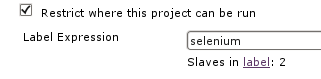
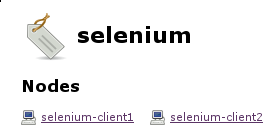
Problem description: One of my customers had a problem with their Selenium tests in the Jenkins continuous integration system. While Perl s Test::WebDriver still worked just fine the Selenium tests using Ruby s selenium-webdriver suddenly reported failures. The problem was caused by Debian wheezy s upgrade of the Iceweasel web browser. Debian originally shipped Iceweasel version 17.0.10esr-1~deb7u1 in wheezy, but during a security-update version 24.3.0esr-1~deb7u1 was brought in through the wheezy-security channel. Because the selenium tests are used in an automated fashion in a quite large and long-running build pipeline we immediately rolled back to Iceweasel version 17.0.10esr-1~deb7u1 so everything can continue as expected. Of course we wanted to get the new Iceweasel version up and running, but we didn t want to break the existing workflow while working on it. This is where on-demand slave selection through labels comes in. Basics: As soon as you re using Jenkins slaves you can instruct Jenkins to run a specific project on a particular (slave) node. By attaching labels to your slaves you can also use a label instead of a specific node name, providing more flexibility and scalability (to e.g. avoid problems if a specific node is down or you want to scale to more systems). Then Jenkins decides which of the nodes providing the according label should be considered for job execution. In the following screenshot a job uses the selenium label to restrict its execution to the slaves providing selenium and currently there are two nodes available providing this label: TIP 1: Visiting $JENKINS_SERVER/label/$label/ provides a list of slaves that provide that given $label (as well as list of projects that use $label in their configuration), like:

TIP 2: Execute the following script on $JENKINS_SERVER/script to get a list of available labels of your Jenkins system:
import hudson.model.*
labels = Hudson.instance.getLabels()
labels.each  label -> println label.name  
Solution: In the according customer setup we re using the swarm plugin (with automated Debian deployment through Grml s netscript boot option, grml-debootstrap + Puppet) to automatically connect our Jenkins slaves to Jenkins master without any manual intervention. The swarm plugin allows you to define the labels through the -labels command line option. By using the NodeLabel Parameter plugin we can configure additional parameters in Jenkins jobs: node and label . The label parameter allows us to execute the jobs on the nodes providing the requested label: This is what we can use to gradually upgrade from the old Iceweasel version to the new one by keeping a given set of slaves at the old Iceweasel version while we re upgrading other nodes to the new Iceweasel version (same for the selenium-server version which we want to also control). We can include the version number of the Iceweasel and selenium-server packages inside the labels we announce through the swarm slaves, with something like:
if [ -r /etc/init.d/selenium-server ] ; then
  FLAGS="selenium"
  ICEWEASEL_VERSION="$(dpkg-query --show --showformat='$ Version ' iceweasel)"
  if [ -n "$ICEWEASEL_VERSION" ] ; then
    ICEWEASEL_FLAG="iceweasel-$ ICEWEASEL_VERSION%%.* "
    EXTRA_FLAGS="$EXTRA_FLAGS $ICEWEASEL_FLAG"
  fi
  SELENIUM_VERSION="$(dpkg-query --show --showformat='$ Version ' selenium-server)"
  if [ -n "$SELENIUM_VERSION" ] ; then
    SELENIUM_FLAG="selenium-$ SELENIUM_VERSION%-* "
    EXTRA_FLAGS="$EXTRA_FLAGS $SELENIUM_FLAG"
  fi
fi
Then by using -labels $FLAGS EXTRA_FLAGS in the swarm invocation script we end up with labels like selenium iceweasel-24 selenium-2.40.0 for the slaves providing the Iceweasel v24 and selenium v2.40.0 Debian packages and selenium iceweasel-17 selenium-2.40.0 for the slaves providing Iceweasel v17 and selenium v2.40.0. This is perfect for our needs, because instead of using the selenium label (which is still there) we can configure the selenium jobs that should continue to work as usual to default to the slaves with the iceweasel-17 label now. The development related jobs though can use label iceweasel-24 and fail as often as needed without interrupting the build pipeline used for production. To illustrate this here we have slave selenium-client2 providing Iceweasel v17 with selenium-server v2.40. When triggering the production selenium job it will get executed on selenium-client2, because that s the slave providing the requested labels: Whereas the development selenium job can point to the slaves providing Iceweasel v24, so it will be executed on slave selenium-client1 here: This setup allowed us to work on the selenium Ruby tests while not conflicting with any production build pipeline. By the time I m writing about this setup we ve already finished the migration to support Iceweasel v24 and the infrastructure is ready for further Iceweasel and selenium-server upgrades.

Vasudev Kamath: Gzipped response for CSS/JS with Apache and mod_uwsgi

So it may sound normal to receive compressed response for CSS/JS file from Apache2 but what I faced is completely different behavior, here I saw not just body of response but also header are getting compressed and send to browser and browser was unable to interpret the response there by leading page rendered without CSS and JS. That was long story short, so let me explain in detail the case and what I found out. I have hosted SILPA on my VPS using uWSGI. I had used till date using libapache2-mod-proxy-uwsgi plugin for which uWSGI should be using network socket and in Apache2 config I need ProxyPass directive pointing to uwsgi://host:port and everything used to work out of box. There is a drawback for using network socket in uWSGI that is limited amount of ports (65535) and possible clash with other services if we use wrong port number, additionally network sockets will be slower compared to the file socket so yesterday I thought of changing it to file socket and removed socket directive in the ini file for uWSGI application container for SILPA and here is where all problems started. My updated configuration can be seen in our documentation page that is if you are interested to look my configuration file :-).
Problem Reporting We got selected to Gsoc again this year and we have lot of students jumping in our channel #silpa on irc.freenode.net and yesterday night some students reported they are facing 500 internal server error and subsequently others mentioned there is no theme being rendered. I checked and found everything was fine for me only to notice that my browser was using cached content, and when I clear cache there I go everything vanished, no theme no css no javascript just plain html!!!.
Investigation So I thought I should investigate this and fired up firebug on my iceweasel to observe the network traffic. And below is what I observed in firebug network console!. No response headers So you can see no response header in the above image but there is a response and below how is response content visible on firebug. gzipped response Still weird part was when using wget/curl directly to get the CSS I was getting correct reply and the file, which is puzzling. So I went ahead opened the CSS url directly using browser and saved the resulting file. When I used file command on it, output suggested the saved file in gzip compressed!. I went ahead uncompressed it and opened the file and inside it I found response header and the response body! So what just happened? Did apache some how manage to compress entire respone not just response body? The more puzzling question was why did it work when I was using mod_proxy_uwsgi and failed when I switched to mod_uwsgi. I had no clue at this point why this behavior is coming up.
Possible Solution I was still not sure how to resolve this, and started searching in the network but nothing was coming up in search result which can explain me this. And finally I stumbled on a link which is totally unrelated but I saw the word mod_deflate in the content and wandered on my system to see if its enabled. Yes mod_deflate was enabled I just opened the conf file and saw following.
<IfModule mod_deflate.c>
       # these are known to be safe with MSIE 6
       AddOutputFilterByType DEFLATE text/html text/plain text/xml
       # everything else may cause problems with MSIE 6
       AddOutputFilterByType DEFLATE text/css
       AddOutputFilterByType DEFLATE application/x-javascript application/javascript application/ecmascript
       AddOutputFilterByType DEFLATE application/rss+xml
</IfModule>
Interesting so it suggests to compress css, javascript files etc. So I thought possibly its compressing the result of mod_uwsgi, yeah possibly so why not try disabling mod_deflate and check if it works well and good if not I'm not gonna loose anything. So I disabled mod_deflate and voila! Everything is working fine!
What might be the reason for this behavior? Well I'm not exactly sure but here is my assumption. The whole behavior depends on internal implementation of mod_uwsgi and mod_proxy_uwsgi module. To confirm this I switched back to use mod_proxy_uwsgi module and enabled mod_deflate and observed request response in Firebug network console and below is what I observed. Response with mod_proxy_uwsgi So response is still gziped but this time only response body was gziped and Content-Encoding field was set properly which makes browser to properly uncompress the response body and use it. So it seems like there is a difference between mod_uwsgi and mod_proxy_uwsgi implementation. mod_uwsgi was sending the response along with response headers which was compressed by mod_deflate there by rendering browser helpless to interpret the response. But mod_proxy_uwsgi seems to be only sending the response content without response body and this content was later compressed by mod_deflate and proper response headers were set by apache before sending it to browser. So now whose fault is this? Is it the bug in mod_uwsgi or, mod_deflate not being able to exclude response headers from compression? I've no clue! If you have a clue and you want to share it with me, please consider writing to me over email. My details are available in Contacts

28 February 2014

Michael Prokop: Full-Crypto setup with GRUB2

Update on 2014-03-03: quoting Colin Watson from the comments:
Note that this is spelled GRUB_ENABLE_CRYPTODISK=y in GRUB 2.02 betas (matching the 2.00 documentation though not the implementation; not sure why Andrey chose to go with the docs).
Since several people asked me how to get such a setup and it s poorly documented (as in: I found it in the GRUB sources) I decided to blog about this. When using GRUB >=2.00-22 (as of February 2014 available in Debian/jessie and Debian/unstable) it s possible to boot from a full-crypto setup (this doesn t mean it s recommended, but it worked fine in my test setups so far). This means not even an unencrypted /boot partition is needed. Before executing the grub-install commands execute those steps (inside the system/chroot of course, adjust GRUB_PRELOAD_MODULES for your setup as needed, I ve used it in a setup with SW-RAID/LVM):
# echo GRUB_CRYPTODISK_ENABLE=y >> /etc/default/grub
# echo 'GRUB_PRELOAD_MODULES="lvm cryptodisk mdraid1x"' >> /etc/default/grub
This will result in the following dialog before getting to GRUB s bootsplash:

Michael Prokop: State of the art Debian/wheezy deployments with GRUB and LVM/SW-RAID/Crypto

Moving from Lilo to GRUB, using LVM as default, etc throughout the last years it was time to evaluate how well LVM works without a separate boot partition, possibly also on top of Software RAID. Big disks are asking for partitioning with GPT, just UEFI isn t my default yet, so I m still defaulting to Legacy BIOS for Debian/wheezy (I expect this to change for Debian/jessie and according hardware approaching at my customers). So what we have and want in this demonstration setup: System used for installation:
root@grml ~ # grml-version
grml64-full 2013.09 Release Codename Hefeknuddler [2013-09-27]
Partition setup:
root@grml ~ # parted /dev/sda
GNU Parted 2.3
Using /dev/sda
Welcome to GNU Parted! Type 'help' to view a list of commands.
(parted) mklabel gpt
(parted) mkpart primary 2048s 4095s
(parted) set 1 bios_grub on
(parted) name 1 "BIOS Boot Partition"
(parted) mkpart primary 4096s 100%
(parted) set 2 raid on
(parted) name 2 "SW-RAID / Linux"
(parted) quit
Information: You may need to update /etc/fstab.
Clone partition layout from sda to all the other disks:
root@grml ~ # for f in  b,c,d  ; sgdisk -R=/dev/sd$f /dev/sda
The operation has completed successfully.
Make sure each disk has its unique UUID:
root@grml ~ # for f in  b,c,d  ; sgdisk -G /dev/sd$f
The operation has completed successfully.
SW-RAID setup:
root@grml ~ # mdadm --create /dev/md0 --verbose --level=raid5 --raid-devices=4 /dev/sd a,b,c,d 2
mdadm: layout defaults to left-symmetric
mdadm: chunk size defaults to 512K
mdadm: size set to 1465004544K
mdadm: Defaulting to version 1.2 metadata
mdadm: array /dev/md0 started.
root@grml ~ #
SW-RAID speedup (system dependent, YMMV):
root@grml ~ # cat /sys/block/md0/md/stripe_cache_size
256
root@grml ~ # echo 16384 > /sys/block/md0/md/stripe_cache_size # 16MB
root@grml ~ # blockdev --getra /dev/md0
6144
root@grml ~ # blockdev --setra 65536 /dev/md0 # 32 MB
root@grml ~ # sysctl dev.raid.speed_limit_max
dev.raid.speed_limit_max = 200000
root@grml ~ # sysctl -w dev.raid.speed_limit_max=9999999999
dev.raid.speed_limit_max = 9999999999
root@grml ~ # sysctl dev.raid.speed_limit_min
dev.raid.speed_limit_min = 1000
root@grml ~ # sysctl -w dev.raid.speed_limit_min=100000
dev.raid.speed_limit_min = 100000
LVM setup:
root@grml ~ # pvcreate /dev/md0
  Physical volume "/dev/md0" successfully created
root@grml ~ # vgcreate homesrv /dev/md0
  Volume group "homesrv" successfully created
root@grml ~ # lvcreate -n rootfs -L4G homesrv
  Logical volume "rootfs" created
root@grml ~ # lvcreate -n bootfs -L1G homesrv
  Logical volume "bootfs" created
Check partition setup + alignment:
root@grml ~ # parted -s /dev/sda print
Model: ATA WDC WD15EADS-00P (scsi)
Disk /dev/sda: 1500GB
Sector size (logical/physical): 512B/512B
Partition Table: gpt
Number  Start   End     Size    File system  Name                 Flags
 1      1049kB  2097kB  1049kB               BIOS Boot Partition  bios_grub
 2      2097kB  1500GB  1500GB               SW-RAID / Linux      raid
root@grml ~ # parted -s /dev/sda unit s print
Model: ATA WDC WD15EADS-00P (scsi)
Disk /dev/sda: 2930277168s
Sector size (logical/physical): 512B/512B
Partition Table: gpt
Number  Start  End          Size         File system  Name                 Flags
 1      2048s  4095s        2048s                     BIOS Boot Partition  bios_grub
 2      4096s  2930276351s  2930272256s               SW-RAID / Linux      raid
root@grml ~ # gdisk -l /dev/sda
GPT fdisk (gdisk) version 0.8.5
Partition table scan:
  MBR: protective
  BSD: not present
  APM: not present
  GPT: present
Found valid GPT with protective MBR; using GPT.
Disk /dev/sda: 2930277168 sectors, 1.4 TiB
Logical sector size: 512 bytes
Disk identifier (GUID): 212E463A-A4E3-428B-B7E5-8D5785141564
Partition table holds up to 128 entries
First usable sector is 34, last usable sector is 2930277134
Partitions will be aligned on 2048-sector boundaries
Total free space is 2797 sectors (1.4 MiB)
Number  Start (sector)    End (sector)  Size       Code  Name
   1            2048            4095   1024.0 KiB  EF02  BIOS Boot Partition
   2            4096      2930276351   1.4 TiB     FD00  SW-RAID / Linux
root@grml ~ # mdadm -E /dev/sda2
/dev/sda3:
          Magic : a92b4efc
        Version : 1.2
    Feature Map : 0x0
     Array UUID : 7ed3b741:0774d529:d5a71c1f:cf942f0a
           Name : grml:0  (local to host grml)
  Creation Time : Fri Jan 31 15:26:12 2014
     Raid Level : raid5
   Raid Devices : 4
 Avail Dev Size : 2928060416 (1396.21 GiB 1499.17 GB)
     Array Size : 4392089088 (4188.62 GiB 4497.50 GB)
  Used Dev Size : 2928059392 (1396.21 GiB 1499.17 GB)
    Data Offset : 262144 sectors
   Super Offset : 8 sectors
          State : clean
    Device UUID : c1e4213b:81822fd1:260df456:2c9926fb
    Update Time : Mon Feb  3 09:41:48 2014
       Checksum : b8af8f6 - correct
         Events : 72
         Layout : left-symmetric
     chunk size : 512k
   Device Role : Active device 0
   Array State : AAAA ('A' == active, '.' == missing)
root@grml ~ # pvs -o +pe_start
  PV         VG      Fmt  Attr PSize PFree 1st PE
  /dev/md0   homesrv lvm2 a--  4.09t 4.09t   1.50m
root@grml ~ # pvs --units s -o +pe_start
  PV         VG      Fmt  Attr PSize       PFree       1st PE
  /dev/md0   homesrv lvm2 a--  8784175104S 8773689344S   3072S
root@grml ~ # pvs -o +pe_start
  PV         VG      Fmt  Attr PSize PFree 1st PE
  /dev/md0   homesrv lvm2 a--  4.09t 4.09t   1.50m
root@grml ~ # pvs --units s -o +pe_start
  PV         VG      Fmt  Attr PSize       PFree       1st PE
  /dev/md0   homesrv lvm2 a--  8784175104S 8773689344S   3072S
root@grml ~ # vgs -o +pe_start
  VG      #PV #LV #SN Attr   VSize VFree 1st PE
  homesrv   1   2   0 wz--n- 4.09t 4.09t   1.50m
root@grml ~ # vgs --units s -o +pe_start
  VG      #PV #LV #SN Attr   VSize       VFree       1st PE
  homesrv   1   2   0 wz--n- 8784175104S 8773689344S   3072S
Cryptsetup:
root@grml ~ # echo cryptsetup >> /etc/debootstrap/packages
root@grml ~ # cryptsetup luksFormat -c aes-xts-plain64 -s 256 /dev/mapper/homesrv-rootfs
WARNING!
========
This will overwrite data on /dev/mapper/homesrv-rootfs irrevocably.
Are you sure? (Type uppercase yes): YES
Enter passphrase:
Verify passphrase:
root@grml ~ # cryptsetup luksOpen /dev/mapper/homesrv-rootfs cryptorootfs
Enter passphrase for /dev/mapper/homesrv-rootfs:
Filesystems:
root@grml ~ # mkfs.ext4 /dev/mapper/cryptorootfs
mke2fs 1.42.8 (20-Jun-2013)
Filesystem label=
OS type: Linux
Block size=4096 (log=2)
Fragment size=4096 (log=2)
Stride=128 blocks, Stripe width=384 blocks
262144 inodes, 1048192 blocks
52409 blocks (5.00%) reserved for the super user
First data block=0
Maximum filesystem blocks=1073741824
32 block groups
32768 blocks per group, 32768 fragments per group
8192 inodes per group
Superblock backups stored on blocks:
        32768, 98304, 163840, 229376, 294912, 819200, 884736
Allocating group tables: done
Writing inode tables: done
Creating journal (16384 blocks): done
Writing superblocks and filesystem accounting information: done
root@grml ~ # mkfs.ext4 /dev/mapper/homesrv-bootfs
mke2fs 1.42.8 (20-Jun-2013)
Filesystem label=
OS type: Linux
Block size=4096 (log=2)
Fragment size=4096 (log=2)
Stride=128 blocks, Stripe width=384 blocks
65536 inodes, 262144 blocks
13107 blocks (5.00%) reserved for the super user
First data block=0
Maximum filesystem blocks=268435456
8 block groups
32768 blocks per group, 32768 fragments per group
8192 inodes per group
Superblock backups stored on blocks:
        32768, 98304, 163840, 229376
Allocating group tables: done
Writing inode tables: done
Creating journal (8192 blocks): done
Writing superblocks and filesystem accounting information: done
Install Debian/wheezy:
root@grml ~ # mount /dev/mapper/cryptorootfs /media
root@grml ~ # mkdir /media/boot
root@grml ~ # mount /dev/mapper/homesrv-bootfs /media/boot
root@grml ~ # grml-debootstrap --target /media --password YOUR_PASSWORD --hostname YOUR_HOSTNAME
 * grml-debootstrap [0.57] - Please recheck configuration before execution:
   Target:          /media
   Install grub:    no
   Using release:   wheezy
   Using hostname:  YOUR_HOSTNAME
   Using mirror:    http://http.debian.net/debian
   Using arch:      amd64
   Important! Continuing will delete all data from /media!
 * Is this ok for you? [y/N] y
[...]
Enable grml-rescueboot (to have easy access to rescue ISO via GRUB):
root@grml ~ # mkdir /media/boot/grml
root@grml ~ # wget -O /media/boot/grml/grml64-full_$(date +%Y.%m.%d).iso http://daily.grml.org/grml64-full_testing/latest/grml64-full_testing_latest.iso
root@grml ~ # grml-chroot /media apt-get -y install grml-rescueboot
[NOTE: We're installing a daily ISO for grml-rescueboot here because the 2013.09 Grml release doesn't work for this LVM/SW-RAID setup while newer ISOs are working fine already. The upcoming Grml stable release is supposed to work just fine, so you will be able to choose http://download.grml.org/grml64-full_2014.XX.iso by then. :)] Install GRUB on all disks and adjust crypttab, fstab + initramfs:
root@grml ~ # grml-chroot /media /bin/bash
(grml)root@grml:/# for f in  a,b,c,d  ; do grub-install /dev/sd$f ; done
(grml)root@grml:/# update-grub
(grml)root@grml:/# echo "cryptorootfs /dev/mapper/homesrv-rootfs none luks" > /etc/crypttab
(grml)root@grml:/# echo "/dev/mapper/cryptorootfs / auto defaults,errors=remount-ro 0   1" > /etc/fstab
(grml)root@grml:/# echo "/dev/mapper/homesrv-bootfs /boot auto defaults 0 0" >> /etc/fstab
(grml)root@grml:/# update-initramfs -k all -u
(grml)root@grml:/# exit
Clean unmounted/removal for reboot:
root@grml ~ # umount /media/boot
root@grml ~ # umount /media/
root@grml ~ # cryptsetup luksClose cryptorootfs
root@grml ~ # dmsetup remove homesrv-bootfs
root@grml ~ # dmsetup remove homesrv-rootfs
NOTE: On a previous hardware installation I had to install GRUB 2.00-22 from Debian/unstable to get GRUB working.
Some metadata from different mdadm and LVM experiments seems to have been left and confused GRUB 1.99-27+deb7u2 from Debian/wheezy (I wasn t able to reproduce this issue in my VM demo/test setup).
Just in cause you might experience the following error message, try GRUB >=2.00-22:
  # grub-install --recheck /dev/sda
  error: unknown LVM metadata header.
  error: unknown LVM metadata header.
  /usr/sbin/grub-probe: error: cannot find a GRUB drive for /dev/mapper/cryptorootfs.  Check your device.map.
  Auto-detection of a filesystem of /dev/mapper/cryptorootfs failed.
  Try with --recheck.
  If the problem persists please report this together with the output of "/usr/sbin/grub-probe --device-map="/boot/grub/device.map"
  --target=fs -v /boot/grub" to <bug-grub@gnu.org>

Andrew Pollock: [life] Day 31, Coochiemudlo Island to Melbourne in one day

Wow, today was pretty crazy in terms of the travel we managed to pack into one day. This morning, Zoe woke up at about 5:30am and jumped into bed with me for a snuggle and another half hour nap. After that we got up. Zoe had been eyeing off the egg cups in the house, and so I'd wanted to do soft-boiled eggs for breakfast. So we doused ourselves in mosquito repellent and raided the chicken coop. I don't think I've ever cooked soft-boiled eggs in my entire adult life, and today wasn't an exception. They came out hard-boiled. Zoe still ate them anyway, she just couldn't do the toast soldier thing. I need to buy some egg cups for home and we can try again. I hear the Thermomix can do boiled eggs. After breakfast and a shower, I got stuck into packing up and cleaning the house, and Zoe watched TV. At 8am she turned off the TV and declared she wanted to play in the yard. It was nice to see that she wanted to do something more than just veg out in front of the TV, without prompting. I had us all packed up by about 8:30am and we were only 5 minutes from where the barge docked, so we drove over to the other end of the island to take a look at the place at high tide. It was quite different from the two days before in the afternoon at low tide. The stick that we'd walked out to was barely above the waterline. Then we drove back to wait in the queue for the barge. The barge journey back was uneventful and we made it back home by 10am, which was about the time I was expecting, and rendezvoused with my girlfriend, and did a fast unpack and repack. We then headed to the airport, arriving comfortably with enough time to check our luggage and get some lunch to take onto the plane. Zoe was great for the flight down. She watched Brave on the in-flight WiFi entertainment on my phone, and got to fit the whole movie in before we landed, but this meant she skipped a nap. By the time we got to Melbourne Airport, she was in the post-tired manic state, but we weren't in any particular rush, so we had a very roundabout trip to baggage claim, and then after we'd acquired some Myki cards, caught a taxi to our accommodation in South Melbourne. After we'd unpacked and settled in, and I'd gotten some supplies from the local convenience store, we caught a tram into Bourke Street to go to Chinatown for dinner, after checking out the view from the observation deck on the 28th floor. We found a great dumpling place, and Zoe really enjoyed the pork dumpling and noodle soup that I ordered for her. She kept alternating between eating the noodles with her training chopsticks and the broth with one of the big spoons. She was getting really over-tired and over-stimulated by this point, so it was quite a bit of cat-herding to get to Chinatown, and more so getting back to a tram to come back. We got home, Zoe had a quick shower and went to bed without a peep. Her room is nice and dark, so I'm hoping that she'll have a bit of a sleep in tomorrow. (Wishful thinking). I'm really quite pleased with how smoothly today's travel went. Everything went off without a hitch.

Next.

Previous.