Search Results: "agi"

11 June 2017

Benjamin Mako Hill: The Wikipedia Adventure

I recently finished a paper that presents a novel social computing system called the Wikipedia Adventure. The system was a gamified tutorial for new Wikipedia editors. Working with the tutorial creators, we conducted both a survey of its users and a randomized field experiment testing its effectiveness in encouraging subsequent contributions. We found that although users loved it, it did not affect subsequent participation rates.
Start screen for the Wikipedia Adventure.
A major concern that many online communities face is how to attract and retain new contributors. Despite it s success, Wikipedia is no different. In fact, researchers have shown that after experiencing a massive initial surge in activity, the number of active editors on Wikipedia has been in slow decline since 2007.
The number of active, registered editors ( 5 edits per month) to Wikipedia over time. From Halfaker, Geiger, and Morgan 2012.
Research has attributed a large part of this decline to the hostile environment that newcomers experience when begin contributing. New editors often attempt to make contributions which are subsequently reverted by more experienced editors for not following Wikipedia s increasingly long list of rules and guidelines for effective participation. This problem has led many researchers and Wikipedians to wonder how to more effectively onboard newcomers to the community. How do you ensure that new editors Wikipedia quickly gain the knowledge they need in order to make contributions that are in line with community norms? To this end, Jake Orlowitz and Jonathan Morgan from the Wikimedia Foundation worked with a team of Wikipedians to create a structured, interactive tutorial called The Wikipedia Adventure. The idea behind this system was that new editors would be invited to use it shortly after creating a new account on Wikipedia, and it would provide a step-by-step overview of the basics of editing.

The Wikipedia Adventure was designed to address issues that new editors frequently encountered while learning how to contribute to Wikipedia. It is structured into different missions that guide users through various aspects of participation on Wikipedia, including how to communicate with other editors, how to cite sources, and how to ensure that edits present a neutral point of view. The sequence of the missions gives newbies an overview of what they need to know instead of having to figure everything out themselves. Additionally, the theme and tone of the tutorial sought to engage new users, rather than just redirecting them to the troves of policy pages. Those who play the tutorial receive automated badges on their user page for every mission they complete. This signals to veteran editors that the user is acting in good-faith by attempting to learn the norms of Wikipedia.

An example of a badge that a user receives after demonstrating the skills to communicate with other users on Wikipedia.
Once the system was built, we were interested in knowing whether people enjoyed using it and found it helpful. So we conducted a survey asking editors who played the Wikipedia Adventure a number of questions about its design and educational effectiveness. Overall, we found that users had a very favorable opinion of the system and found it useful.
Survey responses about how users felt about TWA.
Survey responses about what users learned through TWA.
We were heartened by these results. We d sought to build an orientation system that was engaging and educational, and our survey responses suggested that we succeeded on that front. This led us to ask the question could an intervention like the Wikipedia Adventure help reverse the trend of a declining editor base on Wikipedia? In particular, would exposing new editors to the Wikipedia Adventure lead them to make more contributions to the community? To find out, we conducted a field experiment on a population of new editors on Wikipedia. We identified 1,967 newly created accounts that passed a basic test of making good-faith edits. We then randomly invited 1,751 of these users via their talk page to play the Wikipedia Adventure. The rest were sent no invitation. Out of those who were invited, 386 completed at least some portion of the tutorial. We were interested in knowing whether those we invited to play the tutorial (our treatment group) and those we didn t (our control group) contributed differently in the first six months after they created accounts on Wikipedia. Specifically, we wanted to know whether there was a difference in the total number of edits they made to Wikipedia, the number of edits they made to talk pages, and the average quality of their edits as measured by content persistence. We conducted two kinds of analyses on our dataset. First, we estimated the effect of inviting users to play the Wikipedia Adventure on our three outcomes of interest. Second, we estimated the effect of playing the Wikipedia Adventure, conditional on having been invited to do so, on those same outcomes. To our surprise, we found that in both cases there were no significant effects on any of the outcomes of interest. Being invited to play the Wikipedia Adventure therefore had no effect on new users volume of participation either on Wikipedia in general, or on talk pages specifically, nor did it have any effect on the average quality of edits made by the users in our study. Despite the very positive feedback that the system received in the survey evaluation stage, it did not produce a significant change in newcomer contribution behavior. We concluded that the system by itself could not reverse the trend of newcomer attrition on Wikipedia. Why would a system that was received so positively ultimately produce no aggregate effect on newcomer participation? We ve identified a few possible reasons. One is that perhaps a tutorial by itself would not be sufficient to counter hostile behavior that newcomers might experience from experienced editors. Indeed, the friendly, welcoming tone of the Wikipedia Adventure might contrast with strongly worded messages that new editors receive from veteran editors or bots. Another explanation might be that users enjoyed playing the Wikipedia Adventure, but did not enjoy editing Wikipedia. After all, the two activities draw on different kinds of motivations. Finally, the system required new users to choose to play the tutorial. Maybe people who chose to play would have gone on to edit in similar ways without the tutorial. Ultimately, this work shows us the importance of testing systems outside of lab studies. The Wikipedia Adventure was built by community members to address known gaps in the onboarding process, and our survey showed that users responded well to its design. While it would have been easy to declare victory at that stage, the field deployment study painted a different picture. Systems like the Wikipedia Adventure may inform the design of future orientation systems. That said, more profound changes to the interface or modes of interaction between editors might also be needed to increase contributions from newcomers.

This blog post, and the open access paper that it describes, is a collaborative project with Sneha Narayan, Jake Orlowitz, Jonathan Morgan, and Aaron Shaw. Financial support came from the US National Science Foundation (grants IIS-1617129 and IIS-1617468), Northwestern University, and the University of Washington. We also published all the data and code necessary to reproduce our analysis in a repository in the Harvard Dataverse. Sneha posted the material in this blog post over on the Community Data Science Collective Blog.

8 June 2017

Eriberto Mota: OpenVAS 9 from Kali Linux 2017.1 to Debian 9

The OpenVAS OpenVAS is a framework of several services and tools offering a comprehensive and powerful vulnerability scanning and vulnerability management solution. The framework is part of Greenbone Networks' commercial vulnerability management solution from which developments are contributed to the Open Source community since 2009. OpenVAS is composed of some elements, as OpenVAS-Cli, Greenbone Security Assistant, OpenVAS Scanner and OpenVAS Manager. The official OpenVAS homepage is http://www.openvas.org. From Kali Linux 2017.1 to Debian 9 Ok, this is a temporary solution. Now (June 2017), Debian 9 wasn't released yet and OpenVAS 9 is not available in Debian in good conditions (it is in Experimental but a bit problematic). I think that we will have OpenVAS in backports soon. The OpenVAS 9 from Kali is working perfect for Debian 9. So, to take advantage of this, adopt the following procedures:

1. Add a line to end of /etc/apt/sources.list file:

deb http://http.kali.org/kali kali-rolling main

2. Run:

# apt-get update
# apt-get install -t kali-rolling openvas

(if you want to simulate before install, add a -s option before -t)

3. Rermove or comment the previous line added to /etc/apt/sources.list file to avoid future problems in your Debian.

4. Run the following command to configure the OpenVAS and to download the initial database:

# openvas-setup

This step may take some time. Note that the initial password for user admin will be created and shown.

5. Finally, open a web browser and access the address https://127.0.0.1:9392 (use https!!!). Alternatively, you can call http://127.0.0.1 to be automagically redirected to https://127.0.0.1:9392.

The default user is admin and the password was shown in the last step. You will can change this password inside OpenVAS (menu Administration > Users > Edit User, which is an blue icon).

If your password was lost, you will be able to create a new administrative user via shell command. See the section "Some tips" below.

6. To see the packages installed from Kali Linux, use the command:

$ dpkg -l   grep kali
Some tips To create a new administrative user called test:
# openvasmd --create-user test --role Admin
To update the database (NVTs):
# openvasmd --update
# openvasmd --rebuild
# service openvas-scanner restart
To solve the message "Login failed. Waiting for OMP service to become available":
# openvas-start
To make OpenVAS listen all network interfaces, allowing one to call the service in a remote web browser (http://remote-server, port 80 only), edit the /lib/systemd/system/greenbone-security-assistant.service and change:
ExecStart=/usr/sbin/gsad --foreground --listen=127.0.0.1 --port=9392 --mlisten=127.0.0.1 --mport=9390

to

ExecStart=/usr/sbin/gsad --foreground --listen=0.0.0.0 --port=9392 --mlisten=127.0.0.1 --mport=9390
After the change, reload the configuration and restart the service:
# systemctl daemon-reload
# systemctl restart greenbone-security-assistant
Quick start for beginners If OpenVAS isn't familiar for you, I have a suggestion for a quick test. Firstly, download Ubuntu Server 8.04 from this page and install it inside a virtual machine, selecting all services as LAMP, SSH etc. I used the i386 version and VirtualBox. After this, use OpenVAS to scan the Ubuntu (menu Scans > Tasks > a pink icon with a magic wand in the upper left corner). After the scan, click over the blue bar where we will can see the word "Done". Enjoy!

5 June 2017

John Goerzen: Flying with my brothers

Picture one Sunday morning. Three guys are seemingly-randomly walking into a Mennonite church in rural Nebraska. One with long hair and well-maintained clothes from the 70s. Another dressed well enough to be preaching. And the third simply dressed to be comfortable, with short hair showing evidence of having worn a headset for a couple of hours that morning. This was the scene as we made a spur-of-the-moment visit to that church which resulted in quite some surprise all around, since my brother knew a number of people there. For instance:
Pastor: Peter! What are you doing here? Peter: [jokingly] Is that how you greet visitors here?
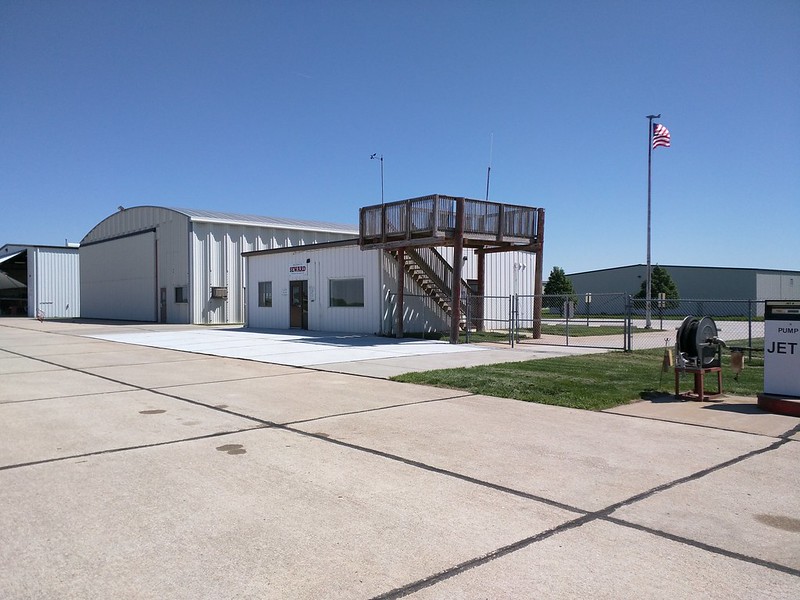
And then, of course, Peter would say, Well, we were flying home from South Dakota and figured we d stop in at Beatrice for fuel. And drop in on you. Followed by some surprise that we would stop at their little airport (which is quite a nice one). This all happened because it was windy. This is the fun adventure of aviation. Sometimes you plan to go to Texas, but the weather there is terrible, so you discover a 100-year-old landmark in Indiana instead. Or sometimes, like a couple of weeks ago, we planned to fly straight home but spent a few hours exploring rural Nebraska. The three of us flew to Sioux Falls, SD, in a little Cessna to visit my uncle and aunt up there. On our flight up, we stopped at the little airport in Seward, NE. It was complete with this unique elevated deck. In my imagination, this is used for people to drink beer while watching the planes land. IMG_20170512_113323 In South Dakota, we had a weekend full of card and board games, horseshoes, and Crokinole with my uncle and aunt, who are always fun to visit. We had many memories of visits up there as children and the pleasant enjoyment of the fact that we didn t need an 8-hour drive to get there. We flew back with a huge bag of large rhubarb from their garden (that too is something of a tradition!) It was a fun weekend to spend with my brothers first time we d been able to do this in a long while. And it marked the 11th state I ve flown into, and over 17,000 miles of flying.

4 June 2017

Dirk Eddelbuettel: RcppArmadillo 0.7.900.2.0

armadillo image The new RcppArmadillo release 0.7.900.2.0 is now on CRAN, and the Debian package was just updated as well. Armadillo is a powerful and expressive C++ template library for linear algebra aiming towards a good balance between speed and ease of use with a syntax deliberately close to a Matlab. RcppArmadillo integrates this library with the R environment and language--and is widely used by (currently) 350 other packages on CRAN---an increase of 32 since the last CRAN release of 0.7.800.2.0 in April! With the 7.900.* series of Armadillo, Conrad has started to more fully utilize OpenMP (also see Wikipedia on OpenMP) for operations that can be parallelized. To use this in your package you need to update its src/Makevars ,.win file similarly to what the skeleton default now uses
PKG_CXXFLAGS = $(SHLIB_OPENMP_CXXFLAGS) 
PKG_LIBS = $(SHLIB_OPENMP_CFLAGS) $(LAPACK_LIBS) $(BLAS_LIBS) $(FLIBS)
and you may want to enable C++11 while you are at it---though this may pose issues with older-than-ancient RHEL installations which are still (way too) pervasive so we do not do it by default (yet). Here, we once again rely on the build infrastructure automagically provided by R itself: if and when OpenMP is available, R will use it via $(SHLIB_OPENMP_CXXFLAGS) etc; see the fine WRE manual for details. That said, some operating systems make this harder than other, and macOS usually takes the crown. See for example this blog post by James for surviving in that environment. I am a little short of details because on Linux these things just work, and have for well over a decade. The rcpp-devel mailing list will be the best place for questions. Changes in this release relative to the previous CRAN release are as follows:

Changes in RcppArmadillo version 0.7.900.2.0 (2017-06-02)
  • Upgraded to Armadillo release 7.900.2 (Evil Banana Republic)
    • Expanded clamp() to handle cubes
    • Computationally expensive element-wise functions (such as exp(), log(), cos(), etc) can now be automatically sped up via OpenMP; this requires a C++11/C++14 compiler with OpenMP 3.0+ support for GCC and clang compilers
    • One caveat: when using GCC, use of -march=native in conjunction with -fopenmp may lead to speed regressions on recent processors
  • Added gcc 7 to support compiler check (James Balamuta in #128 addressing #126).
  • A unit test helper function for rmultinom was corrected (#133).
  • OpenMP support was added to the skeleton helper in inline.R

Courtesy of CRANberries, there is a diffstat report. More detailed information is on the RcppArmadillo page. Questions, comments etc should go to the rcpp-devel mailing list off the R-Forge page.

This post by Dirk Eddelbuettel originated on his Thinking inside the box blog. Please report excessive re-aggregation in third-party for-profit settings.

Lars Wirzenius: Vmdb2 first alpha release: Debian disk image creation tool

tl;dr: Get vmdebootstrap replacement from http://git.liw.fi/vmdb2 and run it from the source tree. Tell me if something doesn't work. Send patches. Many years ago I wrote vmdebootstrap, a tool for installing Debian on a disk image for virtual machines. I had a clear personal need: I was setting up a CI system and it needed six workers: one each for Debian oldstable, stable, and unstable, on two architectures (i386, amd64). Installing Debian six times in the same way is a lot of work, so I figured how difficult can it be to automate it. Turns out that not difficult at all, except to install a bootloader. (Don't ask me why I didn't use any of the other tools for this. It was long ago, and while some of the tools that now exist probably did exist then, I like writing code and learning things while doing it.) After a while I was happy with what the program did, but didn't want to upload it to Debian, and didn't want to add the kinds of things other people wanted, so I turned vmdebootstrap over to Neil Williams, who added a ton of new features. Unfortunately, it turned out that my initial architecture was not scaleable, and also the code I wrote wasn't very good, and there weren't any tests. Neil did heroic work forcing my crappy software into doing things I never envisioned. Last year he needed a break and asked me to take vmdebootstrap back. I did, and have been hiding from the public eye ever since, since I was so ashamed of the code. (I created a new identity and pretended to be an international assassin and backup specialist, travelling the world forcing people to have at least one tested backup of their system. If you've noticed reports in the press about people reporting near-death experiences while holding a shiny new USB drive, that would've been my fault.) Pop quiz: if you have a program with ten boolean options ("do this, except if that option is given, do the other thing"), how many black box tests do you need to test all the functionality? If one run of the program takes half an hour, how long will a full test suite run? I did some hard thinking about vmdebootstrap, and came to the sad conclusion that it had reached the end of its useful life as a living software project. There was no reasonable way to add most of the additional functionality people were asking for, and even maintaining the current code was too tedious a task to consider seriously. It was time to make a clean break of the past and start over, without caring about backwards compatibility. After all, the old code wasn't going anywhere so anyone who needed it could still use it. There was no need to burden a new program with my past mistakes. All new mistakes were called for. At the Cambridge mini-Debconf of November, 2016, I gave a short presentation of what I was going to do. I also posted about my plans to the debian-cloud list. In short, I would write a new, more flexible and cleaner replacement to be called vmdb2. For various personal reasons, I've not been able to spend as much time on vmdb2 as I'd like to, but I've now reached the point where I'd like to announce the first alpha version publically. The source code is hosted here: http://git.liw.fi/vmdb2 . There are .deb packages at my personal public APT repo (http://liw.fi/code/), but vmdb2 is easy enough to run directly from a git checkout:
sudo ./vmdb2 foo.vmdb --output foo.img
There's no need to install it to try it. What works: What doesn't work: I'm not opposed to adding support for those, but they're not directly interesting to me. For example, I only have amd64 machines. The best way to get support for additional features is to tell me how, preferably in the form of patches. (If I have to read tons of docs, or other people's code, and then write code and iterate while other people tell me it doesn't work, it's probably not happening.) Why would you be interested in vmdb2? There's a lot of other tools to do what it does, so perhaps you shouldn't care. That's fine. I like writing tools for myself. But if this kind of tool is of interest to you, please do have a look. A short tutorial: vmdb2 wants you to give it a "specification file" (conventionally suffixed .vmdb, because someone stole the .spec suffix, but vmdb2 doesn't care about the name). Below is an example. vmdb2 image specification files are in YAML, since I like YAML, and specify a sequence of steps to take to build the image. Each step is a tiny piece of self-contained functionality provided by a plugin.
steps:
  - mkimg: "  output  "
    size: 4G
  - mklabel: msdos
    device: "  output  "
  - mkpart: primary
    device: "  output  "
    start: 0%
    end: 100%
    part-tag: root-part
The above create an image (name is specified with the --output option), which is four gigabytes in size, and create a partitition table and a single partition that fills the whole disk. The "tag" is given so that later steps can easily refer to the partition. If you prefer another way to partition the disk, you can achieve that by adding more "mkpart" steps. For example, for UEFI you'll want to have an EFI partition.
  - mkfs: ext4
    partition: root-part
  - mount: root-part
    fs-tag: root-fs
The above formats the partition with the ext4 filesystem, and then mounts it. The mount point will be a temporary directory created by vmdb2, and a tag is again given to the mount point so it can be referred to.
  - unpack-rootfs: root-fs
The above unpacks a tar archive to put content into the filesystem, if the tar archive exists. The tar archive is specified with the --rootfs-tarball command line option.
  - debootstrap: stretch
    mirror: http://http.debian.net/debian
    target: root-fs
    unless: rootfs_unpacked
  - apt: linux-image-amd64
    fs-tag: root-fs
    unless: rootfs_unpacked
  - cache-rootfs: root-fs
    unless: rootfs_unpacked
The above will run debootstrap and install a kernel into the filesystem, but skip doing that if the rootfs tarball was used. Also, the tarball is created if it didn't exist. This way the tarball is used by all but the first run, which saves a bit of time. On my laptop and with a local mirror, debootstrap and kernel installation takes on the order of nine minutes (500 to 600 seconds), whereas unpacking the tar archive is a bit faster (takes around 30 seconds). When iterating over things other than debootstrap, this speeds things up something wonderful, and seems worth the complexity. The "unless:" mechanism is generic. All the steps share some state, and the unpack-rootfs step sets the "rootfs_unpacked" flag in the shared state. The "unless:" field tells vmdb2 to check for the flag and if it is not set, or if it is set to false ("unless it is set to true"), vmdb2 will execute the step. vmdb2 may get more such flags in the future, if there's need.
  - chroot: root-fs
    shell:  
      sed -i '/^root:[^:]*:/s//root::/' /etc/passwd
      echo pc-vmdb2 > /etc/hostname
The above executes a couple of shell commands in a chroot of the root filesystem we've just created. In this case they remove a login password from root, and set the hostname. This is a replacement of the vmdebootstrap "customize" script, but it can be inserted anywhere into the sequence of steps. There's boot chroot and non-chroot variants of the step. This is a good point to mention that writing customize scripts gets quite repetitive and tedious after a while, so vmdb2 has a plugin to run Ansible instead. You can customize your image with that instead, while the image is being built and not have to wait until you boot the image and running Ansible over ssh.
  - grub: bios
    root-fs: root-fs
    root-part: root-part
    device: "  output  "
    console: serial
Finally, install a boot loader, grub. This shows the BIOS variant, UEFI is also supported. This also configures grub and the kernel to use a serial console. There's a "yarn" (test suite) to build and smoke test an image with vmdb2 to make sure at least the basic functionality works. The smoke test boots the image under Qemu, logs in as root, and tells the VM to power off. Very, very basic, but has already found actual bugs in vmdb2. The smoke test needs the serial console to work. As with vmdebootstrap originally, I don't particularly want to maintain the package in Debian. I've added Debian packaging (so that I can install it on my own machines), but I already have enough packages to maintain, so I'm hoping someone else will volunteer to take on the Debian maintainership and bug handling duties. If you would like vmdb2 to do more things to suit you better, I'm happy to explain how to write plugins to provide more types of steps. If you are currently using vmdebootstrap, either directly or as part of another tool, I encourage you to have a look at vmdb2. In the long term, I would like to retire vmdebootstrap entirely, once vmdb2 can do everything vmdebootstrap can do, and few people use vmdebootstrap. This may take a while. In any case, whether you want a new image building tool or not, happy hacking.

1 June 2017

Markus Koschany: My Free Software Activities in May 2017

Welcome to gambaru.de. Here is my monthly report that covers what I have been doing for Debian. If you re interested in Java, Games and LTS topics, this might be interesting for you. Debian Games Bug fixes New upstream release Debian Java Debian LTS This was my fifteenth month as a paid contributor and I have been paid to work 27,25 hours on Debian LTS, a project started by Rapha l Hertzog. In that time I did the following: Misc Thanks for reading and see you next time.

Paul Wise: FLOSS Activities May 2017

Changes

Issues

Review

Administration
  • Debian: discuss mail bounces with a hoster, check perms of LE results, add 1 user to a group, re-sent some TLS cert expiry mail, clean up mail bounce flood, approve some debian.net TLS certs, do the samhain dance thrice, end 1 samhain mail flood, diagnose/fix LDAP update issue, relay DebConf cert expiry mails, reboot 2 non-responsive VM, merged patches for debian.org-sources.debian.org meta-package,
  • Debian mentors: lintian/security updates & reboot
  • Debian wiki: delete stray tmp file, whitelist 14 email addresses, disable 1 accounts with bouncing email, ping 3 persons with bouncing email
  • Debian website: update/push index/CD/distrib
  • Debian QA: deploy my changes, disable some removed suites in qadb
  • Debian PTS: strip whitespace from existing pages, invalidate sigs so pages get a rebuild
  • Debian derivatives census: deploy changes
  • Openmoko: security updates & reboots.

Communication
  • Invite Purism (on IRC), XBian (also on IRC), DuZeru to the Debian derivatives census
  • Respond to the shutdown of Parsix
  • Report BlankOn fileserver and Huayra webserver issues
  • Organise a transition of Ubuntu/Endless Debian derivatives census maintainers
  • Advocate against Debian having a monopoly on hardware certification
  • Advocate working with existing merchandise vendors
  • Start a discussion about Debian membership in other organisations
  • Advocate for HPE to join the LVFS & support fwupd

Sponsors All work was done on a volunteer basis.

31 May 2017

Chris Lamb: Free software activities in May 2017

Here is my monthly update covering what I have been doing in the free software world (previous month):
Reproducible builds

Whilst anyone can inspect the source code of free software for malicious flaws, most software is distributed pre-compiled to end users. The motivation behind the Reproducible Builds effort is to permit verification that no flaws have been introduced either maliciously or accidentally during this compilation process by promising identical results are always generated from a given source, thus allowing multiple third-parties to come to a consensus on whether a build was compromised. (I have generously been awarded a grant from the Core Infrastructure Initiative to fund my work in this area.) This month I:
I also made the following changes to our tooling:
diffoscope

diffoscope is our in-depth and content-aware diff utility that can locate and diagnose reproducibility issues.

  • Don't fail when run under perversely-recursive input files. (#780761).

strip-nondeterminism

strip-nondeterminism is our tool to remove specific non-deterministic results from a completed build.

  • Move from verbose_print to nonquiet_print so we print when normalising a file. This is so we can start to target the removal of strip-nondeterminism itself.
  • Only print log messages by default if the file was actually modified. (#863033)
  • Update package long descriptions to clarify that the tool itself is a temporary workaround. (#862029)


Debian My activities as the current Debian Project Leader are covered in my "Bits from the DPL" email to the debian-devel-announce list. However, I:
  • Represented Debian at the OSCAL 2017 in Tirana, Albania.
  • Attended the Reproducible Builds hackathon in Hamburg, Germany. (Report)
  • Finally, I attended Debian SunCamp 2017 in Lloret de Mar in Catalonia, Spain.

Patches contributed
  • xarchiver: Adding files to .tar.xz deletes existing content. (#862593)
  • screen-message: Please invert the default colours. (#862056)
  • fontconfig: fc-cache returns with exit code 0 on 256 errors. (#863427)
  • quadrapassel: Segfaults when unpausing a paused finished game. (#863106)
  • camping: Broken symlink. (#861040)
  • dns-root-data: Does not build if /bin/sh is Bash. (#862252)
  • dh-python: bit.ly link doesn't work anymore. (#863074)

Debian LTS

This month I have been paid to work 18 hours on Debian Long Term Support (LTS). In that time I did the following:
  • "Frontdesk" duties, triaging CVEs, adding links to upstream patches, etc.
  • Issued DLA 930-1 fixing a remote application crash vulnerability in libxstream-java, a Java library to serialize objects to XML and back again
  • Issued DLA 935-1 correcting a local denial of service vulnerability in lxterminal, the terminal emulator for the LXDE desktop environment.
  • Issued DLA 940-1 to remedy an issue in sane-backends which allowed remote attackers to obtain sensitive memory information via a crafted SANE_NET_CONTROL_OPTION packet.
  • Issued DLA 943-1 for the deluge bittorrent client to fix a directory traversal attack vulnerability in the web user interface.
  • Issued DLA 949-1 fixing an integer signedness error in the miniupnpc UPnP client that could allow remote attackers to cause a denial of service attack.
  • Issued DLA 959-1 for the libical calendaring library. A use-after-free vulnerability could allow remote attackers could cause a denial of service and possibly read heap memory via a specially crafted .ICS file.

Uploads
  • redis (3:3.2.9-1) New upstream release.
  • python-django:
    • 1:1.11.1-1 New upstream minor release.
    • 1:1.11.1-2 & 1:1.11.1-3 Add missing Build-Depends on libgdal-dev due to new GIS tests.
  • docbook-to-man:
    • 1:2.0.0-36 Adopt package. Apply a patch to prevent undefined behaviour caused by a memcpy(3) parameter overlap. (#842635, #858389)
    • 1:2.0.0-37 Install manpages using debian/docbook-to-man.manpages over manual calls.
  • installation-birthday Initial upload and misc. subsequent fixes.
  • bfs:
    • 1.0-3 Fix FTBFS on hurd-i386. (#861569)
    • 1.0.1-1 New upstream release & correct debian/watch file.

I also made the following non-maintainer uploads (NMUs):
  • ca-certificates (20161130+nmu1) Remove StartCom and WoSign certificates as they are now untrusted by the major browser vendors. (#858539)
  • sane-backends (1.0.25-4.1) Correct missing error handler in (generated) prerm script. (#862334)
  • seqan2 (2.3.1+dfsg-3.1) Fix broken /usr/bin/splazers symlink on 32-bit architectures. (#863669)
  • jackeq (0.5.9-2.1) Fix a segmentation fault caused by passing a truncated pointer instead of a GtkType. (#863416)
  • kluppe (0.6.20-1.1) Fix segmentation fault at startup. (#863421)
  • coyim (0.3.7-2.1) Skip tests that require internet access to avoid FTBFS. (#863414)
  • pavuk (0.9.35-6.1) Fix segmentation fault when opening "Limitations" window. (#863492)
  • porg (2:0.10-1.1) Fix broken LD_PRELOAD path. (#863495)
  • timemachine (0.3.3-2.1) Fix two segmentation faults caused by truncated pointers. (#863420)

Debian bugs filed
  • acct: Docs incorrectly installed to "accounting.html" directory. (#862180)
  • git-hub: Does not work with 2FA-enabled accounts. (#863265)
  • libwibble: Homepage and Vcs-Darcs fields are outdated. (#861673)


I additionally filed 2 bugs for packages that access the internet during build against flower and r-bioc-gviz.


I also filed 6 FTBFS bugs against cronutils, isoquery, libgnupg-interface-perl, maven-plugin-tools, node-dateformat, password-store & simple-tpm-pk11.

FTP Team

As a Debian FTP assistant I ACCEPTed 105 packages: boinc-app-eah-brp, debug-me, e-mem, etcd, fdroidcl, firejail, gcc-6-cross-ports, gcc-7-cross-ports, gcc-defaults, gl2ps, gnome-software, gnupg2, golang-github-dlclark-regexp2, golang-github-dop251-goja, golang-github-nebulouslabs-fastrand, golang-github-pkg-profile, haskell-call-stack, haskell-foundation, haskell-nanospec, haskell-parallel-tree-search, haskell-posix-pty, haskell-protobuf, htmlmin, iannix, libarchive-cpio-perl, libexternalsortinginjava-java, libgetdata, libpll, libtgvoip, mariadb-10.3, maven-resolver, mysql-transitional, network-manager, node-async-each, node-aws-sign2, node-bcrypt-pbkdf, node-browserify-rsa, node-builtin-status-codes, node-caseless, node-chokidar, node-concat-with-sourcemaps, node-console-control-strings, node-create-ecdh, node-create-hash, node-create-hmac, node-cryptiles, node-dot, node-ecc-jsbn, node-elliptic, node-evp-bytestokey, node-extsprintf, node-getpass, node-gulp-coffee, node-har-schema, node-har-validator, node-hawk, node-jsprim, node-memory-fs, node-pbkdf2, node-performance-now, node-set-immediate-shim, node-sinon-chai, node-source-list-map, node-stream-array, node-string-decoder, node-stringstream, node-verror, node-vinyl-sourcemaps-apply, node-vm-browserify, node-webpack-sources, node-wide-align, odil, onionshare, opensvc, otb, perl, petsc4py, pglogical, postgresql-10, psortb, purl, pymodbus, pymssql, python-decouple, python-django-rules, python-glob2, python-ncclient, python-parse-type, python-prctl, python-sparse, quoin-clojure, quorum, r-bioc-genomeinfodbdata, radlib, reprounzip, rustc, sbt-test-interface, slepc4py, slick-greeter, sparse, te923con, trabucco, traildb, typescript-types & writegood-mode. I additionally filed 6 RC bugs against packages that had incomplete debian/copyright files against: libgetdata, odil, opensvc, python-ncclient, radlib and reprounzip.

30 May 2017

Reproducible builds folks: Reproducible Builds: week 109 in Stretch cycle

Here's what happened in the Reproducible Builds effort between Sunday May 21 and Saturday May 27 2017: Past and upcoming events Bernhard M. Wiedemann gave a short talk on reproducible builds in openSUSE at the openSUSE Conference 2017. Slides and video recordings are available on that page. Chris Lamb will present at the Hong Kong Open Source Conference 2017 on reproducible builds on June 9th. Our next IRC meeting has been scheduled for Thursday June 1 at 16:00 UTC with this agenda. Academia Justin Cappos continued his work on the reproducible builds paper, with text and suggestions from Ximin Luo integrated. Toolchain developments #863470: "ftp.debian.org: security sync must not exclude .buildinfo" - while this bug isn't fixed, you need to make sure not to build jessie updates with stretch's dpkg, or else the upload will be rejected. Ximin Luo built GCC twice and ran diffoscope on them. Unfortunately the results were 1.7 GB in size and it can't be displayed in a web browser. 99/171 of the .debs are reproducible, though. He's now working on diffoscope (see below) to make it generate output more intelligently for such large size diffs. Here is a summary diff where the recursion depth cut-off was set low, so the size is reasonable and one can still see the outlines of where to look next. debuerreotype was newly added to Debian unstable. It is a reproducible, snapshot-based Debian rootfs builder. Patches and bugs filed Reviews of unreproducible packages 29 package reviews have been added, 49 have been updated and 23 have been removed in this week, adding to our knowledge about identified issues. Weekly QA work During our reproducibility testing, FTBFS bugs have been detected and reported by: diffoscope development Development continued in git, with commits from: strip-nondeterminism development Version 0.034-1 was uploaded to unstable by Chris Lamb. It included previous weeks' contributions from: tests.reproducible-builds.org: Misc. This week's edition was written by Ximin Luo, Bernhard M. Wiedemann, Chris Lamb and Holger Levsen & reviewed by a bunch of Reproducible Builds folks on IRC & the mailing lists.

28 May 2017

Russ Allbery: Debian Policy 4.0.0.0

Today, about a month later than I had intended due to having three consecutive work weeks that mostly drained me of energy, I finally uploaded Debian Policy 4.0.0.0 to Debian experimental. This went to experimental rather than unstable for two reasons: I expect there to be a few more point-release changes to packaging and formatting uploaded to experimental before uploading to unstable for the start of the buster development cycle. (I've indeed already noticed about six minor bugs, including the missing release date in the upgrading checklist....) Due to the DocBook conversion, and the resources rightly devoted to the stretch release instead, it may be a bit before the new Policy version shows up properly in all the places it's published. As you might expect from it having been more than a year since the previous release, there were a lot of accumulated changes. I posted the full upgrading-checklist entries to debian-devel-announce, or of course you can install the debian-policy package from experimental and review them in /usr/share/doc/debian-policy/upgrading-checklist.txt.gz.

27 May 2017

Russ Allbery: On time management

Last December, the Guardian published a long essay by Oliver Burkeman entitled "Why time management is ruining our lives". Those who follow my book reviews know I read a lot of time management books, so of course I couldn't resist this. And, possibly surprisingly, not to disagree with it. It's an excellent essay, and well worth your time. Burkeman starts by talking about Inbox Zero:
If all this fervour seems extreme Inbox Zero was just a set of technical instructions for handling email, after all this was because email had become far more than a technical problem. It functioned as a kind of infinite to-do list, to which anyone on the planet could add anything at will.
This is, as Burkeman develops in the essay, an important critique of time management techniques in general, not just Inbox Zero: perhaps you can become moderately more efficient, but what are you becoming more efficient at doing, and why does it matter? If there were a finite amount of things that you had to accomplish, with leisure the reward at the end of the fixed task list, doing those things more efficiently makes perfect sense. But this is not the case in most modern life. Instead, we live in a world governed by Parkinson's Law: "Work expands to fill the time available for its completion." Worse, we live in a world where the typical employer takes Parkinson's Law, not as a statement on the nature of ever-expanding to-do lists, but a challenge to compress the time made available for a task to try to force the work to happen faster. Burkeman goes farther into the politics, pointing out that a cui bono analysis of time management suggests that we're all being played by capitalist employers. I wholeheartedly agree, but that's worth a separate discussion; for those who want to explore that angle, David Graeber's Debt and John Kenneth Galbraith's The Affluent Society are worth your time. What I want to write about here is why I still read (and recommend) time management literature, and how my thinking on it has changed. I started in the same place that most people probably do: I had a bunch of work to juggle, I felt I was making insufficient forward progress on it, and I felt my day contained a lot of slack that could be put to better use. The alluring promise of time management is that these problems can be resolved with more organization and some focus techniques. And there is a huge surge of energy that comes with adopting a new system and watching it work, since the good ones build psychological payoff into the tracking mechanism. Starting a new time management system is fun! Finishing things is fun! I then ran into the same problem that I think most people do: after that initial surge of enthusiasm, I had lists, systems, techniques, data on where my time was going, and a far more organized intake process. But I didn't feel more comfortable with how I was spending my time, I didn't have more leisure time, and I didn't feel happier. Often the opposite: time management systems will often force you to notice all the things you want to do and how slow your progress is towards accomplishing any of them. This is my fundamental disagreement with Getting Things Done (GTD): David Allen firmly believes that the act of recording everything that is nagging at you to be done relieves the brain of draining background processing loops and frees you to be more productive. He argues for this quite persuasively; as you can see from my review, I liked his book a great deal, and used his system for some time. But, at least for me, this does not work. Instead, having a complete list of goals towards which I am making slow or no progress is profoundly discouraging and depressing. The process of maintaining and dwelling on that list while watching it constantly grow was awful, quite a bit worse psychologically than having no time management system at all. Mark Forster is the time management author who speaks the best to me, and one of the points he makes is that time management is the wrong framing. You're not going to somehow generate more time, and you're usually not managing minutes and seconds. A better framing is task management, or commitment management: the goal of the system is to manage what you mentally commit to accomplishing, usually by restricting that list to something far shorter than you would come up with otherwise. How, in other words, to limit your focus to a small enough set of goals that you can make meaningful progress instead of thrashing. That, for me, is now the merit and appeal of time (or task) management systems: how do I sort through all the incoming noise, distractions, requests, desires, and compelling ideas that life throws at me and figure out which of them are worth investing time in? I also benefit from structuring that process for my peculiar psychology, in which backlogs I have to look at regularly are actively dangerous for my mental well-being. Left unchecked, I can turn even the most enjoyable hobby into an obligation and then into a source of guilt for not meeting the (entirely artificial) terms of the obligation I created, without even intending to. And here I think it has a purpose, but it's not the purpose that the time management industry is selling. If you think of time management as a way to get more things done and get more out of each moment, you're going to be disappointed (and you're probably also being taken advantage of by the people who benefit from unsustainable effort without real, unstructured leisure time). I practice Inbox Zero, but the point wasn't to be more efficient at processing my email. The point was to avoid the (for me) psychologically damaging backlog of messages while acting on the knowledge that 99% of email should go immediately into the trash with no further action. Email is an endless incoming stream of potential obligations or requests for my time (even just to read a longer message) that I should normallly reject. I also take the time to notice patterns of email that I never care about and then shut off the source or write filters to delete that email for me. I can then reserve my email time for moments of human connection, directly relevant information, or very interesting projects, and spend the time on those messages without guilt (or at least much less guilt) about ignoring everything else. Prioritization is extremely difficult, particularly once you realize that true prioritization is not about first and later, but about soon or never. The point of prioritization is not to choose what to do first, it's to choose the 5% of things that you going to do at all, convince yourself to be mentally okay with never doing the other 95% (and not lying to yourself about how there will be some future point when you'll magically have more time), and vigorously defend your focus and effort for that 5%. And, hopefully, wholeheartedly enjoy working on those things, without guilt or nagging that there's something else you should be doing instead. I still fail at this all the time. But I'm better than I used to be. For me, that mental shift was by far the hardest part. But once you've made that shift, I do think the time management world has a lot of tools and techniques to help you make more informed choices about the 5%, and to help you overcome procrastination and loss of focus on your real goals. Those real goals should include true unstructured leisure and "because I want to" projects. And hopefully, if you're in a financial position to do it, include working less on what other people want you to do and more on the things that delight you. Or at least making a well-informed strategic choice (for the sake of money or some other concrete and constantly re-evaluated reason) to sacrifice your personal goals for some temporary external ones.

26 May 2017

Michael Prokop: The #newinstretch game: dbgsym packages in Debian/stretch

Debug packages include debug symbols and so far were usually named <package>-dbg in Debian. Those packages are essential if you ve to debug failing (especially: crashing) programs. Since December 2015 Debian has automatic dbgsym packages, being built by default. Those packages are available as <package>-dbgsym, so starting with Debian/stretch you should no longer look for -dbg packages but for -dbgsym instead. Currently there are 13.369 dbgsym packages available for the amd64 architecture of Debian/stretch, comparing this to the 2.250 packages which I counted being available for Debian/jessie this is really a huge improvement. (If you re interested in the details of dbgsym packages as a package maintainer take a look at the Automatic Debug Packages page in the Debian wiki.) The dbgsym packages are NOT provided by the usual Debian archive though (which is good thing, since those packages are quite disk space consuming, e.g. just the amd64 stretch mirror of debian-debug consumes 47GB). Instead there s a new archive called debian-debug. To get access to the dbgsym packages via the debian-debug suite on your Debian/stretch system include the following entry in your apt s sources.list configuration (replace deb.debian.org with whatever mirror you prefer):
deb http://deb.debian.org/debian-debug/ stretch-debug main
If you re not yet familiar with usage of such debug packages let me give you a short demo. Let s start with sending SIGILL (Illegal Instruction) to a running sha256sum process, causing it to generate a so called core dump file:
% sha256sum /dev/urandom &
[1] 1126
% kill -4 1126
% 
[1]+  Illegal instruction     (core dumped) sha256sum /dev/urandom
% ls
core
$ file core
core: ELF 64-bit LSB core file x86-64, version 1 (SYSV), SVR4-style, from 'sha256sum /dev/urandom', real uid: 1000, effective uid: 1000, real gid: 1000, effective gid: 1000, execfn: '/usr/bin/sha256sum', platform: 'x86_64'
Now we can run the GNU Debugger (gdb) on this core file, executing:
% gdb sha256sum core
[...]
Type "apropos word" to search for commands related to "word"...
Reading symbols from sha256sum...(no debugging symbols found)...done.
[New LWP 1126]
Core was generated by  sha256sum /dev/urandom'.
Program terminated with signal SIGILL, Illegal instruction.
#0  0x000055fe9aab63db in ?? ()
(gdb) bt
#0  0x000055fe9aab63db in ?? ()
#1  0x000055fe9aab8606 in ?? ()
#2  0x000055fe9aab4e5b in ?? ()
#3  0x000055fe9aab42ea in ?? ()
#4  0x00007faec30872b1 in __libc_start_main (main=0x55fe9aab3ae0, argc=2, argv=0x7ffc512951f8, init=<optimized out>, fini=<optimized out>, rtld_fini=<optimized out>, stack_end=0x7ffc512951e8) at ../csu/libc-start.c:291
#5  0x000055fe9aab4b5a in ?? ()
(gdb) 
As you can see by the several ?? question marks, the bt command (short for backtrace) doesn t provide useful information.
So let s install the according debug package, which is coreutils-dbgsym in this case (since the sha256sum binary which generated the core file is part of the coreutils package). Then let s rerun the same gdb steps:
% gdb sha256sum core
[...]
Type "apropos word" to search for commands related to "word"...
Reading symbols from sha256sum...Reading symbols from /usr/lib/debug/.build-id/a4/b946ef7c161f2d215518ca38d3f0300bcbdbb7.debug...done.
done.
[New LWP 1126]
Core was generated by  sha256sum /dev/urandom'.
Program terminated with signal SIGILL, Illegal instruction.
#0  0x000055fe9aab63db in sha256_process_block (buffer=buffer@entry=0x55fe9be95290, len=len@entry=32768, ctx=ctx@entry=0x7ffc51294eb0) at lib/sha256.c:526
526     lib/sha256.c: No such file or directory.
(gdb) bt
#0  0x000055fe9aab63db in sha256_process_block (buffer=buffer@entry=0x55fe9be95290, len=len@entry=32768, ctx=ctx@entry=0x7ffc51294eb0) at lib/sha256.c:526
#1  0x000055fe9aab8606 in sha256_stream (stream=0x55fe9be95060, resblock=0x7ffc51295080) at lib/sha256.c:230
#2  0x000055fe9aab4e5b in digest_file (filename=0x7ffc51295f3a "/dev/urandom", bin_result=0x7ffc51295080 "\001", missing=0x7ffc51295078, binary=<optimized out>) at src/md5sum.c:624
#3  0x000055fe9aab42ea in main (argc=<optimized out>, argv=<optimized out>) at src/md5sum.c:1036
As you can see it s reading the debug symbols from /usr/lib/debug/.build-id/a4/b946ef7c161f2d215518ca38d3f0300bcbdbb7.debug and this is what we were looking for.
gdb now also tells us that we don t have lib/sha256.c available. For even better debugging it s useful to have the according source code available. This is also just an apt-get source coreutils ; cd coreutils-8.26/ away:
~/coreutils-8.26 % gdb sha256sum ~/core
[...]
Type "apropos word" to search for commands related to "word"...
Reading symbols from sha256sum...Reading symbols from /usr/lib/debug/.build-id/a4/b946ef7c161f2d215518ca38d3f0300bcbdbb7.debug...done.
done.
[New LWP 1126]
Core was generated by  sha256sum /dev/urandom'.
Program terminated with signal SIGILL, Illegal instruction.
#0  0x000055fe9aab63db in sha256_process_block (buffer=buffer@entry=0x55fe9be95290, len=len@entry=32768, ctx=ctx@entry=0x7ffc51294eb0) at lib/sha256.c:526
526           R( h, a, b, c, d, e, f, g, K(25), M(25) );
(gdb) bt
#0  0x000055fe9aab63db in sha256_process_block (buffer=buffer@entry=0x55fe9be95290, len=len@entry=32768, ctx=ctx@entry=0x7ffc51294eb0) at lib/sha256.c:526
#1  0x000055fe9aab8606 in sha256_stream (stream=0x55fe9be95060, resblock=0x7ffc51295080) at lib/sha256.c:230
#2  0x000055fe9aab4e5b in digest_file (filename=0x7ffc51295f3a "/dev/urandom", bin_result=0x7ffc51295080 "\001", missing=0x7ffc51295078, binary=<optimized out>) at src/md5sum.c:624
#3  0x000055fe9aab42ea in main (argc=<optimized out>, argv=<optimized out>) at src/md5sum.c:1036
(gdb) 
Now we re ready for all the debugging magic. :) Thanks to everyone who was involved in getting us the automatic dbgsym package builds in Debian!

24 May 2017

Steve Kemp: Getting ready for Stretch

I run about 17 servers. Of those about six are very personal and the rest are a small cluster which are used for a single website. (Partly because the code is old and in some ways a bit badly designed, partly because "clustering!", "high availability!", "learning!", "fun!" - seriously I had a lot of fun putting together a fault-tolerant deployment with haproxy, ucarp, etc, etc. If I were paying for it the site would be both retired and static!) I've started the process of upgrading to stretch by picking a bunch of hosts that do things I could live without for a few days - in case there were big problems, or I needed to restore from backups. So far I've upgraded: All upgrades were painless, with only one real surprise - the attic-backup software was removed from Debian. Although I do intend to retry using Larss' excellent obnum in the near future pragmatically I wanted to stick with what I'm familiar with. Borg backup is a fork of attic I've been aware of for a long time, but I never quite had a reason to try it out. Setting it up pretty much just meant editing my backup-script:
s/attic/borg/g
Once I did that, and created some new destinations all was good:
borg@rsync.io ~ $ borg init /backups/git.steve.org.uk.borg/
borg@rsync.io ~ $ borg init /backups/master.steve.org.uk.borg/
borg@rsync.io ~ $ ..
Upgrading other hosts, for example my website(s), and my email-box, will be more complex and fiddly. On that basis they will definitely wait for the formal stretch release. But having a couple of hosts running the frozen distribution is good for testing, and to let me see what is new.

Michal &#268;iha&#345;: Weblate 2.14.1

Weblate 2.14.1 has been released today. It is bugfix release fixing possible migration issues, search results navigation and some minor security issues. Full list of changes: If you are upgrading from older version, please follow our upgrading instructions. You can find more information about Weblate on https://weblate.org, the code is hosted on Github. If you are curious how it looks, you can try it out on demo server. You can login there with demo account using demo password or register your own user. Weblate is also being used on https://hosted.weblate.org/ as official translating service for phpMyAdmin, OsmAnd, Turris, FreedomBox, Weblate itself and many other projects. Should you be looking for hosting of translations for your project, I'm happy to host them for you or help with setting it up on your infrastructure. Further development of Weblate would not be possible without people providing donations, thanks to everybody who have helped so far! The roadmap for next release is just being prepared, you can influence this by expressing support for individual issues either by comments or by providing bounty for them.

Filed under: Debian English SUSE Weblate

21 May 2017

Russ Allbery: Review: Sector General

Review: Sector General, by James White
Series: Sector General #5
Publisher: Orb
Copyright: 1983
Printing: 2002
ISBN: 0-312-87770-6
Format: Trade paperback
Pages: 187
Sector General is the fifth book (or, probably more accurately, collection) in the Sector General series. I blame the original publishers for the confusion. The publication information is for the Alien Emergencies omnibus, which includes the fourth through the sixth books in the series. Looking back on my previous reviews of this series (wow, it's been eight years since I read the last one?), I see I was reviewing them as novels rather than as short story collections. In retrospect, that was a mistake, since they're composed of clearly stand-alone stories with a very loose arc. I'm not going to go back and re-read the earlier collections to give them proper per-story reviews, but may as well do this properly here. Overall, this collection is more of the same, so if that's what you want, there won't be any negative surprises. It's another four engineer-with-a-wrench stories about biological and medical puzzles, with only a tiny bit of characterization and little hint to any personal life for any of the characters outside of the job. Some stories are forgettable, but White does create some memorable aliens. Sadly, the stories don't take us to the point of real communication, so those aliens stop at biological puzzles and guesswork. "Combined Operation" is probably the best, although "Accident" is the most philosophical and an interesting look at the founding principle of Sector General. "Accident": MacEwan and Grawlya-Ki are human and alien brought together by a tragic war, and forever linked by a rather bizarre war monument. (It's a very neat SF concept, although the implications and undiscussed consequences don't bear thinking about too deeply.) The result of that war was a general recognition that such things should not be allowed to happen again, and it brought about a new, deep commitment to inter-species tolerance and politeness. Which is, in a rather fascinating philosophical twist, exactly what MacEwan and Grawlya-Ki are fighting against: not the lack of aggression, which they completely agree with, but with the layers of politeness that result in every species treating all others as if they were eggshells. Their conviction is that this cannot create a lasting peace. This insight is one of the most profound bits I've read in the Sector General novels and supports quite a lot of philosophical debate. (Sadly, there isn't a lot of that in the story itself.) The backdrop against which it plays out is an accidental crash in a spaceport facility, creating a dangerous and potentially deadly environment for a variety of aliens. Given the collection in which this is included and the philosophical bent described above, you can probably guess where this goes, although I'll leave it unspoiled if you can't. It's an idea that could have been presented with more subtlety, but it's a really great piece of setting background that makes the whole series snap into focus. A much better story in context than its surface plot. (7) "Survivor": The hospital ship Rhabwar rescues a sole survivor from the wreck of an alien ship caused by incomplete safeguards on hyperdrive generators. The alien is very badly injured and unconscious and needs the full attention of Sector General, but on the way back, the empath Prilicla also begins suffering from empathic hypersensitivity. Conway, the protagonist of most of this series, devotes most of his attention to that problem, having delivered the rescued alien to competent surgical hands. But it will surprise no regular reader that the problems turn out to be linked (making it a bit improbable that it takes the doctors so long to figure that out). A very typical entry in the series. (6) "Investigation": Another very typical entry, although this time the crashed spaceship is on a planet. The scattered, unconscious bodies of the survivors, plus signs of starvation and recent amputation on all of them, convinces the military (well, police is probably more accurate) escort that this is may be a crime scene. The doctors are unconvinced, but cautious, and local sand storms and mobile vegetation add to the threat. I thought this alien design was a bit less interesting (and a lot creepier). (6) "Combined Operation": The best (and longest) story of this collection. Another crashed alien spacecraft, but this time it's huge, large enough (and, as they quickly realize, of a design) to indicate a space station rather than a ship, except that it's in the middle of nowhere and each segment contains a giant alien worm creature. Here, piecing together the biology and the nature of the vehicle is only the beginning; the conclusion points to an even larger problem, one that requires drawing on rather significant resources to solve. (On a deadline, of course, to add some drama.) This story requires the doctors to go unusually deep into the biology and extrapolated culture of the alien they're attempting to rescue, which made it more intellectually satisfying for me. (7) Followed by Star Healer. Rating: 6 out of 10

Adnan Hodzic: Automagically deploy & run containerized WordPress (PHP7 FPM, Nginx, MariaDB) using Ansible + Docker on AWS

In this blog post, I ve described what started as simple migration of WordPress blog to AWS, ended up as automation project consisting of publishing multiple Ansible roles deploying and running multiple Docker images. If you re not interested in reading about my entire journey, cognition gains and how this process came to be, please skim down to Birth of: containerized-wordpress-project (TL;DR) section. Migrating WordPress blog to AWS (EC2, Lightsail?) Since I ve been sold on Amazon s AWS idea of cloud computing services for couple of years now. I ve wanted, and been trying to migrate this (WordPress) blog to AWS, but somehow it never worked out. Moving it to EC2 instance, with its own ELB volumes, AMI, EIP, Security Group it just seemed as an overkill. When AWS Lightsail was first released, it seemed that was an answer to all my problems. But it wasn t, disregarding its bit restrictive/dumbed down versions of original features. Living in Amsterdam, my main problem with it was that it was only available in a single US region. Regardless, I thought it had everything I needed for WordPress site, and as a new service, it had great potential. Its regional limitations were also good in a sense that they made me realize one important thing. And that s once I migrate my blog to AWS, I want to be able to seamlessly move/migrate it across different EC2 s and different regions once they were available. If done properly, it meant I could even have it moved across different clouds (I m talking to you Google Cloud). P.S: AWS Lightsail is now available in couple of different regions across Europe. Rollout which was almost smoothless. Fundamental problem of every migration is migration

Phase 1: Don t reinvent the wheel? When you have a WordPress site that s not self hosted. You want everything to work, but yet you really don t want to spend any time managing infrastructure it s on. And as soon as I started looking what could fit this criteria, I found that there were pre-configured, running out of box WordPress EC2 images available on AWS Marketplace, great! But when I took a look, although everything was running out of box, I wasn t happy with software stack it was all built on. Namely Ubuntu 14.04 and Apache, and all of the services were started using custom scripts. Yuck. With this setup, when it was time to upgrade (and it s already that time) you wouldn t be thinking about upgrade. You d only be thinking about another migration. Phase 2: What if I built everything myself? Installing and configuring everything manually, and then writing huge HowTo which I would follow when I needed to re-create whole stack was not an option. Same case with was scripting whole process, as overhead of changes that had to be tracked was too way too big. Being a huge Ansible fan, automating this step was a natural next step. I even found an awesome Ansible role which seemed like it s going to do everything I need. Except, I realized I needed to update all software that s deployed with it, and customize it since configuration it was deployed on wasn t as generic. So I forked it and got to work. But soon enough, I was knee deep in making and fiddling with various system changes. Something I was trying to get away in this case, and most importantly something I was trying to avoid when it was time for next update. Phase 3: Marriage made in heaven: Ansible + Docker + AWS Idea to have everything Dockerized was around from very start. However, it never made a lot of sense until I put Ansible into same picture. And it was at this point where my final idea and requirements become crystal clear. Use Ansible to configure and setup host ready for Docker ecosystem. Ecosystem consisting of multiple separate containers for each required service (WordPress + Nginx + MariaDB). Link them all together as a single service using Docker Compose. Idea was backed by thought to spend minimum to no time (and effort) on manual configuration of anything on the server. Level of attachment to this server was so low that I didn t even want to SSH to it. If there was something wrong, I could just nuke the whole thing and deploy code on a new healthy rolled out server with everything working out of box. After it was clear what needed to be done, I got to work.

Birth of: containerized-wordpress-project (TL;DR)

After a lot of work, end result is project which allows you to automagically deploy & run containerized WordPress instance which consists of 3 separate containers running:

Once run, containerized-wordpress playbook will guide you through interactive setup of all 3 containers, after which it will run all Ansible roles created for this project. End result is that host you have never even SSH-ed to will be fully configured and running containerized WordPress instace out of box.

Most importantly, this whole process will be completed in <= 5 minutes and doesn t require any Docker or Ansible knowledge! containerized-wordpress demo Console output of running containerized-wordpress Ansible Playbook: Console output of running "containerized-wordpress" Ansible Playbook

Accessing WordPress instance created from containerized-wordpress Ansible Playbook:

Accessing WordPress instance created from "containerized-wordpress" Ansible Playbook Did I end up migrating to AWS in the end? You bet. Thanks to efforts made in containerized-wordpress-project, I m happy to report my whole WordPress migration to AWS was completed in matter of minutes and that this blog is now running on Docker and on AWS! I hope this same project will help you take a leap in your migration. Happy hacking!

Elena 'valhalla' Grandi: Modern XMPP Server

Modern XMPP Server

I've published a new HOWTO on my website www.trueelena.org/computers/ho:

www.enricozini.org/blog/2017/d already wrote about the Why (and the What, Who and When), so I'll just quote his conclusion and move on to the How.

I now have an XMPP setup which has all the features of the recent fancy chat systems, and on top of that it runs, client and server, on Free Software, which can be audited, it is federated and I can self-host my own server in my own VPS if I want to, with packages supported in Debian.


How

I've decided to install prosody.im/, mostly because it was recommended by the RTC QuickStart Guide rtcquickstart.org/; I've heard that similar results can be reached with www.ejabberd.im/ and other servers.

I'm also targeting www.debian.org/ stable (+ backports); as I write this is jessie; if there are significant differences I will update this article when I will upgrade my server to stretch. Right now, this means that I'm using prosody 0.9 (and that's probably also the version that will be available in stretch).

Installation and prerequisites

You will need to enable the backports.debian.org/ repository and then install the packages prosody and prosody-modules.

You also need to setup some TLS certificates (I used Let's Encrypt letsencrypt.org/); and make them readable by the prosody user; you can see Chapter 12 of the RTC QuickStart Guide rtcquickstart.org/guide/multi/ for more details.

On your firewall, you'll need to open the following TCP ports:


The latter two are needed to enable some services provided via http(s), including rich media transfers.

With just a handful of users, I didn't bother to configure LDAP or anything else, but just created users manually via:

prosodyctl adduser alice@example.org

In-band registration is disabled by default (and I've left it that way, to prevent my server from being used to send spim en.wikipedia.org/wiki/Messagin).

prosody configuration

You can then start configuring prosody by editing /etc/prosody/prosody.cfg.lua and changing a few values from the distribution defaults.

First of all, enforce the use of encryption and certificate checking both for client2server and server2server communications with:


c2s_require_encryption = true
s2s_secure_auth = true


and then, sadly, add to the whitelist any server that you want to talk to and doesn't support the above:


s2s_insecure_domains = "gmail.com"


virtualhosts

For each virtualhost you want to configure, create a file /etc/prosody/conf.avail/chat.example.org.cfg.lua with contents like the following:


VirtualHost "chat.example.org"
enabled = true
ssl =
key = "/etc/ssl/private/example.org-key.pem";
certificate = "/etc/ssl/public/example.org.pem";


For the domains where you also want to enable MUCs, add the follwing lines:


Component "conference.chat.example.org" "muc"
restrict_room_creation = "local"


the "local" configures prosody so that only local users are allowed to create new rooms (but then everybody can join them, if the room administrator allows it): this may help reduce unwanted usages of your server by random people.

You can also add the following line to enable rich media transfers via http uploads (XEP-0363):


Component "upload.chat.example.org" "http_upload"

The defaults are pretty sane, but see modules.prosody.im/mod_http_up for details on what knobs you can configure for this module

Don't forget to enable the virtualhost by linking the file inside /etc/prosody/conf.d/.

additional modules

Most of the other interesting XEPs are enabled by loading additional modules inside /etc/prosody/prosody.cfg.lua (under modules_enabled); to enable mod_something just add a line like:


"something";

Most of these come from the prosody-modules package (and thus from modules.prosody.im/ ) and some may require changing when prosody 0.10 will be available; when this is the case it is mentioned below.


@Gruppo Linux Como @LIFO

19 May 2017

Michael Prokop: Debian stretch: changes in util-linux #newinstretch

We re coming closer to the Debian/stretch stable release and similar to what we had with #newinwheezy and #newinjessie it s time for #newinstretch! Hideki Yamane already started the game by blogging about GitHub s Icon font, fonts-octicons and Arturo Borrero Gonzalez wrote a nice article about nftables in Debian/stretch. One package that isn t new but its tools are used by many of us is util-linux, providing many essential system utilities. We have util-linux v2.25.2 in Debian/jessie and in Debian/stretch there will be util-linux >=v2.29.2. There are many new options available and we also have a few new tools available. Tools that have been taken over from other packages New tools New features/options addpart (show or change the real-time scheduling attributes of a process):
--reload reload prompts on running agetty instances
blkdiscard (discard the content of sectors on a device):
-p, --step <num>    size of the discard iterations within the offset
-z, --zeroout       zero-fill rather than discard
chrt (show or change the real-time scheduling attributes of a process):
-d, --deadline            set policy to SCHED_DEADLINE
-T, --sched-runtime <ns>  runtime parameter for DEADLINE
-P, --sched-period <ns>   period parameter for DEADLINE
-D, --sched-deadline <ns> deadline parameter for DEADLINE
fdformat (do a low-level formatting of a floppy disk):
-f, --from <N>    start at the track N (default 0)
-t, --to <N>      stop at the track N
-r, --repair <N>  try to repair tracks failed during the verification (max N retries)
fdisk (display or manipulate a disk partition table):
-B, --protect-boot            don't erase bootbits when creating a new label
-o, --output <list>           output columns
    --bytes                   print SIZE in bytes rather than in human readable format
-w, --wipe <mode>             wipe signatures (auto, always or never)
-W, --wipe-partitions <mode>  wipe signatures from new partitions (auto, always or never)
New available columns (for -o):
 gpt: Device Start End Sectors Size Type Type-UUID Attrs Name UUID
 dos: Device Start End Sectors Cylinders Size Type Id Attrs Boot End-C/H/S Start-C/H/S
 bsd: Slice Start End Sectors Cylinders Size Type Bsize Cpg Fsize
 sgi: Device Start End Sectors Cylinders Size Type Id Attrs
 sun: Device Start End Sectors Cylinders Size Type Id Flags
findmnt (find a (mounted) filesystem):
-J, --json             use JSON output format
-M, --mountpoint <dir> the mountpoint directory
-x, --verify           verify mount table content (default is fstab)
    --verbose          print more details
flock (manage file locks from shell scripts):
-F, --no-fork            execute command without forking
    --verbose            increase verbosity
getty (open a terminal and set its mode):
--reload               reload prompts on running agetty instances
hwclock (query or set the hardware clock):
--get            read hardware clock and print drift corrected result
--update-drift   update drift factor in /etc/adjtime (requires --set or --systohc)
ldattach (attach a line discipline to a serial line):
-c, --intro-command <string>  intro sent before ldattach
-p, --pause <seconds>         pause between intro and ldattach
logger (enter messages into the system log):
-e, --skip-empty         do not log empty lines when processing files
    --no-act             do everything except the write the log
    --octet-count        use rfc6587 octet counting
-S, --size <size>        maximum size for a single message
    --rfc3164            use the obsolete BSD syslog protocol
    --rfc5424[=<snip>]   use the syslog protocol (the default for remote);
                           <snip> can be notime, or notq, and/or nohost
    --sd-id <id>         rfc5424 structured data ID
    --sd-param <data>    rfc5424 structured data name=value
    --msgid <msgid>      set rfc5424 message id field
    --socket-errors[=<on off auto>] print connection errors when using Unix sockets
losetup (set up and control loop devices):
-L, --nooverlap               avoid possible conflict between devices
    --direct-io[=<on off>]    open backing file with O_DIRECT 
-J, --json                    use JSON --list output format
New available --list column:
DIO  access backing file with direct-io
lsblk (list information about block devices):
-J, --json           use JSON output format
New available columns (for --output):
HOTPLUG  removable or hotplug device (usb, pcmcia, ...)
SUBSYSTEMS  de-duplicated chain of subsystems
lscpu (display information about the CPU architecture):
-y, --physical          print physical instead of logical IDs
New available column:
DRAWER  logical drawer number
lslocks (list local system locks):
-J, --json             use JSON output format
-i, --noinaccessible   ignore locks without read permissions
nsenter (run a program with namespaces of other processes):
-C, --cgroup[=<file>]      enter cgroup namespace
    --preserve-credentials do not touch uids or gids
-Z, --follow-context       set SELinux context according to --target PID
rtcwake (enter a system sleep state until a specified wakeup time):
--date <timestamp>   date time of timestamp to wake
--list-modes         list available modes
-r, --reorder <dev>  fix partitions order (by start offset)
sfdisk (display or manipulate a disk partition table):
New Commands:
-J, --json <dev>                  dump partition table in JSON format
-F, --list-free [<dev> ...]       list unpartitioned free areas of each device
-r, --reorder <dev>               fix partitions order (by start offset)
    --delete <dev> [<part> ...]   delete all or specified partitions
--part-label <dev> <part> [<str>] print or change partition label
--part-type <dev> <part> [<type>] print or change partition type
--part-uuid <dev> <part> [<uuid>] print or change partition uuid
--part-attrs <dev> <part> [<str>] print or change partition attributes
New Options:
-a, --append                   append partitions to existing partition table
-b, --backup                   backup partition table sectors (see -O)
    --bytes                    print SIZE in bytes rather than in human readable format
    --move-data[=<typescript>] move partition data after relocation (requires -N)
    --color[=<when>]           colorize output (auto, always or never)
                               colors are enabled by default
-N, --partno <num>             specify partition number
-n, --no-act                   do everything except write to device
    --no-tell-kernel           do not tell kernel about changes
-O, --backup-file <path>       override default backup file name
-o, --output <list>            output columns
-w, --wipe <mode>              wipe signatures (auto, always or never)
-W, --wipe-partitions <mode>   wipe signatures from new partitions (auto, always or never)
-X, --label <name>             specify label type (dos, gpt, ...)
-Y, --label-nested <name>      specify nested label type (dos, bsd)
Available columns (for -o):
 gpt: Device Start End Sectors Size Type Type-UUID Attrs Name UUID
 dos: Device Start End Sectors Cylinders Size Type Id Attrs Boot End-C/H/S Start-C/H/S
 bsd: Slice Start  End Sectors Cylinders Size Type Bsize Cpg Fsize
 sgi: Device Start End Sectors Cylinders Size Type Id Attrs
 sun: Device Start End Sectors Cylinders Size Type Id Flags
swapon (enable devices and files for paging and swapping):
-o, --options <list>     comma-separated list of swap options
New available columns (for --show):
UUID   swap uuid
LABEL  swap label
unshare (run a program with some namespaces unshared from the parent):
-C, --cgroup[=<file>]                              unshare cgroup namespace
    --propagation slave shared private unchanged   modify mount propagation in mount namespace
-s, --setgroups allow deny                         control the setgroups syscall in user namespaces
Deprecated / removed options sfdisk (display or manipulate a disk partition table):
-c, --id                  change or print partition Id
    --change-id           change Id
    --print-id            print Id
-C, --cylinders <number>  set the number of cylinders to use
-H, --heads <number>      set the number of heads to use
-S, --sectors <number>    set the number of sectors to use
-G, --show-pt-geometry    deprecated, alias to --show-geometry
-L, --Linux               deprecated, only for backward compatibility
-u, --unit S              deprecated, only sector unit is supported

17 May 2017

Daniel Pocock: Hacking the food chain in Switzerland

A group has recently been formed on Meetup seeking to build a food computer in Zurich. The initial meeting is planned for 6:30pm on 20 June 2017 at ETH, (Zurich Centre/Zentrum, R mistrasse 101). The question of food security underlies many of the world's problems today. In wealthier nations, we are being called upon to trust a highly opaque supply chain and our choices are limited to those things that major supermarket chains are willing to stock. A huge transport and storage apparatus adds to the cost and CO2 emissions and detracts from the nutritional value of the produce that reaches our plates. In recent times, these problems have been highlighted by the horsemeat scandal, the Guacapocalypse and the British Hummus crisis. One interesting initiative to create transparency and encourage diversity in our diets is the Open Agriculture (OpenAg) Initiative from MIT, summarised in this TED video from Caleb Harper. The food produced is healthier and fresher than anything you might find in a supermarket and has no exposure to pesticides. An open source approach to food An interesting aspect of this project is the promise of an open source approach. The project provides hardware plans, a a video of the build process, source code and the promise of sharing climate recipes (scripts) to replicate the climates of different regions, helping ensure it is always the season for your favour fruit or vegetable. Do we need it? Some people have commented on the cost of equipment and electricity. Carsten Agger recently blogged about permaculture as a cleaner alternative. While there are many places where people can take that approach, there are also many overpopulated regions and cities where it is not feasible. Some countries, like Japan, have an enormous population and previously productive farmland contaminated by industry, such as the Fukushima region. Growing our own food also has the potential to reduce food waste, as individual families and communities can grow what they need. Whether it is essential or not, the food computer project also provides a powerful platform to educate people about food and climate issues and an exciting opportunity to take the free and open source philosophy into many more places in our local communities. The Zurich Meetup group has already received expressions of interest from a diverse group including professionals, researchers, students, hackers, sustainability activists and free software developers. Next steps People who want to form a group in their own region can look in the forum topic "Where are you building your Food Computer?" to find out if anybody has already expressed interest. Which patterns from the free software world can help more people build more food computers? I've already suggested using Debian's live-wrapper to distribute a runnable ISO image that can boot from a USB stick, can you suggest other solutions like this? Can you think of any free software events where you would like to see a talk or exhibit about this project? Please suggest them on the OpenAg forum. There are many interesting resources about the food crisis, an interesting starting point is watching the documentary Food, Inc. If you are in Switzerland, please consider attending the meeting on at 6:30pm on 20 June 2017 at ETH (Centre/Zentrum), Zurich. One final thing to contemplate: if you are not hacking your own food supply, who is?

16 May 2017

Daniel Pocock: Building an antenna and receiving ham and shortwave stations with SDR

In my previous blog on the topic of software defined radio (SDR), I provided a quickstart guide to using gqrx, GNU Radio and the RTL-SDR dongle to receive FM radio and the amateur 2 meter (VHF) band. Using the same software configuration and the same RTL-SDR dongle, it is possible to add some extra components and receive ham radio and shortwave transmissions from around the world. Here is the antenna setup from the successful SDR workshop at OSCAL'17 on 13 May: After the workshop on Saturday, members of the OSCAL team successfully reconstructed the SDR and antenna at the Debian info booth on Sunday and a wide range of shortwave and ham signals were detected: Here is a close-up look at the laptop, RTL-SDR dongle (above laptop), Ham-It-Up converter (above water bottle) and MFJ-971 ATU (on right): Buying the parts
Component Purpose, Notes Price/link to source
RTL-SDR dongle Converts radio signals (RF) into digital signals for reception through the USB port. It is essential to buy the dongles for SDR with TCXO, the generic RTL dongles for TV reception are not stable enough for anything other than TV. ~ 25
Enamelled copper wire, 25 meters or more Loop antenna. Thicker wire provides better reception and is more suitable for transmitting (if you have a license) but it is heavier. The antenna I've demonstrated at recent events uses 1mm thick wire. ~ 10
4 (or more) ceramic egg insulators Attach the antenna to string or rope. Smaller insulators are better as they are lighter and less expensive. ~ 10
4:1 balun The actual ratio of the balun depends on the shape of the loop (square, rectangle or triangle) and the point where you attach the balun (middle, corner, etc). You may want to buy more than one balun, for example, a 4:1 balun and also a 1:1 balun to try alternative configurations. Make sure it is waterproof, has hooks for attaching a string or rope and an SO-239 socket. from 20
5 meter RG-58 coaxial cable with male PL-259 plugs on both ends If using more than 5 meters or if you want to use higher frequencies above 30MHz, use thicker, heavier and more expensive cables like RG-213. The cable must be 50 ohm. ~ 10
Antenna Tuning Unit (ATU) I've been using the MFJ-971 for portable use and demos because of the weight. There are even lighter and cheaper alternatives if you only need to receive. ~ 20 for receive only or second hand
PL-259 to SMA male pigtail, up to 50cm, RG58 Joins the ATU to the upconverter. Cable must be RG58 or another 50 ohm cable ~ 5
Ham It Up v1.3 up-converter Mixes the HF signal with a signal from a local oscillator to create a new signal in the spectrum covered by the RTL-SDR dongle ~ 40
SMA (male) to SMA (male) pigtail Join the up-converter to the RTL-SDR dongle ~ 2
USB charger and USB type B cable Used for power to the up-converter. A spare USB mobile phone charge plug may be suitable. ~ 5
String or rope For mounting the antenna. A ligher and cheaper string is better for portable use while a stronger and weather-resistent rope is better for a fixed installation. 5
Building the antenna There are numerous online calculators for measuring the amount of enamelled copper wire to cut. For example, for a centre frequency of 14.2 MHz on the 20 meter amateur band, the antenna length is 21.336 meters. Add an extra 24 cm (extra 12 cm on each end) for folding the wire through the hooks on the balun. After cutting the wire, feed it through the egg insulators before attaching the wire to the balun. Measure the extra 12 cm at each end of the wire and wrap some tape around there to make it easy to identify in future. Fold it, insert it into the hook on the balun and twist it around itself. Use between four to six twists. Strip off approximately 0.5cm of the enamel on each end of the wire with a knife, sandpaper or some other tool. Insert the exposed ends of the wire into the screw terminals and screw it firmly into place. Avoid turning the screw too tightly or it may break or snap the wire. Insert string through the egg insulators and/or the middle hook on the balun and use the string to attach it to suitable support structures such as a building, posts or trees. Try to keep it at least two meters from any structure. Maximizing the surface area of the loop improves the performance: a circle is an ideal shape, but a square or 4:3 rectangle will work well too. For optimal performance, if you imagine the loop is on a two-dimensional plane, the first couple of meters of feedline leaving the antenna should be on the plane too and at a right angle to the edge of the antenna. Join all the other components together using the coaxial cables. Configuring gqrx for the up-converter and shortwave signals Inspect the up-converter carefully. Look for the crystal and find the frequency written on the side of it. The frequency written on the specification sheet or web site may be wrong so looking at the crystal itself is the best way to be certain. On my Ham It Up, I found a crystal with 125.000 written on it, this is 125 MHz. Launch gqrx, go to the File menu and select I/O devices. Change the LNB LO value to match the crystal frequency on the up-converter, with a minus sign. For my Ham It Up, I use the LNB LO value -125.000000 MHz. Click OK to close the I/O devices window. On the Input Controls tab, make sure Hardware AGC is enabled. On the Receiver options tab, change the Mode value. Commercial shortwave broadcasts use AM and amateur transmission use single sideband: by convention, LSB is used for signals below 10MHz and USB is used for signals above 10MHz. To start exploring the 20 meter amateur band around 14.2 MHz, for example, use USB. In the top of the window, enter the frequency, for example, 14.200 000 MHz. Now choose the FFT Settings tab and adjust the Freq zoom slider. Zoom until the width of the display is about 100 kHZ, for example, from 14.15 on the left to 14.25 on the right. Click the Play icon at the top left to start receiving. You may hear white noise. If you hear nothing, check the computer's volume controls, move the Gain slider (bottom right) to the maximum position and then lower the Squelch value on the Receiver options tab until you hear the white noise or a transmission. Adjust the Antenna Tuner knobs Now that gqrx is running, it is time to adjust the knobs on the antenna tuner (ATU). Reception improves dramatically when it is tuned correctly. Exact instructions depend on the type of ATU you have purchased, here I present instructions for the MFJ-971 that I have been using. Turn the TRANSMITTER and ANTENNA knobs to the 12 o'clock position and leave them like that. Turn the INDUCTANCE knob while looking at the signals in the gqrx window. When you find the best position, the signal strength displayed on the screen will appear to increase (the animated white line should appear to move upwards and maybe some peaks will appear in the line). When you feel you have found the best position for the INDUCTANCE knob, leave it in that position and begin turning the ANTENNA knob clockwise looking for any increase in signal strength on the chart. When you feel that is correct, begin turning the TRANSMITTER knob. Listening to a transmission At this point, if you are lucky, some transmissions may be visible on the gqrx screen. They will appear as darker colours in the waterfall chart. Try clicking on one of them, the vertical red line will jump to that position. For a USB transmission, try to place the vertical red line at the left hand side of the signal. Try dragging the vertical red line or changing the frequency value at the top of the screen by 100 Hz at a time until the station is tuned as well as possible. Try and listen to the transmission and identify the station. Commercial shortwave broadcasts will usually identify themselves from time to time. Amateur transmissions will usually include a callsign spoken in the phonetic alphabet. For example, if you hear "CQ, this is Victor Kilo 3 Tango Quebec Romeo" then the station is VK3TQR. You may want to note down the callsign, time, frequency and mode in your log book. You may also find information about the callsign in a search engine. The video demonstrates reception of a transmission from another country, can you identify the station's callsign and find his location? If you have questions about this topic, please come and ask on the Debian Hams mailing list. The gqrx package is also available in Fedora and Ubuntu but it is known to crash on startup in Ubuntu 17.04. Users of other distributions may also want to try the Debian Ham Blend bootable ISO live image as a quick and easy way to get started.

Next.

Previous.