Search Results: "ads"

12 October 2023

Matthew Garrett: Defending abuse does not defend free software

The Free Software Foundation Europe and the Software Freedom Conservancy recently released a statement that they would no longer work with Eben Moglen, chairman of the Software Freedom Law Center. Eben was the general counsel for the Free Software Foundation for over 20 years, and was centrally involved in the development of version 3 of the GNU General Public License. He's devoted a great deal of his life to furthering free software.

But, as described in the joint statement, he's also acted abusively towards other members of the free software community. He's acted poorly towards his own staff. In a professional context, he's used graphically violent rhetoric to describe people he dislikes. He's screamed abuse at people attempting to do their job.

And, sadly, none of this comes as a surprise to me. As I wrote in 2017, after it became clear that Eben's opinions diverged sufficiently from the FSF's that he could no longer act as general counsel, he responded by threatening an FSF board member at an FSF-run event (various members of the board were willing to tolerate this, which is what led to me quitting the board). There's over a decade's evidence of Eben engaging in abusive behaviour towards members of the free software community, be they staff, colleagues, or just volunteers trying to make the world a better place.

When we build communities that tolerate abuse, we exclude anyone unwilling to tolerate being abused[1]. Nobody in the free software community should be expected to deal with being screamed at or threatened. Nobody should be afraid that they're about to have their sexuality outed by a former boss.

But of course there are some that will defend Eben based on his past contributions. There were people who were willing to defend Hans Reiser on that basis. We need to be clear that what these people are defending is not free software - it's the right for abusers to abuse. And in the long term, that's bad for free software.

[1] "Why don't people just get better at tolerating abuse?" is a terrible response to this. Why don't abusers stop abusing? There's fewer of them, and it should be easier.

comment count unavailable comments

Freexian Collaborators: Monthly report about Debian Long Term Support, September 2023 (by Santiago Ruano Rinc n)

Like each month, have a look at the work funded by Freexian s Debian LTS offering.

Debian LTS contributors In September, 21 contributors have been paid to work on Debian LTS, their reports are available:
  • Abhijith PA did 10.0h (out of 0h assigned and 14.0h from previous period), thus carrying over 4.0h to the next month.
  • Adrian Bunk did 7.0h (out of 17.0h assigned), thus carrying over 10.0h to the next month.
  • Anton Gladky did 9.5h (out of 7.5h assigned and 7.5h from previous period), thus carrying over 5.5h to the next month.
  • Bastien Roucari s did 16.0h (out of 15.5h assigned and 1.5h from previous period), thus carrying over 1.0h to the next month.
  • Ben Hutchings did 17.0h (out of 17.0h assigned).
  • Chris Lamb did 17.0h (out of 17.0h assigned).
  • Emilio Pozuelo Monfort did 30.0h (out of 30.0h assigned).
  • Guilhem Moulin did 18.25h (out of 18.25h assigned).
  • Helmut Grohne did 10.0h (out of 10.0h assigned).
  • Lee Garrett did 17.0h (out of 16.5h assigned and 0.5h from previous period).
  • Markus Koschany did 40.0h (out of 40.0h assigned).
  • Ola Lundqvist did 4.5h (out of 0h assigned and 24.0h from previous period), thus carrying over 19.5h to the next month.
  • Roberto C. S nchez did 5.0h (out of 12.0h assigned), thus carrying over 7.0h to the next month.
  • Santiago Ruano Rinc n did 7.75h (out of 16.0h assigned), thus carrying over 8.25h to the next month.
  • Sean Whitton did 7.0h (out of 7.0h assigned).
  • Sylvain Beucler did 10.5h (out of 17.0h assigned), thus carrying over 6.5h to the next month.
  • Thorsten Alteholz did 14.0h (out of 14.0h assigned).
  • Tobias Frost did 13.25h (out of 16.0h assigned), thus carrying over 2.75h to the next month.

Evolution of the situation In September, we have released 44 DLAs. The month of September was a busy month for the LTS Team. A notable security issue fixed in September was the high-severity CVE-2023-4863, a heap buffer overflow that allowed remote attackers to perform an out-of-bounds memory write via a crafted WebP file. This CVE was covered by the three DLAs of different packages: firefox-esr, libwebp and thunderbird. The libwebp backported patch was sent to upstream, who adapted and applied it to the 0.6.1 branch. It is also worth noting that LTS contributor Markus Koschany included in his work updates to packages in Debian Bullseye and Bookworm, that are under the umbrella of the Security Team: xrdp, jetty9 and mosquitto. As every month, there was important behind-the-scenes work by the Front Desk staff, who triaged, analyzed and reviewed dozens of vulnerabilities, to decide if they warrant a security update. This is very important work, since we need to trade-off between the frequency of updates and the stability of the LTS release.

Thanks to our sponsors Sponsors that joined recently are in bold.

10 October 2023

Julian Andres Klode: Divergence - A case for different upgrade approaches

APT currently knows about three types of upgrades: All of these upgrade types are necessary to deal with upgrades within a distribution release. Yes, sometimes even removals may be needed because bug fixes require adding a Conflicts somewhere. In Ubuntu we have a third type of upgrades, handled by a separate tool: release upgrades. ubuntu-release-upgrader changes your sources.list, and applies various quirks to the upgrade. In this post, I want to look not at the quirk aspects but discuss how dependency solving should differ between intra-release and inter-release upgrades. Previous solver projects (such as Mancoosi) operated under the assumption that minimizing the number of changes performed should ultimately be the main goal of a solver. This makes sense as every change causes risks. However it ignores a different risk, which especially applies when upgrading from one distribution release to a newer one: Increasing divergence from the norm. Consider a person installs foo in Debian 12. foo depends on a b, so a will be automatically installed to satisfy the dependency. A release later, a has some known issues and b is prefered, the dependency now reads: b a. A classic solver would continue to keep a installed because it was installed before, leading upgraded installs to have foo, a installed whereas new systems have foo, b installed. As systems get upgraded over and over, they continue to diverge further and further from new installs to the point that it adds substantial support effort. My proposal for the new APT solver is that when we perform release upgrades, we forget which packages where previously automatically installed. We effectively perform a normalization: All systems with the same set of manually installed packages will end up with the same set of automatically installed packages. Consider the solving starting with an empty set and then installing the latest version of each previously manually installed package: It will see now that foo depends b a and install b (and a will be removed later on as its not part of the solution). Another case of divergence is Suggests handling. Consider that foo also Suggests s. You now install another package bar that depends s, hence s gets installed. Upon removing bar, s is not being removed automatically because foo still suggests it (and you may have grown used to foo s integration of s). This is because apt considers Suggests to be important - they won t be automatically installed, but will not be automatically removed. In Ubuntu, we unset that policy on release upgrades to normalize the systems. The reasoning for that is simple: While you may have grown to use s as part of foo during the release, an upgrade to the next release already is big enough that removing s is going to have less of an impact - breakage of workflows is expected between release upgrades. I believe that apt release-upgrade will benefit from both of these design choices, and in the end it boils down to a simple mantra:

Dirk Eddelbuettel: drat 0.2.4 on CRAN: Improved macOS Support, General Updates

drat user A new minor release of the drat package arrived on CRAN today making it the first release in one and a half years. drat stands for drat R Archive Template, and helps with easy-to-create and easy-to-use repositories for R packages. Since its inception in early 2015 it has found reasonably widespread adoption among R users because repositories with marked releases is the better way to distribute code. Because for once it really is as your mother told you: Friends don t let friends install random git commit snapshots. Properly rolled-up releases it is. Just how CRAN shows us: a model that has demonstrated for two-plus decades how to do this. And you can too: drat is easy to use, documented by six vignettes and just works. Detailed information about drat is at its documentation site. Two more blog posts using drat from GitHub Actions were just added today showing, respectively, how to add to a drat repo in either push or pull mode. This release contains two extended PRs contributed by drat users! Both extended support for macOS: Joey Reid extended M1 support to pruning and archival, and Arne Johannes added bug-sur support. I polished a few more things around the edges, mostly documentation or continuos-integrations related. The NEWS file summarises the release as follows:

Changes in drat version 0.2.4 (2023-10-09)
  • macOS Arm M1 repos are now also supported in pruning and archival (Joey Reid in #135 fixing #134)
  • A minor vignette typo was fixed (Dirk)
  • A small error with setwd() in insertPackage() was corrected (Dirk)
  • macOS x86_64 repos (on big-sur) are now supported too (Arne Johannes Holmin in #139 fixing #138)
  • A few small maintenance tweaks were applied to the CI setup, and to the main README.md

Courtesy of my CRANberries, there is a comparison to the previous release. More detailed information is on the drat page as well as at the documentation site. If you like this or other open-source work I do, you can sponsor me at GitHub.

This post by Dirk Eddelbuettel originated on his Thinking inside the box blog. Please report excessive re-aggregation in third-party for-profit settings.

9 October 2023

Aigars Mahinovs: Figuring out finances part 1

I have been managing my finances and getting an overview of where I am financially and where I am going month-to-month for a few years already. That means that I already have a method of doing my finances and a method of thinking about them. So far this has been supported by a commerical tool called MoneyWiz. I was happy to pay them for the ability to have a solid product and be able to easily access my finances from my phone (to enter cash transactions directly in the field) and sync data across multiple devices with their cloud offering. However, MoneyWiz development stalled. So much so that they stopped updating their Android app and cancelled web version plans to just focus on a iPhone and MacOS clients. And even there the development did not seem very successful over the last year. So I am cancelling their subscription, extracting all my data (as CSV) and looking for alternatives. So let's start with the basics - what I want from finace software?
  • Open source and self-hosted
  • Accounts to represent real accounts in my bank, credit cards, cash account
  • Transactions to represent money moving in/out/between accounts
  • Tree of categories for transactions to categorise spending
  • Category reports on arbitrary time periods
  • Ability to see the expected balance on each account at any historic point in time from given transactions
  • Ability to do a corrective transaction - hmm, I don't know what happened, but right now I have X in cash
  • Adding past transactions before a corrective transaction should not change balance after correction
  • Ability to automatically import transactions from my bank
  • Ability to plan future, recurring transactions
  • Incoming transactions from bank import should be auto-matched with planned recuring transactions
  • Ability to see missed planned recurring transactions
  • Ability to see value deviations in planned recuring transactions
  • Ability to manually match a transaction with a planned recurring transaction for that month or skip a month
  • Ability to see a projected balance on my accounts at any future date given planned transactions
  • Credit card fully refilling its current (negative) balance to zero (from a given account) should be a plannable transaction
  • Accessible from multiple devices, like Linux, Android, iPhone, MacOS. Most likely that means web-based
  • Achiving accounts without loosing their past transactions with active accounts
  • API to access data, so that I could wire that up to a Home Assistant dashboard
I don't care about currencies (thanks Euro!), localization, taxes and double-entry bookkeeping. I don't have much use for tags, budgets or savings targets. It could be useful to be able to track stock investment values (but I do have a pretty good from the bank that does that anyway). And tracking loans (incoming and outgoing) could be a worthwhile thing as well, but that can also be simulated with separate accounts for each loan. Tracking refundable expenses (like medical expenses that insurances should refund later on) would also be nice. Could also be simulated by having a separate expense category (Medical - refundable) and putting the refund as a negative expense into that category. One weird feature that I really like is having transfer transactions that have arbitrary incoming and outgoing dates. For some transactions it is a simple transfer delay - money leaves the account A on Friday and only appears in the destination account B on Monday morning. However, this can also happen the other way around - a few credit cards I have seen work in a way that on 14th of each month the balance of the credit card gets reset to zero and then a week later the negative balance that was on that credit card gets taken from the base account that the card is bound to. So the money leaves the base account a week later than it arrives in the credit card account. Financial systems really are magic sometimes :D Ideally that should be represented by a single transaction with two dates - one date when money leaves one account and another date when it arrives in a different account, so that balances on both accounts in the days between would be correct (as in matching what the bank says they were on those dates). And it should automatch such transaction from bank data imports. And predict its value from the negative balance of the credit card. And a pony! But in worst case this could be simulated using a separate "In transfer" account. When I am thinking about my finances, the key metric for me is - how much will I spend this month - both in fixed spending (rent, Internet and phone bills, health insurance, subscriptions, ...) and in variable spending (groceries, eating out, clothing, ...). In theory that should be trivial, but in practice a simple calendar month view will fail because a bunch of fixed expenses occur at the month end/start boundary and can happen either at the end of previous month or at start on next month, depending on how the weekends happen to fall and how the systems of various providers decided to do direct debits this month. So 1st of month is not a good snapshoting time. Any date between 6th (last possible days for monthly bills) and 20th (earliest possible salary day) would be a better cut off point. Looking at the balance of my main account at that time point lets me know what was the difference between income and expenses for the past month. And that is the number I want the financial app to be able to predict as soon as possible. And additional complication is the way credit cards work here. The expenses booked to a credit card after 14th of September will only appear in the main account on 20th of October and thus will actually only count towards the expenses of month of October. That makes it very confusing to see a larger overspend in the main account on 6th of October and then use the categories to try to figure out where the money went, because all the spending that happened on the credit card after the 14th of September should not really be looked at in that context, but spending on the main account or cash account should be counted all the way to 6th of October. :D I am not optimistic that any finance software would able to doea with this mess correctly. So far I am tending to consider Firefly III which has most of what I need and looks great and well maintained, but has the tiny drawback of being written in PHP, so that basically excludes me from ability to contribute anything beyond ideas and feedback. :D I already did a quick test of Firefly via local Docker containers, so the next step would be to try to set it up as a production instance (using the same always-on mini PC that is running my Home Assistant instance), get the database up and working, get the Firefly III itself up and running, get account importer working for bank connection, import historical transactions from there, setup my categories and recurring transactions, import past data dumped out of MoneyWiz and see if this works well and gives me the insights I need. If you know a better solution, please let me know on any social or email channel!

8 October 2023

Sahil Dhiman: Lap 24

Twenty-four is a big number. More than one/fourth (or more) of my life is behind me now. At this point, I truly feel like I have become an adult; mentally and physically. Another year seem to have gone by quickly. I still vividly remember writing 23 and Counting and here I m writing the next one so soon. Probably the lowest I felt ever on my birthday; with loss of Abraham and on the other hand, medical issues with a dear one. Didn t even felt like birthday was almost here. The loss of Abraham, taught me to care for people more and meet cherish everyone. I m grateful for all the people who supported and cared for me and others during times of grief when things went numb. Thank you! Also, for the first time ever, I went to office on my birthday. This probably would become a norm in coming years. Didn t felt like doing anything, so just went to office. The cake, wishes and calls kept coming in throughout the day. I m grateful for the all people around for remembering :) This year marked my first official job switch where I moved from MakeMyTrip to Unmukti as a GNU/Linux Network Systems engineer (that s a mouthful of a job role, I know) where I do anything and everything ranging from system admin, network engineering, a bit of social media, chronicling stuff on company blog and bringing up new applications as per requirement. Moving from MMT to Unmukti was a big cultural shift. From a full-blown corporate with more than 3 thousand employees to a small 5-person team. People still think I work for a startup on hearing the low head count, though Unmukti is a 13 year old organization. I get the freedom to work at my own pace and put my ideas in larger technical discussions, while also actively participating in the community, which I m truly grateful of. I go full geek here and almost everyone here is on the same spectrum, so things technical or societal discussions just naturally flow. The months of August-September again marked the Great Refresh. For reasons unforeseen, I have had to pack my stuff again and move, albeit to just next door for now, but that gave me the much need opportunity to sift through my belongings here. As usual, I threw a boatload of stuff which was of no use and/or just hogging space. My wardrobe cupboard finally got cleaned and sorted, with old and new clothes getting (re)discovered. The Refresh is always a pain with loads of collating stuff in carry worthy bags and hauling stuff but as usual, there s nothing else I can do other than just pack and move. This year also culminated our four plus years of work for organizing annual Debian conference, DebConf to India. DebConf23 happened in Kochi, Kerala from 3rd September to 17th September (including DebCamp). First concrete work to bring conference to India was done Raju Dev who made the first bid during DebConf18 in Hsinchu, Taiwan. We lost but won during the next year bid at DebConf19 Curitiba, Brazil in 2019. I joined the efforts after meeting the team online after DebConf20. Initially started with the publicity team, but we didn t need much publicity for event, I was later asked to join sponsors/fundraising team. That turned out to be quite an experience. Then the conference itself turned to be a good experience. More on that in an upcoming DebConf23 blog post, which will come eventually. After seeing how things work out in Debian in 2020, I had the goal to become a Debian Developer (DD) before DebConf23, which gave me almost three years to get involved and get recognized to become a DD. I was more excited to grab sahil AT debian.org, a short email with only my name and no number of characters after it. After, quite a while, I dropped the hope of become a DD because I wasn t successful in my attempts to meaningfully package and technically contribute to the project. But people in Debian India later convinced me that I have done enough to become a Debian Developer, non uploading, purely by showing up and helping around all for the Debian conferences. I applied and got sponsored (i.e. supported) for my request by srud and Praveen. Finally, on 23rd Feb, I officially became part of Debian project as 14th (at the moment) Debian Developer from India. Got sahil AT debian.org too :) For some grace, I also became a DD before DebConf23. Becoming a DD didn t change anything much though, I still believe, it might have helped secure me a job though. Also, worth mentioning is my increased interest in OpenStreetMap (OSM) mapping. I heavily mapped this year and went around for mapathon-meetups too. One step towards a better OSM and more community engagement around it. Looking back at my blog, this year around, it seems mostly dotted with Debian and one OSM post. Significant shift from the range of topics I use to write about in the past year but blogging this year wasn t a go-to activity. Other stuff kept me busy. Living in Gurugram has shown me many facades of life from which I was shielded or didn t come across earlier. It made me realize all the privileges which has helped me along the way, which became apparent while living almost alone here and managing thing by oneself.

7 October 2023

Andrew Cater: Point release weekend for Debian: two releases this weekend: 202311071653

Over in Cambridge with RattusRattus, Sledge, egw and Isy. Andy is very kindly putting us up.

We're almost all of the way through testing 12.2 and some of the way through testing 11.8.

It's a LONG day - heads down into laptops and relatively quiet - I think we're all tired and we've a way to go yet.


Louis-Philippe V ronneau: Montreal's Debian & Stuff - "September" 2023

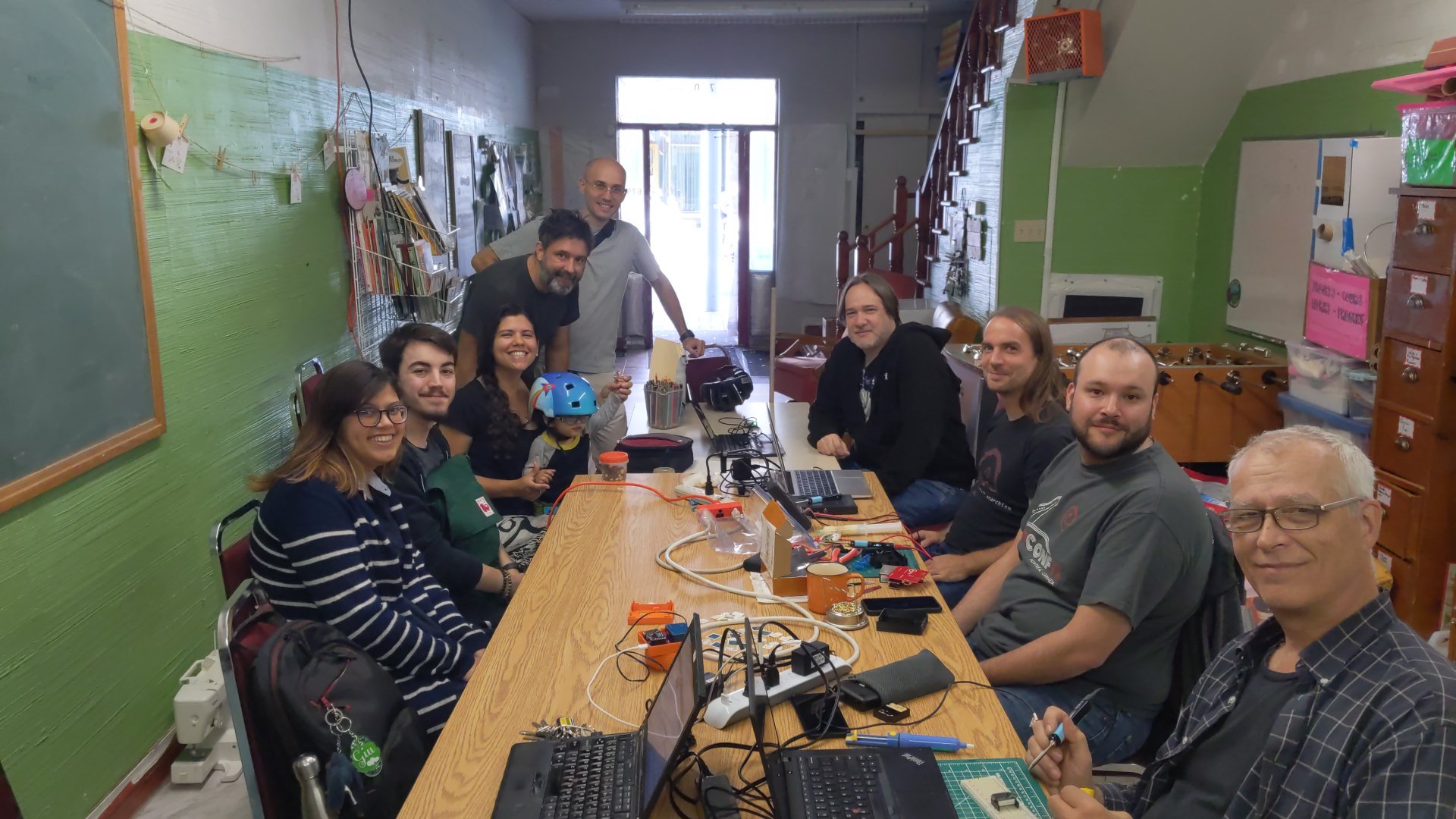
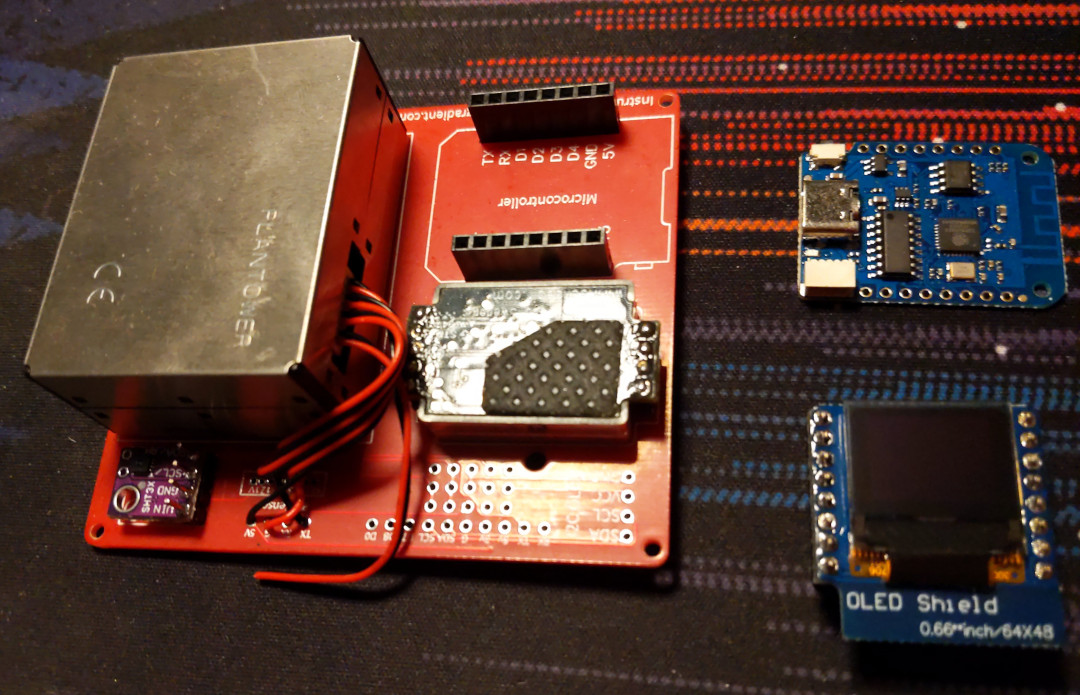
Last Sunday, our local Debian user group gathered to chat, to work on Debian and to do other, non-Debian related hacking. A "Debian & Stuff"! It had been a while since we held a proper meetup. Our last event was the Montreal BSP we organised back in March 2023... We somewhat missed the window for a June meetup and summer events never seem to gather a good crowd, so I didn't try to organise one. All this to say it was nice to see folks from the Montreal Debian community :) This event was also the first time we were hosted by L'Espace des possibles - Petite Patrie, a social venue that aims to provide a space for not-for-profit activities, like repair caf s, sowing classes, board game nights, etc. It was really nice and we will surely meet there again in the future. A group picture during the event Many people came to the event, including some new ones. Although people always tend to come and go during the day, a total of 12 people attended the event. As always, people worked on very different projects! One of the focus of this D&S was assembling AirGradient DIY basic kits. Our local community has been talking a lot about air quality metrics in the past few months1. Tiago thus decided to have a company print the PCBs for this kit and graciously gave away a few spares. Michael then took upon himself to order parts on AliExpress and a few of us ended up soldering the kits together while chatting. An AirGradient DIY basic kit, semi-assembled Otherwise, some Debian work was also done: The whole event was super fun, the tacos we had for lunch were delicious (and very authentic!), and we ended up at a local microbrewery to share a pint later in the evening. Looking forward to the next event!
  1. Mostly as a result of the large forest fires in Canada this summer. I myself blogged twice about air quality-related projects recently.

6 October 2023

Junichi Uekawa: Sick with COVID-19 and flu.

Sick with COVID-19 and flu. This time around we had two different things going around the household. Failure to isolate the second case in the household resulted in more cases.

Emanuele Rocca: Custom Debian Installer and Kernel on a USB stick

There are many valid reasons to create a custom Debian Installer image. You may need to pass some special arguments to the kernel, use a different GRUB version, automate the installation by means of preseeding, use a custom kernel, or modify the installer itself.
If you have a EFI system, which is probably the case in 2023, there is no need to learn complex procedures in order to create a custom Debian Installer stick.
The source of many frustrations is that the ISO format for CDs/DVDs is read-only, but you can just create a VFAT filesystem on a USB stick, copy all ISO contents onto the stick itself, and modify things at will.

Create a writable USB stick
First create a FAT32 filesystem on the removable device and mount it. The device is sdX in the example.
$ sudo parted --script /dev/sdX mklabel msdos
$ sudo parted --script /dev/sdX mkpart primary fat32 0% 100%
$ sudo mkfs.vfat /dev/sdX1
$ sudo mount /dev/sdX1 /mnt/data/
Then copy to the USB stick the installer ISO you would like to modify, debian-testing-amd64-netinst.iso here.
$ sudo kpartx -v -a debian-testing-amd64-netinst.iso
# Mount the first partition on the ISO and copy its contents to the stick
$ sudo mount /dev/mapper/loop0p1 /mnt/cdrom/
$ sudo rsync -av /mnt/cdrom/ /mnt/data/
$ sudo umount /mnt/cdrom
# Same story with the second partition on the ISO
$ sudo mount /dev/mapper/loop0p2 /mnt/cdrom/
$ sudo rsync -av /mnt/cdrom/ /mnt/data/
$ sudo umount /mnt/cdrom
$ sudo kpartx -d debian-testing-amd64-netinst.iso
$ sudo umount /mnt/data
Now try booting from the USB stick just to verify that everything went well and we can start customizing the image.

Boot loader, preseeding, installer hacks
The easiest things we can change now are the shim, GRUB, and GRUB s configuration. The USB stick contains the shim under /EFI/boot/bootx64.efi, while GRUB is at /EFI/boot/grubx64.efi. This means that if you want to test a different shim / GRUB version, you just replace the relevant files. That s it. Take for example /usr/lib/grub/x86_64-efi/monolithic/grubx64.efi from the package grub-efi-amd64-bin, or the signed version from grub-efi-amd64-signed and copy them under /EFI/boot/grubx64.efi. Or perhaps you want to try out systemd-boot? Then take /usr/lib/systemd/boot/efi/systemd-bootx64.efi from the package systemd-boot-efi, copy it to /EFI/boot/bootx64.efi and you re good to go. Figuring out the right systemd-boot configuration needed to start the Installer is left as an exercise.
By editing /boot/grub/grub.cfg you can pass arbitrary arguments to the kernel and the Installer itself. See the official Installation Guide for a comprehensive list of boot parameters.
One very commong thing to do is automating the installation using a preseed file. Add the following to the kernel command line: preseed/file=/cdrom/preseed.cfg and create a /preseed.cfg file on the USB stick. As a little example:
d-i time/zone select Europe/Rome
d-i passwd/root-password this-is-the-root-password
d-i passwd/root-password-again this-is-the-root-password
d-i passwd/user-fullname string Emanuele Rocca
d-i passwd/username string ema
d-i passwd/user-password password lol-haha-uh
d-i passwd/user-password-again password lol-haha-uh
d-i apt-setup/no_mirror boolean true
d-i popularity-contest/participate boolean true
tasksel tasksel/first multiselect standard
See Steve McIntyre s awesome page with the full list of available settings and their description: https://preseed.einval.com/debian-preseed/.
Two noteworthy settings are early_command and late_command. They can be used to execute arbitrary commands and provide thus extreme flexibility! You can go as far as replacing parts of the installer with a sed command, or maybe wgetting an entirely different file. This is a fairly easy way to test minor Installer patches. As an example, I ve once used this to test a patch to grub-installer:
d-i partman/early_command string wget https://people.debian.org/~ema/grub-installer-1035085-1 -O /usr/bin/grub-installer
Finally, the initrd contains all early stages of the installer. It s easy to unpack it, modify whatever component you like, and repack it. Say you want to change a given udev rule:
$ mkdir /tmp/new-initrd
$ cd /tmp/new-initrd
$ zstdcat /mnt/data/install.a64/initrd.gz   sudo cpio -id
$ vi lib/udev/rules.d/60-block.rules
$ find .   cpio -o -H newc   zstd --stdout > /mnt/data/install.a64/initrd.gz

Custom udebs
From a basic architectural standpoint the Debian Installer can be seen as an initrd that loads a series of special Debian packages called udebs. In the previous section we have seen how to (ab)use early_command to replace one of the scripts used by the Installer, namely grub-installer. It turns out that such script is installed by a udeb, so let s do things right and build a new Installer ISO with our custom grub udeb.
Fetch the code for the grub-installer udeb, make your changes and build it with a classic dpkg-buildpackage -rfakeroot.
Then get the Installer code and install all dependencies:
$ git clone https://salsa.debian.org/installer-team/debian-installer/
$ cd debian-installer/
$ sudo apt build-dep .
Now add the grub-installer udeb to the localudebs directory and create a new netboot image:
$ cp /path/to/grub-installer_1.198_arm64.udeb build/localudebs/
$ cd build
$ fakeroot make clean_netboot build_netboot
Give it some time, soon enough you ll have a brand new ISO to test under dest/netboot/mini.iso.

Custom kernel
Perhaps there s a kernel configuration option you need to enable, or maybe you need a more recent kernel version than what is available in sid.
The Debian Linux Kernel Handbook has all the details for how to do things properly, but here s a quick example.
Get the Debian kernel packaging from salsa and generate the upstream tarball:
$ git clone https://salsa.debian.org/kernel-team/linux/
$ ./debian/bin/genorig.py https://git.kernel.org/pub/scm/linux/kernel/git/stable/linux-stable.git
For RC kernels use the repo from Linus instead of linux-stable.
Now do your thing, for instance change a config setting by editing debian/config/amd64/config. Don t worry about where you put it in the file, there s a tool from https://salsa.debian.org/kernel-team/kernel-team to fix that:
$ /path/to/kernel-team/utils/kconfigeditor2/process.py .
Now build your kernel:
$ export MAKEFLAGS=-j$(nproc)
$ export DEB_BUILD_PROFILES='pkg.linux.nokerneldbg pkg.linux.nokerneldbginfo pkg.linux.notools nodoc'
$ debian/rules orig
$ debian/rules debian/control
$ dpkg-buildpackage -b -nc -uc
After some time, if everything went well, you should get a bunch of .deb files as well as a .changes file, linux_6.6~rc3-1~exp1_arm64.changes here. To generate the udebs used by the Installer you need to first get a linux-signed .dsc file, and then build it with sbuild in this example:
$ /path/to/kernel-team/scripts/debian-test-sign linux_6.6~rc3-1~exp1_arm64.changes
$ sbuild --dist=unstable --extra-package=$PWD linux-signed-arm64_6.6~rc3+1~exp1.dsc
Excellent, now you should have a ton of .udebs. To build a custom installer image with this kernel, copy them all under debian-installer/build/localudebs/ and then run fakeroot make clean_netboot build_netboot as described in the previous section. In case you are trying to use a different kernel version from what is currently in sid, you will have to install the linux-image package on the system building the ISO, and change LINUX_KERNEL_ABI in build/config/common. The linux-image dependency in debian/control probably needs to be tweaked as well.
That s it, the new Installer ISO should boot with your custom kernel!
There is going to be another minor obstacle though, as anna will complain that your new kernel cannot be found in the archive. Copy the kernel udebs you have built onto a vfat formatted USB stick, switch to a terminal, and install them all with udpkg:
~ # udpkg -i *.udeb
Now the installation should proceed smoothly.

5 October 2023

Scarlett Gately Moore: KDE: Why KDE snaps Love KDE neon and the Big Move.

KDE neonKDE neon
KDE neon: KDE neon is extremely important to the KDE snaps eco-system as I briefly mentioned in my last post. Why? KDE neon is based on Jammy LTS which is the same as Core 22 base for snaps. Neon has a very useful continuous integration system in place that tests all the things, including dependencies, qml, cmake errors, debian packaging lintian tool and the list go on. This is very important to get packages out that don t break things on user desktops. Once the packages are a lovely shade of green on the neon CI ( or at least all the important issues are resolved ) it is in good shape for snapping. I have scripts that pull the build and runtime dependency information for our application package to use in the snapcraft.yaml. We know this list is complete, because it passed the tests! As applications gain features, they requires newer dependencies than what is provided in the ubuntu jammy repositories. Neon builds those newer dependencies and provides them to our users in the neon aptly repositories. It is much easier and more reliable than tracking down PPAs and hoping they stay maintained. We use the neon user edition repository in our snapcraft file to ensure we are up to date on KDE applications dependency needs. This week my work in Neon included turning jobs green and fixing kio-gdrive which is still qt5, but it s dependency libkgapi is qt6! We have to provide both versions in cases like this which entails tracking both master and the qt5 release branch. Snaps:
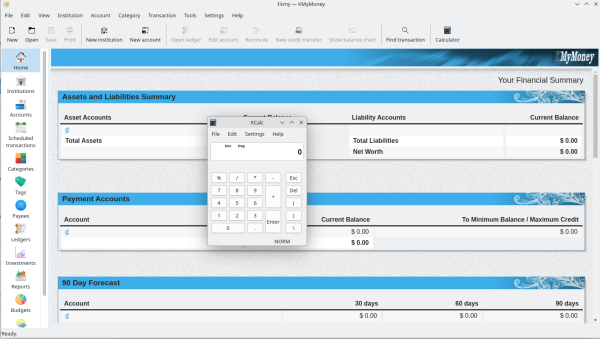
KMymoney 5.1
This week begun the big transition from single repository remote-builds to per repository snapcraft and using snap recipes on launchpad. This is an important move for a couple of reasons. We were having major issues with build failures as I pointed out in this bug report on launchpad: https://bugs.launchpad.net/launchpad/+bug/2031307 . This was due to the way remote-build works. It creates temporary snap recipes that builds once and sends back the snap or failure status. This made it very difficult to debug build failures as once the failure status was sent the job disappeared off of launchpad, taking all build logs with it. Now with the per repository snapcraft files, I have set up proper snap recipes on launchpad and the builds are automated by polling the github mirror for changes and it publishes the shiny new snap to candidate for testing or sends me the failure log that I can view at my convenience. This of course is a work in progress as we have 186 snaps currently and there are a few steps to get each one done. But once it is done, it will reduce my workload immensely and make debugging build issues faster. While making the move, I am also updating the snapcraft files for changes within snapcraft, adding cleanup to decrease bloat and fixing bugs! Snap move complete:
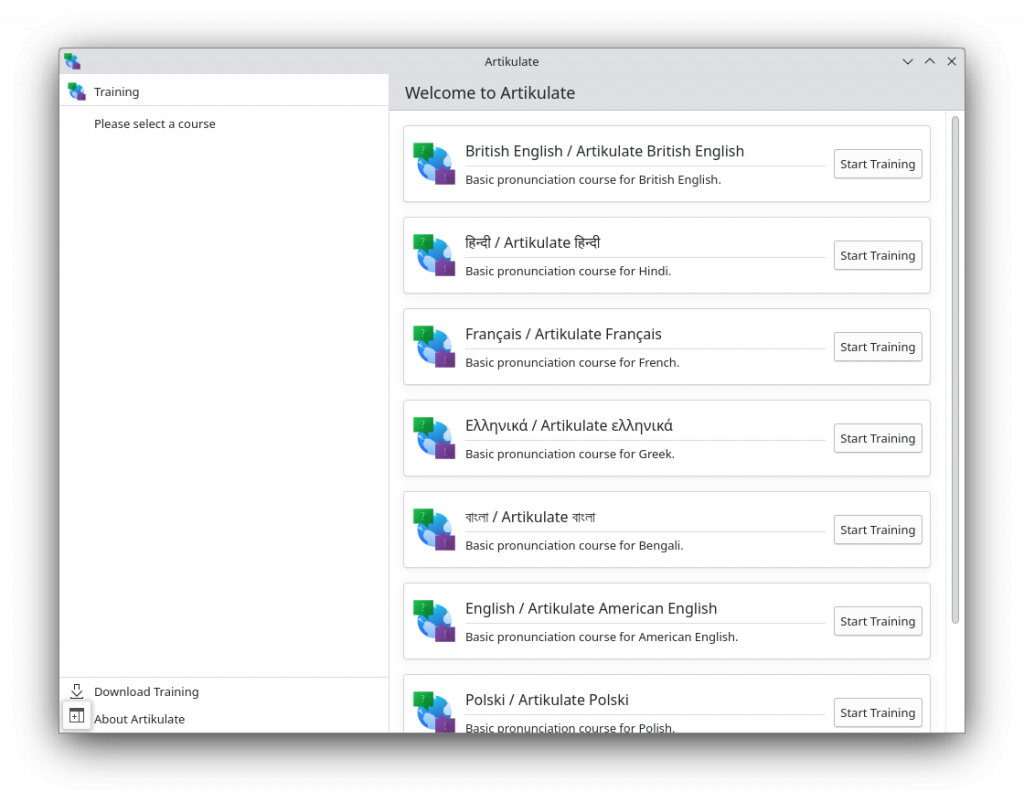
Artikulate with Courses
Current WIP: Audiotube, Digikam, Cantor, Neochat I also made a new content pack with KDE frameworks 5.110, but a new Qt 5.15.11 was just released so I will be making a new one tomorrow. The kf6 content snap has come to a halt as the qt6 content snap has stalled. I asked to be given access to the snapcraft file so that I may collaborate, but have not heard back. My mysterious project has reached its end for me. I might get a part time gig doing snaps out of it, but I do not meet the requirements to do any of the engineering of it. It is what it is. Thank you to all who vouched for me, alas it wasn t meant to be. If you can spare some change, I would appreciate it, especially to pay my phone/Internet bill so I can do more Neon and snaps  Thank you for stopping by. Donate https://gofund.me/b8b69e54

3 October 2023

Bastian Blank: Introducing uploads to Debian by git tag

Several years ago, several people proposed a mechanism to upload packages to Debian just by doing "git tag" and "git push". Two not too long discussions on debian-devel (first and second) did not end with an agreement how this mechanism could work.1 The central problem was the ability to properly trace uploads back to the ones who authorised it. Now, several years later and after re-reading those e-mail threads, I again was stopped at the question: can we do this? Yes, it would not be just "git tag", but could we do with close enough? I have some rudimentary code ready to actually do uploads from the CI. However the list of caveats are currently pretty long. Yes, it works in principle. It is still disabled here, because in practice it does not yet work. Problems with this setup So what are the problems? It requires the git tags to include the both signed files for a successful source upload. This is solved by a new tool that could be a git sub-command. It just creates the source package, signs it and adds the signed file describing the upload (the .dsc and .changes file) to the tag to be pushed. The CI then extracts the signed files from the tag message and does it's work as normal. It requires a sufficiently reproducible build for source packages. Right now it is only known to work with the special 3.0 (gitarchive) source format, but even that requires the latest version of this format. No idea if it is possible to use others, like 3.0 (quilt) for this purpose. The shared GitLab runner provides by Salsa do not allow ftp access to the outside. But Debian still uses ftp to do uploads. At least if you don't want to share your ssh key, which can't be restricted to uploads only, but ssh would not work either. And as the current host for those builds, the Google Cloud Platform, does not provide connection tracking support for ftp, there is no easy way to allow that without just allowing everything. So we have no way to currently actually perform uploads from this platform. Further work As this is code running in a CI under the control of the developer, we can easily do other workflows. Some teams do workflows that do tags after acceptance into the Debian archive. Or they don't use tags at all. With some other markers, like variables or branch names, this support can be expanded easily. Unrelated to this task here, we might want to think about tying the .changes files for uploads to the target archive. As this code makes all of them readily available in form of tag message, replaying them into possible other archives might be more of a concern now. Conclusion So to come back to the question, yes we can. We can prepare uploads using our CI in a way that they would be accepted into the Debian archive. It just needs some more work on infrastructure.

  1. Here I have to admit that, after reading it again, I'm not really proud of my own behaviour and have to apologise.

Junichi Uekawa: Electronic receipt storage in Japan.

Electronic receipt storage in Japan. Japan also started allowing electronic data for receipts, but had some red tape associated with it. Presumably they were worried about increase in fraud cases. Law amendment that went in effet Jan 2022 made the last annoying bits simpler. We used to be required to sign the paper receipt and scan within 3 days of receiving the receipt. This special requirement is now gone. It took a few years to reach this state but now we are at a similar state as our colleagues in the US. Nice.

2 October 2023

Jonathan Dowland: Promotion

It's been quiet here (I hope to change that), but I want to share some good news: I've been promoted to Principal Software Engineer! Next February will start my 9th year with Red Hat. Time flies when you're having fun!

Aigars Mahinovs: Debconf 23 photos all

Two weeks have passed since Debconf 23 came to a close in Kochi, Kerala, India this year. In keeping with the more relaxed nature of Debconf in India, the rest of my photos from the event were to be published about two weeks from the end of the event. That will give me a bit more time to process them correctly and also give all of you a chance to see these pictures with fresh eyes and stir up new memories from the event. In the end we are looking at 653 photos and one video. Several different group photos, including a return of the pool group photo that was missing from the event since Mexico in 2006! This year was the first for a new camera (Canon R7) and I am quite happy with the results, even if I still need to learn a lot about this new beast. Also the gradual improvements of panorama stiching software (Hugin) ment that this year I did not need to manually correct any face-melt events on any of the group photos. So that is cool! DebConf 23 pool Group photo You can find all my photos on: Also, don't forget to explore the rest of the Git LFS share content - there are very many great photos by others this year as well!

1 October 2023

Junichi Uekawa: Family member getting sick, and I'm starting to feel bad.

Family member getting sick, and I'm starting to feel bad. This is bad.

30 September 2023

Adnan Hodzic: auto-cpufreq v2.0

Almost 4 years after initial auto-cpufreq release, 4200 Github stars, 65 contributors & 42 releases, tool being topic of numerous Linux podcasts and shows, and... The post auto-cpufreq v2.0 appeared first on FoolControl: Phear the penguin.

Fran ois Marier: Things I do after uploading a new package to Debian

There are a couple of things I tend to do after packaging a piece of software for Debian, filing an Intent To Package bug and uploading the package. This is both a checklist for me and (hopefully) a way to inspire other maintainers to go beyond the basic package maintainer duties as documented in the Debian Developer's Reference. If I've missed anything, please leave an comment or send me an email!

Salsa for collaborative development To foster collaboration and allow others to contribute to the packaging, I upload my package to a new subproject on Salsa. By doing this, I enable other Debian contributors to make improvements and propose changes via merge requests. I also like to upload the project logo in the settings page (i.e. https://salsa.debian.org/debian/packagename/edit) since that will show up on some dashboards like the Package overview.

Launchpad for interacting with downstream Ubuntu users While Debian is my primary focus, I also want to keep an eye on how my package is doing on derivative distributions like Ubuntu. To do this, I subscribe to bugs related to my package on Launchpad. Ubuntu bugs are rarely Ubuntu-specific and so I will often fix them in Debian. I also set myself as the answer contact on Launchpad Answers since these questions are often the sign of a Debian or a lack of documentation. I don't generally bother to fix bugs on Ubuntu directly though since I've not had much luck with packages in universe lately. I'd rather not spend much time preparing a package that's not going to end up being released to users as part of a Stable Release Update. On the other hand, I have succesfully requested simple Debian syncs when an important update was uploaded after the Debian Import Freeze.

Screenshots and tags I take screenshots of my package and upload them on https://screenshots.debian.net to help users understand what my package offers and how it looks. I believe that these screenshots end up in software "stores" type of applications. Similarly, I add tags to my package using https://debtags.debian.org. I'm not entirely sure where these tags are used, but they are visible from apt show packagename.

Monitoring Upstream Releases Staying up-to-date with upstream releases is one of the most important duties of a software packager. There are a lot of different ways that upstream software authors publicize their new releases. Here are some of the things I do to monitor these releases:
  • I have a cronjob which run uscan once a day to check for new upstream releases using the information specified in my debian/watch files:
      0 12 * * 1-5   francois  test -e /home/francois/devel/deb && HTTPS_PROXY= https_proxy= uscan --report /home/francois/devel/deb   true
    
  • I subscribe to the upstream project's releases RSS feed, if available. For example, I subscribe to the GitHub tags feed for git-secrets and Launchpad announcements for email-reminder.
  • If the upstream project maintains an announcement mailing list, I subscribe to it (e.g. rkhunter-announce or tor release announcements).
When nothing else is available, I write a cronjob that downloads the upstream changelog once a day and commits it to a local git repo:
#!/bin/bash
pushd /home/francois/devel/zlib-changelog > /dev/null
wget --quiet -O ChangeLog.txt https://zlib.net/ChangeLog.txt   exit 1
git diff
git commit -a -m "Updated changelog" > /dev/null
popd > /dev/null
This sends me a diff by email when a new release is added (and no emails otherwise).

29 September 2023

Scarlett Gately Moore: KDE: Another Busy Week! KDE neon, Debian, Snaps Oh My!

KDE Plasma 6KDE Plasma 6
I would like to welcome you to my revamped site. It is still a work in progress, so please be patient while I work out the kinks! I have also explained a bit more about myself in my About Me page for those that may have questions about my homesteader lifestyle. Check it out when you have time. My site is mostly my adventures in packaging software in Linux in a variety of formats ( mostly Debian and Ubuntu Snaps containerized packages ). This keeps me very busy, as folks don t realize the importance of packaging. Without it, applications remain in source code form which isn t very usable by the users! While turning the source code into something user friendly we often run into issues and work with upstream ( I am a very strong believer in upstream first ) to resolve any issues. This makes for a better user experience and less buggy software. Workarounds are very hard to maintain and thus fixing it right the first time is the best path! With this said, while I am not strong in any one programming language ( Well maybe Ruby from my CI tooling background ) I am versed in many languages, as I have to understand the code that I am filing bug reports for! We have to have a strong knowledge of being able to understand build failures, debug runtime failures and most importantly we have to be able to fix them, or find the resources to assist in fixing them. As most of you know I am KDE s biggest fan ( There is nothing wrong with Gnome, its a great platform ). So a big portion of my work is dedicated to KDE. A fantastic tool for working on my KDE packaging has been KDE Neon! With the developer version I have all the tools necessary to debug and fix issues that arise. There is also the added bonus of living on the edge and finding out runtime issues right away! That is enough about me for now and on to my weekly round up! KDE neon: Carlos ( check out his new blog! https://www.ethicalconstruct.au/dotclear_blog/ ) and I have been very busy with another round of KDE applications making the move to Qt6. We have finished KDE PIM and KDE Games in Neon/unstable! I have worked out issues with print-manager and re-enabled it in experimental as it s qt6 development is still happening in kf6 branch. Instructions here: https://blog.neon.kde.org/2023/08/04/announcing-kde-neon-experimental/ Fixed issues with a broken kscreenlocker and missing window decorations. You can now safely leave your computer and not worry about that dreaded black screen. Debian: I have uploaded the newest squashfuse to unstable. I have uploaded another NEW dependency for bubblegum golang-github-alecthomas-mango-kong-dev Ubuntu Snaps: This week continues working closely with Jarred Wilson of Canonical in getting his Qt6 content snap in shape for use with my KDE Frameworks 6 snap ( an essential snap to move forward with our next generation Qt6 applications and of course the Plasma snap. I spent some time debugging the neochat snap and fixed some QML issues, but I am now facing issues with wayland. It now works fine for those of us still on X11. I will continue working out wayland. Thank you! I rely on donations to upkeep my everyday living and so far thanks to each and every one of you I have survived almost a full year! It has been scary from time to time, but I am surviving. Until my snap project goes through I must rely on the kindness of my supporters. The proceeds of my donations goes to the following: I have joined the kool kids and moved to Donorbox for donations. Donate I still have Gofundme for those that don t want to signup for yetanotherdonationplatform. https://gofund.me/b8b69e54

28 September 2023

Lisandro Dami n Nicanor P rez Meyer: sd-mux-ctrl in Debian

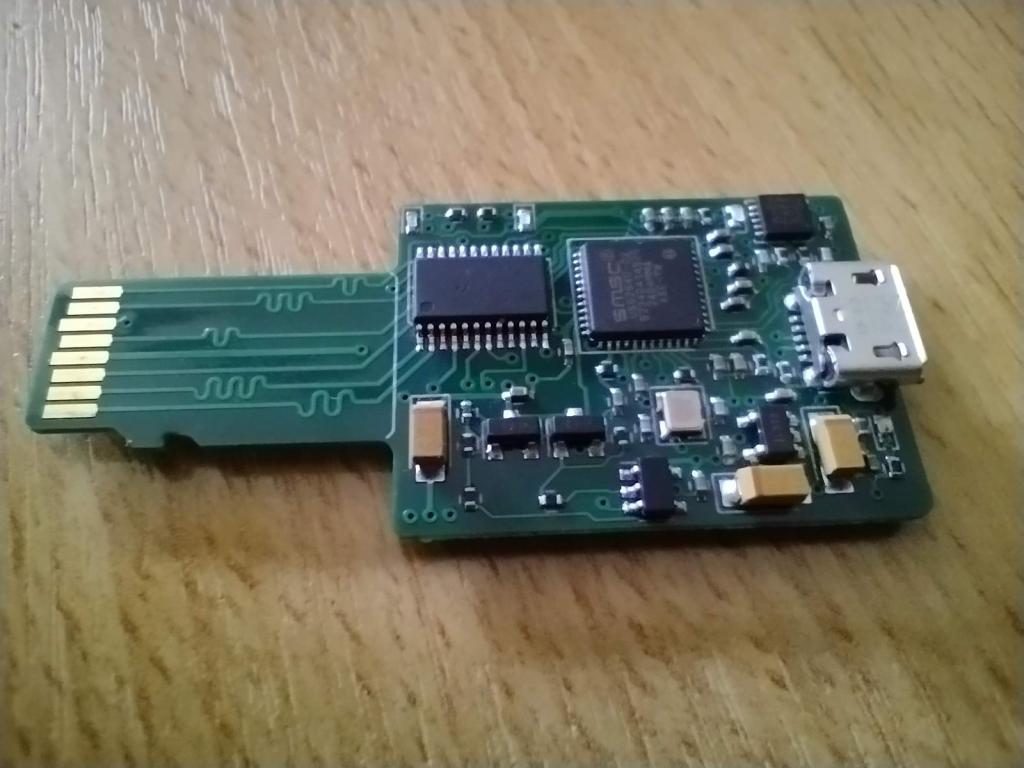
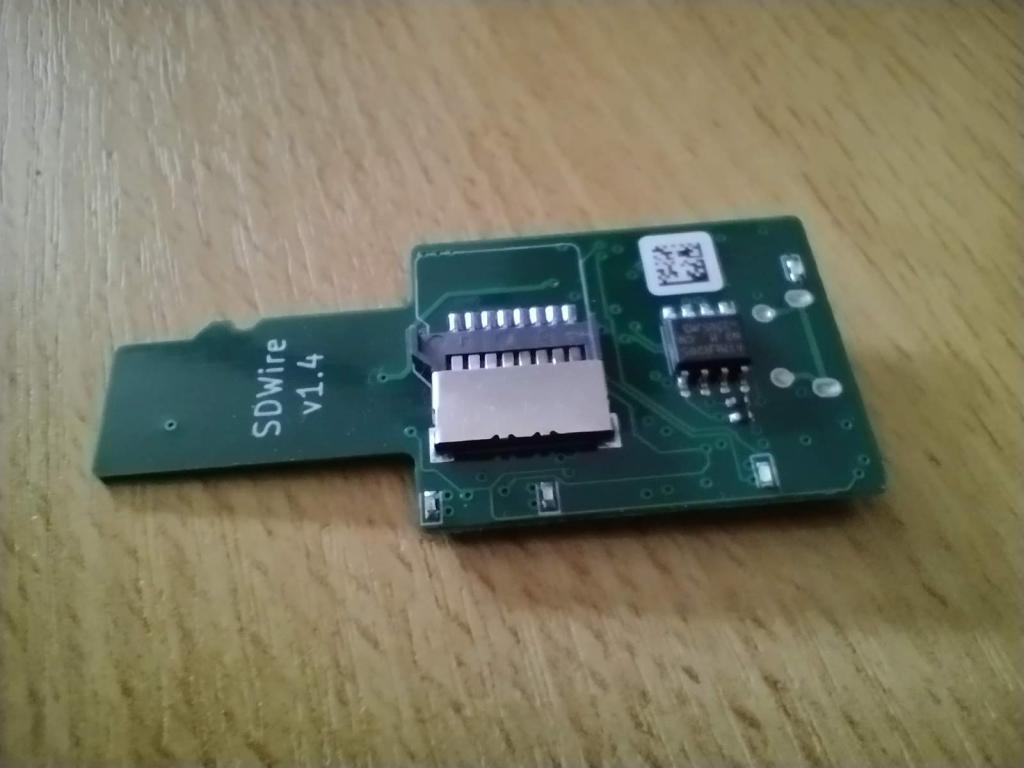
Part of what I love to do is to play with embedded devices running Linux. And many times I need to juggle with an SD card in order to copy a filesystem to a board... until I found SDWire. SDWire v1.4, top view SDWire v1.4, bottom view This little gadget is an SD muxer: it allows you to use it as a "normal" card reader or switch the SD card to the SD card slot. So next time I need to copy contents to a SD card and then push it to a board I can just do it from the command line. Now the software to control this device was not in Debian, so I fixed that. I am keeping the code and the packaging on GitLab, as "The Tizen project is not anymore really active". At the time of writing the package was just accepted, so it might take a couple of hours to be available on the archive. Enjoy!
Next.

Previous.