Search Results: "ed"

4 May 2012

John Goerzen: Geeky plan: Solar power supply IN THE CAR

From the might be geeky dept For an upcoming car trip, we have to take my wife s car (long story). I will be taking two large lead-acid batteries in the trunk hooked up to a solar panel in the rear window area and, of course, some electronics in the front seat. Why, you ask? While she drives, I will be working via tethered 3G (conveniently reducing the number of vacation days the trip requires). This is Kansas, so signals are weak sometimes. I have an external antenna that hooks up to a signal booster. So I ll be running a laptop, cellphone in draw lots of power mode , and a cellphone booster at minimum. Measurements suggest that this combination could easily put me in range of the typical 10A limit of dash electronics. (And doesn t even include the nice to haves of GPS, my handheld radio, and the amplifier for it.) My car has a direct high-current link from the battery to the trunk to support the 100W amateur radio mounted there. It is pretty easy to tap into it and add a cable that runs to the passenger seat to run all this stuff. Terah s car doesn t. So, I thought, what s the easy solution? Well, my solar power system, of course! If I charge up a couple of the large batteries beforehand (just pop them and a few panels in the sun for a day), then put the batteries in the trunk, it will probably power my electronics for a whole day (enough for the trip we have planned), and I have already cabled them up to support the kind of current draw I ll have. I ll have to recharge the batteries at the destination, of course, so I ll bring along a panel (no need to bring more than one since there will be plenty of time to charge). Once I m planning to take a panel along, I figured I might as well put it under the rear window so it can actually help charge the batteries as we go. The current drain will, of course, be larger than the 1A or so it can put out, but hey, who else drives down the interstate with an active solar panel in their car? I can actually split the load between the batteries and the vehicle system too, so I do not need a continuous 10A draw on the batteries. The sad part about this is I will probably never surpass a temporary battery system with a solar panel in terms of geeky travel.

3 May 2012

Gintautas Miliauskas: Online Haskell typechecker

Last weekend I put up haskellonline.org, which is basically a thin web frontend over ghc, the Haskell compiler. It is limited to one Haskell module, but it makes the experience of studying Haskell much more pleasurable by running the typechecker in the background as you type. Plus, it is web-based - no local installation necessary!

The thing about Haskell is that it has a fabulous type system which can weed out a broad class of bugs at compile time. However, the usual interfaces with the compiler leave a lot to be desired. Vim + ghci in a terminal of course works, but I have already been spoilt by IDEs, and the "Alt-Tab; Up; Enter; wait; Alt-Tab + jump to line manually" dance does not appeal to me at all. Emacs integration might be better, but I do not know emacs well, and it is never a good idea to start learning two things at the same time.

Note: I suspect that many of the problems I encountered were due to the fact that I use MacOSX.

I have looked a few of the existing IDEs, but that did not go well. EclipseFP did not offer any benefits over a text editor at all. I found a blog post saying that implied that it would work better with a newer version of GHC. Cue a few hours of reinstalling GHC and compiling Haskell packages, and I got the system set up, but that made the situation even worse. Eclipse would simply crash on startup every time until I wiped the configuration directory clean. So much for EclipseFP.

I also tried Leksah. At least it did not crash, nevertheless, I found it quite unwieldy, especially for learning purposes. The autocompletion is broken in annoying ways. For example, if you type "f a = a<enter>", Leksah will autocomplete the second "a" into "as". It took me a while to discover an error in my program that was due to this autocorrection mechanism.

Leksah does have a "compile in background" mode, which was admittedly a source of inspiration for haskellonline.org, but the implementation is subpar. It simply invokes the compiler and simply redirects the output to a display pane on the window. As you write code, the text in the pane constantly scrolls, which is very distracting. The implementation is also buggy. Occasionally errors are interleaved with status output:


There is also tryhaskell.org, but it does not work not nearly as well for Haskell as its cousins trypython.org and tryruby.org do for Python and Ruby, respectively. All are limited to evaluating expressions, but in Python/Ruby that actually gets you a long way, while nontrivial Haskell programs are complex static structures that are unwieldy without a persistent text editor.

Despite all the trouble, which, again, probably has to do with my choice of MacOSX, these issues do not detract from the beauty of Haskell as a language. If you are interested, I can heartily recommend learnyouahaskell.com as very good reading material, and Tony Morris's course exercises (in combination with haskellonline.org) for practice.

Wouter Verhelst: Debconf

... is drawing closer again, and today I've booked my flights. I'll be arriving in the early evening on the 1st, and leaving again on the 15th. The flights will be Brussels->London->Miami->Managua, which unfortunately means I'll have to deal with US border control, but hey. Also, in order to avoid having to get up at early-o-clock on the morning of the 1st, I'll be flying from Brussels to London on an afternoon flight on the 30th, which means I'll have an evening to spare in London. While I've been there a few times before, it's not a city that I've ever actually visited; my previous three visits were limited to Heathrow, King's Cross (IIRC; could be another train station) and driving through the city on my way from (and to) Steve's barbecue last summer. If anyone will be there as well that night and would like to meet for beer and/or keysigning, I'd be interested.

Gunnar Wolf: Co-starring: Debian Tour Managua 2012!

As stated in the 2012-04-30 edition of the Debian Project News, this weekend I will be meeting Holger Levsen (who has been there for over a week now) in Managua, Nicaragua, as part of the Debian Tour 2012, a set of talks meant to raise awareness and interest on Debian between the Nicaraguan (+Central American) user groups, university students, companies and government. Not all of the planned activities are present in the Debian Tour webpage. I know I will be giving my talk on Debian in the Free Software projects' universe, this Saturday at Universidad Centro Americana (UCA). Besides this, we will be meeting on Monday with the UCA staff to discuss some DebConf-specific issues. Sunday? Well, I hope^Wfully trust we will have interesting activities as well :)

Russell Coker: Acoustiblok/Thermablok

Acoustiblok is an interesting product for blocking sound, it works by dissipating sound energy through friction within the sound barrier materiel [1]. They sell it in varieties that are designed for use within walls and for use as fences. As it isn t solid it won t reflect sound so it can be used to line the walls to stop sound being reflected back at you. It s design is based on NASA research. The web site claims that a 3mm sheet of Acoustiblok gives a greater noise reduction than 12 inches (30.7cm) of poured concrete. I am a little dubious about that claim as I ve read a report of someone using three layers of Acoustiblok to make a quiet room for recording music (and to be used as a play-room for an Autistic child). I find it difficult to imagine someone needing a meter of concrete to stop any sort of noise that they might encounter in a residential area so the fact that someone needed three layers of Acoustiblok is an indication that it might not be quite as good as they claim (although there is the possibility that Acoustiblok was badly installed). I wonder whether the claims about concrete concern particular frequencies. The technical specifications and product comparisons page [2] shows that Acoustiblok is least effective at 130Hz where it only reduces noise by 12dB and that it s effectiveness increases to 38dB at 5KHz. So perhaps a concrete wall to stop low frequencies and Acoustiblok to stop high frequencies would be the best solution. The Australian distributor for Acoustiblok is based in Brisbane [3]. The same company also sells Thermablok [4] which is the first aerogel based insulation that I ve seen being advertised for commercial sale. I guess that it must be rather expensive as they are mostly advertising it for use as thin strips to cover stud faces (steel studs conduct heat well and can cause a lot of heat loss). A note in their FAQ says that it s available in rolls for insulating entire walls or floors. The FAQ also indicates that they sell samples suitable for science classes. They are also apparently looking for retailers, it would be nice if someone wanted to sell this in Australia. Related posts:
  1. Noise Canceling Headphones My patience with the noise of airlines has run out,...
  2. Testing Noise Canceling Headphones This evening I tested some Noise Canceling Headphones (as described...
  3. I Bought the Bose QC-15 I bought the Bose QC15 noise canceling headphones for my...

Rudy Godoy: FLISOL Puno

Past Saturday April 28 I attended to the FLISOL 2012 Puno hosted at the Casa de la Cultura in downtown Puno. It was a great experience to deliver a talk after a while, the second speech since I enrolled into the UCSP s Computer and Engineering Faculty to get my Computer Science BS degree. Puno is really a nice city with a great landscape for those like me who enjoy the sun, lakes, wonderful mountains and, as it s name says, the Andes plane 3860m above sea level. Pretty high and very cold at night indeed but a lovely place. FLISOL is short for Latin American Free Software Installation Festival that just aged 12 this year. In my talk I wanted to describe the motivations behind the Free Software movement origins. I specially remarked the fact that the movement doesn t look for technical excellence, even though this is something we thrive for, rather than preserving a common set of guidelines for protecting assets we do value such software and freedom. Later I discussed about how Debian have become a key actor in the free software ecosystem. Primarily as a huge software library, second as a building block for specialized distributions (such as Ubuntu) and third, but not the last, as a facilitator for new developments and contributions to the ecosystem, and I mentioned here the Debian GNU/Hurd project. Through such topics I explained what we do, why we do it and why they may want to contribute. There was a good reception from the audience and there were many questions on the subjects I elaborated on. I was impressed to see many Debian users, some of them power users , and even tried to help one to configure his obscure Xorg settings on his laptop (didn t succeed because lack of connectivity, will send him testing CDs eventually). I d like to thank to the organization who made a great job. The team, nearly 30 students from Universidad Nacional del Altiplano plus local activists, started working in February collecting funds and managed to gather more than 330 attendees during the almost 10 hours of the event. Also special thanks for the coffee machine that was available!

2 May 2012

Uwe Hermann: sigrok - cross-platform, open-source logic analyzer software with protocol decoder support

sigrok logo I'm happy to finally announce an open-source (GNU GPL), cross-platform (Linux, Mac OS X, FreeBSD, Windows, ...) logic analyzer software package myself and Bert Vermeulen have been working on for quite a long time now: sigrok (it groks your signals). History I originally started working on an open-source logic analyzer software named "flosslogic" in 2010, because I grew tired of almost all devices having a proprietary and Windows-only software, often with limited features, limited input/output file formats, limited usability, limited protocol decoder support, and so on. Thus, the goal was to write a portable, GPL'd, software that can talk to many different logic analyzers via modules/plugins, supports many input/output formats, and many different protocol decoders. The advantage being, that every time we add a new driver for another logic analyzer it automatically supports all the input/output formats we already have, you can use all the protocol decoders we already wrote, etc. It also works the other way around: If someone writes a new protocol decoder or file format driver, it can automatically be used with any of the supported logic analyzers out of the box. Turns out Bert Vermeulen had been working on a similar software for a while too (due to exactly the same reasons, crappy Windows software, etc.) so it was only logical that we joined forces and worked on this together. We kept Bert's name for the software package ("sigrok"), set up a SourceForge project, mailing lists, IRC channel, wiki, etc. and started working. Overview, Features You can get the lastest sigrok source code from our main git repository:
  $ git clone git://sigrok.git.sourceforge.net/gitroot/sigrok/sigrok
Here's a short overview of sigrok and its features as of today. The software consists of the following components: We're happy to hear about other (maybe special-purpose) frontends you may want to write using libsigrok/libsigrokdecode as helper libs! Firmware Saleae Logic Some logic analyzer devices require firmware to be uploaded before they can be used. As always, firmware is a bit of a pain, but here's what we currently do: For non-free firmware we provide instructions how to extract it from the vendor software or from USB dumps, if possible. For distributable firmware we have a git repo where you can get it (thanks ASIX for allowing us to distribute the ASIX Sigma/Sigma2 firmware files!).
  $ git clone git://sigrok.git.sourceforge.net/gitroot/sigrok/sigrok-firmwares
Finally, for all Cypress FX2 based logic analyzers we have an open-source (GNU GPL) firmware named fx2lafw, started by myself, but most work (and finishing the firmware) was then done by Joel Holdsworth, thanks! The support list includes Saleae Logic, CWAV USBee SX, CWAV USBee AX, Robomotic Minilogic/BugLogic3, Braintechnology USB-LPS, and many others. Get the code from the fw2lafw git repository:
  $ git clone git://sigrok.git.sourceforge.net/gitroot/sigrok/fx2lafw
Example dumps We collect various captured logic analyzer signals / protocol dumps in the sigrok-dumps git repository:
  $ git clone git://sigrok.git.sourceforge.net/gitroot/sigrok/sigrok-dumps
They can be useful for testing the sigrok command-line application, the sigrok GUIs, or the protocol decoders. We're happy to include further contributed example data in our repository, please send us .sr files of any interesting data/protocol you may come across (even if sigrok doesn't yet have a protocol decoder for that protocol). See the Example dumps wiki page for details. Packages, distros, installers sigrok Windows installer I'm currently working on updated Debian packages for sigrok (will be apt-get install sigrok to get everything), and we're happy about further packaging efforts for other distros. We have preliminary Windows installer files (using NSIS), but the Windows code needs some more fixes and portability improvements before it's really usable. On Mac OS X you can use fink/Macports to install as usual, fancier .app installer files are being worked on. Future Apart from support for more logic analyzers, input/output formats, and protocol decoders, we have a number of other plans for the next few releases. This includes support for analog data, i.e. support for (USB) oscilloscopes, multimeters, spectrum analyzers, and such stuff. This will also require additional GUI support (which could take a while). Also, we want to improve/fix the Windows support, and test/port sigrok to other architectures we come across. Performance improvements for the protocol decoding as well as more features there are also planned. Contact Feel free to contact us on the sigrok-devel mailing list, or in the IRC channel #sigrok on Freenode. There's also an identi.ca group for sigrok. We're always happy about feedback, bug reports, suggestions for improving sigrok, and patches of course!

Matthew Garrett: Anatomy of a Fedora 17 ISO image

My spare time has been limited lately, so progress on producing Mac-bootable Fedora install images has been a bit slow. Thankfully it looks like everything's gong to land in time for Fedora 17[1] so hurrah for that - all that's missing right now are the last couple of patches that make sure the boot picker displays useful labels on the drives.

So how is this accomplished? Here's a hex dump of the first few K of the image.
00000000  45 52 08 00 00 00 90 90  00 00 00 00 00 00 00 00   ER.............. 
00000010  00 00 00 00 00 00 00 00  00 00 00 00 00 00 00 00   ................ 
00000020  33 ed fa 8e d5 bc 00 7c  fb fc 66 31 db 66 31 c9   3...... ..f1.f1. 
00000030  66 53 66 51 06 57 8e dd  8e c5 52 be 00 7c bf 00   fSfQ.W....R.. .. 
00000040  06 b9 00 01 f3 a5 ea 4b  06 00 00 52 b4 41 bb aa   .......K...R.A.. 
00000050  55 31 c9 30 f6 f9 cd 13  72 16 81 fb 55 aa 75 10   U1.0....r...U.u. 
00000060  83 e1 01 74 0b 66 c7 06  f1 06 b4 42 eb 15 eb 00   ...t.f.....B.... 
00000070  5a 51 b4 08 cd 13 83 e1  3f 5b 51 0f b6 c6 40 50   ZQ......?[Q...@P 
00000080  f7 e1 53 52 50 bb 00 7c  b9 04 00 66 a1 b0 07 e8   ..SRP.. ...f.... 
00000090  44 00 0f 82 80 00 66 40  80 c7 02 e2 f2 66 81 3e   D.....f@.....f.> 
000000a0  40 7c fb c0 78 70 75 09  fa bc ec 7b ea 44 7c 00   @ ..xpu.... .D . 
000000b0  00 e8 83 00 69 73 6f 6c  69 6e 75 78 2e 62 69 6e   ....isolinux.bin 
000000c0  20 6d 69 73 73 69 6e 67  20 6f 72 20 63 6f 72 72    missing or corr 
000000d0  75 70 74 2e 0d 0a 66 60  66 31 d2 66 03 06 f8 7b   upt...f f1.f... 
000000e0  66 13 16 fc 7b 66 52 66  50 06 53 6a 01 6a 10 89   f... fRfP.Sj.j.. 
000000f0  e6 66 f7 36 e8 7b c0 e4  06 88 e1 88 c5 92 f6 36   .f.6. .........6 
00000100  ee 7b 88 c6 08 e1 41 b8  01 02 8a 16 f2 7b cd 13   . ....A...... .. 
00000110  8d 64 10 66 61 c3 e8 1e  00 4f 70 65 72 61 74 69   .d.fa....Operati 
00000120  6e 67 20 73 79 73 74 65  6d 20 6c 6f 61 64 20 65   ng system load e 
00000130  72 72 6f 72 2e 0d 0a 5e  ac b4 0e 8a 3e 62 04 b3   rror...^....>b.. 
00000140  07 cd 10 3c 0a 75 f1 cd  18 f4 eb fd 00 00 00 00   ...<.u.......... 
00000150  00 00 00 00 00 00 00 00  00 00 00 00 00 00 00 00   ................ 
This is the boot sector. One of the fun things about ISO9660 is that it doesn't have a boot sector in the usual x86 sense - firmwares are expected to read enough of the filesystem that they can find the bootloader in it and run it directly. x86 isn't really smart enough to manage that, so it uses something called El Torito[2]. In any case, this is usually empty space on an x86 CD. But with an increasing number of systems shipping without optical drives, real CD installs are decreasing in popularity. We use a piece of software called isohybrid that allows the building of ISO9660 images that can be written directly onto a USB stick. Asking a machine to boot off them will execute the boot sector located here, which then loads a real bootloader that's capable of reading ISO and booting the OS. It'll just be ignored when it's on a real CD.

There's one difference here, though. The isohybrid bootsector has been modified so that the first 32 bytes are just noops, and this has been inserted:
00000000  45 52 08 00 00 00 90 90  00 00 00 00 00 00 00 00   ER.............. 
45 52 ("ER") indicates the presence of an Apple partition map. This will become important later. 0800 indicates that it's using 2048-byte sectors. The 9090 is a lie to convince the firmware that it's not a zero-sized disk without representing dangerous code. We need an Apple partition map because some older Macs won't boot off CD unless the CD has one. But it's sitting right at the start of the boot sector, and this code is going to be executed. Thankfully, the entire Apple header decodes to
00000000  45                inc bp
00000001  52                push dx
00000002  0800              or [bx+si],al
00000004  0000              add [bx+si],al
00000006  90                nop
00000007  90                nop
00000008  0000              add [bx+si],al
0000000A  0000              add [bx+si],al
0000000C  0000              add [bx+si],al
0000000E  0000              add [bx+si],al
00000010  0000              add [bx+si],al
00000012  0000              add [bx+si],al
00000014  0000              add [bx+si],al
00000016  0000              add [bx+si],al
00000018  0000              add [bx+si],al
0000001A  0000              add [bx+si],al
0000001C  0000              add [bx+si],al
0000001E  0000              add [bx+si],al
which is completely harmless - we can execute all these instructions without any interesting changes in state. They'll all be undone by the rest of the boot sector.
000001b0  14 05 00 00 00 00 00 00  4c 1e ed 76 00 00 80 00   ........L..v.... 
000001c0  01 00 00 3f a0 89 00 00  00 00 00 50 14 00 00 fe   ...?.......P.... 
000001d0  ff ff ef fe ff ff a4 00  00 00 70 04 00 00 00 fe   ..........p..... 
000001e0  ff ff 00 fe ff ff 44 05  00 00 c0 08 00 00 00 00   ......D......... 
000001f0  00 00 00 00 00 00 00 00  00 00 00 00 00 00 55 aa   ..............U. 
This is the MBR partition table. The aim here was to produce media that would boot via BIOS just as well as it does via EFI, and it turns out that there are some systems that refuse to BIOS-boot off GPT media. So we need an MBR partition map. The first entry covers the entire disk and is of type 0. This is important, because some EFI implementations are strict about MBR parsing - if there's an MBR with overlapping partitions, the entire MBR will be ignored. Inconvenient. Fortunately, we've got the source code to this code, and it turns out that partitions of type 0 are ignored when performing this check. So, there's a partition of type 0.

Why does it cover the entire disk? Once we've booted the OS, we need to be able to read the ISO image contained on the USB stick. That means the kernel needs to be able to mount it, which means we need a partition entry that covers the entire disk. Linux is perfectly happy mounting a filesystem from a partition of type 0.

So, the next partition. This is an EFI boot partition that points at the embedded VFAT El-Torito image. Some firmware will decide that we've got an MBR and so will only boot off a partition that exists in it. So, here's an MBR partition to keep them happy.

The final partition covers the embedded HFS+ image. It's there purely for convenience - it means we can access it under Linux in order to update its contents for testing purposes.
00000200  45 46 49 20 50 41 52 54  00 00 01 00 5c 00 00 00   EFI PART....\... 
00000210  09 27 93 7e 00 00 00 00  01 00 00 00 00 00 00 00   .'.~............ 
00000220  fe 4f 14 00 00 00 00 00  30 00 00 00 00 00 00 00   .O......0....... 
00000230  de 4f 14 00 00 00 00 00  2a 26 0f 37 23 c9 7f 4f   .O......*&.7#..O 
00000240  90 df 5e fe 0a 60 1c b0  10 00 00 00 00 00 00 00   ..^.. .......... 
00000250  80 00 00 00 80 00 00 00  ec 70 63 c1 00 00 00 00   .........pc..... 
00000260  00 00 00 00 00 00 00 00  00 00 00 00 00 00 00 00   ................ 
And here we have the GPT header. Nothing complicated here, other than it indicates that the first partition descriptor is at LBA 0x10, ie byte 0x2000 - that's further into the disk than normal. That leaves us enough space to fit the Apple partition entries.

Why have a GPT at all? The EFI spec says that machines should boot fine from an MBR partition. Sadly, not all seem to. It also lets us represent the HFS+ partition in a way that makes the Mac firmware happy.
00000800  50 4d 00 00 00 00 00 03  00 00 00 01 00 00 00 10   PM.............. 
00000810  41 70 70 6c 65 00 00 00  00 00 00 00 00 00 00 00   Apple........... 
00000820  00 00 00 00 00 00 00 00  00 00 00 00 00 00 00 00   ................ 
00000830  41 70 70 6c 65 5f 70 61  72 74 69 74 69 6f 6e 5f   Apple_partition_ 
00000840  6d 61 70 00 00 00 00 00  00 00 00 00 00 00 00 00   map............. 
00000850  00 00 00 00 00 00 00 0a  00 00 00 03 00 00 00 00   ................ 
00000860  00 00 00 00 00 00 00 00  00 00 00 00 00 00 00 00   ................ 
2K into the disk, here's an Apple partition map. It's 2K into the disk because we set the sector size to 2K in the partition map header. Why did we do that? Because the default is 512 bytes, and if we'd put the partition map at 512 bytes it would have been on top of the GPT header. Why 2K rather than 1K? A couple of reasons. First, the Apple partition map is only used when we boot off an actual CD, and the CD sector size is genuinely 2K. Secondly, because CDs have a sector size of 2K, 2K is a value that's actually been tested in the real world. It's nice to avoid tempting fate.
00001000  50 4d 00 00 00 00 00 03  00 00 00 29 00 00 04 70   PM.........)...p 
00001010  45 46 49 00 00 00 00 00  00 00 00 00 00 00 00 00   EFI............. 
00001020  00 00 00 00 00 00 00 00  00 00 00 00 00 00 00 00   ................ 
00001030  41 70 70 6c 65 5f 48 46  53 00 00 00 00 00 00 00   Apple_HFS....... 
00001040  00 00 00 00 00 00 00 00  00 00 00 00 00 00 00 00   ................ 
00001050  00 00 00 00 00 00 04 70  00 00 00 33 00 00 00 00   .......p...3.... 
00001060  00 00 00 00 00 00 00 00  00 00 00 00 00 00 00 00   ................ 
*
00001800  50 4d 00 00 00 00 00 03  00 00 01 51 00 00 08 c0   PM.........Q.... 
00001810  45 46 49 00 00 00 00 00  00 00 00 00 00 00 00 00   EFI............. 
00001820  00 00 00 00 00 00 00 00  00 00 00 00 00 00 00 00   ................ 
00001830  41 70 70 6c 65 5f 48 46  53 00 00 00 00 00 00 00   Apple_HFS....... 
00001840  00 00 00 00 00 00 00 00  00 00 00 00 00 00 00 00   ................ 
00001850  00 00 00 00 00 00 08 c0  00 00 00 33 00 00 00 00   ...........3.... 
00001860  00 00 00 00 00 00 00 00  00 00 00 00 00 00 00 00   ................ 
The Apple partition map entries. One partition covers the entire disk, the other the embedded HFS+ filesystem. Why do this? Because not all Macs understand EFI El Torito, so won't EFI boot a CD unless there's an Apple partition map. Why have an HFS+ partition at all? Because the same Macs won't boot off FAT.
00002000  a2 a0 d0 eb e5 b9 33 44  87 c0 68 b6 b7 26 99 c7   ......3D..h..&.. 
00002010  d0 84 a5 d4 aa 89 e0 40  81 f9 fc e4 04 e9 c2 99   .......@........ 
00002020  00 00 00 00 00 00 00 00  10 4b 14 00 00 00 00 00   .........K...... 
00002030  00 00 00 00 00 00 00 00  49 53 4f 48 79 62 72 69   ........ISOHybri 
00002040  64 20 49 53 4f 00 49 53  4f 48 79 62 72 69 64 00   d ISO.ISOHybrid. 
00002050  41 70 70 6c 00 00 00 00  00 00 00 00 00 00 00 00   Appl............ 
00002060  00 00 00 00 00 00 00 00  00 00 00 00 00 00 00 00   ................ 
*
00002080  a2 a0 d0 eb e5 b9 33 44  87 c0 68 b6 b7 26 99 c7   ......3D..h..&.. 
00002090  68 d5 e0 27 72 83 c6 4c  a7 ae 92 dd ed 6c 89 71   h..'r..L.....l.q 
000020a0  a4 00 00 00 00 00 00 00  13 05 00 00 00 00 00 00   ................ 
000020b0  00 00 00 00 00 00 00 00  49 53 4f 48 79 62 72 69   ........ISOHybri 
000020c0  64 00 41 70 70 6c 65 00  41 70 70 6c 00 00 00 00   d.Apple.Appl.... 
000020d0  00 00 00 00 00 00 00 00  00 00 00 00 00 00 00 00   ................ 
*
00002100  00 53 46 48 00 00 aa 11  aa 11 00 30 65 43 ec ac   .SFH.......0eC.. 
00002110  68 d5 e0 27 72 83 c6 4c  a7 ae 92 dd ed 6c 89 71   h..'r..L.....l.q 
00002120  44 05 00 00 00 00 00 00  03 0e 00 00 00 00 00 00   D............... 
00002130  00 00 00 00 00 00 00 00  49 53 4f 48 79 62 72 69   ........ISOHybri 
00002140  64 00 41 70 70 6c 65 00  41 70 70 6c 00 00 00 00   d.Apple.Appl.... 
00002150  00 00 00 00 00 00 00 00  00 00 00 00 00 00 00 00   ................ 
Three GPT entries - one covers the entire CD, one covers the embedded FAT filesystem, one covers the embedded EFI filesystem. That ensures that they're all accessible to the firmware.
00008000  01 43 44 30 30 31 01 00  4c 49 4e 55 58 20 20 20   .CD001..LINUX    
00008010  20 20 20 20 20 20 20 20  20 20 20 20 20 20 20 20                    
00008020  20 20 20 20 20 20 20 20  46 65 64 6f 72 61 2d 4c           Fedora-L 
00008030  69 76 65 43 44 20 20 20  20 20 20 20 20 20 20 20   iveCD            
00008040  20 20 20 20 20 20 20 20  00 00 00 00 00 00 00 00           ........ 
00008050  c4 12 05 00 00 05 12 c4  00 00 00 00 00 00 00 00   ................ 
00008060  00 00 00 00 00 00 00 00  00 00 00 00 00 00 00 00   ................ 
00008070  00 00 00 00 00 00 00 00  01 00 00 01 01 00 00 01   ................ 
00008080  00 08 08 00 40 00 00 00  00 00 00 40 15 00 00 00   ....@......@.... 
00008090  00 00 00 00 00 00 00 17  00 00 00 00 22 00 1d 00   ............"... 
000080a0  00 00 00 00 00 1d 00 08  00 00 00 00 08 00 70 05   ..............p. 
000080b0  01 09 30 36 f0 02 00 00  01 00 00 01 01 00 20 20   ..06..........   
000080c0  20 20 20 20 20 20 20 20  20 20 20 20 20 20 20 20                    
The ISO9660 superblock. This is completely standard. From here on there's nothing terribly surprising - the CD filesystem itself is entirely normal. The only slight oddity is that we have three embedded El Torito images. The first of these is a BIOS-bootable disk image. That'll be executed whenever the CD is put in a non-EFI machine. The second is a VFAT EFI boot image. That's used for the majority of EFI systems. The third is an HFS+ EFI boot image. There's no strict requirement for the HFS+ one to be an El Torito image - CD booting on Macs is already handled by the Apple partition map. Storing it as an El Torito is purely for convenience, since it guarantees correct alignment and avoids us having to parse the entire ISO9660 image to find its location when generating the partition maps.

In summary: Three partition maps, three bootable images, support for BIOS, UEFI and Mac platforms, works whether it's burned to a CD or written directly to a USB stick. I'm pretty pleased with that.

[1] Other than an awkward bug where something goes horribly wrong during Radeon graphics init, so Radeon-based Macs aren't working too well at the moment. We're working on it.

[2] The world decided that writing a real ISO9660 driver for BIOS was hard, so came up with El Torito. El Torito is a spec for embedding disk images inside ISO9660. There's a pointer to the disk image in the Cd header, so the BIOS simply reads a few blocks off CD, finds that pointer and then sets up a bunch of disk i/o interrupts to point at the embedded filesystem rather than a real disk. From that point on, the El Torito image simply behaves like a floppy or hard drive. This was a reasonable compromise given how resource limited older BIOS implementations were.

For reasons that aren't entirely clear, UEFI doesn't mandate that implementations support ISO9660. So even though our firmware is now sufficiently capable that the only thing standing between it and emacs is someone being sufficiently bored, we still use El Torito. Fortunately the spec allows multiple El Torito images to be embedded, so we can include one that's bootable by BIOS systems and another that's bootable by UEFI systems.

comment count unavailable comments

Dirk Eddelbuettel: Boston Marathon 2012

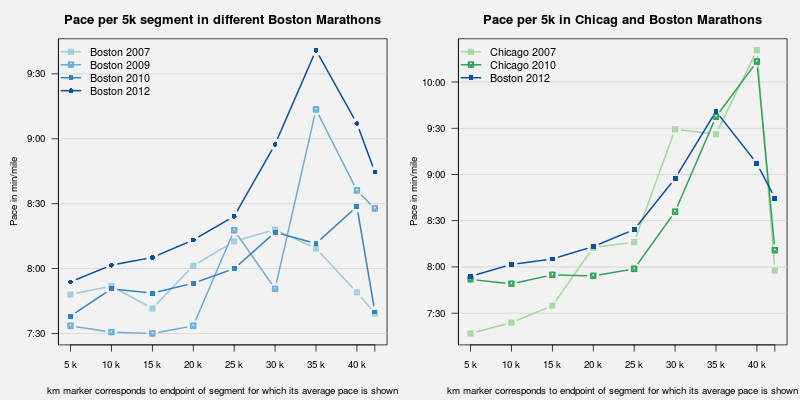
Two weeks ago I ran the 116th running of the Boston Marathon. Weather is often part of the story in Boston as e.g. my first one in 2007 happened after a storm-drenched and very wet weekend. This time, it was the opposite. Temperatures in the 60s in the morning before the start at 10:00am, which tempaeratures climbing well into the 80s for most of the race. The organizers had sent increasingly alarming email to us participants, warning about the weather conditions. And it was unpleasantly hot. Race support was great though: lots of locals had sprinklers pointed to the street; water stops were plenty and amply stocked and, being a nice summery day, lots of spectators made for lots of cheer. But heat makes for dreadful running conditions. I was pretty well trained, but I ended up running 3:43:55, or a tad slower than in Chicago 2007 (also record heat, with the race stopped around the four-hour mark) and Chicago 2009 (hot, though not that hot---but I was somewhat undertrained). Which makes this a personal worst. Oh well, stuff happens. And it was a pretty rough day---reports claimed that 2100 runners, or about 10%, were seeking some form of medical attention during or after the race which is a much higher proportion than under normal conditions. The chart below is an updated version of a chart which had appeared on my running page before. I regrouped my prior Bostons (2007, 2009 and 2010) on the left, and the Chicago runs 2007 and 2009 on the right---and each with the current Boston marathon. (Boston 2012 marathon in comparison to other Boston and Chicago marathons) So compared to the prior Boston races, I did indeed relatively poorly. Starting slower, and slowing down even more leading to about 1:45 for the first half and 1:58 for the second. Compared to the two poor Chicago races (put of the six times I have ran that race), things are not quite as bad as at least I didn't peak at over 10 min/mile. Weather will always remain a challenge. The previous marathon (which was last fall's Fox Valley 2011) was unseasonally cold and wet---making for a time fast enough to get me back to Boston. I am registered again for this one, so we will see what September brings this year.

1 May 2012

Rapha&#235;l Hertzog: My Debian Activities in April 2012

This is my monthly summary of my Debian related activities. If you re among the people who made a donation to support my work (186.38 , thanks everybody!), then you can learn how I spent your money. Otherwise it s just an interesting status update on my various projects. Dpkg News For the first time since several years, there has been a dpkg release (1.16.3) where the changelog doesn t contain any entry of my own. The 3-4 commits I did were not really worthy of a changelog entry. I must admit that it was easy to put dpkg aside given Guillem s message and given how busy I have been with my other projects. Keeping a low-profile for a while certainly doesn t hurt. But I don t intend to stop contributing to dpkg. Quite on the contrary in fact, it s something that I (usually) enjoy doing. Packaging News I packaged a new upstream release of SQL-Ledger (3.0.0) and later in the month I sponsored the upload of LedgerSMB, a fork of SQL-Ledger which unlike the former is maintained like a typical free software project. I also uploaded version 0.56 of Zim and updated WordPress to version 3.3.2 with its slew of security fixes. The Debian Administrator s Handbook Like several months now, most of my time has been directed towards the Debian Administrator s Handbook. The big news is that the liberation fund has been completed this means that the book will be published under DFSG-free licenses from the start (GPL-2+ / CC-BY-SA 3.0). We hope to publish the book next week (i.e. between May 7th and May 11th). The PDF output for the printed book is almost ready. There s some work left for the HTML/EPUB output and we have to prepare for the release of the sources as well Hopefully everything will work out like planned. Stay tuned! Thanks See you next month for a new summary of my activities.

No comment Liked this article? Click here. My blog is Flattr-enabled.

30 April 2012

Russ Allbery: Debian private repositories

Earlier this year, I switched Stanford's internal repositories from an old debarchiver setup that didn't do repository signing to something more modern and secure built on top of reprepro. While we're not doing anything particularly exciting at a technical level, I thought it might be interesting for people to see how a large site with heavy Debian usage divides up and manages its internal repositories. I put up a first draft of a writeup at Debian private repositories. This is currently fairly incomplete. One obvious thing that's missing is a pointer to the wrapper script that we use, but I know there's more. I'm happy to prioritize additional documentation based on what people would find interesting. Send me email (or mention on debian-enterprise, to which I'll also send a pointer to this) if there's anything in particular you want to hear about.

Cyril Brulebois: Debian XSF News #11

Long time no see Summary Anyway, here are some quick news from the X packaging front, focussing on the past few weeks.
  1. While I was busy doing other things, Julien took care of uploading lots of libraries (making most of them multiarch-aware) along with our usual meta-packages (like x11-apps, x11-utils, etc.), preparing for the upcoming 7.7 katamari.
  2. Mesa 8.0.2 was finally uploaded to experimental, where it seems to be building fine, and working fine, at least for me.
  3. Accordingly, I m planning an upload to unstable very soon, and I won t be disabling wayland support this time, since wayland/weston reached their first milestone with a public release (0.85). There s nothing very interesting to see here, but since wayland support doesn t really hurt, I thought I d just keep it. That s why wayland hit unstable yesterday; weston should follow after mesa. (In case somebody is in a hurry, they have been in experimental for quite some time already.)
  4. Scrolling issues with the synaptics driver seem to be finally fixed thanks to rc4: #665004 was confirmed as fixed by many reporters (thanks everyone for the quick feedback after my ping). Accordingly, I ve pinged the release team to get an age-days 3 to make it migrate faster, and a kind RM added that hint to his file, so testing is getting the fixed package thanks to this midnight s britney run.
  5. libcairo2/server/EXA/ati/nouveau fun: will be added through an edition of this post. Executive summary: downgrade libcairo2 to testing s version if you re seeing text corruptions.
Upcoming X server transition X server 1.12 has been prepared in experimental for a while, from release candidates to the first stable release from server-1.12-branch. Since a bunch of drivers were uploaded to cope with that version when it shows up, we should be able to upload xorg-server 1.12 to unstable VERY SOON. What does that mean? Basically, that s a transition. In details:
  1. We upload xorg-server, and wait for it to be built everywhere, then we trigger binNMUs for all architectures at once when it s ready on all of them.
  2. Unlike shared libraries, there s no old and new library packages (old+new SONAME); instead, the server itself provides different packages (because of the different input and video ABI). That means that drivers won t be installable until they are rebuilt against the new server. Usually, we re talking about a few dinstall runs, meaning less than a day.
Frequently Yelled Phrases:
  1. Upgrades are broken! No, it just means you can t upgrade the server alone, you need the drivers too (see above).
  2. Installations are broken! Well, that s unstable, and you probably know installability-related issues are trivially solved by pulling packages from testing when needed. This is such a case.
Please don t report bugs on this topic, thanks already, and enjoy that new server.

Lars Wirzenius: Obnam 0.27 released (backup software)

I've just released version 0.27 of Obnam, my backup application. The relevant part of NEWS:
  • The repository format has again changed in an incompatible manner, so you will need to re-backup everything again. Alternatively, you can try the new convert5to6 subcommand. See the manual page for details. Make sure you have a copy of the repository before converting, the code is new and may be buggy.
  • New option --small-files-in-btree enables Obnam to store the contents of small files in the per-client B-tree. This is not the default, at least yet, since it's impact on real life performance is unknown, but it should make things go a bit faster for high latency repository connections.
  • Some SFTP related speed optimizations.
  • Data filtering is now strictly stable and priority-ordered, ensuring that compression always happens before encryption etc.
  • Repository metadata is never filtered, so that we can be sure that in future if when we add backwards-compatibility we can detect the format without worrying about any other filtering which might occur.
  • Forcing of locks is now unconditional and across the entire repository.
  • Uses the larch 0.30 read-only mode to fix a bug where opening a B-tree rolls back changes someone else is making, even if we only use the tree to read stuff from.
  • "obnam backup" will now exit with a non-zero exit code if there were any errors during a backup, and the problematic files were skipped. Thanks, Peter Palfrader, for reporting the bug.
  • "obnam forget" is now a bit faster.
  • Hash collisions for filenames are now handled.

Petter Reinholdtsen: Cutting it short - and picking the right tool for the job

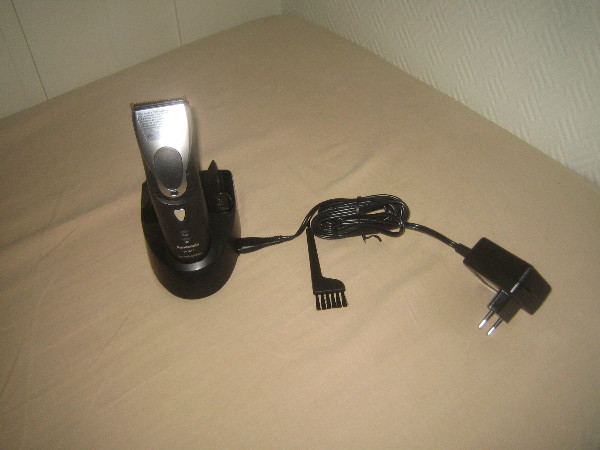
I normally cut my hair short, and my tool of choice has been a common hair/beard cutter, bought in a electrical shop here in Norway. But the last ones have not really been up to the task. My last cutter, some model from Braun, could only cut a few of my hairs at the time, and cutting my head took forever. And the one before that did not work very well either. We have looked for something better for a while, but it was not until I ended up visiting a hairdresser that we discovered that there are indeed better tools available. But these are not marketed and sold to "regular consumers". The hair saloons can get them through their suppliers, but their suppliers only sell companies. The models they sell, are very different from the ones available from Elkj p and Lefdal. The main difference is their efficiency. It would cut my hair in 5 minutes, instead of the 30-40 minutes required by my impotent Braun. The hairdresser I visited had a Panasonic ER160, which unfortunately is no longer available from the producer. But I found it had a successor, the Panasonic ER1611. The next step was to find somewhere to buy it. This was not straight forward. The list of suppliers I got from the hairdresser did not want to sell anything to me. But searching for the model on the web we found a supplier in Norway willing to sell it to us for around NOK 4000,-. This was a bit much. We kept searching and finally found a Danish supplier selling it for around NOK 1800,-. We ordered one, and it arrived a few days ago. The instructions said it had to charge for 8 hours when we started to use it, so we left it charging over night. Normally it will only need one hour to charge. The following evening we successfully tested it, and I can warmly recommend it to anyone looking for a real hair cutter. The ones we have used until now have been hair cutter toys.

John Goerzen: Review: Amateur Radio Handhelds (HTs), APRS, and Battery Tuning Tips

There are a lot of opinions about handhelds for amateur radio users (these handhelds are often known as HTs). I ve used three of them, two with APRS capability, and thought it s about time I write about them. First, I ll talk about the units in particular, then I ll get to some broader Yaesu vs. Kenwood generalizations and conclusions. Yaesu VX-7R a rugged first HT without APRS Cost: $350 as of 4/30/2012 This was the first HT I got as a ham, at the suggestion of Mike AE0MW. It truly does make a great first handheld for a ham. Radio-wise, one unique feature is a receive that s wideband enough to cover both broadcast FM and broadcast AM, the various ham bands, and plenty of others besides. The battery life quoted in the manual is 6 hours on 2m and 5.5 hours on 440 (using standard 6s TX / 6s RX / 48s squelched metric), and in my experience it seems it must be even better in some cases. The real piece of news about this unit, though, is just how rugged it is. It says submersible across the front and I absolutely believe it. I have personal experience with its ruggedness. I once was at an event and put the radio on my car roof while helping one of my children into the car. I then started driving home and forgot it there. When we got home, I realized what had happened, and also realized what that mysterious CLUNK along the busy county road was. So I drove 45 minutes back to where I heard the clunk, and found the VX-7R still lying in the roadway, where it had been for 1.5 hours on the 55 MPH road. The thing was really beat up. It had obviously been hit by numerous vehicles. The antenna was ripped off, taking the SMA mount with it. But wouldn t you know it, the darn thing still powered up. I took it to a local amateur radio shop, and about $80 later it was repaired. Incredible. The only real problem was the antenna connector. I took this radio with me on my bicycle many days, mounted on my handlebars. It got bounced around, but still worked great. Some days I listened to FM radio from it while riding my bike, monitoring a local repeater while I rode. Other days, I spent most of my ride (about an hour each way) chatting with people on the repeaters I have a mobile antenna mounted on the bike, fed to the VX-7R, and a headset. It all worked fine never a problem at all. The ruggedness has its downside. All of the connectors on the radio, except for DC in, are screw-down even the speaker/mic connector. This obviously helps keep water out, but means that it can take a lot longer than normal to do a simple thing like plug in a speaker/mic. It doesn t need any tools, but can get a little annoying. The radio physically is small (unless you install the belt clip, which has an odd peg-based mechanism that protrudes unnecessarily far and is surprisingly non-rugged). It can easily fit into a pocket. The other downsides of the VX-7R mostly surround its interface. I m not one of the Yaesu haters that seem to be so common. I find the interface usable if you read the manual; it seems a lot of people that complain about it don t. But it is quirky. The SET mode is one long menu in sort of a ring. You scroll with the knob, and when you get to the end, it repeats to the beginning. There are one or two shortcut keys to a specific setting, but overall either you use the thing so much you know exactly where you re going, or you re twisting the knob for awhile until the option you want rolls around. (I know of nobody that uses it so much they know exactly where they re going.) They do have options grouped into categories, but it doesn t help much because there s no quick way to skip between categories. The dual transceivers work less elegantly than on the TH-D72A or VX-8GR. Instead of being two equal transceivers A and B, they are main and sub . The sub transceiver is not broadband receive like the main receiver is. But there are also other limitations that have no apparent logic. For instance, you can program memory groups into the device putting, say, all the local repeaters into a certain group, or all the public safety frequencies (to use as a scanner). You can go to the special set menu, select group, then activate SCAN, and it will scan only the memories in that group. But you can t select the special group mode on the sub transceiver for no apparent reason. One other complaint is that the AC charger introduces so much noise to a transmission that you cannot really use the VX-7R to transmit while the charger is connected. Yaesu sells a programming cable that plugs into the speaker/mic port on one end, and a DB-9 serial port on the other, and includes programming software. For an incredibly high price. For far less, I found a similar cable on eBay that has a USB port on the other end (with a built-in USB/serial converter), and used VX-7R Commander though now that Chirp is available for Linux, I ll probably switch to it. I would probably continue to recommend this transceiver for a new ham. The ruggedness, plus the broadband RX, are features that should make it appealing. It is an excellent emergency preparedness/response radio due to those properties; having TX and RX on ham bands, plus RX on broadcast and public safety could be quite the asset. However, for someone that has any interest in APRS, one of the other two radios I mention is probably a better choice. At only $10 more, the VX-8GR sacrifices ruggedness and broadband receive for APRS functionality and could make a compelling alternative to the VX-7R at the same price point. The very low-power transmit at 50MHz and 220MHz on the VX-7R strikes me as a gimmick feature at best that has very little actual use. Shipped battery: FNB-80LI, 7.4V, 1400 mAh, lithium-ion Kenwood TH-D72A / D72E The Cadillac HT, with APRS and GPS Cost: $464 as of April 30, 2012 It s hard to use any word but incredible to describe this HT, though it does have its own rough edges. Starting with the basics, it has dual transceivers with full duplex (meaning you can be transmitting on one band while receiving on another). Its stored memory system and memory bank scanning system are both a lot easier and faster to use than Yaesu s, and work the same on both transceivers A and B, though perhaps offer slightly less flexibility than Yaesu s (on the VX-7R, a single memory can be a member of more than one group). The quoted operating time is 6 hours, which is probably accurate with APRS and GPS off, matching (or nearly matching) the VX-7R. The TH-D72A has the usual mic and speaker ports. Unlike Yaesu, Kenwood has used the same jack for years, so it is not necessary to purchase new accessories with each upgrade. The unit also has both serial (Kenwood connector) and standard mini USB ports, and even ships with a USB cable. The USB port is designed to interface to a PC, and the radio presents itself as a serial-over-USB device. Kenwood also includes MCP-4A, the programming software for the unit, free. This is one example of several things that Kenwood includes for free but are costly add-ons with Yaesu. Kenwood s configuration menu system is hierarchical. You can scroll through the four top-level menus (RADIO, GPS, APRS, and SKY), then navigate through sub menus. The result is that it s both faster and easier to find what you want than on the Yaesu menus. Plus, as you navigate, the radio shows you the shortcut key to get to a particular option (each level of menu is numbered starting) so, for instance, Menu-1-1-0 takes me directly to the configuration for RX battery saver interval far faster than I could get there on the VX-7R or VX-8GR. Only the APRS menu gets a bit crowded with this setup. The D72A supports Kenwood s Sky Command II an intriguing way of making it essentially a remote for a Kenwood HF rig such as the TS-2000. It works by engaging a crossband repeater for the audio, and setting up a AX.25 packet link for the control. It works, but as the response time to frequency adjustments is measured in seconds, is klunky for tuning around a HF band. A nifty, though perhaps not supremely useful, feature with some hackable potential that I haven t explored yet. The TH-D72A is one of only two shipping general-purpose amateur radios that have a built-in GPS the other is the Yaesu VX-8GR, which I ll review below. The GPS works well, and can get a fix indoors if desired. It has a system of saving waypoints, which you can then navigate back to later (using distance/bearing indicators). It also has a track log. While the track log can t be viewed on the unit, it can be downloaded with the included MCP-4A software and saved in a variety of formats including Google s KML for later importing into Google Maps or Google Earth. I enjoy this feature on trips to see where I went later on. There is also a GPS-only mode, which disables all of the other radio circuitry on the radio for very low power consumption. The GPS navigation screens all support heading-up or north-up indicators. But where this radio really shines is APRS. The D72 has all the basics you d expect sending and receiving beacons, sending and receiving messages and bulletins, etc. It has built-in support for being a digipeater in many different ways, including new-N UI-Trace. Coupled with an MFJ VHF amplifier, this could make a nice temporary (or even permanent) digi. The message interface permits sending, receiving, and shortcuts for replying to messages. Beacon transmission can be completely manual, at set intervals, or using SmartBeaconing. Outbound beacons also support proportional pathing (meaning adjusting via-path to not have wide coverage with every transmission). Also, if not using SmartBeaconing, a decay algorithm can be used to send beacons less frequently when the station s location isn t changing. An alternative tells the system to transmit a beacon every time PTT is released, subject to rate limiting by interval. So lots of choices there. For incoming beacons, there are various filters by callsign pattern, packet type, etc. that control whether they will be processed at all, and what kind of alert (visual or audible) to present. Beacons are also placed in a received beacon list, sorted with the most recent at the top (duplicates from the same station are always removed, so only the most recent is presented.) A long press of the LIST button shows time received and type of device next to the callsign. Selecting a specific beacon shows status text, comment, device type, bearing/distance (with graphical north-up or heading-up display), telemetry (weather information and the like), and a little bit of info about the via-path. Pretty nice to see weather reports from local weather stations on there. You can sort the list by received time, station call, or distance from your position but it doesn t stay sorted by anything other than received time, and takes several seconds to re-sort. Seems like a bit of an oversight there. The D72A supports QSY information in beacons. This can automatically insert the frequency of the other band on the transceiver into your transmitted beacons for you, or give you a quick way to tune to the frequency mentioned on others beacons. Either way, a nice touch. The D72 also supports query packets, such as packets asking your station to transmit its position right now. The TH-D72A can directly interface with several types of weather stations via serial link to read weather sensor information and transmit it into APRS packets directly, with no need for a PC to be in the picture at all. But if you do hook up a PC to it, there are quite a few more possibilities. You can hook it up to PC APRS software (or a hardware device such as the AVMAP) to see locations of other APRS stations on a map. It can emit APRS packets, plus even GPS sentences, down the USB port to the PC. Moreover, in PACKET mode, it acts as a full TNC, with a fairly robust TNC command set. In short, it can do more than APRS; it can also do regular AX.25 such as DX clusters, BBS, nodes, etc. As far as I know, this is the only HT that can interface with a PC in this manner, and only Kenwood s mobile D710 has the same kind of feature set at that. Kenwood includes a lot of documentation with the TH-D72A. The 51-page printed manual is a summary or introductory guide. The included CD-ROM supplies another 75 pages of detailed reference material, and the 92-page in-depth APRS manual has a level of detail that true geeks like me appreciate. I ve referred to Kenwood s documentation more than once while figuring out things about the VX-8GR (which woefully under-documents things like SmartBeaconing). That said, it appears that at least some of the documentation has been copied from the earlier TH-D7A. Page 4 of the printed book is a good example. It talks about the memory effect of the battery, and warns against unplugging and replugging the charger because the charge cycle will be reset and the battery will be over-charged (I find it hard to believe that a Li-Ion charge controller would be that stupid, and furthermore direct observation suggests that it isn t.) Parts of the in-depth APRS guide appear to have been written for the D710, but that s a really minor nit. Unlike Yaesu, Kenwood issues periodic firmware updates to the D72A, which you can apply over USB. They have fixed bugs and added features to the unit over time. Now onto the things that aren t so good about the D72A. I ll start with the battery system, since we were already discussing it. Despite shipping with a much larger battery than the VX-8GR (1800 mAh vs. 1100 mAh), it only manages roughly equal battery life with APRS and GPS engaged. (It will probably do better as a simple voice unit, however.) This has been confirmed by numerous reports on the Internet. I will discuss this topic more below. There is very little else to fault the D72A on, feature-wise. I have a minor nit in that it is impossible to cause the keylock feature to also lock PTT. It would be nice to be able to see raw APRS packets on beacons and messages. Other than that, I can t think of a feature it really lacks. Compared to the VX-7R and VX-8GR, the TH-D72A is significantly larger physically, in every dimension. It is not uncomfortably large, and still fits in my hand fine. But its size is enough different that it feels like the design is dated and could have been more compact if Kenwood would have bothered. It s a nit, sure, but a nontrivial one. With the single exception of the sturdy metal belt clip, the D72 doesn t feel nearly as rugged as the VX-7R, and not even as rugged as the VX-8GR. The keys have a squishy feel to them, the PTT button works fine but has a cheap plastic design (as opposed to the rubberized versions on Yaesu s HTs). The manual doesn t mention it, but one Kenwood brochure mentions and IP54 weatherproofing. That means it is protected against limited ingress of dust and against water sprayed from all directions limited ingress permitted. Contrast that to the VX-7R, which is rated for 30 minutes of submersion at 3ft and has a magnesium case. It seems to be specced similarly to the VX-8GR, though the VX-8GR certainly feels a lot more solid. I have no proof, as I m not about to sacrifice my HTs for science, but I doubt that the TH-D72A would have survived over an hour on a busy road as well as the VX-7R did, and probably not even as well as the VX-8GR would. The case is plastic a stout plastic, but still plastic. Like the VX-8GR, and unlike the VX-7R, the D72A does not have broadband receive. It can receive some bands adjacent to the ham bands it supports, which includes a lot of bands of interest to people with scanners, but still can t receive broadcast FM signals like the VX-7R. Shipped battery: PB-45L, 1800 mAh, lithium-ion Yaesu VX-8GR: Cheaper APRS & GPS Cost: $360 as of 4/30/2012 One could probably call this Yaesu s closest competitor to the D72A. At about $100 cheaper, it doesn t have a featureset that matches Kenwood s, but it does have a few innovations that the D72A lacks. Starting with the basics, it lacks the VX-7R s broadband receive, with the receive roughly matching the TH-D72A s. The 8GR is a dual-transceiver HT, and it works this effectively (moreso than the VX-7R). Yaesu has a bad habit of changing connectors on radios with regularity, and charging an arm and a leg for accessories to boot. Even within the VX-8 line, the 8GR uses different accessories than the 8DR, and of course has different plugs than the 7R (though it appears that the DC power plug is the same, and with some luck you might be able to use a VX-7R speaker/mic on the 8GR, though not the reverse). The menu system on the 8GR is still similar to the 7R, though Yaesu has done several things to improve it. For one, scrolling through the menu now shows several lines of context on the screen at once, making it faster to scan. Also, there are more ways to jump into the menu at a certain location than before and even a small bit of clumsily-implemented hierarchy (there are several settings on the SmartBeaconing page, for instance). The menu key now toggles between various displays: the default frequency/status display, a GPS display, an APRS staion list, and an APRS message list. Just about everything operationally takes more keypresses than the D72A. On the D72A, it s one or two keys (a physical button or F+button) to do almost everything: toggle GPS state, change TNC/APRS state (turn on or off), etc. All of that is in the scrolling menus on the 8GR. The quickest way there, which is documented in the manual, is to press MENU until a certain screen comes up, then press and hold MENU to bring up the settings (defaulting to a certain APRS-related category), then scroll and change settings. It s a pain to turn APRS on and off, because you have to do this process for both the GPS and the APRS modem. Inexplicably, there is a hotkey to change the APRS beacon method (manual, auto, or SmartBeaconing) but not to turn APRS itself on or off. (The D72A has a hotkey to toggle the beaconing, though not to change its method; though in truth, if you do it frequently, the menu shortcuts will get you there rapidly.) Physically, the VX-8GR is closer to the size of the 7R than the size of the D72A, and notably is significantly smaller than the D72A (at least with the standard battery). As noted in the D72A review, the VX-8GR feels more rugged than the D72A, though whether that is actually true or not is hard to pin down. It is definitely less rugged than the VX-7R. The keys require more pressure than the D72A, and in this they are similar to the 7R, but feel satisfyingly solid. Unlike the other radios here, the 8GR does not have a dedicated volume knob, having only one dial on the top. To adjust volume, you hold the volume button on the left while twisting the knob. In practice, this is probably not usually very annoying, but if the radio is on your belt or otherwise not in your hand, this would be a frustration. (I think it would be particularly annoying if using it with a speaker/mic). Setting 99 will let you change the key so you don t have to hold it in, which could probably go a long way to making the situation more tolerable. One unique feature of the VX-8GR, as far as I know completely unique to it, is a vibrating alert. This would most frequently be used with APRS to provide a nearly-silent alert of incoming messages and the like. The screen of the 8G, while similar in size to both the D72A and the 7R, appears to be higher-resolution (or if not, they make better use of it). More information is packed onto the screen at once, and although the D72A does have a small font, it uses it so rarely that lots of scrolling is needed. The 8GR uses a smaller font than the D72A to show content of messages and the like, which makes a much faster experience since there is a lot less scrolling. Neither radio has a setting to change this behavior, so if your eyesight isn t good, you may prefer the D72A anyhow. The VX-8GR supports a heading-up or a north-up view of the received GPS data, but strangely it does not support this when navigating to a received beacon (north-up is the only option). Unlike the TH-D72A, you can engage keylock on the 8GR while someone s beacon is on the display. Also unlike the TH-D72A, you can lock out the PTT key on the 8GR. However, the keylock feature is just a quick press of the power button, which makes me a bit nervous. And worse, if you tell it to lock the PTT key, then it also won t transmit any automatic APRS beacons! There are a lot of things the D72A supports in the APRS area that the 8GR doesn t. Here s a summary of features missing in the 8GR compared to the D72A: voice alert (can t even do it manually since tone/CTCSS are locked out in APRS mode), quick replying to messages, TNC mode (meaning you can t use it with PC-based APRS programs), full AX.25 packet mode, full PC linking, weather station inputs, built-in digipeater mode, heading-up display, GPS track logs, QSY in beacons, quick tuning to others QSY info, responding to position queries, proportional pathing, automatic decay, beaconing on PTT release, sorting of beacon list, hotkey access to many features, and I m sure the list goes on. On the flipside, the only thing feature-wise that you get on the 8GR s APRS implementation that the D72A lacks is ability to inspect raw APRS packets. The VX-8GR has the lowest-capacity battery of the three radios covered in this post, and this is an oft-cited problem for users of the unit. Yeasu does seem to do a much better job of power management than Kenwood, though, so in full APRS and GPS mode, the battery life is roughly the same, amazingly enough. It is unlikely that the talk time on the 8GR would match either the 7R or the D72A, however. Kenwood and Yaesu both have a battery saver feature which cuts power to the RX circuit except for brief checks for signals. Yaesu completely disables this while the APRS modem is on (and STILL matches Kenwood s battery life, despite the smaller battery!) Kenwood doesn t, though recommends changing the signal-check interval from 0.2s to 0.03s in order to avoid truncating APRS packets. Yaesu offers an 1800 mAh extended-life battery which should significantly exceed Kenwood s battery life. Aftermarket vendors have 2000 mAh batteries as well. Either way, expect APRS to be a drain on batteries. More on that below. Although Yaesu includes 168 pages of documentation with the 8GR, don t expect it to match the quality and detail of Kenwood s 218 pages. There are a lot of gimmicky/useless features on the 8GR (WIRES, for one) that get extensive treatment, and there is a fair bit of repetition. I particularly single out the SmartBeaconing documentation on the 8GR as being, at best, woefully incomplete and probably also inaccurate to boot. Read the D72A manuals to figure out how that feature works on your 8GR. I bought the VX-8GR intending it to be something akin to a more versatile TinyTrak. On that score, it mostly succeeds. It may be my go-to rig for use at bicycle rides, marathons, emergencies, etc., while the D72A will probably be the one that goes with me on trips. Shipped battery: FNB-101LI, 7.4V, 1100 mAh, lithium-ion Not covered: VX-8DR poor value for the dollar Cost: $434 ($550 with GPS and GPS connector) Yaesu s top-of-the-line HT is sometimes considered to be the VX-8DR. It maintains the broadband capability of the 7R, is probably almost as rugged as the 7R, and has APRS built in, like the 8GR. It even has an option to add a Bluetooth board. What is doesn t have built-in is a GPS. You can add one on for $77 for the FGPS-2 plus $39 for the CT-136 connector which connects the GPS to the unit. But then you have a unit a lot less rugged than even the D72A (that s a small connector for the GPS), a lot less small, with the same APRS featureset as the 8GR (meaning a lot less than the D72A), which costs about $100 more than the D72A. Frankly I think this makes for a poor APRS package, and would probably only be reasonable for someone that wants other 8DR features and has a desire for some very occasionaly APRS work. Battery Life and APRS One of my first surprises with APRS HTs was the poor battery life I saw. Doing my research seemed to suggest that, contrary to popular opinion, the transmitted beacons were not the culiprit, but the receive circuits were to blame. Because it is not acceptable to cut off the first 200ms of an AX.25 packet like it is with a repeater, the RX circuit is either engaged much more frequently (Kenwood) or continuously (Yaesu), putting a lot more drain on the battery. (This has also been confirmed by multiple others that have done testing) The GPS receiver also adds drain, and on the D72A, so does the TNC, which is always active when APRS is. If you don t care about received beacons, you can dramatically raise the battery life on the D72A by setting the power saver to 1 second or greater as high as 14 hours by one report. On either unit, raising the squelch should have some effect (though not as much; but in any case, weak packets won t decode anyhow, so there s no sense in letting them in.) On the 8GR, getting the extended life 1800 mAh (or aftermarket version) could produce battery life in nearly that same region, without compromising on the RX side of things. Conclusions If you want a HT capable of APRS, seriously think of the TH-D72A before anything else. It is $100 more expensive than the 8GR, but has more than $100 worth of extra features (and included things, like PC link cable and software, that are extra on the 8GR), so it has a better value. If you re particularly budget-conscious or want the most ruggedness you can find, the 7R and 8GR are solid contenders if you can sacrifice the extra APRS features. Update May 1: Clarified what the lack of TNC mode on the VX-8GR means, and also how the VX-8GR PTT keylock also locks out APRS transmissions.

Lior Kaplan: Taking a vacation from open source

In the last 6 months I ve devoted a lot of time to the open source projects I m part of. I decided to take a vacation from most of the open source stuff I do. This is mainly to balance things better and make sure I don t feel burnt out. I m not disappearing completely, but rather shifting into a lower gear and focus on the things I enjoy most regarding open source.
Filed under: Debian GNU/Linux, LibreOffice

Raphael Geissert: An ever-growing mirrors network

As of the time of writing, Debian's mirrors network has around 330 mirrors serving the archive over http, and around 300 serving it over ftp.

This month alone, 6 more mirrors were added. Other 6 more were added last month.

There are mirrors in 73 countries. All this couldn't be possible without the help of the sponsors.

However, some interesting questions arise: do people actually use those new mirrors? is having so many mirrors worth the extra load put on the primary mirrors?

I would personally answer: no, and maybe.

Blogosphere: When was the last time you took a look at the mirrors list and/or tried to find a mirror that served you better?

Pietro Abate: unburden my home dir

Today I installed unburden-home-dir and I'm very please with it. It's a simple script that takes care of your temporary files to move them outside your home directory. The main reason why I installed it is to minimize the number of read/writes of iceweasel. My favorite browser is apparently the culprit of 80% of read / write operations on disk even when it is idle... Moving the cache to tmpfs, I hope to reduce the IO on disk and to extend my battery life. Using a SSD I haven't noticed any remarkable benefits regarding performances, but I hope I'll manage to squeeze a bit more from my battery. Installing and configuring unburden-home-dir is straightforward. It is packaged for debian (experimental at the time of writing), and it is very easy to configure. Remember that if you want to have your cache on tmpfs, you need to ether mount a tmpfs-enabled file system somewhere or enable RAMTMP=yes in /etc/default/rcS (default in wheezy). After installing unburden-home-dir iotop shows a delightful page full of zeros :) ps: if you use duplicity, remember to specify the option --archive-dir to move the duplicity cache somewhere else...

Russell Coker: The Royal Caribbean Official Android app

I ve just played with the official Android app [1] for the Royal Carribean cruise line [2]. The cruise line is apparently great (I ve never been on one of their ships but the reviews are good) but the Android app isn t. Net Access The most obvious and significant problem with this app is that it s entirely useless without net access. All data of note comes from the Internet which means that the program is useless in any location where Internet access is unavailable (or unreasonably expensive). They wrote an app about cruising that can t be used on a cruise ship! Did they even think about what they were doing? The correct thing to do when writing such an application is to have all basic data about all ships included in the app. This means that when they change the deck plan of a ship they need to release a new version of the app and have people download it. Having done a lot of software development I understand that forcing software updates (even updates to included data files) involves some effort and expense. But when they spend $20,000,000 to update a ship (which is about the minimum that is spent for a major ship in dry-dock according to TV documentaries I ve watched) it seems quite reasonable to budget $10,000 to release new software. Also one benefit of updating the software is that it can promote the changes, after spending tens of millions of dollars improving a ship they probably want to promote that to customers and pushing a new app update with adverts for the improved ship seems like a good way of doing that. There is some data that can t reasonably be included in the app due to size constraints with photos of ships being the most notable example. The solution to this is to provide an option for the user to cache the data that interests them. For example if I was meeting some people to discuss the possibility of a group cruise on a RCL ship then I could download all the pictures of that ship on my home Wifi network and then have them all available with no delay or 3G costs. Also the app seems to hang if net access is temporarily interrupted. As phones are expected to have unreliable net access this is also a significant flaw. Maps The maps of the ships are comprised of a series of pictures which each show one deck. In addition to being downloaded (not cached or included in the app) they aren t scalable (they should be SVG or at least allow zooming the high resolution pictures) and they don t allow a 3D view. The paper maps used to promote cruises (including RCI cruises) and which are given to all passengers on Princess cruises (I m not sure about other lines) show a side cutaway view of the ship which is handy for working out which things are near where you are. It seems that an ideal cruise ship mapping program would have some sort of 3D component, maybe X3D. My experience is that a two night cruise isn t long enough to become familiar with one of the smaller cruise ships. Using a map is essential and a smart phone is a good way of managing such a map as typical 2D paper maps just aren t good enough for such a large and complex structure. Photos One of the significant things that is wrong with the app is a lack of care in displaying the photos of ships. They display three pictures of the Allure of the Seas (one of the two newest, biggest, and most luxurious ships in their fleet), but one of those three photos is actually of the Oasis of the Seas. The fact that the two ships are almost identical is no excuse, there is a principle at stake! Also only having three pictures is pretty poor, there is no way that less than 50 pictures could do justice to such a big ship! A Google search for the words cruise and photos turns up many sites with pictures of cruise ships and it s not particularly difficult to find pictures of any particular ship. Photographs by customers are often of high quality as some of the better DSLR cameras are in the same price range as some of the cheaper tickets for cruise ships. Probably the best thing that RCI could do is to run a contest and allow their customers to enter photos and vote towards the winning entries. That would get them photos that aren t as sterile as the official photos and which include the things that are of most interest to customers. Finally in terms of caching, pictures are the most easily cached source of data and as phones get higher resolution they keep getting bigger. The storage space for a modern phone is equivalent to the entire 3G download quota for about a year on an affordable Australian 3G plan. When dealing with photos downloaded from the net the default should be to cache everything. Navigation Navigating a smart-phone app is a lot more difficult than navigating the same data on a desktop system (which would be in a web browser). Users can compensate for some deficiencies with web site organisation by using a large monitor and having several web browser windows with multiple tabs. But with a phone it should be possible to switch between things quickly. The main menu has a View Our Ships option (which allows viewing deck plans and pictures) and a View Our Staterooms option which offers a list of ships and then describes the state rooms available for each one. This means that you can t see all the information about a ship in one place and even worse you can t easily compare ships. As it seems likely that people will want to use this app for selecting a cruise it should be possible to select a few ships that are of interest and then quickly flip between them. For example the Rhapsody of the Seas and the Voyager of the Seas are cruising in my part of the world so it would be nice if I could tell the app to compare those ships and then allow me to view a page about one ship and then flick to the equivalent page about the other ship. Another notable problem is that the ships are listed in alphabetical order. The sensible thing to do is to list them by class going from biggest to smallest. Lessons to be Learned These problems aren t specific to the RCI app, many other Android apps have the same flaws. For example the Google Play market app doesn t cache the icons of the installed apps so every time I want to see a list of installed apps it goes slow and wastes some of my bandwidth. Doing something wrong in the same way as Google isn t necessarily a great mistake, although using the Google Play market on a cruise ship is probably very uncommon. Probably the biggest problem is a lack of testing. They should have sent the developers on a cruise as a live test. Every cruise ship has a sales desk for booking future cruises so it wouldn t be difficult to have a dozen Android phones at the sales desk to see how real customers who really want to book a cruise find it. I presume that even if net access was available then such a test would fail dismally. If a 3D display of a ship combined with all the data management capabilities of a modern smart phone (which is a lot more powerful than the desktop systems I used prior to 2000) can t at least be a useful supplement to a stack of paper brochures then it s probably a failure. I think that the RCI app is an example of how to make an Android app which doesn t fall into the more common failings (such as being a quick and dirty port from iOS) but yet still isn t useful to customers. I recommend that people who develop apps which have an objective of imparting information to users try it out as an example of what not to do. Try a few basic tasks like comparing the three biggest classes of RCI ships in terms of features, after failing to do that with the app you can then use Wikipedia to get the result. But don t use the Wikipedia client apps, use a tabbed browser such as Opera Mini. Related posts:
  1. An Introduction to Android I gave a brief introductory talk about Android at this...
  2. Choosing an Android Phone My phone contract ends in a few months, so I m...
  3. Galaxy S vs Xperia X10 and Android Network Access Galaxy S Review I ve just been given an indefinite loan...

29 April 2012

Peter Eisentraut: Setting the time zone on remote SSH hosts

The tasks: I have one or more desktop/laptop machines with varying local time zones (because the persons using them are actually in different time zones, or because the one person using them travels). I also have a number of servers configured in some random time zones. (It could be the time zone where they are physically located, or the time zone of the person who installed it, or UTC for neutrality.) Now what I would like to have happen is that if I log in using SSH from a desktop to a server, I see time on that server in my local time zone. For things like ls -l, for example. Obviously, this illusion will never be perfect. Nothing (except something very complicated) will adjust the time stamps in the syslog output, for example. But the ls -l case in particular seems to come up a lot, to check how long ago was this file modified. This should be completely doable in principle, because you can set the TZ environment variable to any time zone you like, and it will be used for things like ls -l. But how do you get the TZ setting from here to there? First, you have to make the remote SSH server accept the TZenvironment variable. At least on Debian, this is not done by default. So make a setting like this in /etc/ssh/sshd_config:
# Allow client to pass locale environment variables
AcceptEnv LANG LC_* TZ
You also need to make the equivalent setting on the client side, either in /etc/ssh/ssh_config or in ~/.ssh/config:
SendEnv LANG LC_* TZ
Which leaves the question, how do you get your local time zone into the TZ variable to pass to the remote server? The actual time zone configuration is the file /etc/localtime, which belongs to glibc. In current Debian, this is (normally) a copy of some file under /usr/share/zoneinfo/. In the distant past, it was a symlink, which would have made things easier, but now it's a copy, so you don't know where it came from. But the name of the time zone is also written to /etc/timezone, so you can use that. The format of the TZ environment variable can be found in the glibc documentation. If you skip past most of the text, you will see the relevant parts:
The third format looks like this: :CHARACTERS Each operating system interprets this format differently; in the GNU C library, CHARACTERS is the name of a file which describes the time zone.
So what you could do is set
TZ=":$(cat /etc/timezone)"
Better yet, for hopping through multiple SSH hosts in particular, make sure to preserve an already set TZ:
TZ=$ TZ:-":$(cat /etc/timezone)" 
And finally, how does one hook this into ssh? The best I could think of is a shell alias:
alias ssh='TZ=$ TZ:-":$(cat /etc/timezone)"  ssh'
Now this set up has a number of flaws, including:
  • Possibly only works between Linux (Debian?) hosts.
  • Only works if available time zone names match.
  • Only works when calling ssh from the shell.
But it practice it has turned out to be quite useful. Comments? Improvements? Better ideas? Related thoughts:
  • With this system in hand, I have resorted to setting the time zone on most servers to UTC, since I will see my local time zone automatically.
  • Important for the complete server localization illusion: some ideas on dealing with locales on remote hosts.

Next.

Previous.