Search Results: "ag"

3 August 2011

Robert Millan: Recent improvements with Debian GNU/kFreeBSD

Debian GNU/kFreeBSD was first released with Squeeze in last february. The technology preview label indicated, among other things, that it had a number of limitations when compared with what users would expect: missing features, incomplete functionality, etc. But it has seen many noteworthy improvements since then. Here are some that I would like to mention:

Dirk Eddelbuettel: RcppArmadillo 0.2.28

Armadillo 2.2.1 came out today (and it looks like 2.2.0 was skipped, tst, tst). It has now been wrapped into release 0.2.28 of RcppArmadillo which is already on CRAN. The NEWS entry is below; a number of these changes were already in the preceding 0.2.27 release of RcppArmadillo which was base on the beta for Armadillo 2.2.0.
0.2.28  2011-08-02
    o   Upgraded to Armadillo release 2.2.1 "Blue Skies Debauchery"
          * faster multiplication of small matrices
          * faster trans()
          * faster handling of submatrices by norm()
          * added economical singular value decomposition: svd_thin()
          * added circ_toeplitz()
          * added .is_colvec() & .is_rowvec()
          * fixes for handling of complex numbers by cov(), cor(),
            running_stat_vec
CRANberries provides a diffstat report for 0.2.28 relative to 0.2.27. As always, more detailed information is on the RcppArmadillo page. Questions, comments etc should go to the rcpp-devel mailing list off the R-Forge page.

2 August 2011

Russ Allbery: Git Debian packaging notes revised

It's a new month, so as usual for the beginning of the month I'm hoping to be a bit better about regularly updating, and ideally with more than just software release announcements and book reviews. Sadly, today has not been a good day for concentration despite a good early start, but I did manage to finally get through a long-delayed revision of my page of notes on using Git for Debian packaging. The revision drops the idea of using a separate debian branch to track Debian-specific changes so that master could be a pure feature branch. While appealing for its conceptual purity, this ended up confusing people horribly and was extra work for no apparent benefit. There are also a variety of other revisions to bring things up to date and a few new minor tips. Unfortunately, I haven't yet had a chance to write up how to maintain the upstream branch as a merge between the upstream Git repository and the released tarball, an idea from Sam Hartman that I'm now using very successfully for the openafs package, but at least now there's a pointer to it. I'm not really sure what to do with the initial part of that page that offers an introduction to Git. I've now written about three of these in separate places, and I'm still unconvinced of how much they actually help. And there are a ton of tools and basic techniques that I use all the time in Git that aren't mentioned in there (like git pull --rebase --stat, which I aliased to git update, or the whole concept of aliases, or how this all plays with 3.0 source packages). I've left the basic instructions for now, but I think at some point I may cede the tutorial aspect to other sites and just collect neat tricks that aren't part of the basic workflow that everyone describes.

1 August 2011

Diego Escalante Urrelo: Yes, I almost forget

I ll be there since Friday 5th night until Saturday 13th. I m stoping at Sevilla for VIII GUADEC-ES, the Kung Fu Edition. I m leaving in a few hours, so see you there! PS: I already packed the ceremonial vuvuzela, I hope we make a tradition of it

Christian Perrier: DD, 10 years

On July 30th, 2001, I received a mail from James Troup stating that I was a Debian developer, this 10 days after my Application Manager, namely Martin Michlmayr, sent his AM report. Summarizing these 10 years will be....interesting. Now that I'm on holidays, I'll try too cook something up. Sorry, folks, I completely forgot celebrating this last Saturday.

Nathan Handler: Google Summer of Code Report #4

Due to the midterm evaluation, this report will cover a span of 4 weeks. As a result, it will be quite a bit longer than my previous reports. One of the first things I did after my last report was create a FAQ for the project. At first, the FAQ was a plain text file living only in the git repository. Then, it moved to being maintained on the Debian wiki with a cronjob pulling it into my local repository for me to commit and push. Finally, the cronjob moved to wagner. The FAQ is not actually committed to the git repository, but it is available in the dextools instance running on wagner or on the wiki. There is also now a basic README file that is part of the git repository that simply points people to the FAQ on the wiki (so people who branch the repository can easily find the documentation). For those of you who have been reading my other reports and/or testing the dashboard, you have probably noticed the problems I was having getting the text boxes sized properly. After spending countless hours researching and testing different solutions, we finally decided to give up on this for the time being. Therefore, all of the size attributes have been removed from the text inputs, and the background color has been reset to its default value. This means that we will no longer experience the issue of very wide text boxes and a horizontally stretched table. However, it also means that long strings will get cut-off when displayed in a text input. Since my initial mockup design at the start of the summer, I have had the rows of the table zebra-striped. Based on some feedback from Paul Wise (pabs), I changed this so that the row colors are based on the status of the task. Open tasks are red, closed tasks are green, and in progress tasks are yellow. This makes it much easier to quickly see the progress of the project and find tasks you are interested in. My original dashboard consisted of one main dex.html file. This file used some javascript to pull in each project s task list. We felt that a much more common use case would involve a user only interested in one particular project. As a result, they would not be likely to use the select boxes to change projects. This ultimately led to me creating standalone dex.html dashboards for each project. These per-project dashboards were identical to the original dex.html, except they did not include the select boxes at the top for changing projects. Eventually, I decided to completely get rid of the original dex.html dashboard. That file now consists of a simple list of links to all of the projects sorted by distribution. Another advantage of this change is that it is much easier to link to a specific project. For example, you might now link to /projects/dex-ubuntu-ancient-patches/dex.html (you can get the URL by simply copying it from the address bar). Another advantage is that you can now link directly to a specific project s graphs (just append #graph). Another feature that I am still working on is per-project documentation. From the start, we wanted to make it easy for new contributors to get involved in DEX. One way we can do this is by having clear documentation about what the project is and how to deal with tasks. I decided that the easiest approach would be to have this documentation live on the wiki. This allows users to use the familiar wiki markup language to format their text, and it gives us all of the other benefits a wiki provides. Documentation will live at /DEX/<distribution>/ <project>. The dashboard will then take care of pulling in this documentation and displaying it at the top of the proper page. For a while, I was thinking that it would be necessary to filter the HTML produced by the wiki to prevent malicious code from ending up on the dashboard. However, after playing around for a bit, I think that it should be pretty safe to just use the HTML as-is (if someone spams the wiki, we can always revert the change). I am currently finishing up some of the code to handle this, and it should be live sometime this week (a partially working version is live on wagner). There are also two new checkboxes at the top of each dashboard. These allow users to add completed tasks and/or tasks with completed bugs. This is useful for projects that are close to being complete, as it allows users to quickly view the few remaining tasks. This feature was requested by several people, and I am glad to finally be able to implement it for them. There is also a second graph on each page. This graph is a bar graph that shows the number of tasks each person has completed. It gets the people from the assignee column for the project, and it only counts tasks with a status of Complete . The graph is updated whenever the getbugs.py script runs to update the task listing (currently every 10 minutes). The bars are sorted from tallest to shortest. The idea behind this graph is to recognize the people working on a project. The form processing script has not worked on wagner. This was mainly due to a permission issue. Thanks to a hint from Rapha l Hertzog, I was able to use setfacl to fix this. The form can now be submitted, and it should successfully save all changes made via the web form. This involved some updates to support the per-project dex.html files. The form processing script will also ignore any status that is not complete , in progress , or incomplete , which prevents people from messing up the dashboard by submitting invalid information. Finally, the script will now try to use the HTTP_REFERER header to send the user back to the correct page. If this header is not set, the user will be sent back to the main dex.html index page. Sorting the table has been partially broken since I started including text inputs. I finally got this issue resolved, and I should now be able to sort by text inputs, select boxes, or anything else I might end up including in the table. You can test this by clicking on any header in the table. I will probably add a tiny image to make it more clear which header is being used to sort the table. By default, it is sorted based on the status and then the task name. The status column now has a select box for setting the status. Since the row coloring is done via javascript, the minute you change the status in the select box, the row color will change to reflect the new status. Keep in mind, for the time being, any change you make via the web form will be lost if you do not hit the Submit button at the top of the form. That covers most of the dashboard changes that have taken place since my last report. However, there were also some other changes that are worth noting. Matt Zimmerman, my original mentor, settled down from his traveling and resumed serving as my mentor for the project. I would like to thank Stefano Zacchiroli for all of his help this summer. I look forward to working with him more in the future. I have also started using the issue tracker feature on alioth for dextools. Right now, it is mainly being used to help me keep track of bugs and features that I need to deal with. I am hoping that as dextools starts to be used by more people that they will also help report issues on the tracker. This issue tracker is a good source of information for people interested in knowing what I will be working on in the future. I will briefly talk about some of the more important features that I will be working on. The first issue is one that I have already touched upon in this report. I want to sort out the per-project documentation. This is rather important, as it will most likely be utilized by all projects using the dashboard. It is also essential if we are to get new contributors involved in DEX projects. Second, I want to setup some method for backing up the projects/ directory on wagner. This directory is not maintained in the git repository, and it contains all of the information submitted via the web form and generated by the scripts. My current plan is to have this directory maintained in its own VCS. Every time getbugs.py runs or the form is submitted, a new commit will be made. This will allow us to easily revert any changes (spam) made to the dashboard. Since we do not foresee the dashboard being the target of much abuse, any user will be able to modify data via the web form. I also want to add the ability for users to create new projects and task via the web. I envision this as a separate form where they enter the distribution name, project name, a list of BTS bug numbers, and a list of any additional tasks. The script will then take care of applying the necessary usertag to the bugs and/or creating a tasks file in the projects directory for the non-bts tasks. Doing this will make starting a new project trivial, and will eliminate the need for VCS access to create projects that do not utilize BTS bugs. Finally, I want to eliminate the need for the user to hit the Submit button to save their changes. Any change the user makes should be submitted and saved instantly using AJAX. This will also help eliminate some confusion that was caused by the row color instantly changing when the status is changed. Some users thought that the color change meant that the change was saved when it really was not. Matt asked me the other day what features I think need to get added before the dashboard is really ready for public use. While the features and issues I mentioned above will help make the dashboard easier to use, the dashboard is still perfectly usable without them. There are only a few more weeks left in the Google Summer of Code 2011. By that time, all of these features and bugs should be sorted out, and we should be able to properly announce the dashboard and make it available for use on all DEX projects. That does not mean that the dashboard will be done . Instead, it will probably result in many new bugs and feature requests being submitted. However, at that point, I will make a very strong effort to keep the dashboard stable and to prevent data loss. I am looking forward to the finally finishing up this project and seeing it used by the DEX team. As always, if you are interested in helping out with DEX or dextools, my code is available in a git repository on alioth. There is also the new issue tracker where you can report bugs and request new features. Finally, you can join the debian-derivatives mailing list, join #debian-derivatives on OFTC, or contact me directly via email or on IRC (nhandler).</project></distribution>

Andreas Metzler: down

This weekend I looked down. there is the Bregenzer Ache

Lucas Nussbaum: Debconf

So, the fifth Debconf I ve had the chance to attend is clearly over now. It was great, and all organizers (and sponsors) really deserve huge thank you for making this event so successful. I m already looking forward to next year s edition. Debconf has been very productive for me. I chaired 4 sessions: I ve also made numerous uploads of Ruby-related packages, and reduced my backlog on UDD to a reasonable level. I even managed to make a developers-reference upload, integrating all the pending patches from the BTS. In other news, I m very excited about the recent progress on expo.debian.net (a mentors.debian.net replacement), which could help streamline our sponsorship process.

Iustin Pop: New harddrives WD RE4

I've recently exchanged my old RE3 harddrives (500GB) with new RE4 (non-green power) 2TB harddrives. Here is some data gathered if anyone is interested (I usually look for this kind of information before buying). Smart information:
smartctl 5.41 2011-06-09 r3365 [x86_64-linux-3.0.0-ruru0] (local build)
Copyright (C) 2002-11 by Bruce Allen, http://smartmontools.sourceforge.net
=== START OF INFORMATION SECTION ===
Model Family:     Western Digital RE4 Serial ATA
Device Model:     WDC WD2003FYYS-02W0B0
Serial Number:    WD-XXXXXXXXXXXX
LU WWN Device Id: X XXXXXX XXXXXXXXX
Firmware Version: 01.01D01
User Capacity:    2,000,398,934,016 bytes [2.00 TB]
Sector Size:      512 bytes logical/physical
Device is:        In smartctl database [for details use: -P show]
ATA Version is:   8
ATA Standard is:  Exact ATA specification draft version not indicated
Local Time is:    Thu Jul 28 20:31:24 2011 CEST
SMART support is: Available - device has SMART capability.
SMART support is: Enabled
=== START OF READ SMART DATA SECTION ===
SMART overall-health self-assessment test result: PASSED
General SMART Values:
Offline data collection status:  (0x80) Offline data collection activity
                                        was never started.
                                        Auto Offline Data Collection: Enabled.
Self-test execution status:      (   0) The previous self-test routine completed
                                        without error or no self-test has ever
                                        been run.
Total time to complete Offline
data collection:                (28860) seconds.
Offline data collection
capabilities:                    (0x7b) SMART execute Offline immediate.
                                        Auto Offline data collection on/off support.
                                        Suspend Offline collection upon new
                                        command.
                                        Offline surface scan supported.
                                        Self-test supported.
                                        Conveyance Self-test supported.
                                        Selective Self-test supported.
SMART capabilities:            (0x0003) Saves SMART data before entering
                                        power-saving mode.
                                        Supports SMART auto save timer.
Error logging capability:        (0x01) Error logging supported.
                                        General Purpose Logging supported.
Short self-test routine
recommended polling time:        (   2) minutes.
Extended self-test routine
recommended polling time:        ( 255) minutes.
Conveyance self-test routine
recommended polling time:        (   5) minutes.
SCT capabilities:              (0x303f) SCT Status supported.
                                        SCT Error Recovery Control supported.
                                        SCT Feature Control supported.
                                        SCT Data Table supported.
SMART Attributes Data Structure revision number: 16
Vendor Specific SMART Attributes with Thresholds:
ID# ATTRIBUTE_NAME          FLAG     VALUE WORST THRESH TYPE      UPDATED  WHEN_FAILED RAW_VALUE
  1 Raw_Read_Error_Rate     0x002f   100   253   051    Pre-fail  Always       -       0
  3 Spin_Up_Time            0x0027   100   253   021    Pre-fail  Always       -       0
  4 Start_Stop_Count        0x0032   100   100   000    Old_age   Always       -       4
  5 Reallocated_Sector_Ct   0x0033   200   200   140    Pre-fail  Always       -       0
  7 Seek_Error_Rate         0x002e   100   253   000    Old_age   Always       -       0
  9 Power_On_Hours          0x0032   100   100   000    Old_age   Always       -       0
 10 Spin_Retry_Count        0x0032   100   253   000    Old_age   Always       -       0
 11 Calibration_Retry_Count 0x0032   100   253   000    Old_age   Always       -       0
 12 Power_Cycle_Count       0x0032   100   100   000    Old_age   Always       -       3
192 Power-Off_Retract_Count 0x0032   200   200   000    Old_age   Always       -       2
193 Load_Cycle_Count        0x0032   200   200   000    Old_age   Always       -       1
194 Temperature_Celsius     0x0022   120   116   000    Old_age   Always       -       32
196 Reallocated_Event_Count 0x0032   200   200   000    Old_age   Always       -       0
197 Current_Pending_Sector  0x0032   200   200   000    Old_age   Always       -       0
198 Offline_Uncorrectable   0x0030   100   253   000    Old_age   Offline      -       0
199 UDMA_CRC_Error_Count    0x0032   200   253   000    Old_age   Always       -       0
200 Multi_Zone_Error_Rate   0x0008   100   253   000    Old_age   Offline      -       0
SMART Error Log Version: 1
No Errors Logged
SMART Self-test log structure revision number 1
No self-tests have been logged.  [To run self-tests, use: smartctl -t]
SMART Selective self-test log data structure revision number 1
     SPAN  MIN_LBA  MAX_LBA  CURRENT_TEST_STATUS
        1        0        0  Not_testing
        2        0        0  Not_testing
        3        0        0  Not_testing
        4        0        0  Not_testing
        5        0        0  Not_testing
Selective self-test flags (0x0):
      After scanning selected spans, do NOT read-scan remainder of disk.
If Selective self-test is pending on power-up, resume after 0 minute delay.
hdparm information:
ATA device, with non-removable media
powers-up in standby; SET FEATURES subcmd spins-up.
        Model Number:       WDC WD2003FYYS-02W0B0
        Serial Number:      WD-XXXXXXXXXXXX
        Firmware Revision:  01.01D01
        Transport:          Serial, SATA 1.0a, SATA II Extensions, SATA Rev 2.5, SATA Rev 2.6
Standards:
        Supported: 8 7 6 5
        Likely used: 8
Configuration:
    Logical         max     current
    cylinders       16383   16383
    heads           16      16
    sectors/track   63      63
    --
    CHS current addressable sectors:   16514064
    LBA    user addressable sectors:  268435455
    LBA48  user addressable sectors: 3907029168
    Logical/Physical Sector size:           512 bytes
    device size with M = 1024*1024:     1907729 MBytes
    device size with M = 1000*1000:     2000398 MBytes (2000 GB)
    cache/buffer size  = unknown
    Nominal Media Rotation Rate: 7200
Capabilities:
    LBA, IORDY(can be disabled)
    Queue depth: 32
    Standby timer values: spec'd by Standard, with device specific minimum
    R/W multiple sector transfer: Max = 16  Current = 0
    Advanced power management level: 128
    Recommended acoustic management value: 128, current value: 254
    DMA: mdma0 mdma1 mdma2 udma0 udma1 udma2 udma3 udma4 udma5 *udma6
                 Cycle time: min=120ns recommended=120ns
    PIO: pio0 pio1 pio2 pio3 pio4
                 Cycle time: no flow control=120ns  IORDY flow control=120ns
Commands/features:
        Enabled Supported:
           *    SMART feature set
                Security Mode feature set
           *    Power Management feature set
           *    Write cache
           *    Look-ahead
           *    Host Protected Area feature set
           *    WRITE_BUFFER command
           *    READ_BUFFER command
           *    NOP cmd
           *    DOWNLOAD_MICROCODE
           *    Advanced Power Management feature set
           *    Power-Up In Standby feature set
           *    SET_FEATURES required to spinup after power up
                SET_MAX security extension
           *    Automatic Acoustic Management feature set
           *    48-bit Address feature set
           *    Device Configuration Overlay feature set
           *    Mandatory FLUSH_CACHE
           *    FLUSH_CACHE_EXT
           *    SMART error logging
           *    SMART self-test
           *    General Purpose Logging feature set
           *    WRITE_ DMA MULTIPLE _FUA_EXT
           *    64-bit World wide name
           *    IDLE_IMMEDIATE with UNLOAD
           *    WRITE_UNCORRECTABLE_EXT command
           *     READ,WRITE _DMA_EXT_GPL commands
           *    Segmented DOWNLOAD_MICROCODE
           *    Gen1 signaling speed (1.5Gb/s)
           *    Gen2 signaling speed (3.0Gb/s)
           *    Native Command Queueing (NCQ)
           *    Phy event counters
           *    Idle-Unload when NCQ is active
           *    NCQ priority information
           *    DMA Setup Auto-Activate optimization
           *    Software settings preservation
           *    SMART Command Transport (SCT) feature set
           *    SCT Long Sector Access (AC1)
           *    SCT LBA Segment Access (AC2)
           *    SCT Error Recovery Control (AC3)
           *    SCT Features Control (AC4)
           *    SCT Data Tables (AC5)
                unknown 206[12] (vendor specific)
                unknown 206[13] (vendor specific)
Security:
    Master password revision code = 65534
            supported
    not     enabled
    not     locked
    not     frozen
    not     expired: security count
            supported: enhanced erase
    294min for SECURITY ERASE UNIT. 294min for ENHANCED SECURITY ERASE UNIT.
Logical Unit WWN Device Identifier: XXXXXXXXXXXXXXXX
    NAA             : X
    IEEE OUI        : XXXXXX
    Unique ID       : XXXXXXXXX
Checksum: correct
Using fio running on all three drives in read mode results in a nice ~420 MiB/s average throughput at the start of the disk, not bad. This is the zone bandwidth graph: Bandwidth graph and the IOPS graph: IOPS graph The IOPS doesn't compare with either a 10K drive nor any SSD, but the bandwidth is not that bad for a mechanical harddrive.

Bernhard R. Link: About feature branches for patch handling and reverting to old states.

Now that the debconf videos are available (big THANKS to the video team), I was able to watch the talk about packages in git at Debconf11 and wanted to share some insights:

Chris Lamb: Monitoring Redis? Check last_save_time

As Redis writes to disk asychronously, it is not sufficient to monitor whether it is still listening to TCP/IP connections - you must check whether it is managing to persist the in-memory data to disk. However, as it is not currently possible to deterministically monitor the status of these background saves, we are limited to checking that the number of seconds since the last save has not exceeded some specific number. This is possible by using last_save_time which is available via the INFO command:
$ redis-cli info   grep last_save_time
last_save_time:1312045364
Checking for this has already saved me twice: once when my vm.overcommit_memory = 1 change was accidentally rolled back (see "Background saving is failing with a fork() error" in the Redis FAQ), and again when the machine simply did not have enough disk space. To monitor this with Nagios:
#!/usr/bin/env python
import sys
import time
import redis
def main(host, warning, critical):
    try:
        client = redis.Redis(host=host)
        last_save = time.time() - client.info()['last_save_time']
    except Exception, e:
        print "CRITICAL: %s" % e
        return 2
    ret = 0
    state = 'OK'
    for limit, state_, ret_ in (
        (int(warning), 'WARNING', 1),
        (int(critical), 'CRITICAL', 2),
    ):
        if last_save > limit:
            ret = ret_
            state = state_
    print "%s: Last dump was %d seconds ago" % (state, last_save)
    return ret
if __name__ == '__main__':
    sys.exit(main(*sys.argv[1:]))
The following invokation will trigger a warning when we haven't saved in an hour and become critical if we haven't saved within 24 hours. (If we cannot connect to the server we are immediately critical, so we avoid an extra check just for this.)
$ check_redis 127.0.0.1 3600 86400
This setup works well, although we are now monitoring a non-deterministic heuristic. To remedy this, Redis could expose background save failures in the INFO output (last_bgsave_status=fail, perhaps?). However, the treatment of previous contributions puts me off sending further patches.

31 July 2011

Uwe Hermann: The FONIC Surf-Stick, Huawei E1750 HSPA USB modem, on Debian GNU/Linux via usb_modeswitch and wvdial

FONIC Surf-Stick, Huawei E1750, package
I recently got myself a FONIC account for mobile Internet. This (German) prepaid-provider offers a "daily flatrate" for 2.50 per day. After the 10th day of usage (i.e., 25 ) you don't pay any more. This means, even if you need mobile Internet access 31 days a month, you only pay for 10 days. After 500MB/day or 5GB/month you're throttled down to GPRS speed (but you can still connect, and you don't pay more). The FONIC account comes with the "FONIC Surf-Stick", a Huawei E1750 HSPA USB modem (apparently it supports GPRS, EDGE, UMTS, HSDPA (up to 7.2Mbit/s), HSUPA (up to 5.76 Mbit/s), and a SIM card. In order to use the device on Linux you need two packages, usb_modeswitch and wvdial:
  $ apt-get install usb-modeswitch wvdial
Recent versions of usb_modeswitch (and matching udev entries) already support the Huawei E1750 out of the box, a few seconds after attaching the device it's automatically switched into modem mode. After this has been done you should have three new serial devices, usually /dev/ttyUSB0, /dev/ttyUSB1, and /dev/ttyUSB2. You'll need /dev/ttyUSB0 for talking to the device using AT commands. The lsusb output should look like this (see here for full lsusb -vvv):
  $ lsusb
  Bus 001 Device 045: ID 12d1:1436 Huawei Technologies Co., Ltd. 
(before usb_modeswitch was run, the USB IDs were 12d1:1446) FONIC Surf-Stick, Huawei E1750, front The required settings for connecting are documented at fonic.de, specifically the APN (pinternet.interkom.de). A username and/or password is not required. You need to provide your FONIC PIN though. Dialing is done using the *99# number and using the ATDT command. I'm using the following wvdial config file:
  $ cat /etc/wvdial.conf
  [Dialer Defaults]
  Modem = /dev/ttyUSB0
  Baud = 460800
  [Dialer pin]
  Init1 = AT+CPIN=1234
  [Dialer fonic]
  Phone = *99#
  Username = foo
  Password = foo
  Stupid Mode = 1
  Dial Command = ATDT
  Init2 = ATZ
  Init3 = AT+CGDCONT=1,"IP","pinternet.interkom.de"
FONIC Surf-Stick, Huawei E1750, back For mobile Internet access you would do the following:
  1. Attach the device via USB, wait a few seconds to let usb_modeswitch do its magic.
  2. Run wvdial pin and wait a few seconds (until the prompt returns):
      $ wvdial pin
      --> WvDial: Internet dialer version 1.61
      --> Initializing modem.
      --> Sending: AT+CPIN=1234
      AT+CPIN=1234
      OK
      --> Modem initialized.
      --> Configuration does not specify a valid phone number.
      --> Configuration does not specify a valid login name.
      --> Configuration does not specify a valid password.
    
  3. Run wvdial fonic and wait until the "CONNECT" message appears and you get DNS addresses:
      $ wvdial fonic
      --> WvDial: Internet dialer version 1.61
      --> Initializing modem.
      --> Sending: ATZ
      ATZ
      OK
      --> Sending: ATZ
      ATZ
      OK
      --> Sending: AT+CGDCONT=1,"IP","pinternet.interkom.de"
      AT+CGDCONT=1,"IP","pinternet.interkom.de"
      OK
      --> Modem initialized.
      --> Sending: ATDT*99#
      --> Waiting for carrier.
      ATDT*99#
      CONNECT
      --> Carrier detected.  Starting PPP immediately.
      --> Starting pppd at Mon Aug  1 xx:xx:xx 2011
      --> Pid of pppd: 18672
      --> Using interface ppp0
      --> local  IP address xxx.xxx.xxx.xxx
      --> remote IP address yyy.yyy.yyy.yyy
      --> primary   DNS address 193.189.244.225
      --> secondary DNS address 193.189.244.206
    
If everything worked fine you should now have connected successfully. There are other alternatives for achieving the same result, including umtsmon (Qt3 in the last release from 2009, looks a bit unmaintained), kppp, the GNOME NetworkManager, and others, but wvdial worked OK for me. For more details about the Huawei E1750 device (e.g. lsusb -vvv and more photos), see my wiki page at http://randomprojects.org/wiki/FONIC_Surf-Stick_Huawei_E1750 Update 2011-08-03: My measured download speed for a Debian ISO (over HTTP via wget, at night, roughly 22:00 o'clock) is 350-470 KB/s in case anyone is interested. During this download the blue LED on the stick was enabled, which denotes a UMTS connection (green == GPRS/EDGE, turquoise == HSDPA).

Benjamin Mako Hill: Cost of Computing in Coal

 by jonasclemens, on Flickr
Creative Commons Attribution 2.0 Generic License by jonasclemens
Much of my academic research involves statistics and crunching through big datasets. To do this, I use computer clusters like Amazon's EC2 and a cluster at the Harvard MIT Data Center. I will frequently kick of a job to run overnight on the full HMDC cluster of ~100 computers. Some of my friends do so nearly every night on similar clusters. Like many researchers and engineers, it costs me nothing to kick off a big job. That said, computers consume a lot of energy so I did a little back-of-the-envelope calculation to figure out what the cost in terms of resources might add up to. An overnight job that uses a 100 computer cluster might use 800 computer-hours. Although power efficiency varies hugely between computers, most statistical analysis is CPU intensive and should come close to maximizing power consumption. According to a few sources [e.g., 1 2 3], 200 watts might be a conservative estimate of much a modern multi-CPU server will draw under high load and won't include other costs like cooling. Using this estimate, the overnight job on 100 machines would easily use 160 kilowatt hours (kWh) of energy. In Massachusetts, most of our power comes from coal. This page suggests that an efficient coal plant will generate 2,460 kWh for each ton of coal. That means that one overnight job would use 59 kg (130 lbs) of coal. In the process, you would also create 153 kg (338 lb) of CO2 and a bit under half a kilogram (about 1 lb) of nitrogen oxides and sulfur dioxide each. It's a very rough estimate but it certainly generates some pressure to make sure the research counts! Of course, I've written some free software that runs on many thousands of computers and servers. How many tons of coal are burnt to support laziness or a lack of optimization in my software? What is the coal cost of choosing to write a program in a less efficient, but easier to write, higher-level programming languages like Python or Ruby instead of writing a more efficient version in C?

Stefano Zacchiroli: DebCevapciConf

During Debconf11, I've tried a couple of times to eat Cevapi, but for one reason or another I didn't manage to. On my way from Banja Luka to Split, I've stopped my motorbike in the proverbial middle of nowhere for lunch (the fact it was raining cats & dogs helped in not having much of a choice). As a consequence, the waiter I ended up facing didn't speak a single word of any language I know. The only three words of Bosnian I managed to say were luckily the right ones: evapi, pivo, and voda. The only missing ingredient for a perfect DebConf in the Balkans evapi has hence been acquired before leaving the country. Everything else was already there: intense hacking, truckload of emotions, tiny teeny bit of stress, feeling of family, and physical exhaustion. No sign of DebConf flu (yet). In case you missed a specific event or the conference all together, hail the Videoteam for having already made available the videos on video.d.n. They can provide useful entertaining for the forthcoming weeks. For what is worth, I plan to spend the next two weeks elsewhere in the Balkans with very little Internet (as in: none at all). Talk to you later.

Russell Coker: Links July 2011

Mesutcan Kurt: Python Multi-Build for Python Extensions Packaging - Report 4

Hello,

This is the fourth report of my GSoC project for Debian. It has been a long time
since I wrote third report. So past four weeks a lot of things are implemented.

Firstly, I've changed tool's main script's name to py3build (removed .py suffix)
and make it executable so after you cloned my git repository you can use tool
with "./py3build".

I fixed a bug which occurs when the tool is invoked from somewhere except
its directory. If you invoke it like "./path/to/py3build/py3build" then the tool give
errors (f.e. could not find plugins etc.). Now this is fixed.

When I'm designing the API, I think if there is given build system (with
--system parameter) there is no need to invoke detect method but when
I'm writing autotools plugin, I realized that I need to learn which files are
exists and according to that information I'll invoke right thing (f.e. autoconf
or directly configure). So even if there is a given build system with --system
parameter its detect method invokes.

When I'm implementing plugins to tool, I need clean args (f.e. parameters
which are using with make clean) and install args (f.e. parameters with
make install) and I added it.

I added --dest-dir parameter this is passing to distutils plugin's root parameter.
In distutils plugin --install-dir parameter is passing as --install-platlib,
--install-purelib and --install-scripts so that maintainer can override it
with py3build's --install-args parameter.

Now, I implemented distutils, autotools, cmake plugins and working on
scons and packaging plugins. During the writing period of plugins I'm
testing them. After I finished these plugins I'm planning to write a patch
to dh and cdbs. After that I will write the tool and plugins for Python2.X.

Christian Perrier: [running] Debconf running: New-York record partly broken

OK, I'll also blog about other DebConf activities, but I was just working on my sports software of choice and just summarized my running activities here in Banja Luka (it's 22h45 last day of Debconf). I finally broke my record of last year (where I ran 112 kilometers) by running 115 kilometers. However, that was in 12 days while I was only 10 full days in New-York. So that record is only partially broken. These 115km were run in 12h09', which leads to a pace of 9.5km/h or 6'18"/km or 10'13"/mile (hello, Dirk). Fairly slow, indeed. However, this or that may better explain..:-). The cumulated positive slope for these 115km has been around 2000 meters! Specifically, I had great fun today when No l and I decided to make a final round in the hills close to the Banj Brdo. For that 12km run, we shared a taxi to the start of the Banj Brdo road, to avoid 2km of boring run in Banja Luka streets, then made our way to nearly each and every path we could find. Of course, that should soon lead to a very well mapped area on Openstreetmap. As usual, when a DebConf ends, the area is much better maped than it was before it. Here, the city was too well mapped by local OSMers, so we had to go to the mountains..:-). On this sunny Saturday, doing what I call a real trail run, with mud, slopes, scratching vegetation, rocks.....was an incredibly great pleasure. Sharing this with No l was also great. Hopefully, running in Managua next year will be as much fun (but maybe really tricky because of the heat). See you there!

John Goerzen: A 4-year-old, Linux command line, and microphone

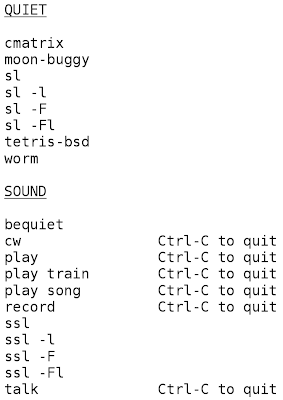
There are certain times when I m really glad that we have Linux on the house for our boys to play with. I ve already written how our 4-year-old Jacob has fun with bash and can chain together commands to draw ASCII animated steam locomotives. Today I thought it might be fun to install cw, a program that can take text on standard input and play it on the console speaker or sound card as Morse code. Just the sort of thing that I could see Jacob eventually getting a kick out of. But his PC was mute. We opened it up and discovered it didn t have a console speaker. So we traipsed downstairs, dug out an external speaker, and I figured out how to enable the on-board audio chipset in the BIOS. So now the cw command worked, but also there were a lot of other possibilities. We also brought up a microphone. While Jacob was busy with other things, I set to work getting things hooked up, volume levels adjusted, and wrote some shell scripts for him. I also printed out this reference sheet for Jacob: He is good at reading but not so good at spelling. I intentionally didn t write down what the commands do, hoping that this would provide some avenue for exploration for him. He already is generally familiar with the ones under the quiet category. I wrote a shell script called record . It simply records from the microphone and drops a timestamped WAV file in a holding directory. He can then type play to simply play back whatever he recorded most recently. Easy enough. But what he really wanted was sound for his ASCII steam locomotive. So with the help of a Google search for steam train mp3 , I wrote a script ssl (sound steam locomotive) that starts playing the sound in the background if it isn t already going, and then runs sl to show the animation. This was a big hit. I also set it up so he can type play train to hear that audio, or play song to play our favorite train song (Always a Train in My Dreams by Steve Gillette). Jacob typed that in and sat still for the entire 3 minutes listening to it. I had to hook up an Ethernet cable to his machine to do all this, and he was very interested that I was hooking his computer up to mine in some way. He thought all the stuff about cables in the walls was quite exciting. The last thing I did was install flite, a speech synthesis program. I wrote a small shell script called talk which reads a line at a time from stdin and invokes flite for each one (to give more instant feedback rather than not starting playback until after having read a large block from stdin). He had some fun hearing it say his name and other favorite words, but predictably the most fun was when he typed gibberish at it, and heard it try to pronounce or spell nonsense words. In all, he was so excited about this new world of computer sound opened up to him. I m sure there will be lots of happy experimentation and discovery going on.

Chris Lamb: Sysadmin-friendly deployment of Gunicorn in Debian

Over the last 18 months Gunicorn has replaced mod_wsgi as the de facto container for deploying Django projects. However, whilst it was first uploaded to Debian in April 2010, it was not particularly sysadmin friendly. In particular, it required custom initscripts (or some other mechanism) to manage each Gunicorn instance. To improve that, you can now place multiple configuration files inside /etc/gunicorn.d:
# /etc/gunicorn.d/django.example: defaults are commented out
CONFIG =  
    'mode': 'django',
    'environment':  
        'PYTHONPATH': '/path/to/custom/python/packages',
     ,
    # 'working_dir': '/',
    # 'user': 'www-data',
    # 'group': 'www-data',
    'args': (
        # '--bind=127.0.0.1:8000',
        '--workers=4',
        # '--worker-class=egg:gunicorn#sync',
        # '--timeout=30',
       'settings',
    ),
 
All instances can then be restarted using:
$ /etc/init.d/gunicorn restart
Stopping Gunicorn workers: [example] [site_a] [site_b].
Starting Gunicorn workers: [example] [site_a] [site_b].
Sites using plain WSGI can use the wsgi mode - see /etc/gunicorn.d/wsgi.example.

30 July 2011

Christian Perrier: [running] Debconf running: New-York record partly broken

OK, I'll also blog about other DebConf activities, but I was just working on my sports software of choice and just summarized my running activities here in Banja Luka (it's 22h45 last day of Debconf). I finally broke my record of last year (where I ran 112 kilometers) by running 115 kilometers. However, that was in 12 days while I was only 10 full days in New-York. So that record is only partially broken. These 115km were run in 12h09', which leads to a pace of 9.5km/h or 6'18"/km or 10'13"/mile (hello, Dirk). Fairly slow, indeed. However, this or that may better explain..:-). The cumulated positive slope for these 115km has been around 2000 meters! Specifically, I had great fun today when No l and I decided to make a final round in the hills close to the . For that 12km run, we shared a taxi to the start of the Banj Brdo road, to avoid 2km of boring run in Banja Luka streets, then made our way to nearly each and every path we could find. Of course, that should soon lead to a very well mapped area on Openstreetmap. As usual, when a DebConf ends, the area is much better maped than it was before it. Here, the city was too well mapped by local OSMers, so we had to go to the mountains..:-). On this sunny Saturday, doing what I call a real trail run, with mud, slopes, scratching vegetation, rocks.....was an incredibly great pleasure. Sharing this with No l was also great. Hopefully, running in Managua next year will be as much fun (but maybe really tricky because of the heat). See you there!

Next.

Previous.