Search Results: "weasel"

27 July 2010

Petter Reinholdtsen: First Debian Edu test release (alpha0) based on Squeeze is released

I just posted this announcement culminating several months of work with the next Debian Edu release. Not nearly done, but one major step completed.
This is the first test release based on Squeeze. The focus of this release is to test the user application selection. To have a look, install the standalone profile and let the developers know if the set of installed packages i.e. applications should be modified. If some user application is missing, or if there are some applications that no longer make sense to be included in Debian Edu, please let us know. Also, if a useful application is missing the translation for your language of choice, please let us know too. In addition, feedback and help to polish the desktop (menus, artwork, starters, etc.) is appreciated. We would like to ship a nice and handy KDE4 desktop targeted for schools out of the box. The other profiles should be installable, but there is a lot more work left to be done before they are ready, so do not expect to much. Changes compared to the lenny based version
  • Everything from Debian Squeeze
    • Desktop environment KDE 4.4 => the new KDE desktop in combination with some new artwork
    • Web browser Iceweasel 3.5
    • OpenOffice.org 3.2
    • Educational toolbox GCompris 9.3
    • Music creator Rosegarden 10.04.2
    • Image editor Gimp 2.6.10
    • Virtual universe Celestia 1.6.0
    • Virtual stargazer Stellarium 0.10.4
    • 3D modeler Blender 2.49.2 (new application)
    • Video editor Kdenlive 0.7.7 (new application)
  • Now using Kerberos for password checking (migration not finished). Enabled for:
    • PAM
    • LDAP
    • IMAP
    • SMTP (sender verification)
  • New experimental roaming workstation profile for laptops.
  • Show welcome page to users when they first log in. The URL is fetched from LDAP.
  • New LXDE desktop option, in addition to KDE (default) and Gnome.
  • General cleanup (not finished)
The following features are not working as they should
  • No web based administration tool for creating users and groups. The scripts ldap-createuser-krb and ldap-add-user-to-group can be used for testing.
  • DVD installs are missing debian-installer images for the PXE boot, and do not set up the PXE menu on eth0 because of this. LTSP clients should still boot from eth1 on thin client servers.
  • The restructured KDE menu is not implemented.
  • The LDAP server setup need to be reviewed for security.
  • The LDAP directory structure need to be reworked.
  • Different sets of packages are installed when using the DVD and the netinst CD. More packages are installed using the netinst CD.
  • The jackd package fail to install. This is believed to be caused by some ongoing transition, and hopefully should be solved soon. The jackd1 package can be installed manually for those that need it.
  • Some packages lack translations. See http://wiki.debian.org/DebianEdu/Status/Squeeze for updated status, and help out with translations.
To download this multiarch netinstall release you can use To download this multiarch dvd release you can use There is no source DVD available yet. It will be prepared when we get closer to the final release. The MD5SUM of these images are
  • 3dbf45d59f42a53518b6e3c9ec3b5eb6 debian-edu-6.0.0+edua0-CD.iso
  • 22f2cbfce281d1c6e478be452638675d debian-edu-6.0.0+edua0-DVD.iso
The SHA1SUM of these images are
  • c53d1b69b40cf37cd27aefaf33f6f6a3821bedf0 debian-edu-6.0.0+edua0-CD.iso
  • 2ec29d7db676d59d32197b05c277ffe16348376c debian-edu-6.0.0+edua0-DVD.iso
How to report bugs: http://wiki.debian.org/DebianEdu/HowTo/ReportBugsInBugzilla Please direct replies to debian-edu@lists.debian.org

9 July 2010

Mike Hommey: Iceweasel 4.0 beta 1 preliminary packages for Debian, and a nice trick

Since this blog is now syndicated on Planet Mozilla, a little background for its readers: Iceweasel is the name under which Firefox is distributed in Debian. This is an unfortunate detail due to copyright issues with the Firefox logos that have been solved recently. Work is under progress to get Firefox back in Debian (I do have good hope this will be possible). Anyways, I ve started to work on getting Iceweasel in shape for the 4.0 release in a few months. The packaging being in a good enough shape, I am hereby making available some preliminary packages (meaning there is still some more work needed for proper packaging) for the first beta release. The packages are available in a separate repository, which you need to add to your sources.list:
deb http://mozilla.debian.net/packages/ ./
Only x86 and x86-64 (amd64) packages are available for now. As far as I tested it, it works as well as the official Firefox 4.0beta1 binaries, though some xpcshell tests failed, and I haven t got reftests working yet. If you still wish to use a current version of iceweasel (i.e. non-beta), but want to try this beta, here is the nice trick: Instead of installing iceweasel from the above mentioned repository, Now you can start the Iceweasel beta with /some/directory/usr/bin/iceweasel. This trick should work with older versions of iceweasel, too.

27 June 2010

Neil Williams: Switching from iceweasel to chromium

I've grown tired of the firefox/iceweasel memory hog for a couple of reasons:

Chromium is just faster, everywhere. A nice touch is the new tab behaviour too - previews of the most recently viewed pages is far more useful than the usual homepage. Chromium is also faster than epiphany/webkit.

I'll still be using two different browsers, because neither iceweasel nor chromium can do the clever smart bookmarks thing of epiphany. I have come to utterly rely on bookmark input boxes for direct access to specific Debian bug numbers, individual PTS pages, Google searches, dwww searches, specific manpages, buildd reports and various other pages where a bookmark really needs to be an input box, not a label, and the bookmark itself sits on a toolbar and can then use http://url/%s which makes life so much easier.
Update
I wondered if epiphany smart bookmarks would be understood but apparently not. So:

The smart bookmarks are BTS, Google, PTS, buildd and man. At work, I've got a wider screen and I add several more for internal bug tracker numbers and similar.
Chromium and iceweasel/FF have nothing like this. Entering a bug number is utterly trivial - it even works with middle mouse button paste which, cleverly, opens the page in a new tab too. Iceweasel/FF can do this ONCE but only once, via an extension. The key points with epiphany are:

So, yes, Leo, the way epiphany does this is massively more effective for a "work-type" browser situation where there is such a need to access a specific page immediately, with no editing or keyboard usage.

Leo 'costela' Antunes: Re: Firefox/Iceweasel/Chromium smart-bookmarks

Neil Williams recently commented on the lack of smart-bookmarks in Firefox/Iceweasel/Chromium and since the post doesn t accept comments, counter-post FTW.
Maybe I didn t understand exactly what was meant, but I m personally trying to see the advantage of having a smart-bookmark sit on the toolbar as opposed to just being a used via a label. Both FF/IW and Chrome can do the label thing, where you bookmark something like http://bugs.debian.org/%s with a shortcut like bugs and can then simply Ctrl-L to the address bar and type bugs 999999 . Done.
Can the way Epiphany does this be more effective? (actually this is the way Galeon did it way back then and I used to love it before I found out I could be way quicker with the keyboard+shortcut thingy. Not to mention having less clutter in the toolbar.) And granted: Chromium s interface doesn t allow the editing of this shortcut and they only work when imported from FF/IW, but I expect this to be fixed eventually. Doesn t make much sense to have such a hidden feature. [UPDATE: nevermind. As handily pointed out by Chris Butler, you can edit the shortcuts under Options Basics Default Search Manage. It might not be the most intuitive of places to put it, but it's there.] As for the rest of the reasons for switching mentioned in the original post, I can certainly see where they re coming from. No real solid counter-arguments there.

19 June 2010

Julien Valroff: My experience without Adobe Flash Player

Adobe recently announced they have (temporarily) stopped working on the amd64 version of their Flash Player for GNU/Linux. The previous releases contain a big security issue, which makes them totally unusable. As I didn t want to wait until the flashplugin-nonfree package to be updated to support the i386 plugin through nspluginwrapper (as suggested in #586273), I have decided to simply switch to the free alternative: gnash. After a few hours with it, I am now able to use most of the websites I usually visit, including Youtube and Dailymotion. Note that I use Iceweasel, which does not support WebM (for now), nor H.264 (which will never be supported by Mozilla). Youtube support is brought by a Greasemonkey user script available at: http://turanct.wordpress.com/2010/02/25/gnash-youtube/
The only tiny drawback is that the videos load in pause mode. For now, everything else seems to work fine. Users of other browers (Chromium, Safari, Opera) can try their HTML5 beta: http://www.youtube.com/html5 It is even easier for Dailymotion, as the videos on their HTML5 beta program are encoded in the Ogg Theora format, which is natively supported by Iceweasel/Firefox >= 3.5. To ease things, I have written a small Greasemonkey script which simply automatically redirects www.dailymotion.com to openvideo.dailymotion.com. This script can be downloaded here. The drawback is that videos won t play before they are loaded completely, which is not a big problem anyway. I still cannot play the videos avilable on Vimeo, and have noticed while wirting this post that the Flash file uploader of WordPress didn t work with gnash (obviously, WP provides an alternative way for file upload). I will go on with this experience as long as I do not see major issue with gnash.
I will also update this post, or add comments, if I encounter other issues, or find any alternatives. I would be curious to read your comments if you have run similar experience.

13 June 2010

Petter Reinholdtsen: Lenny->Squeeze upgrades, removals by apt and aptitude

My testing of Debian upgrades from Lenny to Squeeze continues, and I've finally made the upgrade logs available from http://people.skolelinux.org/pere/debian-upgrade-testing/. I am now testing dist-upgrade of Gnome and KDE in a chroot using both apt and aptitude, and found their differences interesting. This time I will only focus on their removal plans. After installing a Gnome desktop and the laptop task, apt-get wants to remove 72 packages when dist-upgrading from Lenny to Squeeze. The surprising part is that it want to remove xorg and all xserver-xorg-video* drivers. Clearly not a good choice, but I am not sure why. When asking aptitude to do the same, it want to remove 129 packages, but most of them are library packages I suspect are no longer needed. Both of them want to remove bluetooth packages, which I do not know. Perhaps these bluetooth packages are obsolete? For KDE, apt-get want to remove 82 packages, among them kdebase which seem like a bad idea and xorg the same way as with Gnome. Asking aptitude for the same, it wants to remove 192 packages, none which are too surprising. I guess the removal of xorg during upgrades should be investigated and avoided, and perhaps others as well. Here are the complete list of planned removals. The complete logs is available from the URL above. Note if you want to repeat these tests, that the upgrade test for kde+apt-get hung in the tasksel setup because of dpkg asking conffile questions. No idea why. I worked around it by using 'echo >> /proc/pidofdpkg/fd/0' to tell dpkg to continue. apt-get gnome 72
bluez-gnome cupsddk-drivers deskbar-applet gnome gnome-desktop-environment gnome-network-admin gtkhtml3.14 iceweasel-gnome-support libavcodec51 libdatrie0 libgdl-1-0 libgnomekbd2 libgnomekbdui2 libmetacity0 libslab0 libxcb-xlib0 nautilus-cd-burner python-gnome2-desktop python-gnome2-extras serpentine swfdec-mozilla update-manager xorg xserver-xorg xserver-xorg-core xserver-xorg-input-all xserver-xorg-input-evdev xserver-xorg-input-kbd xserver-xorg-input-mouse xserver-xorg-input-synaptics xserver-xorg-input-wacom xserver-xorg-video-all xserver-xorg-video-apm xserver-xorg-video-ark xserver-xorg-video-ati xserver-xorg-video-chips xserver-xorg-video-cirrus xserver-xorg-video-cyrix xserver-xorg-video-dummy xserver-xorg-video-fbdev xserver-xorg-video-glint xserver-xorg-video-i128 xserver-xorg-video-i740 xserver-xorg-video-imstt xserver-xorg-video-intel xserver-xorg-video-mach64 xserver-xorg-video-mga xserver-xorg-video-neomagic xserver-xorg-video-nsc xserver-xorg-video-nv xserver-xorg-video-openchrome xserver-xorg-video-r128 xserver-xorg-video-radeon xserver-xorg-video-radeonhd xserver-xorg-video-rendition xserver-xorg-video-s3 xserver-xorg-video-s3virge xserver-xorg-video-savage xserver-xorg-video-siliconmotion xserver-xorg-video-sis xserver-xorg-video-sisusb xserver-xorg-video-tdfx xserver-xorg-video-tga xserver-xorg-video-trident xserver-xorg-video-tseng xserver-xorg-video-v4l xserver-xorg-video-vesa xserver-xorg-video-vga xserver-xorg-video-vmware xserver-xorg-video-voodoo xulrunner-1.9 xulrunner-1.9-gnome-support aptitude gnome 129
bluez-gnome bluez-utils cpp-4.3 cupsddk-drivers dhcdbd djvulibre-desktop finger gnome-app-install gnome-mount gnome-network-admin gnome-spell gnome-vfs-obexftp gnome-volume-manager gstreamer0.10-gnomevfs gtkhtml3.14 libao2 libavahi-compat-libdnssd1 libavahi-core5 libavcodec51 libbluetooth2 libcamel1.2-11 libcdio7 libcucul0 libcupsys2 libcurl3 libdatrie0 libdirectfb-1.0-0 libdvdread3 libedataserver1.2-9 libeel2-2.20 libeel2-data libepc-1.0-1 libepc-ui-1.0-1 libfaad0 libgail-common libgd2-noxpm libgda3-3 libgda3-common libgdl-1-0 libgdl-1-common libggz2 libggzcore9 libggzmod4 libgksu1.2-0 libgksuui1.0-1 libgmyth0 libgnomecups1.0-1 libgnomekbd2 libgnomekbdui2 libgnomeprint2.2-0 libgnomeprint2.2-data libgnomeprintui2.2-0 libgnomeprintui2.2-common libgnomevfs2-bin libgpod3 libgraphviz4 libgtkhtml2-0 libgtksourceview-common libgtksourceview1.0-0 libgucharmap6 libhesiod0 libicu38 libiw29 libkpathsea4 libltdl3 libmagick++10 libmagick10 libmalaga7 libmetacity0 libmtp7 libmysqlclient15off libnautilus-burn4 libneon27 libnm-glib0 libnm-util0 libopal-2.2 libosp5 libparted1.8-10 libpoppler-glib3 libpoppler3 libpt-1.10.10 libpt-1.10.10-plugins-alsa libpt-1.10.10-plugins-v4l libraw1394-8 libsensors3 libslab0 libsmbios2 libsoup2.2-8 libssh2-1 libsuitesparse-3.1.0 libswfdec-0.6-90 libtalloc1 libtotem-plparser10 libtrackerclient0 libxalan2-java libxalan2-java-gcj libxcb-xlib0 libxerces2-java libxerces2-java-gcj libxklavier12 libxtrap6 libxxf86misc1 libzephyr3 mysql-common nautilus-cd-burner openoffice.org-writer2latex openssl-blacklist p7zip python-4suite-xml python-eggtrayicon python-gnome2-desktop python-gnome2-extras python-gtkhtml2 python-gtkmozembed python-numeric python-sexy serpentine svgalibg1 swfdec-gnome swfdec-mozilla totem-gstreamer update-manager wodim xserver-xorg-video-cyrix xserver-xorg-video-imstt xserver-xorg-video-nsc xserver-xorg-video-v4l xserver-xorg-video-vga zip apt-get kde 82
cupsddk-drivers karm kaudiocreator kcoloredit kcontrol kde kde-core kdeaddons kdeartwork kdebase kdebase-bin kdebase-bin-kde3 kdebase-kio-plugins kdesktop kdeutils khelpcenter kicker kicker-applets knewsticker kolourpaint konq-plugins konqueror korn kpersonalizer kscreensaver ksplash libavcodec51 libdatrie0 libkiten1 libxcb-xlib0 quanta superkaramba texlive-base-bin xorg xserver-xorg xserver-xorg-core xserver-xorg-input-all xserver-xorg-input-evdev xserver-xorg-input-kbd xserver-xorg-input-mouse xserver-xorg-input-synaptics xserver-xorg-input-wacom xserver-xorg-video-all xserver-xorg-video-apm xserver-xorg-video-ark xserver-xorg-video-ati xserver-xorg-video-chips xserver-xorg-video-cirrus xserver-xorg-video-cyrix xserver-xorg-video-dummy xserver-xorg-video-fbdev xserver-xorg-video-glint xserver-xorg-video-i128 xserver-xorg-video-i740 xserver-xorg-video-imstt xserver-xorg-video-intel xserver-xorg-video-mach64 xserver-xorg-video-mga xserver-xorg-video-neomagic xserver-xorg-video-nsc xserver-xorg-video-nv xserver-xorg-video-openchrome xserver-xorg-video-r128 xserver-xorg-video-radeon xserver-xorg-video-radeonhd xserver-xorg-video-rendition xserver-xorg-video-s3 xserver-xorg-video-s3virge xserver-xorg-video-savage xserver-xorg-video-siliconmotion xserver-xorg-video-sis xserver-xorg-video-sisusb xserver-xorg-video-tdfx xserver-xorg-video-tga xserver-xorg-video-trident xserver-xorg-video-tseng xserver-xorg-video-v4l xserver-xorg-video-vesa xserver-xorg-video-vga xserver-xorg-video-vmware xserver-xorg-video-voodoo xulrunner-1.9 aptitude kde 192
bluez-utils cpp-4.3 cupsddk-drivers cvs dcoprss dhcdbd djvulibre-desktop dosfstools eyesapplet fifteenapplet finger gettext ghostscript-x imlib-base imlib11 indi kandy karm kasteroids kaudiocreator kbackgammon kbstate kcoloredit kcontrol kcron kdat kdeadmin-kfile-plugins kdeartwork-misc kdeartwork-theme-window kdebase-bin-kde3 kdebase-kio-plugins kdeedu-data kdegraphics-kfile-plugins kdelirc kdemultimedia-kappfinder-data kdemultimedia-kfile-plugins kdenetwork-kfile-plugins kdepim-kfile-plugins kdepim-kio-plugins kdeprint kdesktop kdessh kdict kdnssd kdvi kedit keduca kenolaba kfax kfaxview kfouleggs kghostview khelpcenter khexedit kiconedit kitchensync klatin klickety kmailcvt kmenuedit kmid kmilo kmoon kmrml kodo kolourpaint kooka korn kpager kpdf kpercentage kpf kpilot kpoker kpovmodeler krec kregexpeditor ksayit ksim ksirc ksirtet ksmiletris ksmserver ksnake ksokoban ksplash ksvg ksysv ktip ktnef kuickshow kverbos kview kviewshell kvoctrain kwifimanager kwin kwin4 kworldclock kxsldbg libakode2 libao2 libarts1-akode libarts1-audiofile libarts1-mpeglib libarts1-xine libavahi-compat-libdnssd1 libavahi-core5 libavc1394-0 libavcodec51 libbluetooth2 libboost-python1.34.1 libcucul0 libcurl3 libcvsservice0 libdatrie0 libdirectfb-1.0-0 libdjvulibre21 libdvdread3 libfaad0 libfreebob0 libgail-common libgd2-noxpm libgraphviz4 libgsmme1c2a libgtkhtml2-0 libicu38 libiec61883-0 libindex0 libiw29 libk3b3 libkcal2b libkcddb1 libkdeedu3 libkdepim1a libkgantt0 libkiten1 libkleopatra1 libkmime2 libkpathsea4 libkpimexchange1 libkpimidentities1 libkscan1 libksieve0 libktnef1 liblockdev1 libltdl3 libmagick10 libmimelib1c2a libmozjs1d libmpcdec3 libneon27 libnm-util0 libopensync0 libpisock9 libpoppler-glib3 libpoppler-qt2 libpoppler3 libraw1394-8 libsmbios2 libssh2-1 libsuitesparse-3.1.0 libtalloc1 libtiff-tools libxalan2-java libxalan2-java-gcj libxcb-xlib0 libxerces2-java libxerces2-java-gcj libxtrap6 mpeglib networkstatus openoffice.org-writer2latex pmount poster psutils quanta quanta-data superkaramba svgalibg1 tex-common texlive-base texlive-base-bin texlive-common texlive-doc-base texlive-fonts-recommended xserver-xorg-video-cyrix xserver-xorg-video-imstt xserver-xorg-video-nsc xserver-xorg-video-v4l xserver-xorg-video-vga xulrunner-1.9

5 June 2010

Russell Coker: Bugs in Google Chrome

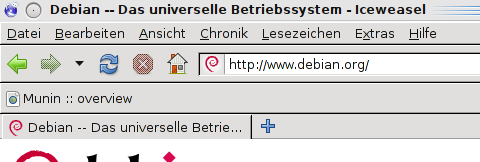
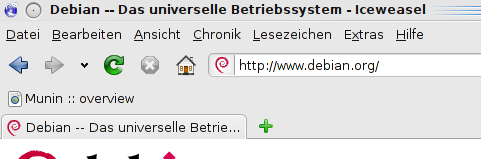
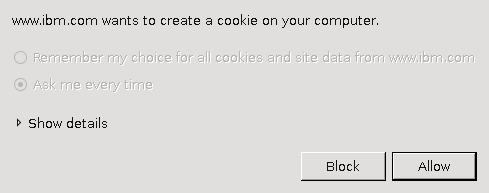
I m currently running google-chrome-beta version 5.0.375.55-r47796 on Debian/Unstable. It s the fastest web browser I ve used in recent times it s the first time that I ve run a browser that feels faster than my recollection of running IBM WebExplorer for OS/2 on a 486-66 system! It has a good feature set, and it s the only browser I ve used that in a typical configuration will make proper use of the screen space by not having a permanent status bar at the bottom of the sceen and by having tabs in the title-bar. But it s not perfect, here is a list of some bugs: Chrome Titlebar when maximisedChrome Titlebar when not maximisedRight of Chrome Titlebar when not maximised Above are three partial screen captures of Chrome, the first is when maximised and the second is when the window isn t maximised. Notice the extra vertical space above the tab in the title bar in the second picture. The third picture shows the right side of the titlebar and you can see a space below the three buttons where you can drag the window around no matter how many tabs you open that space below the three buttons is reserved. If the Chrome developers had removed the extra vertical space in the titlebar and reserved slightly more horizontal space then you would be able to drag the window around. While an anonymous commentator made a good point that the extra vertical space can be used to drag the window around when the maximum number of tabs are open, it seems that there are other ways of achieving that goal without wasting ~18 vertical pixels. Doing so would be a lot less ugly than what they did with finding text in the page. When I visit a web site that uses cookies from an Incognito Window (which means that cookies etc aren t stored) there is no option to say allow all cookies . This is really annoying when you get to a web site such as the IBM one which stores 5 cookies when you first load the page and then at least one new cookie write for every page you visit. Given that cookie data will be discarded as soon as the window is closed it seems like a good idea to have an option to allow all cookies for Incognito Windows even if all cookies aren t allowed for regular windows. Blocking all cookies would be OK too, anything but having to click on Block or Allow multiple times for each page load. The J and K keys don t work in a view of Venus version 0~bzr95-2+lenny1 (the latest version in Debian/Lenny). I once had a situation where I entered a . at the end of a domain name (which is quite legal there is always an implied dot) and Chrome then wouldn t take note of my request to accept all cookies from the domain. I haven t been able to reproduce that bug, but I have noticed that it stores the settings for whether cookies should be stored separately for domains that end in . , so www.cnn.com. is different from www.cnn.com . Iceweasel seems to just quietly strip the trailing dot. Of course this is better than Konqueror which won t even load a URL with a dot at the end. Chrome can be relied on to restore all windows rapidly after a crash, unlike Iceweasel which restores them at it s normal load speed (slow) and Konqueror which doesn t tend to restore windows. This is good as it does seem to crash regularly. In a response to my post about Chrome and SE Linux [1] Ben Hutchings pointed out that the --no-sandbox option to chrome disables the creation of a PID namespace and therefore makes debugging a lot easier, if I get a lot of spare time I ll try and track down some of the Chrome SEGVs. The JavaScript compiler is either buggy or it s not buggy in situations where people expect IE bugs. When using the Dell Australia web site I can t always order all options. When trying to order a Dell R300 1RU server with hot-plug disks in a hardware RAID array it seems impossible to get all the necessary jumpers which is a precondition to completing the order fortunately I only wanted to blog about how cheap Dell servers are so I don t actually need to complete an order. Dell s web site is also difficult in Iceweasel on occasion, so it s obviously more demanding than most sites. It might be a good test site for people who work on browsers as it s both demanding and important. When I select a URL to be opened in a new window (or when JavaScript does this) then the new tab is opened with about:blank listed as the URL. If the URL is for a PDF file (or something else that is to be downloaded) then the URL entry field is never updated to give the real URL. I believe that this is wrong, either the new tab shouldn t be opened or it should have the correct URL on display there is no benefit with a tab open to show nothing but about:blank in the URL entry field. Also if a URL takes some time to load then it may keep about:blank in the URL entry field for some time. This means that if you use the middle mouse button to rapidly open a few new tabs you won t be able to see what is to be loaded in each one. Sometimes I have several tabs loading and I m happy to close some unimportant ones if they are slow but some are worth waiting for. Overall that s not too bad. I can use Dell s site in Iceweasel, so the only critical bug is the cookies issue in Incognito Windows which makes the Incognito feature almost unusable for some sites.
3 May 2010

Lucas Nussbaum: But why isn t Debian using Launchpad?

Due to my work on Ultimate Debian Database, I m sometimes asked why Debian isn t using Launchpad. First, using Launchpad can mean two different things. The first possibility is using Canonical s instance of Launchpad. That would mean creating a Debian project on launchpad.net, and using Canonical s infrastructure. Well, that s clearly not a good idea. We (Debian) do not want to depend on Canonical to fix bugs or make enhancements that we require to improve Debian. For example, Canonical imposes the use of the Bazaar Version Control System in Launchpad: you simply can t use Git instead (git-bzr hacks don t count). We want to stay in control of our infrastructure, for obvious reasons. So the other possibility would be to setup our own instance of Launchpad, given that Launchpad is now Free Software. However, it is not clear if it is actually possible: I was told by a Launchpad developer that they didn t know of any external (outside Canonical) installation of Launchpad. Even if this was possible, it is not clear at all that the Ubuntu infrastructure is superior to the Debian infrastructure. The Debian infrastructure has many nice features that are missing in Launchpad, for example version-tracking in the Bug Tracking System, which allows to track (by parsing the changelog) the versions of a package where a bug has been fixed or not (example with iceweasel). So, when switching to Launchpad, we would have to reimplement quite a lot of needed features in in, with no clear benefit: the Debian infrastructure works fine, and is actively maintained. It s also interesting to note that while the Ubuntu infrastructure is centered on Launchpad, there are quite a lot of external services that are not integrated in Launchpad: the Ubuntu popularity contest, merges.u.c, patches.u.c, the various services on qa.ubuntuwire.org and qa.u.c, etc. With the Debian model, it is very easy to add a new service and get it integrated with the various dashboard (Debian Developer s Packages Overview, Packages Tracking System). Within Ubuntu, those external services are really second-class citizens. All in all, the infrastructures of the two projects reflect their organizations: bazaar model for Debian, with an emphasis on collaboration between the services, controlled by Canonical for Ubuntu.

Mike Hommey: Important milestone for Iceweasel in Debian

I just uploaded a pre-release of Iceweasel 3.6.4 to experimental. This is an important milestone for several reasons:

  • Last time I was able to push a pre-release was almost 2 years ago. This means the keeping up with upstream is mostly done. This also means I should be ready to create a 3.7alpha5 package when upstream releases it.
  • It includes a new feature: Out of Process Plugins. This means plugins instances are sandboxed and if they crash, they won t take the browser down with them (finally). In this release, only the Adobe flash plugin is sandboxed, but it should be enough for the vast majority of plugin induced crashes.
  • Upstream is particularly interested in feedback from Debian (experimental) users for this pre-release, as they usually don t get much feedback from their own linux pre-release builds except from the test suite.

2 April 2010

Mike Hommey: Announcing Iceweasel 3.6.3

Mike Hommey: Security update #2 for Iceweasel 3.6 preview

As of writing, xulrunner 1.9.2.3 has been uploaded to experimental, but as ftp-master is currently offline, and as it will also need to go through NEW, it won t be available immediately. Which is why, once more, I make them available for you: Iceweasel should follow in a few hours.

29 March 2010

Mauro Lizaur: Drawing with CSS.

I've been watching several people drawing random figures with only CSS and letters, Rom n Cort s in particular, who made Homer Simpson, an Origami Crane (bird), a "3D" can of Coke among other stuff.
The other day I was bored and with some free time so I "drew" the Debian logo :-)
Debian CSS
The logo above is a screenshot of how it looks using epiphany-webkit (2.29.3-1) which, btw, works better on every update. On the other hand, on Iceweasel (3.5.8-1) doesn't look that good but it looks good enough.

Well, if you want to see how it looks on your browser click here. Also, if you think you can improve the looks, leave me a comment or contact me and I'll update it.

23 March 2010

Mike Hommey: Security update for Iceweasel 3.6 preview

While the package is not ready yet for experimental, mostly because there are pending changes in the 3.5 branch, Mozilla released a security update today. So, here are the packages you need to be safe security-wise with Iceweasel 3.6. Please note only xulrunner packages have been updated, as the security fix lies in the xulrunner code. A known regression of this version is that the icons in the search box on the top right don t show up.
Update: This regression actually doesn t exist.

12 March 2010

Guido G nther: Letting GTK+ applications blend nicely into KDE4

In case somebody wants to run KDE together with some GTK+ based applications (like Iceweasel or Icedove) having a consistent style as well as look and feel between KDE and GTK+ applications is a nice thing to have. QtCurve together with xsettings-kde and gtk-qt-engine makes this easily possible:
aptitude install gtk-qt-engine kde-config-gtk-style qtcurve xsettings-kde
Then adjust the following settings:
  • Settings->System-Settings->Appearance, Style set Style to QtCurve
  • Settings->System-Settings->Appearance, GTK Styles under Use another style: select QtCurve
  • Settings->System-Settings->Appearance, GTK Styles under Firefox and Thunderbird click Install scrollbar fix...
Log off and right back in. Now your GTK+ applications should blend nicely into the QtCurve KDE look. xsettings-kde additionally bridges KDE settings like double click speed and icon theme via xsettings to GTK+ applications. Iceweasel without QtCurve Iceweasel with QtCure Now back to using gnome-shell...

9 March 2010

Joey Hess: aloha btrfs

Last month I converted my laptop to btrfs to get some experience using this new, still experimental file system. The bugs tell the story: At this point I had a booting, working btrfs system. The bugs seen over the next weeks were strange: In the meantime, I did some initial work toward supporting btrfs in d-i, writing a basic partman-btrfs. One of the interesting open questions is how best to use subvolumes to split up a single btrfs filesystem. If the installer defines the right set of subvolumes, upgrades to be rolled back, without also rolling back /home and /srv. The remaining parts needed for d-i to support btrfs are fairly tractable, but are waiting until root on btrfs is bootable, and until the filesystem is not experimental. I gave up on the current experiement when I ran debsums on my laptop. (So that long thread was good for something!) It didn't find any corrupt files. But it did find a lot of md5sums files that were missing. Some of the packages with missing md5sums were upgraded just this week, and the md5sums files must have gone missing since. I have not seen anything that I can say with certainty was caused by btrfs, and not by some other cause, but since I can't trust the data on this laptop now (although git tells me everything in my home directory is ok), I'm reinstalling it, and saying aloha to btrfs, for now.

5 March 2010

Mike Hommey: Iceweasel 3.6 approching

Work on Iceweasel 3.6 is approaching an end, but there are still issues with it and with 3.5 that I want to tackle before officially pushing to experimental. In the meanwhile, you can already try a preview package: The amd64 binary has the JIT compiler enabled by default (contrary to upstream default, and I guess most if not all other distros), so if you have issues with it, you ll need to disable javascript.options.jit.content from about:config. It passes the testsuite, so I expect it to be fairly stable.

26 February 2010

Frans Pop: Fun with VMware

Until two years or so ago I used VMware Workstation intensively for development and testing of Debian Installer, using one of the licenses generously made available to the D-I team by VMware. It was much faster than Qemu and thus very welcome. But due to increasing problems keeping it working with new kernels on a desktop system running unstable, I switched to VirtualBox (the OSE version), which has the huge advantage of being packaged for Debian and thus automatically follows the Debian kernel packages. That advantage has disappeared somewhat as I'm currently compiling my own kernels I'm currently running 2.6.33 on a Lenny desktop. So far I've been able without too much trouble to find patches for the VirtualBox modules to keep them compatible with new upstream kernels. This week I had reason to try VMware again. The Server edition this time as that has free licenses. The Server concept, where you connect to the management system and virtual machines via a web browser, is quite nice. It means I could install it on a server and keep my laptop nice and responsive. To keep VMware separate from the rest of the system and not mix it with software installed cleanly from Debian packages, I decided to install it in /opt. And that works beautifully. There are only a few bits installed in /etc, but that's OK. I have /etc managed by etckeeper anyway [1]. More challenging was building WMware modules to match my kernel. VMware wants you to run their vmware-config.pl script every time you switch kernels and build the kernel modules on the system where it runs (which requires the kernel headers). I wanted to build the modules as part of my kernel build process, on a totally different machine. The same as I already do for VirtualBox. I save the custom modules in a tarball that has the same uname and package version as the kernel package I build and have a simple script that installs them correctly. I succeeded by hacking the Makefiles (deleting most of their content) and then integrating them in my kernel build wrapper script. The module source provided by VMware built fine with a Debian 2.6.26 kernel, but not with the 2.6.32.9 kernel on my server (of course). But luckily others had already run into the same problems and solved them, so with some searching I found the required patches (first a full updated source for 2.6.29, then patches needed for .31 and for .32). Isn't open source just wonderful? So with that the VMware server started beautifully (well, the init script needed to be told that module names have changed from *.o to *.ko), but I could not connect to it from my laptop using SSL. Connecting without SSL (using an instance of iceweasel running on the server but started remotely from my laptop using X forwarding SSH) worked fine. That turned out to be a known issue too. After applying all the suggested workarounds in my iceweasel configuration (disable TLS 1.0; set cache size to zero; explicitly disable use of proxy for the server) I can now connect reliably to the VMware Server management system. Phew. [1] I had to exclude a fair number of VMware files for etckeeper as they are updated by VMware itself and thus really belong in /var. Example are DCHP status files...

25 February 2010

Mike Hommey: Is there a conspiracy to prevent me from working on Iceweasel 3.6 ?

After realizing Iceweasel wasn t working properly on various Debian architectures, and spending time fixing that, this week a new cairo version triggered a longstanding bug which would kill Iceweasel when closing a tab. I think I got it fixed now, but what next ?

23 February 2010

Mike Hommey: Mind blowing news

The Firefox logo, the very reason why Iceweasel exists, is now free as in speech. Its use is still limited by trademarks, but it is free. The news is not entirely official, but apparently the change has occurred a year ago, and the license text for the branding hasn t been changed accordingly. Waw.

20 February 2010

Martin F. Krafft: Making money off ethics

The coffee place around the corner from where Penny and I lived for the past two months Caff Mode offers to make your food using free-range eggs for NZ$1. Free-range eggs are more expensive than normal ones, but the price difference is not one dollar. Therefore, the cafe makes a profit every time a customer makes the right choice. I went in this morning to ask them about it, and the guy taking my coffee order admitted stale-mate. When I suggested that the cafe should use free-range eggs exclusively, he agreed. Let s hope that he lets those making that decision know, and that the cafe soon stops making money on ethical choices.

Next.

Previous.