Search Results: "luk"

22 August 2013

Martín Ferrari: Setting up my server: re-installing on an encripted LVM

Very long post ahead (sorry for the wall of text), part of a series of posts on some sysadmin topics, see post 1 and post 2. I want to show you how I set up my tiny dedicated server to have encrypted partitions, and to reinstall it from scratch. All of this without ever accessing the actual server console.

Introduction As much as my provider may have gold standards on how to do things (they don't, there are some very bad practises in the default installation, like putting their SSH key into root's authorized_keys file), I wouldn't trust an installation done by a third party. Also, I wanted to have all my data securely encrypted. I know this is not perfect, and there are possible attacks. But I think it is a good barrier to have to deter entities without big budgets from getting my data. I have done this twice on my servers, and today I was reviewing each step as he was doing the same thing (with some slight differences) on his brand new server, so I think this is all mostly correct. Please, tell me if you find a bug in this guide. This was done on my 12 /month Kimsufi dedicated server, sold by OVH (see my previous post on why I chose it), and some things are specific to them. But you can do the same thing with any dedicated server that has a rescue netboot image. The process is to boot into the rescue image (this is of course a weak link, as the image could have a keylogger, but we have to stop the paranoia at some point), manually partition the disk, set-up encryption, and LVM; and then install a Debian system with debootstrap. To be able to unlock the encrypted disks, you will have to ssh into the server after a reboot and enter the passphrase (this is done inside the initrd phase). Once unlocked, the normal boot process continues. If anything fails, you end up with an unreachable system: it might or might have not booted, the disk might or might not be unlocked, etc. You can always go back into the rescue netboot image, but that does not allow you to see the boot process. Some providers will give you real remote console access, OVH charges you silly money for that. They used to offer a "virtual KVM", which was a bit of a kludge, but it worked: another netboot image that started a QEMU connected to a VNC server, so by connecting to the VNC server, you would be able to interact with the emulated boot process, but with a fake BIOS and a virtual network. For some unspecified reason they've stopped offering this, but there is a workaround available. The bottom line is, if you have some kind of rescue netboot image, you can just download and run QEMU on it and do the same trick.

The gritty details Start by netbooting into your rescue image. For OVH, you'd go to the control panel, in the Services/Netboot section and select "rescue pro". Then reboot your server. OVH will mail you a temporary password when it finishes rebooting. Connect to it, without saving the temporary SSH key:
$ ssh -oUserKnownHostsFile=/dev/null -oStrictHostKeyChecking=no root@$ IP 
For the rest of the text, I am assuming you have one hard drive called /dev/sda. We start by partitioning it:
# fdisk /dev/sda
Start a new partition table with o, and then create two primary partitions: a small one for /boot at the beginning (100 to 300 MB would do), and a second one with the remaining space. Set both as type 83 (Linux), and don't forget to activate the first one, as this servers refuse to boot from the hard drive without that. Create the file system for /boot, and the encrypted device:
# mkfs.ext4 /dev/sda1
# cryptsetup -s 512 -c aes-xts-plain64 luksFormat /dev/sda2
The encryption parameters are the same as the ones used by the Debian Installer by default, so don't change them unless you really know what you are doing. You will need to type a passphrase for the encrypted device, be sure not to forget it! This passphrase can later be changed (or secondary passphrases added) with the cryptsetup tool. Look up the crypt device's UUID, and save it for later:
# cryptsetup luksDump /dev/sda2   grep UUID:
UUID:           xxxxxxxx-xxxx-xxxx-xxxx-xxxxxxxxxxxx
Open the encrypted device (type the passphrase again), and set up the LVM volume group:
# cryptsetup luksOpen /dev/sda2 sda2_crypt
# pvcreate /dev/mapper/sda2_crypt
# vgcreate vg0 /dev/mapper/sda2_crypt
Create the logical volumes, this is of course a matter of personal taste and there are many possible variations. This is my current layout, note that I put most of the "big data" in /srv.
# lvcreate -L 500m -n root vg0
# lvcreate -L 1.5g -n usr vg0
# lvcreate -L 3g -n var vg0
# lvcreate -L 1g -n home vg0
# lvcreate -L 10g -n srv vg0
# lvcreate -L 500m -n swap vg0
# lvcreate -L 100m -n tmp vg0
Some possible variations:
  • You can decide to use a ramdisk for /tmp, so instead of creating a logical volume, you would add RAMTMP=yes to /etc/default/tmpfs.
  • You can merge / and /usr in one same partition, as neither of them change much.
  • You can avoid having swap if you prefer.
  • You can put /home in /srv, and bind mount it later.
Now, create the file systems, swap space, and mount them in /target. Note that I like to use human-readable labels.
# for i in home root srv tmp usr var; do 
  mkfs.ext4 -L $i /dev/mapper/vg-$i; done
# mkswap -L swap /dev/mapper/vg0-swap
# mkdir /target
# mount /dev/mapper/vg0-root /target
# mkdir /target/ boot,home,srv,tmp,usr,var 
# mount /dev/sda1 /target/boot
# for i in home srv tmp usr var; do
  mount /dev/mapper/vg-$i /target/$i; done
# swapon /dev/mapper/vg-swap
Don't forget to set the right permissions for /tmp.
# chmod 1777 /target/tmp
If you want to do the /home on /srv, you'll need to do this (and then copy to /etc/fstab):
# mkdir /target/srv/home
# mount -o bind /target/srv/home /target/home
The disk is ready now. We will use debootstrap to install the base system. The OVH image carries it, otherwise consult the relevant section in the Install manual for details. It is important that at this point you check that you have a good GPG keyring for debootstrap to verify the installation source, by comparing it to a good one (for example, the one in your machine):
# gpg /usr/share/keyrings/debian-archive-keyring.gpg
pub  4096R/B98321F9 2010-08-07 Squeeze Stable Release Key <debian-release@lists.debian.org>
pub  4096R/473041FA 2010-08-27 Debian Archive Automatic Signing Key (6.0/squeeze) <ftpmaster@debian.org>
pub  4096R/65FFB764 2012-05-08 Wheezy Stable Release Key <debian-release@lists.debian.org>
pub  4096R/46925553 2012-04-27 Debian Archive Automatic Signing Key (7.0/wheezy) <ftpmaster@debian.org>
Now, for the actual installation. You can use any Debian mirror, OVH has their own in the local network. In OVH's case it is critical to specify the architecture, as the rescue image is i386. I didn't notice that and had to painfully switch architectures in place (which was absolutely not possible a couple of years ago).
# debootstrap --arch amd64 wheezy /target http://debian.mirrors.ovh.net/debian
After a few minutes downloading and installing stuff, you almost have a Debian system ready to go. Since this is not D-I, we still need to tighten a few screws manually. Let's mount some needed file systems, and enter the brand new system with chroot:
# mount -o bind /dev /target/dev
# mount -t proc proc /target/proc
# mount -t sysfs sys /target/sys
# XTERM=xterm-color LANG=C.UTF-8 chroot /target /bin/bash
The most critical parts now are to correctly save the parameters for the encrypted device, and the partitions and logical volumes. You'll need the UUID saved before:
# echo 'sda2_crypt UUID=xxxxxxxx-xxxx-xxxx-xxxx-xxxxxxxxxxxx none luks' \
  > /etc/crypttab
Create the file systems table in /etc/fstab. Here I use labels to identify the devices:
# file system   mount point type    options             dump    pass
LABEL=root      /           ext4    errors=remount-ro   0       1
LABEL=tmp       /tmp        ext4    rw,nosuid,nodev     0       2
LABEL=var       /var        ext4    rw                  0       2
LABEL=usr       /usr        ext4    rw,nodev            0       2
LABEL=home      /home       ext4    rw,nosuid,nodev     0       2
# Alternative home in /srv:
#/srv/home      /home       auto    bind                0       0
LABEL=srv       /srv        ext4    rw,nosuid,nodev     0       2
LABEL=boot      /boot       ext4    rw,nosuid,nodev     0       2
LABEL=swap      none        swap    sw                  0       0
You can also just use the device mapper's names (/dev/mapper/<volume_group>-<logical_volume>), be sure not to use the /dev/<volume_group>/<logical_volume> naming, as there are some initrd-tools that choked on them.
# file system           mount point type    options             dump    pass
/dev/mapper/vg0-root    /           ext4    errors=remount-ro   0       1
/dev/mapper/vg0-tmp     /tmp        ext4    rw,nosuid,nodev     0       2
/dev/mapper/vg0-var     /var        ext4    rw                  0       2
/dev/mapper/vg0-usr     /usr        ext4    rw,nodev            0       2
/dev/mapper/vg0-home    /home       ext4    rw,nosuid,nodev     0       2
# Alternative home in /srv:
#/srv/home              /home       auto    bind                0   0
/dev/mapper/vg0-srv     /srv        ext4    rw,nosuid,nodev     0   2
/dev/sda1               /boot       ext4    rw,nosuid,nodev     0   2
/dev/mapper/vg0-swap    none        swap    sw                  0   0
Some tools depend on /etc/mtab, which now is just a symbolic link:
# ln -sf /proc/mounts /etc/mtab
Now configure the network. You most surely can use DHCP, but you might prefer static configuration, that's personal choice. For DHCP, it is very straightforward:
# cat >> /etc/network/interfaces
auto eth0
iface eth0 inet dhcp
For static configuration, first find the current valid addresses and routes as obtained by DHCP:
# ip address
# ip route
And then store them:
# cat >> /etc/network/interfaces
auto eth0
iface eth0 inet static
    address AAA.BBB.CCC.DDD/24
    gateway AAA.BBB.CCC.254
    pre-up /sbin/ip addr flush dev eth0   true
Note that pre-up command I added; that is to remove the configuration that is to be done by the kernel during boot (more on that later), otherwise ifupdown will complain about existing addresses. If your provider does IPv6, add it too. For OVH, the IPv6 set-up is a bit weird, so you need to add the routes in post-up. Your default gateway is going to be your /64 prefix, with the last byte replaced by ff, and then followed by :ff:ff:ff:ff. As you can see, that gateway is not in your network segment, so you need to add an explicit route to it. They have some information, but it is completely unreadable. If your IPv6 address is 2001:41D0:1234:5678::1/64, you will add:
iface eth0 inet6 static
    address 2001:41D0:1234:5678::1/64
    post-up /sbin/ip -6 route add 2001:41D0:1234:56ff:ff:ff:ff:ff dev eth0
    post-up /sbin/ip -6 route add default via 2001:41D0:1234:56ff:ff:ff:ff:ff
You probably don't want the auto-configured IPv6 addresses, so disable them via sysctl:
# cat >> /etc/sysctl.conf
# Disable IPv6 autoconf 
net.ipv6.conf.all.autoconf = 0
net.ipv6.conf.default.autoconf = 0
net.ipv6.conf.eth0.autoconf = 0
net.ipv6.conf.all.accept_ra = 0
net.ipv6.conf.default.accept_ra = 0
net.ipv6.conf.eth0.accept_ra = 0
To have a working DNS resolver, we can use the local server (OVH in this case):
# cat > /etc/resolv.conf 
search $DOMAIN
nameserver 213.186.33.99
The most important part of a new install: choose a host name (and make the system use it).
# echo $HOSTNAME > /etc/hostname
# hostname $HOSTNAME
# echo "127.0.1.1 $HOSTNAME.$DOMAIN $HOSTNAME" >> /etc/hosts
If we want to speficy the BIOS clock to use UTC:
# echo -e '0.0 0 0.0\n0\nUTC' > /etc/adjtime
Set up your time zone:
# dpkg-reconfigure tzdata
Configure APT with your preferred mirrors. I also prevent APT from installing recommends by default.
# echo deb http://ftp2.fr.debian.org/debian wheezy main contrib non-free \
  >> /etc/apt/sources.list
# echo deb http://ftp2.fr.debian.net/debian wheezy-updates main contrib non-free \
  >> /etc/apt/sources.list
# echo deb http://security.debian.org/ wheezy/updates main contrib non-free \
  >> /etc/apt/sources.list
# echo 'APT::Install-Recommends "False";' > /etc/apt/apt.conf.d/02recommends
# apt-get update
Before installing any package, let's make sure that the initial ram disk (initrd) that is going to be created will allow us to connect. There will be no chance of using the root password during boot. Your public key is usually found in $HOME/.ssh/id_rsa.pub.
# mkdir -p /etc/initramfs-tools/root/.ssh/
# echo $(YOUR_PUB_RSA_KEY) > /etc/initramfs-tools/root/.ssh/authorized_keys
If you change this, or the host key stored at /etc/dropbear/dropbear_*_host_key, the /etc/crypttab, or any other critical piece of information for the booting process, you need to run update-initramfs -u. Now we can install the missing pieces:
# apt-get install makedev cryptsetup lvm2 ssh dropbear busybox ssh \
  initramfs-tools locales linux-image-amd64 grub-pc kbd console-setup
During the installation you will have to choose where to install grub, I recommend directly on /dev/sda. Also, the magic initrd will be created. We want to double check that it has all the important pieces for a successful boot:
# zcat /boot/initrd.img-3.2.0-4-amd64   cpio -t conf/conf.d/cryptroot \
  etc/lvm/lvm.conf etc/dropbear/\* root/.ssh/authorized_keys sbin/dropbear
etc/lvm/lvm.conf
etc/dropbear/dropbear_dss_host_key
etc/dropbear/dropbear_rsa_host_key
sbin/dropbear
root/.ssh/authorized_keys
conf/conf.d/cryptroot
All these files need to be there. Most critically, we need to check that the cryptroot file has the right information to access the root file system:
# zcat /boot/initrd.img-*   cpio -i --to-stdout conf/conf.d/cryptroot
target=sda2_crypt,source=UUID=xxxxxxxx-xxxx-xxxx-xxxx-xxxxxxxxxx,key=none,rootdev,lvm=vg0-root
If all that was correct, now we need to tell the kernel to configure the network as soon as possible so we can connect to the initrd and unlock the disks. This is done by passing a command-line option though grub. This should match what was done in /etc/network/interfaces: either DHCP or static configuration. For DHCP, this line should be changed in /etc/default/grub:
GRUB_CMDLINE_LINUX="ip=:::::eth0:dhcp"
For static configuration:
GRUB_CMDLINE_LINUX="ip=MY_IP_ADDR::MY_DEFAULT_GW:MY_NETMASK::eth0:none"
It is also a good idea to disable the quiet boot and graphical boot splash, in case we need to use QEMU to fix some booting issue:
GRUB_CMDLINE_LINUX_DEFAULT=""
GRUB_TERMINAL=console
And make the changes effective:
# update-grub2
Having fsck fix problems automatically can be a life-saver too:
# echo FSCKFIX=yes >> /etc/default/rcS
Get some very useful packages:
# apt-get install vim less ntpdate sudo
Create an user for yourself, possibly make it an administrator:
# adduser tincho
# adduser tincho sudo
# adduser tincho adm
This is mostly done, exit the chroot, and unmount everything.
# exit  # the chroot.
# umount /target/ dev,proc,sys,boot,home,srv,tmp,usr,var 
# umount /target
# swapoff -a
# lvchange -an /dev/mapper/vg0-*
# cryptsetup luksClose sda2_crypt
Disable the netboot option from your administration panel, reboot, and hope it all goes well. If you followed every step carefully, a few minutes later you should be able to ping your server. Use this snippet to enter the password remotely:
$ stty -echo; ssh -o UserKnownHostsFile=$HOME/.ssh/known_hosts.initramfs \
  -o BatchMode=yes root@"$HOST" 'cat > /lib/cryptsetup/passfifo'; \
  stty echo
It is very important that you close the pipe (with control-D twice) without typing enter. For my servers, I have a script that reads the passphrase from a GPG-encrypted file and pipes it directly into the remote server. That way, I only type the GPG passphrase locally:
$ cat unlock.sh 
#!/bin/sh
BASE="$(dirname "$0")"
HOST="$1"
gpg --decrypt "$BASE"/key-"$HOST".gpg   \
    ssh -o UserKnownHostsFile="$BASE"/known_hosts.initramfs -o BatchMode=yes \
        root@"$HOST" 'cat > /lib/cryptsetup/passfifo'
It might be a good idea to create a long, impossible to guess passphrase that you can use in the GPG-encrypted file, and that you can also print and store in somewhere safe. See the luksAddKey function in the cryptsetup(8) man page. Once again, if everything went right, a few seconds later the openSSH server will replace the tiny dropbear and you will be able to access your server normally (and with the real SSH host key). Hope you find this article helpful! I would love to hear your feedback.

13 August 2013

Mart&iacute;n Ferrari: DebConf 13

On Sunday I arrived to DebConf 13. It has been so much fun that I didn't have the time to post anything about it! As usual, I really enjoy meeting old friends and putting faces to nick names. Last night the Cheese and Wine party was once again great. Not everything has been partying, though. I've been discussing with Enrico ideas for recognising Debian Contributors, as he presented on his talk on Sunday. We still have to discuss further, and obviously, sit down and write a lot of code :-) Yesterday we also met with Luk, and discussed what to do with the ancient net-tools package. We had had the idea of writing compatibility wrappers using iproute2, but that turned out to be too complicated and brittle. After looking a the current state of net-tools, and its reverse dependencies, we decided that the best way to go is to deprecate it by asking rdepends to migrate to iproute2 (for most of them it should be trivial), and then downgrade net-tools to optional. It won't be removed from the archive, as people will still want it, but it will not be required by any core functionality any more. In the next few days, we will be sending an email to debian-devel, and filling about 80 bugs to get rid of the dependency on net-tools, many with patches.

24 July 2013

Daniel Leidert: Moving from (software) RAID 1 to RAID 5 and testing performance

Finally I finished migrating my new N54L from a 2-disk software RAID 1 (2x2TB WD20EFRX) to 3-disk RAID 5 (3x2TB WD20EFRX) using mdadm. I got an excellent mini HOWTO I followed. Resyncing and reshaping the RAID took several days ... top speed was 110.000K/s ... but left my data untouched. Finally growing the RAID now I have two partitions; one with 0.5GB (md0) and the other with 3.4GB (md1) which both host an EXT4 file system, whereas the first one is encrypted via LUKS and the second one is not. RAID device and file system configuration Below is a summary of the setup and the values I found working well for my system.
3-disk RAID 5 devicefile system
devicechunkstripe_cache_sizeread_ahead_kbtypeencryptionstridestripe-width
/dev/md064409632768ext4luks1632
/dev/md15121638432768ext4no128256
I've played around with the system a bit. Changing the chunk size on the fly however took a long time. /dev/md0 will contain some backups, so there probably will be a mixture of small and large files. So I've chosen to only test the values 64K, 128K and 512K (default) for this device. I left the other untouched as it will mainly contain large files. Performance measurement Below are the results using hdparm to measure performance. First lets take a look at the drives ...

$ hdparm -tT /dev/sd[bcd]
/dev/sdb:
Timing cached reads: 3268 MB in 2.00 seconds = 1634.54 MB/sec
Timing buffered disk reads: 438 MB in 3.00 seconds = 145.87 MB/sec

/dev/sdc:
Timing cached reads: 3292 MB in 2.00 seconds = 1646.32 MB/sec
Timing buffered disk reads: 392 MB in 3.01 seconds = 130.22 MB/sec

/dev/sdd:
Timing cached reads: 3306 MB in 2.00 seconds = 1653.18 MB/sec
Timing buffered disk reads: 436 MB in 3.00 seconds = 145.26 MB/sec

$ hdparm --direct -tT /dev/sd[bcd]
/dev/sdb:
Timing O_DIRECT cached reads: 468 MB in 2.01 seconds = 233.17 MB/sec
Timing O_DIRECT disk reads: 442 MB in 3.00 seconds = 147.15 MB/sec

/dev/sdc:
Timing O_DIRECT cached reads: 468 MB in 2.00 seconds = 233.69 MB/sec
Timing O_DIRECT disk reads: 392 MB in 3.01 seconds = 130.36 MB/sec

/dev/sdd:
Timing O_DIRECT cached reads: 468 MB in 2.00 seconds = 233.94 MB/sec
Timing O_DIRECT disk reads: 442 MB in 3.01 seconds = 146.93 MB/sec
... and now at the RAID devices ...

$ hdparm -tT /dev/md?
/dev/md0:
Timing cached reads: 3320 MB in 2.00 seconds = 1660.37 MB/sec
Timing buffered disk reads: 770 MB in 3.01 seconds = 256.05 MB/sec

/dev/md1:
Timing cached reads: 3336 MB in 2.00 seconds = 1668.07 MB/sec
Timing buffered disk reads: 742 MB in 3.01 seconds = 246.89 MB/sec

$ hdparm --direct -tT /dev/md?
/dev/md0:
Timing O_DIRECT cached reads: 974 MB in 2.00 seconds = 487.08 MB/sec
Timing O_DIRECT disk reads: 770 MB in 3.01 seconds = 256.17 MB/sec

/dev/md1:
Timing O_DIRECT cached reads: 784 MB in 2.00 seconds = 391.18 MB/sec
Timing O_DIRECT disk reads: 742 MB in 3.01 seconds = 246.42 MB/sec
... and now lets see, which actual speed we reach using dd. First lets check the encrypted device:

RAID-5 /dev/md0 (LUKS encrypted EXT4): chunk=64K, stripe_cache_size=4096,
readahead(blockdev)=65536, stride=16, stripe-width=32 ...

$ dd if=/dev/zero of=/mnt/md0/10g.img bs=1k count=10000000
10000000+0 Datens tze ein
10000000+0 Datens tze aus
10240000000 Bytes (10 GB) kopiert, 64,1227 s, 160 MB/s

$ dd if=/mnt/md0/10g.img of=/dev/null bs=1k count=10000000
10000000+0 Datens tze ein
10000000+0 Datens tze aus
10240000000 Bytes (10 GB) kopiert, 85,768 s, 119 MB/s
Well, read speed is consistently lower than write speed for the encrypted file system. Lets take a look at the non-encrypted device:

RAID-5 /dev/md1 (EXT4): chunk=512K, stripe_cache_size=16384,
readahead(blockdev)=65536, stride=128, stripe-width=256 ...

$ dd if=/dev/zero of=/mnt/md1/10g.img bs=1k count=10000000
10000000+0 Datens tze ein
10000000+0 Datens tze aus
10240000000 Bytes (10 GB) kopiert, 37,0016 s, 277 MB/s

$ dd if=/mnt/md1/10g.img of=/dev/null bs=1k count=10000000
10000000+0 Datens tze ein
10000000+0 Datens tze aus
10240000000 Bytes (10 GB) kopiert, 33,5901 s, 305 MB/s
Looks nice to me. How to set these values I use a mixture of udev, util-linux and e2fsprogs to set the values. First I checked, which values for stripe_cache_size and read_ahead_kb are working best for me. For the LUKS encrypted EXT4 I got varying results showing best performances with values of 4096, 8192 and 16384 for stripe_cache_size. I decided for the first value, because it appeared more often with the best performance than the others.

$ less /etc/udev/rules.d/90-local-n54l.rules grep stripe_cache
SUBSYSTEM=="block", KERNEL=="md0", ACTION=="add", TEST=="md/stripe_cache_size", TEST=="queue/read_ahead_kb", ATTR md/stripe_cache_size ="4096", ATTR queue/read_ahead_kb ="32768", ATTR bdi/read_ahead_kb ="32768"
SUBSYSTEM=="block", KERNEL=="md1", ACTION=="add", TEST=="md/stripe_cache_size", TEST=="queue/read_ahead_kb", ATTR md/stripe_cache_size ="16384", ATTR queue/read_ahead_kb ="32768", ATTR bdi/read_ahead_kb ="32768"
The read_ahead_kb value can also be set using blockdev. Note that this command expects a value of 512-byte sectors whereas read_ahead_kb is the size in kbyte. Therefor the difference in values:

$ blockdev --setra 65536 /dev/md[01]
Tuning the EXT4 file system performance with calculated values using tune2fs:

$ tune2fs -E stride=16,stripe-width=32 -O dir_index /dev/mapper/_dev_md0
$ tune2fs -E stride=128,stripe-width=256 -O dir_index /dev/md1
Disabling NCQ reduced the speed a lot for me, so I left the values as is and did not struggle with it:

$ cat /sys/block/sd[bcd]/device/queue_depth
31
31
31

20 July 2013

Luke Faraone: Joining the Debian FTPTeam

I'm pleased to say that I have joined the Debian FTPTeam as of the Friday before last. See Joerg Jaspert's announcement on debian-devel-announce.

The FTPTeam is responsible for maintaining the Debian software archive, and ensures that new software in Debian is high-quality and compliant with our policies.

As an "ftpassistant", I (along with Paul, Scott, Gergely, and others) will be helping to process the NEW queue, which is currently at a whopping 297 packages. Here's hoping we'll be able to get that number down over the coming weeks!

7 May 2013

Matthew Garrett: A short introduction to TPMs

I've been working on TPMs lately. It turns out that they're moderately awful, but what's significantly more awful is basically all the existing documentation. So here's some of what I've learned, presented in the hope that it saves someone else some amount of misery.
What is a TPM?TPMs are devices that adhere to the Trusted Computing Group's Trusted Platform Module specification. They're typically microcontrollers[1] with a small amount of flash, and attached via either i2c (on embedded devices) or LPC[2] (on PCs). While designed for performing cryptographic tasks, TPMs are not cryptographic accelerators - in almost all situations, carrying out any TPM operations on the CPU instead would be massively faster[3]. So why use a TPM at all?
Keeping secrets with a TPMTPMs can encrypt and decrypt things. They're not terribly fast at doing so, but they have one significant benefit over doing it on the CPU - they can do it with keys that are tied to the TPM. All TPMs have something called a Storage Root Key (or SRK) that's generated when the TPM is initially configured. You can ask the TPM to generate a new keypair, and it'll do so, encrypt them with the SRK (or another key descended from the SRK) and hand it back to you. Other than the SRK (and another key called the Endorsement Key, which we'll get back to later), these keys aren't actually kept on the TPM - the running OS stores them on disk. If the OS wants to encrypt or decrypt something, it loads the key into the TPM and asks it to perform the desired operation. The TPM decrypts the key and then goes to work on the data. For small quantities of data, the secret can even be stored in the TPM's nvram rather than on disk.

All of this means that the keys are tied to a system, which is great for security. An attacker can't obtain the decrypted keys, even if they have a keylogger and full access to your filesystem. If I encrypt my laptop's drive and then encrypt the decryption key with the TPM, stealing my drive won't help even if you have my passphrase - any other TPM simply doesn't have the keys necessary to give you access.

That's fine for keys which are system specific, but what about keys that I might want to use on multiple systems, or keys that I want to carry on using when I need to replace my hardware? Keys can optionally be flagged as migratable, which makes it possible to export them from the TPM and import them to another TPM. This seems like it defeats most of the benefits, but there's a couple of features that improve security here. The first is that you need the TPM ownership password, which is something that's set during initial TPM setup and then not usually used afterwards. An attacker would need to obtain this somehow. The other is that you can set limits on migration when you initially import the key. In this scenario the TPM will only be willing to export the key by encrypting it with a pre-configured public key. If the private half is kept offline, an attacker is still unable to obtain a decrypted copy of the key.
So I just replace the OS with one that steals the secret, right?Say my root filesystem is encrypted with a secret that's stored on the TPM. An attacker can replace my kernel with one that grabs that secret once the TPM's released it. How can I avoid that?

TPMs have a series of Platform Configuration Registers (PCRs) that are used to record system state. These all start off programmed to zero, but applications can extend them at runtime by writing a sha1 hash into them. The new hash is concatenated to the existing PCR value and another sha1 calculated, and then this value is stored in the PCR. The firmware hashes itself and various option ROMs and adds those values to some PCRs, and then grabs the bootloader and hashes that. The bootloader then hashes its configuration and the files it reads before executing them.

This chain of trust means that you can verify that no prior system component has been modified. If an attacker modifies the bootloader then the firmware will calculate a different hash value, and there's no way for the attacker to force that back to the original value. Changing the kernel or the initrd will result in the same problem. Other than replacing the very low level firmware code that controls the root of trust, there's no way an attacker can replace any fundamental system components without changing the hash values.

TPMs support using these hash values to decide whether or not to perform a decryption operation. If an attacker replaces the initrd, the PCRs won't match and the TPM will simply refuse to hand over the secret. You can actually see this in use on Windows devices using Bitlocker - if you do anything that would change the PCR state (like booting into recovery mode), the TPM won't hand over the key and Bitlocker has to prompt for a recovery key. Choosing which PCRs to care about is something of a balancing act. Firmware configuration is typically hashed into PCR 1, so changing any firmware configuration options will change it. If PCR 1 is listed as one of the values that must match in order to release the secret, changing any firmware options will prevent the secret from being released. That's probably overkill. On the other hand, PCR 0 will normally contain the firmware hash itself. Including this means that the user will need to recover after updating their firmware, but failing to include it means that an attacker can subvert the system by replacing the firmware.
What about using TPMs for DRM?In theory you could populate TPMs with DRM keys for media playback, and seal them such that the hardware wouldn't hand them over. In practice this is probably too easily subverted or too user-hostile - changing default boot order in your firmware would result in validation failing, and permitting that would allow fairly straightforward subverted boot processes. You really need a finer grained policy management approach, and that's something that the TPM itself can't support.

This is where Remote Attestation comes in. Rather than keep any secrets on the local TPM, the TPM can assert to a remote site that the system is in a specific state. The remote site can then make a policy determination based on multiple factors and decide whether or not to hand over session decryption keys. The idea here is fairly straightforward. The remote site sends a nonce and a list of PCRs. The TPM generates a blob with the requested PCR values, sticks the nonce on, encrypts it and sends it back to the remote site. The remote site verifies that the reply was encrypted with an actual TPM key, makes sure that the nonce matches and then makes a policy determination based on the PCR state.

But hold on. How does the remote site know that the reply was encrypted with an actual TPM? When TPMs are built, they have something called an Endorsement Key (EK) flashed into them. The idea is that the only way to have a valid EK is to have a TPM, and that the TPM will never release this key to anything else. There's a couple of problems here. The first is that proving you have a valid EK to a remote site involves having a chain of trust between the EK and some globally trusted third party. Most TPMs don't have this - the only ones I know of that do are recent Infineon and STMicro parts. The second is that TPMs only have a single EK, and so any site performing remote attestation can cross-correlate you with any other site. That's a pretty significant privacy concern.

There's a theoretical solution to the privacy issue. TPMs never actually sign PCR quotes with the EK. Instead, TPMs can generate something called an Attestation Identity Key (AIK) and sign it with the EK. The OS can then provide this to a site called a PrivacyCA, which verifies that the AIK is signed by a real EK (and hence a real TPM). When a third party site requests remote attestation, the TPM signs the PCRs with the AIK and the third party site asks the PrivacyCA whether the AIK is real. You can have as many AIKs as you want, so you can provide each service with a different AIK.

As long as the PrivacyCA only keeps track of whether an AIK is valid and not which EK it was signed with, this avoids the privacy concerns - nobody would be able to tell that multiple AIKs came from the same TPM. On the other hand, it makes any PrivacyCA a pretty attractive target. Compromising one would not only allow you to fake up any remote attestation requests, it would let you violate user privacy expectations by seeing that (say) the TPM being used to attest to HolyScriptureVideos.com was also being used to attest to DegradingPornographyInvolvingAnimals.com.

Perhaps unsurprisingly (given the associated liability concerns), there's no public and trusted PrivacyCAs yet, and even if they were (a) many computers are still being sold without TPMs and (b) even those with TPMs often don't have the EK certificate that would be required to make remote attestation possible. So while remote attestation could theoretically be used to impose DRM in a way that would require you to be running a specific OS, practical concerns make it pretty difficult for anyone to deploy that at any point in the near future.
Is this just limited to early OS components?Nope. The Linux kernel has support for measuring each binary run or each module loaded and extending PCRs accordingly. This makes it possible to ensure that the running binaries haven't been modified on disk. There's not a lot of distribution infrastructure for setting this up, but in theory a distribution could deploy an entirely signed userspace and allow the user to opt into only executing correctly signed binaries. Things get more interesting when you add interpreted scripts to the mix, so there's still plenty of work to do there.
So what can I actually use a TPM for?Drive encryption is probably the best example (Bitlocker does it on Windows, and there's a LUKS-based implementation for Linux here) - while in theory you could do things like use your TPM as a factor in two-factor authentication or tie your GPG key to it, there's not a lot of existing infrastructure for handling all of that. For the majority of people, the most useful feature of the TPM is probably the random number generator. rngd has support for pulling numbers out of it and stashing them in /dev/random, and it's probably worth doing that unless you have an Ivy Bridge or other CPU with an RNG.

Things get more interesting in more niche cases. Corporations can bind VPN keys to corporate machines, making it possible to impose varying security policies. Intel use the TPM as part of their anti-theft technology on education-oriented devices like the Classmate. And in the cloud, projects like Trusted Computing Pools use remote attestation to verify that compute nodes are in a known good state before scheduling jobs on them.
Is there a threat to freedom?At the moment, probably not. The lack of any workable general purpose remote attestation makes it difficult for anyone to impose TPM-based restrictions on users, and any local code is obviously under the user's control - got a program that wants to read the PCR state before letting you do something? LD_PRELOAD something that gives it the desired response, or hack it so it ignores failure. It's just far too easy to circumvent.
Summary?TPMs are useful for some very domain-specific applications, drive encryption and random number generation. The current state of technology doesn't make them useful for practical limitations of end-user freedom.

[1] Ranging from 8-bit things that are better suited to driving washing machines, up to full ARM cores
[2] "Low Pin Count", basically ISA without the slots.
[3] Loading a key and decrypting a 5 byte payload takes 1.5 seconds on my laptop's TPM.

comment count unavailable comments

3 May 2013

Wouter Verhelst: Oops, I did it again...

For (at least) the third time, I managed to register for debconf before registration was actually open. Oops. I found out that unfortunately, it's not quite certain yet that there will actually be a debcamp this year and if there is going to be a debcamp, it won't be a full week. Pity. At any rate, I'll be there the whole time, whatever the duration of debcamp. Since Vaumarcus is closer to Mechelen than Edinburgh (by about 250km), this is going to be the closest debconf for me, ever. And if I could go to Banja Luka by car, I can certainly go to Vaumarcus by car. Anyone care to join me?

13 April 2013

Andrew Shadura: A bit more on TrueCrypt

Few days ago I was discussing my last blog post with a colleague of mine, Luka Tvrd , and he s mentioned that it actually is possible to harmlessly decrypt the TrueCrypted filesystem in online mode, resize it, and encrypt it back again. Well, I decided to try, because I have had some problems with that setup. Apart from init script reordering I had to make (not covered in the post, as I did it later and haven t found time yet to write about that), I ran into a trouble while trying to enable swapping. As the only partition I had was formatted into NTFS, placing a swap file there isn t the best idea ever. I actually tried doing so, but after two deadlocks I had in few hours I had to rethink that. Indeed, as NTFS is implemented in the user space using ntfs-3g, as soon as this process gets swapped out, the system is left helpless. The swap is on the file system driver of which is in the swap, which is on the file system driver of which is well, you get the idea. Basically, I got rid of ext3-on-the-loop, and now I have real ext3 in a LUKS container, plus a separate swap partition. Now the other problem is: I still have an encrypted NTFS filesystem which I occasionally need to access, but I don t want to type the pass phrase twice Something to think about.

3 April 2013

Luke Faraone: Teaching free/open source to high school students

A few weeks ago I taught a class on Open Source: Contributing to free culture (catalog entry) for Spark, a one-day program put on by the student-run MIT Educational Studies Program. I was fortunate to have two helpful co-teachers, Tyler Hallada and Jacob Hurwitz, who assisted with the lesson plan and the in class lecture.

We ended up teaching 3 sessions of the 1hr 50min class that Saturday, with about 10 students in each session.

I was pretty impressed by the quality of the students; a number of them had used GNU/Linux before, but even those who hadn't were able to gain something from the experience. The class was broken up into three segments:

  1. Lecture on a brief history of open source and the free software movement
  2. Small research project on an open source project
  3. Lab where students could work through OpenHatch's training missions
The point was to mix up what could otherwise be a very boring lecture.

I think we might have missed the mark on the last bit, as I get the feeling that we didn't end up giving the students good actionables. While the quality of OpenHatch is high and the organization's campus outreach programs are amazing, skills practice only goes so far without clear direction to apply said skills. I'll be following up with the class participants to see how they're progressing on their own open source contributor journey, and will post updates if I have any.

While not an OpenHatch event, if this sort of thing interests you, OpenHatch runs a series of events like this one and has a mailing list for discussing planning and sharing best practices. Subscribe and say hi!

The presentation is enclosed below, and of course is licensed under CreativeCommons Attribution-ShareAlike 3.0. [PDF]

<iframe allowfullscreen="true" frameborder="0" height="389" mozallowfullscreen="true" src="https://docs.google.com/presentation/d/14R1o_5rOfjCw19mFtxZj29HQOhlJWK0F53MNj5tL8iU/embed?start=false&amp;loop=false&amp;delayms=3000" webkitallowfullscreen="true" width="480"></iframe>

1 April 2013

Francois Marier: Poor man's RAID1 between an SSD and a hard drive

After moving from a hard drive to an SSD on my work laptop, I decided to keep the hard drive spinning and use it as a backup for the SSD. With the following setup, I can pull the SSD out of my laptop and it should still boot up normally with all of my data on the hard drive.

Manually setting up an encrypted root partition Before setting up the synchronization between the two drives, I had to replicate the partition setup. I used fdisk, cfdisk and gparted to create the following partitions:
   Device Boot      Start         End      Blocks   Id  System
/dev/sdb1   *        2048      499711      248832   83  Linux
/dev/sdb2          501760   500117503   249807872    5  Extended
/dev/sdb5          503808   500117503   249806848   83  Linux
and then loosely followed these instructions to create an encrypted root partition on /dev/sdb5:
$ cryptsetup luksFormat /dev/sdb5
$ cryptsetup luksOpen /dev/sdb5 sdb5_crypt
$ pvcreate /dev/mapper/sdb5_crypt
$ vgcreate akranes2 /dev/mapper/sdb5_crypt
$ vgchange -a y akranes2
$ lvcreate -L247329718272B -nroot akranes2
$ lvcreate -L8468299776B -nswap_1 akranes2
$ mkfs.ext4 /dev/akranes2/root
Finally, I added the new encrypted partition to the list of drives to bring up at boot time by looking up its UUID:
$ cryptsetup luksUUID sdb5_crypt
and creating a new entry for it in /etc/crypttab.

Copying the boot partition Setting up the boot partition was much easier because it's not encrypted. All that was needed was to format it and then copy the files over:
$ mkfs.ext2 /dev/sdb1
$ mount /dev/sdb1 /mnt/boot
$ cp -a /boot/* /mnt/boot/
The only other thing to remember is to install grub on the boot loader of that drive. On modern Debian systems, that's usually just a matter of running dpkg-reconfigure grub-pc and adding the second drive (/dev/sdb in my case) to the list of drives to install grub on.

Sync scripts To keep the contents of the SSD and the hard drive in sync, I set up a regular rsync of the root and boot partitions using the following mount points (as defined in /etc/fstab):
/dev/mapper/akranes-root /           ext4    noatime,discard,errors=remount-ro 0       1
/dev/mapper/akranes2-root /mnt/root  ext4    noatime,errors=remount-ro         0       2
UUID=0b9109d0-... /boot              ext2    defaults                          0       2
UUID=6e6f05fb-... /mnt/boot          ext2    defaults                          0       2
I use this script (/usr/local/sbin/ssd_boot_backup) for syncing the boot partition:
#!/bin/sh
if [ ! -e /mnt/boot/hdd.mounted ] ; then
    echo "The rotating hard drive is not mounted in /mnt/boot."
    exit 1
fi
if [ ! -e /boot/ssd.mounted ] ; then
    echo "The ssd is not the boot partition"
    exit 1
fi
nice ionice -c3 rsync -aHx --delete --exclude=/ssd.mounted --exclude=/lost+found/* /boot/* /mnt/boot/
and a similar one (/usr/local/sbin/ssd_root_backup) for the root partition:
#!/bin/sh
if [ ! -e /mnt/root/hdd.mounted ] ; then
    echo "The rotating hard drive is not mounted in /mnt/root."
    exit 1
fi
if [ ! -e /ssd.mounted ] ; then
    echo "The ssd is not the root partition"
    exit 1
fi
nice ionice -c3 rsync -aHx --delete --exclude=/dev/* --exclude=/proc/* --exclude=/sys/* --exclude=/tmp/* --exclude=/boot/* --exclude=/mnt/* --exclude=/lost+found/* --exclude=/media/* --exclude=/var/tmp/* --exclude=/ssd.mounted --exclude=/var/lib/lightdm/.gvfs --exclude=/home/francois/.gvfs /* /mnt/root/
To ensure that each drive is properly mounted before the scripts run, I created empty ssd.mounted files in the root directory of each of the partitions on the SSD, and empty hdd.mounted files in the root directory of the hard drive partitions.

Cron jobs The sync scripts are run every couple of hours through this crontab:
10 */4 * * *                root    /usr/local/sbin/ssd_boot_backup
20 0,4,8,12,16,20 * * *     root    /usr/local/sbin/ssd_root_backup
20 2,6,10,14,18,22 * * *    root    /usr/bin/on_ac_power && /usr/local/sbin/ssd_root_backup
which includes a reduced frequency while running on battery to avoid spinning the hard drive up too much.

11 February 2013

Francesca Ciceri: DIY: Debian swirl plushie in six easy steps

please, do try this at home finished swirl The first time I met my Debian team mates (from the Publicity and WWW teams) was during DebConf11 in Banja Luka, in 2011. I was very excited, and being the craft geek I am, I decided to bring them little handmade gifts. After some thought, I opted for a Debian swirl plush charm/keychain. And here is how I made it, in six easy steps. It's a really simple project, you just need a bit of patience for the sewing part: the swirl is sewn by hand and it's very important to make regular stitches. The finished swirl measures approximately 7.5x12 cm. What you'll need tools for the project Step 1 first step: trace the swirl on felt Make a sketch of your swirl on paper or, if you don't feel too confident about your drawing skills, print this pattern I made. Trace it on the felt and cut it on felt twice (you'll need two swirl-shaped pieces for the plushie). You can also fold the felt double and cut just one time (as I did). Step 2 second step: where to start sewing Pin the two swirl-shaped pieces together, with the wrong sides inside. With the red thread, using back stitch, sew them together, starting from the lower end as indicated in the image above. Step 3 third step: stuffing When you reach the point marked in the image above, start stuffing the filling into the curved part of the swirl (use a pen to stuff it more easily in the narrow part of the curve). Step 4 fourth step: more stuffing Continue stuffing the swirl and sewing it until you reach the point marked in the picture above. Step 5 fifth step: how to place the ring Now it's time to add the ribbon and the ring: cut 4 cm of ribbon and fold it lenghtwise. Slide on it the ring and fold it again, then put the two ends between the folds of the swirl, as shown in the picture above. Step 6 sixth step: sewing til the end Continue sewing til the end. Congratulations, you now have a Debian plushie. I really loved creating these, and I'm really happy to know that the swirls I made are now scattered around the world: one in Austria, one in Australia, one in Denmark, four in Germany, three in Italy and one in Martinique. And the one I made for this tutorial will end in Italy as well (Mark, it's yours). If you have any doubts about the pattern, you can contact me. And if you make one, please send me a pic. This pattern is released under CC-BY-SA 3.0 license: this means that you can share, distribute, modify and even use it commercially but you'll need to mention the original author (OH HAI! it's me!) and maintain the same license.

1 February 2013

James Bromberger: LCA 2013

LCA Past Organisers

Previous core organisers of Linux.conf.au, taken at Mt Stromolo Observatory during LCA 2013 (pic by Josh Stewart); except one of these people organised CALU, and another hasn t organised one at all!

Thanks to all the people at LCA2013 in Canberra; it was a blast! So good to see old friends and chat freely on what s hot and happening. Radia (known for STP, TRILL), Sir Tim (the web) and old friend Bdale (Debian, SPI, Freedom Box) were inspiring. As was Robert Llewellyn (Kryten, Red Dwarf), who was a complete pleasure he wandered back and talked for a while with the volunteer video crew. Hats off to Pia for organising the TBL tour, to Mary Gardner for being awarded the Rusty Wrench, and to the team from PLUG (Euan, Jason, Leon, Luke) who stepped up to help with the video team and to Paul who graciously accepted the help. Next up LCA2014 Perth! Y all come back now.. it s been a decade.

22 January 2013

Eddy Petri&#537;or: (Rsnapshot) backup and security - I see problems

In my previous post I was asking for suggestions for backup solutions that would be open/free software, do backups over the network to a local HDD, be cross platform to allow Windows and Linux clients and not be too CPU/memory hungry (on the server).

Several people suggested rsnapshot, BackupPC, areca-backup, and rsync. Thank you for all your suggestions, you have been a tremendous help. I have decided to give rsnapshot a try since it was suggested to me that it would actually do what is supposed to do for Windows clients, too (which was initially my perceived show stopper for rsnapshot).

Still, when getting to the implementation, I was a little disappointed by the very permissive access that needs to be provided on the client machines, since the backup is initiated from the backup server. Even the so called more secure suggested solutions seem way too permissive for my taste, since losing the control over the backup system means basically giving total access to the data from all client machines, which is quite a big problem in my opinion.

The data-transfer mechanism employed by rsnapshot is simply
  1. S ==(connects and reads all data)==> C
  2. S stores data in the final storage area
Am I the only one seeing a problem with this idea? If the server can connect to all your client machines and read all areas as it pleases, even if you restrict it to some directories, the data is already compromised when the backup server is compromised (think .ssh private keys, files with wireless network passwords and so on; I won't say card information - you don't keep credit/debit card information on your computer, or at least not in plain text, do you?).

What I would consider a better alternative would be a server-initiated dialogue which goes a little like this (S is server, C is client, '=' represent connections via ssh):
  1. S ---(requests backup initiation procedure)---> C
  2. S waits for a defined period of time that C connects back to send (already encrypted) data; if it doesn't arrive, it aborts
  3. S <===(sends encrypted data to be backed up)=== C
  4. S <-(signals the completion of data transfer)-- C
  5. S stores the data in the final storage area
This way, the server can allow access from the clients only in designated areas (even a chroot is possible) from designated clients, access can even be provided only after a port knocking procedure and only during the backup time frame (since the server initiates the negotiation, it can expect only then the knocks, but only then), so the server is quite well secured. The connection to the server can even be done through an unprivileged account, it can even be one account per client machine which can be limited to a scponly shell, if you care for that level of security.

On the other hand, the client information is secure since it can be encrypted directly on the client machine and sent only after encryption, the client machine can decide and control what it sends, while the backup server can only store what the client provides. Also, if the server is compromised, the clients' data and system aren't compromised at all, since the data is on the backup machine, but is encrypted with a key only known on the client (and a backup copy of it can be stored somewhere safe).

I am aware this approach can be problematic for permission (user/group preservation), but it doesn't happen if there is a local <-> remote user mapping or simply the numeric IDs are kept.

I am also aware this means smarter clients and might mean the Windows machine might not be able to implement this completely, but a little more security than "here is all my data" can still be achieved, can't it?

What do other people think? Am I insane or paranoid?

I think I can implement this type of protocol in some scripts (at least one for server and one for clients) and use the backup_script feature of rsnapshot to keep this clean and nice within rsnapshot.

What might prove problematic with this approach is that rsync spedup is lost (might be?) because the copy is done to a temporary directory which, I assume, is empty, so tough luck. Another problem seems to be that every time the backup is done, the client has to encrypt each of the files to backup, which seems to be a real performance penalty, especially if the data to be backed up is quite large.

Is there an encryption layer that does this automatically at file level in the same/similar manner that LUKS does for entire block devices? Having the right file names, but with scrambled/encrypted contents seems to be the ideal solution from this PoV.

Thanks for reading and possible suggestions you might point me to.

P.S.: I just thought of this, if there was an encryption layer implemented with fuse which is mounted in some directory on the client machine, the default rsnapshot mechanism could actually work, and this would mitigate the data accessibility issue and the performance issue since that file system could be contained within a chroot and the encryption/scrambling would be done transparently on the client, so no data is plainly accessible. Does anybody know such a FUSE implementation that does on-the-fly file encryption?

P.P.S.: EncFS does exactly what I want with its --reverse option which is exactly designed for this purpose:
Normally EncFS provides a plaintext view of data on demand. Normally it stores enciphered data and displays plaintext data. With --reverse it takes as source plaintext data and produces enciphered data on-demand. This can be useful for creating remote encrypted backups, where you do not wish to keep the local files unencrypted.
Great!

12 January 2013

Russ Allbery: Review: Asimov's, April/May 2011

Review: Asimov's Science Fiction, April/May 2011
Editor: Sheila Williams
Issue: Volume 35, No. 4 & 5
ISSN: 1065-2698
Pages: 192
Williams's editorial this issue is about the tendency of SF to take a rose-colored view of the world, which on the surface seems odd given the tendency of recent SF towards dystopia. But she makes a good point that the portrayal of the past is rose-colored, linking that into the current steampunk trend. She doesn't take the argument quite as far as I'd like, but I'm glad to see editorials raising points like this. I'm inclined to think that a lot of the rose-colored frame of the past is because few of us want to read about real historic conditions at any length, even for edification, because the stench and discomfort isn't fun to read about. Silverberg's column is another discussion of programmatic plot generators, which mostly makes the point that plot ideas are the easy part of writing. James Gunn contributes an extended biography of Isaac Asimov that probably won't be new to long-time genre readers but may fill in some details (although it politely sticks to mostly flattering material). Spinrad's book review column is one of his better ones; it looks at two novels by China Mi ville and two by Ian McDonald and explores differences in world-building. Spinrad predictably makes the case in favor of science fiction with rules and against the New Weird, but the discussion along the way was worth reading. "The Day the Wires Came Down" by Alexander Jablokov: Speaking of steampunk, here's an example. There is even an airship, although the primary technological focus is suspended street cars. Jablokov postulates a city-wide transportation network of suspended carriages called telpher cars, along with a city built around the telpher cables: stores on roofs, windows displaying merchandise to passing cars, and even a history of heated competition and dirty tricks between competing telpher networks. The story is set, as the title would indicate, on the last day of the network. It's being shut down for cost, with some hints that progress is destroying something precious. There is a plot here, revolving around some mysteries of the history of the telpher network and the roles of several people in that history. But the story is primarily a celebration of old technology. It's a rail fan's story recast with a steampunk technology, featuring the same mix of fascination with mechanics and a sense that the intricate details are falling out of common knowledge (and perhaps usefulness). As a story, it's a bit slow-moving, but I enjoyed the elegiac tone. (7) "An Empty House with Many Doors" by Michael Swanwick: This is a very short story, more of an emotional profile, involving a man's reaction to the death of his wife. Oh, and parallel universes. It's sort of the inverse of Niven's classic "All the Myriad Ways." Similar to Niven's story, I found the idea vaguely interesting but the conclusion and emotional reaction unbelievable and alien. (5) "The Homecoming" by Mike Resnick: Resnick tends to yank on the heart-strings rather sharply in his stories, so I knew roughly what to expect when a father comes home to find his son is visiting. A son who, rather against his father's wishes, has been significantly altered to be able to live with aliens. Throw in a mother with serious dementia, and you can probably predict what Resnick does with this. Still, most of the story is a two-sided conversation, and I thought he succeeded in doing justice to both sides, even though one of them was destined to lose. (6) "North Shore Friday" by Nick Mamatas: Illegal Greek immigrants, a family-run system for getting them married off before the INS catch them, government psi probes and eavesdropping on thoughts, joint projects between computer and religion departments, secret government experiments, and even ghosts... this story is a complex mess, with numerous thoughts stuck into small boxes and scattered through the surface story. It's one of those stories where figuring out what's going on, and even how to read the story in a sensible way, is much of the fun. If you find that fun, that is; if not, it will probably be frustrating. I wished there was a bit more plot, but there's something delightful about how much stuff Mamatas packs into it. (6) "Clockworks" by William Preston: This is a prequel to Preston's earlier "Helping Them Take the Old Man Down". Like that story, it's primarily a pulp adventure, but layered with another level of analysis and thoughtfulness that tries to embed the pulp adventure in our understanding of human behavior and the nature of the world, although this one stays a bit more pulp than its predecessor. As with Preston's other story, we don't get directly in the head of the Old Man (here, just called the man, but identifiable from clues in both stories as Doc Savage); instead, the protagonist is a former villain named Simon Lukic who the man hopes to have fixed by operating on his brain. The undercurrent that lies beneath a more typical pulp adventure is the question of whether Lukic is actually healed. I think there was a bit too much daring-do and human perfection, but it's a perfectly servicable pulp story with some depth. (6) "The Fnoor Hen" by Rudy Rucker: If you've read any of Rucker's work before, you probably know what to expect: a mind-boggling blizzard of mathematically-inspired technobabble that turns into vaguely coherent surrealism. (You can probably tell that I'm not much of a fan, although the clear good humor in these stories makes it hard to dislike them too much.) There's a mutated chicken and some sort of alternate mathematical space and then something that seems like magic... I'd be lying if I said that I followed this story. If you like Rucker, this seems like the sort of thing that you'd like. (4) "Smoke City" by Christopher Barzak: At the start of this story, I thought it was going to be an emotional parable about immigration. The progatonist lives two lives: one in our world, and one in the Smoke City of industry, a world of hard labor, pollution, and little reward, with families in both. But nearly all of the story is set within Smoke City, and the parable turns out to be a caustic indictment of industry and its exploitation of labor. I kind of wish Barzak hadn't used rape as a metaphor, but when the captains of industry show up, I can't argue with how deeply and accurately the story shoves in the knife. There isn't much subtlety here, but it's still one of the better stories in this issue. (7) "A Response from EST17" by Tom Purdom: I'm very happy to see Purdom's writing appearing regularly. His stories are always quiet and matter-of-fact, and at first seem to miss emotional zest, but they almost always grow on me. He lets the reader fill in their own emotional reactions to events, and there's always a lot going on. This story is a first-contact story, except that the "humans" here are not human at all. They're automated probes sent by two separate human civilizations, with different programming and different governance algorithms, and they quickly start competing negotiations. The aliens they've discovered similarly have factions, who start talking to the different probes in an elaborate dance of gathering information without giving too much away. The twist is that this pattern has replayed itself many times in the past, and information itself can be a weapon. I enjoyed this one from start to finish. (7) "The One That Got Away" by Esther M. Friesner: Friesner is best known, at least to me, for humorous fantasy, and this story is advertised as such from early on. The first-person protagonist is a prostitute in a seaside town. She's bemused to finally be invited over by a sailor who's been eyeing her all evening, but that sailor has something else in mind than normal business. For much of this story, the fantasy element is unclear; when it finally comes, it was an amusing twist. (7) "The Flow and Dream" by Jack Skillingstead: This is a mildly interesting variation on the old SF story of hibernating humans (on a generation ship or elsewhere) waking up to a transformed world. Here, it's not a ship, it's a planet, and the hiberation was to wait for terraforming rather than for transit. The twist comes from an excessively literal computer and the fun of putting together the pieces. Sadly, the story trails off at the end without much new to say. (5) "Becalmed" by Kristine Kathryn Rusch: "Becalmed" takes place immediately before "Becoming One with the Ghosts" and explains the incident that created the situation explored in that story. The first-person protagonist of "Becalmed" is a linguist, an expert in learning alien languages so that the Fleet can understand the civilizations that it runs across. But something went horribly wrong at their last stop, something that she's largely suppressed, and now she's confined to quarters and possibly in deep trouble. As is the ship; they're in foldspace, and they have been for days. "Becalmed" is structed like a mystery, centered around recovering the protagonist's memories. It's also a bit of a legal procedural; the ship is trying to determine what to do with her and to what degree she's responsible. But the heart of the story is a linguistic and cultural puzzle. This is another great SF story from Rusch, whose name on a cover will make me eager to start reading a new magazine. I love both angles on the universe she's built, but I think I like the Fleet even better than the divers. The Fleet captures some of the magic of the original Star Trek, but with much more mature characters, more believable situations, and a more sensible and nuanced version of the Prime Directive. Rusch writes substantial, interesting plots that hold my interest. I'd love to see more like this. (8) Rating: 7 out of 10

5 January 2013

Paul Tagliamonte: Updates to dput-ng since version 1.0

Big release notes since 1.0: We ve got a new list dput-ng-maint@lists.alioth.debian.org feel free to subscribe!
1.3:
  * Avoid failing on upload if a pre/post upload hook is missing from the
    Filesystem.
  * Fix "dcut raises FtpUploadException" by correctly initializing the uploader
    classes from dcut (Closes: #696467)
1.2:
  * Add bash completions for dput-ng (Closes: #695412).
  * Add in a script to set the default profile depending on the building
    distro (Ubuntu support)
  * Fix a bug where meta-class info won't be loaded if the config file has the
    same name.
  * Add an Ubuntu upload target.
  * Added .udeb detection to the check debs hook.
  * Catch the correct exception falling out of bin/dcut
  * Fix the dput manpages to use --uid rather then the old --dm flag.
  * Fix the CLI flag registration by setting required=True
    in cancel and upload.
  * Move make_delayed_upload above the logging call for sanity's sake.
  * Fix "connects to the host even with -s" (Closes: #695347)
Thanks to everone who s contributed!
     7  Bernhard R. Link
     4  Ansgar Burchardt
     3  Luca Falavigna
     2  Michael Gilbert
     2  Salvatore Bonaccorso
     1  Benjamin Drung
     1  Gergely Nagy
     1  Jakub Wilk
     1  Jimmy Kaplowitz
     1  Luke Faraone
     1  Sandro Tosi
This has been your every-once-in-a-while dput-ng update. We re looking for more code contributions (to make sure everyone s happy), doc updates (etc) or ideas.

25 December 2012

Russ Allbery: Kindle haul

Happy winder holiday of choice to all and sundry! Enough new Kindle books have accumulated that it seems time for another post so that I can remember what I bought. Elizabeth Bear Garret Investigates (sff)
eluki bes shahar Hellflower (sff)
Elizabeth Cleghorn Gaskell Cranford (mainstream)
John Scalzi Subterranean Scalzi Super Bundle (sff) Cranford was free since it was written in the 1800s. I picked it up because of Jo Walton's review on Tor.com. The eluki bes shahar novel is from Daniel Moran's e-book site FS&, an impulse buy from browsing through his catalog while picking up the Long Run bundle for my mother. The Scalzi super-bundle is a collection of five separately-published novellas and chapbooks plus one non-fiction essay, only one of which I already owned (The God Engines), which seemed like a fairly good deal. In a separate note, the problem with watching interesting lectures on YouTube (apart from the fact that it's very easy to lose a day doing so) is that I usually end up wanting to buy the book on the topic and then read that. That happened to me today: I finally got around to watching Philip Ball's lecture on the chemistry of painting, and now Bright Earth is in my non-fiction want list. And there are three more hour-long TVO programs linked off of related material that look interesting. I fear the day may disappear.... Well, I will be rescued at least partly by being called to help decorate Christmas cookies. This is the beginning of by far my favorite two weeks of the year, although not for the reasons that people might suspect. Other than food (yum) my family doesn't do Christmas: no decorations, no huge family get-togethers, and we all give each other the freedom from guilt and stress of having to find presents. But I get two weeks of mandatory vacation from work, as does, importantly, everyone else. Which means there's nothing going on to suck me in from vacation and a very pleasant sense of resting and resetting for the new year. It's quiet, I can sit and read, I can focus on one thing at a time, and I can reorganize and order my life and revisit priorities and to-do lists with a lovely sense of perspective. Any other mandatory or at least widespread holiday would work as well, so it's unrelated to the season. (I find the commercialism somewhat distracting rather than a positive part of the experience.) But this is the one that we get, and it happens to coincide nicely with the meaningless but psychologically significant change of the year number. And it's delightful every year.

8 October 2012

Luke Faraone: Where I've gone off to

For those of you back at my university, you may have noticed I'm not there this semester.

Google's 2012 FEP team

I spent this past summer at Google, Inc, developing internal tools for the AdSense team, specifically Google Programmable Ads. Being at Google was great; I loved my team and my intern cohort, the rest of the interns in the Freshman Engineering Practicum.

I'm not currently at Google; my internship ended at the beginning of August. Although it was a blast, all good things must come to an end.

I'm not at Mason, either. I was super excited to return to university, and was just about to buy my books and get ready to move in when I got an email from a former coworker at Ksplice, a startup Oracle acquired while I interned there last year. He was starting a new company which would focus on business communications. I'd be working with a bunch of my former coworkers, and based on what I had heard of the company's plans I was confident in their ability to make an awesome product.

Needless to say, when they decided to offer me a position working there full time, I jumped on it.

From an academic point of view, Mason didn't really have much of a mechanism to support this. Co-ops are uncommon there, and not really supported for more than one semester; a full year away had never been done, according to our career services. My department was fully supportive, however, so we managed to find a way to make it work. This involved filling out some oddly-named forms, such as Special Registration for Graduation Request, which the registrar asserted was the right form, trust us on this one.

Myself and Obey Arthur Liu
at a SIPB hackathon
But that's all neither here nor there. I'm now up in Cambridge, MA, working with awesome people (including but not limited to tabbott, wdaher, jesstess, and keegan), and exploring the city. I'm hanging out with MIT SIPB, helping with the maintenance of Sugar Labs' servers in E15 and spending more time working on various open source projects.

To my friends at Mason: I miss you all. I know regardless of how the next year+ turns out, it'll be one one hell of a ride.

21 August 2012

Mirco Bauer: Smuxi 0.8.10 "Tracy" Release

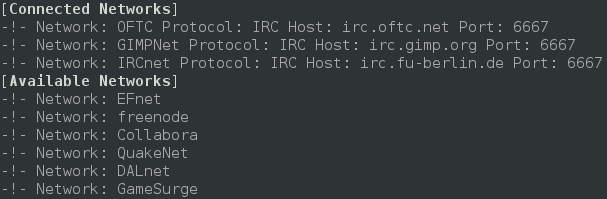
As longingly awaited I am very happy to announce Smuxi 0.8.10 codenamed "Tracy". During the development 8 bug reports and 15 feature requests in 136 commits were worked on making this release a major feature and minor bugfix release. Screenshot of Smuxi 0.8.10 in action Notable highlights in this release are: Integrated Spell Checking Everyone knows the "how do you spell that word again?" situation and either you don't care and send a possible typo or you go checking a dictionary which is kind of annoying. The good news is: with this release you no longer need to do that, as Smuxi includes automatic spell checking while you type messages. The bad news is that this feature is currently limited to Linux builds, and thus OSX and Windows build do not ship with it. The installers need to be extended and I haven't found pre-compiled OSX nor Windows binaries for the GTK+ spell checking library. Screenshot of Smuxi 0.8.10 showing spell checking in action Favicons for Server Tabs Distinguishing server tabs can be difficult, especially if you have plenty of them. All server tabs have the same icon so you need to search for the right name. I wondered why this issue doesn't happen so easily with a web browser which usually also has lots of tabs open. Besides the page name there is the favicon right in front. So why can't Smuxi make use of that simple but effective technology? Well, now it does! You connect to a known network, and Smuxi will download and show the favicon of the website. It just works and does everything in the background for you. Screenshot of Smuxi 0.8.10 showing favicons in action Quick Join Bar One thing that makes IRC really difficult for new comers is the important IRC concept that channels are network specific. So what happens is people try to find / join the channel they are looking for but on the wrong network. They have to connect to the right server/network and then switch to the right tab, before they can join the channel (using the /join command or join dialog). The developers of Smuxi had a brainstorming session and came up with something that should be easy enough for anyone to use and finally solves the issue: the quick join bar. You know which channel you want to join and which network, you enter the channel name, select the network from the list and hit the "Join Chat" button and you are done. Now Smuxi will do just the right thing for you and connects to that network if needed, joins the channel if needed, or switches to the channel if you are already there! Click here for a screencast of the Quick Join Bar in action Indention of multi-line messages Messages on IRC and also Twitter are often longer than a single line in Smuxi can show, thus it has to be split into a second line or more. The issue here is that the continuation line looks cluttered because it doesn't align with the first line. Here you can see an example for this issue: Screenshot of Smuxi 0.8.9 showing line breaks Ewww, that looks ugly, doesn't it? I will make this one short, here is the cure with indented multi-line messages: Screenshot of Smuxi 0.8.10 showing line breaks Enhanced Text Frontend The text frontend which is still in alpha state has received the following enhancements: new /exit command, new /help command, regular and xterm window title, and, several fixed crashes. Screenshot of Smuxi 0.8.10's text frontend Enhanced Commands The /network command by default shows now all connected and also available networks: Screenshot of Smuxi 0.8.10 showing network command The /connect command now allows you to connect by network name like this:



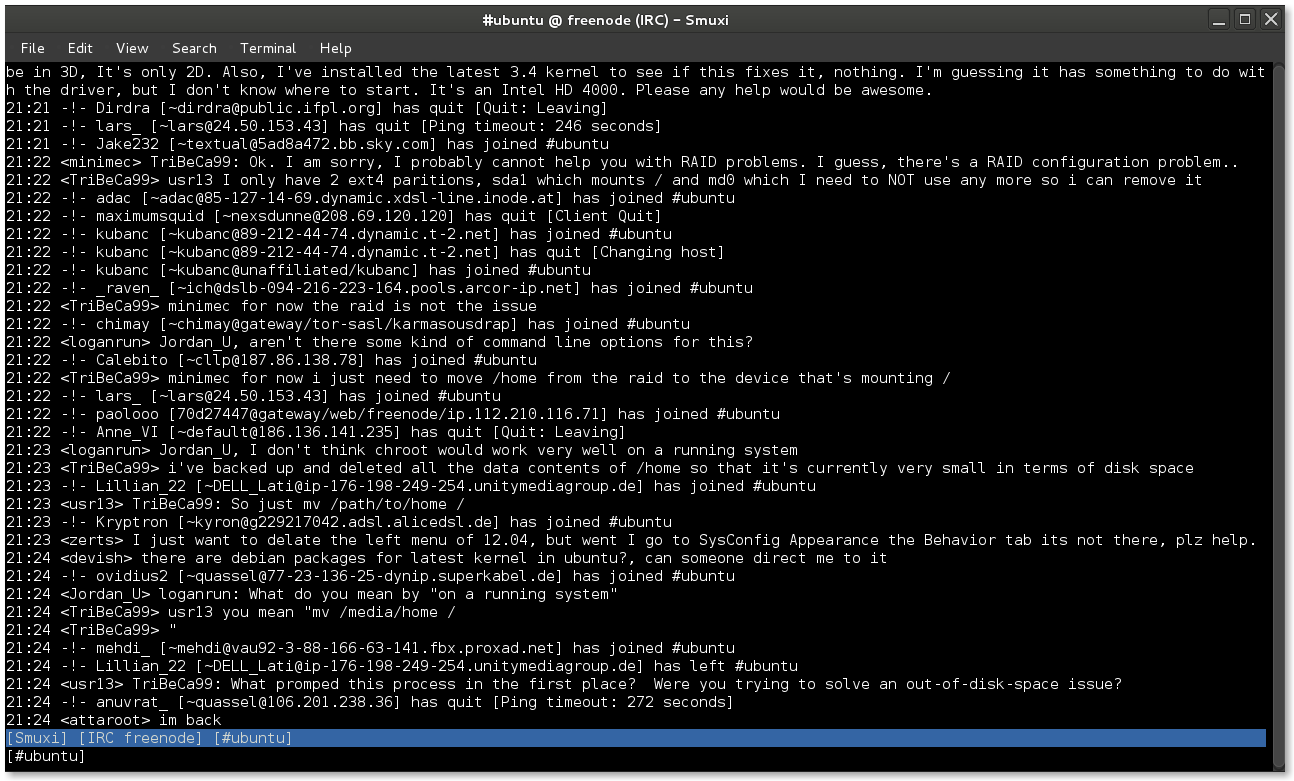
/connect freenode
Updated Translations
  • Portuguese (Pedro Ribeiro)
  • Chinese Simp (Dean Lee)
  • Danish (Joe Hansen)
  • Swedish (Martin Bagge)
  • Russian (Yuri Myasoedov)
New Translations
  • Croatian (Matias M)
  • partially Polish (lukasznaw)
Contributors Contributors to this release are the following people:
  • Mirco Bauer (126 commits)
  • Bianca Mix (translations)
  • Dean Lee (translations)
  • Joe Hansen (translations)
  • Yuri Myasoedov (translations)
  • Pedro Ribeiro (translations)
  • Matias M (translations)
  • Martin Bagge (translations)
  • lukasznaw (translations)
Thank you very much for your contributions to Smuxi! Already horny? Go here and get some! Update: Smuxi 0.8.10.1 About 2 months after the 0.8.10 release, Smuxi 0.8.10.1 with only important bugfixes and translation updates was released. This release includes the following 6 bugfixes: smuxi-server now honors the timezone of tweets, fixed a connection crash with InspIRCd-2.0 servers, quick join no longer opens another network tab, closing chats no longer crashes Smuxi sometimes, /connect irc.some-server.com works again and focusing the message area moves the focus back to the entry again.
Posted Tue Aug 21 23:16:05 2012

28 July 2012

Luke Faraone: Simple two-factor authentication


Do you want to allow "Rebooting of Cluster 19" as Jane Doe, Foo Corp? Yes/NoI've been thinking a lot recently about information security and passwords. It's widely agreed that two-factor authentication, which combines something-you-know (a password) with something you have (eg. a smart card or some one-time-password) is superior to using a password by itself. Most solutions I've seen, short of client-side certificates, both require a trusted third party and provide little auditability.

I'm working on a project which attempts to address those problems. Basically, the idea is that you attempt to perform an action on a website, like logging in, moving some money between accounts, or restarting a cluster. Then, your mobile device ((iPhone used in the graphic to the right because a SVG was handy. Image adapted from work by Virgile Pypaert [CC-BY-SA-3.0], via Wikimedia Commons)) (Android, iPhone, or some custom hardware) starts buzzing, displaying the text of the action. When you approve or deny the action, your device uses a locally stored private key to sign the text of the approval and send it back to the server. The server checks that you approved the same transaction number and text, then allows the action. The server can store the approval notice to allow auditors later to determine that somebody in possession of the private key signed the action request.

So far, I've written a small Django server application, and a Python CLI device and client. They're not yet ready for a public release; I need to write up installation instructions and test it a bit more, but I'll publish them soon on Launchpad. On the usability side of things, I plan to conduct some trials in January comparing it to things like Google Authenticator.

This should be less susceptible to MITM attacks than one-time-passwords, since you can authenticate specific transactions, rather than entire sessions.

On the other hand, I'm no security researcher. Dear lazyweb, are there any problems with the above approach? Also, if I'm going to release this (as I plan to once I get something working), I need a name. Ideas?

Luke Faraone: Google Cr-48 first impressions

On a lark, I signed up for the pilot program of the Google Cr-48 about a week ago. To my surprise, I found the distinctive box on my doorstep a week later. After initially mistaking it for an overpacked, late-model OLPC XO-1 I would have to repair, I sort of did a double-take as I realized what I had received.
Using Chrome OS


Wow, they weren't kidding about the boot time. Chrome OS responds (to suspend / resume and boot / power-off) very quickly. Responsiveness elsewhere in the OS of course varies on system load and other factors. On the "terms" page, there is a "system security setting" which tells me I have a Trusted Platform Module, and that my TPM has a randomly generated password. The dialog could use some rewording; I'm pretty familiar with the idea of a TPM, but I'm still not sure what I'm to do with that information.

Cloud print is really a problem for me, right now. I use school printers for the majority of my work, which I was previously able to use by adding them by IP address. Unless there's some magic I'm missing here, I can't do that with Chrome OS, and such a feature will not be supported. (except by "connectors" on Windows and Mac computers)
General thoughts
I can't imagine using a system running Chrome OS as a primary computer. The biggest missing feature is PGP (or any sort of encryption) support for email. This is probably not terribly difficult to implement as an extension, but the idea of my cryptographic software being automatically updated is rather unsettling. I think I'll have to agree with Paul Buchheit that ChromeOS will have to merge with Android; there is a utility for local apps, even if they're becoming less and less critical.

14 July 2012

Christian Perrier: Cool prompt for git users with bash

Here's what I found out during the "Packaging with git" talk at Debconf12. There are certainly cool enhancements. Feel free to share on Planet.
bubulle@sesostris:~ $ cat .bashrc
# http://lukasrieder.com/2009/07/14/extend-your-bash-ps1.html
parse_git_branch()  
  git branch 2> /dev/null   sed -e '/^[^*]/d' -e 's/* \(.*\)/(\1)/'
 
# set a fancy prompt (non-color, unless we know we "want" color)
case "$TERM" in
xterm-color xterm screen)
    PS1='$ debian_chroot:+($debian_chroot) \[\033[01;32m\]\u@\h\[\033[00m\]:\[\033[01;34m\]\w\[\033[00m\]\[\033[01;33m\]$(parse_git_branch)\[\033[00m\] \$ '
    ;;
*)
    PS1='$ debian_chroot:+($debian_chroot) \u@\h:\w$(parse_git_branch)\$ '
    ;;
esac

Next.

Previous.