Search Results: "jab"

9 April 2012

Christian Perrier: Languages to be deactivated in Debian Installer (take 2)

My last call, a bit alarming about some languages becoming candidates for being deactivated in D-I had some results. A few teams updated at least sublevels 1 and 2 so that their language is "safe". Still, If I follow the policy we chose in D-I, I should deactivate languages that are not complete for what we call "sublevel 1" and "sublevel 2" in code Debian Installer. At this very moment, it means that I would deactivate (stats in parenthesis are those in these sublevels, respectively): That's way too many. So, before I blog everywhere that "Debian is dying" because I have to deactivate 20 languages in the installer...or before I blog that "Ubuntu steals our translators" (which is somehow true now, as half, if not more, of active translators are indeed interested in the Ubuntu installer to be translated, not the Debian one)....do something...or the Ubuntu installer will have 20 less languages..:-)

31 March 2012

Christian Perrier: Languages to be deactivated in Debian Installer

If I follow the policy we chose in D-I, I should deactivate languages that are not complete for what we call "sublevel 1" and "sublevel 2" in code Debian Installer. At this very moment, it means that I would deactivate (stats in parenthesis are those in these sublevels, respectively): For several of these, the fix is easy! So, even if you're not the person in charge officially for the said language, please get in touch with me (bubulle@d.o) if you want to complete the translation. For some of these languages, where contact with the translator in charge has apparently been lost, it could be their only chance to stay in wheezy.

21 March 2012

Axel Beckert: Tools for CLI Road Warriors: Remote Shells

Most of my private online life happens on netbooks and besides the web browser, SSH is my most used program especially on netbooks. Accordingly I also have hosts on the net to which I connect via SSH. My most used program there is GNU Screen. So yes, for things like e-mail, IRC, and Jabber I connect to a running screen session on some host with a permanent internet connection. On those hosts there is usually one GNU Screen instance running permanently with either mutt or irssi (which is also my Jabber client via a Bitlbee gateway). But there are some other less well-known tools which I regard as useful in such a setup. The following two tools can both be seen as SSH for special occassions. autossh I already blogged about autossh, even twice, so I ll just recap the most important features here: autossh is a wrapper around SSH which regularily checks via two tunnels connect to each other on the remote side if the connection is still alive, and if not, it kills the ssh and starts a new one with the same parameters (i.e. tunnels, port forwardings, commands to call, etc.). It s quite obvious that this is perfect to be combined with screen s -R and -d options. I use autossh so often that I even adopted its Debian package. mosh Since last week there s a new kid in town^WDebian Unstable: mosh targets the same problems as autossh (unreliable networks, roaming, suspending the computer, etc.) just with a completely different approach which partially even obsoletes the usage of GNU Screen or tmux: While mosh uses plain SSH for authentication, authorization and key exchange the final connection is an AES-128 encrypted UDP connection on a random port and is independent of the client s IP address. This allows mosh to have the following advantages: The connection stays even if you re switching networks or suspending your netbook. So if you re just running a single text-mode application you don t even need GNU Screen or tmux. (You still do if you want the terminal multiplexing feature of GNU Screen or tmux.) Another nice feature, especially on unreliable WLAN connections or laggy GSM or UMTS connections is mosh s output prediction based on its input (i.e. what is typed). Per line it tries to guess which server reaction a key press would cause and if it detects a lagging connection, it shows the predicted result underlined until it gets the real result from the server. This eases writing mails in a remote mutt or chatting in a remote irssi, especially if you noticed that you made a typo, but can t remember how many backspaces you would have to type to fix it. Mosh needs to be installed on both, client and server, but the server is only activated via SSH, so it has no port open unless a connection is started. And despite that (in Debian) mosh is currently just available in Unstable, the package builds fine on Squeeze, too. There s also an PPA for Ubuntu and of course you can also get the source code, e.g. as git checkout from GitHub. mosh is still under heavy development and new features and bug fixes get added nearly every day. Thanks to Christine Spang for sponsoring and mentoring Keith s mosh package in Debian.

8 March 2012

Raphaël Hertzog: People Behind Debian: Gregor Herrmann, member of the Perl team

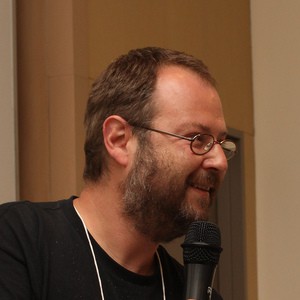
Photo by Aigars Mahinovs

I followed Gregor s evolution within Debian because I used to be somewhat active in the Perl team. His case is exemplar because it shows that you don t need to be an IT professional to join Debian and to make a difference. His QA page is impressive with hundreds of packages maintained and hundreds of non-maintainer uploads too. While he started out slowly, I remember meeting him at Debconf 7 in Edinburgh and after that he really got more implicated. Again a case of someone joining for technical reasons but getting more involved and staying there for social reasons! :-) Let s jump into the interview and learn more about him. Raphael: Who are you? Gregor: I m 41 years old, and I live in Innsbruck, Austria, in a shared apartment with a friend of mine. In my day job, I m working at the regional addiction prevention agency, so I m one of the few Debian guys who s not an IT student or professional. I started maintaining packages in 2006, and I am a DD since April 2008. Raphael: How did you start contributing to Debian? Gregor: After having used Debian on servers for some years, I finally switched to it on the desktop after some procrastinating. Soon afterwards I wanted to know more about the making-of , started to join mailing lists, filed bugs, and tried to learn packaging. Luckily I quickly found a permanent sponsor Tony Mancill, and we re still co-maintaining each others packages. And when I packaged my first Perl modules, Gunnar Wolf invited me to join the Debian Perl Group, an offer I accepted a few days later. And I m still there :) Later, the NM process, although it involved some waiting times, was also a good learning experience due to my AM Wouter Verhelst. (And in the meantime the organization of the NM process has vastly improved, from what I hear.) So my starting point for joining Debian was my curiosity but what really helped me to find my way into the project was the support of the people who invited and helped me. Raphael: What s your biggest achievement within Debian or Ubuntu? Gregor: I m not sure I can name a single big achievement but I guess I can say that my contributions to the Debian Perl Group have helped to make and keep the team a success story. Raphael: The pkg-perl team seems to work very well. As an active member, can you explain us how it is organized? How do you explain its success? In particular it seems to be a great entry point for new contributors. Gregor: The team is huge, both in numbers of members and packages (over 2200). Since last DebConf we manage our source packages in git, we have 2 mailing lists and an IRC channel, and we manage to keep an overview by using PET, the Package Entropy Tracker. It s true that we get new members on a regular basis; we try to invite people (like it happened to me 6 years ago :) ) but there are also quite a few new contributors who find our docs and introduce themselves on the mailing list. Maybe someone should conduct a study and ask them what motivated them to join. :) We hand out group membership/commit access quickly, and we try to mentor new contributors actively during their early times in the group. Some of them leave for other projects after some time, but many also stay and become DDs later. I m not sure what the reasons for the group s success are, maybe a combination of: For everyone interested in joining the Debian Perl Group, our Welcome page on the wiki is a good starting point. Raphael: What are your plans for Debian Wheezy? Gregor: Nothing overly exciting. What I should do is getting a newer JabRef into Debian (which involves packaging some new Java libraries any takers?). A solution for libdatetime-timezone-perl (which ships timezone data converted to Perl modules and tends to get outdated when the timezone data change) would be nice; let s see if #660404 leads to some results And some Perl packages will also need a bit of work for the hardening build flags release goal (cf. #657853). Raphael: What s the biggest problem of Debian? Gregor: Inertia. While I really like the fact that Debian is a volunteer project, and that every contributor works when and on what they decide to work on, I get the feeling that Debian could do better in moving forward, innovating, taking decisions. I also think that more uniformity in managing source packages would make things easier; it s quite amazing to see how many source formats, packaging helpers, patch systems, RCSs etc. are used all over the archive. I m not advocating for mono-cultures, and I consider this diversity a strength in general, but having to find out first how this particular package works when preparing a bug fix can be annoying. On the bright side, I think that the myth Debian and its mailing lists are mostly about flames can be seen as dispelled in the meantime. Sure, sometimes the tone could be a bit more civil, but in general most of the interactions I ve seen in the last years were friendly and helpful. IMO, the Debian Project consists of mostly nice and cooperative people, and that s what makes it fun for me. Raphael: You re one of the most dedicated participants to RCBW (Release Critical Bugs of the Week), an initiative to fix RC bugs every week. How much time do you spend on it? What would you advise to people who are considering to join the movement? Gregor: I got into the habit of fixing RC bugs after having been invited to my first Bug Squashing Party in Munich some years ago. During this weekend I saw that fixing RC bugs can be fun, is often not that difficult, and gives a warm fuzzy feeling :) I can definitely recommend attending a BSP if one happens to be organized near you. After tasting blood at this first BSP I tried to continue looking at RC bugs, and I guess I spend something around half an hour per day on it. I usually blog about it once a week, in order to motivate others to join in. And joining is easy: just take a look at the tips people like Zack, Vorlon, or me have written. You don t have to be a DD to help, many of my NMUs are based on patches that others kindly prepare and send to the BTS kudos! Another nice aspect is that the RC bug list contains problems from different fields: general packaging problems, language-specific issues, policy violations, etc. So there s something for everybody, and you don t have to be an expert in all fields to fix a specific bug. What s rewarding about fixing RC bugs is not only the feeling of accomplishment and the knowledge about having helped the next release I also received quite a few Thank you mails from maintainers who were busy at that time and appreciated the help. Raphael: Do you have wishes for Debian Wheezy? Gregor: Well, there s not so much left of the Wheezy release cycle if we manage to freeze in June :) Some quick thoughts for Wheezy and Wheezy+1: Raphael: Is there someone in Debian that you admire for their contributions? Gregor: There are many people in Debian I admire, too many to name them all. The first one that comes to my mind is Russ Allbery who not only does great work from lintian to Debian policy but who also sets a great example of communicating in a perfectly polite and respectful way even in heated discussions.
Thank you to Gregor for the time spent answering my questions. I hope you enjoyed reading his answers as I did. Note that older interviews are indexed on wiki.debian.org/PeopleBehindDebian.

Subscribe to my newsletter to get my monthly summary of the Debian/Ubuntu news and to not miss further interviews. You can also follow along on Identi.ca, Google+, Twitter and Facebook.

2 comments Liked this article? Click here. My blog is Flattr-enabled.

3 March 2012

Ingo Juergensmann: Goodbye Google, hello Diaspora!

Well, at least in Germany there was lot of press coverage about Google changing its data protection policies and joining the user profiles of their services like Youtube, GMail, Google+ and so on. There were even HowTos to delete some tracking relevant data and history before of March 1st. like on German Spiegel Online news magazine. Because I'm no big fan of Google and being a strong privacy advocate, I tried to follow the steps mentioned there and got some surprises. First of all I discovered in Googles Dashboard that Google already joined my private account or email address with the one I used at work when I was testing some Android phones for some reasons. The mail address from work was considered as primary address and I couldn't change this. I could delete my private mail address from that account, but not the primary address from work. So, time was pressing because 1st of March was coming near, only one hour left, but what to do know? I'm already using plugins like Ghostery and AdBlockPlus for some time now to minimize the chance of being tracked and such. I registered with Google+ to have a look onto it and to reserve my name and account there, but I was not actively using it for privacy reasons nor do I use Facebook. Therefor the decision was simple and easy: deleting my Google account was probably the best idea I got on that day. That was easy and a quick win for my privacy concerns! On the other hand having some sort of a social network can be nice. And I'm a fan of decentralized solutions like Jabber, which I prefer over AIM/ICQ. I'm running my own Jabber server for some years now, so it was a natural thought to me to make this step for a social network as well. Diaspora* started as a distributed social network in 2010 after some students listened to a speech by Eben Moglen about "Freedom in the Cloud" and is currently still in Alpha stage of development. But it is working and it is running on free software. That's a fairly good reason alone to prefer, support and use Diaspora* over other proprietary social networks like G+ or Facebook, isn't it? So, give it a try! Everyone can run a Diaspora* node, called "pod", on their own server. There are some good installation guides available at Github.com Wiki even covering installation on Debian! Although these installation HowTo is quite good there are some pitfalls left. For example you'll need good SSL cert from an CA authority that is wildly installed on all systems. CAcert seems not to be supported and self-signed certs and CAs doesn't work either. Without a good SSL cert you won't be able to interconnect with other Diaspora* pods. Another pitfall for Debian seems to be the installation of Ruby. First I used the Debian Ruby packages, but got some errors when starting the server that some CSS files couldn't be found. After using the RVM installation metioned in the installation guide these problems were solved (please note that the described way of using RVM didn't work for me either and I got help from some really helpful people on #diaspora-de@freenode). But anyway, I managed to get Diaspora* up and running on my own server and get it to interconnect with other pods. Although installing Diaspora* from source is currently a little pain compared with the ease and comfort of pre-built Debian packages, it's worth the effort! Everyone who consider Google evil and Facebook bad should consider switching to Diaspora*! The more people join, the better the social network will get! Help to fight against the AOL-ism of the Internet by using open and non-proprietary APIs and software like Jabber and Diaspora*! You can find my Diaspora* pod at: http://nerdwind.de/ where my account is "ij".
Kategorie:
File attachments:

4 February 2012

Christian Perrier: Debian Installer fully translated into Kannada

I imagine my readers (except those from India) : "Kannada, WTF"? No, this is not about D-I being translated into the variants of English and French spoken with a funny accent in a very big country located north of the United States of America, where they play ice hockey against mooses, wearing red policemen suits, with fur hats and drinking maple syrup. Kannada is the official language of the state of Karnataka, in southern India. The state that has Bangalore, the IT-leading city in India as capital. Kannada is spoken by about 45 million people, roughly the population of Spain. And, since yesterday, thanks to a local group lead by Vikram Vincent, Debian Installer is fully translated to Kannada. As of now, this is the 5th complete language of India along with Gujarati (46M speakers as first language), Hindi (180M, though some references mention 550M), Marathi (68M) and Tamil (62M). Other supported languages of India are Telugu (99% translated, 70M), Bengali (95%, 71M plus 110M in Bangladesh), Punjabi (91%, 28M) and Malayalam (86%, 36M). As you see, translators in India are really incredibly active and the free software community over there deserves some big light. We don't have many opportunities to meet up as traveling is not easy for contributors in India because, among other problems, of visa regulations for Indian citizens in many so-called western countries. So, really, I wanted to thank them again for this work.

1 February 2012

Nikita Youshchenko: Skype everywhere

For years, I ve been using Jabber for all my IM needs. There is a private jabber server here, it runs several transports, so there was no problem to keep connectivity with people. until recent. Looks like now everybody is moving to skype. Quite a few of my contacts no longer use anything else. This is starting to cause problems. I feel quite discomfortable about moving to proprietary software that is a questionable quality (1) implementation of a secret protocol. But pressure increases: staying away from skype already does cause difficulties. (1) After recent unclean shutdown of server that hosts desktop sessions for thin clients here, quite a few users have been unable to login to Skype without erasing entire ~/.Skype directory. And there is no working jabber transport for skype. Bad. I m aware that some multi-protocol IM clients can talk skype via api provided by official skype client. This is better than nothing, but still uncomfortable.

19 January 2012

Matt Zimmerman: Singly is hiring engineers

I ve written before about joining Singly and a little bit about the open source software we re building. There s now a bit more content on our website too, or you could watch my colleague, Jabber founder Jeremie Miller, talk about it on stage. The Singly team gathered for a discussion
Suffice to say, it s pretty interesting stuff, and we need more interesting people to join the team in order to achieve our goals in the next year. In particular, we re looking for engineers to build highly flexible, resilient and performant back-end infrastructure using Ubuntu, and innovative, usable and beautiful front-end interfaces using HTML5. For full details and how to apply, check out the Singly blog or contact me directly. At this time, we have a preference for candidates in the San Francisco bay area, but are open to exceptional candidates from elsewhere.

6 January 2012

Mirco Bauer: Smuxi 0.8.9 "One Giant Leap" Release

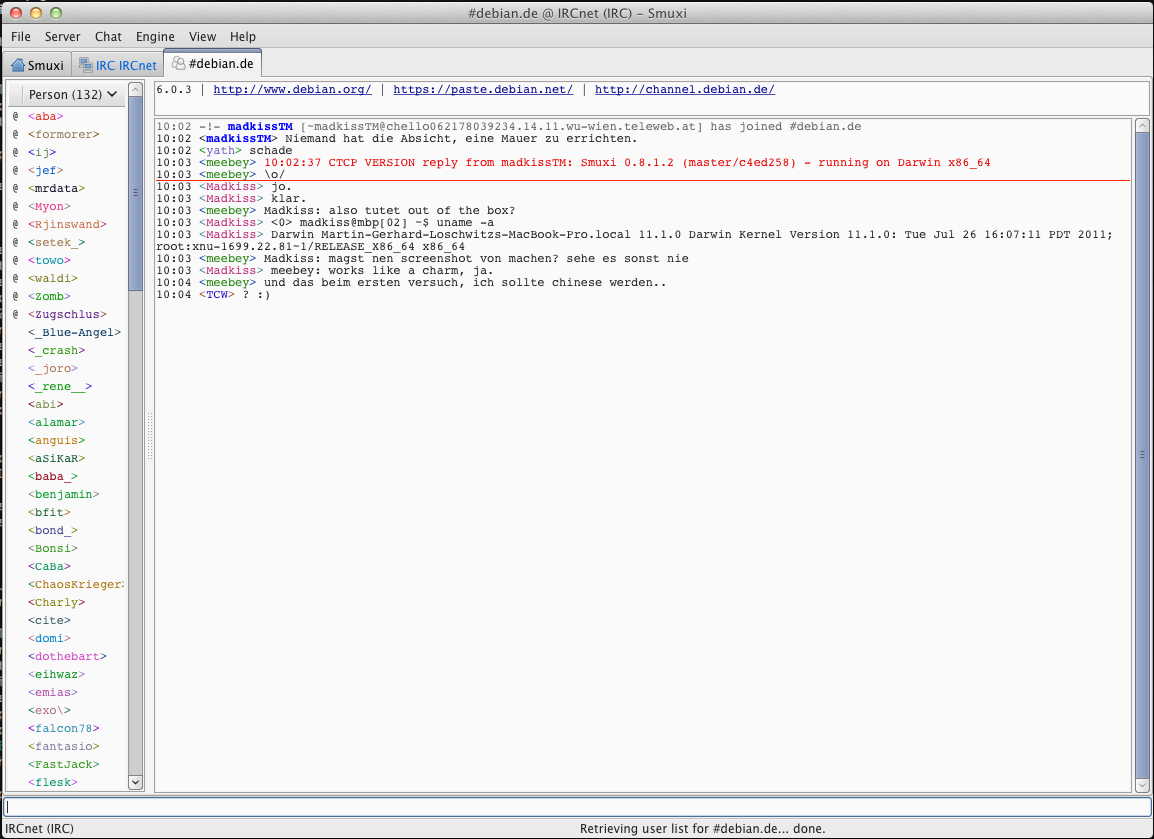
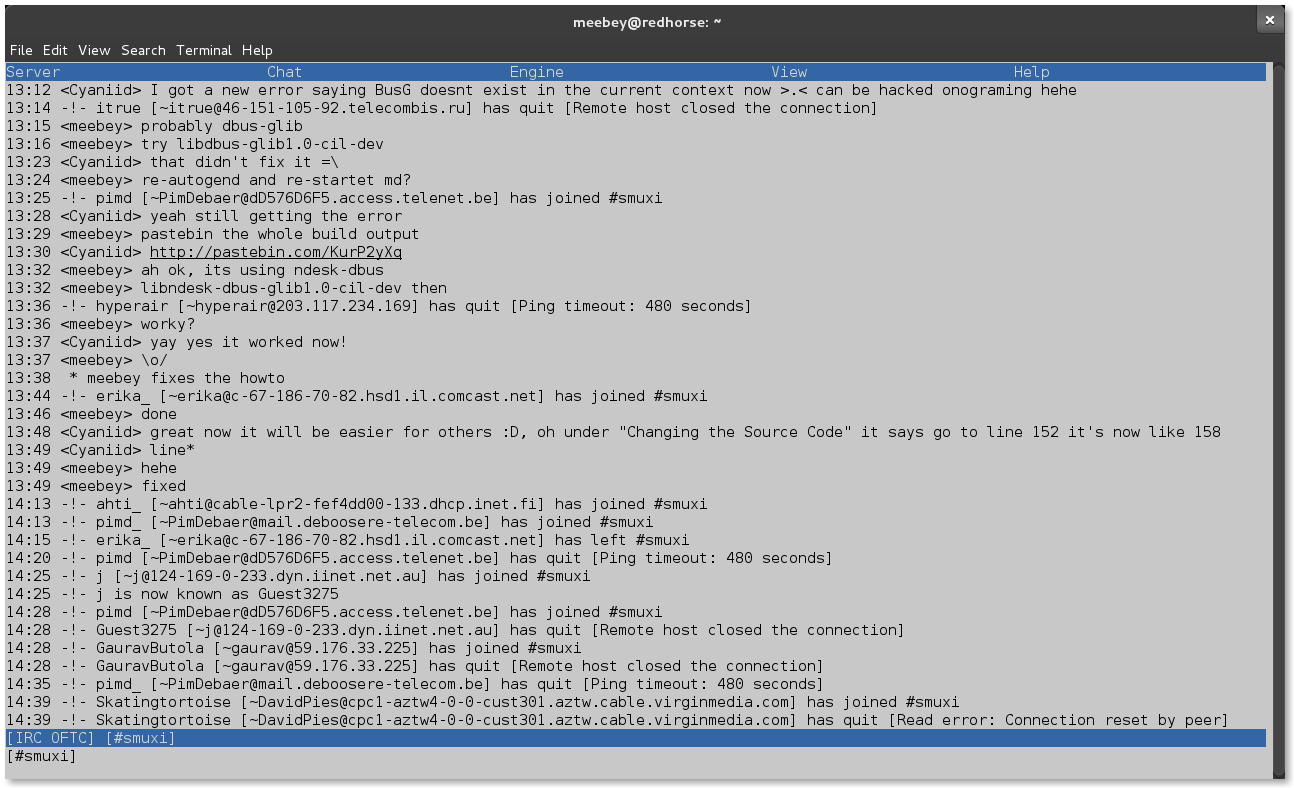
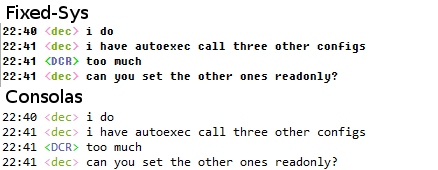
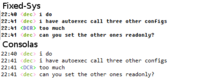
Just in time for 2012 I am very pleased to announce Smuxi 0.8.9 codenamed "One Giant Leap". During the development 56 bug reports and 33 feature requests in 593 commits were worked on making this release a major milestone of the Smuxi project. At the Chaos Communication Congress (28C3) in Berlin I was doing the final development sprint to get 0.8.9 done, which was a very intensive and refreshing experience. Here are the highlights of this release: Development Builds / Rolling Releases After the 0.8 release it became clear that a continious and short development -> test cycle is important to keep the project going quickly. At some point I have received requests if the project is dead while it was more active than ever. The lack of new releases (for about 15 months) lead to this wrong impression. Thus Smuxi can be obtained from development builds now. This includes daily builds for Debian (Squeeze, Wheezy, Sid), Ubuntu (Lucid, Maverick, Natty, Oneiric, Precise) and Windows. Thanks goes to Hannes Tismer for providing the Windows autobuilder and to Canonical for the PPA autobuilder. We invite everyone to use these daily builds to keep track of the latest development of Smuxi. Issues and regressions are fixed in a very short period (usually the same day). Thanks to our users who ran development builds and reported issues which led to many bug fixes prior to this release. On the other hand one of my New Year's resolutions are to "release early, release often" So there should be no nerd left behind... Screenshot of Smuxi 0.8.9 on Mac OS X Mac OS X support With the help of Steven McGrath (Steve[cug]) who created the initial Mac OS X installer for Smuxi we now have official support for Mac OS X. The download page contains the instructions how to obtain and install Smuxi on Mac OS X. This makes the 4th platform where Smuxi can be used on besides Windows, Linux and *BSD. For now Smuxi 0.8.9 doesn't feel as native as it could as it relies on the GTK+ port. We are looking into enhancing the experience though, just stay tuned. Chat History on Disk (Beta) The most exciting feature in this release I think are the "persistent message buffers". With this feature I could solve one of the biggest drawbacks IRC ever had: IRC does not retain any messages you have sent or received. All messages are only relayed to all users. The issue is that if you close your IRC client or even just leave a channel, all your received messages are gone. One workaround in most clients was to create text log files which then contains the chat history, but it is annoying and not user-friendly to open some text file somewhere from your disk to read the history outside of your IRC client. Now with Smuxi 0.8.9 you no longer have this issue, all chat history gets automatically written and read to a message database when you start Smuxi, join channels or open queries! As this feature is not fully stable yet it is not enabled by default. If you want to try it go to: File -> Preferences -> Interface and change "Persistency Type" from "Volatile" to "Persistent", hit OK and restart Smuxi. Now all messages are saved into the database and will automatically be shown. Click here for a screencast of this feature Jabber / XMPP Support (Beta) You probably have friends not on IRC and Twitter, say on Jabber, gTalk or Facebook? This is where the new XMPP engine of Smuxi comes into play. You can send and receive messages to/from them now! The implementation is far from complete, though. It has no buddy list for example and needs only to be treated as a technical preview of what will be coming in future Smuxi releases. Click here for a screencast of this feature Screenshot of Smuxi's Text Interface Text Interface (Alpha) This is the first release that contains a text frontend based on the STFL library. STFL is a library that uses ncurses to draw text based user interface using a markup language (like Glade for GTK+). This frontend is in early alpha state and lacks a lot of interface features and likes to crash. It is still included to attract potential developers who want to enhance this frontend. The frontend can be enabled by passing --enable-frontend-stfl to the configure script and then by executing smuxi-frontend-stfl. NetworkManager Support Everyone with a laptop knows how annoying it can be to suspend and resume when network based applications suddenly go crazy because they have lost the connection and either spew errors or take forever to get back in shape. Smuxi will now detect the network state right away with the help of the new Network Manager support. It automatically reconnects when needed right away for you. Next Generation Internet Support You can now connect to IRC servers using the IPv6 protocol Enhanced Find Group Chat Support Users had real issues to find out how to search for channels, thus Bianca Mix added a neat feature. The /list command will now simply open the Find Group Chat dialog for you. This way everyone used to IRC will find it in no time. Searching for channels on freenode wasn't working correctly, this is now fixed. Smuxi also supports the SAFELIST feature of the IRC protocol now which allows to retrieve a full channel list and do client side search which makes consecutive searches much faster. Enhanced Windows Experience For a long time you could not use Smuxi with the latest GTK# version of 2.12.10 on Windows. The issue was that Smuxi relied on SVG support which 2.12.10 no longer had. Smuxi is no longer using SVG instead it uses pre-scaled PNG images thus it works just fine with GTK# 2.12.10 on Windows now. At the same time the issue that the maximized state of the main window was left when restoring from task bar is fixed with GTK# 2.12.10. Screenshot of Fixed-Sys vs Consolas font Smuxi used by default the FixedSys font on Windows to give it the typical IRC look most people are used to. Since Windows Vista there is a better console-like font available called Consolas. Smuxi will now use the Consolas font instead on Windows Vista or later. Another important enhancement is that Smuxi no longer has issues with multiple GTK+ installs on the same computer, which was getting more common with more popular ported GTK+ applications such as GIMP or Pidgin. SSL for IRC fixed IRC with SSL was only working with the default port of 6697. Thanks to Jo Shields now any port can be used with SSL. Crash Related Issues Desktop notifications could crash Smuxi in case of errors related to the notification system or an absent notification daemon. There was a chance that the crash dialog simply disappeared which made reporting bugs more difficult no longer happens. Rapid use of ctrl+w, /window close (Jimmie Elvenmark) and opening the Find Group Chat dialog on the Smuxi tab do no longer crash. Also number-only network names, /network switch freenode and GTK+ install without SVG support no longer lead into a crash. Enhanced Notice Handling Notices will no longer open query tabs for you instead it will show them on tabs you share with the person who sent it with the server tab as fallback. This also avoids ChanServ, NickServ and spammy IRCop tabs. Twitter fixes Twitter made some changes to their API which broke the Twitter support of Smuxi 0.8. This was taken care of and also a few other issues were solved allowing Smuxi 0.8.9 to work smoothly with Twitter again. Extended Keybindings Smuxi allows now to use the ctrl+tab / ctrl+shift+tab and ctrl+n / ctrl+p keys to switch tabs. The keybindings still work even with a hidden menu bar now. Smuxi Server specific highlights More interactive and much faster synchronization When connecting to a smuxi-server you had to wait till Smuxi finished the synchronization before you could use the interface. Also you could not tell how far the synchronization was and just had to wait till it was completed. With Smuxi 0.8.9 the connect just takes a few seconds and all chats are synchronized in the background with a progress bar so you can use the interface from the first moment on and know how far it is. The speed how much it takes to synchronize all chats also reduced drastictly by 400%! Click here for a screencast of this feature More background communication When using a smuxi-server the interface sometimes had load times like when opening the preferences or when using the nickname completion (Andrew Kannan). These operations are done in the background and no longer blocks the interface. Also when the communication is lost to the smuxi-server the frontend will now automatically reconnect to it in the background. Low Bandwidth Mode When it comes to mobile internet connectivity such as UMTS/HSDPA, Edge and GRPS it can be a real pain to connect to the smuxi-server as it has to transfer all the messages over that. If you just want to ask someone you know then you don't need any old messages to do that. With the "Low Bandwidth Mode" you can now connect to the smuxi-server without loading old messages which makes the connect very quick. You find this option in the engine connect dialog. Stable Protocol Initially I didn't plan to make the protocol of Smuxi stable before the 0.9 release, but as it turned out the 0.8 protocol was good enough to still use it and for that reason Smuxi 0.8.9 is still compatible with 0.8. The 0.8 protocol will see no breakages, instead the next protocol will be on-top or opt-in of the current one. This means future Smuxi versions stay compatible with it. Shutdown Command You can now shutdown the smuxi-server if you like using the /shutdown command. It it safe to use the command, it will do a clean shutdown sequence for you. For example it makes sure all messages are written to disk in the case of enabled persistent message buffers. If you have your smuxi-server daemon monitored (e.g. with runit) it can also automatically be restarted and upgraded this way. Built-in SSH Keyfile Support It is no longer needed to fiddle with the .ssh/config file or pagent to get SSH key authorization working. You can now simply tell Smuxi which SSH keyfile you want to use to connect to your smuxi-server. Updated Translations
  • Catalan (Siegfried-Angel Gevatter Pujals)
  • Danish (Joe Hansen)
  • Finnish (Kalle Kaitala)
  • French (Cl ment Bourgeois)
  • German (Bianca Mix)
  • Italian (Vincenzo Campanella)
  • Portuguese (Americo Monteiro)
  • Spanish (Castilian) (Ricardo A. Hermosilla Carrillo)
New Translations
  • Chinese Simp (Dean Lee)
  • Slovak (Tom Vadina)
  • Swedish (Jimmie Elvenmark)
  • partially Russian (Aleksandr P)
  • partially Turkish (Umut Albayrak)
  • partially Urdu (makki)
Contributors Contributors to this release are the following people:
  • Mirco Bauer (497 commits)
  • Tuukka Hastrup (10 commits)
  • Bianca Mix (10 commits, translations)
  • Cl ment Bourgeois (8 commits, translations)
  • Andrius Bentkus (5 commits)
  • Carlos Mart n Nieto (3 commits)
  • Jimmie Elvenmark (3 commits, translations)
  • Hannes Tismer (1 commit)
  • Jonathan Pryor (1 commit)
  • Jo Shields (1 commit)
  • Siegfried-Angel Gevatter Pujals (translations)
  • Dean Lee (translations)
  • Aleksandr P (translations)
  • Americo Monteiro (translations)
  • Andrew Kannan (translations)
  • Joe Hansen (translations)
  • Kalle Kaitala (translations)
  • makki (translations)
  • Ricardo A. Hermosilla Carrillo (translations)
  • Tom Vadina (translations)
  • Umut Albayrak (translations)
  • Vincenzo Campanella (translations)
Thank you very much for your contributions to Smuxi! After reading this whole pile of text, head over here and grab this smexy stuff!

Posted Sun Jan 1 22:58:29 2012

31 December 2011

Russell Coker: My Blog Server was Cracked

On the 1st of August I noticed that the server which runs my blog among other things was having an occasional SEGV from a sshd process. Unfortunately I was busy and didn t pay much attention to this, which turned out to be a big mistake. On the 12th of September I started investigating this properly and noticed that when someone tried to connect to ssh with password authentication sshd would SEGV after it was denied access to a shared memory region or a semaphore which had a SE Linux type of unconfined_t. I added some SE Linux auditallow rules and discovered that the memory region in question was created by the ssh client. Shortly after that I came to the conclusion that this wasn t some strange feature of ssh (or one of the many shared objects it uses) but hostile activity. The ssh client appeared to be storing passwords that it used in a shared memory region and sshd was also collecting passwords in the same region and presumably offering them to a ssh client which uses some extension to the ssh protocol. The sshd process was crashing because it couldn t handle EPERM on access to shared memory or semaphores. Presumably if the system in question wasn t running SE Linux then the exploit would have remained undetected for a lot longer. At this stage we don t know how the attacker got in. Presumably one of the people with root access ran a ssh client on a compromised system and had their password sniffed. One such client system was mysteriously reinstalled at about that time, the sysadmin of the system in question claimed to have no backups which made it impossible to determine if that system had been compromised. I believe that the sysadmin of the client system knew that their system was compromised, kept that information secret, and allowed other systems to become and remain compromised. The attacker made no good effort to conceal their presence, they replaced ssh, sshd, and ssh-add and didn t bother changing the Debian checksums so the debsums program flagged the files as modified. Note that I have kept copies of the files in question and am willing to share them with anyone who wants to analyse them. Steinar H. Gunderson has named this trojan Ebury [1]. Recovery By the evening of the 13th of September I had the system mostly working again. Jabber still isn t working because ejabberd is difficult to get working at the best of times, I am now investigating whether there is a better Jabber server to use, but as I don t use Jabber often this hasn t been a priority for me. Some of the WordPress plugins I use and all of the WordPress themes that are installed were outside the Debian packaging system, as I couldn t be sure that they hadn t been altered (because the people who wrote WordPress plugins don t keep old versions online) I had to upgrade to the newer versions. Of course the newer versions weren t entirely compatible so I had to use a different theme and I couldn t get all plugins working. Link Within no longer works, not that it ever worked properly [2], I wanted to try Outbrain again but their web site won t let me login (and they haven t responded to my support request). Does anyone know of a good WordPress plugin to provide links to related content? Either related content on my blog or on the Internet in general will be OK. Some people have asked me about the change in appearance of my blog. It was simply impossible (for someone with my PHP skills) to get my blog looking the same way as it did before the server was cracked. I think that the new look is OK and don t mind if people think it looks likw a VW advert VW make great cars, I was very satisfied with the VW Passat I used to drive. Future Plans I had bought some Yubikeys (USB devices that generate one-time passwords) [3] to control access to that server, if I had configured the software to use them then this might not have happened. The use of one-time password devices can prevent passive password-sniffing attacks. It would still allow active attacks (such as using ControlPath/ControlMaster options on the ssh client to allow a hostile party to connect later (EG the -M, -S, and -o ControlPersist options for the ssh client). It s a pity that there doesn t seem to be a way to configure the ssh server to disable ControlMaster. Conclusion It would be good to have some changes to sshd to allow more restrictions on what a client can request, as ControlMaster functionality isn t needed by most users it should be possible to disable it. SE Linux doesn t protect against a compromised client system or any other way of stealing passwords. It did do a good job of stopping Ebury from doing all the things it wanted to do and thus making me aware of the problem. So I count this as a win for SE Linux. Yubikeys are the cheapest and easiest way of managine one-time passwords. I had already bought some for use on the system in question but hadn t got around to configuring them. I have to make that a priority.

1 December 2011

Christian Perrier: Between 60 and 64 languages supported in Debian Installer

(including English!) The string freeze of Debian Installer officially ended at 23:59 yesterday (Sept. 20th). Indeed, this was extended a bit to today, with agreement by Otavio Salvador who I thank for this. That allowed Zak to "save" Tagalog and also the Welsh and Latvian translators to polish their work. We now have to decide about some of these languages: those that failed to meet the release criteria but were formerly activated in D-I. There are four such languages: Amharic, Welsh, Estonian and Northern Sami. Please find below the mail I just sent to debian-i18n and debian-boot. I promised that this discussion would happen in public. It will (but it will be short as we can't delay the release of the installer for ages....and I think that my proposals are reasonable!)
First of all, the numbers as of Sunday Sept. 21st 09:32 UTC (date of
the last commit with an l10n update):
Languages meeting the release criteria: 59
------------------------------------------
Already activated and complete for level 1: 51
 Arabic, Belarusian, Bulgarian, Bosnian, Catalan, Czech, Danish,
 German, Dzongkha, Greek, Esperanto, Spanish, Basque, Finnish, French,
 Galician, Gujarati, Hebrew, Hindi, Croatian, Hungarian, Indonesian,
 Italian, Japanese, Georgian, Khmer, Korean, Lithuanian, Latvian,
 Macedonian, Malayalam, Marathi, Norwegian Bokm l, Nepali, Dutch,
 Norwegian Nynorsk, Punjabi, Polish, Portuguese, Brazilian Portuguese,
 Romanian, Russian, Slovak, Albabian, Swedish, Tamil, Thai, Turkish,
 Vietnamese, Simplified Chinese, Traditional Chinese
Already activated and complete for sublevels 1 and 2: 6
Bengali, Kurdish, Slovenian, Tagalog, Ukrainian, Wolof
Not yet activated languages complete for sublevels 1 and 2: 2
 (the mail in -i18n and -boot says 3 but this is an error by me)
Irish, Serbian
Languages failing to meet the release criteria: 15
--------------------------------------------------
Activated languages: 4
Amharic, Welsh, Estonian, Northern Sami
Not yet activated languages: 11
Afrikaans, Persian, Armenian, Icelandic, Kazakh, Kannada,
Malagasy, Malay, Telugu, Urdu, Xhosa
Discussion
----------
(careful people will notice that I moved Welsh down to "failed to meet
the release criteria" as this is what is technically correct)
Nothing to discuss for the 57 already activated languages that meet
the defined criteria. They'll be kept or first activated in the RC1
release of Debian Installer.
Similarly, nothing to discuss for the 11 languages that were not
activated and haven't made it. They will remain unactivated.
Two languages should be activated as they have met the release
criteria for the first time during the string freeze: Irish and Serbian.
This adds more load (and size changes) to D-I but I really don't see
any reason to not follow our own rules there.
The discussion comes for the 4 languages that fail to meet the release
criteria. Here are my proposals with some rationale:
Amharic: 
  I would really dislike deactivating Amharic because it's highly
  symbolic to have the language of Ethiopia activated. We have so few
  African languages. Also, the translation is nearly complete and the
  translator was well coping with updates until July. The missing
  stuff for Amharic in sublevels 1 and 2 are messages about loading
  drivers or firmware from removable media, the rescue mode stuff for
  the graphical installer and some messages that briefly appear during
  finish-install. A little bit more important is the message warning
  that the boot partition is not ext2 or ext3, added in August by
  tbm. I think this is not enough to drop out one year of efforts for
  the translator
  As a consequence, I propose to KEEP Amharic.
Welsh:
  Only five strings are missing in sublevels 1 and 2 because of the
  small experience of PO files by the person who completed the
  translation during last week. One will make the regular user login
  name screen to be in English and others will make the GRUB password
  screen to be in English as well, that's all.
  Additionnally, we can safely assume that all potential users of
  Welsh have good skills in English...and will therefore very easily
  cope with these screens.
  As a consequence, I propose to KEEP Welsh.
Estonian:
  The translation had NO update since Etch. The last update is dated
  back to Feb. 17th 2007. I haven't got any sign of life from the
  translator and no Estonian users have volunteered to maintain the
  translation.
  Missing strings are in many places, including several screens that
  appear in default installs. Even though one can assume that the
  skills of the average Linux user in Estonia is fairly good, I think
  this is not enough to throw users in a big mix of English and
  Estonian.
  As a consequence, I propose to DROP Estonian.
Northern Sami:
  The translation is very incomplete. With about any other language,
  that would be a reason to drop the translation.
  However, a few reasons make me suggest keeping it:
   - Northern Sami is mostly used in Norway and D-I will fall back
     to Norwegian Bokm l which is understood by all potentials users
     as it is teached in all Norwegian schools. 
   - Users will be warned, *in Sami*, about this situation
   - The choice of Sami will be kept in localechooser even if the
     translations are dropped. This is on request of Debian Edu
     developers to avoid them to develop a special boot floppy
     to offer the choice of Sami (a requirement for Norwegian
     schools). I personnally think this is a reward to Debian Edu and
     its ancestor Skolelinux for their initial involvement in the
     development of D-I
  As a consequence, I propose to KEEP Northern Sami.
I understand that these choices may be debatable and some may sound
slightly subjective. I however think this is the best way to be fair
with translators' efforts without compromising the quality of D-I.
Please note that the final word on this will be by D-I release
managers...but advices are very much welcomed.

14 October 2011

Biella Coleman: Jobs vs Ritchie

Denis! Best said here Let not make the final statement and not a single newspaper cares " into a reality. PS: Do check out Against Nostalgia, a great jab at Jobs.

21 September 2011

Sune Vuorela: Missing tools for people looking for jobs

I have mentioned it before in some blog posts that I m out looking for a job. In my job searching process, there is a couple of nice tools that I am missing. Maybe if I describe one of them, someone will say that it already exists over there -> or something. Tool 1. Tracking of data related to a job application.

For each such application I send I have a set of data, some pieces only for some applications: I would like one simple way of browsing all this information for a given position. Does this exist? preferably something that can interact with Konqueror, KMail, KAddressbook, KJots, Kopete and irssi on a remote machine. Tool 2: Tracking of tasks with states There is at least the following steps in a job searching process: A job application might go thru some or all of these steps or even more steps, and from each step it can end prematurely with a rejection . Here, I m missing a tool to track my applications and in which state they are currently in. My first thought here is a bug tracking system, but I m wondering if there is something nicer. Currently I m tracking it manually in a KJots notebook. Comments are open. And no, I haven t yet found a job.

11 September 2011

John Goerzen: Mexico Part 1: Genesis and Travel

My family and I (including our boys) are just back from a great visit to Mexico. It was my first time there, and also the first time our boys have been outside the USA. I ll be writing about all the fun stuff in the posts to come, so you ll have to bear with me on this one as I describe why we did something that appears to horrify a segment of Americans. About a year ago, I wrote a review of Travel as a Political Act by Rick Steves. Rick s point wasn t actually directly political in the conventional sense, but summed up as:
I ve taught people how to travel. I focus mostly on the logistics: finding the right hotel, avoiding long lines But that s not why we travel. We travel to have enlightening experiences, to meet inspirational people, to be stimulated, to learn, and to grow. Travel has taught me the fun in having my cultural furniture rearranged and my ethnocentric self-assuredness walloped.
He speaks of giving onesself permission to have a conversation with someone that doesn t speak a language you know, for instance. I got an email this spring from my longtime friend Jonathan Hall, who had moved to Mexico a couple of years ago. He invited my family and me to go to Mexico, generously offered to host us and show us around, and specifically mentioned my review of Rick Steves as a reason to do so, this was immediately intriguing. Due to his other plans, it was also something of a limited-time offer. Those of you that don t live in the USA may not know what sort of stories we get about Mexico over here. Most of them involve either illegal immigration to the USA or the Mexican drug war. Occasionally there is some sort of drug-related violence on the US side of the border as well, which always makes the news. There are a lot of people that have the perception that Mexico is a dangerous place to be. Terah even knows some people that grew up in Mexico and are too afraid to return. So we did some research, asked some questions, and it became pretty clear that yes, some parts of Mexico are dangerous, but many parts are really quite safe, and Jonathan had invited us to one of those. The reactions we got from Americans when we told them of our plan ranged from excitement that we would get to visit a beautiful country to concern and worry about our safety. Besides that, I knew almost no Spanish and Terah had a few high school and college classes years ago to go on. And, we knew that Mexico would, in many ways, be more different from the USA than Germany was. We concluded that this would get us out of our comfort zone in a significant way, have lots of great things to do, be a good experience for the boys, and something that we wouldn t do without Jonathan. So we bought the tickets for it! As you might notice, I m quite glad we did. I ll follow up with the details in the next stories, but for today I ll end with the story of getting there. It involves two cute boys, so of course it ll be interesting. Jacob is almost 5 and Oliver is 2, and neither one of them had flown for over a year. Despite leaving home at 5AM to drive to the airport (about an hour away), they were both awake and alert. Jacob was jabbering away the whole way there. He enjoyed the security process and found it interesting I had to explain that they were checking to make sure everyone was following the airplane rules. Then as we walked to our gate, he pressed his face against every window, looking at the parked airplanes in the dark. Oliver would see him doing this and run over to join him. With a bit of help, he noticed some airplanes had United Express painted on them, and others had American with an AA on them. He would talk about American AA and United Express airplanes for the rest of the week whenever he heard one in the sky. I sat between the boys on our flight to Dallas, and Terah was in the row ahead of us. This is how Jacob spent most of the flight. And Oliver, who had the aisle seat, enjoyed paging through the inflight magazines, safety brochure, wifi instruction card, and airsickness bag. The real highlight came at the Dallas/Ft. Worth (DFW) airport, where we had a connection. And the reason: we needed to take a train to get to our connecting gate. The DFW Skylink system really works very well but the boys cared most that it s a TRAIN. It was difficult to get them both away from it when we got off. They wanted to see it leave, stay and watch the next one come, etc. Jacob was only happy when he realized he could see the Skylink trains running high above the window at our departure gate for Guadalajara. The 2.5-hour flight to Guadalajara got a little long for them, but they managed OK. We struck up several conversations with friendly people that knew English as we waited in various lines. It seems to be something of a rarity for American families with young children and no Mexican heritage to visit Mexico. People went out of their way to be friendly and welcoming even the customs officials. It felt like a great start to the visit. One Mexican man who was chatting with me encouraged me to learn some Spanish. I said my wife knows some, and that I had tried to learn some German back when I took foreign language classes. Laughing, he said, Why would you do that? Not as an insult; it just genuinely didn t seem useful to him. I think they were happy and proud that someone wanted to visit Mexico and was excited about it! More to come.

15 August 2011

Matt Zimmerman: Building a personal data locker

If you were building a digital container to store your personal data, what would it look like? Personal data being information associated with you: your contacts, your photos, the web pages you ve visited, the places you ve been, the messages you ve sent and received, and so on. In short, your stuff. Here s my personal wish list of technical requirements: Of course, this isn t merely an academic exercise, as my new day job at Singly is about building exactly this type of system. With a technical team including Jeremie Miller of Jabber and XMPP fame, our goal is to develop a personal data platform which meets these criteria and more. There s a lot of work to do, but today, you can check out the code and run a locker of your own, which can sync in data from Facebook, Twitter, Google, Foursquare, Github and dozens of other services. It s a bit of a bear to set up, particularly if you don t already have API keys for these services, but that s fairly normal at this early stage of development. If you try it, or have thoughts about what we re doing, please let me know in the comments.

6 August 2011

Bdale Garbee: FreedomBox in Banja Luka

FreedomBox activities at Debconf11 I spent the last two weeks of July 2011 in Banja Luka. The occasion was the annual Debian developer's conference, Debconf11 and preceding work week known as Debcamp. This was my tenth successive year attending Debconf, and I had a very productive and pleasant time! The facilities were good, the local team was friendly, enthusiastic, and very helpful, and in addition to giving three talks and hosting a couple panel discussions, I managed to put a burst of energy into work on FreedomBox. Several other developers working on FreedomBox were also present, and a good number of Sheeva and Dream plugs were evident in the hacklabs sporting new FreedomBox stickers. Working together in the same place for several days, we made good progress on several projects, and also had some great discussions about what we want to do going forward. image building tools For some time, I've been working towards a light-weight tool set to build FreedomBox software images. Shortly before Debconf started, I chose the name 'freedom-maker' for this tool and shared a link to a readable copy of my git repository with other developers I expected to work with in Banja Luka. With input from Bert Agaz and Jonas Smedegaard during Debcamp, freedom-maker went from almost useful to actually useful. It still deserves work to be more useful to others, but I have now pushed a copy of the git repository to git.debian.org so that we can take advantage of the tools supported there to enable others to more easily contribute to the code. Very soon, Bert plans to add support to freedom-maker for using Lars Wirzenius' vmdebootstrap to build x86 images suitable for testing in a virtualized environment. At the same time, we plan to refactor the existing code slightly to enable lists of desired packages for the various image flavors we expect to produce independently of the configuration for each specific image building tool. Jonas continued in parallel to work on his alternate packaging toolset boxer. It offers some potentially interesting features for the future, and we may eventually merge some or all of it into freedom-maker, but for now it remains a separate utility. uAP user space tools Several weeks ago, we received from Marvell the source code to two user space programs that are necessary for configuring and monitoring the binary firmware provided for the uAP wireless chip used in the DreamPlug. Early during my stay in Banja Luka, I packaged these for Debian as uaputl and uapevent, and I am pleased to note that they were quickly accepted into the archive and are now present in Debian mirrors. u-boot Another bit of code received very shortly before Debconf started was the source for the version of u-boot shipped by Globalscale in the DreamPlug units we're working with. During Debcamp, Clint Adams passed a copy of this source to Jason Cooper, who was already trying to add support for the DreamPlug to upstream u-boot, but had stalled due to a lack of information. Jason has now merged his own work with the sources we got from the manufacturer, and is making good progress towards merging DreamPlug support into upstream u-boot. Once that happens, we should be able to flash our Sheeva and Dream plug devices with a u-boot image built from the source in the Debian u-boot package, in the process enabling things that matter to us like the ability to boot from an ext2 partition, and hopefully the ability to execute command scripts from that partition instead of having to hard-code kernel filenames in flash. This will allow us to support the ongoing effort in Debian to move away from the need for kernel symlinks. DreamPlug kernels With respect to kernels, another work stream at Debconf primarily involving H ctor Or n and Nick Bane was to analyze the current state of the patches from Marvell and Globalscale used to support the DreamPlug against both upstream and current Debian kernel sources. To my surprise and our collective pleasure, the remaining patch set required against current upstream kernels is much smaller than we previously believed! There are still several patches critical to us that are not merged upstream, but the work remaining to be able to build images for our devices from mainline and Debian kernel source trees now seems like something we might be able to complete before Debian's next stable release. One of our discoveries during the u-boot and kernel work during Debconf was that Globalscale did not obtain a new machine id for the DreamPlug, but instead re-used the one for the GuruPlug series, despite there being some differences in the hardware that require at least one additional driver. After much discussion, we plan to continue using the existing machine id instead of requesting another, particularly because the ARM kernel community has apparently stopped issuing new ids for the moment. We will add a new kernel config option for the DreamPlug, however, and are likely to build distinct Sheeva and Dream kernel packages that do not require initrd for use in FreedomBox images, even if doing so is not strictly necessary. This will allow us to optimize both the in-memory footprint and boot times for our devices. software configuration Another area of investigation in Banja Luka was technology for package configuration. Mirsal Ennaime performed various tests using debconf and Config::Model, with some results reflected in this commit relating to configuring the bitcoind daemon in the bitcoin package for Debian. identity and trust management While we did not actually do any FreedomBox specific work on the trust management layer we know is necessary, after several rounds of conversation, I am now more convinced than ever that the right path forward is to base our trust relationships on OpenPGP keys using GnuPG and Monkeysphere as starting software elements. Our thinking to date is captured on an Identity Management page in the wiki. communication services Another thing that became fairly clear to me during discussions at Debconf is that in the near term, planning to build communication services around XMPP is the approach most likely to give good results. Investigating the software choices available to build an interesting XMPP infrastructure is now a high priority for me. Jonas has done some work towards configuring and integrating ejabberd or Prosody, I've started studying yate as a possible call manager and VoIP server choice with XMPP/jingle support, and we await with great interest a release from the Buddycloud developers to evaluate as a possible basis for deploying social network services. Some of these software choices will lead us to use Apache as our web services base technology because of the need for features that only it supports well among daemons that are Free Software. Jonas completed packaging GNU Sip Witch for Debian, and it is now available in the mirror network. Tzafrir Cohen and Jonas did some initial testing on its use. documentation A number of new wiki pages were written (or at least started) in order to sum up ideas, design various aspects of FreedomBox, and reflect discussions that happened during DebConf11. A lot of work is needed to complete these pages though, as well as others to capture more of the current state of the project. press coverage Finally, while in Banja Luka I got some great press coverage for FreedomBox! On Sunday the 24th, I was interviewed by the main television network serving the Republika Srpska. This led to a couple of minutes of coverage near the top of the national news program that night, immediately following the lead story about the President and several ministers appearing at Debian Day that morning to help open the conference. This interview was later re-used in another TV program that summarized Debconf11. On the morning of Thursday the 28th, I was part of a small group that spent more than an hour meeting with the Minister of Science and Technology in his office, and the relationship between Debian and our work on FreedomBox was one of the items of discussion in that meeting and the associated press conference. I'm told this resulted in more press coverage, but if true I have not seen it yet. summary On Friday afternoon the 29th, I gave a talk in the main Debconf program containing a FreedomBox Progress Report . In it, I talked about the structure of the FreedomBox Foundation, progress the foundation has made, and the work that was still then underway in Banja Luka. It was streamed live over the internet, and replays are available online. The reaction from Debian developers present was very positive, which was good to learn since by that time my energy level was quite low after the nearly two weeks of intense technical and social interaction that is Debconf! All in all, we got lots of work done on FreedomBox in Banja Luka, enough that I think at least the next few steps along the road towards an eventual "1.0" release of a reference implementation are now much clearer than they were two weeks ago!

19 July 2011

John Goerzen: Trains and Birthdays

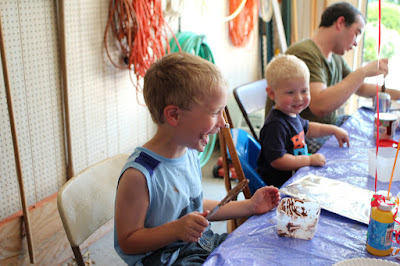
This weekend, the boys got what they ve been waiting for: another trip on Amtrak. For the last week or so, Jacob has had a morning ritual. He ll look at the calendar, figure out what today is, figure out when we ll get on the train, and then figure out how many days it will be. As the number gets lower, the excitement gets higher, of course. Friday morning, we woke the boys at 2:30AM to get to the train station. The only Amtrak trains through our area are middle of the night departures. Jacob is normally hard to wake up, but when I tell him that I m waking him up to go to the train station, he wakes up faster than I ve ever seen him before. It takes about 3 seconds for him to process that in his groggy state, and then he sits up straight, throws off the covers, and is instantly ready to go. Both boys were excited even in the station waiting room. Oliver has been on an Amtrak train before, but it s been awhile and he probably doesn t remember it. He constantly talked about it, jabbering as much as his vocabulary lets him. Once we were on the train, Terah and I would have liked to get some more sleep. The boys, on the other hand, were now wide awake, and didn t fall back asleep until about 5:30. That means Terah and I didn t, either. Here s what it usually looks like: When it came time for breakfast, we went to the dining car as usual. Jacob had already been telling us for days what he would eat for breakfast on the train: I always have French toast on the train, dad. And so he did. A few minutes later, I heard the waitress telling other people they were out of French toast, so I was glad I didn t have to disappoint Jacob over that! But it was Oliver that really came alive on this trip. I don t think I ve ever seen him so excited. It was almost constant. He happily talked about anything he could see or touch. But he also listened to other conversations, and would frequently pick out one word from a sentence and try to say it. He does that at home too, but not nearly so often as on the train. Both boys wanted to go exploring a lot my word for taking them for a walk in the train and seeing what they might find. We walked up and down the train several times, Jacob excited over opening the doors between the cars, and Oliver excited just to be there. Oliver s excitement kept him from sleeping well. He did eventually get a short nap, but that wasn t quite enough to avert a couple of tantrums later in the day. The reason for the trip was the 80th birthday party for Terah s grandpa. And it so happened that Oliver s 2nd birthday would be over the same time. So, Saturday morning, we all went for breakfast at Das Dutchman Essenhaus, one of the favorite local restaurants in northern Indiana. After that, it was over to a relative s place for some birthday festivities. The children got mini cakes to decorate as rail cars. There was frosting and all sorts of toppings. Great fun was had by all, and it was wise that this activity took place in a garage rather than indoors. Yes, that is a marshmallow stuck to Jacob s nose. Then in the evening, it was off to another relative s place for some more family time. Jacob had a great time all day, and was in high spirits. He asked me to sit by him at dinner, and started one of the longest conversations I ve had with him in some time. We just talked about the things that happened in the day, but it was nice when I told him, I like sitting by you, Jacob, and he said, Dad, me too! The big highlight for the day happened in the evening. We were gathered around a fire with a guitar to do some singing. Jacob was happily perched in his lawn chair, but got very excited when he saw some lightweight airplanes flying overhead. These kept flying at some distance, and he kept pointing them out to us. But that wasn t even the most exciting part. That came when the fireflies came out. Jacob ran around, catching them in his hands, and excitedly showing them to whatever person happened to be closest. He was laughing with joy for such a long time. At one point, someone asked him if the bugs were tickling his hands. He said, evidentally just realizing it, Oh yes, they ARE tickling my hands! He was one very happy boy. Sunday I had to leave to get back home, while Terah and the boys will return a couple of days later. Although I do sort of look forward to a train trip that I can relax without having to manage two young boys, I do miss them already and will be happy to have everyone back home in a few days. (This post written during the trip and posted a week later after arriving home)

30 June 2011

Russell Coker: Links June 2011

TED has published a list of resources for suicide prevention and to help survivors and their families [1]. Psychology Today has an interesting article by Paula J. Caplan, Ph.D about the recent US Supreme Court decision denying female employees of Walmart the ability to file a class action lawsuit about their poor pay and working conditions [2]. She describes the problem as a focus on rights of the ruling class vs fairness to the workers, it could also be described as prioritising perceived rights of the rich over the rights of workers to fair treatment. It seems to me that her article has relevance to some of the discussions related to the treatment of women in the Free Software community. New Scientist has an interesting article by Ferris Jabr about the use of MRI to discover brain-wave patterns correlated with Autism in sleeping toddlers [3]. This doesn t seem likely to be useful for scanning the entire population as it currently has a false-positive rate of 7/43 (which would make false-positives outnumber true-positives by about 15:1). But it does seem likely to do some good in identifying young children who might be on the Autism Spectrum. Shea Hembry gave an amusing TED talk about how he created art works for 100 fictional artists for his own exhibition [4]. He created a biography for each artist and every one had a unique style of art. Steve Keil gave a passionate TED talk about the benefits of play for children and for adults [5]. He focussed on the benefits for Bulgaria (where his talk was given) but it all applies to all humans. Frederic Bastiat s 1850 essays on economics are interesting, informatice, and well written [6]. Some of the themes such as the supposed economic benefits of maintaining a large army are the subject of political debate today. Paula J. Caplan, Ph.D wrote an insightful article for Psychology Today about the recent US supreme court decision in regard to the Wal-mart case [7]. Her article seems to have some obvious parallels to the situation in the FOSS community. The idea of rights vs fairness, beliefs that are unconscious or unexamined, and the comparison of attitudes towards racial vs sexual discrimination (in terms of not treating sexual discrimination and harassment seriously) seem to all apply clearly. Al Jazeera reports that the Fukushima disaster is worse than is reported in the mainstream western press [8]. Generally I wouldn t be inclined to trust al Jazeera if other news sources were reliable. But unfortunately reliable news related to contentious issues such as nuclear power is quite rare. It will probably be quite a long time before we can be confident that we know much about Fukushima, everyone who knows seems to be lying.

29 June 2011

Vincent Bernat: Alternate Android firmware on Samsung Galaxy S

I have bought a Samsung Galaxy S Android phone some time ago. One of the first thing that you try to do with such a phone is to switch to some alternate firmware (the coined term is ROM ), like CyanogenMod. Flashing a firmware is a whole new universe. You are told about a lot of proprietary tools, you need to download a lot of things from MegaUpload and friends and nobody really explains what s going on under the hood. I was a bit lost at first. I will not provide a step-by-step guide since I cannot afford to stay up-to-date. Such a guide is usually posted on some forum. It assumes you are running Windows and provides appropriate download links. You must follow it (and check that it is recent enough). I will just provide you some background to understand those guides.

Android firmwares There are several Android firmwares. Most of them are specific to a given phone (or its close variations). They can be sorted in three categories:
  1. Official firmwares from the phone manufacturer include a kernel with appropriate drivers and, usually, a customized interface (HTC Sense for HTC, TouchWiz for Samsung). Some manufacturers will lag a lot behind Android schedule and you may not get all the new shiny features.
  2. Modified firmwares are built from the official firmwares. They usually add a lot of hacks on top of the original firmware, remove some cruft but are still closely related to the official firmware.
  3. Firmwares built from Android Open Source Project (the open source version of Android) do not share nothing with the official firmware except some bits related to the kernel (drivers, hacks).

Darky ROM Darky ROM is a modified firmware. It takes the original firmware from Samsung, adds a custom kernel (based on the source of the official kernel), adds a lot of hacks, some additional applications and removes some unwanted cruft. This is a very nice firmware which is quite snappy. This is a drop-in replacement for the default firmware: you will only get improvements. The latest version is 10.1 and there is a neat guide on how to install it.

CyanogenMod CyanogenMod is a firmware built from AOSP. It supports several devices and provide an unified firmware on all of them. Support for the Samsung Galaxy S is recent and is not present in the stable build. However, some RC build is now available. Be sure to read the FAQ (most notably the part saying that you need to install from Froyo 2.2 because the bootloader provided by Samsung with Gingerbread 2.3 is not compatible). You can also grab some information from the wiki. The major drawback of using this firmware instead of going for a modified firmware like Darky ROM is that the battery life may suck. I now need to charge my phone every day instead of once every two days. On the plus side, you get a very clean firmware with a lot of features and almost no cruft. For example, the notification bar can be customized and OpenVPN is available out of the box. Moreover, almost everything is open source (if you don t install Google apps). You can see this firmware as an open source distribution for your phone. There is no need to download random files linked from a random forum to make it work. There is no package manager, though. Despite the bad battery life, I prefer this firmware.

Prerequisites Before trying to flash a new firmware, there are some tools that you need to have. Note that you don t need root access to flash a new firmware.

Download & recovery mode Before trying to install any firmware, you must check that your phone can access download and recovery modes. The download mode allows to flash any new firmware, even if the current firmware does not boot at all. As long as this mode is available, there is very little chance that you brick your phone. To access those modes, you need to use the three-button combo . Here are the steps (your phone should not be plugged):
  1. Power off the phone (wait for the phone to vibrate).
  2. Hold the Volume down button for download mode. Hold the Volume up button for recovery mode.
  3. Hold the Home button.
  4. Hold the Power button. The phone will start.
  5. Once you have the Samsung logo displayed on the screen, release the Power button.
  6. Only release the two other buttons when you enter the recovery mode or download mode. The recovery mode displays a menu. The download mode displays a big yellow Android logo.
If after ten tries, you are unable to access those modes, maybe they have been disabled. Keep reading, there is a solution.

Heimdall Heimdall is a tool to flash a new firmware to your phone. This is not a mandatory tool but you will have to use it if something goes wrong. Most guides will tell you to use Odin. It is a leaked Samsung tool running on Windows only. You can use Heimdall instead.
$ git clone https://github.com/Benjamin-Dobell/Heimdall.git
Cloning into Heimdall...
remote: Counting objects: 423, done.
remote: Compressing objects: 100% (271/271), done.
remote: Total 423 (delta 220), reused 332 (delta 138)
Receiving objects: 100% (423/423), 5.91 MiB   962 KiB/s, done.
Resolving deltas: 100% (220/220), done.
$ cd Heimdall/heimdall
$ sudo apt-get install libusb-1.0-0-dev
$ ./configure && make
[...]
$ sudo cp 60-heimdall-galaxy-s.rules /etc/udev/rules.d
$ sudo /etc/init.d/udev reload
You need to use this tool while in download mode. You can test it, while in download mode, with:
$ ./heimdall print-pit
This will display the partition table of your phone. This is enlightening to know what it contains:
  • IBL+PBL is the boot loader, be extra careful with it;
  • PIT is the partition table;
  • EFS contains some important data like IEMEI, be extra careful with it;
  • SBL is the second boot loader;
  • SBL2 is the backup of the second boot loader;
  • PARAM contains some images used as various stage of the boot process;
  • KERNEL is the kernel;
  • RECOVERY is the backup of the kernel;
  • FACTORYFS contains /system file system which is some kind of root file system;
  • DBDATA contains /data file system which is the database to store application parameters;
  • CACHE contains /cache file system which contains the Dalvik cache;
  • MODEM contains the firmware for the modem.
As we will see, Heimdall is able to flash any of those partitions with flash subcommand.

adb adb stands for Android Debug Bridge. Among other things, this tool allow you to drive your phone through the USB connection. You can get a shell, reboot into download or recovery mode, push files to your Android device, etc. To get this tool, you need to download the full Android SDK.
$ tar zxvf ~/download/android-sdk_r11-linux_x86.tgz
$ cd android-sdk-linux_x86
$ tools/android update sdk
[select Android SDK Platform-tools]
$ platform-tools/adb shell
# uname -a
Linux localhost 2.6.35.7-I9000XWJVH-CL184813 #Dark_Core_2.4 PREEMPT Mon May 16 15:02:38 EEST 2011 armv7l GNU/Linux
The important commands are:
  • shell to get a shell on the device;
  • reboot recovery to reboot in recovery mode;
  • reboot download to reboot in download mode;
  • push to put a file on the phone;
  • pull to retrieve a file;
  • install to install an application from its APK;
  • logcat to see the logs and what happens, very useful!

Restore download mode If your phone is missing download mode, you can recover it with the help of adb and heimdall. You need to grab some official firmware and extract boot.bin and Sbl.bin from it.
$ adb reboot download
$ heimdall flash --primary-boot ~/download/boot.bin --secondary-boot ~/download/Sbl.bin
Be extra careful here. You may brick your phone. Double check that you grab the correct files and that they are really for your phone (there exists some variants). It worked for me.

Installing a new firmware While you can switch from one firmware to another without losing your data, it is better to wipe your system and your data before switching firmware. This means that you will lose all your applications and the data inside them (list of contacts, SMS, preferences). However, nothing will ever modify your data in the internal SD card or in the external SD card (which are both inside the phone). They usually contains your music and your photos. There are two ways to install a firmware:
  1. via Heimdall, or
  2. using the recovery.

Heimdall When a guide tells you to use Odin, you can use Heimdall instead. Odin takes a TAR file. You should untar it and uses its content with Heimdall. For example:
$ ./heimdall flash --repartition --pit s1_odin_20100512.pit \
>                  --factoryfs factoryfs.rfs \
>                  --cache cache.rfs --dbdata dbdata.rfs \
>                  --param param.lfs --modem modem.bin \
>                  --kernel zImage --secondary-boot Sbl.bin 
Claiming interface again...   Success
Setting up interface...   Success
Beginning session...
Handshaking with Loke...   Success
Uploading PIT
PIT upload successful
Uploading SBL
100%
SBL upload successful
Uploading KERNEL
100%
KERNEL upload successful
Uploading MODEM
100%
MODEM upload successful
Uploading PARAM
100%
PARAM upload successful
Uploading FACTORYFS
100%
FACTORYFS upload successful
Uploading DBDATAFS
100%
DBDATAFS upload successful
Uploading CACHE
100%
CACHE upload successful
Ending session...
Rebooting device...
You may be interested to update your modem using Heimdall. This is usually independent of the firmware you want to use. Also, no need to provide a PIT file if you don t want to repartition. Heimdall can read the current one and flash only one of the partitions.

Recovery mode The base recovery shipped with the Samsung Galaxy S does not have a lot of options. Moreover, it may be locked and will accept to install only signed firmwares. Most firmwares come with ClockWorkMod, a more advanced recovery. Once you get it, you will be able to use any ZIP file to install a new firmware. My advice is to try to get ClockWorkMod as soon as possible. If you are root, you can install ROM Manager that will install it for you. If you are not root, most custom firmwares will provide ClockWorkMod. Therefore, you can just install a custom firmware with Heimdall. There exists special firmwares just for this, like EZbase. If you want to install CyanogenMod, be sure to download a Froyo firmware, not a Gingerbread one. Keep in mind that the recovery is located inside the kernel. It is not self-contained in the bootloader (unlike download mode). If you don t want to flash a whole firmware (and lose everything on your phone) just to get the recovery, you can just flash the kernel. The ClockWorkMod recovery comes with an utility to backup your whole phone. This way, you can easily restore your previous firmware if you don t like the current one. This is what is called a Nandroid backup.

Lagfix A lot of guides will tell you to enable or disable lagfix. Samsung shipped the Galaxy S with some crappy filesystem called RFS (which is some kind of enhanced FAT). It is slow and seems responsible for some lags that may happen on the interface. A lagfix is a way to replace this filesystem by something better, like EXT4 or YAFFS2. The process is pretty straighforward and consist to backup all the partition to the SD card, reformat it with another filesystem and restore the backup. The lagfix may be applied automatically with some firmware (like CyanogenMod) or you may request it in the recovery mode (most modified firmwares work this way). In this case, it will be applied automatically on the next boot. You should disable it before installing another firmware with the recovery mode (no need if you install it with Heimdall).

Applications You can find many free (as in free speech) applications for Android. Unfortunately, Android Market does not allow to use this criteria as a filter. F-Droid is an alternate market featuring only FOSS applications. Here is a short selection of free applications:
  • ADW.Launcher is a home replacement app. It is very configurable and themable.
  • K-9 Mail is a very nice email client.
  • Xabber is a XMPP/Jabber client.
  • ConnectBot is an SSH client (as well as a terminal).
  • DroidWall is an application firewall (using Netfilter). It lets you select which application can access to Internet depending on your connection (wifi or 3G).
  • Barcode Scanner decodes 1D/2D barcode including QR codes.
  • OsmAnd is a replacement for Google Maps using OpenStreetMap. The free version on Android Market is out-dated. Buy the plus version or download it throught F-Droid.
Another must-have application is Titanium Backup which allows to backup any application with data. Unfortunately, this is not a free (as in free speech) application.

Vincent Bernat: Alternate Android firmware on Samsung Galaxy S

I have bought a Samsung Galaxy S Android phone some time ago. One of the first thing that you try to do with such a phone is to switch to some alternate firmware (the coined term is ROM ), like CyanogenMod. Flashing a firmware is a whole new universe. You are told about a lot of proprietary tools, you need to download a lot of things from MegaUpload and friends and nobody really explains what s going on under the hood. I was a bit lost at first. I will not provide a step-by-step guide since I cannot afford to stay up-to-date. Such a guide is usually posted on some forum. It assumes you are running Windows and provides appropriate download links. You must follow it (and check that it is recent enough). I will just provide you some background to understand those guides.

Android firmwares There are several Android firmwares. Most of them are specific to a given phone (or its close variations). They can be sorted in three categories:
  1. Official firmwares from the phone manufacturer include a kernel with appropriate drivers and, usually, a customized interface (HTC Sense for HTC, TouchWiz for Samsung). Some manufacturers will lag a lot behind Android schedule and you may not get all the new shiny features.
  2. Modified firmwares are built from the official firmwares. They usually add a lot of hacks on top of the original firmware, remove some cruft but are still closely related to the official firmware.
  3. Firmwares built from Android Open Source Project (the open source version of Android) do not share nothing with the official firmware except some bits related to the kernel (drivers, hacks).

Darky ROM Darky ROM is a modified firmware. It takes the original firmware from Samsung, adds a custom kernel (based on the source of the official kernel), adds a lot of hacks, some additional applications and removes some unwanted cruft. This is a very nice firmware which is quite snappy. This is a drop-in replacement for the default firmware: you will only get improvements. The latest version is 10.1 and there is a neat guide on how to install it.

CyanogenMod CyanogenMod is a firmware built from AOSP. It supports several devices and provide an unified firmware on all of them. Support for the Samsung Galaxy S is recent and is not present in the stable build. However, some RC build is now available. Be sure to read the FAQ (most notably the part saying that you need to install from Froyo 2.2 because the bootloader provided by Samsung with Gingerbread 2.3 is not compatible). You can also grab some information from the wiki. The major drawback of using this firmware instead of going for a modified firmware like Darky ROM is that the battery life may suck. I now need to charge my phone every day instead of once every two days. On the plus side, you get a very clean firmware with a lot of features and almost no cruft. For example, the notification bar can be customized and OpenVPN is available out of the box. Moreover, almost everything is open source (if you don t install Google apps). You can see this firmware as an open source distribution for your phone. There is no need to download random files linked from a random forum to make it work. There is no package manager, though. Despite the bad battery life, I prefer this firmware.

Prerequisites Before trying to flash a new firmware, there are some tools that you need to have. Note that you don t need root access to flash a new firmware.

Download & recovery mode Before trying to install any firmware, you must check that your phone can access download and recovery modes. The download mode allows to flash any new firmware, even if the current firmware does not boot at all. As long as this mode is available, there is very little chance that you brick your phone. To access those modes, you need to use the three-button combo . Here are the steps (your phone should not be plugged):
  1. Power off the phone (wait for the phone to vibrate).
  2. Hold the Volume down button for download mode. Hold the Volume up button for recovery mode.
  3. Hold the Home button.
  4. Hold the Power button. The phone will start.
  5. Once you have the Samsung logo displayed on the screen, release the Power button.
  6. Only release the two other buttons when you enter the recovery mode or download mode. The recovery mode displays a menu. The download mode displays a big yellow Android logo.
If after ten tries, you are unable to access those modes, maybe they have been disabled. Keep reading, there is a solution.

Heimdall Heimdall is a tool to flash a new firmware to your phone. This is not a mandatory tool but you will have to use it if something goes wrong. Most guides will tell you to use Odin. It is a leaked Samsung tool running on Windows only. You can use Heimdall instead.
$ git clone https://github.com/Benjamin-Dobell/Heimdall.git
Cloning into Heimdall...
remote: Counting objects: 423, done.
remote: Compressing objects: 100% (271/271), done.
remote: Total 423 (delta 220), reused 332 (delta 138)
Receiving objects: 100% (423/423), 5.91 MiB   962 KiB/s, done.
Resolving deltas: 100% (220/220), done.
$ cd Heimdall/heimdall
$ sudo apt-get install libusb-1.0-0-dev
$ ./configure && make
[...]
$ sudo cp 60-heimdall-galaxy-s.rules /etc/udev/rules.d
$ sudo /etc/init.d/udev reload
You need to use this tool while in download mode. You can test it, while in download mode, with:
$ ./heimdall print-pit
This will display the partition table of your phone. This is enlightening to know what it contains:
  • IBL+PBL is the boot loader, be extra careful with it;
  • PIT is the partition table;
  • EFS contains some important data like IEMEI, be extra careful with it;
  • SBL is the second boot loader;
  • SBL2 is the backup of the second boot loader;
  • PARAM contains some images used as various stage of the boot process;
  • KERNEL is the kernel;
  • RECOVERY is the backup of the kernel;
  • FACTORYFS contains /system file system which is some kind of root file system;
  • DBDATA contains /data file system which is the database to store application parameters;
  • CACHE contains /cache file system which contains the Dalvik cache;
  • MODEM contains the firmware for the modem.
As we will see, Heimdall is able to flash any of those partitions with flash subcommand.

adb adb stands for Android Debug Bridge. Among other things, this tool allow you to drive your phone through the USB connection. You can get a shell, reboot into download or recovery mode, push files to your Android device, etc. To get this tool, you need to download the full Android SDK.
$ tar zxvf ~/download/android-sdk_r11-linux_x86.tgz
$ cd android-sdk-linux_x86
$ tools/android update sdk
[select Android SDK Platform-tools]
$ platform-tools/adb shell
# uname -a
Linux localhost 2.6.35.7-I9000XWJVH-CL184813 #Dark_Core_2.4 PREEMPT Mon May 16 15:02:38 EEST 2011 armv7l GNU/Linux
The important commands are:
  • shell to get a shell on the device;
  • reboot recovery to reboot in recovery mode;
  • reboot download to reboot in download mode;
  • push to put a file on the phone;
  • pull to retrieve a file;
  • install to install an application from its APK;
  • logcat to see the logs and what happens, very useful!

Restore download mode If your phone is missing download mode, you can recover it with the help of adb and heimdall. You need to grab some official firmware and extract boot.bin and Sbl.bin from it.
$ adb reboot download
$ heimdall flash --primary-boot ~/download/boot.bin --secondary-boot ~/download/Sbl.bin
Be extra careful here. You may brick your phone. Double check that you grab the correct files and that they are really for your phone (there exists some variants). It worked for me.

Installing a new firmware While you can switch from one firmware to another without losing your data, it is better to wipe your system and your data before switching firmware. This means that you will lose all your applications and the data inside them (list of contacts, SMS, preferences). However, nothing will ever modify your data in the internal SD card or in the external SD card (which are both inside the phone). They usually contains your music and your photos. There are two ways to install a firmware:
  1. via Heimdall, or
  2. using the recovery.

Heimdall When a guide tells you to use Odin, you can use Heimdall instead. Odin takes a TAR file. You should untar it and uses its content with Heimdall. For example:
$ ./heimdall flash --repartition --pit s1_odin_20100512.pit \
>                  --factoryfs factoryfs.rfs \
>                  --cache cache.rfs --dbdata dbdata.rfs \
>                  --param param.lfs --modem modem.bin \
>                  --kernel zImage --secondary-boot Sbl.bin 
Claiming interface again...   Success
Setting up interface...   Success
Beginning session...
Handshaking with Loke...   Success
Uploading PIT
PIT upload successful
Uploading SBL
100%
SBL upload successful
Uploading KERNEL
100%
KERNEL upload successful
Uploading MODEM
100%
MODEM upload successful
Uploading PARAM
100%
PARAM upload successful
Uploading FACTORYFS
100%
FACTORYFS upload successful
Uploading DBDATAFS
100%
DBDATAFS upload successful
Uploading CACHE
100%
CACHE upload successful
Ending session...
Rebooting device...
You may be interested to update your modem using Heimdall. This is usually independent of the firmware you want to use. Also, no need to provide a PIT file if you don t want to repartition. Heimdall can read the current one and flash only one of the partitions.

Recovery mode The base recovery shipped with the Samsung Galaxy S does not have a lot of options. Moreover, it may be locked and will accept to install only signed firmwares. Most firmwares come with ClockWorkMod, a more advanced recovery. Once you get it, you will be able to use any ZIP file to install a new firmware. My advice is to try to get ClockWorkMod as soon as possible. If you are root, you can install ROM Manager that will install it for you. If you are not root, most custom firmwares will provide ClockWorkMod. Therefore, you can just install a custom firmware with Heimdall. There exists special firmwares just for this, like EZbase. If you want to install CyanogenMod, be sure to download a Froyo firmware, not a Gingerbread one. Keep in mind that the recovery is located inside the kernel. It is not self-contained in the bootloader (unlike download mode). If you don t want to flash a whole firmware (and lose everything on your phone) just to get the recovery, you can just flash the kernel. The ClockWorkMod recovery comes with an utility to backup your whole phone. This way, you can easily restore your previous firmware if you don t like the current one. This is what is called a Nandroid backup.

Lagfix A lot of guides will tell you to enable or disable lagfix. Samsung shipped the Galaxy S with some crappy filesystem called RFS (which is some kind of enhanced FAT). It is slow and seems responsible for some lags that may happen on the interface. A lagfix is a way to replace this filesystem by something better, like EXT4 or YAFFS2. The process is pretty straighforward and consist to backup all the partition to the SD card, reformat it with another filesystem and restore the backup. The lagfix may be applied automatically with some firmware (like CyanogenMod) or you may request it in the recovery mode (most modified firmwares work this way). In this case, it will be applied automatically on the next boot. You should disable it before installing another firmware with the recovery mode (no need if you install it with Heimdall).

Applications You can find many free (as in free speech) applications for Android. Unfortunately, Android Market does not allow to use this criteria as a filter. F-Droid is an alternate market featuring only FOSS applications. Here is a short selection of free applications:
  • ADW.Launcher is a home replacement app. It is very configurable and themable.
  • K-9 Mail is a very nice email client.
  • Xabber is a XMPP/Jabber client.
  • ConnectBot is an SSH client (as well as a terminal).
  • DroidWall is an application firewall (using Netfilter). It lets you select which application can access to Internet depending on your connection (wifi or 3G).
  • Barcode Scanner decodes 1D/2D barcode including QR codes.
  • OsmAnd is a replacement for Google Maps using OpenStreetMap. The free version on Android Market is out-dated. Buy the plus version or download it throught F-Droid.
Another must-have application is Titanium Backup which allows to backup any application with data. Unfortunately, this is not a free (as in free speech) application.

Next.

Previous.