Search Results: "dpk"

15 August 2021

Sean Whitton: Post hoc apt-listchanges

Yesterday I upgraded a machine from Debian buster to bullseye without apt-listchanges installed, oops. Here s a way to get new NEWS.Debian entries after the fact.
perl -MDpkg::Changelog::Debian -wE'$parser = Dpkg::Changelog::Debian->new;
    for (</usr/share/doc/*/NEWS.Debian*>)  
        $parser->load($_);
        $_->get_timepiece && $_->get_timepiece->year < 2020 ? last : say
            for $parser->@*  ' 2>&1   mail -s"News for $(hostname)" you@example.com

5 July 2021

B lint R czey: Hello zstd compressed .debs in Ubuntu!

When Julian Andres Klode and I added initial Zstandard compression support to Ubuntu s APT and dpkg in Ubuntu 18.04 LTS we planned getting the changes accepted to Debian quickly and making Ubuntu 18.10 the first release where the new compression could speed up package installations and upgrades. Well, it took slightly longer than that. Since then many other packages have been updated to support zstd compressed packages and read-only compression has been back-ported to the 16.04 Xenial LTS release, too, on Ubuntu s side. In Debian, zstd support is available now in APT, debootstrap and reprepro (thanks Dimitri!). It is still under review for inclusion in Debian s dpkg (BTS bug 892664). Given that there is sufficient archive-wide support for zstd, Ubuntu is switching to zstd compressed packages in Ubuntu 21.10, the current development release. Please welcome hello/2.10-2ubuntu3, the first zstd-compressed Ubuntu package that will be followed by many other built with dpkg (>= 1.20.9ubuntu2), and enjoy the speed!

1 July 2021

Paul Wise: FLOSS Activities June 2021

Focus This month I didn't have any particular focus. I just worked on issues in my info bubble.

Changes

Issues

Review
  • Spam: reported 3 Debian bug reports and 135 Debian mailing list posts
  • Debian wiki: RecentChanges for the month
  • Debian BTS usertags: changes for the month
  • Debian screenshots:
    • approved php-horde endless-sky claws-mail memtester
    • rejected python-gdal/weboob-qt (unrelated software)

Administration
  • Debian: restart bacula director
  • Debian wiki: approve accounts

Communication
  • This month I left freenode, an IRC network I had been on for at least 16 years, for reasons that you probably all read about. I think the biggest lesson I take from this situation and ones happening around the same time is that proper governance in peer production projects is absolutely critical.
  • Respond to queries from Debian users and contributors on the mailing lists and IRC

Sponsors The purple-discord/flower work was sponsored by my employers. All other work was done on a volunteer basis.

21 June 2021

Shirish Agarwal: Accessibility, Freenode and American imperialism.

Accessibility This is perhaps one of the strangest ways and yet also perhaps the straightest way to start the blog post. For the past weeks/months, a strange experience has been there. I am using a Logitech wireless keyboard and mouse for almost a decade. Now, for the past few months and weeks we observed a somewhat rare phenomena . While in-between us we have a single desktop computer. So me and mum take turns to be on the Desktop. At times, however, the system would sit idle and after some time it goes to low-power mode/sleep mode after 30 minutes. Then, when you want to come back, you obviously have to give your login credentials. At times, the keyboard refuses to input any data in the login screen. Interestingly, the mouse still functions. Much more interesting is the fact that both the mouse and the keyboard use the same transceiver sensor to send data. And I had changed batteries to ensure it was not a power issue but still no input :(. While my mother uses and used the power switch (I did teach her how to hold it for few minutes and then let it go) but for self, tried another thing. Using the mouse I logged of the session thinking perhaps some race condition or something might be in the session which was not letting the keystrokes be inputted into the system and having a new session might resolve it. But this was not to be  Luckily, on the screen you do have the option to reboot or power off. I did a reboot and lo, behold the system was able to input characters again. And this has happened time and again. I tried to find GOK and failed to remember that GOK had been retired. I looked up the accessibility page on Debian wiki. Very interesting, very detailed but sadly it did not and does not provide the backup I needed. I tried out florence but found that the app. is buggy. Moreover, the instructions provided on the lightdm screen does not work. I do not get the on-screen keyboard while I followed the instructions. Just to be clear this is all on Debian testing which is gonna be Debian stable soonish  I even tried the same with xvkbd but no avail. I do use mate as my desktop-manager so maybe the instructions need some refinement ???? $ cat /etc/lightdm/lightdm-gtk-greeter.conf grep keyboard
# a11y-states = states of accessibility features: name save state on exit, -name
disabled at start (default value for unlisted), +name enabled at start. Allowed names: contrast, font, keyboard, reader.
keyboard=xvkbd no-gnome focus &
# keyboard-position = x y[;width height] ( 50%,center -0;50% 25% by default) Works only for onboard
#keyboard= Interestingly, Debian does provide two more on-screen keyboards, matchbox as well as onboard which comes from Ubuntu. While I have both of them installed. I find xvkbd to be enough for my work, the only issue seems to be I cannot get it from the drop-down box of accessibility at the login screen. Just to make sure that I have not gone to Gnome-display manager, I did run

$ sudo dpkg-reconfigure gdm3 Only to find out that I am indeed running lightdm. So I am a bit confused why it doesn t come up as an option when I have the login window/login manager running. FWIW I do run metacity as the window manager as it plays nice with all the various desktop environments I have, almost all of them. So this is where I m stuck. If I do get any help, I probably would also add those instructions to the wiki page, so it would be convenient to the next person who comes with the same issue. I also need to figure out some way to know whether there is some race-condition or something which is happening, have no clue how would I go about it without having whole lot of noise. I am sure there are others who may have more of an idea. FWIW, I did search unix.stackexchange as well as reddit/debian to see if I could see any meaningful posts but came up empty.

Freenode I had not been using IRC for quite some time now. The reasons have been multiple issues with Riot (now element) taking the whole space on my desktop. I did get alerted to the whole thing about a week after the whole thing went down. Somebody messaged me DM. I *think* I put up a thread or a mini-thread about IRC or something in response to somebody praising telegram/WhatsApp or one of those apps. That probably triggered the DM. It took me a couple of minutes to hit upon this. I was angry and depressed, seeing the behavior of the new overlords of freenode. I did see that lot of channels moved over to Libera. It was also interesting to see that some communities were thinking of moving to some other obscure platform, which again could be held hostage to the same thing. One could argue one way or the other, but that would be tiresome and fact is any network needs lot of help to be grown and nurtured, whether it is online or offline. I also saw that Libera was also using a software Solanum which is ircv3 compliant. Now having done this initial investigation, it was time to move to an IRC client. The Libera documentation is and was pretty helpful in telling which IRC clients would be good with their network. So I first tried hexchat. I installed it and tried to add Libera server credentials, it didn t work. Did see that they had fixed the bug in sid/unstable and now it s in testing. But at the time it was in sid, the bug-fixed and I wanted to have something which just ran the damn thing. I chanced upon quassel. I had played around with quassel quite a number of times before, so I knew I could play/use it. Hence, I installed it and was able to use it on the first try. I did use the encrypted server and just had to tweak some settings before I could use it with some help with their documentation. Although, have to say that even quassel upstream needs to get its documentation in order. It is just all over the place, and they haven t put any effort into streamlining the documentation, so that finding things becomes easier. But that can be said of many projects upstream. There is one thing though that all of these IRC clients lack. The lack of a password manager. Now till that isn t fixed it will suck because you need another secure place to put your password/s. You either put it on your desktop somewhere (insecure) or store it in the cloud somewhere (somewhat secure but again need to remember that password), whatever you do is extra work. I am sure there will be a day when authenticating with Nickserv will be an automated task and people can just get on talking on channels and figuring out how to be part of the various communities. As can be seen, even now there is a bit of a learning curve for both newbies and people who know a bit about systems to get it working. Now, I know there are a lot of things that need to be fixed in the anonymity, security place if I put that sort of hat. For e.g. wouldn t it be cool if either the IRC client or one of its add-on gave throwaway usernames and passwords. The passwords would be complex. This would make it easier who are paranoid about security and many do and would have. As an example we can see of Fuchs. Now if the gentleman or lady is working in a professional capacity and would come to know of their real identity and perceive rightly or wrongly the role of that person, it will affect their career. Now, should it? I am sure a lot of people would be divided on the issue. Personally, as far as I am concerned, I would say no because whether right or wrong, whatever they were doing they were doing on their own time. Not on company time. So it doesn t concern the company at all. If we were to let companies police the behavior outside the time, individuals would be in a lot of trouble. Although, have to say that is a trend that has been seen in companies that are firing people either on the left or right. A recent example that comes to mind is Emily Wilder who was fired by Associated Press. Interestingly, she was interviewed by Democracy now, and it did come out that she is a Jew. As can be seen and understood there is a lot of nuance to her story and not the way she was fired. It doesn t give a good taste in the mouth, but then getting fired nobody does. On few forums, people did share of people getting fired of their job because they were dancing (cops). Again, it all depends, for me again, hats off to anybody who feels like dancing or whatever because there are just so many depressing stories all around.

Banned and FOE On few forums I was banned because I was talking about Brexit and American imperialism, both of which are seem to ruffle a few feathers in quite a few places. For instance, many people for obvious reasons do not like this video

Now I m sorry I am not able to and have not been able to give invidious links for the past few months. The reason being invidious itself went through some changes and the changes are good and bad. For e.g. now you need to share your google id with a third-party which at least to my mind is not a good idea. But that probably is another story altogether and it probably will need its own place. Coming back to the video itself, this was shared by Anthony hazard and the Title is The Atlantic slave trade: What too few textbooks told you . I did see this video quite a few years ago and still find it hard to swallow that tens of millions of Africans were bought as slaves to the Americas, although to be fair it does start with the Spanish settlement in the land which would be called the U.S. but they bought slaves with themselves. They even got the American natives, i.e. people from different tribes which made up America at that point. One point to note is that U.S. got its independence on July 4, 1776 so all the people before that were called as European settlers for want of a better word. Some or many of these European settlers would be convicts who were sent from UK. But as shared in the article, that would only happen with U.S. itself is mature and open enough for that discussion. Going back to the original point though, these European or American settlers bought lot of slaves from Africa. The video does also shed some of the cruelty the Europeans or Americans did on the slaves, men and women in different ways. The most revelatory part though which I also forget many a times that because lot of people were taken from Africa and many of them men, it did lead to imbalances in the African societies not just in weddings but economics in general. It also developed a theory called Critical Race theory in which it tries to paint the Africans as an inferior race otherwise how would Christianity work where their own good book says All men are born equal . That does in part explain why the African countries are still so far behind their European or American counterparts. But Africa can still be proud as they are richer than us, yup India. Sadly, I don t think America is ready to have that conversation anytime soon or if ever. And if it were to do, it would have to out-do any truth and reconciliation Committee which the world has seen. A mere apology or two would not just cut it. The problems of America sadly are not limited to just Africans but the natives of the land, for e.g. the Lakota people. In 1868, they put a letter stating we will give the land back to the Lakota people forever, but then the gold rush happened. In 2007, when the Lakota stated their proposal for independence, the U.S. through its force denied. So much for the paper, it was written on. Now from what I came to know over the years, the American natives are called First nations . Time and time again the American Govt. has tried or been foul towards them. Some of the examples include The Yucca Mountain nuclear waste repository . The same is and was the case with The Keystone pipeline which is now dead. Now one could say that it is America s internal matter and I would fully agree but when they speak of internal matters of other countries, then we should have the same freedom. But this is not restricted to just internal matters, sadly. Since the 1950 s i.e. the advent of the cold war, America s foreign policy made Regime changes all around the world. Sharing some of the examples from the Cold War

Iran 1953
Guatemala 1954
Democratic Republic of the Congo 1960
Republic of Ghana 1966
Iraq 1968
Chile 1973
Argentina 1976
Afghanistan 1978-1980s
Grenada
Nicaragua 1981-1990
1. Destabilization through CIA assets
2. Arming the Contras
El Salvador 1980-92
Philippines 1986 Even after the Cold War ended the situation was anonymolus, meaning they still continued with their old behavior. After the end of Cold War

Guatemala 1993
Serbia 2000
Iraq 2003-
Afghanistan 2001 ongoing There is a helpful Wikipedia article titled History of CIA which basically lists most of the covert regime changes done by U.S. The abvoe is merely a sub-set of the actions done by U.S. Now are all the behaviors above of a civilized nation ? And if one cares to notice, one would notice that all the above countries in the list which had the regime change had either Oil or precious metals. So U.S. is and was being what it accuses China, a profiteer. But this isn t just the U.S. China story but more about the American abuse of its power. My own country, India paid IMF loans till 1991 and we paid through the nose. There were economic sanctions against India. But then, this is again not just about U.S. India. Even with Europe or more precisely Norway which didn t want to side with America because their intelligence showed that no WMD were present in Iraq, the relationship still has issues.

Pandemic and the World So I do find that this whole blaming of China by U.S. quite theatrical and full of double-triple standards. Very early during the debates, it came to light that the Spanish Flu actually originated in Kensas, U.S.

What was also interesting as I found in the Pentagon Papers much before The Watergate scandal came out that U.S. had realized that China would be more of a competitor than Russia. And this itself was in 1960 s itself. This shows the level of intelligence that the Americans had. From what I can recollect from whatever I have read of that era, China was still mostly an agri-based economy. So, how the U.S. was able to deduce that China will surpass other economies is beyond me even now. They surely must have known something that even we today do not. One of the other interesting observations and understanding that I got while researching that every year we transfer an average of 7500 diseases from animal to humans and that should be a scary figure. I think more than anything else, loss of habitat and use of animals from food to clothing to medicine is probably the reason we are getting such diseases. I am also sure that there probably are and have been similar number of transfer of diseases from humans to animals as well but for well-known biases and whatnot those studies are neither done or are under-funded. There are and have been reports of something like 850,000 undiscovered viruses which various mammals and birds have. Also I did find that most of such pandemics are hard to identify, for e.g. SARS 1 took about 15 years, Ebola we don t know till date from where it came. Even HIV has questions for us. Hell, even why does hearing go away is a mystery to us. In all of this, we want to say China is culpable. And while China may or may not be culpable, only time will tell, this is surely the opportunity for all countries to spend and make capacities in public health. Countries which will take lessons from it and improve their public healthcare models will hopefully will not suffer as those who will suffer and are continuing to suffer now  To those who feel that habitat loss of animals is untrue, I would suggest them to see Sherni which depicts the human/animal conflict in all its brutality. I am gonna warn in advance that the ending is not nice but what can you expect from a country in which forest area cover has constantly declined and the Govt. itself is only interested in headline management

The only positive story I can share from India is that finally the Modi Govt. has said we will do free vaccine immunization for everybody. Although the pace is nothing to write home about. One additional thing they relaxed was instead of going to Cowin or any other portal, people could simply walk in using their identity papers. Although, given the pace of vaccinations, it is going to take anywhere between 13-18 months or more depending on availability of vaccines.

Looking forward to all and any replies have a virtual keyboard, preferably xvkbd as that is good enough for my use-case.

30 May 2021

Russell Coker: HP ML110 Gen9

I ve just bought a HP ML110 Gen9 as a personal workstation, here are my notes about it and documentation on running Debian on it. Why a Server? I bought this is because the ML350p Gen8 turned out to be too noisy for my taste [1]. I ve just been editing my page about Memtest86+ RAM speeds [2], over the course of 10 years (high end laptop in 2001 to low end server in 2011) RAM speed increased by a factor of 100. RAM speed has been increasing at a lower rate than CPU speed and is becoming an increasing bottleneck on system performance. So while I could get a faster white-box system the cost of a second-hand server isn t that great and I m getting a system that s 100* faster than what was adequate for most tasks in 2001. HP makes some nice workstation class machines with ECC RAM (think server without remote management, hot-swap disks, or redundant PSU but with sound hardware). But they are significantly more expensive on the second hand market than servers. This server cost me $650 and came with 2*480G DC grade SSDs (Intel but with HPE stickers). I hope that more than half of the purchase price will be recovered from selling the SSDs (I will use NVMe). Also 64G of non-ECC RAM costs $370 from my local store. As I want lots of RAM for testing software on VMs it will probably turn out that the server cost me less than the cost of new RAM once I ve sold the SSDs! Monitoring
wget -O /usr/local/hpePublicKey2048_key1.pub https://downloads.linux.hpe.com/SDR/hpePublicKey2048_key1.pub
echo "# HP monitoring" >> /etc/apt/sources.list
echo "deb [signed-by=/usr/local/hpePublicKey2048_key1.pub] http://downloads.linux.hpe.com/SDR/downloads/MCP/Debian/ stretch/current-gen9 non-free" >> /etc/apt/sources.list
The above commands will make the management utilities installable on Debian/Buster. If using Bullseye (Testing at the moment) then you need to have Buster repositories in APT for dependencies, HP doesn t seem to have packaged all their utilities for Buster.
wget -r -np -A Contents-amd64.bz2 http://downloads.linux.hpe.com/SDR/repo/mcp/debian/dists
To find out which repositories had the programs I need I ran the above recursive wget and then uncompressed them for grep -R (as an aside it would be nice if bzgrep supported -R). I installed the hp-health package which has hpasmcli for viewing and setting many configuration options and hplog for viewing event log data and thermal data (among a few other things). I ve added a new monitor to etbemon hp-temp.monitor to monitor HP server temperatures, I haven t made a configuration option to change the thresholds for what is considered normal because I don t expect server class systems to be routinely running above the warning temperature. For the linux-temp.monitor script I added a command-line option for the percentage of the high temperature that is an error condition as well as an option for the number of CPU cores that need to be over-temperature, having one core permanently over the high temperature due to a web browser seems standard for white-box workstations nowadays. The hp-health package depends on libc6-i686 lib32gcc1 even though none of the programs it contains use lib32gcc1. Depending on lib32gcc1 instead of lib32gcc1 lib32gcc-s1 means that installing hp-health requires removing mesa-opencl-icd which probably means that BOINC can t use the GPU among other things. I solved this by editing /var/lib/dpkg/status and changing the package dependencies to what I desired. Note that this is not something for a novice to do, make a backup and make sure you know what you are doing! Issues The HPE Dynamic Smart Array B140i is a software RAID device. While it s convenient for some users that software RAID gets supported in the UEFI boot process, generally software RAID is a bad idea. Also my system has hot-swap drive caddies but the controller doesn t support hot-swap. So the first thing to do was to configure the array controller to run in AHCI mode and give up on using hot-swap drive caddies for hot-swap. I tested all the documented ways of scanning for new devices and nothing other than a reboot made the kernel recognise a new SATA disk. According to specs provided by Dell and HP the ML110 Gen9 makes less noise than the PowerEdge T320, according to my own observations the reverse is the case. I don t know if this is because of Dell being more conservative in their specs than HP or because of how dBA is measured vs my own personal annoyance thresholds for sounds. As the system makes more noise than I m comfortable with I plan to build a rubber enclosure for the rear of the system to reduce noise, that will be the subject of another post. For Australian readers Bunnings has some good deals on rubber floor mats that can be used to reduce server noise. The server doesn t have sound hardware, while one could argue that servers don t need sound there are some server uses for sound hardware such as using line input as a source of entropy. Also for a manufacturer it might be a benefit to use the same motherboard for workstations and servers. Fortunately a friend gave me a nice set of Logitech USB speakers a few years ago that I hadn t previously had a cause to use, so that will solve the problem for me (I don t need line-in on a workstation). UEFI and Memtest I decided to try UEFI boot for something new (in the past I d only used UEFI boot for a server that only had large disks). In the past I ve booted all my own systems with BIOS boot because I m familiar with it and they all have SSDs for booting which are less than 2TB in size (until recently 2TB SSDs weren t affordable for my personal use). The Debian UEFI wiki page is worth reading [3]. The Debian Wiki page about ProLiant servers [4] is worth reading too. Memtest86+ doesn t support EFI booting (just goes to a black screen) even though Debian/Buster puts in a GRUB entry for it (Debian bug #695246 was filed for this in 2012). Also on my ML110 Memtest86+ doesn t report the RAM speed (a known issue on Memtest86+). Comments on the net say that Memtest86+ hasn t been maintained for a long time and Memtest86 (the non-free version) has been updated more recently. So far I haven t seen a system with ECC RAM have a memory problem that could be detected by Memtest86+, the memory problems I ve seen on ECC systems have been things that prevent booting (RAM not being recognised correctly), that are detected by the BIOS as ECC errors before booting, or that are reported by the kernel as ECC errors at run time (happened years ago and I can t remember the details). Overall I m not a fan of EFI with the way it currently works in Debian. It seems to add some of the GRUB functionality into the BIOS and then use that to load GRUB. It seems that EFI can do everything you need and it would be better to just have a single boot loader not two of them chained. Power Supply There are a range of PSUs for the ML110, the one I have has the smallest available PSU (350W) and doesn t have a PCIe power cable (the one used for video cards). Here is the HP document which shows the cabling for the various ML110 Gen8 PSUs [5], I have the 350W PSU. One thing I ve considered is whether I could make an adaptor from the drive bay power to the PCIe connector. A quick web search indicates that 4 SAS disks when active can take up to 75W more power than a system with no disks. If that s the case then the 2 spare drive bay connectors which can each handle 4 disks should be able to supply 150W. As a 6 pin PCIe power cable (GPU power cable) is rated at 75W that should be fine in theory (here s a page with the pinouts for PCIe power connectors [6]). My video card is a Radeon R7 260X which apparently takes about 113W all up so should be taking less than 75W from the PCIe power cable. All I really want is YouTube, Netflix, and text editing at 4K resolution. So I don t need much in terms of 3D power. KDE uses some of the advanced features of modern video cards, but it doesn t compare to 3D gaming. According to the Wikipedia page for Radeon RX 500 series [7] the RX560 supports DisplayPort 1.4 and HDMI 2.0 (both of which do 4K@60Hz) and has a TDP of 75W. So a RX560 video card seems like a good option that will work in any system that doesn t have a spare PCIe power cable. I ve just ordered one of those for $246 so hopefully that will arrive in a week or so. PCI Fan The ML110 Gen9 has an optional PCIe fan and baffle to cool PCIe cards (part number 784580-B21). Extra cooling of PCIe cards is a good thing, but $400 list price (and about $50 ebay price) for the fan and baffle is unpleasant. When I boot the system with a PCIe dual-ethernet card and two PCIe NVMe cards it gives a BIOS warning on boot, when I add a video card it refuses to boot without the extra fan. It s nice that the system makes sure it doesn t get into a thermal overload situation, but it would be nicer if they just shipped all necessary fans with it instead of trying to get more money out of customers. I just bought a PCI fan and baffle kit for $60. Conclusion In spite of the unexpected expense of a new video card and PCI fan the overall cost of this system is still low, particularly when considering that I ll find another use for the video card which needs and extra power connector. It is disappointing that HP didn t supply a more capable PSU and fit all the fans to all models, the expectation of a server is that you can just do server stuff not have to buy extra bits before you can do server stuff. If you want to install Tesla GPUs or something then it s expected that you might need to do something unusual with a server, but the basic stuff should just work. A single processor tower server should be designed to function as a deskside workstation and be able to handle an average video card. Generally it s a nice computer, I look forward to getting the next deliveries of parts so I can make it work properly.

27 May 2021

Michael Prokop: What to expect from Debian/bullseye #newinbullseye

Bullseye Banner, Copyright 2020 Juliette Taka Debian v11 with codename bullseye is supposed to be released as new stable release soon-ish (let s hope for June, 2021! :)). Similar to what we had with #newinbuster and previous releases, now it s time for #newinbullseye! I was the driving force at several of my customers to be well prepared for bullseye before its freeze, and since then we re on good track there overall. In my opinion, Debian s release team did (and still does) a great job I m very happy about how unblock requests (not only mine but also ones I kept an eye on) were handled so far. As usual with major upgrades, there are some things to be aware of, and hereby I m starting my public notes on bullseye that might be worth also for other folks. My focus is primarily on server systems and looking at things from a sysadmin perspective. Further readings Of course start with taking a look at the official Debian release notes, make sure to especially go through What s new in Debian 11 + Issues to be aware of for bullseye. Chris published notes on upgrading to Debian bullseye, and also anarcat published upgrade notes for bullseye. Package versions As a starting point, let s look at some selected packages and their versions in buster vs. bullseye as of 2021-05-27 (mainly having amd64 in mind):
Package buster/v10 bullseye/v11
ansible 2.7.7 2.10.8
apache 2.4.38 2.4.46
apt 1.8.2.2 2.2.3
bash 5.0 5.1
ceph 12.2.11 14.2.20
docker 18.09.1 20.10.5
dovecot 2.3.4 2.3.13
dpkg 1.19.7 1.20.9
emacs 26.1 27.1
gcc 8.3.0 10.2.1
git 2.20.1 2.30.2
golang 1.11 1.15
libc 2.28 2.31
linux kernel 4.19 5.10
llvm 7.0 11.0
lxc 3.0.3 4.0.6
mariadb 10.3.27 10.5.10
nginx 1.14.2 1.18.0
nodejs 10.24.0 12.21.0
openjdk 11.0.9.1 11.0.11+9 + 17~19
openssh 7.9p1 8.4p1
openssl 1.1.1d 1.1.1k
perl 5.28.1 5.32.1
php 7.3 7.4+76
postfix 3.4.14 3.5.6
postgres 11 13
puppet 5.5.10 5.5.22
python2 2.7.16 2.7.18
python3 3.7.3 3.9.2
qemu/kvm 3.1 5.2
ruby 2.5.1 2.7+2
rust 1.41.1 1.48.0
samba 4.9.5 4.13.5
systemd 241 247.3
unattended-upgrades 1.11.2 2.8
util-linux 2.33.1 2.36.1
vagrant 2.2.3 2.2.14
vim 8.1.0875 8.2.2434
zsh 5.7.1 5.8
Linux Kernel The bullseye release will ship a Linux kernel based on v5.10 (v5.10.28 as of 2021-05-27, with v5.10.38 pending in unstable/sid), whereas buster shipped kernel 4.19. As usual there are plenty of changes in the kernel area and this might warrant a separate blog entry, but to highlight some issues: One surprising change might be that the scrollback buffer (Shift + PageUp) is gone from the Linux console. Make sure to always use screen/tmux or handle output through a pager of your choice if you need all of it and you re in the console. The kernel provides BTF support (via CONFIG_DEBUG_INFO_BTF, see #973870), which means it s no longer necessary to install LLVM, Clang, etc (requiring >100MB of disk space), see Gregg s excellent blog post regarding the underlying rational. Sadly the libbpf-tools packaging didn t make it into bullseye (#978727), but if you want to use your own self-made Debian packages, my notes might be useful. With kernel version 5.4, SUBDIRS support was removed from kbuild, so if an out-of-tree kernel module (like a *-dkms package) fails to compile on bullseye, make sure to use a recent version of it which uses M= or KBUILD_EXTMOD= instead. Unprivileged user namespaces are enabled by default (see #898446 + #987777), so programs can create more restricted sandboxes without the need to run as root or via a setuid-root helper. If you prefer to keep this feature restricted (or tools like web browsers, WebKitGTK, Flatpak, don t work), use sysctl -w kernel.unprivileged_userns_clone=0 . The /boot/System.map file(s) no longer provide the actual data, you need to switch to the dbg package if you rely on that information:
% cat /boot/System.map-5.10.0-6-amd64 
ffffffffffffffff B The real System.map is in the linux-image-<version>-dbg package
Be aware though, that the *-dbg package requires ~5GB of additional disk space. Systemd systemd v247 made it into bullseye (updated from v241). Same as for the kernel this might warrant a separate blog entry, but to mention some highlights: Systemd in bullseye activates its persistent journal functionality by default (storing its files in /var/log/journal/, see #717388). systemd-timesyncd is no longer part of the systemd binary package itself, but available as standalone package. This allows usage of ntp, chrony, openntpd, without having systemd-timesyncd installed (which prevents race conditions like #889290, which was biting me more than once). journalctl gained new options:
--cursor-file=FILE      Show entries after cursor in FILE and update FILE
--facility=FACILITY...  Show entries with the specified facilities
--image=IMAGE           Operate on files in filesystem image
--namespace=NAMESPACE   Show journal data from specified namespace
--relinquish-var        Stop logging to disk, log to temporary file system
--smart-relinquish-var  Similar, but NOP if log directory is on root mount
systemctl gained new options:
clean UNIT...                       Clean runtime, cache, state, logs or configuration of unit
freeze PATTERN...                   Freeze execution of unit processes
thaw PATTERN...                     Resume execution of a frozen unit
log-level [LEVEL]                   Get/set logging threshold for manager
log-target [TARGET]                 Get/set logging target for manager
service-watchdogs [BOOL]            Get/set service watchdog state
--with-dependencies                 Show unit dependencies with 'status', 'cat', 'list-units', and 'list-unit-files'
 -T --show-transaction              When enqueuing a unit job, show full transaction
 --what=RESOURCES                   Which types of resources to remove
--boot-loader-menu=TIME             Boot into boot loader menu on next boot
--boot-loader-entry=NAME            Boot into a specific boot loader entry on next boot
--timestamp=FORMAT                  Change format of printed timestamps
If you use systemctl edit to adjust overrides, then you ll now also get the existing configuration file listed as comment, which I consider very helpful. The MACAddressPolicy behavior with systemd naming schema v241 changed for virtual devices (I plan to write about this in a separate blog post). There are plenty of new manual pages: systemd also gained new unit configurations related to security hardening: Another new unit configuration is SystemCallLog= , which supports listing the system calls to be logged. This is very useful for for auditing or temporarily when constructing system call filters. The cgroupv2 change is also documented in the release notes, but to explicitly mention it also here, quoting from /usr/share/doc/systemd/NEWS.Debian.gz:
systemd now defaults to the unified cgroup hierarchy (i.e. cgroupv2).
This change reflects the fact that cgroups2 support has matured
substantially in both systemd and in the kernel.
All major container tools nowadays should support cgroupv2.
If you run into problems with cgroupv2, you can switch back to the previous,
hybrid setup by adding systemd.unified_cgroup_hierarchy=false to the
kernel command line.
You can read more about the benefits of cgroupv2 at
https://www.kernel.org/doc/html/latest/admin-guide/cgroup-v2.html
Note that cgroup-tools (lssubsys + lscgroup etc) don t work in cgroup2/unified hierarchy yet (see #959022 for the details). Configuration management puppet s upstream doesn t provide packages for bullseye yet (see PA-3624 + MODULES-11060), and sadly neither v6 nor v7 made it into bullseye, so when using the packages from Debian you re still stuck with v5.5 (also see #950182). ansible is also available, and while it looked like that only version 2.9.16 would make it into bullseye (see #984557 + #986213), actually version 2.10.8 made it into bullseye. chef was removed from Debian and is not available with bullseye (due to trademark issues). Prometheus stack Prometheus server was updated from v2.7.1 to v2.24.1, and the prometheus service by default applies some systemd hardening now. Also all the usual exporters are still there, but bullseye also gained some new ones: Virtualization docker (v20.10.5), ganeti (v3.0.1), libvirt (v7.0.0), lxc (v4.0.6), openstack, qemu/kvm (v5.2), xen (v4.14.1), are all still around, though what s new and noteworthy is that podman version 3.0.1 (tool for managing OCI containers and pods) made it into bullseye. If you re using the docker packages from upstream, be aware that they still don t seem to understand Debian package version handling. The docker* packages will not be automatically considered for upgrade, as 5:20.10.6~3-0~debian-buster is considered newer than 5:20.10.6~3-0~debian-bullseye:
% apt-cache policy docker-ce
  docker-ce:
    Installed: 5:20.10.6~3-0~debian-buster
    Candidate: 5:20.10.6~3-0~debian-buster
    Version table:
   *** 5:20.10.6~3-0~debian-buster 100
          100 /var/lib/dpkg/status
       5:20.10.6~3-0~debian-bullseye 500
          500 https://download.docker.com/linux/debian bullseye/stable amd64 Packages
Vagrant is available in version 2.2.14, the package from upstream works perfectly fine on bullseye as well. If you re relying on VirtualBox, be aware that upstream doesn t provide packages for bullseye yet, but the package from Debian/unstable (v6.1.22 as of 2021-05-27) works fine on bullseye (VirtualBox isn t shipped with stable releases since quite some time due to lack of cooperation from upstream on security support for older releases, see #794466). If you rely on the virtualbox-guest-additions-iso and its shared folders support, you might be glad to hear that v6.1.22 made it into bullseye (see #988783), properly supporting more recent kernel versions like present in bullseye. debuginfod There s a new service debuginfod.debian.net (see debian-devel-announce and Debian Wiki), which makes the debugging experience way smoother. You no longer need to download the debugging Debian packages (*-dbgsym/*-dbg), but instead can fetch them on demand, by exporting the following variables (before invoking gdb or alike):
% export DEBUGINFOD_PROGRESS=1    # for optional download progress reporting
% export DEBUGINFOD_URLS="https://debuginfod.debian.net"
BTW: if you can t rely on debuginfod (for whatever reason), I d like to point your attention towards find-dbgsym-packages from the debian-goodies package. Vim Sadly Vim 8.2 once again makes another change for bad defaults (hello mouse behavior!). When incsearch is set, it also applies to :substitute. This makes it veeeeeeeeeery annoying when running something like :%s/\s\+$// to get rid of trailing whitespace characters, because if there are no matches it jumps to the beginning of the file and then back, sigh. To get the old behavior back, you can use this:
au CmdLineEnter : let s:incs = &incsearch   set noincsearch
au CmdLineLeave : let &incsearch = s:incs
rsync rsync was updated from v3.1.3 to v3.2.3. It provides various checksum enhancements (see option --checksum-choice). We got new capabilities (hardlink-specials, atimes, optional protect-args, stop-at, no crtimes) and the addition of zstd and lz4 compression algorithms. And we got new options: OpenSSH OpenSSH was updated from v7.9p1 to 8.4p1, so if you re interested in all the changes, check out the release notes between those version (8.0, 8.1, 8.2, 8.3 + 8.4). Let s highlight some notable new features: Misc unsorted

24 May 2021

Charles Plessy: Trying R 4.1

I am trying R 4.1 in a schroot experimental container, while waiting that Bullseye's release will allow the package to be uploaded to Sid and the needed dependencies to be recompiled. The schroot:
sudo debootstrap sid /srv/chroot/r-4.1 http://deb.debian.org/debian
sudo vi /etc/schroot/chroot.d/r-4.1
# Edit it to have something like
    [r-4.1]
    description=R 4.1 (experimental)
    type=directory
    directory=/srv/chroot/r-4.1
    users=  # Here put your username
    root-groups=root
    profile=desktop
    personality=linux
    preserve-environment=true
sudo schroot -c r-4.1
vi /etc/apt/sources.list # To add the experimental distribution
apt update
apt install sudo vim wget
exit
Installation of R:
schroot -c r-4.1
sudo apt install r-base/experimental -texperimental
sudo apt install -texperimental pandoc libxml2-dev libcurl4-openssl-dev git libssl-dev texlive
And RStudio (preview version needed)
wget https://s3.amazonaws.com/rstudio-ide-build/desktop/bionic/amd64/rstudio-1.4.1714-amd64.deb
sudo apt install libnss3 libasound2
sudo dpkg -i rstudio-1.4.1714-amd64.deb 
sudo apt -f install -texperimental

9 April 2021

Michael Prokop: A Ceph war story

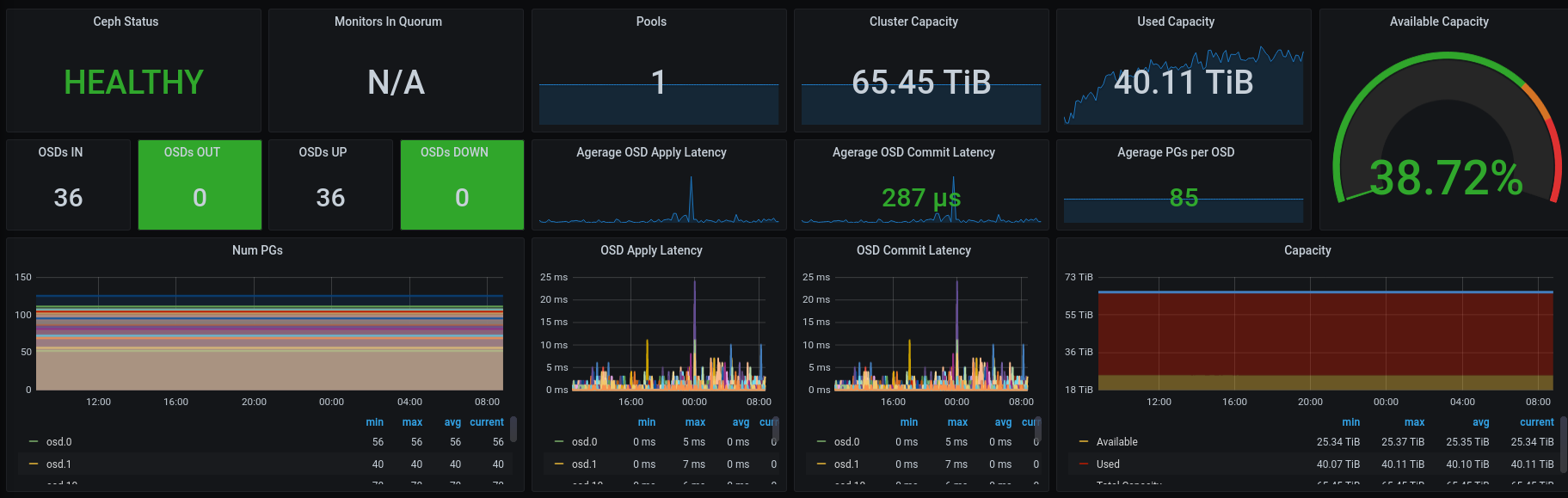
It all started with the big bang! We nearly lost 33 of 36 disks on a Proxmox/Ceph Cluster; this is the story of how we recovered them. At the end of 2020, we eventually had a long outstanding maintenance window for taking care of system upgrades at a customer. During this maintenance window, which involved reboots of server systems, the involved Ceph cluster unexpectedly went into a critical state. What was planned to be a few hours of checklist work in the early evening turned out to be an emergency case; let s call it a nightmare (not only because it included a big part of the night). Since we have learned a few things from our post mortem and RCA, it s worth sharing those with others. But first things first, let s step back and clarify what we had to deal with. The system and its upgrade One part of the upgrade included 3 Debian servers (we re calling them server1, server2 and server3 here), running on Proxmox v5 + Debian/stretch with 12 Ceph OSDs each (65.45TB in total), a so-called Proxmox Hyper-Converged Ceph Cluster. First, we went for upgrading the Proxmox v5/stretch system to Proxmox v6/buster, before updating Ceph Luminous v12.2.13 to the latest v14.2 release, supported by Proxmox v6/buster. The Proxmox upgrade included updating corosync from v2 to v3. As part of this upgrade, we had to apply some configuration changes, like adjust ring0 + ring1 address settings and add a mon_host configuration to the Ceph configuration. During the first two servers reboots, we noticed configuration glitches. After fixing those, we went for a reboot of the third server as well. Then we noticed that several Ceph OSDs were unexpectedly down. The NTP service wasn t working as expected after the upgrade. The underlying issue is a race condition of ntp with systemd-timesyncd (see #889290). As a result, we had clock skew problems with Ceph, indicating that the Ceph monitors clocks aren t running in sync (which is essential for proper Ceph operation). We initially assumed that our Ceph OSD failure derived from this clock skew problem, so we took care of it. After yet another round of reboots, to ensure the systems are running all with identical and sane configurations and services, we noticed lots of failing OSDs. This time all but three OSDs (19, 21 and 22) were down:
% sudo ceph osd tree
ID CLASS WEIGHT   TYPE NAME      STATUS REWEIGHT PRI-AFF
-1       65.44138 root default
-2       21.81310     host server1
 0   hdd  1.08989         osd.0    down  1.00000 1.00000
 1   hdd  1.08989         osd.1    down  1.00000 1.00000
 2   hdd  1.63539         osd.2    down  1.00000 1.00000
 3   hdd  1.63539         osd.3    down  1.00000 1.00000
 4   hdd  1.63539         osd.4    down  1.00000 1.00000
 5   hdd  1.63539         osd.5    down  1.00000 1.00000
18   hdd  2.18279         osd.18   down  1.00000 1.00000
20   hdd  2.18179         osd.20   down  1.00000 1.00000
28   hdd  2.18179         osd.28   down  1.00000 1.00000
29   hdd  2.18179         osd.29   down  1.00000 1.00000
30   hdd  2.18179         osd.30   down  1.00000 1.00000
31   hdd  2.18179         osd.31   down  1.00000 1.00000
-4       21.81409     host server2
 6   hdd  1.08989         osd.6    down  1.00000 1.00000
 7   hdd  1.08989         osd.7    down  1.00000 1.00000
 8   hdd  1.63539         osd.8    down  1.00000 1.00000
 9   hdd  1.63539         osd.9    down  1.00000 1.00000
10   hdd  1.63539         osd.10   down  1.00000 1.00000
11   hdd  1.63539         osd.11   down  1.00000 1.00000
19   hdd  2.18179         osd.19     up  1.00000 1.00000
21   hdd  2.18279         osd.21     up  1.00000 1.00000
22   hdd  2.18279         osd.22     up  1.00000 1.00000
32   hdd  2.18179         osd.32   down  1.00000 1.00000
33   hdd  2.18179         osd.33   down  1.00000 1.00000
34   hdd  2.18179         osd.34   down  1.00000 1.00000
-3       21.81419     host server3
12   hdd  1.08989         osd.12   down  1.00000 1.00000
13   hdd  1.08989         osd.13   down  1.00000 1.00000
14   hdd  1.63539         osd.14   down  1.00000 1.00000
15   hdd  1.63539         osd.15   down  1.00000 1.00000
16   hdd  1.63539         osd.16   down  1.00000 1.00000
17   hdd  1.63539         osd.17   down  1.00000 1.00000
23   hdd  2.18190         osd.23   down  1.00000 1.00000
24   hdd  2.18279         osd.24   down  1.00000 1.00000
25   hdd  2.18279         osd.25   down  1.00000 1.00000
35   hdd  2.18179         osd.35   down  1.00000 1.00000
36   hdd  2.18179         osd.36   down  1.00000 1.00000
37   hdd  2.18179         osd.37   down  1.00000 1.00000
Our blood pressure increased slightly! Did we just lose all of our cluster? What happened, and how can we get all the other OSDs back? We stumbled upon this beauty in our logs:
kernel: [   73.697957] XFS (sdl1): SB stripe unit sanity check failed
kernel: [   73.698002] XFS (sdl1): Metadata corruption detected at xfs_sb_read_verify+0x10e/0x180 [xfs], xfs_sb block 0xffffffffffffffff
kernel: [   73.698799] XFS (sdl1): Unmount and run xfs_repair
kernel: [   73.699199] XFS (sdl1): First 128 bytes of corrupted metadata buffer:
kernel: [   73.699677] 00000000: 58 46 53 42 00 00 10 00 00 00 00 00 00 00 62 00  XFSB..........b.
kernel: [   73.700205] 00000010: 00 00 00 00 00 00 00 00 00 00 00 00 00 00 00 00  ................
kernel: [   73.700836] 00000020: 62 44 2b c0 e6 22 40 d7 84 3d e1 cc 65 88 e9 d8  bD+.."@..=..e...
kernel: [   73.701347] 00000030: 00 00 00 00 00 00 40 08 00 00 00 00 00 00 01 00  ......@.........
kernel: [   73.701770] 00000040: 00 00 00 00 00 00 01 01 00 00 00 00 00 00 01 02  ................
ceph-disk[4240]: mount: /var/lib/ceph/tmp/mnt.jw367Y: mount(2) system call failed: Structure needs cleaning.
ceph-disk[4240]: ceph-disk: Mounting filesystem failed: Command '['/bin/mount', '-t', u'xfs', '-o', 'noatime,inode64', '--', '/dev/disk/by-parttypeuuid/4fbd7e29-9d25-41b8-afd0-062c0ceff05d.cdda39ed-5
ceph/tmp/mnt.jw367Y']' returned non-zero exit status 32
kernel: [   73.702162] 00000050: 00 00 00 01 00 00 18 80 00 00 00 04 00 00 00 00  ................
kernel: [   73.702550] 00000060: 00 00 06 48 bd a5 10 00 08 00 00 02 00 00 00 00  ...H............
kernel: [   73.702975] 00000070: 00 00 00 00 00 00 00 00 0c 0c 0b 01 0d 00 00 19  ................
kernel: [   73.703373] XFS (sdl1): SB validate failed with error -117.
The same issue was present for the other failing OSDs. We hoped, that the data itself was still there, and only the mounting of the XFS partitions failed. The Ceph cluster was initially installed in 2017 with Ceph jewel/10.2 with the OSDs on filestore (nowadays being a legacy approach to storing objects in Ceph). However, we migrated the disks to bluestore since then (with ceph-disk and not yet via ceph-volume what s being used nowadays). Using ceph-disk introduces these 100MB XFS partitions containing basic metadata for the OSD. Given that we had three working OSDs left, we decided to investigate how to rebuild the failing ones. Some folks on #ceph (thanks T1, ormandj + peetaur!) were kind enough to share how working XFS partitions looked like for them. After creating a backup (via dd), we tried to re-create such an XFS partition on server1. We noticed that even mounting a freshly created XFS partition failed:
synpromika@server1 ~ % sudo mkfs.xfs -f -i size=2048 -m uuid="4568c300-ad83-4288-963e-badcd99bf54f" /dev/sdc1
meta-data=/dev/sdc1              isize=2048   agcount=4, agsize=6272 blks
         =                       sectsz=4096  attr=2, projid32bit=1
         =                       crc=1        finobt=1, sparse=1, rmapbt=0
         =                       reflink=0
data     =                       bsize=4096   blocks=25088, imaxpct=25
         =                       sunit=128    swidth=64 blks
naming   =version 2              bsize=4096   ascii-ci=0, ftype=1
log      =internal log           bsize=4096   blocks=1608, version=2
         =                       sectsz=4096  sunit=1 blks, lazy-count=1
realtime =none                   extsz=4096   blocks=0, rtextents=0
synpromika@server1 ~ % sudo mount /dev/sdc1 /mnt/ceph-recovery
SB stripe unit sanity check failed
Metadata corruption detected at 0x433840, xfs_sb block 0x0/0x1000
libxfs_writebufr: write verifer failed on xfs_sb bno 0x0/0x1000
cache_node_purge: refcount was 1, not zero (node=0x1d3c400)
SB stripe unit sanity check failed
Metadata corruption detected at 0x433840, xfs_sb block 0x18800/0x1000
libxfs_writebufr: write verifer failed on xfs_sb bno 0x18800/0x1000
SB stripe unit sanity check failed
Metadata corruption detected at 0x433840, xfs_sb block 0x0/0x1000
libxfs_writebufr: write verifer failed on xfs_sb bno 0x0/0x1000
SB stripe unit sanity check failed
Metadata corruption detected at 0x433840, xfs_sb block 0x24c00/0x1000
libxfs_writebufr: write verifer failed on xfs_sb bno 0x24c00/0x1000
SB stripe unit sanity check failed
Metadata corruption detected at 0x433840, xfs_sb block 0xc400/0x1000
libxfs_writebufr: write verifer failed on xfs_sb bno 0xc400/0x1000
releasing dirty buffer (bulk) to free list!releasing dirty buffer (bulk) to free list!releasing dirty buffer (bulk) to free list!releasing dirty buffer (bulk) to free list!found dirty buffer (bulk) on free list!bad magic number
bad magic number
Metadata corruption detected at 0x433840, xfs_sb block 0x0/0x1000
libxfs_writebufr: write verifer failed on xfs_sb bno 0x0/0x1000
releasing dirty buffer (bulk) to free list!mount: /mnt/ceph-recovery: wrong fs type, bad option, bad superblock on /dev/sdc1, missing codepage or helper program, or other error.
Ouch. This very much looked related to the actual issue we re seeing. So we tried to execute mkfs.xfs with a bunch of different sunit/swidth settings. Using -d sunit=512 -d swidth=512 at least worked then, so we decided to force its usage in the creation of our OSD XFS partition. This brought us a working XFS partition. Please note, sunit must not be larger than swidth (more on that later!). Then we reconstructed how to restore all the metadata for the OSD (activate.monmap, active, block_uuid, bluefs, ceph_fsid, fsid, keyring, kv_backend, magic, mkfs_done, ready, require_osd_release, systemd, type, whoami). To identify the UUID, we can read the data from ceph --format json osd dump , like this for all our OSDs (Zsh syntax ftw!):
synpromika@server1 ~ % for f in  0..37  ; printf "osd-$f: %s\n" "$(sudo ceph --format json osd dump   jq -r ".osds[]   select(.osd==$f)   .uuid")"
osd-0: 4568c300-ad83-4288-963e-badcd99bf54f
osd-1: e573a17a-ccde-4719-bdf8-eef66903ca4f
osd-2: 0e1b2626-f248-4e7d-9950-f1a46644754e
osd-3: 1ac6a0a2-20ee-4ed8-9f76-d24e900c800c
[...]
Identifying the corresponding raw device for each OSD UUID is possible via:
synpromika@server1 ~ % UUID="4568c300-ad83-4288-963e-badcd99bf54f"
synpromika@server1 ~ % readlink -f /dev/disk/by-partuuid/"$ UUID "
/dev/sdc1
The OSD s key ID can be retrieved via:
synpromika@server1 ~ % OSD_ID=0
synpromika@server1 ~ % sudo ceph auth get osd."$ OSD_ID " -f json 2>/dev/null   jq -r '.[]   .key'
AQCKFpZdm0We[...]
Now we also need to identify the underlying block device:
synpromika@server1 ~ % OSD_ID=0
synpromika@server1 ~ % sudo ceph osd metadata osd."$ OSD_ID " -f json   jq -r '.bluestore_bdev_partition_path'    
/dev/sdc2
With all of this, we reconstructed the keyring, fsid, whoami, block + block_uuid files. All the other files inside the XFS metadata partition are identical on each OSD. So after placing and adjusting the corresponding metadata on the XFS partition for Ceph usage, we got a working OSD hurray! Since we had to fix yet another 32 OSDs, we decided to automate this XFS partitioning and metadata recovery procedure. We had a network share available on /srv/backup for storing backups of existing partition data. On each server, we tested the procedure with one single OSD before iterating over the list of remaining failing OSDs. We started with a shell script on server1, then adjusted the script for server2 and server3. This is the script, as we executed it on the 3rd server. Thanks to this, we managed to get the Ceph cluster up and running again. We didn t want to continue with the Ceph upgrade itself during the night though, as we wanted to know exactly what was going on and why the system behaved like that. Time for RCA! Root Cause Analysis So all but three OSDs on server2 failed, and the problem seems to be related to XFS. Therefore, our starting point for the RCA was, to identify what was different on server2, as compared to server1 + server3. My initial assumption was that this was related to some firmware issues with the involved controller (and as it turned out later, I was right!). The disks were attached as JBOD devices to a ServeRAID M5210 controller (with a stripe size of 512). Firmware state:
synpromika@server1 ~ % sudo storcli64 /c0 show all   grep '^Firmware'
Firmware Package Build = 24.16.0-0092
Firmware Version = 4.660.00-8156
synpromika@server2 ~ % sudo storcli64 /c0 show all   grep '^Firmware'
Firmware Package Build = 24.21.0-0112
Firmware Version = 4.680.00-8489
synpromika@server3 ~ % sudo storcli64 /c0 show all   grep '^Firmware'
Firmware Package Build = 24.16.0-0092
Firmware Version = 4.660.00-8156
This looked very promising, as server2 indeed runs with a different firmware version on the controller. But how so? Well, the motherboard of server2 got replaced by a Lenovo/IBM technician in January 2020, as we had a failing memory slot during a memory upgrade. As part of this procedure, the Lenovo/IBM technician installed the latest firmware versions. According to our documentation, some OSDs were rebuilt (due to the filestore->bluestore migration) in March and April 2020. It turned out that precisely those OSDs were the ones that survived the upgrade. So the surviving drives were created with a different firmware version running on the involved controller. All the other OSDs were created with an older controller firmware. But what difference does this make? Now let s check firmware changelogs. For the 24.21.0-0097 release we found this:
- Cannot create or mount xfs filesystem using xfsprogs 4.19.x kernel 4.20(SCGCQ02027889)
- xfs_info command run on an XFS file system created on a VD of strip size 1M shows sunit and swidth as 0(SCGCQ02056038)
Our XFS problem certainly was related to the controller s firmware. We also recalled that our monitoring system reported different sunit settings for the OSDs that were rebuilt in March and April. For example, OSD 21 was recreated and got different sunit settings:
WARN  server2.example.org  Mount options of /var/lib/ceph/osd/ceph-21      WARN - Missing: sunit=1024, Exceeding: sunit=512
We compared the new OSD 21 with an existing one (OSD 25 on server3):
synpromika@server2 ~ % systemctl show var-lib-ceph-osd-ceph\\x2d21.mount   grep sunit
Options=rw,noatime,attr2,inode64,sunit=512,swidth=512,noquota
synpromika@server3 ~ % systemctl show var-lib-ceph-osd-ceph\\x2d25.mount   grep sunit
Options=rw,noatime,attr2,inode64,sunit=1024,swidth=512,noquota
Thanks to our documentation, we could compare execution logs of their creation:
% diff -u ceph-disk-osd-25.log ceph-disk-osd-21.log
-synpromika@server2 ~ % sudo ceph-disk -v prepare --bluestore /dev/sdj --osd-id 25
+synpromika@server3 ~ % sudo ceph-disk -v prepare --bluestore /dev/sdi --osd-id 21
[...]
-command_check_call: Running command: /sbin/mkfs -t xfs -f -i size=2048 -- /dev/sdj1
-meta-data=/dev/sdj1              isize=2048   agcount=4, agsize=6272 blks
[...]
+command_check_call: Running command: /sbin/mkfs -t xfs -f -i size=2048 -- /dev/sdi1
+meta-data=/dev/sdi1              isize=2048   agcount=4, agsize=6336 blks
          =                       sectsz=4096  attr=2, projid32bit=1
          =                       crc=1        finobt=1, sparse=0, rmapbt=0, reflink=0
-data     =                       bsize=4096   blocks=25088, imaxpct=25
-         =                       sunit=128    swidth=64 blks
+data     =                       bsize=4096   blocks=25344, imaxpct=25
+         =                       sunit=64     swidth=64 blks
 naming   =version 2              bsize=4096   ascii-ci=0 ftype=1
 log      =internal log           bsize=4096   blocks=1608, version=2
          =                       sectsz=4096  sunit=1 blks, lazy-count=1
 realtime =none                   extsz=4096   blocks=0, rtextents=0
[...]
So back then, we even tried to track this down but couldn t make sense of it yet. But now this sounds very much like it is related to the problem we saw with this Ceph/XFS failure. We follow Occam s razor, assuming the simplest explanation is usually the right one, so let s check the disk properties and see what differs:
synpromika@server1 ~ % sudo blockdev --getsz --getsize64 --getss --getpbsz --getiomin --getioopt /dev/sdk
4685545472
2398999281664
512
4096
524288
262144
synpromika@server2 ~ % sudo blockdev --getsz --getsize64 --getss --getpbsz --getiomin --getioopt /dev/sdk
4685545472
2398999281664
512
4096
262144
262144
See the difference between server1 and server2 for identical disks? The getiomin option now reports something different for them:
synpromika@server1 ~ % sudo blockdev --getiomin /dev/sdk            
524288
synpromika@server1 ~ % cat /sys/block/sdk/queue/minimum_io_size
524288
synpromika@server2 ~ % sudo blockdev --getiomin /dev/sdk 
262144
synpromika@server2 ~ % cat /sys/block/sdk/queue/minimum_io_size
262144
It doesn t make sense that the minimum I/O size (iomin, AKA BLKIOMIN) is bigger than the optimal I/O size (ioopt, AKA BLKIOOPT). This leads us to Bug 202127 cannot mount or create xfs on a 597T device, which matches our findings here. But why did this XFS partition work in the past and fails now with the newer kernel version? The XFS behaviour change Now given that we have backups of all the XFS partition, we wanted to track down, a) when this XFS behaviour was introduced, and b) whether, and if so how it would be possible to reuse the XFS partition without having to rebuild it from scratch (e.g. if you would have no working Ceph OSD or backups left). Let s look at such a failing XFS partition with the Grml live system:
root@grml ~ # grml-version
grml64-full 2020.06 Release Codename Ausgehfuahangl [2020-06-24]
root@grml ~ # uname -a
Linux grml 5.6.0-2-amd64 #1 SMP Debian 5.6.14-2 (2020-06-09) x86_64 GNU/Linux
root@grml ~ # grml-hostname grml-2020-06
Setting hostname to grml-2020-06: done
root@grml ~ # exec zsh
root@grml-2020-06 ~ # dpkg -l xfsprogs util-linux
Desired=Unknown/Install/Remove/Purge/Hold
  Status=Not/Inst/Conf-files/Unpacked/halF-conf/Half-inst/trig-aWait/Trig-pend
 / Err?=(none)/Reinst-required (Status,Err: uppercase=bad)
 / Name           Version      Architecture Description
+++-==============-============-============-=========================================
ii  util-linux     2.35.2-4     amd64        miscellaneous system utilities
ii  xfsprogs       5.6.0-1+b2   amd64        Utilities for managing the XFS filesystem
There it s failing, no matter which mount option we try:
root@grml-2020-06 ~ # mount ./sdd1.dd /mnt
mount: /mnt: mount(2) system call failed: Structure needs cleaning.
root@grml-2020-06 ~ # dmesg   tail -30
[...]
[   64.788640] XFS (loop1): SB stripe unit sanity check failed
[   64.788671] XFS (loop1): Metadata corruption detected at xfs_sb_read_verify+0x102/0x170 [xfs], xfs_sb block 0xffffffffffffffff
[   64.788671] XFS (loop1): Unmount and run xfs_repair
[   64.788672] XFS (loop1): First 128 bytes of corrupted metadata buffer:
[   64.788673] 00000000: 58 46 53 42 00 00 10 00 00 00 00 00 00 00 62 00  XFSB..........b.
[   64.788674] 00000010: 00 00 00 00 00 00 00 00 00 00 00 00 00 00 00 00  ................
[   64.788675] 00000020: 32 b6 dc 35 53 b7 44 96 9d 63 30 ab b3 2b 68 36  2..5S.D..c0..+h6
[   64.788675] 00000030: 00 00 00 00 00 00 40 08 00 00 00 00 00 00 01 00  ......@.........
[   64.788675] 00000040: 00 00 00 00 00 00 01 01 00 00 00 00 00 00 01 02  ................
[   64.788676] 00000050: 00 00 00 01 00 00 18 80 00 00 00 04 00 00 00 00  ................
[   64.788677] 00000060: 00 00 06 48 bd a5 10 00 08 00 00 02 00 00 00 00  ...H............
[   64.788677] 00000070: 00 00 00 00 00 00 00 00 0c 0c 0b 01 0d 00 00 19  ................
[   64.788679] XFS (loop1): SB validate failed with error -117.
root@grml-2020-06 ~ # mount -t xfs -o rw,relatime,attr2,inode64,sunit=1024,swidth=512,noquota ./sdd1.dd /mnt/
mount: /mnt: wrong fs type, bad option, bad superblock on /dev/loop1, missing codepage or helper program, or other error.
32 root@grml-2020-06 ~ # dmesg   tail -1
[   66.342976] XFS (loop1): stripe width (512) must be a multiple of the stripe unit (1024)
root@grml-2020-06 ~ # mount -t xfs -o rw,relatime,attr2,inode64,sunit=512,swidth=512,noquota ./sdd1.dd /mnt/
mount: /mnt: mount(2) system call failed: Structure needs cleaning.
32 root@grml-2020-06 ~ # dmesg   tail -14
[   66.342976] XFS (loop1): stripe width (512) must be a multiple of the stripe unit (1024)
[   80.751277] XFS (loop1): SB stripe unit sanity check failed
[   80.751323] XFS (loop1): Metadata corruption detected at xfs_sb_read_verify+0x102/0x170 [xfs], xfs_sb block 0xffffffffffffffff 
[   80.751324] XFS (loop1): Unmount and run xfs_repair
[   80.751325] XFS (loop1): First 128 bytes of corrupted metadata buffer:
[   80.751327] 00000000: 58 46 53 42 00 00 10 00 00 00 00 00 00 00 62 00  XFSB..........b.
[   80.751328] 00000010: 00 00 00 00 00 00 00 00 00 00 00 00 00 00 00 00  ................
[   80.751330] 00000020: 32 b6 dc 35 53 b7 44 96 9d 63 30 ab b3 2b 68 36  2..5S.D..c0..+h6
[   80.751331] 00000030: 00 00 00 00 00 00 40 08 00 00 00 00 00 00 01 00  ......@.........
[   80.751331] 00000040: 00 00 00 00 00 00 01 01 00 00 00 00 00 00 01 02  ................
[   80.751332] 00000050: 00 00 00 01 00 00 18 80 00 00 00 04 00 00 00 00  ................
[   80.751333] 00000060: 00 00 06 48 bd a5 10 00 08 00 00 02 00 00 00 00  ...H............
[   80.751334] 00000070: 00 00 00 00 00 00 00 00 0c 0c 0b 01 0d 00 00 19  ................
[   80.751338] XFS (loop1): SB validate failed with error -117.
Also xfs_repair doesn t help either:
root@grml-2020-06 ~ # xfs_info ./sdd1.dd
meta-data=./sdd1.dd              isize=2048   agcount=4, agsize=6272 blks
         =                       sectsz=4096  attr=2, projid32bit=1
         =                       crc=1        finobt=1, sparse=0, rmapbt=0
         =                       reflink=0
data     =                       bsize=4096   blocks=25088, imaxpct=25
         =                       sunit=128    swidth=64 blks
naming   =version 2              bsize=4096   ascii-ci=0, ftype=1
log      =internal log           bsize=4096   blocks=1608, version=2
         =                       sectsz=4096  sunit=1 blks, lazy-count=1
realtime =none                   extsz=4096   blocks=0, rtextents=0
root@grml-2020-06 ~ # xfs_repair ./sdd1.dd
Phase 1 - find and verify superblock...
bad primary superblock - bad stripe width in superblock !!!
attempting to find secondary superblock...
..............................................................................................Sorry, could not find valid secondary superblock
Exiting now.
With the SB stripe unit sanity check failed message, we could easily track this down to the following commit fa4ca9c:
% git show fa4ca9c5574605d1e48b7e617705230a0640b6da   cat
commit fa4ca9c5574605d1e48b7e617705230a0640b6da
Author: Dave Chinner <dchinner@redhat.com>
Date:   Tue Jun 5 10:06:16 2018 -0700
    
    xfs: catch bad stripe alignment configurations
    
    When stripe alignments are invalid, data alignment algorithms in the
    allocator may not work correctly. Ensure we catch superblocks with
    invalid stripe alignment setups at mount time. These data alignment
    mismatches are now detected at mount time like this:
    
    XFS (loop0): SB stripe unit sanity check failed
    XFS (loop0): Metadata corruption detected at xfs_sb_read_verify+0xab/0x110, xfs_sb block 0xffffffffffffffff
    XFS (loop0): Unmount and run xfs_repair
    XFS (loop0): First 128 bytes of corrupted metadata buffer:
    0000000091c2de02: 58 46 53 42 00 00 10 00 00 00 00 00 00 00 10 00  XFSB............
    0000000023bff869: 00 00 00 00 00 00 00 00 00 00 00 00 00 00 00 00  ................
    00000000cdd8c893: 17 32 37 15 ff ca 46 3d 9a 17 d3 33 04 b5 f1 a2  .27...F=...3....
    000000009fd2844f: 00 00 00 00 00 00 00 04 00 00 00 00 00 00 06 d0  ................
    0000000088e9b0bb: 00 00 00 00 00 00 06 d1 00 00 00 00 00 00 06 d2  ................
    00000000ff233a20: 00 00 00 01 00 00 10 00 00 00 00 01 00 00 00 00  ................
    000000009db0ac8b: 00 00 03 60 e1 34 02 00 08 00 00 02 00 00 00 00  ... .4..........
    00000000f7022460: 00 00 00 00 00 00 00 00 0c 09 0b 01 0c 00 00 19  ................
    XFS (loop0): SB validate failed with error -117.
    
    And the mount fails.
    
    Signed-off-by: Dave Chinner <dchinner@redhat.com>
    Reviewed-by: Carlos Maiolino <cmaiolino@redhat.com>
    Reviewed-by: Darrick J. Wong <darrick.wong@oracle.com>
    Signed-off-by: Darrick J. Wong <darrick.wong@oracle.com>
diff --git fs/xfs/libxfs/xfs_sb.c fs/xfs/libxfs/xfs_sb.c
index b5dca3c8c84d..c06b6fc92966 100644
--- fs/xfs/libxfs/xfs_sb.c
+++ fs/xfs/libxfs/xfs_sb.c
@@ -278,6 +278,22 @@ xfs_mount_validate_sb(
                return -EFSCORRUPTED;
         
        
+       if (sbp->sb_unit)  
+               if (!xfs_sb_version_hasdalign(sbp)  
+                   sbp->sb_unit > sbp->sb_width  
+                   (sbp->sb_width % sbp->sb_unit) != 0)  
+                       xfs_notice(mp, "SB stripe unit sanity check failed");
+                       return -EFSCORRUPTED;
+                 
+         else if (xfs_sb_version_hasdalign(sbp))   
+               xfs_notice(mp, "SB stripe alignment sanity check failed");
+               return -EFSCORRUPTED;
+         else if (sbp->sb_width)  
+               xfs_notice(mp, "SB stripe width sanity check failed");
+               return -EFSCORRUPTED;
+        
+
+       
        if (xfs_sb_version_hascrc(&mp->m_sb) &&
            sbp->sb_blocksize < XFS_MIN_CRC_BLOCKSIZE)  
                xfs_notice(mp, "v5 SB sanity check failed");
This change is included in kernel versions 4.18-rc1 and newer:
% git describe --contains fa4ca9c5574605d1e48
v4.18-rc1~37^2~14
Now let s try with an older kernel version (4.9.0), using old Grml 2017.05 release:
root@grml ~ # grml-version
grml64-small 2017.05 Release Codename Freedatensuppe [2017-05-31]
root@grml ~ # uname -a
Linux grml 4.9.0-1-grml-amd64 #1 SMP Debian 4.9.29-1+grml.1 (2017-05-24) x86_64 GNU/Linux
root@grml ~ # lsb_release -a
No LSB modules are available.
Distributor ID: Debian
Description:    Debian GNU/Linux 9.0 (stretch)
Release:        9.0
Codename:       stretch
root@grml ~ # grml-hostname grml-2017-05
Setting hostname to grml-2017-05: done
root@grml ~ # exec zsh
root@grml-2017-05 ~ #
root@grml-2017-05 ~ # xfs_info ./sdd1.dd
xfs_info: ./sdd1.dd is not a mounted XFS filesystem
1 root@grml-2017-05 ~ # xfs_repair ./sdd1.dd
Phase 1 - find and verify superblock...
bad primary superblock - bad stripe width in superblock !!!
attempting to find secondary superblock...
..............................................................................................Sorry, could not find valid secondary superblock
Exiting now.
1 root@grml-2017-05 ~ # mount ./sdd1.dd /mnt
root@grml-2017-05 ~ # mount -t xfs
/root/sdd1.dd on /mnt type xfs (rw,relatime,attr2,inode64,sunit=1024,swidth=512,noquota)
root@grml-2017-05 ~ # ls /mnt
activate.monmap  active  block  block_uuid  bluefs  ceph_fsid  fsid  keyring  kv_backend  magic  mkfs_done  ready  require_osd_release  systemd  type  whoami
root@grml-2017-05 ~ # xfs_info /mnt
meta-data=/dev/loop1             isize=2048   agcount=4, agsize=6272 blks
         =                       sectsz=4096  attr=2, projid32bit=1
         =                       crc=1        finobt=1 spinodes=0 rmapbt=0
         =                       reflink=0
data     =                       bsize=4096   blocks=25088, imaxpct=25
         =                       sunit=128    swidth=64 blks
naming   =version 2              bsize=4096   ascii-ci=0 ftype=1
log      =internal               bsize=4096   blocks=1608, version=2
         =                       sectsz=4096  sunit=1 blks, lazy-count=1
realtime =none                   extsz=4096   blocks=0, rtextents=0
Mounting there indeed works! Now, if we mount the filesystem with new and proper sunit/swidth settings using the older kernel, it should rewrite them on disk:
root@grml-2017-05 ~ # mount -t xfs -o sunit=512,swidth=512 ./sdd1.dd /mnt/
root@grml-2017-05 ~ # umount /mnt/
And indeed, mounting this rewritten filesystem then also works with newer kernels:
root@grml-2020-06 ~ # mount ./sdd1.rewritten /mnt/
root@grml-2020-06 ~ # xfs_info /root/sdd1.rewritten
meta-data=/dev/loop1             isize=2048   agcount=4, agsize=6272 blks
         =                       sectsz=4096  attr=2, projid32bit=1
         =                       crc=1        finobt=1, sparse=0, rmapbt=0
         =                       reflink=0
data     =                       bsize=4096   blocks=25088, imaxpct=25
         =                       sunit=64    swidth=64 blks
naming   =version 2              bsize=4096   ascii-ci=0, ftype=1
log      =internal log           bsize=4096   blocks=1608, version=2
         =                       sectsz=4096  sunit=1 blks, lazy-count=1
realtime =none                   extsz=4096   blocks=0, rtextents=0
root@grml-2020-06 ~ # mount -t xfs                
/root/sdd1.rewritten on /mnt type xfs (rw,relatime,attr2,inode64,logbufs=8,logbsize=32k,sunit=512,swidth=512,noquota)
FTR: The sunit=512,swidth=512 from the xfs mount option is identical to xfs_info s output sunit=64,swidth=64 (because mount.xfs s sunit value is given in 512-byte block units, see man 5 xfs, and the xfs_info output reported here is in blocks with a block size (bsize) of 4096, so sunit = 512*512 := 64*4096 ). mkfs uses minimum and optimal sizes for stripe unit and stripe width; you can check this e.g. via (note that server2 with fixed firmware version reports proper values, whereas server3 with broken controller firmware reports non-sense):
synpromika@server2 ~ % for i in /sys/block/sd*/queue/ ; do printf "%s: %s %s\n" "$i" "$(cat "$i"/minimum_io_size)" "$(cat "$i"/optimal_io_size)" ; done
[...]
/sys/block/sdc/queue/: 262144 262144
/sys/block/sdd/queue/: 262144 262144
/sys/block/sde/queue/: 262144 262144
/sys/block/sdf/queue/: 262144 262144
/sys/block/sdg/queue/: 262144 262144
/sys/block/sdh/queue/: 262144 262144
/sys/block/sdi/queue/: 262144 262144
/sys/block/sdj/queue/: 262144 262144
/sys/block/sdk/queue/: 262144 262144
/sys/block/sdl/queue/: 262144 262144
/sys/block/sdm/queue/: 262144 262144
/sys/block/sdn/queue/: 262144 262144
[...]
synpromika@server3 ~ % for i in /sys/block/sd*/queue/ ; do printf "%s: %s %s\n" "$i" "$(cat "$i"/minimum_io_size)" "$(cat "$i"/optimal_io_size)" ; done
[...]
/sys/block/sdc/queue/: 524288 262144
/sys/block/sdd/queue/: 524288 262144
/sys/block/sde/queue/: 524288 262144
/sys/block/sdf/queue/: 524288 262144
/sys/block/sdg/queue/: 524288 262144
/sys/block/sdh/queue/: 524288 262144
/sys/block/sdi/queue/: 524288 262144
/sys/block/sdj/queue/: 524288 262144
/sys/block/sdk/queue/: 524288 262144
/sys/block/sdl/queue/: 524288 262144
/sys/block/sdm/queue/: 524288 262144
/sys/block/sdn/queue/: 524288 262144
[...]
This is the underlying reason why the initially created XFS partitions were created with incorrect sunit/swidth settings. The broken firmware of server1 and server3 was the cause of the incorrect settings they were ignored by old(er) xfs/kernel versions, but treated as an error by new ones. Make sure to also read the XFS FAQ regarding How to calculate the correct sunit,swidth values for optimal performance . We also stumbled upon two interesting reads in RedHat s knowledge base: 5075561 + 2150101 (requires an active subscription, though) and #1835947. Am I affected? How to work around it? To check whether your XFS mount points are affected by this issue, the following command line should be useful:
awk '$3 == "xfs" print $2 ' /proc/self/mounts   while read mount ; do echo -n "$mount " ; xfs_info $mount   awk '$0 ~ "swidth" gsub(/.*=/,"",$2); gsub(/.*=/,"",$3); print $2,$3 '   awk '  if ($1 > $2) print "impacted"; else print "OK" ' ; done
If you run into the above situation, the only known solution to get your original XFS partition working again, is to boot into an older kernel version again (4.17 or older), mount the XFS partition with correct sunit/swidth settings and then boot back into your new system (kernel version wise). Lessons learned Thanks: Darshaka Pathirana, Chris Hofstaedtler and Michael Hanscho. Looking for help with your IT infrastructure? Let us know!

6 April 2021

Jelmer Vernooij: Automatic Fixing of Debian Build Dependencies

The Debian Janitor is an automated system that commits fixes for (minor) issues in Debian packages that can be fixed by software. It gradually started proposing merges in early December. The first set of changes sent out ran lintian-brush on sid packages maintained in Git. This post is part of a series about the progress of the Janitor. In my last blogpost, I introduced the buildlog consultant - a tool that can identify many reasons why a Debian build failed. For example, here s a fragment of a build log where the Build-Depends lack python3-setuptools:
849
850
851
852
853
854
855
856
857
858
 dpkg-buildpackage: info: host architecture amd64
  fakeroot debian/rules clean
 dh clean --with python3,sphinxdoc --buildsystem=pybuild
    dh_auto_clean -O--buildsystem=pybuild
 I: pybuild base:232: python3.9 setup.py clean
 Traceback (most recent call last):
   File "/<<PKGBUILDDIR>>/setup.py", line 2, in <module>
     from setuptools import setup
 ModuleNotFoundError: No module named 'setuptools'
 E: pybuild pybuild:353: clean: plugin distutils failed with: exit code=1: python3.9 setup.py clean
The buildlog consultant can identify the line in bold as being key, and interprets it:

 % analyse-sbuild-log --json ~/build.log
  
    "stage": "build",
    "section": "Build",
    "lineno": 857,
    "kind": "missing-python-module",
    "details":  "module": "setuptools", "python_version": 3, "minimum_version": null 
  
Automatically acting on buildlog problems A common reason why Debian builds fail is missing dependencies or incorrect versions of dependencies declared in the package build depends. Based on the output of the buildlog consultant, it is possible in many cases to determine what dependency needs to be added to Build-Depends. In the example given above, we can use apt-file to look for the package that contains the path /usr/lib/python3/dist-packages/setuptools/__init__.py - and voila, we find python3-setuptools:
 % apt-file search /usr/lib/python3/dist-packages/setuptools/__init__.py
 python3-setuptools: /usr/lib/python3/dist-packages/setuptools/__init__.py
The deb-fix-build command automates these steps:
  1. It builds the package using sbuild; if the package successfully builds then it just exits successfully
  2. It tries to identify the problem by looking through the build log; if it can t or if it s a problem it has seen before (but apparently failed to resolve), then it exits with a non-zero exit code
  3. It tries to find a dependency that can address the problem
  4. It updates Build-Depends in debian/control or Depends in debian/tests/control
  5. Go to step 1
This takes away the tedious manual process of building a package, discovering that a dependency is missing, updating Build-Depends and trying again. For example, when I ran deb-fix-build while packaging saneyaml, the output looks something like this:
 % deb-fix-build
 Using output directory /tmp/tmpyz0nkgqq
 Using sbuild chroot unstable-amd64-sbuild
 Using fixers:  
 Building debian packages, running 'sbuild --no-clean-source -A -s -v'.
 Attempting to use fixer upstream requirement fixer(apt) to address MissingPythonDistribution('setuptools_scm', python_version=3, minimum_version='4')
 Using apt-file to search apt contents
 Adding build dependency: python3-setuptools-scm (>= 4)
 Building debian packages, running 'sbuild --no-clean-source -A -s -v'.
 Attempting to use fixer upstream requirement fixer(apt) to address MissingPythonDistribution('toml', python_version=3, minimum_version=None)
 Adding build dependency: python3-toml
 Building debian packages, running 'sbuild --no-clean-source -A -s -v'.
 Built 0.5.2-1- changes files at [ saneyaml_0.5.2-1_amd64.changes ].
And in our Git repository, we see these changes as well:
% git log -p
 commit 5a1715f4c7273b042818fc75702f2284034c7277 (HEAD -> master)
 Author: Jelmer Vernoo  <jelmer@jelmer.uk>
 Date:   Sun Apr 4 02:35:56 2021 +0100
     Add missing build dependency on python3-toml.
 diff --git a/debian/control b/debian/control
 index 5b854dc..3b27b73 100644
 --- a/debian/control
 +++ b/debian/control
 @@ -1,6 +1,6 @@
  Rules-Requires-Root: no
  Standards-Version: 4.5.1
 -Build-Depends: debhelper-compat (= 12), dh-sequence-python3, python3-all, python3-setuptools (>= 50), python3-wheel, python3-setuptools-scm (>= 4)
 +Build-Depends: debhelper-compat (= 12), dh-sequence-python3, python3-all, python3-setuptools (>= 50), python3-wheel, python3-setuptools-scm (>= 4), python3-toml
  Testsuite: autopkgtest-pkg-python
  Source: python-saneyaml
  Priority: optional
 commit f03047da80fcd8468ee231fbc4cf8488d7a0acd1
 Author: Jelmer Vernoo  <jelmer@jelmer.uk>
 Date:   Sun Apr 4 02:35:34 2021 +0100
     Add missing build dependency on python3-setuptools-scm (>= 4).
 diff --git a/debian/control b/debian/control
 index a476cc2..5b854dc 100644
 --- a/debian/control
 +++ b/debian/control
 @@ -1,6 +1,6 @@
  Rules-Requires-Root: no
  Standards-Version: 4.5.1
 -Build-Depends: debhelper-compat (= 12), dh-sequence-python3, python3-all, python3-setuptools (>= 50), python3-wheel
 +Build-Depends: debhelper-compat (= 12), dh-sequence-python3, python3-all, python3-setuptools (>= 50), python3-wheel, python3-setuptools-scm (>= 4)
  Testsuite: autopkgtest-pkg-python
  Source: python-saneyaml
  Priority: optional
Using deb-fix-build You can run deb-fix-build by installing the ognibuild package from unstable. The only requirements for using it are that:
  • The package is maintained in Git
  • A sbuild schroot is available for use
Caveats deb-fix-build is fairly easy to understand, and if it doesn t work then you re no worse off than you were without it - you ll have to add your own Build-Depends. That said, there are a couple of things to keep in mind:
  • At the moment, it doesn t distinguish between general, Arch or Indep Build-Depends.
  • It can only add dependencies for things that are actually in the archive
  • Sometimes there are multiple packages that can provide a file, command or python package - it tries to find the right one with heuristics but doesn t always get it right

1 April 2021

Utkarsh Gupta: FOSS Activites in March 2021

Here s my (eighteenth) monthly update about the activities I ve done in the F/L/OSS world.

Debian
This was my 27th month of active contributing to Debian. I became a DM in late March 2019 and a DD on Christmas 19! \o/ This month was a bit exhausting; lots of moving parts. With the financial year ending, it was even more crazy, with me running around to banks, CA, et al.
Anyway, with now working on Ubuntu full-time, I did little of Debian this month. Here are the following things I worked on:

Uploads and bug fixes:

Other $things:
  • Attended the Debian LTS team meeting.
  • Mentoring for newcomers.
  • Moderation of -project mailing list.

Debian (E)LTS
Debian Long Term Support (LTS) is a project to extend the lifetime of all Debian stable releases to (at least) 5 years. Debian LTS is not handled by the Debian security team, but by a separate group of volunteers and companies interested in making it a success. And Debian Extended LTS (ELTS) is its sister project, extending support to the Jessie release (+2 years after LTS support). This was my eighteenth month as a Debian LTS and ninth month as a Debian ELTS paid contributor.
I was assigned 60.00 hours for LTS and 39.00 hours for ELTS and worked on the following things:

LTS CVE Fixes and Announcements:

ELTS CVE Fixes and Announcements:

Other (E)LTS Work:
  • Front-desk duty from 01-03 until 07-03 for ELTS and then from 29-03 until 04-04 for both LTS and ELTS.
  • Triaged wpa, python-aiohttp, spip, wpa, qemu, tomcat7, tomcat8, grub2, mupdf, openssh, tiff, spice, pillow, xmlgraphics-commons, batik, libupnp, ca-certificates, salt, squid3, shibboleth-sp2, courier-authlib, cloud-init, spamassassin, openssl, libcaca, and openjpeg2.
  • Marked CVE-2021-21330/python-aiohttp as not-affected for stretch.
  • Marked CVE-2021-20233, CVE-2021-20225, CVE-2020-27779, CVE-2020-27778, CVE-2020-27749, CVE-2020-27748, CVE-2020-25647, CVE-2020-25632, CVE-2020-25631, and CVE-2020-14372, affecting grub2, as ignored for stretch and jessie.
  • Marked CVE-2020-27842/openjpeg2 as no-dsa for jessie.
  • Marked CVE-2020-27843/openjpeg2 as no-dsa for jessie.
  • Marked CVE-2021-28041/openssh as not-affect for jessie.
  • Marked CVE-2020-3552 3,4 /tiff as no-dsa for jessie.
  • Marked CVE-2021-20201/spice as no-dsa for jessie.
  • Marked CVE-2020-11988/xmlgraphics-commons as postponed for jessie.
  • Marked CVE-2020-11987/batik as postponed for jessie.
  • Marked CVE-2020-12695/libupnp as no-dsa for stretch.
  • Marked CVE-2021-25122/tomcat7 as not-affected for stretch.
  • Marked CVE-2021-25329/tomcat7 as ignored for stretch.
  • Marked CVE-2021-28116/squid3 as postponed for stretch and jessie.
  • Marked CVE-2021-3449/openssl as not-affected for stretch.
  • Document extra notes for grub2 for LTS and co-ordinate with the sec-team.
  • Document extra notes for pillow about piled-up issues in jessie.
  • Issued DLA-2593-1 for ca-certificates on Microsoft s request; co-ordinating w/ them.
  • Co-ordinating w/ maintainer of courier-authlib for stretch and jessie update.
  • Fixing build failures of ELTS security tracker and re-ordering entries in data/CVE-EXTENDED-LTS/list file.
  • Answer queries of dupondje and mikap about openssl on IRC; and it being not-affected for stretch.
  • Help review the status of CVE-2021-3121/golang-github-gogo-protobuf-dev for Ola.
  • Co-ordinating w/ Noah for cloud-init and setuptools.
  • Auto EOL ed mongodb, linux, guacamole-client, node-xmlhttprequest, newlib, neutron, privoxy, glpi, and zabbix for jessie.
  • Attended monthly meeting for Debian LTS.
  • Answered questions (& discussions) on IRC (#debian-lts and #debian-elts).
  • General and other discussions on LTS private and public mailing list.

Until next time.
:wq for today.

16 March 2021

Tianon Gravi: My Docker Install Process (re-redux)

See My Docker Install Process and My Docker Install Process (redux) . This one s going to be even more to-the-point.

grab Docker s APT repo GPG key
GNUPGHOME="$(mktemp -d)"; export GNUPGHOME
gpg --keyserver ha.pool.sks-keyservers.net --recv-keys 9DC858229FC7DD38854AE2D88D81803C0EBFCD88
sudo mkdir -p /etc/apt/tianon.gpg.d
gpg --export --armor 9DC858229FC7DD38854AE2D88D81803C0EBFCD88   sudo tee /etc/apt/tianon.gpg.d/docker.gpg.asc
rm -rf "$GNUPGHOME"

add Docker s APT source
source /etc/os-release
echo "deb [ arch=amd64 signed-by=/etc/apt/tianon.gpg.d/docker.gpg.asc ] https://download.docker.com/linux/debian $VERSION_CODENAME stable"   sudo tee /etc/apt/sources.list.d/docker.list
$ sudo apt update
...
Get:6 https://download.docker.com/linux/debian buster/stable amd64 Packages [17.8 kB]
...
Reading package lists... Done

exclude (unwated) CLI plugins
echo 'path-exclude /usr/libexec/docker/cli-plugins/*'   sudo tee /etc/dpkg/dpkg.cfg.d/unwanted-docker-cli-plugins

pin Docker versions
sudo vim /etc/apt/preferences.d/docker.pref
Package: *aufs* *rootless* cgroupfs-mount
Pin: version *
Pin-Priority: -10
Package: docker*
Pin: version 5:20.10*
Pin-Priority: 999
Package: containerd*
Pin: version 1.4*
Pin-Priority: 999

pre-configure Docker
sudo mkdir -p /etc/docker
sudo vim /etc/docker/daemon.json
 
	"storage-driver": "overlay2"
 

configure boot parameters
I usually set a few boot parameters as well (in /etc/default/grub s GRUB_CMDLINE_LINUX_DEFAULT option run sudo update-grub after adding these, space-separated).
  • cgroup_enable=memory enable memory accounting for containers (allows docker run --memory for setting hard memory limits on containers)
  • swapaccount=1 enable swap accounting for containers (allows docker run --memory-swap for setting hard swap memory limits on containers)
  • vsyscall=emulate allow older binaries to run (debian:wheezy, etc.; see docker/docker#28705)
  • systemd.legacy_systemd_cgroup_controller=yes newer versions of systemd may disable the legacy cgroup interfaces Docker currently uses; this instructs systemd to keep those enabled (for more details, see systemd/systemd#4628, opencontainers/runc#1175, docker/docker#28109)
    • NOTE: this one gets more complicated in Debian 11+ ( Bullseye ); possibly worth switching to cgroupv2 and systemd.unified_cgroup_hierarchy=1
All together:
...
GRUB_CMDLINE_LINUX_DEFAULT="cgroup_enable=memory swapaccount=1 vsyscall=emulate systemd.legacy_systemd_cgroup_controller=yes"
...
(Don t forget to sudo update-grub and potentially reboot check /proc/cmdline to verify.)

install Docker!
$ sudo apt-get install -V docker-ce
...
Unpacking containerd.io (1.4.4-1) ...
...
Unpacking docker-ce-cli (5:20.10.5~3-0~debian-buster) ...
...
Unpacking docker-ce (5:20.10.5~3-0~debian-buster) ...
...

$ sudo usermod -aG docker "$(id -un)"

10 March 2021

Sean Whitton: consfigurator 0.3.1

I d like to briefly introduce my new project, Consfigurator:
Consfigurator is a system for declarative configuration management using Common Lisp. You can use it to configure hosts as root, deploy services as unprivileged users, build and deploy containers, and produce disc images. [not all of these are implemented yet, but the design permits them to be] Consfigurator s design gives you a great deal of flexibility about how to control the hosts you want to configure. If there is a command you can run which will obtain input and output streams attached to an interactive POSIX sh running on the target host/container, then with a little glue code, you can use much of Consfigurator s functionality to configure that host/container. But if it is possible to get an implementation of Common Lisp started up on the host, then Configurator can transparently execute your deployment code over on the remote side, rather than exchanging information via POSIX sh. This lets you use the full power of Common Lisp to deploy your configuration. Configurator has convenient abstractions for combining these different ways to execute your configuration on hosts with different ways of connecting to them. Connections can be arbitrarily nested. For example, to combine SSHing to a Debian machine as an unprivileged user, using sudo to become root, and then starting up a Lisp image to execute your deployment code, you would evaluate
    (deploy ((:ssh (:sudo :as "spwhitton@athena.example.com") :debian-sbcl)) athena.example.com)
Declarative configuration management systems like Consfigurator and Propellor share a number of goals with projects like the GNU Guix System and NixOS. However, tools like Consfigurator and Propellor try to layer the power of declarative and reproducible configuration on top of traditional, battle-tested unix system administration infrastructure like apt, dpkg, yum, and distro package archives, rather than seeking to replace any of those. Let s get as much as we can out of all that existing distro policy-compliant work!
Please check out the user s manual, which includes a tutorial/quick start guide, and come join us in #consfigurator on irc.oftc.net. It s early days but you can already do a fair few things with Consfigurator. It s a good time to come help get all the basic properties defined!

9 March 2021

Sylvestre Ledru: Debian running on Rust coreutils

tldr: Rust/coreutils ( https://github.com/uutils/coreutils/ ) is now available in Debian, good enough to boot a Debian with GNOME, install the top 1000 packages, build Firefox, the Linux Kernel and LLVM/Clang. Even if I wrote more than 100 patches to achieve that, it will probably be a bumpy ride for many other use cases.
It is also a terrific project to learn Rust. See the list of good first bugs. Even if I see Rust code every day at Mozilla, I was looking for an actual personal project (i.e. this isn't a Mozilla project) to learn Rust during the various COVID lockdowns. I started contributing to the alternative Coreutils developed in Rust. The project aims at proposing a drop-in replacement of the C-based GNU Coreutils, and I wanted to evaluate if this could be used to run a regular Debian. Similar to what I have done with clang.debian.net a few years ago (rebuilding the Debian archive using clang instead of gcc). I expect that most of the readers know what is the Coreutils. It is a set of programs performing simple operations (copy/move file, change permissions/ownership, etc). Even if some commands are from the 70s, they are at the base of Linux, Unix and macOS. While different implementations can be found, they are trying to remain compatible in terms of arguments, options, etc. This implementation of Coreutils isn t different! If you want to learn more about the history of Unix, I recommend this great Corecursive podcast with Brian Kernighan. While a lot of people contributed to this project, much was left to be done: To start easy, I defined 4 goals for this work:
  1. Package Coreutils in Debian/Ubuntu
  2. Boot a Debian system with a Rust-based coreutils
  3. Install the top 1000 packages in Debian - including GNOME
  4. Build Firefox, the Linux Kernel and LLV/Clang

Packaging of Coreutils in Debian Packaging in Debian isn't a trivial or even simple task. It requires uploading independently all the dependencies in the archive. Rust, with its new ecosystem and small crates, is making this task significantly harder. The package is called rust-coreutils - https://tracker.debian.org/pkg/rust-coreutils For Debian/Ubuntu users, to have an idea of the complexity of packaging such applications, just run
debtree --build-dep rust-coreutils dot -Tsvg > coreutils.svg (should be around 1M). Since it isn't production ready, the rust-coreutils is installable in parallel with coreutils. This package does NOT replace the GNU/coreutils files (yet?), the new files are installed in /usr/lib/cargo/bin/. They can be used with: export PATH=/usr/lib/cargo/bin/:$PATH Or, uglier, overriding the files with the new ones.

Booting Debian with rust-coreutils To achieve this, because I knew I would likely break the image a few times, I created a new project to quickly install a full Debian with PXE and preseed. The project is available here: https://github.com/opencollab/qemu-debian-install-pxe-preseed/ A script to create the full qemu image: build_qemu_debian_image.sh A second script to boot on the newly created image: boot.sh Then, building and installing coreutils on the system (yeah, it is ugly - don t do that at home): apt install rust-coreutils
cd /usr/lib/cargo/bin/
for f in *; do
cp -f $f /usr/bin/
done
First surprise, unlike the old init.d init system, as systemd is not relying on a series of scripts (it is mostly written in C), replacing the coreutils did not have an impact. Therefore, I didn't experience any issue during the boot process

Implementing missing options A significant number of problems could be easily identified as a lack of support for some options. Here is a list of most of the fixes I had to implement to make this plan work:

Different behavior Most of the programs behaved as expected. Here is a list of differences:
  • install doesn't support using /dev/null as source file
    Setting up libreoffice-common (1:6.1.5-3+deb10u6) ...
    install: error: install: cannot install /dev/null to /etc/apparmor.d/local/usr.lib.libreoffice.program.oosplash : the source path is not an existing regular file
    A limitation of rust itself https://github.com/rust-lang/rust/issues/79390

Compile Firefox, Clang and the Linux Kernel Build systems can vary significantly one from the other. To verify their usage of coreutils, I built these three major projects

Firefox As Firefox relies mostly on Python as a build system, it went smoothly. I didn t encounter any issue. The only unrelated issue that I noticed working on it was apt-key was broken because the script relied on a buggy option of mktemp.

Linux Kernel I identified only two issues compared to GNU Coreutils:
  • The chown command on a non-existing symlink target doesn t fail on the GNU version, the Rust one was triggering an error.
    https://github.com/uutils/coreutils/pull/1694
  • Linux kernel
    ln -fsn ../../x86/boot/bzImage ./arch/x86_64/boot/bzImage
    ln: error: Unrecognized option: 'n'

LLVM/Clang The llvm toolchain relies on Cmake. Just like for Firefox, I didn t face any issue.

Comparing with GNU coreutils using its testsuite Recently, James Robson added a new test to run the GNU testsuite on the Rust/coreutils.

# TOTAL: 611
# PASS: 144
# SKIP: 86
# XFAIL: 0
# FAIL: 342
# XPASS: 0
# ERROR: 39
compared to 546 test passing with the GNU version. Even if a bunch of errors are just different outputs, it demonstrates that there is still a long road ahead.

Next steps & contribute First, we will need more motivated contributors to work on this project. Many features remain to be implemented, optimizations to be done (e.g. decreasing the memory usage), etc.
I started to create a list of good first bugs for newcomers: https://github.com/uutils/coreutils/issues?q=is%3Aissue+is%3Aopen+label%3A%22Good+first+bug%22
I will update this list of there is some interest for this project.
Helping improve the support of the GNU coreutils testsuite would be a huge step while being a great way to learn Rust! Then, once it is in a better state, we will be able to make it a reliable alternative in Debian/Ubuntu to the GNU/Coreutils. This might be also interesting for other folks who prefer a BSD license over a GPL.

1 March 2021

Paul Wise: FLOSS Activities February 2021

Focus This month I didn't have any particular focus. I just worked on issues in my info bubble.

Changes

Issues

Review

Administration
  • Debian: fix permissions for XMPP anti-spam git
  • Debian wiki: workaround moin bug with deleting deprecated pages, unblock IP addresses, approve accounts

Communication
  • Respond to queries from Debian users and contributors on the mailing lists and IRC
  • Edited and sent Debian DevNews #54

Sponsors The purple-discord/harmony/librecaptcha/libemail-outlook-message-perl work was sponsored by my employer. All other work was done on a volunteer basis.

9 February 2021

Gunnar Wolf: And now, Bullseye images are also built for the RPi

Public service announcement In case you want to run our latest release (still cooking, of course) in your Raspberries I have enabled builds for both Debian 10 (Stable, Buster) and Debian 11 (Testing, Bullseye). Go grab it! Oh Yes, we are currently failing the builds of ARM64 (RPi3 and RPi4) Something due to python3-minimal unwilling to get installed right. But that should be fixed soon! Can you help us? Take a look at the [build log for RPi3, Bullseye](https://raspi.debian.net/daily/raspi_3_bullseye.log), or just focus on the step where it breaks It seems to have been fixed, woohoo!:
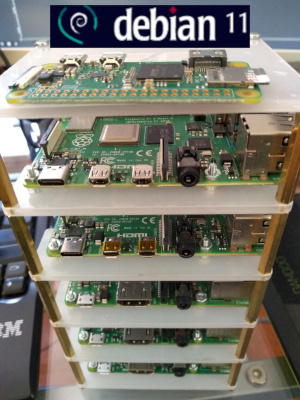
Setting up python3-minimal (3.9.1-1) ...
2021-02-09 08:56:38 DEBUG STDERR: E: Can not write log (Is /dev/pts mounted?) - posix_openpt (19: No such device)
Segmentation fault
dpkg: error processing package python3-minimal (--configure):
 installed python3-minimal package post-installation script subprocess returned error exit status 139
Errors were encountered while processing:
 python3-minimal
E: Sub-process /usr/bin/dpkg returned an error code (1)
Anyway, as you can see, the eight built images work fine and are tested, at least, for basic support!

2 January 2021

Paul Wise: FLOSS Activities December 2020

Focus This month I didn't have any particular focus. I just worked on issues in my info bubble.

Changes

Issues

Review

Administration
  • Debian: restart bacula director, ping some people about disk usage
  • Debian wiki: unblock IP addresses, approve accounts, update email for accounts with bouncing email

Communication
  • Respond to queries from Debian users and contributors on the mailing lists and IRC

Sponsors All work was done on a volunteer basis.

31 December 2020

Holger Levsen: 20201231-no-source-change-source-uploads

On doing 540 no-source-change source-only uploads in two weeks So I've been doing 540 no-source-change source-only uploads in the last two weeks and am planning to do 3000 more in January 2021. We'll see how that goes ;) Let me explain what I have been doing and why. So, starting with the Bullseye release cycle the Release Team changed policy: only packages which were build on buildds are allowed to migrate to testing. Which is pretty nice for reproducible builds as this also ensures that a .buildinfo file is available for anyone wanting to reproduce the binaries of that package. However, there are many binary (and source) packages in Debian which were uploaded before 2016 (which is when .buildinfo files were introduced) or were uploaded with binaries until that change in release policy July 2019. Then Ivo De Decker scheduled binNMUs for all the affected packages but due to the way binNMUs work, he couldn't do anything about arch:all packages as they currently cannot be rebuilt with binNMUs. Ivo and myself discussed what could be done about the remaining packages and (besides long complicated changes to Debian's workflows) the only thing deemed possible was doing many many source uploads with just a new changelog entry:
  * Non maintainer upload by the Reproducible Builds team.
  * No source change upload to rebuild on buildd with .buildinfo files.
These packages are all inherently buggy, because Debian policy mandates that packages should be reproducible and without .buildinfo files one cannot reproducibly rebuild packages. So instead of filing many many bugs we've decided to just fix these bugs by doing a no-source-change source uploads. One nice aspect of these uploads is that there's no follow-up work imposed on the maintainer: whether they keep that changelog entry or whether they discard it, it does not matter. So Ivo had developed an SQL query which showed 570 packages needing an update roughly two weeks ago, on December 18 and so I started slowly. This is the amount of NMUs I did in the last days:
for i in $(seq 18 30) ; do echo -n "Dec $i: " ; ls -lart1 done/*upload grep -c "Dec $i" ; done
Dec 18: 12
Dec 19: 0
Dec 20: 3
Dec 21: 13
Dec 22: 13
Dec 23: 16
Dec 24: 4
Dec 25: 28
Dec 26: 0
Dec 27: 38
Dec 28: 198
Dec 29: 206
Dec 30: 9
About ten packages had FTBFS bugs preventing an upload and seven packages were uploaded by the maintainer before me. I've seen two cases of sudden maintainer uploads after 8 and 10 years of no activity! So what did I do for each upload? Much to my surprise I didn't get much feedback, there were like 6 people on the #debian-reproducible channel cheering and one on #debian-qa, though that person is a Release Team member so that was kind of important cheering. And I've seen some maintainer uploads to packages which haven't seen uploads since some years. And really nice: no-one complained so far. I hope this will stay this way with the plan to do 3000 more uploads of this kind: Those 570 packages were only key packages but there are 3000 more source packages which have a binary in bullseye for which no .buildinfo file exists. So I plan to upload them all in January 2021 and you can help me doing so, by uploading your packages before me - and maybe fixing some other bugs in the process! I've posted the list of packages (sorted by ddlist) to debian-devel@lists.d.o, see https://lists.debian.org/debian-devel/2020/12/msg00419.html. Many thanks to Ivo and the whole Release Team for their support of Reproducible Builds and generally speaking for the many many enhancements to the release process we've seen over the years. Debian in 2021 will rock'n'roll more than ever! So thank you all, once again, for making Debian what it is and what it will be!

22 December 2020

Andrej Shadura: Vendoring Rust dependencies for a Debian derivative

Recently, I needed to package a Rust crate libslirp for a Apertis, a Debian derivative. libslirp is used by the newly release UML backend of debos, our Debian image build tool. Unfortunately, this crate hasn t yet been properly packaged for Debian proper, so I could not simply pull the packaging from Debian. Even worse, its build dependencies haven t all been packaged yet. Most importantly, I have only uploaded zbus to Debian today, and at that time none of its dependencies were in Debian either. Another issue with this were that each crate is packaged for Debian as a separate package, making the process a bit more tricky since I d need to import all of the crates into Apertis separately. Doing that takes time and is further complicated by the CI loop we re using which requires the full build process to complete for a package before a pipeline a dependent package can run. Having all that considered, I took a shortcut: I vendored all the build dependencies with the package itself, and here s how. I started with debcargo-conf, where the not-yet-complete packaging lives. With debcargo, I generated the source package as if I were to upload to Debian. Since I ll be vendoring the dependencies, I have removed most of the Rust dependencies and replaced them with those extra dependencies needed by those crates. So, I replaced this:
Build-Depends: debhelper (>= 12),
 dh-cargo (>= 24),
 cargo:native,
 rustc:native,
 libstd-rust-dev,
 librust-enumflags2-0.6+default-dev (>= 0.6.4-~~),
 librust-ipnetwork-0.17+default-dev,
 librust-lazy-static-1+default-dev (>= 1.4-~~),
 librust-libc-0.2+default-dev,
 librust-libslirp-sys-4+default-dev (>= 4.2.0-~~),
 librust-libsystemd-0.2+default-dev,
 librust-mio-0.6+default-dev,
 librust-mio-extras-2+default-dev (>= 2.0.5-~~),
 librust-nix-0.17+default-dev,
 librust-slab-0.4+default-dev,
 librust-structopt-0.3+default-dev,
 librust-url-2+default-dev (>= 2.1-~~),
 librust-zbus-1+default-dev,
 librust-zvariant-2+default-dev
By this:
Build-Depends: debhelper (>= 12),
 dh-cargo (>= 17),
 cargo:native,
 rustc:native,
 libstd-rust-dev,
 pkg-config,
 libglib2.0-dev,
 libslirp-dev
I wanted to keep the delta to the future Debian package at a bare minimum, so I kept the original dh-cargo build process, only making sure the vendored dependencies are found in the right place. The cleanest approach in my view was to use the fact that the 3.0 (quilt) source format allows multiple original tarballs: the main tarball would be the same orig tarball as in Debian, and an extra tarball would contain the vendored code. When we sync with Debian, the extra tarball would be dropped, just as the adjustments to the debian/rules. To generate the vendor tarball, I added this to the rules file:
include /usr/share/dpkg/pkg-info.mk
vendor:
        -[ -d vendor ] && rm -rf vendor
        rm -rf Cargo.lock
        cargo vendor
        tar Jcf ../$(DEB_SOURCE)_$(DEB_VERSION_UPSTREAM).orig-vendor.tar.xz vendor/
.PHONY: vendor
This target, being run manually and not as part of the build process, download the latest dependencies satisfying the requirements in Cargo.toml and rolls them into a vendor tarball. Now, to make dh-cargo use the vendored code, we need to link it into the right place. dh-cargo creates a Cargo registry tree in a subdirectly under debian/ where it symlinks crates from the Rust development packages. This extra code makes sure the vendored dependencies are available there too:
override_dh_auto_configure:
        dh_auto_configure $@
        for d in vendor/* ; \
        do \
                [ -L debian/cargo_registry/$$(basename $$d) ] && rm debian/cargo_registry/$$(basename $$d) ; \
                ln -rs $$d debian/cargo_registry ; \
        done
An important thing here is that if the build happens on a non-clean system, dh-cargo may have symlinked a system crate already installed so we need to remove that symlink and replace it by ours. We build packages in clean chroots, so this is not that important, otherwise for reproducibility reasons it would be better to create the registry directory from scratch. The final package can be found at the Apertis GitLab.

21 November 2020

Michael Stapelberg: Linux package managers are slow

I measured how long the most popular Linux distribution s package manager take to install small and large packages (the ack(1p) source code search Perl script and qemu, respectively). Where required, my measurements include metadata updates such as transferring an up-to-date package list. For me, requiring a metadata update is the more common case, particularly on live systems or within Docker containers. All measurements were taken on an Intel(R) Core(TM) i9-9900K CPU @ 3.60GHz running Docker 1.13.1 on Linux 4.19, backed by a Samsung 970 Pro NVMe drive boasting many hundreds of MB/s write performance. The machine is located in Z rich and connected to the Internet with a 1 Gigabit fiber connection, so the expected top download speed is 115 MB/s. See Appendix C for details on the measurement method and command outputs.

Measurements Keep in mind that these are one-time measurements. They should be indicative of actual performance, but your experience may vary.

ack (small Perl program)
distribution package manager data wall-clock time rate
Fedora dnf 114 MB 33s 3.4 MB/s
Debian apt 16 MB 10s 1.6 MB/s
NixOS Nix 15 MB 5s 3.0 MB/s
Arch Linux pacman 6.5 MB 3s 2.1 MB/s
Alpine apk 10 MB 1s 10.0 MB/s

qemu (large C program)
distribution package manager data wall-clock time rate
Fedora dnf 226 MB 4m37s 1.2 MB/s
Debian apt 224 MB 1m35s 2.3 MB/s
Arch Linux pacman 142 MB 44s 3.2 MB/s
NixOS Nix 180 MB 34s 5.2 MB/s
Alpine apk 26 MB 2.4s 10.8 MB/s

(Looking for older measurements? See Appendix B (2019). The difference between the slowest and fastest package managers is 30x! How can Alpine s apk and Arch Linux s pacman be an order of magnitude faster than the rest? They are doing a lot less than the others, and more efficiently, too.

Pain point: too much metadata For example, Fedora transfers a lot more data than others because its main package list is 60 MB (compressed!) alone. Compare that with Alpine s 734 KB APKINDEX.tar.gz. Of course the extra metadata which Fedora provides helps some use case, otherwise they hopefully would have removed it altogether. The amount of metadata seems excessive for the use case of installing a single package, which I consider the main use-case of an interactive package manager. I expect any modern Linux distribution to only transfer absolutely required data to complete my task.

Pain point: no concurrency Because they need to sequence executing arbitrary package maintainer-provided code (hooks and triggers), all tested package managers need to install packages sequentially (one after the other) instead of concurrently (all at the same time). In my blog post Can we do without hooks and triggers? , I outline that hooks and triggers are not strictly necessary to build a working Linux distribution.

Thought experiment: further speed-ups Strictly speaking, the only required feature of a package manager is to make available the package contents so that the package can be used: a program can be started, a kernel module can be loaded, etc. By only implementing what s needed for this feature, and nothing more, a package manager could likely beat apk s performance. It could, for example:
  • skip archive extraction by mounting file system images (like AppImage or snappy)
  • use compression which is light on CPU, as networks are fast (like apk)
  • skip fsync when it is safe to do so, i.e.:
    • package installations don t modify system state
    • atomic package installation (e.g. an append-only package store)
    • automatically clean up the package store after crashes

Current landscape Here s a table outlining how the various package managers listed on Wikipedia s list of software package management systems fare:
name scope package file format hooks/triggers
AppImage apps image: ISO9660, SquashFS no
snappy apps image: SquashFS yes: hooks
FlatPak apps archive: OSTree no
0install apps archive: tar.bz2 no
nix, guix distro archive: nar. bz2,xz activation script
dpkg distro archive: tar. gz,xz,bz2 in ar(1) yes
rpm distro archive: cpio. bz2,lz,xz scriptlets
pacman distro archive: tar.xz install
slackware distro archive: tar. gz,xz yes: doinst.sh
apk distro archive: tar.gz yes: .post-install
Entropy distro archive: tar.bz2 yes
ipkg, opkg distro archive: tar ,.gz yes

Conclusion As per the current landscape, there is no distribution-scoped package manager which uses images and leaves out hooks and triggers, not even in smaller Linux distributions. I think that space is really interesting, as it uses a minimal design to achieve significant real-world speed-ups. I have explored this idea in much more detail, and am happy to talk more about it in my post Introducing the distri research linux distribution".

Appendix C: measurement details (2020)

ack You can expand each of these:
Fedora s dnf takes almost 33 seconds to fetch and unpack 114 MB.
% docker run -t -i fedora /bin/bash
[root@62d3cae2e2f9 /]# time dnf install -y ack
Fedora 32 openh264 (From Cisco) - x86_64     1.9 kB/s   2.5 kB     00:01
Fedora Modular 32 - x86_64                   6.8 MB/s   4.9 MB     00:00
Fedora Modular 32 - x86_64 - Updates         5.6 MB/s   3.7 MB     00:00
Fedora 32 - x86_64 - Updates                 9.9 MB/s    23 MB     00:02
Fedora 32 - x86_64                            39 MB/s    70 MB     00:01
[ ]
real	0m32.898s
user	0m25.121s
sys	0m1.408s
NixOS s Nix takes a little over 5s to fetch and unpack 15 MB.
% docker run -t -i nixos/nix
39e9186422ba:/# time sh -c 'nix-channel --update && nix-env -iA nixpkgs.ack'
unpacking channels...
created 1 symlinks in user environment
installing 'perl5.32.0-ack-3.3.1'
these paths will be fetched (15.55 MiB download, 85.51 MiB unpacked):
  /nix/store/34l8jdg76kmwl1nbbq84r2gka0kw6rc8-perl5.32.0-ack-3.3.1-man
  /nix/store/9df65igwjmf2wbw0gbrrgair6piqjgmi-glibc-2.31
  /nix/store/9fd4pjaxpjyyxvvmxy43y392l7yvcwy1-perl5.32.0-File-Next-1.18
  /nix/store/czc3c1apx55s37qx4vadqhn3fhikchxi-libunistring-0.9.10
  /nix/store/dj6n505iqrk7srn96a27jfp3i0zgwa1l-acl-2.2.53
  /nix/store/ifayp0kvijq0n4x0bv51iqrb0yzyz77g-perl-5.32.0
  /nix/store/w9wc0d31p4z93cbgxijws03j5s2c4gyf-coreutils-8.31
  /nix/store/xim9l8hym4iga6d4azam4m0k0p1nw2rm-libidn2-2.3.0
  /nix/store/y7i47qjmf10i1ngpnsavv88zjagypycd-attr-2.4.48
  /nix/store/z45mp61h51ksxz28gds5110rf3wmqpdc-perl5.32.0-ack-3.3.1
copying path '/nix/store/34l8jdg76kmwl1nbbq84r2gka0kw6rc8-perl5.32.0-ack-3.3.1-man' from 'https://cache.nixos.org'...
copying path '/nix/store/czc3c1apx55s37qx4vadqhn3fhikchxi-libunistring-0.9.10' from 'https://cache.nixos.org'...
copying path '/nix/store/9fd4pjaxpjyyxvvmxy43y392l7yvcwy1-perl5.32.0-File-Next-1.18' from 'https://cache.nixos.org'...
copying path '/nix/store/xim9l8hym4iga6d4azam4m0k0p1nw2rm-libidn2-2.3.0' from 'https://cache.nixos.org'...
copying path '/nix/store/9df65igwjmf2wbw0gbrrgair6piqjgmi-glibc-2.31' from 'https://cache.nixos.org'...
copying path '/nix/store/y7i47qjmf10i1ngpnsavv88zjagypycd-attr-2.4.48' from 'https://cache.nixos.org'...
copying path '/nix/store/dj6n505iqrk7srn96a27jfp3i0zgwa1l-acl-2.2.53' from 'https://cache.nixos.org'...
copying path '/nix/store/w9wc0d31p4z93cbgxijws03j5s2c4gyf-coreutils-8.31' from 'https://cache.nixos.org'...
copying path '/nix/store/ifayp0kvijq0n4x0bv51iqrb0yzyz77g-perl-5.32.0' from 'https://cache.nixos.org'...
copying path '/nix/store/z45mp61h51ksxz28gds5110rf3wmqpdc-perl5.32.0-ack-3.3.1' from 'https://cache.nixos.org'...
building '/nix/store/m0rl62grplq7w7k3zqhlcz2hs99y332l-user-environment.drv'...
created 49 symlinks in user environment
real	0m 5.60s
user	0m 3.21s
sys	0m 1.66s
Debian s apt takes almost 10 seconds to fetch and unpack 16 MB.
% docker run -t -i debian:sid
root@1996bb94a2d1:/# time (apt update && apt install -y ack-grep)
Get:1 http://deb.debian.org/debian sid InRelease [146 kB]
Get:2 http://deb.debian.org/debian sid/main amd64 Packages [8400 kB]
Fetched 8546 kB in 1s (8088 kB/s)
[ ]
The following NEW packages will be installed:
  ack libfile-next-perl libgdbm-compat4 libgdbm6 libperl5.30 netbase perl perl-modules-5.30
0 upgraded, 8 newly installed, 0 to remove and 23 not upgraded.
Need to get 7341 kB of archives.
After this operation, 46.7 MB of additional disk space will be used.
[ ]
real	0m9.544s
user	0m2.839s
sys	0m0.775s
Arch Linux s pacman takes a little under 3s to fetch and unpack 6.5 MB.
% docker run -t -i archlinux/base
[root@9f6672688a64 /]# time (pacman -Sy && pacman -S --noconfirm ack)
:: Synchronizing package databases...
 core            130.8 KiB  1090 KiB/s 00:00
 extra          1655.8 KiB  3.48 MiB/s 00:00
 community         5.2 MiB  6.11 MiB/s 00:01
resolving dependencies...
looking for conflicting packages...
Packages (2) perl-file-next-1.18-2  ack-3.4.0-1
Total Download Size:   0.07 MiB
Total Installed Size:  0.19 MiB
[ ]
real	0m2.936s
user	0m0.375s
sys	0m0.160s
Alpine s apk takes a little over 1 second to fetch and unpack 10 MB.
% docker run -t -i alpine
fetch http://dl-cdn.alpinelinux.org/alpine/v3.12/main/x86_64/APKINDEX.tar.gz
fetch http://dl-cdn.alpinelinux.org/alpine/v3.12/community/x86_64/APKINDEX.tar.gz
(1/4) Installing libbz2 (1.0.8-r1)
(2/4) Installing perl (5.30.3-r0)
(3/4) Installing perl-file-next (1.18-r0)
(4/4) Installing ack (3.3.1-r0)
Executing busybox-1.31.1-r16.trigger
OK: 43 MiB in 18 packages
real	0m 1.24s
user	0m 0.40s
sys	0m 0.15s

qemu You can expand each of these:
Fedora s dnf takes over 4 minutes to fetch and unpack 226 MB.
% docker run -t -i fedora /bin/bash
[root@6a52ecfc3afa /]# time dnf install -y qemu
Fedora 32 openh264 (From Cisco) - x86_64     3.1 kB/s   2.5 kB     00:00
Fedora Modular 32 - x86_64                   6.3 MB/s   4.9 MB     00:00
Fedora Modular 32 - x86_64 - Updates         6.0 MB/s   3.7 MB     00:00
Fedora 32 - x86_64 - Updates                 334 kB/s    23 MB     01:10
Fedora 32 - x86_64                            33 MB/s    70 MB     00:02
[ ]
Total download size: 181 M
Downloading Packages:
[ ]
real	4m37.652s
user	0m38.239s
sys	0m6.321s
NixOS s Nix takes almost 34s to fetch and unpack 180 MB.
% docker run -t -i nixos/nix
83971cf79f7e:/# time sh -c 'nix-channel --update && nix-env -iA nixpkgs.qemu'
unpacking channels...
created 1 symlinks in user environment
installing 'qemu-5.1.0'
these paths will be fetched (180.70 MiB download, 1146.92 MiB unpacked):
[ ]
real	0m 33.64s
user	0m 16.96s
sys	0m 3.05s
Debian s apt takes over 95 seconds to fetch and unpack 224 MB.
% docker run -t -i debian:sid
root@b7cc25a927ab:/# time (apt update && apt install -y qemu-system-x86)
Get:1 http://deb.debian.org/debian sid InRelease [146 kB]
Get:2 http://deb.debian.org/debian sid/main amd64 Packages [8400 kB]
Fetched 8546 kB in 1s (5998 kB/s)
[ ]
Fetched 216 MB in 43s (5006 kB/s)
[ ]
real	1m25.375s
user	0m29.163s
sys	0m12.835s
Arch Linux s pacman takes almost 44s to fetch and unpack 142 MB.
% docker run -t -i archlinux/base
[root@58c78bda08e8 /]# time (pacman -Sy && pacman -S --noconfirm qemu)
:: Synchronizing package databases...
 core          130.8 KiB  1055 KiB/s 00:00
 extra        1655.8 KiB  3.70 MiB/s 00:00
 community       5.2 MiB  7.89 MiB/s 00:01
[ ]
Total Download Size:   135.46 MiB
Total Installed Size:  661.05 MiB
[ ]
real	0m43.901s
user	0m4.980s
sys	0m2.615s
Alpine s apk takes only about 2.4 seconds to fetch and unpack 26 MB.
% docker run -t -i alpine
/ # time apk add qemu-system-x86_64
fetch http://dl-cdn.alpinelinux.org/alpine/v3.10/main/x86_64/APKINDEX.tar.gz
fetch http://dl-cdn.alpinelinux.org/alpine/v3.10/community/x86_64/APKINDEX.tar.gz
[ ]
OK: 78 MiB in 95 packages
real	0m 2.43s
user	0m 0.46s
sys	0m 0.09s

Appendix B: measurement details (2019)

ack You can expand each of these:
Fedora s dnf takes almost 30 seconds to fetch and unpack 107 MB.
% docker run -t -i fedora /bin/bash
[root@722e6df10258 /]# time dnf install -y ack
Fedora Modular 30 - x86_64            4.4 MB/s   2.7 MB     00:00
Fedora Modular 30 - x86_64 - Updates  3.7 MB/s   2.4 MB     00:00
Fedora 30 - x86_64 - Updates           17 MB/s    19 MB     00:01
Fedora 30 - x86_64                     31 MB/s    70 MB     00:02
[ ]
Install  44 Packages
Total download size: 13 M
Installed size: 42 M
[ ]
real	0m29.498s
user	0m22.954s
sys	0m1.085s
NixOS s Nix takes 14s to fetch and unpack 15 MB.
% docker run -t -i nixos/nix
39e9186422ba:/# time sh -c 'nix-channel --update && nix-env -i perl5.28.2-ack-2.28'
unpacking channels...
created 2 symlinks in user environment
installing 'perl5.28.2-ack-2.28'
these paths will be fetched (14.91 MiB download, 80.83 MiB unpacked):
  /nix/store/57iv2vch31v8plcjrk97lcw1zbwb2n9r-perl-5.28.2
  /nix/store/89gi8cbp8l5sf0m8pgynp2mh1c6pk1gk-attr-2.4.48
  /nix/store/gkrpl3k6s43fkg71n0269yq3p1f0al88-perl5.28.2-ack-2.28-man
  /nix/store/iykxb0bmfjmi7s53kfg6pjbfpd8jmza6-glibc-2.27
  /nix/store/k8lhqzpaaymshchz8ky3z4653h4kln9d-coreutils-8.31
  /nix/store/svgkibi7105pm151prywndsgvmc4qvzs-acl-2.2.53
  /nix/store/x4knf14z1p0ci72gl314i7vza93iy7yc-perl5.28.2-File-Next-1.16
  /nix/store/zfj7ria2kwqzqj9dh91kj9kwsynxdfk0-perl5.28.2-ack-2.28
copying path '/nix/store/gkrpl3k6s43fkg71n0269yq3p1f0al88-perl5.28.2-ack-2.28-man' from 'https://cache.nixos.org'...
copying path '/nix/store/iykxb0bmfjmi7s53kfg6pjbfpd8jmza6-glibc-2.27' from 'https://cache.nixos.org'...
copying path '/nix/store/x4knf14z1p0ci72gl314i7vza93iy7yc-perl5.28.2-File-Next-1.16' from 'https://cache.nixos.org'...
copying path '/nix/store/89gi8cbp8l5sf0m8pgynp2mh1c6pk1gk-attr-2.4.48' from 'https://cache.nixos.org'...
copying path '/nix/store/svgkibi7105pm151prywndsgvmc4qvzs-acl-2.2.53' from 'https://cache.nixos.org'...
copying path '/nix/store/k8lhqzpaaymshchz8ky3z4653h4kln9d-coreutils-8.31' from 'https://cache.nixos.org'...
copying path '/nix/store/57iv2vch31v8plcjrk97lcw1zbwb2n9r-perl-5.28.2' from 'https://cache.nixos.org'...
copying path '/nix/store/zfj7ria2kwqzqj9dh91kj9kwsynxdfk0-perl5.28.2-ack-2.28' from 'https://cache.nixos.org'...
building '/nix/store/q3243sjg91x1m8ipl0sj5gjzpnbgxrqw-user-environment.drv'...
created 56 symlinks in user environment
real	0m 14.02s
user	0m 8.83s
sys	0m 2.69s
Debian s apt takes almost 10 seconds to fetch and unpack 16 MB.
% docker run -t -i debian:sid
root@b7cc25a927ab:/# time (apt update && apt install -y ack-grep)
Get:1 http://cdn-fastly.deb.debian.org/debian sid InRelease [233 kB]
Get:2 http://cdn-fastly.deb.debian.org/debian sid/main amd64 Packages [8270 kB]
Fetched 8502 kB in 2s (4764 kB/s)
[ ]
The following NEW packages will be installed:
  ack ack-grep libfile-next-perl libgdbm-compat4 libgdbm5 libperl5.26 netbase perl perl-modules-5.26
The following packages will be upgraded:
  perl-base
1 upgraded, 9 newly installed, 0 to remove and 60 not upgraded.
Need to get 8238 kB of archives.
After this operation, 42.3 MB of additional disk space will be used.
[ ]
real	0m9.096s
user	0m2.616s
sys	0m0.441s
Arch Linux s pacman takes a little over 3s to fetch and unpack 6.5 MB.
% docker run -t -i archlinux/base
[root@9604e4ae2367 /]# time (pacman -Sy && pacman -S --noconfirm ack)
:: Synchronizing package databases...
 core            132.2 KiB  1033K/s 00:00
 extra          1629.6 KiB  2.95M/s 00:01
 community         4.9 MiB  5.75M/s 00:01
[ ]
Total Download Size:   0.07 MiB
Total Installed Size:  0.19 MiB
[ ]
real	0m3.354s
user	0m0.224s
sys	0m0.049s
Alpine s apk takes only about 1 second to fetch and unpack 10 MB.
% docker run -t -i alpine
/ # time apk add ack
fetch http://dl-cdn.alpinelinux.org/alpine/v3.10/main/x86_64/APKINDEX.tar.gz
fetch http://dl-cdn.alpinelinux.org/alpine/v3.10/community/x86_64/APKINDEX.tar.gz
(1/4) Installing perl-file-next (1.16-r0)
(2/4) Installing libbz2 (1.0.6-r7)
(3/4) Installing perl (5.28.2-r1)
(4/4) Installing ack (3.0.0-r0)
Executing busybox-1.30.1-r2.trigger
OK: 44 MiB in 18 packages
real	0m 0.96s
user	0m 0.25s
sys	0m 0.07s

qemu You can expand each of these:
Fedora s dnf takes over a minute to fetch and unpack 266 MB.
% docker run -t -i fedora /bin/bash
[root@722e6df10258 /]# time dnf install -y qemu
Fedora Modular 30 - x86_64            3.1 MB/s   2.7 MB     00:00
Fedora Modular 30 - x86_64 - Updates  2.7 MB/s   2.4 MB     00:00
Fedora 30 - x86_64 - Updates           20 MB/s    19 MB     00:00
Fedora 30 - x86_64                     31 MB/s    70 MB     00:02
[ ]
Install  262 Packages
Upgrade    4 Packages
Total download size: 172 M
[ ]
real	1m7.877s
user	0m44.237s
sys	0m3.258s
NixOS s Nix takes 38s to fetch and unpack 262 MB.
% docker run -t -i nixos/nix
39e9186422ba:/# time sh -c 'nix-channel --update && nix-env -i qemu-4.0.0'
unpacking channels...
created 2 symlinks in user environment
installing 'qemu-4.0.0'
these paths will be fetched (262.18 MiB download, 1364.54 MiB unpacked):
[ ]
real	0m 38.49s
user	0m 26.52s
sys	0m 4.43s
Debian s apt takes 51 seconds to fetch and unpack 159 MB.
% docker run -t -i debian:sid
root@b7cc25a927ab:/# time (apt update && apt install -y qemu-system-x86)
Get:1 http://cdn-fastly.deb.debian.org/debian sid InRelease [149 kB]
Get:2 http://cdn-fastly.deb.debian.org/debian sid/main amd64 Packages [8426 kB]
Fetched 8574 kB in 1s (6716 kB/s)
[ ]
Fetched 151 MB in 2s (64.6 MB/s)
[ ]
real	0m51.583s
user	0m15.671s
sys	0m3.732s
Arch Linux s pacman takes 1m2s to fetch and unpack 124 MB.
% docker run -t -i archlinux/base
[root@9604e4ae2367 /]# time (pacman -Sy && pacman -S --noconfirm qemu)
:: Synchronizing package databases...
 core       132.2 KiB   751K/s 00:00
 extra     1629.6 KiB  3.04M/s 00:01
 community    4.9 MiB  6.16M/s 00:01
[ ]
Total Download Size:   123.20 MiB
Total Installed Size:  587.84 MiB
[ ]
real	1m2.475s
user	0m9.272s
sys	0m2.458s
Alpine s apk takes only about 2.4 seconds to fetch and unpack 26 MB.
% docker run -t -i alpine
/ # time apk add qemu-system-x86_64
fetch http://dl-cdn.alpinelinux.org/alpine/v3.10/main/x86_64/APKINDEX.tar.gz
fetch http://dl-cdn.alpinelinux.org/alpine/v3.10/community/x86_64/APKINDEX.tar.gz
[ ]
OK: 78 MiB in 95 packages
real	0m 2.43s
user	0m 0.46s
sys	0m 0.09s

15 November 2020

Jamie McClelland: Being your own Certificate Authority

There are many blogs and tutorials with nice shortcuts providing the necessary openssl commands to create and sign x509 certficates. However, there is precious few instructions for how to easily create your own certificate authority. You probably never want to do this in a production environment, but in a development environment it will make your life signficantly easier. Create the certificate authority Create the key and certificate Pick a directory to store things in. Then, make your certificate authority key and certificate:
openssl genrsa -out cakey.pem 2048
openssl req -x509 -new -nodes -key cakey.pem -sha256 -days 1024 -out cacert.pem
Some tips: Want to review what you created?
openssl x509 -text -noout -in cacert.pem 
Prepare your directory You can create your own /etc/ssl/openssl.cnf file and really customize things. But I find it safer to use your distribution's default file so you can benefit from changes to it every time you upgrade. If you do take the default file, you may have the dir option coded to demoCA (in Debian at least, maybe it's the upstream default too). So, to avoid changing any configuration files, let's just use this value. Which means... you'll need to create that directory. The setting is relative - so you can create this directory in the same directory you have your keys.
mkdir demoCA
Lastly, you have to have a file that keeps track of your certificates. If it doesn't exist, you get an error:
touch demoCA/index.txt
That's it! Your certificate authority is ready to go. Create a key and ceritificate signing request First, pick your domain names (aka "common" names). For example, example.org and www.example.org. Set those values in an environment variable. If you just have one:
export subjectAltName=DNS:example.org
If you have more then one:
export subjectAltName=DNS:example.org,DNS:www.example.org
Next, create a key and a certificate signing request:
openssl req -new -nodes -out new.csr -keyout new.key
Again, you will be prompted for some values (country, state, etc) - be sure to choose the same values you used with your certficiate authority! I honestly don't understand why this is necessary (when I set different values I get an error on the signing request step below). Maybe someone can add a comment to this post explaining why these values have to match? Also, you must provide a common name for your certificate - you can choose the same name as the altSubjectNames value you set above (but just one domain). Want to review what you created?
openssl req -in new.csr -text -noout 
Sign it! At last the momenet we have been waiting for.
openssl ca -keyfile cakey.pem -cert cacert.pem -out new.crt -outdir . -rand_serial -infiles new.csr
Now yu have a new.crt and new.csr that you can install via your web browser, mail server, etc specification. Sanity check it This command will confirm that the certificate is trusted by your certificate authority.
openssl verify -no-CApath -CAfile cacert.pem new.crt 
But wait, there's still a question of trust You probably want to tell your computer or browser that you want to trust your certificate signing authority. Command line tools Most tools in linux by default will trust all the certificates in /etc/ssl/certs/ca-certificates.crt. (If that file doesn't exist, try installing the ca-certificates package). If you want to add your certificate to that file:
cp cacert.pem /usr/local/share/ca-certificates/cacert.crt
sudo dpkg-reconfigure ca-certificates
Want to know what's funny? Ok, not really funny. If the certificate name ends with .pem the command above won't work. Seriously. Once your certificate is installed with your web server you can now test to make sure it's all working with:
gnutls-cli --print-cert $domainName
Want a second opinion?
curl https://$domainName
wget https://$domainName -O-
Both will report errors if the certificate can't be verified by a system certificate. If you really want to narrow down the cause of error (maybe reconfiguring ca-certificates didn't work)?
curl --cacert /path/to/your/cacert.pem --capath /tmp
Those arguments tell curl to use your certificate authority file and not to load any other certificate authority files (well, unless you have some installed in the temp directory). Web browsers Firefox and Chrome have their own store of trusted certificates - you'll have to import your cacert.pem file into each browser that you want to trust your key.

Next.

Previous.