Search Results: "bab"

20 October 2025

Matthew Garrett: Where are we on X Chat security?

AWS had an outage today and Signal was unavailable for some users for a while. This has confused some people, including Elon Musk, who are concerned that having a dependency on AWS means that Signal could somehow be compromised by anyone with sufficient influence over AWS (it can't). Which means we're back to the richest man in the world recommending his own "X Chat", saying The messages are fully encrypted with no advertising hooks or strange AWS dependencies such that I can t read your messages even if someone put a gun to my head.

Elon is either uninformed about his own product, lying, or both.

As I wrote back in June, X Chat genuinely end-to-end encrypted, but ownership of the keys is complicated. The encryption key is stored using the Juicebox protocol, sharded between multiple backends. Two of these are asserted to be HSM backed - a discussion of the commissioning ceremony was recently posted here. I have not watched the almost 7 hours of video to verify that this was performed correctly, and I also haven't been able to verify that the public keys included in the post were the keys generated during the ceremony, although that may be down to me just not finding the appropriate point in the video (sorry, Twitter's video hosting doesn't appear to have any skip feature and would frequently just sit spinning if I tried to seek to far and I should probably just download them and figure it out but I'm not doing that now). With enough effort it would probably also have been possible to fake the entire thing - I have no reason to believe that this has happened, but it's not externally verifiable.

But let's assume these published public keys are legitimately the ones used in the HSM Juicebox realms[1] and that everything was done correctly. Does that prevent Elon from obtaining your key and decrypting your messages? No.

On startup, the X Chat client makes an API call called GetPublicKeysResult, and the public keys of the realms are returned. Right now when I make that call I get the public keys listed above, so there's at least some indication that I'm going to be communicating with actual HSMs. But what if that API call returned different keys? Could Elon stick a proxy in front of the HSMs and grab a cleartext portion of the key shards? Yes, he absolutely could, and then he'd be able to decrypt your messages.

(I will accept that there is a plausible argument that Elon is telling the truth in that even if you held a gun to his head he's not smart enough to be able to do this himself, but that'd be true even if there were no security whatsoever, so it still says nothing about the security of his product)

The solution to this is remote attestation - a process where the device you're speaking to proves its identity to you. In theory the endpoint could attest that it's an HSM running this specific code, and we could look at the Juicebox repo and verify that it's that code and hasn't been tampered with, and then we'd know that our communication channel was secure. Elon hasn't done that, despite it being table stakes for this sort of thing (Signal uses remote attestation to verify the enclave code used for private contact discovery, for instance, which ensures that the client will refuse to hand over any data until it's verified the identity and state of the enclave). There's no excuse whatsoever to build a new end-to-end encrypted messenger which relies on a network service for security without providing a trustworthy mechanism to verify you're speaking to the real service.

We know how to do this properly. We have done for years. Launching without it is unforgivable.

[1] There are three Juicebox realms overall, one of which doesn't appear to use HSMs, but you need at least two in order to obtain the key so at least part of the key will always be held in HSMs

comment count unavailable comments

Birger Schacht: A plea for <dialog>

A couple of weeks ago there was an article on the Freexian blog about Using JavaScript in Debusine without depending on JavaScript. It describes how JavaScript is used in the Debusine Django app, namely for progressive enhancement rather than core functionality . This is an approach I also follow when implementing web interfaces and I think developments in web technologies and standardization in recent years have made this a lot easier. One of the examples described in the post, the Bootstrap toast messages, was something that I implemented myself recently, in a similar but slightly different way. In the main app I develop for my day job we also use the Bootstrap framework. I have also used it for different personal projects (for example the GSOC project I did for Debian in 2018, was also a Django app that used Bootstrap). Bootstrap is still primarily a CSS framework, but it also comes with a JavaScript library for some functionality. Previous versions of Bootstrap depended on jQuery, but since version 5 of Bootstrap, you don t need jQuery anymore. In my experience, two of the more commonly used JavaScript utilities of Bootstrap are modals (also called lightbox or popup, they are elements that are displayed above the main content of a website) and toasts (also called alerts, they are little notification windows that often disappear after a timeout). The thing is, Bootstrap 5 was released in 2021 and a lot has happened since then regarding web technologies. I believe that both these UI components can nowadays be implemented using standard HTML5 elements. An eye opening talk I watched was Stop using JS for that from last years JSConf(!). In this talk the speaker argues that the Rule of least power is one of the core principles of web development, which means we should use HTML over CSS and CSS over JavaScript. And the speaker also presents some CSS rules and HTML elements that added recently and that help to make that happen, one of them being the dialog element:
The <dialog> HTML element represents a modal or non-modal dialog box or other interactive component, such as a dismissible alert, inspector, or subwindow. The Dialog element at MDN
The baseline for this element is widely available :
This feature is well established and works across many devices and browser versions. It s been available across browsers since March 2022. The Dialog element at MDN
This means there is an HTML element that does what a modal Bootstrap does! Once I had watched that talk I removed all my Bootstrap modals and replaced them with HTML <dialog> elements (JavaScript is still needed to .show() and .close() the elements, though, but those are two methods instead of a full library). This meant not only that I replaced code that depended on an external library, I m now also a lot more flexible regarding the styling of the elements. When I started implementing notifications for our app, my first approach was to use Bootstrap toasts, similar to how it is implemented in Debusine. But looking at the amount of HTML code I had to write for a simple toast message, I thought that it might be possible to also implement toasts with the <dialog> element. I mean, basically it is the same, only the styling is a bit different. So what I did was that I added a #snackbar area to the DOM of the app. This would be the container for the toast messages. All the toast messages are simply <dialog> elements with the open attribute, which means that they are visible right away when the page loads.
<div id="snackbar">
   % for message in messages % 
    <dialog class="mytoast alert alert-  message.tags  " role="alert" open>
        message  
    </dialog>
   % endfor % 
</div>
This looks a lot simpler than the Bootstrap toasts would have. To make the <dialog> elements a little bit more fancy, I added some CSS to make them fade in and out:
.mytoast  
    z-index: 1;
    animation: fadein 0.5s, fadeout 0.5s 2.6s;
 
@keyframes fadein  
    from  
        opacity: 0;
     
    to  
        opacity: 1;
     
 
@keyframes fadeout  
    from  
        opacity: 1;
     
    to  
        opacity: 0;
     
 
To close a <dialog> element once it has faded away, I had to add one JavaScript event listener:
window.addEventListener('load', () =>  
    document.querySelectorAll(".mytoast").forEach((element) =>  
        element.addEventListener('animationend', function(e)  
            e.animationName == "fadeout" && element.close();
         );
     );
 );
(If one would want to use the same HTML code for both script and noscript users, then the CSS should probably adapted: it fades away and if there is no JavaScript to close the element, it stays visible after the animation is over. A solution would for example be to use a close button and for noscript users simply let it stay visible - this is also what happens with the noscript messages in Debusine). So there are many new elements in HTML and a lot of new features of CSS. It makes sense to sometimes ask ourselves if instead of the solutions we know (or what a web search / some AI shows us as the most common solution) there might be some newer solution that was not there when the first choice was created. Using standardized solutions instead of custom libraries makes the software more maintainable. In web development I also prefer standardized elements over a third party library because they have usually better accessibility and UX. In How Functional Programming Shaped (and Twisted) Frontend Development the author writes:
Consider the humble modal dialog. The web has <dialog>, a native element with built-in functionality: it manages focus trapping, handles Escape key dismissal, provides a backdrop, controls scroll-locking on the body, and integrates with the accessibility tree. It exists in the DOM but remains hidden until opened. No JavaScript mounting required. [ ] you ve trained developers to not even look for native solutions. The platform becomes invisible. When someone asks how do I build a modal? , the answer is install a library or here s my custom hook, never use <dialog>. Ahmad Alfy

19 October 2025

Otto Kek l inen: Could the XZ backdoor have been detected with better Git and Debian packaging practices?

Featured image of post Could the XZ backdoor have been detected with better Git and Debian packaging practices?The discovery of a backdoor in XZ Utils in the spring of 2024 shocked the open source community, raising critical questions about software supply chain security. This post explores whether better Debian packaging practices could have detected this threat, offering a guide to auditing packages and suggesting future improvements. The XZ backdoor in versions 5.6.0/5.6.1 made its way briefly into many major Linux distributions such as Debian and Fedora, but luckily didn t reach that many actual users, as the backdoored releases were quickly removed thanks to the heroic diligence of Andres Freund. We are all extremely lucky that he detected a half a second performance regression in SSH, cared enough to trace it down, discovered malicious code in the XZ library loaded by SSH, and reported promtly to various security teams for quick coordinated actions. This episode makes software engineers pondering the following questions: As a Debian Developer, I decided to audit the xz package in Debian, share my methodology and findings in this post, and also suggest some improvements on how the software supply-chain security could be tightened in Debian specifically. Note that the scope here is only to inspect how Debian imports software from its upstreams, and how they are distributed to Debian s users. This excludes the whole story of how to assess if an upstream project is following software development security best practices. This post doesn t discuss how to operate an individual computer running Debian to ensure it remains untampered as there are plenty of guides on that already.
Downloading Debian and upstream source packages Let s start by working backwards from what the Debian package repositories offer for download. As auditing binaries is extremely complicated, we skip that, and assume the Debian build hosts are trustworthy and reliably building binaries from the source packages, and the focus should be on auditing the source code packages. As with everything in Debian, there are multiple tools and ways to do the same thing, but in this post only one (and hopefully the best) way to do something is presented for brevity. The first step is to download the latest version and some past versions of the package from the Debian archive, which is easiest done with debsnap. The following command will download all Debian source packages of xz-utils from Debian release 5.2.4-1 onwards:
$ debsnap --verbose --first 5.2.4-1 xz-utils
Getting json https://snapshot.debian.org/mr/package/xz-utils/
...
Getting dsc file xz-utils_5.2.4-1.dsc: https://snapshot.debian.org/file/a98271e4291bed8df795ce04d9dc8e4ce959462d
Getting file xz-utils_5.2.4.orig.tar.xz.asc: https://snapshot.debian.org/file/59ccbfb2405abe510999afef4b374cad30c09275
Getting file xz-utils_5.2.4-1.debian.tar.xz: https://snapshot.debian.org/file/667c14fd9409ca54c397b07d2d70140d6297393f
source-xz-utils/xz-utils_5.2.4-1.dsc:
Good signature found
validating xz-utils_5.2.4.orig.tar.xz
validating xz-utils_5.2.4.orig.tar.xz.asc
validating xz-utils_5.2.4-1.debian.tar.xz
All files validated successfully.
Once debsnap completes there will be a subfolder source-<package name> with the following types of files:
  • *.orig.tar.xz: source code from upstream
  • *.orig.tar.xz.asc: detached signature (if upstream signs their releases)
  • *.debian.tar.xz: Debian packaging source, i.e. the debian/ subdirectory contents
  • *.dsc: Debian source control file, including signature by Debian Developer/Maintainer
Example:
$ ls -1 source-xz-utils/
...
xz-utils_5.6.4.orig.tar.xz
xz-utils_5.6.4.orig.tar.xz.asc
xz-utils_5.6.4-1.debian.tar.xz
xz-utils_5.6.4-1.dsc
xz-utils_5.8.0.orig.tar.xz
xz-utils_5.8.0.orig.tar.xz.asc
xz-utils_5.8.0-1.debian.tar.xz
xz-utils_5.8.0-1.dsc
xz-utils_5.8.1.orig.tar.xz
xz-utils_5.8.1.orig.tar.xz.asc
xz-utils_5.8.1-1.1.debian.tar.xz
xz-utils_5.8.1-1.1.dsc
xz-utils_5.8.1-1.debian.tar.xz
xz-utils_5.8.1-1.dsc
xz-utils_5.8.1-2.debian.tar.xz
xz-utils_5.8.1-2.dsc

Verifying authenticity of upstream and Debian sources using OpenPGP signatures As seen in the output of debsnap, it already automatically verifies that the downloaded files match the OpenPGP signatures. To have full clarity on what files were authenticated with what keys, we should verify the Debian packagers signature with:
$ gpg --verify --auto-key-retrieve --keyserver hkps://keyring.debian.org xz-utils_5.8.1-2.dsc
gpg: Signature made Fri Oct 3 22:04:44 2025 UTC
gpg: using RSA key 57892E705233051337F6FDD105641F175712FA5B
gpg: requesting key 05641F175712FA5B from hkps://keyring.debian.org
gpg: key 7B96E8162A8CF5D1: public key "Sebastian Andrzej Siewior" imported
gpg: Total number processed: 1
gpg: imported: 1
gpg: Good signature from "Sebastian Andrzej Siewior" [unknown]
gpg: aka "Sebastian Andrzej Siewior <bigeasy@linutronix.de>" [unknown]
gpg: aka "Sebastian Andrzej Siewior <sebastian@breakpoint.cc>" [unknown]
gpg: WARNING: This key is not certified with a trusted signature!
gpg: There is no indication that the signature belongs to the owner.
Primary key fingerprint: 6425 4695 FFF0 AA44 66CC 19E6 7B96 E816 2A8C F5D1
Subkey fingerprint: 5789 2E70 5233 0513 37F6 FDD1 0564 1F17 5712 FA5B
The upstream tarball signature (if available) can be verified with:
$ gpg --verify --auto-key-retrieve xz-utils_5.8.1.orig.tar.xz.asc
gpg: assuming signed data in 'xz-utils_5.8.1.orig.tar.xz'
gpg: Signature made Thu Apr 3 11:38:23 2025 UTC
gpg: using RSA key 3690C240CE51B4670D30AD1C38EE757D69184620
gpg: key 38EE757D69184620: public key "Lasse Collin <lasse.collin@tukaani.org>" imported
gpg: Total number processed: 1
gpg: imported: 1
gpg: Good signature from "Lasse Collin <lasse.collin@tukaani.org>" [unknown]
gpg: WARNING: This key is not certified with a trusted signature!
gpg: There is no indication that the signature belongs to the owner.
Primary key fingerprint: 3690 C240 CE51 B467 0D30 AD1C 38EE 757D 6918 4620
Note that this only proves that there is a key that created a valid signature for this content. The authenticity of the keys themselves need to be validated separately before trusting they in fact are the keys of these people. That can be done by checking e.g. the upstream website for what key fingerprints they published, or the Debian keyring for Debian Developers and Maintainers, or by relying on the OpenPGP web-of-trust .

Verifying authenticity of upstream sources by comparing checksums In case the upstream in question does not publish release signatures, the second best way to verify the authenticity of the sources used in Debian is to download the sources directly from upstream and compare that the sha256 checksums match. This should be done using the debian/watch file inside the Debian packaging, which defines where the upstream source is downloaded from. Continuing on the example situation above, we can unpack the latest Debian sources, enter and then run uscan to download:
$ tar xvf xz-utils_5.8.1-2.debian.tar.xz
...
debian/rules
debian/source/format
debian/source.lintian-overrides
debian/symbols
debian/tests/control
debian/tests/testsuite
debian/upstream/signing-key.asc
debian/watch
...
$ uscan --download-current-version --destdir /tmp
Newest version of xz-utils on remote site is 5.8.1, specified download version is 5.8.1
gpgv: Signature made Thu Apr 3 11:38:23 2025 UTC
gpgv: using RSA key 3690C240CE51B4670D30AD1C38EE757D69184620
gpgv: Good signature from "Lasse Collin <lasse.collin@tukaani.org>"
Successfully symlinked /tmp/xz-5.8.1.tar.xz to /tmp/xz-utils_5.8.1.orig.tar.xz.
The original files downloaded from upstream are now in /tmp along with the files renamed to follow Debian conventions. Using everything downloaded so far the sha256 checksums can be compared across the files and also to what the .dsc file advertised:
$ ls -1 /tmp/
xz-5.8.1.tar.xz
xz-5.8.1.tar.xz.sig
xz-utils_5.8.1.orig.tar.xz
xz-utils_5.8.1.orig.tar.xz.asc
$ sha256sum xz-utils_5.8.1.orig.tar.xz /tmp/xz-5.8.1.tar.xz
0b54f79df85912504de0b14aec7971e3f964491af1812d83447005807513cd9e xz-utils_5.8.1.orig.tar.xz
0b54f79df85912504de0b14aec7971e3f964491af1812d83447005807513cd9e /tmp/xz-5.8.1.tar.xz
$ grep -A 3 Sha256 xz-utils_5.8.1-2.dsc
Checksums-Sha256:
0b54f79df85912504de0b14aec7971e3f964491af1812d83447005807513cd9e 1461872 xz-utils_5.8.1.orig.tar.xz
4138f4ceca1aa7fd2085fb15a23f6d495d27bca6d3c49c429a8520ea622c27ae 833 xz-utils_5.8.1.orig.tar.xz.asc
3ed458da17e4023ec45b2c398480ed4fe6a7bfc1d108675ec837b5ca9a4b5ccb 24648 xz-utils_5.8.1-2.debian.tar.xz
In the example above the checksum 0b54f79df85... is the same across the files, so it is a match.

Repackaged upstream sources can t be verified as easily Note that uscan may in rare cases repackage some upstream sources, for example to exclude files that don t adhere to Debian s copyright and licensing requirements. Those files and paths would be listed under the Files-Excluded section in the debian/copyright file. There are also other situations where the file that represents the upstream sources in Debian isn t bit-by-bit the same as what upstream published. If checksums don t match, an experienced Debian Developer should review all package settings (e.g. debian/source/options) to see if there was a valid and intentional reason for divergence.

Reviewing changes between two source packages using diffoscope Diffoscope is an incredibly capable and handy tool to compare arbitrary files. For example, to view a report in HTML format of the differences between two XZ releases, run:
diffoscope --html-dir xz-utils-5.6.4_vs_5.8.0 xz-utils_5.6.4.orig.tar.xz xz-utils_5.8.0.orig.tar.xz
browse xz-utils-5.6.4_vs_5.8.0/index.html
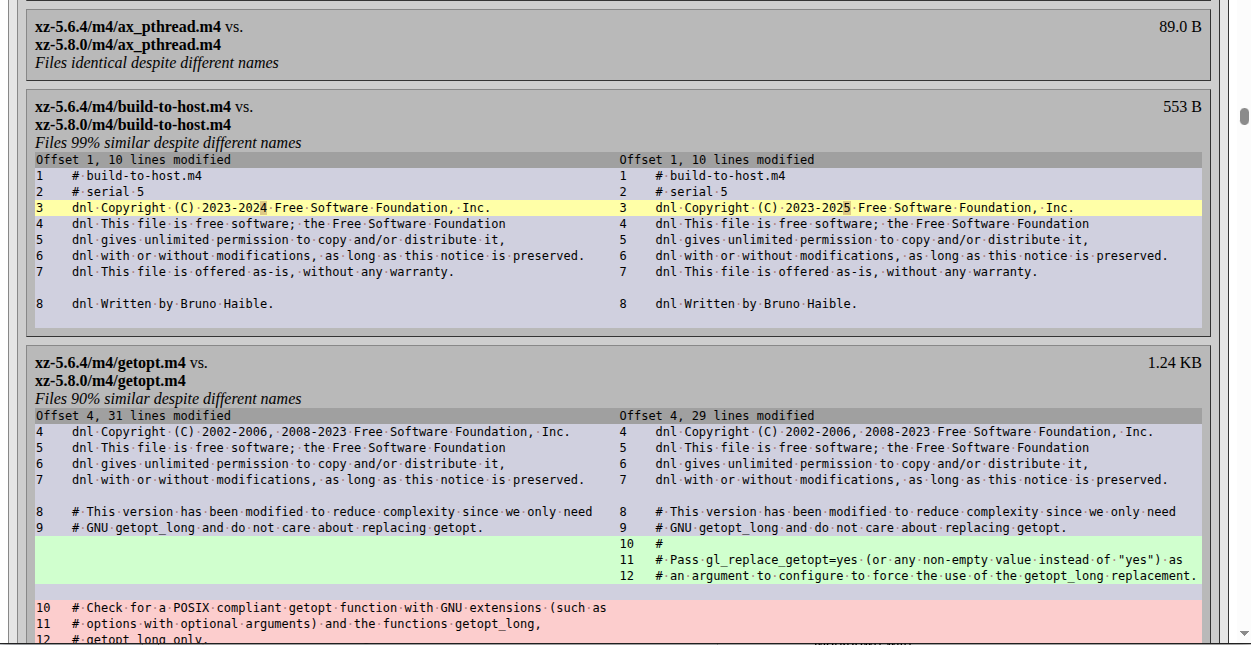
Inspecting diffoscope output of differences between two XZ Utils releases If the changes are extensive, and you want to use a LLM to help spot potential security issues, generate the report of both the upstream and Debian packaging differences in Markdown with:
diffoscope --markdown diffoscope-debian.md xz-utils_5.6.4-1.debian.tar.xz xz-utils_5.8.1-2.debian.tar.xz
diffoscope --markdown diffoscope.md xz-utils_5.6.4.orig.tar.xz xz-utils_5.8.0.orig.tar.xz
The Markdown files created above can then be passed to your favorite LLM, along with a prompt such as:
Based on the attached diffoscope output for a new Debian package version compared with the previous one, list all suspicious changes that might have introduced a backdoor, followed by other potential security issues. If there are none, list a short summary of changes as the conclusion.

Reviewing Debian source packages in version control As of today only 93% of all Debian source packages are tracked in git on Debian s GitLab instance at salsa.debian.org. Some key packages such as Coreutils and Bash are not using version control at all, as their maintainers apparently don t see value in using git for Debian packaging, and the Debian Policy does not require it. Thus, the only reliable and consistent way to audit changes in Debian packages is to compare the full versions from the archive as shown above. However, for packages that are hosted on Salsa, one can view the git history to gain additional insight into what exactly changed, when and why. For packages that are using version control, their location can be found in the Git-Vcs header in the debian/control file. For xz-utils the location is salsa.debian.org/debian/xz-utils. Note that the Debian policy does not state anything about how Salsa should be used, or what git repository layout or development practices to follow. In practice most packages follow the DEP-14 proposal, and use git-buildpackage as the tool for managing changes and pushing and pulling them between upstream and salsa.debian.org. To get the XZ Utils source, run:
$ gbp clone https://salsa.debian.org/debian/xz-utils.git
gbp:info: Cloning from 'https://salsa.debian.org/debian/xz-utils.git'
At the time of writing this post the git history shows:
$ git log --graph --oneline
* bb787585 (HEAD -> debian/unstable, origin/debian/unstable, origin/HEAD) Prepare 5.8.1-2
* 4b769547 d: Remove the symlinks from -dev package.
* a39f3428 Correct the nocheck build profile
* 1b806b8d Import Debian changes 5.8.1-1.1
* b1cad34b Prepare 5.8.1-1
* a8646015 Import 5.8.1
* 2808ec2d Update upstream source from tag 'upstream/5.8.1'
 \
  * fa1e8796 (origin/upstream/v5.8, upstream/v5.8) New upstream version 5.8.1
  * a522a226 Bump version and soname for 5.8.1
  * 1c462c2a Add NEWS for 5.8.1
  * 513cabcf Tests: Call lzma_code() in smaller chunks in fuzz_common.h
  * 48440e24 Tests: Add a fuzzing target for the multithreaded .xz decoder
  * 0c80045a liblzma: mt dec: Fix lack of parallelization in single-shot decoding
  * 81880488 liblzma: mt dec: Don't modify thr->in_size in the worker thread
  * d5a2ffe4 liblzma: mt dec: Don't free the input buffer too early (CVE-2025-31115)
  * c0c83596 liblzma: mt dec: Simplify by removing the THR_STOP state
  * 831b55b9 liblzma: mt dec: Fix a comment
  * b9d168ee liblzma: Add assertions to lzma_bufcpy()
  * c8e0a489 DOS: Update Makefile to fix the build
  * 307c02ed sysdefs.h: Avoid <stdalign.h> even with C11 compilers
  * 7ce38b31 Update THANKS
  * 688e51bd Translations: Update the Croatian translation
*   a6b54dde Prepare 5.8.0-1.
*   77d9470f Add 5.8 symbols.
*   9268eb66 Import 5.8.0
*   6f85ef4f Update upstream source from tag 'upstream/5.8.0'
 \ \
  *   afba662b New upstream version 5.8.0
   /
  * 173fb5c6 doc/SHA256SUMS: Add 5.8.0
  * db9258e8 Bump version and soname for 5.8.0
  * bfb752a3 Add NEWS for 5.8.0
  * 6ccbb904 Translations: Run "make -C po update-po"
  * 891a5f05 Translations: Run po4a/update-po
  * 4f52e738 Translations: Partially fix overtranslation in Serbian man pages
  * ff5d9447 liblzma: Count the extra bytes in LZMA/LZMA2 decoder memory usage
  * 943b012d liblzma: Use SSE2 intrinsics instead of memcpy() in dict_repeat()
This shows both the changes on the debian/unstable branch as well as the intermediate upstream import branch, and the actual real upstream development branch. See my Debian source packages in git explainer for details of what these branches are used for. To only view changes on the Debian branch, run git log --graph --oneline --first-parent or git log --graph --oneline -- debian. The Debian branch should only have changes inside the debian/ subdirectory, which is easy to check with:
$ git diff --stat upstream/v5.8
debian/README.source   16 +++
debian/autogen.sh   32 +++++
debian/changelog   949 ++++++++++++++++++++++++++
...
debian/upstream/signing-key.asc   52 +++++++++
debian/watch   4 +
debian/xz-utils.README.Debian   47 ++++++++
debian/xz-utils.docs   6 +
debian/xz-utils.install   28 +++++
debian/xz-utils.postinst   19 +++
debian/xz-utils.prerm   10 ++
debian/xzdec.docs   6 +
debian/xzdec.install   4 +
33 files changed, 2014 insertions(+)
All the files outside the debian/ directory originate from upstream, and for example running git blame on them should show only upstream commits:
$ git blame CMakeLists.txt
22af94128 (Lasse Collin 2024-02-12 17:09:10 +0200 1) # SPDX-License-Identifier: 0BSD
22af94128 (Lasse Collin 2024-02-12 17:09:10 +0200 2)
7e3493d40 (Lasse Collin 2020-02-24 23:38:16 +0200 3) ###############
7e3493d40 (Lasse Collin 2020-02-24 23:38:16 +0200 4) #
426bdc709 (Lasse Collin 2024-02-17 21:45:07 +0200 5) # CMake support for building XZ Utils
If the upstream in question signs commits or tags, they can be verified with e.g.:
$ git verify-tag v5.6.2
gpg: Signature made Wed 29 May 2024 09:39:42 AM PDT
gpg: using RSA key 3690C240CE51B4670D30AD1C38EE757D69184620
gpg: issuer "lasse.collin@tukaani.org"
gpg: Good signature from "Lasse Collin <lasse.collin@tukaani.org>" [expired]
gpg: Note: This key has expired!
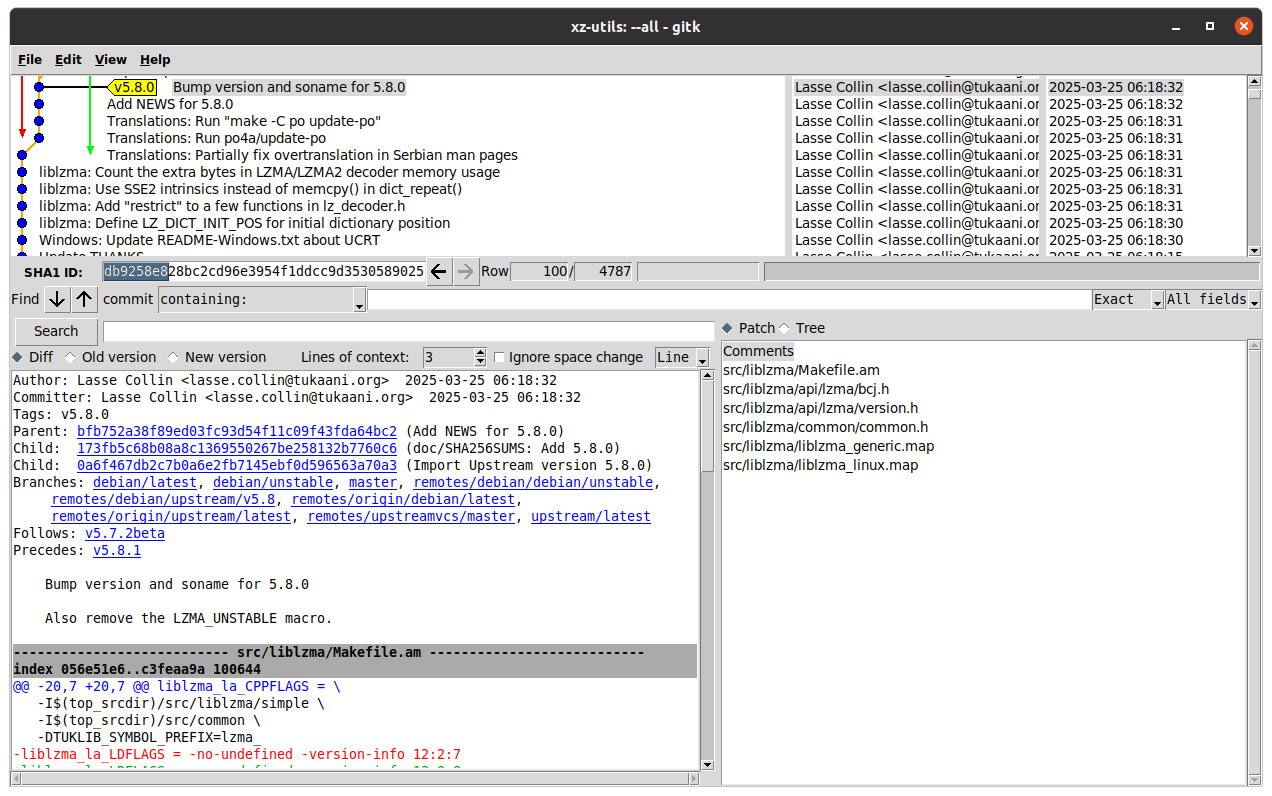
The main benefit of reviewing changes in git is the ability to see detailed information about each individual change, instead of just staring at a massive list of changes without any explanations. In this example, to view all the upstream commits since the previous import to Debian, one would view the commit range from afba662b New upstream version 5.8.0 to fa1e8796 New upstream version 5.8.1 with git log --reverse -p afba662b...fa1e8796. However, a far superior way to review changes would be to browse this range using a visual git history viewer, such as gitk. Either way, looking at one code change at a time and reading the git commit message makes the review much easier. Browsing git history in gitk --all

Comparing Debian source packages to git contents As stated in the beginning of the previous section, and worth repeating, there is no guarantee that the contents in the Debian packaging git repository matches what was actually uploaded to Debian. While the tag2upload project in Debian is getting more and more popular, Debian is still far from having any system to enforce that the git repository would be in sync with the Debian archive contents. To detect such differences we can run diff across the Debian source packages downloaded with debsnap earlier (path source-xz-utils/xz-utils_5.8.1-2.debian) and the git repository cloned in the previous section (path xz-utils):
diff
$ diff -u source-xz-utils/xz-utils_5.8.1-2.debian/ xz-utils/debian/
diff -u source-xz-utils/xz-utils_5.8.1-2.debian/changelog xz-utils/debian/changelog
--- debsnap/source-xz-utils/xz-utils_5.8.1-2.debian/changelog 2025-10-03 09:32:16.000000000 -0700
+++ xz-utils/debian/changelog 2025-10-12 12:18:04.623054758 -0700
@@ -5,7 +5,7 @@
 * Remove the symlinks from -dev, pointing to the lib package.
 (Closes: #1109354)

- -- Sebastian Andrzej Siewior <sebastian@breakpoint.cc> Fri, 03 Oct 2025 18:32:16 +0200
+ -- Sebastian Andrzej Siewior <sebastian@breakpoint.cc> Fri, 03 Oct 2025 18:36:59 +0200
In the case above diff revealed that the timestamp in the changelog in the version uploaded to Debian is different from what was committed to git. This is not malicious, just a mistake by the maintainer who probably didn t run gbp tag immediately after upload, but instead some dch command and ended up with having a different timestamps in the git compared to what was actually uploaded to Debian.

Creating syntetic Debian packaging git repositories If no Debian packaging git repository exists, or if it is lagging behind what was uploaded to Debian s archive, one can use git-buildpackage s import-dscs feature to create synthetic git commits based on the files downloaded by debsnap, ensuring the git contents fully matches what was uploaded to the archive. To import a single version there is gbp import-dsc (no s at the end), of which an example invocation would be:
$ gbp import-dsc --verbose ../source-xz-utils/xz-utils_5.8.1-2.dsc
Version '5.8.1-2' imported under '/home/otto/debian/xz-utils-2025-09-29'
Example commit history from a repository with commits added with gbp import-dsc:
$ git log --graph --oneline
* 86aed07b (HEAD -> debian/unstable, tag: debian/5.8.1-2, origin/debian/unstable) Import Debian changes 5.8.1-2
* f111d93b (tag: debian/5.8.1-1.1) Import Debian changes 5.8.1-1.1
* 1106e19b (tag: debian/5.8.1-1) Import Debian changes 5.8.1-1
 \
  * 08edbe38 (tag: upstream/5.8.1, origin/upstream/v5.8, upstream/v5.8) Import Upstream version 5.8.1
   \
    * a522a226 (tag: v5.8.1) Bump version and soname for 5.8.1
    * 1c462c2a Add NEWS for 5.8.1
    * 513cabcf Tests: Call lzma_code() in smaller chunks in fuzz_common.h
An online example repository with only a few missing uploads added using gbp import-dsc can be viewed at salsa.debian.org/otto/xz-utils-2025-09-29/-/network/debian%2Funstable An example repository that was fully crafted using gbp import-dscs can be viewed at salsa.debian.org/otto/xz-utils-gbp-import-dscs-debsnap-generated/-/network/debian%2Flatest. There exists also dgit, which in a similar way creates a synthetic git history to allow viewing the Debian archive contents via git tools. However, its focus is on producing new package versions, so fetching a package with dgit that has not had the history recorded in dgit earlier will only show the latest versions:
$ dgit clone xz-utils
canonical suite name for unstable is sid
starting new git history
last upload to archive: NO git hash
downloading http://ftp.debian.org/debian//pool/main/x/xz-utils/xz-utils_5.8.1.orig.tar.xz...
downloading http://ftp.debian.org/debian//pool/main/x/xz-utils/xz-utils_5.8.1.orig.tar.xz.asc...
downloading http://ftp.debian.org/debian//pool/main/x/xz-utils/xz-utils_5.8.1-2.debian.tar.xz...
dpkg-source: info: extracting xz-utils in unpacked
dpkg-source: info: unpacking xz-utils_5.8.1.orig.tar.xz
dpkg-source: info: unpacking xz-utils_5.8.1-2.debian.tar.xz
synthesised git commit from .dsc 5.8.1-2
HEAD is now at f9bcaf7 xz-utils (5.8.1-2) unstable; urgency=medium
dgit ok: ready for work in xz-utils
$ dgit/sid   git log --graph --oneline
* f9bcaf7 xz-utils (5.8.1-2) unstable; urgency=medium 9 days ago (HEAD -> dgit/sid, dgit/dgit/sid)
 \
  * 11d3a62 Import xz-utils_5.8.1-2.debian.tar.xz 9 days ago
* 15dcd95 Import xz-utils_5.8.1.orig.tar.xz 6 months ago
Unlike git-buildpackage managed git repositories, the dgit managed repositories cannot incorporate the upstream git history and are thus less useful for auditing the full software supply-chain in git.

Comparing upstream source packages to git contents Equally important to the note in the beginning of the previous section, one must also keep in mind that the upstream release source packages, often called release tarballs, are not guaranteed to have the exact same contents as the upstream git repository. Projects might strip out test data or extra development files from their release tarballs to avoid shipping unnecessary files to users, or projects might add documentation files or versioning information into the tarball that isn t stored in git. While a small minority, there are also upstreams that don t use git at all, so the plain files in a release tarball is still the lowest common denominator for all open source software projects, and exporting and importing source code needs to interface with it. In the case of XZ, the release tarball has additional version info and also a sizeable amount of pregenerated compiler configuration files. Detecting and comparing differences between git contents and tarballs can of course be done manually by running diff across an unpacked tarball and a checked out git repository. If using git-buildpackage, the difference between the git contents and tarball contents can be made visible directly in the import commit. In this XZ example, consider this git history:
* b1cad34b Prepare 5.8.1-1
* a8646015 Import 5.8.1
* 2808ec2d Update upstream source from tag 'upstream/5.8.1'
 \
  * fa1e8796 (debian/upstream/v5.8, upstream/v5.8) New upstream version 5.8.1
  * a522a226 (tag: v5.8.1) Bump version and soname for 5.8.1
  * 1c462c2a Add NEWS for 5.8.1
The commit a522a226 was the upstream release commit, which upstream also tagged v5.8.1. The merge commit 2808ec2d applied the new upstream import branch contents on the Debian branch. Between these is the special commit fa1e8796 New upstream version 5.8.1 tagged upstream/v5.8. This commit and tag exists only in the Debian packaging repository, and they show what is the contents imported into Debian. This is generated automatically by git-buildpackage when running git import-orig --uscan for Debian packages with the correct settings in debian/gbp.conf. By viewing this commit one can see exactly how the upstream release tarball differs from the upstream git contents (if at all). In the case of XZ, the difference is substantial, and shown below in full as it is very interesting:
$ git show --stat fa1e8796
commit fa1e8796dabd91a0f667b9e90f9841825225413a
(debian/upstream/v5.8, upstream/v5.8)
Author: Sebastian Andrzej Siewior <sebastian@breakpoint.cc>
Date: Thu Apr 3 22:58:39 2025 +0200
New upstream version 5.8.1
.codespellrc   30 -
.gitattributes   8 -
.github/workflows/ci.yml   163 -
.github/workflows/freebsd.yml   32 -
.github/workflows/netbsd.yml   32 -
.github/workflows/openbsd.yml   35 -
.github/workflows/solaris.yml   32 -
.github/workflows/windows-ci.yml   124 -
.gitignore   113 -
ABOUT-NLS   1 +
ChangeLog   17392 +++++++++++++++++++++
Makefile.in   1097 +++++++
aclocal.m4   1353 ++++++++
build-aux/ci_build.bash   286 --
build-aux/compile   351 ++
build-aux/config.guess   1815 ++++++++++
build-aux/config.rpath   751 +++++
build-aux/config.sub   2354 +++++++++++++
build-aux/depcomp   792 +++++
build-aux/install-sh   541 +++
build-aux/ltmain.sh   11524 ++++++++++++++++++++++
build-aux/missing   236 ++
build-aux/test-driver   160 +
config.h.in   634 ++++
configure   26434 ++++++++++++++++++++++
debug/Makefile.in   756 +++++
doc/SHA256SUMS   236 --
doc/man/txt/lzmainfo.txt   36 +
doc/man/txt/xz.txt   1708 ++++++++++
doc/man/txt/xzdec.txt   76 +
doc/man/txt/xzdiff.txt   39 +
doc/man/txt/xzgrep.txt   70 +
doc/man/txt/xzless.txt   36 +
doc/man/txt/xzmore.txt   31 +
lib/Makefile.in   623 ++++
m4/.gitignore   40 -
m4/build-to-host.m4   274 ++
m4/gettext.m4   392 +++
m4/host-cpu-c-abi.m4   529 +++
m4/iconv.m4   324 ++
m4/intlmacosx.m4   71 +
m4/lib-ld.m4   170 +
m4/lib-link.m4   815 +++++
m4/lib-prefix.m4   334 ++
m4/libtool.m4   8488 +++++++++++++++++++++
m4/ltoptions.m4   467 +++
m4/ltsugar.m4   124 +
m4/ltversion.m4   24 +
m4/lt~obsolete.m4   99 +
m4/nls.m4   33 +
m4/po.m4   456 +++
m4/progtest.m4   92 +
po/.gitignore   31 -
po/Makefile.in.in   517 +++
po/Rules-quot   66 +
po/boldquot.sed   21 +
po/ca.gmo   Bin 0 -> 15587 bytes
po/cs.gmo   Bin 0 -> 7983 bytes
po/da.gmo   Bin 0 -> 9040 bytes
po/de.gmo   Bin 0 -> 29882 bytes
po/en@boldquot.header   35 +
po/en@quot.header   32 +
po/eo.gmo   Bin 0 -> 15060 bytes
po/es.gmo   Bin 0 -> 29228 bytes
po/fi.gmo   Bin 0 -> 28225 bytes
po/fr.gmo   Bin 0 -> 10232 bytes
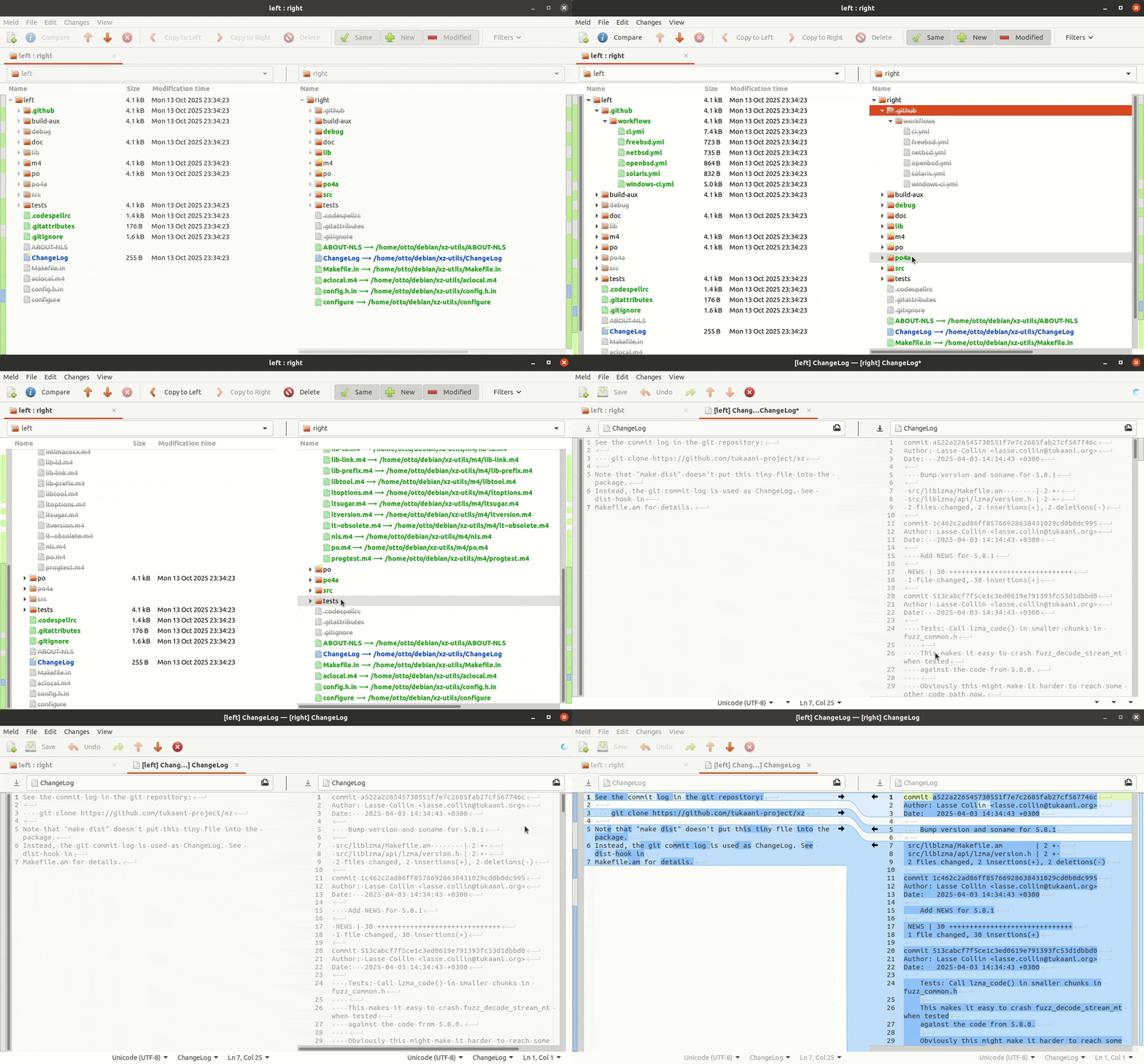
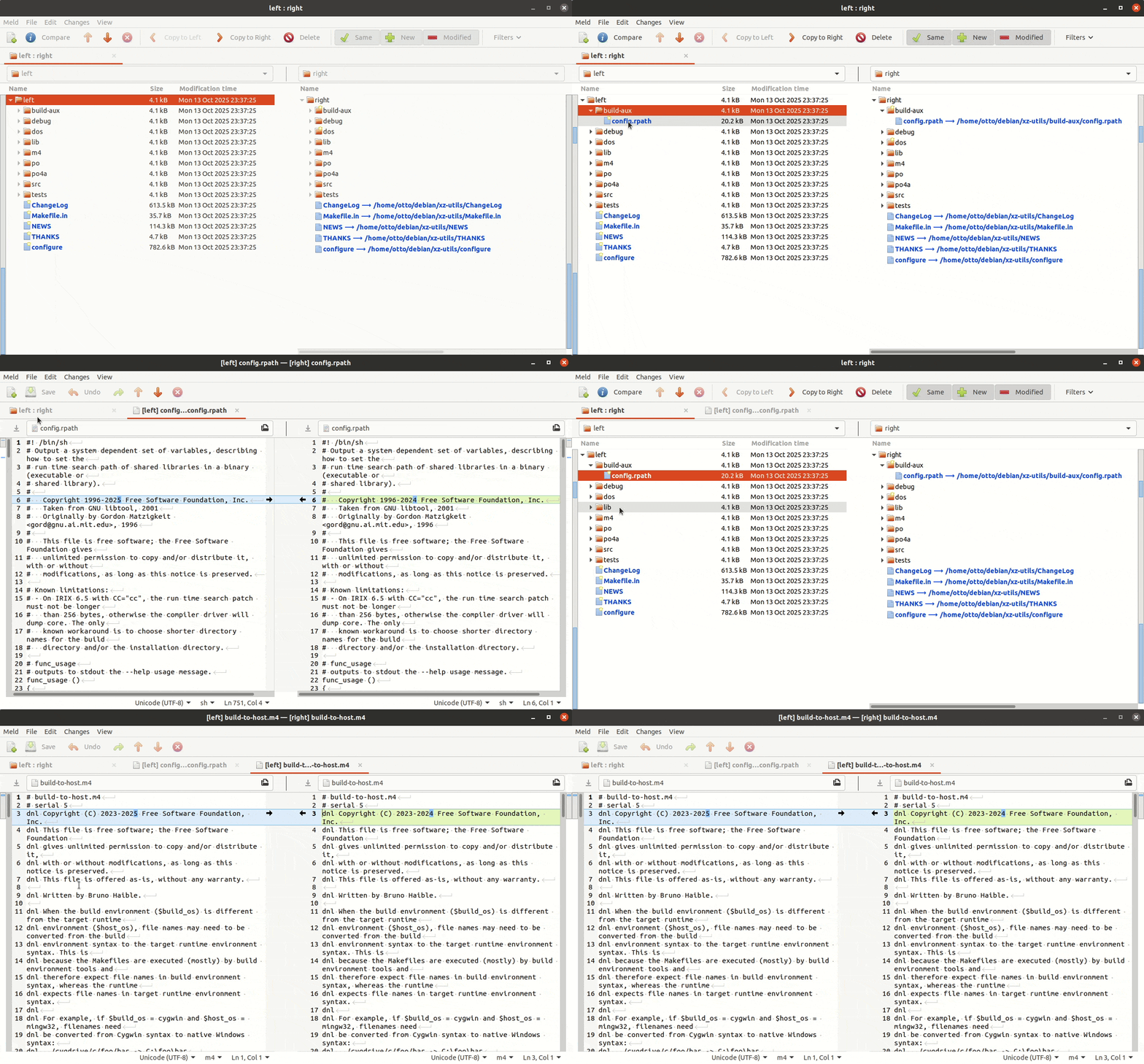
To be able to easily inspect exactly what changed in the release tarball compared to git release tag contents, the best tool for the job is Meld, invoked via git difftool --dir-diff fa1e8796^..fa1e8796. Meld invoked by git difftool --dir-diff afba662b..fa1e8796 to show differences between git release tag and release tarball contents To compare changes across the new and old upstream tarball, one would need to compare commits afba662b New upstream version 5.8.0 and fa1e8796 New upstream version 5.8.1 by running git difftool --dir-diff afba662b..fa1e8796. Meld invoked by git difftool --dir-diff afba662b..fa1e8796 to show differences between to upstream release tarball contents With all the above tips you can now go and try to audit your own favorite package in Debian and see if it is identical with upstream, and if not, how it differs.
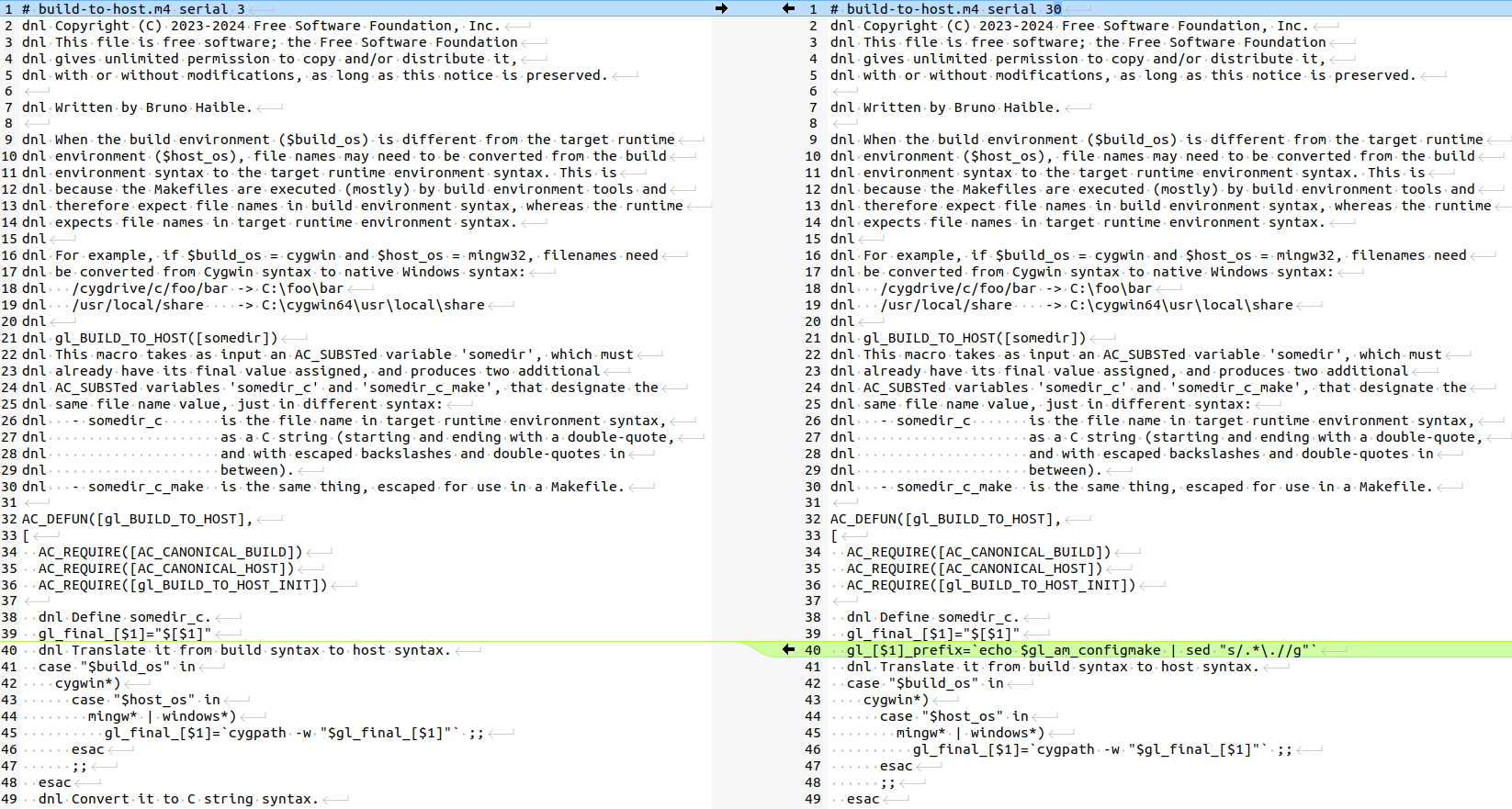
Should the XZ backdoor have been detected using these tools? The famous XZ Utils backdoor (CVE-2024-3094) consisted of two parts: the actual backdoor inside two binary blobs masqueraded as a test files (tests/files/bad-3-corrupt_lzma2.xz, tests/files/good-large_compressed.lzma), and a small modification in the build scripts (m4/build-to-host.m4) to extract the backdoor and plant it into the built binary. The build script was not tracked in version control, but generated with GNU Autotools at release time and only shipped as additional files in the release tarball. The entire reason for me to write this post was to ponder if a diligent engineer using git-buildpackage best practices could have reasonably spotted this while importing the new upstream release into Debian. The short answer is no . The malicious actor here clearly anticipated all the typical ways anyone might inspect both git commits, and release tarball contents, and masqueraded the changes very well and over a long timespan. First of all, XZ has for legitimate reasons for several carefully crafted .xz files as test data to help catch regressions in the decompression code path. The test files are shipped in the release so users can run the test suite and validate that the binary is built correctly and xz works properly. Debian famously runs massive amounts of testing in its CI and autopkgtest system across tens of thousands of packages to uphold high quality despite frequent upgrades of the build toolchain and while supporting more CPU architectures than any other distro. Test data is useful and should stay. When git-buildpackage is used correctly, the upstream commits are visible in the Debian packaging for easy review, but the commit cf44e4b that introduced the test files does not deviate enough from regular sloppy coding practices to really stand out. It is unfortunately very common for git commit to lack a message body explaining why the change was done, and to not be properly atomic with test code and test data together in the same commit, and for commits to be pushed directly to mainline without using code reviews (the commit was not part of any PR in this case). Only another upstream developer could have spotted that this change is not on par to what the project expects, and that the test code was never added, only test data, and thus that this commit was not just a sloppy one but potentially malicious. Secondly, the fact that a new Autotools file appeared (m4/build-to-host.m4) in the XZ Utils 5.6.0 is not suspicious. This is perfectly normal for Autotools. In fact, starting from XZ Utils version 5.8.1 it is now shipping a m4/build-to-host.m4 file that it actually uses now. Spotting that there is anything fishy is practically impossible by simply reading the code, as Autotools files are full custom m4 syntax interwoven with shell script, and there are plenty of backticks ( ) that spawn subshells and evals that execute variable contents further, which is just normal for Autotools. Russ Cox s XZ post explains how exactly the Autotools code fetched the actual backdoor from the test files and injected it into the build. Inspecting the m4/build-to-host.m4 changes in Meld launched via git difftool There is only one tiny thing that maybe a very experienced Autotools user could potentially have noticed: the serial 30 in the version header is way too high. In theory one could also have noticed this Autotools file deviates from what other packages in Debian ship with the same filename, such as e.g. the serial 3, serial 5a or 5b versions. That would however require and an insane amount extra checking work, and is not something we should plan to start doing. A much simpler solution would be to simply strongly recommend all open source projects to stop using Autotools to eventually get rid of it entirely.

Not detectable with reasonable effort While planting backdoors is evil, it is hard not to feel some respect to the level of skill and dedication of the people behind this. I ve been involved in a bunch of security breach investigations during my IT career, and never have I seen anything this well executed. If it hadn t slowed down SSH by ~500 milliseconds and been discovered due to that, it would most likely have stayed undetected for months or years. Hiding backdoors in closed source software is relatively trivial, but hiding backdoors in plain sight in a popular open source project requires some unusual amount of expertise and creativity as shown above.

Is the software supply-chain in Debian easy to audit? While maintaining a Debian package source using git-buildpackage can make the package history a lot easier to inspect, most packages have incomplete configurations in their debian/gbp.conf, and thus their package development histories are not always correctly constructed or uniform and easy to compare. The Debian Policy does not mandate git usage at all, and there are many important packages that are not using git at all. Additionally the Debian Policy also allows for non-maintainers to upload new versions to Debian without committing anything in git even for packages where the original maintainer wanted to use git. Uploads that bypass git unfortunately happen surpisingly often. Because of the situation, I am afraid that we could have multiple similar backdoors lurking that simply haven t been detected yet. More audits, that hopefully also get published openly, would be welcome! More people auditing the contents of the Debian archives would probably also help surface what tools and policies Debian might be missing to make the work easier, and thus help improve the security of Debian s users, and improve trust in Debian.

Is Debian currently missing some software that could help detect similar things? To my knowledge there is currently no system in place as part of Debian s QA or security infrastructure to verify that the upstream source packages in Debian are actually from upstream. I ve come across a lot of packages where the debian/watch or other configs are incorrect and even cases where maintainers have manually created upstream tarballs as it was easier than configuring automation to work. It is obvious that for those packages the source tarball now in Debian is not at all the same as upstream. I am not aware of any malicious cases though (if I was, I would report them of course). I am also aware of packages in the Debian repository that are misconfigured to be of type 1.0 (native) packages, mixing the upstream files and debian/ contents and having patches applied, while they actually should be configured as 3.0 (quilt), and not hide what is the true upstream sources. Debian should extend the QA tools to scan for such things. If I find a sponsor, I might build it myself as my next major contribution to Debian. In addition to better tooling for finding mismatches in the source code, Debian could also have better tooling for tracking in built binaries what their source files were, but solutions like Fraunhofer-AISEC s supply-graph or Sony s ESSTRA are not practical yet. Julien Malka s post about NixOS discusses the role of reproducible builds, which may help in some cases across all distros.

Or, is Debian missing some policies or practices to mitigate this? Perhaps more importantly than more security scanning, the Debian Developer community should switch the general mindset from anyone is free to do anything to valuing having more shared workflows. The ability to audit anything is severely hampered by the fact that there are so many ways to do the same thing, and distinguishing what is a normal deviation from a malicious deviation is too hard, as the normal can basically be almost anything. Also, as there is no documented and recommended default workflow, both those who are old and new to Debian packaging might never learn any one optimal workflow, and end up doing many steps in the packaging process in a way that kind of works, but is actually wrong or unnecessary, causing process deviations that look malicious, but turn out to just be a result of not fully understanding what would have been the right way to do something. In the long run, once individual developers workflows are more aligned, doing code reviews will become a lot easier and smoother as the excess noise of workflow differences diminishes and reviews will feel much more productive to all participants. Debian fostering a culture of code reviews would allow us to slowly move from the current practice of mainly solo packaging work towards true collaboration forming around those code reviews. I have been promoting increased use of Merge Requests in Debian already for some time, for example by proposing DEP-18: Encourage Continuous Integration and Merge Request based Collaboration for Debian packages. If you are involved in Debian development, please give a thumbs up in dep-team/deps!21 if you want me to continue promoting it.

Can we trust open source software? Yes and I would argue that we can only trust open source software. There is no way to audit closed source software, and anyone using e.g. Windows or MacOS just have to trust the vendor s word when they say they have no intentional or accidental backdoors in their software. Or, when the news gets out that the systems of a closed source vendor was compromised, like Crowdstrike some weeks ago, we can t audit anything, and time after time we simply need to take their word when they say they have properly cleaned up their code base. In theory, a vendor could give some kind of contractual or financial guarantee to its customer that there are no preventable security issues, but in practice that never happens. I am not aware of a single case of e.g. Microsoft or Oracle would have paid damages to their customers after a security flaw was found in their software. In theory you could also pay a vendor more to have them focus more effort in security, but since there is no way to verify what they did, or to get compensation when they didn t, any increased fees are likely just pocketed as increased profit. Open source is clearly better overall. You can, if you are an individual with the time and skills, audit every step in the supply-chain, or you could as an organization make investments in open source security improvements and actually verify what changes were made and how security improved. If your organisation is using Debian (or derivatives, such as Ubuntu) and you are interested in sponsoring my work to improve Debian, please reach out.

17 October 2025

David Bremner: Hibernate on the pocket reform 13/n

Context

Some progress upstream Recently Sebastian Reichel at Collabora [1] has made a few related commits, apparently inspired in part by my kvetching on this blog.

Disconnecting and reconnecting PCI busses At some point I noticed error message about the nvme device on resume. I then learned how to disconnect and reconnect PCI buses in Linux. I ended up with something like the following. At least the PCI management seems to work. I can manually disconnect all the PCI busses and rescan to connect them again on a running system. It presumably helps that I am not using the nvme device in this system.
set -x
echo platform >  /sys/power/pm_test
echo reboot > /sys/power/disk
rmmod mt76x2u
sleep 2
echo 1   tee /sys/bus/pci/devices/0003:30:00.0/remove
sleep 2
echo 1   tee /sys/bus/pci/devices/0004:41:00.0/remove
sleep 2
echo 1   tee /sys/bus/pci/devices/0004:40:00.0/remove
sleep 2
echo LSPCI:
lspci -t
sleep 2
echo disk >  /sys/power/state
sleep 2
echo 1   tee /sys/bus/pci/rescan
sleep 2
modprobe mt76x2u

Minimal changes to upstream With the ongoing work at collabora I decided to try a minimal patch stack to get the pocket reform to boot. I added the following 3 commits (available from [3]).
09868a4f2eb (HEAD -> reform-patches) copy pocket-reform dts from reform-debian-packages
152e2ae8a193 pocket/panel: sleep fix v3
18f65da9681c add-multi-display-panel-driver
It does indeed boot and seems stable.
$ uname -a
Linux anthia 6.18.0-rc1+ #19 SMP Thu Oct 16 11:32:04 ADT 2025 aarch64 GNU/Linux
Running the hibernation script above I get no output from the lspci, but seemingly issues with PCI coming back from hibernate:
[  424.645109] PM: hibernation: Allocated 361823 pages for snapshot
[  424.647216] PM: hibernation: Allocated 1447292 kbytes in 3.23 seconds (448.07 MB/s)
[  424.649321] Freezing remaining freezable tasks
[  424.654767] Freezing remaining freezable tasks completed (elapsed 0.003 seconds)
[  424.661070] rk_gmac-dwmac fe1b0000.ethernet end0: Link is Down
[  424.740716] rockchip-dw-pcie a40c00000.pcie: Failed to receive PME_TO_Ack
[  424.742041] PM: hibernation: hibernation debug: Waiting for 5 second(s).
[  430.074757] pci 0004:40:00.0: [1d87:3588] type 01 class 0x060400 PCIe Root Port
F F & Zn [  watchdog: CPU4: Watchdog detected hard LOCKUP on cpu 5
[  456.039004] Modules linked in: xt_CHECKSUM xt_tcpudp nft_chain_nat xt_MASQUERADE nf_nat nf_conntrack nf_defrag_ipv6 nf_defrag_ipv4 nft_compat x_tables bridge stp llc nf_tables aes_neon_bs aes_neon_blk ccm dwmac_rk binfmt_misc mt76x2_common mt76x02_usb mt76_usb mt76x02_lib mt76 mac80211 rk805_pwrkey snd_soc_tlv320aic31xx snd_soc_simple_card reform2_lpc(OE) libarc4 rockchip_saradc industrialio_triggered_buffer kfifo_buf industrialio cfg80211 rockchip_thermal rockchip_rng hantro_vpu cdc_acm v4l2_vp9 v4l2_jpeg rockchip_rga rfkill snd_soc_rockchip_i2s_tdm videobuf2_dma_sg v4l2_h264 panthor snd_soc_audio_graph_card drm_gpuvm snd_soc_simple_card_utils drm_exec evdev joydev dm_mod nvme_fabrics efi_pstore configfs nfnetlink autofs4 ext4 crc16 mbcache jbd2 btrfs blake2b_generic xor xor_neon raid6_pq mali_dp snd_soc_meson_axg_toddr snd_soc_meson_axg_fifo snd_soc_meson_codec_glue panfrost drm_shmem_helper gpu_sched ao_cec_g12a meson_vdec(C) videobuf2_dma_contig videobuf2_memops v4l2_mem2mem videobuf2_v4l2 videodev
[  456.039060]  videobuf2_common mc dw_hdmi_i2s_audio meson_drm meson_canvas meson_dw_mipi_dsi meson_dw_hdmi mxsfb mux_mmio panel_edp imx_dcss ti_sn65dsi86 nwl_dsi mux_core pwm_imx27 hid_generic usbhid hid xhci_plat_hcd onboard_usb_dev xhci_hcd nvme nvme_core snd_soc_hdmi_codec snd_soc_core nvme_keyring nvme_auth hkdf snd_pcm_dmaengine snd_pcm snd_timer snd soundcore fan53555 rtc_pcf8523 micrel phy_package stmmac_platform stmmac pcs_xpcs rk808_regulator phylink sdhci_of_dwcmshc mdio_devres dw_mmc_rockchip of_mdio sdhci_pltfm phy_rockchip_usbdp fixed_phy dw_mmc_pltfm fwnode_mdio typec phy_rockchip_naneng_combphy phy_rockchip_samsung_hdptx pwm_rockchip sdhci dwc3 libphy dw_wdt dw_mmc ehci_platform rockchip_dfi mdio_bus cqhci ulpi ohci_platform ehci_hcd udc_core ohci_hcd rockchipdrm phy_rockchip_inno_usb2 usbcore dw_hdmi_qp analogix_dp dw_mipi_dsi cpufreq_dt dw_mipi_dsi2 i2c_rk3x usb_common drm_dp_aux_bus [last unloaded: mt76x2u]
[  456.039111] Sending NMI from CPU 4 to CPUs 5:
[  471.942262] page_pool_release_retry() stalled pool shutdown: id 9, 2 inflight 60 sec
[  532.989611] page_pool_release_retry() stalled pool shutdown: id 9, 2 inflight 121 sec
This does look like some progress, probably thanks to Sebastien. Comparing with the logs in hibernate-pocket-12, the resume process is not bailing out complaining about PHY.

Attempt to reapply PCI reset patches Following the procedure in hibernate-pocket-12, I attempted to re-apply the pci reset patches [2]. In particular I followed the hints output by b4. Unfortunately there are too many conflicts now for me to sensibly resolve.
  1. https://gitlab.collabora.com/hardware-enablement/rockchip-3588/linux.git#rockchip-devel
  2. https://lore.kernel.org/all/20250715-pci-port-reset-v6-0-6f9cce94e7bb@oss.qualcomm.com/#r
  3. https://salsa.debian.org/bremner/collabora-rockchip-3588#reform-patches

13 October 2025

Wouter Verhelst: RPM and ECDSA GPG keys

Dear lazyweb, At work, we are trying to rotate the GPG signing keys for the Linux packages of the eID middleware We created new keys, and they will be installed on all Linux machines that have the eid-archive package installed soon (they were already supposed to be, but we made a mistake). Running some tests, however, I have a bit of a problem:

[wouter@rhel rpm-gpg]$ sudo rpm --import RPM-GPG-KEY-BEID-RELEASE
[wouter@rhel rpm-gpg]$ sudo rpm --import RPM-GPG-KEY-BEID-RELEASE-2025
fout: RPM-GPG-KEY-BEID-RELEASE-2025: key 1 import failed.
[wouter@rhel rpm-gpg]$ sudo rpm --import RPM-GPG-KEY-BEID-CONTINUOUS
This is on RHEL9. The only difference between the old keys and the new one, apart of course from the fact that the old one is, well, old, is that the old one uses the RSA algorithm whereas the new one uses ECDSA on the NIST P-384 curve (the same algorithm as the one used by the eID card). Does RPM not support ECDSA keys? Does anyone know where this is documented? (Yes, I probably should have tested this before publishing the new key, but this is where we are)

Freexian Collaborators: Monthly report about Debian Long Term Support, September 2025 (by Roberto C. S nchez)

Like each month, have a look at the work funded by Freexian s Debian LTS offering.

Debian LTS contributors In September, 20 contributors have been paid to work on Debian LTS, their reports are available:
  • Abhijith PA did 10.0h (out of 10.0h assigned and 4.0h from previous period), thus carrying over 4.0h to the next month.
  • Andreas Henriksson did 1.0h (out of 0.0h assigned and 20.0h from previous period), thus carrying over 19.0h to the next month.
  • Bastien Roucari s did 20.0h (out of 20.0h assigned).
  • Ben Hutchings did 20.0h (out of 21.0h assigned), thus carrying over 1.0h to the next month.
  • Carlos Henrique Lima Melara did 10.0h (out of 12.0h assigned), thus carrying over 2.0h to the next month.
  • Chris Lamb did 18.0h (out of 18.0h assigned).
  • Daniel Leidert did 21.0h (out of 21.0h assigned).
  • Emilio Pozuelo Monfort did 39.75h (out of 40.0h assigned), thus carrying over 0.25h to the next month.
  • Guilhem Moulin did 15.0h (out of 15.0h assigned).
  • Jochen Sprickerhof did 12.0h (out of 9.25h assigned and 11.75h from previous period), thus carrying over 9.0h to the next month.
  • Lee Garrett did 13.5h (out of 21.0h assigned), thus carrying over 7.5h to the next month.
  • Lucas Kanashiro did 8.0h (out of 20.0h assigned), thus carrying over 12.0h to the next month.
  • Markus Koschany did 15.0h (out of 3.25h assigned and 17.75h from previous period), thus carrying over 6.0h to the next month.
  • Paride Legovini did 6.0h (out of 8.0h assigned), thus carrying over 2.0h to the next month.
  • Roberto C. S nchez did 7.25h (out of 7.75h assigned and 13.25h from previous period), thus carrying over 13.75h to the next month.
  • Santiago Ruano Rinc n did 13.25h (out of 13.5h assigned and 1.5h from previous period), thus carrying over 1.75h to the next month.
  • Sylvain Beucler did 17.0h (out of 7.75h assigned and 13.25h from previous period), thus carrying over 4.0h to the next month.
  • Thorsten Alteholz did 21.0h (out of 21.0h assigned).
  • Tobias Frost did 5.0h (out of 0.0h assigned and 8.0h from previous period), thus carrying over 3.0h to the next month.
  • Utkarsh Gupta did 16.5h (out of 14.25h assigned and 6.75h from previous period), thus carrying over 4.5h to the next month.

Evolution of the situation In September, we released 38 DLAs.
  • Notable security updates:
    • modsecurity-apache prepared by Adrian Bunk, fixes a cross-site scripting vulnerability
    • cups, prepared by Thorsten Alteholz, fixes authentication bypass and denial of service vulnerabilities
    • jetty9, prepared by Adrian Bunk, fixes the MadeYouReset vulnerability (a recent, well-known denial of service vulnerability)
    • python-django, prepared by Chris Lamb, fixes a SQL injection vulnerability
    • firefox-esr and thunderbird, prepared by Emilio Pozuelo Monfort, were updated from the 128.x ESR series to the 140.x ESR series, fixing a number of vulnerabilities as well
  • Notable non-security updates:
    • wireless-regdb prepared by Ben Hutchings, updates information reflecting changes to radio regulations in many countries
There was one package update contributed by a Debian Developer outside of the LTS Team: an update of node-tar-fs, prepared by Xavier Guimard (a member of the Node packaging team). Finally, LTS Team members also contributed updates of the following packages:
  • libxslt (to stable and oldstable), prepared by Guilhem Moulin, to address a regression introduced in a previous security update
  • libphp-adodb (to stable and oldstable), prepared by Abhijith PA
  • cups (to stable and oldstable), prepared by Thorsten Alteholz
  • u-boot (to oldstable), prepared by Daniel Leidert and Jochen Sprickerhof
  • libcommongs-lang3-java (to stable and oldstable), prepared by Daniel Leidert
  • python-internetarchive (to oldstable), prepared by Daniel Leidert
One other notable contribution by a member of the LTS Team is that Sylvain Beucler proposed a fix upstream for CVE-2025-2760 in gimp2. Upstream no longer supports gimp2, but it is still present in Debian LTS, and so proposing this fix upstream is of benefit to other distros which may still be supporting the older gimp2 packages.

Thanks to our sponsors Sponsors that joined recently are in bold.

10 October 2025

John Goerzen: I m Not Very Popular, Thankfully. That Makes The Internet Fun Again

Like and subscribe! Help us get our next thousand (or million) followers! I was using Linux before it was popular. Back in the day where you had to write Modelines for your XF86Config file and do it properly, or else you might ruin your monitor. Back when there wasn t a word processor (thankfully; that forced me to learn LaTeX, which I used to write my papers in college). I then ran Linux on an Alpha, a difficult proposition in an era when web browsers were either closed-source or too old to be useful; all sorts of workarounds, including emulating Digital UNIX. Recently I wrote a deep dive into the DOS VGA text mode and how to achieve it on a modern UEFI Linux system. Nobody can monetize things like this. I am one of maybe a dozen or two people globally that care about that sort of thing. That s fine. Today, I m interested in things like asynchronous communication, NNCP, and Gopher. Heck, I m posting these words on a blog. Social media displaced those, right? Some of the things I write about here have maybe a few dozen people on the planet interested in them. That s fine. I have no idea how many people read my blog. I have no idea where people hear about my posts from. I guess I can check my Mastodon profile to see how many followers I have, but it s not something I tend to do. I don t know if the number is going up or down, or if it is all that much in Mastodon terms (probably not). Thank goodness. Since I don t have to care about what s popular, or spend hours editing video, or thousands of dollars on video equipment, I can just sit down and write about what interests me. If that also interests you, then great. If not, you can find what interests you also fine. I once had a colleague that was one of these plugged into Silicon Valley types. He would periodically tell me, with a mixture of excitement and awe, that one of my posts had made Hacker News. This was always news to me, because I never paid a lot of attention over there. Occasionally that would bring in some excellent discussion, but more often than not, it was comments from people that hadn t read or understood the article trying to appear smart by arguing with what it or rather, what they imagined it said, I guess. The thing I value isn t subscriber count. It s discussion. A little discussion in the comments or on Mastodon that s perfect, even if only 10 people read the article. I have the most fun in a community. And I ll go on writing about NNCP and Gopher and non-square DOS pixels, with audiences of dozens globally. I have no advertisers to keep happy, and I enjoy it, so why not?

30 September 2025

Jonathan McDowell: Local Voice Assistant Step 5: Remote Satellite

The last (software) piece of sorting out a local voice assistant is tying the openWakeWord piece to a local microphone + speaker, and thus back to Home Assistant. For that we use wyoming-satellite. I ve packaged that up - https://salsa.debian.org/noodles/wyoming-satellite - and then to run I do something like:
$ wyoming-satellite --name 'Living Room Satellite' \
    --uri 'tcp://[::]:10700' \
    --mic-command 'arecord -r 16000 -c 1 -f S16_LE -t raw -D plughw:CARD=CameraB409241,DEV=0' \
    --snd-command 'aplay -D plughw:CARD=UACDemoV10,DEV=0 -r 22050 -c 1 -f S16_LE -t raw' \
    --wake-uri tcp://[::1]:10400/ \
    --debug
That starts us listening for connections from Home Assistant on port 10700, uses the openWakeWord instance on localhost port 10400, uses aplay/arecord to talk to the local microphone and speaker, and gives us some debug output so we can see what s going on. And it turns out we need the debug. This setup is a bit too flaky for it to have ended up in regular use in our household. I ve had some problems with reliable audio setup; you ll note the Python is calling out to other tooling to grab audio, which feels a bit clunky to me and I don t think is the actual problem, but the main audio for this host is hooked up to the TV (it s a media box), so the setup for the voice assistant needs to be entirely separate. That means not plugging into Pipewire or similar, and instead giving direct access to wyoming-satellite. And sometimes having to deal with how to make the mixer happy + non-muted manually. I ve also had some issues with the USB microphone + speaker; I suspect a powered USB hub would help, and that s on my list to try out. When it does work I have sometimes found it necessary to speak more slowly, or enunciate my words more clearly. That s probably something I could improve by switching from the base.en to small.en whisper.cpp model, but I m waiting until I sort out the audio hardware issue before poking more. Finally, the wake word detection is a little bit sensitive sometimes, as I mentioned in the previous post. To be honest I think it s possible to deal with that, if I got the rest of the pieces working smoothly. This has ended up sounding like a more negative post than I meant it to. Part of the issue in a resolution is finding enough free time to poke things (especially as it involves taking over the living room and saying Hey Jarvis a lot), part of it is no doubt my desire to actually hook up the pieces myself and understand what s going on. Stay tuned and see if I ever manage to resolve it all!

Antoine Beaupr : Proper services

During 2025-03-21-another-home-outage, I reflected upon what's a properly ran service and blurted out what turned out to be something important I want to outline more. So here it is, again, on its own for my own future reference.
Typically, I tend to think of a properly functioning service as having four things:
  1. backups
  2. documentation
  3. monitoring
  4. automation
  5. high availability (HA)
Yes, I miscounted. This is why you need high availability. A service doesn't properly exist if it doesn't at least have the first 3 of those. It will be harder to maintain without automation, and inevitably suffer prolonged outages without HA.

The five components of a proper service

Backups Duh. If data is maliciously or accidentally destroyed, you need a copy somewhere. Preferably in a way that malicious Joe can't get to. This is harder than you think.

Documentation I have an entire template for this. Essentially, it boils down to using https://diataxis.fr/ and this "audit" guide. For me, the most important parts are:
  • disaster recovery (includes backups, probably)
  • playbook
  • install/upgrade procedures (see automation)
You probably know this is hard, and this is why you're not doing it. Do it anyways, you'll think it sucks, it will grow out of sync with reality, but you'll be really grateful for whatever scraps you wrote when you're in trouble. Any docs, in other words, is better than no docs, but are no excuse for doing the work correctly.

Monitoring If you don't have monitoring, you'll know it fails too late, and you won't know it recovers. Consider high availability, work hard to reduce noise, and don't have machine wake people up, that's literally torture and is against the Geneva convention. Consider predictive algorithm to prevent failures, like "add storage within 2 weeks before this disk fills up". This is also harder than you think.

Automation Make it easy to redeploy the service elsewhere. Yes, I know you have backups. That is not enough: that typically restores data and while it can also include configuration, you're going to need to change things when you restore, which is what automation (or call it "configuration management" if you will) will do for you anyways. This also means you can do unit tests on your configuration, otherwise you're building legacy. This is probably as hard as you think.

High availability Make it not fail when one part goes down. Eliminate single points of failures. This is easier than you think, except for storage and DNS ("naming things" not "HA DNS", that is easy), which, I guess, means it's harder than you think too.

Assessment In the above 5 items, I currently check two in my lab:
  1. backups
  2. documentation
And barely: I'm not happy about the offsite backups, and my documentation is much better at work than at home (and even there, I have a 15 year backlog to catchup on). I barely have monitoring: Prometheus is scraping parts of the infra, but I don't have any sort of alerting -- by which I don't mean "electrocute myself when something goes wrong", I mean "there's a set of thresholds and conditions that define an outage and I can look at it". Automation is wildly incomplete. My home server is a random collection of old experiments and technologies, ranging from Apache with Perl and CGI scripts to Docker containers running Golang applications. Most of it is not Puppetized (but the ratio is growing). Puppet itself introduces a huge attack vector with kind of catastrophic lateral movement if the Puppet server gets compromised. And, fundamentally, I am not sure I can provide high availability in the lab. I'm just this one guy running my home network, and I'm growing older. I'm thinking more about winding things down than building things now, and that's just really sad, because I feel we're losing (well that escalated quickly).

Side note about Tor The above applies to my personal home lab, not work! At work, of course, it's another (much better) story:
  1. all services have backups
  2. lots of services are well documented, but not all
  3. most services have at least basic monitoring
  4. most services are Puppetized, but not crucial parts (DNS, LDAP, Puppet itself), and there are important chunks of legacy coupling between various services that make the whole system brittle
  5. most websites, DNS and large parts of email are highly available, but key services like the the Forum, GitLab and similar applications are not HA, although most services run under replicated VMs that can trivially survive a total, single-node hardware failure (through Ganeti and DRBD)

Utkarsh Gupta: FOSS Activites in September 2025

Here s my monthly but brief update about the activities I ve done in the F/L/OSS world.

Debian
Whilst I didn t get a chance to do much, here s still a few things that I worked on:

Ubuntu
I joined Canonical to work on Ubuntu full-time back in February 2021. Whilst I can t give a full, detailed list of things I did, here s a quick TL;DR of what I did:
  • Successfully and timely released 25.10 (Questing Quokka) Beta! \o/
  • Continued to hold weekly release syncs, et al.
  • Granted FFe and triaged a bunch of other bugs from both, Release team and Archive Admin POV. :)
  • 360s were fab - I was a peak performer again. Yay!
  • Preparing for the 25.10 Release sprints in London and then the Summit.
  • Roadmap planning for the Release team.

Debian (E)LTS
This month I have worked 16.50 hours on Debian Long Term Support (LTS) and 05.50 hours on its sister Extended LTS project and did the following things:
  • [E/LTS] Frontdesk duty from 22nd September to 28th September.
    • Triaged lemonldap-ng, ghostscript, dovecot, node-ip, webkit2gtk, wpewebkit, libscram-java, keras, openbabel, gegl, tiff, zookeeper, squid, ogre-1.12, mapserver, ruby-rack.
    • Auto-EOL d a few packages.
    • Also circled back on previously opened ticket for supported packages for ELTS.
    • Partially reviewed and added comment on Emilio s MP.
    • Re-visited an old thread (in order to fully close it) about issues being fixed in buster & bookworm but not in bullseye. And brought it up in the LTS meeting, too.
  • [LTS] Partook in some internal discussions about introducing support for handling severity of CVEs, et al.
    • Santiago had asked for an input from people doing FD so spent some time reflecting on his proposal and getting back with thoughts and suggestions.
  • [LTS] Helped Lee with testing gitk and git-gui aspects of his git update.
  • [LTS] Attended the monthly LTS meeting on IRC. Summary here.
    • It was also followed by a 40-minute discussion of technical questions/reviews/discussions - which in my opinion was pretty helpful. :)
  • [LTS] Prepared the LTS update for wordpress, bumping the package from 5.7.11 to 5.7.13.
    • Prepared an update for stable, Craig approved. Was waiting on the Security team s +1 to upload.
    • Now we ve waited enough that we have new CVEs. Oh well.
  • [ELTS] Finally setup debusine for ELTS uploads.
    • Since I use Ubuntu, this required installing debusine* from bookworm-backport but that required Python 3.11.
    • So I had to upgrade from Jammy (22.04) to Noble (24.04) - which was anyway pending.. :)
    • And then followed the docs to configure it. \o/
  • [E/LTS] Started working on new ruby-rack CVE.

Until next time.
:wq for today.

28 September 2025

Russ Allbery: Review: Echoes of the Imperium

Review: Echoes of the Imperium, by Nicholas & Olivia Atwater
Series: Tales of the Iron Rose #1
Publisher: Starwatch Press
Copyright: 2024
ISBN: 1-998257-04-5
Format: Kindle
Pages: 547
Echoes of the Imperium is a steampunk fantasy adventure novel, the first of a projected series. There is another novella in the series, A Matter of Execution, that takes place chronologically before this novel, but which I am told that you should read afterwards. (I have not yet read it.) If Olivia Atwater's name sounds familiar, it's probably for the romantic fantasy Half a Soul. Nicholas Atwater is her husband. William Blair, a goblin, was a child sailor on the airship HMS Caliban during the final battle that ended the Imperium, and an eyewitness to the destruction of the capital. Like every imperial solider, that loss made him an Oathbreaker; the fae Oath that he swore to defend the Imperium did not care that nothing a twelve-year-old boy could have done would have changed the result of the battle. He failed to kill himself with most of the rest of the crew, and thus was taken captive by the Coalition. Twenty years later, William Blair is the goblin captain of the airship Iron Rose. It's an independent transport ship that takes various somewhat-dodgy contracts and has to avoid or fight through pirates. The crew comes from both sides of the war and has built their own working truce. Blair himself is a somewhat manic but earnest captain who doesn't entirely believe he deserves that role, one who tends more towards wildly risky plans and improvisation than considered and sober decisions. The rest of the crew are the sort of wild mix of larger-than-life personality quirks that populate swashbuckling adventure books but leave me dubious that stuffing that many high-maintenance people into one ship would go as well as it does. I did appreciate the gunnery knitting circle, though. Echoes of the Imperium is told in the first person from Blair's perspective in two timelines. One follows Blair in the immediate aftermath of the war, tracing his path to becoming an airship captain and meeting some of the people who will later be part of his crew. The other is the current timeline, in which Blair gets deeper and deeper into danger by accepting a risky contract with unexpected complications. Neither of these timelines are in any great hurry to arrive at some destination, and that's the largest problem with this book. Echoes of the Imperium is long, sprawling, and unwilling to get anywhere near any sort of a point until the reader is deeply familiar with the horrific aftermath of the war, the mountains guilt and trauma many of the characters carry around, and Blair's impostor syndrome and feelings of inadequacy. For the first half of this book, I was so bored. I almost bailed out; only a few flashes of interesting character interactions and hints of world-building helped me drag myself through all of the tedious setup. What saves this book is that the world-building is a delight. Once the characters finally started engaging with it in earnest, I could not put it down. Present-time Blair is no longer an Oathbreaker because he was forgiven by a fairy; this will become important later. The sites of great battles are haunted by ghostly echoes of the last moments of the lives of those who died (hence the title); this will become very important later. Blair has a policy of asking no questions about people's pasts if they're willing to commit to working with the rest of the crew; this, also, will become important later. All of these tidbits the authors drop into the story and then ignore for hundreds of pages do have a payoff if you're willing to wait for it. As the reader (too) slowly discovers, the Atwaters' world is set in a war of containment by light fae against dark fae. Instead of being inscrutable and separate, the fae use humans and human empires as tools in that war. The fallen Imperium was a bastion of fae defense, and the war that led to the fall of that Imperium was triggered by the price its citizens paid for that defense, one that the fae could not possibly care less about. The creatures may be out of epic fantasy and the technology from the imagined future of Victorian steampunk, but the politics are that of the Cold War and containment strategies. This book has a lot to say about colonialism and empire, but it says those things subtly and from a fantasy slant, in a world with magical Oaths and direct contact with powers that are both far beyond the capabilities of the main characters and woefully deficient in in humanity and empathy. It has a bit of the feel of Greek mythology if the gods believed in an icy realpolitik rather than embodying the excesses of human emotion. The second half of this book was fantastic. The found-family vibe among a crew of high-maintenance misfits that completely failed to cohere for me in the first half of the book, while Blair was wallowing in his feelings and none of the events seemed to matter, came together brilliantly as soon as the crew had a real problem and some meaty world-building and plot to sink their teeth into. There is a delightfully competent teenager, some satisfying competence porn that Blair finally stops undermining, and a sharp political conflict that felt emotionally satisfying, if perhaps not that intellectually profound. In short, it turns into the fun, adventurous romp of larger-than-life characters that the setting promises. Even the somewhat predictable mid-book reveal worked for me, in part because the emotions of the characters around that reveal sold its impact. If you're going to write a book with a bad half and a good half, it's always better to put the good half second. I came away with very positive feelings about Echoes of the Imperium and a tentative willingness to watch for the sequel. (It reaches a fairly satisfying conclusion, but there are a lot of unresolved plot hooks.) I'm a bit hesitant to recommend it, though, because the first half was not very fun. I want to say that about 75% of the first half of the book could have been cut and the book would have been stronger for it. I'm not completely sure I'm right, since the Atwaters were laying the groundwork for a lot of payoff, but I wish that groundwork hadn't been as much of a slog. Tentatively recommended, particularly if you're in the mood for steampunk fae mythology, but know that this book requires some investment. Technically, A Matter of Execution comes first, but I plan to read it as a sequel. Rating: 8 out of 10

21 September 2025

Gunnar Wolf: We, Programmers A Chronicle of Coders from Ada to AI

This post is a review for Computing Reviews for We, Programmers A Chronicle of Coders from Ada to AI , a book published in Addison-Wesley
When this book was presented as available for review, I jumped on it. After all, who doesn t love reading a nice bit of computing history, as told by a well-known author (affectionaly known as Uncle Bob ), one who has been immersed in computing since forever? What s not to like there? Reading on, the book does not disappoint. Much to the contrary, it digs into details absent in most computer history books that, being an operating systems and computer architecture geek, I absolutely enjoyed. But let me first address the book s organization. The book is split into four parts. Part 1, Setting the Stage, is a short introduction, answering the question Who are we? ( we being the programmers, of course). It describes the fascination many of us felt when we realized that the computer was there to obey us, to do our bidding, and we could absolutely control it. Part 2 talks about the giants of the computing world, on whose shoulders we stand. It digs in with a level of detail I have never seen before, discussing their personal lives and technical contributions (as well as the hoops they had to jump through to get their work done). Nine chapters cover these giants, ranging chronologically from Charles Babbage and Ada Lovelace to Ken Thompson, Dennis Richie, and Brian Kernighan (understandably, giants who worked together are grouped in the same chapter). This is the part with the most historically overlooked technical details. For example, what was the word size in the first computers, before even the concept of a byte had been brought into regular use? What was the register structure of early central processing units (CPUs), and why did it lead to requiring self-modifying code to be able to execute loops? Then, just as Unix and C get invented, Part 3 skips to computer history as seen through the eyes of Uncle Bob. I must admit, while the change of rhythm initially startled me, it ends up working quite well. The focus is no longer on the giants of the field, but on one particular person (who casts a very long shadow). The narrative follows the author s life: a boy with access to electronics due to his father s line of work; a computing industry leader, in the early 2000s, with extreme programming; one of the first producers of training materials in video format a role that today might be recognized as an influencer. This first-person narrative reaches year 2023. But the book is not just a historical overview of the computing world, of course. Uncle Bob includes a final section with his thoughts on the future of computing. As this is a book for programmers, it is fitting to start with the changes in programming languages that we should expect to see and where such changes are likely to take place. The unavoidable topic of artificial intelligence is presented next: What is it and what does it spell for computing, and in particular for programming? Interesting (and sometimes surprising) questions follow: What does the future of hardware development look like? What is prone to be the evolution of the World Wide Web? What is the future of programming and programmers? At just under 500 pages, the book is a volume to be taken seriously. But space is very well used with this text. The material is easy to read, often funny and always informative. If you enjoy computer history and understanding the little details in the implementations, it might very well be the book you want.

20 September 2025

Thomas Goirand: Real-Time OpenStack Packaging Status with Event-Driven Automation

tl;dr: https://osbpo.debian.net/deb-status is now real-time updated and much better than it used to, helping the OpenStack packaging team be a way more efficient.
How it used to be For years, the Debian OpenStack team has relied on automated tools to track the status of OpenStack packages across Debian releases. Our goal has always been simple: transparency, efficiency, accuracy. We used to use a tool called os-version-checker, written by Michal Arbet, which generated a static status page at https://osbpo.debian.net/deb-status. It was functional and served us well but it had limitations: This meant that when a developer pushed a new package to salsa (the Debian GitLab instance) in the team s repository, the following would happen: For maintainers actively working on a new release, this delay was frustrating. You d fix a bug, push, build and still see your package marked as missing or out of date for minutes. You had no real-time feedback. This was also an annoyance for testing, because when fixing a bug, I often had to trigger the rsync manually in order to not wait for it, so I could do my tests. Now, osbpo is always up-to-date a few seconds after the build of the package. The New Way: Event-Driven, Real-Time Updates We ve rebuilt the system from the ground up to be fast, responsive, and event-driven. Now, the workflow is: The webhook on osbpo does: No more cron. No more waiting

How it works The central osbpo.debian.net server runs: Jenkins instances are configured to curl the webhook on successful build. The status page is generated by openstack-debian-release-manager, a new tool I ve packaged and deployed. The dashboard uses AJAX to load content dynamically (like when browsing from one release to another), with sorting, metadata, and real-time auto-refresh every 10 seconds. openstack-debian-release-manager is easy to deploy and configure, and will do most (if not all) of the needed configuration. Uploading it to Debian is probably not needed, and a bit over-kill, so I believe I ll just keep it in Salsa for the moment, unless there s a way to make it more generic so it can help someone else (another team?) in Debian.
Room for improvement There s still things I want to add. Namely: Special thanks to Michal Arbet for the original os-version-checker that served me for years, helping me to never forget a missing OpenStack package release.

18 September 2025

Gunnar Wolf: Still use Twitter/X? Consider dropping it...

Many people that were once enthusiast Twitter users have dropped as a direct or indirect effect of its ownership change and the following policy changes. Given Twitter X is getting each time more irrelevant, it is less interesting and enciting for more and more people But also, its current core users (mostly, hate-apologists of the right-wing mindset that finds conspiration theories everywhere) are becoming more commonplace, and by sheer probability (if not for algorithmic bias), every time it becomes more likely a given piece of content will be linked to what their authors would classify as crap. So, there has been in effect an X exodus. This has been reported in media outlets as important as Reuters, or The Guardianresearch institutes such as Berkeley, even media that no matter how hard you push cannot be identified as the radical left Mr. Trump is so happy to blame for everything, such as Forbes Today I read a short note in a magazine I very much enjoy, Communications of the ACM, where SIGDOC (the ACM s Special Interest Group on Design of Communication) is officially closing their X account. The reasoning is crystal clear. They have the mission to create and study User Experience (UX) implementations and report on it, focused on making communication clearer and more human centered . That is no longer, for many reasons, a goal that can be furthered by the means of an X account. (BTW, and How many people are actually angry that Mr. Musk took the X11 old logo and made it his? I am sure it is now protected under too many layers of legalese, even though I am aware of it since at least 30 years ago )

John Goerzen: Running an Accurate 80 25 DOS-Style Console on Modern Linux Is Possible After All

Here, in classic Goerzen deep dive fashion, is more information than you knew you wanted about a topic you ve probably never thought of. I found it pretty interesting, because it took me down a rabbit hole of subsystems I ve never worked with much and a mishmash of 1980s and 2020s tech. I had previously tried and failed to get an actual 80x25 Linux console, but I ve since figured it out! This post is about the Linux text console not X or Wayland. We re going to get the console right without using those systems. These instructions are for Debian trixie, but should be broadly applicable elsewhere also. The end result can look like this: Photo of a color VGA monitor displaying a BBS login screen (That s a Wifi Retromodem that I got at VCFMW last year in the Hayes modem case)

What s a pixel? How would you define a pixel these days? Probably something like a uniquely-addressable square dot in a two-dimensional grid . In the world of VGA and CRTs, that was just a logical abstraction. We got an API centered around that because it was convenient. But, down the VGA cable and on the device, that s not what a pixel was. A pixel, back then, was a time interval. On a multisync monitor, which were common except in the very early days of VGA, the timings could be adjusted which produced logical pixels of different sizes. Those screens often had a maximum resolution but not necessarily a native resolution in the sense that an LCD panel does. Different timings produced different-sized pixels with equal clarity (or, on cheaper monitors, equal fuzziness). A side effect of this was that pixels need not be square. And, in fact, in the standard DOS VGA 80x25 text mode, they weren t. You might be seeing why DVI, DisplayPort, and HDMI replaced VGA for LCD monitors: with a VGA cable, you did a pixel-to-analog-timings conversion, then the display did a timings-to-pixels conversion, and this process could be a bit lossy. (Hence why you sometimes needed to fill the screen with an image and push the center button on those older LCD screens) (Note to the pedantically-inclined: yes I am aware that I have simplified several things here; for instance, a color LCD pixel is made up of approximately 3 sub-dots of varying colors, and that things like color eInk displays have two pixel grids with different sizes of pixels layered atop each other, and printers are another confusing thing altogether, and and and . MOST PEOPLE THINK OF A PIXEL AS A DOT THESE DAYS, OK?)

What was DOS text mode? We think of this as the standard display: 80 columns wide and 25 rows tall. 80x25. By the time Linux came along, the standard Linux console was VGA text mode something like the 4th incarnation of text modes on PCs (after CGA, MDA, and EGA). VGA also supported certain other sizes of characters giving certain other text dimensions, but if I cover all of those, this will explode into a ridiculously more massive page than it already is. So to display text on an 80x25 DOS VGA system, ultimately characters and attributes were written into the text buffer in memory. The VGA system then rendered it to the display as a 720x400 image (at 70Hz) with non-square pixels such that the result was approximately a 4:3 aspect ratio. The font used for this rendering was a bitmapped one using 8x16 cells. You might do some math here and point out that 8 * 80 is only 640, and you d be correct. The fonts were 8x16 but the rendered cells were 9x16. The extra pixel was normally used for spacing between characters. However, in line graphics mode, characters 0xC0 through 0xDF repeated the 8th column in the position of the 9th, allowing the continuous line-drawing characters we re used to from TUIs.

Problems rendering DOS fonts on modern systems By now, you re probably seeing some of the issues we have rendering DOS screens on more modern systems. These aren t new at all; I remember some of these from back in the days when I ran OS/2, and I think also saw them on various terminals and consoles in OS/2 and Windows. Some issues you d encounter would be:
  • Incorrect aspect ratio caused by using the original font and rendering it using 1:1 square pixels (resulting in a squashed appearance)
  • Incorrect aspect ratio for ANOTHER reason, caused by failing to render column 9, resulting in text that is overall too narrow
  • Characters appearing to be touching each other when they shouldn t (failing to render column 9; looking at you, dosbox)
  • Gaps between line drawing characters that should be continuous, caused by rendering column 9 as empty space in all cases

Character set issues DOS was around long before Unicode was. In the DOS world, there were codepages that selected the glyphs for roughly the high half of the 256 possible characters. CP437 was the standard for the USA; others existed for other locations that needed different characters. On Unix, the USA pre-Unicode standard was Latin-1. Same concept, but with different character mappings. Nowadays, just about everything is based on UTF-8. So, we need some way to map our CP437 glyphs into Unicode space. If we are displaying DOS-based content, we ll also need a way to map CP437 characters to Unicode for display later, and we need these maps to match so that everything comes out right. Whew. So, let s get on with setting this up!

Selecting the proper video mode As explained in my previous post, proper hardware support for DOS text mode is limited to x86 machines that do not use UEFI. Non-x86 machines, or x86 machines with UEFI, simply do not contain the necessary support for it. As these are now standard, most of the time, the text console you see on Linux is actually the kernel driving the video hardware in graphics mode, and doing the text rendering in software. That s all well and good, but it makes it quite difficult to actually get an 80x25 console. First, we need to be running at 720x400. This is where I ran into difficulty last time. I realized that my laptop s LCD didn t advertise any video modes other than its own native resolution. However, almost all external monitors will, and 720x400@70 is a standard VGA mode from way back, so it should be well-supported. You need to find the Linux device name for your device. You can look at the possible devices with ls -l /sys/class/drm. If you also have a GUI, xrandr may help too. But in any case, each directory under /sys/class/drm has a file named modes, and if you cat them all, you will eventually come across one with a bunch of modes defined. Drop the leading card0 or whatever from the directory name, and that s your device. (Verify that 720x400 is in modes while you re at it.) Now, you re going to edit /etc/default/grub and add something like this to GRUB_CMDLINE_LINUX_DEFAULT:
video=DP-1:720x400@70
Of course, replace DP-1 with whatever your device is. Now you can run update-grub and reboot. You should have a 720x400 display. At first, I thought I had succeeded by using Linux s built-in VGA font with that mode. But it looked too tall. After noticing that repeated 0s were touching, I got suspicious about the missing 9th column in the cells. stty -a showed that my screen was 90x25, which is exactly what it would show if I was using 8x16 instead of 9x16 cells. Sooo . I need to prepare a 9x16 font.

Preparing a font Here s where it gets complicated. I ll give you the simple version and the hard mode. The simple mode is this: Download https://www.complete.org/downloads/CP437-VGA.psf.gz and stick it in /usr/local/etc, then skip to the Activating the font section below. The font assembled here is based on the Ultimate Oldschool PC Font Pack v2.2, which is (c) 2016-2020 VileR and licensed under Creative Commons Attribution-ShareAlike 4.0 International License. My psf file is derived from this using the instructions below.

Building it yourself First, install some necessary software: apt-get install fontforge bdf2psf Start by going to the Oldschool PC Font Pack Download page. Download oldschool_pc_font_pack_v2.2_FULL.zip and unpack it. The file we re interested in is otb - Bm (linux bitmap)/Bm437_IBM_VGA_9x16.otb. Open it in fontforge by running fontforge BmPlus_IBM_VGA_9x16.otb. When it asks if you will load the bitmap fonts, hit select all, then yes. Go to File -> generate fonts. Save in a BDF, no need for outlines, and use guess for resolution. Now you have a file such as Bm437_IBM_VGA_9x16-16.bdf. Excellent. Now we need to generate a Unicode map file. We will make sure this matches the system s by enumerating every character from 0x00 to 0xFF, converting it from CP437 to Unicode, and writing the appropriate map. Here s a Python script to do that:
for i in range(0, 256):
    cp437b = b'%c' % i
    uni = ord(cp437b.decode('cp437'))
    print(f"U+ uni:04x ")
Save that file as genmap.py and run python3 genmap.py > cp437-uni. Now, we re ready to build the psf file:
bdf2psf --fb Bm437_IBM_VGA_9x16-16.bdf \
  /dev/null cp437-uni 256 CP437-VGA.psf
By convention, we normally store these files gzipped, so gzip CP437-VGA.psf. You can test it on the console with setfont CP437-VGA.psf.gz. Now copy this file into /usr/local/etc.

Activating the font Now, edit /etc/default/console-setup. It should look like this:
# CONFIGURATION FILE FOR SETUPCON

# Consult the console-setup(5) manual page.

ACTIVE_CONSOLES="/dev/tty[1-6]"

CHARMAP="UTF-8"

CODESET="Lat15"
FONTFACE="VGA"
FONTSIZE="8x16"
FONT=/usr/local/etc/CP437-VGA.psf.gz

VIDEOMODE=

# The following is an example how to use a braille font
# FONT='lat9w-08.psf.gz brl-8x8.psf'
At this point, you should be able to reboot. You should have a proper 80x25 display! Log in and run stty -a to verify it is indeed 80x25.

Using and testing CP437 Part of the point of CP437 is to be able to access BBSs, ANSI art, and similar. Now, remember, the Linux console is still in UTF-8 mode, so we have to translate CP437 to UTF-8, then let our font map translate it back to CP437. A weird trip, but it works. Let s test it using the Textfiles ANSI art collection. In the artworks section, I randomly grabbed a file near the top: borgman.ans. Download that, and display with:
clear; iconv -f CP437 -t UTF-8 < borgman.ans
You should see something similar to but actually more accurate than the textfiles PNG rendering of it, which you ll note has an incorrect aspect ratio and some rendering issues. I spot-checked with a few others and they seemed to look good. belinda.ans in particular tries quite a few characters and should give you a good sense if it is working.

Use with interactive programs That s all well and good, but you re probably going to want to actually use this with some interactive program that expects CP437. Maybe Minicom, Kermit, or even just telnet? For this, you ll want to apt-get install luit. luit maps CP437 (or any other encoding) to UTF-8 for display, and then of course the Linux console maps UTF-8 back to the CP437 font. Here s a way you can repeat the earlier experiment using luit to run the cat program:
clear; luit -encoding CP437 cat borgman.ans
You can run any command under luit. You can even run luit -encoding CP437 bash if you like. If you do this, it is probably a good idea to follow my instructions on generating locales on my post on serial terminals, and then within luit, set LANG=en_us.IBM437. But note especially that you can run programs like minicom and others for accessing BBSs under luit.

Final words This gave you a nice DOS-type console. Although it doesn t have glyphs for many codepoints, it does run in UTF-8 mode and therefore is compatible with modern software. You can achieve greater compatibility with more UTF-8 codepoints with the DOS font, at the expense of accuracy of character rendering (especially for the double-line drawing characters) by using /usr/share/bdf2psf/standard.equivalents instead of /dev/null in the bdf2psf command. Or you could go for another challenge, such as using the DEC vt-series fonts for coverage of ISO-8859-1. But just using fonts extracted from DEC ROM won t work properly, because DEC terminals had even more strangeness going on than DOS fonts.

14 September 2025

Ian Jackson: tag2upload in the first month of forky

tl;dr: tag2upload (beta) is going well so far, and is already handling around one in 13 uploads to Debian. Introduction and some stats We announced tag2upload s open beta in mid-July. That was in the middle of the the freeze for trixie, so usage was fairly light until the forky floodgates opened. Since then the service has successfully performed 637 uploads, of which 420 were in the last 32 days. That s an average of about 13 per day. For comparison, during the first half of September up to today there have been 2475 uploads to unstable. That s about 176/day. So, tag2upload is already handling around 7.5% of uploads. This is very gratifying for a service which is advertised as still being in beta! Sean and I are very pleased both with the uptake, and with the way the system has been performing. Recent UI/UX improvements During this open beta period we have been hard at work. We have made many improvements to the user experience. Current git-debpush in forky, or trixie-backports, is much better at detecting various problems ahead of time. When uploads do fail on the service the emailed error reports are now more informative. For example, anomalies involving orig tarballs, which by definition can t be detected locally (since one point of tag2upload is not to have tarballs locally) now generally result in failure reports containing a diffstat, and instructions for a local repro. Why we are still in beta There are a few outstanding work items that we currently want to complete before we declare the end of the beta. Retrying on Salsa-side failures The biggest of these is that the service should be able to retry when Salsa fails. Sadly, Salsa isn t wholly reliable, and right now if it breaks when the service is trying to handle your tag, your upload can fail. We think most of these failures could be avoided. Implementing retries is a fairly substantial task, but doesn t pose any fundamental difficulties. We re working on this right now. Other notable ongoing work We want to support pristine-tar, so that pristine-tar users can do a new upstream release. Andrea Pappacoda is working on that with us. See #1106071. (Note that we would generally recommend against use of pristine-tar within Debian. But we want to support it.) We have been having conversations with Debusine folks about what integration between tag2upload and Debusine would look like. We re making some progress there, but a lot is still up in the air. We are considering how best to provide tag2upload pre-checks as part of Salsa CI. There are several problems detected by the tag2upload service that could be detected by Salsa CI too, but which can t be detected by git-debpush. Common problems We ve been monitoring the service and until very recently we have investigated every service-side failure, to understand the root causes. This has given us insight into the kinds of things our users want, and the kinds of packaging and git practices that are common. We ve been able to improve the system s handling of various anomalies and also improved the documentation. Right now our failure rate is still rather high, at around 7%. Partly this is because people are trying out the system on packages that haven t ever seen git tooling with such a level of rigour. There are two classes of problem that are responsible for the vast majority of the failures that we re still seeing: Reuse of version numbers, and attempts to re-tag tag2upload, like git (and like dgit), hates it when you reuse a version number, or try to pretend that a (perhaps busted) release never happened. git tags aren t namespaced, and tend to spread about promiscuously. So replacing a signed git tag, with a different tag of the same name, is a bad idea. More generally, reusing the same version number for a different (signed!) package is poor practice. Likewise, it s usually a bad idea to remove changelog entries for versions which were actually released, just because they were later deemed improper. We understand that many Debian contributors have gotten used to this kind of thing. Indeed, tools like dcut encourage it. It does allow you to make things neat-looking, even if you ve made mistakes - but really it does so by covering up those mistakes! The bottom line is that tag2upload can t support such history-rewriting. If you discover a mistake after you ve signed the tag, please just burn the version number and add a new changelog stanza. One bonus of tag2upload s approach is that it will discover if you are accidentally overwriting an NMU, and report that as an error. Discrepancies between git and orig tarballs tag2upload promises that the source package that it generates corresponds precisely to the git tree you tag and sign. Orig tarballs make this complicated. They aren t present on your laptop when you git-debpush. When you re not uploading a new upstream version, the tag2upload service reuses existing orig tarballs from the archive. If your git and the archive s orig don t agree, the tag2upload service will report an error, rather than upload a package with contents that differ from your git tag. With the most common Debian workflows, everything is fine: If you base everything on upstream git, and make your orig tarballs with git archive (or git deborig), your orig tarballs are the same as the git, by construction. We recommend usually ignoring upstream tarballs: most upstreams work in git, and their tarballs can contain weirdness that we don t want. (At worst, the tarball can contain an attack that isn t visible in git, as with xz!) Alternatively, if you use gbp import-orig, the differences (including an attack like Jia Tan s) are imported into git for you. Then, once again, your git and the orig tarball will correspond. But there are other workflows where this correspondence may not hold. Those workflows are hazardous, because the thing you re probably working with locally for your routine development is the git view. Then, when you upload, your work is transplanted onto the orig tarball, which might be quite different - so what you upload isn t what you ve been working on! This situation is detected by tag2upload, precisely because tag2upload checks that it s keeping its promise: the source package is identical to the git view. (dgit push makes the same promise.) Get involved Of course the easiest way to get involved is to start using tag2upload. We would love to have more contributors. There are some easy tasks to get started with, in bugs we ve tagged newcomer mostly UX improvements such as detecting certain problems earlier, in git-debpush. More substantially, we are looking for help with sbuild: we d like it to be able to work directly from git, rather than needing to build source packages: #868527.

comment count unavailable comments

Otto Kek l inen: Zero-configuration TLS and password management best practices in MariaDB 11.8

Featured image of post Zero-configuration TLS and password management best practices in MariaDB 11.8Locking down database access is probably the single most important thing for a system administrator or software developer to prevent their application from leaking its data. As MariaDB 11.8 is the first long-term supported version with a few new key security features, let s recap what the most important things are every DBA should know about MariaDB in 2025. Back in the old days, MySQL administrators had a habit of running the clumsy mysql-secure-installation script, but it has long been obsolete. A modern MariaDB database server is already secure by default and locked down out of the box, and no such extra scripts are needed. On the contrary, the database administrator is expected to open up access to MariaDB according to the specific needs of each server. Therefore, it is important that the DBA can understand and correctly configure three things:
  1. Separate application-specific users with granular permissions allowing only necessary access and no more.
  2. Distributing and storing passwords and credentials securely
  3. Ensuring all remote connections are properly encrypted
For holistic security, one should also consider proper auditing, logging, backups, regular security updates and more, but in this post we will focus only on the above aspects related to securing database access.

How encrypting database connections with TLS differs from web server HTTP(S) Even though MariaDB (and other databases) use the same SSL/TLS protocol for encrypting remote connections as web servers and HTTPS, the way it is implemented is significantly different, and the different security assumptions are important for a database administrator to grasp. Firstly, most HTTP requests to a web server are unauthenticated, meaning the web server serves public web pages and does not require users to log in. Traditionally, when a user logs in over a HTTP connection, the username and password were transmitted in plaintext as a HTTP POST request. Modern TLS, which was previously called SSL, does not change how HTTP works but simply encapsulates it. When using HTTPS, a web browser and a web server will start an encrypted TLS connection as the very first thing, and only once established, do they send HTTP requests and responses inside it. There are no passwords or other shared secrets needed to form the TLS connection. Instead, the web server relies on a trusted third party, a Certificate Authority (CA), to vet that the TLS certificate offered by the web server can be trusted by the web browser. For a database server like MariaDB, the situation is quite different. All users need to first authenticate and log in to the server before getting being allowed to run any SQL and getting any data out of the server. The database server and client programs have built-in authentication methods, and passwords are not, and have never been, sent in plaintext. Over the years, MySQL and its successor, MariaDB, have had multiple password authentication methods: the original SHA-1-based hashing, later double SHA-1-based mysql_native_password, followed by sha256_password and caching_sha256_password in MySQL and ed25519 in MariaDB. The MariaDB.org blog post by Sergei Golubchik recaps the history of these well. Even though most modern MariaDB installations should be using TLS to encrypt all remote connections in 2025, having the authentication method be as secure as possible still matters, because authentication is done before the TLS connection is fully established. To further harden the authentication agains man-in-the-middle attacks, a new password the authentication method PARSEC was introduced in MariaDB 11.8, which builds upon the previous ed25519 public-key-based verification (similar to how modern SSH does), and also combines key derivation with PBKDF2 with hash functions (SHA512,SHA256) and a high iteration count. At first it may seem like a disadvantage to not wrap all connections in a TLS tunnel like HTTPS does, but actually not having the authentication done in a MitM resistant way regardless of the connection encryption status allows a clever extra capability that is now available in MariaDB: as the database server and client already have a shared secret that is being used by the server to authenticate the user, it can also be used by the client to validate the server s TLS certificate and no third parties like CAs or root certificates are needed. MariaDB 11.8 was the first LTS version to ship with this capability for zero-configuration TLS. Note that the zero-configuration TLS also works on older password authentication methods and does not require users to have PARSEC enabled. As PARSEC is not yet the default authentication method in MariaDB, it is recommended to enable it in installations that use zero-configuration TLS encryption to maximize the security of the TLS certificate validation.

Why the root user in MariaDB has no password and how it makes the database more secure Relying on passwords for security is problematic, as there is always a risk that they could leak, and a malicious user could access the system using the leaked password. It is unfortunately far too common for database passwords to be stored in plaintext in configuration files that are accidentally committed into version control and published on GitHub and similar platforms. Every application or administrative password that exists should be tracked to ensure only people who need it know it, and rotated at regular intervals to ensure old employees etc won t be able to use old passwords. This password management is complex and error-prone. Replacing passwords with other authentication methods is always advisable when possible. On a database server, whoever installed the database by running e.g. apt install mariadb-server, and configured it with e.g. nano /etc/mysql/mariadb.cnf, already has full root access to the operating system, and asking them for a password to access the MariaDB database shell is moot, since they could circumvent any checks by directly accessing the files on the system anyway. Therefore, MariaDB, since version 10.4 stopped requiring the root user to enter a password when connecting locally, and instead checks using socket authentication whether the user is the operating-system root user or equivalent (e.g. running sudo). This is an elegant way to get rid of a password that was actually unnecessary to begin with. As there is no root password anymore, the risk of an external user accessing the database as root with a leaked password is fully eliminated. Note that socket authentication only works for local connections on the same server. If you want to access a MariaDB server remotely as the root user, you would need to configure a password for it first. This is not generally recommended, as explained in the next section.

Create separate database users for normal use and keep root for administrative use only Out of the box a MariaDB installation is already secure by default, and only the local root user can connect to it. This account is intended for administrative use only, and for regular daily use you should create separate database users with access limited to the databases they need and the permissions required. The most typical commands needed to create a new database for an app and a user the app can use to connect to the database would be the following:
sql
CREATE DATABASE app_db;
CREATE USER 'app_user'@'%' IDENTIFIED BY 'your_secure_password';
GRANT ALL PRIVILEGES ON app_db.* TO 'app_user'@'%';
FLUSH PRIVILEGES;
Alternatively, if you want to use the parsec authentication method, run this to create the user:
sql
CREATE OR REPLACE USER 'app_user'@'%'
 IDENTIFIED VIA parsec
 USING PASSWORD('your_secure_password');
Note that the plugin auth_parsec is not enabled by default. If you see the error message ERROR 1524 (HY000): Plugin 'parsec' is not loaded fix this by running INSTALL SONAME 'auth_parsec';. In the CREATE USER statements, the @'%' means that the user is allowed to connect from any host. This needs to be defined, as MariaDB always checks permissions based on both the username and the remote IP address or hostname of the user, combined with the authentication method. Note that it is possible to have multiple user@remote combinations, and they can have different authentication methods. A user could, for example, be allowed to log in locally using the socket authentication and over the network using a password. If you are running a custom application and you know exactly what permissions are sufficient for the database users, replace the ALL PRIVILEGES with a subset of privileges listed in the MariaDB documentation. For new permissions to take effect, restart the database or run FLUSH PRIVILEGES.

Allow MariaDB to accept remote connections and enforce TLS Using the above 'app_user'@'%' is not enough on its own to allow remote connections to MariaDB. The MariaDB server also needs to be configured to listen on a network interface to accept remote connections. As MariaDB is secure by default, it only accepts connections from localhost until the administrator updates its configuration. On a typical Debian/Ubuntu system, the recommended way is to drop a new custom config in e.g. /etc/mysql/mariadb.conf.d/99-server-customizations.cnf, with the contents:
[mariadbd]
# Listen for connections from anywhere
bind-address = 0.0.0.0
# Only allow TLS encrypted connections
require-secure-transport = on
For settings to take effect, restart the server with systemctl restart mariadb. After this, the server will accept connections on any network interface. If the system is using a firewall, the port 3306 would additionally need to be allow-listed. To confirm that the settings took effect, run e.g. mariadb -e "SHOW VARIABLES LIKE 'bind_address';" , which should now show 0.0.0.0. When allowing remote connections, it is important to also always define require-secure-transport = on to enforce that only TLS-encrypted connections are allowed. If the server is running MariaDB 11.8 and the clients are also MariaDB 11.8 or newer, no additional configuration is needed thanks to MariaDB automatically providing TLS certificates and appropriate certificate validation in recent versions. On older long-term-supported versions of the MariaDB server one would have had to manually create the certificates and configure the ssl_key, ssl_cert and ssl_ca values on the server, and distribute the certificate to the clients as well, which was cumbersome, so good it is not required anymore. In MariaDB 11.8 the only additional related config that might still be worth setting is tls_version = TLSv1.3 to ensure only the latest TLS protocol version is used. Finally, test connections to ensure they work and to confirm that TLS is used by running e.g.:
shell
mariadb --user=app_user --password=your_secure_password \
 --host=192.168.1.66 -e '\s'
The result should show something along:
--------------
mariadb from 11.8.3-MariaDB, client 15.2 for debian-linux-gnu (x86_64)
...
Current user: app_user@192.168.1.66
SSL: Cipher in use is TLS_AES_256_GCM_SHA384, cert is OK
...
If running a Debian/Ubuntu system, see the bundled README with zcat /usr/share/doc/mariadb-server/README.Debian.gz to read more configuration tips.

Should TLS encryption be used also on internal networks? If a database server and app are running on the same private network, the chances that the connection gets eavesdropped on or man-in-the-middle attacked by a malicious user are low. However, it is not zero, and if it happens, it can be difficult to detect or prove that it didn t happen. The benefit of using end-to-end encryption is that both the database server and the client can validate the certificates and keys used, log it, and later have logs audited to prove that connections were indeed encrypted and show how they were encrypted. If all the computers on an internal network already have centralized user account management and centralized log collection that includes all database sessions, reusing existing SSH connections, SOCKS proxies, dedicated HTTPS tunnels, point-to-point VPNs, or similar solutions might also be a practical option. Note that the zero-configuration TLS only works with password validation methods. This means that systems configured to use PAM or Kerberos/GSSAPI can t use it, but again those systems are typically part of a centrally configured network anyway and are likely to have certificate authorities and key distribution or network encryption facilities already set up. In a typical software app stac however, the simplest solution is often the best and I recommend DBAs use the end-to-end TLS encryption in MariaDB 11.8 in most cases. Hopefully with these tips you can enjoy having your MariaDB deployments both simpler and more secure than before!

11 September 2025

John Goerzen: Performant Full-Disk Encryption on a Raspberry Pi, but Foiled by Twisty UARTs

In my post yesterday, ARM is great, ARM is terrible (and so is RISC-V), I described my desire to find ARM hardware with AES instructions to support full-disk encryption, and the poor state of the OS ecosystem around the newer ARM boards. I was anticipating buying either a newer ARM SBC or an x86 mini PC of some sort. More-efficient AES alternatives Always one to think, what if I didn t have to actually buy something , I decided to research whether it was possible to use encryption algorithms that are more performant on the Raspberry Pi 4 I already have. The answer was yes. From cryptsetup benchmark:
root@mccoy:~# cryptsetup benchmark --cipher=xchacha12,aes-adiantum-plain64 
# Tests are approximate using memory only (no storage IO).
#            Algorithm         Key        Encryption        Decryption
xchacha12,aes-adiantum        256b       159.7 MiB/s       160.0 MiB/s
xchacha20,aes-adiantum        256b       116.7 MiB/s       169.1 MiB/s
    aes-xts                   256b        52.5 MiB/s        52.6 MiB/s
With best-case reads from my SD card at 45MB/s (with dd if=/dev/mmcblk0 of=/dev/null bs=1048576 status=progress), either of the ChaCha-based algorithms will be fast enough. Great, I thought. Now I can just solve this problem without spending a dollar. But not so fast. Serial terminals vs. serial consoles My primary use case for this device is to drive my actual old DEC vt510 terminal. I have long been able to do that by running a getty for my FTDI-based USB-to-serial converter on /dev/ttyUSB0. This gets me a login prompt, and I can do whatever I need from there. This does not get me a serial console, however. The serial console would show kernel messages and could be used to interact with the pre-multiuser stages of the system that is, everything before the loging prompt. You can use it to access an emergency shell for repair, etc. Although I have long booted that kernel with console=tty0 console=ttyUSB0,57600, the serial console has never worked but I d never bothered investigating because the text terminal was sufficient. You might be seeing where this is going: to have root on an encrypted LUKS volume, you have to enter the decryption password in the pre-multiuser environment (which happens to be on the initramfs). So I started looking. First, I extracted the initrd with cpio and noticed that the ftdi_sio and usbserial modules weren t present. Added them to /etc/initramfs-tools/modules and rebooted; no better. So I found the kernel s serial console guide, which explicitly notes To use a serial port as console you need to compile the support into your kernel . Well, I have no desire to custom-build a kernel on a Raspberry Pi with MicroSD storage every time a new kernel comes out. I thought well I don t stricly need the kernel to know about the console on /dev/ttyUSB0 for this; I just need the password prompt which comes from userspace to know about it. So I looked at the initramfs code, and wouldn t you know it, it uses /dev/console. Looking at /proc/consoles on that system, indeed it doesn t show ttyUSB0. So even though it is possible to load the USB serial driver in the initramfs, there is no way to make the initramfs use it, because it only uses whatever the kernel recognizes as a console, and the kernel won t recognize this. So there is no way to use a USB-to-serial adapter to enter a password for an encrypted root filesystem. Drat. The on-board UARTs? I can hear you know: The Pi already has on-board serial support! Why not use that? Ah yes, the reason I don t want to use that is because it is difficult to use that, particularly if you want to have RTS/CTS hardware flow control (or DTR/DSR on these old terminals, but that s another story, and I built a custom cable to map it to RTS/CTS anyhow). Since you asked, I ll take you down this unpleasant path. The GPIO typically has only 2 pins for serial communication: 8 and 10, for TX and RX, respectively. But dive in and you get into a confusing maze of UARTs. The mini UART , the one we are mostly familiar with on the Pi, does not support hardware flow control. The PL011 does. So the natural question is: how do we switch to the PL011, and what pins does it use? Great questions, and the answer is undocumented, at least for the Pi 4. According to that page, for the Pi 4, the primary UART is UART1, UART1 is the mini UART, the secondary UART is not normally present on the GPIO connector and might be used by Bluetooth anyway, and there is no documented pin for RTS/CTS anyhow. (Let alone some of the other lines modems use) There are supposed to be /dev/ttyAMA* devices, but I don t have those. There s an enable_uart kernel parameter, which does things like stop the mini UART from changing baud rates every time the VPU changes clock frequency (I am not making this up!), but doesn t seem to control the PL011 UART selection. This page has a program to do it, and map some GPIO pins to RTS/CTS, in theory. Even if you get all that working, you still have the problem that the Pi UARTs (all of them of every type) is 3.3V and RS-232 is 5V, so unless you get a converter, you will fry your Pi the moment you connect it to something useful. So, you re probably looking at some soldering and such just to build a cable that will work with an iffy stack. So, I could probably make it work given enough time, but I don t have that time to spare working with weird Pi serial problems, so I have always used USB converters when I need serial from a Pi. Conclusion I bought a fanless x86 micro PC with a N100 chip and all the ports I might want: a couple of DB-9 serial ports, some Ethernet ports, HDMI and VGA ports, and built-in wifi. Done.

Freexian Collaborators: Monthly report about Debian Long Term Support, August 2025 (by Roberto C. S nchez)

Like each month, have a look at the work funded by Freexian s Debian LTS offering.

Debian LTS contributors In August, 21 contributors have been paid to work on Debian LTS, their reports are available:
  • Abhijith PA did 10.0h (out of 0.0h assigned and 14.0h from previous period), thus carrying over 4.0h to the next month.
  • Andrej Shadura did 12.0h (out of 9.0h assigned and 3.0h from previous period).
  • Bastien Roucari s did 20.0h (out of 19.75h assigned and 0.25h from previous period).
  • Ben Hutchings did 22.75h (out of 16.5h assigned and 6.25h from previous period).
  • Carlos Henrique Lima Melara did 10.0h (out of 10.0h assigned).
  • Chris Lamb did 18.0h (out of 18.0h assigned).
  • Daniel Leidert did 23.25h (out of 23.25h assigned).
  • Emilio Pozuelo Monfort did 23.25h (out of 23.25h assigned).
  • Guilhem Moulin did 15.0h (out of 15.0h assigned).
  • Jochen Sprickerhof did 11.0h (out of 6.0h assigned and 16.75h from previous period), thus carrying over 11.75h to the next month.
  • Lee Garrett did 16.25h (out of 0.0h assigned and 16.25h from previous period).
  • Lucas Kanashiro did 20.0h (out of 1.25h assigned and 18.75h from previous period).
  • Markus Koschany did 5.0h (out of 13.0h assigned and 9.75h from previous period), thus carrying over 17.75h to the next month.
  • Paride Legovini did 8.0h (out of 0.0h assigned and 8.0h from previous period).
  • Roberto C. S nchez did 7.5h (out of 11.75h assigned and 11.0h from previous period), thus carrying over 15.25h to the next month.
  • Santiago Ruano Rinc n did 13.5h (out of 7.25h assigned and 7.75h from previous period), thus carrying over 1.5h to the next month.
  • Stefano Rivera did 0.5h (out of 0.0h assigned and 3.0h from previous period), thus carrying over 2.5h to the next month.
  • Sylvain Beucler did 10.0h (out of 23.25h assigned), thus carrying over 13.25h to the next month.
  • Thorsten Alteholz did 22.75h (out of 22.75h assigned).
  • Tobias Frost did 4.0h (out of 0.0h assigned and 12.0h from previous period), thus carrying over 8.0h to the next month.
  • Utkarsh Gupta did 16.0h (out of 22.75h assigned), thus carrying over 6.75h to the next month.

Evolution of the situation In August, we released 27 DLAs. The month of August marked the release of Debian 13 (codename trixie ). This is worth noting because it brought with it the return of the customary fast development pace of Debian unstable, which included several contributions from LTS Team members. More on that below. Of the many security updates which were published (and a few non-security updates as well), some notable ones are highlighted here.
  • Notable security updates:
    • gnutls28 prepared by Adrian Bunk, fixes several potential denial of service vulnerabilities
    • apache2, prepared by Bastien Roucari s, fixes several vulnerabilities including a potential denial of service and SSL/TLS-related access control
    • mbedtls (original update, regression update) prepared by Andrej Shadura, fixes several potential denial of service and information disclosure vulnerabilities
    • openjdk-17, prepared by Emilio Pozuelo Monfort, fixes several vulnerabilities which could result in denial of service, information disclosure or weakened TLS connections
  • Notable non-security updates:
    • distro-info-data, prepared by Stefano Rivera, adds information concerning future Debian and Ubuntu releases
    • ca-certificates-java, prepared by Bastien Roucari s, fixes some bugs which could disrupt future updates
The LTS Team continues to welcome the collaboration of maintainers from across the Debian community. The contributions of maintainers from outside the LTS Team include: postgresql-13 (Christoph Berg), sope (Jordi Mallach), thunderbird (Carsten Schoenert), and iperf3 (Roberto Lumbreras). Finally, LTS Team members also contributed updates of the following packages:
  • redis (to stable), prepared by Chris Lamb
  • firebird3.0 (to oldstable and stable), prepared by Adrian Bunk
  • node-tmp (to oldstable, stable, and unstable), prepared by Adrian Bunk
  • openjpeg2 (to oldstable, stable, and unstable), prepared by Adrian Bunk
  • apache2 (to oldstable), prepared by Bastien Roucari s
  • unbound (to oldstable), prepared by Guilhem Moulin
  • luajit (to oldstable), prepared by Guilhem Moulin
  • golang-github-gin-contrib-cors (to oldstable and stable), prepared by Thorsten Alteholz
  • libcoap3 (to stable), prepared by Thorsten Alteholz
  • libcommons-lang-java and libcommons-lang3-java (both to unstable), prepared by Daniel Leidert
  • python-flask-cors (to oldstable), prepared by Daniel Leidert
The LTS Team would especially like to thank our many longtime friends and sponsors for their support and collaboration.

Thanks to our sponsors Sponsors that joined recently are in bold.

5 September 2025

Antonio Terceiro: Past halfway there: history of autopkgtest support in Debian

The Release of Debian 13 ("Trixie") last month marked another milestone on the effort to provide automated test support for Debian packages in their installed form. We have achieved the mark of 57% of the source packages in the archive declaring support for autopkgtest.
Release Packages with tests Total number of packages % of packages with tests
wheezy 5 17175 0%
jessie 1112 20596 5%
stretch 5110 24845 20%
buster 9966 28501 34%
bullseye 13949 30943 45%
bookworm 17868 34341 52%
trixie 21527 37670 57%
The code that generated this table is provided at the bottom. The growth rate has been consistently decreasing at each release after stretch. That probably means that the low hanging fruit -- adding support en masse for large numbers of similar packages, such as team-maintained packages for a given programming language -- has been picked, and from now on the work gets slightly harder. Perhaps there is a significant long tail of packages that will never get autopkgtest support. Looking for common prefixes among the packages missing a Testsuite: field gives me us the largest groups of packages missing autopkgtest support:
$ grep-dctrl -v -F Testsuite --regex -s Package -n . trixie   cut -d - -f 1   uniq -c   sort -n  tail -20
     50 apertium
     50 kodi
     51 lomiri
     53 maven
     55 libjs
     57 globus
     66 cl
     67 pd
     72 lua
     79 php
     88 puppet
     91 r
    111 gnome
    124 ruby
    140 ocaml
    152 rust
    178 golang
    341 fonts
    557 python
   1072 haskell
There seems to be a fair amount of Haskell and Python. If someone could figure out a way of testing installed fonts in a meaningful way, this would a be a good niche where we can cover 300+ packages. There is a another analysis that can be made, which I didn't: which percentage of new packages introduced in a given release have declared autopkgtest support, compared with the total of new packages in that release? My data only counts the totals, so we start with the technical debt of the almost all of the 17,000 packages with no tests in wheezy, which was the stable at the time I started Debian CI. How many of those got tests since then? Note that not supporting autopkgtest does not mean that a package is not tested at all: it can run build-time tests, which are also useful. Not supporting autopkgtest, though, means that their binaries in the archive can't be automatically tested in their installed, but then there is a entire horde of volunteers running testing and unstable on a daily basis who test Debian and report bugs. This is the script that produced the table in the beginning of this post:
#!/bin/sh
set -eu
extract()  
  local release
  local url
  release="$1"
  url="$2"
  if [ ! -f "$ release " ]; then
    rm -f "$ release .gz"
    curl --silent -o $ release .gz "$ url "
    gunzip "$ release .gz"
  fi
  local with_tests
  local total
  with_tests="$(grep-dctrl -c -F Testsuite --regex . $release)"
  total="$(grep-dctrl -c -F Package --regex . $release)"
  echo "  $ release    $ with_tests    $ total    $((100*with_tests/total))%  "
 
echo "  **Release**   **Packages with tests**   **Total number of packages**   **% of packages with tests**  "
echo " ------------- ------------------------- ------------------------------ ------------------------------ "
for release in wheezy jessie stretch buster; do
  extract "$ release " "http://archive.debian.org/debian/dists/$ release /main/source/Sources.gz"
done
for release in bullseye bookworm trixie; do
  extract "$ release " "http://ftp.br.debian.org/debian/dists/$ release /main/source/Sources.gz"
done

Next.

Previous.