Search Results: "andy"

14 August 2020

Markus Koschany: My Free Software Activities in July 2020

Welcome to gambaru.de. Here is my monthly report (+ the first week in August) that covers what I have been doing for Debian. If you re interested in Java, Games and LTS topics, this might be interesting for you. Debian Games
Debian Java Misc Debian LTS This was my 53. month as a paid contributor and I have been paid to work 15 hours on Debian LTS, a project started by Rapha l Hertzog. In that time I did the following: ELTS Extended Long Term Support (ELTS) is a project led by Freexian to further extend the lifetime of Debian releases. It is not an official Debian project but all Debian users benefit from it without cost. The current ELTS release is Debian 8 Jessie . This was my 26. month and I have been paid to work 13,25 hours on ELTS. Thanks for reading and see you next time.

Keith Packard: picolibc-news

Picolibc Updates I thought work on picolibc would slow down at some point, but I keep finding more things that need work. I spent a few weeks working in libm and then discovered some important memory allocation bugs in the last week that needed attention too. Cleaning up the Picolibc Math Library Picolibc uses the same math library sources as newlib, which includes code from a range of sources: The original SunPro math code had been split into two levels at some point:
  1. IEEE-754 functions. These offer pure IEEE-754 semantics, including return values and exceptions. They do not set the POSIX errno value. These are all prefixed with __ieee754_ and can be called directly by applications if desired.
  2. POSIX functions. These can offer POSIX semantics, including setting errno and returning expected values when errno is set.
New Code Sponsored by ARM Szabolcs Nagy and Wilco Dijkstra's work in the last few years has been to improve the performance of some of the core math functions, which is much appreciated. They've adopted a more modern coding style (C99) and written faster code at the expense of a larger memory foot print. One interesting choice was to use double computations for the float implementations of various functions. This makes these functions shorter and more accurate than versions done using float throughout. However, for machines which don't have HW double, this pulls in soft double code which adds considerable size to the resulting binary and slows down the computations, especially if the platform does support HW float. The new code also takes advantage of HW fused-multiply-add instructions. Those offer more precision than a sequence of primitive instructions, and so the new code can be much shorter as a result. The method used to detect whether the target machine supported fma operations was slightly broken on 32-bit ARM platforms, where those with 'float' fma acceleration but without 'double' fma acceleration would use the shorter code sequence, but with an emulated fma operation that used the less-precise sequence of operations, leading to significant reductions in the quality of the resulting math functions. I fixed the double fma detection and then also added float fma detection along with implementations of float and double fma for ARM and RISC-V. Now both of those platforms get fma-enhanced math functions where available. Errno Adventures I'd submitted patches to newlib a while ago that aliased the regular math library names to the __ieee754_ functions when the library was configured to not set errno, which is pretty common for embedded environments where a shared errno is a pain anyways. Note the use of the word can in remark about the old POSIX wrapper functions. That's because all of these functions are run-time switchable between _IEEE_ and _POSIX_ mode using the _LIB_VERSION global symbol. When left in the usual _IEEE_ mode, none of this extra code was ever executed, so these wrapper functions never did anything beyond what the underlying __ieee754_ functions did. The new code by Nagy and Dijkstra changed how functions are structured to eliminate the underlying IEEE-754 api. These new functions use tail calls to various __math_ error reporting functions. Those can be configured at library build time to set errno or not, centralizing those decisions in a few functions. The result of this combination of source material is that in the default configuration, some library functions (those written by Nagy and Dijkstra) would set errno and others (the old SunPro code) would not. To disable all errno references, the library would need to be compiled with a set of options, -D_IEEE_LIBM to disable errno in the SunPro code and -DWANT_ERRNO=0 to disable errno in the new code. To enable errno everywhere, you'd set -D_POSIX_MODE to make the default value for _LIB_VERSION be _POSIX_ instead of _IEEE_. To clean all of this up, I removed the run-time _LIB_VERSION variable and made that compile-time. In combination with the earlier work to alias the __ieee754_ functions to the regular POSIX names when _IEEE_LIBM was defined this means that the old SunPro POSIX functions now only get used when _IEEE_LIBM is not defined, and in that case the _LIB_VERSION tests always force use of the errno setting code. In addition, I made the value of WANT_ERRNO depend on whether _IEEE_LIBM was defined, so now a single definition (-D_IEEE_LIBM) causes all of the errno handling from libm to be removed, independent of which code is in use. As part of this work, I added a range of errno tests for the math functions to find places where the wrong errno value was being used. Exceptions As an alternative to errno, C also provides for IEEE-754 exceptions through the fenv functions. These have some significant advantages, including having independent bits for each exception type and having them accumulate instead of sharing errno with a huge range of other C library functions. Plus, they're generally implemented in hardware, so you get exceptions for both library functions and primitive operations. Well, you should get exceptions everywhere, except that the GCC soft float libraries don't support them at all. So, errno can still be useful if you need to know what happened in your library functions when using soft floats. Newlib has recently seen a spate of fenv support being added for various architectures, so I decided that it would be a good idea to add some tests. I added tests for both primitive operations, and then tests for library functions to check both exceptions and errno values. Oddly, this uncovered a range of minor mistakes in various math functions. Lots of these were mistakes in the SunPro POSIX wrapper functions where they modified the return values from the __ieee754_ implementations. Simply removing those value modifications fixed many of those errors. Fixing Memory Allocator bugs Picolibc inherits malloc code from newlib which offers two separate implementations, one big and fast, the other small and slow(er). Selecting between them is done while building the library, and as Picolibc is expected to be used on smaller systems, the small and slow one is the default. Contributed by someone from ARM back in 2012/2013, nano-mallocr reminds me of the old V7 memory allocator. A linked list, sorted in address order, holds discontiguous chunks of available memory. Allocation is done by searching for a large enough chunk in the list. The first one large enough is selected, and if it is large enough, a chunk is split off and left on the free list while the remainder is handed to the application. When the list doesn't have any chunk large enough, sbrk is called to get more memory. Free operations involve walking the list and inserting the chunk in the right location, merging the freed memory with any immediately adjacent chunks to reduce fragmentation. The size of each chunk is stored just before the first byte of memory used by the application, where it remains while the memory is in use and while on the free list. The free list is formed by pointers stored in the active area of the chunk, so the only overhead for chunks in use is the size field. Something Something Padding To deal with the vagaries of alignment, the original nano-mallocr code would allow for there to be 'padding' between the size field and the active memory area. The amount of padding could vary, depending on the alignment required for a particular chunk (in the case of memalign, that padding can be quite large). If present, nano-mallocr would store the padding value in the location immediately before the active area and distinguish that from a regular size field by a negative sign. The whole padding thing seems mysterious to me -- why would it ever be needed when the allocator could simply create chunks that were aligned to the required value and a multiple of that value in size. The only use I could think of was for memalign; adding this padding field would allow for less over-allocation to find a suitable chunk. I didn't feel like this one (infrequent) use case was worth the extra complexity; it certainly caused me difficulty in reading the code. A Few Bugs In reviewing the code, I found a couple of easy-to-fix bugs. Time For Testing Once I had uncovered a few bugs in this code, I decided that it would be good to write a few tests to exercise the API. With the tests running on four architectures in nearly 60 variants, it seemed like I'd be able to uncover at least a few more failures: These new tests did find bugs. But not where I expected them. Which is why I'm so fond of testing. GCC Optimizations One of my tests was to call calloc and make sure it returned a chunk of memory that appeared to work or failed with a reasonable value. To my surprise, on aarch64, that test never finished. It worked elsewhere, but on that architecture it hung in the middle of calloc itself. Which looked like this:
void * nano_calloc(malloc_size_t n, malloc_size_t elem)
 
    ptrdiff_t bytes;
    void * mem;
    if (__builtin_mul_overflow (n, elem, &bytes))
     
    RERRNO = ENOMEM;
    return NULL;
     
    mem = nano_malloc(bytes);
    if (mem != NULL) memset(mem, 0, bytes);
    return mem;
 
Note the naming here -- nano_mallocr uses nano_ prefixes in the code, but then uses #defines to change their names to those expected in the ABI. (No, I don't understand why either). However, GCC sees the real names and has some idea of what these functions are supposed to do. In particular, the pattern:
foo = malloc(n);
if (foo) memset(foo, '\0', n);
is converted into a shorter and semantically equivalent:
foo = calloc(n, 1);
Alas, GCC doesn't take into account that this optimization is occurring inside of the implementation of calloc. Another sequence of code looked like this:
chunk->size = foo
nano_free((char *) chunk + CHUNK_OFFSET);
Well, GCC knows that the content of memory passed to free cannot affect the operation of the application, and so it converted this into:
nano_free((char *) chunk + CHUNK_OFFSET);
Remember that nano_mallocr stores the size of the chunk just before the active memory. In this case, nano_mallocr was splitting a large chunk into two pieces, setting the size of the left-over part and placing that on the free list. Failing to set that size value left whatever was there before for the size and usually resulted in the free list becoming quite corrupted. Both of these problems can be corrected by compiling the code with a couple of GCC command-line switches (-fno-builtin-malloc and -fno-builtin-free). Reworking Malloc Having spent this much time reading through the nano_mallocr code, I decided to just go through it and make it easier for me to read today, hoping that other people (which includes 'future me') will also find it a bit easier to follow. I picked a couple of things to focus on:
  1. All newly allocated memory should be cleared. This reduces information disclosure between whatever code freed the memory and whatever code is about to use the memory. Plus, it reduces the effect of un-initialized allocations as they now consistently get zeroed memory. Yes, this masks bugs. Yes, this goes slower. This change is dedicated to Kees Cook, but please blame me for it not him.
  2. Get rid of the 'Padding' notion. Every time I read this code it made my brain hurt. I doubt I'll get any smarter in the future.
  3. Realloc could use some love, improving its efficiency in common cases to reduce memory usage.
  4. Reworking linked list walking. nano_mallocr uses a singly-linked free list and open-codes all list walking. Normally, I'd switch to a library implementation to avoid introducing my own bugs, but in this fairly simple case, I think it's a reasonable compromise to open-code the list operations using some patterns I learned while working at MIT from Bob Scheifler.
  5. Discover necessary values, like padding and the limits of the memory space, from the environment rather than having them hard-coded.
Padding To get rid of 'Padding' in malloc, I needed to make sure that every chunk was aligned and sized correctly. Remember that there is a header on every allocated chunk which is stored before the active memory which contains the size of the chunk. On 32-bit machines, that size is 4 bytes. If the machine requires allocations to be aligned on 8-byte boundaries (as might be the case for 'double' values), we're now going to force the alignment of the header to 8-bytes, wasting four bytes between the size field and the active memory. Well, the existing nano_mallocr code also wastes those four bytes to store the 'padding' value. Using a consistent alignment for chunk starting addresses and chunk sizes has made the code a lot simpler and easier to reason about while not using extra memory for normal allocation. Except for memalign, which I'll cover in the next section. realloc The original nano_realloc function was as simple as possible:
mem = nano_malloc(new_size);
if (mem)  
    memcpy(mem, old, MIN(old_size, new_size));
    nano_free(old);
 
return mem;
However, this really performs badly when the application is growing a buffer while accumulating data. A couple of simple optimizations occurred to me:
  1. If there's a free chunk just after the original location, it could be merged to the existing block and avoid copying the data.
  2. If the original chunk is at the end of the heap, call sbrk() to increase the size of the chunk.
The second one seems like the more important case; in a small system, the buffer will probably land at the end of the heap at some point, at which point growing it to the size of available memory becomes quite efficient. When shrinking the buffer, instead of allocating new space and copying, if there's enough space being freed for a new chunk, create one and add it to the free list. List Walking Walking singly-linked lists seem like one of the first things we see when learning pointer manipulation in C:
for (element = head; element; element = element->next)
    do stuff ...
However, this becomes pretty complicated when 'do stuff' includes removing something from the list:
prev = NULL;
for (element = head; element; element = element->next)
    ...
    if (found)
        break;
    ...
    prev = element
if (prev != NULL)
    prev->next = element->next;
else
    head = element->next;
An extra variable, and a test to figure out how to re-link the list. Bob showed me a simpler way, which I'm sure many people are familiar with:
for (ptr = &head; (element = *ptr); ptr = &(element->next))
    ...
    if (found)
        break;
*ptr = element->next;
Insertion is similar, as you would expect:
for (ptr = &head; (element = *ptr); ptr = &(element->next))
    if (found)
        break;
new_element->next = element;
*ptr = new_element;
In terms of memory operations, it's the same -- each 'next' pointer is fetched exactly once and the list is re-linked by performing a single store. In terms of reading the code, once you've seen this pattern, getting rid of the extra variable and the conditionals around the list update makes it shorter and less prone to errors. In the nano_mallocr code, instead of using 'prev = NULL', it actually used 'prev = free_list', and the test for updating the head was 'prev == element', which really caught me unawares. System Parameters Any malloc implementation needs to know a couple of things about the system it's running on:
  1. Address space. The maximum range of possible addresses sets the limit on how large a block of memory might be allocated, and hence the size of the 'size' field. Fortunately, we've got the 'size_t' type for this, so we can just use that.
  2. Alignment requirements. These derive from the alignment requirements of the basic machine types, including pointers, integers and floating point numbers which are formed from a combination of machine requirements (some systems will fault if attempting to use memory with the wrong alignment) along with a compromise between memory usage and memory system performance.
I decided to let the system tell me the alignment necessary using a special type declaration and the 'offsetof' operation:
typedef struct  
    char c;
    union  
    void *p;
    double d;
    long long ll;
    size_t s;
      u;
  align_t;
#define MALLOC_ALIGN        (offsetof(align_t, u))
Because C requires struct fields to be stored in order of declaration, the 'u' field would have to be after the 'c' field, and would have to be assigned an offset equal to the largest alignment necessary for any of its members. Testing on a range of machines yields the following alignment requirements:
Architecture Alignment
x86_64 8
RISC-V 8
aarch64 8
arm 8
x86 4
So, I guess I could have just used a constant value of '8' and not worried about it, but using the compiler-provided value means that running picolibc on older architectures might save a bit of memory at no real cost in the code. Now, the header containing the 'size' field can be aligned to this value, and all allocated blocks can be allocated in units of this value. memalign memalign, valloc and pvalloc all allocate memory with restrictions on the alignment of the base address and length. You'd think these would be simple -- allocate a large chunk, align within that chunk and return the address. However, they also all require that the address can be successfully passed to free. Which means that the allocator needs to do some tricks to make it all work. Essentially, you allocate 'lots' of memory and then arrange that any bytes at the head and tail of the allocation can be returned to the free list. The tail part is easy; if it's large enough to form a free chunk (which must contain the size and a 'next' pointer for the free list), it can be split off. Otherwise, it just sits at the end of the allocation being wasted space. The head part is a bit tricky when it's not large enough to form a free chunk. That's where the 'padding' business came in handy; that can be as small as a 'size_t' value, which (on 32-bit systems) is only four bytes. Now that we're giving up trying to reason about 'padding', any extra block at the start must be big enough to hold a free block, which includes the size and a next pointer. On 32-bit systems, that's just 8 bytes which (for most of our targets) is the same as the alignment value we're using. On 32-bit systems that can use 4-byte alignment, and on 64-bit systems, it's possible that the alignment required by the application for memalign and the alignment of a chunk returned by malloc might be off by too small an amount to create a free chunk. So, we just allocate a lot of extra space; enough so that we can create a block of size 'toosmall + align' at the start and create a free chunk of memory out of that. This works, and at least returns all of the unused memory back for other allocations. Sending Patches Back to Newlib I've sent the floating point fixes upstream to newlib where they've already landed on master. I've sent most of the malloc fixes, but I'm not sure they really care about seeing nano_mallocr refactored. If they do, I'll spend the time necessary to get the changes ported back to the newlib internal APIs and merged upstream.

8 August 2020

Reproducible Builds: Reproducible Builds in July 2020

Welcome to the July 2020 report from the Reproducible Builds project. In these monthly reports, we round-up the things that we have been up to over the past month. As a brief refresher, the motivation behind the Reproducible Builds effort is to ensure no flaws have been introduced from the original free software source code to the pre-compiled binaries we install on our systems. (If you re interested in contributing to the project, please visit our main website.)

General news At the upcoming DebConf20 conference (now being held online), Holger Levsen will present a talk on Thursday 27th August about Reproducing Bullseye in practice , focusing on independently verifying that the binaries distributed from ftp.debian.org were made from their claimed sources. Tavis Ormandy published a blog post making the provocative claim that You don t need reproducible builds , asserting elsewhere that the many attacks that have been extensively reported in our previous reports are fantasy threat models . A number of rebuttals have been made, including one from long-time contributor Reproducible Builds contributor Bernhard Wiedemann. On our mailing list this month, Debian Developer Graham Inggs posted to our list asking for ideas why the openorienteering-mapper Debian package was failing to build on the Reproducible Builds testing framework. Chris Lamb remarked from the build logs that the package may be missing a build dependency, although Graham then used our own diffoscope tool to show that the resulting package remains unchanged with or without it. Later, Nico Tyni noticed that the build failure may be due to the relationship between the FILE C preprocessor macro and the -ffile-prefix-map GCC flag. An issue in Zephyr, a small-footprint kernel designed for use on resource-constrained systems, around .a library files not being reproducible was closed after it was noticed that a key part of their toolchain was updated that now calls --enable-deterministic-archives by default. Reproducible Builds developer kpcyrd commented on a pull request against the libsodium cryptographic library wrapper for Rust, arguing against the testing of CPU features at compile-time. He noted that:
I ve accidentally shipped broken updates to users in the past because the build system was feature-tested and the final binary assumed the instructions would be present without further runtime checks
David Kleuker also asked a question on our mailing list about using SOURCE_DATE_EPOCH with the install(1) tool from GNU coreutils. When comparing two installed packages he noticed that the filesystem birth times differed between them. Chris Lamb replied, realising that this was actually a consequence of using an outdated version of diffoscope and that a fix was in diffoscope version 146 released in May 2020. Later in July, John Scott posted asking for clarification regarding on the Javascript files on our website to add metadata for LibreJS, the browser extension that blocks non-free Javascript scripts from executing. Chris Lamb investigated the issue and realised that we could drop a number of unused Javascript files [ ][ ][ ] and added unminified versions of Bootstrap and jQuery [ ].

Development work

Website On our website this month, Chris Lamb updated the main Reproducible Builds website and documentation to drop a number of unused Javascript files [ ][ ][ ] and added unminified versions of Bootstrap and jQuery [ ]. He also fixed a number of broken URLs [ ][ ]. Gonzalo Bulnes Guilpain made a large number of grammatical improvements [ ][ ][ ][ ][ ] as well as some misspellings, case and whitespace changes too [ ][ ][ ]. Lastly, Holger Levsen updated the README file [ ], marked the Alpine Linux continuous integration tests as currently disabled [ ] and linked the Arch Linux Reproducible Status page from our projects page [ ].

diffoscope diffoscope is our in-depth and content-aware diff utility that can not only locate and diagnose reproducibility issues, it provides human-readable diffs of all kinds. In July, Chris Lamb made the following changes to diffoscope, including releasing versions 150, 151, 152, 153 & 154:
  • New features:
    • Add support for flash-optimised F2FS filesystems. (#207)
    • Don t require zipnote(1) to determine differences in a .zip file as we can use libarchive. [ ]
    • Allow --profile as a synonym for --profile=-, ie. write profiling data to standard output. [ ]
    • Increase the minimum length of the output of strings(1) to eight characters to avoid unnecessary diff noise. [ ]
    • Drop some legacy argument styles: --exclude-directory-metadata and --no-exclude-directory-metadata have been replaced with --exclude-directory-metadata= yes,no . [ ]
  • Bug fixes:
    • Pass the absolute path when extracting members from SquashFS images as we run the command with working directory in a temporary directory. (#189)
    • Correct adding a comment when we cannot extract a filesystem due to missing libguestfs module. [ ]
    • Don t crash when listing entries in archives if they don t have a listed size such as hardlinks in ISO images. (#188)
  • Output improvements:
    • Strip off the file offset prefix from xxd(1) and show bytes in groups of 4. [ ]
    • Don t emit javap not found in path if it is available in the path but it did not result in an actual difference. [ ]
    • Fix ... not available in path messages when looking for Java decompilers that used the Python class name instead of the command. [ ]
  • Logging improvements:
    • Add a bit more debugging info when launching libguestfs. [ ]
    • Reduce the --debug log noise by truncating the has_some_content messages. [ ]
    • Fix the compare_files log message when the file does not have a literal name. [ ]
  • Codebase improvements:
    • Rewrite and rename exit_if_paths_do_not_exist to not check files multiple times. [ ][ ]
    • Add an add_comment helper method; don t mess with our internal list directly. [ ]
    • Replace some simple usages of str.format with Python f-strings [ ] and make it easier to navigate to the main.py entry point [ ].
    • In the RData comparator, always explicitly return None in the failure case as we return a non-None value in the success one. [ ]
    • Tidy some imports [ ][ ][ ] and don t alias a variable when we do not use it. [ ]
    • Clarify the use of a separate NullChanges quasi-file to represent missing data in the Debian package comparator [ ] and clarify use of a null diff in order to remember an exit code. [ ]
  • Other changes:
    • Profile the launch of libguestfs filesystems. [ ]
    • Clarify and correct our contributing info. [ ][ ][ ][ ][ ][ ]
Jean-Romain Garnier also made the following changes:
  • Allow passing a file with a list of arguments via diffoscope @args.txt. (!62)
  • Improve the output of side-by-side diffs by detecting added lines better. (!64)
  • Remove offsets before instructions in objdump [ ][ ] and remove raw instructions from ELF tests [ ].

Other tools strip-nondeterminism is our tool to remove specific non-deterministic results from a completed build. It is used automatically in most Debian package builds. In July, Chris Lamb ensured that we did not install the internal handler documentation generated from Perl POD documents [ ] and fixed a trivial typo [ ]. Marc Herbert added a --verbose-level warning when the Archive::Cpio Perl module is missing. (!6) reprotest is our end-user tool to build same source code twice in widely differing environments and then checks the binaries produced by each build for any differences. This month, Vagrant Cascadian made a number of changes to support diffoscope version 153 which had removed the (deprecated) --exclude-directory-metadata and --no-exclude-directory-metadata command-line arguments, and updated the testing configuration to also test under Python version 3.8 [ ].

Distributions

Debian In June 2020, Timo R hling filed a wishlist bug against the debhelper build tool impacting the reproducibility status of hundreds of packages that use the CMake build system. This month however, Niels Thykier uploaded debhelper version 13.2 that passes the -DCMAKE_SKIP_RPATH=ON and -DBUILD_RPATH_USE_ORIGIN=ON arguments to CMake when using the (currently-experimental) Debhelper compatibility level 14. According to Niels, this change:
should fix some reproducibility issues, but may cause breakage if packages run binaries directly from the build directory.
34 reviews of Debian packages were added, 14 were updated and 20 were removed this month adding to our knowledge about identified issues. Chris Lamb added and categorised the nondeterministic_order_of_debhelper_snippets_added_by_dh_fortran_mod [ ] and gem2deb_install_mkmf_log [ ] toolchain issues. Lastly, Holger Levsen filed two more wishlist bugs against the debrebuild Debian package rebuilder tool [ ][ ].

openSUSE In openSUSE, Bernhard M. Wiedemann published his monthly Reproducible Builds status update. Bernhard also published the results of performing 12,235 verification builds of packages from openSUSE Leap version 15.2 and, as a result, created three pull requests against the openSUSE Build Result Compare Script [ ][ ][ ].

Other distributions In Arch Linux, there was a mass rebuild of old packages in an attempt to make them reproducible. This was performed because building with a previous release of the pacman package manager caused file ordering and size calculation issues when using the btrfs filesystem. A system was also implemented for Arch Linux packagers to receive notifications if/when their package becomes unreproducible, and packagers now have access to a dashboard where they can all see all their unreproducible packages (more info). Paul Spooren sent two versions of a patch for the OpenWrt embedded distribution for adding a build system revision to the packages manifest so that all external feeds can be rebuilt and verified. [ ][ ]

Upstream patches The Reproducible Builds project detects, dissects and attempts to fix as many currently-unreproducible packages as possible. We endeavour to send all of our patches upstream where appropriate. This month, we wrote a large number of these patches, including: Vagrant Cascadian also reported two issues, the first regarding a regression in u-boot boot loader reproducibility for a particular target [ ] and a non-deterministic segmentation fault in the guile-ssh test suite [ ]. Lastly, Jelle van der Waa filed a bug against the MeiliSearch search API to report that it embeds the current build date.

Testing framework We operate a large and many-featured Jenkins-based testing framework that powers tests.reproducible-builds.org. This month, Holger Levsen made the following changes:
  • Debian-related changes:
    • Tweak the rescheduling of various architecture and suite combinations. [ ][ ]
    • Fix links for 404 and not for us icons. (#959363)
    • Further work on a rebuilder prototype, for example correctly processing the sbuild exit code. [ ][ ]
    • Update the sudo configuration file to allow the node health job to work correctly. [ ]
    • Add php-horde packages back to the pkg-php-pear package set for the bullseye distribution. [ ]
    • Update the version of debrebuild. [ ]
  • System health check development:
    • Add checks for broken SSH [ ], logrotate [ ], pbuilder [ ], NetBSD [ ], unkillable processes [ ], unresponsive nodes [ ][ ][ ][ ], proxy connection failures [ ], too many installed kernels [ ], etc.
    • Automatically fix some failed systemd units. [ ]
    • Add notes explaining all the issues that hosts are experiencing [ ] and handle zipped job log files correctly [ ].
    • Separate nodes which have been automatically marked as down [ ] and show status icons for jobs with issues [ ].
  • Misc:
    • Disable all Alpine Linux jobs until they are or Alpine is fixed. [ ]
    • Perform some general upkeep of build nodes hosted by OSUOSL. [ ][ ][ ][ ]
In addition, Mattia Rizzolo updated the init_node script to suggest using sudo instead of explicit logout and logins [ ][ ] and the usual build node maintenance was performed by Holger Levsen [ ][ ][ ][ ][ ][ ], Mattia Rizzolo [ ][ ] and Vagrant Cascadian [ ][ ][ ][ ].

If you are interested in contributing to the Reproducible Builds project, please visit our Contribute page on our website. However, you can get in touch with us via:

16 July 2020

Russell Coker: Windows 10 on Debian under KVM

Here are some things that you need to do to get Windows 10 running on a Debian host under KVM. UEFI Booting UEFI is big and complex, but most of what it does isn t needed at all. If all you want to do is boot from an image of a disk with a GPT partition table then you just install the package ovmf and add something like the following to your KVM start script:
UEFI"-drive if=pflash,format=raw,readonly,file=/usr/share/OVMF/OVMF_CODE.fd -drive if=pflash,format=raw,readonly,file=/usr/share/OVMF/OVMF_VARS.fd"
Note that some of the documentation on this doesn t have the OVMF_VARS.fd file set to readonly. Allowing writes to that file means that the VM boot process (and maybe later) can change EFI variables that affect later boots and other VMs if they all share the same file. For a basic boot you don t need to change variables so you want it read-only. Also having it read-only is necessary if you want to run KVM as non-root. As an experiment I tried booting without the OVMF_VARS.fd file, it didn t boot and then even after configuring it to use the OVMF_VARS.fd file again Windows gave a boot error about the boot configuration data file that required booting from recovery media. Apparently configuration mistakes with EFI can mess up the Windows installation, so be careful and backup the Windows installation regularly! Linux can boot from EFI but you generally don t want to unless the boot device is larger than 2TB. It s relatively easy to convert a Linux installation on a GPT disk to a virtual image on a DOS partition table disk or on block devices without partition tables and that gives a faster boot. If the same person runs the host hardware and the VMs then the best choice for Linux is to have no partition tables just one filesystem per block device (which makes resizing much easier) and have the kernel passed as a parameter to kvm. So booting a VM from EFI is probably only useful for booting Windows VMs and for Linux boot loader development and testing. As an aside, the Debian Wiki page about Secure Boot on a VM [4] was useful for this. It s unfortunate that it and so much of the documentation about UEFI is about secure boot which isn t so useful if you just want to boot a system without regard to the secure boot features. Emulated IDE Disks Debian kernels (and probably kernels from many other distributions) are compiled with the paravirtualised storage device drivers. Windows by default doesn t support such devices so you need to emulate an IDE/SATA disk so you can boot Windows and install the paravirtualised storage driver. The following configuration snippet has a commented line for paravirtualised IO (which is fast) and an uncommented line for a virtual IDE/SATA disk that will allow an unmodified Windows 10 installation to boot.
#DRIVE="-drive format=raw,file=/home/kvm/windows10,if=virtio"
DRIVE="-drive id=disk,format=raw,file=/home/kvm/windows10,if=none -device ahci,id=ahci -device ide-drive,drive=disk,bus=ahci.0"
Spice Video Spice is an alternative to VNC, Here is the main web site for Spice [1]. Spice has many features that could be really useful for some people, like audio, sharing USB devices from the client, and streaming video support. I don t have a need for those features right now but it s handy to have options. My main reason for choosing Spice over VNC is that the mouse cursor in the ssvnc doesn t follow the actual mouse and can be difficult or impossible to click on items near edges of the screen. The following configuration will make the QEMU code listen with SSL on port 1234 on all IPv4 addresses. Note that this exposes the Spice password to anyone who can run ps on the KVM server, I ve filed Debian bug #965061 requesting the option of a password file to address this. Also note that the qxl virtual video hardware is VGA compatible and can be expected to work with OS images that haven t been modified for virtualisation, but that they work better with special video drivers.
KEYDIR=/etc/letsencrypt/live/kvm.example.com-0001
-spice password=xxxxxxxx,x509-cacert-file=$KEYDIR/chain.pem,x509-key-file=$KEYDIR/privkey.pem,x509-cert-file=$KEYDIR/cert.pem,tls-port=1234,tls-channel=main -vga qxl
To connect to the Spice server I installed the spice-client-gtk package in Debian and ran the following command:
spicy -h kvm.example.com -s 1234 -w xxxxxxxx
Note that this exposes the Spice password to anyone who can run ps on the system used as a client for Spice, I ve filed Debian bug #965060 requesting the option of a password file to address this. This configuration with an unmodified Windows 10 image only supported 800*600 resolution VGA display. Networking To setup bridged networking as non-root you need to do something like the following as root:
chgrp kvm /usr/lib/qemu/qemu-bridge-helper
setcap cap_net_admin+ep /usr/lib/qemu/qemu-bridge-helper
mkdir -p /etc/qemu
echo "allow all" > /etc/qemu/bridge.conf
chgrp kvm /etc/qemu/bridge.conf
chmod 640 /etc/qemu/bridge.conf
Windows 10 supports the emulated Intel E1000 network card. Configuration like the following configures networking on a bridge named br0 with an emulated E1000 card. MAC addresses that have a 1 in the second least significant bit of the first octet are locally administered (like IPv4 addresses starting with 10. ), see the Wikipedia page about MAC Address for details. The following is an example of network configuration where $ID is an ID number for the virtual machine. So far I haven t come close to 256 VMs on one network so I ve only needed one octet.
NET="-device e1000,netdev=net0,mac=02:00:00:00:01:$ID -netdev tap,id=net0,helper=/usr/lib/qemu/qemu-bridge-helper,br=br0"
Final KVM Settings
KEYDIR=/etc/letsencrypt/live/kvm.example.com-0001
SPICE="-spice password=xxxxxxxx,x509-cacert-file=$KEYDIR/chain.pem,x509-key-file=$KEYDIR/privkey.pem,x509-cert-file=$KEYDIR/cert.pem,tls-port=1234,tls-channel=main -vga qxl"
UEFI="-drive if=pflash,format=raw,readonly,file=/usr/share/OVMF/OVMF_CODE.fd -drive if=pflash,format=raw,readonly,file=/usr/share/OVMF/OVMF_VARS.fd"
DRIVE="-drive format=raw,file=/home/kvm/windows10,if=virtio"
NET="-device e1000,netdev=net0,mac=02:00:00:00:01:$ID -netdev tap,id=net0,helper=/usr/lib/qemu/qemu-bridge-helper,br=br0"
kvm -m 4000 -smp 2 $SPICE $UEFI $DRIVE $NET
Windows Settings The Spice Download page has a link for spice-guest-tools that has the QNX video driver among other things [2]. This seems to be needed for resolutions greater than 800*600. The Virt-Manager Download page has a link for virt-viewer which is the Spice client for Windows systems [3], they have MSI files for both i386 and AMD64 Windows. It s probably a good idea to set display and system to sleep after never (I haven t tested what happens if you don t do that, but there s no benefit in sleeping). Before uploading an image I disabled the pagefile and set the partition to the minimum size so I had less data to upload. Problems Here are some things I haven t solved yet. The aSpice Android client for the Spice protocol fails to connect with the QEMU code at the server giving the following message on stderr: error:14094418:SSL routines:ssl3_read_bytes:tlsv1 alert unknown ca:../ssl/record/rec_layer_s3.c:1544:SSL alert number 48 . Spice is supposed to support dynamic changes to screen resolution on the VM to match the window size at the client, this doesn t work for me, not even with the Red Hat QNX drivers installed. The Windows Spice client doesn t seem to support TLS, I guess running some sort of proxy for TLS would work but I haven t tried that yet.

11 June 2020

Markus Koschany: My Free Software Activities in May 2020

Welcome to gambaru.de. Here is my monthly report (+ the first week in June) that covers what I have been doing for Debian. If you re interested in Java, Games and LTS topics, this might be interesting for you. Debian Games

Debian Java Misc Debian LTS This was my 51. month as a paid contributor and I have been paid to work 25 hours on Debian LTS, a project started by Rapha l Hertzog. In that time I did the following: ELTS Extended Long Term Support (ELTS) is a project led by Freexian to further extend the lifetime of Debian releases. It is not an official Debian project but all Debian users benefit from it without cost. The current ELTS release is Debian 7 Wheezy . This was my 24. month and I have been paid to work 9,25 hours on ELTS. Thanks for reading and see you next time.

9 June 2020

Julian Andres Klode: Review: Chromebook Duet

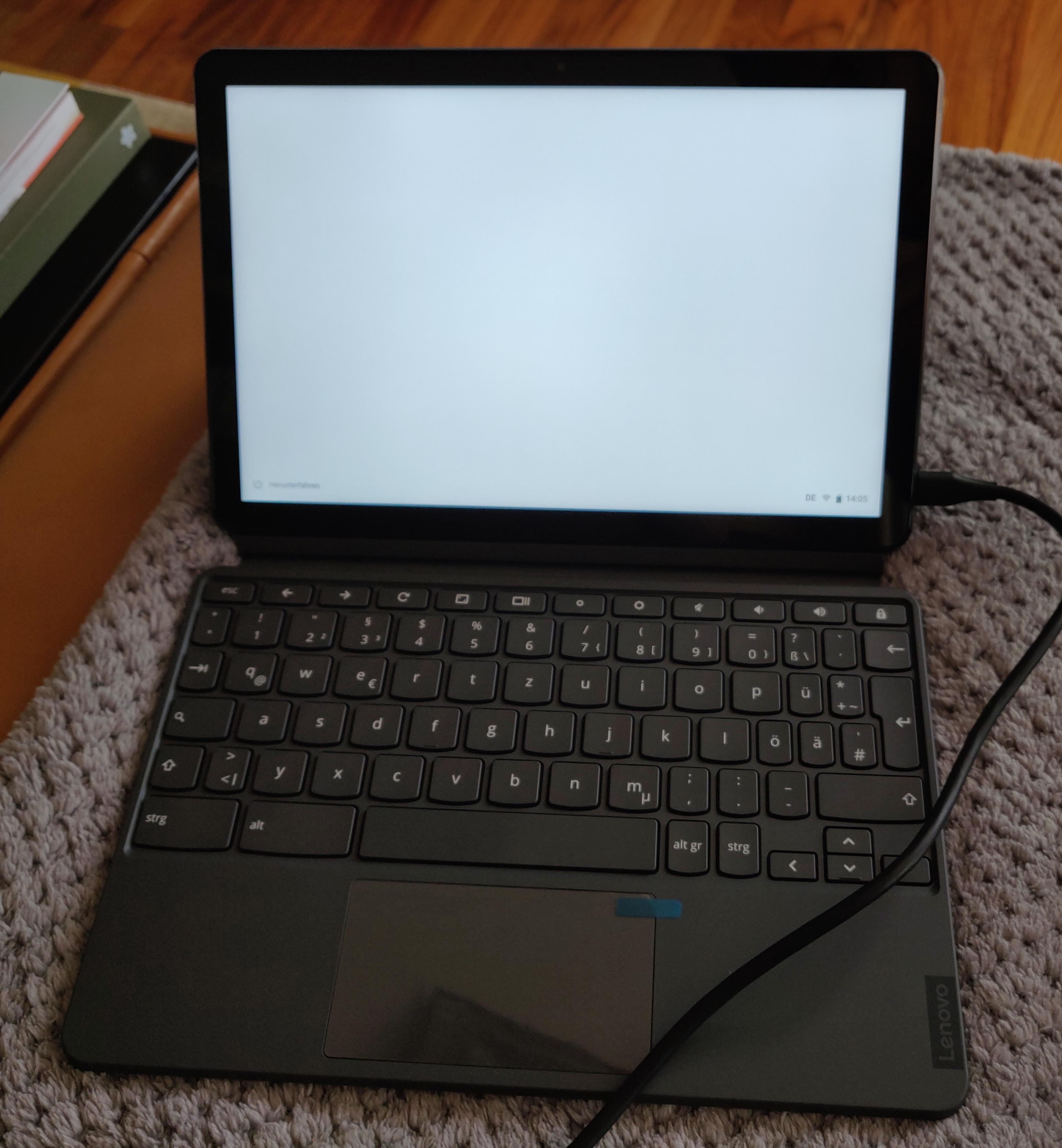
Sporting a beautiful 10.1 1920x1200 display, the Lenovo IdeaPad Duet Chromebook or Duet Chromebook, is one of the latest Chromebooks released, and one of the few slate-style tablets, and it s only about 300 EUR (300 USD). I ve had one for about 2 weeks now, and here are my thoughts.

Build & Accessories The tablet is a fairly Pixel-style affair, in that the back has two components, one softer blue one housing the camera and a metal feeling gray one. Build quality is fairly good. The volume and power buttons are located on the right side of the tablet, and this is one of the main issues: You end up accidentally pressing the power button when you want to turn your volume lower, despite the power button having a different texture. Alongside the tablet, you also find a kickstand with a textile back, and a keyboard, both of which attach via magnets (and pogo pins for the keyboard). The keyboard is crammed, with punctuation keys being halfed in size, and it feels mushed compared to my usual experiences of ThinkPads and Model Ms, but it s on par with other Chromebooks, which is surprising, given it s a tablet attachment.
fully assembled chromebook duet fully assembled chromebook duet
I mostly use the Duet as a tablet, and only attach the keyboard occasionally. Typing with the keyboard on your lap is suboptimal. My first Duet had a few bunches of dead pixels, so I returned it, as I had a second one I could not cancel ordered as well. Oh dear. That one was fine!

Hardware & Connectivity The Chromebook Duet is powered by a Mediatek Helio P60T SoC, 4GB of RAM, and a choice of 64 or 128 GB of main storage. The tablet provides one USB-C port for charging, audio output (a 3.5mm adapter is provided in the box), USB hub, and video output; though, sadly, the latter is restricted to a maximum of 1080p30, or 1440x900 at 60 Hz. It can be charged using the included 10W charger, or use up to I believe 18W from a higher powered USB-C PD charger. I ve successfully used the Chromebook with a USB-C monitor with attached keyboard, mouse, and DAC without any issues. On the wireless side, the tablet provides 2x2 Wifi AC and Bluetooth 4.2. WiFi reception seemed just fine, though I have not done any speed testing, missing a sensible connection at the moment. I used Bluetooth to connect to my smartphone for instant tethering, and my Sony WH1000XM2 headphones, both of which worked without any issues. The screen is a bright 400 nit display with excellent viewing angles, and the speakers do a decent job, meaning you can use easily use this for watching a movie when you re alone in a room and idling around. It has a resolution of 1920x1200. The device supports styluses following the USI standard. As of right now, the only such stylus I know about is an HP one, and it costs about 70 or so. Cameras are provided on the front and the rear, but produce terrible images.

Software: The tablet experience The Chromebook Duet runs Chrome OS, and comes with access to Android apps using the play store (and sideloading in dev mode) and access to full Linux environments powered by LXD inside VMs. The screen which has 1920x1200 is scaled to a ridiculous 1080x675 by default which is good for being able to tap buttons and stuff, but provides next to no content. Scaling it to 1350x844 makes things more balanced. The Linux integration is buggy. Touches register in different places than where they happened, and the screen is cut off in full screen extremetuxracer, making it hard to recommend for such uses. Android apps generally work fine. There are some issues with the back gesture not registering, but otherwise I have not found issues I can remember. One major drawback as a portable media consumption device is that Android apps only work in Widevine level 3, and hence do not have access to HD content, and the web apps of Netflix and co do not support downloading. Though one of the Duets actually said L1 in check apps at some point (reported in issue 1090330). It s also worth noting that Amazon Prime Video only renders in HD, unless you change your user agent to say you are Chrome on Windows - bad Amazon! The tablet experience also lags in some other ways, as the palm rejection is overly extreme, causing it to reject valid clicks close to the edge of the display (reported in issue 1090326). The on screen keyboard is terrible. It only does one language at a time, forcing me to switch between German and English all the time, and does not behave as you d expect it when editing existing words - it does not know about them and thinks you are starting a new one. It does provide a small keyboard that you can move around, as well as a draw your letters keyboard, which could come in handy for stylus users, I guess. In any case, it s miles away from gboard on Android. Stability is a mixed bag right now. As of Chrome OS 83, sites (well only Disney+ so far ) sometimes get killed with SIGILL or SIGTRAP, and the device rebooted on its own once or twice. Android apps that use the DRM sometimes do not start, and the Netflix Android app sometimes reports it cannot connect to the servers.

Performance Performance is decent to sluggish, with micro stuttering in a lot of places. The Mediatek CPU is comparable to Intel Atoms, and with only 4GB of RAM, and an entire Android container running, it s starting to show how weak it is. I found that Google Docs worked perfectly fine, as did websites such as Mastodon, Twitter, Facebook. Where the device really struggled was Reddit, where closing or opening a post, or getting a reply box could take 5 seconds or more. If you are looking for a Reddit browsing device, this is not for you. Performance in Netflix was fine, and Disney+ was fairly slow but still usable. All in all, it s acceptable, and given the price point and the build quality, probably the compromise you d expect.

Summary tl;dr:
  • good: Build quality, bright screen, low price, included accessories
  • bad: DRM issues, performance, limited USB-C video output, charging speed, on-screen keyboard, software bugs
The Chromebook Duet or IdeaPad Duet Chromebook is a decent tablet that is built well above its price point. It s lackluster performance and DRM woes make it hard to give a general recommendation, though. It s not a good laptop. I can see this as the perfect note taking device for students, and as a cheap tablet for couch surfing, or as your on-the-go laptop replacement, if you need it only occasionally. I cannot see anyone using this as their main laptop, although I guess some people only have phones these days, so: what do I know? I can see you getting this device if you want to tinker with Linux on ARM, as Chromebooks are quite nice to tinker with, and a tablet is super nice.

5 June 2020

Sean Whitton: spacecadetrebindings

I ve been less good at taking adequate typing breaks during the lockdown and I ve become concerned about how much chording my left hand does on its own during typical Emacs usage, with caps lock rebound to control, as I ve had it for years. I thought that now was as good a time as any to do something drastic about this. Here are my rebindings: Optional extras: This has the following advantages: The main disadvantage, aside from an adjustment period when I feel that someone has inserted a massive marshmellow between me and my computer, is that Ctrl-Alt combinations are a bit difficult; in Emacs, C-M-SPC is hard to do without. However I think I ve found a decent way to do it (thumb on control, curled ring finger on alt, possibly little finger on shift for Emacs infamous C-M-S-v standard binding).

4 June 2020

Antoine Beaupr : Replacing Smokeping with Prometheus

I've been struggling with replacing parts of my old sysadmin monitoring toolkit (previously built with Nagios, Munin and Smokeping) with more modern tools (specifically Prometheus, its "exporters" and Grafana) for a while now. Replacing Munin with Prometheus and Grafana is fairly straightforward: the network architecture ("server pulls metrics from all nodes") is similar and there are lots of exporters. They are a little harder to write than Munin modules, but that makes them more flexible and efficient, which was a huge problem in Munin. I wrote a Migrating from Munin guide that summarizes those differences. Replacing Nagios is much harder, and I still haven't quite figured out if it's worth it.

How does Smokeping work Leaving those two aside for now, I'm left with Smokeping, which I used in my previous job to diagnose routing issues, using Smokeping as a decentralized looking glass, which was handy to debug long term issues. Smokeping is a strange animal: it's fundamentally similar to Munin, except it's harder to write plugins for it, so most people just use it for Ping, something for which it excels at. Its trick is this: instead of doing a single ping and returning this metrics, it does multiple ones and returns multiple metrics. Specifically, smokeping will send multiple ICMP packets (20 by default), with a low interval (500ms by default) and a single retry. It also pings multiple hosts at once which means it can quickly scan multiple hosts simultaneously. You therefore see network conditions affecting one host reflected in further hosts down (or up) the chain. The multiple metrics also mean you can draw graphs with "error bars" which Smokeping shows as "smoke" (hence the name). You also get per-metric packet loss. Basically, smokeping runs this command and collects the output in a RRD database:
fping -c $count -q -b $backoff -r $retry -4 -b $packetsize -t $timeout -i $mininterval -p $hostinterval $host [ $host ...]
... where those parameters are, by default:
  • $count is 20 (packets)
  • $backoff is 1 (avoid exponential backoff)
  • $timeout is 1.5s
  • $mininterval is 0.01s (minimum wait interval between any target)
  • $hostinterval is 1.5s (minimum wait between probes on a single target)
It can also override stuff like the source address and TOS fields. This probe will complete between 30 and 60 seconds, if my math is right (0% and 100% packet loss).

How do draw Smokeping graphs in Grafana A naive implementation of Smokeping in Prometheus/Grafana would be to use the blackbox exporter and create a dashboard displaying those metrics. I've done this at home, and then I realized that I was missing something. Here's what I did.
  1. install the blackbox exporter:
    apt install prometheus-blackbox-exporter
    
  2. make sure to allow capabilities so it can ping:
    dpkg-reconfigure prometheus-blackbox-exporter
    
  3. hook monitoring targets into prometheus.yml (the default blackbox exporter configuration is fine):
    scrape_configs:
      - job_name: blackbox
          metrics_path: /probe
          params:
            module: [icmp]
          scrape_interval: 5s
          static_configs:
            - targets:
              - octavia.anarc.at
              # hardcoded in DNS
              - nexthop.anarc.at
              - koumbit.net
              - dns.google
          relabel_configs:
            - source_labels: [__address__]
              target_label: __param_target
            - source_labels: [__param_target]
              target_label: instance
            - target_label: __address__
              replacement: 127.0.0.1:9115  # The blackbox exporter's real hostname:port.
    
    Notice how we lower the scrape_interval to 5 seconds to get more samples. nexthop.anarc.at was added into DNS to avoid hardcoding my upstream ISP's IP in my configuration.
  4. use this Grafana panel to graph the results. It was created with this query:
    sum(probe_icmp_duration_seconds phase="rtt" ) by (instance)
    
    • Set the Legend field to instance RTT
    • Set Draw modes to lines and Mode options to staircase
    • Set the Left Y axis Unit to duration(s)
    • Show the Legend As table, with Min, Avg, Max and Current enabled
    Then this query, for packet loss:
    1-avg_over_time(probe_success[$__interval])!=0 or null
    
    • Set the Legend field to instance packet loss
    • Set a Add series override to Lines: false, Null point mode: null, Points: true, Points Radius: 1, Color: deep red, and, most importantly, Y-axis: 2
    • Set the Right Y axis Unit to percent (0.0-1.0) and set Y-max to 1
    Then set the entire thing to Repeat, on target, vertically. And you need to add a target variable like label_values(probe_success, instance).
The result looks something like this:
A plot of RTT and packet loss over time of three nodes Not bad, but not Smokeping
This actually looks pretty good! The resulting dashboard is available in the Grafana dashboard repository.

What is missing? Now, that doesn't exactly look like Smokeping, does it. It's pretty good, but it's not quite what we want. What is missing is variance, the "smoke" in Smokeping. There's a good article about replacing Smokeping with Grafana. They wrote a custom script to write samples into InfluxDB so unfortunately we can't use it in this case, since we don't have InfluxDB's query language. I couldn't quite figure out how to do the same in PromQL. I tried:
stddev(probe_icmp_duration_seconds phase="rtt",instance=~"$instance" )
stddev_over_time(probe_icmp_duration_seconds phase="rtt",instance=~"$instance" [$__interval])
stddev_over_time(probe_icmp_duration_seconds phase="rtt",instance=~"$instance" [1m])
The first two give zero for all samples. The latter works, but doesn't look as good as Smokeping. So there might be something I'm missing. SuperQ wrote a special exporter for this called smokeping_prober that came out of this discussion in the blackbox exporter. Instead of delegating scheduling and target definition to Prometheus, the targets are set in the exporter. They also take a different approach than Smokeping: instead of recording the individual variations, they delegate that to Prometheus, through the use of "buckets". Then they use a query like this:
histogram_quantile(0.9 rate(smokeping_response_duration_seconds_bucket[$__interval]))
This is the rationale to SuperQ's implementation:
Yes, I know about smokeping's bursts of pings. IMO, smokeping's data model is flawed that way. This is where I intentionally deviated from the smokeping exact way of doing things. This prober sends a smooth, regular series of packets in order to be measuring at regular controlled intervals. Instead of 20 packets, over 10 seconds, every minute. You send one packet per second and scrape every 15. This has the same overall effect, but the measurement is, IMO, more accurate, as it's a continuous stream. There's no 50 second gap of no metrics about the ICMP stream. Also, you don't get back one metric for those 20 packets, you get several. Min, Max, Avg, StdDev. With the histogram data, you can calculate much more than just that using the raw data. For example, IMO, avg and max are not all that useful for continuous stream monitoring. What I really want to know is the 90th percentile or 99th percentile. This smokeping prober is not intended to be a one-to-one replacement for exactly smokeping's real implementation. But simply provide similar functionality, using the power of Prometheus and PromQL to make it better. [...] one of the reason I prefer the histogram datatype, is you can use the heatmap panel type in Grafana, which is superior to the individual min/max/avg/stddev metrics that come from smokeping. Say you had two routes, one slow and one fast. And some pings are sent over one and not the other. Rather than see a wide min/max equaling a wide stddev, the heatmap would show a "line" for both routes.
That's an interesting point. I have also ended up adding a heatmap graph to my dashboard, independently. And it is true it shows those "lines" much better... So maybe that, if we ignore legacy, we're actually happy with what we get, even with the plain blackbox exporter. So yes, we're missing pretty "fuzz" lines around the main lines, but maybe that's alright. It would be possible to do the equivalent to the InfluxDB hack, with queries like:
min_over_time(probe_icmp_duration_seconds phase="rtt",instance=~"$instance" [30s])
avg_over_time(probe_icmp_duration_seconds phase="rtt",instance=~"$instance" [5m])
max_over_time(probe_icmp_duration_seconds phase="rtt",instance=~"$instance" [30s])
The output looks something like this:
A plot of RTT and packet loss over time of three nodes, with minimax Looks more like Smokeping!
But there's a problem there: see how the middle graph "dips" sometimes below 20ms? That's the min_over_time function (incorrectly, IMHO) returning zero. I haven't quite figured out how to fix that, and I'm not sure it is better. But it does look more like Smokeping than the previous graph. Update: I forgot to mention one big thing that this setup is missing. Smokeping has this nice feature that you can order and group probe targets in a "folder"-like hierarchy. It is often used to group probes by location, which makes it easier to scan a lot of targets. This is harder to do in this setup. It might be possible to setup location-specific "jobs" and select based on that, but it's not exactly the same.

Credits Credits to Chris Siebenmann for his article about Prometheus and pings which gave me the avg_over_time query idea.

3 June 2020

Andy Simpkins: Getting Co-ap tools working on Debian

At work we have a wonderful pyhon tool that we are able to send CoAP messages to and from our products. Perfect for development work. However recently I needed to install a copy of the tools onto my personal laptop because the only work laptops I have access to have completely dead batteries and so are not suitable for taking out into a field to perform RF range tests .

As a company we have chosen not to package internal development tools I think that this is a mistake, but this is not my decision. So I simply copied across the coap tools directory and tried to run them. Obviously nothing worked! However, the error messages were enough to work out what dependencies I needed to resolve. Error #1 Missing libasan.so.2 shared library
By a process of deduction we found that gcc5 contains libasan2, quite old.
Debian s snapshots was our saviour here:
wget http://snapshot.debian.org/archive/debian/20180412T100152Z/pool/main/g/gcc-5/libasan2_5.5.0-12_amd64.deb

wget http://snapshot.debian.org/archive/debian/20180412T100152Z/pool/main/g/gcc-5/gcc-5-base_5.5.0-12_amd64.deb

dpkg -i ./gcc-5-base_5.5.0-12_amd64.deb ./libasan2_5.5.0-12_amd64.deb

great that was enough to get the port bindings to work
Error #2 google.protobuf When I tried to issue coap requests I ran into missing python3 imports google.protobuf fortunately this is found packaged in Debian buster as party of python3-protobuf
apt-get install python3-protobuf
Done! everything works :-)

26 May 2020

Christian Kastner: Curved Monitor

It's been two weeks since I purchased my first curved monitor. Switching away from a flat panel proved to be a novel and unusual experience so much, in fact, that within the first five minutes, I already wanted to return it. Nevertheless, I gave it a try, and I'm glad I did, because not only did I eventually get over the initially perceived issues, I'm now extremely satisfied with it.
Shifted Perspective My sole motivation for the switch was that I had become irritated (to a probably irrational degree) by reading and writing text in whatever window tile was on the left side of my desktop. Even though my previous monitor wasn't a particularly large one with 24", the shift in perspective on the far side of that window always made me feel as if I were reading something to the side of me, rather than in front of me even if I turned to face it directly. It was time to try out a curved monitor.
Process Purchasing something like a monitor is always a pain; there's just so much choice. I would have preferred something with an IPS panel, 4K resolution, and either a 27" or 32" size, and would compromise for a VA panel and WQHD resolution. On geizhals.at, an Austrian price comparison site, ~50 monitors satisfied those criteria. Further limiting the list to reputable brands and reasonable prices still left me with more than two dozen options. Without going into the details why (I was just glad to be done with it), I eventually settled for an MSI Optix MAG271CQR, a 27" WQHD monitor with a VA panel. Once the new monitor arrived, I removed the old monitor from my VESA desk mount, installed the new one, booted, and gave it a try. Within the first five minutes of use, I made three key observations:
  1. My shifted perspective issue on the sides was solved (great!), and
  2. I had gained quite a bit of screen real estate (great!), but
  3. Because of the curvature, the bottom task bar now looked bent (Oh Noes).
Now, point (3) might not sound like that big of an issue, but when you're willing to change your monitor just because vim looks kind of weird to you when it's window is on the left side of the desktop, then a bent-looking task bar is a deal-breaker. I decided that I had to return it. However, that meant: removing it, re-boxing it, shipping it back, etc. Tedious work. As it was already mounted and connected, a friend encouraged me to give it a day or two anyway, just in case. That turned out to be great advice. I would never have expected this, but I got over the bent-looking task bar issue pretty fast. The pleasure of a corrected perspective on either side (everything just looks "right" now) more than makes up for the bent-looking tar bar at the bottom; I don't even notice it anymore. And the added screen real estate is a bonus I hadn't planned for. The MAG271CQR targets the gaming demographic, and thus comes loaded with various features. My new favorite is "Reader Mode", which has an effect quite similar to "Night Mode" on mobile devices (reduced brightness, blue light filter). My eyes barely tire anymore, even after a long day's use. It also has a Picture-in-Picture mode for a second input which I haven't tried yet, but should come in handy for SBCs and the like.

11 May 2020

Gunnar Wolf: Certified printer fumes

After losing a fair bit of hair due to quality and reliability issues with our home laser multifunctional (Brother DCP1600-series, which we bought after checking it was meant to work on Linux And it does, but with a very buggy, proprietary driver Besides being the printer itself of quite low quality), we decided it was time to survey the market again, and get a color inkjet printer. I was not very much an enthusiast of the idea, until I found all of the major manufacturers now offer refillable ink tanks instead of the darn expensive cartridges of past decades. Lets see how it goes! Of course, with over 20 years of training, I did my homework. I was about to buy an Epson printer, but decided for an HP Ink Tank 410 Wireless printer. The day it arrived, not wanting to fuss around too much to get to see the results, I connected it to my computer using the USB cable. Everything ran smoothly and happily! No driver hunting needed, print quality is superb I hope, years from now, we stay with this impression. Next day, I tried to print over WiFi. Of course, it requires configuration. And, of course, configuration strongly wants you to do it from a Windows or MacOS machine which I don t have. OK, fall back to Android For which an app download is required (and does not thrill me, but what can I say. Oh and the app needs location services to even run. Why Maybe because it interacts with the wireless network in WiFi Direct, non-authenticated way?) Anyway, things seem to work. But they don t My computers can identify and connect with the printer from CUPS, but nothing ever comes out. Printer paused, they say. Entering the printer s web interface is somewhat ambiguous Following the old HP practices, I tried http://192.168.1.75:9100/ (no point in hiding my internal IP), and got a partial webpage sometimes (and nothing at all othertimes). Seeing the printer got detected over ipps://, my immediate reaction was to try pointing the browser to port 631. Seems to work! Got some odd messages But it seems I ll soon debug the issue away. I am not a familiar meddler in the dark lands of cups, our faithful print server, but I had to remember my toolkit..
# cupsenable HP_Ink_Tank_Wireless_410_series_C37468_ --release
Sucess in enabling, but self-auto-disabled right away lpstat -t was not more generous, reporting only it was still paused. Some hours later (mix in attending kids and whatnot), I finally remember to try cupsctl --debug-logging, and magically, /var/log/cups/error_log turns from being quiet to being quite chatty. And, of course, my first print job starts being processed:
D [10/May/2020:23:07:20 -0500] Report: jobs-active=1
(...)
D [10/May/2020:23:07:25 -0500] [Job 174] Start rendering...
(...)
D [10/May/2020:23:07:25 -0500] [Job 174] STATE: -connecting-to-device
(...)
Everything looks fine and dandy so far! But, hey, given nothing came out of the printer keep reading one more second of logs (a couple dozen lines)
D [10/May/2020:23:07:26 -0500] [Job 174] Connection is encrypted.
D [10/May/2020:23:07:26 -0500] [Job 174] Credentials are expired (Credentials have expired.)
D [10/May/2020:23:07:26 -0500] [Job 174] Printer credentials: HPC37468 / Thu, 01 Jan 1970 00:00:00 GMT / 28A59EF511A480A34798B6712DEEAE74
D [10/May/2020:23:07:26 -0500] [Job 174] No stored credentials.
D [10/May/2020:23:07:26 -0500] [Job 174] update_reasons(attr=0(), s=\"-cups-pki-invalid,cups-pki-changed,cups-pki-expired,cups-pki-unknown\")
D [10/May/2020:23:07:26 -0500] [Job 174] STATE: -cups-pki-expired
(...)
D [10/May/2020:23:08:00 -0500] [Job 174] envp[16]="CUPS_ENCRYPTION=IfRequested"
(...)
D [10/May/2020:23:08:00 -0500] [Job 174] envp[27]="PRINTER_STATE_REASONS=cups-pki-expired"
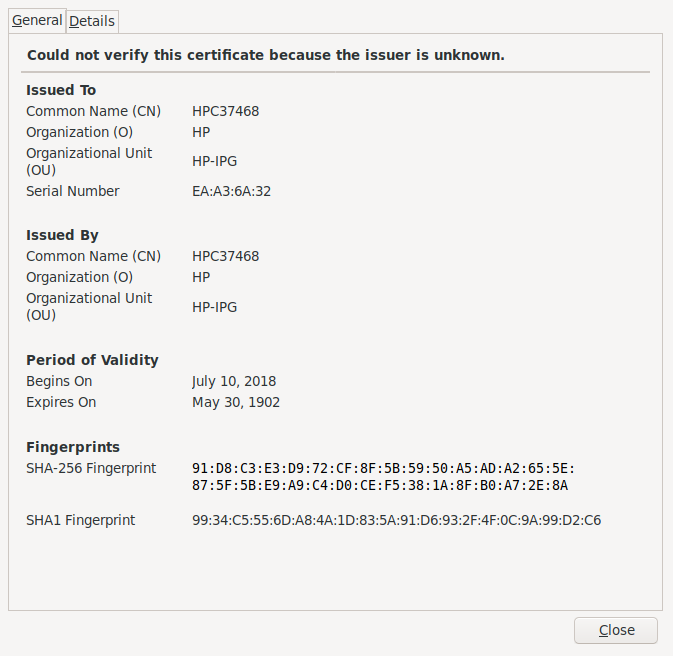
My first stabs were attempts to get CUPS not to care about expired certificates, but it seems to have been hidden or removed from its usual place. Anyway, I was already frustrated. WTF Well, yes, turns out that from the Web interface, I paid some attention to this the first time around, but let it pass (speaks wonders about my security practices!): Way, way, way too expired cert So, the self-signed certificate the printer issued at itself expired 116 years before even being issued. (is this maybe a Y2k38 bug? Sounds like it!) Interesting thing, my CUPS log mentions the printer credentials to expire at the beginning of the Unix Epoch (01 Jan 1970 00:00:00 GMT). OK, lets clickety-click away on the Web interface Didn t take me long to get to Network Advanced settings Certificates: Can manage certs! However, clicking on Configure leads me to the not very reassuring Way, way, way too expired cert I don t remember what I did for the next couple of minutes. Kept fuming Until I parsed again the output of lpstat -t, and found that:
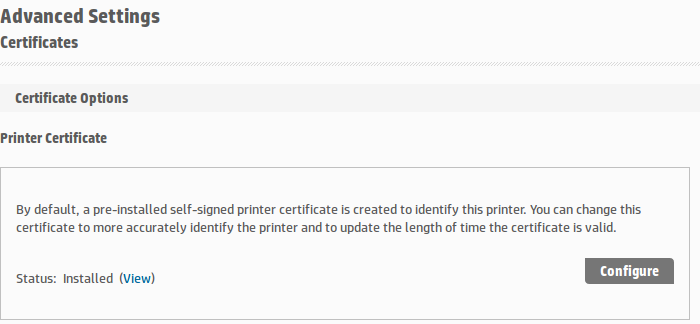
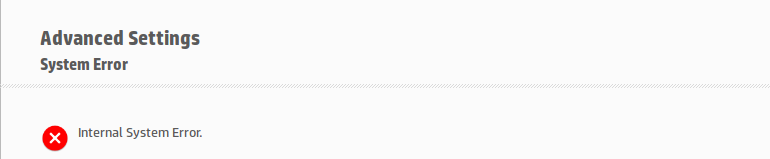
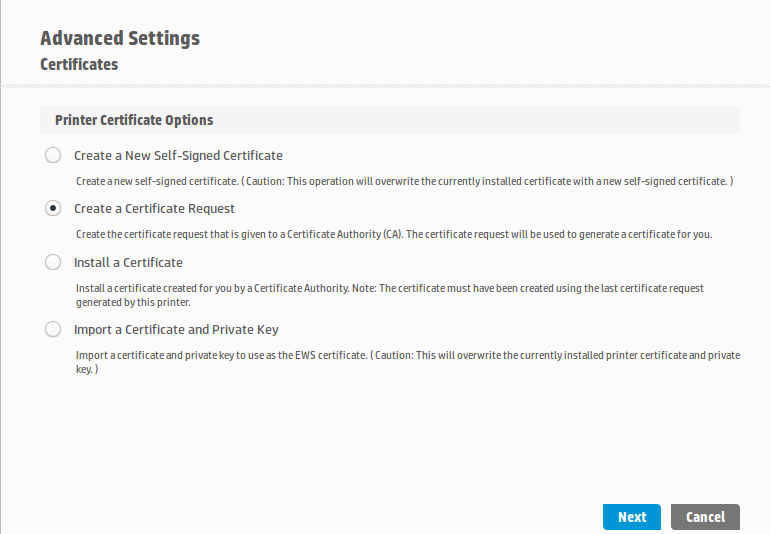
# lpstat -t
(...)
device for HP_Ink_Tank_Wireless_410_series_C37468_: ipps://HPF43909C37468.local:443/ipp/print
(...)
Hmmmm CUPS is connecting using good ol port 443, as if it were a Web thingy What if I do the same? Now we are talking! Click on New self-signed certificate , click on Next, a couple of reloads And a very nice color print came out of the printer, yay! Now, it still baffles me (of course I checked!): The self-signed certificate is now said to come from Issuer : CN=HPC37468, L=Vancouver, ST=Washington, C=US, O=HP,OU=HP-IPG, alright not that it matters (I can import a more meaningful one if I really feel like it), but, why is it Issued On: 2019-06-14 and set to Expires On: 2029-06-11? Anyway, print quality is quite nice. I hope to keep the printer long enough to rant at the certificate being expired in the future!

Comments Jeff Epler (Adafruit) 2020-05-11 20:39:17 -0500 why is it Issued On: 2019-06-14 and set to Expires On: 2029-06-11? Because it s 3650 days Gunnar Wolf 2020-05-11 20:39:17 -0500 Nice catch! Thanks for doing the head-scratching for me

8 May 2020

Petter Reinholdtsen: Jami as a Zoom client, a trick for password protected rooms...

Half a year ago, I wrote about the Jami communication client, capable of peer-to-peer encrypted communication. It handle both messages, audio and video. It uses distributed hash tables instead of central infrastructure to connect its users to each other, which in my book is a plus. I mentioned briefly that it could also work as a SIP client, which came in handy when the higher educational sector in Norway started to promote Zoom as its video conferencing solution. I am reluctant to use the official Zoom client software, due to their copyright license clauses prohibiting users to reverse engineer (for example to check the security) and benchmark it, and thus prefer to connect to Zoom meetings with free software clients. Jami worked OK as a SIP client to Zoom as long as there was no password set on the room. The Jami daemon leak memory like crazy (approximately 1 GiB a minute) when I am connected to the video conference, so I had to restart the client every 7-10 minutes, which is not a great. I tried to get other SIP Linux clients to work without success, so I decided I would have to live with this wart until someone managed to fix the leak in the dring code base. But another problem showed up once the rooms were password protected. I could not get my dial tone signaling through from Jami to Zoom, and dial tone signaling is used to enter the password when connecting to Zoom. I tried a lot of different permutations with my Jami and Asterisk setup to try to figure out why the signaling did not get through, only to finally discover that the fundamental problem seem to be that Zoom is simply not able to receive dial tone signaling when connecting via SIP. There seem to be nothing wrong with the Jami and Asterisk end, it is simply broken in the Zoom end. I got help from a very skilled VoIP engineer figuring out this last part. And being a very skilled engineer, he was also able to locate a solution for me. Or to be exact, a workaround that solve my initial problem of connecting to password protected Zoom rooms using Jami. So, how do you do this, I am sure you are wondering by now. The trick is already documented from Zoom, and it is to modify the SIP address to include the room password. What is most surprising about this is that the automatically generated email from Zoom with instructions on how to connect via SIP do not mention this. The SIP address to use normally consist of the room ID (a number), an @ character and the IP address of the Zoom SIP gateway. But Zoom understand a lot more than just the room ID in front of the at sign. The format is "[Meeting ID].[Password].[Layout].[Host Key]", and you can hear see how you can both enter password, control the layout (full screen, active presence and gallery) and specify the host key to start the meeting. The full SIP address entered into Jami to provide the password will then look like this (all using made up numbers):
sip:657837644.522827@192.168.169.170
Now if only jami would reduce its memory usage, I could even recommend this setup to others. :) As usual, if you use Bitcoin and want to show your support of my activities, please send Bitcoin donations to my address 15oWEoG9dUPovwmUL9KWAnYRtNJEkP1u1b.

21 April 2020

Gunnar Wolf: Fresh, daily built Debian images for your Raspberries (finally!)

So, after I took over or at least, said to take over maintainership of the Raspberry Pi build images originally produced by Michael Stapelberg in mid-2018, I pushed very few updates. Yes, there was some good and visible work, migrated the image-spec repository from GitHub to Salsa, ironed out several outstanding issues, and most important for me managed to get an image built and running for all Raspberry models below the Raspberry Pi 4 Today, I am happy to announce a very good step in the right direction, so I am now

Announcing raspi.debian.net! I have registered and set up an (unofficial!) site, raspi.debian.net, that should serve as a go-grab-it destination for regularly autobuilt images for the Raspberry Pi family. Of course, today you will get an early view of the site. I plan to fix the lack of https due to a mistake on my part WRT the processes at my hosting provider, do some testing in the hardware I have handy (and bless + gpg-sign some images as tested), migrate and update the information in the Debian Wiki, etc. Oh! And I hope to get good news on the Raspberry 4 front, as I know work is actively underway to achieve it.

8 April 2020

Louis-Philippe V ronneau: Using Jitsi Meet with Puppet for self-hosted video conferencing

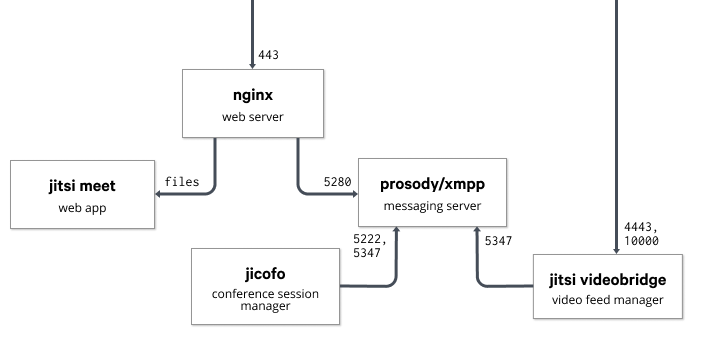
Here's a blog post I wrote for the puppet.com blog. Many thanks to Ben Ford and all their team!. With everything that is currently happening around the world, many of us IT folks have had to solve complex problems in a very short amount of time. Pretty quickly at work, I was tasked with finding a way to make virtual meetings easy, private and secure. Whereas many would have turned to a SaaS offering, we decided to use Jitsi Meet, a modern and fully on-premise FOSS videoconferencing solution. Jitsi works on all platforms by running in a browser and comes with nifty Android and iOS applications. We've been using our instance quite a bit, and so far everyone from technical to non-technical users have been pretty happy with it. Jitsi Meet is powered by WebRTC and can be broken into multiple parts across multiple machines if needed. In addition to the webserver running the Jitsi Meet JavaScript code, the base configuration uses the Videobridge to manage users' video feeds, Jicofo as a conference focus to manage media sessions and the Prosody XMPP server to tie it all together. Here's a network diagram I took from their documentation to show how those applications interact: A network diagram that shows how the different bits of jitsi meet work together Getting started with the Jitsi Puppet module First of all, you'll need a valid domain name and a server with decent bandwidth. Jitsi has published a performance evaluation of the Videobridge to help you spec your instance appropriately. You will also need to open TCP ports 443, 4443 and UDP port 10000 in your firewall. The puppetlabs/firewall module could come in handy here. Once that is done, you can use the smash/jitsimeet Puppet module on a Debian 10 (Buster) server to spin up an instance. A basic configuration would look like this:

  class   'jitsimeet':
    fqdn                 => 'jitsi.example.com',
    repo_key             => puppet:///files/apt/jitsimeet.gpg,
    manage_certs         => true,
    jitsi_vhost_ssl_key  => '/etc/letsencrypt/live/jitsi.example.com/privkey.pem'
    jitsi_vhost_ssl_cert => '/etc/letsencrypt/live/jitsi.example.com/cert.pem'
    auth_vhost_ssl_key   => '/etc/letsencrypt/live/auth.jitsi.example.com/privkey.pem'
    auth_vhost_ssl_cert  => '/etc/letsencrypt/live/auth.jitsi.example.com/cert.pem'
    jvb_secret           => 'mysupersecretstring',
    focus_secret         => 'anothersupersecretstring',
    focus_user_password  => 'yetanothersecret',
    meet_custom_options  =>  
      'enableWelcomePage'         => true,
      'disableThirdPartyRequests' => true,
     ;
   
The jitsimeet module is still pretty young: it clearly isn't perfect and some external help would be very appreciated. If you have some time, here are a few things that would be nice to work on: If you use this module to manage your Jitsi Meet instance, please send patches and bug reports our way! Learn more

30 March 2020

Axel Beckert: How do you type on a keyboard with only 46 or even 28 keys?

Some of you might have noticed that I m into keyboards since a few years ago into mechanical keyboards to be precise. Preface It basically started with the Swiss Mechanical Keyboard Meetup (whose website I started later on) was held in the hackerspace of the CCCZH. I mostly used TKL keyboards (i.e. keyboards with just the for me useless number block missing) and tried to get my hands on more keyboards with Trackpoints (but failed so far). At some point a year or two ago, I looking into smaller keyboards for having a mechanical keyboard with me when travelling. I first bought a Vortex Core at Candykeys. The size was nice and especially having all layers labelled on the keys was helpful, but nevertheless I soon noticed that the smaller the keyboards get, the more important is, that they re properly programmable. The Vortex Core is programmable, but not the keys in the bottom right corner which are exactly the keys I wanted to change to get a cursor block down there. (Later I found out that there are possibilities to get this done, either with an alternative firmware and a hack of it or desoldering all switches and mounting an alternative PCB called Atom47.) 40% Keyboards So at some point I ordered a MiniVan keyboard from The Van Keyboards (MiniVan keyboards will soon be available again at The Key Dot Company), here shown with GMK Paperwork (also bought from and designed by The Van Keyboards):
The MiniVan PCBs are fully programmable with the free and open source firmware QMK and started to use that more and more instead of bigger keyboards. Layers With the MiniVan I learned the concepts of layers. Layers are similar to what many laptop keyboards do with the Fn key and to some extent also what the German standard layout does with the AltGr key: Layers are basically alternative key maps you can switch with a special key (often called Fn , Fn1 , Fn2 , etc., or especially if there are two additional layers Raise and Lower ). There are several concepts how these layers can be reached with these keys: My MiniVan Layout For the MiniVan, two additional layers suffice easily, but since I have a few characters on multiple layers and also have mouse control and media keys crammed in there, I have three additional layers on my MiniVan keyboards:

TRNS means transparent, i.e. use the settings from lower layers.
I also use a feature that allows me to mind different actions to a key depending if I just tap the key or if I hold it. Some also call this tap dance . This is especially very popular on the usually rather huge spacebar. There, the term SpaceFn has been coined, probably after this discussion on Geekhack. I use this for all my layer switching keys: With this layout I can type English texts as fast as I can type them on a standard or TKL layout. German umlauts are a bit more difficult because it requires 4 to 6 key presses per umlaut as I use the Compose key functionality (mapped to the Menu key between the spacebars and the cursor block. So to type an on my MiniVan, I have to:
  1. press and release Menu (i.e. Compose); then
  2. press and hold either Shift-Spacebar (i.e. Shift-Fn1) or Slash (i.e. Fn2), then
  3. press N for a double quote (i.e. Shift-Fn1-N or Fn2-N) and then release all keys, and finally
  4. press and release the base character for the umlaut, in this case Shift-A.
And now just use these concepts and reduce the amount of keys to 28: 30% and Sub-30% Keyboards In late 2019 I stumbled upon a nice little keyboard kit shop on Etsy which I (and probably most other people in the mechanical keyboard scene) didn t take into account for looking for keyboards called WorldspawnsKeebs. They offer mostly kits for keyboards of 40% size and below, most of them rather simple and not expensive. For about 30 you get a complete sub-30% keyboard kit (without switches and keycaps though, but that very common for keyboard kits as it leaves the choice of switches and key caps to you) named Alpha28 consisting of a minimal Acrylic case and a PCB and electronics set. This Alpha28 keyboard is btw. fully open source as the source code, (i.e. design files) for the hardware are published under a free license (MIT license) on GitHub. And here s how my Alpha28 looks like with GMK Mitolet (part of the GMK Pulse group-buy) key caps:
So we only have character keys, Enter (labelled Data as there was no 1u Enter key with that row profile in that key cap set; I ll also call it Data for the rest of this posting) and a small spacebar, not even modifier keys. The Default Alpha28 Layout The original key layout by the developer of the Alpha28 used the spacbar as Shift on hold and as space if just tapped, and the Data key switches always to the next layer, i.e. it switches the layer permanently on tap and not just on hold. This way that key rotates through all layers. In all other layers, V switches back to the default layer. I assume that the modifiers on the second layer are also on tap and apply to the next other normal key. This has the advantage that you don t have to bend your fingers for some key combos, but you have to remember on which layer you are at the moment. (IIRC QMK allows you to show that via LEDs or similar.) Kinda just like vi. My Alpha28 Layout But maybe because I m more an Emacs person, I dislike remembering states myself and don t bind bending my fingers. So I decided to develop my own layout using tap-or-hold and only doing layer switches by holding down keys:

A triangle means that the settings from lower layers are used, N/A means the key does nothing.
It might not be very obvious, but on the default layer, all keys in the bottom row and most keys on the row ends have tap-or-hold configurations. Basic ideasBottom row if holdOther rows if holdHow the keys are divided into layersUsing the Alpha28 This layout works surprisingly well for me. Only for Minus, Equal, Single Quote and Semicolon I still often have to think or try if they re on Layer 1 or 2 as on my 40%s (MiniVan, Zlant, etc.) I have them all on layer 1 (and in general one layer less over all). And for really seldom used keys like Insert, PrintScreen, ScrollLock or Pause, I might have to consult my own documentation. They re somewhere in the middle of the keyboard, either on layer 1, 2, or 3. ;-) And of course, typing umlauts takes even two keys more per umlaut as on the MiniVan since on the one hand Menu is not on the default layer and on the other hand, I don t have this nice shifted number row and actually have to also press Shift to get a double quote. So to type an on my Alpha, I have to:
  1. press and release Space-F (i.e. Fn1-F) for Menu (i.e. Compose); then
  2. press and hold A-Spacebar-L (i.e. Shift-Fn1-L) for getting a double quote, then
  3. press and release the base character for the umlaut, in this case L-A for Shift-A (because we can t use A for Shift as I can t hold a key and then press it again :-).
Conclusion If the characters on upper layers are not labelled like on the Vortex Core, i.e. especially on all self-made layouts, typing is a bit like playing that old children s game Memory: as soon as you remember (or your muscle memory knows) where some special characters are, typing gets faster. Otherwise, you start with trial and error or look the documentation. Or give up. ;-) Nevertheless, typing on a sub-30% keyboard like the Alpha28 is much more difficult and slower than on a 40% keyboard like the MiniVan. So the Alpha28 very likely won t become my daily driver while the MiniVan defacto is my already my daily driver. But I like these kind of challenges as others like the game Memory . So I ordered three more 30% and sub-30% keyboard kits and WorldspawnsKeebs for soldering on the upcoming weekend during the COVID19 lockdown: And if I at some point want to try to type with even fewer keys, I ll try a Butterstick keyboard with just 20 keys. It s a chorded keyboard where you have to press multiple keys at the same time to get one charcter: So to get an A from the missing middle row, you have to press Q and Z simultaneously, to get Escape, press Q and W simultaneously, to get Control, press Q, W, Z and X simultaneously, etc. And if that s not even enough, I already bought a keyboard kit named Ginny (or Ginni, the developer can t seem to decide) with just 10 keys from an acquaintance. Couldn t resist when offered his surplus kits. :-) It uses the ASETNIOP layout which was initially developed for on-screen keyboards on tablets.

8 March 2020

Ulrike Uhlig: Implementing feedback into our work culture

Everywhere I worked in the past, the only feedback that was asked of employees was during a yearly evaluation meeting. These meetings always felt to me like talking to Santa Claus and his Knecht Ruprecht. I was asked: Were you a good employee last year? If yes, we might give you a raise. If no, admit all your mistakes now, even if we already know everything, ho ho ho. And don't you talk about your feelings, or your well-being, or say anything about the organization's (invisible) hierarchies, otherwise we will put you on the "naughty list", and that's it with candy. The yearly evaluation set aside, there was no other place to give feedback (except by escalating a matter by involving the Labour Court, if you happen to work in France, or going on strike, also mostly part of French culture). Feedback allows to reflect on work processes, to situate oneself, and to get closure. How surprised was I when, some years ago, I received an email from a collaborator asking me: kindly for just few paragraphs (doesn t have to be anything long) to hear from you about the process, your work, challenges you had, or anything else you want to mention there.. Wow!
This simple email allowed me to reflect about: How do we get to a feedback culture? How do we get from German Christmas folklore, protestant work ethics, and the deeply rooted principles of disciplining and punishing to a feedback culture on eye level? It sounds a bit like going from the dark ages to a really cool science fiction utopia with universal peace, telepathy, and magic between all sentient beings on all inhabited planets in the cosmos at least that's how I imagined it as a child, just like some of my heroes did: the cosmonaut girl who saves Earth, the boy who talks to space flowers that give him the capacity to fly, and the little onion who fights for justice (the Italian author was so popular on our side of the iron curtain that a soviet astronomer named a minor planet after him. His wife meanwhile immortalized Karl Marx.) and some romantic part of me hangs on to these ideas. Feedback is not always easy to hear and to give. I-Statements Giving and receiving feedback is hard in a culture where people learnt that when they made a mistake they won't get candy. Or that they have to constantly please other people because they are not worthy by themselves. This can lead to people putting mistakes on one another. Every sentence that starts with You are has the potential of creating a lot of hurt, and anger. Have you heard of I-Statements? They have very powerfully changed my world view, as they shift from accusation to ownership of feelings. So instead of telling someone Your writing style is impossible! You really need to change the way you write., with an I-Statement one could say I have a hard time understanding that part of the text. I-Statements make cooperation possible. Listening actively Feedback is not about being right or wrong, it's first of all about being able to see how another person has experienced a situation. Active listening is a tool that helps with understanding. It might seem easy, but needs quite some practice and a safe space. One part of active listening is to restate what you hear the other person say (by mirroring, or paraphrasing), to make sure you understood, and make sure they know you understood what they were trying to say. You can practise this: in a circle of three people, have one person tell how they experienced a (possibly conflictual) situation, have one person do the active listening, and the third person observing in order to give feedback to the active listener about how they did. Then switch roles, for example clockwise, until everyone has had every role. Encouraging continuous feedback A working feedback culture does not take place only once a year. It needs to be a continuous process and therefore implemented in meetings, teams, eventually on the level of a project. Making clear: Who can I talk to if I experience an issue? is not different than telling developers and users where and how they can report a bug, or request a feature. A safe space to express feedback is key. Encouraging multiple feedback channels Some people might feel less empowered or more vulnerable over a channel than others. Make sure to have different channels for receiving feedback such as email, a point on each meeting agenda, a one-to-one meeting, or a poll. Giving and receiving feedback on eye level In a workplace that does not have a working feedback culture, feedback is easily perceived as policing. If your feedback process consists of asking people to upload a form to a cloud server every 3 months, and you notice that some people don't do it, you could ask yourself if there is an issue with how your colleagues perceive giving feedback in your organization. Do you meet your colleagues on eye level when it comes to feedback? Do you take feedback seriously and act on it? How do you deal with unpleasant feedback? How do you react when colleagues don't meet your expectations? Can people participate in the feedback process within their paid work time? Did everybody understand what the feedback process is about? Don't jump to conclusions Humans are problem solving animals. When someone comes to us with a problem, the first thing we want to do is to solve it, to help them. But sometimes this is uncalled for, it can be disempowering, or prevent people from acquiring competences themselves, and it can even break people's boundaries. So instead of asking What can I do for you?, try asking What do you need right now? People will often reply something that you did not expect at all. Acting on feedback Make sure you have a process to collect feedback (possibly anonymized) and to regularly evaluate if the organization needs to implement changes to thrive. Conclusion I stumbled upon Hans-Christian Dany's critique of feedback again recently, therefore I need to make it clear: I'm not interested in improving capitalist work culture by using cybernetic principles of self-regulation through feedback. Instead, I am interested in improving cooperation between people who work either individually or in organizations on eye level. In this framework, I see feedback processes as profoundly anti-capitalist methods to improve cooperation while working towards common good. Implementing these ideas should be doable: there are organizations who provide feedback training for example. This document, initially aiming at people in cooperatives, gives many insights on communication skills and feedback, the agile and UX worlds do feedback "retrospectives". and otherwise I'll have to go and write science fiction stories for children myself.

2 March 2020

Russell Coker: Amazon Prime and Netflix

I ve been trying both Amazon Prime and Netflix. I signed up for the month free of Amazon Prime to watch Good Omens and Picard . Good Omens is definitely worth the effort of setting up the month free of Amazon Prime and is worth the month s subscription if you have used your free month in the past and Picard is ok. Content Amazon Prime has a medium amount of other content, I m now paying for a month of Amazon Prime mainly because there s enough documentaries to take a month. For reference there are plenty of good ones about war and about space exploration. There are also some really rubbish documentaries, for example a 2 part documentary about the Magna Carta where the second part starts with Grover Norquist claiming that the Magna Carta is justification for not having any taxes (the first part seemed ok). Netflix has a lot of great content. A big problem with Netflix is that there aren t good ways of searching and organising the content you want to watch. It would be really nice if Netflix could use some machine learning for recommendations and recommend shows based on what I ve liked and also what I ve disliked. On both Netflix and Amazon when you view the details of a show it gives a short list of similar shows which is nice. With Amazon I have no complaints about that. But with Netflix the content library is so great that you get lost in a maze of links. On the Android tablet interface for Netflix it shows 12 similar shows in a grid and on the web interface it s a row of 20 shows with looped scrolling. Then as you click a different show you get another list of 12/20 shows which will usually have some overlap with the previous one. It would be nice if you could easily swipe left on shows you don t like to avoid having them repeatedly presented to you. On Netflix I ve really enjoyed the Altered Carbon series (which is significantly more violent than I anticipated), Black Mirror (the episode written by Trent Reznor and starring Miley Cyrus is particularly good), and Love Death and Robots . Overall I currently rate Love Death and Robots as in many ways the best series I ve ever watched because the episodes are all short and get straight to the point. One advantage of online video is that they don t need to pad episodes out or cut them short to fit a TV time slot, they can use as much time as necessary to tell the story. Watch List Having a single row of shows to watch is fine for the amount of content that Amazon has, but for the Netflix content you can easily get 100 shows on your watch list and it would be good to be able to search my watch list by genre (it s a drag to flick through dozens of icons of war documentaries when I m in the mood for an action movie as the icons are somewhat similar). As well as a list of shows you selected to watch Netflix has a list of shows that have been recently watched with no way to edit it which is separate from the list of shows selected to watch. So if you watch 5 minutes of a show and decide that it sucks then it stays on the list until you have partially watched 10 other shows recently. For my usage the recently watched list is the most important thing as I m watching some serial shows and wouldn t want to go through the 100 shows on my watch list to find them. If I ve decided that a movie sucked after watching a bit of it I don t want to be reminded of it by seeing the icon every time I use Netflix for the next month. Amazon has only a single watch next list for shows that you have watched recently and shows that you selected as worth watching. It allows editing the list which is nice, but then Amazon also often keeps shows on the list when you have finished watching them and removed them from the to watch setting. Amazon s watch list is also generally buggy, at one time it decided that a movie was no longer available in my region but didn t let me remove it from the list. Quality Apparently the Netflix web interface on Linux only allows 720p video while the Amazon web interface on all platforms is limited to 720p. In any case my Internet connection is probably only good enough for 1080p at most. I haven t noticed any quality differences between Netflix and Amazon Prime. Multiple Users Netflix allows you to create profiles for multiple users with separate watch lists which is very handy. They also don t have IP address restrictions so it s a common practice for people to share a Netflix account with relatives. If you try to use Netflix when the maximum number of sessions for your account is in use it will show a list of what the other people on your account are watching (so if you share with your parents be careful about that). Amazon doesn t allow creating multiple profiles, but the content isn t that great. The trend in video streaming is for proprietary content to force users to subscribe to a service. So sharing an Amazon Prime account with a few people so you want watch the proprietary content would make sense. Watching Patterns Sometimes when I m particularly distracted I can t focus on one show for any length of time. Both Amazon and Netflix (and probably all other online streaming services) allow me to skip between shows easily. That s always been a feature of YouTube, but with YouTube you get recommended increasingly viral content until you find yourself watching utter rubbish. At least with Amazon and Netflix there is a minimum quality level even if that is reality TV. Conclusion Amazon Prime has a smaller range of content and some really rubbish documentaries. I don t mind the documentaries about UFOs and other fringe stuff as it s obvious what it is and you can avoid it. A documentary that has me watching for an hour before it s revealed to be a promo for Grover Norquist is really bad, did the hour of it that I watched have good content or just rubbish too? Netflix has a huge range of content and the quality level is generally very high. If you are going to watch TV then subscribing to Netflix is probably a good idea. It s reasonably cheap, has a good (not great) interface, and has a lot of content including some great original content. For Amazon maybe subscribe for 1 month every second year to binge watch the Amazon proprietary content that interests you.

22 November 2017

Louis-Philippe V ronneau: DebConf Videoteam sprint report - day 3

Erf, I'm tired and it is late so this report will be short and won't include dank memes or funny cat pictures. Come back tomorrow for that. tumbleweed Stefano worked all day long on the metadata project and on YouTube uploads. I think the DebConf7 videos have just finished being uploaded, check them out! RattusRattus Apart from the wonderful lasagna he baked for us, Andy continued working on the scraping scheme, helping tumbleweed. nattie Nattie has been with us for a few days now, but today she did some great QA work on our metadata scraping of the video archive. ivodd More tests, more bugs! Ivo worked quite a bit on the Opsis board today and it seems everything is ready for the mini-conf. \0/ olasd Nicolas built the streaming network today and wrote some Ansible roles to manage TLS cert creation through Let's Encrypt. He also talked with DSA some more about our long term requirements. wouter I forgot to mention it yesterday because he could not come to Cambridge, but Wouter has been sprinting remotely, working on the reviewing system. Everything with regards to reviewing should be in place for the mini-conf. He also generated the intro and outro slides for the videos for us. KiBi and Julien KiBi and Julien arrived late in the evening, but were nonetheless of great assistance. Neither are technically part of the videoteam, but their respective experience with Debian-Installer and general DSA systems helped us a great deal. pollo I'm about 3/4 done documenting our ansible roles. Once I'm done, I'll try to polish some obvious hacks I've seen while documenting.

21 November 2017

Louis-Philippe V ronneau: DebConf Videoteam sprint report - day 2

Another day, another videoteam report! It feels like we did a lot of work today, so let's jump right in: tumbleweed Stefano worked most of the day on the DebConf video archive metadata project. A bunch of videos already have been uploaded to YouTube. Here's some gold you might want to watch. By the end of our sprint, we should have generated metadata for most of our archive and uploaded a bunch of videos to YouTube. Don't worry though, YouTube is only a mirror and we'll keep our current archive as a video master. RattusRattus Andy joined us today! He hacked away with Stefano for most of the day, working on the metadata format for our videos and making schemes for our scraping tools. ivodd Ivo built and tested a good part of our video setup today, fixing bugs left and right in Ansible. We are prepared for the Cambridge Mini-DebConf! olasd Nicolas finished his scripts to automatically spool up and down our streaming mirrors via the DigitalOcean API today and ran our Ansible config against those machines to test our setup. pollo For my part, I completed a huge chunk of my sprint goals: we now have a website documenting our setup! It is currently hosted on Alioth pages, but olasd plans to make a request to DSA to have it hosted on the static.debian.org machine. The final URL will most likely be something like: https://video.debconf.org The documentation is still missing the streaming section (our streaming setup is not final yet, so not point in documenting that) and a section hosting guides for the volunteers. With some luck I might write those later this week. I've now moved on documentation our various Ansible roles. Oh, and we also ate some cheese fondue: Our fondue dinner

12 October 2017

Joachim Breitner: Isabelle functions: Always total, sometimes undefined

Often, when I mention how things work in the interactive theorem prover [Isabelle/HOL] (in the following just Isabelle 1) to people with a strong background in functional programming (whether that means Haskell or Coq or something else), I cause confusion, especially around the issue of what is a function, are function total and what is the business with undefined. In this blog post, I want to explain some these issues, aimed at functional programmers or type theoreticians. Note that this is not meant to be a tutorial; I will not explain how to do these things, and will focus on what they mean.

HOL is a logic of total functions If I have a Isabelle function f :: a b between two types a and b (the function arrow in Isabelle is , not ), then by definition of what it means to be a function in HOL whenever I have a value x :: a, then the expression f x (i.e. f applied to x) is a value of type b. Therefore, and without exception, every Isabelle function is total. In particular, it cannot be that f x does not exist for some x :: a. This is a first difference from Haskell, which does have partial functions like
spin :: Maybe Integer -> Bool
spin (Just n) = spin (Just (n+1))
Here, neither the expression spin Nothing nor the expression spin (Just 42) produce a value of type Bool: The former raises an exception ( incomplete pattern match ), the latter does not terminate. Confusingly, though, both expressions have type Bool. Because every function is total, this confusion cannot arise in Isabelle: If an expression e has type t, then it is a value of type t. This trait is shared with other total systems, including Coq. Did you notice the emphasis I put on the word is here, and how I deliberately did not write evaluates to or returns ? This is because of another big source for confusion:

Isabelle functions do not compute We (i.e., functional programmers) stole the word function from mathematics and repurposed it2. But the word function , in the context of Isabelle, refers to the mathematical concept of a function, and it helps to keep that in mind. What is the difference?
  • A function a b in functional programming is an algorithm that, given a value of type a, calculates (returns, evaluates to) a value of type b.
  • A function a b in math (or Isabelle) associates with each value of type a a value of type b.
For example, the following is a perfectly valid function definition in math (and HOL), but could not be a function in the programming sense:
definition foo :: "(nat   real)   real" where
  "foo seq = (if convergent seq then lim seq else 0)"
This assigns a real number to every sequence, but it does not compute it in any useful sense. From this it follows that

Isabelle functions are specified, not defined Consider this function definition:
fun plus :: "nat   nat   nat"  where
   "plus 0       m = m"
   "plus (Suc n) m = Suc (plus n m)"
To a functional programmer, this reads
plus is a function that analyses its first argument. If that is 0, then it returns the second argument. Otherwise, it calls itself with the predecessor of the first argument and increases the result by one.
which is clearly a description of a computation. But to Isabelle, the above reads
plus is a binary function on natural numbers, and it satisfies the following two equations:
And in fact, it is not so much Isabelle that reads it this way, but rather the fun command, which is external to the Isabelle logic. The fun command analyses the given equations, constructs a non-recursive definition of plus under the hood, passes that to Isabelle and then proves that the given equations hold for plus. One interesting consequence of this is that different specifications can lead to the same functions. In fact, if we would define plus' by recursing on the second argument, we d obtain the the same function (i.e. plus = plus' is a theorem, and there would be no way of telling the two apart).

Termination is a property of specifications, not functions Because a function does not evaluate, it does not make sense to ask if it terminates. The question of termination arises before the function is defined: The fun command can only construct plus in a way that the equations hold if it passes a termination check very much like Fixpoint in Coq. But while the termination check of Fixpoint in Coq is a deep part of the basic logic, in Isabelle it is simply something that this particular command requires for its internal machinery to go through. At no point does a termination proof of the function exist as a theorem inside the logic. And other commands may have other means of defining a function that do not even require such a termination argument! For example, a function specification that is tail-recursive can be turned in to a function, even without a termination proof: The following definition describes a higher-order function that iterates its first argument f on the second argument x until it finds a fixpoint. It is completely polymorphic (the single quote in 'a indicates that this is a type variable):
partial_function (tailrec)
  fixpoint :: "('a   'a)   'a   'a"
where
  "fixpoint f x = (if f x = x then x else fixpoint f (f x))"
We can work with this definition just fine. For example, if we instantiate f with ( x. x-1), we can prove that it will always return 0:
lemma "fixpoint (  n . n - 1) (n::nat) = 0"
  by (induction n) (auto simp add: fixpoint.simps)
Similarly, if we have a function that works within the option monad (i.e. Maybe in Haskell), its specification can always be turned into a function without an explicit termination proof here one that calculates the Collatz sequence:
partial_function (option) collatz :: "nat   nat list option"
 where "collatz n =
        (if n = 1 then Some [n]
         else if even n
           then do   ns <- collatz (n div 2);    Some (n # ns)  
           else do   ns <- collatz (3 * n + 1);  Some (n # ns) )"
Note that lists in Isabelle are finite (like in Coq, unlike in Haskell), so this function returns a list only if the collatz sequence eventually reaches 1. I expect these definitions to make a Coq user very uneasy. How can fixpoint be a total function? What is fixpoint ( n. n+1)? What if we run collatz n for a n where the Collatz sequence does not reach 1?3 We will come back to that question after a little detour

HOL is a logic of non-empty types Another big difference between Isabelle and Coq is that in Isabelle, every type is inhabited. Just like the totality of functions, this is a very fundamental fact about what HOL defines to be a type. Isabelle gets away with that design because in Isabelle, we do not use types for propositions (like we do in Coq), so we do not need empty types to denote false propositions. This design has an important consequence: It allows the existence of a polymorphic expression that inhabits any type, namely
undefined :: 'a
The naming of this term alone has caused a great deal of confusion for Isabelle beginners, or in communication with users of different systems, so I implore you to not read too much into the name. In fact, you will have a better time if you think of it as arbitrary or, even better, unknown. Since undefined can be instantiated at any type, we can instantiate it for example at bool, and we can observe an important fact: undefined is not an extra value besides the usual ones . It is simply some value of that type, which is demonstrated in the following lemma:
lemma "undefined = True   undefined = False" by auto
In fact, if the type has only one value (such as the unit type), then we know the value of undefined for sure:
lemma "undefined = ()" by auto
It is very handy to be able to produce an expression of any type, as we will see as follows

Partial functions are just underspecified functions For example, it allows us to translate incomplete function specifications. Consider this definition, Isabelle s equivalent of Haskell s partial fromJust function:
fun fromSome :: "'a option   'a" where
  "fromSome (Some x) = x"
This definition is accepted by fun (albeit with a warning), and the generated function fromSome behaves exactly as specified: when applied to Some x, it is x. The term fromSome None is also a value of type 'a, we just do not know which one it is, as the specification does not address that. So fromSome None behaves just like undefined above, i.e. we can prove
lemma "fromSome None = False   fromSome None = True" by auto
Here is a small exercise for you: Can you come up with an explanation for the following lemma:
fun constOrId :: "bool   bool" where
  "constOrId True = True"
lemma "constOrId = ( _.True)   constOrId = ( x. x)"
  by (metis (full_types) constOrId.simps)
Overall, this behavior makes sense if we remember that function definitions in Isabelle are not really definitions, but rather specifications. And a partial function definition is simply a underspecification. The resulting function is simply any function hat fulfills the specification, and the two lemmas above underline that observation.

Nonterminating functions are also just underspecified Let us return to the puzzle posed by fixpoint above. Clearly, the function seen as a functional program is not total: When passed the argument ( n. n + 1) or ( b. b) it will loop forever trying to find a fixed point. But Isabelle functions are not functional programs, and the definitions are just specifications. What does the specification say about the case when f has no fixed-point? It states that the equation fixpoint f x = fixpoint f (f x) holds. And this equation has a solution, for example fixpoint f _ = undefined. Or more concretely: The specification of the fixpoint function states that fixpoint ( b. b) True = fixpoint ( b. b) False has to hold, but it does not specify which particular value (True or False) it should denote any is fine.

Not all function specifications are ok At this point you might wonder: Can I just specify any equations for a function f and get a function out of that? But rest assured: That is not the case. For example, no Isabelle command allows you define a function bogus :: () nat with the equation bogus () = Suc (bogus ()), because this equation does not have a solution. We can actually prove that such a function cannot exist:
lemma no_bogus: "  bogus. bogus () = Suc (bogus ())" by simp
(Of course, not_bogus () = not_bogus () is just fine )

You cannot reason about partiality in Isabelle We have seen that there are many ways to define functions that one might consider partial . Given a function, can we prove that it is not partial in that sense? Unfortunately, but unavoidably, no: Since undefined is not a separate, recognizable value, but rather simply an unknown one, there is no way of stating that A function result is not specified . Here is an example that demonstrates this: Two partial functions (one with not all cases specified, the other one with a self-referential specification) are indistinguishable from the total variant:
fun partial1 :: "bool   unit" where
  "partial1 True = ()"
partial_function (tailrec) partial2 :: "bool   unit" where
  "partial2 b = partial2 b"
fun total :: "bool   unit" where
  "total True = ()"
  "total False = ()"
lemma "partial1 = total   partial2 = total" by auto
If you really do want to reason about partiality of functional programs in Isabelle, you should consider implementing them not as plain HOL functions, but rather use HOLCF, where you can give equational specifications of functional programs and obtain continuous functions between domains. In that setting, () and partial2 = total. We have done that to verify some of HLint s equations.

You can still compute with Isabelle functions I hope by this point, I have not scared away anyone who wants to use Isabelle for functional programming, and in fact, you can use it for that. If the equations that you pass to fun are a reasonable definition for a function (in the programming sense), then these equations, used as rewriting rules, will allow you to compute that function quite like you would in Coq or Haskell. Moreover, Isabelle supports code extraction: You can take the equations of your Isabelle functions and have them expored into Ocaml, Haskell, Scala or Standard ML. See Concon for a conference management system with confidentially verified in Isabelle. While these usually are the equations you defined the function with, they don't have to: You can declare other proved equations to be used for code extraction, e.g. to refine your elegant definitions to performant ones. Like with code extraction from Coq to, say, Haskell, the adequacy of the translations rests on a moral reasoning foundation. Unlike extraction from Coq, where you have an (unformalized) guarantee that the resulting Haskell code is terminating, you do not get that guarantee from Isabelle. Conversely, this allows you do reason about and extract non-terminating programs, like fixpoint, which is not possible in Coq. There is currently ongoing work about verified code generation, where the code equations are reflected into a deep embedding of HOL in Isabelle that would allow explicit termination proofs.

Conclusion We have seen how in Isabelle, every function is total. Function declarations have equations, but these do not define the function in an computational sense, but rather specify them. Because in HOL, there are no empty types, many specifications that appear partial (incomplete patterns, non-terminating recursion) have solutions in the space of total functions. Partiality in the specification is no longer visible in the final product.

PS: Axiom undefined in Coq This section is speculative, and an invitation for discussion. Coq already distinguishes between types used in programs (Set) and types used in proofs Prop. Could Coq ensure that every t : Set is non-empty? I imagine this would require additional checks in the Inductive command, similar to the checks that the Isabelle command datatype has to perform4, and it would disallow Empty_set. If so, then it would be sound to add the following axiom
Axiom undefined : forall (a : Set), a.
wouldn't it? This axiom does not have any computational meaning, but that seems to be ok for optional Coq axioms, like classical reasoning or function extensionality. With this in place, how much of what I describe above about function definitions in Isabelle could now be done soundly in Coq. Certainly pattern matches would not have to be complete and could sport an implicit case _ undefined. Would it help with non-obviously terminating functions? Would it allow a Coq command Tailrecursive that accepts any tailrecursive function without a termination check?

  1. Isabelle is a metalogical framework, and other logics, e.g. Isabelle/ZF, behave differently. For the purpose of this blog post, I always mean Isabelle/HOL.
  2. Isabelle is a metalogical framework, and other logics, e.g. Isabelle/ZF, behave differently. For the purpose of this blog post, I always mean Isabelle/HOL.
  3. Let me know if you find such an n. Besides n = 0.
  4. Like fun, the constructions by datatype are not part of the logic, but create a type definition from more primitive notions that is isomorphic to the specified data type.

Next.

Previous.